
Practical AngularJS Deep dive into Angular JS fundamentals, design and architecture Wei Ru Vincent Lau
Vincent Lau Senior Architect Vincent.Lau@stagrp.com Wei Ru Senior Architect Wei.Ru@stagrp.com
Agenda ❏ Introduction ❏ Fundamentals ❏ Features ❏ Project Setups ❏ Demo App ❏ Q & A ❏ Hands-on Session
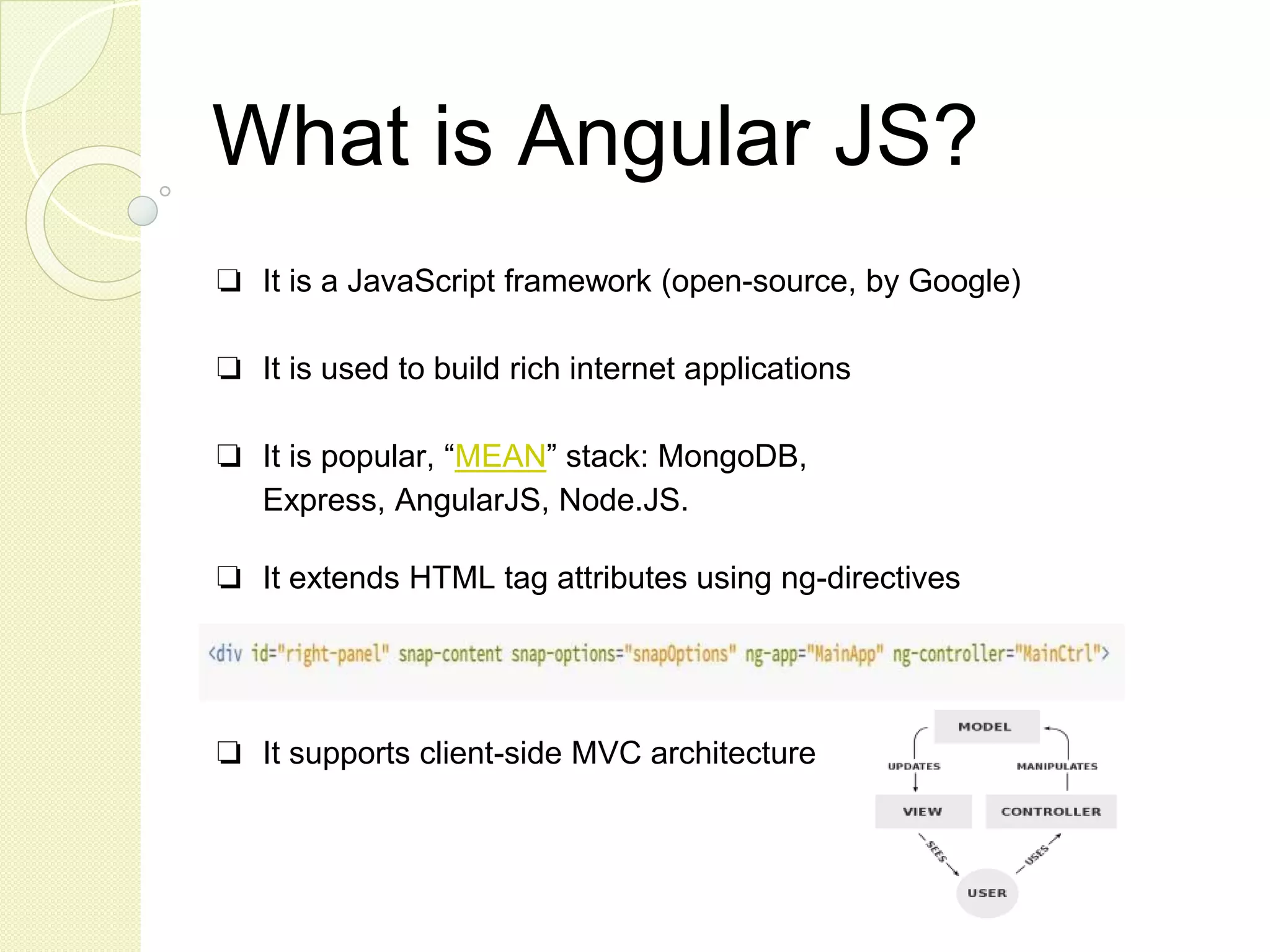
What is Angular JS? ❏ It is a JavaScript framework (open-source, by Google) ❏ It is used to build rich internet applications ❏ It is popular, “MEAN” stack: MongoDB, Express, AngularJS, Node.JS. ❏ It extends HTML tag attributes using ng-directives ❏ It supports client-side MVC architecture
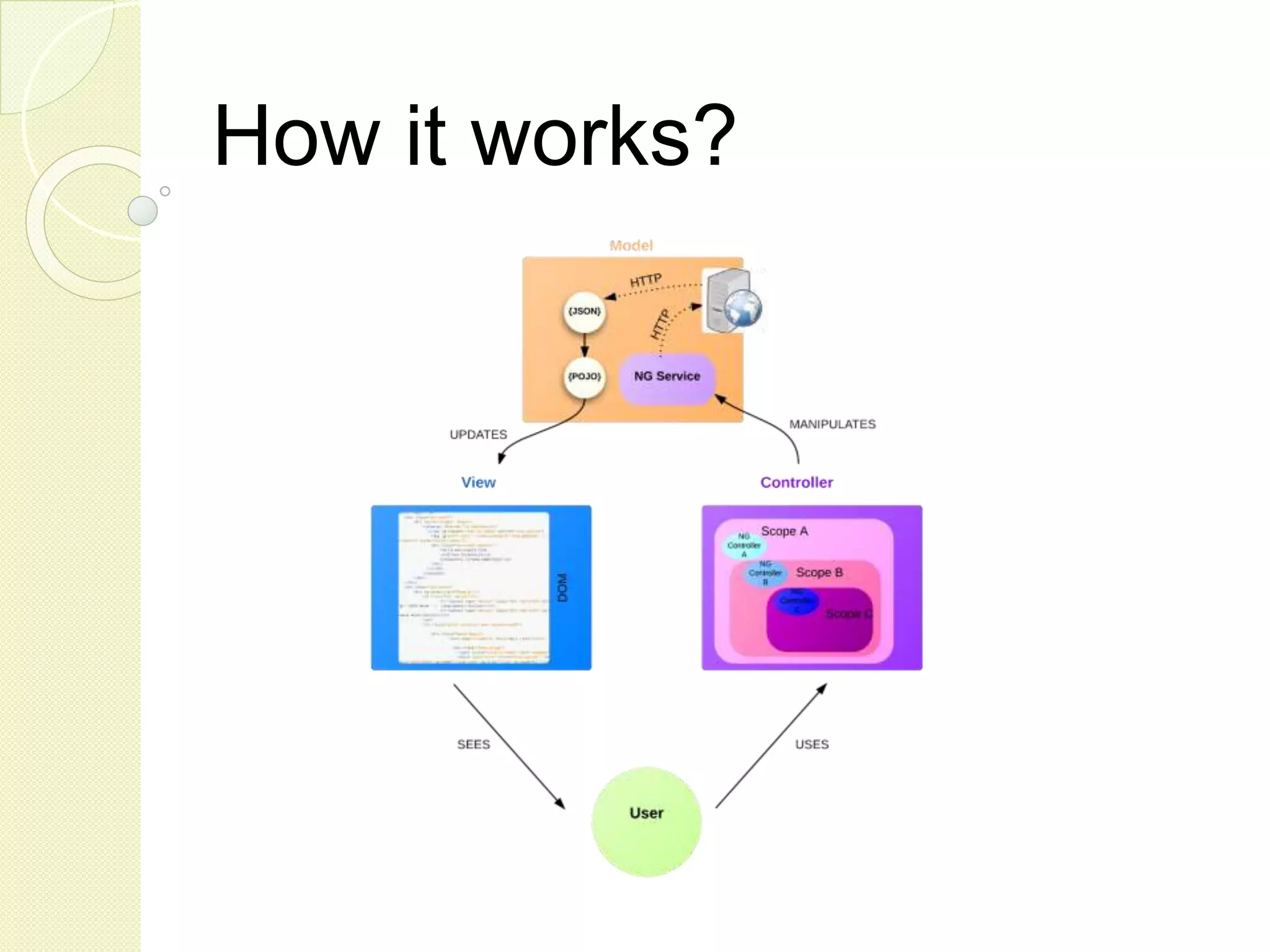
How it works?
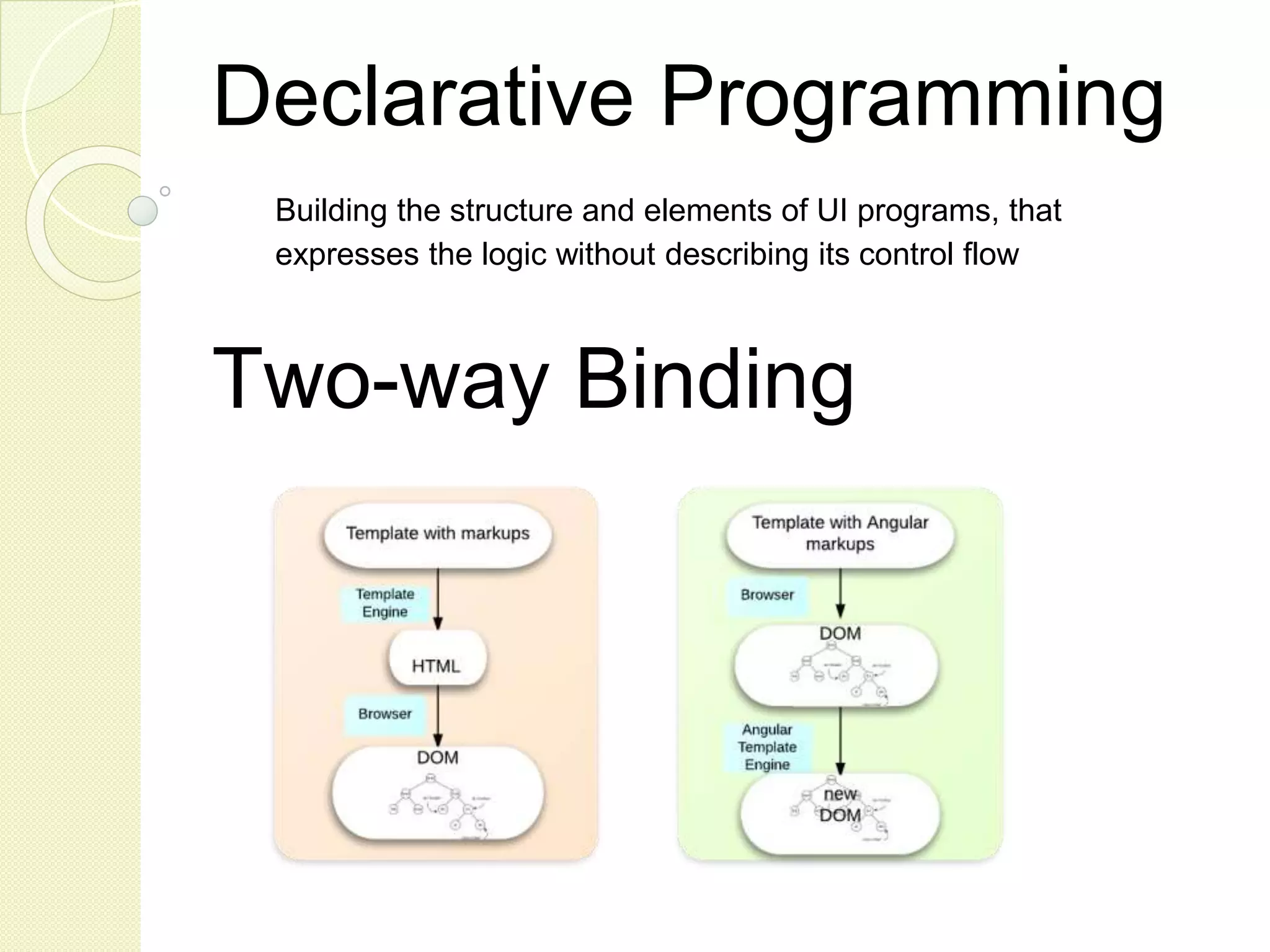
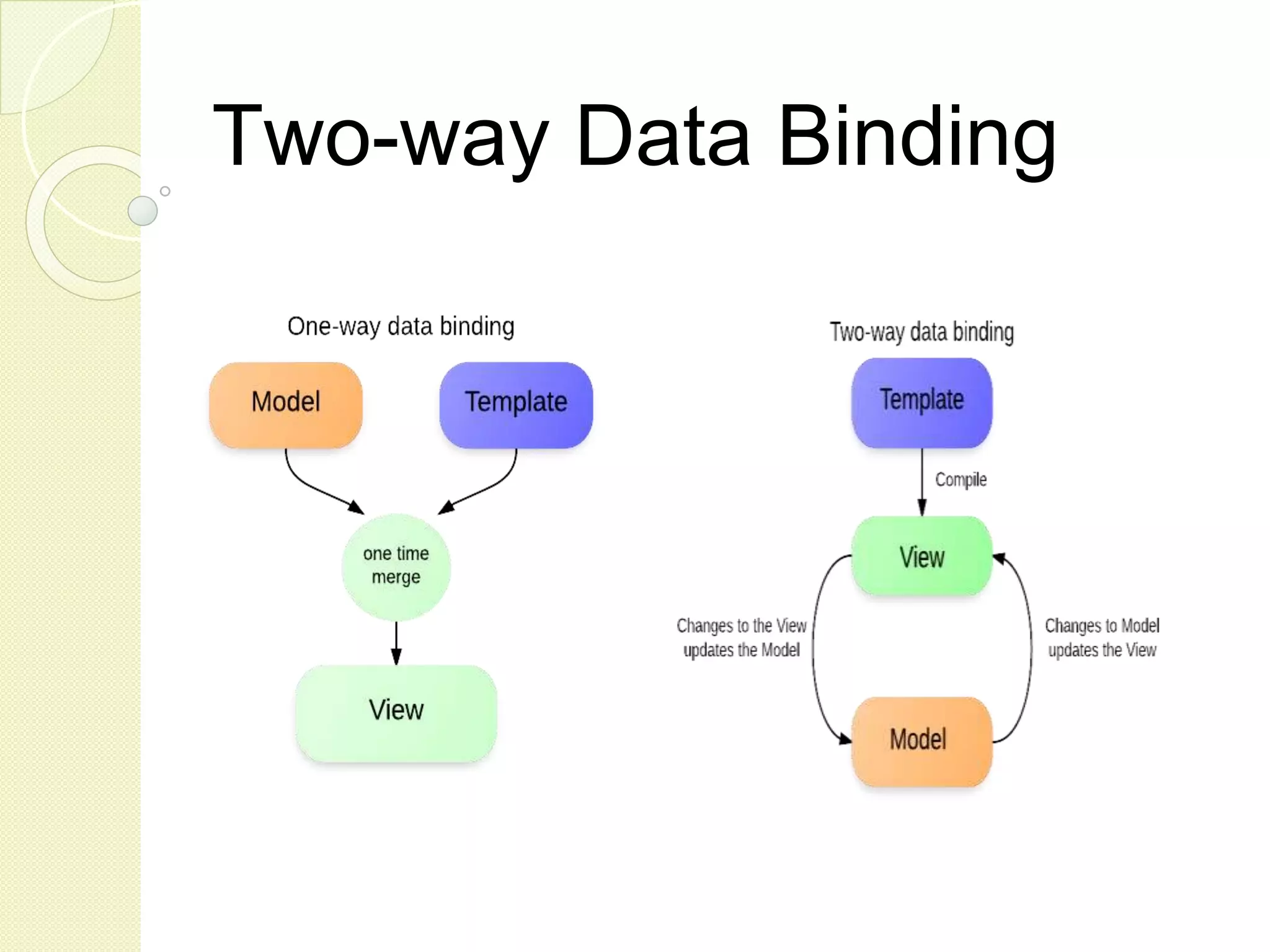
Declarative Programming Building the structure and elements of UI programs, that expresses the logic without describing its control flow Two-way Binding
Why AngularJS? ❏ Simple but powerful (declarative, 2-way binding) ❏ Rich and extensible (custom directives) ❏ POJO data model (no rich model, automatic rendering) ❏ Modularity & DI (logic contained, testability) ❏ Community Support
What is the SPA hype? “A single-page application (SPA), is a web application or web site that fits on a single web page with the goal of providing a more fluid user experience akin to a desktop application.” (http://en.wikipedia.org/wiki/Single-page_application) “Single page apps are distinguished by their ability to redraw any part of the UI without requiring a server roundtrip to retrieve HTML.” (http://singlepageappbook.com) “The main reason is that they allow us to offer a more-native-app- like experience to the user." (http://singlepageappbook.com)
What opponents say ❏ Code Lock-In (Angular way, Angular 2.x) ❏ Dogmatic Architecture (controller -> service, no rich domain) ❏ Steep learning curve (sometime “magic work”) ❏ Poor Testability (difficult to test HTML rendering)
What we think Powerful & Rich Flexibility & Extensibility Shorter Code Design similar to standard Java Web application (DI, Controller, Dao, TOs and modularity) Good development tool support Angular 2.x requires app rewrite
Two-way Data Binding
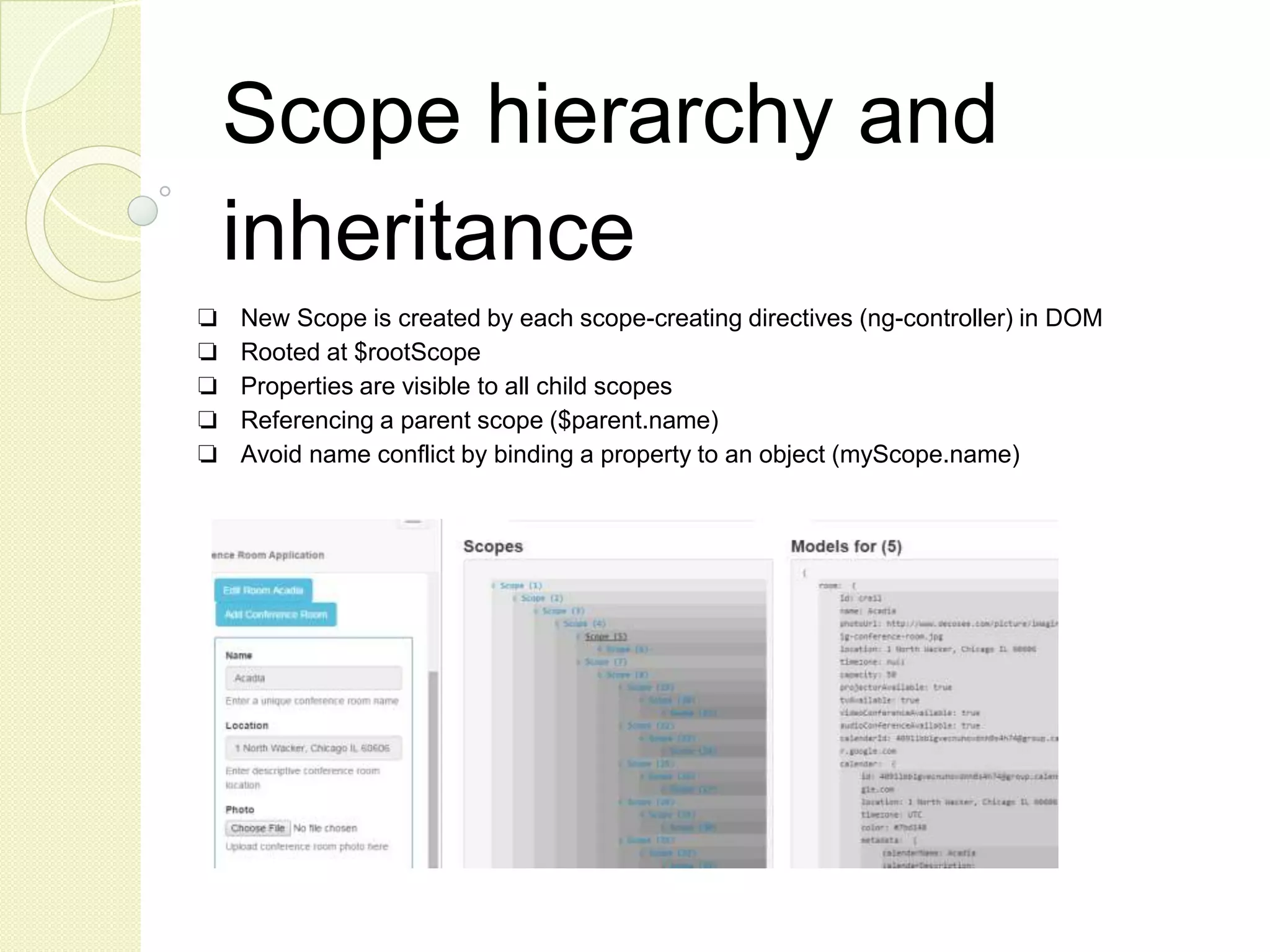
Scope hierarchy and inheritance ❏ New Scope is created by each scope-creating directives (ng-controller) in DOM ❏ Rooted at $rootScope ❏ Properties are visible to all child scopes ❏ Referencing a parent scope ($parent.name) ❏ Avoid name conflict by binding a property to an object (myScope.name)
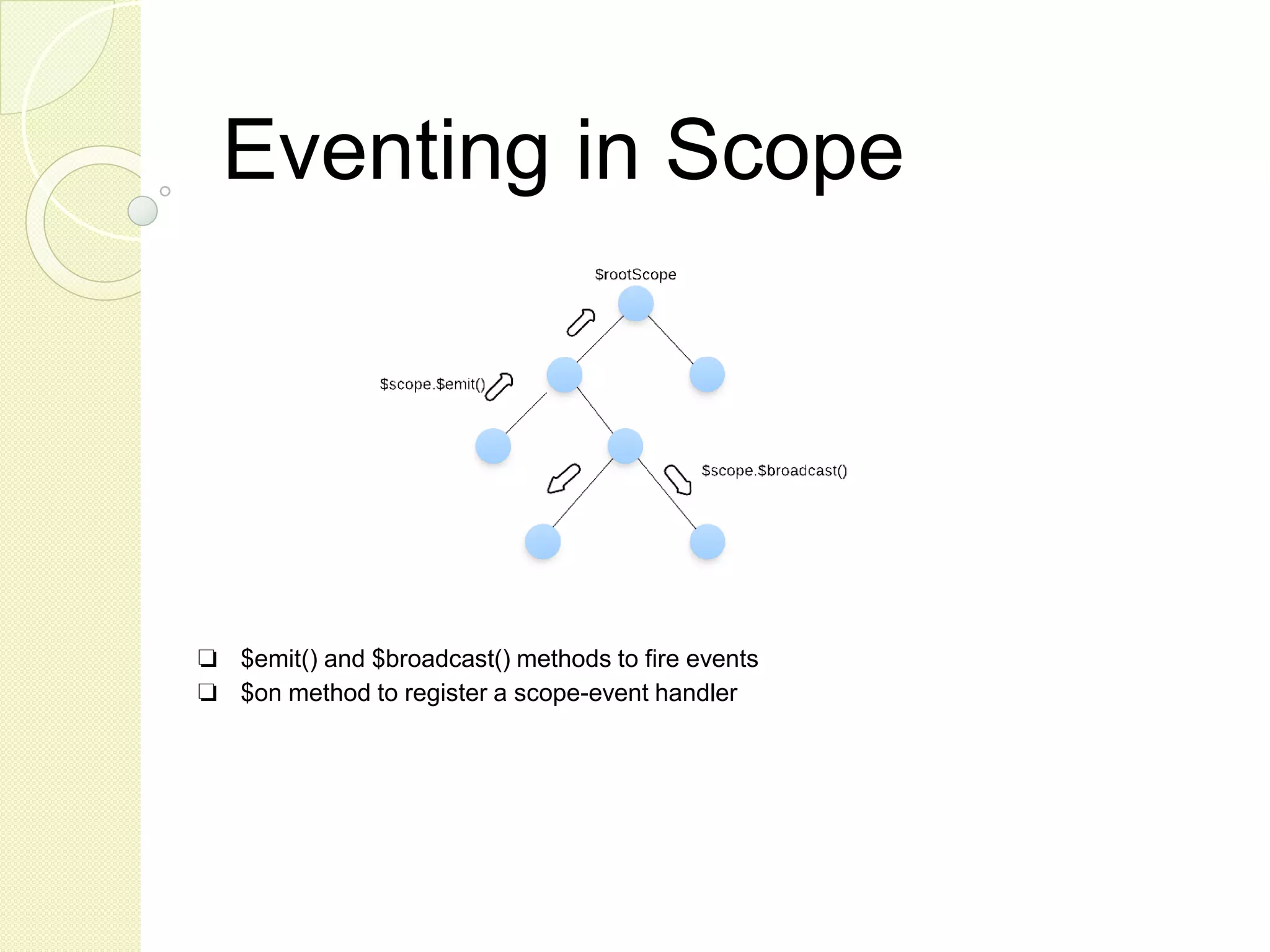
Eventing in Scope ❏ $emit() and $broadcast() methods to fire events ❏ $on method to register a scope-event handler
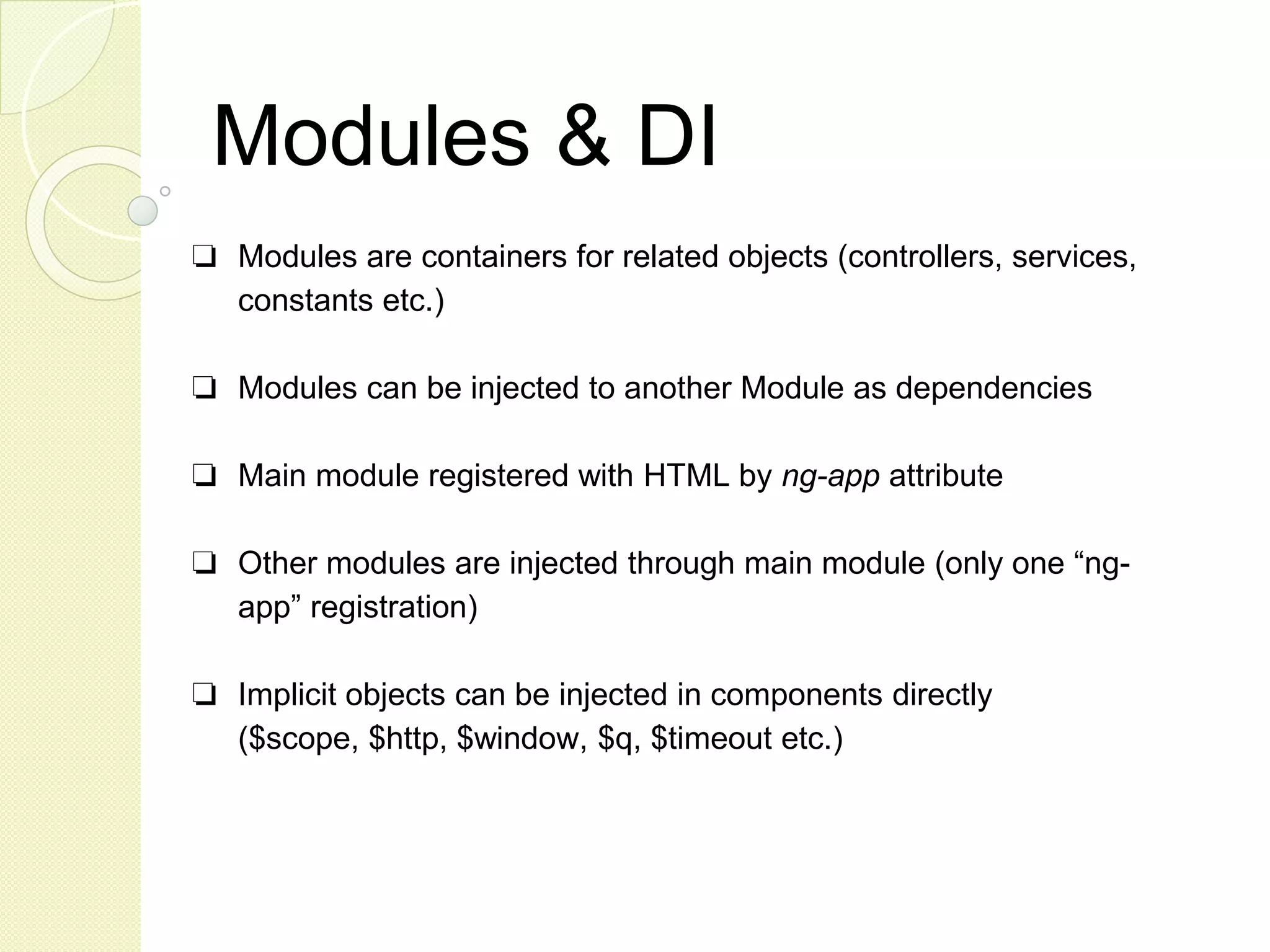
Modules & DI ❏ Modules are containers for related objects (controllers, services, constants etc.) ❏ Modules can be injected to another Module as dependencies ❏ Main module registered with HTML by ng-app attribute ❏ Other modules are injected through main module (only one “ng- app” registration) ❏ Implicit objects can be injected in components directly ($scope, $http, $window, $q, $timeout etc.)
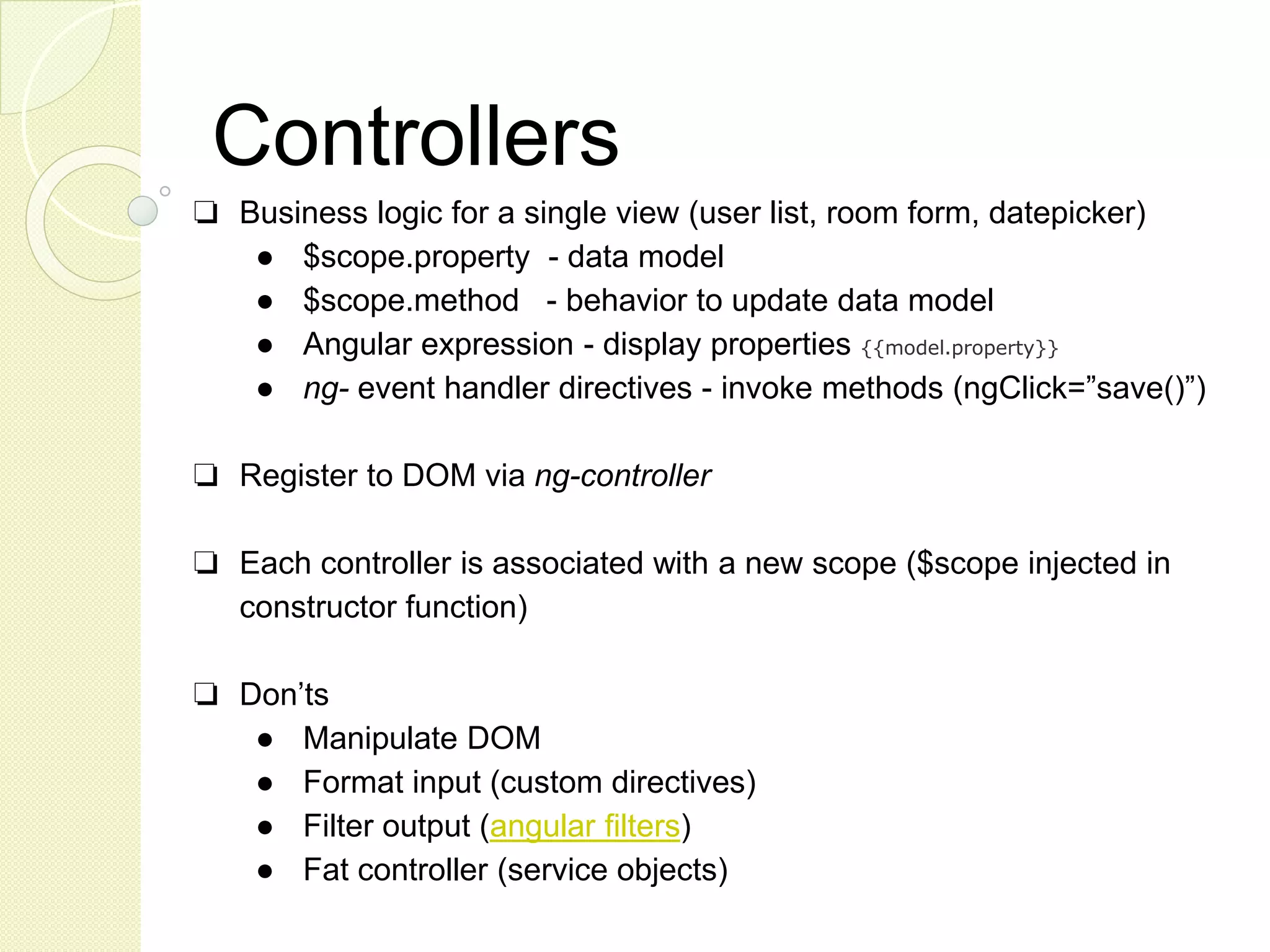
Controllers ❏ Business logic for a single view (user list, room form, datepicker) ● $scope.property - data model ● $scope.method - behavior to update data model ● Angular expression - display properties {{model.property}} ● ng- event handler directives - invoke methods (ngClick=”save()”) ❏ Register to DOM via ng-controller ❏ Each controller is associated with a new scope ($scope injected in constructor function) ❏ Don’ts ● Manipulate DOM ● Format input (custom directives) ● Filter output (angular filters) ● Fat controller (service objects)
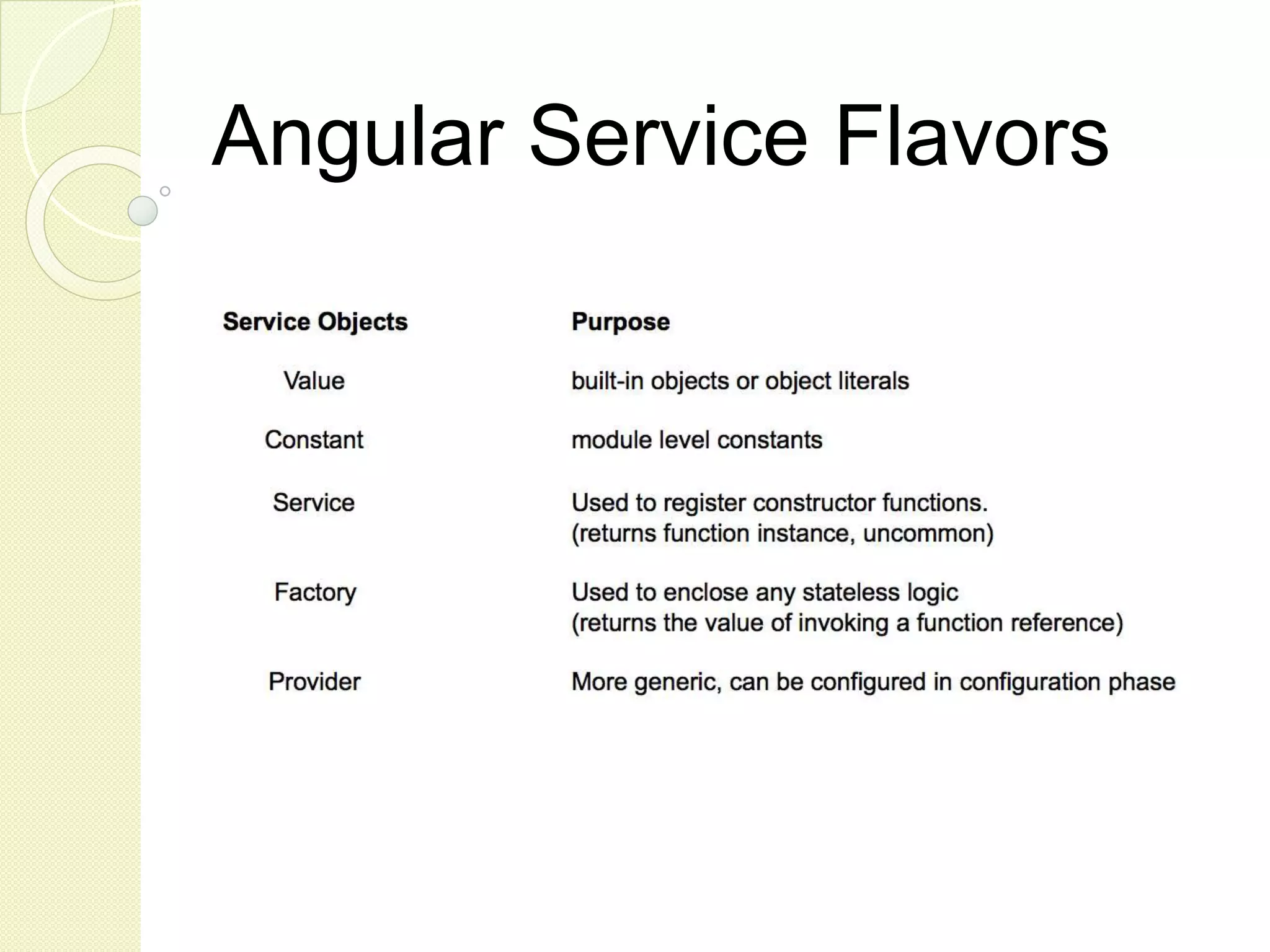
Angular Service Flavors
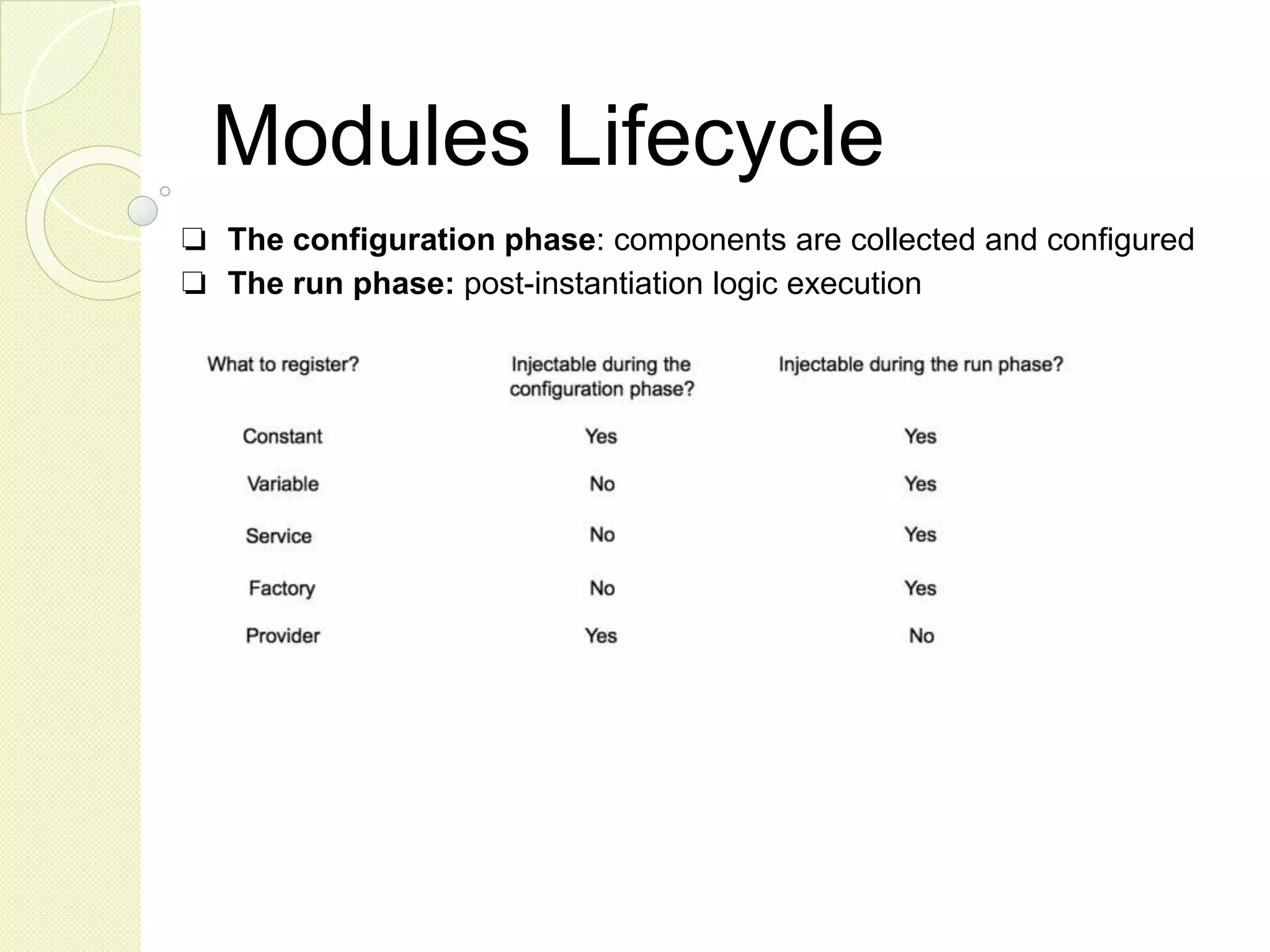
Modules Lifecycle ❏ The configuration phase: components are collected and configured ❏ The run phase: post-instantiation logic execution
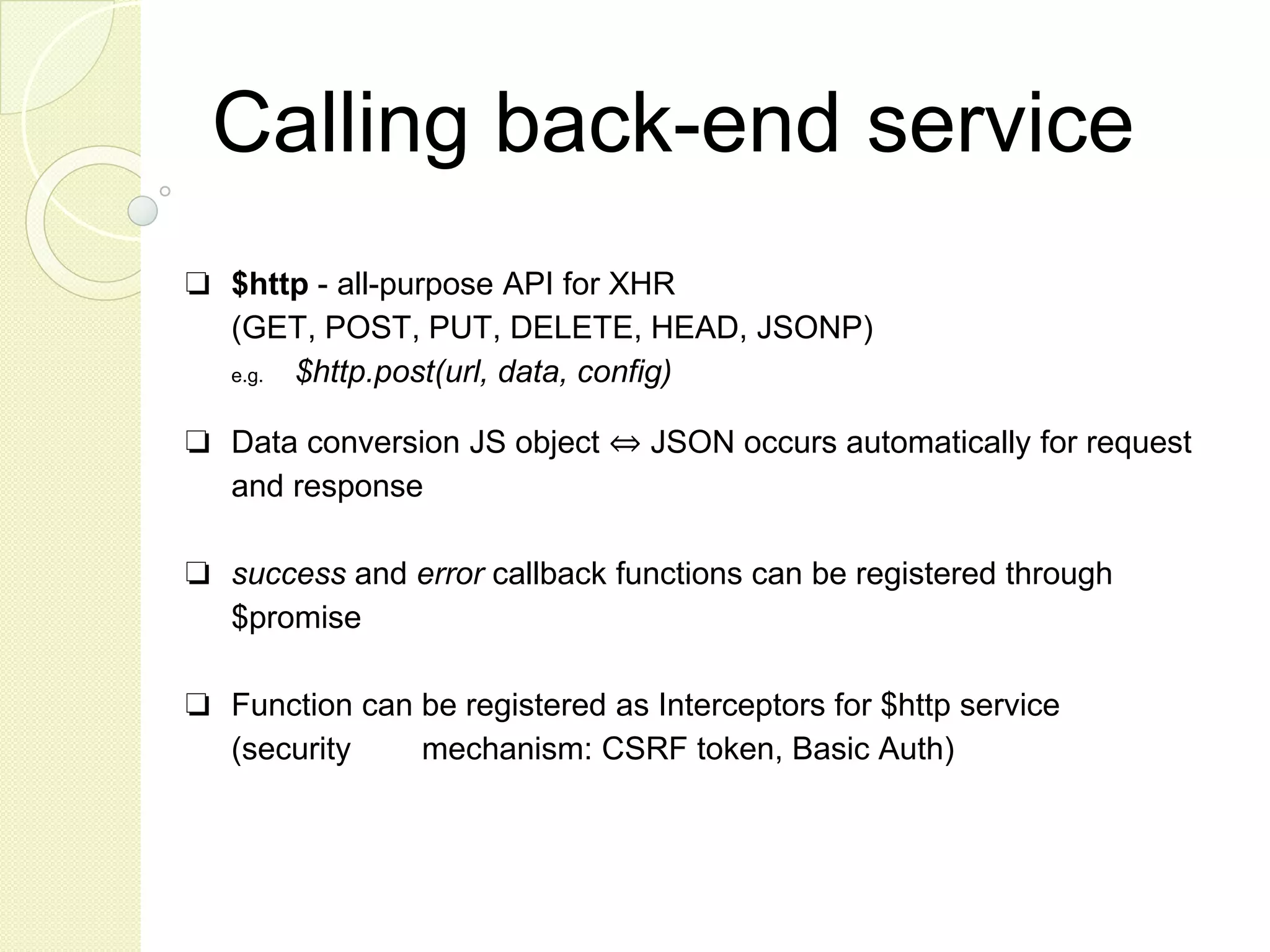
Calling back-end service ❏ $http - all-purpose API for XHR (GET, POST, PUT, DELETE, HEAD, JSONP) e.g. $http.post(url, data, config) ❏ Data conversion JS object ⇔ JSON occurs automatically for request and response ❏ success and error callback functions can be registered through $promise ❏ Function can be registered as Interceptors for $http service (security mechanism: CSRF token, Basic Auth)
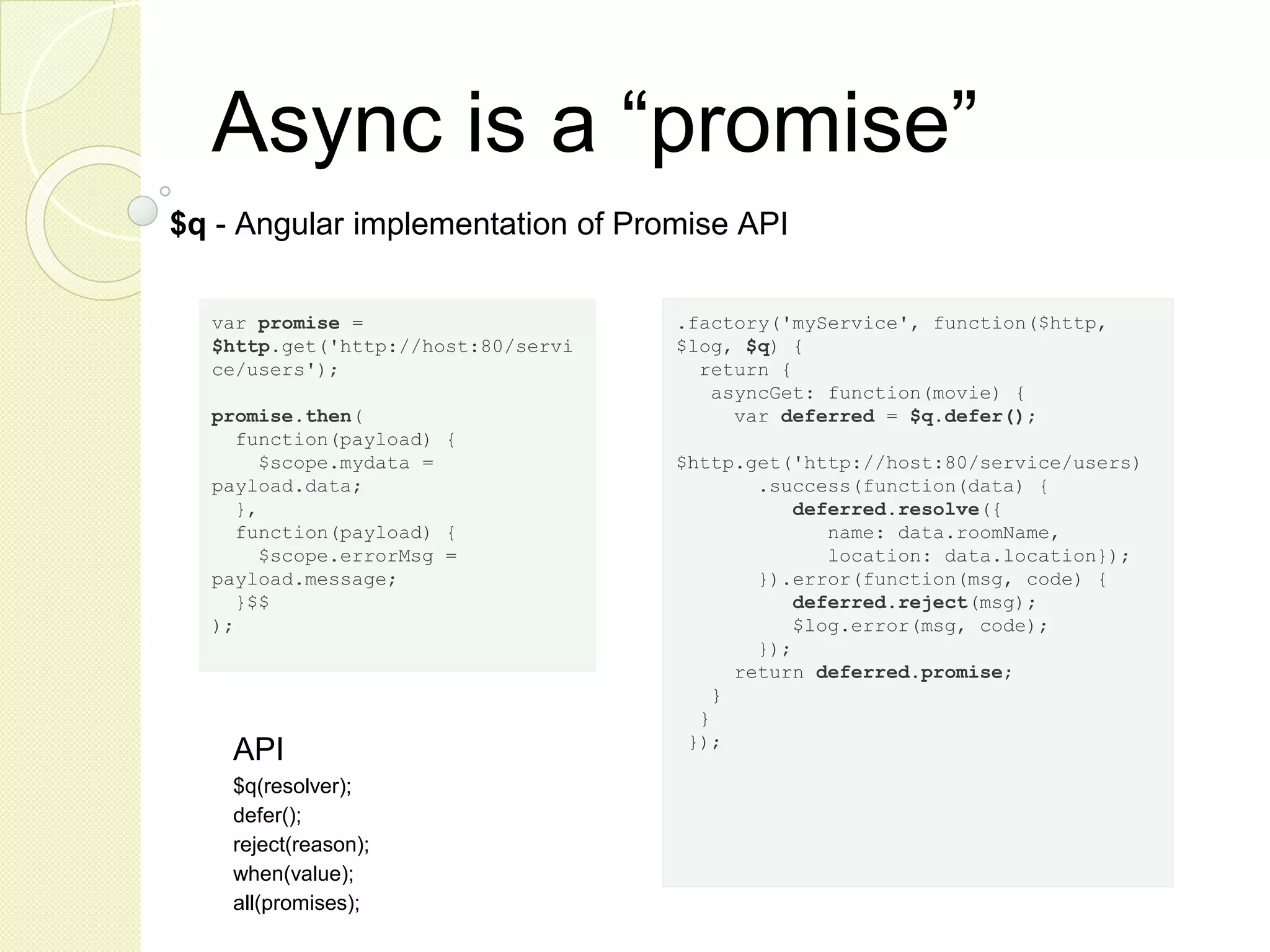
Async is a “promise” $q - Angular implementation of Promise API API $q(resolver); defer(); reject(reason); when(value); all(promises); var promise = $http.get('http://host:80/servi ce/users'); promise.then( function(payload) { $scope.mydata = payload.data; }, function(payload) { $scope.errorMsg = payload.message; }$$ ); .factory('myService', function($http, $log, $q) { return { asyncGet: function(movie) { var deferred = $q.defer(); $http.get('http://host:80/service/users) .success(function(data) { deferred.resolve({ name: data.roomName, location: data.location}); }).error(function(msg, code) { deferred.reject(msg); $log.error(msg, code); }); return deferred.promise; } } });
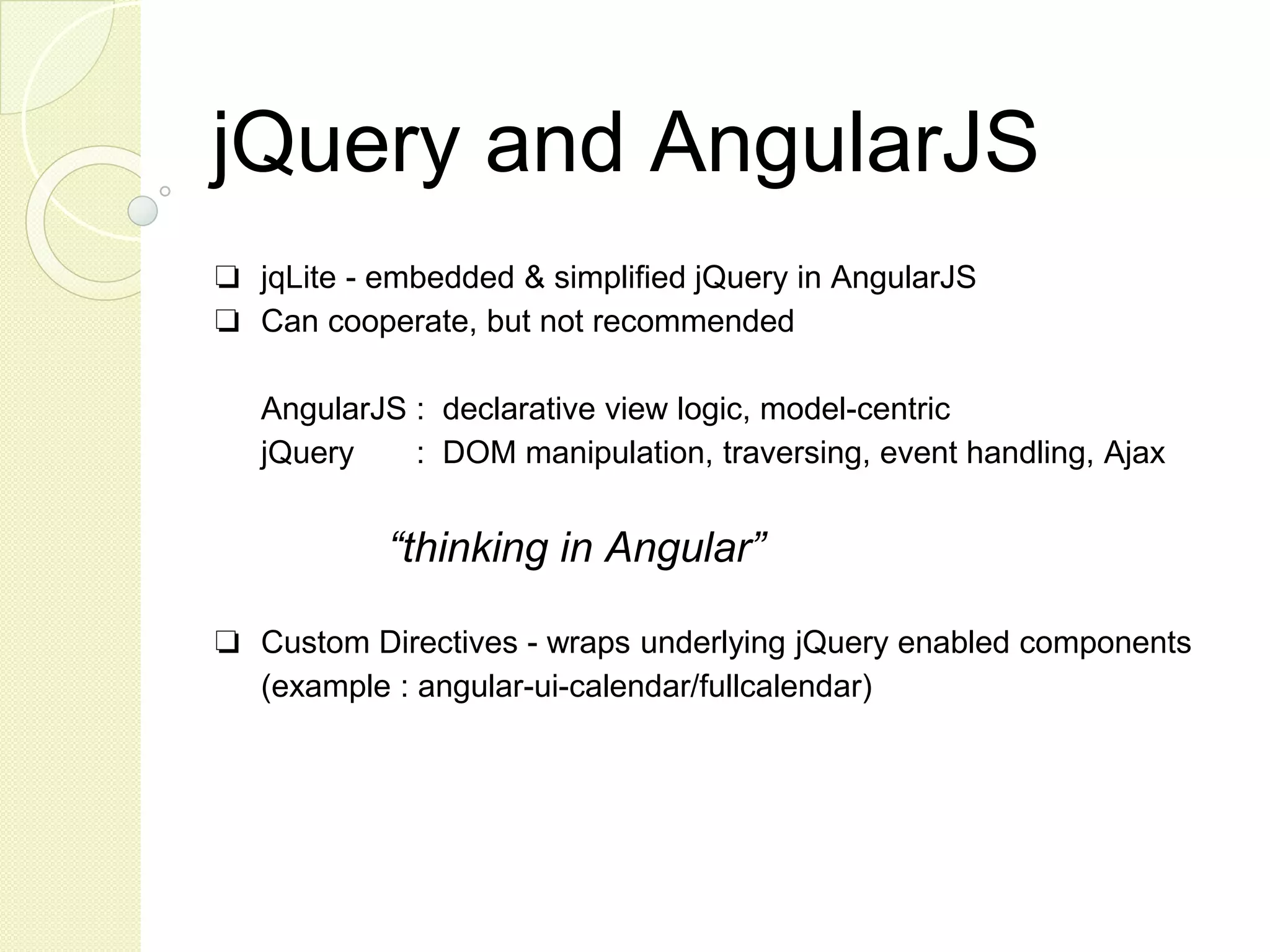
jQuery and AngularJS ❏ jqLite - embedded & simplified jQuery in AngularJS ❏ Can cooperate, but not recommended AngularJS : declarative view logic, model-centric jQuery : DOM manipulation, traversing, event handling, Ajax “thinking in Angular” ❏ Custom Directives - wraps underlying jQuery enabled components (example : angular-ui-calendar/fullcalendar)
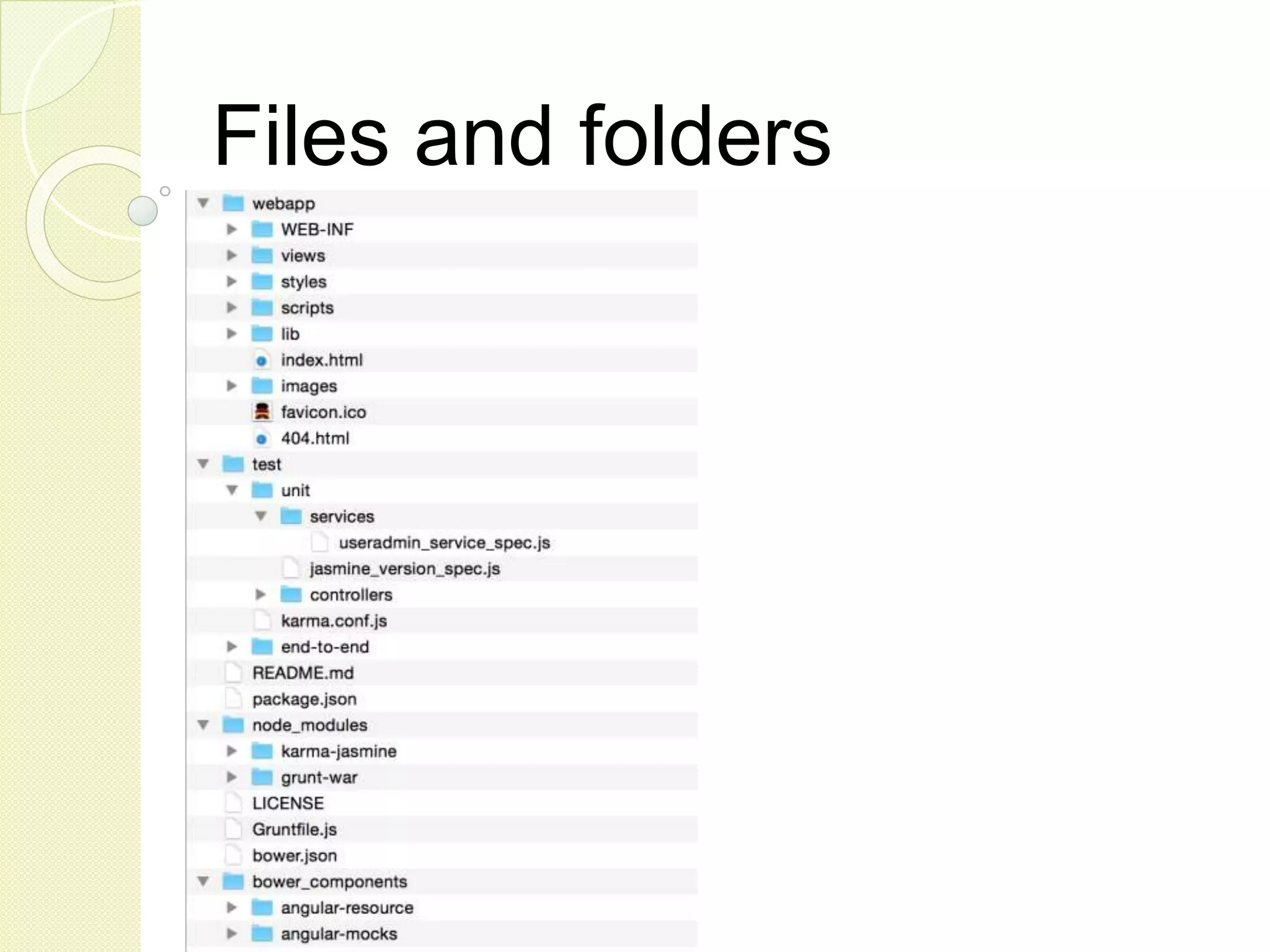
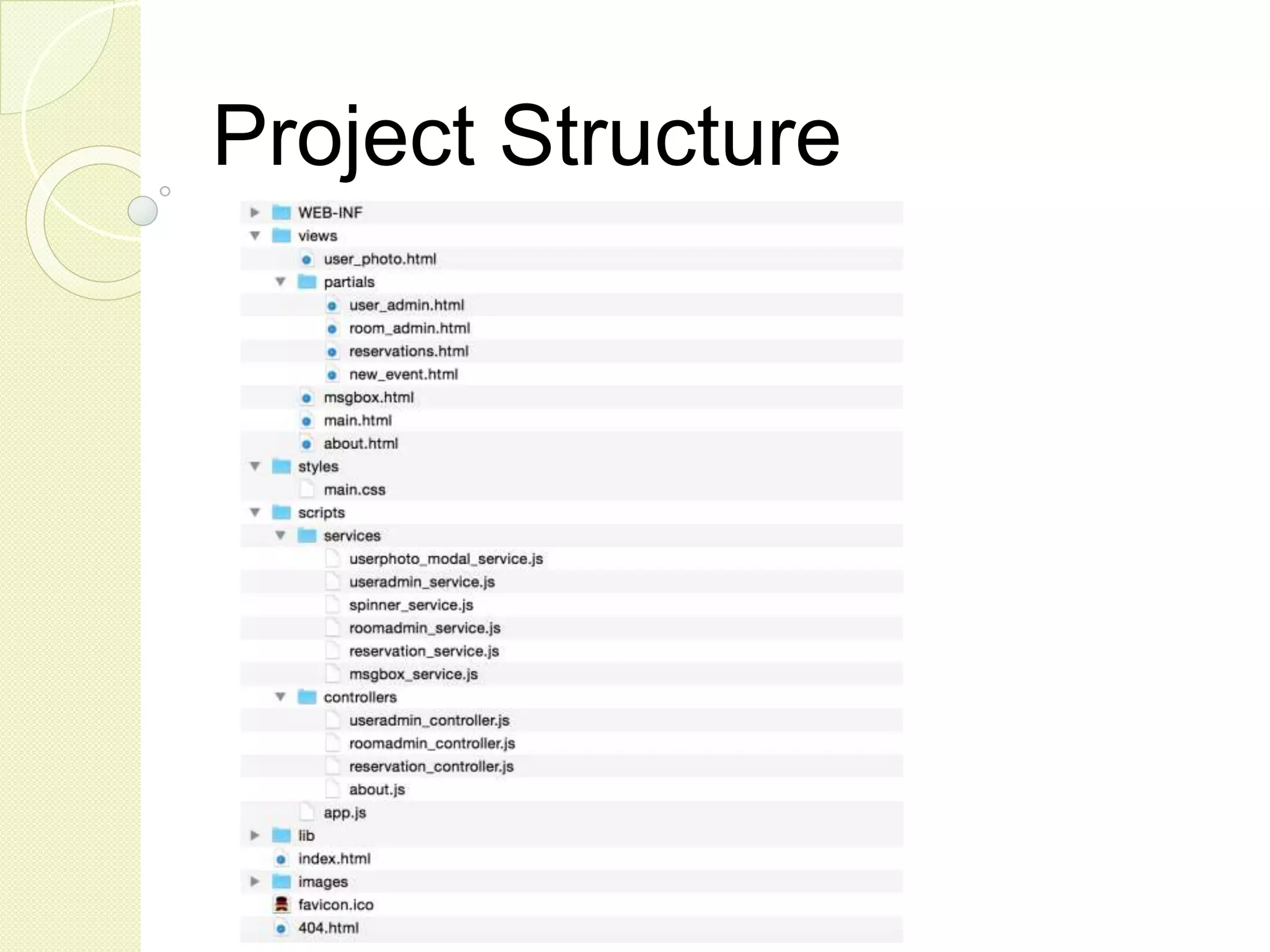
Project Structure
Core Directives ❏ Markers on a DOM element with specified behavior ❏ ngApp - auto-bootstrap an AngularJS app ❏ ngModel - binds an input,select, textarea to a property on the scope
Core Directives ❏ ngShow - shows or hides the given HTML element based on the expression provided ❏ ngDisabled - sets the disabled attribute on the element based on the expression provided
Core Directives ❏ ngController - attaches a controller class to the view ❏ ngRepeat - instantiates a template once per item from a collection ❏ ngNonBindable - tells Angular not to compile or bind the contents of the current DOM element
Core Filters (formatters) ❏ currency - formats a number as a currency (ie $1,234.56) ❏ date - formats date to a string based on the requested format ❏ uppercase ❏ lowercase
Core Filters ❏ “filter” - selects a subset of items from an array ❏ orderBy - orders an array
AngularJS UI Bootstrap ❏ Bootstrap components written in pure AngularJS: Accordion, Alert, Buttons, Carousel, Collapse, Datepicker, Dropdown, Modal, Pagination, Popover, Progressbar, Rating, Tabs, Timepicker, Tooltip, Typeahead ❏ https://angular-ui.github.io/bootstrap/ ❏ Tabs sample ❏ Buttons sample ❏ Accordion sample
Custom Event Listener ❏ Events among controllers $emit(), $broadcast() and $on() ❏ Monitors any change and triggers callback $watch(watchExpression, listener); $watchCollection(obj, listener); ❏ $watch() -> $broadcast() -> $on() -> update
Timer Services ❏ $timeout - Call another function after a time delay ❏ $interval - Schedules repeated calls at a time interval myapp.controller("MyCtrl", function($scope, $timeout) { $timeout(function(){ $scope.delayedFuntion(); }, 3000); }); myapp.controller("MyCtrl", function($scope, $interval) { $interval( function(){ $scope.intervalFunction(); }, 3000); });
Custom Directives
Why Custom Directives? ❏ Simplify code, create reusable view logic in a new HTML mark-up ❏ Encapsulate view specific business logic (custom validation) ❏ Integrate with 3rd-party DOM manipulation API (jQueryUI)
Defining a Directive angular.module(‘myapp’) .directive('myDirective', function () { return { restrict: 'EA', scope: { name: '@’ }, template: '<div>{{ employeeName }}</div>', templateUrl: 'employ_detail_template.html', controller: customController, compile: function(element, attributes) { }, replace: true, transclude: true, require: 'ngModel', link: function ($scope, element, attrs) { } } }); restrict E = element, A = attribute, C = class, M = comment
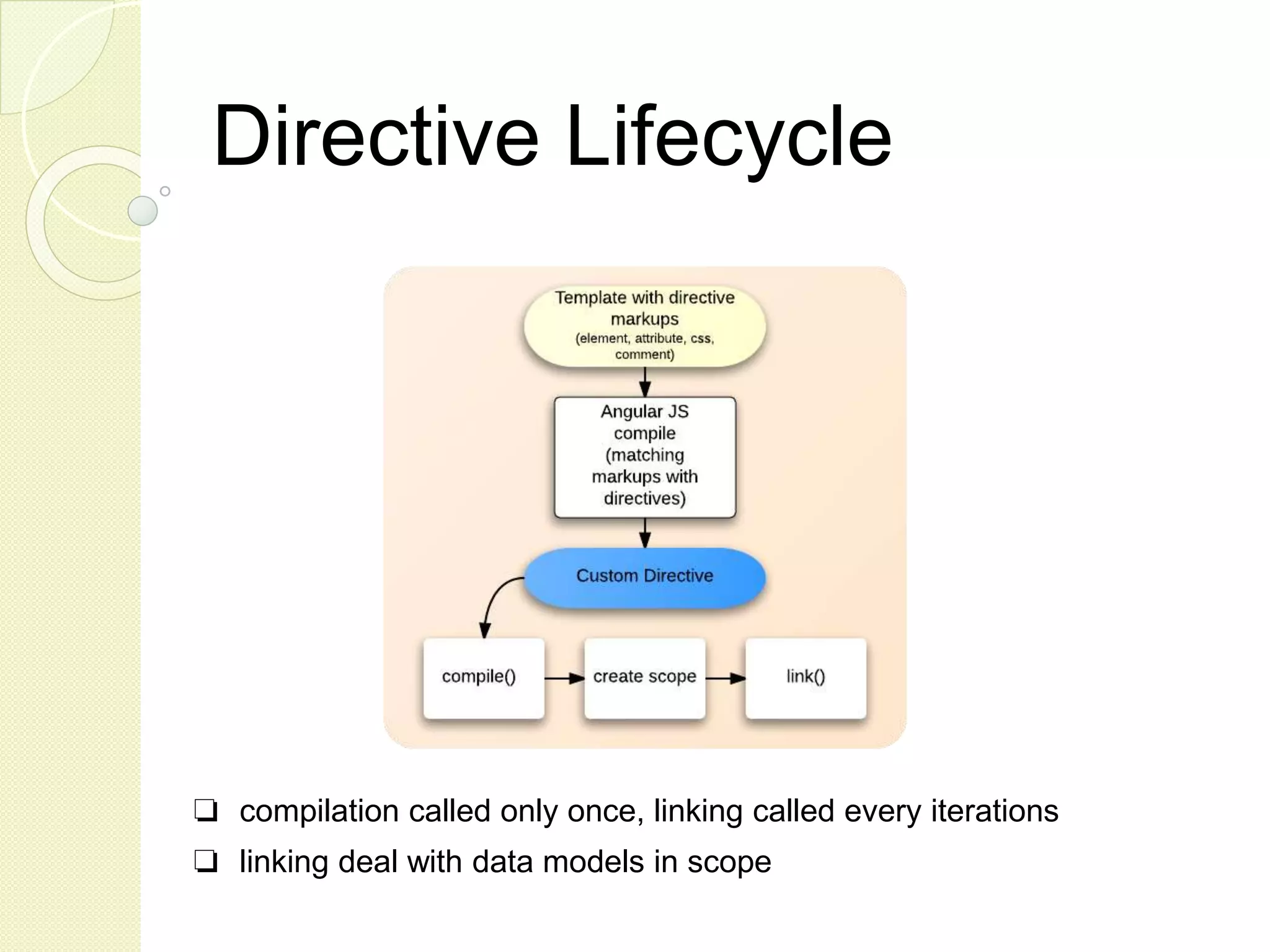
Directive Lifecycle ❏ compilation called only once, linking called every iterations ❏ linking deal with data models in scope
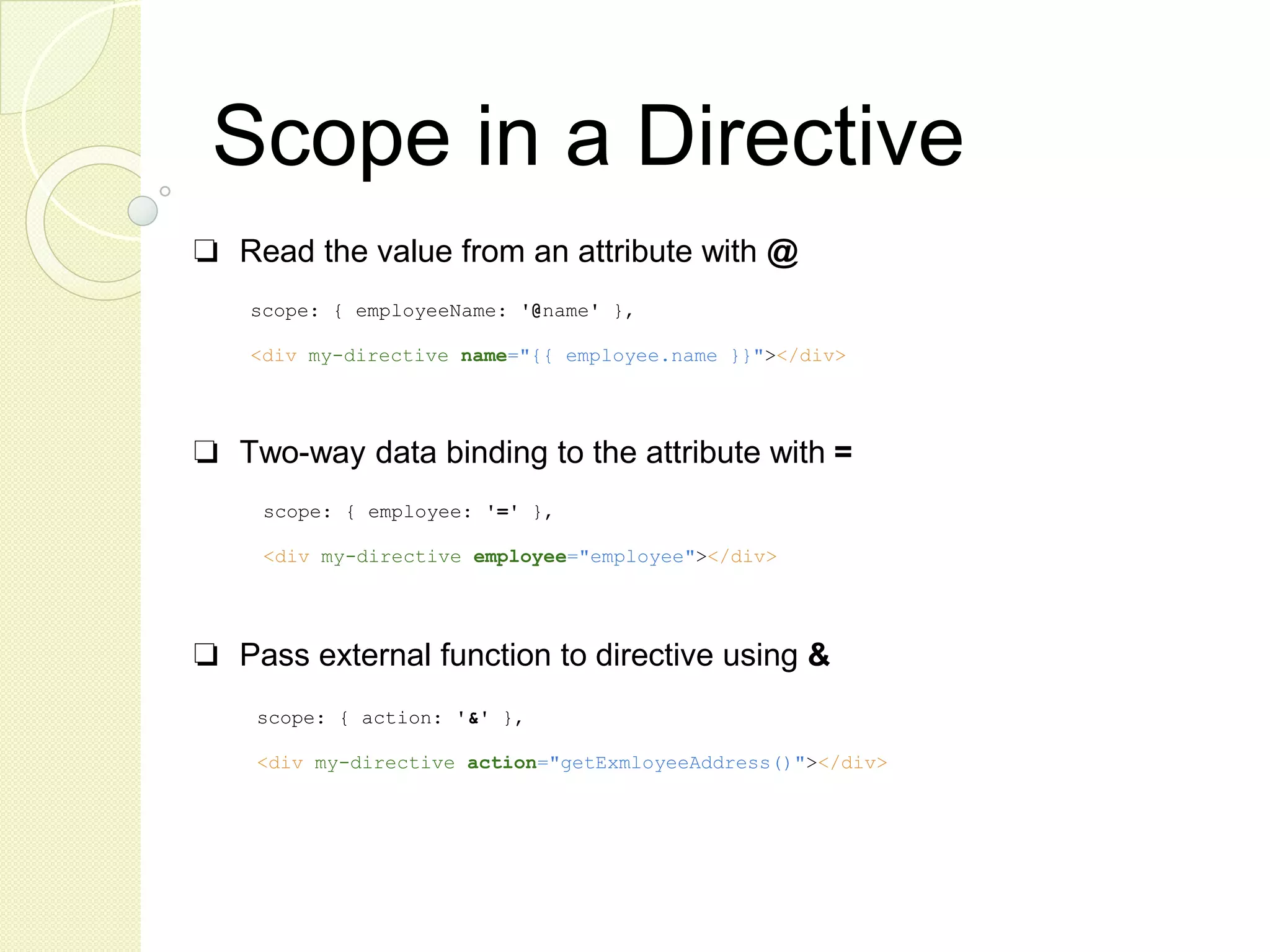
Scope in a Directive ❏ Read the value from an attribute with @ ❏ Two-way data binding to the attribute with = ❏ Pass external function to directive using & scope: { employeeName: '@name' }, <div my-directive name="{{ employee.name }}"></div> scope: { employee: '=' }, <div my-directive employee="employee"></div> scope: { action: '&' }, <div my-directive action="getExmloyeeAddress()"></div>
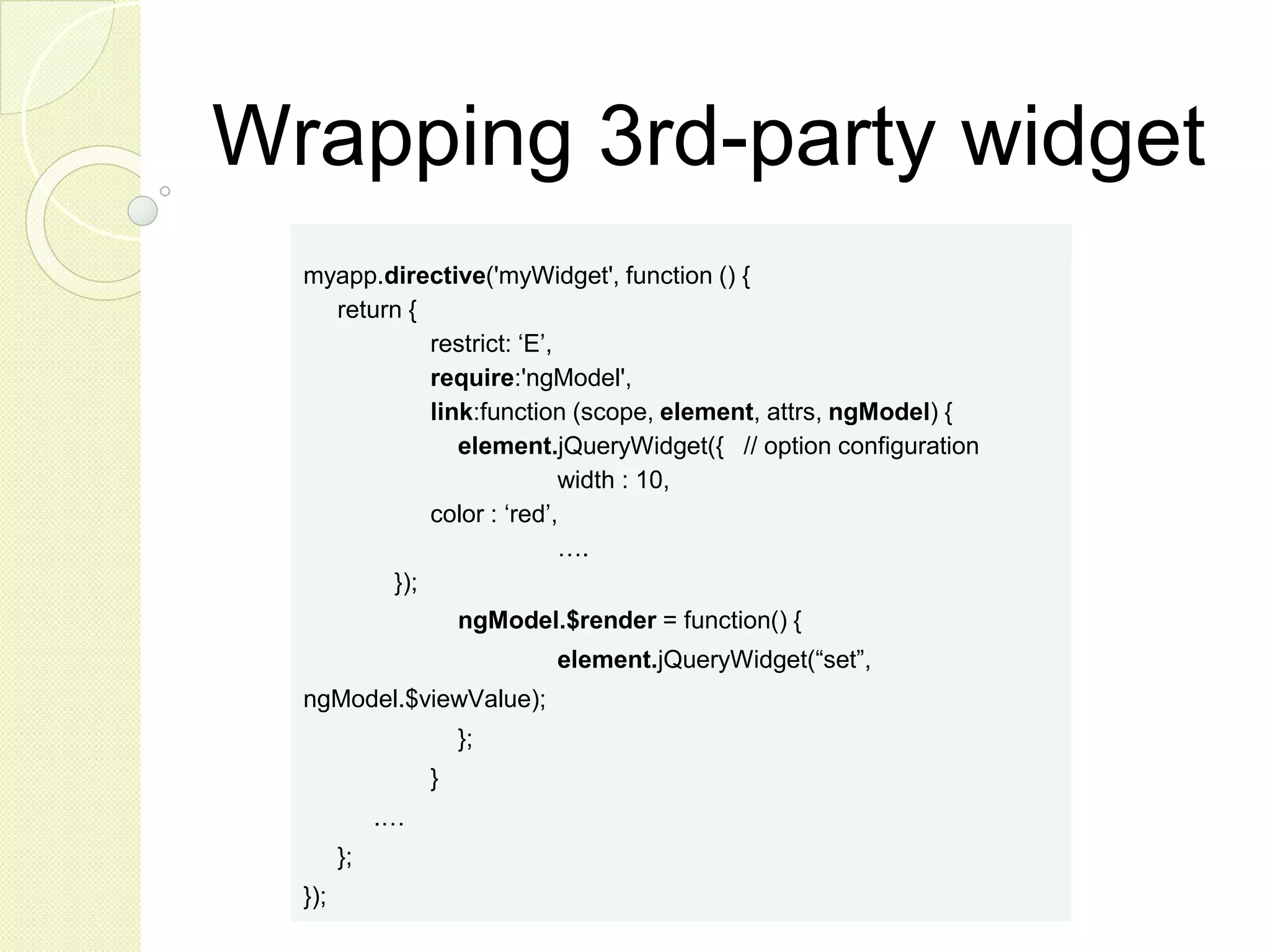
Wrapping 3rd-party widget myapp.directive('myWidget', function () { return { restrict: ‘E’, require:'ngModel', link:function (scope, element, attrs, ngModel) { element.jQueryWidget({ // option configuration width : 10, color : ‘red’, …. }); ngModel.$render = function() { element.jQueryWidget(“set”, ngModel.$viewValue); }; } .… }; });
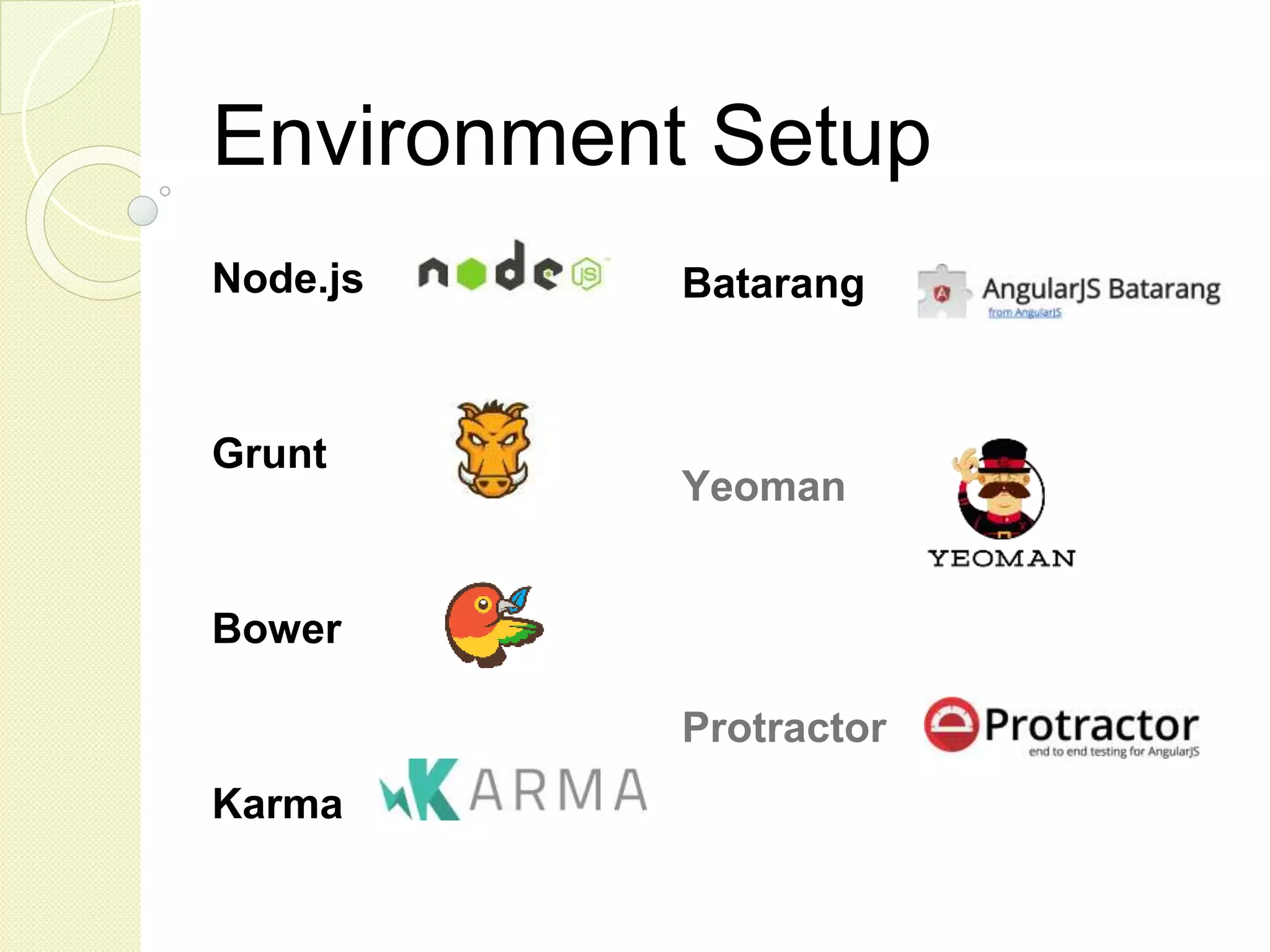
Environment Setup Node.js Grunt Bower Karma Batarang Yeoman Protractor
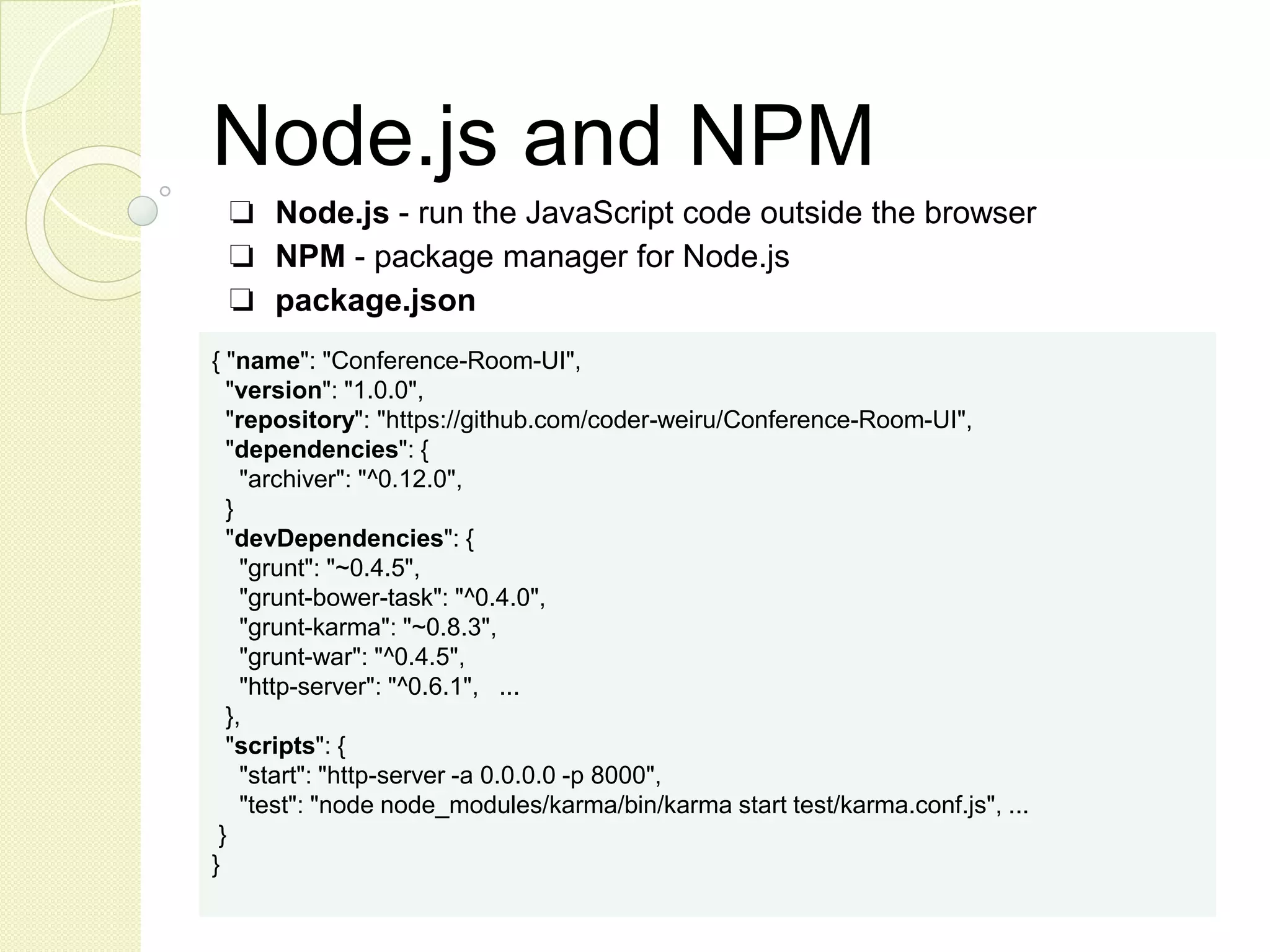
Node.js and NPM ❏ Node.js - run the JavaScript code outside the browser ❏ NPM - package manager for Node.js ❏ package.json { "name": "Conference-Room-UI", "version": "1.0.0", "repository": "https://github.com/coder-weiru/Conference-Room-UI", "dependencies": { "archiver": "^0.12.0", } "devDependencies": { "grunt": "~0.4.5", "grunt-bower-task": "^0.4.0", "grunt-karma": "~0.8.3", "grunt-war": "^0.4.5", "http-server": "^0.6.1", ... }, "scripts": { "start": "http-server -a 0.0.0.0 -p 8000", "test": "node node_modules/karma/bin/karma start test/karma.conf.js", ... } }
Build with Grunt ❏ Grunt.js - A task runner for JavaScript (Maven/Java, Gradle/Groovy, Rake/Ruby) ❏ Grunt Plugins - Available tasks (jshint, karma, war, uglify ...) ❏ Gruntfile.js - Configuration grunt.initConfig({ pkg: grunt.file.readJSON('package.json'), bower: { options: {...}, } concat: { .. }, clean: {...}, war: { target: { options: { }, files: [ ... ] }}); grunt.loadNpmTasks('grunt-karma'); grunt.registerTask('default', ['karma','jshint','concat','uglify']);
Manage libs with Bower ❏ Manage client side dependencies ❏ bower install <package> ❏ grunt bower ❏ .bowerrc - Bower configuration ❏ bower.json - Project dependencies configuration { "name": "Conference Room UI", "version": "1.0.0", "private": true, "ignore": [ "**/.*", "node_modules", "bower_components" ], "dependencies": { "angular": "^1.3.0", }, "devDependencies": { "jasmine": "^2.0.0" }, "appPath": "webapp", }
Test with Karma ❏ Karma - Automated test runner (Jasmine, Mocha, QUnit) ❏ Installed as node modules (karma, karma-chrome-launcher, karma- jasmin) ❏ Configuration (karma.conf.js) module.exports = function(config) { config.set({ autoWatch: true, basePath: '../', frameworks: ['jasmine'], files: [ 'webapp/lib/angular/angular.js', 'webapp/lib/angular-mocks/angular-mocks.js', 'webapp/scripts/**/*.js', 'test/unit/**/*.js' ], exclude: [ ... ], port: 8989, browsers: [ 'Chrome’ ], plugins: [ 'karma-chrome-launcher', 'karma-jasmine' ], ... // Continuous Integration mode singleRun: false … ...
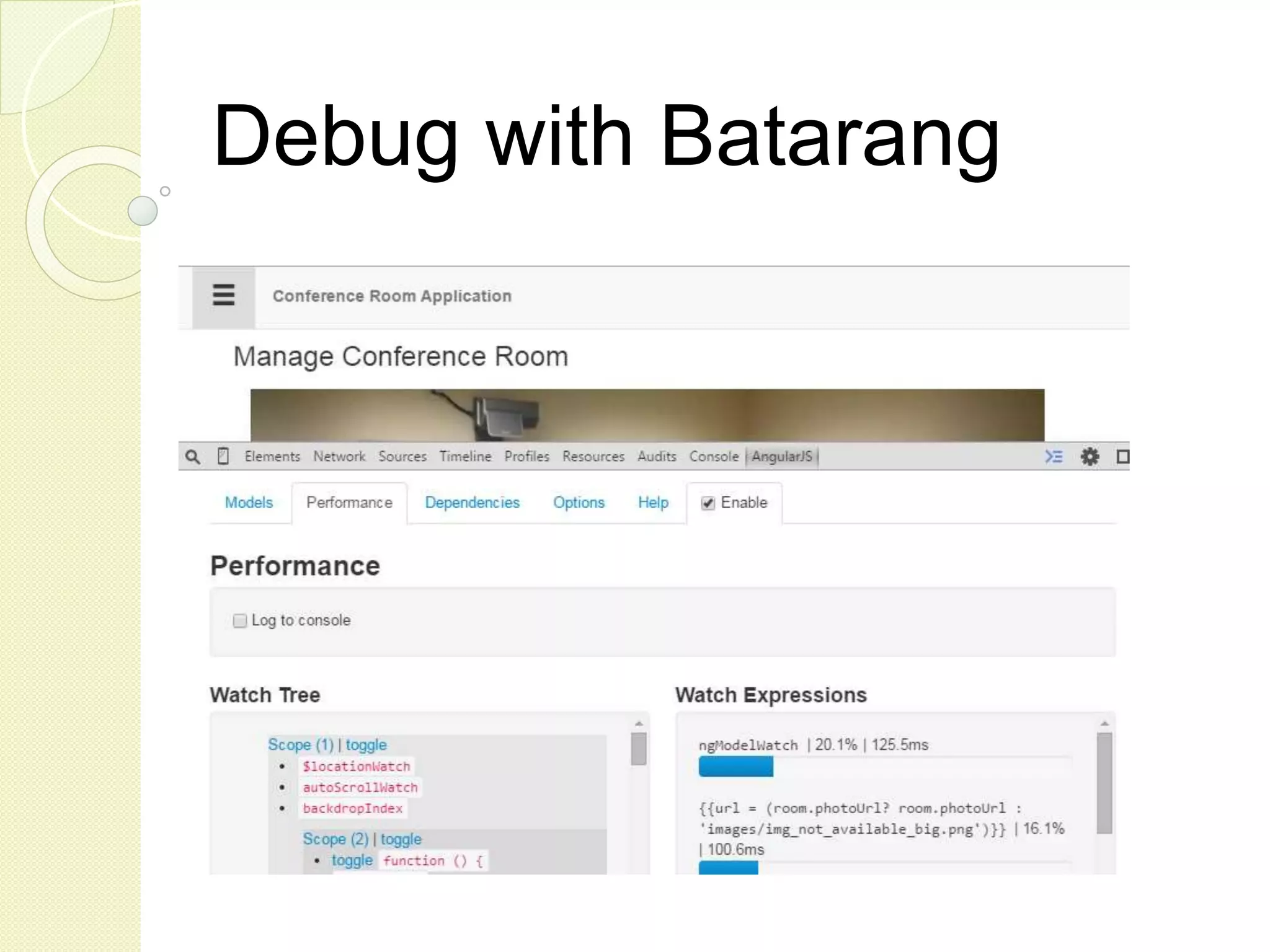
Debug with Batarang
Files and folders
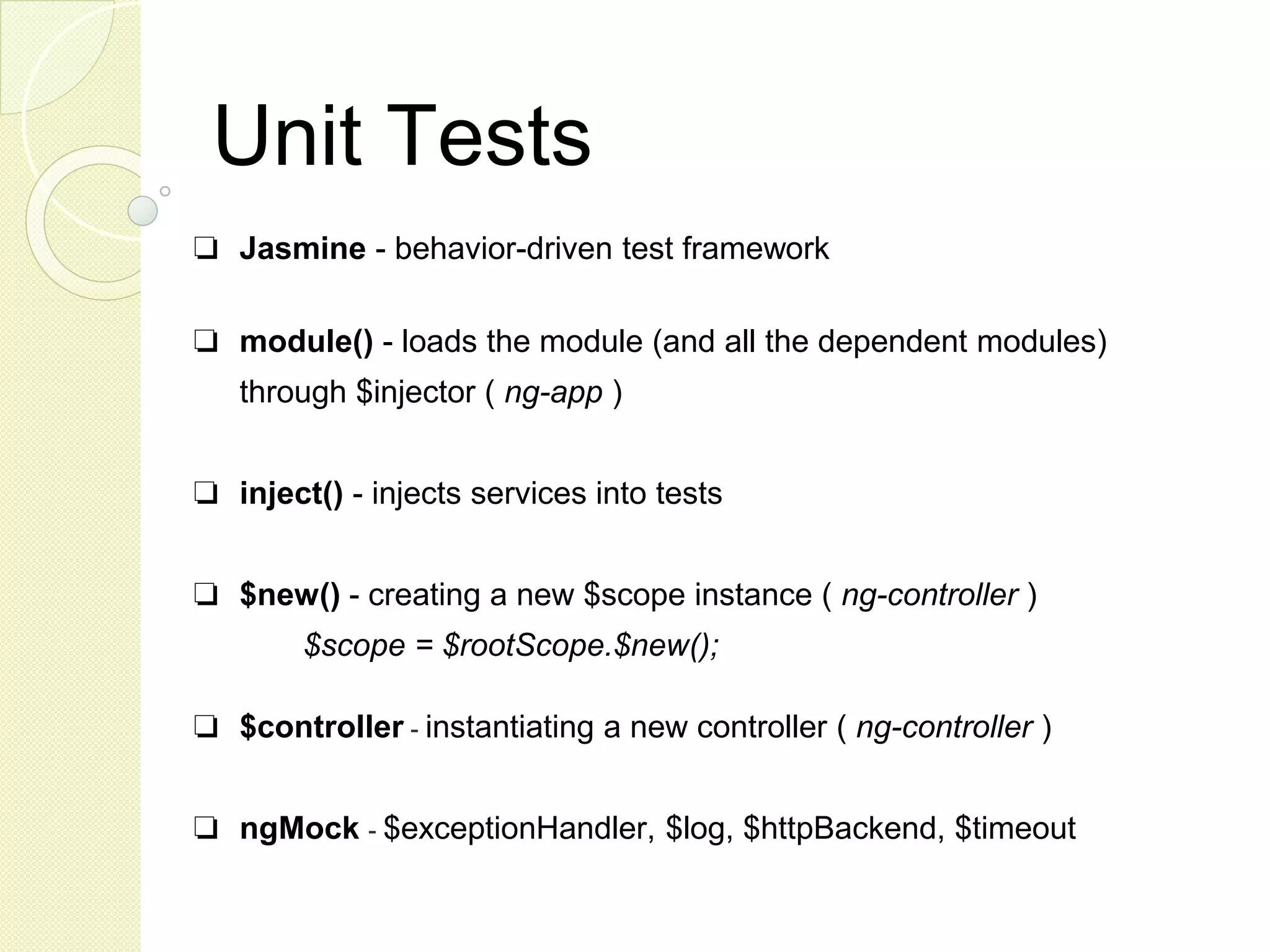
Unit Tests ❏ Jasmine - behavior-driven test framework ❏ module() - loads the module (and all the dependent modules) through $injector ( ng-app ) ❏ inject() - injects services into tests ❏ $new() - creating a new $scope instance ( ng-controller ) $scope = $rootScope.$new(); ❏ $controller - instantiating a new controller ( ng-controller ) ❏ ngMock - $exceptionHandler, $log, $httpBackend, $timeout
Service Test Example describe('service.user Tests', function() { beforeEach(module('service.user')); describe('UserService returns a list of users', function() { var $httpBackend, userService; beforeEach(inject(function(UserService, $injector) { $httpBackend = $injector.get('$httpBackend'); userService = UserService; var mockData = [...]; $httpBackend.when("GET",url).respond(mockData); })); it("Async listUsers() return 2 items", function() { var promise = userService.listUsers(); promise.then(function(data) { result = data.data.length; }); $httpBackend.expect(‘GET’, '/user/list'); $httpBackend.flush(); expect(result).toEqual(2); }); });
Controller Test Example describe('controller.user Test', function () { var $scope; beforeEach(module('controller.user')); beforeEach(inject(function ($rootScope) { $scope = $rootScope.$new(); })); it('should remove the user', inject(function($controller) { var mockUser = { … }; $controller('UserListCtrl', { $scope: $scope, users: [mockUser] }); expect($scope.users).toEqual([mockUser]); $scope.removeUser(mockUser); expect($scope.users).toEqual([]); }));
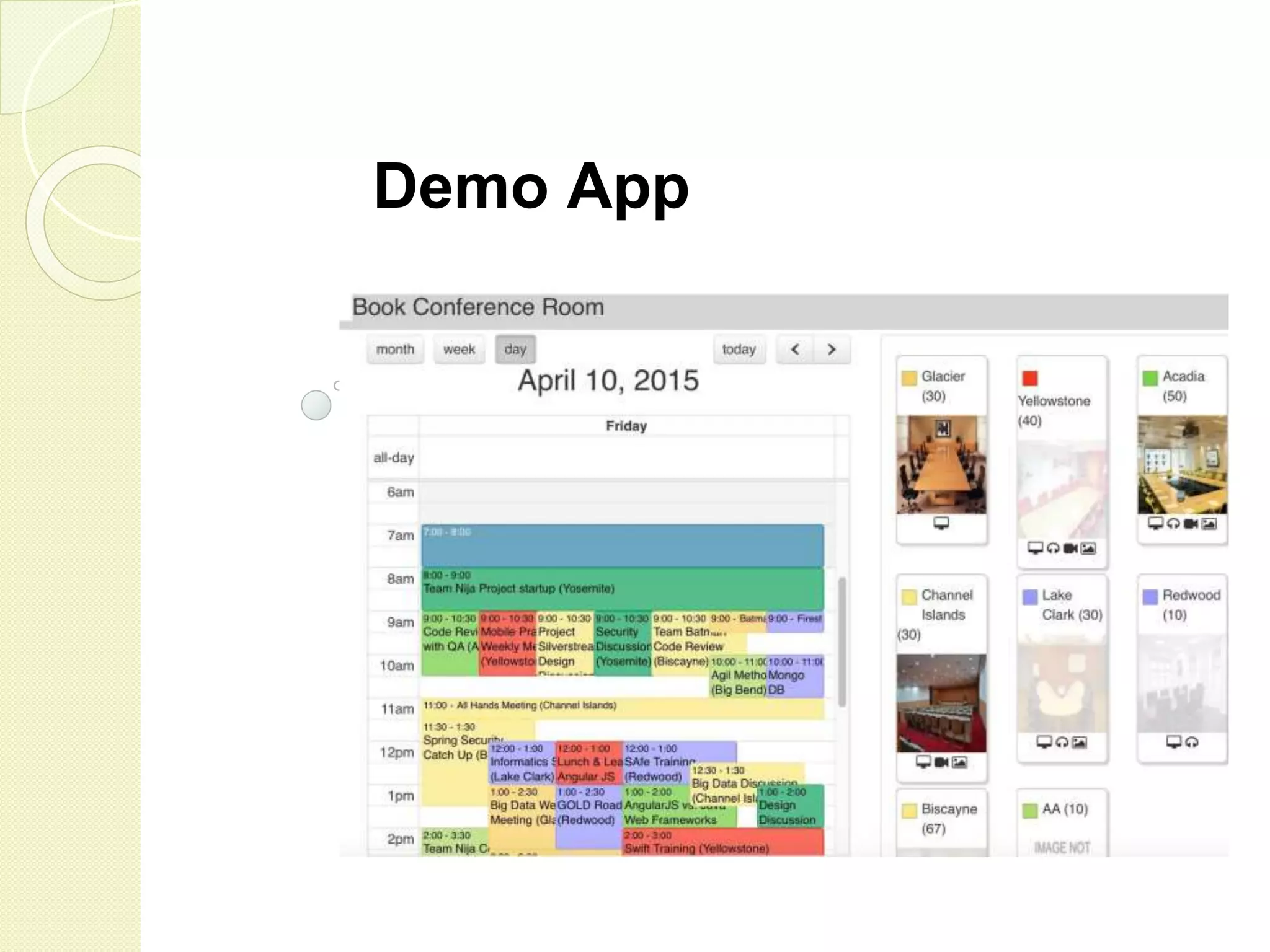
Demo App
Hands-on Session ❏ Ex-1 Display a user list using a controller ❏ Ex-2 Add a service object to retrieve user data from remote REST service ❏ Ex-3 Add detail views to the user list ❏ Ex-4 Add the capability to update user information via remote REST service ❏ Ex-5 Add pagination to the user list by a custom directive ❏ Ex-6 Use UI Grid to display the user list Exercises Source Location (https://github.com/coder-weiru/CoderConf-2015/)

Practical AngularJS

  • 1.
    Practical AngularJS Deep diveinto Angular JS fundamentals, design and architecture Wei Ru Vincent Lau
  • 2.
    Vincent Lau Senior Architect Vincent.Lau@stagrp.com WeiRu Senior Architect Wei.Ru@stagrp.com
  • 3.
    Agenda ❏ Introduction ❏ Fundamentals ❏Features ❏ Project Setups ❏ Demo App ❏ Q & A ❏ Hands-on Session
  • 4.
    What is AngularJS? ❏ It is a JavaScript framework (open-source, by Google) ❏ It is used to build rich internet applications ❏ It is popular, “MEAN” stack: MongoDB, Express, AngularJS, Node.JS. ❏ It extends HTML tag attributes using ng-directives ❏ It supports client-side MVC architecture
  • 5.
  • 6.
    Declarative Programming Building thestructure and elements of UI programs, that expresses the logic without describing its control flow Two-way Binding
  • 7.
    Why AngularJS? ❏ Simplebut powerful (declarative, 2-way binding) ❏ Rich and extensible (custom directives) ❏ POJO data model (no rich model, automatic rendering) ❏ Modularity & DI (logic contained, testability) ❏ Community Support
  • 8.
    What is theSPA hype? “A single-page application (SPA), is a web application or web site that fits on a single web page with the goal of providing a more fluid user experience akin to a desktop application.” (http://en.wikipedia.org/wiki/Single-page_application) “Single page apps are distinguished by their ability to redraw any part of the UI without requiring a server roundtrip to retrieve HTML.” (http://singlepageappbook.com) “The main reason is that they allow us to offer a more-native-app- like experience to the user." (http://singlepageappbook.com)
  • 9.
    What opponents say ❏Code Lock-In (Angular way, Angular 2.x) ❏ Dogmatic Architecture (controller -> service, no rich domain) ❏ Steep learning curve (sometime “magic work”) ❏ Poor Testability (difficult to test HTML rendering)
  • 10.
    What we think Powerful& Rich Flexibility & Extensibility Shorter Code Design similar to standard Java Web application (DI, Controller, Dao, TOs and modularity) Good development tool support Angular 2.x requires app rewrite
  • 11.
  • 12.
    Scope hierarchy and inheritance ❏New Scope is created by each scope-creating directives (ng-controller) in DOM ❏ Rooted at $rootScope ❏ Properties are visible to all child scopes ❏ Referencing a parent scope ($parent.name) ❏ Avoid name conflict by binding a property to an object (myScope.name)
  • 13.
    Eventing in Scope ❏$emit() and $broadcast() methods to fire events ❏ $on method to register a scope-event handler
  • 14.
    Modules & DI ❏Modules are containers for related objects (controllers, services, constants etc.) ❏ Modules can be injected to another Module as dependencies ❏ Main module registered with HTML by ng-app attribute ❏ Other modules are injected through main module (only one “ng- app” registration) ❏ Implicit objects can be injected in components directly ($scope, $http, $window, $q, $timeout etc.)
  • 15.
    Controllers ❏ Business logicfor a single view (user list, room form, datepicker) ● $scope.property - data model ● $scope.method - behavior to update data model ● Angular expression - display properties {{model.property}} ● ng- event handler directives - invoke methods (ngClick=”save()”) ❏ Register to DOM via ng-controller ❏ Each controller is associated with a new scope ($scope injected in constructor function) ❏ Don’ts ● Manipulate DOM ● Format input (custom directives) ● Filter output (angular filters) ● Fat controller (service objects)
  • 16.
  • 17.
    Modules Lifecycle ❏ Theconfiguration phase: components are collected and configured ❏ The run phase: post-instantiation logic execution
  • 18.
    Calling back-end service ❏$http - all-purpose API for XHR (GET, POST, PUT, DELETE, HEAD, JSONP) e.g. $http.post(url, data, config) ❏ Data conversion JS object ⇔ JSON occurs automatically for request and response ❏ success and error callback functions can be registered through $promise ❏ Function can be registered as Interceptors for $http service (security mechanism: CSRF token, Basic Auth)
  • 19.
    Async is a“promise” $q - Angular implementation of Promise API API $q(resolver); defer(); reject(reason); when(value); all(promises); var promise = $http.get('http://host:80/servi ce/users'); promise.then( function(payload) { $scope.mydata = payload.data; }, function(payload) { $scope.errorMsg = payload.message; }$$ ); .factory('myService', function($http, $log, $q) { return { asyncGet: function(movie) { var deferred = $q.defer(); $http.get('http://host:80/service/users) .success(function(data) { deferred.resolve({ name: data.roomName, location: data.location}); }).error(function(msg, code) { deferred.reject(msg); $log.error(msg, code); }); return deferred.promise; } } });
  • 20.
    jQuery and AngularJS ❏jqLite - embedded & simplified jQuery in AngularJS ❏ Can cooperate, but not recommended AngularJS : declarative view logic, model-centric jQuery : DOM manipulation, traversing, event handling, Ajax “thinking in Angular” ❏ Custom Directives - wraps underlying jQuery enabled components (example : angular-ui-calendar/fullcalendar)
  • 21.
  • 22.
    Core Directives ❏ Markerson a DOM element with specified behavior ❏ ngApp - auto-bootstrap an AngularJS app ❏ ngModel - binds an input,select, textarea to a property on the scope
  • 23.
    Core Directives ❏ ngShow- shows or hides the given HTML element based on the expression provided ❏ ngDisabled - sets the disabled attribute on the element based on the expression provided
  • 24.
    Core Directives ❏ ngController- attaches a controller class to the view ❏ ngRepeat - instantiates a template once per item from a collection ❏ ngNonBindable - tells Angular not to compile or bind the contents of the current DOM element
  • 25.
    Core Filters (formatters) ❏currency - formats a number as a currency (ie $1,234.56) ❏ date - formats date to a string based on the requested format ❏ uppercase ❏ lowercase
  • 26.
    Core Filters ❏ “filter”- selects a subset of items from an array ❏ orderBy - orders an array
  • 27.
    AngularJS UI Bootstrap ❏Bootstrap components written in pure AngularJS: Accordion, Alert, Buttons, Carousel, Collapse, Datepicker, Dropdown, Modal, Pagination, Popover, Progressbar, Rating, Tabs, Timepicker, Tooltip, Typeahead ❏ https://angular-ui.github.io/bootstrap/ ❏ Tabs sample ❏ Buttons sample ❏ Accordion sample
  • 28.
    Custom Event Listener ❏Events among controllers $emit(), $broadcast() and $on() ❏ Monitors any change and triggers callback $watch(watchExpression, listener); $watchCollection(obj, listener); ❏ $watch() -> $broadcast() -> $on() -> update
  • 29.
    Timer Services ❏ $timeout- Call another function after a time delay ❏ $interval - Schedules repeated calls at a time interval myapp.controller("MyCtrl", function($scope, $timeout) { $timeout(function(){ $scope.delayedFuntion(); }, 3000); }); myapp.controller("MyCtrl", function($scope, $interval) { $interval( function(){ $scope.intervalFunction(); }, 3000); });
  • 30.
  • 31.
    Why Custom Directives? ❏Simplify code, create reusable view logic in a new HTML mark-up ❏ Encapsulate view specific business logic (custom validation) ❏ Integrate with 3rd-party DOM manipulation API (jQueryUI)
  • 32.
    Defining a Directive angular.module(‘myapp’) .directive('myDirective',function () { return { restrict: 'EA', scope: { name: '@’ }, template: '<div>{{ employeeName }}</div>', templateUrl: 'employ_detail_template.html', controller: customController, compile: function(element, attributes) { }, replace: true, transclude: true, require: 'ngModel', link: function ($scope, element, attrs) { } } }); restrict E = element, A = attribute, C = class, M = comment
  • 33.
    Directive Lifecycle ❏ compilationcalled only once, linking called every iterations ❏ linking deal with data models in scope
  • 34.
    Scope in aDirective ❏ Read the value from an attribute with @ ❏ Two-way data binding to the attribute with = ❏ Pass external function to directive using & scope: { employeeName: '@name' }, <div my-directive name="{{ employee.name }}"></div> scope: { employee: '=' }, <div my-directive employee="employee"></div> scope: { action: '&' }, <div my-directive action="getExmloyeeAddress()"></div>
  • 35.
    Wrapping 3rd-party widget myapp.directive('myWidget',function () { return { restrict: ‘E’, require:'ngModel', link:function (scope, element, attrs, ngModel) { element.jQueryWidget({ // option configuration width : 10, color : ‘red’, …. }); ngModel.$render = function() { element.jQueryWidget(“set”, ngModel.$viewValue); }; } .… }; });
  • 36.
  • 37.
    Node.js and NPM ❏Node.js - run the JavaScript code outside the browser ❏ NPM - package manager for Node.js ❏ package.json { "name": "Conference-Room-UI", "version": "1.0.0", "repository": "https://github.com/coder-weiru/Conference-Room-UI", "dependencies": { "archiver": "^0.12.0", } "devDependencies": { "grunt": "~0.4.5", "grunt-bower-task": "^0.4.0", "grunt-karma": "~0.8.3", "grunt-war": "^0.4.5", "http-server": "^0.6.1", ... }, "scripts": { "start": "http-server -a 0.0.0.0 -p 8000", "test": "node node_modules/karma/bin/karma start test/karma.conf.js", ... } }
  • 38.
    Build with Grunt ❏Grunt.js - A task runner for JavaScript (Maven/Java, Gradle/Groovy, Rake/Ruby) ❏ Grunt Plugins - Available tasks (jshint, karma, war, uglify ...) ❏ Gruntfile.js - Configuration grunt.initConfig({ pkg: grunt.file.readJSON('package.json'), bower: { options: {...}, } concat: { .. }, clean: {...}, war: { target: { options: { }, files: [ ... ] }}); grunt.loadNpmTasks('grunt-karma'); grunt.registerTask('default', ['karma','jshint','concat','uglify']);
  • 39.
    Manage libs withBower ❏ Manage client side dependencies ❏ bower install <package> ❏ grunt bower ❏ .bowerrc - Bower configuration ❏ bower.json - Project dependencies configuration { "name": "Conference Room UI", "version": "1.0.0", "private": true, "ignore": [ "**/.*", "node_modules", "bower_components" ], "dependencies": { "angular": "^1.3.0", }, "devDependencies": { "jasmine": "^2.0.0" }, "appPath": "webapp", }
  • 40.
    Test with Karma ❏Karma - Automated test runner (Jasmine, Mocha, QUnit) ❏ Installed as node modules (karma, karma-chrome-launcher, karma- jasmin) ❏ Configuration (karma.conf.js) module.exports = function(config) { config.set({ autoWatch: true, basePath: '../', frameworks: ['jasmine'], files: [ 'webapp/lib/angular/angular.js', 'webapp/lib/angular-mocks/angular-mocks.js', 'webapp/scripts/**/*.js', 'test/unit/**/*.js' ], exclude: [ ... ], port: 8989, browsers: [ 'Chrome’ ], plugins: [ 'karma-chrome-launcher', 'karma-jasmine' ], ... // Continuous Integration mode singleRun: false … ...
  • 41.
  • 42.
  • 43.
    Unit Tests ❏ Jasmine- behavior-driven test framework ❏ module() - loads the module (and all the dependent modules) through $injector ( ng-app ) ❏ inject() - injects services into tests ❏ $new() - creating a new $scope instance ( ng-controller ) $scope = $rootScope.$new(); ❏ $controller - instantiating a new controller ( ng-controller ) ❏ ngMock - $exceptionHandler, $log, $httpBackend, $timeout
  • 44.
    Service Test Example describe('service.userTests', function() { beforeEach(module('service.user')); describe('UserService returns a list of users', function() { var $httpBackend, userService; beforeEach(inject(function(UserService, $injector) { $httpBackend = $injector.get('$httpBackend'); userService = UserService; var mockData = [...]; $httpBackend.when("GET",url).respond(mockData); })); it("Async listUsers() return 2 items", function() { var promise = userService.listUsers(); promise.then(function(data) { result = data.data.length; }); $httpBackend.expect(‘GET’, '/user/list'); $httpBackend.flush(); expect(result).toEqual(2); }); });
  • 45.
    Controller Test Example describe('controller.userTest', function () { var $scope; beforeEach(module('controller.user')); beforeEach(inject(function ($rootScope) { $scope = $rootScope.$new(); })); it('should remove the user', inject(function($controller) { var mockUser = { … }; $controller('UserListCtrl', { $scope: $scope, users: [mockUser] }); expect($scope.users).toEqual([mockUser]); $scope.removeUser(mockUser); expect($scope.users).toEqual([]); }));
  • 46.
  • 47.
    Hands-on Session ❏ Ex-1Display a user list using a controller ❏ Ex-2 Add a service object to retrieve user data from remote REST service ❏ Ex-3 Add detail views to the user list ❏ Ex-4 Add the capability to update user information via remote REST service ❏ Ex-5 Add pagination to the user list by a custom directive ❏ Ex-6 Use UI Grid to display the user list Exercises Source Location (https://github.com/coder-weiru/CoderConf-2015/)