What is Software? Software is a set of instructions stored digitally within the computer's memory, which tells the computer system what to do.
What is Testing? Testing is the process of executing a program with the intention of finding errors
Software testing Software testing is a process that should be done during the development process. In other words software testing is a verification and validation process.
What is Verification? Verification is the process to make sure the product satisfies the conditions imposed at the start of the development phase. to make sure the product behaves the way we want it to.
What is Validation? Validation is the process to make sure the product satisfies the specified requirements at the end of the development phase. to make sure the product is built as per customer requirements.
Difference between Verification And Validation Verification Validation  Verification is to check whether the software conforms to specifications.  It does not involve executing the code.  It is human based checking of documents and files.  Validation is to check whether software meet the customer requirements.  It always involves executing the code.  It is computer based execution of program.
Difference between Verification And Validation Verification Validation • Verification is done by development team to provide that the software is as per the specifications • It, generally, comes first-done before validation. • Validation is carried out with the involvement of client and testing team. • It generally follows after verification.
Purpose of Software Testing Testing verifies that the system meets the different requirements including, functional, performance, reliability, security, usability and so on.This verification is done to ensure that we are building the system right.
Basics of Software Testing There are two basics of software testing: Whitebox testing. Blackbox testing
What is Whitebox Testing?  Whitebox Testing is a software testing method in which the internal structure of the item being tested is known to the tester.  White box testing is often used for verification.  White box testing is done by the Developers.
Advantage of Whitebox Testing  Testing can be commenced at an earlier stage. One need not wait for the GUI to be available.  Testing is more thorough, with the possibility of covering most paths.  The other advantage of white box testing is that it helps in optimizing the code
Disadvantage of Whitebox Testing  As knowledge of code and internal structure is a prerequisite, a skilled tester is needed to carry out this type of testing, which increases the cost  Not looking at the code in a runtime environment...
What is Blackbox Testing?  Blackbox Testing is a software testing method in which the internal structure of the item being tested is not known to the tester..  Blackbox testing is often used for Validation..  Black box testing is done by the professional testing team.
Advantage of Blackbox Testing Tester can be non-technical. Tester needs no knowledge of implementation, including specific programming languages Tests will be done from an end user's point of view. Because end user should accept the system.
Disadvantage of Blackbox Testing Not all properties of a software product can be tested The reason for a failure is not found. Only a small number of possible inputs can be tested and many program paths will be left untested..
 Types of Testing There are many types of testing like Unit Testing Integration Testing Functional Testing System Testing Stress Testing
Types of Testing Performance Testing Usability Testing Acceptance Testing Regression Testing Beta Testing
Unit Testing Unit testing is that validate individual unit of source code working properly… Unit is smallest testable part of an application.. Mostly done by developers of the modules..
Goal of Unit Testing • To isolate each part of program and show that individual parts are correct..
Advantage of Unit Testing  Unit Testing reduces the level of bugs in production code..  Unit Testing inspires confidence..  Unit Testing makes it easier to change and refactor code.
Disadvantage of Unit Testing Unit-testing will not catch every error in the program. By definition, it only tests the functionality of the units….
Integration Testing Integration testing is testing in which a group of components are combined to produce output.  Also, the interaction between software and hardware is tested in integration testing if software and hardware components have any relation.
Integration Testing • Prerequisite of Integration Testing •Before We begin Integration Testing it is important that all the components have been successfully unit tested..
Goal of Integration Testing To discover faults that are due to incorrect interaction Between different software module.
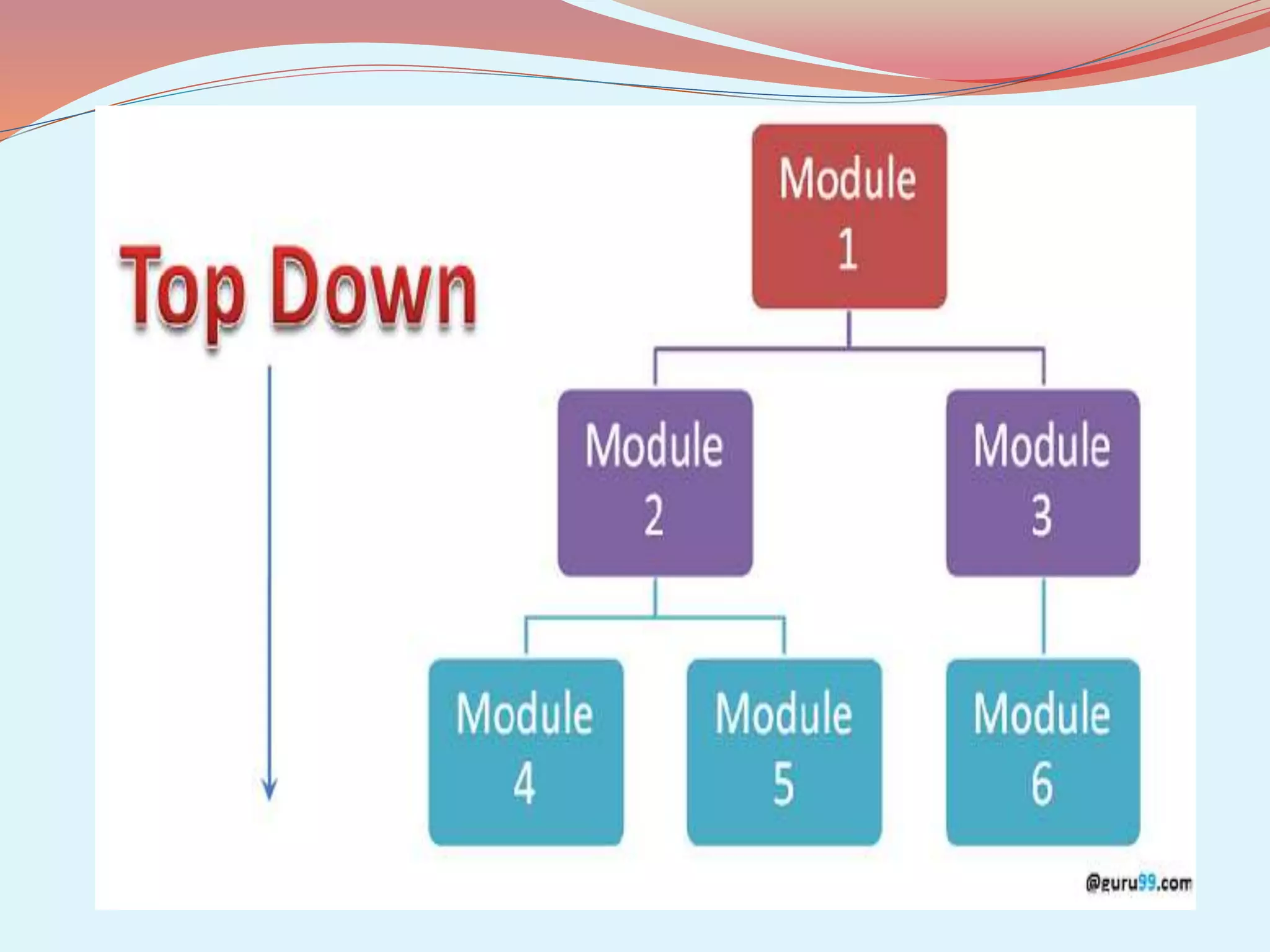
Integration Testing Types of Integration Testing Top-down testing  Top Down Integration as the term suggests, starts always at the top of the program hierarchy and travels towards its branches..
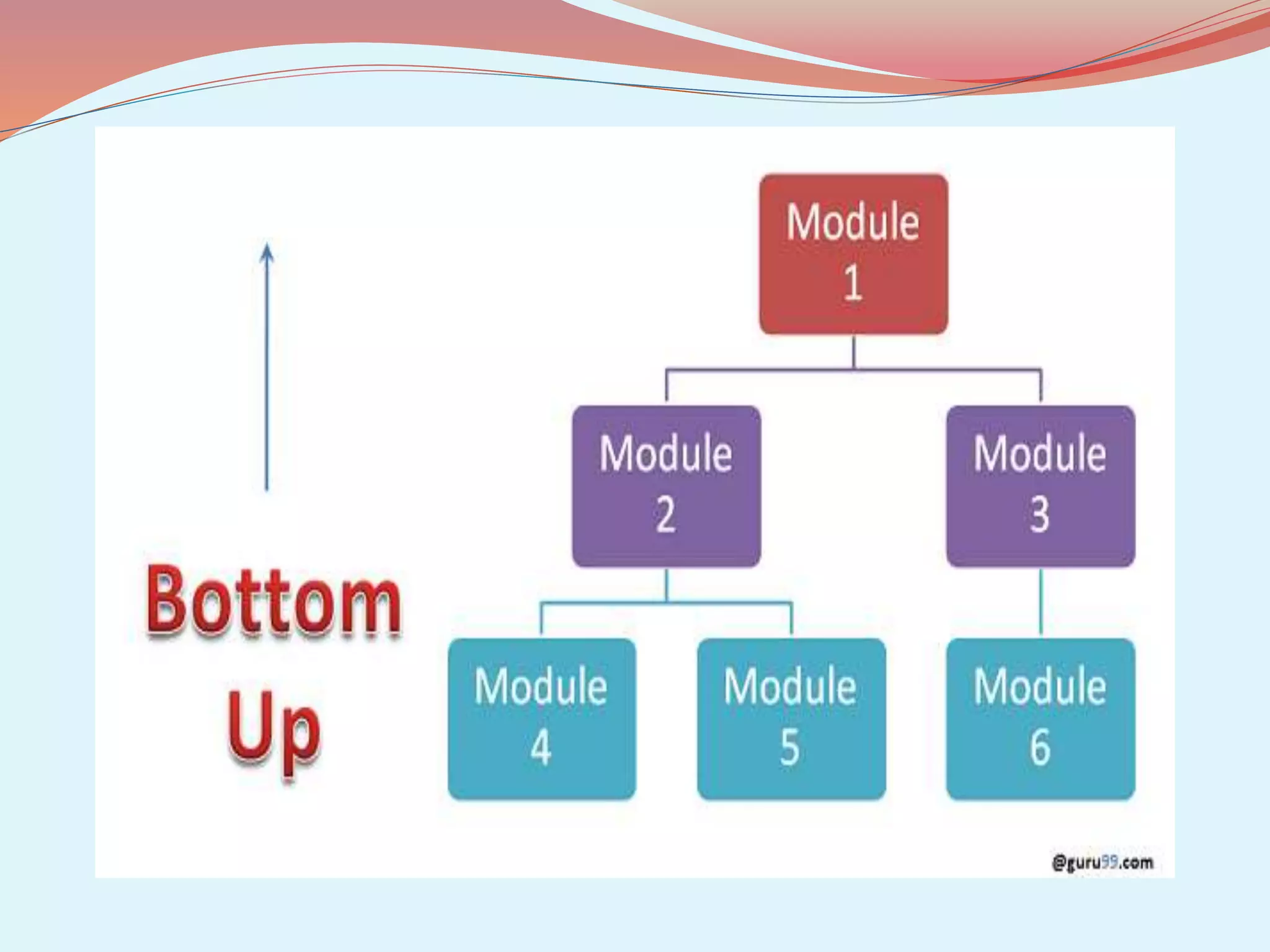
Integration Testing • Bottom –Up Testing •Bottom –Up integration as it name implies starts at the lowest level in the program structure.
Functional Testing Functional testing is the testing to ensure that the specified functionality required in the system requirements works. it is not concerned about the source code of the application.
Functional Testing  What do you test in Functional Testing?  The prime objective of Functional testing is checking the functionalities of the software system.  Mainline functions: Testing the main functions of an application  Basic Usability: It involves basic usability testing of the system. It checks whether an user can freely navigate through the screens without any difficulties.
Functional Testing  Accessibility: Checks the accessibility of the system for the user  Error Conditions: Usage of testing techniques to check for error conditions. It checks whether suitable error messages are displayed
Software testing

Software testing

  • 2.
    What is Software? Softwareis a set of instructions stored digitally within the computer's memory, which tells the computer system what to do.
  • 3.
    What is Testing? Testingis the process of executing a program with the intention of finding errors
  • 4.
    Software testing Software testingis a process that should be done during the development process. In other words software testing is a verification and validation process.
  • 5.
    What is Verification? Verificationis the process to make sure the product satisfies the conditions imposed at the start of the development phase. to make sure the product behaves the way we want it to.
  • 6.
    What is Validation? Validationis the process to make sure the product satisfies the specified requirements at the end of the development phase. to make sure the product is built as per customer requirements.
  • 7.
    Difference between Verification AndValidation Verification Validation  Verification is to check whether the software conforms to specifications.  It does not involve executing the code.  It is human based checking of documents and files.  Validation is to check whether software meet the customer requirements.  It always involves executing the code.  It is computer based execution of program.
  • 8.
    Difference between Verification AndValidation Verification Validation • Verification is done by development team to provide that the software is as per the specifications • It, generally, comes first-done before validation. • Validation is carried out with the involvement of client and testing team. • It generally follows after verification.
  • 9.
    Purpose of SoftwareTesting Testing verifies that the system meets the different requirements including, functional, performance, reliability, security, usability and so on.This verification is done to ensure that we are building the system right.
  • 10.
    Basics of SoftwareTesting There are two basics of software testing: Whitebox testing. Blackbox testing
  • 11.
    What is WhiteboxTesting?  Whitebox Testing is a software testing method in which the internal structure of the item being tested is known to the tester.  White box testing is often used for verification.  White box testing is done by the Developers.
  • 12.
    Advantage of WhiteboxTesting  Testing can be commenced at an earlier stage. One need not wait for the GUI to be available.  Testing is more thorough, with the possibility of covering most paths.  The other advantage of white box testing is that it helps in optimizing the code
  • 13.
    Disadvantage of WhiteboxTesting  As knowledge of code and internal structure is a prerequisite, a skilled tester is needed to carry out this type of testing, which increases the cost  Not looking at the code in a runtime environment...
  • 14.
    What is BlackboxTesting?  Blackbox Testing is a software testing method in which the internal structure of the item being tested is not known to the tester..  Blackbox testing is often used for Validation..  Black box testing is done by the professional testing team.
  • 15.
    Advantage of BlackboxTesting Tester can be non-technical. Tester needs no knowledge of implementation, including specific programming languages Tests will be done from an end user's point of view. Because end user should accept the system.
  • 16.
    Disadvantage of BlackboxTesting Not all properties of a software product can be tested The reason for a failure is not found. Only a small number of possible inputs can be tested and many program paths will be left untested..
  • 17.
     Types ofTesting There are many types of testing like Unit Testing Integration Testing Functional Testing System Testing Stress Testing
  • 18.
    Types of Testing PerformanceTesting Usability Testing Acceptance Testing Regression Testing Beta Testing
  • 19.
    Unit Testing Unit testingis that validate individual unit of source code working properly… Unit is smallest testable part of an application.. Mostly done by developers of the modules..
  • 20.
    Goal of UnitTesting • To isolate each part of program and show that individual parts are correct..
  • 21.
    Advantage of UnitTesting  Unit Testing reduces the level of bugs in production code..  Unit Testing inspires confidence..  Unit Testing makes it easier to change and refactor code.
  • 22.
    Disadvantage of UnitTesting Unit-testing will not catch every error in the program. By definition, it only tests the functionality of the units….
  • 23.
    Integration Testing Integration testingis testing in which a group of components are combined to produce output.  Also, the interaction between software and hardware is tested in integration testing if software and hardware components have any relation.
  • 24.
    Integration Testing • Prerequisiteof Integration Testing •Before We begin Integration Testing it is important that all the components have been successfully unit tested..
  • 25.
    Goal of IntegrationTesting To discover faults that are due to incorrect interaction Between different software module.
  • 26.
    Integration Testing Types ofIntegration Testing Top-down testing  Top Down Integration as the term suggests, starts always at the top of the program hierarchy and travels towards its branches..
  • 28.
    Integration Testing • Bottom–Up Testing •Bottom –Up integration as it name implies starts at the lowest level in the program structure.
  • 30.
    Functional Testing Functional testingis the testing to ensure that the specified functionality required in the system requirements works. it is not concerned about the source code of the application.
  • 31.
    Functional Testing  Whatdo you test in Functional Testing?  The prime objective of Functional testing is checking the functionalities of the software system.  Mainline functions: Testing the main functions of an application  Basic Usability: It involves basic usability testing of the system. It checks whether an user can freely navigate through the screens without any difficulties.
  • 32.
    Functional Testing  Accessibility:Checks the accessibility of the system for the user  Error Conditions: Usage of testing techniques to check for error conditions. It checks whether suitable error messages are displayed