.NET Core + ASP.NET Core Training Course Session 14
.NET Core What we learned? Session 6 ~ 13 Overview • ASP.NET Core Basics • Middleware, Controllers, Action Filters and Routing • Models • Views • Entity Framework Core (Modeling)
.NET Core What we’ll learn today? Session 14 Agenda • Entity Framework Core (Querying Data)
.NET Core Basic Query Entity Framework Core – Basic Query Entity Framework Core uses Language Integrate Query (LINQ) to query data from the database. LINQ allows you to use C# (or your .NET language of choice) to write strongly typed queries based on your derived context and entity classes.
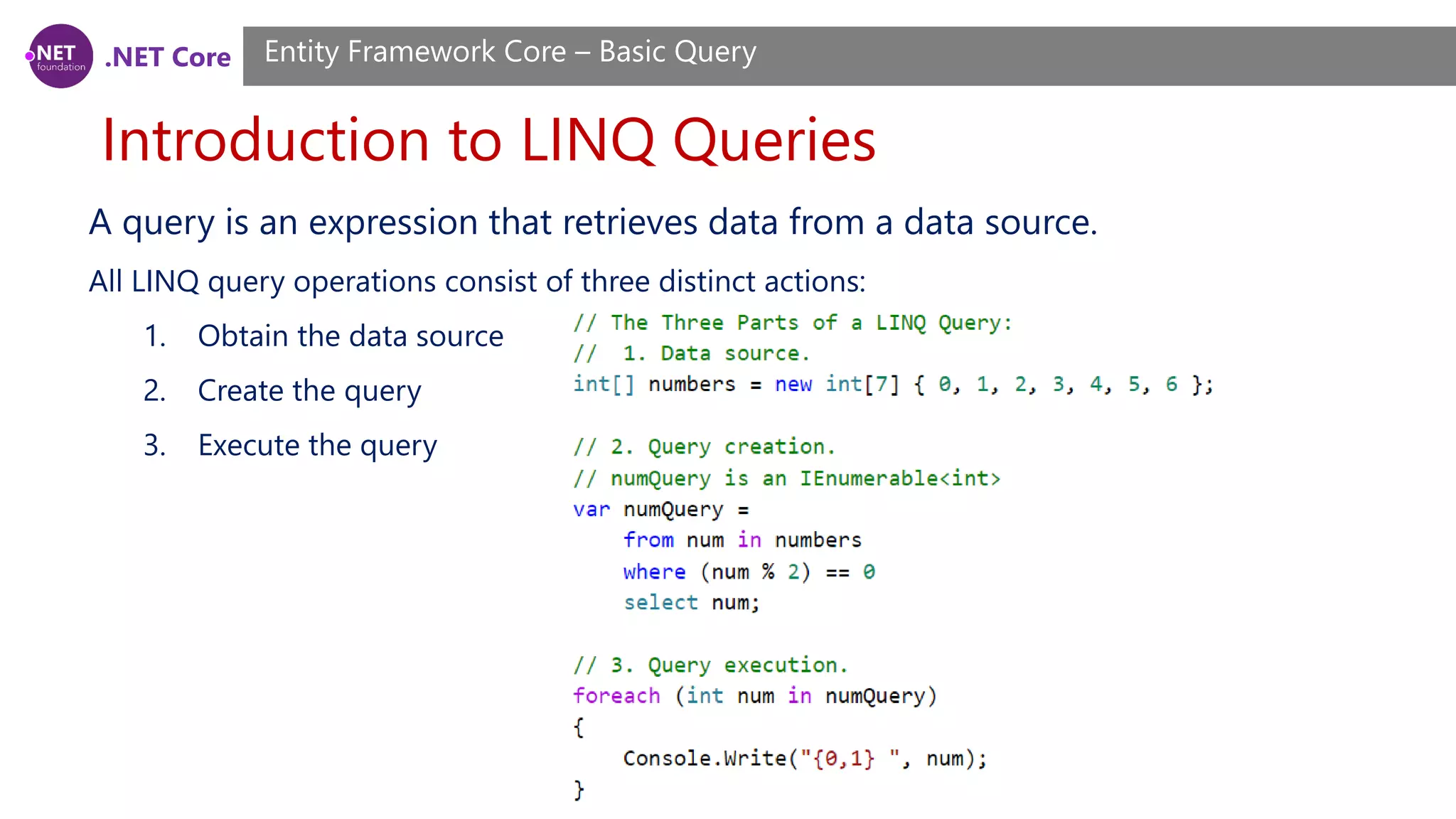
.NET Core Introduction to LINQ Queries Entity Framework Core – Basic Query A query is an expression that retrieves data from a data source. All LINQ query operations consist of three distinct actions: 1. Obtain the data source 2. Create the query 3. Execute the query
.NET Core Introduction to LINQ Queries Entity Framework Core – Basic Query The following illustration shows the complete query operation. In LINQ the execution of the query is distinct from the query itself; in other words you have not retrieved any data just by creating a query variable.
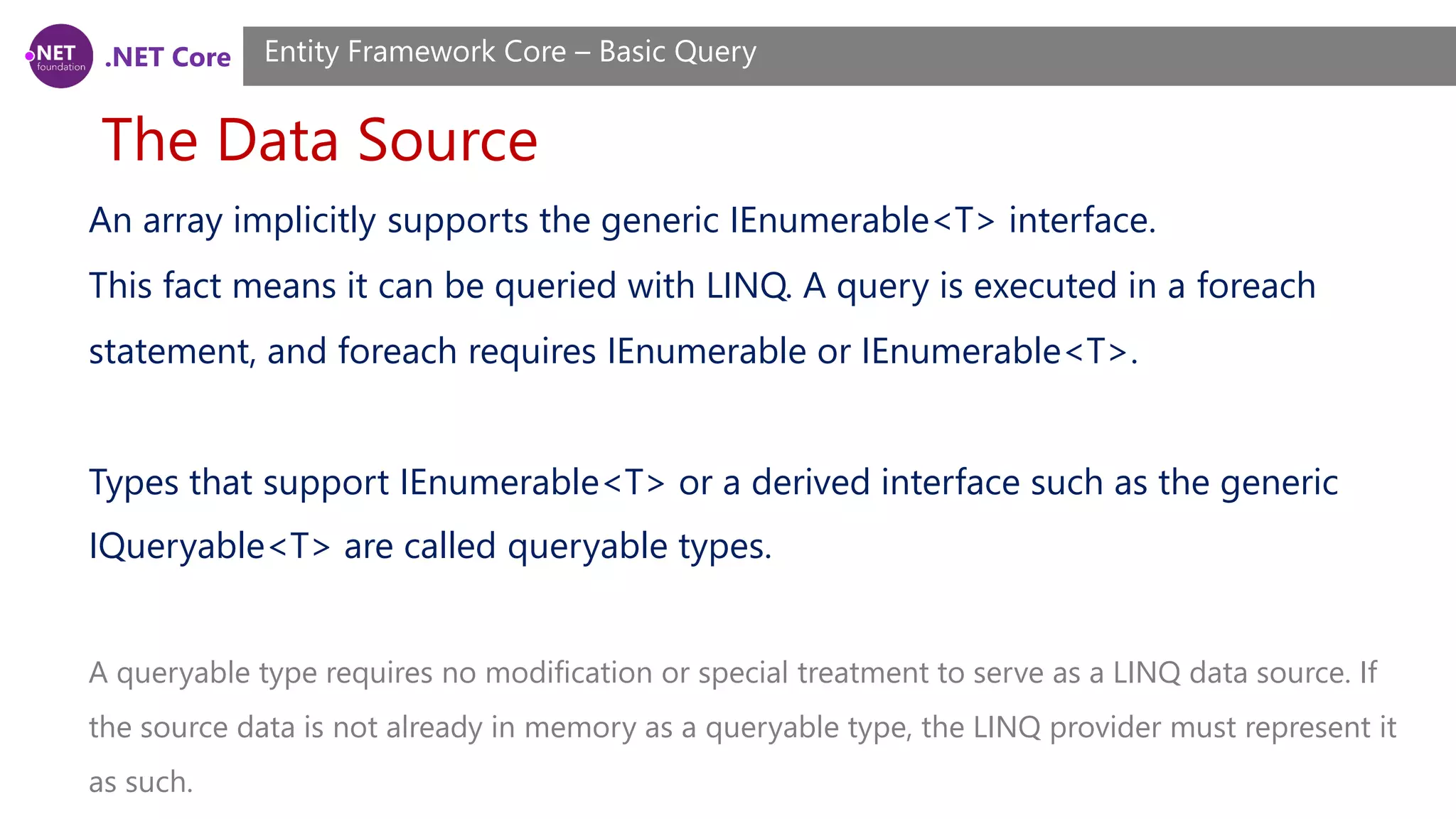
.NET Core The Data Source Entity Framework Core – Basic Query An array implicitly supports the generic IEnumerable<T> interface. This fact means it can be queried with LINQ. A query is executed in a foreach statement, and foreach requires IEnumerable or IEnumerable<T>. Types that support IEnumerable<T> or a derived interface such as the generic IQueryable<T> are called queryable types. A queryable type requires no modification or special treatment to serve as a LINQ data source. If the source data is not already in memory as a queryable type, the LINQ provider must represent it as such.
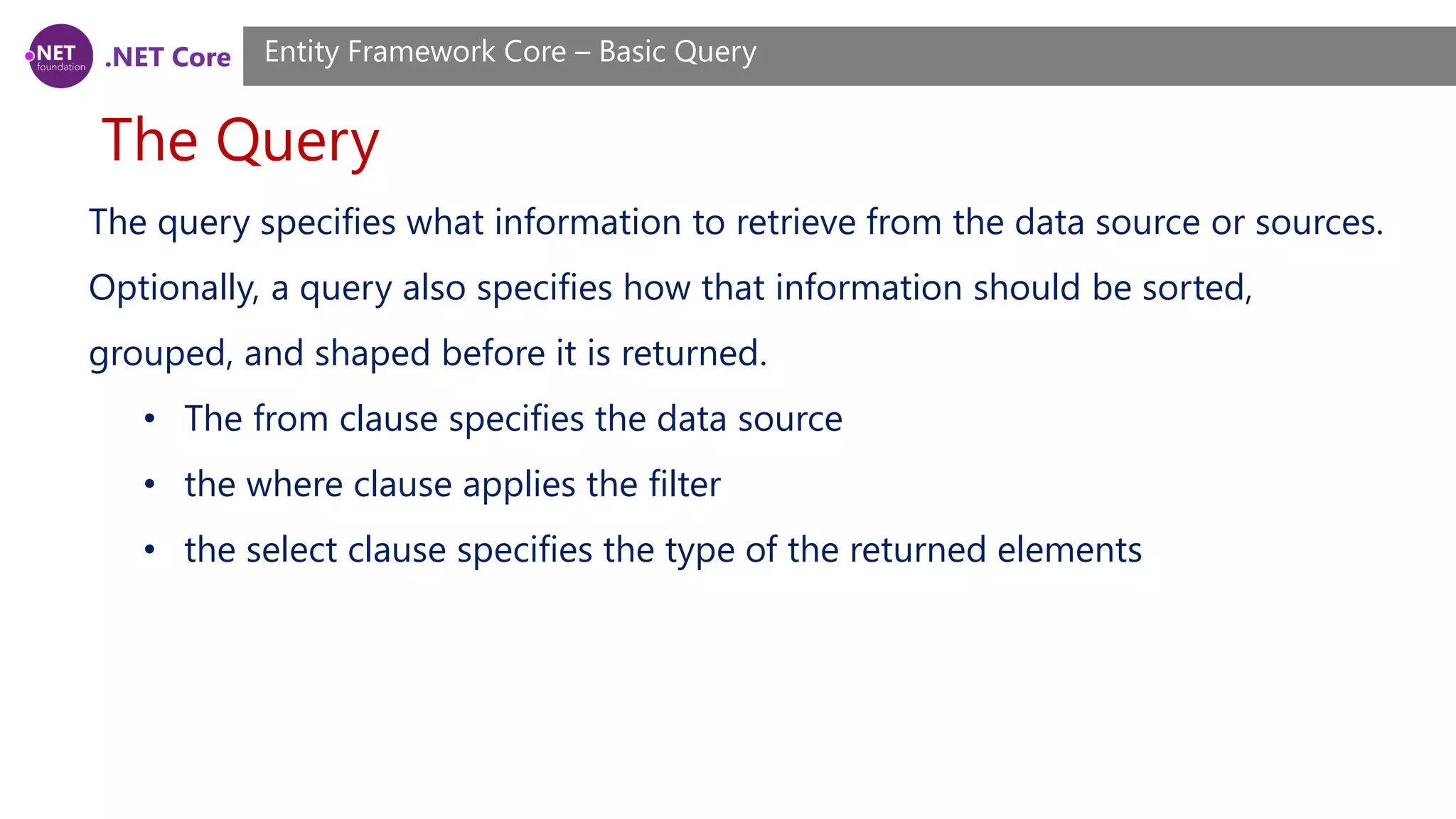
.NET Core The Query Entity Framework Core – Basic Query The query specifies what information to retrieve from the data source or sources. Optionally, a query also specifies how that information should be sorted, grouped, and shaped before it is returned. • The from clause specifies the data source • the where clause applies the filter • the select clause specifies the type of the returned elements
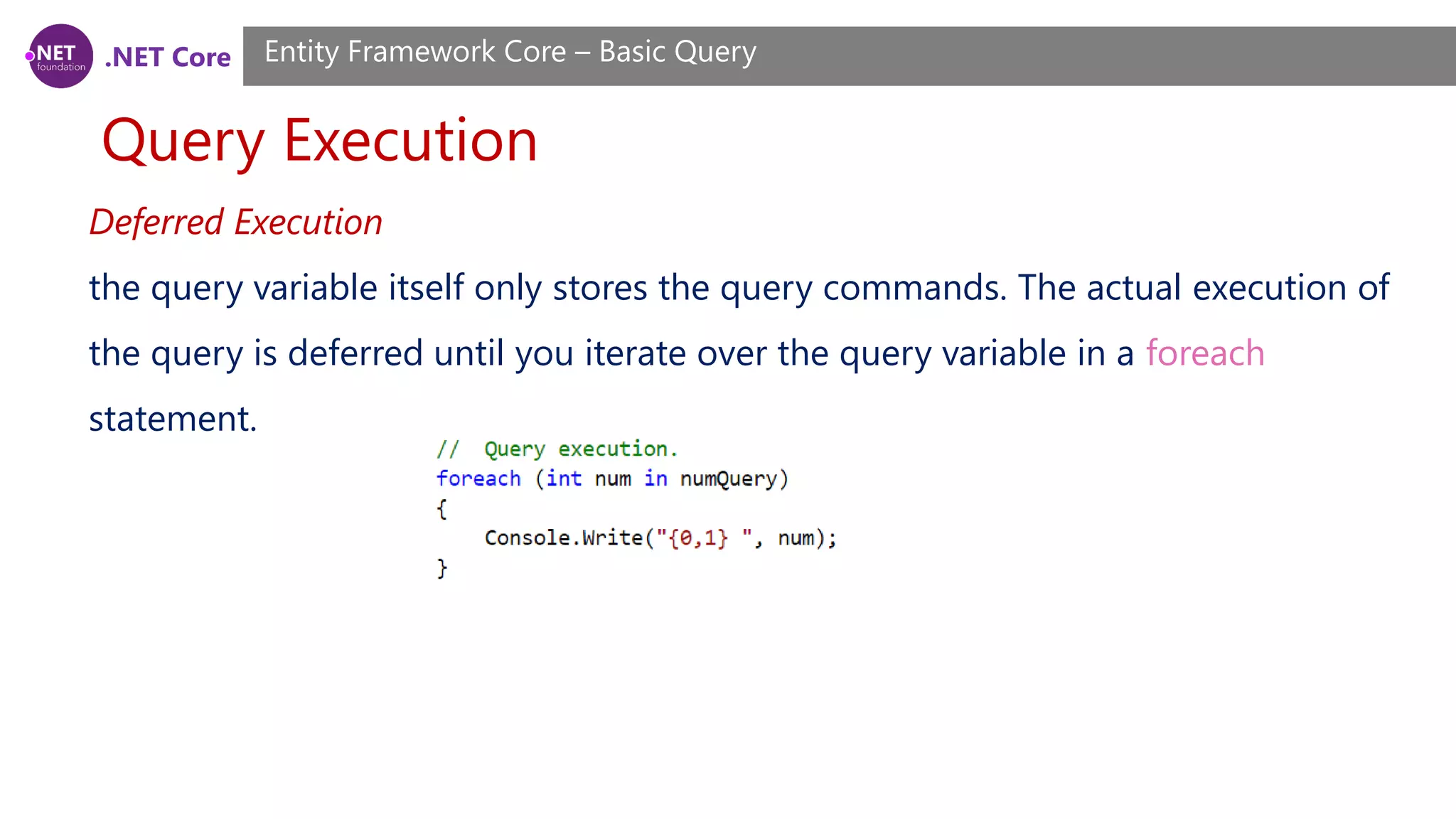
.NET Core Query Execution Entity Framework Core – Basic Query Deferred Execution the query variable itself only stores the query commands. The actual execution of the query is deferred until you iterate over the query variable in a foreach statement.
.NET Core Query Execution Entity Framework Core – Basic Query Forcing Immediate Execution Queries that perform aggregation functions over a range of source elements must first iterate over those elements. Examples of such queries are Count, Max, Average, and First. These execute without an explicit foreach statement because the query itself must use foreach in order to return a result. Note also that these types of queries return a single value, not an IEnumerable collection.
.NET Core Query Execution Entity Framework Core – Basic Query Forcing Immediate Execution To force immediate execution of any query and cache its results, you can call the ToList<TSource> or ToArray<TSource> methods.
.NET Core What Is a Query Expression? Entity Framework Core – Basic Query A query expression must begin with a from clause and must end with a select or group clause. Between the first from clause and the last select or group clause, it can contain one or more of these optional clauses: where, orderby, join, let and even additional from clauses. You can also use the into keyword to enable the result of a join or group clause to serve as the source for additional query clauses in the same query expression.
.NET Core Query Variable Entity Framework Core – Basic Query In LINQ, a query variable is any variable that stores a query instead of the results of a query. More specifically, a query variable is always an enumerable type that will produce a sequence of elements when it is iterated over in a foreach statement or a direct call to its IEnumerator.MoveNext method.
.NET Core IQueryable vs IEnumerable Entity Framework Core – Basic Query IEnumerable<T> represents a forward-only cursor of T. .NET 3.5 added extension methods that included the LINQ standard query operators like Where and First, with any operators that require predicates or anonymous functions taking Func<T>. IQueryable<T> implements the same LINQ standard query operators, but accepts Expression<Func<T>> for predicates and anonymous functions. Expression<T> is a compiled expression tree, a broken-up version of the method ("half-compiled" if you will) that can be parsed by the queryable's provider and used accordingly.
.NET Core IQueryable vs IEnumerable Entity Framework Core – Basic Query In the first block, x => x.Age > 18 is an anonymous method (Func<Person, bool>), which can be executed like any other method. Enumerable.Where will execute the method once for each person, yielding values for which the method returned true. In the second block, x => x.Age > 18 is an expression tree (Expression<Func<Person, bool>>), which can be thought of as "is the 'Age' property > 18"
.NET Core IQueryable vs IEnumerable Entity Framework Core – Basic Query This allows things like LINQ-to-SQL to exist because they can parse the expression tree and convert it into equivalent SQL. And because the provider doesn't need to execute until the IQueryable is enumerated (it implements IEnumerable<T>, after all), it can combine multiple query operators (in the above example Where and FirstOrDefault) to make smarter choices on how to execute the entire query against the underlying data source (like using SELECT TOP 1 in SQL).
.NET Core IQueryable vs IEnumerable Entity Framework Core – Basic Query In real life: • If you create an IQueryable, then the query may be converted to sql and run on the database server • If you create an IEnumerable, then all rows will be pulled into memory as objects before running the query. In both cases if you don't call a ToList() or ToArray() then query will be executed each time it is used, so, say, you have an IQueryable and you fill 4 list boxes from it, then the query will be run against the database 4 times.
.NET Core IQueryable vs IEnumerable Entity Framework Core – Basic Query q.Select(x.name = “a”).ToList() Then with an IQueryable the generated SQL will contains where name = “a”, but with an IEnumerable many more roles will be pulled back from the database, then the x.name = “a” check will be done by .NET. IEnumerable IEnumerable is best suitable for working with in-memory collection. IEnumerable doesn’t move between items, it is forward only collection. IQueryable IQueryable best suits for remote data source, like a database or web service. IQueryable is a very powerful feature that enables a variety of interesting deferred execution scenarios (like paging and composition based queries).
.NET Core Loading Related Data Entity Framework Core – Basic Query Entity Framework Core allows you to use the navigation properties in your model to load related entities. There are three common O/RM patterns used to load related data. • Eager loading means that the related data is loaded from the database as part of the initial query. • Explicit loading means that the related data is explicitly loaded from the database at a later time. • Lazy loading means that the related data is transparently loaded from the database when the navigation property is accessed. Lazy loading is not yet possible with EF Core.
.NET Core Eager loading Entity Framework Core – Basic Query You can use the Include method to specify related data to be included in query results. var blogs = context.Blogs .Include(blog => blog.Posts) .ToList(); Entity Framework Core will automatically fix-up navigation properties to any other entities that were previously loaded into the context instance. So even if you don’t explicitly include the data for a navigation property, the property may still be populated if some or all of the related entities were previously loaded.
.NET Core Eager loading Entity Framework Core – Basic Query You can include related data from multiple relationships in a single query. var blogs = context.Blogs .Include(blog => blog.Posts) .Include(blog => blog.Owner) .ToList();
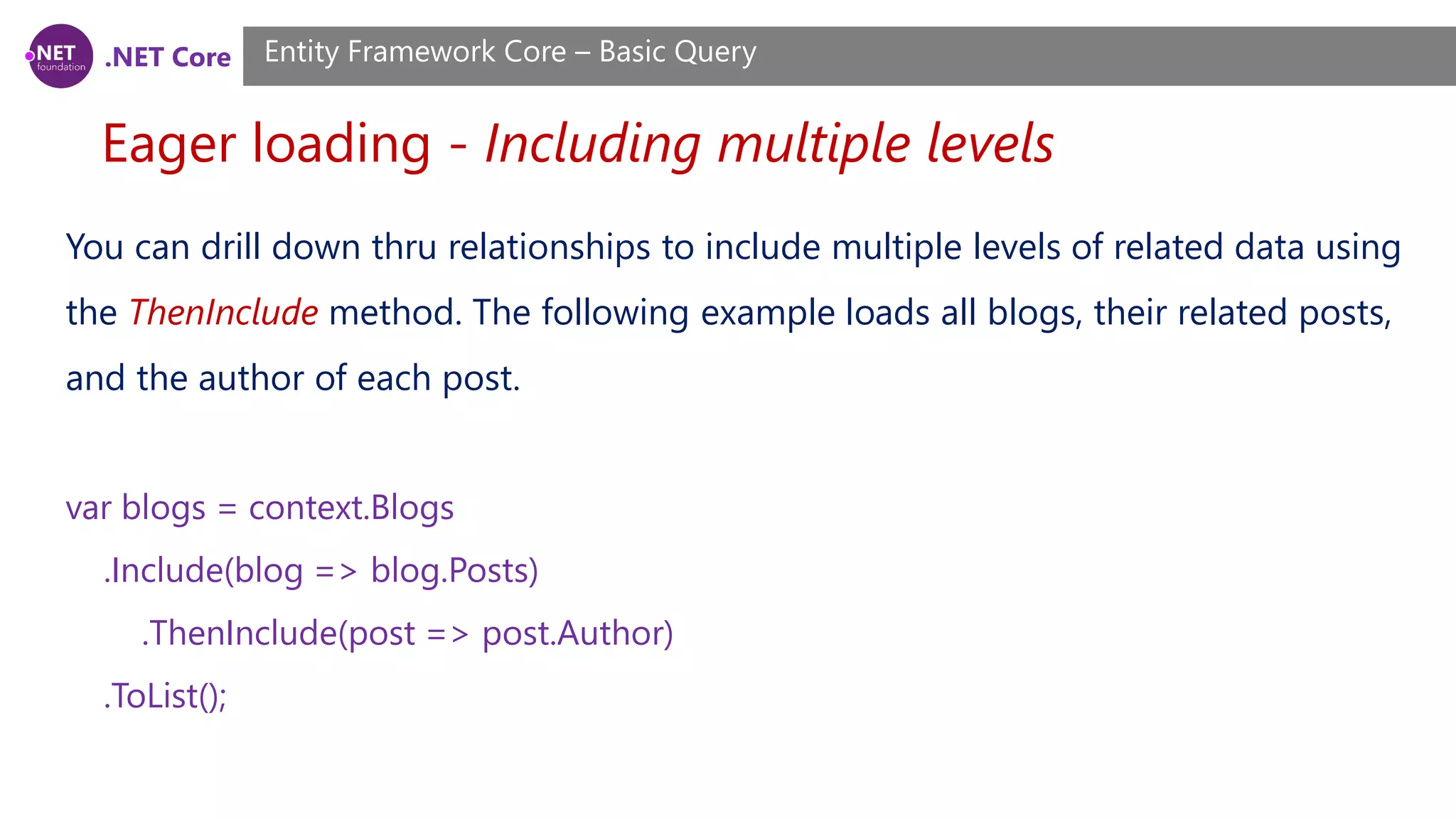
.NET Core Eager loading - Including multiple levels Entity Framework Core – Basic Query You can drill down thru relationships to include multiple levels of related data using the ThenInclude method. The following example loads all blogs, their related posts, and the author of each post. var blogs = context.Blogs .Include(blog => blog.Posts) .ThenInclude(post => post.Author) .ToList();
.NET Core Eager loading - Including multiple levels Entity Framework Core – Basic Query You can chain multiple calls to ThenInclude to continue including further levels of related data. var blogs = context.Blogs .Include(blog => blog.Posts) .ThenInclude(post => post.Author) .ThenInclude(author => author.Photo) .ToList();
.NET Core Eager loading - Including multiple levels Entity Framework Core – Basic Query You can combine all of this to include related data from multiple levels and multiple roots in the same query. var blogs = context.Blogs .Include(blog => blog.Posts) .ThenInclude(post => post.Author) .ThenInclude(author => author.Photo) .Include(blog => blog.Owner) .ThenInclude(owner => owner.Photo) .ToList();
.NET Core Eager loading - Ignored includes Entity Framework Core – Basic Query If you change the query so that it no longer returns instances of the entity type that the query began with, then the include operators are ignored. In the following example, the include operators are based on the Blog, but then the Select operator is used to change the query to return an anonymous type. In this case, the include operators have no effect. var blogs = context.Blogs .Include(blog => blog.Posts) .Select(blog => new { Id = blog.BlogId, Url = blog.Url }) .ToList();
.NET Core Eager loading - Ignored includes Entity Framework Core – Basic Query By default, EF Core will log a warning when include operators are ignored. You can change the behavior when an include operator is ignored to either throw or do nothing. This is done when setting up the options for your context - typically in DbContext.OnConfiguring, or in Startup.cs if you are using ASP.NET Core.
.NET Core Explicit loading Entity Framework Core – Basic Query Explicit loading does not yet have a first class API in EF Core. However, you can use a LINQ query to load the data related to an existing entity instance, by filtering to entities related to the entity in question. Because EF Core will automatically fix-up navigation properties to any other entities that were previously loaded into the context instance, the loaded data will be populated into the desired navigation property.
.NET Core Explicit loading Entity Framework Core – Basic Query In the following example, a query is used to load a blog, and then a later query is used to load the posts related to the blog. The loaded posts will be present in the Posts property of the previously loaded blog. var blog = context.Blogs .Single(b => b.BlogId == 1); context.Posts .Where(p => p.BlogId == blog.BlogId) .Load();
.NET Core Lazy loading Entity Framework Core – Basic Query Lazy loading is not yet supported by EF Core.
.NET Core Client vs. Server Evaluation Entity Framework Core – Basic Query Entity Framework Core supports parts of the query being evaluated on the client and parts of it being pushed to the database. It is up to the database provider to determine which parts of the query will be evaluated in the database.
.NET Core Client vs. Server Evaluation Entity Framework Core – Basic Query Client eval In the following example a helper method is used to standardize URLs for blogs that are returned from a SQL Server database. Because the SQL Server provider has no insight into how this method is implemented, it is not possible to translate it into SQL. All other aspects of the query are evaluated in the database, but passing the returned URL through this method is performed on the client.
.NET Core Client vs. Server Evaluation Entity Framework Core – Basic Query Client eval
.NET Core Client vs. Server Evaluation Entity Framework Core – Basic Query Disabling client evaluation While client evaluation can be very useful, in some instances it can result in poor performance. Consider the following query, where the helper method is now used in a filter. Because this can’t be performed in the database, all the data is pulled into memory and then the filter is applied on the client. Depending on the amount of data, and how much of that data is filtered out, this could result in poor performance.
.NET Core Client vs. Server Evaluation Entity Framework Core – Basic Query Disabling client evaluation By default, EF Core will log a warning when client evaluation is performed. You can change the behavior when client evaluation occurs to either throw or do nothing. This is done when setting up the options for your context - typically in DbContext.OnConfiguring, or in Startup.cs if you are using ASP.NET Core. optionsBuilder .UseSqlServer(@"Server=(localdb)...") .ConfigureWarnings(warnings => warnings.Throw(RelationalEventId.QueryClientEvaluationWarning));
.NET Core Tracking vs. No-Tracking Entity Framework Core – Basic Query Tracking behavior controls whether or not Entity Framework Core will keep information about an entity instance in its change tracker. If an entity is tracked, any changes detected in the entity will be persisted to the database during SaveChanges(). Entity Framework Core will also fix-up navigation properties between entities that are obtained from a tracking query and entities that were previously loaded into the DbContext instance.
.NET Core Tracking queries Entity Framework Core – Basic Query By default, queries that return entity types are tracking. This means you can make changes to those entity instances and have those changes persisted by SaveChanges(). In the following example, the change to the blogs rating will be detected and persisted to the database during SaveChanges().
.NET Core No-tracking queries Entity Framework Core – Basic Query No tracking queries are useful when the results are used in a read-only scenario. They are quicker to execute because there is no need to setup change tracking information. You can swap an individual query to be no-tracking:
.NET Core Tracking and projections Entity Framework Core – Basic Query Even if the result type of the query isn’t an entity type, if the result contains entity types they will still be tracked by default. In the following query, which returns an anonymous type, the instances of Blog in the result set will be tracked.
.NET Core Tracking and projections Entity Framework Core – Basic Query If the result set does not contain any entity types, then no tracking is performed. In the following query, which returns an anonymous type with some of the values from the entity (but no instances of the actual entity type), there is no tracking performed.
.NET Core Raw SQL Queries Entity Framework Core – Basic Query Entity Framework Core allows you to drop down to raw SQL queries when working with a relational database. This can be useful if the query you want to perform can’t be expressed using LINQ, or if using a LINQ query is resulting in inefficient SQL being sent to the database.
.NET Core Raw SQL Queries Entity Framework Core – Basic Query There are a couple of limitations to be aware of when using raw SQL queries: • SQL queries can only be used to return entity types that are part of your model. There is an enhancement on our backlog to enable returning ad-hoc types from raw SQL queries. • The SQL query must return data for all properties of the entity type.
.NET Core Raw SQL Queries Entity Framework Core – Basic Query There are a couple of limitations to be aware of when using raw SQL queries: • The column names in the result set must match the column names that properties are mapped to. Note this is different from EF6.x where property/column mapping was ignored for raw SQL queries and result set column names had to match the property names. • The SQL query cannot contain related data. However, in many cases you can compose on top of the query using the Include operator to return related data
.NET Core Raw SQL Queries - Basic raw SQL queries Entity Framework Core – Basic Query You can use the FromSql extension method to begin a LINQ query based on a raw SQL query. Raw SQL queries can be used to execute a stored procedure.
.NET Core Raw SQL Queries - Passing parameters Entity Framework Core – Basic Query As with any API that accepts SQL, it is important to parameterize any user input to protect against a SQL injection attack. You can include parameter placeholders in the SQL query string and then supply parameter values as additional arguments. Any parameter values you supply will automatically be converted to a DbParameter.
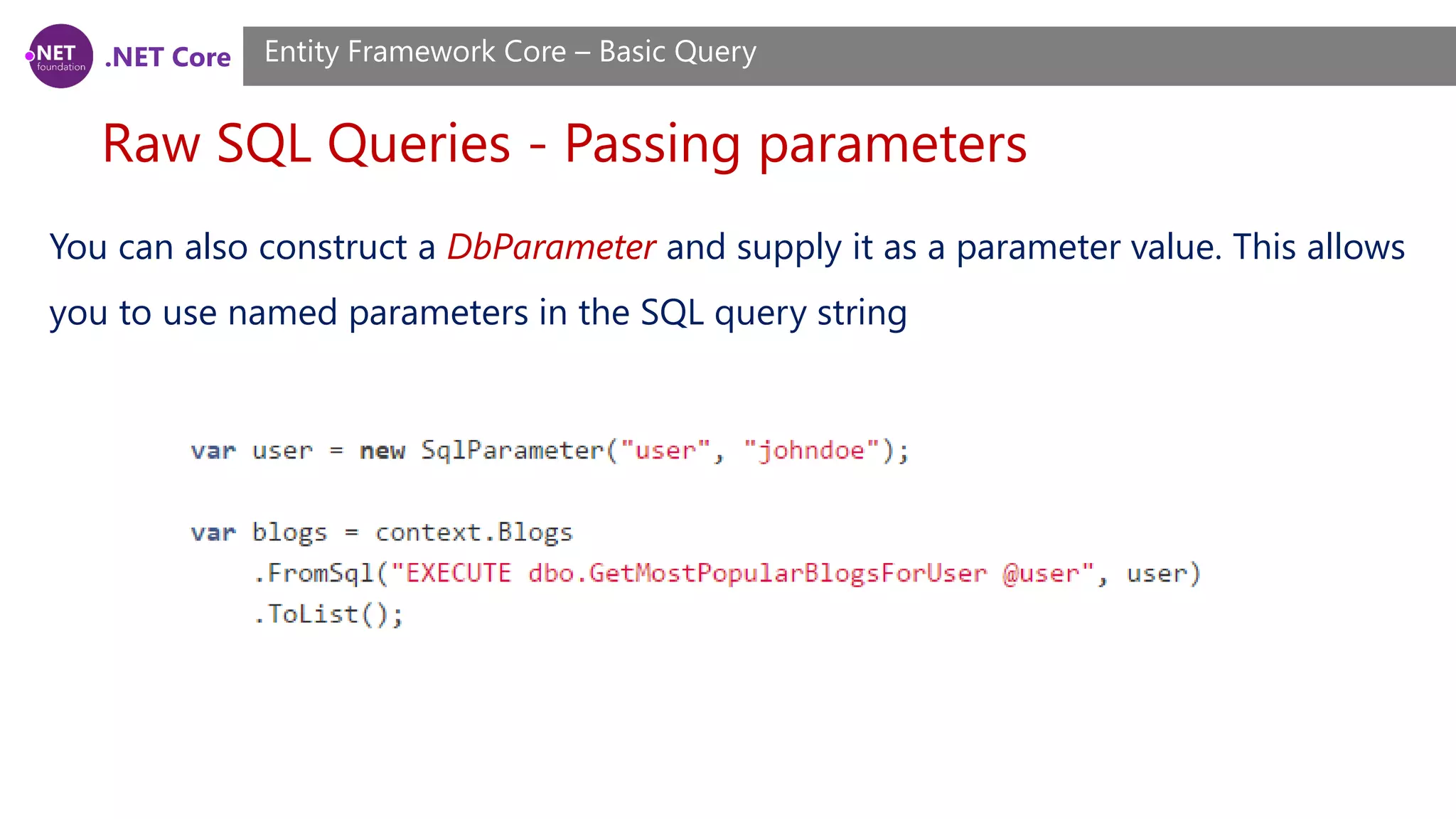
.NET Core Raw SQL Queries - Passing parameters Entity Framework Core – Basic Query You can also construct a DbParameter and supply it as a parameter value. This allows you to use named parameters in the SQL query string
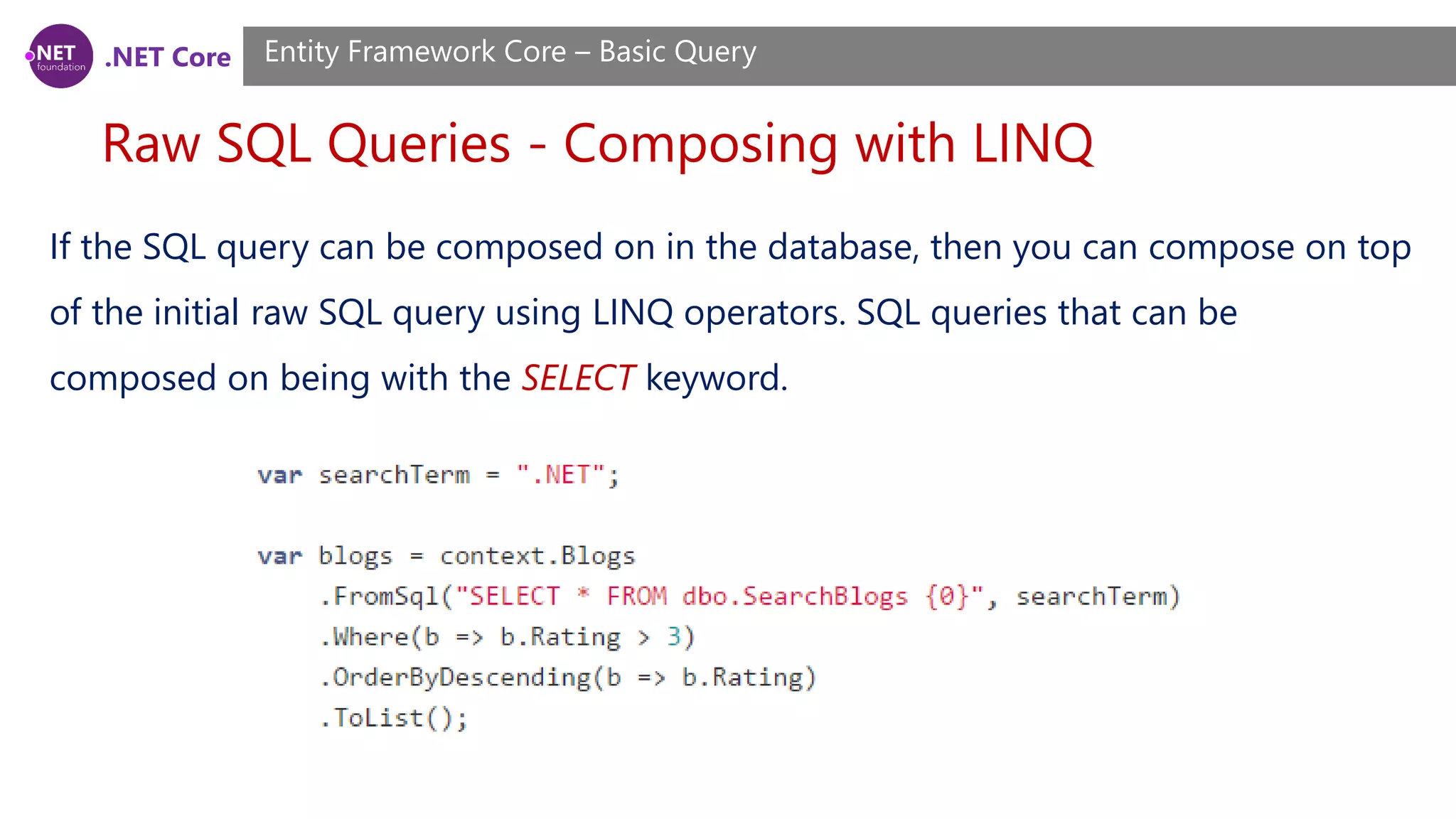
.NET Core Raw SQL Queries - Composing with LINQ Entity Framework Core – Basic Query If the SQL query can be composed on in the database, then you can compose on top of the initial raw SQL query using LINQ operators. SQL queries that can be composed on being with the SELECT keyword.
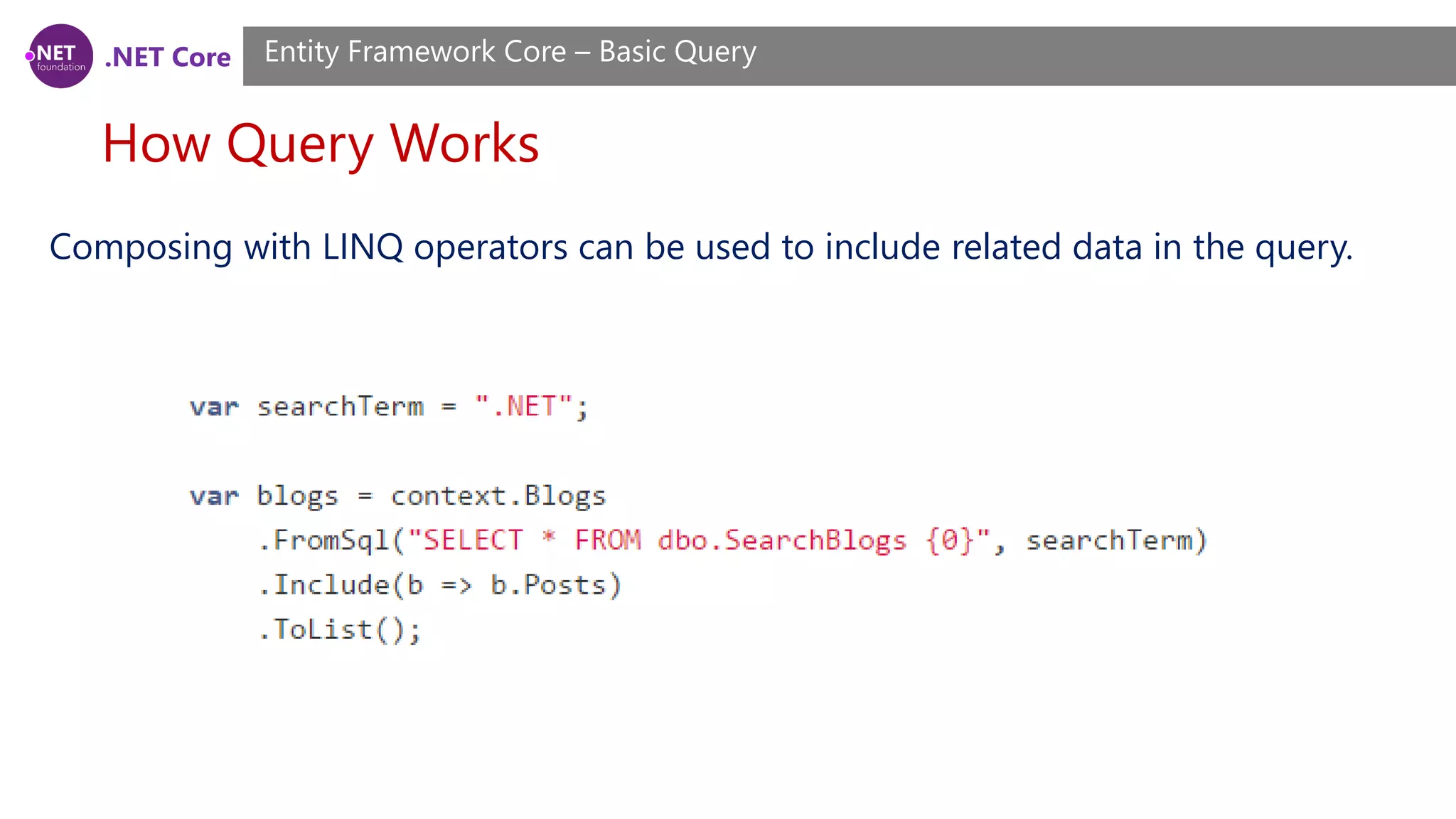
.NET Core Raw SQL Queries - Including related data Entity Framework Core – Basic Query Composing with LINQ operators can be used to include related data in the query.
.NET Core How Query Works Entity Framework Core – Basic Query Composing with LINQ operators can be used to include related data in the query.
.NET Core Demo Demo

.NET Core, ASP.NET Core Course, Session 14

  • 1.
    .NET Core +ASP.NET Core Training Course Session 14
  • 2.
    .NET Core What welearned? Session 6 ~ 13 Overview • ASP.NET Core Basics • Middleware, Controllers, Action Filters and Routing • Models • Views • Entity Framework Core (Modeling)
  • 3.
    .NET Core What we’lllearn today? Session 14 Agenda • Entity Framework Core (Querying Data)
  • 4.
    .NET Core Basic Query EntityFramework Core – Basic Query Entity Framework Core uses Language Integrate Query (LINQ) to query data from the database. LINQ allows you to use C# (or your .NET language of choice) to write strongly typed queries based on your derived context and entity classes.
  • 5.
    .NET Core Introduction toLINQ Queries Entity Framework Core – Basic Query A query is an expression that retrieves data from a data source. All LINQ query operations consist of three distinct actions: 1. Obtain the data source 2. Create the query 3. Execute the query
  • 6.
    .NET Core Introduction toLINQ Queries Entity Framework Core – Basic Query The following illustration shows the complete query operation. In LINQ the execution of the query is distinct from the query itself; in other words you have not retrieved any data just by creating a query variable.
  • 7.
    .NET Core The DataSource Entity Framework Core – Basic Query An array implicitly supports the generic IEnumerable<T> interface. This fact means it can be queried with LINQ. A query is executed in a foreach statement, and foreach requires IEnumerable or IEnumerable<T>. Types that support IEnumerable<T> or a derived interface such as the generic IQueryable<T> are called queryable types. A queryable type requires no modification or special treatment to serve as a LINQ data source. If the source data is not already in memory as a queryable type, the LINQ provider must represent it as such.
  • 8.
    .NET Core The Query EntityFramework Core – Basic Query The query specifies what information to retrieve from the data source or sources. Optionally, a query also specifies how that information should be sorted, grouped, and shaped before it is returned. • The from clause specifies the data source • the where clause applies the filter • the select clause specifies the type of the returned elements
  • 9.
    .NET Core Query Execution EntityFramework Core – Basic Query Deferred Execution the query variable itself only stores the query commands. The actual execution of the query is deferred until you iterate over the query variable in a foreach statement.
  • 10.
    .NET Core Query Execution EntityFramework Core – Basic Query Forcing Immediate Execution Queries that perform aggregation functions over a range of source elements must first iterate over those elements. Examples of such queries are Count, Max, Average, and First. These execute without an explicit foreach statement because the query itself must use foreach in order to return a result. Note also that these types of queries return a single value, not an IEnumerable collection.
  • 11.
    .NET Core Query Execution EntityFramework Core – Basic Query Forcing Immediate Execution To force immediate execution of any query and cache its results, you can call the ToList<TSource> or ToArray<TSource> methods.
  • 12.
    .NET Core What Isa Query Expression? Entity Framework Core – Basic Query A query expression must begin with a from clause and must end with a select or group clause. Between the first from clause and the last select or group clause, it can contain one or more of these optional clauses: where, orderby, join, let and even additional from clauses. You can also use the into keyword to enable the result of a join or group clause to serve as the source for additional query clauses in the same query expression.
  • 13.
    .NET Core Query Variable EntityFramework Core – Basic Query In LINQ, a query variable is any variable that stores a query instead of the results of a query. More specifically, a query variable is always an enumerable type that will produce a sequence of elements when it is iterated over in a foreach statement or a direct call to its IEnumerator.MoveNext method.
  • 14.
    .NET Core IQueryable vsIEnumerable Entity Framework Core – Basic Query IEnumerable<T> represents a forward-only cursor of T. .NET 3.5 added extension methods that included the LINQ standard query operators like Where and First, with any operators that require predicates or anonymous functions taking Func<T>. IQueryable<T> implements the same LINQ standard query operators, but accepts Expression<Func<T>> for predicates and anonymous functions. Expression<T> is a compiled expression tree, a broken-up version of the method ("half-compiled" if you will) that can be parsed by the queryable's provider and used accordingly.
  • 15.
    .NET Core IQueryable vsIEnumerable Entity Framework Core – Basic Query In the first block, x => x.Age > 18 is an anonymous method (Func<Person, bool>), which can be executed like any other method. Enumerable.Where will execute the method once for each person, yielding values for which the method returned true. In the second block, x => x.Age > 18 is an expression tree (Expression<Func<Person, bool>>), which can be thought of as "is the 'Age' property > 18"
  • 16.
    .NET Core IQueryable vsIEnumerable Entity Framework Core – Basic Query This allows things like LINQ-to-SQL to exist because they can parse the expression tree and convert it into equivalent SQL. And because the provider doesn't need to execute until the IQueryable is enumerated (it implements IEnumerable<T>, after all), it can combine multiple query operators (in the above example Where and FirstOrDefault) to make smarter choices on how to execute the entire query against the underlying data source (like using SELECT TOP 1 in SQL).
  • 17.
    .NET Core IQueryable vsIEnumerable Entity Framework Core – Basic Query In real life: • If you create an IQueryable, then the query may be converted to sql and run on the database server • If you create an IEnumerable, then all rows will be pulled into memory as objects before running the query. In both cases if you don't call a ToList() or ToArray() then query will be executed each time it is used, so, say, you have an IQueryable and you fill 4 list boxes from it, then the query will be run against the database 4 times.
  • 18.
    .NET Core IQueryable vsIEnumerable Entity Framework Core – Basic Query q.Select(x.name = “a”).ToList() Then with an IQueryable the generated SQL will contains where name = “a”, but with an IEnumerable many more roles will be pulled back from the database, then the x.name = “a” check will be done by .NET. IEnumerable IEnumerable is best suitable for working with in-memory collection. IEnumerable doesn’t move between items, it is forward only collection. IQueryable IQueryable best suits for remote data source, like a database or web service. IQueryable is a very powerful feature that enables a variety of interesting deferred execution scenarios (like paging and composition based queries).
  • 19.
    .NET Core Loading RelatedData Entity Framework Core – Basic Query Entity Framework Core allows you to use the navigation properties in your model to load related entities. There are three common O/RM patterns used to load related data. • Eager loading means that the related data is loaded from the database as part of the initial query. • Explicit loading means that the related data is explicitly loaded from the database at a later time. • Lazy loading means that the related data is transparently loaded from the database when the navigation property is accessed. Lazy loading is not yet possible with EF Core.
  • 20.
    .NET Core Eager loading EntityFramework Core – Basic Query You can use the Include method to specify related data to be included in query results. var blogs = context.Blogs .Include(blog => blog.Posts) .ToList(); Entity Framework Core will automatically fix-up navigation properties to any other entities that were previously loaded into the context instance. So even if you don’t explicitly include the data for a navigation property, the property may still be populated if some or all of the related entities were previously loaded.
  • 21.
    .NET Core Eager loading EntityFramework Core – Basic Query You can include related data from multiple relationships in a single query. var blogs = context.Blogs .Include(blog => blog.Posts) .Include(blog => blog.Owner) .ToList();
  • 22.
    .NET Core Eager loading- Including multiple levels Entity Framework Core – Basic Query You can drill down thru relationships to include multiple levels of related data using the ThenInclude method. The following example loads all blogs, their related posts, and the author of each post. var blogs = context.Blogs .Include(blog => blog.Posts) .ThenInclude(post => post.Author) .ToList();
  • 23.
    .NET Core Eager loading- Including multiple levels Entity Framework Core – Basic Query You can chain multiple calls to ThenInclude to continue including further levels of related data. var blogs = context.Blogs .Include(blog => blog.Posts) .ThenInclude(post => post.Author) .ThenInclude(author => author.Photo) .ToList();
  • 24.
    .NET Core Eager loading- Including multiple levels Entity Framework Core – Basic Query You can combine all of this to include related data from multiple levels and multiple roots in the same query. var blogs = context.Blogs .Include(blog => blog.Posts) .ThenInclude(post => post.Author) .ThenInclude(author => author.Photo) .Include(blog => blog.Owner) .ThenInclude(owner => owner.Photo) .ToList();
  • 25.
    .NET Core Eager loading- Ignored includes Entity Framework Core – Basic Query If you change the query so that it no longer returns instances of the entity type that the query began with, then the include operators are ignored. In the following example, the include operators are based on the Blog, but then the Select operator is used to change the query to return an anonymous type. In this case, the include operators have no effect. var blogs = context.Blogs .Include(blog => blog.Posts) .Select(blog => new { Id = blog.BlogId, Url = blog.Url }) .ToList();
  • 26.
    .NET Core Eager loading- Ignored includes Entity Framework Core – Basic Query By default, EF Core will log a warning when include operators are ignored. You can change the behavior when an include operator is ignored to either throw or do nothing. This is done when setting up the options for your context - typically in DbContext.OnConfiguring, or in Startup.cs if you are using ASP.NET Core.
  • 27.
    .NET Core Explicit loading EntityFramework Core – Basic Query Explicit loading does not yet have a first class API in EF Core. However, you can use a LINQ query to load the data related to an existing entity instance, by filtering to entities related to the entity in question. Because EF Core will automatically fix-up navigation properties to any other entities that were previously loaded into the context instance, the loaded data will be populated into the desired navigation property.
  • 28.
    .NET Core Explicit loading EntityFramework Core – Basic Query In the following example, a query is used to load a blog, and then a later query is used to load the posts related to the blog. The loaded posts will be present in the Posts property of the previously loaded blog. var blog = context.Blogs .Single(b => b.BlogId == 1); context.Posts .Where(p => p.BlogId == blog.BlogId) .Load();
  • 29.
    .NET Core Lazy loading EntityFramework Core – Basic Query Lazy loading is not yet supported by EF Core.
  • 30.
    .NET Core Client vs.Server Evaluation Entity Framework Core – Basic Query Entity Framework Core supports parts of the query being evaluated on the client and parts of it being pushed to the database. It is up to the database provider to determine which parts of the query will be evaluated in the database.
  • 31.
    .NET Core Client vs.Server Evaluation Entity Framework Core – Basic Query Client eval In the following example a helper method is used to standardize URLs for blogs that are returned from a SQL Server database. Because the SQL Server provider has no insight into how this method is implemented, it is not possible to translate it into SQL. All other aspects of the query are evaluated in the database, but passing the returned URL through this method is performed on the client.
  • 32.
    .NET Core Client vs.Server Evaluation Entity Framework Core – Basic Query Client eval
  • 33.
    .NET Core Client vs.Server Evaluation Entity Framework Core – Basic Query Disabling client evaluation While client evaluation can be very useful, in some instances it can result in poor performance. Consider the following query, where the helper method is now used in a filter. Because this can’t be performed in the database, all the data is pulled into memory and then the filter is applied on the client. Depending on the amount of data, and how much of that data is filtered out, this could result in poor performance.
  • 34.
    .NET Core Client vs.Server Evaluation Entity Framework Core – Basic Query Disabling client evaluation By default, EF Core will log a warning when client evaluation is performed. You can change the behavior when client evaluation occurs to either throw or do nothing. This is done when setting up the options for your context - typically in DbContext.OnConfiguring, or in Startup.cs if you are using ASP.NET Core. optionsBuilder .UseSqlServer(@"Server=(localdb)...") .ConfigureWarnings(warnings => warnings.Throw(RelationalEventId.QueryClientEvaluationWarning));
  • 35.
    .NET Core Tracking vs.No-Tracking Entity Framework Core – Basic Query Tracking behavior controls whether or not Entity Framework Core will keep information about an entity instance in its change tracker. If an entity is tracked, any changes detected in the entity will be persisted to the database during SaveChanges(). Entity Framework Core will also fix-up navigation properties between entities that are obtained from a tracking query and entities that were previously loaded into the DbContext instance.
  • 36.
    .NET Core Tracking queries EntityFramework Core – Basic Query By default, queries that return entity types are tracking. This means you can make changes to those entity instances and have those changes persisted by SaveChanges(). In the following example, the change to the blogs rating will be detected and persisted to the database during SaveChanges().
  • 37.
    .NET Core No-tracking queries EntityFramework Core – Basic Query No tracking queries are useful when the results are used in a read-only scenario. They are quicker to execute because there is no need to setup change tracking information. You can swap an individual query to be no-tracking:
  • 38.
    .NET Core Tracking andprojections Entity Framework Core – Basic Query Even if the result type of the query isn’t an entity type, if the result contains entity types they will still be tracked by default. In the following query, which returns an anonymous type, the instances of Blog in the result set will be tracked.
  • 39.
    .NET Core Tracking andprojections Entity Framework Core – Basic Query If the result set does not contain any entity types, then no tracking is performed. In the following query, which returns an anonymous type with some of the values from the entity (but no instances of the actual entity type), there is no tracking performed.
  • 40.
    .NET Core Raw SQLQueries Entity Framework Core – Basic Query Entity Framework Core allows you to drop down to raw SQL queries when working with a relational database. This can be useful if the query you want to perform can’t be expressed using LINQ, or if using a LINQ query is resulting in inefficient SQL being sent to the database.
  • 41.
    .NET Core Raw SQLQueries Entity Framework Core – Basic Query There are a couple of limitations to be aware of when using raw SQL queries: • SQL queries can only be used to return entity types that are part of your model. There is an enhancement on our backlog to enable returning ad-hoc types from raw SQL queries. • The SQL query must return data for all properties of the entity type.
  • 42.
    .NET Core Raw SQLQueries Entity Framework Core – Basic Query There are a couple of limitations to be aware of when using raw SQL queries: • The column names in the result set must match the column names that properties are mapped to. Note this is different from EF6.x where property/column mapping was ignored for raw SQL queries and result set column names had to match the property names. • The SQL query cannot contain related data. However, in many cases you can compose on top of the query using the Include operator to return related data
  • 43.
    .NET Core Raw SQLQueries - Basic raw SQL queries Entity Framework Core – Basic Query You can use the FromSql extension method to begin a LINQ query based on a raw SQL query. Raw SQL queries can be used to execute a stored procedure.
  • 44.
    .NET Core Raw SQLQueries - Passing parameters Entity Framework Core – Basic Query As with any API that accepts SQL, it is important to parameterize any user input to protect against a SQL injection attack. You can include parameter placeholders in the SQL query string and then supply parameter values as additional arguments. Any parameter values you supply will automatically be converted to a DbParameter.
  • 45.
    .NET Core Raw SQLQueries - Passing parameters Entity Framework Core – Basic Query You can also construct a DbParameter and supply it as a parameter value. This allows you to use named parameters in the SQL query string
  • 46.
    .NET Core Raw SQLQueries - Composing with LINQ Entity Framework Core – Basic Query If the SQL query can be composed on in the database, then you can compose on top of the initial raw SQL query using LINQ operators. SQL queries that can be composed on being with the SELECT keyword.
  • 47.
    .NET Core Raw SQLQueries - Including related data Entity Framework Core – Basic Query Composing with LINQ operators can be used to include related data in the query.
  • 48.
    .NET Core How QueryWorks Entity Framework Core – Basic Query Composing with LINQ operators can be used to include related data in the query.
  • 49.