Front End Development with AngularJS Presented by: Bipin Upadhyaya
Node package manager • Node.js Package Management (NPM)  Package manager for Node.js modules  Initializes an empty Node.js project with package.json file npm init
Let’s start bootstrapping (you no longer have to write the boilerplate)
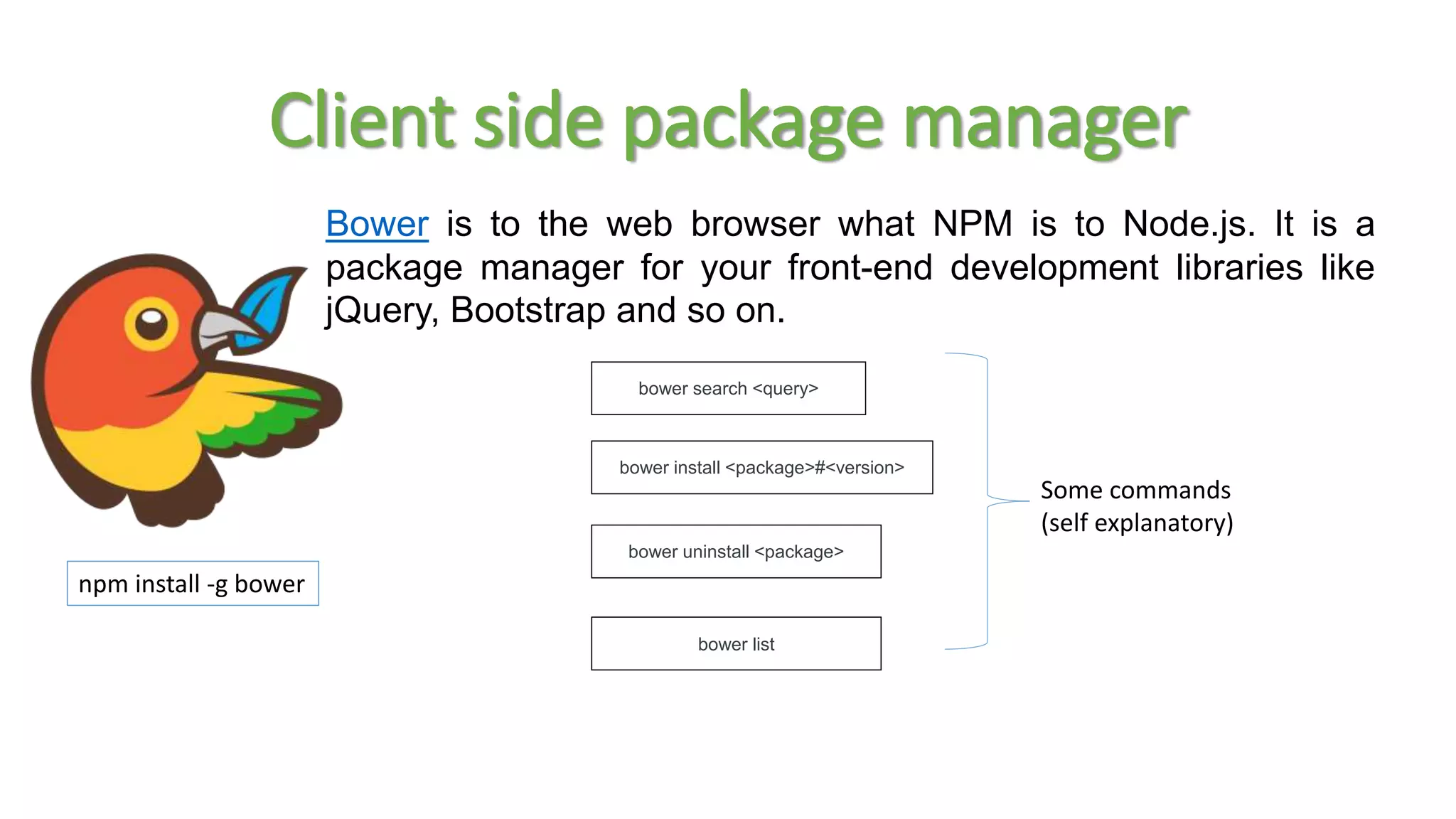
Client side package manager npm install -g bower bower search <query> bower install <package>#<version> bower uninstall <package> bower list Bower is to the web browser what NPM is to Node.js. It is a package manager for your front-end development libraries like jQuery, Bootstrap and so on. Some commands (self explanatory)
Automate your frontend workflows npm install -g grunt-cli npm install -g gulp Grunt and Gulp make it easy to incorporate best practices and automate the tedious parts of web development.
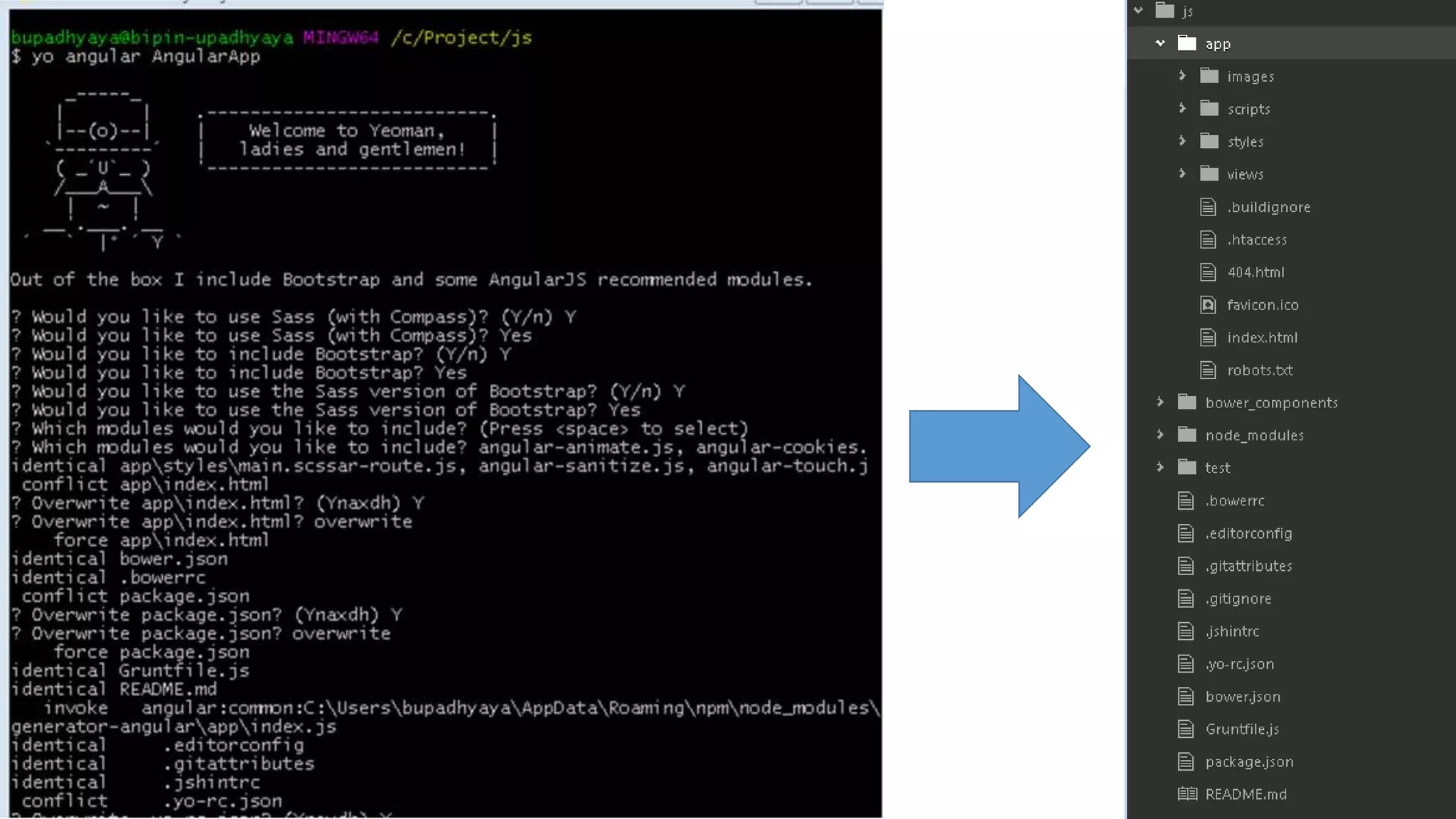
Yoman: Web scaffolding tool for modern app 3 types of tools for improving productivity and satisfaction when building a web app npm install -g yo yo scaffolds out a new application, writing your build configuration ad pulling relevant build tasks and package manager dependencies that you might need for your build.
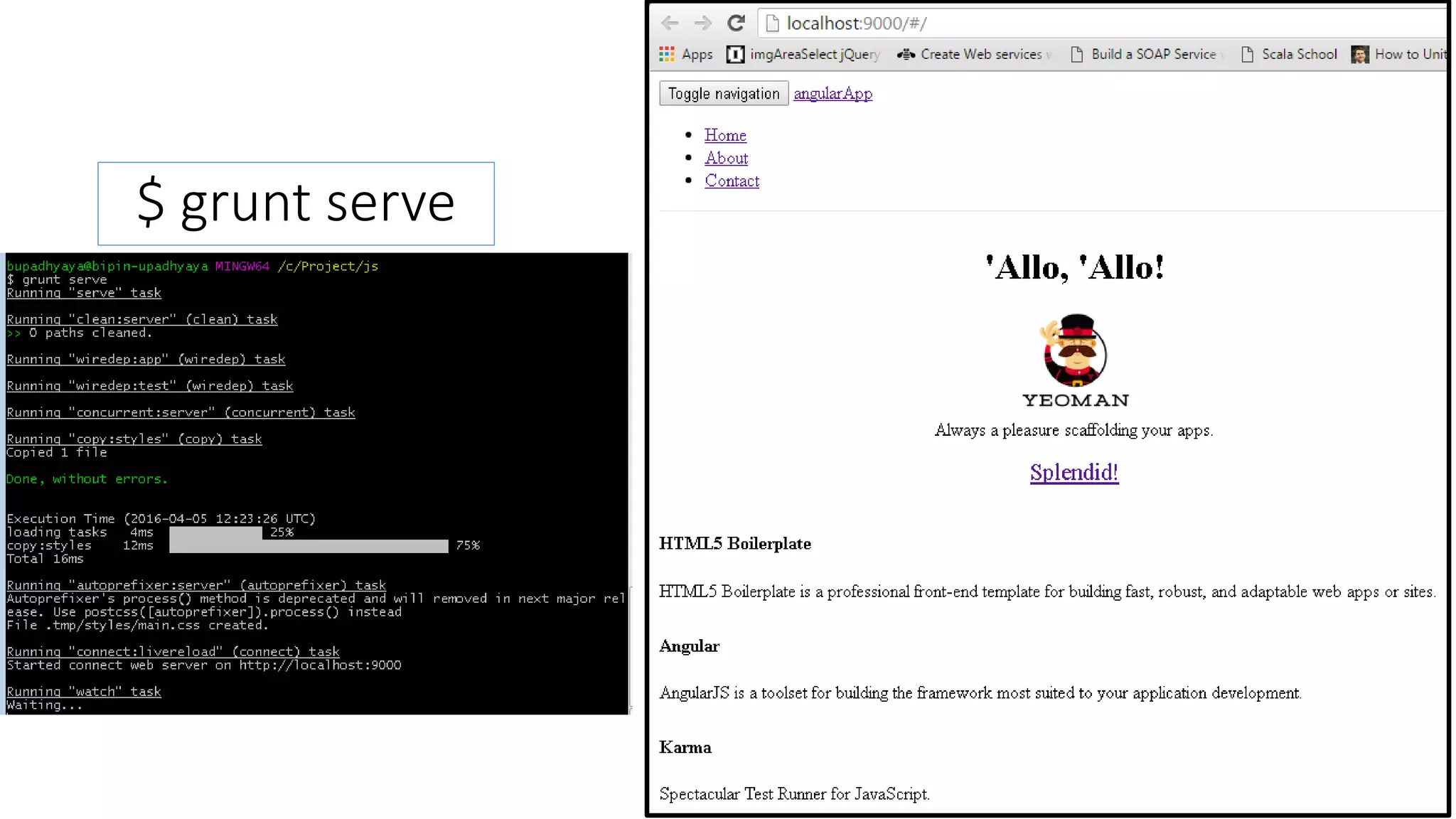
$ grunt serve
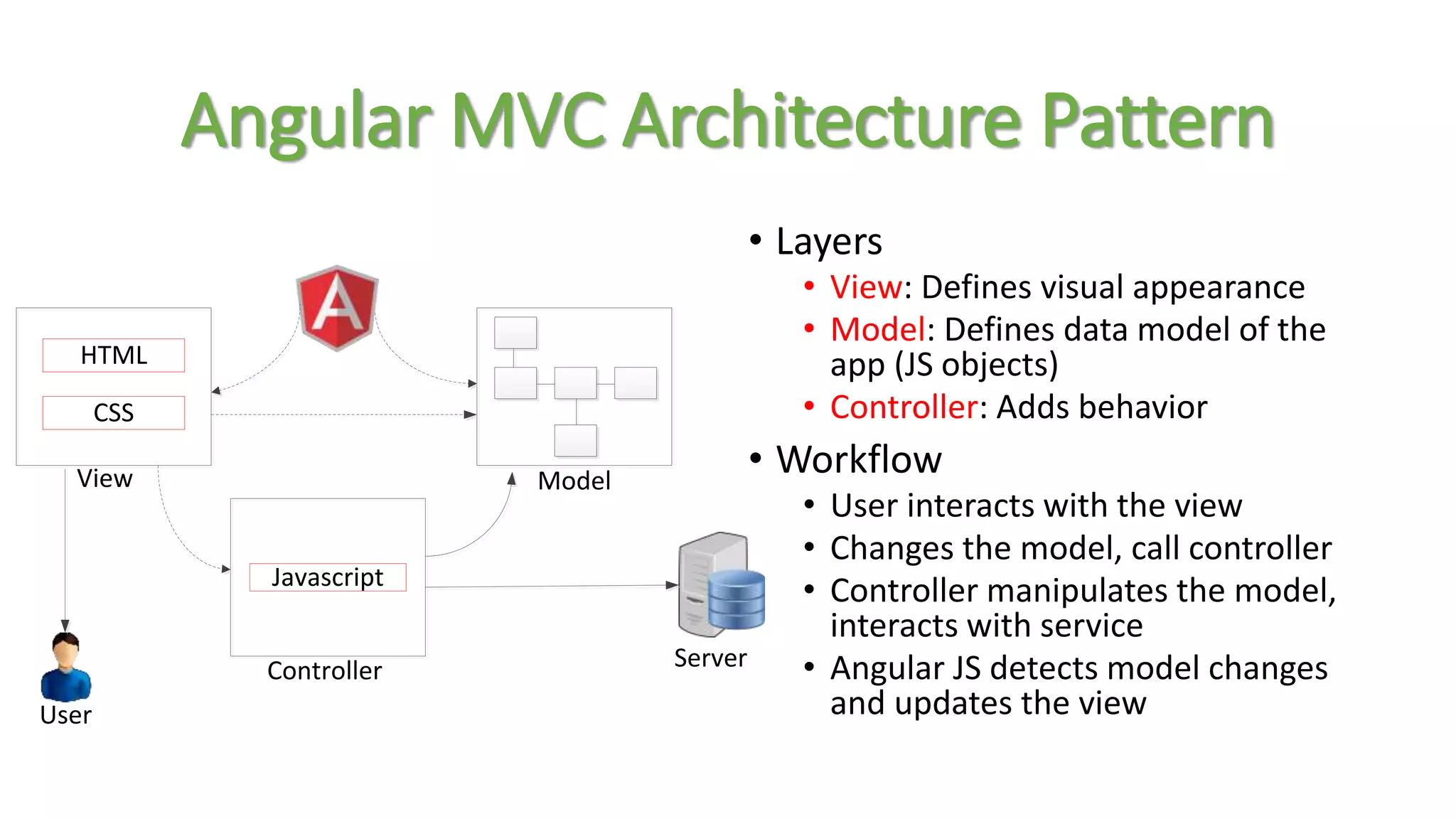
Angular MVC Architecture Pattern • Layers • View: Defines visual appearance • Model: Defines data model of the app (JS objects) • Controller: Adds behavior • Workflow • User interacts with the view • Changes the model, call controller • Controller manipulates the model, interacts with service • Angular JS detects model changes and updates the view HTML CSS Javascript Controller ModelView Server User
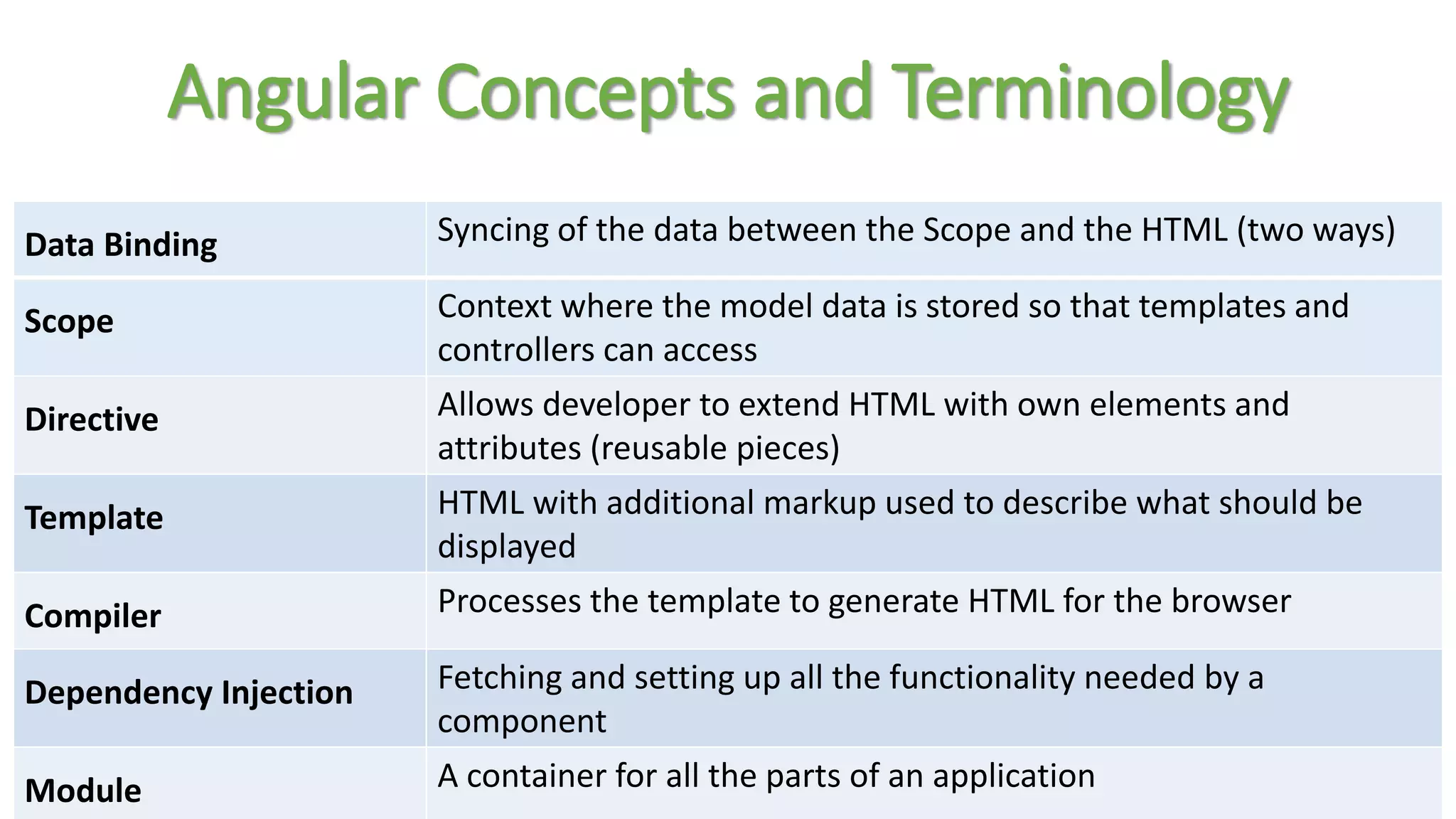
Data Binding Syncing of the data between the Scope and the HTML (two ways) Scope Context where the model data is stored so that templates and controllers can access Directive Allows developer to extend HTML with own elements and attributes (reusable pieces) Template HTML with additional markup used to describe what should be displayed Compiler Processes the template to generate HTML for the browser Dependency Injection Fetching and setting up all the functionality needed by a component Module A container for all the parts of an application Angular Concepts and Terminology
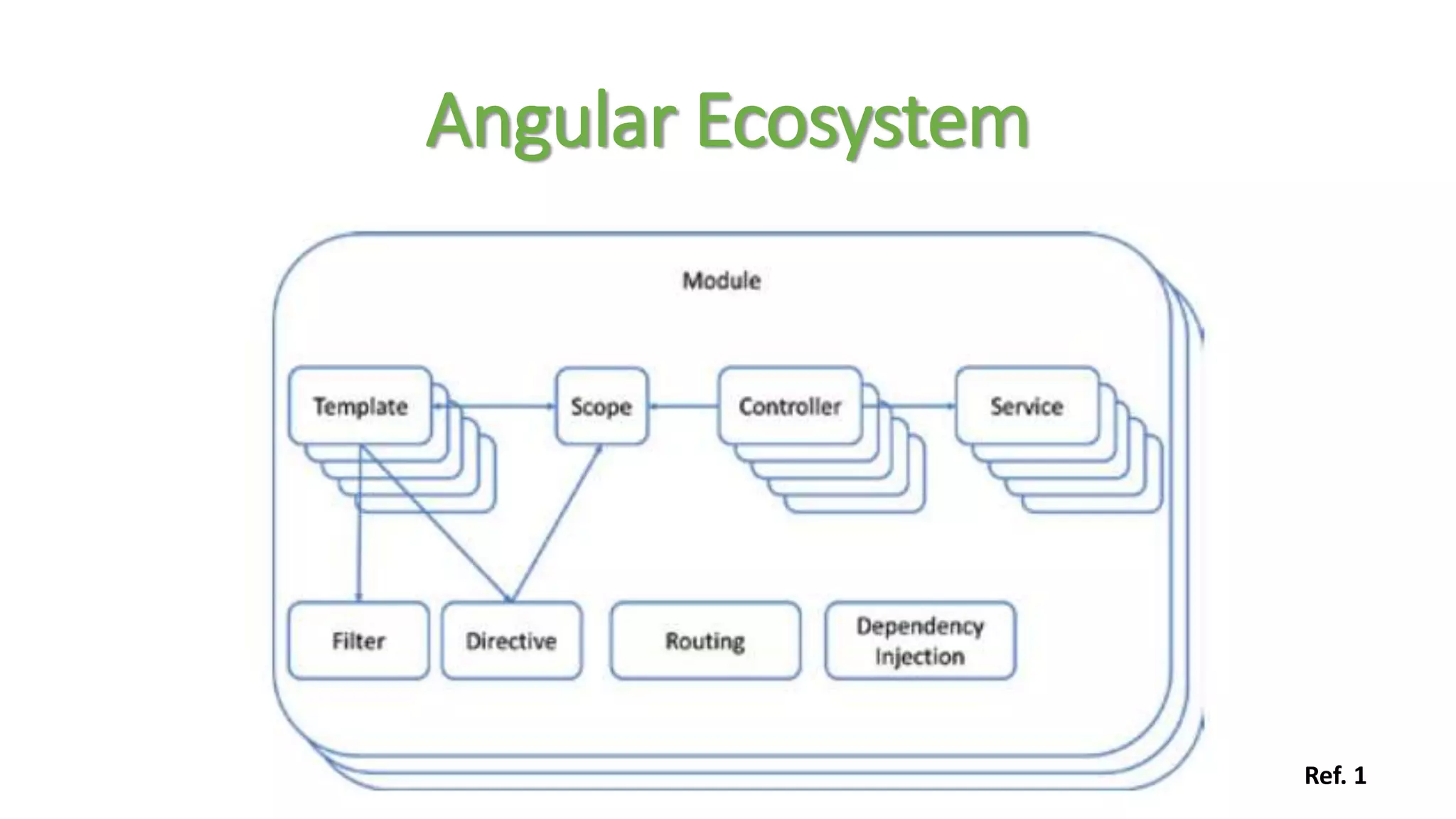
Angular Ecosystem Ref. 1
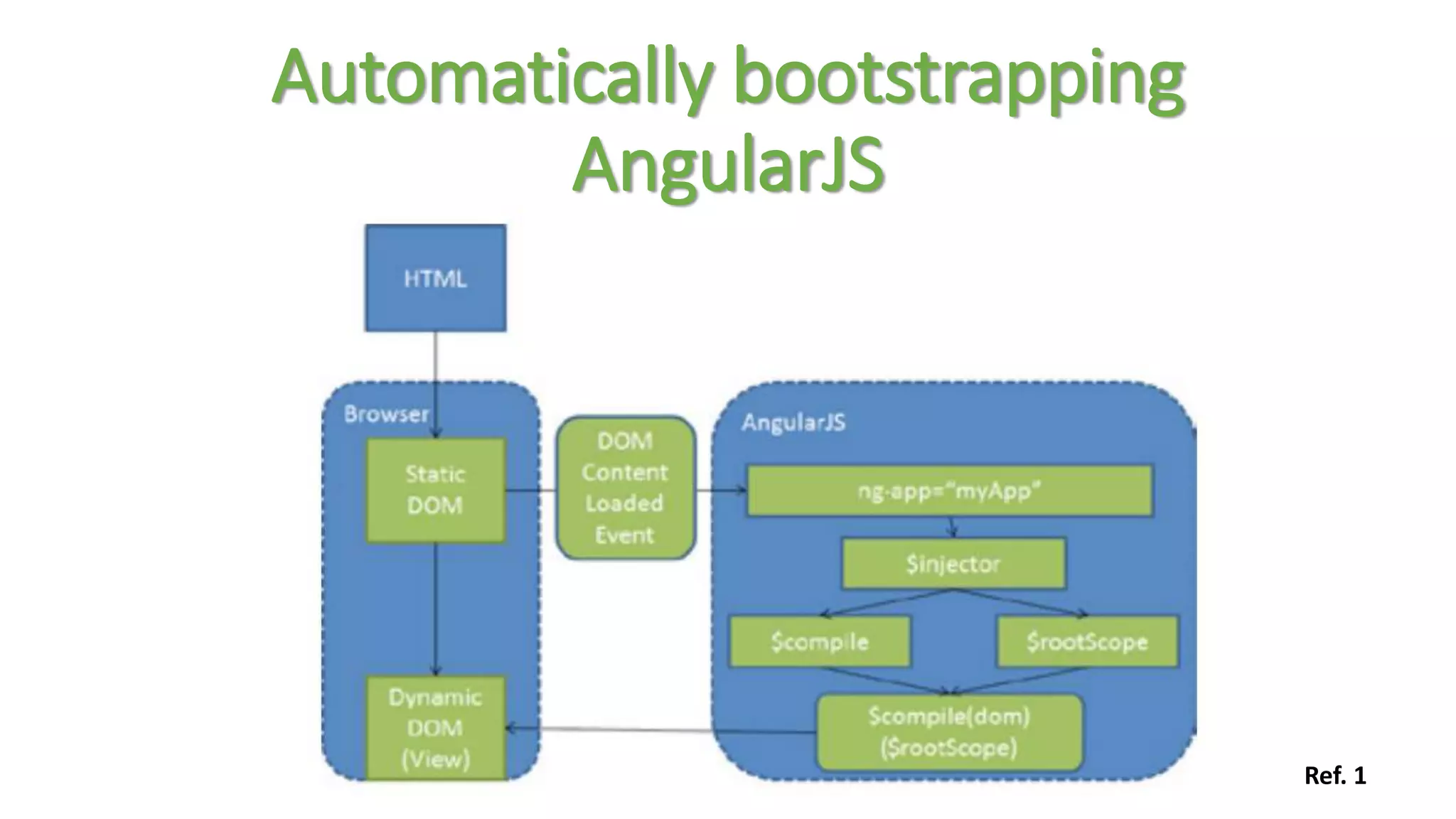
Automatically bootstrapping AngularJS Ref. 1
var demoApp = angular.module(‘AngularApp', []); What's the Array for? var demoApp = angular.module('demoApp', ['helperModule']); Module that demoApp depends on Creating a Module
Module Phases Config • happens early while the application is still being built. Only provider services and constant services are ready for dependency injection at this stage. RUN • happens once the module has loaded all of its services and dependencies. var module = angular.module(‘AngularApp', []); module.config([function() { alert('I run first'); }]); module.run([function() { alert('I run second'); }]);
Module Components and Dependency Injection • AngularJS lets you inject services (either from its own module or from other modules) with the following pattern: var module = angular.module(‘AngularApp', []); module.service('serviceA', function() { ... }); module.service('serviceB', function(serviceA) { ... });
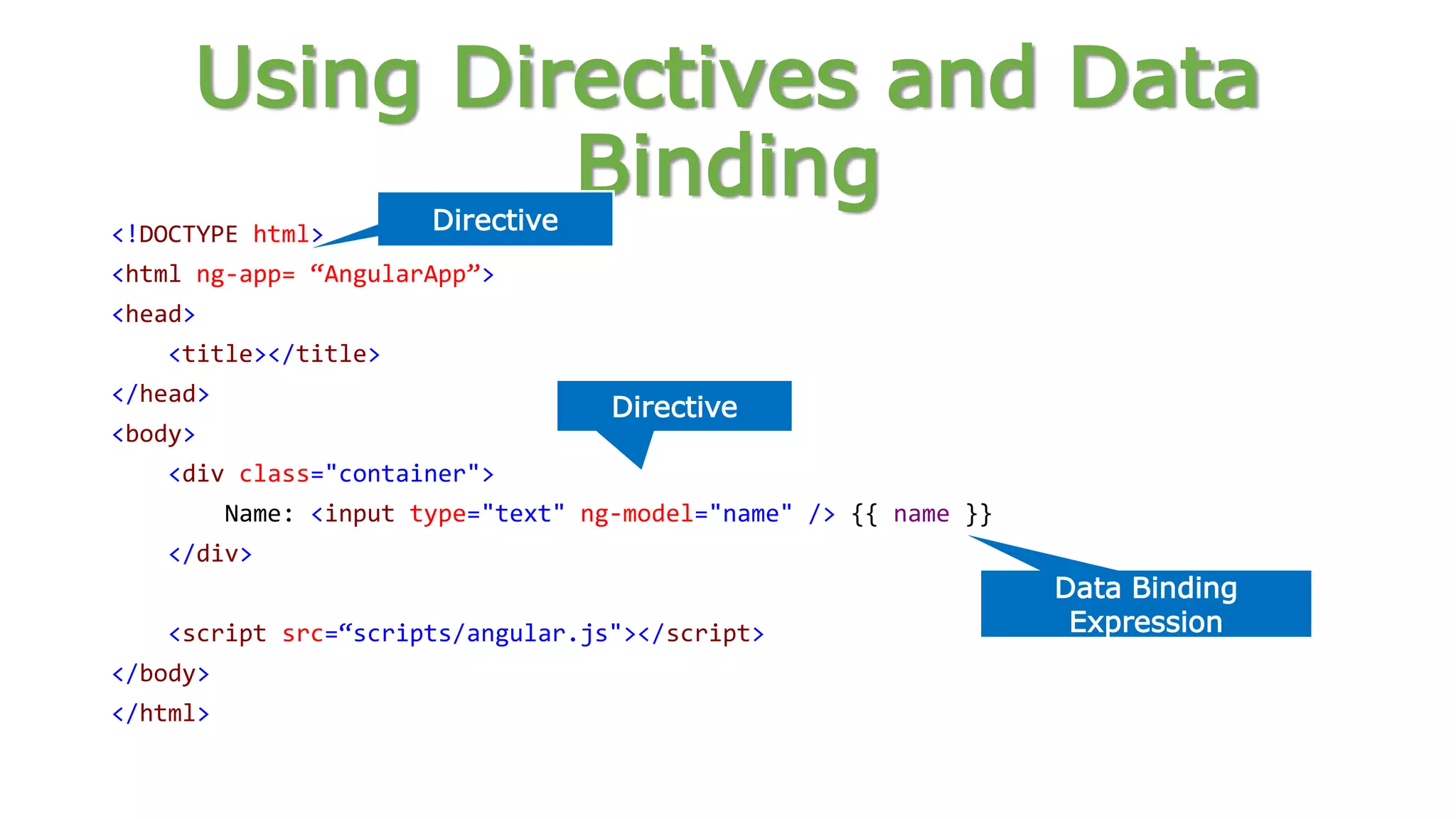
Using Directives and Data Binding <!DOCTYPE html> <html ng-app= “AngularApp”> <head> <title></title> </head> <body> <div class="container"> Name: <input type="text" ng-model="name" /> {{ name }} </div> <script src=“scripts/angular.js"></script> </body> </html> Directive Directive Data Binding Expression
<html data-ng-app=""> ... <div class="container" data-ng-init="names=['Dave','Napur','Heedy','Shriva']"> <h3>Looping with the ng-repeat Directive</h3> <ul> <li data-ng-repeat="name in names">{{ name }}</li> </ul> </div> ... </html> Iterate through names Iterating with the ng-repeat Directive
Naming Custom Directive • When defining a directive in JavaScript, the name is in camel case format: • When we activate that directive we use a lower case form: module.directive('myDirective', [function() { ... }]); <my-directive></my-directive> <div my-directive></div>
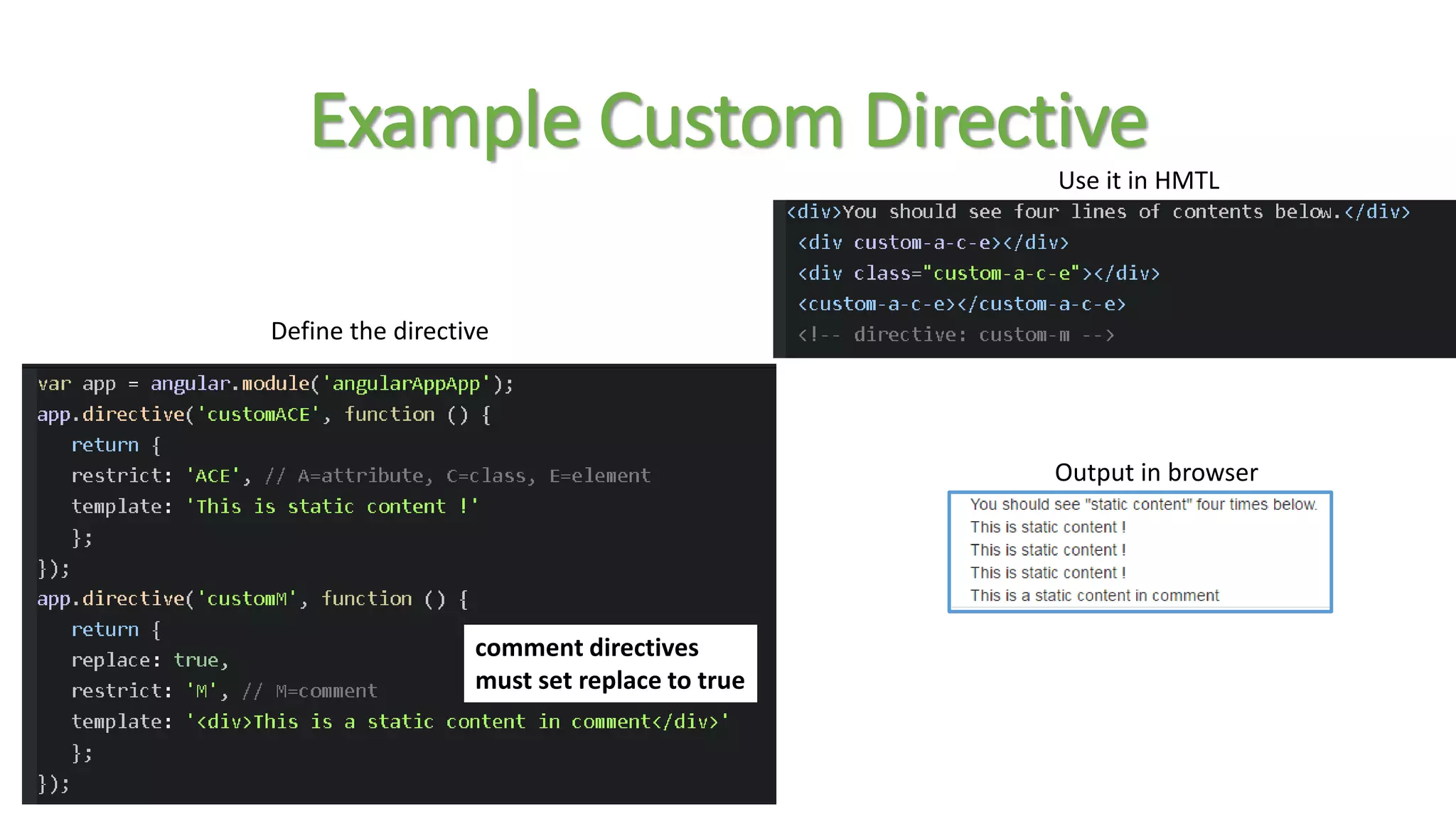
Example Custom Directive comment directives must set replace to true Output in browser Define the directive Use it in HMTL
Defining Routes var demoApp = angular.module(‘AngularApp', ['ngRoute']); demoApp.config(function ($routeProvider) { $routeProvider .when('/', { controller: 'SimpleController', templateUrl:'View1.html' }) .when('/view2', { controller: 'SimpleController', templateUrl:'View2.html' }) .otherwise({ redirectTo: '/' }); }); Define Module Routes
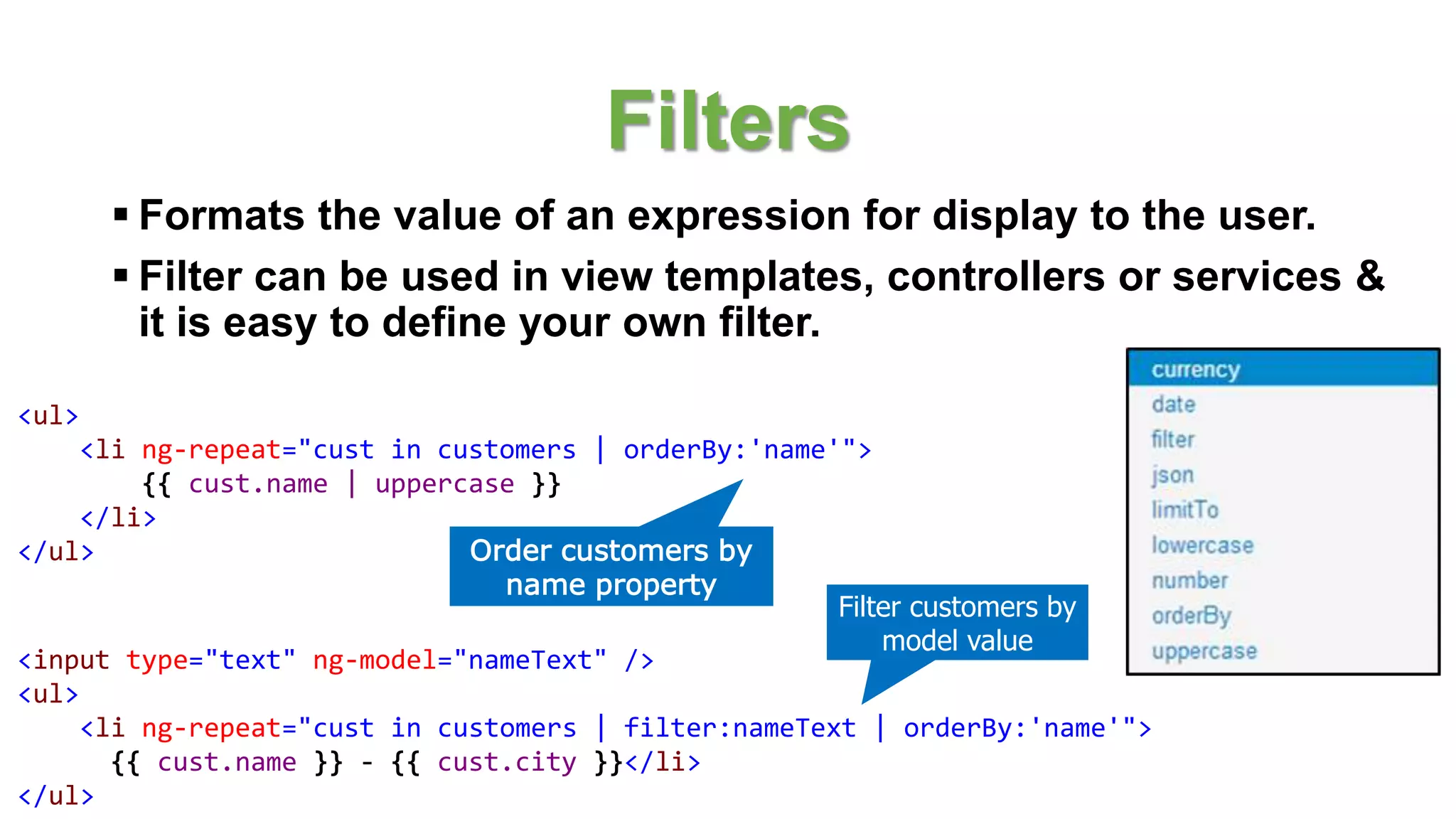
Filters  Formats the value of an expression for display to the user.  Filter can be used in view templates, controllers or services & it is easy to define your own filter. <ul> <li ng-repeat="cust in customers | orderBy:'name'"> {{ cust.name | uppercase }} </li> </ul> Order customers by name property <input type="text" ng-model="nameText" /> <ul> <li ng-repeat="cust in customers | filter:nameText | orderBy:'name'"> {{ cust.name }} - {{ cust.city }}</li> </ul> Filter customers by model value
var demoApp = angular.module(‘AngularApp', []); demoApp.controller('SimpleController', function ($scope) { $scope.customers = [ { name: 'Dave Jones', city: 'Phoenix' }, { name: 'Jamie Riley', city: 'Atlanta' }, { name: 'Heedy Wahlin', city: 'Chandler' }, { name: 'Thomas Winter', city: 'Seattle' } ]; }); Define a Module Define a Controller Creating a Controller in a Module
<div class="container" ng-controller="SimpleController"> <h3>Adding a Simple Controller</h3> <ul> <li data-ng-repeat="cust in customers"> {{ cust.name }} - {{ cust.city }} </li> </ul> </div> <script> function SimpleController($scope) { $scope.customers = [ { name: 'Dave Jones', city: 'Phoenix' }, { name: 'Jamie Riley', city: 'Atlanta' }, { name: 'Heedy Wahlin', city: 'Chandler' }, { name: 'Thomas Winter', city: 'Seattle' } ]; } </script> Define the controller to use Basic controller $scope injected dynamically Access $scope Creating a View and Controller
Value • The value recipe stores a value within an injectable service. • A value can store any service type: a string, a number, a function, and object, etc. • This value of this service can now be injected into any controller, filter, or service. //define a module var myModule = angular.module(‘AngularApp', []); //define a value myModule.value('clientId', 'a12345654321x'); //define a controller that injects the value myModule.controller('myController', ['$scope', 'clientId', function ($scope, clientId) { $scope.clientId = clientId; }]);
Service • The service recipe will generate a singleton of an instantiated object. //define a service myModule.service('person', [function() { this.first = 'John'; this.last = 'Jones'; this.name = function() { return this.first + ' ' + this.last; }; }]); //inject the person service myModule.controller('myController', ['$scope', 'person', function($scope, person) { $scope.name = person.name(); }]); $http $q $timeout …..
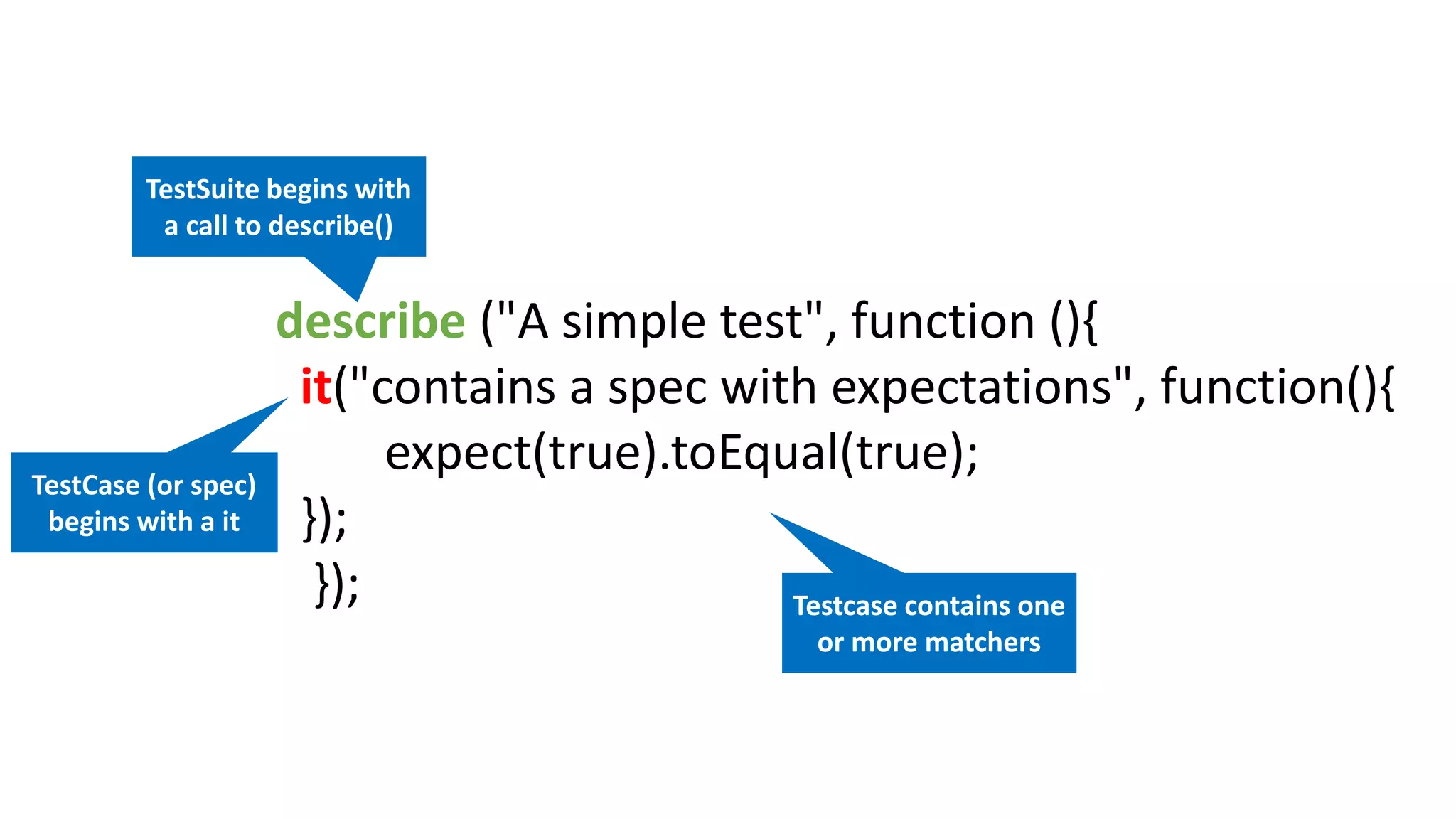
JS Testing • Angular is designed to be testable (behavior-view separation, pre- bundled mocks, dependency injection). • Unit tests (ensure that the JavaScript code in our application is operating correctly) - Karma Test Runner + Jasmine. Jasmine describes the test in natural language.
describe ("A simple test", function (){ it("contains a spec with expectations", function(){ expect(true).toEqual(true); }); }); TestSuite begins with a call to describe() TestCase (or spec) begins with a it Testcase contains one or more matchers
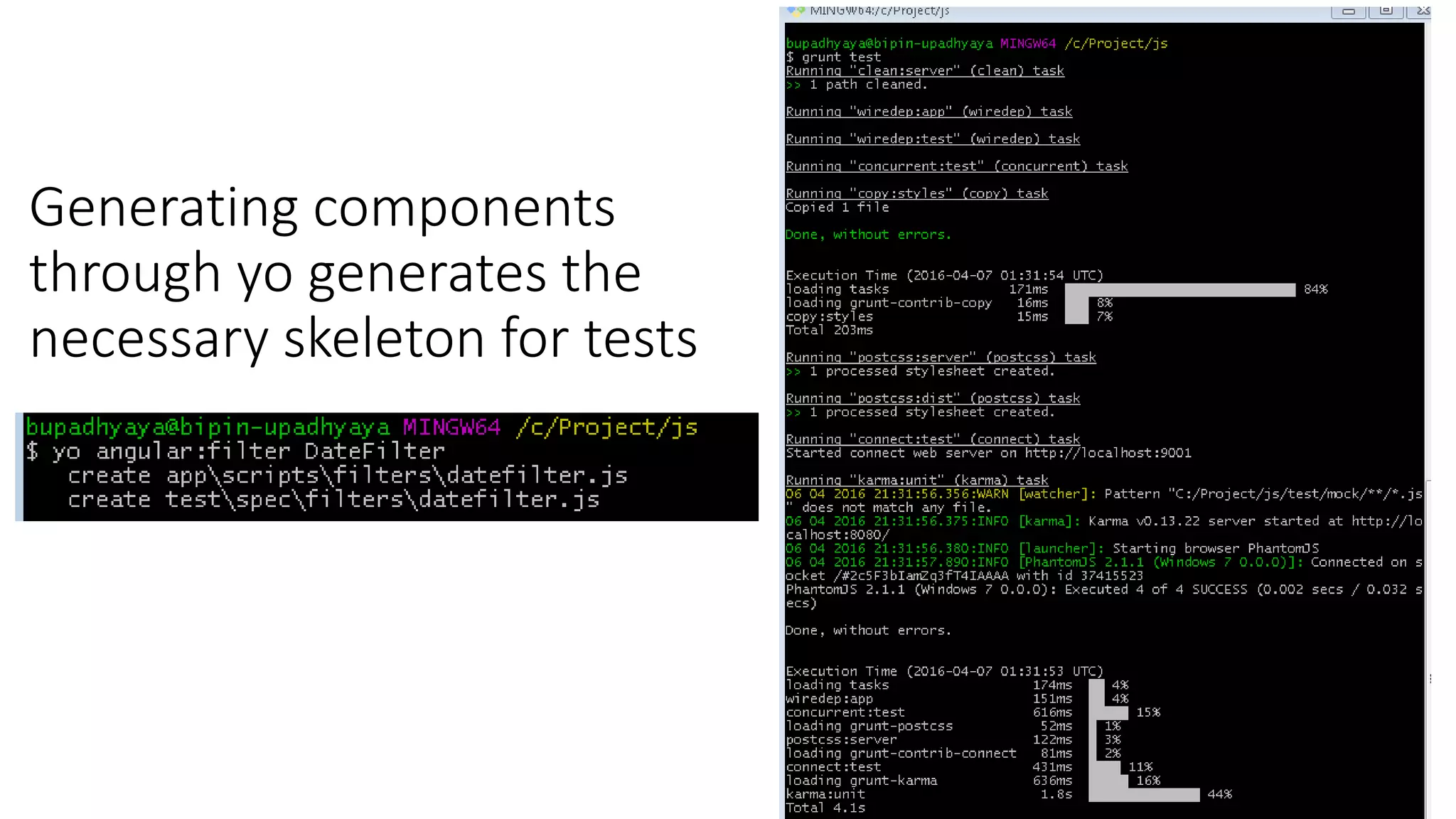
Generating components through yo generates the necessary skeleton for tests
References • http://cdn.tsq.me/ebook/AngularJS%20Test%20Driven.pdf • https://docs.angularjs.org/guide • https://dzone.com/refcardz/angularjs-essentials

Front end development with Angular JS

  • 1.
    Front End Development withAngularJS Presented by: Bipin Upadhyaya
  • 2.
    Node package manager •Node.js Package Management (NPM)  Package manager for Node.js modules  Initializes an empty Node.js project with package.json file npm init
  • 3.
    Let’s start bootstrapping (youno longer have to write the boilerplate)
  • 4.
    Client side packagemanager npm install -g bower bower search <query> bower install <package>#<version> bower uninstall <package> bower list Bower is to the web browser what NPM is to Node.js. It is a package manager for your front-end development libraries like jQuery, Bootstrap and so on. Some commands (self explanatory)
  • 5.
    Automate your frontendworkflows npm install -g grunt-cli npm install -g gulp Grunt and Gulp make it easy to incorporate best practices and automate the tedious parts of web development.
  • 6.
    Yoman: Web scaffoldingtool for modern app 3 types of tools for improving productivity and satisfaction when building a web app npm install -g yo yo scaffolds out a new application, writing your build configuration ad pulling relevant build tasks and package manager dependencies that you might need for your build.
  • 8.
  • 9.
    Angular MVC ArchitecturePattern • Layers • View: Defines visual appearance • Model: Defines data model of the app (JS objects) • Controller: Adds behavior • Workflow • User interacts with the view • Changes the model, call controller • Controller manipulates the model, interacts with service • Angular JS detects model changes and updates the view HTML CSS Javascript Controller ModelView Server User
  • 10.
    Data Binding Syncingof the data between the Scope and the HTML (two ways) Scope Context where the model data is stored so that templates and controllers can access Directive Allows developer to extend HTML with own elements and attributes (reusable pieces) Template HTML with additional markup used to describe what should be displayed Compiler Processes the template to generate HTML for the browser Dependency Injection Fetching and setting up all the functionality needed by a component Module A container for all the parts of an application Angular Concepts and Terminology
  • 11.
  • 12.
  • 13.
    var demoApp =angular.module(‘AngularApp', []); What's the Array for? var demoApp = angular.module('demoApp', ['helperModule']); Module that demoApp depends on Creating a Module
  • 14.
    Module Phases Config • happensearly while the application is still being built. Only provider services and constant services are ready for dependency injection at this stage. RUN • happens once the module has loaded all of its services and dependencies. var module = angular.module(‘AngularApp', []); module.config([function() { alert('I run first'); }]); module.run([function() { alert('I run second'); }]);
  • 15.
    Module Components and DependencyInjection • AngularJS lets you inject services (either from its own module or from other modules) with the following pattern: var module = angular.module(‘AngularApp', []); module.service('serviceA', function() { ... }); module.service('serviceB', function(serviceA) { ... });
  • 16.
    Using Directives andData Binding <!DOCTYPE html> <html ng-app= “AngularApp”> <head> <title></title> </head> <body> <div class="container"> Name: <input type="text" ng-model="name" /> {{ name }} </div> <script src=“scripts/angular.js"></script> </body> </html> Directive Directive Data Binding Expression
  • 17.
    <html data-ng-app=""> ... <div class="container" data-ng-init="names=['Dave','Napur','Heedy','Shriva']"> <h3>Loopingwith the ng-repeat Directive</h3> <ul> <li data-ng-repeat="name in names">{{ name }}</li> </ul> </div> ... </html> Iterate through names Iterating with the ng-repeat Directive
  • 18.
    Naming Custom Directive •When defining a directive in JavaScript, the name is in camel case format: • When we activate that directive we use a lower case form: module.directive('myDirective', [function() { ... }]); <my-directive></my-directive> <div my-directive></div>
  • 19.
    Example Custom Directive commentdirectives must set replace to true Output in browser Define the directive Use it in HMTL
  • 20.
    Defining Routes var demoApp= angular.module(‘AngularApp', ['ngRoute']); demoApp.config(function ($routeProvider) { $routeProvider .when('/', { controller: 'SimpleController', templateUrl:'View1.html' }) .when('/view2', { controller: 'SimpleController', templateUrl:'View2.html' }) .otherwise({ redirectTo: '/' }); }); Define Module Routes
  • 21.
    Filters  Formats thevalue of an expression for display to the user.  Filter can be used in view templates, controllers or services & it is easy to define your own filter. <ul> <li ng-repeat="cust in customers | orderBy:'name'"> {{ cust.name | uppercase }} </li> </ul> Order customers by name property <input type="text" ng-model="nameText" /> <ul> <li ng-repeat="cust in customers | filter:nameText | orderBy:'name'"> {{ cust.name }} - {{ cust.city }}</li> </ul> Filter customers by model value
  • 22.
    var demoApp =angular.module(‘AngularApp', []); demoApp.controller('SimpleController', function ($scope) { $scope.customers = [ { name: 'Dave Jones', city: 'Phoenix' }, { name: 'Jamie Riley', city: 'Atlanta' }, { name: 'Heedy Wahlin', city: 'Chandler' }, { name: 'Thomas Winter', city: 'Seattle' } ]; }); Define a Module Define a Controller Creating a Controller in a Module
  • 23.
    <div class="container" ng-controller="SimpleController"> <h3>Addinga Simple Controller</h3> <ul> <li data-ng-repeat="cust in customers"> {{ cust.name }} - {{ cust.city }} </li> </ul> </div> <script> function SimpleController($scope) { $scope.customers = [ { name: 'Dave Jones', city: 'Phoenix' }, { name: 'Jamie Riley', city: 'Atlanta' }, { name: 'Heedy Wahlin', city: 'Chandler' }, { name: 'Thomas Winter', city: 'Seattle' } ]; } </script> Define the controller to use Basic controller $scope injected dynamically Access $scope Creating a View and Controller
  • 24.
    Value • The valuerecipe stores a value within an injectable service. • A value can store any service type: a string, a number, a function, and object, etc. • This value of this service can now be injected into any controller, filter, or service. //define a module var myModule = angular.module(‘AngularApp', []); //define a value myModule.value('clientId', 'a12345654321x'); //define a controller that injects the value myModule.controller('myController', ['$scope', 'clientId', function ($scope, clientId) { $scope.clientId = clientId; }]);
  • 25.
    Service • The servicerecipe will generate a singleton of an instantiated object. //define a service myModule.service('person', [function() { this.first = 'John'; this.last = 'Jones'; this.name = function() { return this.first + ' ' + this.last; }; }]); //inject the person service myModule.controller('myController', ['$scope', 'person', function($scope, person) { $scope.name = person.name(); }]); $http $q $timeout …..
  • 26.
    JS Testing • Angularis designed to be testable (behavior-view separation, pre- bundled mocks, dependency injection). • Unit tests (ensure that the JavaScript code in our application is operating correctly) - Karma Test Runner + Jasmine. Jasmine describes the test in natural language.
  • 27.
    describe ("A simpletest", function (){ it("contains a spec with expectations", function(){ expect(true).toEqual(true); }); }); TestSuite begins with a call to describe() TestCase (or spec) begins with a it Testcase contains one or more matchers
  • 28.
    Generating components through yogenerates the necessary skeleton for tests
  • 29.

Editor's Notes

  • #6 Bascially you create the project (scaffolding, dependency management) 2) Develop (write css, JS), 3) Test 4) Build (Preporcess, minify, optimize images) and finally deploy. There tools makes the build process easy.
  • #13 Manual Bootstrapping angular.element(document).ready(function() { angular.module(‘myApp’, []); angular.bootstrap(document, [‘myApp’]); });
  • #15 When a module runs it has two phases that you can link into. The config phase runs early, before most services, objects, and data are available within the JavaScript. The run phase happens after the services, objects, and data have been defined. There are times when you will want to run some code before those service, objects, and data are defined. We’ll see that in a bit.
  • #21 A container for code for the different parts of your applications. A module is used to define services that are reusable by both the HTML document and other modules: Controller Directive Constant, Value Factory, Provider, Service Filter Best Practice: Divide your code into modules with distinct functionality. Don’t put everything in one module.
  • #26 The value is a pretty basic service that allows you to store any type of data into a service. ** It can be a simple data type, an object, a function, or whatever. ** The value can now be injected into any controller, filter, or service. What if you defined this service in Module X and your in Module Y? Don’t worry about it. Make sure that Module Y includes Module X as a dependency, then inject the service from Module X. ** In the code example you see how we define the service and how we inject it.
  • #27 We write a function as if it were a constructor, using the “this” keyword to set property names and functions that are part of the constructor. When you first inject this service into another controller, filter, or service it will build a singleton from the constructor. Any subsequent injections of the service will get the same singleton.
  • #28 End-to-end tests (ensure that the application as a whole operates as expected) - Protractor E2E test framework for Angular.