An introduction to the node.js mongo driver Christian Amor Kvalheim
• Asynchronous Javascript platform built on top of V8 • Single-threaded • Package manager • Awesome
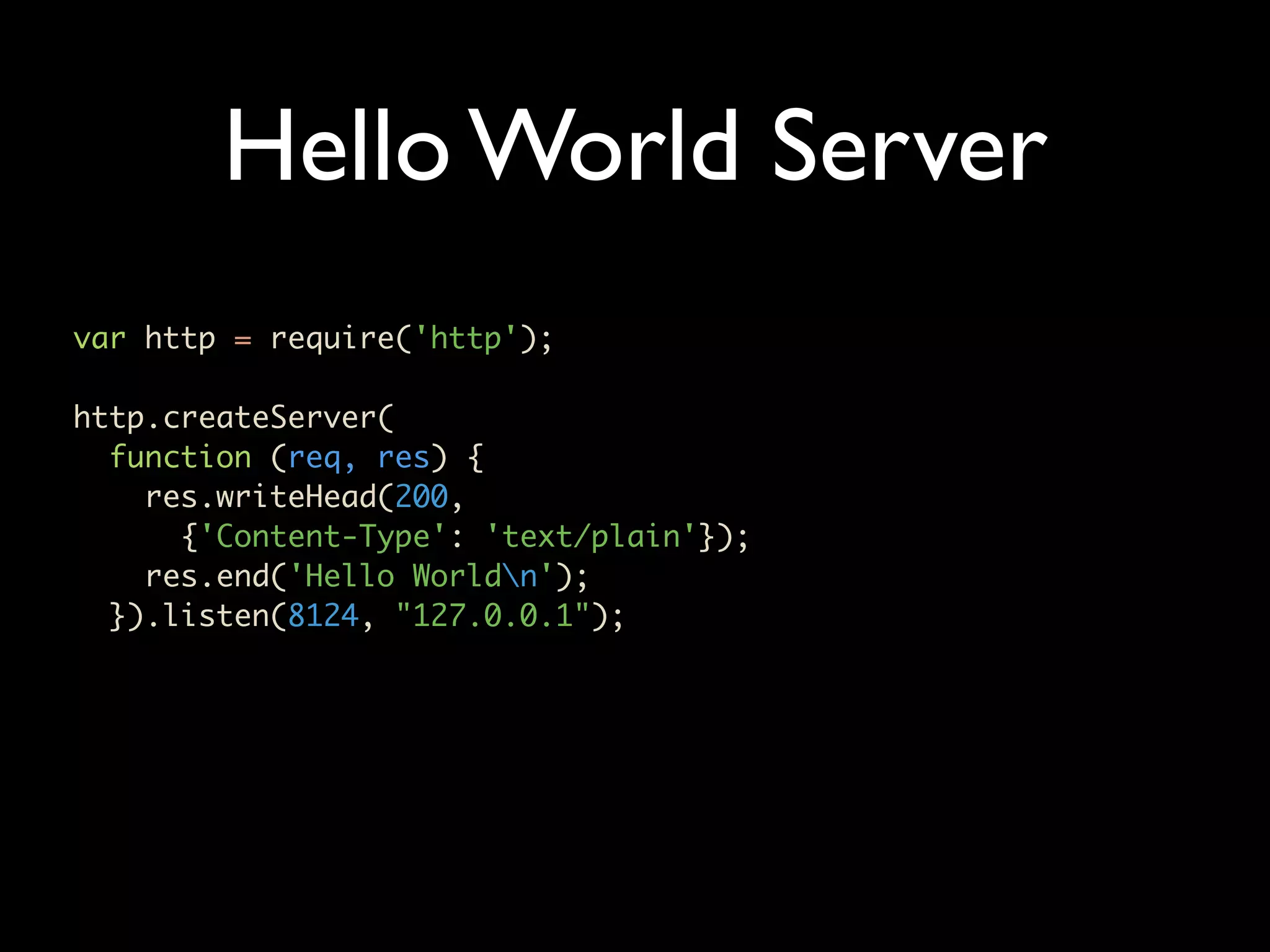
Hello World Server var http = require('http'); http.createServer( function (req, res) { res.writeHead(200, {'Content-Type': 'text/plain'}); res.end('Hello Worldn'); }).listen(8124, "127.0.0.1");
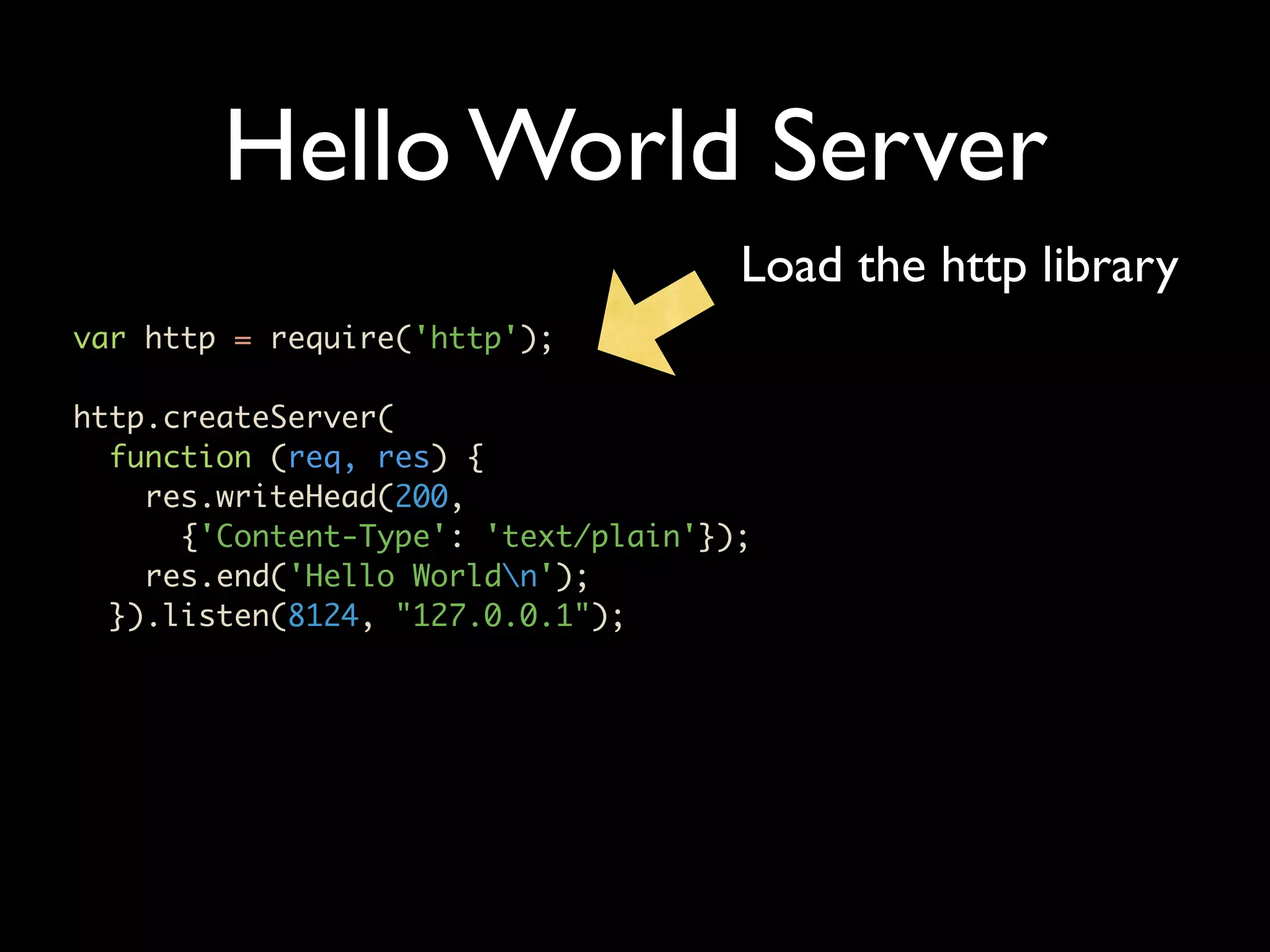
Hello World Server Load the http library var http = require('http'); http.createServer( function (req, res) { res.writeHead(200, {'Content-Type': 'text/plain'}); res.end('Hello Worldn'); }).listen(8124, "127.0.0.1");
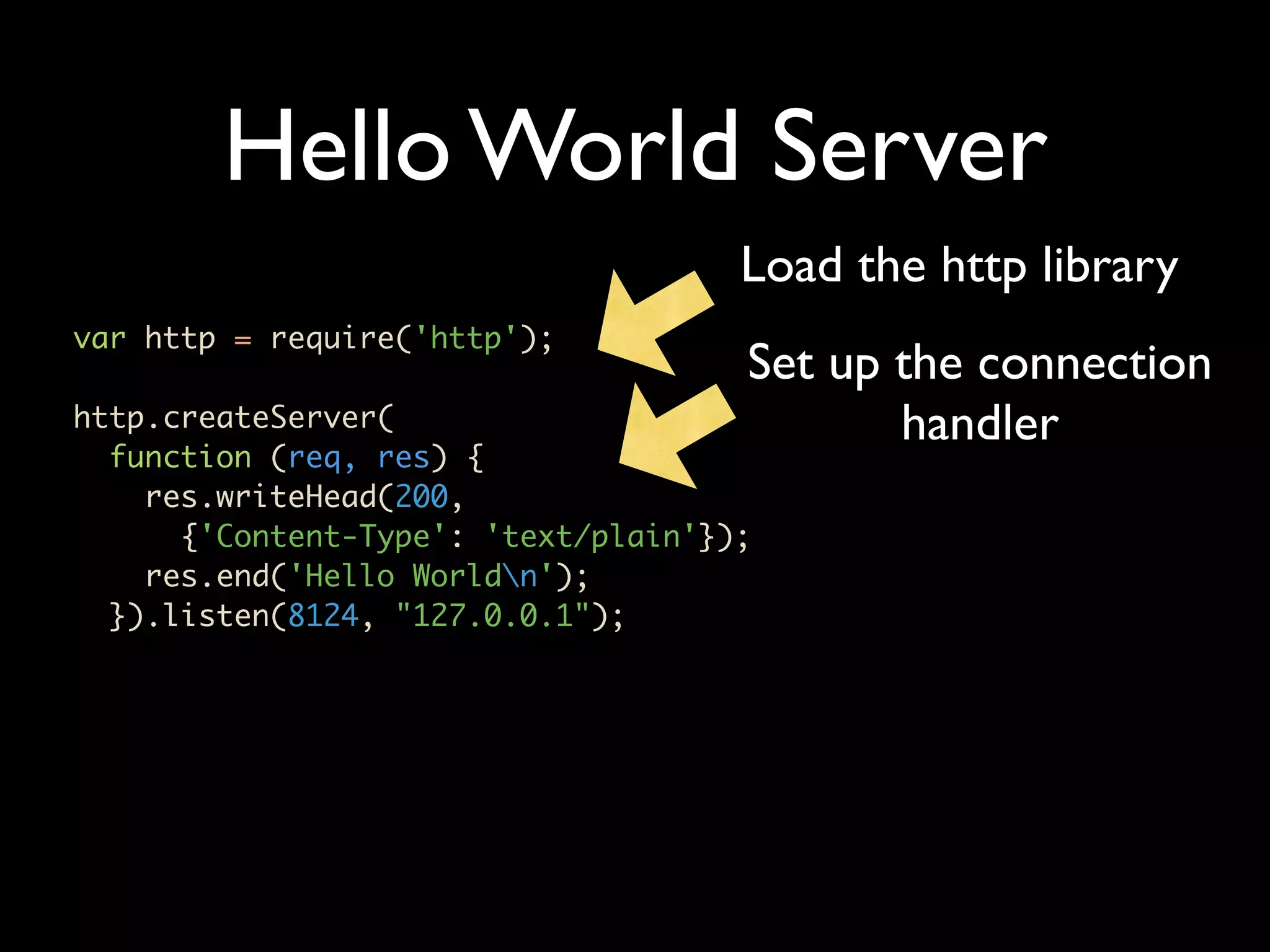
Hello World Server Load the http library var http = require('http'); Set up the connection http.createServer( handler function (req, res) { res.writeHead(200, {'Content-Type': 'text/plain'}); res.end('Hello Worldn'); }).listen(8124, "127.0.0.1");
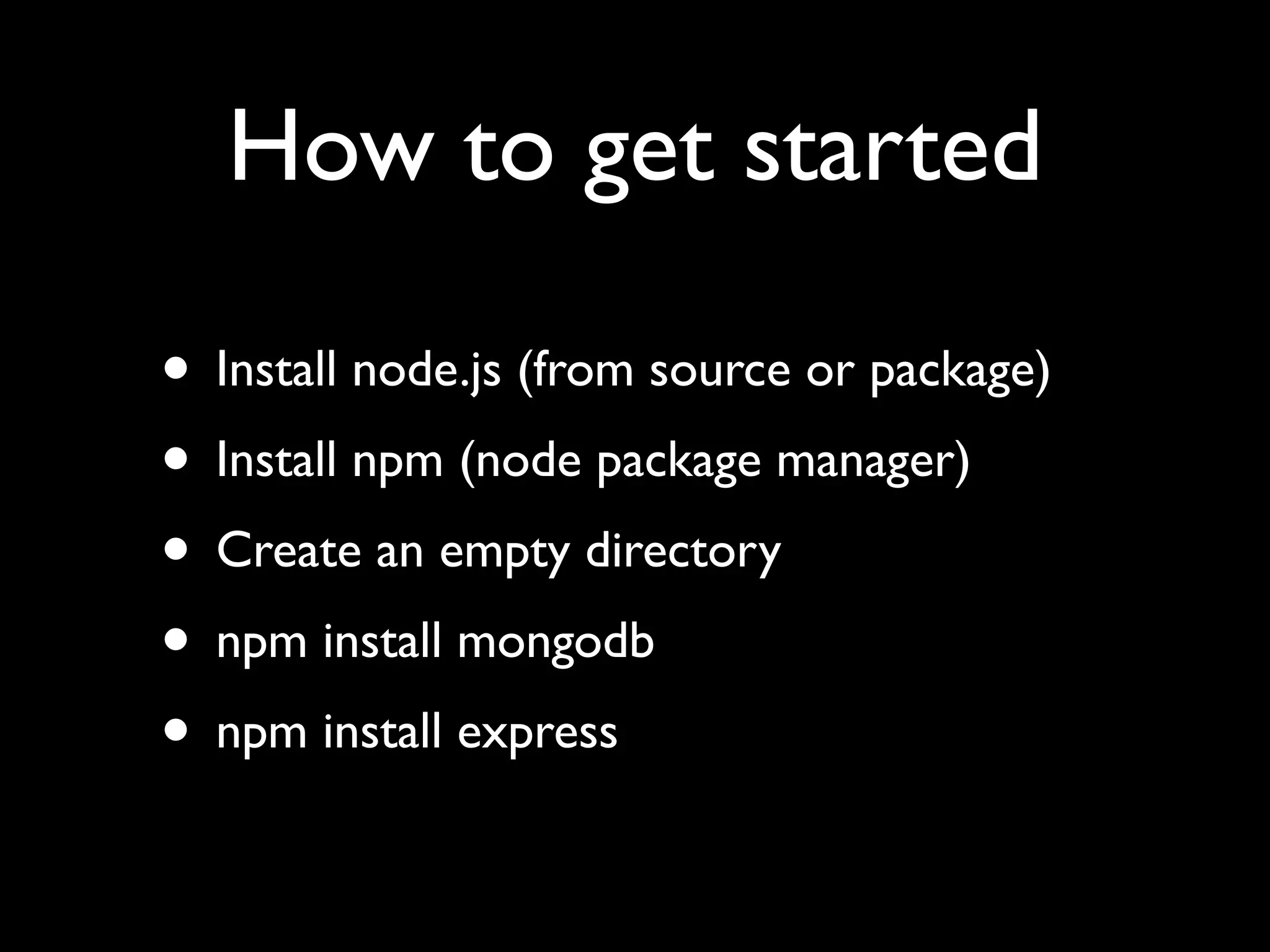
How to get started • Install node.js (from source or package) • Install npm (node package manager) • Create an empty directory • npm install mongodb • npm install express
Let’s do some code • Using Express and Mongo • Textmate basic.js
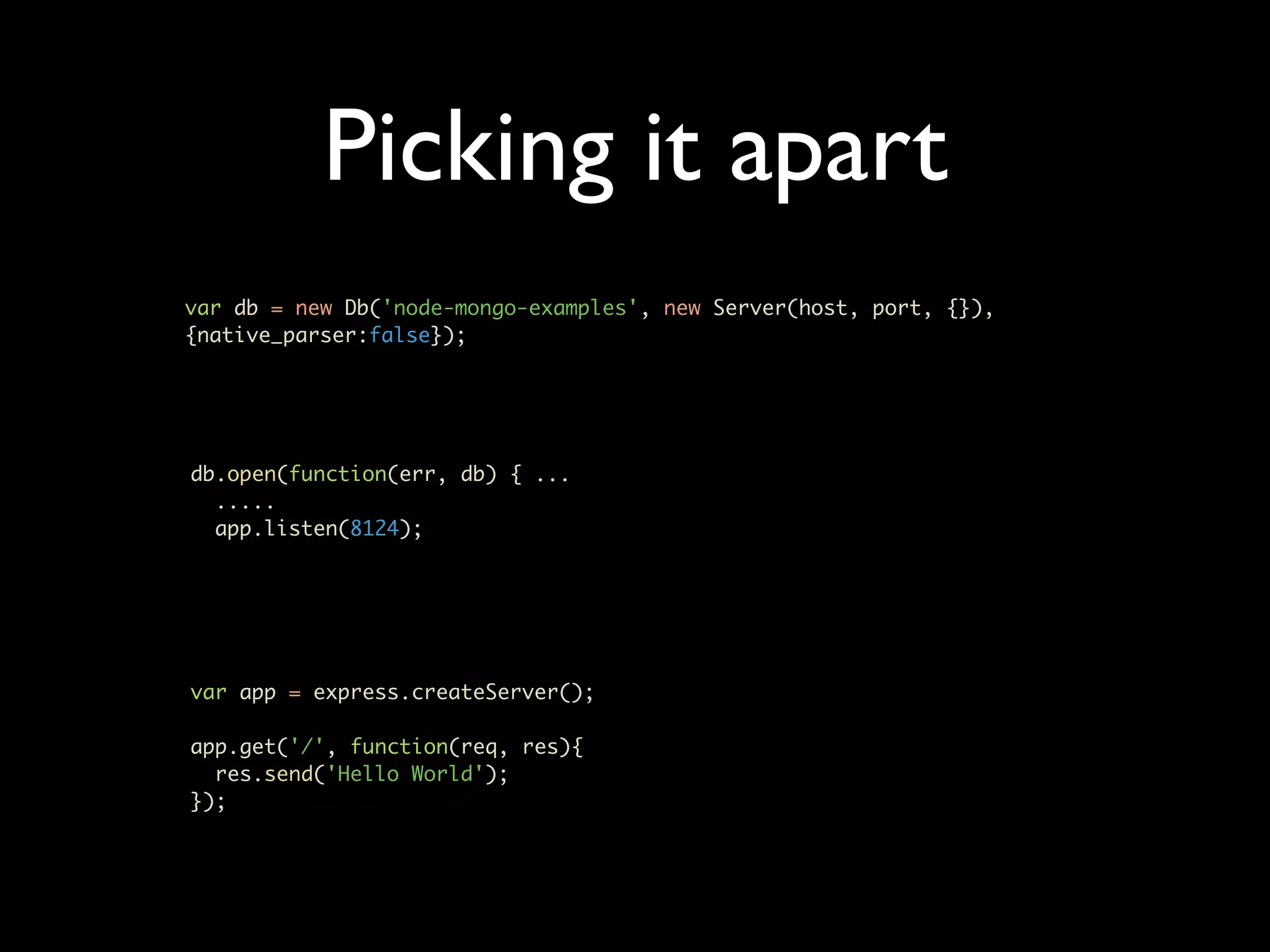
Picking it apart var db = new Db('node-mongo-examples', new Server(host, port, {}), {native_parser:false}); db.open(function(err, db) { ... ..... app.listen(8124); var app = express.createServer(); app.get('/', function(req, res){ res.send('Hello World'); });
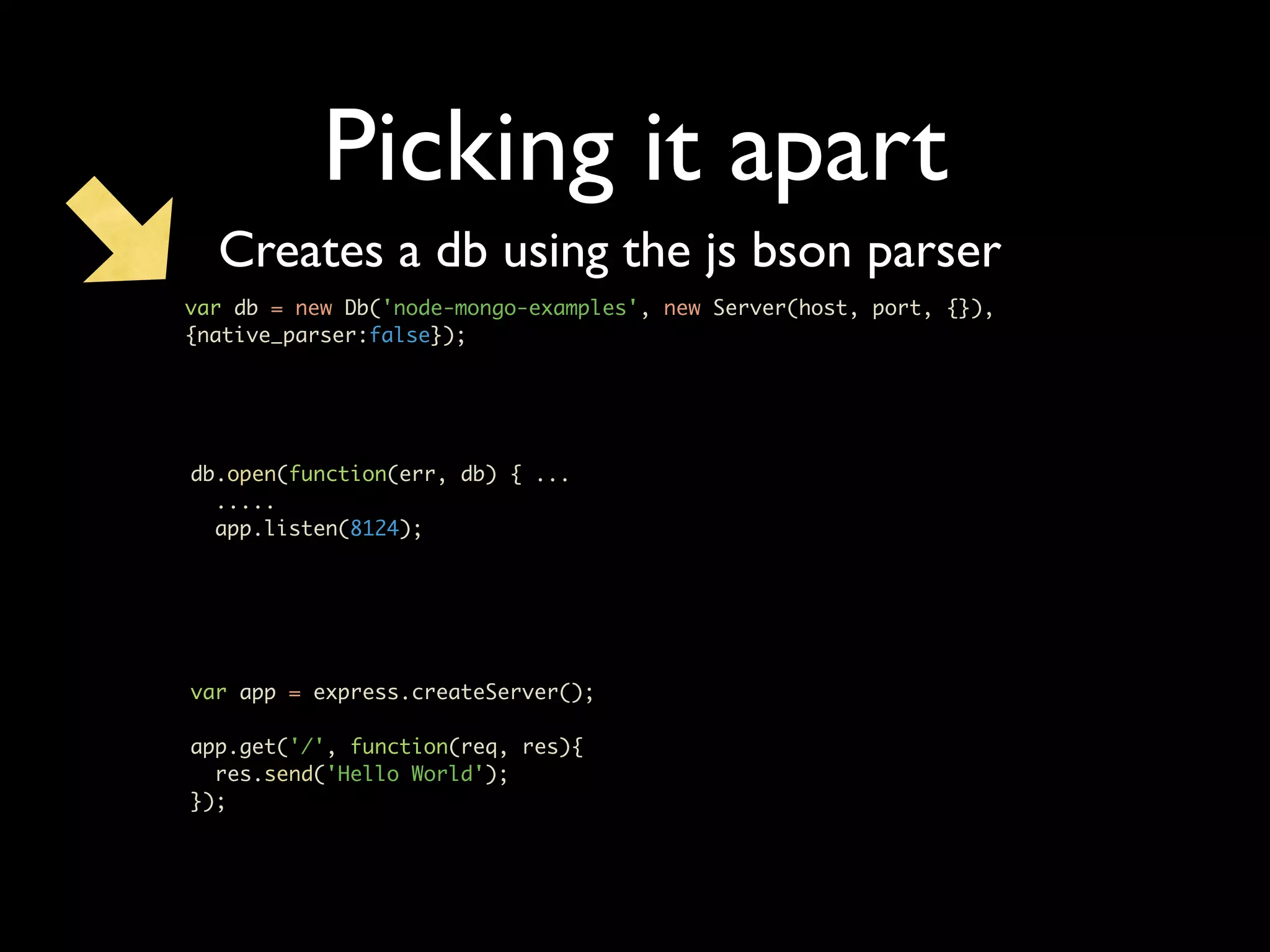
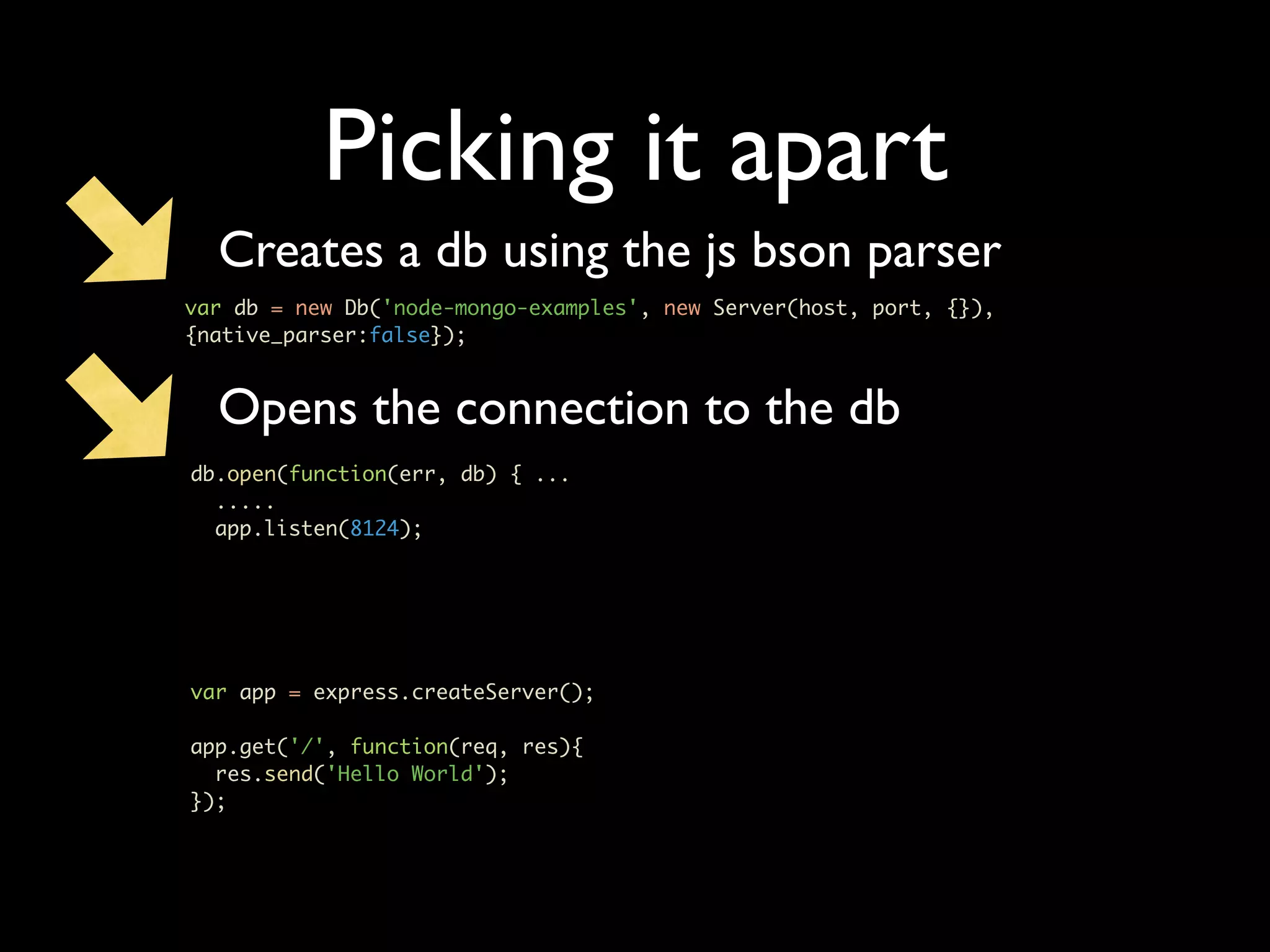
Picking it apart Creates a db using the js bson parser var db = new Db('node-mongo-examples', new Server(host, port, {}), {native_parser:false}); db.open(function(err, db) { ... ..... app.listen(8124); var app = express.createServer(); app.get('/', function(req, res){ res.send('Hello World'); });
Picking it apart Creates a db using the js bson parser var db = new Db('node-mongo-examples', new Server(host, port, {}), {native_parser:false}); Opens the connection to the db db.open(function(err, db) { ... ..... app.listen(8124); var app = express.createServer(); app.get('/', function(req, res){ res.send('Hello World'); });
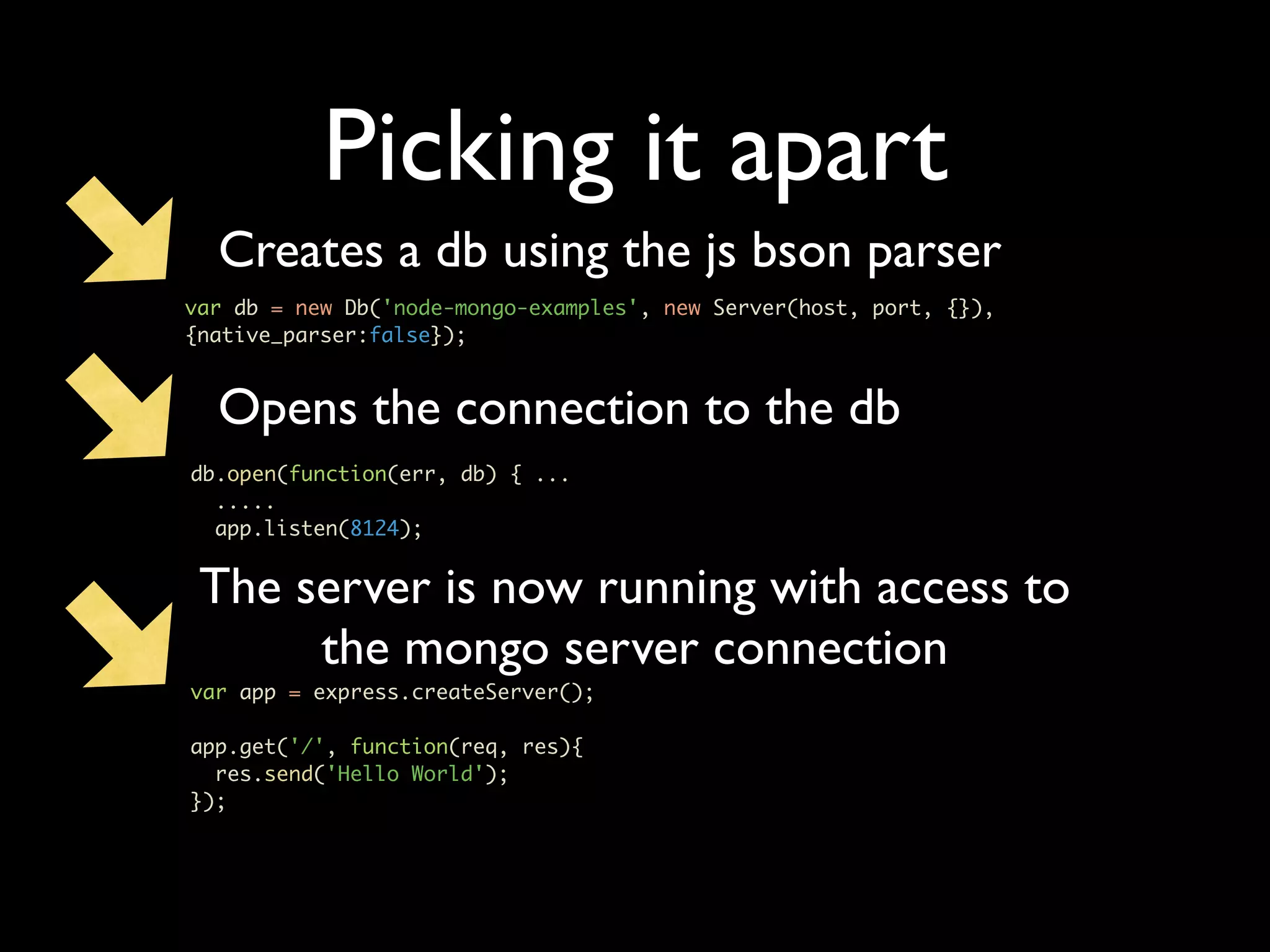
Picking it apart Creates a db using the js bson parser var db = new Db('node-mongo-examples', new Server(host, port, {}), {native_parser:false}); Opens the connection to the db db.open(function(err, db) { ... ..... app.listen(8124); The server is now running with access to the mongo server connection var app = express.createServer(); app.get('/', function(req, res){ res.send('Hello World'); });
Let’s add some meat • CRUD operations • Textmate basic_2.js
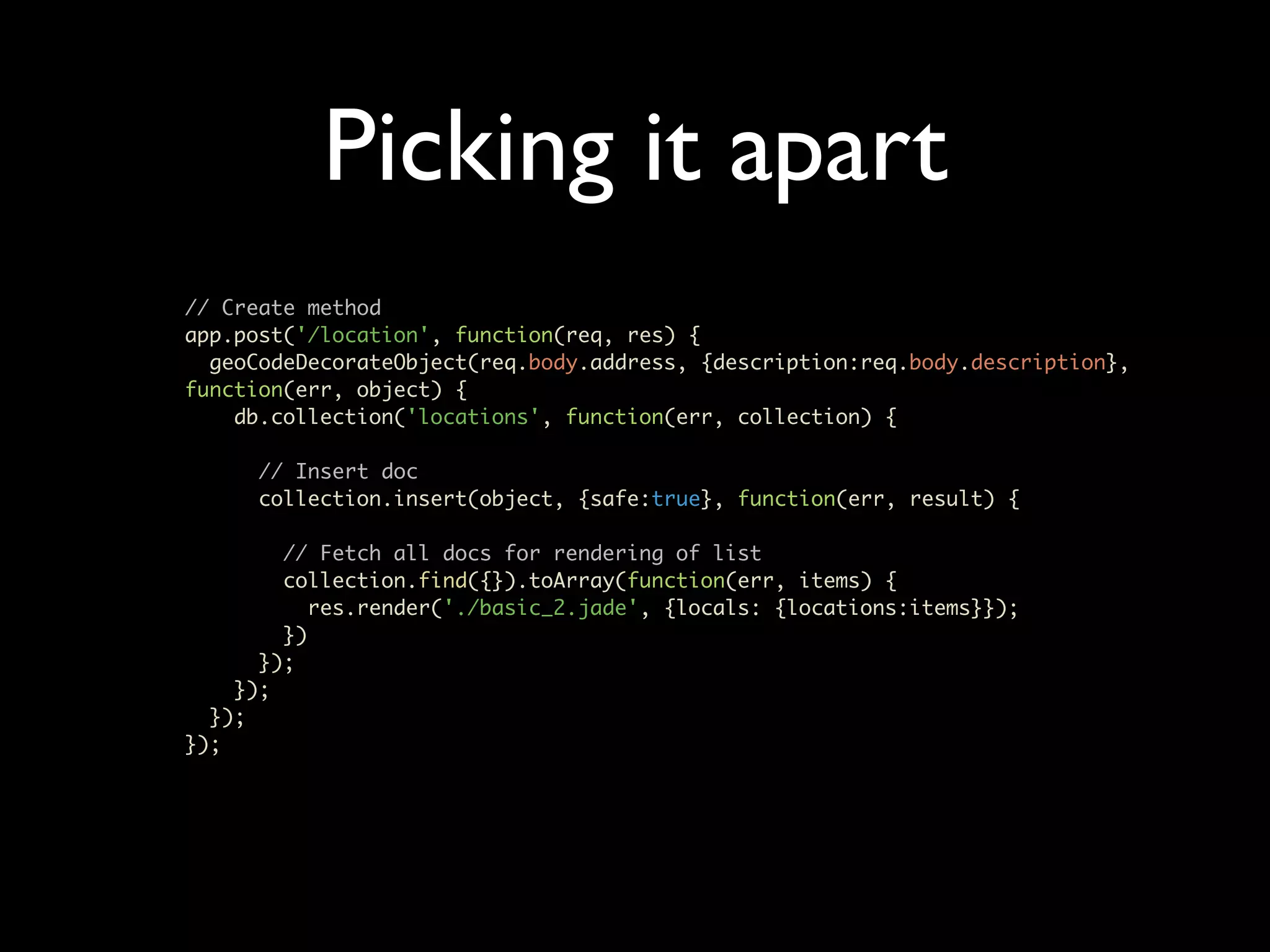
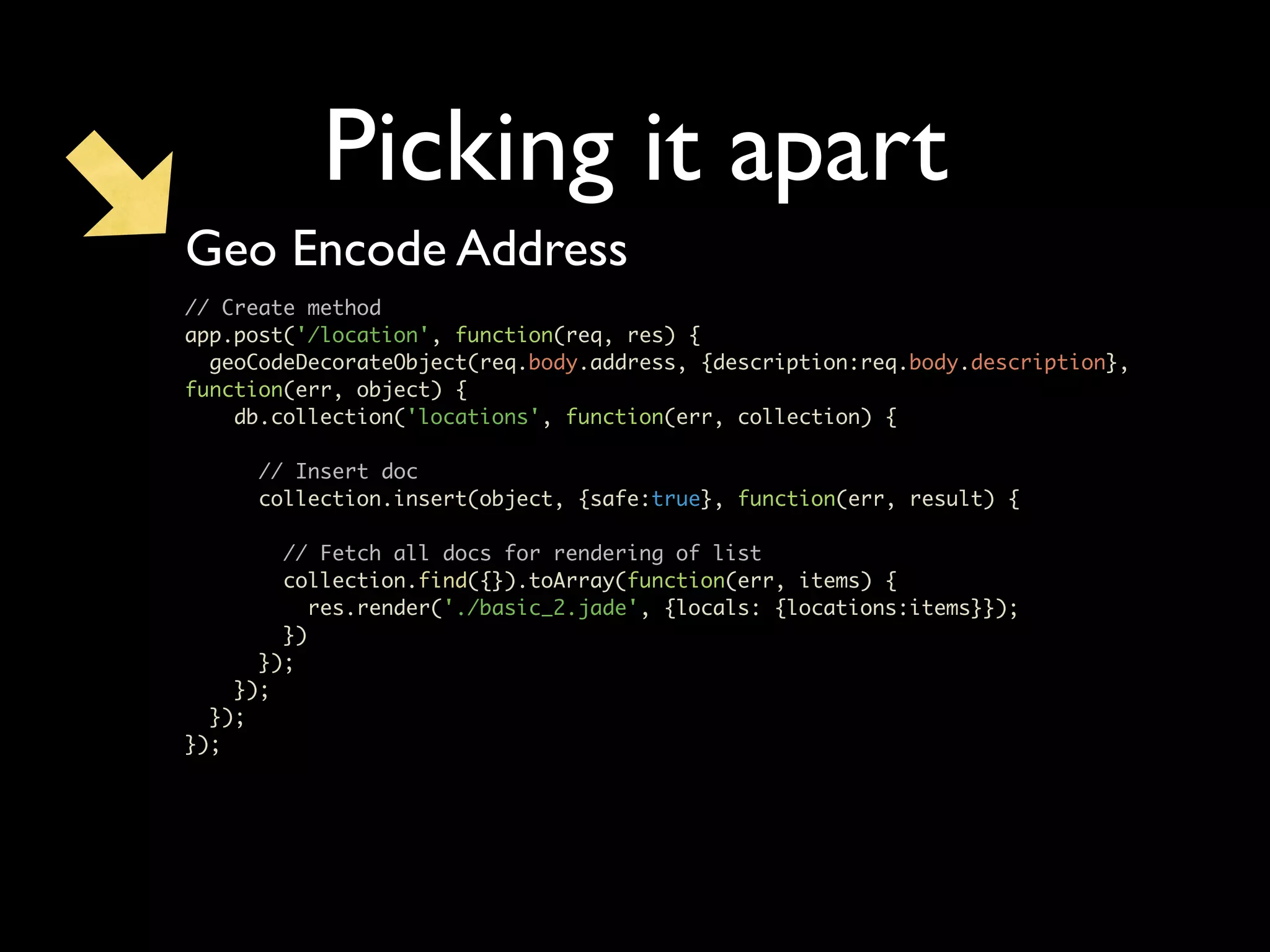
Picking it apart // Create method app.post('/location', function(req, res) { geoCodeDecorateObject(req.body.address, {description:req.body.description}, function(err, object) { db.collection('locations', function(err, collection) { // Insert doc collection.insert(object, {safe:true}, function(err, result) { // Fetch all docs for rendering of list collection.find({}).toArray(function(err, items) { res.render('./basic_2.jade', {locals: {locations:items}}); }) }); }); }); });
Picking it apart Geo Encode Address // Create method app.post('/location', function(req, res) { geoCodeDecorateObject(req.body.address, {description:req.body.description}, function(err, object) { db.collection('locations', function(err, collection) { // Insert doc collection.insert(object, {safe:true}, function(err, result) { // Fetch all docs for rendering of list collection.find({}).toArray(function(err, items) { res.render('./basic_2.jade', {locals: {locations:items}}); }) }); }); }); });
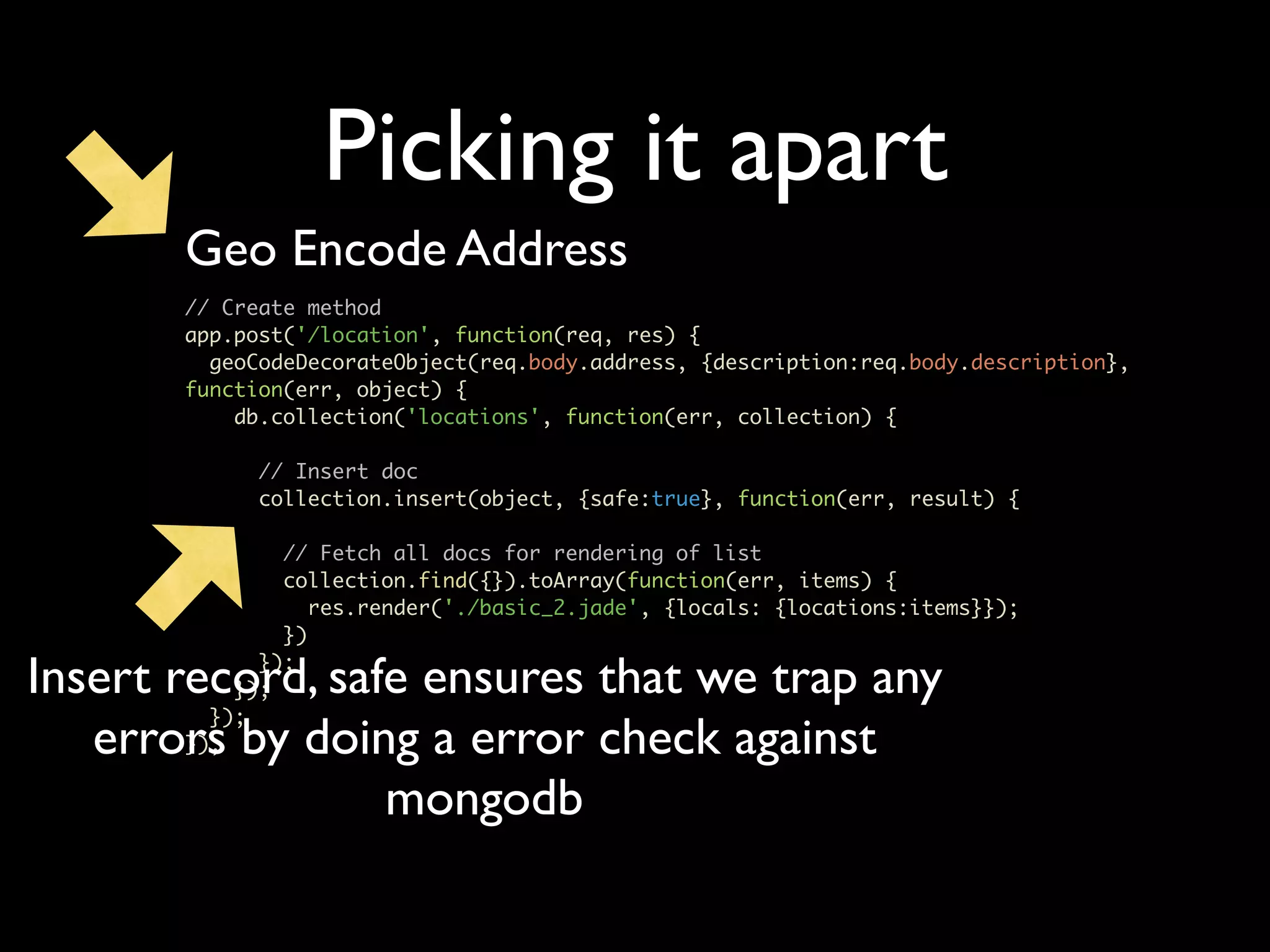
Picking it apart Geo Encode Address // Create method app.post('/location', function(req, res) { geoCodeDecorateObject(req.body.address, {description:req.body.description}, function(err, object) { db.collection('locations', function(err, collection) { // Insert doc collection.insert(object, {safe:true}, function(err, result) { // Fetch all docs for rendering of list collection.find({}).toArray(function(err, items) { res.render('./basic_2.jade', {locals: {locations:items}}); }) Insert record, safe ensures that we trap any }); }); }); errors by doing a error check against }); mongodb
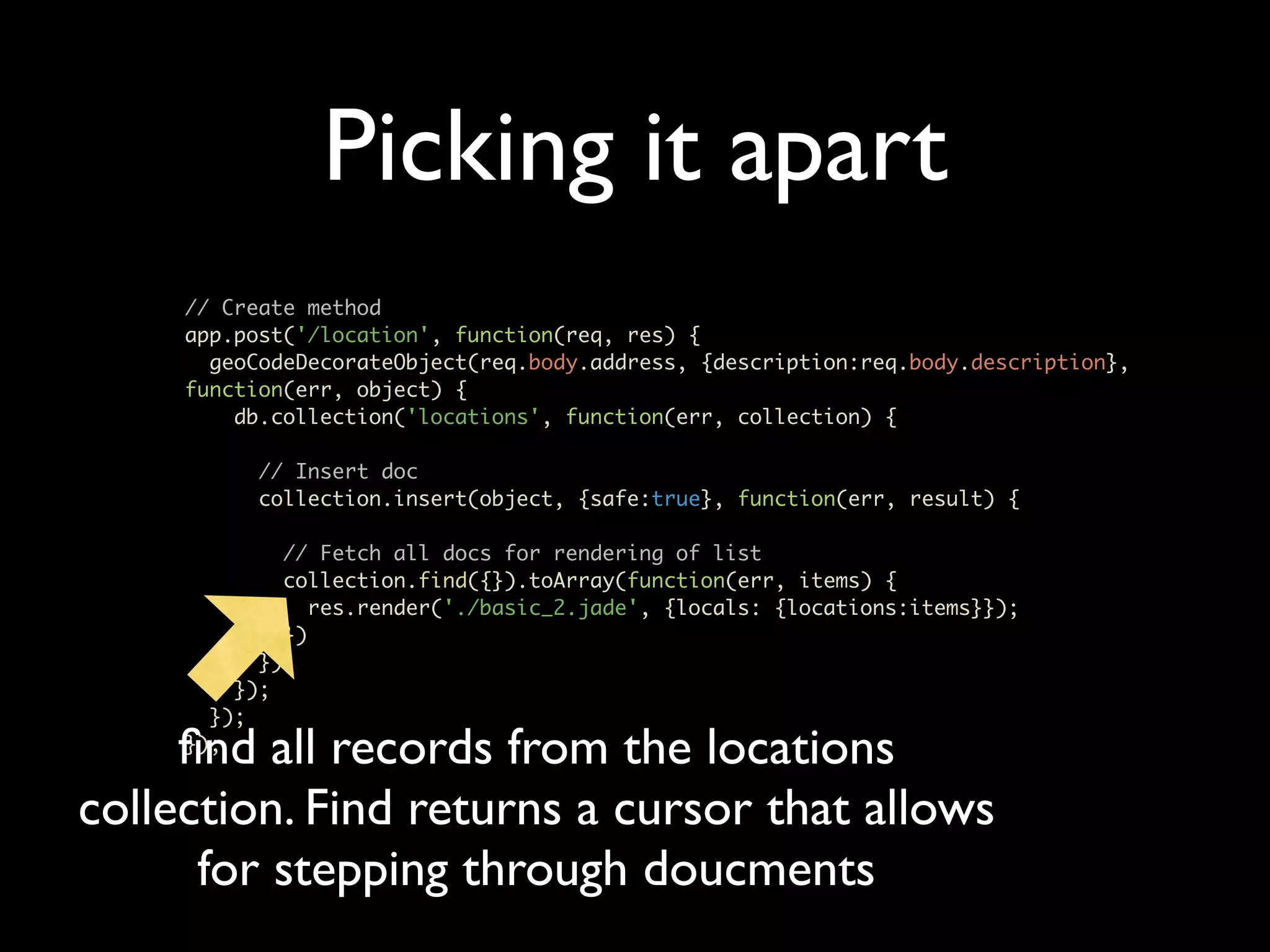
Picking it apart // Create method app.post('/location', function(req, res) { geoCodeDecorateObject(req.body.address, {description:req.body.description}, function(err, object) { db.collection('locations', function(err, collection) { // Insert doc collection.insert(object, {safe:true}, function(err, result) { // Fetch all docs for rendering of list collection.find({}).toArray(function(err, items) { res.render('./basic_2.jade', {locals: {locations:items}}); }) }); }); }); find all records from the locations }); collection. Find returns a cursor that allows for stepping through doucments
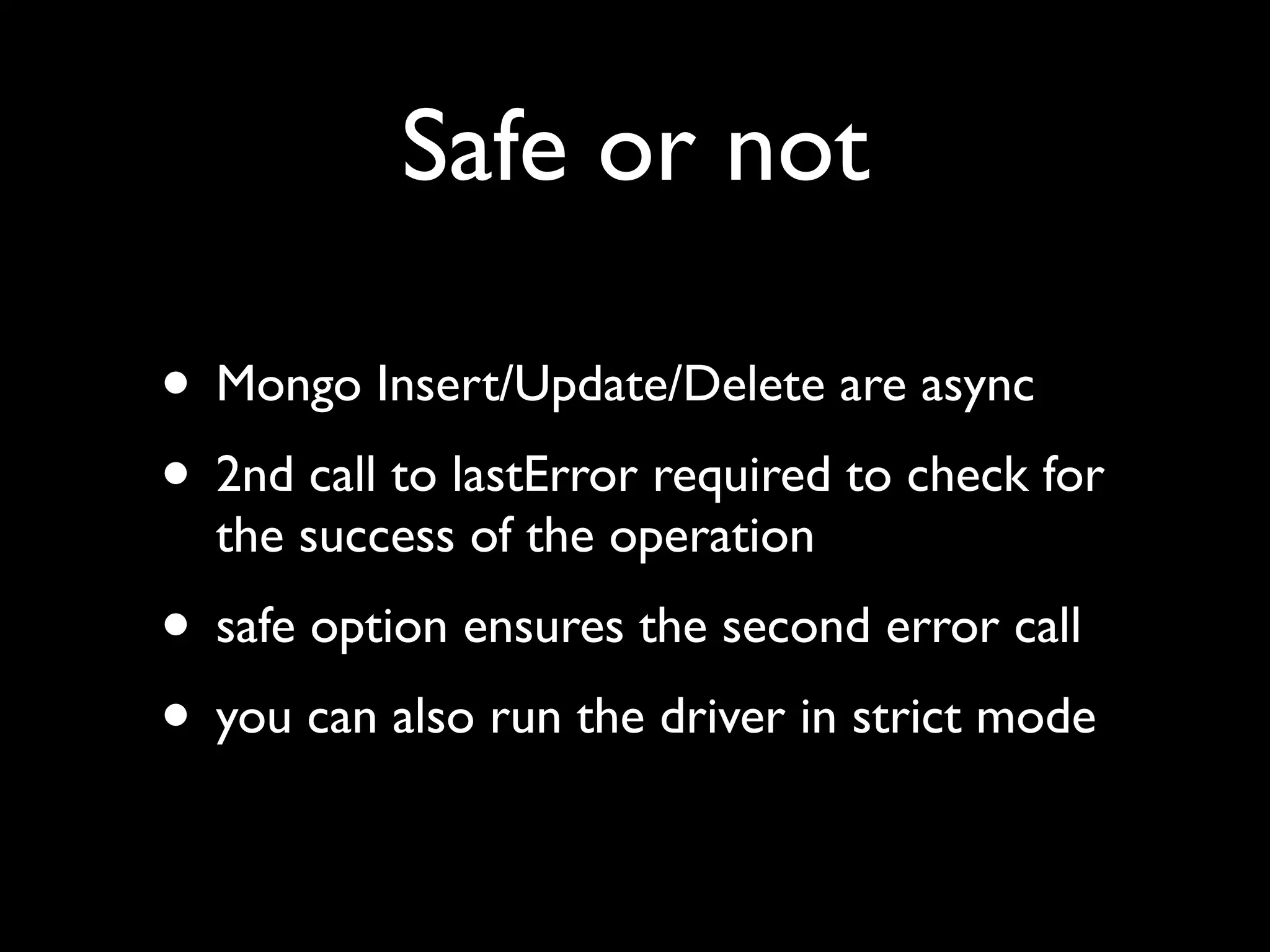
Safe or not • Mongo Insert/Update/Delete are async • 2nd call to lastError required to check for the success of the operation • safe option ensures the second error call • you can also run the driver in strict mode
Let’s add some meat • CRUD operations • Textmate basic_3.js
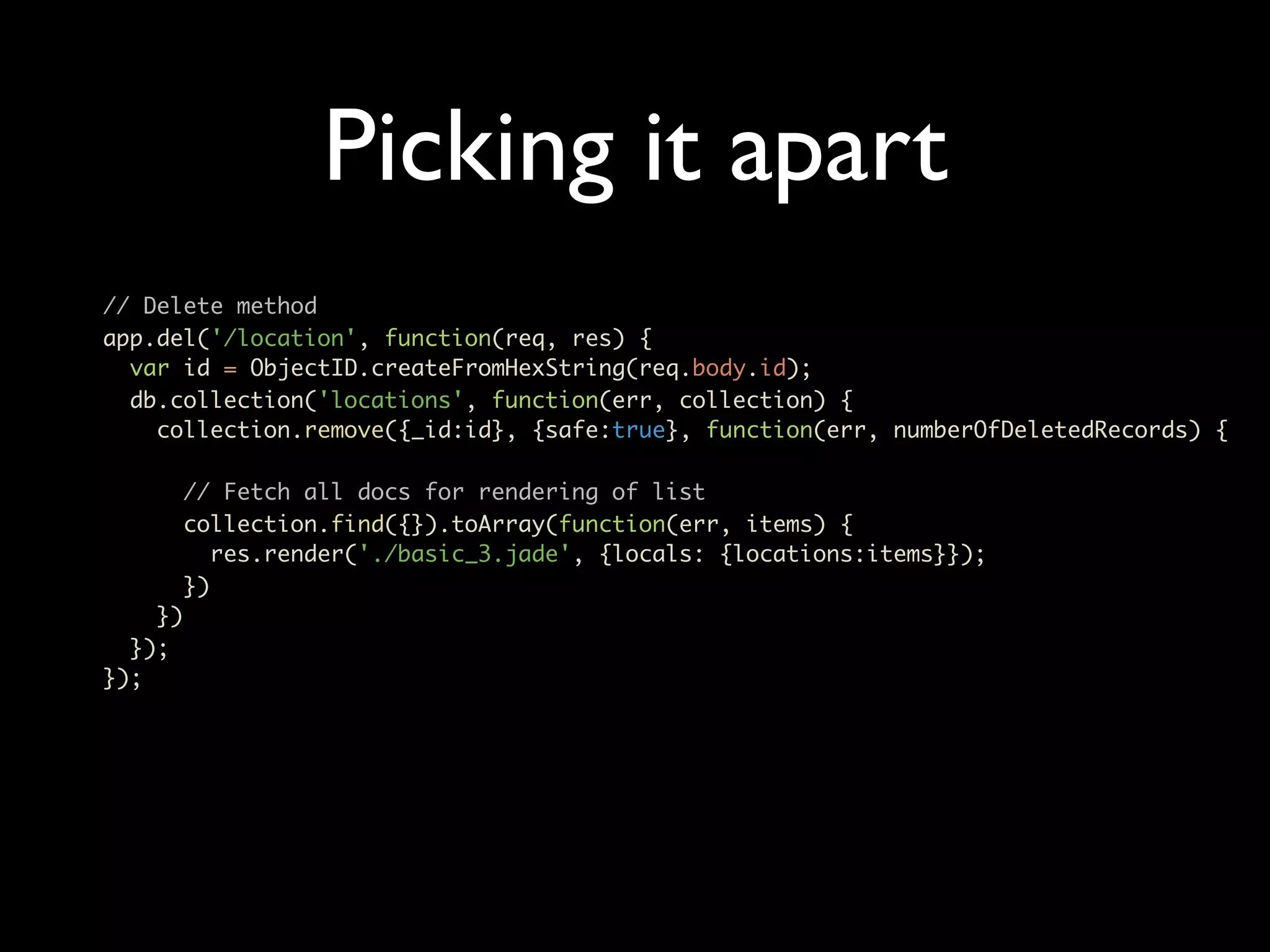
Picking it apart // Delete method app.del('/location', function(req, res) { var id = ObjectID.createFromHexString(req.body.id); db.collection('locations', function(err, collection) { collection.remove({_id:id}, {safe:true}, function(err, numberOfDeletedRecords) { // Fetch all docs for rendering of list collection.find({}).toArray(function(err, items) { res.render('./basic_3.jade', {locals: {locations:items}}); }) }) }); });
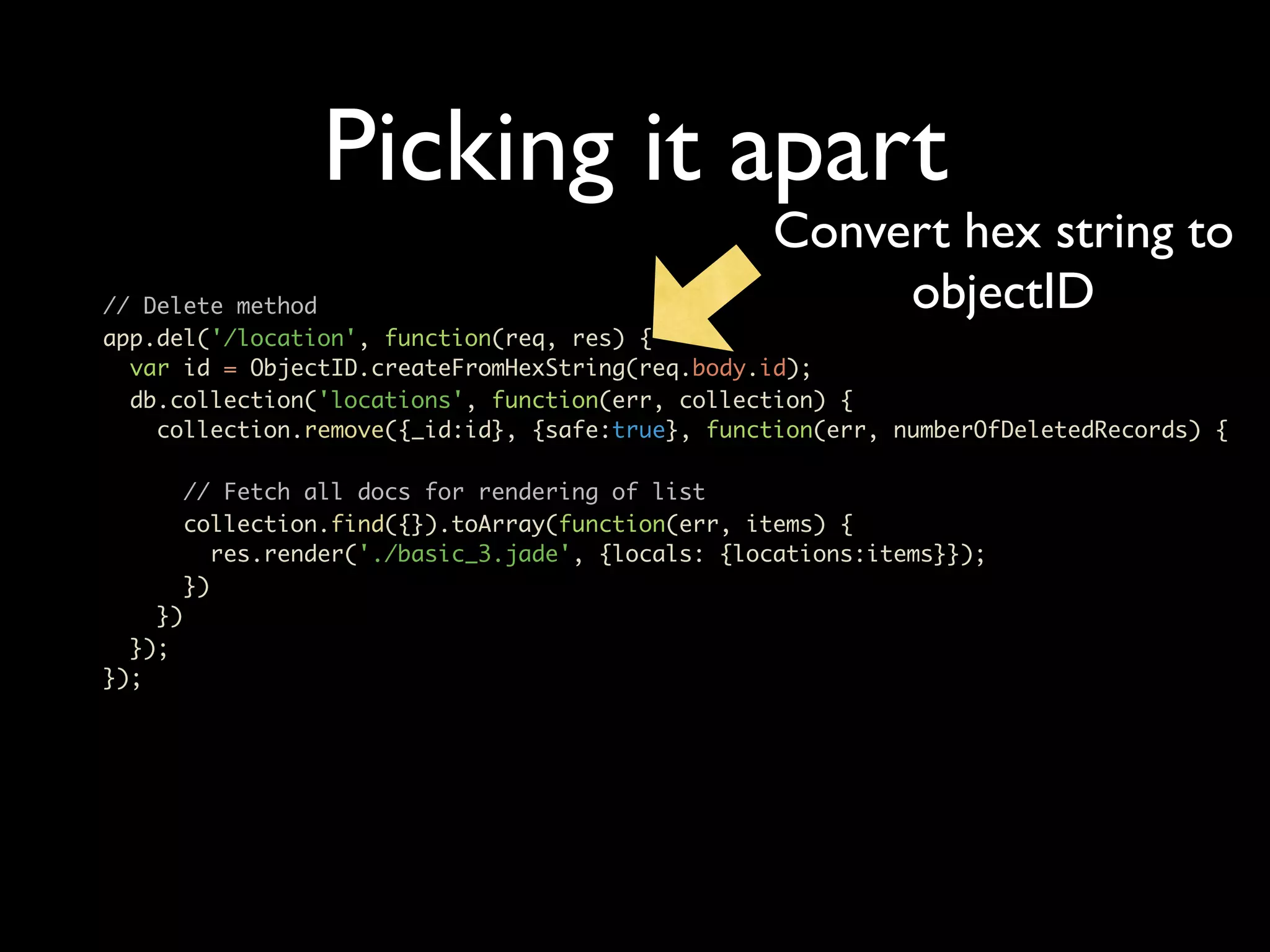
Picking it apart Convert hex string to // Delete method objectID app.del('/location', function(req, res) { var id = ObjectID.createFromHexString(req.body.id); db.collection('locations', function(err, collection) { collection.remove({_id:id}, {safe:true}, function(err, numberOfDeletedRecords) { // Fetch all docs for rendering of list collection.find({}).toArray(function(err, items) { res.render('./basic_3.jade', {locals: {locations:items}}); }) }) }); });
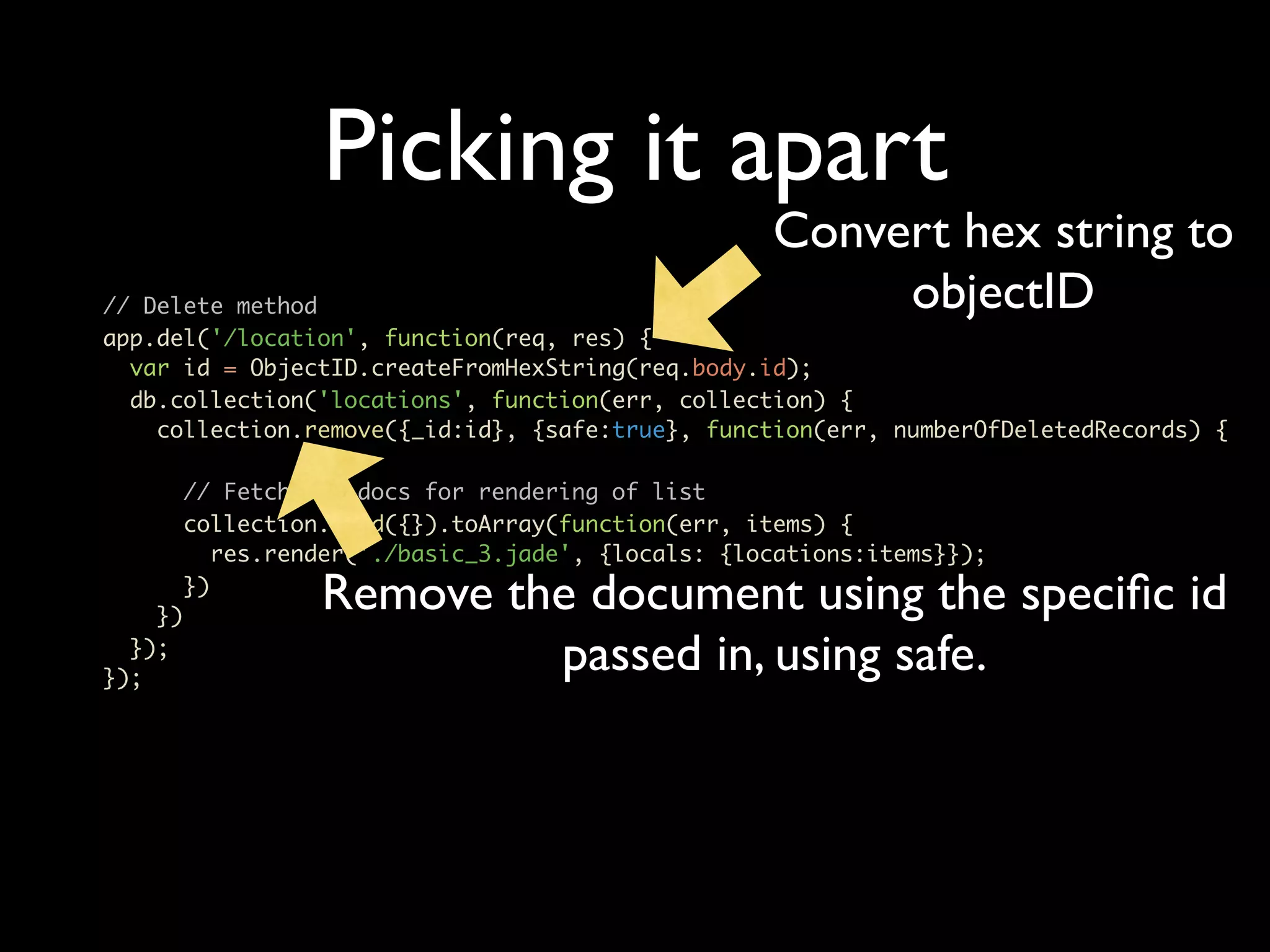
Picking it apart Convert hex string to // Delete method objectID app.del('/location', function(req, res) { var id = ObjectID.createFromHexString(req.body.id); db.collection('locations', function(err, collection) { collection.remove({_id:id}, {safe:true}, function(err, numberOfDeletedRecords) { // Fetch all docs for rendering of list collection.find({}).toArray(function(err, items) { res.render('./basic_3.jade', {locals: {locations:items}}); }) }) Remove the document using the specific id }); }); passed in, using safe.
Let’s add some meat • CRUD operations • Textmate basic_4.js
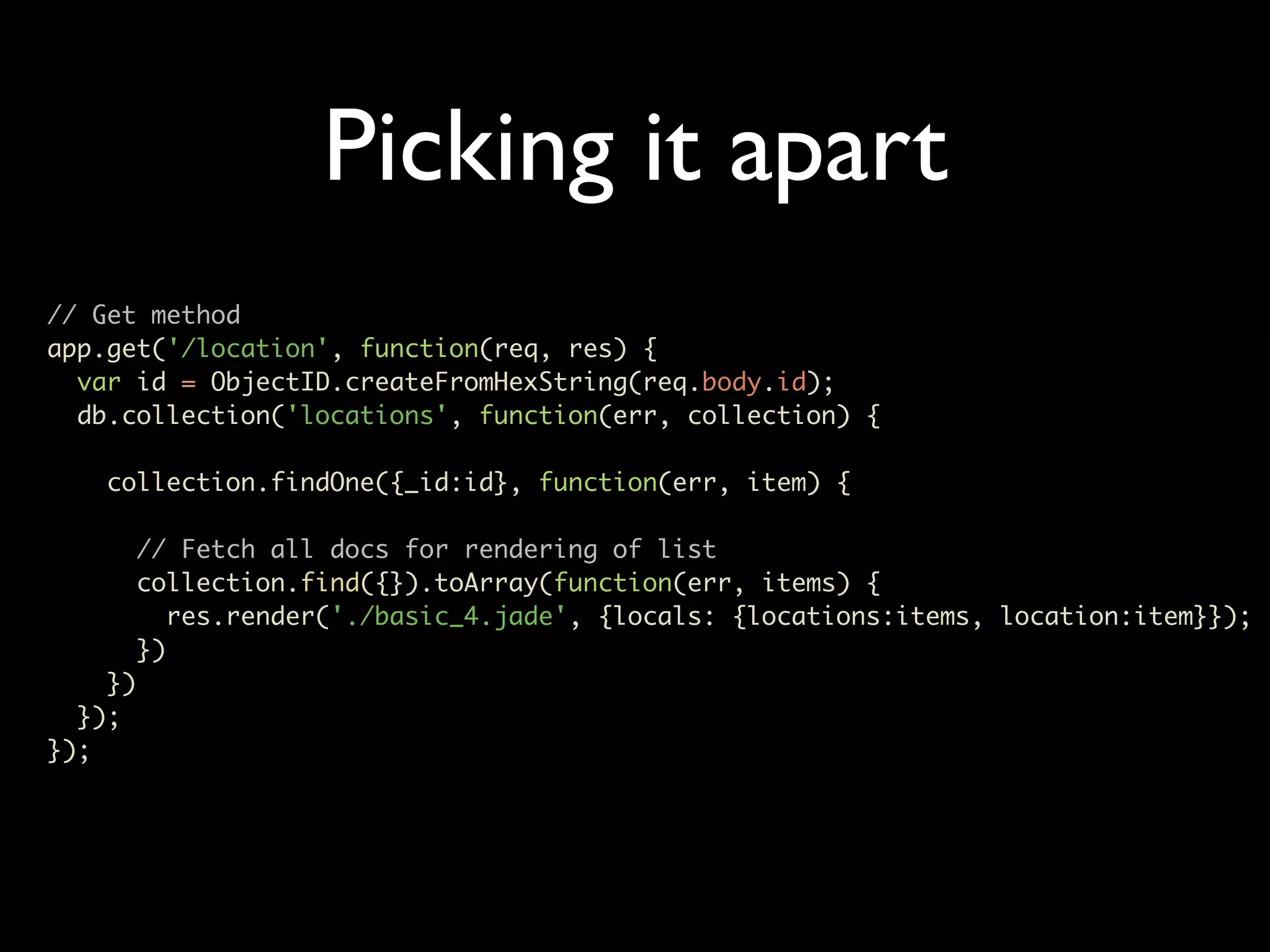
Picking it apart // Get method app.get('/location', function(req, res) { var id = ObjectID.createFromHexString(req.body.id); db.collection('locations', function(err, collection) { collection.findOne({_id:id}, function(err, item) { // Fetch all docs for rendering of list collection.find({}).toArray(function(err, items) { res.render('./basic_4.jade', {locals: {locations:items, location:item}}); }) }) }); });
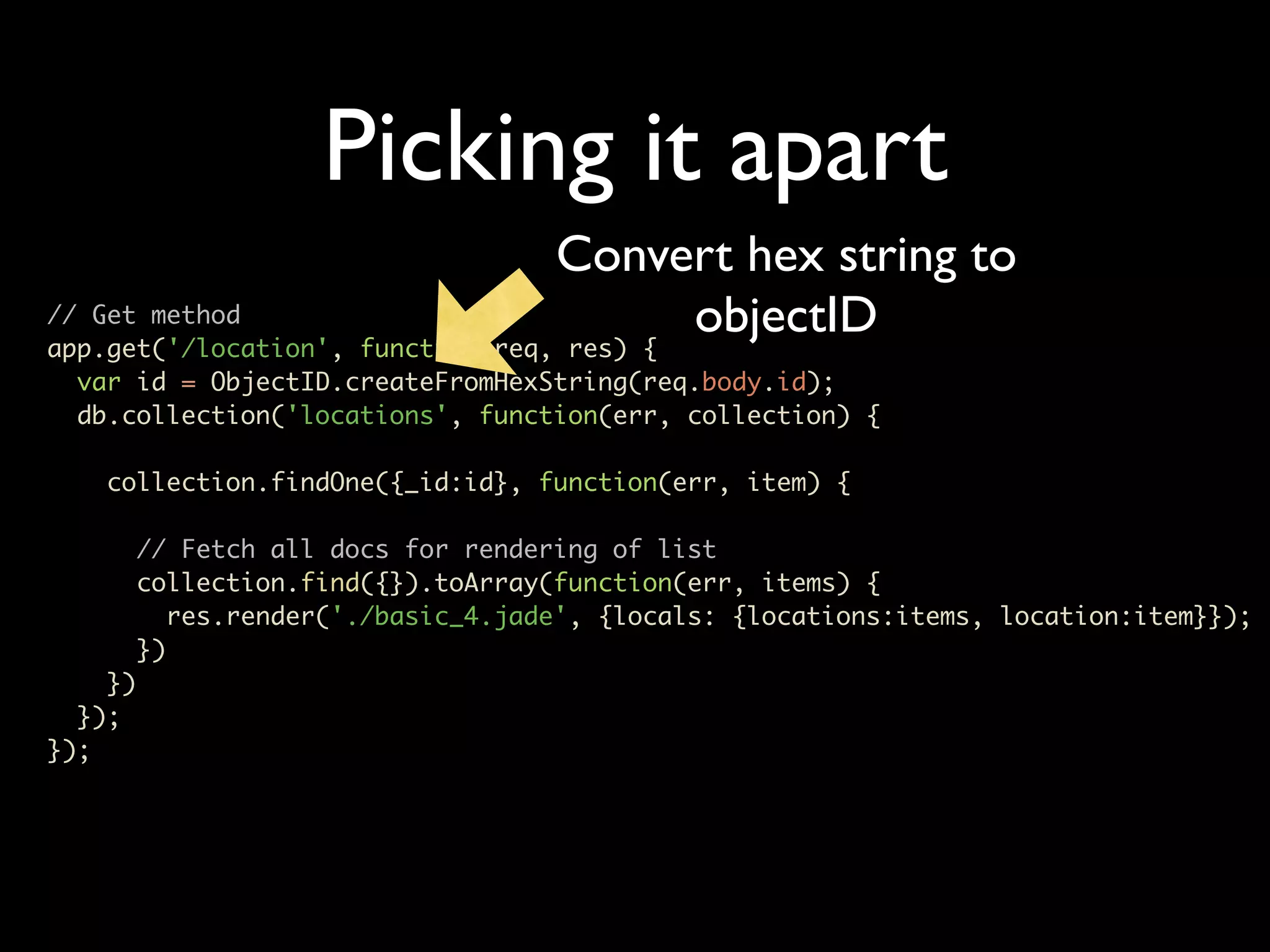
Picking it apart Convert hex string to // Get method app.get('/location', function(req, res) { objectID var id = ObjectID.createFromHexString(req.body.id); db.collection('locations', function(err, collection) { collection.findOne({_id:id}, function(err, item) { // Fetch all docs for rendering of list collection.find({}).toArray(function(err, items) { res.render('./basic_4.jade', {locals: {locations:items, location:item}}); }) }) }); });
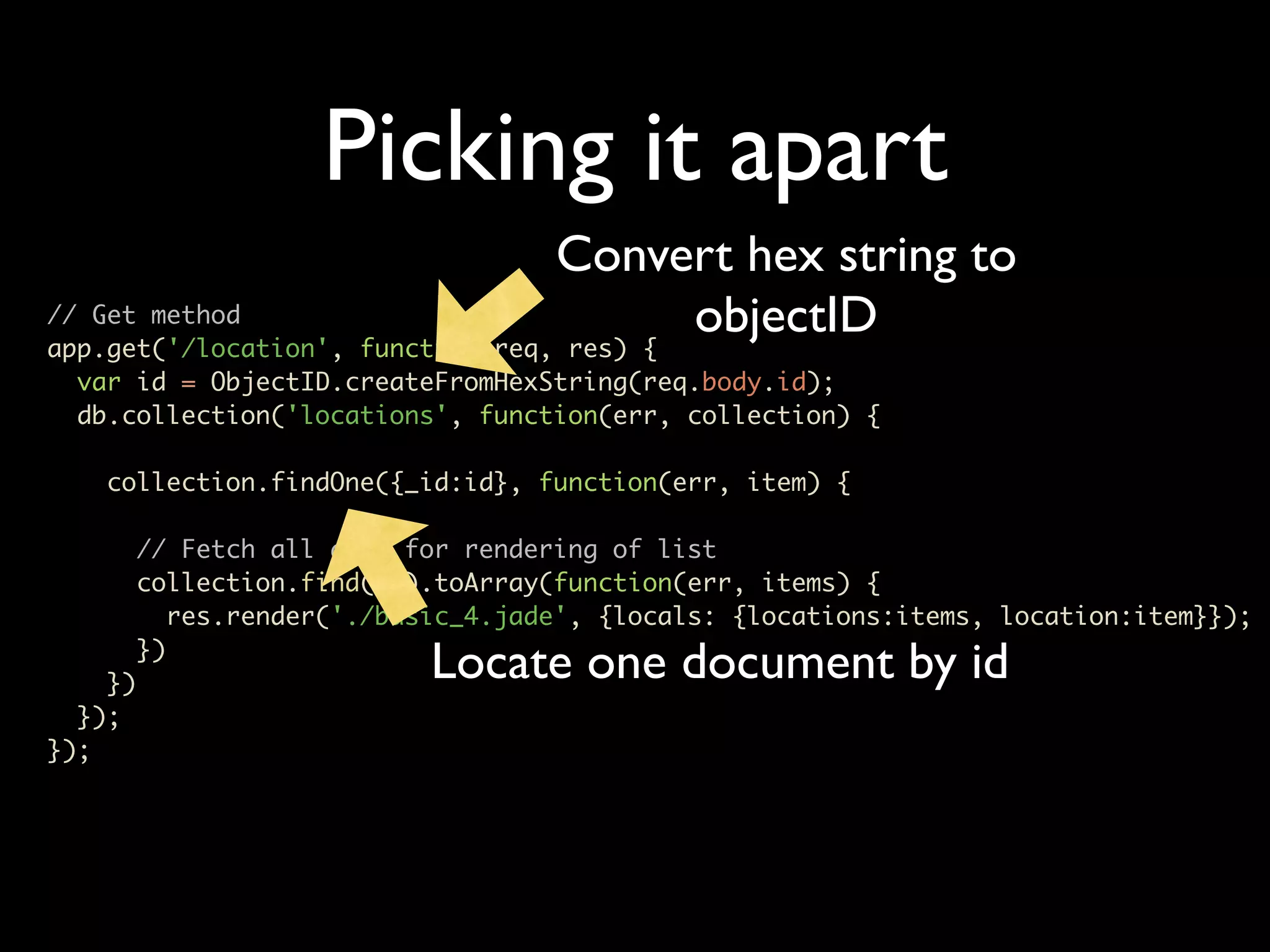
Picking it apart Convert hex string to // Get method app.get('/location', function(req, res) { objectID var id = ObjectID.createFromHexString(req.body.id); db.collection('locations', function(err, collection) { collection.findOne({_id:id}, function(err, item) { // Fetch all docs for rendering of list collection.find({}).toArray(function(err, items) { res.render('./basic_4.jade', {locals: {locations:items, location:item}}); }) }) Locate one document by id }); });
Let’s add some meat • CRUD operations • Textmate basic_5.js
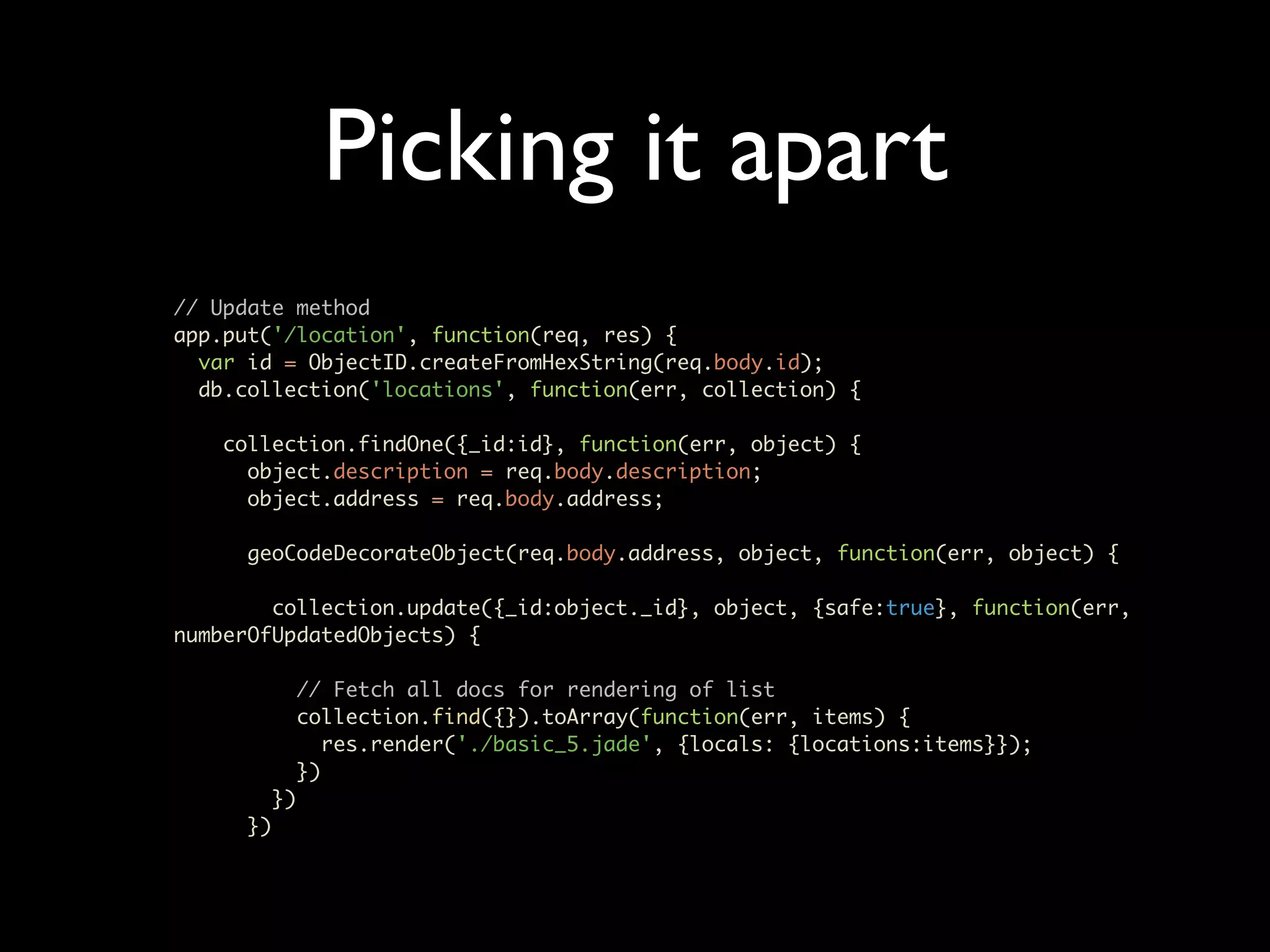
Picking it apart // Update method app.put('/location', function(req, res) { var id = ObjectID.createFromHexString(req.body.id); db.collection('locations', function(err, collection) { collection.findOne({_id:id}, function(err, object) { object.description = req.body.description; object.address = req.body.address; geoCodeDecorateObject(req.body.address, object, function(err, object) { collection.update({_id:object._id}, object, {safe:true}, function(err, numberOfUpdatedObjects) { // Fetch all docs for rendering of list collection.find({}).toArray(function(err, items) { res.render('./basic_5.jade', {locals: {locations:items}}); }) }) })
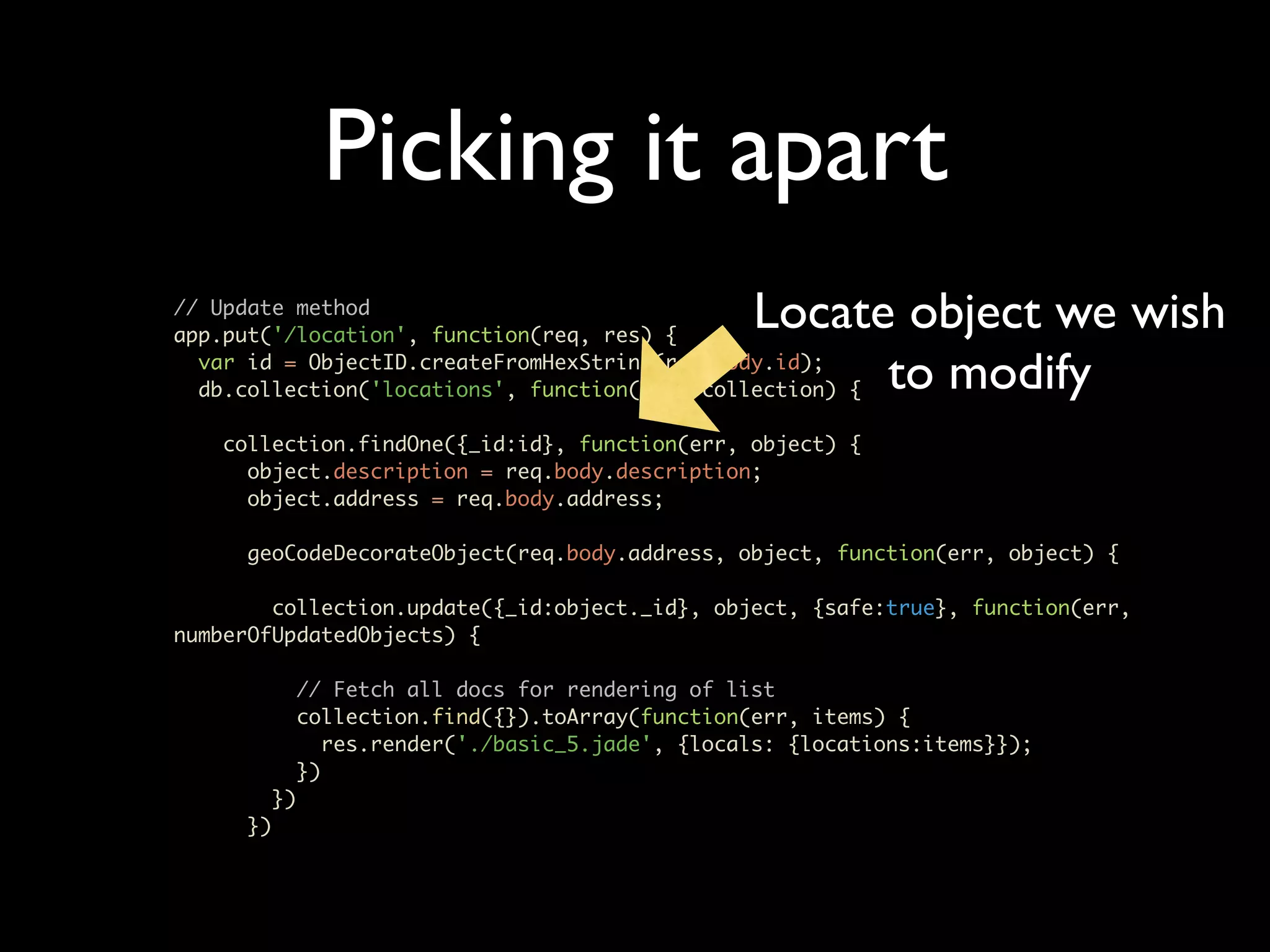
Picking it apart // Update method app.put('/location', function(req, res) { Locate object we wish var id = ObjectID.createFromHexString(req.body.id); to modify db.collection('locations', function(err, collection) { collection.findOne({_id:id}, function(err, object) { object.description = req.body.description; object.address = req.body.address; geoCodeDecorateObject(req.body.address, object, function(err, object) { collection.update({_id:object._id}, object, {safe:true}, function(err, numberOfUpdatedObjects) { // Fetch all docs for rendering of list collection.find({}).toArray(function(err, items) { res.render('./basic_5.jade', {locals: {locations:items}}); }) }) })
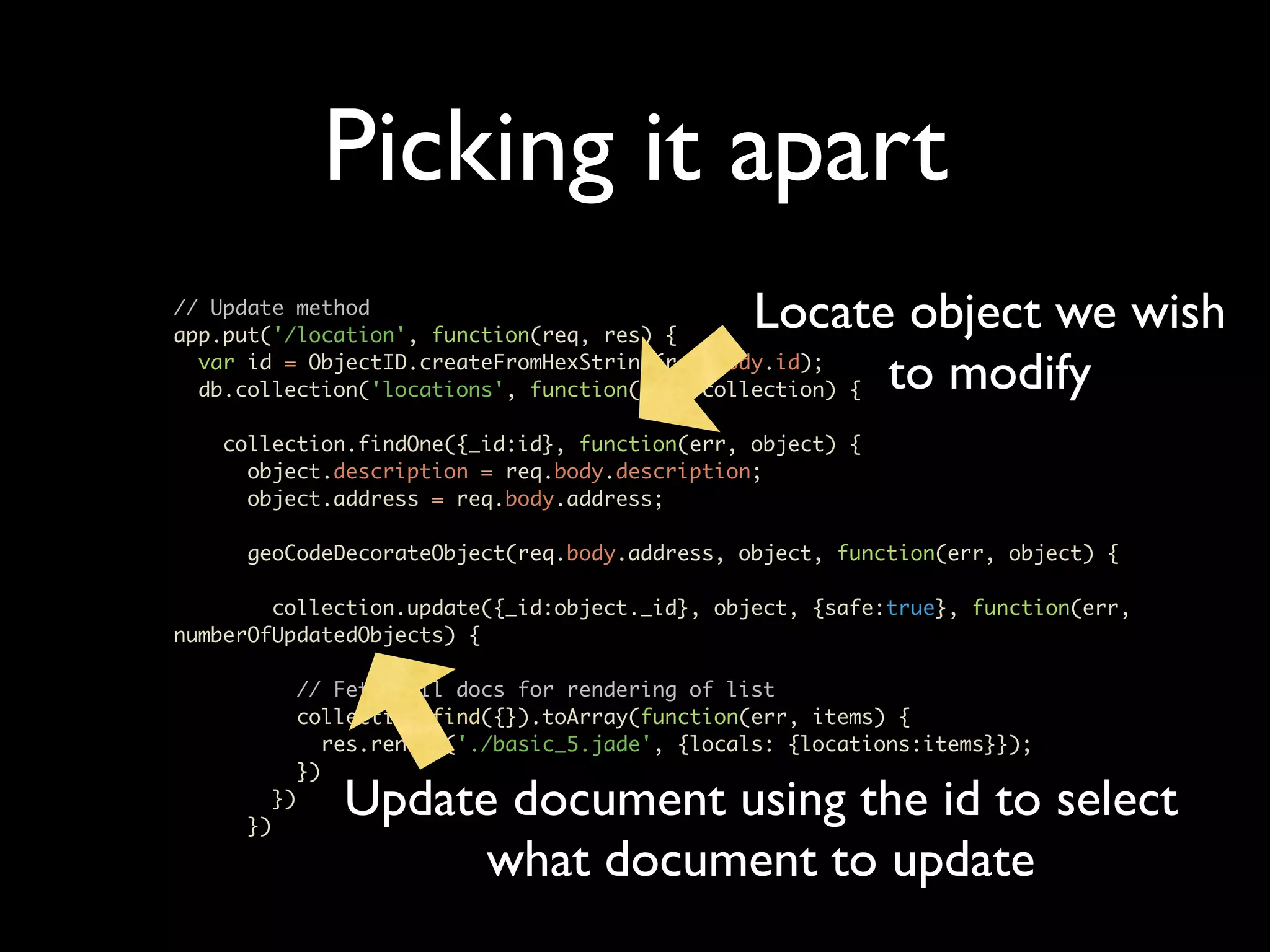
Picking it apart // Update method app.put('/location', function(req, res) { Locate object we wish var id = ObjectID.createFromHexString(req.body.id); to modify db.collection('locations', function(err, collection) { collection.findOne({_id:id}, function(err, object) { object.description = req.body.description; object.address = req.body.address; geoCodeDecorateObject(req.body.address, object, function(err, object) { collection.update({_id:object._id}, object, {safe:true}, function(err, numberOfUpdatedObjects) { // Fetch all docs for rendering of list collection.find({}).toArray(function(err, items) { res.render('./basic_5.jade', {locals: {locations:items}}); }) }) }) Update document using the id to select what document to update
Let’s add some meat • Final with search • Textmate basic_6.js
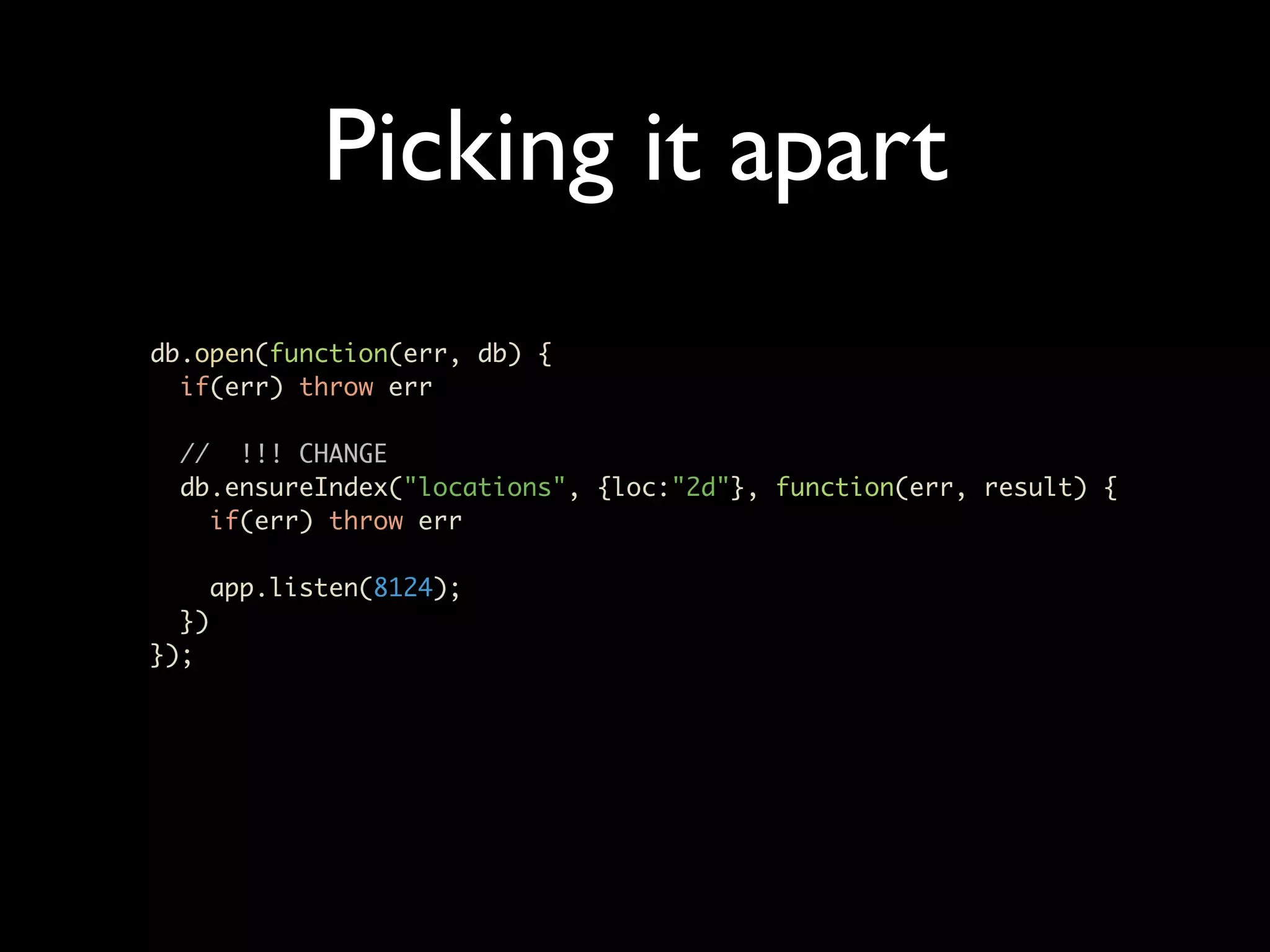
Picking it apart db.open(function(err, db) { if(err) throw err // !!! CHANGE db.ensureIndex("locations", {loc:"2d"}, function(err, result) { if(err) throw err app.listen(8124); }) });
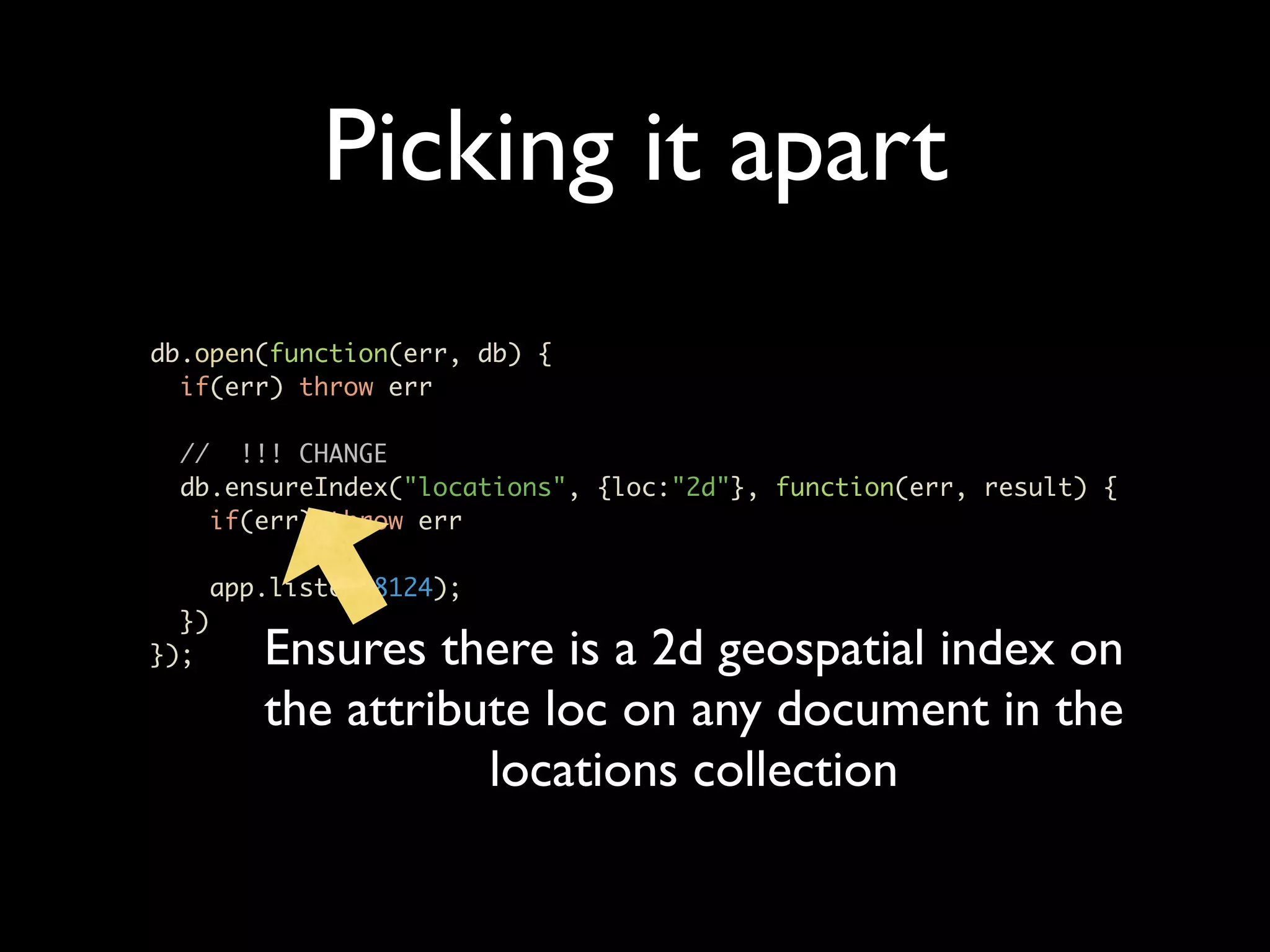
Picking it apart db.open(function(err, db) { if(err) throw err // !!! CHANGE db.ensureIndex("locations", {loc:"2d"}, function(err, result) { if(err) throw err app.listen(8124); }) }); Ensures there is a 2d geospatial index on the attribute loc on any document in the locations collection
Picking it apart var geoCodeDecorateObject = function(address, object, callback) { var googleGeoCodeApi = {host: 'maps.googleapis.com', port: 80,path: '/maps/api/geocode/json?sensor=false&address=' + escape(address), method: 'GET' }; var clientReq = http.get(googleGeoCodeApi, function(clientRes) { var data = []; clientRes.on('data', function(chunk) { data.push(chunk.toString()); }); clientRes.on('end', function() { var googleObject = JSON.parse(data.join('')); object.address = address; object.geodata = googleObject.results.pop(); // !!! CHANGE object.loc = {long:object.geodata.geometry.location.lng, lat:object.geodata.geometry.location.lat}; callback(null, object); });
Picking it apart var geoCodeDecorateObject = function(address, object, callback) { var googleGeoCodeApi = {host: 'maps.googleapis.com', port: 80,path: '/maps/api/geocode/json?sensor=false&address=' + escape(address), method: 'GET' }; var clientReq = http.get(googleGeoCodeApi, function(clientRes) { var data = []; clientRes.on('data', function(chunk) { data.push(chunk.toString()); We are adding a loc }); clientRes.on('end', function() { attribute to all var googleObject = JSON.parse(data.join('')); documents with object.address = address; object.geodata = googleObject.results.pop(); longtidude and // !!! CHANGE latitude in the right object.loc = {long:object.geodata.geometry.location.lng, lat:object.geodata.geometry.location.lat}; order for mongodb to callback(null, object); }); search
Picking it apart // !!! CHANGE // Search option app.post('/search', function(req, res) { geoCodeDecorateObject(req.body.address, {}, function(err, object) { // Unpack geo object var long = object.geodata.geometry.location.lng; var lat = object.geodata.geometry.location.lat db.collection('locations', function(err, collection) { collection.find({loc : {'$near': [long, lat], '$maxDistance': parseFloat(req.body.distance)}}).toArray(function(err, geoItems) { // Fetch all docs for rendering of list collection.find({}).toArray(function(err, items) { res.render('./basic_6.jade', {locals: {locations:items, results:geoItems}}); }) }); }); }); });
Picking it apart Encode address for // !!! CHANGE // Search option searching app.post('/search', function(req, res) { geoCodeDecorateObject(req.body.address, {}, function(err, object) { // Unpack geo object var long = object.geodata.geometry.location.lng; var lat = object.geodata.geometry.location.lat db.collection('locations', function(err, collection) { collection.find({loc : {'$near': [long, lat], '$maxDistance': parseFloat(req.body.distance)}}).toArray(function(err, geoItems) { // Fetch all docs for rendering of list collection.find({}).toArray(function(err, items) { res.render('./basic_6.jade', {locals: {locations:items, results:geoItems}}); }) }); }); }); });
Picking it apart Encode address for // !!! CHANGE // Search option searching app.post('/search', function(req, res) { geoCodeDecorateObject(req.body.address, {}, function(err, object) { // Unpack geo object var long = object.geodata.geometry.location.lng; var lat = object.geodata.geometry.location.lat db.collection('locations', function(err, collection) { collection.find({loc : {'$near': [long, lat], '$maxDistance': parseFloat(req.body.distance)}}).toArray(function(err, geoItems) { // Fetch all docs for rendering of list collection.find({}).toArray(function(err, items) { res.render('./basic_6.jade', {locals: {locations:items, results:geoItems}}); }) }); Search for all items $near our address at }); }); $maxDistance });
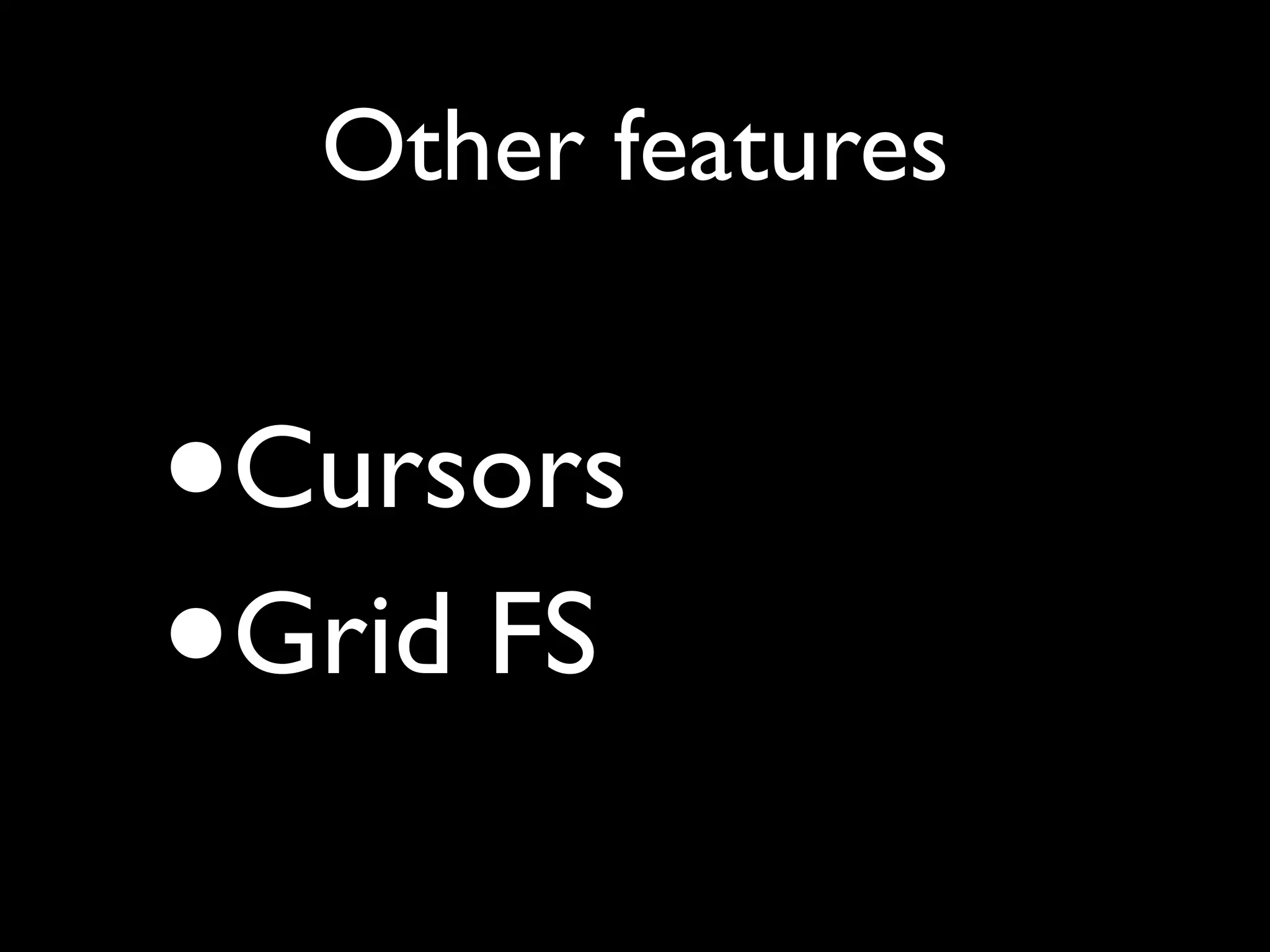
Other features • Cursors • Grid FS
Cursors • toArray Function • each Function • streamRecords Function
toArray collection.find().toArray(function(err, documents){ test.deepEqual([1, 2, 3], documents[0].b); // Let's close the db test.done(); });
toArray Fetches all docs in one go for the query. Use with caution collection.find().toArray(function(err, documents){ test.deepEqual([1, 2, 3], documents[0].b); // Let's close the db test.done(); });
each collection.find({}, {'sort':[['age', 1]]}).each(function(err, item){ if(item != null) { // Do work } else { // Finished } });
each Fetches docs in batches and allows iteration over results collection.find({}, {'sort':[['age', 1]]}).each(function(err, item){ if(item != null) { // Do work } else { // Finished } });
each Fetches docs in batches and allows iteration over results collection.find({}, {'sort':[['age', 1]]}).each(function(err, item){ if(item != null) { // Do work } else { // Finished } }); Returns null when no more results available
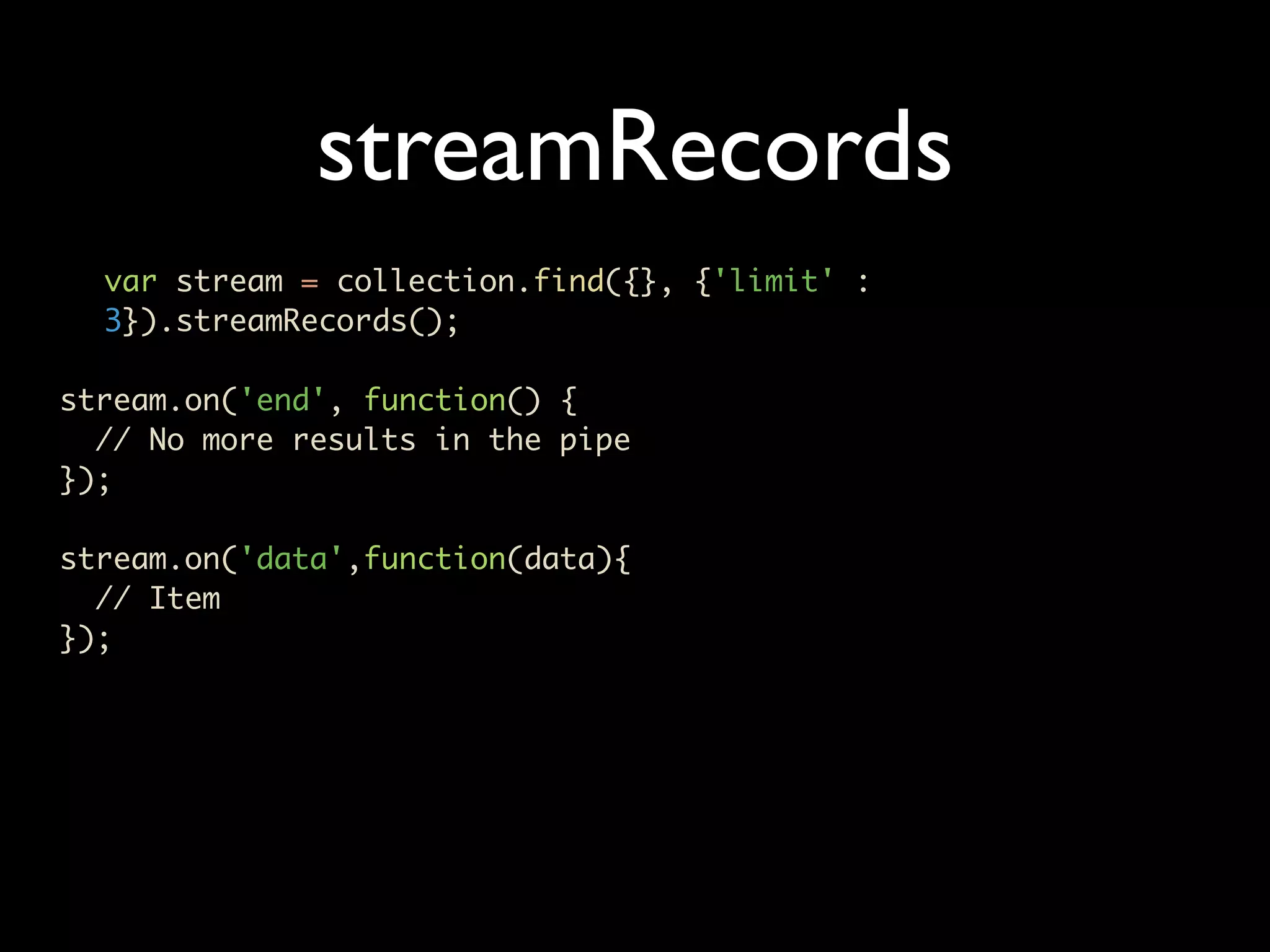
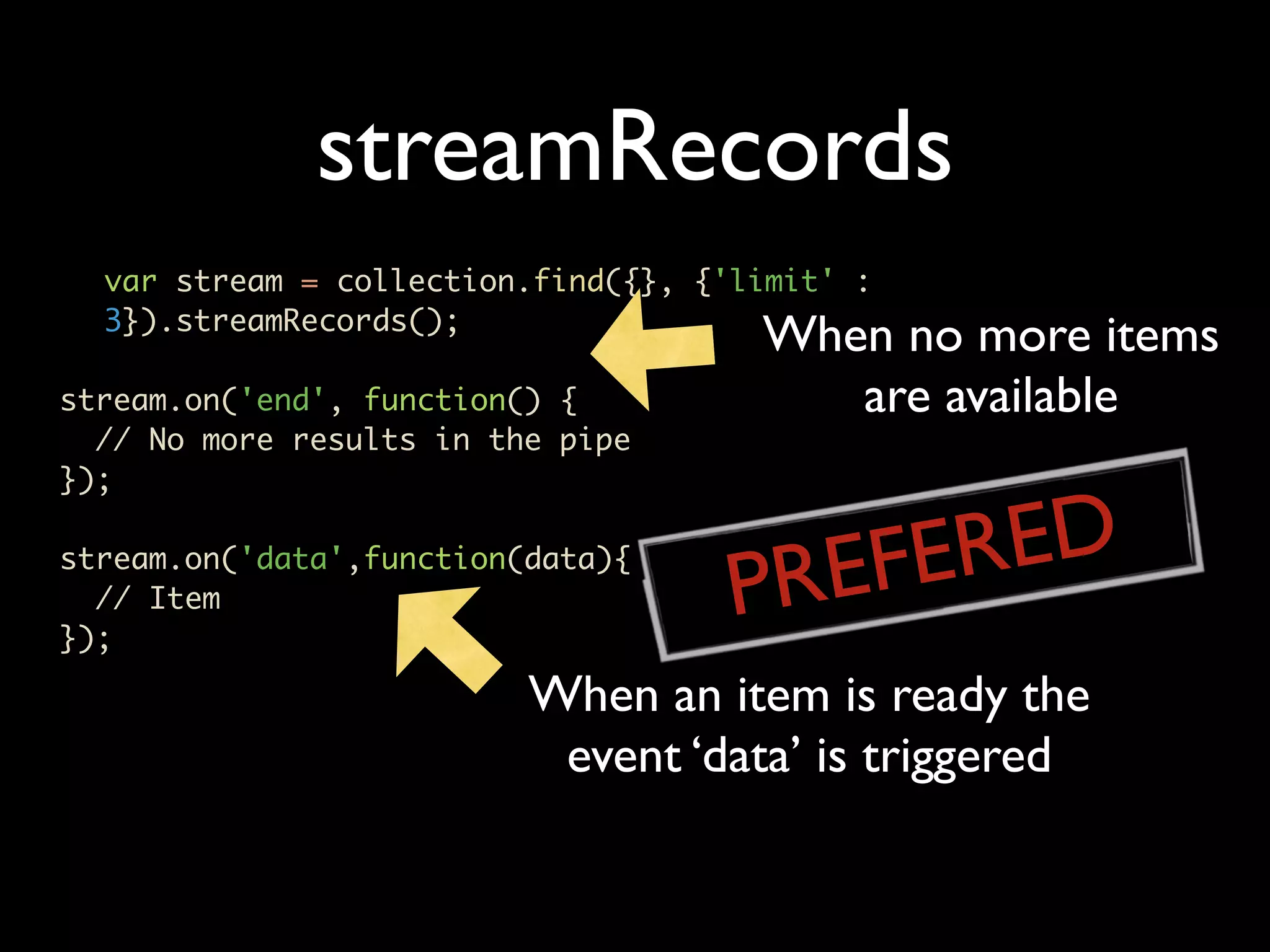
streamRecords var stream = collection.find({}, {'limit' : 3}).streamRecords(); stream.on('end', function() { // No more results in the pipe }); stream.on('data',function(data){ // Item });
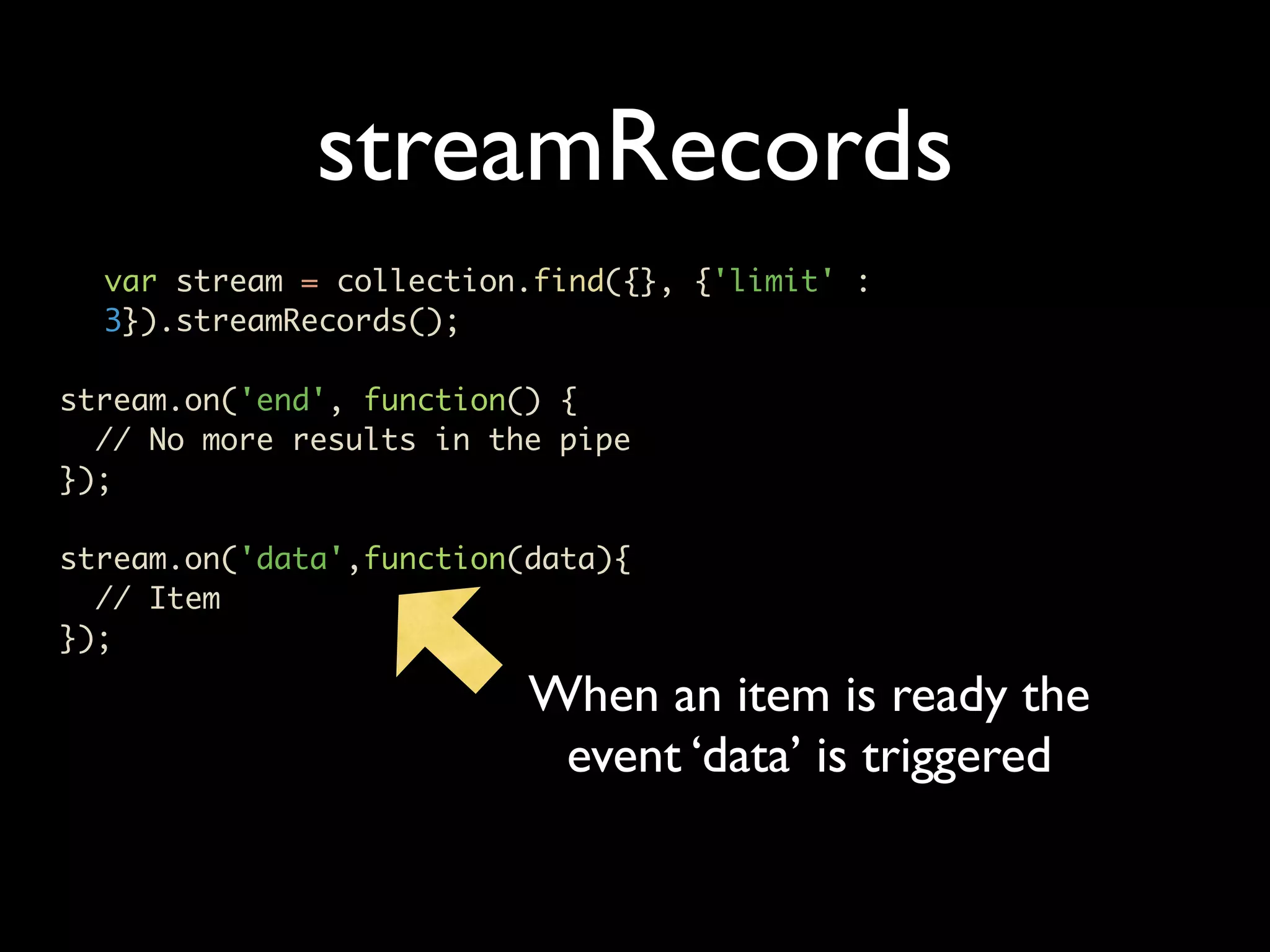
streamRecords var stream = collection.find({}, {'limit' : 3}).streamRecords(); stream.on('end', function() { // No more results in the pipe }); stream.on('data',function(data){ // Item }); When an item is ready the event ‘data’ is triggered
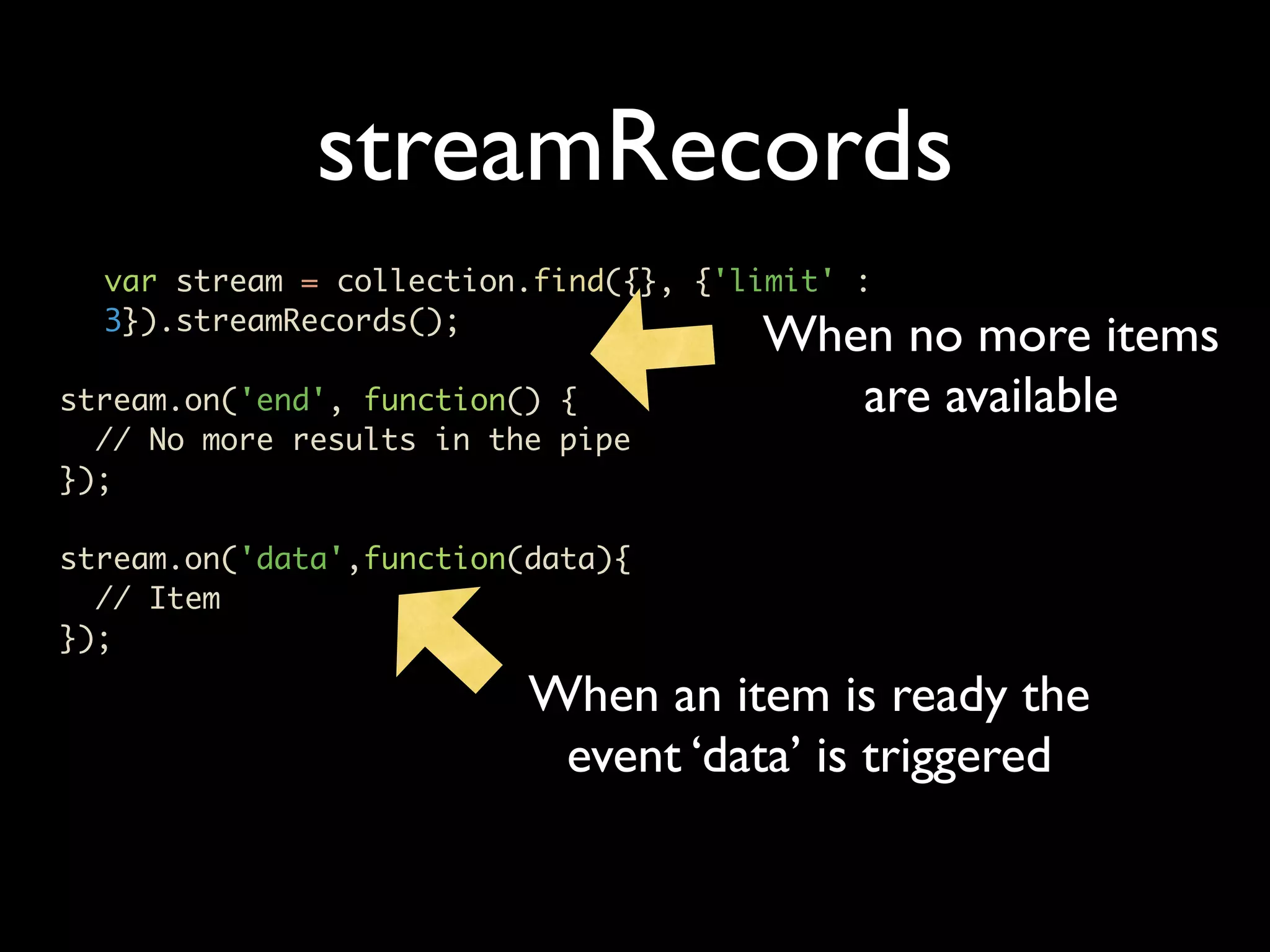
streamRecords var stream = collection.find({}, {'limit' : 3}).streamRecords(); When no more items stream.on('end', function() { are available // No more results in the pipe }); stream.on('data',function(data){ // Item }); When an item is ready the event ‘data’ is triggered
streamRecords var stream = collection.find({}, {'limit' : 3}).streamRecords(); When no more items stream.on('end', function() { are available // No more results in the pipe }); REFERED P stream.on('data',function(data){ // Item }); When an item is ready the event ‘data’ is triggered
Grid FS • Write and read a file • Stream a file
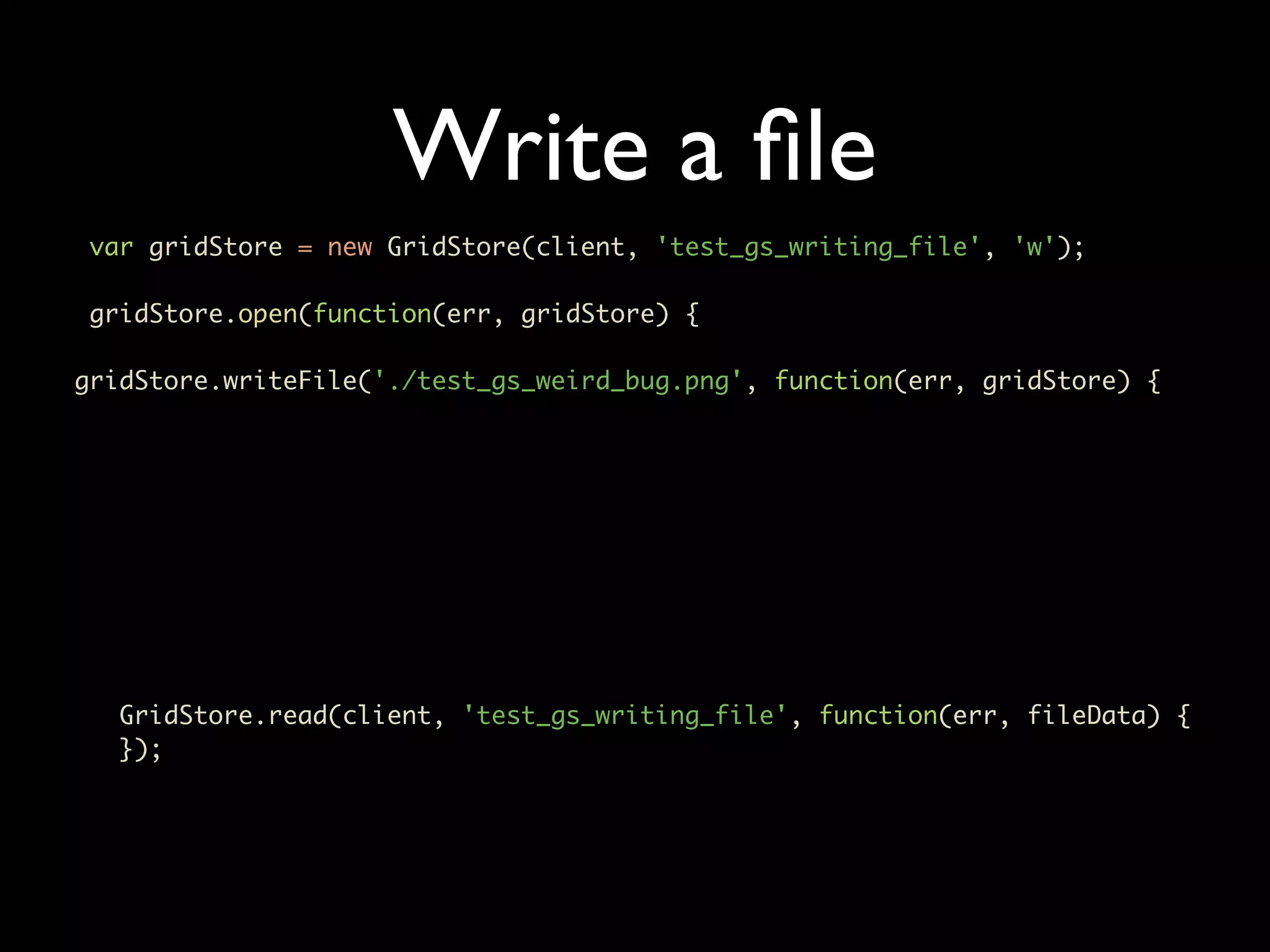
Write a file var gridStore = new GridStore(client, 'test_gs_writing_file', 'w'); gridStore.open(function(err, gridStore) { gridStore.writeFile('./test_gs_weird_bug.png', function(err, gridStore) { GridStore.read(client, 'test_gs_writing_file', function(err, fileData) { });
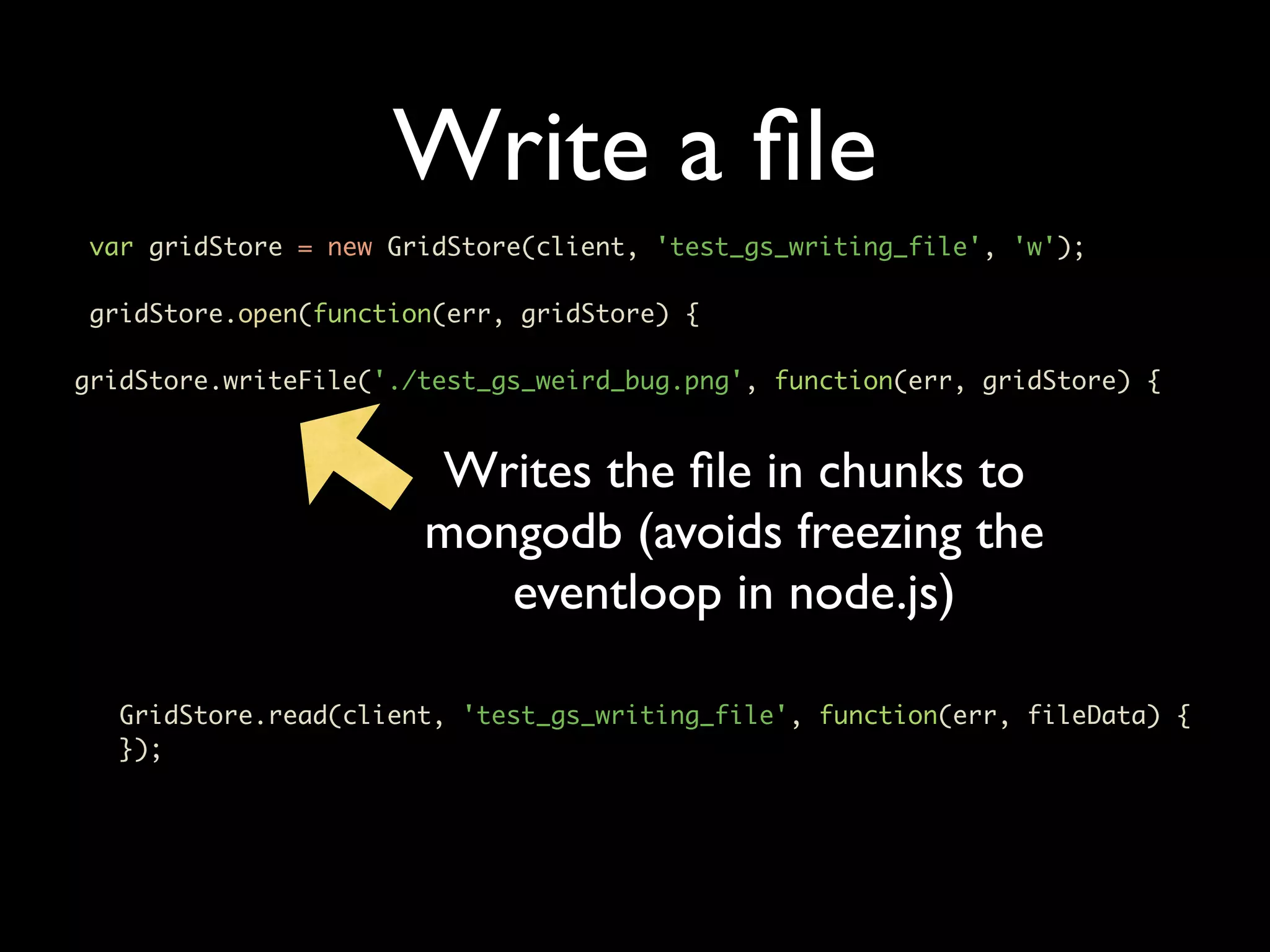
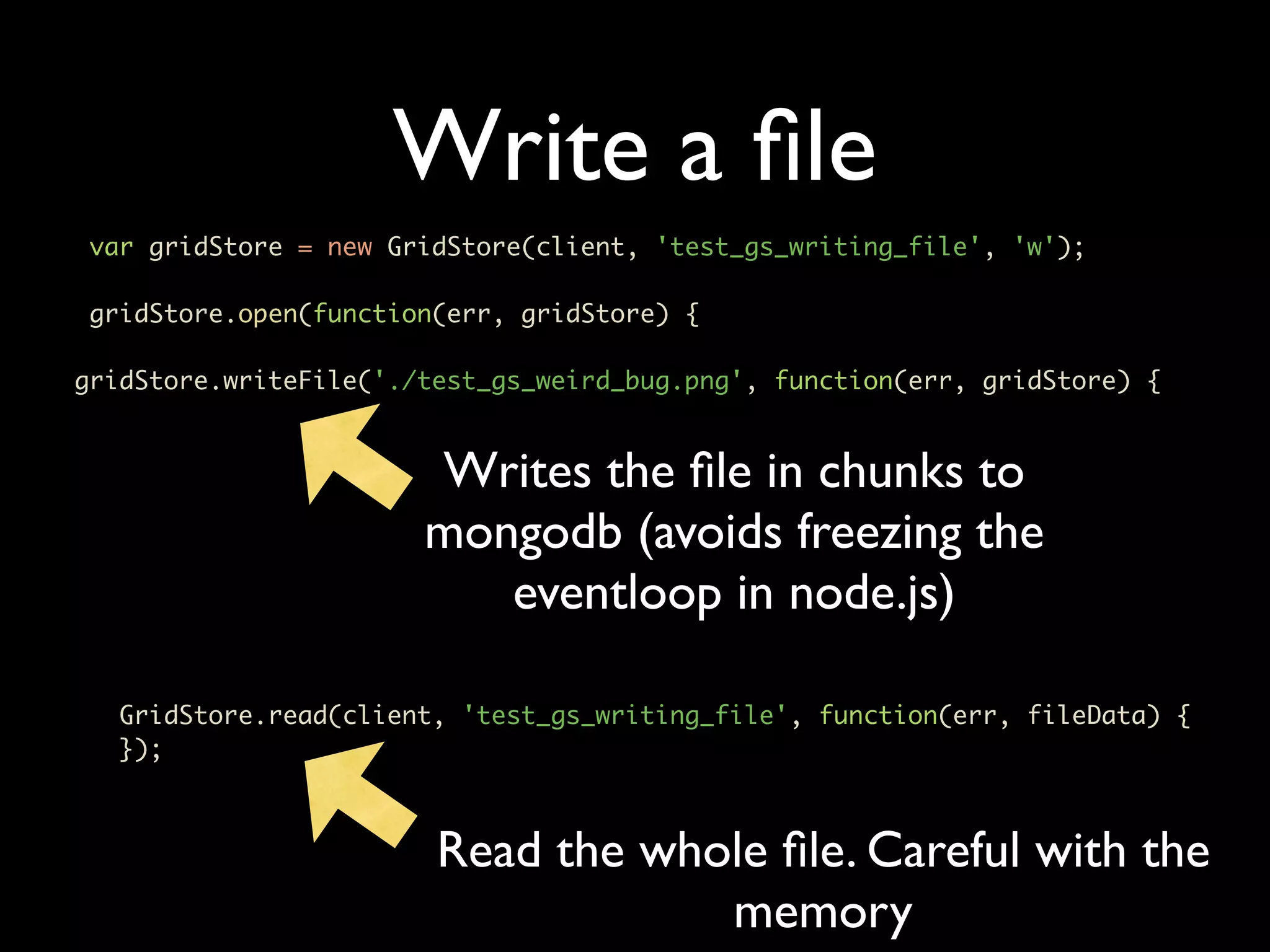
Write a file var gridStore = new GridStore(client, 'test_gs_writing_file', 'w'); gridStore.open(function(err, gridStore) { gridStore.writeFile('./test_gs_weird_bug.png', function(err, gridStore) { Writes the file in chunks to mongodb (avoids freezing the eventloop in node.js) GridStore.read(client, 'test_gs_writing_file', function(err, fileData) { });
Write a file var gridStore = new GridStore(client, 'test_gs_writing_file', 'w'); gridStore.open(function(err, gridStore) { gridStore.writeFile('./test_gs_weird_bug.png', function(err, gridStore) { Writes the file in chunks to mongodb (avoids freezing the eventloop in node.js) GridStore.read(client, 'test_gs_writing_file', function(err, fileData) { }); Read the whole file. Careful with the memory
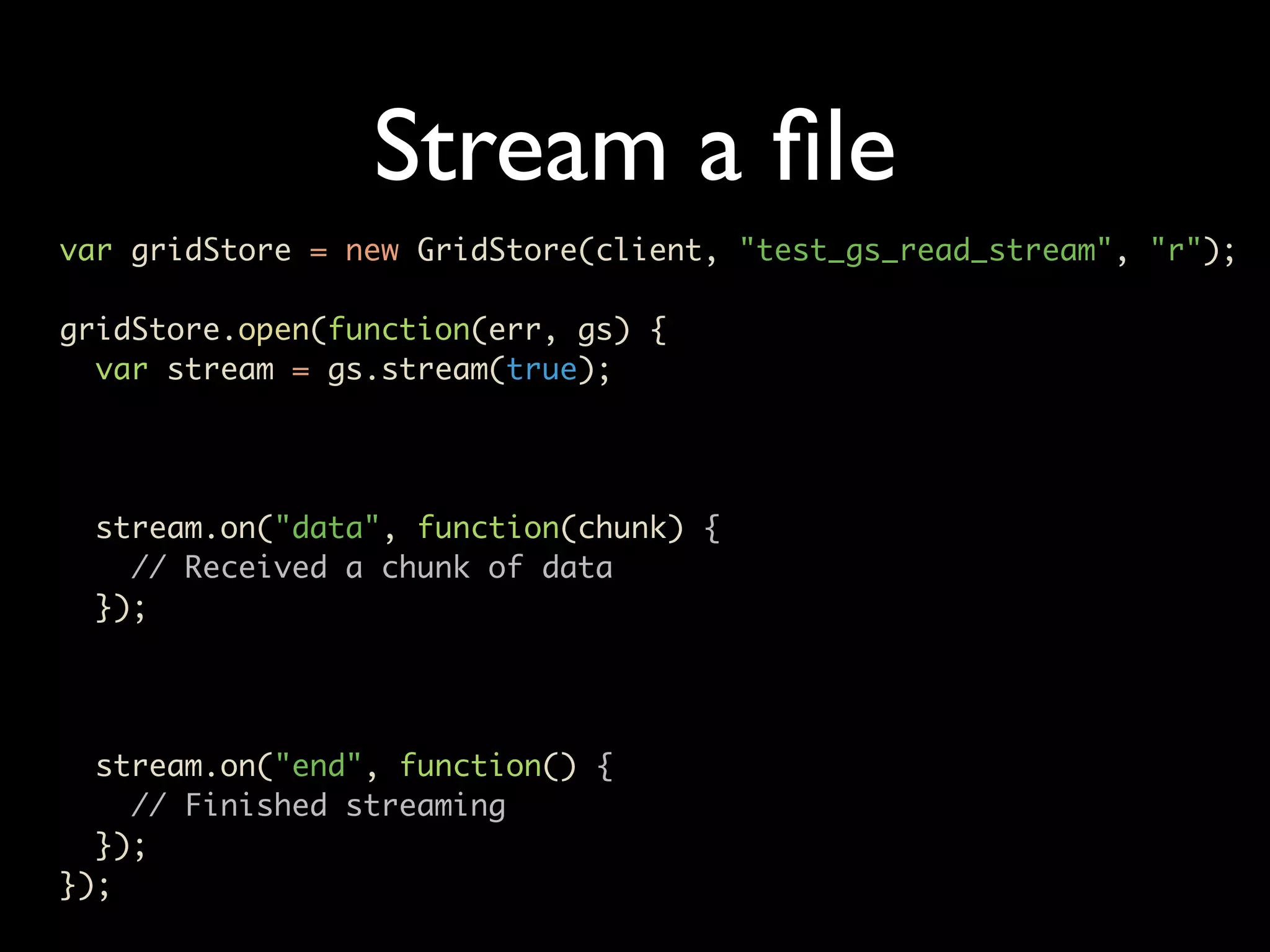
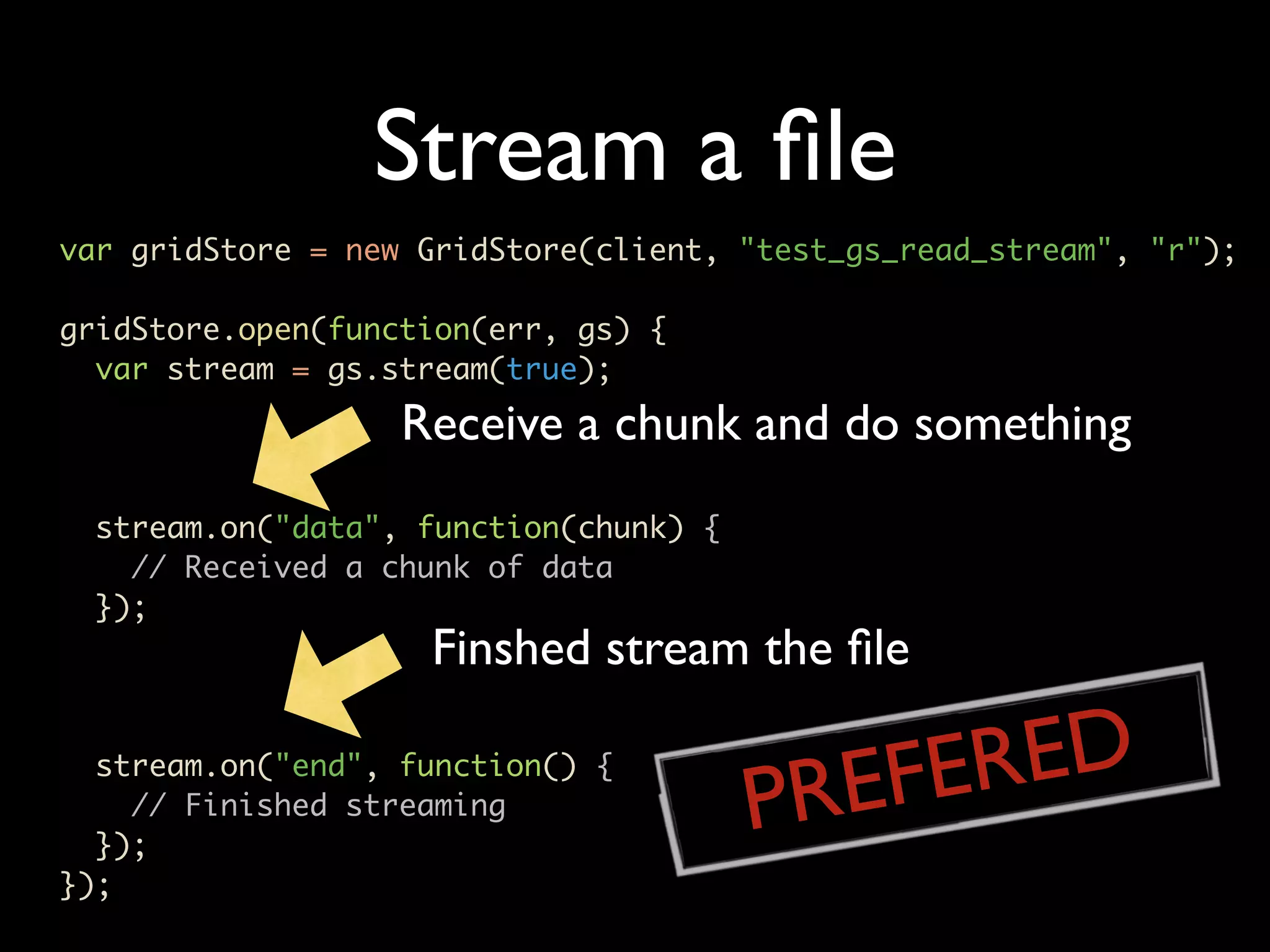
Stream a file var gridStore = new GridStore(client, "test_gs_read_stream", "r"); gridStore.open(function(err, gs) { var stream = gs.stream(true); stream.on("data", function(chunk) { // Received a chunk of data }); stream.on("end", function() { // Finished streaming }); });
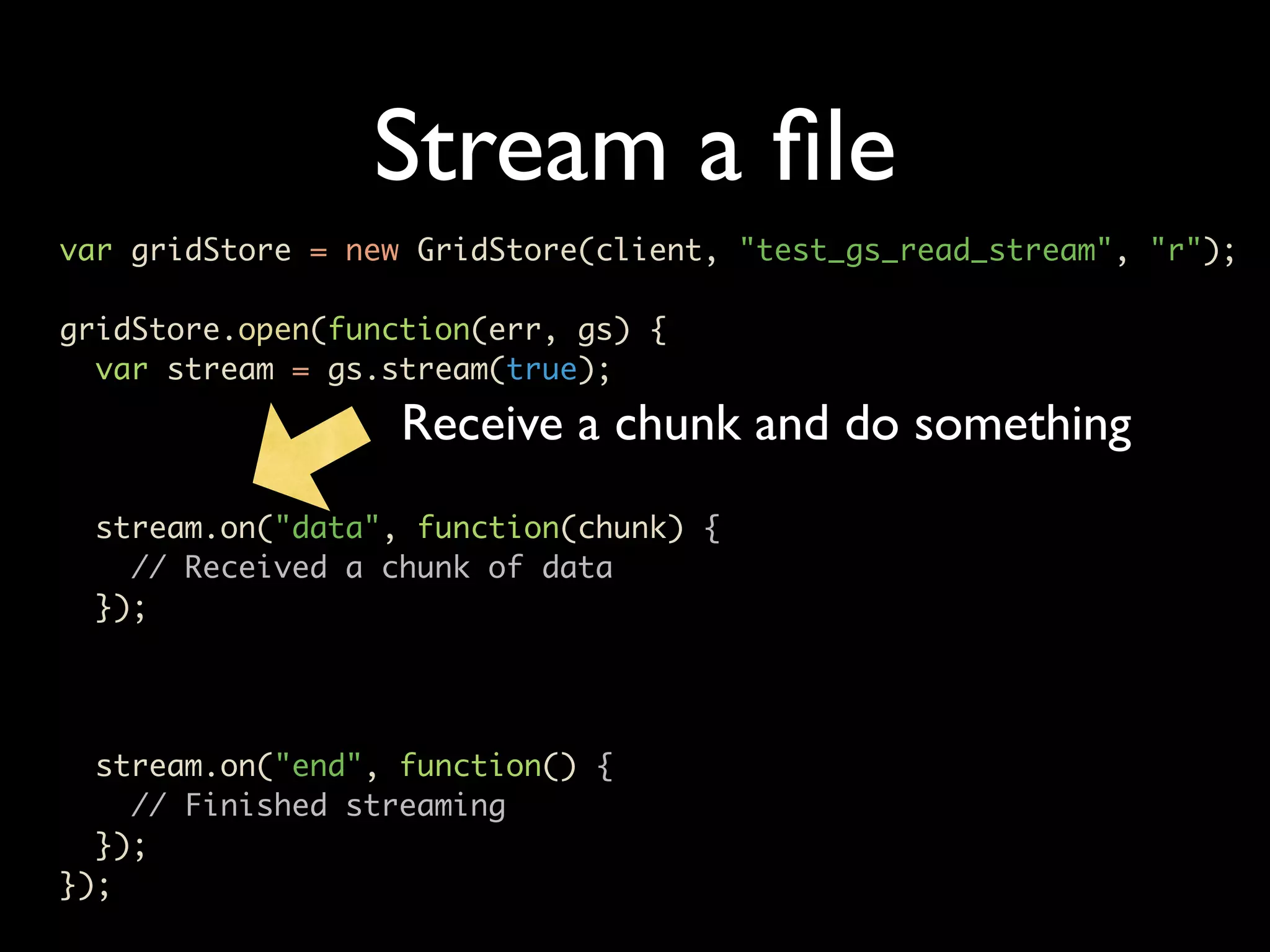
Stream a file var gridStore = new GridStore(client, "test_gs_read_stream", "r"); gridStore.open(function(err, gs) { var stream = gs.stream(true); Receive a chunk and do something stream.on("data", function(chunk) { // Received a chunk of data }); stream.on("end", function() { // Finished streaming }); });
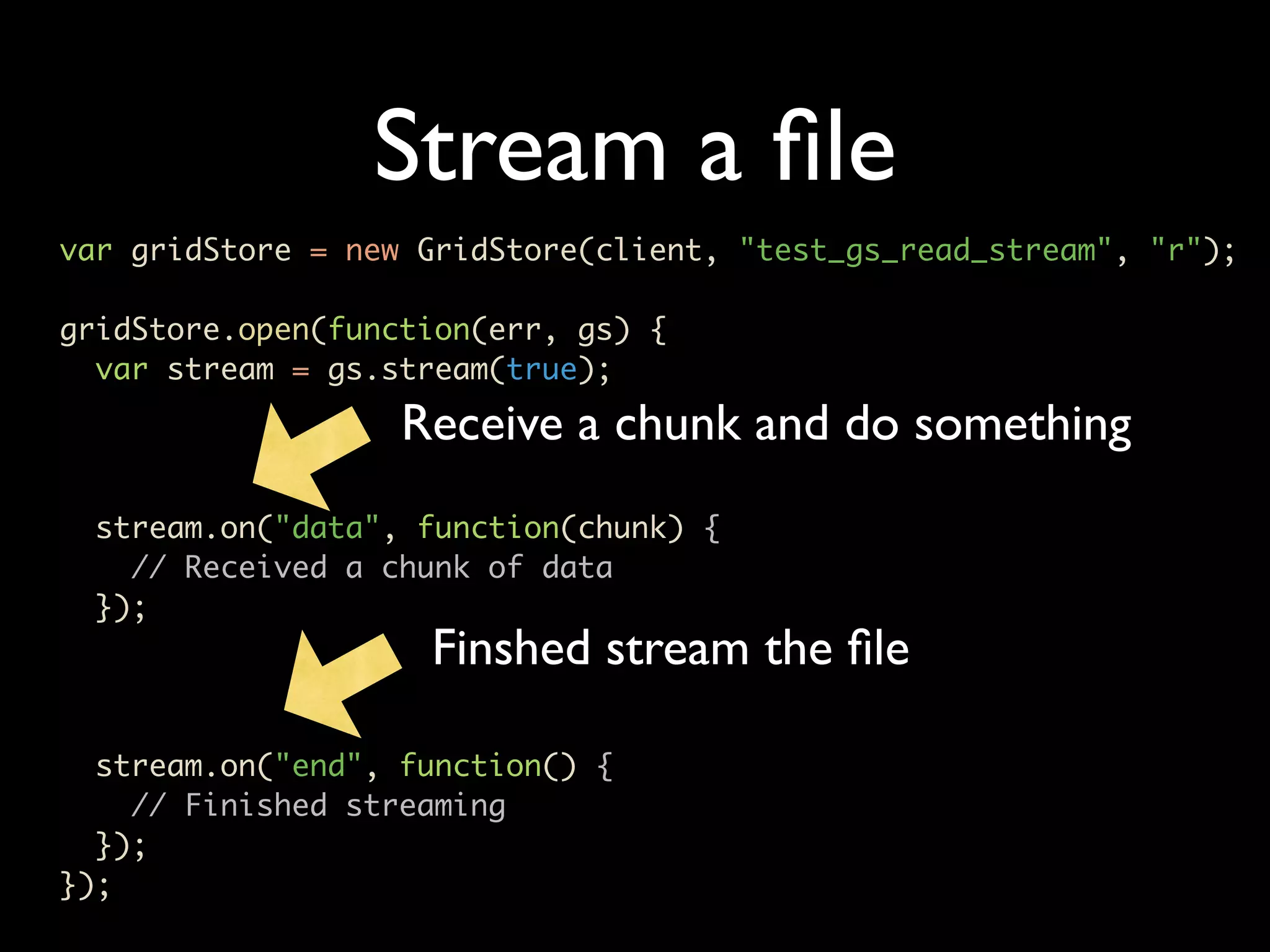
Stream a file var gridStore = new GridStore(client, "test_gs_read_stream", "r"); gridStore.open(function(err, gs) { var stream = gs.stream(true); Receive a chunk and do something stream.on("data", function(chunk) { // Received a chunk of data }); Finshed stream the file stream.on("end", function() { // Finished streaming }); });
Stream a file var gridStore = new GridStore(client, "test_gs_read_stream", "r"); gridStore.open(function(err, gs) { var stream = gs.stream(true); Receive a chunk and do something stream.on("data", function(chunk) { // Received a chunk of data }); Finshed stream the file stream.on("end", function() { // Finished streaming PR EFE RED }); });
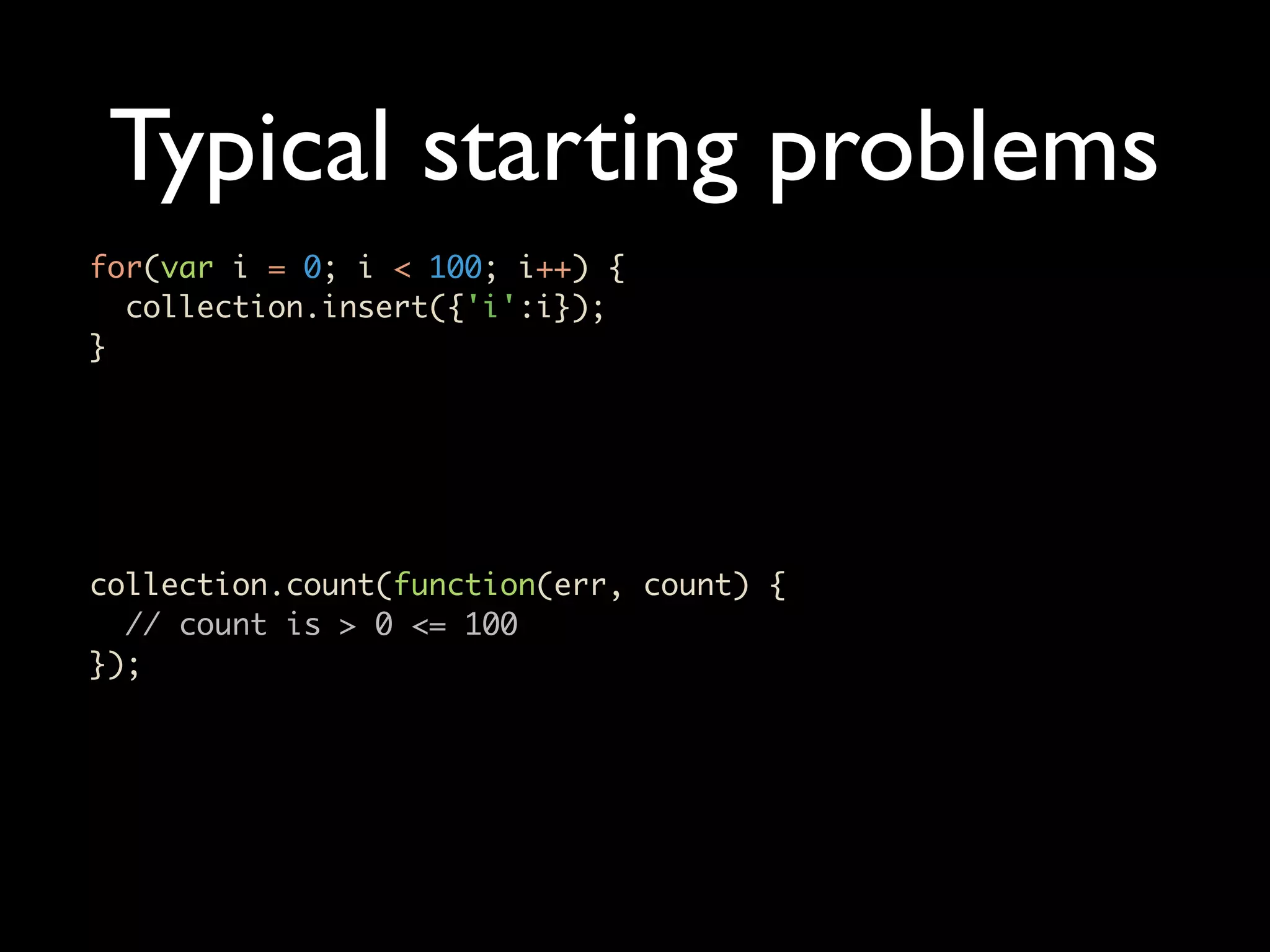
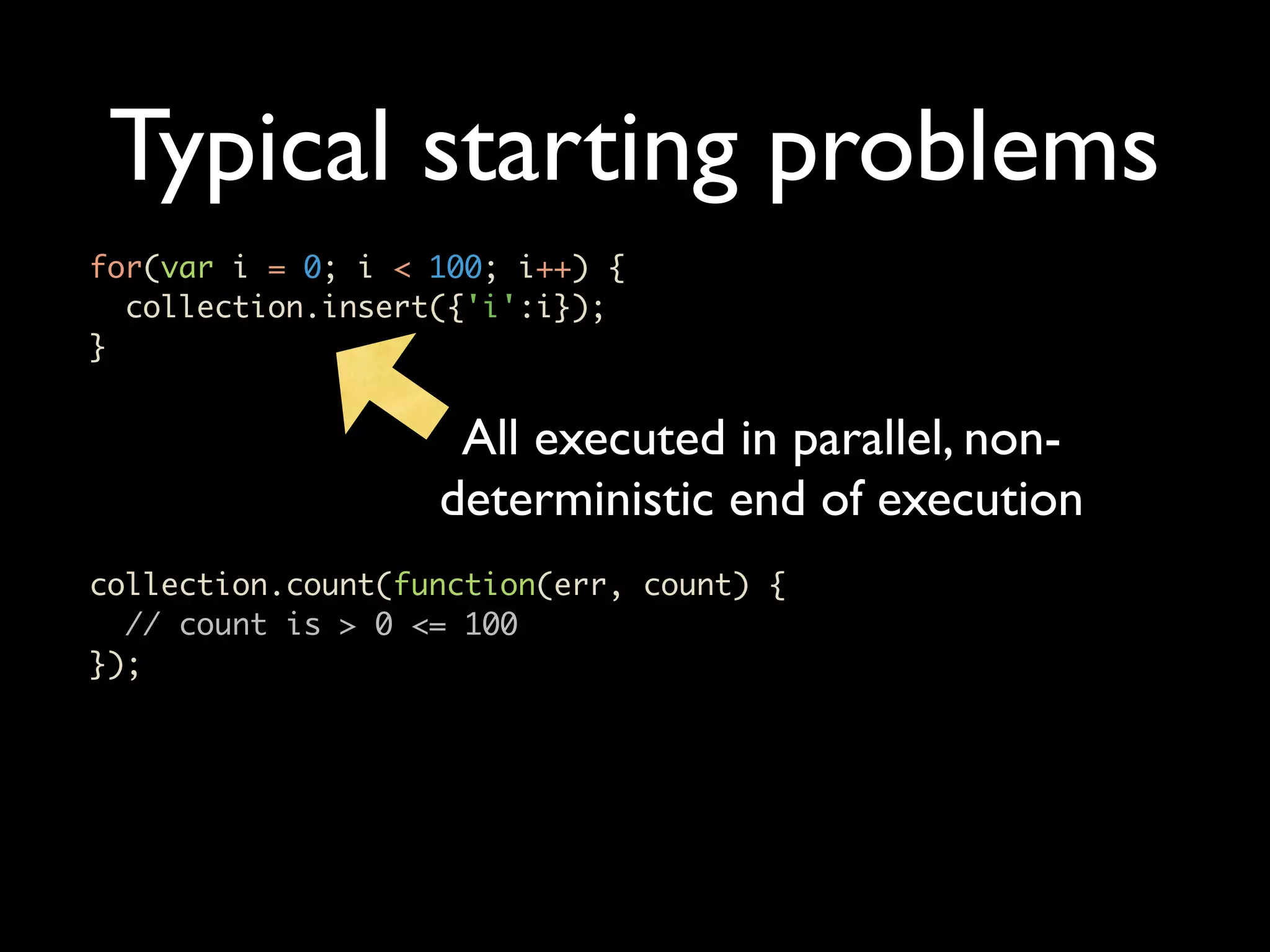
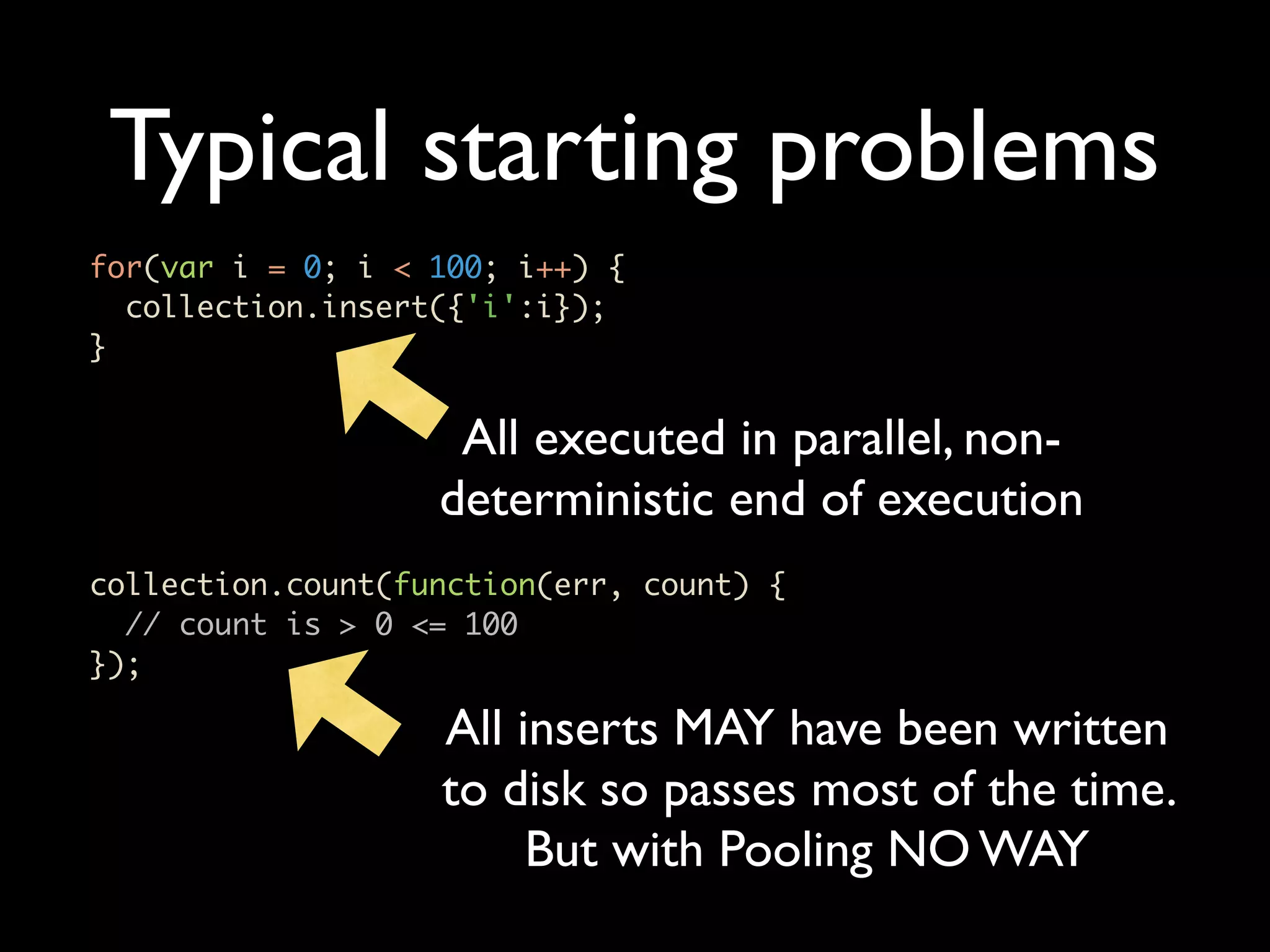
Typical starting problems for(var i = 0; i < 100; i++) { collection.insert({'i':i}); } collection.count(function(err, count) { // count is > 0 <= 100 });
Typical starting problems for(var i = 0; i < 100; i++) { collection.insert({'i':i}); } All executed in parallel, non- deterministic end of execution collection.count(function(err, count) { // count is > 0 <= 100 });
Typical starting problems for(var i = 0; i < 100; i++) { collection.insert({'i':i}); } All executed in parallel, non- deterministic end of execution collection.count(function(err, count) { // count is > 0 <= 100 }); All inserts MAY have been written to disk so passes most of the time. But with Pooling NO WAY
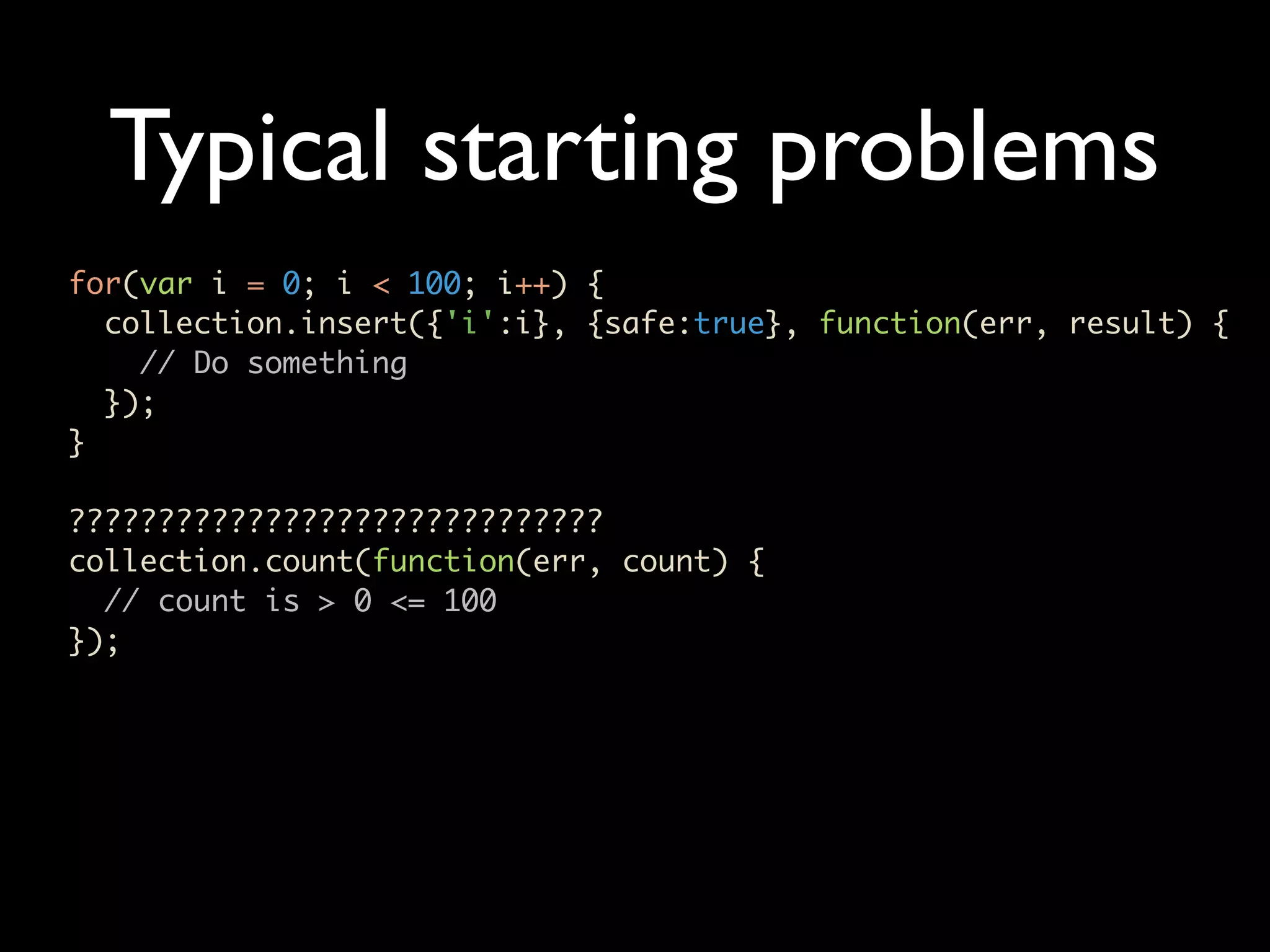
Typical starting problems for(var i = 0; i < 100; i++) { collection.insert({'i':i}, {safe:true}, function(err, result) { // Do something }); } ?????????????????????????????? collection.count(function(err, count) { // count is > 0 <= 100 });
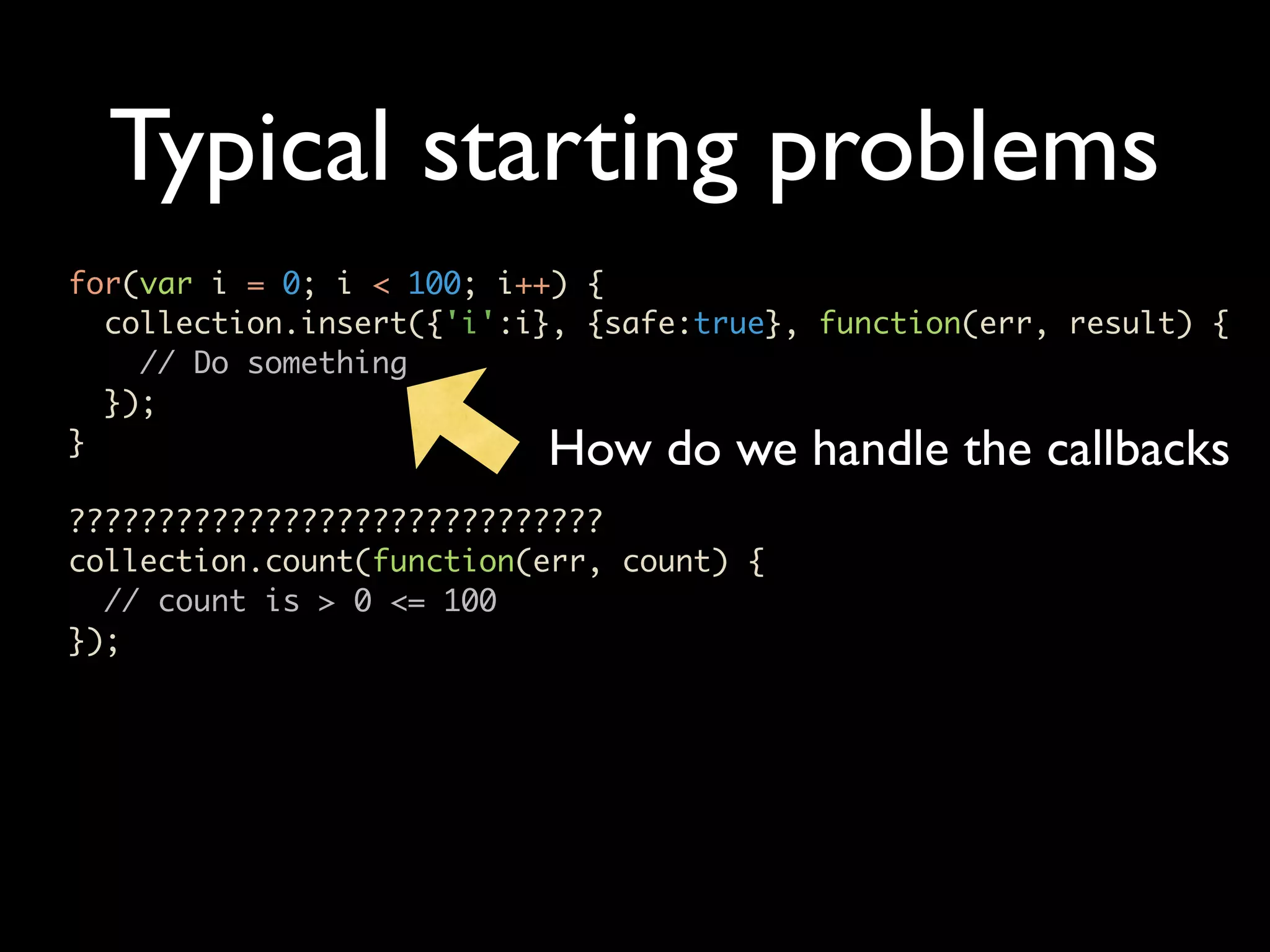
Typical starting problems for(var i = 0; i < 100; i++) { collection.insert({'i':i}, {safe:true}, function(err, result) { // Do something }); } How do we handle the callbacks ?????????????????????????????? collection.count(function(err, count) { // count is > 0 <= 100 });
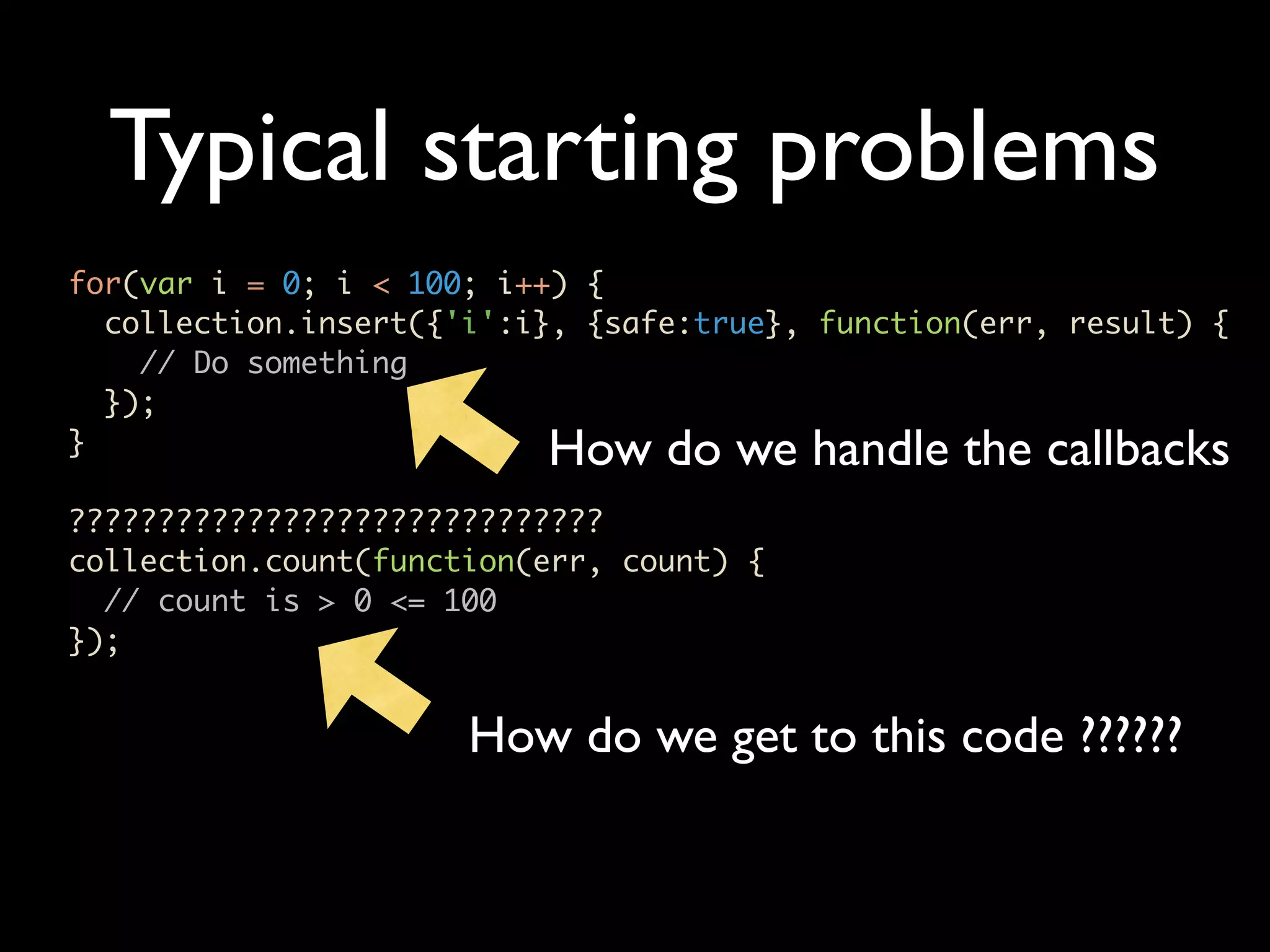
Typical starting problems for(var i = 0; i < 100; i++) { collection.insert({'i':i}, {safe:true}, function(err, result) { // Do something }); } How do we handle the callbacks ?????????????????????????????? collection.count(function(err, count) { // count is > 0 <= 100 }); How do we get to this code ??????
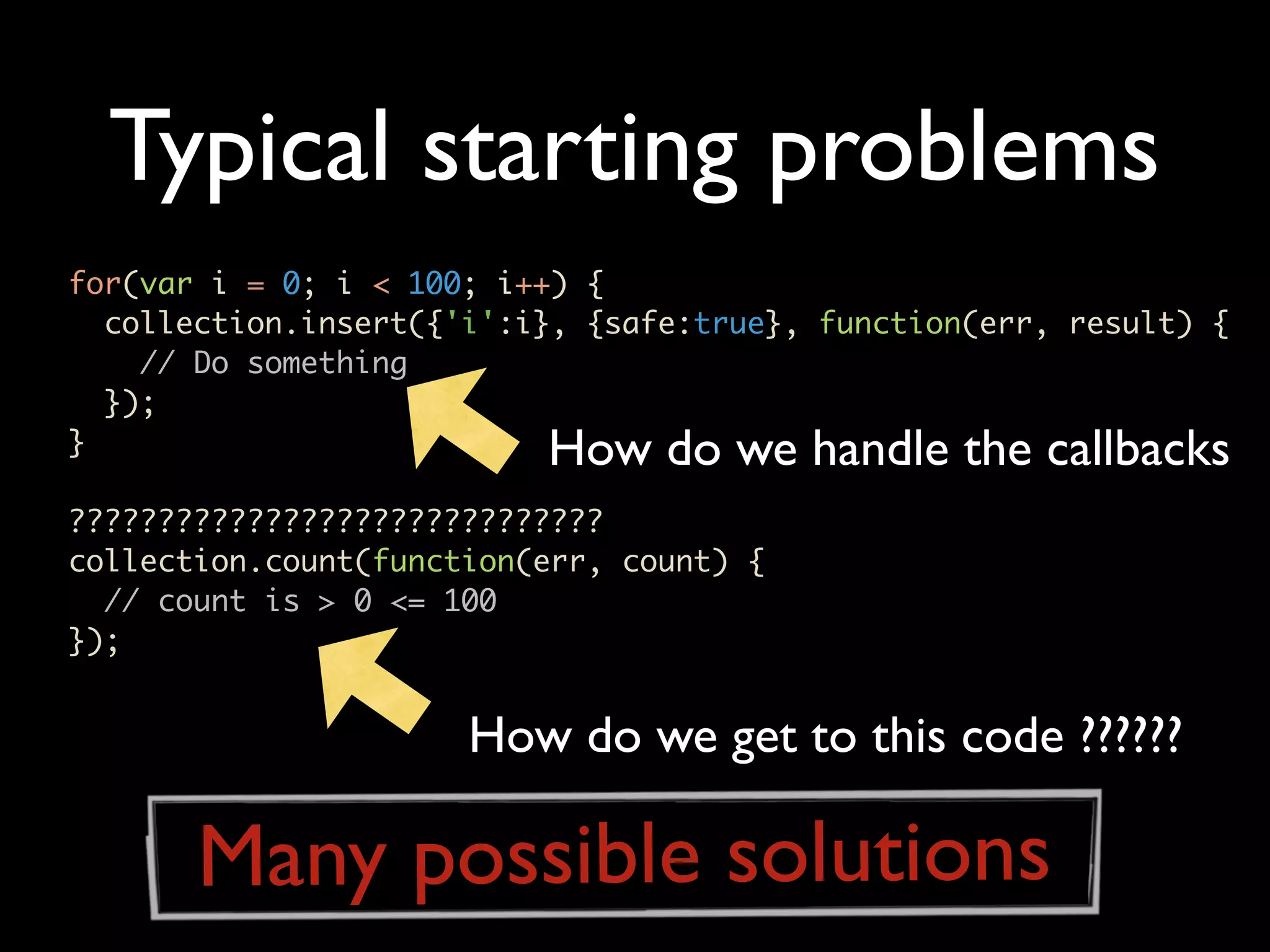
Typical starting problems for(var i = 0; i < 100; i++) { collection.insert({'i':i}, {safe:true}, function(err, result) { // Do something }); } How do we handle the callbacks ?????????????????????????????? collection.count(function(err, count) { // count is > 0 <= 100 }); How do we get to this code ?????? Many possible solutions
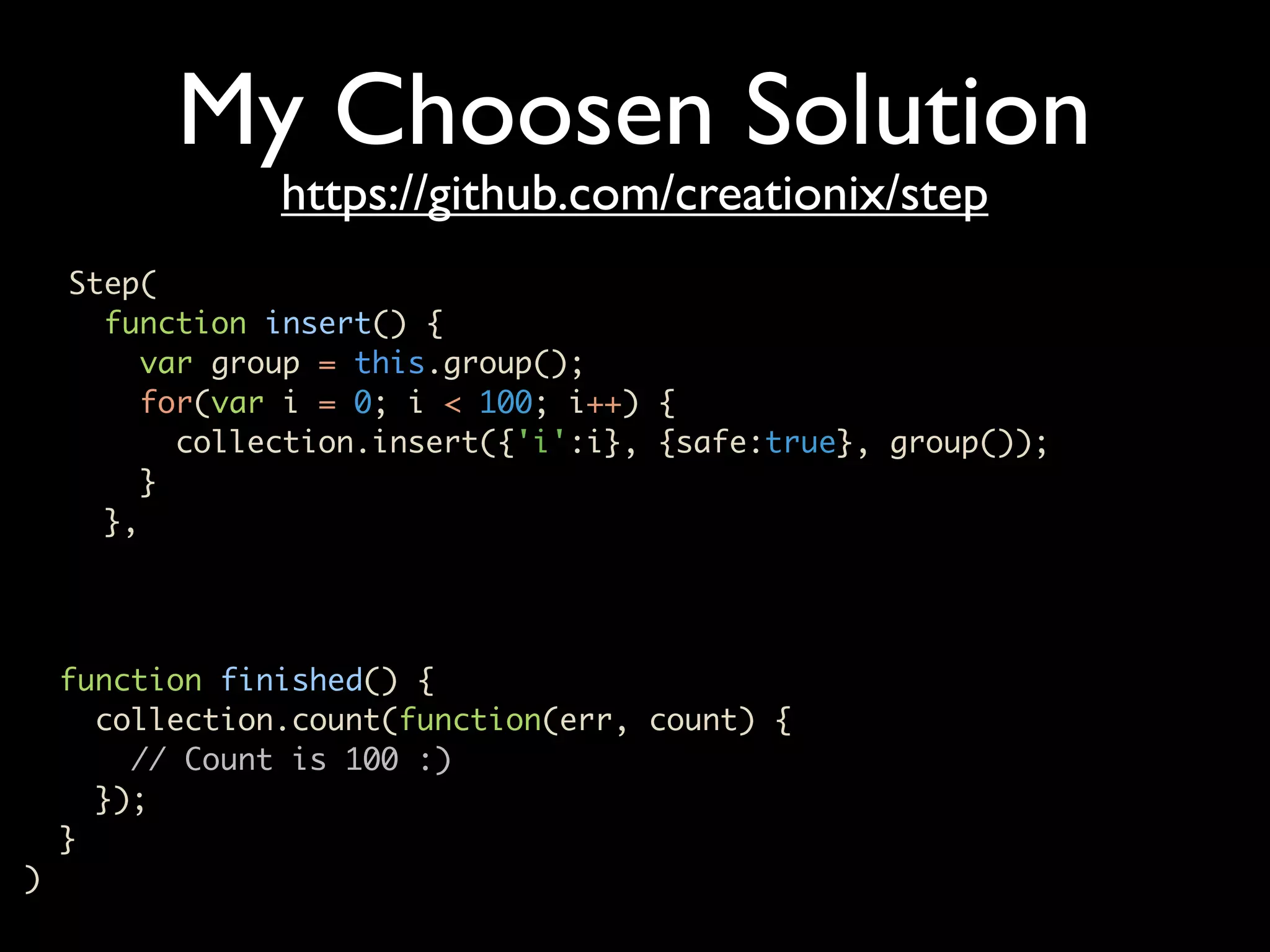
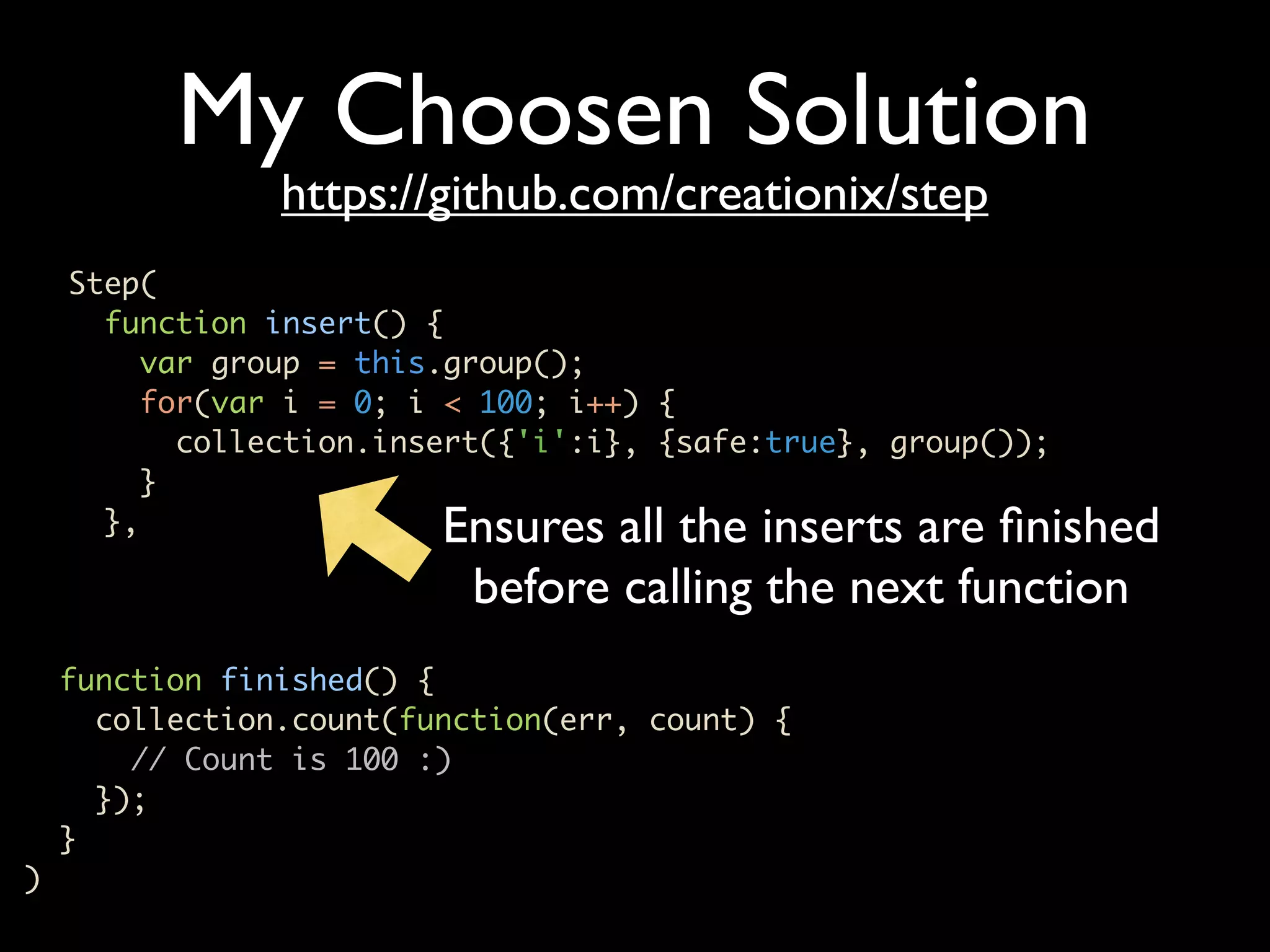
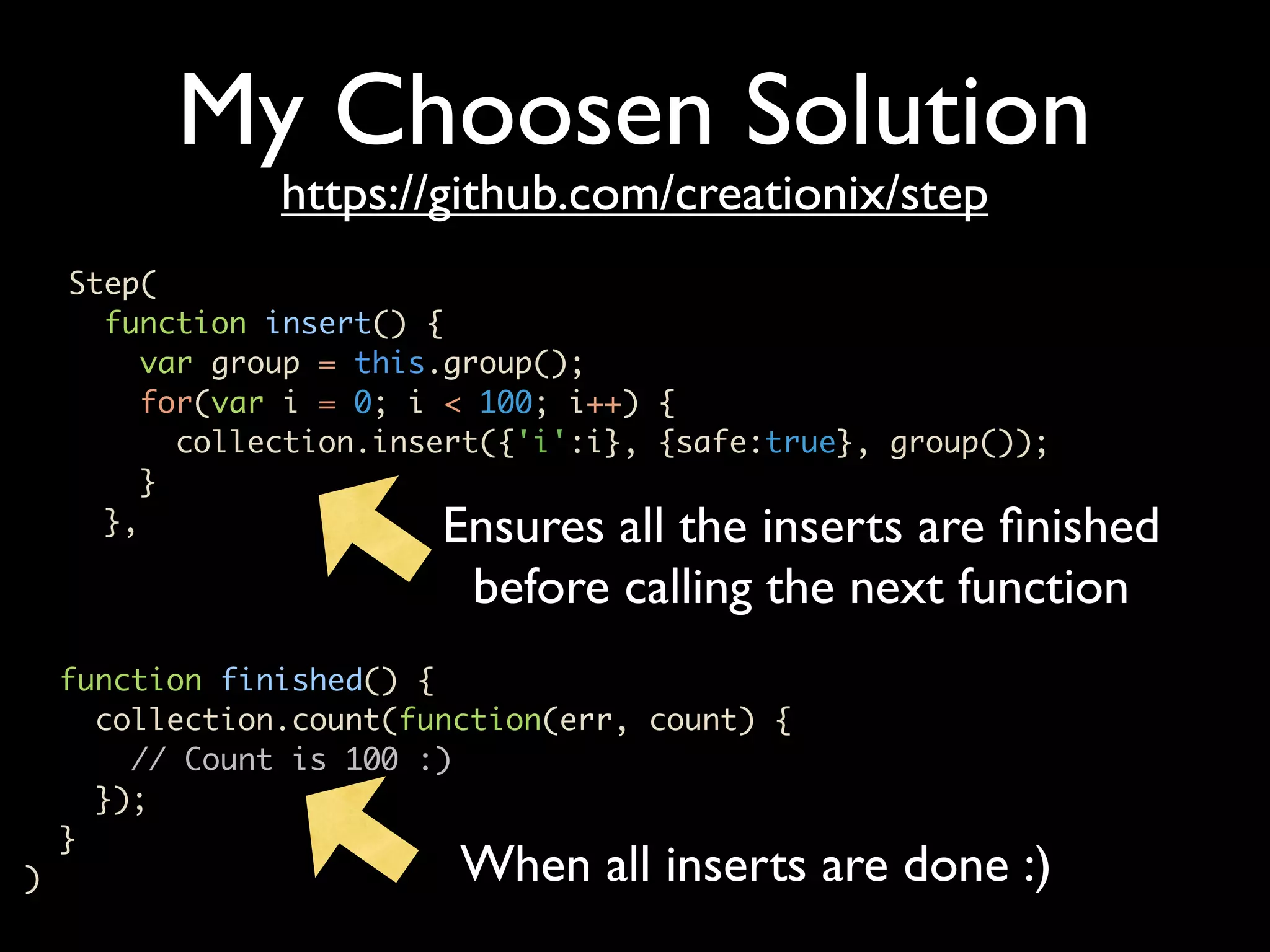
My Choosen Solution https://github.com/creationix/step Step( function insert() { var group = this.group(); for(var i = 0; i < 100; i++) { collection.insert({'i':i}, {safe:true}, group()); } }, function finished() { collection.count(function(err, count) { // Count is 100 :) }); } )
My Choosen Solution https://github.com/creationix/step Step( function insert() { var group = this.group(); for(var i = 0; i < 100; i++) { collection.insert({'i':i}, {safe:true}, group()); } }, Ensures all the inserts are finished before calling the next function function finished() { collection.count(function(err, count) { // Count is 100 :) }); } )
My Choosen Solution https://github.com/creationix/step Step( function insert() { var group = this.group(); for(var i = 0; i < 100; i++) { collection.insert({'i':i}, {safe:true}, group()); } }, Ensures all the inserts are finished before calling the next function function finished() { collection.count(function(err, count) { // Count is 100 :) }); } ) When all inserts are done :)
DONE Code on https://github.com/christkv/mongodb-hamburg

Node js mongodriver

  • 1.
    An introduction tothe node.js mongo driver Christian Amor Kvalheim
  • 2.
    • Asynchronous Javascriptplatform built on top of V8 • Single-threaded • Package manager • Awesome
  • 3.
    Hello World Server varhttp = require('http'); http.createServer( function (req, res) { res.writeHead(200, {'Content-Type': 'text/plain'}); res.end('Hello Worldn'); }).listen(8124, "127.0.0.1");
  • 4.
    Hello World Server Load the http library var http = require('http'); http.createServer( function (req, res) { res.writeHead(200, {'Content-Type': 'text/plain'}); res.end('Hello Worldn'); }).listen(8124, "127.0.0.1");
  • 5.
    Hello World Server Load the http library var http = require('http'); Set up the connection http.createServer( handler function (req, res) { res.writeHead(200, {'Content-Type': 'text/plain'}); res.end('Hello Worldn'); }).listen(8124, "127.0.0.1");
  • 6.
    How to getstarted • Install node.js (from source or package) • Install npm (node package manager) • Create an empty directory • npm install mongodb • npm install express
  • 7.
    Let’s do somecode • Using Express and Mongo • Textmate basic.js
  • 8.
    Picking it apart vardb = new Db('node-mongo-examples', new Server(host, port, {}), {native_parser:false}); db.open(function(err, db) { ... ..... app.listen(8124); var app = express.createServer(); app.get('/', function(req, res){ res.send('Hello World'); });
  • 9.
    Picking it apart Creates a db using the js bson parser var db = new Db('node-mongo-examples', new Server(host, port, {}), {native_parser:false}); db.open(function(err, db) { ... ..... app.listen(8124); var app = express.createServer(); app.get('/', function(req, res){ res.send('Hello World'); });
  • 10.
    Picking it apart Creates a db using the js bson parser var db = new Db('node-mongo-examples', new Server(host, port, {}), {native_parser:false}); Opens the connection to the db db.open(function(err, db) { ... ..... app.listen(8124); var app = express.createServer(); app.get('/', function(req, res){ res.send('Hello World'); });
  • 11.
    Picking it apart Creates a db using the js bson parser var db = new Db('node-mongo-examples', new Server(host, port, {}), {native_parser:false}); Opens the connection to the db db.open(function(err, db) { ... ..... app.listen(8124); The server is now running with access to the mongo server connection var app = express.createServer(); app.get('/', function(req, res){ res.send('Hello World'); });
  • 12.
    Let’s add somemeat • CRUD operations • Textmate basic_2.js
  • 13.
    Picking it apart //Create method app.post('/location', function(req, res) { geoCodeDecorateObject(req.body.address, {description:req.body.description}, function(err, object) { db.collection('locations', function(err, collection) { // Insert doc collection.insert(object, {safe:true}, function(err, result) { // Fetch all docs for rendering of list collection.find({}).toArray(function(err, items) { res.render('./basic_2.jade', {locals: {locations:items}}); }) }); }); }); });
  • 14.
    Picking it apart GeoEncode Address // Create method app.post('/location', function(req, res) { geoCodeDecorateObject(req.body.address, {description:req.body.description}, function(err, object) { db.collection('locations', function(err, collection) { // Insert doc collection.insert(object, {safe:true}, function(err, result) { // Fetch all docs for rendering of list collection.find({}).toArray(function(err, items) { res.render('./basic_2.jade', {locals: {locations:items}}); }) }); }); }); });
  • 15.
    Picking it apart Geo Encode Address // Create method app.post('/location', function(req, res) { geoCodeDecorateObject(req.body.address, {description:req.body.description}, function(err, object) { db.collection('locations', function(err, collection) { // Insert doc collection.insert(object, {safe:true}, function(err, result) { // Fetch all docs for rendering of list collection.find({}).toArray(function(err, items) { res.render('./basic_2.jade', {locals: {locations:items}}); }) Insert record, safe ensures that we trap any }); }); }); errors by doing a error check against }); mongodb
  • 16.
    Picking it apart // Create method app.post('/location', function(req, res) { geoCodeDecorateObject(req.body.address, {description:req.body.description}, function(err, object) { db.collection('locations', function(err, collection) { // Insert doc collection.insert(object, {safe:true}, function(err, result) { // Fetch all docs for rendering of list collection.find({}).toArray(function(err, items) { res.render('./basic_2.jade', {locals: {locations:items}}); }) }); }); }); find all records from the locations }); collection. Find returns a cursor that allows for stepping through doucments
  • 17.
    Safe or not •Mongo Insert/Update/Delete are async • 2nd call to lastError required to check for the success of the operation • safe option ensures the second error call • you can also run the driver in strict mode
  • 18.
    Let’s add somemeat • CRUD operations • Textmate basic_3.js
  • 19.
    Picking it apart //Delete method app.del('/location', function(req, res) { var id = ObjectID.createFromHexString(req.body.id); db.collection('locations', function(err, collection) { collection.remove({_id:id}, {safe:true}, function(err, numberOfDeletedRecords) { // Fetch all docs for rendering of list collection.find({}).toArray(function(err, items) { res.render('./basic_3.jade', {locals: {locations:items}}); }) }) }); });
  • 20.
    Picking it apart Convert hex string to // Delete method objectID app.del('/location', function(req, res) { var id = ObjectID.createFromHexString(req.body.id); db.collection('locations', function(err, collection) { collection.remove({_id:id}, {safe:true}, function(err, numberOfDeletedRecords) { // Fetch all docs for rendering of list collection.find({}).toArray(function(err, items) { res.render('./basic_3.jade', {locals: {locations:items}}); }) }) }); });
  • 21.
    Picking it apart Convert hex string to // Delete method objectID app.del('/location', function(req, res) { var id = ObjectID.createFromHexString(req.body.id); db.collection('locations', function(err, collection) { collection.remove({_id:id}, {safe:true}, function(err, numberOfDeletedRecords) { // Fetch all docs for rendering of list collection.find({}).toArray(function(err, items) { res.render('./basic_3.jade', {locals: {locations:items}}); }) }) Remove the document using the specific id }); }); passed in, using safe.
  • 22.
    Let’s add somemeat • CRUD operations • Textmate basic_4.js
  • 23.
    Picking it apart //Get method app.get('/location', function(req, res) { var id = ObjectID.createFromHexString(req.body.id); db.collection('locations', function(err, collection) { collection.findOne({_id:id}, function(err, item) { // Fetch all docs for rendering of list collection.find({}).toArray(function(err, items) { res.render('./basic_4.jade', {locals: {locations:items, location:item}}); }) }) }); });
  • 24.
    Picking it apart Convert hex string to // Get method app.get('/location', function(req, res) { objectID var id = ObjectID.createFromHexString(req.body.id); db.collection('locations', function(err, collection) { collection.findOne({_id:id}, function(err, item) { // Fetch all docs for rendering of list collection.find({}).toArray(function(err, items) { res.render('./basic_4.jade', {locals: {locations:items, location:item}}); }) }) }); });
  • 25.
    Picking it apart Convert hex string to // Get method app.get('/location', function(req, res) { objectID var id = ObjectID.createFromHexString(req.body.id); db.collection('locations', function(err, collection) { collection.findOne({_id:id}, function(err, item) { // Fetch all docs for rendering of list collection.find({}).toArray(function(err, items) { res.render('./basic_4.jade', {locals: {locations:items, location:item}}); }) }) Locate one document by id }); });
  • 26.
    Let’s add somemeat • CRUD operations • Textmate basic_5.js
  • 27.
    Picking it apart //Update method app.put('/location', function(req, res) { var id = ObjectID.createFromHexString(req.body.id); db.collection('locations', function(err, collection) { collection.findOne({_id:id}, function(err, object) { object.description = req.body.description; object.address = req.body.address; geoCodeDecorateObject(req.body.address, object, function(err, object) { collection.update({_id:object._id}, object, {safe:true}, function(err, numberOfUpdatedObjects) { // Fetch all docs for rendering of list collection.find({}).toArray(function(err, items) { res.render('./basic_5.jade', {locals: {locations:items}}); }) }) })
  • 28.
    Picking it apart //Update method app.put('/location', function(req, res) { Locate object we wish var id = ObjectID.createFromHexString(req.body.id); to modify db.collection('locations', function(err, collection) { collection.findOne({_id:id}, function(err, object) { object.description = req.body.description; object.address = req.body.address; geoCodeDecorateObject(req.body.address, object, function(err, object) { collection.update({_id:object._id}, object, {safe:true}, function(err, numberOfUpdatedObjects) { // Fetch all docs for rendering of list collection.find({}).toArray(function(err, items) { res.render('./basic_5.jade', {locals: {locations:items}}); }) }) })
  • 29.
    Picking it apart //Update method app.put('/location', function(req, res) { Locate object we wish var id = ObjectID.createFromHexString(req.body.id); to modify db.collection('locations', function(err, collection) { collection.findOne({_id:id}, function(err, object) { object.description = req.body.description; object.address = req.body.address; geoCodeDecorateObject(req.body.address, object, function(err, object) { collection.update({_id:object._id}, object, {safe:true}, function(err, numberOfUpdatedObjects) { // Fetch all docs for rendering of list collection.find({}).toArray(function(err, items) { res.render('./basic_5.jade', {locals: {locations:items}}); }) }) }) Update document using the id to select what document to update
  • 30.
    Let’s add somemeat • Final with search • Textmate basic_6.js
  • 31.
    Picking it apart db.open(function(err,db) { if(err) throw err // !!! CHANGE db.ensureIndex("locations", {loc:"2d"}, function(err, result) { if(err) throw err app.listen(8124); }) });
  • 32.
    Picking it apart db.open(function(err,db) { if(err) throw err // !!! CHANGE db.ensureIndex("locations", {loc:"2d"}, function(err, result) { if(err) throw err app.listen(8124); }) }); Ensures there is a 2d geospatial index on the attribute loc on any document in the locations collection
  • 33.
    Picking it apart vargeoCodeDecorateObject = function(address, object, callback) { var googleGeoCodeApi = {host: 'maps.googleapis.com', port: 80,path: '/maps/api/geocode/json?sensor=false&address=' + escape(address), method: 'GET' }; var clientReq = http.get(googleGeoCodeApi, function(clientRes) { var data = []; clientRes.on('data', function(chunk) { data.push(chunk.toString()); }); clientRes.on('end', function() { var googleObject = JSON.parse(data.join('')); object.address = address; object.geodata = googleObject.results.pop(); // !!! CHANGE object.loc = {long:object.geodata.geometry.location.lng, lat:object.geodata.geometry.location.lat}; callback(null, object); });
  • 34.
    Picking it apart vargeoCodeDecorateObject = function(address, object, callback) { var googleGeoCodeApi = {host: 'maps.googleapis.com', port: 80,path: '/maps/api/geocode/json?sensor=false&address=' + escape(address), method: 'GET' }; var clientReq = http.get(googleGeoCodeApi, function(clientRes) { var data = []; clientRes.on('data', function(chunk) { data.push(chunk.toString()); We are adding a loc }); clientRes.on('end', function() { attribute to all var googleObject = JSON.parse(data.join('')); documents with object.address = address; object.geodata = googleObject.results.pop(); longtidude and // !!! CHANGE latitude in the right object.loc = {long:object.geodata.geometry.location.lng, lat:object.geodata.geometry.location.lat}; order for mongodb to callback(null, object); }); search
  • 35.
    Picking it apart //!!! CHANGE // Search option app.post('/search', function(req, res) { geoCodeDecorateObject(req.body.address, {}, function(err, object) { // Unpack geo object var long = object.geodata.geometry.location.lng; var lat = object.geodata.geometry.location.lat db.collection('locations', function(err, collection) { collection.find({loc : {'$near': [long, lat], '$maxDistance': parseFloat(req.body.distance)}}).toArray(function(err, geoItems) { // Fetch all docs for rendering of list collection.find({}).toArray(function(err, items) { res.render('./basic_6.jade', {locals: {locations:items, results:geoItems}}); }) }); }); }); });
  • 36.
    Picking it apart Encode address for // !!! CHANGE // Search option searching app.post('/search', function(req, res) { geoCodeDecorateObject(req.body.address, {}, function(err, object) { // Unpack geo object var long = object.geodata.geometry.location.lng; var lat = object.geodata.geometry.location.lat db.collection('locations', function(err, collection) { collection.find({loc : {'$near': [long, lat], '$maxDistance': parseFloat(req.body.distance)}}).toArray(function(err, geoItems) { // Fetch all docs for rendering of list collection.find({}).toArray(function(err, items) { res.render('./basic_6.jade', {locals: {locations:items, results:geoItems}}); }) }); }); }); });
  • 37.
    Picking it apart Encode address for // !!! CHANGE // Search option searching app.post('/search', function(req, res) { geoCodeDecorateObject(req.body.address, {}, function(err, object) { // Unpack geo object var long = object.geodata.geometry.location.lng; var lat = object.geodata.geometry.location.lat db.collection('locations', function(err, collection) { collection.find({loc : {'$near': [long, lat], '$maxDistance': parseFloat(req.body.distance)}}).toArray(function(err, geoItems) { // Fetch all docs for rendering of list collection.find({}).toArray(function(err, items) { res.render('./basic_6.jade', {locals: {locations:items, results:geoItems}}); }) }); Search for all items $near our address at }); }); $maxDistance });
  • 38.
    Other features • Cursors • Grid FS
  • 39.
    Cursors • toArray Function •each Function • streamRecords Function
  • 40.
    toArray collection.find().toArray(function(err, documents){ test.deepEqual([1, 2, 3], documents[0].b); // Let's close the db test.done(); });
  • 41.
    toArray Fetches all docs in one go for the query. Use with caution collection.find().toArray(function(err, documents){ test.deepEqual([1, 2, 3], documents[0].b); // Let's close the db test.done(); });
  • 42.
    each collection.find({}, {'sort':[['age', 1]]}).each(function(err,item){ if(item != null) { // Do work } else { // Finished } });
  • 43.
    each Fetches docs in batches and allows iteration over results collection.find({}, {'sort':[['age', 1]]}).each(function(err, item){ if(item != null) { // Do work } else { // Finished } });
  • 44.
    each Fetches docs in batches and allows iteration over results collection.find({}, {'sort':[['age', 1]]}).each(function(err, item){ if(item != null) { // Do work } else { // Finished } }); Returns null when no more results available
  • 45.
    streamRecords varstream = collection.find({}, {'limit' : 3}).streamRecords(); stream.on('end', function() { // No more results in the pipe }); stream.on('data',function(data){ // Item });
  • 46.
    streamRecords varstream = collection.find({}, {'limit' : 3}).streamRecords(); stream.on('end', function() { // No more results in the pipe }); stream.on('data',function(data){ // Item }); When an item is ready the event ‘data’ is triggered
  • 47.
    streamRecords varstream = collection.find({}, {'limit' : 3}).streamRecords(); When no more items stream.on('end', function() { are available // No more results in the pipe }); stream.on('data',function(data){ // Item }); When an item is ready the event ‘data’ is triggered
  • 48.
    streamRecords varstream = collection.find({}, {'limit' : 3}).streamRecords(); When no more items stream.on('end', function() { are available // No more results in the pipe }); REFERED P stream.on('data',function(data){ // Item }); When an item is ready the event ‘data’ is triggered
  • 49.
    Grid FS • Writeand read a file • Stream a file
  • 50.
    Write a file vargridStore = new GridStore(client, 'test_gs_writing_file', 'w'); gridStore.open(function(err, gridStore) { gridStore.writeFile('./test_gs_weird_bug.png', function(err, gridStore) { GridStore.read(client, 'test_gs_writing_file', function(err, fileData) { });
  • 51.
    Write a file vargridStore = new GridStore(client, 'test_gs_writing_file', 'w'); gridStore.open(function(err, gridStore) { gridStore.writeFile('./test_gs_weird_bug.png', function(err, gridStore) { Writes the file in chunks to mongodb (avoids freezing the eventloop in node.js) GridStore.read(client, 'test_gs_writing_file', function(err, fileData) { });
  • 52.
    Write a file vargridStore = new GridStore(client, 'test_gs_writing_file', 'w'); gridStore.open(function(err, gridStore) { gridStore.writeFile('./test_gs_weird_bug.png', function(err, gridStore) { Writes the file in chunks to mongodb (avoids freezing the eventloop in node.js) GridStore.read(client, 'test_gs_writing_file', function(err, fileData) { }); Read the whole file. Careful with the memory
  • 53.
    Stream a file vargridStore = new GridStore(client, "test_gs_read_stream", "r"); gridStore.open(function(err, gs) { var stream = gs.stream(true); stream.on("data", function(chunk) { // Received a chunk of data }); stream.on("end", function() { // Finished streaming }); });
  • 54.
    Stream a file vargridStore = new GridStore(client, "test_gs_read_stream", "r"); gridStore.open(function(err, gs) { var stream = gs.stream(true); Receive a chunk and do something stream.on("data", function(chunk) { // Received a chunk of data }); stream.on("end", function() { // Finished streaming }); });
  • 55.
    Stream a file vargridStore = new GridStore(client, "test_gs_read_stream", "r"); gridStore.open(function(err, gs) { var stream = gs.stream(true); Receive a chunk and do something stream.on("data", function(chunk) { // Received a chunk of data }); Finshed stream the file stream.on("end", function() { // Finished streaming }); });
  • 56.
    Stream a file vargridStore = new GridStore(client, "test_gs_read_stream", "r"); gridStore.open(function(err, gs) { var stream = gs.stream(true); Receive a chunk and do something stream.on("data", function(chunk) { // Received a chunk of data }); Finshed stream the file stream.on("end", function() { // Finished streaming PR EFE RED }); });
  • 57.
    Typical starting problems for(vari = 0; i < 100; i++) { collection.insert({'i':i}); } collection.count(function(err, count) { // count is > 0 <= 100 });
  • 58.
    Typical starting problems for(vari = 0; i < 100; i++) { collection.insert({'i':i}); } All executed in parallel, non- deterministic end of execution collection.count(function(err, count) { // count is > 0 <= 100 });
  • 59.
    Typical starting problems for(vari = 0; i < 100; i++) { collection.insert({'i':i}); } All executed in parallel, non- deterministic end of execution collection.count(function(err, count) { // count is > 0 <= 100 }); All inserts MAY have been written to disk so passes most of the time. But with Pooling NO WAY
  • 60.
    Typical starting problems for(vari = 0; i < 100; i++) { collection.insert({'i':i}, {safe:true}, function(err, result) { // Do something }); } ?????????????????????????????? collection.count(function(err, count) { // count is > 0 <= 100 });
  • 61.
    Typical starting problems for(vari = 0; i < 100; i++) { collection.insert({'i':i}, {safe:true}, function(err, result) { // Do something }); } How do we handle the callbacks ?????????????????????????????? collection.count(function(err, count) { // count is > 0 <= 100 });
  • 62.
    Typical starting problems for(vari = 0; i < 100; i++) { collection.insert({'i':i}, {safe:true}, function(err, result) { // Do something }); } How do we handle the callbacks ?????????????????????????????? collection.count(function(err, count) { // count is > 0 <= 100 }); How do we get to this code ??????
  • 63.
    Typical starting problems for(vari = 0; i < 100; i++) { collection.insert({'i':i}, {safe:true}, function(err, result) { // Do something }); } How do we handle the callbacks ?????????????????????????????? collection.count(function(err, count) { // count is > 0 <= 100 }); How do we get to this code ?????? Many possible solutions
  • 64.
    My Choosen Solution https://github.com/creationix/step Step( function insert() { var group = this.group(); for(var i = 0; i < 100; i++) { collection.insert({'i':i}, {safe:true}, group()); } }, function finished() { collection.count(function(err, count) { // Count is 100 :) }); } )
  • 65.
    My Choosen Solution https://github.com/creationix/step Step( function insert() { var group = this.group(); for(var i = 0; i < 100; i++) { collection.insert({'i':i}, {safe:true}, group()); } }, Ensures all the inserts are finished before calling the next function function finished() { collection.count(function(err, count) { // Count is 100 :) }); } )
  • 66.
    My Choosen Solution https://github.com/creationix/step Step( function insert() { var group = this.group(); for(var i = 0; i < 100; i++) { collection.insert({'i':i}, {safe:true}, group()); } }, Ensures all the inserts are finished before calling the next function function finished() { collection.count(function(err, count) { // Count is 100 :) }); } ) When all inserts are done :)
  • 67.
    DONE Code on https://github.com/christkv/mongodb-hamburg