Raspberry Pi  A Slice For Education  http://www.raspberrypi.org
Who Am I ? My Name is Kris Findlay. Also known in the community as Azmodie. I have been using the Open Source Linux operating system for over 10 years.  IT Manager for Animation Company  (makers of oscar nominated The Illusionist 2010)  I am also the Webmaster for The Software Society and The UK Adhesions Society (Charity) which are both implemented, hosted and developed with open source software. ( currently Django, apache, nginx, mysql ) Email address : azmodie@gmail.com  or  kris.findlay@gmail.com Identi.ca/Twitter : azmodie Google Plus : http://gplus.to/azmodie LinkedIn : Kris Findlay     
Agenda • A Little history   • More device specifics • What a Raspberry Pi  can do for you ?   • Other Emerging Embeded Platforms • Development Options • Possible live/video demo.  • Questions
A Little history  The Raspberry Pi was created by the Raspberry Pi Foundation to inspire a new generation of children to become programmers. Foundation trustee Eben Upton, a lecturer at Cambridge at the time, saw that the skillset of applicants to CS courses had been steadily decreasing for a number of years. This is mostly due to the way that education has been geared more towards using office applications and less on understanding the hardware. The Debian images available have lots of tools for both kids and adults alike. so almost any age 4-50+ can enjoy learning about programming and electronics.
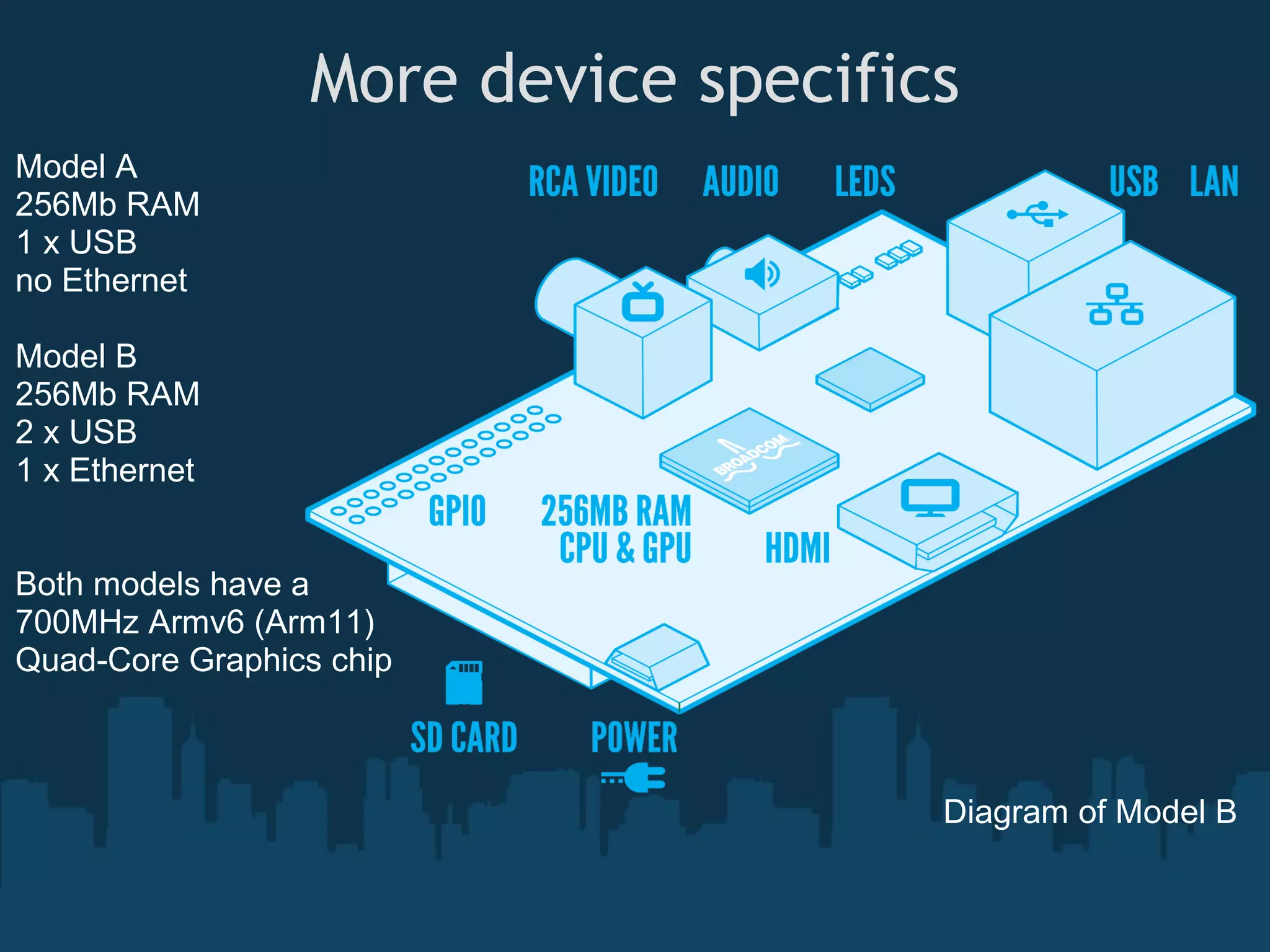
More device specifics Model A 256Mb RAM 1 x USB no Ethernet Model B 256Mb RAM 2 x USB 1 x Ethernet Both models have a 700MHz Armv6 (Arm11) Quad-Core Graphics chip Diagram of Model B
What a RaspberryPi can do for you • Xbmc @ Full 1080p HD • Linux desktop - just add keyboard and mouse. • Linux low powered server (fileserver etc..) • Attach webcam and monitoring software • Interface with electronics from leds, solenoids,switches,mosfets etc.. • Almost anything else you can imagine
Other Emerging Embeded Platforms • VIA APC is powered by a VIA WonderMedia 8750 800 MHz ARM11 processor, 512MB of DDR3 memory, and 2GB of flash storage. The chip supports 1080p HD video playback, H.264 video encoding, and OpenGL ES 2.0 graphics. • Android Mk802 A10 AllWinner Mini Computer The little computer looks like a portable storage device, but it has a 1.5 GHz Allwiner A10 processor, 512MB(1Gb spotted) of RAM, and 4GB of storage. It ships with Google Android 4.0 software • Beagle Board (1GHZ ARM 7) and Beagle bone (720MHz ARM 7) also PandaBoard (all ~$80-$180)
Development Options • Python (Quick2wire),C(WiringPi), Bash, Basic, etc.. • Scratch Geared to students and non-developers • Various Other Linux environments including Aros (Linux based port), Arch, Debian, Gentoo etc.. • Many open-source libraries being ported to arm. • Cross-compiler tool-chains available. (both soft and hard float)
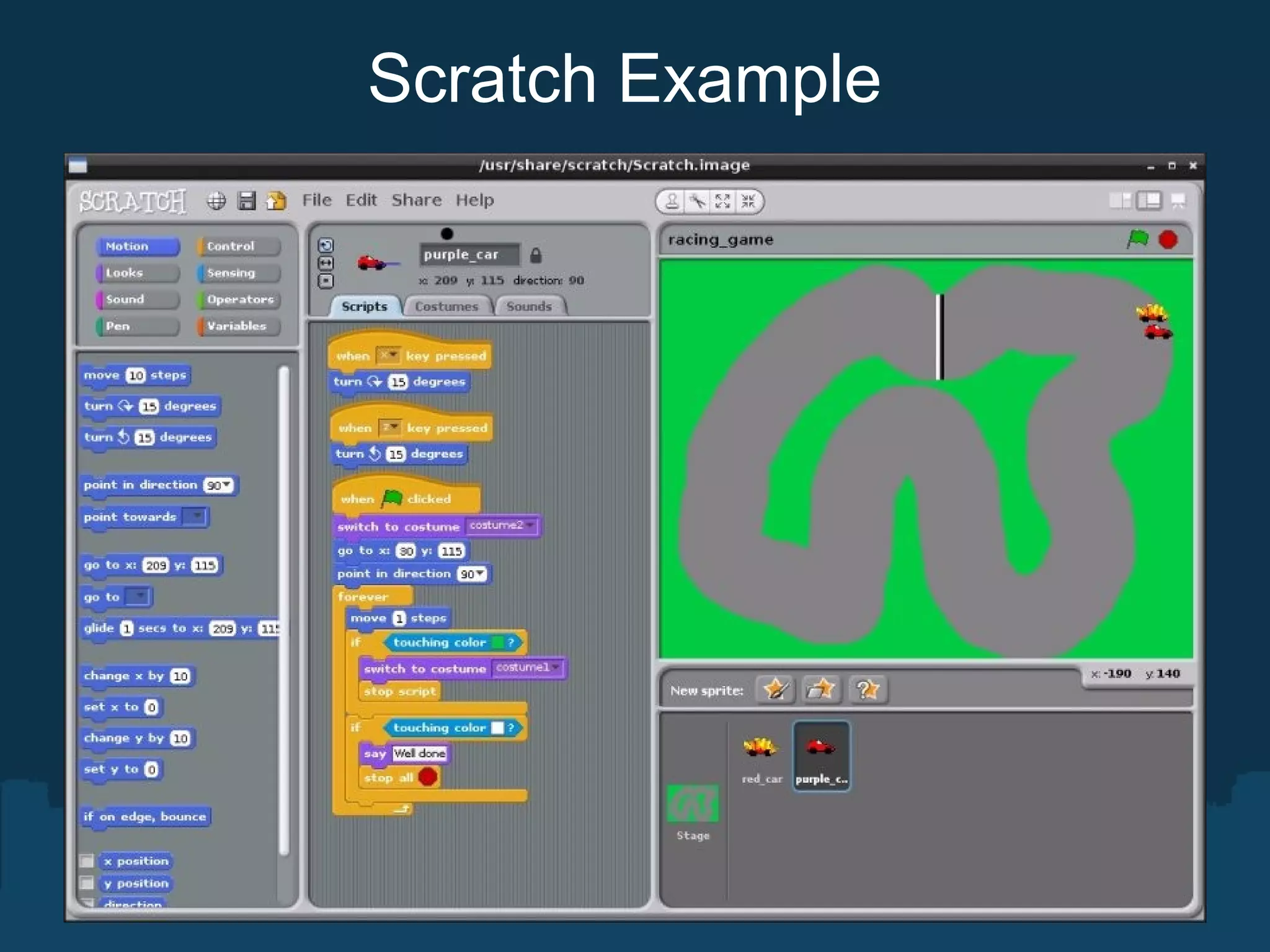
Scratch The MIT program Scratch is designed to provide an accessible way for kids to learn about coding. The program's interface makes it easy to build and change software by dragging and dropping commands and changing variable values through simple menus. The version installed on the Pi comes loaded with a simple car-racing game. Users can add and remove commands from the game, then press play and immediately see the effect of those changes - for instance, tweaking how cars handle or adjusting the animation for car crashes.
Scratch Example
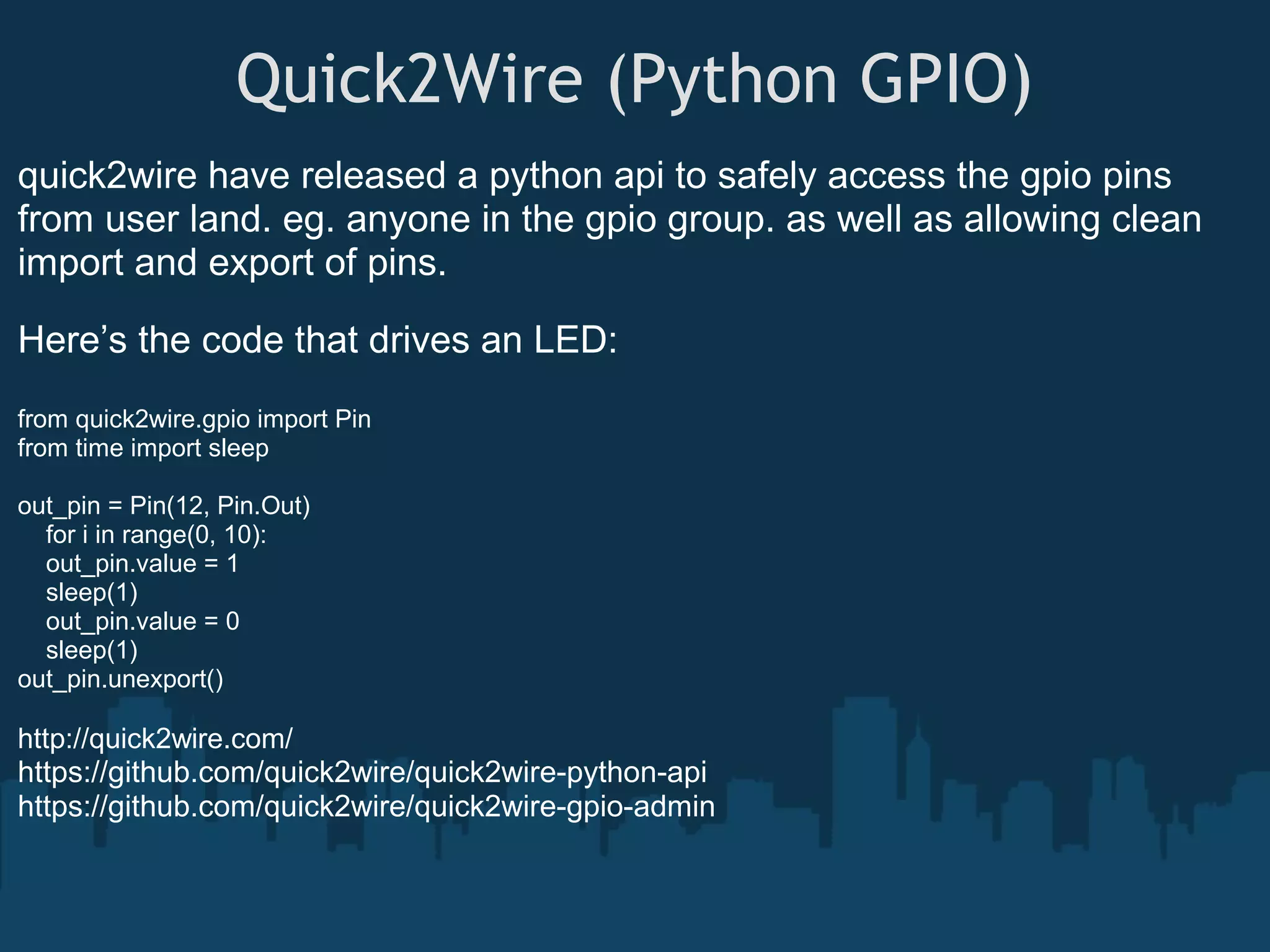
Quick2Wire (Python GPIO) quick2wire have released a python api to safely access the gpio pins from user land. eg. anyone in the gpio group. as well as allowing clean import and export of pins. Here’s the code that drives an LED: from quick2wire.gpio import Pin from time import sleep out_pin = Pin(12, Pin.Out) for i in range(0, 10): out_pin.value = 1 sleep(1) out_pin.value = 0 sleep(1) out_pin.unexport() http://quick2wire.com/ https://github.com/quick2wire/quick2wire-python-api https://github.com/quick2wire/quick2wire-gpio-admin
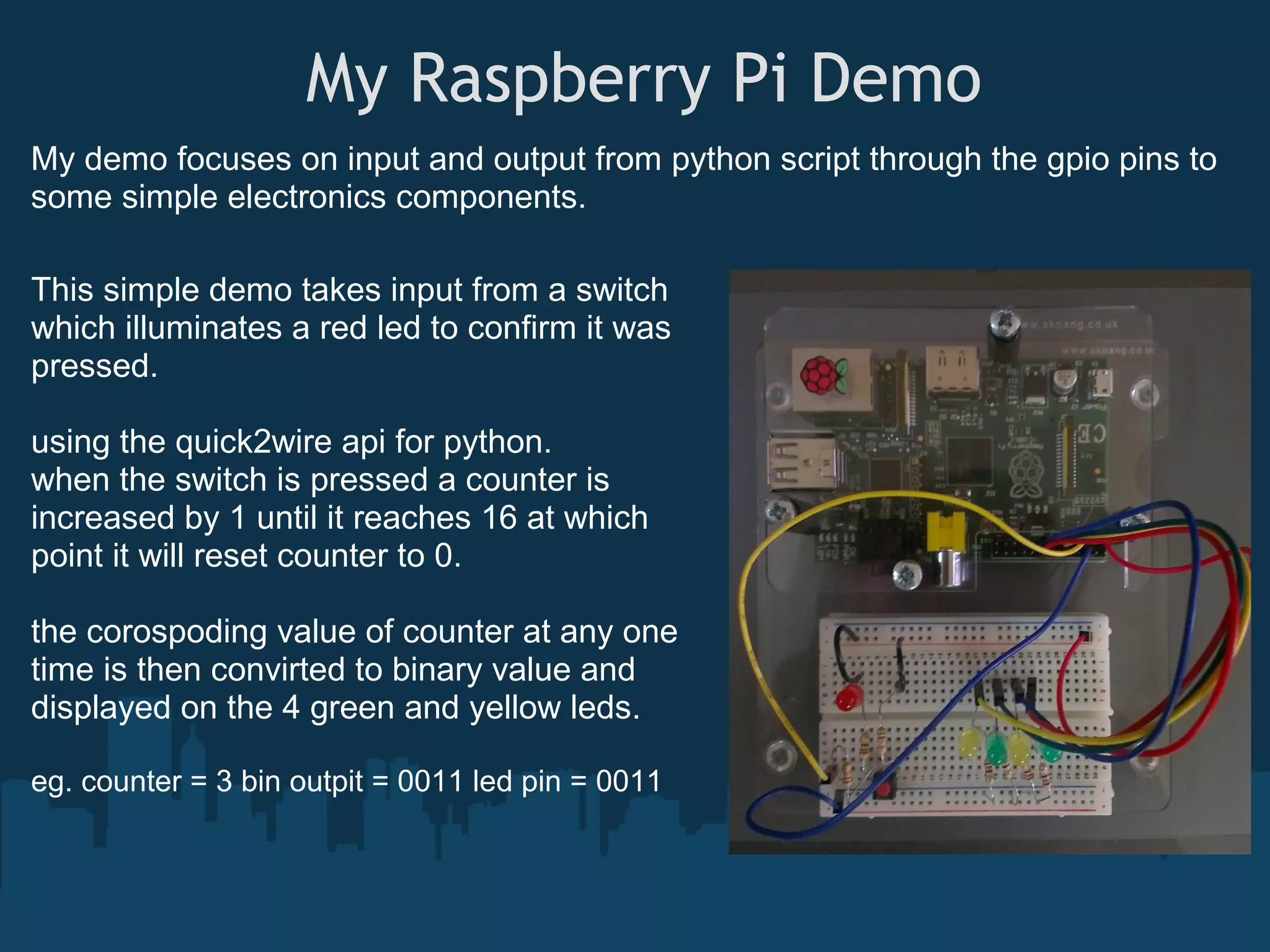
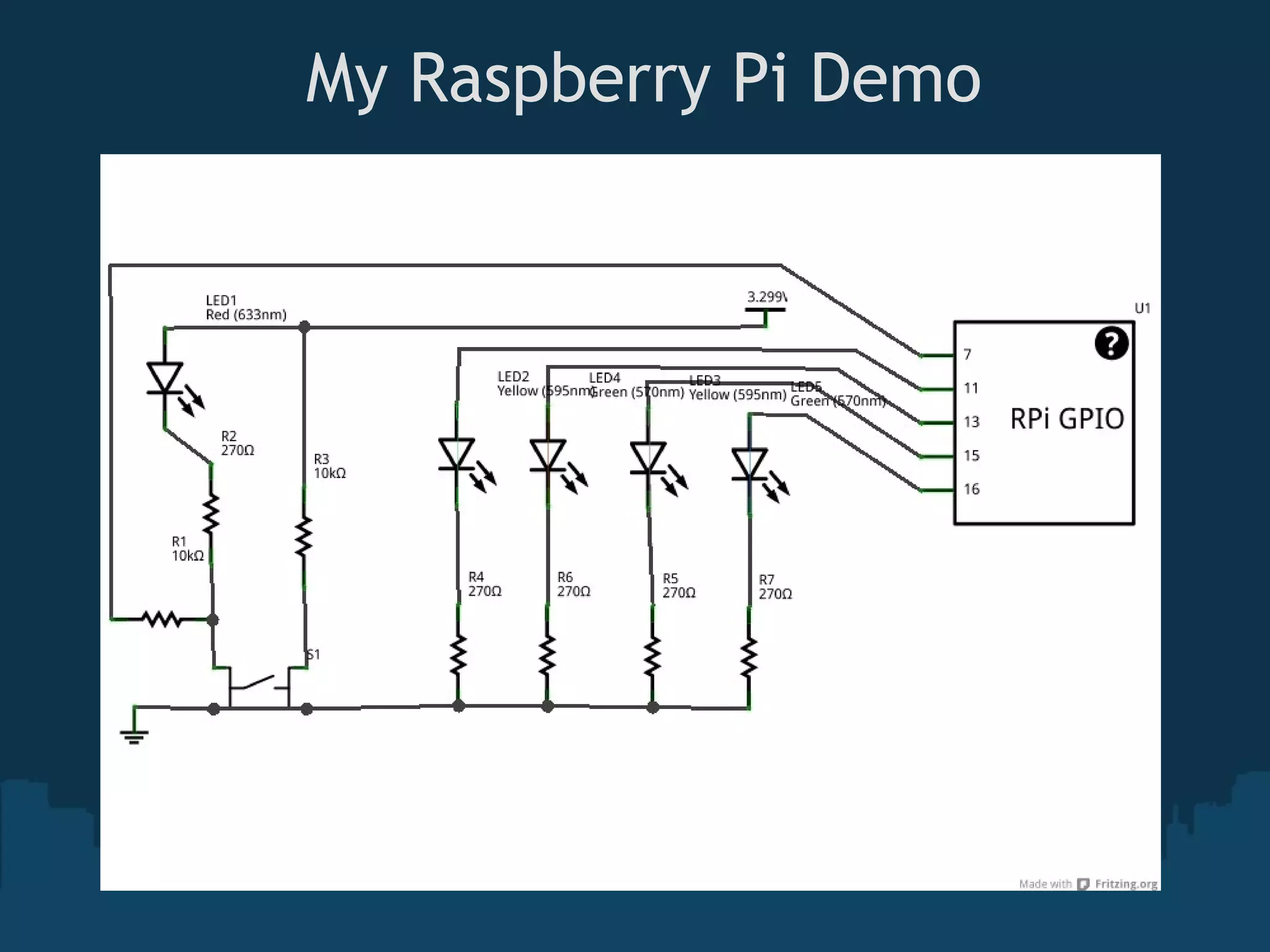
 My Raspberry Pi Demo My demo focuses on input and output from python script through the gpio pins to some simple electronics components. This simple demo takes input from a switch which illuminates a red led to confirm it was pressed. using the quick2wire api for python. when the switch is pressed a counter is increased by 1 until it reaches 16 at which point it will reset counter to 0. the corospoding value of counter at any one time is then convirted to binary value and displayed on the 4 green and yellow leds. eg. counter = 3 bin outpit = 0011 led pin = 0011
 My Raspberry Pi Demo
 My Raspberry Pi Demo #!/usr/bin/python3 import time # outputs binary reprisentation to 4 leds import string # that matches count. from quick2wire.gpio import Pin binvalue = bin(i)[2:].zfill(4) out_pin4.value = binvalue[-1] # import pins for output out_pin3.value = binvalue[-2] out_pin1 = Pin(11, Pin.Out) out_pin2.value = binvalue[-3] out_pin2 = Pin(13, Pin.Out) out_pin1.value = binvalue[-4] out_pin3 = Pin(15, Pin.Out) time.sleep(.2) out_pin4 = Pin(16, Pin.Out) # trap ctrl+c to cleanly unexport pins # import pins for input except KeyboardInterrupt: in_pin = Pin(7, Pin.In) out_pin1.unexport() out_pin2.unexport() # init count out_pin3.unexport() count = 0 out_pin4.unexport() in_pin.unexport() try: while True: # get input value of button mybutton = in_pin.value if mybutton == False: count = count + 1 # reset at 16 if count == 16: count = 0 rpi-count.py @ https://github.com/azmodie/rpi-scripts
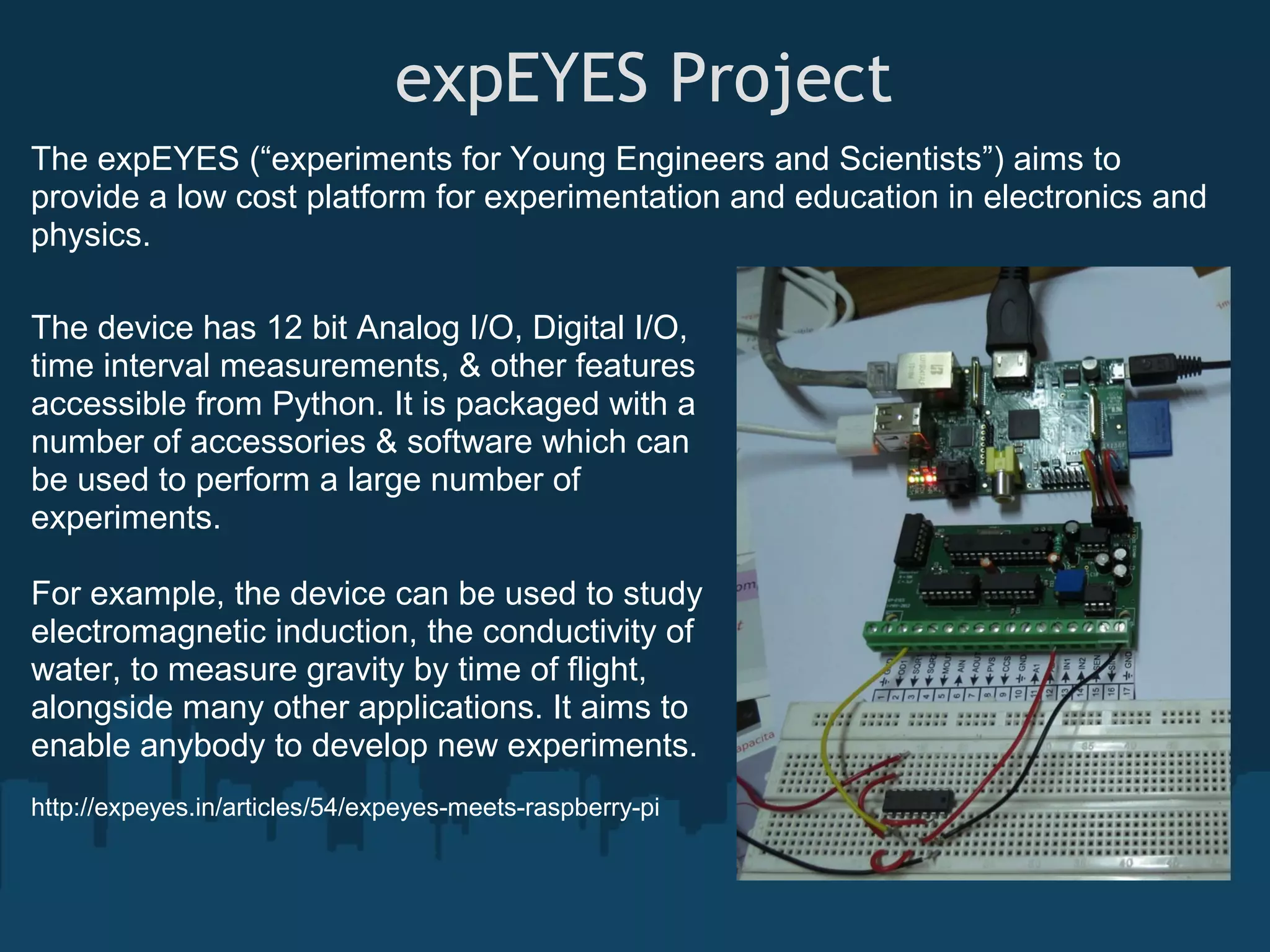
 expEYES Project The expEYES (“experiments for Young Engineers and Scientists”) aims to provide a low cost platform for experimentation and education in electronics and physics. The device has 12 bit Analog I/O, Digital I/O, time interval measurements, & other features accessible from Python. It is packaged with a number of accessories & software which can be used to perform a large number of experiments. For example, the device can be used to study electromagnetic induction, the conductivity of water, to measure gravity by time of flight, alongside many other applications. It aims to enable anybody to develop new experiments. http://expeyes.in/articles/54/expeyes-meets-raspberry-pi
Links to More Details / Projects A coffee machine controlled by Raspberry Pi http://moccapi.blogspot.co.uk/ Solinoid based glockenspiel http://www.thebox.myzen.co.uk/Raspberry/Buffer_Board.html Simple Guide to the RPi GPIO Header and Pins http://www.raspberrypi-spy.co.uk/2012/06/simple-guide-to-the-rpi-gpio-header-and-pins/ Raspberry Pi – Driving a Relay using GPIO http://www.susa.net/wordpress/2012/06/raspberry-pi-relay-using-gpio/ Hardware Ladder Game http://www.raspberrypi.org/archives/1488 Speach Recognition https://sites.google.com/site/observing/Home/speech-recognition-with-the-raspberry-pi Ideas for model railways http://www.raspberrypi.org/phpBB3/viewtopic.php?f=37&t=5993
Contact Details  & Any Questions ?   Email address : azmodie@gmail.com / kris.findlay@gmail.com   Twitter : azmodie Facebook : azmodie   LinkedIn : Kris Findlay

Introduction to Raspberry Pi and GPIO

  • 1.
    Raspberry Pi  A SliceFor Education  http://www.raspberrypi.org
  • 2.
    Who Am I? My Name is Kris Findlay. Also known in the community as Azmodie. I have been using the Open Source Linux operating system for over 10 years.  IT Manager for Animation Company  (makers of oscar nominated The Illusionist 2010)  I am also the Webmaster for The Software Society and The UK Adhesions Society (Charity) which are both implemented, hosted and developed with open source software. ( currently Django, apache, nginx, mysql ) Email address : azmodie@gmail.com  or  kris.findlay@gmail.com Identi.ca/Twitter : azmodie Google Plus : http://gplus.to/azmodie LinkedIn : Kris Findlay     
  • 3.
    Agenda • A Littlehistory   • More device specifics • What a Raspberry Pi  can do for you ?   • Other Emerging Embeded Platforms • Development Options • Possible live/video demo.  • Questions
  • 4.
    A Little history  TheRaspberry Pi was created by the Raspberry Pi Foundation to inspire a new generation of children to become programmers. Foundation trustee Eben Upton, a lecturer at Cambridge at the time, saw that the skillset of applicants to CS courses had been steadily decreasing for a number of years. This is mostly due to the way that education has been geared more towards using office applications and less on understanding the hardware. The Debian images available have lots of tools for both kids and adults alike. so almost any age 4-50+ can enjoy learning about programming and electronics.
  • 5.
    More device specifics ModelA 256Mb RAM 1 x USB no Ethernet Model B 256Mb RAM 2 x USB 1 x Ethernet Both models have a 700MHz Armv6 (Arm11) Quad-Core Graphics chip Diagram of Model B
  • 6.
    What a RaspberryPican do for you • Xbmc @ Full 1080p HD • Linux desktop - just add keyboard and mouse. • Linux low powered server (fileserver etc..) • Attach webcam and monitoring software • Interface with electronics from leds, solenoids,switches,mosfets etc.. • Almost anything else you can imagine
  • 7.
    Other Emerging EmbededPlatforms • VIA APC is powered by a VIA WonderMedia 8750 800 MHz ARM11 processor, 512MB of DDR3 memory, and 2GB of flash storage. The chip supports 1080p HD video playback, H.264 video encoding, and OpenGL ES 2.0 graphics. • Android Mk802 A10 AllWinner Mini Computer The little computer looks like a portable storage device, but it has a 1.5 GHz Allwiner A10 processor, 512MB(1Gb spotted) of RAM, and 4GB of storage. It ships with Google Android 4.0 software • Beagle Board (1GHZ ARM 7) and Beagle bone (720MHz ARM 7) also PandaBoard (all ~$80-$180)
  • 8.
    Development Options • Python(Quick2wire),C(WiringPi), Bash, Basic, etc.. • Scratch Geared to students and non-developers • Various Other Linux environments including Aros (Linux based port), Arch, Debian, Gentoo etc.. • Many open-source libraries being ported to arm. • Cross-compiler tool-chains available. (both soft and hard float)
  • 9.
    Scratch The MIT programScratch is designed to provide an accessible way for kids to learn about coding. The program's interface makes it easy to build and change software by dragging and dropping commands and changing variable values through simple menus. The version installed on the Pi comes loaded with a simple car-racing game. Users can add and remove commands from the game, then press play and immediately see the effect of those changes - for instance, tweaking how cars handle or adjusting the animation for car crashes.
  • 10.
  • 11.
    Quick2Wire (Python GPIO) quick2wirehave released a python api to safely access the gpio pins from user land. eg. anyone in the gpio group. as well as allowing clean import and export of pins. Here’s the code that drives an LED: from quick2wire.gpio import Pin from time import sleep out_pin = Pin(12, Pin.Out) for i in range(0, 10): out_pin.value = 1 sleep(1) out_pin.value = 0 sleep(1) out_pin.unexport() http://quick2wire.com/ https://github.com/quick2wire/quick2wire-python-api https://github.com/quick2wire/quick2wire-gpio-admin
  • 12.
     My Raspberry PiDemo My demo focuses on input and output from python script through the gpio pins to some simple electronics components. This simple demo takes input from a switch which illuminates a red led to confirm it was pressed. using the quick2wire api for python. when the switch is pressed a counter is increased by 1 until it reaches 16 at which point it will reset counter to 0. the corospoding value of counter at any one time is then convirted to binary value and displayed on the 4 green and yellow leds. eg. counter = 3 bin outpit = 0011 led pin = 0011
  • 13.
  • 14.
     My Raspberry PiDemo #!/usr/bin/python3 import time # outputs binary reprisentation to 4 leds import string # that matches count. from quick2wire.gpio import Pin binvalue = bin(i)[2:].zfill(4) out_pin4.value = binvalue[-1] # import pins for output out_pin3.value = binvalue[-2] out_pin1 = Pin(11, Pin.Out) out_pin2.value = binvalue[-3] out_pin2 = Pin(13, Pin.Out) out_pin1.value = binvalue[-4] out_pin3 = Pin(15, Pin.Out) time.sleep(.2) out_pin4 = Pin(16, Pin.Out) # trap ctrl+c to cleanly unexport pins # import pins for input except KeyboardInterrupt: in_pin = Pin(7, Pin.In) out_pin1.unexport() out_pin2.unexport() # init count out_pin3.unexport() count = 0 out_pin4.unexport() in_pin.unexport() try: while True: # get input value of button mybutton = in_pin.value if mybutton == False: count = count + 1 # reset at 16 if count == 16: count = 0 rpi-count.py @ https://github.com/azmodie/rpi-scripts
  • 15.
     expEYES Project The expEYES (“experimentsfor Young Engineers and Scientists”) aims to provide a low cost platform for experimentation and education in electronics and physics. The device has 12 bit Analog I/O, Digital I/O, time interval measurements, & other features accessible from Python. It is packaged with a number of accessories & software which can be used to perform a large number of experiments. For example, the device can be used to study electromagnetic induction, the conductivity of water, to measure gravity by time of flight, alongside many other applications. It aims to enable anybody to develop new experiments. http://expeyes.in/articles/54/expeyes-meets-raspberry-pi
  • 16.
    Links to MoreDetails / Projects A coffee machine controlled by Raspberry Pi http://moccapi.blogspot.co.uk/ Solinoid based glockenspiel http://www.thebox.myzen.co.uk/Raspberry/Buffer_Board.html Simple Guide to the RPi GPIO Header and Pins http://www.raspberrypi-spy.co.uk/2012/06/simple-guide-to-the-rpi-gpio-header-and-pins/ Raspberry Pi – Driving a Relay using GPIO http://www.susa.net/wordpress/2012/06/raspberry-pi-relay-using-gpio/ Hardware Ladder Game http://www.raspberrypi.org/archives/1488 Speach Recognition https://sites.google.com/site/observing/Home/speech-recognition-with-the-raspberry-pi Ideas for model railways http://www.raspberrypi.org/phpBB3/viewtopic.php?f=37&t=5993
  • 17.
    Contact Details  &Any Questions ?   Email address : azmodie@gmail.com / kris.findlay@gmail.com   Twitter : azmodie Facebook : azmodie   LinkedIn : Kris Findlay