In the world ofweb automationtesting, QualityAssurance (QA) professionals often encounterflakytests caused by slow network responses, unstable third-partyAPIs, or dynamic data. Wouldn’t it be great if QA could “control” what the API returns or even block unnecessary calls (like ads)? That’s exactlywhere Playwright’s networkinterception and mockingfeature shines. Playwright is a modern automation framework that supports multiple languages (C#, Java, JavaScript, Python). It gives us powerful tools to: Intercept network requests & responses Mock API data Intercept&MockAPIRequestsin PlaywrightC#RealExamplesforWeb Testers
Simulate errors Control third-party dependencies In this blog, we’ll walk through everything – from setup to real-world usage – using Playwrightwith C#. Ifyou’re newtoAPItesting in Playwright orneed help setting up yourproject, checkoutthis blog: EnhancingAPIAutomation Testingwith Playwright andTypeScript: GETand POST Operations Explained. Table OfContent Importance of Intercepting or Mocking Network Calls in Test Automation Understanding Network Interception and Mocking What is Network Interception? What is Mocking? Difference Between Interception & Mocking Benefits of Mocking in Tests Howto Set Up Playwright with C# Capturing & Logging Network Requests and Responses Blocking Specific Requests (e.g., ads, tracking) What Is “Blocking Specific Requests”? Where and Why Do We Use This? Real-World Use Example Block requests to external domains like Google Fonts, Ads, etc. Real World Benefit: Redirecting Requests to a Different Endpoint Real-World Use Cases: Redirecting Requests Mocking Network Responses with Playwright Why Do We Mock Network Responses in Automation Testing?
Dynamic Mock Data Advanced Mocking Techniques a. Simulating 500 Internal Server Error b. Simulating Timeout (No Response) Real-World Use Cases of Simulating Timeouts c. Mocking Third-PartyAPIs (e.g., payment gateways) Combining Mocking with Other Playwright Features CI/CD Integration Tips Best Practices Common Challenges and Howto Handle Real-World Use Cases Case 1: Mocked Payment API – Success Flow Case 2: Replaced slow user profile API to speed up login tests Case 3: Simulated GraphQLAPI when the backend was under maintenance Why GraphQL Mocking is Powerful Best Practices for Network Interception and Mocking Conclusion Importance ofIntercepting orMocking Network Calls inTestAutomation Intercepting and mocking network calls offer several benefits in test automation: 1. Isolate FrontendTesting: Test the frontend independently by mocking API responses without relying on the backend. 2. HandleThird-PartyDependencies: Simulate third-partyAPIs to avoid dependency on external systems. 3. Speed UpTests: Reduce test execution time by bypassing real network delays. 4. Simulate Edge Cases: Test scenarios like server errors (500),
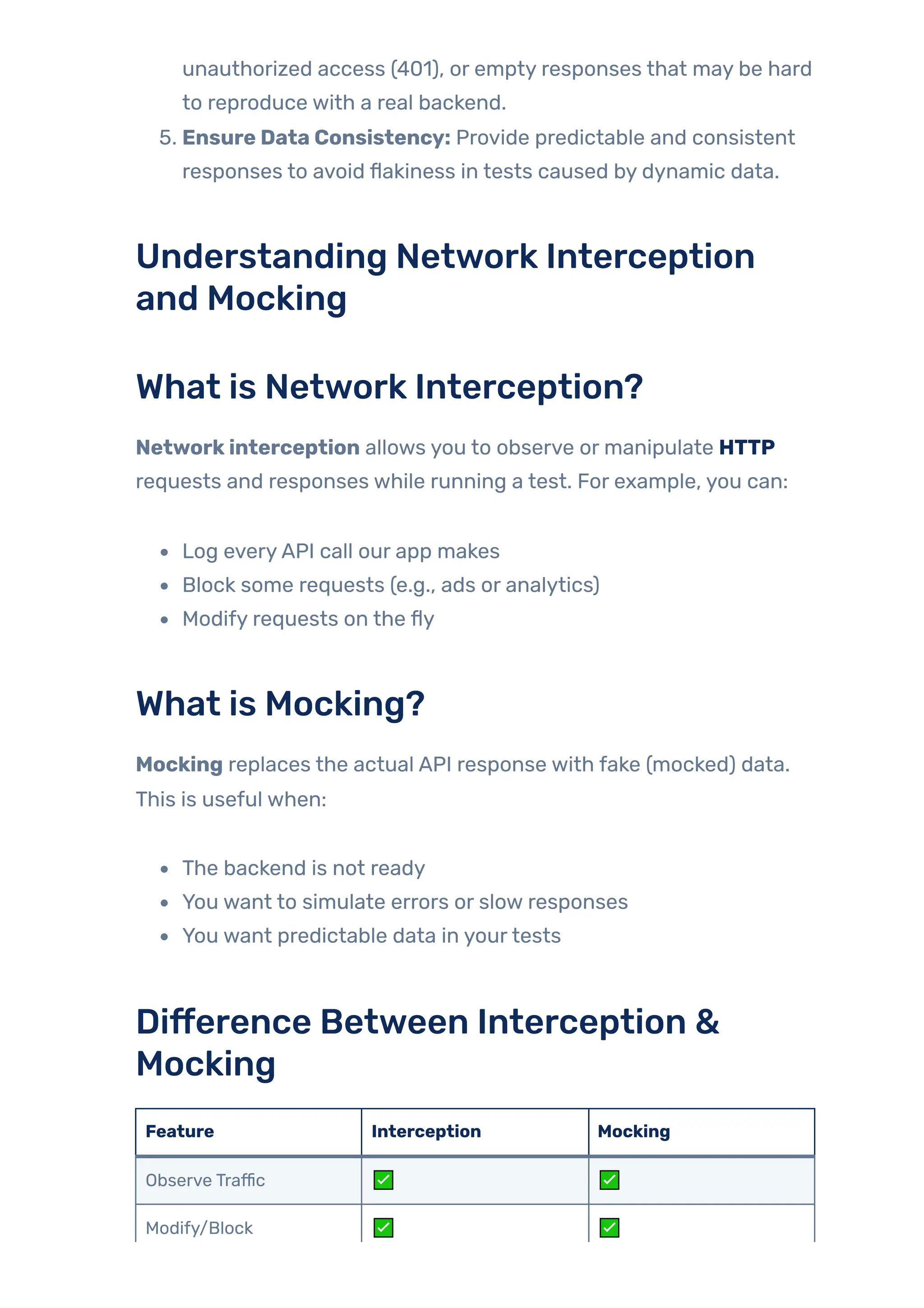
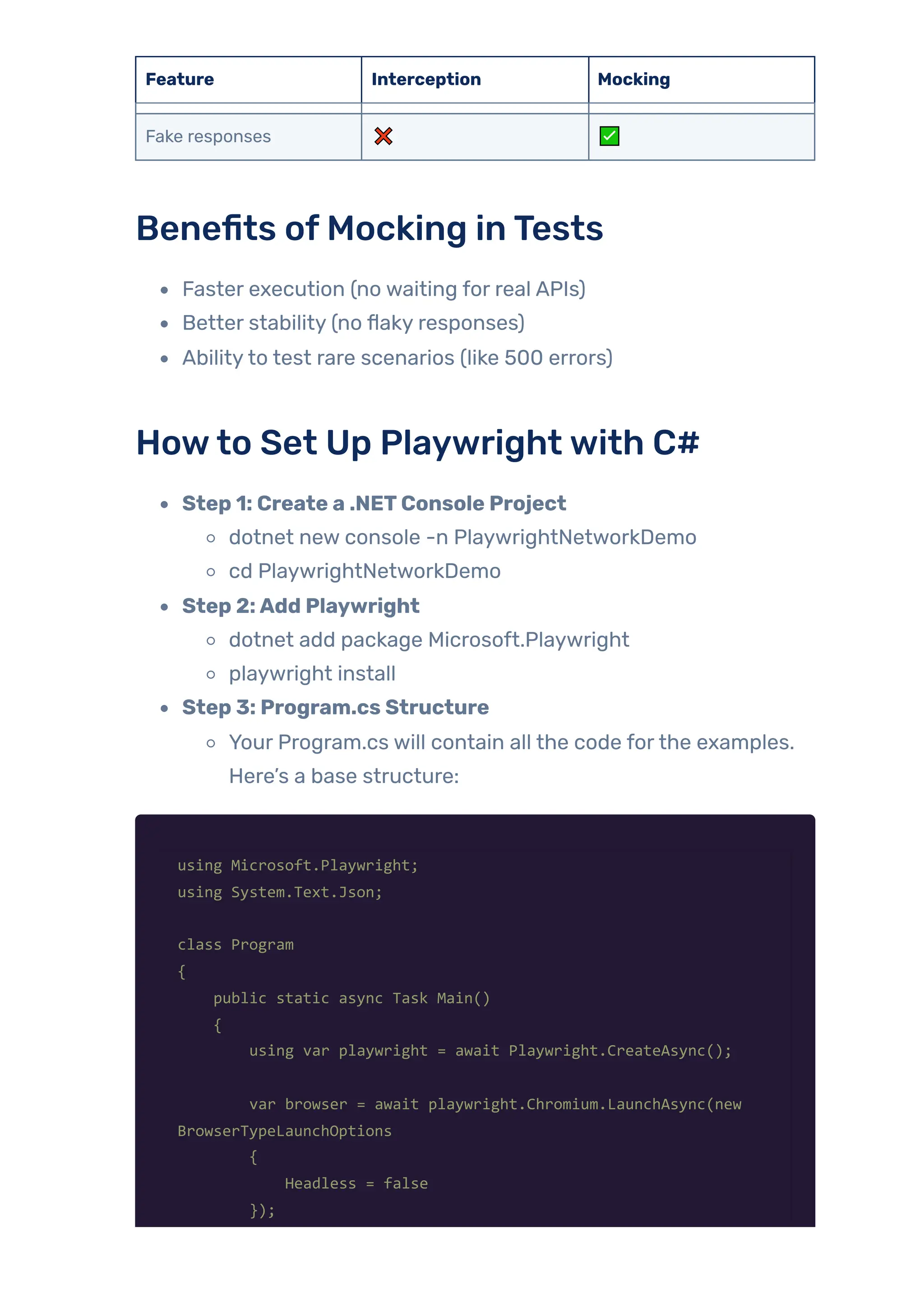
unauthorized access (401), or empty responses that may be hard to reproduce with a real backend. 5. Ensure Data Consistency: Provide predictable and consistent responses to avoid flakiness in tests caused by dynamic data. Understanding Network Interception and Mocking What is Network Interception? Networkinterception allows you to observe or manipulate HTTP requests and responses while running a test. For example, you can: Log everyAPI call our app makes Block some requests (e.g., ads or analytics) Modify requests on the fly What is Mocking? Mocking replaces the actual API response with fake (mocked) data. This is useful when: The backend is not ready You want to simulate errors or slow responses You want predictable data in yourtests Difference Between Interception & Mocking Feature Interception Mocking Observe Traffic ✅ ✅ Modify/Block ✅ ✅
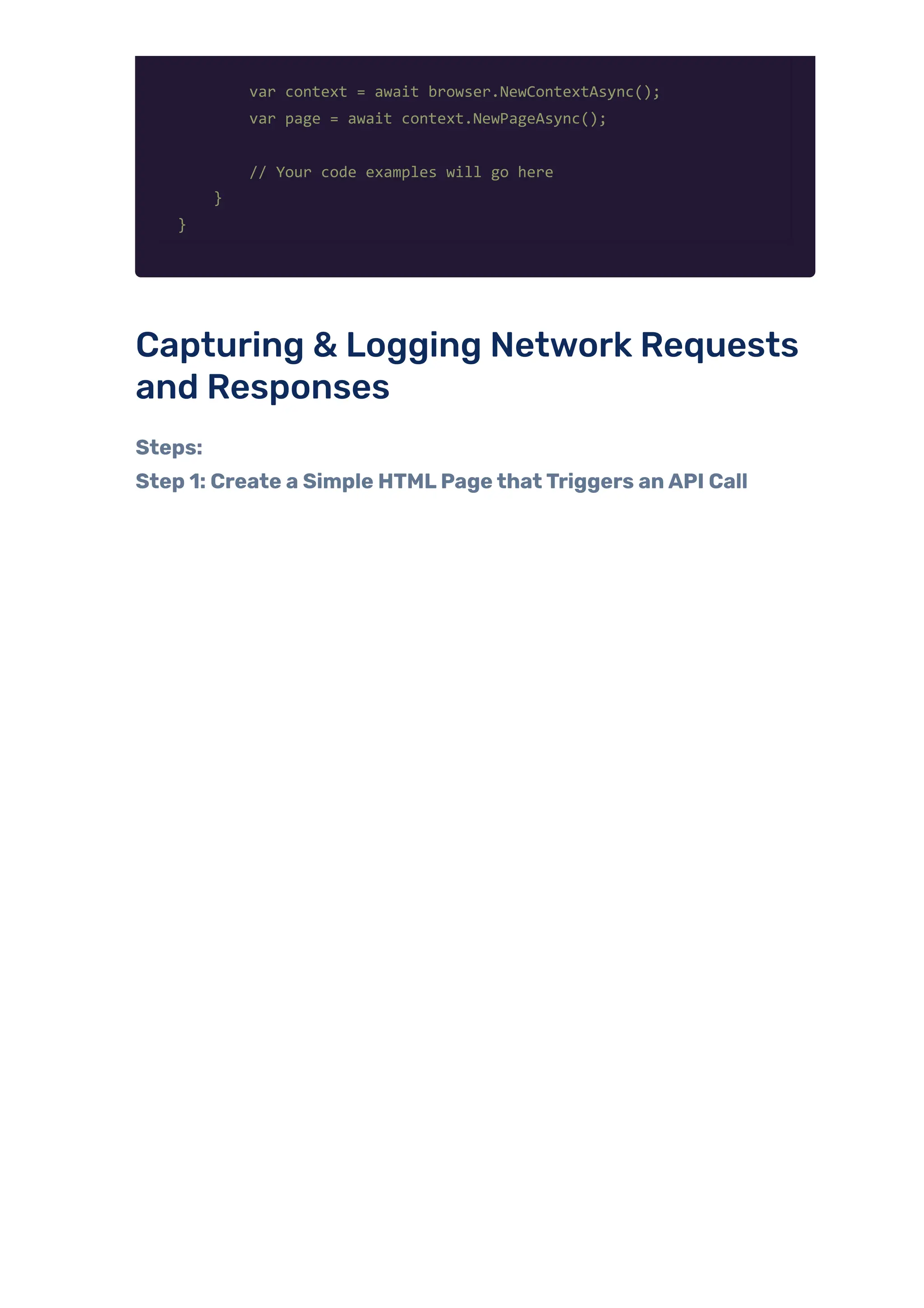
Feature Interception Mocking Fake responses ❌ ✅ Benefits ofMocking inTests Faster execution (no waiting for real APIs) Better stability (no flaky responses) Abilityto test rare scenarios (like 500 errors) Howto Set Up Playwrightwith C# Step 1: Create a .NETConsole Project dotnet new console -n PlaywrightNetworkDemo cd PlaywrightNetworkDemo Step 2:Add Playwright dotnet add package Microsoft.Playwright playwright install Step 3: Program.cs Structure Your Program.cs will contain all the code forthe examples. Here’s a base structure: using Microsoft.Playwright; using System.Text.Json; class Program { public static async Task Main() { using var playwright = await Playwright.CreateAsync(); var browser = await playwright.Chromium.LaunchAsync(new BrowserTypeLaunchOptions { Headless = false });
var context = await browser.NewContextAsync(); var page = await context.NewPageAsync(); // Your code examples will go here } } Capturing & Logging Network Requests and Responses Steps: Step 1: Create a Simple HTMLPagethatTriggers anAPI Call
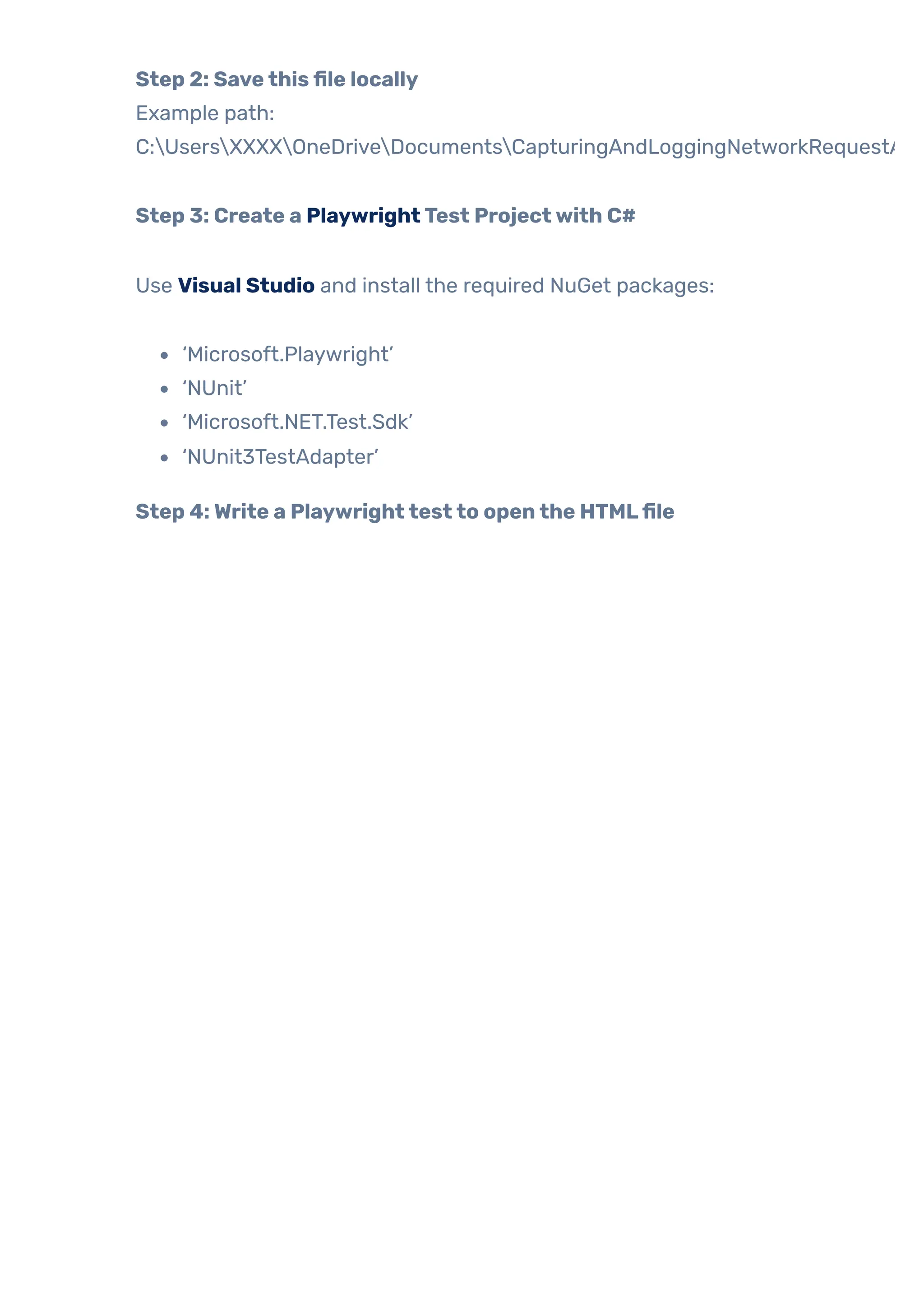
Step 2: Savethisfile locally Example path: C:UsersXXXXOneDriveDocumentsCapturingAndLoggingNetworkRequestA Step 3: Create a PlaywrightTest Projectwith C# Use Visual Studio and install the required NuGet packages: ‘Microsoft.Playwright’ ‘NUnit’ ‘Microsoft.NET.Test.Sdk’ ‘NUnit3TestAdapter’ Step 4:Write a Playwrighttestto openthe HTMLfile
Use Visual Studio and install the required NuGet packages: ‘Microsoft.Playwright’ ‘NUnit’ ‘Microsoft.NET.Test.Sdk’ ‘NUnit3TestAdapter’ Step 5: Capture and log outgoing requests Step 6: Capture and log responses + add assertions
Step 7: Clickthe button onthe pagetotriggertheAPI call
Step 8:Add await sothe response is captured properly Complete Classfile
Output:
Blocking Specific Requests (e.g., ads, tracking) What Is “Blocking Specific Requests”? In Playwright, user can intercept network requests and decide
whetherto: Allowthem, Modifythem, or Block them completely. Where and WhyDo We UseThis? Scenario: WhyWe Block Requests Reason Description Third-party ads ortrackers To speed up test execution and avoid flaky behavior. Simulating offline errors To test howthe app behaves when certain APIs fail. Isolating features To ensure that only specific APIs run and others don’t interfere. Cleanertest logs Avoid unnecessary requests, such as fonts and analytics. Example: The userwants to verifythat a “User Not Found” error is displayed correctlywhen the API fails. Instead of disabling the server, the user just blocks the request. Steps: Step 1: Create a simple HTMLpagethattriggers anAPI call Create a file CapturingAndLoggingNetworkRequestAndResponse.html with the following content:
Step 2: PlaywrightTestto BlocktheAPI request
Step 3: Logthe Requests and Responses (Optional but Helpful) This helps debug what’s happening: Step 4: Openthe HTMLPage inthe Browser
Step 5:Triggerthe NetworkRequestfromthe Page Click the button that makes the fetch call:
Step 6:Wait andAssert ifBlockHappened Real-World Use Example Imagine testing a “Get User Details” feature, and the API is sometimes
down. You want to check: Does your UI show “User not found” properly? Does the error message appear? Do fallback mechanisms work? Using Playwright’s blocking: You simulate an API failure. You test your app’s resilience. Without needing actual server downtime. Block requests to external domains like Google Fonts,Ads, etc. An HTML page that loads some fonts or ads from external sources, like: Google Fonts (fonts.googleapis.com, fonts.gstatic.com) Analytics orAds (like doubleclick.net, googletagmanager.com) In test environments, we often want to: Block these to speed up testing Avoid network noise ortracking Simulate network failures Stepsto Blocking External Domains Step 1: Create an HTMLFile. Name is: BlockExternalRequestsExample.html
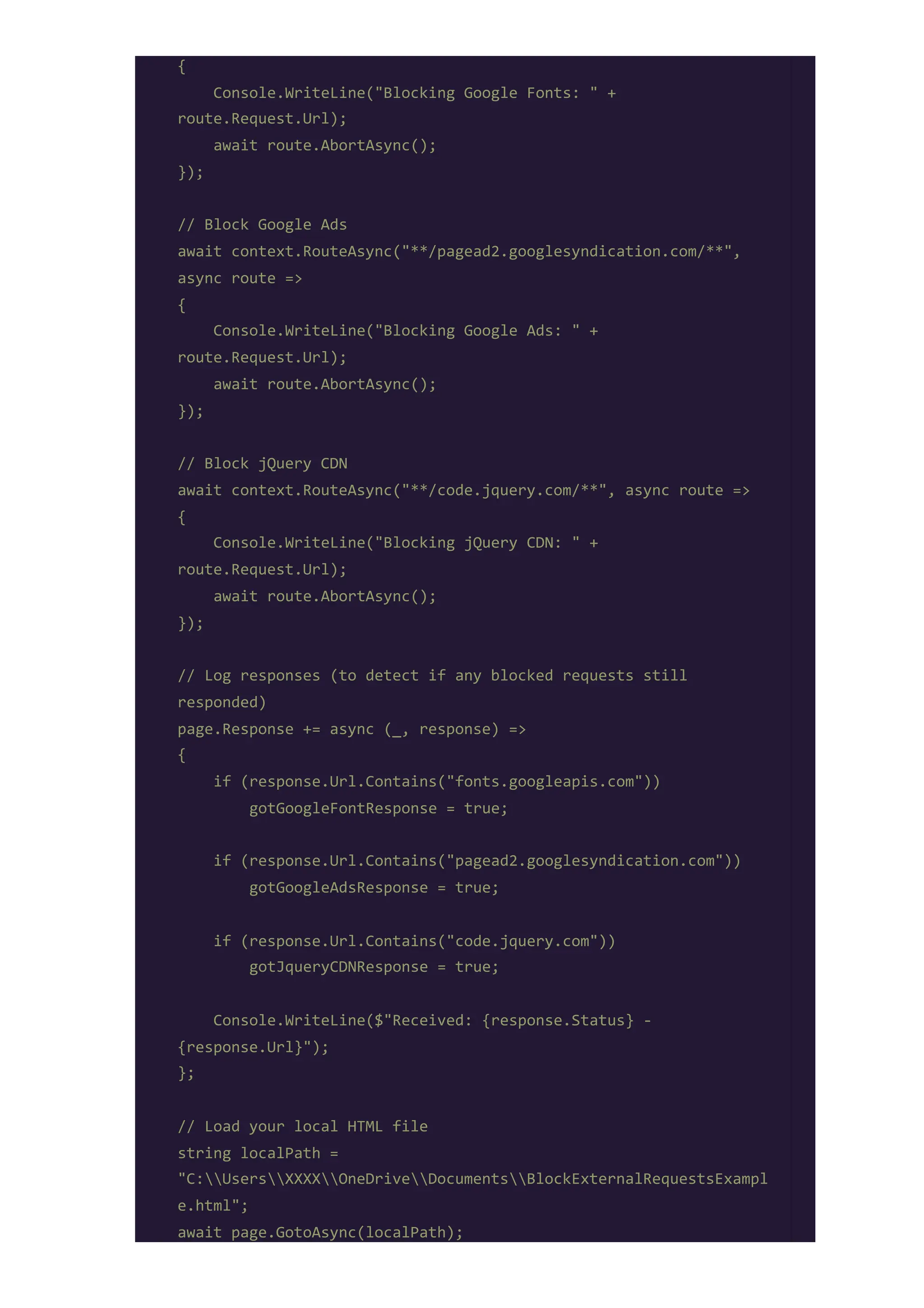
Step 2: PlaywrightTest.-Test Class name is: BlockMultipleExternalRequests.cs [Test] public async Task BlockMultipleExternalRequests() { using var playwright = await Playwright.CreateAsync(); await using var browser = await playwright.Chromium.LaunchAsync(new() { Headless = false }); var context = await browser.NewContextAsync(); var page = await context.NewPageAsync(); // Flags to detect whether any blocked resource was responded to bool gotGoogleFontResponse = false; bool gotGoogleAdsResponse = false; bool gotJqueryCDNResponse = false; // Block Google Fonts await context.RouteAsync("**/fonts.googleapis.com/**", async route =>
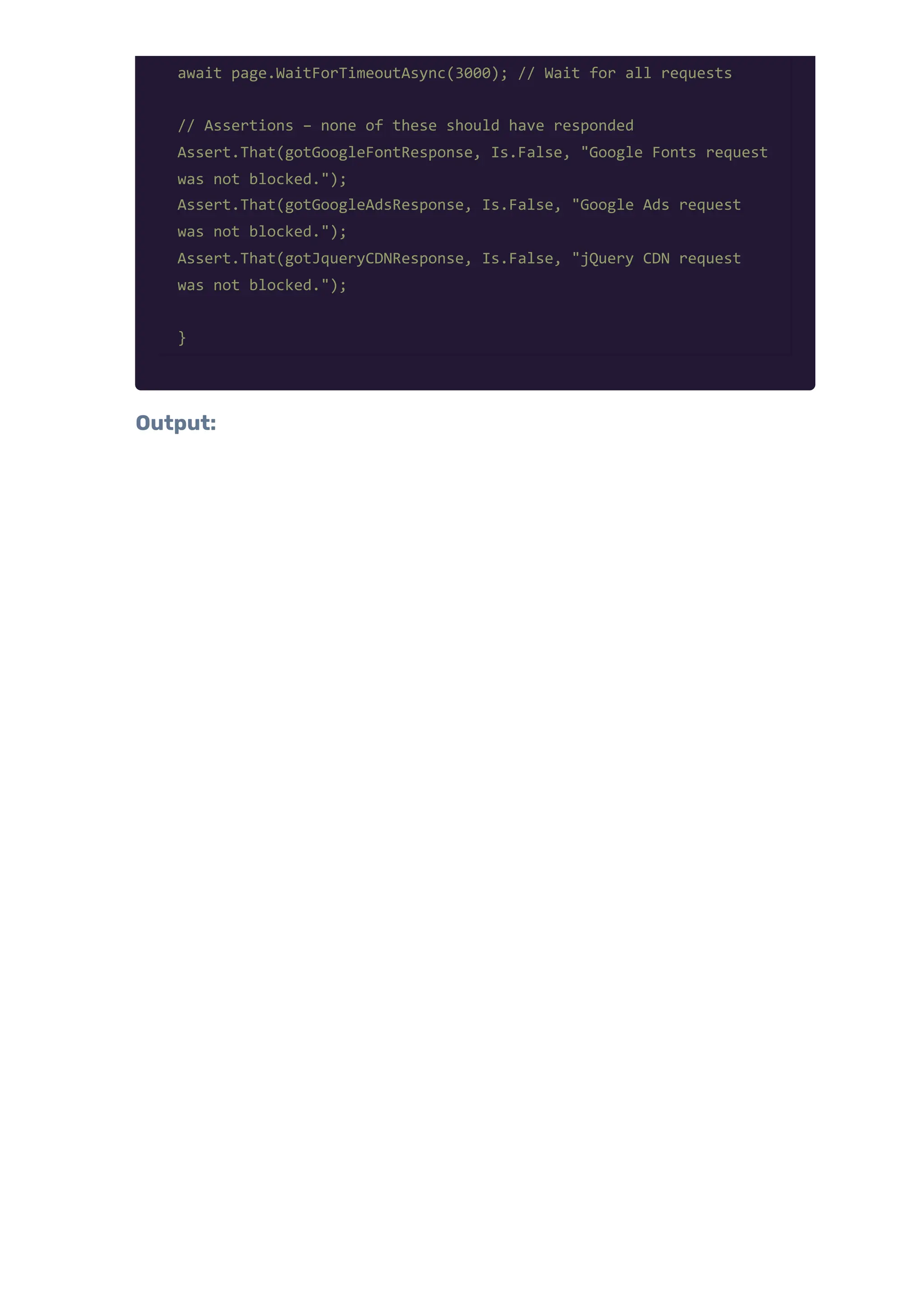
{ Console.WriteLine("Blocking Google Fonts: " + route.Request.Url); await route.AbortAsync(); }); // Block Google Ads await context.RouteAsync("**/pagead2.googlesyndication.com/**", async route => { Console.WriteLine("Blocking Google Ads: " + route.Request.Url); await route.AbortAsync(); }); // Block jQuery CDN await context.RouteAsync("**/code.jquery.com/**", async route => { Console.WriteLine("Blocking jQuery CDN: " + route.Request.Url); await route.AbortAsync(); }); // Log responses (to detect if any blocked requests still responded) page.Response += async (_, response) => { if (response.Url.Contains("fonts.googleapis.com")) gotGoogleFontResponse = true; if (response.Url.Contains("pagead2.googlesyndication.com")) gotGoogleAdsResponse = true; if (response.Url.Contains("code.jquery.com")) gotJqueryCDNResponse = true; Console.WriteLine($"Received: {response.Status} - {response.Url}"); }; // Load your local HTML file string localPath = "C:UsersXXXXOneDriveDocumentsBlockExternalRequestsExampl e.html"; await page.GotoAsync(localPath);
await page.WaitForTimeoutAsync(3000); // Wait for all requests // Assertions – none of these should have responded Assert.That(gotGoogleFontResponse, Is.False, "Google Fonts request was not blocked."); Assert.That(gotGoogleAdsResponse, Is.False, "Google Ads request was not blocked."); Assert.That(gotJqueryCDNResponse, Is.False, "jQuery CDN request was not blocked."); } Output:
Real World Benefit: No need to load fonts/ads during test Tests become faster and more reliable Simulate CDN failure, third-party unavailability Redirecting Requests to a Different Endpoint Use: Suppose your HTML calls this API: https://jsonplaceholder.typicode.com/users/2 But you want to redirect it to: https://jsonplaceholder.typicode.com/users/1 Steps: Step 1: HTMLFile- Savethis as RedirectRequestDemo.html
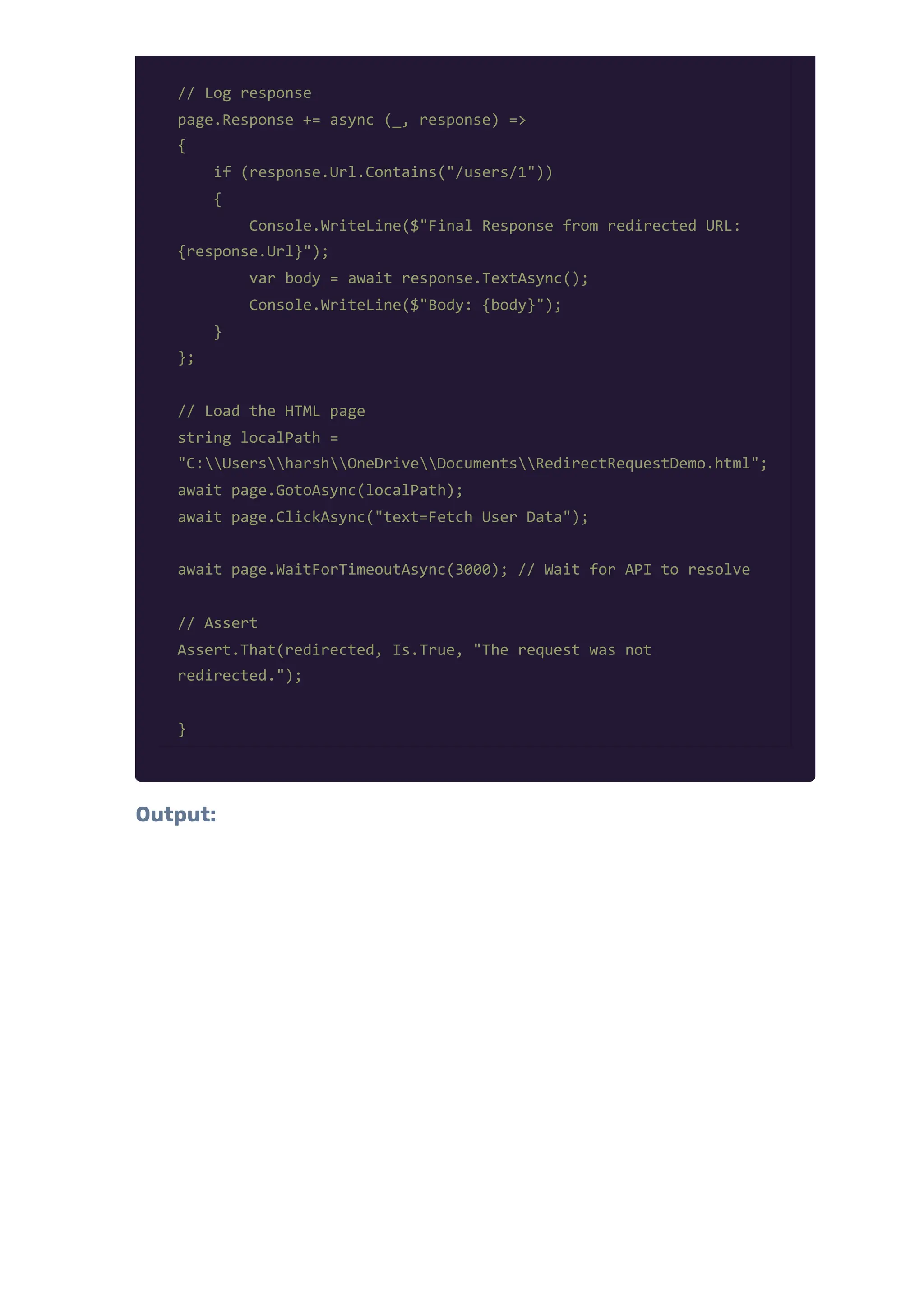
Step 2: Playwright C#Test Code – Redirecting Request [Test] public async Task RedirectUserRequestToAnotherEndpoint() { using var playwright = await Playwright.CreateAsync(); await using var browser = await playwright.Chromium.LaunchAsync(new() { Headless = false }); var context = await browser.NewContextAsync(); var page = await context.NewPageAsync(); // Flag to check if redirect happened bool redirected = false; // Intercept and redirect request await context.RouteAsync("**/users/2", async route => { var originalUrl = route.Request.Url; var redirectedUrl = "https://jsonplaceholder.typicode.com/users/1"; Console.WriteLine($"Redirecting: {originalUrl} {redirectedUrl}"); redirected = true; var headers = new Dictionary<string, string> (route.Request.Headers); await route.ContinueAsync(new RouteContinueOptions { Url = redirectedUrl, Method = route.Request.Method, Headers = headers }); });
// Log response page.Response += async (_, response) => { if (response.Url.Contains("/users/1")) { Console.WriteLine($"Final Response from redirected URL: {response.Url}"); var body = await response.TextAsync(); Console.WriteLine($"Body: {body}"); } }; // Load the HTML page string localPath = "C:UsersharshOneDriveDocumentsRedirectRequestDemo.html"; await page.GotoAsync(localPath); await page.ClickAsync("text=Fetch User Data"); await page.WaitForTimeoutAsync(3000); // Wait for API to resolve // Assert Assert.That(redirected, Is.True, "The request was not redirected."); } Output:
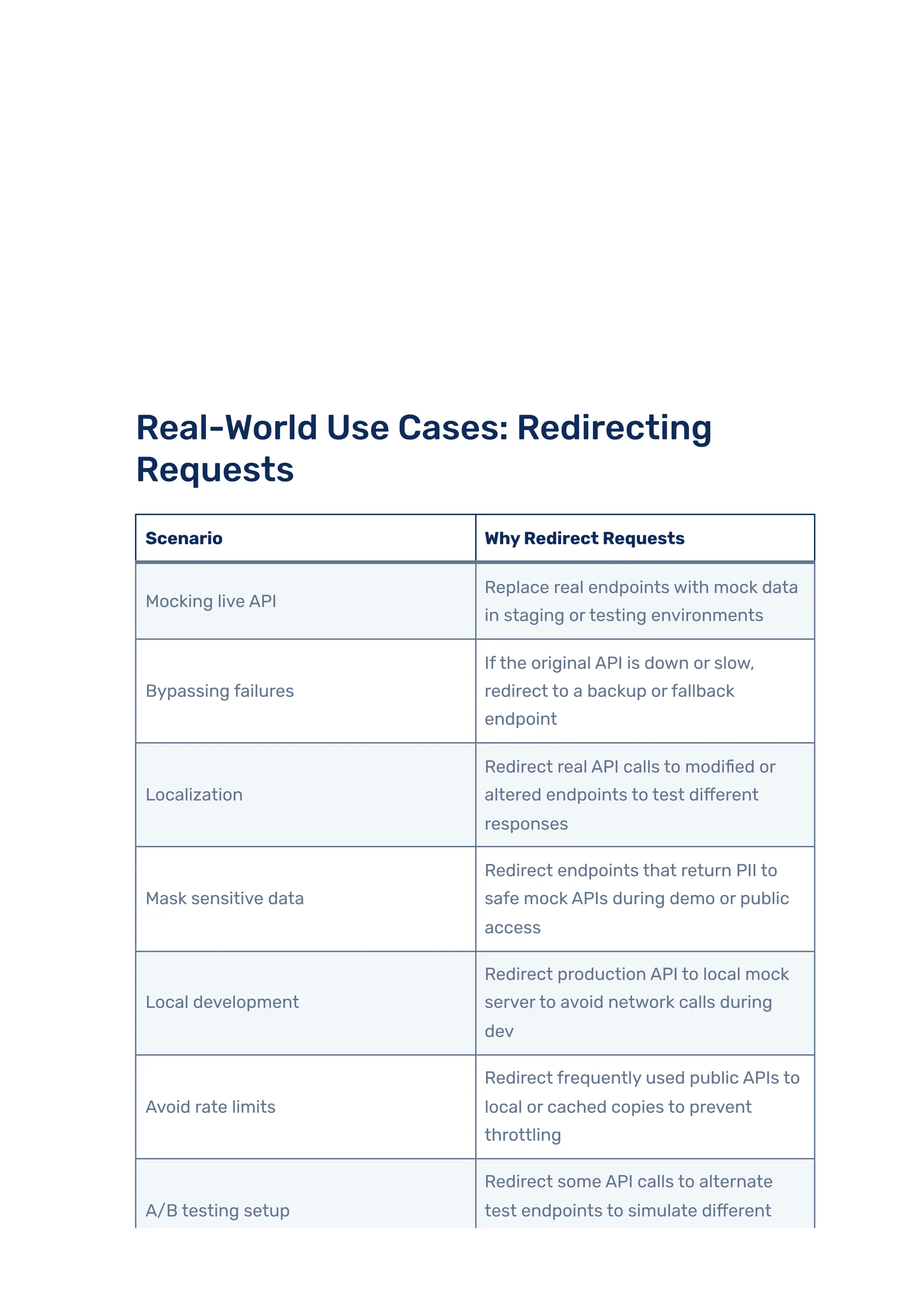
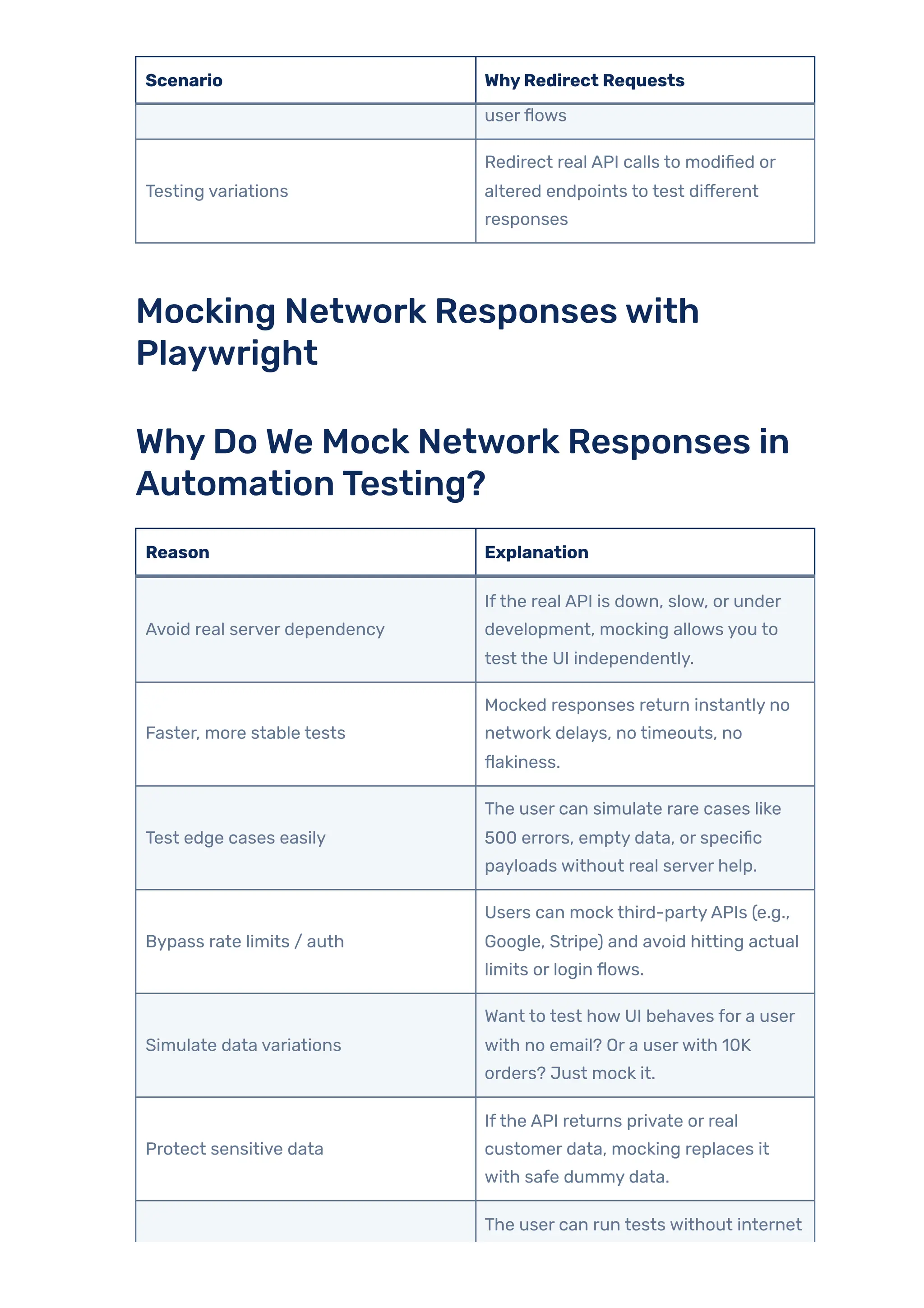
Real-World Use Cases: Redirecting Requests Scenario WhyRedirect Requests Mocking live API Replace real endpoints with mock data in staging ortesting environments Bypassing failures Ifthe original API is down or slow, redirect to a backup orfallback endpoint Localization Redirect real API calls to modified or altered endpoints to test different responses Mask sensitive data Redirect endpoints that return PII to safe mock APIs during demo or public access Local development Redirect production API to local mock serverto avoid network calls during dev Avoid rate limits Redirect frequently used public APIs to local or cached copies to prevent throttling A/B testing setup Redirect some API calls to alternate test endpoints to simulate different
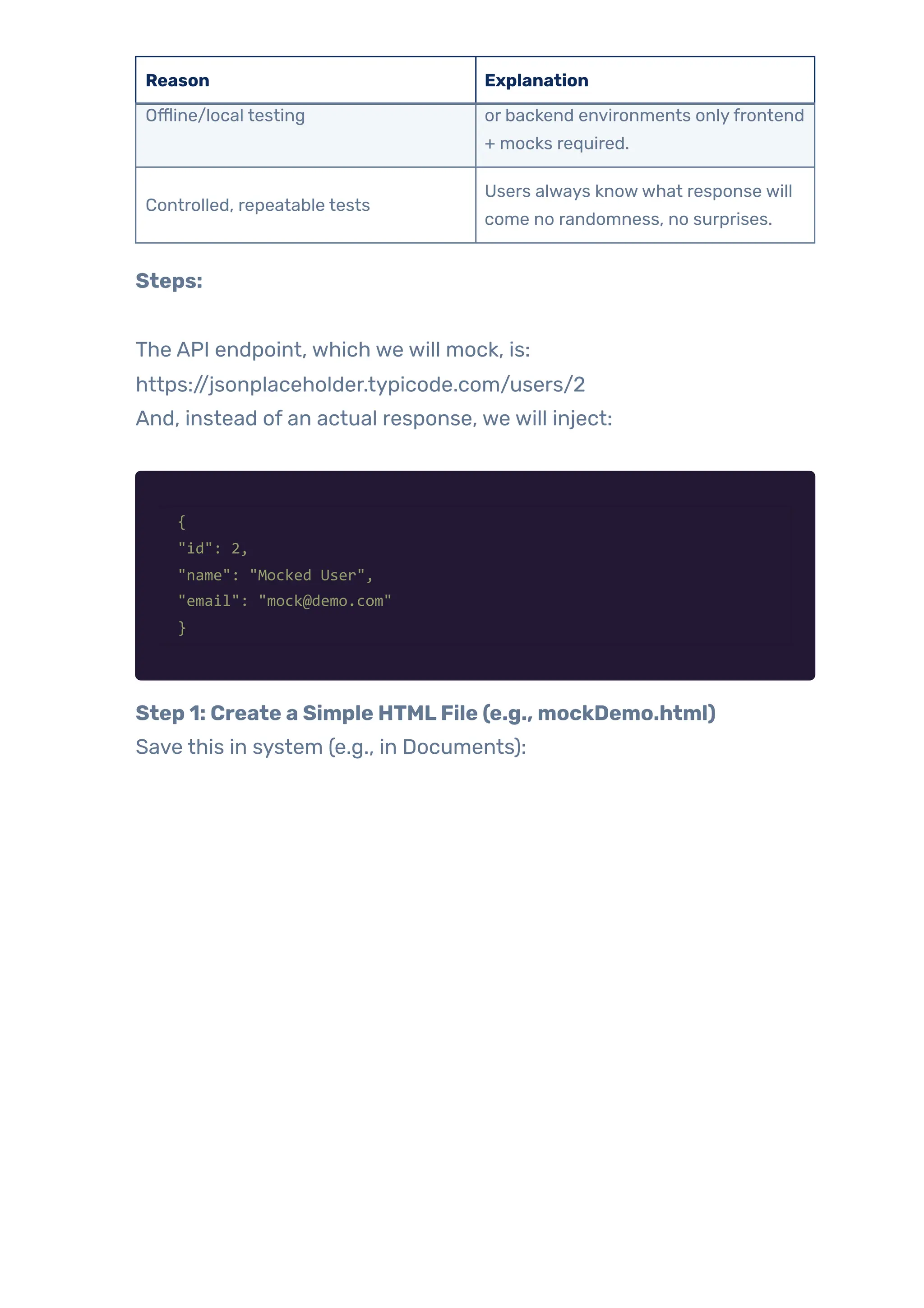
Scenario WhyRedirect Requests userflows Testing variations Redirect real API calls to modified or altered endpoints to test different responses Mocking Network Responseswith Playwright WhyDo We Mock Network Responses in AutomationTesting? Reason Explanation Avoid real server dependency Ifthe real API is down, slow, or under development, mocking allows you to test the UI independently. Faster, more stable tests Mocked responses return instantly no network delays, no timeouts, no flakiness. Test edge cases easily The user can simulate rare cases like 500 errors, empty data, or specific payloads without real server help. Bypass rate limits / auth Users can mock third-partyAPIs (e.g., Google, Stripe) and avoid hitting actual limits or login flows. Simulate data variations Want to test how UI behaves for a user with no email? Or a userwith 10K orders? Just mock it. Protect sensitive data Ifthe API returns private or real customer data, mocking replaces it with safe dummy data. The user can run tests without internet
Reason Explanation Offline/local testing or backend environments onlyfrontend + mocks required. Controlled, repeatable tests Users always knowwhat response will come no randomness, no surprises. Steps: The API endpoint, which we will mock, is: https://jsonplaceholder.typicode.com/users/2 And, instead of an actual response, we will inject: { "id": 2, "name": "Mocked User", "email": "mock@demo.com" } Step 1: Create a Simple HTMLFile (e.g., mockDemo.html) Save this in system (e.g., in Documents):
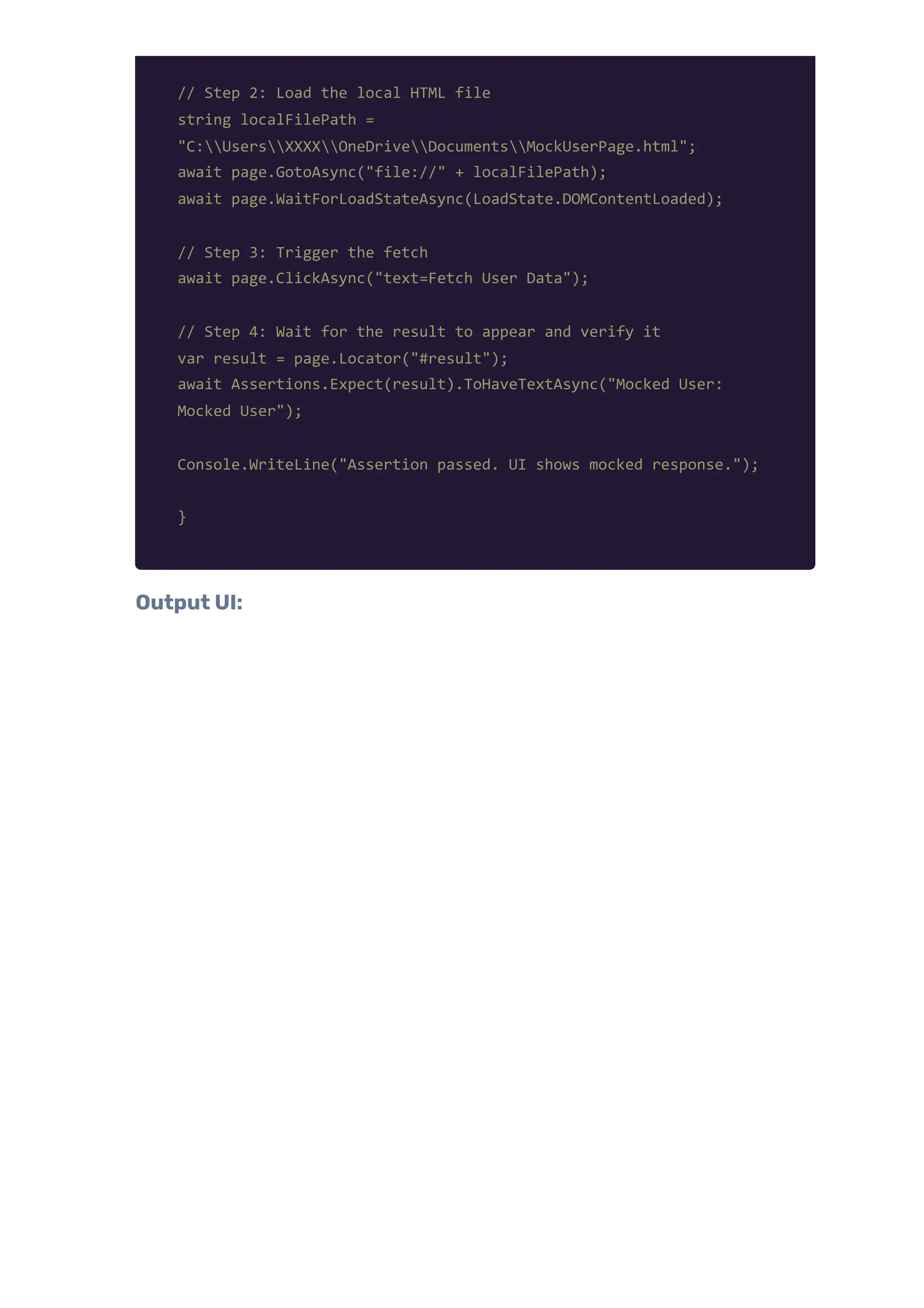
Step 2: Create aTest Class –VerifyMockedUserDataAppearsInUI [Test] public async Task VerifyMockedUserDataAppearsInUI() { using var playwright = await Playwright.CreateAsync(); await using var browser = await playwright.Chromium.LaunchAsync(new() { Headless = false }); var context = await browser.NewContextAsync(); var page = await context.NewPageAsync(); // Step 1: Intercept and mock the API response await context.RouteAsync("**/users/2", async route => { var mockedUser = new { id = 2, name = "Mocked User", email = "mock@demo.com" }; string mockedJson = JsonSerializer.Serialize(mockedUser); await route.FulfillAsync(new RouteFulfillOptions { Status = 200, ContentType = "application/json", Body = mockedJson }); Console.WriteLine("Sent mocked response."); });
// Step 2: Load the local HTML file string localFilePath = "C:UsersXXXXOneDriveDocumentsMockUserPage.html"; await page.GotoAsync("file://" + localFilePath); await page.WaitForLoadStateAsync(LoadState.DOMContentLoaded); // Step 3: Trigger the fetch await page.ClickAsync("text=Fetch User Data"); // Step 4: Wait for the result to appear and verify it var result = page.Locator("#result"); await Assertions.Expect(result).ToHaveTextAsync("Mocked User: Mocked User"); Console.WriteLine("Assertion passed. UI shows mocked response."); } Output UI:
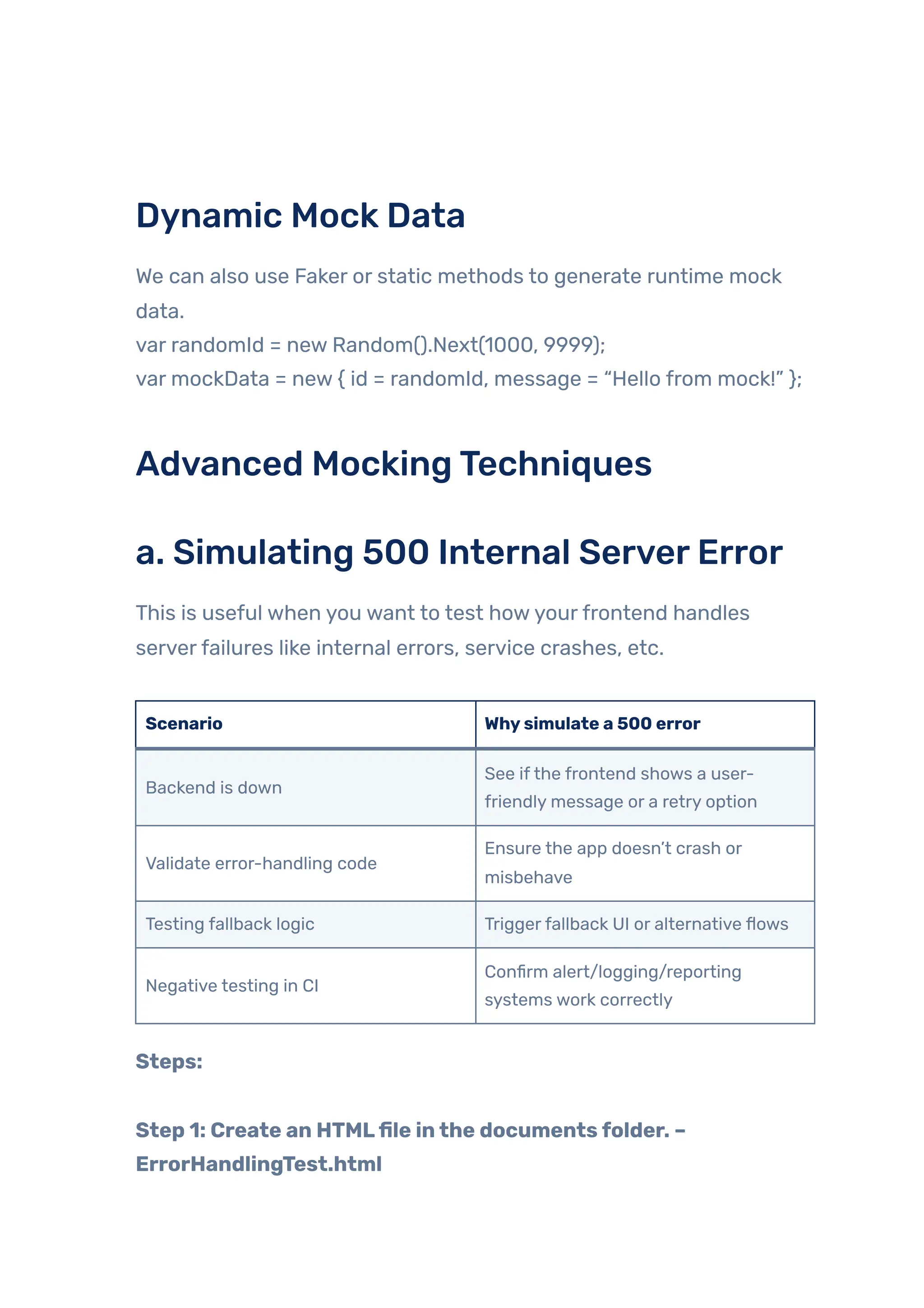
Dynamic Mock Data We can also use Faker or static methods to generate runtime mock data. var randomId = new Random().Next(1000, 9999); var mockData = new { id = randomId, message = “Hello from mock!” }; Advanced MockingTechniques a. Simulating 500 Internal ServerError This is useful when you want to test howyourfrontend handles serverfailures like internal errors, service crashes, etc. Scenario Whysimulate a 500 error Backend is down See ifthe frontend shows a user- friendly message or a retry option Validate error-handling code Ensure the app doesn’t crash or misbehave Testing fallback logic Triggerfallback UI or alternative flows Negative testing in CI Confirm alert/logging/reporting systems work correctly Steps: Step 1: Create an HTMLfile inthe documentsfolder. – ErrorHandlingTest.html
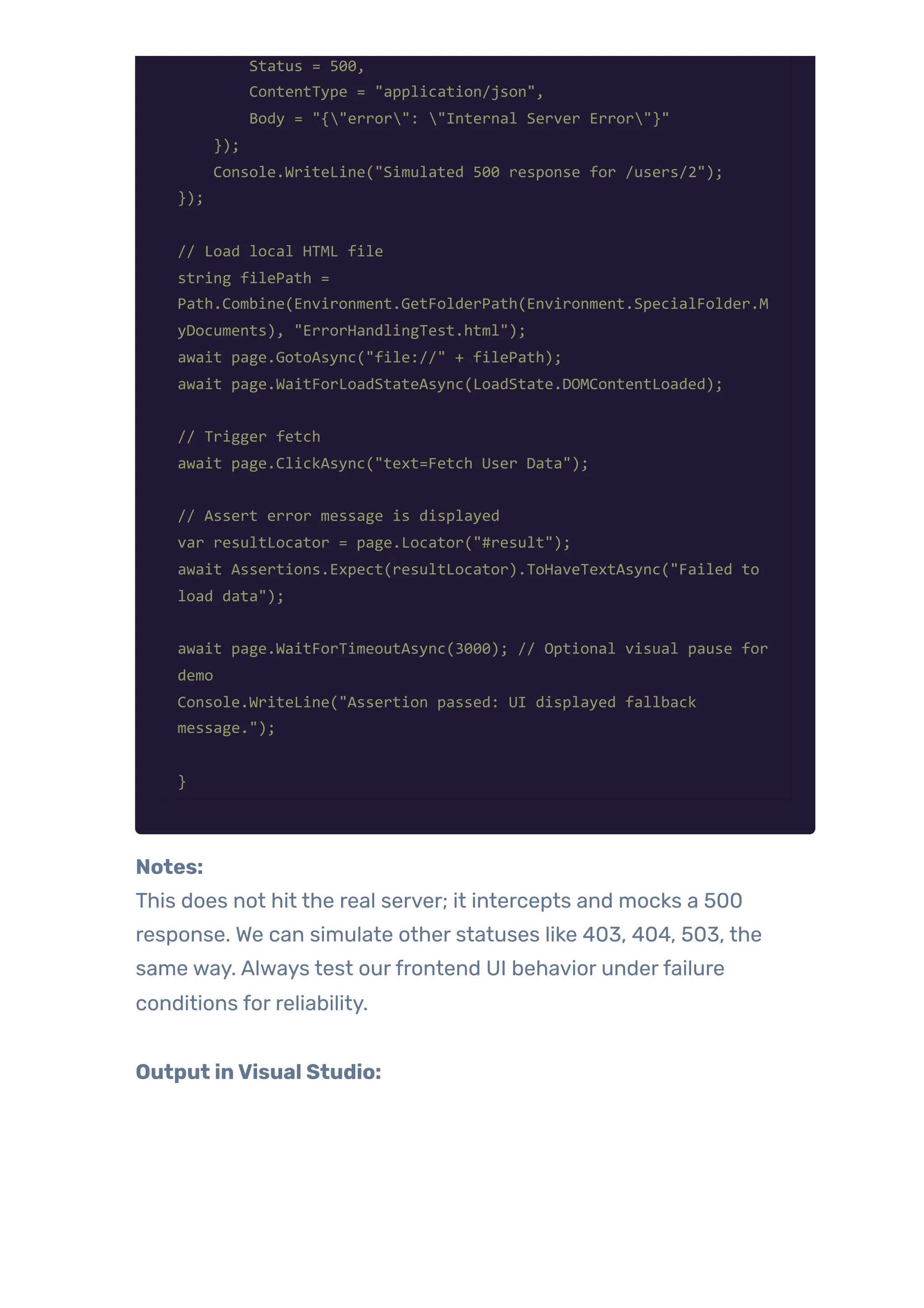
Step 2: C# PlaywrightTest – Simulate 500 Error [Test] public async Task ShouldDisplayErrorMessageOn500Error() { using var playwright = await Playwright.CreateAsync(); await using var browser = await playwright.Chromium.LaunchAsync(new() { Headless = false }); var context = await browser.NewContextAsync(); var page = await context.NewPageAsync(); // Mock 500 Internal Server Error for /users/2 await context.RouteAsync("**/users/2", async route => { await route.FulfillAsync(new RouteFulfillOptions {
Status = 500, ContentType = "application/json", Body = "{"error": "Internal Server Error"}" }); Console.WriteLine("Simulated 500 response for /users/2"); }); // Load local HTML file string filePath = Path.Combine(Environment.GetFolderPath(Environment.SpecialFolder.M yDocuments), "ErrorHandlingTest.html"); await page.GotoAsync("file://" + filePath); await page.WaitForLoadStateAsync(LoadState.DOMContentLoaded); // Trigger fetch await page.ClickAsync("text=Fetch User Data"); // Assert error message is displayed var resultLocator = page.Locator("#result"); await Assertions.Expect(resultLocator).ToHaveTextAsync("Failed to load data"); await page.WaitForTimeoutAsync(3000); // Optional visual pause for demo Console.WriteLine("Assertion passed: UI displayed fallback message."); } Notes: This does not hit the real server; it intercepts and mocks a 500 response. We can simulate other statuses like 403, 404, 503, the same way. Always test ourfrontend UI behavior underfailure conditions for reliability. Output inVisual Studio:
Output in UI:
b. SimulatingTimeout (No Response) This test helps us test how ourfrontend behaves when a request hangs and never completes. Real-World Use Cases ofSimulatingTimeouts Scenario Whysimulate it Slow backend Test loader/spinner or retry logic No response from the server Validate the timeout error message and error handling in the UI Frontend stability under load Confirm the app doesn’t freeze or behave unexpectedly Steps: Step 1: Create an HTMLfile –TimeoutSimulation.html
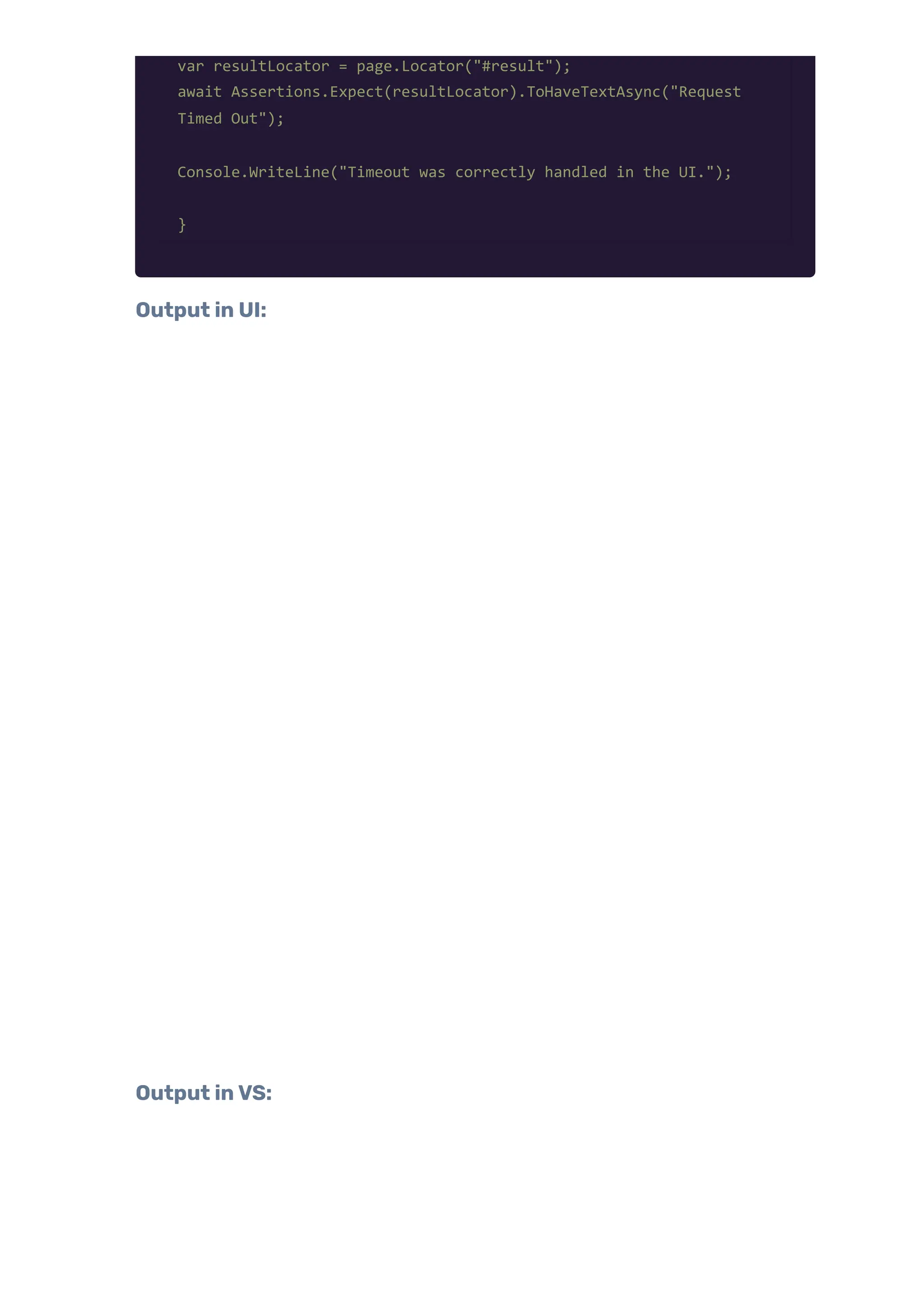
Step 2: Playwright + C#Test: SimulateTimeout [Test] public async Task ShouldHandleTimeoutGracefully() { using var playwright = await Playwright.CreateAsync(); await using var browser = await playwright.Chromium.LaunchAsync(new() { Headless = false }); var context = await browser.NewContextAsync(); var page = await context.NewPageAsync(); // Simulate hanging request (timeout) await context.RouteAsync("**/users/2", async route => { Console.WriteLine("Simulating no response..."); await Task.Delay(10000); // Hang for 10 seconds }); string localPath = "C:UsersharshOneDriveDocumentsTimeoutSimulation.html"; await page.GotoAsync("file://" + localPath); await page.WaitForLoadStateAsync(LoadState.DOMContentLoaded); await page.ClickAsync("text=Fetch User"); // Wait for frontend timeout and UI update await page.WaitForTimeoutAsync(6000); // Assertion
var resultLocator = page.Locator("#result"); await Assertions.Expect(resultLocator).ToHaveTextAsync("Request Timed Out"); Console.WriteLine("Timeout was correctly handled in the UI."); } Output in UI: Output inVS:
c. MockingThird-PartyAPIs (e.g., payment gateways) Mocking third-partyAPIs like payment gateways (e.g., Stripe, Razorpay, PayPal) is essential fortesting without hitting the real service, incurring costs, or dealing with delays or side effects (e.g., sending money). Steps: Step 1: HTML(PaymentPage.html)
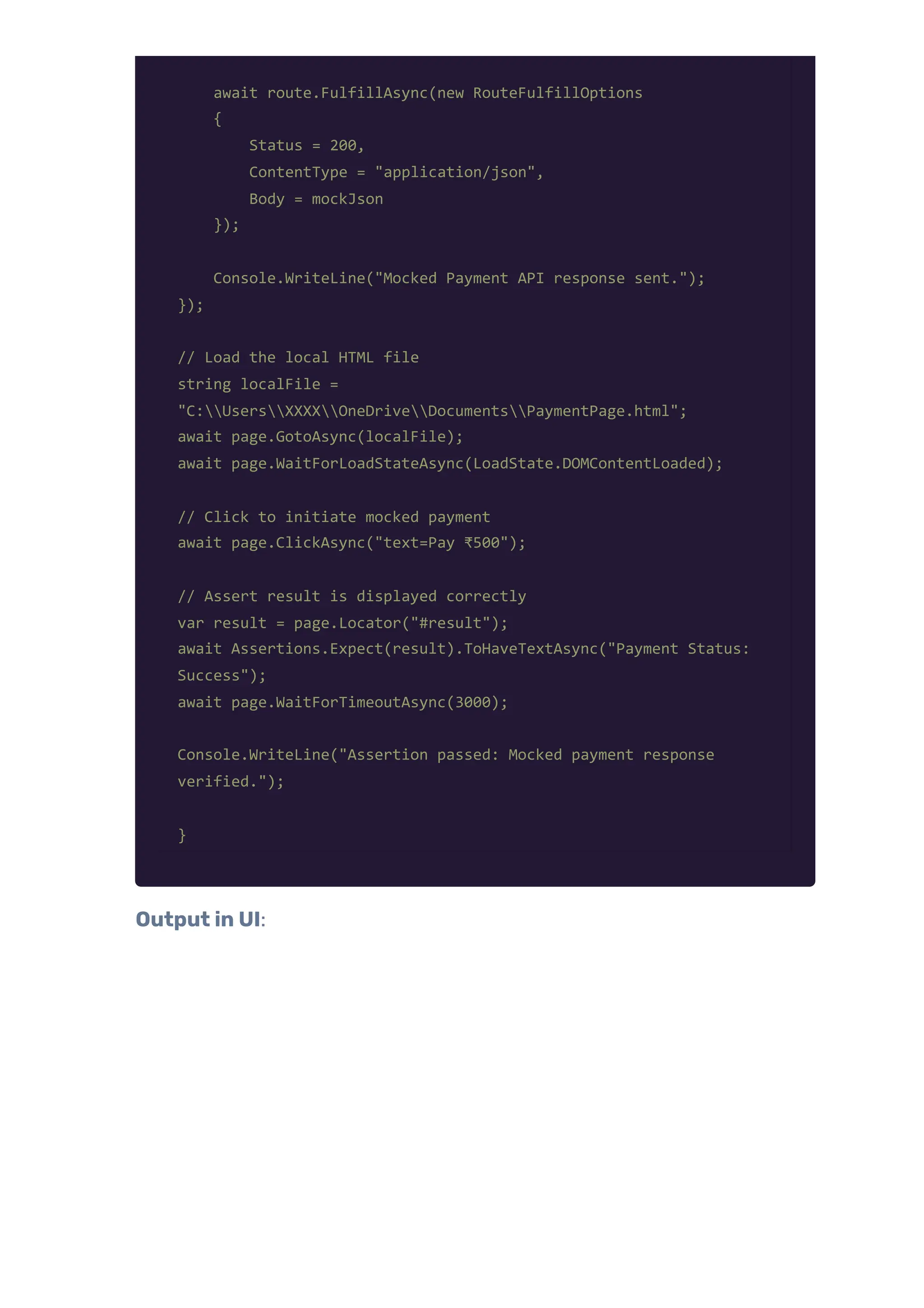
Step 2: C#Test Code – Mockingthe PaymentAPI [Test] public async Task ShouldMockPaymentGatewaySuccessfully() { using var playwright = await Playwright.CreateAsync(); await using var browser = await playwright.Chromium.LaunchAsync(new() { Headless = false }); var context = await browser.NewContextAsync(); var page = await context.NewPageAsync(); // Mock the third-party payment gateway API await context.RouteAsync("**/api/pay", async route => { var mockPaymentResponse = new { transactionId = "txn_mock_12345", status = "Success", amount = 500 }; var mockJson = JsonSerializer.Serialize(mockPaymentResponse);
await route.FulfillAsync(new RouteFulfillOptions { Status = 200, ContentType = "application/json", Body = mockJson }); Console.WriteLine("Mocked Payment API response sent."); }); // Load the local HTML file string localFile = "C:UsersXXXXOneDriveDocumentsPaymentPage.html"; await page.GotoAsync(localFile); await page.WaitForLoadStateAsync(LoadState.DOMContentLoaded); // Click to initiate mocked payment await page.ClickAsync("text=Pay ₹500"); // Assert result is displayed correctly var result = page.Locator("#result"); await Assertions.Expect(result).ToHaveTextAsync("Payment Status: Success"); await page.WaitForTimeoutAsync(3000); Console.WriteLine("Assertion passed: Mocked payment response verified."); } Output in UI:
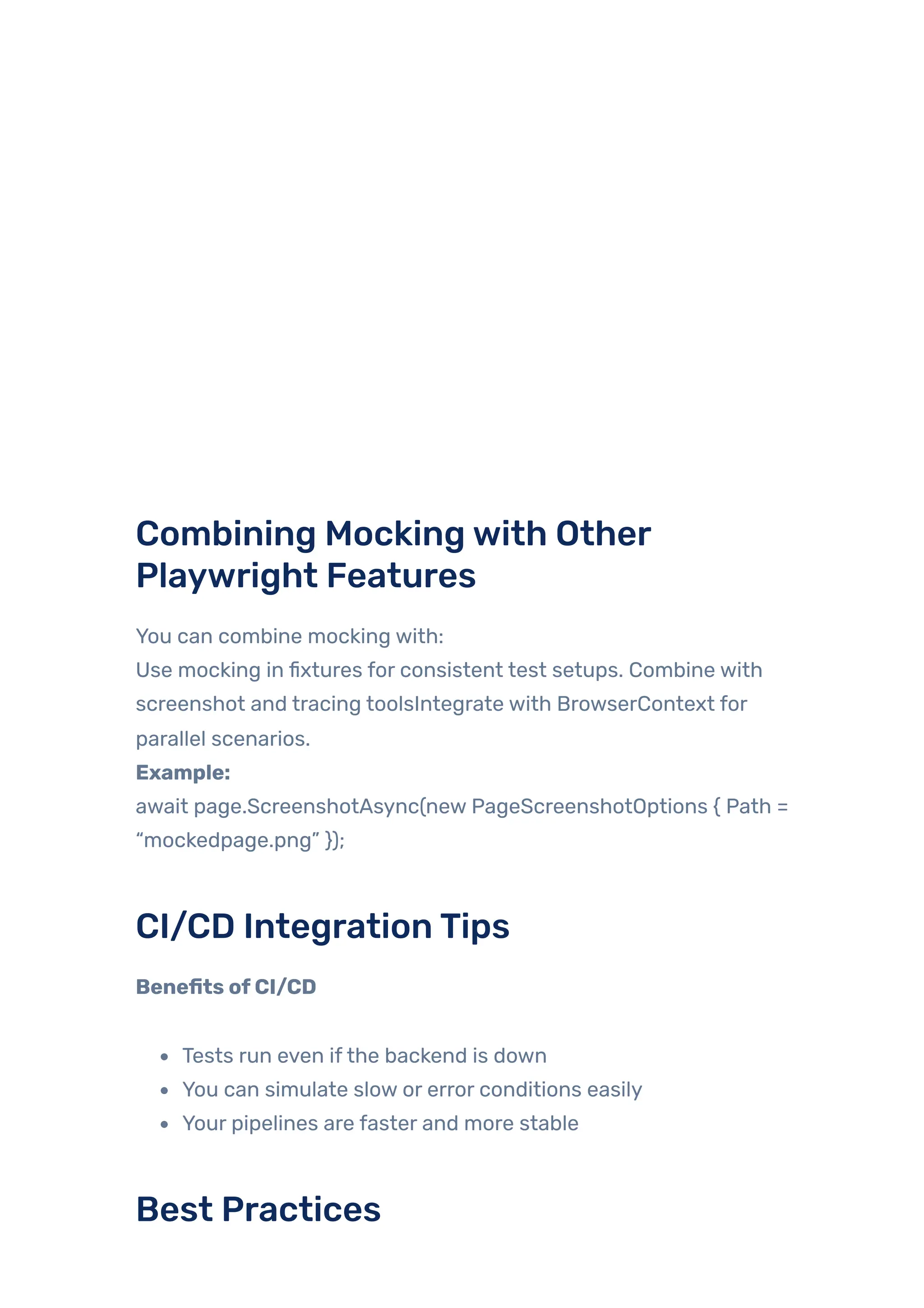
Combining Mockingwith Other Playwright Features You can combine mocking with: Use mocking in fixtures for consistent test setups. Combine with screenshot and tracing toolsIntegrate with BrowserContext for parallel scenarios. Example: await page.ScreenshotAsync(new PageScreenshotOptions { Path = “mockedpage.png” }); CI/CD IntegrationTips Benefits ofCI/CD Tests run even ifthe backend is down You can simulate slow or error conditions easily Your pipelines are faster and more stable Best Practices
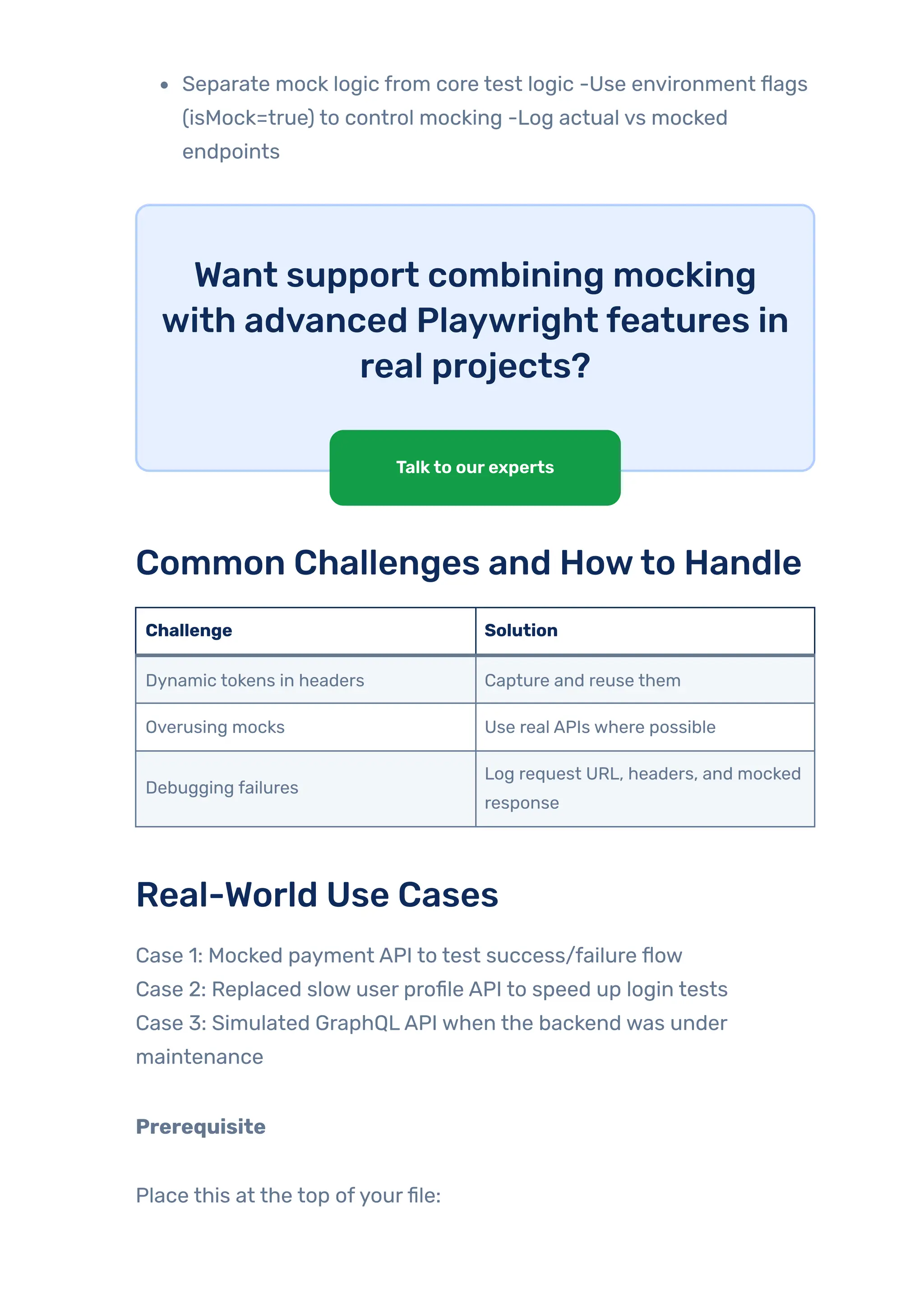
Separate mock logic from core test logic -Use environment flags (isMock=true) to control mocking -Log actual vs mocked endpoints Want support combining mocking with advanced Playwright features in real projects? Common Challenges and Howto Handle Challenge Solution Dynamic tokens in headers Capture and reuse them Overusing mocks Use real APIs where possible Debugging failures Log request URL, headers, and mocked response Real-World Use Cases Case 1: Mocked payment API to test success/failure flow Case 2: Replaced slow user profile API to speed up login tests Case 3: Simulated GraphQLAPI when the backend was under maintenance Prerequisite Place this at the top ofyourfile: Talkto ourexperts
using Microsoft.Playwright; using NUnit.Framework; using System.Text.Json; Here is the test class and test setup: [TestFixture] public class MockedApiTests { private IBrowser _browser; private IBrowserContext _context; private IPage _page; [SetUp] public async Task Setup() { var playwright = await Playwright.CreateAsync(); _browser = await playwright.Chromium.LaunchAsync(new() { Headless = false }); _context = await _browser.NewContextAsync(); _page = await _context.NewPageAsync(); } [TearDown] public async Task TearDown() { await _context.CloseAsync(); await _browser.CloseAsync(); } } Case 1: Mocked PaymentAPI – Success Flow We can’t hit the real payment gateway repeatedly, so we’ll use a mock
one. We’re testing a payment feature on a webpage, but instead of calling the real backend API, we will: Mock a fake successful response Intercept the payment request Verifythatthe UI updates correctlywith “Payment Successful!” This is useful when: The real payment API is not readyYou don’t want to make real transactions you want to test both success and failure flows Step 1: HTMLFile
What it does: It has a button, ‘Make Payment’ Step 2:Testwith Playwright: When clicked, it calls https://api.example.com/payment Based on the response status (success orfailure), it shows a message Step 3:Testwith Playwright:
Case 2: Replaced slowuserprofileAPI to speed up login tests Scenario: We have a login flowwhere the app fetches user profile details from /user/profile after clicking a login button. But: The actual API is slow and takes time to respond. We want to speed up the test by intercepting and mocking the API. GOAL: Intercept the ‘/user/profile’ request. Respond instantlywith fake data ({“name”: “QATester”}). Assert that the frontend shows: “Welcome, QATester”
Steps: Step 1: Create an HTMLfile called profile.html Step 2: PlaywrightTest – UserProfileApi_ShouldBeMockedQuickly
RouteAsync(“**/user/profile” – intercepts any request matching ‘/user/profile’ FulfillAsync(…) – Responds immediatelywith { “name”: “QA Tester” } GotoAsync(…) – Loads the local HTML page ClickAsync(…) – Simulates user clicking “Login” TextContentAsync(“#welcome”) – Captures the welcome message Assert.AreEqual(…) – Confirms the UI shows the expected result Output in UI:
Case 3: Simulated GraphQLAPIwhen the backendwas undermaintenance Scenario We are working with a frontend that sends a GraphQLquery to https://api.example.com/graphql to fetch user info. But sometimes, The backend is under maintenance. We still want to test the UIflow So, we mockthe GraphQLresponse Goal Intercept POST request to /graphql Identifythe query: { getUserInfo { id name } } Mock the response: { id: “123”, name: “QAAutomation Tester” } Verify UI shows: ID: 123, Name: QAAutomation Tester Steps: Step 1: Create an HTMLfile- graphql.html
Step 2: Create playwrighttest – MockedGraphQLApi_ShouldReturnStaticUserInfo
Output: WhyGraphQLMocking is Powerful Backend can be down or slow, you can still test the UI GraphQL has nested and structured responses easilyfaked
Useful when you’re working on frontend-first development Ensures CI/CD pipelines don’t break due to backend outages Best Practices forNetwork Interception and Mocking Use Specific Patterns: Avoid intercepting all requests unless necessary. Use specific URL patterns to match the target API. Clean-Up Routes: Ensure that routes are cleared afterthe test to avoid interference with othertests. Combine with Assertions: Always validate that the front end behaves as expected after intercepting or mocking. Simulate Realistic Scenarios: Mock responses that closely resemble real-world scenarios to ensure accurate test coverage. Log and Debug: Log network calls during development to understand application behavior and refine your mocks. Conclusion Network interception and mocking have become critical components of modern QA automation strategies. Playwright, particularlywith C#, streamlines their implementation, contributing to faster, more stable, and reliable test suites. Emerging trends, such as AI-powered mock servers, visual mock editors, and tools that convert live traffic into reusable mocks, are poised to redefine automation workflows. Incorporating these practices ensures significant time savings and improved efficiency in debugging and test execution across scalable automation frameworks. Originally Published By:- JigNect Technologies

Intercept & Mock API Requests in Playwright C# | Web Testing Examples

  • 1.
    In the worldofweb automationtesting, QualityAssurance (QA) professionals often encounterflakytests caused by slow network responses, unstable third-partyAPIs, or dynamic data. Wouldn’t it be great if QA could “control” what the API returns or even block unnecessary calls (like ads)? That’s exactlywhere Playwright’s networkinterception and mockingfeature shines. Playwright is a modern automation framework that supports multiple languages (C#, Java, JavaScript, Python). It gives us powerful tools to: Intercept network requests & responses Mock API data Intercept&MockAPIRequestsin PlaywrightC#RealExamplesforWeb Testers
  • 2.
    Simulate errors Control third-partydependencies In this blog, we’ll walk through everything – from setup to real-world usage – using Playwrightwith C#. Ifyou’re newtoAPItesting in Playwright orneed help setting up yourproject, checkoutthis blog: EnhancingAPIAutomation Testingwith Playwright andTypeScript: GETand POST Operations Explained. Table OfContent Importance of Intercepting or Mocking Network Calls in Test Automation Understanding Network Interception and Mocking What is Network Interception? What is Mocking? Difference Between Interception & Mocking Benefits of Mocking in Tests Howto Set Up Playwright with C# Capturing & Logging Network Requests and Responses Blocking Specific Requests (e.g., ads, tracking) What Is “Blocking Specific Requests”? Where and Why Do We Use This? Real-World Use Example Block requests to external domains like Google Fonts, Ads, etc. Real World Benefit: Redirecting Requests to a Different Endpoint Real-World Use Cases: Redirecting Requests Mocking Network Responses with Playwright Why Do We Mock Network Responses in Automation Testing?
  • 3.
    Dynamic Mock Data AdvancedMocking Techniques a. Simulating 500 Internal Server Error b. Simulating Timeout (No Response) Real-World Use Cases of Simulating Timeouts c. Mocking Third-PartyAPIs (e.g., payment gateways) Combining Mocking with Other Playwright Features CI/CD Integration Tips Best Practices Common Challenges and Howto Handle Real-World Use Cases Case 1: Mocked Payment API – Success Flow Case 2: Replaced slow user profile API to speed up login tests Case 3: Simulated GraphQLAPI when the backend was under maintenance Why GraphQL Mocking is Powerful Best Practices for Network Interception and Mocking Conclusion Importance ofIntercepting orMocking Network Calls inTestAutomation Intercepting and mocking network calls offer several benefits in test automation: 1. Isolate FrontendTesting: Test the frontend independently by mocking API responses without relying on the backend. 2. HandleThird-PartyDependencies: Simulate third-partyAPIs to avoid dependency on external systems. 3. Speed UpTests: Reduce test execution time by bypassing real network delays. 4. Simulate Edge Cases: Test scenarios like server errors (500),
  • 4.
    unauthorized access (401),or empty responses that may be hard to reproduce with a real backend. 5. Ensure Data Consistency: Provide predictable and consistent responses to avoid flakiness in tests caused by dynamic data. Understanding Network Interception and Mocking What is Network Interception? Networkinterception allows you to observe or manipulate HTTP requests and responses while running a test. For example, you can: Log everyAPI call our app makes Block some requests (e.g., ads or analytics) Modify requests on the fly What is Mocking? Mocking replaces the actual API response with fake (mocked) data. This is useful when: The backend is not ready You want to simulate errors or slow responses You want predictable data in yourtests Difference Between Interception & Mocking Feature Interception Mocking Observe Traffic ✅ ✅ Modify/Block ✅ ✅
  • 5.
    Feature Interception Mocking Fakeresponses ❌ ✅ Benefits ofMocking inTests Faster execution (no waiting for real APIs) Better stability (no flaky responses) Abilityto test rare scenarios (like 500 errors) Howto Set Up Playwrightwith C# Step 1: Create a .NETConsole Project dotnet new console -n PlaywrightNetworkDemo cd PlaywrightNetworkDemo Step 2:Add Playwright dotnet add package Microsoft.Playwright playwright install Step 3: Program.cs Structure Your Program.cs will contain all the code forthe examples. Here’s a base structure: using Microsoft.Playwright; using System.Text.Json; class Program { public static async Task Main() { using var playwright = await Playwright.CreateAsync(); var browser = await playwright.Chromium.LaunchAsync(new BrowserTypeLaunchOptions { Headless = false });
  • 6.
    var context =await browser.NewContextAsync(); var page = await context.NewPageAsync(); // Your code examples will go here } } Capturing & Logging Network Requests and Responses Steps: Step 1: Create a Simple HTMLPagethatTriggers anAPI Call
  • 7.
    Step 2: Savethisfilelocally Example path: C:UsersXXXXOneDriveDocumentsCapturingAndLoggingNetworkRequestA Step 3: Create a PlaywrightTest Projectwith C# Use Visual Studio and install the required NuGet packages: ‘Microsoft.Playwright’ ‘NUnit’ ‘Microsoft.NET.Test.Sdk’ ‘NUnit3TestAdapter’ Step 4:Write a Playwrighttestto openthe HTMLfile
  • 8.
    Use Visual Studioand install the required NuGet packages: ‘Microsoft.Playwright’ ‘NUnit’ ‘Microsoft.NET.Test.Sdk’ ‘NUnit3TestAdapter’ Step 5: Capture and log outgoing requests Step 6: Capture and log responses + add assertions
  • 9.
    Step 7: Clickthebutton onthe pagetotriggertheAPI call
  • 10.
    Step 8:Add awaitsothe response is captured properly Complete Classfile
  • 11.
  • 12.
    Blocking Specific Requests(e.g., ads, tracking) What Is “Blocking Specific Requests”? In Playwright, user can intercept network requests and decide
  • 13.
    whetherto: Allowthem, Modifythem, or Block themcompletely. Where and WhyDo We UseThis? Scenario: WhyWe Block Requests Reason Description Third-party ads ortrackers To speed up test execution and avoid flaky behavior. Simulating offline errors To test howthe app behaves when certain APIs fail. Isolating features To ensure that only specific APIs run and others don’t interfere. Cleanertest logs Avoid unnecessary requests, such as fonts and analytics. Example: The userwants to verifythat a “User Not Found” error is displayed correctlywhen the API fails. Instead of disabling the server, the user just blocks the request. Steps: Step 1: Create a simple HTMLpagethattriggers anAPI call Create a file CapturingAndLoggingNetworkRequestAndResponse.html with the following content:
  • 14.
    Step 2: PlaywrightTesttoBlocktheAPI request
  • 15.
    Step 3: LogtheRequests and Responses (Optional but Helpful) This helps debug what’s happening: Step 4: Openthe HTMLPage inthe Browser
  • 16.
    Step 5:Triggerthe NetworkRequestfromthePage Click the button that makes the fetch call:
  • 17.
    Step 6:Wait andAssertifBlockHappened Real-World Use Example Imagine testing a “Get User Details” feature, and the API is sometimes
  • 18.
    down. You wantto check: Does your UI show “User not found” properly? Does the error message appear? Do fallback mechanisms work? Using Playwright’s blocking: You simulate an API failure. You test your app’s resilience. Without needing actual server downtime. Block requests to external domains like Google Fonts,Ads, etc. An HTML page that loads some fonts or ads from external sources, like: Google Fonts (fonts.googleapis.com, fonts.gstatic.com) Analytics orAds (like doubleclick.net, googletagmanager.com) In test environments, we often want to: Block these to speed up testing Avoid network noise ortracking Simulate network failures Stepsto Blocking External Domains Step 1: Create an HTMLFile. Name is: BlockExternalRequestsExample.html
  • 19.
    Step 2: PlaywrightTest.-TestClass name is: BlockMultipleExternalRequests.cs [Test] public async Task BlockMultipleExternalRequests() { using var playwright = await Playwright.CreateAsync(); await using var browser = await playwright.Chromium.LaunchAsync(new() { Headless = false }); var context = await browser.NewContextAsync(); var page = await context.NewPageAsync(); // Flags to detect whether any blocked resource was responded to bool gotGoogleFontResponse = false; bool gotGoogleAdsResponse = false; bool gotJqueryCDNResponse = false; // Block Google Fonts await context.RouteAsync("**/fonts.googleapis.com/**", async route =>
  • 20.
    { Console.WriteLine("Blocking Google Fonts:" + route.Request.Url); await route.AbortAsync(); }); // Block Google Ads await context.RouteAsync("**/pagead2.googlesyndication.com/**", async route => { Console.WriteLine("Blocking Google Ads: " + route.Request.Url); await route.AbortAsync(); }); // Block jQuery CDN await context.RouteAsync("**/code.jquery.com/**", async route => { Console.WriteLine("Blocking jQuery CDN: " + route.Request.Url); await route.AbortAsync(); }); // Log responses (to detect if any blocked requests still responded) page.Response += async (_, response) => { if (response.Url.Contains("fonts.googleapis.com")) gotGoogleFontResponse = true; if (response.Url.Contains("pagead2.googlesyndication.com")) gotGoogleAdsResponse = true; if (response.Url.Contains("code.jquery.com")) gotJqueryCDNResponse = true; Console.WriteLine($"Received: {response.Status} - {response.Url}"); }; // Load your local HTML file string localPath = "C:UsersXXXXOneDriveDocumentsBlockExternalRequestsExampl e.html"; await page.GotoAsync(localPath);
  • 21.
    await page.WaitForTimeoutAsync(3000); //Wait for all requests // Assertions – none of these should have responded Assert.That(gotGoogleFontResponse, Is.False, "Google Fonts request was not blocked."); Assert.That(gotGoogleAdsResponse, Is.False, "Google Ads request was not blocked."); Assert.That(gotJqueryCDNResponse, Is.False, "jQuery CDN request was not blocked."); } Output:
  • 22.
    Real World Benefit: Noneed to load fonts/ads during test Tests become faster and more reliable Simulate CDN failure, third-party unavailability Redirecting Requests to a Different Endpoint Use: Suppose your HTML calls this API: https://jsonplaceholder.typicode.com/users/2 But you want to redirect it to: https://jsonplaceholder.typicode.com/users/1 Steps: Step 1: HTMLFile- Savethis as RedirectRequestDemo.html
  • 23.
    Step 2: PlaywrightC#Test Code – Redirecting Request [Test] public async Task RedirectUserRequestToAnotherEndpoint() { using var playwright = await Playwright.CreateAsync(); await using var browser = await playwright.Chromium.LaunchAsync(new() { Headless = false }); var context = await browser.NewContextAsync(); var page = await context.NewPageAsync(); // Flag to check if redirect happened bool redirected = false; // Intercept and redirect request await context.RouteAsync("**/users/2", async route => { var originalUrl = route.Request.Url; var redirectedUrl = "https://jsonplaceholder.typicode.com/users/1"; Console.WriteLine($"Redirecting: {originalUrl} {redirectedUrl}"); redirected = true; var headers = new Dictionary<string, string> (route.Request.Headers); await route.ContinueAsync(new RouteContinueOptions { Url = redirectedUrl, Method = route.Request.Method, Headers = headers }); });
  • 24.
    // Log response page.Response+= async (_, response) => { if (response.Url.Contains("/users/1")) { Console.WriteLine($"Final Response from redirected URL: {response.Url}"); var body = await response.TextAsync(); Console.WriteLine($"Body: {body}"); } }; // Load the HTML page string localPath = "C:UsersharshOneDriveDocumentsRedirectRequestDemo.html"; await page.GotoAsync(localPath); await page.ClickAsync("text=Fetch User Data"); await page.WaitForTimeoutAsync(3000); // Wait for API to resolve // Assert Assert.That(redirected, Is.True, "The request was not redirected."); } Output:
  • 25.
    Real-World Use Cases:Redirecting Requests Scenario WhyRedirect Requests Mocking live API Replace real endpoints with mock data in staging ortesting environments Bypassing failures Ifthe original API is down or slow, redirect to a backup orfallback endpoint Localization Redirect real API calls to modified or altered endpoints to test different responses Mask sensitive data Redirect endpoints that return PII to safe mock APIs during demo or public access Local development Redirect production API to local mock serverto avoid network calls during dev Avoid rate limits Redirect frequently used public APIs to local or cached copies to prevent throttling A/B testing setup Redirect some API calls to alternate test endpoints to simulate different
  • 26.
    Scenario WhyRedirect Requests userflows Testingvariations Redirect real API calls to modified or altered endpoints to test different responses Mocking Network Responseswith Playwright WhyDo We Mock Network Responses in AutomationTesting? Reason Explanation Avoid real server dependency Ifthe real API is down, slow, or under development, mocking allows you to test the UI independently. Faster, more stable tests Mocked responses return instantly no network delays, no timeouts, no flakiness. Test edge cases easily The user can simulate rare cases like 500 errors, empty data, or specific payloads without real server help. Bypass rate limits / auth Users can mock third-partyAPIs (e.g., Google, Stripe) and avoid hitting actual limits or login flows. Simulate data variations Want to test how UI behaves for a user with no email? Or a userwith 10K orders? Just mock it. Protect sensitive data Ifthe API returns private or real customer data, mocking replaces it with safe dummy data. The user can run tests without internet
  • 27.
    Reason Explanation Offline/local testingor backend environments onlyfrontend + mocks required. Controlled, repeatable tests Users always knowwhat response will come no randomness, no surprises. Steps: The API endpoint, which we will mock, is: https://jsonplaceholder.typicode.com/users/2 And, instead of an actual response, we will inject: { "id": 2, "name": "Mocked User", "email": "mock@demo.com" } Step 1: Create a Simple HTMLFile (e.g., mockDemo.html) Save this in system (e.g., in Documents):
  • 28.
    Step 2: CreateaTest Class –VerifyMockedUserDataAppearsInUI [Test] public async Task VerifyMockedUserDataAppearsInUI() { using var playwright = await Playwright.CreateAsync(); await using var browser = await playwright.Chromium.LaunchAsync(new() { Headless = false }); var context = await browser.NewContextAsync(); var page = await context.NewPageAsync(); // Step 1: Intercept and mock the API response await context.RouteAsync("**/users/2", async route => { var mockedUser = new { id = 2, name = "Mocked User", email = "mock@demo.com" }; string mockedJson = JsonSerializer.Serialize(mockedUser); await route.FulfillAsync(new RouteFulfillOptions { Status = 200, ContentType = "application/json", Body = mockedJson }); Console.WriteLine("Sent mocked response."); });
  • 29.
    // Step 2:Load the local HTML file string localFilePath = "C:UsersXXXXOneDriveDocumentsMockUserPage.html"; await page.GotoAsync("file://" + localFilePath); await page.WaitForLoadStateAsync(LoadState.DOMContentLoaded); // Step 3: Trigger the fetch await page.ClickAsync("text=Fetch User Data"); // Step 4: Wait for the result to appear and verify it var result = page.Locator("#result"); await Assertions.Expect(result).ToHaveTextAsync("Mocked User: Mocked User"); Console.WriteLine("Assertion passed. UI shows mocked response."); } Output UI:
  • 30.
    Dynamic Mock Data Wecan also use Faker or static methods to generate runtime mock data. var randomId = new Random().Next(1000, 9999); var mockData = new { id = randomId, message = “Hello from mock!” }; Advanced MockingTechniques a. Simulating 500 Internal ServerError This is useful when you want to test howyourfrontend handles serverfailures like internal errors, service crashes, etc. Scenario Whysimulate a 500 error Backend is down See ifthe frontend shows a user- friendly message or a retry option Validate error-handling code Ensure the app doesn’t crash or misbehave Testing fallback logic Triggerfallback UI or alternative flows Negative testing in CI Confirm alert/logging/reporting systems work correctly Steps: Step 1: Create an HTMLfile inthe documentsfolder. – ErrorHandlingTest.html
  • 31.
    Step 2: C#PlaywrightTest – Simulate 500 Error [Test] public async Task ShouldDisplayErrorMessageOn500Error() { using var playwright = await Playwright.CreateAsync(); await using var browser = await playwright.Chromium.LaunchAsync(new() { Headless = false }); var context = await browser.NewContextAsync(); var page = await context.NewPageAsync(); // Mock 500 Internal Server Error for /users/2 await context.RouteAsync("**/users/2", async route => { await route.FulfillAsync(new RouteFulfillOptions {
  • 32.
    Status = 500, ContentType= "application/json", Body = "{"error": "Internal Server Error"}" }); Console.WriteLine("Simulated 500 response for /users/2"); }); // Load local HTML file string filePath = Path.Combine(Environment.GetFolderPath(Environment.SpecialFolder.M yDocuments), "ErrorHandlingTest.html"); await page.GotoAsync("file://" + filePath); await page.WaitForLoadStateAsync(LoadState.DOMContentLoaded); // Trigger fetch await page.ClickAsync("text=Fetch User Data"); // Assert error message is displayed var resultLocator = page.Locator("#result"); await Assertions.Expect(resultLocator).ToHaveTextAsync("Failed to load data"); await page.WaitForTimeoutAsync(3000); // Optional visual pause for demo Console.WriteLine("Assertion passed: UI displayed fallback message."); } Notes: This does not hit the real server; it intercepts and mocks a 500 response. We can simulate other statuses like 403, 404, 503, the same way. Always test ourfrontend UI behavior underfailure conditions for reliability. Output inVisual Studio:
  • 33.
  • 34.
    b. SimulatingTimeout (NoResponse) This test helps us test how ourfrontend behaves when a request hangs and never completes. Real-World Use Cases ofSimulatingTimeouts Scenario Whysimulate it Slow backend Test loader/spinner or retry logic No response from the server Validate the timeout error message and error handling in the UI Frontend stability under load Confirm the app doesn’t freeze or behave unexpectedly Steps: Step 1: Create an HTMLfile –TimeoutSimulation.html
  • 35.
    Step 2: Playwright+ C#Test: SimulateTimeout [Test] public async Task ShouldHandleTimeoutGracefully() { using var playwright = await Playwright.CreateAsync(); await using var browser = await playwright.Chromium.LaunchAsync(new() { Headless = false }); var context = await browser.NewContextAsync(); var page = await context.NewPageAsync(); // Simulate hanging request (timeout) await context.RouteAsync("**/users/2", async route => { Console.WriteLine("Simulating no response..."); await Task.Delay(10000); // Hang for 10 seconds }); string localPath = "C:UsersharshOneDriveDocumentsTimeoutSimulation.html"; await page.GotoAsync("file://" + localPath); await page.WaitForLoadStateAsync(LoadState.DOMContentLoaded); await page.ClickAsync("text=Fetch User"); // Wait for frontend timeout and UI update await page.WaitForTimeoutAsync(6000); // Assertion
  • 36.
    var resultLocator =page.Locator("#result"); await Assertions.Expect(resultLocator).ToHaveTextAsync("Request Timed Out"); Console.WriteLine("Timeout was correctly handled in the UI."); } Output in UI: Output inVS:
  • 37.
    c. MockingThird-PartyAPIs (e.g., paymentgateways) Mocking third-partyAPIs like payment gateways (e.g., Stripe, Razorpay, PayPal) is essential fortesting without hitting the real service, incurring costs, or dealing with delays or side effects (e.g., sending money). Steps: Step 1: HTML(PaymentPage.html)
  • 38.
    Step 2: C#TestCode – Mockingthe PaymentAPI [Test] public async Task ShouldMockPaymentGatewaySuccessfully() { using var playwright = await Playwright.CreateAsync(); await using var browser = await playwright.Chromium.LaunchAsync(new() { Headless = false }); var context = await browser.NewContextAsync(); var page = await context.NewPageAsync(); // Mock the third-party payment gateway API await context.RouteAsync("**/api/pay", async route => { var mockPaymentResponse = new { transactionId = "txn_mock_12345", status = "Success", amount = 500 }; var mockJson = JsonSerializer.Serialize(mockPaymentResponse);
  • 39.
    await route.FulfillAsync(new RouteFulfillOptions { Status= 200, ContentType = "application/json", Body = mockJson }); Console.WriteLine("Mocked Payment API response sent."); }); // Load the local HTML file string localFile = "C:UsersXXXXOneDriveDocumentsPaymentPage.html"; await page.GotoAsync(localFile); await page.WaitForLoadStateAsync(LoadState.DOMContentLoaded); // Click to initiate mocked payment await page.ClickAsync("text=Pay ₹500"); // Assert result is displayed correctly var result = page.Locator("#result"); await Assertions.Expect(result).ToHaveTextAsync("Payment Status: Success"); await page.WaitForTimeoutAsync(3000); Console.WriteLine("Assertion passed: Mocked payment response verified."); } Output in UI:
  • 40.
    Combining Mockingwith Other PlaywrightFeatures You can combine mocking with: Use mocking in fixtures for consistent test setups. Combine with screenshot and tracing toolsIntegrate with BrowserContext for parallel scenarios. Example: await page.ScreenshotAsync(new PageScreenshotOptions { Path = “mockedpage.png” }); CI/CD IntegrationTips Benefits ofCI/CD Tests run even ifthe backend is down You can simulate slow or error conditions easily Your pipelines are faster and more stable Best Practices
  • 41.
    Separate mock logicfrom core test logic -Use environment flags (isMock=true) to control mocking -Log actual vs mocked endpoints Want support combining mocking with advanced Playwright features in real projects? Common Challenges and Howto Handle Challenge Solution Dynamic tokens in headers Capture and reuse them Overusing mocks Use real APIs where possible Debugging failures Log request URL, headers, and mocked response Real-World Use Cases Case 1: Mocked payment API to test success/failure flow Case 2: Replaced slow user profile API to speed up login tests Case 3: Simulated GraphQLAPI when the backend was under maintenance Prerequisite Place this at the top ofyourfile: Talkto ourexperts
  • 42.
    using Microsoft.Playwright; using NUnit.Framework; usingSystem.Text.Json; Here is the test class and test setup: [TestFixture] public class MockedApiTests { private IBrowser _browser; private IBrowserContext _context; private IPage _page; [SetUp] public async Task Setup() { var playwright = await Playwright.CreateAsync(); _browser = await playwright.Chromium.LaunchAsync(new() { Headless = false }); _context = await _browser.NewContextAsync(); _page = await _context.NewPageAsync(); } [TearDown] public async Task TearDown() { await _context.CloseAsync(); await _browser.CloseAsync(); } } Case 1: Mocked PaymentAPI – Success Flow We can’t hit the real payment gateway repeatedly, so we’ll use a mock
  • 43.
    one. We’re testing apayment feature on a webpage, but instead of calling the real backend API, we will: Mock a fake successful response Intercept the payment request Verifythatthe UI updates correctlywith “Payment Successful!” This is useful when: The real payment API is not readyYou don’t want to make real transactions you want to test both success and failure flows Step 1: HTMLFile
  • 44.
    What it does: Ithas a button, ‘Make Payment’ Step 2:Testwith Playwright: When clicked, it calls https://api.example.com/payment Based on the response status (success orfailure), it shows a message Step 3:Testwith Playwright:
  • 45.
    Case 2: ReplacedslowuserprofileAPI to speed up login tests Scenario: We have a login flowwhere the app fetches user profile details from /user/profile after clicking a login button. But: The actual API is slow and takes time to respond. We want to speed up the test by intercepting and mocking the API. GOAL: Intercept the ‘/user/profile’ request. Respond instantlywith fake data ({“name”: “QATester”}). Assert that the frontend shows: “Welcome, QATester”
  • 46.
    Steps: Step 1: Createan HTMLfile called profile.html Step 2: PlaywrightTest – UserProfileApi_ShouldBeMockedQuickly
  • 47.
    RouteAsync(“**/user/profile” – interceptsany request matching ‘/user/profile’ FulfillAsync(…) – Responds immediatelywith { “name”: “QA Tester” } GotoAsync(…) – Loads the local HTML page ClickAsync(…) – Simulates user clicking “Login” TextContentAsync(“#welcome”) – Captures the welcome message Assert.AreEqual(…) – Confirms the UI shows the expected result Output in UI:
  • 48.
    Case 3: SimulatedGraphQLAPIwhen the backendwas undermaintenance Scenario We are working with a frontend that sends a GraphQLquery to https://api.example.com/graphql to fetch user info. But sometimes, The backend is under maintenance. We still want to test the UIflow So, we mockthe GraphQLresponse Goal Intercept POST request to /graphql Identifythe query: { getUserInfo { id name } } Mock the response: { id: “123”, name: “QAAutomation Tester” } Verify UI shows: ID: 123, Name: QAAutomation Tester Steps: Step 1: Create an HTMLfile- graphql.html
  • 49.
    Step 2: Createplaywrighttest – MockedGraphQLApi_ShouldReturnStaticUserInfo
  • 50.
    Output: WhyGraphQLMocking is Powerful Backendcan be down or slow, you can still test the UI GraphQL has nested and structured responses easilyfaked
  • 51.
    Useful when you’reworking on frontend-first development Ensures CI/CD pipelines don’t break due to backend outages Best Practices forNetwork Interception and Mocking Use Specific Patterns: Avoid intercepting all requests unless necessary. Use specific URL patterns to match the target API. Clean-Up Routes: Ensure that routes are cleared afterthe test to avoid interference with othertests. Combine with Assertions: Always validate that the front end behaves as expected after intercepting or mocking. Simulate Realistic Scenarios: Mock responses that closely resemble real-world scenarios to ensure accurate test coverage. Log and Debug: Log network calls during development to understand application behavior and refine your mocks. Conclusion Network interception and mocking have become critical components of modern QA automation strategies. Playwright, particularlywith C#, streamlines their implementation, contributing to faster, more stable, and reliable test suites. Emerging trends, such as AI-powered mock servers, visual mock editors, and tools that convert live traffic into reusable mocks, are poised to redefine automation workflows. Incorporating these practices ensures significant time savings and improved efficiency in debugging and test execution across scalable automation frameworks. Originally Published By:- JigNect Technologies