BY SHIVANI GAUTAM BCA DEPARTMENT 1
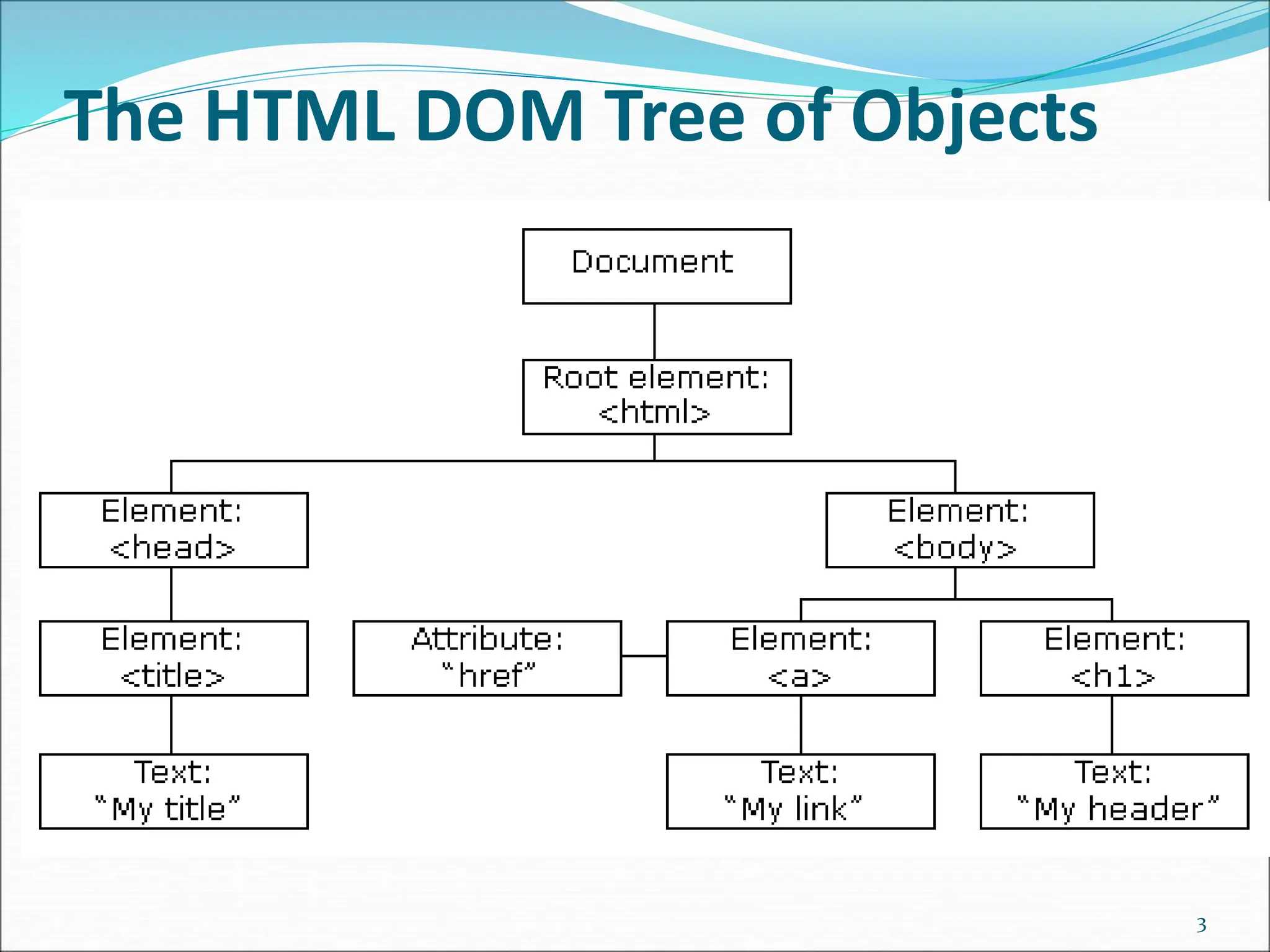
The HTML DOM (Document Object Model)  When a web page is loaded, the browser creates a Document Object Model of the page.  The HTML DOM model is constructed as a tree of Objects: 2
The HTML DOM Tree of Objects 3
With the object model, JavaScript gets all the power it needs to create dynamic HTML:  JavaScript can change all the HTML elements in the page  JavaScript can change all the HTML attributes in the page  JavaScript can change all the CSS styles in the page  JavaScript can remove existing HTML elements and attributes  JavaScript can add new HTML elements and attributes  JavaScript can react to all existing HTML events in the page  JavaScript can create new HTML events in the page 4
What is the DOM  The DOM is a W3C (World Wide Web Consortium) standard. The DOM defines a standard for accessing documents:  "The W3C Document Object Model (DOM) is a platform and language-neutral interface that allows programs and scripts to dynamically access and update the content, structure, and style of a document." 5
The W3C DOM standard is separated into 3 different parts:  Core DOM - standard model for all document types  XML DOM - standard model for XML documents  HTML DOM - standard model for HTML documents 6
 What is the HTML DOM?  The HTML DOM is a standard object model and programming interface for HTML. It defines:  The HTML elements as objects  The properties of all HTML elements  The methods to access all HTML elements  The events for all HTML elements 7
The DOM Programming Interface  The HTML DOM can be accessed with JavaScript (and with other programming languages).  In the DOM, all HTML elements are defined as objects.  The programming interface is the properties and methods of each object.  A property is a value that you can get or set (like changing the content of an HTML element).  A method is an action you can do (like add or deleting an HTML element). 8
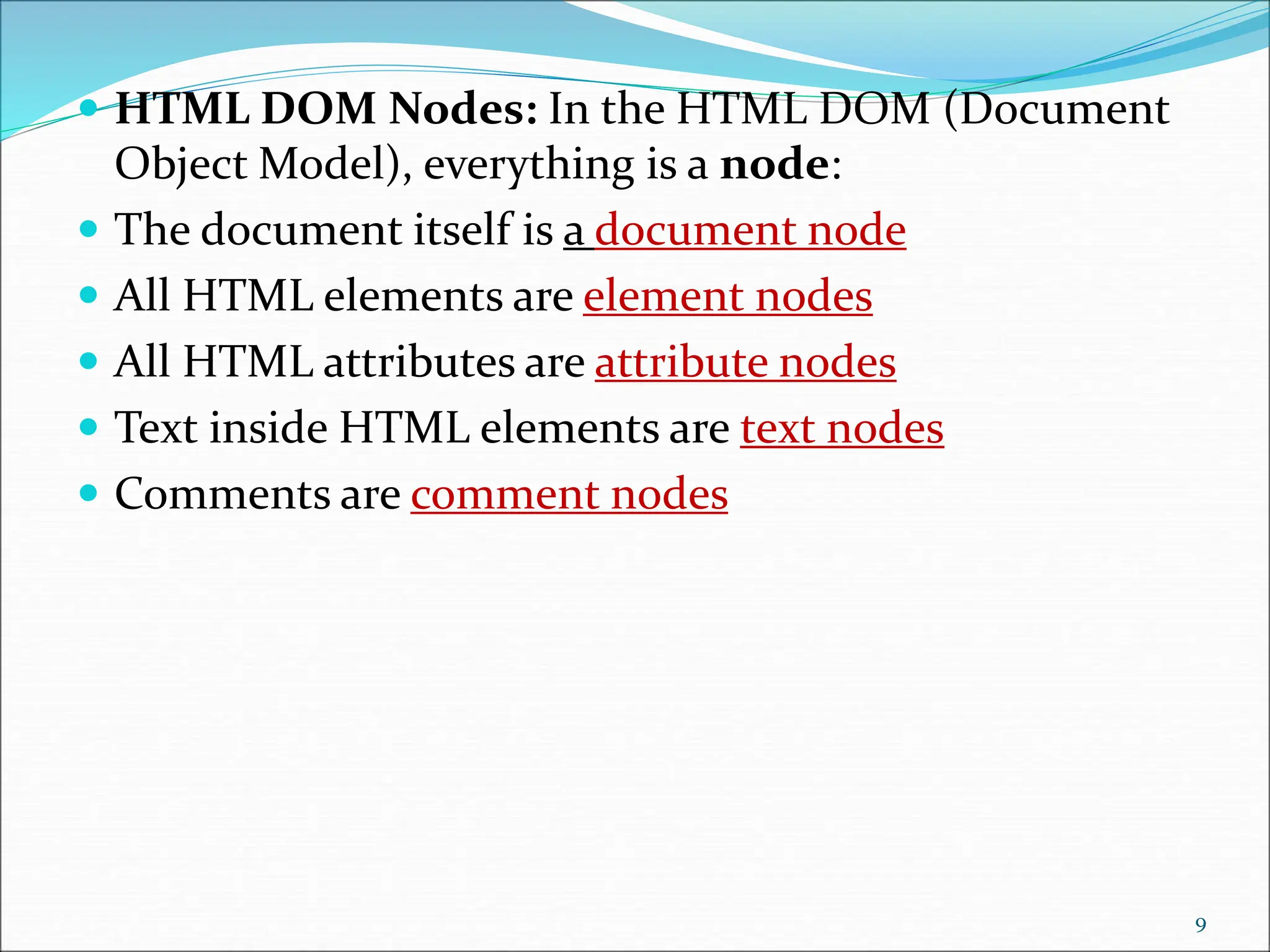
 HTML DOM Nodes: In the HTML DOM (Document Object Model), everything is a node:  The document itself is a document node  All HTML elements are element nodes  All HTML attributes are attribute nodes  Text inside HTML elements are text nodes  Comments are comment nodes 9
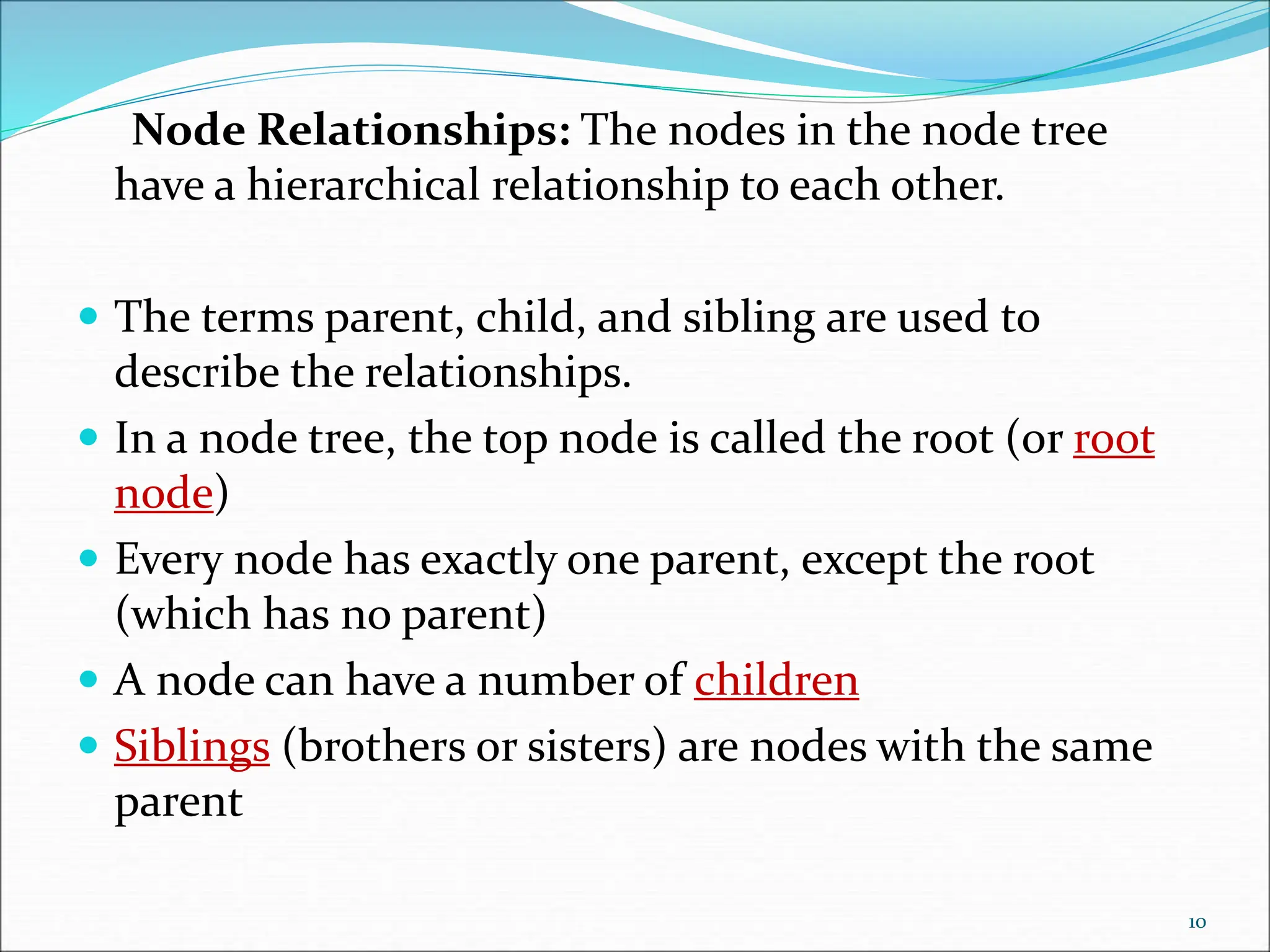
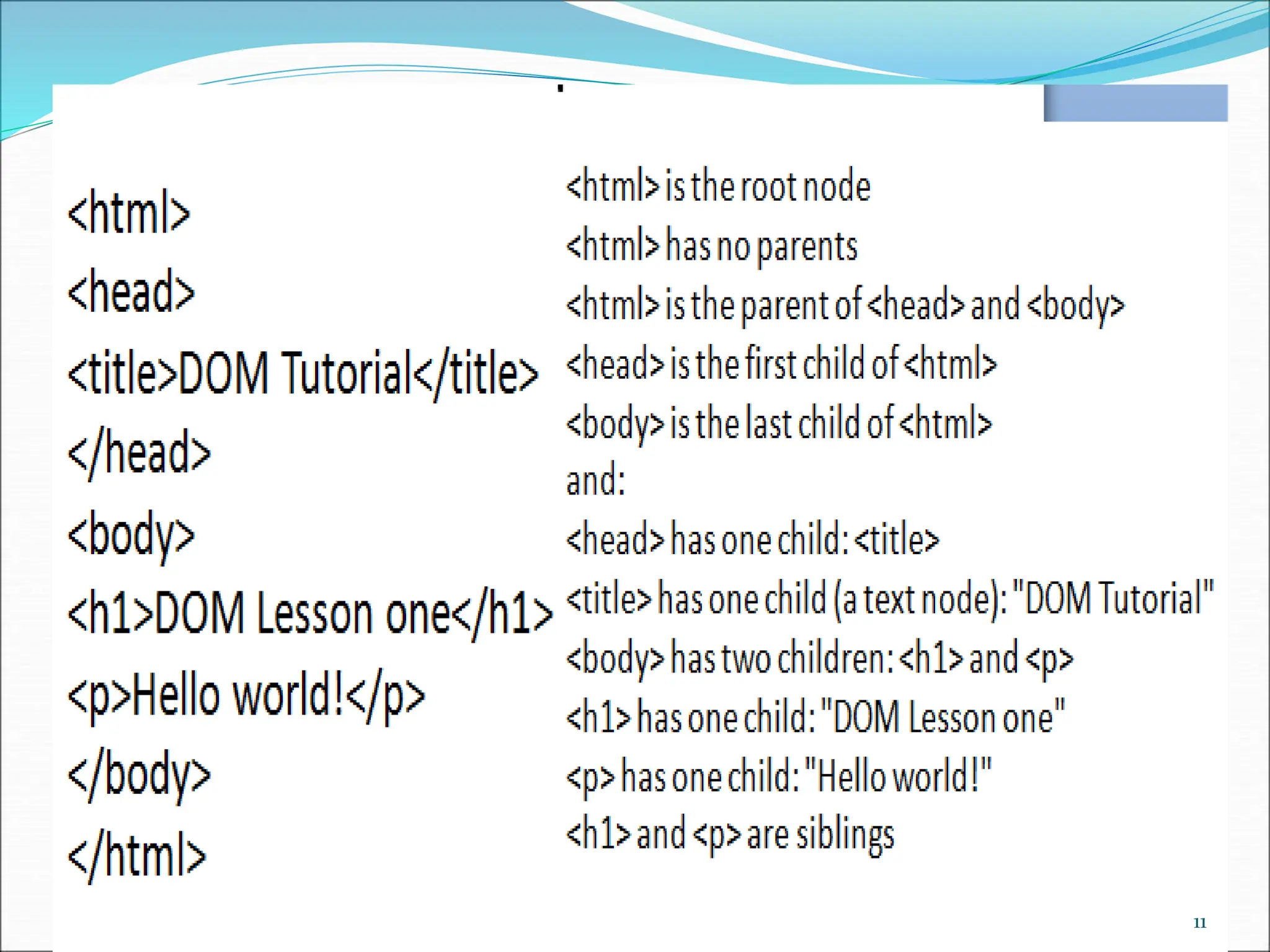
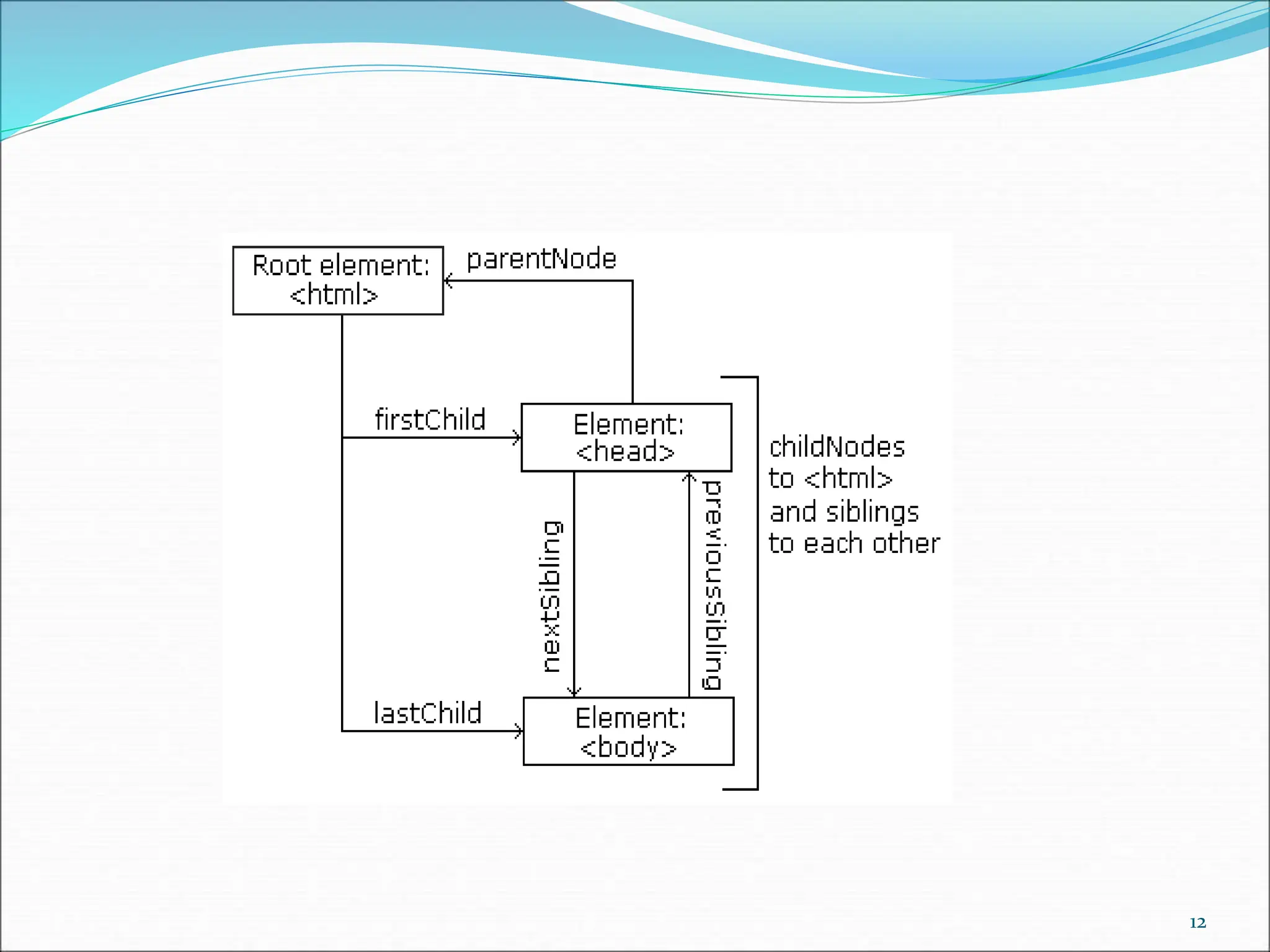
Node Relationships: The nodes in the node tree have a hierarchical relationship to each other.  The terms parent, child, and sibling are used to describe the relationships.  In a node tree, the top node is called the root (or root node)  Every node has exactly one parent, except the root (which has no parent)  A node can have a number of children  Siblings (brothers or sisters) are nodes with the same parent 10
11
12
What is an Event ?  JavaScript's interaction with HTML is handled through events that occur when the user or the browser manipulates a page.  When the page loads, it is called an event. When the user clicks a button, that click too is an event. Other examples include events like pressing any key, closing a window, resizing a window, etc.  Developers can use these events to execute JavaScript coded responses, which cause buttons to close windows, messages to be displayed to users, data to be validated, and virtually any other type of response imaginable.  Events are a part of the Document Object Model (DOM) Level 3 and every HTML element contains a set of events which can trigger JavaScript Code. 13
JavaScript Events  The change in the state of an object is known as an Event. In html, there are various events which represents that some activity is performed by the user or by the browser. When javascript code is included in HTML, js react over these events and allow the execution. This process of reacting over the events is called Event Handling. Thus, js handles the HTML events via Event Handlers.  For example, when a user clicks over the browser, add js code, which will execute the task to be performed on the event. 14
examples  1) onclick events: This is a mouse event and provokes any logic defined if the user clicks on the element it is bound to.  2) onkeyup event: This event is a keyboard event and executes instructions whenever a key is released after pressing.  3) onmouseover event: This event corresponds to hovering the mouse pointer over the element and its children, to which it is bound to. 15
examples  onmouseout event: Whenever the mouse cursor leaves the element which handles a mouseout event, a function associated with it is executed.  onload event: When an element is loaded completely, this event is evoked.  onfocus event: An element listing to this event executes instructions whenever it recieves focus.  onblur event: This event is evoked when an element loses focus. 16
JavaScript addEventListener()  The addEventListener() method is used to attach an event handler to a particular element. It does not override the existing event handlers. Events are said to be an essential part of the JavaScript. A web page responds according to the event that occurred. Events can be user-generated or generated by API's. An event listener is a JavaScript's procedure that waits for the occurrence of an event.  The addEventListener() method is an inbuilt function of JavaScript. We can add multiple event handlers to a particular element without overwriting the existing event handlers.  Syntax  element1.addEventListener(click, function1);  element1.addEventListener(click, function2);  element1.addEventListener(mouseover, function3);  Although it has three parameters, the parameters event and function are widely used. The third parameter is optional to define. The values of this function are defined as follows. 17
Parameter Values  event: It is a required parameter. It can be defined as a string that specifies the event's name.  Note: Do not use any prefix such as "on" with the parameter value. For example, Use "click" instead of using "onclick".  function: It is also a required parameter. It is a JavaScript function which responds to the event occur.  useCapture: It is an optional parameter. It is a Boolean type value that specifies whether the event is executed in the bubbling or capturing phase. Its possible values are true and false. When it is set to true, the event handler executes in the capturing phase. When it is set to false, the handler executes in the bubbling phase. Its default value is false.  Let's see some of the illustrations of using the addEventListener() method. 18
Event Bubbling or Event Capturing  Now, we understand the use of the third parameter of JavaScript's addEventListener(), i.e., useCapture.  In HTML DOM, Bubbling and Capturing are the two ways of event propagation. We can understand these ways by taking an example.  Suppose we have a div element and a paragraph element inside it, and we are applying the "click" event to both of them using the addEventListener() method. Now the question is on clicking the paragraph element, which element's click event is handled first.  So, in Bubbling, the event of paragraph element is handled first, and then the div element's event is handled. It means that in bubbling, the inner element's event is handled first, and then the outermost element's event will be handled.  In Capturing the event of div element is handled first, and then the paragraph element's event is handled. It means that in capturing the outer element's event is handled first, and then the innermost element's event will be handled.  addEventListener(event, function, useCapture);  We can specify the propagation using the useCapture parameter. When it is set to false (which is its default value), then the event uses bubbling propagation, and when it is set to true, there is the capturing propagation. 19
Methods of document object  We can access and change the contents of document by its methods.  The important methods of document object are as follows:  write("string")writes the given string on the doucment.writeln("string")writes the given string on the doucment with newline character at the end.getElementById()returns the element having the given id value.getElementsByName()returns all the elements having the given name value.getElementsByTagName()returns all the elements having the given tag name.getElementsByClassName()returns all the elements having the given class name. 20
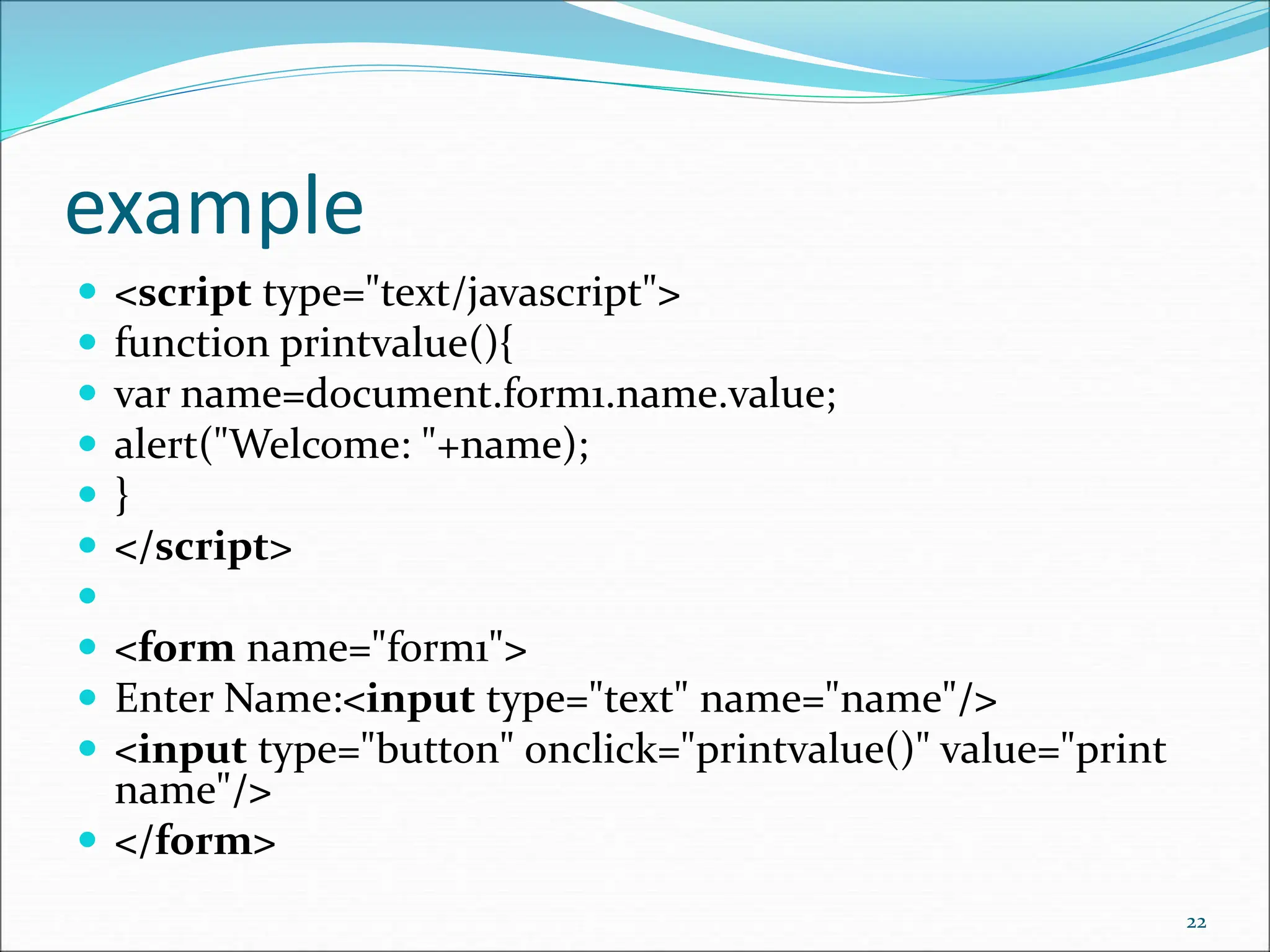
Accessing field value by document object  In this example, we are going to get the value of input text by user. Here, we are using document.form1.name.value to get the value of name field.  Here, document is the root element that represents the html document.  form1 is the name of the form.  name is the attribute name of the input text.  value is the property, that returns the value of the input text.  Let's see the simple example of document object that prints name with welcome message. 21
example  <script type="text/javascript">  function printvalue(){  var name=document.form1.name.value;  alert("Welcome: "+name);  }  </script>   <form name="form1">  Enter Name:<input type="text" name="name"/>  <input type="button" onclick="printvalue()" value="print name"/>  </form> 22
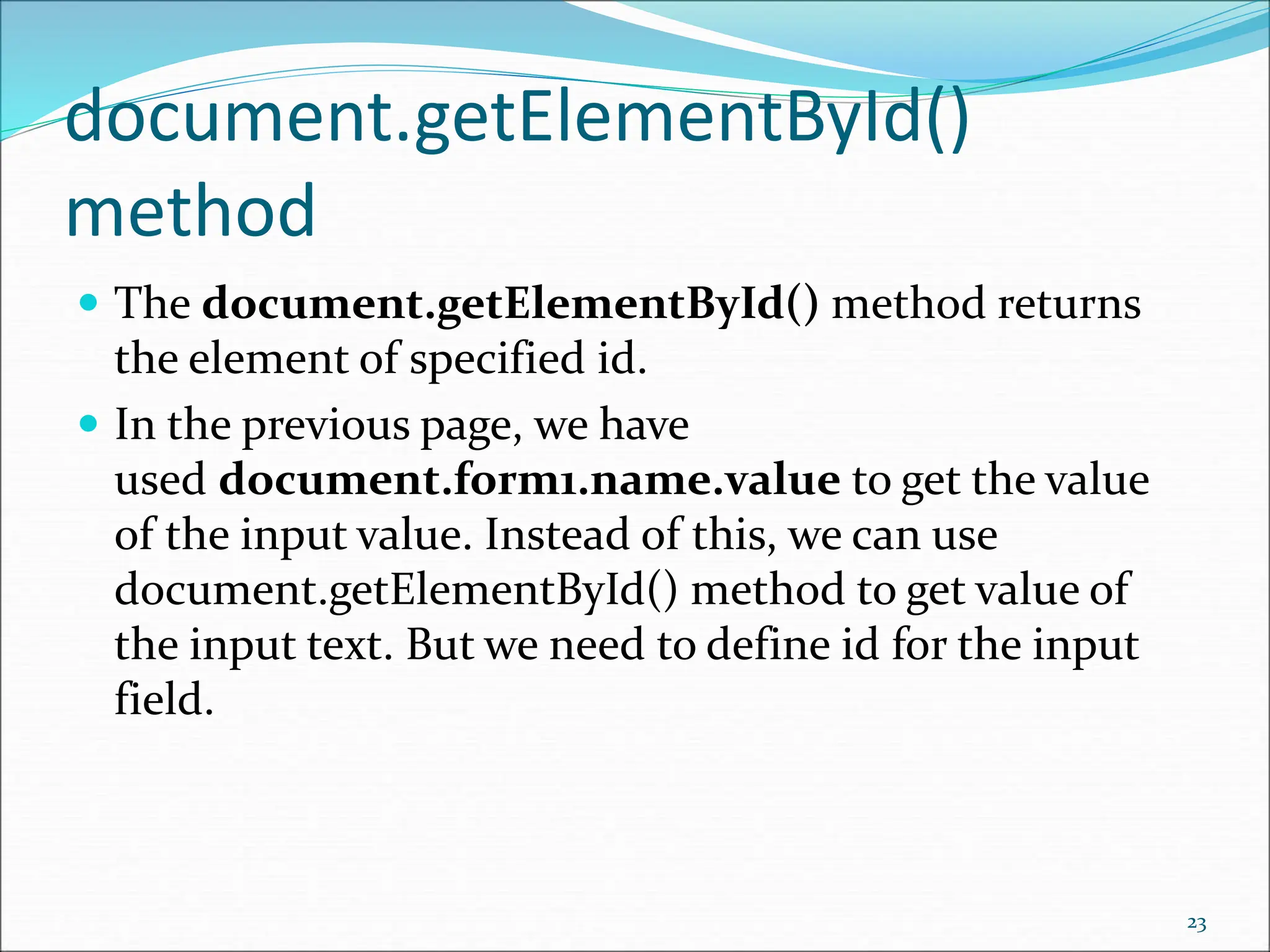
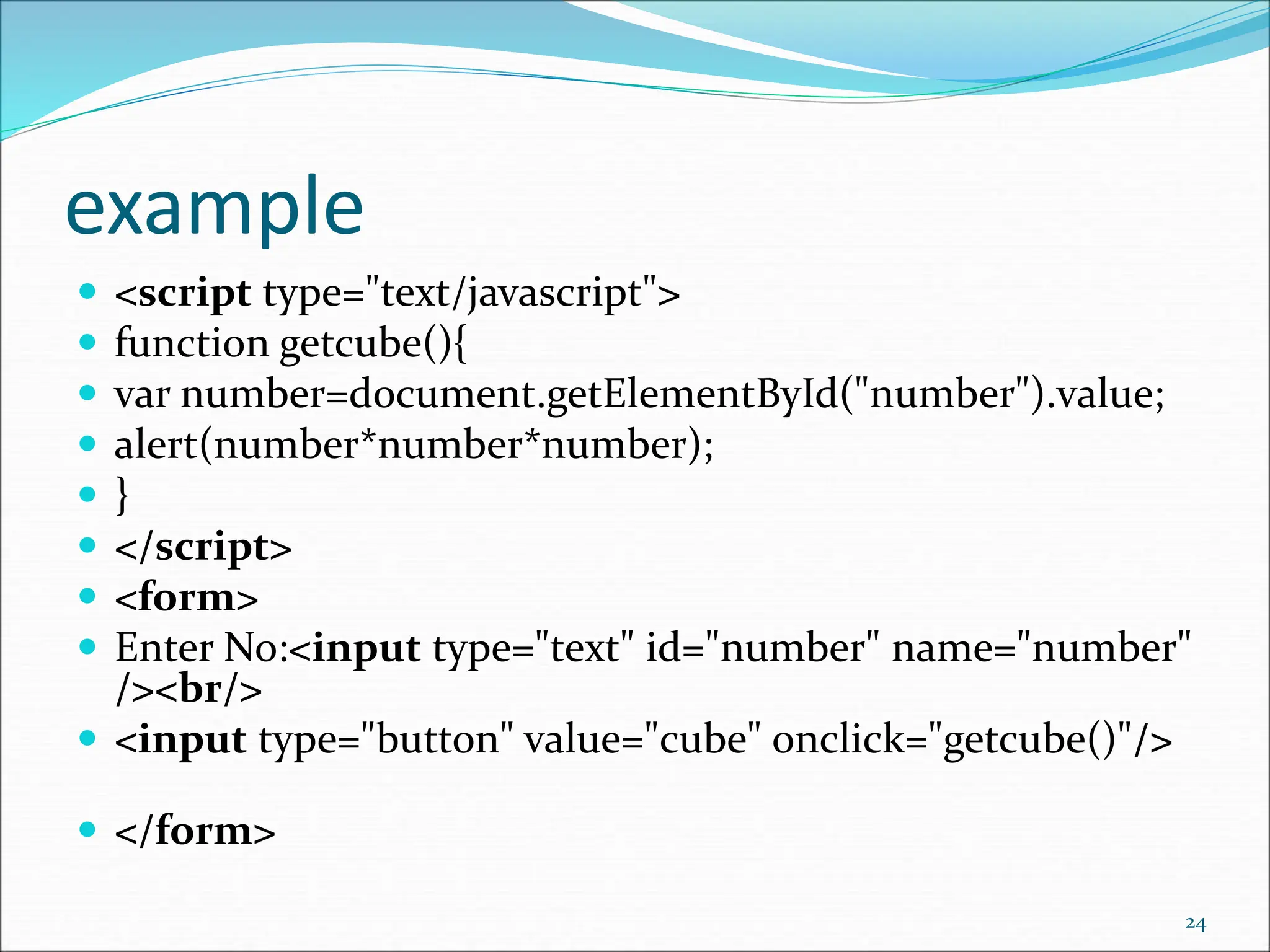
document.getElementById() method  The document.getElementById() method returns the element of specified id.  In the previous page, we have used document.form1.name.value to get the value of the input value. Instead of this, we can use document.getElementById() method to get value of the input text. But we need to define id for the input field. 23
example  <script type="text/javascript">  function getcube(){  var number=document.getElementById("number").value;  alert(number*number*number);  }  </script>  <form>  Enter No:<input type="text" id="number" name="number" /><br/>  <input type="button" value="cube" onclick="getcube()"/>  </form> 24
document.getElementsByName() method  The document.getElementsByName() method returns all the element of specified name.  The syntax of the getElementsByName() method is given below: 25
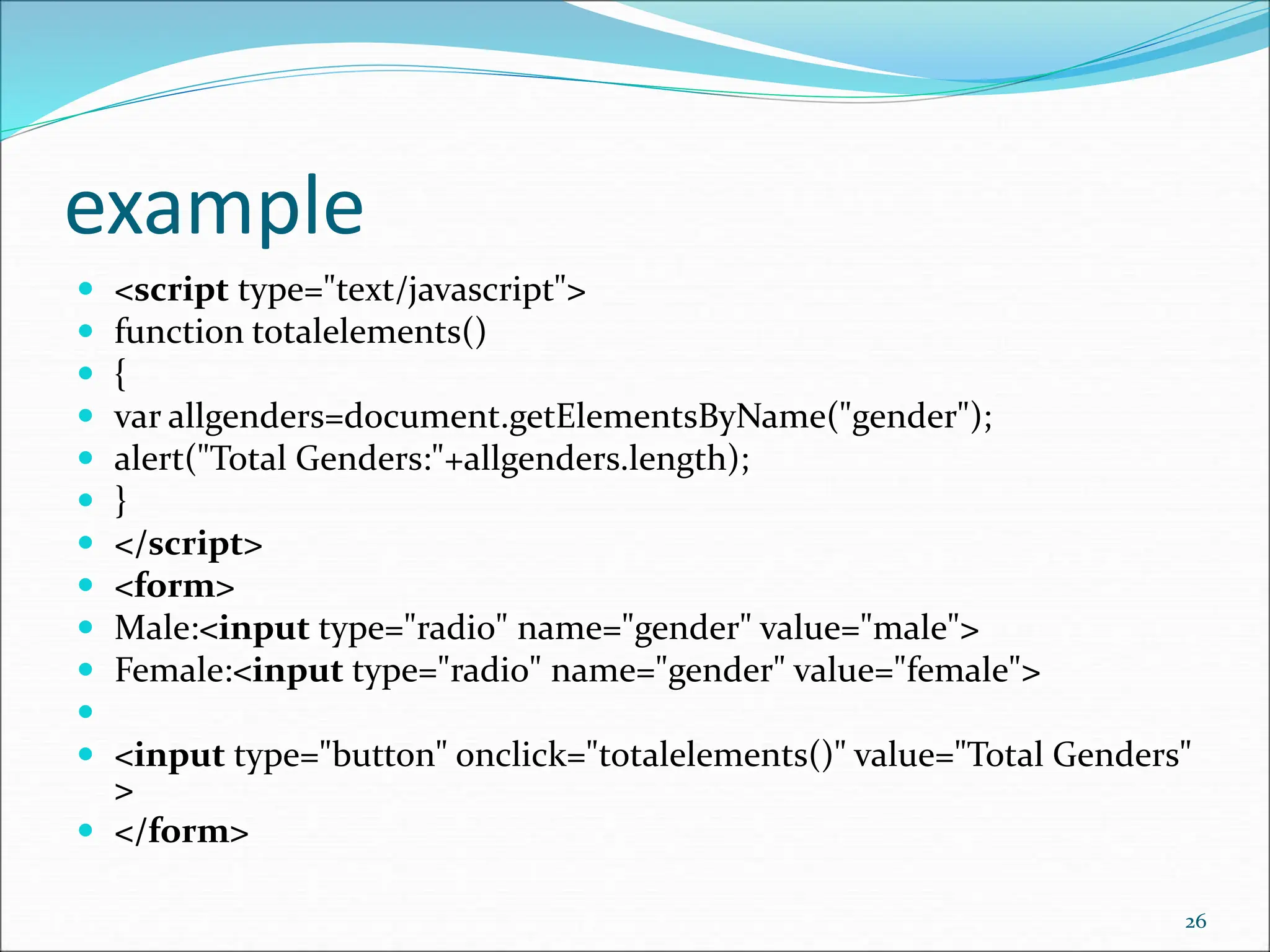
example  <script type="text/javascript">  function totalelements()  {  var allgenders=document.getElementsByName("gender");  alert("Total Genders:"+allgenders.length);  }  </script>  <form>  Male:<input type="radio" name="gender" value="male">  Female:<input type="radio" name="gender" value="female">   <input type="button" onclick="totalelements()" value="Total Genders" >  </form> 26
document.getElementsByTagName () method  The document.getElementsByTagName() method returns all the element of specified tag name.  The syntax of the getElementsByTagName() method is given below: 27
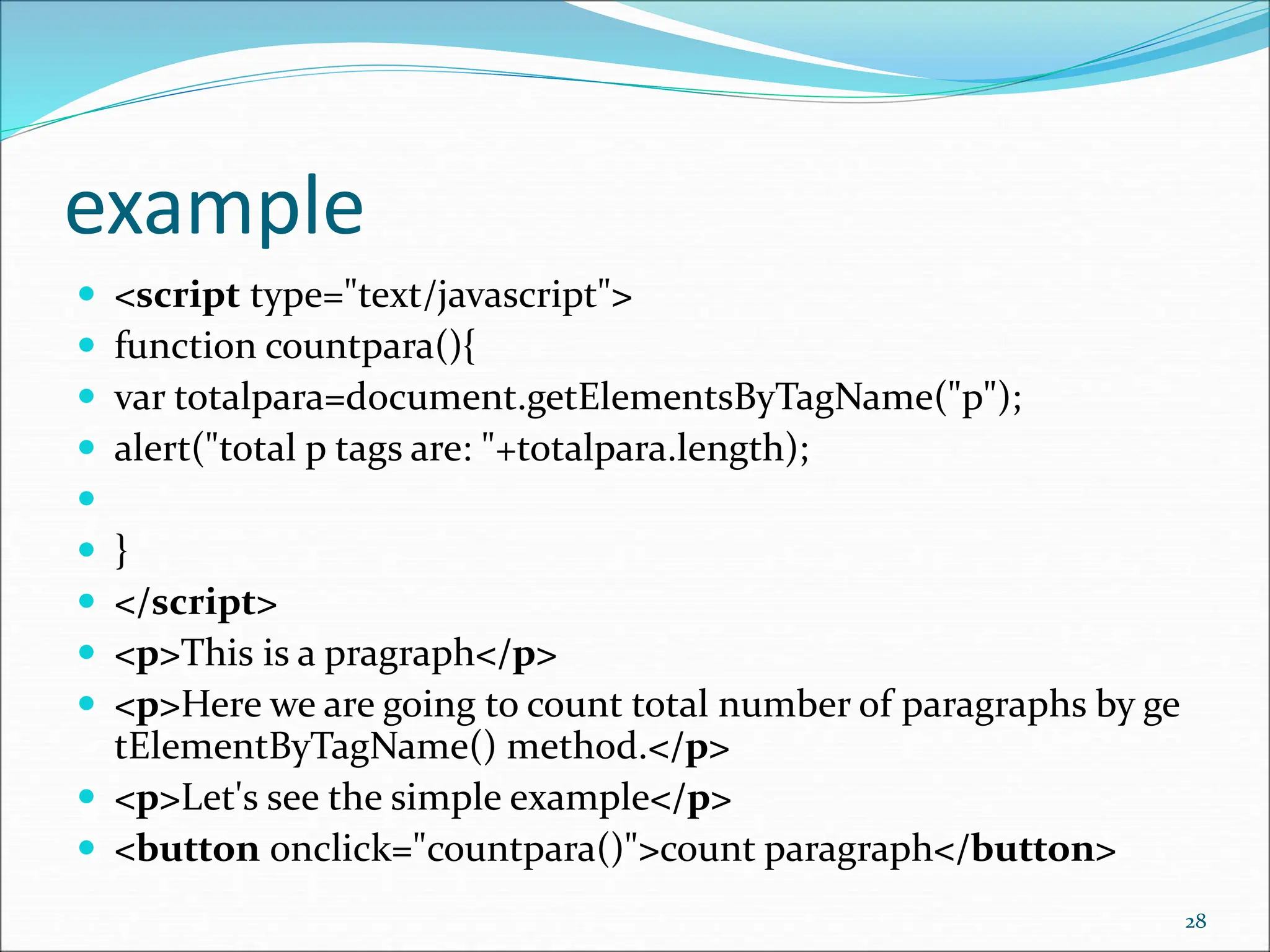
example  <script type="text/javascript">  function countpara(){  var totalpara=document.getElementsByTagName("p");  alert("total p tags are: "+totalpara.length);   }  </script>  <p>This is a pragraph</p>  <p>Here we are going to count total number of paragraphs by ge tElementByTagName() method.</p>  <p>Let's see the simple example</p>  <button onclick="countpara()">count paragraph</button> 28
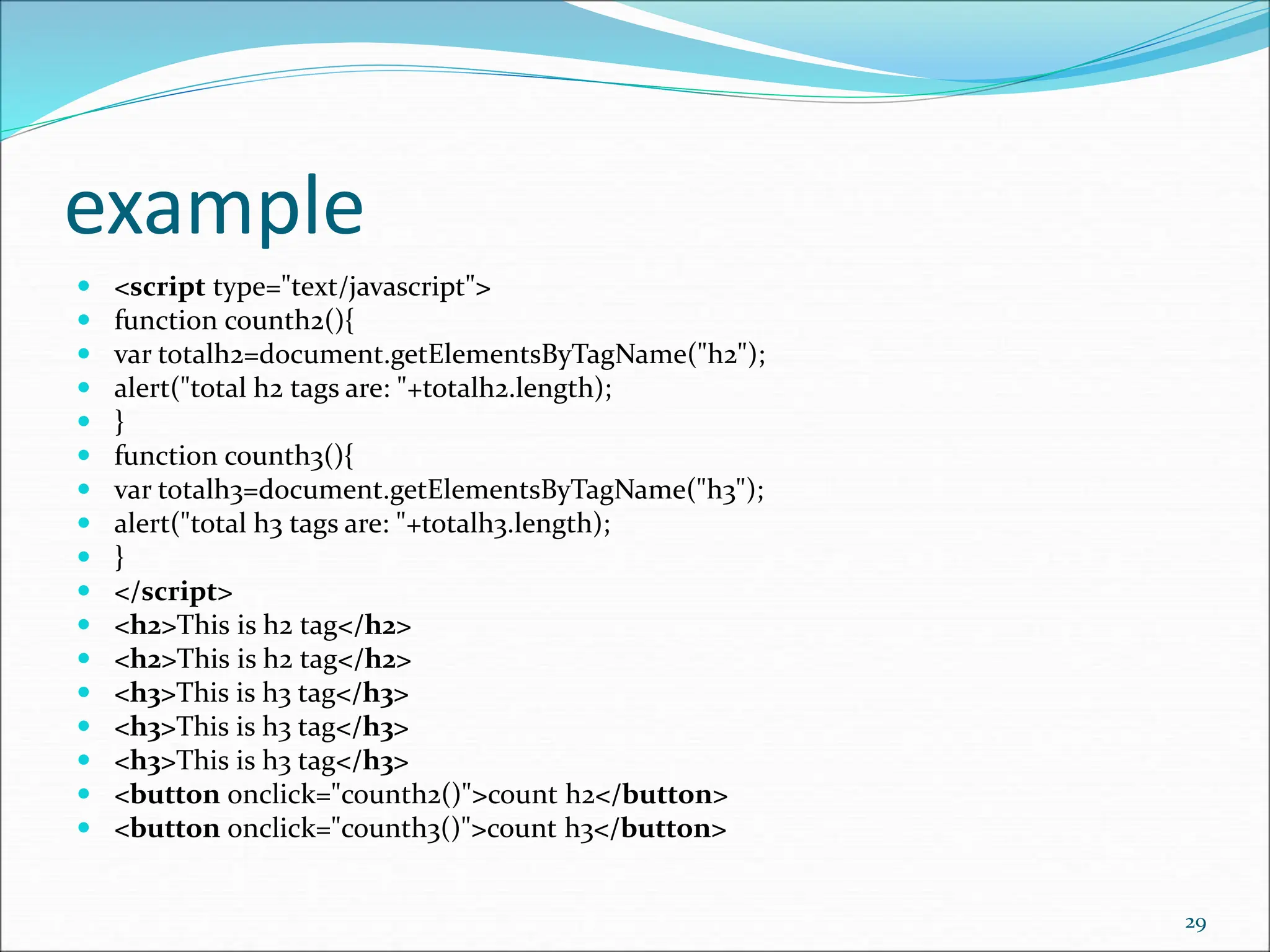
example  <script type="text/javascript">  function counth2(){  var totalh2=document.getElementsByTagName("h2");  alert("total h2 tags are: "+totalh2.length);  }  function counth3(){  var totalh3=document.getElementsByTagName("h3");  alert("total h3 tags are: "+totalh3.length);  }  </script>  <h2>This is h2 tag</h2>  <h2>This is h2 tag</h2>  <h3>This is h3 tag</h3>  <h3>This is h3 tag</h3>  <h3>This is h3 tag</h3>  <button onclick="counth2()">count h2</button>  <button onclick="counth3()">count h3</button> 29
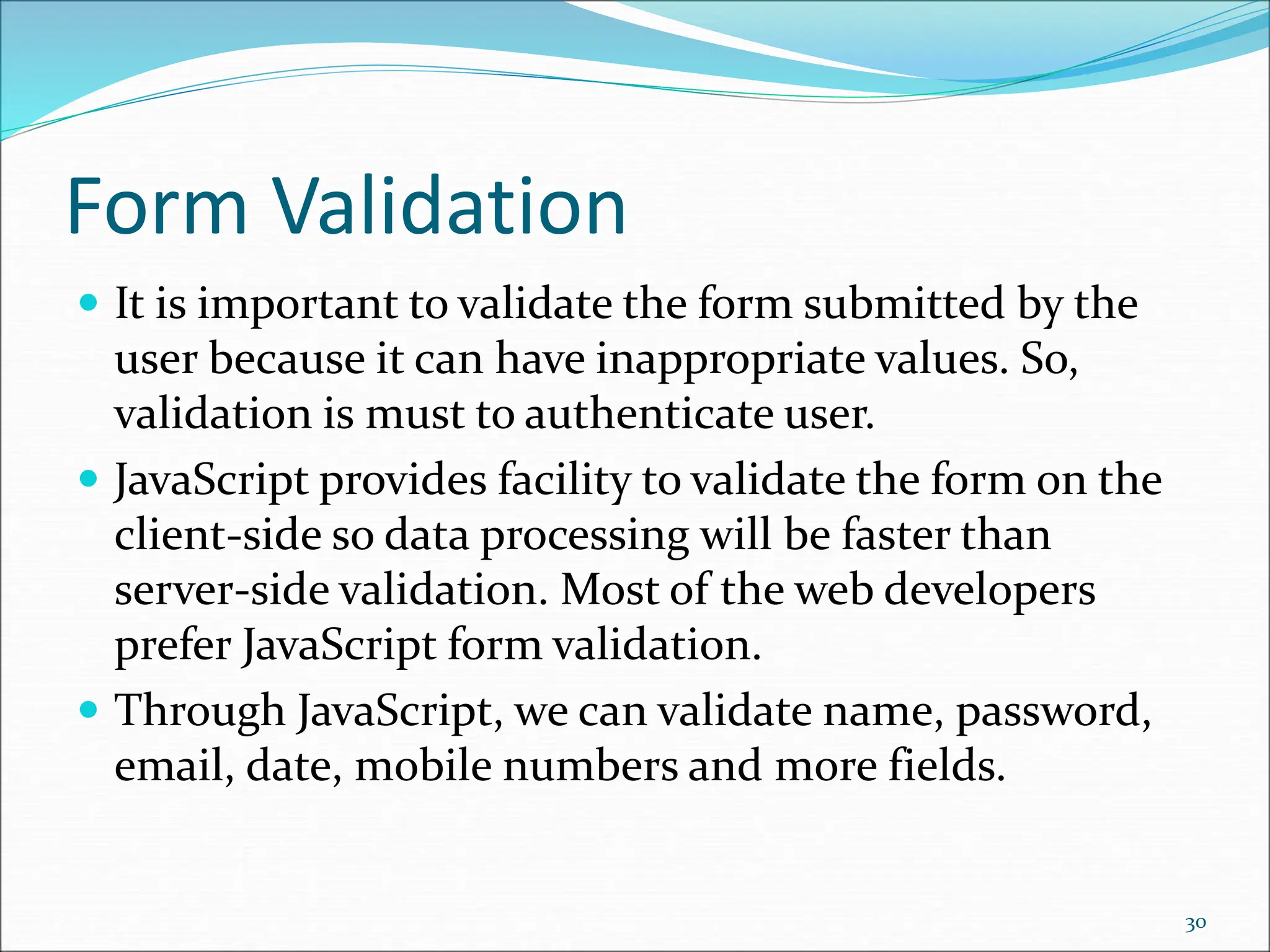
Form Validation  It is important to validate the form submitted by the user because it can have inappropriate values. So, validation is must to authenticate user.  JavaScript provides facility to validate the form on the client-side so data processing will be faster than server-side validation. Most of the web developers prefer JavaScript form validation.  Through JavaScript, we can validate name, password, email, date, mobile numbers and more fields. 30
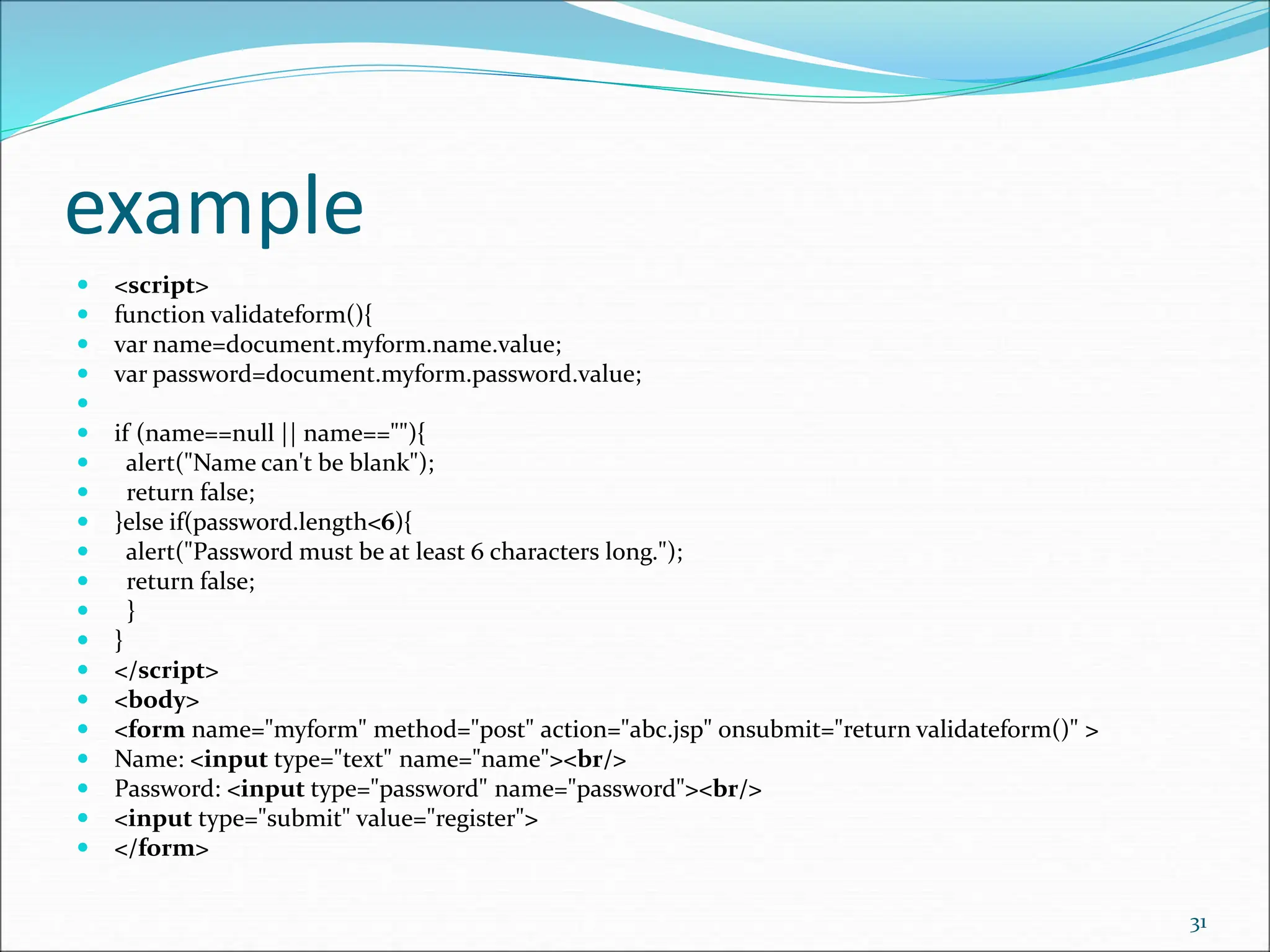
example  <script>  function validateform(){  var name=document.myform.name.value;  var password=document.myform.password.value;   if (name==null || name==""){  alert("Name can't be blank");  return false;  }else if(password.length<6){  alert("Password must be at least 6 characters long.");  return false;  }  }  </script>  <body>  <form name="myform" method="post" action="abc.jsp" onsubmit="return validateform()" >  Name: <input type="text" name="name"><br/>  Password: <input type="password" name="password"><br/>  <input type="submit" value="register">  </form> 31
DOM querySelector() Method  querySelector() method in HTML is used to return the first element that matches a specified CSS selector(s) in the document.  Note: The querySelector() method only returns first element that match the specified selectors. To return all the matches, use querySelectorAll() method.  Syntax:  element.querySelector(selectors)Selectors are the required field. It Specifies one or more CSS selectors to match the element. These selectors are used to select HTML elements based on their id, classes, types, etc.  In case of multiple selectors, a comma is used to separate each selector. The element which occurs first in the document is the returned element. 32
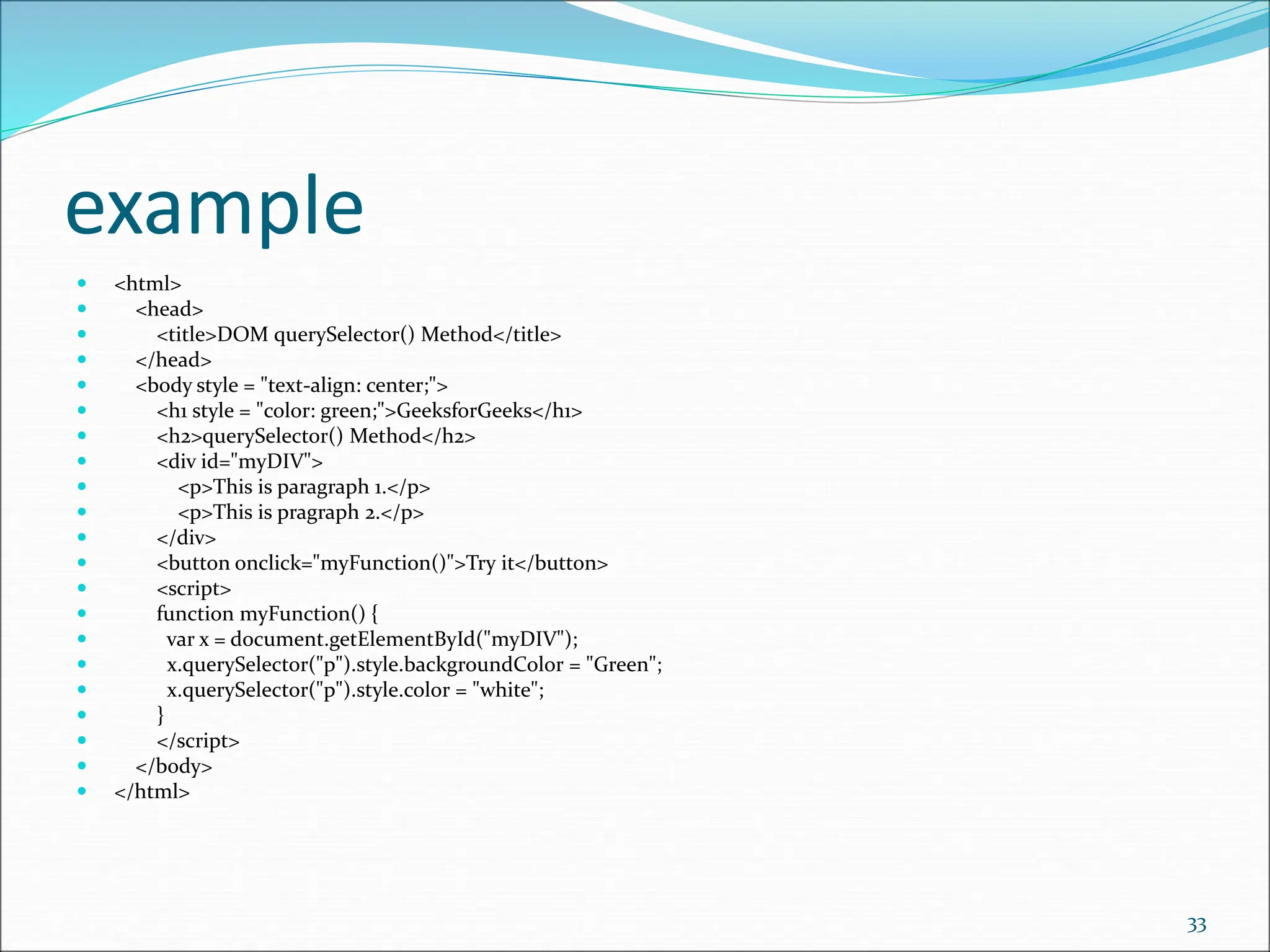
example  <html>  <head>  <title>DOM querySelector() Method</title>  </head>  <body style = "text-align: center;">  <h1 style = "color: green;">GeeksforGeeks</h1>  <h2>querySelector() Method</h2>  <div id="myDIV">  <p>This is paragraph 1.</p>  <p>This is pragraph 2.</p>  </div>  <button onclick="myFunction()">Try it</button>  <script>  function myFunction() {  var x = document.getElementById("myDIV");  x.querySelector("p").style.backgroundColor = "Green";  x.querySelector("p").style.color = "white";  }  </script>  </body>  </html> 33

Document_Object_Model_in_javaScript..................................ppt

  • 1.
  • 2.
    The HTML DOM(Document Object Model)  When a web page is loaded, the browser creates a Document Object Model of the page.  The HTML DOM model is constructed as a tree of Objects: 2
  • 3.
    The HTML DOMTree of Objects 3
  • 4.
    With the objectmodel, JavaScript gets all the power it needs to create dynamic HTML:  JavaScript can change all the HTML elements in the page  JavaScript can change all the HTML attributes in the page  JavaScript can change all the CSS styles in the page  JavaScript can remove existing HTML elements and attributes  JavaScript can add new HTML elements and attributes  JavaScript can react to all existing HTML events in the page  JavaScript can create new HTML events in the page 4
  • 5.
    What is theDOM  The DOM is a W3C (World Wide Web Consortium) standard. The DOM defines a standard for accessing documents:  "The W3C Document Object Model (DOM) is a platform and language-neutral interface that allows programs and scripts to dynamically access and update the content, structure, and style of a document." 5
  • 6.
    The W3C DOMstandard is separated into 3 different parts:  Core DOM - standard model for all document types  XML DOM - standard model for XML documents  HTML DOM - standard model for HTML documents 6
  • 7.
     What isthe HTML DOM?  The HTML DOM is a standard object model and programming interface for HTML. It defines:  The HTML elements as objects  The properties of all HTML elements  The methods to access all HTML elements  The events for all HTML elements 7
  • 8.
    The DOM ProgrammingInterface  The HTML DOM can be accessed with JavaScript (and with other programming languages).  In the DOM, all HTML elements are defined as objects.  The programming interface is the properties and methods of each object.  A property is a value that you can get or set (like changing the content of an HTML element).  A method is an action you can do (like add or deleting an HTML element). 8
  • 9.
     HTML DOMNodes: In the HTML DOM (Document Object Model), everything is a node:  The document itself is a document node  All HTML elements are element nodes  All HTML attributes are attribute nodes  Text inside HTML elements are text nodes  Comments are comment nodes 9
  • 10.
    Node Relationships: Thenodes in the node tree have a hierarchical relationship to each other.  The terms parent, child, and sibling are used to describe the relationships.  In a node tree, the top node is called the root (or root node)  Every node has exactly one parent, except the root (which has no parent)  A node can have a number of children  Siblings (brothers or sisters) are nodes with the same parent 10
  • 11.
  • 12.
  • 13.
    What is anEvent ?  JavaScript's interaction with HTML is handled through events that occur when the user or the browser manipulates a page.  When the page loads, it is called an event. When the user clicks a button, that click too is an event. Other examples include events like pressing any key, closing a window, resizing a window, etc.  Developers can use these events to execute JavaScript coded responses, which cause buttons to close windows, messages to be displayed to users, data to be validated, and virtually any other type of response imaginable.  Events are a part of the Document Object Model (DOM) Level 3 and every HTML element contains a set of events which can trigger JavaScript Code. 13
  • 14.
    JavaScript Events  Thechange in the state of an object is known as an Event. In html, there are various events which represents that some activity is performed by the user or by the browser. When javascript code is included in HTML, js react over these events and allow the execution. This process of reacting over the events is called Event Handling. Thus, js handles the HTML events via Event Handlers.  For example, when a user clicks over the browser, add js code, which will execute the task to be performed on the event. 14
  • 15.
    examples  1) onclickevents: This is a mouse event and provokes any logic defined if the user clicks on the element it is bound to.  2) onkeyup event: This event is a keyboard event and executes instructions whenever a key is released after pressing.  3) onmouseover event: This event corresponds to hovering the mouse pointer over the element and its children, to which it is bound to. 15
  • 16.
    examples  onmouseout event:Whenever the mouse cursor leaves the element which handles a mouseout event, a function associated with it is executed.  onload event: When an element is loaded completely, this event is evoked.  onfocus event: An element listing to this event executes instructions whenever it recieves focus.  onblur event: This event is evoked when an element loses focus. 16
  • 17.
    JavaScript addEventListener()  TheaddEventListener() method is used to attach an event handler to a particular element. It does not override the existing event handlers. Events are said to be an essential part of the JavaScript. A web page responds according to the event that occurred. Events can be user-generated or generated by API's. An event listener is a JavaScript's procedure that waits for the occurrence of an event.  The addEventListener() method is an inbuilt function of JavaScript. We can add multiple event handlers to a particular element without overwriting the existing event handlers.  Syntax  element1.addEventListener(click, function1);  element1.addEventListener(click, function2);  element1.addEventListener(mouseover, function3);  Although it has three parameters, the parameters event and function are widely used. The third parameter is optional to define. The values of this function are defined as follows. 17
  • 18.
    Parameter Values  event:It is a required parameter. It can be defined as a string that specifies the event's name.  Note: Do not use any prefix such as "on" with the parameter value. For example, Use "click" instead of using "onclick".  function: It is also a required parameter. It is a JavaScript function which responds to the event occur.  useCapture: It is an optional parameter. It is a Boolean type value that specifies whether the event is executed in the bubbling or capturing phase. Its possible values are true and false. When it is set to true, the event handler executes in the capturing phase. When it is set to false, the handler executes in the bubbling phase. Its default value is false.  Let's see some of the illustrations of using the addEventListener() method. 18
  • 19.
    Event Bubbling orEvent Capturing  Now, we understand the use of the third parameter of JavaScript's addEventListener(), i.e., useCapture.  In HTML DOM, Bubbling and Capturing are the two ways of event propagation. We can understand these ways by taking an example.  Suppose we have a div element and a paragraph element inside it, and we are applying the "click" event to both of them using the addEventListener() method. Now the question is on clicking the paragraph element, which element's click event is handled first.  So, in Bubbling, the event of paragraph element is handled first, and then the div element's event is handled. It means that in bubbling, the inner element's event is handled first, and then the outermost element's event will be handled.  In Capturing the event of div element is handled first, and then the paragraph element's event is handled. It means that in capturing the outer element's event is handled first, and then the innermost element's event will be handled.  addEventListener(event, function, useCapture);  We can specify the propagation using the useCapture parameter. When it is set to false (which is its default value), then the event uses bubbling propagation, and when it is set to true, there is the capturing propagation. 19
  • 20.
    Methods of documentobject  We can access and change the contents of document by its methods.  The important methods of document object are as follows:  write("string")writes the given string on the doucment.writeln("string")writes the given string on the doucment with newline character at the end.getElementById()returns the element having the given id value.getElementsByName()returns all the elements having the given name value.getElementsByTagName()returns all the elements having the given tag name.getElementsByClassName()returns all the elements having the given class name. 20
  • 21.
    Accessing field valueby document object  In this example, we are going to get the value of input text by user. Here, we are using document.form1.name.value to get the value of name field.  Here, document is the root element that represents the html document.  form1 is the name of the form.  name is the attribute name of the input text.  value is the property, that returns the value of the input text.  Let's see the simple example of document object that prints name with welcome message. 21
  • 22.
    example  <script type="text/javascript"> function printvalue(){  var name=document.form1.name.value;  alert("Welcome: "+name);  }  </script>   <form name="form1">  Enter Name:<input type="text" name="name"/>  <input type="button" onclick="printvalue()" value="print name"/>  </form> 22
  • 23.
    document.getElementById() method  The document.getElementById()method returns the element of specified id.  In the previous page, we have used document.form1.name.value to get the value of the input value. Instead of this, we can use document.getElementById() method to get value of the input text. But we need to define id for the input field. 23
  • 24.
    example  <script type="text/javascript"> function getcube(){  var number=document.getElementById("number").value;  alert(number*number*number);  }  </script>  <form>  Enter No:<input type="text" id="number" name="number" /><br/>  <input type="button" value="cube" onclick="getcube()"/>  </form> 24
  • 25.
    document.getElementsByName() method  The document.getElementsByName()method returns all the element of specified name.  The syntax of the getElementsByName() method is given below: 25
  • 26.
    example  <script type="text/javascript"> function totalelements()  {  var allgenders=document.getElementsByName("gender");  alert("Total Genders:"+allgenders.length);  }  </script>  <form>  Male:<input type="radio" name="gender" value="male">  Female:<input type="radio" name="gender" value="female">   <input type="button" onclick="totalelements()" value="Total Genders" >  </form> 26
  • 27.
    document.getElementsByTagName () method  Thedocument.getElementsByTagName() method returns all the element of specified tag name.  The syntax of the getElementsByTagName() method is given below: 27
  • 28.
    example  <script type="text/javascript"> function countpara(){  var totalpara=document.getElementsByTagName("p");  alert("total p tags are: "+totalpara.length);   }  </script>  <p>This is a pragraph</p>  <p>Here we are going to count total number of paragraphs by ge tElementByTagName() method.</p>  <p>Let's see the simple example</p>  <button onclick="countpara()">count paragraph</button> 28
  • 29.
    example  <script type="text/javascript"> function counth2(){  var totalh2=document.getElementsByTagName("h2");  alert("total h2 tags are: "+totalh2.length);  }  function counth3(){  var totalh3=document.getElementsByTagName("h3");  alert("total h3 tags are: "+totalh3.length);  }  </script>  <h2>This is h2 tag</h2>  <h2>This is h2 tag</h2>  <h3>This is h3 tag</h3>  <h3>This is h3 tag</h3>  <h3>This is h3 tag</h3>  <button onclick="counth2()">count h2</button>  <button onclick="counth3()">count h3</button> 29
  • 30.
    Form Validation  Itis important to validate the form submitted by the user because it can have inappropriate values. So, validation is must to authenticate user.  JavaScript provides facility to validate the form on the client-side so data processing will be faster than server-side validation. Most of the web developers prefer JavaScript form validation.  Through JavaScript, we can validate name, password, email, date, mobile numbers and more fields. 30
  • 31.
    example  <script>  functionvalidateform(){  var name=document.myform.name.value;  var password=document.myform.password.value;   if (name==null || name==""){  alert("Name can't be blank");  return false;  }else if(password.length<6){  alert("Password must be at least 6 characters long.");  return false;  }  }  </script>  <body>  <form name="myform" method="post" action="abc.jsp" onsubmit="return validateform()" >  Name: <input type="text" name="name"><br/>  Password: <input type="password" name="password"><br/>  <input type="submit" value="register">  </form> 31
  • 32.
    DOM querySelector() Method querySelector() method in HTML is used to return the first element that matches a specified CSS selector(s) in the document.  Note: The querySelector() method only returns first element that match the specified selectors. To return all the matches, use querySelectorAll() method.  Syntax:  element.querySelector(selectors)Selectors are the required field. It Specifies one or more CSS selectors to match the element. These selectors are used to select HTML elements based on their id, classes, types, etc.  In case of multiple selectors, a comma is used to separate each selector. The element which occurs first in the document is the returned element. 32
  • 33.
    example  <html>  <head> <title>DOM querySelector() Method</title>  </head>  <body style = "text-align: center;">  <h1 style = "color: green;">GeeksforGeeks</h1>  <h2>querySelector() Method</h2>  <div id="myDIV">  <p>This is paragraph 1.</p>  <p>This is pragraph 2.</p>  </div>  <button onclick="myFunction()">Try it</button>  <script>  function myFunction() {  var x = document.getElementById("myDIV");  x.querySelector("p").style.backgroundColor = "Green";  x.querySelector("p").style.color = "white";  }  </script>  </body>  </html> 33