Angular 2 Angular 2.0 in Open Source JavaScript Frameworks and it is highly appreciated amongst developers and enterprises for its high functioning solutions. Angular 2.0, an advanced client-side MVW framework, is highly adopted nowadays for mobile app and web app development. Angular is a platform and framework for building client applications in HTML and TypeScript. Angular is itself written in TypeScript. The basic building blocks of an Angular application are NgModules, which provide a compilation context for components. Components define views, use services Service providers can be injected into components as dependencies, making your code modular, reusable, and efficient.
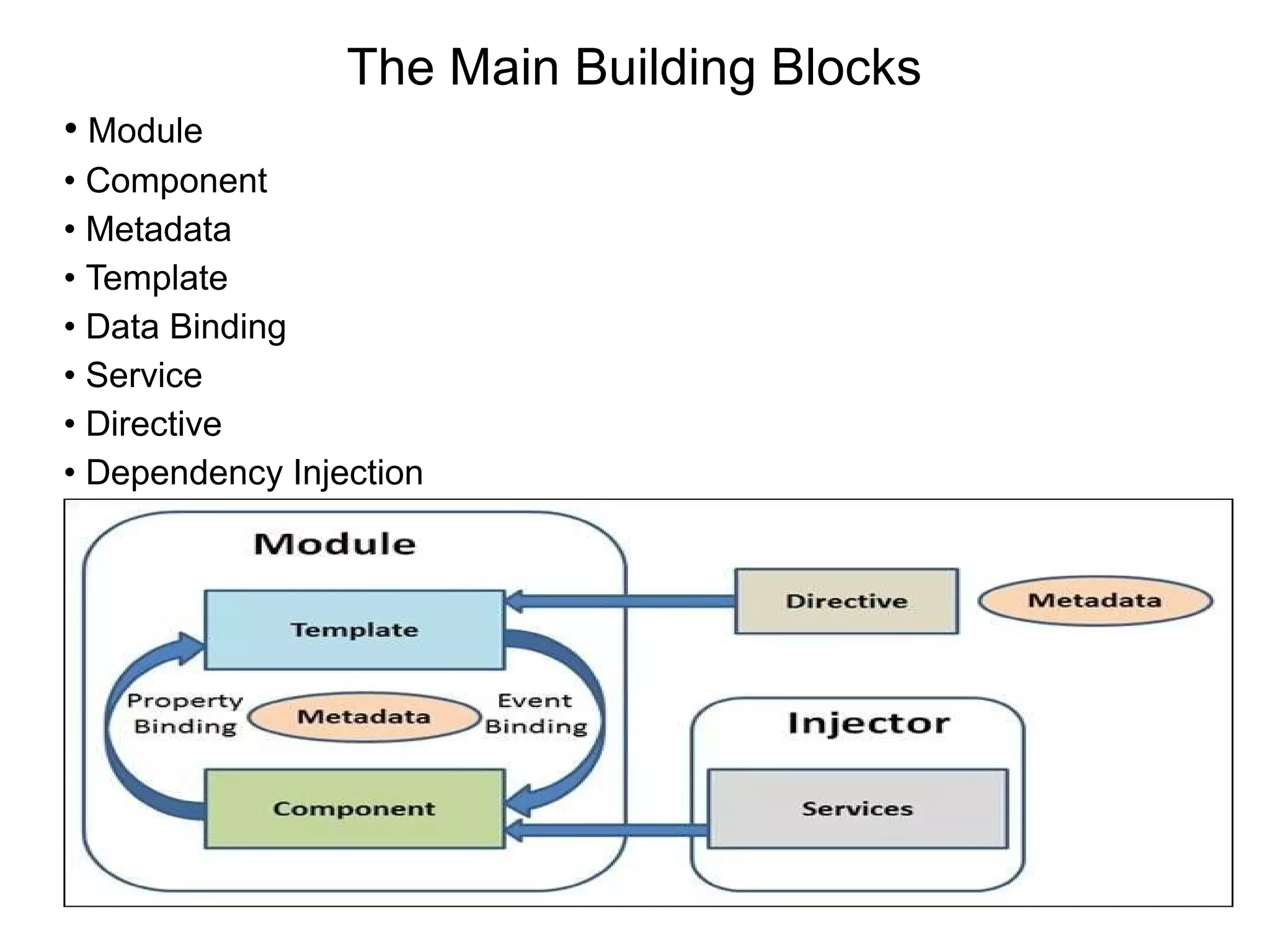
The Main Building Blocks • Module • Component • Metadata • Template • Data Binding • Service • Directive • Dependency Injection
Module Module is very similar to a class. A module can be described by a block of code which is used to perform a particular single task Angular apps are modular and Angular has its own modularity system called NgModules export class AppComponent { } NgModule metadata An NgModule is defined as a class decorated with @NgModule. The @NgModule decorator is a function that takes a single metadata object, whose properties describe the module. The most important properties are as follows. declarations—The components, directives, and pipes that belong to this NgModule. exports—The subset of declarations that should be visible and usable in the component templates of other NgModules.
imports—Other modules whose exported classes are needed by component templates declared in this NgModule. providers—Creators of services that this NgModule contributes to the global collection of services; they become accessible in all parts of the app. (You can also specify providers at the component level, which is often preferred.) bootstrap—The main application view, called the root component, which hosts all other app views. Only the root NgModule should set this bootstrap property. Component A component and its template together define a view When you create a component, it is associated directly with a single view, called the host view Angular creates, updates, and destroys components Component metadata The @Component decorator identifies the class immediately below it as a component class @Component configuration options
Selector:it finds the corresponding tag in template HTML TemplateUrl: The module-relative address of this component's HTML template Providers: An array of dependency injection providers for services that the component requires Data binding
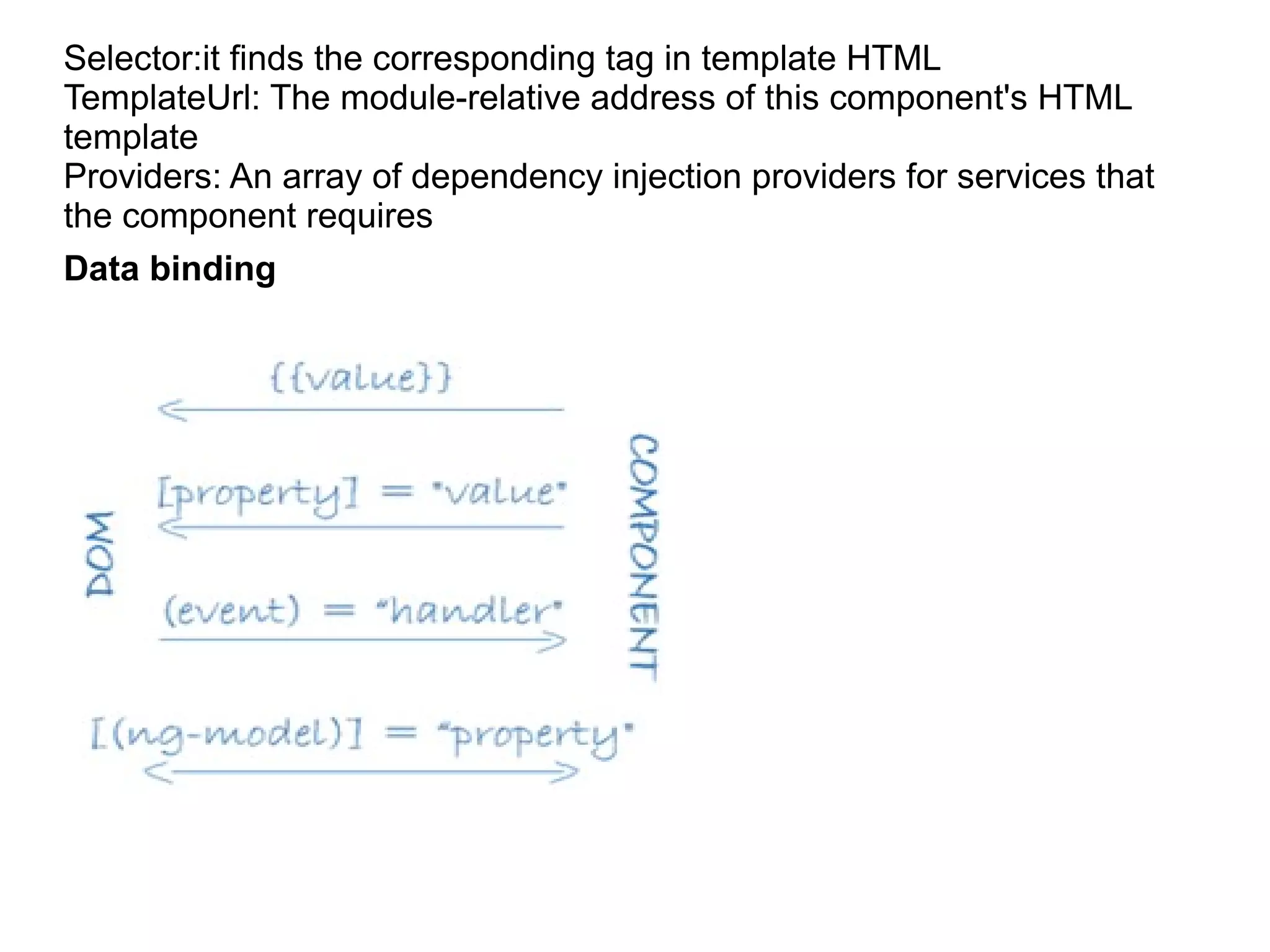
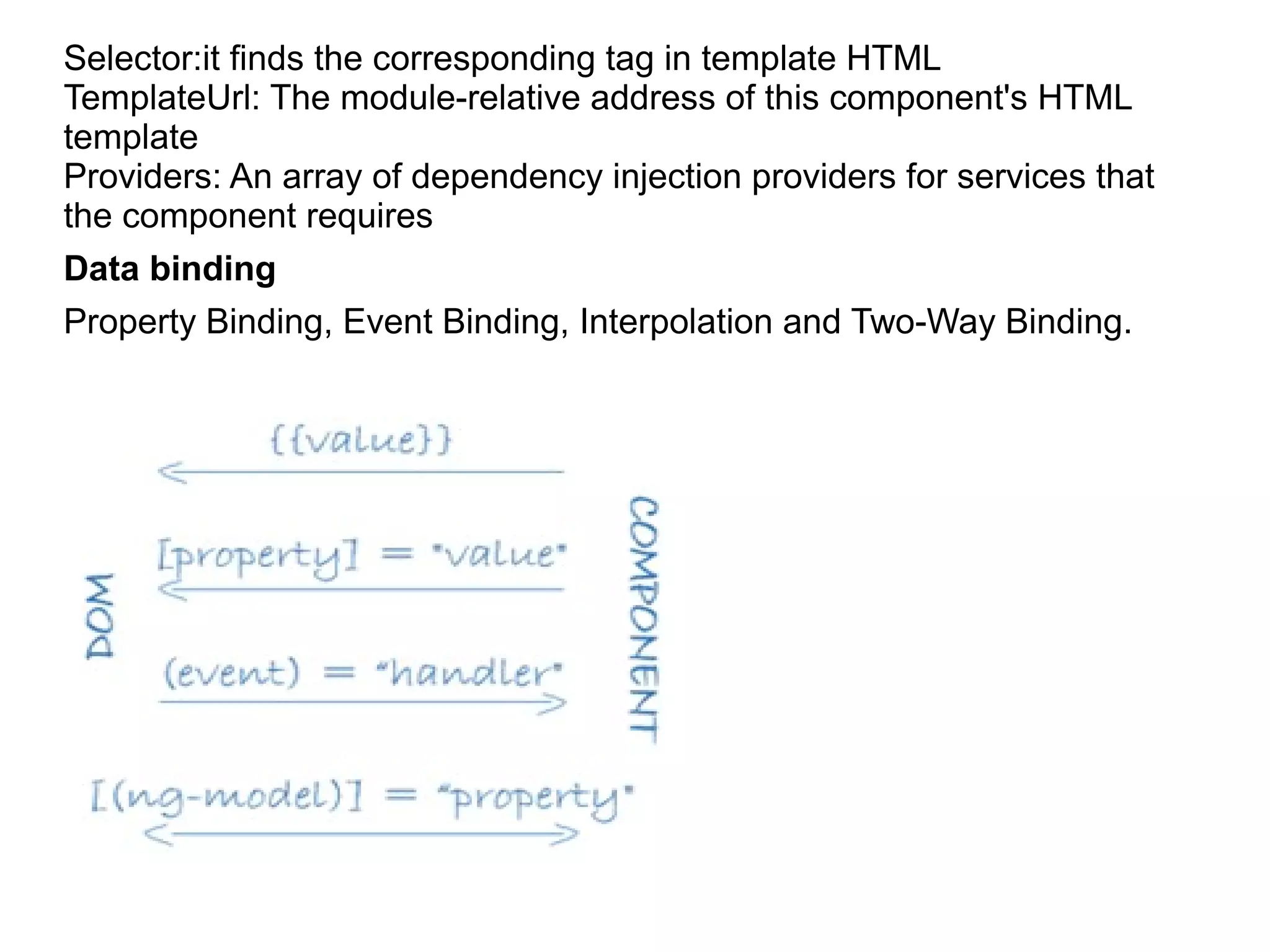
Selector:it finds the corresponding tag in template HTML TemplateUrl: The module-relative address of this component's HTML template Providers: An array of dependency injection providers for services that the component requires Data binding Property Binding, Event Binding, Interpolation and Two-Way Binding.
<li>{{hero.name}}</li> :- interpolation <app-hero-detail [hero]="selectedHero"></app-hero-detail> :- property binding passes the value of selectedHero from the parent HeroListComponent <li (click)="selectHero(hero)"></li> : -event binding calls <input [(ngModel)]="name"> : In two-way binding Directives Directives are custom HTML attributes with a @Directive decorator. There are two kinds of directives besides components: structural and attribute directives Metadata for a directive associates the class with a selector that you use to insert it into HTML Structural directives:- Structural directives alter layout by adding, removing, and replacing elements in DOM. <li *ngFor="let hero of heroes"></li> <app-hero-detail *ngIf="selectedHero"></app-hero-detail>
*ngFor is an iterative; it tells Angular to stamp out one <li> per hero in the heroes list. *ngIf is a conditional; it includes the HeroDetail component only if a selected hero exists. Attribute directives In templates they look like regular HTML attributes. The ngModel directive, which implements two-way data binding Services Services in order to increase modularity and reusability Basically, is used to share the data and behavior within the application. Service has no base class. Commonly used services are logging service, data service, message service. A component should not need to define things like how to fetch data from the server, validate user input, or log directly to the console. Instead, it can delegate such tasks to services Service imports the Angular Injectable symbol and annotates the class with the @Injectable() decorator. The @Injectable() decorator accepts a metadata object for the service, the same way the @Component() decorator did for your component classes
import { Injectable } from '@angular/core'; @Injectable({ providedIn: 'root', }) export class MessageService { messages: string[] = []; add(message: string) { this.messages.push(message); } clear() { this.messages = []; } } Dependency injection (often called DI) is wired into the Angular framework and used everywhere to provide new components with the services or other things they need. constructor(private service: HeroService) { }
Angular2

Angular2

  • 1.
    Angular 2 Angular 2.0in Open Source JavaScript Frameworks and it is highly appreciated amongst developers and enterprises for its high functioning solutions. Angular 2.0, an advanced client-side MVW framework, is highly adopted nowadays for mobile app and web app development. Angular is a platform and framework for building client applications in HTML and TypeScript. Angular is itself written in TypeScript. The basic building blocks of an Angular application are NgModules, which provide a compilation context for components. Components define views, use services Service providers can be injected into components as dependencies, making your code modular, reusable, and efficient.
  • 2.
    The Main BuildingBlocks • Module • Component • Metadata • Template • Data Binding • Service • Directive • Dependency Injection
  • 3.
    Module Module is verysimilar to a class. A module can be described by a block of code which is used to perform a particular single task Angular apps are modular and Angular has its own modularity system called NgModules export class AppComponent { } NgModule metadata An NgModule is defined as a class decorated with @NgModule. The @NgModule decorator is a function that takes a single metadata object, whose properties describe the module. The most important properties are as follows. declarations—The components, directives, and pipes that belong to this NgModule. exports—The subset of declarations that should be visible and usable in the component templates of other NgModules.
  • 4.
    imports—Other modules whoseexported classes are needed by component templates declared in this NgModule. providers—Creators of services that this NgModule contributes to the global collection of services; they become accessible in all parts of the app. (You can also specify providers at the component level, which is often preferred.) bootstrap—The main application view, called the root component, which hosts all other app views. Only the root NgModule should set this bootstrap property. Component A component and its template together define a view When you create a component, it is associated directly with a single view, called the host view Angular creates, updates, and destroys components Component metadata The @Component decorator identifies the class immediately below it as a component class @Component configuration options
  • 5.
    Selector:it finds thecorresponding tag in template HTML TemplateUrl: The module-relative address of this component's HTML template Providers: An array of dependency injection providers for services that the component requires Data binding
  • 6.
    Selector:it finds thecorresponding tag in template HTML TemplateUrl: The module-relative address of this component's HTML template Providers: An array of dependency injection providers for services that the component requires Data binding Property Binding, Event Binding, Interpolation and Two-Way Binding.
  • 7.
    <li>{{hero.name}}</li> :- interpolation <app-hero-detail[hero]="selectedHero"></app-hero-detail> :- property binding passes the value of selectedHero from the parent HeroListComponent <li (click)="selectHero(hero)"></li> : -event binding calls <input [(ngModel)]="name"> : In two-way binding Directives Directives are custom HTML attributes with a @Directive decorator. There are two kinds of directives besides components: structural and attribute directives Metadata for a directive associates the class with a selector that you use to insert it into HTML Structural directives:- Structural directives alter layout by adding, removing, and replacing elements in DOM. <li *ngFor="let hero of heroes"></li> <app-hero-detail *ngIf="selectedHero"></app-hero-detail>
  • 8.
    *ngFor is aniterative; it tells Angular to stamp out one <li> per hero in the heroes list. *ngIf is a conditional; it includes the HeroDetail component only if a selected hero exists. Attribute directives In templates they look like regular HTML attributes. The ngModel directive, which implements two-way data binding Services Services in order to increase modularity and reusability Basically, is used to share the data and behavior within the application. Service has no base class. Commonly used services are logging service, data service, message service. A component should not need to define things like how to fetch data from the server, validate user input, or log directly to the console. Instead, it can delegate such tasks to services Service imports the Angular Injectable symbol and annotates the class with the @Injectable() decorator. The @Injectable() decorator accepts a metadata object for the service, the same way the @Component() decorator did for your component classes
  • 9.
    import { Injectable} from '@angular/core'; @Injectable({ providedIn: 'root', }) export class MessageService { messages: string[] = []; add(message: string) { this.messages.push(message); } clear() { this.messages = []; } } Dependency injection (often called DI) is wired into the Angular framework and used everywhere to provide new components with the services or other things they need. constructor(private service: HeroService) { }