

Convert Binary Number to Decimal Number
Binary numbers are numbers consisting only of 2 digits: 0 and 1. They can be expressed in the base 2 numeral system. For example,
10 (2), 1000 (8), 11001 (25) Decimal numbers are numbers consisting of 10 digits: 0, 1, 2, 3, 4, 5, 6, 7, 8, 9. They can be expressed in the base 10 numeral system.
18, 222, 987 Here, we will be writing a Java program that will convert a binary number into decimal and vice versa using built-in methods and custom methods.
Example 1: Binary to Decimal Conversion Using Custom Method
class Main { public static void main(String[] args) { // binary number long num = 110110111; // call method by passing the binary number int decimal = convertBinaryToDecimal(num); System.out.println("Binary to Decimal"); System.out.println(num + " = " + decimal); } public static int convertBinaryToDecimal(long num) { int decimalNumber = 0, i = 0; long remainder; while (num != 0) { remainder = num % 10; num /= 10; decimalNumber += remainder * Math.pow(2, i); ++i; } return decimalNumber; } } Output
110110111 in binary = 439 in decimal
Here's how the above program works:
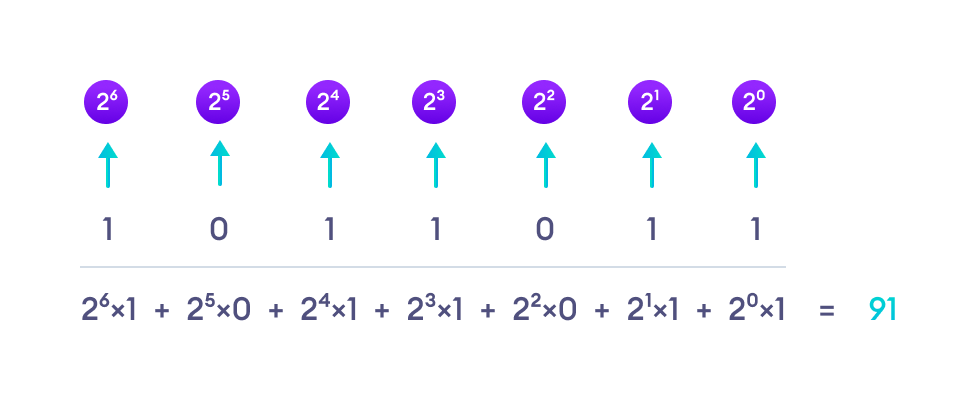
Example 2: Binary to Decimal Conversion Using parseInt()
class Main { public static void main(String[] args) { // binary number String binary = "01011011"; // convert to decimal int decimal = Integer.parseInt(binary, 2); System.out.println(binary + " in binary = " + decimal + " in decimal."); } } Output
01011011 in binary = 91 in decimal.
Here, we have used the parseInt() method of the Integer class to convert a binary number into decimal.
Example 3: Decimal to Binary Conversion using Custom Method
class Main { public static void main(String[] args) { // decimal number int num = 19; System.out.println("Decimal to Binary"); // call method to convert to binary long binary = convertDecimalToBinary(num); System.out.println("\n" + num + " = " + binary); } public static long convertDecimalToBinary(int n) { long binaryNumber = 0; int remainder, i = 1, step = 1; while (n!=0) { remainder = n % 2; System.out.println("Step " + step++ + ": " + n + "/2"); System.out.println("Quotient = " + n/2 + ", Remainder = " + remainder); n /= 2; binaryNumber += remainder * i; i *= 10; } return binaryNumber; } } Output
Decimal to Binary Step 1: 19/2 Quotient = 9, Remainder = 1 Step 2: 9/2 Quotient = 4, Remainder = 1 Step 3: 4/2 Quotient = 2, Remainder = 0 Step 4: 2/2 Quotient = 1, Remainder = 0 Step 5: 1/2 Quotient = 0, Remainder = 1 19 = 10011
Here's how the program works:

Example 4: Decimal to Binary Conversion using toBinaryString()
We can also use the toBinaryString() method of the Integer class to convert a decimal number into binary.
class Main { public static void main(String[] args) { // decimal number int decimal = 91; // convert decimal to binary String binary = Integer.toBinaryString(decimal); System.out.println(decimal + " in decimal = " + binary + " in binary."); } } Output
91 in decimal = 1011011 in binary.
Here, the toBinaryString() method takes an integer argument and returns the string representation of the number in base 2 (binary).
Also Read: