Αυτό το άρθρο είναι διαθέσιμο και στα ελληνικά.
Yesterday I saw a great command that finds the palindrome dates between now and x days ago.
The command was posted on Twitter by @climagic (a great account to follow if you want to find awesome command line stuff).
In this post we are going to break it down and explain how it works.
What is a palindrome
Palindrome is a word/number/phrase or other sequence of characters that reads the same backward as forward. – Palindrome - Wikipedia
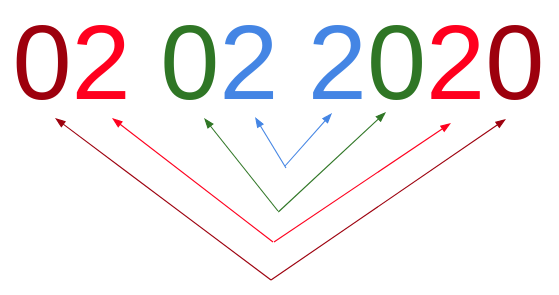
Few days ago, the date was 02/02/2020 which was a palindrome:
The command
printf "now - %d days\n" {1..332044} |date -f- +%Y%_m%_d$'\n'%Y%m%d |tr -d ' ' > alldates.txt; rev alldates.txt >revdates.txt; paste alldates.txt revdates.txt |awk '$1==$2{print $1}' And here’s a more readable version using new lines after each pipe.
printf "now - %d days\n" {1..332044} | date -f- +%Y%_m%_d$'\n'%Y%m%d | tr -d ' ' > alldates.txt; rev alldates.txt >revdates.txt; paste alldates.txt revdates.txt | awk '$1==$2{print $1}' I am going to explain each part of the command separately.
Note that the output of each part is the input of the next part (following the pipe |).
printf "now - %d days\n" {1..332044}
The first part seems pretty straight forward but it does have an interesting part, the brace expansion mechanism, which I didn’t know of.
Open a terminal and type the following commands:
# From 1 to 10 $ echo {1..10} 1 2 3 4 5 6 7 8 9 10 # From a to z $ echo {a..z} a b c d e f g h i j k l m n o p q r s t u v w x y z # From 10 to 20 $ echo Before-{10..20}-After Before-10-After Before-11-After Before-12-After Before-13-After Before-14-After Before-15-After Before-16-After Before-17-After Before-18-After Before-19-After Before-20-After As you can see, the brace expansion allows the generation of values based on a “sequence” we set.
Learn more about the Brace expansion mechanism here.
Part explained
- we print the phrase “now - x days” so many times as the number of values expanded from the sequence
{1..332044}will generate 332044 values starting from 1 and increasing by 1- we add a new line at the end of each produced string
Output
now - 1 days now - 2 days now - 3 days now - 4 days now - 5 days ... now - 332038 days now - 332039 days now - 332040 days now - 332041 days now - 332042 days now - 332043 days now - 332044 days date -f- +%Y%\_m%\_d$'\n'%Y%m%d
In this part we use the date command to parse the previously piped output and print two lines for each date, one with padding zeros and one without zeros for single digit days and months.
Familiarize yourself with the command in your terminal:
# Show current date = now $ date Thu Feb 6 07:30:10 EET 2020 # Show yesterday $ date --date="now - 1 days" Wed Feb 5 07:31:22 EET 2020 # Show yesterday as dd/mm/yyyy (zero padding) $ date --date="now - 1 days" +%d/%m/%Y 05/02/2020 # Show yesterday as dd/mm/yyyy (space padded) $ date --date="now - 1 days" +%_d/%_m/%Y 5/ 2/2020 # Show yesterday as dd/mm/yyyy (without padding) $ date --date="now - 1 days" +%-d/%-m/%Y 5/2/2020 Part explained
- we use the
-foption to define the input of thedateto be the lines of a file, followed by a hyphen-to set this file to be thestdin - we set the output format (what follows the plus
+symbol) to be the numeric representation of the year (%Y), the month (padded with spaces:%_m, padded with zeros:%m) and the day of the month (padded with spaces:%_d, padded with zeros:%d) - the space padded format is
%Y%\_m%\_dand the zero padded format is%Y%m%d - we combine these two formats for each date and we separate them with a new line
$'\n'thus, for each date we parse, we produce two lines, one padded with zeros and one padded with spaces
Note: instead of padding with spaces (using the underscore _ in the format), we could use the hyphen - instead which would skip the padding of the field. This way wouldn’t have to remove the spaces as described in the next part.
Output
2020 2 5 20200205 2020 2 4 20200204 2020 2 3 20200203 2020 2 2 20200202 2020 2 1 20200201 2020 131 20200131 2020 130 20200130 tr -d ' ' > alldates.txt; rev alldates.txt >revdates.txt; paste alldates.txt revdates.txt
In this part we remove the spaces produced in the previous step and we create two files, one with all the dates and one with all the dates reversed.
Then we combine these two files by merging each line of the first file with the corresponding line of the second file separated with a tab.
Familiarize yourself with the commands of this part in your terminal:
# Remove empty spaces $ echo "Good night " | tr -d " " Goodnight # Remove hyphens $ echo "Good-night" | tr -d "-" Goodnight # Print a-x-z where x is a number between 1 and 9 $ printf "a-%d-z\n" {1..9} a-1-z a-2-z a-3-z a-4-z a-5-z a-6-z a-7-z a-8-z a-9-z # and then reverse the order of the characters of each line $ printf "a-%d-z\n" {1..9} | rev z-1-a z-2-a z-3-a z-4-a z-5-a z-6-a z-7-a z-8-a z-9-a Part explained
tr -d '': we remove the spaces of the input (which is the output of the previous part) and we save the output in a file namedalldates.txtrev: we reverse the order of the characters of each line of thealldates.txtfile and we save the output in a new file namedrevdates.txtpaste: we merge the two files; each line of thealldates.txtfile is merged with the corresponding line of the filerevdates.txtseparated by a tab (the two files have the exact number of lines).
Output
202025 520202 20200205 50200202 202024 420202 20200204 40200202 202023 320202 20200203 30200202 202022 220202 20200202 20200202 202021 120202 20200201 10200202 awk '$1==$2{print $1}'
In this final part, we use awk to print the palindromes.
Familiarize yourself with the usage of awk related to this post, in your terminal:
# Print the whole input (awk's default behavior) if the fields are equal $ echo "a a" | awk '$1==$2' a a # Print the whole input (awk's default behavior) if the fields are not equal $ echo "a a" | awk '$1!=$2' # nothing here # Print the whole input (awk's default behavior) if the fields are not equal $ echo "a b" | awk '$1!=$2' a b # Print the first field if the fields are not equal $ echo "a b" | awk '$1!=$2 {print $1}' a # Print the second field if the fields are not equal $ echo "a b" | awk '$1!=$2 {print $2}' b Part explained
- the previous output that is now the input of this part consists of lines and each line has two values separated by a TAB. With this kind of input, awk resolves two fields in each line. We can access these two fields using the
$1and$2variables. - as described in a previous post, awk statements consist of a pattern-expression and an associated action.
<pattern/expression> { <action> }If the pattern succeeds then the associated action is being executed. In this part the expression is translated as “if the two fields are equal” (
$1==$2) and the action as “print the first field” (printf $1). - if the fields are equal we do have a palindrome since each pair of fields is actually a date and its reversed value.
Output
20200202 2019102 2018102 2017102 2016102 2015102 2014102 2013102 2012102 ... 11111111 11111111 1111111 1111111 111111 Cat photo
That’s all, thanks for reading.

 (
(