migrate_v5_EN_log


SRS can log to console or file, with level, session oriented log and tracable log.
The tank is the container for log, to where write log:
There are two tank of SRS log, config the srs_log_tank to:
- console: Write log to console. Before config parsed, write log to console too.
- file: Default. Write log to file, and the
srs_log_filespecified the path of log file, which default to./objs/srs.log
The log specified config:
# the log tank, console or file. # if console, print log to console. # if file, write log to file. requires srs_log_file if log to file. # default: file. srs_log_tank file;The level is specified by srs_log_level and control which level of log to print:
- verbose: Lots of log, which hurts performance. SRS default to disable it when compile.
- info:Detail log, which huts performance. SRS default to disable it when compile.
- trace: Important log, less and SRS enable it as default level.
- warn: Warning log, without debug log.
- error: Error level.
The level in config file:
# the log level, for all log tanks. # can be: verbose, info, trace, warn, error # defualt: trace srs_log_level trace;Notes:
- Enable all high level, for example, enable trace/warn/error when set level to trace.
- The verbose and info level is disabled when compile. Modify the
srs_kernel_log.hppwhen need to enable this. - Recomment to use trace level.
The feature Transcode/Ingest use external tools, for instance, FFMPEG. SRS use isolate log file for the external tools.
Set the tools log to /dev/null to disable the log:
# the logs dir. # if enabled ffmpeg, each stracoding stream will create a log file. # "/dev/null" to disable the log. # default: ./objs ff_log_dir ./objs;SRS provides session oriented log, to enalbe us to grep specified connection log:
[2014-04-04 11:21:29.183][trace][2837][104][11] rtmp get peer ip success. ip=192.168.1.179The log format is:
- [2014-04-04 11:21:29.183] Date of log. The ms is set by the time cache of SRS_TIME_RESOLUTION_MS to avoid performance issue.
- [trace] Level of log. Trace is ok, warn and error maybe something is wrong.
- [2837] The pid of process(SrsPid). The session id maybe duplicated for multiple process.
- [104] The session id(SrsId), unique for the same process. So the pid+session-id is used to identify a connection.
- [11] The errno of system, optional for warn and error.
- rtmp get peer ip success. The description of log.
The following descript how to analysis the log of SRS.
SRS can get the whole log when we got something, for example, the ip of client, or the stream for client and time to play, the page url.
Event for the cluster, SRS can find the session oriented directly. We can get the session of server, and the source id for the session, and the upnode session log util the origin server and the publish id.
The client also can get the pid and session-id of the connection on server. For example:
A client play stream: rtmp://dev:1935/live/livestream 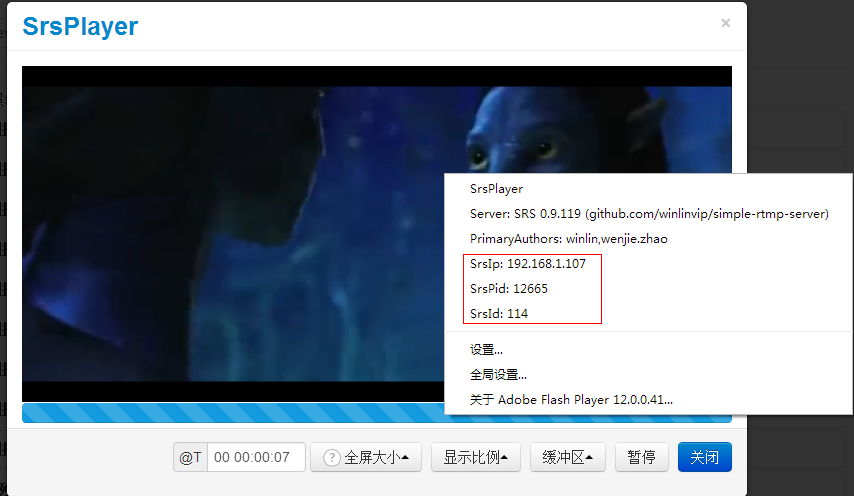 We can get the server ip
 192.168.1.107, the pid 9131 and session id 117. We can grep on this server directly by keyword "[9131][117]":
[winlin@dev6 srs]$ grep -ina "\[12665\]\[114\]" objs/edge.log 1307:[2014-05-27 19:21:27.276][trace][12665][114] serve client, peer ip=192.168.1.113 1308:[2014-05-27 19:21:27.284][trace][12665][114] complex handshake with client success 1309:[2014-05-27 19:21:27.284][trace][12665][114] rtmp connect app success. tcUrl=rtmp://dev:1935/live, pageUrl=http://ossrs.net/players/srs_player.html?vhost=dev&stream=livestream&server=dev&port=1935, swfUrl=http://ossrs.net/players/srs_player/release/srs_player.swf?_version=1.21, schema=rtmp, vhost=__defaultVhost__, port=1935, app=live 1310:[2014-05-27 19:21:27.486][trace][12665][114] set ack window size to 2500000 1311:[2014-05-27 19:21:27.486][trace][12665][114] identify ignore messages except AMF0/AMF3 command message. type=0x5 1312:[2014-05-27 19:21:27.501][trace][12665][114] ignored. set buffer length to 800 1313:[2014-05-27 19:21:27.501][trace][12665][114] identify ignore messages except AMF0/AMF3 command message. type=0x4 1314:[2014-05-27 19:21:27.518][trace][12665][114] identity client type=play, stream_name=livestream, duration=-1.00 1315:[2014-05-27 19:21:27.518][trace][12665][114] identify client success. type=Play, stream_name=livestream, duration=-1.00 1316:[2014-05-27 19:21:27.518][trace][12665][114] set output chunk size to 4096 1317:[2014-05-27 19:21:27.518][trace][12665][114] source url=__defaultVhost__/live/livestream, ip=192.168.1.113, cache=1, is_edge=1, id=-1 1318:[2014-05-27 19:21:27.518][trace][12665][114] dispatch cached gop success. count=0, duration=0 1319:[2014-05-27 19:21:27.518][trace][12665][114] create consumer, queue_size=30.00, tba=0, tbv=0 1322:[2014-05-27 19:21:27.518][trace][12665][114] ignored. set buffer length to 800 1333:[2014-05-27 19:21:27.718][trace][12665][114] update source_id=115 1334:[2014-05-27 19:21:27.922][trace][12665][114] -> PLA time=301, msgs=12, okbps=1072,0,0, ikbps=48,0,0While the source id is 115(source_id=115), then find this session:
[winlin@dev6 srs]$ grep -ina "\[12665\]\[115\]" objs/edge.log 1320:[2014-05-27 19:21:27.518][trace][12665][115] edge connected, can_publish=1, url=rtmp://dev:1935/live/livestream, server=127.0.0.1:19350 1321:[2014-05-27 19:21:27.518][trace][12665][115] connect to server success. server=127.0.0.1, ip=127.0.0.1, port=19350 1323:[2014-05-27 19:21:27.519][trace][12665][115] complex handshake with server success. 1324:[2014-05-27 19:21:27.561][trace][12665][115] set ack window size to 2500000 1325:[2014-05-27 19:21:27.602][trace][12665][115] drop unknown message, type=6 1326:[2014-05-27 19:21:27.602][trace][12665][115] connected, version=0.9.119, ip=127.0.0.1, pid=12633, id=141 1327:[2014-05-27 19:21:27.602][trace][12665][115] set output chunk size to 60000 1328:[2014-05-27 19:21:27.602][trace][12665][115] edge change from 100 to state 101 (ingest connected). 1329:[2014-05-27 19:21:27.603][trace][12665][115] set input chunk size to 60000 1330:[2014-05-27 19:21:27.603][trace][12665][115] dispatch metadata success. 1331:[2014-05-27 19:21:27.603][trace][12665][115] update video sequence header success. size=46 1332:[2014-05-27 19:21:27.603][trace][12665][115] update audio sequence header success. size=4 1335:[2014-05-27 19:21:37.653][trace][12665][115] <- EIG time=10163, okbps=0,0,0, ikbps=234,254,231 We can finger out the upnode server session info connected, version=0.9.119, ip=127.0.0.1, pid=12633, id=141, then to grep on the upnode server:
[winlin@dev6 srs]$ grep -ina "\[12633\]\[141\]" objs/srs.log 783:[2014-05-27 19:21:27.518][trace][12633][141] serve client, peer ip=127.0.0.1 784:[2014-05-27 19:21:27.519][trace][12633][141] complex handshake with client success 785:[2014-05-27 19:21:27.561][trace][12633][141] rtmp connect app success. tcUrl=rtmp://dev:1935/live, pageUrl=, swfUrl=, schema=rtmp, vhost=__defaultVhost__, port=1935, app=live 786:[2014-05-27 19:21:27.561][trace][12633][141] set ack window size to 2500000 787:[2014-05-27 19:21:27.561][trace][12633][141] identify ignore messages except AMF0/AMF3 command message. type=0x5 788:[2014-05-27 19:21:27.602][trace][12633][141] identity client type=play, stream_name=livestream, duration=-1.00 789:[2014-05-27 19:21:27.602][trace][12633][141] identify client success. type=Play, stream_name=livestream, duration=-1.00 790:[2014-05-27 19:21:27.602][trace][12633][141] set output chunk size to 60000 791:[2014-05-27 19:21:27.602][trace][12633][141] source url=__defaultVhost__/live/livestream, ip=127.0.0.1, cache=1, is_edge=0, id=131 792:[2014-05-27 19:21:27.602][trace][12633][141] dispatch cached gop success. count=241, duration=3638 793:[2014-05-27 19:21:27.602][trace][12633][141] create consumer, queue_size=30.00, tba=44100, tbv=1000 794:[2014-05-27 19:21:27.602][trace][12633][141] ignored. set buffer length to 65564526 795:[2014-05-27 19:21:27.604][trace][12633][141] set input chunk size to 60000 798:[2014-05-27 19:21:32.420][trace][12633][141] -> PLA time=4809, msgs=14, okbps=307,0,0, ikbps=5,0,0 848:[2014-05-27 19:22:54.414][trace][12633][141] -> PLA time=86703, msgs=12, okbps=262,262,0, ikbps=0,0,0 867:[2014-05-27 19:22:57.225][trace][12633][141] update source_id=149 And the source id 149(source_id=149), that is the session id of encoder:
[winlin@dev6 srs]$ grep -ina "\[12633\]\[149\]" objs/srs.log 857:[2014-05-27 19:22:56.919][trace][12633][149] serve client, peer ip=127.0.0.1 858:[2014-05-27 19:22:56.921][trace][12633][149] complex handshake with client success 859:[2014-05-27 19:22:56.960][trace][12633][149] rtmp connect app success. tcUrl=rtmp://127.0.0.1:19350/live?vhost=__defaultVhost__, pageUrl=, swfUrl=, schema=rtmp, vhost=__defaultVhost__, port=19350, app=live 860:[2014-05-27 19:22:57.040][trace][12633][149] identify client success. type=publish(FMLEPublish), stream_name=livestream, duration=-1.00 861:[2014-05-27 19:22:57.040][trace][12633][149] set output chunk size to 60000 862:[2014-05-27 19:22:57.040][trace][12633][149] source url=__defaultVhost__/live/livestream, ip=127.0.0.1, cache=1, is_edge=0, id=-1 863:[2014-05-27 19:22:57.123][trace][12633][149] set input chunk size to 60000 864:[2014-05-27 19:22:57.210][trace][12633][149] dispatch metadata success. 865:[2014-05-27 19:22:57.210][trace][12633][149] update video sequence header success. size=46 866:[2014-05-27 19:22:57.210][trace][12633][149] update audio sequence header success. size=4 870:[2014-05-27 19:23:04.970][trace][12633][149] <- CPB time=8117, okbps=4,0,0, ikbps=320,0,0 Encoder => Origin => Edge => Player, the whole link log we got directly!
The tracable is finger log from the player to the origin. The reverse tracable log is from the origin to the edge and player.
For example, there is a origin and a edge, to grep the log on origin by keyword edge-srs:
[winlin@dev6 srs]$ grep -ina "edge-srs" objs/srs.origin.log 30:[2014-08-06 09:41:31.649][trace][21433][107] edge-srs ip=192.168.1.159, version=0.9.189, pid=21435, id=108 We get all edge srs which connectted to this origin, this edge ip is 192.168.1.159, pid is 21435, session id is 108. Then grep the log on the edge:
[winlin@dev6 srs]$ grep --color -ina "\[108\]" objs/srs.log 29:[2014-08-06 10:09:34.579][trace][22314][108] edge pull connected, can_publish=1, url=rtmp://dev:1935/live/livestream, server=127.0.0.1:1936 30:[2014-08-06 10:09:34.591][trace][22314][108] complex handshake success. 31:[2014-08-06 10:09:34.671][trace][22314][108] connected, version=0.9.190, ip=127.0.0.1, pid=22288, id=107 32:[2014-08-06 10:09:34.672][trace][22314][108] out chunk size to 60000 33:[2014-08-06 10:09:34.672][trace][22314][108] ignore the disabled transcode: 34:[2014-08-06 10:09:34.672][trace][22314][108] edge change from 100 to state 101 (pull). 35:[2014-08-06 10:09:34.672][trace][22314][108] input chunk size to 60000 36:[2014-08-06 10:09:34.672][trace][22314][108] got metadata, width=768, height=320, vcodec=7, acodec=10 37:[2014-08-06 10:09:34.672][trace][22314][108] 46B video sh, codec(7, profile=100, level=32, 0x0, 0kbps, 0fps, 0s) 38:[2014-08-06 10:09:34.672][trace][22314][108] 4B audio sh, codec(10, profile=1, 2channels, 0kbps, 44100HZ), flv(16bits, 2channels, 44100HZ) 39:[2014-08-06 10:09:34.779][trace][22314][107] update source_id=108[108] 46:[2014-08-06 10:09:36.853][trace][22314][110] source url=__defaultVhost__/live/livestream, ip=192.168.1.179, cache=1, is_edge=1, source_id=108[108] 50:[2014-08-06 10:09:44.949][trace][22314][108] <- EIG time=10293, okbps=3,0,0, ikbps=441,0,0 53:[2014-08-06 10:09:47.805][warn][22314][108][4] origin disconnected, retry. ret=1007 On this edge, we finger out there is 2 connections which connected on the source, by keyword source_id=108:
39:[2014-08-06 10:09:34.779][trace][22314][107] update source_id=108[108] 46:[2014-08-06 10:09:36.853][trace][22314][110] source url=__defaultVhost__/live/livestream, ip=192.168.1.179, cache=1, is_edge=1, source_id=108[108] There are 2 connections connected on this source, 107 and 110.
For SRS support tracalbe and reverse tracable log, so we can got the whold stream delivery log at any point.
For example, a cluster has a origin and an edge, origin ingest stream.
When I know the stream name, or any information, for example, we can grep the keyword type=Play for all client to play stream on origin server:
[winlin@dev6 srs]$ grep -ina "type=Play" objs/srs.origin.log 31:[2014-08-06 10:09:34.671][trace][22288][107] client identified, type=Play, stream_name=livestream, duration=-1.00 We got session id 107 which play the stream on origin:
[winlin@dev6 srs]$ grep -ina "\[107\]" objs/srs.origin.log 27:[2014-08-06 10:09:34.589][trace][22288][107] RTMP client ip=127.0.0.1 28:[2014-08-06 10:09:34.591][trace][22288][107] complex handshake success 29:[2014-08-06 10:09:34.631][trace][22288][107] connect app, tcUrl=rtmp://dev:1935/live, pageUrl=http://www.ossrs.net/players/srs_player.html?vhost=dev&stream=livestream&server=dev&port=1935, swfUrl=http://www.ossrs.net/players/srs_player/release/srs_player.swf?_version=1.23, schema=rtmp, vhost=__defaultVhost__, port=1935, app=live, args=(obj) 30:[2014-08-06 10:09:34.631][trace][22288][107] edge-srs ip=192.168.1.159, version=0.9.190, pid=22314, id=108 31:[2014-08-06 10:09:34.671][trace][22288][107] client identified, type=Play, stream_name=livestream, duration=-1.00 32:[2014-08-06 10:09:34.671][trace][22288][107] out chunk size to 60000 33:[2014-08-06 10:09:34.671][trace][22288][107] source url=__defaultVhost__/live/livestream, ip=127.0.0.1, cache=1, is_edge=0, source_id=105[105] 34:[2014-08-06 10:09:34.672][trace][22288][107] dispatch cached gop success. count=307, duration=4515 35:[2014-08-06 10:09:34.672][trace][22288][107] create consumer, queue_size=30.00, tba=44100, tbv=25 36:[2014-08-06 10:09:34.672][trace][22288][107] ignored. set buffer length to 1000 37:[2014-08-06 10:09:34.673][trace][22288][107] input chunk size to 60000 40:[2014-08-06 10:09:44.748][trace][22288][107] -> PLA time=10007, msgs=0, okbps=464,0,0, ikbps=3,0,0 41:[2014-08-06 10:09:47.805][warn][22288][107][104] client disconnect peer. ret=1004 The soruce id is 105, specified by source_id=105:
[winlin@dev6 srs]$ grep --color -ina "\[105\]" objs/srs.origin.log 16:[2014-08-06 10:09:30.331][trace][22288][105] RTMP client ip=127.0.0.1 17:[2014-08-06 10:09:30.331][trace][22288][105] srand initialized the random. 18:[2014-08-06 10:09:30.332][trace][22288][105] simple handshake success. 19:[2014-08-06 10:09:30.373][trace][22288][105] connect app, tcUrl=rtmp://127.0.0.1:1936/live?vhost=__defaultVhost__, pageUrl=, swfUrl=, schema=rtmp, vhost=__defaultVhost__, port=1936, app=live, args=null 21:[2014-08-06 10:09:30.417][trace][22288][105] client identified, type=publish(FMLEPublish), stream_name=livestream, duration=-1.00 22:[2014-08-06 10:09:30.417][trace][22288][105] out chunk size to 60000 23:[2014-08-06 10:09:30.418][trace][22288][105] source url=__defaultVhost__/live/livestream, ip=127.0.0.1, cache=1, is_edge=0, source_id=-1[-1] 24:[2014-08-06 10:09:30.466][trace][22288][105] got metadata, width=768, height=320, vcodec=7, acodec=10 25:[2014-08-06 10:09:30.466][trace][22288][105] 46B video sh, codec(7, profile=100, level=32, 0x0, 0kbps, 0fps, 0s) 26:[2014-08-06 10:09:30.466][trace][22288][105] 4B audio sh, codec(10, profile=1, 2channels, 0kbps, 44100HZ), flv(16bits, 2channels, 44100HZ) 33:[2014-08-06 10:09:34.671][trace][22288][107] source url=__defaultVhost__/live/livestream, ip=127.0.0.1, cache=1, is_edge=0, source_id=105[105] 38:[2014-08-06 10:09:40.732][trace][22288][105] <- CPB time=10100, okbps=3,0,0, ikbps=332,0,0 This source is the ingest stream source, we got the root source.
And we got 107 which is srs edge connection, by keyword edge-srs:
30:[2014-08-06 10:09:34.631][trace][22288][107] edge-srs ip=192.168.1.159, version=0.9.190, pid=22314, id=108 Find the log on edge, the session id is 108:
[winlin@dev6 srs]$ grep --color -ina "\[108\]" objs/srs.log 29:[2014-08-06 10:09:34.579][trace][22314][108] edge pull connected, can_publish=1, url=rtmp://dev:1935/live/livestream, server=127.0.0.1:1936 30:[2014-08-06 10:09:34.591][trace][22314][108] complex handshake success. 31:[2014-08-06 10:09:34.671][trace][22314][108] connected, version=0.9.190, ip=127.0.0.1, pid=22288, id=107 32:[2014-08-06 10:09:34.672][trace][22314][108] out chunk size to 60000 33:[2014-08-06 10:09:34.672][trace][22314][108] ignore the disabled transcode: 34:[2014-08-06 10:09:34.672][trace][22314][108] edge change from 100 to state 101 (pull). 35:[2014-08-06 10:09:34.672][trace][22314][108] input chunk size to 60000 36:[2014-08-06 10:09:34.672][trace][22314][108] got metadata, width=768, height=320, vcodec=7, acodec=10 37:[2014-08-06 10:09:34.672][trace][22314][108] 46B video sh, codec(7, profile=100, level=32, 0x0, 0kbps, 0fps, 0s) 38:[2014-08-06 10:09:34.672][trace][22314][108] 4B audio sh, codec(10, profile=1, 2channels, 0kbps, 44100HZ), flv(16bits, 2channels, 44100HZ) 39:[2014-08-06 10:09:34.779][trace][22314][107] update source_id=108[108] 46:[2014-08-06 10:09:36.853][trace][22314][110] source url=__defaultVhost__/live/livestream, ip=192.168.1.179, cache=1, is_edge=1, source_id=108[108] 50:[2014-08-06 10:09:44.949][trace][22314][108] <- EIG time=10293, okbps=3,0,0, ikbps=441,0,0 53:[2014-08-06 10:09:47.805][warn][22314][108][4] origin disconnected, retry. ret=1007 We got the edge source 108, and there are 2 clients connected on this source 107 and 110, specified by keyword source_id=108:
[winlin@dev6 srs]$ grep --color -ina "\[107\]" objs/srs.log 18:[2014-08-06 10:09:34.281][trace][22314][107] RTMP client ip=192.168.1.179 19:[2014-08-06 10:09:34.282][trace][22314][107] srand initialized the random. 20:[2014-08-06 10:09:34.291][trace][22314][107] complex handshake success 21:[2014-08-06 10:09:34.291][trace][22314][107] connect app, tcUrl=rtmp://dev:1935/live, pageUrl=http://www.ossrs.net/players/srs_player.html?vhost=dev&stream=livestream&server=dev&port=1935, swfUrl=http://www.ossrs.net/players/srs_player/release/srs_player.swf?_version=1.23, schema=rtmp, vhost=__defaultVhost__, port=1935, app=live, args=null 22:[2014-08-06 10:09:34.532][trace][22314][107] ignored. set buffer length to 800 23:[2014-08-06 10:09:34.568][trace][22314][107] client identified, type=Play, stream_name=livestream, duration=-1.00 24:[2014-08-06 10:09:34.568][trace][22314][107] out chunk size to 60000 25:[2014-08-06 10:09:34.568][trace][22314][107] source url=__defaultVhost__/live/livestream, ip=192.168.1.179, cache=1, is_edge=1, source_id=-1[-1] 26:[2014-08-06 10:09:34.579][trace][22314][107] dispatch cached gop success. count=0, duration=0 27:[2014-08-06 10:09:34.579][trace][22314][107] create consumer, queue_size=30.00, tba=0, tbv=0 28:[2014-08-06 10:09:34.579][trace][22314][107] ignored. set buffer length to 800 39:[2014-08-06 10:09:34.779][trace][22314][107] update source_id=108[108] 54:[2014-08-06 10:09:47.805][trace][22314][107] cleanup when unpublish 55:[2014-08-06 10:09:47.805][trace][22314][107] edge change from 101 to state 0 (init). 56:[2014-08-06 10:09:47.805][warn][22314][107][9] client disconnect peer. ret=1004 The 107 is a client which trigger the edge to fetch stream from origin. Find 110:
[winlin@dev6 srs]$ grep --color -ina "\[110\]" objs/srs.log 40:[2014-08-06 10:09:36.609][trace][22314][110] RTMP client ip=192.168.1.179 41:[2014-08-06 10:09:36.613][trace][22314][110] complex handshake success 42:[2014-08-06 10:09:36.613][trace][22314][110] connect app, tcUrl=rtmp://dev:1935/live, pageUrl=http://www.ossrs.net/players/srs_player.html?vhost=dev&stream=livestream&server=dev&port=1935, swfUrl=http://www.ossrs.net/players/srs_player/release/srs_player.swf?_version=1.23, schema=rtmp, vhost=__defaultVhost__, port=1935, app=live, args=null 43:[2014-08-06 10:09:36.835][trace][22314][110] ignored. set buffer length to 800 44:[2014-08-06 10:09:36.853][trace][22314][110] client identified, type=Play, stream_name=livestream, duration=-1.00 45:[2014-08-06 10:09:36.853][trace][22314][110] out chunk size to 60000 46:[2014-08-06 10:09:36.853][trace][22314][110] source url=__defaultVhost__/live/livestream, ip=192.168.1.179, cache=1, is_edge=1, source_id=108[108] 47:[2014-08-06 10:09:36.853][trace][22314][110] dispatch cached gop success. count=95, duration=1573 48:[2014-08-06 10:09:36.853][trace][22314][110] create consumer, queue_size=30.00, tba=44100, tbv=25 49:[2014-08-06 10:09:36.853][trace][22314][110] ignored. set buffer length to 800 51:[2014-08-06 10:09:45.919][trace][22314][110] -> PLA time=8759, msgs=21, okbps=461,0,0, ikbps=3,0,0 52:[2014-08-06 10:09:46.247][warn][22314][110][104] client disconnect peer. ret=1004 The 110 is a flash player client.
The system info and port listen at:
[winlin@dev6 srs]$ ./objs/srs -c console.conf [winlin@dev6 srs]$ cat objs/srs.log [2014-04-04 11:39:24.176][trace][0][0] config parsed EOF [2014-04-04 11:39:24.176][trace][0][0] log file is ./objs/srs.log [2014-04-04 11:39:24.177][trace][0][0] srs 0.9.46 [2014-04-04 11:39:24.177][trace][0][0] uname: Linux dev6 2.6.32-71.el6.x86_64 #1 SMP Fri May 20 03:51:51 BST 2011 x86_64 x86_64 x86_64 GNU/Linux [2014-04-04 11:39:24.177][trace][0][0] build: 2014-04-03 18:38:23, little-endian [2014-04-04 11:39:24.177][trace][0][0] configure: --dev --with-hls --with-nginx --with-ssl --with-ffmpeg --with-http-callback --with-http-server --with-http-api --with-librtmp --with-bwtc --with-research --with-utest --without-gperf --without-gmc --without-gmp --without-gcp --without-gprof --without-arm-ubuntu12 --jobs=1 --prefix=/usr/local/srs [2014-04-04 11:39:24.177][trace][0][0] write pid=4021 to ./objs/srs.pid success! [2014-04-04 11:39:24.177][trace][100][16] server started, listen at port=1935, type=0, fd=6 [2014-04-04 11:39:24.177][trace][100][16] server started, listen at port=1985, type=1, fd=7 [2014-04-04 11:39:24.177][trace][100][16] server started, listen at port=8080, type=2, fd=8 [2014-04-04 11:39:24.177][trace][101][16] listen cycle start, port=1935, type=0, fd=6 [2014-04-04 11:39:24.177][trace][102][11] listen cycle start, port=1985, type=1, fd=7 [2014-04-04 11:39:24.177][trace][103][11] listen cycle start, port=8080, type=2, fd=8 [2014-04-04 11:39:26.799][trace][0][11] get a signal, signo=2 [2014-04-04 11:39:26.799][trace][0][11] user terminate programIt means:
- The log file path:[2014-04-04 11:39:24.176][trace][0][0] log file is ./objs/srs.log
- SRS version:[2014-04-04 11:39:24.177][trace][0][0] srs 0.9.46
- Compile info:[2014-04-04 11:39:24.177][trace][0][0] uname: Linux dev6 2.6.32-71.el6.x86_64 #1 SMP Fri May 20 03:51:51 BST 2011 x86_64 x86_64 x86_64 GNU/Linux
- Compile date:[2014-04-04 11:39:24.177][trace][0][0] build: 2014-04-03 18:38:23, little-endian
- Build options:[2014-04-04 11:39:24.177][trace][0][0] configure: --dev --with-hls --with-nginx --with-ssl --with-ffmpeg --with-http-callback --with-http-server --with-http-api --with-librtmp --with-bwtc --with-research --with-utest --without-gperf --without-gmc --without-gmp --without-gcp --without-gprof --without-arm-ubuntu12 --jobs=1 --prefix=/usr/local/srs
- PID file:[2014-04-04 11:39:24.177][trace][0][0] write pid=4021 to ./objs/srs.pid success!
- Listen at port 1935(RTMP):[2014-04-04 11:39:24.177][trace][100][16] server started, listen at port=1935, type=0, fd=6
- Listen at port 1985(HTTP接口):[2014-04-04 11:39:24.177][trace][100][16] server started, listen at port=1985, type=1, fd=7
- Listen at port 8080(HTTP服务):[2014-04-04 11:39:24.177][trace][100][16] server started, listen at port=8080, type=2, fd=8
- Ready for connections:[2014-04-04 11:39:24.177][trace][101][16] listen cycle start, port=1935, type=0, fd=6
SRS provides session oriented log.
For example, SRS running for 365 days, served 10000000 clients, how to find a specified client log?
We need something to grep, for instance, we know the stream url: rtmp://192.168.1.107:1935/live/livestream, then we can find the keyword to grep by research the publish log:
[2014-04-04 11:56:06.074][trace][104][11] rtmp get peer ip success. ip=192.168.1.179, send_to=30000000us, recv_to=30000000us [2014-04-04 11:56:06.080][trace][104][11] srand initialized the random. [2014-04-04 11:56:06.082][trace][104][11] simple handshake with client success. [2014-04-04 11:56:06.083][trace][104][11] rtmp connect app success. tcUrl=rtmp://192.168.1.107:1935/live, pageUrl=, swfUrl=rtmp://192.168.1.107:1935/live, schema=rtmp, vhost=__defaultVhost__, port=1935, app=live [2014-04-04 11:56:06.288][trace][104][11] set ack window size to 2500000 [2014-04-04 11:56:06.288][trace][104][11] identify ignore messages except AMF0/AMF3 command message. type=0x5 [2014-04-04 11:56:06.288][trace][104][11] identify client success. type=publish(FMLEPublish), stream_name=livestreamThe keyword to grep:
- Use keyword
identify client success, thentype=publish, thenlivestream. - Or, use keyword
identify client success. type=publish, thenlivestream. - We can grep all
identify client success. type=publish, and research the result.
For example:
[winlin@dev6 srs]$ cat objs/srs.log|grep -ina "identify client success. type=publish" 20:[2014-04-04 11:56:06.288][trace][104][11] identify client success. type=publish, stream_name=livestream 43:[2014-04-04 11:56:18.138][trace][105][11] identify client success. type=publish, stream_name=winlin 65:[2014-04-04 11:56:29.531][trace][106][11] identify client success. type=publish, stream_name=livestream 86:[2014-04-04 11:56:35.966][trace][107][11] identify client success. type=publish, stream_name=livestreamThere are some publish stream, and we can grep specified streamname.
[winlin@dev6 srs]$ cat objs/srs.log|grep -ina "identify client success. type=publish"|grep -a "livestream" 20:[2014-04-04 11:56:06.288][trace][104][11] identify client success. type=publish, stream_name=livestream 65:[2014-04-04 11:56:29.531][trace][106][11] identify client success. type=publish, stream_name=livestream 86:[2014-04-04 11:56:35.966][trace][107][11] identify client success. type=publish, stream_name=livestreamWe can filter the result by time, for example, we use session id 104 to grep by keyword \[104\]\[:
[winlin@dev6 srs]$ cat objs/srs.log |grep -ina "\[104\]\[" 14:[2014-04-04 11:56:06.074][trace][104][11] rtmp get peer ip success. ip=192.168.1.179, send_to=30000000us, recv_to=30000000us 15:[2014-04-04 11:56:06.080][trace][104][11] srand initialized the random. 16:[2014-04-04 11:56:06.082][trace][104][11] simple handshake with client success. 17:[2014-04-04 11:56:06.083][trace][104][11] rtmp connect app success. tcUrl=rtmp://192.168.1.107:1935/live, pageUrl=, swfUrl=rtmp://192.168.1.107:1935/live, schema=rtmp, vhost=__defaultVhost__, port=1935, app=live 18:[2014-04-04 11:56:06.288][trace][104][11] set ack window size to 2500000 19:[2014-04-04 11:56:06.288][trace][104][11] identify ignore messages except AMF0/AMF3 command message. type=0x5 20:[2014-04-04 11:56:06.288][trace][104][11] identify client success. type=publish(FMLEPublish), stream_name=livestream 21:[2014-04-04 11:56:06.288][trace][104][11] set output chunk size to 60000 22:[2014-04-04 11:56:06.288][trace][104][11] set chunk_size=60000 success 23:[2014-04-04 11:56:07.397][trace][104][11] <- time=225273, obytes=4168, ibytes=7607, okbps=32, ikbps=59 24:[2014-04-04 11:56:07.398][trace][104][11] dispatch metadata success. 25:[2014-04-04 11:56:07.398][trace][104][11] process onMetaData message success. 26:[2014-04-04 11:56:07.398][trace][104][11] update video sequence header success. size=67 27:[2014-04-04 11:56:08.704][trace][104][11] <- time=226471, obytes=4168, ibytes=36842, okbps=13, ikbps=116 28:[2014-04-04 11:56:09.901][trace][104][11] <- time=227671, obytes=4168, ibytes=67166, okbps=9, ikbps=152 29:[2014-04-04 11:56:11.102][trace][104][11] <- time=228869, obytes=4168, ibytes=97481, okbps=6, ikbps=155 30:[2014-04-04 11:56:11.219][trace][104][11] clear cache/metadata/sequence-headers when unpublish. 31:[2014-04-04 11:56:11.219][trace][104][11] control message(unpublish) accept, retry stream service. 32:[2014-04-04 11:56:11.219][trace][104][11] ignore AMF0/AMF3 command message. 33:[2014-04-04 11:56:11.419][trace][104][11] drop the AMF0/AMF3 command message, command_name=deleteStream 34:[2014-04-04 11:56:11.420][trace][104][11] ignore AMF0/AMF3 command message. 35:[2014-04-04 11:56:12.620][error][104][104] recv client message failed. ret=207(Connection reset by peer) 36:[2014-04-04 11:56:12.620][error][104][104] identify client failed. ret=207(Connection reset by peer) 37:[2014-04-04 11:56:12.620][warn][104][104] client disconnect peer. ret=204 [winlin@dev6 srs]$ Then we got the log for this session, and client closed connection by log: 36:[2014-04-04 11:56:12.620][error][104][104] identify client failed. ret=207(Connection reset by peer).
When default SRS only print less log? Because SRS default use conf/srs.conf in daemon mode and print to log file.
When enable daemon, then no need to start by nohup:
# whether start as deamon # default: on daemon on;Use conf/console.conf to not start in daemon and log to conosle.
# no-daemon and write log to console config for srs. # @see full.conf for detail config. listen 1935; daemon off; srs_log_tank console; vhost __defaultVhost__ { }Startup command:
./objs/srs -c conf/console.conf To startup with default config conf/srs.conf:
[winlin@dev6 srs]$ ./objs/srs -c conf/srs.conf [2014-04-14 12:12:57.775][trace][0][0] config parse complete [2014-04-14 12:12:57.775][trace][0][0] write log to file ./objs/srs.log [2014-04-14 12:12:57.775][trace][0][0] you can: tailf ./objs/srs.log [2014-04-14 12:12:57.775][trace][0][0] @see: https://github.com/ossrs/srs/wiki/v5_EN_SrsLogWinlin 2014.10