migrate_v5_CN_reuse port
HOME > CN > REUSE PORT


Note: 如果觉得Github的Wiki访问太慢,可以访问 Gitee 镜像。
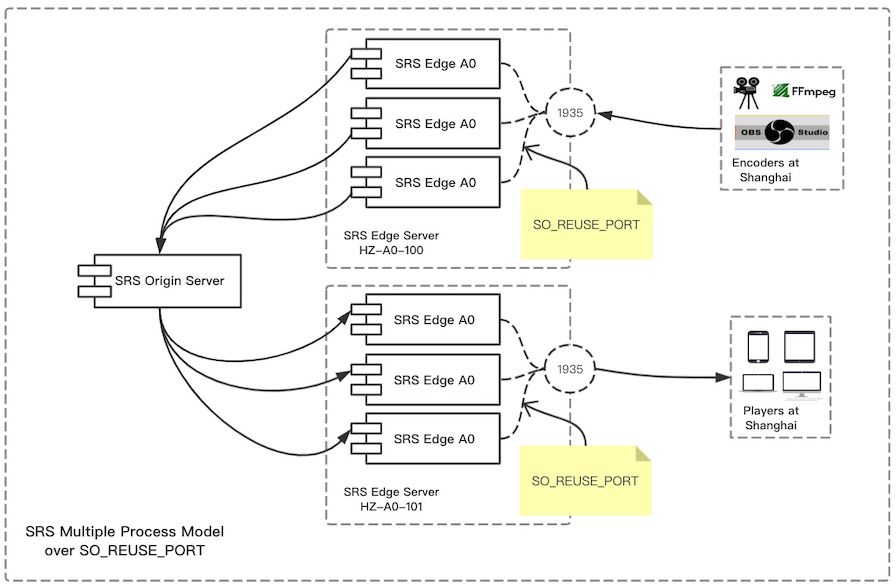
SRS2的性能有大幅的提升,参考SRS2性能。SRS3我们支持了源站集群, 解决了源站的性能瓶颈,参考OriginCluster;对于边缘服务器,我们提供了TCP代理方案, 参考go-oryx;对于边缘服务器,我们还可以支持SO_REUSEPORT,可以在服务器上启动多个Edge进程。
注意:SO_REUSEPORT功能需要Linux Kernel 3.9+,所以如果使用CentOS6你可能需要升级你的内核,推荐使用CentOS7。
首先,我们启动一个边缘服务器,侦听在1935:
./objs/srs -c conf/edge.conf 然后,在同一个服务器,再启动一个边缘服务器,也侦听在1935:
./objs/srs -c conf/edge2.conf 注意:当然这两个边缘服务器的pid文件路径要不同,否则会启动失败。
这样就启动了两个进程,都侦听在1935:
[root@bf2e88b31f9b trunk]# ps aux|grep srs root 381 0.1 0.0 19888 5752 pts/2 S+ 08:03 0:01 ./objs/srs -c conf/edge.conf root 383 0.0 0.0 19204 5468 pts/1 S+ 08:04 0:00 ./objs/srs -c conf/edge2.conf [root@bf2e88b31f9b trunk]# lsof -p 381 srs 381 root 7u IPv6 18835 0t0 TCP *:macromedia-fcs (LISTEN) [root@bf2e88b31f9b trunk]# lsof -p 383 srs 383 root 7u IPv6 17831 0t0 TCP *:macromedia-fcs (LISTEN) 接着,启动源站服务器,这两个边缘服务器从这个源站服务器取流:
./objs/srs -c conf/origin.conf 最后,我们可以推流到源站或边缘,从任意边缘服务器拉流播放:
for((;;)); do \ ./objs/ffmpeg/bin/ffmpeg -re -i ./doc/source.flv \ -c copy \ -f flv rtmp://192.168.1.170/live/livestream; \ sleep 1; \ done 使用VLC播放RTMP流: rtmp://192.168.1.170:1935/live/livestream