

This page applies to Apigee and Apigee hybrid.
This page describes the risk assessment available for each API resource in API hub. You can use this view to drill down into the security scores for a specific API across all of its deployments. This allows you to understand the specific risks associated with an API and see the actionable recommendations for improving its security. This assessment data is aggregated using Apigee Advanced API Security for multi-gateway projects.
Before you begin
- Enable and configure the Apigee Advanced API Security add-on for your API hub instance. For more information, see Configure Apigee Advanced API Security for multiple Apigee organizations and gateways. Grant the required IAM roles and permissions to your principal account. For more information, see IAM roles and permissions.
View security scores of an API
You can view the security scores for each deployment of an API. These scores are filterable based on the security profiles that were used to calculate them.
Console
To view the security scores of an API, do the following:
- In the Google Cloud console, go to the API hub > APIs page.
- Click the API for which you want to view the security scores.
The API details page appears.
- Click the Security tab.
- Click Security profile and choose the security profile by which you want to filter the API security scores.
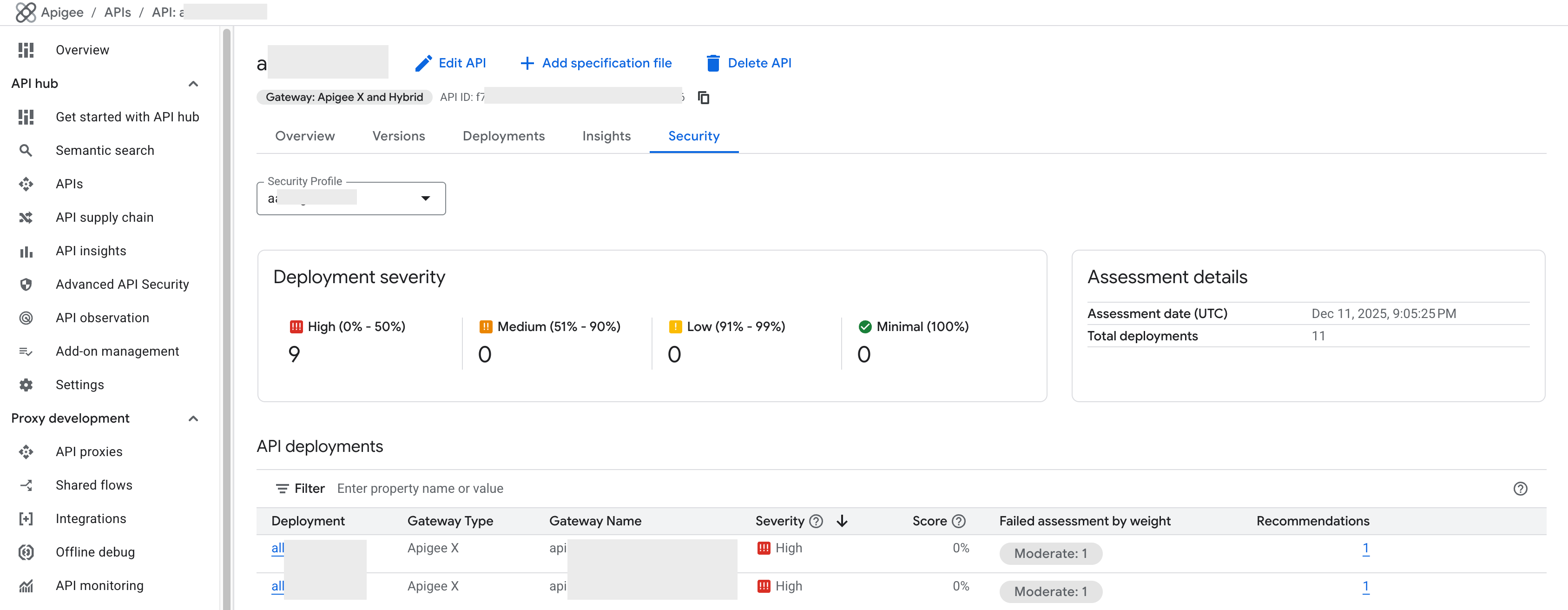
The Security scores tab displays the security score assessment details and recommendations for the selected API and security profile.
REST
To view the security scores for each deployment of an API, make a POST request to the securityAssessmentResults:batchCompute API.
curl -H "Authorization: Bearer $(gcloud auth print-access-token)" "https://apihub.googleapis.com/v1/organizations/APIGEE_ORG/securityAssessmentResults:batchCompute" -X POST -H "Content-Type: application/json" -d ' { "profile": "PROFILE_ID", "api_hub_apis": { "apis": ["API_HUB_API_NAME"] }, "include": {"resources": [{"type": "API_HUB_DEPLOYMENT", "name": "DEPLOYMENT_ID"}]} }' Replace the following:
APIGEE_ORG: Name of the Apigee organization provisioned in your Google Cloud project.PROFILE_ID: The name of the security profile.API_HUB_API_NAME: The name of the API registered in API hub.DEPLOYMENT_ID: The UUID of the API deployment.
API security scores
The following security scores are provided for each API deployment:
Deployments by severity
The Deployments by severity section displays the total number of API deployments in the selected gateway and security profile grouped by severity. The severity for an API deployment is a direct mapping of the score range of the deployment against the selected security profile. For example, if an API deployment has a calculated security score of 45%, it falls into the 0% - 50% range, and its severity is classified as High.
The following table shows the severity and score range mapping for the Deployments by severity section:
| Severity | Score range | Meaning |
|---|---|---|
| High | 0% - 50% | Indicates significant configuration issues or severe risk. |
| Medium | 51% - 90% | Indicates moderate compliance with the profile. |
| Low | 91% - 99% | Indicates near full compliance with the profile. |
| Minimal | 100% | Indicates full compliance with the profile. |
Assessment details
The Assessment details card displays the total number of API deployments that are included in the selected gateway and security profile along with the assessment date and time.
API deployments
The API deployments card displays the following assessment details for each deployed API proxy:
| Assessment | Description |
|---|---|
| Deployment | The specific API proxy name being assessed. |
| Gateway type | The type of gateway hosting the deployment (for example, Apigee X). |
| Gateway name | The specific instance name or ID of the gateway hosting the deployment (for example, instance_name). |
| Severity | The risk level of the deployment. |
| Score | The compliance percentage of the deployment against the selected security profile. |
| Failed assessment by weight | A breakdown showing the number of assessment checks that failed, grouped by their assigned significance. Major failures carry approximately 15 points, Moderate failures carry approximately 5 points, and Minor failures carry approximately 1 point towards the weighted score calculation. |
| Recommendations | The count of specific, actionable steps needed to fix identified security vulnerabilities and improve the score. |
View recommendations
To view recommendations for improving your API, do the following:
- For the API deployment for which you want to view the recommendations for, click the count displayed under the Recommendations column.
The Recommendations pane displays all assessment checks that require attention and provides the respective recommendation to improve the score.
- Optional: Click Edit proxy to edit the deployment (proxy) and address the security issues identified by the recommendation.
What's next
- View security scores across all projects and gateways, see View security scores across all projects and gateways.
- Learn how to manage security profiles for your multi-gateway setup.
- Learn how to manage runtime projects and environments for Advanced API Security.