WELCOME Into the Box 2025: The Future is Dynamic!
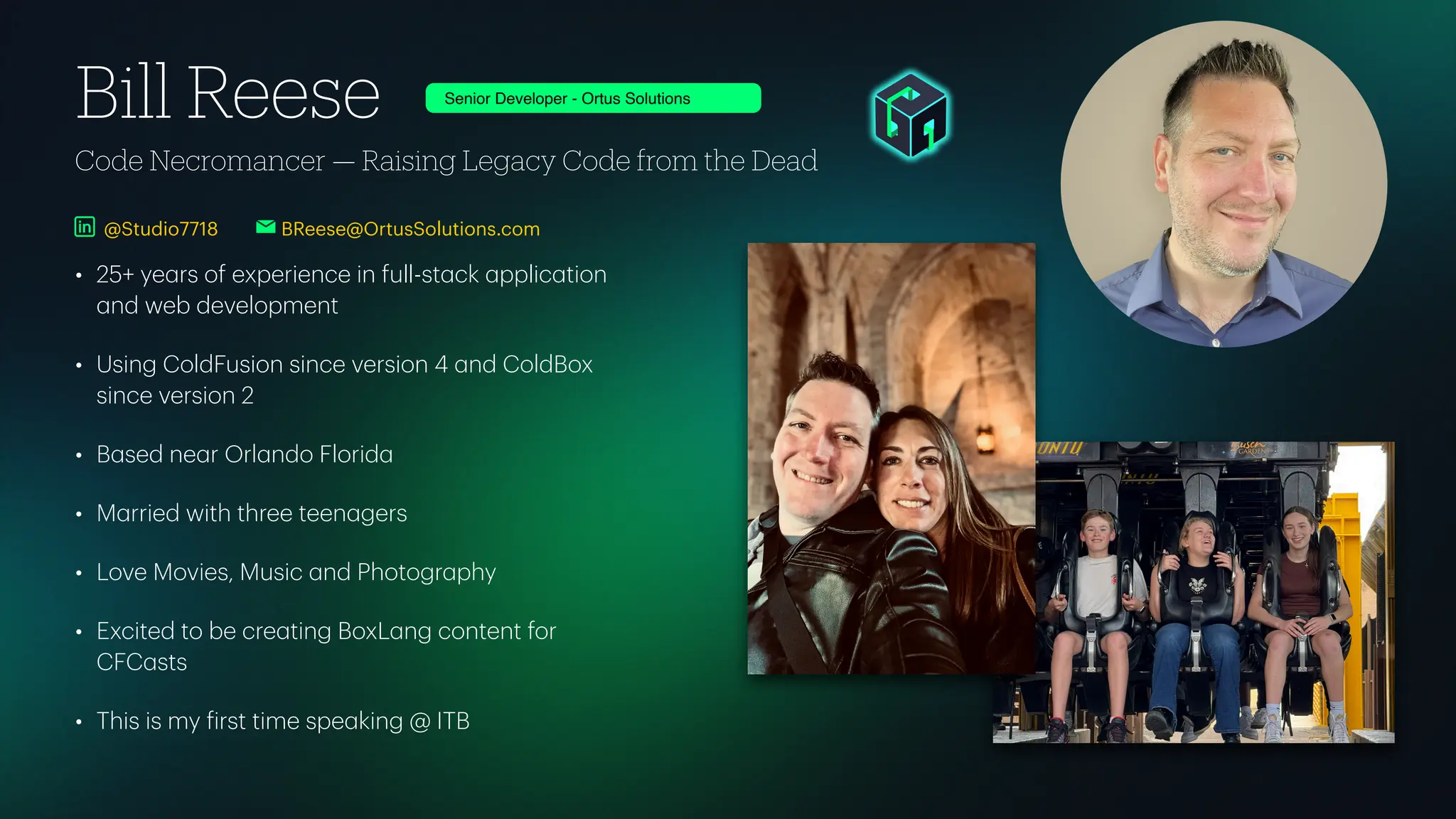
Code Necromancer — Raising Legacy Code from the Dead Bill Reese • 25+ ye a rs of experience in full-st a ck a pplic a tion a nd web development • Using ColdFusion since version 4 a nd ColdBox since version 2 • B a sed ne a r Orl a ndo Florid a • M a rried with three teen a gers • Love Movies, Music a nd Photogr a phy • Excited to be cre a ting BoxL a ng content for CFC a sts • This is my f irst time spe a king @ ITB BReese@OrtusSolutions.com Senior Developer - Ortus Solutions @Studio7718
Bill Reese - Into The Box 2025 No hockey mask needed! Use JSON to Slash Your Database Performance
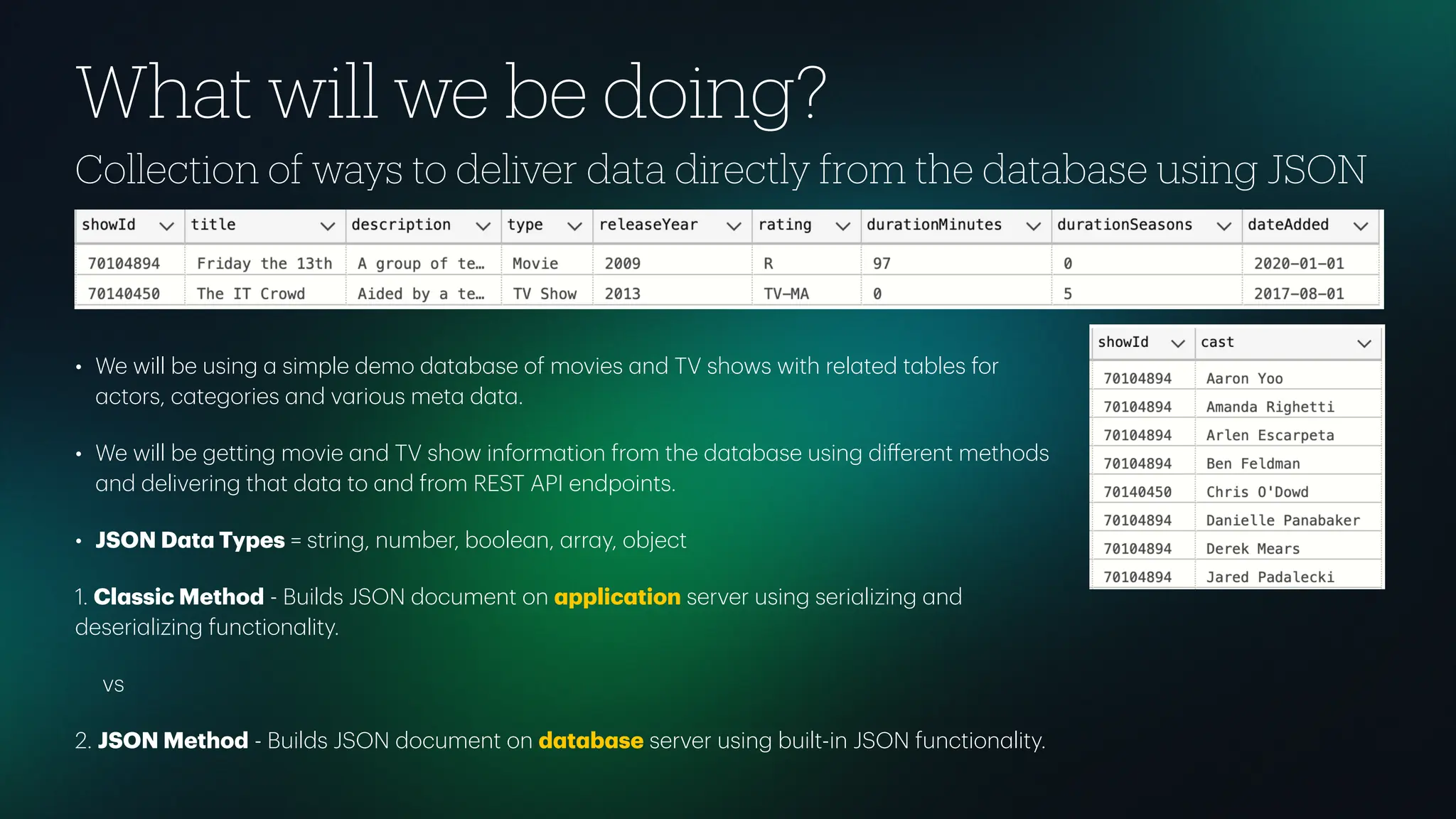
Collection of ways to deliver data directly from the database using JSON • We will be using a simple demo d a t a b a se of movies a nd TV shows with rel a ted t a bles for a ctors, c a tegories a nd v a rious met a d a t a . • We will be getting movie a nd TV show inform a tion from the d a t a b a se using di ff erent methods a nd delivering th a t d a t a to a nd from REST API endpoints. • JSON D a t a Types = string, number, boole a n, a rr a y, object 1. Cl a ssic Method - Builds JSON document on a pplic a tion server using seri a lizing a nd deseri a lizing function a lity. vs 2. JSON Method - Builds JSON document on d a t a b a se server using built-in JSON function a lity. What will we be doing?
Why would I want to use JSON in the Database? Think di ff erently about your data. Does this get updated frequently? • D a t a type conversion issues • Less d a t a b a se tr a ns a ctions, connections, queries • F a ster response time ( a lmost a ll of the time) • Less a pplic a tion server overhe a d • Quick sub-object cre a tion • Utilize In-Memory stor a ge of JSON documents • Utilize Query C a ching of JSON documents
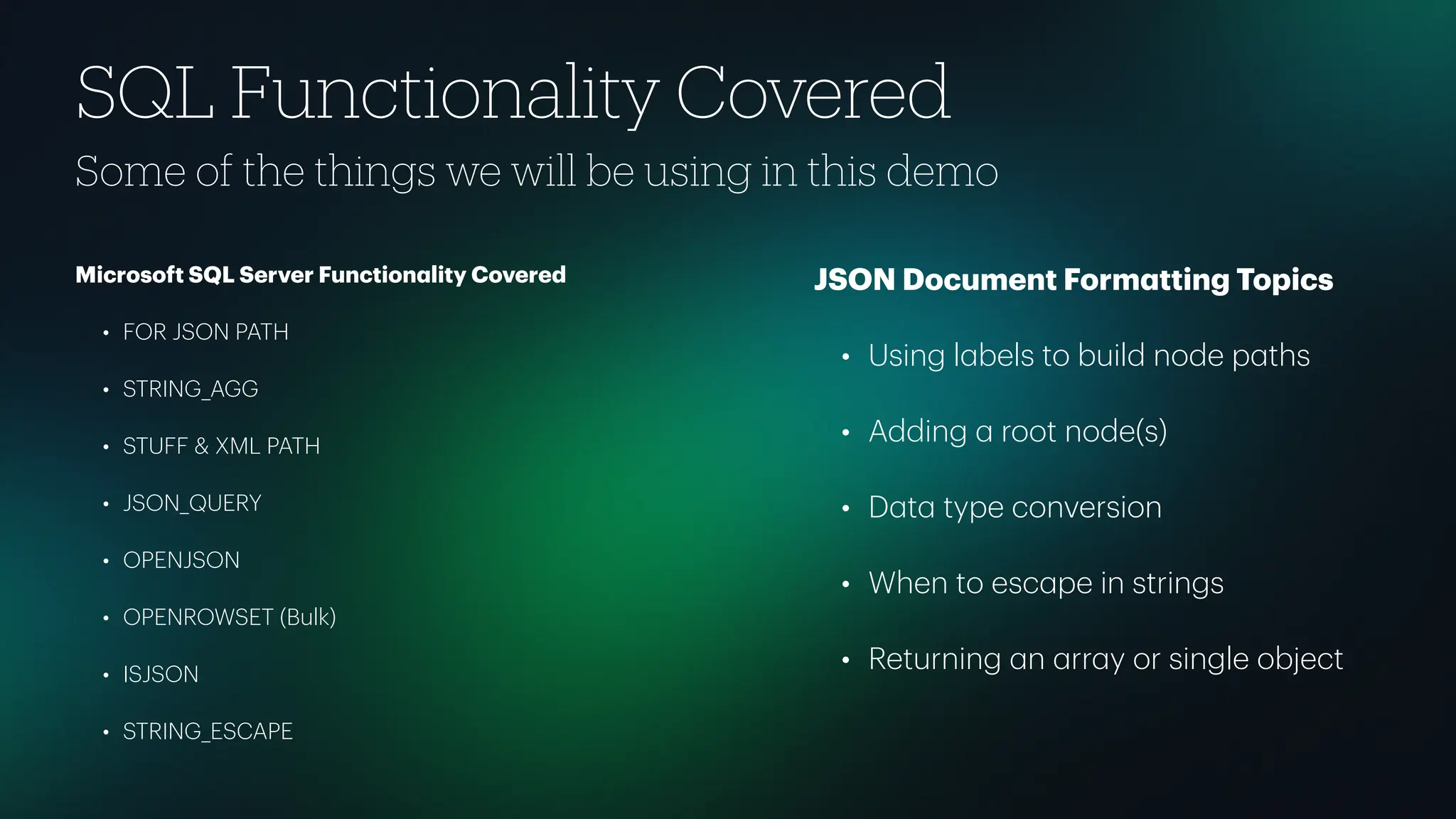
SQL Functionality Covered Some of the things we will be using in this demo Microsoft SQL Server Function a lity Covered • FOR JSON PATH • STRING_AGG • STUFF & XML PATH • JSON_QUERY • OPENJSON • OPENROWSET (Bulk) • ISJSON • STRING_ESCAPE JSON Document Form a tting Topics • Using l a bels to build node p a ths • Adding a root node(s) • D a t a type conversion • When to esc a pe in strings • Returning a n a rr a y or single object
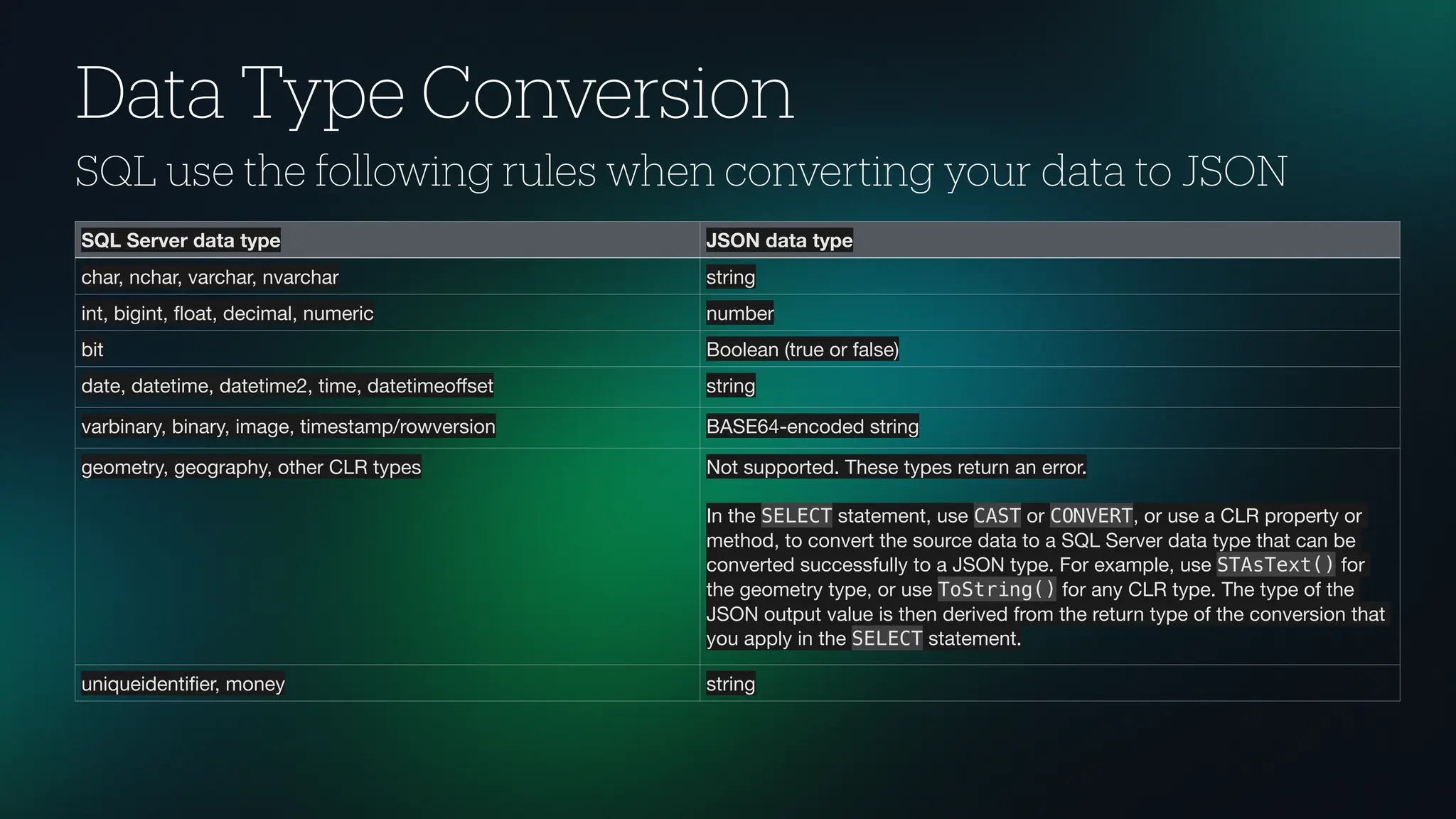
Data Type Conversion SQL use the following rules when converting your data to JSON SQL Server data type JSON data type char, nchar, varchar, nvarchar string int, bigint, fl oat, decimal, numeric number bit Boolean (true or false) date, datetime, datetime2, time, datetimeo ff set string varbinary, binary, image, timestamp/rowversion BASE64-encoded string geometry, geography, other CLR types Not supported. These types return an error. In the SELECT statement, use CAST or CONVERT, or use a CLR property or method, to convert the source data to a SQL Server data type that can be converted successfully to a JSON type. For example, use STAsText() for the geometry type, or use ToString() for any CLR type. The type of the JSON output value is then derived from the return type of the conversion that you apply in the SELECT statement. uniqueidenti fi er, money string
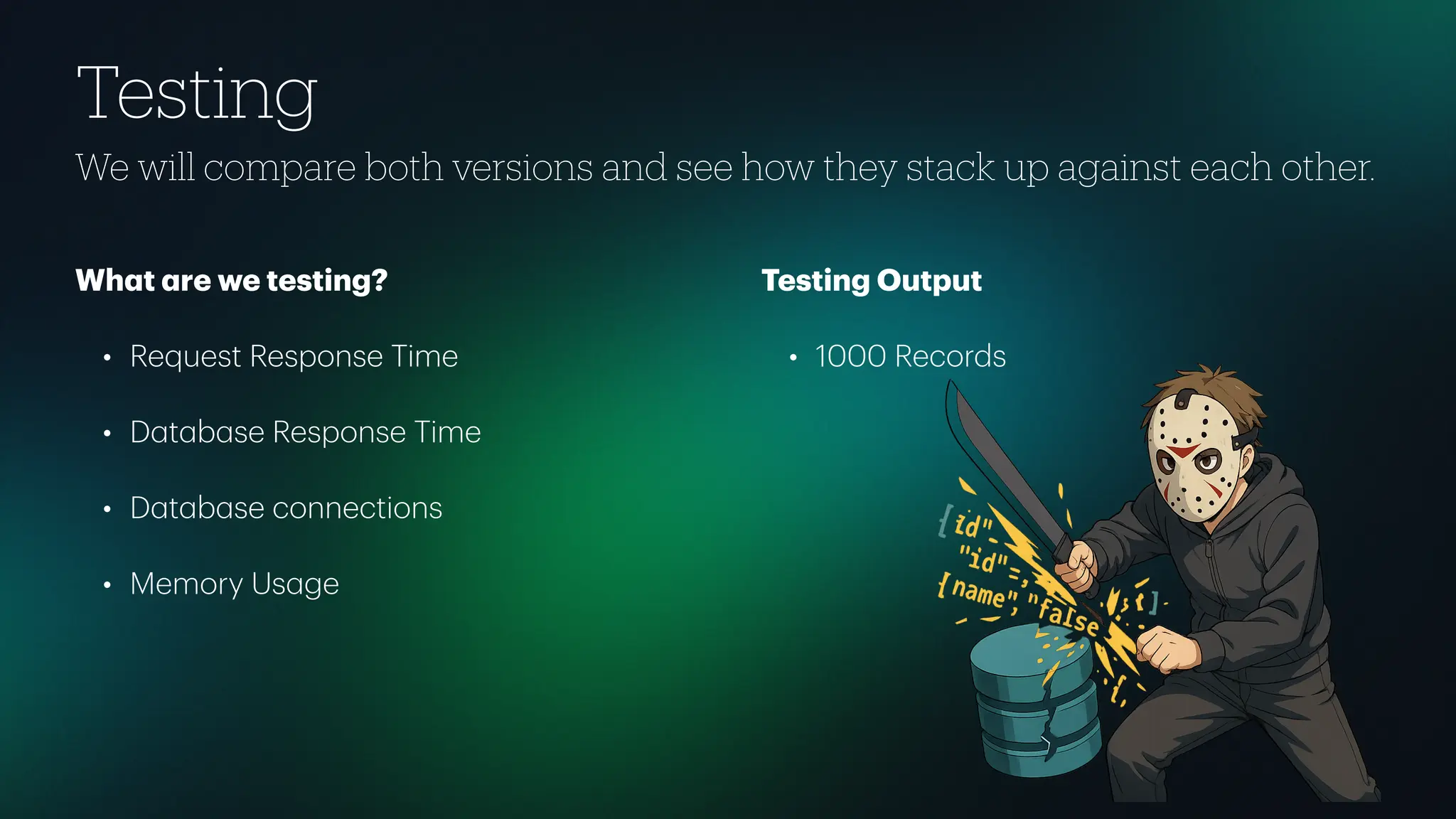
Testing We will compare both versions and see how they stack up against each other. Wh a t a re we testing? • Request Response Time • D a t a b a se Response Time • D a t a b a se connections • Memory Us a ge Testing Output • 1000 Records
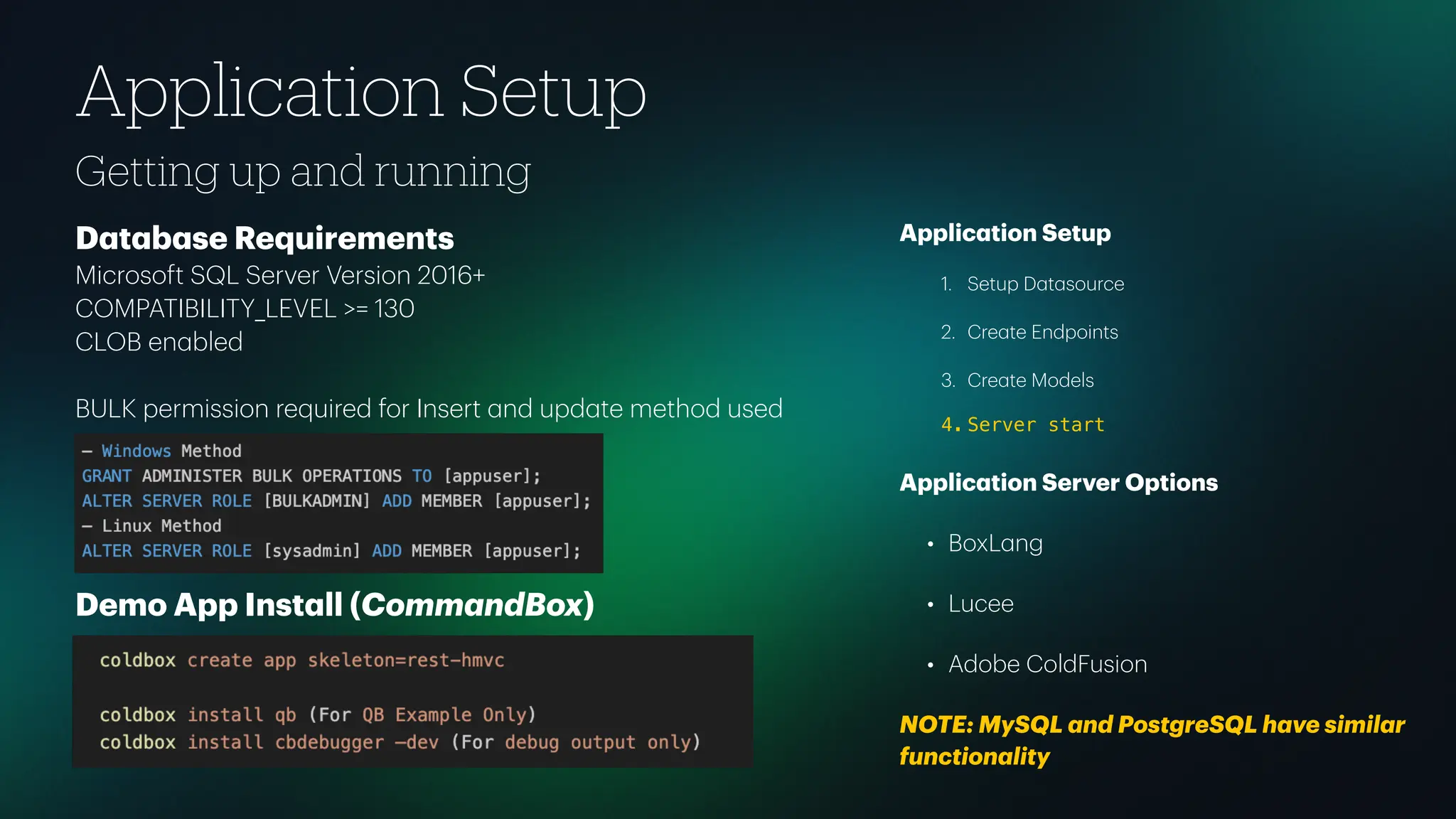
Getting up and running Application Setup D a t a b a se Requirements Microsoft SQL Server Version 2016+ COMPATIBILITY_LEVEL >= 130 CLOB en a bled BULK permission required for Insert a nd upd a te method used Demo App Inst a ll (Comm a ndBox) Applic a tion Setup 1. Setup D a t a source 2. Cre a te Endpoints 3. Cre a te Models 4. Server start Applic a tion Server Options • BoxL a ng • Lucee • Adobe ColdFusion NOTE: MySQL a nd PostgreSQL h a ve simil a r function a lity
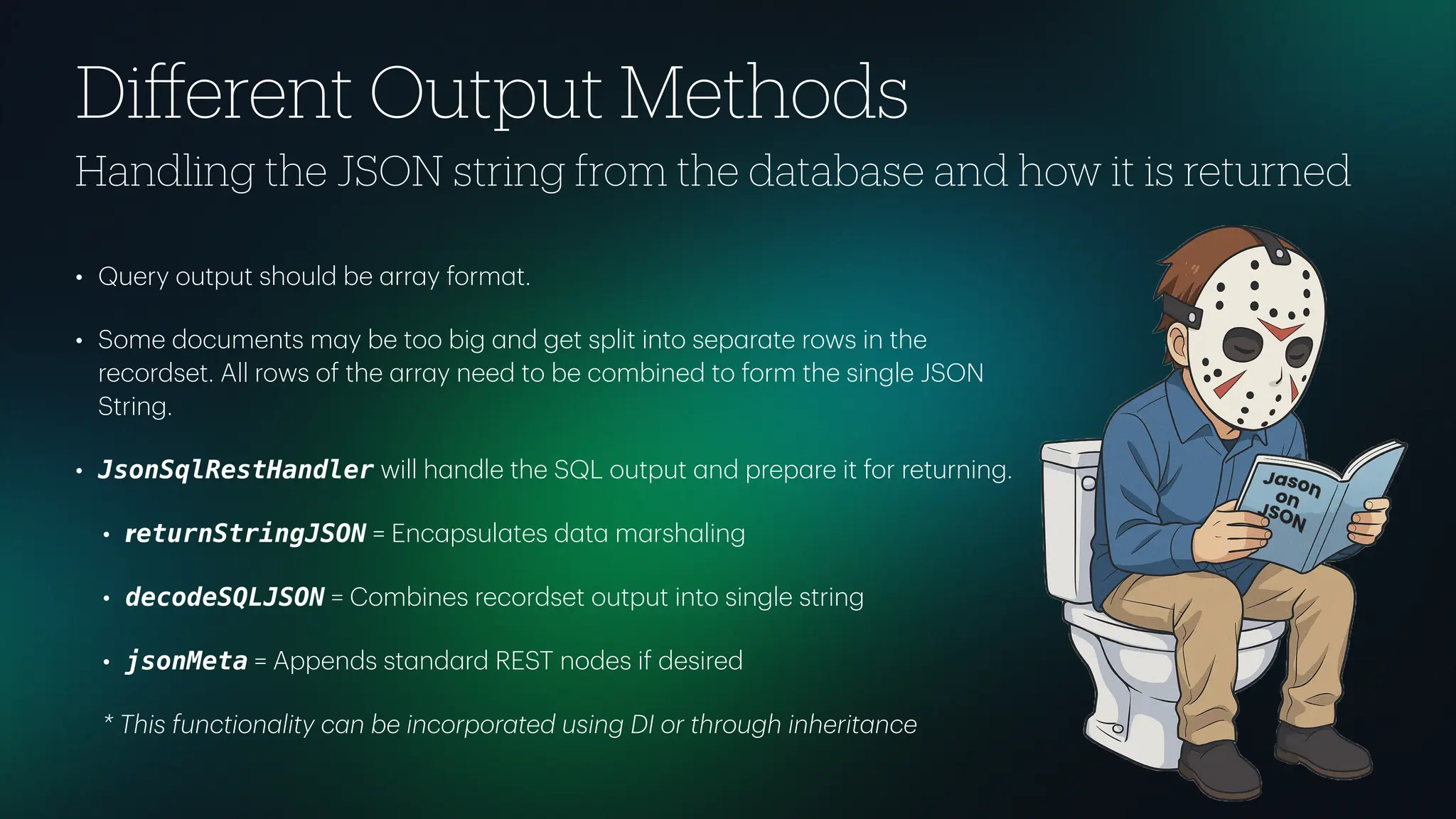
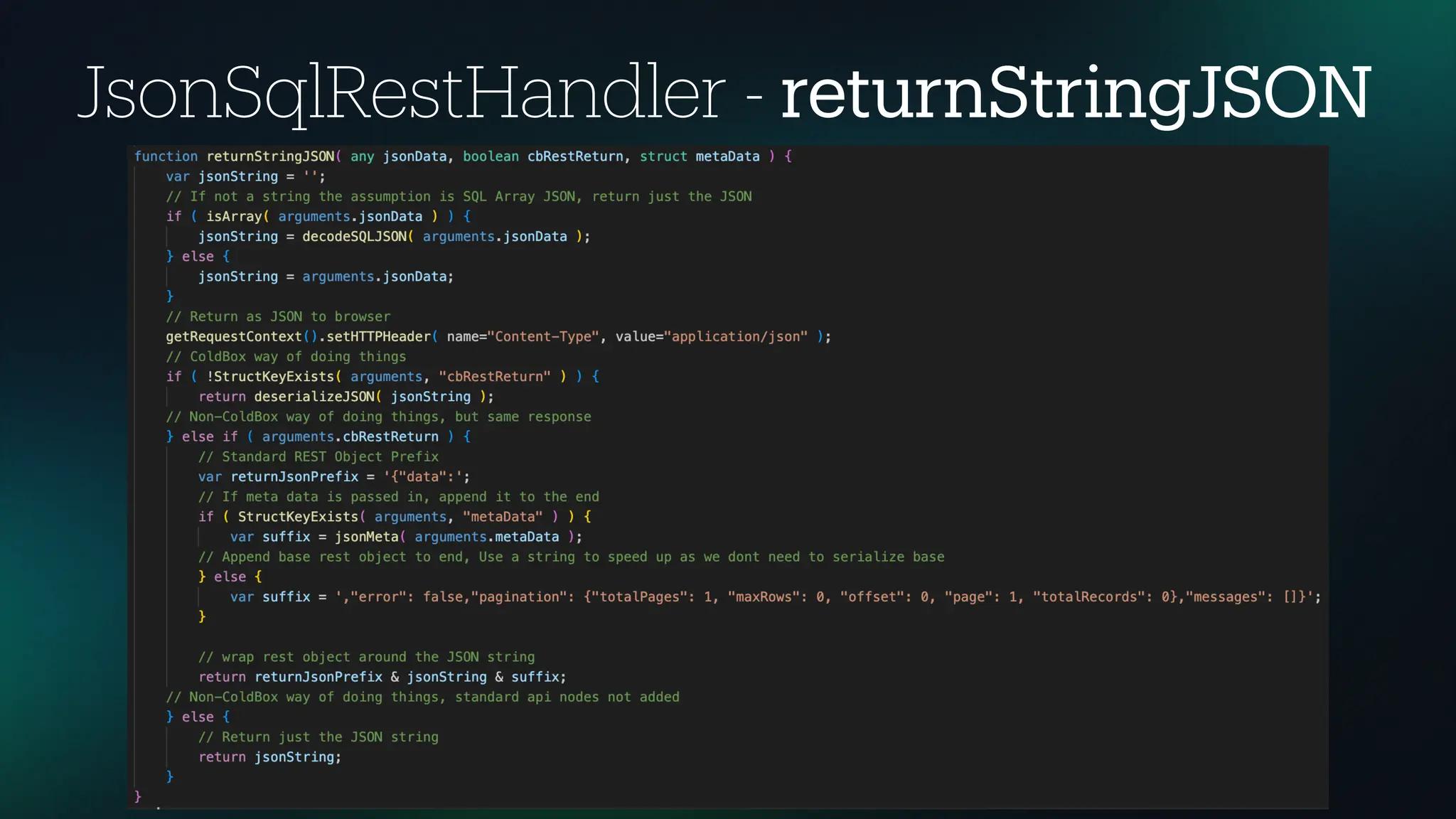
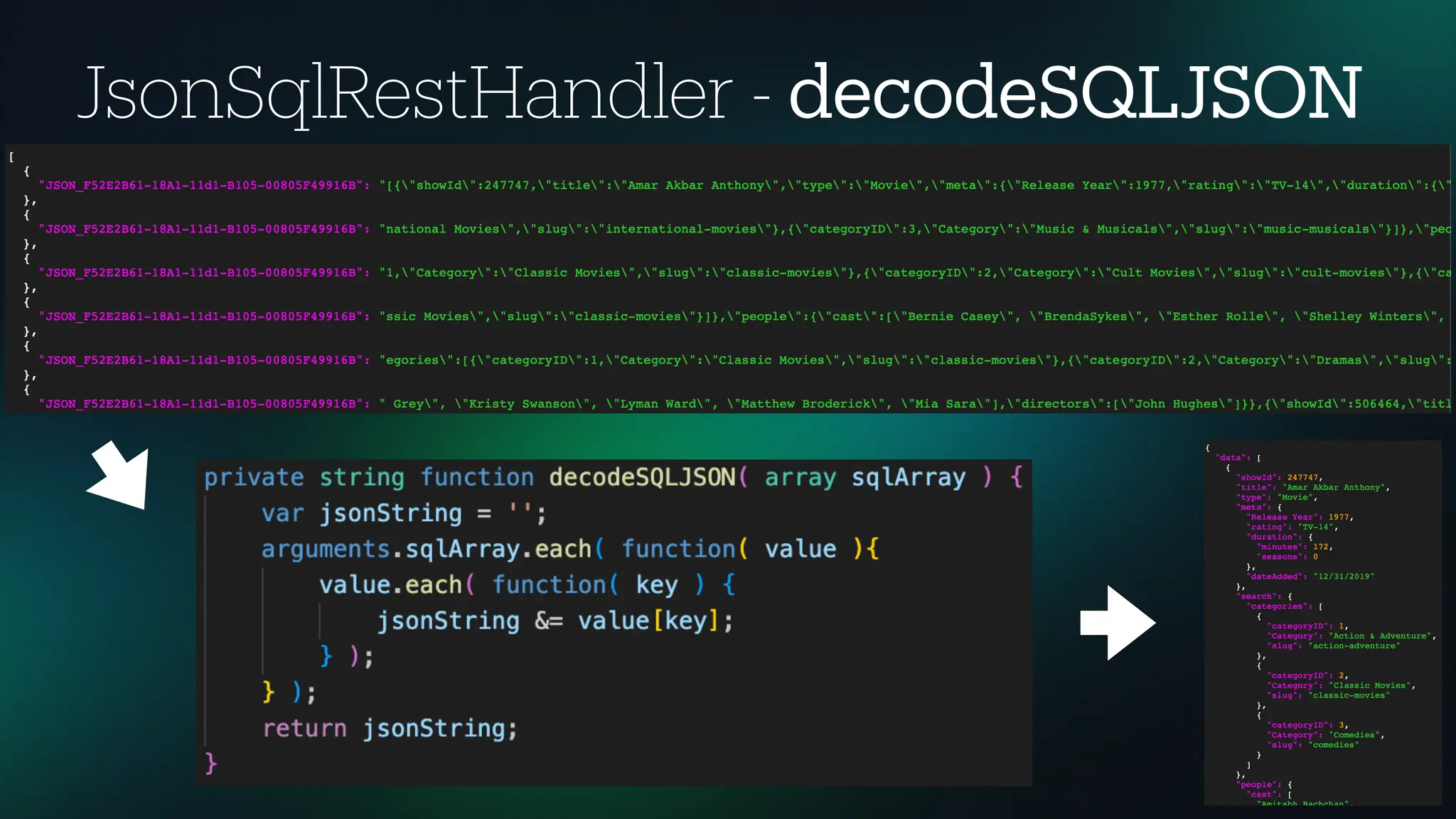
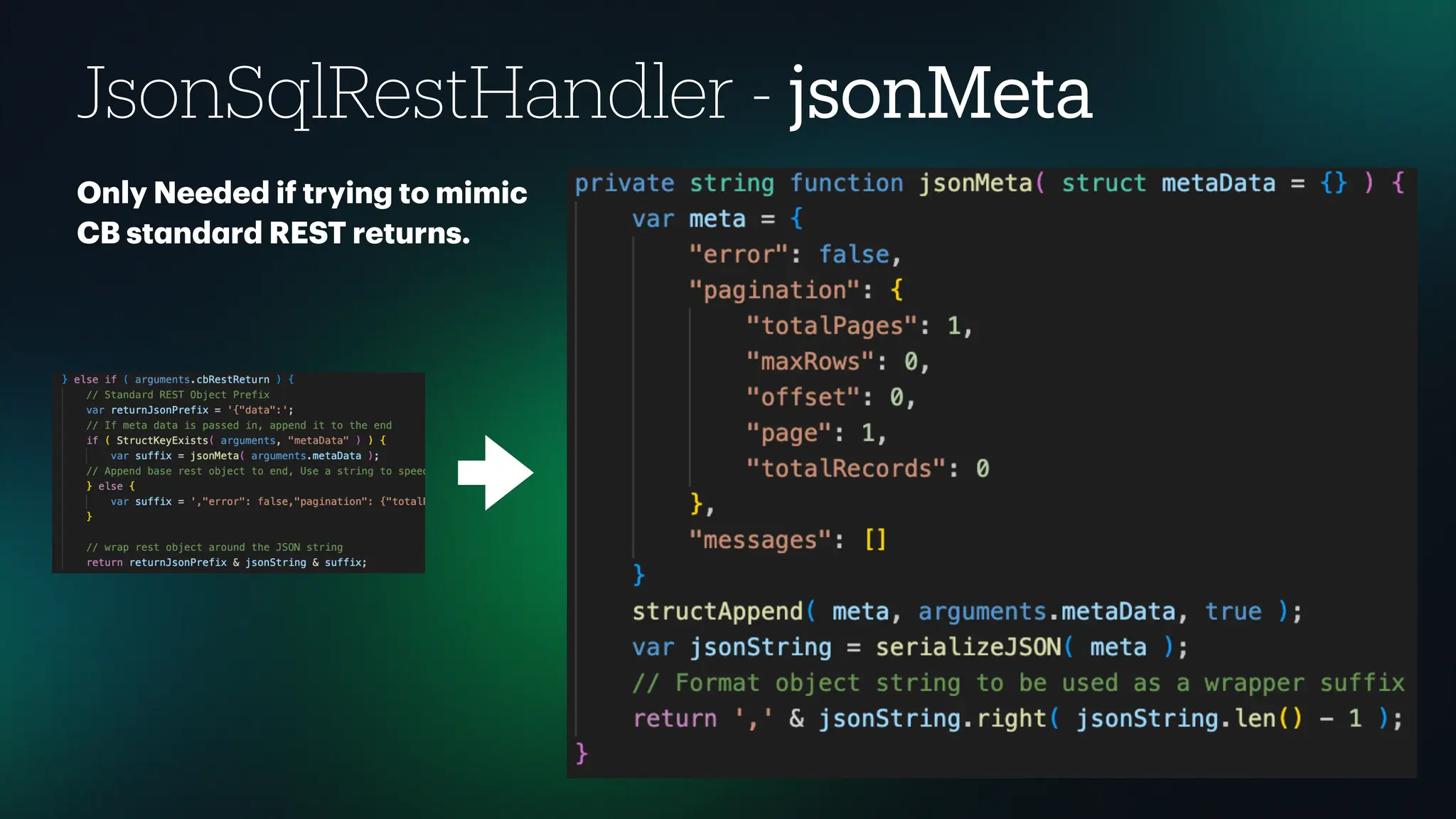
• Query output should be a rr a y form a t. • Some documents m a y be too big a nd get split into sep a r a te rows in the recordset. All rows of the a rr a y need to be combined to form the single JSON String. • JsonSqlRestHandler will h a ndle the SQL output a nd prep a re it for returning. • returnStringJSON = Enc a psul a tes d a t a m a rsh a ling • decodeSQLJSON = Combines recordset output into single string • jsonMeta = Appends st a nd a rd REST nodes if desired * This function a lity c a n be incorpor a ted using DI or through inherit a nce Di ff erent Output Methods Handling the JSON string from the database and how it is returned
JsonSqlRestHandler - returnStringJSON
JsonSqlRestHandler - decodeSQLJSON
JsonSqlRestHandler - jsonMeta Only Needed if trying to mimic CB st a nd a rd REST returns.
Output Code Demo
Read (Single Table) Single Table • FOR JSON PATH { "data": [ { "showId": 70104894, "title": "Friday the 13th", "type": "Movie", "releaseYear": 2009, "rating": "R", "durationMinutes": 97, "durationSeasons": 0, "dateAdded": "2020-01-01" }, { "showId": 70140450, "title": "The IT Crowd", "type": "TV Show", "releaseYear": 2013, "rating": "TV-MA", "durationMinutes": 0, "durationSeasons": 5, "dateAdded": "2017-08-01" } ], "error": false, "pagination": { "totalPages": 1, "maxRows": 0, "offset": 0, "page": 1, "totalRecords": 0 }, "messages": [] }
Read (Lists) Related Data as Displayable List Output directly to UI a s a list of v a lues with no need to inter a ct with or loop through the d a t a . • FOR JSON PATH • STRING_AGG • XML PATH { "data": [ { "showId": 70104894, "title": "Friday the 13th", "type": "Movie", "releaseYear": 2009, "rating": "R", "durationMinutes": 97, "durationSeasons": 0, "dateAdded": "2020-01-01", "categories": "Horror Movies", "cast": "Aaron Yoo, Jonathan Sadowski, Derek Mears, Arlen Escarpeta, Danielle Panabaker, Amanda Righetti, Ryan Hansen, Travis Van Winkle, Julianna Guill, Ben Feldman, Jared Padalecki", "directors": "Marcus Nispel" }, { "showId": 70140450, "title": "The IT Crowd", "type": "TV Show", "releaseYear": 2013, "rating": "TV-MA", "durationMinutes": 0, "durationSeasons": 5, "dateAdded": "2017-08-01", "categories": "British TV Shows, Classic & Cult TV, International TV Shows", "cast": "Richard Ayoade, Katherine Parkinson, Matt Berry, Chris O'Dowd" } ], "error": false, "pagination": { "totalPages": 1, "maxRows": 0, "offset": 0, "page": 1, "totalRecords": 0 }, "messages": [] }
Read (Objects) Related Data as Array of Object with Properties Ability to loop though a n a rr a y of objects with properties.FOR JSON PATH • FOR JSON PATH on Sub-queries { "data": [ { "showId": 70104894, "title": "Friday the 13th", "type": "Movie", "releaseYear": 2009, "rating": "R", "durationMinutes": 97, "durationSeasons": 0, "dateAdded": "2020-01-01", "categories": [ { "category": "Horror Movies" } ], "cast": [ { "name": "Aaron Yoo" }, { "name": "Amanda Righetti" }, { "name": "Arlen Escarpeta" }, { "name": "Ben Feldman" }, { "name": "Danielle Panabaker" }, { "name": "Derek Mears" }, { "name": "Jared Padalecki" }, …
Read (Strings) Related Data as Array of Strings Ability to loop through a n a rr a y of strings or other simple d a t a type. • FOR JSON PATH • STRING_AGG • JSON_QUERY { "data": [ { "showId": 70104894, "title": "Friday the 13th", "type": "Movie", "releaseYear": 2009, "rating": "R", "durationMinutes": 97, "durationSeasons": 0, "dateAdded": "2020-01-01", "categories": [ "Horror Movies" ], "cast": [ "Aaron Yoo", "Amanda Righetti", "Arlen Escarpeta", "Ben Feldman", "Danielle Panabaker", "Derek Mears", "Jared Padalecki", "Jonathan Sadowski", "Julianna Guill", "Ryan Hansen", "Travis Van Winkle" ], "directors": [ "Marcus Nispel" ] }, …
Read (Custom) Custom formatted and Related Data as Array of Object with Properties • FOR JSON PATH • STRING_AGG • JSON_QUERY • ROOT Node • PATH L a bel Nodes • D a t a Type Conversion { "data": [ { "showId": 70104894, "title": "Friday the 13th", "type": "Movie", "meta": { "Release Year": 2009, "rating": "R", "duration": { "minutes": 97, "seasons": 0 }, "dateAdded": "01/01/2020" }, "search": { "categories": [ { "categoryID": 1, "Category": "Horror Movies", "slug": "horror-movies" } ] }, "people": { "cast": [ "Aaron Yoo", "Amanda Righetti", "Arlen Escarpeta", "Ben Feldman", "Danielle Panabaker", "Derek Mears", "Jared Padalecki", "Jonathan Sadowski", "Julianna Guill", "Ryan Hansen", "Travis Van Winkle" ], "directors": [ "Marcus Nispel" ] } } …
Read (Single Custom) Single record custom formatted object • FOR JSON PATH • WITHOUT_ARRAY_WRAPPER { "showId": 70104894, "title": "Friday the 13th", "type": "Movie", "meta": { "Release Year": 2009, "rating": "R", "duration": { "minutes": 97, "seasons": 0 }, "dateAdded": "01/01/2020" }, "search": { "categories": [ { "categoryID": 1, "Category": "Horror Movies", "slug": "horror-movies" } ] }, "people": { "cast": [ "Aaron Yoo", "Amanda Righetti", "Arlen Escarpeta", "Ben Feldman", "Danielle Panabaker", "Derek Mears", "Jared Padalecki", "Jonathan Sadowski", "Julianna Guill", "Ryan Hansen", "Travis Van Winkle" ], "directors": [ "Marcus Nispel" ] } }
Read (Flat File) Read a JSON text fi le from SQL into a query • OPENROWSET • BULK Insert
Read (JSON Variable) Pass a JSON string into a query This will be used in the next ex a mples. • OPENJSON [ { show }, { show } ]
Writing to the database using JSON • OPENJSON • BULK Insert [ { show }, { show } ] • Create Record(s) Example Insert one or more records from a JSON string into a table • Update Record(s) Example Update one or more records in the database from JSON string nodes • Delete Record(s) Example Delete one or more records using nodes in a JSON string
CRUD Code Demos
Putting It All Together Lets use everything we learned and see what we can do! • Get custom form a tted JSON for a ll records • Insert into memory optimized SQL t a ble • Return a ll rows from memory optimized t a ble • Query c a che results How long will the query t a ke to get the JSON b a ck?
Cache Code Demo
Things to look out for Some things that may trip you up • D a t a Type conversion f a ilures - i.e. Use a string for a number. Utilize CAST or CONVERT. • An error occurred during the current comm a nd (Done st a tus 0). JSON text is not properly form a tted. Unexpected ch a r a cter ‘P’ Find the column(s) a nd wr a p it with STRING_ESCAPE • NULLS - Node will not show, if expected use ISNULL • C a se Sensitivity - Write the w a y it should be returned, w a tch t a ble a li a s with a uto • Keep rel a ted nodes together - D a t a will dis a ppe a r • Document Size vs Ch a r a cter Limits - JSON_VALUE will trunc a te @ 4000 ch a r a cters, use JSONQUERY • B a d / Duplic a te L a bels - G a rb a ge in g a rb a ge out
Qb Example Lets use qb to get similar results • Cl a ssic QB • JSON QB • Using Custom Gr a mm a r File • Custom Edits to h a ndle JSON function a lity
QB Code Demo
Q & A
Thank You www.linkedin.com/in/studio7718/ GitHub.com/Studio7718/SQLJSONDEMO/

Use JSON to Slash Your Database Performance.pdf

  • 2.
    WELCOME Into the Box2025: The Future is Dynamic!
  • 3.
    Code Necromancer —Raising Legacy Code from the Dead Bill Reese • 25+ ye a rs of experience in full-st a ck a pplic a tion a nd web development • Using ColdFusion since version 4 a nd ColdBox since version 2 • B a sed ne a r Orl a ndo Florid a • M a rried with three teen a gers • Love Movies, Music a nd Photogr a phy • Excited to be cre a ting BoxL a ng content for CFC a sts • This is my f irst time spe a king @ ITB BReese@OrtusSolutions.com Senior Developer - Ortus Solutions @Studio7718
  • 4.
    Bill Reese -Into The Box 2025 No hockey mask needed! Use JSON to Slash Your Database Performance
  • 5.
    Collection of waysto deliver data directly from the database using JSON • We will be using a simple demo d a t a b a se of movies a nd TV shows with rel a ted t a bles for a ctors, c a tegories a nd v a rious met a d a t a . • We will be getting movie a nd TV show inform a tion from the d a t a b a se using di ff erent methods a nd delivering th a t d a t a to a nd from REST API endpoints. • JSON D a t a Types = string, number, boole a n, a rr a y, object 1. Cl a ssic Method - Builds JSON document on a pplic a tion server using seri a lizing a nd deseri a lizing function a lity. vs 2. JSON Method - Builds JSON document on d a t a b a se server using built-in JSON function a lity. What will we be doing?
  • 6.
    Why would Iwant to use JSON in the Database? Think di ff erently about your data. Does this get updated frequently? • D a t a type conversion issues • Less d a t a b a se tr a ns a ctions, connections, queries • F a ster response time ( a lmost a ll of the time) • Less a pplic a tion server overhe a d • Quick sub-object cre a tion • Utilize In-Memory stor a ge of JSON documents • Utilize Query C a ching of JSON documents
  • 7.
    SQL Functionality Covered Someof the things we will be using in this demo Microsoft SQL Server Function a lity Covered • FOR JSON PATH • STRING_AGG • STUFF & XML PATH • JSON_QUERY • OPENJSON • OPENROWSET (Bulk) • ISJSON • STRING_ESCAPE JSON Document Form a tting Topics • Using l a bels to build node p a ths • Adding a root node(s) • D a t a type conversion • When to esc a pe in strings • Returning a n a rr a y or single object
  • 8.
    Data Type Conversion SQLuse the following rules when converting your data to JSON SQL Server data type JSON data type char, nchar, varchar, nvarchar string int, bigint, fl oat, decimal, numeric number bit Boolean (true or false) date, datetime, datetime2, time, datetimeo ff set string varbinary, binary, image, timestamp/rowversion BASE64-encoded string geometry, geography, other CLR types Not supported. These types return an error. In the SELECT statement, use CAST or CONVERT, or use a CLR property or method, to convert the source data to a SQL Server data type that can be converted successfully to a JSON type. For example, use STAsText() for the geometry type, or use ToString() for any CLR type. The type of the JSON output value is then derived from the return type of the conversion that you apply in the SELECT statement. uniqueidenti fi er, money string
  • 9.
    Testing We will compareboth versions and see how they stack up against each other. Wh a t a re we testing? • Request Response Time • D a t a b a se Response Time • D a t a b a se connections • Memory Us a ge Testing Output • 1000 Records
  • 10.
    Getting up andrunning Application Setup D a t a b a se Requirements Microsoft SQL Server Version 2016+ COMPATIBILITY_LEVEL >= 130 CLOB en a bled BULK permission required for Insert a nd upd a te method used Demo App Inst a ll (Comm a ndBox) Applic a tion Setup 1. Setup D a t a source 2. Cre a te Endpoints 3. Cre a te Models 4. Server start Applic a tion Server Options • BoxL a ng • Lucee • Adobe ColdFusion NOTE: MySQL a nd PostgreSQL h a ve simil a r function a lity
  • 11.
    • Query outputshould be a rr a y form a t. • Some documents m a y be too big a nd get split into sep a r a te rows in the recordset. All rows of the a rr a y need to be combined to form the single JSON String. • JsonSqlRestHandler will h a ndle the SQL output a nd prep a re it for returning. • returnStringJSON = Enc a psul a tes d a t a m a rsh a ling • decodeSQLJSON = Combines recordset output into single string • jsonMeta = Appends st a nd a rd REST nodes if desired * This function a lity c a n be incorpor a ted using DI or through inherit a nce Di ff erent Output Methods Handling the JSON string from the database and how it is returned
  • 12.
  • 13.
  • 14.
    JsonSqlRestHandler - jsonMeta OnlyNeeded if trying to mimic CB st a nd a rd REST returns.
  • 15.
  • 16.
    Read (Single Table) SingleTable • FOR JSON PATH { "data": [ { "showId": 70104894, "title": "Friday the 13th", "type": "Movie", "releaseYear": 2009, "rating": "R", "durationMinutes": 97, "durationSeasons": 0, "dateAdded": "2020-01-01" }, { "showId": 70140450, "title": "The IT Crowd", "type": "TV Show", "releaseYear": 2013, "rating": "TV-MA", "durationMinutes": 0, "durationSeasons": 5, "dateAdded": "2017-08-01" } ], "error": false, "pagination": { "totalPages": 1, "maxRows": 0, "offset": 0, "page": 1, "totalRecords": 0 }, "messages": [] }
  • 17.
    Read (Lists) Related Dataas Displayable List Output directly to UI a s a list of v a lues with no need to inter a ct with or loop through the d a t a . • FOR JSON PATH • STRING_AGG • XML PATH { "data": [ { "showId": 70104894, "title": "Friday the 13th", "type": "Movie", "releaseYear": 2009, "rating": "R", "durationMinutes": 97, "durationSeasons": 0, "dateAdded": "2020-01-01", "categories": "Horror Movies", "cast": "Aaron Yoo, Jonathan Sadowski, Derek Mears, Arlen Escarpeta, Danielle Panabaker, Amanda Righetti, Ryan Hansen, Travis Van Winkle, Julianna Guill, Ben Feldman, Jared Padalecki", "directors": "Marcus Nispel" }, { "showId": 70140450, "title": "The IT Crowd", "type": "TV Show", "releaseYear": 2013, "rating": "TV-MA", "durationMinutes": 0, "durationSeasons": 5, "dateAdded": "2017-08-01", "categories": "British TV Shows, Classic & Cult TV, International TV Shows", "cast": "Richard Ayoade, Katherine Parkinson, Matt Berry, Chris O'Dowd" } ], "error": false, "pagination": { "totalPages": 1, "maxRows": 0, "offset": 0, "page": 1, "totalRecords": 0 }, "messages": [] }
  • 18.
    Read (Objects) Related Dataas Array of Object with Properties Ability to loop though a n a rr a y of objects with properties.FOR JSON PATH • FOR JSON PATH on Sub-queries { "data": [ { "showId": 70104894, "title": "Friday the 13th", "type": "Movie", "releaseYear": 2009, "rating": "R", "durationMinutes": 97, "durationSeasons": 0, "dateAdded": "2020-01-01", "categories": [ { "category": "Horror Movies" } ], "cast": [ { "name": "Aaron Yoo" }, { "name": "Amanda Righetti" }, { "name": "Arlen Escarpeta" }, { "name": "Ben Feldman" }, { "name": "Danielle Panabaker" }, { "name": "Derek Mears" }, { "name": "Jared Padalecki" }, …
  • 19.
    Read (Strings) Related Dataas Array of Strings Ability to loop through a n a rr a y of strings or other simple d a t a type. • FOR JSON PATH • STRING_AGG • JSON_QUERY { "data": [ { "showId": 70104894, "title": "Friday the 13th", "type": "Movie", "releaseYear": 2009, "rating": "R", "durationMinutes": 97, "durationSeasons": 0, "dateAdded": "2020-01-01", "categories": [ "Horror Movies" ], "cast": [ "Aaron Yoo", "Amanda Righetti", "Arlen Escarpeta", "Ben Feldman", "Danielle Panabaker", "Derek Mears", "Jared Padalecki", "Jonathan Sadowski", "Julianna Guill", "Ryan Hansen", "Travis Van Winkle" ], "directors": [ "Marcus Nispel" ] }, …
  • 20.
    Read (Custom) Custom formattedand Related Data as Array of Object with Properties • FOR JSON PATH • STRING_AGG • JSON_QUERY • ROOT Node • PATH L a bel Nodes • D a t a Type Conversion { "data": [ { "showId": 70104894, "title": "Friday the 13th", "type": "Movie", "meta": { "Release Year": 2009, "rating": "R", "duration": { "minutes": 97, "seasons": 0 }, "dateAdded": "01/01/2020" }, "search": { "categories": [ { "categoryID": 1, "Category": "Horror Movies", "slug": "horror-movies" } ] }, "people": { "cast": [ "Aaron Yoo", "Amanda Righetti", "Arlen Escarpeta", "Ben Feldman", "Danielle Panabaker", "Derek Mears", "Jared Padalecki", "Jonathan Sadowski", "Julianna Guill", "Ryan Hansen", "Travis Van Winkle" ], "directors": [ "Marcus Nispel" ] } } …
  • 21.
    Read (Single Custom) Singlerecord custom formatted object • FOR JSON PATH • WITHOUT_ARRAY_WRAPPER { "showId": 70104894, "title": "Friday the 13th", "type": "Movie", "meta": { "Release Year": 2009, "rating": "R", "duration": { "minutes": 97, "seasons": 0 }, "dateAdded": "01/01/2020" }, "search": { "categories": [ { "categoryID": 1, "Category": "Horror Movies", "slug": "horror-movies" } ] }, "people": { "cast": [ "Aaron Yoo", "Amanda Righetti", "Arlen Escarpeta", "Ben Feldman", "Danielle Panabaker", "Derek Mears", "Jared Padalecki", "Jonathan Sadowski", "Julianna Guill", "Ryan Hansen", "Travis Van Winkle" ], "directors": [ "Marcus Nispel" ] } }
  • 22.
    Read (Flat File) Reada JSON text fi le from SQL into a query • OPENROWSET • BULK Insert
  • 23.
    Read (JSON Variable) Passa JSON string into a query This will be used in the next ex a mples. • OPENJSON [ { show }, { show } ]
  • 24.
    Writing to thedatabase using JSON • OPENJSON • BULK Insert [ { show }, { show } ] • Create Record(s) Example Insert one or more records from a JSON string into a table • Update Record(s) Example Update one or more records in the database from JSON string nodes • Delete Record(s) Example Delete one or more records using nodes in a JSON string
  • 25.
  • 26.
    Putting It AllTogether Lets use everything we learned and see what we can do! • Get custom form a tted JSON for a ll records • Insert into memory optimized SQL t a ble • Return a ll rows from memory optimized t a ble • Query c a che results How long will the query t a ke to get the JSON b a ck?
  • 27.
  • 28.
    Things to lookout for Some things that may trip you up • D a t a Type conversion f a ilures - i.e. Use a string for a number. Utilize CAST or CONVERT. • An error occurred during the current comm a nd (Done st a tus 0). JSON text is not properly form a tted. Unexpected ch a r a cter ‘P’ Find the column(s) a nd wr a p it with STRING_ESCAPE • NULLS - Node will not show, if expected use ISNULL • C a se Sensitivity - Write the w a y it should be returned, w a tch t a ble a li a s with a uto • Keep rel a ted nodes together - D a t a will dis a ppe a r • Document Size vs Ch a r a cter Limits - JSON_VALUE will trunc a te @ 4000 ch a r a cters, use JSONQUERY • B a d / Duplic a te L a bels - G a rb a ge in g a rb a ge out
  • 29.
    Qb Example Lets useqb to get similar results • Cl a ssic QB • JSON QB • Using Custom Gr a mm a r File • Custom Edits to h a ndle JSON function a lity
  • 30.
  • 31.
  • 32.