Unit 2: Physical Layer(10) Transmission Media-Twisted pair, Coaxial cable, Optical fiber, Satellite communication networks; -Introduction to wireless transmission-Satellite communication.
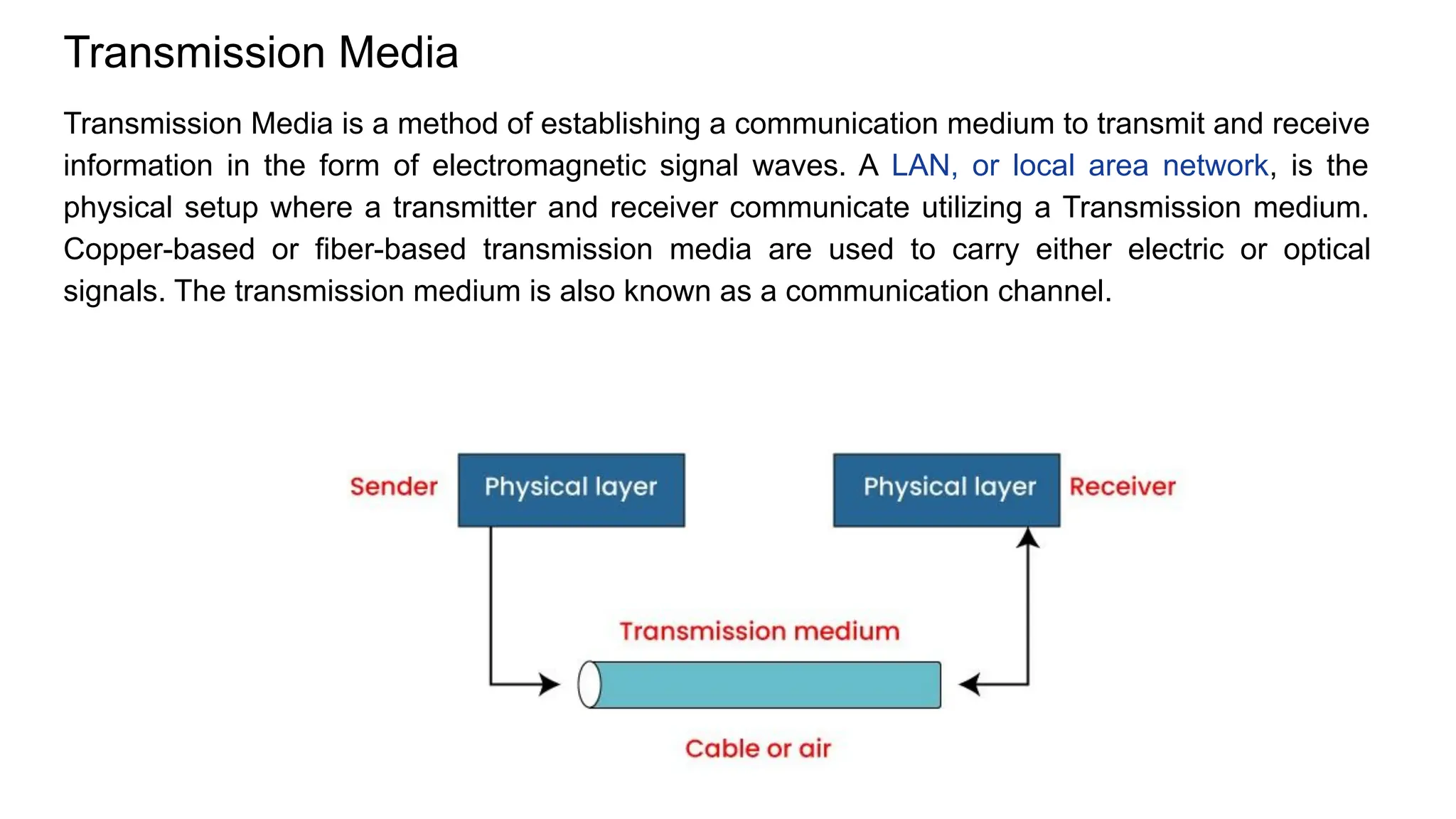
Transmission Media Transmission Media is a method of establishing a communication medium to transmit and receive information in the form of electromagnetic signal waves. A LAN, or local area network, is the physical setup where a transmitter and receiver communicate utilizing a Transmission medium. Copper-based or fiber-based transmission media are used to carry either electric or optical signals. The transmission medium is also known as a communication channel.
Transmission Media are used to carry data signals, either as electric signals (in copper cables) or light signals (in fiber optics). It is also called a communication channel. There are two main types of transmission media: 1. Wired Media – uses cables like twisted pair, coaxial, and fiber optic. 2. Wireless Media – uses air or space to send signals, like in Wi-Fi, Bluetooth, or satellite. The performance of data transmission depends on the characteristics of the medium and the signal. ● In wired media, the quality of the cable is very important. ● In wireless media, the quality of the signal matters more. Each type of transmission media has different features such as: ● Bandwidth (data speed) ● Delay (time taken to transmit) ● Cost ● Ease of installation and maintenance
Media Terminology ● Segment Length – The maximum distance a signal can travel through a cable before it becomes too weak to understand. ● Attenuation – The weakening of a signal as it travels through the cable. It is measured in decibels (dB). ● Bandwidth – The amount of data that can be sent through the cable per second. Measured in kbps, Mbps, etc. ● Interference – Unwanted signals from outside (like electrical or radio signals) that can disturb data transmission. Called EMI (Electromagnetic Interference) or RFI (Radio Frequency Interference). ● Crosstalk – When two cables are close together, signals from one cable can affect the other, causing noise. This is called crosstalk.
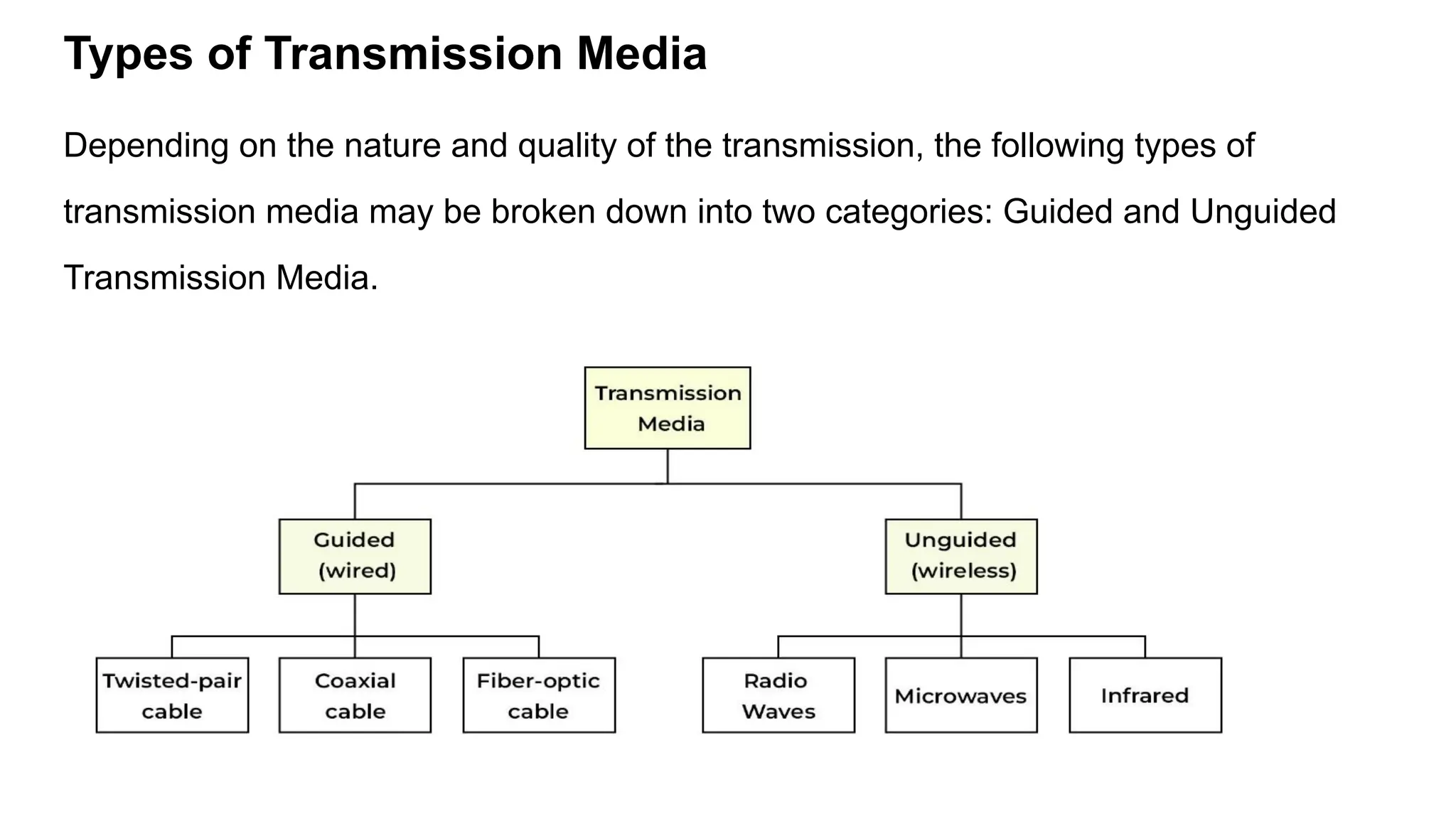
Types of Transmission Media Depending on the nature and quality of the transmission, the following types of transmission media may be broken down into two categories: Guided and Unguided Transmission Media.
Guided or Wired Transmission Media (Simplified) Guided media uses cables to send signals from one device to another. It is also called wired or bounded media because the signal stays within a fixed path. This type of media is reliable and supports high-speed data transmission. The cables help keep the signal focused and reduce interference. There are three main types of guided transmission media: 1. Twisted Pair Cable 2. Coaxial Cable 3. Fiber Optic Cable
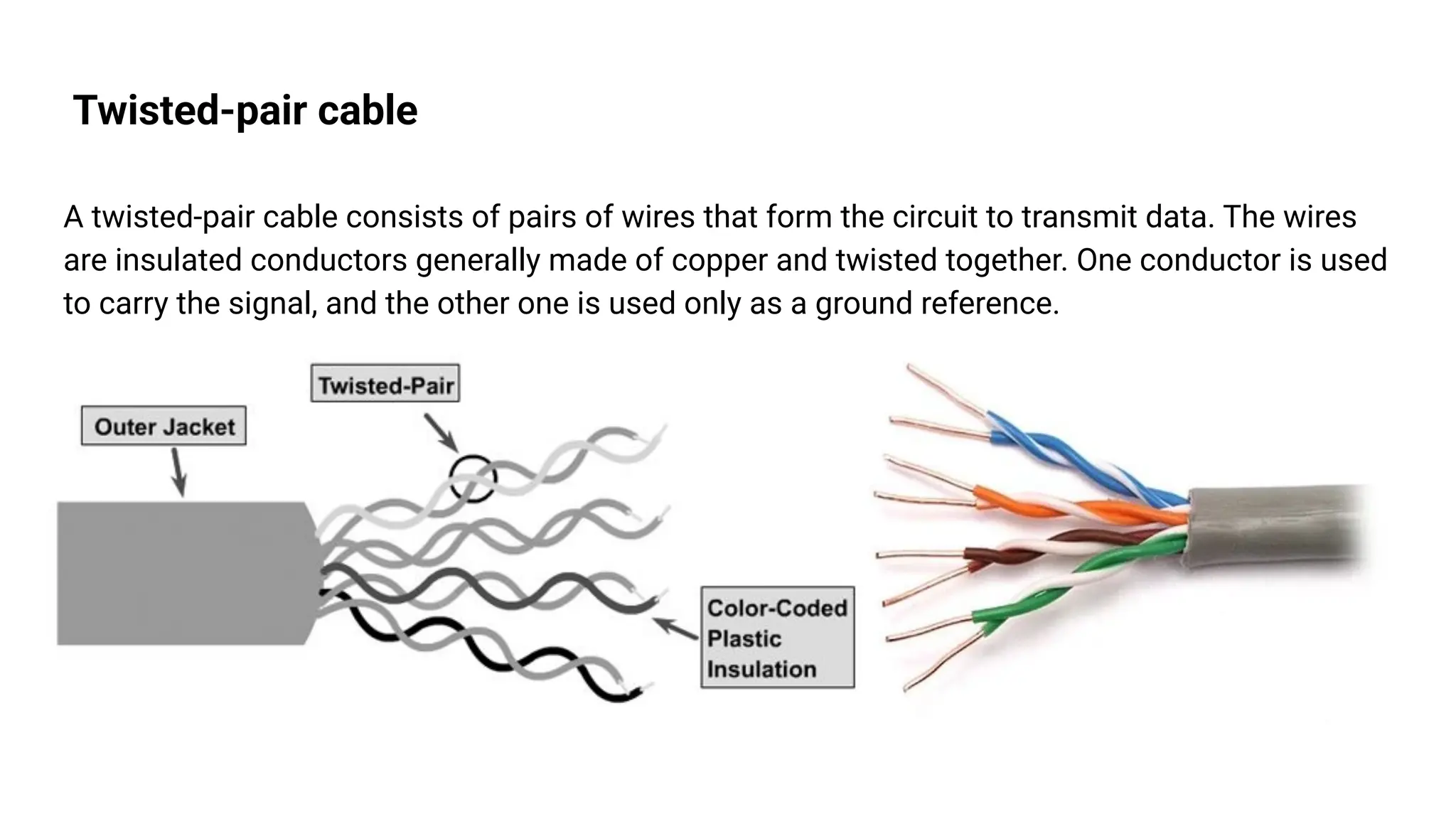
Twisted-pair cable A twisted-pair cable consists of pairs of wires that form the circuit to transmit data. The wires are insulated conductors generally made of copper and twisted together. One conductor is used to carry the signal, and the other one is used only as a ground reference.
● This cable has 8 insulated wires, grouped into 4 pairs. ● The wires are twisted together to reduce interference from nearby cables. ● One wire carries the signal, and the other acts as a ground.
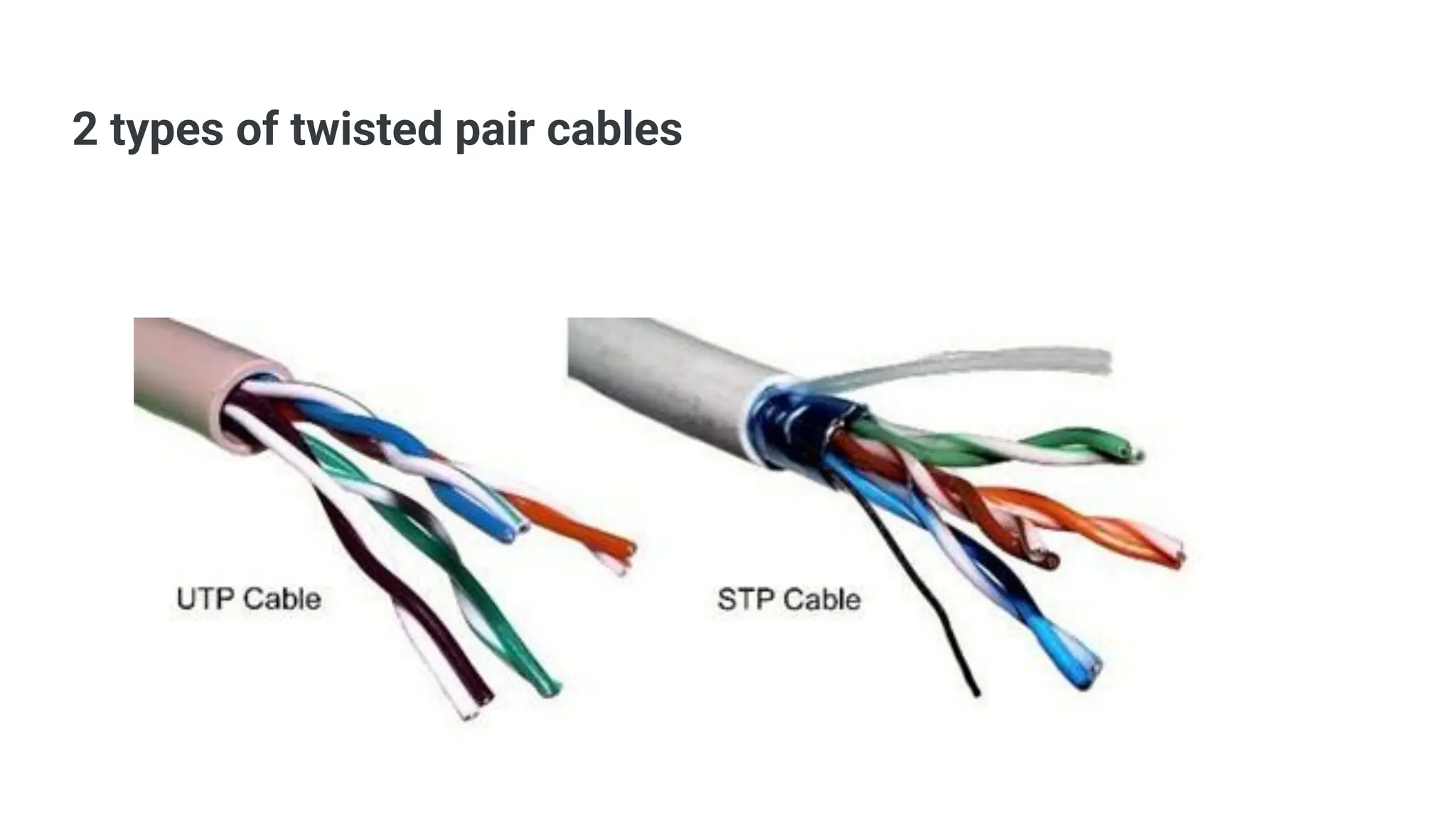
2 types of twisted pair cables
Unshielded twisted pair or UTP: UTP cable has four pairs or eight colour-coded copper wires twisted together and covered with a plastic sheath. Their electromagnetic interference gets cancelled due to the twisting effect. UTP cables are primarily used in LANs, telephone wires and ethernet cables. Shielded twisted pair or STP: STP cable uses the techniques of wire twisting, shielding, and cancellation. Each wire pair is covered in a metallic foil. Then four pairs of wires are then covered by an external metallic braid. STP cables reduce crosstalk both within the cable with pair-to-pair coupling and from outside the cable.
Shielded Twisted Pair (STP) ● Has a metal shield around the wires to protect from noise and interference. ● Better performance than Unshielded Twisted Pair (UTP). ● Used in places where interference is high. Features: ● Reduces crosstalk and outside noise ● More expensive than UTP ● Harder to install ● Maximum length: 100 meters
Advantages of Shielded Twisted Pair: ● Blocks noise and interference better ● Faster than UTP Disadvantages of Shielded Twisted Pair: ● Costly ● Bulky and less flexible ● Difficult to install
UTP (Unshielded Twisted Pair) Cable ● It is unshielded, meaning it has no extra metallic covering, making it: ○ Cheaper ○ Lighter ○ Flexible, but ○ Less protected from interference compared to shielded twisted pair (STP).
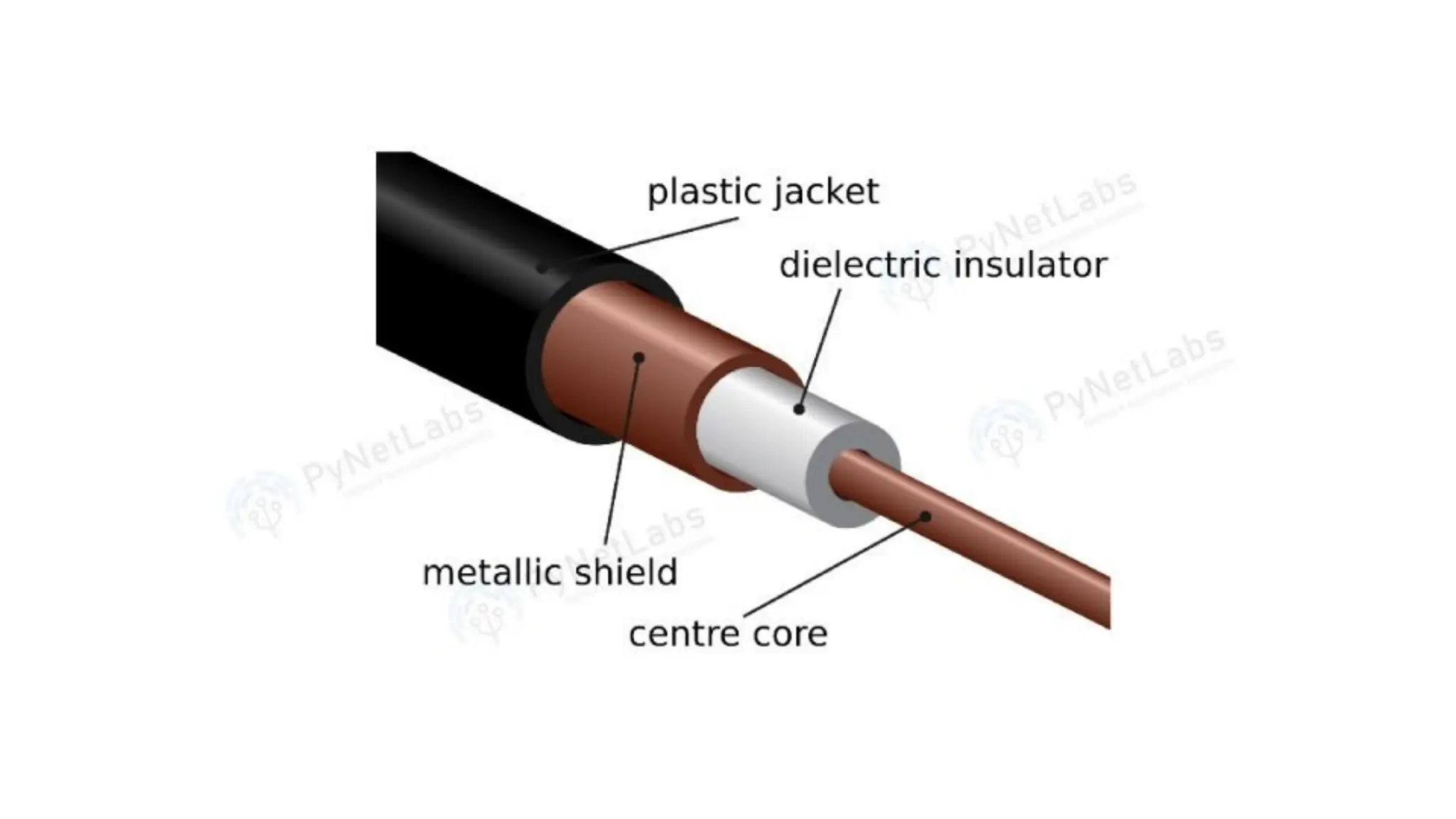
Coaxial Cable ● It has a copper core that carries the signal. ● Around it is an insulator to prevent overheating. ● A metal braid surrounds the insulator to block noise (EMI, RFI, crosstalk). ● Everything is covered with a plastic outer layer for protection. Features: ● Good protection from noise and interference ● Harder to install ● Costly ● Used in cable TV and similar systems ● Can send signals over 200m to 500m
Advantages: ● Easy to install ● Better protection (shielding) ● Works well over long distances ● Less affected by outside noise Disadvantages: ● More expensive than other cables ● Thick and less flexible ● Needs grounding to avoid interference
Optical Fiber
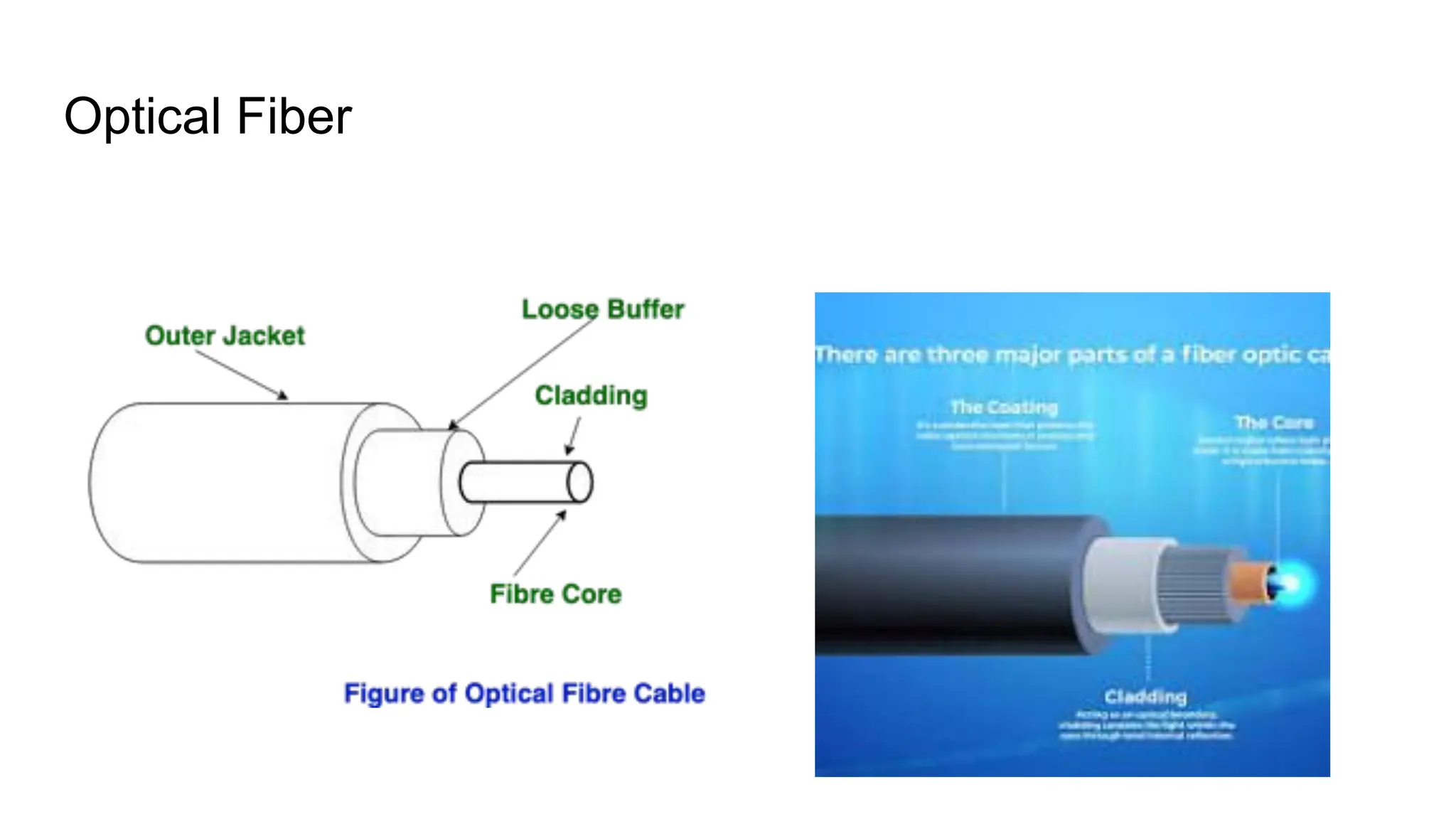
Optical Fibre Cable Optical Fibre Cable uses the concept of total internal reflection of light through a core made up of glass. The core is surrounded by a less dense glass or plastic covering called the coating. It is used for the transmission of large volumes of data. The cable can be unidirectional or bidirectional. The WDM (Wavelength Division Multiplexer) supports two modes, namely unidirectional and bidirectional mode. Wavelength Division Multiplexing (WDM) is a technology that combines multiple optical signals, each with a different wavelength, onto a single optical fiber.
Advantages of Optical Fibre Cable ● Increased capacity and bandwidth ● Lightweight ● Less signal attenuation ● Immunity to electromagnetic interference ● Resistance to corrosive materials Disadvantages of Optical Fibre Cable ● Difficult to install and maintain ● High cost
Applications of Optical Fibre Cable ● Medical Purpose: Used in several types of medical instruments. ● Defence Purpose: Used in transmission of data in aerospace. ● For Communication: This is largely used in formation of internet cables. ● Industrial Purpose: Used for lighting purposes and safety measures in designing the interior and exterior of automobiles.
Radio Waves Radio waves are a type of electromagnetic signal used in wireless communication technologies such as Wi-Fi, Bluetooth, and radio broadcasting. They have frequencies ranging between 3 kHz and 1 GHz. Key Properties: ● Omnidirectional: Radio waves travel in all directions from the transmitting antenna. ● The sending and receiving antennas do not need to be aligned. ● Any receiving antenna in range can pick up the signal. Disadvantage: ● Since signals go in all directions, they can face interference if another antenna transmits using the same frequency or band.
Omnidirectional Antenna An omnidirectional antenna sends signals equally in all directions. Depending on wavelength, signal strength, and purpose, different designs of such antennas are used. Applications: ● Useful for multicasting (one sender → many receivers) ● Examples: FM radio, television, maritime radio, cordless phones, paging systems. Advantages of Radio Waves ● Can be used in WAN (Wide Area Networks). ● Used in mobile cellular networks. ● Can penetrate walls, making them effective indoors. ● Can provide higher transmission rates.
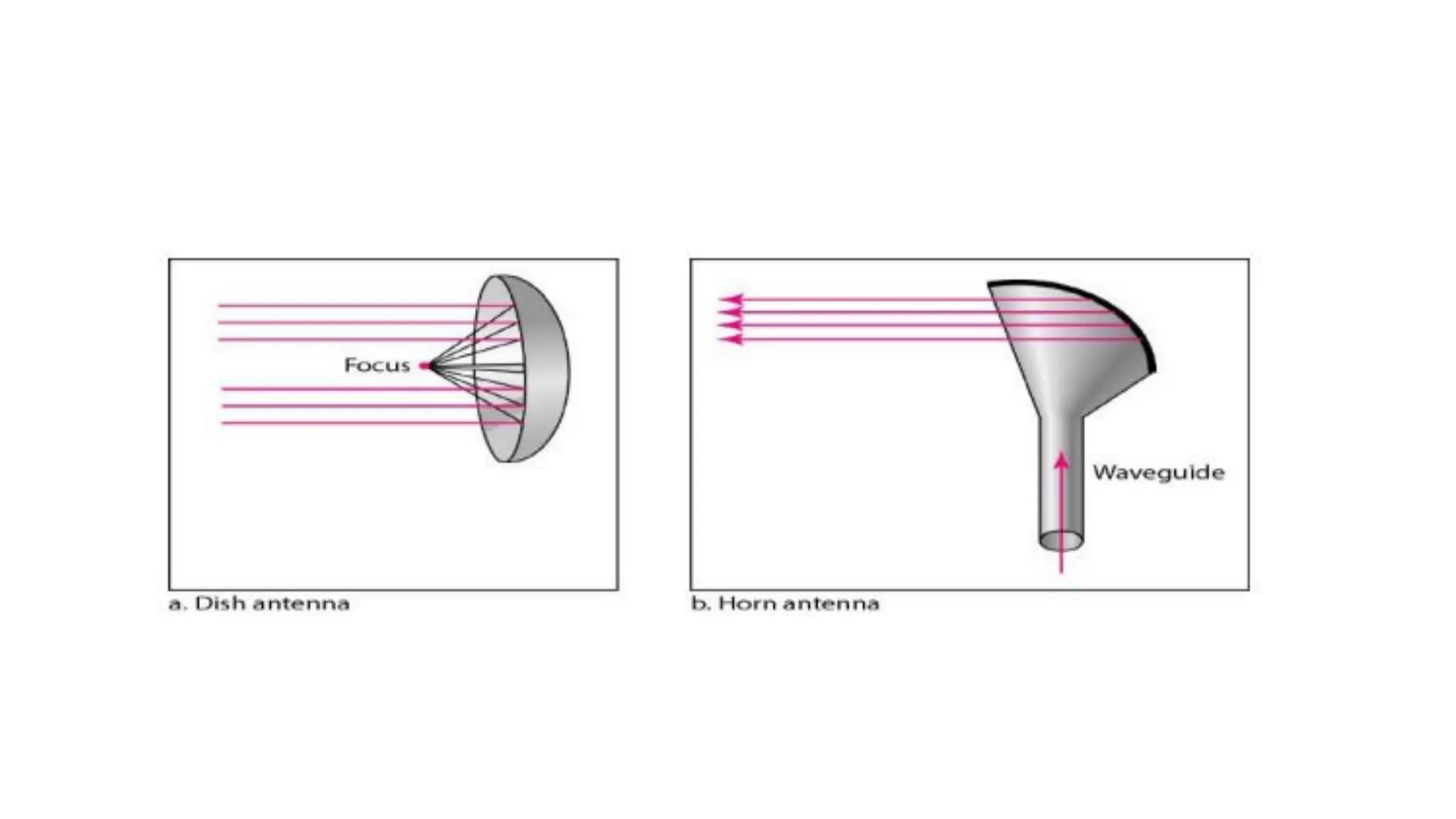
Microwaves Microwaves are electromagnetic waves with frequencies between 1 and 300 GHz. Key Property: ● Unidirectional – they travel in one direction only. ● The sending and receiving antennas must be aligned. ● Advantage: Two pairs of antennas can be aligned without interfering with each other. Unidirectional Antenna Microwaves use unidirectional antennas that send signals in a single direction. Types of Antennas for Microwaves: 1. Parabolic Dish – focuses signals into a narrow beam. 2. Horn Antenna – shaped like a horn to direct signals forward.
Types of Microwaves 1. Terrestrial Microwave ● Sends radio signals from one ground antenna to another. Characteristics: ● Frequency range: 4 GHz – 23 GHz ● Bandwidth: 1 – 10 Mbps ● Short distance: Cheaper ● Long distance: More expensive (needs taller towers) ● Attenuation: Signal loss due to weather or antenna size ● Needs regular maintenance ● Limited bandwidth
Advantages: ● Cheaper than cables ● No land space needed ● Easy communication for moving vehicles (e.g., trains) ● Can work over oceans Disadvantages: ● Needs line of sight (no obstacles) ● Affected by bad weather ● Limited range (needs multiple towers for long distances) ● High setup cost
2. Satellite Microwave Communication ● Uses satellites in space to send and receive microwave signals. How it works: 1. Ground station sends signal to satellite. 2. Satellite strengthens and sends it to another ground station. 3. Covers large areas, useful for GPS, weather, and long-distance communication. Advantages: ● Covers large areas (including remote places) ● Works over very long distances ● Less affected by mountains or buildings ● Can broadcast to many receivers at once ● Used for internet, TV, phone, and emergency communication Disadvantages: ● Very expensive to launch and maintain ● Signal delay for real-time calls
Infrared (IR) Waves ● Frequency range: 300 GHz – 400 THz ● Wavelength: 1 mm – 770 nm ● Used for short-range communication. ● Cannot penetrate walls → prevents interference between rooms. ● Not suitable for outdoors → sunlight contains infrared, which causes interference. ● Commonly used in TV remotes, wireless mouse, keyboards, printers. Characteristics of Infrared Signals ● High bandwidth → very high data rate. ● Cannot pass through walls → better security, no interference from nearby rooms. ● Works best indoors. ● Sunlight interference outdoors.
Applications ● Short-range, indoor communication (line-of-sight). ● Security systems (motion detectors, infrared cameras). ● Automotive uses (night vision, collision avoidance). ● Consumer electronics (TV and AC remotes, printers). Advantages ● Flexible: Devices can connect without cables. ● Easy to install and expand. ● Supports mobility. Disadvantages ● Interference: Can be affected by other electronics and weather. ● Limited range and needs clear line of sight. ● Lower bandwidth than some wired options. ● Signal quality drops with obstacles.
Wireless communications Wireless communications is the transmission of voice and data without cable or wires. In place of a physical connection, data travels through electromagnetic signals broadcast from sending facilities to intermediate and end-user devices.
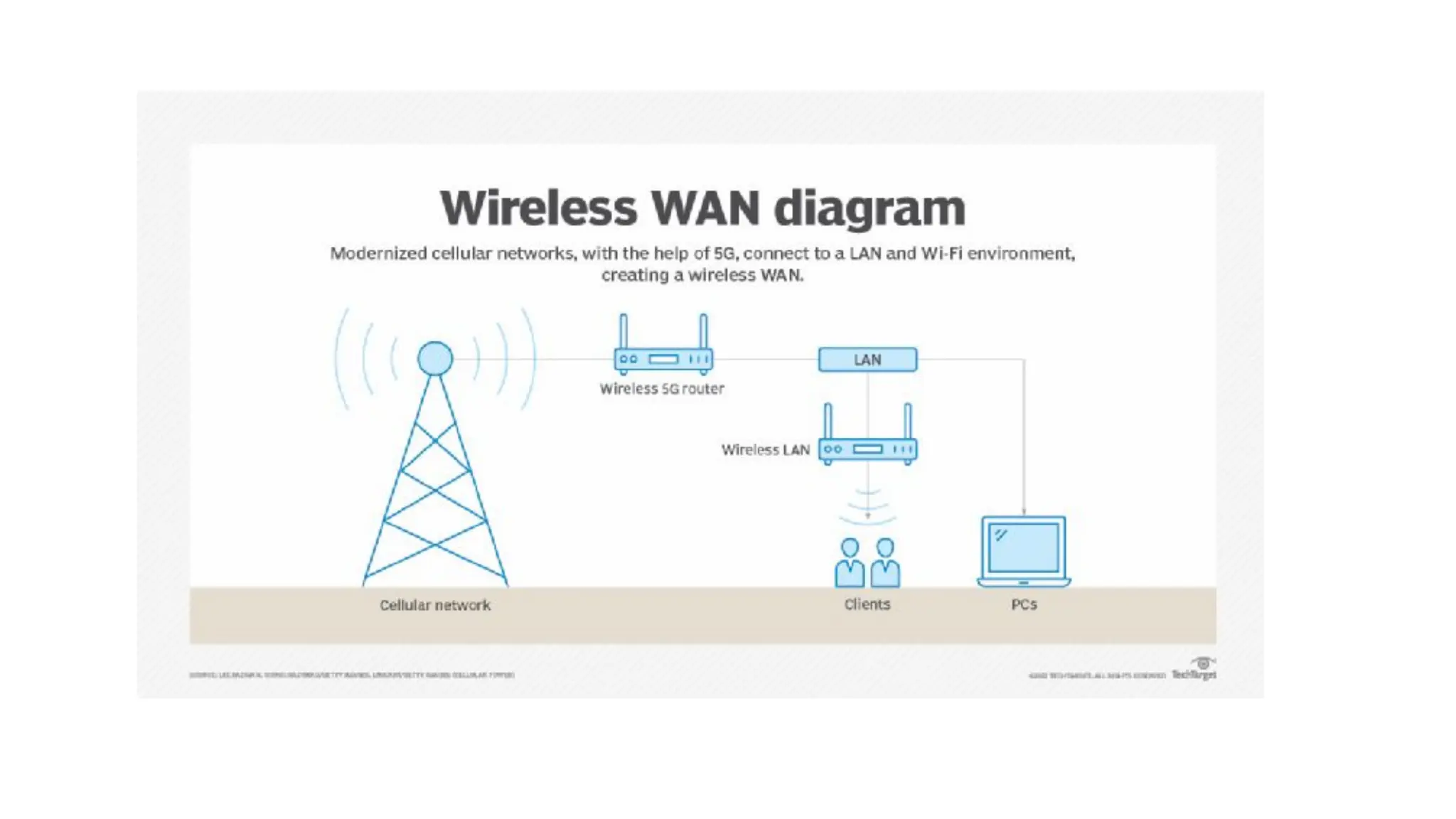
What is a wireless network? A wireless network is a grouping, or network, of multiple devices where data is sent and received over radio frequencies. Wireless networks differ from wired networks, which require each end of a data connection to be physically connected by a cable in order for communication to take place. Wireless networks make it possible for organizations to eliminate the dedicated wired cabling required to connect endpoint computing devices -- such as tablets, laptops and smartphones -- to embedded and peripheral devices. Wireless backhaul is often part of large service provider networks.
Satellite communication Satellite communication is transporting information from one place to another using a communication satellite in orbit around the Earth. A communication satellite is an artificial satellite that transmits the signal via a transponder by creating a channel between the transmitter and the receiver at different Earth locations. Telephone, radio, television, internet, and military applications use satellite communications.
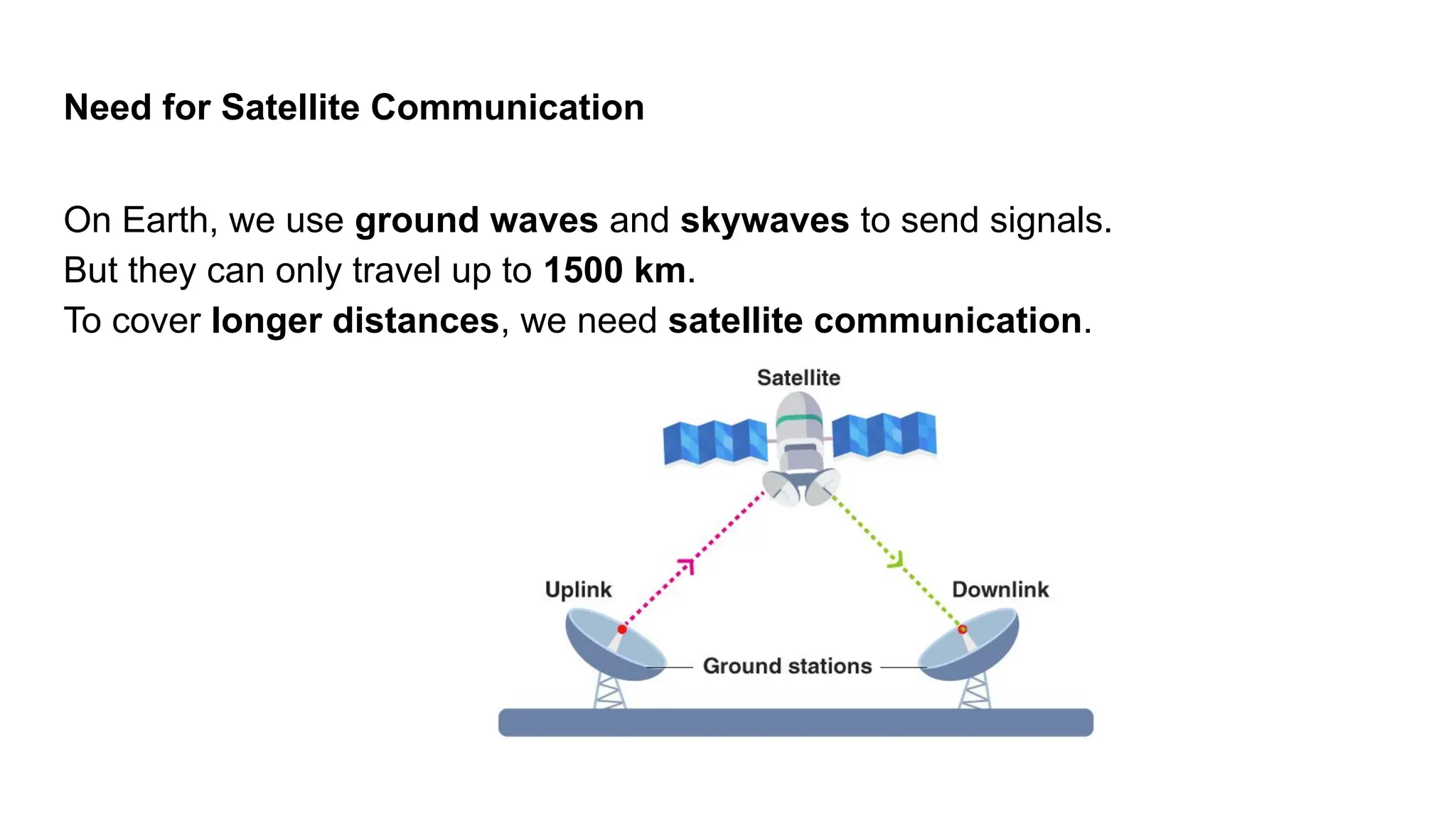
Need for Satellite Communication On Earth, we use ground waves and skywaves to send signals. But they can only travel up to 1500 km. To cover longer distances, we need satellite communication.
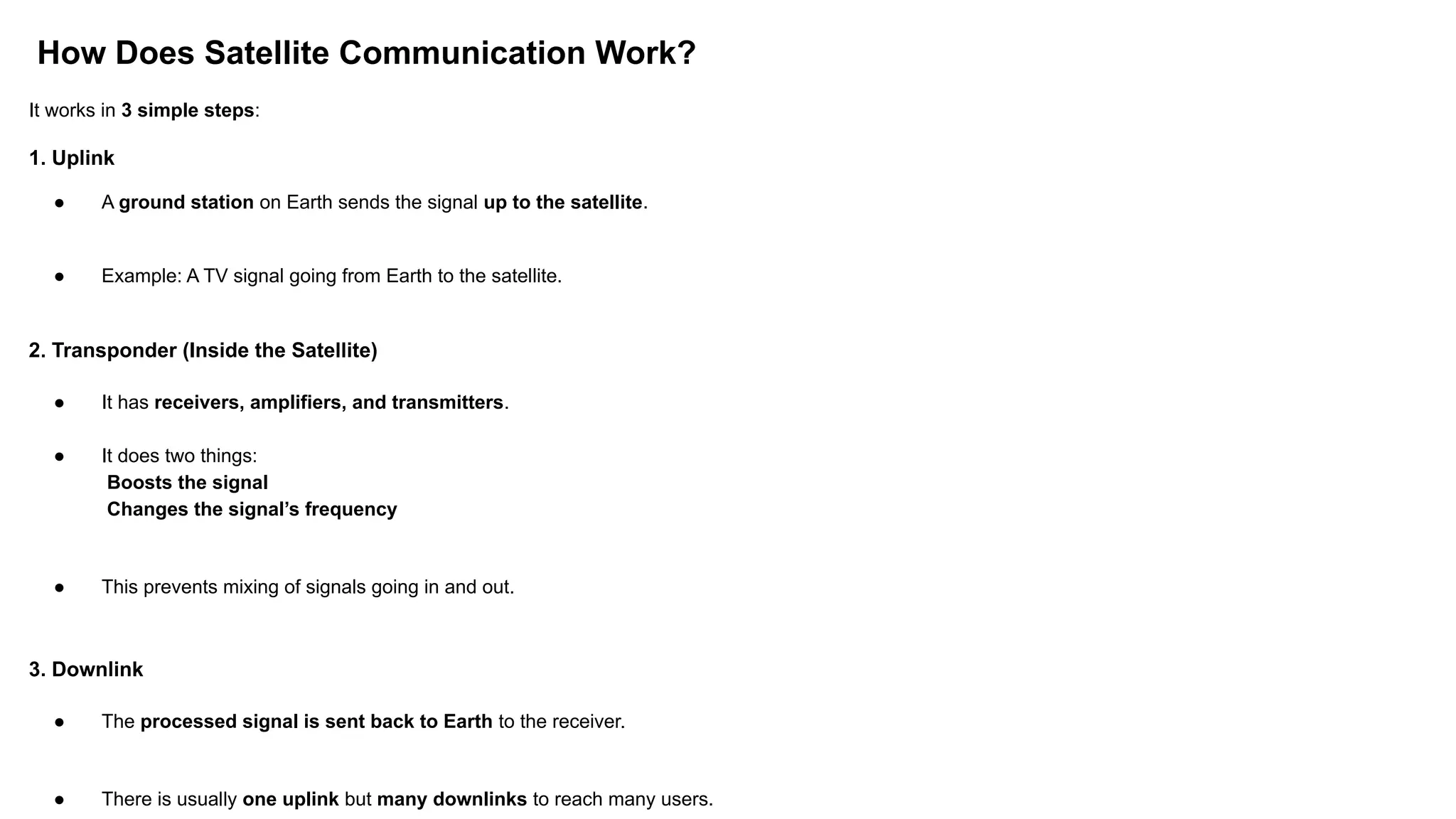
How Does Satellite Communication Work? It works in 3 simple steps: 1. Uplink ● A ground station on Earth sends the signal up to the satellite. ● Example: A TV signal going from Earth to the satellite. 2. Transponder (Inside the Satellite) ● It has receivers, amplifiers, and transmitters. ● It does two things: Boosts the signal Changes the signal’s frequency ● This prevents mixing of signals going in and out. 3. Downlink ● The processed signal is sent back to Earth to the receiver. ● There is usually one uplink but many downlinks to reach many users.
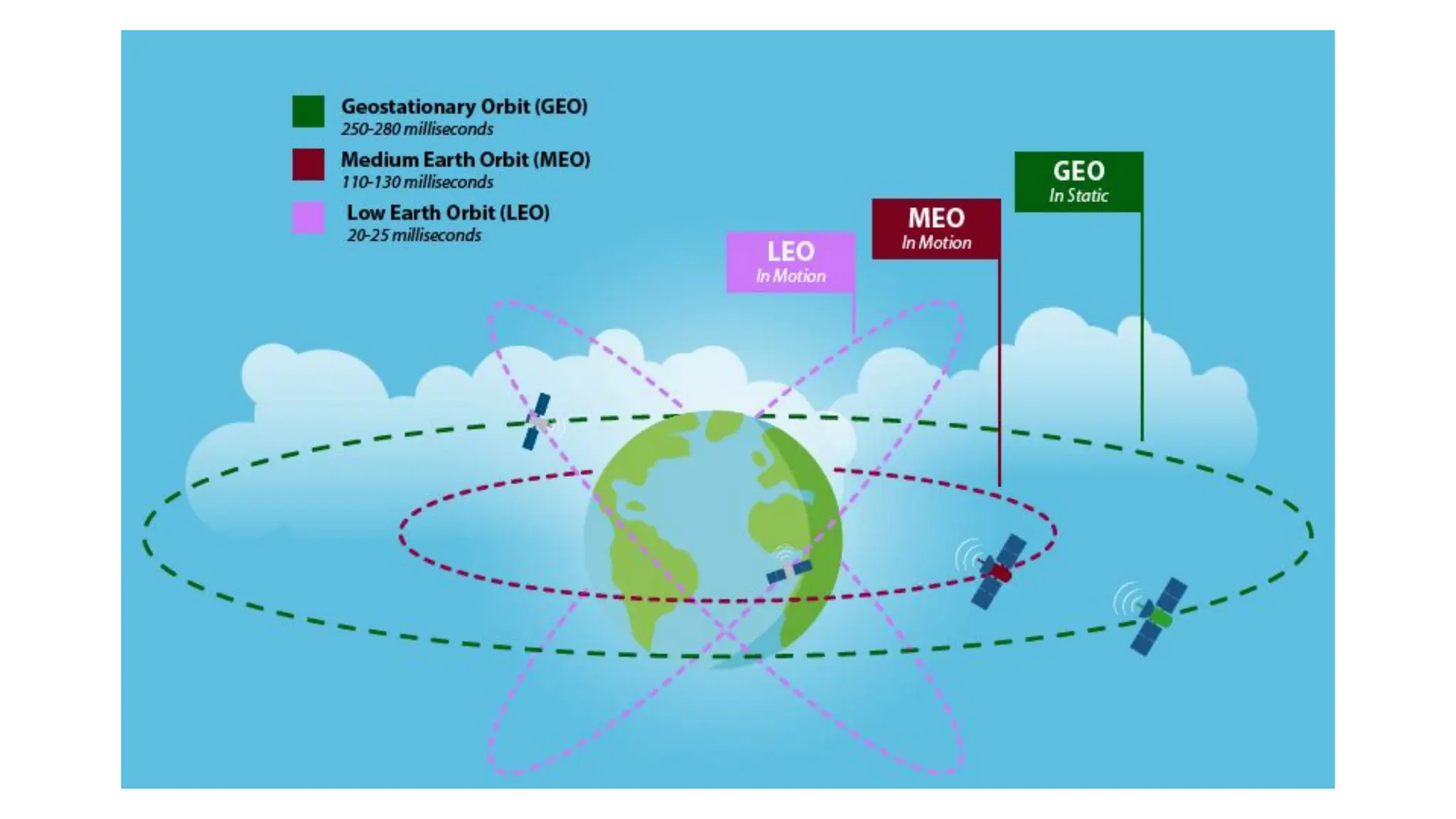
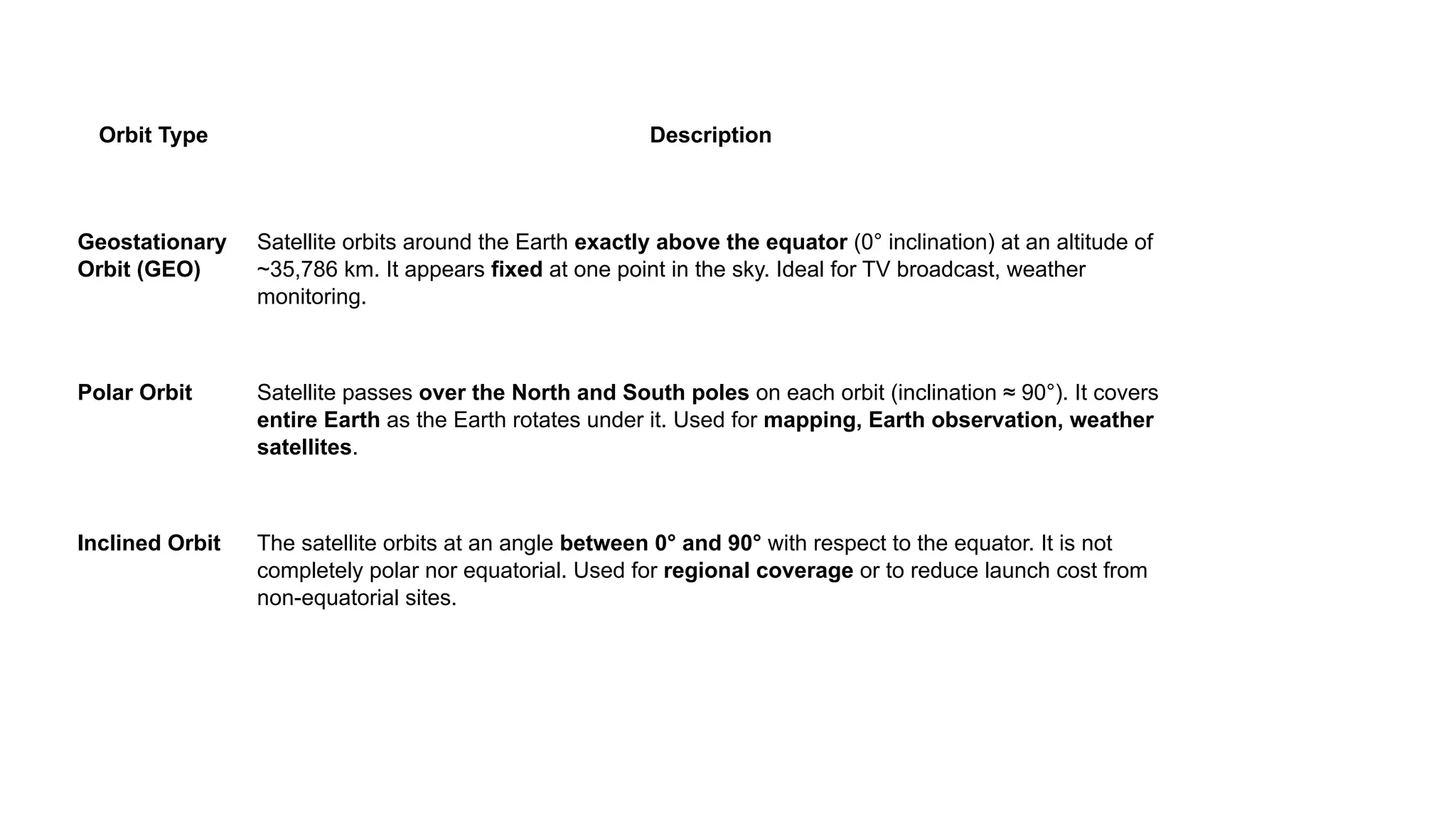
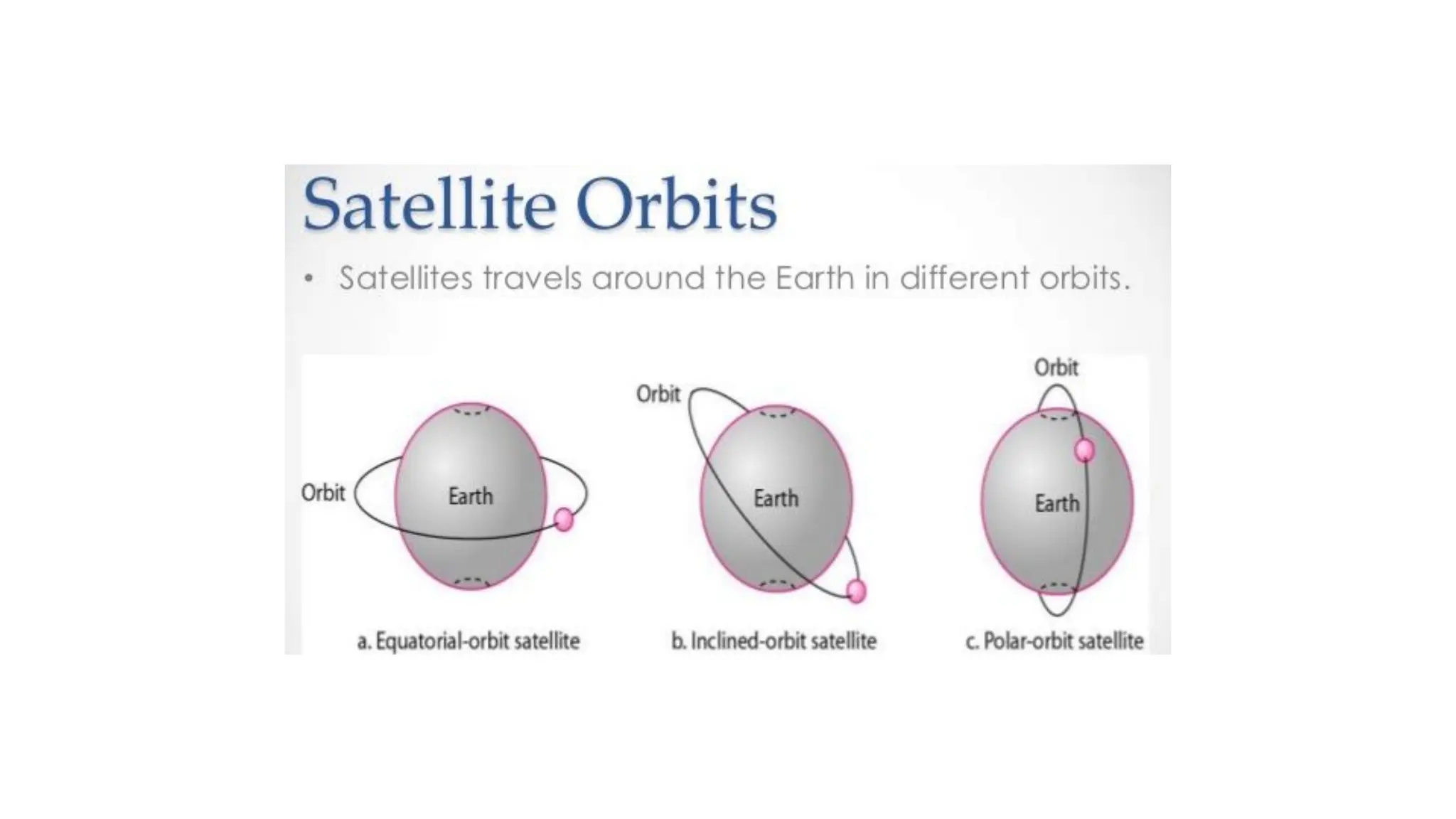
Orbit Type Description Geostationary Orbit (GEO) Satellite orbits around the Earth exactly above the equator (0° inclination) at an altitude of ~35,786 km. It appears fixed at one point in the sky. Ideal for TV broadcast, weather monitoring. Polar Orbit Satellite passes over the North and South poles on each orbit (inclination ≈ 90°). It covers entire Earth as the Earth rotates under it. Used for mapping, Earth observation, weather satellites. Inclined Orbit The satellite orbits at an angle between 0° and 90° with respect to the equator. It is not completely polar nor equatorial. Used for regional coverage or to reduce launch cost from non-equatorial sites.
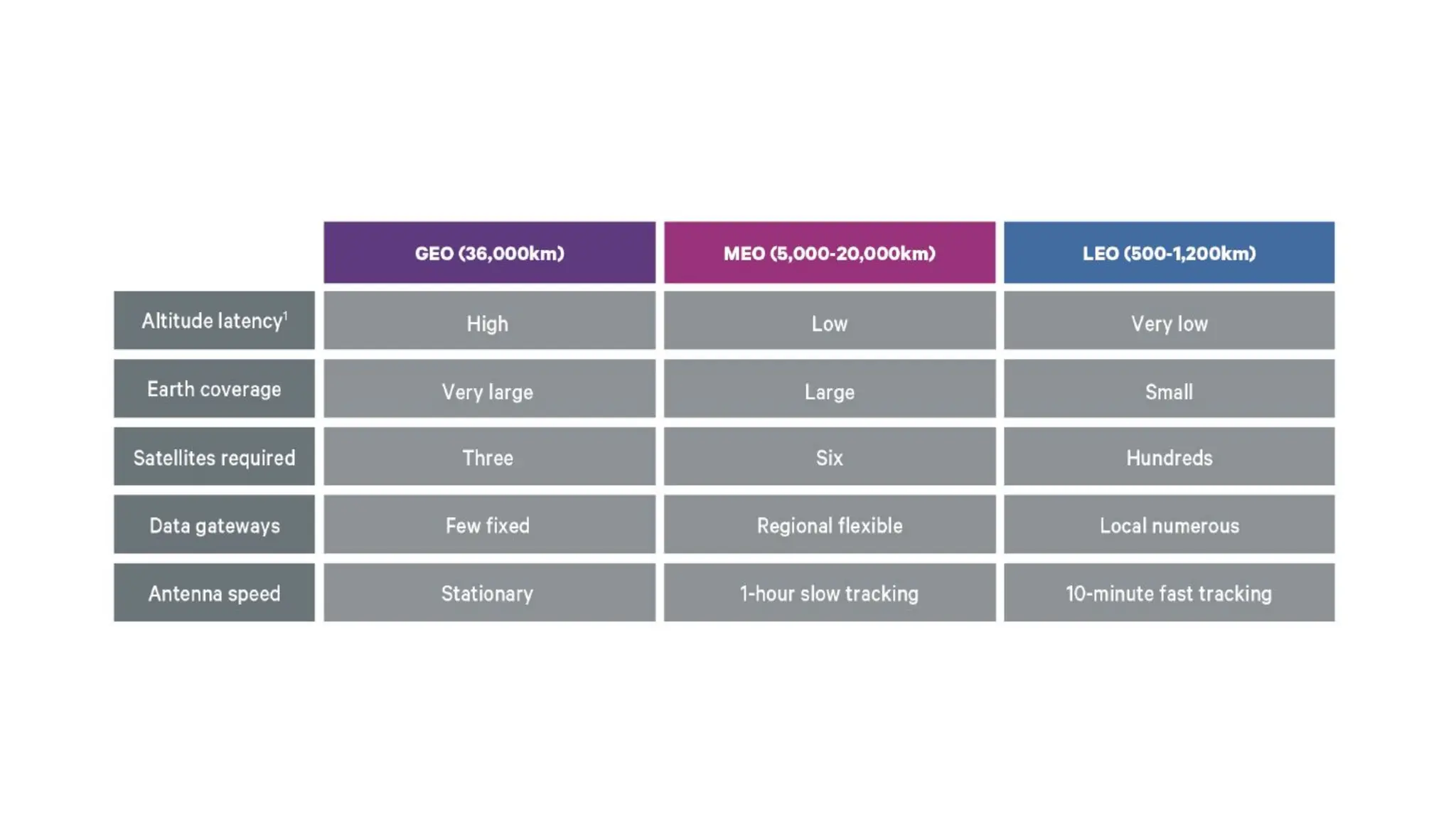
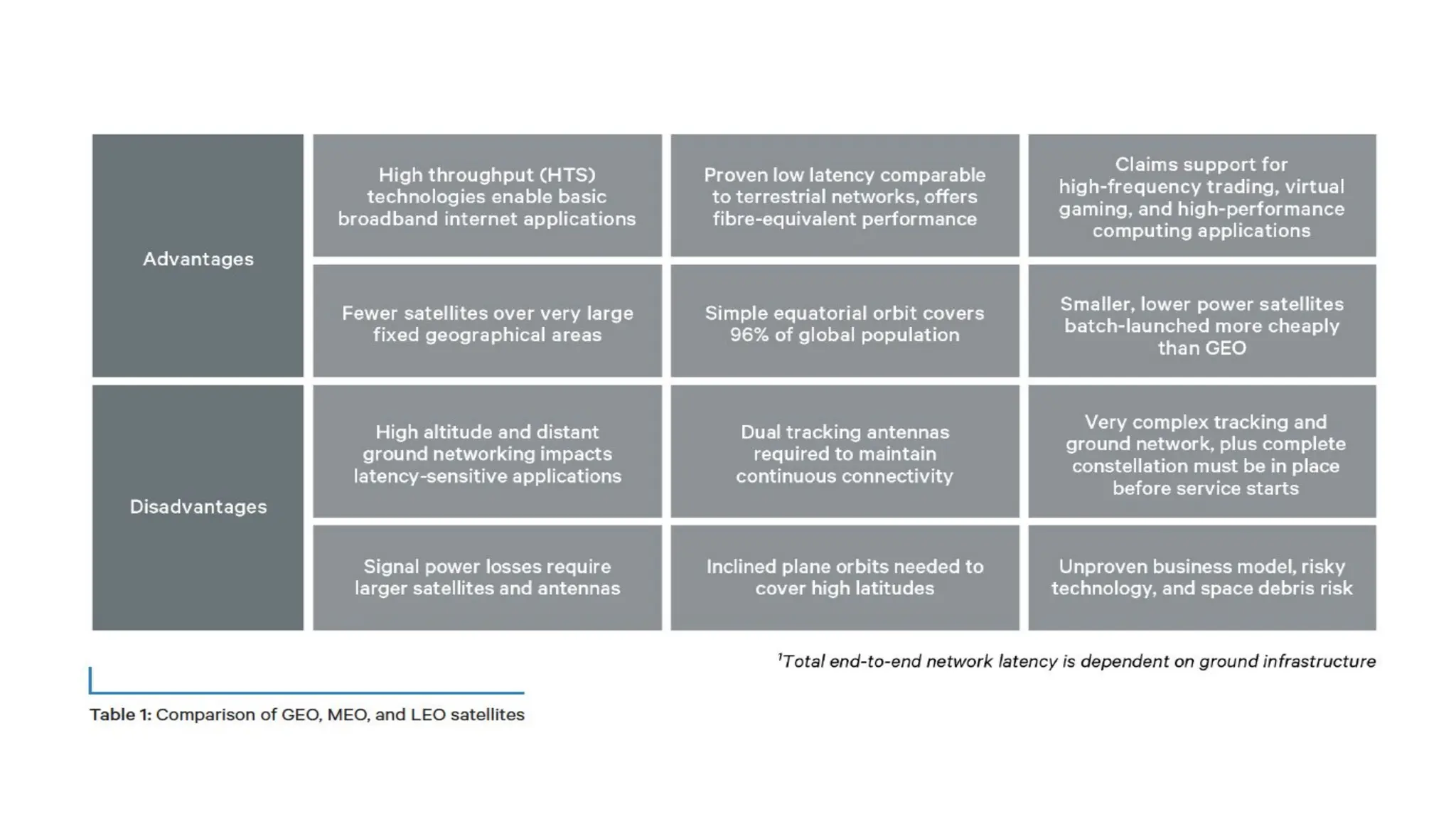
Types of satellite communication 1. Low Earth Orbit (LEO) ● These satellites are closest to Earth — like a drone flying low above the ground. ● They move very fast and go around the Earth in about 1.5 to 2 hours. ● Because they’re close, signals reach quickly → good for internet and phone calls. ● But they cover only a small area, so we need many of them to cover the whole world. ● Example: Starlink satellites.
2. Medium Earth Orbit (MEO) ● These are higher than LEO but not as high as GEO — think of a kite flying much higher than the drone. ● They cover more area than LEO and move slower. ● Best for navigation systems like GPS and India’s NAVIC. ● Delay is small, but not as fast as LEO.
Geostationary Orbit (GEO) ● These satellites are very far from Earth — about 35,786 km away. ● They move at the same speed as the Earth’s rotation, so they look like they are “stuck” in one place in the sky. ● Because they stay fixed, they’re perfect for TV channels, weather reports, and radio. ● They cover a huge area, but signals take longer to travel because of the distance. ● Example: INSAT satellites.
Unit 2_ Data communication and Networking_Physical Layer.pdf

Unit 2_ Data communication and Networking_Physical Layer.pdf

  • 1.
    Unit 2: PhysicalLayer(10) Transmission Media-Twisted pair, Coaxial cable, Optical fiber, Satellite communication networks; -Introduction to wireless transmission-Satellite communication.
  • 2.
    Transmission Media Transmission Mediais a method of establishing a communication medium to transmit and receive information in the form of electromagnetic signal waves. A LAN, or local area network, is the physical setup where a transmitter and receiver communicate utilizing a Transmission medium. Copper-based or fiber-based transmission media are used to carry either electric or optical signals. The transmission medium is also known as a communication channel.
  • 3.
    Transmission Media areused to carry data signals, either as electric signals (in copper cables) or light signals (in fiber optics). It is also called a communication channel. There are two main types of transmission media: 1. Wired Media – uses cables like twisted pair, coaxial, and fiber optic. 2. Wireless Media – uses air or space to send signals, like in Wi-Fi, Bluetooth, or satellite. The performance of data transmission depends on the characteristics of the medium and the signal. ● In wired media, the quality of the cable is very important. ● In wireless media, the quality of the signal matters more. Each type of transmission media has different features such as: ● Bandwidth (data speed) ● Delay (time taken to transmit) ● Cost ● Ease of installation and maintenance
  • 4.
    Media Terminology ● SegmentLength – The maximum distance a signal can travel through a cable before it becomes too weak to understand. ● Attenuation – The weakening of a signal as it travels through the cable. It is measured in decibels (dB). ● Bandwidth – The amount of data that can be sent through the cable per second. Measured in kbps, Mbps, etc. ● Interference – Unwanted signals from outside (like electrical or radio signals) that can disturb data transmission. Called EMI (Electromagnetic Interference) or RFI (Radio Frequency Interference). ● Crosstalk – When two cables are close together, signals from one cable can affect the other, causing noise. This is called crosstalk.
  • 5.
    Types of TransmissionMedia Depending on the nature and quality of the transmission, the following types of transmission media may be broken down into two categories: Guided and Unguided Transmission Media.
  • 6.
    Guided or WiredTransmission Media (Simplified) Guided media uses cables to send signals from one device to another. It is also called wired or bounded media because the signal stays within a fixed path. This type of media is reliable and supports high-speed data transmission. The cables help keep the signal focused and reduce interference. There are three main types of guided transmission media: 1. Twisted Pair Cable 2. Coaxial Cable 3. Fiber Optic Cable
  • 7.
    Twisted-pair cable A twisted-paircable consists of pairs of wires that form the circuit to transmit data. The wires are insulated conductors generally made of copper and twisted together. One conductor is used to carry the signal, and the other one is used only as a ground reference.
  • 8.
    ● This cablehas 8 insulated wires, grouped into 4 pairs. ● The wires are twisted together to reduce interference from nearby cables. ● One wire carries the signal, and the other acts as a ground.
  • 9.
    2 types oftwisted pair cables
  • 10.
    Unshielded twisted pairor UTP: UTP cable has four pairs or eight colour-coded copper wires twisted together and covered with a plastic sheath. Their electromagnetic interference gets cancelled due to the twisting effect. UTP cables are primarily used in LANs, telephone wires and ethernet cables. Shielded twisted pair or STP: STP cable uses the techniques of wire twisting, shielding, and cancellation. Each wire pair is covered in a metallic foil. Then four pairs of wires are then covered by an external metallic braid. STP cables reduce crosstalk both within the cable with pair-to-pair coupling and from outside the cable.
  • 11.
    Shielded Twisted Pair(STP) ● Has a metal shield around the wires to protect from noise and interference. ● Better performance than Unshielded Twisted Pair (UTP). ● Used in places where interference is high. Features: ● Reduces crosstalk and outside noise ● More expensive than UTP ● Harder to install ● Maximum length: 100 meters
  • 12.
    Advantages of ShieldedTwisted Pair: ● Blocks noise and interference better ● Faster than UTP Disadvantages of Shielded Twisted Pair: ● Costly ● Bulky and less flexible ● Difficult to install
  • 13.
    UTP (Unshielded TwistedPair) Cable ● It is unshielded, meaning it has no extra metallic covering, making it: ○ Cheaper ○ Lighter ○ Flexible, but ○ Less protected from interference compared to shielded twisted pair (STP).
  • 14.
    Coaxial Cable ● Ithas a copper core that carries the signal. ● Around it is an insulator to prevent overheating. ● A metal braid surrounds the insulator to block noise (EMI, RFI, crosstalk). ● Everything is covered with a plastic outer layer for protection. Features: ● Good protection from noise and interference ● Harder to install ● Costly ● Used in cable TV and similar systems ● Can send signals over 200m to 500m
  • 16.
    Advantages: ● Easy toinstall ● Better protection (shielding) ● Works well over long distances ● Less affected by outside noise Disadvantages: ● More expensive than other cables ● Thick and less flexible ● Needs grounding to avoid interference
  • 17.
  • 18.
    Optical Fibre Cable OpticalFibre Cable uses the concept of total internal reflection of light through a core made up of glass. The core is surrounded by a less dense glass or plastic covering called the coating. It is used for the transmission of large volumes of data. The cable can be unidirectional or bidirectional. The WDM (Wavelength Division Multiplexer) supports two modes, namely unidirectional and bidirectional mode. Wavelength Division Multiplexing (WDM) is a technology that combines multiple optical signals, each with a different wavelength, onto a single optical fiber.
  • 19.
    Advantages of OpticalFibre Cable ● Increased capacity and bandwidth ● Lightweight ● Less signal attenuation ● Immunity to electromagnetic interference ● Resistance to corrosive materials Disadvantages of Optical Fibre Cable ● Difficult to install and maintain ● High cost
  • 20.
    Applications of OpticalFibre Cable ● Medical Purpose: Used in several types of medical instruments. ● Defence Purpose: Used in transmission of data in aerospace. ● For Communication: This is largely used in formation of internet cables. ● Industrial Purpose: Used for lighting purposes and safety measures in designing the interior and exterior of automobiles.
  • 21.
    Radio Waves Radio wavesare a type of electromagnetic signal used in wireless communication technologies such as Wi-Fi, Bluetooth, and radio broadcasting. They have frequencies ranging between 3 kHz and 1 GHz. Key Properties: ● Omnidirectional: Radio waves travel in all directions from the transmitting antenna. ● The sending and receiving antennas do not need to be aligned. ● Any receiving antenna in range can pick up the signal. Disadvantage: ● Since signals go in all directions, they can face interference if another antenna transmits using the same frequency or band.
  • 22.
    Omnidirectional Antenna An omnidirectionalantenna sends signals equally in all directions. Depending on wavelength, signal strength, and purpose, different designs of such antennas are used. Applications: ● Useful for multicasting (one sender → many receivers) ● Examples: FM radio, television, maritime radio, cordless phones, paging systems. Advantages of Radio Waves ● Can be used in WAN (Wide Area Networks). ● Used in mobile cellular networks. ● Can penetrate walls, making them effective indoors. ● Can provide higher transmission rates.
  • 23.
    Microwaves Microwaves are electromagneticwaves with frequencies between 1 and 300 GHz. Key Property: ● Unidirectional – they travel in one direction only. ● The sending and receiving antennas must be aligned. ● Advantage: Two pairs of antennas can be aligned without interfering with each other. Unidirectional Antenna Microwaves use unidirectional antennas that send signals in a single direction. Types of Antennas for Microwaves: 1. Parabolic Dish – focuses signals into a narrow beam. 2. Horn Antenna – shaped like a horn to direct signals forward.
  • 25.
    Types of Microwaves 1.Terrestrial Microwave ● Sends radio signals from one ground antenna to another. Characteristics: ● Frequency range: 4 GHz – 23 GHz ● Bandwidth: 1 – 10 Mbps ● Short distance: Cheaper ● Long distance: More expensive (needs taller towers) ● Attenuation: Signal loss due to weather or antenna size ● Needs regular maintenance ● Limited bandwidth
  • 26.
    Advantages: ● Cheaper thancables ● No land space needed ● Easy communication for moving vehicles (e.g., trains) ● Can work over oceans Disadvantages: ● Needs line of sight (no obstacles) ● Affected by bad weather ● Limited range (needs multiple towers for long distances) ● High setup cost
  • 27.
    2. Satellite MicrowaveCommunication ● Uses satellites in space to send and receive microwave signals. How it works: 1. Ground station sends signal to satellite. 2. Satellite strengthens and sends it to another ground station. 3. Covers large areas, useful for GPS, weather, and long-distance communication. Advantages: ● Covers large areas (including remote places) ● Works over very long distances ● Less affected by mountains or buildings ● Can broadcast to many receivers at once ● Used for internet, TV, phone, and emergency communication Disadvantages: ● Very expensive to launch and maintain ● Signal delay for real-time calls
  • 28.
    Infrared (IR) Waves ●Frequency range: 300 GHz – 400 THz ● Wavelength: 1 mm – 770 nm ● Used for short-range communication. ● Cannot penetrate walls → prevents interference between rooms. ● Not suitable for outdoors → sunlight contains infrared, which causes interference. ● Commonly used in TV remotes, wireless mouse, keyboards, printers. Characteristics of Infrared Signals ● High bandwidth → very high data rate. ● Cannot pass through walls → better security, no interference from nearby rooms. ● Works best indoors. ● Sunlight interference outdoors.
  • 29.
    Applications ● Short-range, indoorcommunication (line-of-sight). ● Security systems (motion detectors, infrared cameras). ● Automotive uses (night vision, collision avoidance). ● Consumer electronics (TV and AC remotes, printers). Advantages ● Flexible: Devices can connect without cables. ● Easy to install and expand. ● Supports mobility. Disadvantages ● Interference: Can be affected by other electronics and weather. ● Limited range and needs clear line of sight. ● Lower bandwidth than some wired options. ● Signal quality drops with obstacles.
  • 30.
    Wireless communications Wireless communicationsis the transmission of voice and data without cable or wires. In place of a physical connection, data travels through electromagnetic signals broadcast from sending facilities to intermediate and end-user devices.
  • 31.
    What is awireless network? A wireless network is a grouping, or network, of multiple devices where data is sent and received over radio frequencies. Wireless networks differ from wired networks, which require each end of a data connection to be physically connected by a cable in order for communication to take place. Wireless networks make it possible for organizations to eliminate the dedicated wired cabling required to connect endpoint computing devices -- such as tablets, laptops and smartphones -- to embedded and peripheral devices. Wireless backhaul is often part of large service provider networks.
  • 33.
    Satellite communication Satellite communicationis transporting information from one place to another using a communication satellite in orbit around the Earth. A communication satellite is an artificial satellite that transmits the signal via a transponder by creating a channel between the transmitter and the receiver at different Earth locations. Telephone, radio, television, internet, and military applications use satellite communications.
  • 34.
    Need for SatelliteCommunication On Earth, we use ground waves and skywaves to send signals. But they can only travel up to 1500 km. To cover longer distances, we need satellite communication.
  • 35.
    How Does SatelliteCommunication Work? It works in 3 simple steps: 1. Uplink ● A ground station on Earth sends the signal up to the satellite. ● Example: A TV signal going from Earth to the satellite. 2. Transponder (Inside the Satellite) ● It has receivers, amplifiers, and transmitters. ● It does two things: Boosts the signal Changes the signal’s frequency ● This prevents mixing of signals going in and out. 3. Downlink ● The processed signal is sent back to Earth to the receiver. ● There is usually one uplink but many downlinks to reach many users.
  • 36.
    Orbit Type Description Geostationary Orbit(GEO) Satellite orbits around the Earth exactly above the equator (0° inclination) at an altitude of ~35,786 km. It appears fixed at one point in the sky. Ideal for TV broadcast, weather monitoring. Polar Orbit Satellite passes over the North and South poles on each orbit (inclination ≈ 90°). It covers entire Earth as the Earth rotates under it. Used for mapping, Earth observation, weather satellites. Inclined Orbit The satellite orbits at an angle between 0° and 90° with respect to the equator. It is not completely polar nor equatorial. Used for regional coverage or to reduce launch cost from non-equatorial sites.
  • 38.
    Types of satellitecommunication 1. Low Earth Orbit (LEO) ● These satellites are closest to Earth — like a drone flying low above the ground. ● They move very fast and go around the Earth in about 1.5 to 2 hours. ● Because they’re close, signals reach quickly → good for internet and phone calls. ● But they cover only a small area, so we need many of them to cover the whole world. ● Example: Starlink satellites.
  • 39.
    2. Medium EarthOrbit (MEO) ● These are higher than LEO but not as high as GEO — think of a kite flying much higher than the drone. ● They cover more area than LEO and move slower. ● Best for navigation systems like GPS and India’s NAVIC. ● Delay is small, but not as fast as LEO.
  • 40.
    Geostationary Orbit (GEO) ●These satellites are very far from Earth — about 35,786 km away. ● They move at the same speed as the Earth’s rotation, so they look like they are “stuck” in one place in the sky. ● Because they stay fixed, they’re perfect for TV channels, weather reports, and radio. ● They cover a huge area, but signals take longer to travel because of the distance. ● Example: INSAT satellites.