Kotlin lang - basics (Android projects) Bartosz Kosarzycki - StxNext Lightning Talks - Feb 12, 2016 talented developers | flexible teams | agile experts
KOTLINhttp://kotlinlang.org/ Required knowledge: ● basic Android development skills ● functional programming ● familiarity with JDK 6,7,8 ● Scala is a plus
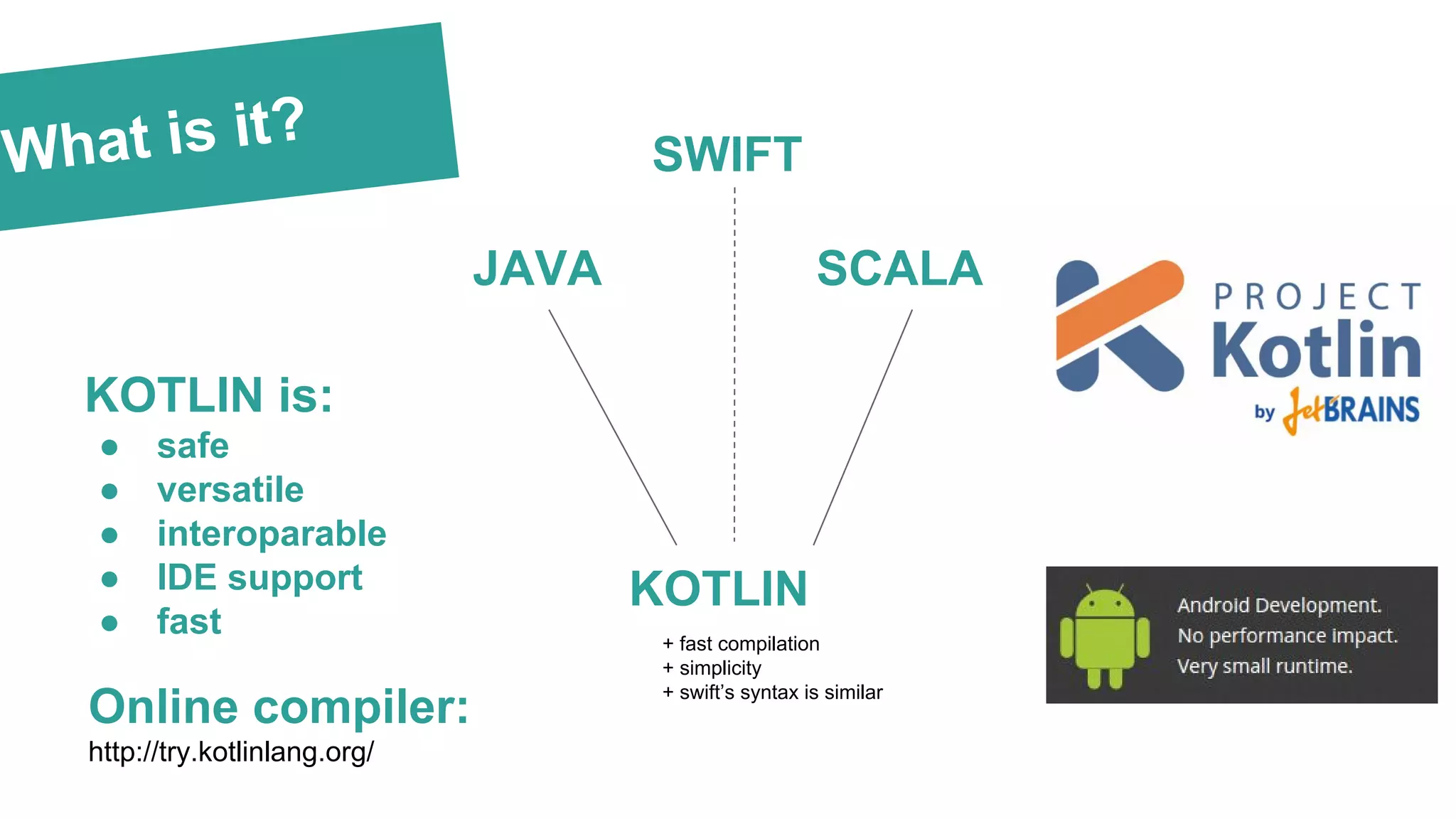
What is it? KOTLIN is: ● safe ● versatile ● interoparable ● IDE support ● fast JAVA SCALA KOTLIN + fast compilation + simplicity + swift’s syntax is similar Online compiler: http://try.kotlinlang.org/ SWIFT
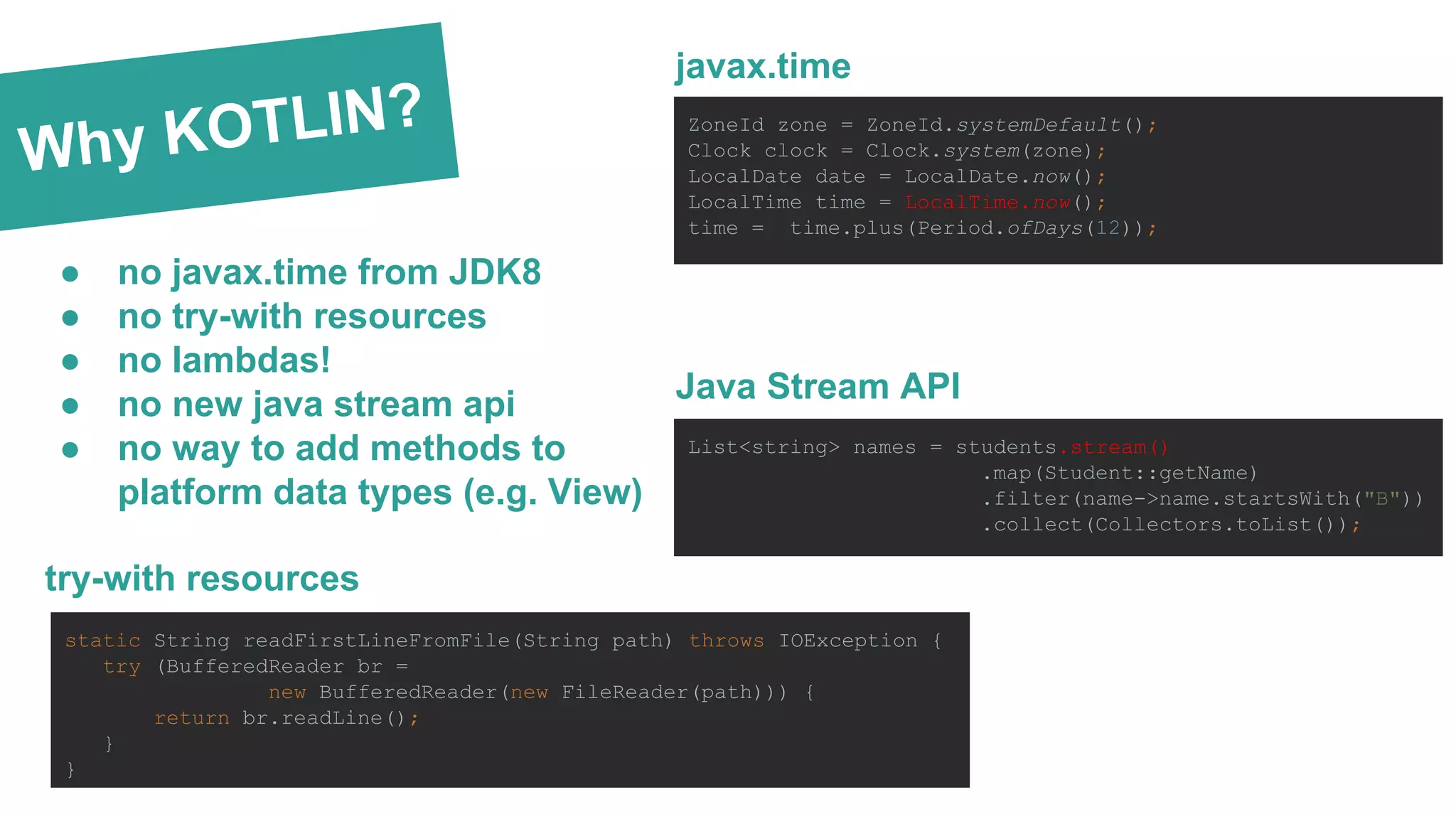
Why KOTLIN? ● no javax.time from JDK8 ● no try-with resources ● no lambdas! ● no new java stream api ● no way to add methods to platform data types (e.g. View) List<string> names = students.stream() .map(Student::getName) .filter(name->name.startsWith("B")) .collect(Collectors.toList()); ZoneId zone = ZoneId.systemDefault(); Clock clock = Clock.system(zone); LocalDate date = LocalDate.now(); LocalTime time = LocalTime.now(); time = time.plus(Period.ofDays(12)); javax.time Java Stream API static String readFirstLineFromFile(String path) throws IOException { try (BufferedReader br = new BufferedReader(new FileReader(path))) { return br.readLine(); } } try-with resources
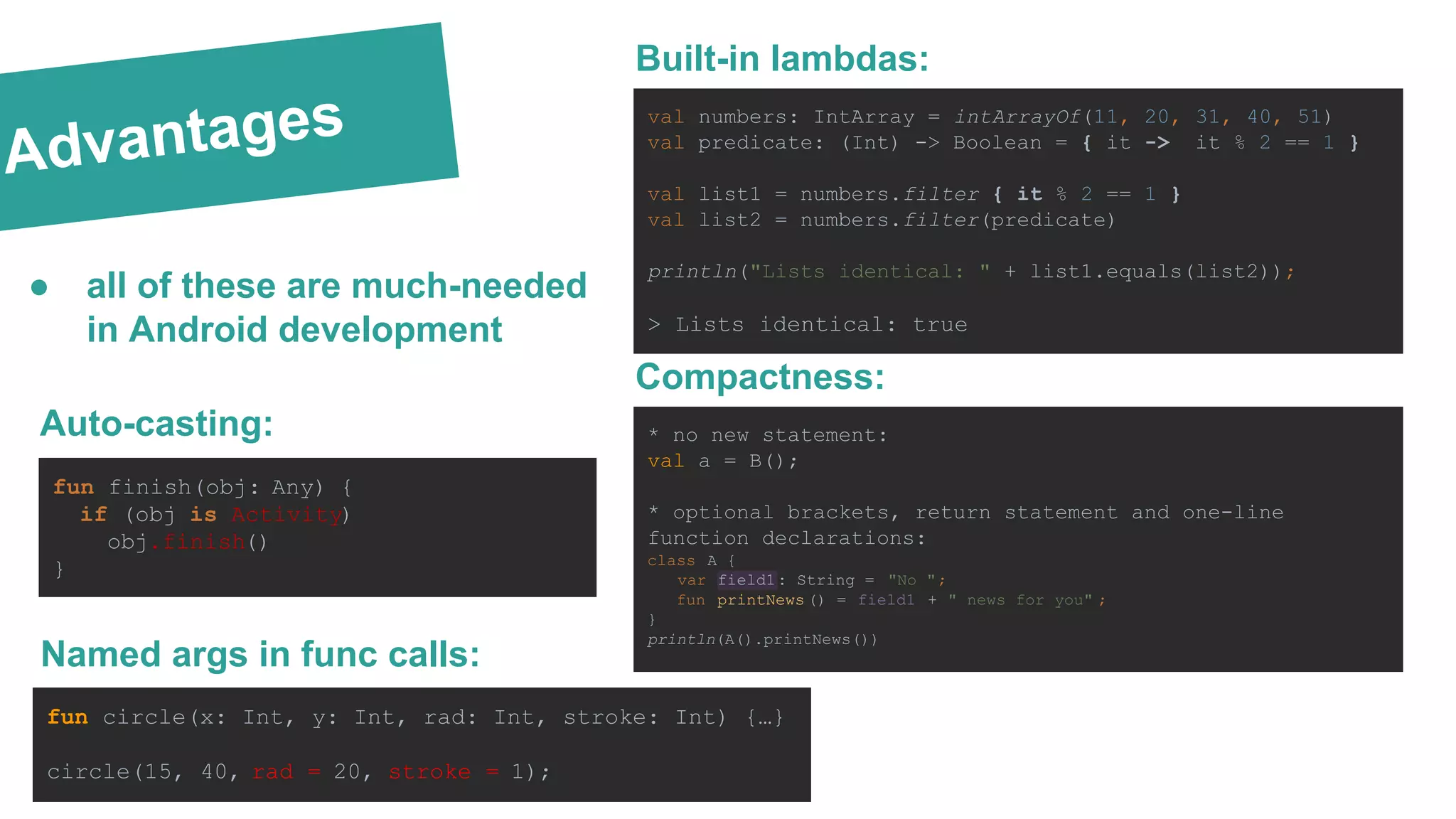
Advantages fun finish(obj: Any) { if (obj is Activity) obj.finish() } Auto-casting: Named args in func calls: fun circle(x: Int, y: Int, rad: Int, stroke: Int) {…} circle(15, 40, rad = 20, stroke = 1); Built-in lambdas: val numbers: IntArray = intArrayOf(11, 20, 31, 40, 51) val predicate: (Int) -> Boolean = { it -> it % 2 == 1 } val list1 = numbers.filter { it % 2 == 1 } val list2 = numbers.filter(predicate) println("Lists identical: " + list1.equals(list2)); > Lists identical: true Compactness: * no new statement: val a = B(); * optional brackets, return statement and one-line function declarations: class A { var field1: String = "No "; fun printNews () = field1 + " news for you" ; } println(A().printNews()) ● all of these are much-needed in Android development
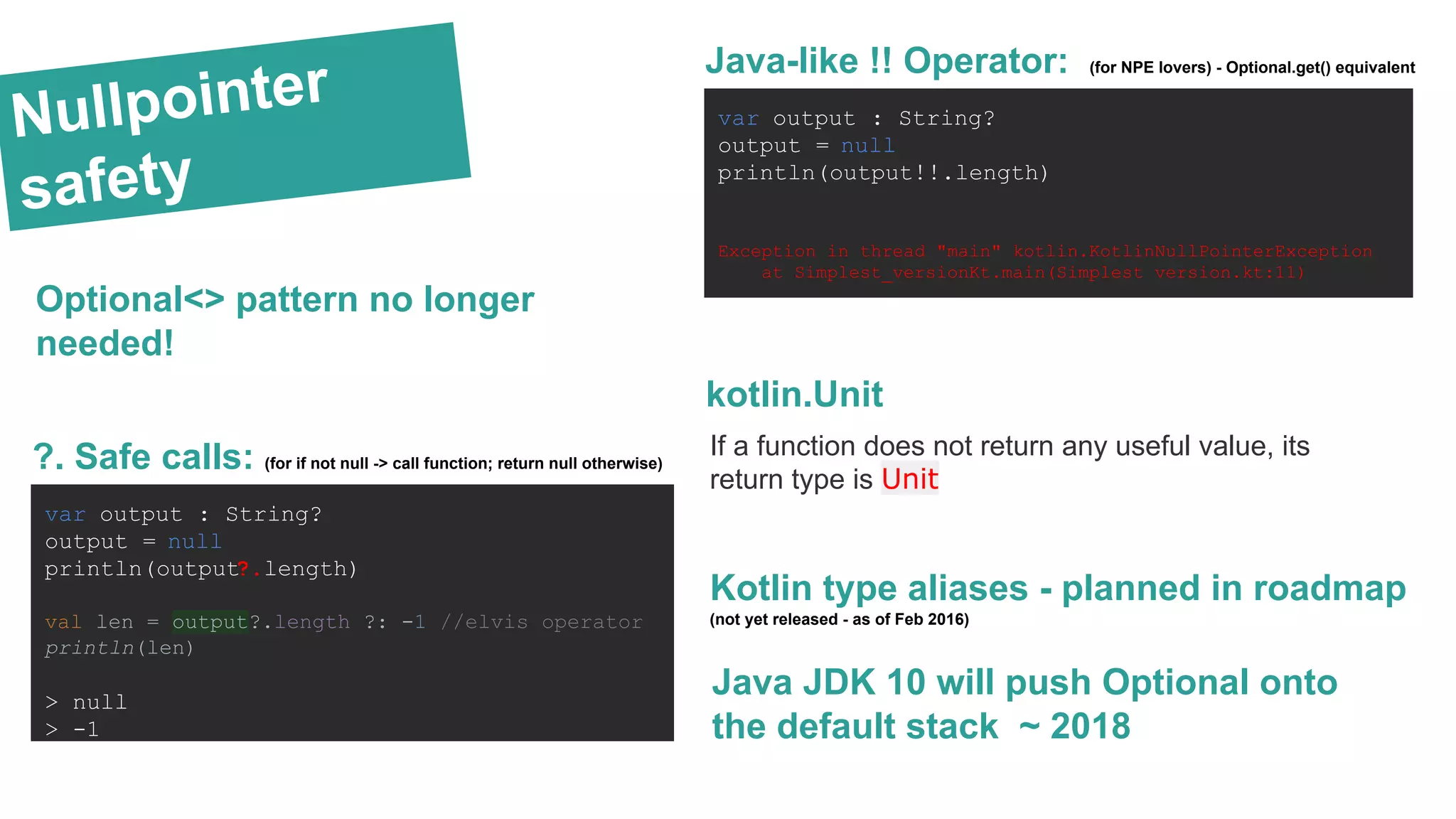
Nullpointer safety var output : String? output = null println(output!!.length) Exception in thread "main" kotlin.KotlinNullPointerException at Simplest_versionKt.main(Simplest version.kt:11) Java-like !! Operator: (for NPE lovers) - Optional.get() equivalent var output : String? output = null println(output?.length) val len = output?.length ?: -1 //elvis operator println(len) > null > -1 ?. Safe calls: (for if not null -> call function; return null otherwise) Kotlin type aliases - planned in roadmap (not yet released - as of Feb 2016) Java JDK 10 will push Optional onto the default stack ~ 2018 Optional<> pattern no longer needed! kotlin.Unit If a function does not return any useful value, its return type is Unit
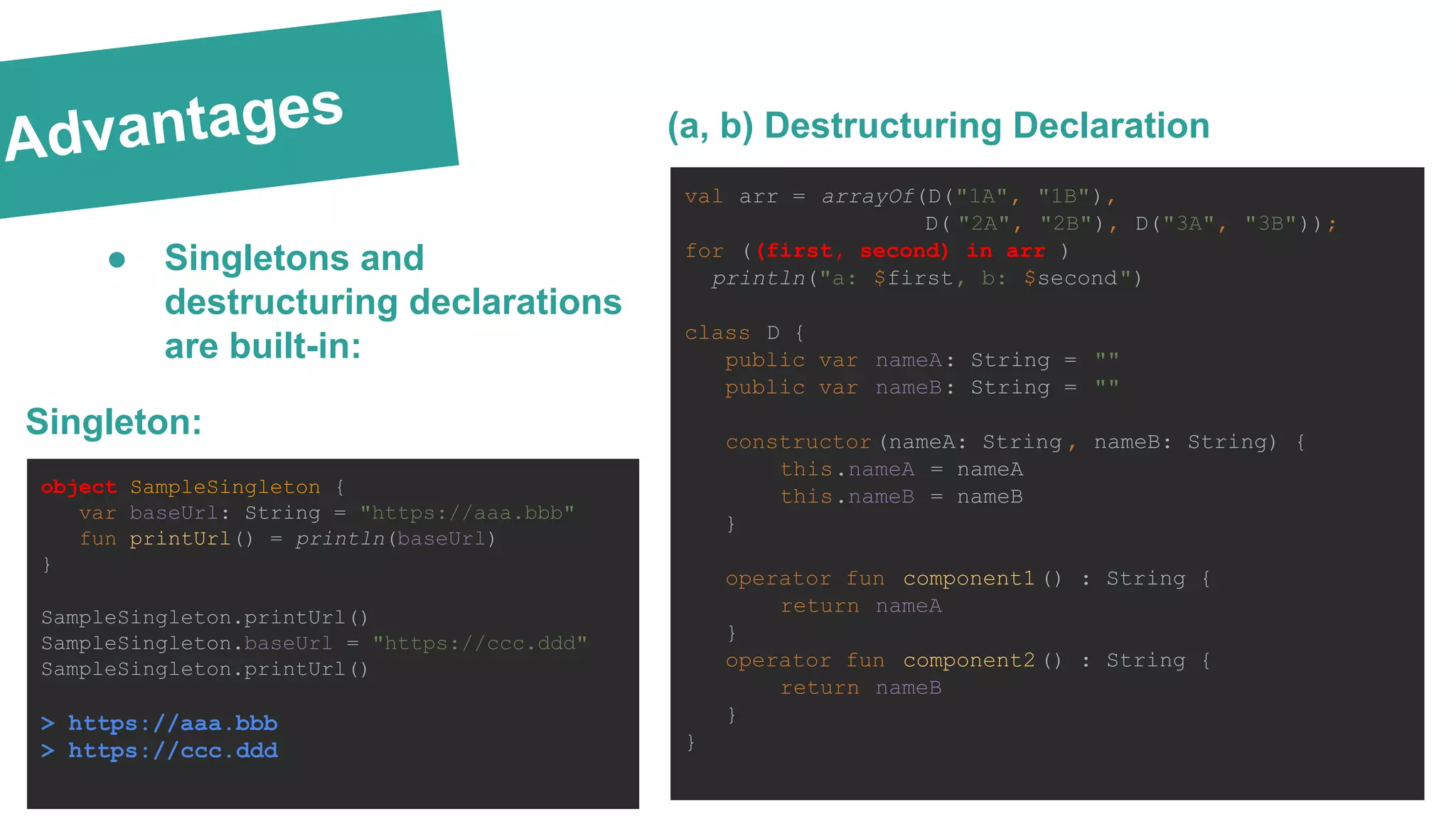
Advantages val arr = arrayOf(D("1A", "1B"), D( "2A", "2B"), D("3A", "3B")); for ((first, second) in arr ) println("a: $first, b: $second") class D { public var nameA: String = "" public var nameB: String = "" constructor (nameA: String , nameB: String) { this.nameA = nameA this.nameB = nameB } operator fun component1() : String { return nameA } operator fun component2() : String { return nameB } } (a, b) Destructuring Declaration Singleton: object SampleSingleton { var baseUrl: String = "https://aaa.bbb" fun printUrl() = println(baseUrl) } SampleSingleton.printUrl() SampleSingleton.baseUrl = "https://ccc.ddd" SampleSingleton.printUrl() > https://aaa.bbb > https://ccc.ddd ● Singletons and destructuring declarations are built-in:
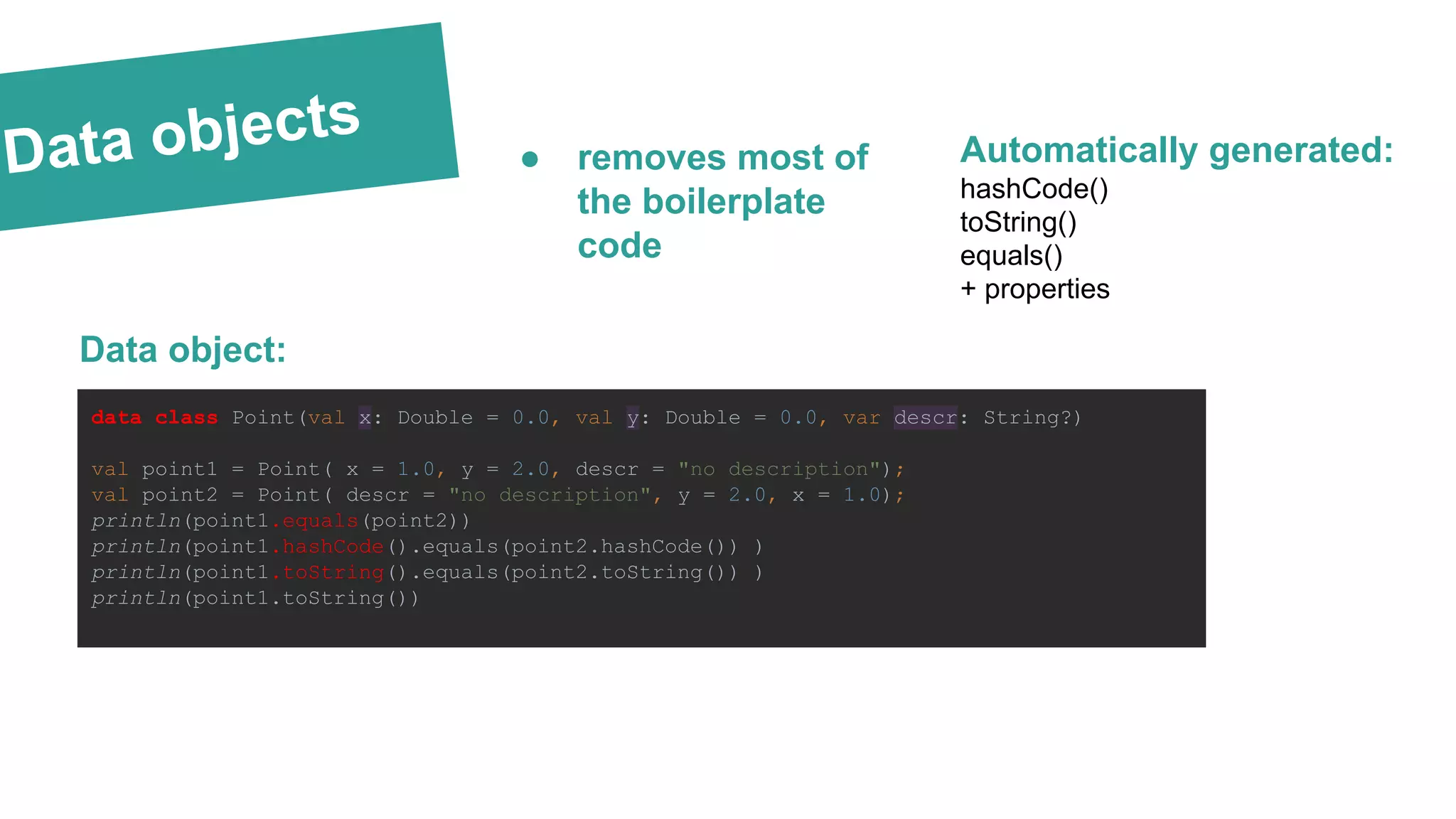
Data objects data class Point(val x: Double = 0.0, val y: Double = 0.0, var descr: String?) val point1 = Point( x = 1.0, y = 2.0, descr = "no description"); val point2 = Point( descr = "no description", y = 2.0, x = 1.0); println(point1.equals(point2)) println(point1.hashCode().equals(point2.hashCode()) ) println(point1.toString().equals(point2.toString()) ) println(point1.toString()) Data object: hashCode() toString() equals() + properties Automatically generated:● removes most of the boilerplate code
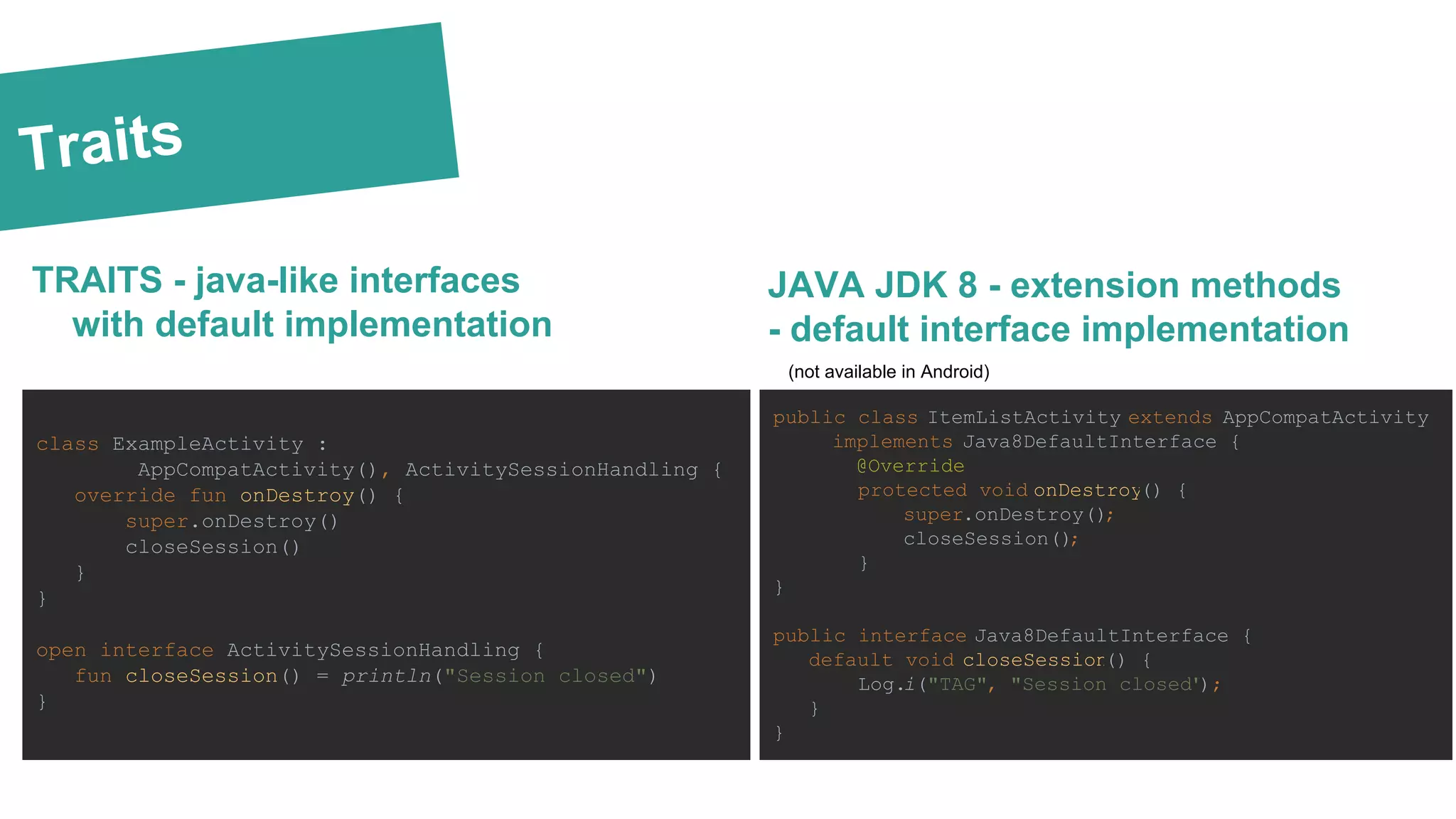
Traits TRAITS - java-like interfaces with default implementation class ExampleActivity : AppCompatActivity(), ActivitySessionHandling { override fun onDestroy() { super.onDestroy() closeSession() } } open interface ActivitySessionHandling { fun closeSession() = println("Session closed") } JAVA JDK 8 - extension methods - default interface implementation public class ItemListActivity extends AppCompatActivity implements Java8DefaultInterface { @Override protected void onDestroy() { super.onDestroy(); closeSession(); } } public interface Java8DefaultInterface { default void closeSession() { Log.i("TAG", "Session closed"); } } (not available in Android)
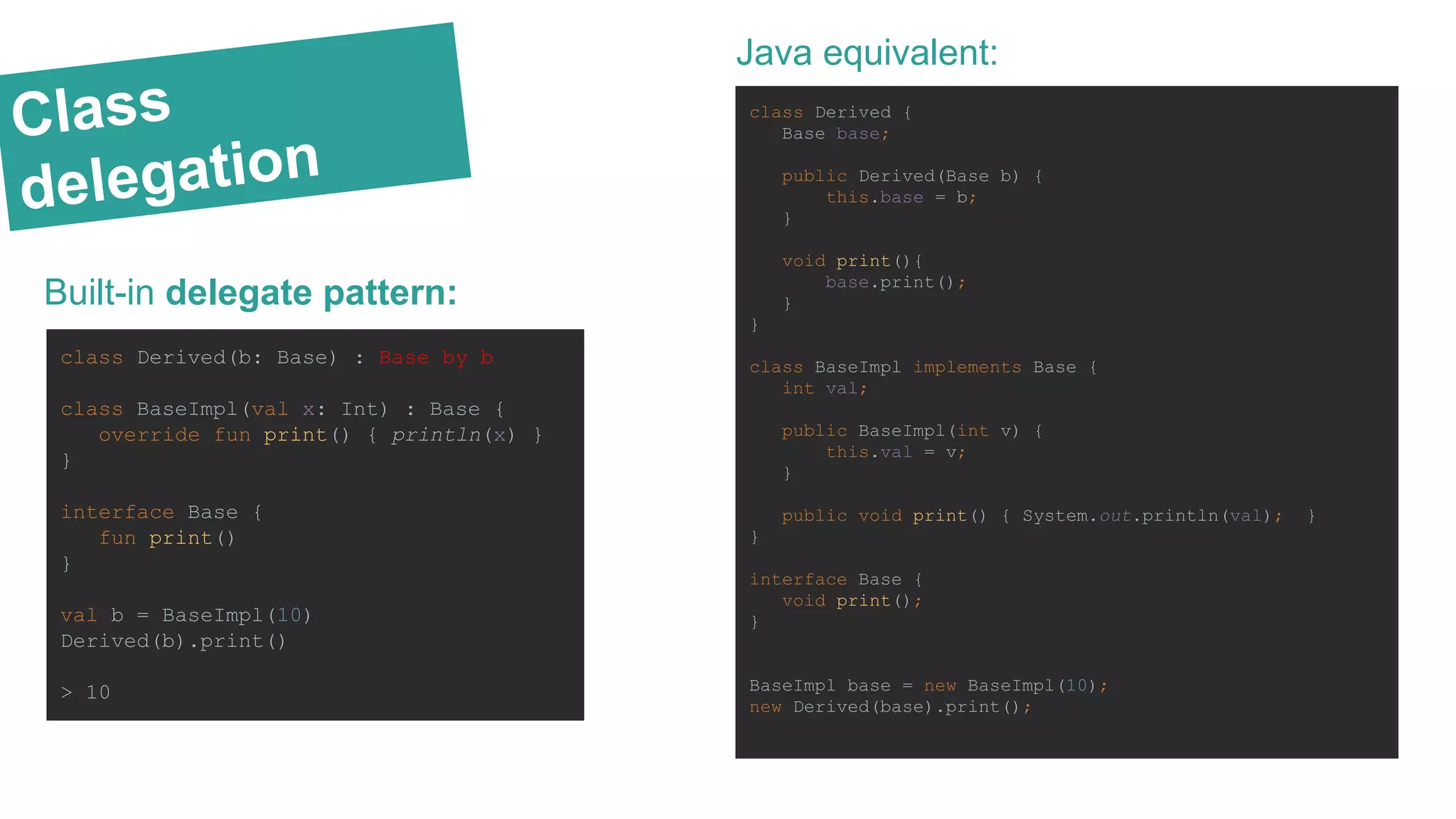
Class delegation Built-in delegate pattern: class Derived(b: Base) : Base by b class BaseImpl(val x: Int) : Base { override fun print() { println(x) } } interface Base { fun print() } val b = BaseImpl(10) Derived(b).print() > 10 Java equivalent: class Derived { Base base; public Derived(Base b) { this.base = b; } void print(){ base.print(); } } class BaseImpl implements Base { int val; public BaseImpl(int v) { this.val = v; } public void print() { System.out.println(val); } } interface Base { void print(); } BaseImpl base = new BaseImpl(10); new Derived(base).print();
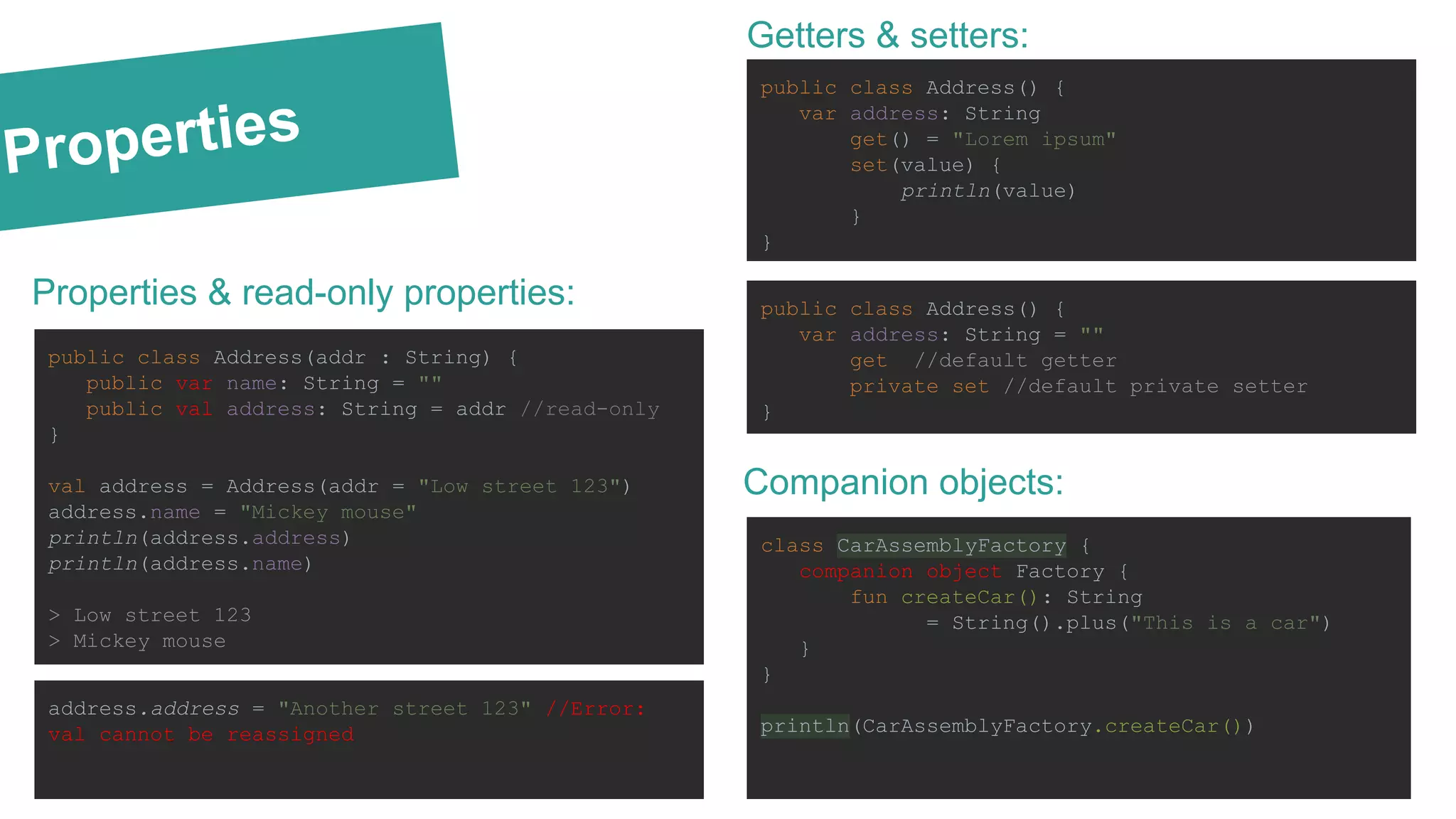
Properties Properties & read-only properties: public class Address(addr : String) { public var name: String = "" public val address: String = addr //read-only } val address = Address(addr = "Low street 123") address.name = "Mickey mouse" println(address.address) println(address.name) > Low street 123 > Mickey mouse address.address = "Another street 123" //Error: val cannot be reassigned Getters & setters: public class Address() { var address: String get() = "Lorem ipsum" set(value) { println(value) } } public class Address() { var address: String = "" get //default getter private set //default private setter } Companion objects: class CarAssemblyFactory { companion object Factory { fun createCar(): String = String().plus("This is a car") } } println(CarAssemblyFactory.createCar())
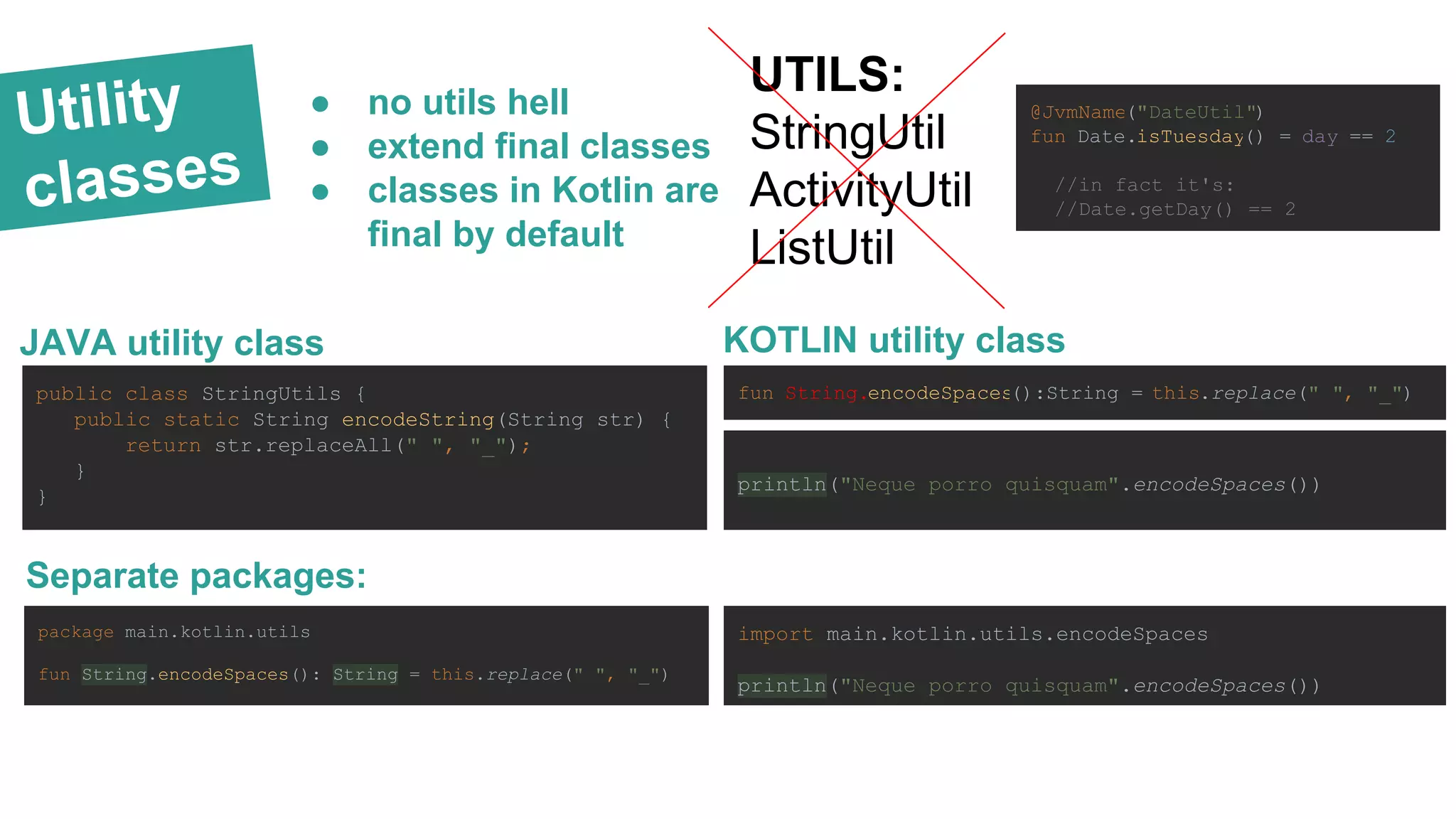
Utility classes UTILS: StringUtil ActivityUtil ListUtil JAVA utility class public class StringUtils { public static String encodeString(String str) { return str.replaceAll(" ", "_"); } } KOTLIN utility class fun String.encodeSpaces():String = this.replace(" ", "_") println("Neque porro quisquam".encodeSpaces()) Separate packages: package main.kotlin.utils fun String.encodeSpaces(): String = this.replace(" ", "_") import main.kotlin.utils.encodeSpaces println("Neque porro quisquam".encodeSpaces()) ● no utils hell ● extend final classes ● classes in Kotlin are final by default @JvmName("DateUtil") fun Date.isTuesday() = day == 2 //in fact it's: //Date.getDay() == 2
+ KOTLIN
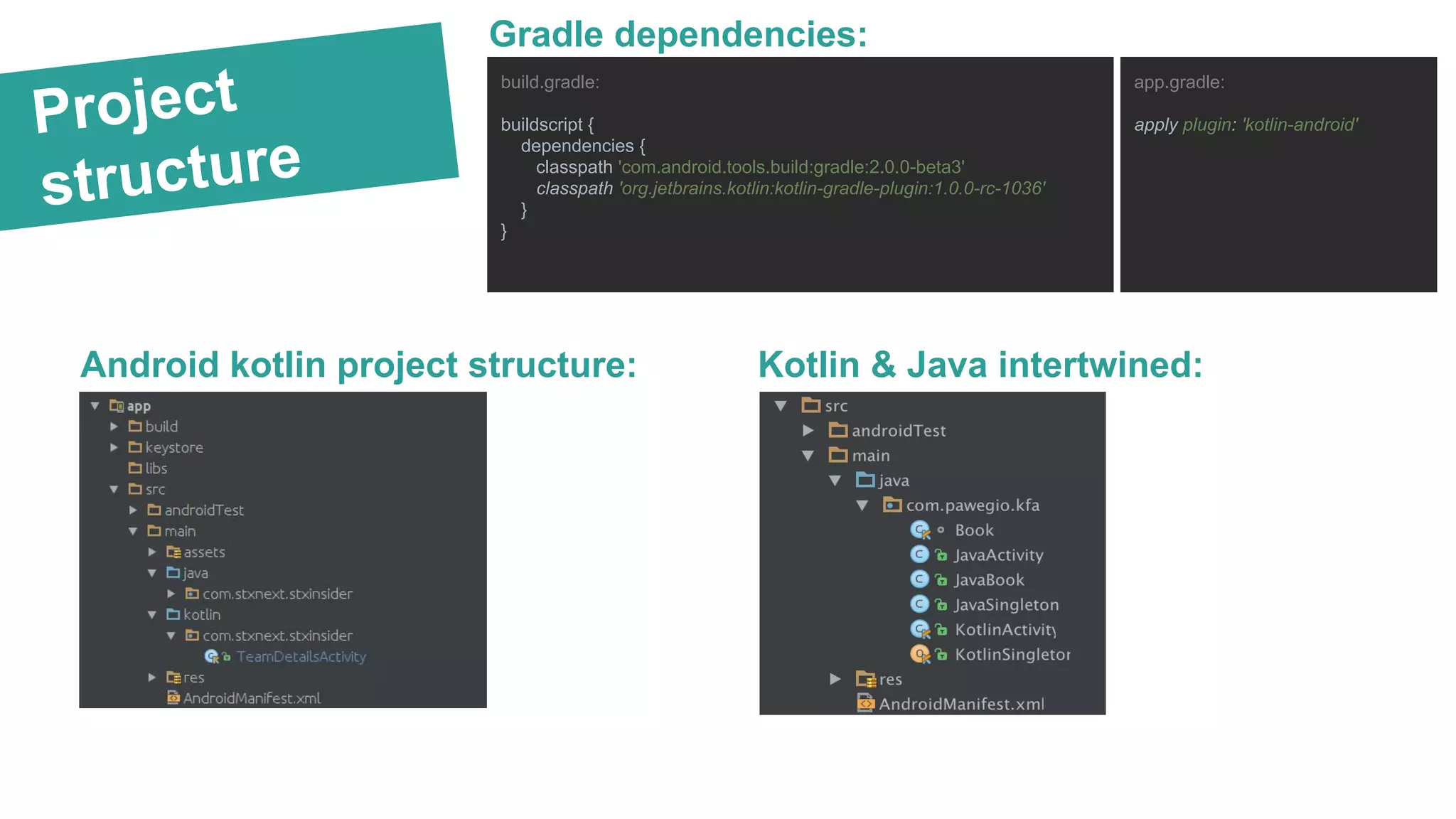
Project structure Android kotlin project structure: Kotlin & Java intertwined: Gradle dependencies: build.gradle: buildscript { dependencies { classpath 'com.android.tools.build:gradle:2.0.0-beta3' classpath 'org.jetbrains.kotlin:kotlin-gradle-plugin:1.0.0-rc-1036' } } app.gradle: apply plugin: 'kotlin-android'
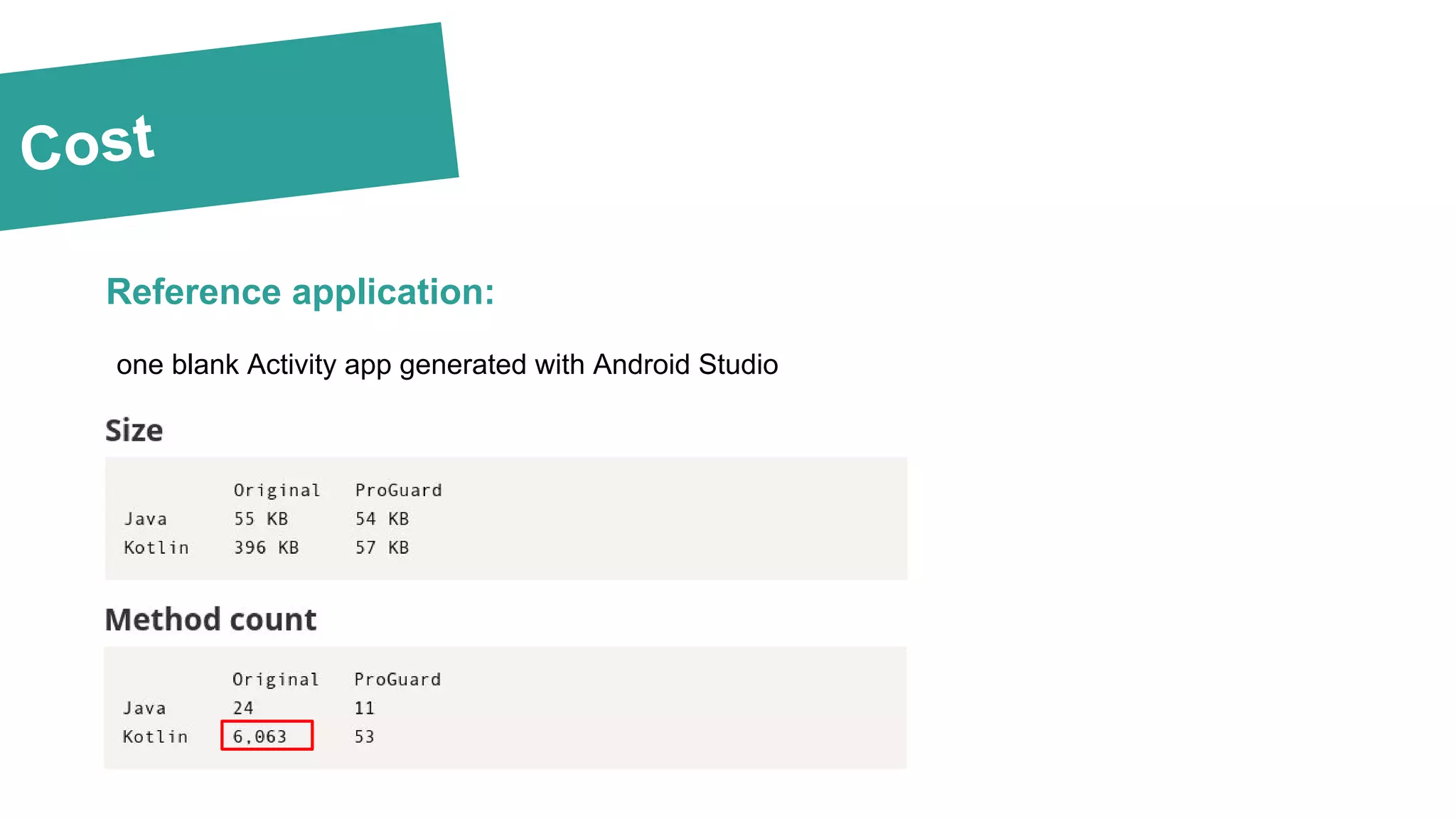
Cost Reference application: one blank Activity app generated with Android Studio
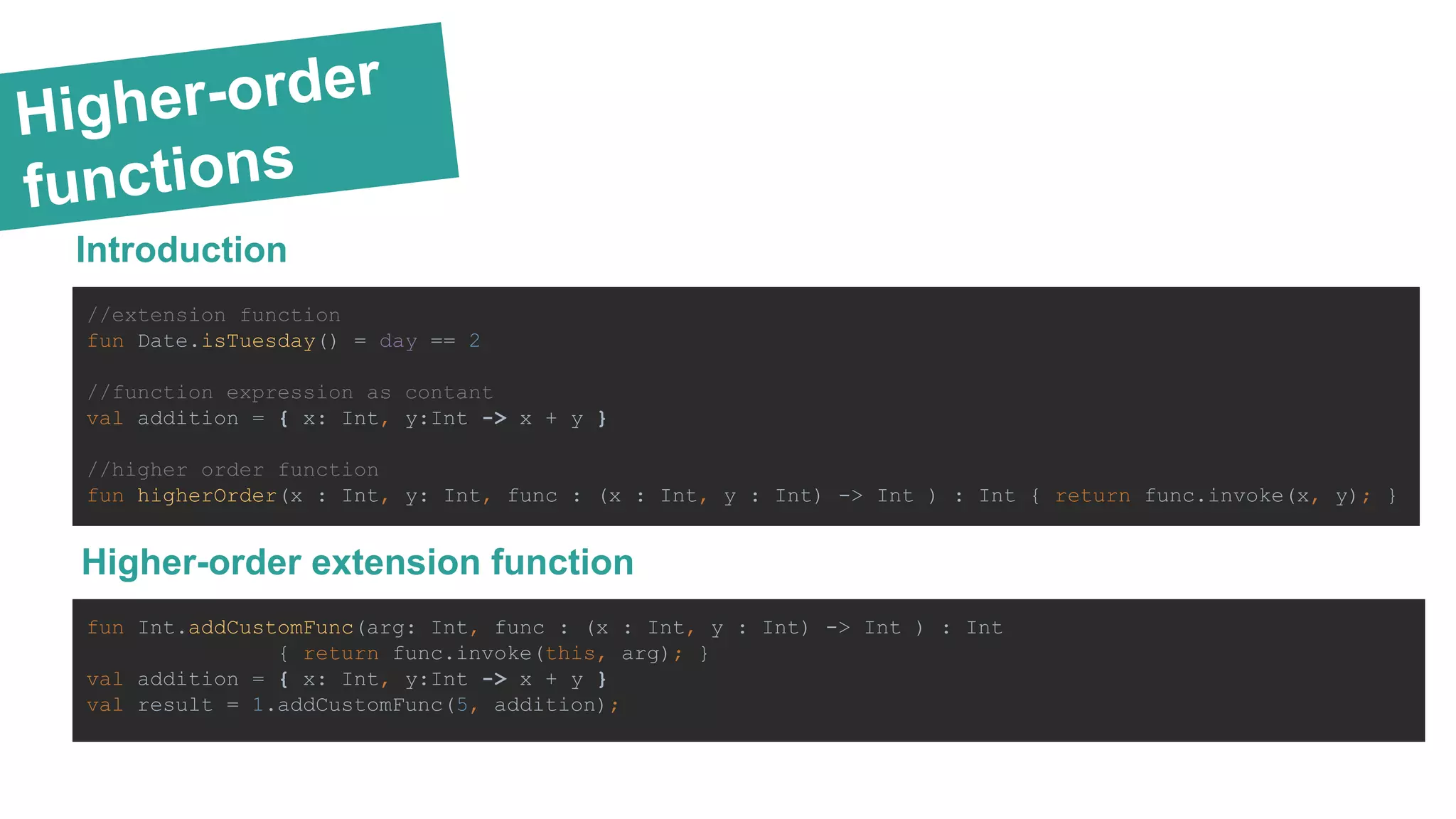
Higher-order functions Introduction //extension function fun Date.isTuesday() = day == 2 //function expression as contant val addition = { x: Int, y:Int -> x + y } //higher order function fun higherOrder(x : Int, y: Int, func : (x : Int, y : Int) -> Int ) : Int { return func.invoke(x, y); } Higher-order extension function fun Int.addCustomFunc(arg: Int, func : (x : Int, y : Int) -> Int ) : Int { return func.invoke(this, arg); } val addition = { x: Int, y:Int -> x + y } val result = 1.addCustomFunc(5, addition);
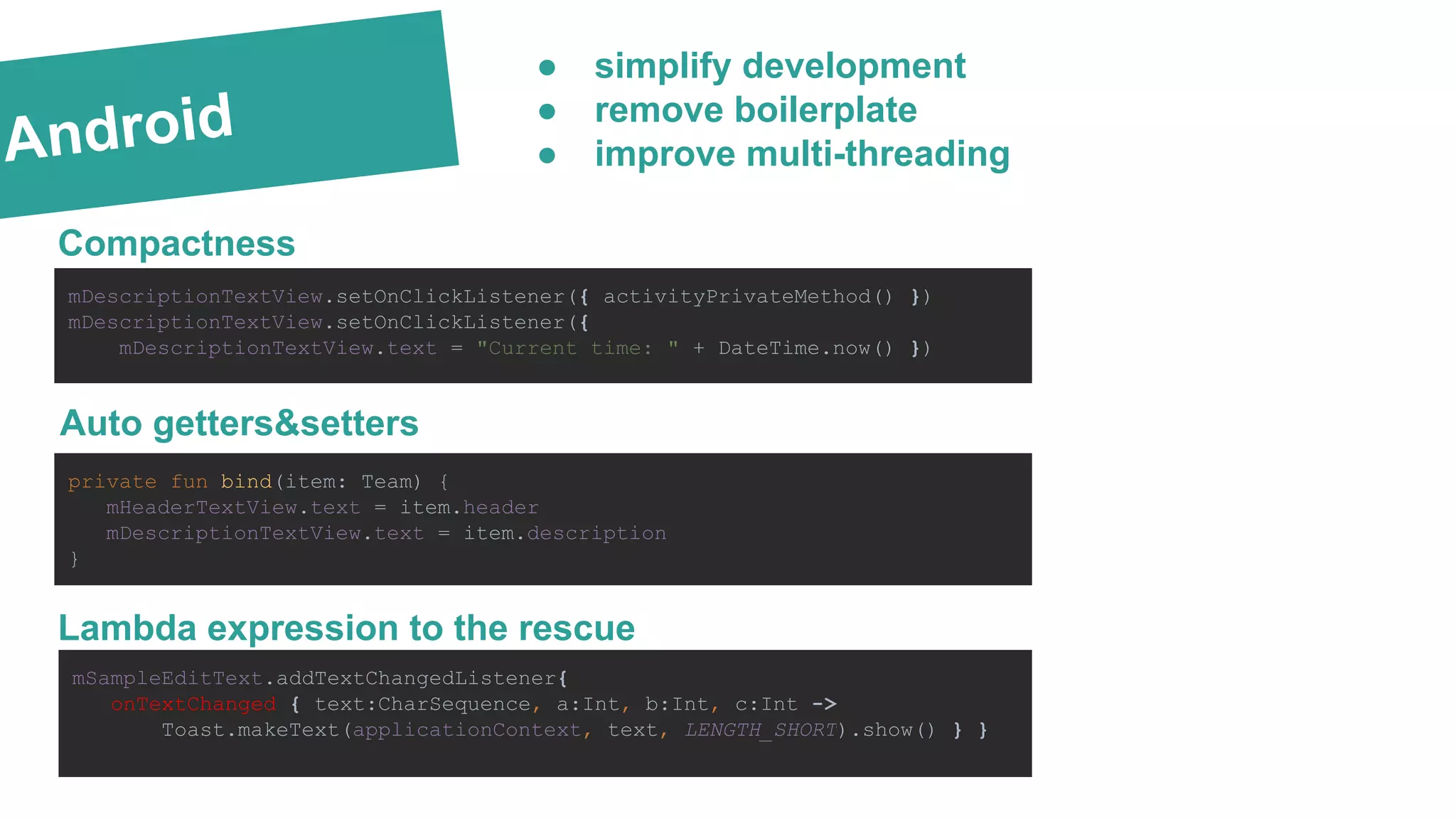
Android Compactness mDescriptionTextView.setOnClickListener({ activityPrivateMethod() }) mDescriptionTextView.setOnClickListener({ mDescriptionTextView.text = "Current time: " + DateTime.now() }) Lambda expression to the rescue private fun bind(item: Team) { mHeaderTextView.text = item.header mDescriptionTextView.text = item.description } mSampleEditText.addTextChangedListener{ onTextChanged { text:CharSequence, a:Int, b:Int, c:Int -> Toast.makeText(applicationContext, text, LENGTH_SHORT).show() } } ● simplify development ● remove boilerplate ● improve multi-threading Auto getters&setters
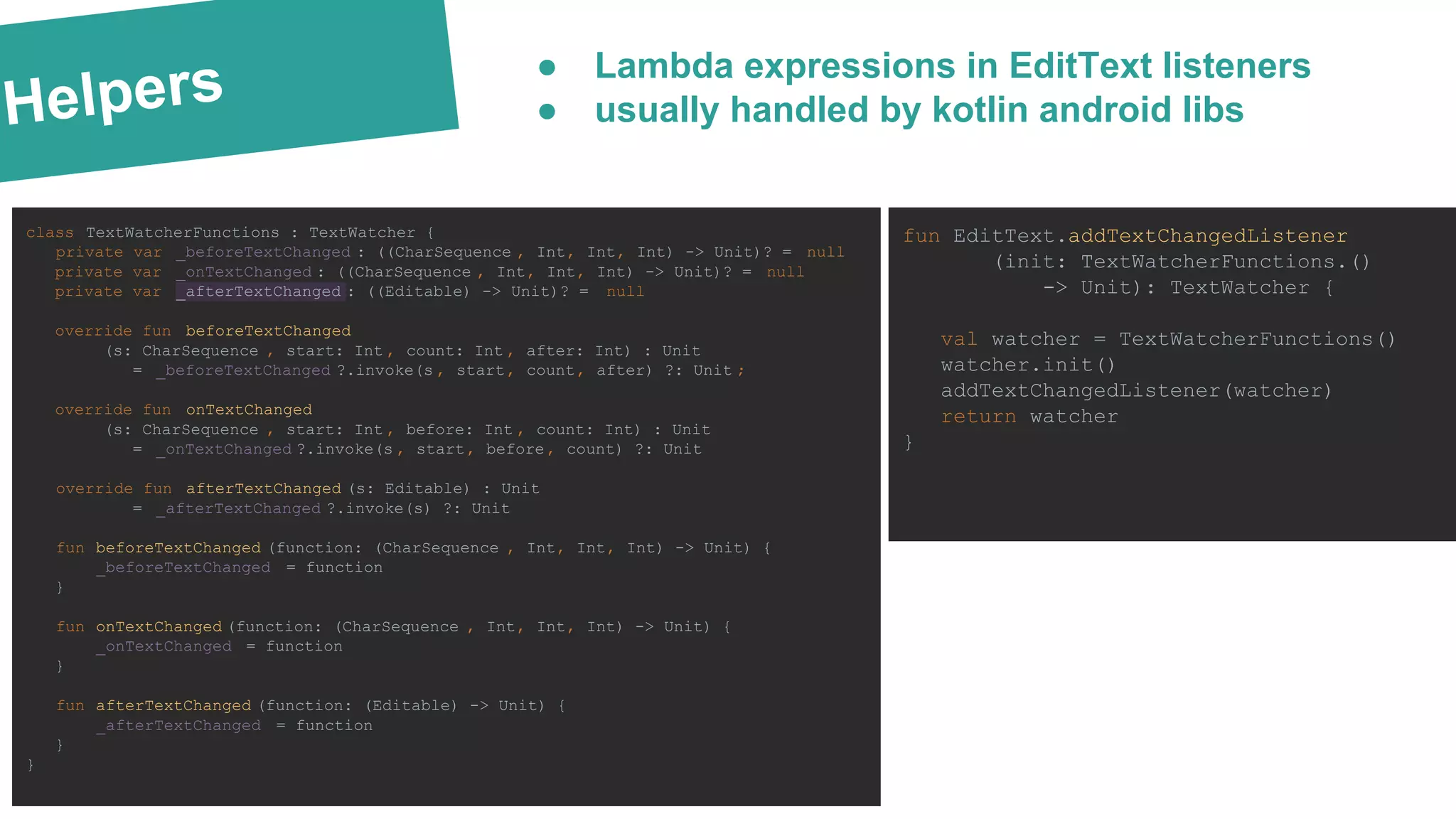
Helpers ● Lambda expressions in EditText listeners ● usually handled by kotlin android libs class TextWatcherFunctions : TextWatcher { private var _beforeTextChanged : ((CharSequence , Int, Int, Int) -> Unit)? = null private var _onTextChanged : ((CharSequence , Int, Int, Int) -> Unit)? = null private var _afterTextChanged : ((Editable) -> Unit)? = null override fun beforeTextChanged (s: CharSequence , start: Int , count: Int , after: Int) : Unit = _beforeTextChanged ?.invoke(s , start, count, after) ?: Unit ; override fun onTextChanged (s: CharSequence , start: Int , before: Int , count: Int) : Unit = _onTextChanged ?.invoke(s , start, before, count) ?: Unit override fun afterTextChanged (s: Editable) : Unit = _afterTextChanged ?.invoke(s) ?: Unit fun beforeTextChanged (function: (CharSequence , Int, Int, Int) -> Unit) { _beforeTextChanged = function } fun onTextChanged (function: (CharSequence , Int, Int, Int) -> Unit) { _onTextChanged = function } fun afterTextChanged (function: (Editable) -> Unit) { _afterTextChanged = function } } fun EditText.addTextChangedListener (init: TextWatcherFunctions.() -> Unit): TextWatcher { val watcher = TextWatcherFunctions() watcher.init() addTextChangedListener(watcher) return watcher }
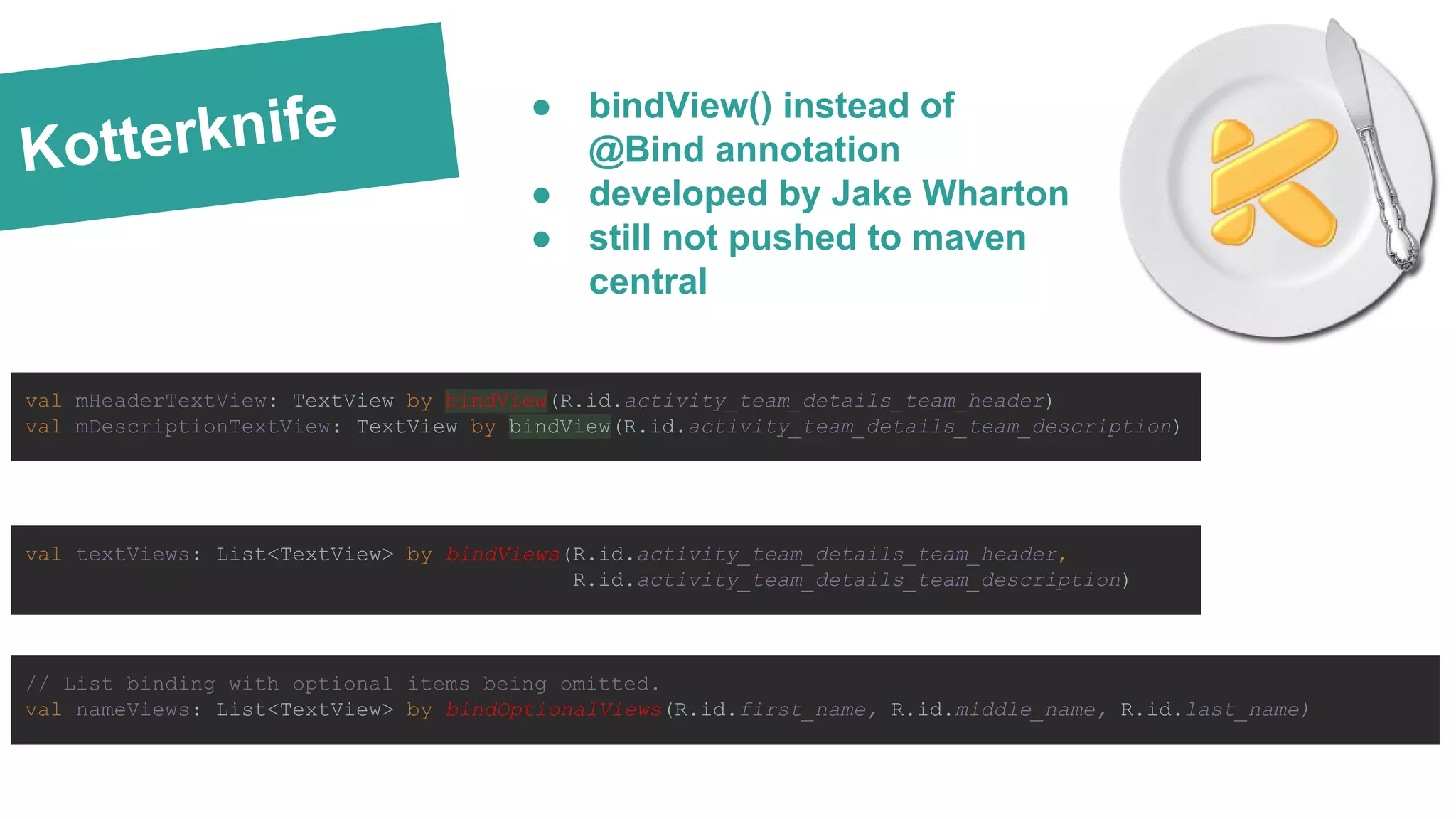
Kotterknife val mHeaderTextView: TextView by bindView(R.id.activity_team_details_team_header) val mDescriptionTextView: TextView by bindView(R.id.activity_team_details_team_description) val textViews: List<TextView> by bindViews(R.id.activity_team_details_team_header, R.id.activity_team_details_team_description) // List binding with optional items being omitted. val nameViews: List<TextView> by bindOptionalViews(R.id.first_name, R.id.middle_name, R.id.last_name) ● bindView() instead of @Bind annotation ● developed by Jake Wharton ● still not pushed to maven central
Dagger 2 & KOTLIN @Module class AndroidModule(private val application: Application) { @Provides @Singleton fun provideLocationManager(): LocationManager { return application .getSystemService(Context.LOCATION_SERVICE) as LocationManager } @Provides @Singleton @Named("something") fun provideSomething(): String { return "something" } } class MainActivity : AppCompatActivity() { @Inject lateinit var locationManager: LocationManager @field:[Inject Named("something")] lateinit var something: String override fun onCreate(savedInstanceState: Bundle?) { super.onCreate(savedInstanceState) setContentView(R.layout.activity_main) } } ● compatible with KOTLIN since M13 ● introduction of lateinit property Late-initialized property: e.g. for unit tests public class MyTest { lateinit var subject: TestSubject @SetUp fun setup() { subject = TestSubject() } @Test fun test() { subject.method() } }
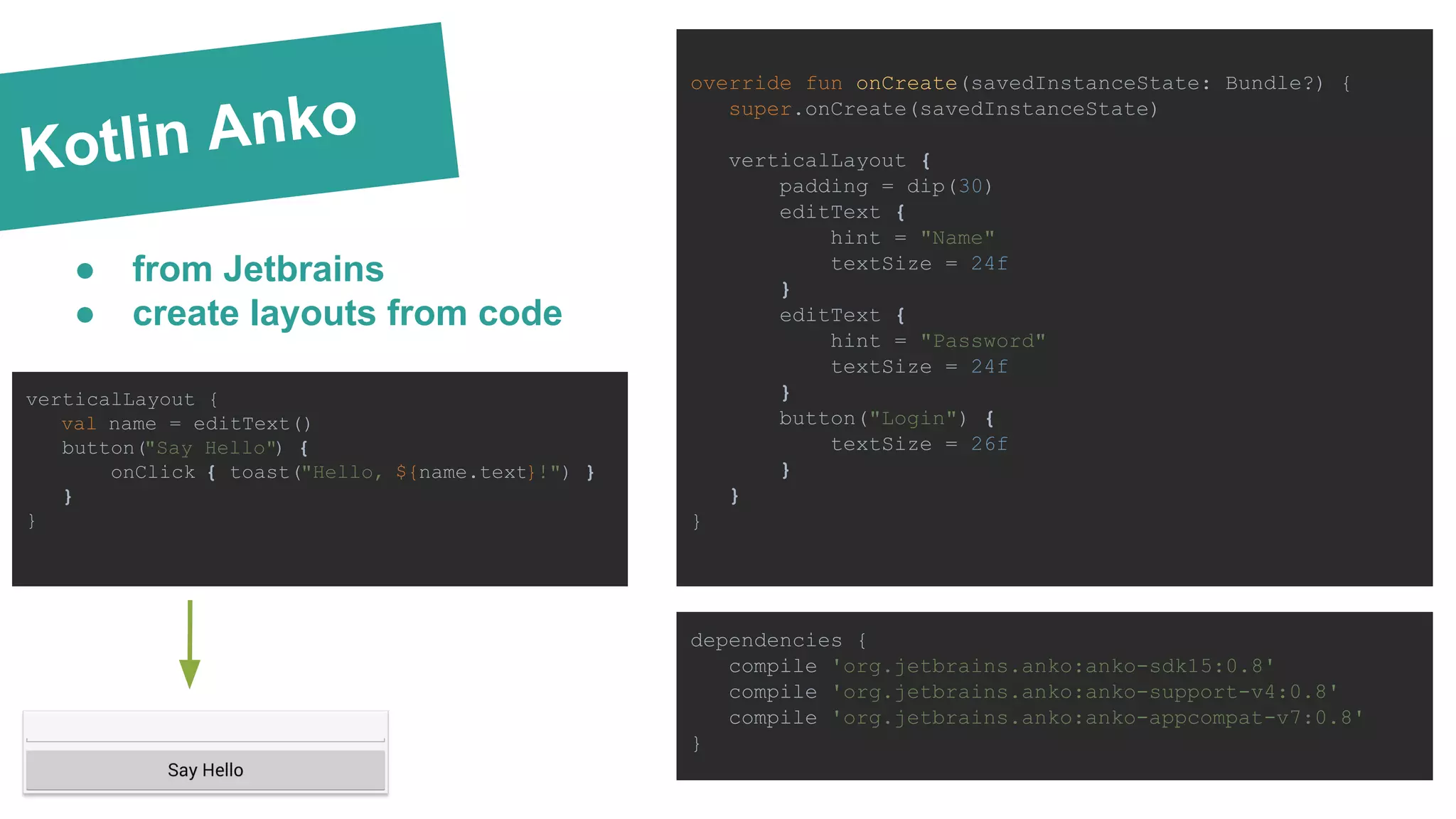
Kotlin Anko override fun onCreate(savedInstanceState: Bundle?) { super.onCreate(savedInstanceState) verticalLayout { padding = dip(30) editText { hint = "Name" textSize = 24f } editText { hint = "Password" textSize = 24f } button("Login") { textSize = 26f } } } ● from Jetbrains ● create layouts from code dependencies { compile 'org.jetbrains.anko:anko-sdk15:0.8' compile 'org.jetbrains.anko:anko-support-v4:0.8' compile 'org.jetbrains.anko:anko-appcompat-v7:0.8' } verticalLayout { val name = editText() button("Say Hello") { onClick { toast("Hello, ${name.text}!") } } }
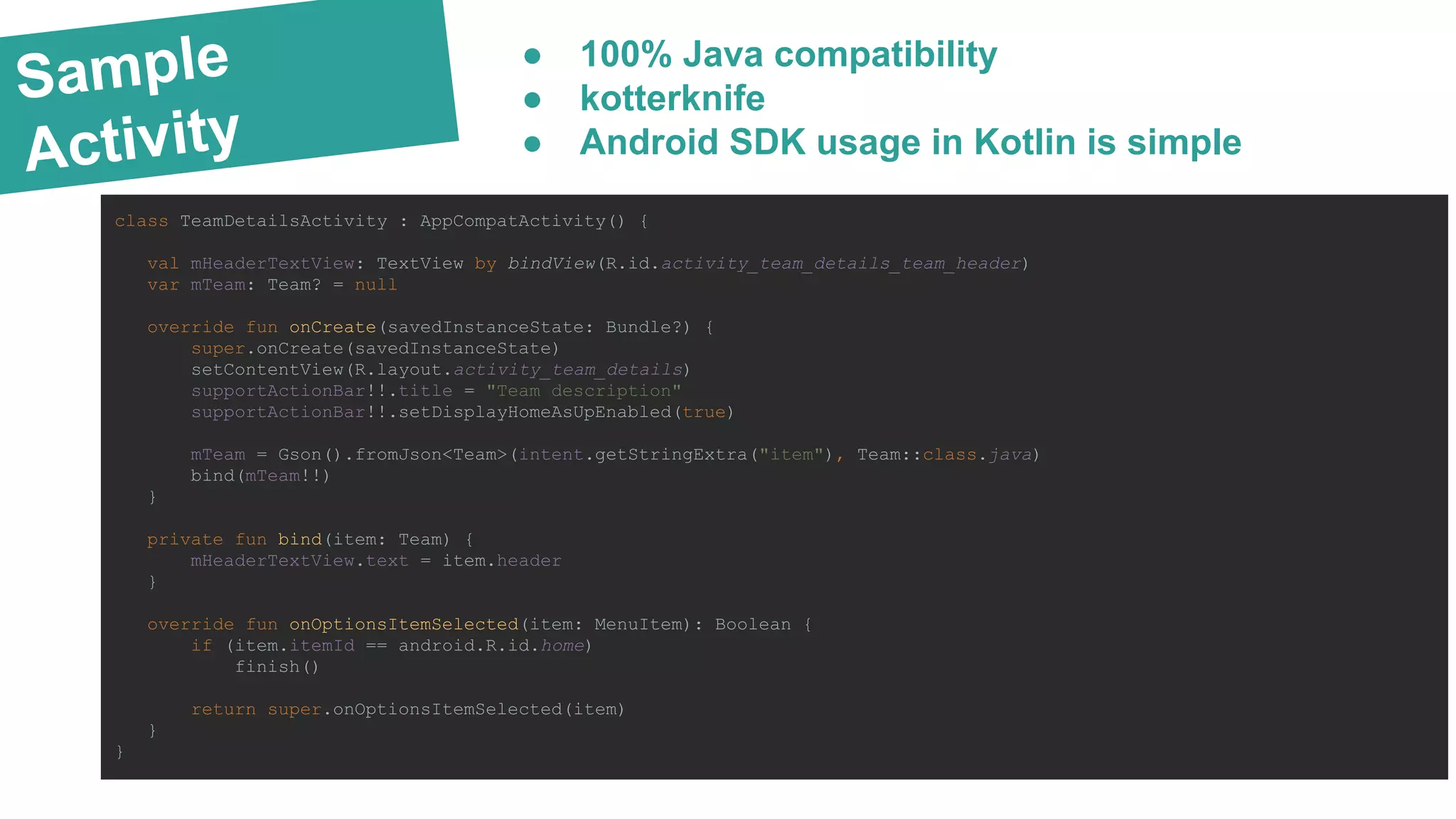
Sample Activity class TeamDetailsActivity : AppCompatActivity() { val mHeaderTextView: TextView by bindView(R.id.activity_team_details_team_header) var mTeam: Team? = null override fun onCreate(savedInstanceState: Bundle?) { super.onCreate(savedInstanceState) setContentView(R.layout.activity_team_details) supportActionBar!!.title = "Team description" supportActionBar!!.setDisplayHomeAsUpEnabled(true) mTeam = Gson().fromJson<Team>(intent.getStringExtra("item"), Team::class.java) bind(mTeam!!) } private fun bind(item: Team) { mHeaderTextView.text = item.header } override fun onOptionsItemSelected(item: MenuItem): Boolean { if (item.itemId == android.R.id.home) finish() return super.onOptionsItemSelected(item) } } ● 100% Java compatibility ● kotterknife ● Android SDK usage in Kotlin is simple
SWIFT var myVariable = 42 //Variable val explicitDouble: Double = 70.0 //Explicit Type Constant for (i in 1..5) { print(i) } //Inclusive Range Operator val a = "A"; val b = "B"; val str = "I have ${a + b} "; //String interpolation var shoppingList = arrayOf("catfish" , "water") //Array Creation var hashMap = hashMapOf("Malcolm" to "Captain" ); //Maps val emptyArray = arrayOf<String>() //Empty Typed Array interface Nameable { fun name(): String } //Interface val movie = obj as Movie //Downcasting fun Double.km() : Double = this * 1000; //Extension function KOTLIN SWIFT var myVariable = 42 //Variable let explicitDouble: Double = 70 //Explicit Type Constant for i in 1...5 { println( i) } //Inclusive Range Operator let a = "A"; let b = "B"; let str = "I have (a + b) " //String interpolation var shoppingList = [ "catfish" , "water"] //Array Creation var occupations = [ "Malcolm" : "Captain" ] //Maps let emptyArray = String[]() //Empty Typed Array protocol Nameable { func name() -> String } //Protocol (Interface) let movie = object as Movie //Downcasting extension Double { var km: Double { return self * 1_000.0 } } //Extension function ● Kotlin’s syntax is similar Swift
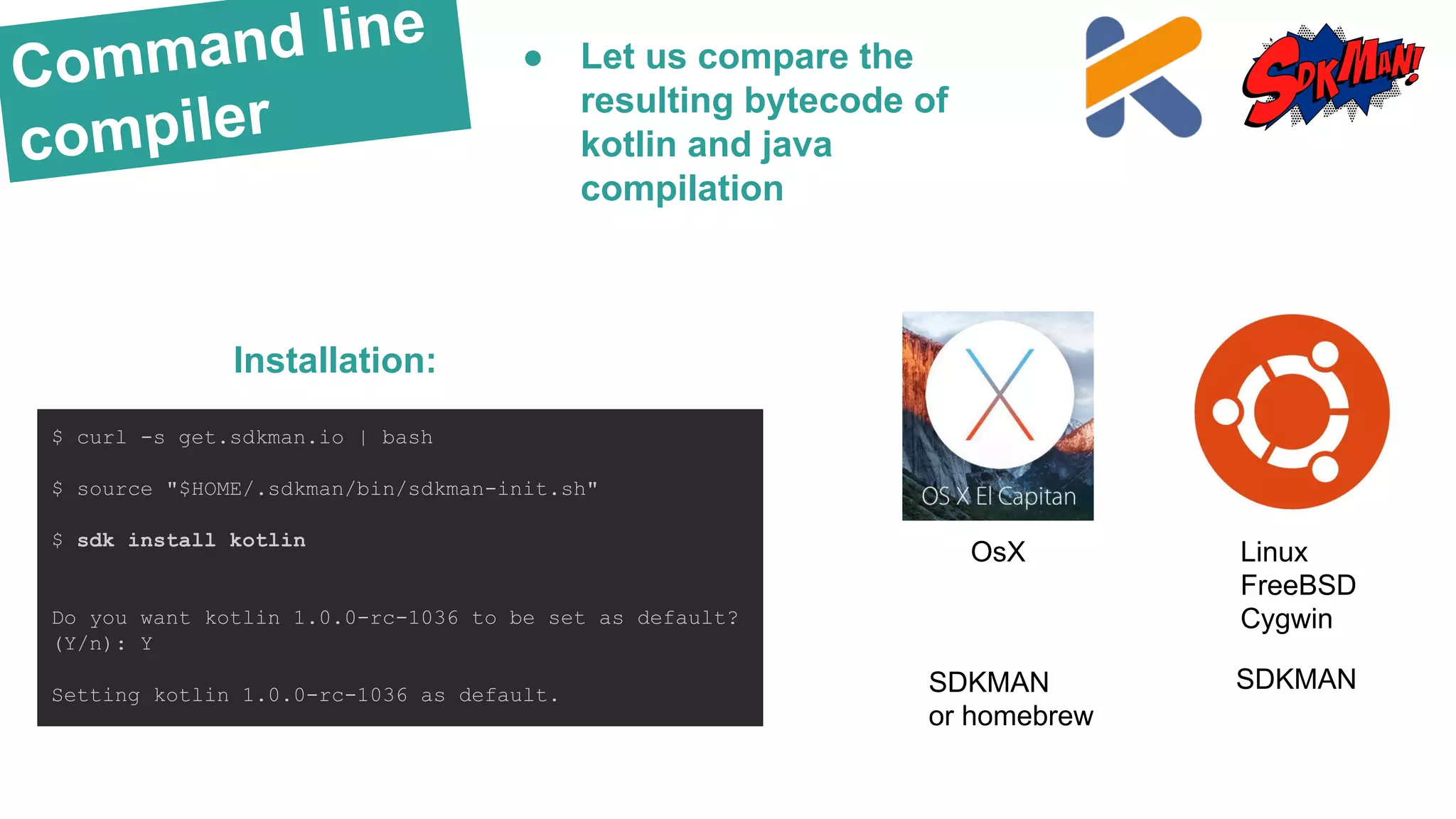
Command line compiler $ curl -s get.sdkman.io | bash $ source "$HOME/.sdkman/bin/sdkman-init.sh" $ sdk install kotlin Do you want kotlin 1.0.0-rc-1036 to be set as default? (Y/n): Y Setting kotlin 1.0.0-rc-1036 as default. Installation: ● Let us compare the resulting bytecode of kotlin and java compilation OsX SDKMAN or homebrew Linux FreeBSD Cygwin SDKMAN
Command line compiler Kotlin: class Capturing { fun run2(func: Runnable) { func.run() } } fun main(args: Array<String>) { Capturing().run2(Runnable { println("Hey! $args") }) } $ kotlinc Capturing.kt $ javap -p Compiled from "Capturing.kt" public final class Capturing { public final void run2(java.lang.Runnable); public Capturing(); } public final class CapturingKt { public static final void main(java.lang.String[]); } Java: ● Let us compare the resulting bytecode of kotlin and java compilation import java.util.Arrays; class Capturing { public static void main(final String... args) { run(new Runnable() { @Override public void run() { System.out.println("Hey! " + Arrays.toString(args)); } }); } private static void run(Runnable run) { run.run(); } } $ javac Capturing.java $ javap -p Capturing Compiled from "Capturing.java" class Capturing { Capturing(); public static void main(java.lang.String...); private static void run(java.lang.Runnable); }
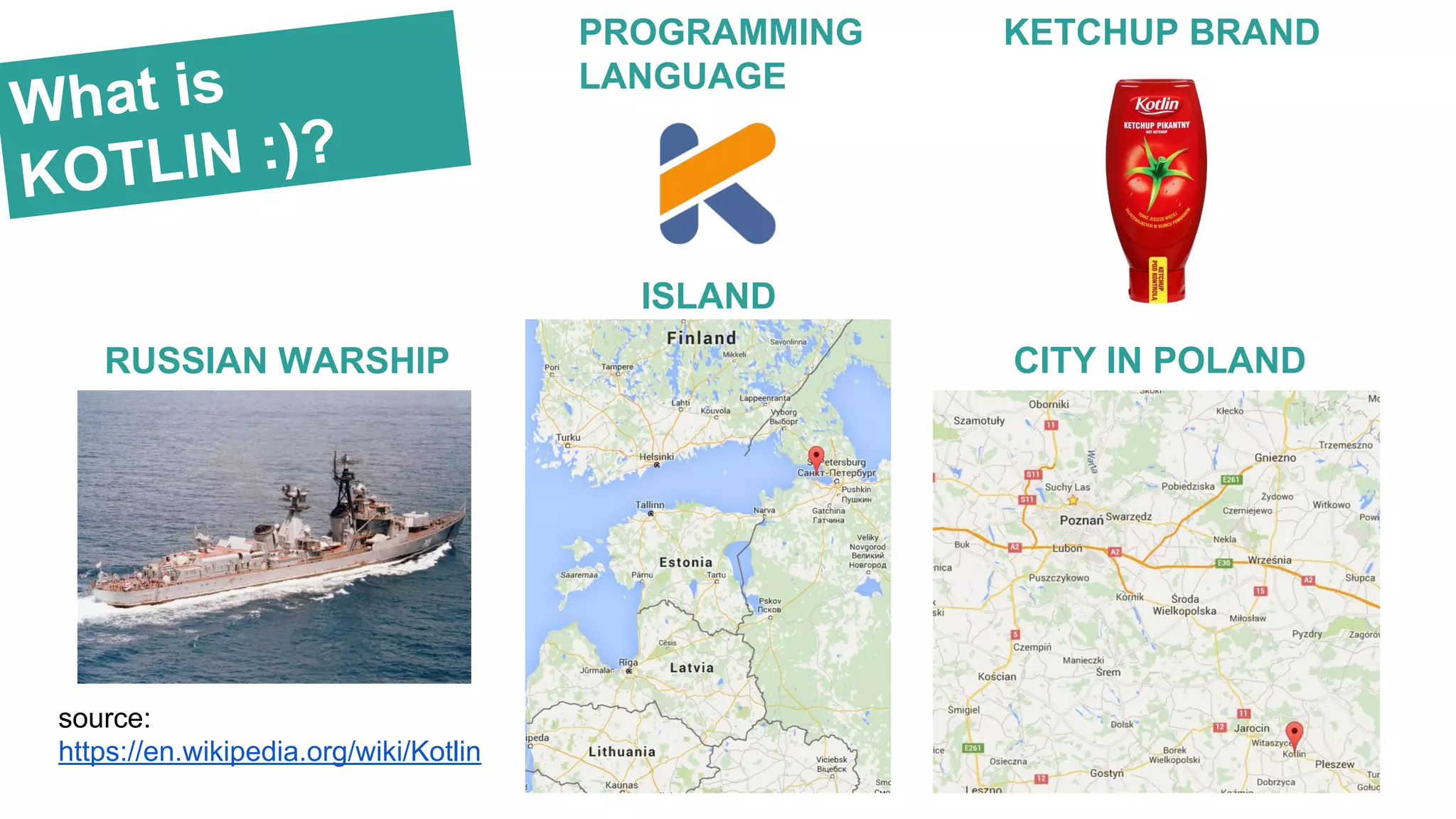
What is KOTLIN :)? RUSSIAN WARSHIP ISLAND source: https://en.wikipedia.org/wiki/Kotlin CITY IN POLAND KETCHUP BRANDPROGRAMMING LANGUAGE
Comparison KOTLIN WORSE THAN SCALA: BETTER THAN SCALA: ● no static members (BY DESIGN) - if you need something that is not attached to an instance of any class, you define it in a package ● no checked exceptions (BY DESIGN) no functions like: void copy(CharSequence csq) throws IOException ● primitive types that are not classes ● non-private fields (i.e. java’s public int field; ) - by design - in kotlin one should use properties instead of public fields IN JAVA NOT IN KOTLIN: ● Overridable type members ● Path-dependent types ● Macros ● Existential types ● Complicated logic for initialization of traits ● Custom symbolic operations ● Built-in XML ● Parallel collections ● Structural types ● Value types ● Yield operator ● Actors ● smart-casts ● first-class delegation (built-in delegate pattern) ● no overhead in extension functions (compared to implicit class in Scala [link]) ● no overhead in null-safety
Resources RESOURCES: ● http://kotlinlang.org/ ● Jake Wharton - Using Project Kotlin for Android - https://t.co/9t8qsBGPlo ● Mike Gouline - Kotlin the Swift of Android - - https://blog.gouline.net/2014/08/31/kotlin-the-swift-of-android/ ● PaweΕ‚ Gajda - Kotlin Android - http://slides.com/pawegio/kotlin-android, https://github.com/pawegio/KAndroid ● Jetbrains Kotlin Anko - https://github.com/Kotlin/anko ● Amit Phaltankar Java 8 streams - https://dzone.com/articles/understanding-java-8-streams-1 ● Salomon Brys - https://github.com/SalomonBrys ● Gautier Mechling - http://nilhcem.github.io/swift-is-like-kotlin/
Thankyou! Bartosz Kosarzycki bartosz.kosarzycki@stxnext.pl Twitter: @bkosarzycki Online compiler: http://try.kotlinlang.org/

Kotlin Developer Starter in Android projects

  • 1.
    Kotlin lang -basics (Android projects) Bartosz Kosarzycki - StxNext Lightning Talks - Feb 12, 2016 talented developers | flexible teams | agile experts
  • 2.
    KOTLINhttp://kotlinlang.org/ Required knowledge: ● basicAndroid development skills ● functional programming ● familiarity with JDK 6,7,8 ● Scala is a plus
  • 3.
    What is it? KOTLINis: ● safe ● versatile ● interoparable ● IDE support ● fast JAVA SCALA KOTLIN + fast compilation + simplicity + swift’s syntax is similar Online compiler: http://try.kotlinlang.org/ SWIFT
  • 4.
    Why KOTLIN? ● nojavax.time from JDK8 ● no try-with resources ● no lambdas! ● no new java stream api ● no way to add methods to platform data types (e.g. View) List<string> names = students.stream() .map(Student::getName) .filter(name->name.startsWith("B")) .collect(Collectors.toList()); ZoneId zone = ZoneId.systemDefault(); Clock clock = Clock.system(zone); LocalDate date = LocalDate.now(); LocalTime time = LocalTime.now(); time = time.plus(Period.ofDays(12)); javax.time Java Stream API static String readFirstLineFromFile(String path) throws IOException { try (BufferedReader br = new BufferedReader(new FileReader(path))) { return br.readLine(); } } try-with resources
  • 5.
    Advantages fun finish(obj: Any){ if (obj is Activity) obj.finish() } Auto-casting: Named args in func calls: fun circle(x: Int, y: Int, rad: Int, stroke: Int) {…} circle(15, 40, rad = 20, stroke = 1); Built-in lambdas: val numbers: IntArray = intArrayOf(11, 20, 31, 40, 51) val predicate: (Int) -> Boolean = { it -> it % 2 == 1 } val list1 = numbers.filter { it % 2 == 1 } val list2 = numbers.filter(predicate) println("Lists identical: " + list1.equals(list2)); > Lists identical: true Compactness: * no new statement: val a = B(); * optional brackets, return statement and one-line function declarations: class A { var field1: String = "No "; fun printNews () = field1 + " news for you" ; } println(A().printNews()) ● all of these are much-needed in Android development
  • 6.
    Nullpointer safety var output :String? output = null println(output!!.length) Exception in thread "main" kotlin.KotlinNullPointerException at Simplest_versionKt.main(Simplest version.kt:11) Java-like !! Operator: (for NPE lovers) - Optional.get() equivalent var output : String? output = null println(output?.length) val len = output?.length ?: -1 //elvis operator println(len) > null > -1 ?. Safe calls: (for if not null -> call function; return null otherwise) Kotlin type aliases - planned in roadmap (not yet released - as of Feb 2016) Java JDK 10 will push Optional onto the default stack ~ 2018 Optional<> pattern no longer needed! kotlin.Unit If a function does not return any useful value, its return type is Unit
  • 7.
    Advantages val arr =arrayOf(D("1A", "1B"), D( "2A", "2B"), D("3A", "3B")); for ((first, second) in arr ) println("a: $first, b: $second") class D { public var nameA: String = "" public var nameB: String = "" constructor (nameA: String , nameB: String) { this.nameA = nameA this.nameB = nameB } operator fun component1() : String { return nameA } operator fun component2() : String { return nameB } } (a, b) Destructuring Declaration Singleton: object SampleSingleton { var baseUrl: String = "https://aaa.bbb" fun printUrl() = println(baseUrl) } SampleSingleton.printUrl() SampleSingleton.baseUrl = "https://ccc.ddd" SampleSingleton.printUrl() > https://aaa.bbb > https://ccc.ddd ● Singletons and destructuring declarations are built-in:
  • 8.
    Data objects data classPoint(val x: Double = 0.0, val y: Double = 0.0, var descr: String?) val point1 = Point( x = 1.0, y = 2.0, descr = "no description"); val point2 = Point( descr = "no description", y = 2.0, x = 1.0); println(point1.equals(point2)) println(point1.hashCode().equals(point2.hashCode()) ) println(point1.toString().equals(point2.toString()) ) println(point1.toString()) Data object: hashCode() toString() equals() + properties Automatically generated:● removes most of the boilerplate code
  • 9.
    Traits TRAITS - java-likeinterfaces with default implementation class ExampleActivity : AppCompatActivity(), ActivitySessionHandling { override fun onDestroy() { super.onDestroy() closeSession() } } open interface ActivitySessionHandling { fun closeSession() = println("Session closed") } JAVA JDK 8 - extension methods - default interface implementation public class ItemListActivity extends AppCompatActivity implements Java8DefaultInterface { @Override protected void onDestroy() { super.onDestroy(); closeSession(); } } public interface Java8DefaultInterface { default void closeSession() { Log.i("TAG", "Session closed"); } } (not available in Android)
  • 10.
    Class delegation Built-in delegate pattern: classDerived(b: Base) : Base by b class BaseImpl(val x: Int) : Base { override fun print() { println(x) } } interface Base { fun print() } val b = BaseImpl(10) Derived(b).print() > 10 Java equivalent: class Derived { Base base; public Derived(Base b) { this.base = b; } void print(){ base.print(); } } class BaseImpl implements Base { int val; public BaseImpl(int v) { this.val = v; } public void print() { System.out.println(val); } } interface Base { void print(); } BaseImpl base = new BaseImpl(10); new Derived(base).print();
  • 11.
    Properties Properties & read-onlyproperties: public class Address(addr : String) { public var name: String = "" public val address: String = addr //read-only } val address = Address(addr = "Low street 123") address.name = "Mickey mouse" println(address.address) println(address.name) > Low street 123 > Mickey mouse address.address = "Another street 123" //Error: val cannot be reassigned Getters & setters: public class Address() { var address: String get() = "Lorem ipsum" set(value) { println(value) } } public class Address() { var address: String = "" get //default getter private set //default private setter } Companion objects: class CarAssemblyFactory { companion object Factory { fun createCar(): String = String().plus("This is a car") } } println(CarAssemblyFactory.createCar())
  • 12.
    Utility classes UTILS: StringUtil ActivityUtil ListUtil JAVA utility class publicclass StringUtils { public static String encodeString(String str) { return str.replaceAll(" ", "_"); } } KOTLIN utility class fun String.encodeSpaces():String = this.replace(" ", "_") println("Neque porro quisquam".encodeSpaces()) Separate packages: package main.kotlin.utils fun String.encodeSpaces(): String = this.replace(" ", "_") import main.kotlin.utils.encodeSpaces println("Neque porro quisquam".encodeSpaces()) ● no utils hell ● extend final classes ● classes in Kotlin are final by default @JvmName("DateUtil") fun Date.isTuesday() = day == 2 //in fact it's: //Date.getDay() == 2
  • 13.
  • 14.
    Project structure Android kotlin projectstructure: Kotlin & Java intertwined: Gradle dependencies: build.gradle: buildscript { dependencies { classpath 'com.android.tools.build:gradle:2.0.0-beta3' classpath 'org.jetbrains.kotlin:kotlin-gradle-plugin:1.0.0-rc-1036' } } app.gradle: apply plugin: 'kotlin-android'
  • 15.
    Cost Reference application: one blankActivity app generated with Android Studio
  • 16.
    Higher-order functions Introduction //extension function fun Date.isTuesday()= day == 2 //function expression as contant val addition = { x: Int, y:Int -> x + y } //higher order function fun higherOrder(x : Int, y: Int, func : (x : Int, y : Int) -> Int ) : Int { return func.invoke(x, y); } Higher-order extension function fun Int.addCustomFunc(arg: Int, func : (x : Int, y : Int) -> Int ) : Int { return func.invoke(this, arg); } val addition = { x: Int, y:Int -> x + y } val result = 1.addCustomFunc(5, addition);
  • 17.
    Android Compactness mDescriptionTextView.setOnClickListener({ activityPrivateMethod() }) mDescriptionTextView.setOnClickListener({ mDescriptionTextView.text= "Current time: " + DateTime.now() }) Lambda expression to the rescue private fun bind(item: Team) { mHeaderTextView.text = item.header mDescriptionTextView.text = item.description } mSampleEditText.addTextChangedListener{ onTextChanged { text:CharSequence, a:Int, b:Int, c:Int -> Toast.makeText(applicationContext, text, LENGTH_SHORT).show() } } ● simplify development ● remove boilerplate ● improve multi-threading Auto getters&setters
  • 18.
    Helpers ● Lambdaexpressions in EditText listeners ● usually handled by kotlin android libs class TextWatcherFunctions : TextWatcher { private var _beforeTextChanged : ((CharSequence , Int, Int, Int) -> Unit)? = null private var _onTextChanged : ((CharSequence , Int, Int, Int) -> Unit)? = null private var _afterTextChanged : ((Editable) -> Unit)? = null override fun beforeTextChanged (s: CharSequence , start: Int , count: Int , after: Int) : Unit = _beforeTextChanged ?.invoke(s , start, count, after) ?: Unit ; override fun onTextChanged (s: CharSequence , start: Int , before: Int , count: Int) : Unit = _onTextChanged ?.invoke(s , start, before, count) ?: Unit override fun afterTextChanged (s: Editable) : Unit = _afterTextChanged ?.invoke(s) ?: Unit fun beforeTextChanged (function: (CharSequence , Int, Int, Int) -> Unit) { _beforeTextChanged = function } fun onTextChanged (function: (CharSequence , Int, Int, Int) -> Unit) { _onTextChanged = function } fun afterTextChanged (function: (Editable) -> Unit) { _afterTextChanged = function } } fun EditText.addTextChangedListener (init: TextWatcherFunctions.() -> Unit): TextWatcher { val watcher = TextWatcherFunctions() watcher.init() addTextChangedListener(watcher) return watcher }
  • 19.
    Kotterknife val mHeaderTextView: TextViewby bindView(R.id.activity_team_details_team_header) val mDescriptionTextView: TextView by bindView(R.id.activity_team_details_team_description) val textViews: List<TextView> by bindViews(R.id.activity_team_details_team_header, R.id.activity_team_details_team_description) // List binding with optional items being omitted. val nameViews: List<TextView> by bindOptionalViews(R.id.first_name, R.id.middle_name, R.id.last_name) ● bindView() instead of @Bind annotation ● developed by Jake Wharton ● still not pushed to maven central
  • 20.
    Dagger 2 & KOTLIN @Module classAndroidModule(private val application: Application) { @Provides @Singleton fun provideLocationManager(): LocationManager { return application .getSystemService(Context.LOCATION_SERVICE) as LocationManager } @Provides @Singleton @Named("something") fun provideSomething(): String { return "something" } } class MainActivity : AppCompatActivity() { @Inject lateinit var locationManager: LocationManager @field:[Inject Named("something")] lateinit var something: String override fun onCreate(savedInstanceState: Bundle?) { super.onCreate(savedInstanceState) setContentView(R.layout.activity_main) } } ● compatible with KOTLIN since M13 ● introduction of lateinit property Late-initialized property: e.g. for unit tests public class MyTest { lateinit var subject: TestSubject @SetUp fun setup() { subject = TestSubject() } @Test fun test() { subject.method() } }
  • 21.
    Kotlin Anko override funonCreate(savedInstanceState: Bundle?) { super.onCreate(savedInstanceState) verticalLayout { padding = dip(30) editText { hint = "Name" textSize = 24f } editText { hint = "Password" textSize = 24f } button("Login") { textSize = 26f } } } ● from Jetbrains ● create layouts from code dependencies { compile 'org.jetbrains.anko:anko-sdk15:0.8' compile 'org.jetbrains.anko:anko-support-v4:0.8' compile 'org.jetbrains.anko:anko-appcompat-v7:0.8' } verticalLayout { val name = editText() button("Say Hello") { onClick { toast("Hello, ${name.text}!") } } }
  • 22.
    Sample Activity class TeamDetailsActivity :AppCompatActivity() { val mHeaderTextView: TextView by bindView(R.id.activity_team_details_team_header) var mTeam: Team? = null override fun onCreate(savedInstanceState: Bundle?) { super.onCreate(savedInstanceState) setContentView(R.layout.activity_team_details) supportActionBar!!.title = "Team description" supportActionBar!!.setDisplayHomeAsUpEnabled(true) mTeam = Gson().fromJson<Team>(intent.getStringExtra("item"), Team::class.java) bind(mTeam!!) } private fun bind(item: Team) { mHeaderTextView.text = item.header } override fun onOptionsItemSelected(item: MenuItem): Boolean { if (item.itemId == android.R.id.home) finish() return super.onOptionsItemSelected(item) } } ● 100% Java compatibility ● kotterknife ● Android SDK usage in Kotlin is simple
  • 23.
    SWIFT var myVariable =42 //Variable val explicitDouble: Double = 70.0 //Explicit Type Constant for (i in 1..5) { print(i) } //Inclusive Range Operator val a = "A"; val b = "B"; val str = "I have ${a + b} "; //String interpolation var shoppingList = arrayOf("catfish" , "water") //Array Creation var hashMap = hashMapOf("Malcolm" to "Captain" ); //Maps val emptyArray = arrayOf<String>() //Empty Typed Array interface Nameable { fun name(): String } //Interface val movie = obj as Movie //Downcasting fun Double.km() : Double = this * 1000; //Extension function KOTLIN SWIFT var myVariable = 42 //Variable let explicitDouble: Double = 70 //Explicit Type Constant for i in 1...5 { println( i) } //Inclusive Range Operator let a = "A"; let b = "B"; let str = "I have (a + b) " //String interpolation var shoppingList = [ "catfish" , "water"] //Array Creation var occupations = [ "Malcolm" : "Captain" ] //Maps let emptyArray = String[]() //Empty Typed Array protocol Nameable { func name() -> String } //Protocol (Interface) let movie = object as Movie //Downcasting extension Double { var km: Double { return self * 1_000.0 } } //Extension function ● Kotlin’s syntax is similar Swift
  • 24.
    Command line compiler $ curl-s get.sdkman.io | bash $ source "$HOME/.sdkman/bin/sdkman-init.sh" $ sdk install kotlin Do you want kotlin 1.0.0-rc-1036 to be set as default? (Y/n): Y Setting kotlin 1.0.0-rc-1036 as default. Installation: ● Let us compare the resulting bytecode of kotlin and java compilation OsX SDKMAN or homebrew Linux FreeBSD Cygwin SDKMAN
  • 25.
    Command line compiler Kotlin: class Capturing{ fun run2(func: Runnable) { func.run() } } fun main(args: Array<String>) { Capturing().run2(Runnable { println("Hey! $args") }) } $ kotlinc Capturing.kt $ javap -p Compiled from "Capturing.kt" public final class Capturing { public final void run2(java.lang.Runnable); public Capturing(); } public final class CapturingKt { public static final void main(java.lang.String[]); } Java: ● Let us compare the resulting bytecode of kotlin and java compilation import java.util.Arrays; class Capturing { public static void main(final String... args) { run(new Runnable() { @Override public void run() { System.out.println("Hey! " + Arrays.toString(args)); } }); } private static void run(Runnable run) { run.run(); } } $ javac Capturing.java $ javap -p Capturing Compiled from "Capturing.java" class Capturing { Capturing(); public static void main(java.lang.String...); private static void run(java.lang.Runnable); }
  • 26.
    What is KOTLIN :)? RUSSIANWARSHIP ISLAND source: https://en.wikipedia.org/wiki/Kotlin CITY IN POLAND KETCHUP BRANDPROGRAMMING LANGUAGE
  • 27.
    Comparison KOTLIN WORSE THAN SCALA:BETTER THAN SCALA: ● no static members (BY DESIGN) - if you need something that is not attached to an instance of any class, you define it in a package ● no checked exceptions (BY DESIGN) no functions like: void copy(CharSequence csq) throws IOException ● primitive types that are not classes ● non-private fields (i.e. java’s public int field; ) - by design - in kotlin one should use properties instead of public fields IN JAVA NOT IN KOTLIN: ● Overridable type members ● Path-dependent types ● Macros ● Existential types ● Complicated logic for initialization of traits ● Custom symbolic operations ● Built-in XML ● Parallel collections ● Structural types ● Value types ● Yield operator ● Actors ● smart-casts ● first-class delegation (built-in delegate pattern) ● no overhead in extension functions (compared to implicit class in Scala [link]) ● no overhead in null-safety
  • 28.
    Resources RESOURCES: ● http://kotlinlang.org/ ● JakeWharton - Using Project Kotlin for Android - https://t.co/9t8qsBGPlo ● Mike Gouline - Kotlin the Swift of Android - - https://blog.gouline.net/2014/08/31/kotlin-the-swift-of-android/ ● PaweΕ‚ Gajda - Kotlin Android - http://slides.com/pawegio/kotlin-android, https://github.com/pawegio/KAndroid ● Jetbrains Kotlin Anko - https://github.com/Kotlin/anko ● Amit Phaltankar Java 8 streams - https://dzone.com/articles/understanding-java-8-streams-1 ● Salomon Brys - https://github.com/SalomonBrys ● Gautier Mechling - http://nilhcem.github.io/swift-is-like-kotlin/
  • 29.