Java fundamentals : understanding basic constructs of Java
1.
Java basics // Myfirst Java program . It is single comment line. // Open your Eclipse and type the following lines of code: It is also single comment line. /* It is a multiple comment lines My first program Version 1 This is known as a Block Comment. These lines are useful to the programmer and are ignored by the Compiler */ // All java programs starts with a class name ( main class) which is the name of the java file. public class First { // main method public static void main (String args []) { // printing on the console. System.out.println ("Hello! This is My first Java program"); } } Save the file as First.java . The name of the program has to be similar to the filename. Programs are called classes. Please note that Java is case-sensitive. It is good practice to insert comments at the start of a program to help you as a programmer understand quickly what the particular program is all about. This is done by typing “/*” at the start of the comment and “*/” when you finish.
2.
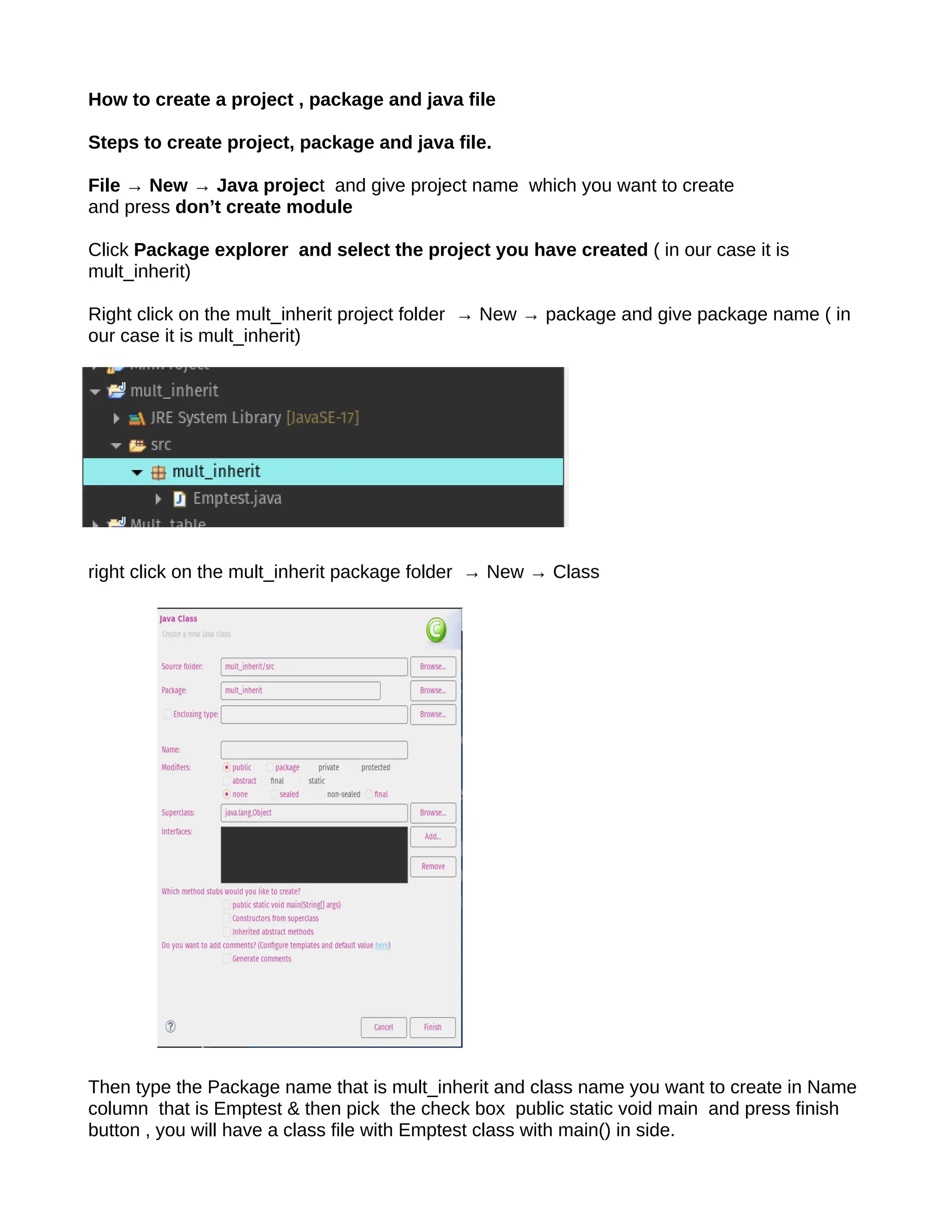
How to createa project , package and java file Steps to create project, package and java file. File → New → Java project and give project name which you want to create and press don’t create module Click Package explorer and select the project you have created ( in our case it is mult_inherit) Right click on the mult_inherit project folder → New → package and give package name ( in our case it is mult_inherit) right click on the mult_inherit package folder → New → Class Then type the Package name that is mult_inherit and class name you want to create in Name column that is Emptest & then pick the check box public static void main and press finish button , you will have a class file with Emptest class with main() in side.
3.
Variables and DataTypes Variables A variable is a place where the program stores data temporarily. As the name implies the value stored in such a location can be changed while a program is executing (compare with constant). class Example2 { public static void main(String args[]) { int var1; // this declares a variable int var2; // this declares another variable var1 = 1024; // this assigns 1024 to var1 System.out.println("var1 contains " + var1); var2 = var1 / 2; System.out.print("var2 contains var1 / 2: "); System.out.println(var2); } } o/p var1 contains 1024 var2 contains var1 / 2: 512 Data Types The following is a list of Java’s primitive data types:
4.
The ‘String’ typehas not been left out by mistake. It is not a primitive data type, but strings (a sequence of characters) in Java are treated as Objects. class Example8 { public static void main(String args[]) { int var; // this declares an int variable double x; // this declares a floating-point variable var = 10; // assign var the value 10 x = 10.0; // assign x the value 10.0 System.out.println("Original value of var: " + var); System.out.println("Original value of x: " + x); System.out.println(); // print a blank line // now, divide both by 4 var = var / 4; x = x / 4; System.out.println("var after division: " + var); System.out.println("x after division: " + x); } } output: Original value of var: 10 Original value of x: 10.0 var after division: 2 x after division: 2.5 class Example9 { public static void main(String args[]) {
5.
char ch; ch ='X'; System.out.println("ch contains " + ch); ch++; // increment ch System.out.println("ch is now " + ch); ch = 90; // give ch the value Z System.out.println("ch is now " + ch); Output: ch is now X ch is now Y ch is now Z The character ‘X’ is encoded as the number 88, hence when we increment ‘ch’, we get character number 89, or ‘Y’. class Example10 { public static void main(String args[]) { boolean b; b = false; System.out.println("b is " + b); b = true; System.out.println("b is " + b); // a boolean value can control the if statement if(b) System.out.println("This is executed."); b = false; if(b) System.out.println("This is not executed."); // outcome of a relational operator is a boolean value System.out.println("10 > 9 is " + (10 > 9)); } } output: b is false b is true This is executed 10 > 9 is true Introducing Control Statements These statements will be dealt with in more detail further on in this booklet. For now we will learn about the if and the for loop. class Example11 { public static void main(String args[]) {
6.
int a,b,c; a =2; b = 3; c = a - b; if (c >= 0) System.out.println("c is a positive number"); if (c < 0) System.out.println("c is a negative number"); System.out.println(); c = b - a; if (c >= 0) System.out.println("c is a positive number"); if (c < 0) System.out.println("c is a negative number"); } } output: c is a negative number c is a positive number The ‘if’ statement evaluates a condition and if the result is true, then the following statement/s are executed, else they are just skipped (refer to program output). The line System.out.println() simply inserts a blank line. Conditions use the following comparison operators: The for loop is an example of an iterative code, i.e. this statement will cause the program to repeat a particular set of code for a particular number of times. In the following example we will be using a counter which starts at 0 and ends when it is smaller than 5, i.e. 4. Therefore the code following the for loop will iterate for 5 times. class Example12 { public static void main(String args[]) { int count; for(count = 0; count < 5; count = count+1) System.out.println("This is count: " + count); System.out.println("Done!"); } }
7.
Output: This is count:0 This is count: 1 This is count: 2 This is count: 3 This is count: 4 Done! Instead of count = count+1, this increments the counter, we can use count++ The following table shows all the available shortcut operators: The Math Class In order to perform certain mathematical operations like square root (sqrt), or power (pow); Java has a built in class containing a number of methods as well as static constants, e.g. Pi = 3.141592653589793 and E = 2.718281828459045. All the methods involving angles use radians and return a double (excluding the Math.round()). class Example15 { public static void main(String args[]) { double x, y, z; x = 3; y = 4; z = Math.sqrt(x*x + y*y); System.out.println("Hypotenuse is " +z); } } Output: Hypotenuse is 5.0
8.
Scope and Lifetimeof Variables The following simple programs, illustrate how to avoid programming errors by taking care where toninitialize variables depending on the scope. class Example16 { public static void main(String args[]) { int x; // known to all code within main x = 10; if(x == 10) { // start new scope int y = 20; // known only to this block // x and y both known here. System.out.println("x and y: " + x + " " + y); x = y * 2; } // y = 100; // Error! y not known here // x is still known here. System.out.println("x is " + x); } } Output: x and y: 10 20 x is 40 Type Casting and Conversions Casting is the term used when a value is converted from one data type to another, except for Boolean data types which cannot be converted to any other type. Usually conversion occurs to a data type which has a larger range or else there could be loss of precision. class Example18 { //long to double automatic conversion public static void main(String args[]) { long L; double D; L = 100123285L; D = L; // convert from lower to upper range // L = D is impossible due to upper to lower range System.out.println("L and D: " + L + " " + D); } } Output: L and D: 100123285 1.00123285E8
9.
The general formulaused in casting is as follows: (target type) expression, where target type could be int, float, or short, e.g. (int) (x/y) class Example19 { //CastDemo public static void main(String args[]) { double x, y; byte b; int i; char ch; x = 10.0; y = 3.0; i = (int) (x / y); // cast double to int System.out.println("Integer outcome of x / y: " + i); b = 88; // ASCII code for X ch = (char) b; System.out.println("ch: " + ch); } } o/p Integer outcome of x / y: 3 ch: X Getting Input Using the Scanner Class This class allows users to create an instance of this class and use its methods to perform input. Let us look at the following example which performs the same operation as the one above (works out the average of three numbers): package Basics; import java.util.Scanner; public class ScannerInput { public static void main(String[] args) { //... Initialize Scanner to read from console. Scanner input = new Scanner(System.in); System.out.print("Enter first number : "); int a = input.nextInt();
10.
System.out.print("Enter second number:"); int b = input.nextInt(); System.out.print("Enter Third number: "); int c = input.nextInt(); System.out.println("Average is " + (a+b+c)/3.0); } } o/p Enter first number : 9 Enter second number: 4 Enter Third number: 4 Average is 5.666666666666667 //Using Swing Components //This is probably the most exciting version, since the Swing package offers a graphical user interface //(GUI) which allows the user to perform input into a program via the mouse, keyboard and other //input devices. import javax.swing.*; // * means „all‟ public class SwingInput { public static void main(String[] args) { String temp; // Temporary storage for input. temp = JOptionPane.showInputDialog(null, "First number"); int a = Integer.parseInt(temp); // String to int temp = JOptionPane.showInputDialog(null, "Second number"); int b = Integer.parseInt(temp); temp = JOptionPane.showInputDialog(null, "Third number"); int c = Integer.parseInt(temp); JOptionPane.showMessageDialog(null, "Average is " +(a+b+c)/3.0); } } I/p 9,4,4 and o/p is Control Statements - The if Statement
11.
if(condition) statement; else statement; elseclause is optional targets of both the if and else can be blocks of statements. The general form of the if, using blocks of statements, is: if(condition) { statement sequence } else { statement sequence } If the conditional expression is true, the target of the if will be executed; otherwise, if it exists, the target of the else will be executed. At no time will both of them be executed. The conditional expression controlling the if must produce a boolean result. Nested if In Java, a nested if statement is an if statement that's the target of another if or else statement. It's essentially an if block inside another if or else block. This allows you to check for multiple conditions sequentially. How it Works The outer if condition is evaluated first. If it's true, the code block inside it is executed. Inside that block, the inner if condition is then evaluated. This continues, with each subsequent if condition only being checked if all preceding conditions in the chain were true. This structure is useful for scenarios where you need to make decisions based on multiple layers of criteria. Example Program The following Java program demonstrates a nested if statement. It checks if a person is eligible to donate blood based on two conditions: their age and their weight. public class BloodDonationChecker { public static void main(String[] args) { int age = 25; int weight = 60; // Outer if statement to check the age if (age >= 18) {
12.
System.out.println("You are 18or older, proceeding to weight check."); // Inner if statement to check the weight if (weight >= 50) { System.out.println("You are eligible to donate blood."); } else { System.out.println("You are not eligible to donate blood, your weight is too low."); } } else { System.out.println("You are not eligible to donate blood, you must be at least 18 years old."); } } } o/p You are 18 or older, proceeding to weight check. You are eligible to donate blood. if … else if ….Ladder if(condition) statement; else if(condition) statement; else if(condition) statement; ... else statement; The conditional expressions are evaluated from the top downward. As soon as a true condition is found, the statement associated with it is executed, and the rest of the ladder is bypassed. If none of the conditions is true, the final else statement will be executed. The final else often acts as a default condition; that is, if all other conditional tests fail, the last else statement is performed. If there is no final else and all other conditions are false, no action will take place
13.
Example public class GradeChecker{ public static void main(String[] args) { int score = 85; char grade; if (score >= 90) { grade = 'A'; } else if (score >= 80) { grade = 'B'; } else if (score >= 70) { grade = 'C'; } else if (score >= 60) { grade = 'D'; } else { grade = 'F'; } System.out.println("The student's grade is: " + grade); } } o/p The student's grade is: B Ternary operator The ternary operator in Java is a shorthand way of writing an if-else statement. It's the only conditional operator that takes three operands, hence the name "ternary." It's often used to assign a value to a variable based on a single condition. Syntax The syntax for the ternary operator is: variable = (condition) ? value_if_true : value_if_false; condition: The boolean expression to be evaluated. value_if_true: The value assigned to the variable if the condition is true. value_if_false: The value assigned to the variable if the condition is false.
14.
Example Program Here's asimple program that uses the ternary operator to determine the larger of two numbers and print the result. Java public class TernaryOperatorExample { public static void main(String[] args) { int num1 = 10; int num2 = 20; int largestNumber; // Using the ternary operator to find the largest number largestNumber = (num1 > num2) ? num1 : num2; System.out.println("The larger number is: " + largestNumber); } } Output The larger number is: 20 switch case Here is a unique switch-case example that demonstrates a behavior that is not easily replicated with a simple if-else if ladder: the fall-through of cases. An if-else if ladder is designed for mutually exclusive conditions, where only one block of code is executed. A switch statement, however, allows you to intentionally omit the break statement to let execution "fall through" from one case to the next, combining logic for multiple cases. public class MonthDays { public static void main(String[] args) { int month = 2; // Let's check February int year = 2024; // Let's use a leap year int numDays = 0; switch (month) { case 1: // January case 3: // March case 5: // May case 7: // July case 8: // August case 10: // October case 12: // December numDays = 31;
15.
break; case 4: //April case 6: // June case 9: // September case 11: // November numDays = 30; break; case 2: // February if ((year % 4 == 0 && year % 100 != 0) || (year % 400 == 0)) { numDays = 29; // Leap year } else { numDays = 28; // Regular year } break; default: System.out.println("Invalid month"); return; // Exit the main method if the month is invalid } System.out.println("The number of days in month " + month + " of " + year + " is " + numDays + "."); } } o/p The number of days in month 2 of 2024 is 29. Looping statements Java provides three main types of looping statements: for, while, and do-while. These statements allow you to execute a block of code repeatedly as long as a certain condition is met. for Loop The for loop is used when you know exactly how many times you want to loop through a block of code. It's often used to iterate over a range of numbers or through the elements of an array. The syntax is concise and places all loop control elements—initialization, condition, and iteration—in one line.
16.
Syntax for (initialization; condition;increment/decrement) { // code to be executed } Example This program uses a for loop to print numbers from 1 to 5. public class ForLoopExample { public static void main(String[] args) { for (int i = 1; i <= 5; i++) { System.out.println("Count is: " + i); } } } Output: Count is: 1 Count is: 2 Count is: 3 Count is: 4 Count is: 5 while Loop The while loop is used when the number of iterations is not known in advance. It repeatedly executes a block of code as long as a specified boolean condition remains true. The condition is checked at the beginning of each iteration. Syntax while (condition) { // code to be executed } Example This program uses a while loop to print numbers from 1 to 5. public class WhileLoopExample { public static void main(String[] args) { int i = 1; while (i <= 5) { System.out.println("Count is: " + i); i++;
17.
} } } Output: Count is: 1 Countis: 2 Count is: 3 Count is: 4 Count is: 5 do-while Loop The do-while loop is similar to the while loop, but with one key difference: it executes the code block at least once before checking the condition. The condition is checked at the end of the loop. This is useful for situations where you must perform an action at least one time. Syntax do { // code to be executed } while (condition); Example This program uses a do-while loop to print numbers from 1 to 5. public class DoWhileExample { public static void main(String[] args) { int i = 1; do { System.out.println("Count is: " + i); i++; } while (i <= 5); } } Output: Count is: 1 Count is: 2 Count is: 3 Count is: 4 Count is: 5
18.
for-each Loop (Enhancedfor Loop) The for-each loop is a specialized for loop introduced in Java 5. It simplifies iterating through elements in an array or a collection. You don't need to manage an index or a counter, making the code more readable and less error-prone. Syntax for (type element : arrayOrCollection) { // code to be executed for each element } Example This program uses a for-each loop to print each element of an integer array. public class ForEachExample { public static void main(String[] args) { int[] numbers = {10, 20, 30, 40, 50}; for (int num : numbers) { System.out.println("Number is: " + num); } } } Output: Number is: 10 Number is: 20 Number is: 30 Number is: 40 Number is: 50 Arrays In Java, an array is a data structure used to store a fixed-size, sequential collection of elements of the same data type. It's essentially a container that holds a set of values, and each value can be accessed using an index. Arrays are zero-indexed, meaning the first element is at index 0, the second at index 1, and so on. Example Program This program demonstrates how to create an array, get n numbers from the user, and then print all the stored numbers using a for loop.
19.
import java.util.Scanner; public classArrayExample { public static void main(String[] args) { Scanner scanner = new Scanner(System.in); // Get the size of the array from the user System.out.print("Enter the number of elements (n): "); int n = scanner.nextInt(); // Declare and instantiate an array of size n int[] numbers = new int[n]; // Get n numbers from the user and store them in the array System.out.println("Enter " + n + " numbers:"); for (int i = 0; i < n; i++) { System.out.print("Enter number " + (i + 1) + ": "); numbers[i] = scanner.nextInt(); } // Print all the numbers stored in the array using a for loop System.out.println("nHere are the numbers you entered:"); for (int i = 0; i < n; i++) { System.out.println("Element at index " + i + ": " + numbers[i]); } scanner.close(); } } o/p Enter the number of elements (n): 4 Enter 4 numbers: Enter number 1: 6 Enter number 2: 7 Enter number 3: 8 Enter number 4: 9 Here are the numbers you entered: Element at index 0: 6 Element at index 1: 7 Element at index 2: 8 Element at index 3: 9
![Java basics // My first Java program . It is single comment line. // Open your Eclipse and type the following lines of code: It is also single comment line. /* It is a multiple comment lines My first program Version 1 This is known as a Block Comment. These lines are useful to the programmer and are ignored by the Compiler */ // All java programs starts with a class name ( main class) which is the name of the java file. public class First { // main method public static void main (String args []) { // printing on the console. System.out.println ("Hello! This is My first Java program"); } } Save the file as First.java . The name of the program has to be similar to the filename. Programs are called classes. Please note that Java is case-sensitive. It is good practice to insert comments at the start of a program to help you as a programmer understand quickly what the particular program is all about. This is done by typing “/*” at the start of the comment and “*/” when you finish.](https://image.slidesharecdn.com/javafundamentalsfortheweek-250829040947-210ba24b/75/Java-fundamentals-understanding-basic-constructs-of-Java-1-2048.jpg)
![Variables and Data Types Variables A variable is a place where the program stores data temporarily. As the name implies the value stored in such a location can be changed while a program is executing (compare with constant). class Example2 { public static void main(String args[]) { int var1; // this declares a variable int var2; // this declares another variable var1 = 1024; // this assigns 1024 to var1 System.out.println("var1 contains " + var1); var2 = var1 / 2; System.out.print("var2 contains var1 / 2: "); System.out.println(var2); } } o/p var1 contains 1024 var2 contains var1 / 2: 512 Data Types The following is a list of Java’s primitive data types:](https://image.slidesharecdn.com/javafundamentalsfortheweek-250829040947-210ba24b/75/Java-fundamentals-understanding-basic-constructs-of-Java-3-2048.jpg)
![The ‘String’ type has not been left out by mistake. It is not a primitive data type, but strings (a sequence of characters) in Java are treated as Objects. class Example8 { public static void main(String args[]) { int var; // this declares an int variable double x; // this declares a floating-point variable var = 10; // assign var the value 10 x = 10.0; // assign x the value 10.0 System.out.println("Original value of var: " + var); System.out.println("Original value of x: " + x); System.out.println(); // print a blank line // now, divide both by 4 var = var / 4; x = x / 4; System.out.println("var after division: " + var); System.out.println("x after division: " + x); } } output: Original value of var: 10 Original value of x: 10.0 var after division: 2 x after division: 2.5 class Example9 { public static void main(String args[]) {](https://image.slidesharecdn.com/javafundamentalsfortheweek-250829040947-210ba24b/75/Java-fundamentals-understanding-basic-constructs-of-Java-4-2048.jpg)
![char ch; ch = 'X'; System.out.println("ch contains " + ch); ch++; // increment ch System.out.println("ch is now " + ch); ch = 90; // give ch the value Z System.out.println("ch is now " + ch); Output: ch is now X ch is now Y ch is now Z The character ‘X’ is encoded as the number 88, hence when we increment ‘ch’, we get character number 89, or ‘Y’. class Example10 { public static void main(String args[]) { boolean b; b = false; System.out.println("b is " + b); b = true; System.out.println("b is " + b); // a boolean value can control the if statement if(b) System.out.println("This is executed."); b = false; if(b) System.out.println("This is not executed."); // outcome of a relational operator is a boolean value System.out.println("10 > 9 is " + (10 > 9)); } } output: b is false b is true This is executed 10 > 9 is true Introducing Control Statements These statements will be dealt with in more detail further on in this booklet. For now we will learn about the if and the for loop. class Example11 { public static void main(String args[]) {](https://image.slidesharecdn.com/javafundamentalsfortheweek-250829040947-210ba24b/75/Java-fundamentals-understanding-basic-constructs-of-Java-5-2048.jpg)
![int a,b,c; a = 2; b = 3; c = a - b; if (c >= 0) System.out.println("c is a positive number"); if (c < 0) System.out.println("c is a negative number"); System.out.println(); c = b - a; if (c >= 0) System.out.println("c is a positive number"); if (c < 0) System.out.println("c is a negative number"); } } output: c is a negative number c is a positive number The ‘if’ statement evaluates a condition and if the result is true, then the following statement/s are executed, else they are just skipped (refer to program output). The line System.out.println() simply inserts a blank line. Conditions use the following comparison operators: The for loop is an example of an iterative code, i.e. this statement will cause the program to repeat a particular set of code for a particular number of times. In the following example we will be using a counter which starts at 0 and ends when it is smaller than 5, i.e. 4. Therefore the code following the for loop will iterate for 5 times. class Example12 { public static void main(String args[]) { int count; for(count = 0; count < 5; count = count+1) System.out.println("This is count: " + count); System.out.println("Done!"); } }](https://image.slidesharecdn.com/javafundamentalsfortheweek-250829040947-210ba24b/75/Java-fundamentals-understanding-basic-constructs-of-Java-6-2048.jpg)
![Output: This is count: 0 This is count: 1 This is count: 2 This is count: 3 This is count: 4 Done! Instead of count = count+1, this increments the counter, we can use count++ The following table shows all the available shortcut operators: The Math Class In order to perform certain mathematical operations like square root (sqrt), or power (pow); Java has a built in class containing a number of methods as well as static constants, e.g. Pi = 3.141592653589793 and E = 2.718281828459045. All the methods involving angles use radians and return a double (excluding the Math.round()). class Example15 { public static void main(String args[]) { double x, y, z; x = 3; y = 4; z = Math.sqrt(x*x + y*y); System.out.println("Hypotenuse is " +z); } } Output: Hypotenuse is 5.0](https://image.slidesharecdn.com/javafundamentalsfortheweek-250829040947-210ba24b/75/Java-fundamentals-understanding-basic-constructs-of-Java-7-2048.jpg)
![Scope and Lifetime of Variables The following simple programs, illustrate how to avoid programming errors by taking care where toninitialize variables depending on the scope. class Example16 { public static void main(String args[]) { int x; // known to all code within main x = 10; if(x == 10) { // start new scope int y = 20; // known only to this block // x and y both known here. System.out.println("x and y: " + x + " " + y); x = y * 2; } // y = 100; // Error! y not known here // x is still known here. System.out.println("x is " + x); } } Output: x and y: 10 20 x is 40 Type Casting and Conversions Casting is the term used when a value is converted from one data type to another, except for Boolean data types which cannot be converted to any other type. Usually conversion occurs to a data type which has a larger range or else there could be loss of precision. class Example18 { //long to double automatic conversion public static void main(String args[]) { long L; double D; L = 100123285L; D = L; // convert from lower to upper range // L = D is impossible due to upper to lower range System.out.println("L and D: " + L + " " + D); } } Output: L and D: 100123285 1.00123285E8](https://image.slidesharecdn.com/javafundamentalsfortheweek-250829040947-210ba24b/75/Java-fundamentals-understanding-basic-constructs-of-Java-8-2048.jpg)
![The general formula used in casting is as follows: (target type) expression, where target type could be int, float, or short, e.g. (int) (x/y) class Example19 { //CastDemo public static void main(String args[]) { double x, y; byte b; int i; char ch; x = 10.0; y = 3.0; i = (int) (x / y); // cast double to int System.out.println("Integer outcome of x / y: " + i); b = 88; // ASCII code for X ch = (char) b; System.out.println("ch: " + ch); } } o/p Integer outcome of x / y: 3 ch: X Getting Input Using the Scanner Class This class allows users to create an instance of this class and use its methods to perform input. Let us look at the following example which performs the same operation as the one above (works out the average of three numbers): package Basics; import java.util.Scanner; public class ScannerInput { public static void main(String[] args) { //... Initialize Scanner to read from console. Scanner input = new Scanner(System.in); System.out.print("Enter first number : "); int a = input.nextInt();](https://image.slidesharecdn.com/javafundamentalsfortheweek-250829040947-210ba24b/75/Java-fundamentals-understanding-basic-constructs-of-Java-9-2048.jpg)
![System.out.print("Enter second number: "); int b = input.nextInt(); System.out.print("Enter Third number: "); int c = input.nextInt(); System.out.println("Average is " + (a+b+c)/3.0); } } o/p Enter first number : 9 Enter second number: 4 Enter Third number: 4 Average is 5.666666666666667 //Using Swing Components //This is probably the most exciting version, since the Swing package offers a graphical user interface //(GUI) which allows the user to perform input into a program via the mouse, keyboard and other //input devices. import javax.swing.*; // * means „all‟ public class SwingInput { public static void main(String[] args) { String temp; // Temporary storage for input. temp = JOptionPane.showInputDialog(null, "First number"); int a = Integer.parseInt(temp); // String to int temp = JOptionPane.showInputDialog(null, "Second number"); int b = Integer.parseInt(temp); temp = JOptionPane.showInputDialog(null, "Third number"); int c = Integer.parseInt(temp); JOptionPane.showMessageDialog(null, "Average is " +(a+b+c)/3.0); } } I/p 9,4,4 and o/p is Control Statements - The if Statement](https://image.slidesharecdn.com/javafundamentalsfortheweek-250829040947-210ba24b/75/Java-fundamentals-understanding-basic-constructs-of-Java-10-2048.jpg)
![if(condition) statement; else statement; else clause is optional targets of both the if and else can be blocks of statements. The general form of the if, using blocks of statements, is: if(condition) { statement sequence } else { statement sequence } If the conditional expression is true, the target of the if will be executed; otherwise, if it exists, the target of the else will be executed. At no time will both of them be executed. The conditional expression controlling the if must produce a boolean result. Nested if In Java, a nested if statement is an if statement that's the target of another if or else statement. It's essentially an if block inside another if or else block. This allows you to check for multiple conditions sequentially. How it Works The outer if condition is evaluated first. If it's true, the code block inside it is executed. Inside that block, the inner if condition is then evaluated. This continues, with each subsequent if condition only being checked if all preceding conditions in the chain were true. This structure is useful for scenarios where you need to make decisions based on multiple layers of criteria. Example Program The following Java program demonstrates a nested if statement. It checks if a person is eligible to donate blood based on two conditions: their age and their weight. public class BloodDonationChecker { public static void main(String[] args) { int age = 25; int weight = 60; // Outer if statement to check the age if (age >= 18) {](https://image.slidesharecdn.com/javafundamentalsfortheweek-250829040947-210ba24b/75/Java-fundamentals-understanding-basic-constructs-of-Java-11-2048.jpg)
![Example public class GradeChecker { public static void main(String[] args) { int score = 85; char grade; if (score >= 90) { grade = 'A'; } else if (score >= 80) { grade = 'B'; } else if (score >= 70) { grade = 'C'; } else if (score >= 60) { grade = 'D'; } else { grade = 'F'; } System.out.println("The student's grade is: " + grade); } } o/p The student's grade is: B Ternary operator The ternary operator in Java is a shorthand way of writing an if-else statement. It's the only conditional operator that takes three operands, hence the name "ternary." It's often used to assign a value to a variable based on a single condition. Syntax The syntax for the ternary operator is: variable = (condition) ? value_if_true : value_if_false; condition: The boolean expression to be evaluated. value_if_true: The value assigned to the variable if the condition is true. value_if_false: The value assigned to the variable if the condition is false.](https://image.slidesharecdn.com/javafundamentalsfortheweek-250829040947-210ba24b/75/Java-fundamentals-understanding-basic-constructs-of-Java-13-2048.jpg)
![Example Program Here's a simple program that uses the ternary operator to determine the larger of two numbers and print the result. Java public class TernaryOperatorExample { public static void main(String[] args) { int num1 = 10; int num2 = 20; int largestNumber; // Using the ternary operator to find the largest number largestNumber = (num1 > num2) ? num1 : num2; System.out.println("The larger number is: " + largestNumber); } } Output The larger number is: 20 switch case Here is a unique switch-case example that demonstrates a behavior that is not easily replicated with a simple if-else if ladder: the fall-through of cases. An if-else if ladder is designed for mutually exclusive conditions, where only one block of code is executed. A switch statement, however, allows you to intentionally omit the break statement to let execution "fall through" from one case to the next, combining logic for multiple cases. public class MonthDays { public static void main(String[] args) { int month = 2; // Let's check February int year = 2024; // Let's use a leap year int numDays = 0; switch (month) { case 1: // January case 3: // March case 5: // May case 7: // July case 8: // August case 10: // October case 12: // December numDays = 31;](https://image.slidesharecdn.com/javafundamentalsfortheweek-250829040947-210ba24b/75/Java-fundamentals-understanding-basic-constructs-of-Java-14-2048.jpg)
![Syntax for (initialization; condition; increment/decrement) { // code to be executed } Example This program uses a for loop to print numbers from 1 to 5. public class ForLoopExample { public static void main(String[] args) { for (int i = 1; i <= 5; i++) { System.out.println("Count is: " + i); } } } Output: Count is: 1 Count is: 2 Count is: 3 Count is: 4 Count is: 5 while Loop The while loop is used when the number of iterations is not known in advance. It repeatedly executes a block of code as long as a specified boolean condition remains true. The condition is checked at the beginning of each iteration. Syntax while (condition) { // code to be executed } Example This program uses a while loop to print numbers from 1 to 5. public class WhileLoopExample { public static void main(String[] args) { int i = 1; while (i <= 5) { System.out.println("Count is: " + i); i++;](https://image.slidesharecdn.com/javafundamentalsfortheweek-250829040947-210ba24b/75/Java-fundamentals-understanding-basic-constructs-of-Java-16-2048.jpg)
![} } } Output: Count is: 1 Count is: 2 Count is: 3 Count is: 4 Count is: 5 do-while Loop The do-while loop is similar to the while loop, but with one key difference: it executes the code block at least once before checking the condition. The condition is checked at the end of the loop. This is useful for situations where you must perform an action at least one time. Syntax do { // code to be executed } while (condition); Example This program uses a do-while loop to print numbers from 1 to 5. public class DoWhileExample { public static void main(String[] args) { int i = 1; do { System.out.println("Count is: " + i); i++; } while (i <= 5); } } Output: Count is: 1 Count is: 2 Count is: 3 Count is: 4 Count is: 5](https://image.slidesharecdn.com/javafundamentalsfortheweek-250829040947-210ba24b/75/Java-fundamentals-understanding-basic-constructs-of-Java-17-2048.jpg)
![for-each Loop (Enhanced for Loop) The for-each loop is a specialized for loop introduced in Java 5. It simplifies iterating through elements in an array or a collection. You don't need to manage an index or a counter, making the code more readable and less error-prone. Syntax for (type element : arrayOrCollection) { // code to be executed for each element } Example This program uses a for-each loop to print each element of an integer array. public class ForEachExample { public static void main(String[] args) { int[] numbers = {10, 20, 30, 40, 50}; for (int num : numbers) { System.out.println("Number is: " + num); } } } Output: Number is: 10 Number is: 20 Number is: 30 Number is: 40 Number is: 50 Arrays In Java, an array is a data structure used to store a fixed-size, sequential collection of elements of the same data type. It's essentially a container that holds a set of values, and each value can be accessed using an index. Arrays are zero-indexed, meaning the first element is at index 0, the second at index 1, and so on. Example Program This program demonstrates how to create an array, get n numbers from the user, and then print all the stored numbers using a for loop.](https://image.slidesharecdn.com/javafundamentalsfortheweek-250829040947-210ba24b/75/Java-fundamentals-understanding-basic-constructs-of-Java-18-2048.jpg)
![import java.util.Scanner; public class ArrayExample { public static void main(String[] args) { Scanner scanner = new Scanner(System.in); // Get the size of the array from the user System.out.print("Enter the number of elements (n): "); int n = scanner.nextInt(); // Declare and instantiate an array of size n int[] numbers = new int[n]; // Get n numbers from the user and store them in the array System.out.println("Enter " + n + " numbers:"); for (int i = 0; i < n; i++) { System.out.print("Enter number " + (i + 1) + ": "); numbers[i] = scanner.nextInt(); } // Print all the numbers stored in the array using a for loop System.out.println("nHere are the numbers you entered:"); for (int i = 0; i < n; i++) { System.out.println("Element at index " + i + ": " + numbers[i]); } scanner.close(); } } o/p Enter the number of elements (n): 4 Enter 4 numbers: Enter number 1: 6 Enter number 2: 7 Enter number 3: 8 Enter number 4: 9 Here are the numbers you entered: Element at index 0: 6 Element at index 1: 7 Element at index 2: 8 Element at index 3: 9](https://image.slidesharecdn.com/javafundamentalsfortheweek-250829040947-210ba24b/75/Java-fundamentals-understanding-basic-constructs-of-Java-19-2048.jpg)