Lucas Jellema JavaOne 2015, San Francisco, 26th October 2015 Java Developer Intro to Environment Management with Vagrant, Puppet, and Docker
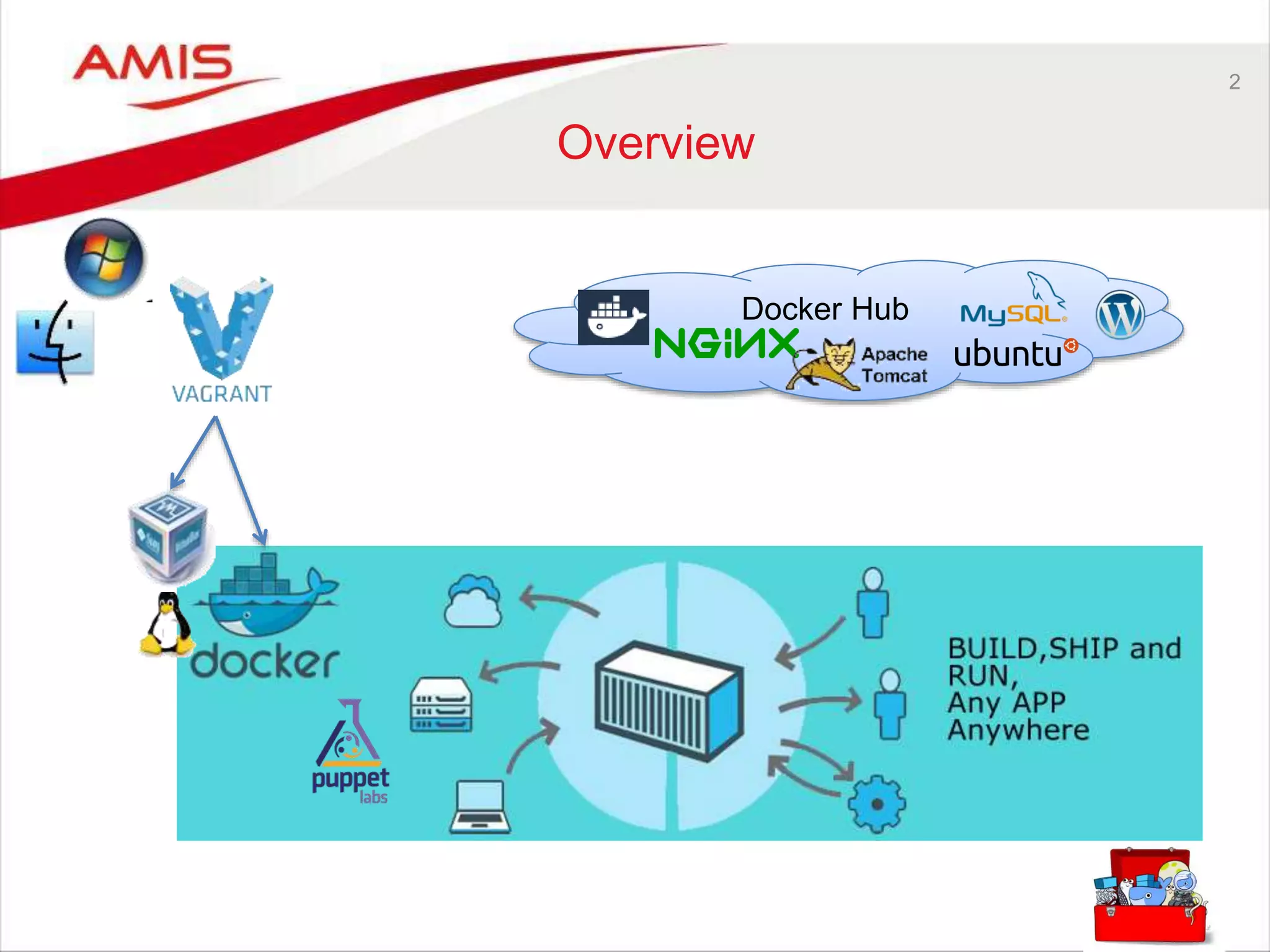
2 Overview Docker Hub
3 Who are you? • Developer or Administrator – Java, Oracle, Web, NoSQL, … – Perhaps on a non-Linux laptop • Limited physical computer resources – CPU, Memory, Disk Space • Inclined to try out new stuff – frameworks, tools, products, … – Quickly, smoothly, without messing up your environment • Create things you want to share – Without creating elaborate instructions for installing and configuring – Without discussions around ‘it works on my machine’ , ‘send me your config files’ • Interested in running stuff on “the cloud” • No Linux allergy • Interested in ‘that Docker thing’ • (a bit like me)
4 This session will give you • What is this Docker thing and why is it a hype? • How do Containers compare to Virtual Machines? • How can I build, ship [| share | distribute] and run containers? – On my local machine and in the cloud? • A way to more efficiently leverage the physical resources in my computer? – than through juggling VMs • A structured and fast way to try out new software – Without messing up my local environment. • What tools do I need to get started with Docker on my non-Linux laptop? • What is the status of Docker and where is it going? • How can I get going on my own with Docker?
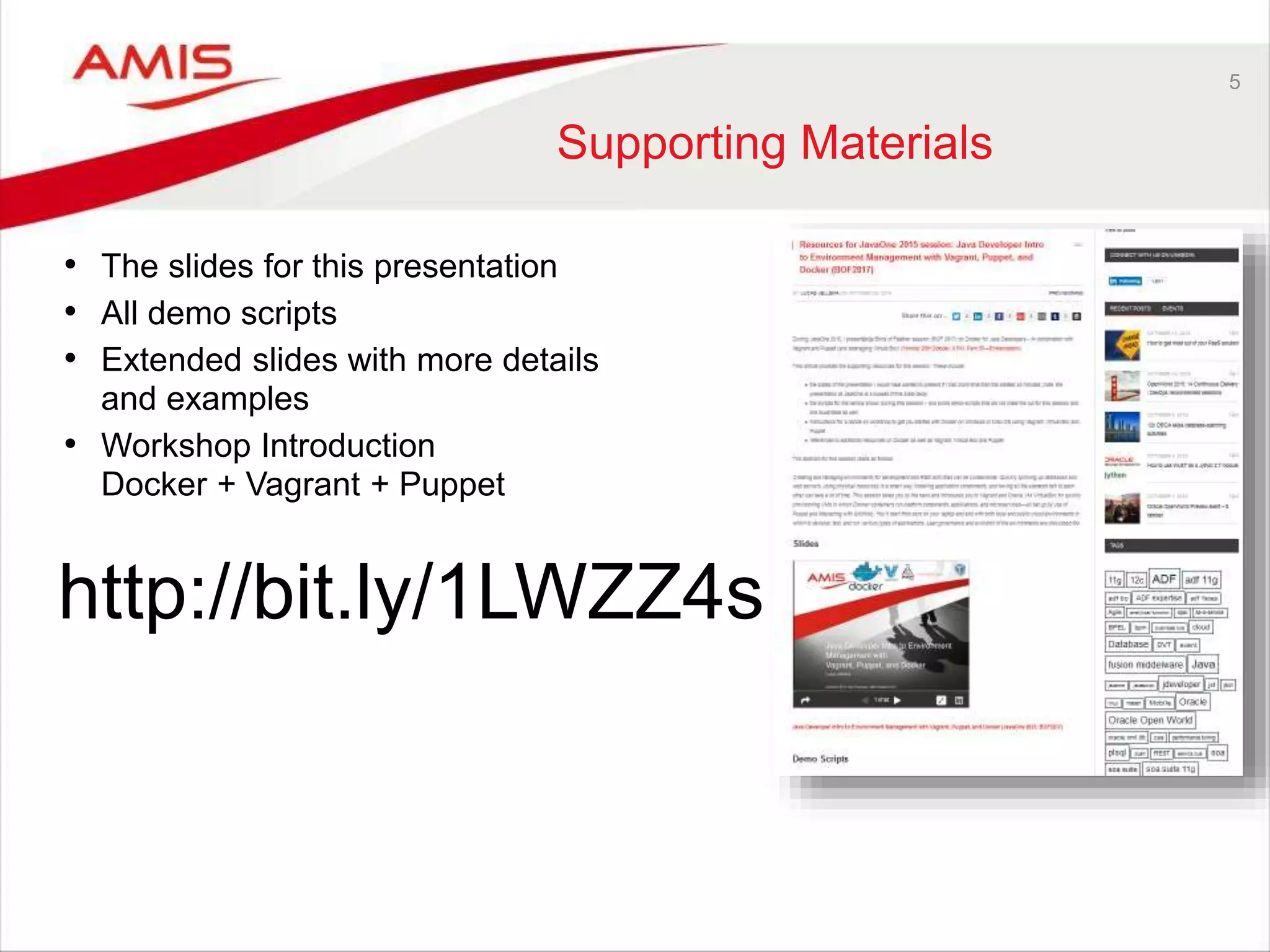
5 Supporting Materials • The slides for this presentation • All demo scripts • Extended slides with more details and examples • Workshop Introduction Docker + Vagrant + Puppet http://bit.ly/1LWZZ4s
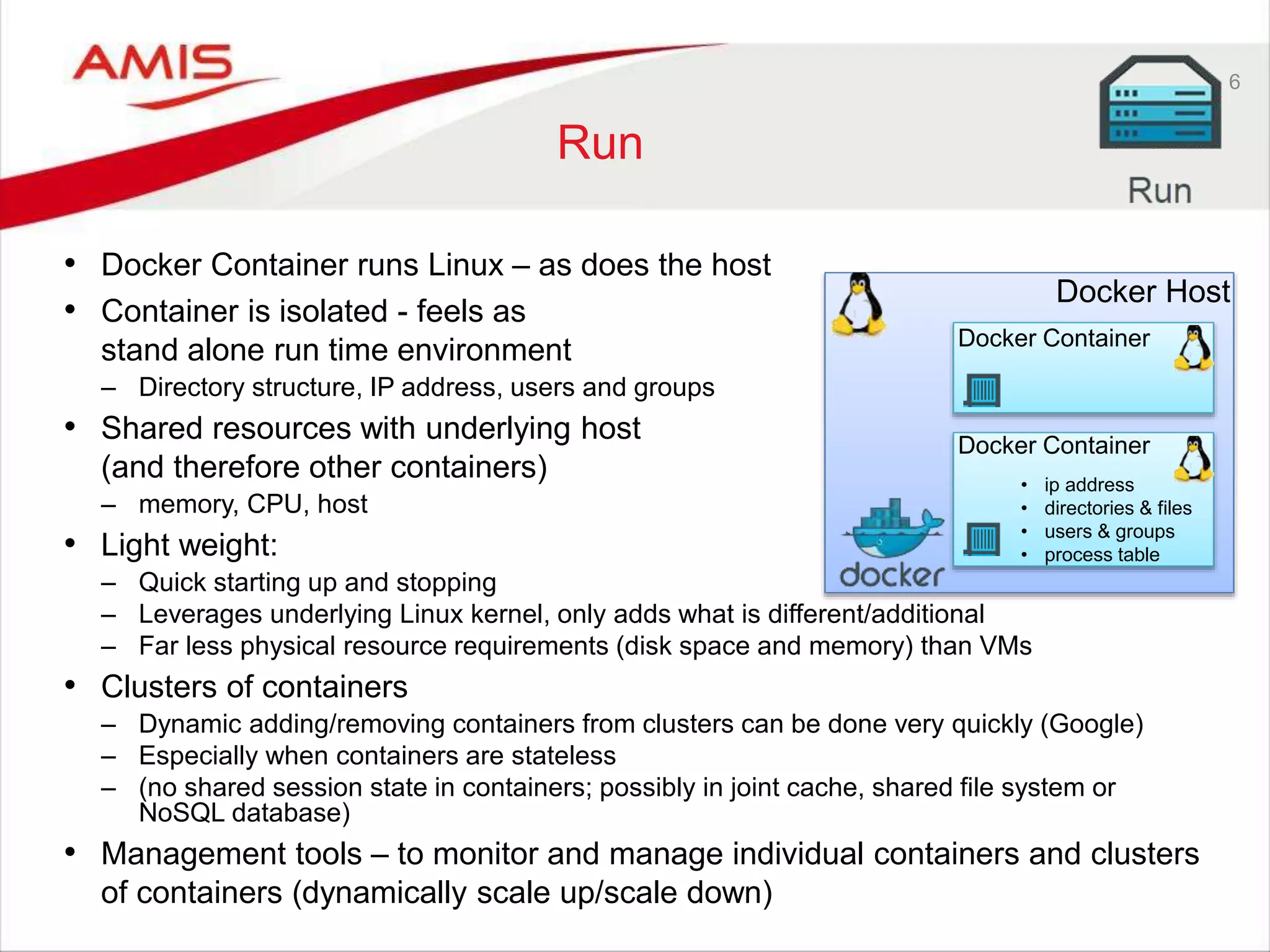
6 Run • Docker Container runs Linux – as does the host • Container is isolated - feels as stand alone run time environment – Directory structure, IP address, users and groups • Shared resources with underlying host (and therefore other containers) – memory, CPU, host • Light weight: – Quick starting up and stopping – Leverages underlying Linux kernel, only adds what is different/additional – Far less physical resource requirements (disk space and memory) than VMs • Clusters of containers – Dynamic adding/removing containers from clusters can be done very quickly (Google) – Especially when containers are stateless – (no shared session state in containers; possibly in joint cache, shared file system or NoSQL database) • Management tools – to monitor and manage individual containers and clusters of containers (dynamically scale up/scale down) Docker Host Docker Container Docker Container • ip address • directories & files • users & groups • process table
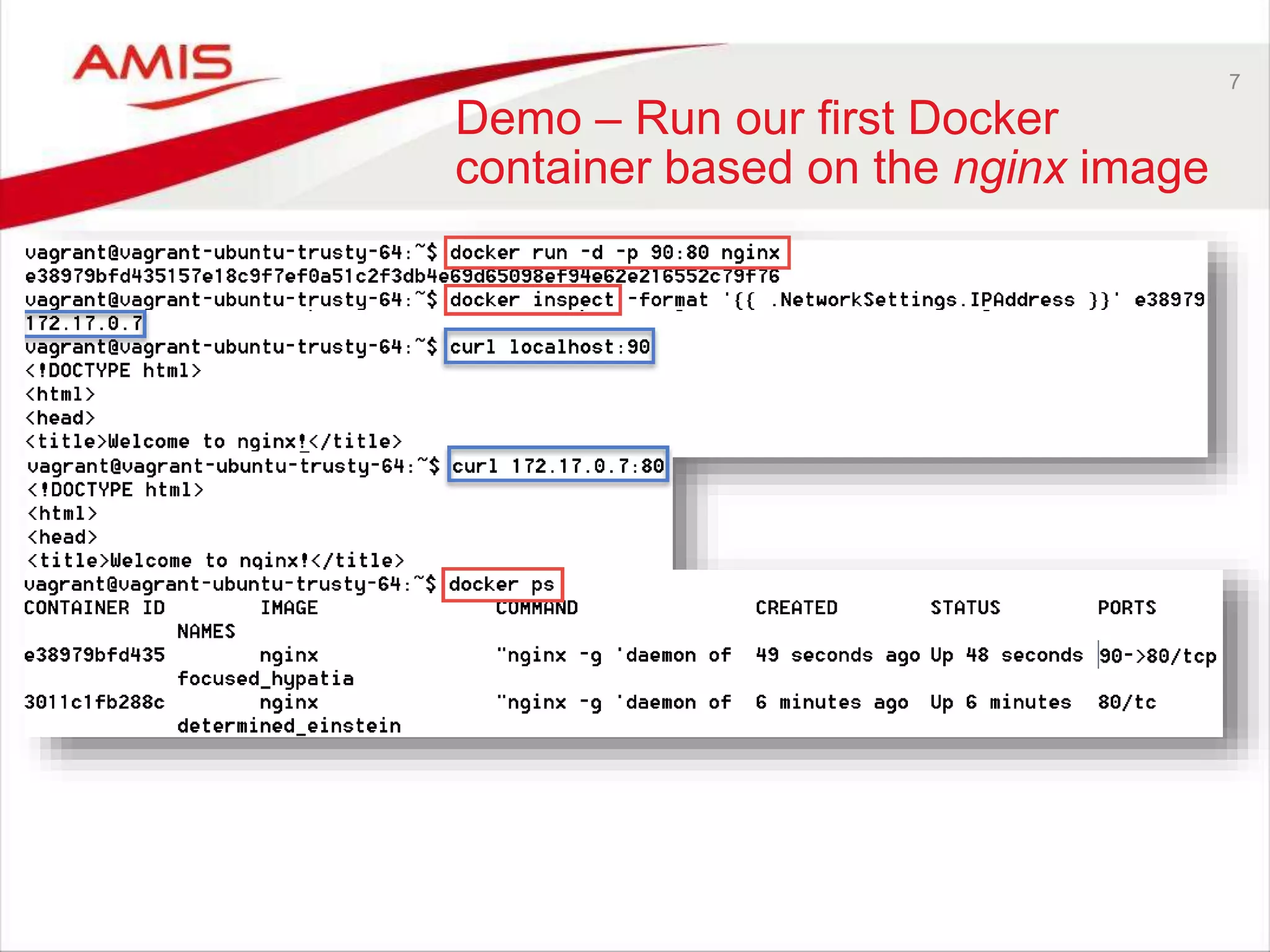
7 Demo – Run our first Docker container based on the nginx image
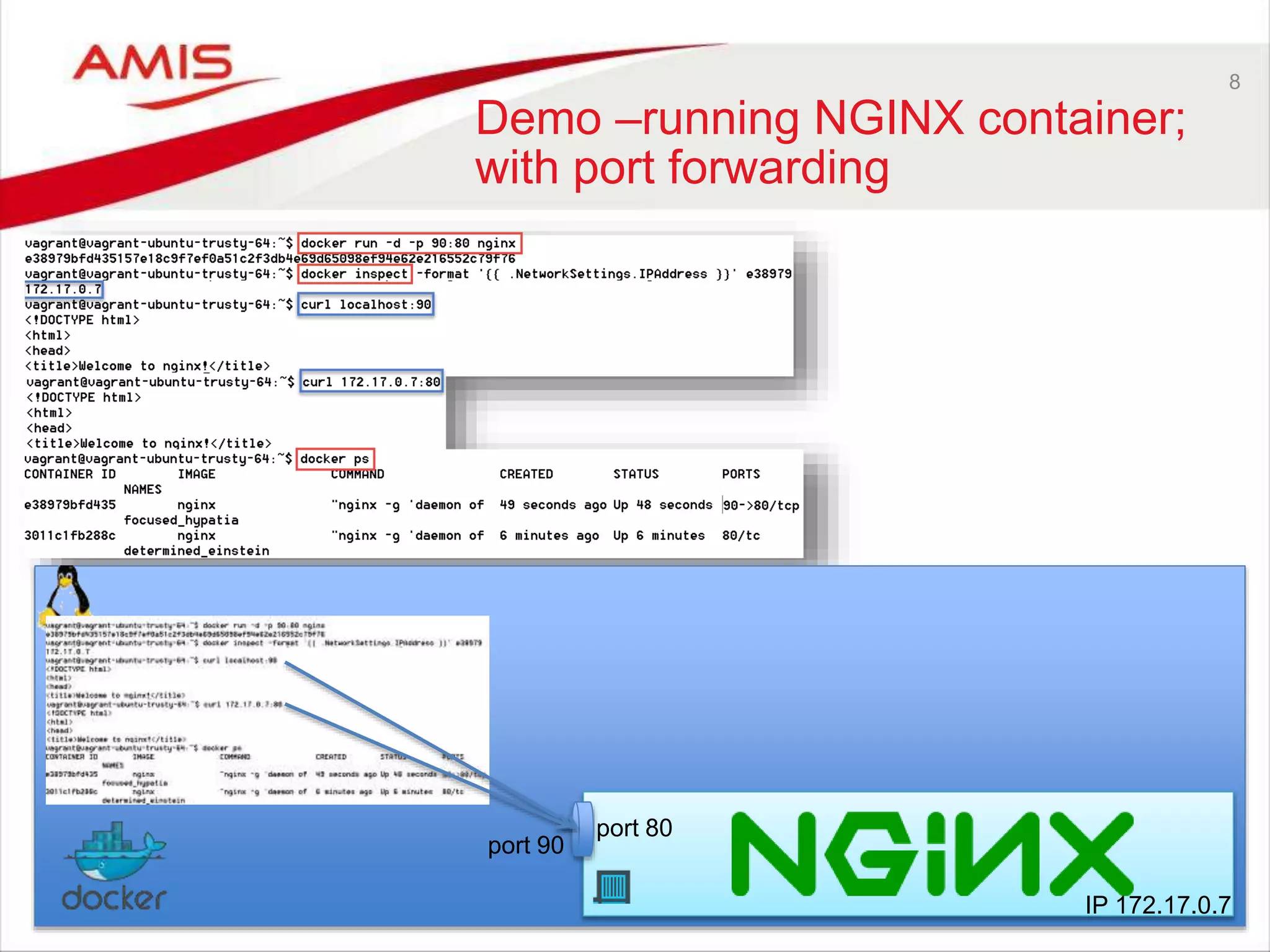
8 Demo –running NGINX container; with port forwarding port 80 port 90 IP 172.17.0.7
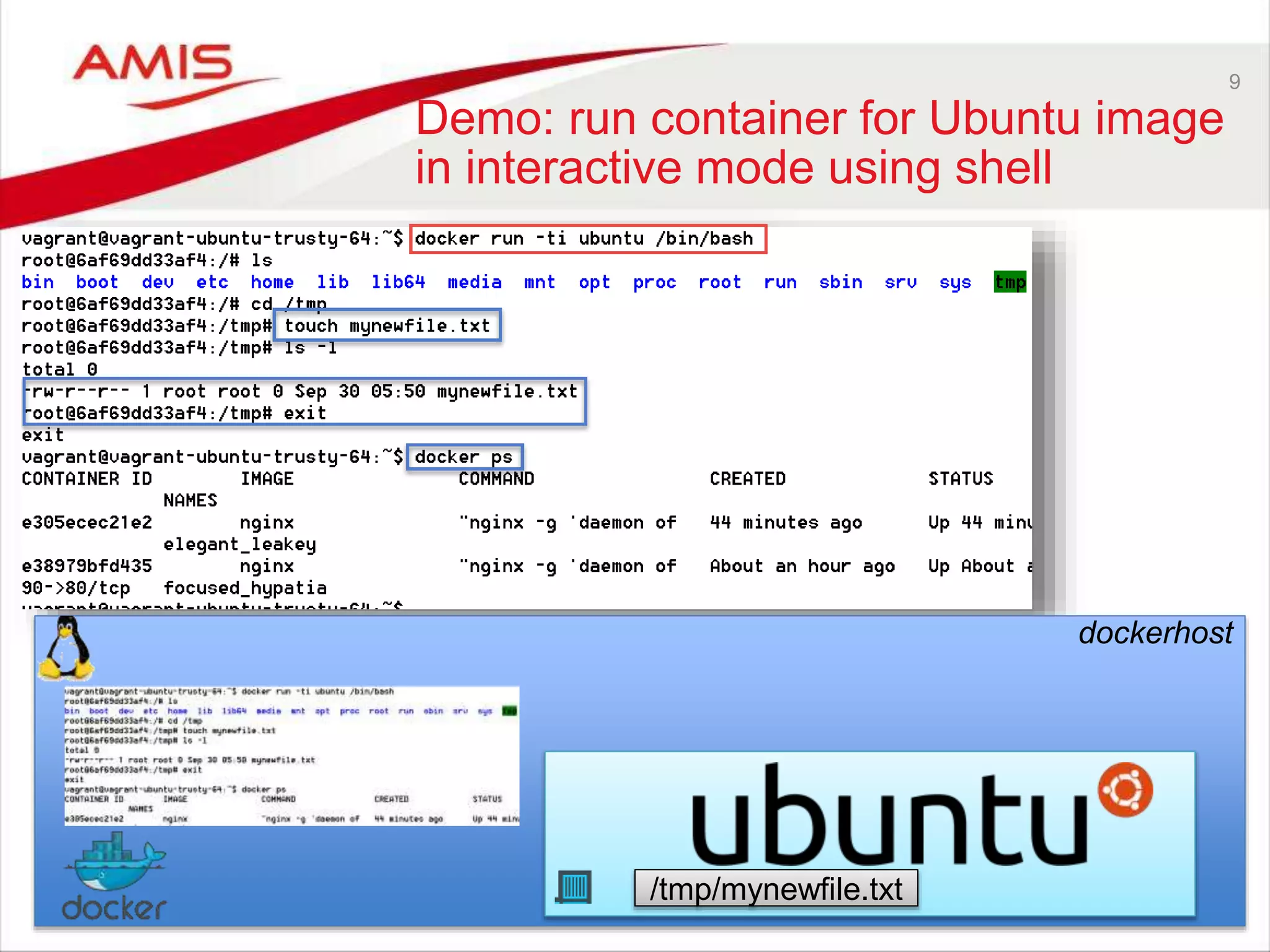
9 Demo: run container for Ubuntu image in interactive mode using shell dockerhost /tmp/mynewfile.txt
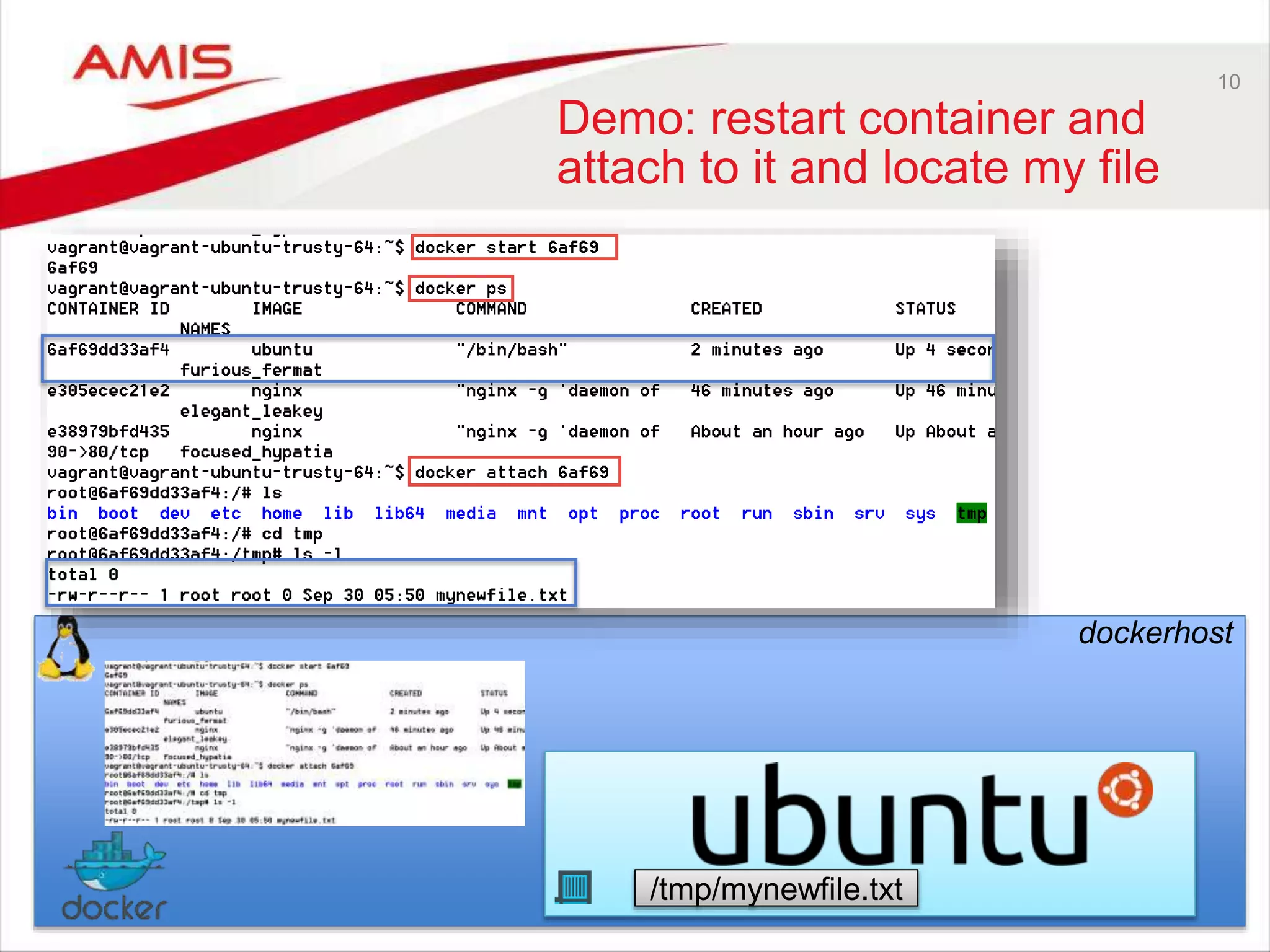
10 Demo: restart container and attach to it and locate my file dockerhost /tmp/mynewfile.txt
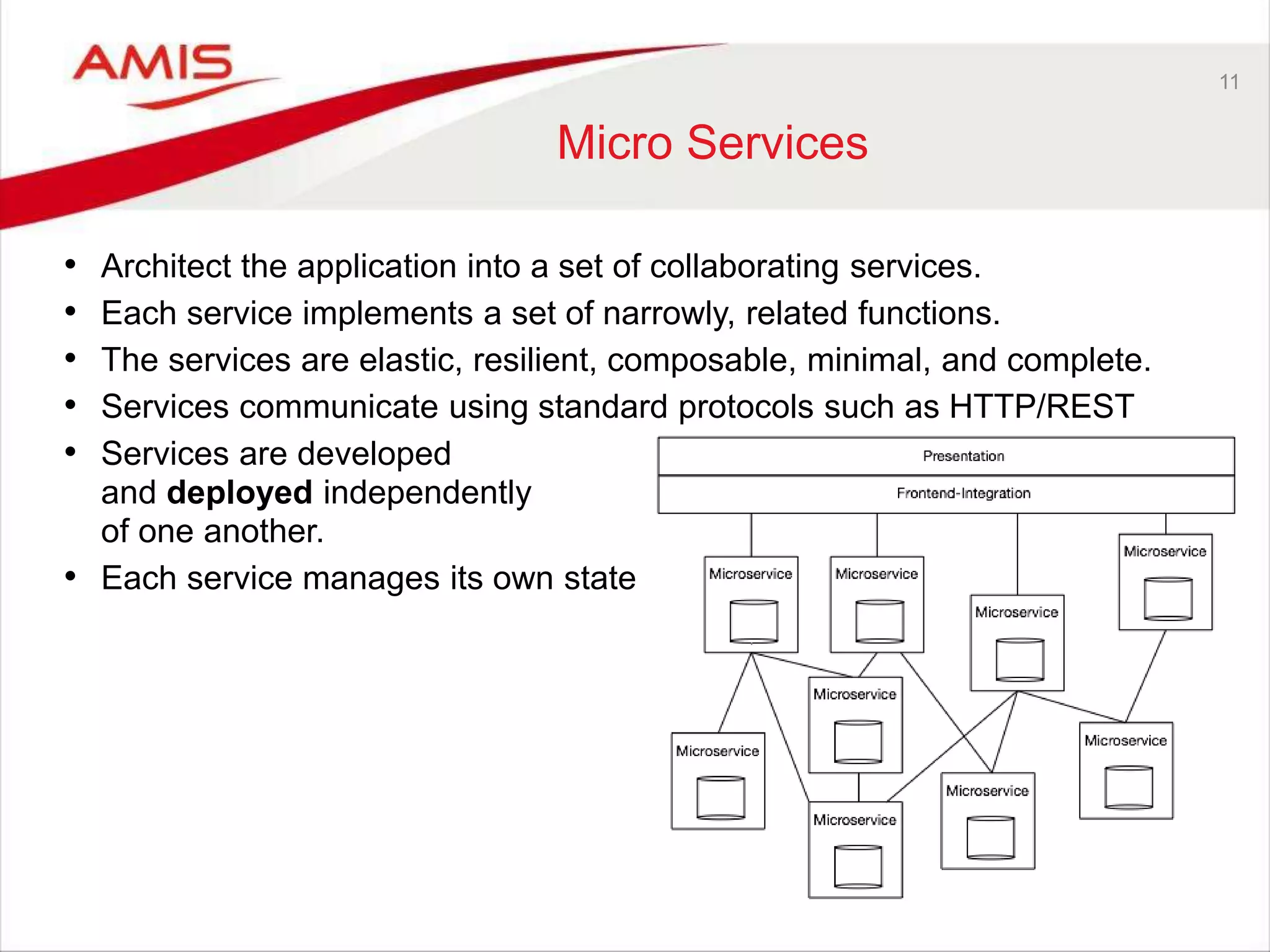
11 Micro Services • Architect the application into a set of collaborating services. • Each service implements a set of narrowly, related functions. • The services are elastic, resilient, composable, minimal, and complete. • Services communicate using standard protocols such as HTTP/REST • Services are developed and deployed independently of one another. • Each service manages its own state
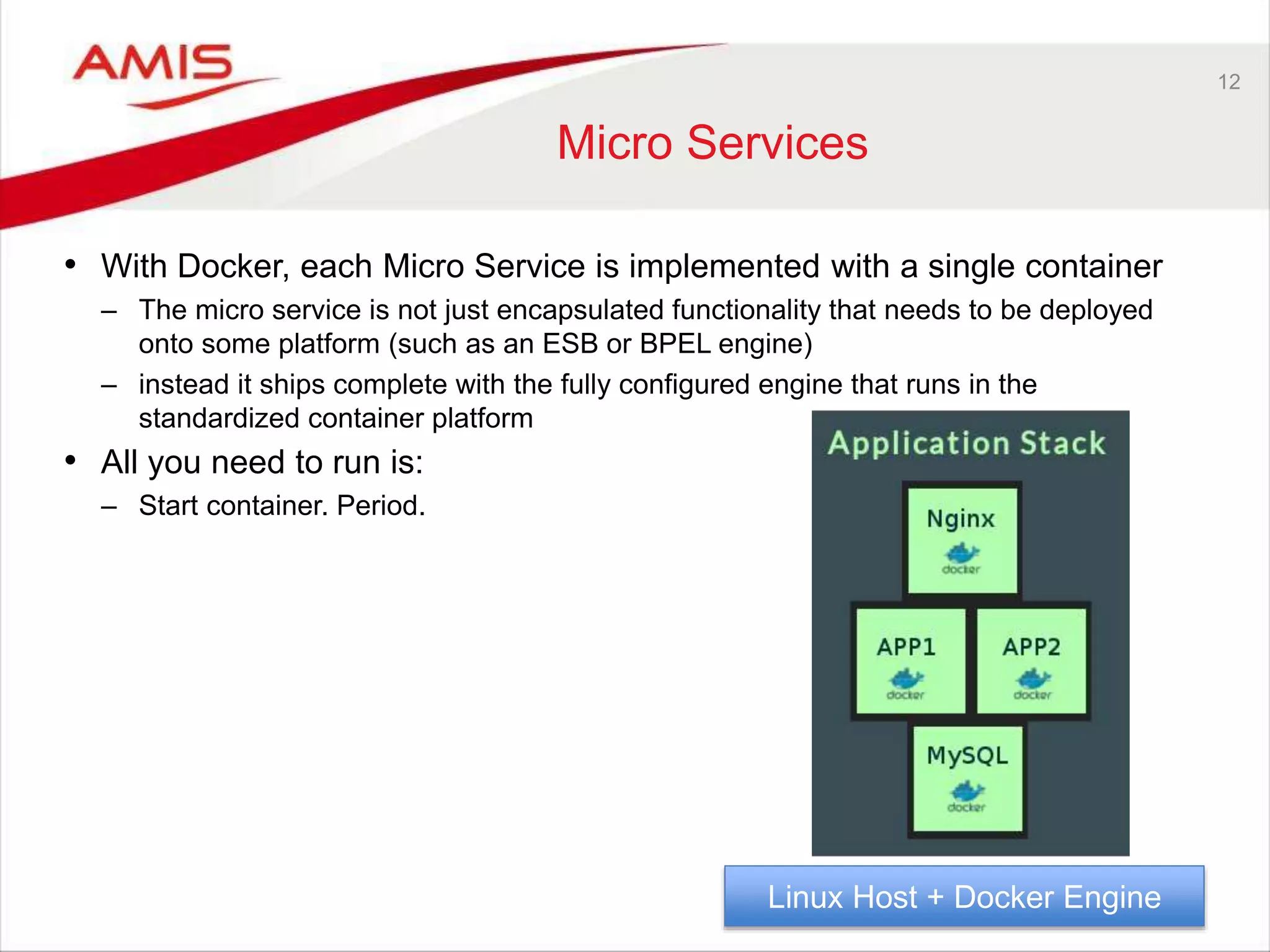
12 Micro Services • With Docker, each Micro Service is implemented with a single container – The micro service is not just encapsulated functionality that needs to be deployed onto some platform (such as an ESB or BPEL engine) – instead it ships complete with the fully configured engine that runs in the standardized container platform • All you need to run is: – Start container. Period. Linux Host + Docker Engine
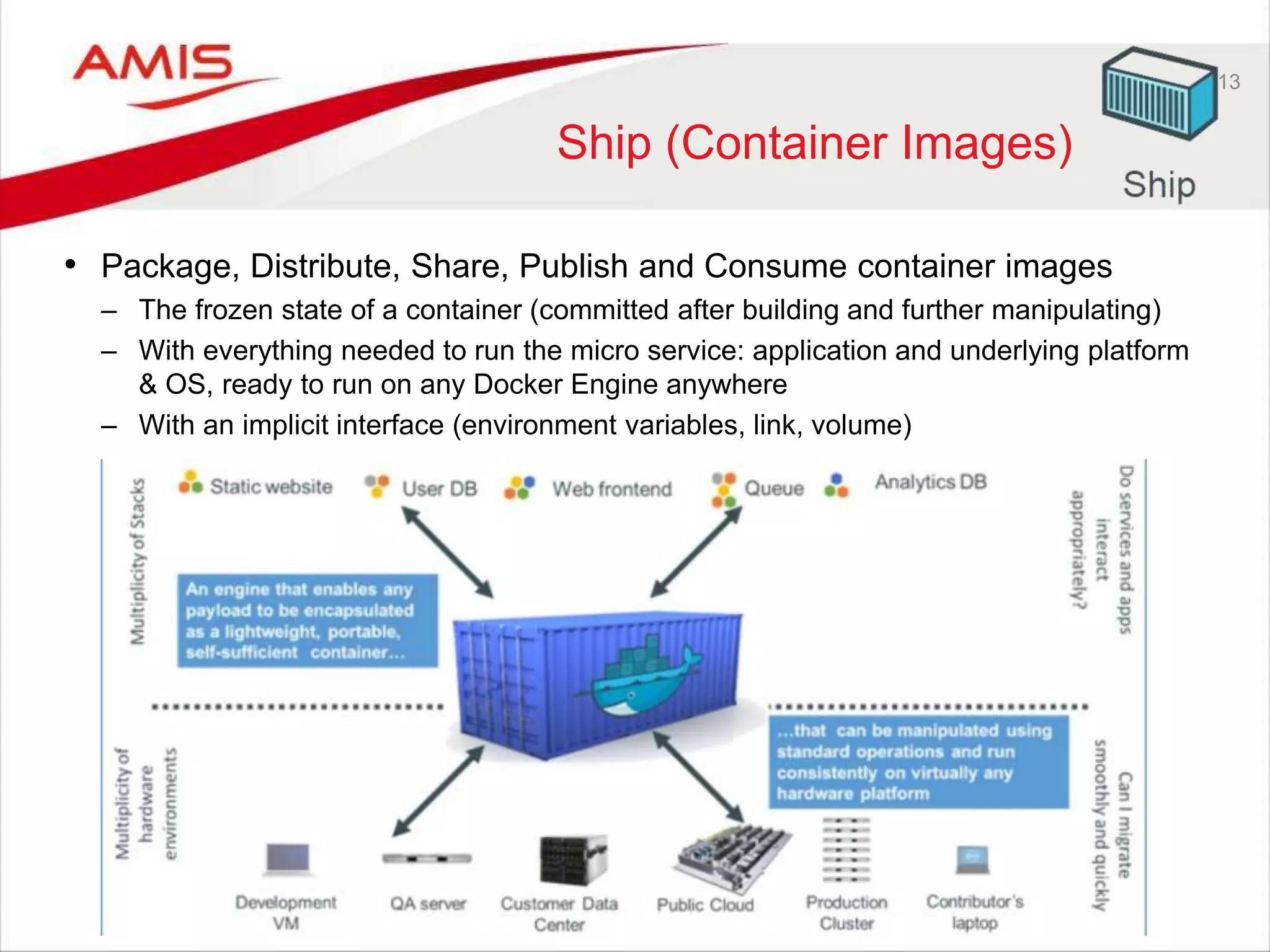
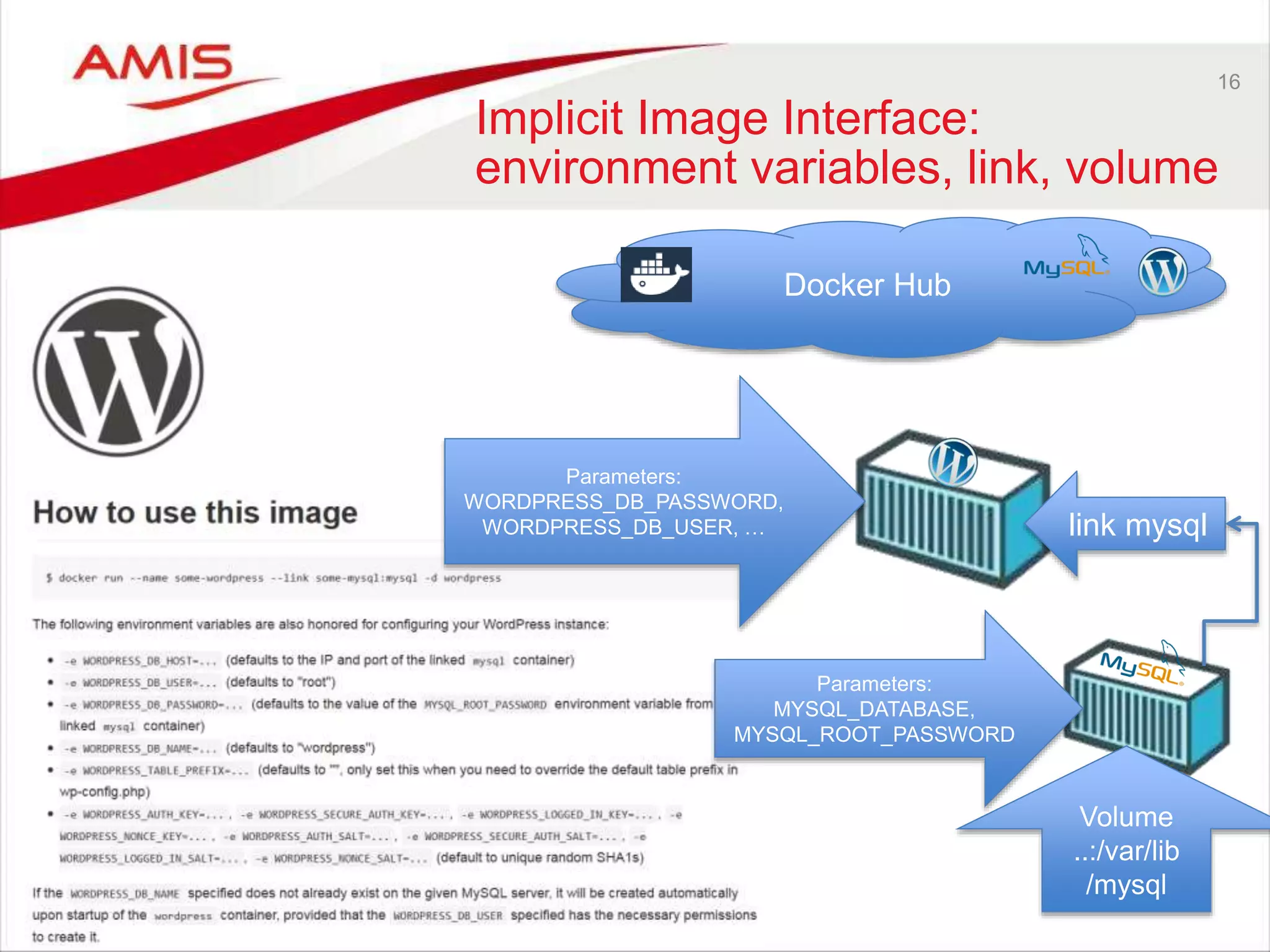
13 Ship (Container Images) • Package, Distribute, Share, Publish and Consume container images – The frozen state of a container (committed after building and further manipulating) – With everything needed to run the micro service: application and underlying platform & OS, ready to run on any Docker Engine anywhere – With an implicit interface (environment variables, link, volume)
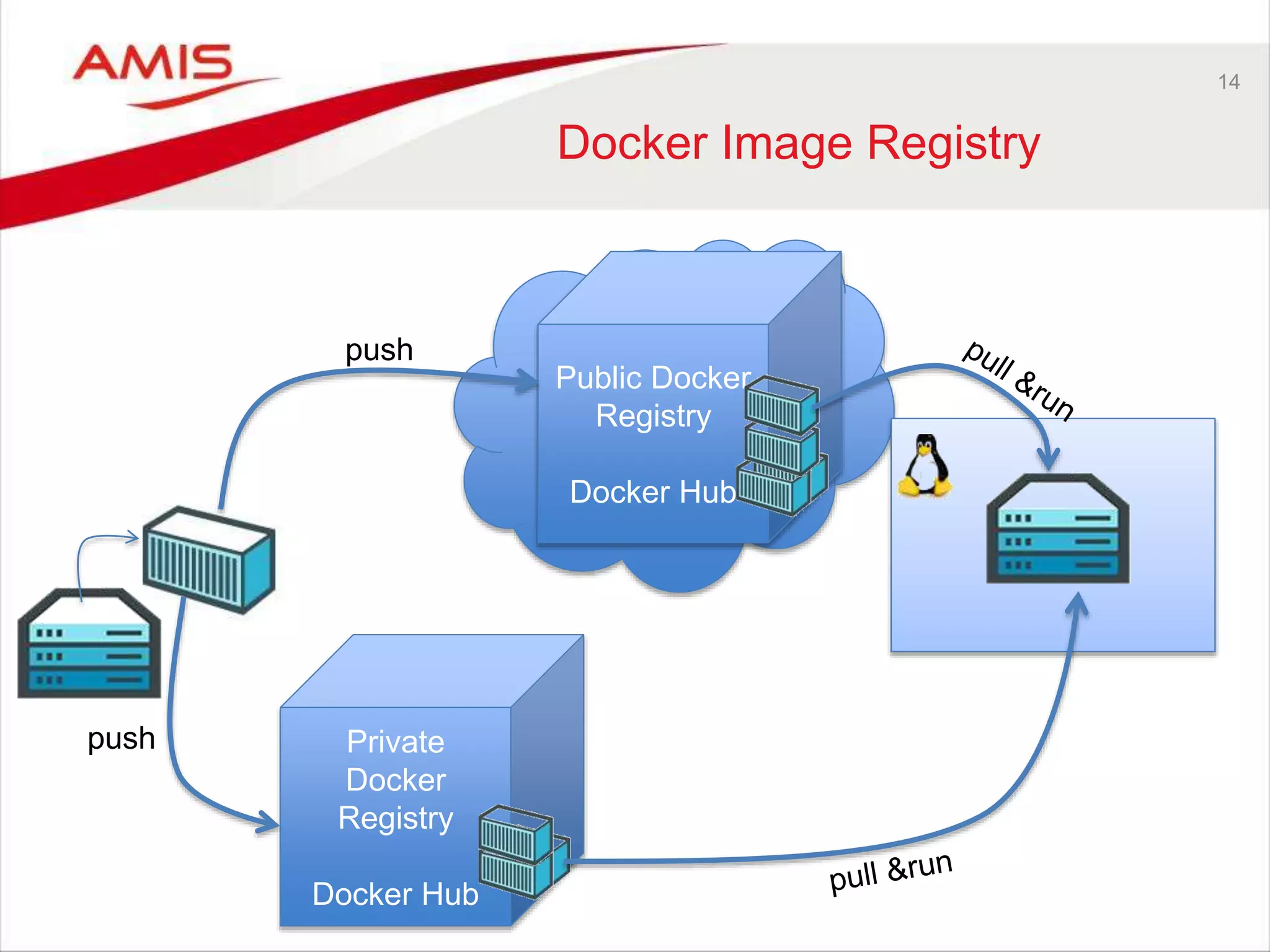
Public Docker Registry Docker Hub 14 Docker Image Registry push Private Docker Registry Docker Hub push
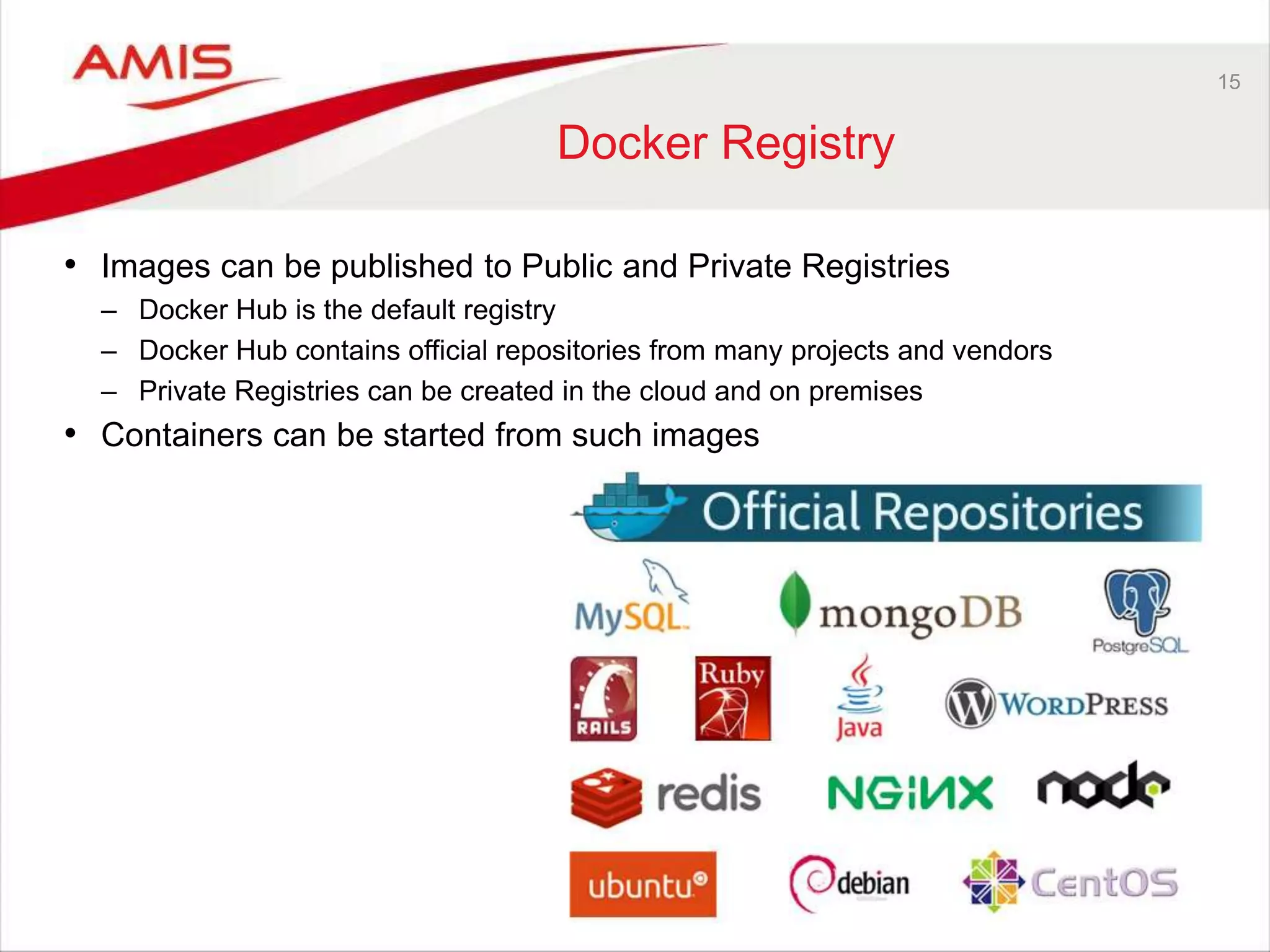
15 Docker Registry • Images can be published to Public and Private Registries – Docker Hub is the default registry – Docker Hub contains official repositories from many projects and vendors – Private Registries can be created in the cloud and on premises • Containers can be started from such images
16 Implicit Image Interface: environment variables, link, volume Docker Hub link mysql Parameters: WORDPRESS_DB_PASSWORD, WORDPRESS_DB_USER, … Volume ..:/var/lib /mysql Parameters: MYSQL_DATABASE, MYSQL_ROOT_PASSWORD
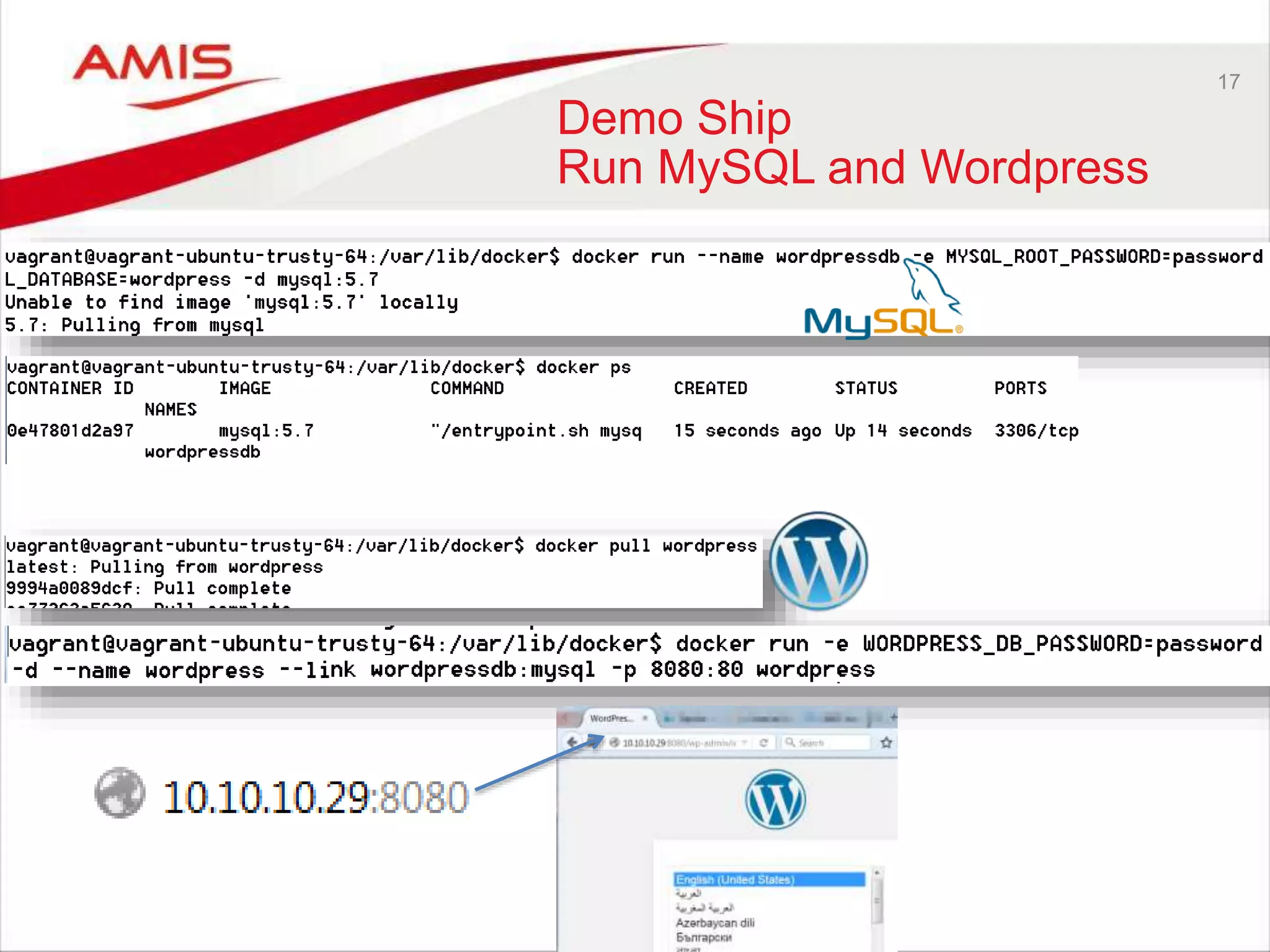
17 Demo Ship Run MySQL and Wordpress
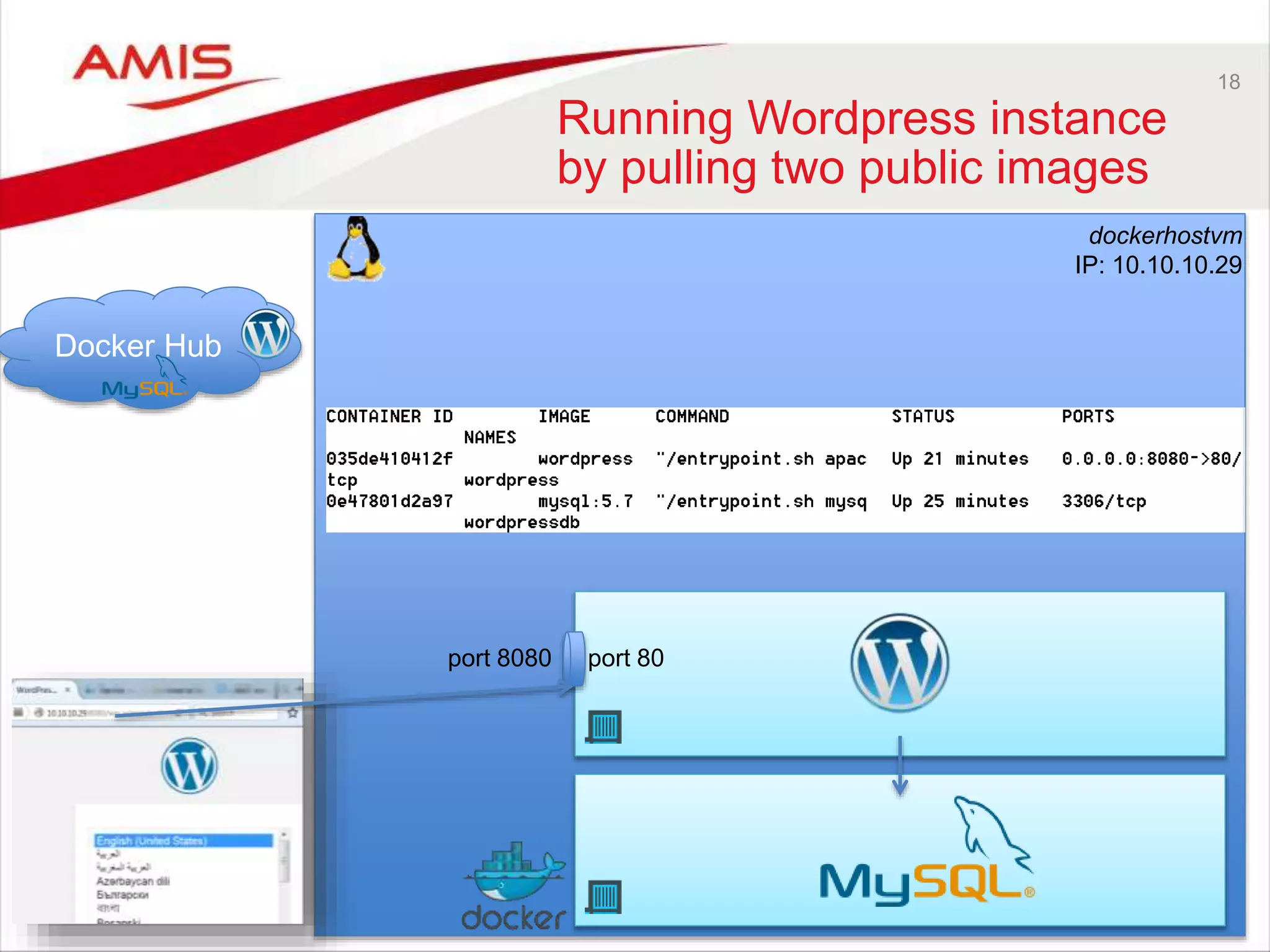
18 Running Wordpress instance by pulling two public images port 8080 port 80 dockerhostvm IP: 10.10.10.29 Docker Hub
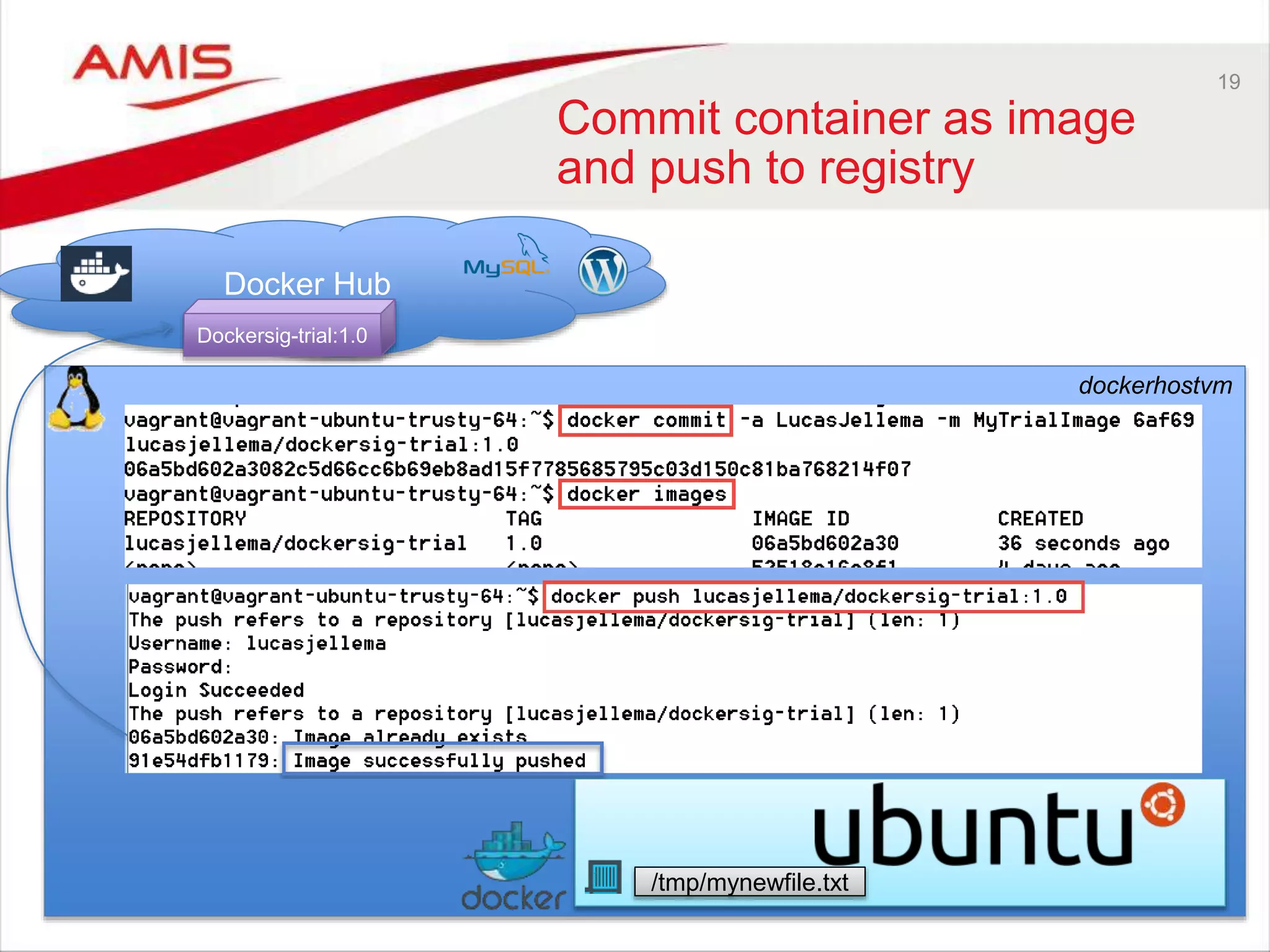
19 Commit container as image and push to registry dockerhostvm Docker Hub /tmp/mynewfile.txt Dockersig-trial:1.0
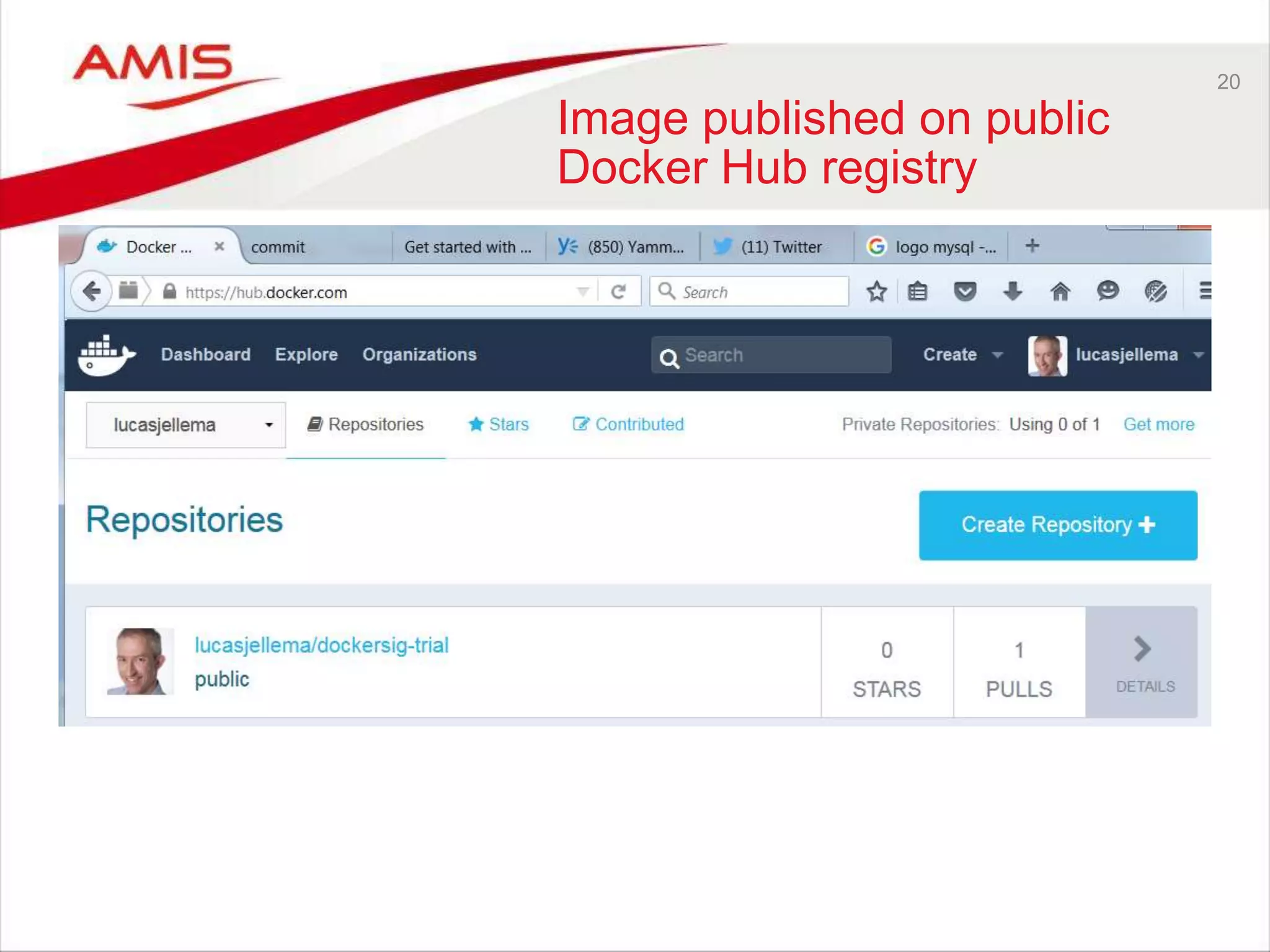
20 Image published on public Docker Hub registry
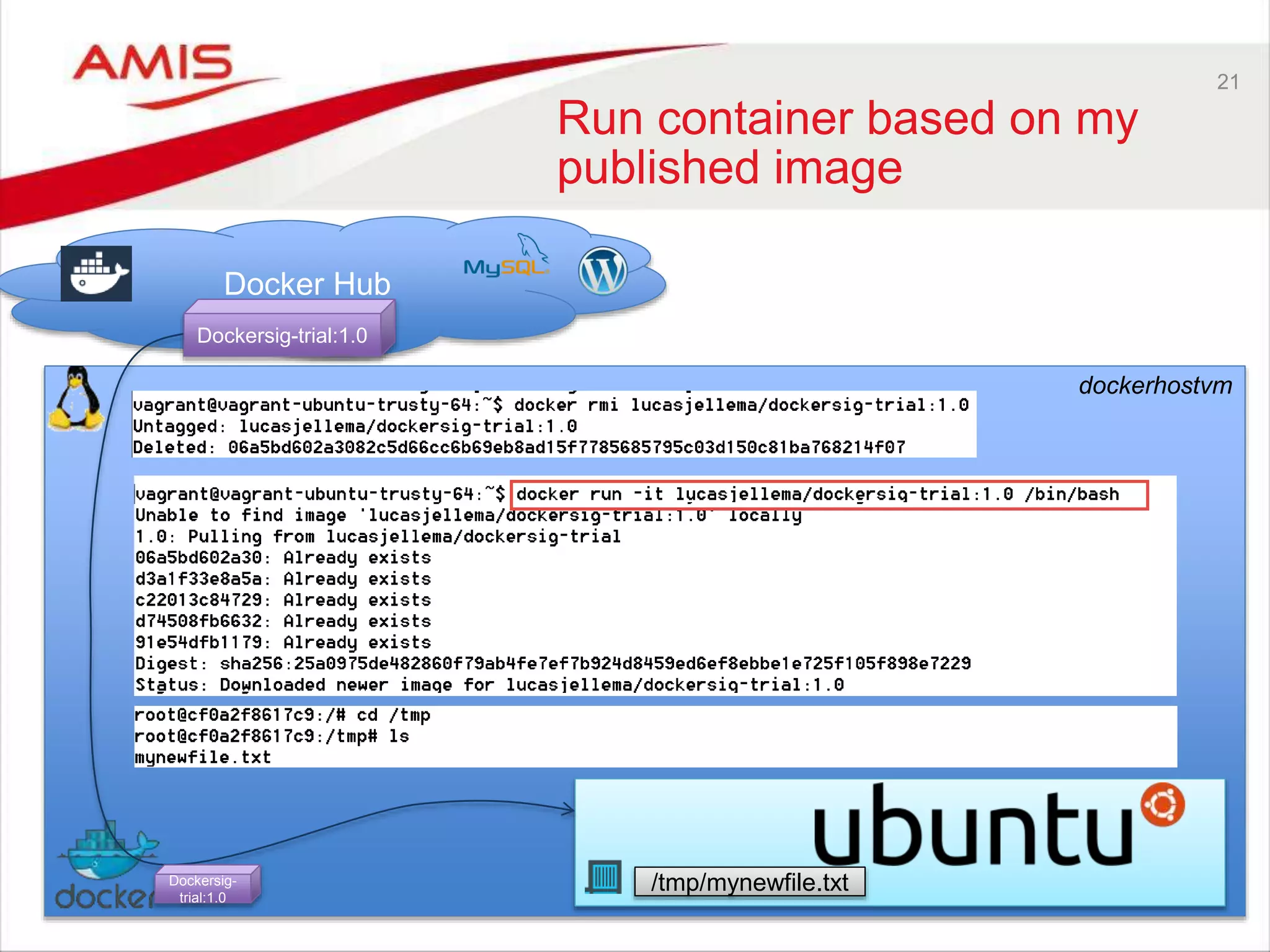
21 Run container based on my published image dockerhostvm Docker Hub /tmp/mynewfile.txt Dockersig-trial:1.0 Dockersig- trial:1.0
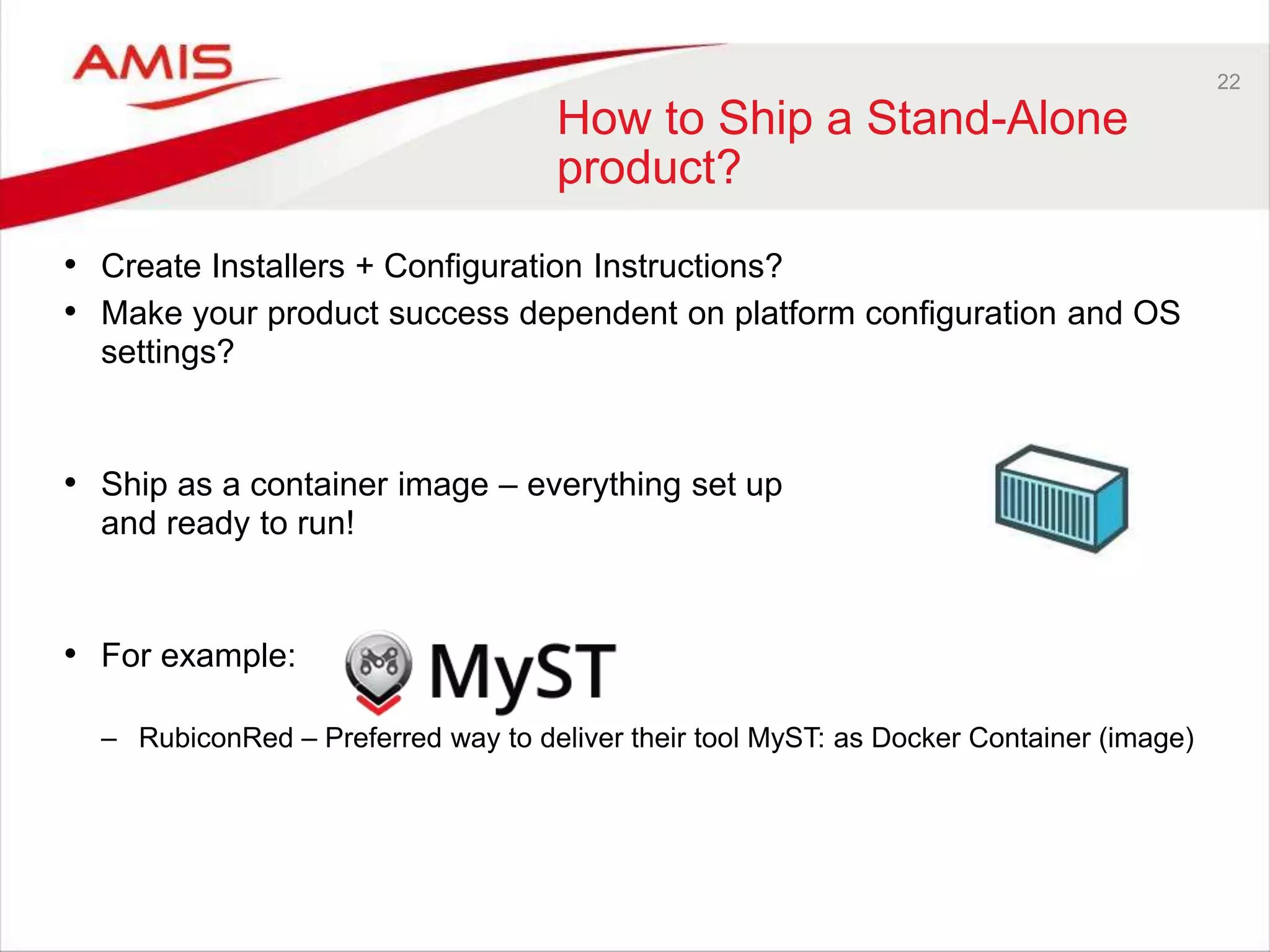
22 How to Ship a Stand-Alone product? • Create Installers + Configuration Instructions? • Make your product success dependent on platform configuration and OS settings? • Ship as a container image – everything set up and ready to run! • For example: – RubiconRed – Preferred way to deliver their tool MyST: as Docker Container (image)
23 Ship to Cloud • Ship Image to [Run on] Cloud – All product installation, configuration, custom software deployment and testing has been done – all we need is a place for it to land – Complete environment, ready to run on any Docker enabled platform • Many public cloud providers support running Docker Containers Public Docker Registry Docker Hub
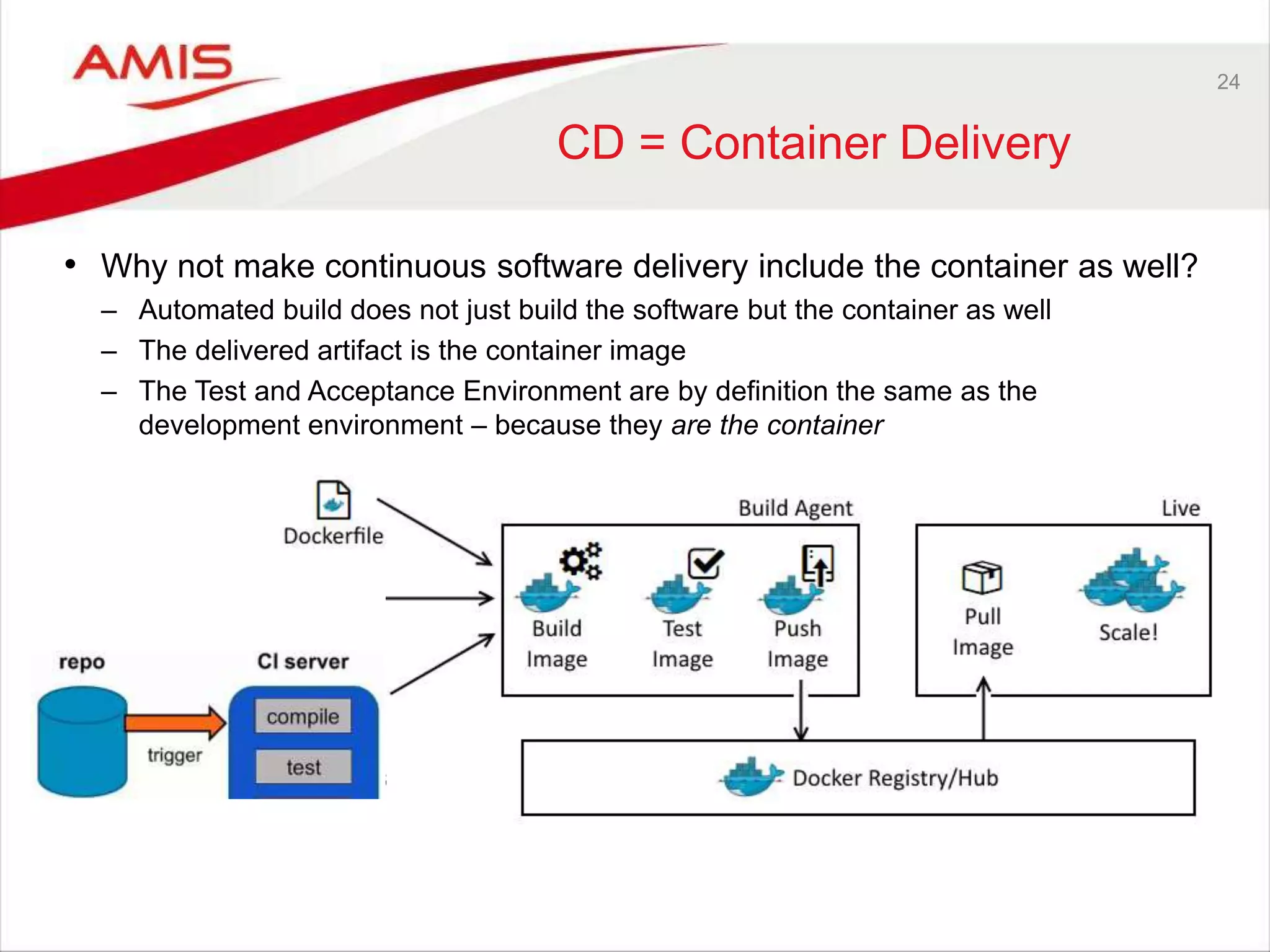
24 CD = Container Delivery • Why not make continuous software delivery include the container as well? – Automated build does not just build the software but the container as well – The delivered artifact is the container image – The Test and Acceptance Environment are by definition the same as the development environment – because they are the container
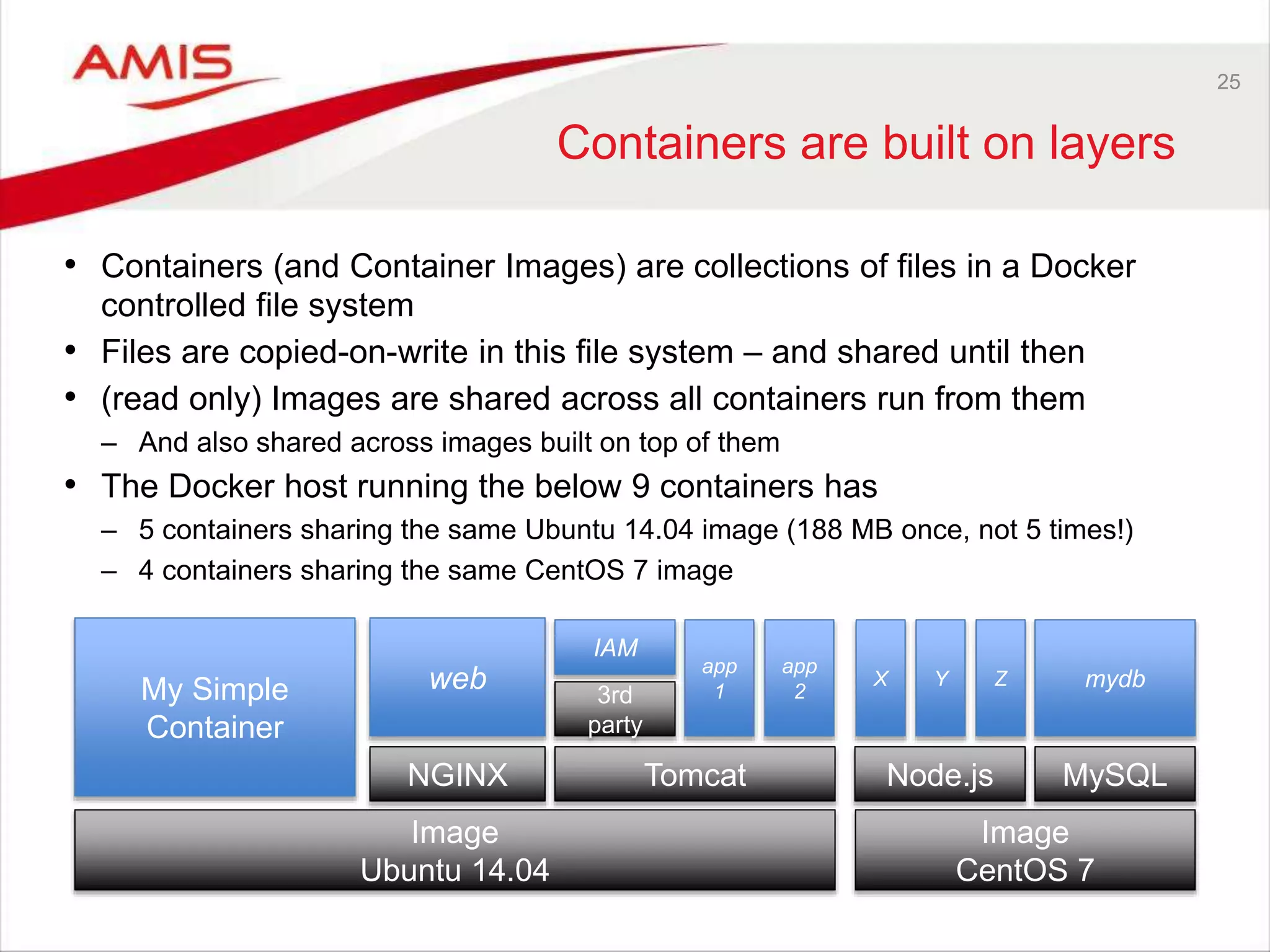
25 Containers are built on layers • Containers (and Container Images) are collections of files in a Docker controlled file system • Files are copied-on-write in this file system – and shared until then • (read only) Images are shared across all containers run from them – And also shared across images built on top of them • The Docker host running the below 9 containers has – 5 containers sharing the same Ubuntu 14.04 image (188 MB once, not 5 times!) – 4 containers sharing the same CentOS 7 image Image Ubuntu 14.04 Tomcat My Simple Container Image CentOS 7 NGINX Node.js MySQL web app 13rd party app 2 IAM X mydbY Z
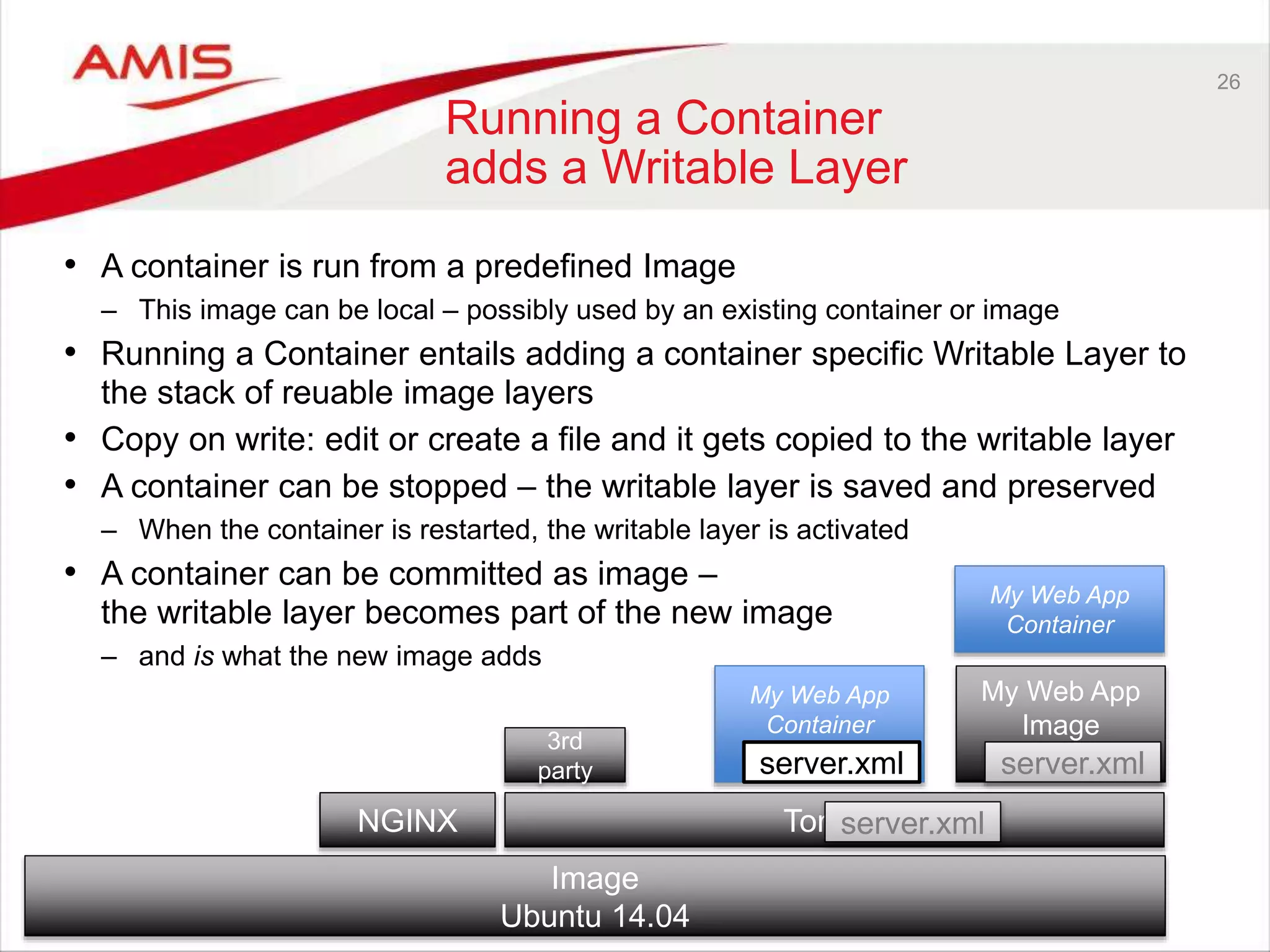
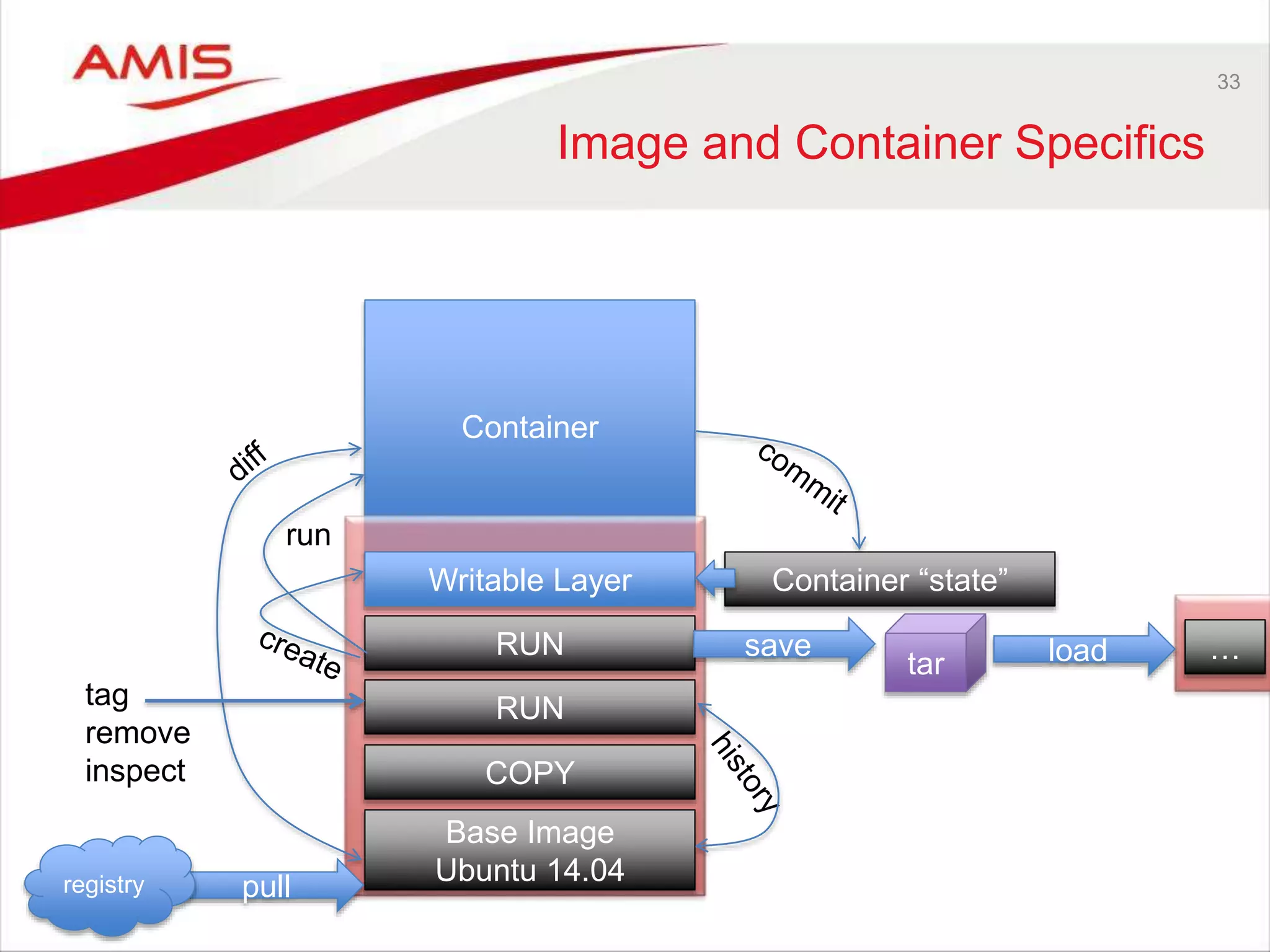
26 Running a Container adds a Writable Layer • A container is run from a predefined Image – This image can be local – possibly used by an existing container or image • Running a Container entails adding a container specific Writable Layer to the stack of reuable image layers • Copy on write: edit or create a file and it gets copied to the writable layer • A container can be stopped – the writable layer is saved and preserved – When the container is restarted, the writable layer is activated • A container can be committed as image – the writable layer becomes part of the new image – and is what the new image adds Image Ubuntu 14.04 TomcatNGINX 3rd party My Web App Container server.xml server.xml My Web App Image server.xml My Web App Container
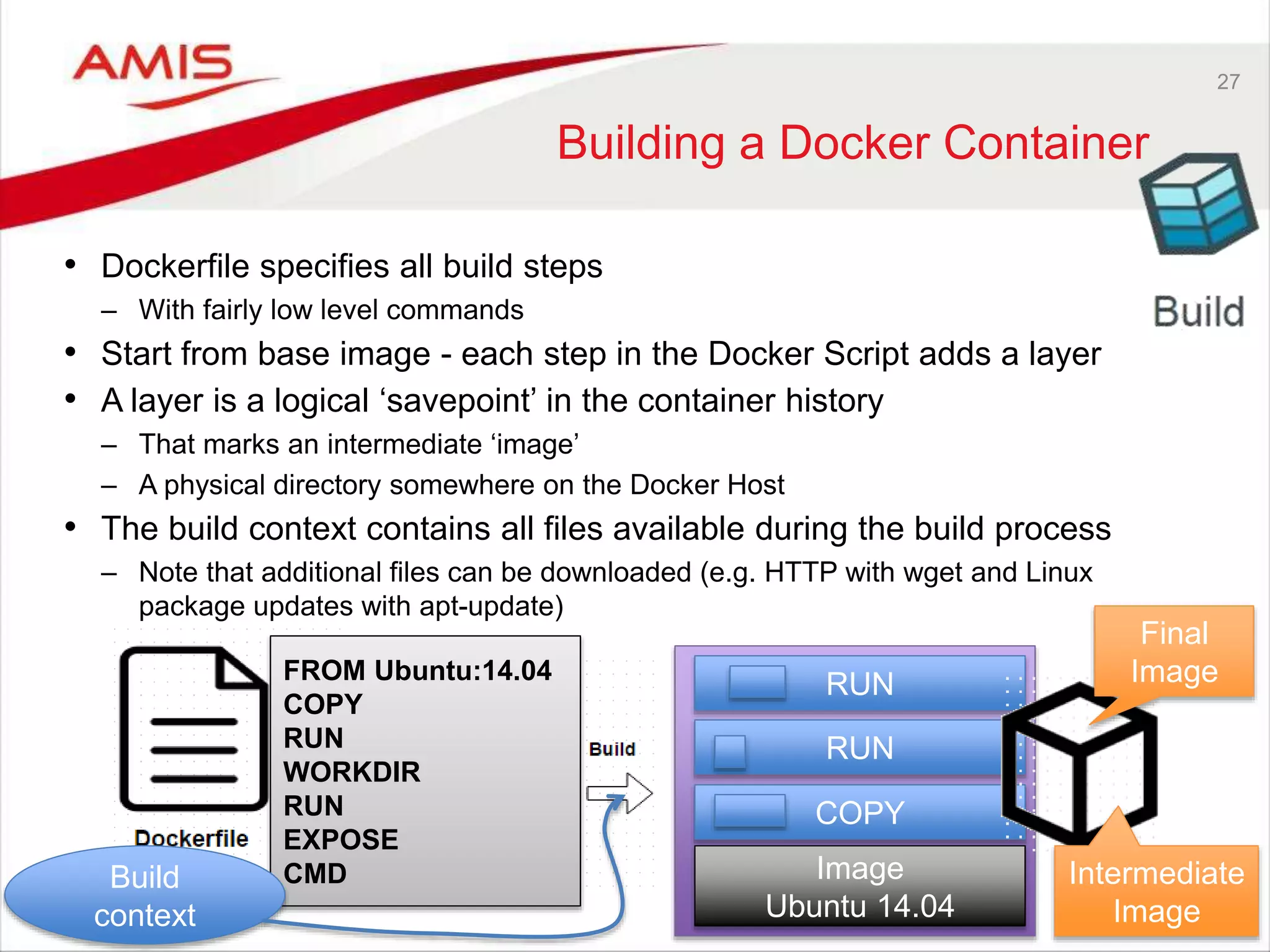
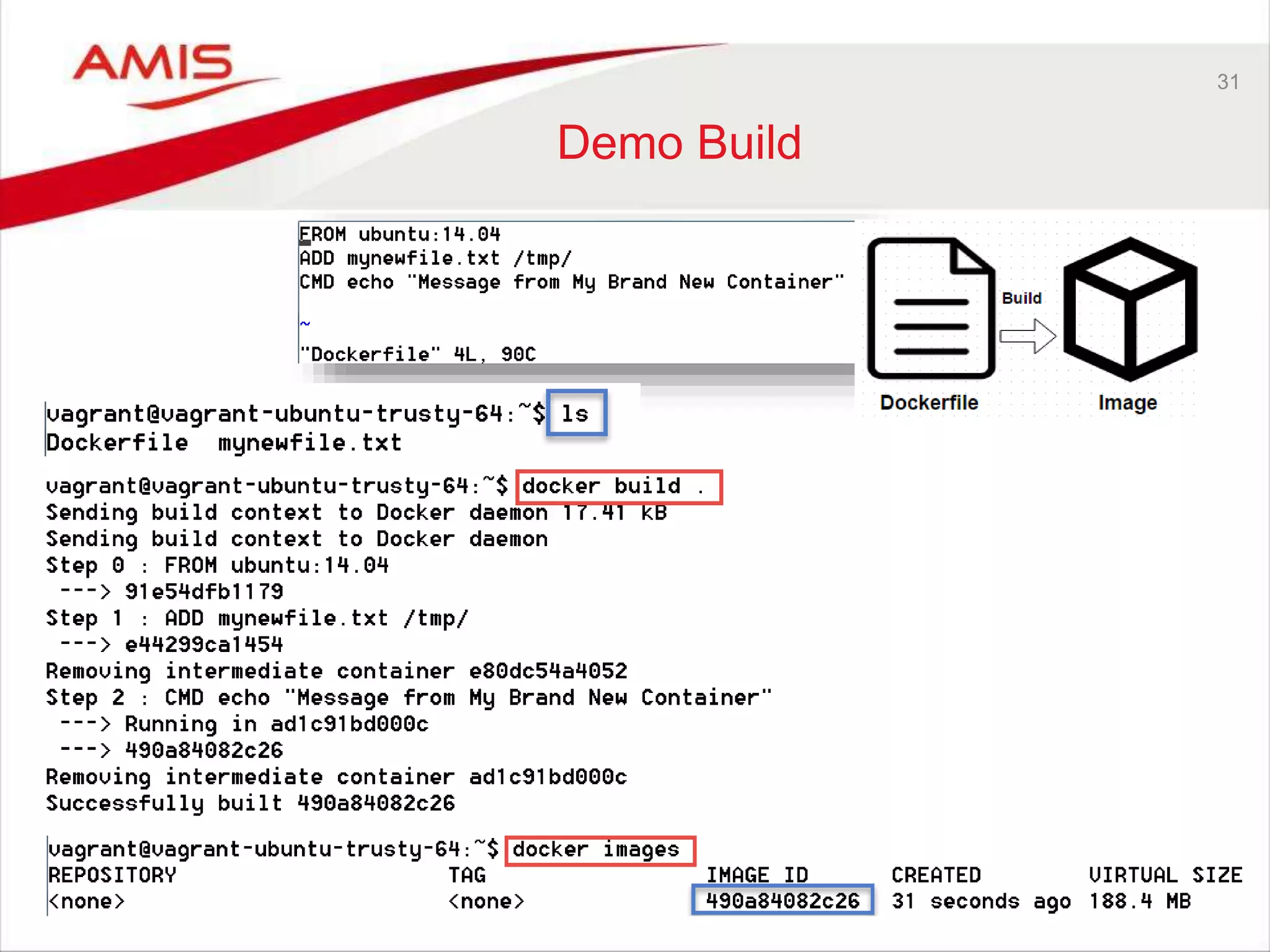
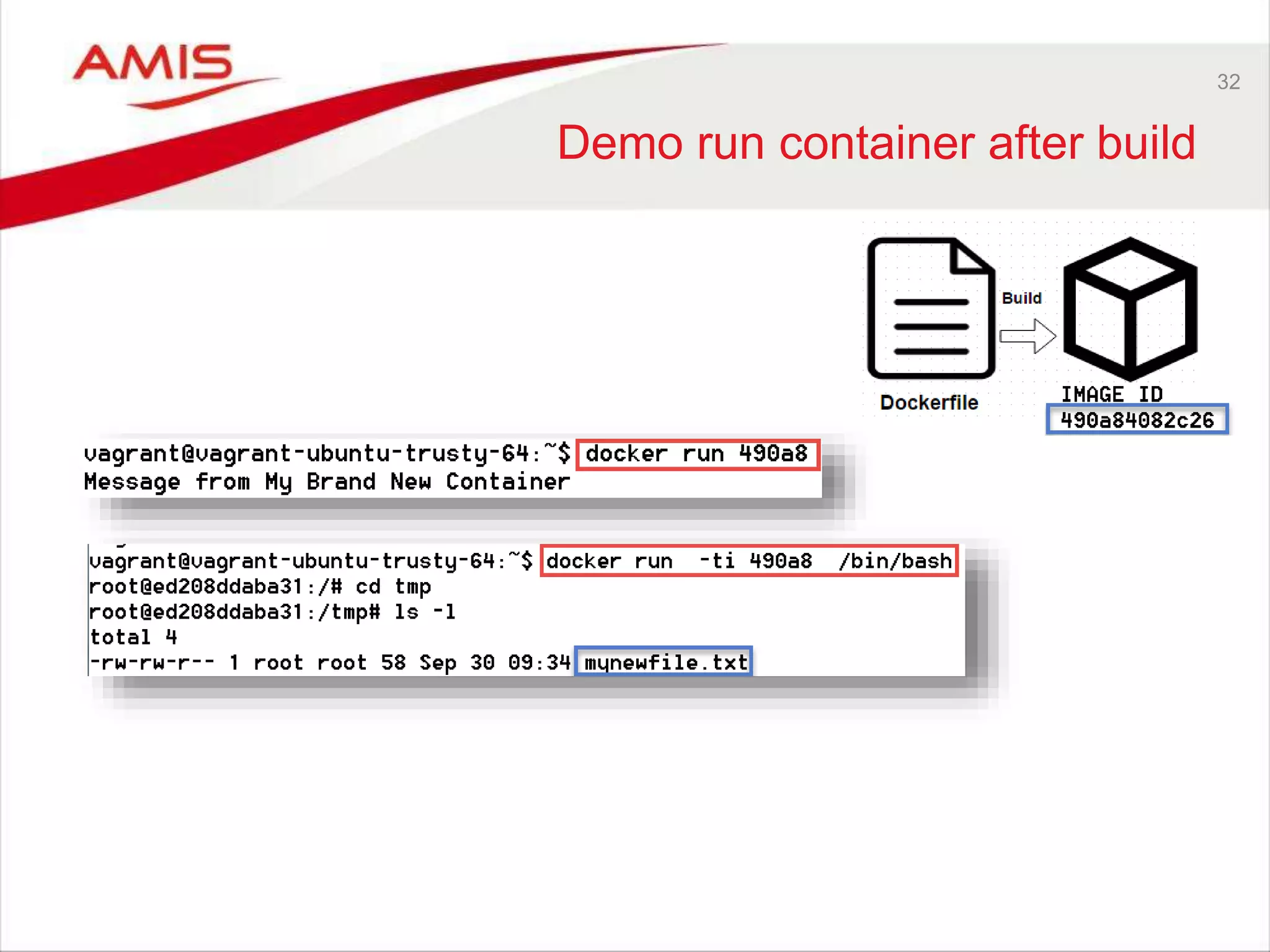
27 Building a Docker Container • Dockerfile specifies all build steps – With fairly low level commands • Start from base image - each step in the Docker Script adds a layer • A layer is a logical ‘savepoint’ in the container history – That marks an intermediate ‘image’ – A physical directory somewhere on the Docker Host • The build context contains all files available during the build process – Note that additional files can be downloaded (e.g. HTTP with wget and Linux package updates with apt-update) FROM Ubuntu:14.04 COPY RUN WORKDIR RUN EXPOSE CMD COPY RUN RUN Image Ubuntu 14.04 Build context Final Image Intermediate Image
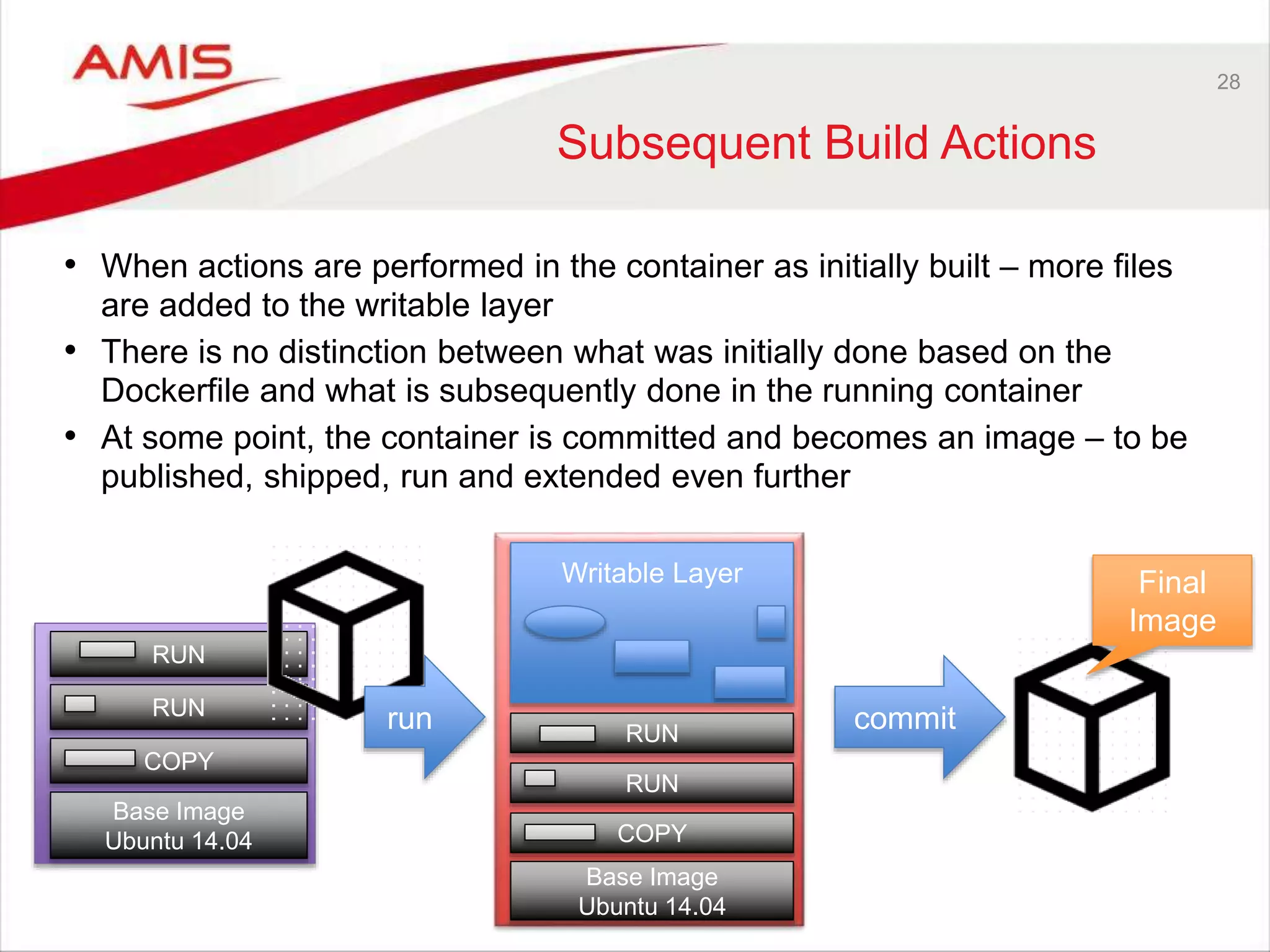
28 Subsequent Build Actions • When actions are performed in the container as initially built – more files are added to the writable layer • There is no distinction between what was initially done based on the Dockerfile and what is subsequently done in the running container • At some point, the container is committed and becomes an image – to be published, shipped, run and extended even further Base Image Ubuntu 14.04 COPY RUN RUN Base Image Ubuntu 14.04 COPY RUN RUN Writable Layer run commit Final Image
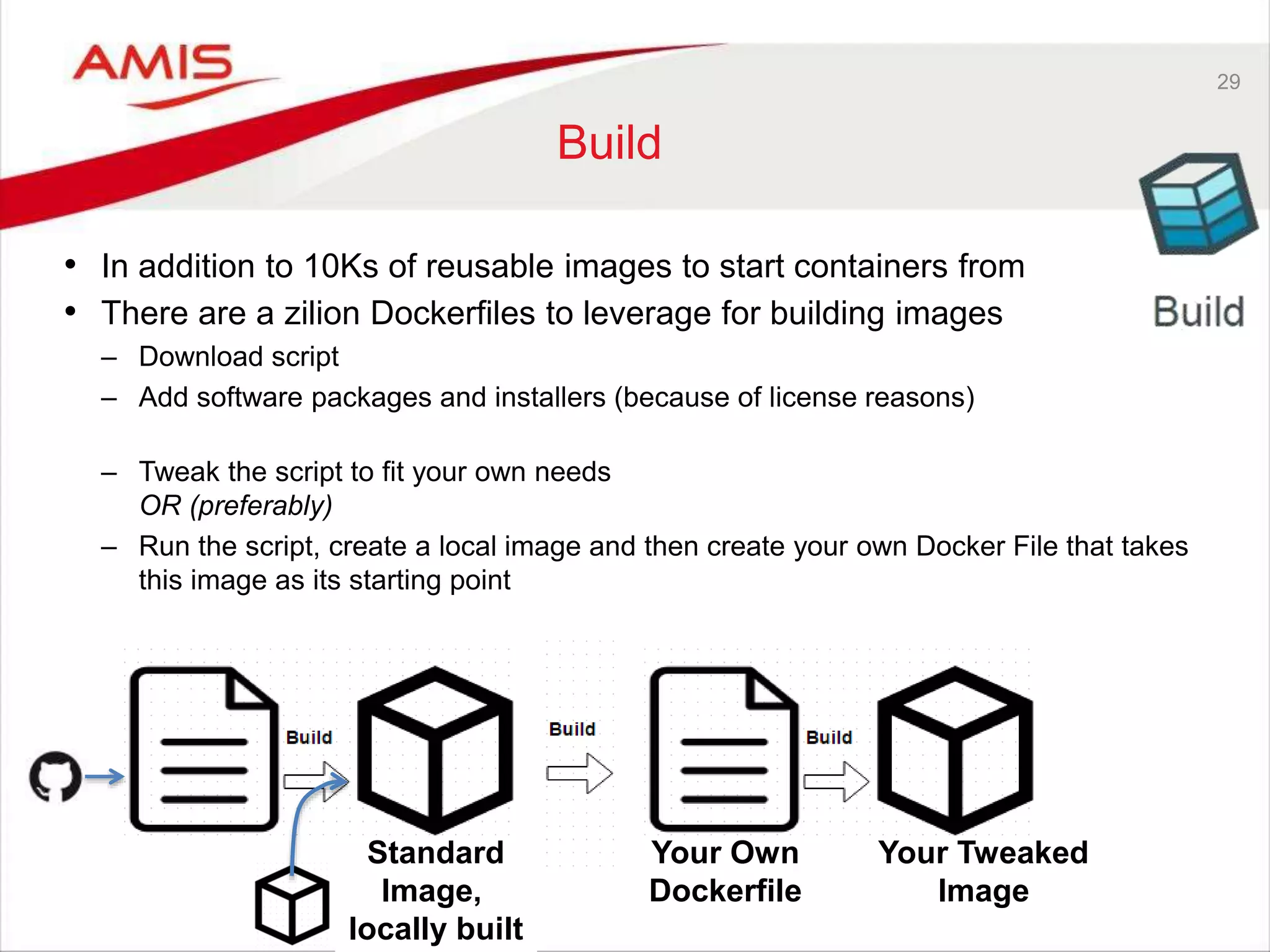
Standard Image, locally built 29 Build • In addition to 10Ks of reusable images to start containers from • There are a zilion Dockerfiles to leverage for building images – Download script – Add software packages and installers (because of license reasons) – Tweak the script to fit your own needs OR (preferably) – Run the script, create a local image and then create your own Docker File that takes this image as its starting point Your Own Dockerfile Your Tweaked Image
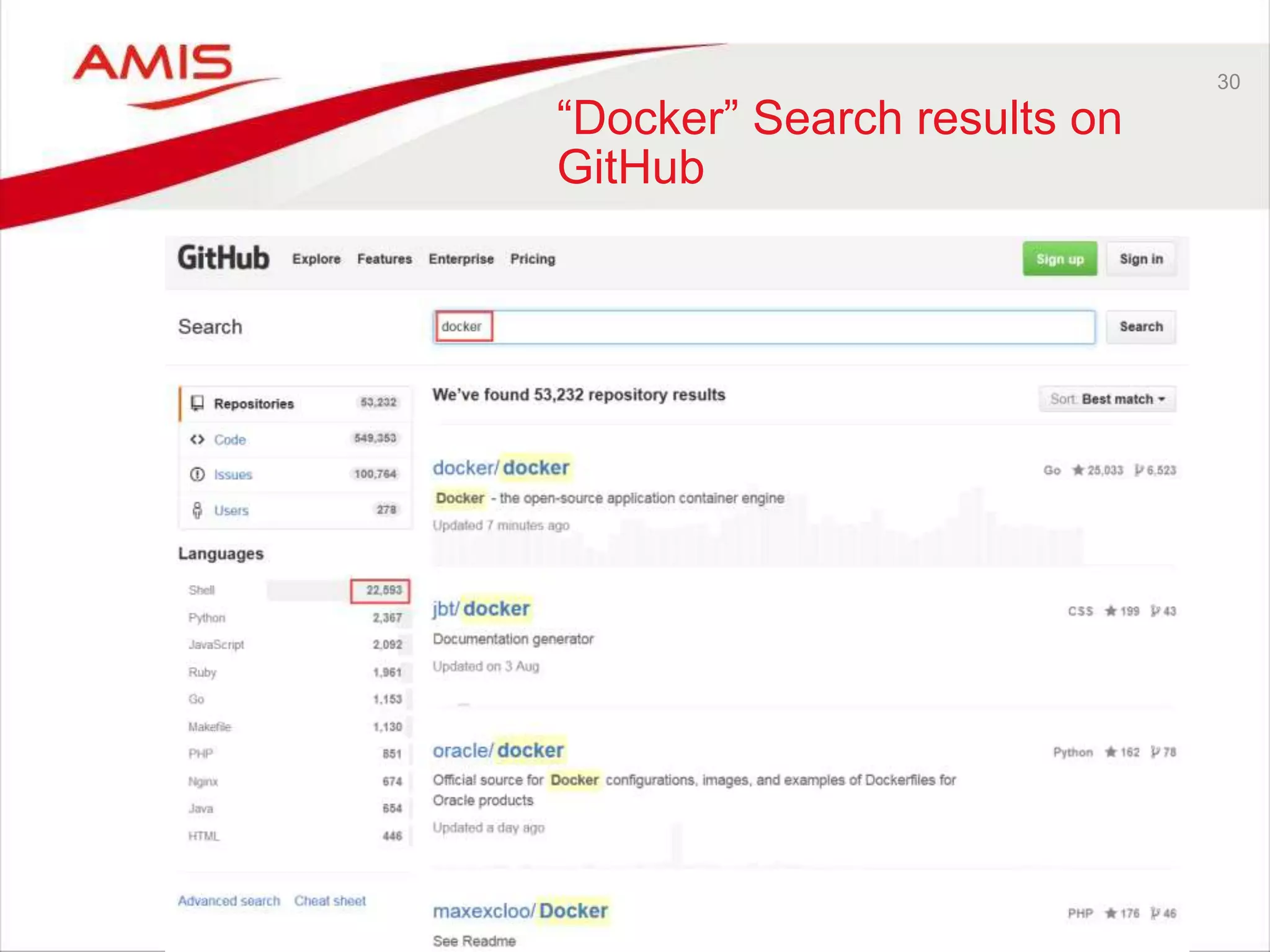
30 “Docker” Search results on GitHub
31 Demo Build
32 Demo run container after build
33 Image and Container Specifics Container Base Image Ubuntu 14.04 COPY RUN RUN Writable Layer run Container “state” tag remove inspect save tar load … pullregistry
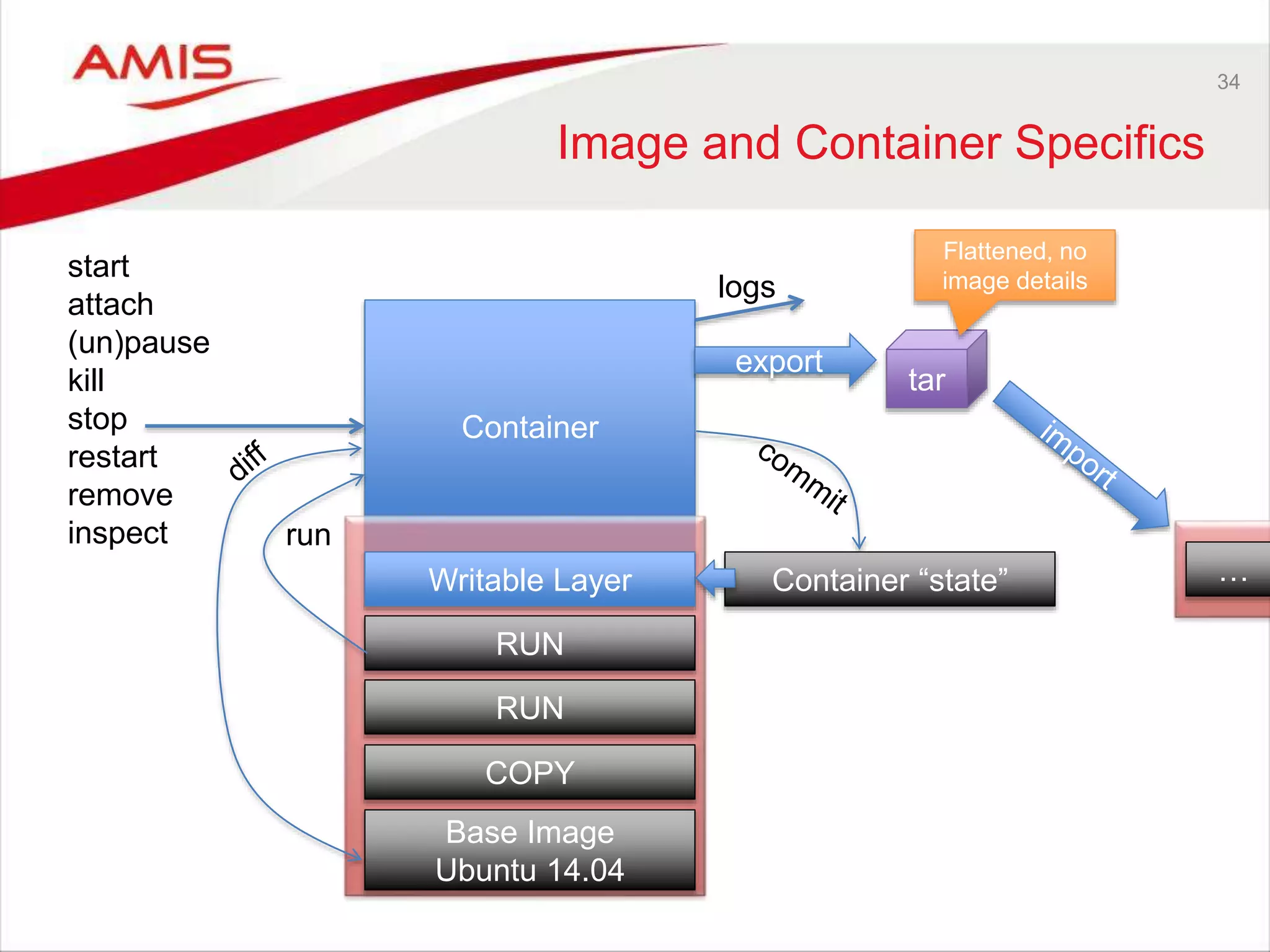
34 Image and Container Specifics Container Base Image Ubuntu 14.04 COPY RUN RUN Writable Layer run start attach (un)pause kill stop restart remove inspect logs Container “state” export tar … Flattened, no image details
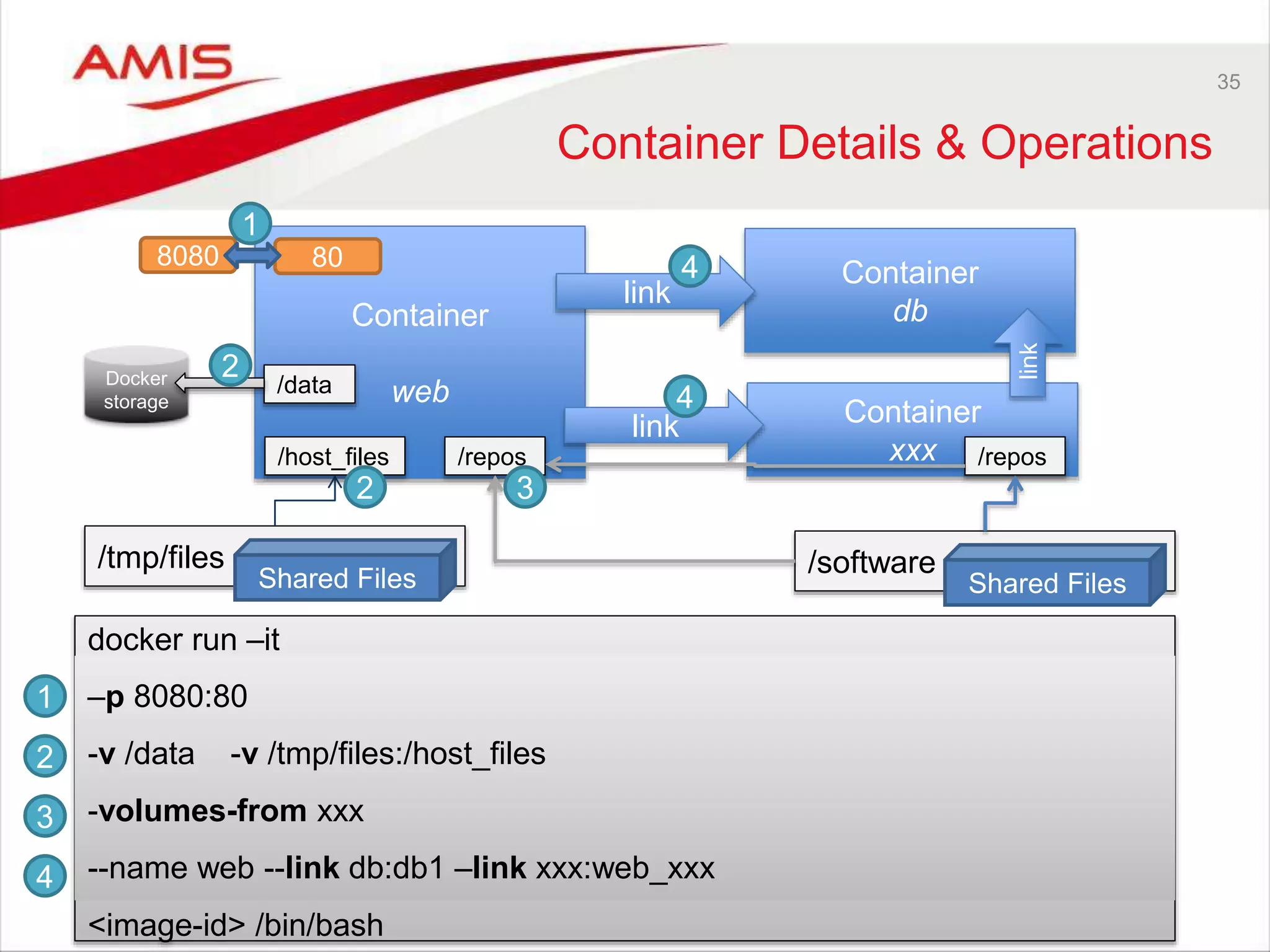
35 Container Details & Operations Container web Container db link docker run –it <image-id> /bin/bash Container xxx link link 808080 /tmp/files Shared Files /data /host_files Docker storage /software Shared Files /repos/repos 1 2 3 4 1 2 3 4 2 4 –p 8080:80 -v /data -v /tmp/files:/host_files -volumes-from xxx --name web --link db:db1 –link xxx:web_xxx
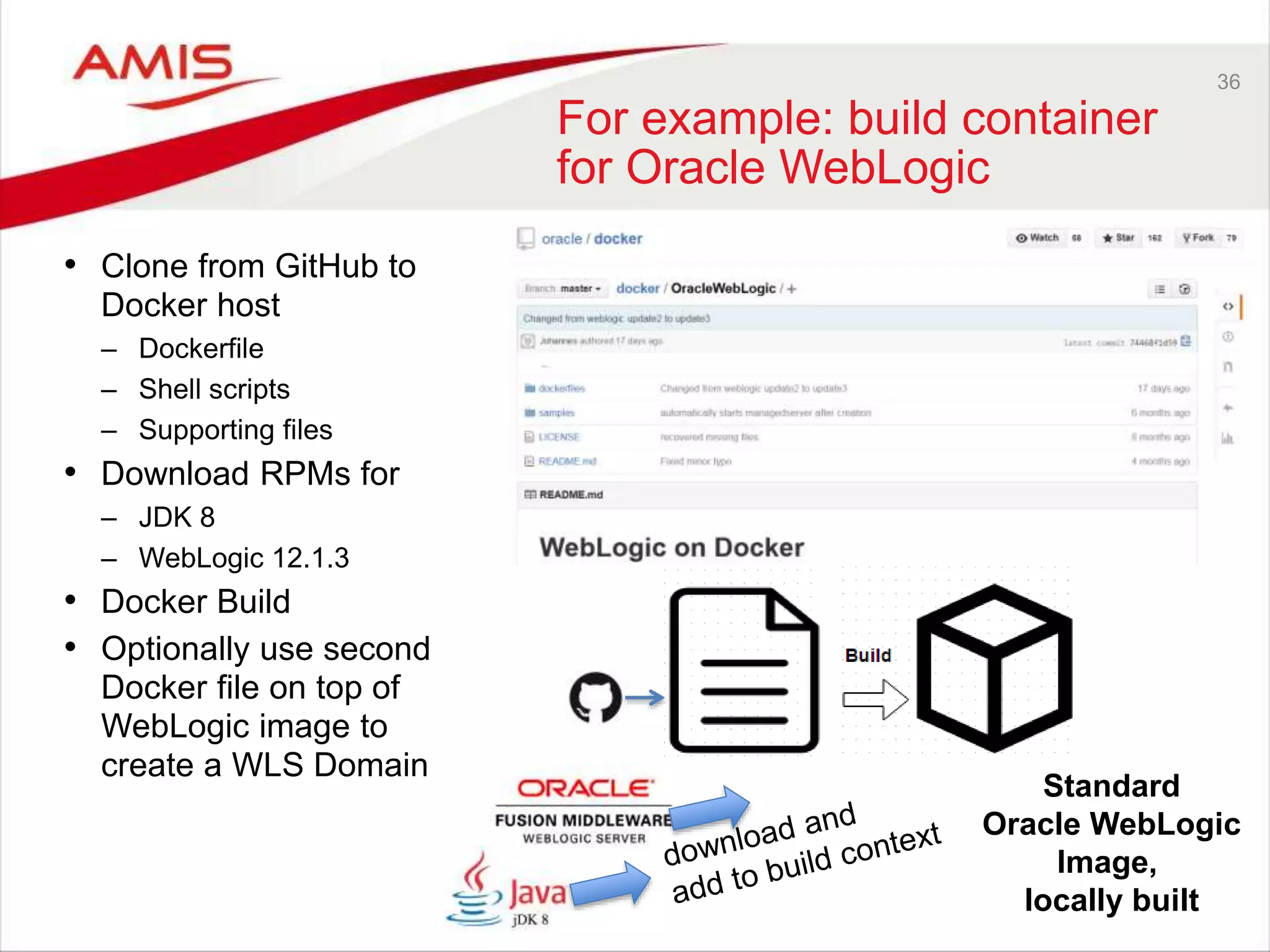
36 For example: build container for Oracle WebLogic • Clone from GitHub to Docker host – Dockerfile – Shell scripts – Supporting files • Download RPMs for – JDK 8 – WebLogic 12.1.3 • Docker Build • Optionally use second Docker file on top of WebLogic image to create a WLS Domain Standard Oracle WebLogic Image, locally built
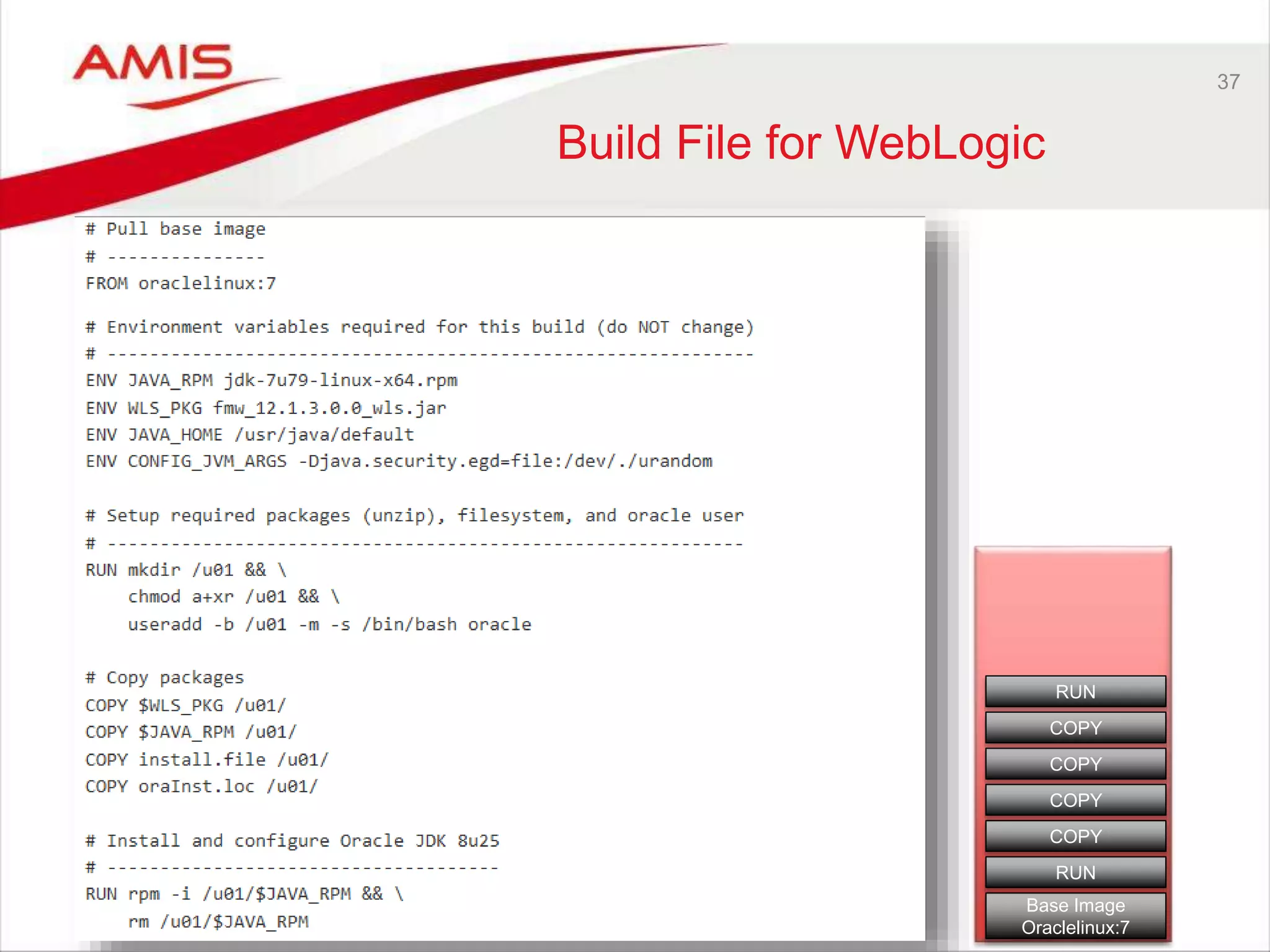
37 Build File for WebLogic Base Image Oraclelinux:7 RUN COPY RUN COPY COPY COPY
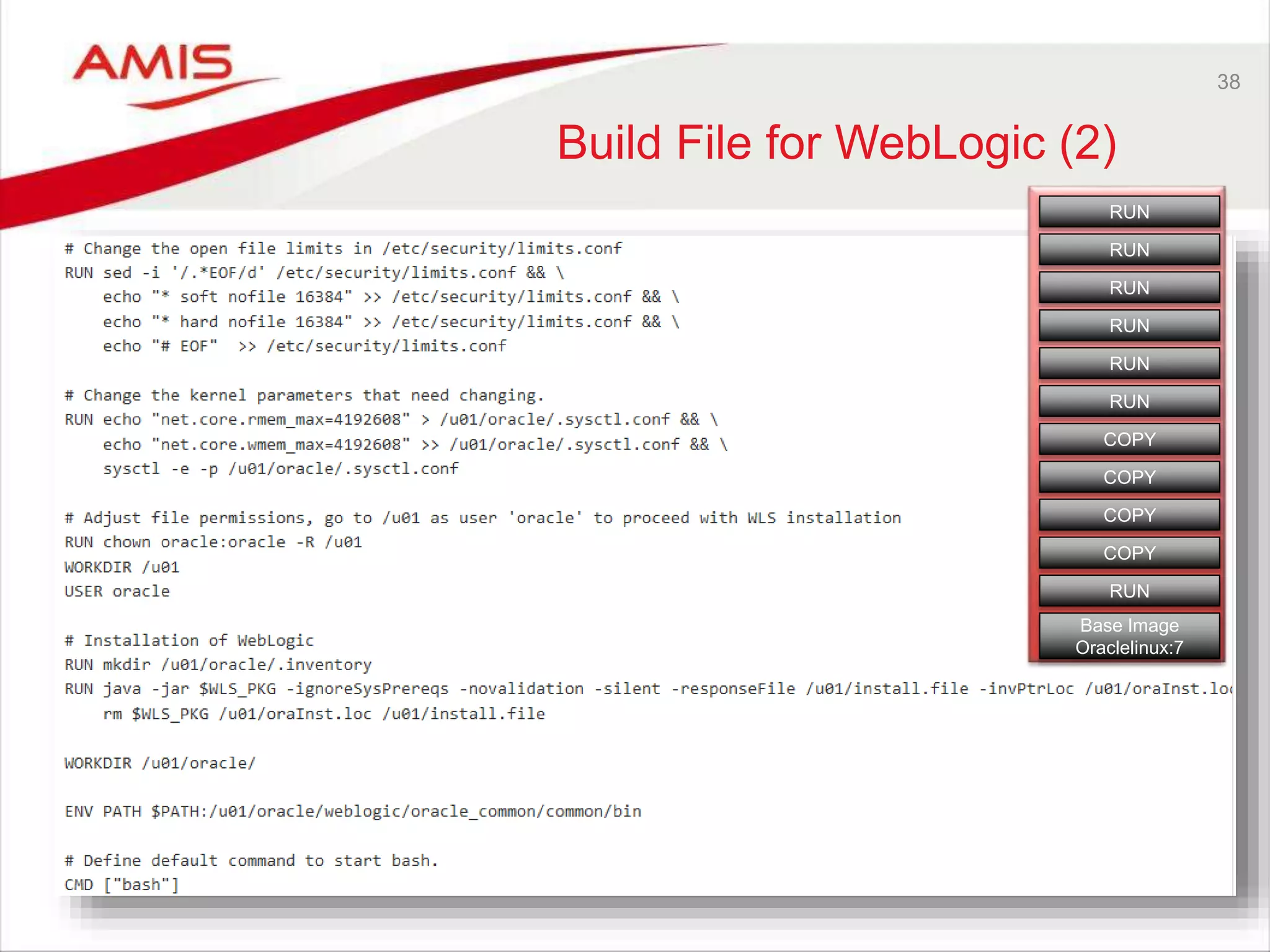
38 Build File for WebLogic (2) Base Image Oraclelinux:7 RUN COPY RUN COPY COPY COPY RUN RUN RUN RUN RUN
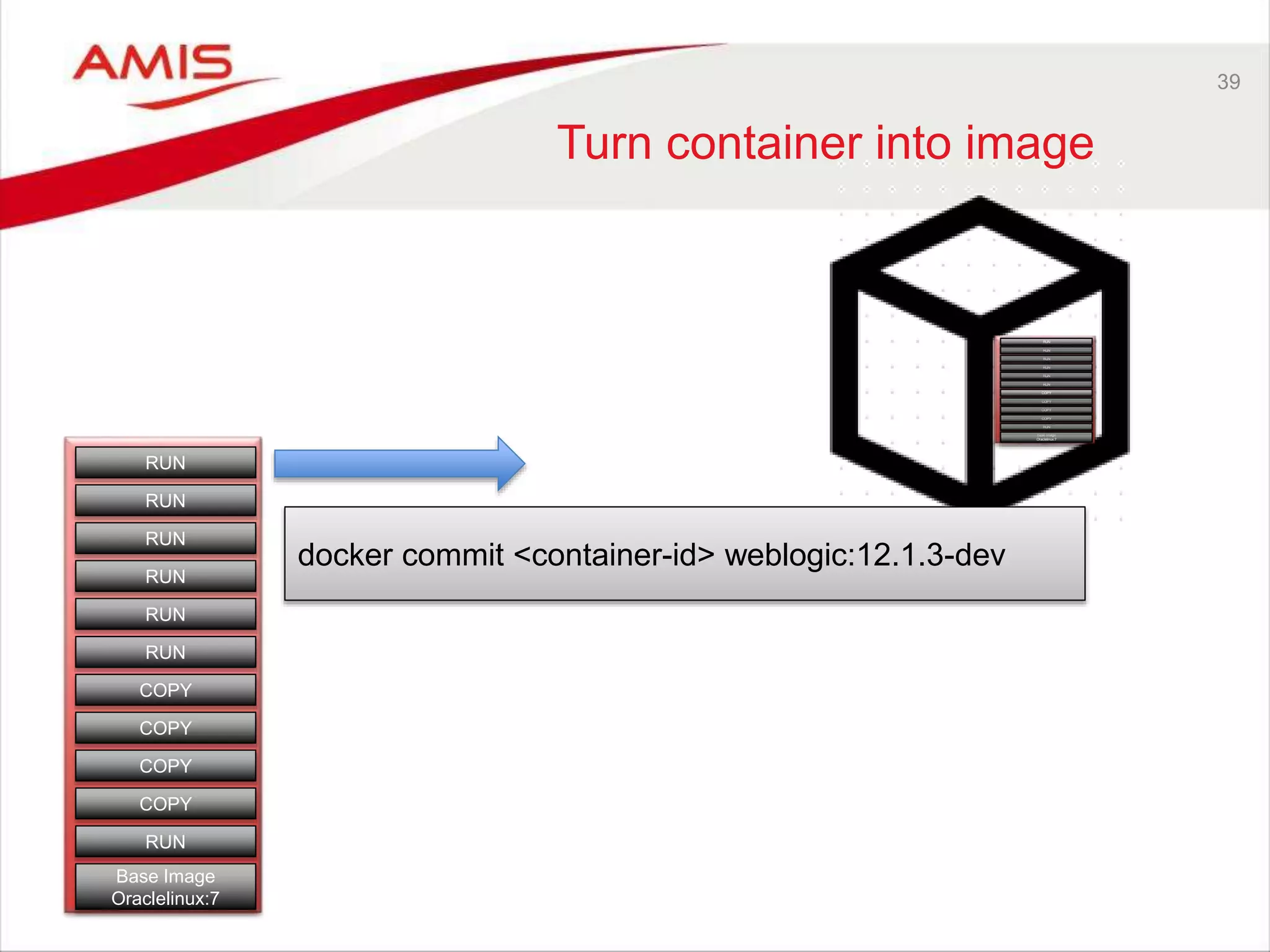
Base Image Oraclelinux:7 RUN COPY RUN COPY COPY COPY RUN RUN RUN RUN RUN 39 Turn container into image Base Image Oraclelinux:7 RUN COPY RUN COPY COPY COPY RUN RUN RUN RUN RUN docker commit <container-id> weblogic:12.1.3-dev
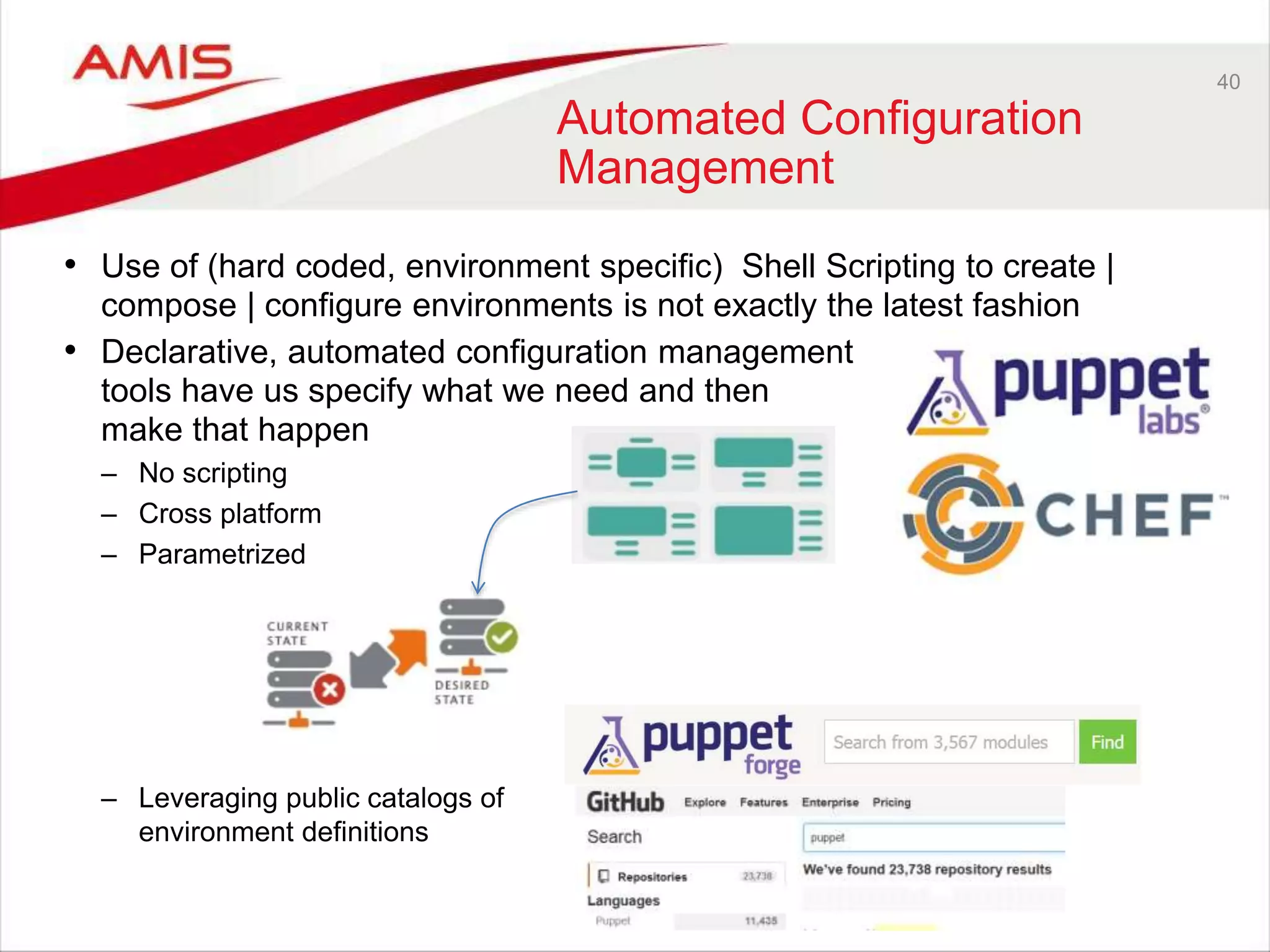
40 Automated Configuration Management • Use of (hard coded, environment specific) Shell Scripting to create | compose | configure environments is not exactly the latest fashion • Declarative, automated configuration management tools have us specify what we need and then make that happen – No scripting – Cross platform – Parametrized – Leveraging public catalogs of environment definitions
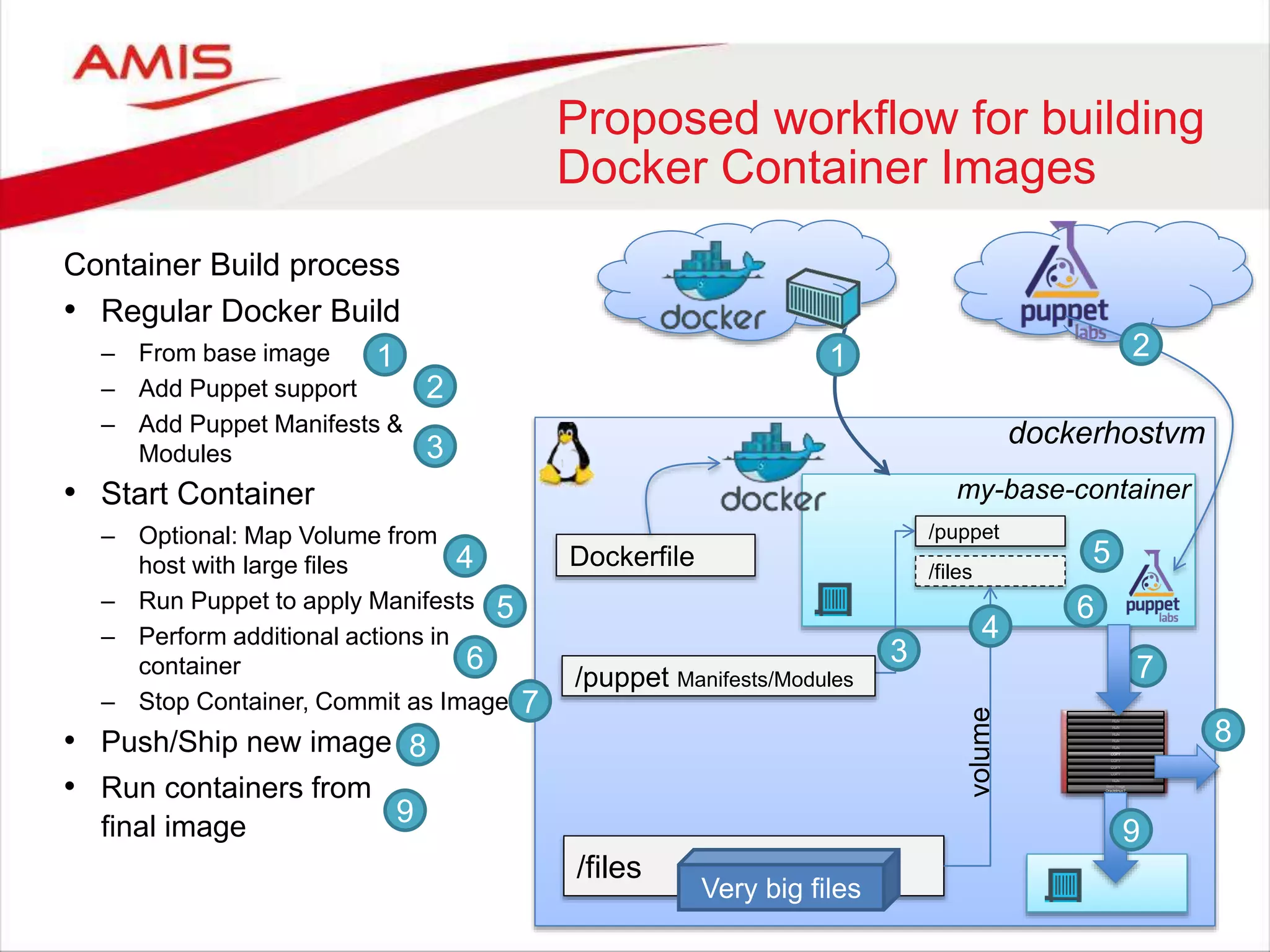
Container Build process • Regular Docker Build – From base image – Add Puppet support – Add Puppet Manifests & Modules • Start Container – Optional: Map Volume from host with large files – Run Puppet to apply Manifests – Perform additional actions in container – Stop Container, Commit as Image • Push/Ship new image • Run containers from final image dockerhostvm Dockerfile my-base-container /files /puppet /files volume 1 Very big files Proposed workflow for building Docker Container Images 2 3 4 5 4 21 3 /puppet Manifests/Modules 5 7 7 Base Image Oraclelinux:7 RUN COPY RUN COPY COPY COPY RUN RUN RUN RUN RUN 6 6 88 9 9
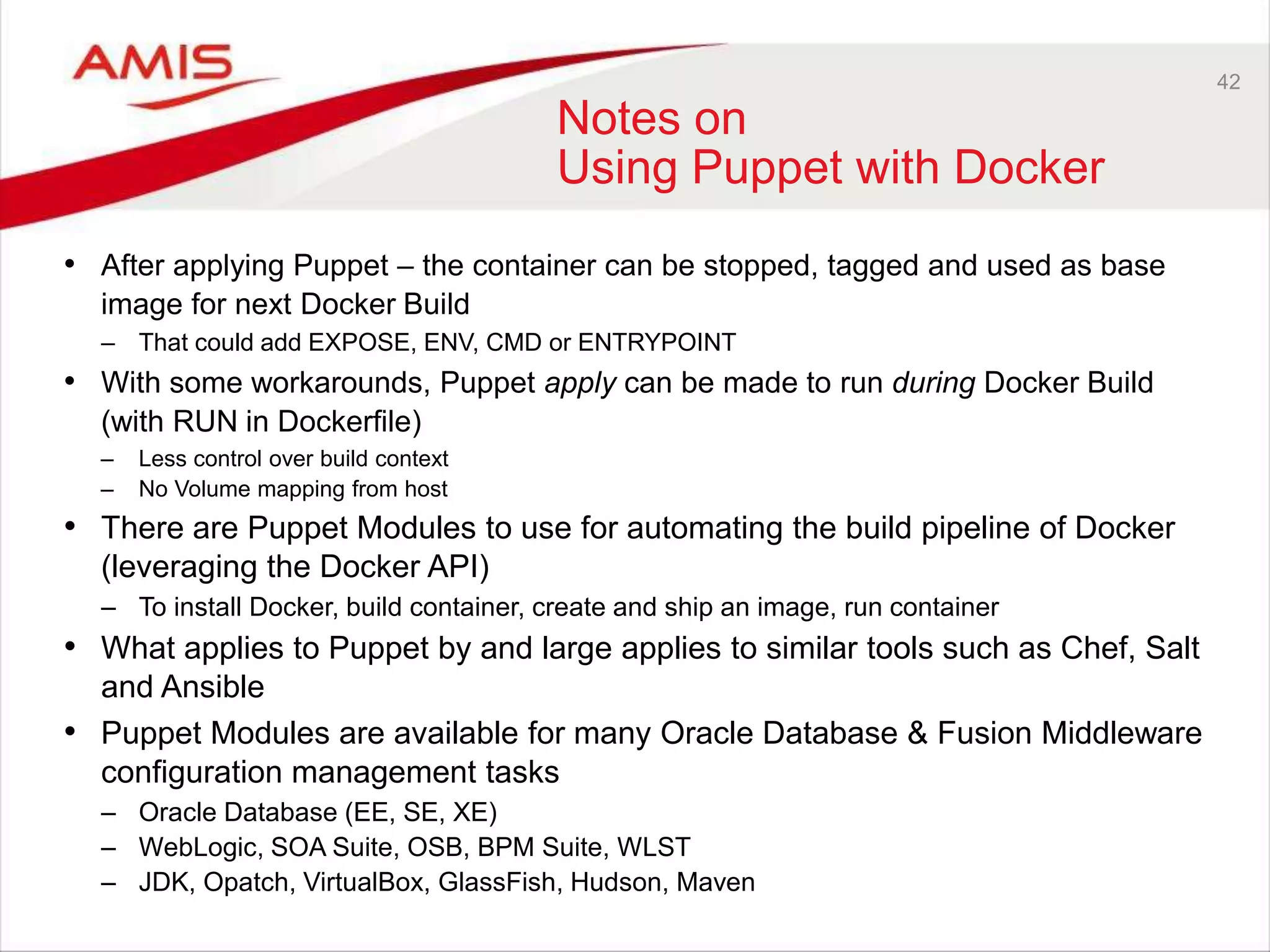
42 Notes on Using Puppet with Docker • After applying Puppet – the container can be stopped, tagged and used as base image for next Docker Build – That could add EXPOSE, ENV, CMD or ENTRYPOINT • With some workarounds, Puppet apply can be made to run during Docker Build (with RUN in Dockerfile) – Less control over build context – No Volume mapping from host • There are Puppet Modules to use for automating the build pipeline of Docker (leveraging the Docker API) – To install Docker, build container, create and ship an image, run container • What applies to Puppet by and large applies to similar tools such as Chef, Salt and Ansible • Puppet Modules are available for many Oracle Database & Fusion Middleware configuration management tasks – Oracle Database (EE, SE, XE) – WebLogic, SOA Suite, OSB, BPM Suite, WLST – JDK, Opatch, VirtualBox, GlassFish, Hudson, Maven
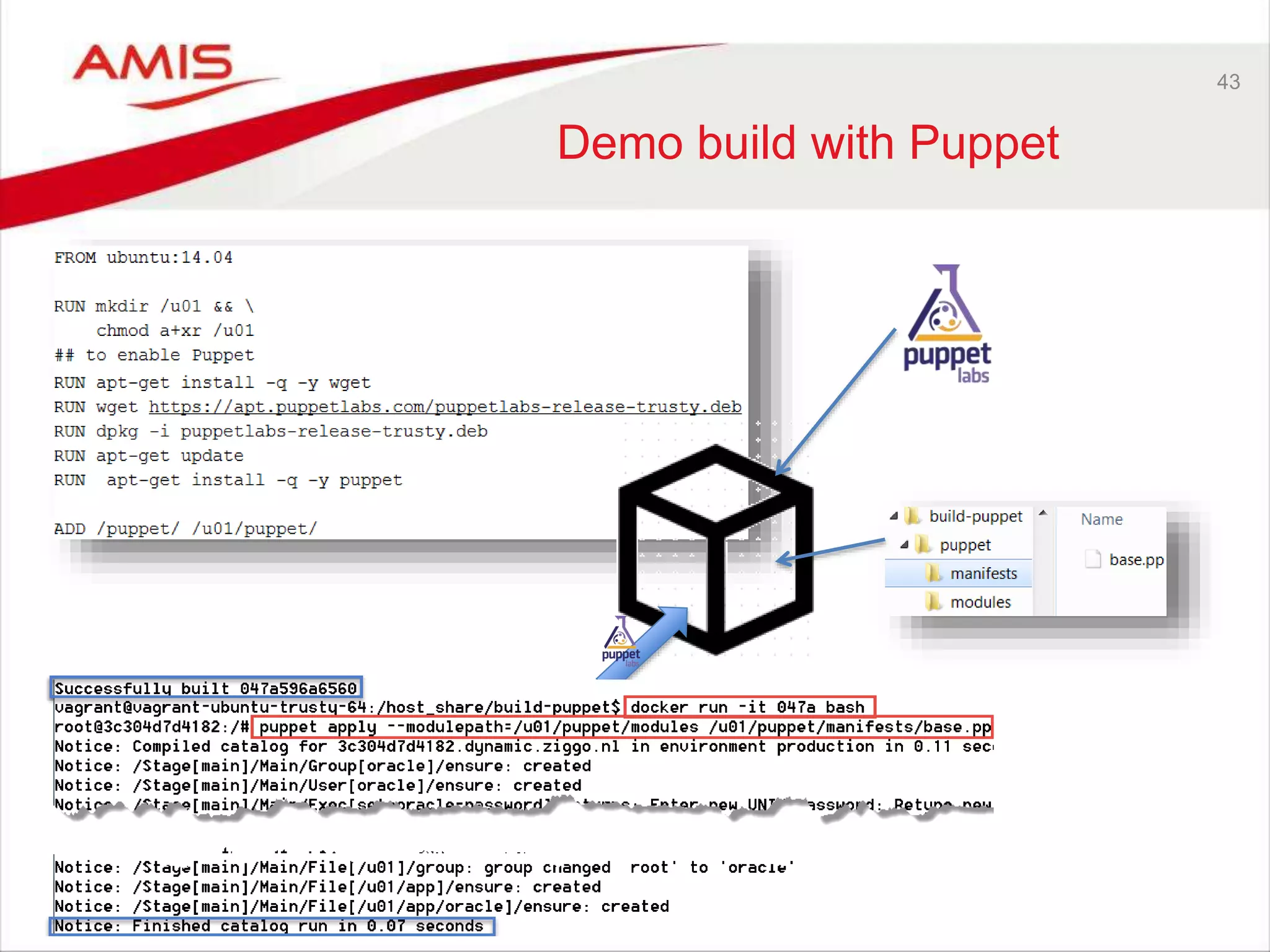
43 Demo build with Puppet
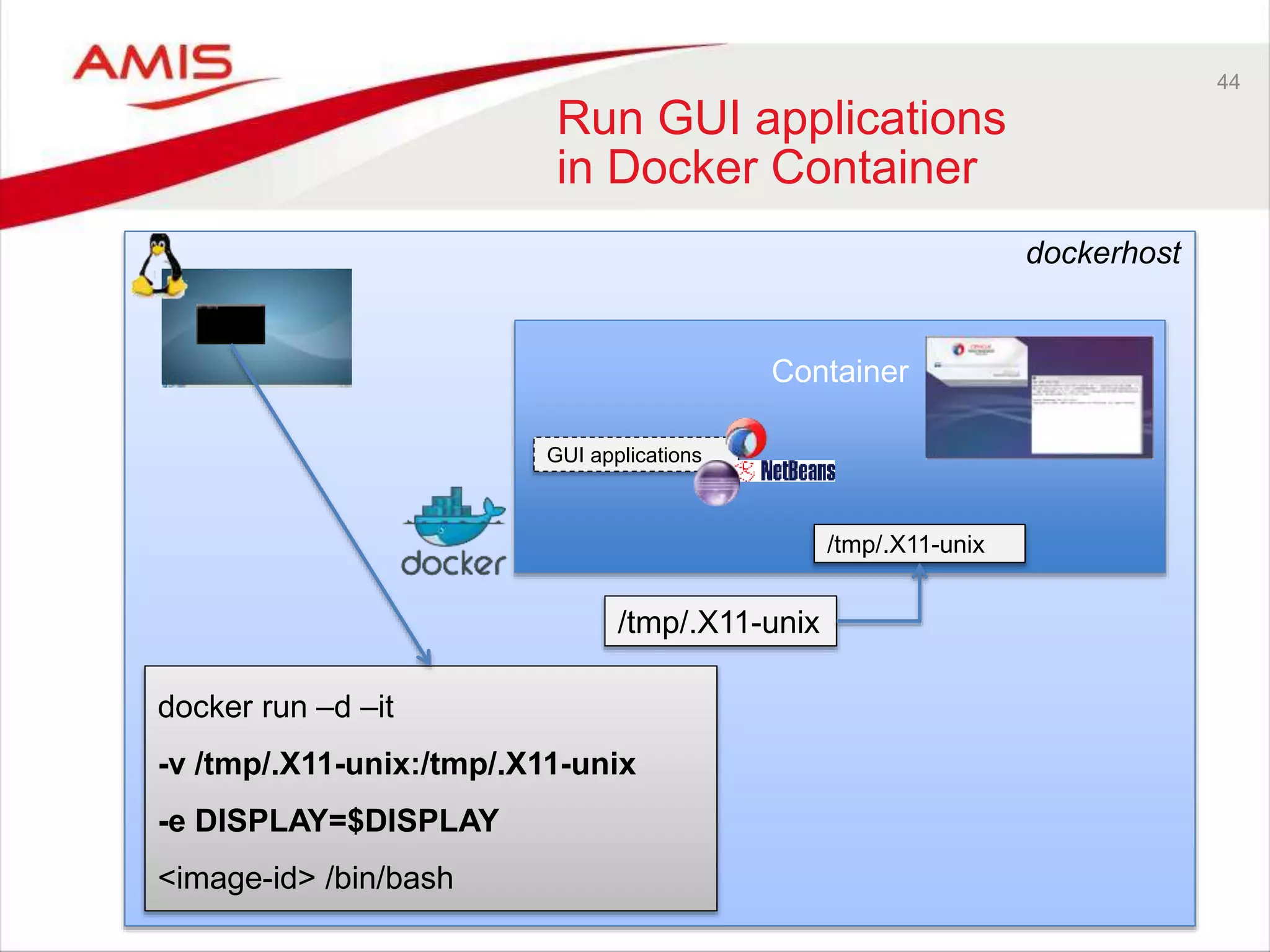
44 Run GUI applications in Docker Container Container docker run –d –it -v /tmp/.X11-unix:/tmp/.X11-unix -e DISPLAY=$DISPLAY <image-id> /bin/bash /tmp/.X11-unix /tmp/.X11-unix dockerhost GUI applications
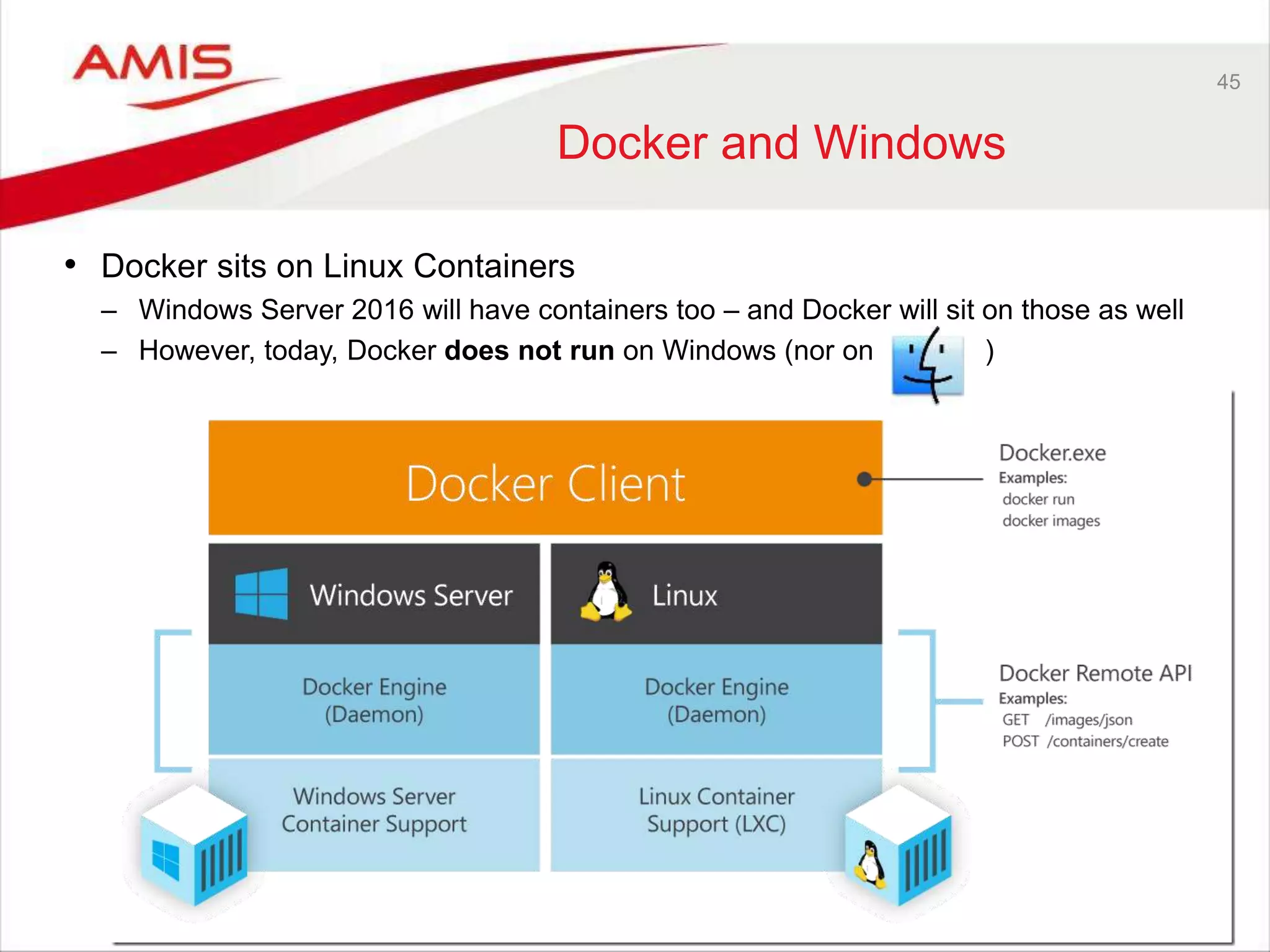
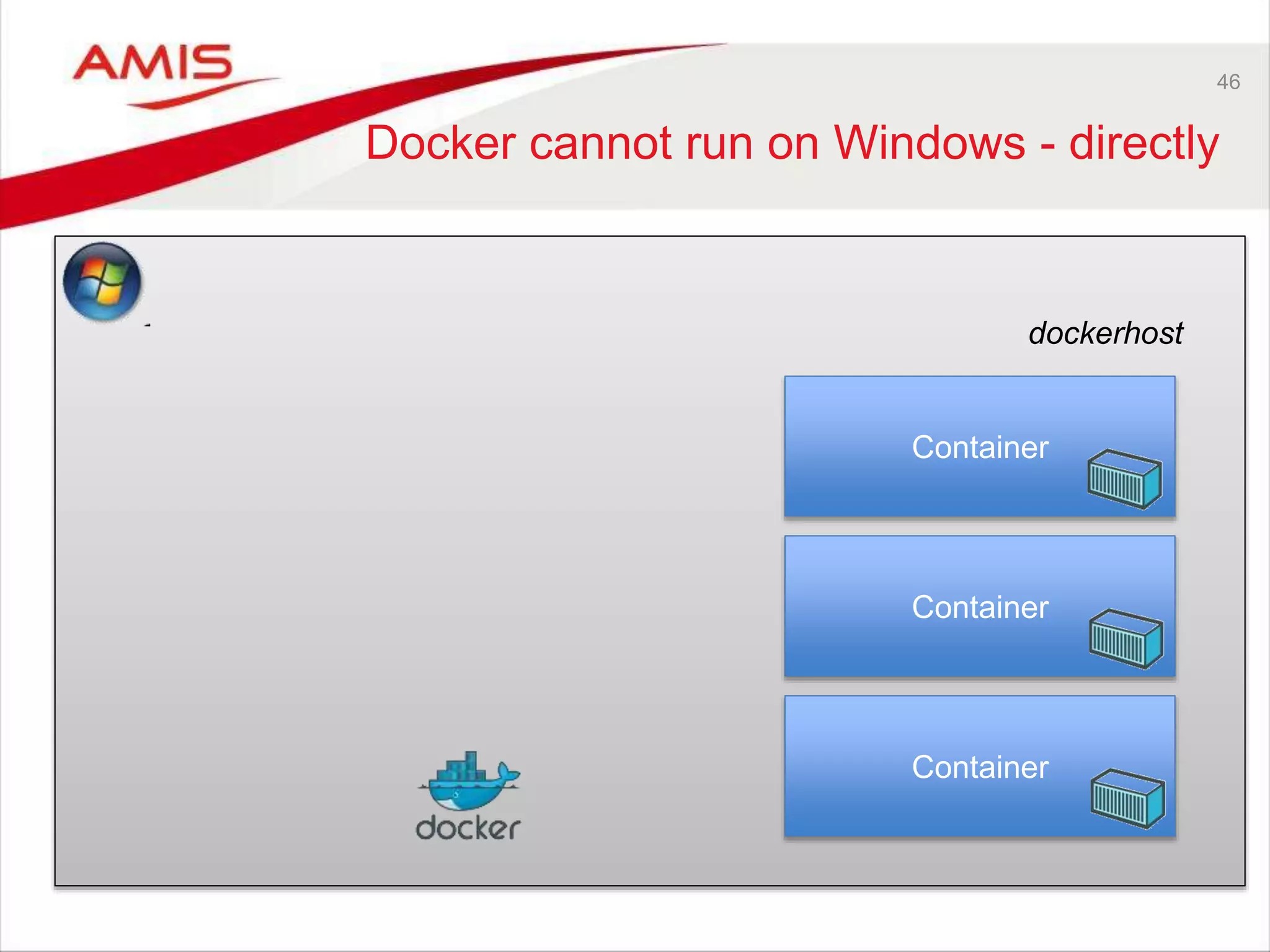
45 Docker and Windows • Docker sits on Linux Containers – Windows Server 2016 will have containers too – and Docker will sit on those as well – However, today, Docker does not run on Windows (nor on )
46 Docker cannot run on Windows - directly dockerhost Container Container Container
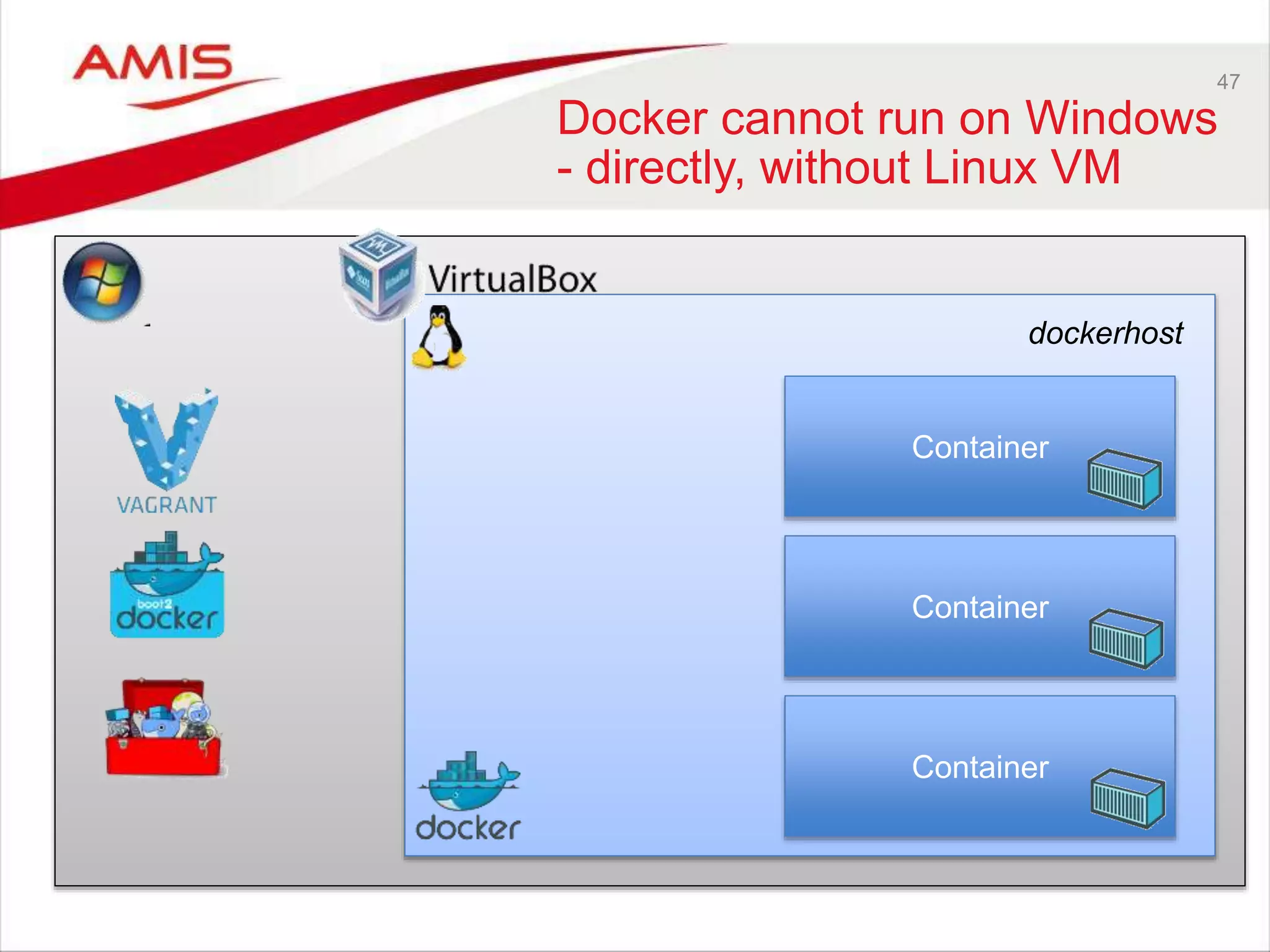
47 Docker cannot run on Windows - directly, without Linux VM dockerhost Container Container Container
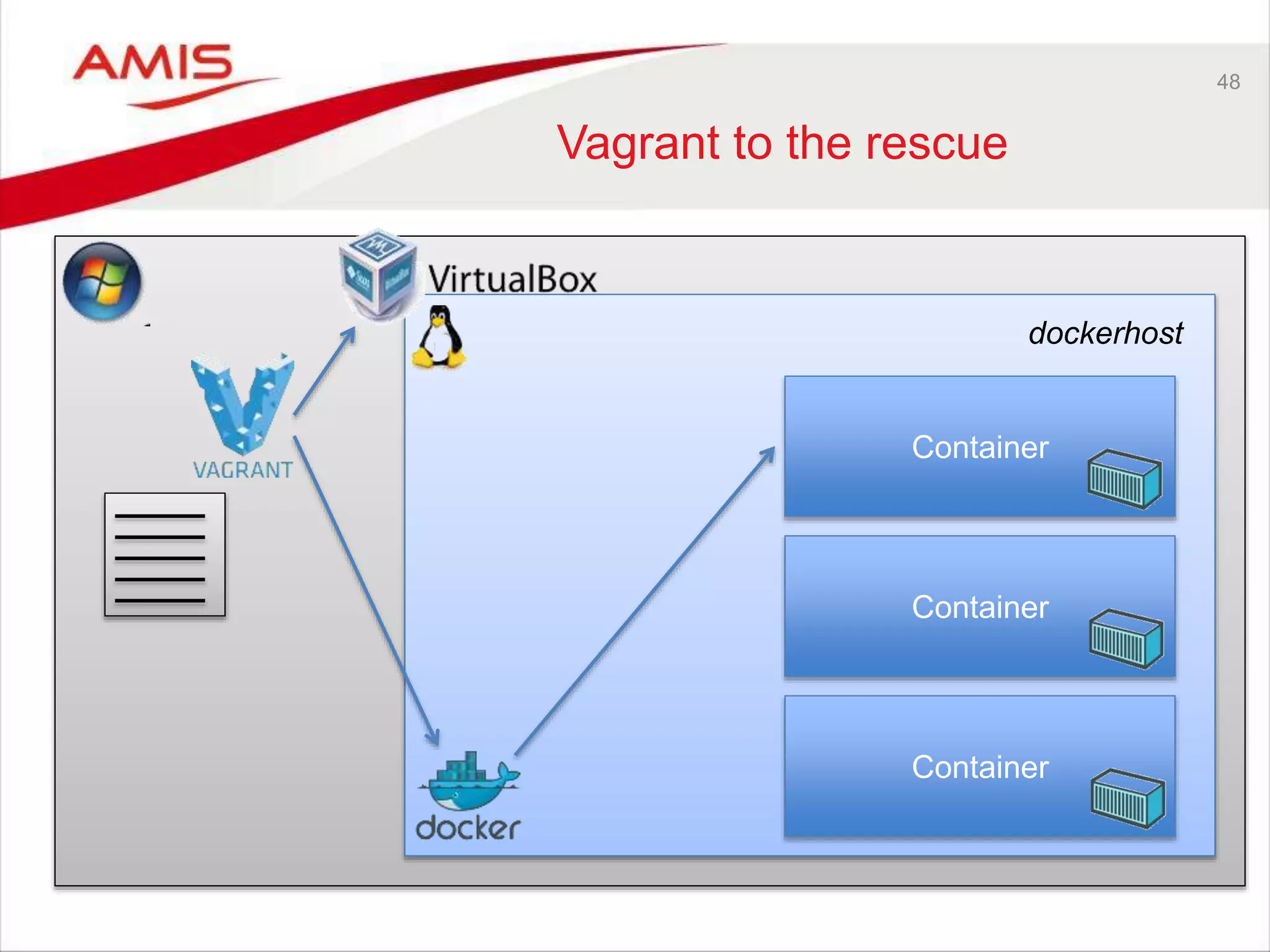
48 Vagrant to the rescue dockerhost Container Container Container
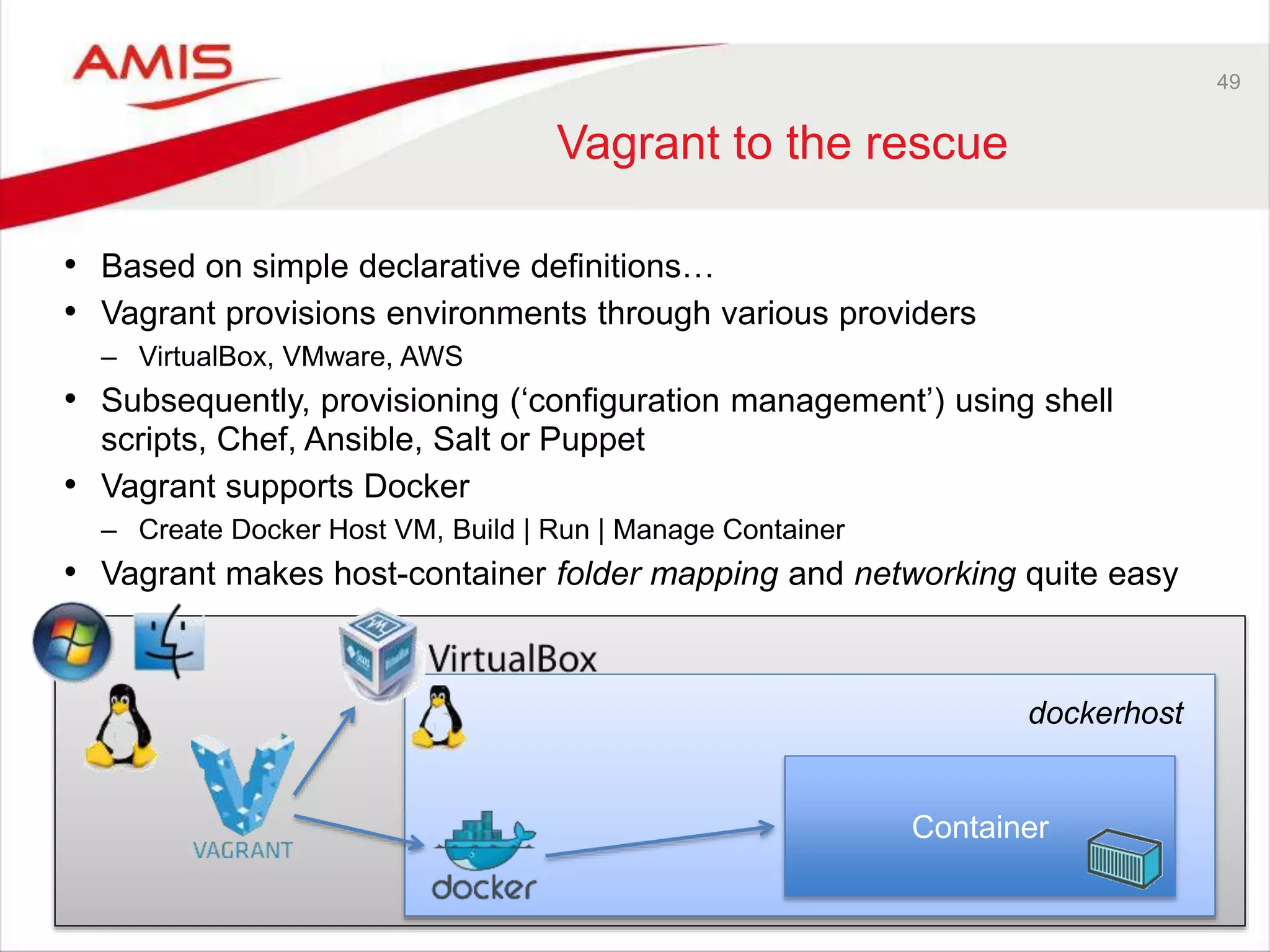
49 Vagrant to the rescue • Based on simple declarative definitions… • Vagrant provisions environments through various providers – VirtualBox, VMware, AWS • Subsequently, provisioning (‘configuration management’) using shell scripts, Chef, Ansible, Salt or Puppet • Vagrant supports Docker – Create Docker Host VM, Build | Run | Manage Container • Vagrant makes host-container folder mapping and networking quite easy dockerhost Container
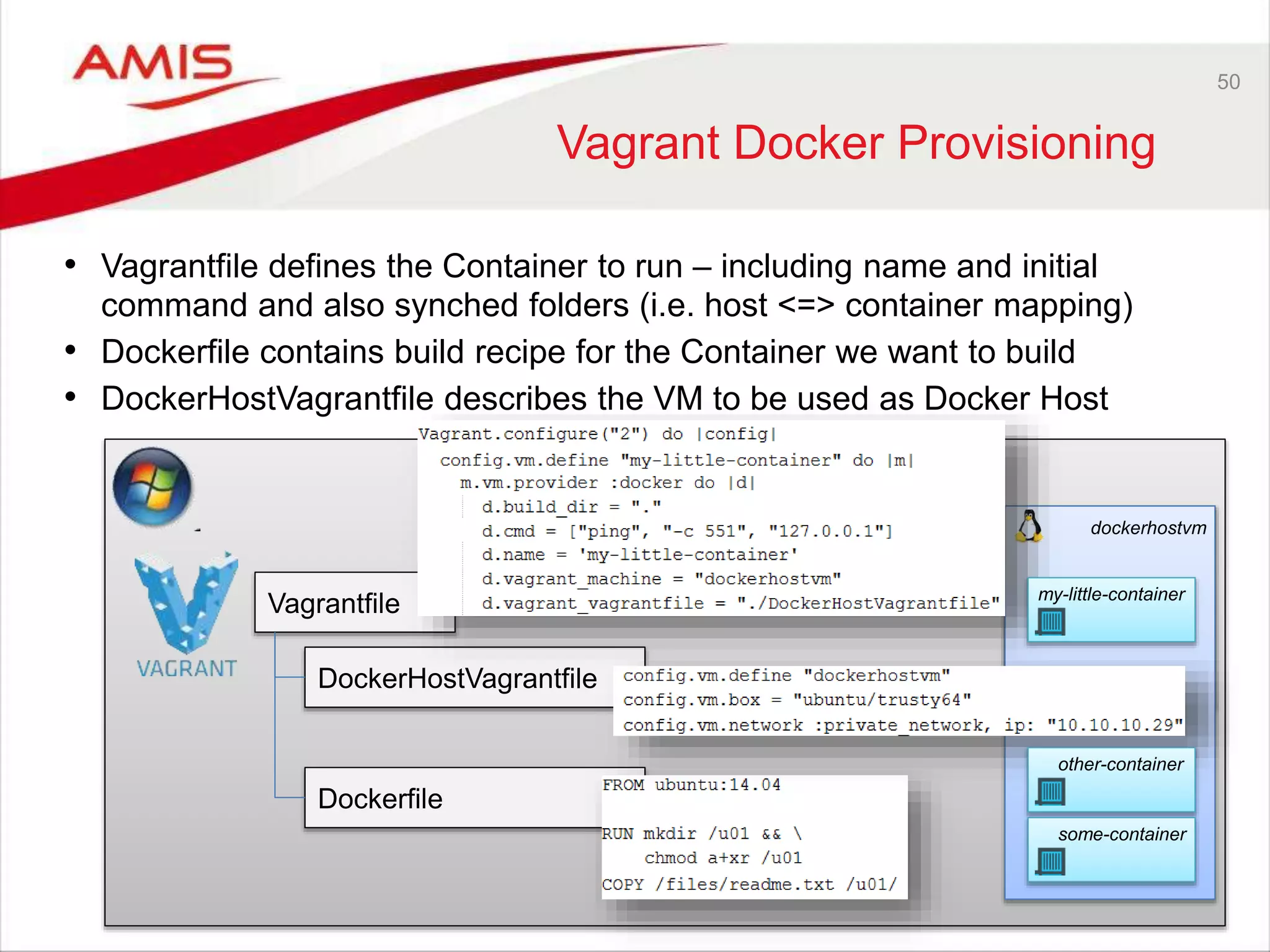
dockerhostvm 50 Vagrant Docker Provisioning • Vagrantfile defines the Container to run – including name and initial command and also synched folders (i.e. host <=> container mapping) • Dockerfile contains build recipe for the Container we want to build • DockerHostVagrantfile describes the VM to be used as Docker Host Vagrantfile DockerHostVagrantfile Dockerfile my-little-container other-container some-container
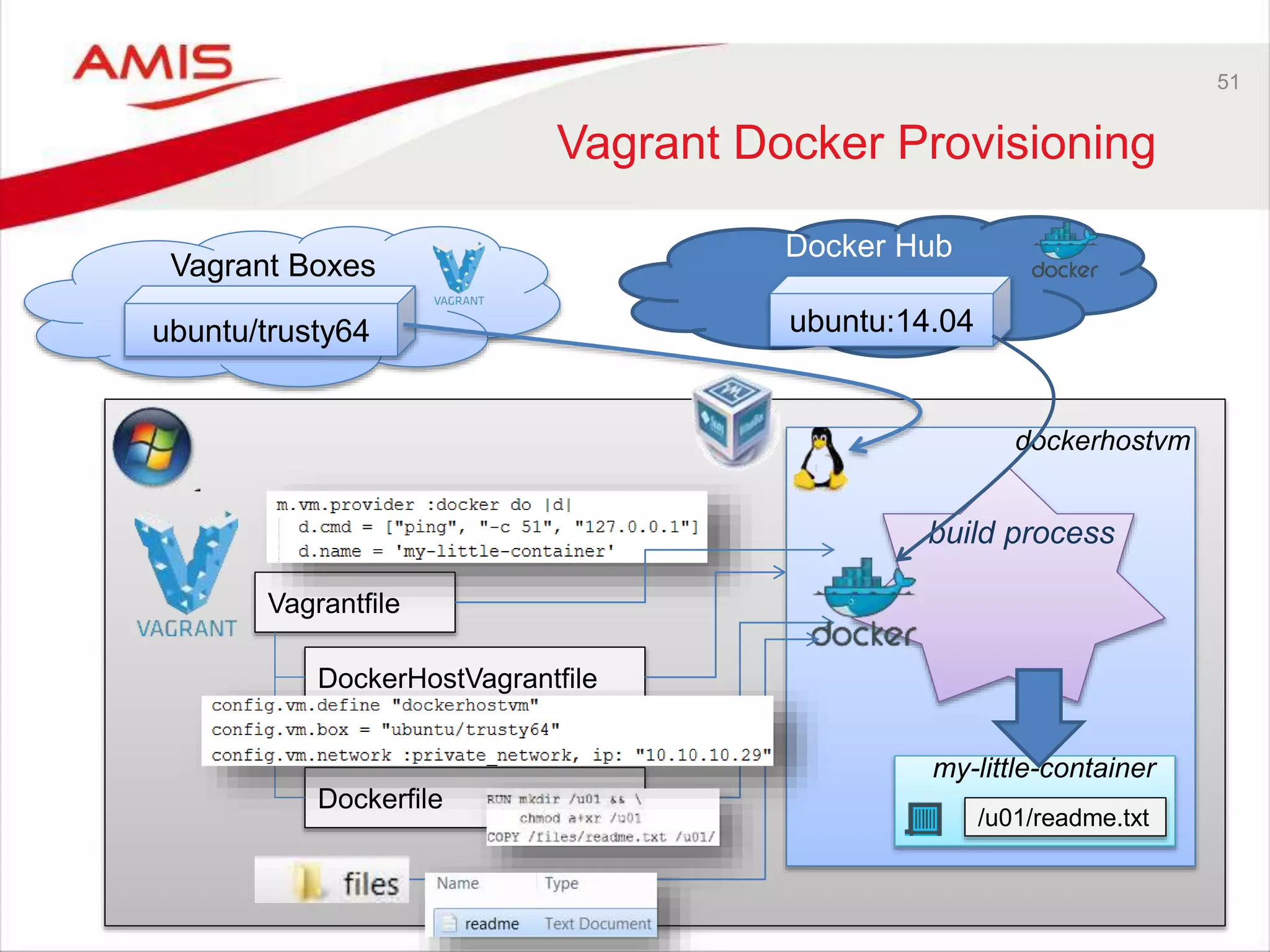
51 Vagrant Docker Provisioning dockerhostvm Vagrantfile DockerHostVagrantfile Dockerfile my-little-container build process Docker Hub ubuntu:14.04 /u01/readme.txt Vagrant Boxes ubuntu/trusty64
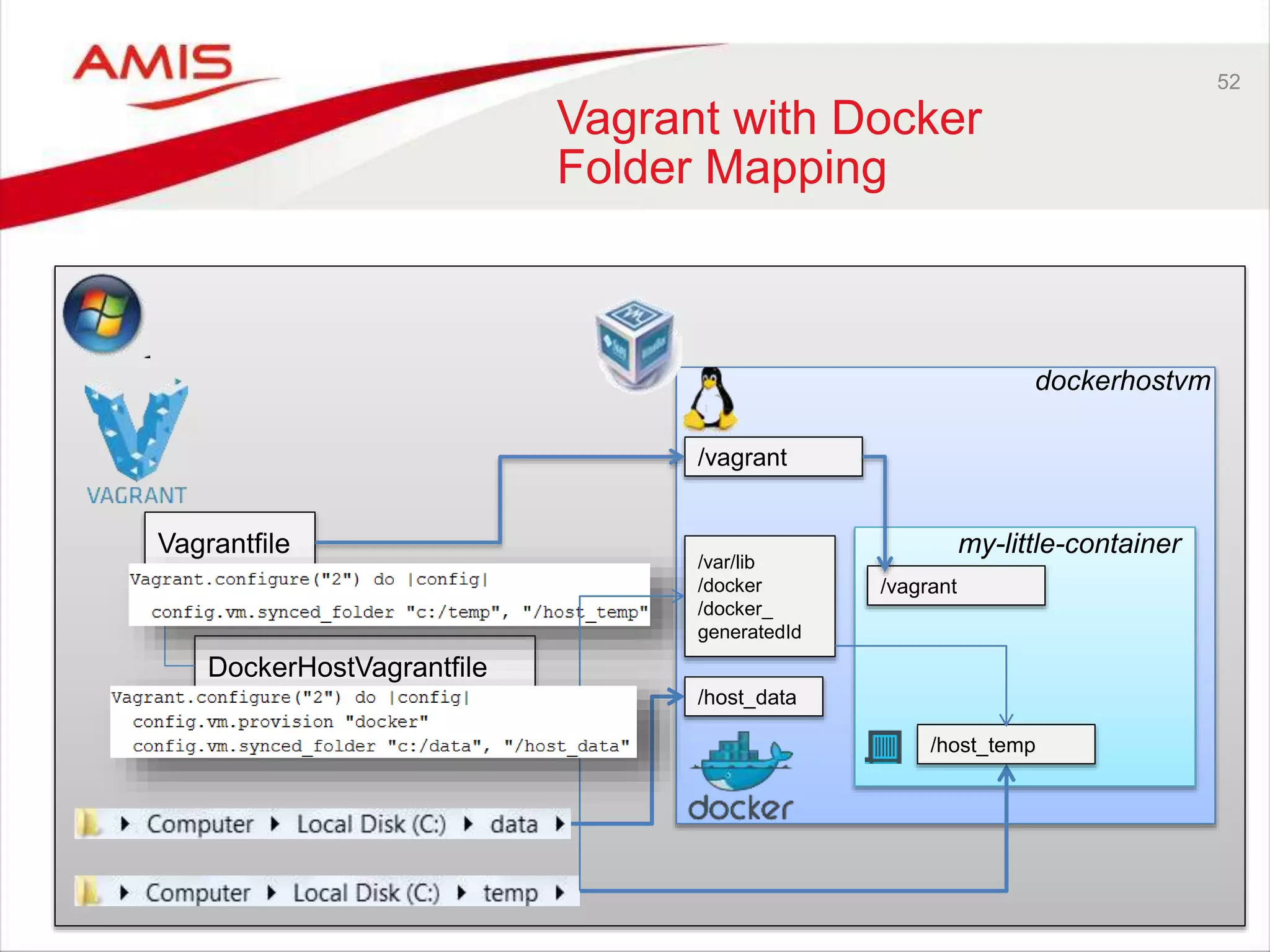
52 Vagrant with Docker Folder Mapping dockerhostvm Vagrantfile DockerHostVagrantfile my-little-container /vagrant /vagrant /host_temp /host_data /var/lib /docker /docker_ generatedId
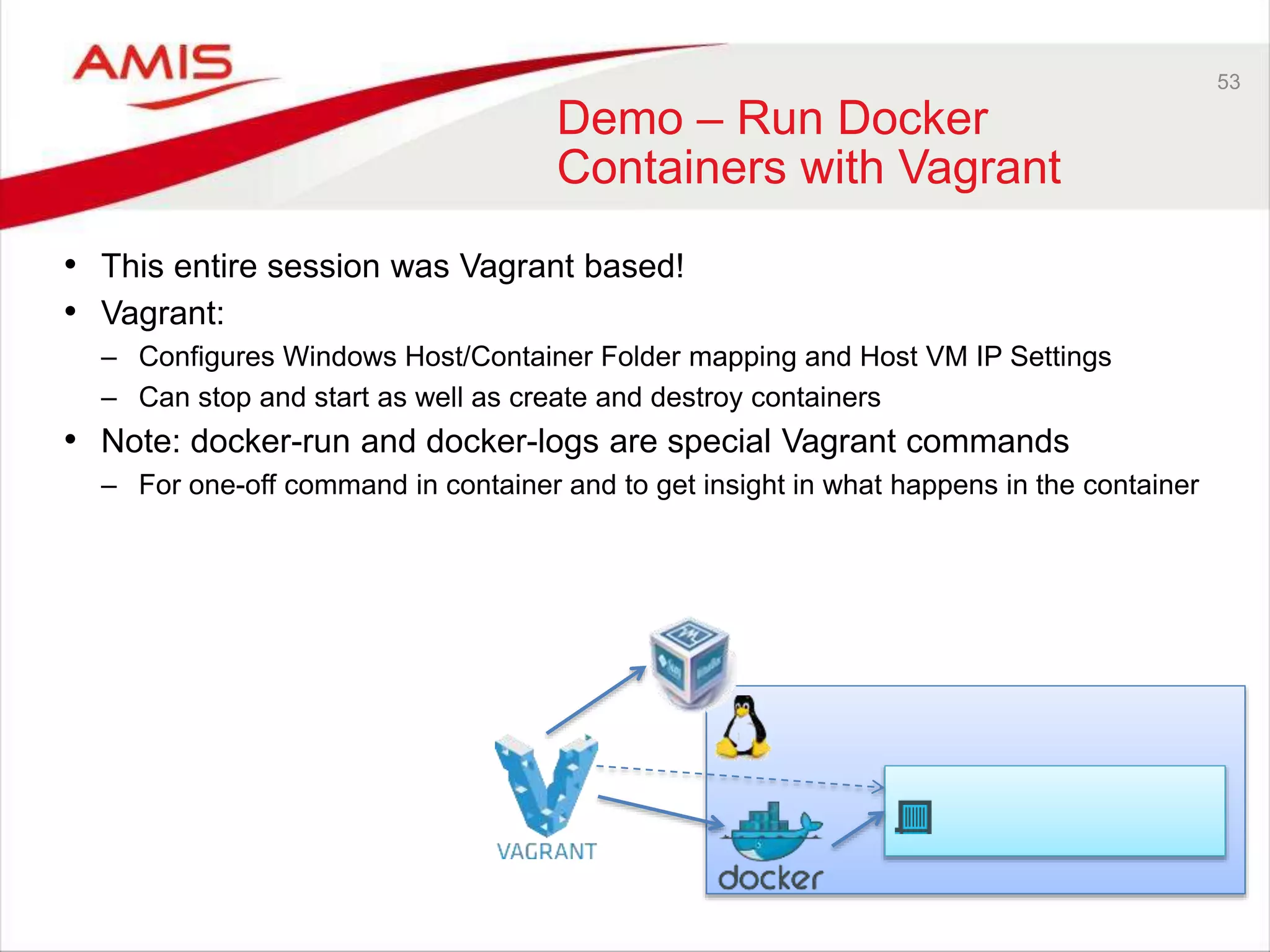
53 Demo – Run Docker Containers with Vagrant • This entire session was Vagrant based! • Vagrant: – Configures Windows Host/Container Folder mapping and Host VM IP Settings – Can stop and start as well as create and destroy containers • Note: docker-run and docker-logs are special Vagrant commands – For one-off command in container and to get insight in what happens in the container
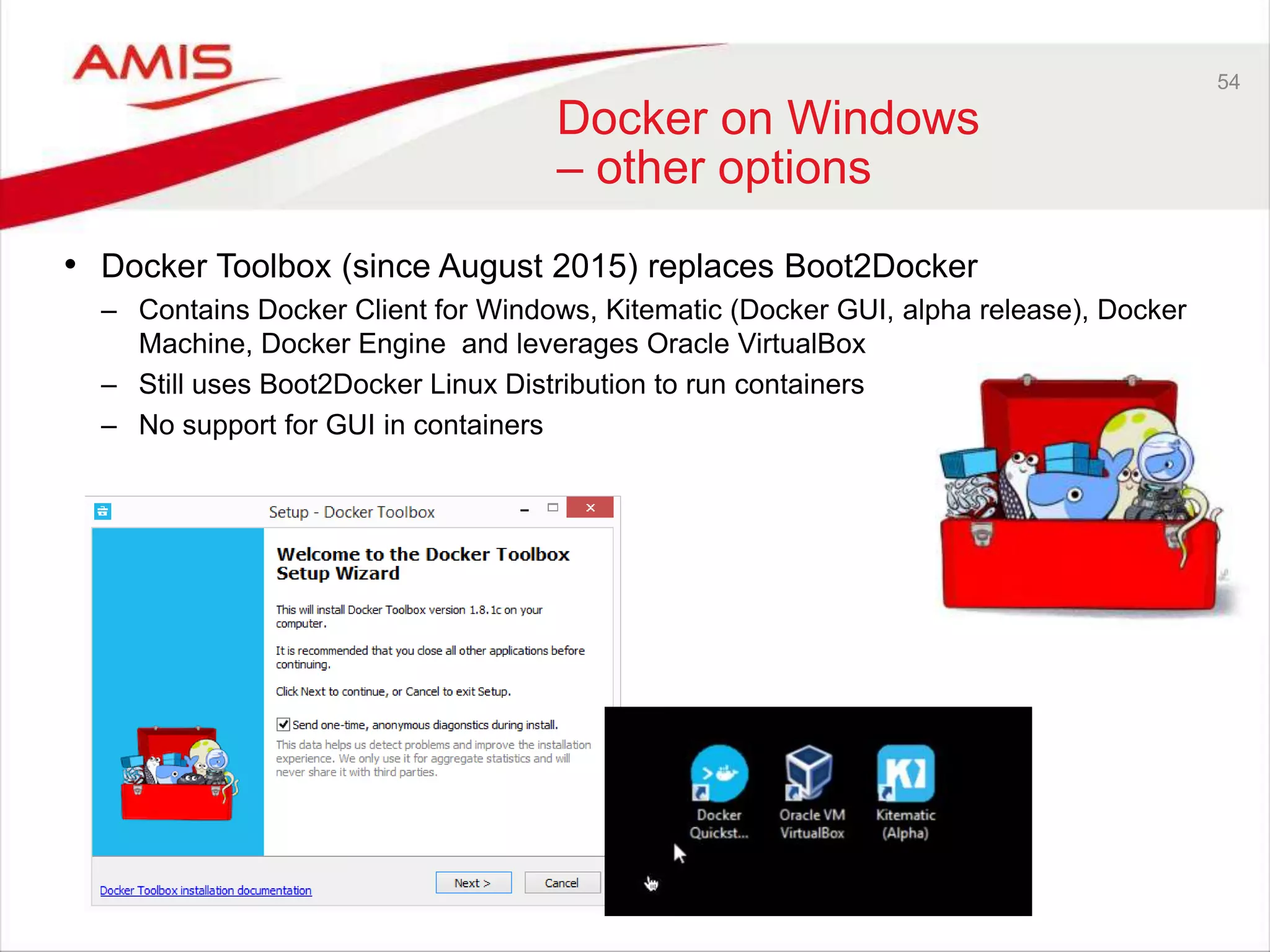
54 Docker on Windows – other options • Docker Toolbox (since August 2015) replaces Boot2Docker – Contains Docker Client for Windows, Kitematic (Docker GUI, alpha release), Docker Machine, Docker Engine and leverages Oracle VirtualBox – Still uses Boot2Docker Linux Distribution to run containers – No support for GUI in containers
55 Docker Containers Status & Future • Growing adoption beyond innovators and [very] early adopters • Growing number of tools around Docker – Monitoring, Management, Clustering, … • Windows – support for containers in Windows 2016 • Solaris Zones to work with Docker Client • Cloud Support – By a fast evolving number of IaaS/PaaS cloud providers – AWS, Azure, Google Container Engine • Open Container Initiative • docker.con (EU)
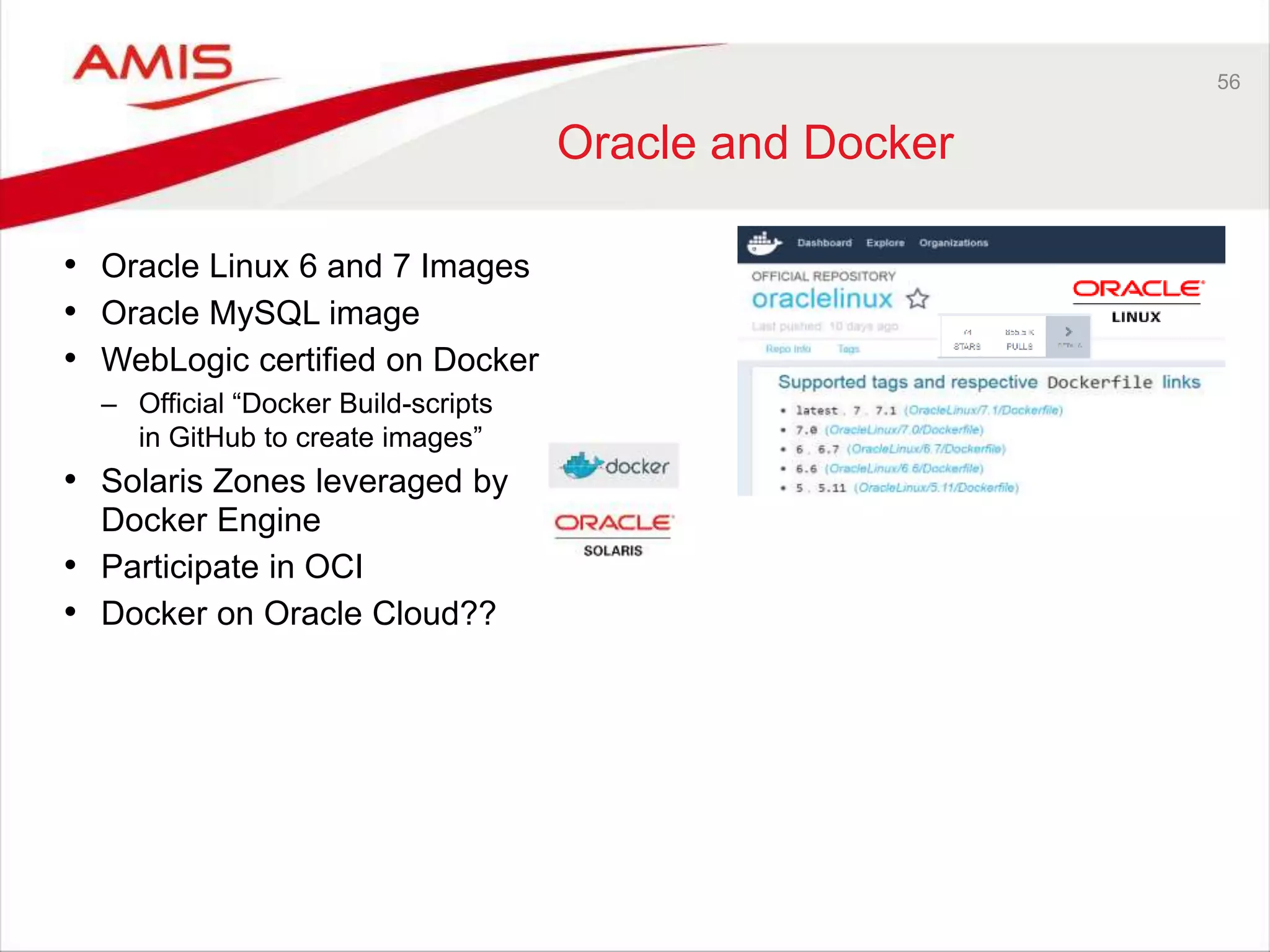
56 Oracle and Docker • Oracle Linux 6 and 7 Images • Oracle MySQL image • WebLogic certified on Docker – Official “Docker Build-scripts in GitHub to create images” • Solaris Zones leveraged by Docker Engine • Participate in OCI • Docker on Oracle Cloud??
57 Summary • Docker helps you run isolated environments in a quick, lean way – Containers are far more light weight, yet almost as stand alone as VMs – Hundreds of official Docker Container base images are publicly available • Docker Containers are micro services – with an exposed interface to inject dependencies (volume, link, environment settings) • Share | Distribute | Publish your complete, working environments is very easy using Docker container images – Either push to registry or save as TAR • CD could become ‘Container Delivery’ – deliver software + environment • Many cloud providers can run Docker Containers • Do not attempt to build containers completely from Dockerfile – Leverage declarative configuration management tools such as Puppet and Chef • Tools like Vagrant allow you to easily work with Docker on a non-Linux host
58 What did you get from this session? • What is this Docker thing and why is it a hype? • How do Containers compare to Virtual Machines? • How can I build, ship [| share | distribute] and run containers? – On my local machine and in the cloud? • A way to more efficiently leverage the physical resources in my computer? – than through juggling VMs • A structured and fast way to try out new software – Without messing up my local environment. • What tools do I need to get started with Docker on my non-Linux laptop? • What is the status of Docker and where is it going? • How can I get going on my own with Docker? REPEAT SHORT URL FOR RESOURCES
Blog: http://technology.amis.nl Twitter: lucasjellema Mail: lucasjellema@gmail.com

Java Developer Intro to Environment Management with Vagrant, Puppet, and Docker (JavaOne 2015, BOF2817)

  • 1.
    Lucas Jellema JavaOne 2015,San Francisco, 26th October 2015 Java Developer Intro to Environment Management with Vagrant, Puppet, and Docker
  • 2.
  • 3.
    3 Who are you? •Developer or Administrator – Java, Oracle, Web, NoSQL, … – Perhaps on a non-Linux laptop • Limited physical computer resources – CPU, Memory, Disk Space • Inclined to try out new stuff – frameworks, tools, products, … – Quickly, smoothly, without messing up your environment • Create things you want to share – Without creating elaborate instructions for installing and configuring – Without discussions around ‘it works on my machine’ , ‘send me your config files’ • Interested in running stuff on “the cloud” • No Linux allergy • Interested in ‘that Docker thing’ • (a bit like me)
  • 4.
    4 This session willgive you • What is this Docker thing and why is it a hype? • How do Containers compare to Virtual Machines? • How can I build, ship [| share | distribute] and run containers? – On my local machine and in the cloud? • A way to more efficiently leverage the physical resources in my computer? – than through juggling VMs • A structured and fast way to try out new software – Without messing up my local environment. • What tools do I need to get started with Docker on my non-Linux laptop? • What is the status of Docker and where is it going? • How can I get going on my own with Docker?
  • 5.
    5 Supporting Materials • Theslides for this presentation • All demo scripts • Extended slides with more details and examples • Workshop Introduction Docker + Vagrant + Puppet http://bit.ly/1LWZZ4s
  • 6.
    6 Run • Docker Containerruns Linux – as does the host • Container is isolated - feels as stand alone run time environment – Directory structure, IP address, users and groups • Shared resources with underlying host (and therefore other containers) – memory, CPU, host • Light weight: – Quick starting up and stopping – Leverages underlying Linux kernel, only adds what is different/additional – Far less physical resource requirements (disk space and memory) than VMs • Clusters of containers – Dynamic adding/removing containers from clusters can be done very quickly (Google) – Especially when containers are stateless – (no shared session state in containers; possibly in joint cache, shared file system or NoSQL database) • Management tools – to monitor and manage individual containers and clusters of containers (dynamically scale up/scale down) Docker Host Docker Container Docker Container • ip address • directories & files • users & groups • process table
  • 7.
    7 Demo – Runour first Docker container based on the nginx image
  • 8.
    8 Demo –running NGINXcontainer; with port forwarding port 80 port 90 IP 172.17.0.7
  • 9.
    9 Demo: run containerfor Ubuntu image in interactive mode using shell dockerhost /tmp/mynewfile.txt
  • 10.
    10 Demo: restart containerand attach to it and locate my file dockerhost /tmp/mynewfile.txt
  • 11.
    11 Micro Services • Architectthe application into a set of collaborating services. • Each service implements a set of narrowly, related functions. • The services are elastic, resilient, composable, minimal, and complete. • Services communicate using standard protocols such as HTTP/REST • Services are developed and deployed independently of one another. • Each service manages its own state
  • 12.
    12 Micro Services • WithDocker, each Micro Service is implemented with a single container – The micro service is not just encapsulated functionality that needs to be deployed onto some platform (such as an ESB or BPEL engine) – instead it ships complete with the fully configured engine that runs in the standardized container platform • All you need to run is: – Start container. Period. Linux Host + Docker Engine
  • 13.
    13 Ship (Container Images) •Package, Distribute, Share, Publish and Consume container images – The frozen state of a container (committed after building and further manipulating) – With everything needed to run the micro service: application and underlying platform & OS, ready to run on any Docker Engine anywhere – With an implicit interface (environment variables, link, volume)
  • 14.
    Public Docker Registry Docker Hub 14 DockerImage Registry push Private Docker Registry Docker Hub push
  • 15.
    15 Docker Registry • Imagescan be published to Public and Private Registries – Docker Hub is the default registry – Docker Hub contains official repositories from many projects and vendors – Private Registries can be created in the cloud and on premises • Containers can be started from such images
  • 16.
    16 Implicit Image Interface: environmentvariables, link, volume Docker Hub link mysql Parameters: WORDPRESS_DB_PASSWORD, WORDPRESS_DB_USER, … Volume ..:/var/lib /mysql Parameters: MYSQL_DATABASE, MYSQL_ROOT_PASSWORD
  • 17.
  • 18.
    18 Running Wordpress instance bypulling two public images port 8080 port 80 dockerhostvm IP: 10.10.10.29 Docker Hub
  • 19.
    19 Commit container asimage and push to registry dockerhostvm Docker Hub /tmp/mynewfile.txt Dockersig-trial:1.0
  • 20.
    20 Image published onpublic Docker Hub registry
  • 21.
    21 Run container basedon my published image dockerhostvm Docker Hub /tmp/mynewfile.txt Dockersig-trial:1.0 Dockersig- trial:1.0
  • 22.
    22 How to Shipa Stand-Alone product? • Create Installers + Configuration Instructions? • Make your product success dependent on platform configuration and OS settings? • Ship as a container image – everything set up and ready to run! • For example: – RubiconRed – Preferred way to deliver their tool MyST: as Docker Container (image)
  • 23.
    23 Ship to Cloud •Ship Image to [Run on] Cloud – All product installation, configuration, custom software deployment and testing has been done – all we need is a place for it to land – Complete environment, ready to run on any Docker enabled platform • Many public cloud providers support running Docker Containers Public Docker Registry Docker Hub
  • 24.
    24 CD = ContainerDelivery • Why not make continuous software delivery include the container as well? – Automated build does not just build the software but the container as well – The delivered artifact is the container image – The Test and Acceptance Environment are by definition the same as the development environment – because they are the container
  • 25.
    25 Containers are builton layers • Containers (and Container Images) are collections of files in a Docker controlled file system • Files are copied-on-write in this file system – and shared until then • (read only) Images are shared across all containers run from them – And also shared across images built on top of them • The Docker host running the below 9 containers has – 5 containers sharing the same Ubuntu 14.04 image (188 MB once, not 5 times!) – 4 containers sharing the same CentOS 7 image Image Ubuntu 14.04 Tomcat My Simple Container Image CentOS 7 NGINX Node.js MySQL web app 13rd party app 2 IAM X mydbY Z
  • 26.
    26 Running a Container addsa Writable Layer • A container is run from a predefined Image – This image can be local – possibly used by an existing container or image • Running a Container entails adding a container specific Writable Layer to the stack of reuable image layers • Copy on write: edit or create a file and it gets copied to the writable layer • A container can be stopped – the writable layer is saved and preserved – When the container is restarted, the writable layer is activated • A container can be committed as image – the writable layer becomes part of the new image – and is what the new image adds Image Ubuntu 14.04 TomcatNGINX 3rd party My Web App Container server.xml server.xml My Web App Image server.xml My Web App Container
  • 27.
    27 Building a DockerContainer • Dockerfile specifies all build steps – With fairly low level commands • Start from base image - each step in the Docker Script adds a layer • A layer is a logical ‘savepoint’ in the container history – That marks an intermediate ‘image’ – A physical directory somewhere on the Docker Host • The build context contains all files available during the build process – Note that additional files can be downloaded (e.g. HTTP with wget and Linux package updates with apt-update) FROM Ubuntu:14.04 COPY RUN WORKDIR RUN EXPOSE CMD COPY RUN RUN Image Ubuntu 14.04 Build context Final Image Intermediate Image
  • 28.
    28 Subsequent Build Actions •When actions are performed in the container as initially built – more files are added to the writable layer • There is no distinction between what was initially done based on the Dockerfile and what is subsequently done in the running container • At some point, the container is committed and becomes an image – to be published, shipped, run and extended even further Base Image Ubuntu 14.04 COPY RUN RUN Base Image Ubuntu 14.04 COPY RUN RUN Writable Layer run commit Final Image
  • 29.
    Standard Image, locally built 29 Build • Inaddition to 10Ks of reusable images to start containers from • There are a zilion Dockerfiles to leverage for building images – Download script – Add software packages and installers (because of license reasons) – Tweak the script to fit your own needs OR (preferably) – Run the script, create a local image and then create your own Docker File that takes this image as its starting point Your Own Dockerfile Your Tweaked Image
  • 30.
  • 31.
  • 32.
  • 33.
    33 Image and ContainerSpecifics Container Base Image Ubuntu 14.04 COPY RUN RUN Writable Layer run Container “state” tag remove inspect save tar load … pullregistry
  • 34.
    34 Image and ContainerSpecifics Container Base Image Ubuntu 14.04 COPY RUN RUN Writable Layer run start attach (un)pause kill stop restart remove inspect logs Container “state” export tar … Flattened, no image details
  • 35.
    35 Container Details &Operations Container web Container db link docker run –it <image-id> /bin/bash Container xxx link link 808080 /tmp/files Shared Files /data /host_files Docker storage /software Shared Files /repos/repos 1 2 3 4 1 2 3 4 2 4 –p 8080:80 -v /data -v /tmp/files:/host_files -volumes-from xxx --name web --link db:db1 –link xxx:web_xxx
  • 36.
    36 For example: buildcontainer for Oracle WebLogic • Clone from GitHub to Docker host – Dockerfile – Shell scripts – Supporting files • Download RPMs for – JDK 8 – WebLogic 12.1.3 • Docker Build • Optionally use second Docker file on top of WebLogic image to create a WLS Domain Standard Oracle WebLogic Image, locally built
  • 37.
    37 Build File forWebLogic Base Image Oraclelinux:7 RUN COPY RUN COPY COPY COPY
  • 38.
    38 Build File forWebLogic (2) Base Image Oraclelinux:7 RUN COPY RUN COPY COPY COPY RUN RUN RUN RUN RUN
  • 39.
    Base Image Oraclelinux:7 RUN COPY RUN COPY COPY COPY RUN RUN RUN RUN RUN 39 Turn containerinto image Base Image Oraclelinux:7 RUN COPY RUN COPY COPY COPY RUN RUN RUN RUN RUN docker commit <container-id> weblogic:12.1.3-dev
  • 40.
    40 Automated Configuration Management • Useof (hard coded, environment specific) Shell Scripting to create | compose | configure environments is not exactly the latest fashion • Declarative, automated configuration management tools have us specify what we need and then make that happen – No scripting – Cross platform – Parametrized – Leveraging public catalogs of environment definitions
  • 41.
    Container Build process •Regular Docker Build – From base image – Add Puppet support – Add Puppet Manifests & Modules • Start Container – Optional: Map Volume from host with large files – Run Puppet to apply Manifests – Perform additional actions in container – Stop Container, Commit as Image • Push/Ship new image • Run containers from final image dockerhostvm Dockerfile my-base-container /files /puppet /files volume 1 Very big files Proposed workflow for building Docker Container Images 2 3 4 5 4 21 3 /puppet Manifests/Modules 5 7 7 Base Image Oraclelinux:7 RUN COPY RUN COPY COPY COPY RUN RUN RUN RUN RUN 6 6 88 9 9
  • 42.
    42 Notes on Using Puppetwith Docker • After applying Puppet – the container can be stopped, tagged and used as base image for next Docker Build – That could add EXPOSE, ENV, CMD or ENTRYPOINT • With some workarounds, Puppet apply can be made to run during Docker Build (with RUN in Dockerfile) – Less control over build context – No Volume mapping from host • There are Puppet Modules to use for automating the build pipeline of Docker (leveraging the Docker API) – To install Docker, build container, create and ship an image, run container • What applies to Puppet by and large applies to similar tools such as Chef, Salt and Ansible • Puppet Modules are available for many Oracle Database & Fusion Middleware configuration management tasks – Oracle Database (EE, SE, XE) – WebLogic, SOA Suite, OSB, BPM Suite, WLST – JDK, Opatch, VirtualBox, GlassFish, Hudson, Maven
  • 43.
  • 44.
    44 Run GUI applications inDocker Container Container docker run –d –it -v /tmp/.X11-unix:/tmp/.X11-unix -e DISPLAY=$DISPLAY <image-id> /bin/bash /tmp/.X11-unix /tmp/.X11-unix dockerhost GUI applications
  • 45.
    45 Docker and Windows •Docker sits on Linux Containers – Windows Server 2016 will have containers too – and Docker will sit on those as well – However, today, Docker does not run on Windows (nor on )
  • 46.
    46 Docker cannot runon Windows - directly dockerhost Container Container Container
  • 47.
    47 Docker cannot runon Windows - directly, without Linux VM dockerhost Container Container Container
  • 48.
    48 Vagrant to therescue dockerhost Container Container Container
  • 49.
    49 Vagrant to therescue • Based on simple declarative definitions… • Vagrant provisions environments through various providers – VirtualBox, VMware, AWS • Subsequently, provisioning (‘configuration management’) using shell scripts, Chef, Ansible, Salt or Puppet • Vagrant supports Docker – Create Docker Host VM, Build | Run | Manage Container • Vagrant makes host-container folder mapping and networking quite easy dockerhost Container
  • 50.
    dockerhostvm 50 Vagrant Docker Provisioning •Vagrantfile defines the Container to run – including name and initial command and also synched folders (i.e. host <=> container mapping) • Dockerfile contains build recipe for the Container we want to build • DockerHostVagrantfile describes the VM to be used as Docker Host Vagrantfile DockerHostVagrantfile Dockerfile my-little-container other-container some-container
  • 51.
    51 Vagrant Docker Provisioning dockerhostvm Vagrantfile DockerHostVagrantfile Dockerfile my-little-container buildprocess Docker Hub ubuntu:14.04 /u01/readme.txt Vagrant Boxes ubuntu/trusty64
  • 52.
    52 Vagrant with Docker FolderMapping dockerhostvm Vagrantfile DockerHostVagrantfile my-little-container /vagrant /vagrant /host_temp /host_data /var/lib /docker /docker_ generatedId
  • 53.
    53 Demo – RunDocker Containers with Vagrant • This entire session was Vagrant based! • Vagrant: – Configures Windows Host/Container Folder mapping and Host VM IP Settings – Can stop and start as well as create and destroy containers • Note: docker-run and docker-logs are special Vagrant commands – For one-off command in container and to get insight in what happens in the container
  • 54.
    54 Docker on Windows –other options • Docker Toolbox (since August 2015) replaces Boot2Docker – Contains Docker Client for Windows, Kitematic (Docker GUI, alpha release), Docker Machine, Docker Engine and leverages Oracle VirtualBox – Still uses Boot2Docker Linux Distribution to run containers – No support for GUI in containers
  • 55.
    55 Docker Containers Status &Future • Growing adoption beyond innovators and [very] early adopters • Growing number of tools around Docker – Monitoring, Management, Clustering, … • Windows – support for containers in Windows 2016 • Solaris Zones to work with Docker Client • Cloud Support – By a fast evolving number of IaaS/PaaS cloud providers – AWS, Azure, Google Container Engine • Open Container Initiative • docker.con (EU)
  • 56.
    56 Oracle and Docker •Oracle Linux 6 and 7 Images • Oracle MySQL image • WebLogic certified on Docker – Official “Docker Build-scripts in GitHub to create images” • Solaris Zones leveraged by Docker Engine • Participate in OCI • Docker on Oracle Cloud??
  • 57.
    57 Summary • Docker helpsyou run isolated environments in a quick, lean way – Containers are far more light weight, yet almost as stand alone as VMs – Hundreds of official Docker Container base images are publicly available • Docker Containers are micro services – with an exposed interface to inject dependencies (volume, link, environment settings) • Share | Distribute | Publish your complete, working environments is very easy using Docker container images – Either push to registry or save as TAR • CD could become ‘Container Delivery’ – deliver software + environment • Many cloud providers can run Docker Containers • Do not attempt to build containers completely from Dockerfile – Leverage declarative configuration management tools such as Puppet and Chef • Tools like Vagrant allow you to easily work with Docker on a non-Linux host
  • 58.
    58 What did youget from this session? • What is this Docker thing and why is it a hype? • How do Containers compare to Virtual Machines? • How can I build, ship [| share | distribute] and run containers? – On my local machine and in the cloud? • A way to more efficiently leverage the physical resources in my computer? – than through juggling VMs • A structured and fast way to try out new software – Without messing up my local environment. • What tools do I need to get started with Docker on my non-Linux laptop? • What is the status of Docker and where is it going? • How can I get going on my own with Docker? REPEAT SHORT URL FOR RESOURCES
  • 59.

Editor's Notes

  • #45 https://technology.amis.nl/2015/08/29/vagrant-docker-virtualbox-and-the-graphical-desktop-for-gui-applications-in-docker-containers/