Pallab Dutta Twitter:@pallabdutta2007 pallabdutta2007@rediffmail.com
Discussion on problems of Web developing Traditional way of solving problems JQuery advantages over JavaScript Introduction to JQuery, Basic syntaxes Use of JQuery to eradicate web developers problems Future & Beyond
 Web is stateless.  We use ViewState, Session, Cookie etc to make it look like stateful  Need AJAX based technique to call server from browser  Lot of javascript and server calls make it hard to maintain  Performance impact of Viewstate  Dependency of large numbers of 3rd party libraries
 Code is predefined  Easy DOM manipulation  Smaller construct. JQuery is designed to make small JavaScript code.  Large support of plugins.  Minified version already available.  Testing is not necessary (as it is already tested)  Cross browser support.  Free and Open Source.  Adoption of JQuery by Microsoft.
JQuery is the most outstanding cross- browser JavaScript library compiled for the ease of client-side scripting of html. To make it short, it’s a “ready to use” JavaScript library that has many visual functions such as popular ease-in, ease-out effects. Because jQuery has tons of impressive effects, it is often used by web designers to make their designs much lovable and more elegant.
 jQuery Selectors  jQuery Event Functions  jQuery Effects  jQuery Callback Functions  Changing HTML Content  jQuery CSS Manipulation  jQuery AJAX  jQuery Syntax Examples
 jQuery Selectors ◦ $("*") //All elements. ◦ $(this)//Current HTML element ◦ $("p")//All <p> elements ◦ $("p.intro")//All <p> elements with class="intro" ◦ $("p#intro")//All <p> elements with id="intro" ◦ $("p#intro:first")//The first <p> element with id="intro" ◦ $(".intro")//All elements with class="intro" ◦ $("#intro")//The first element with id="intro" ◦ $("ul li:first")//The first <li> element of each <ul> ◦ $("[href$='.jpg']")//All elements with an href attribute that ends with ".jpg" ◦ $("div#intro .head")//All elements with class="head" inside a <div> element with id="intro"
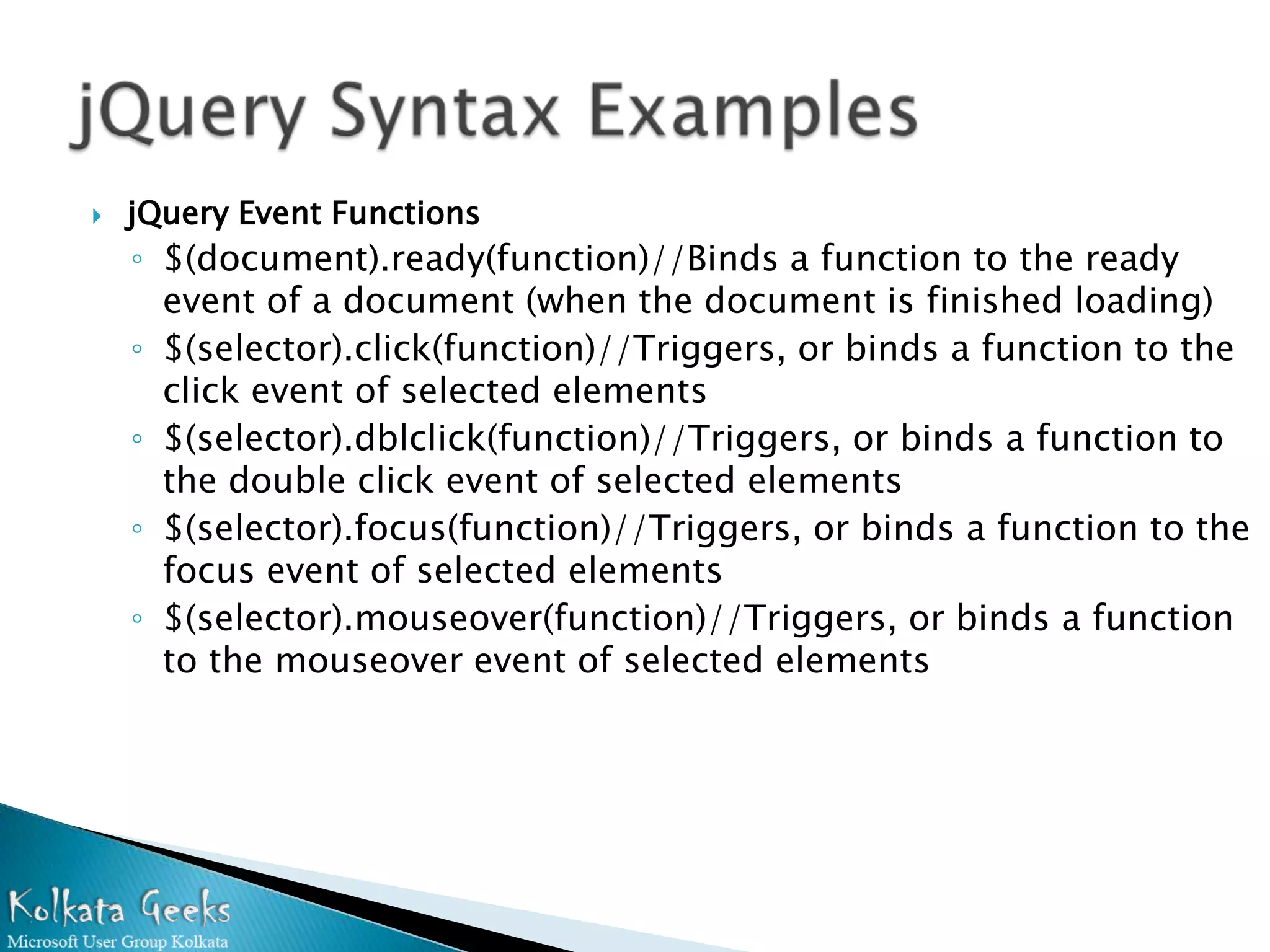
 jQuery Event Functions ◦ $(document).ready(function)//Binds a function to the ready event of a document (when the document is finished loading) ◦ $(selector).click(function)//Triggers, or binds a function to the click event of selected elements ◦ $(selector).dblclick(function)//Triggers, or binds a function to the double click event of selected elements ◦ $(selector).focus(function)//Triggers, or binds a function to the focus event of selected elements ◦ $(selector).mouseover(function)//Triggers, or binds a function to the mouseover event of selected elements
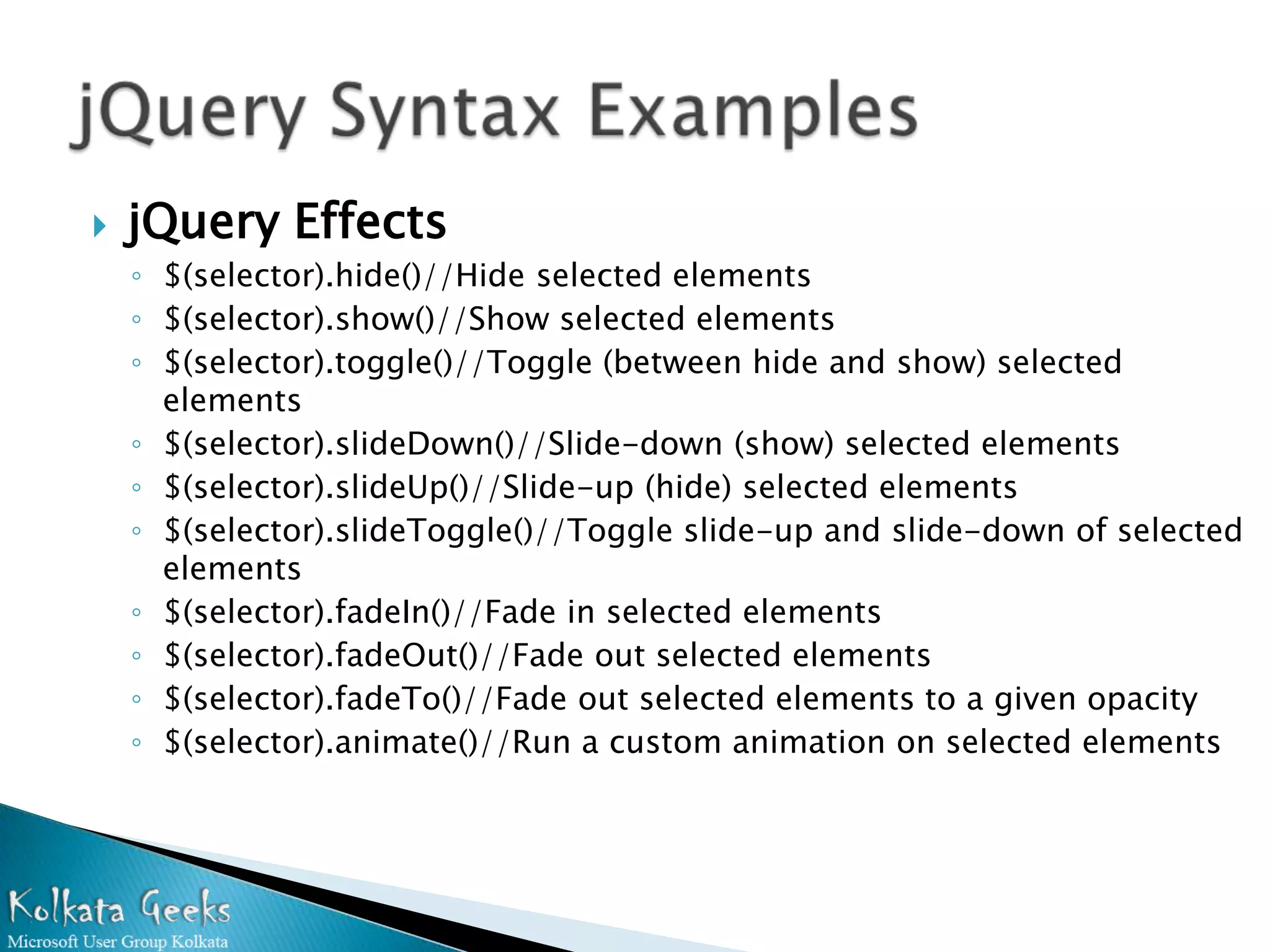
 jQuery Effects ◦ $(selector).hide()//Hide selected elements ◦ $(selector).show()//Show selected elements ◦ $(selector).toggle()//Toggle (between hide and show) selected elements ◦ $(selector).slideDown()//Slide-down (show) selected elements ◦ $(selector).slideUp()//Slide-up (hide) selected elements ◦ $(selector).slideToggle()//Toggle slide-up and slide-down of selected elements ◦ $(selector).fadeIn()//Fade in selected elements ◦ $(selector).fadeOut()//Fade out selected elements ◦ $(selector).fadeTo()//Fade out selected elements to a given opacity ◦ $(selector).animate()//Run a custom animation on selected elements
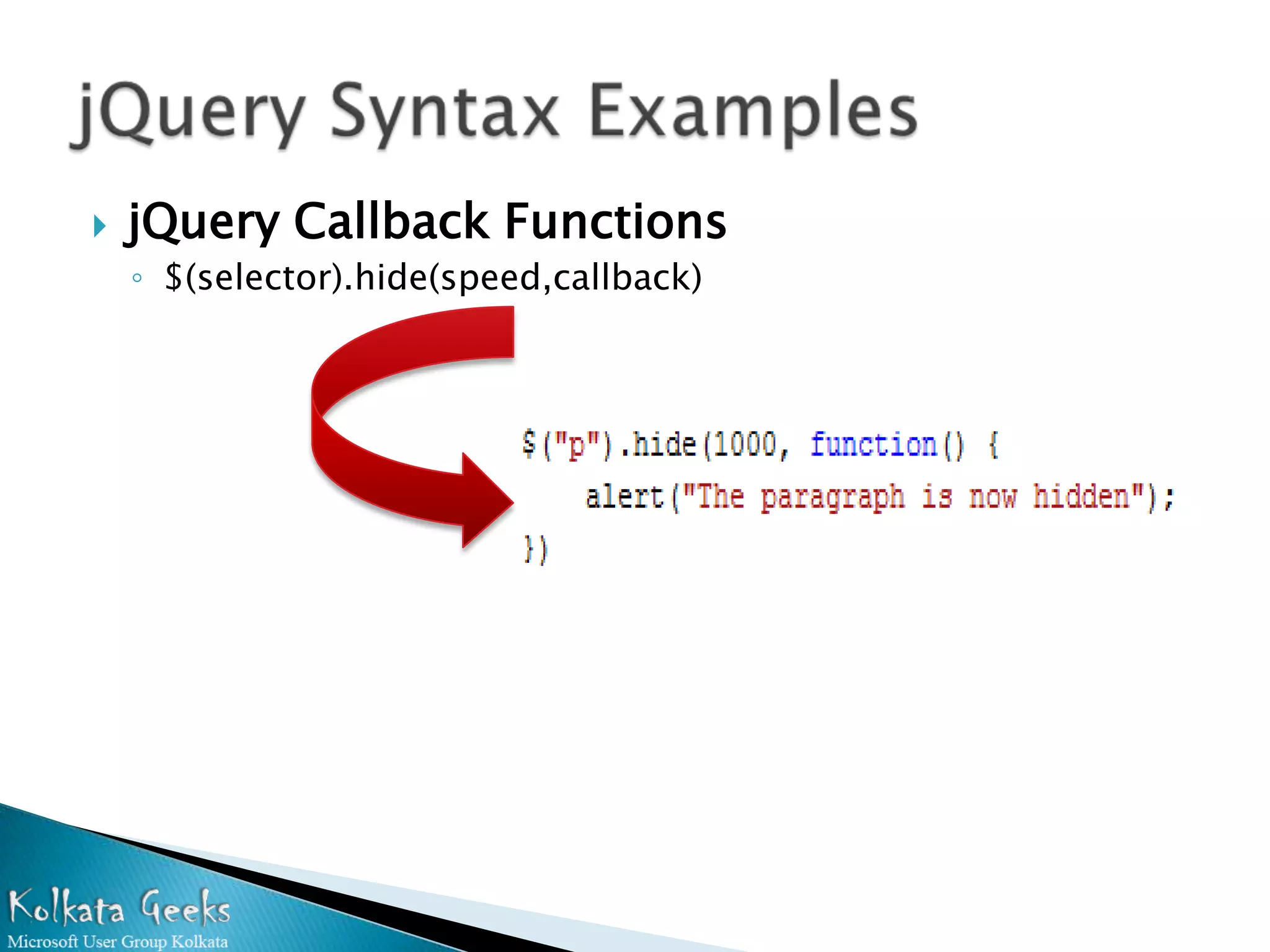
 jQuery Callback Functions ◦ $(selector).hide(speed,callback)
 Changing HTML Content ◦ $(selector).html(content)//Changes the (inner) HTML of selected elements ◦ $(selector).append(content)//Appends content to the (inner) HTML of selected elements ◦ $(selector).prepend(content)//"prepends" content to the inside of matching HTML elements. ◦ $(selector).after(content)//Adds HTML after selected elements ◦ $(selector).before(content)//inserI HTML content before all matching elements.
 jQuery CSS Manipulation ◦ $(selector).css(name)//Get the style property value of the first matched element ◦ $(selector).css(name,value)//Set the value of one style property for matched elements ◦ $(selector).css({properties})//Set multiple style properties for matched elements ◦ $(selector).height(value)//Set the height of matched elements ◦ $(selector).width(value)//Set the width of matched elements ◦ $(selector). addClass()//Adds one or more classes to selected elements ◦ $(selector). hasClass()//Checks if any of the selected elements have a specified class ◦ $(selector). removeClass()//Removes one or more classes from selected elements ◦ $(selector). toggleClass()//Toggles between adding/removing one or more classes from selected elements
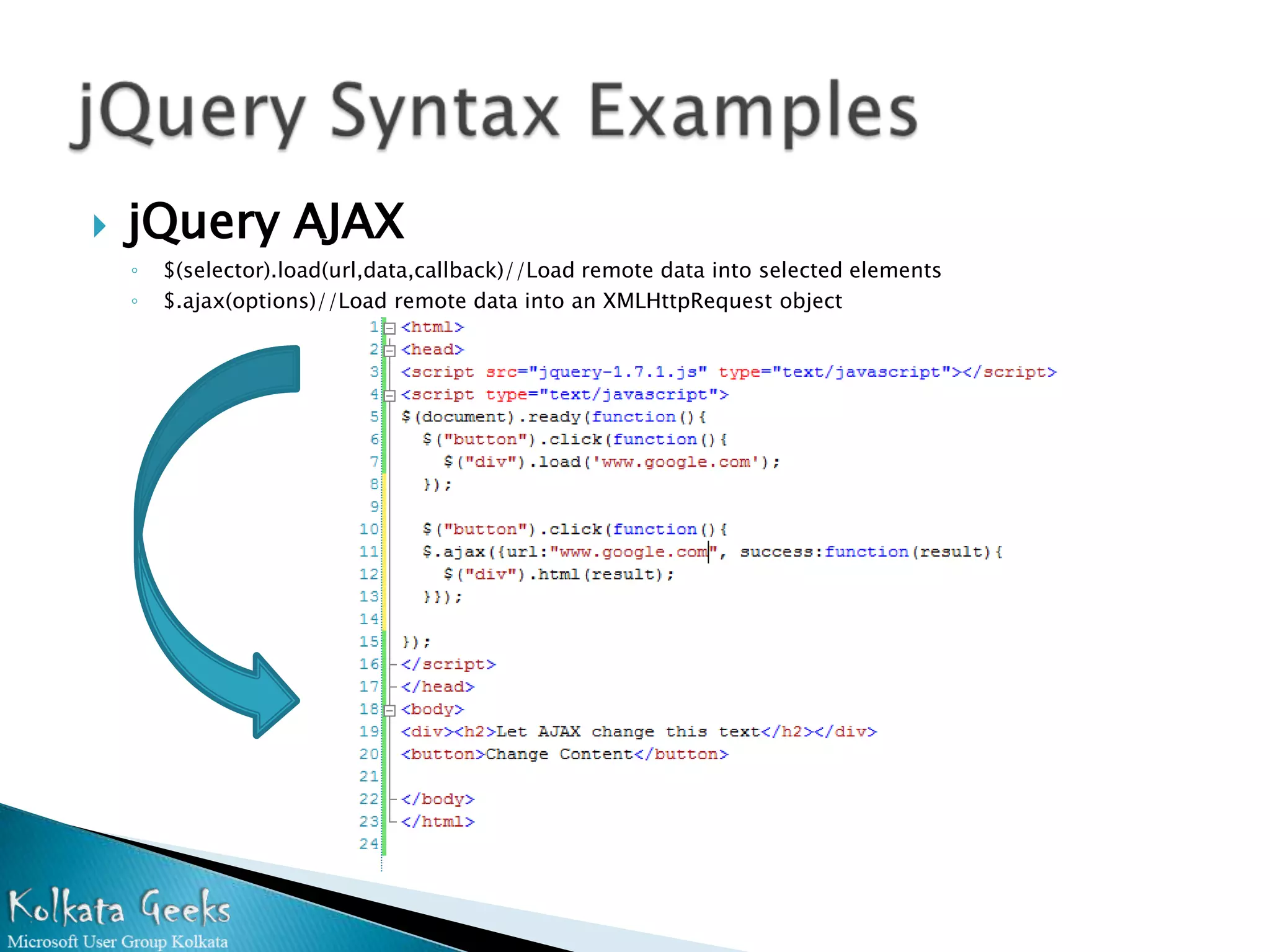
 jQuery AJAX ◦ $(selector).load(url,data,callback)//Load remote data into selected elements ◦ $.ajax(options)//Load remote data into an XMLHttpRequest object
 Web development is easy now.  Well documented already.  Maintainable code as syntax is known to most of the developers.  Pluggable
 Web technology is moving towards HTML 5  Rapid technology update with Rich UI.  HTML 5 will be standardized in 2014.  Large Number of Browsers supports it.  JQuery already moving towards this.  WE ALL ON THE RIGHT SHIP
We appreciate your support

How to increase Performance of Web Application using JQuery

  • 1.
    Pallab Dutta Twitter:@pallabdutta2007 pallabdutta2007@rediffmail.com
  • 2.
    Discussion on problemsof Web developing Traditional way of solving problems JQuery advantages over JavaScript Introduction to JQuery, Basic syntaxes Use of JQuery to eradicate web developers problems Future & Beyond
  • 3.
    Web is stateless.  We use ViewState, Session, Cookie etc to make it look like stateful  Need AJAX based technique to call server from browser  Lot of javascript and server calls make it hard to maintain  Performance impact of Viewstate  Dependency of large numbers of 3rd party libraries
  • 4.
    Code is predefined  Easy DOM manipulation  Smaller construct. JQuery is designed to make small JavaScript code.  Large support of plugins.  Minified version already available.  Testing is not necessary (as it is already tested)  Cross browser support.  Free and Open Source.  Adoption of JQuery by Microsoft.
  • 5.
    JQuery is themost outstanding cross- browser JavaScript library compiled for the ease of client-side scripting of html. To make it short, it’s a “ready to use” JavaScript library that has many visual functions such as popular ease-in, ease-out effects. Because jQuery has tons of impressive effects, it is often used by web designers to make their designs much lovable and more elegant.
  • 6.
    jQuery Selectors  jQuery Event Functions  jQuery Effects  jQuery Callback Functions  Changing HTML Content  jQuery CSS Manipulation  jQuery AJAX  jQuery Syntax Examples
  • 7.
    jQuery Selectors ◦ $("*") //All elements. ◦ $(this)//Current HTML element ◦ $("p")//All <p> elements ◦ $("p.intro")//All <p> elements with class="intro" ◦ $("p#intro")//All <p> elements with id="intro" ◦ $("p#intro:first")//The first <p> element with id="intro" ◦ $(".intro")//All elements with class="intro" ◦ $("#intro")//The first element with id="intro" ◦ $("ul li:first")//The first <li> element of each <ul> ◦ $("[href$='.jpg']")//All elements with an href attribute that ends with ".jpg" ◦ $("div#intro .head")//All elements with class="head" inside a <div> element with id="intro"
  • 8.
    jQuery Event Functions ◦ $(document).ready(function)//Binds a function to the ready event of a document (when the document is finished loading) ◦ $(selector).click(function)//Triggers, or binds a function to the click event of selected elements ◦ $(selector).dblclick(function)//Triggers, or binds a function to the double click event of selected elements ◦ $(selector).focus(function)//Triggers, or binds a function to the focus event of selected elements ◦ $(selector).mouseover(function)//Triggers, or binds a function to the mouseover event of selected elements
  • 9.
    jQuery Effects ◦ $(selector).hide()//Hide selected elements ◦ $(selector).show()//Show selected elements ◦ $(selector).toggle()//Toggle (between hide and show) selected elements ◦ $(selector).slideDown()//Slide-down (show) selected elements ◦ $(selector).slideUp()//Slide-up (hide) selected elements ◦ $(selector).slideToggle()//Toggle slide-up and slide-down of selected elements ◦ $(selector).fadeIn()//Fade in selected elements ◦ $(selector).fadeOut()//Fade out selected elements ◦ $(selector).fadeTo()//Fade out selected elements to a given opacity ◦ $(selector).animate()//Run a custom animation on selected elements
  • 10.
    jQuery Callback Functions ◦ $(selector).hide(speed,callback)
  • 11.
    Changing HTML Content ◦ $(selector).html(content)//Changes the (inner) HTML of selected elements ◦ $(selector).append(content)//Appends content to the (inner) HTML of selected elements ◦ $(selector).prepend(content)//"prepends" content to the inside of matching HTML elements. ◦ $(selector).after(content)//Adds HTML after selected elements ◦ $(selector).before(content)//inserI HTML content before all matching elements.
  • 12.
    jQuery CSS Manipulation ◦ $(selector).css(name)//Get the style property value of the first matched element ◦ $(selector).css(name,value)//Set the value of one style property for matched elements ◦ $(selector).css({properties})//Set multiple style properties for matched elements ◦ $(selector).height(value)//Set the height of matched elements ◦ $(selector).width(value)//Set the width of matched elements ◦ $(selector). addClass()//Adds one or more classes to selected elements ◦ $(selector). hasClass()//Checks if any of the selected elements have a specified class ◦ $(selector). removeClass()//Removes one or more classes from selected elements ◦ $(selector). toggleClass()//Toggles between adding/removing one or more classes from selected elements
  • 13.
    jQuery AJAX ◦ $(selector).load(url,data,callback)//Load remote data into selected elements ◦ $.ajax(options)//Load remote data into an XMLHttpRequest object
  • 14.
    Web development is easy now.  Well documented already.  Maintainable code as syntax is known to most of the developers.  Pluggable
  • 15.
    Web technology is moving towards HTML 5  Rapid technology update with Rich UI.  HTML 5 will be standardized in 2014.  Large Number of Browsers supports it.  JQuery already moving towards this.  WE ALL ON THE RIGHT SHIP
  • 17.