All you need to know about the JavaScript event loop
The document discusses the JavaScript event loop and call stack. It explains that JavaScript is single-threaded with an event loop that processes tasks in the order they are received. There is a call stack that processes code synchronously, and an event queue that holds asynchronous callbacks from events like timers, promises, etc. The event loop continually checks the call stack and event queue, running tasks from the queue after the stack is empty. This allows asynchronous code to run without blocking synchronous code.
All you need to know about the JavaScript event loop
1.
All you needto know about the JavaScript event loop Saša Tatar @sasatatar Front-end Dev at @codaxy
2.
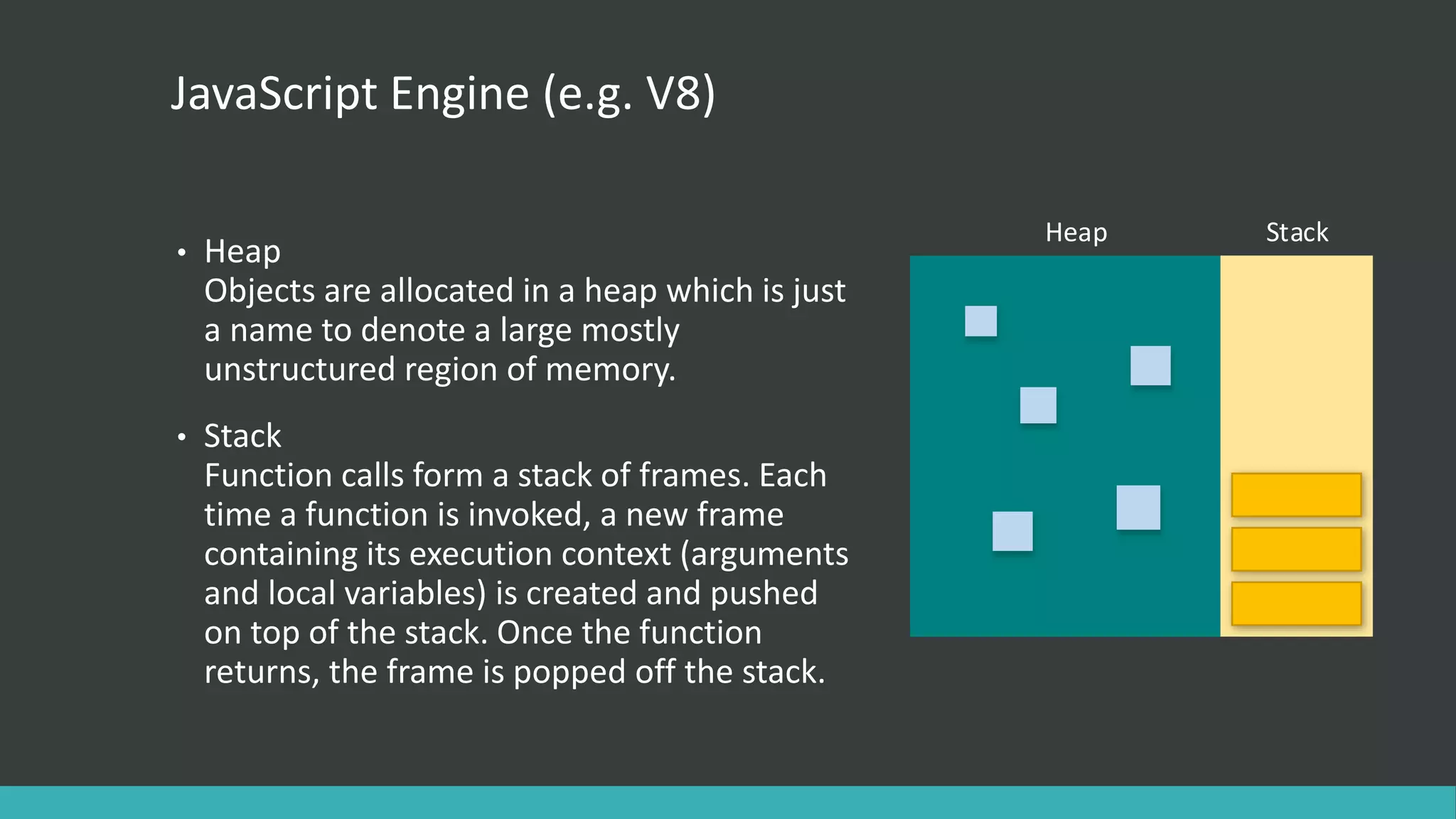
JavaScript Engine (e.g.V8) • Heap Objects are allocated in a heap which is just a name to denote a large mostly unstructured region of memory. • Stack Function calls form a stack of frames. Each time a function is invoked, a new frame containing its execution context (arguments and local variables) is created and pushed on top of the stack. Once the function returns, the frame is popped off the stack. Heap Stack a first frame is created containing bar's arguments and local variables
3.
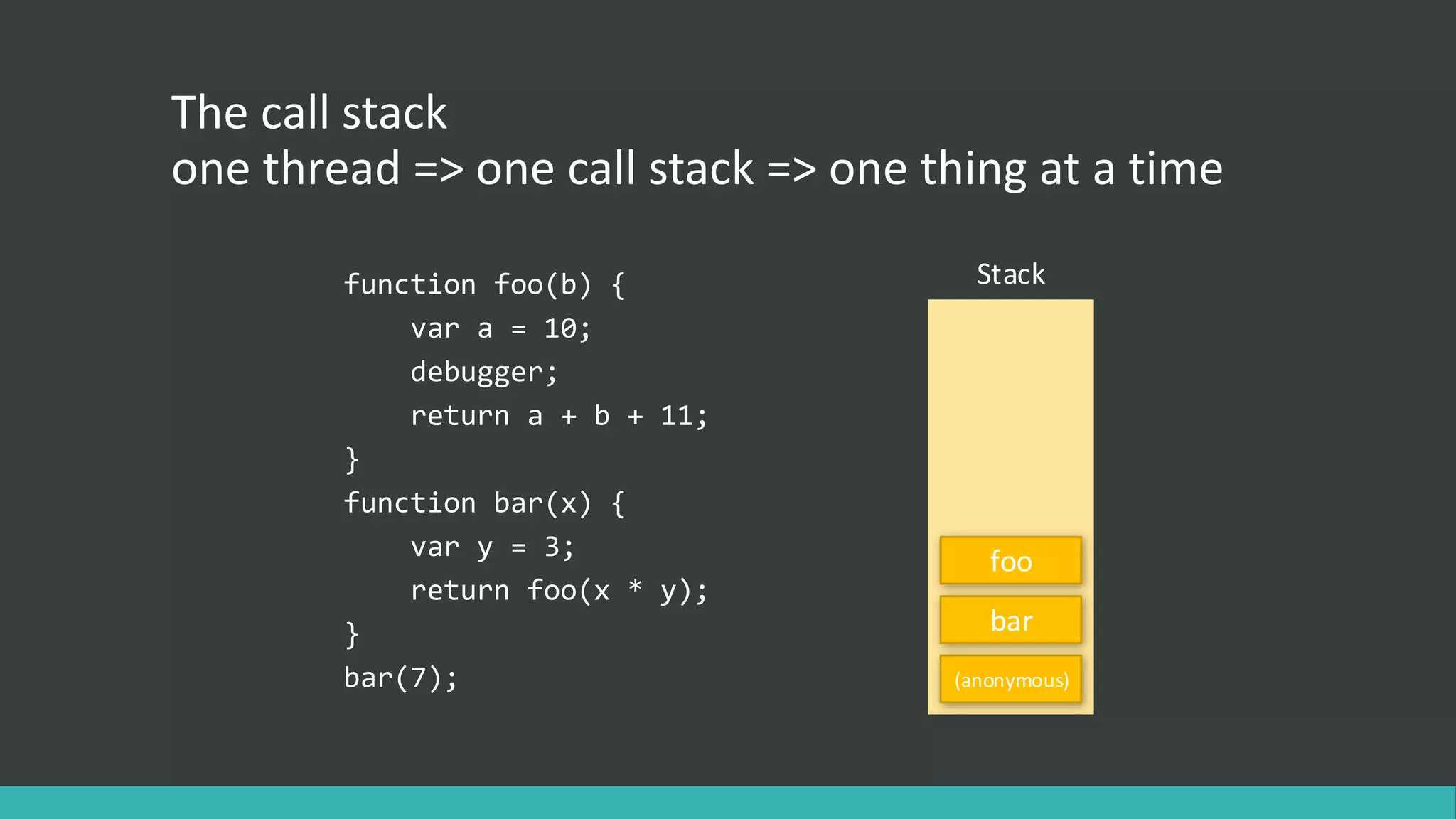
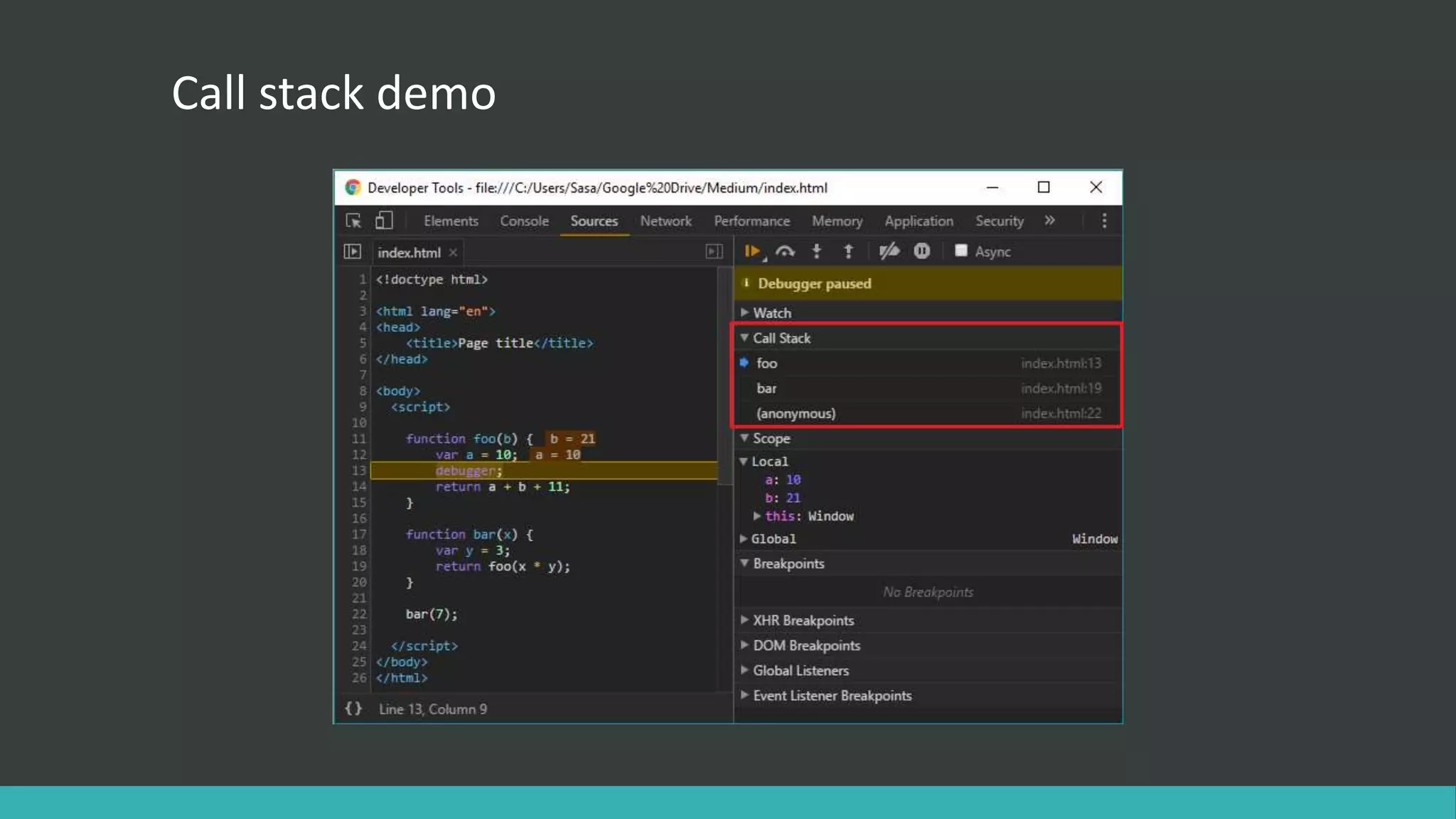
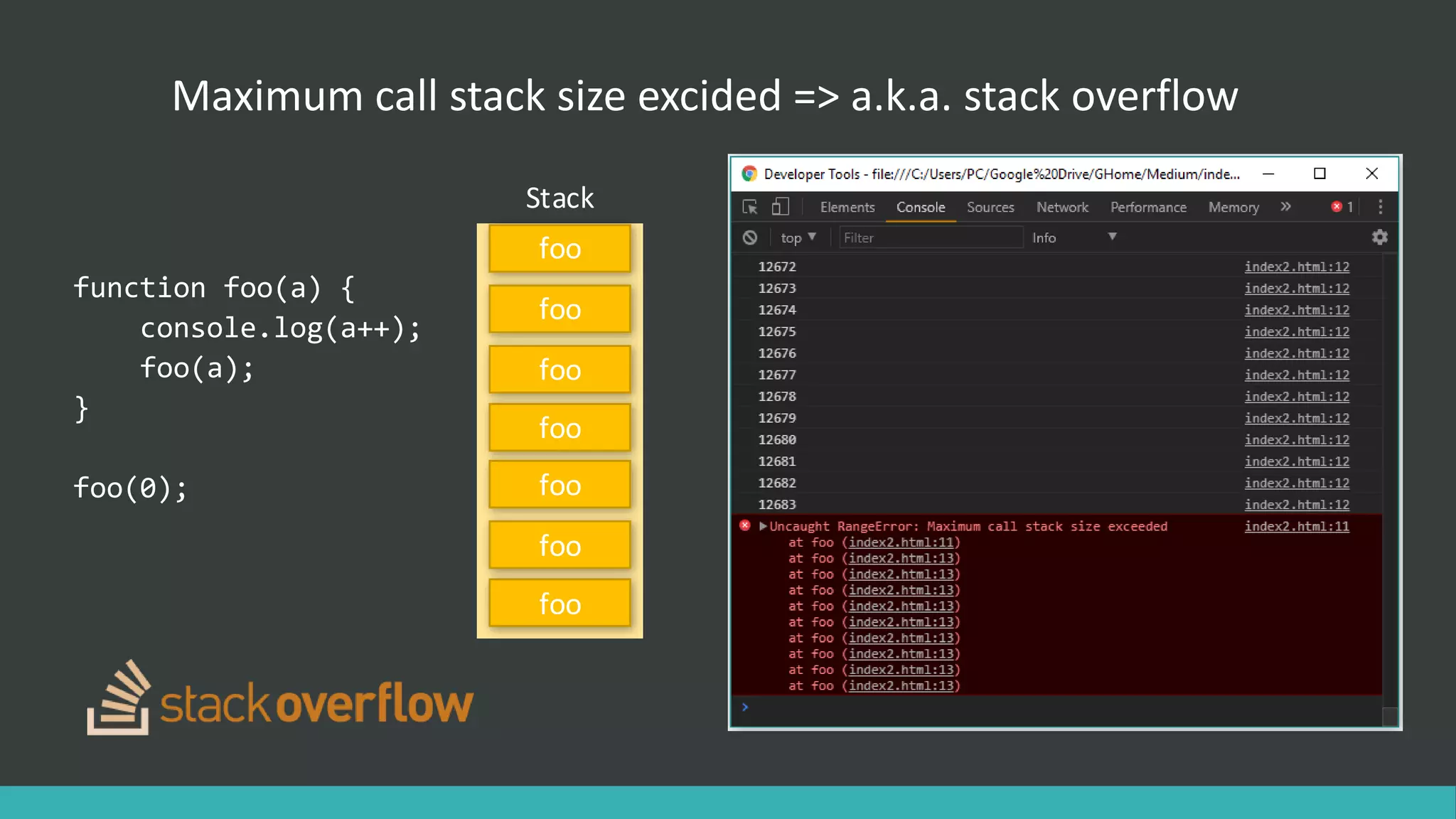
The call stack onethread => one call stack => one thing at a time function foo(b) { var a = 10; debugger; return a + b + 11; } function bar(x) { var y = 3; return foo(x * y); } bar(7); Stack (anonymous) bar foo
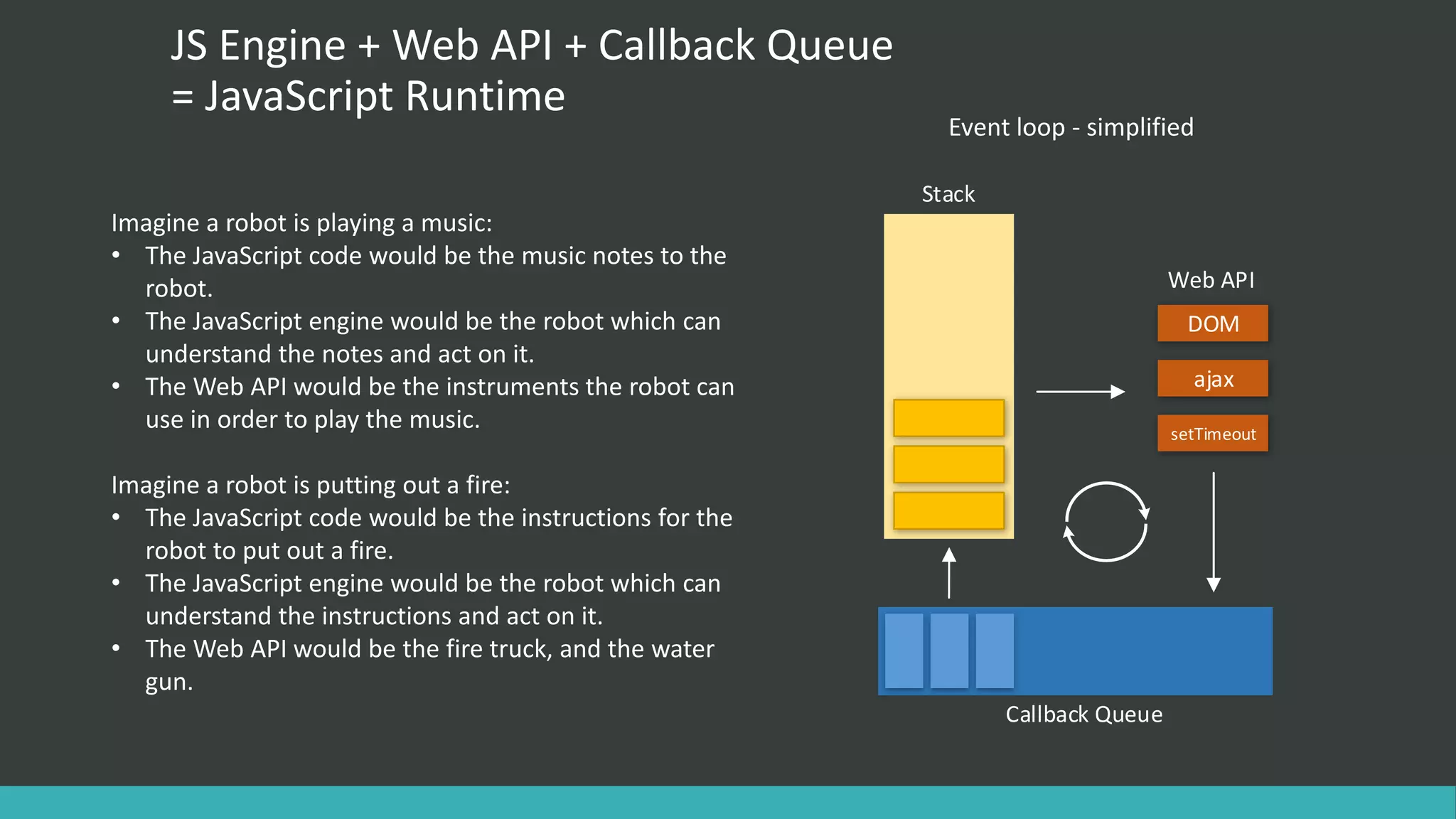
JS Engine +Web API + Callback Queue = JavaScript Runtime Imagine a robot is playing a music: • The JavaScript code would be the music notes to the robot. • The JavaScript engine would be the robot which can understand the notes and act on it. • The Web API would be the instruments the robot can use in order to play the music. Imagine a robot is putting out a fire: • The JavaScript code would be the instructions for the robot to put out a fire. • The JavaScript engine would be the robot which can understand the instructions and act on it. • The Web API would be the fire truck, and the water gun. Stack Web API DOM ajax setTimeout Callback Queue Event loop - simplified
7.
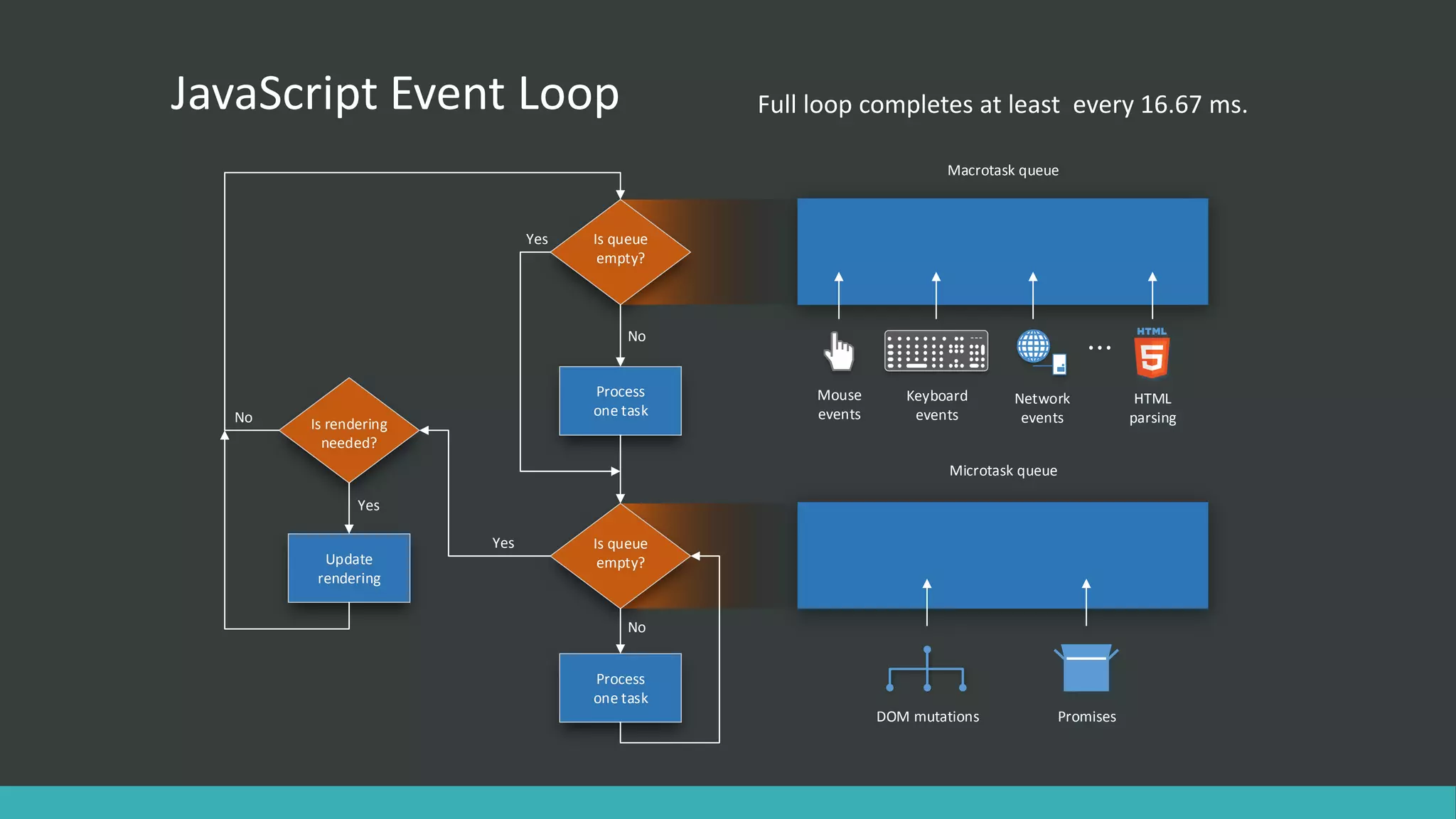
JavaScript Event Loop Isqueue empty? Process one task Is queue empty? No Process one task Is rendering needed? Update rendering Yes No Yes No Yes Macrotask queue Microtask queue DOM mutations Promises Network events HTML parsing Keyboard events Mouse events Full loop completes at least every 16.67 ms.
8.
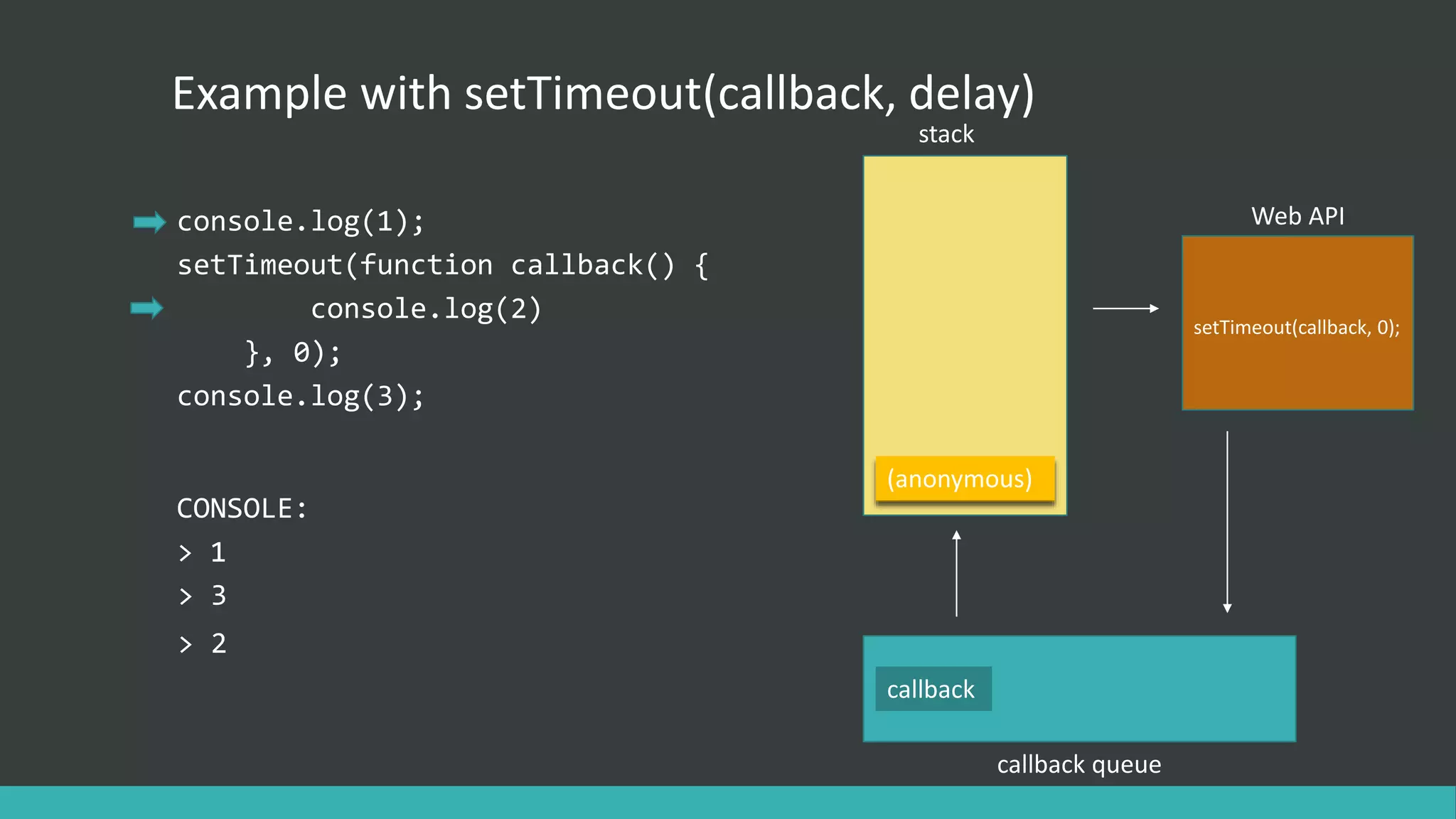
callback Example with setTimeout(callback,delay) console.log(1); setTimeout(function callback() { console.log(2) }, 0); console.log(3); stack Web API callback queue (anonymous) setTimeout(callback, 0); callback CONSOLE: > 1 > 3 > 2
9.
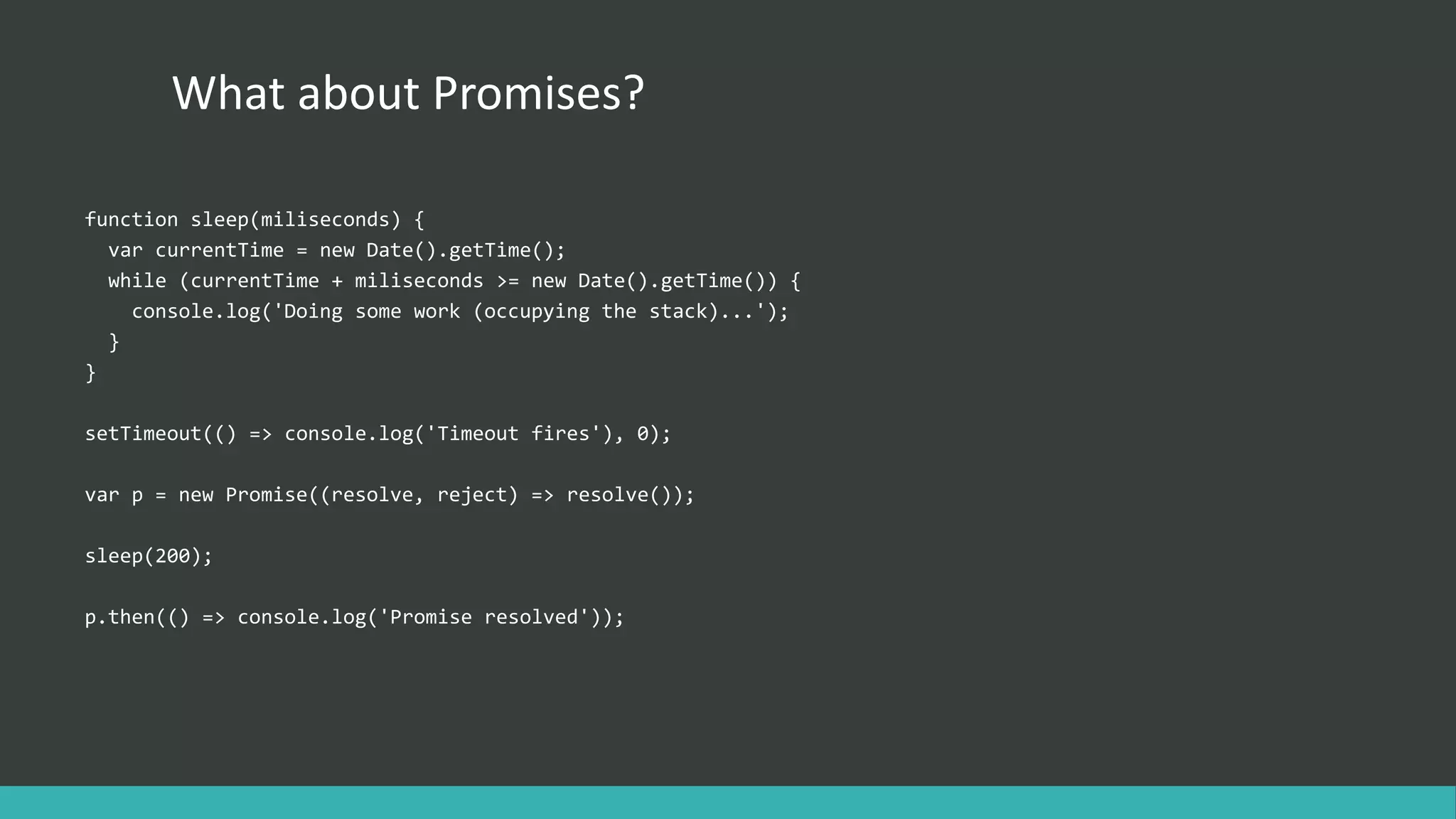
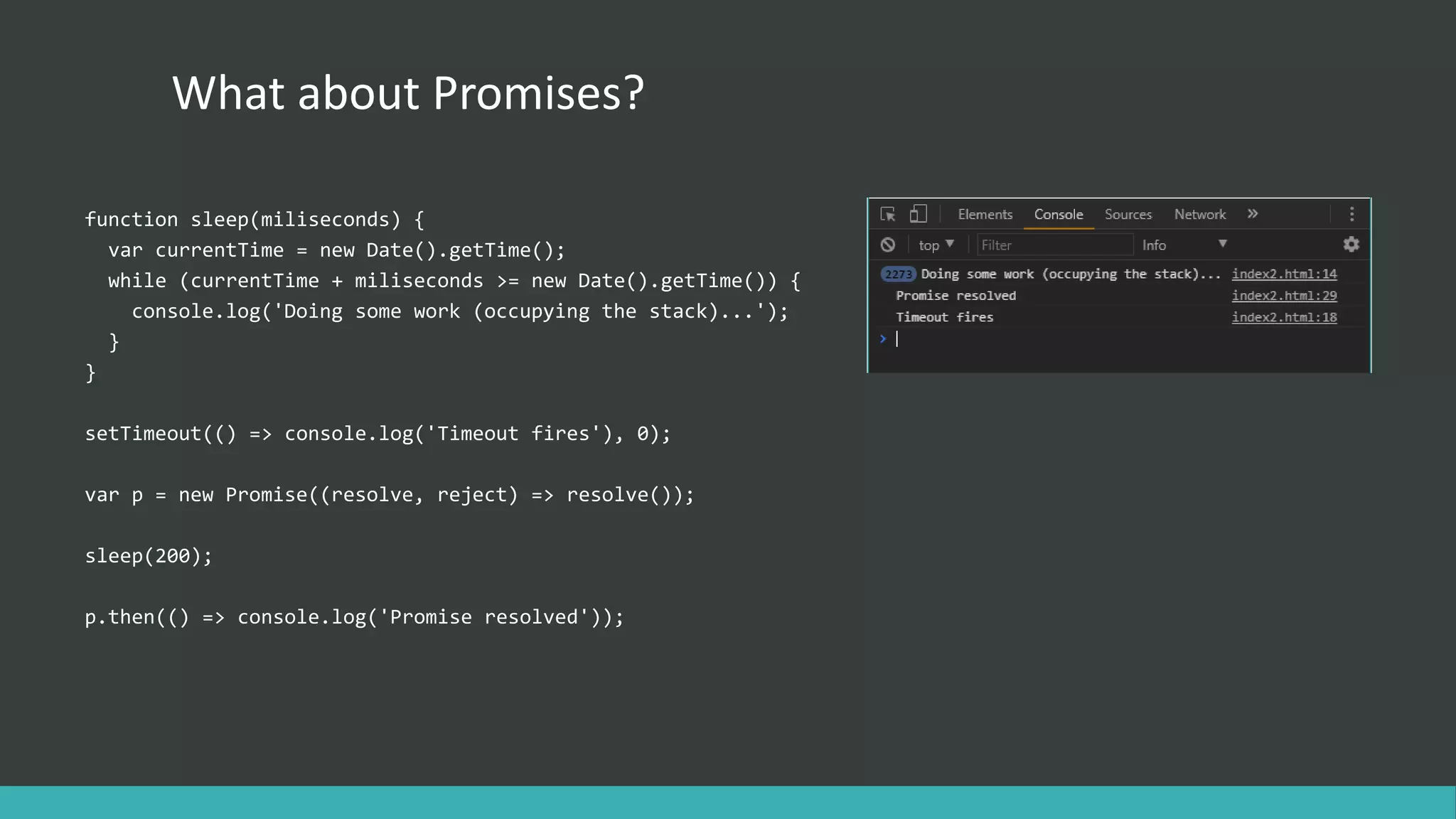
What about Promises? functionsleep(miliseconds) { var currentTime = new Date().getTime(); while (currentTime + miliseconds >= new Date().getTime()) { console.log('Doing some work (occupying the stack)...'); } } setTimeout(() => console.log('Timeout fires'), 0); var p = new Promise((resolve, reject) => resolve()); sleep(200); p.then(() => console.log('Promise resolved'));
10.
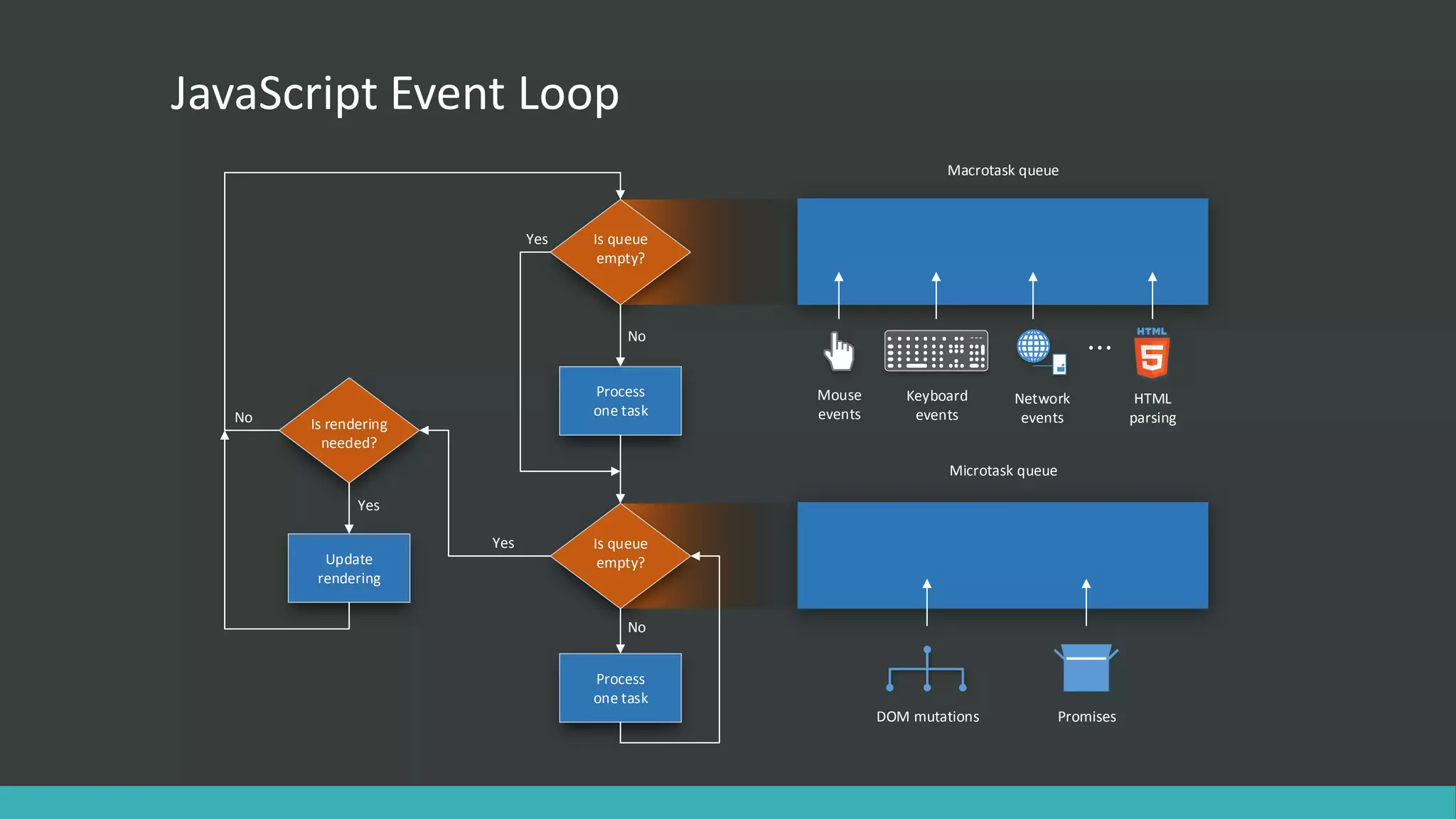
JavaScript Event Loop Isqueue empty? Process one task Is queue empty? No Process one task Is rendering needed? Update rendering Yes No Yes No Yes Macrotask queue Microtask queue DOM mutations Promises Network events HTML parsing Keyboard events Mouse events
11.
What about Promises? functionsleep(miliseconds) { var currentTime = new Date().getTime(); while (currentTime + miliseconds >= new Date().getTime()) { console.log('Doing some work (occupying the stack)...'); } } setTimeout(() => console.log('Timeout fires'), 0); var p = new Promise((resolve, reject) => resolve()); sleep(200); p.then(() => console.log('Promise resolved'));
12.
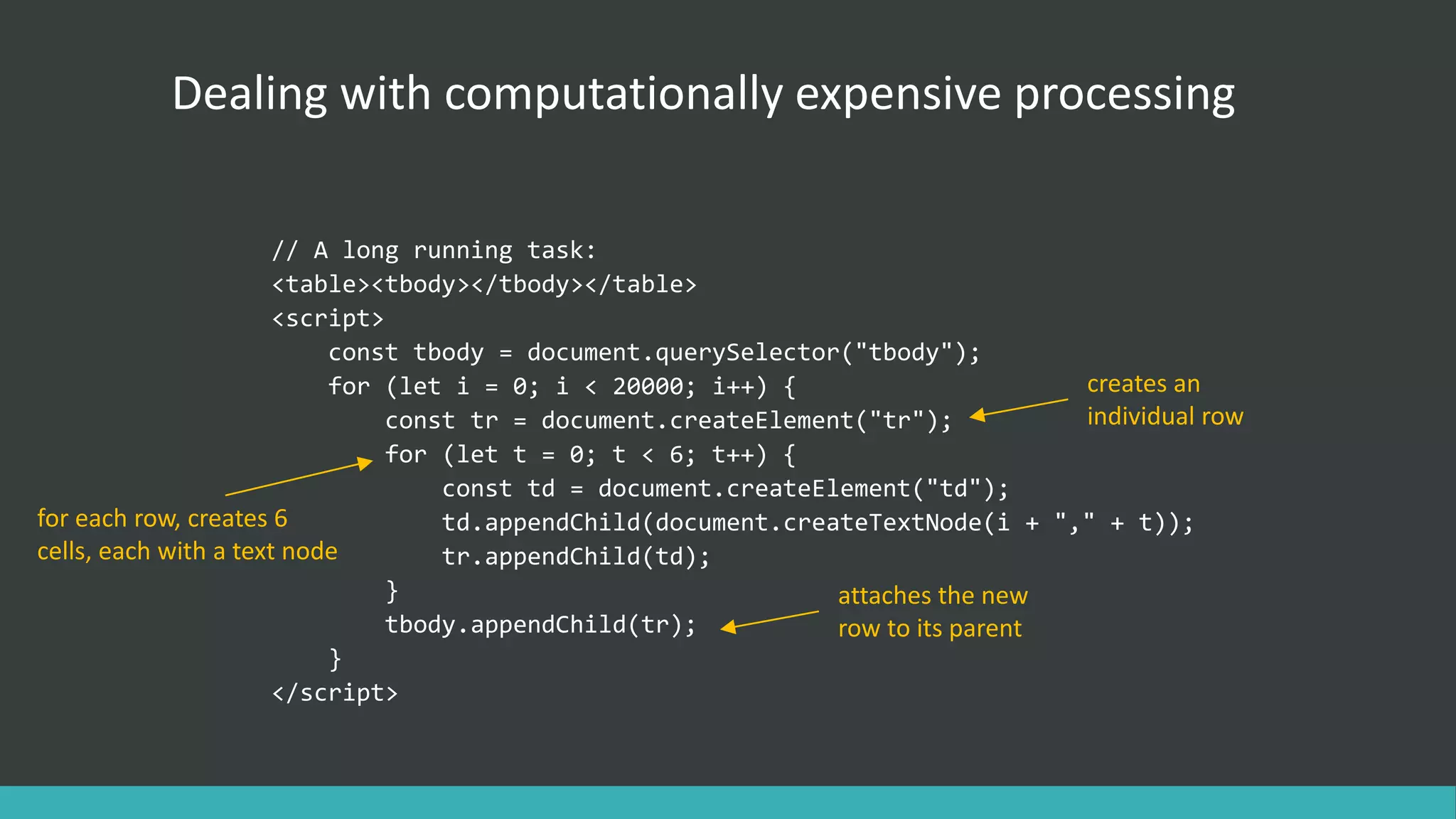
Dealing with computationallyexpensive processing // A long running task: <table><tbody></tbody></table> <script> const tbody = document.querySelector("tbody"); for (let i = 0; i < 20000; i++) { const tr = document.createElement("tr"); for (let t = 0; t < 6; t++) { const td = document.createElement("td"); td.appendChild(document.createTextNode(i + "," + t)); tr.appendChild(td); } tbody.appendChild(tr); } </script> creates an individual row for each row, creates 6 cells, each with a text node attaches the new row to its parent
13.
Divide and conquer constrowCount = 20000; const divideInto = 4; const chunkSize = rowCount/divideInto; let iteration = 0; const table = document.getElementsByTagName("tbody")[0]; setTimeout(function generateRows(){ const base = chunkSize * iteration; for (let i = 0; i < chunkSize; i++) { const tr = document.createElement("tr"); for (let t = 0; t < 6; t++) { const td = document.createElement("td"); td.appendChild( document.createTextNode((i + base) + "," + t + "," + iteration)); tr.appendChild(td); } table.appendChild(tr); } iteration++; if (iteration < divideInto) setTimeout(generateRows, 0); }, 0); We divide the rows in 4 smaller chunks, 5000 rows each. Compute where we left off last time. Schedules the next phase Set time-out delay to 0 to indicate that the next iteration should execute ASAP, but after the DOM has been updated.
14.
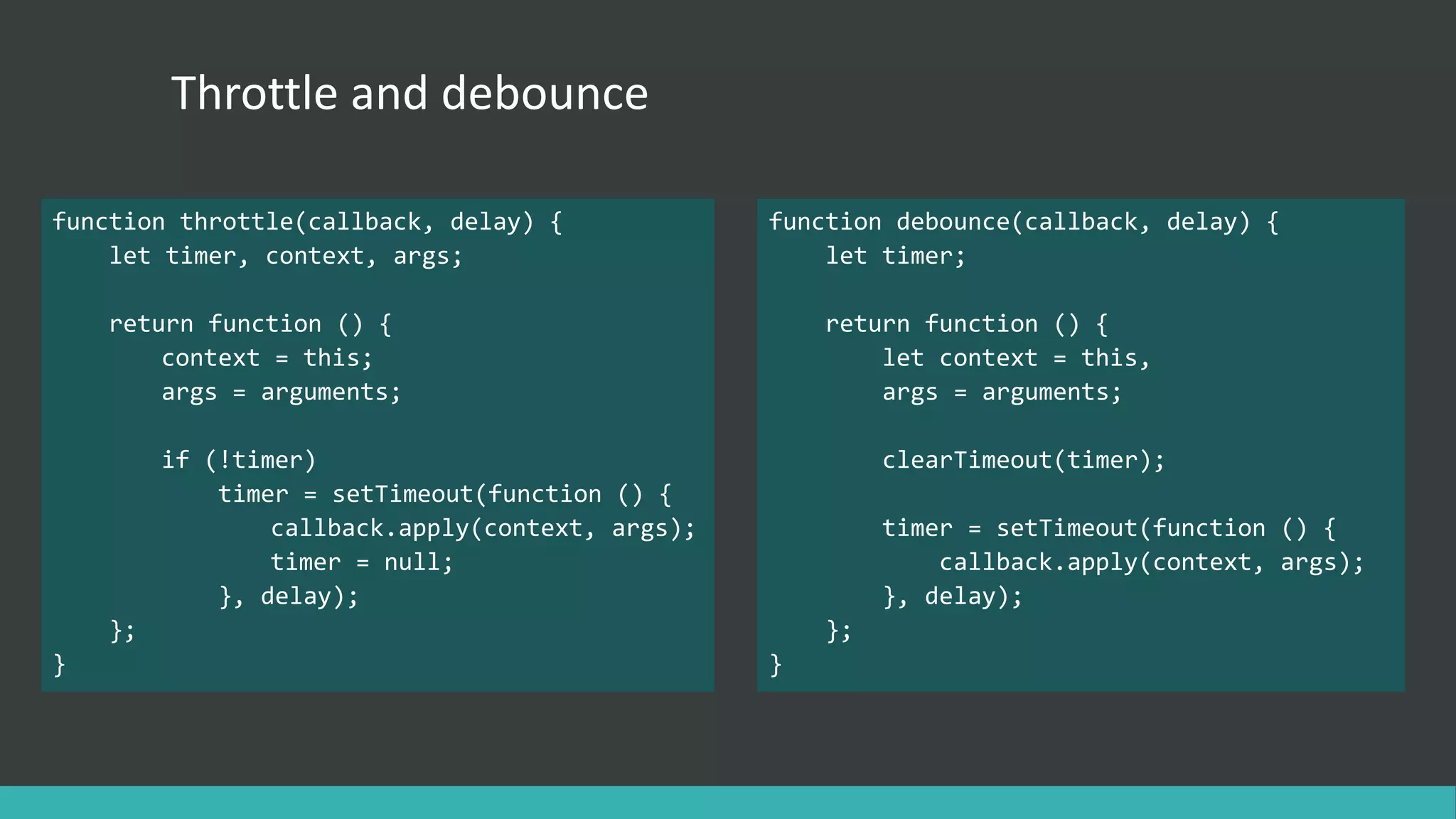
Throttle and debounce functionthrottle(callback, delay) { let timer, context, args; return function () { context = this; args = arguments; if (!timer) timer = setTimeout(function () { callback.apply(context, args); timer = null; }, delay); }; } function debounce(callback, delay) { let timer; return function () { let context = this, args = arguments; clearTimeout(timer); timer = setTimeout(function () { callback.apply(context, args); }, delay); }; }
15.
That’s it! Further reading/resources: •https://developer.mozilla.org/en-US/docs/Web/JavaScript/EventLoop • Philip Roberts: What the heck is the event loop anyway? | JSConf EU • http://blog.carbonfive.com/2013/10/27/the-javascript-event-loop-explained/ • Secrets of the JavaScript Ninja, J. Resig, B. Bibeault, J. Maras • https://css-tricks.com/debouncing-throttling-explained-examples/
![Divide and conquer const rowCount = 20000; const divideInto = 4; const chunkSize = rowCount/divideInto; let iteration = 0; const table = document.getElementsByTagName("tbody")[0]; setTimeout(function generateRows(){ const base = chunkSize * iteration; for (let i = 0; i < chunkSize; i++) { const tr = document.createElement("tr"); for (let t = 0; t < 6; t++) { const td = document.createElement("td"); td.appendChild( document.createTextNode((i + base) + "," + t + "," + iteration)); tr.appendChild(td); } table.appendChild(tr); } iteration++; if (iteration < divideInto) setTimeout(generateRows, 0); }, 0); We divide the rows in 4 smaller chunks, 5000 rows each. Compute where we left off last time. Schedules the next phase Set time-out delay to 0 to indicate that the next iteration should execute ASAP, but after the DOM has been updated.](https://image.slidesharecdn.com/jseventloop-170720082430/75/All-you-need-to-know-about-the-JavaScript-event-loop-13-2048.jpg)