


Binary Search is a searching algorithm for finding an element's position in a sorted array.
In this approach, the element is always searched in the middle of a portion of an array.
Binary search can be implemented only on a sorted list of items. If the elements are not sorted already, we need to sort them first.
Binary Search Working
Binary Search Algorithm can be implemented in two ways which are discussed below.
- Iterative Method
- Recursive Method
The recursive method follows the divide and conquer approach.
The general steps for both methods are discussed below.
- The array in which searching is to be performed is:
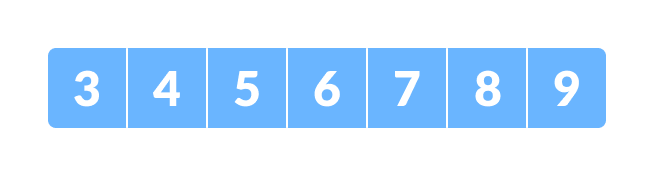
Initial array
Letx = 4be the element to be searched. - Set two pointers low and high at the lowest and the highest positions respectively.
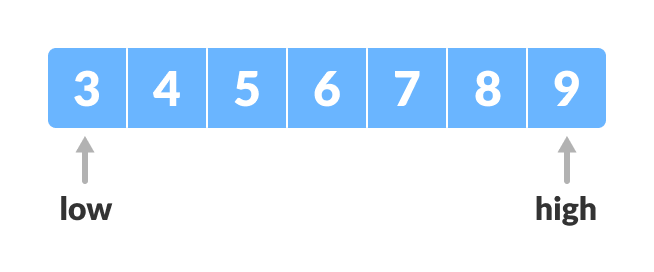
Setting pointers - Find the middle position mid of the array ie.
mid = (low + high)/2andarr[mid] = 6.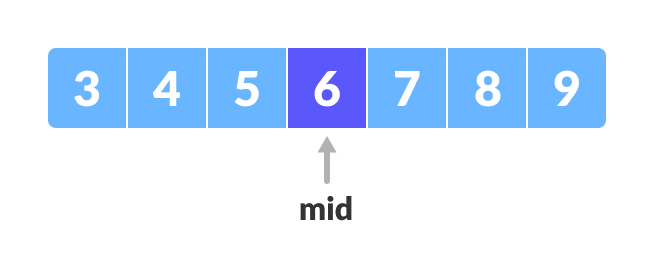
Mid element - If
x == arr[mid], then returnmid. Else, compare the element to be searched witharr[mid]. - If
x > arr[mid], compare x with the middle element of the elements on the right side of arr[mid]. This is done by setting low tolow = mid + 1. - Else, compare x with the middle element of the elements on the left side of arr[mid]. This is done by setting high to
high = mid - 1.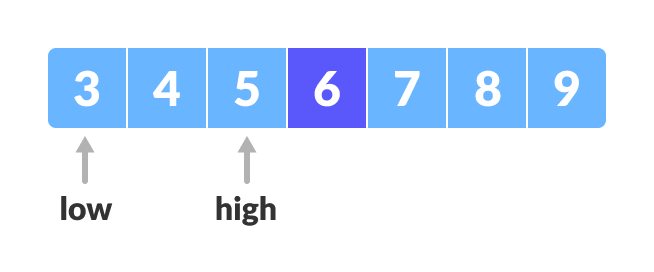
Finding mid element - Repeat steps 3 to 6 until
lowmeetshigh.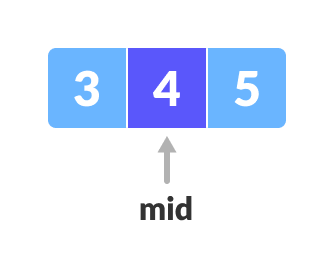
Mid element x = 4is found.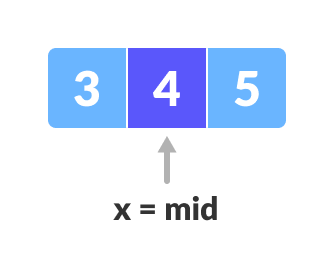
Found
Binary Search Algorithm
Iteration Method
do until the pointers low and high meet each other. mid = (low + high)/2 if (x == arr[mid]) return mid else if (x > arr[mid]) // x is on the right side low = mid + 1 else // x is on the left side high = mid - 1
Recursive Method
binarySearch(arr, x, low, high) if low > high return False else mid = (low + high) / 2 if x == arr[mid] return mid else if x > arr[mid] // x is on the right side return binarySearch(arr, x, mid + 1, high) else // x is on the left side return binarySearch(arr, x, low, mid - 1)
Python, Java, C/C++ Examples (Iterative Method)
Binary Search Visualization: Don't just read about binary search, watch it happen live. See how each line of the algorithm works step-by-step with our new DSA visualizer. Try it yourself!
# Binary Search in python def binarySearch(array, x, low, high): # Repeat until the pointers low and high meet each other while low <= high: mid = low + (high - low)//2 if x == array[mid]: return mid elif x > array[mid]: low = mid + 1 else: high = mid - 1 return -1 array = [3, 4, 5, 6, 7, 8, 9] x = 4 result = binarySearch(array, x, 0, len(array)-1) if result != -1: print("Element is present at index " + str(result)) else: print("Not found") // Binary Search in Java class BinarySearch { int binarySearch(int array[], int x, int low, int high) { // Repeat until the pointers low and high meet each other while (low <= high) { int mid = low + (high - low) / 2; if (x == array[mid]) return mid; if (x > array[mid]) low = mid + 1; else high = mid - 1; } return -1; } public static void main(String args[]) { BinarySearch ob = new BinarySearch(); int array[] = { 3, 4, 5, 6, 7, 8, 9 }; int n = array.length; int x = 4; int result = ob.binarySearch(array, x, 0, n - 1); if (result == -1) System.out.println("Not found"); else System.out.println("Element found at index " + result); } } // Binary Search in C #include <stdio.h> int binarySearch(int array[], int x, int low, int high) { // Repeat until the pointers low and high meet each other while (low <= high) { int mid = low + (high - low) / 2; if (x == array[mid]) return mid; if (x > array[mid]) low = mid + 1; else high = mid - 1; } return -1; } int main(void) { int array[] = {3, 4, 5, 6, 7, 8, 9}; int n = sizeof(array) / sizeof(array[0]); int x = 4; int result = binarySearch(array, x, 0, n - 1); if (result == -1) printf("Not found"); else printf("Element is found at index %d", result); return 0; } // Binary Search in C++ #include <iostream> using namespace std; int binarySearch(int array[], int x, int low, int high) { // Repeat until the pointers low and high meet each other while (low <= high) { int mid = low + (high - low) / 2; if (x == array[mid]) return mid; if (x > array[mid]) low = mid + 1; else high = mid - 1; } return -1; } int main(void) { int array[] = {3, 4, 5, 6, 7, 8, 9}; int x = 4; int n = sizeof(array) / sizeof(array[0]); int result = binarySearch(array, x, 0, n - 1); if (result == -1) printf("Not found"); else printf("Element is found at index %d", result); } Python, Java, C/C++ Examples (Recursive Method)
# Binary Search in python def binarySearch(array, x, low, high): if high >= low: mid = low + (high - low)//2 # If found at mid, then return it if x == array[mid]: return mid # Search the right half elif x > array[mid]: return binarySearch(array, x, mid + 1, high) # Search the left half else: return binarySearch(array, x, low, mid - 1) else: return -1 array = [3, 4, 5, 6, 7, 8, 9] x = 4 result = binarySearch(array, x, 0, len(array)-1) if result != -1: print("Element is present at index " + str(result)) else: print("Not found") // Binary Search in Java class BinarySearch { int binarySearch(int array[], int x, int low, int high) { if (high >= low) { int mid = low + (high - low) / 2; // If found at mid, then return it if (x == array[mid]) return mid; // Search the right half if (x > array[mid]) return binarySearch(array, x, mid + 1, high); // Search the left half return binarySearch(array, x, low, mid - 1); } return -1; } public static void main(String args[]) { BinarySearch ob = new BinarySearch(); int array[] = { 3, 4, 5, 6, 7, 8, 9 }; int n = array.length; int x = 4; int result = ob.binarySearch(array, x, 0, n - 1); if (result == -1) System.out.println("Not found"); else System.out.println("Element found at index " + result); } } // Binary Search in C #include <stdio.h> int binarySearch(int array[], int x, int low, int high) { if (high >= low) { int mid = low + (high - low) / 2; // If found at mid, then return it if (x == array[mid]) return mid; // Search the right half if (x > array[mid]) return binarySearch(array, x, mid + 1, high); // Search the left half return binarySearch(array, x, low, mid - 1); } return -1; } int main(void) { int array[] = {3, 4, 5, 6, 7, 8, 9}; int n = sizeof(array) / sizeof(array[0]); int x = 4; int result = binarySearch(array, x, 0, n - 1); if (result == -1) printf("Not found"); else printf("Element is found at index %d", result); } // Binary Search in C++ #include <iostream> using namespace std; int binarySearch(int array[], int x, int low, int high) { if (high >= low) { int mid = low + (high - low) / 2; // If found at mid, then return it if (x == array[mid]) return mid; // Search the right half if (x > array[mid]) return binarySearch(array, x, mid + 1, high); // Search the right half return binarySearch(array, x, low, mid - 1); } return -1; } int main(void) { int array[] = {3, 4, 5, 6, 7, 8, 9}; int x = 4; int n = sizeof(array) / sizeof(array[0]); int result = binarySearch(array, x, 0, n - 1); if (result == -1) printf("Not found"); else printf("Element is found at index %d", result); } Binary Search Complexity
Time Complexities
- Best case complexity:
O(1) - Average case complexity:
O(log n) - Worst case complexity:
O(log n)
Space Complexity
The space complexity of the binary search is O(1).
Binary Search Applications
- In libraries of Java, .Net, C++ STL
- While debugging, the binary search is used to pinpoint the place where the error happens.