docker-phpdev helps you to setup a php development environment using Docker
- Easy setup of lemp & lamp environments - Easy vhost setup - Try out multiple versions of php & mysql - Useful services and extensions added - Low size containers - Only ubuntu 16.04 or alpine are used as base images - mysql[5.5, 5.6, 5.7 & 8.0 DR] - apache2 - nginx - php [5.6, 7.0 & 7.1] - phpmyadmin - sonarqube - redis - memcached - mailcatcher git clone https://github.com/majuansari/docker-phpdev.git cd docker-phpdev //Start lamp environment using short key docker-compose up -d lamp //Start lamp environment by specifying services docker-compose up -d mysql apache2 php-fpm git clone https://github.com/majuansari/docker-phpdev.git cd docker-phpdev //Start lemp environment using short key docker-compose up -d lemp //Start lemp environment by specifying services docker-compose up -d mysql nginx php-fpm For adding vhosts create conf files in docker/apache2/conf for apache2 and docker/nginx/sites for nginx
You can easily change service versions or default passwords by editing .env file
| Container | Command |
|---|---|
| php-fpm | docker-compose up -d php-fpm |
| apache2 | docker-compose up -d apache2 |
| nginx | docker-compose up -d nginx |
| mysql | docker-compose up -d mysql |
| sonarqube | docker-compose up -d sonarqube |
| phpmyadmin | docker-compose up -d phpmyadmin |
| redi | docker-compose up -d redis |
| mailcatcher | docker-compose up -d mailcatcher |
| memcached | docker-compose up -d memcached |
| lamp | docker-compose up -d lamp |
| lemp | docker-compose up -d lemp |
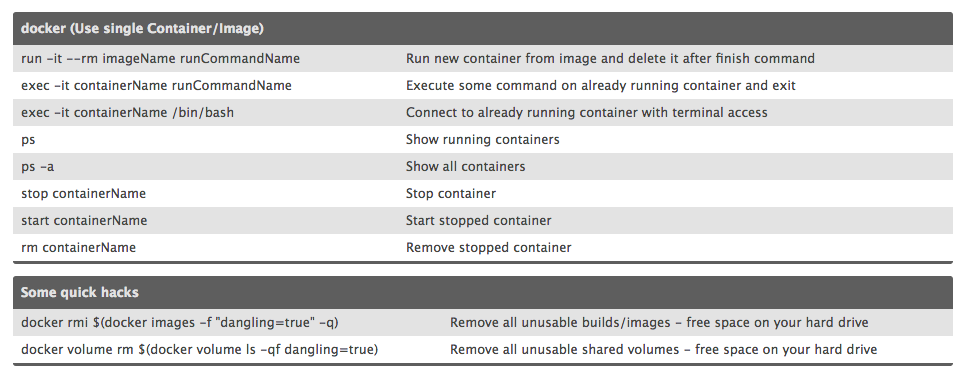
| Commands | Description |
|---|---|
| docker-compose build | Build the entire stack |
| docker-compose build {container} | Build just the specified container |
| docker-compose up -d | Start the entire stack |
| docker-compose up {container} | Start just the specified container |
| docker-compose stop | Stop all the containers related to the docker-compose |