

In this tutorial we will check how to get the firmware version that is running on the UART OBLOQ.
As we have covered in this introductory post, OBLOQ is based on the famous ESP8266. Since we interact with OBLOQ with serial commands, it means that the ESP8266 microcontroller is running a firmware that is able to interpret those commands and act accordingly.
This means that this firmware may change over time, so it’s useful to have a way of checking the version that is running in our device, so we know which commands are available.
In order to interact with the OBLOQ, we will use a serial to USB converter and the Arduino IDE serial monitor. Please check in this previous tutorial the wiring needed between the two devices and how to use the serial monitor to interact with it.
The command
The command needed to retrieve the firmware version is very simple, pretty much like we did in the previous tutorial for pinging the device. So basically we just need to send the command below:
|1|2|
Figure 1 shows the Arduino IDE serial monitor before sending this command. Don’t forget to set “Carriage return” in the first dropdown at the bottom of the serial monitor. Also make sure to set the baud rate to 9600.
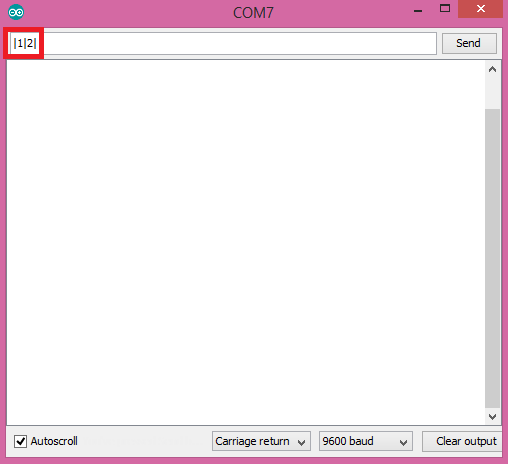
Figure 1 – Sending the UART OBLOQ command to retrieve the firmware version.
Upon sending the command, you should receive the OBLOQ answer with the currently running firmware version, in the following format:
|1|2|version|
You can check the expected result in figure 2. As can be seen, my device is running version 3.0 of the firmware.
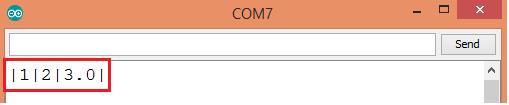
Figure 2 – Printing the firmware version of OBLOQ.
UART OBLOQ module Tutorials:
- UART OBLOQ IoT Module Tutorial 1: a Quick Look in Obloq
- UART OBLOQ IoT Module Tutorial 2: Pinging the device
- UART OBLOQ IoT Module Tutorial 3: Get Firmware version
- UART OBLOQ IoT Module Tutorial 4: Connecting to WiFi
- UART OBLOQ IoT Module Tutorial 5: Connecting to MQTT broker
- UART OBLOQ IoT Module Tutorial 6: Sending message to MQTT topic
- UART OBLOQ IoT Module Tutorial 7: Subscribing to MQTT topic
- UART OBLOQ IoT Module Tutorial 8: Sending HTTP GET request
- UART OBLOQ IoT Module Tutorial 9: HTTP POST Request
- UART OBLOQ IoT Module Tutorial 10: Sending HTTP POST request to Flask server
- UART OBLOQ IoT Module Tutorial 11 uPython: Pinging the UART OBLOQ
- UART OBLOQ IoT Module Tutorial 12 uPython: Getting firmware version of UART OBLOQ
- UART OBLOQ IoT Module Tutorial 13 MicroPython: Connecting the UART OBLOQ to WiFi network
- UART OBLOQ IoT Module Tutorial 14 uPython: HTTP UART OBLOQ POST request to Flask server
- UART OBLOQ IoT Module Tutorial 15 MicroPython: UART OBLOQ HTTP GET Request to Flask server


