
Trace Processor (Python)
The trace processor Python API is built on the trace procesor C++ library. By integrating with Python, the library allows using Python's rich data analysis ecosystem to process traces.
Setup
pip install perfettoNOTE: The API is only compatible with Python3.
The main entry point to the API is the TraceProcessor class.
Example Usage
The following examples demonstrate basic usage of the Python API.
Querying Slices
This example shows how to query for slices and print their names.
from perfetto.trace_processor import TraceProcessor tp = TraceProcessor(trace='trace.perfetto-trace') qr_it = tp.query('SELECT name FROM slice') for row in qr_it: print(row.name)Output
eglSwapBuffersWithDamageKHR onMessageReceived queueBuffer bufferLoad query ...Querying as a Pandas DataFrame
For more advanced analysis, you can convert query results to a Pandas DataFrame.
from perfetto.trace_processor import TraceProcessor tp = TraceProcessor(trace='trace.perfetto-trace') qr_it = tp.query('SELECT ts, name FROM slice') qr_df = qr_it.as_pandas_dataframe() print(qr_df.to_string())Output
ts name -------------------- --------------------------- 261187017446933 eglSwapBuffersWithDamageKHR 261187017518340 onMessageReceived 261187020825163 queueBuffer 261187021345235 bufferLoad 261187121345235 query ...Initialization
TraceProcessor can be initialized in a few ways depending on where the trace is and whether you want to connect to an existing trace_processor instance or start a new one.
1. With a trace file or object (starts a new trace_processor instance):
This is the most common use case. You can provide a trace in several ways:
- A path to a trace file:
TraceProcessor(trace='trace.perfetto-trace') - A file-like object (e.g.,
io.BytesIO):TraceProcessor(trace=file_obj) - A generator yielding bytes:
TraceProcessor(trace=byte_generator) - A trace URI:
TraceProcessor(trace='resolver_name:key=value')
from perfetto.trace_processor import TraceProcessor # Initialise TraceProcessor with a trace file path tp = TraceProcessor(trace='trace.perfetto-trace')2. Connecting to a running trace_processor instance:
If you have a trace_processor instance already running (e.g. started from the command line), you can connect to it by providing its address.
# Connect to a running instance tp = TraceProcessor(addr='localhost:9001') # Connect to a running instance and load a new trace into it tp = TraceProcessor(trace='trace.perfetto-trace', addr='localhost:9001')Configuration
The TraceProcessor can be customized using the TraceProcessorConfig class.
from perfetto.trace_processor import TraceProcessor, TraceProcessorConfig config = TraceProcessorConfig( bin_path='/path/to/trace_processor', # Path to custom binary verbose=True, add_sql_packages=['/path/to/my/sql/modules'] ) tp = TraceProcessor(trace='trace.perfetto-trace', config=config)TraceProcessorConfig has many options for customizing the trace_processor instance. The most important are:
add_sql_packages: A list of paths to additional PerfettoSQL packages to load. All SQL modules inside these packages will be available to include usingINCLUDE PERFETTO MODULEPerfettoSQL statements.verbose: IfTrue,trace_processorwill print verbose output to stdout. This is useful for debugging and seeing more detailed error messages.bin_path: Path to thetrace_processorbinary. If not given, the latest prebuilt version will be downloaded.
API
The TraceProcessor class provides various functions to interact with the loaded trace.
Query
The query() function takes an SQL query as input and returns an iterator over the result rows. For more information on how to write queries, see the Getting Started with PerfettoSQL guide.
from perfetto.trace_processor import TraceProcessor tp = TraceProcessor(trace='trace.perfetto-trace') qr_it = tp.query('SELECT ts, dur, name FROM slice') for row in qr_it: print(row.ts, row.dur, row.name)Output
261187017446933 358594 eglSwapBuffersWithDamageKHR 261187017518340 357 onMessageReceived 261187020825163 9948 queueBuffer 261187021345235 642 bufferLoad 261187121345235 153 query ...The QueryResultIterator can also be converted to a Pandas DataFrame, which is useful for data analysis and visualization. This requires numpy and pandas to be installed.
# Requires pandas and numpy # pip install pandas numpy import numpy as np qr_it = tp.query('SELECT ts, dur, name FROM slice') qr_df = qr_it.as_pandas_dataframe() print(qr_df.to_string())Output
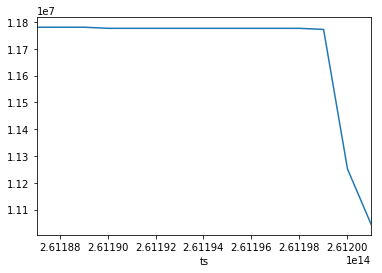
ts dur name -------------------- -------------------- --------------------------- 261187017446933 358594 eglSwapBuffersWithDamageKHR 261187017518340 357 onMessageReceived 261187020825163 9948 queueBuffer 261187021345235 642 bufferLoad 261187121345235 153 query ...You can use Pandas DataFrames to easily create visualizations from trace data.
from perfetto.trace_processor import TraceProcessor tp = TraceProcessor(trace='trace.perfetto-trace') qr_it = tp.query('SELECT ts, value FROM counter WHERE track_id=50') qr_df = qr_it.as_pandas_dataframe() qr_df = qr_df.replace(np.nan,0) qr_df = qr_df.set_index('ts')['value'].plot()Output
Trace Summary
The trace_summary() function computes a structured summary of the trace. This is useful for creating structured protobuf messages for consumption by other tools. This function is the replacement for the deprecated metric() function.
See the Trace Summarization docs for a deep dive into this feature.
from perfetto.trace_processor import TraceProcessor spec = """ metric_spec { id: "memory_per_process" dimensions: "process_name" value: "avg_rss_and_swap" query: { table: { table_name: "memory_rss_and_swap_per_process" module_name: "linux.memory.process" } group_by: { column_names: "process_name" aggregates: { column_name: "rss_and_swap" op: DURATION_WEIGHTED_MEAN result_column_name: "avg_rss_and_swap" } } } } """ with TraceProcessor(trace='trace.perfetto-trace') as tp: summary = tp.trace_summary(specs=[spec]) print(summary)Metatracing
Metatracing allows you to trace the performance of trace_processor itself.
# Enable metatracing tp.enable_metatrace() # Run some queries tp.query('select * from slice') tp.query('select * from slice') # Disable and read the metatrace metatrace_bytes = tp.disable_and_read_metatrace() # You can now load this into another TraceProcessor instance with open('tp_metatrace.pftrace', 'wb') as f: f.write(metatrace_bytes) tp_meta = TraceProcessor(trace='tp_metatrace.pftrace') tp_meta.query('select * from slice')Metric (Deprecated)
The metric() function takes in a list of trace metrics and returns the results as a Protobuf.
Note: this function is deprecated but there are no plans to remove it. Consider using trace_summary() instead, which is an indirect replacement, providing much of the same functionality but in a more flexible way.
from perfetto.trace_processor import TraceProcessor tp = TraceProcessor(trace='trace.perfetto-trace') ad_cpu_metrics = tp.metric(['android_cpu']) print(ad_cpu_metrics)Output
metrics { android_cpu { process_info { name: "/system/bin/init" threads { name: "init" core { id: 1 metrics { mcycles: 1 runtime_ns: 570365 min_freq_khz: 1900800 max_freq_khz: 1900800 avg_freq_khz: 1902017 } } core { id: 3 metrics { mcycles: 0 runtime_ns: 366406 min_freq_khz: 1900800 max_freq_khz: 1900800 avg_freq_khz: 1902908 } } ... } ... } process_info { name: "/system/bin/logd" threads { name: "logd.writer" core { id: 0 metrics { mcycles: 8 runtime_ns: 33842357 min_freq_khz: 595200 max_freq_khz: 1900800 avg_freq_khz: 1891825 } } core { id: 1 metrics { mcycles: 9 runtime_ns: 36019300 min_freq_khz: 1171200 max_freq_khz: 1900800 avg_freq_khz: 1887969 } } ... } ... } ... } }