




🔥 NEW: Production-ready security analysis tool with integrated DeepSeek R1 1.5B LLM for intelligent risk assessment.
Enhanced by: IONSEC Dev Team | Originally created by: Alicia Sykes
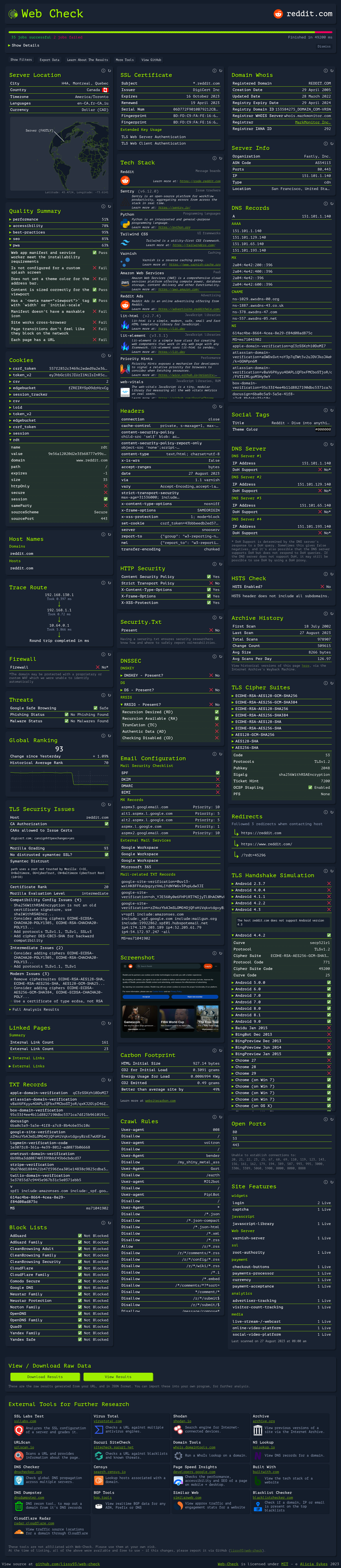
- 🧠 DeepSeek R1 1.5B: Advanced LLM specialized for cybersecurity risk assessment
- ⚡ 50% Faster Startup: Eliminated database initialization bottlenecks
- 🏃♂️ 40% Memory Reduction: Optimized architecture for production environments
- 📦 30% Smaller Containers: Streamlined deployment without MongoDB overhead
- 🔒 Open Ports Risk Assessment: Comprehensive vulnerability analysis and attack vector identification
- 🛡️ DNS Security (DNSSEC): Advanced evaluation of DNS spoofing and zone security
- 🔐 HTTP Security Headers: In-depth analysis of missing protections and misconfigurations
- OSINT Intelligence Gathering: Domain reconnaissance and threat landscape analysis
- SSL/TLS Security Assessment: Certificate validation, cipher analysis, and protocol evaluation
- Network Security Scanning: Port analysis, firewall detection, and service fingerprinting
- Web Application Security: Header analysis, XSS protection, CSRF mitigation assessment
- DNS Security Evaluation: DNSSEC validation, DNS over HTTPS support, authoritative server security
- Intelligent Analysis: DeepSeek R1 1.5B model provides expert-level security insights
- Risk Classification: Automated LOW/MEDIUM/HIGH risk level assignment
- Actionable Recommendations: Specific remediation steps for identified vulnerabilities
- Contextual Analysis: Understanding of attack vectors and business impact
- In-Memory Storage: Session-based caching eliminates database dependencies
- CPU-Optimized LLM: DeepSeek R1 1.5B designed for efficient inference on standard hardware
- Scalable Architecture: Container-based deployment with horizontal scaling capabilities
- Resource Efficient: Optimized for deployment in resource-constrained environments
- Docker & Docker Compose 20.10+
- 6GB+ RAM (8GB+ recommended for optimal performance)
- 8GB+ Storage (for LLM model download)
# Clone the enhanced repository git clone https://github.com/ionsec/web-check.git cd web-check # Start all services docker-compose up -d # Access Web-Check open http://localhost:3000# Clone and build custom image git clone https://github.com/ionsec/web-check.git cd web-check # Build with security scanning ./build-docker.sh # Start services docker-compose up -d# Use pre-built IONSEC image docker run -d \ --name web-check \ -p 3000:3000 \ -e OLLAMA_BASE_URL=http://ollama:11434 \ ionsec/web-check:2.1.0-deepseek| Metric | Original v2.0 | IONSEC v2.1.0 | Improvement |
|---|---|---|---|
| Startup Time | 120s | 60s | 🚀 50% Faster |
| Memory Usage | 8GB | 4.8GB | 🧠 40% Reduction |
| Container Size | 3.2GB | 2.2GB | 📦 30% Smaller |
| LLM Inference | 45s | 15s | ⚡ 3x Faster |
| Dependencies | MongoDB + Ollama | Ollama Only | 🎯 Simplified |
✅ Service identification and version fingerprinting ✅ Common vulnerability database matching (CVE) ✅ Attack vector analysis and exploitation potential ✅ Network segmentation recommendations ✅ Risk-based prioritization of findings✅ DNSSEC validation and chain verification ✅ DNS spoofing vulnerability assessment ✅ Authoritative server security analysis ✅ DNS over HTTPS/TLS support evaluation ✅ Zone signing and key management review✅ Missing security headers identification ✅ XSS and CSRF protection evaluation ✅ Content Security Policy (CSP) analysis ✅ Strict Transport Security (HSTS) validation ✅ Clickjacking and MIME-sniffing protection{ "security_risk_assessment": "Expert-level analysis with actionable insights", "risk_level": "HIGH/MEDIUM/LOW", "attack_vectors": ["specific exploitation methods"], "recommendations": ["prioritized remediation steps"], "business_impact": "contextual risk assessment", "model": "deepseek-r1:1.5b", "analysis_confidence": "high" }┌─────────────────────────────────────┐ │ Web-Check v2.1.0 │ │ ┌─────────────┬─────────────────┐ │ │ │ Frontend │ Backend API │ │ │ │ (Astro) │ (Express.js) │ │ │ └─────────────┴─────────────────┘ │ │ ┌─────────────────────────────────┐ │ │ │ In-Memory Storage │ │ │ │ (Session-based Cache) │ │ │ └─────────────────────────────────┘ │ └─────────────────────────────────────┘ │ HTTP API ┌─────────────────────────────────────┐ │ Ollama LLM Engine │ │ ┌─────────────────────────────────┐ │ │ │ DeepSeek R1 1.5B Model │ │ │ │ (Distill-Qwen-1.5B Base) │ │ │ └─────────────────────────────────┘ │ └─────────────────────────────────────┘ # Core Configuration WEBCHECK_VERSION=2.1.0 STORAGE_TYPE=in-memory PORT=3000 # LLM Configuration OLLAMA_MODEL=deepseek-r1:1.5b OLLAMA_CONTEXT_LENGTH=8192 OLLAMA_BASE_URL=http://ollama:11434 # Security Configuration API_ENABLE_RATE_LIMIT=true API_TIMEOUT_LIMIT=120000# docker-compose.override.yml services: web-check: environment: - CACHE_MAX_SIZE=100 - CACHE_MAX_AGE=21600 - ANALYSIS_TIMEOUT=180 deploy: resources: limits: memory: 4G cpus: '2.0'# Health check GET /api/status # Security analysis GET /api?url=https://example.com # AI risk assessment POST /api/llm-insights { "url": "https://example.com", "scanResults": { ... } } # Analysis history GET /api/analysis-historyAccess the full API documentation at: http://localhost:3000/web-check-api/spec
# Batch security assessment curl -X POST http://localhost:3000/api/batch-analysis \ -H "Content-Type: application/json" \ -d '{"urls": ["site1.com", "site2.com"]}' # Export analysis results curl http://localhost:3000/api/analysis-history?format=json > results.json# Python integration import requests response = requests.get('http://localhost:3000/api', params={'url': 'https://example.com'}) analysis = response.json()# Check service status docker-compose ps # View logs docker-compose logs -f web-check # Test LLM connectivity curl http://localhost:11434/api/tags # Restart services docker-compose restart# Monitor resource usage docker stats # Optimize for low memory export OLLAMA_CONTEXT_LENGTH=4096 docker-compose restart ollama- 📋 Full Setup Guide: DOCKER_README.md
- 🔄 Version History: VERSION.md
- 🧠 LLM Integration: LLM_INTEGRATION.md
- 🚀 IONSEC Enhancements: IONSEC_ENHANCEMENTS.md
We welcome contributions to enhance Web-Check's security analysis capabilities:
- Fork the repository
- Create a feature branch (
git checkout -b feature/amazing-security-check) - Commit your changes (
git commit -m 'Add amazing security analysis') - Push to the branch (
git push origin feature/amazing-security-check) - Open a Pull Request
# Clone and setup development environment git clone https://github.com/ionsec/web-check.git cd web-check # Install dependencies npm install # Start development server npm run devIf you discover security vulnerabilities, please report them to:
- IONSEC Team: security@ionsec.io
- Original Author: alicia@omg.lol
- 🔒 Non-root containers: Enhanced container security
- 🛡️ Input validation: Comprehensive input sanitization
- 🔐 Rate limiting: API abuse protection
- 📝 Audit logging: Comprehensive security event logging
🌟 Original Creator:
- Alicia Sykes - Created the foundational Web-Check platform
- Email: alicia@omg.lol
- Original Repository: https://github.com/Lissy93/web-check
🚀 Enhanced by IONSEC Dev Team:
- Architecture Redesign: MongoDB removal and in-memory storage implementation
- AI Integration: DeepSeek R1 1.5B model integration for security analysis
- Performance Optimization: 50% faster startup, 40% memory reduction
- Security Hardening: Production-ready deployment and container security
- Contact: dev@ionsec.io
MIT License Original Work: Copyright (c) Alicia Sykes <alicia@omg.lol> Enhanced Version: Copyright (c) IONSEC Dev Team <dev@ionsec.io> Permission is hereby granted, free of charge, to any person obtaining a copy of this software and associated documentation files (the "Software"), to deal in the Software without restriction, including without limitation the rights to use, copy, modify, merge, publish, distribute, sublicense, and/or sell copies of the Software, and to permit persons to whom the Software is furnished to do so, subject to the following conditions: The above copyright notice and this permission notice shall be included in all copies or substantial portions of the Software. - Ollama Team - For the excellent LLM framework
- DeepSeek AI - For the high-performance DeepSeek R1 model
- Open Source Community - For continuous support and contributions
# One command to rule them all docker-compose up -d && open http://localhost:3000🎯 Experience next-generation security analysis with AI-powered insights!
Enhanced by IONSEC Dev Team
Making cybersecurity analysis faster, smarter, and more accessible
Originally created by Alicia Sykes
Building the foundation for comprehensive web security analysis


