- I originally posted this here: https://linuxblog.io/linux-benchmark-scripts-tools/
Also see:
Pasted via my blog linuxblog.io:
Recently I tried to use a benchmark script I'd used previously for a quick check of VPS CPU, Disk and Network. However, it's no longer online. As a result I wanted to keep a list of scripts and tools for benchmarking Linux servers. Submit suggestions.
Bench Scripts
Bench Command line Apps
- Unixbench
- Fio
- Sysbench
- Bonnie
- S
- Phoronix Test Suite
- Geekbench
- vdbench
- IOzone
- Iometer
- Interbench
- HDparm
- DD
https://bench.sh - view system information and test the network, disk of your Linux server.
$ wget -qO- bench.sh | bash 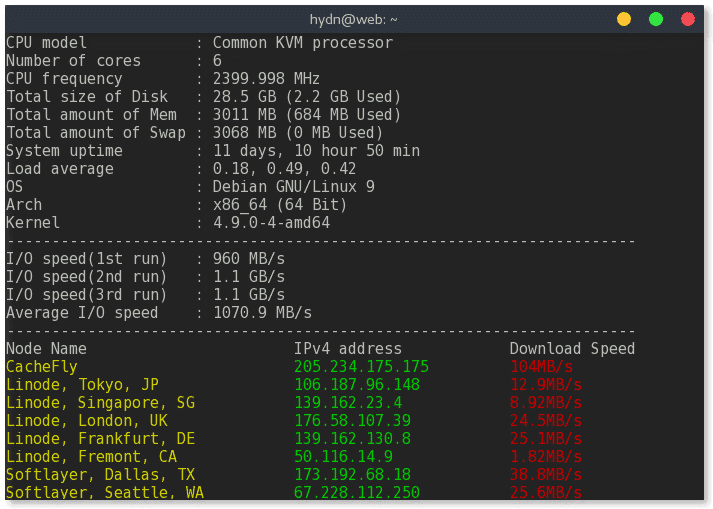
https://github.com/n-st/nench - A script loosely based on the established freevps.us/bench.sh.
$ (curl -s wget.racing/nench.sh | bash; curl -s wget.racing/nench.sh | bash) 2>&1 | tee nench.log ------------------------------------------------ nench.sh v2017.06.01 -- https://git.io/nench.sh benchmark timestamp: 2017-10-31 03:38:08 UTC ------------------------------------------------- Processor: Common KVM processor CPU cores: 6 Frequency: 2399.998 MHz RAM: 2.9G Swap: Kernel: Linux 4.9.0-4-amd64 x86_64 Disks: sda 30G HDD CPU: SHA256-hashing 500 MB 3.438 seconds CPU: bzip2-compressing 500 MB 5.385 seconds CPU: AES-encrypting 500 MB 3.174 seconds ioping: seek rate min/avg/max/mdev = 59.0 us / 180.1 us / 3.71 ms / 57.3 us ioping: sequential read speed generated 4.02 k requests in 5.00 s, 1005.5 MiB, 804 iops, 201.1 MiB/s dd: sequential write speed 1st run: 810.62 MiB/s 2nd run: 1144.41 MiB/s 3rd run: 1239.78 MiB/s average: 1064.94 MiB/s IPv4 speedtests your IPv4: x.x.x.x Cachefly CDN: 82.72 MiB/s ... https://github.com/mgutz/vpsbench - A script to run simple and comprehensive benchmarks on CPU and IO performance.
$ bash <(wget --no-check-certificate -O - https://raw.github.com/mgutz/vpsbench/master/vpsbench) Benching I/O ... OK Benching CPU. Bzipping 25MB file ... OK Benching inbound network. Downloading 100MB file ... OK Share at https://github.com/mgutz/vpsbench/wiki/VPS-Hosts CPU model: Common KVM processor Number of cores: 6 CPU frequency: 2399.998 MHz Total amount of RAM: 3011 MB Total amount of swap: MB System uptime: 11 days, 2:04, I/O speed: 910 MB/s Bzip 25MB: 4.22s Download 100MB file: 107MB/s http://busylog.net/vps-benchmark/ - Benchmark disk, cpu and network.
$ wget http://busylog.net/FILES2DW/busytest.sh -O - -o /dev/null | bash __ |__) _ | _ _ _ _|_ |__)|_|_)\/|(_)(_). | )(-|_ / _/ http://busylog.net ----------------------------- busyupload.sh V0.1 \|/ This is a early version with learning purpose... check the TODO Some logs here: ftp_busy.log ----------------------------- Check what we have installed here... openssl......installed (YES) wget.........installed (YES) ftp..........not installed (NO) ioping.......installed (YES) hdparm.......installed (YES) ----------------------------- Network upload test.... not performed tests.... test needs ftp and wget installed ----------------------------- Test openSSL speeds (openssl signatures speed).... Doing 512 bit private rsa's for 10s: 160961 512 bit private RSA's in 10.00s Doing 512 bit public rsa's for 10s: 2403890 512 bit public RSA's in 10.00s Doing 1024 bit private rsa's for 10s: 59315 1024 bit private RSA's in 10.00s Doing 1024 bit public rsa's for 10s: 902191 1024 bit public RSA's in 10.00s Doing 2048 bit private rsa's for 10s: 7758 2048 bit private RSA's in 10.00s ... OpenSSL 1.1.0f 25 May 2017 built on: reproducible build, date unspecified options:bn(64,64) rc4(8x,char) des(int) aes(partial) blowfish(ptr) compiler: gcc -DDSO_DLFCN -DHAVE_DLFCN_H -DNDEBUG -DOPENSSL_THREADS -DOPENSSL_NO_STATIC_ENGINE... sign verify sign/s verify/s rsa 512 bits 0.000062s 0.000004s 16096.1 240389.0 rsa 1024 bits 0.000169s 0.000011s 5931.5 90219.1 rsa 2048 bits 0.001289s 0.000035s 775.8 28701.2 ... ----------------------------- Disk seek rate test (ioping).... --- . (ext4 /dev/sda1) ioping statistics --- 14.9 k requests completed in 2.96 s, 58.4 MiB read, 5.06 k iops, 19.8 MiB/s generated 15.0 k requests in 3.00 s, 58.4 MiB, 4.98 k iops, 19.5 MiB/s min/avg/max/mdev = 61.9 us / 197.8 us / 5.88 ms / 97.4 us ----------------------------- Direct (not cached) disk reads (hdparm).... Test disk /dev/sda1 /dev/sda1: Timing O_DIRECT disk reads: 3624 MB in 3.00 seconds = 1207.86 MB/sec https://github.com/STH-Dev/linux-bench - Linux-Bench is a sscript that runs hardinfo, Unixbench 5.1.3, c-ray 1.1, STREAM, OpenSSL, sysbench (CPU), crafty, redis, NPB, NAMD, and 7-zip benchmarks.
$ wget https://raw.githubusercontent.com/STH-Dev/linux-bench/master/linux-bench.sh && chmod +x linux-bench.sh && ./linux-bench.sh https://github.com/hidden-refuge/bench-sh-2 - System Info + Speedtest IPv4 + Drive Speed.
$ wget https://raw.githubusercontent.com/hidden-refuge/bench-sh-2/master/bench.sh && chmod +x bench.sh && ./bench.sh https://github.com/teddysun/across/blob/master/unixbench.sh - Auto install unixbench and test script. (https://teddysun.com/245.html)
wget --no-check-certificate https://github.com/teddysun/across/raw/master/unixbench.sh chmod +x unixbench.sh ./unixbench.sh Test sever used for all tests = StackLinux Mini VPS
https://github.com/kdlucas/byte-unixbench - UnixBench is the original BYTE UNIX benchmark suite, updated and revised by many people over the years.
https://github.com/axboe/fio - Flexible I/O Tester
https://github.com/akopytov/sysbench - Scriptable database and system performance benchmark
https://hdparm.sourceforge.io/ - get/set ATA/SATA drive parameters under Linux
http://www.textuality.com/bonnie/ - Bonnie is a benchmark which measures the performance of Unix file system operations. Bonnie is concerned with identifying bottlenecks.
https://github.com/Algodev-github/S - Small collection of programs to measure storage I/O performance.
https://github.com/phoronix-test-suite/phoronix-test-suite - The Phoronix Test Suite open-source, cross-platform automated testing/benchmarking software.
http://support.primatelabs.com/kb/geekbench/geekbench-4-command-line-tool - This tool allows you to use Geekbench 4 from a command prompt and automate it with shell scripts or batch files.
http://www.oracle.com/technetwork/server-storage/vdbench-downloads-1901681.html - Vdbench is a command line utility specifically created to help engineers and customers generate disk I/O workloads to be used for validating storage performance and storage data integrity.
http://www.iozone.org - is a filesystem benchmark tool. The benchmark generates and measures a variety of file operations.
http://www.iometer.org - Iometer is an I/O subsystem measurement and characterization tool for single and clustered systems.
https://github.com/ckolivas/interbench - Linux Interactivity Benchmark
Use at your own risk! Always verify before running. If you find any broken scripts or issues please notifiy me.