







FileRise is a modern, self-hosted web file manager / WebDAV server.
Drag & drop uploads, ACL-aware sharing, OnlyOffice integration, and a clean UI — all in a single PHP app that you control.
- 💾 Self-hosted “cloud drive” – Runs anywhere with PHP (or via Docker). No external DB required.
- 🔐 Granular per-folder ACLs – Manage, View (all/own), Upload, Create, Edit, Rename, Move, Copy, Delete, Extract, Share… all enforced centrally across the UI, API, and WebDAV.
- 🔄 Fast drag-and-drop uploads – Chunked, resumable uploads with pause/resume and progress. If your connection drops, FileRise resumes automatically.
- 🌳 Scales to huge trees – Tested with 100k+ folders in the sidebar tree without choking the UI.
- 🌈 Visual organization – Color-code folders in the tree, inline list, and folder strip, plus tag files with color-coded labels for quick scanning.
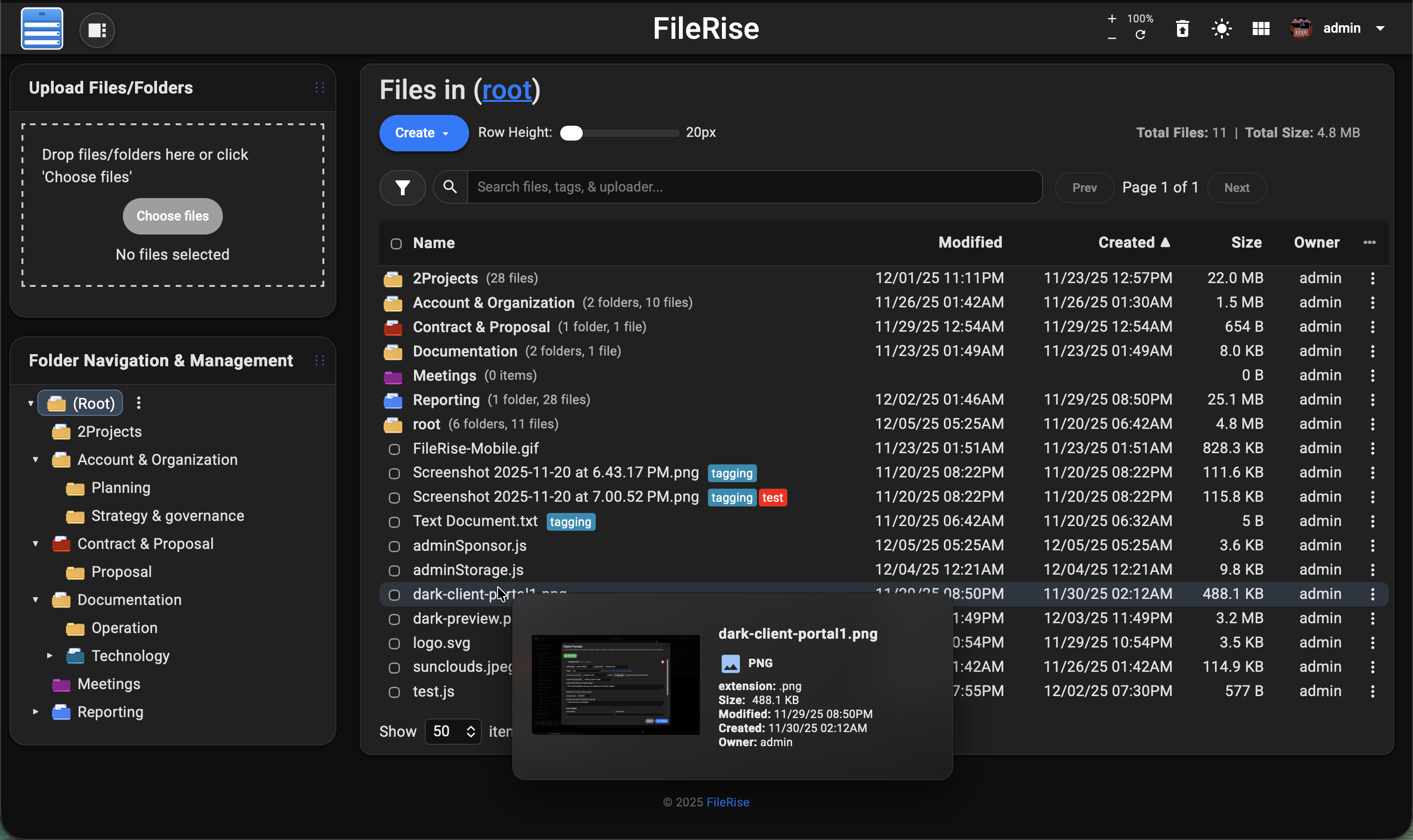
- 👀 Hover preview “peek” cards – On desktop, hover files or folders to see a thumbnail (for images/video), quick metadata (size, timestamps, tags), and effective permissions. Per-user toggle stored in
localStorage. - 🎬 Smart media handling – Track per-file video watch progress with a “watched” indicator, remember last volume/mute state, and reset progress when needed.
- 🧩 ONLYOFFICE support (optional) – Edit DOCX/XLSX/PPTX using your own Document Server; ODT/ODS/ODP supported as well. PDFs can be viewed inline.
- 🌍 WebDAV (ACL-aware) – Mount FileRise as a drive from macOS, Windows, Linux, or Cyberduck/WinSCP. Listings, uploads, overwrites, deletes, and folder creates all honor the same ACLs as the web UI.
- 🏷️ Tags, search & trash – Tag files, search by name/tag/uploader/content via fuzzy search, and recover mistakes via a Trash with time-based retention.
- 📚 API + live docs – OpenAPI spec (
openapi.json) plus an embedded Redoc viewer (api.html) for exploring endpoints. - 📊 Storage / disk usage summary – CLI scanner with snapshots, total usage, and per-volume breakdowns surfaced in the admin panel.
- 🎨 Polished, responsive UI – Dark/light mode, mobile-friendly layout, in-browser previews, and a built-in code editor powered by CodeMirror.
- 🌐 Internationalization – English, Spanish, French, German, and Simplified Chinese included; community translations welcome.
- 🔑 Login + SSO – Local users, TOTP 2FA, and OIDC (Auth0 / Authentik / Keycloak / etc.) with optional auto-provisioning, IdP-driven admin role, and Pro user-group mapping.
- 🛡️ ClamAV virus scanning (Core) + Pro virus log – Optional ClamAV upload scanning, with a Pro virus detection log in the admin panel and CSV export.
- 👥 Pro: user groups, client portals & storage explorer – Group-based ACLs, brandable client upload portals, and an ncdu-style storage explorer for drilling into largest folders/files and cleaning up space inline.
Full list of features available at Full Feature Wiki
💡 Looking for FileRise Pro (brandable header, user groups, client upload portals, license handling)? Check out filerise.net – FileRise Core stays fully open-source (MIT).
- 🚀 Live demo: Demo (username:
demo/ password:demo) - 📚 Docs & Wiki: Wiki
- 🐳 Docker image: Docker
- 💬 Discord: Join the FileRise server
- 📝 Changelog: Changes
FileRise turns a folder on your server into a web-based file explorer with:
- Folder tree + breadcrumbs for fast navigation
- Multi-file/folder drag-and-drop uploads
- Move / copy / rename / delete / extract ZIP
- Public share links (optionally password-protected & expiring)
- Tagging and search by name, tag, uploader, and content
- Trash with restore/purge
- Inline previews (images, audio, video, PDF) and a built-in code editor
Everything flows through a single ACL engine, so permissions are enforced consistently whether users are in the browser UI, using WebDAV, or hitting the API.
FileRise supports local accounts, TOTP 2FA, and modern OIDC providers (Auth0, Authentik, Keycloak, …).
Beyond “just login”, OIDC can now drive roles and Pro user groups:
- 🧑💻 Auto-provision users
- 👑 IdP-driven admin role
- 👥 Pro: OIDC groups → FileRise Pro user groups
- 🧪 Admin: OIDC connectivity test
➡️ Full docs: OIDC / SSO setup
The easiest way to run FileRise is the official Docker image.
docker run -d \ --name filerise \ -p 8080:80 \ -e TIMEZONE="America/New_York" \ -e TOTAL_UPLOAD_SIZE="10G" \ -e SECURE="false" \ -e PERSISTENT_TOKENS_KEY="default_please_change_this_key" \ -e SCAN_ON_START="true" \ -e CHOWN_ON_START="true" \ -v ~/filerise/uploads:/var/www/uploads \ -v ~/filerise/users:/var/www/users \ -v ~/filerise/metadata:/var/www/metadata \ error311/filerise-docker:latestThen visit:
http://your-server-ip:8080 On first launch you’ll be guided through creating the initial admin user.
💡 After the first run, you can set
CHOWN_ON_START="false"if permissions are already correct and you don’t want a recursivechownon every start.
⚠️ Uploads folder recommendationIt’s strongly recommended to bind
/var/www/uploadsto a dedicated folder (for example~/filerise/uploadsor/mnt/user/appdata/FileRise/uploads), not the root of a huge media share.If you really want FileRise to sit “on top of” an existing share, use a subfolder (e.g.
/mnt/user/media/filerise_root) instead of the share root, so scans and permission changes stay scoped to that folder.
services: filerise: image: error311/filerise-docker:latest container_name: filerise ports: - "8080:80" environment: TIMEZONE: "America/New_York" TOTAL_UPLOAD_SIZE: "10G" SECURE: "false" PERSISTENT_TOKENS_KEY: "default_please_change_this_key" SCAN_ON_START: "true" # auto-index existing files on startup CHOWN_ON_START: "true" # fix permissions on uploads/users/metadata on startup volumes: - ./uploads:/var/www/uploads - ./users:/var/www/users - ./metadata:/var/www/metadataBring it up with:
docker compose up -d| Variable | Required | Example | What it does |
|---|---|---|---|
TIMEZONE | ✅ | America/New_York | PHP / container timezone. |
TOTAL_UPLOAD_SIZE | ✅ | 10G | Max total upload size per request (e.g. 5G, 10G). Also used to set PHP upload_max_filesize and post_max_size, and Apache LimitRequestBody. |
SECURE | ✅ | false | true when running behind HTTPS / a reverse proxy, else false. |
PERSISTENT_TOKENS_KEY | ✅ | change_me_super_secret | Secret used to sign “remember me”/persistent tokens. Do not leave this at the default. |
DATE_TIME_FORMAT | Optional | Y-m-d H:i | Overrides DATE_TIME_FORMAT in config.php (controls how dates/times are rendered in the UI). |
SCAN_ON_START | Optional | true | If true, runs scan_uploads.php once on container start to index existing files. |
CHOWN_ON_START | Optional | true | If true (default), recursively chowns uploads/, users/, and metadata/ to www-data:www-data on startup. Set to false if you manage ownership yourself. |
PUID | Optional | 99 | If running as root, remap www-data user to this UID (e.g. Unraid’s 99). |
PGID | Optional | 100 | If running as root, remap www-data group to this GID (e.g. Unraid’s 100). |
HTTP_PORT | Optional | 8080 | Override Apache Listen 80 and vhost port with this port inside the container. |
HTTPS_PORT | Optional | 8443 | If you terminate TLS inside the container, override Listen 443 with this port. |
SERVER_NAME | Optional | files.example.com | Sets Apache’s ServerName (defaults to FileRise if not provided). |
LOG_STREAM | Optional | error | Controls which logs are streamed to container stdout: error, access, both, or none. |
VIRUS_SCAN_ENABLED | Optional | true | If true, enable ClamAV-based virus scanning for uploads. |
VIRUS_SCAN_CMD | Optional | clamscan | Command used to scan files. Can be clamscan, clamdscan, or a wrapper with flags. |
CLAMAV_AUTO_UPDATE | Optional | true | If true and running as root, call freshclam on startup to update signatures. |
SHARE_URL | Optional | https://files.example.com | Overrides the base URL used when generating public share links (useful behind reverse proxies). |
If
DATE_TIME_FORMATis not set, FileRise uses the default fromconfig/config.php(currentlym/d/y h:iA).🗂 Using an existing folder tree
- Point
/var/www/uploadsat the folder you want FileRise to manage.- Set
SCAN_ON_START="true"on the first run to index existing files, then usually set it to"false"so the container doesn’t rescan on every restart.CHOWN_ON_START="true"is handy on first run to fix permissions. If you map a large share or already manage ownership yourself, set it to"false"to avoid recursivechownon every start.Volumes:
/var/www/uploads– your actual files/var/www/users– user & pro jsons/var/www/metadata– tags, search index, share links, etc.
More Docker / orchestration options (Unraid, Portainer, k8s, reverse proxy, etc.)
- Install & Setup
- Nginx
- FAQ
- Kubernetes / k8s deployment
- Portainer templates: add this URL in Portainer → Settings → App Templates:
https://raw.githubusercontent.com/error311/filerise-portainer-templates/refs/heads/main/templates.json - See also the Docker repo: error311/filerise-docker
Prefer bare-metal or your own stack? FileRise is just PHP + a few extensions.
Requirements
- PHP 8.3+
- Web server (Apache / Nginx / Caddy + PHP-FPM)
- PHP extensions:
json,curl,zip(and usual defaults) - No database required
FileRise ships as a standard PHP app with this layout:
config/public/← web server DocumentRootsrc/uploads/,users/,metadata/(data directories; you can create them up front as shown below — FileRise will attempt to create them on first run if they’re missing and permissions allow)
mkdir -p uploads users metadata chown -R www-data:www-data uploads users metadata # adjust for your web user chmod -R 775 uploads users metadataYou can install from a release ZIP (recommended) or from git.
-
Download the latest release ZIP to
/var/wwwcd /var/www VERSION="v2.5.2" # replace with the tag you want ASSET="FileRise-${VERSION}.zip" curl -fsSL "https://github.com/error311/FileRise/releases/download/${VERSION}/${ASSET}" -o "${ASSET}" unzip "${ASSET}" # The ZIP already contains config/, public/, src/, etc. at the top level
-
Create data directories (if they don’t exist) and set permissions
mkdir -p uploads users metadata chown -R www-data:www-data uploads users metadata # adjust for your web user chmod -R 775 uploads users metadata -
(Usually optional) Install PHP dependencies
Release ZIPs are built with
vendor/included for convenience.
Ifvendor/is missing and you have Composer:cd /var/www composer install --no-dev --optimize-autoloader -
Point your web server at
public/- Apache:
DocumentRoot /var/www/public - Nginx / Caddy: root should also be
/var/www/public
(PHP via PHP-FPM)
Enable URL rewriting:
- Apache: allow
.htaccessinsidepublic/or copy its rules into your vhost. - Nginx / Caddy: mirror the protections from
public/.htaccess(no directory listing, blockconfig,src, etc.).
- Apache:
-
Open FileRise in the browser
Go to your URL (e.g.
https://files.example.com) and follow the admin setup screen.
-
Clone into
/var/wwwcd /var/www git clone https://github.com/error311/FileRise.git .
-
Create data directories and set permissions
mkdir -p uploads users metadata chown -R www-data:www-data uploads users metadata # adjust for your web user chmod -R 775 uploads users metadata -
Install PHP dependencies
composer install
-
Configure your web server
- DocumentRoot →
/var/www/public - PHP-FPM / mod_php enabled
- Rewrites / protections as above
- DocumentRoot →
-
Hit your FileRise URL and complete setup
For detailed examples and reverse proxy snippets, see the Wiki:
Install & Setup.
If you deployed FileRise directly in /var/www, you can use this helper script to update to a new release without touching your data.
Save this as scripts/update-filerise.sh update-filerise.sh (make it executable with chmod +x scripts/update-filerise.sh):
Once enabled in the Admin panel, FileRise exposes a WebDAV endpoint (e.g. /webdav.php). Use it with:
- macOS Finder – Go → Connect to Server →
https://your-host/webdav.php/ - Windows File Explorer – Map Network Drive →
https://your-host/webdav.php/ - Linux (GVFS/Nautilus) –
dav://your-host/webdav.php/ - Clients like Cyberduck, WinSCP, etc.
WebDAV operations honor the same ACLs as the web UI.
See: WebDAV
If you run an ONLYOFFICE Document Server you can open/edit Office documents directly from FileRise (DOCX, XLSX, PPTX, ODT, ODS, ODP; PDFs view-only).
Configure it in Admin → ONLYOFFICE:
- Enable ONLYOFFICE
- Set your Document Server origin (e.g.
https://docs.example.com) - Configure a shared JWT secret
- Copy the suggested Content-Security-Policy header into your reverse proxy
Docs: ONLYOFFICE
- FileRise is actively maintained and has published security advisories.
- See SECURITY.md and GitHub Security Advisories for details.
- To upgrade:
- Docker:
docker pull error311/filerise-docker:latestand recreate the container with the same volumes. - Manual: replace app files with the latest release (keep
uploads/,users/,metadata/, and your config).
- Docker:
Please report vulnerabilities responsibly via the channels listed in SECURITY.md.
- 🧵 GitHub Discussions & Issues: ask questions, report bugs, suggest features.
- 💬 Unraid forum thread: for Unraid-specific setup and tuning.
- 🌍 Reddit / self-hosting communities: occasional release posts & feedback threads.
Contributions are welcome — from bug fixes and docs to translations and UI polish.
See CONTRIBUTING.md for guidelines.
If FileRise saves you time or becomes your daily driver, a ⭐ on GitHub or sponsorship is hugely appreciated:
- ❤️ GitHub Sponsors
- ☕ Ko-fi
FileRise Core is released under the MIT License – see LICENSE.
It bundles a small set of well-known client and server libraries (Bootstrap, CodeMirror, DOMPurify, Fuse.js, Resumable.js, sabre/dav, etc.).
All third-party code remains under its original licenses.
The official Docker image includes the ClamAV antivirus scanner (GPL-2.0-only) for optional upload scanning.
See THIRD_PARTY.md and the licenses/ folder for full details.
