Azure Logs documentation update #4300
Conversation


I expanded this section adding a list of the required component to set up an Azure Logs integration. The section also add some details about each component and sub- elements the user need to know later in the Setup section.
 zmoog added enhancement
🚀 Benchmarks reportPackage |
| Data stream | Previous EPS | New EPS | Diff (%) | Result |
|---|---|---|---|---|
activitylogs | 1153.4 | 652.32 | -501.08 (-43.44%) | 💔 |
auditlogs | 2272.73 | 1438.85 | -833.88 (-36.69%) | 💔 |
identity_protection | 2341.92 | 1828.15 | -513.77 (-21.94%) | 💔 |
platformlogs | 3076.92 | 2109.7 | -967.22 (-31.43%) | 💔 |
signinlogs | 1600 | 948.77 | -651.23 (-40.7%) | 💔 |
springcloudlogs | 3597.12 | 2061.86 | -1535.26 (-42.68%) | 💔 |
To see the full report comment with /test benchmark fullreport
💚 Build Succeeded
Expand to view the summary
Build stats
Test stats 🧪
🤖 GitHub commentsExpand to view the GitHub comments
To re-run your PR in the CI, just comment with:
|






🌐 Coverage report
|
Highlighting the kind of data thaw flow between the components is probably helpful.

| 👋 @zmoog I like the direction you're taking here! One thing that isn't clear (yet) in this draft is the relationship between this Azure Logs integration and the individual Active Directory, Activity logs, Firewall logs, Platform logs, and Spring Cloud logs integrations. Are they intended to be used together? Or should a user choose either the Azure Logs integration or one or more of the other integrations for collecting logs? In what situations should you choose each approach? |
That's good! So I'll move ahead exploring how to tackle the Setup section.
I haven't touched the documentation of the individual integrations yet. The idea is to replicate the AWS doc approach: general and shared information in the main README.md file, and the specific information and references (fields and sample logs) in the individual .md files. |
I moved some of the content from the Requirements section to the Setup section. There were too many details.
| Hey @colleenmcginnis, I expanded the Setup section by drafting the kind of content users probably need to set up Azure Logs. I also moved some details from the Requirements section to the Setup one. I updated the screenshots. Let me know what you think approach! The next step is revising the Settings section, working on the individual integration pages, and moving the references from the README. |
Refine event hub setup information a little
Logs reference is probably more useful in the individual integration page.
| @colleenmcginnis, I reduced the scope of this PR a little; I plan a series of small, more focused PRs next. In this PR, I focus on addressing issues 2 and 5 from #4169 (address the missing information about event hubs and the ambiguity between event hub namespace and event hub.). I also removed the field details and sample events from the Reference section on the main page, similar to the AWS integration doc. |

 alaudazzi left a comment
alaudazzi left a comment There was a problem hiding this comment.
Left a few editing suggestions, otherwise LGTM.
 zmoog force-pushed the zmoog/azure-logs-doc-update branch from
 08800f7 to aee15cc Compare zmoog force-pushed the zmoog/azure-logs-doc-update branch from aee15cc to 0858939 Compare 
Co-authored-by: Arianna Laudazzi <46651782+alaudazzi@users.noreply.github.com>

| #### How many event hubs? | ||
| | ||
| Examples: | ||
| Elastic recommends creating one event hub for each Azure service you collect data from. For example, if you plan to collect Azure Active Directory (Azure AD) logs and Activity logs, create two event hubs: one for Azure AD and one for Activity logs. |

There was a problem hiding this comment.
Still, the configuration of an integration allows specifying only one event hub, but the user can enable the processing of multiple types of events. So it seems as Azure Integration we somehow assume an EventHub can contain more than 1 type of events/logs.
There was a problem hiding this comment.
Some integrations are designed to filter incoming logs and drop those that are not on the supported log categories list.
For example, both sign-in and audit logs have a processor in their ingest pipelines that drop logs that don't belong to the supported log categories. So you can enable all the Azure AD logs, and each one will ingest only the right log messages. The price is inefficiencies due to all data streams receiving the same messages: dropping a message is not completely free.
Other integrations, like the generic Event Hub integration, can ingest any log category but it indexes only the common fields. So enabling a generic Event Hub integration alongside others is not recommended and can lead to indexing the same log multiple times, in different data streams, and with different field mapping.
@lucabelluccini, do you think we need to elaborate a little instead of just stating "Elastic recommends creating one event hub"?
There was a problem hiding this comment.
For example, both sign-in and audit logs have a processor in their ingest pipelines that drop logs that don't belong to the supported log categories.
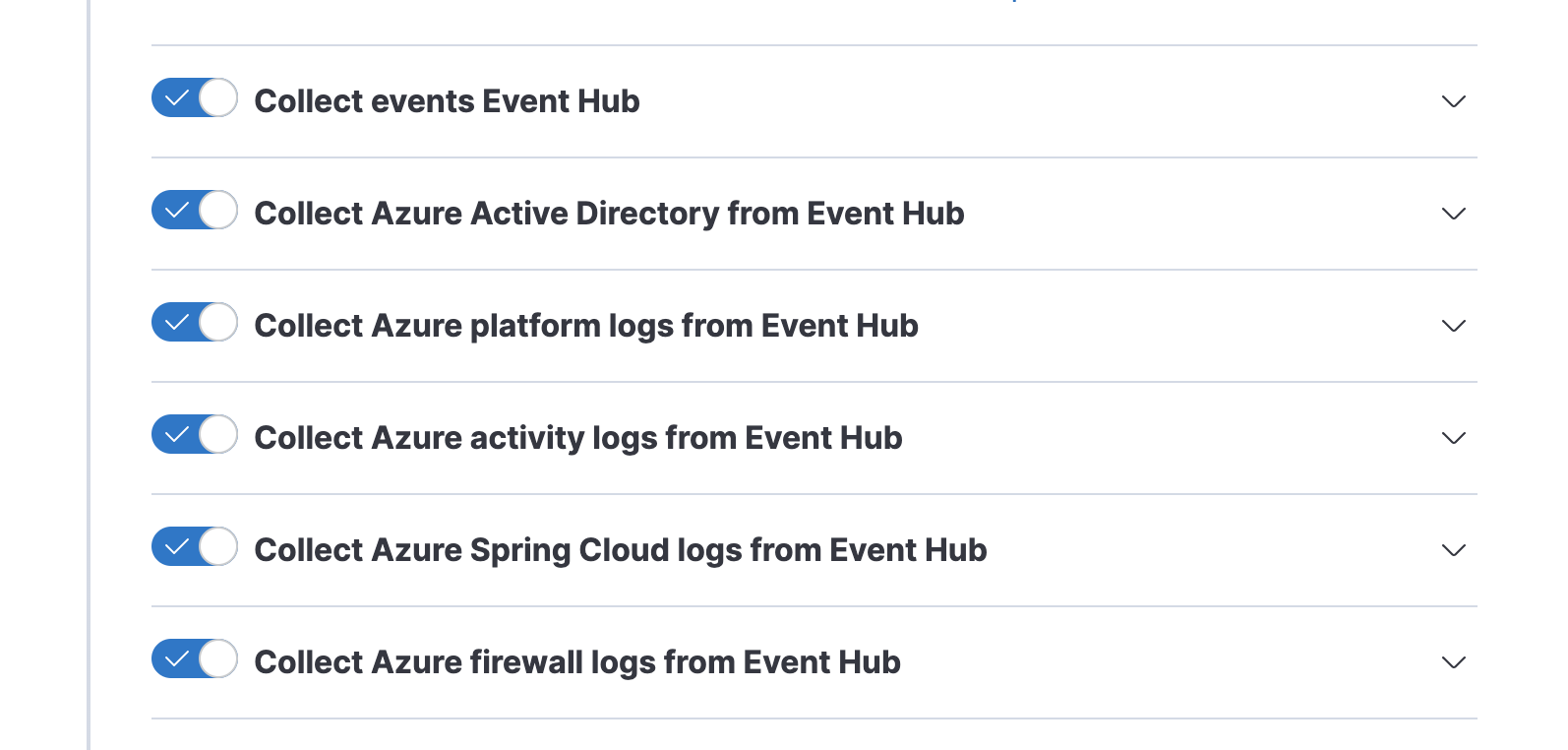
If the drop is in the ingest pipeline on Elasticsearch side, leaving all the types of logs in the Event Log settings is a waste of network and ingest pipeline resources on the ingest nodes, as we're basically multiplying N times (N = the type of logs/data streams left enabled)
E.g. I collect only the AD logs and I route them to 1 event hub. If I configure the Azure Logs integration as per defaults (all options enabled) as below, the amount of data transferred to ES (for then being thrown away except for the AD) is huge...
There was a problem hiding this comment.
Yep. That's why I want to update this document so badly.
I also want to open a different PR to change the default value from enabled to disabled (the new data streams added to Azure AD logs are disabled by default).
The Azure module for Filebeat also recommends one even hub per log type:
It is recommended to use a separate eventhub for each log type as the field mappings of each log type are different.
The reason is different but still valid.
There was a problem hiding this comment.
We agreed to make the following changes:
- Add a disclaimer at the top of the README.md document suggesting installing the "individual" integrations.
- We "strongly recommend"
| This setting can also be used to define your own endpoints, like for hybrid cloud models. | ||
| It is not recommended to use the same event hub for multiple integrations. | ||
| | ||
| For high-volume deployments, we recommend one event hub for each data stream. |
There was a problem hiding this comment.
We introduce the concept of Elasticsearch data stream, but the user doesn't see the word data stream when configuring the Azure Logs Integration.
What is the objective of this statement?
There was a problem hiding this comment.
The goal was to introduce the idea that high-vol data streams may require an additional work.
A good trade-off for most users is one event hub for all Azure AD logs (made of four data streams now), but if you have a substantial Active Directory deployment, you may consider moving to one event hub for each data stream.
| Like all other clients, Elastic Agent should specify a consumer group to access the event hub. | ||
| | ||
| ## Logs reference | ||
| A Consumer Group is a view (state, position, or offset) of an entire event hub. Consumer groups enable multiple agents to each have a separate view of the event stream, and to read the logs independently at their own pace and with their own offsets. |
There was a problem hiding this comment.
This might be misleading - at least to my novice eyes.
If the same Consumer group is used across multiple Elastic Agents with Azure Logs configured identically, allow to read the logs concurrently and without duplicates.
Different consumer groups allow to have a separate view of the event stream and to read the logs independently at their own page and their own offsets.
There was a problem hiding this comment.
We need to go one level deeper to understand what's going on.
The current integration structure forces the same event hub and consumer group to be shared across all enabled data streams.
Every enabled data stream spawns an azureeventhub input that connects to the same event hub and uses the same consumer group name:
┌────────────────┐ │ adlogs │ │ <<event hub>> │ └────────────────┘ │ │ │ ┌──────────────┼──────────────┐ $Default $Default $Default │ │ │ ┌──────────┼──────────────┼──────────────┼────────┐ │ ▼ ▼ ▼ │ │ ┌────────────┐ ┌────────────┐ ┌────────────┐ │ │ │ signin │ │ audit │ │ activity │ │ │ │ <<input>> │ │ <<input>> │ │ <<input>> │ │ │ └────────────┘ └────────────┘ └────────────┘ │ │ │ │ │ │ └─Filebeat─┼──────────────┼──────────────┼────────┘ │ │ │ │ │ │ │ consumer group info │ │ (state, position, or │ │ offset) │ │ │ │ │ │ │ ┌──────────┼──────────────┼──────────────┼────────┐ │ ▼ ▼ ▼ │ │ ┌────────────┐ ┌──────────┐ ┌──────────┐ │ │ │ signin │ │ audit │ │ audit │ │ │ │ <<blob>> │ │ <<blob>> │ │ <<blob>> │ │ │ └────────────┘ └──────────┘ └──────────┘ │ │ │ └─storage account container───────────────────────┘ But, since each input stores the consumer group info (state, position, or offset) on a different blob, it's like each uses a dedicated consumer group. Even if they use the same consume group name.
That's why each data stream connected to the same data stream receives a copy of each message.
There was a problem hiding this comment.
If you assign the same agent policy to multiple Elastic Agents, they end up using the same blob and meet the goal of sharing the load:
┌────────────────┐ │ adlogs │ │ <<event hub>> │ └────────────────┘ │ │ │ ┌────────────┴───────────┐ $Default $Default │ │ ┌──────────┼──────────┐ ┌──────────┼──────────┐ │ ▼ │ │ ▼ │ │ ┌────────────┐ │ │ ┌────────────┐ │ │ │ signin │ │ │ │ signin │ │ │ │ <<input>> │ │ │ │ <<input>> │ │ │ └────────────┘ │ │ └────────────┘ │ │ │ │ │ │ │ └─Filebeat─┼──────────┘ └─Filebeat─┼──────────┘ │ │ │ │ │ │ │ consumer group info │ │(state, position, or │ │ offset) │ │ │ ┌──────────┼────────────────────────┼─────────────┐ │ │ │ │ │ │ ┌────────────┐ │ │ │ │ │ signin │ │ │ │ └────▶│ <<blob>> │◀────┘ │ │ └────────────┘ │ │ │ └─storage account container───────────────────────┘ In this example, both Filebeat instances will use the same blob. The blob name is identified by name using the following pattern: filebeat-signinlogs-{{eventhub}}.
There was a problem hiding this comment.
@lucabelluccini, what do you think is the best way to describe the role of the consumer group to a user who wants to set up an integration?
There was a problem hiding this comment.
We agreed to make the following changes:
- add a paragraph that describes that consumer groups allow Agent to collaborate and scale the throughput
- underline that having an event hub per log type is a good thing
| A Consumer Group is a view (state, position, or offset) of an entire event hub. Consumer groups enable multiple agents to each have a separate view of the event stream, and to read the logs independently at their own pace and with their own offsets. | ||
| | ||
| ### Activity logs | ||
| In most cases, you can use the default value of `$Default`. |
There was a problem hiding this comment.
Can we mention an example of when this should be configured?
There was a problem hiding this comment.
Yep. I am not an expert here, but I think having a consumer group named after the log type it serves would help. I will update the doc accordingly.

Co-authored-by: Luca Belluccini <luca.belluccini@elastic.co>
Co-authored-by: Luca Belluccini <luca.belluccini@elastic.co>
- put more emphasis on the "Azure service" concept; we want to make it a first-class citizen of this doc to leverage it when we discuss the recommended 1:1 mapping between service and event hub. - recommend installing the individual integration vs collective one - clarify the role of consumer group and storage account container as enablers of shared logs processing. - minor stuff (add more links and supporting diagrams)
zmoog force-pushed the zmoog/azure-logs-doc-update branch from d930a4b to 69153c6 Compare | Hey @alaudazzi @lucabelluccini, I pushed an update that addresses the topic we discussed earlier today. Let me know what you think! I'm more than happy to clarify, expand or fix errors. |

| | ||
| A Consumer Group is a view (state, position, or offset) of an entire event hub. Consumer groups enable multiple agents to each have a separate view of the event stream, and to read the logs independently at their own pace and with their own offsets. | ||
| | ||
| Consumer groups allow the Elastic Agents assigned to the same agent policy to work together on the logs processing to increase ingestion throughput if required. |

There was a problem hiding this comment.
I find also that mentioning the concept of “horizontal scaling" might increase clarity. but it could be a subjective opinion
There was a problem hiding this comment.
Yeah, I agree, and I'm also stealing the "horizontal scaling" thing 😇
zmoog force-pushed the zmoog/azure-logs-doc-update branch from 1208a48 to 25c75c4 Compare 
7 participants


What does this PR do?
Expand Azure Logs integration docs to make it easier for users to set it up.
It addresses issues 2 and 5 from #4169.
Disclaimer: this is an early draft to share the change with the cloud monitoring team members and docs wizards.Checklist
I have verified that all data streams collect metrics or logs.changelog.ymlfile.Related issues
Screenshots