个人学习为主, 顺便方便他人.😉
由于个人能力有限, 所以本文只从"typescript 更新日志"中筛选类型/语法相关的知识点, 3.1 之前的版本都是一些基础知识, 所以只摘取了部分内容. 如有错误还请各位多多指点帮助.
注意: 类型推断的变化(放宽/收窄)和配置项以及 ECMA 的新增语法选录.
获取 Prmoise 的 resolve 的值的类型
// Promise<number> const p = Promise.resolve(123); // Awaited<Promise<number>> === number type B = Awaited<typeof p>; // 类型参数不是Promise类型, // 那么不处理, 直接返回 type S = Awaited<string>; // string之前版本就支持"import type {xx} from 'xxx'"的语法, 现在进步支持对单个导入项标记"type".
import { someFunc, type BaseType } from "./some-module.js";同步兼容 ecma 语法
class Person { #name: string; constructor(name: string) { this.#name = name; } equals(other: unknown) { return other && typeof other === "object" && #name in other && // <- 🔥新语法 this.#name === other.#name; } }同步兼容 ecma 语法, 对导入文件进行运行时判断, ts 不做任何判断.
import obj from "./something.json" assert { type: "json" };还有"import"函数的语法:
const obj = await import("./something.json", { assert: { type: "json" }, });tsconfig增加了一个配置项"preserveValueImports", 用来保留未使用的变量, 意义在于vue的setup模式下, js定义的变量, 只在模板中使用, ts识别不到"已使用", 有了这个选项就可以保留变量.
<!-- A .vue File --> <script setup> import { someFunc } from "./some-module.js"; </script> <button @click="someFunc">Click me!</button>常见的类型保护如下:
function nOrs() { return Math.random() > 0.5 ? 123 : "abc"; } let input = nOrs(); if (typeof input === "number") { input++; }如果typeof input === 'number'抽象到变量中,在 4.4 版本之前类型保护会失效,但是在 4.4 中 ts 可以正确的类型保护了.
function nOrs() { return Math.random() > 0.5 ? 123 : "abc"; } const input = nOrs(); const isNumber = typeof input === "number"; if (isNumber) { // 失效,无法知道input是number类型 input++; }注意: 要求被保护的必须是"const 的变量"或者"realdonly 的属性", 比如上面的 input 和下面的"n"属性.
interface A { readonly n: number | string; } const a: A = { n: Math.random() > 0.5 ? "123" : 321 }; const isNumber = typeof a.n === "number"; if (isNumber) { // r是number const r = a.n; }通过属性的判断可以缩小联合类型的范围.
type Shape = | { kind: "circle"; radius: number } | { kind: "square"; sideLength: number }; function area(shape: Shape): number { const isCircle = shape.kind === "circle"; if (isCircle) { // We know we have a circle here! return Math.PI * shape.radius ** 2; } else { // We know we're left with a square here! return shape.sideLength ** 2; } }之前只支持"string | number ", 造成对 Object 类型的键的描述不全面, 现在解决了.
interface Test1 { [k: string | number | symbol]: any; } type Test2 = { [k in string | number | symbol]: any; };同步支持 es 新语法
class Foo { static #count = 0; get count() { return Foo.#count; } static { try { const lastInstances = loadLastInstances(); Foo.#count += lastInstances.length; } catch {} } }"override"是给类提供的语法, 用来标记子类中的属性/方法是否覆盖父类的同名属性/方法.
class A {} class B extends A { // 提示不能用override, 因为基类中没有"a"字段. override a() {} }点击跳转到指定代码, 属于行内标签.
/** * To be called 70 to 80 days after {@link plantCarrot}. */ function harvestCarrot(carrot: Carrot) {} /** * Call early in spring for best results. Added in v2.1.0. * @param seed Make sure it's a carrot seed! */ function plantCarrot(seed: Seed) { // TODO: some gardening }let c: [string, string?] = ["hello"]; c = ["hello", "world"];但是要求尾部不能有可选元素(?)和"..."出现
let foo: [...string[], number]; foo = [123]; foo = ["hello", 123]; foo = ["hello!", "hello!", "hello!", 123]; let bar: [boolean, ...string[], boolean]; bar = [true, false]; bar = [true, "some text", false]; bar = [true, "some", "separated", "text", false];错误示例
let StealersWheel: [...Clown[], "me", ...Joker[]]; // A rest element cannot follow another rest element. let StringsAndMaybeBoolean: [...string[], boolean?]; // An optional element cannot follow a rest element.语法和 es6 中的"``"用法一样, 只不过这里用来包裹类型:
type World = "world"; // hello world type Greeting = `hello ${World}`; type Color = "red" | "blue"; type Quantity = "one" | "two"; // "one fish" | "two fish" | "red fish" | "blue fish" type SeussFish = `${Quantity | Color} fish`;ts 系统新增 Uppercase / Lowercase / Capitalize / Uncapitalize 类型
// ABC type S1 = Uppercase<"abc">; // abc type S2 = Lowercase<"ABC">; // Abc type S3 = Capitalize<"abc">; // aBC type S4 = Uncapitalize<"ABC">;获取 key 后用来获取值, 但是不用 key,只用值, 然后重新标注 key.
type PPP<T> = { [K in keyof T as "ww"]: T[K]; }; // type A = {ww:1|'2'} type A = PPP<{ a: 1; b: "2" }>;4.1 之前版本 resolve 可以不传参数, 现在不允许.
new Promise((resolve) => { // 报错,resolve参数不能为空 resolve(); });除非对 Promise 传入类型参数"void":
// 正确 new Promise<void>((resolve) => { resolve(); });以前获取元组除了第一个元素的类型:
function tail<T extends any[]>(arr: readonly [any, ...T]) { const [_ignored, ...rest] = arr; return rest; } const myTuple = [1, 2, 3, 4] as const; const myArray = ["hello", "world"]; const r1 = tail(myTuple); // const r1: [2, 3, 4] const r2 = tail([...myTuple, ...myArray] as const); // const r2: [2, 3, 4, ...string[]]这里要求"..."后面的元素必须是元组, 只有最后一个元素可以是"..."+"数组"
type Strings = [string, string]; type Numbers = [number, number]; type StrStrNumNumBool = [...Strings, ...Numbers, boolean]; type StrStrNumNumBool = [...[string], string, ...string[]];主要是为了兼容函数参数的定义, 因为函数的参数都是有参数名的.
type Range = [start: number, end: number];定义属性的时候, 可以省略类型标注.
class A { // 此时a直接被推导出是number类型 // 类型可以省略, a不能省略 a; constructor() { this.a = 1; } }使用之前需要进行判断或断言.
try { // ... } catch (e) { e; // unknown }标注弃用. 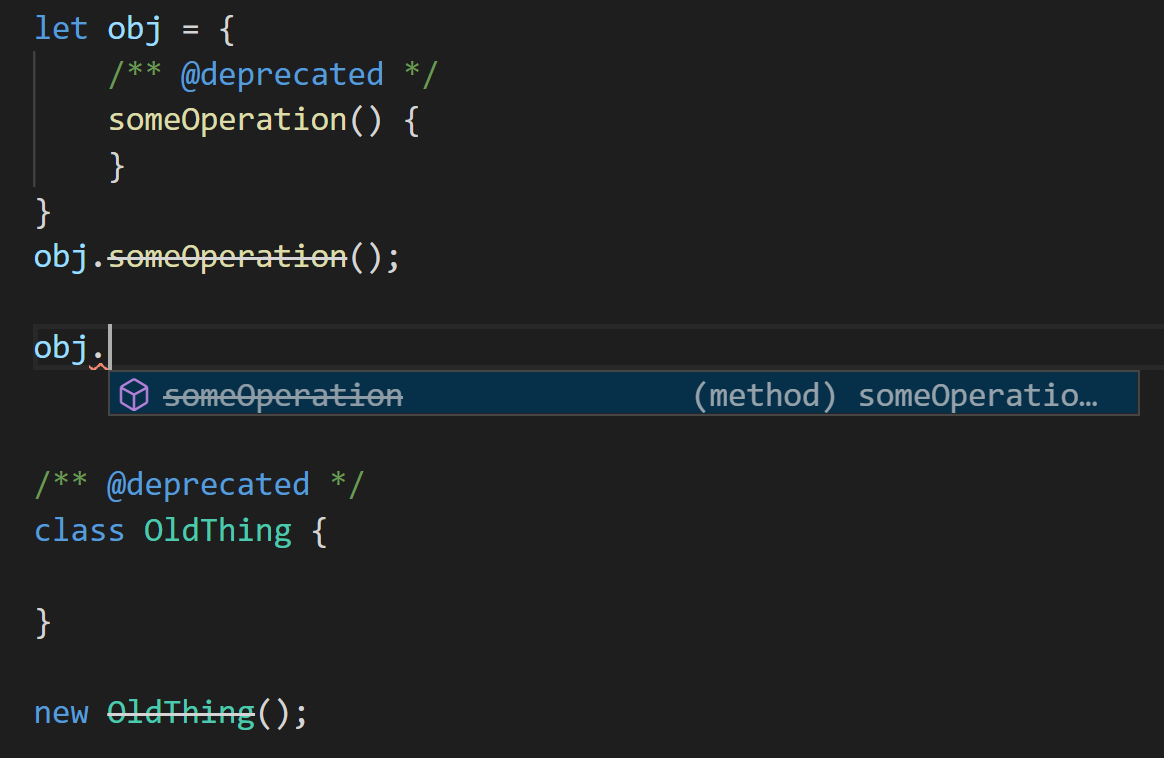
用来屏蔽错误, 不同于"// @ts-ignore"的使用动机, "// @ts-expect-error"主要的使用场景是你故意产生错的, 比如测试用例.
function doStuff(abc: string, xyz: string) { assert(typeof abc === "string"); assert(typeof xyz === "string"); } // 你想测试传入数字参数, 但是ts会自动推断错误, 这不是你想要的, 所以加"// @ts-expect-error" expect(() => { // @ts-expect-error doStuff(123, 456); }).toThrow();为仅类型导入和导出添加了新语法。
import type { SomeThing } from "./some-module.js"; export type { SomeThing };同步 ecma 的私有属性语法, 不同于 private 修饰符, #后的私有属性即便在编译成 js 后依然不能在类的外部访问.
class Person { #name: string; constructor(name: string) { this.#name = name; } greet() { console.log(`Hello, my name is ${this.#name}!`); } }导出语法, 同步于 ecma2020 的语法
export * as utilities from "./utilities.js";同步于 ecma 的语法, 要求必须是模块内使用, 所以起码要有一个"空导出(export {})"
const response = await fetch("..."); const greeting = await response.text(); console.log(greeting); // Make sure we're a module export {};还有一个限制就是配置项: "target"为 es2017 以上且"module"为"esnext"
只读数组
function foo(arr: ReadonlyArray<string>) { arr.slice(); // okay arr.push("hello!"); // error! }和 readonlyArray 同效果.
function foo(arr: readonly string[]) { arr.slice(); // okay arr.push("hello!"); // error! }function foo(pair: readonly [string, string]) { console.log(pair[0]); // okay pair[1] = "hello!"; // error }使用 const 断言后, 推断出的类型都是"不可修改"的.
// Type '"hello"',不能修改x的值了 let x = "hello" as const; // Type 'readonly [10, 20]' let y = [10, 20] as const; // Type '{ readonly text: "hello" }' let z = { text: "hello" } as const;还可以写使用尖角号断言:
// Type '"hello"' let x = <const>"hello"; // Type 'readonly [10, 20]' let y = <const>[10, 20]; // Type '{ readonly text: "hello" }' let z = <const>{ text: "hello" };注意const 断言只能立即应用于简单的文字表达式。
// Error! A 'const' assertion can only be applied to a // to a string, number, boolean, array, or object literal. let a = (Math.random() < 0.5 ? 0 : 1) as const; let b = (60 * 60 * 1000) as const; // Works! let c = Math.random() < 0.5 ? (0 as const) : (1 as const); let d = 3_600_000 as const;bigint 是 ECMAScript 即将推出的提案的一部分.
let foo: bigint = BigInt(100); // the BigInt function let bar: bigint = 100n; // a BigInt literal一个项目支持多个声明文件, 比如下面版本大于 3.1 就去项目下的"ts3.1"文件夹下查找声明文件.
// tsconfig.js { "typesVersions": { ">=3.1": { "*": ["ts3.1/*"] } ">=3.2": { "*": ["ts3.2/*"] } } }同步 ecma 语法, 存储模块信息的对象. 具体参看MDN.
通过在 tsconfig 中开启 resolveJsonModule:true;
随着--declaration 一起启用--declarationMap,编译器在生成.d.ts 的同时还会生成.d.ts.map。 语言服务现在也能够理解这些 map 文件,将声明文件映射到源码。
换句话说,在启用了--declarationMap 后生成的.d.ts 文件里点击 go-to-definition,将会导航到源文件里的位置(.ts),而不是导航到.d.ts 文件里。
对 readonly/?修饰符进行增删控制.
type MutableRequired<T> = { -readonly [P in keyof T]-?: T[P] }; // 移除readonly和? type ReadonlyPartial<T> = { +readonly [P in keyof T]+?: T[P] }; // 添加readonly和?常量可以用来表示类型的属性.
export const Key = "123abc"; export interface Map { [Key]: string; }symbol 类型的子类型, 只能在有 const/readonly 的情况下才可以使用, 表示唯一不可变.
// 正确 const bar: unique symbol = Symbol(); // 正确 interface M { readonly a: unique symbol; } // 错误, 不能用let let bar: unique symbol = Symbol();初始化变量直接断言已赋值.
// 没有这!, 会提示"在赋值前不能进行操作" let x!: number[]; // 这个函数的赋值ts是检测不到的, 所以上一行用了"!" initialize(); x.push(4); function initialize() { x = [0, 1, 2, 3]; }tsc --locale zh-cn后面的命令行提示都会以中文形式显示.
@ts-ignore 注释隐藏下一行错误
if (false) { // @ts-ignore:无法被执行的代码的错误 console.log("hello"); }let input = "..."; try { JSON.parse(input); } catch { // ^ 注意我们的 `catch` 语句并没有声明一个变量 console.log("传入的 JSON 不合法\n\n" + input); }注意: 需要把 tsconfig 中的目标模块设置为"esnext".
async function getZipFile(name: string, files: File[]): Promise<File> { const zipUtil = await import("./utils/create-zip-file"); const zipContents = await zipUtil.getContentAsBlob(files); return new File(zipContents, name); }通过"// @ts-nocheck"注释来声明文件不检测类型.
// @ts-nocheck let a; // 本应该提示a未赋值. a.push(123);当你使用一个新模块时,如果不想要花费时间书写一个声明时,现在你可以使用快捷声明以便以快速开始。
// xxx.d.ts declare module "hot-new-module";所有导入都是any类型
// x,y 都是any import x, { y } from "hot-new-module"; x(y);这个 vue 初始化的项目中就有, 用来声明.vue 文件是个组件.
declare module "*.vue" { import { DefineComponent } from "vue"; // eslint-disable-next-line @typescript-eslint/no-explicit-any, @typescript-eslint/ban-types const component: DefineComponent<{}, {}, any>; export default component; }还有:
declare module "*!text" { const content: string; export default content; } // Some do it the other way around. declare module "json!*" { const value: any; export default value; }🤩 有些我也不知道是那个版本的语法, 但是在别人的代码中看到了, 所以收录下.
算是一种简写, 在vue3的computed部分的代码中看到.
class Www { constructor(private readonly a1: number) { this.a1 = 123; } } // 等价于 class Www { private readonly a1: number; constructor() { this.a1 = 123; } }