A server-side HTML template engine in Dart.
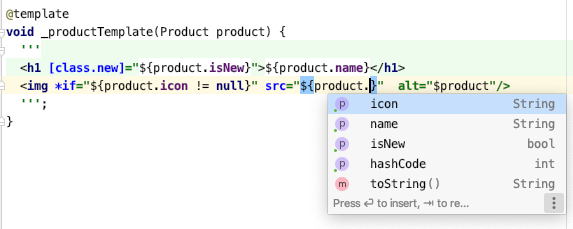
- Auto-completion and static analysis in the template.
- Classical control-flow constructs:
*if,*for,*switch - Conditionally add CSS classes (
[class.my-class]="$condition") and HTML attributes ([disabled]="$condition") - Automatically escapes the variables
- Syntax highlighting (in IntelliJ-based IDE)
Declare a private void function tagged with a @template attribute:
import 'package:html_template/html_template.dart'; part 'main.g.dart'; @template void _productTemplate(Product product) { ''' <img *if="${product.icon != null}" src="${product.icon}" /> <h1 [class.new]="${product.isNew}">$product</h1> '''; } @template void _pageTemplate(Product product, {List<String>? scripts}) { var script = ''; ''' <html lang="${Language.current}"> <head> <title>${product.name} - My site</title> <script *for="$script in $scripts" src="$script" async></script> </head> <body> ${productTemplate(product)} </body> </html> '''; }dart run build_runner watch --delete-conflicting-outputs
This generates a public function with the same arguments as the original. The generated code looks like:
// Generated TrustedHtml productTemplate(Product product) { var $ = StringBuffer(); $.write(' '); if (product.icon != null) { $.write('<img src="${TrustedHtml.escape.attribute(product.icon)}">'); } $.write('\n '); $.write('<h1${template.classAttribute({'new': product.isNew})}>'); $.write(TrustedHtml.escape(product)); $.write('</h1>'); $.write('\n '); return TrustedHtml($.toString()); } //...See the real generated code here
Call the generated public methods to build the HTML page from your data.
void main() { router.get('/products/<id>', (request) async { var product = await database.findProduct(params(request, 'id')); // Create the html for the response from the Product of your database var html = pageTemplate(product); return Response.ok(html, headers: {'content-type': 'text/html'}); }); }@template void _conditionExample({required bool someCondition}) async { ''' <!-- Conditionally include the <h2> tag --> <h2 *if="$someCondition">Condition on a tag</h2> <!-- Include the 'disabled' attribute if the condition is true --> <input [disabled]="$someCondition"/> <!-- Add 'my-class' CSS class if the condition is true --> <input [class.my-class]="$someCondition"> <!-- Use any Dart expression for the condition --> <hr *if="${(await fetchData()).isEmpty}"/> '''; }To repeat an HTML element, use the attribute: *for="$item in $iterable".
@template void _simpleLoop(List<MenuItem> menu) { MenuItem? item; ''' <ul> <li *for="${item!} in $menu"> ${item.title} </li> </ul> '''; }Notice that we have to define the item variable outside of the string literal.
This is a bit unfortunate but string literals don't allow to define a variable inside them.
Alternatively, we can write the loop in Dart arround the string literals:
@template void _alternativeLoop(List<MenuItem> menu) { '<ul>'; for (var item in menu) { '<li>${item.title}</li>'; } '</ul>'; }@template void _switchExample(Season season) { ''' <div *switch="$season"> <span *case="${Season.summer}">Hot</span> <span *case="${Season.winter}">Cold</span> <div *default>Pleasant</div> </div> '''; }@template void _cssClassesExample(List<Data> data, {bool showMenu = false}) { // Add classes based on condition '<li [class.active]="$showMenu" [class.enabled]="${data.isNotEmpty}">Actif</li>'; // We can pass a Map<String, bool> to the [classes] attribute var myClasses = {'enabled': showMenu}; '<a type="text" [classes]="$myClasses"></a>'; }You can use normal Dart code around the string literals to do complex things in your template. You can have has many strings literal as you want.
@template void _movieTemplate() async { '<h1>My movies</h1>'; var page = await fetchPage(); if (!page.isLoggedIn) { '<h2>Log in</h2>'; } else { '<ul>'; for (var movie in page.myMovies) { '<li [class.favorite]="${movie.isFavorite}">$movie</li>'; } '</ul>'; } '<footer>Footer</footer>'; }Include another template by calling the generated function in a string interpolation:
@template void _myTemplate() { ''' <h1>Images</h1> ${img('landscape.png')} '''; } @template void _img(String url) { '<img src="$url">'; }-
Use
<text *if="..">xx</text>tag if you want to output some text without the html element wrapper. -
Use this comment in your dart file to workaround linter warnings
// ignore_for_file: unnecessary_statements