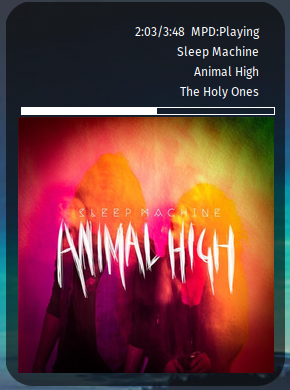
Display album art or display embedded (or folder-based) album art using a bash script. Massively simplified.

vindauga is a program that finds the album art for the currently playing song in audacious or mpd, and then displays it in a little window or as part of a conky display.
vindauga now loops on a timer. it looks at the currently playing track from audacious first (because that's always local) and if that's not running, then mpd. It then looks in the music directory to find either folder.jpg or cover.jpg, and puts that in a cache directory for reading by conky or what have you.
If that doesn't exist, then it decodes a built in default album image to the cache directory.
At that point conky or any other program can display the image, which is located at ${XDG_CACHE_HOME}/vindauga/nowplaying.album.png (and if you already had yadshow installed to pop up music covers, it will create a symlink between ${XDG_CACHE_HOME}/vindauga and ${XDG_CACHE_HOME}/yadshow.)
vindauga means "window".
All the album-art finding and synchronizing functionality has been moved and is found with f_fixer_covers, as outlined in this blog post.
This project is licensed under the MIT license. For the full license, see LICENSE.
imagemagickcommand-line tool for parsing string data.imagemagickcan be found on major Linux distributions.mpccommand-line tool for controlling mpd.mpccan be found on major Linux distributions.audtoolcommand-line tool for audacity.
Run vindauga.sh from the command line (or crontab, or even conky itself) at an interval. The current album art is output at ${XDG_CACHE_HOME}/vindauga/nowplaying.album.png and the current song information is in a text file at ${XDG_CACHE_HOME}/vindauga/songinfo.
There is an example conkyrc included. Throughout, replace /home/USER with your home directory.
${execi 3 /path/to/vindauga.sh}-- conky executes the program every 3 seconds, no need for cron.${exec head /home/USER/.cache/vindauga/songinfo | sed 's/ - /\n/g'}-- this parses it into three lines${if_match "${audacious_status}" == "Playing"}${audacious_bar 7,253}${endif}${if_mpd_playing}${mpd_bar 7,253}${endif}-- status bar depending on whether audacious is running or not.
It assumes your music directory is in ${HOME}/Music, that your album art is named either cover.jpg or folder.jpg and that mpc is already set up correctly.
It will attempt to use the environment variable MPD_HOST, and if it is not found, will examine ${HOME}/.bashrc to see if it is set there (if a non-login shell) and set it for the program. If you have a password set for MPD, you must use MPD_HOST=Password@host for it to work.
It will put the current cover in ${XDG_CACHE_HOME}/vindauga/nowplaying.album.png after making the corners of the cover rounded. If you are also using yadshow, it will symlink it so the two directories point to the same location to avoid duplicated effort.
I have enclosed a basic configuration for conky (as seen in the video above) that has the information and layout that I want. Editing conky configurations is well past the scope of this document.
See the file vindauga_conkyrc for the example.