
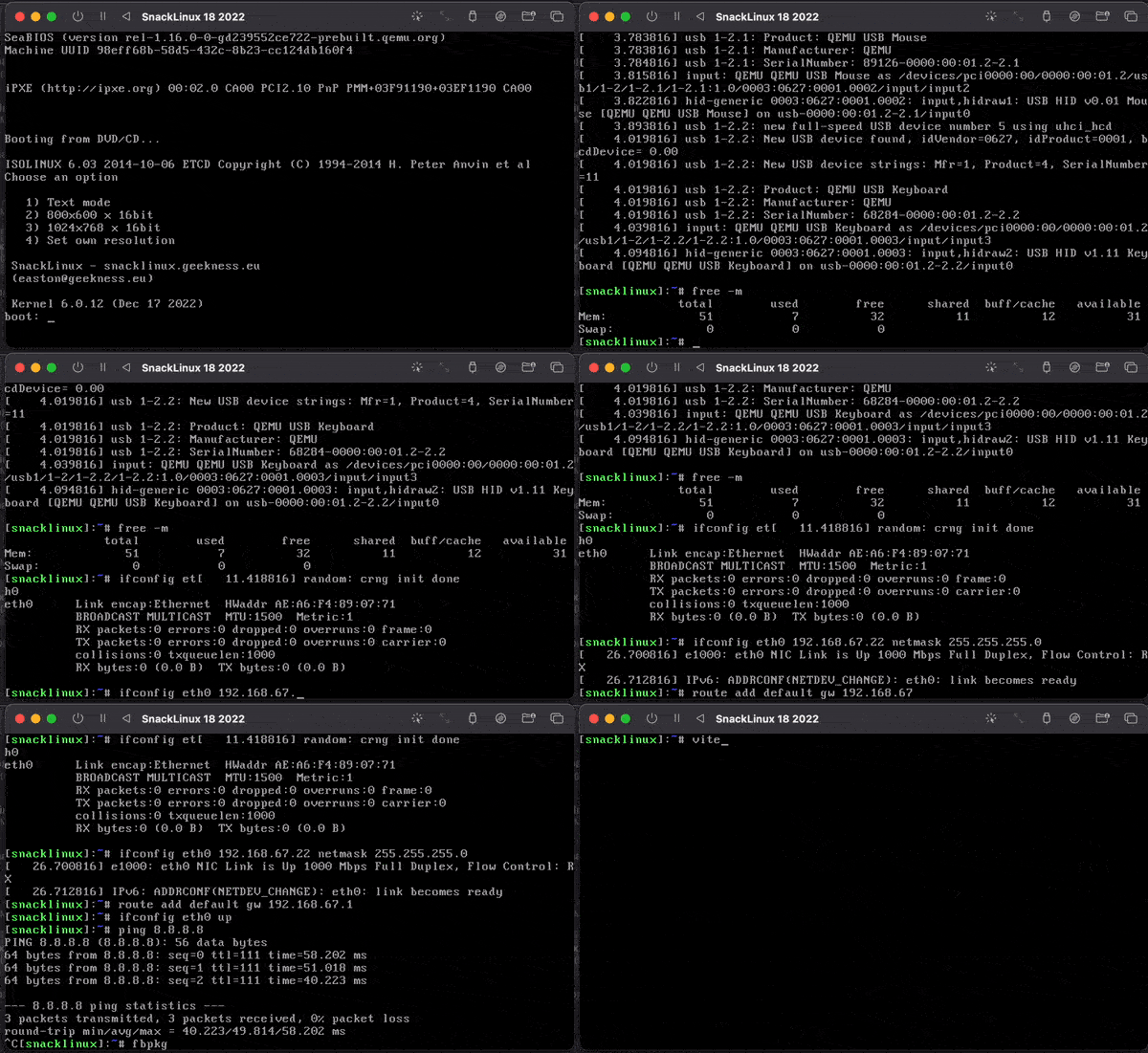
💻 SnackLinux is an ultra minimal Linux distribution for 486 CPUs
🔧 Linux 4.4 kernel with BusyBox, musl, and Bash
🔸 Built from scratch with that can run with 8MB RAM
📁 Bash-based package manager fbpkg
📦 x86 has 31 packages, including a working gcc toolchain and other GNU utilities
Visit snacklinux.geekness.eu for downloads, wiki and more information about SnackLinux.
SnackLinux runs a barebone kernel with downloadable extra kernel modules.
The philosophy is to create a completely hackable Linux system using standard GNU utilities, controlled by makefiles. The system installs to a local directory, anything in there is included in the final build. Imagine Linux From Scratch but with a lot less features. If you've ever wanted to build your own Linux distribution in 30 minutes, this is the project you're after.
Originally designed to bring the latest software to vintage i486 systems, SnackLinux is built for minimal size and low RAM usage. You can use virtualization or real hardware. The x86 bootable ISO is under 5MB.
Archtechtures supported:
- x86/i486 (current, works)
- arm64 (not maintained, works) See Fluxflop
- amd64/x86_64 (not maintained, but works with effort)
You can use prebuilt ISOs, a flashable disk image for use with Compact Flash or compile from source. See Getting started to download ISOs and a quick start guide.
- Linux is preferable to build with
apt-get install build-essential git libgmp-dev libmpc-dev flex bison bc Optional:
apt-get install genisoimage #used for generating x86 ISO images - Mac OS is incredibly difficult to get working alone to build the kernel, otherwise cross-compiling packages works
- An alternative to a tradtional VM is to use something like krunvm
arch -arm64 brew install gcc@12 If you have an alternate version of gcc installed, create symlinks:
cd /opt/homebrew/bin ln -s gcc-12 gcc ln -s g++-12 g++ Compile your own toolchain with musl-cross-make
git clone https://github.com/richfelker/musl-cross-make.git
TARGET=i486-linux-musl make TARGET=i486-linux-musl make install TARGET=aarch64-linux-musl make TARGET=aarch64-linux-musl make install Toolchain installs to output/
Add the toolchain to your shell's PATH:
export PATH=$PATH:/path/musl-cross-make/output/bin After our toolchain is built, we can build SnackLinux which includes the kernel and user utilities.
JOBS Set number of parallel jobs to create, defaults to 8 Example: export JOBS=12
ROOTFS_PATH Path to SnackLinux root filesystem, defaults to /opt/snacklinux_rootfs
TARGET=aarch64 TARGET=i486 TARGET=x86_64 Defaults to i486
Example, building for arm64:
export TARGET=aarch64 JOBS=4
See defs.sh for defined kernel and package versions
- Download source tars and link
bash ./download_prereq.sh
-
Create target install directory
mkdir /opt/snacklinux_rootfs -
Compile the kernel See
configs/linuxfor available configs
make kernel - Build musl, Bash and BusyBox
make system - Install to
/opt/snacklinux_rootfsdirectory
make install Next step: booting
You can alternatively build the individual software and install at your will.
make kernel make musl make busybox make bash make binutils make syslinux make python If you would also like to install binutils, use:
make binutils-install This target strips all debug symbols files matching LSB executable, shared object or ar archive
make strip-fs Prerequisites:
git clone https://github.com/snacsnoc/snacklinux-base.git cp -R snacklinux-base/rootfs/* /opt/snacklinux_rootfs/ Run as root:
bash ./tools/create_dev.sh git clone https://github.com/snacsnoc/fbpkg.git cp fbpkg/src/fbpkg /opt/snacklinux_rootfs/usr/bin chmod +x /opt/snacklinux_rootfs/usr/bin Run make iso to generate a bootable ISO. The output ISO will be in iso/
Run make iso-with-kernel to generate a bootable ISO with the kernel in /boot. The output ISO will be in iso/
Note: you do not have to have the toolchain to create the ISO
You can generate a disk image suitable for flashing onto a Compact Flash card (using an IDE adapter) for deployment on real hardware.
Create an image of your preferred size:
dd if=/dev/zero of=snacklinux.img bs=1M count=450 Mount it and create a partition:
sudo losetup -Pf snacklinux.img mkdir -p /mnt/snacklinux echo -e "o\nn\np\n1\n\n\nw" | sudo fdisk /dev/loop0 sudo mkfs.ext2 /dev/loop0p1 sudo mount /dev/loop0p1 /mnt/snacklinux Copy the root filesystem and install Syslinux bootloader:
cp -a /opt/snacklinux_rootfs/* /mnt/snacklinux/ sudo mkdir -p /mnt/boot/extlinux # Copy the compressed kernel image if your rootfs does not include it cp linux/arch/x86/boot/bzImage /mnt/boot/extlinux cat << EOF > /boot/extlinux/extlinux.conf DEFAULT linux LABEL linux KERNEL bzImage APPEND root=/dev/hda1 rw noapic noacpi EOF # syslinux 6.03/6.04 is not reliable on old hardware, please use 4.07 and compile source sudo extlinux --install /mnt/boot/extlinux Install Syslinux MBR to the disk image:
sudo dd if=/usr/lib/EXTLINUX/mbr.bin of=/dev/loop0 bs=440 count=1 Finally make it bootable, unmount and detach:
echo -e "a\nw" | fdisk snacklinux.img sync sudo umount /mnt sudo losetup -d /dev/loop0 Create a gzipped rootfs by running:
cd /opt/snacklinux_rootfs/; find . -print | cpio -o -H newc --quiet | gzip -6 > ~/rootfs.gz Then boot in qemu:
Linux:
qemu-system-aarch64 -M virt,highmem=off -kernel linux/arch/arm64/boot/Image -initrd rootfs.gz -append "root=/dev/ram" -m 256 -serial stdio -boot menu=off -cpu max -nodefaults -boot d -device virtio-gpu-pci -device virtio-keyboard-pci,id=kbd0,serial=virtio-keyboard Mac OS (Apple Silicon):
qemu-system-aarch64 -M virt,highmem=off -kernel Image -initrd rootfs.gz -append "root=/dev/ram" -m 128 -boot menu=off -cpu max -nodefaults -boot d -bios "/opt/homebrew/Cellar/qemu/7.1.0/share/qemu/edk2-aarch64-code.fd" -device virtio-gpu-pci -device virtio-keyboard-pci,id=kbd0,serial=virtio-keyboard -accel hvf Run a VNC server with qemu: -vnc 12.34.56.78:0
qemu-system-i386 -cpu 486-v1 -m 256 -kernel bzImage -initrd rootfs.gz -append "root=/dev/ram rdinit=/sbin/init" qemu-system-x86_64 -m 256 -kernel bzImage -initrd rootfs.gz -append "root=/dev/ram rdinit=/sbin/init" Read the Packages page for building packages. For SnackLinux's package manager fbpkg, see here.
Edit anything in /opt/snacklinux_rootfs, it is the root filesystem. The kernel can also be recompiled to fit your needs.
The boot/isolinux directory is where ISOLINUX resides, edit the menu to adjust to your needs.
SnackLinux is a personal project, but I welcome contributions from the community. If you have ideas, feedback, or code changes that can improve SnackLinux, your input is valued.
Mike Chirico for http://souptonuts.sourceforge.net/cdrom.htm
Tiny Core Linux distribution for inspiration and documentation http://tinycorelinux.net
Gregor Richards for the many Musl compiler scripts https://github.com/GregorR
Linux From Scratch for excellent documentation http://www.linuxfromscratch.org/
The Arch Linux wiki https://wiki.archlinux.org/
Rich Felker for creating musl-cross-make and make building so easy https://github.com/richfelker/musl-cross-make
Here are links to the software used in SnackLinux:
http://port70.net/~nsz/32_dynlink.html https://gcc.gnu.org/onlinedocs/gcc/Optimize-Options.html