

Load JavaScript and related languages like TypeScript modules from the vault and the Internet.

Repository · Changelog · Community plugin · Related · Features · Installation · Usage · Contributing · Security
For first time users, read the installation section first!
This file is automatically opened on first install. You can reopen it in settings or command palette.
- Load JavaScript and TypeScript modules from the vault and the Internet on all platforms.
- Load modules at startup.
- No configuration needed.
- Resolves relative paths, vault paths, Markdown links, wikilinks, and external links.
- Loads Markdown files as code.
- Supports using other modules inside modules.
- Loads CommonJS (
module.exports) and ES modules (export). - Supports circular dependencies for CommonJS modules.
- Configurable require name.
- Adds source maps for debugging.
- Supports popular plugins like Dataview and Templater.
- Install plugin.
- Community plugins
- Install the plugin from community plugins directly.
- Manual
- Create directory
modulesunder.obsidian/pluginsof your vault. - Place
manifest.json,main.js, andstyles.cssfrom the latest release into the directory.
- Create directory
- Building (rolling)
- Clone this repository, including its submodules.
- Install npm.
- Run
npm installin the root directory. - Run
npm run obsidian:install <vault directory>in the root directory.
- Obsidian42 - BRAT (rolling)
- See their readme.
- Community plugins
- Enable plugin.
- (optional) Configure plugin settings.
- Enable the plugin.
- To import a module:
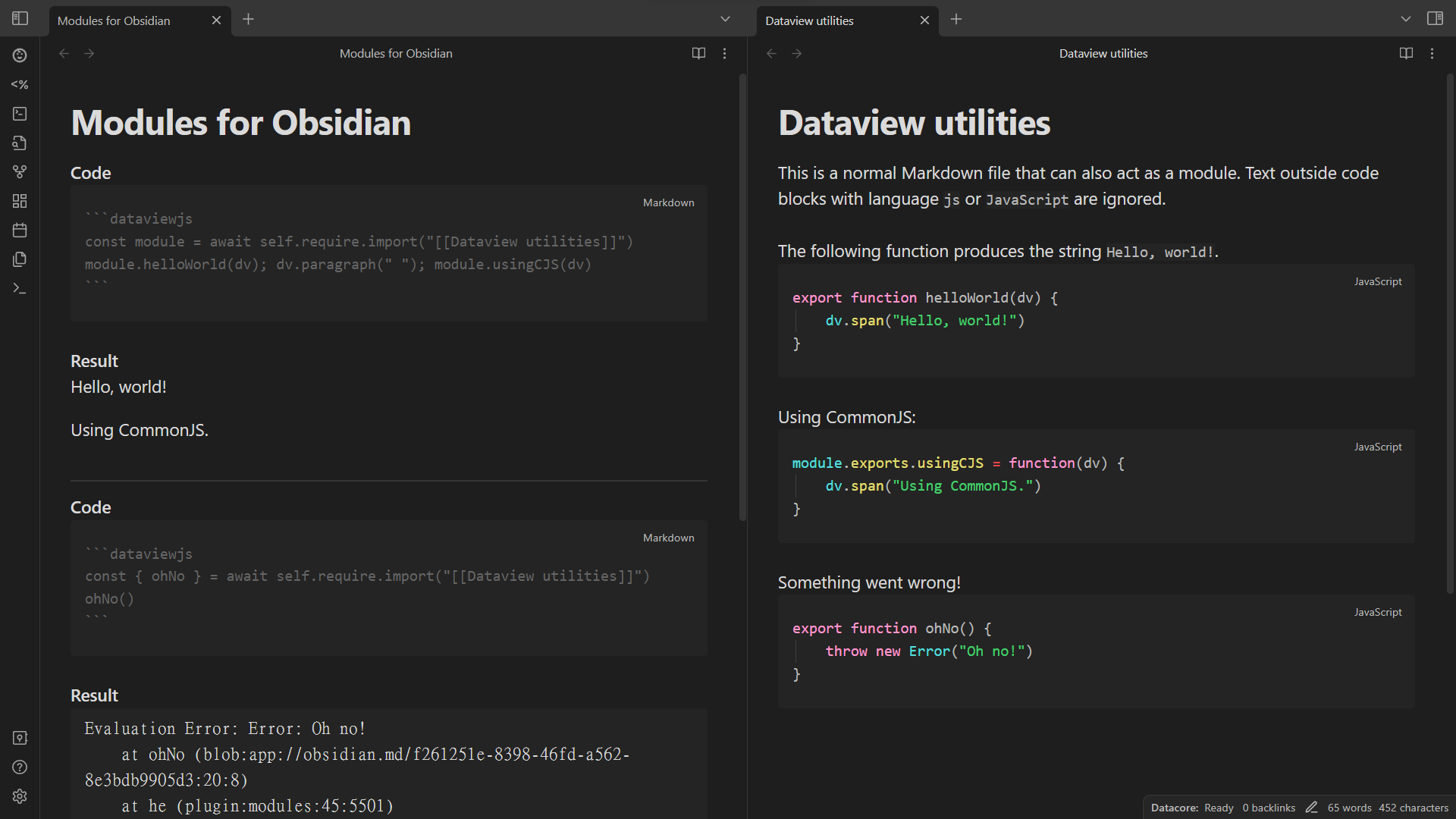
// Using `require.import` is recommended. await self.require.import("obsidian") // builtin modules such as the Obsidian API await self.require.import("vault/path/to/a module.md") // vault path // The following three require context and may not be able to infer the current directory. Please file an issue if so. Context inference is only available for top-level code, i.e. not inside functions or classes. await self.require.import("../relative/path/to/a module.js") // relative path await self.require.import("[omitted or whatever](markdown/link/to/a%20module.js.md)") // Markdown link await self.require.import("[[wikilink/to/a module|omitted or whatever]]") // wikilink // The following one requires enabling external links in settings. await self.require.import("https://esm.sh/scratchblocks") // external link // You can workaround the inability to infer the current directory. await self.require.import("../relative/path/to/a module.js", { cwd: context.currentDirectory }) // If `await` is not supported, use `require` instead. It has less support for loading modules, however. self.require("obsidian") self.require("vault/path/to/a module.md") // The following three require context and may not be able to infer the current directory. Please file an issue if so. Context inference is only available for top-level code, i.e. not inside functions or classes. self.require("../relative/path/to/a module.js") // The following three may not work in startup scripts. self.require("[omitted or whatever](markdown/link/to/a%20module.js.md)") self.require("[[wikilink/to/a module|omitted or whatever]]") // The following one requires enabling external links and adding the link to preloaded external links in settings. self.require("https://esm.sh/scratchblocks") // external link // You can workaround the inability to infer the current directory. self.require("../relative/path/to/a module.js", { cwd: context.currentDirectory })- To use entities in a module:
const { eat, pi } = await self.require.import("[[module]]") eat(2 * pi) // OR const mod = await self.require.import("[[module]]") mod.eat(2 * mod.pi)- To create a module, create a JavaScript or related language file or a Markdown file with JavaScript or related language code blocks.
- For
require(but notrequire.import), the module file needs to be preloaded, which can be configured in settings. By default, preloaded files have the following extensions:.js,.js.md,.mjs,.mjs.md,.ts.md,.mts.md,.ts,.ts.md - Modules should not have global or side effects because they are cached and thus not reloaded on every requiring.
- For Markdown files, code block languages that are loaded can be configured in settings.
- For non-JavaScript languages, ensure the module file has the correct file extension (also applies to
.xxx.md) or prepend the following metadata:
- For
// { "language": "TypeScript" } export const variable: string = "string"--- module: language: TypeScript --- ```TypeScript export const variable: string = "string" ```- Module exports can be CommonJS-style or ES module-style:
// ES module-style, supported by `require.import`. export function fun() {} export const variable = "string" export default 42 // The default export has the name `default`. // CommonJS-style, supported by both `require` and `require.import`. module.exports.fun = function() {} module.exports.variable = "string" module.exports.default = 42 exports.abbreviatedForm = {}- To create a startup module, export a function (supports async) to run at startup using
export defaultor assigning tomodule.exportsand add the module to plugin settings:
// ES module-style export default function() { console.log("Hello world!") } // CommonJS-style module.exports = function() { console.log("Hello world!") }- The full API is available from
src/@types/obsidian-modules.ts.
Contributions are welcome!
This project uses changesets to manage the changelog. When creating a pull request, please add a changeset describing the changes. Add multiple changesets if your pull request changes several things. End each changeset with ([PR number](PR link) by [author username](author link)). For example, the newly created file under the directory .changeset should look like:
--- "example": patch --- This is an example change. ([GH#1](https://github.com/ghost/example/pull/1) by [@ghost](https://github.com/ghost))The todos here, ordered alphabetically, are things planned for the plugin. There are no guarantees that they will be completed. However, we are likely to accept contributions for them.
- User-defined module aliases.
- Add bare module transformation support for more CDNs such as https://cdn.jsdelivr.net.
- Faster import analysis and transformation.
- Autocomplete with JSDoc.
We hope that there will never be any security vulnerabilities, but unfortunately it does happen. Please report them!
| Version | Supported |
|---|---|
| rolling | ✅ |
| latest | ✅ |
| outdated | ❌ |
Please report a vulnerability by opening an new issue. We will get back to you as soon as possible.