

A go (golang) library and command line tool to render static map images using OpenStreetMap tiles.
go-staticmaps is a golang library that allows you to create nice static map images from OpenStreetMap tiles, along with markers of different size and color, as well as paths and colored areas.
For a Python version with a similar interface, take a look at py-staticmaps.
go-staticmaps comes with a command line tool called create-static-map for use in shell scripts, etc.
Installing go-staticmaps is as easy as
go get -u github.com/flopp/go-staticmapsFor the command line tool, use
go get -u github.com/flopp/go-staticmaps/create-static-mapOf course, your local Go installation must be setup up properly.
Create a 400x300 pixel map with a red marker:
package main import ( "image/color" sm "github.com/flopp/go-staticmaps" "github.com/fogleman/gg" "github.com/golang/geo/s2" ) func main() { ctx := sm.NewContext() ctx.SetSize(400, 300) ctx.SetZoom(14) ctx.AddObject( sm.NewMarker( s2.LatLngFromDegrees(52.514536, 13.350151), color.RGBA{0xff, 0, 0, 0xff}, 16.0, ), ) img, err := ctx.Render() if err != nil { panic(err) } if err := gg.SavePNG("my-map.png", img); err != nil { panic(err) } }See PkgGoDev for a complete documentation and the source code of the command line tool for an example how to use the package.
Usage: create-static-map [OPTIONS] Creates a static map Application Options: --width=PIXELS Width of the generated static map image (default: 512) --height=PIXELS Height of the generated static map image (default: 512) -o, --output=FILENAME Output file name (default: map.png) -t, --type=MAPTYPE Select the map type; list possible map types with '--type list' -c, --center=LATLNG Center coordinates (lat,lng) of the static map -z, --zoom=ZOOMLEVEL Zoom factor -b, --bbox=nwLATLNG|seLATLNG Bounding box of the static map --background=COLOR Background color (default: transparent) -u, --useragent=USERAGENT Overwrite the default HTTP user agent string -m, --marker=MARKER Add a marker to the static map -i, --imagemarker=MARKER Add an image marker to the static map -p, --path=PATH Add a path to the static map -a, --area=AREA Add an area to the static map -C, --circle=CIRCLE Add a circle to the static map Help Options: -h, --help Show this help message The command line interface tries to resemble Google's Static Maps API. If neither --bbox, --center, nor --zoom are given, the map extent is determined from the specified markers, paths and areas.
--background lets you specify a color used for map areas that are not covered by map tiles (areas north of 85°/south of -85°).
The --marker option defines one or more map markers of the same style. Use multiple --marker options to add markers of different styles.
--marker MARKER_STYLES|LATLNG|LATLNG|... LATLNG is a comma separated pair of latitude and longitude, e.g. 52.5153,13.3564.
MARKER_STYLES consists of a set of style descriptors separated by the pipe character |:
color:COLOR- whereCOLORis either of the form0xRRGGBB,0xRRGGBBAA, or one ofblack,blue,brown,green,orange,purple,red,yellow,white(default:red)size:SIZE- whereSIZEis one ofmid,small,tiny, or some number > 0 (default:mid)label:LABEL- whereLABELis an alpha numeric character, i.e.A-Z,a-z,0-9; (default: no label)labelcolor:COLOR- whereCOLORis either of the form0xRRGGBB,0xRRGGBBAA, or one ofblack,blue,brown,green,orange,purple,red,yellow,white(default:blackorwhite, depending on the marker color)
Using the --imagemarker option, you can use custom images as markers:
--imagemarker image:IMAGEFILE|offsetx:OFFSETX|offsety:OFFSETY|LATLNG|LATLNG|... IMAGEFILE is the file name of a PNG or JPEG file,
OFFSETX and OFFSETY are the pixel offsets of the reference point from the top-left corner of the image.
The --path option defines a path on the map. Use multiple --path options to add multiple paths to the map.
--path PATH_STYLES|LATLNG|LATLNG|... or
--path PATH_STYLES|gpx:my_gpx_file.gpx PATH_STYLES consists of a set of style descriptors separated by the pipe character |:
color:COLOR- whereCOLORis either of the form0xRRGGBB,0xRRGGBBAA, or one ofblack,blue,brown,green,orange,purple,red,yellow,white(default:red)weight:WEIGHT- whereWEIGHTis the line width in pixels (defaut:5)
The --area option defines a closed area on the map. Use multiple --area options to add multiple areas to the map.
--area AREA_STYLES|LATLNG|LATLNG|... AREA_STYLES consists of a set of style descriptors separated by the pipe character |:
color:COLOR- whereCOLORis either of the form0xRRGGBB,0xRRGGBBAA, or one ofblack,blue,brown,green,orange,purple,red,yellow,white(default:red)weight:WEIGHT- whereWEIGHTis the line width in pixels (defaut:5)fill:COLOR- whereCOLORis either of the form0xRRGGBB,0xRRGGBBAA, or one ofblack,blue,brown,green,orange,purple,red,yellow,white(default: none)
The --circles option defines one or more circles of the same style. Use multiple --circle options to add circles of different styles.
--circle CIRCLE_STYLES|LATLNG|LATLNG|... LATLNG is a comma separated pair of latitude and longitude, e.g. 52.5153,13.3564.
CIRCLE_STYLES consists of a set of style descriptors separated by the pipe character |:
color:COLOR- whereCOLORis either of the form0xRRGGBB,0xRRGGBBAA, or one ofblack,blue,brown,green,orange,purple,red,yellow,white(default:red)fill:COLOR- whereCOLORis either of the form0xRRGGBB,0xRRGGBBAA, or one ofblack,blue,brown,green,orange,purple,red,yellow,white(default: no fill color)radius:RADIUS- whereRADIUSis te circle radius in meters (default:100.0)weight:WEIGHT- whereWEIGHTis the line width in pixels (defaut:5)
Centered at "N 52.514536 E 13.350151" with zoom level 10:
$ create-static-map --width 600 --height 400 -o map1.png -c "52.514536,13.350151" -z 10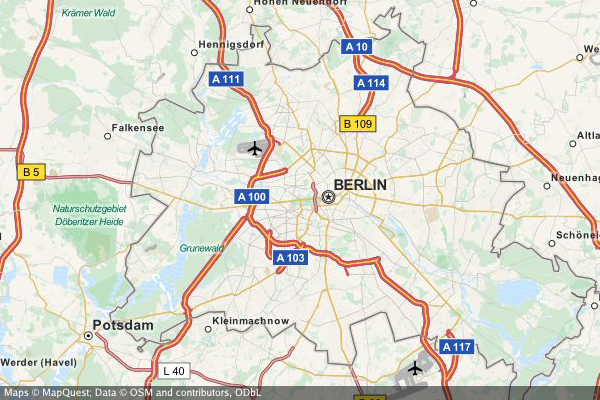
A map with a marker at "N 52.514536 E 13.350151" with zoom level 14 (no need to specify the map's center - it is automatically computed from the marker(s)):
$ create-static-map --width 600 --height 400 -o map2.png -z 14 -m "52.514536,13.350151"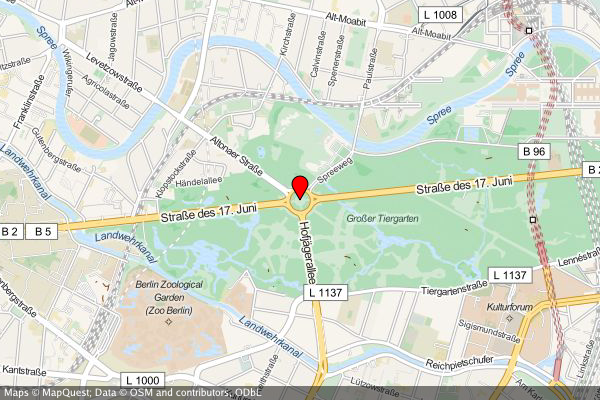
A map with two markers (red and green). If there are more than two markers in the map, a good zoom level can be determined automatically:
$ create-static-map --width 600 --height 400 -o map3.png -m "color:red|52.514536,13.350151" -m "color:green|52.516285,13.377746"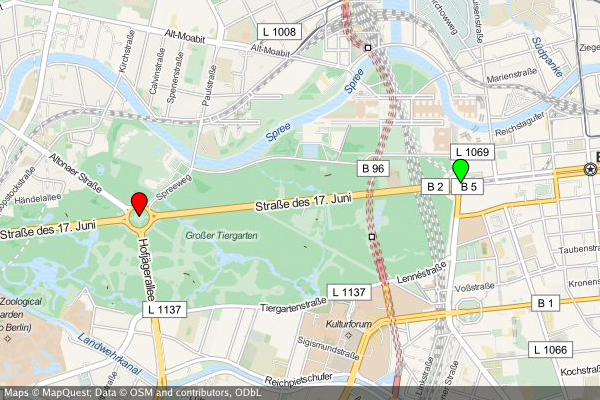
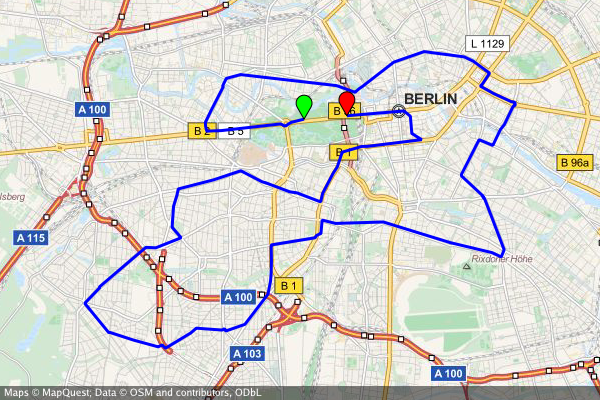
create-static-map --width 800 --height 600 \ --marker "color:green|52.5153,13.3564" \ --marker "color:red|52.5160,13.3711" \ --output "berlin-marathon.png" \ --path "color:blue|weight:2|gpx:berlin-marathon.gpx"
create-static-map --width 800 --height 400 \ --output "us-capitals.png" \ --marker "color:blue|size:tiny|32.3754,-86.2996|58.3637,-134.5721|33.4483,-112.0738|34.7244,-92.2789|\ 38.5737,-121.4871|39.7551,-104.9881|41.7665,-72.6732|39.1615,-75.5136|30.4382,-84.2806|33.7545,-84.3897|\ 21.2920,-157.8219|43.6021,-116.2125|39.8018,-89.6533|39.7670,-86.1563|41.5888,-93.6203|39.0474,-95.6815|\ 38.1894,-84.8715|30.4493,-91.1882|44.3294,-69.7323|38.9693,-76.5197|42.3589,-71.0568|42.7336,-84.5466|\ 44.9446,-93.1027|32.3122,-90.1780|38.5698,-92.1941|46.5911,-112.0205|40.8136,-96.7026|39.1501,-119.7519|\ 43.2314,-71.5597|40.2202,-74.7642|35.6816,-105.9381|42.6517,-73.7551|35.7797,-78.6434|46.8084,-100.7694|\ 39.9622,-83.0007|35.4931,-97.4591|44.9370,-123.0272|40.2740,-76.8849|41.8270,-71.4087|34.0007,-81.0353|\ 44.3776,-100.3177|36.1589,-86.7821|30.2687,-97.7452|40.7716,-111.8882|44.2627,-72.5716|37.5408,-77.4339|\ 47.0449,-122.9016|38.3533,-81.6354|43.0632,-89.4007|41.1389,-104.8165" 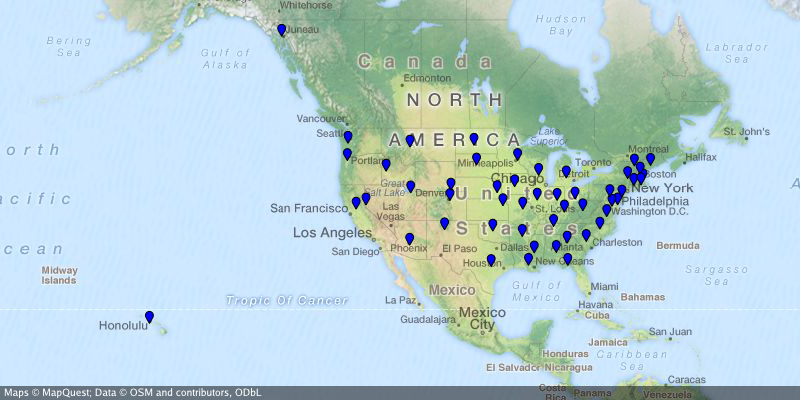
...where the Northern Territory is highlighted and the capital Canberra is marked.
create-static-map --width 800 --height 600 \ --center="-26.284973,134.303764" \ --output "australia.png" \ --marker "color:blue|-35.305200,149.121574" \ --area "color:0x00FF00|fill:0x00FF007F|weight:2|-25.994024,129.013847|-25.994024,137.989677|-16.537670,138.011649|\ -14.834820,135.385917|-12.293236,137.033866|-11.174554,130.398124|-12.925791,130.167411|-14.866678,129.002860" 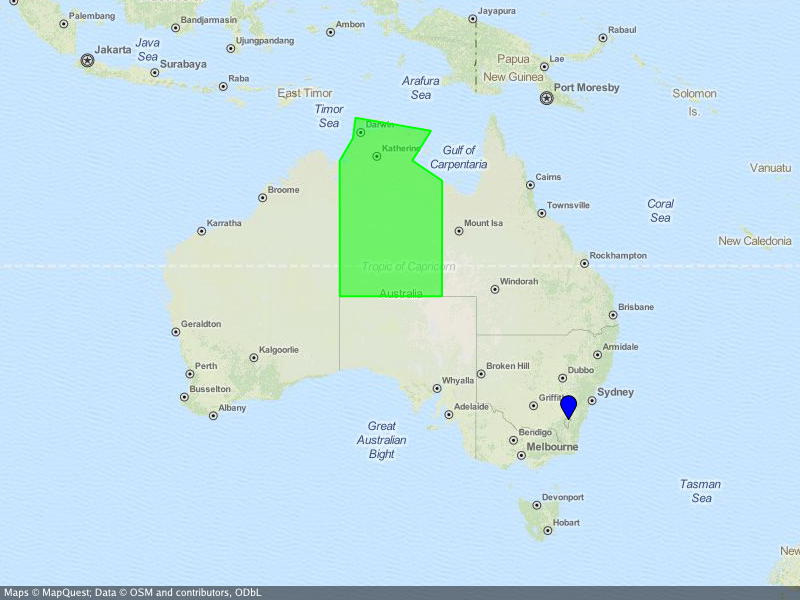
Besides the go standard library, go-staticmaps uses
- OpenStreetMap, Thunderforest, OpenTopoMap, Stamen and Carto as map tile providers
- Go Graphics for 2D drawing
- S2 geometry library for spherical geometry calculations
- gpxgo for loading GPX files
- go-coordsparser for parsing geo coordinates
- Kooper: fixed library usage examples
- felix: added more tile servers
- wiless: suggested to add user definable marker label colors
- noki: suggested to add a user definable bounding box
- digitocero: reported and fixed type mismatch error
- bcicen: reported and fixed syntax error in examples
- pshevtsov: fixed drawing of empty attribution strings
- Luzifer: added overwritable user agent strings to comply with the OSM tile usage policy
- Jason Fox: added
RenderWithBoundsfunction - Alexander A. Kapralov: initial circles implementation
- tsukumaru: added
NewAreaandNewPathfunctions
Copyright 2016, 2017 Florian Pigorsch & Contributors. All rights reserved.
Use of this source code is governed by a MIT-style license that can be found in the LICENSE file.