
Complete adblock filter list support for VSCode
Note: This is a development tool for creating and editing adblock filter lists, not an ad blocker for VSCode.



 AdGuard・
  uBlock Origin・
  AdBlock・
  Adblock Plus
- 🎨 Syntax highlighting — Full support for AdGuard, uBlock Origin, and Adblock Plus filter syntax
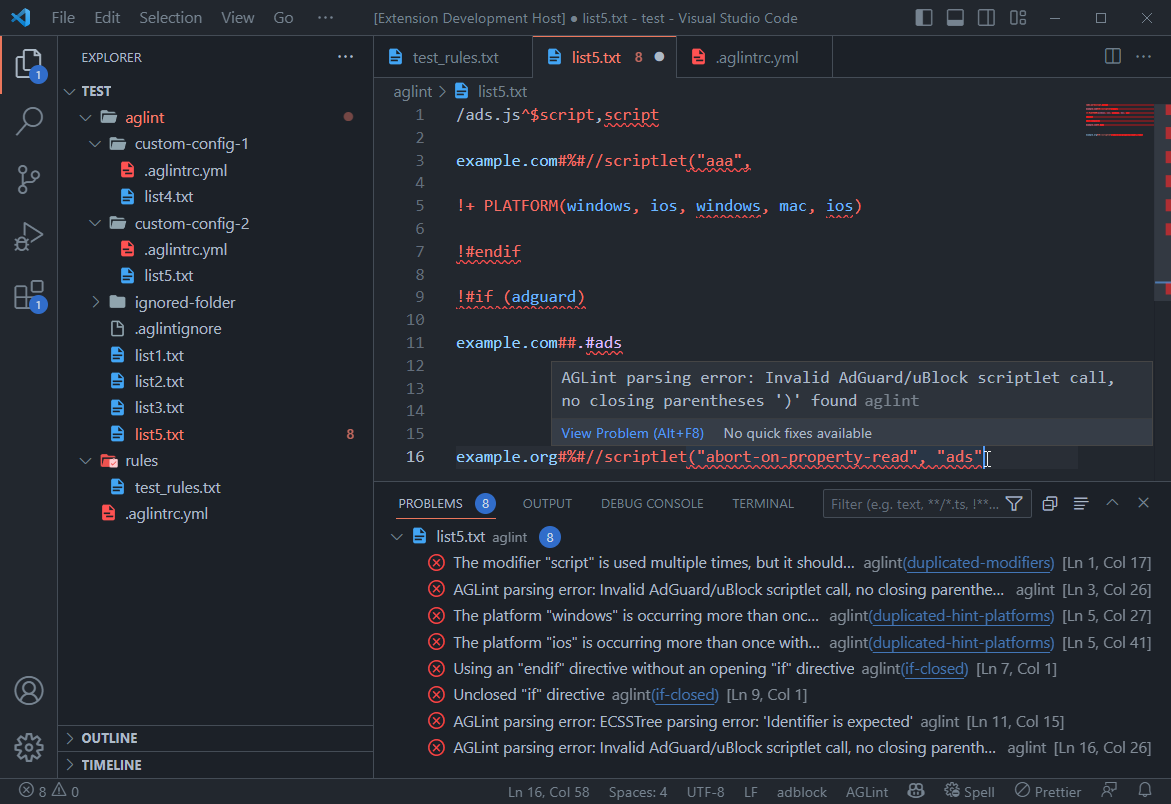
- 🔍 Real-time linting — Powered by AGLint with instant validation and error detection
- 🛠️ Auto-fixing — Automatically fix issues with AGLint's suggestions and quick fixes
- 🌐 Multi-platform validation — Platform-specific compatibility warnings and syntax checks
- 🐙 GitHub integration — Syntax highlighting on GitHub via Linguist
- ⚙️ Flexible configuration — VSCode settings and AGLint config file (
.aglintrc) support - 🚀 Auto-discovery — Automatically finds AGLint in your workspace (local or global)
- Open VSCode
- Press
Ctrl+P/Cmd+P - Type:
ext install adguard.adblock - Press
Enter
VSCode Marketplace:
- Open VSCode Marketplace
- Click Install
- VSCode will open automatically
Open VSX (for VSCodium, etc.):
- Open Open VSX Registry
- Click Download
- Install the
.vsixfile manually
- Open any
.txtfile with adblock rules - Add a filter rule:
example.org##.banner - You should see syntax highlighting
Note: AGLint linting requires AGLint to be installed in your workspace or globally. See AGLint Configuration for setup details.
| Setting | Description | Default |
|---|---|---|
adblock.enableAglint | Enable AGLint linting | true |
adblock.enableInMemoryAglintCache | Cache linting results for performance | false |
💡 Tip: Control AGLint logging via VSCode's built-in log level: Command Palette → Developer: Set Log Level → AGLint
AGLint requires a configuration file to enable linting. The extension will automatically detect AGLint in your workspace.
Run in your project root:
npx aglint --initThis creates an interactive wizard to generate a configuration file.
Supported file names (YAML recommended):
.aglintrc.yaml/.aglintrc.yml(recommended).aglintrc.json/.aglintrcaglint.config.json/aglint.config.yaml
# .aglintrc.yaml root: true extends: - aglint:recommendedaglint:recommended— Recommended rules for most projectsaglint:all— All available rules (strict)
For detailed configuration options, rule customization, and cascading configs, see the AGLint documentation.
GitHub uses this extension's grammar file via Linguist for syntax highlighting.
Your filter lists will be automatically highlighted on GitHub if they start with an agent comment like [Adblock Plus 2.0] or [AdGuard].
Contributions are welcome! Please read our Contributing Guide for details on how to get started.
This project is licensed under the MIT License - see the LICENSE file for details.
- AGLint - Adblock filter linter
- Compatibility Tables - Cross-platform feature support
Made with ❤️ by AdGuard