I got issue uploading blink sketch to STM32 Nucleo board

I just got two STM32 Nucleo boards for some experiments. And I followed the procedure here to install the STM32 libraries and more:

This is the message I get in output window:

Sketch uses 15284 bytes (2%) of program storage space. Maximum is 524288 bytes. Global variables use 1296 bytes (0%) of dynamic memory, leaving 129776 bytes for local variables. Maximum is 131072 bytes. "C:\Users\viggo\AppData\Local\Arduino15\packages\STMicroelectronics\tools\STM32Tools\2.3.1/win/busybox.exe" sh "C:\Users\viggo\AppData\Local\Arduino15\packages\STMicroelectronics\tools\STM32Tools\2.3.1/stm32CubeProg.sh" -i swd -f "C:\Users\viggo\AppData\Local\arduino\sketches\86FA5B3C0782FCDF2A16B61897CDDC7C/Blink.ino.bin" -o 0x0 STM32CubeProgrammer not found (STM32_Programmer_CLI.exe). Please install it or add '<STM32CubeProgrammer path>/bin' to your PATH environment: https://www.st.com/en/development-tools/stm32cubeprog.html Aborting! Failed uploading: uploading error: exit status 1 

It seems I mis the STM32CubeProgrammer, but this message is not clear to me. I hope someone can tell me, what I am supposed to do here to fix this problem.

Hi @backflip. The instructions for installing the "STM32CubeProgrammer" upload tool are available here:

https://github.com/stm32duino/Arduino_Core_STM32/wiki/Upload-methods#stm32cubeprogrammer

Thank you @ptillisch .

I used your link, and I think I got started downloading this STM32CubeProg and got a zip-file of 250 Mb.

When I read about it, is seems to be a large program with an IDE of its own. Do I need to download and install all of this or should it just be a small part I need here?

This description in your link is somewhat complicated to me, and you got more possibilities.

It is likely that some parts are not needed for the specific usage as an upload tool for Arduino IDE. However, it would be difficult and time consuming to determine which specific components are required and which are superfluous. So, unless you are very pressed for disk space, it will be easiest to just install the entire 800 MB monstrosity.

That is a good observation. You may consider the other upload methods that are supported by the "STM32 MCU based boards" platform.

Thanks.

I did the install - and with no exceptions, so is became 1.4 GB. I chose to place these files on another harddrive on my PC (not the normally proposed C-drive path, because my C-drive is limited). I got exactly the same error message again, and it might be that the Arduino IDE cannot find the Bin-file as described in your link. I should then add this other path to the “PATH environment variable”. What is that, and how do I do that?

Well I tried to search a bit about it and found this video:

And I found a way to insert a path in this variable there. I had to restart the Arduino IDE as well. Now, some upload took place, because the pattern of LEDs on the board changed. But I do not see any blinking. However a red LED marked COM is on, which tells med something may be wrong. Perhaps the blinking is on some other pin with no on board LED.
This is how the output window looks now, and it got no indicated errors:

Sketch uses 15284 bytes (2%) of program storage space. Maximum is 524288 bytes.
Global variables use 1296 bytes (0%) of dynamic memory, leaving 129776 bytes for local variables. Maximum is 131072 bytes.
"C:\Users\viggo\AppData\Local\Arduino15\packages\STMicroelectronics\tools\STM32Tools\2.3.1/win/busybox.exe" sh "C:\Users\viggo\AppData\Local\Arduino15\packages\STMicroelectronics\tools\STM32Tools\2.3.1/stm32CubeProg.sh" -i swd -f "C:\Users\viggo\AppData\Local\arduino\sketches\6E09E308CEABA9D353A6AC8436AEF94E/BlinkWithSTM32.ino.bin" -o 0x0
Selected interface: swd

STM32CubeProgrammer v2.20.0

ST-LINK SN : 003000473234510E33353533
ST-LINK FW : V3J9M3
Board : NUCLEO-G431RB
Voltage : 3.30V
SWD freq : 8000 KHz
Connect mode: Under Reset
Reset mode : Hardware reset
Device ID : 0x468
Revision ID : Rev X
Device name : STM32G43x/G44x
Flash size : 128 KBytes
Device type : MCU
Device CPU : Cortex-M4
BL Version : 0xD4

Opening and parsing file: BlinkWithSTM32.ino.bin

Memory Programming ...
File : BlinkWithSTM32.ino.bin
Size : 15.41 KB
Address : 0x08000000

Erasing memory corresponding to segment 0:
Erasing internal memory sectors [0 7]
Download in Progress:

File download complete
Time elapsed during download operation: 00:00:00.448

RUNNING Program ...
Address: : 0x8000000
Application is running, Please Hold on...
Start operation achieved successfully

According to the output window, it seems like I upload a sketch now, but it don’t seem to work.
I got no clue what may be wrong. Can it be that some of the basic functions do not work like
pinMode, digitalWrite, delay ?

I looked in the documentation for the board regarding the on board LED, called LD2. It states:

LD2 USER
This green LED is a user LED connected to STM32G4 I/O PA5 (SB6 ON) corresponding to the ARDUINO® D13. To light LED LD2, a high logic state “1” must be written in the corresponding GPIO PA5. A transistor is used to drive the LED LD2. LD2 consumption does not impact the VDD STM32G4 power measurement, since LD2 is isolated from it.

So instead of LED_BUILTIN, I tried to use D13. But it did not change anything. This is then the blink sketch:

/* Blink Turns an LED on for one second, then off for one second, repeatedly. Most Arduinos have an on-board LED you can control. On the UNO, MEGA and ZERO it is attached to digital pin 13, on MKR1000 on pin 6. LED_BUILTIN is set to the correct LED pin independent of which board is used. If you want to know what pin the on-board LED is connected to on your Arduino model, check the Technical Specs of your board at: https://docs.arduino.cc/hardware/ modified 8 May 2014 by Scott Fitzgerald modified 2 Sep 2016 by Arturo Guadalupi modified 8 Sep 2016 by Colby Newman This example code is in the public domain. https://docs.arduino.cc/built-in-examples/basics/Blink/ */ // the setup function runs once when you press reset or power the board void setup() { // initialize digital pin LED_BUILTIN as an output. //pinMode(LED_BUILTIN, OUTPUT); pinMode(D13, OUTPUT); //digitalWrite(D13, HIGH); // turn the LED on (HIGH is the voltage level) } // the loop function runs over and over again forever void loop() { //digitalWrite(LED_BUILTIN, HIGH); // turn the LED on (HIGH is the voltage level) digitalWrite(D13, HIGH); // turn the LED on (HIGH is the voltage level) delay(1000); // wait for a second //digitalWrite(LED_BUILTIN, LOW); // turn the LED off by making the voltage LOW digitalWrite(D13, LOW); // turn the LED off by making the voltage LOW delay(1000); // wait for a second } 

The LD2 LED remains off. I also tried to press the reset button.
When I powered the board first time, perhaps a blink program was in the MPU already ab fabric, because this LED did blink. So the LED do work. When I uploaded this blink sketch, the LED became off all the time.

What do you think I should do to debug this case?

May be try pinMode(PA5, OUTPUT); and also use PA5 in the digitalWrite() statements.

Thanks.
I have tried to use PA5 instead of D13 in the code above and upload the sketch. Unfortunately, I got same negative result. No blinking.

I have got at few other observations, and I don’t know about their relevance:

When I plug in the USB connector to the PCB, with power and communication from the PC, and no Arduino IDE active, Windows 11 pops up a USB drive called NOD_G431RB with three files on it and one of them is a text file named DETAILS.txt. The COM LED lights red on the board. I can open this file from windows, and it got some production data about the board. I then start the IDE, and it connects to the a serial port named PORT4 (Discovery, Eval, Nucleo-32, Nucleo-64, Nucleo-144). I can still open the txt file from Windows 11. When I plug out the USB connector, this port disappear in the IDE port list. When I plug in the USB connector again, both Windows 11 and the IDE finds board and connects to it again. The COM LED lights red on the board.

I have got another Nucleo-64 board with a STM32G474 MPU on it. I have not tried that yet. It seems to be the same kind of PCB, but with the other MPU soldered to the board. But another label is placed on the PCB. I have not touched any of the jumpers placed on these boards, and they are placed the same way on the two boards. I expect the jumpers to be placed correctly.

I'm sure that the behaviour is normal. The device is simply presenting itself as a USB mass storage device to your PC.

If you have had no explicit error message then I guess that you are simply using the wrong pin for the LED.

If you have the Cube IDE installed, you can see what port/pin, for your specific board, is assigned to the LED from a graphic as below. Taken from the following Video https://www.youtube.com/watch?v=hyZS2p1tW-g at [7:15] to see what I mean.

[screen grab -poor picture quality]

Incidentally, that Video series is excellent.

Thanks again. Yes, this video seems well made. Before I move on and try the Cube IDE (I did install it because I need to for the Arduino IDE) I did a few more unsuccessful tests:

I used the name D13 again in sketch. Then I used a multimeter and I measured the voltage on the D13 pin marked on the PCB. The multimeter remained at zero voltage. I did the same with a D2 name - still the same. So could it be, that the naming conventions in the Arduino IDE/framework do not match the naming conventions on the Nucleo board?

I wasn't exactly suggesting you try the Cube IDE, at least for generating code, because there is a bit of a learning curve. I was suggesting you used it more as a documentation aid to see what port/pin the led is actually connected to.

If the Arduino core for your board is correctly configured, then you should be able to use the standard blink sketch which uses the alias LED_BUILTIN for the led pin instead of specifying the port/pin.

It could well be that there is mismatch between the silk screen labels on the board and the pin numbers between the various IDEs.

Thanks. I shall try to open the Cube IDE and look for that information. The first thing I did was trying the LED_BUILTIN name with the same unsuccessful result.

Just out of curiosity, do you get access to stm32duino.com ? It is only recently that the site appears to be password protected.

I'm sort of wondering if this is related to Qualcomm's take over of Arduino and maybe a portent of STMicroelectronics withdrawal from the Arduino scene.

I'm guessing that this is you:

You've also got the option of asking questions here: stm32duino · Discussions · GitHub

Yes, it is me.

I tried to get into this forum a half year ago, but did not get access. Then yesterday I tried once more sending them my old request response, and they explained that they have had several bot attacks, and therefor my request had been deleted. So I tried again yesterday and got access this morning. I was not aware of the GitHub possibility.

Perhaps these forums are closer to the possible problems than this forum - I don’t know.

I downloaded the Cube IDE yesterday, and Windows showed me two programs to start:
STM32TrustedPackageCreator and
STM32CubeProgrammer

I guess the Cube Programmer is the right one. When I look at the DigiKey video, the User Interface have changed. But STM have also made their videos now, and I have looked at some of them. However, I did try to find some pin and naming information, but I did not succeed. This IDE got a lot of possibilities, and I might very well not have found the right spot there. It did detect the board and got information from it via the USB cable. Furthermore, there is a lot of terms and shortforms, that I do not know the meaning of.

It may be something more basic in the transfer or start of the program. I tried to test the serial output to serial monitor, and not something related pin outputs like that. It don’t work either. I get no numbers written to the serial monitor window. Of cause it may be something different you need to do with this MPU, but this is like it is done on the Arduino Nano V3. This is this sketch:

/* Test of Serial output via USB and serial monitor at PC */ int i = 0; // the setup function runs once when you press reset or power the board void setup() { Serial.begin(9600); } // the loop function runs over and over again forever void loop() { delay(1000); // wait for a second Serial.println(i); i++; } 

I've just set up my STM32 environment again. I've used it previously on Windows 10 but, in the meantime, I have migrated to Windows 11 so I had to reinstall it all.

  1. I had no problem writing some code for the Cube IDE and loaded it to my Nucleo F103RB board. I simply followed the example in the Video I previously linked to. That worked in the end.

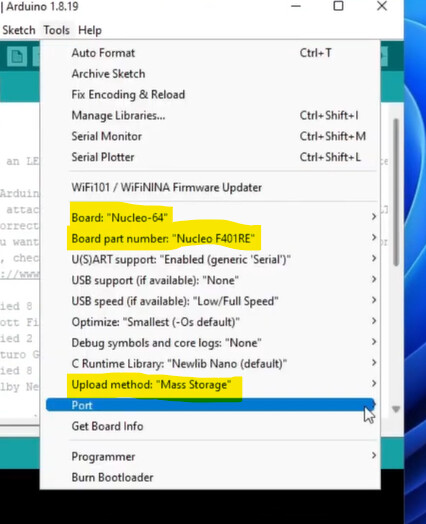
  2. I then attempted with the Arduino IDE to load the blink sketch. That appeared to load but actually failed silently. I'm guessing there is a problem with the "Mass Storage" upload method but can find no supporting evidence of that (yet). Anyway, this appears to match your experience, albeit with a different Nucleo board.

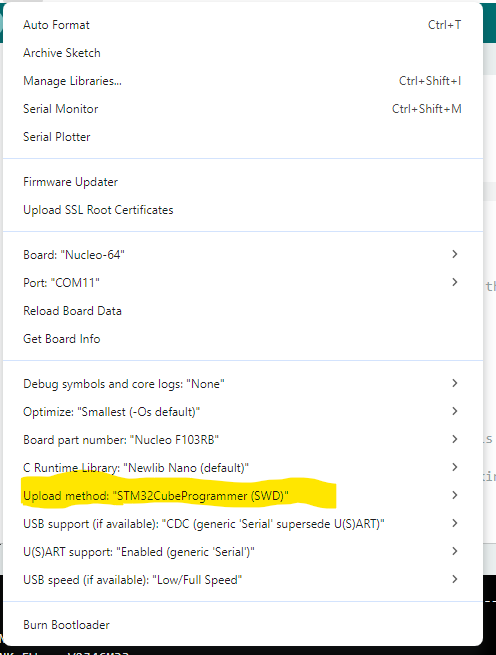
  3. So I downloaded the Cube Programmer and changed the upload method to STM32CubeProgrammer(SWD) and that worked. I was able to run the standard (unmodified) blink sketch.

Arduino IDE Tools Menu

Linking everything together... "C:\\Users\\6v6gt\\AppData\\Local\\Arduino15\\packages\\STMicroelectronics\\tools\\xpack-arm-none-eabi-gcc\\14.2.1-1.1/bin/arm-none-eabi-gcc" -mcpu=cortex-m3 -mthumb -Os -DNDEBUG --specs=nano.specs -Wl,--defsym=LD_FLASH_OFFSET=0x0 -Wl,--defsym=LD_MAX_SIZE=131072 -Wl,--defsym=LD_MAX_DATA_SIZE=20480 -Wl,--cref -Wl,--check-sections -Wl,--gc-sections -Wl,--entry=Reset_Handler -Wl,--unresolved-symbols=report-all -Wl,--warn-common "-Wl,--default-script=C:\\Users\\6v6gt\\AppData\\Local\\Arduino15\\packages\\STMicroelectronics\\hardware\\stm32\\2.11.0\\variants\\STM32F1xx\\F103R(8-B)T/ldscript.ld" "-Wl,--script=C:\\Users\\6v6gt\\AppData\\Local\\Arduino15\\packages\\STMicroelectronics\\hardware\\stm32\\2.11.0\\system/ldscript.ld" "-Wl,-Map,C:\\Users\\6v6gt\\AppData\\Local\\arduino\\sketches\\20692D3B8705A232B9C125467CCF1873/Blink.ino.map" -Wl,--no-warn-rwx-segments -o "C:\\Users\\6v6gt\\AppData\\Local\\arduino\\sketches\\20692D3B8705A232B9C125467CCF1873/Blink.ino.elf" "-LC:\\Users\\6v6gt\\AppData\\Local\\arduino\\sketches\\20692D3B8705A232B9C125467CCF1873" -Wl,--start-group "C:\\Users\\6v6gt\\AppData\\Local\\arduino\\sketches\\20692D3B8705A232B9C125467CCF1873\\sketch\\Blink.ino.cpp.o" "C:\\Users\\6v6gt\\AppData\\Local\\arduino\\sketches\\20692D3B8705A232B9C125467CCF1873\\sketch\\requiredLibraries.cpp.o" "C:\\Users\\6v6gt\\AppData\\Local\\arduino\\sketches\\20692D3B8705A232B9C125467CCF1873\\libraries\\SrcWrapper\\HAL\\stm32yyxx_hal.c.o" "C:\\Users\\6v6gt\\AppData\\Local\\arduino\\sketches\\20692D3B8705A232B9C125467CCF1873\\libraries\\SrcWrapper\\HAL\\stm32yyxx_hal_adc.c.o" "C:\\Users\\6v6gt\\AppData\\Local\\arduino\\sketches\\20692D3B8705A232B9C125467CCF1873\\libraries\\SrcWrapper\\HAL\\stm32yyxx_hal_adc_ex.c.o" "C:\\Users\\6v6gt\\AppData\\Local\\arduino\\sketches\\20692D3B8705A232B9C125467CCF1873\\libraries\\SrcWrapper\\HAL\\stm32yyxx_hal_can.c.o" "C:\\Users\\6v6gt\\AppData\\Local\\arduino\\sketches\\20692D3B8705A232B9C125467CCF1873\\libraries\\SrcWrapper\\HAL\\stm32yyxx_hal_ccb.c.o" "C:\\Users\\6v6gt\\AppData\\Local\\arduino\\sketches\\20692D3B8705A232B9C125467CCF1873\\libraries\\SrcWrapper\\HAL\\stm32yyxx_hal_cec.c.o" "C:\\Users\\6v6gt\\AppData\\Local\\arduino\\sketches\\20692D3B8705A232B9C125467CCF1873\\libraries\\SrcWrapper\\HAL\\stm32yyxx_hal_comp.c.o" "C:\\Users\\6v6gt\\AppData\\Local\\arduino\\sketches\\20692D3B8705A232B9C125467CCF1873\\libraries\\SrcWrapper\\HAL\\stm32yyxx_hal_comp_ex.c.o" "C:\\Users\\6v6gt\\AppData\\Local\\arduino\\sketches\\20692D3B8705A232B9C125467CCF1873\\libraries\\SrcWrapper\\HAL\\stm32yyxx_hal_cordic.c.o" "C:\\Users\\6v6gt\\AppData\\Local\\arduino\\sketches\\20692D3B8705A232B9C125467CCF1873\\libraries\\SrcWrapper\\HAL\\stm32yyxx_hal_cortex.c.o" "C:\\Users\\6v6gt\\AppData\\Local\\arduino\\sketches\\20692D3B8705A232B9C125467CCF1873\\libraries\\SrcWrapper\\HAL\\stm32yyxx_hal_crc.c.o" "C:\\Users\\6v6gt\\AppData\\Local\\arduino\\sketches\\20692D3B8705A232B9C125467CCF1873\\libraries\\SrcWrapper\\HAL\\stm32yyxx_hal_crc_ex.c.o" "C:\\Users\\6v6gt\\AppData\\Local\\arduino\\sketches\\20692D3B8705A232B9C125467CCF1873\\libraries\\SrcWrapper\\HAL\\stm32yyxx_hal_cryp.c.o" "C:\\Users\\6v6gt\\AppData\\Local\\arduino\\sketches\\20692D3B8705A232B9C125467CCF1873\\libraries\\SrcWrapper\\HAL\\stm32yyxx_hal_cryp_ex.c.o" "C:\\Users\\6v6gt\\AppData\\Local\\arduino\\sketches\\20692D3B8705A232B9C125467CCF1873\\libraries\\SrcWrapper\\HAL\\stm32yyxx_hal_dac.c.o" "C:\\Users\\6v6gt\\AppData\\Local\\arduino\\sketches\\20692D3B8705A232B9C125467CCF1873\\libraries\\SrcWrapper\\HAL\\stm32yyxx_hal_dac_ex.c.o" "C:\\Users\\6v6gt\\AppData\\Local\\arduino\\sketches\\20692D3B8705A232B9C125467CCF1873\\libraries\\SrcWrapper\\HAL\\stm32yyxx_hal_dcache.c.o" "C:\\Users\\6v6gt\\AppData\\Local\\arduino\\sketches\\20692D3B8705A232B9C125467CCF1873\\libraries\\SrcWrapper\\HAL\\stm32yyxx_hal_dcmi.c.o" "C:\\Users\\6v6gt\\AppData\\Local\\arduino\\sketches\\20692D3B8705A232B9C125467CCF1873\\libraries\\SrcWrapper\\HAL\\stm32yyxx_hal_dcmi_ex.c.o" "C:\\Users\\6v6gt\\AppData\\Local\\arduino\\sketches\\20692D3B8705A232B9C125467CCF1873\\libraries\\SrcWrapper\\HAL\\stm32yyxx_hal_dfsdm.c.o" "C:\\Users\\6v6gt\\AppData\\Local\\arduino\\sketches\\20692D3B8705A232B9C125467CCF1873\\libraries\\SrcWrapper\\HAL\\stm32yyxx_hal_dfsdm_ex.c.o" "C:\\Users\\6v6gt\\AppData\\Local\\arduino\\sketches\\20692D3B8705A232B9C125467CCF1873\\libraries\\SrcWrapper\\HAL\\stm32yyxx_hal_dma.c.o" "C:\\Users\\6v6gt\\AppData\\Local\\arduino\\sketches\\20692D3B8705A232B9C125467CCF1873\\libraries\\SrcWrapper\\HAL\\stm32yyxx_hal_dma2d.c.o" "C:\\Users\\6v6gt\\AppData\\Local\\arduino\\sketches\\20692D3B8705A232B9C125467CCF1873\\libraries\\SrcWrapper\\HAL\\stm32yyxx_hal_dma_ex.c.o" "C:\\Users\\6v6gt\\AppData\\Local\\arduino\\sketches\\20692D3B8705A232B9C125467CCF1873\\libraries\\SrcWrapper\\HAL\\stm32yyxx_hal_dsi.c.o" "C:\\Users\\6v6gt\\AppData\\Local\\arduino\\sketches\\20692D3B8705A232B9C125467CCF1873\\libraries\\SrcWrapper\\HAL\\stm32yyxx_hal_dts.c.o" "C:\\Users\\6v6gt\\AppData\\Local\\arduino\\sketches\\20692D3B8705A232B9C125467CCF1873\\libraries\\SrcWrapper\\HAL\\stm32yyxx_hal_eth.c.o" "C:\\Users\\6v6gt\\AppData\\Local\\arduino\\sketches\\20692D3B8705A232B9C125467CCF1873\\libraries\\SrcWrapper\\HAL\\stm32yyxx_hal_eth_ex.c.o" "C:\\Users\\6v6gt\\AppData\\Local\\arduino\\sketches\\20692D3B8705A232B9C125467CCF1873\\libraries\\SrcWrapper\\HAL\\stm32yyxx_hal_exti.c.o" "C:\\Users\\6v6gt\\AppData\\Local\\arduino\\sketches\\20692D3B8705A232B9C125467CCF1873\\libraries\\SrcWrapper\\HAL\\stm32yyxx_hal_fdcan.c.o" "C:\\Users\\6v6gt\\AppData\\Local\\arduino\\sketches\\20692D3B8705A232B9C125467CCF1873\\libraries\\SrcWrapper\\HAL\\stm32yyxx_hal_firewall.c.o" "C:\\Users\\6v6gt\\AppData\\Local\\arduino\\sketches\\20692D3B8705A232B9C125467CCF1873\\libraries\\SrcWrapper\\HAL\\stm32yyxx_hal_flash.c.o" "C:\\Users\\6v6gt\\AppData\\Local\\arduino\\sketches\\20692D3B8705A232B9C125467CCF1873\\libraries\\SrcWrapper\\HAL\\stm32yyxx_hal_flash_ex.c.o" "C:\\Users\\6v6gt\\AppData\\Local\\arduino\\sketches\\20692D3B8705A232B9C125467CCF1873\\libraries\\SrcWrapper\\HAL\\stm32yyxx_hal_flash_ramfunc.c.o" "C:\\Users\\6v6gt\\AppData\\Local\\arduino\\sketches\\20692D3B8705A232B9C125467CCF1873\\libraries\\SrcWrapper\\HAL\\stm32yyxx_hal_fmac.c.o" "C:\\Users\\6v6gt\\AppData\\Local\\arduino\\sketches\\20692D3B8705A232B9C125467CCF1873\\libraries\\SrcWrapper\\HAL\\stm32yyxx_hal_fmpi2c.c.o" "C:\\Users\\6v6gt\\AppData\\Local\\arduino\\sketches\\20692D3B8705A232B9C125467CCF1873\\libraries\\SrcWrapper\\HAL\\stm32yyxx_hal_fmpi2c_ex.c.o" "C:\\Users\\6v6gt\\AppData\\Local\\arduino\\sketches\\20692D3B8705A232B9C125467CCF1873\\libraries\\SrcWrapper\\HAL\\stm32yyxx_hal_fmpsmbus.c.o" "C:\\Users\\6v6gt\\AppData\\Local\\arduino\\sketches\\20692D3B8705A232B9C125467CCF1873\\libraries\\SrcWrapper\\HAL\\stm32yyxx_hal_fmpsmbus_ex.c.o" "C:\\Users\\6v6gt\\AppData\\Local\\arduino\\sketches\\20692D3B8705A232B9C125467CCF1873\\libraries\\SrcWrapper\\HAL\\stm32yyxx_hal_gfxmmu.c.o" "C:\\Users\\6v6gt\\AppData\\Local\\arduino\\sketches\\20692D3B8705A232B9C125467CCF1873\\libraries\\SrcWrapper\\HAL\\stm32yyxx_hal_gfxtim.c.o" "C:\\Users\\6v6gt\\AppData\\Local\\arduino\\sketches\\20692D3B8705A232B9C125467CCF1873\\libraries\\SrcWrapper\\HAL\\stm32yyxx_hal_gpio.c.o" "C:\\Users\\6v6gt\\AppData\\Local\\arduino\\sketches\\20692D3B8705A232B9C125467CCF1873\\libraries\\SrcWrapper\\HAL\\stm32yyxx_hal_gpio_ex.c.o" "C:\\Users\\6v6gt\\AppData\\Local\\arduino\\sketches\\20692D3B8705A232B9C125467CCF1873\\libraries\\SrcWrapper\\HAL\\stm32yyxx_hal_gpu2d.c.o" "C:\\Users\\6v6gt\\AppData\\Local\\arduino\\sketches\\20692D3B8705A232B9C125467CCF1873\\libraries\\SrcWrapper\\HAL\\stm32yyxx_hal_gtzc.c.o" "C:\\Users\\6v6gt\\AppData\\Local\\arduino\\sketches\\20692D3B8705A232B9C125467CCF1873\\libraries\\SrcWrapper\\HAL\\stm32yyxx_hal_hash.c.o" "C:\\Users\\6v6gt\\AppData\\Local\\arduino\\sketches\\20692D3B8705A232B9C125467CCF1873\\libraries\\SrcWrapper\\HAL\\stm32yyxx_hal_hash_ex.c.o" "C:\\Users\\6v6gt\\AppData\\Local\\arduino\\sketches\\20692D3B8705A232B9C125467CCF1873\\libraries\\SrcWrapper\\HAL\\stm32yyxx_hal_hcd.c.o" "C:\\Users\\6v6gt\\AppData\\Local\\arduino\\sketches\\20692D3B8705A232B9C125467CCF1873\\libraries\\SrcWrapper\\HAL\\stm32yyxx_hal_hrtim.c.o" "C:\\Users\\6v6gt\\AppData\\Local\\arduino\\sketches\\20692D3B8705A232B9C125467CCF1873\\libraries\\SrcWrapper\\HAL\\stm32yyxx_hal_hsem.c.o" "C:\\Users\\6v6gt\\AppData\\Local\\arduino\\sketches\\20692D3B8705A232B9C125467CCF1873\\libraries\\SrcWrapper\\HAL\\stm32yyxx_hal_i2c.c.o" "C:\\Users\\6v6gt\\AppData\\Local\\arduino\\sketches\\20692D3B8705A232B9C125467CCF1873\\libraries\\SrcWrapper\\HAL\\stm32yyxx_hal_i2c_ex.c.o" "C:\\Users\\6v6gt\\AppData\\Local\\arduino\\sketches\\20692D3B8705A232B9C125467CCF1873\\libraries\\SrcWrapper\\HAL\\stm32yyxx_hal_i2s.c.o" "C:\\Users\\6v6gt\\AppData\\Local\\arduino\\sketches\\20692D3B8705A232B9C125467CCF1873\\libraries\\SrcWrapper\\HAL\\stm32yyxx_hal_i2s_ex.c.o" "C:\\Users\\6v6gt\\AppData\\Local\\arduino\\sketches\\20692D3B8705A232B9C125467CCF1873\\libraries\\SrcWrapper\\HAL\\stm32yyxx_hal_i3c.c.o" "C:\\Users\\6v6gt\\AppData\\Local\\arduino\\sketches\\20692D3B8705A232B9C125467CCF1873\\libraries\\SrcWrapper\\HAL\\stm32yyxx_hal_icache.c.o" "C:\\Users\\6v6gt\\AppData\\Local\\arduino\\sketches\\20692D3B8705A232B9C125467CCF1873\\libraries\\SrcWrapper\\HAL\\stm32yyxx_hal_ipcc.c.o" "C:\\Users\\6v6gt\\AppData\\Local\\arduino\\sketches\\20692D3B8705A232B9C125467CCF1873\\libraries\\SrcWrapper\\HAL\\stm32yyxx_hal_irda.c.o" "C:\\Users\\6v6gt\\AppData\\Local\\arduino\\sketches\\20692D3B8705A232B9C125467CCF1873\\libraries\\SrcWrapper\\HAL\\stm32yyxx_hal_iwdg.c.o" "C:\\Users\\6v6gt\\AppData\\Local\\arduino\\sketches\\20692D3B8705A232B9C125467CCF1873\\libraries\\SrcWrapper\\HAL\\stm32yyxx_hal_jpeg.c.o" "C:\\Users\\6v6gt\\AppData\\Local\\arduino\\sketches\\20692D3B8705A232B9C125467CCF1873\\libraries\\SrcWrapper\\HAL\\stm32yyxx_hal_lcd.c.o" "C:\\Users\\6v6gt\\AppData\\Local\\arduino\\sketches\\20692D3B8705A232B9C125467CCF1873\\libraries\\SrcWrapper\\HAL\\stm32yyxx_hal_lptim.c.o" "C:\\Users\\6v6gt\\AppData\\Local\\arduino\\sketches\\20692D3B8705A232B9C125467CCF1873\\libraries\\SrcWrapper\\HAL\\stm32yyxx_hal_ltdc.c.o" "C:\\Users\\6v6gt\\AppData\\Local\\arduino\\sketches\\20692D3B8705A232B9C125467CCF1873\\libraries\\SrcWrapper\\HAL\\stm32yyxx_hal_ltdc_ex.c.o" "C:\\Users\\6v6gt\\AppData\\Local\\arduino\\sketches\\20692D3B8705A232B9C125467CCF1873\\libraries\\SrcWrapper\\HAL\\stm32yyxx_hal_mdf.c.o" "C:\\Users\\6v6gt\\AppData\\Local\\arduino\\sketches\\20692D3B8705A232B9C125467CCF1873\\libraries\\SrcWrapper\\HAL\\stm32yyxx_hal_mdios.c.o" "C:\\Users\\6v6gt\\AppData\\Local\\arduino\\sketches\\20692D3B8705A232B9C125467CCF1873\\libraries\\SrcWrapper\\HAL\\stm32yyxx_hal_mdma.c.o" "C:\\Users\\6v6gt\\AppData\\Local\\arduino\\sketches\\20692D3B8705A232B9C125467CCF1873\\libraries\\SrcWrapper\\HAL\\stm32yyxx_hal_mmc.c.o" "C:\\Users\\6v6gt\\AppData\\Local\\arduino\\sketches\\20692D3B8705A232B9C125467CCF1873\\libraries\\SrcWrapper\\HAL\\stm32yyxx_hal_mmc_ex.c.o" "C:\\Users\\6v6gt\\AppData\\Local\\arduino\\sketches\\20692D3B8705A232B9C125467CCF1873\\libraries\\SrcWrapper\\HAL\\stm32yyxx_hal_nand.c.o" "C:\\Users\\6v6gt\\AppData\\Local\\arduino\\sketches\\20692D3B8705A232B9C125467CCF1873\\libraries\\SrcWrapper\\HAL\\stm32yyxx_hal_nor.c.o" "C:\\Users\\6v6gt\\AppData\\Local\\arduino\\sketches\\20692D3B8705A232B9C125467CCF1873\\libraries\\SrcWrapper\\HAL\\stm32yyxx_hal_opamp.c.o" "C:\\Users\\6v6gt\\AppData\\Local\\arduino\\sketches\\20692D3B8705A232B9C125467CCF1873\\libraries\\SrcWrapper\\HAL\\stm32yyxx_hal_opamp_ex.c.o" "C:\\Users\\6v6gt\\AppData\\Local\\arduino\\sketches\\20692D3B8705A232B9C125467CCF1873\\libraries\\SrcWrapper\\HAL\\stm32yyxx_hal_ospi.c.o" "C:\\Users\\6v6gt\\AppData\\Local\\arduino\\sketches\\20692D3B8705A232B9C125467CCF1873\\libraries\\SrcWrapper\\HAL\\stm32yyxx_hal_otfdec.c.o" "C:\\Users\\6v6gt\\AppData\\Local\\arduino\\sketches\\20692D3B8705A232B9C125467CCF1873\\libraries\\SrcWrapper\\HAL\\stm32yyxx_hal_pccard.c.o" "C:\\Users\\6v6gt\\AppData\\Local\\arduino\\sketches\\20692D3B8705A232B9C125467CCF1873\\libraries\\SrcWrapper\\HAL\\stm32yyxx_hal_pcd.c.o" "C:\\Users\\6v6gt\\AppData\\Local\\arduino\\sketches\\20692D3B8705A232B9C125467CCF1873\\libraries\\SrcWrapper\\HAL\\stm32yyxx_hal_pcd_ex.c.o" "C:\\Users\\6v6gt\\AppData\\Local\\arduino\\sketches\\20692D3B8705A232B9C125467CCF1873\\libraries\\SrcWrapper\\HAL\\stm32yyxx_hal_pka.c.o" "C:\\Users\\6v6gt\\AppData\\Local\\arduino\\sketches\\20692D3B8705A232B9C125467CCF1873\\libraries\\SrcWrapper\\HAL\\stm32yyxx_hal_pssi.c.o" "C:\\Users\\6v6gt\\AppData\\Local\\arduino\\sketches\\20692D3B8705A232B9C125467CCF1873\\libraries\\SrcWrapper\\HAL\\stm32yyxx_hal_pwr.c.o" "C:\\Users\\6v6gt\\AppData\\Local\\arduino\\sketches\\20692D3B8705A232B9C125467CCF1873\\libraries\\SrcWrapper\\HAL\\stm32yyxx_hal_pwr_ex.c.o" "C:\\Users\\6v6gt\\AppData\\Local\\arduino\\sketches\\20692D3B8705A232B9C125467CCF1873\\libraries\\SrcWrapper\\HAL\\stm32yyxx_hal_qspi.c.o" "C:\\Users\\6v6gt\\AppData\\Local\\arduino\\sketches\\20692D3B8705A232B9C125467CCF1873\\libraries\\SrcWrapper\\HAL\\stm32yyxx_hal_radio.c.o" "C:\\Users\\6v6gt\\AppData\\Local\\arduino\\sketches\\20692D3B8705A232B9C125467CCF1873\\libraries\\SrcWrapper\\HAL\\stm32yyxx_hal_radio_timer.c.o" "C:\\Users\\6v6gt\\AppData\\Local\\arduino\\sketches\\20692D3B8705A232B9C125467CCF1873\\libraries\\SrcWrapper\\HAL\\stm32yyxx_hal_ramcfg.c.o" "C:\\Users\\6v6gt\\AppData\\Local\\arduino\\sketches\\20692D3B8705A232B9C125467CCF1873\\libraries\\SrcWrapper\\HAL\\stm32yyxx_hal_ramecc.c.o" "C:\\Users\\6v6gt\\AppData\\Local\\arduino\\sketches\\20692D3B8705A232B9C125467CCF1873\\libraries\\SrcWrapper\\HAL\\stm32yyxx_hal_rcc.c.o" "C:\\Users\\6v6gt\\AppData\\Local\\arduino\\sketches\\20692D3B8705A232B9C125467CCF1873\\libraries\\SrcWrapper\\HAL\\stm32yyxx_hal_rcc_ex.c.o" "C:\\Users\\6v6gt\\AppData\\Local\\arduino\\sketches\\20692D3B8705A232B9C125467CCF1873\\libraries\\SrcWrapper\\HAL\\stm32yyxx_hal_rng.c.o" "C:\\Users\\6v6gt\\AppData\\Local\\arduino\\sketches\\20692D3B8705A232B9C125467CCF1873\\libraries\\SrcWrapper\\HAL\\stm32yyxx_hal_rng_ex.c.o" "C:\\Users\\6v6gt\\AppData\\Local\\arduino\\sketches\\20692D3B8705A232B9C125467CCF1873\\libraries\\SrcWrapper\\HAL\\stm32yyxx_hal_rtc.c.o" "C:\\Users\\6v6gt\\AppData\\Local\\arduino\\sketches\\20692D3B8705A232B9C125467CCF1873\\libraries\\SrcWrapper\\HAL\\stm32yyxx_hal_rtc_ex.c.o" "C:\\Users\\6v6gt\\AppData\\Local\\arduino\\sketches\\20692D3B8705A232B9C125467CCF1873\\libraries\\SrcWrapper\\HAL\\stm32yyxx_hal_sai.c.o" "C:\\Users\\6v6gt\\AppData\\Local\\arduino\\sketches\\20692D3B8705A232B9C125467CCF1873\\libraries\\SrcWrapper\\HAL\\stm32yyxx_hal_sai_ex.c.o" "C:\\Users\\6v6gt\\AppData\\Local\\arduino\\sketches\\20692D3B8705A232B9C125467CCF1873\\libraries\\SrcWrapper\\HAL\\stm32yyxx_hal_sd.c.o" "C:\\Users\\6v6gt\\AppData\\Local\\arduino\\sketches\\20692D3B8705A232B9C125467CCF1873\\libraries\\SrcWrapper\\HAL\\stm32yyxx_hal_sd_ex.c.o" "C:\\Users\\6v6gt\\AppData\\Local\\arduino\\sketches\\20692D3B8705A232B9C125467CCF1873\\libraries\\SrcWrapper\\HAL\\stm32yyxx_hal_sdadc.c.o" "C:\\Users\\6v6gt\\AppData\\Local\\arduino\\sketches\\20692D3B8705A232B9C125467CCF1873\\libraries\\SrcWrapper\\HAL\\stm32yyxx_hal_sdio.c.o" "C:\\Users\\6v6gt\\AppData\\Local\\arduino\\sketches\\20692D3B8705A232B9C125467CCF1873\\libraries\\SrcWrapper\\HAL\\stm32yyxx_hal_sdram.c.o" "C:\\Users\\6v6gt\\AppData\\Local\\arduino\\sketches\\20692D3B8705A232B9C125467CCF1873\\libraries\\SrcWrapper\\HAL\\stm32yyxx_hal_smartcard.c.o" "C:\\Users\\6v6gt\\AppData\\Local\\arduino\\sketches\\20692D3B8705A232B9C125467CCF1873\\libraries\\SrcWrapper\\HAL\\stm32yyxx_hal_smartcard_ex.c.o" "C:\\Users\\6v6gt\\AppData\\Local\\arduino\\sketches\\20692D3B8705A232B9C125467CCF1873\\libraries\\SrcWrapper\\HAL\\stm32yyxx_hal_smbus.c.o" "C:\\Users\\6v6gt\\AppData\\Local\\arduino\\sketches\\20692D3B8705A232B9C125467CCF1873\\libraries\\SrcWrapper\\HAL\\stm32yyxx_hal_smbus_ex.c.o" "C:\\Users\\6v6gt\\AppData\\Local\\arduino\\sketches\\20692D3B8705A232B9C125467CCF1873\\libraries\\SrcWrapper\\HAL\\stm32yyxx_hal_spdifrx.c.o" "C:\\Users\\6v6gt\\AppData\\Local\\arduino\\sketches\\20692D3B8705A232B9C125467CCF1873\\libraries\\SrcWrapper\\HAL\\stm32yyxx_hal_spi.c.o" "C:\\Users\\6v6gt\\AppData\\Local\\arduino\\sketches\\20692D3B8705A232B9C125467CCF1873\\libraries\\SrcWrapper\\HAL\\stm32yyxx_hal_spi_ex.c.o" "C:\\Users\\6v6gt\\AppData\\Local\\arduino\\sketches\\20692D3B8705A232B9C125467CCF1873\\libraries\\SrcWrapper\\HAL\\stm32yyxx_hal_sram.c.o" "C:\\Users\\6v6gt\\AppData\\Local\\arduino\\sketches\\20692D3B8705A232B9C125467CCF1873\\libraries\\SrcWrapper\\HAL\\stm32yyxx_hal_subghz.c.o" "C:\\Users\\6v6gt\\AppData\\Local\\arduino\\sketches\\20692D3B8705A232B9C125467CCF1873\\libraries\\SrcWrapper\\HAL\\stm32yyxx_hal_swpmi.c.o" "C:\\Users\\6v6gt\\AppData\\Local\\arduino\\sketches\\20692D3B8705A232B9C125467CCF1873\\libraries\\SrcWrapper\\HAL\\stm32yyxx_hal_tim.c.o" "C:\\Users\\6v6gt\\AppData\\Local\\arduino\\sketches\\20692D3B8705A232B9C125467CCF1873\\libraries\\SrcWrapper\\HAL\\stm32yyxx_hal_tim_ex.c.o" "C:\\Users\\6v6gt\\AppData\\Local\\arduino\\sketches\\20692D3B8705A232B9C125467CCF1873\\libraries\\SrcWrapper\\HAL\\stm32yyxx_hal_tsc.c.o" "C:\\Users\\6v6gt\\AppData\\Local\\arduino\\sketches\\20692D3B8705A232B9C125467CCF1873\\libraries\\SrcWrapper\\HAL\\stm32yyxx_hal_uart.c.o" "C:\\Users\\6v6gt\\AppData\\Local\\arduino\\sketches\\20692D3B8705A232B9C125467CCF1873\\libraries\\SrcWrapper\\HAL\\stm32yyxx_hal_uart_ex.c.o" "C:\\Users\\6v6gt\\AppData\\Local\\arduino\\sketches\\20692D3B8705A232B9C125467CCF1873\\libraries\\SrcWrapper\\HAL\\stm32yyxx_hal_usart.c.o" "C:\\Users\\6v6gt\\AppData\\Local\\arduino\\sketches\\20692D3B8705A232B9C125467CCF1873\\libraries\\SrcWrapper\\HAL\\stm32yyxx_hal_usart_ex.c.o" "C:\\Users\\6v6gt\\AppData\\Local\\arduino\\sketches\\20692D3B8705A232B9C125467CCF1873\\libraries\\SrcWrapper\\HAL\\stm32yyxx_hal_wwdg.c.o" "C:\\Users\\6v6gt\\AppData\\Local\\arduino\\sketches\\20692D3B8705A232B9C125467CCF1873\\libraries\\SrcWrapper\\HAL\\stm32yyxx_hal_xspi.c.o" "C:\\Users\\6v6gt\\AppData\\Local\\arduino\\sketches\\20692D3B8705A232B9C125467CCF1873\\libraries\\SrcWrapper\\HardwareTimer.cpp.o" "C:\\Users\\6v6gt\\AppData\\Local\\arduino\\sketches\\20692D3B8705A232B9C125467CCF1873\\libraries\\SrcWrapper\\LL\\stm32yyxx_ll_adc.c.o" "C:\\Users\\6v6gt\\AppData\\Local\\arduino\\sketches\\20692D3B8705A232B9C125467CCF1873\\libraries\\SrcWrapper\\LL\\stm32yyxx_ll_bdma.c.o" "C:\\Users\\6v6gt\\AppData\\Local\\arduino\\sketches\\20692D3B8705A232B9C125467CCF1873\\libraries\\SrcWrapper\\LL\\stm32yyxx_ll_comp.c.o" "C:\\Users\\6v6gt\\AppData\\Local\\arduino\\sketches\\20692D3B8705A232B9C125467CCF1873\\libraries\\SrcWrapper\\LL\\stm32yyxx_ll_cordic.c.o" "C:\\Users\\6v6gt\\AppData\\Local\\arduino\\sketches\\20692D3B8705A232B9C125467CCF1873\\libraries\\SrcWrapper\\LL\\stm32yyxx_ll_crc.c.o" "C:\\Users\\6v6gt\\AppData\\Local\\arduino\\sketches\\20692D3B8705A232B9C125467CCF1873\\libraries\\SrcWrapper\\LL\\stm32yyxx_ll_crs.c.o" "C:\\Users\\6v6gt\\AppData\\Local\\arduino\\sketches\\20692D3B8705A232B9C125467CCF1873\\libraries\\SrcWrapper\\LL\\stm32yyxx_ll_dac.c.o" "C:\\Users\\6v6gt\\AppData\\Local\\arduino\\sketches\\20692D3B8705A232B9C125467CCF1873\\libraries\\SrcWrapper\\LL\\stm32yyxx_ll_delayblock.c.o" "C:\\Users\\6v6gt\\AppData\\Local\\arduino\\sketches\\20692D3B8705A232B9C125467CCF1873\\libraries\\SrcWrapper\\LL\\stm32yyxx_ll_dlyb.c.o" "C:\\Users\\6v6gt\\AppData\\Local\\arduino\\sketches\\20692D3B8705A232B9C125467CCF1873\\libraries\\SrcWrapper\\LL\\stm32yyxx_ll_dma.c.o" "C:\\Users\\6v6gt\\AppData\\Local\\arduino\\sketches\\20692D3B8705A232B9C125467CCF1873\\libraries\\SrcWrapper\\LL\\stm32yyxx_ll_dma2d.c.o" "C:\\Users\\6v6gt\\AppData\\Local\\arduino\\sketches\\20692D3B8705A232B9C125467CCF1873\\libraries\\SrcWrapper\\LL\\stm32yyxx_ll_exti.c.o" "C:\\Users\\6v6gt\\AppData\\Local\\arduino\\sketches\\20692D3B8705A232B9C125467CCF1873\\libraries\\SrcWrapper\\LL\\stm32yyxx_ll_fmac.c.o" "C:\\Users\\6v6gt\\AppData\\Local\\arduino\\sketches\\20692D3B8705A232B9C125467CCF1873\\libraries\\SrcWrapper\\LL\\stm32yyxx_ll_fmc.c.o" "C:\\Users\\6v6gt\\AppData\\Local\\arduino\\sketches\\20692D3B8705A232B9C125467CCF1873\\libraries\\SrcWrapper\\LL\\stm32yyxx_ll_fmpi2c.c.o" "C:\\Users\\6v6gt\\AppData\\Local\\arduino\\sketches\\20692D3B8705A232B9C125467CCF1873\\libraries\\SrcWrapper\\LL\\stm32yyxx_ll_fsmc.c.o" "C:\\Users\\6v6gt\\AppData\\Local\\arduino\\sketches\\20692D3B8705A232B9C125467CCF1873\\libraries\\SrcWrapper\\LL\\stm32yyxx_ll_gpio.c.o" "C:\\Users\\6v6gt\\AppData\\Local\\arduino\\sketches\\20692D3B8705A232B9C125467CCF1873\\libraries\\SrcWrapper\\LL\\stm32yyxx_ll_hrtim.c.o" "C:\\Users\\6v6gt\\AppData\\Local\\arduino\\sketches\\20692D3B8705A232B9C125467CCF1873\\libraries\\SrcWrapper\\LL\\stm32yyxx_ll_i2c.c.o" "C:\\Users\\6v6gt\\AppData\\Local\\arduino\\sketches\\20692D3B8705A232B9C125467CCF1873\\libraries\\SrcWrapper\\LL\\stm32yyxx_ll_i3c.c.o" "C:\\Users\\6v6gt\\AppData\\Local\\arduino\\sketches\\20692D3B8705A232B9C125467CCF1873\\libraries\\SrcWrapper\\LL\\stm32yyxx_ll_icache.c.o" "C:\\Users\\6v6gt\\AppData\\Local\\arduino\\sketches\\20692D3B8705A232B9C125467CCF1873\\libraries\\SrcWrapper\\LL\\stm32yyxx_ll_lpgpio.c.o" "C:\\Users\\6v6gt\\AppData\\Local\\arduino\\sketches\\20692D3B8705A232B9C125467CCF1873\\libraries\\SrcWrapper\\LL\\stm32yyxx_ll_lptim.c.o" "C:\\Users\\6v6gt\\AppData\\Local\\arduino\\sketches\\20692D3B8705A232B9C125467CCF1873\\libraries\\SrcWrapper\\LL\\stm32yyxx_ll_lpuart.c.o" "C:\\Users\\6v6gt\\AppData\\Local\\arduino\\sketches\\20692D3B8705A232B9C125467CCF1873\\libraries\\SrcWrapper\\LL\\stm32yyxx_ll_mdma.c.o" "C:\\Users\\6v6gt\\AppData\\Local\\arduino\\sketches\\20692D3B8705A232B9C125467CCF1873\\libraries\\SrcWrapper\\LL\\stm32yyxx_ll_opamp.c.o" "C:\\Users\\6v6gt\\AppData\\Local\\arduino\\sketches\\20692D3B8705A232B9C125467CCF1873\\libraries\\SrcWrapper\\LL\\stm32yyxx_ll_pka.c.o" "C:\\Users\\6v6gt\\AppData\\Local\\arduino\\sketches\\20692D3B8705A232B9C125467CCF1873\\libraries\\SrcWrapper\\LL\\stm32yyxx_ll_pwr.c.o" "C:\\Users\\6v6gt\\AppData\\Local\\arduino\\sketches\\20692D3B8705A232B9C125467CCF1873\\libraries\\SrcWrapper\\LL\\stm32yyxx_ll_rcc.c.o" "C:\\Users\\6v6gt\\AppData\\Local\\arduino\\sketches\\20692D3B8705A232B9C125467CCF1873\\libraries\\SrcWrapper\\LL\\stm32yyxx_ll_rng.c.o" "C:\\Users\\6v6gt\\AppData\\Local\\arduino\\sketches\\20692D3B8705A232B9C125467CCF1873\\libraries\\SrcWrapper\\LL\\stm32yyxx_ll_rtc.c.o" "C:\\Users\\6v6gt\\AppData\\Local\\arduino\\sketches\\20692D3B8705A232B9C125467CCF1873\\libraries\\SrcWrapper\\LL\\stm32yyxx_ll_sdmmc.c.o" "C:\\Users\\6v6gt\\AppData\\Local\\arduino\\sketches\\20692D3B8705A232B9C125467CCF1873\\libraries\\SrcWrapper\\LL\\stm32yyxx_ll_spi.c.o" "C:\\Users\\6v6gt\\AppData\\Local\\arduino\\sketches\\20692D3B8705A232B9C125467CCF1873\\libraries\\SrcWrapper\\LL\\stm32yyxx_ll_swpmi.c.o" "C:\\Users\\6v6gt\\AppData\\Local\\arduino\\sketches\\20692D3B8705A232B9C125467CCF1873\\libraries\\SrcWrapper\\LL\\stm32yyxx_ll_system.c.o" "C:\\Users\\6v6gt\\AppData\\Local\\arduino\\sketches\\20692D3B8705A232B9C125467CCF1873\\libraries\\SrcWrapper\\LL\\stm32yyxx_ll_tim.c.o" "C:\\Users\\6v6gt\\AppData\\Local\\arduino\\sketches\\20692D3B8705A232B9C125467CCF1873\\libraries\\SrcWrapper\\LL\\stm32yyxx_ll_ucpd.c.o" "C:\\Users\\6v6gt\\AppData\\Local\\arduino\\sketches\\20692D3B8705A232B9C125467CCF1873\\libraries\\SrcWrapper\\LL\\stm32yyxx_ll_usart.c.o" "C:\\Users\\6v6gt\\AppData\\Local\\arduino\\sketches\\20692D3B8705A232B9C125467CCF1873\\libraries\\SrcWrapper\\LL\\stm32yyxx_ll_usb.c.o" "C:\\Users\\6v6gt\\AppData\\Local\\arduino\\sketches\\20692D3B8705A232B9C125467CCF1873\\libraries\\SrcWrapper\\LL\\stm32yyxx_ll_utils.c.o" "C:\\Users\\6v6gt\\AppData\\Local\\arduino\\sketches\\20692D3B8705A232B9C125467CCF1873\\libraries\\SrcWrapper\\new.cpp.o" "C:\\Users\\6v6gt\\AppData\\Local\\arduino\\sketches\\20692D3B8705A232B9C125467CCF1873\\libraries\\SrcWrapper\\stm32\\PortNames.c.o" "C:\\Users\\6v6gt\\AppData\\Local\\arduino\\sketches\\20692D3B8705A232B9C125467CCF1873\\libraries\\SrcWrapper\\stm32\\analog.cpp.o" "C:\\Users\\6v6gt\\AppData\\Local\\arduino\\sketches\\20692D3B8705A232B9C125467CCF1873\\libraries\\SrcWrapper\\stm32\\bootloader.c.o" "C:\\Users\\6v6gt\\AppData\\Local\\arduino\\sketches\\20692D3B8705A232B9C125467CCF1873\\libraries\\SrcWrapper\\stm32\\clock.c.o" "C:\\Users\\6v6gt\\AppData\\Local\\arduino\\sketches\\20692D3B8705A232B9C125467CCF1873\\libraries\\SrcWrapper\\stm32\\core_callback.c.o" "C:\\Users\\6v6gt\\AppData\\Local\\arduino\\sketches\\20692D3B8705A232B9C125467CCF1873\\libraries\\SrcWrapper\\stm32\\dwt.c.o" "C:\\Users\\6v6gt\\AppData\\Local\\arduino\\sketches\\20692D3B8705A232B9C125467CCF1873\\libraries\\SrcWrapper\\stm32\\hw_config.c.o" "C:\\Users\\6v6gt\\AppData\\Local\\arduino\\sketches\\20692D3B8705A232B9C125467CCF1873\\libraries\\SrcWrapper\\stm32\\interrupt.cpp.o" "C:\\Users\\6v6gt\\AppData\\Local\\arduino\\sketches\\20692D3B8705A232B9C125467CCF1873\\libraries\\SrcWrapper\\stm32\\otp.c.o" "C:\\Users\\6v6gt\\AppData\\Local\\arduino\\sketches\\20692D3B8705A232B9C125467CCF1873\\libraries\\SrcWrapper\\stm32\\pinmap.c.o" "C:\\Users\\6v6gt\\AppData\\Local\\arduino\\sketches\\20692D3B8705A232B9C125467CCF1873\\libraries\\SrcWrapper\\stm32\\stm32_def.c.o" "C:\\Users\\6v6gt\\AppData\\Local\\arduino\\sketches\\20692D3B8705A232B9C125467CCF1873\\libraries\\SrcWrapper\\stm32\\system_stm32yyxx.c.o" "C:\\Users\\6v6gt\\AppData\\Local\\arduino\\sketches\\20692D3B8705A232B9C125467CCF1873\\libraries\\SrcWrapper\\stm32\\timer.c.o" "C:\\Users\\6v6gt\\AppData\\Local\\arduino\\sketches\\20692D3B8705A232B9C125467CCF1873\\libraries\\SrcWrapper\\stm32\\uart.c.o" "C:\\Users\\6v6gt\\AppData\\Local\\arduino\\sketches\\20692D3B8705A232B9C125467CCF1873\\libraries\\SrcWrapper\\syscalls.c.o" "C:\\Users\\6v6gt\\AppData\\Local\\arduino\\sketches\\20692D3B8705A232B9C125467CCF1873\\libraries\\USBDevice\\USBSerial.cpp.o" "C:\\Users\\6v6gt\\AppData\\Local\\arduino\\sketches\\20692D3B8705A232B9C125467CCF1873\\libraries\\USBDevice\\cdc\\cdc_queue.c.o" "C:\\Users\\6v6gt\\AppData\\Local\\arduino\\sketches\\20692D3B8705A232B9C125467CCF1873\\libraries\\USBDevice\\cdc\\usbd_cdc.c.o" "C:\\Users\\6v6gt\\AppData\\Local\\arduino\\sketches\\20692D3B8705A232B9C125467CCF1873\\libraries\\USBDevice\\cdc\\usbd_cdc_if.c.o" "C:\\Users\\6v6gt\\AppData\\Local\\arduino\\sketches\\20692D3B8705A232B9C125467CCF1873\\libraries\\USBDevice\\hid\\usbd_hid_composite.c.o" "C:\\Users\\6v6gt\\AppData\\Local\\arduino\\sketches\\20692D3B8705A232B9C125467CCF1873\\libraries\\USBDevice\\hid\\usbd_hid_composite_if.c.o" "C:\\Users\\6v6gt\\AppData\\Local\\arduino\\sketches\\20692D3B8705A232B9C125467CCF1873\\libraries\\USBDevice\\usb_device_core.c.o" "C:\\Users\\6v6gt\\AppData\\Local\\arduino\\sketches\\20692D3B8705A232B9C125467CCF1873\\libraries\\USBDevice\\usb_device_ctlreq.c.o" "C:\\Users\\6v6gt\\AppData\\Local\\arduino\\sketches\\20692D3B8705A232B9C125467CCF1873\\libraries\\USBDevice\\usb_device_ioreq.c.o" "C:\\Users\\6v6gt\\AppData\\Local\\arduino\\sketches\\20692D3B8705A232B9C125467CCF1873\\libraries\\USBDevice\\usbd_conf.c.o" "C:\\Users\\6v6gt\\AppData\\Local\\arduino\\sketches\\20692D3B8705A232B9C125467CCF1873\\libraries\\USBDevice\\usbd_desc.c.o" "C:\\Users\\6v6gt\\AppData\\Local\\arduino\\sketches\\20692D3B8705A232B9C125467CCF1873\\libraries\\USBDevice\\usbd_ep_conf.c.o" "C:\\Users\\6v6gt\\AppData\\Local\\arduino\\sketches\\20692D3B8705A232B9C125467CCF1873\\libraries\\USBDevice\\usbd_if.c.o" "C:\\Users\\6v6gt\\AppData\\Local\\arduino\\sketches\\20692D3B8705A232B9C125467CCF1873\\core\\PeripheralPins.c.o" "C:\\Users\\6v6gt\\AppData\\Local\\arduino\\sketches\\20692D3B8705A232B9C125467CCF1873\\core\\generic_clock.c.o" "C:\\Users\\6v6gt\\AppData\\Local\\arduino\\sketches\\20692D3B8705A232B9C125467CCF1873\\core\\variant_BLUEBUTTON_F103RxT.cpp.o" "C:\\Users\\6v6gt\\AppData\\Local\\arduino\\sketches\\20692D3B8705A232B9C125467CCF1873\\core\\variant_NUCLEO_F103RB.cpp.o" "C:\\Users\\6v6gt\\AppData\\Local\\arduino\\sketches\\20692D3B8705A232B9C125467CCF1873\\core\\variant_generic.cpp.o" "C:\\Users\\6v6gt\\AppData\\Local\\arduino\\cores\\89e3aa26f947f8d6c8589c00c308bbde\\core.a" -lc -Wl,--end-group -lm -lgcc -lstdc++ "C:\\Users\\6v6gt\\AppData\\Local\\Arduino15\\packages\\STMicroelectronics\\tools\\xpack-arm-none-eabi-gcc\\14.2.1-1.1/bin/arm-none-eabi-objcopy" -O binary "C:\\Users\\6v6gt\\AppData\\Local\\arduino\\sketches\\20692D3B8705A232B9C125467CCF1873/Blink.ino.elf" "C:\\Users\\6v6gt\\AppData\\Local\\arduino\\sketches\\20692D3B8705A232B9C125467CCF1873/Blink.ino.bin" "C:\\Users\\6v6gt\\AppData\\Local\\Arduino15\\packages\\STMicroelectronics\\tools\\xpack-arm-none-eabi-gcc\\14.2.1-1.1/bin/arm-none-eabi-objcopy" -O ihex "C:\\Users\\6v6gt\\AppData\\Local\\arduino\\sketches\\20692D3B8705A232B9C125467CCF1873/Blink.ino.elf" "C:\\Users\\6v6gt\\AppData\\Local\\arduino\\sketches\\20692D3B8705A232B9C125467CCF1873/Blink.ino.hex" powershell -c "$(Get-Date -UFormat '%A %d-%m-%Y %T')" Saturday 15-11-2025 21:36:06 Using library SrcWrapper at version 1.0.1 in folder: C:\Users\6v6gt\AppData\Local\Arduino15\packages\STMicroelectronics\hardware\stm32\2.11.0\libraries\SrcWrapper Using library USBDevice at version 1.0.0 in folder: C:\Users\6v6gt\AppData\Local\Arduino15\packages\STMicroelectronics\hardware\stm32\2.11.0\libraries\USBDevice "C:\\Users\\6v6gt\\AppData\\Local\\Arduino15\\packages\\STMicroelectronics\\tools\\xpack-arm-none-eabi-gcc\\14.2.1-1.1/bin/arm-none-eabi-size" -A "C:\\Users\\6v6gt\\AppData\\Local\\arduino\\sketches\\20692D3B8705A232B9C125467CCF1873/Blink.ino.elf" Sketch uses 23796 bytes (18%) of program storage space. Maximum is 131072 bytes. Global variables use 4388 bytes (21%) of dynamic memory, leaving 16092 bytes for local variables. Maximum is 20480 bytes. Selected interface: swd ------------------------------------------------------------------- STM32CubeProgrammer v2.21.0 ------------------------------------------------------------------- ST-LINK SN : 0669FF535349836687113146 ST-LINK FW : V2J46M33 Board : NUCLEO-F103RB Voltage : 3.25V SWD freq : 4000 KHz Connect mode: Under Reset Reset mode : Hardware reset Device ID : 0x410 Revision ID : Rev X Device name : STM32F101/F102/F103 Medium-density Flash size : 128 KBytes Device type : MCU Device CPU : Cortex-M3 BL Version : -- Opening and parsing file: Blink.ino.bin Memory Programming ... File : Blink.ino.bin Size : 23.54 KB Address : 0x08000000 Erasing memory corresponding to segment 0: Erasing internal memory sectors [0 23] Download in Progress: File download complete Time elapsed during download operation: 00:00:01.538 RUNNING Program ... Address: : 0x8000000 Application is running, Please Hold on... Start operation achieved successfully . 

Silent failure with "Mass Storage" upload method

Using library SrcWrapper at version 1.0.1 in folder: C:\Users\6v6gt\AppData\Local\Arduino15\packages\STMicroelectronics\hardware\stm32\2.11.0\libraries\SrcWrapper Using library USBDevice at version 1.0.0 in folder: C:\Users\6v6gt\AppData\Local\Arduino15\packages\STMicroelectronics\hardware\stm32\2.11.0\libraries\USBDevice "C:\\Users\\6v6gt\\AppData\\Local\\Arduino15\\packages\\STMicroelectronics\\tools\\xpack-arm-none-eabi-gcc\\14.2.1-1.1/bin/arm-none-eabi-size" -A "C:\\Users\\6v6gt\\AppData\\Local\\arduino\\sketches\\20692D3B8705A232B9C125467CCF1873/Blink.ino.elf" Sketch uses 23792 bytes (18%) of program storage space. Maximum is 131072 bytes. Global variables use 4388 bytes (21%) of dynamic memory, leaving 16092 bytes for local variables. Maximum is 20480 bytes. Upload complete on NODE_F103RB ( =) 

EDIT
I've now opened a "discussion" in the Github repository: Problem with the "Mass Storage" upload method from the Arduino IDE to a Nucleo board · stm32duino · Discussion #2850 · GitHub

1 Like

Thank you very much.

My blink sketch works now.

I had actually chosen (by default) the SWD upload method. But your tools menu list made me investigate the other settings there. So I had made a wrong selection of the board as seen here:

When I selected Nucleo-64 instead, the problem was fixed.

1 Like

I'm pleased that that works now for you.

I'm still curious about the "Mass Storage" upload issue that I encountered. For me, that was the default option. For you, as I understand it, STM32CubeProgrammer(SWD) was the default option.

In the video you found (post #1) the author clearly had the option "Mass Storage" with his Nucleo F401RE and also it apparently worked:

The difference may be that I attempted initially to use the Arduino IDE after having installed the Cube IDE but before having installed the Cube Programmer. It could be that this left the Arduino IDE with no other option but to present "Mass Storage" as the default upload method. But, anyway, I believe that any Nucleo board should support also "Mass Storage" upload.

I confirm this is the default option for the "Nucleo-64" board definition:

(Arduino IDE uses the first option defined in boards.txt as the default)

Conversely, "STM32CubeProgrammer (SWD)" is the default option when using the "Generic STM32G4 series" board @backflip had selected originally:

(and in fact there is no "Mass Storage" option for that board)