This article outlines how to run Vespa using Kubernetes. Find a quickstart for running Vespa in a single pod in singlenode quickstart with minikube.
Setting up a multi-pod Vespa cluster is a bit more complicated, and requires knowledge about how Vespa configures its services. Use the multinode-HA sample application as a basis for configuration.
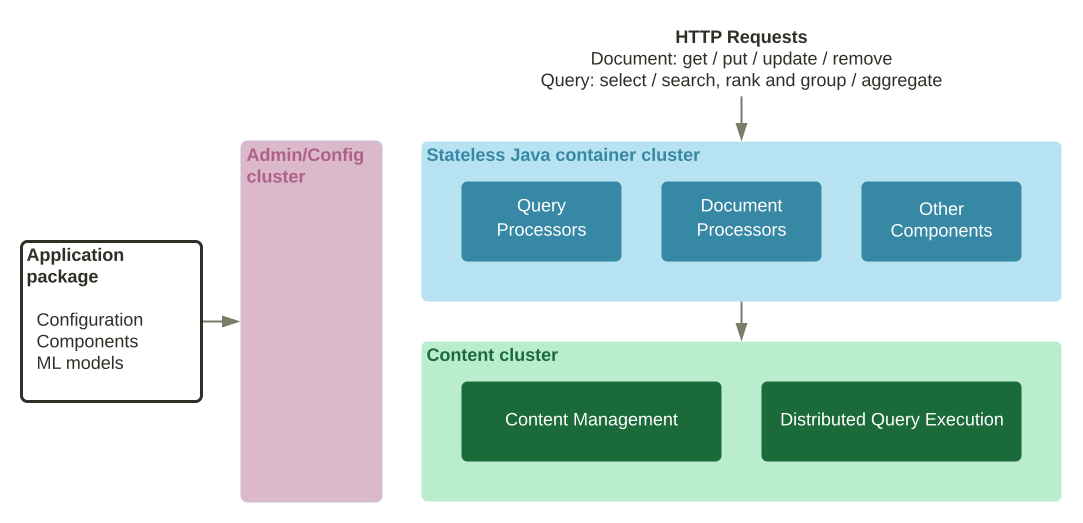
- A Vespa cluster is made of one or more config servers in a config server cluster. This cluster keeps configuration for the services running in the service pods. The config server cluster pods should hence be started first.
- Config servers use Apache Zookeeper for shared state. The config servers will not set their /state/v1/health to UP before Zookeeper quorum is reached. This means that all config server pods must be running before quorum is reached, and one cannot use a readinessProbe probe for the config servers for a staggered start.
- See a practical example at config server cluster startup - once completed it should look like:
$ kubectl get pods NAME READY STATUS RESTARTS AGE vespa-configserver-0 1/1 Running 0 2m45s vespa-configserver-1 1/1 Running 0 107s vespa-configserver-2 1/1 Running 0 62s
- Once the config server cluster is started successfully, the application package can be deployed, and the pods for the services nodes started. The application package maps services to pods (nodes), so this must be deployed successfully before the services in the pods can start. It does not matter whether one deploys the application package before or after starting the service pods, as the pods will idle, waiting for configuration.
- multinode-HA starts the pods first, see Vespa startup. As the application package is not yet deployed, the service inside the pods is not started (as it is not configured). The Vespa infrastructure is started, however, see config sentinel - so the pod is started with the config-proxy waiting for services config at this point.
- The cluster startup feature is good to know. This is a setting to not start a service before enough services can run - see the Connectivity check log messages.
- Deploy the application package. At this point, the pods will know which service to run, and start a container or content node service. Shortly after, the /state/v1/health endpoint is enabled on the pods.
- Note that ports are allocated dynamically, but the defaults will get you started - see the illustration with services and ports for /state/v1/health:
- Config server: 19071
- Container node: 8080
- Content node: 19107
The list above is an overview of the config server -> application package -> service /state/v1/health dependency chain. This sequence of steps must be considered when building the Kubernetes cluster configuration.
A good next step is running the multinode-HA for Kubernetes - there you will also find useful troubleshooting tools.
Singlenode quickstart with minikube
This section describes how to install and run Vespa on a single machine using Kubernetes (K8s). Also see Vespa example on GKE.
Prerequisites:
- Linux, macOS or Windows 10 Pro on x86_64 or arm64, with Podman or Docker installed. See Docker Containers for system limits and other settings. For CPUs older than Haswell (2013), see CPU Support
- Memory: Minimum 5 GB RAM dedicated to Docker/Podman. Memory recommendations.
- Disk: Avoid
NO_SPACE- the vespaengine/vespa container image + headroom for data requires disk space. Read more. - Homebrew to install the Vespa CLI, or download the Vespa CLI from Github releases.
- Git.
- Minikube.
- Validate environment:
Refer to Docker memory for details and troubleshooting:
$ docker info | grep "Total Memory" or $ podman info | grep "memTotal"
- Start Kubernetes cluster with minikube:
$ minikube start --driver docker --memory 4096
- Clone the Vespa sample apps:
$ git clone --depth 1 https://github.com/vespa-engine/sample-apps.git $ export VESPA_SAMPLE_APPS=`pwd`/sample-apps
- Create Kubernetes configuration files:
$ cat << EOF > service.yml apiVersion: v1 kind: Service metadata: name: vespa labels: app: vespa spec: selector: app: vespa type: NodePort ports: - name: container port: 8080 targetPort: 8080 protocol: TCP - name: config port: 19071 targetPort: 19071 protocol: TCP EOF
$ cat << EOF > statefulset.yml apiVersion: apps/v1 kind: StatefulSet metadata: name: vespa labels: app: vespa spec: replicas: 1 serviceName: vespa selector: matchLabels: app: vespa template: metadata: labels: app: vespa spec: containers: - name: vespa image: vespaengine/vespa imagePullPolicy: Always env: - name: VESPA_CONFIGSERVERS value: vespa-0.vespa.default.svc.cluster.local securityContext: runAsUser: 1000 ports: - containerPort: 8080 protocol: TCP readinessProbe: httpGet: path: /state/v1/health port: 19071 scheme: HTTP EOF
- Start the service:
$ kubectl apply -f service.yml -f statefulset.yml
- Wait for the service to enter a running state: Wait for STATUS Running:
$ kubectl get pods --watch
NAME READY STATUS RESTARTS AGE vespa-0 0/1 ContainerCreating 0 8s vespa-0 0/1 Running 0 2m4s
- Start port forwarding to pods:
$ kubectl port-forward vespa-0 19071 8080 &
- Wait for configserver start - wait for 200 OK:
$ curl -s --head http://localhost:19071/state/v1/health
- Deploy and activate the application package:
$ vespa deploy ${VESPA_SAMPLE_APPS}/album-recommendation - Ensure the application is active - wait for 200 OK:
This normally takes a minute or so:
$ curl -s --head http://localhost:8080/state/v1/health
- Feed documents:
$ vespa feed sample-apps/album-recommendation/ext/documents.jsonl
-
Make a query:
$ vespa query 'select * from music where true'
- Run a document get request:
$ vespa document get id:mynamespace:music::love-is-here-to-stay
-
Clean up:
Stop the running container:
$ kubectl delete service,statefulsets vespa
Stop port forwarding:
$ killall kubectl
Stop minikube:
$ minikube stop
At any point during the procedure, dump logs for troubleshooting:
$ kubectl logs vespa-0