

AgentOps automatically tracks LLM interactions in your application. For more detailed tracking, especially in multi-agent systems, you can use the @agent decorator to associate operations with specific agents.

Using the Agent Decorator

For structured tracking in complex applications, you can use the @agent decorator to explicitly identify different agents in your system:
import agentops from agentops.sdk.decorators import agent, operation, trace from openai import OpenAI  # Initialize AgentOps without auto-starting session since we use @trace agentops.init("your-api-key", auto_start_session=False)  # Create a decorated agent class @agent(name='ResearchAgent') class MyAgent:  def __init__(self):  self.client = OpenAI()    @operation  def search(self, query):  response = self.client.chat.completions.create(  model="gpt-4o",  messages=[{"role": "user", "content": f"Research about: {query}"}]  )  return response.choices[0].message.content  # Create a trace to group the agent operations @trace(name="research-workflow") def research_workflow(topic):  agent = MyAgent()  result = agent.search(topic)  return result  # Execute the function to properly register the agent span result = research_workflow("quantum computing") 
If you don’t specify a name, the agent will use the class name by default:
@agent class ResearchAgent:  # This agent will have the name "ResearchAgent"  pass 

Basic Agent Tracking (Simple Applications)

For simple applications, AgentOps will automatically track your LLM calls without additional configuration:
import agentops from openai import OpenAI  # Initialize AgentOps agentops.init("your-api-key")  # Create a simple agent function def research_agent(query):  client = OpenAI()  response = client.chat.completions.create(  model="gpt-4o",  messages=[{"role": "user", "content": f"Research about: {query}"}]  )  return response.choices[0].message.content  # Use your agent - all LLM calls will be tracked automatically result = research_agent("quantum computing") 

Multi-Agent Systems

For complex multi-agent systems, you can organize multiple agents within a single trace:
import agentops from agentops.sdk.decorators import agent, operation, tool, trace  # Initialize AgentOps without auto-starting session since we use @trace agentops.init("your-api-key", auto_start_session=False)  @agent class DataCollectionAgent:  @tool(cost=0.02)  def fetch_data(self, source):  return f"Data from {source}"  @agent  class AnalysisAgent:  @operation  def analyze_data(self, data):  return f"Analysis of {data}"  @agent class ReportingAgent:  @tool(cost=0.01)  def generate_report(self, analysis):  return f"Report: {analysis}"  @trace(name="multi-agent-workflow") def collaborative_workflow(data_source):  """Workflow using multiple specialized agents"""    # Data collection  collector = DataCollectionAgent()  raw_data = collector.fetch_data(data_source)    # Analysis  analyzer = AnalysisAgent()  analysis = analyzer.analyze_data(raw_data)    # Reporting  reporter = ReportingAgent()  report = reporter.generate_report(analysis)    return {  "source": data_source,  "analysis": analysis,  "report": report  }  # Run the collaborative workflow result = collaborative_workflow("customer_database") 

Agent Communication and Coordination

You can track complex agent interactions and communication patterns:
import agentops from agentops.sdk.decorators import agent, operation, tool, trace  # Initialize AgentOps without auto-starting session since we use @trace agentops.init("your-api-key", auto_start_session=False)  @agent class CoordinatorAgent:  def __init__(self):  self.task_queue = []    @operation  def assign_task(self, task, agent_type):  self.task_queue.append({"task": task, "agent": agent_type})  return f"Task assigned to {agent_type}: {task}"    @operation  def collect_results(self, results):  return f"Collected {len(results)} results"  @agent class WorkerAgent:  def __init__(self, agent_id):  self.agent_id = agent_id    @tool(cost=0.05)  def process_task(self, task):  return f"Agent {self.agent_id} processed: {task}"  @trace(name="coordinated-processing") def coordinated_processing_workflow(tasks):  """Workflow with agent coordination"""  coordinator = CoordinatorAgent()  workers = [WorkerAgent(f"worker_{i}") for i in range(3)]    # Assign tasks  assignments = []  for i, task in enumerate(tasks):  worker_type = f"worker_{i % len(workers)}"  assignment = coordinator.assign_task(task, worker_type)  assignments.append(assignment)    # Process tasks  results = []  for i, task in enumerate(tasks):  worker = workers[i % len(workers)]  result = worker.process_task(task)  results.append(result)    # Collect results  summary = coordinator.collect_results(results)    return {  "assignments": assignments,  "results": results,  "summary": summary  }  # Run coordinated workflow tasks = ["analyze_data", "generate_report", "send_notification"] result = coordinated_processing_workflow(tasks) 

Dashboard Visualization

All operations are automatically associated with the agent that originated them. Agents are given a name which is what you will see in the dashboard.
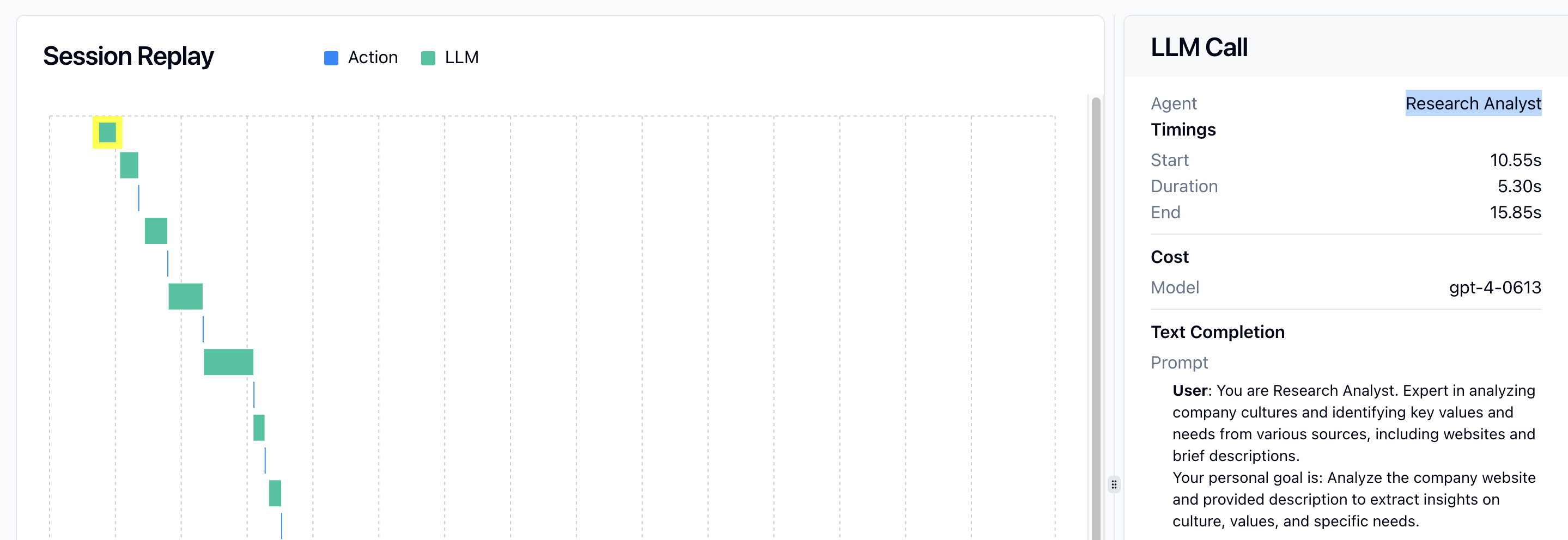
Operations are labeled with the name of the Agent that originated them

Best Practices

  1. Start Simple: For most applications, just using agentops.init() is sufficient.
  2. Use Decorators When Needed: Add the @agent decorator when you need to clearly distinguish between multiple agents in your system.
  3. Meaningful Names: Choose descriptive names for your agents to make them easier to identify in the dashboard.
  4. Organize with Traces: Use the @trace decorator to group related agent operations into logical workflows.
  5. Track Costs: Use the @tool decorator with cost parameters to track the expenses associated with agent operations.
  6. Agent Specialization: Create specialized agents for different types of tasks to improve observability and maintainability.

Migration from Session Decorator

If you’re migrating from the legacy @session decorator, replace it with the @trace decorator:
# New approach (recommended) from agentops.sdk.decorators import trace, agent  @trace(name="my-workflow") def my_workflow():  # workflow code  pass  # Old approach (deprecated) from agentops.sdk.decorators import session, agent  @session def my_workflow():  # workflow code  pass 
The @trace decorator provides the same functionality as the legacy @session decorator but with more flexibility and better integration with the new trace management features.