 In this tutorial I will show you tips and tricks so you can cosmetically style your functions!
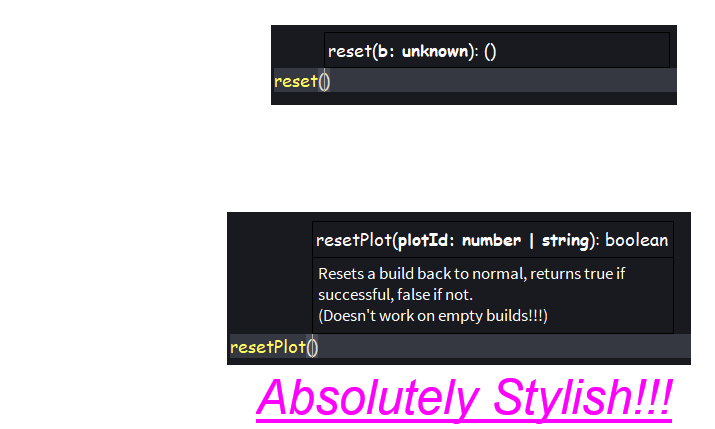
As I have pointed out at the start, this is just a tutorial on how to make your functions LOOK better, it may be completely useless to the average developer, but these are pretty useful to some, for example, you might need to stylize your module script’s functions if you intend to publish and provide it to the public, because it helps whoever is using them to understand what each function does and returns more clearly!
(Ignore my script editor’s font being comic sans lol)
So here's the tips and tricks to help stylize your functions:
1. Cases & Grammar
If you want your function to be understandable, even for those who don’t even know how to script, you have to start with making the function and it’s parameters as clear as you can, here’s an example on what NOT to do:
local function use(plr,item) --code here... end See how simplified that looks? it’s so minimal it looks ugly, there’s not even any space between the two parameters, it’s hurting my eyes! 
But after applying some chicness, it becomes:
local function useItem(player, item) --some code here... end While yes, the changes look microscopic, this is still the foundation of stylizing your functions, hence why a lot of scripters already write like this.
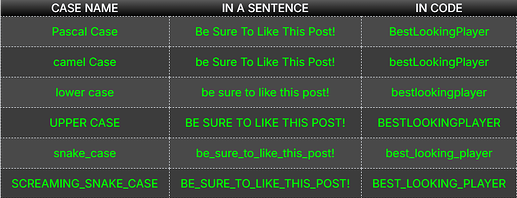
The second half of this segment is cases, now although you’re obviously free to write however you want, it would still be the better option to write in clearer cases like PascalCase or camelCase (as seen in the second code sample) compared to writing in full lowercase, OR FULL UPPERCASE, or even… SCREAMING_SNAKE_CASE, yikes!
And if you want, here is a table that displays the cases and how they look when applied to the same sentence:
2. Type checking
I don’t want to dive deep into the “art” of type checking, so i will only explain the basics of type checking that help in making functions look fancier, even though type checking isn’t exactly cosmetic.
2a. Primitive types
The four primitive types in scripting are:
There’s also other types, such as:
- any (which means literally anything, this is mostly used in strict type checking)
- Instance, & It’s Classes (Part, Script, TextLabel, etc…)
- Userdata (Vector3, CFrame, UDim2, etc…)
- Enums (Enum.EasingStyle, Enum.Font, Enum.Material, etc…)
- Tables {“This”, “is”, “a”, “table”}
Note: Tables is a lot more complicated to check than other types, you can learn more about type checking tables here.
So those are the most checked types, and now i will show two examples, one has no type checking, and the other has type checking.
 Without type checking
local function encodeString(text) local numbers = {} for letter = 1, #text do local encoded = string.byte(text, letter, letter) table.insert(numbers, encoded or 0) end return table.unpack(output) end And here’s what it looks like when you type the function in a script:

See how often it says unknown? that means that there is no type checking involved, meaning anything can go through the function and come out as (what the code thinks is) anything, obviously you dont have to type check everything, but type checking not only boosts your workflow, it also tells anyone else using your functions what to insert into the function and/or what to expect when a value is returned. (if there is any returning)
 With type checking
local function encodeString(text : string) : number local numbers = {} for letter = 1, #text do local encoded = string.byte(text, letter, letter) table.insert(numbers, encoded or 0) end return table.unpack(output) end And here’s what it looks like when you type the function in a script:

I admit, the changes done aren’t quick to spot (again), but it’s effectiveness depends on if you can figure out what the parameter’s types and/or the output’s type are supposed to be without type checking, if you imported someone else’s module script to your game, and found the functions in it to be confusing, it’s very likely that type checking would help you understand what it might be used for if the function’s name doesn’t.
And again, this is all just an oversimplified explanation of a the type checking basics. You can learn more about type checking here.
3. Descriptions
Ever noticed how descriptions of some built-in functions pop up while you’re typing them? here’s what i mean by that:
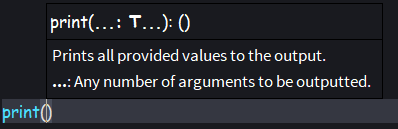


This isn’t exclusive to roblox’s built-in functions!
You too can give your functions their own descriptions, and it’s really simple!
I’d like you to try and learn how to add a description just by looking at the code sample below.
-- Returns the provided values as strings. -- This serves the exact same purpose as tostring(). local function convertToString(...) : string local list = {} for _, value in {...} do table.insert(list, `{value}`) end return table.unpack(list) end 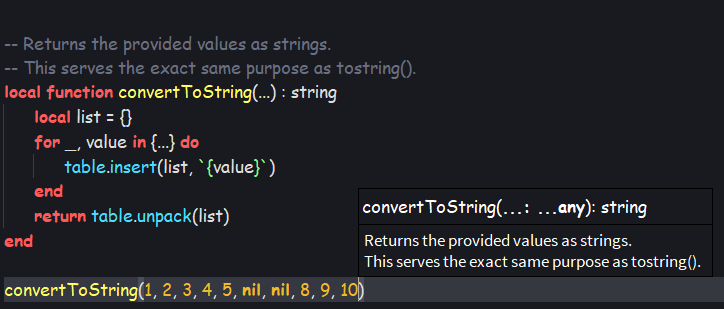
If you guessed it was the comments above the function, you would be correct!
All the comments above the function become it’s description, therefore the number of lines above your function that start with "-- " is the same as the number of lines in your function’s description, how cool is that?
Obviously you can type whatever you want as the description of your functions, but if you intend to provide a function to the public, it’s best you provide a description that explains things like the purpose of the function, what each parameter in the function does, what the function returns, etc. so your functions would be more easily understandable to other users.
Remember that function descriptions are still comments and that they do not run any code!
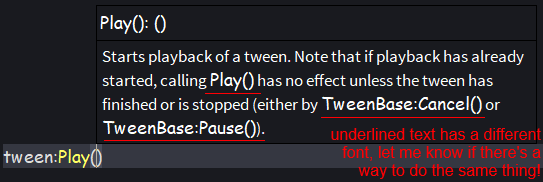
Unfortunately, I don’t know how to format (bold, italic, etc.) function descriptions like how class names in roblox’s built-in functions’ descriptions are formatted, for example:
EDIT: Thanks to @judash399, you can learn how to format function descriptions here!
I hope you learned a thing or few from this tutorial, feel free to reply with any feedback/suggestions, and if you liked the tutorial, be sure to drop a  down below. Thanks for reading!
Why did i make this post?
Other than to show what i learned in stylizing functions, I made this post to explore formatting in forum posts, you might’ve noticed I added a LOT of formatting, bold, italic, hyperlinks, quotes, images, lists, emojis, even hidden details and spoilers. (You can check the HTML text to learn how to make these) This took me a while to make, so again, I would really appreciate the support!
- S5_26

