

Page Summary
-
A Google Slides Presentation is composed of pages, and a Page can have one or more page elements.
-
There are various types of pages a presentation can contain, including Slide, Master, Layout, NotesPage, and NotesMasters.
-
Each PageElement on a page can be one of several types, such as Shape, Line, Image, SheetsChart, Video, Table, WordArt, or Group.
-
The visual appearance, size, and position of some page elements can be modified.
This guide tells you about the data types that make up a Google Slides presentation. For additional detail on pages, page elements, and their properties, see the corresponding section of the Google Slides API documentation.
A Google Slides Presentation is composed of pages. A Page can have one or more page elements.
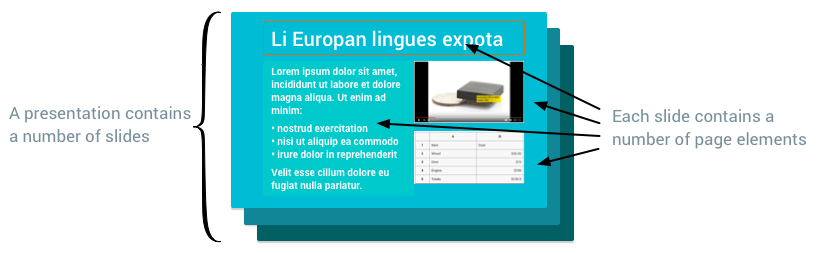
Page types
There are various different types of pages that a presentation can contain. A Page can be one of the following types:
| Page type | Description |
|---|---|
Slide | The pages that users see and flip between when the presentation is rendered on a screen. |
Master | Contains placeholders that establish default text styles, as well as background and other shapes that make up the default background for all slides based on that master. |
Layout | Determines how content is arranged on each type of slide. |
NotesPage | Used for speaker's notes. |
NotesMasters | Used for speaker's notes. |
Page element types
Each PageElement on a page can be one of the following types:
| Page element type | Description |
|---|---|
Shape | A plain visual object, such as rectangles, ellipses, and text boxes. Shapes can contain text, so they are the most common page elements to build slides. |
Line | A visual line, curve, or connector. |
Image | A graphic imported into Slides. |
SheetsChart | A chart imported into Slides from Google Sheets. |
Video | A video imported into Slides. |
Table | A grid of content. |
WordArt | A visual text element that behaves more like a shape. |
Group | A set of page elements that are treated as an individual unit. They can be moved, scaled, and rotated together. |
The visual appearance of some page elements can be modified by changing their fill, border, and text. You can also change a page element's size and position.