
In this article, you’ll learn how to send HTML emails with Golang, Gomail, MongoDB-Go-Driver, Redis, and Docker-compose. Also, you’ll learn how to generate HTML templates with the standard Golang html/template package.
CRUD RESTful API with Golang + MongoDB Series:
- API with Golang + MongoDB + Redis + Gin Gonic: Project Setup
- Golang & MongoDB: JWT Authentication and Authorization
- API with Golang + MongoDB: Send HTML Emails with Gomail
- API with Golang, Gin Gonic & MongoDB: Forget/Reset Password
- Build Golang gRPC Server and Client: SignUp User & Verify Email
- Build Golang gRPC Server and Client: Access & Refresh Tokens
- Build CRUD RESTful API Server with Golang, Gin, and MongoDB
Related article:
Send Emails with Golang, MongoDB, and Gomail Overview
A user provides the required credentials to signup for an account
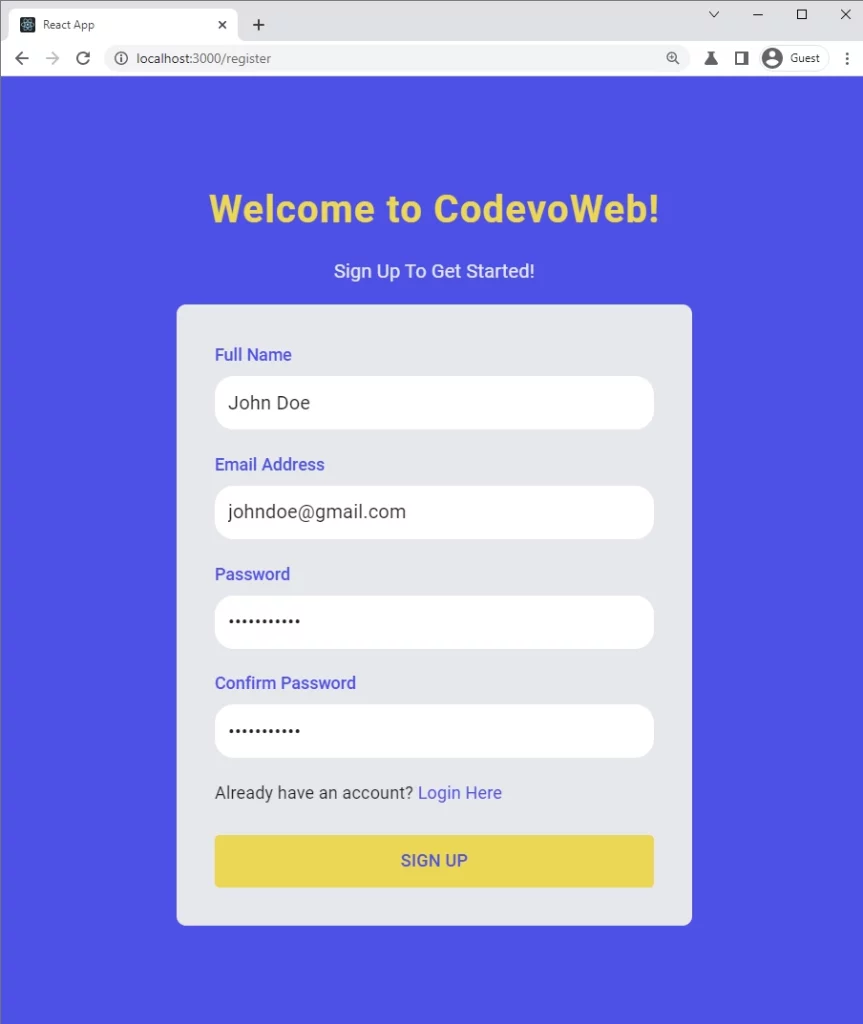
The server validates the request body, adds the user to the database, and sends a verification code to the user’s email address.
The user then opens the verification email and clicks on the “Verify Your Account” button.
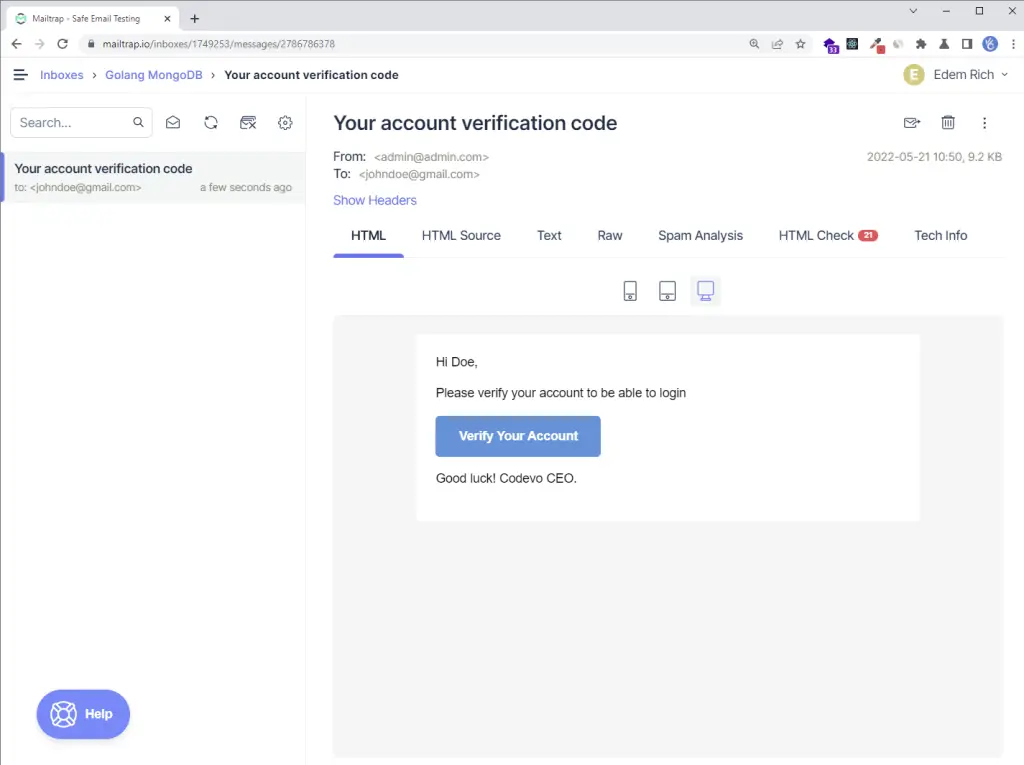
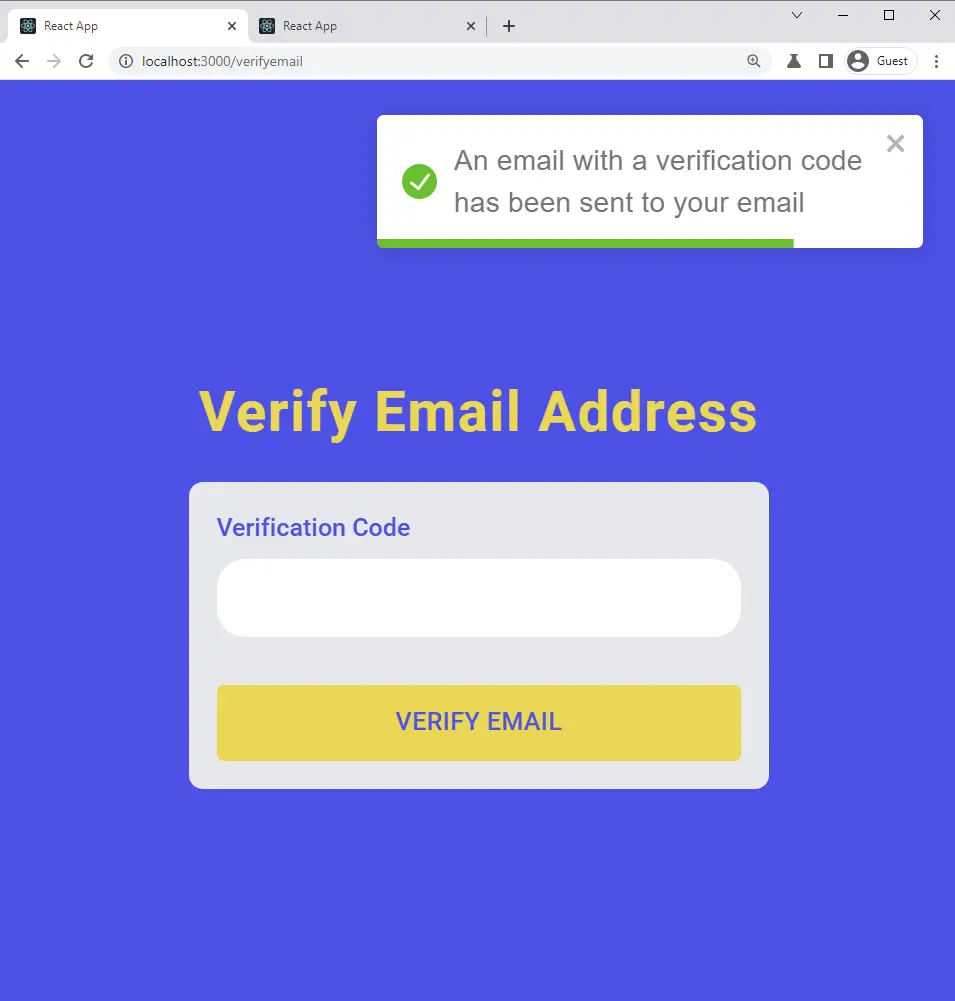
The user is redirected to the email verification page and the verification code gets pre-filled in the text field.
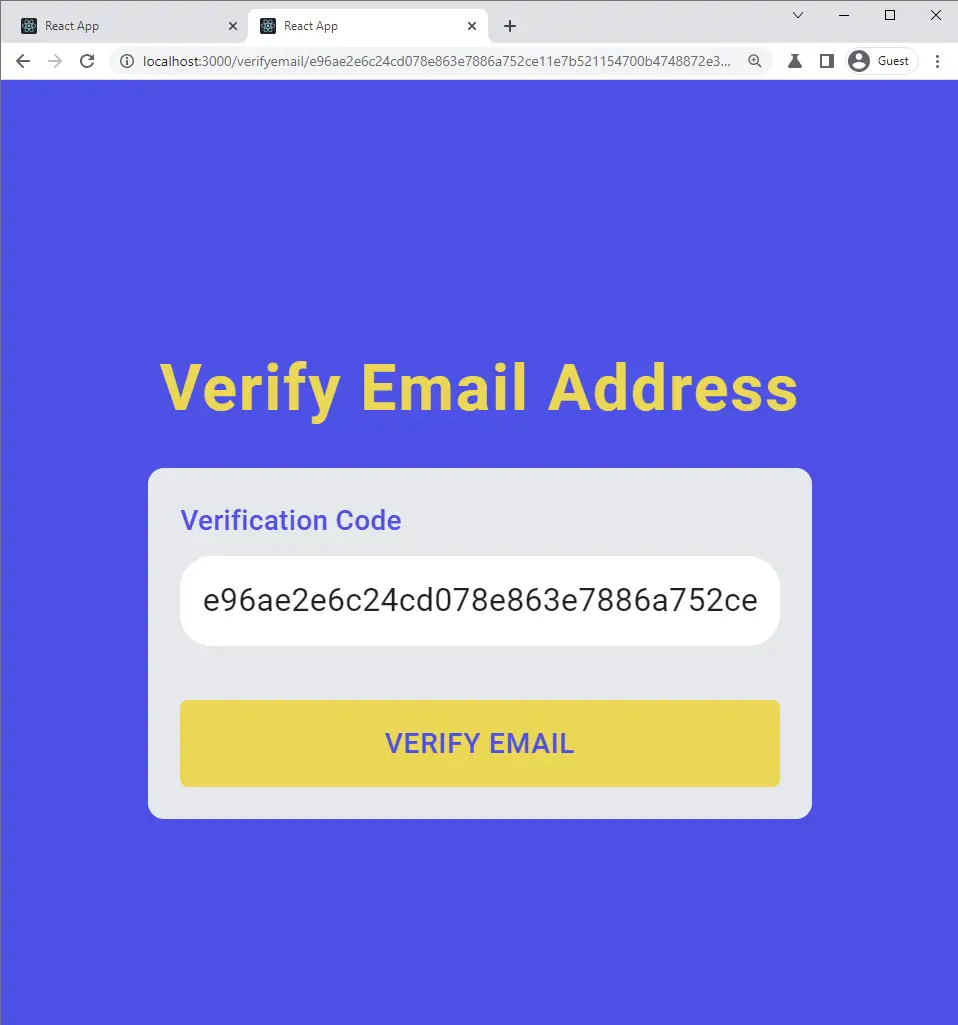
When the user clicks on the ‘Verify Email’ button, a GET request will be made with the verification code as a URL parameter to the server.
The server then verifies the code and updates the user’s information in the database assuming the verification code is valid.
The frontend application receives the success message and redirects the user to the login page.
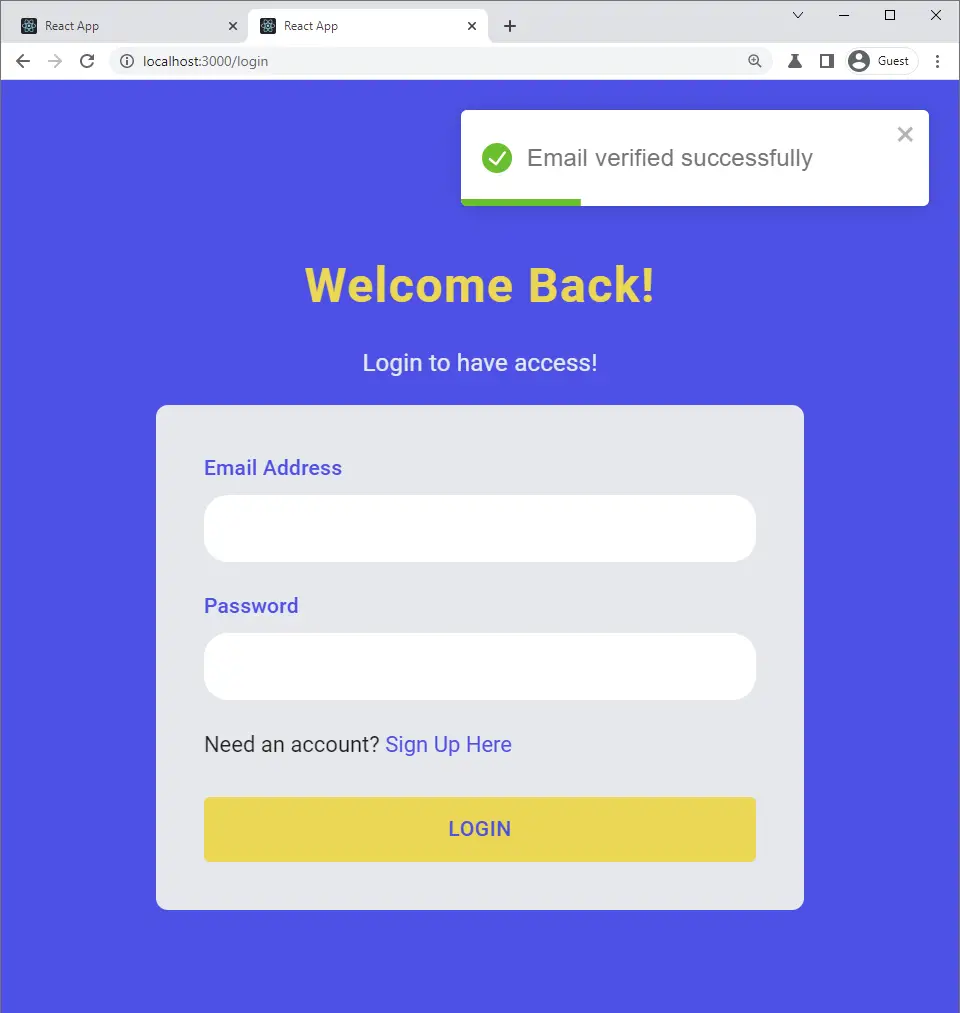
Creating the HTML Email Templates with Golang
There are other template engines in Golang, like jigo, pongo2, or mustache, but we’ll use the official html/template package to dynamically generate the email templates.
This email template is based on a free HTML email template I copied from GitHub.
Create a templates folder in the root directory. Within the templates folder, create a file named styles.html .
templates/styles.html
{{define "styles"}} <style> /* ------------------------------------- GLOBAL RESETS ------------------------------------- */ /*All the styling goes here*/ img { border: none; -ms-interpolation-mode: bicubic; max-width: 100%; } body { background-color: #f6f6f6; font-family: sans-serif; -webkit-font-smoothing: antialiased; font-size: 14px; line-height: 1.4; margin: 0; padding: 0; -ms-text-size-adjust: 100%; -webkit-text-size-adjust: 100%; } table { border-collapse: separate; mso-table-lspace: 0pt; mso-table-rspace: 0pt; width: 100%; } table td { font-family: sans-serif; font-size: 14px; vertical-align: top; } /* ------------------------------------- BODY & CONTAINER ------------------------------------- */ .body { background-color: #f6f6f6; width: 100%; } /* Set a max-width, and make it display as block so it will automatically stretch to that width, but will also shrink down on a phone or something */ .container { display: block; margin: 0 auto !important; /* makes it centered */ max-width: 580px; padding: 10px; width: 580px; } /* This should also be a block element, so that it will fill 100% of the .container */ .content { box-sizing: border-box; display: block; margin: 0 auto; max-width: 580px; padding: 10px; } /* ------------------------------------- HEADER, FOOTER, MAIN ------------------------------------- */ .main { background: #ffffff; border-radius: 3px; width: 100%; } .wrapper { box-sizing: border-box; padding: 20px; } .content-block { padding-bottom: 10px; padding-top: 10px; } .footer { clear: both; margin-top: 10px; text-align: center; width: 100%; } .footer td, .footer p, .footer span, .footer a { color: #999999; font-size: 12px; text-align: center; } /* ------------------------------------- TYPOGRAPHY ------------------------------------- */ h1, h2, h3, h4 { color: #000000; font-family: sans-serif; font-weight: 400; line-height: 1.4; margin: 0; margin-bottom: 30px; } h1 { font-size: 35px; font-weight: 300; text-align: center; text-transform: capitalize; } p, ul, ol { font-family: sans-serif; font-size: 14px; font-weight: normal; margin: 0; margin-bottom: 15px; } p li, ul li, ol li { list-style-position: inside; margin-left: 5px; } a { color: #3498db; text-decoration: underline; } /* ------------------------------------- BUTTONS ------------------------------------- */ .btn { box-sizing: border-box; width: 100%; } .btn > tbody > tr > td { padding-bottom: 15px; } .btn table { width: auto; } .btn table td { background-color: #ffffff; border-radius: 5px; text-align: center; } .btn a { background-color: #ffffff; border: solid 1px #3498db; border-radius: 5px; box-sizing: border-box; color: #3498db; cursor: pointer; display: inline-block; font-size: 14px; font-weight: bold; margin: 0; padding: 12px 25px; text-decoration: none; text-transform: capitalize; } .btn-primary table td { background-color: #3498db; } .btn-primary a { background-color: #3498db; border-color: #3498db; color: #ffffff; } /* ------------------------------------- OTHER STYLES THAT MIGHT BE USEFUL ------------------------------------- */ .last { margin-bottom: 0; } .first { margin-top: 0; } .align-center { text-align: center; } .align-right { text-align: right; } .align-left { text-align: left; } .clear { clear: both; } .mt0 { margin-top: 0; } .mb0 { margin-bottom: 0; } .preheader { color: transparent; display: none; height: 0; max-height: 0; max-width: 0; opacity: 0; overflow: hidden; mso-hide: all; visibility: hidden; width: 0; } .powered-by a { text-decoration: none; } hr { border: 0; border-bottom: 1px solid #f6f6f6; margin: 20px 0; } /* ------------------------------------- RESPONSIVE AND MOBILE FRIENDLY STYLES ------------------------------------- */ @media only screen and (max-width: 620px) { table.body h1 { font-size: 28px !important; margin-bottom: 10px !important; } table.body p, table.body ul, table.body ol, table.body td, table.body span, table.body a { font-size: 16px !important; } table.body .wrapper, table.body .article { padding: 10px !important; } table.body .content { padding: 0 !important; } table.body .container { padding: 0 !important; width: 100% !important; } table.body .main { border-left-width: 0 !important; border-radius: 0 !important; border-right-width: 0 !important; } table.body .btn table { width: 100% !important; } table.body .btn a { width: 100% !important; } table.body .img-responsive { height: auto !important; max-width: 100% !important; width: auto !important; } } /* ------------------------------------- PRESERVE THESE STYLES IN THE HEAD ------------------------------------- */ @media all { .ExternalClass { width: 100%; } .ExternalClass, .ExternalClass p, .ExternalClass span, .ExternalClass font, .ExternalClass td, .ExternalClass div { line-height: 100%; } .apple-link a { color: inherit !important; font-family: inherit !important; font-size: inherit !important; font-weight: inherit !important; line-height: inherit !important; text-decoration: none !important; } #MessageViewBody a { color: inherit; text-decoration: none; font-size: inherit; font-family: inherit; font-weight: inherit; line-height: inherit; } .btn-primary table td:hover { background-color: #34495e !important; } .btn-primary a:hover { background-color: #34495e !important; border-color: #34495e !important; } } </style> {{end}} Next, create a base.html file in the templates folder. You can use this base template to generate all kinds of email templates (verification email, welcome email, password reset email, etc)
I included the styles.html in the base.html via template actions, which is similar to the Jinja2 include tag.
Also, I defined a block named content which will be overridden by a child template.
templates/base.html
{{define "base"}} <!DOCTYPE html> <html> <head> <meta name="viewport" content="width=device-width, initial-scale=1.0" /> <meta http-equiv="Content-Type" content="text/html; charset=UTF-8" /> {{template "styles" .}} <title>{{ .Subject}}</title> </head> <body> <table role="presentation" border="0" cellpadding="0" cellspacing="0" class="body" > <tr> <td> </td> <td class="container"> <div class="content"> <!-- START CENTERED WHITE CONTAINER --> {{block "content" .}}{{end}} <!-- END CENTERED WHITE CONTAINER --> </div> </td> <td> </td> </tr> </table> </body> </html> {{end}} Finally, the verificationCode.html child template extends the base.html template and overrides the content block in the base template.
templates/verificationCode.html
{{template "base" .}} {{define "content"}} <table role="presentation" class="main"> <!-- START MAIN CONTENT AREA --> <tr> <td class="wrapper"> <table role="presentation" border="0" cellpadding="0" cellspacing="0"> <tr> <td> <p>Hi {{ .FirstName}},</p> <p>Please verify your account to be able to login</p> <table role="presentation" border="0" cellpadding="0" cellspacing="0" class="btn btn-primary" > <tbody> <tr> <td align="left"> <table role="presentation" border="0" cellpadding="0" cellspacing="0" > <tbody> <tr> <td> <a href="{{.URL}}" target="_blank" >Verify your account</a > </td> </tr> </tbody> </table> </td> </tr> </tbody> </table> <p>Good luck! Codevo CEO.</p> </td> </tr> </table> </td> </tr> <!-- END MAIN CONTENT AREA --> </table> {{end}} Create an SMTP Provider Account
There are several SMTP providers (SendGrid, Mailgun, etc) you can use but I decided to use Mailtrap to capture the development emails instead of sending them to real email addresses.
Navigate to Mailtrap to create a new account.
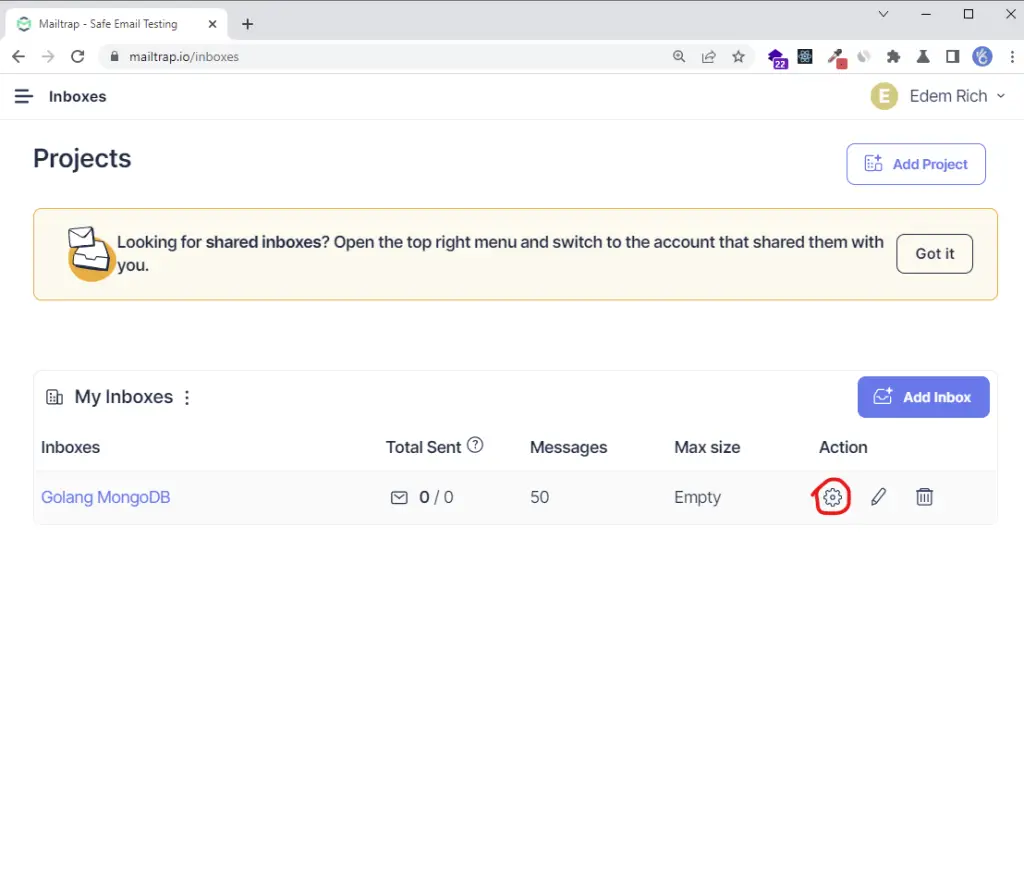
Log into your Mailtrap account then click on the “Add Inbox” button to add a new inbox. Next, click on the settings icon to view the credentials page.
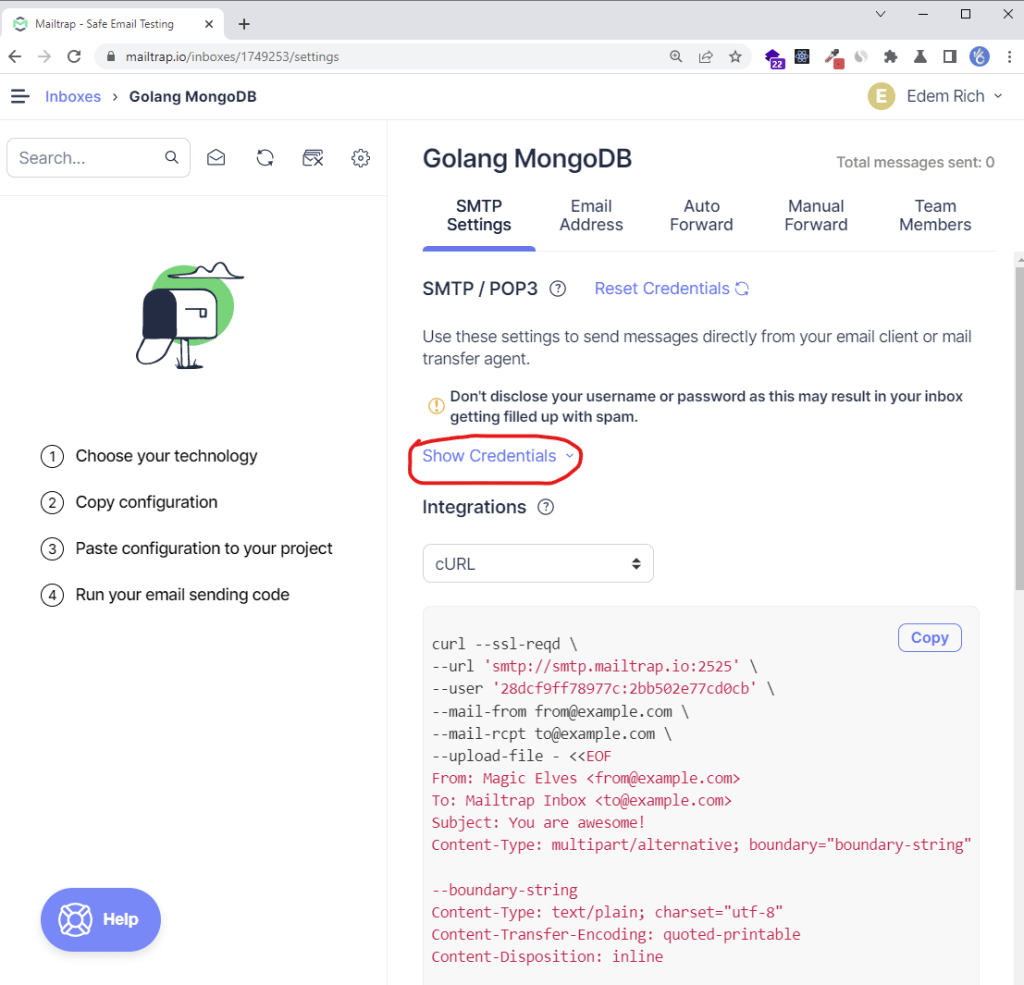
On the settings page, click on the “Show Credentials” dropdown to display the SMTP credentials.
Update the Environment Variables
.env
EMAIL_FROM=admin@admin.com SMTP_HOST=smtp.mailtrap.io SMTP_USER=474944ff9f466c SMTP_PASS=37328d894f83f5 SMTP_PORT=587 Update the Viper Configurations
Update the default.go file for Viper to load and make SMTP credentials available in the application.
config/default.go
type Config struct { DBUri string `mapstructure:"MONGODB_LOCAL_URI"` RedisUri string `mapstructure:"REDIS_URL"` Port string `mapstructure:"PORT"` AccessTokenPrivateKey string `mapstructure:"ACCESS_TOKEN_PRIVATE_KEY"` AccessTokenPublicKey string `mapstructure:"ACCESS_TOKEN_PUBLIC_KEY"` RefreshTokenPrivateKey string `mapstructure:"REFRESH_TOKEN_PRIVATE_KEY"` RefreshTokenPublicKey string `mapstructure:"REFRESH_TOKEN_PUBLIC_KEY"` AccessTokenExpiresIn time.Duration `mapstructure:"ACCESS_TOKEN_EXPIRED_IN"` RefreshTokenExpiresIn time.Duration `mapstructure:"REFRESH_TOKEN_EXPIRED_IN"` AccessTokenMaxAge int `mapstructure:"ACCESS_TOKEN_MAXAGE"` RefreshTokenMaxAge int `mapstructure:"REFRESH_TOKEN_MAXAGE"` Origin string `mapstructure:"CLIENT_ORIGIN"` EmailFrom string `mapstructure:"EMAIL_FROM"` SMTPHost string `mapstructure:"SMTP_HOST"` SMTPPass string `mapstructure:"SMTP_PASS"` SMTPPort int `mapstructure:"SMTP_PORT"` SMTPUser string `mapstructure:"SMTP_USER"` } func LoadConfig(path string) (config Config, err error) { viper.AddConfigPath(path) viper.SetConfigType("env") viper.SetConfigName("app") viper.AutomaticEnv() err = viper.ReadInConfig() if err != nil { return } err = viper.Unmarshal(&config) return } Create a Utility Function to Send the Emails
Install the Gomail package to send the SMTP emails
go get gopkg.in/gomail.v2 Install the HTML2Text package to convert the HTML to text.
go get github.com/k3a/html2text utils/email.go
package utils import ( "bytes" "crypto/tls" "html/template" "log" "github.com/k3a/html2text" "github.com/wpcodevo/golang-mongodb/config" "github.com/wpcodevo/golang-mongodb/models" "gopkg.in/gomail.v2" ) type EmailData struct { URL string FirstName string Subject string } // ? Email template parser func SendEmail(user *models.DBResponse, data *EmailData, temp *template.Template, templateName string) error { config, err := config.LoadConfig(".") if err != nil { log.Fatal("could not load config", err) } // Sender data. from := config.EmailFrom smtpPass := config.SMTPPass smtpUser := config.SMTPUser to := user.Email smtpHost := config.SMTPHost smtpPort := config.SMTPPort var body bytes.Buffer if err := temp.ExecuteTemplate(&body, templateName, &data); err != nil { log.Fatal("Could not execute template", err) } m := gomail.NewMessage() m.SetHeader("From", from) m.SetHeader("To", to) m.SetHeader("Subject", data.Subject) m.SetBody("text/html", body.String()) m.AddAlternative("text/plain", html2text.HTML2Text(body.String())) d := gomail.NewDialer(smtpHost, smtpPort, smtpUser, smtpPass) d.TLSConfig = &tls.Config{InsecureSkipVerify: true} // Send Email if err := d.DialAndSend(m); err != nil { return err } return nil } Update the SignUp Controller
Next, update the SignUpUser method to send the verification email once the user has been added to the database.
package controllers import ( "context" "fmt" "html/template" "log" "net/http" "strings" "time" "github.com/gin-gonic/gin" "github.com/thanhpk/randstr" "github.com/wpcodevo/golang-mongodb/config" "github.com/wpcodevo/golang-mongodb/models" "github.com/wpcodevo/golang-mongodb/services" "github.com/wpcodevo/golang-mongodb/utils" "go.mongodb.org/mongo-driver/bson" "go.mongodb.org/mongo-driver/mongo" ) type AuthController struct { authService services.AuthService userService services.UserService ctx context.Context collection *mongo.Collection temp *template.Template } func NewAuthController(authService services.AuthService, userService services.UserService, ctx context.Context, collection *mongo.Collection, temp *template.Template) AuthController { return AuthController{authService, userService, ctx, collection, temp} } func (ac *AuthController) SignUpUser(ctx *gin.Context) { var user *models.SignUpInput if err := ctx.ShouldBindJSON(&user); err != nil { ctx.JSON(http.StatusBadRequest, gin.H{"status": "fail", "message": err.Error()}) return } if user.Password != user.PasswordConfirm { ctx.JSON(http.StatusBadRequest, gin.H{"status": "fail", "message": "Passwords do not match"}) return } newUser, err := ac.authService.SignUpUser(user) if err != nil { if strings.Contains(err.Error(), "email already exist") { ctx.JSON(http.StatusConflict, gin.H{"status": "error", "message": err.Error()}) return } ctx.JSON(http.StatusBadGateway, gin.H{"status": "error", "message": err.Error()}) return } config, err := config.LoadConfig(".") if err != nil { log.Fatal("Could not load config", err) } // Generate Verification Code code := randstr.String(20) verificationCode := utils.Encode(code) // Update User in Database ac.userService.UpdateUserById(newUser.ID.Hex(), "verificationCode", verificationCode) var firstName = newUser.Name if strings.Contains(firstName, " ") { firstName = strings.Split(firstName, " ")[1] } // ? Send Email emailData := utils.EmailData{ URL: config.Origin + "/verifyemail/" + code, FirstName: firstName, Subject: "Your account verification code", } err = utils.SendEmail(newUser, &emailData, ac.temp, "verificationCode.html") if err != nil { ctx.JSON(http.StatusBadGateway, gin.H{"status": "success", "message": "There was an error sending email"}) return } message := "We sent an email with a verification code to " + user.Email ctx.JSON(http.StatusCreated, gin.H{"status": "success", "message": message}) } Update the Main File
package main import ( "context" "fmt" "html/template" "log" "net/http" "github.com/gin-contrib/cors" "github.com/gin-gonic/gin" "github.com/go-redis/redis/v8" "github.com/wpcodevo/golang-mongodb/config" "github.com/wpcodevo/golang-mongodb/controllers" "github.com/wpcodevo/golang-mongodb/routes" "github.com/wpcodevo/golang-mongodb/services" "go.mongodb.org/mongo-driver/mongo" "go.mongodb.org/mongo-driver/mongo/options" "go.mongodb.org/mongo-driver/mongo/readpref" ) var ( server *gin.Engine ctx context.Context mongoclient *mongo.Client redisclient *redis.Client userService services.UserService UserController controllers.UserController UserRouteController routes.UserRouteController authCollection *mongo.Collection authService services.AuthService AuthController controllers.AuthController AuthRouteController routes.AuthRouteController temp *template.Template ) func init() { temp = template.Must(template.ParseGlob("templates/*.html")) config, err := config.LoadConfig(".") if err != nil { log.Fatal("Could not load environment variables", err) } ctx = context.TODO() // Connect to MongoDB mongoconn := options.Client().ApplyURI(config.DBUri) mongoclient, err := mongo.Connect(ctx, mongoconn) if err != nil { panic(err) } if err := mongoclient.Ping(ctx, readpref.Primary()); err != nil { panic(err) } fmt.Println("MongoDB successfully connected...") // Connect to Redis redisclient = redis.NewClient(&redis.Options{ Addr: config.RedisUri, }) if _, err := redisclient.Ping(ctx).Result(); err != nil { panic(err) } err = redisclient.Set(ctx, "test", "Welcome to Golang with Redis and MongoDB", 0).Err() if err != nil { panic(err) } fmt.Println("Redis client connected successfully...") // Collections authCollection = mongoclient.Database("golang_mongodb").Collection("users") userService = services.NewUserServiceImpl(authCollection, ctx) authService = services.NewAuthService(authCollection, ctx) AuthController = controllers.NewAuthController(authService, userService, ctx, authCollection, temp) AuthRouteController = routes.NewAuthRouteController(AuthController) UserController = controllers.NewUserController(userService) UserRouteController = routes.NewRouteUserController(UserController) server = gin.Default() } func main() { config, err := config.LoadConfig(".") if err != nil { log.Fatal("Could not load config", err) } defer mongoclient.Disconnect(ctx) value, err := redisclient.Get(ctx, "test").Result() if err == redis.Nil { fmt.Println("key: test does not exist") } else if err != nil { panic(err) } corsConfig := cors.DefaultConfig() corsConfig.AllowOrigins = []string{config.Origin} corsConfig.AllowCredentials = true server.Use(cors.New(corsConfig)) router := server.Group("/api") router.GET("/healthchecker", func(ctx *gin.Context) { ctx.JSON(http.StatusOK, gin.H{"status": "success", "message": value}) }) AuthRouteController.AuthRoute(router, userService) UserRouteController.UserRoute(router, userService) log.Fatal(server.Run(":" + config.Port)) } Conclusion
Congrats on reaching the end. In this article, you learned how to send emails in Golang with Gomail and the standard Golang html/template package.
Check out the source codes:


Hi,
I’ve really enjoyed your Golang series and wondered how I can try both this project with your golang Gin projects.
I’m running the Gin server from your other article on localhost:8000, this react project runs on 3000 and I have added a proxy to the package json of ‘localhost:8000’.
But the url post received from this project to the Gin server is “/undefined/api/login”.
I’m wondering where the ‘undefined’ came from and how I can get both talking to each other.
Thanks for your help in advance.
Mark
1. There’s no need to add a proxy to the package.json file of the React app since we already configured the Golang API to accept requests from cross-origin domains using CORS.
2. To investigate the undefined issue, try making the requests from an API testing tool like Postman or Insomnia. If everything works then it means you misconfigured some settings in the React app.
These are the endpoints you need to fire the requests to:
1. Register User:
http://localhost:8000/api/auth/register2. Login User:
http://localhost:8000/api/auth/login3. Verify Email Address:
http://localhost:8000/api/auth/verifyemail/:verificationCode4. Refresh Token:
http://localhost:8000/api/auth/refresh5. Logout User:
http://localhost:8000/api/auth/logoutWhat could be the cause of this error?
Could not send email: gomail: could not send email 1: 421 Local Error, closing transmission channel
Maybe the SMTP credentials you provided are invalid.