Excel2Config simple CLI tool generates network configuration based on Excel sheets which include Jinja2 template and data tables.
For Windows, select the Add Python 3.x to PATH checkbox during installation.
pip install excel2config After installation excel2config command added to System Path and can be executed from any path easily as below:
> excel2config -h usage: excel2config [-h] [excelfile] positional arguments: excelfile excel file path [e.g. srlinux_config_1.xlsx] (OPTIONAL, default: config.xlsx) options: -h, --help show this help message and exit Run excel2config command with Excel File Path from any path and check text output files in Output Folder:
excel2config <Excel_File_Path> Example for Windows:
PS C:\Users\alg\desktop> excel2config C:\Users\alg\Desktop\test\config.xlsx 2022-07-17 09:07:40.275 INFO : OUTPUT FOLDER CREATED <OUTPUTS_config_20220717-090740> 2022-07-17 09:07:40.447 INFO : [C:\Users\alg\Desktop\test\config.xlsx] / [<Worksheet "NETWORK_INSTANCE">] START! 2022-07-17 09:07:40.463 INFO : [C:\Users\alg\Desktop\test\config.xlsx] / [<Worksheet "NETWORK_INSTANCE">] DONE! 2022-07-17 09:07:40.479 INFO : ALL DONE! !!! ALL DONE! Press any key to exit... PS C:\Users\alg\desktop> dir OUTPUTS_config_20220717-090740 Directory: C:\Users\alg\desktop\OUTPUTS_config_20220717-090740 Mode LastWriteTime Length Name ---- ------------- ------ ---- -a---- 17/07/2022 09:07 426 leaf1.txt -a---- 17/07/2022 09:07 258 leaf2.txt PS C:\Users\alg\desktop> Only .xlsx Excel file format supported.
For new features (e.g. Custom Jinja Function) check latest example Excel in project /examples folder.
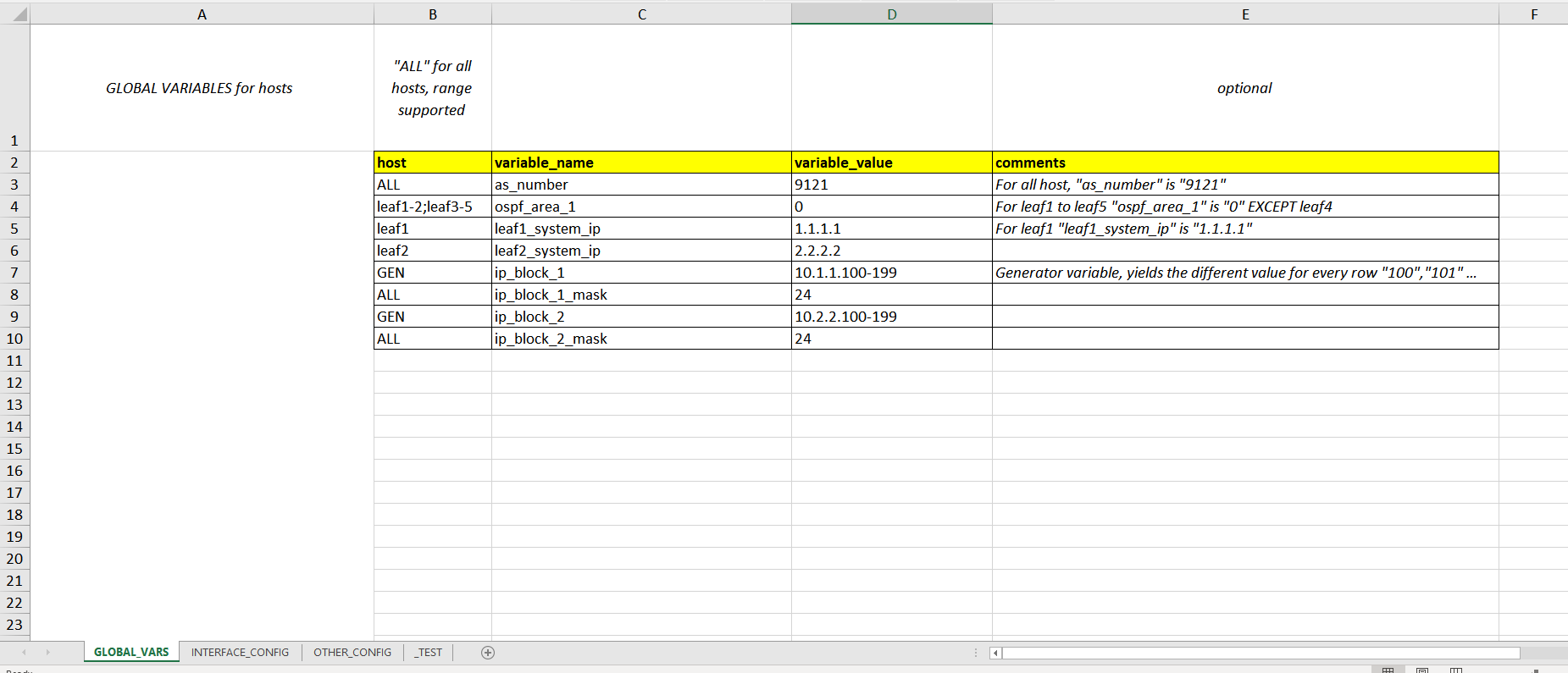
In Excel File first sheet is GLOBAL_VARS, this sheet optional and only for global template variables such as host-based (e.g. leaf1), all-host (ALL) and generator (GEN).
GLOBAL_VARS Excel Sheet:
Besides GLOBAL_VARS sheet, other sheets have two parts:
- Jinja2 Template (A2 cell): Jinja2 "IF", "FOR" and Filters can be used in template cell.
- Data Tables (Header rows start with B2 cell, Variable rows start with B3 cell): Range and generator supported in variable rows.
Sheet name and Data Header name must have only [A-Za-z0-9_] (alphanumeric with underscore) characters and not start with numeric characters.
Sheet name starts with underscore "_" will be ignored. (e.g. _TEST)
As below example Jinja template render with every data table line and append host (e.g. leaf1) output text file.
INTERFACE_CONFIG Excel Sheet:
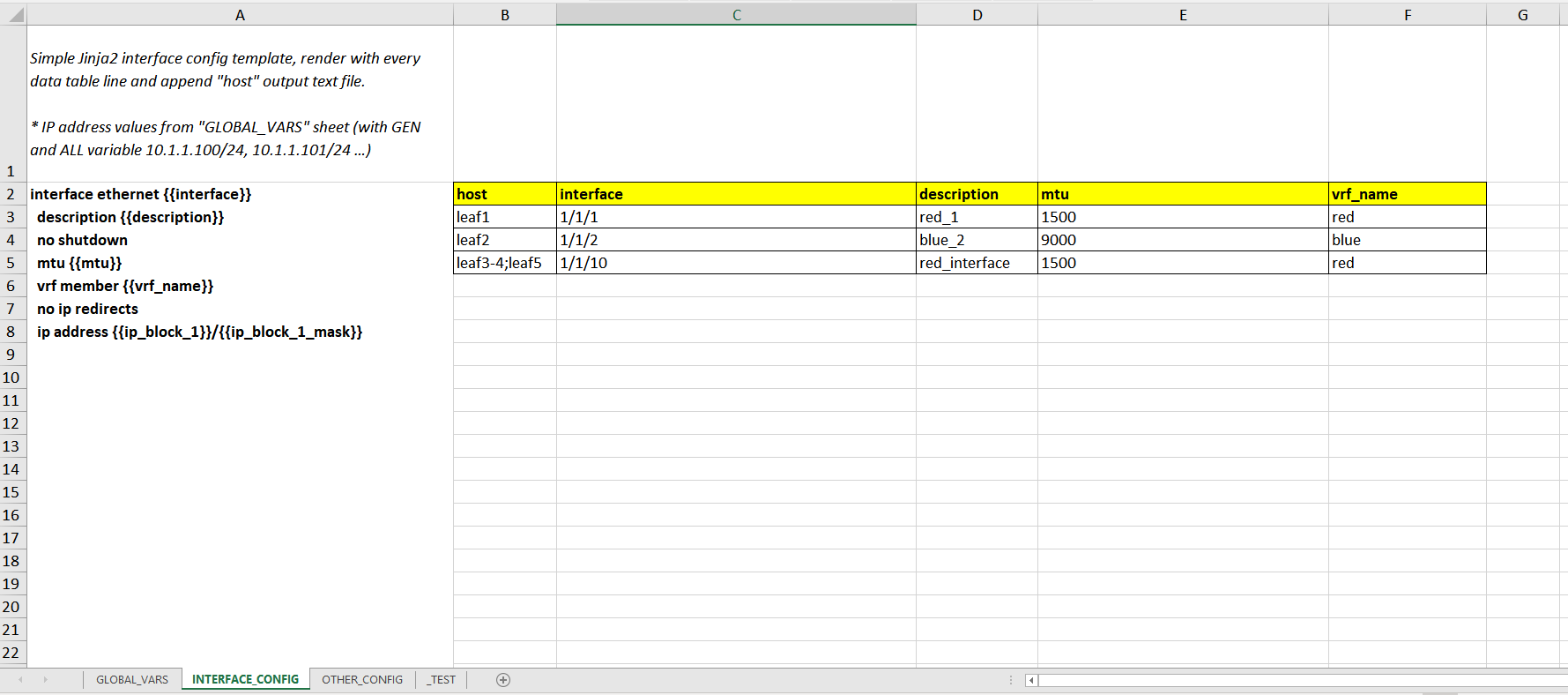
INTERFACE_CONFIG "leaf1.txt" outputs:
interface ethernet 1/1/1 description red_1 no shutdown mtu 1500 vrf member red no ip redirects ip address 10.1.1.100/24 OTHER_CONFIG Excel Sheet:
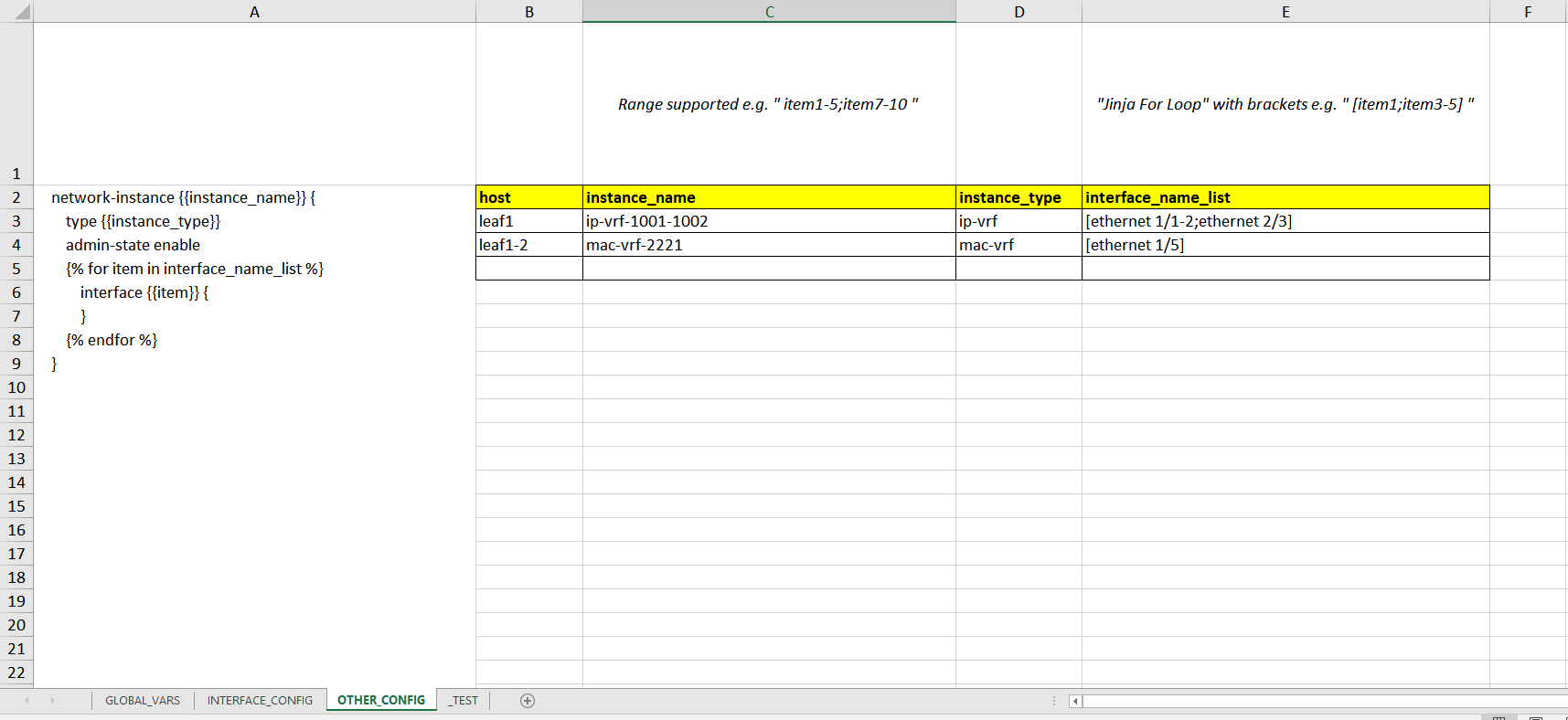
Example Excel file and outputs are in project /examples folder.
EOF