


Colorization of help messages in Click.
import click from click_help_colors import HelpColorsGroup, HelpColorsCommand @click.group( cls=HelpColorsGroup, help_headers_color='yellow', help_options_color='green' ) def cli(): pass @cli.command() @click.option('--count', default=1, help='Some number.') def command1(count): click.echo('command 1') @cli.command( cls=HelpColorsCommand, help_options_color='blue' ) @click.option('--name', help='Some string.') def command2(name): click.echo('command 2')$ python example.py --help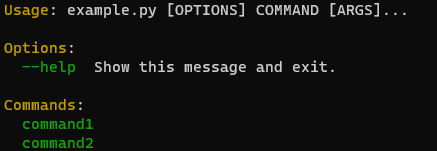
$ python example.py command1 --help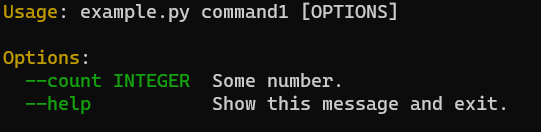
$ python example.py command2 --help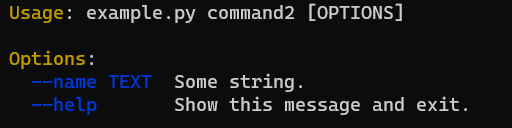
import click from click_help_colors import HelpColorsGroup, HelpColorsCommand @click.group( cls=HelpColorsGroup, help_headers_color='yellow', help_options_color='green', help_options_custom_colors={'command3': 'red', 'command4': 'cyan'} ) def cli(): pass @cli.command( cls=HelpColorsCommand, help_headers_color=None, help_options_color=None, help_options_custom_colors={'--count': 'red', '--subtract': 'green'} ) @click.option('--count', default=1, help='Count help text.') @click.option('--add', default=1, help='Add help text.') @click.option('--subtract', default=1, help='Subtract help text.') def command1(count, add, subtract): """A command""" click.echo('command 1') ...$ python example_with_custom_colors.py --help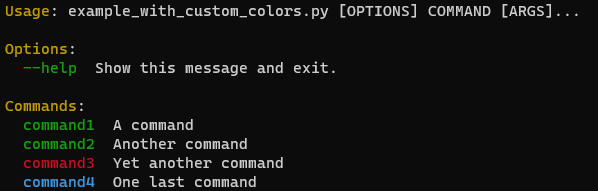
$ python example_with_custom_colors.py command1 --help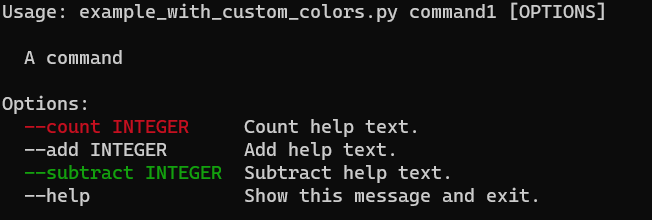
from click_help_colors import version_option @click.group() def cli(): pass @cli.command() @version_option( version='1.0', prog_name='example', message_color='green' ) def cmd1(): pass @cli.command() @version_option( version='1.0', prog_name='example', version_color='green', prog_name_color='yellow' ) def cmd2(): pass @cli.command() @version_option( version='1.0', prog_name='example', version_color='green', prog_name_color='white', message='%(prog)s %(version)s\n python=3.7', message_color='bright_black' ) def cmd3(): pass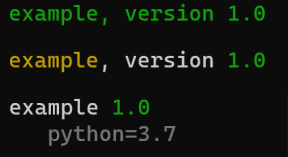
With pip:
$ pip install click-help-colorsFrom source:
$ git clone https://github.com/click-contrib/click-help-colors.git $ cd click-help-colors $ python setup.py install