

The case statement in Ruby allows us to execute a block of code among many alternatives.
You can do the same thing with multiple if...elsif...else statements. However, the syntax of the case statement is much easier to read and write.
Syntax of the case Statement
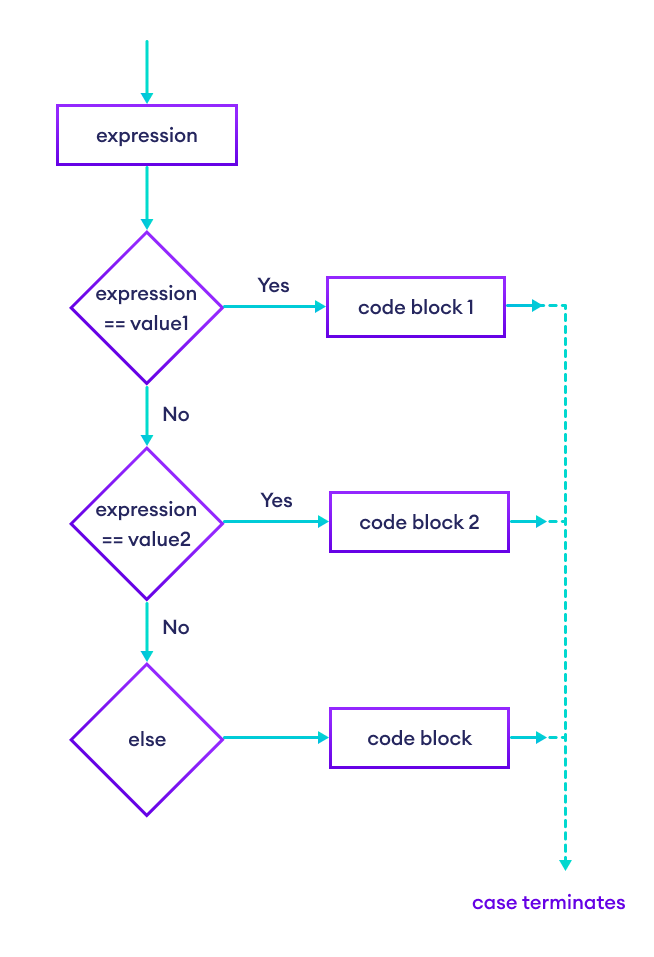
case expression when value1 # Code to run if expression == value1 when value2 # Code to run if expression == value2 ... else # Code to run if none of the 'when' conditions match end How does the case statement work?
The expression is evaluated once and compared with each when value using the == operator.
- If there is a match, the code under that
whenlabel is executed. For example, ifexpression == value2istrue, the code afterwhen value2is executed. - If there is no match, the code inside the
elseblock runs (if provided).
Flowchart of case Statement
Example 1: Simple Size Checker Using case Statement
# Ruby program to check the size # using the case statement number = 44 case number when 29 puts "Small" when 42 puts "Medium" when 44 puts "Large" when 48 puts "Extra Large" else puts "Unknown" end Output
Large
In the above example, we have used the case statement to find the size. Here, we have a variable number which is compared with each value in the when clauses.
Since the value matches with 44, the code inside when 44 is executed.
puts "Large" Example 2: Simple Calculator Using case Statement
# Program to build a simple calculator # using case statement print "Enter an operator (+, -, *, /): "; operator = gets.chomp print "Enter first number: " num1 = gets.chomp.to_f print "Enter second number: " num2 = gets.chomp.to_f case operator when "+" print "#{num1} + #{num2} = #{num1 + num2}" when "-" print "#{num1} - #{num2} = #{num1 - num2}" when "*" print "#{num1} * #{num2} = #{num1 * num2}" when "/" if num2 == 0 print "Cannot divide by zero." else print "#{num1} / #{num2} = #{num1 / num2}" end else # Invalid operator handling print "Invalid operator!" end Sample Output 1
Enter an operator (+, -, *, /): + Enter first number: 6 Enter second number: 3 6.0 + 3.0 = 9.0
Sample Output 2
Enter an operator (+, -, *, /): * Enter first number: 6 Enter second number: 3 6.0 * 3.0 = 18.0
In the above program, we prompted the user to:
- Enter an operator:
+,-,*, or/. - Enter the first number:
num1. - Enter the second number:
num2.
Based on the user input, the case statement performs the corresponding calculation.
If the input operator is not recognized, the program shows an Invalid operator message.
More on Ruby case Statement
You can write the when condition and the code to execute on the same line using then keyword. For example,
number = 2 case number when 1 then puts "One" when 2 then puts "Two" when 3 then puts "Three" else puts "Other" end # Output: Two Notice that we haven't used then with the else statement; it's only used with when.
Ruby allows you to use a case statement without an expression. In this form, each when clause acts like an if condition. For example,
age = 25 case when age < 13 puts "Child" when age < 20 puts "Teen" when age < 60 puts "Adult" else puts "Senior" end # Output: Adult The above code is equivalent to:
age = 25 if age < 13 puts "Child" elsif age < 20 puts "Teen" elsif age < 60 puts "Adult" else puts "Senior" end You can match multiple values in a single when by separating them with commas. For example,
day = "Sunday" case day when "Saturday", "Sunday" puts "It is the weekend!" else puts "It is a weekday." end # Output: It is the weekend!