

Using WindowInsetsCompat, your app can query and control the on-screen keyboard (also called the IME) similar to the way it interacts with the system bars. Your app can also use WindowInsetsAnimationCompat to create seamless transitions when the software keyboard is opened or closed.
Prerequisites
Before setting up control and animation for the software keyboard, configure your app to display edge-to-edge. This lets it handle system window insets such as the system bars and the on-screen keyboard.
Check keyboard software visibility
Use WindowInsets to check the software keyboard visibility.
Kotlin
val insets = ViewCompat.getRootWindowInsets(view) ?: return val imeVisible = insets.isVisible(WindowInsetsCompat.Type.ime()) val imeHeight = insets.getInsets(WindowInsetsCompat.Type.ime()).bottom
Java
WindowInsetsCompat insets = ViewCompat.getRootWindowInsets(view); boolean imeVisible = insets.isVisible(WindowInsetsCompat.Type.ime()); int imeHeight = insets.getInsets(WindowInsetsCompat.Type.ime()).bottom;
Alternatively, you can use ViewCompat.setOnApplyWindowInsetsListener to observe changes to software keyboard visibility.
Kotlin
ViewCompat.setOnApplyWindowInsetsListener(view) { _, insets -> val imeVisible = insets.isVisible(WindowInsetsCompat.Type.ime()) val imeHeight = insets.getInsets(WindowInsetsCompat.Type.ime()).bottom insets }
Java
ViewCompat.setOnApplyWindowInsetsListener(view, (v, insets) -> { boolean imeVisible = insets.isVisible(WindowInsetsCompat.Type.ime()); int imeHeight = insets.getInsets(WindowInsetsCompat.Type.ime()).bottom; return insets; });
Synchronize animation with the software keyboard
A user tapping a text input field causes the keyboard to slide into place from the bottom of the screen, as shown in the following example:
The example labeled "Unsynchronized" in figure 2 shows the default behavior in Android 10 (API level 29), in which the text field and content of the app snap into place instead of synchronizing with the keyboard's animation—behavior that can be visually jarring.
In Android 11 (API level 30) and higher, you can use
WindowInsetsAnimationCompatto synchronize the transition of the app with the keyboard sliding up and down from the bottom of the screen. This looks smoother, as shown in the example labeled "Synchronized" in figure 2.
Configure WindowInsetsAnimationCompat.Callback with the view to be synchronized with the keyboard animation.
Kotlin
ViewCompat.setWindowInsetsAnimationCallback( view, object : WindowInsetsAnimationCompat.Callback(DISPATCH_MODE_STOP) { // Override methods. } )
Java
ViewCompat.setWindowInsetsAnimationCallback( view, new WindowInsetsAnimationCompat.Callback( WindowInsetsAnimationCompat.Callback.DISPATCH_MODE_STOP ) { // Override methods. });
There are several methods to override in WindowInsetsAnimationCompat.Callback, namely onPrepare(), onStart(), onProgress(), and onEnd(). Start with calling onPrepare() before any of the layout changes.
onPrepare is called when an insets animation is starting and before the views are re-laid out due to an animation. You can use it to save the start state, which in this case is the bottom coordinate of the view.
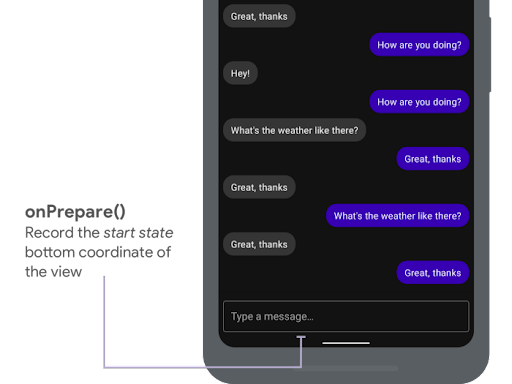
onPrepare() to record the start state. The following snippet shows a sample call to onPrepare:
Kotlin
var startBottom = 0f override fun onPrepare( animation: WindowInsetsAnimationCompat ) { startBottom = view.bottom.toFloat() }
Java
float startBottom; @Override public void onPrepare( @NonNull WindowInsetsAnimationCompat animation ) { startBottom = view.getBottom(); }
onStart is called when an insets animation starts. You can use it to set all the view properties to the end state of the layout changes. If you have an OnApplyWindowInsetsListener callback set to any of the views, it is already called at this point. This is a good time to save the end state of the view properties.
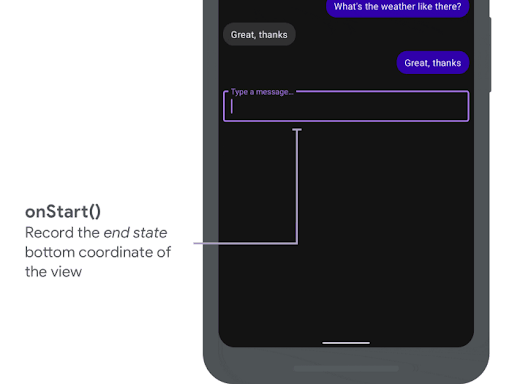
onStart() to record the end state. The following snippet shows a sample call to onStart:
Kotlin
var endBottom = 0f override fun onStart( animation: WindowInsetsAnimationCompat, bounds: WindowInsetsAnimationCompat.BoundsCompat ): WindowInsetsAnimationCompat.BoundsCompat { // Record the position of the view after the IME transition. endBottom = view.bottom.toFloat() return bounds }
Java
float endBottom; @NonNull @Override public WindowInsetsAnimationCompat.BoundsCompat onStart( @NonNull WindowInsetsAnimationCompat animation, @NonNull WindowInsetsAnimationCompat.BoundsCompat bounds ) { endBottom = view.getBottom(); return bounds; }
onProgress is called when the insets change as part of running an animation, so you can override it and be notified on every frame during the keyboard animation. Update the view properties so that the view animates in synchronization with the keyboard.
All the layout changes are complete at this point. For example, if you use View.translationY to shift the view, the value gradually decreases for every call of this method and eventually reaches 0 to the original layout position.
onProgress() to synchronize the animations. The following snippet shows a sample call to onProgress:
Kotlin
override fun onProgress( insets: WindowInsetsCompat, runningAnimations: MutableList<WindowInsetsAnimationCompat> ): WindowInsetsCompat { // Find an IME animation. val imeAnimation = runningAnimations.find { it.typeMask and WindowInsetsCompat.Type.ime() != 0 } ?: return insets // Offset the view based on the interpolated fraction of the IME animation. view.translationY = (startBottom - endBottom) * (1 - imeAnimation.interpolatedFraction) return insets }
Java
@NonNull @Override public WindowInsetsCompat onProgress( @NonNull WindowInsetsCompat insets, @NonNull List<WindowInsetsAnimationCompat> runningAnimations ) { // Find an IME animation. WindowInsetsAnimationCompat imeAnimation = null; for (WindowInsetsAnimationCompat animation : runningAnimations) { if ((animation.getTypeMask() & WindowInsetsCompat.Type.ime()) != 0) { imeAnimation = animation; break; } } if (imeAnimation != null) { // Offset the view based on the interpolated fraction of the IME animation. view.setTranslationY((startBottom - endBottom) * (1 - imeAnimation.getInterpolatedFraction())); } return insets; }
Optionally, you can override onEnd. This method is called after the animation is over. This is a good time to clean up any temporary changes.
Additional resources
- WindowInsetsAnimation on GitHub.