Summary: in this tutorial, you’ll how to learn how to use the Oracle UPDATE statement to modify data in a table.
Introduction to the Oracle UPDATE statement #
To changes existing values in a table, you use the following Oracle UPDATE statement:
UPDATE table_name SET column1 = value1, column2 = value2, column3 = value3, ... WHERE condition; Code language: SQL (Structured Query Language) (sql)In this syntax:
- First, specify the name of the table which you want to update.
- Second, provider the name of the column and its news value you want to modify. If you update more than two columns, you separate each expression
column = valueby a comma. Thevalue1,value2, orvalue3can be literals or a subquery that returns a single value. Note that theUPDATEstatement allows you to update as many columns as you want. - Third, specify which row to update in the condition of the
WHEREclause. TheWHEREclause is optional. If you omit it, theUPDATEstatement will update all rows of the table.
Oracle UPDATE examples #
Let’s create a new table with some sample data for the demonstration.
First, create a new table named parts:
CREATE TABLE parts ( part_id NUMBER GENERATED BY DEFAULT AS IDENTITY, part_name VARCHAR(50) NOT NULL, lead_time NUMBER(2,0) NOT NULL, cost NUMBER(9,2) NOT NULL, status NUMBER(1,0) NOT NULL, PRIMARY KEY (part_id) ); Code language: SQL (Structured Query Language) (sql)Second, insert some sample data to the parts table:
INSERT INTO parts (part_name,lead_time,cost,status) VALUES ('sed dictum',5,134,0); INSERT INTO parts (part_name,lead_time,cost,status) VALUES ('tristique neque',3,62,1); INSERT INTO parts (part_name,lead_time,cost,status) VALUES ('dolor quam,',16,82,1); INSERT INTO parts (part_name,lead_time,cost,status) VALUES ('nec, diam.',41,10,1); INSERT INTO parts (part_name,lead_time,cost,status) VALUES ('vitae erat',22,116,0); INSERT INTO parts (part_name,lead_time,cost,status) VALUES ('parturient montes,',32,169,1); INSERT INTO parts (part_name,lead_time,cost,status) VALUES ('metus. In',45,88,1); INSERT INTO parts (part_name,lead_time,cost,status) VALUES ('at, velit.',31,182,0); INSERT INTO parts (part_name,lead_time,cost,status) VALUES ('nonummy ultricies',7,146,0); INSERT INTO parts (part_name,lead_time,cost,status) VALUES ('a, dui.',38,116,0); INSERT INTO parts (part_name,lead_time,cost,status) VALUES ('arcu et',37,72,1); INSERT INTO parts (part_name,lead_time,cost,status) VALUES ('sapien. Cras',40,197,1); INSERT INTO parts (part_name,lead_time,cost,status) VALUES ('et malesuada',24,46,0); INSERT INTO parts (part_name,lead_time,cost,status) VALUES ('mauris id',4,153,1); INSERT INTO parts (part_name,lead_time,cost,status) VALUES ('eleifend egestas.',2,146,0); INSERT INTO parts (part_name,lead_time,cost,status) VALUES ('cursus. Nunc',9,194,1); INSERT INTO parts (part_name,lead_time,cost,status) VALUES ('vivamus sit',37,93,0); INSERT INTO parts (part_name,lead_time,cost,status) VALUES ('ac orci.',35,134,0); INSERT INTO parts (part_name,lead_time,cost,status) VALUES ('arcu. Aliquam',36,154,0); INSERT INTO parts (part_name,lead_time,cost,status) VALUES ('at auctor',32,56,1); INSERT INTO parts (part_name,lead_time,cost,status) VALUES ('purus, accumsan',33,12,1); Code language: SQL (Structured Query Language) (sql)Third, retrieve data from the parts table:
SELECT * FROM parts ORDER BY part_name; Code language: SQL (Structured Query Language) (sql)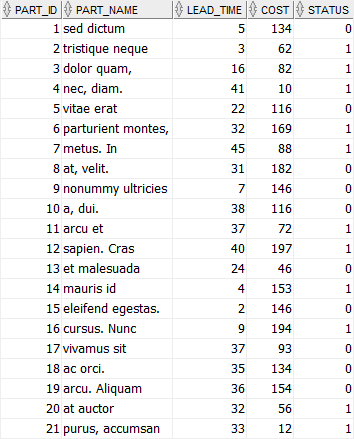
Updating one column of a single row #
The following UPDATE statement changes the cost of the part with id 1:
UPDATE parts SET cost = 130 WHERE part_id = 1;Code language: SQL (Structured Query Language) (sql)To verify the update, you use the following query:
SELECT * FROM parts WHERE part_id = 1; Code language: SQL (Structured Query Language) (sql)
Updating multiple columns of a single row #
The following statement uses the UPDATE statement to update the lead time, cost, and status of the part whose id is 5.
UPDATE parts SET lead_time = 30, cost = 120, status = 1 WHERE part_id = 5; Code language: SQL (Structured Query Language) (sql)
Updating multiple rows example #
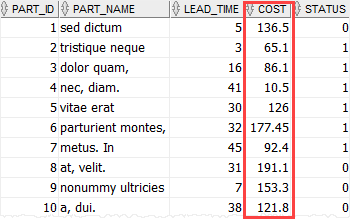
The following uses the UPDATE statement to increase the costs of all parts in the parts table by 5%:
UPDATE parts SET cost = cost * 1.05;Code language: SQL (Structured Query Language) (sql)Here is the result:
Summary #
- Use the Oracle
UPDATEstatement to change existing values in a table.

