Summary: in this tutorial, you will learn how to use the Oracle UNPIVOT clause to transpose columns to rows.
Introduction to Oracle UNPIVOT clause #
The Oracle UNPIVOT clause allows you to transpose columns to rows. The UNPIVOT clause is opposite to the PIVOT clause except that it does not de-aggregate data during the transposing process.
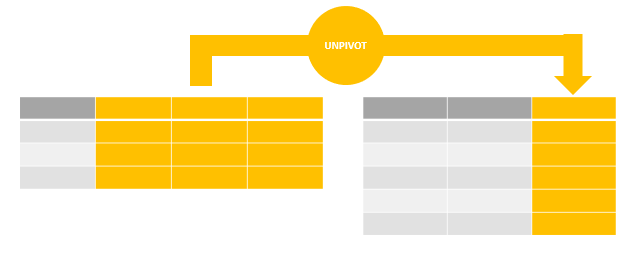
The following illustrates the syntax of the Oracle UNPIVOT clause:
SELECT select_list FROM table_name UNPIVOT [INCLUDE | EXCLUDE NULLS]( unpivot_clause unpivot_for_clause unpivot_in_clause ); Code language: SQL (Structured Query Language) (sql)In this syntax:
- The
unpivot_clauseallows you to specify a name for a column that represents the unpivoted measure values. - The
unpivot_for_clauseallows you to specify the name for each column that will hold the measure’s values. - The
unpivot_in_clausecontains the pivoted columns that will be unpivoted.
The INCLUDE | EXCLUDE NULLS clause allows you to include or exclude null-valued rows.
- The
INCLUDE NULLSclause instructs Oracle to include null-valued rows. - The
EXCLUDE NULLSclause, on the other hand, eliminates null-valued rows from the returned result set.
By default, the unpivot operation excludes null-valued rows.
Let’s take some examples of using the Oracle UNPIVOT clause to get a better understanding.
Setting up a sample table #
First, create a new table called sale_stats for demonstration:
CREATE TABLE sale_stats( id INT PRIMARY KEY, fiscal_year INT, product_a INT, product_b INT, product_c INT ); Code language: SQL (Structured Query Language) (sql)Second, insert some rows into the sale_stats table:
INSERT INTO sale_stats(id, fiscal_year, product_a, product_b, product_c) VALUES(1,2017, NULL, 200, 300); INSERT INTO sale_stats(id, fiscal_year, product_a, product_b, product_c) VALUES(2,2018, 150, NULL, 250); INSERT INTO sale_stats(id, fiscal_year, product_a, product_b, product_c) VALUES(3,2019, 150, 220, NULL); Code language: SQL (Structured Query Language) (sql)Third, query data from the sale_stats table:
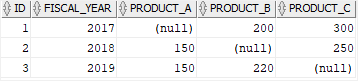
SELECT * FROM sale_stats; Code language: SQL (Structured Query Language) (sql)Here is the output:
Oracle UNPIVOT examples #
This statement uses the UNPIVOT clause to rotate columns product_a, product_b, and product_c into rows:
SELECT * FROM sale_stats UNPIVOT( quantity -- unpivot_clause FOR product_code -- unpivot_for_clause IN ( -- unpivot_in_clause product_a AS 'A', product_b AS 'B', product_c AS 'C' ) ); Code language: SQL (Structured Query Language) (sql)In this example:
The unpivot_clause is quantity which is a column that represents the unpivoted values from the product_a, product_b, and product_c columns.
The unpivot_for_clause is FOR product_code, which is the column that will hold the measure’s values.
The unpivot_in_clause clause is:
IN ( -- unpivot_in_clause product_a AS 'A', product_b AS 'B', product_c AS 'C' ) Code language: SQL (Structured Query Language) (sql)which instructs Oracle to unpivot values in the product_a, product_b, and product_c columns.
The following picture shows the output:
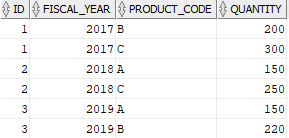
By default, the UNPIVOT operation excludes null-valued rows, therefore, you don’t see any NULL in the output.
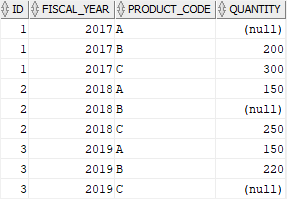
The following example uses the UNPIVOT clause to transpose values in the columns product_a, product_b, and product_c to rows, but including null-valued rows:
SELECT * FROM sale_stats UNPIVOT INCLUDE NULLS( quantity FOR product_code IN ( product_a AS 'A', product_b AS 'B', product_c AS 'C' ) ); Code language: SQL (Structured Query Language) (sql)Here is the output:
Oracle unpivot multiple columns #
Let’s see an example of unpivoting multiple columns.
First, drop and recreate the sale_stats table:
DROP TABLE sale_stats; CREATE TABLE sale_stats( id INT PRIMARY KEY, fiscal_year INT, a_qty INT, a_value DEC(19,2), b_qty INT, b_value DEC(19,2) ); Code language: SQL (Structured Query Language) (sql)Second, insert rows into the sale_stats table:
INSERT INTO sale_stats(id, fiscal_year, a_qty, a_value, b_qty, b_value) VALUES(1, 2018, 100, 1000, 2000, 4000); INSERT INTO sale_stats(id, fiscal_year, a_qty, a_value, b_qty, b_value) VALUES(2, 2019, 150, 1500, 2500, 5000); Code language: SQL (Structured Query Language) (sql)Third, query data from the sale_stats table:
SELECT * FROM sale_stats; Code language: SQL (Structured Query Language) (sql)
Finally, use the UNPIVOT clause to transpose the values in the column a_qty, a_value, b_qty, and b_value into rows:
SELECT * FROM sale_stats UNPIVOT ( (quantity, amount) FOR product_code IN ( (a_qty, a_value) AS 'A', (b_qty, b_value) AS 'B' ) ); Code language: SQL (Structured Query Language) (sql)Here is the result set:
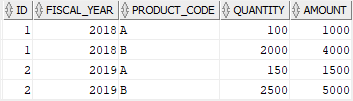
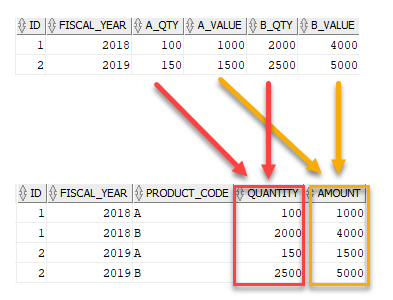
This picture illustrates the transposing process:
Summary #
- Use the Oracle
UNPIVOTclause to transpose columns to rows.

