Summary: in this tutorial, you will learn how to use the Oracle UNION operator to combine result sets returned by two or more queries.
Introduction to Oracle UNION operator #
The UNION operator is a set operator that combines the result sets of two or more SELECT statements into a single result set.
Here’s the syntax of the UNION operator that combines the result sets of two queries:
SELECT select_list_1 FROM T1 UNION SELECT select_list_2 FROM T2;Code language: SQL (Structured Query Language) (sql)In this statement, the queries must follow these rules:
- The number of columns in the
select_list_1andselect_list_2must be the same. - The data type of the corresponding column must be in the same data type group, such as number or character.
By default, the UNION operator returns the unique rows from both result sets. If you want to retain the duplicate rows, you explicitly use UNION ALL as follows:
SELECT column_list FROM T1 UNION ALL SELECT column_list FROM T2;Code language: SQL (Structured Query Language) (sql)Oracle UNION illustration #
Suppose we have two tables T1 and T2:
- T1 has three rows 1, 2 and 3
- T2 also has three rows 2, 3 and 4
The following picture illustrates the UNION of T1 and T2 tables:
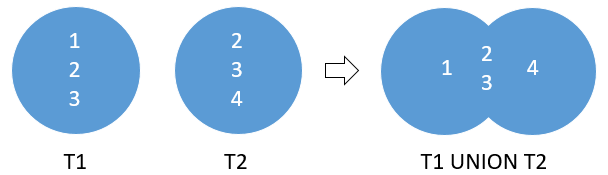
The UNION operator removes the duplicate rows 2 and 3.
Note that if the T1 table has 1, 2, 2, 3 and T2 table has 2, 3, 4, 4. The UNION operator also returns distinct rows from both result sets which are 1, 2, 3, and 4.
The following picture illustrates the result of the UNION ALL of the T1 and T2 tables:
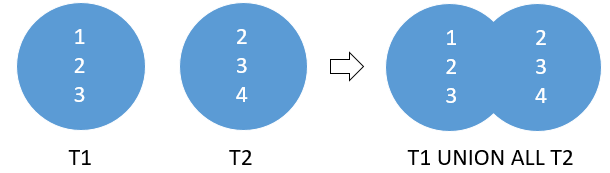
The result shows that the UNION ALL operator retains the duplicate rows 2 and 3.
Oracle UNION Operator examples #
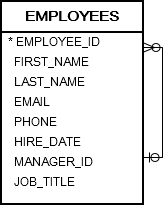
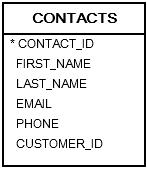
See the following employees and contacts tables in the sample database.
Oracle UNION example #
Suppose you have to send out emails to the email addresses of both employees and contacts tables. To accomplish this:
- First, you need to compose a list of email addresses of employees and contacts.
- Then, you can send out the emails to the list.
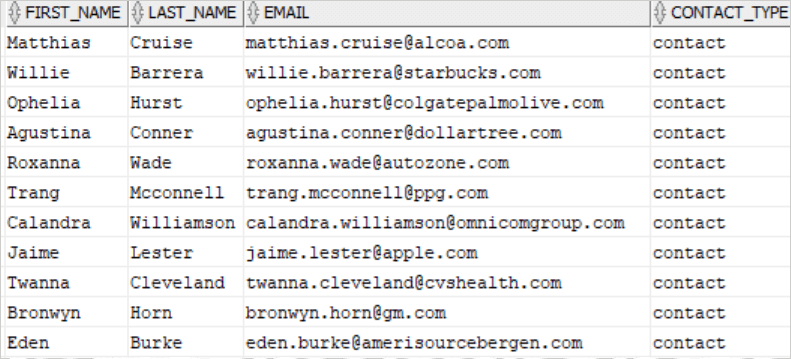
The following statement uses the UNION operator to build a list of contacts from the employees and contacts tables:
SELECT first_name, last_name, email, 'contact' contact_type FROM contacts UNION SELECT first_name, last_name, email, 'employee' contact_type FROM employees;Code language: SQL (Structured Query Language) (sql)Output:
Oracle UNION and ORDER BY example #
To sort the result set returned by the UNION operator, you add an ORDER BY clause to the last SELECT statement as shown below:
SELECT first_name || ' ' || last_name name, email, 'contact' type FROM contacts UNION SELECT first_name || ' ' || last_name name, email, 'employee' type FROM employees ORDER BY name DESC;Code language: SQL (Structured Query Language) (sql)Output:
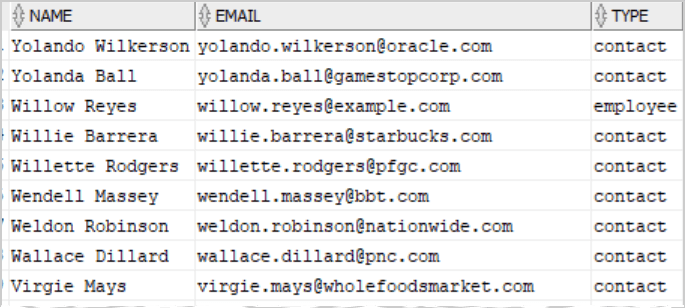
In this example, we sorted the list by name, concatenating the first and last names.
Oracle UNION ALL operator example #
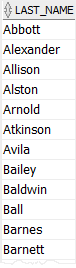
The following statement returns the unique last names of employees and contacts:
SELECT last_name FROM employees UNION SELECT last_name FROM contacts ORDER BY last_name;Code language: SQL (Structured Query Language) (sql)The query returned 357 unique last names.
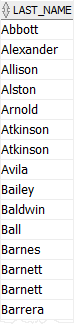
However, if you use UNION ALL instead of UNION in the query as follows:
SELECT last_name FROM employees UNION ALL SELECT last_name FROM contacts ORDER BY last_name;Code language: SQL (Structured Query Language) (sql)The query returns 426 rows. In addition, some rows are duplicates, e.g., Atkinson, Barnett. This is because the UNION ALL operator does not remove duplicate rows.
Oracle UNION vs. JOIN #
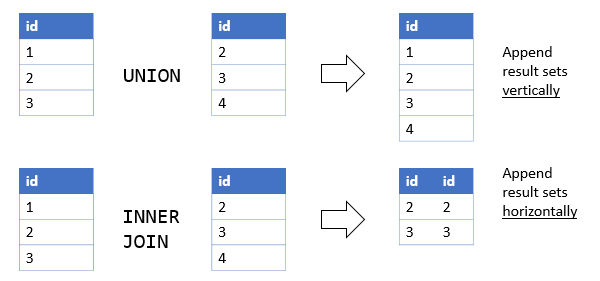
A UNION places a result set on top of another, meaning it appends result sets vertically. However, a join such as INNER JOIN or LEFT JOIN combines result sets horizontally.
The following picture illustrates the difference between union and join:
Summary #
- Use the Oracle
UNIONoperator to combine the result sets of multiple queries.

